LTX 2.3 is an advanced AI video generation model designed for creators who want stronger motion control, sharper visual output, and more flexible video workflows. It supports text-to-video, image-to-video, and structured prompt-based generation, making it useful for product demos, social ads, avatar videos, cinematic clips, and short-form marketing content.
Compared with earlier LTX models, LTX 2.3 focuses more on high-resolution output, prompt accuracy, smoother character movement, and production-ready video quality. It is especially popular among users searching for LTX 2.3 workflow, LTX 2.3 ComfyUI, and LTX 2.3 prompting guide because many creators want both creative control and practical video results.


LTX 2.3 stands out because it can turn still images, character references, and written prompts into dynamic AI videos with realistic movement and cinematic framing. For creators, this means a product photo can become a polished ad clip, an AI avatar can become a talking or lifestyle video, and a simple prompt can become a complete short-form scene.
Data Point | LTX 2.3 | Wan 2.2 | Runway Gen-4 |
|---|---|---|---|
Main Model Type | AI video generation model | Open-source video generation model | Closed web/API video model |
Text to Video | Yes | Yes, T2V-A14B | Yes |
Image to Video | Yes | Yes, I2V-A14B / TI2V-5B | Yes |
Max Resolution | 4K: 3840×2160 / 2160×3840 | 720P: 1280×720; TI2V uses 1280×704 or 704×1280 | Official Gen-4 page does not publish fixed output specs |
Supported FPS | 24 / 25 / 48 / 50 fps | 24 fps for TI2V-5B | Official Gen-4 page does not publish fixed FPS |
Duration Options | 6, 8, 10s for 4K/1440p; up to 20s at 1080p Fast mode | TI2V-5B example targets 5-second 720P generation | Commonly used for short clips; exact public specs vary by product plan |
Aspect Ratio | 16:9 and 9:16 | Depends on task and input image; 16:9 / portrait possible through size settings | Multiple creative formats, web-based |
Open Source | No for API model workflow | Yes, GitHub repo and weights released | No |
Local Setup Needed | No if using API/online workflow | Yes for local use | No |
Hardware Requirement | Cloud/API based | A14B examples require at least 80GB VRAM; TI2V-5B can run on 24GB VRAM such as RTX 4090 | Cloud/browser based |
Best For | 4K AI video generation, image-to-video, portrait/landscape videos, high-FPS commercial clips | Developers, ComfyUI users, open-source testing, local model workflows | Fast creator workflow, consistent characters, consistent objects, branded visual scenes |
Main Limitation | Advanced model options may still require workflow understanding | Higher setup difficulty and GPU requirements | Less transparent model specs and less local control |
You should use an LTX 2.3 alternative when you want the result of an AI video generation model without dealing with ComfyUI setup, GitHub downloads, VRAM requirements, model files, or complex workflow configuration. Many users search for LTX 2.3 download, LTX 2.3 ComfyUI workflow, and LTX 2.3 vram requirements because local setup can be difficult for everyday creators.
An online alternative is better when your goal is fast production: product demos, AI influencer videos, avatar videos, social ads, image-to-video clips, and short-form marketing content. Instead of spending time configuring nodes or testing local models, creators can focus on the prompt, visual style, aspect ratio, duration, and final video output.

Step 1: Sign Up or Log In
Open the AI influencer generator and sign up or log in before creating your avatar. You can continue with Google, Discord, or email. This step gives you access to the full AI video generator workflow, including avatar creation, image to video, text to video, and short-form content generation.


Step 2: Create Your Female AI Avatar
Use the AI influencer generator to define the avatar’s look before generating content. Adjust age, height, weight, body type, eye color, hair style, and facial details, then add a clear prompt describing the portrait style. This step helps create a realistic female AI avatar that can later be used for image to video, text to video, avatar videos, and social media content.
Prompt: Ultra-realistic adult female AI avatar, head-and-shoulders portrait, 25 years old, elegant oval face, warm olive skin tone, long voluminous dark brown wavy hair swept to one side, soft brown eyes, defined brows, natural glossy makeup, subtle freckles, confident gentle smile, slim feminine build, wearing a simple black camisole top, clean indoor background, soft natural window light, realistic skin texture, sharp facial details, shallow depth of field, premium lifestyle portrait photography, 85mm lens, no brand logos, no text, no watermark.
Step 3: Write a Text to Video Prompt
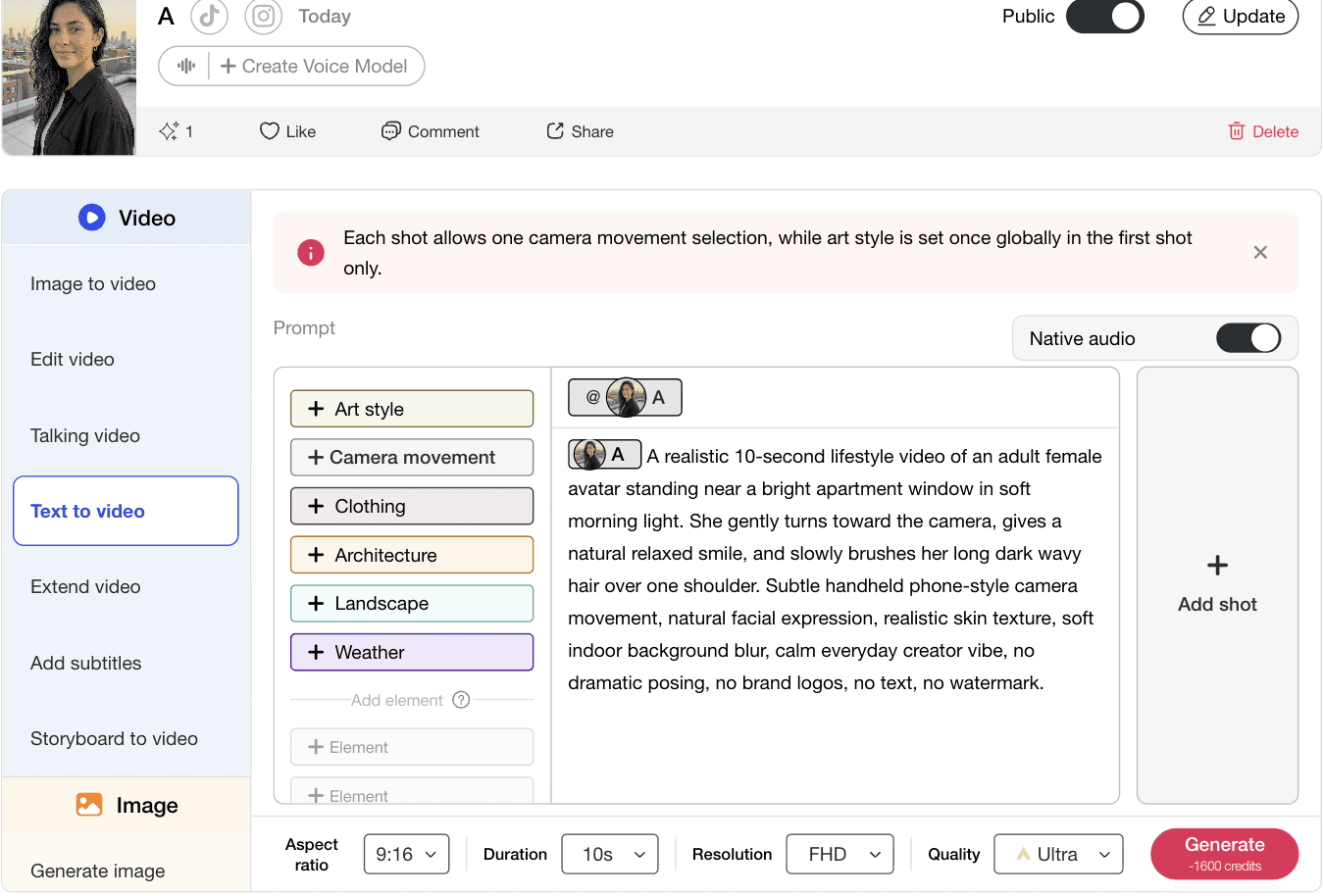
Enter a natural 10-second text to video prompt that describes the subject, action, setting, camera movement, and visual style. For a realistic AI video generation result, keep the scene simple: one adult female avatar, soft indoor light, natural facial expression, subtle handheld movement, and no dramatic posing. This helps the AI video generator create a clean avatar video with smoother motion and better prompt accuracy.
Prompt: A realistic 10-second lifestyle video of an adult female avatar standing near a bright apartment window in soft morning light. She gently turns toward the camera, gives a natural relaxed smile, and slowly brushes her long dark wavy hair over one shoulder. Subtle handheld phone-style camera movement, natural facial expression, realistic skin texture, soft indoor background blur, calm everyday creator vibe, no dramatic posing, no brand logos, no text, no watermark.

Step 4: Choose Video Settings and Generate
Select the aspect ratio, duration, resolution, and quality before generating. For short-form content, 9:16 and 10s work well for avatar videos, social media videos, and mobile-first AI video generation.
You can also use other available video tools such as Image to Video, Edit Video, Talking Video, Extend Video, Add Subtitles, Storyboard to Video, and Generate Image to create more complete content workflows.































Create LTX 2.3 AI Videos Without ComfyUI Setup
APOB AI works as an easier LTX 2.3 alternative for creators who want AI video generation without installing ComfyUI, downloading model files, or checking VRAM requirements. Instead of building a local LTX 2.3 workflow from GitHub, you can create text to video, image to video, avatar videos, and short-form marketing clips directly online.
Turn Prompts and Images Into Realistic AI Video Content
With APOB AI, you can use LTX 2.3-style text to video and image to video workflows to create product demos, social ads, AI influencer clips, and avatar videos. For users searching for an LTX 2.3 prompting guide or LTX 2.3 video generation model, APOB AI makes the process simpler by focusing on clear prompts, realistic motion, and ready-to-use video output.
Build a Faster Workflow for Social Ads and Avatar Videos
APOB AI is useful when you need a practical LTX 2.3 AI video generation workflow for real content production. You can generate images, create avatars, make talking videos, extend clips, add subtitles, and turn scenes into mobile-first videos. It is a better fit when your goal is fast content creation rather than managing LTX 2.3 download, LoRA setup, or local model configuration.
Create Product Demos and Social Ads with LTX 2.3 AI Video Generation
Use LTX 2.3 to turn a short product idea into a polished AI video generation scene for ads, landing pages, and social media campaigns. A clear LTX 2.3 prompting guide can describe the product, camera movement, lighting, background, and final call-to-action, helping creators produce product demos without a traditional shoot. This use case fits searches around ltx 2.3 ai video generation and ltx 2.3 video generation model. (Lightricks' AI movie maker generates entire movies, 2026)
Turn Portraits and Brand Images into LTX 2.3 Image to Video Content
LTX 2.3 image to video is useful for creators who already have a product photo, avatar image, or brand visual and want to animate it into a natural short video. The LTX 2.3 workflow can add facial movement, camera motion, lifestyle actions, and cinematic lighting while keeping the original subject recognizable. This is especially useful for AI influencer clips, creator videos, fashion visuals, and mobile-first content. (AI film production tool and I'm torn over how easily it let me storyboard and create professional video projects)
Build a Flexible LTX 2.3 Workflow for Advanced Video Creation
For technical creators, LTX 2.3 ComfyUI, LTX 2.3 GitHub, LTX 2.3 download, and LTX 2.3 LoRA searches usually point to one goal: more control over the video pipeline. This use case is best for teams testing custom styles, reusable characters, video to video experiments, and repeatable production workflows. LTX-2.3 fits users who want to move beyond one-off clips and build a structured AI video workflow. (LTX-2: Efficient Joint Audio-Visual Foundation Model)
No Credit Card Required






1.Strong LTX 2.3 AI Video Generation Quality
LTX 2.3 is useful for creators who need realistic AI video generation with smoother motion, clearer subject detail, and stronger prompt accuracy. As an LTX 2.3 video generation model, it works well for product demos, avatar videos, cinematic clips, and short-form social content where the final output needs to look polished instead of experimental.
2. Flexible LTX 2.3 Workflow for Text to Video and Image to Video
A major advantage of LTX 2.3 is its flexible workflow. Users can build scenes from text prompts, animate still images with LTX 2.3 image to video, or test more advanced setups through LTX 2.3 ComfyUI and LTX 2.3 GitHub workflows. This makes it useful for both creators who want fast content and technical users who want more control.
3. LTX 2.3 Supports More Production-Ready Creative Workflows
LTX 2.3 is not limited to simple prompt-to-video generation. It can support broader AI video generation workflows such as text to video, image to video, video to video, avatar videos, product demos, and cinematic short-form content. This makes LTX 2.3 useful for creators who want one video generation model that can cover both experimental prompt testing and more polished commercial video production.
Local Setup Can Be Difficult for Non-Technical Users
The main drawback is that many LTX 2.3 workflows involve ComfyUI, GitHub downloads, LoRA setup, model files, and VRAM requirements. Users searching for LTX 2.3 download, LTX 2.3 ComfyUI workflow, or LTX 2.3 vram requirements may find the technical setup too complex if they only want to create AI videos quickly.
What is LTX 2.3?
LTX 2.3 is an AI video generation model designed for creating realistic short videos from prompts, images, and structured video workflows. It is commonly searched as ltx 2.3, ltx-2.3, and ltx 2.3 video generation model.
What can I create with LTX 2.3?
You can use LTX 2.3 AI video generation for product demos, avatar videos, social ads, cinematic clips, AI influencer videos, and short-form marketing content. It is especially useful when you need realistic motion and prompt-based video control.
Is LTX 2.3 good for text to video?
Yes. LTX 2.3 works well for text to video when the prompt clearly describes the subject, scene, action, camera movement, lighting, and visual style. A detailed LTX 2.3 prompting guide can help improve the final result.
Does LTX 2.3 support image to video?
Yes. LTX 2.3 image to video is one of its most useful workflows. You can start from a portrait, product image, character reference, or scene image, then animate it into a short AI video with natural movement.
What is an LTX 2.3 workflow?
An LTX 2.3 workflow is the full process used to generate a video, from writing the prompt and choosing references to setting resolution, duration, aspect ratio, and output quality. Some users build this workflow in ComfyUI, while others use online tools.
What is LTX 2.3 ComfyUI?
LTX 2.3 ComfyUI refers to using LTX 2.3 inside a node-based local video generation workflow. It gives technical users more control, but it also requires setup, model files, compatible nodes, and enough GPU power.
Do I need ComfyUI to use LTX 2.3?
Not always. Many technical users search for ltx 2.3 comfyui, but creators who only want fast AI video generation may prefer an online LTX 2.3 alternative that does not require local setup, GitHub downloads, or VRAM configuration.
What is the best LTX 2.3 prompt structure?
A strong LTX 2.3 prompt usually includes the subject, scene, action, camera movement, lighting, duration, style, and restrictions such as no text, no watermark, and no brand logos. This helps the model understand the intended video.
Is LTX 2.3 good for avatar videos?
Yes. LTX 2.3 can be used to create avatar videos when you provide a clear character description or reference image. It works best with simple natural actions, controlled camera movement, and realistic facial expressions.
Can LTX 2.3 make product videos?
Yes. LTX 2.3 video generation can be used for product demos, product close-ups, lifestyle ads, and short promotional videos. For better results, describe the product, setting, camera movement, lighting, and intended commercial style.
What is LTX 2.3 video to video?
LTX 2.3 video to video refers to using an existing video as part of the generation or transformation process. This type of workflow is useful for restyling footage, testing motion ideas, or building variations from a base clip.
Is LTX 2.3 open source?
Some LTX-related projects and workflows are discussed through GitHub and open-source communities, which is why ltx 2.3 github has search demand. However, users should check the official source for the exact model access, license, and usage rules.
Can I download LTX 2.3?
Many users search for ltx 2.3 download because they want local control. Whether downloading is practical depends on the available model files, workflow support, hardware, and license. Non-technical users may prefer an online workflow instead.
What are the LTX 2.3 VRAM requirements?
LTX 2.3 VRAM requirements depend on the workflow, resolution, model version, and whether you use local generation. Higher resolution and longer video output usually require stronger GPU resources, which is why many users look for online alternatives.
What is LTX 2.3 LoRA?
LTX 2.3 LoRA refers to customization workflows that may help adapt style, characters, or visual consistency. It is more relevant for advanced users who understand model training, local setup, and repeatable AI video workflows.
What is the difference between LTX 2.3 and Wan 2.2?
LTX 2.3 vs Wan 2.2 is a common comparison because both are used for AI video generation. LTX 2.3 is often positioned around high-quality video workflows, while Wan 2.2 is popular among open-source and local model users.
Is LTX 2.3 better than Runway?
LTX 2.3 and Runway serve different needs. LTX 2.3 appeals to users looking for workflow control, image to video, and technical flexibility, while Runway is known for an easier browser-based creative workflow and polished creator tools.
Is LTX 2.3 free?
LTX 2.3 free searches usually come from users looking for open access, demos, or local workflows. Actual pricing and access depend on the platform, API, or tool used to run the model, so users should check the current provider before starting.
What is the difference between Runway and LTX 2.3?
Runway is a closed web-based AI video generator built for fast creator workflows, polished visual output, and easier browser-based production. LTX 2.3 is more focused on AI video generation model flexibility, with stronger interest around LTX 2.3 workflow, LTX 2.3 image to video, LTX 2.3 ComfyUI, GitHub-related setup, and prompt-level control. In simple terms, Runway is easier for quick creative production, while LTX 2.3 is better for users who want deeper workflow control and model-level experimentation.
What is the difference between Wan 2.2 and LTX 2.3?
Wan 2.2 is an open-source AI video generation model that appeals to developers, ComfyUI users, and local workflow builders. It is often used for text to video, image to video, and technical video model testing. LTX 2.3 is usually positioned around higher-resolution AI video generation, LTX 2.3 prompting guide use cases, image-to-video workflows, and more production-focused video output. Wan 2.2 is better if you want open-source control, while LTX 2.3 is better if you want a more advanced video generation workflow with polished commercial results.


