Looking for the best free online image merger tools 2026? Stop struggling with awkward cut-and-paste Photoshop jobs. Our ai image merger allows you to combine disparate elements into a single, flawless image.
Your Problem: Let's say you are an e-commerce brand owner or a UI designer. You have a crisp, well-lit studio photo of your new perfume bottle, and you want to seamlessly place it into a lifestyle shot with a model. Because APOB AI specializes in portrait-based creations, merging these two elements into a cohesive, realistic scene is effortless. Here is exactly how to do it:
Step 1: create your character model for image merge
Your foundational step is establishing your human subject. First, upload a clear, high-quality image of the person you want to use for the merge. The AI will use this to create your custom character model. Once the model is ready, you can move on to the editing phase.

Step 2: establish your base canvas
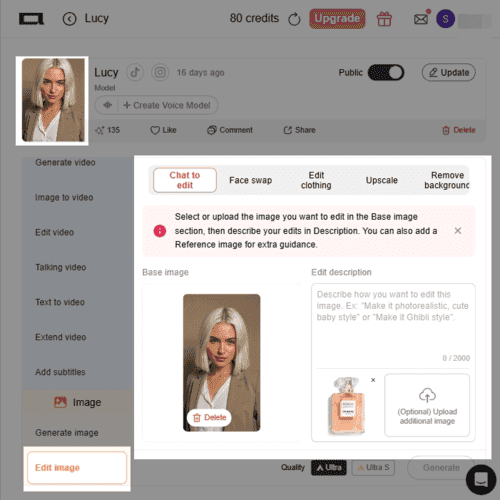
Navigate to the "Edit image" tab on your dashboard.
Select the "Chat to edit" workspace.
Click "Upload image" and select your primary photo.
Example: In our perfume campaign scenario, this is where you upload the image of your newly generated model.
Step 3: introduce your secondary element for AI image merge
Look to the right side of the editing panel. Just below the text box, you will see a button labeled "(Optional) Upload additional image." Upload your second visual element here.
Example: Following the scenario above, this is where you upload the studio photo of your perfume product.

Step 4: write down your requirement to merge image with AI
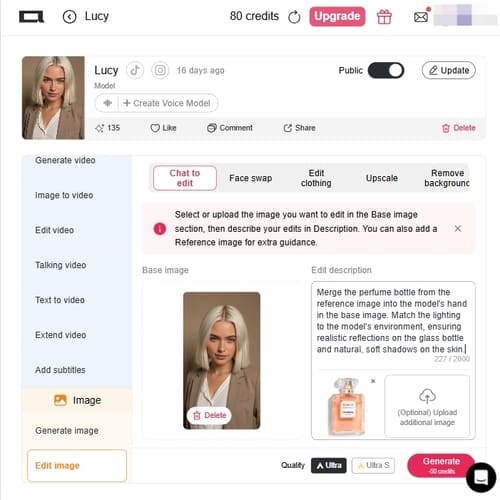
This is the most crucial step. Blindly smashing two images together forces the AI to guess your intent, which often leads to chaotic results. You need to provide a clear text bridge to guide the integration. In the "Edit description" box, give a precise command.
Prompt Example: "Merge the perfume bottle from the reference image into the model's hand in the base image. Match the lighting to the model's environment, ensuring realistic reflections on the glass bottle and natural, soft shadows on the skin."
Step 5: choose image quality and generate it
To ensure the transition edges between your two merged images are completely invisible, you need maximum pixel density.
At the bottom of the screen, bypass the "Fast" generation option.
Select the Ultra S quality setting.
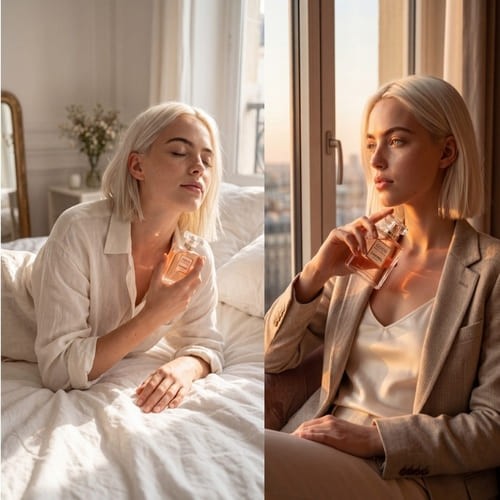
Hit Generate, and watch as the AI flawlessly integrates your product into the portrait scene with perfect color coherence and realism.
Social thumbnails, reels covers, and UGC-style ad creatives
HubSpot’s 2025 social media survey says 56% of marketers are already using AI to create short-form video and 53% are using it to generate images. The same report says 76% believe authentic, relatable social content matters more than polished high-production content, and it identifies Instagram as the top-performing platform for traffic, engagement, and audience growth. That makes AI image merger especially useful for duo thumbnails, “creator + product” composites, behind-the-scenes hero images, and fast content variations that feel native to social instead of obviously studio-made. Social thumbnails, reels covers, and UGC-style ad creatives (1)
E-commerce product images with stronger visual proof
PowerReviews reports that 91% of consumers are more likely to buy a product when reviews include photos and videos, and 23% say they will not purchase if there is no customer visual imagery. In landing-page terms, that supports practical scenarios like placing a product packshot into a kitchen, bathroom, desk, or travel scene; adding a model into a campaign visual; or generating customer-style composites for PDPs and ads when a brand needs more creative coverage quickly. (2)
Higher-ticket product visualization and contextual selling
Tilburg University notes that global e-commerce revenue reached $6 trillion in 2024, and summarizes dissertation research showing that interactive or contextual product images can increase purchase intentions, with stronger effects for individual consumers and for higher-priced products. That is a strong data-backed reason to position AI image merger around furniture-in-room scenes, luxury accessory editorials, cosmetics visuals, and higher-consideration product ads where context helps buyers commit. (3)
Professional branding and profile imagery
Extern’s 2025 recap of advice from LinkedIn Corporate Communications Manager Logan White says profiles with a photo can see up to 9x more connection requests, 21x more profile views, and 36x more messages. That makes AI image merger relevant far beyond entertainment. It is useful for polishing a speaker poster, creating a team composite when people were photographed separately, building a “founder on stage” event banner, or generating a cleaner personal-brand hero image from imperfect originals. (4)
Social commerce and live-selling hooks
HubSpot’s 2025 report also cites TikTok data saying 1 in 3 Gen Z users are interested in buying from TikTok Live, and 74% of Gen Z weekly TikTok users would seek more information after seeing an advertised product. That matters because an AI image merger is often the fastest way to create the starting visual for a shoppable clip: put the creator, item, and setting together first, then animate the result into a short ad or live-selling teaser. (5)
Unprecedented Creative Speed:
What used to take hours of meticulous masking, feathering, and color-correcting in traditional software can now be achieved in seconds. You can iterate through dozens of visual concepts in the time it takes to drink a cup of coffee.
Perfect Contextual Lighting:
Traditional merging requires you to manually paint in shadows and reflections. An AI image merger actually understands the 3D geometry of your 2D images, automatically casting accurate shadows and matching environmental lighting.
The Risk of "Blind Blending":
If you simply upload two images and hit generate without providing a descriptive text prompt, the AI has to guess what you want. This can result in chaotic, distorted images where elements are mashed together illogically.
Color Mismatches on Vague Prompts:
If your two source images have drastically different lighting (e.g., one taken at night with a flash, the other taken at noon in the sun), and you don't explicitly command the AI to harmonize the color palette, the merged result can look obviously composited.
No Credit Card Required

Answers about combining and blending images, upload limits, quality, privacy, and commercial use.
Q: Is there a free option to use the AI Image Merger in APOB AI?
A: Yes! You can start experimenting right away with a free membership—no credit card required. We provide you with 80 free credits every single day, giving you plenty of room to test out different prompts and see the merging quality for yourself before committing.
Q: Do I need Photoshop skills to merge images with AI?
A: Not at all. APOB AI replaces complex masking, layering, and color-matching with simple text commands. All you need to do is upload your source images and write a clear description of how you want them integrated. If you're unsure where to start, check out the Pro Prompting Tips in our Use Scenarios above to learn how to write highly effective descriptions.
Q: Can I turn a merged image into a video inside APOB AI?
A: Absolutely. Once you have nailed the perfect merged image, you can seamlessly bring it into our Image-to-Video workspace. With just a few clicks, you can bring your static creation to life and export it in stunning 4K resolution.
Q: Why does my merged image look like a bad copy-paste job with clashing colors?
A: This is a common issue known as "color mismatch." When merging elements from two entirely different environments, you must explicitly tell the AI to unify them. In your prompt, simply add: "Match the color grading and lighting of the base image" to give the AI a clear target for harmonization.
Q: I uploaded a picture of my pet and a space suit, but the AI created a distorted monster. What went wrong?
A: You suffered from the "Frankenstein problem" of blind blending. The AI didn't know how you wanted them combined. You need a semantic bridge. Instead of just uploading the images, add a prompt like: "Place the dog from Image A inside the space helmet of Image B, ensuring the proportions are realistic."


