











Bring your static images to life with APOB AI’s Image to Video Generator. Sign up for free with 80 daily credits! Don't forget to read the guide below!
Are you tired of unpredictable AI video generations? Take full director-level control over your digital creators with APOB AI's highly advanced Image-to-Video capabilities.
Advanced AI Generation Model
Powered by the most advanced AI generation models, APOB AI allows you to unlock multiple AI companions and guarantees exceptional character consistency across all your projects.
Ultra S Quality Video Generation
Push the boundaries of visual fidelity with the exclusive Ultra S quality mode. Choose your perfect duration (4, 5, 10, or 15 seconds) and let the engine render flawless FHD or Cinematic 4K videos. From skin texture to dynamic lighting, experience lifelike resolution that makes your AI creations completely indistinguishable from reality.
POPULAR
Total Narrative Control: Add Last Frame
Stop playing the guessing game with AI hallucinations. Using the innovative "Add last frame" and "Generate last frame from first frame" tools, you can precisely anchor how your video ends. This guarantees a seamless transition from start to finish, perfect for breathtaking morphing effects, wardrobe changes, or flawless looping animations
Dynamic Camera Movement
Transform a flat image into a dynamic storytelling masterpiece. The "+ Camera movement" feature acts as your virtual director's chair, allowing you to add cinematic depth to your image-to-video workflow. Whether it's a slow dolly-in for intimacy or a wide pan to reveal the environment, you dictate the visual rhythm.
Scene Integration: Add Element
Want to place a specific product or background object into your video? The powerful "+ Add element" function allows you to inject up to 3 distinct items directly into your scene before generating. The AI automatically calculates the lighting, shadows, and physics, making it an absolute game-changer for product placements and brand deals.
Built-In Native Audio
Don't just make it move—make it sound real. By toggling the "Native audio" switch, APOB AI synthesizes immersive, context-aware soundscapes and realistic voiceovers right alongside your video rendering. No more juggling third-party audio software!
1. Portrait Micro-Motions & Emotion (Best for: Portrait photography, bringing old photos to life)
Prompt: Subtle natural breathing, gentle wind blowing hair, slight head turn, eyes blinking naturally, cinematic soft lighting, 4k resolution, highly detailed. Expert Insight: For portraits, too much movement easily leads to facial distortion. Using terms like subtle and natural breathing brings the subject to life while locking in their facial features.
2. Cinematic Spatial Depth (Best for: Story-driven stills, scenes with deep perspective)
Prompt: Slow dolly in towards the main subject, shallow depth of field, background blur increasing, cinematic tension, smooth camera movement. Expert Insight: A dolly in is the most effective camera move for creating immersion. Paired with a shallow depth of field, it visually separates the subject from the background, turning a flat 2D image into a rich 3D space.
3. Nature Time-Lapse (Best for: Landscapes, architecture)
Prompt: Time-lapse effect, fast-moving volumetric clouds, day to night transition, water rippling gently, golden hour lighting, National Geographic style. Expert Insight: Forcing direct, real-time motion on static landscapes can look artificial. Using a time-lapse effect to accelerate clouds or lighting transitions drastically elevates the cinematic quality.
4. Premium Commercial Showcase (Best for: E-commerce products, macro photography)
Prompt: Macro photography, slow camera pan around the object, subtle condensation dripping, dynamic studio lighting, extremely realistic, 8k. Expert Insight: Commercial shots require a premium feel. A pan around highlights the product's volume and 3D shape, while adding physical details like condensation dripping or smoke breaks the static nature of still life.
5. Magical & Sci-Fi Particle Effects (Best for: Anime, game concept art, fantasy illustrations)
Prompt: Glowing particles swirling in the air, subtle magical energy aura around the subject, dramatic contrasting shadows, slow motion, epic fantasy atmosphere. Expert Insight: For 2D illustrations or concept art, you generally don't want to deform the main character. Instead, add environmental VFX (like glowing particles or an energy aura) to build visual tension without breaking the original drawing.
6. High-Dynamic Physical Destruction/Fluids (Best for: Abstract art, surrealism)
Prompt: Slow motion 120fps, object shattering into thousands of glass pieces flying toward the camera, high contrast, cinematic lighting, 3D render style. Expert Insight: This is the ultimate test for an AI physics engine. Explicitly state the material (e.g., glass pieces) and the direction of movement (flying toward the camera) to create a massive visual impact.
7. Atmospheric Lighting Shifts (Best for: Street photography, cyberpunk, moody shots)
Prompt: Neon lights flickering, heavy rain falling, water reflections on the ground rippling, camera slowly tilting up, moody cinematic atmosphere. Expert Insight: Keep the subject entirely still and animate the environment instead. Lights flickering and rain falling create an incredibly powerful narrative and emotional feel.
Pain Point 1: Severe morphing, melting, or "AI Hallucinations"
This typically occurs when the motion scale is pushed too high or the prompt introduces new objects that don't exist in the original image (e.g., prompting "a dog catching a frisbee" when the original image only features a dog). To prevent this, strip your prompts down to focus strictly on verbs—like camera moves or natural elements—and avoid adding new nouns. Additionally, if your platform offers a Motion Brush or Masking tool, use it to manually highlight only the specific areas you want to animate while ensuring the background remains firmly static.
Pain Point 2: The image is completely static and won't move
When an image refuses to animate, it’s usually because the prompt lacks specific motion instructions or the AI has determined that the composition shouldn't naturally move. You can easily fix this by forcing the AI's hand with strong camera movement terminology, such as Pan Left / Right, Tilt Up / Down, or Zoom In / Out. If camera moves aren't enough, introduce powerful environmental forces like strong wind or rushing water to force the pixels to displace and create dynamic motion.
Pain Point 3: Sudden shifts in lighting or art style, losing the original aesthetic
If your video loses the original vibe, the AI has likely failed to lock onto your initial art style during frame generation, causing it to "drift" into a generic, default AI look. You can solve this by acting as a "style lock"—simply re-anchor the original aesthetic at the very end of your motion prompt. For example, if you uploaded a black-and-white cyberpunk shot, ensure your prompt concludes with descriptive keywords like monochrome, cyberpunk style, high contrast, cinematic lighting to keep the AI strictly on track.
Step 1: Sign up for free membership
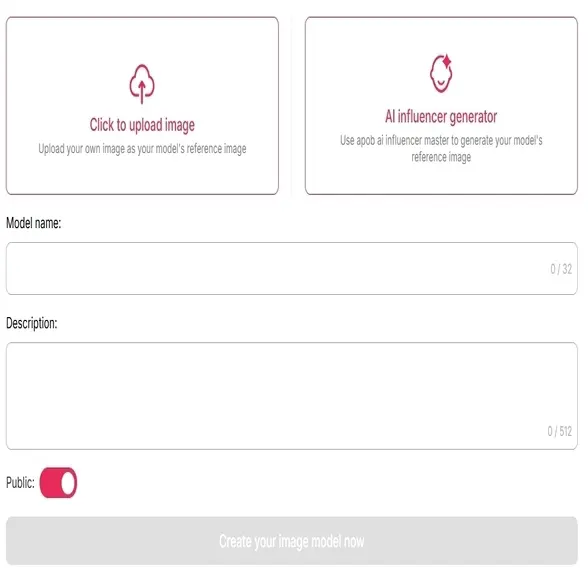
To begin, click the button below, sign up for free membership and then navigate to the "Create Portrait Model" tab.
If you have a personal reference image, click "Click to upload image" and use your own photo.
If not, you can generate a custom AI model using the “AI Influencer Generator.” Simply select your preferred style or theme, add a name and description, and click "Generate" to bring your AI Portrait to life.
Step 2: Pick Your Starting Picture
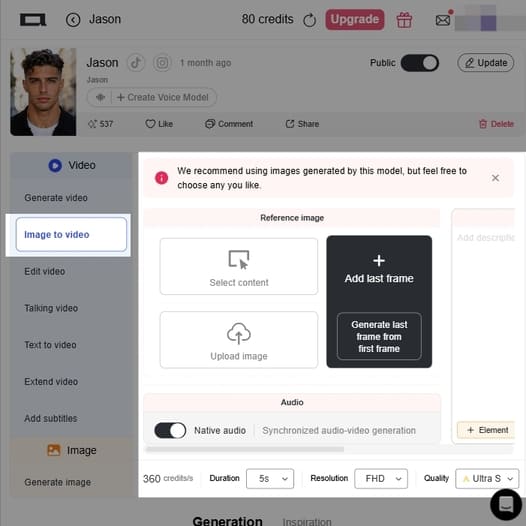
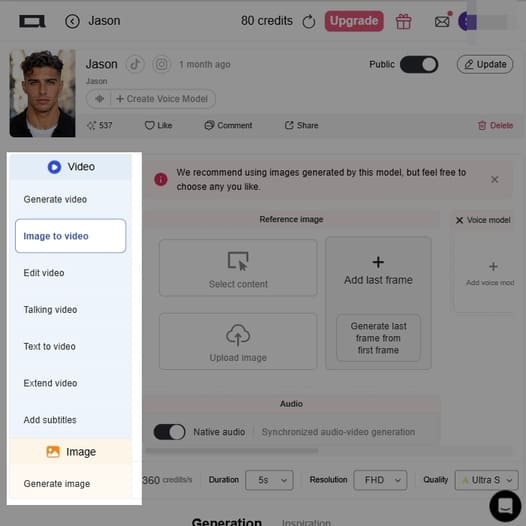
First things first, make sure you've clicked on Image to video on the left-hand menu.
Upload image: Have a great picture on your computer? Just upload it here.
Want a specific ending? If you know exactly how you want the video to wrap up, you can drop a final picture into the Add last frame box, or just let the AI figure out the transition for you.
Step 3: Write down your requirement for the video
Tell the AI What to Do!
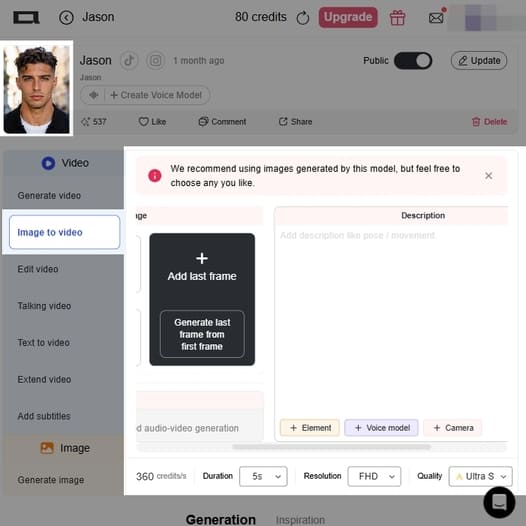
Hop over to the Description box on the right. This is where the fun happens! Tell the AI exactly how you want your character to move, pose, or how the camera should act. Need a little help writing it? The handy + Element, + Voice model, and + Camera buttons right below are perfect shortcuts to help you get the exact vibe you want.
Step 4: Enhance your video with premium features.
For professional-quality results, consider trying the "Ultra S" function, which provides a higher level of detail and smoother motion.
Want Some Sound?
If you want the AI to create audio that syncs up perfectly with your new video, just flip the Native audio switch on.
Tweak the Final Details
Look down at the bottom toolbar. Here’s where you set up the technical stuff:
Duration: How long do you want the clip to be? (It's set to 5 seconds right now).
Resolution: How crisp should it look? (Like FHD).
Quality: Choose between Fast, Best, Ultra, or Ultra S. Just keep an eye on your credits—the higher the quality, the more credits it takes to create!
Step 5: More Than Image to Video
More Than Image to Video
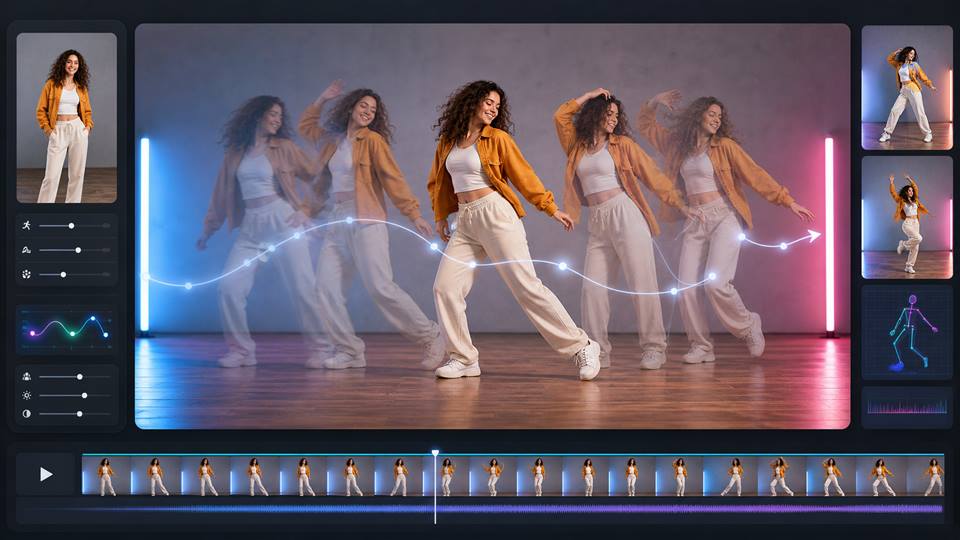
Image to Video AI is just the start. With APOB AI, you can keep creating across multiple video workflows: generate videos from text, make talking avatars, create UGC ads, swap faces, animate dance videos, or turn portraits into professional headshots.
Explore related tools like text to image generator, AI Face Swap, AI Dance Generator, AI Headshot Generator to turn one image into more social, marketing, and creative video content.
Free Membership with Daily Credits
Once signed up, you will get APOB AI’s free membership, which will give you 80 free credits daily, allowing users to explore AI-generated videos.
Realistic AI Motion Effects & Customization
Our AI will analyze images and apply natural-looking motion, ensuring smooth transitions and cinematic effects.
AI-Powered Influencer Creation-Chance to Make Money
With APOB AI, you could generate AI portraits with various artistic styles. Besides, you can customize clothing, landscapes, and backgrounds to match your vision. Once your AI Portrait is created, you could create a social account and try to gain followers.
Advertising and Marketing
Companies are able to turn static product images into motion videos for product launches and social media advertising. APOB AI camera pan and image-to-video capability allows a company to introduce a zoom or pan effect into a product, making compelling content at a fraction of the expense of full video production (APOB AI, 2025).
Content Generation
Image to video generator can be utilized by social media content creators and artists to animate images that remain static for use in social media such as Instagram Reels and TikTok. Pika Labs, for example, enables upload of a static picture and creation of a brief video animation using a quick text prompt, delivering content in efficient and timely fashion (Pika Labs, 2025).
Visual Effects and Film Making
Cinematographers may employ image-to-video AI to create fast pre-visualizations or filmic B-roll and atmospheric shots from reference images or concept art. RunwayML’s Gen-3 Alpha model is capable of creating actual motion from one image, conserving time and resources on post-production (RunwayML, 2025).
User Showcase: Testing Our Image-to-Video Feature
This YouTube video was shared by one of our users. See how they test our image-to-video feature.
Shared by creator: @TechMeCo
'I generated some awesome clips using both chat to edit and rev video... it looks so real it's hard to believe they're AI generated.'-by @TechMeCo
Talia Moore
I used APOB AI to add subtle motion to portrait images. Keeping the movement small made the eyes, hair, and lighting feel alive without distorting the subject.

Ren Nakamura
For character art, image to video is a fun way to test atmosphere. A tiny camera push, blinking, and background motion made my still illustration feel like a short scene.
Isha Verma
We turned a static product render into a quick video concept for social. It was not overcomplicated, just a clean camera move that made the product feel more premium.
Rowan Pierce
I animated a landscape photo with slow clouds and a gentle zoom. APOB AI helped the image hold attention longer in a Reel without making it look too artificial.

Paula Reed
The key is giving the tool a clear, simple direction. When I asked for subtle motion instead of a huge transformation, the clip stayed much more stable.
Jamie Liu
I used image to video for lesson intros and thumbnails. It gave otherwise static visuals a little movement, which made the course page feel more polished.

Nora Lewis
For pitch boards, I animated a few still frames to show mood and pacing. APOB AI helped the scene feel closer to a real shot without needing a full shoot.
Logan Brooks
Static posts do not always perform well for us. Turning a hero image into a short moving clip gave me more options for TikTok, Reels, and story ads.
Sky Harper
I like that I can test small motion ideas first. If the image holds up as a video, I know it is worth developing into a bigger piece.
Enjoy more features
Kling 3.0Sora 2 AI Video GeneratorSeedance 2.5 AI VideoHailuo 2.3 AI Video Generator AlternativeWan 2.7 AI Video Generator Alternative for CreatorsRunway AI Video GeneratorAI Animation Generator for Images, Avatars, and Social VideosAI Movie GeneratorAI Brainrot Video GeneratorAI Art GeneratorAI Wedding Invitation Video MakerBirthday Video IdeasWeird AI ImagesAI Transition Video GeneratorAI Image GeneratorAI ASMR Video GeneratorPixVerse V6 AlternativeH3 Max image-to-video test briefAI TV Show GeneratorAPOB vs Pollo AIHiggsfield Alternative
No Credit Card Required

Answers about animating still images, motion, video length, formats, quality, and credits.
What is image-to-video AI?
Image-to-video AI is a tool that turns a still image into a moving video. You upload a photo, portrait, product image, character, or artwork, then the AI adds motion, camera movement, lighting effects, and animation.
What kind of images work best?
Clear, high-resolution images work best. The subject should be easy to see, well-lit, and not heavily cropped. For product videos, use clean product photos. For portrait videos, use sharp faces with natural lighting.
Does APOB AI provide free membership?
Absolutely! APOB AI offers a free membership plan that allows all users to get started with no cost. Upon signing up, users receive 80 free credits every day, which can be used to transform images into dynamic AI-generated videos. It’s a great way to explore our features and start creating right away.
Do I Need Technical Skills to use this Image to video AI?
Not at all! APOB AI is designed to be beginner-friendly with an intuitive interface that also meets the needs of creative professionals. You don’t need any prior experience to start. Just follow these simple steps:
Step 1: Sign up for a free membership and create your first AI portrait. You can upload your own image or use our AI Influencer Generator to design a fully customizable AI human.
Step 2: Enhance your portrait using our image generation tools to add style, personality, or context.
Step 3: Click the ‘Image to Video’ button to instantly turn your AI photo into a stunning video. That’s it!
Why does my AI video look distorted?
Distortion usually happens when the input image is blurry, low-resolution, too crowded, or cropped too tightly. Try using a clearer image with better lighting and more space around the subject.
Why does the face change in the video?
Face changes can happen when the original image lacks detail or when the prompt asks for too much movement. To keep the face consistent, use a high-quality portrait and request subtle motion, such as “natural blinking” or “slow camera push-in.”
How can I make the motion look more realistic?
Use simple, natural movement prompts. Avoid asking for too many actions at once. Instead of writing “make the person dance, turn around, smile, walk, and wave,” try:
“Subtle head movement, natural blinking, soft smile, slow cinematic push-in.”
Why is the background moving strangely?
Busy backgrounds can confuse the AI. If the background looks unstable, try an image with a simpler background or ask for subtle camera movement instead of complex motion.
Can I Use APOB AI for Commercial Projects?
Absolutely! Many users leverage APOB AI for marketing campaigns, product showcases, and brand videos.
What kinds of video styles can I create with APOB AI?
APOB AI supports a wide range of creative video styles including anime, cinematic, professional, natural landscapes, and more. With the ability to input your own prompts, you have full control over the aesthetic and tone of your content. Whether you’re creating for social media, marketing, or just for fun, the possibilities are endless. Give it a try and see where your imagination takes you!
How do I get the best results from my Image to Video prompts?
Clear, specific prompts yield the best results. Describe the subject, action, style, and any desired effects. Using a high-quality image with good lighting also helps APOB AI create smoother, more realistic animations.
Can I add audio or voiceover to my AI-generated video?
Absolutely! In APOB AI’s Image to Video feature, you can enable background music with one click before hitting “Generate” (it’s off by default). To add audio or voiceover, use the Lip Sync or Talking Avatar options—select an AI voice model, enter your script, and your character will speak. You can choose from different genders, ages, and over 10 languages for the AI voice.
How fast can I turn an image into a video with AI?
With APOB AI, short clips of 10 seconds usually render in under a minute. Generation speed depends on video length and server load, but processing remains impressively fast.
What should I do if the result looks too artificial?
Try these fixes:
Use a sharper input image
Reduce the amount of motion
Ask for realistic lighting
Avoid complex actions
Use a simpler background
Generate multiple versions and pick the best one
How long should an AI image-to-video clip be?
For social media, short clips usually work best. A 3-8 second video is often enough for TikTok, Reels, Shorts, product ads, and landing page visuals.


