Make film with AI today. From generating your first AI movie to mastering cinematic video, this AI movie generator delivers perfect character consistency, lip-sync, and Hollywood-level camera control.
1. Edit Shot: Add Motion to Your Cinematic Video
The Dilemma: You’re directing a superhero AI film and need a dramatic, intimidating entrance for your villain. Traditional tools just spit out a flat, static shot of a guy standing there.
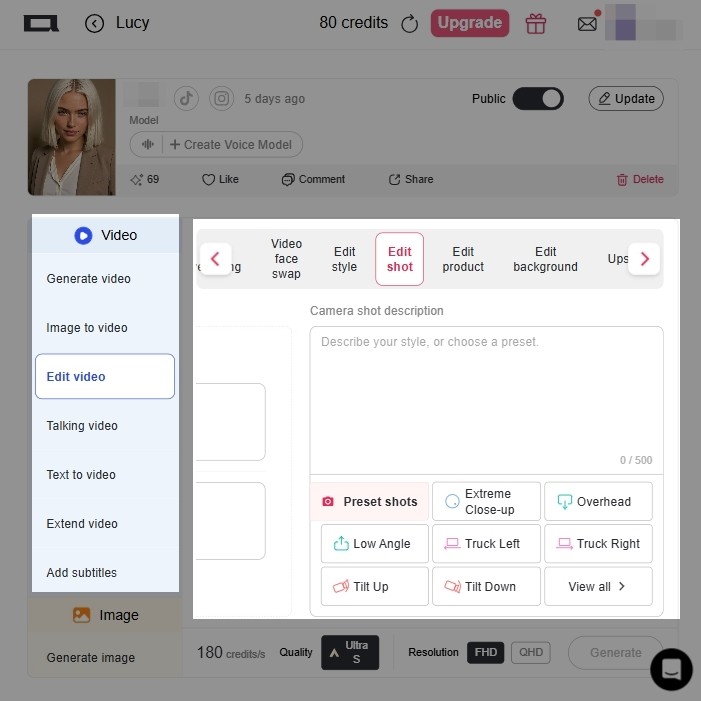
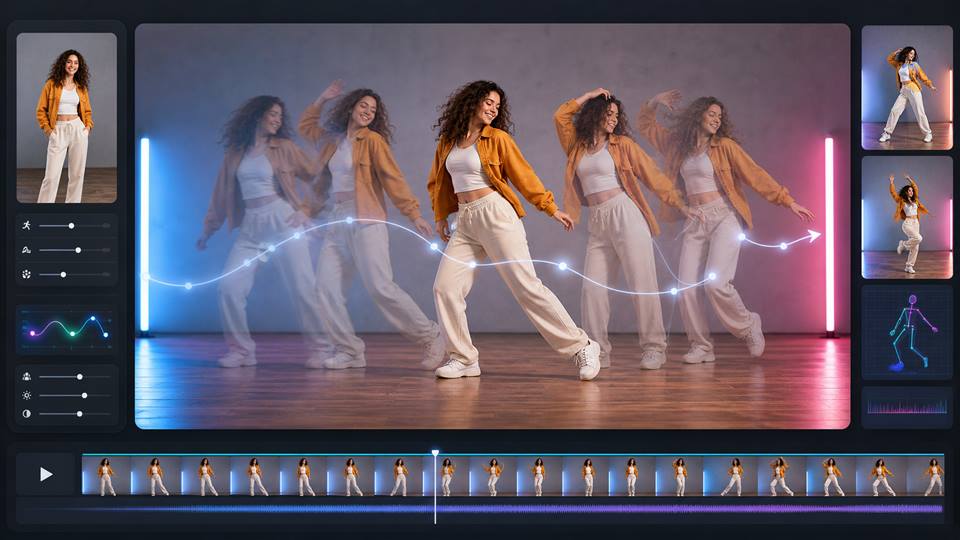
The Fix: Upload your base video and click the Edit shot tab. In the right-hand panel, select Low Angle and Truck Right from the preset shots. The AI engine calculates the 3D space of your 2D image, rendering a dynamic camera push that gives your cinematic video instant blockbuster tension.
2. Edit Style: Reshape Your AI Movie World Instantly
The Dilemma: You’re an indie director wanting to shoot a cyberpunk AI movie, but you only have phone footage of a regular street. You don't have $50,000 for CGI and set design.
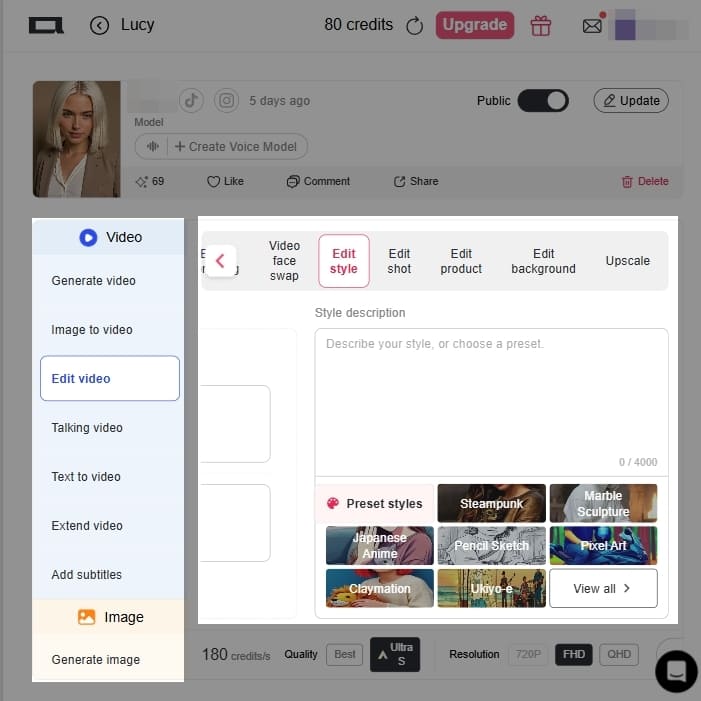
The Fix: Jump into the Edit style tab. In the preset styles box, click Steampunk (or type in your specific color grading needs). The AI redraws your street frame-by-frame, turning it into a neon-lit, mechanical set. It completely bypasses traditional color grading in cinematic video editing.
3. Reference Image: Lock Your Cinematic Video Character
The Dilemma: The biggest headache in using an AI movie generator is the "melting face" effect. Your lead actress looks like a completely different person in every new shot, ruining your AI film.
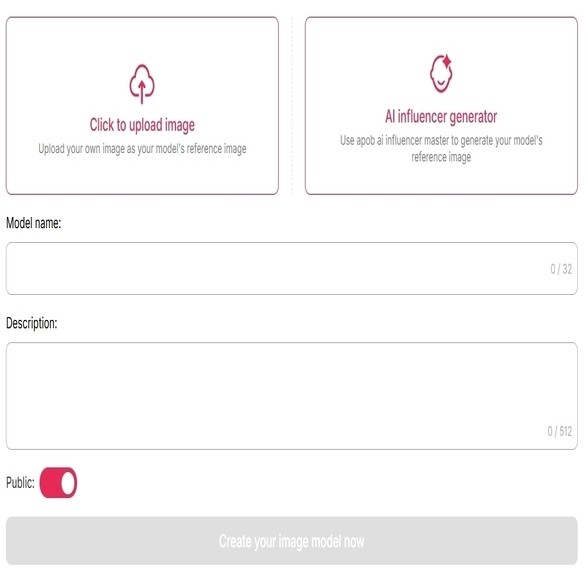
The Fix: Use our Reference image panel on the right. Upload a clear photo of your lead actor. Whether you're generating new footage or using the Video face swap tool, APOB strictly locks onto that face's topology. Your character stays perfectly consistent across every scene.
4. Ultra S Quality: Render Your Cinematic Video for the Big Screen
The Dilemma: You’ve crafted a great shot, but it exports as a blurry, pixelated mess that’s unplayable on a 4K monitor.
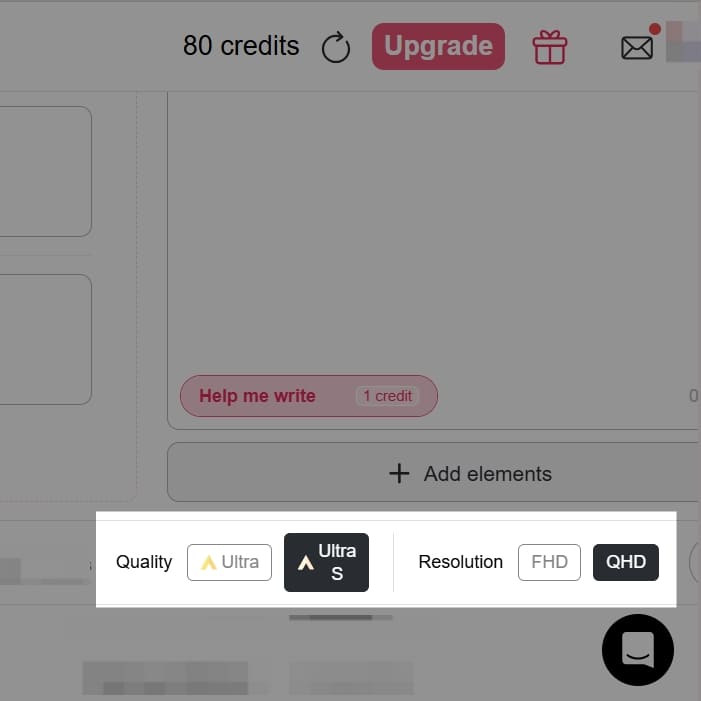
The Fix: Stop settling for low resolution. Look at the bottom console of the APOB interface, select Quality: Ultra S, and push the resolution to QHD or FHD. It demands more compute power, but it delivers the pore-level clarity and lighting necessary for true cinematic video editing.
Independent AI Film Production:
Indie creators are bypassing massive budgets. By using AI to handle visual effects and shooting, the cost to produce a high-quality 3-minute narrative short has plummeted to between $60 and $175.2 This democratization has led to indie AI films generating average profits of $1.2 million.
Virtual Influencers & Faceless Channels:
Creators are building highly profitable faceless YouTube and Instagram channels by deploying APOB's AI Influencers and Lip Sync tools to maintain a consistent digital personality across hundreds of videos.
Hollywood Pre-visualization:
Major studios rely on the best AI video generator 2026 tools to storyboard and preview visual effects, cutting actual VFX budgets by 30% and saving the industry $1.2 billion recently.
User Test: How I created cinemative video with AI?
This is a video test from our user. Through this video, you will learn how to create high-level video with APOB AI. Apart from cinematic videos, you can also create ugc ads video with AI to make money.
Shared by creator ProSecret2128 (Video creator with 23.9k subscribers)
“The motion, lighting, and details make the video look incredibly realistic.”
Shatters Production Costs:
What used to take a 20-person crew and a month of shooting can now be done on a laptop in hours. It's the most cost-effective way to make film with AI.
Total Creative Control:
With Edit Shot, Video Face Swap, and Reference Image, you act as a real director. You control the camera and the casting, elevating your work to true cinematic video editing.
All-in-One Audio & Video:
Unlike competitors that only do video, APOB natively handles lip-sync and talking avatars, removing the need for third-party syncing software.
High Credit Burn for 4K:
Using the Ultra S setting and QHD resolution consumes significant compute power. Budgeting your trial-and-error phases is necessary (though the 80 daily free credits help).
Terminology Learning Curve:
To get the absolute best out of this AI movie generator, you need to learn some basic camera terminology (like focal lengths and lighting styles).
Complex Physics Limitations:
Like any AI movie generator in 2026, rendering highly complex overlapping action (like two people wrestling) can still cause occasional clipping or minor frame flickering.
No Credit Card Required

Answers about cinematic effects, color grading, transitions, formats, credits, and commercial use.
Q1: When I use camera movement, my character's face gets distorted. How do I fix this?
Expert Answer: This is called temporal coherence loss. Never use a text prompt to generate a moving shot from scratch. To make film with AI properly, generate a pristine static image first. Use that as your Reference image, and run it through Image to Video with your camera motion. If it still slips, run the final clip through the Video face swap tool to glue the correct face back on.
Q2: How do I keep the lighting and colors consistent across my entire AI movie?
Expert Answer: Randomness kills a cinematic video. You need to lock the style. End every prompt with exact color grading instructions (e.g., "Kodak 2383 film stock, 3200K temperature"). Better yet, drop your clips into the Edit style tab and apply a unified preset to force the same visual aesthetic across all your scenes.
Q3: Can I actually copyright the AI film I make?
Expert Answer: Purely machine-generated content usually isn't protected. But if you are doing heavy cinematic video editing—writing the script, meticulously setting the prompt parameters, using Reference Images, and manually cutting the audio and visual tracks together in post—you can prove human authorship. Keep all your workflow files to secure your copyright.
Q4: My characters look like robots when they talk. How do I make them look human?
Expert Answer: The issue is your audio, not the video. If you feed the AI flat, text-to-speech audio, you get a flat face. Record a high-quality voiceover with natural breaths, pauses, and emotional weight. A top-tier AI movie generator with Talking Avatar capabilities (like APOB) will sync the lips and actually generate subtle micro-expressions based on your voice's inflection.
Q5: The generated clips are too short. How do I make a full-length AI movie?
Expert Answer: Real movies are made of short cuts. Use the "Shot Stacking" method: break your script into 3-to-6 second segments, generate them individually, and stitch them together in your video editor.
Q6: Why does the AI ignore half of my prompt?
Expert Answer: Because long, rambling paragraphs confuse the engine. Structure your prompt like a formula: Subject + Emotion + Optics + Camera Motion + Lighting. Telling the AI "35mm lens, dolly-in, softbox lighting" gets you a cinematic video much faster than writing an essay about the mood.
Q7: Generating video is expensive. How do I save money while I make film with AI?
Expert Answer: Never test ideas with video generation. Use cheap image generation to create your storyboards and lock in your art style. Utilize your 80 daily free credits to test motion, and only spend your premium credits on video generation once you have the perfect starting frame.
Q8: My footage looks too clean and plastic. How do I make it look like a real movie?
Expert Answer: AI defaults to a smooth, hyper-perfect look. Force it to be gritty. Add terms like "shallow depth of field," "chromatic aberration," or "film grain" to your prompt. Real cinematic video editing involves embracing optical imperfections.
Q9: Can I generate a scene with two main characters interacting?
Expert Answer: It's risky. Even the best AI video generator 2026 struggles with complex character overlap. The pro solution? Generate each character separately against a green screen using your AI movie generator, then composite them together in Premiere or After Effects.
Q10: Text-to-Video vs. Image-to-Video: Which is better for an AI film?
Expert Answer: Image-to-Video, without question. Text-to-Video is a blind gamble. To achieve true cinematic video editing, you must lock your visual assets first using an image, and then animate it. It is the only way to maintain control over your AI movie.


