Viral TikTok voices, powered by AI. Realistic, emotional, and diverse. Use the ultimate TikTok AI voice generator to grab attention and keep your audience hooked.
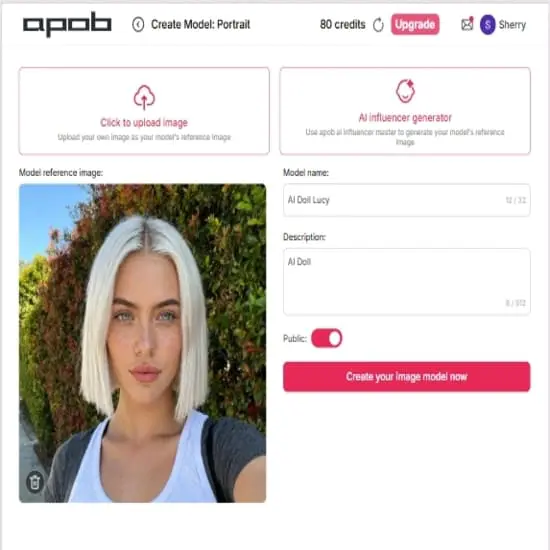
Step 1: Sign up for Free Membership and create your AI Model
The first step is avatar creation. Users can either upload a photograph of an existing character to bring them to life or utilize the ‘AI Influencer Generator’ to instantly develop a new digital persona. Once generated, the avatar's appearance, expression, and style can be fully personalized to align perfectly with the required content
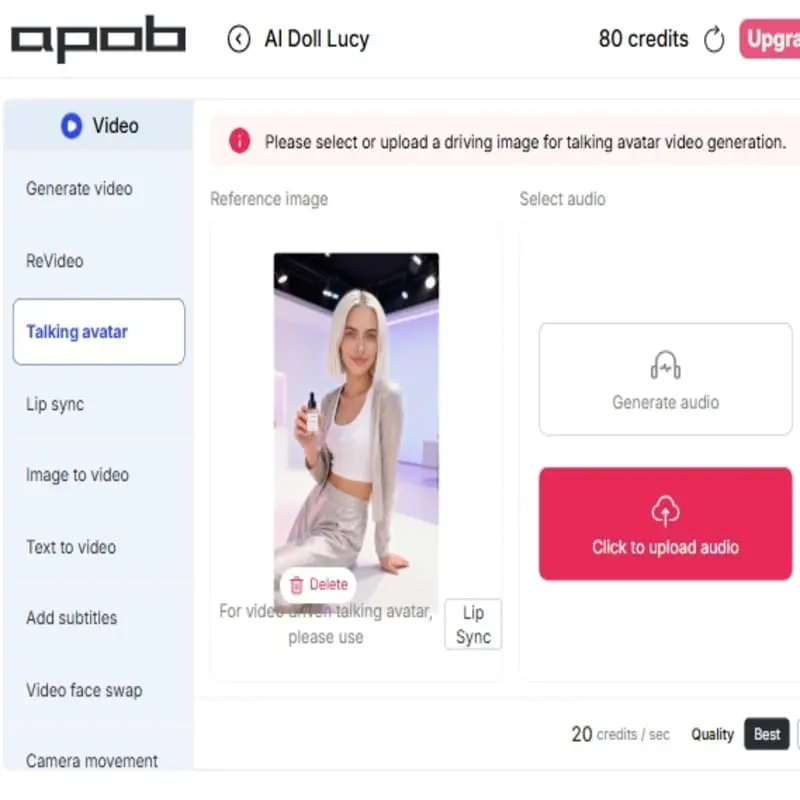
Step 2: Click on 'Talking Avatar'
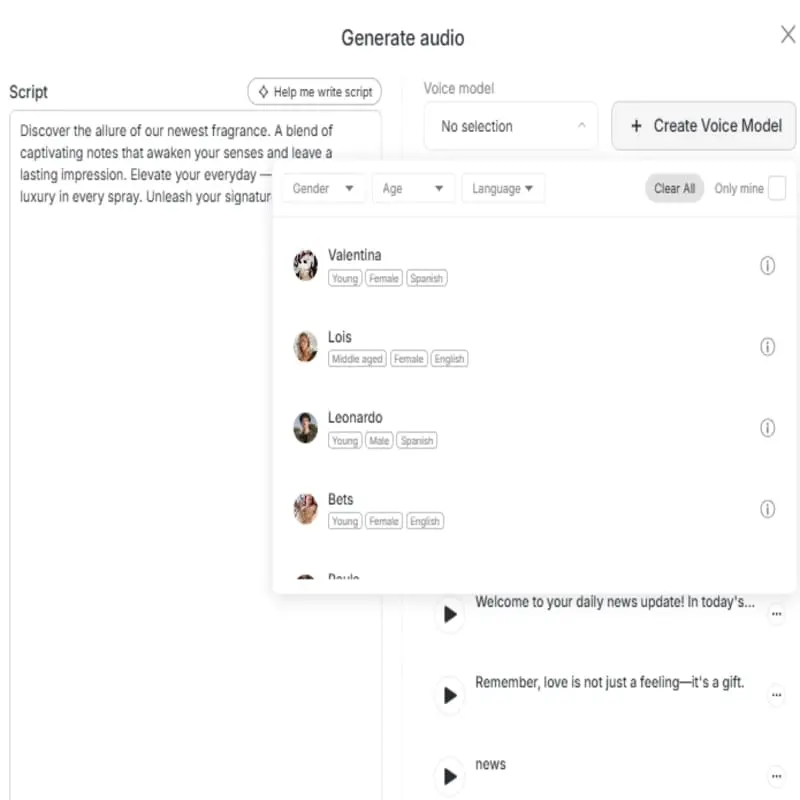
Next, select the ‘Talking Avatar’ feature and upload your AI character's image, which serves as the reference for the video. To add speech, click ‘Generate Audio’ and input your desired script into the box. Our tool converts your text into synchronized speech for the avatar. For efficiency, the platform includes a helpful "Help me write script" button for ideas and features live word count tracking to manage the video length perfectly.
Step 3: Select the AI Voice Model
Utilizing the interface, locate the “Voice model” dropdown menu on the right. Here, you can select from the platform’s library of pre-made AI voices . For unique audio, simply click “+ Create Voice Model” to train a new voice using your own recording. Below the script box, you can refine the audio by setting the emotion (e.g., neutral, excited) through a dedicated dropdown menu, ensuring the perfect tone is captured.
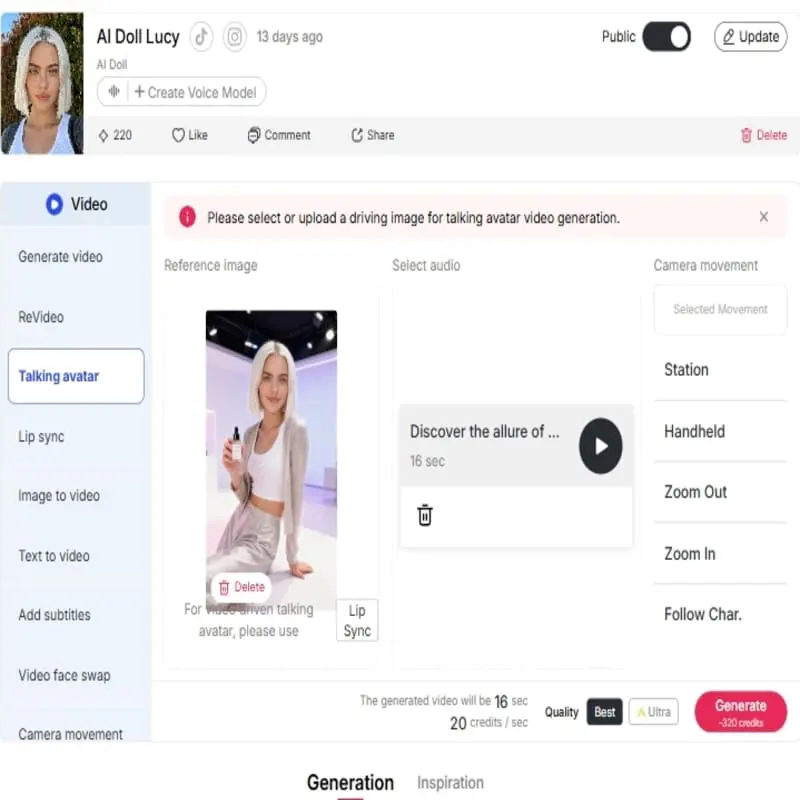
Step 4: Download and Edit
After finalizing your script, voice model, and desired emotion, click the “Generate” button to process the audio request. The new audio clip is automatically added to your “History” section, which acts as a detailed log of all your previous creations. This centralized feature allows for easy management and access. From the “History” list, you can immediately play the clip for review, make edits if necessary, or simply download the final, polished audio for use in your video.
Efficiency
Quickly generate audio without the time-consuming process of recording, editing, and re-recording your own voice. This allows you to produce content at scale and on a consistent schedule.
Flexibility and Customization
With a diverse library of voices, you have the creative freedom to select the perfect tone for any video. From a serious narrator to a playful character, the options are endless.
Consistency
Maintain a consistent voice and brand identity across all your videos, even when you have multiple creators or are working in different languages.
E-Learning
The AI Voice Generator is used by schools to transform sophisticated curricula and guidebooks into user-friendly audio lessons. This significantly shortens production time for compliance training and web modules and enhances learning engagement. Studies have proved that the union of high-quality audio with text can increase comprehension levels by as high as 30% (Clark, R. C., & Mayer, R. E., 2016).
Podcasting
Content makers appreciate a unified and consistent brand voice for typical YouTube channels or podcasts with an AI Voice Generator. This avoids voice actor scheduling conflicts and very high variables in case of human voice actors. Transition to artificial media was proven to reduce average recurring voiceover cost by more than 80%.
Global Marketing
Marketing professionals use the AI Voice Generator to produce regional ad campaigns in bulk. Our ai voice generator offers support for various accents and languages, enabling marketers to produce specific ad voiceovers for targeted regions at zero cost of studio time.Due to the extremely short turnaround time, brand consistency is maintained while scaling customized content by a huge degree (APOB.AI, 2025).

Ava Thompson
I needed a voiceover that sounded energetic without becoming cartoonish. APOB AI helped me test a few tones, and the final voice fit the pacing of my cuts.

Mina Kato
The voice generator is great for short character-style narration. I keep scripts tight, because a punchy sentence works much better than a long paragraph on TikTok.

Lucas Miller
For trend tests, speed matters. I can draft three voiceover options, drop them into edits, and decide which hook actually feels scroll-stopping.

Riley Parker
We used it for a batch of TikTok ad concepts. The biggest benefit was hearing the script immediately, because weak lines become obvious once spoken.

Caleb James
The AI voice saved me from recording temporary audio every time a caption changed. It is especially useful when clients keep asking for 'one more version'.

Leah Shah
I used APOB AI to test a softer voice for product tutorials and a faster voice for trend videos. Having both options made the campaign feel less one-note.

Samuel Ortiz
Some creators freeze when they need to record narration. A quick AI voice draft helps them hear the rhythm first, then they can decide whether to record their own.

Ben Carter
I wanted a voice that felt casual and a little dry, not like a commercial. After a few tries, I got a read that worked perfectly for a low-effort joke format.

Hannah Lewis
The tool helped us match voiceover energy to different hooks. A tiny tone change can make a TikTok feel either helpful or salesy, and APOB AI made that easy to test.
1. Monetization
You can create professional-grade voiceovers for faceless channels, allowing you to monetize content on TikTok without ever showing your face or using your voice.
2. Speed
Quickly produce high-quality audio, drastically reducing your content creation time.
3. Accessibility
AI voice generators make content accessible to a wider audience, including people with visual impairments or those who prefer to listen rather than read.
1. Human-like emotion
While AI voices are becoming increasingly advanced, they may still lack the full range of subtle emotions, intonations, and inflections that a human voice actor can provide. However, our 'Talking Video' feature has allowed users to adjust the emotion mode of the voice, so you don't need to worry about it.
No Credit Card Required




Answers about AI voices, TikTok audio, voice cloning, formats, credits, and commercial use.
Is this tiktok AI voice generator free to use?
Yes, you can sign up to get a free membership and you will be able to get 80 credits for free every day. We offers a free plan with generous features to get you started.
What is an AI Voice Generator, and what can I use it for?
An AI voice generator is a tool that uses artificial intelligence and deep learning to create realistic human speech from text. Unlike outdated Text-to-Speech (TTS) technology, modern AI voice generators are trained on vast datasets to produce natural-sounding voices with correct intonation and emotion. You can use this technology for:
Video content: Create professional voiceovers for YouTube, TikTok, and other social media videos.
Audiobooks and Podcasts: Convert written scripts into high-quality audio content.
eLearning: Develop narrated tutorials and educational materials.
Marketing: Produce voiceovers for advertisements and promotional content at scale.
How can I create different accents and voices with an AI voice generator?
A great AI accent generator provides a wide range of voice options to fit your needs. You can choose from a library of voices that support various accents, languages, and dialects. This is especially useful for creating content for global audiences or for projects that require character voices, such as in animated videos or storytelling. You can simply select the voice that fits your content and the AI will generate the speech in the correct style and accent.
How do I use an AI voice generator for my TikTok content?
For creators looking to enhance their social media presence, using a TikTok AI voice generator is a game-changer. APOB AI makes this process incredibly simple and fast. All you have to do is:
Type or paste your script into the platform.
Choose a voice that matches the tone of your video.
Click “generate” to create your voiceover.
Export the audio file and add it to your video on TikTok.
This allows you to quickly produce consistent, high-quality audio without needing to record your own voice, saving you significant time and effort.


