An ai voice generator helps you turn written scripts into spoken audio for videos, ads, product demos, AI influencers, faceless channels, and social posts.
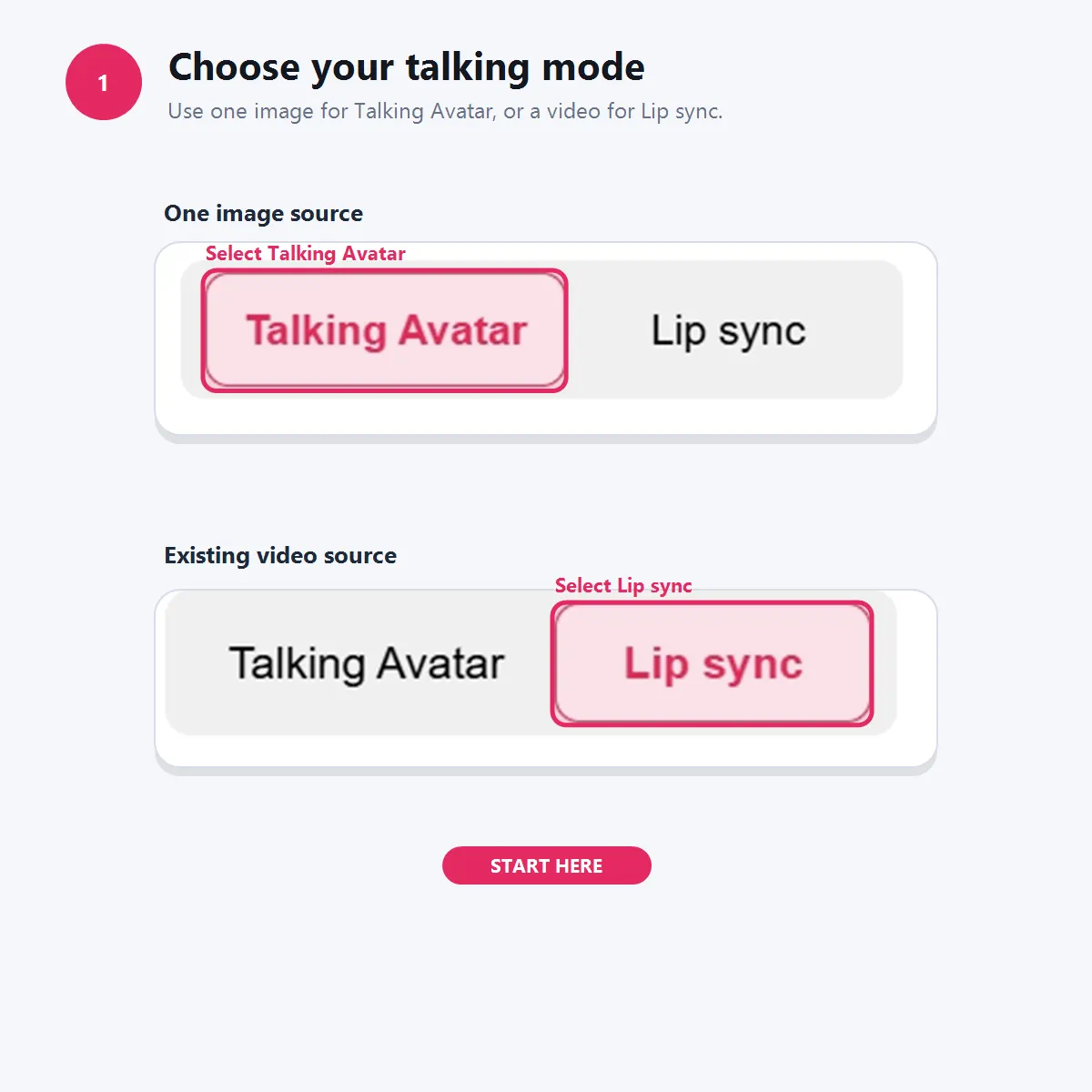
Step 1: Choose Talking Avatar or Lip sync
Open the Talking video workspace and choose the mode that matches your source material. Use Talking Avatar when you have one image. Use Lip sync when you already have a video and want the mouth movement to match new audio.
Example: A skincare seller has one AI influencer portrait holding a serum bottle, so they choose Talking Avatar. A creator with a 10-second face-to-camera clip chooses Lip sync to replace the original speech with a cleaner AI voiceover.
Step 2: Add your reference image or video
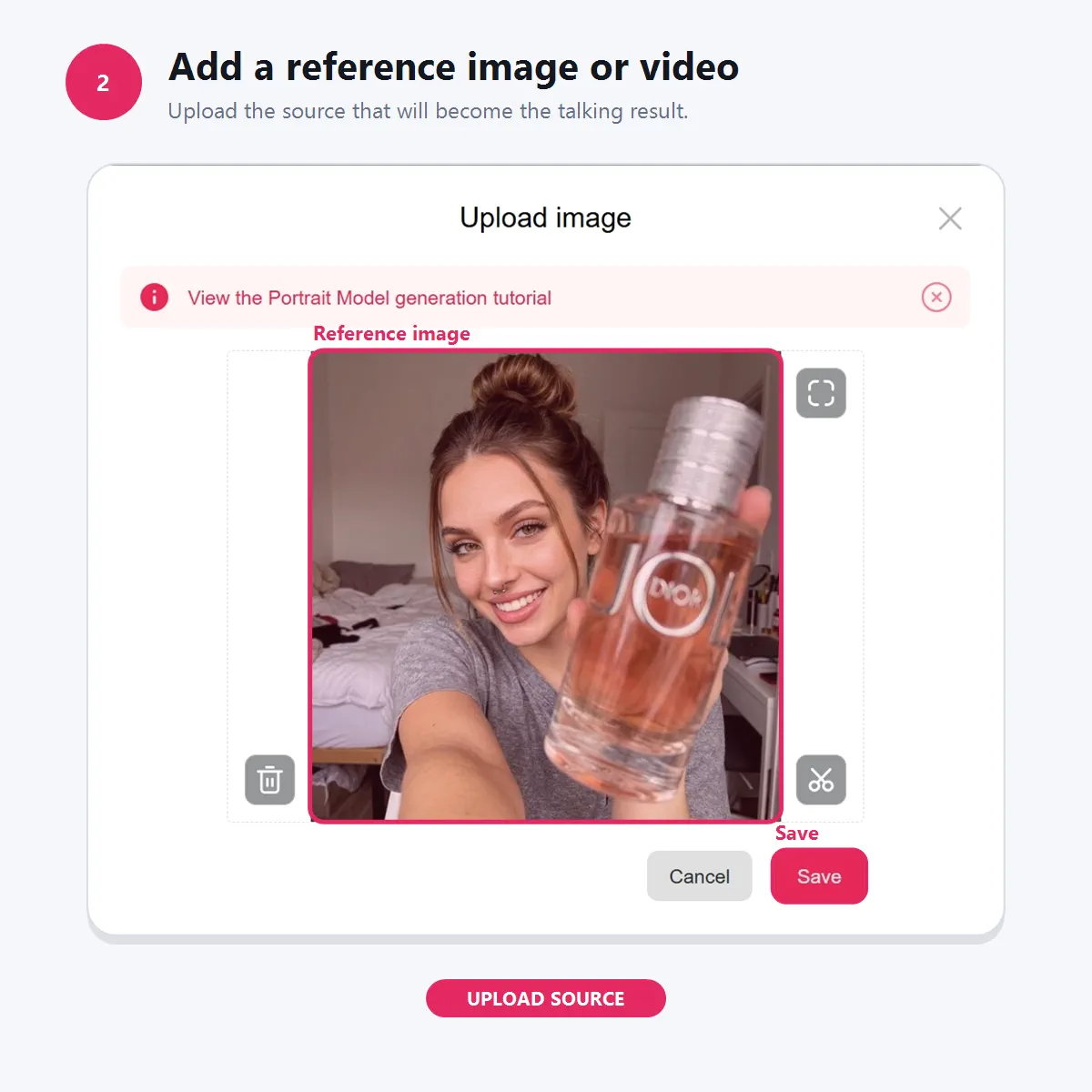
For Talking Avatar, add a Reference image by selecting existing content or uploading a new image. For Lip sync, add a Reference video by selecting content or uploading a video file. APOB AI recommends at least 4 seconds of video for better Lip sync results, even if the video is shorter than the audio.
Example: A faceless YouTube creator uploads a front-facing avatar image for a “3 buying tips” video. A social team uploads a founder-style product clip and prepares it for new narration.
Step 3: Create audio with a voice model and script
Choose Create audio to generate a new voice from text, or select/upload existing audio if you already have a clip. When creating audio, pick a Voice model, write your script, and keep it within the script box limit shown in the interface.
Example: A marketer writes: “Meet the travel-size serum. It fits in your bag, absorbs quickly, and keeps your routine simple.” Then they select a warm English voice model for a short TikTok-style product intro.

Step 4: Generate, review, and refine
Before generating, check the visible production settings such as credits/s, duration, Quality, and Resolution. Generate the result, review whether the pacing and mouth movement feel natural, then create another take if needed.
Example: A creator tests a 20-second Talking Avatar in Best quality, then creates a second version with a softer voice model for Instagram Reels. A brand preparing a polished ad can choose a higher-quality setting before final export.
People choose an ai voice generator because recording voiceovers is often slower than writing and testing scripts. Creators may not have a quiet room, a confident speaking voice, or time to rerecord every small script change.
AI voice is especially useful when teams need many short variations: different hooks for ads, different narrator styles for social videos, different character voices for AI influencers, or different voice takes for product demos.
The demand is also moving toward faster AI-assisted video production. IAB’s 2025 Digital Video Ad Spend & Strategy report, reported by TVTechnology, found that 86% of digital video buyers were already using or planning to use generative AI for video creative. Business Insider also reported that AI and social commerce startups became a major funding focus in the creator economy.
APOB AI’s advantage is workflow fit. The voice does not stop at text-to-speech. It can support Talking Avatar, Lip sync, AI influencer content, product videos, subtitles, and social-ready creative assets.
No studio recording required
Useful for creators who do not have a quiet room, recording setup, or a confident on-camera voice for every video
Use AI voice responsibly. Do not clone, imitate, or commercially use a real person’s voice without permission. This is especially important for ads, political content, financial content, medical claims, testimonials, or anything that could mislead viewers.
Research on AI voice clones has shown that people are not always reliable at detecting cloned voices, which makes consent and disclosure important. The FCC has also treated AI-generated voices in robocalls as a regulated consumer-protection issue in the US.
For commercial use, make sure you have the rights to your script, voice source, image, video, product assets, and brand materials. If your content uses a real person’s face, likeness, or voice, get clear consent. Follow the disclosure policies of the platform where you publish.
1. AI voiceover for video ads
AI voice generators are useful for short paid ads because teams can test different hooks, scripts, narrator styles, and audience angles without recording every version manually. This fits the direction of video advertising: IAB’s 2025 Digital Video Ad Spend & Strategy report, reported by TVTechnology, found that 86% of digital video buyers were already using or planning to use generative AI for video creative.
2. TikTok-style product demos and social video audio
Short-form platforms are pushing brands toward faster, more native-feeling creative. Business Insider reported that TikTok’s “What’s Next” report encouraged marketers to use AI tools for ad scripts, translations, and AI-generated avatars. The Verge also reported that TikTok’s Symphony Creative Studio can generate videos from product descriptions, add AI avatars, and use AI-powered dubbing.
3. Talking avatar videos for AI influencers and brand characters
AI voice is especially useful when paired with a visual character. The Verge reported that TikTok’s AI ad tools are moving toward influencer-style content, including virtual avatars that can show products, model clothing, and demonstrate apps. This supports a clear use case for AI influencers, virtual presenters, mascots, and branded characters.
4. Lip sync and localized video narration
AI voice generation can support dubbing and lip sync workflows when creators want one video to work across different scripts or languages. The Verge reported that YouTube expanded AI-powered dubbing to many more creators, allowing creators to review, unpublish, or delete generated dubs.
5. Faceless video narration
Faceless creators often need consistent narration for list videos, tutorials, product roundups, explainers, and niche channels. Business Insider reported that creator economy startups with AI and social commerce focus attracted major funding, and that AI-driven platforms such as text-to-speech and generative video tools are reshaping content creation.
6. Ecommerce product education and shoppable content
Social media is increasingly tied to product discovery and purchase behavior. TVTechnology reported Horowitz Research findings that 50% of US consumers considered social media their primary way to discover new brands and products, and 45% had purchased through social media in the past month.
7. Captioned social clips and accessibility-friendly videos
Voice and captions work best together. TIME explains how closed captions expanded access for Deaf and hard-of-hearing audiences and changed how people watch media more broadly. For social video, adding captions also helps viewers understand the message when they watch without sound.
Useful for ads, demos, talking avatars, Lip sync, and faceless videos.
Voice models help keep characters and brand voices consistent.
APOB AI shows cost before generation through credits/s and duration indicators.
Generated audio can support a larger video workflow, not just standalone downloads.
AI voice still needs human review for pacing, pronunciation, and emotion.
Real-person voice cloning requires permission.
Custom voice model access may depend on plan tier.
Lip sync quality depends on the source video, audio clarity, and timing.
Platform rules around AI-generated or synthetic media can change.
No Credit Card Required

Answers about voice models, Talking Avatar, Lip sync, pricing, and commercial use.
What is an ai voice generator?
An ai voice generator turns written text into spoken audio. Creators use it for voiceovers, narration, ads, character voices, talking avatars, Lip sync videos, product demos, and faceless social content.
Does APOB AI support text-to-speech?
Yes. APOB AI’s Generate Audio workflow lets users create spoken audio from a written script by choosing a Voice model and generating the result.
Can I use APOB AI voice for Talking Avatar videos?
Yes. Talking Avatar uses one reference image plus audio. You can generate audio from text or upload an existing audio file, then use it to make the still image speak.
Can I use APOB AI voice for Lip sync?
Yes. Lip sync uses a reference video and an audio track. APOB AI retimes the mouth movement in the video so it matches the selected audio.
What is the difference between Talking Avatar and Lip sync?
Use Talking Avatar when you only have one image. Use Lip sync when you already have a video. Talking Avatar animates a still image, while Lip sync adjusts mouth movement in existing footage.
Can I choose different voice models?
Yes. The Voice model selector supports options such as gender, age, language, and personal voice models. This helps creators keep a consistent voice for a brand, narrator, or AI influencer.
Can I create my own voice model?
APOB AI’s Help Center says voice models can be created from uploaded audio or from an AI-generated voice description, depending on plan access. Custom voice models require eligible plans.
How long can Talking Avatar audio be?
According to APOB AI’s Help Center, Talking Avatar audio must be at least 1 second and no longer than 3 minutes.
How long can Lip sync audio or video be?
APOB AI’s Help Center says Lip sync reference video and audio must each be at least 1 second and no longer than 15 minutes.
How much does AI voice generation cost?
APOB AI uses credits. The interface shows the credit cost before generation, including indicators such as credits/s, duration, and total cost.
Is there a free ai voice generator option?
APOB AI has a free plan with daily credits, but advanced features and custom voice model access may depend on the selected plan.
Can I use AI voiceovers commercially?
Commercial use depends on your rights to the script, voice, media, and final content, as well as APOB AI’s current terms and your plan. Do not use a real person’s voice or likeness without permission.
Can I use APOB AI for TikTok voice generator workflows?
Yes, APOB AI can help create voice clips and talking/lip-synced videos suitable for TikTok-style content. For direct publishing, check the current publishing options available to your account.
Can I add subtitles after generating AI voice video?
Yes. APOB AI has an Add Subtitles workflow for creating and styling captions on videos, which is useful for social clips where viewers may watch without sound.
What should I do if generation fails?
APOB AI’s troubleshooting guidance recommends retrying first. If a generation fails, credits used by the failed generation are returned automatically. If the same issue continues, contact support.


