Create realistic AI text to speech videos with AI avatars, natural voice models, and script-based speech. Turn written text into talking avatar videos for product explainers, creator posts, tutorials, ads, and social media content.
Step 1: Create or Select an AI Avatar
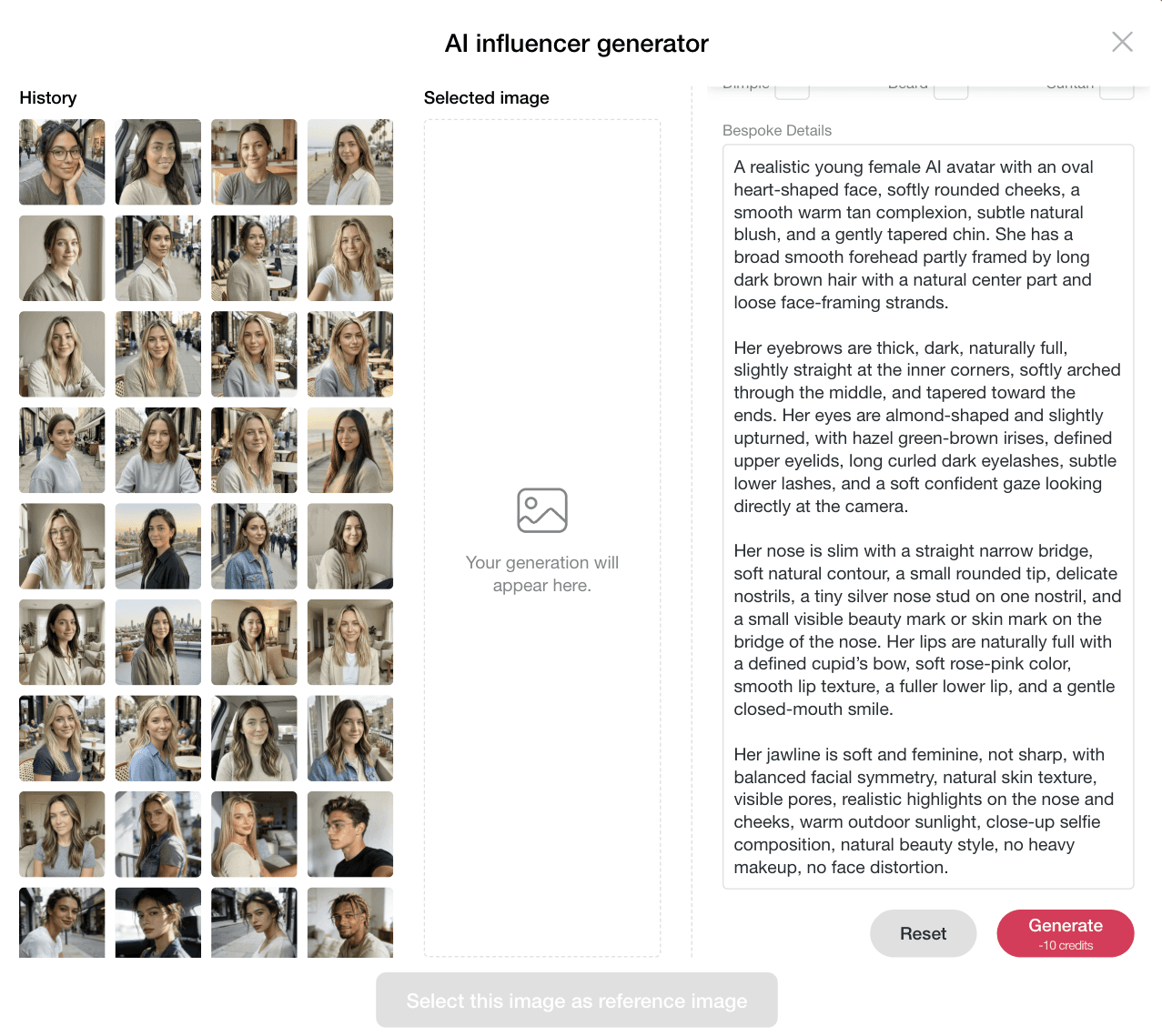
Start by creating a realistic AI avatar or choosing an existing portrait. For the best AI text to speech result, use a clear front-facing image with natural lighting, visible facial features, and a clean background. A high-quality avatar helps the final talking video look more natural when the voice and facial movement are generated.
Prompt: A realistic young female AI avatar with an oval heart-shaped face, softly rounded cheeks, a smooth warm tan complexion, subtle natural blush, and a gently tapered chin. She has a broad smooth forehead partly framed by long dark brown hair with a natural center part and loose face-framing strands.
Her eyebrows are thick, dark, naturally full, slightly straight at the inner corners, softly arched through the middle, and tapered toward the ends. Her eyes are almond-shaped and slightly upturned, with hazel green-brown irises, defined upper eyelids, long curled dark eyelashes, subtle lower lashes, and a soft confident gaze looking directly at the camera.
Her nose is slim with a straight narrow bridge, soft natural contour, a small rounded tip, delicate nostrils, a tiny silver nose stud on one nostril, and a small visible beauty mark or skin mark on the bridge of the nose. Her lips are naturally full with a defined cupid’s bow, soft rose-pink color, smooth lip texture, a fuller lower lip, and a gentle closed-mouth smile.
Her jawline is soft and feminine, not sharp, with balanced facial symmetry, natural skin texture, visible pores, realistic highlights on the nose and cheeks, warm outdoor sunlight, close-up selfie composition, natural beauty style, no heavy makeup, no face distortion.
Step 2: Enter Your Text to Speech Script
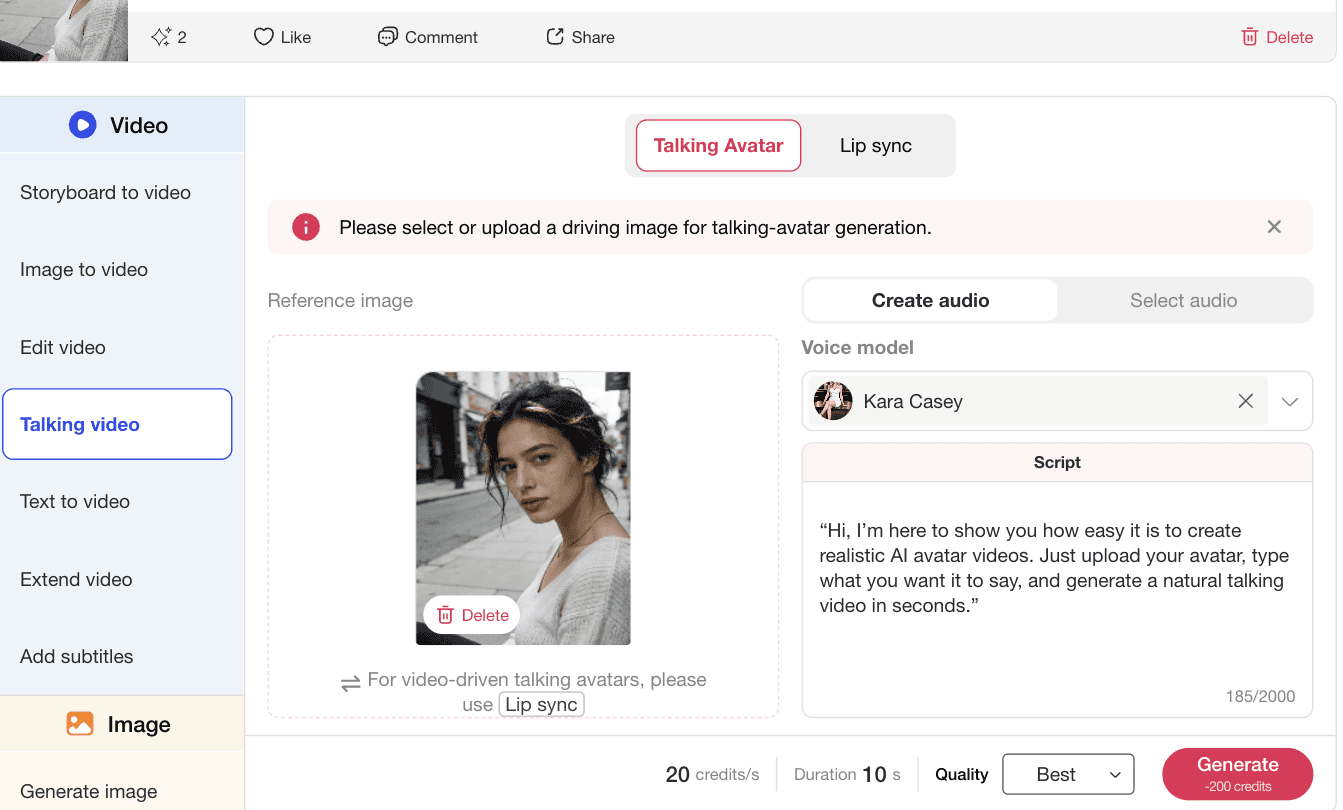
Upload or select your avatar, then type the script you want the avatar to say. Keep the script short, natural, and conversational so the AI voice generator can produce clearer speech and smoother talking avatar movement.
Prompt: Hi, I’m here to show you how easy it is to create realistic AI avatar videos. Just upload your avatar, type what you want it to say, and generate a natural talking video in seconds.
Step 3: Choose a Voice Model and Generate
Choose the voice model you prefer, check the language, tone, and voice style, then click Generate. The AI text to speech tool will turn your script into a talking avatar video with synchronized speech and natural facial movement.
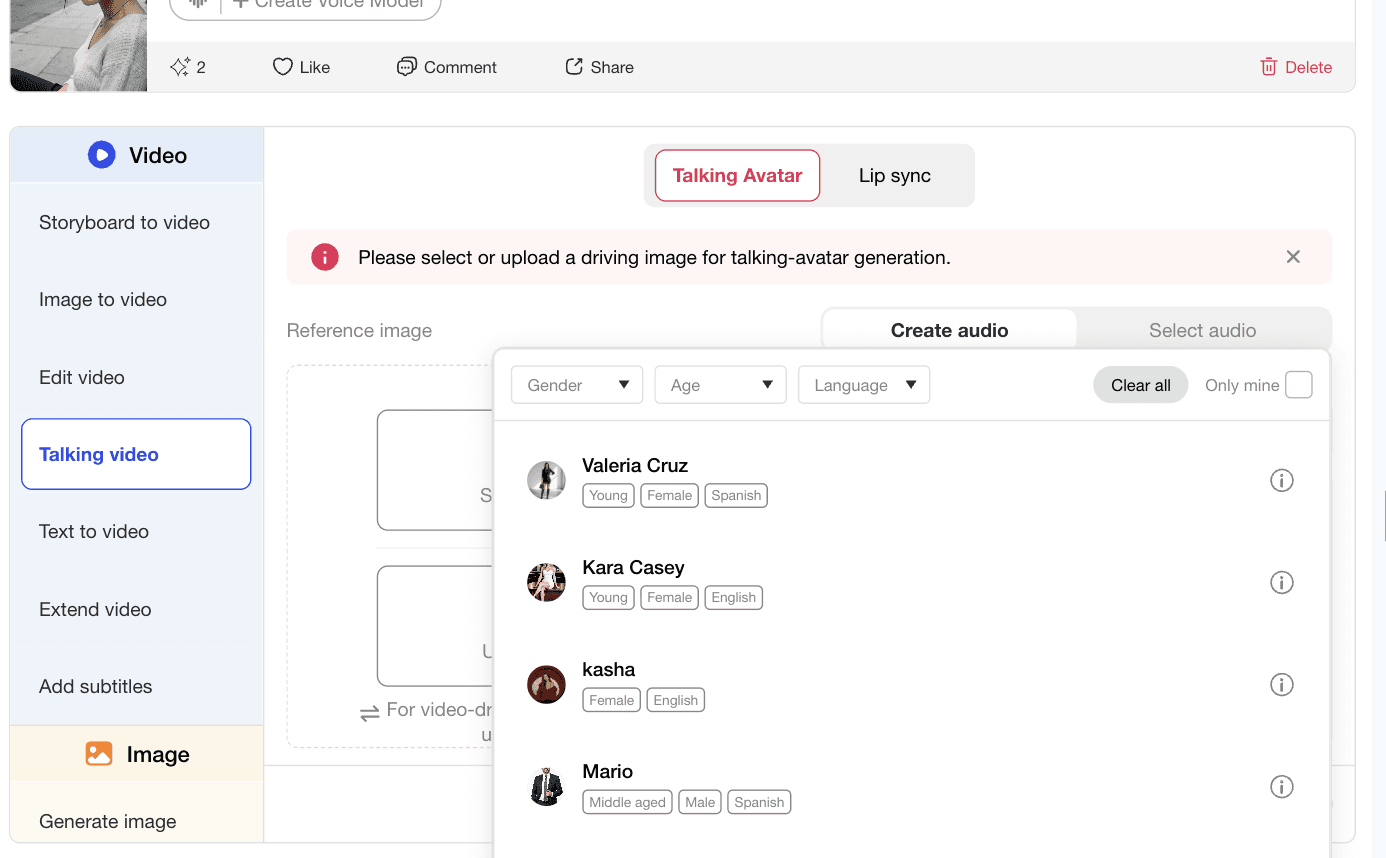
Avatar-First Text to Speech Workflow
APOB AI is useful when you need more than audio. You can create an AI avatar, write a script, choose a voice model, and generate a video-ready talking avatar in one workflow.
Fast Script Testing for Social Content
Use AI text to speech to test different hooks, creator intros, product lines, tutorials, and ad scripts without recording a new voiceover every time.
More Than a Basic AI Voice Generator
Besides AI text to speech, APOB AI also supports talking video, lip sync video, image to video, text to video, subtitles, AI video editing, and AI image generation, so users can build a full content workflow in one place.
Product Explainer Videos
Use AI text to speech to create short product explainers where an avatar introduces the product, explains key benefits, and guides viewers through a simple message. This is useful for ecommerce sellers, SaaS tools, beauty products, and social ads. (Wyzowl Video Marketing Statistics 2026)
AI Influencer Content
Creators can use AI text to speech to make a consistent AI influencer speak across product mentions, daily updates, tutorials, and campaign videos. This helps keep the same character format while changing scripts for different posts (TikTok Symphony and AI Creative Tools)
Multilingual Creator Videos
AI text to speech can help creators test different voice styles and localized scripts for different audiences. It is useful when a brand wants the same avatar to explain a product in multiple markets. (YouTube Auto Dubbing for Multilingual Creators)
Training and Tutorial Clips
Teams can turn written instructions into talking avatar videos for onboarding, product education, internal training, software walkthroughs, and quick how-to clips. (HubSpot State of Marketing)
Easy Script-to-Video Workflow
AI text to speech lets users turn written text into spoken avatar videos without recording their own voice or setting up a studio.
Consistent Avatar Content
The same AI avatar can appear across product videos, creator posts, tutorials, and campaign clips, making the content format easier to repeat.
Useful for Fast Content Iteration
Users can test different scripts, voice styles, hooks, and calls to action before choosing the final version.
Output Still Needs Review
AI text to speech videos should be checked for pronunciation, pacing, emotion, lip sync quality, and factual accuracy before publishing.
Enjoy more features
No Credit Card Required

Answers about voices, scripts, talking avatars, subtitles, and business use.
What is AI text to speech, and how is it different from an AI voice generator?
AI text to speech is a tool that turns written text into spoken audio. In APOB AI, it can also be used with talking avatars to create realistic AI avatar videos. AI text to speech focuses on turning text into speech. An AI voice generator may include more voice styles or audio-only workflows. APOB AI focuses on text to speech plus visual avatar video creation.
Can I use text to speech for a talking avatar and lip sync?
Yes. You can create or upload an AI avatar, type a script, choose a voice model, and generate a talking video. APOB AI supports talking avatar and lip sync workflows, so users can create voice-driven avatar videos with synchronized speech.
Can I use AI text to speech for social media, product videos, or ads?
Yes. It works well for TikTok videos, Instagram Reels, YouTube Shorts, product intros, tutorials, and AI influencer posts. Yes. It can help test multiple ad hooks, product angles, creator-style intros, and calls to action quickly.
Can I choose voices and create multilingual speech?
Yes. You can select a voice model and choose the style that best matches your script, audience, and content type. You can test different scripts and voice options for multilingual or localized content depending on the available voice models.
Can I edit the script or output after generation?
Yes. If the result sounds too long, too formal, or not natural enough, you can revise the script and generate again. Yes. You can revise the script, try another voice, regenerate the talking video, or continue with other APOB AI video tools.
What script length and writing style work best?
Short, clear, conversational scripts usually work best. Avoid long sentences, complex punctuation, and robotic wording. For short social videos, keep the script concise. A 10 to 20 second script is usually easier to control than a long paragraph.
Can I add subtitles to a text-to-speech video?
Yes. APOB AI also includes subtitle-related video workflows, which are useful for short-form platforms where many viewers watch without sound.
Do I need recording equipment?
No. You can generate speech from text without a microphone, studio, or manual voice recording.
What should I check before publishing AI speech?
Check voice quality, pronunciation, pacing, lip sync, facial movement, brand claims, and whether the script is accurate.


