











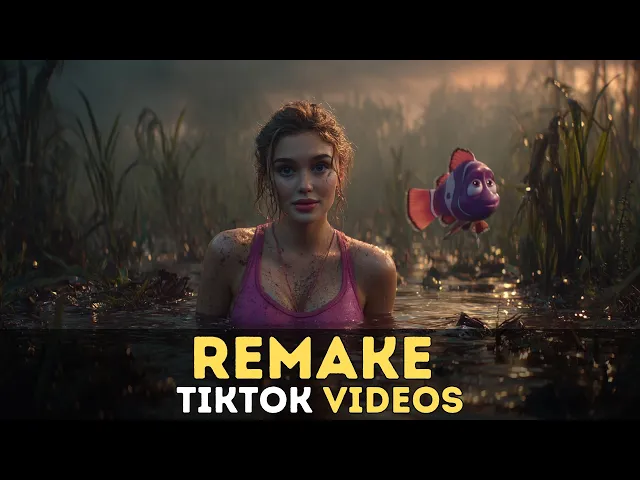
Create Trending TikTok Videos in Minutes with APOB AI. Create viral-ready content with just a few clicks!
Whether you're a viral content creator, a TikTok Shop merchant, or a social media agency, you need a tool that is fast, trend-ready, and built for engagement. Here is why APOB AI stands out as the ultimate tiktok video generator on the market:
Seamless Scene Swaps for Every TikTok Video
Tailor your content for the "For You" page. Swap backgrounds, styles, and trending aesthetics in seconds to keep your audience hooked and boost retention rates.
Consistent Avatars in Your AI TikTok Video
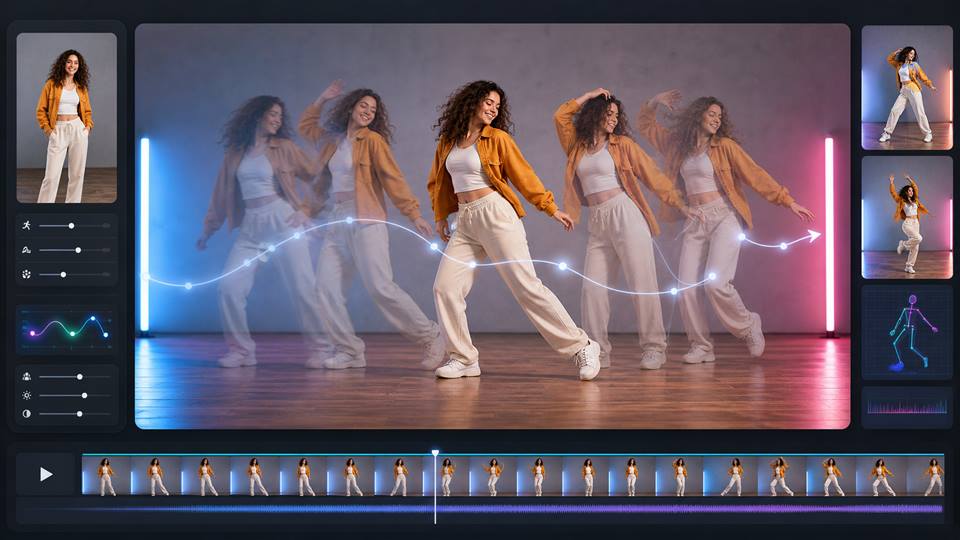
Build your own virtual influencer. Lock in a specific model's face and perfectly maintain their identity across hundreds of dynamic posts, from lip-syncing to dancing.
POPULAR
The Most Advanced AI TikTok Video Generator
Powered by cutting-edge generation technology. Enjoy smooth motions, natural lip-sync, and high-resolution outputs designed specifically to beat the algorithm.
A Scalable TikTok Video Generator for Agencies
Our paid tiers allow MCNs and brands to scale multiple distinct AI avatars. Easily create and manage content for different niche accounts all in one place.
Absolute Privacy for Your TikTok Video Drafts
Your viral ideas are yours alone. Keep your generated assets and custom AI models strictly private, preventing copycats before you hit publish.
Premium Support for Your AI TikTok Video Journey
We move at the speed of social media trends. If you ever need technical help or aren't satisfied with a generation result, our rapid-response team and refund guarantee have you covered.
Dead Pacing & Weak Hooks
The Struggle: AI tools default to slow, cinematic panning shots. On TikTok, slow means dead. If you don't have a high-energy hook in the first 3 seconds, viewers scroll instantly. The Fix: Stop generating full 15-second videos at once. Use AI to create punchy 2-second micro-clips (quick zoom-ins, sudden movements), or use "Re-video" on existing viral TikToks to steal their fast-paced camera work. Edit these short clips strictly to the beat of trending audio.
Awkward Lip-Syncing
The Struggle: TikTok is audio-first. When AI characters try to lip-sync to trending sounds, they usually look like goldfish gasping for air, instantly breaking the illusion and ruining the video. The Fix: Ditch basic text-to-video for talking heads. Use dedicated Audio-Driven features. Upload the raw viral audio file and let the AI precisely map lip movements and micro-expressions directly to the soundwaves for a flawless match.
The "200-View Jail" (Algorithm Shadowbanning)
The Struggle: TikTok’s algorithm actively flags cheap, low-effort AI spam. If your video looks like 100% generic AI slop, you will get shadowbanned and stuck at 200 views forever. The Fix: Create hybrid content. Use "Element Integration" tools to blend real-world assets (like a photo of your actual physical product) seamlessly into the AI environment. Adding real-world textures tricks the algorithm and bypasses spam filters.
1. Build Your Tiktok AI Influencer
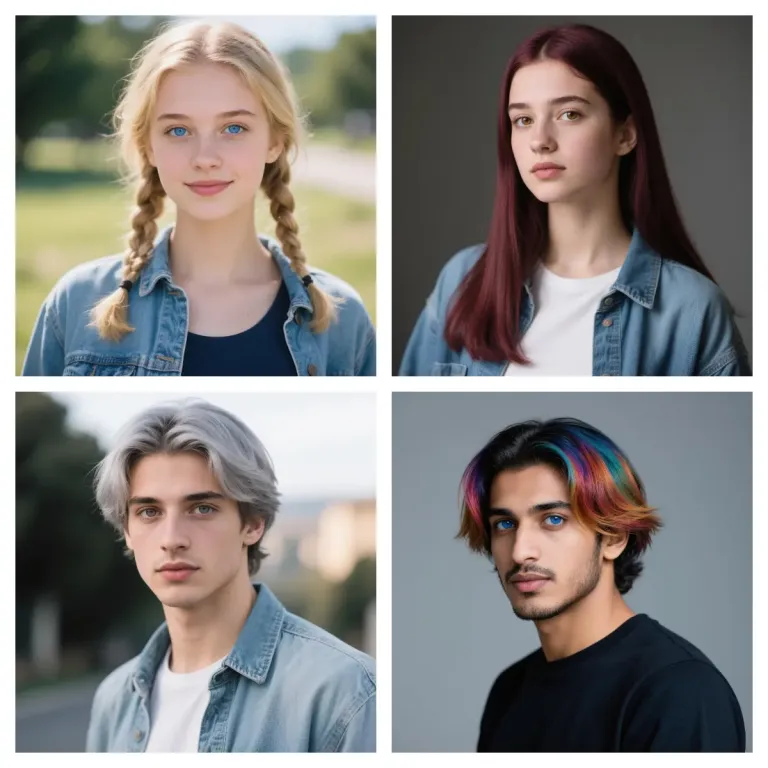
With this tiktok video generator, you’re not just editing—you’re creating. Start by building your very own AI influencer from head to toe. Choose gender, age, nationality, eye shape, hairstyle, hair color, face shape, dimples, beard options, and more. Can’t decide? Just click Random to generate a completely unique influencer in seconds. This detailed customization ensures your content looks fresh and fits your brand perfectly.
You can also browse through a wide library of pre-made templates and styles, including Realistic, Anime, Manga, Cute 3D, Pixel, and many more. Whether you’re building a fashion model or a fantasy character, this ai tiktok video generator gives you full creative control to match your target TikTok vibe.
2. Choose a Style and set the Scene with this ai tiktok video generator
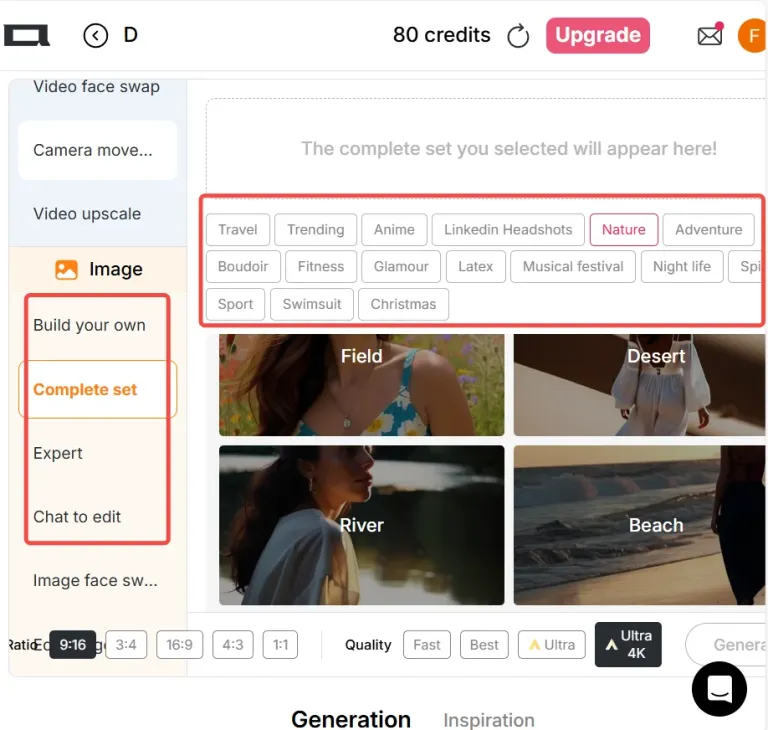
After customizing your AI influencer, it’s time to place them in the perfect environment. This tiktok video creator offers a wide variety of scene templates and clothing designs that align with TikTok trends. Select a beach setting, a cyberpunk street, or even a fairytale background—the possibilities are endless.
Use Expert Mode or Chat to Edit to add details via prompts or reference images. Want your AI character in a neon-lit city holding a guitar? Just describe it! The AI understands natural language and instantly turns your idea into an eye-catching visual. You can even upload an image to guide the design.
3. Generate High-Quality Tiktok Videos with AI Animation & Voice
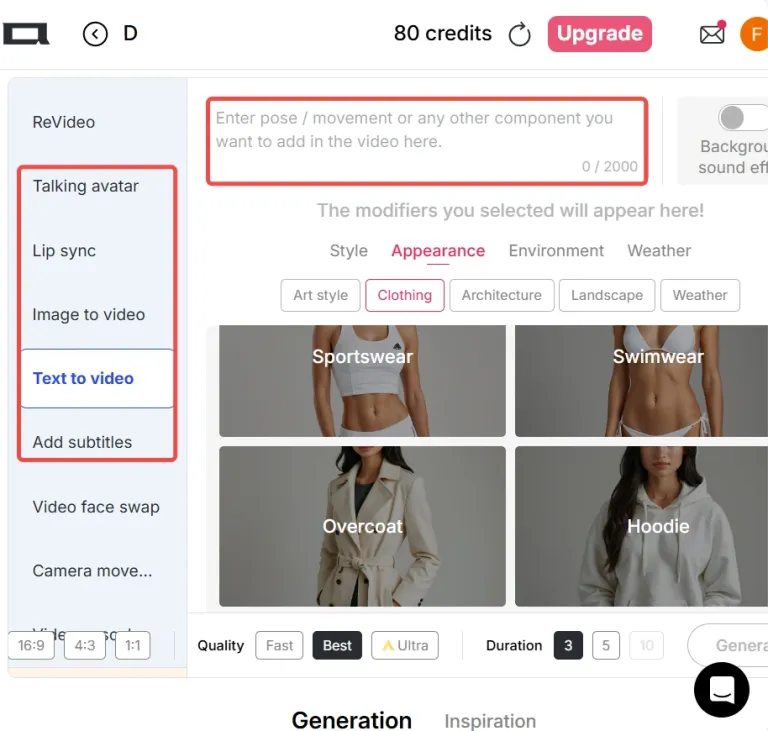
Bring your characters to life using Text to Video or Image to Video. Select Ultra Mode for the best quality. Enter your script, choose from 13 languages and a variety of voices, and your AI influencer will talk, emote, and lip-sync realistically thanks to Talking Avatar and Lip Sync tools.
When generating your video, you can use the Camera Movement options — zoom in, zoom out, pan left, or pan right — to add dynamic motion to your scenes. Whether it’s a fashion promo or a mini story, your AI-generated TikTok will feel alive and professional. You can also add subtitles and background music with just one click.
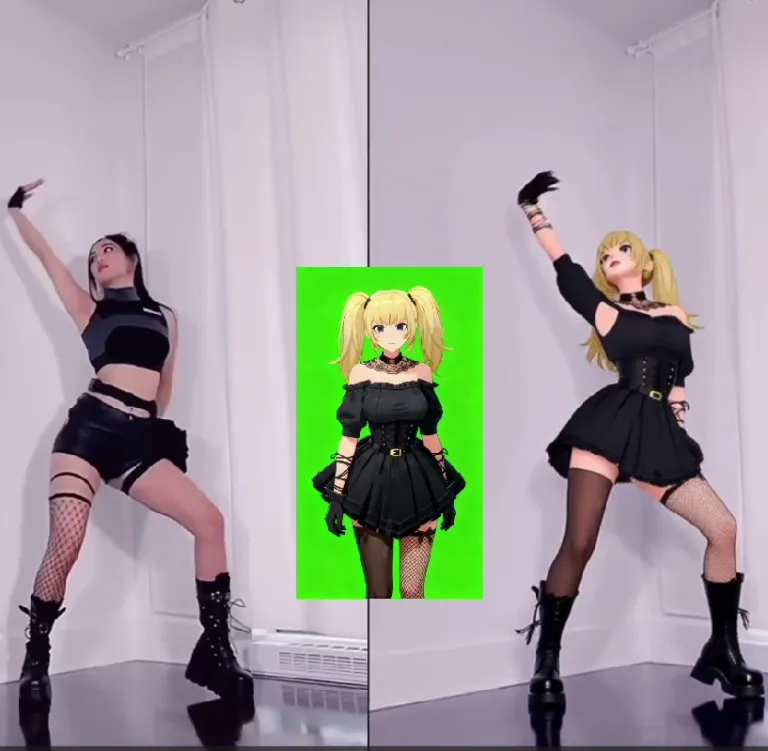
4. Use this ai tiktok video generator to enhance your videos
Take Your Videos to the Next Level with APOB AI
Video Face Swap: Instantly replace faces in any clip to create fun, personalized content.
Revideo: Upload a video and a reference image (or use your AI influencer). Click “Generate,” and the person in your image will replace the video character—actions and background stay the same. APOB currently supports videos up to 30 seconds, with 5-minute support coming soon.
Perfect for trending TikTok dance videos and quick monetization.
AI Clothing Changer: Change outfits instantly inside the Edit Image tool, or use APOB Business for outfit-changing videos.
Everything runs in your browser—no editing skills needed. Create professional, viral AI videos effortlessly.
5. Transform Video Styles with AI Tiktok Video Generator
To create anime-style videos, you can start by generating an anime character image and animating it with Image to Video, or simply use the Text to Video option to generate a video directly from a prompt.
If you already have a video you like, there’s an even quicker approach. Just upload the video and apply APOB’s EditStyle feature to instantly convert it into a new visual style with a single click—such as transforming realistic footage into anime. The transformation goes beyond the character, reshaping the entire scene and background as well.
Edit Style offers nearly 30 creative styles to choose from, including Steampunk, Marble Sculpture, Japanese Anime, Pencil Sketch, Pixel Art, Watercolor, Comic Book, 3D Chibi, LEGO, Van Gogh–inspired art, and many more.
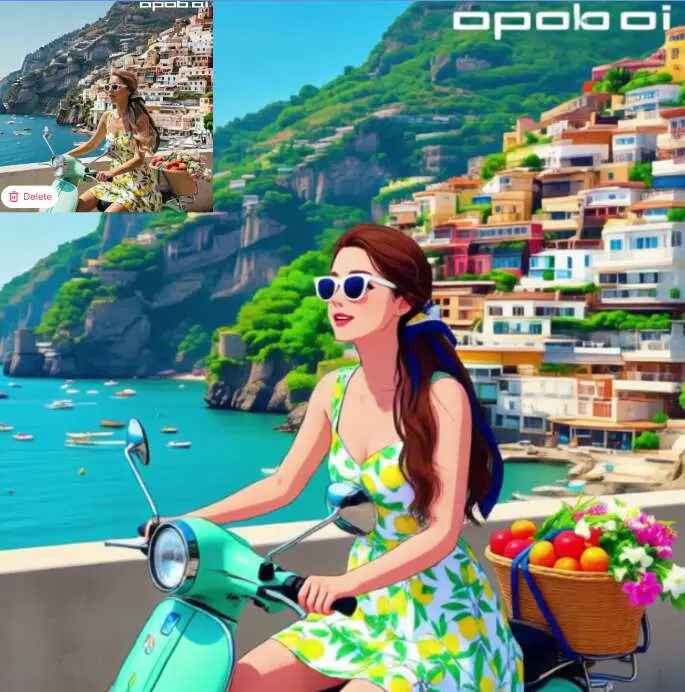
Tailored AI Creations, Not Cookie-Cutter Videos
Most video tools offer generic templates. Our product lets you create fully custom AI influencers with their own looks, outfits, and personalities. Your TikTok content will always be original and engaging.
Fast, Easy & Free to Use
No need to spend hours editing or learning new software. With 80 free credits every day, you can generate up to 16 images or 2–3 second videos—completely free. It’s perfect for creators on a budget.
All-in-One Platform
Unlike other platforms that only handle one part of the process, we combines image generation, video creation, voice synthesis, face swap, and animation—all under one roof. It’s your TikTok video studio in one tab.
Marketing Ads
AI video tools can quickly make lots of fun, on-brand ads for social media. Businesses can test different versions, see what works best, and save both time and money compared to traditional video production.
Creator Content
Influencers can keep posting fresh videos without much effort. By turning text, audio, or photos into moving videos with avatars and voices, they stay active online and grow their followers—without always being on camera [1].
Learning Videos
Teachers and companies can use AI to make simple, clear explainer videos. A script can turn into a professional video with avatars, making lessons, tutorials, or training easier to watch and understand.
Creator Review: Turn Any Clip into "Monetizable Tiktok Videos" & Viral UGC Parodies
Watch this hands-on user review by @HowToIn5Minutes to see how Apob AI allows you to "transform old videos into brand new ones." Stop filming and start generating TikTok UGC in seconds.
Shared by user: @HowToIn5Minutes
'With this AI tool, you can turn any existing videos into brand new monetizable AI videos like AI dancing clips, funny parodies, or anything you can imagine.'
Ava Mitchell
APOB AI helped me turn a static character image into a short video that actually felt scroll-ready. It is great for testing hooks before spending time on a full edit.
Connor Reed
The workflow was useful for making several TikTok concepts around the same AI model. Consistency made the clips feel like a series instead of one-off tests.

Leah Grant
I used it to draft product-style short videos with a virtual presenter. The first pass gave me enough direction to tighten my script.
Jason Park
For fast concept validation, APOB AI saved time. I could compare talking head, fashion, and lifestyle video angles before choosing one.
Bella Torres
I made quick outfit-change clips for TikTok planning. The motion was strongest when I kept the prompt focused and the character clean.
Omar Bennett
The tool is not magic, but it is a good creative direction for social testing. It helped my team see which AI creator format had potential.
Nina Ellis
I used the generator to mock up a few trending video styles quickly. It made our brainstorming session much more visual.
Mason Clark
The outputs gave me solid B-roll and character shots to test pacing. I still edited by hand, but the starting material was strong.
Zara Patel
I liked being able to revise a visual idea and immediately test it as a short clip. It made TikTok planning feel less stuck.
Customizable AI Character for Tiktok Video Generation
Tiktok ugc creators can design Tiktok influencers down to the smallest detail, with full control over looks, clothes, and expressions.
Fast Video Creation
Generate fully animated and voiced TikTok videos in just minutes. Perfect for creators who need speed and consistency.
No Camera Required
You don’t have to be on camera. Let your AI characters do the storytelling while you stay behind the scenes.
Multi-Platform Ready
Download your videos in vertical format and publish on TikTok, Instagram Reels, YouTube Shorts, and more.
Limited Free Credits Daily
Free users get 80 credits daily, which is generous—but for long videos or high-volume needs, upgrading might be necessary.
Enjoy more features
AI TikTok Influencer GeneratorAI UGC Video GeneratorFree AI Ad Video GeneratorAI Product Video GeneratorAI Dance GeneratorFaceless YouTube Channel GeneratorVibe Marketing with AIImage to Video AIAI Shorts GeneratorAI Viral Video GeneratorAI Meme GeneratorAI Pet Video GeneratorAI Subtitle GeneratorAI Instagram Reels GeneratorAI Reel GeneratorAI ASMR Video Generator
No Credit Card Required

Answers about creating TikTok videos, vertical formats, quality, captions, credits, and commercial use.
What is APOB AI TikTok Video Generator?
APOB AI TikTok Video Generator helps you create short-form vertical videos for TikTok using text prompts, images, avatars, voice, subtitles, and video editing tools. You can start from an idea, a product photo, a character image, or an existing clip, then generate TikTok-ready content for creator videos, UGC ads, TikTok Shop promotions, faceless videos, and social media campaigns.
Can I create a TikTok video from text only?
Yes. With Text to Video, you can write a prompt describing the scene, movement, pose, subject, camera style, and visual direction. APOB AI then generates a video clip from your words without requiring a source image or video.
Can I turn an image into a TikTok video?
Yes. With Image to Video, you can upload or select a source image as the first frame, then describe how it should move. This is useful for animating product photos, AI influencer portraits, character images, lifestyle visuals, or campaign assets into short TikTok-style clips.
What aspect ratio should I use for TikTok videos?
For TikTok, choose 9:16 vertical format. APOB AI supports multiple aspect ratios, including 9:16, 3:4, 16:9, 4:3, and 1:1, but 9:16 is the best fit for TikTok, Reels, Shorts, and other phone-first platforms.
Can I make AI TikTok videos with voice?
Yes. APOB AI supports voice-based workflows. You can use text-to-speech to generate spoken audio from a script, choose a voice model and emotion, or upload your own audio depending on the tool you use. For talking-style content, Talking Avatar and Lip Sync can help match a face or video to an audio track.
Can I create a talking avatar for TikTok?
Yes. Talking Avatar turns a still face image into a speaking video when you provide an audio track. This is useful for AI influencer videos, faceless creator channels, educational clips, product explainers, and spokesperson-style TikTok content.
Can I lip-sync an existing video?
Yes. Lip Sync lets you upload an existing video and a new audio track, then re-time the mouth movement to match the audio. This is useful for dubbing, voiceover variations, multilingual TikTok content, and creator-style edits without reshooting footage.
Can I add subtitles to my TikTok video?
Yes. APOB AI includes an Add Subtitles tool for short social clips. You can upload or select a video, extract spoken words into timed captions, edit the caption text and timing, choose a caption style, preview the result, and generate the final captioned video.
How long can my TikTok video be?
It depends on the tool. Generated video duration is controlled by the selected video mode, quality, and duration settings. For subtitles, APOB recommends short caption-heavy clips and supports videos up to 10 minutes. Talking Avatar supports audio up to 3 minutes, while Lip Sync supports video and audio up to 15 minutes.
Does APOB AI show the credit cost before generating?
Yes. APOB AI shows the credit cost next to the Generate button before you start. Video tools are usually priced by duration, so longer videos, higher quality, higher resolution, or more advanced settings may cost more credits.
Why is the Generate button disabled?
Generate stays disabled until the required inputs are ready. For example, Text to Video needs prompt text, Image to Video needs a source image, Talking Avatar needs a face image and audio, Lip Sync needs a video and audio, and Add Subtitles needs a usable video plus at least one caption line.
Can I improve the quality of a TikTok video after generation?
Yes. You can use Video Upscale to improve the resolution and clarity of an existing video. APOB AI also offers quality and resolution controls in supported video modes, including options such as Fast, Ultra, Ultra S, HD, FHD, QHD, and 4K depending on the mode and plan.
Can I publish directly to TikTok from APOB AI?
APOB AI includes a publishing workflow for social content, but TikTok publishing access is currently limited for most users. For TikTok content, the safest workflow is to generate or edit your video in APOB AI, save it from your History, then upload it to TikTok manually.
Where can I find videos I created?
Your generated images, videos, storyboards, models, and elements are saved in History. You can browse your own creations, filter your content, download finished assets, delete items, or reuse saved media in future projects.
What should I include in a good TikTok video prompt?
A strong prompt should include the subject, scene, action, camera movement, mood, style, target audience, and hook. For product videos, include the product, key selling point, use scenario, and desired TikTok format. For creator videos, include the avatar, speaking style, emotion, and visual pacing.


