Create new vertical Shorts from a brief, script, image, product, or AI presenter. Plan scenes, add voiceover, and refine weak previews before publishing.
Paste one of these briefs into Relevant info and replace the bracketed details.
Ecommerce product demonstration
Purpose: Explain one verified product benefit.
Prompt: Create a 25-second 9:16 Short for [audience]. Use one presenter and five shots: problem hook, product close-up, use demonstration, result context, and CTA. Keep packaging readable and avoid unverified claims.
Expected output: A five-shot presenter and product sequence.
Faceless educational Short
Purpose: Explain one concept with original narration.
Prompt: Create a 35-second faceless Short about [topic]. Open with [question], show three clear visual examples, use plain language and caption-safe framing, and end with [verified takeaway].
Expected output: A concise narrated explainer.
Recurring AI influencer episode
Purpose: Keep a host consistent across a series.
Prompt: Create a 30-second episode for [host]. Preserve the approved face, wardrobe, voice, and set. Cover [three points] with natural gestures and end with [audience question].
Expected output: A repeatable presenter-led episode.
Software feature Short
Purpose: Frame verified UI footage with a presenter.
Prompt: Create a 30-second Short for [user problem]. Use an AI presenter for the hook and CTA, reserve the middle for verified screen recording, and do not generate interface text.
Expected output: A presenter-led structure for accurate product footage.
1. Open the multi-scene video workspace
From the APOB dashboard, open Video, choose Generate video, and select Create new storyboard. This starts a sequence of shots instead of one isolated clip.
Example: A skincare seller starts a 20-second product Short with a hook, demonstration, proof shot, and CTA.
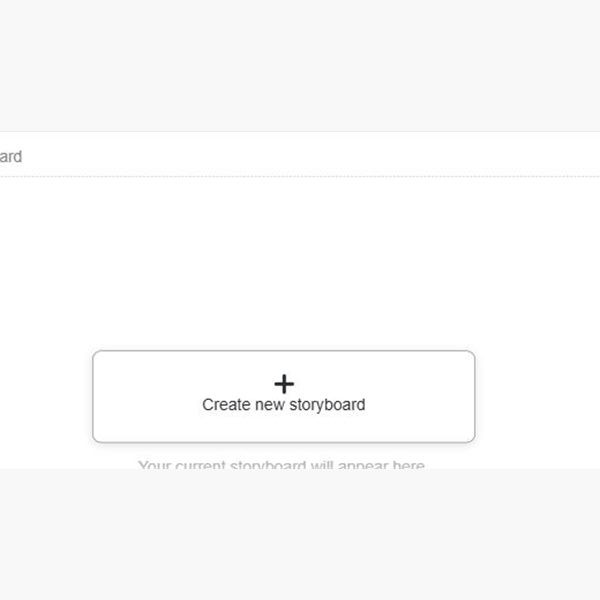

2. Select YouTube Shorts and write the brief
Choose YouTube Shorts, then state the viewer, runtime, opening problem, required scenes, visual constraints, and CTA in Relevant info.
Example: Request a 20-second serum demo with one presenter, five shots, readable packaging, and no medical claims.
3. Check the Shot cards
Read the generated cards in order. Confirm that the hook appears first, each shot has one job, and the CTA arrives before the ending.
Example: Use five beats: problem, bottle close-up, product amount, application order, and CTA.


4. Refine each Video detail prompt
Describe one subject, one action, one shot size, and one camera behavior. Add only the continuity details that matter.
Example: “Macro serum bottle close-up, label facing camera, slow push-in, soft morning light, centered 9:16. Keep the bottle shape and logo unchanged.”
5. Match voiceover to each shot
Enter only the words spoken during that card and read them aloud before generating. Shorten the line if it cannot fit the displayed duration naturally.
Example: Shot 1: “Does your serum pill under sunscreen?” Shot 3: “Use two drops and let the layer settle.”


6. Regenerate only weak previews
Compare each preview with the approved presenter and product. Correct the prompt and regenerate that preview when the face, wardrobe, packaging, or background drifts.
Example: If the dropper changes color, specify the approved silver collar and regenerate only that card.
7. Generate, review, and export
Confirm the displayed credit cost, render the sequence, and review it with sound, muted, and paused at each cut. Check faces, hands, lip sync, captions, logos, claims, and mobile crop.
Example: Upload the finished Short as unlisted first, verify that captions do not cover the product, then publish through YouTube Studio.

APOB creates new Shorts from a concept or source asset. Start with a brief, script, product image, or AI presenter when you need new scenes and shot-level control. APOB is not presented here as an automatic long-video clipping tool. Use a dedicated clipper when the goal is to detect highlights in an existing podcast, webinar, or YouTube video.
AI-assisted production does not remove responsibility for consent, copyright, disclosure, accuracy, or platform compliance.
Use faces and voices with permission
Obtain verifiable consent before using another person's face, voice, or persona. APOB's Terms prohibit deceptive impersonation and nonconsensual publicity-rights use.
Clear every commercial asset
Confirm rights for scripts, music, footage, logos, characters, product claims, and uploaded references. Generated output does not transfer rights you do not own.
Disclose realistic AI and add original value
Follow YouTube's disclosure guidance. Repetitive, mass-produced content may not qualify for monetization, so add original explanation, reporting, performance, or narrative.
Protect private data and disclose sponsorships
Do not upload sensitive or third-party material without authorization. Review APOB's Privacy Policy and use clear in-video disclosures for paid or gifted products.
This is practical guidance, not legal advice.
Use APOB when you want to create a new Short from a concept, script, image, product, or AI presenter and retain control over each scene. Define the viewer problem, choose YouTube Shorts as the destination, refine the sequence, and review the complete vertical video before publishing. Choose one topic and one outcome. Your first step is a structured draft, not a promise to go viral.
Coordinate scenes, characters, and narration in one project
An AI shorts generator becomes most useful when a Short combines several shots, a presenter, product images, voiceover, and captions. APOB keeps those decisions attached to individual shots so the sequence remains coherent.
Keep a recurring presenter recognizable
Reuse an AI character and compare previews with an approved reference. A weekly "three mistakes" series can keep the same host, wardrobe, and set.
Produce presenter-led content without filming every episode
A talking avatar removes repeated camera setup for straightforward FAQs, feature updates, and product tips. Human review still determines whether the script, delivery, and visuals are accurate.
Correct one weak scene before rebuilding the sequence
Scene prompts and preview regeneration can repair framing, unstable hands, inconsistent products, or a camera move that hides the point.
Adapt the idea for more than one vertical feed
The selector includes YouTube Shorts, TikTok, and Instagram Reels. Preserve the idea while changing the hook, pacing, and CTA for each audience.
Know when a different tool is the better fit
APOB's AI shorts generator suits planned scenes, recurring AI characters, product visuals, and presenter-led Shorts. For automatic highlights from a long video or YouTube URL, use a dedicated clipping tool. This distinction matters when comparing a generative short-form video generator with an AI repurposing tool.
YouTube reported that Shorts average more than 200 billion daily views. IAB projects US creator ad spend will reach $44 billion in 2026. These workflows still require original scripting and human review.
Recurring AI influencer series
Reuse one approved character, voice, set, and episode structure. For example, an interior-design host can publish a weekly “three mistakes” series while keeping the same appearance.
Ecommerce product demonstrations
Combine a product image, approved claim, close-up, presenter shot, and one demonstration. Pause on product frames to check logos, measurements, and packaging.
Faceless educational Shorts
Turn an original explanation into a short visual sequence with narration and captions. Use a qualified reviewer for health, finance, law, or safety topics.
Software feature explainers
Use an AI host for the hook and CTA, but insert verified screen recordings for exact interface behavior, pricing, and integrations.
Cross-platform campaign variations
Create the YouTube version first, then adapt pacing, text placement, music, disclosure, and CTA for TikTok and Reels.
Pro: Shorts-first vertical planning
Choosing YouTube Shorts first prevents creators from repairing horizontal compositions later.
Pro: Reusable characters and presenters
A consistent model supports episodic formats and faceless channels without redesigning the host.
Pro: Shot-level direction
Shot prompts, voiceover fields, durations, and preview regeneration make the process inspectable.
Pro: Multiple source workflows
Creators can combine text-to-video, image-to-video, talking avatars, lip sync, and product visuals.
Con: Generation remains variable
Faces, hands, logos, product labels, and complex motion can still drift. Important commercial details require manual review and, sometimes, a regenerated shot.
Con: It is not an automatic long-video clipper
No verified APOB workflow was found for pasting a YouTube URL and automatically extracting highlights. Podcasters seeking that task should use a dedicated clipping tool.
Con: Credits affect iteration
Credit use varies by workflow and settings. Test difficult scenes before rendering a full sequence.
Con: It does not replace a full timeline editor
Precise cuts, audio mixing, caption styling, and compositing may require a dedicated editor.
Enjoy more features
No Credit Card Required

Concise answers about workflow, credits, rights, privacy, and publishing.
What is an AI Shorts generator?
An AI Shorts generator turns a brief, script, image, product, or AI presenter into a short vertical video with planned scenes. Select YouTube Shorts, refine the shots and voiceover, render the video, and upload the reviewed file through YouTube Studio.
Can I try the AI Shorts generator for free, and does it add a watermark?
APOB AI currently gives registered users 80 daily credits. A multi-scene Short may require additional saved or paid credits. Watermark availability can vary by plan and export settings, so check the current export screen before client delivery.
Can I create Shorts from a script or long video?
Enter a script in the storyboard brief, refine each Shot card, and attach narration to the relevant scene. APOB AI does not currently offer a verified URL-import or automatic highlight workflow, so use a dedicated clipping tool for long-video extraction.
Can I create a talking or faceless Short from an image?
Use Image to Video, Talking Avatar, or Lip Sync to animate an image or AI influencer. Review the available voice, subtitle, and audio controls, then check facial stability and pronunciation before exporting.
What aspect ratio and resolution should I use for Shorts?
Use 9:16 for a mobile-first Short. Available resolution controls depend on the selected APOB AI workflow, so choose the quality shown in the project that fits your publishing needs and credit budget.
Can I monetize AI-generated Shorts, and do I need to disclose AI use?
Commercial use depends on your plan, third-party rights, and platform rules. YouTube separately evaluates originality and monetization eligibility. Disclose meaningful realistic generation or alteration when YouTube requires it, especially for content involving a real person or event.
How can I keep the same character and revise individual scenes?
Reuse the same model and document its wardrobe, voice, and set. Compare every preview with an approved reference, then revise and regenerate only the Shot cards that need changes. Check the displayed cost before another final render.
How does APOB AI handle uploaded images, scripts, and videos?
Do not assume uploads are private by default. Review APOB AI's current privacy policy and avoid uploading sensitive, confidential, or unauthorized images, scripts, and videos.
What should I check before generating and publishing a Short?
Generation time varies by workflow, model, scene count, quality, and demand. Before publishing, review the hook, factual claims, faces, hands, lip sync, captions, logos, music rights, AI disclosures, mobile crop, and call to action.


