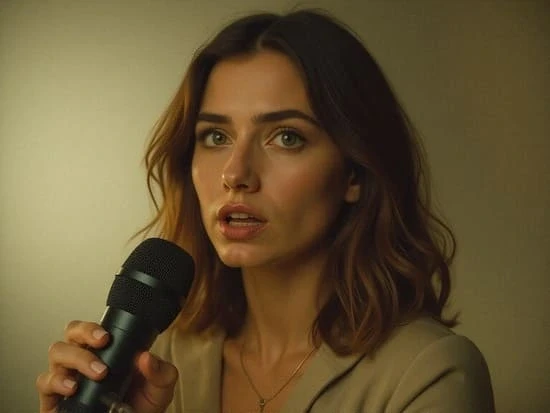
Creating professional-looking user-generated content starts with one simple rule: your audio and video must feel perfectly connected. If the voice is even slightly ahead of the lips, or the mouth moves before the sound arrives, viewers notice immediately. That tiny delay can make a TikTok, Reel, Shorts video, product review, or talking-head clip feel untrustworthy.
The good news is that learning how to sync audio and video no longer has to mean hours inside a complicated editing timeline. Traditional software still works, but AI lip sync tools like APOB AI now let UGC creators, digital storytellers, AI influencer builders, and faceless video creators generate synced talking videos from an image and an audio track.
Why Audio-Video Synchronization Matters for UGC
UGC content works because it feels personal, natural, and believable. When the voice, facial movement, and timing are out of sync, that trust disappears fast.
Clean audio-video synchronization is especially important for:
TikTok and Instagram Reels
YouTube Shorts
Talking-head UGC ads
Product review videos
Explainer videos
For social platforms, the first few seconds matter most. If the speaker looks unnatural, viewers scroll away before your message has a chance to land.
Best Method: Use APOB AI’s Lip Sync Tool
If your goal is to sync audio and video quickly for UGC, talking avatars, AI influencers, or faceless videos, APOB AI’s Lip Sync tool is the fastest method.
Instead of manually dragging audio tracks, matching waveforms, and adjusting frames, APOB AI lets you create a synced talking video from a face image or AI avatar. This is especially useful when you want a realistic spokesperson, digital creator, or AI-generated character to speak naturally.
How It Works
Upload a clear front-facing selfie, portrait, or AI-generated avatar.
Upload or select your audio file, such as a voiceover, product script, narration, or short ad hook.
Use APOB AI’s Lip Sync feature to automatically match the speech with natural mouth movement.
Generate your synced video and export it for TikTok, Reels, Shorts, ads, or landing pages.
Why APOB AI Works Well for UGC
APOB AI is not just a basic audio sync tool. It is built for creator workflows where you may not have recorded real talking footage at all. You can start with a still image, build an AI avatar, add a voice, and create a talking video that looks ready for social content.
This makes it ideal for:
UGC product ads
AI influencer videos
Faceless creator content
Talking avatar videos
Brand intro videos
Explainer clips
Short-form social campaigns
Pros
No editing experience required
Works well for AI avatars and digital presenters
Fast enough for short-form content production
Useful for creators who do not want to appear on camera
Great for voiceovers, product hooks, and talking-head style videos
Cons
Best results require a clear, front-facing image
Clean audio gives better lip sync accuracy
Not designed for complex multi-camera film editing
Manual Method: Sync Audio and Video in Adobe Premiere Pro
Adobe Premiere Pro is still one of the strongest options if you want full professional control. It works best when you already have separate camera footage and a separate audio recording.
To sync manually, import your video and audio tracks, line up the waveform peaks, and fine-tune the timing until the lips match the speech. If you used a clap, snap, or slate sound while recording, matching the spike in the waveform becomes easier.
This method is best for:
Professional interviews
Multi-camera shoots
Podcasts
Commercial video production
Long-form YouTube videos
The downside is time. For UGC creators who need to publish daily, manual syncing can feel too slow.
Fast Online Method: Use Descript, Kapwing, or VEED
Online editors are useful when you want a browser-based way to align audio and video, add captions, trim clips, and export social-ready videos.
Descript is strong for transcript-based editing and spoken content. Kapwing and VEED are useful for quick online editing, subtitles, resizing, and simple social media workflows.
These tools are helpful when you already have recorded video and need to fix timing or prepare content for social platforms. However, they are not always the best choice if you want to create a realistic talking avatar from a still image. That is where APOB AI’s AI lip sync workflow becomes more useful.
Mobile Method: CapCut and VN for Short-Form Videos
For TikTok, Reels, and Shorts creators, CapCut and VN are practical mobile editors. You can import your video, add audio, drag the sound into place, trim clips, and export quickly.
This is useful for:
Trend videos
Simple voiceover edits
Music-based clips
Fast mobile UGC posts
But mobile editors usually require manual adjustments. They are not built to generate realistic mouth movement from an AI avatar or still portrait.
How to Fix Audio Delay in Video
If your audio is slightly delayed, follow this quick checklist:
Use headphones to hear the timing clearly.
Find a strong visual cue, such as a mouth opening, clap, snap, or first word.
Move the audio track slightly earlier or later.
Check the video at normal speed.
Export a short test clip before rendering the full video.
If you are creating an AI avatar or lip sync video, use APOB AI instead of manually adjusting every frame. The platform is designed to generate mouth movement from the audio automatically.
Best Audio Settings for AI Lip Sync
For the best lip sync video results, your audio matters as much as the image.
Use:
Clean voice recording
Minimal background noise
Clear pronunciation
Mono or centered voice audio
Short, direct scripts
Avoid:
Heavy music under the voice
Echo-heavy rooms
Muffled recordings
Multiple people speaking at once
Long pauses without clear speech
A clean voice track helps the AI read speech timing more accurately and create more natural mouth movement.
Best Way to Sync Audio and Video for UGC Creators
If you recorded real footage and separate audio, use Premiere Pro, Descript, Kapwing, VEED, CapCut, or VN depending on your skill level and platform.
If you want to create a talking avatar, AI influencer, faceless UGC ad, or lip sync video from an image and voiceover, use APOB AI. It removes the hardest part of audio-video synchronization by generating the mouth movement for you.
For modern UGC creators, speed matters. APOB AI helps you move from script to synced video faster, without needing a camera crew, timeline editing skills, or repeated reshoots.
Conclusion
Knowing how to sync audio and video is essential for professional UGC, but the best method depends on what you are creating.
Manual tools are great for traditional video editing. Online tools are useful for fast social edits. Mobile apps are convenient for quick posts. But for AI avatars, faceless videos, talking-head UGC, and lip sync videos, APOB AI gives creators a faster and more direct solution.
With one image and one audio file, you can create a synced talking video for TikTok, Instagram Reels, YouTube Shorts, ads, explainers, and digital storytelling.
Try APOB AI for free and create your first AI lip sync video today.
FAQs
What is the easiest way to sync audio and video for UGC?
The easiest method is using APOB AI’s Lip Sync tool if you want an AI avatar or talking-head style video. For manual editing, CapCut, Descript, or VEED are beginner-friendly options.
Can I create an AI avatar that talks in sync with my audio?
Yes. APOB AI lets you upload or create an AI avatar and sync it with a voice recording using its AI lip sync feature.
Is there a free way to sync audio and video?
Yes. CapCut and VN offer free manual editing options, while APOB AI gives daily free credits so you can test AI lip sync videos without paying upfront.
What type of audio works best for AI lip sync?
Clean voice audio works best. Use a clear recording with minimal background noise, no echo, and one speaker at a time.
Can I use APOB AI for faceless videos?
Yes. APOB AI is useful for faceless creators because you can use an avatar, AI influencer, or generated character instead of appearing on camera.
Can I sync a voiceover to a still image?
Yes. APOB AI can turn a still portrait or avatar image into a talking video by matching the voiceover with realistic mouth movement.
What is the difference between audio sync and lip sync?
Audio sync means matching sound timing with video timing. Lip sync specifically means matching mouth movement with spoken audio.
What platforms can I use synced videos on?
You can use synced videos on TikTok, Instagram Reels, YouTube Shorts, product pages, ads, landing pages, and social media campaigns.
Reference Sources:
Adobe (n.d.) Premiere Pro. Available at: https://www.adobe.com/products/premiere.html(Accessed: 11 June 2026).
Descript (n.d.) Descript video editing tools. Available at: https://www.descript.com/ (Accessed: 11 June 2026).
Kapwing (n.d.) Online video editor. Available at: https://www.kapwing.com/(Accessed: 11 June 2026).
VEED (n.d.) Online video editor. Available at: https://www.veed.io/(Accessed: 11 June 2026).
Weng, S. et al. (2025) Audio-Sync Video Generation with Multi-Stream Temporal Control. Available at: https://arxiv.org/abs/2506.08003(Accessed: 11 June 2026).

Be the first to like this.







No credit card needed


