POPULAR
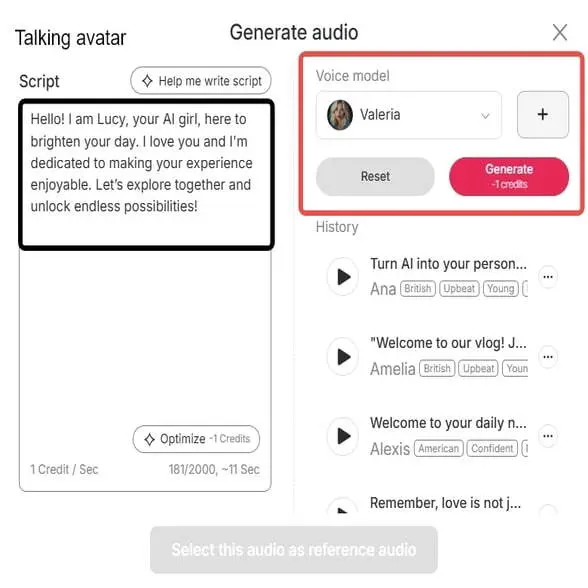
Robotic phrasing completely ruins the illusion of AI videos. Use our built-in script assistant to instantly optimize your text, and select specific emotional tones to ensure your avatar delivers lines with a natural, human-like cadence.
Generic AI voices weaken your unique brand identity. APOB AI allows you to go beyond our preset libraries by creating your own Custom Voice Model, ensuring your virtual influencer sounds exactly the same across every lip sync video.
POPULAR
Avoid the blurry lip and facial artifacts common in cheap AI generators. Whether you are driving a talking avatar from a single image or syncing a full video, APOB guarantees crisp, studio-quality rendering in FHD and Ultra resolutions.
Effortless Efficiency
It cut production time by a huge margin. Rather than laboriously animating frame by frame, APOB AI syncs speech to any character instantly. Indeed, APOB AI achieves “high-quality results in a fraction of the time and cost” of doing it manually. This allows creators to concentrate on ideas rather than syncing and makes content creation quick and efficient.
Universal Accessibility
Address audiences globally. APOB’s free lip sync AI feature can be used in any language or accent. Dub videos in all markets without re-shooting – APOB synchronizes lip movements with the new language. It eliminates language barriers, and you can localize content to reach out locally.
Professional Engagement
The outcome appears professional and enhances viewer engagement. AI video lip sync enables avatars and characters to talk naturally, enhancing videos as more authentic. “Lip-syncing saved me time and made my content look way more professional,” notes many creators who use the tool to boost their digital presence.
Designing Video Content
Lip-sync AI has been widely used by content creators to create avatars for popular social media platforms such as TikTok and YouTube. This assists them in making an AI character or image “speak” pre-recorded audio or text-to-speech and generate interesting videos without being required to work with a live actor. APOB AI, for instance, has this as one of the primary features of its AI influencer offerings (APOB AI, n.d.).
Education Presentations
Lip-sync AI has the ability to turn static headshots into conversational avatars for corporate training modules or education videos. It is a method of infusing a personal and dynamic touch to corporate training modules or e-learning modules in a way that makes information more palatable and easier to consume (Synthesia, n.d.). It offers a means of generating high-quality-looking videos in a timely manner and at reduced expense.
Digital Interactions
Game developers employ lip-sync AI to create more interactive digital friends, characters, or virtual assistants. For example, a game company can employ this tech to enable users to give voices to their in-game characters and respond in real-time, improving the immersive experience and user engagement.
No Credit Card Required
Elevate Your Content: Why AI Characters Are a Game-Changing Resource for Influencers
AI characters are no longer the stuff of science fiction—they're a reality. For influencers and UGC (user-generated content) creators, AI-generated characters offer a new, innovative way to connect with audiences without needing to appear on camera. These virtual personas can become your brand ambassadors, deliver your message, or simply entertain—no makeup, lighting, or in-person presence required. This innovative approach to content creation is rapidly gaining traction, offering unparalleled flexibility and scalability for digital creators [1].
They're perfect for:
Faceless content production: Create compelling narratives without revealing your identity.
Scaling video content quickly: Produce high volumes of engaging videos efficiently.
Reaching niche audiences effectively: Tailor characters and messages to specific demographics.
Maintaining brand consistency across multiple platforms: Ensure your brand's voice and appearance are unified.
Beyond Static Images: Video Drives More Engagement with APOB AI Lip-Sync
We live in a motion-first content world. Platforms like TikTok, Instagram Reels, and YouTube Shorts demand dynamic visuals. If you’re not producing short-form video, you’re falling behind. Research indicates that video content consistently outperforms static images in terms of engagement and reach across social media platforms [2].
While AI-generated images can look stunning, they don't grab attention the way a video does—especially one where your AI character talks with perfectly synced lip movements. A talking video increases realism, engagement, and scroll-stopping power, making your content impossible to scroll past. APOB AI's lip-sync technology ensures your characters speak naturally, enhancing viewer immersion.
Overcoming the Syncing Challenge: Why Talking AI Characters Weren’t Easy (Until Now)
One of the biggest hurdles in using talking avatars has always been how to sync audio and video seamlessly. Creators often struggled with:
Mismatched lip and voice movement: Leading to an unnatural and distracting viewing experience.
Stiff or delayed animations: Reducing the character's expressiveness and appeal.
Complicated, time-consuming editing software: Requiring specialized skills and significant effort.
That’s where APOB AI steps in to simplify everything, offering a seamless solution for creating realistic talking AI characters.
How to Use APOB AI: Convert a Photo into a Speaking Character Instantly
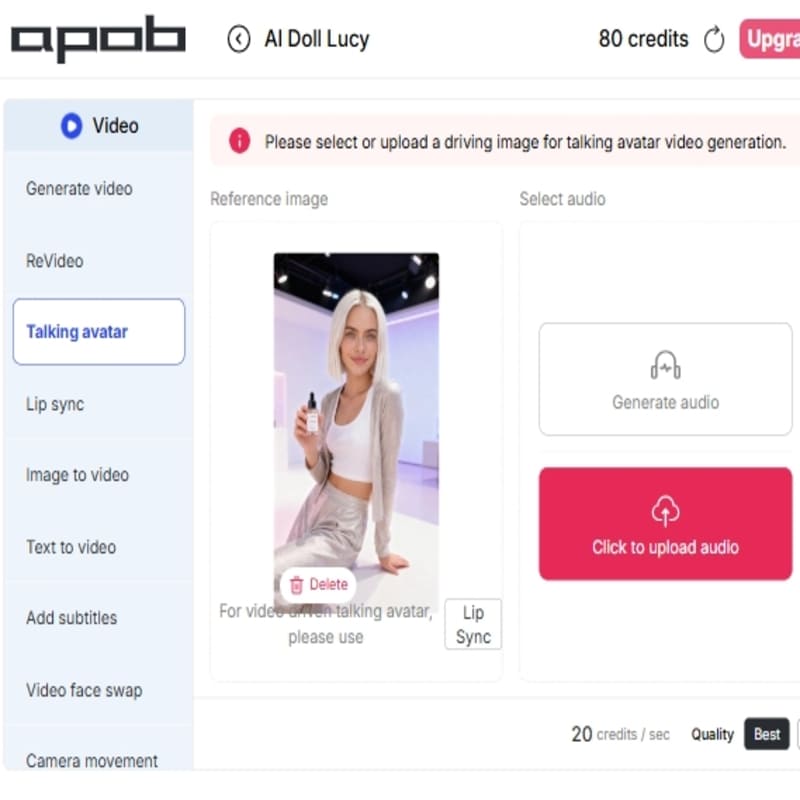
With APOB AI’s lip-sync feature, syncing audio and video is automated and accurate. You can upload a real or AI-generated photo, choose your audio or type in your script for text-to-speech (TTS), and watch your character talk, all in minutes. The process is designed to be intuitive and efficient, empowering creators to bring their visions to life effortlessly.
What you can do:
Upload a live image or create one with AI: Start with any image you choose.
Add voiceovers or TTS audio: Give your character a voice.
Instantly generate a video with synced lips and sound: See your character speak naturally.
No editing skills or downloads required—everything works directly in your browser. APOB AI makes advanced video creation accessible to everyone.
START CREATING NOW WITH APOB AI
Best Practices for Optimal Results with APOB AI Lip-Sync
To ensure your AI characters deliver the most impactful and realistic performances, consider these best practices when using APOB AI's lip-sync technology:
High-Quality Source Images: Always start with clear, high-resolution images of faces. Well-lit and front-facing photos yield the best lip-sync accuracy and overall realism.
Clear Audio Input: Use clean, crisp audio recordings for your voiceovers. Minimize background noise and ensure proper pronunciation for the most natural lip movements.
Concise Scripting: Keep your scripts focused and to the point. Shorter, impactful sentences often translate better into dynamic AI character performances.
Experiment with Voices: If using Text-to-Speech (TTS), try different voices and accents to find the perfect match for your character's persona and message.
Review and Refine: Always preview your generated video. Pay attention to lip-sync accuracy and overall animation flow, making minor adjustments to audio or script if needed.
Integrate Subtitles: Utilize APOB AI's built-in subtitle generator for enhanced accessibility and engagement, ensuring your message reaches a wider audience.
Beyond Lip-Sync: APOB AI's Comprehensive Video Generation Platform
APOB AI isn’t just an AI lip-sync tool—it’s an all-in-one AI video generation platform that includes a suite of powerful features to revolutionize your content creation:
Image-to-Video Generator: Animate static images and bring them to life with dynamic motion.
Talking Avatar Generator: Let your AI characters speak, interact, and convey emotions with advanced facial animation.
Lip-Sync Function: Seamlessly match speech with facial animation for incredibly realistic talking characters.
New Feature: Subtitle Generator for Enhanced Accessibility and Engagement
To improve accessibility and engagement, APOB AI now includes a built-in subtitle generator. This lets you reach a wider audience and ensures your content is clear—even with the sound off. Subtitles are crucial for inclusivity and can significantly boost viewer retention across various platforms.
Why subtitles matter:
Enhances clarity in noisy environments: Viewers can understand content without sound.
Increases viewer retention: Keeps audiences engaged longer, especially on mobile.
Supports multi-language accessibility: Opens your content to a global audience.
Technical Specifications: Powering APOB AI's Advanced Lip-Sync
APOB AI's lip-sync technology is built on state-of-the-art artificial intelligence models, ensuring high accuracy and efficiency. The platform supports a wide range of input formats for images and audio, and outputs high-quality video files suitable for various social media platforms. Our advanced algorithms process complex facial movements to synchronize precisely with spoken words, delivering natural and convincing results. Data privacy is a core tenet, with all user data handled securely and in compliance with industry standards.
Why Choose APOB AI Over Alternatives for Lip-Sync Technology?
When comparing APOB AI to manual editing or other AI solutions, the advantages become clear:
Feature | APOB AI (AI Lip-Sync) | Manual Editing | Other AI Tools |
|---|---|---|---|
Ease of Use | Extremely simple, no skills needed | Requires advanced editing skills | Varies, often complex |
Speed | Minutes to generate | Hours to days | Can be slow |
Realism | Highly realistic lip-sync | Dependent on editor skill | Varies, can be stiff |
Cost | Free tier available, affordable plans | Expensive software + time | Often costly subscriptions |
Accessibility | Browser-based, no downloads | Software installation required | May require specific hardware |
Integrated Features | Image-to-video, talking avatar, subtitles | Focus on editing, features separate | Often single-purpose |
APOB AI offers a comprehensive, user-friendly, and cost-effective solution for bringing AI characters to life with advanced lip-sync capabilities, outperforming traditional methods and many competitors.
Monetize with AI-Generated Content: Applications of APOB AI
APOB AI is a powerful creative platform designed for influencers, UGC creators, and marketers. With its tools, you can generate high-quality AI videos, avatars, and visual content with ease, opening up numerous monetization possibilities.
Monetization possibilities:
Produce branded talking videos for UGC campaigns: Create engaging promotional content.
Launch faceless YouTube, TikTok, or Instagram channels: Build a brand without personal appearance.
Sell affiliate videos created with AI video generation: Generate income through product promotion.
Build your own AI influencer brand that works 24/7: Establish a perpetual digital presence.
Whether you're looking to scale content or explore AI-powered revenue streams, APOB AI has everything you need to succeed in the evolving digital landscape.
Conclusion: Let Your AI Characters Talk in Minutes — It’s Free & Easy with APOB AI
UGC creators and influencers need tools that are fast, impactful, and easy to use. With APOB AI’s lip-sync and talking avatar features, you can bring your characters to life in minutes—no advanced skills required. Embrace the future of content creation and captivate your audience with dynamic, speaking AI characters today.
Frequently Asked Questions About APOB AI Lip-Sync
What is APOB AI's lip-sync feature?
APOB AI's lip-sync feature is an advanced technology that automatically synchronizes audio with the facial movements of an AI character or a static image, making it appear as if the character is speaking naturally. It transforms still images into dynamic, talking videos.
Can I use my own audio with the lip-sync tool?
Yes, APOB AI allows you to upload your own audio files. Alternatively, you can use the built-in text-to-speech (TTS) functionality by typing in your script, and the AI will generate the voice and sync it to your character.
What kind of images work best for APOB AI lip-sync?
For optimal results, use high-resolution images with a clear, front-facing view of the face. Good lighting and minimal obstructions around the mouth area will enhance the realism of the lip-sync animation.
Is APOB AI suitable for commercial use?
Yes, APOB AI is designed for commercial use, allowing influencers, marketers, and businesses to create engaging content for campaigns, social media, and various other applications. Please refer to our terms of service for specific licensing details.
Does APOB AI offer a free version or trial?
APOB AI offers a free tier that provides daily credits, allowing you to experience the powerful lip-sync and video generation features without any upfront cost. This is an excellent way to test the platform's capabilities.
How does APOB AI ensure the privacy of my uploaded content?
APOB AI prioritizes user privacy and employs robust security measures to protect your uploaded images and audio. All data is processed securely and is not used for training purposes without explicit consent. For more details, please review our comprehensive privacy policy.
References
[1] Forbes Tech Council. (2023, July 11). The Rise Of AI Influencers And Virtual Personalities. Forbes. https://www.forbes.com/sites/forbestechcouncil/2023/07/11/the-rise-of-ai-influencers-and-virtual-personalities/
[2] Hootsuite. (n.d.). Social Media Video Stats You Need to Know. Hootsuite Blog. https://blog.hootsuite.com/social-media-video-stats/
[3] Wikipedia. (n.d.). Text-to-speech. Retrieved from https://en.wikipedia.org/wiki/Text-to-speech
[4] TechTarget. (n.d.). What is artificial intelligence (AI)?. Retrieved from https://www.techtarget.com/whatis/definition/AI-Artificial-Intelligence
Read More
Creating professional-looking user-generated content (UGC) starts with one critical factor: knowing how to sync audio and video. Whether you're recording a voiceover, vlog, or talking-head clip, perfect audio-video synchronization is key to maintaining viewer attention and trust.
In this tutorial, we’ll walk you through multiple ways to sync audio and video—from manual software editing to innovative AI solutions like APOB AI’s Lip Sync feature, designed for UGC creators and digital storytellers.
Why Knowing How to Sync Audio and Video Matters
Understanding how to sync audio and video ensures that your audience sees lips and speech in harmony. A mismatch between sound and visuals not only breaks immersion, it makes your content look unpolished.
This is vital for:
TikTok and Instagram Reels
Explainer and tutorial videos
Talking-head UGC
Voiceover narrations
AI-generated avatars and lip sync videos
1. Use APOB AI’s Lip Sync Tool (Best AI Method)
If you want to sync audio and video effortlessly—especially for faceless videos or AI avatars—APOB AI’s Lip Sync tool is your go-to solution. It’s specifically built for UGC creators who want professional results without technical hurdles.
How It Works:
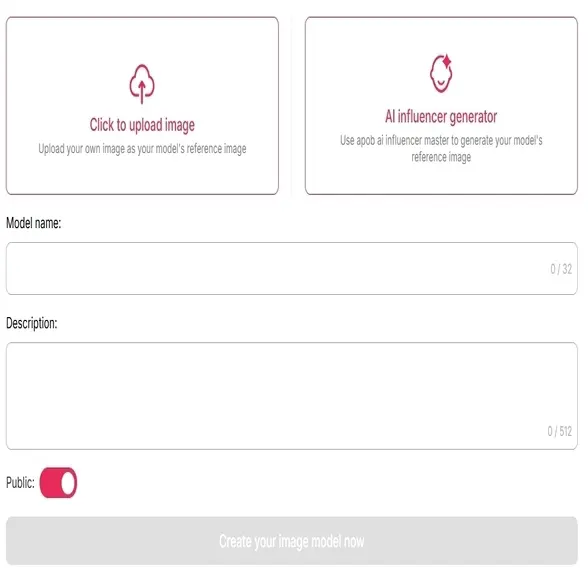
Upload a high-quality selfie or build an avatar using APOB AI’s AI Influencer Generator.
Upload or select an audio file (narration, script, or soundtrack).
Use the AI Lip Sync tool to automatically match the voice with realistic mouth movement.
Download your finished video and publish across platforms.
Pros:
Requires no editing experience
Designed for voiceovers, brand intros, short-form UGC
Excellent for creating lip sync videos with avatars
Cons:
Best results require front-facing, high-res images
Limited manual sync adjustments
🔗 Try it now: apob.ai
2. Adobe Premiere Pro (Manual Sync Option)
For full creative control, Adobe Premiere Pro allows you to manually sync voice and video using audio waveforms.
How to sync audio and video manually:
Import both your separate audio and video tracks.
Align the waveforms or clapper sound.
Fine-tune to match the lip movements precisely.
Pros:
Maximum control for pros
Ideal for multi-camera setups
Cons:
Steep learning curve
Time-intensive for UGC creators
3. Descript: Easy Auto-Sync with Transcription
Descript is ideal for content creators who want a fast way to sync narration and footage. It transcribes your script and automatically aligns it with the video timeline.
Pros:
Beginner-friendly
Perfect for podcast videos and interviews
Also supports voice cloning for videos
Cons:
Not fine-tuned for lip sync
Requires paid plan for advanced tools
4. CapCut & VN (Mobile-Friendly Editors)
These popular mobile editors let you sync audio and video on the go. Great for short TikToks or IG Reels with audio overlays.
Pros:
Easy to use
Free and widely accessible
Cons:
Minimal precision
Limited use for ai lip sync videos
5. iMovie & Final Cut Pro (Mac Only)
Mac users can rely on iMovie or Final Cut Pro for native waveform syncing.
Pros:
Great for beginners and hobbyists
Fast processing on MacOS
Cons:
Mac-only tools
No native AI or lip sync features
Final Thoughts: The Best Way to Sync Audio and Video in 2025
Whether you’re new to content creation or a seasoned editor, knowing how to sync audio and video is crucial. If you’re a UGC creator looking to save time and boost production value, then AI tools like APOB AI’s Lip Sync are unmatched.
With just an image and audio file, you can create studio-quality, synced videos perfect for TikTok, YouTube Shorts, or Instagram. Plus, APOB AI gives you the option to work faceless—with AI avatars that do the talking.
FAQs on How to Sync Audio and Video
Q1: What’s the easiest way to sync audio and video for social content?
A1: Use APOB AI’s Lip Sync feature for instant results. If you’re editing manually, CapCut or Descript are fast mobile options.
Q2: Can I create an AI-generated avatar that talks in sync?
A2: Yes, APOB AI lets you build an avatar and sync it with any voice recording using its ai girlfriend generator or influencer tools.
Q3: Is there a free way to sync audio and video?
A3: Yes. CapCut, VN, and APOB AI (with daily free credits) let you experiment without paying upfront.
Q4: What type of audio works best for lip sync AI?
A4: Clean, mono audio with minimal background noise ensures the best results with lip sync tools like APOB AI.
Read More
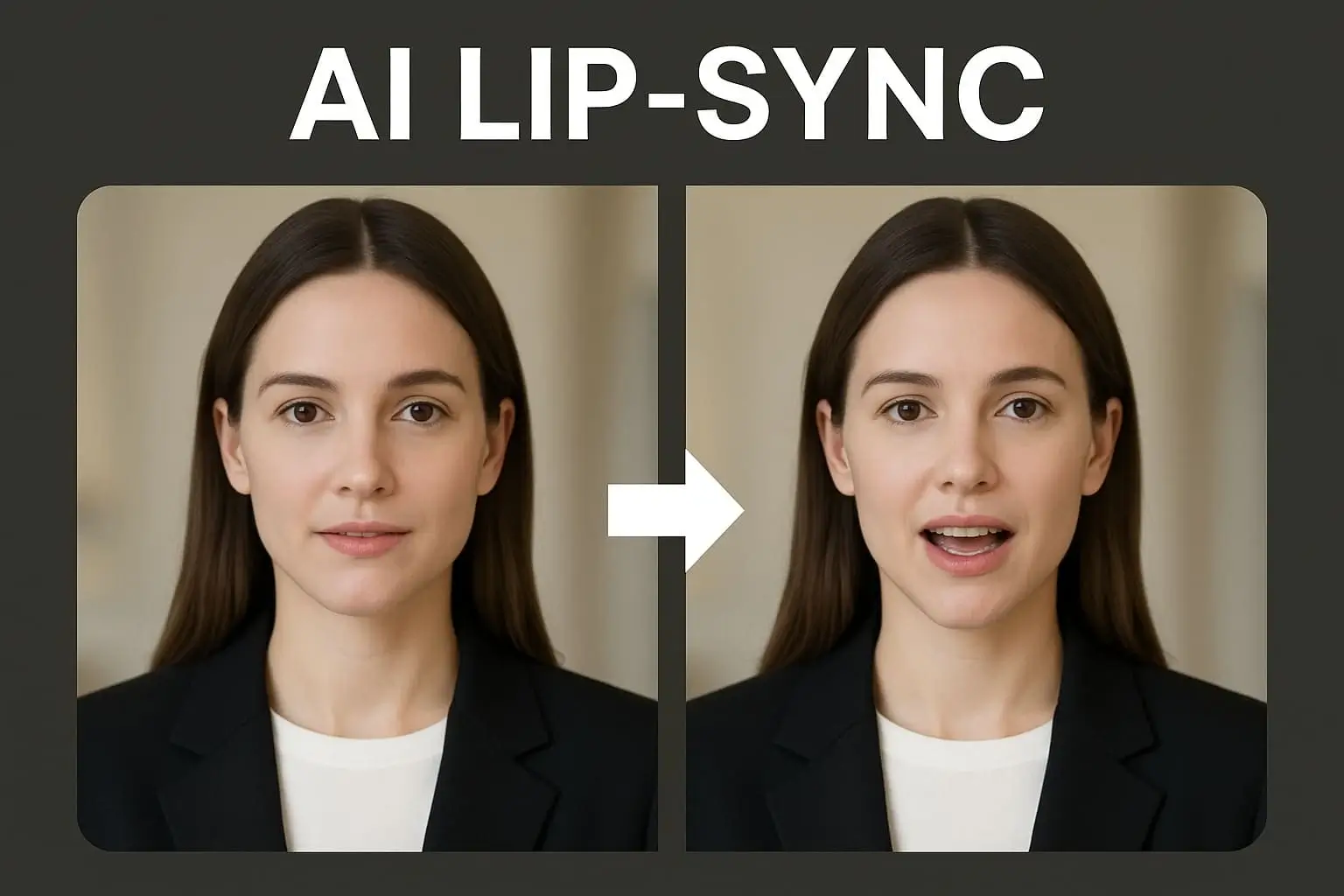
Abstract:
AI lip-sync technology is the latest content creation capability that is becoming increasingly popular across all content creators on TikTok, YouTube, and Instagram. As deepfake technology first opened the world's eyes to AI realism, ethical uses of lip-sync are now leading a completely new generation of active, editable, and brand-safe content. We discussed the differences between AI lip-sync videos and standard deepfakes, the uses to implement them, and how you can easily create lip-sync content through tools like APOB AI.
Don't forget to read the guide below befor using APOB AI!
How to Make AI Lip-Sync Videos with APOB AI
Making lip-sync videos has never been simpler with tools like APOB AI. Built for UGC creators and digital advertisers, APOB AI helps you animate faces, voice-over sync, and create influencer-quality videos with simplicity.
Step 1: Sign Up for a Free Account
First, visit apob.ai and create a free account. Once you're in, upload a clear image of the person you'd like to appear in your video.
Tip: If you don’t have a real person in mind, try generating a realistic AI spokesperson using our AI Influencer Generator!
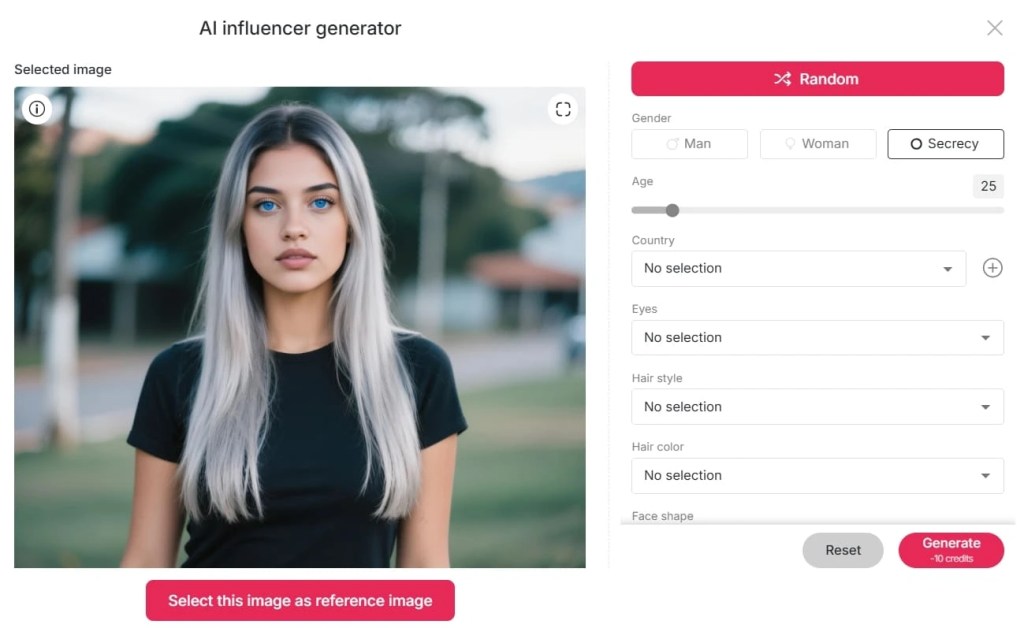
Step 2: Set Up Your AI Model
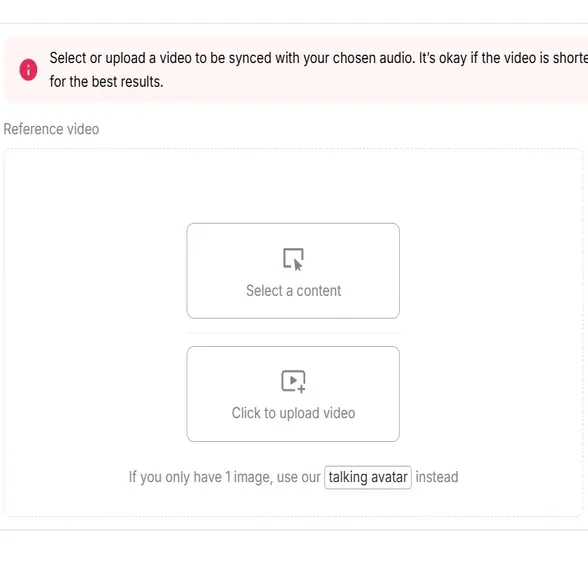
After uploading or generating your model, it’s ready to speak! Head over to the Lip Sync feature. You can upload a video or simply choose one and sync it with the audio of your choice.
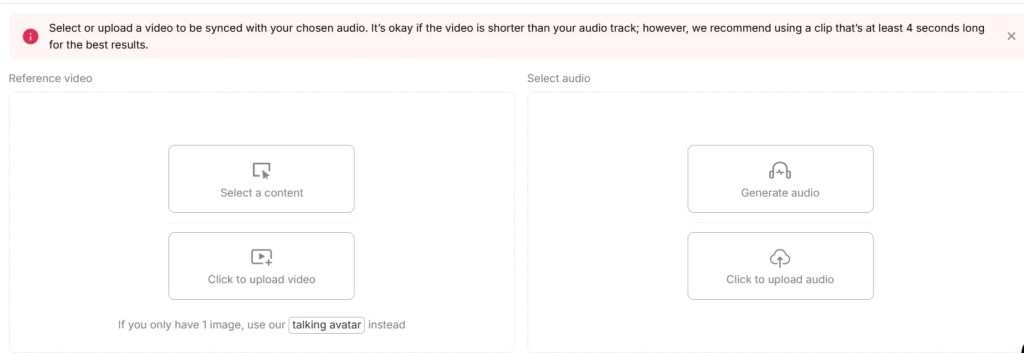
Step 3: Generate Your Lip-Synced Video
Hit the “Generate” button. APOB AI will automatically process and sync the lip movements to match your selected voice. Wait a few moments—and you’re done!
Now you're ready to create engaging, lip-synced content for TikTok, Instagram, YouTube, or anywhere else your audience hangs out. It's that simple!
What is Deepfake Technology?
Deepfake is a deep learning technology that makes it possible to hyper-realistically alter audio and video, often swapping faces or lip-syncing for different voices. Since viral videos made it popular, many of them offending, deepfakes have now entered the mainstream lexicon of artificial intelligence.
While deepfake technology is influential, it has generated ethics and privacy issues, particularly when performed unauthorized. Nevertheless, most AI software nowadays targets controlled and ethical lip-syncing for artistic use—particularly marketing, entertainment, and UGC (user-generated content).
What Is an AI Lip-Sync Video
An AI lip-sync video employs artificial intelligence to synchronize facial expressions, the lips in particular, with audio input—often a pre-recorded voiceover or sound track. Automatically, sometimes from one image and one sound file to create natural appearance speaking or singing videos.
Key Features:
- Transforms static images or talking head videos into synchronized speech animations.
- Increases interaction by animating digital avatars or AI characters.
- Ideal for explainer videos, character animation, and social media storytelling.
Unlike other normal deepfakes, the majority of AI lip-sync software is constructed with the content creator in mind; thus, it is secure, moral, and convenient to use.
Deepfake vs AI Lip Sync: What is the difference?
Although comparable in ability, deepfakes and AI lip-sync software have various objectives and are of a different complexity level.
Feature | Deepfake | AI Lip-Sync Tool |
Purpose | Face/identity replacement | Lip movement animation |
Ethical concerns | High (if used maliciously) | Low (when used with consent) |
Use case | Viral pranks, fake news | Marketing, UGC, education |
Skill required | Moderate to high | Beginner-friendly |
Real-time generation | Often slower | Often optimized for fast use |
Why AI Lip Sync Matters to UGC Creators
If you're a content creator on TikTok, Instagram Reels, or YouTube Shorts, being unique matters. Viewers love speaking avatars, singing characters, and AI animated spokespersons—but not everyone is equipped with the technical skills or budget to create them by hand.
You can:
- Make speaking videos from your selfie or avatar with AI tools.
- Animator product promotions with AI spokespersons.
- Create videos in other languages.
- Create voiceless content streams with animated voices and AI models.
Briefly, AI video making causes UGC creators to develop faster, remain anonymous if needed, and offer a professional appearance with less work.
Moral Use of Lip-Sync AI Tools
AI content is strong—but with a responsibility. While utilizing tools such as APOB AI, ensure that:
- Reserve all rights to images and audio you post.
- Label AI-produced content clearly whenever appropriate.
- Do not impersonate celebrities or actual individuals without explicit consent.
These regulations make your content ethical, engaging, and platform-friendly.
The Future of Lip-Sync AI in Content Creation
From faceless YouTube vloggers to virtual influencers with interactive personas, the horizon of AI lip-sync video software is limitless. With an increasing number of platforms adopting short-form, vertical content, creators require newer methods of connecting visually and emotionally.
AI lip-sync software, particularly responsible platforms like APOB AI, are not merely deepfake alternatives—those are the future of storytelling technologies.
Conclusion: Why You Need to Try AI Lip Sync Today
It enables creators, marketers, and influencers to create compelling, ethical, and effective social media videos. Whether you're an aspiring TikToker or a clandestine YouTuber, sites like APOB AI make it incredibly simple to start—no studio, actors, or cutting experience necessary.
Begin discovering your creative voice (literally) with the assistance of AI lip-sync technology today.
FAQs Regarding Deepfake and AI Lip-Sync Videos
Q1: What is a deepfake and how is it different from an AI lip-sync video?
A1: Deepfakes typically entail replacing identities, and AI lip-syncing entails syncing voice with lip movement—usually for innocent UGC reasons.
Q2: Am I allowed to create lip-sync videos for TikTok using an AI tool?
A3: Yes. Platforms such as APOB AI are ideal for TikTok, YouTube Shorts, and Instagram Reels.
Q3: Is APOB AI free?
A4: Yes! APOB AI provides free-of-charge daily credits to create videos.
Q4: I wish to utilize APOB AI to produce faceless content. Can I do it?
A4: Yes. You can make speaking AI avatars that can be your virtual representative, keeping you anonymous while you grow your audience.
Read More
Glides Sync
Removes the issue of poor sync between audio and video. APOB AI ensures that the avatar speaks exactly as the audio, so the characters actually sound and appear real. You don't need to cut mouth movements frame by frame anymore.
Monetization Possibilities
Good, aesthetically pleasing videos entice viewers. APOB AI suggests that lip sync video AI can "drive traffic on YouTube, TikTok, Instagram" – if you have an audience, you can initiate influencer campaigns and monetize your content. In short, lip-synced videos can be a money-maker by building your brand or profiting from your content.
Creative Efficiency
Accelerates production. With a few clicks, you have an edited, synced video. According to AI lip sync video platforms, the process is "efficient and user-friendly" and 10 times faster than traditional animation. You spend less money but still get real-looking results.
Input Quality Requirements
High-quality source material is essential. The face (especially the mouth) must be clearly visible for proper syncing. Low-res, occluded, or overly stylized characters may not sync as well. You might need to pre-process or reshoot for best results.
Free-Tool Limitations
Many free lip sync AI tools come with limits. For example, MagicHour’s free version restricts daily usage and adds watermarks. APOB AI’s free tier also has usage caps. To generate longer videos or unlock premium features, a paid plan might be necessary.
Ethical and Quality Issues
AI lip sync isn’t perfect. It "struggles with capturing natural expressions" if the input isn’t ideal. The result can feel uncanny with poor audio or occluded faces. As with other deepfake tools, this tech can be abused. Users must apply it responsibly.
What is AI lip sync technology?
It’s AI Tech that syncs mouth movements with audio using neural networks. The AI detects speech and animates lip motion frame by frame, creating realistic speech animation without manual work. APOB AI has such AI Lip sync technology and why not try it now!
How do I make an AI lip sync video?
Just upload your video or photo and audio and let APOB AI help you sync the ai video. APOB AI aligns the mouth movements to match speech. It’s as simple as: upload, pick or type audio, adjust, and download. APOB handles it all.
How do I use AI lip sync?
For dubbing, avatar animation, training videos, commercials, and social media. Whether localizing, replacing dialogue, or creating influencer content, AI lip sync generator tools like APOB’s can do it all.
Does it work in multiple languages?
Yes. Many lip sync AI online free tools support 70+ languages. Sync English, Spanish, Mandarin, and more. You can use it on avatars and real humans — any recognizable face can be animated to speak.
Are there any free lip sync tools?
Yes! Platforms like APOB AI offer free lip sync AI credits daily. You can experiment with voice, avatars, and syncing without paying. Paid tiers just unlock higher limits or more pro tools.
Drawbacks and concerns?
AI lip sync works best with clear, quality input. It’s not great with distorted or obscured faces. Long videos may need paid plans. Ethically, use it with care to avoid spreading disinformation.


