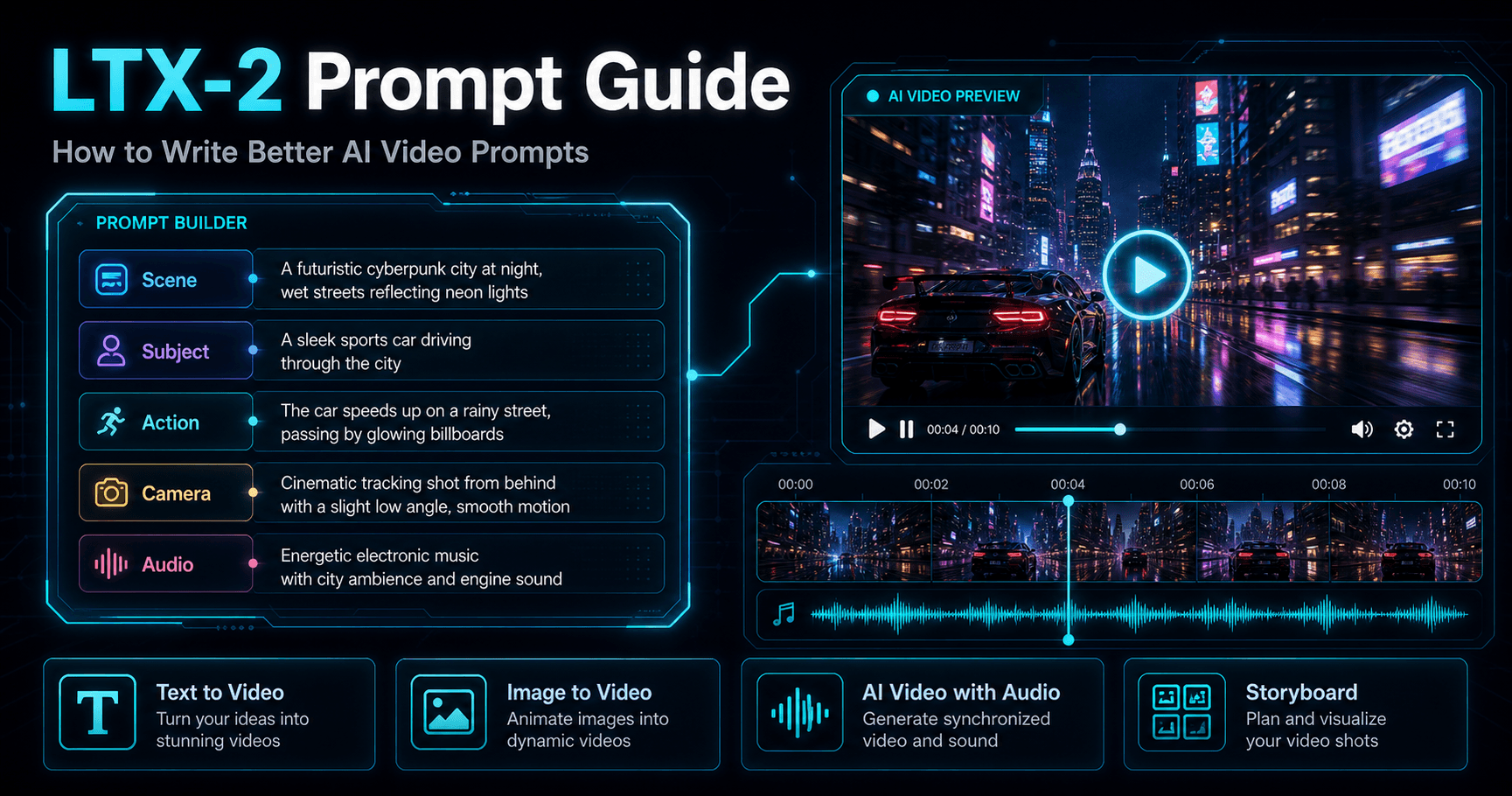
Write clearer text-to-video and image-to-video prompts for product clips, ads, Shorts, avatars, and faceless videos.
Step 1: Choose Text to Video or Image to Video
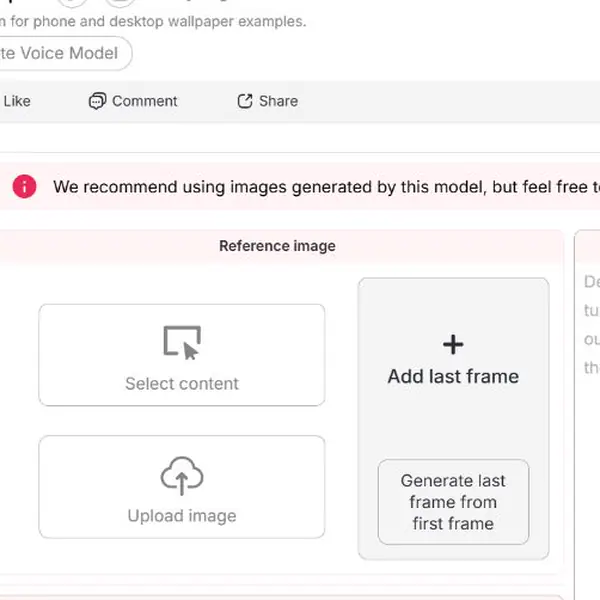
Open an existing portrait model in APOB AI and choose a workflow from the video section. Select Text to video when the scene can be created from words alone. Select Image to video when a particular face, product, outfit, composition, or first frame must anchor the result.
Example: A social marketer inventing a playful office scene can begin with Text to video. An ecommerce seller who needs an approved bottle to remain recognizable should begin with Image to video and choose an existing image or upload one.
Step 2: Write One Visible Action for the First Shot
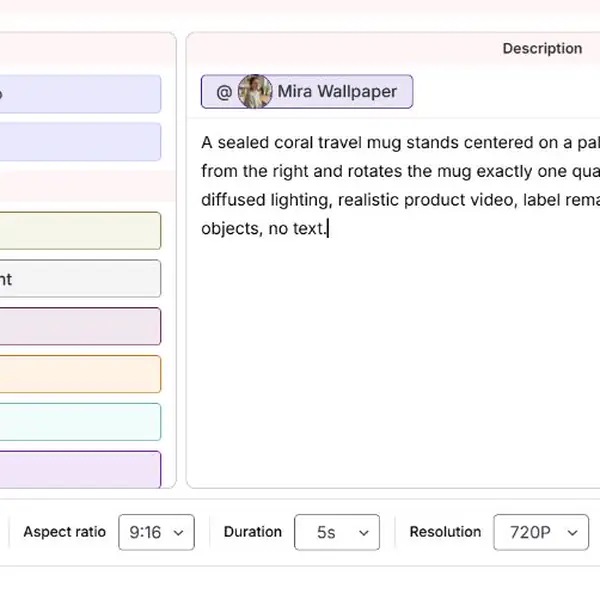
Click the Description editor and write the subject, one visible action, setting, framing, lighting, and details that must remain stable. Text to video needs at least one shot containing prompt text before the Generate control becomes available. Keep the first attempt narrow enough to diagnose.
Example prompt: “A sealed coral travel mug stands centered on a pale gray studio table. A hand enters from the right and rotates the mug exactly one quarter turn. Static medium shot, soft diffused lighting, realistic product video. Keep the mug shape and label sharp and unchanged. No extra objects or on-screen text.”
Saved portrait models and reusable Elements can appear as @ chips in supported workflows and quality tiers. If a needed Element is unavailable, check the in-app quality requirement rather than assuming every tier supports it.
Step 3: Set Art Style, Camera Movement, and Audio Deliberately
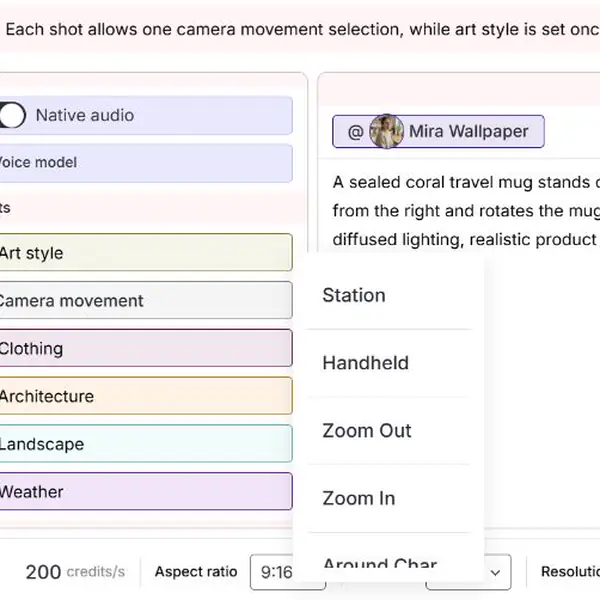
Use Art style for the overall look and Camera movement for shot motion. APOB AI currently allows one selected camera movement per shot; art style is set globally from the first shot. Camera movement is a setting inside Text to video and Image to video, not a separate generator.
Example: For a product demonstration, choose a stationary or restrained move when label readability matters. For a reveal, a gentle Zoom In may work better. Avoid writing one camera direction in the prompt and selecting a conflicting movement in the control.
Use Native audio when the clip should generate synchronized sound. A selected quality tier may require Native audio. When speech must use a specific supported voice, add a Voice model and reference it where the workflow permits.

Step 4: Add Shots Only When the Story Needs Them
Click Add shot to split a short sequence into separate prompt cards. Each shot can have its own prompt and camera movement, while the first shot controls the global art style. The number of available shots depends on duration, and multi-shot generation is offered only on supported higher quality tiers.
Example: For a portable blender ad, Shot 1 can show berries dropping into the cup, while Shot 2 shows one smooth blending pulse. This is easier to control than asking one shot to introduce the product, load ingredients, blend, pour, and finish on a logo.
Step 5: Choose Format, Duration, Resolution, and Quality
Use the bottom action bar to select aspect ratio, duration, resolution, and quality. Match these settings to the destination: 9:16 for many Shorts, Reels, and TikTok placements; a landscape ratio for many website or YouTube uses. Longer duration, higher resolution, and higher quality can increase the credit cost, while unsupported combinations appear disabled.
Example: A marketer preparing a social hook can choose a vertical ratio and a short duration for the first motion test. If the prompt works, the marketer can then test a higher quality or longer version without changing the creative brief at the same time.
For Image to video, an optional last frame may be available in a supported single-shot mode. The first and last frames should connect naturally. A last frame and multi-shot mode cannot currently be used together, so choose the control that solves the more important continuity problem.
Step 6: Check the Live Cost, Generate, and Revise One Variable
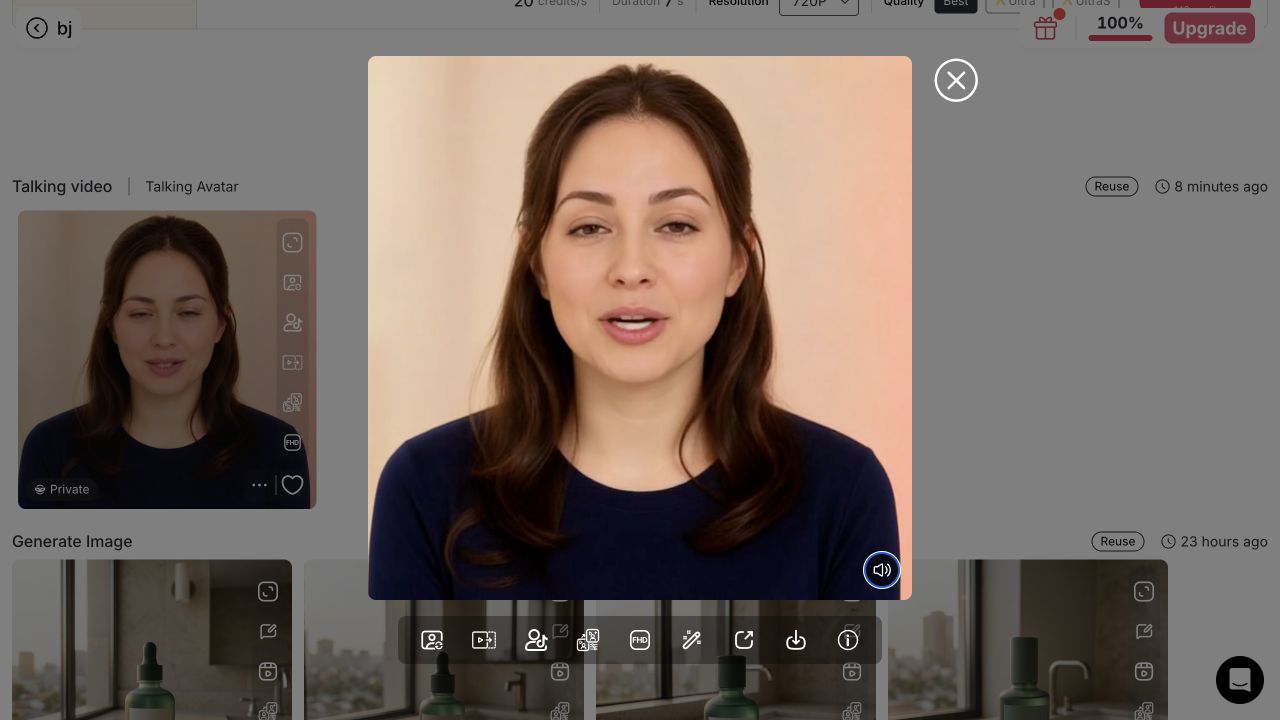
Read the credit amount displayed on the Generate control before clicking. The amount updates as settings change. After generation starts, the result appears in the Generation feed. If a generation starts but fails to finish, the current APOB AI Help Center states that its spent credits are returned automatically.
Example: If the travel mug deforms, keep the approved action and camera settings but simplify the hand interaction. If the motion works but the shot feels flat, change only the camera movement. Comparing one change at a time produces a clearer revision path.
Methodology note: This workflow was inspected and configured in the signed-in APOB AI workstation on August 13, 2026. The prepared five-second test has not been submitted because it requires account credits. Feature availability and costs can change, so use the current in-app controls as the source of truth.
Copy-Ready AI Video Prompt Examples
Copy these structures, then replace the subject, action, setting, and constraints with your own details.
TikTok product hook:
9:16 close-up of a sealed coral travel mug on a pale gray desk. A hand rotates it one quarter turn, then stops. Static camera, soft studio light, label sharp, no extra text.Ecommerce image-to-video:
Use the uploaded serum bottle as the first frame. Add a slow push-in while one drop forms at the pipette. Keep the logo, glass shape, cap, and background unchanged.AI influencer Reel:
The same model walks three steps through a bright hallway and turns toward camera. Gentle handheld movement, realistic fabric motion, preserve face, hair, outfit, and body proportions.Faceless Short:
Overhead shot of hands arranging three productivity cards in order. Each card enters once; no faces or generated text. Crisp daylight, quick but readable pacing, 9:16.Talking avatar update:
Medium shot of the avatar speaking calmly to camera. Minimal head movement, natural blinking, stable background and clothing. Leave visual space for captions.Two-shot product story:
Shot 1: berries fall into a portable blender, static medium shot. Shot 2: one smooth blending pulse, gentle zoom in. Keep product shape and color consistent.
They Reduce Ambiguity Before Credits Are Used
A structured prompt defines the shot before generation begins. Subject, action, camera, duration, and consistency rules make it easier to see whether the brief is actually executable.
They Make Reference-Driven Video More Useful
Text alone is not always the best control method. APOB AI lets creators start with an AI portrait, influencer model, or other approved image and use the prompt to direct motion. That is more practical when the face, outfit, pose, or product matters.
They Connect Isolated Shots to a Creator Workflow
The same project may need an opening image-to-video shot, a talking-avatar explanation, lip-synced audio, an extended ending, and captions. Keeping those tasks within one creative workflow reduces handoffs and makes it easier to review whether the character and message still match.
They Support Purposeful Variations
A team can keep the core subject and action while testing one change: a static camera versus a slow push-in, warm daylight versus a cool studio setup, or a six-second hook versus a calmer product reveal. The result is a usable variation plan, not a folder of unrelated generations.
They Help Non-Filmmakers Give Production Direction
Users do not need to write dense cinematography jargon. Plain instructions such as “eye-level medium shot,” “camera remains fixed,” “one slow turn,” and “keep the packaging unchanged” are specific enough to improve control and easy for a marketing team to review.
Face drifts or changes
Likely cause: Head movement, angle change, and camera motion are all too aggressive Prompt-level fix: Keep the subject nearly front-facing, request one subtle expression, and use a locked or gentle camera move
Product shape or label deforms
Likely cause: The prompt asks for several handling actions in one shot Prompt-level fix: Use an approved reference and reduce the shot to one interaction, such as lift, rotate, or open
Camera jitters or changes direction
Likely cause: Multiple camera instructions conflict Prompt-level fix: Choose one movement: static, push-in, tracking, pan, tilt, or orbit
Background flickers
Likely cause: Too many secondary objects are moving Prompt-level fix: Name the one environmental motion you need and state that other objects remain still
Outfit or character changes between shots
Likely cause: Identity and wardrobe anchors are not repeated Prompt-level fix: Reuse the same reference and repeat face, hairstyle, garment, color, and proportion details
Generated text is unreadable
Likely cause: The model is being asked to render typography inside moving footage Prompt-level fix: Keep signs, cards, and screens blank; add readable text and subtitles during editing
The prompt is partly ignored
Likely cause: Too many actions or temporal transitions compete for a short duration Prompt-level fix: Split the idea into shot-level prompts and give each shot one purpose
Talking avatar delivery feels unnatural
Likely cause: The script is too long, complex, or emotionally inconsistent Prompt-level fix: Shorten the script, add punctuation for pacing, and separate vocal direction from visual direction
First and last frames do not connect
Likely cause: The start state, end state, or camera axis changes too much Prompt-level fix: Keep composition and camera direction consistent and simplify the transition between key states
Audio feels disconnected from the visual
Likely cause: Dialogue, action, and timing were planned separately Prompt-level fix: Match the script length to the shot, leave pauses for visible actions, and review lip sync before publishing
Obtain Consent for Real People and Voices
Do not use a person's face, voice, or performance without the permission and rights needed for the intended use. This is especially important for paid advertising, endorsements, public figures, employees, customers, and minors. A disclosure does not replace consent.
Use References You Have the Right to Upload
Only upload photos, product imagery, artwork, footage, logos, music, and audio you own, have licensed, or are otherwise permitted to use. Avoid prompts that ask for an exact copy of a protected character, living artist's signature style, branded campaign, or copyrighted scene when you do not have authorization. APOB AI's current terms require users to hold the necessary rights and permissions for submitted content (APOB AI Terms of Service).
Do Not Fabricate Endorsements or Evidence
An AI avatar should not be presented as a real customer, expert, or celebrity endorsement. Do not use generated product demonstrations to imply medical, financial, performance, or safety outcomes that have not been substantiated. For sponsored content, make required advertising disclosures clear and hard to miss.
Disclose Realistic Synthetic Content Where Required
Platform rules differ and change. YouTube currently requires creators to disclose meaningfully altered or synthetic content when it appears realistic, including content that makes a real person appear to do something they did not do or depicts a realistic event that did not occur (YouTube Help). Review the current rules of every platform before posting.
Understand Copyright Limits
Copyright treatment varies by country. In the United States, the Copyright Office states that AI-assisted works may qualify for protection when there is sufficient human-authored expression, arrangement, or modification, but prompts alone do not automatically make the output copyrightable (US Copyright Office). Keep records of your references, prompts, edits, and human creative decisions when rights matter.
Protect Private and Confidential Information
Do not put unreleased products, customer data, internal dashboards, personal documents, or confidential campaign materials into a prompt or upload unless your organization has approved the workflow and reviewed the applicable APOB AI Privacy Policy and Terms of Service.
Short-Form Social Ads
Social teams can write separate prompts for the hook, proof, and call to action, then assemble or extend the strongest shots. This is useful for TikTok, Reels, and YouTube Shorts where the opening action must be understandable immediately. HubSpot's 2026 survey found that 48.6% of marketers ranked short-form video among the media formats producing the biggest ROI, the highest result in its comparison (HubSpot, 2026 State of Marketing).
Scenario: A mobile-accessory brand tests three six-second hooks: a phone slipping from a desk, the case absorbing the impact, and a close-up of the raised edge. Each prompt changes only the opening action while preserving the same case and color.
Ecommerce Product Demonstrations
Product prompts can specify the hand action, viewing angle, lighting, and details that must not deform. Quality control matters because 89% of consumers surveyed by Wyzowl said video quality affects their trust in a brand (Wyzowl Video Marketing Statistics 2026).
Scenario: A skincare seller begins with an approved bottle image, prompts a slow cap removal and one drop landing on a glass surface, then generates a second shot showing texture. The bottle shape, cap color, and label placement stay in the consistency line.
AI Influencer Posts and Fashion Lookbooks
AI influencer creators can reuse a character model or portrait, then direct pose changes, garment motion, camera distance, and background activity. This is more reliable than redescribing the character in every prompt. IAB projected US creator ad spend at $37 billion in 2025, up 26% year over year, showing why repeatable creator-production workflows matter to brands (IAB Creator Economy Ad Spend & Strategy Report).
Scenario: A virtual fashion creator needs a three-look Reel. Each shot uses the same character but changes one garment, one runway action, and one lighting setup. The prompts preserve face, hairstyle, body proportions, and camera height across the sequence.
Faceless Educational Videos
Faceless creators can prompt object-led scenes, overhead demonstrations, interface-style compositions, or abstract visual metaphors without putting a presenter on camera. Wyzowl reports that 69% of video marketers created social media videos in 2026, making it the most common video-marketing use case in its survey (Wyzowl Video Marketing Statistics 2026).
Scenario: A finance educator uses three controlled visuals: coins sorted into labeled jars, a calendar page turning once, and a simple upward chart drawn by hand. Narration and subtitles carry the lesson while prompts keep each shot visually simple.
Talking Avatars and Product Explainers
When speech is the main event, the visual prompt should prioritize a stable front-facing composition and subtle idle motion rather than dramatic action. The script should be written separately for timing and clarity. APOB AI can pair a suitable portrait with talking-avatar audio or use lip sync when the creator already has audio and video.
Scenario: A SaaS team creates a fictional product specialist who explains one feature in 15 seconds. The visual direction keeps the avatar chest-up and facing the camera, while the script states the problem, the feature, and one next action.
Storyboards and Multi-Shot Campaign Concepts
Longer ideas work better when split into shot-level prompts. A team can define one character, product, and setting, then give each shot a single purpose. This makes it easier to replace a weak shot without regenerating the full concept.
Scenario: A coffee brand plans a 20-second launch video with four beats: beans pouring, grinding, espresso extraction, and a final cup reveal. Each shot has its own action and camera direction, while the product colors and warm morning mood remain constant.
Funny AI Video Prompts for Entertainment Shorts
Humor works best when the model has one visual joke to execute, not a full comedy sketch. Keep the setup familiar, make the unexpected action easy to see, and avoid using a real person or brand as the target of the joke.
Scenario: A workplace creator makes a six-second clip in which an office chair quietly rolls into an empty meeting room, turns toward the presentation screen, and stops as if it arrived before everyone else. A static wide shot and an unchanged background keep the visual gag readable.
More controllable first drafts: Clear action, camera, and consistency instructions reduce how much the model must guess. Reusable creative briefs: A good prompt can be reviewed by marketers, designers, and editors before credits are spent. Better reference-image workflows: Prompts can concentrate on motion while the image anchors the person, product, or composition. Faster variation testing: Teams can change one variable and compare results instead of rebuilding the whole concept. Useful across multiple outputs: The same visual plan can support social clips, product demos, avatar videos, lip sync, extended scenes, and captioned posts.
Prompts do not guarantee exact results: Generative video remains probabilistic, so important details still require review. Longer is not always better: Overloaded prompts can create conflicting actions and weaker motion. Reference quality matters: A blurry, cropped, or unauthorized image cannot be fixed by elaborate wording. Iteration may use additional credits: Testing several variations can increase generation cost, so begin with short, simple shots. Commercial review is still necessary: Product labels, hands, faces, claims, and disclosures need human checking before publication.
No Credit Card Required
Answers based on the tested APOB AI workflow, current Help Center documentation, and platform rules.
What is an AI video prompt?
An AI video prompt is a production instruction for a generative video system. It describes the subject, visible action, setting, camera behavior, style, timing, audio intention, and details that should remain consistent.
How do I write a good AI video prompt in APOB AI?
Start with one visible action. Add the subject, setting, framing, camera movement, lighting or style, and the details that must stay unchanged. Test a simple version before adding more events.
Does APOB AI limit prompt length?
Yes. Limits vary by workflow. The composer shows a counter or warning when one applies, so place the subject, main action, and important consistency constraints first.
What is the difference between Text to video and Image to video?
Text to video builds the scene from words. Image to video starts from a selected or uploaded first frame, so its prompt should focus on motion, camera behavior, and what must remain recognizable.
Can I use a first frame and a last frame?
Image to video can offer an optional last frame in supported single-shot modes. The frames should connect naturally. A last frame and multi-shot mode cannot currently be used together.
Can I create multiple shots in one video?
Yes, when the selected workflow, quality, and duration support it. Each shot can have its own prompt and camera movement, while art style is controlled from the first shot.
How many camera movements can I use?
Each shot can use one selected camera movement. Choose the shot before changing its movement, and avoid writing a conflicting camera direction in the prompt.
What is Native audio?
Native audio generates synchronized sound with the video. Availability depends on the workflow and quality setting, and some quality options may require it.
Can I use a Voice model in a video prompt?
A Voice model can be selected in supported audio-enabled workflows. Availability varies, so use the controls shown in the current workspace as the source of truth.
Why is the Generate control disabled?
Text to video needs prompt text, while Image to video needs a source image. Uploads or models may also still be processing. The control becomes available after required inputs are ready.
How does APOB AI calculate video credit cost?
The app calculates cost from the active workflow and settings, including duration, quality, resolution, and supported audio options. Check the live amount on the Generate control before committing.
What happens if generation fails?
The current APOB AI Help Center states that credits used by a generation that starts but fails to finish are returned automatically. Check the inputs and contact support if the same setup repeatedly fails.
Can I use APOB AI videos commercially?
Use only references, likenesses, voices, music, products, and other assets you are authorized to use. Review the current APOB AI Terms and applicable platform and local rules before commercial publication.
Is my uploaded reference private?
Do not upload confidential or sensitive material without approval. Review the current APOB AI Privacy Policy, Terms, and account visibility settings before using personal, client, or unreleased assets.
Do I need to disclose that a video is AI-generated?
Disclosure may depend on realism, material alteration, the people or events depicted, advertising context, platform rules, and local law. Check current requirements before publishing.
Which platforms can I create prompts for?
You can prepare prompts for TikTok, Instagram Reels, YouTube Shorts, horizontal YouTube videos, product pages, ads, presentations, and other placements. Match framing, duration, caption space, and aspect ratio to the destination.


