What is Image to Video AI?
Image to Video AI represents a transformative technology that converts static images into dynamic video content through artificial intelligence algorithms. This innovative approach leverages machine learning models to analyze still photographs and generate fluid motion, realistic transitions, and engaging animations without requiring traditional video production skills or expensive equipment.
According to Grand View Research, the AI video generator market was valued at $788.5 million in 2025 and is projected to reach $3.4 billion by 2033, growing at a CAGR of 20.3%.[1] This explosive growth reflects the increasing demand for efficient, cost-effective video content creation solutions across industries ranging from e-commerce and social media marketing to education and entertainment.
How to convert Image to Video for free?
APOB AI stands out as a comprehensive platform that combines powerful Image to Video capabilities with advanced features like Face Swap, Camera Movement control, and Text to Video generation. Our intuitive interface makes professional video creation accessible to everyone, from individual content creators to enterprise marketing teams.
Step 1: Access APOB AI Platform
Navigate to APOB AI and create your free account. New users receive 80 daily credits to explore our capabilities without immediate financial commitment.
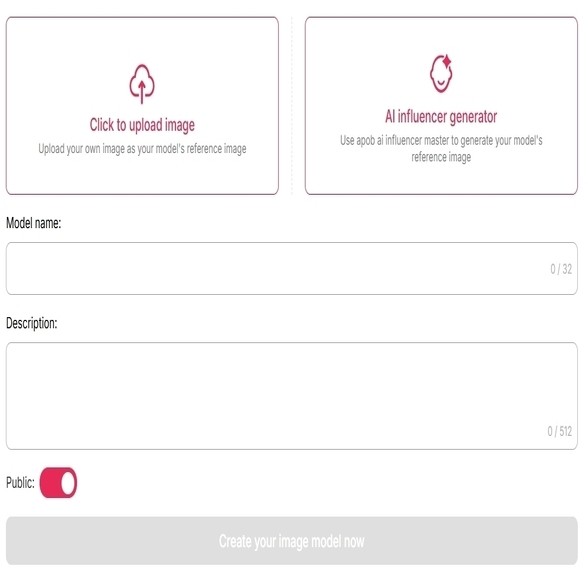
Step 2: Upload your source image for video generation.
We supports various image formats including JPG, PNG, and WEBP, with optimal results achieved using high-resolution images (1080p or higher). The platform's intelligent preprocessing automatically optimizes your image for video conversion. You can upload one image to create an ai model. (Note, it would be better if you upload a picture of a character)
Step 3: Turn Image into video with prompts
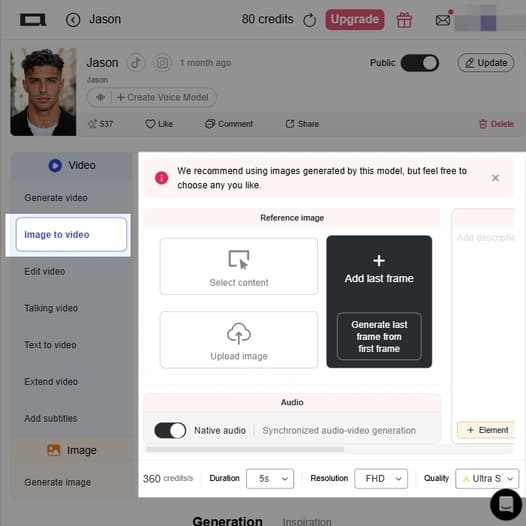
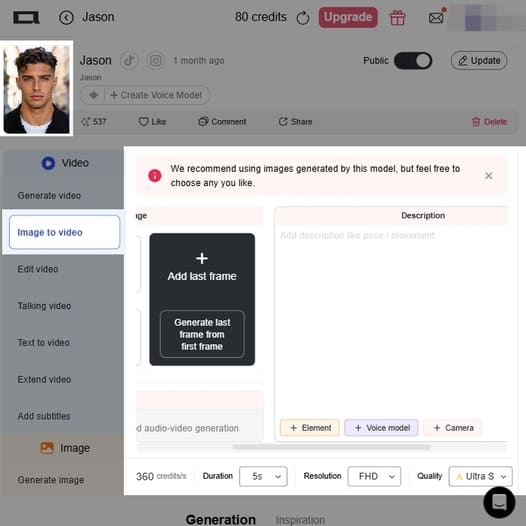
Once your model (like "Lucy" in the top left corner) is ready, follow these steps to generate a video:
3.1 Set Your Reference Image
In the center panel, you need to provide the starting frame for your video. You have two main options:
Select content: Choose an existing image directly from your APOB workspace. (Note: The red banner recommends using images generated by your current model for the best consistency).
Upload image: Upload a custom picture from your local device.
(Optional) Add last frame: If you have a specific ending in mind, you can add a final frame in the right-side box, or click the "Generate last frame from first frame" button to let the AI handle the transition.
3.2 Write Your Description
In the text box on the right, describe the animation you want.
Prompting: Follow the placeholder text ("Add description like pose / movement") by typing out the specific actions, character poses, or camera movements you want the AI to animate.
Quick Tools: Use the buttons below the text box (
+ Element,+ Voice model, and+ Camera) to easily insert specific instructions and control the exact look and feel of the shot.
3.3 Configure Audio
Just below the image upload area, there is a Native audio toggle. Turn this on if you want the system to generate synchronized audio alongside your video.
3.4 Adjust Generation Parameters
Look at the bottom toolbar to set your video specifications. These settings will determine the total credit cost of your generation (currently estimated at 360 credits/s):
Duration: Select the length of the video clip (e.g., 5s).
Resolution: Choose your desired video dimensions (e.g., FHD).
Quality: Pick the rendering quality from Fast, Best, Ultra, or Ultra S. Higher quality will consume more credits.
Step 4: Generate Your Video
Once all settings are configured to your liking, the Generate button in the bottom right corner will become active. Click it to spend your credits and start the rendering process.
(Extra Step) If you want to create a video with multiple scenes, you can click the + Add shot panel on the far right to set up the next sequence before generating.
Best Image Inputs for Image-to-Video AI
Not every still image turns into a great AI video. The better your source image, the more natural, stable, and realistic your final video will look. Before using an image-to-video AI generator, choose an image that gives the model enough visual information to animate smoothly.
1. Use a clear, high-resolution image
Start with a sharp image where the main subject is easy to recognize. Blurry, pixelated, or heavily compressed images can lead to distorted motion, strange facial changes, or messy background movement.
For best results, use:
A high-resolution photo
A clearly visible subject
Good lighting
Minimal noise or grain
A clean composition
If you are turning a product image into video, make sure the product edges, logo, texture, and key details are visible.
2. Keep the subject centered and fully visible
AI video generation works better when the main subject is not cut off. If a face, product, character, or body is cropped too tightly, the motion may feel unnatural.
Good examples include:
A portrait with the full face visible
A product photo with the full item in frame
A fashion image showing the outfit clearly
A character image with enough space around the body
Leave some room around the subject so the AI can create camera movement such as zoom-in, pan, orbit, or cinematic push-in.
3. Choose images with simple backgrounds
A busy background can distract the AI and create unstable motion. If you want a clean, professional AI video from a photo, use an image with a simple background or strong subject-background separation.
For marketing videos, product videos, and social media ads, clean backgrounds usually perform better because the viewer’s attention stays on the subject.
4. Avoid extreme angles unless they are intentional
Image-to-video AI can animate dramatic angles, but straight-on or slightly angled photos usually produce the most stable results.
Best input angles:
Front-facing portrait
Three-quarter face angle
Product at a clear front or side angle
Full-body character with visible pose
Avoid images where the subject is hidden, heavily tilted, overly distorted, or blocked by other objects.
5. Match the image to your final video goal
Choose your image based on what you want to create.
For a product ad, use a clean product image.
For an AI influencer video, use a polished portrait.
For an anime or character video, use a clear character image.
For a fashion video, use an outfit-focused photo.
For a professional promo, use a high-quality portrait or brand asset.
The clearer your starting image, the easier it is to turn the still image into a high-quality AI video.
Monetizing Content after converting Image to Video
Successfully monetizing AI-generated video content requires strategic planning and understanding of platform dynamics. The following best practices have been validated through real-world implementations across various industries and creator segments.
Optimize for Platform-Specific Requirements
Different social media and content platforms have distinct technical specifications and audience preferences. Instagram Reels perform best with 9:16 vertical videos under 60 seconds, while YouTube Shorts favor dynamic openings within the first 3 seconds. TikTok audiences respond particularly well to trend-aligned content with synchronized audio. APOB AI's flexible export options enable creators to generate platform-optimized versions from a single source image, maximizing content reach and monetization potential.
Maintain Brand Consistency
Consistent visual branding significantly impacts audience recognition and trust, both critical factors for monetization success. Use APOB AI's style presets to establish a signature aesthetic across your video content. Upload brand-specific resources including logos, color palettes, and character models to ensure every generated video reinforces your brand identity. This consistency translates directly to higher engagement rates and improved conversion metrics.
Leverage A/B Testing with Face Swap
APOB AI's Video Face Swap feature enables rapid testing of different models or spokespersons within identical video contexts. This capability is invaluable for optimizing ad performance, as you can test multiple variations without regenerating entire animations. Data from eMarketer indicates that 59% of creator revenue comes from sponsored content,[4] making performance optimization through A/B testing a critical monetization strategy.
Scale Content Production Strategically
The economic advantage of Image to Video AI lies in its scalability. Develop a content library of high-quality source images that can be repurposed into multiple video variations. A single product photo can generate dozens of unique videos by varying camera movements, styles, and lighting configurations. This approach maximizes return on investment for both content creation and APOB AI credits.
Integrate Call-to-Action Elements
While APOB AI generates the core video content, strategic placement of call-to-action elements significantly impacts monetization outcomes. Add text overlays, clickable links, or swipe-up prompts that guide viewers toward desired actions such as product purchases, email signups, or affiliate link clicks. The platform's high-quality output ensures these elements integrate seamlessly without compromising visual appeal.
Practical Workflows: Turn Still Images into Monetizable Videos
Once you understand how image-to-video AI can support monetization, the next step is knowing exactly how to apply it. Below are practical workflows that show how a single still image can become a short video asset for ads, social media, product pages, or client work.
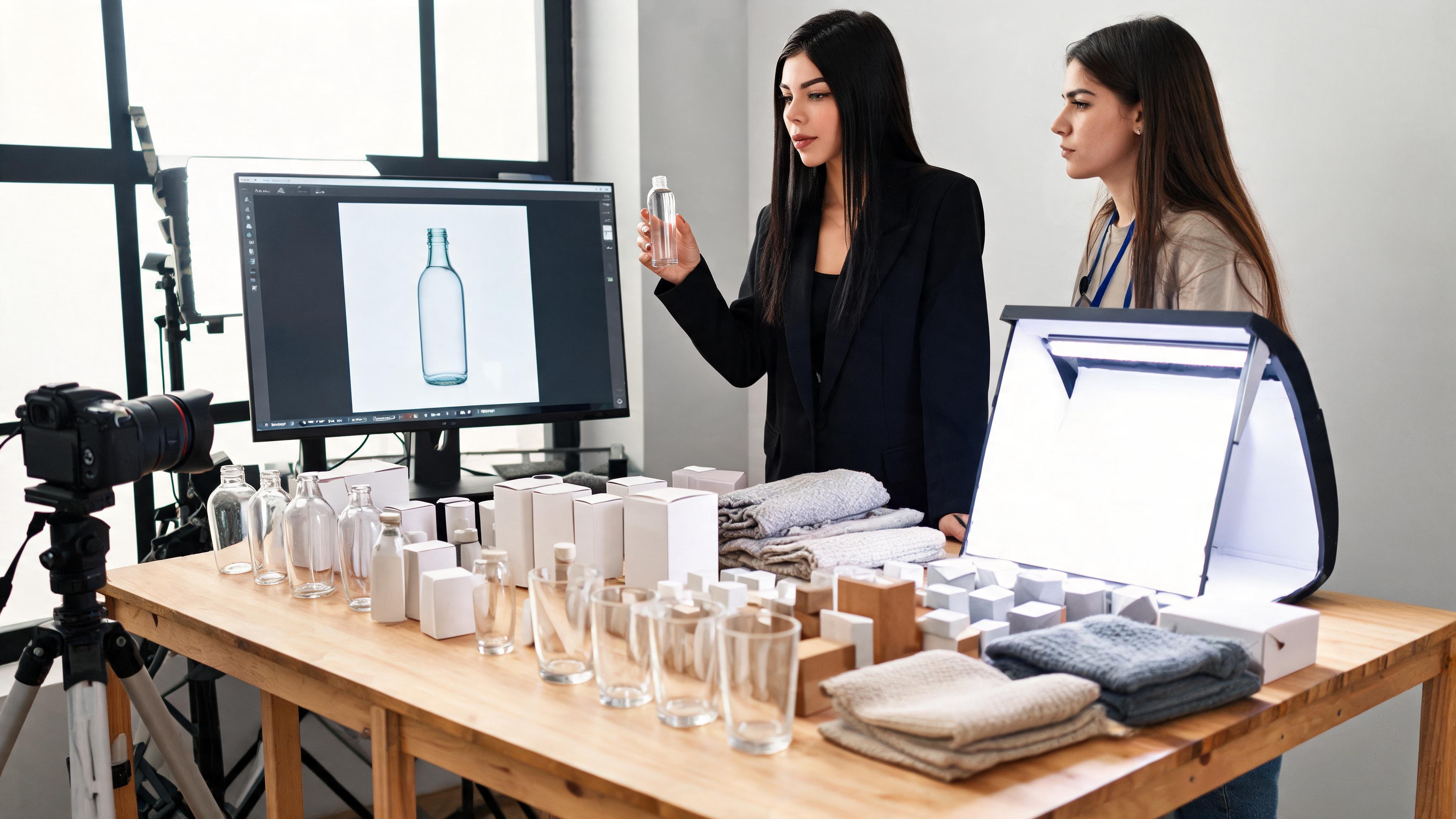
1. Product Image to Short Ad Video
A product photo can become a scroll-stopping ad video without a full studio shoot. This is especially useful for e-commerce sellers, affiliate marketers, dropshipping stores, and small brands that need more video creatives but have limited production resources.
Workflow:
Upload a clean product image.
Add a prompt for camera motion, lighting, and mood.
Generate a short vertical video.
Add text overlays such as benefits, price, discount, or CTA.
Use the video on TikTok, Instagram Reels, YouTube Shorts, or product landing pages.
Prompt example:
“Premium product ad video, slow camera push-in, soft studio lighting, clean background, subtle reflections, realistic motion, vertical 9:16.”
Best for:
Beauty products
Fashion accessories
Gadgets
Jewelry
Home decor
Supplements
Digital products
Monetization angle:
Use the video as a paid ad, affiliate promo, product page visual, or organic short-form content to drive clicks and sales.
2. AI Portrait to Faceless Creator Video
If you do not want to appear on camera, a single AI portrait can become the visual identity for a faceless channel. You can animate the portrait, add voiceover or subtitles, and use it for educational, commentary, storytelling, or promotional videos.
Workflow:
Upload an AI portrait or digital character image.
Generate subtle face movement or cinematic motion.
Add narration, subtitles, or talking avatar features.
Publish the result as a short-form video.
Reuse the same character style to build a recognizable channel identity.
Prompt example:
“Realistic digital creator video, natural blinking, subtle head movement, confident expression, soft indoor lighting, social media commentary style, vertical 9:16.”
Best for:
Faceless TikTok accounts
YouTube Shorts channels
Educational content
Commentary videos
Brand storytelling
AI influencer-style content
Monetization angle:
Build a faceless content channel, promote affiliate products, sell digital products, or offer AI avatar video services to clients.
3. Fashion Image to Outfit Promo Video
Fashion content depends heavily on movement. Even a simple outfit image can become more engaging when converted into a short video with camera motion, fabric movement, and editorial-style lighting.
Workflow:
Upload a fashion, model, or outfit image.
Add a prompt describing camera movement and styling mood.
Generate a vertical fashion video.
Add product names, collection text, or shopping CTA.
Use the video for Reels, TikTok, lookbooks, or e-commerce pages.
Prompt example:
“Fashion campaign video, subtle camera orbit, natural fabric movement, clean editorial lighting, confident pose, stylish Instagram Reels style, vertical 9:16.”
Best for:
Clothing brands
Outfit creators
Virtual model content
Fashion lookbooks
E-commerce product pages
Seasonal campaign visuals
Monetization angle:
Use the video to promote clothing collections, improve product page engagement, create social ads, or sell short-form fashion video packages to brands.
4. Real Estate or Interior Photo to Listing Video
Static real estate photos are useful, but video usually feels more immersive. With image-to-video AI, a single room or property image can become a cinematic listing preview.
Workflow:
Upload a property, room, hotel, or interior design image.
Add a prompt for smooth camera motion and lighting.
Generate a short cinematic preview.
Add property details, location, price, or booking CTA.
Use it in listings, ads, social posts, or client presentations.
Prompt example:
“Luxury real estate video, slow cinematic pan, warm natural light, elegant interior, smooth camera movement, professional property listing style, horizontal or vertical format.”
Best for:
Real estate listings
Airbnb promotions
Interior design portfolios
Hotel marketing
Architecture presentations
Home renovation content
Monetization angle:
Use the video to improve listing performance, attract leads, promote rentals, or offer AI listing video creation as a service.
Technical Specifications: APOB AI vs Traditional Video Production
Specification | APOB AI | Traditional Video Production |
|---|---|---|
Production Time | 30-90 seconds per video | 2-8 hours per video |
Cost per Video | $0.10-$0.50 (credit-based) | $500-$5,000+ (professional) |
Required Skills | Basic prompt engineering | Video editing, animation, cinematography |
Equipment Needed | Computer with internet | Camera, lighting, editing software |
Output Resolution | Up to 4K | Variable (equipment dependent) |
Revision Time | 1-2 minutes | 1-4 hours |
Camera Movement Control | 8+ preset movements | Unlimited (manual control) |
Face Swap Capability | Built-in, instant | Requires advanced VFX |
Style Presets | Multiple cinematic styles | Manual color grading required |
Commercial Use Rights | Included with credits | Depends on talent agreements |
Scalability | Unlimited parallel generation | Limited by team size |
Learning Curve | 1-2 hours | Months to years |
Consistency | High (AI-driven) | Variable (human-dependent) |
FAQs regarding Image to Video AI
1. How do I choose the best free Image to Video AI tool?
When selecting the software, look at ease of use and functionalities such as "Camera Movement" control and "Face Swap." One of the best tools available on the market is definitely Apob AI, which offers the best portrait consistency together with the best animation capabilities within one tool, while competitors offer either one or the other.
2. Can I customize AI Generated Videos to match my brand?
Yes. With Apob AI, you are able to upload your own brand resources, as well as create a consistent AI that models your brand. You are also able to preset the style in which you want the video to be created, such as "Cinematic" or "Minimalist," using the "Text to Video" camera settings to ensure the video output bears the look of your brand.
3. Are there restrictions on using Image to Video AI for commercial purposes?
As a general rule, commercial use of the videos produced on credit-based platforms, such as Apob AI, is permitted. It is, however, essential to check the conditions set by the platform. The use of AI to create videos to promote ads, e-commerce, and social media marketing has already proven to be a successful activity.
4. What are the benefits of using Image to Video AI for content creation?
The Image to Video AI tool has several advantages: it saves time and money significantly compared to traditional animation techniques; it enables those without animation knowledge to turn their images into an entertaining video format; it boosts audience interaction; and it can be utilized for repurposing existing visual assets in social media networks.
5. What skills will I require to use Text to Video capabilities?
No video editing skills are required. The key skill required here will be "Prompt Engineering"—understanding how to describe the scene well. Apob AI has made this easy by providing various menus that work well for Style, Lighting, and Camera Movement. Beginner editors will find it easy to produce professional-looking videos.
6. Can I employ Video Face Swap for videos created using Image to Video AI?
Absolutely. You can produce the video using the Image to Video AI tool, then apply the Video Face Swap feature if the character's identity needs swapping. This helps in conducting A/B tests quickly on various models within the same ad creative without regenerating a complete animation.
References
[1] Grand View Research (2025) AI Video Generator Market Size, Share & Trends Analysis Report. Available at: Grand View Research
[2] Peres, R., Schreier, M., & Schweidel, D.A. (2024) The creator economy: An introduction and a call for scholarly research. International Journal of Research in Marketing.
[3] Zapier (2025) Best AI Video Generators 2025. Available at: Zapier Blog
[4] eMarketer (2026) FAQ on Creator Economy: How Marketers Stand in 2026. Available at: eMarketer

Be the first to like this.







No credit card needed


