Turn a campaign brief, product image, script, or authorized digital presenter into a vertical short-form video. Plan shots, animate visuals, add speech, lip sync, and editable captions in one production workflow.
Step 1: Define One Viewer Decision
Write the audience, hook, message, and next action before generating visuals. One Reel should solve one communication problem.
Example: Show apartment renters why a compact blender fits a small counter without inventing a noise-level claim.
Problem solved: This prevents a storyboard of attractive but disconnected shots.


Step 2: Choose the Production Path and Settings
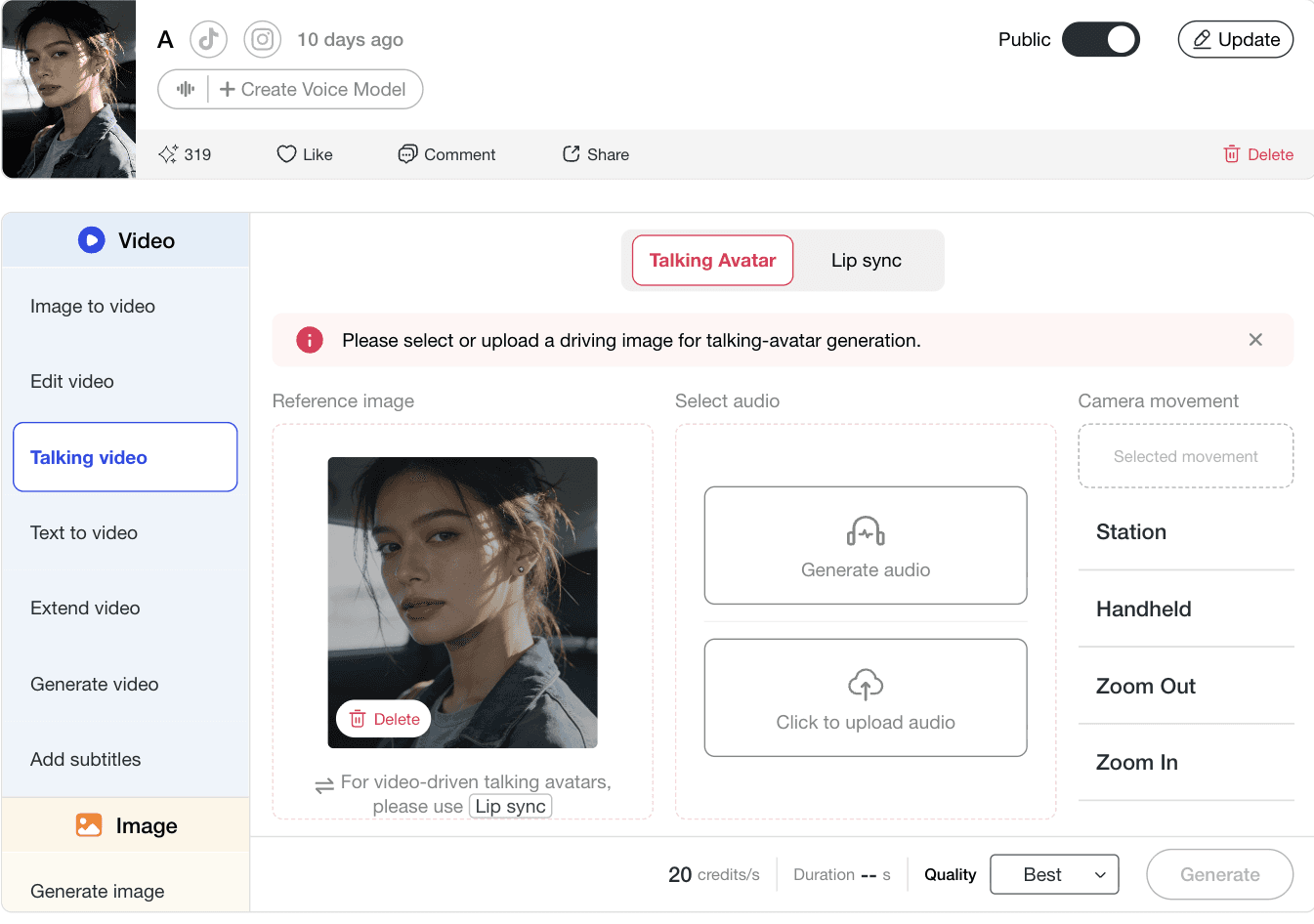
Use Storyboard for connected shots, Image to Video for one finished visual, Talking Avatar for an authorized portrait-led explanation, or Lip Sync for footage you already own. Set 9:16, choose the available duration and quality, use one clear camera move, and check the current credit estimate before generating. Controls vary by workflow and model.
Example: A fashion seller uses an approved portrait as the first frame, preserves the outfit and body proportions, and selects one slow tracking move for a vertical lookbook shot.
Problem solved: This avoids using a multi-shot workflow for a one-shot task and reduces conflicting camera or identity instructions.
Step 3: Add Voice, Lip Sync, and Captions With Intent
Use an authorized portrait or a clearly fictional presenter only when a human-style explanation improves clarity. Keep speech concise, proofread technical terms, review lip movement, and place captions away from interface-heavy edges.
Example: A fictional presenter opens a three-step lighting tutorial, then leaves the frame while the setup is demonstrated with object shots and timed captions.
Problem solved: This creates continuity without letting the presenter distract from the evidence on screen.

Step 4: Generate a Short Draft, Review, and Export
Review labels, hands, faces, numbers, speech, captions, AI disclosures, music rights, and the platform crop. Check the downloaded 9:16 file on a phone and keep important text inside a conservative center-safe area.
Example: Confirm that a 750 ml label remains 750 ml in every product shot and caption, then check that the CTA is not covered by app controls.
Problem solved: This catches incorrect, unreadable, or unauthorized details before publishing.
Expert prompts for AI Reels
Ecommerce: Refill Pouch Demonstration
Purpose: Build a factual product Reel without changing approved packaging. Prompt: Create a 24-second vertical 9:16 product Reel for a refillable hand-soap pouch. Use five shots: empty plastic bottles beside a sink; a clean product hero; the pouch refilling an amber dispenser; a close-up of the printed 750 ml volume; and the CTA “Refill the bottle you already own.” Keep the logo, cap, label wording, volume, and pouch proportions unchanged. Use soft daylight and restrained camera motion. No extra hands, certification badges, environmental statistics, or altered packaging. Expected output: A problem–demonstration–detail–CTA sequence.
Faceless Creator: One Charging Myth
Purpose: Produce a repeatable educational Reel without an on-camera host. Prompt: Create a 30-second vertical faceless explainer titled “Charging Myth #4.” Open with “Myth: You must always charge your phone to 100%.” Show a simple 20%–80% range, illustrate heat and battery settings, and end with “Check your manufacturer’s battery guidance.” Use neutral language and high-contrast captions. Do not promise a universal battery lifespan or create a fake research chart. Expected output: A source-conscious weekly-series format.
Creative Test: Three Controlled Blender Hooks
Purpose: Test one creative variable instead of generating three unrelated ads. Prompt: Create three 18-second vertical ad concepts for the same compact countertop blender. Keep shots two through five identical and change only the first three seconds. Hook A: “Your blender should not wake the whole apartment.” Hook B: “No space for another full-size appliance?” Hook C: “One smoothie. One cup to wash.” Shared shots: footprint beside a dinner plate, ingredients below the fill line, blending demonstration, cup removed, factual CTA. Do not invent noise measurements, capacity, warranty, or reviews. Expected output: Three comparable opening-hook variants.
Multi-Shot Planning Before the Final Render
Storyboard lets you build, edit, add, or remove individual shots before the final render. Shared elements help you represent recurring characters, products, and backgrounds across the sequence.
Four Practical Starting Points
Begin with a brief, a finished image, an authorized portrait plus audio, or footage you already own. Choose the shortest workflow that fits the asset and the communication job.
Visible Cost and Format Controls
The workstation shows the current credit estimate near Generate. Documented aspect-ratio controls include 9:16, 3:4, 16:9, 4:3, and 1:1, although availability varies by mode.
Captions You Can Review
Extract timed lines, correct wording and timing, adjust caption style, and check the result in preview and again after download.
Documentation-Backed, Not Performance-Backed
Product capabilities were checked on August 19, 2026 against the APOB Help Center: Storyboard, workstation and credits, aspect ratios, and subtitles. These sources do not promise reach, engagement, sales, or turnaround time.
Consent and Likeness Rights
Obtain verifiable permission before uploading or animating another person’s face, voice, or identifiable persona.
Copyright and Third-Party Rights
Output rights do not erase rights in photos, footage, music, scripts, logos, products, or performances.
Truthful Representation
Do not present a fictional spokesperson as a verified customer or invent a personal product experience.
AI Disclosure
Use the current disclosure tool for realistic altered or synthetic media when required. Review the official guidance for TikTok, Meta, and YouTube. Disclosure does not replace consent, sponsorship labeling, or truthful advertising.
Paid Promotion
An AI label is not a sponsorship disclosure. Use the platform’s branded-content or paid-promotion tools when applicable.
Privacy
Review visibility and data terms before uploading confidential campaigns, client media, faces, voices, or unreleased products.
Eight-Point Reel Review
Verify identity authorization; product labels and dimensions; prices and statistics; hands, faces, reflections, and motion; pronunciation and lip movement; captions and safe areas; music and trademark rights; and AI or paid-promotion disclosures.
Evidence Standard and Review Date
Product and policy claims were reviewed on August 19, 2026. Models, credit rates, processing times, plan benefits, export options, and platform policies may change. This page does not guarantee campaign performance and is not legal advice.
Ecommerce Product Reel
Turn one approved product image into a problem–demo–detail–CTA sequence. Lock the logo, label wording, volume, colors, and proportions across shots.
Faceless Educational Series
Combine object shots, simple diagrams, narration, and captions. Cite guidance and avoid invented research, universal promises, or a fabricated expert persona.
UGC-Style Creative Test
Keep the demonstration and CTA identical while changing only the opening hook. This produces comparable variants instead of three unrelated ads.
Market Context
YouTube reported more than 200 billion daily Shorts views in June 2025 (YouTube, 2025). In Meta’s India-specific study, 47% of surveyed consumers said Reels influenced purchases (Meta, 2026). HubSpot reported that 29% of surveyed marketers used short-form video (HubSpot, 2025). These signals explain why teams test short-form video; they do not prove APOB performance.
Multiple starting points
Begin with a brief, image, portrait, audio track, or existing video.
Shot-level planning
Inspect the role of each scene before the final render.
Reusable presenters
Build continuity for faceless channels and recurring formats.
Visible cost
Review the current credit estimate before generation.
Caption workflow
Extract, edit, style, and preview timed lines.
Human review is required
Faces, hands, labels, numbers, and small product details can change.
Regeneration uses credits
A weak shot may require another attempt.
Not a full timeline editor
Existing videos cannot be reverse-built into an editable Storyboard.
Plan rules differ
Watermarks, private mode, quality, and limits depend on the current plan.
Rights are not cleared for you
Music, footage, trademarks, likenesses, and voice permissions remain your responsibility.
No Credit Card Required

Answers about pricing, commercial use, formats, privacy, turnaround, safety, and platform disclosure.
Is APOB AI a free AI Reel generator?
APOB offers a free Nano account, subject to current credits and plan restrictions. Current Help Center documentation says free Nano downloads carry an APOB watermark. Check live pricing before starting a production workflow.
How are AI Reel generations priced?
APOB uses credits. Cost depends on the workflow, duration, plan, quality, resolution, and optional audio. The current estimate appears near Generate before you start.
Can I remove the APOB watermark?
Paid accounts can download without a watermark for content generated while the paid plan is active. Current documentation says watermark removal is not retroactive for content generated on a free account.
Can I use APOB-generated Reels commercially?
Commercial use depends on the current APOB Terms, your plan, your inputs, and third-party rights. You remain responsible for permission to use uploaded faces, voices, footage, music, trademarks, products, and other protected material.
Can I create a Reel from text?
Storyboard can expand a campaign brief or topic into editable shots. Text-to-video and other generation modes may also accept prompts, depending on the workflow and model selected.
Can I upload my own product image?
Yes. Image to Video accepts a selected or uploaded first frame and may optionally use a last frame. A clear, approved source image gives you a stronger reference for checking product accuracy.
Which aspect ratios does APOB support?
Supported controls currently document 9:16, 3:4, 16:9, 4:3, and 1:1. The default is 9:16 where the aspect-ratio control is available; some modes inherit the dimensions of the uploaded source.
How long can an APOB Reel be?
Limits depend on the mode. Talking Avatar currently accepts audio up to three minutes. Lip Sync accepts video and audio up to 15 minutes. Add Subtitles recommends clips under one minute and has a ten-minute hard limit.
Which export format will I receive?
The Content Detail page provides Download when the generated video is ready. APOB’s current Help Center does not state one universal video extension for every workflow, so verify the file label in the selected mode before a client delivery.
How fast does a Reel generate?
There is no single reliable turnaround time. Processing varies with mode, duration, quality, queue, and plan. Generate a short test before a deadline-sensitive project.
What affects output quality?
Source-image clarity, prompt specificity, model, resolution, duration, subject motion, and shot complexity can all affect the result. Review hands, faces, labels, numbers, reflections, speech, and captions after download.
Is my content private?
Privacy depends on the plan and visibility setting. Current Help Center documentation identifies private mode as a paid feature. Review the setting and Privacy Policy before uploading confidential material.
Can APOB create faceless Reels?
Yes. A faceless workflow can combine product shots, generated scenes, narration, captions, screen demonstrations, or a clearly fictional digital presenter.
Can an existing video become an editable Storyboard?
An existing video cannot currently be reverse-engineered into an editable Storyboard. Existing footage can still be used in workflows such as Lip Sync, Edit Video, or Add Subtitles.
Do I need to label an AI-generated Reel?
TikTok, Meta, and YouTube have disclosure rules for realistic altered or synthetic media. An AI label does not replace sponsorship disclosure and does not make deceptive impersonation or unauthorized likeness use acceptable.


