The Common User Struggle
“I wanted to create an epic, fantasy-style avatar for my Discord and D&D group. But every free AI app I tried either made my face look like a distorted nightmare or just slapped a cheap, muddy filter over my selfie. It was incredibly frustrating.”
We hear you. The reason most tools fail is that they don't actually learn your face. APOB AI takes a revolutionary approach. By creating a custom AI model of your face first, it guarantees that your final digital drawing actually looks like you.
Here is how you can convert your picture to a drawing in just a few simple steps:


Step 1: Register and Create Your "Portrait Model"
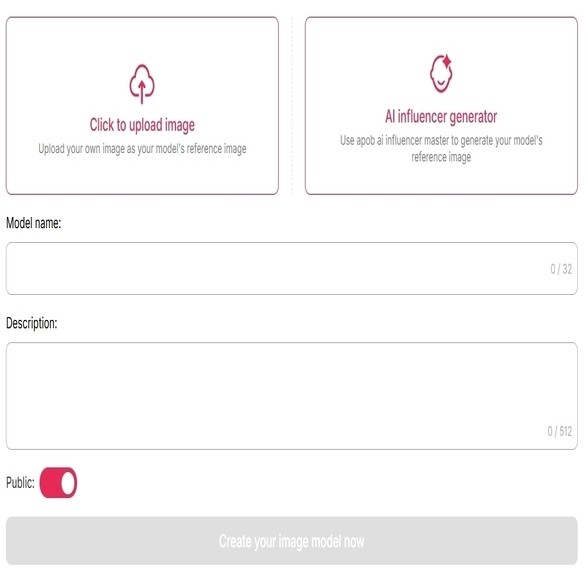
First, create your free APOB AI account. Upload just one clear photo of the person you want to stylize. Within moments, the AI will build a custom portrait model that perfectly understands your unique facial structure.
(Note: Our picture to drawing converter is highly optimized for human portraits. While you can technically create models for pets or animals, the portrait algorithm delivers the most breathtaking, accurate results for human faces!)
Step 2: Choose Your Creative Path
Path A: You Want to Convert the Uploaded Portrait (Direct Transformation)
If the photo you just uploaded is the exact face/portrait you want to turn into a drawing, you have two ways to do it:
Method 1: Use Preset Templates (Complete Set)
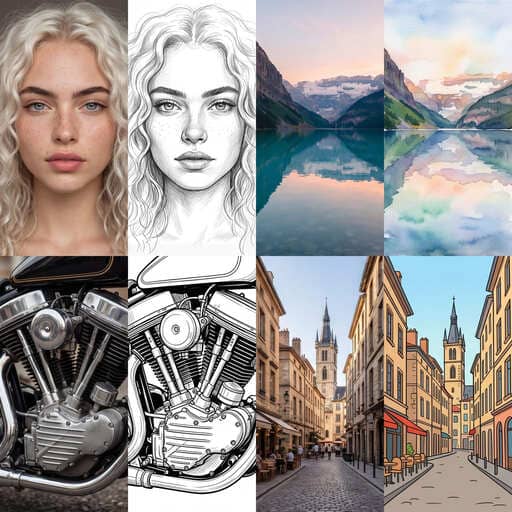
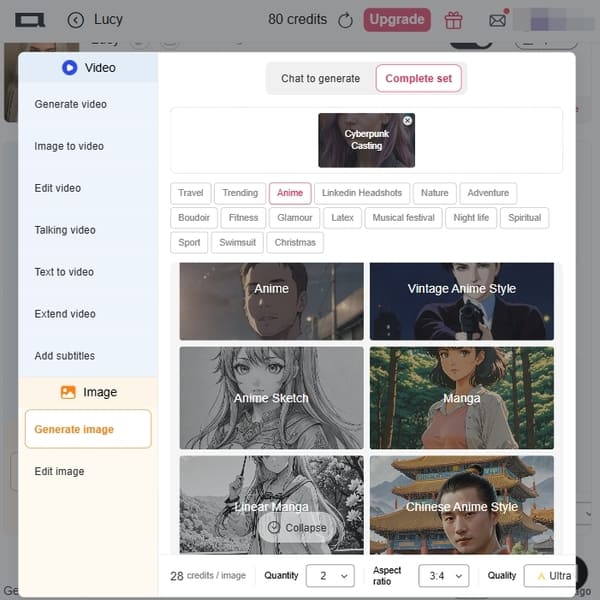
Don't want to mess with text prompts? Navigate to the "Complete Set" tab. Here, you will find beautifully pre-configured art styles. To turn a picture into a drawing instantly, simply click on templates like Neo-Pop Art, Linear Manga, Manga, or Anime. The AI will apply the style in one click!
Method 2: Custom Prompts (Chat to Edit)
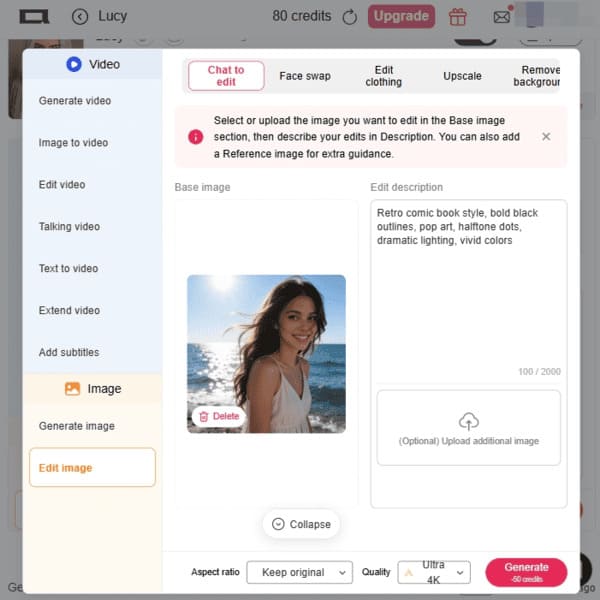
If you have a very specific vision and the presets aren't exactly what you need, select the "Chat to Edit" feature. Here, you can type your own custom text prompt (e.g., "draw me as a cyberpunk character"). Tip: If you aren't sure how to write a good prompt, just scroll down this page to our "10 Copy-Paste Prompts" section for inspiration!
Step 3: Select Your Aspect Ratio
Path B: You Want to Convert Landscapes, Pets, or Different Photos What if you want to turn a photo of your dog, a beautiful sunset, or a completely different picture into art? In this case, select the "Edit Image" tool. This allows you to upload any new target image (perfect for non-portrait photos). Once uploaded, simply type your desired art style into the prompt box (e.g., "gentle watercolor painting" or "pencil sketch"). Pro Tip: If you ever struggle to describe the art style you want, you can always ask AI chatbots like ChatGPT (e.g., "Give me a prompt to turn a photo into an oil painting") for great suggestions!
Whether you need a square image for an Instagram avatar (1:1), a tall portrait for a TikTok story (9:16), or a wide landscape for a YouTube thumbnail (16:9), simply select your desired Aspect Ratio from the settings panel.
Step 4: Generate & Download for Free
Click "Generate." In seconds, the AI will deliver a studio-quality digital drawing featuring your exact likeness. Love it? Download the high-resolution, watermark-free file instantly and drop it straight onto your social media profiles.


We don't trick you into generating an image only to blur it out and ask for a credit card. You can use your daily free credits to generate and download real, usable art.
Standard apps slap a generic template over your photo. Our AI portrait models analyze your facial structure to ensure the cartoon version is a recognizable caricature of you.
Don't clutter your phone with heavy apps. APOB AI runs lightning-fast directly in your Chrome or Safari browser, both on mobile and desktop.
1. The Creator Economy & YouTube Gaming
If you stream on Twitch or run a YouTube channel, branding is everything. Illustrated avatars help creators establish a recognizable brand identity without constantly sharing their real-life faces. Data Insight: According to HubSpot’s State of Marketing Report, visual content (like custom illustrations and graphics) is utilized by over 50% of marketers because it significantly boosts engagement and brand recall compared to stock imagery (HubSpot, 2023).
2. Privacy-First Professional Networking
Many professionals want to maintain a presence on Discord, Reddit, or even Slack without exposing their personal lives. A high-quality line-art or subtle watercolor portrait strikes the perfect balance between approachability and digital privacy. Data Insight: A Pew Research Center study highlights that privacy and data control are top concerns for internet users today, driving the demand for anonymous yet personalized digital representation (Pew Research Center, 2022).
3. Unique Etsy-Style Gifts
Custom portraits are a massive trend. Instead of paying premium prices on Etsy, users are creating portrait models of their loved ones on APOB AI, applying the "Oil Painting" or "Watercolor" style, and printing them onto canvases to give as heartfelt, personalized gifts to family members.
No Credit Card Required

How to Draw an Anime Boy With AI Support
Learning how to draw an anime boy is easier when you combine traditional drawing fundamentals with AI-assisted references. AI can help you test hairstyles, poses, outfits, and lighting, but it should not replace the skills that make your character believable: proportion, expression, silhouette, and clean line work.
This guide is for aspiring artists who want to improve, not just generate a finished image and stop there. Use AI as a sketch partner, reference board, and idea engine while you keep practicing the actual drawing decisions.
Step 1: Start With the Head Shape
Anime boys often have a slightly sharper jaw than anime girls, but the style can vary widely. Start with a circle for the cranium, add a center line, then sketch the jaw and chin. For a younger character, keep the face softer. For an older or more heroic anime boy, make the jaw more angular.
Step 2: Add Face Guidelines
Draw a horizontal line for the eyes and a vertical center line for symmetry. Place the nose and mouth lightly. Do not press hard. These early lines are only a map. Good anime boy drawing depends on adjusting proportions as the character develops.
Step 3: Draw the Eyes, Nose, and Mouth
Anime male eyes can be narrow, soft, intense, tired, cheerful, or dramatic. The eye shape changes the character instantly. A gentle character may have rounded eyes and soft brows. A serious character may have sharper eyes and a lower brow line.
The nose and mouth are usually simple, but they still need placement. A tiny mouth placed too low can make the face feel strange. Use reference and keep checking the whole face, not one feature at a time.
Step 4: Build the Hair Silhouette
Anime boy hair is not just a set of spikes. Think of it as a shape with volume. Decide where the hair parts, where it lifts, where it falls over the forehead, and how it frames the face. Big hair shapes can make the character energetic. Clean short hair can make him feel calm or mature.
Step 5: Add Neck, Shoulders, and Outfit
The neck and shoulders tell the viewer about age, confidence, and personality. A shy character may have raised shoulders and a small posture. A hero may stand wider and more upright. Clothing should support the story: hoodie, school jacket, fantasy armor, cyberpunk coat, sportswear, or casual streetwear.
Using AI to Improve Your Anime Boy Drawing
AI can help you generate pose references, compare hairstyles, test color palettes, or turn a rough sketch into a polished anime concept. If you use an AI anime boy generator, study what works: eye spacing, hair volume, clothing folds, and silhouette. Then draw your own version instead of copying blindly.
Prompts for Anime Boy Character Design
Anime boy character, soft black hair, school jacket, calm expression, clean line art.
Fantasy anime boy, silver hair, cloak, forest background, heroic pose.
Cyberpunk anime boy, neon jacket, sharp eyes, city night lighting.
Shy anime boy, oversized hoodie, gentle smile, warm room background.
Anime male face reference, angular jaw, expressive eyes, natural hairstyle.
Sports anime boy, confident pose, short hair, dynamic lighting.
Anime boy hair tutorial reference, layered bangs, side view, clear silhouette.
Game character anime boy, fantasy armor, strong shoulders, dramatic pose.
Slice-of-life anime boy, casual outfit, soft daylight, friendly mood.
Anime character sheet, front view, side view, three expressions, clean design.
Common Mistakes Beginners Make
Drawing the eyes before checking the head angle.
Making the hair flat instead of building volume.
Using the same face for every character.
Ignoring neck and shoulder structure.
Letting AI decide the design instead of using it as reference.
FAQs
How do I draw an anime boy face?
Start with the head shape, add face guidelines, place the eyes, nose, and mouth, then refine the jaw, hair, and expression.
How do I draw anime boy hair?
Think in large hair groups first. Decide the part, volume, direction, and silhouette before adding small strands.
Can AI help me learn anime drawing?
Yes. AI can provide references and variations, but you should still practice construction, line work, and proportions.
What is the difference between anime boy and anime girl faces?
Anime boy faces often use sharper jaws, narrower eyes, broader shoulders, and less rounded silhouettes, though style varies.
Can I use AI-generated anime boys commercially?
Check the tool license and avoid copied characters, celebrity likenesses, or copyrighted designs.
What should beginners practice first?
Practice head angles, eyes, hair shapes, and simple expressions before moving into full-body poses.
Traditional Practice Still Matters
AI can show you polished anime boy designs, but it cannot build muscle memory for you. Spend time drawing simple heads from multiple angles. Practice five hairstyles on the same face. Redraw the same character with happy, angry, tired, and shy expressions. These small studies will improve your control faster than one big finished piece.
How to Use AI Without Losing Your Own Style
Use AI outputs as references, not final answers. If you like a hairstyle, simplify it and draw it in your own line style. If you like a pose, study the shoulder angle and redraw it from scratch. If the AI image has strange hands or clothing folds, correct them manually. This is how AI becomes a learning tool instead of a crutch.
A helpful exercise is to generate three versions of the same anime boy, then combine the best parts: one hairstyle, one outfit, one expression, and one pose. The final design should feel like your character, not the tool's default style.
References
Sketchso (2026) How to Draw an Anime Boy. Available at: https://sketchso.com/resources/guides/draw-person/anime-boy (Accessed: 22 May 2026).
AnimeOutline (2026) Anime drawing tutorials. Available at: https://www.animeoutline.com/ (Accessed: 22 May 2026).
OC Maker AI (2026) Free AI Anime Character Generator. Available at: https://www.ocmaker.ai/ (Accessed: 22 May 2026).
Zhang et al. (2025) GANime: An Efficient Unsupervised Framework for Generative Anime. Available at: https://arxiv.org/abs/2508.09207 (Accessed: 22 May 2026).
Stanford University (2025) AI Index Report 2025. Available at: https://aiindex.stanford.edu/report/ (Accessed: 22 May 2026).
Read More

AI Drawing to Realistic Starts Before the Tool
A sketch can carry a strong idea, but realism adds pressure. The AI has to decide what the materials are, how the light falls, how anatomy works, and what details are missing. If the drawing is unclear, the realistic version may look polished but wrong.
Clean the drawing before you ask for realism. Strong silhouettes, readable faces, clear clothing layers, and simple linework give a drawing to photo AI workflow a better foundation.
Keep the Original Design While Adding Real-World Detail
The goal is not to erase the drawing. The goal is to keep its expression, composition, and character while adding believable texture, lighting, depth, and camera language. A sketch to image AI result should still feel connected to the original idea.
Where an AI Sketch Converter Often Fails
It changes the face too much.
It turns stylized clothing into random fabric.
It invents hands or props that were not in the sketch.
It makes skin or surfaces too glossy.
It adds a background before the subject is solved.
How APOB AI Fits the Process
APOB AI can help turn a drawn person, character, or concept into a more realistic AI image, then animate the final still if the design is stable. Use APOB for the character and visual-story stage, not as a blind tracing tool.
Clean the sketch or redraw the important lines.
Describe the subject, outfit, lighting, and camera angle.
Generate a realistic version in APOB.
Compare it with the sketch and correct missing identity details.
Add a background only after the subject works.
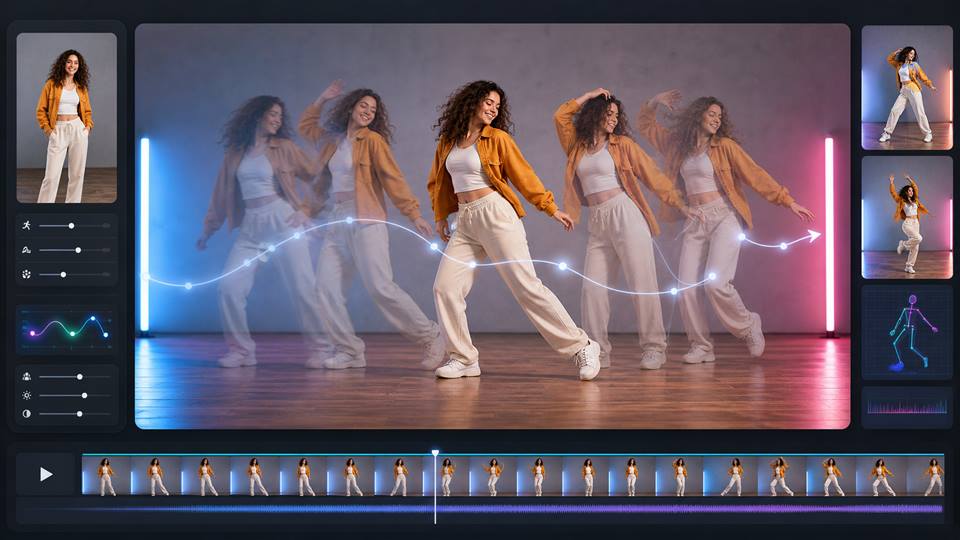
Use image-to-video for a blink, camera push, or small pose shift.
Prompts for AI Drawing to Realistic Images
Turn this sketch into a realistic portrait, preserve hairstyle and expression, natural skin texture.
Drawing to photo AI character, same outfit silhouette, realistic fabric, soft studio light.
Sketch to image AI scene, preserve composition, natural shadows, believable materials.
AI sketch converter for a product concept, clean render, accurate perspective, simple background.
Line art to realistic AI portrait, same face shape, realistic hair, no extra accessories.
Turn this anime drawing into a realistic character, preserve emotion and pose.
Convert costume sketch into realistic fashion portrait, same layers and colors.
Realistic fantasy character from drawing, detailed texture, dramatic but natural light.
Create a realistic AI influencer from this sketch, consistent face, modern outfit.
Animate the realistic version, subtle blink, small head turn, stable identity.
The Realism Test
A good line art to realistic AI result should pass two checks. First, it should still resemble the drawing. Second, it should look like it could have been photographed or filmed. If only one of those is true, revise before moving on.
Keep the Drawing's Personality Intact
The goal is not to erase the sketch. The best transformation keeps the pose, expression, outfit idea, and mood that made the original drawing worth converting. If the result becomes a generic attractive portrait, the tool has done too much.
Before generating, write down the three things that must survive. It might be the shy smile, the oversized jacket, the asymmetrical haircut, or the slightly awkward hand pose. These details give the realistic version a soul.
What to Specify
Age range and general face shape.
Material and color of the clothing.
Lighting style.
Realistic texture level.
Whether the final image should feel like a portrait, film still, product concept, or character sheet.
When to Stay Semi-Realistic
Not every sketch needs to become a photograph. Some drawings look better as a stylized 3D render, anime-real hybrid, game character concept, or editorial illustration. If the original art has exaggerated proportions, forcing full realism can make it feel uncomfortable.
A good workflow is to generate three directions: realistic, semi-realistic, and stylized. Compare which version preserves the character best before refining the final image.
Use Iterations Like an Art Director
The first realistic version is rarely the final one. Treat it like a draft. If the face is good but the outfit is wrong, keep the face language and correct the clothing. If the pose works but the lighting feels cheap, change only the lighting in the next prompt.
This is much more effective than restarting from scratch. Each iteration should protect what worked and fix one or two specific weaknesses.
Useful Revision Notes
Keep the original expression.
Make the fabric heavier.
Reduce glossy skin.
Preserve the hand pose.
Use softer natural light.
Stay closer to the sketch silhouette.
Do Not Ignore the Background
A blank or mismatched background can make a strong character feel unfinished. Choose a setting that explains the person: a rainy street, studio portrait, classroom, workshop, fantasy market, or quiet bedroom. The background should support the story without stealing attention from the drawing's core idea.
If the realistic version no longer reminds you of the sketch, go back and protect the original shape language more firmly.
FAQs
What does AI drawing to realistic mean?
It means using AI to turn a sketch, drawing, or line art into a realistic image.
Can APOB AI turn drawings into realistic people?
APOB can help generate realistic people or characters from a drawn idea and description.
What kind of sketch works best?
A clean sketch with clear face, pose, outfit, and silhouette works best.
How do I keep the original design?
Repeat important details such as hairstyle, clothing, expression, and camera angle.
Can I animate the realistic version?
Yes. Once the still image is stable, use image-to-video for subtle motion.
Why does the result change my design?
The AI may fill in missing details. Simplify the sketch and add clearer constraints.
References
Wyzowl (2026) Video Marketing Statistics 2026. Available at: https://wyzowl.com/video-marketing-statistics/ (Accessed: 15 May 2026).
DataReportal (2026) Digital 2026: The United States of America. Available at: https://datareportal.com/reports/digital-2026-united-states-of-america (Accessed: 15 May 2026).
BestPhoto AI (2026) Drawing to Photo Converter. Available at: https://bestphoto.ai/free-tools/drawing-to-photo (Accessed: 15 May 2026).
Sketch2Art (2026) Sketch to Image AI. Available at: https://sketch2.art/ (Accessed: 15 May 2026).
APOB AI (2026) AI Person Generator. Available at: https://apob.ai/ai-person-generator-free-online-tool-for-faces-full-bodies/ (Accessed: 15 May 2026).
Read More
Ultimate Creative Freedom:
You aren't limited to fixed filters; text prompts and Image-to-Image sliders let you customize everything.
Cost-Effective:
Achieve professional artist-tier results for free.
Highly Accurate Likeness:
The bespoke "Portrait Model" system ensures the AI doesn't warp your identity.
Internet Reliant:
Because it uses heavy-duty cloud computing, you need a stable Wi-Fi or data connection to generate images.
Prompt Learning Curve:
While basic styles are easy, getting highly specific results (like exact clothing styles) might take a few tries to get the text prompt exactly right.
Q1. What is the best free app to turn a picture into a drawing?
A: If you are looking for high-quality, customizable results, we highly recommend APOB AI. Unlike traditional filter apps, it allows you to train a custom portrait model and use text prompts to turn a picture into a drawing, giving you complete creative control for free.
Q2. Does this picture to drawing converter work well for pet photos?
A: While APOB AI is highly optimized for human portraits (creating incredibly accurate human faces), it is versatile enough to translate animal and landscape features into stunning art using the Text-to-Image and Image-to-Image tools.
Q3. I don't want to look like a completely different person. How do I keep my facial features?
A: This is APOB AI's biggest strength! Because you start by creating a custom "Portrait Model" using your own photo, the AI learns your exact bone structure and eyes. This guarantees a much higher likeness than standard filter apps.
Q4. Do I need to download an app from the App Store or Google Play?
A: No downloads are required. APOB AI is fully accessible via your web browser. Just go to our website on your iPhone, Android, or PC, and start creating immediately.
Q5. What happens to my photos after I upload them? Are they safe?
A: Your privacy is our priority. Uploaded photos are processed securely to generate your drawing and are never stored permanently, shared with third parties, or used to train external AI models.