Create a custom digital invitation from a simple idea, reference image, or event brief. Make elegant wedding invites, birthday cards, party announcements, and memorable event designs with an AI invitation maker.
For Chuseok, 24–26 September 2026, create family greeting cards and gathering invitations with clear host, time, place, and RSVP details. For Diwali on 8 November 2026, use this invitation page for event details and guest communication; use the poster page for promotional artwork. Verify final dates and local event details before sending.
Tell the AI invitation maker what you are celebrating, who is invited, and what the moment should feel like.
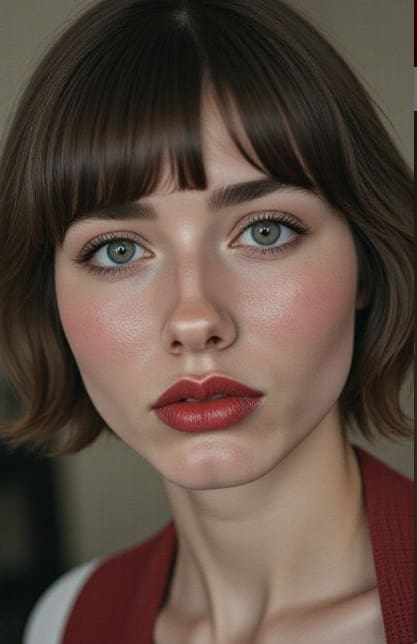
Create a consistent reference portrait
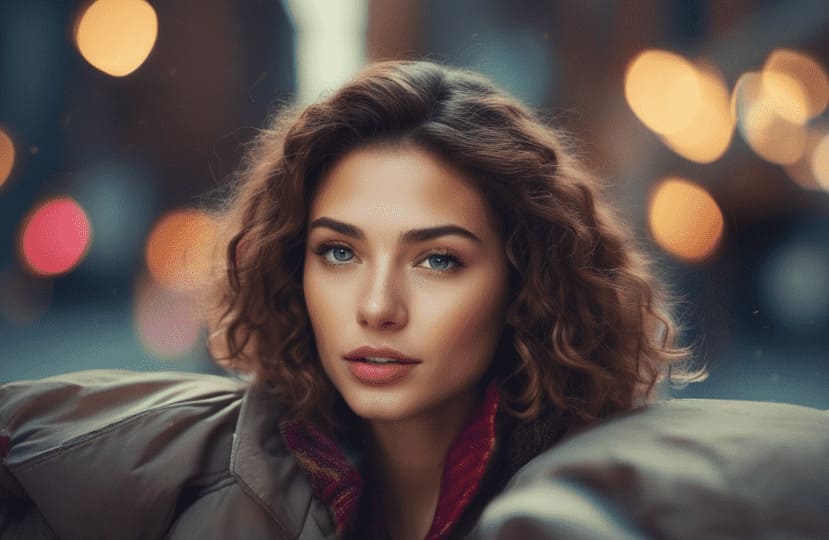
Open APOB AI’s AI Influencer Generator, choose the basic appearance, and use the Bespoke Details box to describe the face you want. This reference portrait helps keep the same person consistent when you design the invitation.
Prompt:
A beautiful adult female AI influencer with a naturally symmetrical face, soft oval facial shape, defined cheekbones, a refined jawline, large almond-shaped hazel eyes, long curled eyelashes, naturally full eyebrows, a small straight nose, soft full lips, subtle dimples, smooth luminous skin, realistic skin texture, gentle confident smile, elegant and approachable appearance, balanced facial proportions, photorealistic beauty portrait, soft studio lighting, high detail, consistent facial identity.


Describe colors, typography, imagery, formality, cultural references, and the mood you want guests to feel.
Turn the portrait into a share-ready invitation
Select the generated influencer as the reference image, open Image > Generate image, and paste the full event brief into Chat to generate. The prompt combines the guest-facing copy with a clear visual direction so the finished card is easy to read and ready to share.
Prompt:
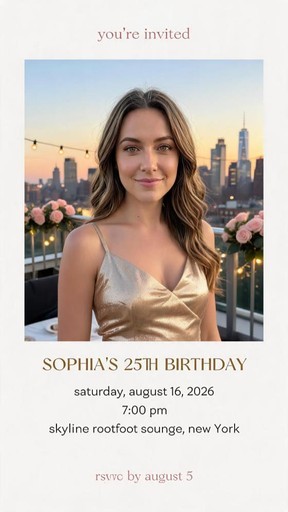
Create a stylish digital birthday invitation card for an elegant rooftop birthday party.
Event title: “You’re Invited”
Celebrant: “Sophia’s 25th Birthday”
Date: “Saturday, August 16, 2026”
Time: “7:00 PM”
Location: “Skyline Rooftop Lounge, New York”
RSVP: “RSVP by August 5”
Use a luxurious modern style with a soft blush pink, champagne gold, and black color palette. Include elegant flowers, subtle city skyline details, glowing lights, refined serif typography, clean spacing, and a premium editorial layout. Make all event information highly readable and correctly spelled. Vertical 4:5 format, high resolution, polished digital invitation design, suitable for Instagram and WhatsApp sharing.
Add names, date, time, venue, dress code, RSVP wording, website details, and any text that must stay exact.
Review the final invitation
The image shown here is the final User Guide result: a vertical rooftop birthday invitation built from the influencer portrait and event brief.
If the first version is not right, revise the prompt, correct any event details, try a different visual direction, or regenerate until the layout and wording match your event. Always proofread names, dates, times, venue details, and RSVP information before sharing.
You can continue refining the image with APOB AI tools: use Face Swap to change the person, Edit Clothing to adjust the outfit, and Remove Background to isolate the subject for another invitation layout.

Generate a few directions, refine the strongest one, then prepare a digital invitation or printable starting point.
Step 4: Export and Share the Approved Invitation
Choose the strongest version, verify names, dates, venue, RSVP details, and translations, then export it for messaging, email, social sharing, or print preparation.
Start with a natural-language event brief
Describe the occasion, audience, mood, theme, and must-keep details, then use the AI invitation maker to turn that brief into a concrete first direction.
Make the visual direction feel personal
Guide the design with a venue photo, portrait, mood board, color story, cultural reference, or favorite theme instead of relying on a generic template.
Keep guest-facing details easy to scan
Build the hierarchy around names, date, time, venue, dress code, RSVP instructions, and the next action. Proof every critical line before sharing.
Explore multiple concepts quickly
Compare formal serif, modern editorial, colorful illustrated, minimalist, and photo-led directions before refining the concept that best fits the event.
Prepare designs for digital sharing and print
Create a mobile-friendly invitation for messages, email, or social sharing, or develop a printable starting point and confirm final size, bleed, color, and export requirements with the printer.
Continue refining in one workspace
After the core invitation is approved, use APOB AI tools such as Face Swap, Edit Clothing, Remove Background, or AI Image Upscale when the asset needs another focused edit.
AI wedding invitation maker
Create an elegant wedding invite with couple names, ceremony details, venue cues, a monogram, and a visual language that carries through the whole wedding weekend.
Birthday and party invitation maker
Build a birthday invitation, baby shower card, graduation announcement, dinner invite, or holiday party visual around a theme, age, activity, color palette, or inside joke.
For playful events, ask for bold type, illustrated details, a photo moment, and a clear call to action so the invite feels fun without hiding the essentials.
Mobile-first digital invitation maker
Create a compact invitation for WhatsApp, text, email, or a social story. Keep the first screen focused on the event name, date, location, and next step.
Business and community event invitations
Use an online invitation maker for a product launch, creator meetup, workshop, open house, fundraising dinner, or team celebration. Bring in brand colors, logo guidance, speaker details, and a concise agenda.
For business events, prioritize clarity over decoration: make the audience, benefit, time, place, and response path obvious at a glance.
Elise Beaumont
I generated a retro roller-skate illustration as the main visual for a birthday invitation. The color and character style came together after one shorter prompt, then I added the date and venue in my usual design tool so every detail stayed accurate.

Jonah Price
For our small wedding, I used APOB to explore floral invitation artwork before choosing a direction. The same portrait image also became a gentle image-to-video teaser for social; we handled names, timing, and RSVP information separately.

Camila Duarte
My niece wanted a space-party theme that did not look too babyish. I generated the astronaut and planet artwork in APOB, then reused it for a vertical invitation video. The final party details were added and checked outside the image generation step.

Owen Hartley
We needed visuals for a customer-appreciation event at our shop. A restrained brand-color prompt produced a useful event backdrop, and animating that image gave us a short announcement clip for social without arranging a shoot.
PaperPetalCo
For a bilingual family dinner invitation, APOB generated one warm table scene that worked behind both language versions. Keeping the artwork separate from the copy made it easier for us to verify every translated detail before sharing.
RSVPStudio
I created watercolor-style baby shower artwork and then turned the selected image into a soft motion reminder. It saved time on the visual direction, while I still entered and proofread the date, address, and registry link myself.

MintEnvelope
For a spring brunch, I asked for a bright floral table scene with plenty of quiet space around the subject. The image worked as the invitation background, and a subtle image-to-video version gave us a second asset for Stories.
AfterHoursBride
Our product launch needed something more visual than a plain calendar invite. I generated a branded product scene in APOB and animated it into a brief teaser, then the marketing team added the confirmed event copy and registration link.
LittlePartyLab
I used an AI character as the host for a creator meetup announcement. The talking-avatar video delivered our approved script clearly, and we paired it with a generated event image after checking the schedule and venue details one last time.
Faster first concepts
A prompt gives you a concrete direction to react to, which can be faster than starting from a blank design file.
More personal starting points
The brief can include the story, people, place, colors, references, and mood that make your event different from a generic template.
Flexible event coverage
Use the same workflow for weddings, birthdays, baby showers, dinner parties, graduations, launches, and community gatherings.
Critical text still needs proofing
Review names, numbers, addresses, translations, and dates carefully. Do not assume an AI-generated layout is factually correct.
Print production may need adjustment
If you plan to print, confirm the final size, bleed, color profile, resolution, and file format with your printer.
Invitation design is not guest management
A visual invitation can support an RSVP flow, but RSVP collection, reminders, guest lists, and event updates require a separate system unless the connected product explicitly provides them.
Enjoy more features
No Credit Card Required

Practical answers about event briefs, wording, reference images, digital sharing, printing, and proofing.
What is an AI invitation maker?
An AI invitation maker turns an event brief, prompt, photo, or reference image into a custom invitation concept. It helps with the visual direction and wording, while you review the final details.
Can I make a wedding invitation with AI?
Yes. Describe the couple, date, venue, wedding style, palette, formality, RSVP wording, and whether you need a digital invitation or printable starting point.
Can I create birthday and party invitations?
Yes. Use the birthday invitation maker or party invitation maker workflow to include the age, theme, activities, colors, location, and any playful message you want guests to see.
Can I use a photo or reference image?
Yes, when the connected workflow supports image input. A venue photo, engagement photo, mood board, or style reference can help guide the composition and mood.
What details should I include in my prompt?
Include the event type, audience, names, date, time, venue, mood, palette, imagery, formality, format, and any text that must stay exact. Clear constraints usually produce a more useful first direction.
Can AI write the invitation wording?
It can help draft wording, shorten a message, or suggest a tone. Always proofread names, dates, addresses, translations, and culturally specific language before sharing.
Can I customize colors and style?
Yes. Ask for a different palette, typography mood, image treatment, layout, level of formality, or visual reference, then refine the direction you like best.
Can I make a digital invitation for WhatsApp or email?
Yes. Ask for a mobile-first digital invitation with a clear hierarchy, readable type, and a compact layout that works in a message thread or email preview.
Can I create a printable invitation?
You can use the AI invitation maker to develop the concept and layout. Before printing, confirm the final dimensions, bleed, color, resolution, and file format with your printer.
Can I make an RSVP invitation?
You can design an invitation that includes RSVP wording, a URL, or a QR-code placeholder. RSVP collection and guest tracking depend on the event platform you connect to.
Can I create matching save-the-date designs?
Yes. Once you have a strong direction, reuse the palette, typography, imagery, and wording system for save-the-dates, reminders, menus, and thank-you cards.
Can I make invitations for business events?
Yes. Create invitations for launches, workshops, open houses, dinners, fundraisers, meetups, and team events by adding the audience, benefit, schedule, location, and response path.
Does AI spell names and dates correctly?
Not reliably enough to skip review. Treat all names, numbers, dates, addresses, and translations as content that needs a final human proofread.
Can I generate multiple invitation concepts?
Yes. Request distinct directions such as formal serif, minimal editorial, colorful illustrated, photo-led, or destination-inspired, then refine the strongest concept.
Can I use an AI invitation maker for baby showers?
Yes. Include the parent-to-be, shower theme, date, venue, registry or gift wording, and the tone you want, from soft and understated to colorful and playful.
How do I make a formal invitation?
Use precise wording, restrained colors, clear spacing, an elegant serif or refined sans-serif direction, and a hierarchy that gives names and event details room to breathe.
Can I create a minimalist invitation?
Yes. Ask for generous whitespace, a limited palette, one strong typographic idea, restrained decoration, and a clear information hierarchy.
Is this an online invitation maker?
Yes. The workflow is designed for creating invitation concepts online from a prompt or reference, then refining the result for the way guests will receive it.
Can I use generated invitations commercially?
Check the current APOB AI plan, terms, and the rights for every asset you upload or reference. You are responsible for having permission to use logos, photos, likenesses, and third-party artwork.
How do I get the best result from the AI invitation maker?
Give the AI a specific occasion, audience, mood, palette, format, and exact event details. Generate a few directions, choose one, refine it, and proof every guest-facing detail before sending.


