Upscale blurry images, portraits, product photos, and social media visuals with AI. APOB AI helps sharpen details, reduce noise, improve lighting clarity, and keep the original face, pose, outfit, background, and composition unchanged.
Step 1: Upload an Image and Write an Upscale Prompt
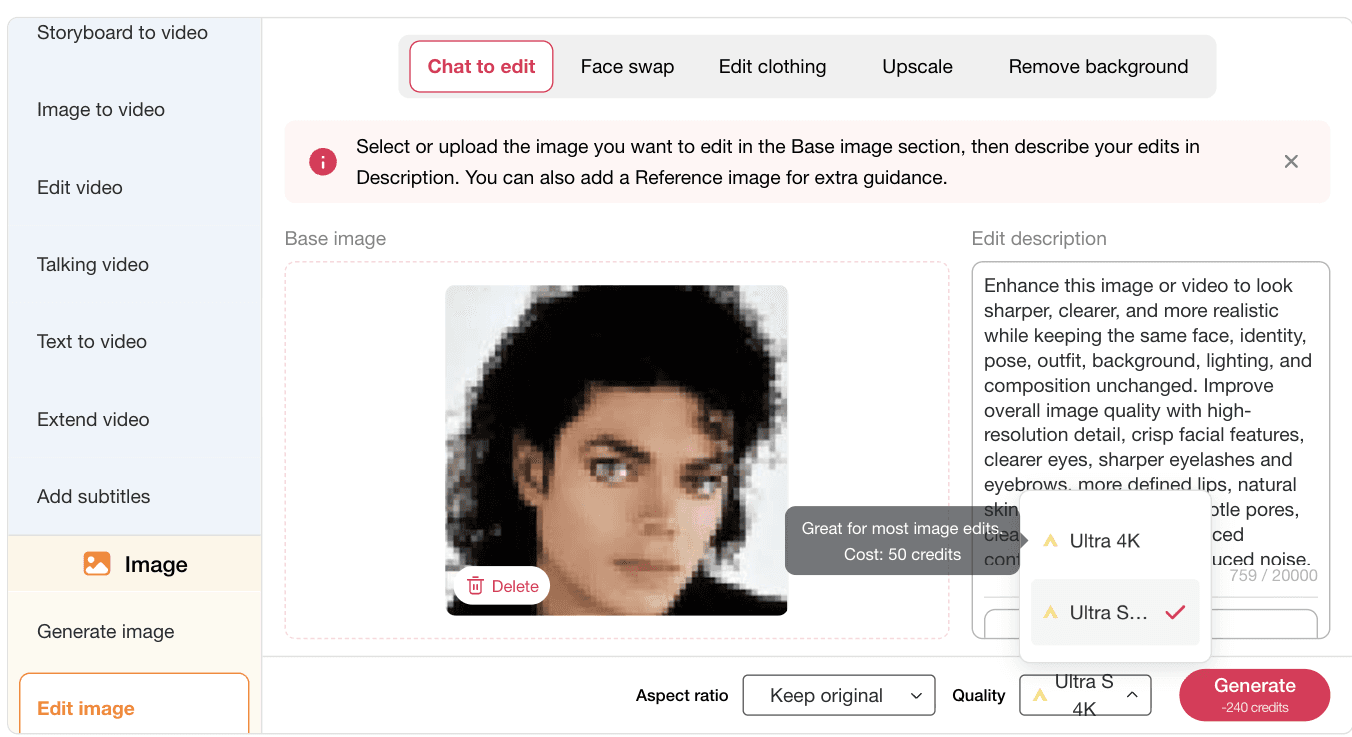
Open Edit image, choose Chat to edit, and upload the image you want to improve. For an AI image upscale workflow, the most important instruction is to ask for sharper detail while keeping the original identity, pose, outfit, background, lighting, and composition unchanged.
Prompt: Enhance this image or video to look sharper, clearer, and more realistic while keeping the same face, identity, pose, outfit, background, lighting, and composition unchanged. Improve overall image quality with high-resolution detail, crisp facial features, clearer eyes, sharper eyelashes and eyebrows, more defined lips, natural skin texture, visible but subtle pores, cleaner hair strands, balanced contrast, reduced blur, reduced noise, and improved lighting clarity. Preserve the original natural selfie style and realistic iPhone camera look. Do not change the person’s facial structure, age, expression, body shape, clothing, or scene. No face distortion, no over-smoothing, no plastic skin, no exaggerated makeup, no color shift, no text, no watermark.

Step 2: Choose Keep Original and Select Quality
Use Keep original if you want the upscaled image to stay in the same crop and composition. Then choose a higher quality option, such as Ultra 4K or Ultra S, before generating. This is useful when you want an AI photo enhancer result that looks cleaner but still feels like the same selfie, product shot, or creator image.
Step 3: Review the Final Upscaled Image
This is the final AI image upscale result. If the image is still too soft, too sharp, or not close enough to the original, refine the prompt and generate again. You can ask for less smoothing, stronger detail, cleaner hair strands, better lighting clarity, or a more natural iPhone-style finish.
You can also continue editing with more tools: Face swap replaces a face while keeping the scene, Edit clothing changes the outfit without rebuilding the image, and Remove background cuts out the subject for product pages, profile images, ads, or social media assets.

Preserve Identity While Improving Detail
A normal AI image upscaler may sharpen an image but also change facial structure, skin texture, or expression. APOB AI is useful when the image needs to look clearer while keeping the same face, pose, outfit, background, and lighting direction.
Cleaner Portraits, Product Photos, and Creator Assets
Use AI image upscale for blurry selfies, AI influencer portraits, product photos, thumbnails, and social media creatives. The workflow can reduce blur and noise, make eyes and hair cleaner, and improve contrast without turning the image into an obviously edited picture.
Upscale First, Then Keep Editing
APOB AI does not stop at sharpening. After you upscale image quality, you can continue with face swap, edit clothing, remove background, image generation, and video workflows when the same asset needs to become an ad, profile visual, or campaign variation.
Low-Resolution Images
Improve images that look small, pixelated, or too soft after download, crop, or compression.
Blurry Faces and Hair Detail
Ask for clearer eyes, eyelashes, eyebrows, lips, skin texture, and hair strands while keeping the same identity.
Compressed Product and Social Assets
Clean up product photos, profile images, thumbnails, and ad visuals before publishing across channels.
Ecommerce Product Photos
Use AI image upscale to clean up product photos before placing them on product pages, marketplace listings, or ad creatives. Sharper packaging, texture, label area, and material detail can make a product image easier to inspect.
Reference: Google Merchant Center image requirements
AI Influencer Portraits and Profile Images
Creators can upscale AI influencer portraits, profile photos, and campaign images when the face looks slightly blurry or low resolution. This helps keep facial features, eyes, hair strands, and skin texture cleaner for repeat social posting.
Reference: Business Insider on creator and influencer ad spend growth
Social Ad and Thumbnail Assets
Marketers can upscale image quality before turning a still into a social ad, thumbnail, short-form cover, or image-to-video starting frame. Better clarity helps the subject, product, and key visual details hold up after cropping or resizing.
Reference: IAB Digital Video Ad Spend and Strategy Report
Old, Blurry, or Compressed Personal Photos
Designers and everyday users can improve soft portraits, compressed downloads, travel photos, and older images. The goal is not to change the memory or the person, but to reduce blur, noise, and low-resolution artifacts while keeping the original scene intact.
Reference: Adobe guide to image size and resolution

Olivia Hart
I restored a soft portrait from an old family album and kept the face looking natural. The extra detail made the print-ready version feel genuinely usable.
Marlon Chen
Our product photos are sharper now without changing the packaging, colors, or label layout. It is a fast upgrade for ecommerce listings.
Elodie Rossi
I use the upscaler on social graphics before resizing them for campaigns. Fine details stay clean instead of turning into fuzzy edges.
Kofi Okafor
The tool brought back texture in a low-resolution headshot while preserving the original expression. It saved me hours of manual cleanup.
Marisol Mendes
I can enlarge a small reference image for a presentation and keep the subject recognizable. The workflow is simple enough for every team member.
Liam Brooks
Old travel photos look much clearer after a quick upscale. Faces, buildings, and small signs hold together better than I expected.
Amina Rahman
The result keeps the original composition while adding useful detail. That makes it ideal for refreshing thumbnails and campaign images.

Jules Laurent
I tested it on blurry product shots and got cleaner edges without a plastic-looking finish. It has become part of my listing workflow.

Beatrice Williams
A low-resolution event photo became sharp enough for a newsletter banner. I did not need to crop away the people at the edges.
Javier Soto
The upscale step is quick, and the image stays believable after enlargement. It makes repurposing older assets much easier.
Anika Shah
I can prepare crisp profile images for a course and keep the subject’s face consistent across different source photos.

Rowan Miller
It gives our design team a clean starting point for print mockups when the original reference is smaller than we need.
Valeria Duarte
I use it to rescue customer-submitted photos for a gallery. The details improve without flattening the original colors.
Kenji Kim
The upscaled images hold up well on larger screens, so our before-and-after demos look polished instead of pixelated.
Isabelle Martin
It is especially helpful for old portraits. Hair, fabric, and facial details become clearer while the photo still feels authentic.
Aaron Foster
I can turn a small marketplace image into a usable product visual in a few clicks. That speeds up testing new catalog ideas.

Mei Tan
The tool preserves the framing I already approved, which means I can improve resolution without rebuilding the layout.
Lucien Pereira
Our content team now refreshes older visuals in minutes. The output looks sharper and is ready for new social formats.
Sharper Details Without Rebuilding the Image
AI image upscale can improve facial detail, hair strands, product edges, texture, and lighting clarity while keeping the original composition intact.
Useful Before Ads, Product Pages, and Social Posts
Upscaling can make one image more reusable across profile pages, thumbnails, ecommerce listings, campaign visuals, and short-form video first frames.
Works Well with Follow-Up Editing
After upscaling, you can continue with face swap, edit clothing, remove background, and other creative workflows instead of exporting the file to several separate tools.
Small Details Still Need Review
AI can improve clarity, but users should still check faces, hands, hair edges, product labels, logos, jewelry, and background details before publishing. If the result looks too smooth or too sharp, adjust the prompt and generate again.
Enjoy more features
No Credit Card Required
Answers about upscaling blurry images, 4K quality, identity preservation, product photos, privacy, and follow-up editing.
What is AI image upscale?
AI image upscale means using AI to improve image clarity, sharpness, resolution, and detail. It can reduce blur and noise while making faces, hair, product edges, and textures look cleaner.
Can I upscale a blurry portrait with AI?
Yes. You can upload a blurry portrait and ask the AI image upscaler to sharpen facial features, eyes, eyelashes, eyebrows, lips, hair strands, and skin texture while keeping the same identity.
Will AI image upscale change the person’s face?
It should not if your prompt clearly says to keep the same face, identity, age, expression, pose, and facial structure unchanged. Always review the result before publishing.
Can I use AI image upscale for product photos?
Yes. It is useful for product photos where packaging, label area, material texture, color, and edges need to look sharper. Add instructions to keep the product design unchanged.
What should I write in an image upscale prompt?
Mention what should improve, such as sharpness, detail, skin texture, hair strands, contrast, lighting clarity, and noise reduction. Also mention what must stay unchanged, such as face, pose, outfit, background, and composition.
Can I upscale images to 4K?
You can choose higher quality modes such as Ultra 4K when available in the editor. The final clarity still depends on the original image quality and prompt instructions.
Does AI image upscale remove noise?
AI image upscale can reduce visible noise and compression artifacts. For best results, ask for reduced noise, balanced contrast, and natural texture instead of extreme smoothing.
Can I keep the original image style?
Yes. Tell the tool to preserve the original selfie style, iPhone camera look, lighting, color tone, and background. This helps avoid a result that looks too edited or artificial.
Can I use AI image upscale for social media photos?
Yes. It can help clean up creator portraits, profile images, thumbnails, Instagram posts, TikTok covers, and ad visuals before cropping or resizing.
Can AI image upscale fix very low-resolution images?
It can improve many low-resolution images, but very tiny, heavily blurred, or damaged images may still have limited detail. A clearer original usually produces a better upscale.
Will the background stay the same?
It can stay the same if you include that instruction. Ask the AI to keep the background, lighting direction, scene, and composition unchanged while improving clarity.
Can I upscale old photos?
Yes. You can use AI image upscale for older photos, compressed images, and soft portraits. For historical or family photos, ask the tool to preserve identity, clothing, pose, and original atmosphere.
Can I edit the image after upscaling?
Yes. After upscaling, you can continue with face swap, edit clothing, remove background, or other image editing workflows depending on what the final asset needs.
What is the difference between AI image upscale and AI photo enhancer?
AI image upscale usually focuses on resolution, sharpness, and detail. An AI photo enhancer may also adjust brightness, contrast, color, noise, and overall image quality.
Can I use the upscaled image for commercial content?
You should only use images you own or have permission to edit. For commercial use, check rights for people, products, logos, artwork, and any uploaded reference image.
Does AI image upscale work for AI-generated images?
Yes. It can improve AI-generated portraits, product images, and campaign visuals, especially when the first version looks soft or lacks fine detail.
Can I upscale an image before making a video?
Yes. A sharper image can work better as a first frame, reference image, avatar portrait, or image-to-video starting point because the visual details are clearer.
Why does my upscaled image look over-smoothed?
The prompt may be too general. Add instructions such as natural skin texture, visible subtle pores, no plastic skin, no over-smoothing, and no face distortion.
What image types work best?
Portraits, selfies, product photos, creator images, thumbnails, lifestyle photos, and social media visuals usually work well when the subject is visible and not extremely blurred.
Can AI image upscale replace professional retouching?
It can speed up many quality improvements, but high-end commercial work may still need human review for product accuracy, skin realism, labels, logos, and final brand standards.


