Turn a written idea into a high-impact poster concept with APOB AI. Define the subject, message, composition, palette, and format, then generate vertical event, campaign, and promotional visuals in minutes.
Step 1: Describe the Poster Concept
Open Generate image, choose Chat to generate, and enter a focused brief. Describe the poster purpose, subject, environment, headline, supporting information, visual hierarchy, colors, lighting, and where each text block should sit. The example uses a neon music-festival concept titled NEON PULSE 2026.


Step 2: Choose 9:16 and Ultra 4K
Set Quantity to create multiple variations, choose a vertical 9:16 aspect ratio, and select Ultra 4K for detailed lighting and poster artwork. Click Generate when the composition and settings match the intended placement.
Step 3: Review and Finish the Poster
Compare the generated variations and select the version with the clearest focal point and strongest hierarchy. Inspect faces, hands, small details, title spelling, dates, and location text. Download the strongest result, then correct any exact typography, logos, prices, or production details in a design editor before publishing or printing.
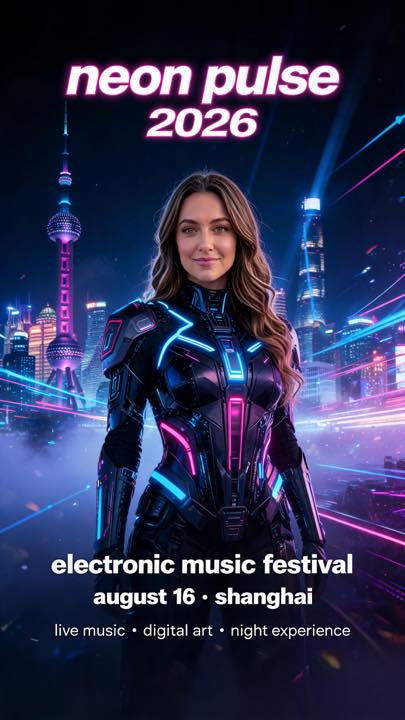
AI Poster Prompt Example
Neon music festival poster prompt
Create a premium vertical music festival poster titled “NEON PULSE 2026”. Feature a futuristic female performer standing in the center of a neon-lit cyberpunk city at night, surrounded by glowing blue and magenta light trails, holographic particles, laser beams, and atmospheric fog. Use a bold editorial poster layout with large clean typography at the top, event information arranged neatly at the bottom, strong visual hierarchy, balanced negative space, cinematic lighting, a deep black background, and an electric blue, violet, and hot pink color palette. Vertical 9:16 poster, Ultra 4K detail.
Reusable poster prompt formula
Create a [format] poster for [event, product, film, campaign, or announcement]. Feature [main subject] in [setting]. Use [art direction], [palette], [lighting], and [texture]. Place [headline] at [position] and arrange [date, venue, offer, or call to action] at [position]. Maintain strong visual hierarchy, readable negative space, and a clear focal point. Avoid [unwanted elements]. [Aspect ratio], high resolution.
Move from brief to visual direction quickly
Translate an event, product, film, campaign, or announcement into a concrete composition without starting every background and lighting setup from scratch.
Design for the destination
Specify a vertical, square, feed, banner, or print-oriented proportion so the focal point and information hierarchy match the intended placement.
Build posters around a consistent subject
Use a reference image or consistent AI persona where supported to keep the central performer, presenter, or campaign character recognizable.
Compare distinct creative variations
Explore different palettes, lighting styles, typography zones, subject scales, and art directions before refining the strongest concept.
Concerts, festivals, and nightlife promotions
Turn an artist, venue, date, and atmosphere into a vertical visual concept for stories, digital displays, and social announcements. Text-to-template workflows are increasingly used for posters and flyers; see Adobe's generative template guidance for a broader industry example.
Movie nights, trailers, and fictional campaigns
Explore cinematic key art with a clear genre, subject, title zone, and billing area. APOB's guide to AI-generated movie posters offers additional prompt and composition ideas.
Product launches, sales, and branded promotions
Visualize a product, benefit, offer, and call to action before final production. Research such as PosterMaker at CVPR 2025 highlights the continuing challenge of combining product imagery with accurate poster text.
Community events and recurring poster series
Create a reusable art direction by locking the palette, grid, typography zones, lighting, and one signature motif, then changing the date, location, subject, or campaign message for each edition.
Fast concept exploration
Move from a written brief to multiple visual directions without composing every element from a blank canvas.
Accessible art direction
People without advanced illustration or 3D skills can specify subject, mood, palette, framing, and hierarchy in ordinary language.
More deliberate variation
Keep the strongest idea while testing controlled changes to lighting, subject scale, background, texture, or headline placement.
Useful for previsualization
Test a campaign direction before investing in final photography, illustration, retouching, typography, or print production.
Generated text can be inaccurate
Names, dates, prices, and small type may be misspelled or distorted, so important information requires manual verification and correction.
Generic prompts can look generic
Distinctive posters still need specific art direction, focused iterations, and human curation.
Rights and claims need review
Check prompts and reference images for protected artwork, brands, characters, likenesses, and unsupported marketing claims.
Print preparation is a separate step
A strong generated image still needs the correct dimensions, bleed, safe area, resolution, color mode, and file format for the chosen printer.
Enjoy more features
No Credit Card Required

Answers about poster prompts, 9:16 layouts, Ultra 4K, typography accuracy, commercial use, and print preparation.
Q1: What is an AI poster generator?
An AI poster generator turns a written creative brief into poster concepts. You describe the subject, event or offer, visual style, color palette, lighting, composition, aspect ratio, and text hierarchy, then generate and refine variations.
Q2: How do I create a poster with APOB AI?
Open Generate image, choose Chat to generate, enter a detailed poster prompt, select the appropriate aspect ratio and quality, generate variations, then review the image and correct any final text or brand details before publishing.
Q3: What should I include in an AI poster prompt?
Include the poster purpose, audience, main subject, setting, style, palette, lighting, headline, supporting information, text placement, visual hierarchy, negative space, aspect ratio, and anything that must not appear.
Q4: Which poster sizes can I create?
Start with an aspect ratio that matches the destination, such as 9:16 for vertical stories and digital displays, 4:5 for social feeds, 1:1 for square posts, or a print-oriented proportion for later layout work.
Q5: Is 9:16 suitable for event posters?
Yes. A 9:16 composition works well for vertical mobile placements, story formats, digital signs, and tall event concepts. Keep important text and faces away from the outer edges so they survive platform cropping.
Q6: Can the generator add a headline and event details?
It can attempt to render text, but AI-generated letters, dates, and names may be inaccurate. Always verify the headline, venue, date, price, URL, and legal details, and correct them in a design editor when precision matters.
Q7: What quality setting should I choose?
Use Ultra 4K or the highest practical setting when the poster contains a detailed subject, dramatic lighting, or small visual elements. A clean source gives you more flexibility for cropping and final typography.
Q8: Can I generate multiple poster variations?
Yes. Generate several directions, then change one variable at a time, such as the subject scale, palette, lighting, background, headline placement, or amount of negative space.
Q9: Can I use a reference person or AI persona?
Where the selected workflow supports a reference image or APOB AI persona, you can use it to guide the central subject. Only use images and likenesses you have permission to use.
Q10: What kinds of posters can I make?
You can explore concepts for music festivals, concerts, movie nights, product launches, sales, restaurant promotions, community events, school activities, exhibitions, social campaigns, and digital announcements.
Q11: Can I make a movie poster?
Yes. Describe the genre, key character or object, setting, dramatic lighting, camera angle, title treatment, billing area, and mood. Avoid copying an existing film poster or protected franchise too closely.
Q12: Can I create a promotional poster for a product?
Yes. State the product, customer benefit, setting, camera view, materials, brand colors, offer hierarchy, and space for a call to action. Check every product claim and price before release.
Q13: How do I make a poster look less generic?
Replace broad adjectives with specific art direction. Name the era, lens or framing, light source, texture, typography character, focal point, color relationships, negative space, and one memorable visual motif.
Q14: Should I ask the AI to generate final text?
Use generated text for visual exploration, not as an unchecked final file. For reliable spelling, accessibility, localization, and brand consistency, add or correct important typography in a dedicated editor.
Q15: Can I use the generated poster commercially?
Commercial use depends on the current APOB AI terms and the rights attached to your prompts, reference images, people, logos, characters, and source materials. Review the applicable terms before publishing.
Q16: How should I handle logos, brands, and celebrity likenesses?
Do not imply sponsorship or use protected logos, characters, artwork, or likenesses without authorization. Use original creative direction and seek legal advice when rights are unclear.
Q17: Is an AI-generated poster ready for professional printing?
Not automatically. Verify the final dimensions, bleed, safe area, color mode, resolution, file format, typography, and printer requirements before sending a generated image to production.
Q18: Can I create a consistent poster series?
Yes. Keep the same palette, lighting, grid, subject treatment, typography zones, and recurring motif, then change one controlled element for each event, date, product, or campaign edition.
Q19: What should I check before downloading the final poster?
Check faces, hands, small objects, headline spelling, dates, locations, prices, contact details, logos, crop safety, contrast, readability at thumbnail size, and whether you have rights to every included element.
Q20: Do I need design experience to use an AI poster generator?
No design experience is required to explore concepts, but basic knowledge of hierarchy, contrast, typography, alignment, and output specifications will help you turn a generated idea into a stronger final poster.


