Step 1: Initialize Your Workspace and Define Your Target Identity
Building high-converting digital campaigns requires a structured creative framework that lets you transition from raw files into optimized visual assets seamlessly. Rather than wrestling with complex compositing tools or manual tracking grids, you initialize your workspace inside a secure dashboard designed specifically for compliant creator workflows. This first step enables the underlying mapping engine to accurately parse facial geometry, facial expressions, and ambient lighting values, setting up a stable foundation for your free deepfake maker pipeline.
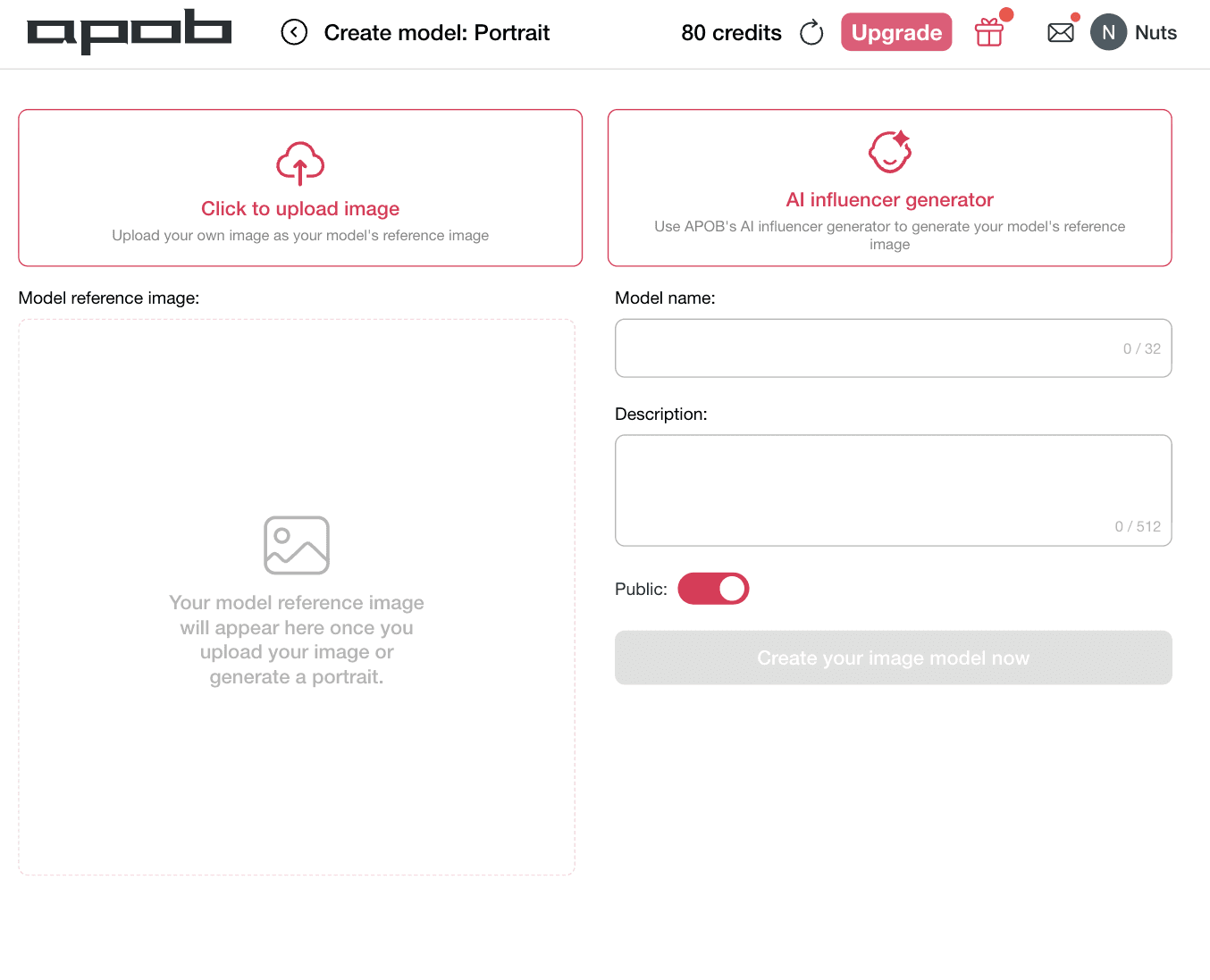
How to do it: Navigate to your creation control panel as shown. If your growth goal is to scale a unified brand persona across consecutive channels, navigate to the Create model: Portrait workspace. To establish an authorized baseline identity, click the Model name input field to title your project, then use the Description block to detail specific stylistic elements or niche characteristics. Next, determine your asset deployment route: choose [Click to upload image] to submit a high-resolution, authorized reference portrait of your brand presenter, or select [AI influencer generator] to have the system safely generate a completely unique virtual identity from scratch. Once your target face matrix is initialized, toggle the visibility properties and click [Create your image model now] to securely lock in your data layers before moving forward to generate professional, platform-ready AI face swap video placements.
Step 2: Map Visual Assets and Target Identities in the Face Swap Workspace
To generate high-converting video variations without expensive reshoots, performance marketers must map their creative files accurately. Bypassing manual editing timelines requires a structured layout where source motion and authorized target imagery align perfectly. This strategic configuration ensures that your chosen deepfake maker retains hyper-realistic expressions, matching skin tones, and consistent ambient lighting values across every frame.
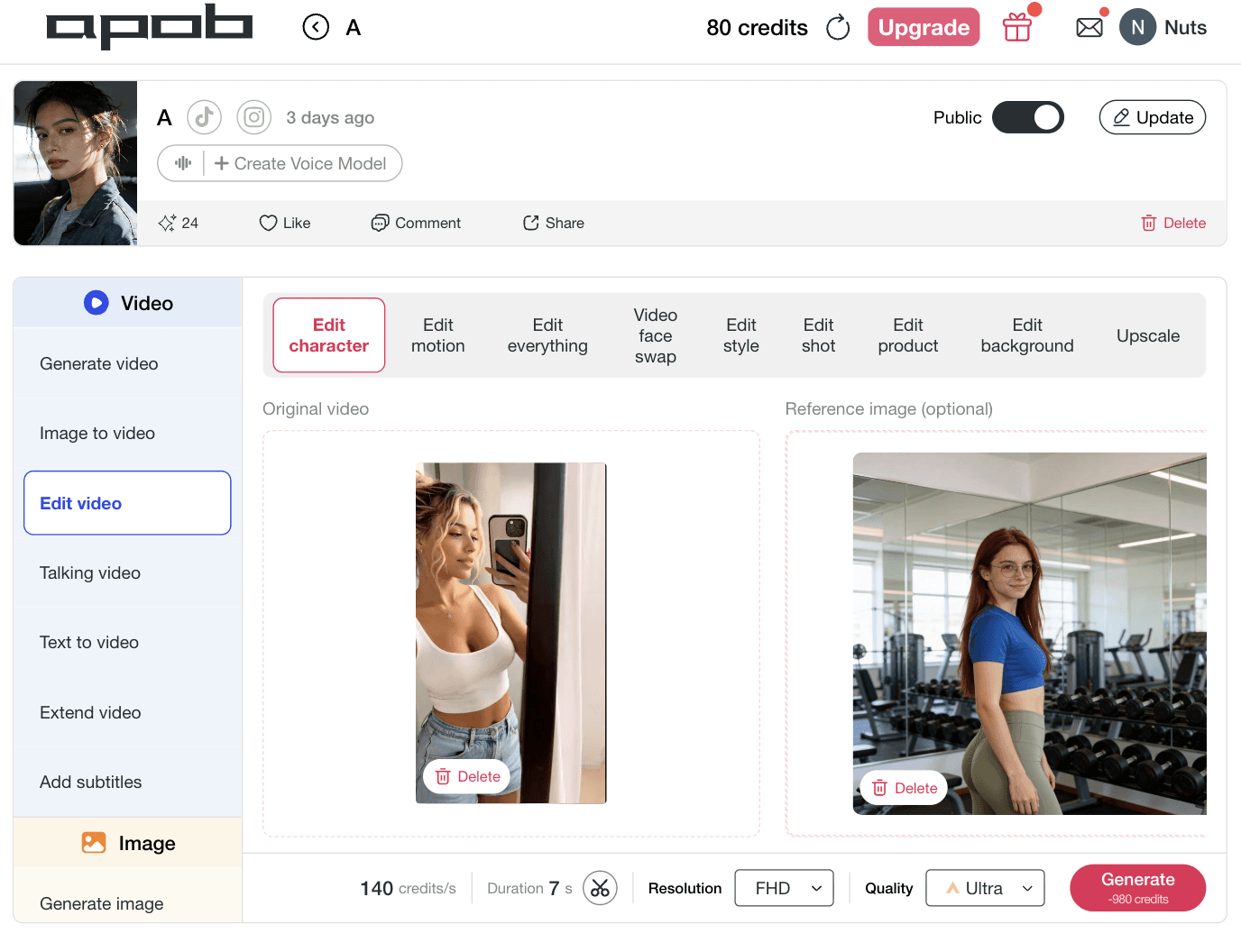
How to do it: Open your editing dashboard as shown . Select the Edit video tab from the left sidebar and click on the [Edit character] tool block on the top menu. Upload your active promotional footage or base asset directly into the Original video canvas block. Next, move over to the right column labeled Reference image (optional) and drop in the authorized target image of your digital creator or virtual model.
Step 3: Select Resolution and Render High-Fidelity Ad Variations
To maximize engagement metrics across top performance marketing channels, your video output settings must align precisely with network placement requirements. Before pushing your creative to a final render, picking the proper resolution ensures text layers remain sharp, textures blend smoothly, and your product features stay crisp under platform compression. This production-ready tuning step gives your free deepfake maker pipeline its professional edge, making it easy for brands and digital agencies to scale authorized video variations without text blur or digital artifacts.
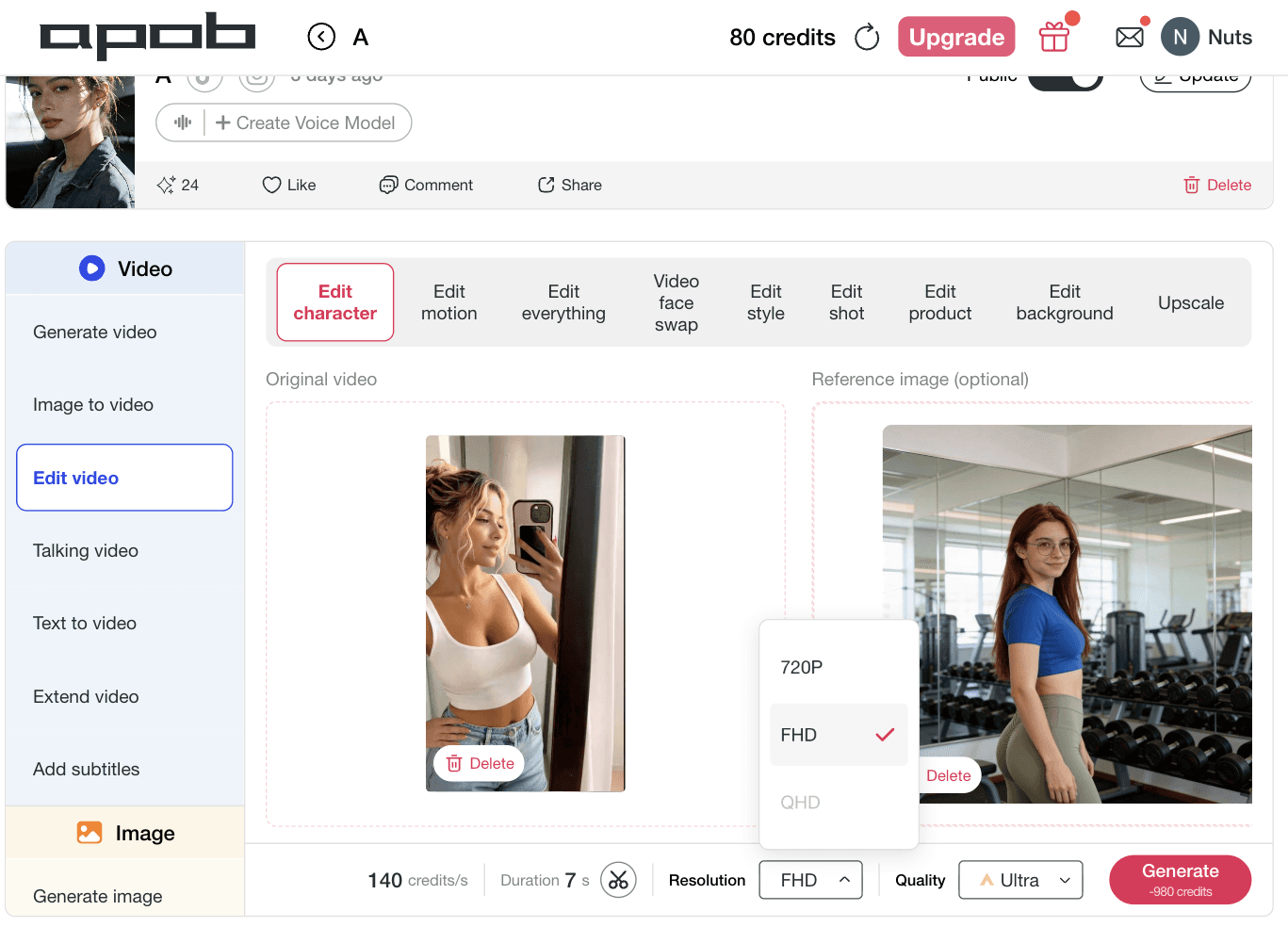
How to do it: Navigate to the lower workspace settings menu as shown. Click on the Resolution dropdown menu to select the optimal video framework for your target ad network, choosing standard options like 720P for fast split-testing or FHD for high-definition distribution across premium placements. Verify that your quality profile is toggled to Ultra, and click the bright pink [Generate] button. The advanced AI deepfake generator backend will instantly execute your consent-based facial replacement, delivering a polished, platform-ready asset optimized for rapid deployment.
















Social-Ready Videos Optimized for TikTok, Reels, and YouTube Shorts
Modern ad networks require precise framing layouts to maximize algorithmic distribution and retention metrics. Our enterprise-grade deepfake video maker architecture is natively built to handle diverse resolution matrices. Whether you need an optimized vertical layout for a high-impact TikTok face swap video, square configurations for classic Facebook feeds, or high-definition formats for Reels face swap video placements and YouTube Shorts face swap assets, our tool processes the composition layers correctly. Your final creative downloads perfectly formatted and fully optimized for customer conversion.
Consent-Based Creative Control Designed for Secure, Compliant Operations
Brand safety is our absolute priority. Unlike shady deepfake applications that encourage deceptive identity fraud, APOB AI stands out as an ethical, corporate-grade online face swap system built for fully authorized creative projects. Our pipeline is strictly designed for controlled workflows where users upload faces and media assets they legally own or have explicit, formal permission to use. This clear dedication to transparency, consent, and digital rights protection guarantees that your scaled campaigns remain completely brand-safe, fully compliant, and audit-ready across all major enterprise spaces.
Realistic AI Face Swap Video Engine with Flawless Facial Blending
Say goodbye to jarring, uncanny valley results that ruin your brand's credibility. Our advanced AI face swap video processor goes beyond superficial overlays to analyze and match expressions, facial geometry, micro-movements, and ambient scene lighting. Whether your persona is turning their head or speaking passionately, the engine preserves skin-tone consistency and bone structure across every single frame. This high-fidelity optimization ensures that your final video asset looks entirely natural, allowing brands to maintain a polished, highly professional look that viewers intuitively trust.
For Ecommerce Brands: Turn Product Images and Briefs into AI Ads Video
Ecommerce brands need more video ads than traditional production can realistically deliver. APOB AI works as an AI video ad generator that helps teams turn product images, product URLs, scripts, or campaign briefs into AI generated video ads for Shopify stores, product launches, seasonal promotions, and paid social campaigns. Create product demo videos, UGC-style ads, captions, voiceovers, and clear CTA endings without waiting for a full shoot. (AI ad tools becoming mainstream for advertisers,2026)
For Creator-Style Ads: Make UGC-Style Video Ads for TikTok, Reels, and Shorts
Creator-led advertising is becoming a major growth channel, and brands need more native-looking video creatives for TikTok, Instagram Reels, YouTube Shorts, and Meta placements. APOB AI helps marketers create UGC-style video ads with AI avatars, virtual spokespersons, product reactions, short hooks, captions, and multiple creator-style angles. Instead of relying on one expensive creator shoot, brands can use an AI video ad maker to test more social ad variations faster. (IAB reports, 2026)
For Performance Marketers: Generate More Ad Variations for A/B Testing
Winning ads rarely come from one perfect creative. Performance teams need constant ad variations for A/B testing across hooks, product benefits, captions, spokespeople, voiceovers, and CTA endings. APOB AI helps marketers generate AI video ads at scale, refresh creative faster, reduce production costs, and build TikTok, Meta, YouTube, and ecommerce ad campaigns around rapid testing instead of slow production cycles. (Generative AI is becoming central to video ad creation, 2026)
No Credit Card Required
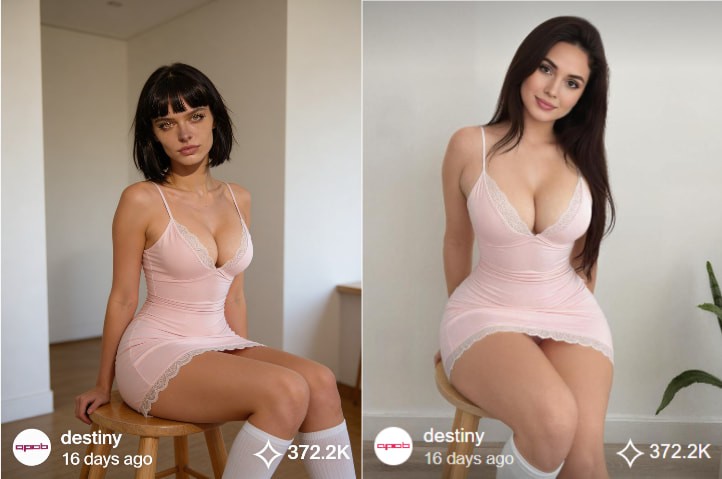
Understanding AI Body Swap Technology
AI body swap technology, also known as deepfake body or AI face swapping, is an advanced application of artificial intelligence that enables the seamless replacement of a person’s body or face in digital media. Powered by deep learning models such as generative adversarial networks (GANs), this technology analyzes visual data to create highly realistic images and videos with natural movements, expressions, and lighting.
Recent advancements have greatly improved both the realism and accessibility of AI body swap tools. Modern systems can now handle complex scenarios, including dynamic motion and varying lighting conditions, making the results nearly indistinguishable from real footage. By training deep neural networks on large-scale image and video datasets, AI body swap technology maps identity onto pose and expression, opening new possibilities for digital content creation, virtual influencers, and synthetic media.
How to Use APOB AI for AI Body Swap
Leveraging APOB AI to create your own digital personas is a straightforward process designed for efficiency and creativity. Follow these steps to bring your AI influencers to life:
Access the APOB AI Platform: Begin by logging into your APOB AI account. Our user-friendly interface is designed for seamless navigation.
Select or Create a Base Model: Choose from our extensive library of pre-designed AI models or start from scratch to build a unique digital identity. You can define various parameters such as gender, age range, and initial body type.
Chat to edit:
In the bottom-left corner of the page, find the Edit Image option. The first AI feature is Chat to Edit. Upload the image of the person you want to modify (you can also choose from a generated AI model image), along with a reference image. Then enter a prompt such as, “Please replace the woman’s body in the image with the body of the woman from the reference image.” This allows you to achieve AI body swap for free.
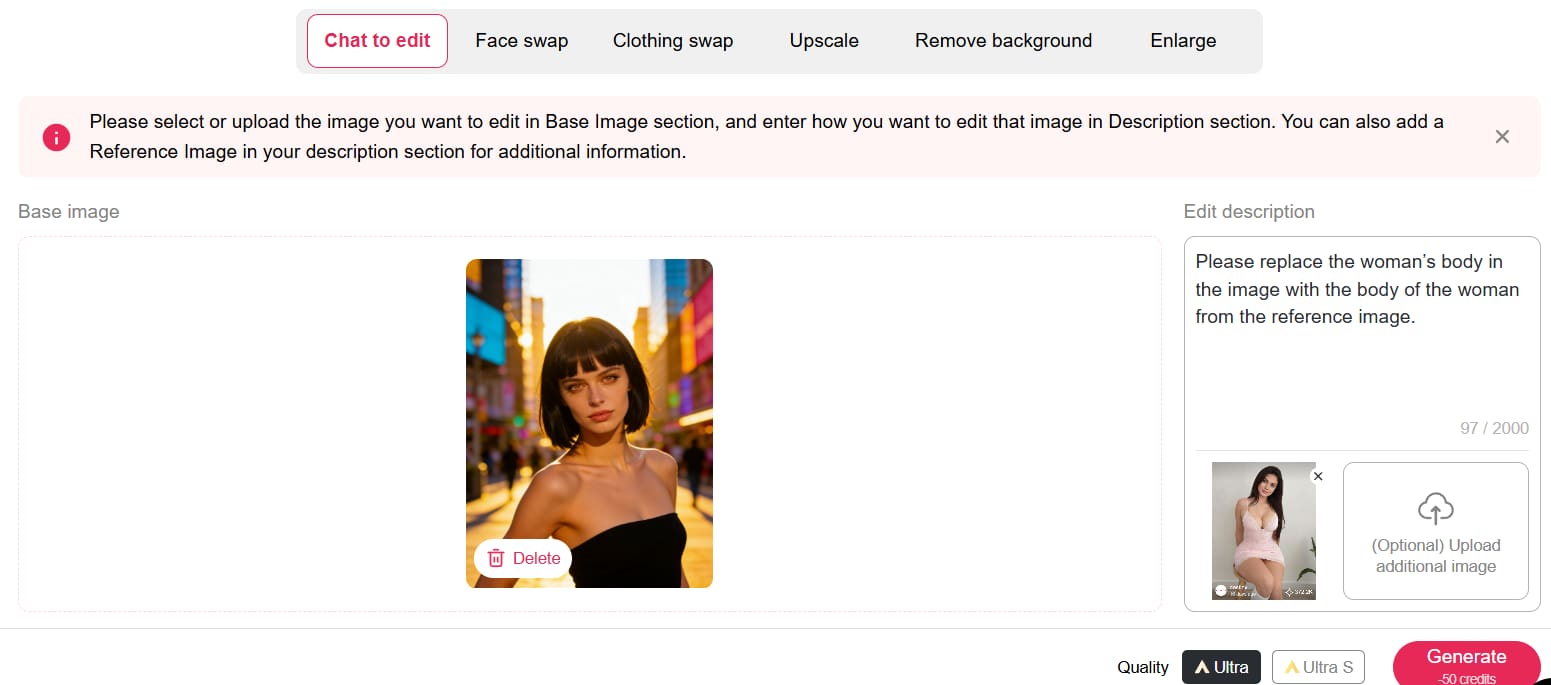
You can claim 80 free credits daily, and each Chat to Edit operation only costs 50 credits. If you’re not fully satisfied with the first result—such as the background not looking natural—you can simply enter another prompt to refine the image or change the background.
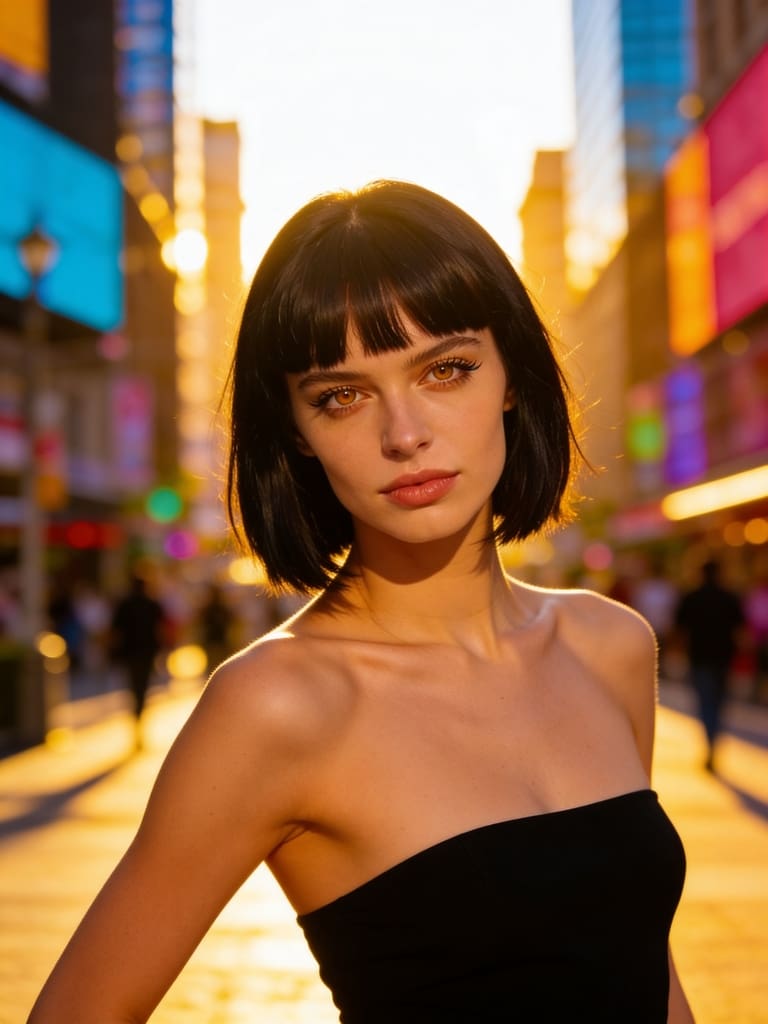
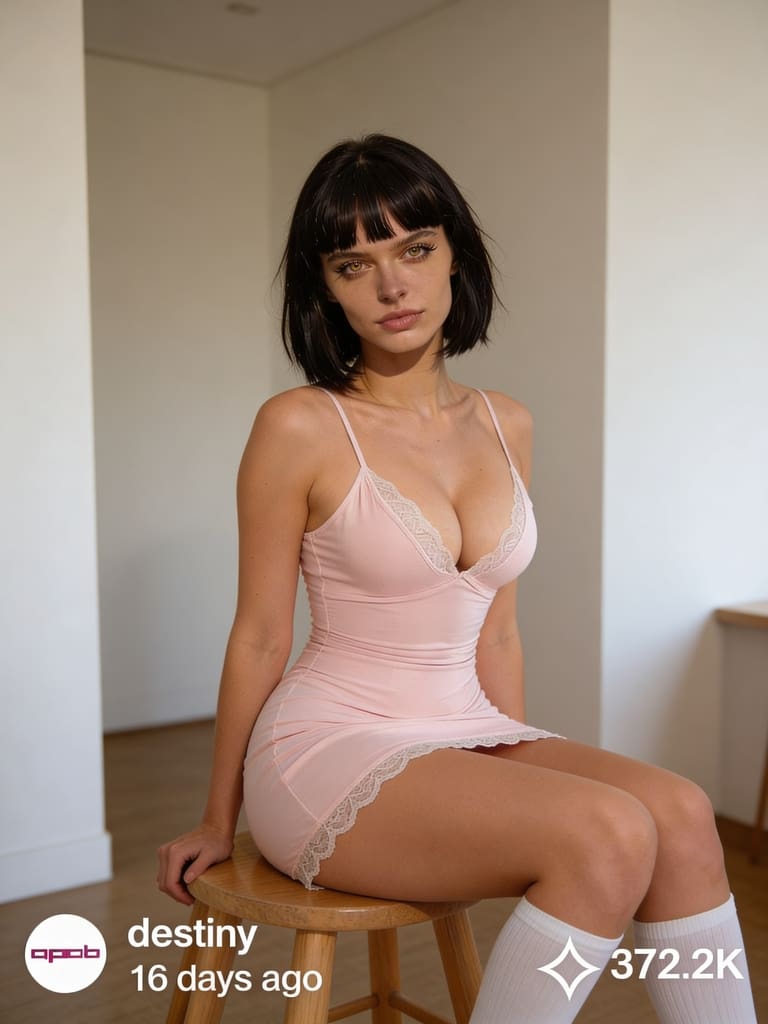
Export and Integrate: Export your generated content for social media, advertising campaigns, or any other digital platform. APOB AI ensures compatibility and high-quality output for all your creative projects.
APOB AI simplifies the creation of sophisticated digital content, providing a powerful tool for anyone looking to innovate in the digital space without the complexity and expense of traditional AI development or production methods. Try APOB AI For Free and start creating your digital personas today!
Applications of AI Body Swap in Content Creation
The applications of AI body swap technology are vast and transformative, particularly within the realms of digital content creation, entertainment, and marketing. Content creators can utilize this technology to generate highly personalized and engaging visuals without the need for extensive filming or costly talent. For instance, brands can create diverse campaigns featuring various body types or ethnicities without organizing multiple photoshoots.
In the entertainment industry, AI body swap can be used for special effects, character animation, or even to digitally age or de-age actors. For marketing, it offers unprecedented flexibility in creating virtual models or influencers who can represent a brand across numerous campaigns with consistent messaging and appearance. This capability allows for rapid iteration and customization of content, significantly reducing production timelines and costs while boosting creative possibilities.
Beyond entertainment and marketing, AI body swap technology is finding its way into virtual reality (VR) and augmented reality (AR) experiences, enabling users to embody different avatars or interact with digital environments in highly personalized ways. It also holds potential for educational content, allowing historical figures to be brought to life or complex medical procedures to be demonstrated with realistic digital models. The ability to generate diverse and dynamic visual content on demand is a game-changer for many industries.
Best Practices for Optimal AI Body Swap Results
Achieving the most realistic and impactful results with AI body swap technology, especially through platforms like APOB AI, requires adherence to certain best practices. These guidelines ensure that your digital personas are not only visually stunning but also effectively convey your intended message.
High-Quality Source Material: Always start with high-resolution images or videos. The quality of your input directly impacts the quality of the output. Clear, well-lit footage with good focus will yield superior results.
Consistent Lighting and Angles: When combining different elements, try to match the lighting conditions and camera angles. Discrepancies can lead to an unnatural appearance, breaking the illusion of realism.
Natural Expressions and Movements: Encourage natural expressions and movements in your source material. AI models perform best when synthesizing data that mirrors real-world human behavior.
Ethical Considerations: Be mindful of the ethical implications of using AI body swap technology. Ensure you have appropriate consent for any individuals whose likeness is used and avoid creating misleading or harmful content.
Iterate and Refine: Don't expect perfection on the first try. Experiment with different settings, source materials, and customization options. APOB AI's intuitive interface makes it easy to iterate and refine your digital personas until they meet your exact specifications.
Optimize for Platform: Consider where your content will be published. Different platforms have varying requirements for resolution, aspect ratio, and file size. Optimize your output for the best viewing experience on your target platforms.
APOB AI: Your Cost-Effective Solution for Digital Persona Creation
While the power of AI body swap technology is undeniable, developing and implementing such advanced AI solutions from scratch can be prohibitively expensive and technically complex. Many businesses and creators face significant barriers to entry when attempting to leverage these cutting-edge capabilities.
APOB AI provides an innovative and accessible alternative. Our platform empowers users to create hyper-realistic AI influencers and digital personas that can achieve the same compelling visual effects as advanced AI body swap techniques, but at a significantly lower cost and with unparalleled ease of use. Instead of grappling with complex algorithms and extensive data training, APOB AI offers a streamlined solution to generate diverse, lifelike digital characters for all your content needs.
With APOB AI, you gain the ability to craft unique digital identities that perfectly align with your brand or creative vision. Our intuitive tools allow you to customize appearances, movements, and expressions, effectively delivering the impact of AI-generated visual content without the hefty investment in bespoke AI development. This makes APOB AI the ideal choice for businesses and individuals looking to harness the power of AI-driven content creation efficiently and economically. Start Creating Now with APOB AI and transform your content strategy.
Technical Specifications and Data Privacy
APOB AI is engineered for performance, versatility, and security, ensuring that your digital persona creation process is both powerful and protected.
Supported Formats: Our platform supports a wide range of input and output formats for images and videos, ensuring compatibility with your existing workflows.
Processing Speed: Leveraging state-of-the-art cloud infrastructure, APOB AI offers rapid processing speeds, allowing for quick iteration and content generation without compromising quality.
Output Quality: We prioritize high-fidelity output, with advanced algorithms ensuring that generated digital personas maintain exceptional visual quality, detail, and realism.
Data Privacy Policy: At APOB AI, we are committed to protecting your data. All user data, including uploaded assets and generated content, is handled with the utmost confidentiality and secured using industry-standard encryption protocols. We comply with global data protection regulations to ensure your privacy and intellectual property are always safeguarded. Your data is never used to train models for other users without explicit consent.
Key Advantages of Using APOB AI
Choosing APOB AI for your digital content needs offers a multitude of advantages:
Unmatched Realism: Generate AI influencers and digital personas that are virtually indistinguishable from real humans.
Cost-Effectiveness: Significantly reduce production costs associated with traditional filming, talent, and post-production.
Speed and Efficiency: Create high-quality content in a fraction of the time compared to conventional methods.
Creative Freedom: Experiment with diverse appearances, styles, and scenarios without logistical constraints.
Scalability: Easily scale your content production to meet growing demands, from individual projects to large-scale campaigns.
Brand Consistency: Maintain a consistent brand image and messaging across all your digital content with custom personas.
User-Friendly Interface: Our platform is designed for creators of all skill levels, requiring no prior AI expertise.
These advantages empower businesses and individual creators to innovate, engage audiences, and stay ahead in the rapidly evolving digital landscape. Get 80 Free Credits Daily and experience the APOB AI difference.
Frequently Asked Questions (FAQ)
Q1: What is AI body swap technology?
A1: AI body swap technology uses deep learning, particularly GANs, to replace a person's body or face in digital media with another, creating a realistic composite image or video. It's a key component in generating advanced digital personas and deepfakes.
Q2: Is APOB AI suitable for commercial use?
A2: Yes, APOB AI is designed for both personal and commercial use. Our platform enables businesses and creators to generate high-quality digital content, including AI influencers, for marketing, advertising, and other commercial applications, subject to our terms of service.
Q3: What kind of content can I create with APOB AI?
A3: You can create a wide range of content, including AI influencers for social media, virtual models for e-commerce, digital presenters for educational videos, and custom digital personas for various creative projects, all without traditional filming.
Q4: What are the ethical considerations when using AI body swap technology?
A4: Ethical considerations include obtaining proper consent for using individuals' likenesses, avoiding the creation of misleading or harmful content, and ensuring transparency about the use of AI-generated media. APOB AI encourages responsible and ethical use of its technology.
Read More
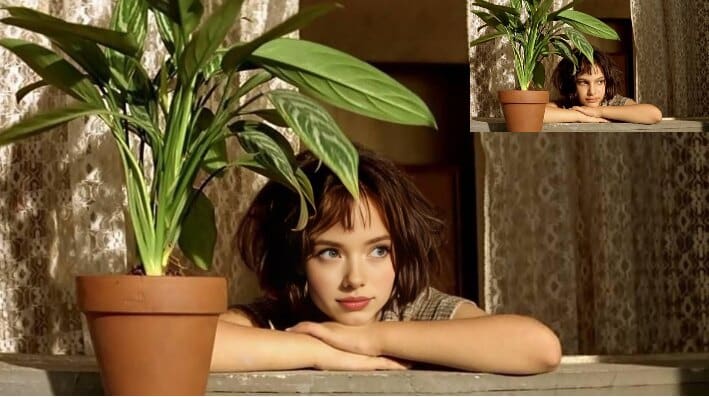
Have you always dreamed of stepping into the shoes of a celebrity, surprising your friends, or creating hilarious videos with your face on someone else's? Thanks to free face swap tools, it is now possible to change the face in a photo in the blink of an eye — it’s fast, fun, and incredibly effective!
In this article, discover how to transform a simple photo or an ordinary video into an unforgettable moment. We introduce you to the best tools, tips for realistic results, and most importantly, how to change faces for free right from your browser or smartphone.
What is a Face Swap? (And why is it so fun!)
Face swap, or "face replacement," is a technology based on artificial intelligence that allows you to swap one face with another in an image or video. Whether it's to laugh with friends, create content for social media, or even for marketing use, free face swap has become a must-have.
While these edits used to be clumsy and easily detectable, new AI face replacement technologies now offer results that are stunningly realistic. And good news: you don't need to be an editing pro to have fun!
Change Faces: Easy as Pie!
Want to see your head on an astronaut's body? Or swap faces with your cat? Thanks to a free face swap tool, all of this becomes child's play. APOB AI allows you to change faces on photos or videos with ease. APOB AI stands out with its proprietary AI face replacement technology, capable of perfectly aligning faces for a natural and smooth result. Ideal for corporate videos, parodies among friends, or family memories.
Here is how to do it:
Sign up on APOB AI, click on "Create Portrait Model," and upload your original photo.
Choose the style and theme that inspires you — and for perfectionists, you can even enter a prompt to create exactly the image you have in mind. Already have a face to integrate? Go to the "Image face swap" section to directly upload the face you want to use.
First create a fun AI video with APOB AI (or skip this step if you already have a video). Then go to "Video face swap," upload the video, and in a few seconds, the face is replaced!
Tip: For a more natural result, choose two faces that are well-lit, facing forward, and without obstructing accessories (glasses, hats...).
You can then save your edit and share it in one click on your social networks!
Advantages of the APOB AI Tool
Easy to use: A few clicks are enough, no technical know-how required.
Multi-format: Works with HD photos and videos.
Fast processing: Instant generation via the cloud, no queue.
Attractive free offer: After registration, receive 80 points/day, which means 4 photo face swaps and 1 video (4 seconds) for free.
Realistic results: Photo-realistic rendering, intuitive interface, and fun filters for quality editing.
Free Video Face Swap: Create Unforgettable Moments
Creating a video with a face change might seem complex, but with the right tools, it’s almost magic.
What you can do:
Make a fake movie trailer with your face on the hero.
Send a totally personalized birthday video.
Create marketing content without hiring a professional model.
Thanks to platforms like APOB AI, the final output is cinematic, with perfect facial alignment and synchronized expressions.
Change Face Online for Free: Key Advantages
Why opt for a free online face swap tool rather than heavy software to install?
No download required;
Compatible with all modern browsers;
Fast results, often without watermarks;
Ideal for personal, pro, or promotional videos.
These platforms allow you to change the face of a photo in just a few seconds, without technical skills. The AI used by these tools has progressed so much that even experts sometimes struggle to distinguish an edit from a real face. This is why these solutions now fit just as well into playful uses as they do professional ones.
Conclusion
Who is Free Face Swap for? Absolutely everyone! Whether you are a content creator, a business owner, or just someone who likes to laugh, a good free face swap can transform your day. It’s a modern and funny way to express yourself, surprise others, and create connections.
So, what are you waiting for? Test a free video face swap tool, change faces in a few seconds, and let the magic happen. Your future self in GIF form is already waiting for you!
FAQ
Q1: How does AI face changing work?
A1:AI face changing uses algorithms to identify facial features, map them onto another face, and create a natural transition. This requires neural networks to adjust shadows and lighting.
Q2: How to change the face in a photo?
A2:To change the face in a photo, use an online tool like APOB AI or Fotor. Upload the source and target photos, then start the face swap process. The AI merges the faces realistically.
Q3: Is face swapping legal?
A3:Face swapping is perfectly legal as long as you use free face swap apps or tools to modify your own content or have obtained permission from the owner of the original content. It is important to ensure that the use of face swap AI is done in an appropriate and responsible manner.
Q4: What can I do with the APOB AI face changer tool?
A4:You can have fun creating original images or videos: change gender, test different hairstyles or clothing styles, insert yourself into cult movie scenes, replace a face in a video, or design crazy memes. The possibilities are numerous — let your imagination run wild and have fun!
Read More
Introduction
Get ready to dive into the captivating realm of face swapping, a trend that has taken the online world by storm in recent times. This innovative and entertaining technique enables you to effortlessly swap faces in photographs, resulting in images that can be humorous, surreal, or even thought-provoking. Our comprehensive tutorial will walk you through the process of becoming a face-swapping expert, utilizing both mobile applications and online tools.
Recommendation: Apob AI
Before we dive into the tutorial, we'd like to highlight a powerful AI-driven platform called Apob AI. This user-friendly AI video generator allows you to create stunning AI-generated videos with ease. Here's how you can use Apob AI to create your own AI videos:
Step 1:
Visit app.apob.ai and create your account for FREE.
Once you're signed in, select "Create Portrait Model."
Step 2:
Upload an image of your choice, and then specify a name for your AI model and describe it.
Click on "Generate" to get your unique AI model.
Step 3:
After generating your AI Model, you can generate photos according to your preference.
You could use the "image to video" and "video face swap" functions to create videos.
The best part is that you'll receive 80 free credits upon signing up, allowing you to explore the platform and create multiple AI videos without any initial investment. Apob AI's advanced algorithms and user-friendly interface make it easy to create stunning and entertaining face swaps that will impress your friends and followers.
What is Face Swapping?
Face Swap leverages the power of artificial intelligence (AI) and advanced image processing algorithms to seamlessly replace one person's facial features with another's in a digital photograph. The rapid development of this technology in recent years can be attributed to the remarkable advancements in machine learning and computer vision. Sophisticated applications and online tools employ complex algorithms to accurately detect and map facial features, enabling users to create incredibly realistic and seamless results with ease.
The phenomenon has experienced an explosive rise in popularity, captivating millions of users across the globe who are drawn to its entertaining and creative potential. From popular social media platforms to instant messaging apps, this trend has become a viral sensation, permeating every corner of the digital landscape and showing no signs of losing momentum anytime soon.
Benefits of Face Swapping
Face swapping offers a range of benefits for users of all ages and backgrounds. One of the primary reasons people enjoy face swapping is its entertainment value. Swapping faces with friends, celebrities, or even animals can lead to hilarious and unexpected results. It is a great way to inject humor into your daily conversations and social media posts.
Moreover, it is an excellent way to enhance your photo editing skills. By practicing, you'll gain a better understanding of facial features, proportions, and blending techniques. These skills can be applied to other areas of photo editing, such as retouching, compositing, and digital art.
Advanced Techniques
Once you've mastered the basics of face swapping, you can explore more advanced techniques to take your creations to the next level. Some advanced techniques include:
Masking and blending: Use masking tools to selectively apply the face swap to specific areas of the photo, creating a more seamless and natural-looking result.
Adjusting skin tones and lighting: Fine-tune the skin tones and lighting of the face to match the original photo more closely. This can be done using color correction and exposure adjustment tools.
Incorporating face swap into complex compositions: Combine it with other photo editing techniques, such as layering, blending, and effects, to create more intricate and artistic compositions.
Troubleshooting Common Issues
While face swapping has become increasingly user-friendly, there may be times when you encounter issues or unsatisfactory results. Some common problems and their solutions include:
Misaligned or distorted face swaps: If the face appears misaligned or distorted, try adjusting the position and size of the faces manually. Most apps and tools offer options to fine-tune the face swap alignment.
Lighting and color inconsistencies: If the face appears too bright, dark, or discolored compared to the original photo, use color correction and exposure adjustment tools to create a more cohesive look.
Low-quality or blurry results: To avoid low-quality, use high-resolution photos.
Read More
Introduction
In the world of artificial intelligence (AI), face swap apps have taken the internet by storm. These entertaining tools allow users to seamlessly replace faces in photos and videos, creating hilarious and sometimes surreal results. One of the most well-known face swap apps is Remaker AI, which has gained popularity for its ease of use and impressive results. However, there's a new contender in the AI face swap arena that's worth exploring: Apob AI. In this article, we'll take a closer look at Remaker AI and introduce you to Apob AI, a promising alternative that might just become your go-to face swap app.
What is Remaker AI?
Remaker AI is an AI-powered face swap app that allows users to easily replace faces in photos and videos. By leveraging advanced machine learning algorithms, Remaker AI can detect and map facial features, resulting in seamless face swaps. The app offers a user-friendly interface, making it accessible to both casual users and more experienced creators.
With Remaker AI, you can swap faces with friends, celebrities, or even animals, creating entertaining and shareable content. The app also offers a range of customization options, allowing you to fine-tune the results for the perfect face swap.
Pros and Cons of Remaker AI
Like any app, Remaker AI has its strengths and weaknesses. Let's take a look at some of the pros and cons of using this popular face swap tool.
Pros:
Easy to use interface
Accurate face detection and mapping
Wide range of customization options
Ability to swap faces in both photos and videos
Cons:
Limited free usage before requiring a subscription
Occasional glitches and crashes reported by users
Some users find the results less realistic compared to other apps
While Remaker AI is a solid choice for face swapping, it's not the only option available. Enter Apob AI, a promising alternative that's been gaining traction among AI enthusiasts and content creators alike.
Introducing Apob AI: A Promising Alternative
Apob AI is a user-friendly AI video generator that allows you to create stunning AI-generated videos with ease. Unlike Remaker AI, which focuses solely on face swapping, Apob AI offers a more comprehensive suite of tools for creating AI-powered content.
Here's a step-by-step guide on how to use Apob AI to create your own AI images and videos.
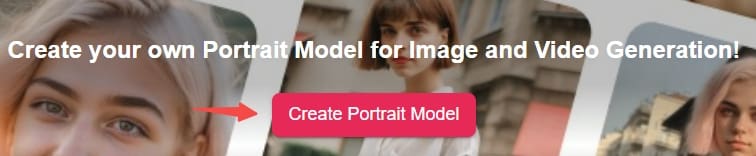
Step 1: Visit apob.ai and create your account for FREE. Once you're signed in, select "Create Portrait Model."
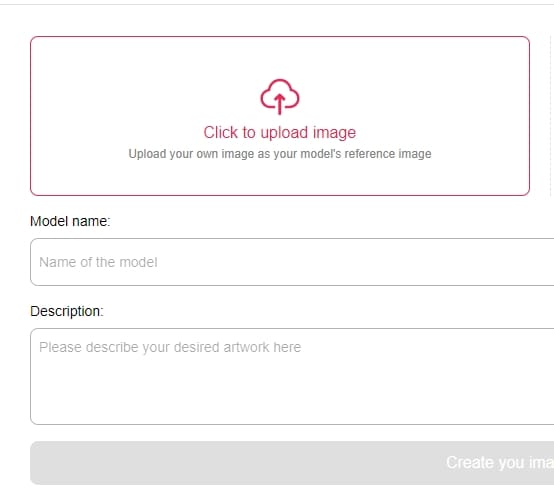
Step 2: Choose and upload an image containing the face you want to use for the swap (this should be a different image than the original one you want to modify).
Step 3: After generating your AI Model, you have the option to select either "image face swap" or "video face swap" depending on whether you want to swap faces in a still image or a video clip.
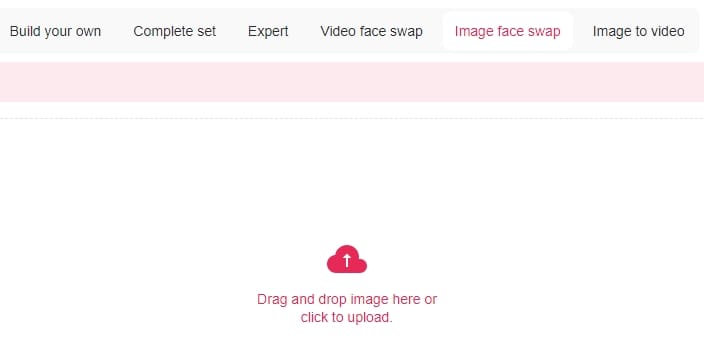
The best part is that once you sign up, you will get a free membership and 80 credits everyday, allowing you to explore the platform and create multiple AI videos without any initial investment.
Conclusion
While Remaker AI is a popular choice for face swapping, Apob AI offers a more versatile and user-friendly alternative. With its range of tools for creating AI-generated videos, intuitive interface, and free credits upon signing up, Apob AI is well worth considering for anyone looking to explore the exciting world of AI-powered content creation.
So why not give Apob AI a try? With its impressive features and user-friendly design, it might just become your go-to platform for creating stunning AI-generated videos and face swaps.
FAQ
Q1: Is Apob AI free to use?
Yes, Apob AI offers a free membership upon signing up, which includes 80 free credits daily to help you get started with creating AI-generated content.
Q2: Can I create videos with Apob AI?
Absolutely! Apob AI offers a range of tools for creating AI-generated videos, including the ability to generate unique AI models, create photos based on your preferences, and convert images to videos.
Q3: Do I need any special skills or knowledge to use Apob AI?
Not at all! Upon sign up and click on "Create a portrait model", you will find the detailed tutorial which make it easy for users of all skill levels to create stunning AI-generated content.
Q4: How does Apob AI compare to other AI-powered content creation platforms?
Apob AI stands out from other platforms thanks to its comprehensive set of tools, user-friendly design, and free credits upon signing up. While other platforms may focus on specific aspects of AI-generated content, Apob AI offers a more versatile and accessible experience for users.
Try Apob AI Today!
Ready to take your AI-generated content creation to the next level? Give Apob AI a try and discover the incredible possibilities of AI-powered video generation and face swapping. With its user-friendly interface, comprehensive set of tools, and free credits upon signing up, Apob AI is the perfect platform for anyone looking to explore the exciting world of AI-generated content.
Don't miss out on this opportunity to create stunning AI-generated videos and face swaps – sign up for Apob AI today and unleash your creativity!
Read More
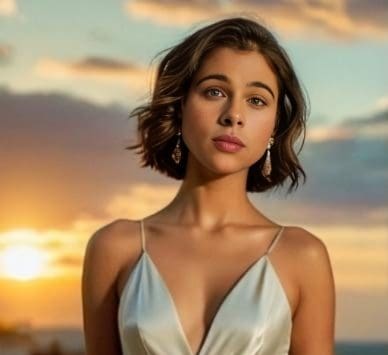
Imagine a world where you could swap your gender as easily as changing your outfit. Thanks to the mind-blowing advancements in artificial intelligence, that world is now a reality! Welcome to the captivating realm of AI gender swap, where you can transform your appearance and explore the fascinating possibilities of gender fluidity with just a few clicks [1]. In this article, we'll take you on a thrilling journey through the magic of AI image transformation and introduce you to APOB AI, the ultimate gender swap filter that will blow your mind!
What is Gender Swap?
Picture this: you upload a photo of yourself, and within seconds, you see a stunningly realistic image of what you would look like as the another gender. That's the power of gender swap AI! By harnessing the incredible capabilities of advanced algorithms and machine learning, gender swap technology analyzes your facial features, hairstyle, and other gender-specific attributes to create a mind-bending representation of your alter ego [2]. It's like having a virtual makeup artist and hairstylist at your fingertips!
The Rise of Gender Swap AI Tools
As the world becomes increasingly fascinated with the idea of gender fluidity, AI tools have stepped up to the plate to make gender swapping more accessible than ever before. From the viral sensations like FaceApp to the awe-inspiring filters on Snapchat, gender swap AI has taken the internet by storm [3]. But hold on to your seats because we're about to introduce you to the crème de la crème of gender swap tools: APOB AI!
Introducing APOB AI: The Ultimate Gender Swap Filter
Everyone, prepare to have your minds blown by the sheer awesomeness of APOB AI! This cutting-edge platform is like having a genie in a bottle, granting your gender-swapping wishes with unparalleled precision and realism. With APOB AI's face swap function, transforming your images is a piece of cake [4]:
Step 1: Head over to apob.ai and sign up for a FREE account. Once you're in, click on "Create Portrait Model."
Step 2: Upload a picture of the person you would like to swap to (you could choose the hair style and clothes in advance), and give your model a name. Hit "Generate" to get your model.
Step 3: After your AI Model is ready, simply click on the "image face swap" function and upload your photos or short videos. Click on "Generate" and then wait for a few seconds to download the images or videos.
Sign up to get your 80 credits
But what sets APOB AI apart from the rest? It's all in the details! The advanced AI algorithms of APOB AI are like a team of tireless perfectionists, meticulously blending facial features, hair, and even facial hair to create a gender-swapped version of you that looks so real, you'll do a double-take [4]! And the best part? APOB AI lets you customize your transformation to your heart's content, so you can unleash your inner diva or rock that rugged look you've always dreamed of!
Exploring the Creative Possibilities of Gender Swap AI
But wait, there's more! Gender swap AI isn't just about satisfying your curiosity or having a good laugh (although it definitely delivers on both fronts!). This mind-bending technology has the power to revolutionize the creative industries, from fashion and advertising to film and beyond [5]. Imagine the boundless possibilities for artistic expression and groundbreaking content that challenges societal norms and sparks thought-provoking conversations. With tools like APOB AI, creatives can push the envelope and explore uncharted territories of gender representation, leaving audiences in awe and craving more!
The Future of Gender Swap AI
Buckle up, folks, because the future of gender swap AI is going to be one wild ride! As AI technology continues to evolve at a breakneck pace, we can expect to see gender swap filters that are even more mind-blowingly realistic and customizable [6]. Picture yourself stepping into a virtual reality where you can experience life as any gender you desire or even create your own unique gender identity! The possibilities are endless, and APOB AI is leading the charge in this thrilling new frontier.
FAQ
Q1: Is gender swap AI really as accurate and realistic as it sounds?
A1: You bet it is! Advanced tools like APOB AI use state-of-the-art algorithms to create gender-swapped images that are so convincing, you'll question reality itself [4]!
Q2: Do I need to be a tech wizard to use gender swap filters?
A2: Absolutely not! Gender swap AI tools, especially APOB AI, are designed to be user-friendly and intuitive, so even the most technologically challenged individuals can experience the magic with ease [4].
Q3: Can I try out gender swap AI tools like APOB AI without breaking the bank?
A3: You're in luck! Once sign up, APOB AI offers a generous free 80 credit, allowing you to dive into the world of gender swapping without spending a dime [4]. It's like having a free pass to a gender-bending wonderland!
Q4: Are there any limitations to what gender swap AI can do?
A4: While gender swap AI has made remarkable strides, there may be some limitations when it comes to handling extremely complex hairstyles or accessories [7]. But fear not! Tools like APOB AI are constantly evolving to overcome these challenges and deliver even more mind-blowing results.
Q5: I'm ready to share my jaw-dropping gender-swapped images with the world! How can I do that?
A5: Sharing your masterpieces has never been easier! Most platforms, including the incredible APOB AI, provide seamless sharing options, allowing you to download and share your transformed images on social media or wherever your heart desires [4]. Get ready to break the internet with your stunning new look!
In conclusion, gender swap AI is not just a trend; it's a thrilling revolution that's here to stay! With the awe-inspiring capabilities of APOB AI and its face swap function, you can now embark on a mind-bending journey of self-discovery and unleash your inner chameleon. So what are you waiting for? Dive into the mesmerizing world of AI gender swap and prepare to be amazed, entertained, and inspired like never before!
References:
[1] Marr, B. (2021). The Amazing Ways Artificial Intelligence Is Transforming The Arts. Forbes. https://www.forbes.com/sites/bernardmarr/2021/08/30/the-amazing-ways-artificial-intelligence-is-transforming-the-arts/?sh=6e2b4f1b6e6b
[2] Zhu, J. Y., Park, T., Isola, P., & Efros, A. A. (2017). Unpaired image-to-image translation using cycle-consistent adversarial networks. In Proceedings of the IEEE international conference on computer vision (pp. 2223-2232). https://arxiv.org/abs/1703.10593
[3] Vincent, J. (2020). The AI that generates fake faces is getting better and better. The Verge. https://www.theverge.com/2020/2/17/21141366/ai-generated-faces-fake-personas-thispersondoesnotexist-stylegan2-web-sites
[4] APOB AI. (n.d.). Create Your AI Influencer. https://apob.ai/
[5] Iqbal, N. (2020). 'The future of film-making is in AI': how artificial intelligence is shaping movies. The Guardian. https://www.theguardian.com/film/2020/mar/08/the-future-of-film-making-is-in-ai-artificial-intelligence-shaping-movies
[6] Ramasubramanian, S. (2020). The AI Revolution in Fashion: How Artificial Intelligence is Transforming the Industry. Forbes. https://www.forbes.com/sites/cognitiveworld/2020/09/19/the-ai-revolution-in-fashion-how-artificial-intelligence-is-transforming-the-industry/?sh=73b7d1c5599a
[7] Farid, H. (2019). Fake Photos. MIT Press. https://mitpress.mit.edu/books/fake-photos
Read More
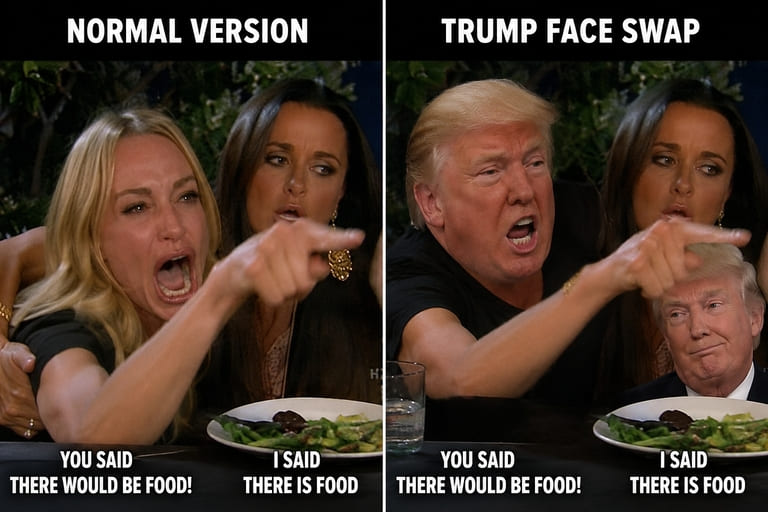
A face swap meme is only funny if the swap supports the joke. If the face looks pasted on, the meme feels lazy. If the source image uses someone without permission, the joke can become uncomfortable fast. The best face swap meme keeps three things in balance: consent, expression, and timing.
Pick the Right Template
Choose a meme frame with a clear face angle. Front-facing source photos work best with front-facing templates. Side angles should match side angles. If the template has dramatic lighting, choose a source photo with similar light.
APOB AI Workflow-Use our AI Face Swap Changer
Use APOB AI Face Swapper when you need an image or video face swap. For a face swap meme, start with a static image. Once it works, try a short video meme.
Workflow:
Choose a meme template.
Upload a permitted face image.
Check angle, lighting, and expression.
Run the face swap.
Add a short caption.
Export as image, GIF, or short video.
For a face swap video meme, keep the clip short. Long clips increase the chance of face drift.
Caption First, Face Second
Write the caption before swapping. The caption tells you what expression you need. A shocked caption needs a shocked template. A smug caption needs a smug template. This tiny planning step makes the face swap meme feel intentional.
Safety Notes
Do not use private people's faces without permission. Avoid political deception, harassment, or misleading celebrity content. Parody can still cross a line if the viewer cannot tell what is real.
Face Swap Meme Planning: Match the Expression First
A face swap works best when the emotion already matches the template. A shocked face belongs on a shocked body. A smug face belongs on a smug pose. If the expression is wrong, even a technically clean swap can feel flat.
Before using APOB AI Face Swapper, decide the joke in one sentence. Then choose the template, source face, and caption around that joke. Planning the reaction first makes the face swap meme look more intentional.
Face Swap Meme Template Checklist
Look for a clear face angle, strong lighting, enough resolution, and a body pose that supports the caption. Avoid templates with heavy motion blur, covered faces, or extreme side angles unless your source photo matches them.
How to Make a Face Swap Video Meme
For video, keep the clip short and use a template with simple movement. Long clips create more chances for identity drift. If the face slips or changes, trim the video tighter or use a frame with less head rotation.
APOB AI can help with both still and video swaps, but the creative rule is the same: the face should serve the joke, not distract from it.
Face Swap Meme Consent and Context
Use your own face or a face you have permission to edit. Avoid harassment, impersonation, or misleading public figures. A funny meme should not leave the viewer wondering whether the person actually did or said something.
Face Swap Meme Ideas for Images, GIFs, and Short Videos
A still image is best for a quick reaction. A GIF is best for a looped expression. A short video is best when the joke depends on timing or movement. Choose the format before swapping the face, because each format needs a different template.
For image memes, expression is everything. For GIFs, look for repeatable motion. For videos, use clips where the head angle does not change too wildly. This helps APOB AI keep the face stable.
Face Swap Meme Caption Timing
Write the caption as a setup, not a full explanation. Let the face deliver the punchline. If the caption and expression both say the same thing, the meme may feel flat. A small mismatch between text and face can make the joke sharper.
Face Swap Meme Quality Checks Before Posting
Zoom in before you publish. Check the jawline, eye direction, skin tone, hair edge, and mouth shape. If the swapped face looks too sharp or too soft compared with the template, the meme will feel edited in a distracting way. A good face swap meme should let people notice the joke first, not the technical flaw.
Also test the meme without your caption. If the expression is still funny, the visual is strong. If the caption has to explain everything, try a clearer template or a more expressive source photo.
Face Swap Meme Variations to Try
Once the basic swap works, make three versions. The first can be a clean image meme. The second can be a reaction GIF with a tiny zoom or blink. The third can be a short video meme with one caption beat. Comparing these versions helps you see which format makes the joke land fastest.
For APOB AI, save the best face source and reuse it only with templates that match angle and lighting. That habit keeps each new face swap meme cleaner.
FAQs
What is a face swap meme?
A face swap meme is a meme image, GIF, or video where one face is replaced with another for a joke or reaction.
Can APOB AI make a face swap meme?
Yes. APOB AI Face Swapper can support image and video face swap workflows for meme-style content.
What photo works best?
Use a clear face photo with similar angle and lighting to the meme template.
Can I make a face swap video meme?
Yes, but start with short clips and simple movement to avoid face drift.
Is face swapping legal?
It depends on use, consent, local law, and platform rules. Get permission for private individuals and avoid misleading content.
What makes a face swap meme look natural?
Match the face angle, lighting, and expression to the meme template. If the template is shocked, use a source photo with a similar expression or angle.
References
APOB AI (2026) AI Face Swapper. Available at: https://apob.ai/ai-face-swapper/ (Accessed: 12 May 2026).
Kapwing (2026) Meme Maker. Available at: https://www.kapwing.com/meme-maker (Accessed: 12 May 2026).
Remaker AI (2026) Face Swap Free. Available at: https://remaker.ai/face-swap-free/ (Accessed: 12 May 2026).
TikTok (2025) Introducing AI Alive. Available at: https://newsroom.tiktok.com/introducing-tiktok-ai-alive?lang=en (Accessed: 12 May 2026).
Read More
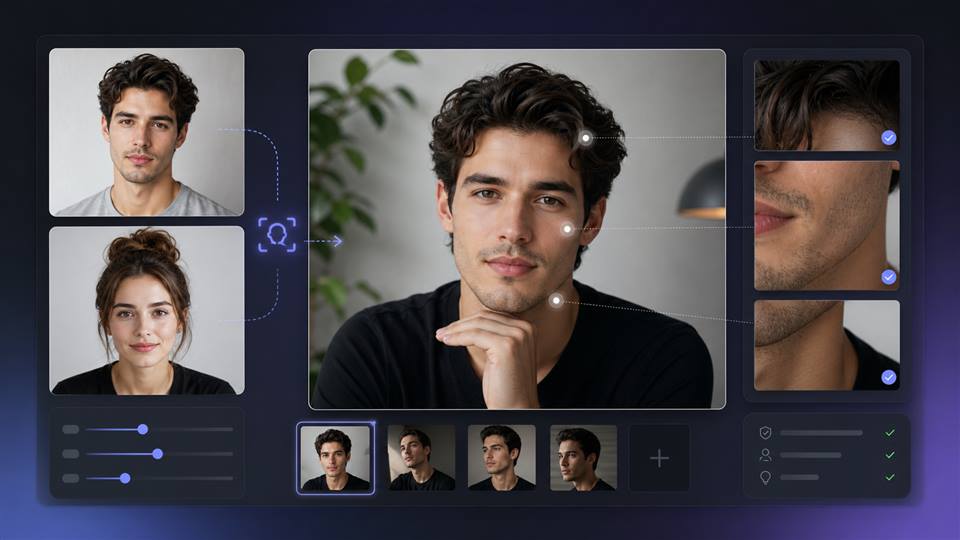
AI Head Swap Is More Than Pasting a Face
A believable AI head swap depends on the whole upper body. The face can be sharp, but the image will still feel wrong if the neck angle, jawline, hairline, shoulders, or light direction do not match.
This is why a simple face swap sometimes works for memes but fails for professional portraits. If you want the result to look intentional, treat it like a small compositing job.
Match the Source Images Before You Swap
Choose photos with similar camera height and head angle. A straight-on face will not sit naturally on a body looking sharply downward. Lighting matters too: a face lit from the left looks pasted onto a body lit from the right.
Fast Matching Rules
Use similar head angle.
Match light direction.
Keep resolution close.
Avoid heavy sunglasses or hair across the face.
Check neck and shoulder alignment after the swap.
Using APOB AI Face Swapper
APOB AI Face Swapper is built for image and video face replacement workflows. For head swap AI results, upload the clearest source face you have, choose a target image with a compatible pose, and review the edge areas carefully before publishing.
Open APOB AI Face Swapper.
Upload the face source.
Upload or choose the target image.
Generate the swap.
Inspect hairline, ears, neck, and shadows.
Regenerate with a better target photo if the pose does not fit.
Prompts and Notes for Better Head Swap Results
Realistic AI head swap, same light direction, natural jawline, clean neck blend.
Professional portrait head swap AI, stable face identity, matching studio lighting.
Swap head photo with natural hairline, no sharp edge, realistic skin tone.
Cinematic character head swap, matching camera angle, believable shoulders.
AI head swap online result, preserve expression, realistic ear and neck alignment.
Fashion portrait head replacement, soft shadows, natural skin texture.
Corporate headshot swap, clean suit portrait, balanced face proportions.
Funny head swap app style, exaggerated but clean edges, stable face.
Video head swap, consistent face across frames, natural blink and expression.
Poster-style head swap, dramatic lighting, accurate perspective.
Where to Use Head Swap Carefully
Head swaps can be useful for creative concepts, character art, campaign tests, and profile mockups. They should not be used to mislead people, impersonate someone, or create realistic content without permission.
Look at the Neck Before You Look at the Face
Most people inspect the eyes first, but the neck often reveals the edit. If the head angle and neck angle disagree, the portrait feels wrong even when the face looks sharp. The jaw shadow, collar line, and shoulder tilt all need to belong to the same body.
Hairline is the second giveaway. Strands that stop too sharply, ears that disappear, or a forehead with different lighting can make an otherwise strong result feel pasted in.
The Final Inspection Pass
Zoom out and judge the whole silhouette.
Check the jaw shadow and neck connection.
Compare skin tone across the face and chest.
Look at ears, hairline, and glasses if present.
Test a crop to see whether the image still feels natural.
Use It for Concepts, Not Deception
Head replacement is powerful for creative planning, parody, character concepts, and approved brand content. It becomes risky when it is used to impersonate someone or change the meaning of a real photo.
The safest workflow is simple: use images you own or have permission to edit, keep the context honest, and avoid realistic claims the image cannot support.
One Strong Target Image Is Better Than Ten Weak Ones
People often test too many target photos without checking compatibility. A single target image with the right pose, clean lighting, and visible neck will outperform a folder of dramatic but mismatched images.
If you are making a professional portrait, choose a target with restrained expression and simple wardrobe. If you are making a character concept, you can push costume and mood further, but the head angle still needs to make sense.
Video Makes Every Weak Point Louder
In a still image, a slightly imperfect hairline may pass. In video, it can flicker, drift, or change shape across frames. Start with short clips, steady poses, and even lighting. Once consistency looks good, then test more expressive movement.
For public use, watch the full clip at normal speed and paused. Both views matter because viewers will notice artifacts differently depending on how the content is shared.
The final question is not whether the face looks sharp. It is whether the whole person looks like they belong in the same photograph or clip.
A calm, believable result will usually be more useful than a dramatic one that needs a long explanation.
FAQs
What is AI head swap?
AI head swap replaces or blends a person's head or face into another image or video.
Can APOB AI do head swaps?
Yes. APOB AI Face Swapper supports face replacement workflows for image and video content.
Why does my head swap look fake?
The source and target images may have different angles, lighting, resolution, or neck positions.
Is head swap the same as face swap?
They overlap, but head swap often needs more attention to hairline, neck, jaw, and shoulders.
Can I use AI head swap for professional portraits?
Yes, if the result is honest, permitted, and carefully checked for natural lighting and identity.
What is the best source photo?
Use a sharp, front-facing face with natural light and no major obstructions.
References
Wyzowl (2026) Video Marketing Statistics 2026. Available at: https://wyzowl.com/video-marketing-statistics/ (Accessed: 15 May 2026).
DataReportal (2026) Digital 2026: The United States of America. Available at: https://datareportal.com/reports/digital-2026-united-states-of-america (Accessed: 15 May 2026).
APOB AI (2026) Face Swapper. Available at: https://apob.ai/face-swapper/ (Accessed: 15 May 2026).
Beart (2026) AI Head Swap. Available at: https://www.beart.ai/ai-head-swap (Accessed: 15 May 2026).
Arting AI (2026) AI Head Swap. Available at: https://arting.ai/ai-head-swap (Accessed: 15 May 2026).
Nirkin et al. (2019) FSGAN: Subject Agnostic Face Swapping and Reenactment. Available at: https://arxiv.org/abs/1908.05932 (Accessed: 15 May 2026).
Read More
Customize Every Detail with Full Creative Control
Building an authentic digital presence requires distinct branding that standard stock media simply cannot deliver. With this powerful AI influencer generator, you command the exact visual identity, aesthetic tone, and messaging parameters of your digital persona. Our platform lets you customize specialized facial characteristics, wardrobe styles, and situational backgrounds, while also pairing your character with a synchronized talking avatar voice engine. This granular control allows you to shape a unique consistent AI character tailored specifically to your audience's niche, ensuring your virtual creator aligns perfectly with your brand identity across all media formats.
Test and Scale Risk-Free with Free Daily Credits
Launching a new social channel or testing an unproven audience angle shouldn't demand heavy upfront financial commitments. APOB AI operates as a Free AI Influencer Generator that replenishes your account with 80 free usage credits every single day. If you are a social media growth marketer or independent creator focused on generating high-converting AI influencer photos to attract organic followers, this daily allowance gives you ample runway to test different concepts completely free. You can iterate on hooks, refine visual styles, and establish your posting schedule before spending a dollar on high-volume production tiers.
Deploy Multiplatform-Ready Content Contextualized for Global Channels
To win the attention economy, your virtual brand presenter must natively adapt to where your target demographics gather. APOB AI functions as a versatile AI influencer video generator engineered to seamlessly export platform-optimized layouts across all top monetization networks. Whether you need vertical 9:16 files to scale organic views on TikTok, Instagram Reels, and YouTube Shorts, standard posts for fan-funding portals like OnlyFans, or high-converting UGC-style AI influencer ads for paid media feeds, our system processes every frame flawlessly. You can even configure your model to act as an automated chatbot companion, multiplying your fan engagement loops on a 24/7 basis.
Optimized for Digital Workflows and Multi-Platform Campaigns
While a consistent AI influencer built through our dashboard cannot physically show up to live in-person PR events or walk a traditional real-world runway, this digital-first profile is precisely what gives performance marketers an unfair edge. By operating entirely within software matrices, your unique AI avatar influencer completely bypasses the real-world operational issues that plague traditional creator management—such as talent scheduling conflicts, costly travel budgets, content fatigue, and legal image rights complications. This allows brands and digital agencies to scale automated AI influencer videos, deploy localized UGC-style AI influencer ads, and systematically dominate social channels without ever hitting a physical production bottleneck.
Structured Usage Allocations Designed for High-Volume Pipelines
To keep our visual engine highly accessible to independent creators, APOB AI provides a functional Free AI Influencer Generator tier supported by a recurring allotment of 80 processing credits every single day. While digital creators building organic AI influencer photos for account growth find this daily baseline completely sufficient for continuous social media posting, professional agencies or e-commerce teams scaling aggressive, multi-shot product promotion campaigns will rapidly outpace the complimentary tier. For performance teams who need to generate hundreds of distinct ad variations, custom talking avatar angles, and deep content splits simultaneously, our scalable premium subscriptions remove output caps to keep high-velocity content production moving forward.
Stylistic Continuity Requires Specific Dataset Guidance
While the platform functions as an advanced virtual influencer generator capable of locking in facial symmetry across multiple environments, running highly complex action sequences—such as dense martial arts transitions or detailed multi-hand product manipulation—can sometimes test the limits of algorithmic accuracy on the first render. To prevent slight visual artifacts or background warping during high-fidelity AI influencer videos, the asset pipeline requires clean, well-framed reference data. E-commerce brands can easily navigate this requirement by providing distinct structural details within the description block, allowing the AI influencer video generator to seamlessly maintain flawless material accuracy across rapid social media content variations.
What is an AI influencer generator?
An AI influencer generator is a specialized visual content production system that uses deep learning models to build, train, and deploy lifelike digital personas. Unlike a simple image filter, it allows creators and brands to maintain a consistent AI character across multiple mediums, generating a permanent digital asset that executes product promotion, narrative storytelling, and continuous social media growth.
Is this AI influencer generator free?
Yes. APOB AI operates as a Free AI Influencer Generator that gives you 80 free processing credits automatically every single day. A single allocation of 20 credits lets you render 4 hyper-realistic AI influencer photos at once, meaning you can easily publish up to 16 native posts every day for free. If you want to expand into motion assets, you can swap your daily credits to generate a short-form talking avatar sequence or a promotional clip. For performance marketing teams requiring unlimited volume and faster rendering priority, flexible premium tier subscriptions are available.
What can my virtual influencer do for my brand?
Your customized AI avatar influencer acts as a 24/7 reusable brand presenter and multi-platform content engine. They can natively model upcoming apparel drops, speak directly to your target audience using highly accurate lip-sync voiceovers, host automated product demo videos, and anchor your performance marketing funnels. By functioning as a virtual spokesperson, they remove the traditional overhead of booking physical studios, hiring human models, or coordinating endless content reshoots.
How do I monetize an AI influencer asset?
You can monetize your digital persona by deploying them across automated brand campaigns, affiliate marketing programs, sponsored content feeds, and digital product product lines. Because an AI influencer generator produces consistent creative variables on demand, your digital asset can simultaneously target multiple niches—such as fitness, fashion, or tech—allowing you to scale audience engagement and earn recurring sponsorship revenues entirely in the background.
How much revenue can a virtual influencer generate?
Earning velocity depends heavily on your chosen audience niche, platform distribution, and monetization structure. Top-tier industry benchmarks show that established virtual influencers routinely command upwards of $10,000 per sponsored deployment, partnering with major luxury houses and global consumer brands. By utilizing APOB AI to ensure absolute face-locking and character continuity, you can build the precise visual authority needed to secure premium brand collaborations, ad revenue splits, and direct merchandise sales.
Can I use AI influencers for real brand collaborations?
Absolutely. Modern enterprises heavily utilize virtual content creators to secure predictable, brand-safe marketing campaigns. Your generated consistent AI influencer can act as the main presenter for dedicated TikTok ads, showcase seasonal apparel lines in lifestyle imagery, or deliver personalized customer testimonials. This structured delivery eliminates contract disputes, rights management issues, and creator availability constraints.
What kind of persona can I build with this AI influencer generator?
The customization suite gives you total architectural control over your model's visual niche and background lifestyle. You can seamlessly configure a high-end streetwear fashion blogger for Instagram, a dynamic gaming creator for YouTube, a relatable wellness coach, or a stylized anime aesthetic. The virtual influencer generator lets you refine facial features, styling layers, wardrobe parameters, and background settings to match your exact audience metrics.
Do I need technical production or editing skills?
No design background or engineering experience is required to operate the pipeline. Our intuitive content production dashboard replaces complex rendering software with direct, user-friendly prompt fields, asset upload blocks, and simple click-to-generate settings. You can seamlessly produce premium AI influencer videos, high-fidelity promotional photos, and interactive talking avatar elements without touching a single line of code.
Who owns the rights to the generated commercial assets?
You retain full commercial ownership of the media assets, photos, and video components you produce using our system framework. This complete commercial clearance means you are legally free to deploy your generated materials across external business branding, native paid advertising channels, automated e-commerce campaigns, standalone storytelling projects, or personal digital asset monetization.
Can I deploy my AI influencer across multiple platforms?
Yes, the system functions as a native, cross-channel AI influencer video generator that formats content perfectly for any social destination. You can easily export and distribute your finished media across vertical feeds like TikTok, Instagram Reels, and YouTube Shorts, or leverage square configurations for Meta ads and digital storefronts. Our consistent asset mapping ensures your persona remains instantly recognizable across every digital endpoint.


