Create a reusable fictional character, approve a still, and test a short video in APOB. See what the hands-on workflow covers—and where Higgsfield’s cinematic controls remain distinct.
Use one original adult character and keep the brief, portrait, clip, and download together. The four screenshots below came from a signed-in Nano-labeled account on 17 September 2026. The still passed an initial identity/setting check, while the clip's cup action did not fully pass motion review. The UI quoted credits before generation; the final ledger debit and universal Nano entitlements were not established.
1. Define an original character instead of importing an unlicensed face
Problem: A one-off prompt may produce a different face for every post. In the tested UI, choose Create Portrait Model → AI influencer generator, set adult-character attributes, and enter scene and wardrobe details in Bespoke Details. Example: we requested a fictional ceramics host with a short dark-brown bob, navy work shirt, plain mug, and pottery shelves; the button showed Generate −10 credits. We selected the reference, named the model Higgsfield Guide Host, switched Public off, and created it. Check: inspect the face, visible setting, and Public state before submission. This account could create the model, but the Help Center's Nano cap/private-plan guidance may differ for a new account. Screenshot 1: the genuine Bespoke Details input and quoted button cost.


2. Generate and review the still before spending credits on motion
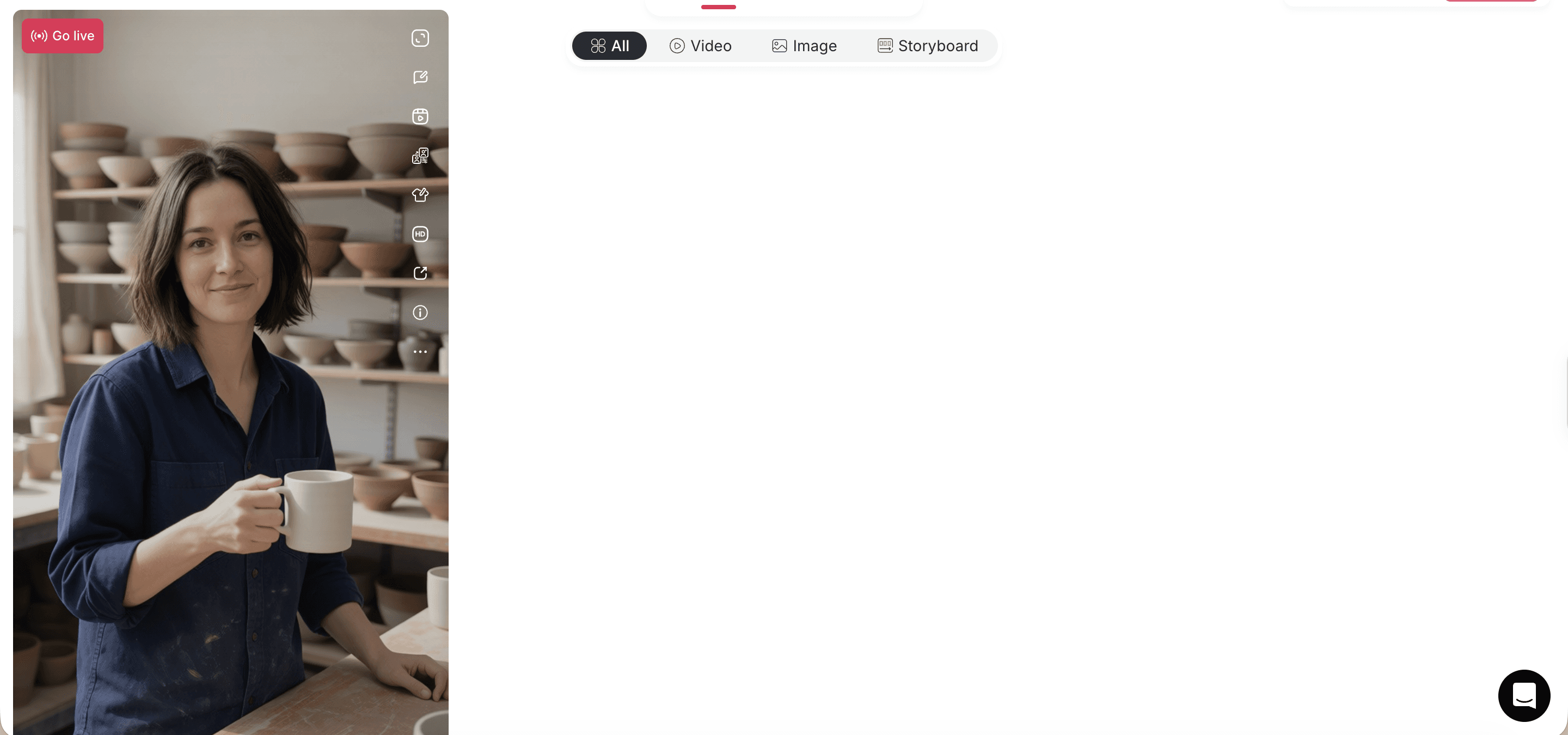
Problem: Animation makes a wrong scene or product detail more expensive to fix. On the new model page, open Generate image → Chat to generate; keep the character's @-pill, describe one scene, and check the quality/price bar. Example: we asked for the same host among pottery shelves holding a plain mug, chose Fast, 9:16, and saw 20 credits / 4 images before generating. Four Private images completed; the three visible in Screenshot 2 retained a recognizable face, navy shirt, and pottery setting. Check: choose the clearest frame with a believable mug and hands; reject a still that misses the brief before buying motion. APOB's Generate Image guide describes the Fast batch and higher-tier pricing. Screenshot 2: genuine generated portrait cards.
3. Animate one action, not an entire ad in one prompt
Problem: A clip can cost more than the portrait stage, and too many actions can increase face or object drift. In the tested UI, open a selected still's View → Image to video; it becomes the first frame. We selected Fast, 480P, 5 seconds, turned Native audio off, and submitted: “The fictional ceramics host lifts the plain white mug once from chest height, pauses, and gives a small natural smile. Keep the camera fixed and preserve her face, navy shirt, pottery shelves, and mug shape. No speech, no new objects, no text.” The button quoted 40 credits; generation completed with a Private result card. Check: read the total quote after setting quality, resolution, duration, and audio; preview the result rather than accepting its thumbnail. The Image to Video guide documents tier-dependent controls. Screenshot 3: the genuine completed video card; the generation-settings panel is not visible in that capture.

4. Play, inspect, and export the result
Problem: A thumbnail can hide motion errors or an export restriction. We opened the new video card, played the in-app preview, then used Download for the MP4. Example acceptance check: the ceramics host remained recognizable against pottery shelves, but the mug moved differently from the requested single lift in part of the clip. This is a successful technical export, not an approved product-action demonstration. Check: play the whole clip, compare hand/mug motion and product details to the source brief, inspect file dimensions and watermark, then decide whether to regenerate or cut in another shot. APOB's content-detail guide documents the download control and Nano watermark conditions. Screenshot 4: genuine playback modal with Download visible.
What APOB can replace—and where Higgsfield still fits
Short answer: We created an original APOB character and four stills, attached one as an Image to Video first frame, generated a five-second clip, played it, and downloaded an MP4. That supports a narrow technical replacement for a single-character short-video workflow. It does not prove the clip's precise mug action is usable for a campaign. APOB's Image to Video documentation describes tier-dependent Camera, Elements, and multi-shot controls, but this review has not established equivalence with Higgsfield's Cinema Studio direction, named presets, lenses, proprietary effects, model catalog, or project workflow.
Creative step | Evidence status | APOB fit and honest boundary |
|---|---|---|
Define an original reusable adult persona | Tested in this account | A generated ceramics-host reference was selected, named, and created as a model with Public off. Another account's model capacity/privacy eligibility may differ. |
Generate and select a character portrait | Tested, initial still check passed | A 20-credit Fast quote produced four Private 9:16 stills; the three visible cards retain face, navy shirt, pottery shelves, and mug. Hands and prop shape still need selection and review. |
Animate and export one character still | Tested in this account; precise action check failed | The selected 9:16 still became the first frame. A five-second Fast/480P clip was quoted at 40 credits, completed, played in-app, and downloaded as an MP4. The mug did not consistently follow the requested single lift; no claim of ad-ready motion. |
Produce a speaking presenter | Supported, not tested in this run | Talking avatar/lip sync is a separate path, not part of the four-shot proof. Speech and language quality need their own test. |
Higgsfield Cinema Studio, Director's Panel, proprietary effect presets, exact model catalog, or multi-shot project controls | Not equivalent or unverified | Higgsfield documents dedicated optics, camera, lighting, reference, and directing controls. APOB documents some tier-dependent motion controls of its own, but no paired control/output test establishes parity. |
Test conditions: signed-in Nano-labeled account, 17 September 2026, original fictional adult character, one generated reference, one model, four Fast stills, and one five-second Fast/480P video with Native audio off. No existing user model was deleted. The portrait-model guide says Nano is capped at one portrait model and private models are paid; this account nevertheless created an additional model with Public off. Treat that as an account-specific observation, not a free-plan promise. The four original UI screenshots are part of this page's guide. The credit ledger, full-file watermark check, precise output-file measurements for this second run, and a side-by-side Higgsfield result remain unverified.
Decision rule: If your recurring deliverable is a recognizable character in short posts, test one complete APOB output with the free allowance and calculate the cost per accepted clip. If the brief depends on a particular cinematic preset or complex shot direction, benchmark both tools with the same source still and acceptance criteria before switching.
What should you bring from an existing Higgsfield project?
Bring assets you own and are allowed to reuse: a character brief, an approved portrait or reference image, the intended action prompt, product-reference photos, a script if speech is needed, and the target crop. Record which Higgsfield shot settings are essential to the result before recreating the job. Do not assume a Higgsfield project file, Soul Cast actor, Elements library, camera preset, or generated media automatically transfers into APOB; export and rights checks come first. For a fair test, hold the source still, target format, and one action constant, then compare face stability, object accuracy, downloaded-file specifications, total credits spent, and whether the final clip is publishable. No matched Higgsfield-versus-APOB output test has been completed for this draft.
The inputs below are copy-ready for the fields named in the first column. Select the authorized image or model separately; in Image to Video, confirm the current quality tier actually exposes Description before pasting a motion prompt. APOB's help guide says some tiers do not. Review every output against its acceptance check.
Purpose and input field | Copy-ready prompt | Expected output / acceptance check |
|---|---|---|
Creator persona · image prompt |
| A reusable portrait. Check face, hands, wardrobe, caption space, and that the subject is original. |
Creator motion test · image-to-video prompt, after selecting the approved still |
| One restrained short clip. Review frame-by-frame for face/object drift before export. |
Ecommerce marketer · image prompt, with an authorized bag photo selected as reference |
| Product-led character still. Compare every visible product feature with the source photo; do not publish inaccurate results. |
Faceless creator · image prompt for a fictional channel guide |
| A host-intro still for a human-reviewed tutorial. Check safe context, hands, wardrobe, and title space before any motion test. |
Optional speaking test · Talking Avatar Script field, after selecting the approved character and voice |
| Only the spoken words go in Script; set voice and delivery controls separately if offered. Review lip sync, pronunciation, captions, and disclosure. This is not part of the four-shot silent-video proof. |
A character before the clip. The goal is to keep an approved persona and visual reference available for future posts. That reduces the chance of drifting into a new face every time, though consistency still needs human review on every output. APOB's AI influencer workflow describes character creation and re-use across image and video tools.
Higgsfield also supports reusable actors and a still-first approach through Soul Cast and Elements. This is a workflow fit decision, not an exclusive APOB capability claim: choose the simpler path if your deliverable is an approved persona plus a short social clip, and retain Higgsfield when its directing controls are material to the brief.
A credit-aware test before a larger campaign. APOB currently states 80 daily free credits; that is a published allowance, not a promise of unlimited or commercially licensed video. In this account the reference quoted 10 credits, the four-image Fast batch quoted 20, and a five-second Fast/480P clip quoted 40. The three selected quotes total 70 credits, but are not a verified same-day free-balance calculation or confirmed ledger debit. Check eligibility, remaining balance, and the current Generate quote in your own account. Still-first review helped preserve the setting; video review then revealed a different mug action than requested.
To compare costs fairly, record all charged portrait and video attempts, plus any separately charged preparation, then divide by the number of clips that pass your publishing checks. APOB's credit guide says costs appear beside Generate and deductions can be checked in Credit usage. A quote is not proof of the final debit or of free-tier export rights. Do not compare the two platforms' raw credit numbers as if a credit had the same cash value in both.
Different paths for different communication jobs. A silent action clip can start with image-to-video; a script-led presenter may use talking avatar and lip sync. For a spoken ceramics announcement, use a short original script and separately inspect mouth motion and pronunciation. That is an optional second test, not proof that the four-stage silent-video sequence includes speech. Treat the modes as distinct, with their own settings and costs.
A clear boundary. If exact camera/lens controls, Higgsfield-specific effects, or a particular Cinema Studio workflow are the brief, APOB should be evaluated as a complementary character creator unless a side-by-side test proves the required control.
Use an original fictional character or a real person's likeness/voice only with explicit, verifiable permission. APOB's Terms of Service prohibit appropriating a person's likeness, voice, or persona without such consent and require rights to submitted images, audio, and other inputs. Do not assume a generated output clears rights in third-party logos, music, copyrighted images, packaging, or the reference material. The terms say users own generated content as between them and APOB to the extent law permits, subject to third-party rights and the licenses granted to the service. APOB's AI Movie page says commercial use may require an eligible paid plan; do not treat the free allowance as a commercial license. Check the current plan and written terms for a campaign. Visibility is separate from data handling: the portrait-model guide describes private models as a paid feature, while APOB's Privacy Policy describes processing uploaded content. Do not upload sensitive personal or confidential client material without reviewing both documents and the client's permissions.
Clearly label realistic synthetic people and events where the destination platform requires it. TikTok's AI-generated content guidance requires labeling realistic AI images, audio, and video; YouTube's altered/synthetic disclosure guidance explains disclosure for realistic meaningful alterations. Recheck platform ad, branded-content, and regional rules at publication time. A fictional presenter must not make fabricated testimonials, impersonate a real influencer, or imply an unverified product experience.
A repeatable beauty-product host for paid social
A small skincare team needs the same fictional adult host for a weekly product-tip series but does not need a new cinematic camera move every time. It creates three stills—bathroom shelf, vanity mirror, and neutral studio—then spends video credits only on the approved frame and one restrained product introduction. It compares cost per usable clip against its existing Higgsfield process, while the editor verifies the real package, claims, and commercial-plan eligibility before an ad runs. If a specific Higgsfield effect is the concept, keep that shot in Higgsfield. IAB's November 2025 report expected U.S. creator ad spend to reach $44 billion in 2026; that is market context, not a forecast for AI-avatar ROI.
A faceless maker channel with a recognizable guide
A woodworking creator wants a recurring fictional on-screen guide without filming their own face. They first approve a still with the same apron, bench, and safety glasses, then test one calm nod or pointing gesture for a Short. Exact tool demonstrations stay in real footage: a generated grip or blade position could be unsafe or misleading. This tests APOB as a host-intro replacement, not a full workshop-video editor. Captions and the tutorial remain human-edited. YouTube reports Shorts averaging over 200 billion daily views, which explains the distribution opportunity—not the expected views of any APOB clip.
A small ecommerce collection launch
An independent bag seller needs three collection-launch teasers starring the same virtual stylist, one for each colorway. It prepares a source-owned product photo for every color, keeps the character's outfit fixed, and approves each still before generating a short turn-to-camera clip. The team compares straps, hardware, and color against the physical bag; inaccurate frames are rejected or replaced with real product footage. APOB is being evaluated for repeatable presenter clips, while a Higgsfield multi-shot launch film can remain a separate production. The reuse benefit is a coherent presenter, not a promise that generated product geometry is faithful enough for a product-detail page.
An AI-influencer story series
A creator runs a fictional city-guide account: the same adult character visits a bakery, a bookstore, and a rainy evening market. They plan each short clip separately, reuse the saved character reference, and cut the sequence in their normal social editor. They disclose the synthetic character so viewers are not led to believe a real person visited or endorsed a location.
Pro — Start with a character asset. The portrait-first workflow makes it easier to reject a mismatched persona before paying for motion.
Pro — Multiple presentation formats. APOB publishes separate image-to-video and talking-avatar paths, so a silent teaser and a scripted explanation do not need identical production briefs.
Pro — Low-cost still-stage evaluation. In one Nano-account run, the generated reference quoted 10 credits and Fast image generation quoted 20 credits for four images. Those costs are dated account observations, not a universal price or a promise of a free video.
Con — Not a Cinema Studio clone. Higgsfield-specific direction, effects, and model access are not established as equivalent; a director using those daily may need both tools.
Con — Identity and product details can drift. A stable reference improves the workflow but cannot eliminate visual errors; inspect every accepted clip.
Con — Resolution and retries change the credit trade-off. Our five-second Fast/480P test quoted 40 credits, but a precise mug action still failed review. A published daily allowance may cover one quoted attempt without covering retries, higher quality, watermark needs, or commercial rights for a campaign.
Con — Privacy and watermark terms need account-level checks. APOB's guide describes private models as paid and Free/Nano downloads as watermarked, while our Nano account created a model with Public off. Verify your own plan's effective visibility and inspect any downloaded file before promising confidential or clean ad assets.
No Credit Card Required

Answers for creators testing an original character-to-video workflow.
Is APOB a full Higgsfield replacement?
No one-to-one platform equivalence has been established. It is a candidate for the original-character → image → short-video workflow; Higgsfield-specific directing and effects need their own paired test.
Can I try APOB for free?
APOB currently advertises 80 free daily credits, and our profile showed an 80/80 Nano daily balance while the five-second Fast/480P composer quoted 40 credits. That does not prove every new account can create the same model, obtain an export, or use it commercially: the same profile's plan card says Nano retains one model and watermarks content, while our account displayed multiple models and Private output. Check your own model slot, quote, plan conditions, and rights before calling a workflow free.
How many character videos can I make with the daily allowance?
There is no reliable universal count. In this run, one five-second Fast clip quoted 40 credits at 480P or 220 at 720P; a reference and a four-image batch quoted another 10 and 20. The profile still showed 80/80 and no current-day deduction in its visible usage table, so these quotes cannot be presented as measured debits or a repeatable daily output count. Check the live balance and usage ledger in your own account.
Can I make a character without uploading a real person's photo?
APOB's AI influencer page describes creating a generated face. Choose an original adult character and review it to avoid accidental likeness to a real person.
Can I animate a character portrait?
Yes. In our second test, a saved-character still became the first frame of Image to Video, a five-second Fast/480P clip completed, and an MP4 downloaded. The setting and face remained recognizable, while the mug action diverged from the prompt. Review both the source frame and full motion before publication.
Will the same face remain identical across clips?
Do not count on pixel-perfect identity. Reuse an approved character/reference and check face, clothing, and props in every rendered output; regenerate when they drift.
Can the character speak or lip-sync?
APOB describes talking-avatar and lip-sync workflows, but these are separate from the silent image-to-video test. Check the available voice, duration, and cost in the current mode.
Does APOB reproduce Higgsfield's camera presets?
No exact equivalence is claimed. If a named Higgsfield effect, lens, or Director Mode control is essential, test that shot side by side before switching.
Can I export a vertical video for TikTok or Shorts?
Yes, for the tested path: a 9:16 still produced a downloadable MP4 after a five-second Fast/480P generation. The earlier technical run measured 480 × 864 and 5.167 seconds; that measurement is not a second-run file audit. Review the current file's dimensions, captions, safe areas, watermark, rights, and destination upload rules before posting.
Is there a watermark on free exports?
APOB's download guide and the current Nano plan card say free content is watermarked, including older content after an upgrade. We downloaded a test MP4, but did not complete a whole-file watermark audit; do not promise a clean commercial export from a free account. Inspect the actual file and your plan's terms.
Can I use my generated character in paid ads?
Possibly, but do not infer paid-ad rights from free credits. APOB's AI Movie page says commercial use may be available on eligible paid plans. Its terms describe legitimate marketing use and ownership subject to third-party rights. Confirm your plan's rights with APOB, then check source permissions, accurate claims, disclosures, and destination ad policies before running a campaign.
What if a product logo or package changes during generation?
Do not publish the inaccurate output. Simplify the action, preserve a clean authorized reference, re-render, or use real product footage for the exact package shot.
Are uploaded reference images private?
Do not assume uploads or a generated model are confidential. APOB's portrait-model guide says private models are a paid feature and describes a Public setting at creation. Its Privacy Policy governs data processing separately from model visibility. Check the current account controls and client permissions before uploading brand or personal assets.
Do I need to disclose an AI character on social media?
For realistic synthetic content, often yes under the destination platform's rules. Consult TikTok and YouTube guidance and apply the relevant labels when posting.
What quality can I test on a free account?
The tested account offered Fast/480P at 40 quoted credits for five seconds. The Image to Video guide documents tier-dependent duration and quality choices. Check the current controls and exported file in your own account; one output is not a quality or availability guarantee.
Can I import my Higgsfield Soul Cast character or project into APOB?
No direct importer has been verified. Higgsfield's Soul Cast and Elements are part of its own project workflow; APOB's portrait-model guide describes creating a model from an authorized reference image. Bring source-owned images and a written character brief where your rights permit, then rebuild and review the character in APOB. Do not assume actor identity, camera settings, or project metadata transfer automatically.


