APOB AI is a Synthesia alternative for creators making short, prerecorded avatar clips from a portrait and speech. Here, Synthesia means the AI video platform, not piano-learning software. Nano adds 80 credits daily; free downloads carry a watermark.
1. Open Talking Avatar for a still portrait
Sign in to APOB AI, choose Talking video, and keep Talking Avatar selected. This is the documented path for a still image plus prepared speech.
Example: A course creator uses the avatar only for the opening question of a spreadsheet workshop; the real screen recording teaches the steps.
Likely difficulty: Talking Avatar and Lip Sync start from different source assets. Use Talking Avatar when the presenter begins as one still portrait; use Lip Sync when you already have a source video and authorized replacement audio.


2. Preview and save the presenter
Under Reference image, upload the presenter from your device or choose an account asset. The recorded attempt used an original fictional adult with a front-facing pose, even light, visible eyes, and a relaxed mouth. The upload dialog showed the portrait preview and an active Save button.
Example: A workshop teaser needs a neutral presenter with enough headroom for a later vertical crop.
Likely difficulty: A side profile, covered mouth, hard shadow, or tight crop makes facial motion harder to judge. APOB recommends a clear, well-lit, front-facing face and automatically converts uploaded HEIC images. See the official Talking Avatar guide.
3. Confirm the reference and the speech route
After saving, confirm the intended person, crop, and version under Reference image. Keep Create audio selected for typed speech, or choose Select audio when you already have an authorized recording.
Example: A SaaS marketer confirms the release presenter before entering a ten-second introduction to a real screen recording.
Likely difficulty: A convenient headshot may still be the wrong version or lack synthetic-use permission. Resolve the face and voice authorization before writing a campaign around the result.


4. Set the voice, script, quote, and output controls
The test selected Leah, left Overall mood at None, kept Speed at 1.0×, chose Best and 720P, and entered only the spoken line: “Which costs stay the same?” The settled bar showed 20 credits/s, Duration 2 s, and Generate -40 credits.
Example: A finished workshop teaser could continue, “We’ll build the first two columns together,” then cut to the worksheet. That longer version was not rendered.
Likely difficulty: Camera directions sound unnatural if pasted into Script. Keep them in editing notes. Wait for the ≈ marker to disappear before submitting; speed, quality, resolution, and wording can change the quote. APOB documents a 2,000-visible-character script limit and speeds from 0.5× to 2×. See speech and quote controls.
5. Generate and open the completed record
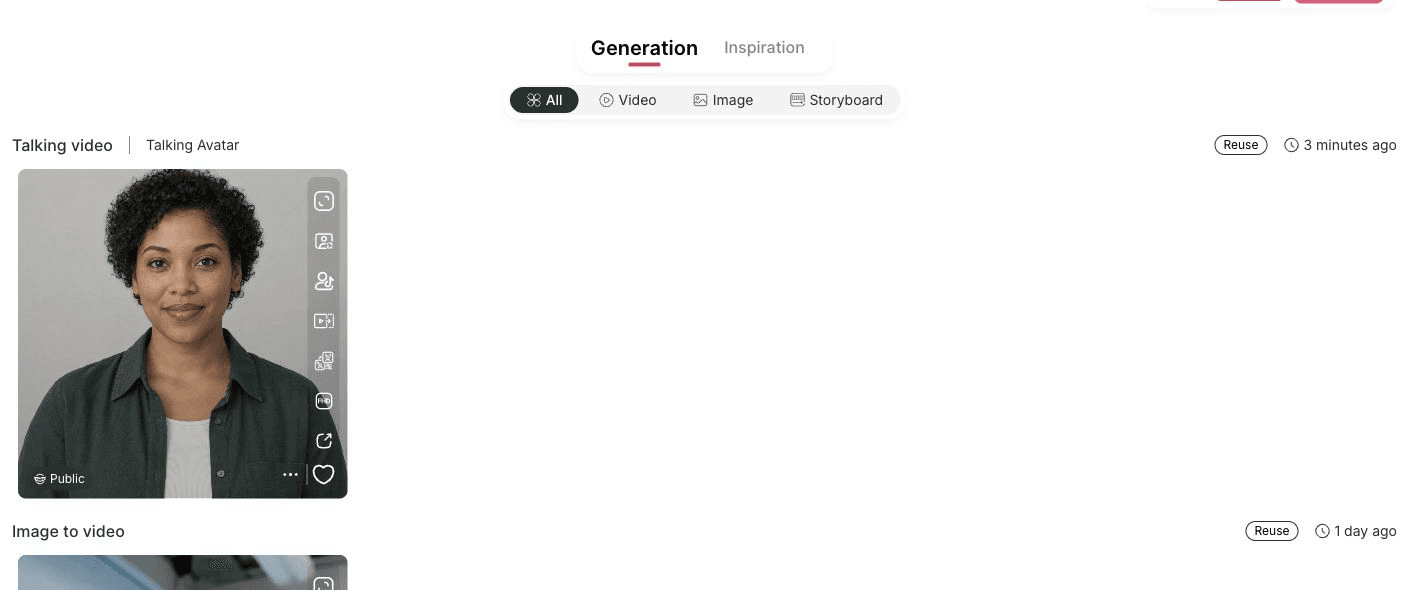
Click Generate after the exact quote appears. The attempt moved from a percentage in Generation to a completed public card. Open the information control to reach the saved result.
Example: Put the completed avatar question before the spreadsheet recording, then add captions and the worksheet capture in an editor.
Likely difficulty: Queue time varies, so one run is not a service-time promise. A completed card also does not prove that the clip fits the edit; check pronunciation, facial changes, the final frame, and the handoff to the next shot.

6. Download and inspect the actual file
On the result page, enable sound if the player opens muted. Then choose More actions → Download. The recorded MP4 measured 656 × 784 px, lasted about two seconds, and contained H.264 video plus AAC stereo audio.
Example: An ecommerce seller checks whether the presenter crop leaves enough room for captions before adding measured product footage.
Likely difficulty: A 720P selector is a saved render setting, not a promise of the exact raster dimensions required by your editor. Inspect the downloaded file. Nano downloads carry a watermark, and upgrading later does not remove it from content generated while free. See playback and download conditions.
Evidence from the September 15, 2026 test
Open the public APOB result. It records Talking video → Talking avatar, Leah, 1.0× speed, Best quality, the 720P selector, a two-second duration, and “Which costs stay the same?” The same attempt's pre-generation bar displayed a settled 40-credit quote.
The downloaded MP4 measured 656 × 784 px and about two seconds; macOS identified H.264 video and AAC stereo audio at 48 kHz. Start, middle, and end frames showed changing eye, mouth, and facial positions. The 720P selector is reported separately from the measured export.
This evidence verifies one short APOB workflow. It does not establish subjective speech or lip-sync quality, longer-script stability, an independently checked credit-ledger debit, or performance against Synthesia.

Why choose APOB as your Synthesia alternative?
When comparing Synthesia alternatives, start with the next deliverable on your calendar. Assess the presenter image, spoken message, acceptable output, and production budget together.
Three benefits matter for this task:
Start from an approved presenter. Supply a fictional host or authorized headshot, choose the speech, and inspect the output.
Run a bounded test. Check one quoted line before planning a series.
Keep facts editable. Put controls, prices, measurements, and dates in footage or overlays you can update.
Check the replacement requirement before you switch
Requirement | APOB evidence | Synthesia evidence | Decision |
|---|---|---|---|
Free evaluation | Nano refills 80 credits daily; free downloads are watermarked; no clip count is promised. | Basic is $0 with a shared pool of 1,200 monthly credits, advertised as enough for up to 10 video minutes when used for video generation. Downloads and logo removal are Starter additions. | The units and delivery conditions differ. Test the same short message and verify the output route you need. |
One authorized portrait plus speech | Talking Avatar documents the still-image path; the test above records upload, quote, generation, saved settings, playback, download, and file inspection. | No matching output was tested for this page. | Judge both with your own face, script, crop, pronunciation, and finished file. |
Editable Synthesia project import | No editable import workflow was verified. | Synthesia is the source system. | Preserve reusable scripts, authorized portraits, audio, captions, and specifications before migration. |
LMS course delivery and team controls | APOB SCORM, SSO, and collaborative editing were not established here. | Synthesia lists SCORM export, SAML/SSO, and live team collaboration on Enterprise. | Keep Synthesia in consideration when these are acceptance requirements. |
Managed translation across a library | This page covers one English sample, not a localization system. | Synthesia lists one-click translation in its current plan comparison. | Test terminology review, version control, voice approval, and update handling before switching. |
Synthesia’s claims above come from its official plan comparison, checked September 15, 2026. APOB fits this test when you need one short talking portrait and its quote fits your credits. Keep evaluating Synthesia for course packaging, collaboration, managed translation, or enterprise controls. No overall quality winner is claimed.
Ready to test one portrait and one line? Open APOB, then choose Talking Video → Talking Avatar and check the quote before generating.
Obtain permission for the face and voice
Get permission for the AI use, message, and distribution of a real likeness or voice. A photo license may not cover making its subject appear to speak. A fictional host should not imitate a recognizable person.
Clear commercial inputs and understand the service license
APOB’s terms assign generated-content rights to the user where law permits, subject to third-party rights and service licenses. Those licenses include broad, ongoing rights over submitted and generated material. Compare them with client commitments before uploading. APOB Terms, sections 5.1–5.2.
Check permissions for music, scripts, artwork, product photography, and client materials separately. AI generation does not itself clear copyright or guarantee that the output qualifies for copyright protection.
Identify synthetic presenters and keep claims truthful
Disclose realistic generated content where required. YouTube provides an AI use setting; TikTok requires labels for realistic AI images, audio, and video. A label does not replace permission or advertising disclosure. YouTube guidance, TikTok guidance.
Do not give a fictional host a fabricated customer experience, qualification, or endorsement. Use the character to deliver accurate information and make its role clear.
These are editorial briefs; lengths are creative targets, not guaranteed free output or completed tests.
Course creator: publish a useful preview of a paid workshop
Task: Open a spreadsheet lesson with a 10–15-second avatar segment, then show the worksheet.
Example line: “This lesson starts with a simple question: which costs stay the same each month? We’ll build the first two columns together.”
Use an approved instructor or identified virtual host. Keep dates and enrollment details editable; the worksheet remains the proof of what learners will do.
SaaS marketer: introduce one change before showing it
Task: Introduce one release-note change in about 10 seconds, then prove it with a screen recording.
Example line, for a product that offers the described feature: “Your calendar now has a week view. Open the project, select Week, and compare upcoming deadlines in one place.”
Verify labels and availability first. Keep the release version in the caption so the recording stays interpretable.
Ecommerce seller: explain a buying decision before showing measurements
Task: Help shoppers choose a keyboard for a small desk, then show the product, ruler, and work area.
Example line: “Working with a narrow desk? Check the keyboard’s width, then leave room for your mouse. Here are the measurements for this model.”
Overlay verified measurements. Do not present the host as a customer; make the visible product evidence carry the recommendation.
Planning a recurring branded presenter? Use the separate AI spokesperson guide for that broader workflow.
Expert prompts for short avatar videos
The image prompt describes the portrait; Script contains spoken words. Add titles, callouts, and measurements while editing.
Creator: prepare an original workshop host
Purpose: Prepare a clear lesson host.
Where to use it: Image generation, before Talking Avatar.
Prompt:
Original fictional adult workshop presenter, short dark hair, rust overshirt and cream T-shirt, facing camera, relaxed closed mouth, visible eyes, soft front light, pale studio, chest-up with headroom, realistic skin, no text or logos.
Expected output: A visible face with crop room. Inspect it before use; this prompt does not create speech.
Designer: introduce one portfolio decision
Purpose: Frame one case-study decision.
Where to use it: Create audio → Script.
Spoken script:
I designed this checkout around one constraint: shoppers need to see the delivery date before they pay. Here is how the interaction handles it.
Expected output: A lead-in to the real prototype. Confirm the claim matches the work.
Faceless creator: introduce one verified comparison
Purpose: Open a Short without implying personal use.
Where to use it: Create audio → Script, after preparing sources.
Spoken script:
These two microphones solve different recording problems. Listen to the untreated samples first, then compare price, connection, and room noise.
Expected output: A neutral handoff to labeled recordings and current details.
Ecommerce seller: explain fit without inventing a testimonial
Purpose: Explain sizing without a testimonial.
Where to use it: Create audio → Script, with authorized product footage.
Spoken script:
For a closer jacket fit, compare your chest measurement with the garment chart and the model notes. I’ll show both before you choose a size.
Expected output: A sizing lead-in; add the current chart, measurements, and return terms.
A manageable first test. Judge one approved portrait and short line before planning a series.
A defined starting point. Choose the portrait and speech, then compare the result with the brief.
Works with real demonstrations. Let the avatar introduce footage that supplies the detail.
A free starting allowance. Daily credits support a limited quoted test.
Limited free output. Credits constrain generation, and free downloads have a watermark.
Retries have a cost. A wording, voice, or portrait change can require another generation.
Finishing remains. Add captions, supporting shots, fact checks, and platform formatting.
Enterprise fit is unverified. A successful clip does not establish course migration, LMS integration, procurement suitability, or service commitments.
No Credit Card Required






Direct answers about free access, workflow, exports, privacy, commercial use, and enterprise fit.
Is APOB a free Synthesia AI alternative?
Yes. Nano's daily credits can fund limited tests; “free” does not mean unlimited completed videos. Plan details.
What can APOB’s 80 daily credits cover?
There is no fixed clip count. Speech length, settings, other assets, and retries affect usage. Check the settled quote; this two-second test is not a budget for a longer post. Credit refills.
What input and duration does Talking Avatar support?
Use one still image plus generated speech or authorized audio. Audio can run 1–180 seconds; UltraS requires 4–180 seconds. Custom voice models require Macro or above. Talking Avatar, voice models.
Will a higher quality setting fix every lip-sync issue?
No guarantee. Review pronunciation, facial changes, mouth closure, and the final word. This page establishes no quality ranking between settings or vendors.
Can I export without a watermark?
Nano downloads are watermarked. Paid downloads are watermark-free only for content generated by a paid account; upgrading later does not remove the mark from earlier free generations. Watermark rules.
Can I use an avatar clip in a commercial campaign?
Commercial use depends on the terms and your input rights. Clear the face, voice, assets, and claims; a subscription does not authorize another person’s likeness or endorsement. APOB Terms.
Is the free workflow suitable for confidential client work?
Review the conditions first. Private mode is paid, and visibility differs from data use. APOB’s privacy policy permits AI/ML training uses and retention exceptions; compare it with the client agreement. Visibility, privacy.
Can I import and continue editing a Synthesia project?
No editable import was verified. Preserve scripts, owned artwork, authorized audio, captions, specifications, and licenses for vendor assets.
Can APOB replace Synthesia for enterprise training?
The evidence covers short presenter clips. Evaluate SCORM, SSO, collaboration, managed localization, procurement, and service commitments separately; equivalent APOB coverage was not established. Synthesia’s offering.
Can I use the result on TikTok, Reels, or YouTube Shorts?
Check the file, crop, captions, audio, and AI disclosure against current rules. YouTube accepts qualifying square or vertical Shorts up to three minutes; this says nothing about reach. YouTube Shorts requirements.
What if the clip should speak another language?
Review the translation, then choose a compatible voice or authorized audio. This English test does not establish translation accuracy or multilingual management. Language matching.
What does ≈ mean, and why might Generate calculate duration first?
After you pause typing for about half a second, APOB requests the backend quote. Wait until ≈ disappears before relying on the values. If the first click only calculates duration, review the settled total and click Generate again. Missing inputs or an invalid duration also block submission. Quote requirements.
How do I download a completed Talking Avatar video?
Open the result and choose More actions → Download. This test produced a two-second, 656 × 784 MP4 while the saved setting read 720P, so inspect the actual file and crop. Nano watermark rules apply. Download help.


