APOB AI helps you turn a written script into a video with a clear visual direction: who appears on screen, what they say, which product or scene is shown, and how the final clip should feel on TikTok, YouTube Shorts, Instagram Reels, LinkedIn, or an ecommerce page.
Step 1: Sign up and choose your video goal
Sign up or log in to APOB AI, then decide what the script needs to become: a talking avatar video, an AI influencer clip, a product demo, a short-form ad, or a faceless social video. This prevents the common problem of pasting a script into the wrong workflow and getting a video that looks technically correct but does not fit the channel. For example, a TikTok seller can start with a 30-second product hook, choose a 9:16 social video format, and plan the video around one product benefit instead of a long explainer.
Example: A skincare brand logs in, chooses a vertical social video workflow, and prepares a 25-second script introducing a new serum.
Step 2: Create or select the person on screen
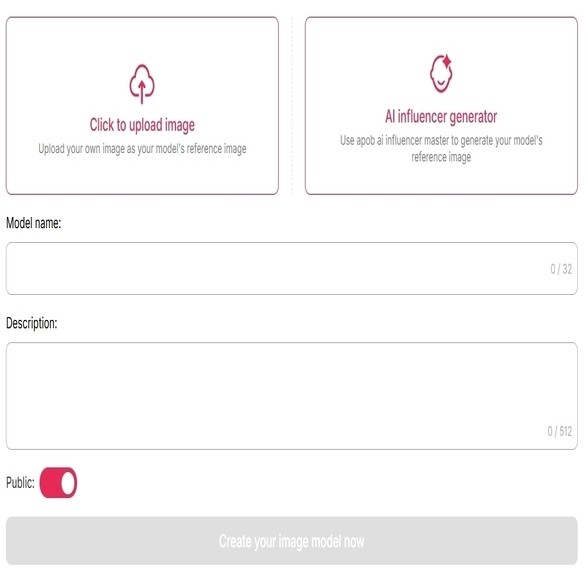
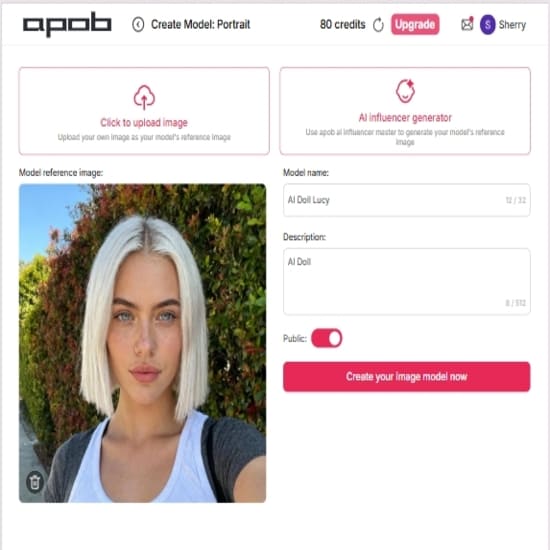
Before generating the video, create the visual speaker or select an existing APOB AI character. Use AI Influencer, AI Portrait, or Talking Avatar features depending on the scene. Upload a reference image, create a consistent AI persona, or choose an avatar that matches the brand. This solves a major script-to-video issue: the video needs a recognizable person, not a random face in every clip. For recurring content, save the same character so future videos keep the same look, tone, and audience memory.
Example: A fitness creator creates an AI coach persona, saves the character, and uses the same face for weekly workout tip videos.
Step 3: Paste the script and add scene direction
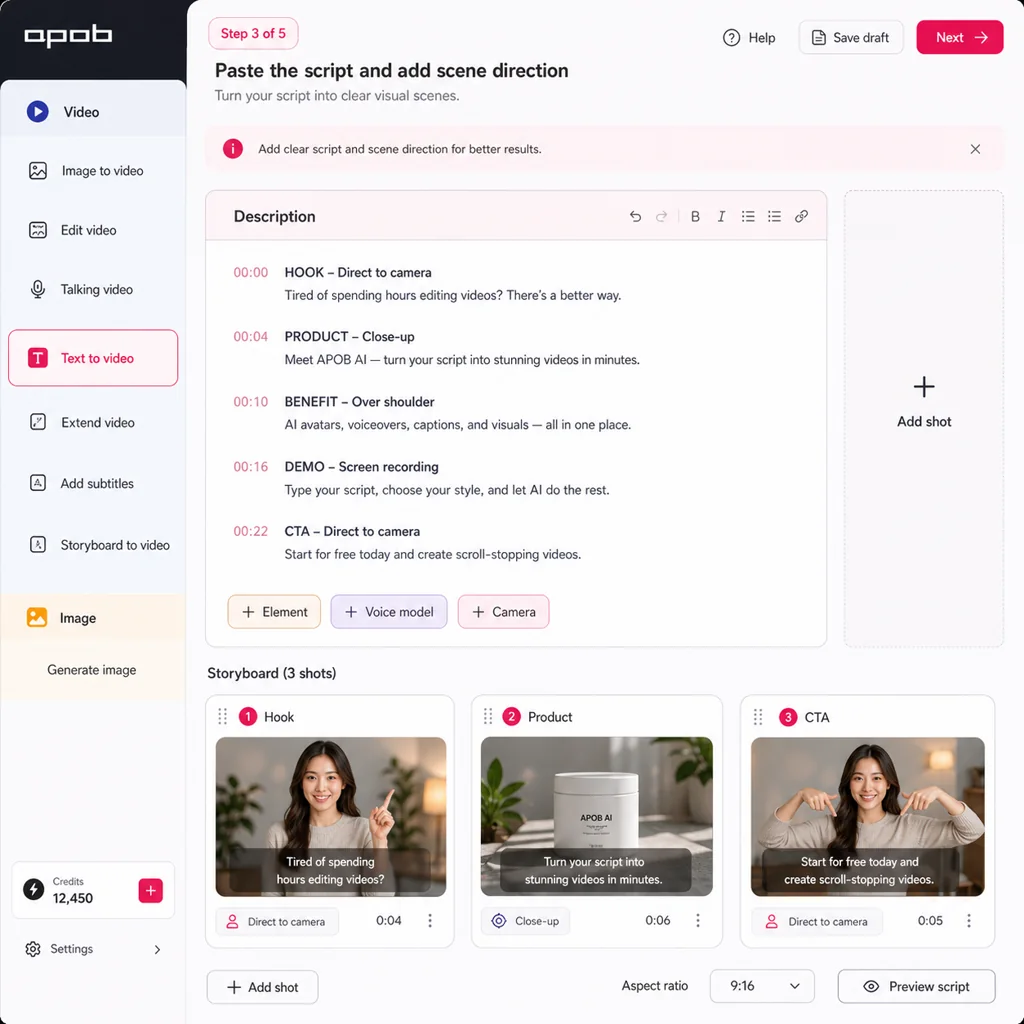
Add the script, then turn it into clear video direction. Include who is speaking, where the scene happens, what product or object should appear, and how the final clip should feel. For speaking videos, use Talking Avatar or Lip Sync so the character delivers the script naturally. For visual-first videos, use Text to Video, Storyboard to Video, or Image to Video to convert the script into shots. This helps APOB AI understand not only the words, but also the camera framing, pacing, and visual context.
Example: A marketer enters: A friendly AI founder explains three reasons small teams use our scheduling app, then adds: office background, direct-to-camera, warm tone, captions, 9:16.
Step 4: Generate the video with the right APOB AI feature
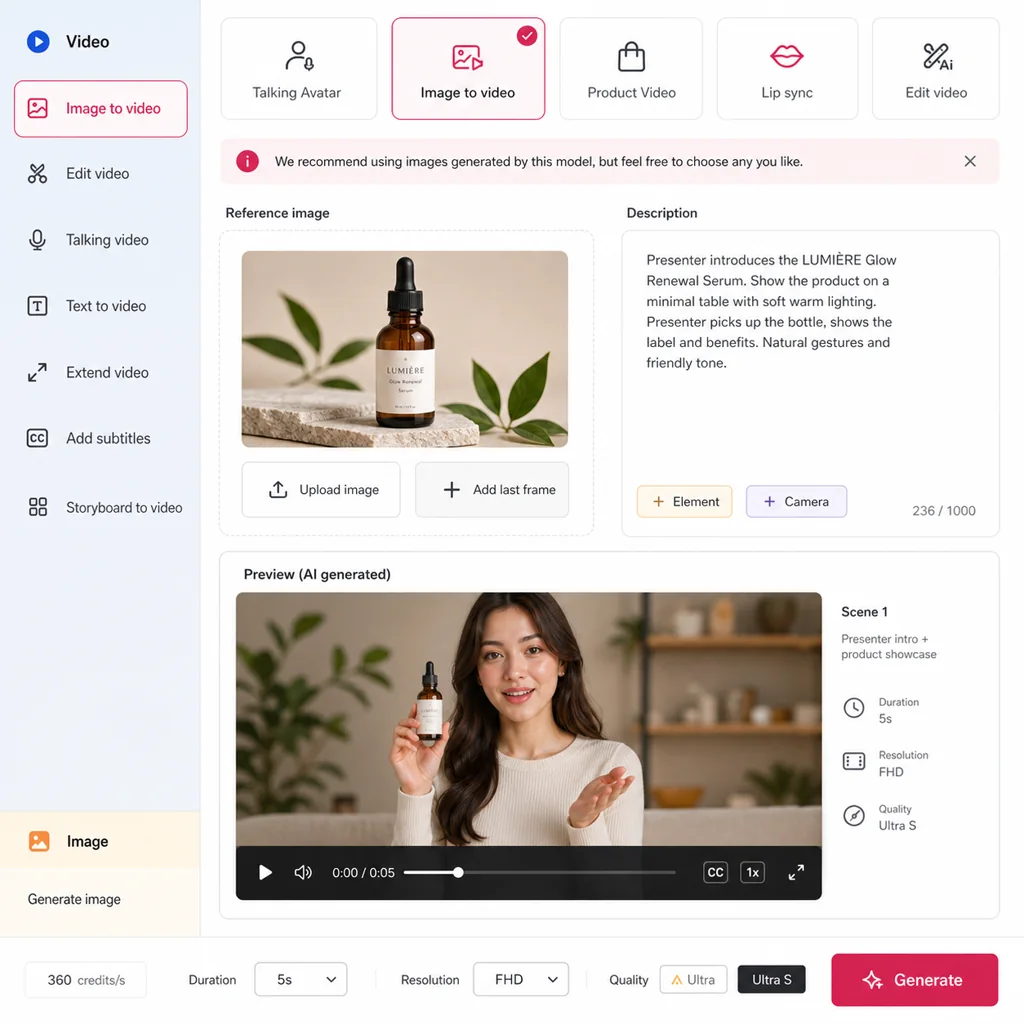
Choose the APOB AI feature that matches the job. Use Talking Avatar for presenter-style explainers, AI Influencer for social posts with a recurring creator, Image to Video when you already have a product image or portrait, Product Video Maker for ecommerce demonstrations, and Lip Sync when the speaker must match a prepared voiceover. This keeps the workflow practical: a product seller does not need the same setup as a faceless YouTube Shorts creator.
Example: An ecommerce seller uploads a product photo, uses Product Video Maker or Image to Video, and turns a five-line product script into a short demo with a human presenter.
Step 5: Refine, format, and export for the platform
Review the generated clip, then adjust the script, character, background, subtitles, aspect ratio, and pacing before exporting. APOB AI users can continue with related tools such as Change Background, Face Swap, Lip Sync, Image to Video, or Add Subtitles when the first result needs more polish. Choose 9:16 for TikTok, Reels, and Shorts; 1:1 for feed posts; or 16:9 for YouTube and landing-page videos. This step is where the script becomes a usable asset instead of a rough draft.
Example: A LinkedIn creator exports a 16:9 founder message, then creates a shorter 9:16 version with captions for Shorts and Reels.
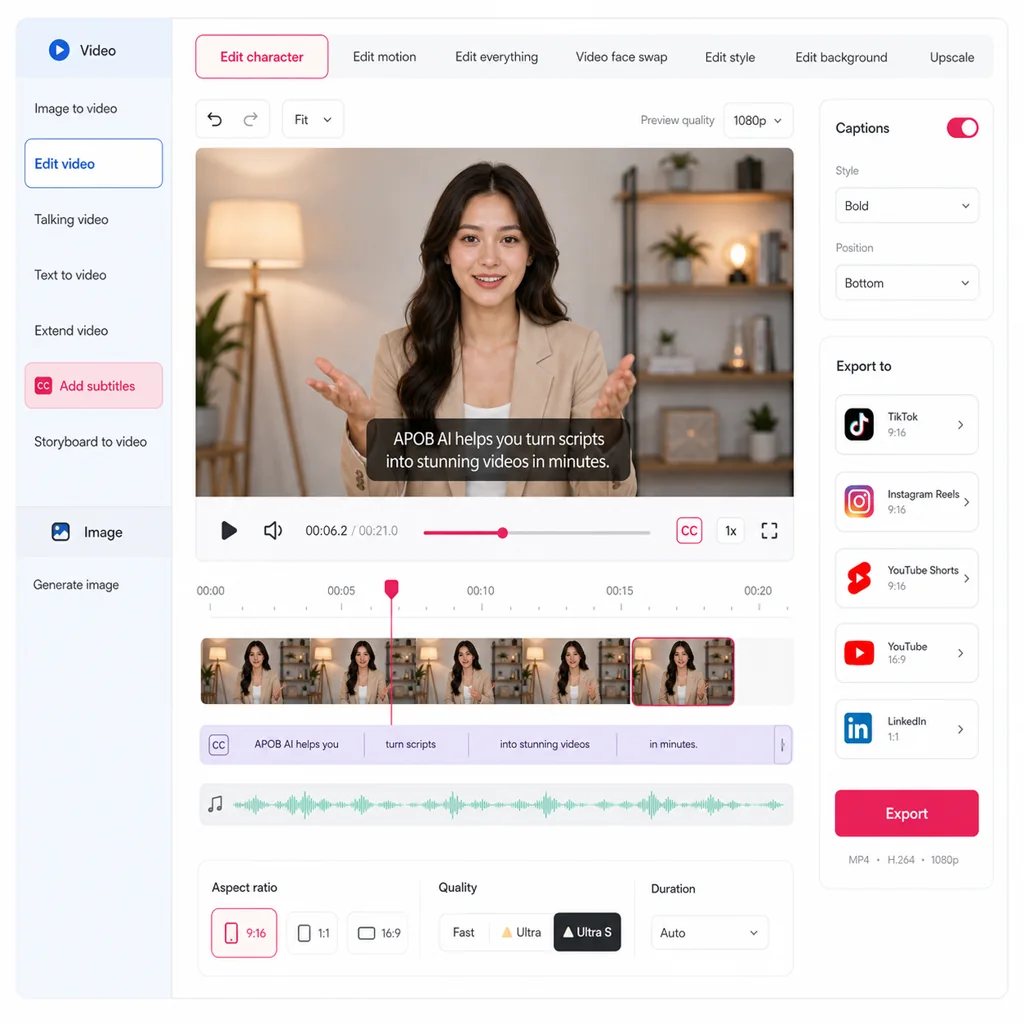
Expert prompts for script to video ai
Prompt 1: Ecommerce TikTok ad
Purpose: Turn a product benefit list into a short-form ad.
Prompt:
"Create a 25-second vertical TikTok ad script for [product]. Audience: [specific buyer]. Hook the first 2 seconds with a real problem. Show 3 product moments visually. Use natural UGC-style language. End with a soft CTA. Include scene notes for an AI influencer and product close-ups."
Expected output: A scene-by-scene script with hook, voiceover, visual cues, and CTA.
Prompt 2: AI influencer weekly post
Purpose: Build a recurring virtual creator format.
Prompt:
"Write a 30-second script for an AI fashion influencer introducing [new collection/item]. Keep the voice confident but conversational. Include outfit context, one styling tip, one close-up product detail, and a final question that encourages comments."
Expected output: A repeatable influencer video script with personality and engagement logic.
Prompt 3: YouTube Shorts educational explainer
Purpose: Convert a blog point into a concise Shorts script.
Prompt:
"Turn this idea into a 40-second YouTube Shorts script: [topic]. Structure it as: surprising hook, quick explanation, concrete example, takeaway. Include caption text for each scene and visual suggestions for AI-generated footage."
Expected output: A fast educational video script with caption-ready lines.
Prompt 4: LinkedIn talking avatar update
Purpose: Make a professional product or founder update.
Prompt:
"Write a 45-second LinkedIn video script for a talking avatar. Topic: [announcement]. Audience: [customer type]. Tone: clear, practical, founder-led. Avoid hype. Include one customer problem, one workflow example, and one next step."
Expected output: A polished avatar script suitable for business audiences.
Prompt 5: Product demo from listing copy
Purpose: Turn ecommerce copy into a video storyboard.
Prompt:
"Convert this product listing into a 35-second product demo video script: [copy]. Create 5 scenes: problem, product reveal, feature 1, feature 2, final use case. Include voiceover, on-screen text, and image-to-video direction."
Expected output: A structured demo with each benefit tied to a visible moment.




























It turns written ideas into visual drafts faster
Creators and marketers often have scripts long before they have footage. A script to video ai generator reduces the gap between "we should make a video about this" and "we have a version to review."
It makes repeatable content easier
One good campaign can produce many versions: different hooks, avatar styles, product angles, languages, captions, and CTAs. APOB AI is useful when you want a repeatable production system, not just a one-time clip.
It supports creator-style and commercial formats
Many tools are built mainly for training videos or stock-footage explainers. APOB AI is better suited for users who need social videos, AI influencer posts, avatar-led demos, product videos, fashion visuals, face-led content, and ecommerce creatives.
It helps small teams test more ideas
IAB reported that 86% of video ad buyers were already using or planning to use generative AI for video ad creative, with buyers projecting GenAI creative could reach 40% of video ads by 2026. That shift matters because smaller teams can now test more messages without a full studio process.
It keeps the script central
The script is not only dialogue. It is the structure of the video: hook, problem, demonstration, proof, CTA, and caption logic. APOB AI can help users keep that structure visible while generating the creative asset.
Consent: Do not use a real person's face, voice, name, or recognizable likeness without permission. This matters for face swap, avatar creation, voice cloning, testimonials, influencer-style content, and internal employee videos.
Likeness and publicity rights: Commercial use of someone's image or persona may require written permission, especially if the video promotes a product, service, campaign, or brand.
Commercial use: Check the rights for every input asset: product photos, music, fonts, logos, stock footage, voice, and reference images. Keep records for client and ad review.
Disclosure: If a video is sponsored, paid, affiliate-based, or materially connected to a brand, follow FTC disclosure guidance. Disclosures should be clear and hard to miss.
Source: https://www.ftc.gov/business-guidance/resources/disclosures-101-social-media-influencers
Synthetic media labeling: Platforms may require creators to disclose realistic altered or synthetic content. YouTube, for example, asks creators to disclose content that is meaningfully altered or synthetically generated when it appears realistic.
Source: https://support.google.com/youtube/answer/14328491
Copyright: Avoid prompting for copyrighted characters, celebrity lookalikes, protected brand campaigns, or scenes designed to imitate another creator's recognizable style too closely.
Platform rules: TikTok, YouTube, Instagram, Facebook, and ad networks may each have rules for AI-generated content, ads, political content, medical claims, financial claims, adult content, and synthetic likeness.
Accuracy: Product videos should show real capabilities. Do not exaggerate performance, size, speed, durability, health outcomes, earnings, or before-and-after results.
Privacy: Do not upload private customer images, employee footage, or user-generated content into an AI workflow unless you have the right permissions.
TikTok ad from a product script
Use case: A DTC seller wants five TikTok ad angles for a portable blender.
Workflow: Write five short scripts: morning smoothie, gym bag, office snack, dorm room, and travel. Generate AI influencer or product-led videos for each version. Test different hooks and CTAs.
Why it matters: IAB says digital video buyers are focused on business outcomes such as sales and customer acquisition, and generative AI is being used to create versions for different audiences and contexts.
AI influencer posts for a recurring brand character
Use case: A fashion brand wants a consistent virtual creator to introduce weekly outfit drops.
Workflow: Build a recurring AI influencer look. Write short scripts for each drop: what changed, what it pairs with, who it is for, and why it is timely. Generate vertical clips for Reels and TikTok.
Why it matters: IAB projected U.S. creator economy ad spend at $37 billion in 2025, reflecting how central creator-style content has become for brands.
YouTube Shorts from a faceless educational script
Use case: A creator has a 500-word explainer about "why product photos need motion."
Workflow: Break the script into three Shorts: problem, example, checklist. Use AI visuals, captions, and narration instead of filming a talking-head video.
Why it works: Short-form video rewards a clear hook and tight structure. A script-first workflow helps creators avoid rambling and build each clip around one takeaway.
LinkedIn avatar video from a founder update
Use case: A startup founder wants to explain a new feature but cannot film that week.
Workflow: Rewrite the update as a 45-second spoken script. Use a professional AI portrait or talking avatar. Add captions and export a version for LinkedIn.
Why it works: For B2B audiences, a face-led video often feels more personal than a static product screenshot, while still staying efficient.
Ecommerce product page video
Use case: A seller wants a short product video for a marketplace listing.
Workflow: Use the product description as the script. Turn each benefit into a scene: size, material, use case, care, and comparison. Generate a product-led clip that supports shoppers who skim.
Why it works: Product videos answer practical buying questions: What does it look like in use? How big is it? What problem does it solve?

Selene Martin
I pasted in a rough script and got a clear scene structure that helped me see where the story needed more detail.

Jovan Ellis
I find that the script-to-video workflow turns an outline into something visual quickly. It is a great way to review pacing before the edit begins.
Priya Desai
I used it for an explainer and could move from narration to scenes without losing the main teaching points. The story feels much easier to follow.
Milo Hartwell
The first video draft gave our team a shared reference for the storyboard. Feedback became specific because everyone could see the proposed sequence.

Zoya Bennett
I can test two different openings from the same script and choose the one that creates a clearer hook. That saves a surprising amount of time.

Andre Valencia
The tool helped me turn a product brief into a concise video concept with a beginning, middle, and call to action.

Celine Brooks
It is useful for making a long article more visual. I can keep the important ideas while giving each section a scene that supports it.

Omar Iqbal
I can see how the narration and visuals work together before sending the project to an editor. It makes the handoff much smoother.

Taryn Wells
The generated scenes gave a training script a more approachable rhythm. Our internal team understood the process faster than with text alone.

Hugo Marquez
I used a short script to create a polished concept for a client pitch. It made the proposed story feel real before production started.

Imani Cole
The workflow is great for turning interview notes into a structured video draft. I can focus on the message instead of assembling placeholders.

Rafael Bishop
I can revise the wording and immediately see how the visual sequence changes. That makes script editing much more practical.

Lark Donovan
The tool helped me create a short educational video from a complex topic without making the explanation feel overloaded.
Nina Caldwell
I like having a visual first pass for a social script. It makes it easier to adjust scene length and keep the final video moving.

Matteo Russo
The AI draft gave our director a useful starting point for camera ideas, transitions, and on-screen emphasis. It accelerated preproduction.

Aya Morgan
I turned a customer story into a short case-study concept and could review the emotional arc before recording any voiceover.

Devon Hsu
I find that the script-to-video flow keeps the visuals connected to the words. It is especially useful when a topic needs a clear, step-by-step explanation.

Kira Franklin
I can go from a blank page to a reviewable video direction quickly. That makes creative collaboration much easier for our small team.
Script-first control: Starting with a script helps teams control message, sequence, claims, and CTA before visual generation begins.
Faster creative testing: Teams can generate multiple versions of a hook, avatar, product angle, or caption style without reshooting.
Useful for camera-shy creators: Faceless creators, founders, and small teams can publish more often without recording themselves every time.
Better asset reuse: Product photos, portraits, brand scripts, and campaign briefs can become multiple videos across channels.
Supports creator and business formats: APOB AI can support AI influencer posts, talking avatars, product demos, lip sync videos, portraits, and social creative assets.
Quality still needs review: AI output should be checked for visual artifacts, unnatural mouth movement, incorrect product details, and awkward pacing.
Scripts may need rewriting: Text written for a blog, ad brief, or product page usually needs a tighter spoken-video version.
Platform rules can change: Disclosure, monetization, synthetic media, and ad policies vary by platform and market.
Human taste still matters: AI can produce drafts quickly, but choosing the best hook, visual style, and final cut still requires editorial judgment.
Enjoy more features
No Credit Card Required



Common questions about creating AI videos from scripts with APOB AI
What is script-to-video AI, and how does APOB AI use it?
Script to video ai is a workflow that turns written text into video scenes, voiceover, captions, avatar speech, product visuals, or social-ready clips. Yes. APOB AI can help turn scripts into AI videos, talking avatars, AI influencer clips, product videos, image-to-video content, lip sync videos, and social media creative assets.
Can I try script-to-video AI for free?
Some tools offer free trials or limited free generation. Pricing usually depends on video length, quality, credits, exports, and advanced features. APOB AI should present plan details clearly on the pricing page.
Can I create a video from a script without filming or editing experience?
Yes. You can use an AI avatar, AI portrait, generated visuals, product photos, or image-to-video scenes instead of filming new footage. No advanced editing experience is required, but you should still review outputs for accuracy, pacing, and platform fit.
Can I create videos for TikTok, YouTube Shorts, and LinkedIn?
Write a short hook, choose a vertical format, define the speaker or visual style, add captions, keep scenes fast, and export a version designed for mobile viewing. Yes. It works well when the script has a strong opening, one clear point, caption-friendly lines, and visual scenes that change quickly.
Can I turn product copy into an AI influencer or advertising video?
Yes. A product description can become a video script if you break it into problem, product reveal, key features, proof moments, and CTA. It can be useful for testing hooks, product angles, UGC-style content, and creative variations. Final ad quality still depends on the script, review process, and brand standards.
Can I use a real person's face or voice?
Only with permission. Get consent before using someone's likeness, voice, face, or identity in a commercial or public video.
Can I edit the video and create several styles from one script?
You should. Review pacing, captions, voice, visual accuracy, product claims, platform dimensions, and disclosure before publishing. Yes. One script can become a talking avatar, AI influencer post, faceless narration, product demo, or fashion lookbook.
What script length works best, and how do I avoid generic results?
For short-form social, start with 50 to 120 words. For product demos or explainers, use 120 to 220 words and break the script into scenes. Use specific scenarios, real product details, audience language, clear visual proof, original characters, and human review. Avoid vague scripts that could describe any product.
Can I use script-to-video content commercially, and must I disclose AI use?
Commercial use depends on your plan, the assets you use, and whether you have rights to faces, voices, music, logos, product images, and other materials. Some platforms require or apply synthetic media labels when content is realistic or materially altered. Check current platform rules before publishing.
Can script-to-video AI replace a production team?
It can reduce production work for repeatable social, product, and avatar videos. For high-budget campaigns, legal review, complex storyboarding, and brand direction may still need specialists.


