Turn a written gag, portrait, product image, or original character into a short comedy clip with directed action, reaction, camera movement, and optional audio.
AI can synthesize motion, but it does not guarantee a joke. Give the model a sequence that a viewer can understand without extra explanation.
Comedy decision | Direction to give the model | Example |
|---|---|---|
Normal setup | Establish an ordinary task before anything changes | A presenter opens a laptop |
One contrast | Break the expectation with one visible surprise | Sticky notes burst from the screen |
Specific action | Use visible verbs instead of "funny" or "chaotic" | The notes flutter out and cover the desk |
Readable reaction | Ask for a stare, freeze, double take, or restrained look to camera | She slowly closes the laptop |
Reaction timing | State that the reaction begins only after the reveal | Neutral until the notes appear |
Useful framing | Keep the subject, prop, and consequence visible | A medium-wide shot includes the face and laptop |
Deliberate ending | Hold the expression or return near the opening pose | The exhausted stare is held briefly |
For photo animation, moderate motion usually protects facial identity better than several extreme expressions. For a loop, guide the final composition toward the opening frame or cut immediately before the consequence repeats.
Prompt formula: `[subject and setting] + [normal setup] + [one unexpected action] + [specific reaction] + [camera behavior] + [final hold or loop] + [visual style]`
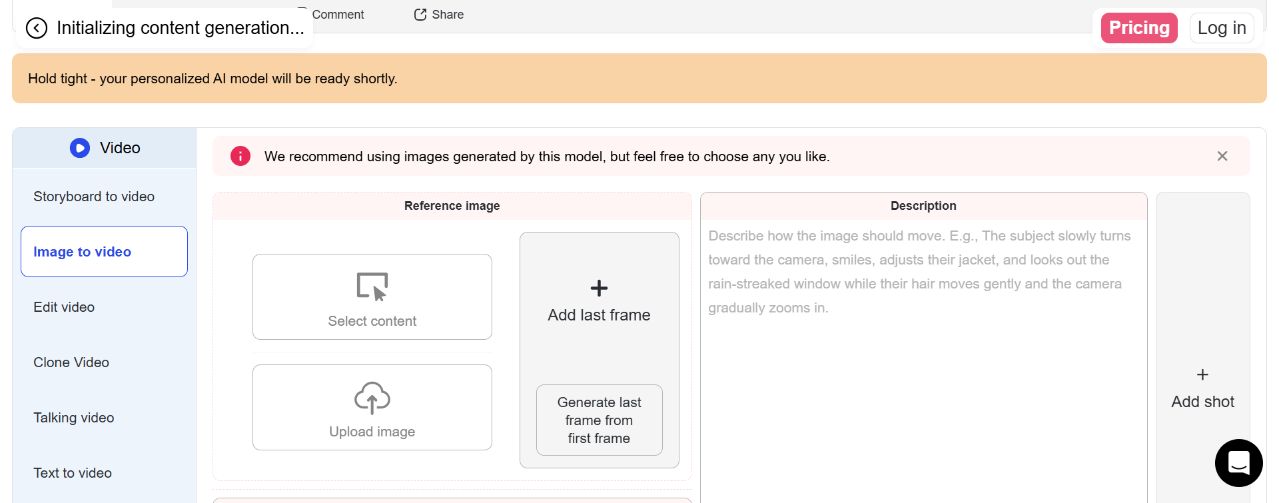
Step 1: Choose Text to Video or Image to Video
The problem: Starting in the wrong mode can remove a useful visual reference or restrict a scene that should be created freely.
In APOB AI: Open Text to video when you want the subject, setting, and action to come from a description. Open Image to video when you already have a recognizable subject. In Image to Video, use Select content for eligible APOB creations or Upload image for a new authorized JPG or PNG file.
Example: A faceless creator uses Text to Video for a fictional employee opening a laptop that releases a storm of sticky notes. A creator with an established character uploads its portrait so the face and opening composition remain recognizable.

Step 2: Prepare a Clear First Frame and Optional Ending
The problem: Tight crops, hidden hands, crowded backgrounds, and competing subjects make a physical gag difficult to read and increase the chance of distortion.
In APOB AI: For Image to Video, choose a sharp frame with one clear subject and enough room for the action. Add last frame or Generate last frame from first frame can help guide the ending when the selected quality supports it. The first and last frames should connect naturally; a drastic change can create an abrupt transition.
Example: For a looping elevator-button joke, keep the hand and button visible. Guide the final pose back toward the opening composition so the replay feels intentional.
Step 3: Write the Setup, Surprise, Reaction, and Hold
The problem: A prompt such as "make it funny" does not tell the model what moves, when the surprise happens, or how viewers know the joke has landed.
In APOB AI: Describe a normal setup, one unexpected action, one readable reaction, and a brief final hold. Add optional art-style, camera, clothing, architecture, landscape, or weather directions only when they affect the joke.
Example: "A fictional office presenter confidently opens a laptop on a clean desk. Colorful sticky notes suddenly flutter out of the screen. She stays neutral until the notes appear, slowly closes the laptop, then gives the camera an exhausted stare. Medium-wide vertical shot, fixed camera, restrained expression, hold the final reaction."


Step 4: Set the Camera, Audio, Shots, and Quality
The problem: Constant camera movement can hide the reveal, while unnecessary narration can compete with a visual punchline.
In APOB AI: Choose one camera direction per shot, such as Station, Handheld, Zoom Out, Zoom In, or Around Char. Use a fixed view for deadpan comedy and reserve a zoom for the reveal. Enable Native audio when synchronized sound supports the action. Add a Voice model only when spoken delivery carries the joke. Multi-shot, Elements, Last Frame, audio, duration, and resolution options can change with the selected quality tier.
Example: An awkward elevator-dance joke uses a full-body Station shot, two simple movements, and a short door chime. It does not need a long voiceover or several camera changes.
Step 5: Check the Credit Cost, Generate, and Review
The problem: A polished render can still miss the joke if the reaction begins before the reveal, the face changes, or the ending arrives too quickly.
In APOB AI: Read the live credit amount on the Generate button before submitting. Cost can change with quality, duration, resolution, audio, and other settings. When the result appears in the Generation feed, watch it once muted and once with sound. Check the face, hands, props, reaction order, and final frame before downloading or continuing with another available workflow.
Example: If the character reacts before a box opens, revise the prompt to say, "neutral expression until the lid opens; react only after the reveal." Removing secondary actions is usually more useful than adding more adjectives.

Funny Prompts for an AI Video Generator
Prompt 1: The Deadpan Product Presenter
Purpose: Make a product-centered joke with a readable reveal.
Complete prompt: "A serious original coffee-shop presenter places one tiny espresso cup on the counter as if presenting a luxury product. The cup suddenly produces a foam tower three times taller than the presenter. The presenter stays motionless until the foam stops, looks up at it, then raises one eyebrow at the camera. Locked medium shot, clean cafe background, soft morning light, dry visual comedy, brief final hold, no text."
Expected output: One ordinary setup, an oversized consequence, and a restrained reaction suitable for a short social clip.
Prompt 2: The Delayed Office Reaction
Purpose: Turn an original character into a reusable reaction format.
Complete prompt: "An original fictional office character types calmly at a desk. A printer behind them ejects one extremely long sheet of paper that rolls across the floor. The character keeps typing for one beat, hears the paper, slowly turns, pauses, then gives the camera a tired look. Static medium-wide shot, realistic office light, subtle facial motion, delayed double take, hold the final expression."
Expected output: A background surprise followed by a controlled reaction that can be adapted into a series.
Prompt 3: The Awkward Elevator Dance
Purpose: Make a dance joke based on social context rather than complex choreography.
Complete prompt: "A fictional adult business character waits alone in an elevator and performs two overly confident, slightly awkward dance moves. The doors open to reveal a silent meeting room. The character freezes, straightens their jacket, steps into a formal pose, and avoids eye contact. Full-body vertical framing, fixed camera until the doors open, quick push-in on the frozen reaction, clean realistic motion."
Expected output: A short physical-comedy beat with a clear reveal and reset.
Prompt 4: The Moving Elevator Button Loop
Purpose: Create a visual punchline designed for replay.
Complete prompt: "An original cartoon office worker reaches toward a small elevator button. Just before the finger touches it, the button slides a few centimeters to the right. The worker pauses, follows it with one confused step, and reaches again. End with the hand and button returning close to their opening positions for a seamless loop. Locked side view, minimal background motion, precise hand action, no dialogue."
Expected output: A compact cause-and-effect gag with an ending that can reconnect to the first frame.
A useful funny AI video generator should let the input match the joke and expose enough direction to make the visual beat readable.
Begin With an Idea or a Recognizable Subject
Text to Video is useful for a new premise. Image to Video is useful when a portrait, illustration, product, or original character must anchor the opening frame. The creator can choose the input that matches the joke instead of forcing every concept through one mode.
Direct the Ending Instead of Leaving It Entirely Random
Optional ending-frame controls can guide a reveal, bring a subject back toward the opening pose, or define a cleaner endpoint on supported settings. This is useful for transformation gags and looping clips.
Balance Creative Controls With Visible Cost
The workflow combines scene description with available camera, voice, native-audio, shot, aspect-ratio, duration, resolution, and quality settings. The Generate button displays the current credit amount, so users can simplify a test before committing to a more expensive setup.
Refine a Clip Without Rebuilding the Concept
Completed results appear in the Generation feed, where current result actions may include downloading or continuing with compatible video workflows. Availability can vary, so review the actions shown for the selected result rather than assuming every option applies to every generation.
Deadpan Product Comedy
An ecommerce seller can show an original fictional presenter demonstrating a bottle with complete seriousness. The pump dispenses an impossible tower of foam, and the presenter silently measures it with a ruler. The product remains visible, but the joke comes from restraint rather than an exaggerated sales pitch.
A Recurring Reaction Series
A faceless creator can animate the same original character in a repeatable format: calm setup, off-screen event, delayed double take, and direct stare into the camera. Reusing a consistent source image and framing helps the series feel recognizable without borrowing a real person's likeness.
An Awkward Dance Reveal
A formal office character performs two overly confident dance moves, notices a silent meeting behind them, and slowly returns to typing. Keep the movement simple when the joke depends on context. Use a dance-focused workflow when exact choreography is the main task.
A Character Misunderstanding an Object
An original cartoon character places an empty bowl beside a smart speaker and waits as if food will appear. The speaker lights up, the character becomes increasingly confident, then pushes the bowl closer with a betrayed stare. One subject and one prop keep the misunderstanding readable.
A Looping Visual Punchline
A character repeatedly reaches for an elevator button that moves a few centimeters away at the last moment. The final reach returns near the opening pose, encouraging a replay without relying on a caption-heavy meme layout.
Short-form video is a practical distribution format for these ideas. HubSpot's survey of more than 500 video marketers reported that short-form video delivered the highest ROI among the video formats it measured. TikTok's creative guidance recommends full-screen 9:16 video, at least 720p, and audio for an optimal viewing experience. Sources: HubSpot and TikTok for Business
Two practical starting points: Use text for a new premise or a source image when identity and composition matter.
More direction than a novelty effect: Prompt structure, camera choice, optional ending frame, audio, and output settings can support a specific comedy beat.
Repeatable character workflow: An authorized original character can appear across reaction clips, product gags, and short sketches.
Lower filming demands: Creators can test physical-comedy ideas without booking a location, performer, camera crew, and prop setup for every variation.
Humor still needs human judgment: A model can render an action but cannot guarantee that an audience will find the premise funny.
Results can vary: Faces, hands, props, and timing may require a simpler prompt or another generation.
Testing uses credits: The required amount varies with the selected mode and settings, and a difficult concept may need several attempts.
It is not a frame-level editor: Precise cuts, caption timing, and layered sound design may still require a dedicated editing workflow.
No Credit Card Required

Practical answers about photos, prompts, timing, audio, credits, downloads, privacy, and commercial use.
What is an AI funny video generator?
It turns a written description or source image into a short comedic scene. The model creates the motion, while the creator directs the normal setup, visible surprise, reaction, framing, and ending.
Is APOB AI a free AI funny video generator?
APOB currently offers a free membership, but available credits and generation costs can change. Read the live credit amount on the Generate button and check current plan details before producing a larger series.
Can I make a funny AI video from a photo?
Yes. Open Image to Video, select an eligible APOB creation or upload an authorized JPG or PNG image, describe one action and reaction, review the available settings, and generate. A clear subject and simple background give the model a more focused task.
Can I create a funny AI video without uploading a photo?
Yes. Text to Video can create the subject, setting, and movement from a description. Include the ordinary setup, one visual surprise, the reaction order, camera framing, and final hold instead of asking only for a "funny video."
Should I use Text to Video or Image to Video?
Use Text to Video when the complete scene can come from a description. Use Image to Video when a specific portrait, illustration, product, or original character must define the first frame.
What should I write in a funny video prompt?
Name the subject and setting, establish a normal action, introduce one visible surprise, specify the reaction, choose the framing, and state how the clip should end. Clear verbs are more useful than words such as "hilarious" or "crazy."
Why does my generated video look random instead of funny?
The prompt may contain too many actions or no clear cause-and-effect order. Reduce it to one setup, one surprise, and one reaction. State that the subject remains neutral until the reveal, then holds the final expression.
Can APOB AI make a funny dance video?
A general video prompt can describe a simple awkward or unexpected dance action. Use the dedicated AI Dance Generator when choreography, motion transfer, or a specific routine is the main task. Only use people and reference footage you are authorized to animate.
Which format should I use for TikTok, Reels, or YouTube Shorts?
Choose an available vertical aspect ratio for vertical feeds. Keep the face, prop, and reveal inside the central safe area so platform controls or captions do not cover the joke. Confirm each platform's current specifications before publishing.
Does APOB AI automatically understand comedic timing?
Do not rely on the model to write or time the joke by itself. Direct a simple sequence: setup, surprise, reaction, and hold. If the result moves too quickly, remove secondary actions and state exactly when the reaction begins.
How can I keep the face consistent in a funny photo animation?
Use a sharp source image, avoid extreme head turns, limit the number of actions, and request controlled expressions. If the face changes, simplify the motion and try a medium shot instead of a rapid close-up transformation.
What kind of source image works best?
Use one clear, well-lit subject with visible space for the planned movement. Avoid hidden hands, heavy motion blur, extreme crops, tiny props, and crowded backgrounds. The image should already contain the objects that the joke depends on.
Can I add sound or a voice to the video?
Current video workflows can expose Native audio and Voice model controls. Native audio can support environmental sound, while a voice is useful when spoken delivery carries the punchline. Availability and required settings vary by mode and quality.
Is Last Frame available in every generation mode?
No. Last Frame availability depends on the selected mode, model, and quality. Changing the quality tier can also change duration, resolution, audio, Element, or multi-shot options. Use the controls currently shown in the interface as the source of truth.
How do quality, duration, and resolution affect the cost?
Higher quality, longer duration, greater resolution, audio, and other settings can increase the credit cost. Some settings constrain one another. The Generate button displays the current amount before submission.
What happens if a video generation fails?
APOB documentation states that credits are returned automatically when a generation starts but fails to finish. Check the Generation feed and current credit balance before submitting the same setup again.
Can I download or continue editing the generated video?
Completed results appear in the Generation feed. Open the result to review the available actions, which can include download or compatible follow-up workflows. The exact actions can vary by result and current product configuration.
Is it safe to upload a personal photo?
Only upload an image you are authorized to use. Avoid confidential files, identity documents, private client assets, and sensitive images. Review the current privacy terms and remove unnecessary personal information before uploading.
Can I use AI funny videos commercially?
Commercial use depends on current APOB terms, your plan, and the rights attached to every input. Own or license the photos, characters, logos, music, voices, and product assets used in the project. Obtain explicit permission before depicting a real person in a misleading or embarrassing scene.
How is this different from an AI meme generator?
An AI meme generator is best for a captioned image, meme layout, or static punchline. An AI funny video generator focuses on movement: an ordinary setup, unexpected action, visible reaction, camera framing, and timed or looping ending.


