Create AI ad videos with avatars, image-to-video prompts, and editable campaign workflows. APOB AI helps marketers, ecommerce sellers, creators, and designers make social media-ready ad content without rebuilding every variation from scratch.
Step 1: Sign Up or Log In
Sign up or log in before starting your AI advertising generator workflow. You can continue with Google, Discord, or email, then enter the workspace where you can create AI avatars, generate images, and turn product references into advertising videos.


Step 2: Create an AI Avatar for Your Ad
Open the AI influencer generator and create a realistic avatar that can appear in your ad. In this step, focus on facial details, natural skin texture, lighting, and expression so the avatar looks believable in commercial content.
Prompt: A realistic adult female AI avatar portrait focused on detailed facial features, close-up front-facing composition, clear almond-shaped eyes, natural eyelashes, softly arched eyebrows, delicate nose bridge, soft pink lips, subtle cheekbone definition, gentle jawline, smooth but realistic skin texture, visible natural pores, healthy glowing complexion, fine hair strands framing the face, calm confident expression, natural beauty, soft studio lighting, shallow depth of field, clean neutral background, realistic facial anatomy, high-resolution beauty portrait, 4K detail, no distortion, no exaggerated makeup, no plastic skin.
Step 3: Generate a Product Advertising Video
Upload or select a product reference image, then write a clear image-to-video prompt. For product ads, describe the product, the avatar, the scene, the camera movement, and the exact details that should stay consistent.
Prompt: Create a natural 10-second luxury perfume advertisement video featuring an adult female AI avatar presenting a perfume bottle in a bright elegant bedroom or vanity setting. Keep her face, hairstyle, skin tone, outfit, and body proportions consistent throughout the video. She has realistic skin texture, soft natural makeup, graceful hand movement, and a calm premium beauty influencer energy. Shot 1, 2 seconds: Medium shot of the avatar sitting near a vanity table with soft morning window light. A clear glass perfume bottle is placed on the table beside subtle flowers and neutral decor. Shot 2, 3 seconds: Close-up of her picking up the perfume bottle and gently turning it toward the camera. The glass catches the light, showing a clean luxury product look. Shot 3, 3 seconds: Close-up of her spraying the perfume lightly near her neck or wrist, with a soft mist effect and natural facial expression. Keep the movement elegant and realistic. Shot 4, 2 seconds: Final beauty shot of the avatar smiling softly at the camera while holding the perfume bottle near her face. Warm daylight, shallow depth of field, premium skincare and fragrance commercial style. Style: ultra-realistic, iPhone-style natural video, luxury perfume ad, soft commercial lighting, realistic hands, realistic glass bottle reflection, smooth camera push-in, no face distortion, no extra fingers, no text, no watermark, no brand logos.


Step 4: Review and Edit the Final AI Ad Video
This is the final generated AI advertising video. Review the avatar, product, hand movement, lighting, and overall commercial style. If the result is not exactly what you want, you can keep editing instead of starting over.
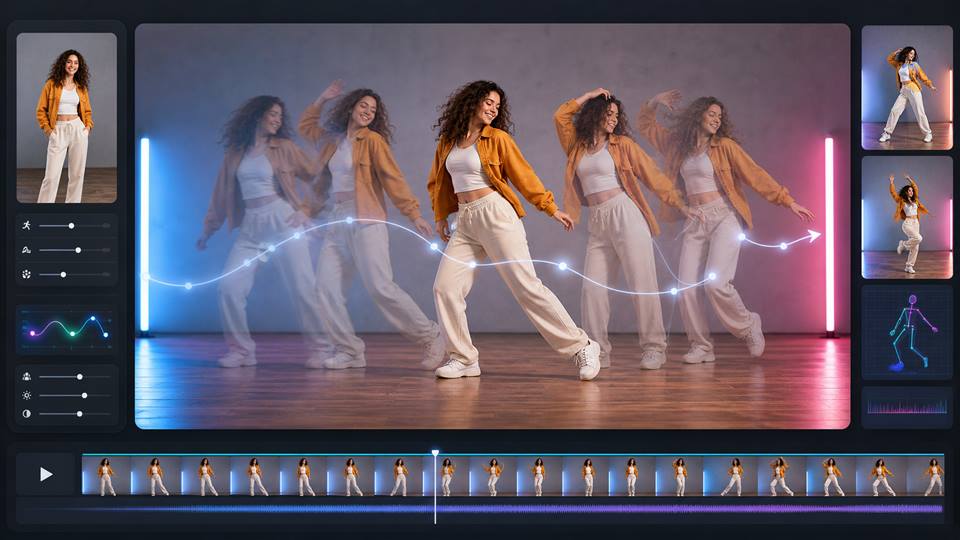
Use edit product to adjust the perfume bottle, product color, packaging, label area, or placement. Use edit character to refine the avatar's face, hairstyle, outfit, expression, or consistency. Use edit motion to improve hand movement, spraying action, camera push-in, or pacing. Use edit everything when you want to change the wider scene, background, lighting, composition, or overall ad direction.
Avatar-Led Ad Creation
Create ad content around a repeatable AI avatar instead of producing disconnected one-off clips. This helps campaigns feel more consistent across perfume ads, beauty launches, ecommerce product videos, and creator-style social posts.
Product Reference Control
Use a product image as the anchor for the ad. Describe the bottle, label area, material, color, shape, and scene so the AI advertising generator can keep the commercial focus on the product instead of changing it between shots.
Editable Campaign Workflow
After generation, continue refining the ad with edit product, edit character, edit motion, and edit everything. This makes APOB AI useful for testing multiple ad angles without restarting the full creative workflow every time.
Perfume and Beauty Product Ads
Create short ad videos where an AI avatar presents perfume, serum, cream, makeup, or skincare products in a clean commercial setting. This fits product launches that need close-up texture, glass reflection, soft lighting, and repeatable creator-style visuals.
Reference: Wyzowl Video Marketing Statistics
AI Influencer Advertising
Create a fictional AI influencer, generate portraits, and turn the avatar into ad videos for consistent social posting. This is useful when the campaign needs a recognizable character format rather than isolated product-only visuals.
Reference: Business Insider on creator and influencer ad spend growth
Creative Testing for Paid Social
Marketers can test several ad directions from the same product: a beauty influencer scene, a product close-up, a UGC-style hook, and a final hero shot. The workflow helps teams compare concepts before committing to a full production cycle.
Reference: TVTechnology / IAB on advertisers using GenAI for video ad creative
Ecommerce Product Promotion
Ecommerce sellers can turn product images into short ad assets for product pages, social posts, and marketplace campaigns. The same product reference can be reused across lifestyle scenes, seasonal promos, and different ad formats.

Bianca Rossi
I turned a product image and a short concept into a campaign-ready ad draft in minutes. It gave our team something concrete to review.
Malcolm Lee
The advertising workflow makes it easy to test hooks, product angles, and scenes before committing to a full production.
Sana Khalid
I can build a vertical product ad from a reference image and keep the packaging visible throughout the main shot.

Derek Moore
The generated scenes help us compare creative directions quickly. We spend less time debating ideas and more time choosing one.

Paula Reyes
I used it for a skincare concept and got several polished visual variations without organizing a separate shoot for every version.

Jon Bell
The tool is useful for ecommerce because a single product can become multiple social clips, launch visuals, and campaign ideas.

Nadia Ibrahim
I can adjust the product, character, motion, or full scene after the first generation. That makes iteration much more efficient.
Tomás Vega
The ad generator helped us create a strong opening hook for a short video. The result was easy to adapt for different placements.

Ivy Chen
We tested several backgrounds and camera movements around the same product. The comparison made the final creative decision simple.
Kara Mills
The workflow gives our team a quick way to turn a rough brief into a visual storyboard with real campaign potential.
Lena Ford
I can create a creator-style product demo without booking a full crew. It is especially useful for early social concepts.
Avery Price
The product reference keeps the creative grounded, while the scene controls let us explore a more premium advertising look.
Ruben Torres
I used the generator to build seasonal ad directions and review them with the client before production started.

Arielle King
It makes ad variations easy to test. Different hooks and final shots can come from the same product concept.

Damon Wells
The motion controls helped us add a more deliberate product reveal instead of relying on a static image.
Nico Perez
Our team can turn a campaign idea into a shareable draft quickly, which makes feedback much clearer.

Priyanka Bose
The generator works well for product pages and paid social because I can create different crops and pacing for each placement.
Milo Grant
I can refine the scene and messaging without starting over. That keeps creative testing fast from the first hook to the final shot.
Faster Ad Variation Testing
Create multiple ad ideas from the same avatar, product reference, and prompt structure. This is useful for testing hooks, scenes, product angles, and creator styles.
Better Product and Character Consistency
Clear product references and avatar prompts help keep product shape, skin tone, hairstyle, outfit, and commercial style more consistent across short ad clips.
Useful for Social and Ecommerce Workflows
The workflow fits TikTok ads, Instagram Reels, YouTube Shorts, product launch visuals, marketplace images, and creator-style campaign assets.
Final Ads Still Need Human Review
Before publishing, review hands, product labels, logos, face consistency, claims, music rights, platform policies, and disclosure requirements. AI can speed up production, but ad quality and compliance still need a human check.
No Credit Card Required

Answers for creating AI ads with avatars, product references, image-to-video prompts, and editable ad workflows.
What is an AI advertising generator?
An AI advertising generator helps create ad visuals, product videos, avatar ads, and campaign clips with AI. It can use prompts, product images, avatar portraits, and editing tools to produce social media-ready creative assets.
Can I create product ads with APOB AI?
Yes. You can use product references, images, and detailed prompts to create short product ads for perfume, skincare, fashion, ecommerce, lifestyle, and social media campaigns.
Can I use an AI avatar in advertising videos?
Yes. You can create a realistic AI avatar, then use that avatar as the presenter in image-to-video ads, product demos, talking videos, or creator-style social clips.
Can I turn a product image into an ad video?
Yes. Upload a product image as a reference, describe the scene and motion, and generate a video where the product appears in a commercial-style setting.
How do I keep the product consistent?
Describe the product shape, material, color, label area, logo placement, packaging proportions, and details that must not change. Use a clear product reference image when possible.
How do I keep the avatar consistent?
Use a detailed avatar prompt and reference image. Mention face shape, hairstyle, skin tone, outfit, expression, and body proportions that should stay consistent across the ad.
Can I create perfume or beauty ads?
Yes. APOB AI can support beauty-style ad workflows such as perfume bottle videos, serum demos, skincare product scenes, makeup content, and AI influencer product presentation.
Can I make TikTok or Instagram ads?
Yes. You can create vertical short-form ad videos and edit them for TikTok, Instagram Reels, YouTube Shorts, paid social, and ecommerce campaign pages.
Can I edit the ad after generation?
Yes. If the first result needs adjustment, you can continue editing product details, the avatar, motion, background, or the full scene instead of generating from scratch.
What does edit product do?
Edit product helps adjust the product inside the video or image, such as color, packaging, bottle shape, label area, placement, or product visual consistency.
What does edit character do?
Edit character helps refine the AI avatar, including face, hairstyle, outfit, expression, identity consistency, and how the character appears in the ad.
What does edit motion do?
Edit motion helps improve movement, camera pacing, hand actions, product presentation, walking, gestures, or other motion details in the video.
What does edit everything do?
Edit everything is useful when you want to change the wider ad direction, including the scene, background, lighting, composition, product setup, and overall creative style.
Do I need a full script before generating an ad?
No. A structured prompt is enough for many short ads. For better results, include the product, avatar, scene, camera movement, lighting, timing, and details that should stay unchanged.
Can I create multiple ad variations?
Yes. You can test different hooks, backgrounds, product angles, avatar expressions, camera movements, and final shots from the same product or avatar concept.
Can ecommerce sellers use an AI advertising generator?
Yes. Ecommerce sellers can create product videos, marketplace visuals, social media ads, product page clips, seasonal promos, and campaign variations.
Can agencies use APOB AI for ad concepts?
Yes. Agencies can use it for early creative drafts, avatar-led ad concepts, product video variations, campaign mood tests, and client review assets.
What should I check before publishing an AI ad?
Check product accuracy, hands, face quality, labels, trademarks, music rights, claims, disclosure rules, and platform ad policies before using the final ad commercially.
Can AI-generated ads be used commercially?
Commercial use depends on the assets, references, likeness rights, product claims, music, platform rules, and your account terms. Use only assets you own or have permission to use.
How can I improve weak AI ad results?
Use a clearer product image, write a more specific prompt, split the video into timed shots, reduce conflicting instructions, and edit product, character, motion, or full scene details after generation.


