MiniMax H3 Max is a fal Research post-trained variant of MiniMax H3. This guide documents the APOB Image-to-Video controls, a quoted 40-credit draft setup, and an 80-credit Nano balance verified on September 2, 2026. APOB did not expose an H3 Max model label, so direct access is not claimed.
Step 1: Start With Image to Video and a Reviewable First Frame
Open the Create workstation and choose Image to video. APOB allows you to select an image already in your Content library or upload a new one. A portrait model is not required for this mode, according to The Create Workstation.
For broader first-frame preparation outside this exact-model evaluation, use APOB's image-to-video workflow guide.
Real task: A UGC ad team starts with an approved still of a presenter holding an unbranded skincare bottle. Likely problem: A busy background or partly hidden product gives the generator too much to reinterpret. APOB control: Use Select content for an approved library asset or Upload image for a new first frame. Review action: Check that the face, hands, bottle silhouette, cap, label area, and crop are already acceptable before adding motion.


Step 2: Use a Last Frame Only When the Ending Is Essential
Use Add last frame when the clip must land on a particular pose, packshot, or composition. APOB also shows Generate last frame from first frame. The official Image to Video guide says last-frame support depends on quality mode and works only with a single shot; last-frame guidance and multi-shot generation are mutually exclusive.
Real task: An ecommerce seller wants a camera push-in that ends on a centered bottle and readable color block. Likely problem: Adding both an end frame and several shots creates conflicting structure. APOB control: Choose one ending frame and keep the job single-shot. Review action: Compare the first and last frames for product scale, hand position, lighting direction, and background continuity before generating.
Step 3: Write Action, Camera, and Sound in Chronological Order
Describe what happens first, next, and last. Separate subject motion, camera motion, secondary environmental motion, and sound. Negative constraints are most useful when they target foreseeable failures rather than listing dozens of generic exclusions.
Paste-ready example:
The subject slowly turns toward the camera, takes one natural breath, and gives a small confident smile. A gentle handheld camera moves forward slightly. Add soft room ambience and subtle fabric movement, with no dialogue, no added text, and no logos.
Real task: An AI influencer operator needs a calm four-second introduction that can precede a fashion lookbook. Likely problem: “Make the image move naturally” leaves the sequence, camera, and audio underspecified. APOB control: Enter the chronological brief in Description and add a Camera preset only if it reinforces the written direction. Review action: Confirm the brief contains one main action, one camera move, one audio layer, and explicit text/logo constraints.


Step 4: Decide Whether Native Audio Belongs in the First Test
The Native audio switch is labeled “Synchronized audio-video generation.” APOB's Image to Video guide says Native audio is required for UltraS. With audio enabled, Voice model can be used where the plan and workflow allow it; the guide instructs users to mention a selected voice with @ in the description. A voice reference also prevents audio from being turned off until the reference is removed.
Real task: A faceless science creator wants a spaceship-door opener with hydraulic sound and low room tone, but no speech. Likely problem: A broad “cinematic sound” instruction may introduce unwanted music or a voice. APOB control: Enable Native audio and specify only the required ambience and effects; state “no dialogue” when speech is not wanted. Review action: Listen for unrequested voices, sudden volume jumps, effects that occur before the matching motion, and audio that feels detached from the shot.
Custom voice-model creation is not available on Nano or Micro plans, according to Voice Models. Do not promise voice cloning as part of the Nano test.
Step 5: Choose a Review Configuration and Read the Live Quote
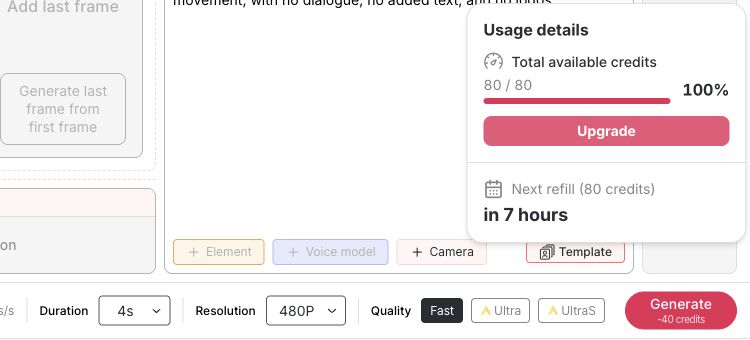
In the tested workstation, the quality choices were Fast, Ultra, and UltraS. The valid combinations and price can change with mode, plan, duration, and options, so treat the number beside Generate as the current quote.
For the documented test, Fast + 480P + 4s displayed 10 credits/s and 40 credits total.
Real task: A performance marketer wants to evaluate motion direction before producing a polished vertical ad.
Likely problem: Starting at a costly quality mode uses the daily allowance before the prompt has been validated.
APOB control: Begin with Fast, 480P, and the shortest useful duration; read the live cost before every run.
Review action: Save the exact setting combination and quote with the prompt so later tests change only one variable.


Step 6: Confirm the Resolution Options for the Selected Mode
The tested resolution menu showed 480P, 720P, FHD, and QHD. Available combinations can vary by mode, quality, plan, and product updates; these are dated APOB interface observations, not H3 Max provider specifications.
Real task: An ecommerce seller prepares a low-cost packshot motion test before making the campaign master.
Likely problem: Selecting a large output before composition and product geometry are stable spends more credits without resolving the creative risk.
APOB control: Open Resolution after choosing the mode and quality, then use the lowest option that is still detailed enough for review.
Review action: Check the live resolution menu again when quality, duration, or audio settings change.
Step 7: Compare the Quote With the Current Nano Balance
The same signed-in Nano account displayed 80/80 credits. The observed 40-credit generic Image-to-Video quote therefore fit within the displayed balance, but no visible control identified the job as H3 Max.
APOB documents 80 daily Nano credits. Nano users cannot make creations private, and Nano downloads are watermarked; upgrading later does not remove the watermark from items created on Nano. See Credits, Plans & Billing and Content Detail & Sharing.
Real task: An agency needs to decide whether an unreleased client packshot is safe to test on the current plan.
Likely problem: Enough credits do not mean the output is private or watermark-free.
APOB control: Check Usage details, the live Generate quote, and the plan’s privacy state before uploading sensitive material.
Review action: Use non-confidential or cleared assets on Nano and record the pre-generation balance.

Step 8: Generate, Inspect the Whole Clip, and Refine One Failure at a Time
Before pressing Generate, remember that Nano users cannot make creations private and Nano downloads are watermarked. APOB's Content Detail & Sharing guide says upgrading later does not remove the watermark from content originally generated on Nano.
After generation, play the entire clip with sound. Inspect:
face shape, gaze, teeth, hands, and finger count;
product geometry, packaging colors, label stability, and unintended logos;
camera direction, subject path, speed changes, and first-to-last-frame continuity;
speech, ambience, effect timing, unwanted music, and audio-video synchronization;
disclosure and platform suitability before export or publication.
Real task: A marketer sees a good presenter motion but a bottle cap changes shape halfway through. Likely problem: Rewriting the entire prompt can fix the cap while breaking the face or camera move. APOB workflow: Keep the first frame and settings, then add one constraint such as “the bottle cap remains the same closed cylindrical shape throughout.” Review action: Compare the revision with the first job and confirm that only the targeted failure improved.
If a generation fails technically, APOB says credits are returned automatically. For persistent visual glitches, its Troubleshooting guide recommends trying Ultra and contacting support if the issue continues.
Evidence pending: A final output screenshot and post-generation credit ledger will be added only after the account owner approves the public 40-credit Nano generation.
MiniMax H3 Max vs MiniMax H3—and What APOB Actually Verified
Provider-level facts versus verified APOB controls
User question | H3 Max provider evidence | Verified in the tested APOB workflow |
|---|---|---|
Who developed it? | Jointly released with MiniMax according to MiniMax documentation; post-trained by fal Research on MiniMax H3 | No H3 Max developer or model label was visible |
What inputs does it accept? | MiniMax lists text-to-video and image-to-video; fal documents first/last-frame image guidance | Generic Text to video and Image to video modes were visible; first and optional last frames were exposed in Image to video |
Does it make sound? | fal documents synchronized native audio | Native audio was visible and required by APOB's UltraS quality mode |
What length and resolution does the provider list? | MiniMax currently lists 5–15 seconds and 480p/768p for H3 Max | The tested generic APOB Fast setup used four seconds; 480P, 720P, FHD, and QHD appeared in the resolution menu |
How fast is it? | fal reports a five-second clip in under three seconds and about 35× official-H3-endpoint throughput in its own environment | APOB end-to-end delivery time was not tested and must not inherit fal's benchmark |
Is it directly available in APOB? | Provider documentation cannot prove an APOB integration | Not verified: Fast, Ultra, and UltraS were visible, but no H3 Max mapping was disclosed |
MiniMax H3 Max vs MiniMax H3
Decision factor | H3 Max provider documentation | Original MiniMax H3 | Tested APOB workflow |
|---|---|---|---|
Relationship | Jointly released with MiniMax according to MiniMax documentation; post-trained by fal Research on H3 | MiniMax base model | Provider model is not identified in the visible controls |
Inputs | Text-to-video and image-to-video; fal documents first/last-frame guidance | Broader reference and editing workflows are documented for H3 | Text to video and Image to video appeared; first/last-frame controls were visible in Image to video |
Resolution and duration | MiniMax currently lists 480p/768p and 5–15 seconds | MiniMax currently lists 768p/2K options, depending on workflow | Fast was four seconds in the test; 480P, 720P, FHD, and QHD appeared as generic APOB choices |
Sound | Provider-documented synchronized native audio | Original H3 also generates synchronized audio; its official model card lists 32 kHz stereo output | Native audio control observed; resulting audio not yet generated or reviewed |
Prompt adherence | fal reports stronger human preference and structured-prompt performance for its post-trained variant | Original H3 is the baseline in fal's vendor comparison | Not independently measured in APOB; do not present the vendor result as an APOB guarantee |
Speed evidence | fal reports much higher throughput than the official H3 endpoint in its own benchmark | Official endpoint is fal's comparison baseline | No APOB delivery-time measurement yet; do not transfer fal's inference benchmark |
Open-weight/local use | Do not assume H3 Max weights are downloadable because H3 is open weight | H3 is the relevant route for open-weight or local-deployment research | APOB is a hosted browser workflow, not evidence of local weights or an API |
Best-fit question | Short, sound-enabled iterations where provider-documented H3 Max controls fit the brief | Broader references, 2K requirements, editing, or local/open-weight research | Preparing and pricing a controlled browser-based draft without a verified H3 Max mapping |
For deeper base-model requirements, review the official MiniMax H3 model card, compare the original MiniMax H3 workflow, or use the MiniMax H3 creator test plan. Users who have not chosen a model can start with APOB's broader AI Video Generator.
Expert Prompts for MiniMax H3 Max
The prompts below follow a chronological structure. They are provider-oriented H3 Max test briefs, not a guarantee that the current APOB quality labels use that model.
TikTok product advertiser — stop-scroll packshot hook
Purpose: Test a short vertical reveal without changing the product. Recommended input: Image-to-video with an approved first frame. Prompt:
The exact skincare bottle from the reference remains centered and keeps the same cap, silhouette, label colors, and proportions. First, a narrow band of warm light moves from left to right across the bottle. Next, the camera makes a slow eight-percent push-in while two small water droplets travel down the unchanged surface. End with the bottle still centered and fully visible. Clean pale-stone studio background, soft commercial lighting. Add one quiet glass tap and subtle room tone synchronized with the light pass. No hands, no dialogue, no added text, no new logo, no liquid pouring, no change to the packaging. Vertical 9:16 composition.
Expected output: A compact product-reveal draft suitable for a vertical hook. Inspect: Cap shape, label stability, droplet physics, crop, and sound timing. Likely refinement: “Remove the droplets; keep only the light pass and camera push” if the packaging warps.
AI influencer creator — recurring fashion identity
Purpose: Add restrained lookbook motion while protecting an approved virtual identity. Recommended input: Image-to-video with the approved creator image. Prompt:
The same virtual fashion creator keeps the exact face, hairstyle, earrings, jacket construction, and color palette from the first frame. She shifts her weight once, turns her shoulders ten degrees toward camera, and lightly adjusts the jacket cuff. The camera tracks sideways very slowly at eye level. Background pedestrians remain soft and indistinct; the jacket fabric moves gently. Warm late-afternoon light, natural editorial color. Add quiet street ambience and one soft fabric sound, with no speech, no music, no text, and no wardrobe change. Vertical 9:16 composition.
Expected output: A restrained fashion transition that can be compared with the character sheet. Inspect: Eyes, jawline, fingers, earrings, seams, and color continuity. Likely refinement: Replace the cuff adjustment with “hands remain relaxed and visible” if finger artifacts appear.
Ecommerce product marketer — controlled end frame
Purpose: Test whether an approved product can move into a fixed closing composition. Recommended input: Image-to-video with first and last frames, single shot. Prompt:
Begin on the supplied wide product scene. The camera slides smoothly to the right while the unchanged speaker rotates fifteen degrees on the tabletop. Maintain the exact grille, buttons, logo placement, proportions, and surface finish. End precisely on the supplied centered packshot. Soft studio reflections move consistently with the camera. Add a low mechanical glide and a restrained confirmation tone at the final frame. No dialogue, no text animation, no extra products, and no logo changes. Landscape 16:9 composition.
Expected output: A single-shot transition between two approved compositions. Inspect: Whether the path connects naturally, product geometry, end-frame match, and final sound cue. Likely refinement: Reduce the rotation to five degrees if the side geometry becomes unstable.
Fashion lookbook producer — fabric-led transition
Purpose: Create a motion reference centered on garment behavior rather than a complex performance. Recommended input: Image-to-video with one first frame. Prompt:
The model keeps the exact face, hairstyle, dress cut, hem length, pattern, and shoes from the reference. She takes one slow step forward and stops; the dress fabric settles naturally after the step. Locked waist-height camera with a very slight forward dolly. Neutral runway background, soft overhead lighting, no crowd movement. Add one heel step and subtle fabric rustle, synchronized with the motion. No dialogue, no music, no new accessories, no added text. Vertical 9:16 composition.
Expected output: A clean garment-motion study for an internal lookbook review. Inspect: Hem behavior, feet, hands, garment pattern, and whether audio matches the step. Likely refinement: Change the step to a stationary half-turn if the feet distort.
Faceless YouTube creator — science opener
Purpose: Produce an atmospheric opener without a presenter or synthetic voice. Recommended input: Text-to-video at provider level, or image-to-video when using an approved concept frame. Prompt:
A circular laboratory airlock fills the center of frame. First, three small indicator lights switch from amber to green in sequence. Then the door opens inward slowly and cold mist rolls along the floor. The camera remains low and makes a controlled forward move of one meter. Brushed metal corridor, original non-franchise design, cool blue practical lighting with one warm rim light. Add three quiet electronic beeps, a synchronized hydraulic release, and low ventilation ambience. No dialogue, no music, no readable brand text, no human figure. Landscape 16:9 composition.
Expected output: A sound-led visual concept for a Short's first beat. Inspect: Door geometry, light sequence, mist direction, sound order, and accidental franchise resemblance. Likely refinement: Remove the forward camera move if the hard-surface geometry bends.
Cinematic previsualization artist — client blocking reference
Purpose: Communicate action and camera timing before a live shoot. Recommended input: Image-to-video with a client-approved storyboard frame. Prompt:
The cyclist enters from the left, crosses the foreground at a steady speed, and exits right. Half a second after the cyclist enters, the camera pans right to follow without changing height or zoom. Trees move lightly in the background; no pedestrians enter the path. Overcast morning light, muted realistic color, previsualization quality rather than a polished commercial finish. Add tire noise on dry pavement, distant birds, and no dialogue or music. Keep the bicycle frame and rider wardrobe consistent. Landscape 16:9 composition.
Expected output: A blocking reference that shows the relationship between subject timing and pan speed. Inspect: Wheel shape, rider limbs, pan start, exit timing, and any background intrusions. Likely refinement: Slow the cyclist and remove the camera pan if motion coherence fails, then reintroduce the pan in a second test.
The verified APOB workflow is useful for first-frame animation, controlled motion prompts, synchronized sound direction, and a 40-credit draft configuration in the observed setup. It also surfaces the actual job quote before generation, which is more useful than a generic “free” promise.
It does not prove that Fast, Ultra, or UltraS maps to H3 Max. It does not prove fal's reported raw inference speed is APOB's end-to-end delivery time. It does not establish an APOB H3 Max API, unlimited free use, private Nano outputs, watermark-free Nano exports, custom voice cloning on Nano, or guaranteed identity and product consistency.
This limitation should remain visible near the first CTA. If APOB confirms the model mapping, replace this section with a dated availability statement and retain the controls-versus-provider distinction.
Obtain documented permission for recognizable faces and voices; do not fabricate a real person's endorsement.
Confirm rights to product photography, logos, music, characters, and all uploaded media.
Keep packaging and advertising claims accurate; generated footage is not evidence that a product performs as shown.
Disclose realistic synthetic or altered content when required by TikTok, YouTube, or Meta.
Do not upload confidential client material to Nano because Nano content cannot be private.
Review the current APOB Terms of Service and Privacy Policy for input rights, consent, output use, and data handling.
Watch and listen to the complete output before publication; do not rely on a single thumbnail.
Product-hook direction test
Starting asset: an approved 9:16 skincare packshot with a clean label area.
Prompt strategy: one camera push, one product motion, and one packaging sound; no dialogue or added copy.
Deliverable: a four-second TikTok or Reels hook draft before the final ad edit.
Main risk: changing bottle geometry, invented label text, or an effect that implies unsupported product performance.
Human review: compare every frame with the approved packshot and keep advertising claims outside the generated imagery unless substantiated.
Why this workflow: first-frame control and a visible draft quote help the team validate direction before raising quality. Continue with the AI Product Video Generator when the task needs a broader product-video workflow.
Recurring AI-creator lookbook motion
Starting asset: an approved portrait of a recurring virtual fashion creator in the final outfit and color palette.
Prompt strategy: restrained posture change, one camera move, fabric ambience, and identity constraints.
Deliverable: a short transition for a lookbook carousel or vertical video.
Main risk: facial drift, garment redesign, changing accessories, or inconsistent skin tone.
Human review: compare the face, hairline, garment construction, and accessories with the approved character sheet.
Why this workflow: the first frame carries the approved identity into a controlled motion test. Build the recurring character first with the AI Influencer Generator.
Sound-led faceless Shorts opener
Starting asset: a cinematic still of a laboratory airlock with no identifiable person or third-party franchise design.
Prompt strategy: door motion, one light change, hydraulic sound, low room tone, and an explicit no-dialogue constraint.
Deliverable: a five-second-style opening concept for a science-fiction YouTube Short; adapt duration to the live APOB choices.
Main risk: unrequested speech, recognizable copyrighted designs, audio preceding the movement, or warped hard-surface geometry.
Human review: listen unmuted and inspect the door edges, warning symbols, light timing, and sound synchronization.
Why this workflow: Native-audio direction allows motion and effects to be reviewed together instead of treating sound as an afterthought.
Agency previsualization for client approval
Starting asset: a storyboard frame using licensed or client-owned material.
Prompt strategy: describe blocking and camera timing, not finished-film perfection; keep brand copy out of the generated frame.
Deliverable: a motion reference for a director or client before production.
Main risk: stakeholders mistaking an AI draft for a promised final shot or approving accidental artifacts.
Human review: label the clip as previsualization, annotate defects, and confirm what will be filmed or rebuilt.
Why this workflow: the observed 40-credit draft configuration can test whether the shot idea reads before the team commits to a higher-cost pipeline.
Provider-documented sound and video together: H3 Max can be tested with dialogue-free ambience and effects as part of the shot brief, which makes audio timing a reviewable creative decision.
Structured first-frame testing: A controlled source asset, chronological prompt, and one-variable refinement create a more useful experiment than an open-ended generation.
Transparent APOB setup cost: The tested interface displayed the per-second and total credit quote before Generate.
Browser-based preparation: The verified APOB workflow does not require local GPU setup or API code for the generic draft configuration.
Direct APOB model mapping is unresolved: The visible quality choices do not identify H3 Max, so the exact-model landing page cannot truthfully claim direct access yet.
Provider benchmarks are not delivery promises: fal's reported inference speed excludes APOB upload, queueing, safety checks, and delivery.
Identity, hands, products, text, logos, and physics can still fail: Every result needs frame-by-frame human review and may need a simpler revision.
Nano has publishing limits: Nano users cannot make creations private, and Nano downloads are watermarked; sensitive client assets require a suitable plan and rights review.
A completed output is still missing from this test: The prepared Nano job has not been submitted, so result quality and final sound remain unverified; if successful, the item cannot be made private on Nano.
No Credit Card Required

Quick answers about model attribution, APOB access, credits, audio, privacy, quality, and commercial use.
What is MiniMax H3 Max?
MiniMax describes H3 Max as jointly released by MiniMax and fal.ai, with fal Research performing the post-training on the MiniMax H3 base model. It is distinct from the original H3 rather than a native MiniMax-created tier. See MiniMax video-generation documentation and fal's launch article.
How is H3 Max different from the original MiniMax H3?
H3 Max targets higher provider-reported throughput and post-trained prompt performance for short clips, while both models support synchronized audio and MiniMax documents broader references, editing, 2K workflows, and open-weight availability around the original H3. Compare the exact inputs, duration, resolution, audio, and deployment route required by your task rather than treating the names as interchangeable.
Does APOB currently show a MiniMax H3 Max selector?
No H3 Max label was visible in the signed-in APOB workstation tested on September 2, 2026. The visible quality choices were Fast, Ultra, and UltraS, so a direct H3 Max mapping requires confirmation from APOB before publication.
Can I try APOB image-to-video generation with free daily credits?
Yes, APOB's current guide says Nano users receive 80 credits daily, and the selected Fast 480P four-second setup was quoted at 40 credits in the signed-in test. This shows the generic APOB configuration fit within the displayed balance; it does not prove a free H3 Max run. Recheck Credits, Plans & Billing and the live quote because allowances and costs can change.
Do I need an APOB account?
A signed-in account was required to access the tested balance, content library, and Generate quote. Do not use “no sign-up” wording unless a separate logged-out generation flow is completed and documented.
Which video input modes and frame controls does APOB expose?
The signed-in workstation displayed Text to video and Image to video, while the tested Image-to-Video flow supported a library or uploaded first frame plus an optional last frame. Last-frame support depends on quality mode and is limited to a single shot, so it cannot be combined with multi-shot generation. These are generic APOB controls; the official Image to Video guide explains the current dependencies.
Does the workflow generate native audio?
The tested interface offers a Native audio control, and APOB documents it as synchronized audio-video generation. Native audio is required for UltraS, but this test did not produce an output to verify the resulting sound. See Image to Video.
Can I add dialogue or use lip sync?
APOB supports voice references in Native-audio workflows where available and also lists a separate Talking video mode. Native audio alone is not proof of source-audio lip sync or voice cloning; use APOB's dedicated AI lip-sync workflow when precise mouth-to-track alignment is the main task.
Which resolutions and durations are available?
The tested resolution menu showed 480P, 720P, FHD, and QHD, and Fast quality set the test duration to four seconds. Available combinations can vary by mode, quality, plan, and product updates, so show them as dated APOB observations rather than H3 Max specifications.
How much does an APOB video cost in credits?
The cost depends on the function, quality, resolution, duration, and options, and APOB displays the exact quote beside Generate. The tested Fast 480P four-second job showed 10 credits per second and 40 credits total on September 2, 2026. APOB says credits from technically failed generations are returned automatically; a completed result that misses the brief may still require another paid refinement.
How fast is H3 Max?
fal reports that a five-second clip took under three seconds in its own environment and describes roughly 35× the throughput of the official H3 endpoint. Treat that as a vendor benchmark, not an APOB delivery promise, because a hosted job can also include upload, queueing, safety checks, and delivery. See fal's benchmark description.
Is H3 Max open weight or available for local use?
Do not assume H3 Max is downloadable because the original MiniMax H3 is open weight. The cited H3 Max provider pages document hosted generation; users who need local or open-weight deployment should evaluate the original H3 materials and current license separately.
Does H3 Max have an API, and does APOB expose one?
fal documents hosted H3 Max endpoints, but the tested APOB workstation is a browser workflow and did not expose an H3 Max API. Provider API availability is not evidence that APOB offers the same endpoint or controls.
What privacy and watermark limits apply on Nano?
Nano users cannot make creations private, and Nano downloads are watermarked. Avoid confidential client assets on Nano; upgrading later does not retroactively remove the watermark from items generated on the free plan. See Content Detail & Sharing.
How can I reduce distorted faces, hands, products, or audio timing?
Use a clear first frame, request one main action and one camera move, constrain the specific feature that failed, and review the entire clip with sound. Keep successful settings fixed and change one variable at a time—for example, specify that a bottle cap keeps the same closed cylindrical shape throughout instead of rewriting the whole prompt.
Can I use the resulting video commercially or publish it on TikTok, Reels, Shorts, or YouTube?
Potentially, but commercial use depends on your rights to every input, face, voice, brand, and output, as well as the current APOB Terms of Service and platform rules. Obtain consent, avoid misleading synthetic endorsements, substantiate advertising claims, check AI-content disclosure requirements, and conduct human review before publishing. This is general information, not legal advice.


