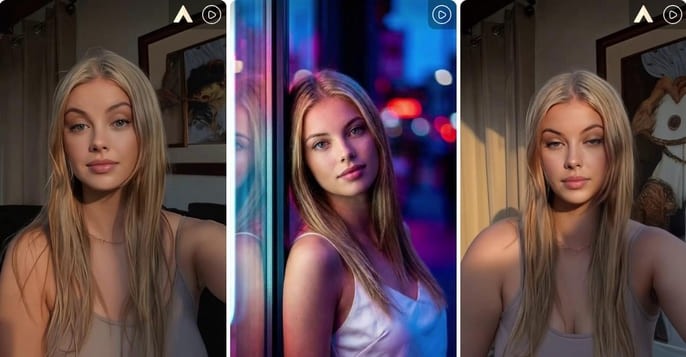
What Is Kling 2.6 Motion Control?
Kling 2.6 Motion Control is a reference-video motion transfer workflow. In simple terms, you provide two inputs:
A character image
A reference motion video
The system transfers the movement from the reference video onto the character image. This allows your AI character to perform a dance, pose, walk, gesture, or expression pattern based on real motion.
Kuaishou’s official annual report describes Kling 2.6 as introducing motion control that can replicate specific movements from uploaded videos or motion libraries, paired with a character reference image to create character-specific videos with body and facial precision.
That is exactly why creators care about it: motion control is no longer just about making something move. It is about making the right character move in the right way.
Try Kling 2.6 Motion Control Free
Try Kling 2.6 Motion Control Free on APOB AI
Professional AI video tools often feel expensive before you even know whether the workflow fits your content. APOB AI solves that problem by giving creators a low-risk way to test Kling 2.6 Motion Control with free daily credits.
This makes APOB AI especially useful if you want to experiment with AI character animation, but you do not want to pay upfront just to test whether your reference image and motion video work well together.
With APOB AI, you can start from a character image, choose the right video editing mode, apply motion, and generate a usable AI video without building a complex technical pipeline.
Try Kling 2.6 Motion Control with APOB AI
Step 1: Claim Your Creative Freedom (For Free!)
Forget the high costs of hiring talent or renting studio space. Your journey starts by simply registering on APOB AI.
Bonus: Upon signing up, you will receive a free membership including 80 daily credits to jumpstart your projects.
Action: Once logged in, click on “Create Portrait Model” to begin your transformation.
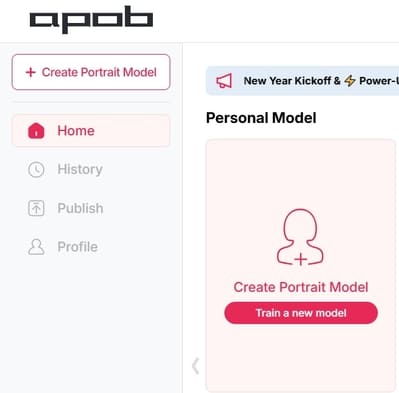
Step 2: Define Your Leading Star
Whether you want to keep the same person or introduce someone entirely new, this step is where the magic happens:
Option A (Consistent Character): If you want to change the actions but keep the person’s original look, upload a clear, high-quality headshot of that person as your model reference.
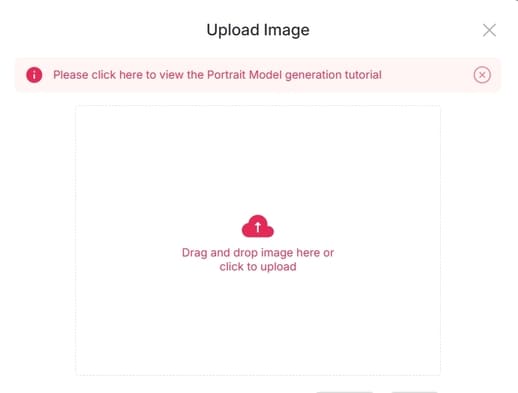
Option B (New Character): If you have a specific person in mind to replace the original actor, upload their reference photo here.
Option C (The AI Influencer): Want to create a character from scratch? Click on the “AI Influencer Generator.” You can customize their gender, facial features, weight, physique, and nationality. The process is incredibly fast and intuitive.
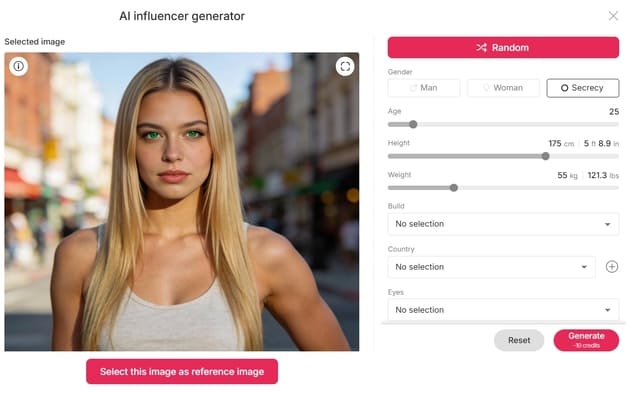
Step 3: Effortless Video Editing
Now that your model is ready, it’s time for the heavy lifting—without the heavy workload. Navigate to the “Edit Video” section. APOB AI has categorized its tools to match your specific needs:
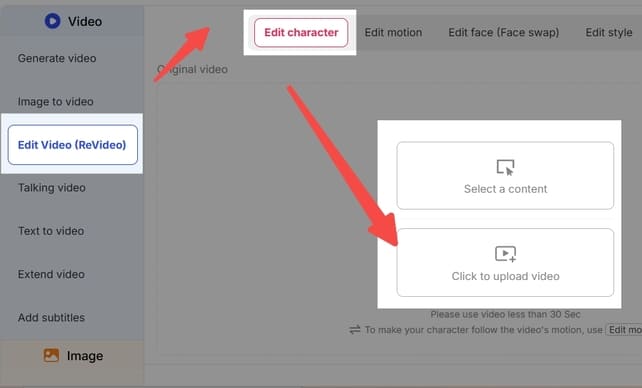
Edit Character: For total character replacement.
Edit Face: For precise facial adjustments or face-swapping.
Edit Style: To transform the overall aesthetic or "vibe" of the footage.
Note: If you ever feel stuck, our dedicated Support Team is always available to guide you through the process.
Feature Spotlight: How to Use "Edit Character"
The most useful APOB AI workflow for Kling 2.6 Motion Control is Edit Character.
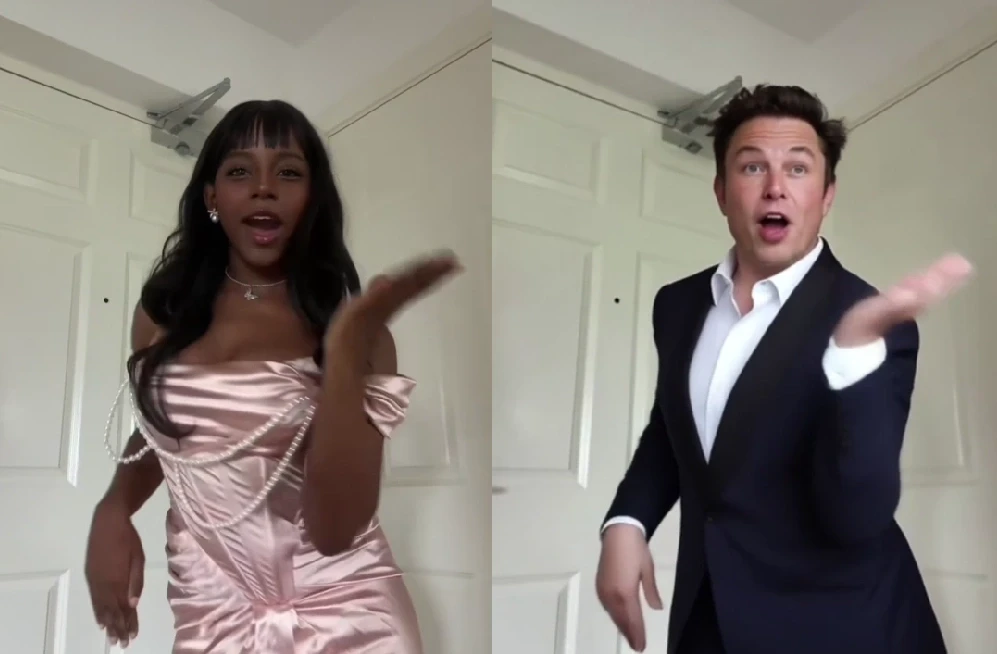
Imagine you have a viral dance video, a product demonstration, or a creator-style clip, but you want your own AI influencer to perform the same movement. Instead of reshooting the content or hiring a new model, you can use Edit Character to replace the original performer with your AI character.
This is useful for:
Making an AI influencer perform a trending dance
Turning a product demo into a branded AI presenter video
Reusing a motion concept with different virtual models
Creating short-form ad variations faster
Testing creator-style content without a physical shoot
The value is simple: APOB AI helps you test Kling 2.6 Motion Control faster, using free daily credits, while keeping the workflow friendly for creators who need usable videos, not just technical experiments.
Upload: Click “Edit Character” and upload your original video.
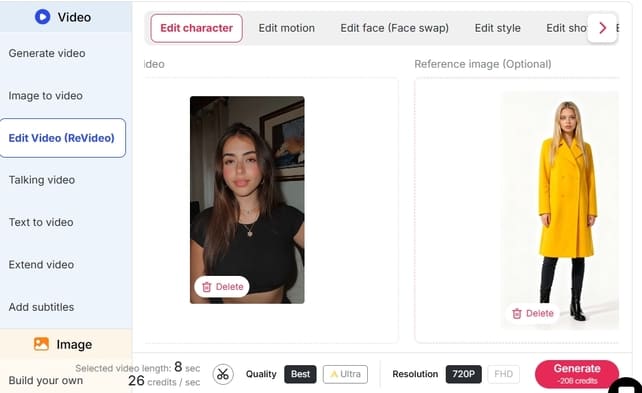
Select Reference: On the right panel, upload the image of the person you want to appear in the video.
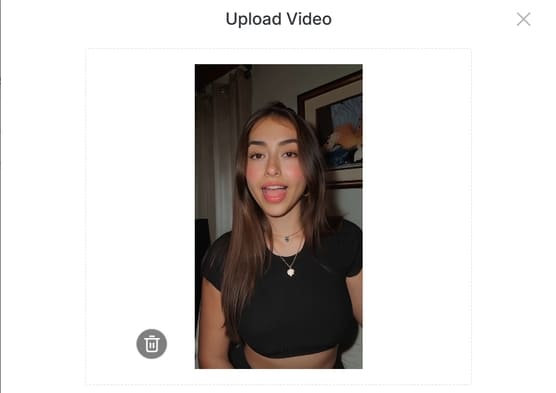
Customization (Optional): If you want the character to look slightly different—for instance, wearing a yellow coat—click “Generate Reference Image.” Simply type “wear a yellow coat” in the description box.
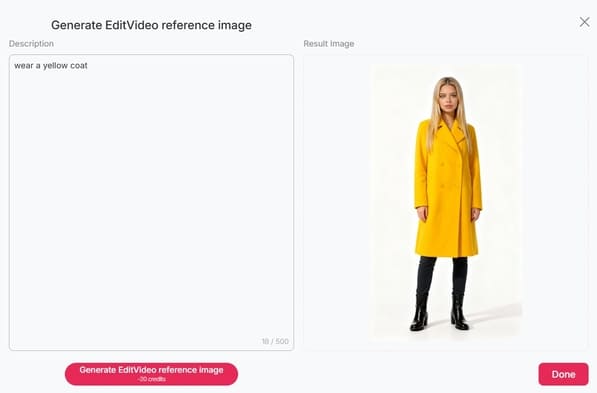
Define: If you like the generated preview, click Done. If not, tweak your description and try again.
Generate: Once your reference image is set, click “Generate.” The Result: You will receive a high-quality video of your chosen character (in that yellow coat!) performing the exact same dance moves as the original video. It’s that simple!
Where Kling 3.0 Fits In
Kling 3.0 builds on the motion control foundation introduced in Kling 2.6, with stronger multimodal workflows and upgraded control features. But for creators who want to test reference-video motion transfer today, Kling 2.6 Motion Control remains a practical entry point.
That is why this page should focus on Kling 2.6 free testing. Kling 3.0 can be mentioned as the next step, but the main promise here is clear:
APOB AI makes Kling 2.6 Motion Control easier to test with free daily credits.
Why Use APOB AI for Motion Control Testing?
APOB AI is not just a place to generate a random AI video. It is a more creator-friendly workflow for testing character motion, keeping identity stable, and turning the final output into social-ready content.
With APOB AI, creators can:
Test Kling 2.6 Motion Control with free daily credits
Animate AI characters from reference videos
Create AI influencer clips without reshooting
Replace characters in existing videos
Produce short-form content for social platforms
Reduce trial-and-error before scaling paid production
For creators, this means less friction and more usable output.
FAQs
Q1: What is Kling 2.6 Motion Control?
Kling 2.6 Motion Control is an AI video feature that transfers motion from a reference video to a character image. It helps create more accurate body movement, gestures, and facial performance.
Q2: Can I try Kling 2.6 Motion Control for free?
Yes. APOB AI lets creators test Kling 2.6 Motion Control with free daily credits, making it easier to experiment before paying for larger production needs.
Q3: What do I need to use motion control?
You usually need a clear character image and a reference motion video. The better your input quality, the better the generated AI video will be.
Q4: Is Kling 2.6 Motion Control good for AI influencers?
Yes. It is especially useful for AI influencer videos because you can apply real movement, gestures, and performance rhythm to a digital character.
Q5: How is Kling 2.6 different from Kling 3.0?
Kling 2.6 is a strong entry point for reference-video motion transfer. Kling 3.0 expands the workflow with more advanced multimodal generation and upgraded control features.
Q6: Can I use it for TikTok or Reels videos?
Yes. Kling 2.6 Motion Control is useful for short-form clips, dance trends, AI influencer posts, UGC-style ads, and social video variations.
Q7: Is APOB AI a free way to test Kling 2.6 Motion Control?
Yes. APOB AI gives creators free daily credits, so you can test Kling 2.6 Motion Control before deciding whether to scale your AI video workflow.
Q8: What kind of reference video works best for motion control?
A clear video with one visible subject, stable framing, natural movement, and minimal obstruction usually works best. Dance moves, product gestures, walking shots, and presenter-style clips are good examples.
Q9: Can Kling 2.6 Motion Control copy facial expressions?
It can help transfer performance rhythm and facial movement from a reference video, but results depend on the quality of the reference clip and the clarity of the character image.
Q10: Can I use Kling 2.6 Motion Control for product ads?
Yes. You can use it to create AI presenter videos, product demos, UGC-style ads, and short-form ad variations with a consistent AI character.
Q11: Does APOB AI help keep my AI character consistent?
Yes. APOB AI is designed for AI character and AI influencer workflows, helping creators reduce identity drift and keep the same digital persona across different videos.
Q12: Is Kling 2.6 Motion Control beginner-friendly on APOB AI?
Yes. APOB AI simplifies the process so you do not need advanced editing skills. You can upload a character image, use a motion reference, and generate an AI video through a guided workflow.
Q13: Can I create AI influencer videos with Kling 2.6 Motion Control?
Yes. This is one of the best use cases. You can make an AI influencer dance, gesture, present a product, or perform social-style movement based on a reference video.
Q14: What is reference video motion transfer?
Reference video motion transfer means using an existing video as a movement guide. The AI studies the motion from that video and applies it to your chosen character image.
Q15: Can I use Kling 2.6 Motion Control without recording new footage?
Yes. If you already have a suitable reference video and a character image, you can generate a new AI character video without reshooting the scene.
Q16: Is Kling 2.6 Motion Control good for TikTok trends?
Yes. It is useful for recreating dance trends, gesture-based videos, short skits, and fast social content with an AI character or virtual influencer.
Q17: How many credits does motion control use on APOB AI?
Credit usage can vary depending on video duration, quality settings, and generation mode. The advantage is that APOB AI gives free daily credits, so you can test before scaling.
Q18: Can Kling 2.6 Motion Control replace a person in a video?
In an APOB AI workflow, you can use character editing tools to replace or transform the performer while preserving the motion from the original video.
Q19: Should I use Kling 2.6 or wait for Kling 3.0?
If you want to test motion control now, Kling 2.6 is a practical starting point. Kling 3.0 brings stronger upgrades, but Kling 2.6 remains useful for learning reference-video motion transfer and creating AI character videos today.
Q20: What makes APOB AI different from using Kling directly?
APOB AI focuses on creator-friendly AI character workflows. It helps you test motion control, keep character identity more stable, and turn outputs into usable AI influencer videos, product clips, and social content faster.

Be the first to like this.





No credit card needed


