Create an AI live host from a required opening-scene prompt, with one optional image or video to guide the look and motion. Set the initial length, resolution, and Public status, then review the per-second rate and total credits before Go live. Nano refills 80 credits daily, but a complete Live may require accumulated credits or a paid plan.
Step 1: Open APOB Live and choose Create your own live
The problem: “Run a livestream” is too broad. Without a single outcome, the host, content, script, duration, and success criteria drift in different directions.
Sign in, open Live from the desktop sidebar, and select Create your own live. APOB's official navigation guide confirms that Live is the AI live-stream list and viewer when the feature is enabled. Before opening the form, write one sentence that defines what the host must accomplish: introduce a product, welcome event attendees, explain a topic, or present a recurring creator segment.
Realistic example: A skincare seller begins with “Explain what the serum is for, show the bottle clearly, and end with a reminder to check the ingredient list.” That is more testable than asking for a generic beauty livestream.


Step 2: Decide between prompt-only and media-guided creation
The problem: Users often assume a host image is mandatory, or they add a weak source that introduces an unwanted face, crop, product detail, or motion pattern.
The current Create live dialog marks media as optional. Use only the prompt when you want APOB to establish the opening scene. Choose Upload live source for a file you control, or Select content to reuse an APOB-generated image or video. The picker can be filtered by file type and generation workflow, including Image to video, Text to video, Talking avatar, and Lip sync. If you want a recurring fictional presenter, prepare a clean source with the AI Influencer Generator first. Use only fictional or explicitly authorized identities.
Realistic example: A faceless finance educator starts prompt-only for the first test. After approving the pacing, the creator selects an existing fictional studio presenter in a navy overshirt for later weekly explainers—without copying a real analyst's likeness.
Step 3: Choose a source that matches the first scene
The problem: A media source guides the look and motion; it does not verify labels, dates, prices, speaker credentials, or product claims.
Use Select content to reuse an approved APOB image or video, or upload a file you own. Pick one source with a clear subject, stable framing, and enough space for the intended motion. A seller can prepare a clean demonstration asset with the AI Product Video Generator before selecting it. Verify every visible label, price, date, logo, and claim; the optional source is visual guidance, not a factual database.
Realistic example: A webinar producer supplies a three-item agenda card and one speaker-topic visual. The host welcomes attendees, previews the sequence, and hands off to the first section without inventing speaker credentials.

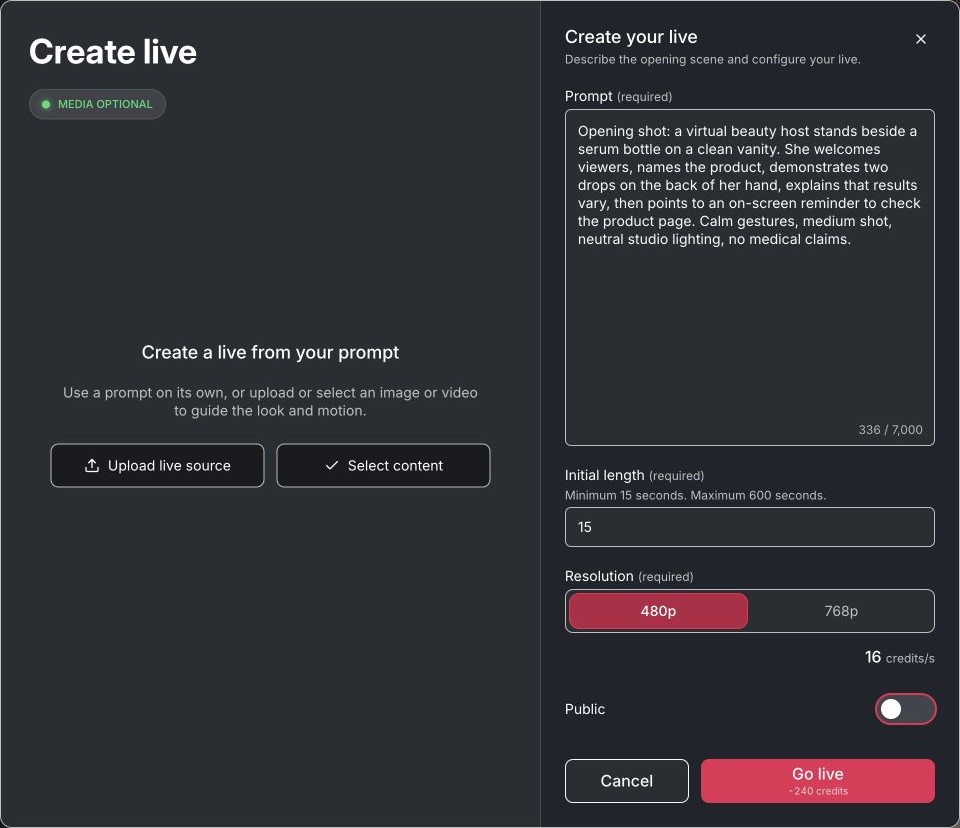
Step 4: Write the required opening-scene prompt
The problem: Short prompts such as “be engaging” do not specify tone, pacing, gestures, camera relationship, forbidden claims, or the desired close.
The form describes the required field as the first scene, world, and action, with room for a detailed prompt. Write the audience, setting, opening action, speaking style, framing, one call to action, and important boundaries. Tell the host what to avoid. Use short instructions and one visible action at a time; crowded direction makes review harder.
Realistic example: “Welcome independent shop owners. Speak calmly to camera, refer to the product card once, make one open-hand gesture, never claim medical results, and close by asking viewers to compare the listed ingredients.” This gives the host an observable job and a compliance boundary.
Step 5: Set length, resolution, visibility, and review the quote
The problem: Teams can start with the wrong length, expose an unreleased asset, or spend more credits than expected when they skip the setup summary.
In the verified form, Initial length accepted 15–600 seconds and Resolution offered 480p or 768p. The account showed a per-second rate beside the resolution and recalculated the Go live total when the duration changed. The Public switch controls discoverability, but APOB's help center says private content is a paid-tier feature, so free accounts may receive an upgrade prompt. Availability, entitlements, and rates can change; rely on the current credits and plans guide and the quote in your account.
Realistic example: An ecommerce team first tests a 15-second public-safe introduction at the lower available resolution. Only after the host pronounces the product name correctly does the team prepare a longer launch segment.
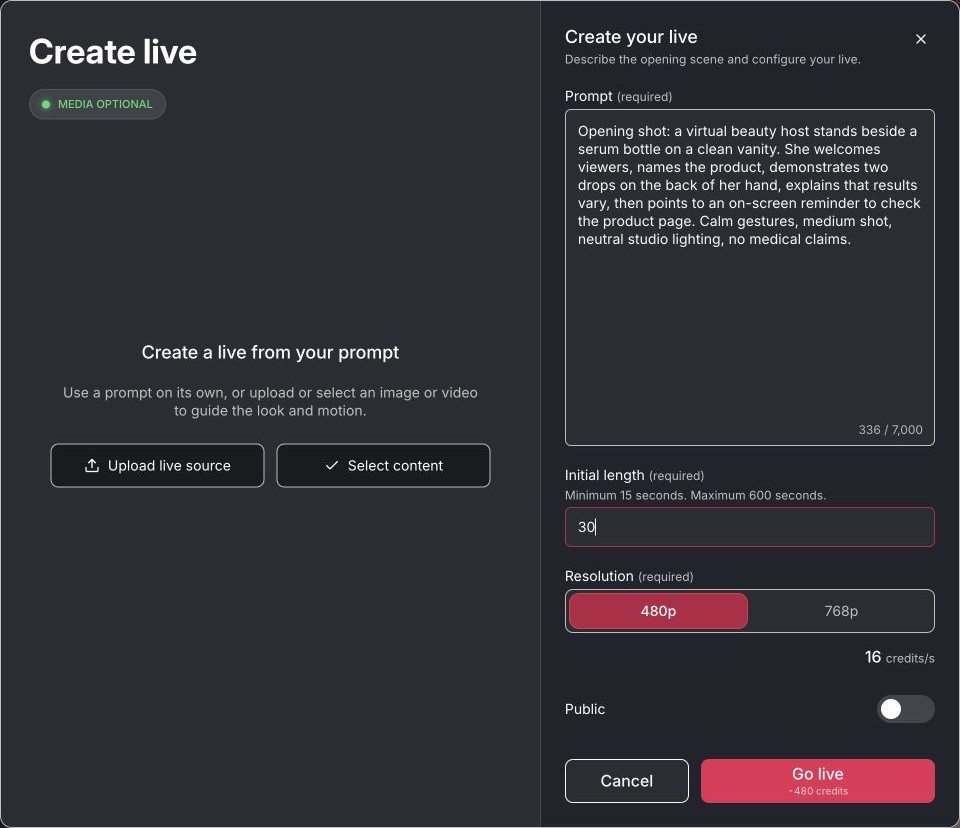

Step 6: Go live only after the preflight, then review the replay
The problem: A synthetic host can mispronounce a name, drift from the approved product visual, or deliver a disclosure too late. “Live-looking” does not remove the need for editorial review.
Press Go live only after the total cost, visibility, and source are correct. Completed public sessions can be opened from the Live gallery; the verified end screen displayed REPLAY, AI-generated, and Reopen live. APOB explains that reopening starts a new live and carries the replay forward as the starting clip. Review the first sentence, face and hand stability, product accuracy, pacing, disclosure placement, and final call to action. If the concept works better as an edited clip, continue in the AI Avatar Video Maker instead of assuming the replay fits every channel.
Realistic example: A creator opens an ended weekly briefing, notices that the source name is rushed, and chooses Reopen live only after revising the first line to pause after the citation.
Expert Prompts for an AI Live Host
Ecommerce product host
Purpose: Explain one product without inventing performance claims.
Prompt: “Open by welcoming first-time skincare buyers. Introduce the unbranded serum shown in the product card, explain that the audience should check the listed ingredients and usage directions, make one small open-hand gesture, and keep the bottle unobstructed. Do not mention clinical results, discounts, scarcity, or customer testimonials. Close by inviting viewers to read the product details.”
Expected output: A measured product-education segment with one visual reference and no unsupported medical or sales claim.
Webinar moderator
Purpose: Turn an approved agenda into a concise event opening.
Prompt: “Welcome attendees to a 20-minute creator-economy briefing. State the three supplied agenda items in order, pause after each item, and introduce the first section without inventing speaker names or credentials. Use a calm professional tone, minimal hand movement, and a medium camera framing.”
Expected output: A clear agenda-led opener that is easy to verify against the run of show.
AI influencer live-look segment
Purpose: Keep a recurring fictional persona recognizable across episodes.
Prompt: “Use the selected fictional host's established warm, analytical tone. Open with today's topic in one sentence, maintain direct eye contact, use one subtle nod, and keep the navy overshirt and compact studio background consistent. Do not imitate a real creator or reuse their catchphrases.”
Expected output: A repeatable creator segment with controlled identity and restrained motion.
TikTok Shop rehearsal
Purpose: Test the hook and claim order before platform production.
Prompt: “Address mobile shoppers who have not seen this product before. Start with the practical problem the item solves, show the product visual once, explain one verified feature and one usage instruction, and end with a disclosure that this is an AI-presented demonstration. Avoid urgency, price promises, and before-and-after claims.”
Expected output: A short, compliance-aware rehearsal that can be compared with the approved product sheet.
YouTube creator-show opener
Purpose: Establish an episode format without claiming native YouTube streaming.
Prompt: “Welcome viewers to a weekly five-minute design-tools roundup. Preview three supplied topics, speak at a steady pace, pause after the show title, and invite viewers to compare the linked sources. Avoid saying the session is live on YouTube or responding to comments.”
Expected output: A platform-ready opening concept that stays honest about where the session was created.
Product-launch countdown host
Purpose: Create event energy without fake scarcity.
Prompt: “Open the internal launch preview with the confirmed product name and release date. Refer to the approved agenda card, maintain an upbeat but controlled tone, and count down only to the start of the presentation. Do not claim limited stock, a price, or public availability unless those details appear in the supplied content.”
Expected output: An energetic launch opener with factual boundaries.
It is a virtual presenter workflow, not a full streaming operator
“AI live host,” “AI livestream host,” and “AI host live streaming” searches can describe different product types: a real-time agent that reads chat, an unattended broadcast system, or an avatar-led hosted session. APOB Live is the third type. It combines a required opening-scene prompt, an optional image or video reference, and bounded session settings. It is closer to a controllable virtual presenter or live AI avatar workflow than a complete replacement for a human producer, chat moderator, OBS operator, or ecommerce support team.
Choose APOB Live when you need a reviewable product demo, creator-show segment, webinar opener, virtual event MC, or faceless briefing. Choose a dedicated interactive livestream platform when the requirement is real-time chat ingestion, spoken answers grounded in a product catalog or live inventory, or unattended multichannel broadcasting.
The workflow is verified against the product
The signed-in APOB Live setup and six workflow screenshots on this page were checked on September 7, 2026. The inspection covered the optional-media choice, generated-content picker, required prompt, duration, resolution, Public control, current credit quote, and completed-session replay. No new Live was started because the final action showed a credit charge; the replay behavior was verified with an existing ended public session. The inspection did not verify autonomous chat replies or native platform relay, so those capabilities are not claimed. Controls and entitlements can change; the live interface remains authoritative.
Prompt-only creation avoids unnecessary source constraints
Media is optional, so a user can validate the opening concept before choosing a reusable character or video. When visual consistency matters, the same form can instead reuse an approved generated asset or uploaded source.
The optional media library keeps prior work reusable
Select content exposes existing images and videos and lets users narrow them by generation type. That makes a prior Talking avatar, Lip sync, Image to video, or product asset useful as a starting reference without uploading it again.
The prompt works like a production brief
The prompt is not only a visual description. It can define the opening, tone, audience, actions, prohibited claims, and close. A creator can therefore review whether the host followed a practical brief instead of judging an ambiguous “engaging” result.
Cost and visibility are visible before the session starts
Initial length, resolution, Public status, the per-second rate, and the total credit estimate appear in the setup flow. This helps a team compare a short test with a longer run before any credits are spent.
The host can connect to a wider APOB workflow
Creators who already use APOB for AI influencers, portraits, talking avatars, lip sync, product visuals, or image-to-video assets can prepare approved inputs in the same creative ecosystem, then select relevant content for the Live session.
The free plan is a starting balance, not a free-session guarantee
The Nano plan currently costs $0 and refills 80 credits daily. Free downloads carry a watermark, and private content is a paid-tier feature according to APOB's help center. The verified minimum Live quote exceeded one daily refill, so the honest benefit is a balance that can accumulate for testing—not a promise that a full Live run is immediately free.
Ended sessions have an explicit reuse path
The replay page does more than label a session as ended. It identifies the media as AI-generated and offers Reopen live, which is useful when a creator wants to continue from an approved result while still making a deliberate new session.
A short preflight check catches the problems viewers notice first
Before using a result in a TikTok ad rehearsal, product demo, YouTube Shorts intro, or webinar opener, review five points: the host is authorized, the product or agenda visual is readable, the first sentence is accurate, any AI or sponsorship disclosure appears early enough, and the final call to action matches the destination. This keeps the workflow practical instead of treating the AI live host as a one-click publishing substitute.
Consent and likeness
Use a fictional identity or obtain explicit permission from every recognizable person whose image, video, or voice is used. Do not create a host that impersonates a public figure, colleague, customer, or competitor. Permission to photograph someone does not automatically cover avatar creation, voice use, or commercial reuse.
Commercial use
Confirm that you own or have licensed the host source, product images, music, logos, scripts, and every uploaded asset. Review APOB's current plan terms and usage rights before client work or paid advertising. Keep written records of model releases and asset licenses.
Disclosure
Disclose realistic synthetic media when viewers could mistake it for a real person or event. TikTok requires labels for realistic AI-generated content, and YouTube requires creators to disclose realistic altered or synthetic content. Meta also applies “AI info” labels based on detection or user disclosure. Sources: TikTok AI-generated content guidance, YouTube altered-content disclosure, and Meta AI labeling.
Endorsements and live disclosures
If the host promotes a brand, sponsorship, affiliate link, or free product, make the relationship easy to notice. The US FTC advises that disclosures in live streams should be repeated periodically so viewers who join later can see them. Source: FTC Disclosures 101 for Social Media Influencers.
Copyright and platform rules
Do not upload copyrighted music, clips, product photography, or character designs without permission. YouTube states that live streams are scanned for third-party content and may be interrupted or terminated when a match remains. Other platforms have their own rules and can change them. Source: YouTube copyright issues with live streams.
Accuracy and human responsibility
Supply verified names, dates, prices, ingredients, product capabilities, and event details. Do not let a fictional host appear to be a medical professional, financial adviser, customer, or real employee unless the representation is truthful and authorized. This section is practical guidance, not legal advice.
Product-education segment for TikTok Shop planning
A seller can prepare a short host-led product explanation for livestream shopping, test the order of claims, and identify where a real product close-up is necessary before committing to a live-commerce production stack. TikTok reported that US TikTok Shop sales rose 120% year over year in 2025, that the US hosted more than 8 million hours of LIVE shopping in 2024, and that 76% of surveyed TikTok Shop users who engaged with the shop had bought from a livestream. These are TikTok/GlobalData figures, not a guarantee of results for an individual seller. Source: TikTok Newsroom.
Recurring virtual-creator show
A creator can keep one fictional host, wardrobe, and set while changing the weekly subject and supporting visual. The same identity can support a faceless YouTube workflow when an edited episode is more suitable than a Live session. YouTube reported that more than 30% of daily logged-in viewers watched live content in Q2 2025. Its separate virtual-creators report found that a sample of 300 virtual creators generated more than 15 billion views across videos, livestreams, and Shorts in 2024. Sources: YouTube Live updates and YouTube Culture & Trends.
Webinar or online-event opener
An event producer can use a virtual host to welcome attendees, explain the agenda, repeat housekeeping rules, and transition into the first speaker. The host should use only verified names, dates, and credentials supplied by the team; live improvisation is not a substitute for an approved run of show.
Ecommerce product-demo rehearsal
A brand can test whether a product image, host framing, and 20-second explanation work together before filming or publishing a larger campaign. A reviewed segment can then inform a UGC-style product video without presenting the virtual host as a real customer. Wyzowl's late-2025 survey of 266 respondents reported that 91% of businesses used video as a marketing tool and 69% of video marketers created social media videos. The value here is workflow rehearsal and reusable creative preparation, not an automatic lift in sales. Source: Wyzowl Video Marketing Statistics.
Faceless expert briefing
A subject-matter creator can build a recurring fictional presenter for industry summaries while keeping the human researcher off camera. The human still verifies sources, removes unsupported advice, and approves the final wording—especially in finance, health, legal, or political content.
Internal sales or support practice
A product team can simulate a consistent host introduction for a launch briefing, onboarding session, or help-center walkthrough. It can test pacing and message order without presenting the AI host as a real employee or letting it invent answers to customer questions.
Reusable presenter identity: One fictional or authorized host can support multiple show topics without a new camera shoot for every opening.
Show-specific direction: The opening, tone, gestures, claim limits, and closing action can be written as observable instructions.
Prompt-only or media-guided setup: Start from written direction alone, or add one authorized image or video when the opening needs a specific person, product, or setting.
Visible setup choices: The workflow shows initial length, resolution, Public status, per-second rate, and the current total credit quote before the session begins.
Reusable ended sessions: Replay pages label the result as AI-generated and offer Reopen live when the prior video is a useful starting clip.
Connected creative workflow: Existing APOB image, avatar, influencer, lip-sync, face-safe editing, and product-video assets can support preparation for a Live session without turning the page into a generic face swap workflow.
Not presented as autonomous Q&A: This page does not claim that the host understands and answers viewer comments in real time.
External streaming is not assumed: Native delivery to TikTok, YouTube, Twitch, OBS, or RTMP has not been verified for this page.
Free credits may require accumulation: The 80-credit daily Nano refill may not cover a Live session immediately; use the account quote as the source of truth.
Synthetic errors still occur: Faces, hands, product details, pronunciation, pacing, or visual continuity can require another test.
Human review remains necessary: Consent, claims, disclosures, copyright, and platform compliance stay with the publisher.
No Credit Card Required



Answers about free credits, cost, workflow, quality, privacy, rights, safety, and platform compatibility.
What is an AI live host?
An AI live host is a synthetic presenter used to open, guide, or narrate an avatar-led session. In the verified APOB Live flow, a required prompt can be used alone or with one optional image or video; the form then adds initial length, resolution, Public status, and a pre-action credit quote. It is a virtual-presenter workflow, not proof of external broadcasting or autonomous comment handling.
Do I need an APOB account to create a Live?
Yes. Creation requires sign-in. APOB currently supports Google, Discord, or email; the same dialog handles sign-up and login. New email accounts must verify their email. See the official Account & Profile guide.
Can I create an AI live host from a prompt only?
Yes. The current Create live dialog labels media as optional. You can write the required first-scene prompt without adding an image or video. Add media only when you need a specific presenter, product, setting, or movement reference.
Can I use an existing image or video?
Yes. Choose Upload live source for your own authorized file, or Select content to reuse media already available in APOB. The verified picker included All, Video, and Image filters plus generation categories such as Talking avatar, Image to video, Text to video, and Lip sync.
Is APOB's AI live host free?
APOB's Nano plan currently costs $0 and refills 80 credits daily. The minimum 15-second Live setup inspected for this guide cost more than one daily refill, so a free user may need to accumulate credits or upgrade. The current Go live quote is the source of truth. See Credits, Plans & Billing.
What Live durations are available?
The verified Initial length control accepted 15 to 600 seconds. Start with the shortest segment that can test the first line, presenter stability, product accuracy, disclosure, and closing action.
What resolutions are available, and how is the cost calculated?
The inspected form offered 480p and 768p. It showed a per-second rate beside the resolution and a total beside Go live; changing the duration recalculated the total. Rates can vary by account, plan, and product update, so do not rely on a static landing-page price.
Do free downloads have a watermark?
APOB's help center says Nano downloads always carry a watermark. Paid accounts download without a watermark only when the content was generated by a paid account, and removal is not retroactive. Confirm that the Live replay follows the same download behavior before client delivery. See Content detail & sharing.
Can I keep an AI Live private?
The form displays a Public switch, but APOB states that private content is a paid-tier feature. A Nano user who tries to make content private may see an upgrade prompt. Do not load confidential or unreleased material until the account entitlement and switch state are confirmed.
What happens after a Live ends?
An ended public session opens on a replay page labeled REPLAY and AI-generated. The verified page offered Reopen live and explained that reopening creates a new Live while carrying the replay forward as the starting clip.
Where can I check Live credit deductions or refunds?
Open Profile and review the Credit usage table. The Used filter isolates deductions; returned generation credits are tagged REFUNDED. APOB advises using this history when a balance looks different from the expected quote.
Can an APOB AI live host answer viewer questions automatically?
That capability was not present in the verified setup and is not claimed here. Plan the presenter around the supplied prompt and media, and keep a human responsible for comments, factual questions, support issues, and moderation.
Does APOB stream directly to TikTok, YouTube, Twitch, OBS, or RTMP?
Native relay or OBS/RTMP integration was not shown in the tested workflow. Do not choose the product on that assumption. Verify the current app and documentation if external distribution is essential.
Can I use an AI live host commercially?
Commercial use depends on the rights to every input, current APOB terms, the plan, and the destination platform. Obtain likeness and voice permission, license product assets and music, document sponsorships, and verify platform disclosure rules before paid advertising or client delivery.
Can I make the host look like a real person?
Only with that person's informed permission and within applicable law and platform rules. Permission should cover the intended image, video, voice, synthetic transformation, and commercial context. A safer default is an original fictional identity that does not imitate a public figure or private individual.
How do I improve AI live host quality?
Start with prompt-only when testing structure, or use one clear source with a readable face, simple background, stable lighting, and enough framing for motion. Specify one action at a time. Review pronunciation, eyes, hands, product details, pacing, disclosure, and the final call to action before increasing the duration.
Why is the Go live button disabled, or where can I get help?
In the tested form, Go live stayed disabled until the required prompt had content. Also confirm the initial length is within 15–600 seconds and that the account has enough credits for the displayed total. For account-specific errors, use the in-app support chat or the official Help Center; do not repeatedly submit the same paid action while its status is unclear.


