Use APOB’s AI live streaming workspace to start an AI-generated show from a prompt, image, or video. Set the opening length, resolution, and visibility before going live, then keep the replay or reopen it. Nano currently adds 80 credits daily; the displayed cost still applies to every live scene.
Step 1: Open APOB Live and Read the Room Before You Create
Verified workflow — September 8, 2026: APOB Live can start an AI-generated stream from a prompt alone or from a selected/uploaded image or video. The signed-in setup showed a 15–600 second initial length, 480p or 768p resolution, a Public switch, and a live credit quote. It did not show RTMP, OBS, virtual-camera, TikTok Live, YouTube Live, Twitch, Instagram Live, product-catalog, or checkout connections.
Native APOB Live | Separate workflow when needed |
|---|---|
AI-generated live scene, owner/audience scene actions where available, replay, and Reopen live | External social-platform transmission, storefront checkout, inventory, customer support, and regulated product claims |
The problem: An AI live streaming idea can fail before it starts if the creator chooses the wrong format. A live-shopping room needs repeatable product resets, while an AI VTuber show may need a stronger fictional world and more audience-led scene changes.
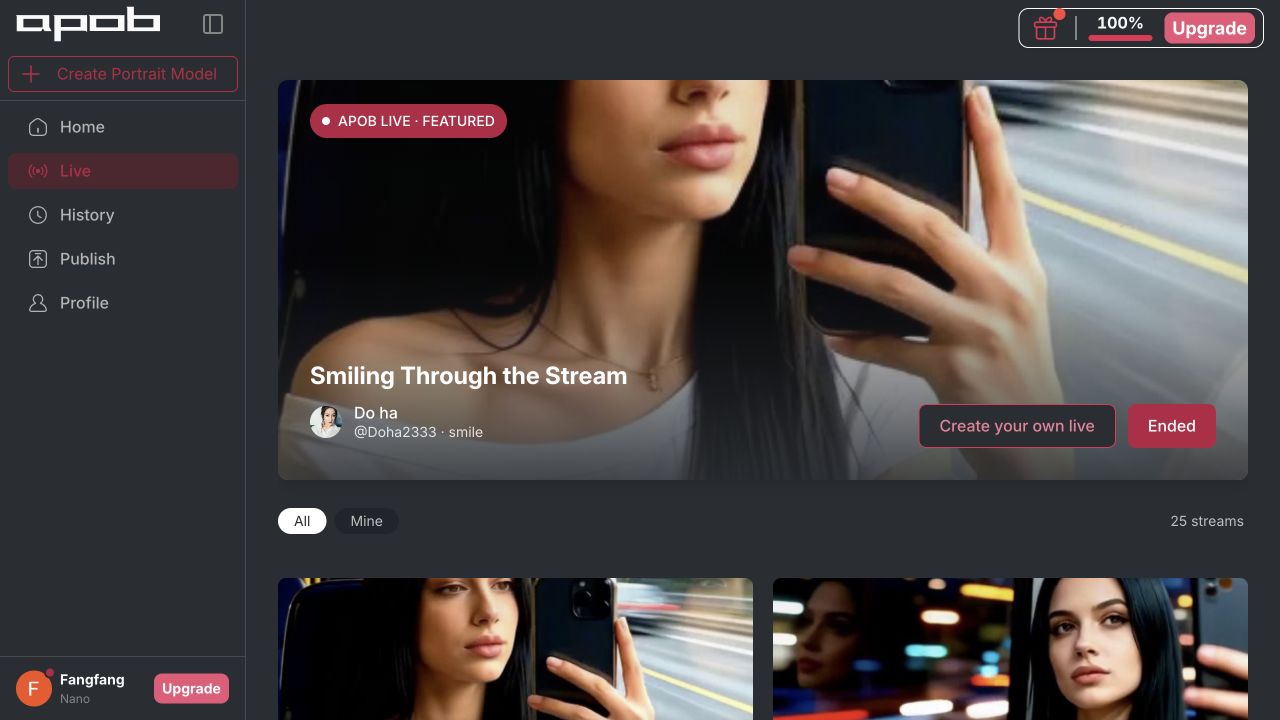
Open Live in APOB and review the public gallery. Notice the show title, visual style, replay state, duration, and whether the concept is understandable without extra context. Then select Create your own live. The current workspace opens a dedicated setup dialog rather than sending you through the Talking Video editor.
Example: A home-organizing seller studies how existing streams frame a single subject, then plans a 20-second opening scene around three storage products instead of trying to show an entire catalog at once.
Expected output: A one-sentence live concept, a named audience, one interaction mechanic, and a short list of visual references.
External step: Verify current platform and campaign requirements before production. The observed APOB Live screen did not display a direct TikTok Live, YouTube Live, Twitch, Instagram Live, OBS, RTMP, or WebRTC connector.

Step 2: Choose a Prompt, Image, or Video as the Live Source
The problem: A text-only idea may drift visually, while an unsuitable reference can lock the stream into a weak composition. Product teams also risk uploading assets they do not own.
In Create live, write the required prompt and optionally upload a source or choose an existing generated image or video. Use a prompt alone when exploration matters. Use an approved image when the AI virtual host, product colors, or set design must remain recognizable. Use a video only when you have permission for every face, voice, logo, and performance it contains.
Example: A jewelry brand selects an approved image of an original silver-haired AI shopping host and asks for a clean vertical showroom with a neutral display tray. The prompt tells the scene to leave space for product names without inventing prices or gemstones.
Expected output: A legally cleared visual anchor and a prompt that defines the host, environment, camera position, and interaction boundaries.
External step: Keep real product specifications, inventory, pricing, checkout, shipping, and returns in the brand’s verified commerce system; no native catalog or checkout control was visible in the tested APOB Live dialog.
Step 3: Write the Opening as a Live-State Prompt
The problem: A conventional video prompt describes a finished clip. A live prompt must also describe what can change after the opening and what must remain fixed.
Write the prompt in four parts: identity, scene, opening action, and safe continuation. State stable traits first. Add camera behavior and audience choices next. Finish with limits such as “do not invent prices,” “do not imitate a real person,” and “pause before changing products.” APOB’s observed prompt field allowed up to 7,000 characters, but a compact production brief is easier to inspect.
Example: A sneaker reseller writes: “Original adult virtual host in a cobalt jacket, standing in a minimalist shoe studio. Open by comparing low-top and high-top silhouettes. Invite viewers to choose the next color wall. Keep the host and camera consistent. Do not state price, stock, authenticity, or shipping claims.”
Expected output: A structured starting prompt that creates a coherent first scene and leaves controlled room for later direction or voting.
External step: A human producer should keep an approved fact sheet beside the live controls and stop the session if the generated scene conflicts with product evidence, disclosure rules, or brand safety.


Step 4: Set Initial Length, Resolution, and Visibility
The problem: Longer or higher-resolution generations consume more credits, and a public test can expose an unfinished concept. Creators need to make those decisions before pressing Go live.
The signed-in setup observed on September 8, 2026 offered an initial length from 15 to 600 seconds, 480p or 768p, and a Public switch. Public was enabled when the dialog opened, so treat visibility as an active publishing choice. Start short at 480p for composition tests; choose 768p only after the prompt and reference pass review.
Example: A faceless business educator sets a 15-second 480p private test to check whether the presenter remains on the right side of a 16:9 set, leaving the left side clear for a later chart.
Expected output: A deliberate test configuration with known duration, resolution, visibility, and review owner.
External step: Recheck privacy before every run. APOB’s Content Detail & Sharing guide explains content visibility and sharing; account and plan conditions can change.
Step 5: Read the Live Credit Quote Before Going Live
The problem: “Free daily credits” does not mean a live run costs zero. A creator who ignores the quote can exhaust a small allowance on one test.
Read the number shown beside Go live after changing duration or resolution. In the Nano account tested on September 8, 2026, a 15-second opening displayed 240 credits at 480p and 480 credits at 768p—equivalent to 16 or 32 credits per second in that observed configuration. APOB’s official Credits, Plans & Billing guide lists Live streaming voting scenes and direct scenes as credit-using operations. The current Nano allowance refills 80 credits daily, so one daily refill did not cover the observed minimum live setup.
Example: An ecommerce team first tests the host portrait in Generate Image, then saves credits for a single approved 15-second live opening instead of running several unreviewed 768p attempts.
Expected output: A documented cost decision tied to a specific length, resolution, and account state.
External step: Credit pricing is a time-sensitive product setting, not a permanent rate. Reverify the displayed quote immediately before generation; this guide stopped before Go live and did not spend the quoted 240 credits.
Step 6: Direct the Scene or Let Viewers Shape It—With Human Oversight
The problem: Audience control can make a stream engaging, but an open-ended system may introduce unsafe, irrelevant, or commercially misleading scenes.
APOB’s current billing documentation names two Live operations: Live streaming voting scene, used for audience voting and scene suggestions, and Live streaming direct scene, used when the owner directs the next scene. Choose the mode that matches the risk. Use constrained options for products or sponsored content; reserve freer exploration for fictional entertainment that has a moderator and a stop rule.
Example: A fashion live commerce room offers three approved choices—“studio close-up,” “color comparison,” or “styling board.” The producer does not allow viewers to generate claims about fabric composition, discount size, availability, or celebrity endorsement.
Expected output: A sequence of controlled AI-generated live scenes with a visible human decision-maker and a record of approved audience options.
External step: A moderator still handles harmful suggestions, customer questions, orders, platform comments, regulated claims, and emergency termination. Live interactivity is not permission to automate judgment.
Step 7: End, Review, Reopen, and Repurpose the Replay
The problem: A live session disappears quickly unless the team captures what worked, removes risky moments, and creates a clear next step.
The APOB Live detail view can display an ended session as REPLAY, label it AI-generated, show its duration, and offer Reopen live. The observed interface explains that reopening creates a new live and carries the replay forward. Review the full replay before sharing it, then select only accurate, rights-cleared segments for product explainers, social commerce video, Shorts, Reels, or the next show’s opening context.
Example: After a 12-minute AI VTuber lore session, the creator records the strongest audience choice, removes a scene with distorted text, publishes a 20-second recap, and reopens the storyline the following week with a new objective.
Expected output: A reviewed replay, a correction log, one short-form derivative, and a documented plan for reopening or archiving the concept.
External step: Editing, captions, music clearance, product links, ad disclosure, analytics, and distribution to social platforms remain separate publishing tasks.

Copy-Ready AI Live Streaming Prompts
Replace the bracketed details with original, authorized, and verified inputs. Each prompt is written for APOB Live rather than a generic finished-video generator.
User | Purpose | Copy-ready prompt | Required input | Expected output | Refinement tip |
|---|---|---|---|---|---|
Ecommerce seller | Controlled AI live shopping launch |
| Authorized host image, product fact sheet, three safe choices | Vertical live-commerce opening with bounded audience participation | Remove every claim that is not present in the approved fact sheet |
TikTok Shop LIVE team | Joining-late viewer reset |
| Brand palette, verified criteria, handoff cue | Reusable AI live shopping scene that avoids stale offer details | Keep the reset below 20 seconds in the first test |
Fashion retailer | Voting scene |
| Host reference, three approved scene boards | Bounded voting scene for a shoppable livestream concept | Make all three choices equally safe to publish |
AI VTuber creator | Serialized fictional episode |
| Original character sheet, recap, two licensed paths | Continuity-friendly AI VTuber live scene | Put invariant character traits before action details |
Faceless educator | Audience-led explainer |
| Reviewed lesson note, safe example, disclosure | Structured educational livestream opening | Test every number independently before launch |
Product marketer | Demo-to-human handoff |
| Real product footage plan, verified claims, handoff line | AI introduction that preserves evidence boundaries | Time the handoff against the real demo before publishing |
Recurring show producer | Reopen-live continuation |
| Reviewed replay notes, new objective, exclusion list | New live opening connected to the prior replay | Use a written correction log, not memory, to summarize the last session |
One Workspace Connects Setup, Live Scenes, and Replay
The Live area covers concept discovery, source selection, launch settings, AI-generated scenes, ended replays, and reopening. That shortens the handoff between “make an avatar” and “continue the show,” while keeping the current session visible as a discrete piece of content.
A Reference Image Makes the Virtual Host Easier to Recognize
Prompt-only generation is useful for ideation; an approved image is better when wardrobe, face, product palette, or set layout matters. APOB also lets creators build that reference in Generate Image, so the same original identity can appear in promotional art, the live source, and follow-up videos.
Duration, Resolution, Visibility, and Cost Are Visible Before Launch
The setup surfaces the operational choices that affect risk and spend. A short private 480p test can answer “Does this composition work?” before a team commits to a longer or higher-resolution run.
Direct Scenes and Voting Scenes Serve Different Show Formats
Owner direction is useful when a brand must control sequence and claims. Voting works better for fictional rooms, styling choices, game-like stories, or other bounded audience decisions. The distinction helps producers design participation instead of treating every prompt as equally safe.
The Replay Can Become the Beginning of the Next Session
An ended live is not only an archive. Reopen live supports a serialized format in which the previous replay becomes context for a new episode. That is useful for recurring AI VTuber stories, creative challenges, and virtual-host programs.
Daily Credits Support Preparation, but Live Still Requires a Budget
Nano currently adds 80 credits daily. That can help with reference images and short supporting assets, but the observed 15-second Live quote was higher than one daily refill. This is a practical testing benefit, not unlimited free AI live streaming.
Get Consent for Every Face, Voice, and Performance
Use an original fictional character, your own likeness, or documented permission. A public photo is not automatic authorization to animate someone. Keep consent records for uploaded images and videos, especially when a client, employee, customer, or minor is involved.
Respect Likeness and Publicity Rights
Do not create a real person who appears to sell, recommend, or attend something without permission. Avoid celebrity lookalikes and deceptive impersonation. The FTC’s endorsement guidance applies to truthful advertising and clear relationships between endorsers and brands. Source: FTC Endorsement Guides
Keep Commercial Claims Attached to Evidence
An AI shopping host can organize a product story, but it should not invent price, stock, ingredients, measurements, safety performance, sustainability, clinical results, or delivery terms. Use real product evidence and a human owner for claims that affect a purchase.
Clear Copyrights and Trademarks
Do not upload footage, character art, music, product photography, logos, or set designs you cannot use. A generated variation does not erase third-party rights. Check licenses separately for the live session, replay, ads, and short-form derivatives.
Disclose AI-Generated and Sponsored Content
The observed APOB replay showed an AI-generated label, which helps viewers understand the format. Preserve clear disclosure where required, and add a separate, prominent sponsorship disclosure when compensation or free products are involved. Do not bury either notice in a long description.
Follow Destination-Platform Rules
YouTube requires disclosure for realistic altered or synthetic content in relevant cases, and TikTok has rules and labeling tools for AI-generated content. Review the current policy of every platform where a replay or derivative will appear. YouTube altered-content disclosure · TikTok AI-generated content policy
Moderate Audience Choices
Voting is not consent to publish any suggested scene. Constrain options, block unsafe prompts, keep a human stop control, and document who approves commercial or sensitive content. Never use viewer participation to generate harassment, sexual exploitation, fraud, or dangerous instructions.
Protect Private Material
Review the Public switch before every test. Avoid uploading embargoed designs, customer data, confidential documents, or unreleased product details unless the current plan, visibility behavior, and internal policy permit it. Check APOB’s current help documentation and account controls rather than assuming a draft is private.
Review the Full Replay Before Reuse
Live generation can produce transient mistakes that become durable when clipped. Watch the replay, correct captions and claims, remove unsafe frames, confirm licenses, and have a human approve every published derivative.
AI Live Shopping Product Discovery Room
A small skincare seller creates an original AI shopping host and a calm virtual counter. The opening explains three skin-feel categories and asks viewers which routine should appear next. The host never invents ingredients, prices, stock, clinical results, or delivery promises. A human commerce operator supplies verified information and directs approved comparison scenes.
TikTok reported that brands and creators hosted more than 8 million hours of LIVE shopping in the United States in 2024, and that 76% of surveyed consumers who engaged with TikTok Shop had bought from a livestream in the prior year. That scale supports the use case, but it does not prove a direct APOB-to-TikTok connection. Source: TikTok Newsroom
Workflow boundary: APOB can generate the live visual experience; a separate verified commerce flow is still needed for TikTok Shop LIVE, product pins, orders, inventory, customer support, and refunds.
Viewer-Voted Fashion and Accessory Room
A fashion retailer limits voting to three approved scene changes: alternate color story, close-up display wall, or weekend styling board. The AI virtual host keeps the same face and outfit while the environment changes. This creates a shoppable livestream concept without delegating product truth to the audience.
Quality check: Use photographs or verified records for fabric, fit, construction, trademark, and color accuracy. Generated imagery should not replace evidence a customer relies on.
AI VTuber Story Stream
An independent creator builds an original fictional host, a repeatable room, and a weekly objective. Viewers vote between two safe locations, while the creator uses direct scenes when plot continuity matters. The ended replay becomes the prologue when the next episode is reopened.
YouTube reported that a sample of 300 virtual creators generated more than 15 billion views across videos, livestreams, and Shorts in 2024, while emphasizing the human connection behind successful virtual creators. Source: YouTube Culture & Trends
Quality check: Avoid copyrighted characters, celebrity likenesses, and game assets you are not allowed to reuse.
Faceless Educational Livestream
A finance educator uses a fictional AI virtual host to explain the difference between revenue, cash flow, and profit through a simple virtual whiteboard. Audience choices determine the next hypothetical example. A human reviewer blocks personal financial advice, validates every number, and adds current disclosures outside the generated scene.
Quality check: Keep the topic educational, label the content as AI-generated, and do not let a synthetic presenter imply professional credentials it does not have.
Multilingual Ecommerce Livestream Concept
A home-goods brand creates separate English, Spanish, and German prompts around the same approved host and showroom. Native reviewers check product names, measurements, tone, and cultural references before each version. The page and replay metadata use the correct language instead of mixing fallback English into a localized experience.
Quality check: Separate-language review is essential. A consistent face does not guarantee accurate translation, pronunciation, or local consumer-law compliance.
Product Demo Livestream With Verified Handoffs
A kitchen-tool seller uses APOB Live for an imaginative scene that introduces the use case, then hands the factual demonstration to recorded real-product footage or a human operator. The AI host asks viewers which recipe category should come next, but the real video proves blade size, cleaning steps, and safety instructions.
Workflow boundary: No native product catalog, checkout, inventory, or returns system was visible in the tested setup. Connect those responsibilities through the seller’s approved ecommerce stack.
Recurring Replay-to-Live Series
A creator ends each show with one unresolved viewer choice. After reviewing the replay, they remove weak scenes, prepare a new opening prompt, and use Reopen live to continue the format. Short clips from the previous episode become social commerce video teasers or channel trailers.
Quality check: Reopening carries creative continuity, not automatic factual validation. Review the inherited replay and current prompt every time.
1. Native Live Setup
APOB now exposes a dedicated Live workspace with a prompt, optional image or video source, length, resolution, visibility, and a launch quote. Most useful for: creators who want an AI-generated live session rather than only prerecorded avatar clips.
2. Controlled Visual Identity
An original reference image can keep the virtual host, wardrobe, and set more recognizable than an unconstrained prompt. Most useful for: live commerce teams, serialized creators, and branded virtual hosts.
3. Two Participation Patterns
Direct scenes and voting scenes support owner-led sequences and bounded audience choices. Most useful for: producers who need different control levels inside one show.
4. Preflight Cost and Privacy Choices
The setup shows the credit quote and Public switch before launch. Most useful for: small teams testing a concept under a fixed budget or confidentiality requirement.
5. Replay and Reopen Flow
Ended sessions can remain available as replays and become context for a new live. Most useful for: episodic AI VTuber stories, weekly education, and recurring shopping formats.
1. External Platform Connections Are Not Verified
The tested flow did not display OBS, RTMP, WebRTC, virtual camera, or direct TikTok, YouTube, Twitch, or Instagram controls. Most affected: creators who need APOB to act as their social broadcast encoder.
2. The Observed Minimum Exceeded One Daily Refill
At the tested Nano rates, 15 seconds at 480p displayed 240 credits, while Nano added 80 credits daily. Most affected: users expecting the word “Free” to mean a complete no-cost live run.
3. Live Generation Still Needs Human Moderation
Audience suggestions, scene continuity, distorted text, factual claims, and brand safety require active review. Most affected: regulated sellers, sponsored streams, and open-audience concepts.
4. Commerce Operations Remain Separate
No product catalog, checkout, inventory, shipping, support, or return controls were visible in the setup. Most affected: ecommerce sellers planning an end-to-end shopping operation.
5. Public Is a Material Publishing Choice
Public was enabled when the tested dialog opened. An unfinished test can be exposed if the creator does not notice the switch. Most affected: agencies, confidential launches, and likeness-sensitive projects.
No Credit Card Required




Direct answers about native APOB Live, AI shopping hosts, viewer voting, pricing, privacy, replay, external platforms, rights, and disclosure.
Does APOB AI actually support AI live streaming?
Yes. The signed-in APOB workspace reviewed on September 8, 2026 included a dedicated Live area, a Create live dialog, AI-generated live sessions, ended replays, and a Reopen live action. Availability and controls may vary by account or future release.
What can I use to start an APOB live?
The observed setup required a text prompt and also allowed an optional uploaded or existing generated image or video. A reference is useful when the AI virtual host or visual world must remain recognizable.
Is APOB AI live streaming free?
Nano currently adds 80 credits daily, but Live consumes credits and is not unlimited. In the tested Nano account, the shortest 15-second 480p setup displayed a 240-credit quote. Always use the current on-screen price as the authoritative amount.
How long can the initial live scene be?
The tested dialog offered 15 to 600 seconds for the initial length. Because limits can change, confirm the range in your own account before planning a show.
Which resolutions are available?
The observed choices were 480p and 768p. The displayed rate increased from 16 credits per second at 480p to 32 credits per second at 768p in that account and configuration.
Can I make the live private?
The setup included a Public switch, and it was enabled when opened during testing. Turn it off for a private test when your plan supports the required privacy behavior, then verify the content detail page before sharing anything confidential.
Does APOB connect directly to TikTok Live or TikTok Shop LIVE?
No direct TikTok connection was visible in the tested Live setup. You can design an AI live shopping concept in APOB, but product pins, checkout, inventory, customer service, and any TikTok Shop LIVE transmission still require a separately verified workflow.
Does APOB connect directly to YouTube Live, Twitch, or Instagram Live?
No direct connector for those platforms appeared in the tested flow. Treat external simulcasting or distribution as a separate technical and policy check.
Can I use APOB Live with OBS, RTMP, WebRTC, or a virtual camera?
The reviewed interface and official guides did not document those outputs or integrations. Do not promise an OBS or RTMP workflow unless APOB publishes and verifies it for the current product.
What is a Live streaming voting scene?
APOB’s billing guide describes it as a live scene created around audience voting and scene suggestions. Use bounded, preapproved choices when products, sponsors, safety, or factual accuracy are involved.
What is a Live streaming direct scene?
The billing guide describes it as a scene directed by the live owner. It is the safer choice when the producer needs to control sequence, product context, or narrative continuity.
Can APOB run an ecommerce livestream from catalog to checkout?
Not as an end-to-end commerce system based on the tested setup. No native catalog, product pin, checkout, payment, inventory, shipping, support, or returns controls were visible. APOB can support the AI-generated live experience while the store handles commerce operations.
Can I create a consistent AI shopping host or AI VTuber?
An authorized reference image and stable prompt traits can improve continuity. You should still inspect the face, wardrobe, camera, props, text, and product geometry in every scene and replay.
Can I reopen an ended live?
Yes. The observed replay page offered Reopen live and stated that reopening creates a new live while carrying the replay forward. Review the inherited content and update the new prompt before continuing.
Can I repurpose a replay into Shorts, Reels, or product videos?
Yes, after review and rights clearance. Select accurate moments, remove visual or factual errors, add platform-appropriate captions and disclosures, and publish through your normal editing and distribution workflow.
Can I use APOB Live for commercial content?
Commercial use depends on your plan, the rights to all inputs, local law, platform rules, and the truthfulness of every claim. Keep consent, licenses, sponsorship disclosures, product evidence, and human approval records.
How do I reduce quality problems during a live?
Start with a short 480p private test, use a clear authorized reference, define invariant traits, restrict audience options, and monitor the first scene closely. Review text, hands, products, identity continuity, and disclosures before increasing length or resolution.
Is AI-generated livestream content automatically safe to publish?
No. A human must moderate prompts and audience suggestions, verify commercial claims, protect personal data, review the replay, and stop harmful or deceptive output. AI-generated labeling does not replace consent, copyright clearance, or platform compliance.


