Create Nano Banana 2 Lite-style images with APOB AI—generate or edit portraits, products, and social visuals from prompts, then refine them with 4K quality options and connected creator tools. APOB AI is an independent alternative and, depending on the prompt and workflow, can produce comparable results or images that better fit your brief.
Nano Banana 2 Lite is Google’s efficiency-focused AI image generation and editing model, officially identified as gemini-3.1-flash-lite-image. It is designed for low-latency, cost-efficient, high-volume workflows and is currently documented for 1K output.
APOB AI is an independent Nano Banana 2 Lite alternative for creators who prefer a direct browser workspace. It supports prompt-to-image creation and natural-language image editing without requiring Gemini API setup.


Use APOB AI to create product visuals, AI influencer portraits, social media images, posters, ads, and branded concepts from a text prompt or reference image. The workflow combines generation with creator-focused controls for portraits, products, clothing, faces, and backgrounds.
For image editing, upload a source photo and describe the exact change in Chat to Edit. APOB AI can pursue the same intended effects as a Nano Banana 2 Lite-style workflow—such as recoloring hair, replacing a background, or refining a product image—and may better fit briefs that benefit from Ultra 4K options, identity consistency, or connected image-to-video tools. Results vary by prompt and source image.
Feature | Nano Banana 2 Lite | APOB AI Alternative |
|---|---|---|
Product Type | Google Gemini image model for developers and supported Google products. | Independent browser-based creator platform; not affiliated with Google or Gemini. |
Primary Focus | Low latency, cost efficiency, rapid ideation, and high-volume 1K image workflows. | Prompt-led generation and editing with creator, portrait, product, and AI influencer tools. |
Image Generation | Fast text-to-image generation with strong prompt adherence. | Text-to-image and reference-led generation through a direct web interface. |
Image Editing | Image-plus-text editing for local changes, colors, objects, and backgrounds. | Chat to Edit plus dedicated face, clothing, background, recoloring, merging, and upscaling workflows. |
Output Options | Google currently documents 1K output for the Lite model. | The APOB AI interface includes Ultra 4K and UltraS 4K choices in supported image workflows. |
Access | Gemini API, Google AI Studio, and supported Google products. | Browser workspace with no API key required for the normal creator flow. |
Video Continuation | Image model only; video requires a separate model or workflow. | Finished images can continue into APOB AI image-to-video and talking-video tools. |
Best For | Developers building fast, high-throughput image applications. | Creators, marketers, ecommerce teams, and AI influencer builders who want a guided online workflow. |
Step 1: Open Chat to Edit and upload the base image
Sign in to APOB AI, open Image, choose Edit image, and select Chat to edit. Upload the photo you want to change in the Base image area. A clear, well-lit portrait gives the editor more facial detail, hair texture, and lighting information to preserve.


Step 2: Describe the hair-color edit precisely
Enter a prompt that states both the change and everything that must remain untouched. Use: “Change the woman’s blonde hair to a natural, rich copper-red color, including the roots. Preserve the original hairstyle, hair length, texture, individual strands, highlights, shadows, and realistic shine. Keep her face, freckles, skin tone, expression, clothing, pose, background, lighting, and composition completely unchanged. Photorealistic, seamless professional hair recoloring.”
Step 3: Keep the composition and choose the quality
Set the aspect ratio to Keep original so the portrait stays in the same framing. Open the Quality menu and select Ultra 4K or another available option that matches the final use. Then click Generate. This step demonstrates a creator workflow that goes beyond Nano Banana 2 Lite’s documented 1K-only output.


Step 4: Review the copper-red result and refine
Check the final image for consistent identity, natural roots, realistic individual strands, preserved freckles, balanced skin tone, and unchanged lighting and background. If the red is too bright or too dark, revise only the color description and generate again. APOB AI can recreate the intended Nano Banana 2 Lite-style editing effect and, depending on the image and brief, may deliver a result that fits your creator workflow better.











Choose a Nano Banana 2 Lite alternative when you want comparable prompt-to-image or image-editing effects without API configuration, model-version research, or a developer workflow. APOB AI is useful for fast creator projects that need a clear upload, prompt, generate, and refine path.
It is especially suitable when your project needs AI influencer consistency, portrait or product controls, background and clothing edits, 4K quality choices, or a direct route from the finished image into video. The copper-red hair example demonstrates a localized edit that preserves the subject’s face, freckles, expression, lighting, and composition.
Prompt-based image generation and editing
Generate a new image from a description or upload an existing photo and explain the change in natural language. APOB AI supports practical creator edits such as recoloring hair, replacing backgrounds, refining portraits, changing clothing, cleaning product visuals, and building social-ready variations.
4K quality options for creator-ready assets
Nano Banana 2 Lite is officially documented as a 1K model. APOB AI’s image workspace includes Ultra 4K and UltraS 4K quality choices for workflows that need sharper portraits, ads, thumbnails, campaign graphics, and polished client-ready files.
AI influencer and reference-led consistency
Use a portrait, product, or character reference to guide the visual identity. Dedicated AI influencer, face, clothing, and editing tools make APOB AI useful when a recognizable subject must continue across multiple images rather than remain an isolated one-off result.
Comparable effects with a broader creator workflow
APOB AI can recreate the same intended visual effect as a Nano Banana 2 Lite-style edit and, in briefs that benefit from 4K choices, character-focused tools, or an integrated image-to-video path, may produce an image that better fits the final deliverable. Results still depend on the prompt, source image, model, and settings.
Continue from image to video
Nano Banana 2 Lite is an image model. APOB AI lets creators take the finished portrait, product image, or social visual into image-to-video, talking-video, subtitle, and complementary creator workflows inside the same platform.
Rapid social and campaign ideation
Create visual directions, thumbnails, portrait concepts, and ad variations quickly, then keep refining the strongest idea. Google introduced Nano Banana 2 Lite on June 30, 2026 as its fastest, most cost-efficient Gemini Image model for high throughput, speed, and scale. APOB AI offers an independent creator-first route to the same rapid ideation goal without requiring API setup. Google launch announcement
AI influencer portraits and style changes
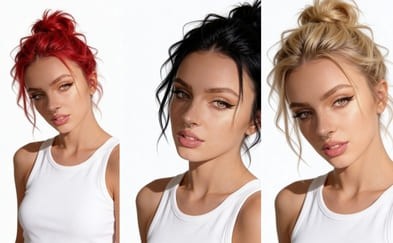
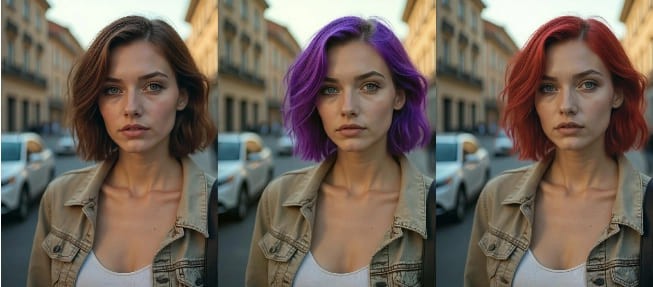
Recolor hair, change clothing, adjust backgrounds, refine lighting, or create a new scene while keeping a digital persona recognizable. The Chat to Edit example on this page changes blonde hair to copper red while preserving the face, freckles, expression, pose, lighting, and composition.
Ecommerce product visuals and creative testing
Generate product concepts, clean backgrounds, lifestyle variations, packaging scenes, and campaign images without arranging a new shoot for every idea. Google’s Nano Banana 2 Lite launch demonstrates room concepts and product-studio workflows; APOB AI connects product and creator images with additional editing and video tools in one platform. Gemini 3.1 Flash Lite Image documentation
Hair, color, and local photo edits
Use a focused instruction to recolor one part of an image while preserving the rest. This is useful for virtual style testing, beauty content, product colorways, profile refreshes, and before-and-after posts where a controlled edit matters more than rebuilding the whole scene.
Image-to-video social content
Turn a finished APOB AI image into a moving product reveal, AI influencer clip, talking portrait, or short social concept. Nano Banana 2 Lite itself is an image model, while APOB AI provides a connected path into motion.
Aya Nakamura
I use the Nano Banana 2 Lite alternative to make quick, focused image revisions during early concept work. It gives me a lightweight edit that keeps the subject recognizable that I can evaluate before moving into the final production pass.

Emre Kaya
The Nano Banana 2 Lite alternative is useful for testing how to make quick, focused image revisions without committing to one direction too early. I still review the fine details before delivery.
Rosa Jimenez
For client previews, the Nano Banana 2 Lite alternative gives me a lightweight edit that keeps the subject recognizable. That makes feedback more specific before I invest time in final polish.
Kwame Boateng
I get the most consistent results from the Nano Banana 2 Lite alternative when the reference and prompt are clear. That makes it reliable enough to make quick, focused image revisions in routine work.
Keira Walsh
I cleaned up a small product photo and replaced the background in one pass. The label edges stayed sharp, which was the part I expected to fix by hand.
Riku Sato
I changed the room behind a pet photo without losing the fine feather detail. A short prompt worked better than listing every object I wanted removed.
Amelie Girard
The portrait variations kept the person's features recognizable while changing the setting and light. Two of the four options were ready to use.
Diego Fuentes
Small local edits followed plain-language instructions well. I could change one accessory without the rest of the image drifting.
Imani Cole
I restyled a bright still life for three social formats, and the colors stayed consistent after each crop. It saved a lot of repetitive cleanup.
Direct browser workflow with no API setup
Upload or describe an image, enter an instruction, choose the output settings, and generate in a creator-friendly web workspace.
Dedicated editing and 4K quality choices
Chat to Edit, face, clothing, background, recoloring, merging, upscaling, Ultra 4K, and UltraS 4K options provide more guided paths for common creator tasks.
Built for recognizable creator identities
Reference and AI influencer workflows help maintain a consistent digital persona across portraits, outfits, scenes, products, and campaigns.
Connected image and video creation
Continue the finished visual into image-to-video, talking-video, subtitles, and other creator tools without rebuilding the project in a separate platform.
It is not Nano Banana 2 Lite
APOB AI is an independent alternative, not a Google product or official Gemini integration. Models, controls, pricing, speed, output characteristics, and API availability differ.
It is not a replacement for a high-throughput developer API
Teams specifically building ultra-low-latency, programmatic 1K image applications may prefer Nano Banana 2 Lite’s Gemini API positioning. APOB AI is designed primarily as a guided creator platform.
Results still depend on the input and prompt
Blurry source images, vague instructions, conflicting changes, and difficult identity-preservation edits can require clearer references or multiple generations.
Quality options and credits can vary
Higher-quality modes and repeated iterations may use more credits, and available models or settings can change. Review the live interface before a production batch.
No Credit Card Required
Answers about Nano Banana 2 Lite, APOB AI, 1K and 4K output, photo editing, AI influencer consistency, credits, prompts, video continuation, and commercial use.
Q1: What is Nano Banana 2 Lite?
Nano Banana 2 Lite is Google’s efficiency-focused AI image generation and editing model. Its official model ID is gemini-3.1-flash-lite-image, and Google positions it for low-latency, cost-effective, high-volume image workflows.
Q2: Is Nano Banana 2 Lite the same as Nano Banana 2?
No. Nano Banana 2 Lite prioritizes speed, cost efficiency, and high-volume 1K output, while Nano Banana 2 is the more general-purpose model in Google’s current image family.
Q3: Is Nano Banana 2 Lite for images or videos?
Nano Banana 2 Lite is an image generation and image editing model. It does not generate video by itself, although an image can be passed into a separate image-to-video workflow.
Q4: What resolution does Nano Banana 2 Lite support?
Google’s current Gemini API documentation lists 1K as the supported output size for Nano Banana 2 Lite. It does not list native 2K or 4K output for this model.
Q5: What can Nano Banana 2 Lite create?
It can create and edit portraits, product concepts, stickers, social visuals, room concepts, color variations, backgrounds, and other prompt-led images for rapid ideation and interactive applications.
Q6: Can Nano Banana 2 Lite edit an existing photo?
Yes. The model supports image-plus-text editing, including local changes such as recoloring an object, adjusting a background, or refining selected visual details.
Q7: What is the APOB AI Nano Banana 2 Lite alternative?
APOB AI is an independent creator platform for prompt-based image generation and editing. It offers Chat to Edit, reference-led workflows, AI influencer tools, 4K quality options, and connected image-to-video features for people seeking a practical Nano Banana 2 Lite alternative.
Q8: Is APOB AI affiliated with Google or Gemini?
No. APOB AI is an independent product and is not affiliated with, endorsed by, or an official provider of Google, Gemini, or Nano Banana 2 Lite.
Q9: Can APOB AI create the same kind of effect as Nano Banana 2 Lite?
Yes. APOB AI can pursue comparable outcomes such as prompt-to-image generation, background changes, color edits, portrait refinement, and product visual variations. Exact model behavior and results differ.
Q10: Can APOB AI create better images than Nano Banana 2 Lite?
For some briefs, APOB AI may produce a result that fits better, especially when the workflow benefits from 4K quality options, AI influencer consistency, dedicated editing tools, or image-to-video continuation. Quality is subjective and input-dependent, so no tool is guaranteed to win every prompt.
Q11: Why choose APOB AI instead of Nano Banana 2 Lite?
Choose APOB AI when you want a direct browser workspace instead of an API-first setup, plus dedicated portrait, clothing, face, background, upscaling, AI influencer, and image-to-video tools in the same creator workflow.
Q12: Can APOB AI change hair color while keeping the face unchanged?
Yes. Upload a clear base photo, describe the new hair color, and explicitly preserve the face, freckles, skin tone, expression, hairstyle, clothing, pose, lighting, and background. The guide on this page demonstrates blonde-to-copper-red recoloring.
Q13: How do I preserve identity during an edit?
Use a sharp source image, identify exactly what must change, list the facial and styling details that must stay unchanged, and avoid combining too many unrelated edits in one prompt.
Q14: Is APOB AI useful for consistent AI influencer images?
Yes. APOB AI includes reference and AI influencer workflows designed to keep a digital persona recognizable across portrait edits, outfits, scenes, product visuals, and social content.
Q15: Does APOB AI offer 4K image options?
The APOB AI editing interface shown in this guide includes Ultra 4K and UltraS 4K quality options. Availability, credit use, and the best option can vary by the selected workflow and current plan.
Q16: Can I try APOB AI for free?
APOB AI offers free daily credits according to its current AI Photo Editor page. Sign in and check the live credit display because offers, generation costs, and model availability can change.
Q17: Do I need an API key to use the APOB AI alternative?
No API key is needed for the normal APOB AI browser workflow. Sign in, open the image tool, upload or describe the source, enter a prompt, choose the output settings, and generate.
Q18: Can I turn the finished APOB AI image into a video?
Yes. APOB AI includes image-to-video tools, so a finished portrait, product visual, or social image can continue into an animation workflow without leaving the platform.
Q19: What prompt structure works best for image editing?
State what to change, what to preserve, the desired realism or style, and the final use. For precise edits, mention identity, hair, skin, lighting, background, composition, and any details that must remain untouched.
Q20: Can I use the generated image commercially?
Commercial use depends on your APOB AI plan, the current terms, and your rights to the uploaded people, brands, products, and source material. Review the latest terms before using an output in paid advertising or client work.


