MiniMax H3 favors 4–15-second shots, documented 2K regeneration, native stereo, and an open-weight route. Seedance 2.5 favors stories up to 30 seconds, larger reference packs, and targeted editing. Start free without a credit card; models, settings, and allowances vary by account, region, and rollout.
Step 1: Open the Create workstation and choose the production mode
Problem: Mode and provider are easy to confuse. Action: Sign in and choose Storyboard, Image, Text, Talking, Clone, Edit, Extend, or Subtitles from the Video rail. Model branch: test H3 as a short modular shot; test Seedance as one longer sequence. Example: use Image to video for an approved skincare pack shot or Text to video for a four-second atmosphere test. Verified help: The workstation guide explains the rail. Limit: Mode does not identify the provider; no H3/Seedance toggle appeared.
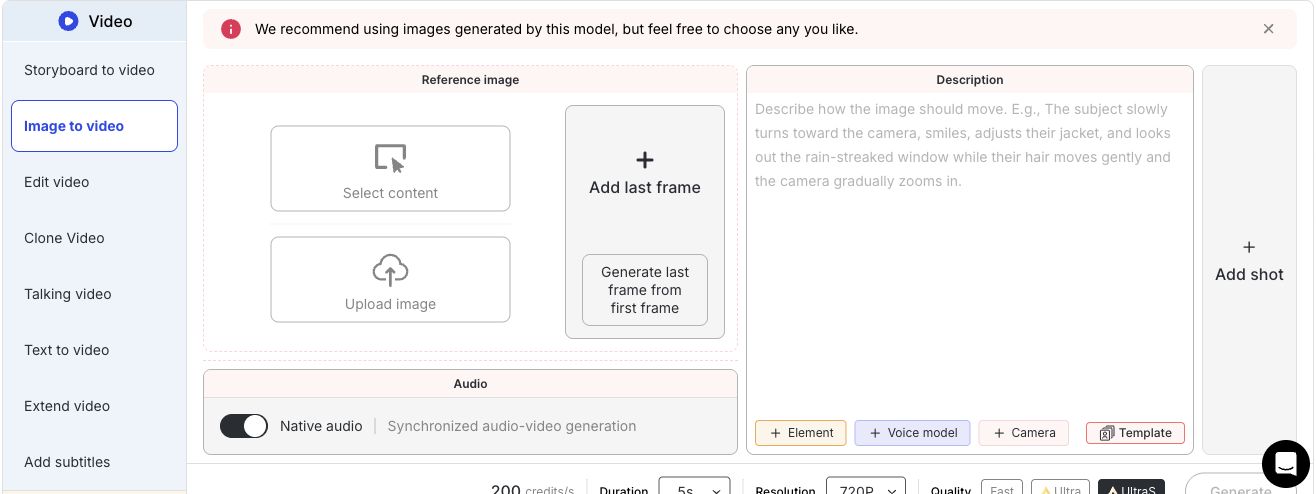

Step 2: Add the first frame and only the controls your quality tier supports
Problem: More references can create conflicts, while hosts expose different limits. Action: Add an authorized first frame with Select content or Upload; add a last frame only when the ending matters. Model branch: give H3 a small, role-specific pack; use Seedance’s larger capacity only when each asset has one job. Example: one 9:16 bottle still plus a cap-close motion and quiet click. Verified help: The Image to Video guide covers frame, audio, Element, voice, and Camera controls. Limit: Last frame and multi-shot conflict; changing quality can clear inputs.
Step 3: Write the prompt, lock delivery settings, and read the cost before submitting
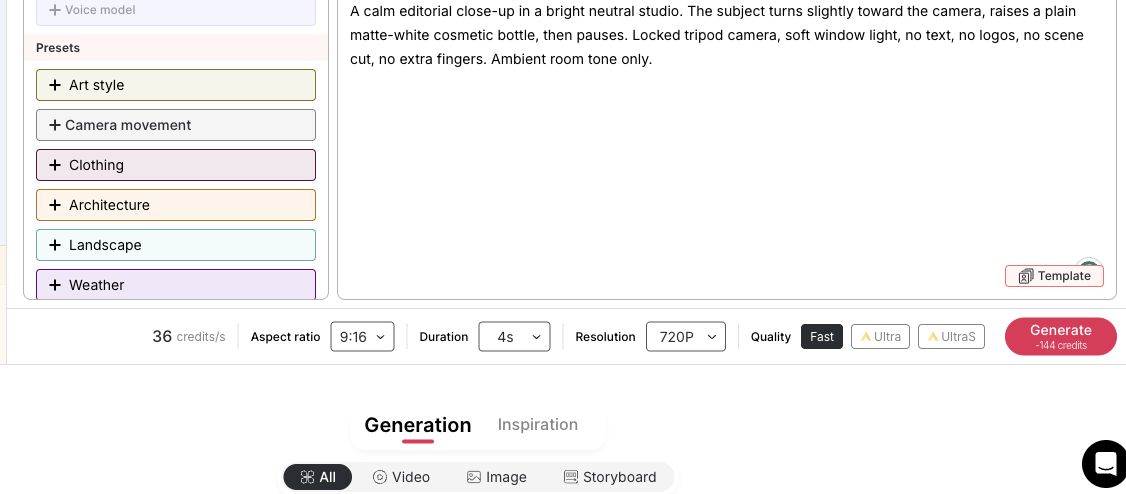
Problem: An identical sentence is not always a fair model prompt. Action: Keep the deliverable fixed, then structure H3 around a short action order and reference roles; give Seedance timestamps for the longer sequence. Record quality, resolution, duration, ratio, audio, and cost. Example: “Turn, raise the matte-white bottle, pause. Locked tripod; no text, logos, cut, or extra fingers.” On September 3, 2026, one account showed Fast, 4s, 720P, 36 credits/s, and 144 credits total. Verified help: Cost appears before Generate. Limit: This is dated UI evidence, not universal pricing.

Step 4: Generate one diagnostic, then find and inspect the result
Problem: A batch can multiply the wrong defect. Action: Submit one diagnostic, watch Generation, then find it under History → My → Contents → Video. Model branch: inspect H3 for short-shot control and audio sync; inspect Seedance for continuity, reference roles, and transitions. Example: check label, hands, camera, and cap-click before variants. Verified help: See History and content details. Limit: Nano downloads are watermarked; failed-job credits should return, but verify the balance.
Step 5: Run the fair comparison and count the work needed for approval
Problem: One lucky render hides approval cost. Action: Hold assets, ratio, duration, audio, and acceptance gates constant; then optimize each model and count rerolls and repairs. Example: compare three H3 attempts at X with one Seedance attempt at Y plus editing. Model decision: choose the lower approved-output cost among clips that pass mandatory gates. Verified workflow: accepted clips can move to Edit, Extend, or Lip Sync. Limit: If H3 needs an external MiniMax host, record it; cross-host price and latency are not pure model results.
Evaluation item | Acceptance rule | Record |
|---|---|---|
Rights and required identity | Inputs are authorized; required face/product details survive | Pass/fail |
Delivery format | Duration, ratio, resolution, and caption area match | Pass/fail |
Motion and camera | Physics, framing, and camera path match | 0–2 |
Audio and references | Sound cues align; assigned references keep their roles | 0–2 |
Artifacts and text | No unacceptable anatomy, logos, or invented copy | 0–2 |
Production efficiency | Attempts, time, cost, and repairs | Record totals |
Reject failed mandatory gates. For passing outputs, compare quality and approved-output cost—not first-render price.

MiniMax H3 vs Seedance 2.5 at a Glance
Quick verdict: Treat the model name as a production decision, not a leaderboard result.
Need | Better starting route |
|---|---|
Short, controlled, high-resolution shot | MiniMax H3, subject to the documented 2K regeneration route |
Longer continuous storytelling | Seedance 2.5 |
Reference-heavy production | Seedance 2.5 for capacity; either model still needs clear reference roles |
High-volume experimentation | The route with the lower approved-output cost after rerolls |
Ecommerce and social ads | H3 for modular hooks; Seedance for longer demonstrations |
Narrative or previsualization | Seedance for a continuous arc; mixed workflow for replaceable shots |
Evidence status — September 3, 2026: Based on provider documents, APOB pages, the official Help Center, and a signed-in Create-workstation walkthrough. Screenshots prove interface state—not model quality or a controlled H3-versus-Seedance benchmark.
APOB checkpoint: The reviewed Text to video and Image to video panels showed workflow and quality controls, but no provider-model selector. APOB has a dedicated Seedance page and an H3 alternative page. Verify the live route; use a documented MiniMax route if H3 is not shown.
Start with the production constraint you cannot change. Provider specifications, hosted settings, and APOB availability remain separate below.
Decision factor | MiniMax H3 | Seedance 2.5 | Practical reading |
|---|---|---|---|
Developer | MiniMax | ByteDance Seed | Both launched July 31, 2026 |
Model type | Multimodal audio-video generation | Joint audio-video generation with reference editing | Not timeline editors |
Inputs | Text, endpoint frames, image, video, audio | Text, image, video, audio, motion, creative references | Uploads vary by route |
Duration | 4–15 seconds | Up to 30 seconds; extension supported | Modular shot versus longer arc |
Resolution | 768-pixel short side; up to 2K regeneration | No universal tier in reviewed launch pages | Do not relabel host upscaling as native 4K |
Aspect ratios | 21:9, 16:9, 4:3, 1:1, 3:4, 9:16, and more | Varies by route | Verify export format |
Frame rate | 24 FPS documented | Varies by route | Inspect the rendered file |
Native audio | 32 kHz stereo | Synchronized joint audiovisual output | Languages and codecs vary |
References | 9 images, 3 videos, 3 audio; 12 mixed files total | 30 images, 10 videos, 10 audio | Clear roles beat volume |
First/last frame | Zero-, one-, or two-image FL2VA workflow | Endpoint control varies by route | Check the interface |
Editing | Instruction-based reference editing and motion transfer | Timestamped, targeted edits and extension | Scope varies by host |
Availability | Open base weights; some hosted modules excluded | Closed/hosted | Open weights are not the full stack |
Pricing basis | Check MiniMax’s current API/token-plan page or billing screen; self-hosting adds infrastructure | Depends on product, partner, region, and account | Compare approved-output cost |
Generation time | Queue and settings affect latency | Queue and settings affect latency | No stable “fastest” claim |
Best fit | Short controlled shots; open-weight teams | Longer stories; more references; targeted edits | Choose the hardest constraint |
Main limitation | 15-second ceiling; incomplete open stack | Closed, route-dependent delivery | Review every output |
APOB status, September 3, 2026 | H3-style alternative page | Dedicated page; settings may differ from ByteDance | Recheck selector/credits |
Sources: MiniMax launch, open-source overview, model card, API pricing, Seedance launch, and model page.
What specifications cannot prove: Specifications do not prove adherence, consistency, physics, text, lip sync, or speed. Test the same assets on dated routes.
MiniMax H3 vs Seedance 2.5 Pricing and Access
There is no universal price. Check MiniMax pricing; H3 rates vary by route and settings, self-hosting adds infrastructure, and Seedance pricing depends on the host. In APOB, record the displayed credits, settings, date, and route.
Access route | Cost to record | Availability check |
|---|---|---|
MiniMax API | Seconds, resolution, paid inputs, regeneration | Check current pricing and region |
Self-hosted H3 | Compute, storage, deployment, moderation, maintenance | Check license, hardware, and excluded modules |
Hosted Seedance | Credits/API charge, queue, settings, repairs | Confirm model identifier and controls |
APOB | Displayed generation and repair credits | Confirm selector; allowances vary |
Approved-output cost = all attempts + repair, extension, upscale, audio, and review costs. Use the route’s dated pricing screen, not a universal verdict.
Choose MiniMax H3 when the shot is short and technical control matters
Choose H3 for an accepted unit of 15 seconds or less when open weights, 2K regeneration, or endpoint control matters.
Choose Seedance 2.5 when duration and revision are the constraint
Choose Seedance for one 20–30-second arc, more assigned references, extension, or timestamped revision.
Use a mixed workflow when exploration and delivery have different needs
Prototype modular hooks with H3, build a continuous passage with Seedance, then match format, grade, identity, and audio in editing. Availability still varies.
Re-test before committing when the host changes
Re-test after updates. Native output differs from upscaling, reference capacity from clarity, and first-render price from approved-output cost.
How APOB Fits a Fair Model Test
Use the workstation as a traceable production shell
The workstation separates modes, inputs, settings, displayed cost, and the Generation feed. Record the route, prompt, asset rights, quality, resolution, duration, ratio, audio state, and credits for each test. APOB is not the official MiniMax or ByteDance platform.
Reuse approved assets instead of uploading them repeatedly
Select content can reuse an APOB image, while History stores models, Elements, images, videos, and storyboards. Reuse one approved influencer portrait, product still, or storyboard frame so fewer variables change.
Continue only after the diagnostic passes
Use Edit video for a named defect—not to hide a failed generation. “Free to start” means current Nano access without a card, not unlimited generation, watermark-free delivery, or guaranteed access to both models. Check Credits, Plans & Billing before a batch.
Obtain consent for face, voice, and motion references
Obtain campaign-specific permission for each likeness, voice, gesture, and performance. A headshot release may not cover synthetic dialogue or endorsement. APOB’s Terms require ownership or permission; retain separate face, voice, motion, and campaign consent.
Avoid deceptive public-figure or private-person content
Do not make a celebrity, executive, politician, customer, or employee endorse, speak, or act without authorization. YouTube provides privacy-request and likeness-detection routes with variable eligibility.
Clear commercial, copyright, music, and trademark rights
Check model licenses, host terms, plan rights, and destination rules. Clear every photo, script, logo, package, font, sound, music, and motion reference; generation does not erase rights.
Disclose realistic synthetic content where required
Verify current upload and ad policies. YouTube and TikTok require disclosure or labels for specified realistic synthetic content. Meta describes region-dependent “AI info” labels for qualifying ads. Meta, June 1, 2026.
Protect uploads and understand model responsibilities
Minimize personal data, restrict access, and review APOB’s Privacy Policy. Open-weight H3 users assume deployment, security, moderation, licensing, and retention duties. This is not legal advice.
A 10-second TikTok product hook for a DTC beverage
Deliverable: 9:16 can reveal, tab crack, pour, and pack shot. Risk: logo, hand, or liquid drift. Start: H3 for the short audiovisual unit. Check sync, physics, label, and caption space; edit accepted variants in APOB. TikTok reported U.S. Shop sales up 120% year over year in early 2025. TikTok, June 13, 2025.
A 30-second fashion lookbook with one consistent AI model
Deliverable: backstage prep, corridor walk, runway turn, fabric close-up. Risk: identity and garment drift. Start: Seedance for the 30-second structure. Assign identity, outfit, set, blocking, and fabric roles.
A marketplace product video where shape and label accuracy matter
Deliverable: 12-second refill-pouch demo. Risk: unreadable packaging or a moved spout. Start: H3 for one macro action; Seedance for a multi-angle sequence. Check three package frames and reject inventions. IAB projects U.S. digital video ad spend above $80 billion in 2026. IAB, May 5, 2026.
A faceless YouTube Shorts scene with ambience and sound cues
Deliverable: eight-second overhead budgeting cutaway with pencil sound. Risk: finance claims, bank branding, or loud audio. Start: H3 for compact audiovisual direction. Check neutrality, object count, sound, and caption space. YouTube reports over 200 billion daily Shorts views. YouTube for Press, accessed September 3, 2026.
An AI influencer campaign requiring several vertical variants
Deliverable: three 9:16 posts with one fictional adult. Risk: identity drift or undisclosed endorsement. Start: H3 for separate variants; Seedance for one reference-led sequence. Check identity, hands, product truth, disclosure, and crop.
Expert Prompts for Each Model
Use these as controlled production briefs. Replace every asset reference with a file you own or are authorized to use. Keep the shared outcome fixed; adapt only the model-specific instruction structure.
User and purpose | Shared base brief | MiniMax H3 adaptation | Seedance 2.5 adaptation | Expected output | Review checklist |
|---|---|---|---|---|---|
TikTok performance marketer — beverage hook | 9:16, 10s; authorized can; dawn macro reveal, tab open, pour, pack shot; slow push; crack and fizz. Preserve label and liquid; no new text, extra cans, warped fingers, or shake. | Assign product, pour-motion, and audio references; time 0–3s, 3–7s, 7–10s. | Label references; run one timed 0–10s action and hold from 8s. | Sound-on ad draft | Label; hand; sync; physics; caption zone |
Ecommerce seller — refill pouch | 9:16, 12s; authorized pouch; locked close-up, 5cm slide, open spout, refill, upright finish; click and pour. Preserve shape and text; no claims. | Use unopened and finished frames as endpoints; one move. | Assign front, side, and spout; time 0–4s, 4–9s, 9–12s. | Marketplace demo | Shape; spout; text; volume; invented features |
AI influencer creator — three verticals | Authorized fictional adult; 9:16, 6–10s each; waist-up, soft key/fill, restrained gestures, room tone. Preserve face, hair, wardrobe; no celebrity resemblance, speech, or endorsement. | Three modular shots; portrait for identity, pose board for gesture; end front-facing. | One 24–30s sequence with three timed beats; cut accepted moments. | Three source clips | Identity; hands; rights; disclosure; edit points |
Fashion producer — 30s lookbook | 9:16; authorized model and coat; backstage prep, tracking walk, turn, fabric close-up; footsteps only. Preserve garment; no redesign or unlicensed music. | Three matched 10s shots with shared identity, outfit, and endpoints. | One 30s sequence; assign identity, garment, set, walk, audio; hold 27–30s. | Editorial lookbook | Garment; face; seams; transitions; audio rights |
Faceless YouTube creator — finance cutaway | 9:16, 8s; locked overhead desk, three plain envelopes, pencil, calculator, daylight, soft room tone. No people, logos, claims, graphs, or added text. | Image controls palette; audio controls pencil; keep object count. | Arrange 0–3s, pencil 3–6s, clean hold 6–8s. | Neutral Short cutaway | Claims; logos; count; sound; subtitle space |
Agency artist — launch previsualization | 16:9, 30s; authorized mockup; lab macro, texture, reveal, handoff, end-card space; 85mm dolly; cleared audio. No real brand, claims, celebrity, or invented copy. | Three matched 10s shots; assign camera, product, and audio. | Timed 30s arc; assign set, mockup, hand, light, and audio; edit blocking locally. | Client-reviewable previs | Continuity; mockup; claims; editability; rerolls |
MiniMax H3 pros
Modular production. The 4–15-second range suits independently replaceable shots.
2K and native audio. MiniMax documents contextual 2K regeneration, stereo audio, and multimodal references.
Open base weights. Technical teams can deploy released checkpoints under the Community License.
Seedance 2.5 pros
Longer single-pass structure. Up to 30 seconds can hold setup, development, and resolution.
Larger reference capacity. ByteDance lists 30 images, 10 videos, and 10 audio clips as separate limits.
Editing and extension. Timestamp direction and targeted changes may reduce full-scene rerolls.
MiniMax H3 cons
15-second ceiling. Longer stories need additional shots, continuation, or editing.
Partial open release. Initial weights exclude Context-IR and 2K regeneration.
Availability varies. Check APOB’s live model selector before planning an H3 campaign.
Seedance 2.5 cons
Hosted access. Controls, pricing, resolution, and availability depend on the access route.
Reference conflicts. Too many poorly labeled references can reduce prompt clarity.
Longer rerolls. Replacing a failed 30-second scene can require more time or credits than rerunning one short shot.
No Credit Card Required







Answers about duration, audio, references, APOB workflow, displayed credits, free watermarks, failed generations, commercial use, privacy, and editing.
Which is better, MiniMax H3 or Seedance 2.5?
H3 fits short modular or open-weight work; Seedance fits longer, reference-heavy stories and targeted revision. Neither is universally better.
Which model is better for short ads?
Start with H3 for a 6–15-second modular ad, then compare label integrity, audio timing, rerolls, and approval cost.
Which model is better for a 30-second video?
Seedance documents up to 30 seconds; H3 requires multiple shots or continuation. A host may expose less.
Which model produces native audio?
Both document joint audio-video generation. MiniMax specifies 32 kHz stereo; APOB’s reviewed Image route showed a tier-dependent Native audio toggle.
Which model supports more references?
Seedance documents 30 images, 10 videos, and 10 audio clips; H3 documents 9, 3, 3, and 12 mixed files. Hosts may expose fewer.
Which is better for image-to-video?
Use H3 for a short endpoint-controlled shot; use Seedance for longer, reference-heavy editing. APOB’s available frame, audio, camera, and shot controls vary by tier.
Which is better for product videos?
H3 suits one macro action; Seedance suits a longer multi-angle demo. Reject packaging changes and invented features.
Which handles AI influencer consistency better?
Seedance offers longer continuity; H3 offers replaceable units. Both need an authorized identity source, simple blocking, and frame review.
Can I use the outputs commercially, and will free APOB downloads have a watermark?
Commercial rights vary by route, plan, inputs, and campaign. APOB’s content guide says Nano downloads are watermarked; upgrading does not remove existing watermarks.
Can I try this workflow for free, and does APOB include video credits?
APOB’s reviewed pages offer no-card onboarding. Its June 30, 2026 billing guide lists Nano at 80 daily credits; eligibility varies and is not unlimited.
Are both models available on APOB AI?
Seedance has an APOB page; H3 has an alternative page. The September 3, 2026 walkthrough showed no provider selector. Confirm before testing.
Which model has higher verified resolution, and what does APOB expose?
H3 documents 768-pixel short-side output and up-to-2K regeneration. ByteDance does not claim universal native 4K. One reviewed APOB Text test showed 720P.
Which model is cheaper after rerolls, and which generates faster?
No fixed winner exists. Record rate, total, attempts, repairs, and time on dated routes; APOB shows cost before Generate.
Which reference-control tradeoff matters most?
Capacity is not clarity. H3 supports a smaller mixed pack; Seedance accepts more references, but every file still needs one explicit role.
Should I generate short modular shots or one continuous sequence?
Use H3 when failed shots must be replaced independently. Use Seedance when one 20–30-second arc and continuity matter more than modular replacement.
What privacy and consent checks should I perform?
Document ownership and purpose-specific consent for every asset. Minimize personal data and verify retention, visibility, and sharing controls before publishing.


