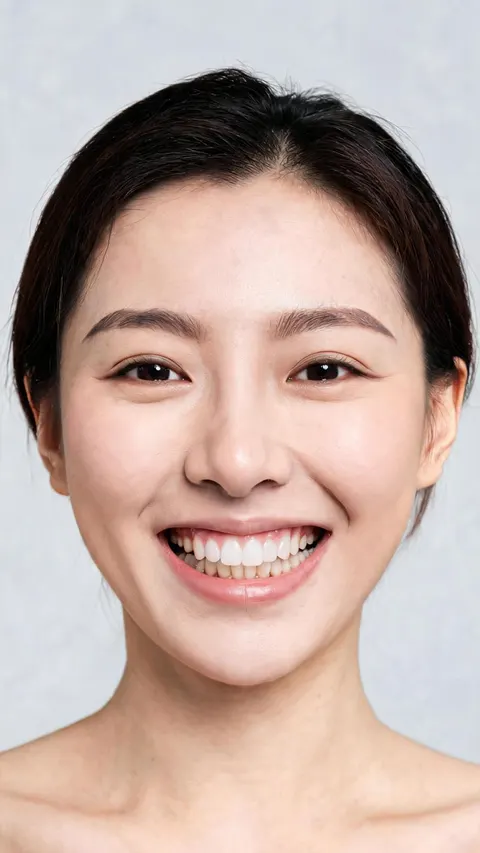
Original portrait
The source has slimmer, softer arches. Compare the entire face when judging the edit.
Try fuller, straighter or differently colored eyebrows on an existing portrait. Add a Base image, describe the brow look, generate a still and compare the whole face before downloading. Nano currently includes 80 daily credits; generation costs vary and free downloads are watermarked.
Explore a fuller brow shape while keeping a photo of your current look for comparison. Create a free APOB account and start with Nano's 80 daily credits. To use the AI eyebrow filter, choose Edit image → Chat to edit in the workspace.
Select Add in Source image and upload a sharp, front-facing portrait showing both eyebrows and eyes. Hair covering a brow or a strong beauty filter makes an eyebrow-shape edit harder to assess. Keep the original expression and framing visible.
The example requests fuller eyebrows with a gentle arch. Type the shown instruction into Edit description: “Make the eyebrows fuller with a soft arch. Keep the face unchanged.”
This requests the fuller, softly arched shape shown in the walkthrough. For another style, specify the thickness, arch, color, and hair texture. Ask to preserve the eyes, eyelids, skin, expression, and framing.
Choose the available quality and inspect the credit quote before clicking Generate for the brow preview.
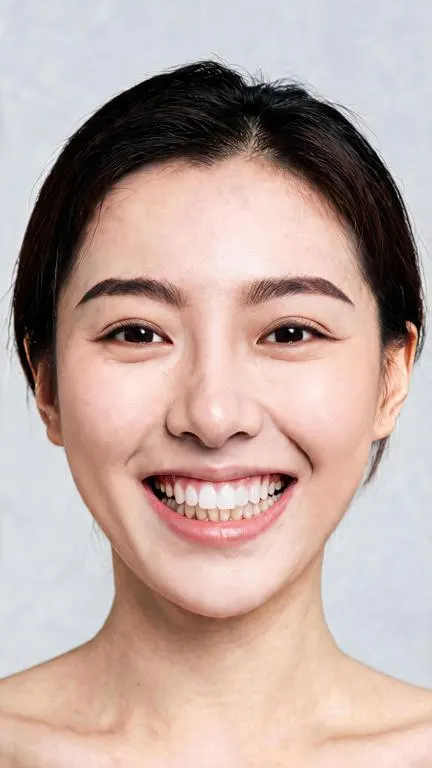
The example shows fuller brows with a soft arch. Compare the left and right brow shape, symmetry, individual hair texture, and color. Then inspect the eyes, skin, mouth, and overall facial proportions; reject a version that changes the person's appearance beyond the intended brow edit.
Keep the brow preview that suits the subject, with the eyes and expression still consistent with the source.
The source has slimmer, softer arches. Compare the entire face when judging the edit.
Fuller, straighter brows
The generated brows look denser and straighter. Other facial details also changed, so this is a style preview rather than an exact brow-only retouch.
A photo can help you compare a fuller brow, a flatter arch or a new tone before you change your makeup routine. APOB's Chat to edit starts from an existing Base image and a written edit description, then produces a new still. That makes the intended brow style explicit and gives you an original to compare against.
The workflow suits a single portrait concept: you can describe hair-like texture, taper, density and color together. The result is not a live AR camera overlay, a precise brow mapping tool or a manual pixel brush. AI may redraw nearby features despite preservation instructions.
Nano currently includes 80 daily credits. Sign in, check the current cost shown beside Generate and inspect the result before another attempt. Files downloaded on Nano have a watermark. Credits and plans · Content details and downloads

A client with a saved selfie tests softly straight versus gently arched brows to explain the look they prefer to a brow artist. The AI still is a visual reference, not a prediction of how grooming, tinting or microblading will look in person.
A beauty creator keeps one approved portrait and generates a fuller feathered version plus a darker, cleaner version. They compare the eye area and choose one for a lookbook moodboard, instead of presenting the edit as a real treatment outcome.
A cosmetics seller uses a licensed model photo to sketch a dark-brown brow direction for an internal campaign brief. The generated image must not be used as evidence that a real pencil produces that result; final ads need accurate product photography and approved claims.
A creator tries slightly straighter brows for a profile photo or YouTube Shorts cover and checks that the expression still looks like them. If the eyes or smile drift, they keep the original or regenerate with a tighter instruction.
Purpose: Test a fuller, flatter shape without a heavy makeup look. Prompt: “Edit only both eyebrows into noticeably fuller, straighter soft Korean-style brows with visible natural dark-brown hairs. Keep the same person, eyes, eyelids, skin, hairstyle, smile, teeth, lighting, background and framing. Do not add makeup.” Expected output: A still portrait with denser, straighter brows. Inspect the full face for drift; the APOB test did change details beyond the brows.
Purpose: Show a client a softer brow texture before a styling session. Prompt: “Add subtle feathered fullness to both eyebrows with individually visible hairs and tapered tails. Keep the existing arch height, eye shape, skin texture and daylight lighting.” Expected output: A reference image for discussion, not a guaranteed treatment preview.
Purpose: Compare a brow tone with a planned hair color. Prompt: “Shift the eyebrows toward a cool medium brown with natural root variation. Keep brow placement, facial identity, eyes, skin, hairstyle and background as close to the Base image as possible.” Expected output: A color concept; review for unwanted changes to hair and complexion.
Purpose: Test whether slightly stronger brows read at small size. Prompt: “Make both brows a little fuller and more defined, with natural hair texture and balanced tails. Preserve the expression, eyelids, lashes, lips, crop and lighting.” Expected output: A thumbnail candidate that must still be checked at full size before publishing.
Pro — Specific style instructions. Describe straightness, arch, density and tone in one request instead of searching through generic presets.
Pro — Existing-photo context. The Base image keeps the desired portrait in the workflow, so you can judge the new brows against the source.
Pro — Free credits for a trial. Nano currently refills 80 credits daily; read the live cost before generating.
Con — Other facial details can change. The supplied APOB result changed the brows and parts of the face and smile. Preservation prompts are requests, not guarantees.
Con — Static output only. This is an AI-generated still, not a real-time AR filter, brow mapping overlay or treatment forecast.
Con — Free download watermark. Nano downloads carry a watermark, and each generation spends credits. Paid-plan terms should be checked before commercial delivery.
Consent and likeness. Use your own portrait or obtain permission from the person pictured for the edit and intended distribution. Avoid implying someone endorses a brow product or treatment without consent.
Commercial use and copyright. Secure rights to the source photo, model likeness, branding and any reference assets. APOB's terms discuss generated-content rights between APOB and users, subject to third-party rights and applicable law; do not treat an AI output as an automatic rights clearance. APOB Terms of Service
Disclosure and truthful claims. Label a materially altered portrait when context or platform rules call for it. A generated brow look is a styling concept, not evidence that a cosmetic product or procedure creates the same result.
Privacy. Check the current privacy policy and client permissions before uploading private face photos. Review the plan's public/private controls, retention terms and the destination platform's rules before posting.
Answers about photo editing, free credits, quality, privacy, and publishing.
Yes. Nano currently refills 80 credits daily, but edits spend credits and the cost varies. Check the quote beside Generate. Nano downloads are watermarked.
No. APOB Chat to edit takes a Base image and makes a new still photo. It does not change a live camera feed.
Open Image → Edit image → Chat to edit, add the photo as Base image, describe the brow shape, generate, and compare with the original.
You can describe those looks in the Edit description. Generate separate candidates for a fair comparison; outputs vary with the source image and prompt.
You can request a tone such as cool brown or dark brown in the same prompt. Inspect skin, hair and eye color afterward for unintended changes.
No guarantee. In the supplied APOB test, fuller, straighter brows appeared, but facial proportions and the smile also changed. Review the entire image.
Use a sharp, front-facing portrait with both brows visible and fairly even light. Fringe, deep shadows and extreme angles make the result harder to assess.
The Edit Image guide documents Upload image for a local file and a mobile Choose a tool sheet. Sign-in is needed to generate.
Yes. Select content lets signed-in users choose existing media for the Base image; this was the route used in the supplied brow test.
You need to sign in to generate an edit. The documented Select content and Upload image paths both lead to a sign-in requirement for generation.
The price is server-driven and varies by plan and settings. Read the current amount beside Generate before starting; do not rely on a fixed page estimate.
Downloads made on the free Nano plan carry an APOB watermark. A later plan upgrade does not remove the watermark from content generated on Nano.
Potentially, if you have rights to the source photo and likeness, follow the current APOB terms and platform rules, and avoid misleading product or treatment claims.
No. It is a generated photo concept, not a physical treatment simulation or promise of a real-world outcome.
Do not assume every upload is private. Review APOB's current privacy policy and plan visibility controls before using confidential or client images.
The editing tools are documented on mobile. After a result finishes, open its content detail page and use Download; check the file and platform disclosure rules before posting.
Use an existing portrait, describe one brow change, and compare before you download. Nano files are watermarked.

