
Creating professional-looking user-generated content (UGC) starts with one critical factor: knowing how to sync audio and video. Whether you're recording a voiceover, vlog, or talking-head clip, perfect audio-video synchronization is key to maintaining viewer attention and trust.
In this tutorial, we’ll walk you through multiple ways to sync audio and video—from manual software editing to innovative AI solutions like APOB AI’s Lip Sync feature, designed for UGC creators and digital storytellers.
Why Knowing How to Sync Audio and Video Matters
Understanding how to sync audio and video ensures that your audience sees lips and speech in harmony. A mismatch between sound and visuals not only breaks immersion, it makes your content look unpolished.
This is vital for:
TikTok and Instagram Reels
Explainer and tutorial videos
Talking-head UGC
Voiceover narrations
AI-generated avatars and lip sync videos
1. Use APOB AI’s Lip Sync Tool (Best AI Method)
If you want to sync audio and video effortlessly—especially for faceless videos or AI avatars—APOB AI’s Lip Sync tool is your go-to solution. It’s specifically built for UGC creators who want professional results without technical hurdles.
How It Works:
Upload a high-quality selfie or build an avatar using APOB AI’s AI Influencer Generator.
Upload or select an audio file (narration, script, or soundtrack).
Use the AI Lip Sync tool to automatically match the voice with realistic mouth movement.
Download your finished video and publish across platforms.
Pros:
Requires no editing experience
Designed for voiceovers, brand intros, short-form UGC
Excellent for creating lip sync videos with avatars
Cons:
Best results require front-facing, high-res images
Limited manual sync adjustments
🔗 Try it now: apob.ai
2. Adobe Premiere Pro (Manual Sync Option)
For full creative control, Adobe Premiere Pro allows you to manually sync voice and video using audio waveforms.
How to sync audio and video manually:
Import both your separate audio and video tracks.
Align the waveforms or clapper sound.
Fine-tune to match the lip movements precisely.
Pros:
Maximum control for pros
Ideal for multi-camera setups
Cons:
Steep learning curve
Time-intensive for UGC creators
3. Descript: Easy Auto-Sync with Transcription
Descript is ideal for content creators who want a fast way to sync narration and footage. It transcribes your script and automatically aligns it with the video timeline.
Pros:
Beginner-friendly
Perfect for podcast videos and interviews
Also supports voice cloning for videos
Cons:
Not fine-tuned for lip sync
Requires paid plan for advanced tools
4. CapCut & VN (Mobile-Friendly Editors)
These popular mobile editors let you sync audio and video on the go. Great for short TikToks or IG Reels with audio overlays.
Pros:
Easy to use
Free and widely accessible
Cons:
Minimal precision
Limited use for ai lip sync videos
5. iMovie & Final Cut Pro (Mac Only)
Mac users can rely on iMovie or Final Cut Pro for native waveform syncing.
Pros:
Great for beginners and hobbyists
Fast processing on MacOS
Cons:
Mac-only tools
No native AI or lip sync features
Final Thoughts: The Best Way to Sync Audio and Video in 2025
Whether you’re new to content creation or a seasoned editor, knowing how to sync audio and video is crucial. If you’re a UGC creator looking to save time and boost production value, then AI tools like APOB AI’s Lip Sync are unmatched.
With just an image and audio file, you can create studio-quality, synced videos perfect for TikTok, YouTube Shorts, or Instagram. Plus, APOB AI gives you the option to work faceless—with AI avatars that do the talking.
FAQs on How to Sync Audio and Video
Q1: What’s the easiest way to sync audio and video for social content?
A1: Use APOB AI’s Lip Sync feature for instant results. If you’re editing manually, CapCut or Descript are fast mobile options.
Q2: Can I create an AI-generated avatar that talks in sync?
A2: Yes, APOB AI lets you build an avatar and sync it with any voice recording using its ai girlfriend generator or influencer tools.
Q3: Is there a free way to sync audio and video?
A3: Yes. CapCut, VN, and APOB AI (with daily free credits) let you experiment without paying upfront.
Q4: What type of audio works best for lip sync AI?
A4: Clean, mono audio with minimal background noise ensures the best results with lip sync tools like APOB AI.

Be the first to like this.




Top AI Accent Generator to Make Your Videos Go Viral in 2025
Abstract
In 2025, AI accent generators are revolutionizing how content producers create content for TikTok, YouTube Shorts, and other platforms. From voice generators for female and male voices on TikTok to AI avatars with accent choices, applications enable producers to create engaging, high-quality audio that halts the scroll and boosts interaction. The benefits, the top tools, how-to tips, and AI accent generator future directions are discussed in this article.
Introduction: Why AI Accent Generators Are Important in 2025
The demand for AI voices is on the rise, especially in short-form videos, and the global market is anticipated to grow at a very high growth rate in the next couple of years (Straits Research, 2025). Unique accents and voice inflections catch people's attention instantly and make videos more interesting. TikTok has popularized TikTok girl and male voice generators, and they have demonstrated how interesting AI voices can be for storytelling, comedy, and branding purposes (Shopify, 2025).
What is an AI Accent Generator?
An AI accent generator is a software that converts written text to audio voice with the potential for creators to add regional or stylistic accents. Unlike normal text-to-speech, AI accent generators:
- Create more natural, lively, and human-like voices (HeyGen, 2025).
- Allow you to select female, male, or personalized voice models.
- Include emotional tones to match your tone of content.
By incorporating accents, producers can enhance relatability, entertainment value, and viewership (Podcastle, 2025).
Top Advantages of Utilizing AI Accent Generators
- Improve viewership engagement – Unique voices make your content stand out and enhance watch time.
- Tailor content to worldwide audiences – Regional accents or stylistic tones enable addressing diverse audiences (Lovo AI, 2024).
- Cost and time savings – No need to rent costly audio studios or hire professional voice actors (1 for All, 2025).
- Freedom of creativity – Swivel between the voices and accent with ease to test which sound works.
Top AI Accent Generators of 2025
4.1 APOB AI – Top Multi-Directional AI Voices and Talking Avatars
APOB AI stands out as the top AI accent generator since it can merge voice creation with engaging talking avatars (aijourn.com, 2025). Some of its most unique aspects are:
- High-quality and life-like girl and male TikTok voice creators.
- AI accents for various languages and regional tones.
- Lip-syncing avatars for perfect lip syncing, perfect for advertisements, tutorials, or sponsored content.
For vireality-conscious creators, APOB AI is a unified solution: create voices, insert accents, and construct animated avatars—all within one platform.
4.2 TikTok AI Voice Generator – In-App Feature for Creators
TikTok has an in-app text-to-speech feature that's well-liked among content creators.
- It is often used for the TikTok girl voice generator to create memes, tutorials, or stories.
- Easy and built-in in the application (Shopify, 2025).
- Drawbacks: no personalization and less accent options compared to APOB AI.
4.3 Other Best AI Accent Generators
There are other tools with very large databases of accents and voices, which are:
- British, American, Australian, and local accents.
- Male and female versions of voices.
- Large catalogs for maximum freedom to be creative.
These tools are handy but not integrated into avatars like APOB AI.
How to Use AI Accent Generators Effectively
- Choose the right gender and tone for your video: TikTok girl vs. male voice.
- Apply accents to match your brand or storytelling style.
- Pair audio with captions or subtitles to increase accessibility and engagement.
- Experiment with APOB AI’s talking avatars to combine voice, emotion, and visual appeal.
Common Mistakes to Avoid
- Overusing robotic or unnatural voices.
- Ignoring consistency in brand tone and style.
- Not trial-testing voices with your audience (Accio, 2025).
- Having multiple accents on one video, confusing the viewer.
3. The Future of AI Voices on Social Media
- AI voices will be more natural-sounding, with deeper emotions and inflections (ProfileTree, 2025).
- Chatty avatars that can be personalized will enable brands and content creators to keep things consistent from campaign to campaign.
- AI-based accent generators will be more prevalent within global content creation, helping creators connect with users globally.
FAQs
Q1: What is the best TikTok AI accent generator?
A: The creator's favorite is APOB AI, offering a mix of TikTok girl and boy voice with natural-sounding accents and speaking avatars.
Q2: Do I get to generate both male and female voices using AI?
A: Yes. APOB AI can be used as tiktok girl voice generate and tiktok male voice generator. We offers female, male, and custom voice models with accent facilities. What's more, you could train your own ai voice model.
Q3: How realistic are AI-accented sounds?
A: The AI accent generated by us sounds very real. To make the ai girl voice or ai male voice more realistic, you can adjust the 'Emotion' of the sound.
Q4: Is APOB AI a TikTok voice generator free software?
A: Our platform is free to try, with advanced features being offered through paid platforms. Sign up for free and you will get 80 free credits every day.
Q5: Can one use AI accent generators for business ads?
A: Yes. AI Accent Generator is ideal for social commercials, tutorials, and sponsored campaigns.
Conclusion
In 2025, AI accent generators become a must for creators to make videos go viral. APOB AI is the best of the best with diverse voices, authentic accents, and conversation avatars to assist creators in saving time, cutting costs, and creating professional, engaging content on any platform.
References
APOB.ai. (2025) Creator AI | Personalized AI Portrait | AI Image & Video. Available at: https://apob.ai/ (Accessed: 23 September 2025).
Accio. (2025) Best Selling AI Voices for TikTok 2025: Top 6 Revealed!. Available at: https://www.accio.com/business/best-selling-ai-voice-for-tiktok (Accessed: 14 September 2025).
aijourn.com. (2025) Creators Can Now Build AI Influencers in Minutes With APOB AI's New Avatar and Video Tools. Available at: https://aijourn.com/creators-can-now-build-ai-influencers-in-minutes-with-apob-ais-new-avatar-and-video-tools/ (Accessed: 22 July 2025).
HeyGen. (2025) 10 Creative Uses of AI Voice Generators for Storytelling. Available at: https://www.heygen.com/blog/ai-voice-generator-for-immersive-storytelling (Accessed: 26 May 2025).
Influencer Marketing Hub. (2024) Top 51 AI Marketing Statistics for 2024. Available at: https://influencermarketinghub.com/ai-marketing-statistics/ (Accessed: 2 October 2024).
Lovo AI. (2024) The Key Benefits of Using AI Generated Voices. Available at: https://lovo.ai/post/the-key-benefits-of-using-ai-generated-voices (Accessed: 18 July 2024).
Podcastle. (2025) You Know That AI Voice on TikTok? Here's Where It Came From. Available at: https://podcastle.ai/blog/tiktok-ai-voice/ (Accessed: 3 February 2025).
ProfileTree. (2025) AI Voice: Market Growth, Leading Tools, Trends & Business Impact. Available at: https://profiletree.com/ai-voice-market-growth-leading-tools-trends/ (Accessed: 4 March 2025).
Shopify. (2025) TikTok AI Voice: Complete 2025 Guide + Best Generators. Available at: https://www.shopify.com/blog/tiktok-ai-voice (Accessed: 7 August 2025).
Straits Research. (2025) AI Voice Generators Market Size, Trends, Insights & Growth Report by 2033. Available at: https://straitsresearch.com/report/ai-voice-generators-market (Accessed: 13 September 2025).
Read More

How to Use TikTok AI Voice Generator to Boost Engagement on Your Videos
Abstract
Read this article about APOB AI and you will know how to use APOB AI's AI voice generator to boost engagement in your videos! TikTok content creators are continually searching for ways to make their videos otherworldly. With a TikTok AI voice generator, people can convert text into sound-alike natural voices, from female and male voices to AI accents, generating unique content that is compelling and increases engagement.APOB AI is an all-round utility that helps content creators create natural-sounding AI avatars and voices at the click of a button, making it simpler to generate content, saving time, and making it more fulfilling.
What is a TikTok AI Voice Generator?
A TikTok AI voice generator is an AI-powered tool that utilizes written text to generate realistic sound. On TikTok, it is employed to create text-to-speech narration, which is often employed to add a dynamic and engaging element to videos (Podcastle, 2025).
With APOB AI, developers are able to create realistic AI Girls or Boys and bring them to life through voice with the Talking Avatar feature. This makes it possible to have very personalized voices and faces, and videos appear professional and interesting (APOB.ai, 2025).
Producers can experiment with varying voice tones. Feminine voices can be happy, playful, or professional in tone, and men possess deeper, authoritative tones. For added creativity, AI accents allow you to try regional or stylistic speaking, giving videos a personal feel (Influencer Marketing Hub, 2024). With the above features used strategically, TikTok producers are able to hook viewers, drive engagement, and make videos more shareable.
Why TikTok AI Voice Generators Are Crucial
The arrival of AI voice technology is transforming content creation, and they are effective according to facts (Socialinsider, 2025).
- Boost Engagement – Realistic voices attract viewers and boost engagement (Podcastle, 2025).
- Save Time and Effort – No recording of your own voice, no voice actor cast to be hired, plenty of time saved for content creation (AFAEducation, 2025).
- Trend Participation – Instantly creates content with viral sounds and memes.
- Versatility – Switch from male, female, to accented voices to suit any video concept.
With the usage of APOB AI, creators can effortlessly create quality content at any moment without compromising professionalism and affordability (Makemedia, 2025).
How to Use APOB AI Talking Avatar to Add AI Voices to Your TikTok Videos
With APOB AI, Talking Avatar allows you to convert text to fully lip-synced, animated speech. How:
Step 1: Create Your AI Model With APOB AI
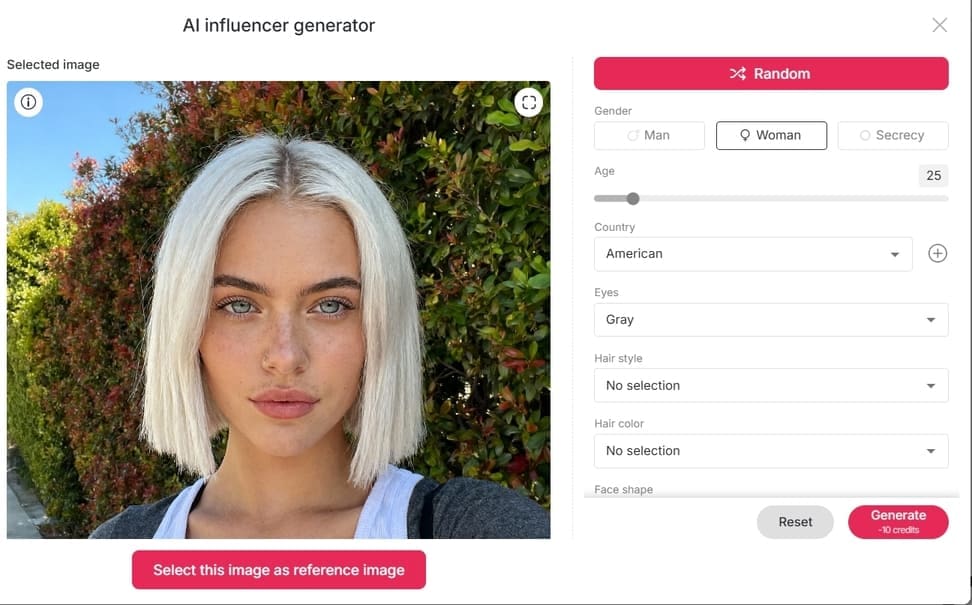
Develop an AI Girl or Boy avatar in APOB AI. If you already have a character, upload his or her photo. If you don't have a character, you could click on 'AI Influencer Generator' to get one, you could personalize appearance, expression, and style to fit your content (APOB.ai, 2025).
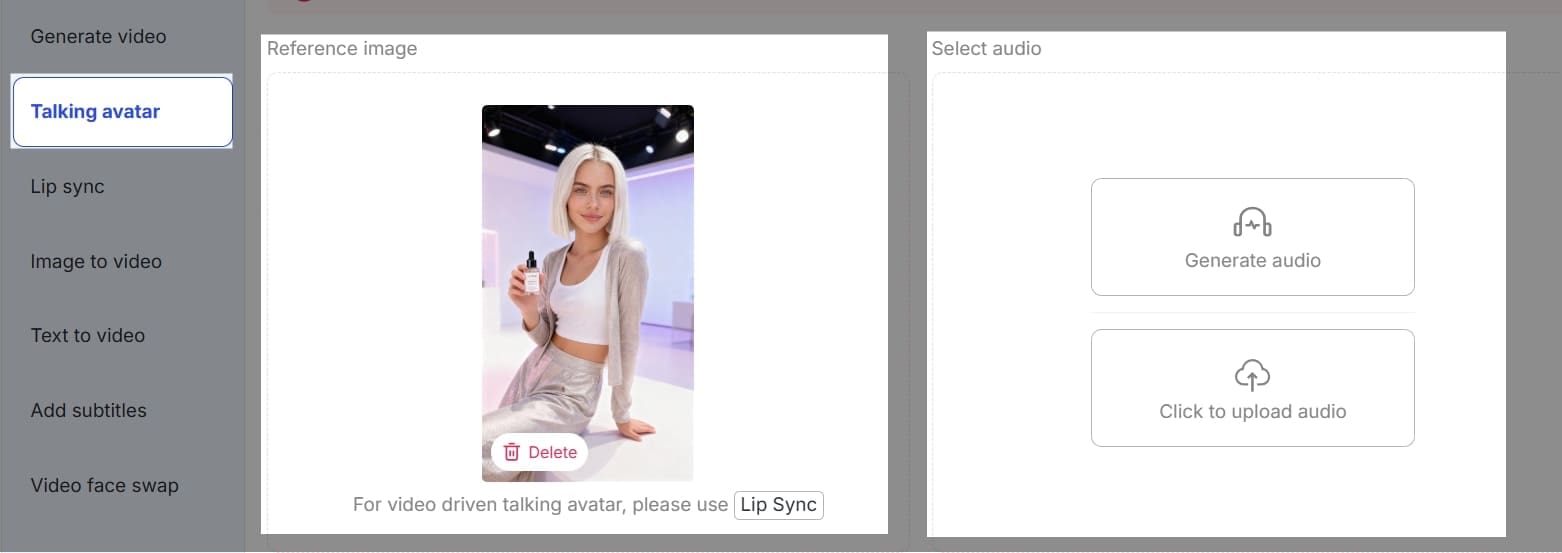
Step 2: Find 'Talking Avatar', and then upload one image of this AI Character as reference to generate a video.
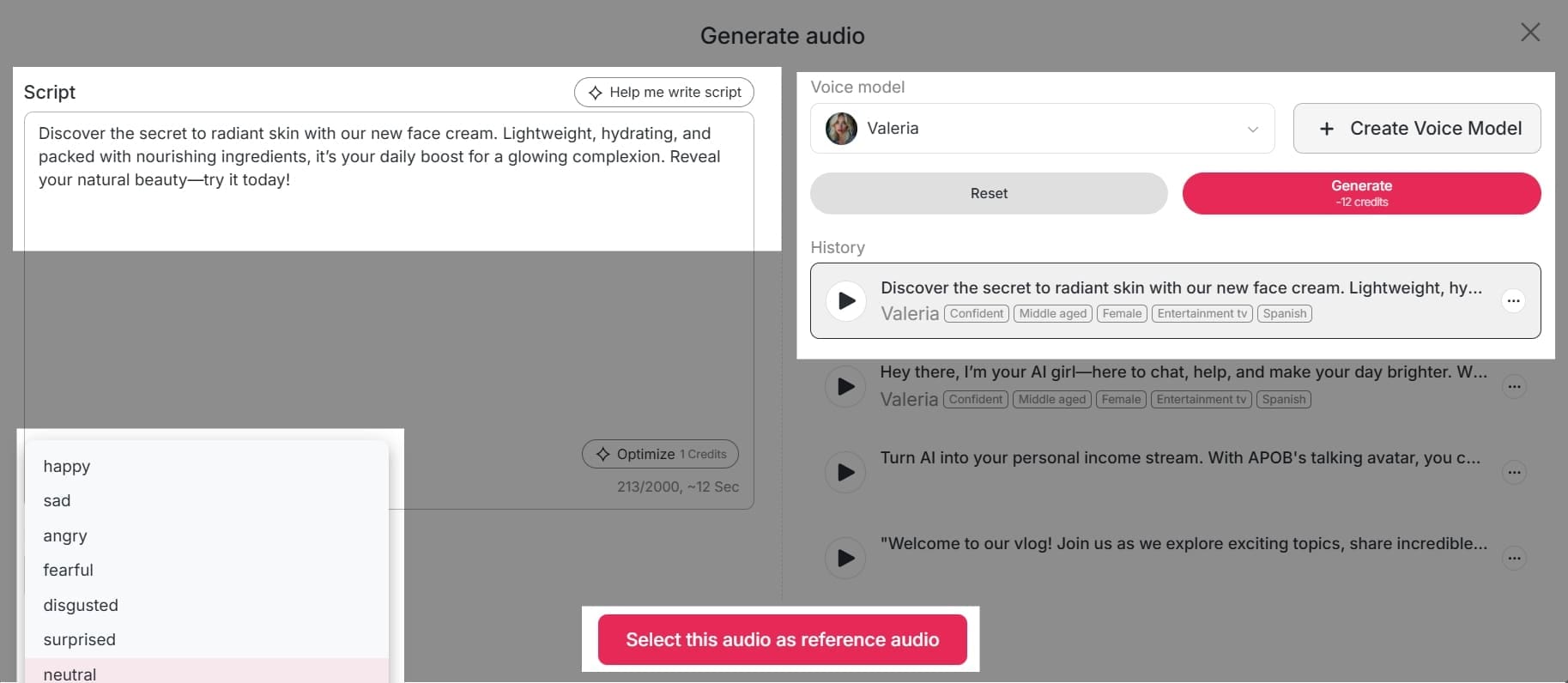
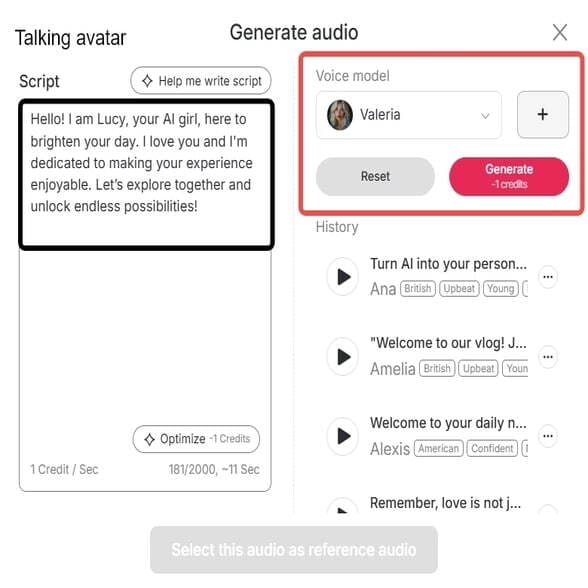
Click 'Generate Audio' to turn text to speech. In the "Script" box on the left, write or paste the text you want the AI to read. There is a helpful "Help me write script" button if you need ideas, and the word count is clearly tracked at the bottom.
Step 3: Choose Your Voice Model
On the right side of the screen, under "Voice model," you'll see a dropdown menu. Click on it to select from a list of available AI voices. If you don't find a voice you like, you can click the "+ Create Voice Model" button to train a new one using your own audio. Below the script box on the left, you can set the emotion for the audio. The default is "neutral," but you can click the dropdown menu to explore other options that might be available for your chosen voice model.
Step 4: Generate and Listen
The newly generated audio clip will be added to your "History" section, which is a log of all your previous creations. You can play, edit, or download clips from this list. Once your script, voice model, and emotion are set, click the "Generate" button. The tool will process your request and create the audio.
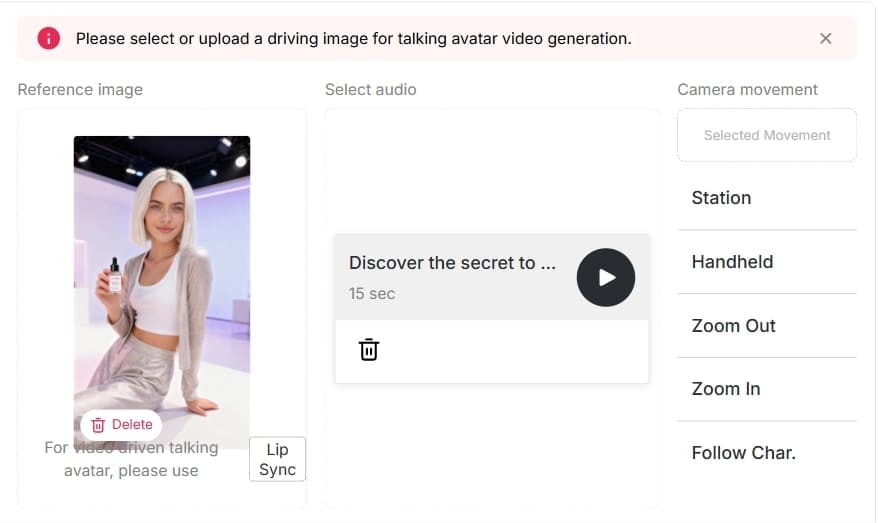
Using APOB AI’s Talking Avatar, creators can produce professional text-to-speech content without recording their own voice or hiring voice actors, making videos more unique and engaging.
Tips for Maximizing TikTok Text-to-Speech
- Keep text short, clear, and engaging.
- Match the voice tone with your video theme.
- Experiment with AI accent options for humor or uniqueness.
- Test different male and female avatars to see what resonates with your audience.
These are methods that allow creators to gain attention quicker and build more follower interaction (Socialinsider, 2025).
Advantages of APOB AI for TikTok Creators
APOB AI boasts a myriad of advantages that make it ideal for TikTok content creation.First, it saves time from wastage through the removal of manual audio recording or the sourcing of voice talent (AFAEducation, 2025).Second, it is cost-effective, reducing production costs while yielding professional results (Makemedia, 2025).Third, it enables creators to choose between several voice options including male, female, and accented voices, enabling creators to tailor their content to different target audiences (Influencer Marketing Hub, 2024). Finally, it also increases creativity since users can make videos with innovative storytelling methods and animate AI avatars.
These combined features make APOB AI an effective utility to drive engagement and broaden your TikTok reach.
FAQs About TikTok AI Voice Generators and APOB AI
Q1: What is the difference between TikTok text-to-speech and APOB AI Talking Avatar?
A1: TikTok text-to-speech offers basic voice options, while APOB AI Talking Avatar provides customizable AI avatars with realistic, lip-synced voices.
Q2: Can I use APOB AI to generate both male and female voices?
A2: Yes, APOB AI allows you to create both male and female AI avatars with high-quality speech.
Q3: Can I apply accents to AI voices?
A3: Absolutely. APOB AI supports AI accent generation, making your videos more entertaining and unique.
Q4: Is APOB AI suitable for beginners?
A4: Yes. The platform is user-friendly and requires no professional recording skills.20
Q5: Can APOB AI help increase TikTok engagement?
A5: Definitely. Lifelike voices and animated avatars make content more interactive, shareable, and likely to go viral.
Conclusion
A TikTok AI voice generator like APOB AI is a game-changer for creators looking to boost engagement, save time, and add creative flair to their videos. From female and male voices to AI accents, APOB AI’s Talking Avatar feature allows you to produce professional, interactive content that stands out on TikTok.(21)
Start using APOB AI today to turn text into high-quality AI voices and animated videos, and make your TikTok content more engaging than ever.
References
AFAEducation. (2025) The Rise of AI Voice Generators: Are They the Future of Content Creation? Available at: https://afaeducation.org/blog/the-rise-of-ai-voice-generators-are-they-the-future-of-content-creation/ (Accessed: 3 August 2025).
APOB.ai. (2025) Creator AI | Personalized AI Portrait | AI Image & Video. Available at: https://app.apob.ai/ (Accessed: 23 September 2025).
Influencer Marketing Hub. (2024) Top 51 AI Marketing Statistics for 2024. Available at: https://influencermarketinghub.com/ai-marketing-statistics/ (Accessed: 2 October 2024).
Makemedia. (2025) AI Content Creation vs Human Writers: Cost-Benefit Analysis. Available at: https://makemedia.ai/ai-content-creation-vs-human-writers/ (Accessed: 23 September 2025).
Podcastle. (2025) You Know That AI Voice on TikTok? Here's Where It Came From. Available at: https://podcastle.ai/blog/tiktok-ai-voice/ (Accessed: 3 February 2025).
Socialinsider. (2025) TikTok Benchmarks 2024: Content Performance Analysis And Strategic Insights. Available at: https://www.socialinsider.io/social-media-benchmarks/tiktok (Accessed: 8 September 2025).
Read More

Free & Easy: Bring Your AI Characters to Life with Advanced Lip-Sync Technology
Elevate Your Content: Why AI Characters Are a Game-Changing Resource for Influencers
AI characters are no longer the stuff of science fiction—they're a reality. For influencers and UGC (user-generated content) creators, AI-generated characters offer a new, innovative way to connect with audiences without needing to appear on camera. These virtual personas can become your brand ambassadors, deliver your message, or simply entertain—no makeup, lighting, or in-person presence required. This innovative approach to content creation is rapidly gaining traction, offering unparalleled flexibility and scalability for digital creators [1].
They're perfect for:
Faceless content production: Create compelling narratives without revealing your identity.
Scaling video content quickly: Produce high volumes of engaging videos efficiently.
Reaching niche audiences effectively: Tailor characters and messages to specific demographics.
Maintaining brand consistency across multiple platforms: Ensure your brand's voice and appearance are unified.
Beyond Static Images: Video Drives More Engagement with APOB AI Lip-Sync
We live in a motion-first content world. Platforms like TikTok, Instagram Reels, and YouTube Shorts demand dynamic visuals. If you’re not producing short-form video, you’re falling behind. Research indicates that video content consistently outperforms static images in terms of engagement and reach across social media platforms [2].
While AI-generated images can look stunning, they don't grab attention the way a video does—especially one where your AI character talks with perfectly synced lip movements. A talking video increases realism, engagement, and scroll-stopping power, making your content impossible to scroll past. APOB AI's lip-sync technology ensures your characters speak naturally, enhancing viewer immersion.
Overcoming the Syncing Challenge: Why Talking AI Characters Weren’t Easy (Until Now)
One of the biggest hurdles in using talking avatars has always been how to sync audio and video seamlessly. Creators often struggled with:
Mismatched lip and voice movement: Leading to an unnatural and distracting viewing experience.
Stiff or delayed animations: Reducing the character's expressiveness and appeal.
Complicated, time-consuming editing software: Requiring specialized skills and significant effort.
That’s where APOB AI steps in to simplify everything, offering a seamless solution for creating realistic talking AI characters.
How to Use APOB AI: Convert a Photo into a Speaking Character Instantly
With APOB AI’s lip-sync feature, syncing audio and video is automated and accurate. You can upload a real or AI-generated photo, choose your audio or type in your script for text-to-speech (TTS), and watch your character talk, all in minutes. The process is designed to be intuitive and efficient, empowering creators to bring their visions to life effortlessly.
What you can do:
Upload a live image or create one with AI: Start with any image you choose.
Add voiceovers or TTS audio: Give your character a voice.
Instantly generate a video with synced lips and sound: See your character speak naturally.
No editing skills or downloads required—everything works directly in your browser. APOB AI makes advanced video creation accessible to everyone.
START CREATING NOW WITH APOB AI
Best Practices for Optimal Results with APOB AI Lip-Sync
To ensure your AI characters deliver the most impactful and realistic performances, consider these best practices when using APOB AI's lip-sync technology:
High-Quality Source Images: Always start with clear, high-resolution images of faces. Well-lit and front-facing photos yield the best lip-sync accuracy and overall realism.
Clear Audio Input: Use clean, crisp audio recordings for your voiceovers. Minimize background noise and ensure proper pronunciation for the most natural lip movements.
Concise Scripting: Keep your scripts focused and to the point. Shorter, impactful sentences often translate better into dynamic AI character performances.
Experiment with Voices: If using Text-to-Speech (TTS), try different voices and accents to find the perfect match for your character's persona and message.
Review and Refine: Always preview your generated video. Pay attention to lip-sync accuracy and overall animation flow, making minor adjustments to audio or script if needed.
Integrate Subtitles: Utilize APOB AI's built-in subtitle generator for enhanced accessibility and engagement, ensuring your message reaches a wider audience.
Beyond Lip-Sync: APOB AI's Comprehensive Video Generation Platform
APOB AI isn’t just an AI lip-sync tool—it’s an all-in-one AI video generation platform that includes a suite of powerful features to revolutionize your content creation:
Image-to-Video Generator: Animate static images and bring them to life with dynamic motion.
Talking Avatar Generator: Let your AI characters speak, interact, and convey emotions with advanced facial animation.
Lip-Sync Function: Seamlessly match speech with facial animation for incredibly realistic talking characters.
New Feature: Subtitle Generator for Enhanced Accessibility and Engagement
To improve accessibility and engagement, APOB AI now includes a built-in subtitle generator. This lets you reach a wider audience and ensures your content is clear—even with the sound off. Subtitles are crucial for inclusivity and can significantly boost viewer retention across various platforms.
Why subtitles matter:
Enhances clarity in noisy environments: Viewers can understand content without sound.
Increases viewer retention: Keeps audiences engaged longer, especially on mobile.
Supports multi-language accessibility: Opens your content to a global audience.
Technical Specifications: Powering APOB AI's Advanced Lip-Sync
APOB AI's lip-sync technology is built on state-of-the-art artificial intelligence models, ensuring high accuracy and efficiency. The platform supports a wide range of input formats for images and audio, and outputs high-quality video files suitable for various social media platforms. Our advanced algorithms process complex facial movements to synchronize precisely with spoken words, delivering natural and convincing results. Data privacy is a core tenet, with all user data handled securely and in compliance with industry standards.
Why Choose APOB AI Over Alternatives for Lip-Sync Technology?
When comparing APOB AI to manual editing or other AI solutions, the advantages become clear:
Feature | APOB AI (AI Lip-Sync) | Manual Editing | Other AI Tools |
|---|---|---|---|
Ease of Use | Extremely simple, no skills needed | Requires advanced editing skills | Varies, often complex |
Speed | Minutes to generate | Hours to days | Can be slow |
Realism | Highly realistic lip-sync | Dependent on editor skill | Varies, can be stiff |
Cost | Free tier available, affordable plans | Expensive software + time | Often costly subscriptions |
Accessibility | Browser-based, no downloads | Software installation required | May require specific hardware |
Integrated Features | Image-to-video, talking avatar, subtitles | Focus on editing, features separate | Often single-purpose |
APOB AI offers a comprehensive, user-friendly, and cost-effective solution for bringing AI characters to life with advanced lip-sync capabilities, outperforming traditional methods and many competitors.
Monetize with AI-Generated Content: Applications of APOB AI
APOB AI is a powerful creative platform designed for influencers, UGC creators, and marketers. With its tools, you can generate high-quality AI videos, avatars, and visual content with ease, opening up numerous monetization possibilities.
Monetization possibilities:
Produce branded talking videos for UGC campaigns: Create engaging promotional content.
Launch faceless YouTube, TikTok, or Instagram channels: Build a brand without personal appearance.
Sell affiliate videos created with AI video generation: Generate income through product promotion.
Build your own AI influencer brand that works 24/7: Establish a perpetual digital presence.
Whether you're looking to scale content or explore AI-powered revenue streams, APOB AI has everything you need to succeed in the evolving digital landscape.
Conclusion: Let Your AI Characters Talk in Minutes — It’s Free & Easy with APOB AI
UGC creators and influencers need tools that are fast, impactful, and easy to use. With APOB AI’s lip-sync and talking avatar features, you can bring your characters to life in minutes—no advanced skills required. Embrace the future of content creation and captivate your audience with dynamic, speaking AI characters today.
Frequently Asked Questions About APOB AI Lip-Sync
What is APOB AI's lip-sync feature?
APOB AI's lip-sync feature is an advanced technology that automatically synchronizes audio with the facial movements of an AI character or a static image, making it appear as if the character is speaking naturally. It transforms still images into dynamic, talking videos.
Can I use my own audio with the lip-sync tool?
Yes, APOB AI allows you to upload your own audio files. Alternatively, you can use the built-in text-to-speech (TTS) functionality by typing in your script, and the AI will generate the voice and sync it to your character.
What kind of images work best for APOB AI lip-sync?
For optimal results, use high-resolution images with a clear, front-facing view of the face. Good lighting and minimal obstructions around the mouth area will enhance the realism of the lip-sync animation.
Is APOB AI suitable for commercial use?
Yes, APOB AI is designed for commercial use, allowing influencers, marketers, and businesses to create engaging content for campaigns, social media, and various other applications. Please refer to our terms of service for specific licensing details.
Does APOB AI offer a free version or trial?
APOB AI offers a free tier that provides daily credits, allowing you to experience the powerful lip-sync and video generation features without any upfront cost. This is an excellent way to test the platform's capabilities.
How does APOB AI ensure the privacy of my uploaded content?
APOB AI prioritizes user privacy and employs robust security measures to protect your uploaded images and audio. All data is processed securely and is not used for training purposes without explicit consent. For more details, please review our comprehensive privacy policy.
References
[1] Forbes Tech Council. (2023, July 11). The Rise Of AI Influencers And Virtual Personalities. Forbes. https://www.forbes.com/sites/forbestechcouncil/2023/07/11/the-rise-of-ai-influencers-and-virtual-personalities/
[2] Hootsuite. (n.d.). Social Media Video Stats You Need to Know. Hootsuite Blog. https://blog.hootsuite.com/social-media-video-stats/
[3] Wikipedia. (n.d.). Text-to-speech. Retrieved from https://en.wikipedia.org/wiki/Text-to-speech
[4] TechTarget. (n.d.). What is artificial intelligence (AI)?. Retrieved from https://www.techtarget.com/whatis/definition/AI-Artificial-Intelligence
Read More
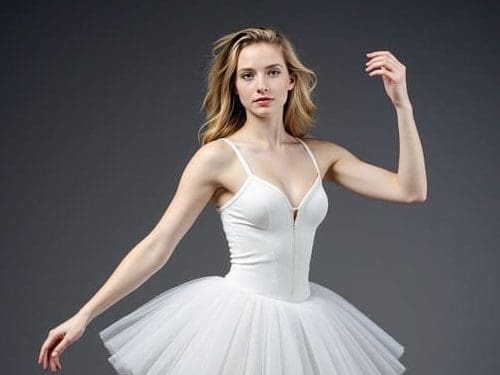
Make Dance Videos for TikTok Using the AI Dance Maker
Introduction: AI Dance Content Is Taking Over TikTok
TikTok has become a powerhouse of creativity, and AI-generated content is now a major trend. Among the most eye-catching are AI dance videos — dynamic, animated performances created without stepping in front of a camera. Thanks to tools like an AI Dance Maker, even those without dance skills can produce high-quality dance content in minutes.
If you're curious about making an AI dance video for TikTok or just want to understand how these tools work, this guide will walk you through everything. We'll explore what an AI Dance Maker is, how to use one, and which AI Dance Apps or AI Dance Generators are best for TikTok content creation.
What Is an AI Dance Maker?
An AI Dance Maker is a software tool or application that uses artificial intelligence to animate characters or avatars in sync with music or choreography. It automates dance creation, eliminating the need for motion capture suits, green screens, or even human performers.
These tools are powered by deep learning models trained on real human dance data. With just a few clicks, users can generate fully animated dance videos that look impressively real — perfect for TikTok content.
Why Use an AI Dance Generator for TikTok?
There are several reasons creators are turning to AI Dance Generators for TikTok videos:
No filming required: You don’t need a camera, lighting setup, or physical space to record.
Time-efficient: Create content quickly, even in batches.
Accessibility: Great for users who aren’t dancers but want engaging dance content.
Trend adaptation: AI dance tools often support trending audio and moves, helping you stay relevant.
Most importantly, AI Dance Makers enable consistent, high-quality content without the hassle.
Top Features to Look for in an AI Dance APP
When choosing an AI Dance APP, consider the following features to ensure smooth creation and great results:
Character customization: Choose or design your own digital dancer.
Dance libraries: Access to trending moves or popular dance routines.
Music sync: Match animations with TikTok songs or custom audio.
Auto-formatting: Export videos in vertical (9:16) format for TikTok.
User-friendly interface: Easy to use even without video editing experience.
Some apps even integrate with TikTok directly for faster uploads.
How to Make an AI Dance Video for TikTok (Step-by-Step)
Step 1: Choose a reliable AI Dance Maker
Start by selecting a tool like APOB AI, DeepMotion, or Kaiber. Make sure it supports TikTok-friendly output and trending moves.
Step 2: Create or select a virtual dancer
Some platforms let you upload your selfie or build a custom avatar. Others offer pre-made digital humans.
Step 3: Pick a dance routine
Use the built-in AI Dance Generator to select from trending TikTok dances or upload a reference video.
Step 4: Add music
Upload your own track or select popular TikTok audio. The AI syncs movements automatically with the rhythm.
Step 5: Customize the background and effects
Set your preferred background, camera angles, and visual effects to make the video pop.
Step 6: Export and upload to TikTok
Export the video in 9:16 vertical format and upload it directly to TikTok. Don’t forget hashtags!
Best AI Dance Makers and Generators in 2025
Here are a few top-rated options for AI dance video creation:
Tool | Features | Pricing |
|---|---|---|
APOB AI | Free AI dance, realistic avatars | Free & Paid |
DeepMotion | Motion capture & body tracking | Subscription |
Move.ai | Real-time body motion animation | Premium only |
Kaiber | Music-video generation with dance | Freemium |
APOB AI is ideal for beginners thanks to its free access and high-quality visuals.
Tips for Going Viral with Your AI Dance Video
To maximize your reach on TikTok using your AI Dance Maker, try the following:
Use trending TikTok sounds
Add eye-catching text overlays and emojis
Pair the dance with a relatable meme or challenge
Post consistently and at peak TikTok hours
Use TikTok’s built-in editing tools for final touches
Common Mistakes to Avoid
Avoid these pitfalls when using an AI Dance APP:
Ignoring resolution or aspect ratio — TikTok prefers 9:16
Using copyrighted music that may get flagged
Overloading the video with effects that distract from the dance
Skipping customization — personal touches make content more shareable
FAQs About AI Dance Makers and Generators
1. What is the best AI Dance Maker for TikTok beginners?
APOB AI is highly recommended for beginners. It’s intuitive, fast, and offers quality results even in the free version.
2. Are AI Dance Generators free to use?
Many offer free versions, but features like premium dances or avatars may require a subscription.
3. Can I upload my own music to AI Dance Apps?
Yes, most tools allow music uploads and will auto-sync movements to your chosen track.
4. Do I need to know how to edit videos?
Not at all. AI Dance Makers are designed for users without editing experience.
5. Are AI dance videos allowed on TikTok?
Absolutely! As long as your content follows TikTok’s community guidelines, you can post AI-generated videos freely.
Final Thoughts: Start Creating With AI Dance Maker Today
Whether you're a creator looking to go viral or just want to experiment with digital content, an AI Dance Maker can elevate your TikTok game. With user-friendly features, customizable avatars, and real-time dance generation, these tools are redefining creativity.
Tools like APOB AI make it easy to create, edit, and share AI dance videos — for free. Why not give it a try and see what kind of digital dance star you can become?
Read More

How to Use AI UGC to Go Viral on TikTok, Instagram & YouTube
Abstract
In today's fast-evolving social media era, to be heard, one must think differently. In this article, we discuss how AI UGC (Artificial Intelligence User-Generated Content) can potentially revolutionize going viral on social media platforms such as TikTok, Instagram, and YouTube. We discuss what AI UGC is, how it engages, how it is used in advertising as AI UGC ads, and rank the top AI ad platforms for creating UGC. In addition to this, we also offer hands-on advice for producers and discuss major ethical issues, presenting a complete guide to profiting from this potent new content-creation horizon.
🎯 Create AI UGC Content in Minutes with APOB AI-We have Affiliate Program For You
APOB AI makes it incredibly easy to create realistic, user-generated-style content without hiring real models or influencers. With just a few clicks, you can design AI-generated humans, customize their appearance, outfits, background, and even add voiceovers for talking videos. It’s the perfect tool for generating lifestyle photos, Instagram stories, TikTok videos, and product review content — all tailored to your brand.
🛠 Quick Guide: How to Generate AI UGC Video with APOB AI
Step 1: Sign up for free and get daily credits.
Step 2: Create your AI model — choose gender, facial features, clothing, and vibe.
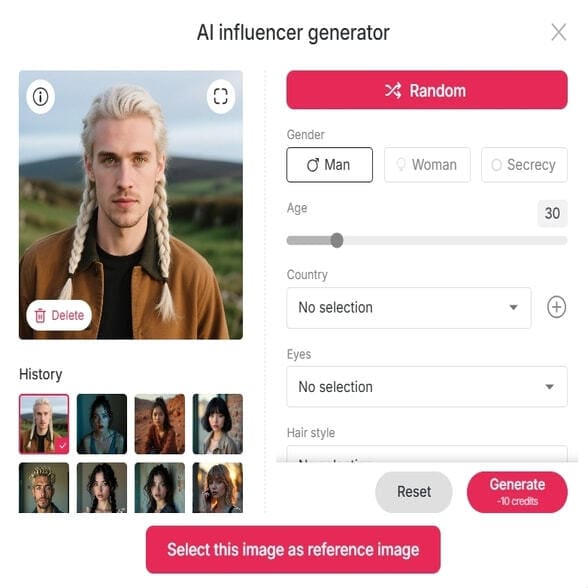
Step 3: Choose you style to generate interesting images and videos.
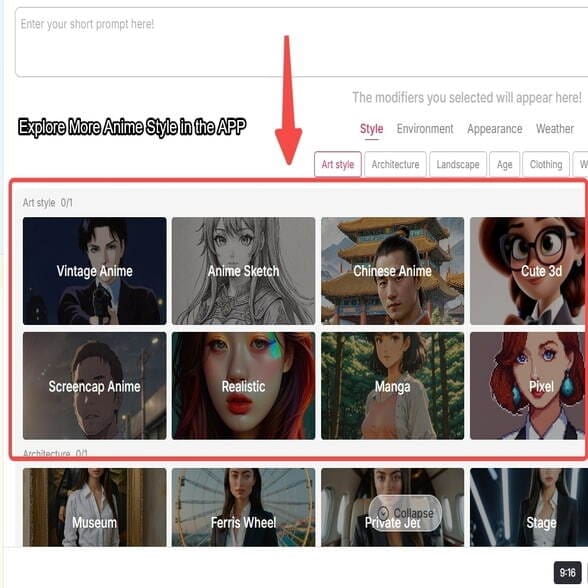
Step 4: Customize the script and voice (for video), or add props and background (for images).
Step 5: Click Generate — and download your ready-to-use UGC content instantly.
✅ Why APOB AI Is the Best Choice
What sets APOB AI apart is its stunning realism, full customization, and user-friendly interface. You get free daily credits, access to talking avatars, and the ability to produce content at scale — fast. Whether you’re a marketer, brand owner, or creator, APOB AI helps you save time, cut costs, and generate high-performing AI UGC that drives engagement and conversions.
Introduction: The Viral Power of AI-Generated Content
How do creators and brands actually hear and go viral in this hyper-connected, digital age where content blows our streams at levels unprecedented in the history of the world? The answer is more and more in innovation, and a new revolutionary method is arising: AI UGC, or Artificial Intelligence User-Generated Content. This is not about yesterday's user content; it's about content created or enhanced by AI in smart ways that reflect human-like styles and speak directly to people.
In this article, we'll discuss the huge power of AI-generated UGC as an influencer on leading social media websites such as TikTok, Instagram, and YouTube. We'll reveal how AI can be used to create engaging content, its successful use in advertising via AI UGC ads, and the top AI ad tools employed in producing UGC. You'll discover finally how to leverage this technology to achieve record-breaking viral visibility.
Understanding AI UGC: What It Is and Why It Matters
Let us first familiarize ourselves with what AI UGC is. User-Generated Content (UGC) has always meant any type of content—videos, images, comments—made by unpaid creators, most typically customers or fans, not the brand itself. It works on authenticity and relevance.
What is AI UGC?
AI UGC pushes this idea one step further. It is content that is either fully created by artificial intelligence or heavily developed by AI technology. It can have many different forms:
Video or podcast voiceovers created with AI voices: Mimetic voiceovers for films or podcasting.
Deepfakes: Videos produced by or edited through AI that seem to make individuals say or do something they did not.
AI-created scripts: Content structures, dialogue, or complete stories for films.
Virtual influencers: AI-created digital actors that engage with viewers.
AI-amplified imagery: Edited, styled, or generated photographs or videos with AI.
The Appeal of AI UGC: The increasing appeal of AI UGC comes from a number of standout benefits:
Scalability and Agility: AI is able to create humongous volumes of content much faster than human groups, allowing rapid iteration and constant posting.
Cost-effectiveness: It has the potential to drastically lower the cost of conventional content creation, e.g., hiring actors, voice-over talent, or videographers.
Novelty and Uniqueness: AI can produce genuine one-off content that is occasionally surprising, which in itself grabs people's attention just because it's new.
The Virality Factor: How AI UGC Triggers Engagement
The key to virality is engagement, and AI UGC has several built-in factors that promote it:
Authenticity (Perceived): Ironically, AI can train to create outputs on deeply massive sets of human-generated content and thereby make them feel unbelievably personal or "true." High-quality AI solutions for user-generated content can match the spontaneous, unedited nature of true user content that audiences desire.
Novelty & Curiosity: Simply the sheer "how did they do that?" value of AI-created content has a very high curiosity factor. People want to see the technology, and this leads to higher watch and share.
Trendjacking & Rapid Response: Trends on social media change so fast. With AI's potential for rapid research on what is currently trending and produce relevant content, producers can jump on viral trains almost as quickly, commanding their best visibility.
Personalization at Scale: AI enables the fact that content may be personalized for a particular audience segment in accordance with their behavior and tastes. Personalization enhances the relevance of content in relation to individual viewers and encourages more engagement.
AI UGC On Top Platforms
Different requirements are found on different platforms, and AI UGC can be made to suit every one of them:
TikTok: The short video king current still survives on quick trends and sound. AI UGC thrives here with AI voiceover delivering captivating narration, text-to-video features rapidly giving birth to concepts, and AI filters producing visually stunning effects. Majority of trending TikToks already have AI incorporated in them, ranging from synthesized narrations reading stories to AI-generated characters acting out skits.
Instagram: From static posts and Stories to Reels, Instagram is a very visual platform. AI UGC can be used to optimize visuals with AI-editing, develop virtual influencers for collaborations, and even craft engaging captions that optimize discoverability. Tactics involve leveraging AI to develop varied visual content for Reels or coming up with distinctive, shareable imagery for carousels.
YouTube: AI UGC can help in longer videos and Shorts with AI-generated scripts, laying a good narrative foundation. AI voiceovers can commentate over complicated subjects, and AI video editing software can carry out repetitive work, leaving creators to manage creative direction. Some already experiment with completely AI-produced explainer videos or animated shorts.
Using AI UGC for Advertisement: AI UGC Ads
The idea of using AI UGC applies convincingly to the use of advertising. Conventional UGC in advertisements is extremely powerful since it creates authenticity and credibility, even overpowering glamorous brand-created content.
How AI UGC Enhances Ads: AI UGC ads enhance these advantages and multiply them:
Quick A/B Testing: AI can quickly generate several iterations of ad creatives and allow marketers to A/B test different messages, images, and calls to action at record speeds. The outcome is extremely optimized campaigns.
Hyper-Personalized Ad Variations: Think of an ad that can dynamically change its "user testimonial" based on the interests or demographics of the viewer. AI UGC makes this hyper-personalization possible and leads to higher conversion rates.
Diverse "User" Scenario Creation: Brands can use AI in a bid at many different "user" scenarios or sponsorships, portraying value in products in various, real-life situations without the costs of photoshoots or actors.
Cost Savings on Production for Advertisements: By reducing some aspects of creativity, AI UGC commercials have the potential to greatly reduce the cost of production, making quality-sounding advertisements affordable even for small companies.
Successful AI UGC ad campaigns tend to mix AI-generated material with actual product video in a cohesive way to generate a convincing yet extremely reproducible advertising asset.
Tips on How to Make Viral AI UGC
To boost your prospects of going viral through AI UGC, apply these tips:
Know Your Audience: Regardless of how sophisticated with AI, content must relate. Utilize AI UGC to speak to specific niches and their interests.
Combine AI with a Human Touch: AI will be an excellent aide, but seldom the whole replacement for human innovation. Utilize AI to mechanize trivial work or create early drafts and then polish with human perception.
Encourage Experimentation: AI UGC is a new and quickly developing field. Experiment with various AI models, prompts, and content forms and observe what yields the most effective outcomes.
Storytelling Focus: Regardless of the approach, great content is narrative-driven. Make sure your AI UGC has a definite story, is either an item presentation or a lighthearted skit.
Algorithm-Aware Optimization: Post with relevant hashtags, trending tunes (if so inclined), and keep up with today's platform trends to make your AI UGC more visible.
Call to Action: Invite engagement. Ask questions, ask comments, or ask shares to take your content to the next level.
Challenges & Ethical Implications of AI UGC
While the possibilities for AI UGC are endless, there is a need to consider challenges and ethical implications:
Authenticity vs. Deception: There's a thin line between being innovative in utilizing AI and creating content that tricks audience engagement. Transparency about AI use can foster trust.
Deepfakes & Disinformation: Unauthorized use of AI for creating fake content is a threat. The rightful creation of AI-generated UGC is in question.
Copyright and Ownership: The law regarding AI-created content is in transition. Who owns a copyright on content created by an AI? It is a slippery issue with changing responses.
Audience Acceptance: Certain audiences may respond poorly to outright AI-created content when it reads as insincere or unreal. Balance is what's needed, between AI capability and human appeal.
Transparency: Should producers indicate when content is AI-created or AI-augmented? The majority think so in order to gain trust and prevent misleading audiences.
Mastering these challenges ethically will be the necessity of long-term success and acceptability of AI UGC.
Conclusion: The Future is Now
AI UGC is a revolutionary departure from the way content is made, shared, and consumed. From powering social media organic virality to transforming advertising with incredibly powerful AI UGC ads, its influence cannot be denied. By learning what AI UGC is, how it works across all platforms, and by harnessing the most advanced AI ad tools for producing UGC, creators and marketers can attain new heights of productivity and engagement.
The future of content creation has arrived finally, and it's intelligent, scalable, and extremely thrilling. Don't wait; begin testing AI UGC today and let its potential make your content go viral.
Frequently Asked Questions (FAQs) regarding AI UGC
Q1: What is AI UGC, anyway?
A1: AI UGC refers to Artificial Intelligence User-Generated Content. It can either be fully created by AI (e.g., AI voice, video, or image) or heavily enhanced by AI tools, generally to replicate the look and feel of human user-generated content.
Q2: Can AI UGC make my content viral?
A2: AI UGC can create virality by offering surprise and novelty, enabling rapid response to trends, allowing for hyper-personalization, and providing a scalable way of producing compelling content that occasionally can convincingly masquerade as "user-generated" in a genuine sense.
Q3: Is AI UGC suitable for being used in advertisements?
A3: Absolutely! AI UGC ads take advantage of the sincerity of user-generated content and the scalability and personalization potential of AI. This opens up opportunities for fast A/B testing, production of varied "user" situations, and low-cost ad production.
Q4: What are some of the leading tools for producing AI ads that take advantage of UGC?
A4: Some of the most effective AI ad tools to produce UGC are text-to-speech generators (e.g., ElevenLabs, Murf.ai), AI video generators (e.g., Synthesys, HeyGen), AI image/art generators (e.g., Midjourney, DALL-E), AI scriptwriters (e.g., Jasper, Copy.ai), and AI video editing software (e.g., Descript).
Q5: Does any one of the applications of AI UGC have ethical considerations?
A5: Indeed, a few of the greatest ethical concerns are the potential for lying if non-disclosure of AI use is followed, creating deepfakes and disinformation, and issues with copyright and authorship of works created by AI. Transparency is usually advisable.
Read More
Beyond Deepfakes: Understanding AI Lip-Sync Technology
Abstract:
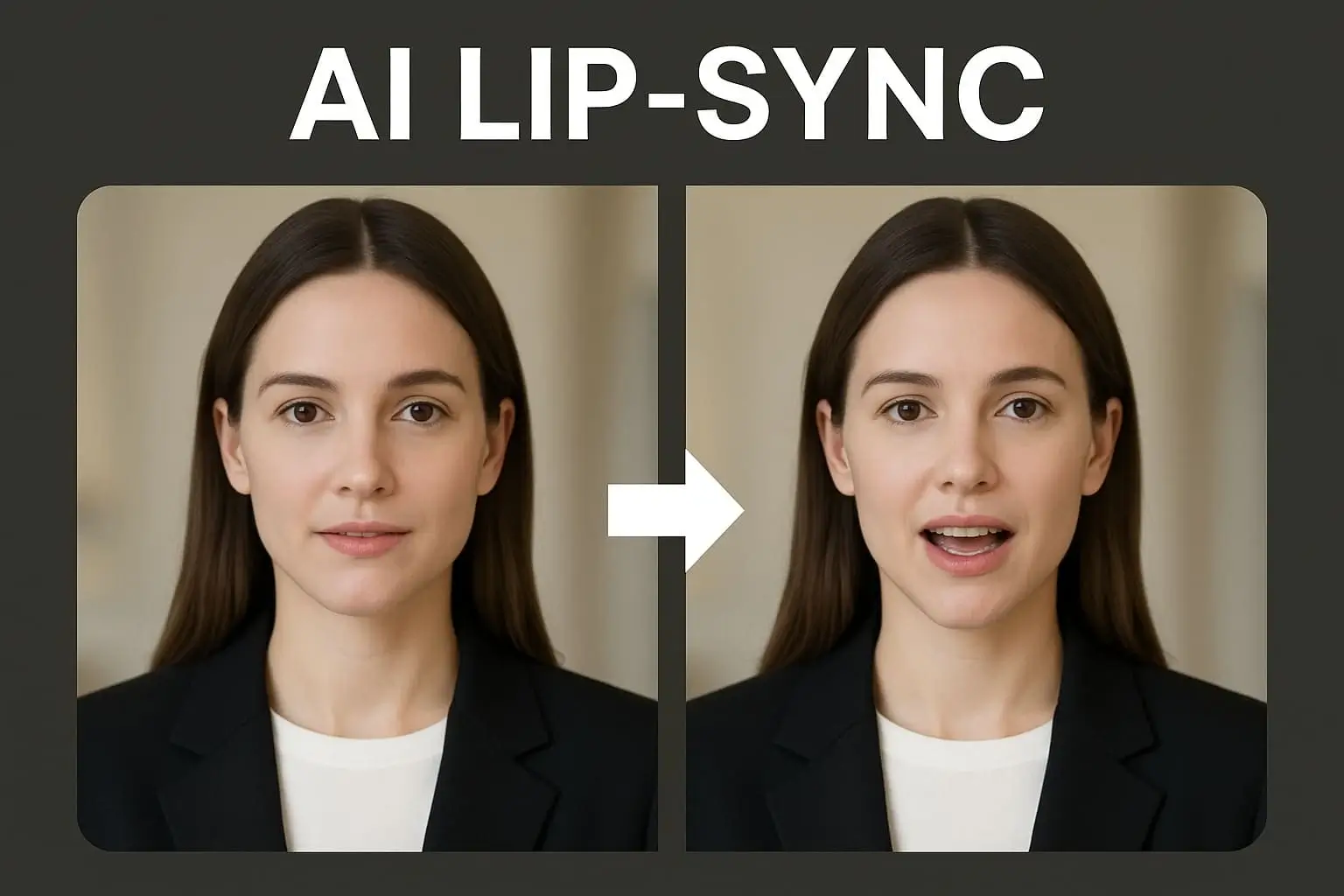
AI lip-sync technology is the latest content creation capability that is becoming increasingly popular across all content creators on TikTok, YouTube, and Instagram. As deepfake technology first opened the world's eyes to AI realism, ethical uses of lip-sync are now leading a completely new generation of active, editable, and brand-safe content. We discussed the differences between AI lip-sync videos and standard deepfakes, the uses to implement them, and how you can easily create lip-sync content through tools like APOB AI.
Don't forget to read the guide below befor using APOB AI!
How to Make AI Lip-Sync Videos with APOB AI
Making lip-sync videos has never been simpler with tools like APOB AI. Built for UGC creators and digital advertisers, APOB AI helps you animate faces, voice-over sync, and create influencer-quality videos with simplicity.
Step 1: Sign Up for a Free Account
First, visit apob.ai and create a free account. Once you're in, upload a clear image of the person you'd like to appear in your video.
Tip: If you don’t have a real person in mind, try generating a realistic AI spokesperson using our AI Influencer Generator!
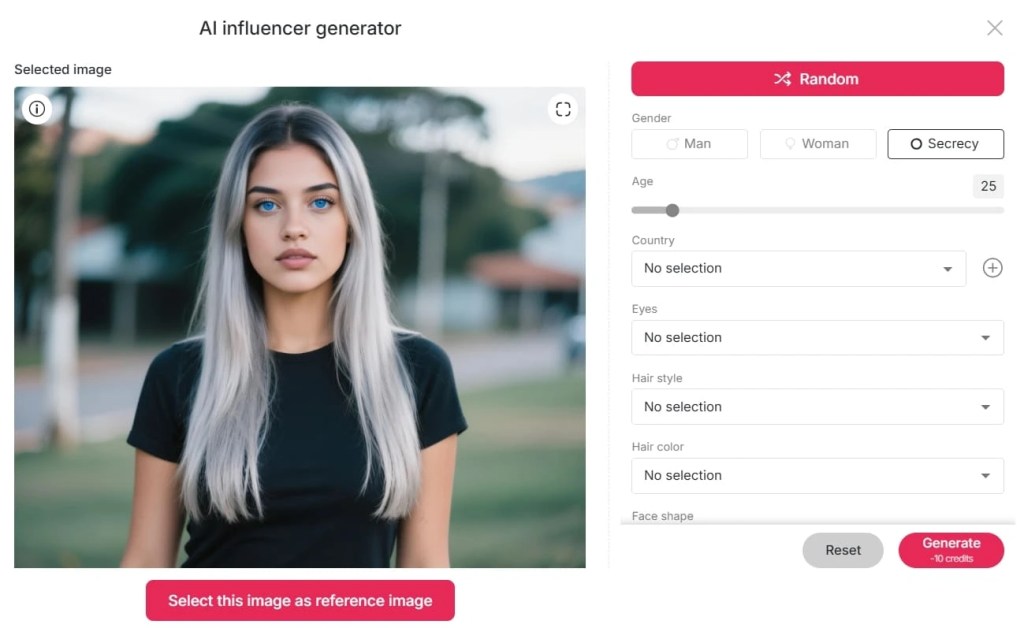
Step 2: Set Up Your AI Model
After uploading or generating your model, it’s ready to speak! Head over to the Lip Sync feature. You can upload a video or simply choose one and sync it with the audio of your choice.
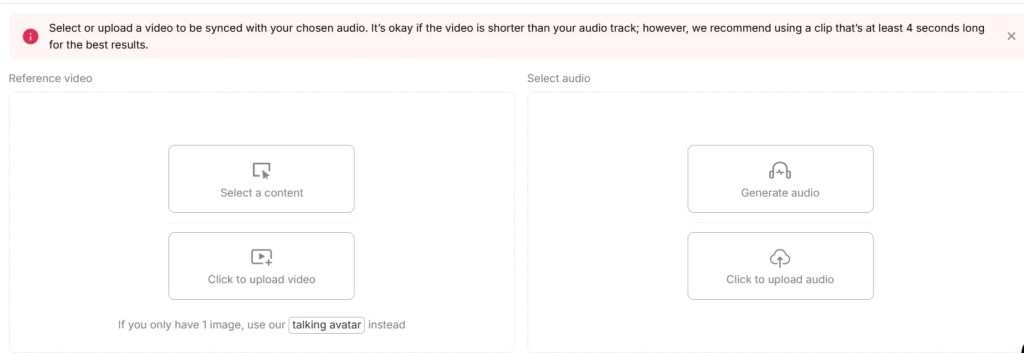
Step 3: Generate Your Lip-Synced Video
Hit the “Generate” button. APOB AI will automatically process and sync the lip movements to match your selected voice. Wait a few moments—and you’re done!
Now you're ready to create engaging, lip-synced content for TikTok, Instagram, YouTube, or anywhere else your audience hangs out. It's that simple!
What is Deepfake Technology?
Deepfake is a deep learning technology that makes it possible to hyper-realistically alter audio and video, often swapping faces or lip-syncing for different voices. Since viral videos made it popular, many of them offending, deepfakes have now entered the mainstream lexicon of artificial intelligence.
While deepfake technology is influential, it has generated ethics and privacy issues, particularly when performed unauthorized. Nevertheless, most AI software nowadays targets controlled and ethical lip-syncing for artistic use—particularly marketing, entertainment, and UGC (user-generated content).
What Is an AI Lip-Sync Video
An AI lip-sync video employs artificial intelligence to synchronize facial expressions, the lips in particular, with audio input—often a pre-recorded voiceover or sound track. Automatically, sometimes from one image and one sound file to create natural appearance speaking or singing videos.
Key Features:
- Transforms static images or talking head videos into synchronized speech animations.
- Increases interaction by animating digital avatars or AI characters.
- Ideal for explainer videos, character animation, and social media storytelling.
Unlike other normal deepfakes, the majority of AI lip-sync software is constructed with the content creator in mind; thus, it is secure, moral, and convenient to use.
Deepfake vs AI Lip Sync: What is the difference?
Although comparable in ability, deepfakes and AI lip-sync software have various objectives and are of a different complexity level.
Feature | Deepfake | AI Lip-Sync Tool |
Purpose | Face/identity replacement | Lip movement animation |
Ethical concerns | High (if used maliciously) | Low (when used with consent) |
Use case | Viral pranks, fake news | Marketing, UGC, education |
Skill required | Moderate to high | Beginner-friendly |
Real-time generation | Often slower | Often optimized for fast use |
Why AI Lip Sync Matters to UGC Creators
If you're a content creator on TikTok, Instagram Reels, or YouTube Shorts, being unique matters. Viewers love speaking avatars, singing characters, and AI animated spokespersons—but not everyone is equipped with the technical skills or budget to create them by hand.
You can:
- Make speaking videos from your selfie or avatar with AI tools.
- Animator product promotions with AI spokespersons.
- Create videos in other languages.
- Create voiceless content streams with animated voices and AI models.
Briefly, AI video making causes UGC creators to develop faster, remain anonymous if needed, and offer a professional appearance with less work.
Moral Use of Lip-Sync AI Tools
AI content is strong—but with a responsibility. While utilizing tools such as APOB AI, ensure that:
- Reserve all rights to images and audio you post.
- Label AI-produced content clearly whenever appropriate.
- Do not impersonate celebrities or actual individuals without explicit consent.
These regulations make your content ethical, engaging, and platform-friendly.
The Future of Lip-Sync AI in Content Creation
From faceless YouTube vloggers to virtual influencers with interactive personas, the horizon of AI lip-sync video software is limitless. With an increasing number of platforms adopting short-form, vertical content, creators require newer methods of connecting visually and emotionally.
AI lip-sync software, particularly responsible platforms like APOB AI, are not merely deepfake alternatives—those are the future of storytelling technologies.
Conclusion: Why You Need to Try AI Lip Sync Today
It enables creators, marketers, and influencers to create compelling, ethical, and effective social media videos. Whether you're an aspiring TikToker or a clandestine YouTuber, sites like APOB AI make it incredibly simple to start—no studio, actors, or cutting experience necessary.
Begin discovering your creative voice (literally) with the assistance of AI lip-sync technology today.
FAQs Regarding Deepfake and AI Lip-Sync Videos
Q1: What is a deepfake and how is it different from an AI lip-sync video?
A1: Deepfakes typically entail replacing identities, and AI lip-syncing entails syncing voice with lip movement—usually for innocent UGC reasons.
Q2: Am I allowed to create lip-sync videos for TikTok using an AI tool?
A3: Yes. Platforms such as APOB AI are ideal for TikTok, YouTube Shorts, and Instagram Reels.
Q3: Is APOB AI free?
A4: Yes! APOB AI provides free-of-charge daily credits to create videos.
Q4: I wish to utilize APOB AI to produce faceless content. Can I do it?
A4: Yes. You can make speaking AI avatars that can be your virtual representative, keeping you anonymous while you grow your audience.
Read More
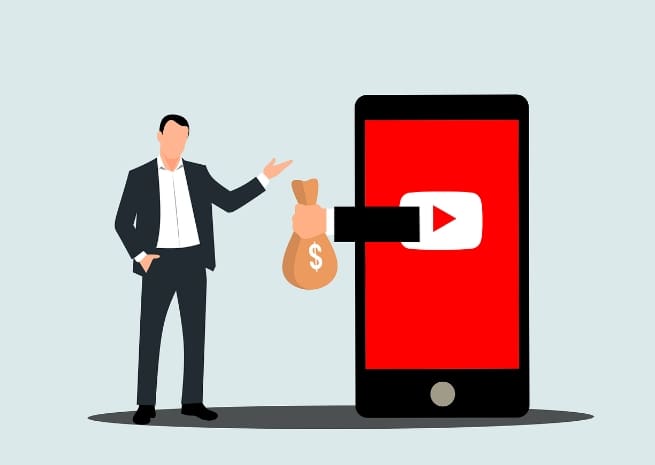
The Ultimate Guide to Monetizing Your YouTube Channel
YouTube has become a powerhouse platform for content creators to share their passion and potentially earn a living. This comprehensive guide will walk you through the essential steps to monetize your YouTube channel effectively. From meeting eligibility requirements to optimizing your content for maximum revenue, we'll cover everything you need to know to turn your YouTube hobby into a profitable venture.
Content creators often wonder how quickly they can start earning from their videos. While some may believe it takes years of hard work, recent trends show that reaching monetization milestones can happen much faster than expected. This guide will explore strategies used by successful YouTubers to accelerate their growth and begin generating income in as little as 30 days.
Whether you're just starting out or looking to boost your existing channel's performance, this article will provide actionable insights to help you navigate the world of YouTube monetization. We'll delve into choosing the right niche, creating engaging content, and leveraging various revenue streams available to YouTube partners.
So, if you're ready to transform your YouTube channel into a potential career opportunity, let's dive in and explore the steps to monetization success.
Monetize Youtube Channel With APOB AI
Understanding YouTube Monetization Requirements
Before diving into strategies for monetizing your channel, it's crucial to understand the basic requirements set by YouTube. The platform has established specific criteria to ensure quality content and genuine engagement before allowing creators to earn revenue.
Subscriber and Watch Time Thresholds
To be eligible for monetization, your channel must meet two primary benchmarks:
Subscriber count: You need at least 1,000 subscribers to your channel.
Watch time: Your videos must accumulate 4,000 hours of watch time within the past 12 months.
These thresholds help YouTube identify channels with consistent audience engagement and content production. While these numbers may seem daunting at first, many creators have found innovative ways to reach these goals quickly.
Channel Review Process
Once you've hit the subscriber and watch time milestones, your channel undergoes a review process. YouTube's team examines your content to ensure it adheres to the platform's guidelines and policies. This review typically takes about a month, though some creators report faster turnaround times.
During this period, it's essential to maintain your content quality and consistency. Continue uploading videos and engaging with your audience as usual. This demonstrates to YouTube that your channel is active and committed to growth.
Adhering to Community Guidelines
A critical aspect of monetization eligibility is following YouTube's Community Guidelines. These rules cover a wide range of topics, including:
Prohibiting harmful or dangerous content
Respecting copyright laws
Avoiding hate speech and harassment
Maintaining age-appropriate content
Familiarize yourself with these guidelines thoroughly. Violating them can result in demonetization or even channel termination, regardless of your subscriber count or watch time.
Setting Up an AdSense Account
To receive payments from YouTube, you'll need to link an AdSense account to your channel. AdSense is Google's advertising platform that handles payouts for YouTube creators. Here's a quick overview of the process:
Visit the YouTube Studio and navigate to the "Monetization" tab.
Click on "Start" next to "Sign up for Google AdSense."
Follow the prompts to create a new AdSense account or link an existing one.
Provide necessary tax information and payment details.
Remember, you must be at least 18 years old to create an AdSense account. If you're younger, you'll need a parent or guardian to manage the account on your behalf.
By understanding and meeting these requirements, you'll be well on your way to monetizing your YouTube channel. In the next sections, we'll explore strategies to help you reach these milestones efficiently and maximize your earning potential.
Choosing the Right Niche for Monetization
Selecting an appropriate niche is crucial for successful YouTube monetization. Your chosen topic area not only affects your content creation process but also impacts your earning potential. Let's explore how to pick a niche that aligns with your interests and monetization goals.
Assessing Niche Profitability
Not all niches are created equal when it comes to monetization. Some topics naturally attract higher-paying advertisers, leading to better revenue per view. To evaluate niche profitability:
Research average CPM (Cost Per Mille) rates for different niches.
Look for topics with high-value products or services associated with them.
Consider niches with year-round relevance rather than seasonal topics.
For example, finance and technology niches often have higher CPM rates compared to general entertainment or lifestyle content. However, keep in mind that profitability shouldn't be the sole factor in your decision.
Balancing Passion and Profit
While earning potential is important, creating content you're passionate about is equally crucial. Authenticity resonates with viewers and helps maintain long-term motivation. Strike a balance by:
Listing your interests and areas of expertise.
Identifying overlap between your passions and profitable niches.
Exploring sub-niches within broader categories to find your unique angle.
Remember, sustained success on YouTube requires consistent content creation. Choosing a niche you genuinely enjoy will make this process more enjoyable and sustainable.
Analyzing Competition and Market Demand
Understanding the competitive landscape and audience demand in your chosen niche is essential. Here's how to conduct a thorough analysis:
Use YouTube's search function to identify popular channels in your niche.
Analyze their subscriber counts, view numbers, and engagement rates.
Look for gaps in content or underserved sub-niches within the broader topic.
Use tools like Google Trends to gauge overall interest in your chosen niche.
While some competition is healthy, avoid oversaturated markets unless you have a truly unique perspective or approach.
Considering Long-Term Growth Potential
Think about the future of your chosen niche. Ask yourself:
Is this topic likely to remain relevant in the coming years?
Are there opportunities for content expansion within the niche?
Can you diversify your revenue streams beyond AdSense in this niche?
Niches with long-term potential allow for sustained growth and provide more opportunities for monetization beyond just ad revenue.
Testing and Refining Your Niche
Don't be afraid to experiment with different niches or sub-topics within your chosen area. Create content across various related subjects and analyze performance metrics to refine your focus. Pay attention to:
View counts
Watch time
Engagement rates (likes, comments, shares)
Subscriber growth
Use these insights to adjust your content strategy and hone in on the most promising areas within your niche.
By carefully selecting a niche that balances profitability, personal interest, and growth potential, you'll set a strong foundation for your YouTube monetization journey. In the next section, we'll explore strategies for creating content that resonates with your audience and attracts advertisers.
Creating Engaging Content for Monetization
Once you've chosen your niche, the next step is to create content that captivates your audience and appeals to advertisers. High-quality, engaging videos are the cornerstone of successful YouTube monetization. Let's explore strategies to produce content that drives views, increases watch time, and attracts potential sponsors.
Developing a Content Strategy
A well-planned content strategy helps maintain consistency and keeps your audience coming back for more. Consider these elements when developing your strategy:
Content pillars: Identify 3-5 main topics within your niche to focus on.
Posting schedule: Determine how often you'll upload new videos.
Content mix: Plan a variety of video types (e.g., tutorials, reviews, vlogs) to keep things interesting.
Seasonal content: Incorporate timely topics related to holidays or events in your niche.
Remember to stay flexible and adjust your strategy based on audience feedback and performance metrics.
Crafting Compelling Titles and Thumbnails
Your video's title and thumbnail are the first things potential viewers see. Make them count by:
Using clear, descriptive titles that accurately represent your content.
Incorporating relevant keywords naturally into your titles.
Creating eye-catching thumbnails with bold text and high-contrast images.
Maintaining a consistent style across your thumbnails for brand recognition.
Avoid clickbait tactics, as they can lead to disappointed viewers and lower retention rates.
Optimizing Video Length and Structure
While there's no one-size-fits-all approach to video length, consider these guidelines:
Aim for videos at least 8 minutes long to qualify for mid-roll ads.
Structure longer videos with clear sections or chapters.
Use a strong hook in the first 15 seconds to grab viewer attention.
Include a clear call-to-action at the end of each video.
Experiment with different video lengths and analyze your audience retention data to find what works best for your content.
Enhancing Production Quality
Improving your video and audio quality can significantly impact viewer engagement. Consider investing in:
A decent camera or smartphone with good video capabilities.
External microphone for clear audio.
Basic lighting setup to enhance visual appeal.
Simple editing software to polish your videos.
Remember, content quality often trumps production value. Focus on delivering valuable information or entertainment first, then gradually improve your technical setup.
Incorporating Audience Feedback
Engage with your viewers and use their feedback to improve your content:
Respond to comments and encourage discussion.
Create videos addressing common questions or topics requested by your audience.
Use YouTube's Community tab to poll your audience about content preferences.
Analyze your most popular videos to identify what resonates with your viewers.
By actively involving your audience, you'll build a loyal community and increase engagement rates.
Leveraging Trends and Collaborations
Stay relevant and expand your reach by:
Keeping an eye on trending topics within your niche.
Participating in popular challenges or trends when appropriate.
Collaborating with other creators in your niche or related fields.
Cross-promoting content on other social media platforms.
These strategies can help attract new viewers and potentially boost your subscriber count.
By focusing on creating engaging, high-quality content tailored to your audience's interests, you'll be well-positioned to monetize your YouTube channel effectively. In the next section, we'll explore various monetization features available to YouTube partners and how to maximize your earnings from them.
Maximizing YouTube Partner Program Benefits
Once you've met the eligibility requirements and been accepted into the YouTube Partner Program (YPP), a world of monetization opportunities opens up. Let's explore the various ways you can generate revenue through YPP and strategies to maximize your earnings.
Understanding Ad Revenue
Ad revenue is often the primary source of income for YouTube creators. Here's how to make the most of it:
Enable all ad formats: Skippable ads, non-skippable ads, bumper ads, and overlay ads.
Optimize ad placements: For videos over 8 minutes, strategically place mid-roll ads.
Create advertiser-friendly content: Ensure your videos comply with YouTube's guidelines to attract more advertisers.
Analyze performance: Use YouTube Analytics to identify which types of content generate the most ad revenue.
Remember, ad revenue can fluctuate based on factors like seasonality and advertiser demand.
Leveraging Channel Memberships
Channel memberships allow viewers to support your channel through monthly payments in exchange for exclusive perks. To make the most of this feature:
Offer compelling member-only content: Exclusive videos, early access, or behind-the-scenes footage.
Create tiered membership levels: Provide different benefits at various price points.
Regularly engage with members: Host member-only live streams or Q&A sessions.
Promote memberships: Mention the benefits in your videos and use end screens to encourage sign-ups.
Channel memberships can provide a stable income stream and foster a stronger community around your content.
Utilizing Super Chat and Super Stickers
These features allow viewers to pay to have their messages highlighted during live streams. To maximize earnings:
Host regular live streams: Build anticipation by scheduling streams in advance.
Engage with Super Chat messages: Acknowledge and respond to paid messages during the stream.
Create themed streams: Organize events or Q&A sessions that encourage viewer participation.
Set up donation goals: Motivate viewers by setting targets for specific stream objectives.
Super Chat and Super Stickers can significantly boost your earnings during live events.
Implementing YouTube Premium Revenue
YouTube Premium subscribers generate revenue for creators based on watch time. To increase your YouTube Premium earnings:
Focus on creating longer, engaging videos to maximize watch time.
Promote your content to YouTube Premium subscribers, highlighting the ad-free viewing experience.
While you can't directly control YouTube Premium revenue, producing high-quality content that keeps viewers watching longer will naturally increase your earnings.
Exploring Merchandise Shelf
The Merchandise Shelf allows you to showcase branded products directly below your videos. To make the most of this feature:
Design appealing merchandise that resonates with your audience.
Promote your products naturally within your content.
Offer limited-time or exclusive items to create urgency.
Use end screens and cards to direct viewers to your merchandise.
Merchandise sales can provide a significant additional revenue stream and help build brand loyalty.
Leveraging YouTube Shorts Fund
While the YouTube Shorts Fund is a temporary program, it offers an opportunity to earn from short-form content. To maximize your chances of receiving bonus payments:
Create original, engaging Shorts content regularly.
Experiment with different Shorts formats and topics.
Encourage viewer engagement through likes, comments, and shares.
Cross-promote your Shorts on other social media platforms to increase views.
Keep in mind that eligibility for the Shorts Fund can change, so stay updated on YouTube's latest announcements.
By effectively utilizing these YouTube Partner Program features, you can diversify your income streams and maximize your earnings potential. In the next section, we'll explore additional monetization strategies beyond the YouTube platform itself.
Expanding Beyond YouTube: Additional Monetization Strategies
While YouTube's built-in monetization features offer significant earning potential, savvy creators often look beyond the platform to diversify their income streams. Let's explore various strategies to monetize your YouTube presence outside of the platform's native features.
Affiliate Marketing
Affiliate marketing involves promoting products or services and earning a commission on resulting sales. Here's how to implement this strategy effectively:
Choose products relevant to your niche and audience.
Disclose affiliate relationships transparently in your videos and descriptions.
Create dedicated product review or comparison videos.
Include affiliate links in video descriptions and pinned comments.
Use trackable links to monitor performance and optimize your strategy.
Remember to focus on products you genuinely believe in to maintain audience trust.
Sponsored Content and Brand Deals
As your channel grows, brands may approach you for sponsorships or collaborations. To make the most of these opportunities:
Develop a media kit showcasing your channel stats and audience demographics.
Set clear rates based on your reach and engagement levels.
Ensure sponsored content aligns with your channel's theme and values.
Disclose sponsorships clearly to comply with regulations.
Negotiate long-term partnerships for stable income.
Don't be afraid to reach out to brands you'd like to work with, especially as you're starting out.
Creating and Selling Digital Products
Leverage your expertise by creating and selling digital products such as:
E-books or guides related to your niche.
Online courses or workshops.
Templates, presets, or other digital tools.
Exclusive video content or extended cuts of your YouTube videos.
Promote these products within your videos and use your YouTube channel as a platform to showcase your expertise.
Patreon or Other Crowdfunding Platforms
Platforms like Patreon allow fans to support your content creation directly. To succeed with crowdfunding:
Offer exclusive perks or content to supporters.
Set up multiple tiers with different reward levels.
Regularly engage with your patrons through updates and exclusive content.
Promote your Patreon page in your videos and channel description.
Crowdfunding can provide a more stable income stream compared to ad revenue alone.
Consulting or Coaching Services
If your channel establishes you as an expert in your field, consider offering:
One-on-one coaching sessions.
Group workshops or webinars.
Consulting services for businesses in your niche.
Use your YouTube channel to demonstrate your expertise and attract potential clients.
Speaking Engagements and Events
As your influence grows, you may have opportunities for:
Speaking at conferences or events in your industry.
Hosting workshops or seminars.
Participating in panel discussions.
These engagements can provide additional income and help establish your authority in your niche.
Merchandising and Physical Products
Beyond YouTube's Merchandise Shelf, consider:
Setting up an independent online store.
Creating a wider range of branded merchandise.
Developing physical products related to your niche.
Use your YouTube channel to showcase and promote these products to your audience.
Licensing Your Content
If you create unique or viral content, explore opportunities to:
License your videos to media outlets or other creators.
Sell stock footage or B-roll from your productions.
Monetize viral clips through licensing platforms.
This strategy works particularly well for channels that produce visually striking or newsworthy content.
By implementing these additional monetization strategies, you can create multiple income streams and reduce reliance on YouTube ad revenue alone. In the next section, we'll discuss how to analyze your channel's performance and continuously improve your monetization efforts.
Analyzing Performance and Optimizing for Growth
To maximize your YouTube monet ization efforts, it's crucial to regularly analyze your channel's performance and make data-driven decisions. Let's explore how to effectively use YouTube Analytics and other tools to optimize your content and grow your revenue.
Understanding YouTube Analytics
YouTube Analytics provides a wealth of information about your channel's performance. Key metrics to focus on include:
Watch time: Total number of minutes viewers have spent watching your content.
Average view duration: How long viewers typically watch your videos.
Click-through rate (CTR): Percentage of impressions that result in views.
Audience retention: How much of your videos viewers typically watch.
Traffic sources: Where your views are coming from.
Regularly review these metrics to identify trends and areas for improvement.
Optimizing for Search and Discovery
Improving your videos' visibility can significantly impact your monetization efforts. Consider these strategies:
Keyword research: Use tools like Google Keyword Planner or TubeBuddy to find relevant, high-traffic keywords.
Optimize titles and descriptions: Include target keywords naturally in your video titles and descriptions.
Create compelling thumbnails: Design eye-catching thumbnails that accurately represent your content.
Use tags effectively: Include relevant tags to help YouTube understand your video's content.
Implement playlists: Organize your content into themed playlists to encourage longer viewing sessions.
Regularly update older videos with improved metadata to boost their performance over time.
Leveraging YouTube's Algorithm
Understanding how YouTube's recommendation system works can help you reach a wider audience:
Focus on watch time: Create engaging content that keeps viewers watching longer.
Encourage session starts: Use end screens and cards to promote other videos on your channel.
Optimize for click-through rate: Create titles and thumbnails that entice viewers to click.
Maintain consistency: Upload regularly to signal to the algorithm that your channel is active.
Engage with your audience: Respond to comments and create content based on viewer feedback.
Remember, the algorithm aims to keep viewers on the platform, so focus on creating content that achieves this goal.
Monitoring Monetization Performance
Keep a close eye on your revenue metrics to identify what's working:
Revenue per mille (RPM): How much you earn per 1,000 views.
Ad types performance: Which ad formats are generating the most revenue.
Top-earning videos: Identify common themes or formats in your highest-earning content.
Seasonal trends: Track how your earnings fluctuate throughout the year.
Use these insights to inform your content strategy and focus on creating more of what's working well.
A/B Testing and Experimentation
Continuously improve your content through experimentation:
Test different video lengths to find the sweet spot for your audience.
Experiment with various thumbnail styles to improve click-through rates.
Try different video formats or series concepts to see what resonates.
Test upload times to find when your audience is most active.
Keep detailed records of your experiments and their results to inform future decisions.
Utilizing Third-Party Tools
While YouTube Analytics provides extensive data, third-party tools can offer additional insights:
Social Blade: Track subscriber growth and estimated earnings.
VidIQ or TubeBuddy: Get keyword suggestions and competitor analysis.
Morningfame: Receive personalized growth recommendations.
Socialbakers: Analyze your performance across multiple social platforms.
Invest in tools that provide actionable insights to justify their cost.
Setting and Tracking Goals
Establish clear, measurable goals for your channel's growth and monetization:
Set monthly targets for views, subscribers, and revenue.
Break down larger goals into smaller, actionable steps.
Regularly review your progress and adjust strategies as needed.
Celebrate milestones to stay motivated and engaged.
Having clear goals helps you stay focused and measure your progress over time.
By consistently analyzing your performance and making data-driven decisions, you can optimize your content strategy and maximize your monetization efforts. In the next section, we'll explore advanced techniques for scaling your YouTube business and turning it into a sustainable career.
Scaling Your YouTube Business
As your channel grows and your revenue increases, you may want to scale your YouTube business into a full-time career or even a larger media enterprise. This section will explore strategies for taking your YouTube presence to the next level.
Building a Team
As your workload increases, consider bringing on additional help:
Video editor: Streamline your production process and improve video quality.
Thumbnail designer: Create eye-catching thumbnails consistently.
Script writer: Help develop content ideas and write scripts.
Social media manager: Expand your presence on other platforms.
Business manager: Handle sponsorships, partnerships, and financial matters.
Start small, perhaps with freelancers, and gradually build a team that aligns with your channel's growth.
Diversifying Content Formats
Expand your reach by exploring different content formats:
Launch a podcast to repurpose your video content.
Create short-form content for platforms like TikTok or Instagram Reels.
Start a blog to complement your video content with written articles.
Experiment with live streaming to engage with your audience in real-time.
Diversifying your content can help you reach new audiences and create additional revenue streams.
Developing Multiple Channels
Consider creating additional YouTube channels to:
Target different niches or sub-niches within your expertise.
Separate content types (e.g., main channel for tutorials, secondary channel for vlogs).
Create a behind-the-scenes or personal channel to connect with your audience.
Collaborate with other creators on a joint channel.
Managing multiple channels can help you reach a wider audience and mitigate risks associated with relying on a single channel.
Investing in Better Equipment
As your budget allows, upgrade your production equipment:
Professional-grade camera for improved video quality.
High-quality microphones for crystal-clear audio.
Lighting setup for consistent, professional-looking videos.
Powerful computer for faster editing and rendering.
Studio space or dedicated filming area.
Improved production quality can help attract more viewers and potentially lucrative sponsorships.
Exploring Multi-Channel Networks (MCNs)
Consider joining a Multi-Channel Network to access:
Additional monetization opportunities.
Copyright protection and content ID services.
Collaboration opportunities with other creators.
Production resources and support.
Carefully review any MCN contracts and weigh the benefits against potential drawbacks before committing.
Developing a Brand Beyond YouTube
Establish your personal or channel brand across various platforms:
Create a professional website to showcase your work and offer services.
Develop a strong presence on other social media platforms.
Attend industry events and conferences to network and build relationships.
Seek out speaking engagements or guest appearances on other channels.
Building a strong brand can lead to more opportunities and increased earning potential.
Exploring Traditional Media Opportunities
As your influence grows, consider branching out into traditional media:
Write a book or e-book related to your niche.
Develop a TV show or web series based on your YouTube content.
Contribute to magazines or online publications as an expert in your field.
Create a mobile app that complements your content.
These ventures can help establish you as an authority in your niche and open up new revenue streams.
Implementing Sustainable Business Practices
As your YouTube business grows, focus on sustainability:
Develop a content calendar to maintain consistency.
Create systems and processes to streamline your workflow.
Invest in your personal growth and skill development.
Plan for financial stability with proper budgeting and savings.
Consider forming a legal entity (e.g., LLC) to protect your personal assets.
Treating your YouTube channel as a business will help ensure its long-term success and growth.
By implementing these scaling strategies, you can transform your YouTube channel from a side hustle into a thriving business. In the final section, we'll discuss staying ahead of trends and adapting to the ever-changing digital landscape.
Staying Ahead: Future-Proofing Your YouTube Career
The digital landscape is constantly evolving, and staying ahead of trends is crucial for long-term success on YouTube. This final section will explore strategies for future-proofing your YouTube career and adapting to changes in the platform and broader digital ecosystem.
Embracing New Technologies
Stay at the forefront of technological advancements:
Experiment with virtual reality (VR) and 360-degree video content.
Explore augmented reality (AR) features for interactive videos.
Utilize artificial intelligence tools for content creation and optimization.
Stay informed about advancements in video compression and streaming technologies.
Early adoption of new technologies can give you a competitive edge and attract tech-savvy viewers.
Adapting to Platform Changes
YouTube frequently updates its algorithms, features, and policies. To stay adaptable:
Regularly review YouTube's official blog and creator updates.
Join creator communities and forums to stay informed about changes.
Be prepared to pivot your strategy in response to major platform updates.
Maintain a presence on other platforms to diversify your audience reach.
Flexibility and willingness to adapt are key to long-term success on YouTube.
Monitoring Industry Trends
Keep an eye on broader trends in digital media and content creation:
Follow industry publications and thought leaders in the digital space.
Attend conferences and webinars focused on content creation and digital marketing.
Analyze successful creators in various niches to identify emerging trends.
Stay informed about changes in advertising and sponsorship landscapes.
Being aware of industry trends can help you anticipate changes and adapt your content strategy proactively.
Developing Transferable Skills
Invest in skills that will remain valuable regardless of platform changes:
Storytelling and narrative development
Video editing and production techniques
Public speaking and on-camera presence
Digital marketing and SEO
Business management and financial literacy
These skills will serve you well on YouTube and in any future endeavors.
Building a Strong Community
Foster a loyal community that will follow you across platforms:
Engage consistently with your audience through comments and social media.
Create exclusive communities on platforms like Discord or Facebook Groups.
Host regular live events or Q&A sessions to strengthen viewer connections.
Encourage user-generated content and community participation.
A strong community can provide stability during platform changes and support your ventures beyond YouTube.
Diversifying Revenue Streams
Reduce reliance on any single income source:
Develop multiple content formats (e.g., video, podcast, written content).
Explore various monetization methods both on and off YouTube.
Create passive income streams through digital products or courses.
Invest in assets outside of your YouTube business for long-term financial stability.
Diversification can protect you from fluctuations in ad revenue or platform changes.
Staying Authentic and True to Your Brand
While adapting to changes, maintain your unique voice and brand identity:
Clearly define your brand values and mission.
Stay true to your niche and expertise while exploring new content areas.
Be transparent with your audience about changes and new directions.
Continuously refine your unique selling proposition (USP) to stand out in a crowded market.
Authenticity builds trust and loyalty, which are crucial for long-term success.
Continuous Learning and Improvement
Commit to ongoing personal and professional development:
Set aside time for learning new skills and staying updated on industry knowledge.
Seek mentorship from experienced creators or industry professionals.
Analyze your successes and failures to continuously improve your content and strategy.
Be open to constructive criticism and feedback from your audience and peers.
A growth mindset will help you adapt to changes and overcome challenges in your YouTube career.
By implementing these strategies for future-proofing your YouTube career, you'll be well-positioned to navigate the ever-changing digital landscape and build a sustainable, long-term presence on the platform. Remember, success on YouTube is a journey of continuous adaptation and growth. Stay curious, remain flexible, and always be ready to evolve with the platform and your audience.
Read More

Faceless YouTube Ideas: How to Create Engaging Content While Staying Anonymous
Introduction
In the ever-evolving landscape of YouTube, faceless content has emerged as a popular and intriguing trend. By creating videos without revealing their identity, content creators can maintain anonymity while still building a successful channel. In this article, we'll explore the benefits of faceless YouTube content and provide you with inspiring ideas and tools to help you create engaging videos without ever showing your face.
Create Faceless Videos For Free
Why Faceless YouTube Content become popular?
Faceless YouTube channels have gained significant traction in recent years, attracting millions of viewers and subscribers. The appeal of faceless content lies in its ability to focus on the content itself, rather than the personality behind it. This approach allows viewers to engage with the information, story, or entertainment without any preconceived notions or biases based on the creator's appearance or identity. It's essential for you to know the popular faceless Youtube ideas.
Popular types of Faceless YouTube Content
Channel 1: Storytelling and Narration
Faceless YouTube channels are perfect for storytelling and narration-based content. Whether you're sharing true stories, fiction, or educational content, your voice and the visuals you create can captivate your audience without the need for a physical presence.
Channel 2: Animation and Motion Graphics
Animation and motion graphics are powerful tools for creating engaging faceless content. With the help of software like Adobe After Effects or Blender, you can create stunning visuals that complement your audio and keep viewers hooked.
Channel 3: Screen Recordings and Tutorials
If you're creating how-to content or tutorials, screen recordings are an excellent way to guide your audience through the process without showing your face. You can use tools like OBS Studio or Camtasia to record your screen and provide clear, concise instructions.
Faceless YouTube Channel Ideas To Make Money
Niche-Specific Content
One of the keys to success on YouTube is finding a niche and creating content that caters to a specific audience. Consider focusing on topics like true crime, history, science, or any other subject that you're passionate about and can provide valuable insights on.
Product Reviews and Unboxing Videos
Faceless product reviews and unboxing videos are a great way to showcase products and provide valuable information to your viewers! You can use close-up shots and detailed descriptions to highlight the features and benefits of the products you're reviewing.
Using AI Tools to Create Faceless Videos---Ways to stay Anonymous
Creating faceless videos has never been easier, thanks to the advent of AI tools like Apob AI. With Apob AI, you can generate AI influencers and characters to use in your videos, eliminating the need for a human face altogether. Here's how:
How to Create AI Influencers?
Step 1:
Visit apob.ai and create your account for FREE. Once you're signed in, select "Create Portrait Model."
Step 2:
Click on "AI Influencer Generator", adjust the appearance, the age of the AI Character.
Specify a name for your AI Influencer. Click on “Generate” to get your unique AI Character.
Step 3:
Upload your own video. To maintain anonymity, use the face swap function to replace your face with an AI-generated character. The AI-generated character will then be the one presenting the issues to the audience.
The best part is that you'll receive 80 free credits upon signing up, allowing you to explore the platform and create multiple AI videos without any initial investment.
Tips for Creating Engaging Faceless Content
Develop a Strong Brand Identity
Just because you're not showing your face doesn't mean you can't have a strong brand identity. Develop a distinctive voice, visual style, and tone that sets your channel apart and resonates with your target audience.
Invest in High-Quality Audio and Visuals
Since your face won't be the focus of your videos, it's crucial to invest in high-quality audio and visuals. Use a good microphone to ensure clear, crisp audio and take the time to create compelling visuals that enhance your content.
Engage with Your Audience
Engagement is key to building a successful faceless YouTube channel. Respond to comments, create polls and surveys, and encourage your viewers to share their thoughts and opinions. This interaction helps foster a sense of community and loyalty among your audience.
How to Monetizing Your Faceless YouTube Channel?
Creating a successful faceless YouTube channel can be a lucrative endeavor. Here are some ways to monetize your content:
YouTube Partner Program and AdSense
Once your channel meets the eligibility requirements, you can join the YouTube Partner Program and earn money through AdSense. This allows you to display ads on your videos and receive a portion of the revenue generated.
Sponsorships and Brand Deals
As your channel grows, you may attract the attention of brands looking to sponsor your content. These partnerships can provide a significant source of income and help you expand your reach.
Affiliate Marketing
Affiliate marketing involves promoting products or services in your videos and earning a commission when your viewers make a purchase through your unique affiliate link. This can be a effective way to monetize your content, especially if you're reviewing or recommending products.
The Profitability of Faceless YouTube Channels
Faceless YouTube channels have the potential to be just as profitable as traditional channels. In fact, some of the most successful faceless channels have millions of subscribers and generate significant income through various monetization strategies.
The key to profitability lies in creating high-quality, engaging content that resonates with your target audience. By consistently delivering value and building a loyal following, you can achieve long-term growth and financial success.
Conclusion
Faceless YouTube content offers a unique and exciting opportunity for creators to share their ideas, stories, and expertise while maintaining anonymity. By leveraging AI tools like Apob AI and following the tips and strategies outlined in this article, you can create engaging, profitable content that captivates your audience and sets your channel up for success.
FAQ
Q1: Is it really possible to make money with a faceless YouTube channel?
A1: Yes, absolutely! Many faceless YouTube channels have achieved significant success by focusing on creating high-quality, engaging content that resonates with their target audience.
Q2: How can I ensure my faceless videos stand out?
A2: To make your faceless videos stand out, focus on developing a strong brand identity, investing in high-quality audio and visuals, and consistently delivering value to your viewers. Using AI tools like Apob AI can also help you create unique and engaging content that sets your channel apart.
Q3: What kind of equipment do I need to create faceless YouTube videos?
A3: While the specific equipment you need may vary depending on the type of content you're creating, some essentials include a good microphone, screen recording software (if applicable), and video editing software. If you're using AI tools like Apob AI, you could try our newly launched talking avatar function.
Q4: How long does it take to start earning money from a faceless YouTube channel?
A4: The timeline for monetizing your faceless YouTube channel can vary depending on factors like your niche, content quality, and promotion strategies. However, by consistently creating valuable content and engaging with your audience, you can start attracting sponsorships and generating revenue through ads and affiliate marketing over time.
Read More

No credit card needed


