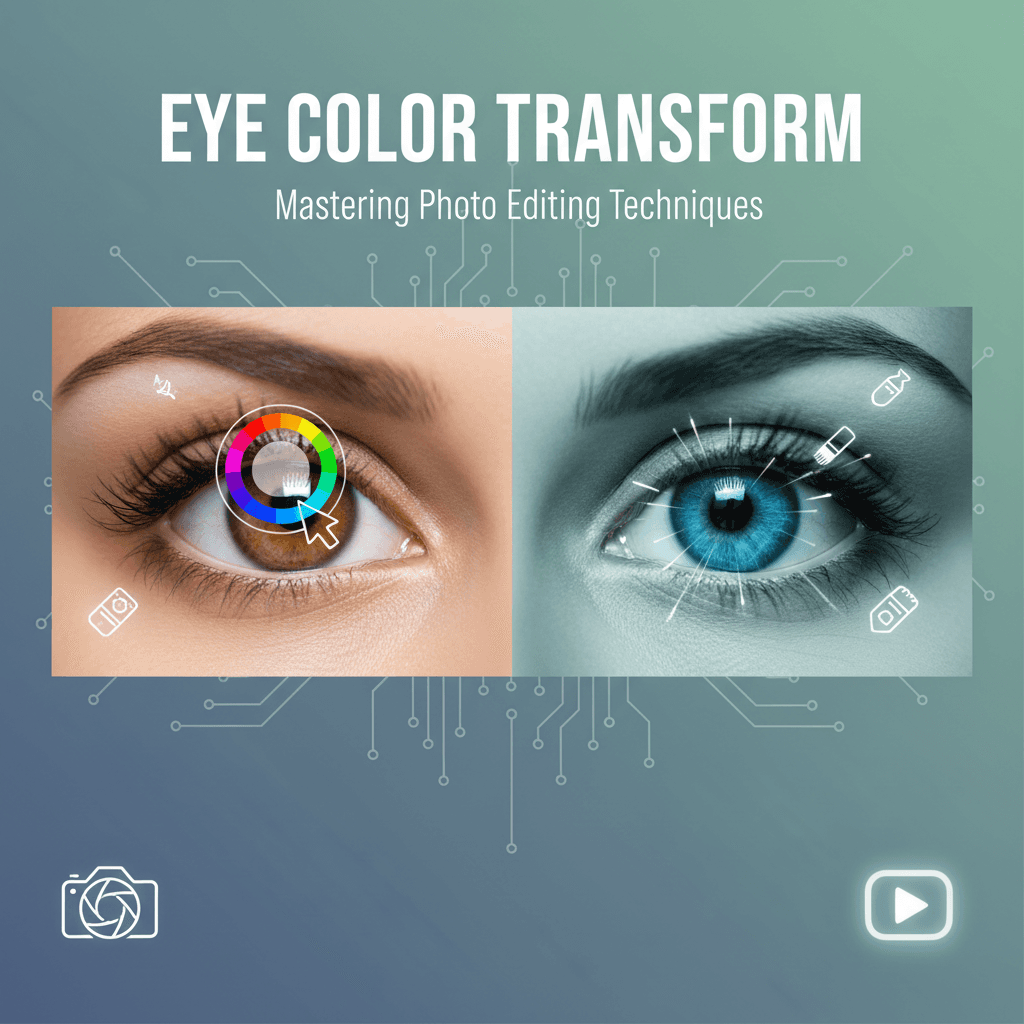
Mastering Eye Color Transformation in Digital Photography
The ability to subtly or dramatically alter eye color in photographs has become a sought-after skill for both professional retouchers and casual enthusiasts. Whether for artistic expression, character development in visual media, or simply enhancing a portrait, changing eye color can profoundly impact the mood and narrative of an image. Traditional methods often involve complex manual selections and adjustments in photo editing software, demanding significant time and expertise. However, the advent of artificial intelligence has revolutionized this process, offering more efficient and precise solutions.
AI-powered tools can now detect and isolate facial features with remarkable accuracy, making tasks like eye color alteration far more accessible. These advanced algorithms understand the nuances of light, shadow, and reflection within the eye, allowing for realistic and seamless changes that blend naturally with the rest of the image. This technological leap democratizes sophisticated photo editing, enabling a broader audience to achieve professional-grade results without extensive training. APOB AI, a leading platform in AI-driven content creation, leverages these capabilities to provide unparalleled control over digital aesthetics, including the precise manipulation of eye color for photorealistic results.
Step-by-Step Guide: How to Change Eye Color in Photos with APOB AI
Changing eye color requires precision. Unlike hair, eyes are small and contain complex details like reflections (catchlights) and pupil dilation. Follow these steps to ensure a realistic transformation using APOB AI (or similar generative tools).
Step 1: Upload a High-Quality Portrait
The quality of the input image is the most critical factor for eye editing.
Access the Dashboard: Log in to APOB AI.
Select Your Photo: Upload the portrait you wish to edit.
Quality Check: Ensure the subject is facing the camera or at a slight angle.
Avoid: Photos where the subject is squinting, wearing sunglasses, or standing in dark shadows.
Requirement: The iris and pupil must be clearly visible for the AI to map the new color correctly.
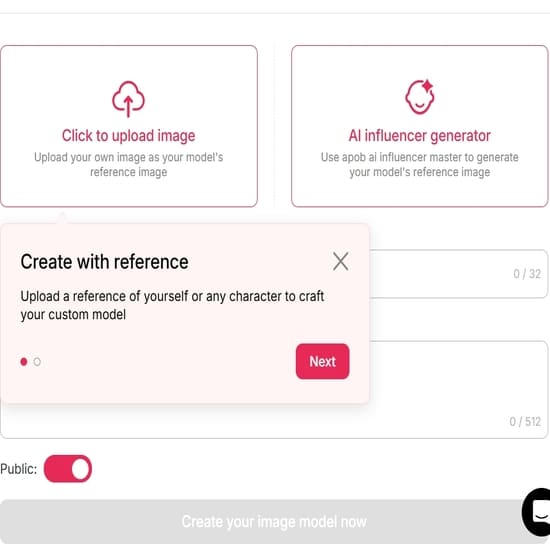
Step 2: Craft the Perfect Prompt
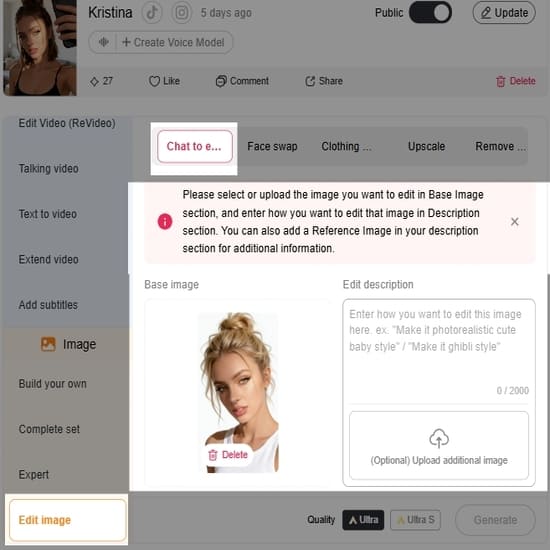
Now, find 'Edit Photo' and then to 'Chat to Edit', describe the new eye color in the text prompt box. Be specific to get realistic textures.
Basic Prompt: "Blue eyes" (Often results in flat, cartoonish color).
Advanced Prompt: "Hyper-realistic ice blue eyes, detailed iris pattern, natural reflection, sharp focus."
Creative Variations:
Natural: "Deep hazel eyes with golden flecks."
Dramatic: "Vibrant emerald green eyes, bright and piercing."
Fantasy: "Glowing amber eyes, vertical pupil, mystical look."
Step 3: Generate and Refine
Click "Generate" and review the variations.
Check the "Catchlights": Look at the white reflection spots in the eyes. Real eyes always reflect light. If the AI generates "dead" eyes (no reflection), discard that image.
Check the Gaze: Ensure the new eyes are looking in the same direction as the original photo.
Iterate: If the color is too bright or "fake," add words like "muted tone," "darker," or "natural lighting" to your prompt and generate again.
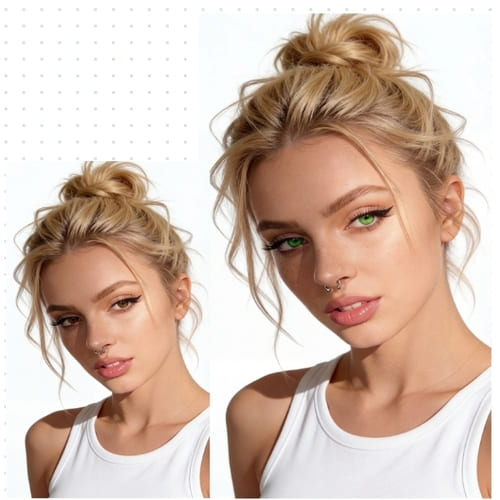
Step 4: Finalize and Export
Once you have a result that looks indistinguishable from reality:
Compare: Toggle between the original and the new image to ensure the facial structure hasn't shifted.
Download: Save the image in high resolution.
Pro Tips for Realistic Eye Edits
Match the Lighting: If your photo was taken at sunset (warm light), asking for "cool blue eyes" might look unnatural. Try "Warm honey-brown eyes" instead.
Don't Forget the Limbal Ring: For a more attractive and youthful look, add "prominent dark limbal ring" to your prompt. This is the dark circle that outlines the iris.
Heterochromia: Want a unique look? Try masking only one eye and prompting for a different color to create heterochromia (two different eye colors).
The Evolution of Photo Editing: From Manual to AI-Driven
Historically, changing eye color in a photo was a meticulous process. It involved zooming in, carefully selecting the iris, adjusting hue, saturation, and lightness, and then often feathering edges to avoid an artificial look. This required a keen eye for detail and a steady hand, making it a time-consuming endeavor. Any slight misstep could result in an unnatural or pixelated appearance, detracting from the overall quality of the image.
Modern AI tools, however, automate much of this complexity. They leverage machine learning models trained on vast datasets of images to accurately identify the eyes and their various components. This intelligent recognition allows for precise masking and targeted adjustments. Users can simply select a desired color or apply a pre-set filter, and the AI handles the intricate details of application, ensuring a natural blend and realistic texture. This shift not only saves time but also significantly reduces the learning curve for achieving high-quality edits. The integration of AI in photo editing, particularly for tasks like changing eye color, represents a significant leap forward in digital artistry, making sophisticated enhancements accessible to everyone.
Here is the optimized, detailed, and polished version of your tutorial. I have corrected the spelling errors, fixed the numbering (Step 4 was missing), and expanded on the technical details to make the guide more actionable for users.
Best Practices for Optimal Eye Color Transformation Results
To ensure your eye color changes are as realistic and impactful as possible, consider these best practices:
Start with High-Quality Images: Clear, well-lit photos provide the AI with better data, leading to more accurate and natural-looking results. Avoid blurry or low-resolution images.
Consider Natural Lighting: The new eye color should complement the existing lighting conditions in the photo. A bright, vibrant color might look out of place in a dimly lit scene.
Subtlety is Key: While dramatic changes are possible, often the most effective eye color transformations are subtle, enhancing the subject's natural beauty rather than overpowering it.
Match Skin Tone: The chosen eye color should harmonize with the subject's skin tone and overall complexion. Certain colors might wash out or clash with specific skin tones.
Refine Edges Carefully: Pay close attention to the edges of the iris to ensure a seamless blend. Avoid harsh lines or artificial halos around the pupil.
Utilize Advanced Controls: If your AI tool offers hue, saturation, and lightness sliders, use them to fine-tune the color to perfection, creating unique shades that are not available in pre-sets.
Get Feedback: Sometimes a fresh pair of eyes can spot inconsistencies. Share your edited images with others to get an objective opinion on realism.
Elevate Your Visuals with APOB AI's Capabilities
While changing eye color is a powerful enhancement for existing photos, imagine the possibilities when creating entirely new visual content. APOB AI, a leading AI influencer creation tool, empowers users to generate photorealistic AI models and influencers from scratch. This platform goes beyond simple photo editing, offering comprehensive control over every aspect of a digital persona, including intricate details like eye color, facial structure, hair, and even expressions.
With APOB AI, you can design bespoke AI influencers tailored to specific marketing campaigns, brand aesthetics, or narrative requirements. This level of control ensures that every visual element, from the subtle shade of an iris to the overall demeanor, aligns perfectly with your creative vision. The platform's advanced AI capabilities streamline the creation process, allowing users to achieve high-quality, customized digital assets efficiently and cost-effectively, circumventing the traditional complexities and expenses associated with human models and extensive photo shoots. APOB AI offers a powerful, accessible solution for generating unique and impactful visual content.
Technical Specifications of AI Eye Color Changing Technology
The precision and realism of AI-powered eye color change tools are rooted in sophisticated technical specifications:
Image Input Formats: Typically support common image formats such as JPEG, PNG, and TIFF.
Resolution Support: Capable of handling high-resolution images, often up to 8K, ensuring detailed edits without pixelation.
Processing Speed: Utilizes cloud-based GPU acceleration for rapid processing, delivering results in seconds rather than minutes.
AI Model Architecture: Employs advanced deep learning models, such as Convolutional Neural Networks (CNNs) and Generative Adversarial Networks (GANs), trained on vast datasets of human faces and eye variations.
Facial Landmark Detection: Integrates precise facial landmark detection algorithms to accurately identify the iris, pupil, and sclera, enabling targeted masking.
Color Blending Algorithms: Advanced algorithms ensure seamless integration of new colors, accounting for lighting, reflections, and natural eye texture to maintain realism.
Output Quality: Maintains the original image quality and resolution upon export, with options for various compression levels.
Data Privacy: Adheres to strict data privacy protocols, ensuring uploaded images are processed securely and not stored beyond the necessary duration for editing.
AI vs. Manual Editing: Why Choose APOB AI for Eye Color Changes?
Feature | APOB AI (AI-Driven) | Manual Editing (Traditional Software) |
|---|---|---|
Speed | Instantaneous, results in seconds | Time-consuming, minutes to hours per image |
Precision | High, AI accurately detects and masks the iris | Requires meticulous manual selection, prone to errors |
Ease of Use | Very high, intuitive interface, few clicks | Requires advanced software knowledge and skills |
Realism | High, AI blends colors naturally with lighting and texture | Depends heavily on editor's skill and experience |
Consistency | High, consistent results across multiple images | Varies greatly between different editors or even sessions |
Cost | Subscription-based, cost-effective for bulk edits | High, requires expensive software and skilled labor |
Learning Curve | Minimal | Steep |
Choosing APOB AI for eye color changes means opting for efficiency, precision, and accessibility, freeing up valuable time for more creative endeavors.
Applications of AI Eye Color Changing Technology
The ability to change eye color in photos with AI has a wide range of applications across various industries and personal uses:
Portrait Photography: Enhance subject's eyes, correct color imbalances, or fulfill client requests for specific eye colors.
Fashion and Beauty Industry: Create diverse looks for models, test different cosmetic effects, or visualize contact lens products without physical application.
Marketing and Advertising: Develop compelling visuals for campaigns, ensuring models' features align perfectly with brand aesthetics or target demographics.
Film and Television Production: Aid in character development for digital doubles or visual effects, allowing for precise control over an actor's appearance.
Gaming and Virtual Reality: Customize avatars and characters with unique eye colors, enhancing immersion and personalization.
Social Media and Personal Use: Express creativity, experiment with personal appearance, or simply enhance selfies and profile pictures for a more striking look.
Artistic and Creative Projects: Explore imaginative concepts, transforming subjects into fantastical beings or creating surreal visual narratives.
Key Advantages of Using AI for Eye Color Transformation
Leveraging AI for changing eye color offers several significant benefits:
Unmatched Speed: Transform eye color in moments, drastically reducing editing time.
Superior Accuracy: AI algorithms precisely identify and isolate the iris, ensuring clean and natural-looking edits.
Enhanced Realism: Intelligent blending capabilities integrate new colors seamlessly with existing light and shadows.
User-Friendly Interface: Makes professional-grade editing accessible to users of all skill levels.
Creative Freedom: Experiment with a vast palette of colors and shades without complex manual adjustments.
Cost-Effectiveness: Reduces the need for expensive software and extensive training.
Consistent Results: Delivers uniform quality across multiple images, crucial for branding and large projects.
User Testimonials
"APOB AI has completely changed my workflow. Changing eye color used to be a tedious task, but now it's instant and flawless!" - Jessica L., Professional Retoucher
"I love how easy it is to experiment with different looks for my digital models. The eye color feature is incredibly realistic." - Mark T., Digital Artist
"As a small business owner, APOB AI helps me create stunning marketing visuals without breaking the bank. The quality is exceptional." - Sarah P., E-commerce Entrepreneur
Get 80 Free Credits Daily with APOB AI
Frequently Asked Questions About Changing Eye Color with AI
Can AI tools change eye color realistically?
Yes, advanced AI tools like APOB AI are trained on vast datasets of images, enabling them to detect facial features and apply new eye colors with remarkable realism. They consider lighting, shadows, and natural eye textures for seamless integration.
Is it difficult to use AI for eye color changes?
No, most AI-powered photo editing platforms are designed with user-friendly interfaces. You typically just upload your image, select the eye color feature, choose your desired shade, and the AI handles the complex adjustments, making it very accessible.
Can I customize the eye color beyond pre-set options?
Many advanced AI tools offer customization options beyond basic pre-sets. You can often use sliders for hue, saturation, and brightness to fine-tune the color, allowing you to create unique and precise shades to match your artistic vision.
Does changing eye color affect other parts of the photo?
Properly designed AI tools focus specifically on the eye area, ensuring that changes to eye color do not inadvertently affect other parts of the face or the overall image quality. The masking is precise to avoid bleed-over effects.
Are there any privacy concerns when uploading photos to AI tools?
Reputable AI platforms prioritize user privacy. They typically employ secure data handling protocols, ensuring that your uploaded images are processed confidentially and not stored longer than necessary for the editing task. Always check the platform's privacy policy.
Can AI tools change eye color in videos as well?
While this article focuses on still images, the underlying AI technology is rapidly advancing. Some cutting-edge AI tools are now capable of performing real-time eye color changes in videos, offering dynamic visual effects for content creators.
References
[1] IBM Cloud Education. (2020, July 23). What is Artificial Intelligence (AI)?. IBM. https://www.ibm.com/cloud/learn/what-is-artificial-intelligence
[2] Goodfellow, I., Pouget-Abadie, J., Mirza, M., Xu, B., Warde-Farley, D., Ozair, S., Courville, A., & Bengio, Y. (2014). Generative Adversarial Nets. Advances in Neural Information Processing Systems, 27. https://proceedings.neurips.cc/paper/2014/file/5ca3e9b122f61f8f06494c97b1afccf3-Paper.pdf
[3] Krizhevsky, A., Sutskever, I., & Hinton, G. E. (2012). ImageNet Classification with Deep Convolutional Neural Networks. Advances in Neural Information Processing Systems, 25. https://proceedings.neurips.cc/paper/2012/file/c399862d3b4b600937cc97a5a14d63a3-Paper.pdf
[4] Wikipedia. (n.d.). Facial landmark detection. Retrieved from https://en.wikipedia.org/wiki/Facial_landmark_detection
[5] European Commission. (2016). General Data Protection Regulation (GDPR). https://gdpr-info.eu/

Be the first to like this.





No credit card needed


