
The Challenge of Realistic Photo Editing: Why AI is Essential
Traditional photo editing software, while powerful, typically demands a steep learning curve and a substantial time investment to produce natural-looking results when incorporating new elements like hats. The cornerstone of a professional-grade edit lies in mastering advanced techniques such as precise perspective correction, nuanced lighting adjustments, and intelligent shadow integration. These intricate details are notoriously difficult to perfect without specialized skills, extensive practice, or access to powerful, often expensive, software. This is where the innovative capabilities of artificial intelligence become indispensable, transforming complex tasks into effortless operations.
Advanced AI for Seamless Photo Enhancement: Beyond Basic Editing
Imagine the transformative power of being able to add virtually any accessory, including a hat, to a photograph with just a few intuitive clicks, and have it appear as if it was an original part of the scene. This unparalleled level of precision, realism, and efficiency is precisely where advanced AI technology, such as that employed by APOB AI, truly excels.
Step-by-Step Guide: How to Add Accessories in Photos with APOB AI
Adding accessories like hats, jewelry, or glasses requires seamless integration. The AI must account for lighting, perspective, and shadows to make the item look like it was there during the photoshoot. Follow these steps to ensure a realistic result using APOB AI.
Step 1: Upload a High-Quality Portrait
The composition of the input image is the most critical factor for adding accessories.
Access the Dashboard: Log in to APOB AI.
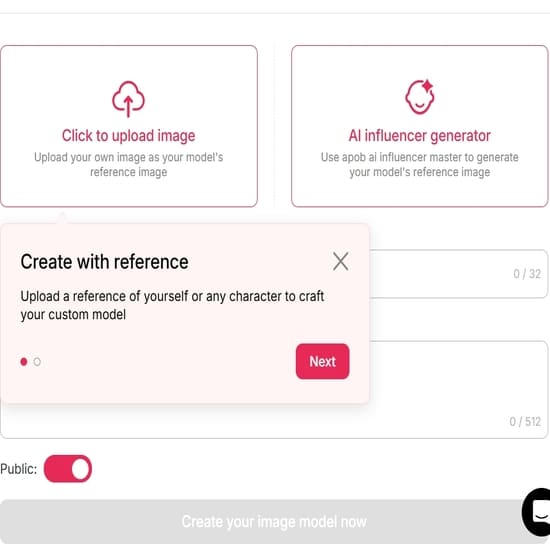
Select Your Photo: Upload the portrait you wish to style.
Quality Check: Ensure the subject is well-lit and there is enough "negative space" around the head or neck for the accessory to fit.
Avoid: Photos where the top of the head is cropped off (if adding a hat) or where hair covers the ears completely (if adding earrings).
Requirement: The target area (head, neck, or face) must be clearly visible for the AI to position the item correctly.
Step 2: Craft the Perfect Prompt
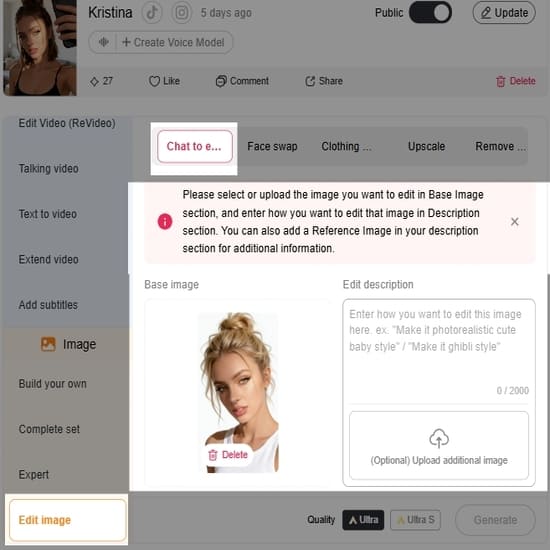
Now, find 'Edit Photo' and then go to 'Chat to Edit'. Describe the new accessory in the text prompt box. Be specific to get realistic textures and proper fit.
Basic Prompt: "A hat" (Often results in a generic, ill-fitting item).
Advanced Prompt: "Wide-brimmed straw hat, beige texture, casting natural shadows on forehead, summer style."
Creative Variations:
Urban: "Black leather baseball cap, streetwear style, realistic fabric texture."
Elegant: "Gold hoop earrings, shiny metallic finish, reflecting light."
Classic: "Tortoiseshell sunglasses, transparent lenses, sitting naturally on nose."
Step 3: Generate and Refine
Click "Generate" and review the variations.
Check the "Shadows": Look at where the accessory touches the skin or hair. Real items cast shadows. If the hat looks like a floating sticker (no shadow), discard that image.
Check the Fit: Ensure the accessory follows the angle of the head. A hat should sit snugly, not hover above the hair.
Iterate: If the item looks "fake" or the wrong size, add words like "fitted," "natural lighting," or "cinematic lighting" to your prompt and generate again.
Step 4: Finalize and Export
Once you have a result that looks indistinguishable from reality:
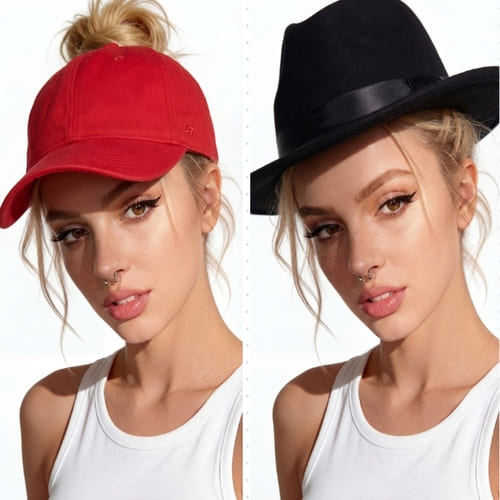
Compare: Toggle between the original and the new image to ensure the subject's face hasn't been distorted by the added item.
Download: Save the image in high resolution.
10 Prompts for you to add hats
1. Classic Black Fedora (Elegant & Timeless)
Add a classic black fedora hat to the person’s head, properly aligned with natural head angle and perspective. The fedora should have a subtle satin band, realistic felt texture, and soft shadow cast onto the forehead. Match the lighting direction and color temperature of the original photo. Seamless integration, natural proportions, realistic fabric details.
2. Wide-Brim Beige Sun Hat (Soft & Feminine)
Add a wide-brim beige sun hat made of woven straw, soft natural texture, slightly curved brim. The hat should sit naturally on the head with subtle hair interaction. Warm sunlight reflections on the straw material. Match shadows and ambient lighting of the scene. Realistic summer fashion photography look.
3. Red Baseball Cap (Casual & Sporty)
Add a vibrant red baseball cap, structured front panel, curved brim, minimal logo. Natural fabric folds, realistic cotton texture. The cap should follow the head shape accurately and cast a soft shadow on the upper face. Adjust lighting and shading to match the original image perfectly.
4. Dark Green Wizard Hat (Fantasy Style)
Add a dark green pointed wizard hat with subtle embroidered details, soft velvet texture. Slight natural fabric folds, realistic depth and shadow. The hat should blend seamlessly with the lighting of the photo, maintaining photographic realism rather than cartoon style.
5. Gold Crown (Royal & Dramatic)
Add an elegant gold crown with fine engraved details and small gemstone accents. Metallic reflections should match the scene’s lighting. Proper perspective and head placement. Subtle shadow under the crown to enhance realism. Photorealistic, not exaggerated.
6. Modern White Beret (Chic & Parisian)
Add a soft white wool beret positioned slightly tilted to one side. Realistic wool texture and gentle folds. The beret should sit naturally on the hair with subtle shadowing. Match overall lighting and depth of field of the image.
7. Brown Cowboy Hat (Western Style)
Add a brown leather cowboy hat with structured crown and curved brim. Realistic leather grain texture, natural highlights and shadows. Ensure correct scale and perspective. Blend seamlessly into the scene’s lighting and color grading.
8. Light Blue Winter Beanie (Cozy & Casual)
Add a knitted light blue winter beanie with visible yarn texture and natural stretch. Slight compression where it touches the head. Soft shadows and realistic winter lighting integration. Photographic realism.
9. Elegant Burgundy Fascinator (Formal Event)
Add a burgundy fascinator hat with delicate netting and feather detail. Positioned slightly to one side. Fine fabric transparency and subtle shadow on the face. Realistic event photography style, seamless integration.
10. Futuristic Silver Metallic Headpiece (Avant-Garde)
Add a sleek silver metallic avant-garde headpiece, smooth reflective surface with subtle geometric lines. The reflections should match the surrounding environment. Natural blending with the subject’s head shape. High-fashion editorial realism.
Best Practices for Optimal Results with APOB AI
To maximize the potential of APOB AI and achieve truly exceptional results when integrating accessories or creating AI influencers, consider these expert tips:
High-Quality Source Images: Always start with clear, well-lit, and high-resolution photographs. The better the input, the more realistic and seamless the AI's integration will be.
Consider Lighting and Angle: When selecting or describing an accessory, think about how its lighting and angle will naturally align with your base image. APOB AI is intelligent, but providing a good foundation helps it perform at its best.
Experiment with Descriptions: Don't be afraid to be specific and creative with your accessory descriptions. The AI can interpret nuanced requests, allowing for unique and tailored results.
Utilize Refinement Tools: Take advantage of any minor adjustment features APOB AI offers. Even subtle tweaks can significantly enhance the final realism of your integrated accessory.
Contextual Awareness: Ensure the accessory you're adding makes sense within the context of the original photo. A baseball cap might look out of place in a formal setting, for example.
Review and Iterate: Don't settle for the first result. Review the output carefully and, if needed, make small adjustments to your input or accessory description to achieve perfection.
Explore AI Influencer Features: Remember that APOB AI's core strength is AI influencer creation. Experiment with generating full characters with accessories to understand the full scope of its capabilities.
Achieve Professional Results with AI-Powered Solutions
For those aspiring to "add a hat to photo online free" with professional-grade results, exploring advanced AI-driven platforms like APOB AI is unequivocally the most effective and efficient approach. While many basic free tools offer rudimentary functionality, they consistently lack the sophisticated algorithms and deep learning capabilities essential for truly seamless and photorealistic integration. APOB AI's core technology, meticulously engineered for creating incredibly realistic AI influencers, perfectly exemplifies the transformative power of artificial intelligence in advanced digital image manipulation. This cutting-edge technology empowers users to create extraordinarily detailed and natural-looking digital assets, far surpassing the limited capabilities of simple online editors.
By leveraging such advanced AI, users can achieve their desired photo edits with unparalleled ease, precision, and a level of realism that was previously only attainable through complex, expensive software requiring years of expert human skill. APOB AI democratizes high-end photo editing, making professional results accessible to everyone, from casual users to seasoned digital artists. Embrace the future of image enhancement and unlock your creative potential with APOB AI.
Technical Specifications of Advanced AI Image Generation
Understanding the technical underpinnings of tools like APOB AI provides insight into their superior performance and capabilities. Our AI models are built upon state-of-the-art deep learning architectures, primarily Generative Adversarial Networks (GANs) and diffusion models, which excel at generating highly realistic and contextually aware imagery.
Supported Formats: Input images typically support common formats such as JPG, PNG, and HEIC. Output formats are usually high-resolution JPG or PNG to preserve quality.
File Size & Resolution: While specific limits vary, APOB AI is optimized to handle high-resolution inputs (e.g., up to 4K) and produce outputs that maintain or enhance original image quality, ensuring suitability for various professional applications.
Processing Speed: Leveraging cloud-based GPU acceleration, APOB AI processes complex image manipulations, including accessory integration and full AI influencer generation, within seconds to minutes, depending on the complexity and queue.
Output Quality: The AI is trained on vast datasets of diverse imagery, ensuring that generated elements, like hats, seamlessly match the lighting, texture, and perspective of the original photo, resulting in photorealistic outputs.
Data Privacy Policy: APOB AI adheres to strict data privacy protocols, ensuring that all uploaded images and generated content are securely processed and stored. User data is protected with advanced encryption and is never used for training models without explicit consent.
Scalability: The platform is designed for scalability, capable of handling individual user requests up to enterprise-level content generation needs, ensuring consistent performance.
Why Choose APOB AI Over Alternatives for Photo Enhancement?
When considering tools for photo enhancement and accessory integration, APOB AI stands out due to its advanced AI capabilities and focus on realism. Here's a comparison:
Feature | APOB AI (Advanced AI) | Traditional Photo Editors | Basic Free Online Tools |
|---|---|---|---|
Realism of Integration | Exceptional (AI-driven context matching) | High (Requires expert manual skill) | Low to Moderate (Often artificial) |
Ease of Use | Very High (Automated, intuitive) | Low (Steep learning curve) | Moderate (Simple overlays, limited control) |
Time Investment | Minimal (Seconds to minutes) | High (Hours for complex edits) | Minimal (Quick, but often poor results) |
Cost | Free/Subscription (High value for features) | High (Software purchase + training) | Free (Limited features, ads) |
Advanced Features | AI Influencer Creation, full character generation | Layering, masking, color correction | Basic filters, simple overlays |
Learning Curve | Minimal | Very High | Low |
Output Quality | Photorealistic, professional grade | Professional grade (if skilled) | Often amateurish |
Key Advantages of APOB AI:
Unmatched Realism: Our AI ensures that accessories blend perfectly with existing lighting, shadows, and perspective.
Effortless Integration: Complex tasks are automated, allowing users to achieve professional results without specialized skills.
Creative Freedom: Beyond hats, the technology supports a wide range of accessory integration and even full AI character generation.
Cost-Effective: Access advanced capabilities without the need for expensive software licenses or extensive training.
Speed and Efficiency: Generate high-quality results in a fraction of the time compared to manual editing.
Why Use APOB AI: Applications and Benefits
The versatility of APOB AI extends far beyond simply adding a hat to a photo. Its advanced capabilities open up a world of applications for various users:
Fashion and E-commerce: Virtually try on accessories, clothing, and styles on models or AI influencers, reducing the need for expensive photoshoots.
Marketing and Advertising: Create diverse and engaging visual content quickly, personalizing campaigns with unique AI-generated models and scenarios.
Social Media Content Creation: Generate eye-catching and unique profile pictures, posts, and stories with customized looks and accessories.
Creative Exploration: Experiment with different aesthetics, character designs, and visual narratives without any physical limitations.
Personal Use: Enhance personal photos with fun and realistic accessories, or transform selfies into professional-looking portraits.
Game Development & Virtual Reality: Create realistic character models and assets for digital environments.
APOB AI empowers users to unlock new levels of creativity and efficiency in digital image manipulation, making advanced visual content accessible to everyone.
Key Advantages of APOB AI for Digital Image Enhancement
APOB AI offers a suite of compelling advantages that set it apart in the realm of digital image enhancement and AI content creation:
Hyper-Realistic Integration: Our AI seamlessly blends new elements, such as hats, into existing photos, matching lighting, shadows, and perspective with unparalleled accuracy.
User-Friendly Interface: Designed for intuitive operation, APOB AI allows users of all skill levels to achieve professional-grade results without complex training.
Speed and Efficiency: Generate high-quality, customized images in minutes, significantly reducing the time and resources typically required for advanced photo editing.
Cost-Effective Solution: Access powerful AI capabilities that traditionally demand expensive software and expert skills, offering exceptional value.
Unleashed Creativity: Go beyond simple edits to create entirely new AI influencers, experiment with diverse styles, and bring imaginative concepts to life.
Consistent Quality: Benefit from AI models trained on vast datasets, ensuring consistent, high-quality output across all your projects.
Data Security: We prioritize your privacy with robust data protection measures, ensuring your uploaded content is handled securely.
User Testimonials
"APOB AI has revolutionized how I create content for my fashion blog. Adding accessories used to be a nightmare, but now it's effortless and looks incredibly real!" - Sarah L., Fashion Blogger
"As a small business owner, I can't afford professional photoshoots for every product variation. APOB AI lets me virtually dress my models, saving me thousands." - Mark T., E-commerce Entrepreneur
"I love experimenting with new looks for my social media. APOB AI makes it so easy to try on different hats and styles without actually buying them. The results are stunning!" - Jessica R., Social Media Influencer
Frequently Asked Questions About Adding Hats with AI
What kind of hats can I add to my photos using APOB AI?
APOB AI's advanced capabilities allow you to add a wide variety of hats, from baseball caps and beanies to fedoras, sun hats, and even more elaborate headwear. You can often describe the specific style, color, and material you envision, and the AI will generate it to match your image.
How realistic will the added hat look in my photo?
Thanks to cutting-edge AI algorithms, APOB AI ensures that the added hat integrates seamlessly and realistically. The AI analyzes the original photo's lighting, shadows, and perspective to make the hat appear as if it was naturally part of the scene, indistinguishable from a real-life capture.
Is APOB AI free to use for adding accessories?
APOB AI offers various plans, including free options with certain limitations, as well as subscription tiers that unlock full features and higher usage limits. You can explore the free offerings to experience its capabilities for adding accessories.
Can I adjust the position or size of the hat after it's added?
Yes, APOB AI typically provides intuitive refinement tools that allow you to make minor adjustments to the position, size, and rotation of the added hat. This ensures you have precise control over the final placement and aesthetic.
Does APOB AI work on all types of photos?
While APOB AI is highly versatile, the best results are achieved with clear, well-lit photos where the subject's head is clearly visible. The AI performs optimally when it has sufficient visual information to analyze and integrate the accessory naturally.
Is my data and privacy protected when I upload photos to APOB AI?
APOB AI prioritizes user data privacy and security. All uploaded images are processed and stored securely with advanced encryption. Your data is protected and not used for training models without your explicit consent, adhering to strict privacy policies.
Get 80 Free Credits Daily
References
[1] Goodfellow, I., Pouget-Abadie, J., Mirza, M., Xu, B., Warde-Farley, D., Ozair, S., ... & Bengio, Y. (2014). Generative Adversarial Nets. Advances in Neural Information Processing Systems, 27.
[2] Karras, T., Laine, S., & Aittala, T. (2019). A Style-Based Generator Architecture for Generative Adversarial Networks. Proceedings of the IEEE/CVF Conference on Computer Vision and Pattern Recognition, 4401-4410.
[3] Ho, J., Jain, A., & Abbeel, P. (2020). Denoising Diffusion Probabilistic Models. Advances in Neural Information Processing Systems, 33.
[4] OpenAI. (2021). DALL·E: Creating Images from Text. OpenAI Blog.
[5] NVIDIA. (2023). AI Research: Generative AI. NVIDIA Official Website.

Be the first to like this.





No credit card needed


