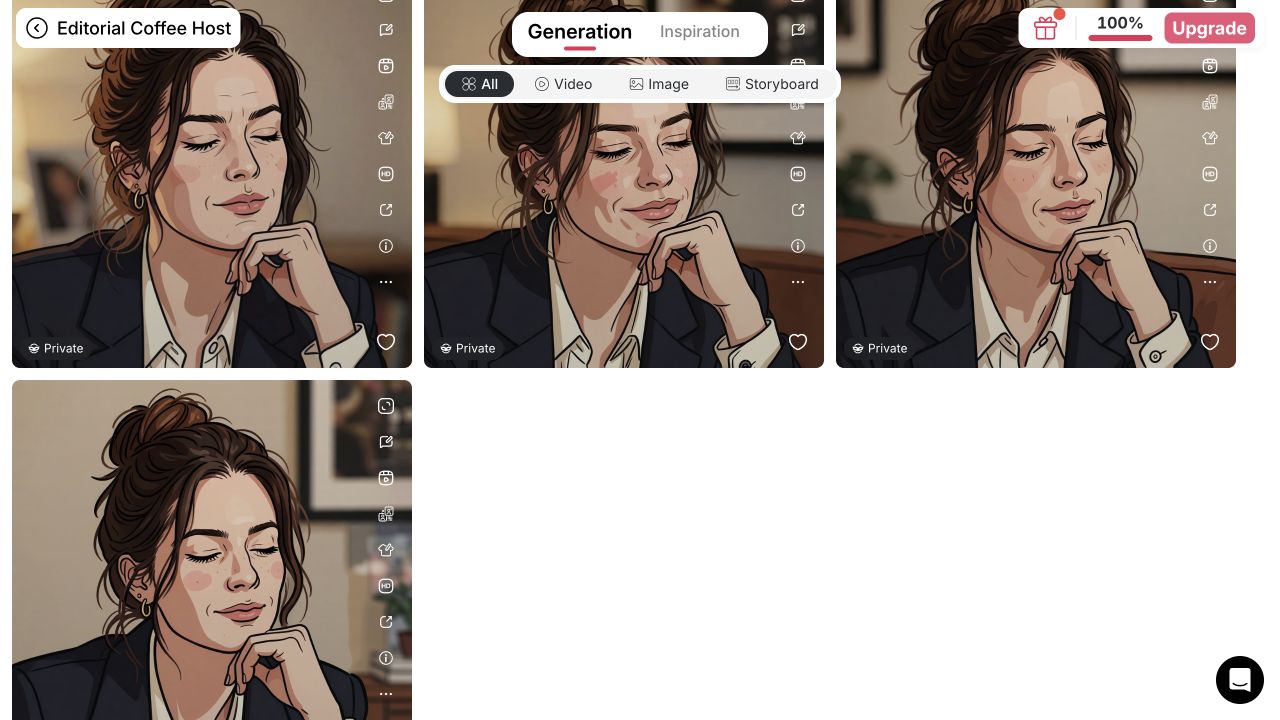
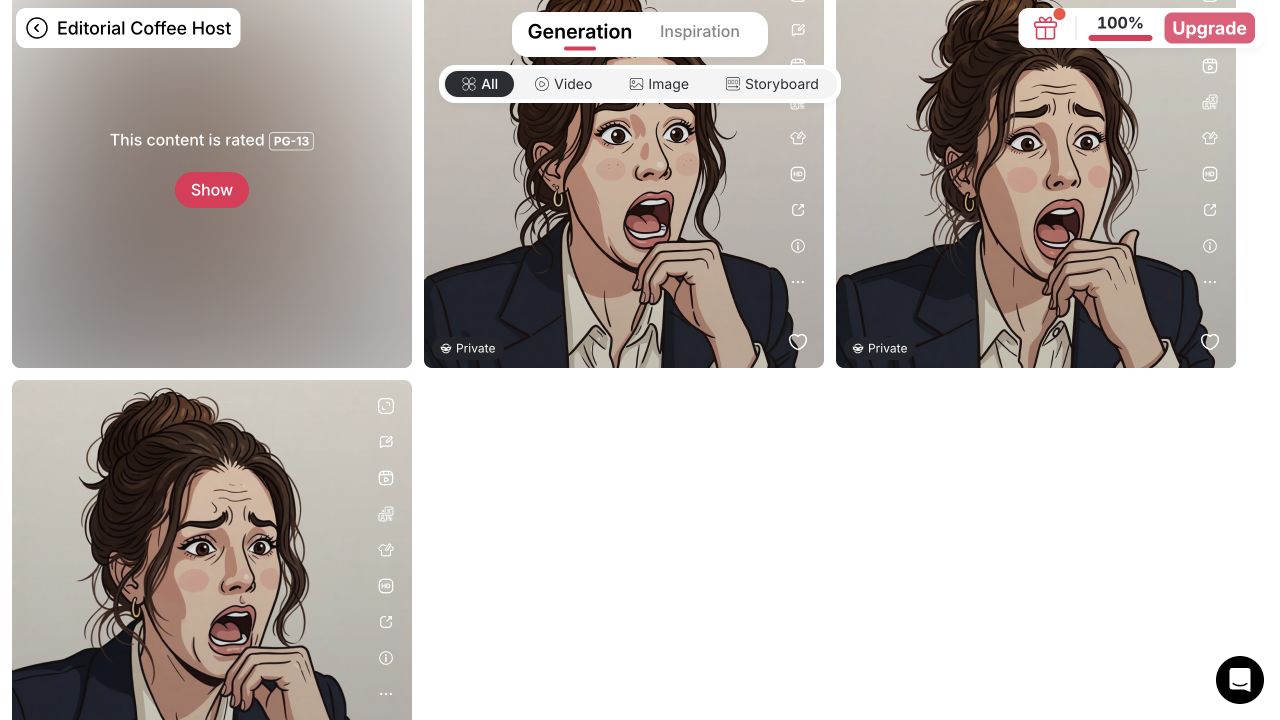
Prototype GG, lurk, and shocked static reactions around one rights-cleared portrait character. Generate candidates, remove backgrounds, then inspect each PNG before the separate Twitch upload.
Choose an original portrait character and plan its chat silhouette
The problem: A full-size portrait can become visual noise in a 28-pixel chat icon. Open your rights-cleared portrait model from APOB Home, then choose Generate image → Chat to generate. If you lack a model, APOB documents Create Portrait Model with an authorized uploaded reference or its AI influencer generator; the public workstation entry we tested required a selected model. Set Art style: Cute comic, Aspect ratio: 1:1, and Quality: Fast before generating. Write a spec with two identity cues, one emotion, a head-and-shoulders crop, bold contour, limited palette, no lettering, and edge padding. Fast produced four candidates per batch in our test; the displayed price was 20 credits at that time. Create a Portrait Model · Generate Image controls.
Example: A coffee-and-chat streamer selects her original fictional host portrait and asks for “one isolated illustrated head, warm brown bun, dark blazer, cream shirt, joyful GG face, bold contour, 1:1, no text, no photographic portrait or sticker.” She selects Cute comic before generating rather than relying on the prompt alone. In our test, unstyled prompts produced a photo-plus-cartoon composite; the explicit art style made a more useful illustrated candidate.
Expected output: Four square reaction candidates to assess from one prompt, not four different emotions or finished Twitch files.


Make reactions by changing one variable at a time
The problem: A six-pack prompt can mix emotions, and a selected portrait model alone does not lock crop or illustration style. Stay in Chat to generate for separate GG, lurk, and shocked runs; reuse the same model, Cute comic preset, 1:1 crop, and two visible identity cues. Change one emotion per prompt, then compare all shortlisted outputs side by side. Reject a changed face, outline, costume cue, or framing. Complete set is APOB's themed-prompt mode, not a verified automatic matching-emote exporter. Chat to edit can change an existing image, but we did not validate it as a consistency shortcut. Generate Image help · Edit Image help.
Example: A cozy-game streamer requests a sleepy lurk after approving a wide-smile GG. She keeps the bun, yellow scarf, face proportions, and crop in the brief; a changed scarf or photographic face fails the set review, even if the emotion is right.
Expected output: A shortlist of separate still-image reactions. Review the set side by side; do not infer consistency from a single good image.
View the separate lurk result screenshot and shocked result screenshot; these were separate runs, not one automatic pack.
Remove the background and inspect the edges
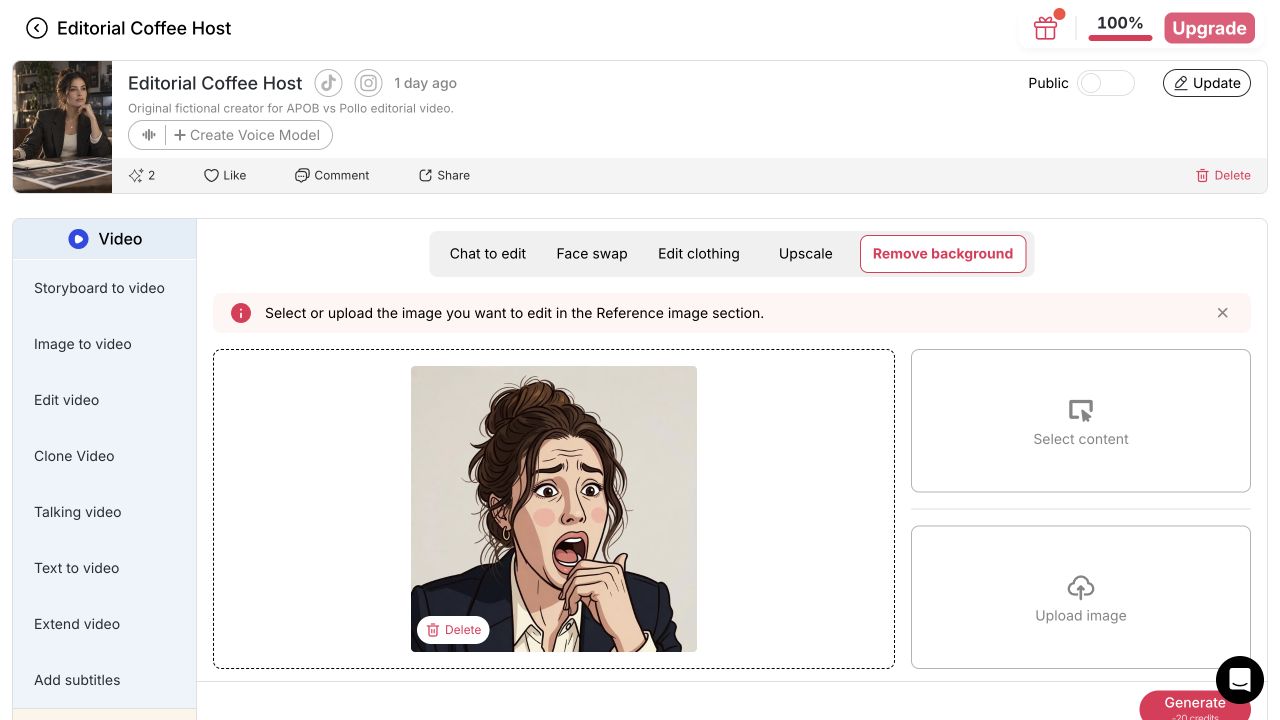
The problem: A white-looking backdrop is not proof of transparency; fine hair and fingers can be clipped. Choose Edit image → Remove background → Select content, pick the approved image under Generation (or upload your own authorized file), and press Generate. This tool needs one reference image, not a new text prompt or quality setting. It displayed 20 credits per removal in our test. Review the cutout on light and dark backgrounds; the shocked jacket touched the lower-left edge and flyaway hair warranted cleanup. Remove background help.
Example: An art streamer’s self-owned illustrated host portrait has dark flyaway hair. On a dark chat theme, any leftover halo or clipped strands can make the face unreadable. Fix or regenerate that variant before export.
Expected output: A separate cutout in your Generation feed. The test's three downloaded reaction files had real transparent pixels; verify each new file rather than trusting its preview.
Compare the same-image input screenshot before removal with the output shown here.


Download, check Twitch’s file rules, and upload separately
The problem: An attractive image can fail on format, transparency, file size, or chat-size legibility. Open each cutout's Details → More actions → Download, then check the actual file, not its white or checkerboard preview. Our shocked, GG, and lurk downloads were all 1024×1024 RGBA PNGs with real transparency; their sizes were 863,553, 1,005,219, and 829,410 bytes respectively. The GG file sits around Twitch's stated under-1 MB limit, so do not assume it passes; compress or simplify it first and test the result. Twitch's auto-resize route accepts one square transparent PNG in its 112–4096px range, while manual mode asks for 28/56/112px files under 100 KB each. APOB did not export a ready-made size set or submit the images to Twitch. Twitch formatting rules · Subscriber-emote guide · APOB Download help.
Example: A tabletop-stream host downloads a “critical hit” reaction from her original game-master portrait. She inspects whether the file is square, has real alpha transparency, stays under Twitch’s current limit, and still reads at 28 pixels. If not, a separate image editor handles resize and edge cleanup; she then uploads through Twitch.
Expected output: Reviewed static PNG candidates. All three met Twitch's auto-resize dimension range; that alone does not prove file-size compliance, small-size clarity, watermark status, or acceptance. Use Twitch Creator Dashboard → Viewer Rewards → Emotes → Subscriber Emotes for the separate upload and review step. Twitch upload guide.
Expert prompts for a Twitch emote maker
Purpose: generate the first reaction from a selected original portrait model. Select Cute comic in the style controls first. Expected output: four Fast candidates to review, not a finished Twitch file.
Use my selected, rights-cleared fictional stream-host portrait model. Keep her warm brown hair in a loose bun, dark blazer, cream shirt, and recognizable face proportions. Create ONE isolated square head-and-shoulders GG reaction with joyful eyes and one raised fist, bold contour, simple warm palette, and edge padding. Illustrated character only—not a photographic portrait with a small cartoon sticker. No lettering or logos.
Purpose: create a quieter lurk variation. Expected output: a separate static image that preserves the approved character cues.
Using the approved stream-host image as the base, change only the eyelids and hands: sleepy half-closed eyes, small closed-mouth smile, one hand against the cheek. Keep the loose bun, blazer, cream shirt, face proportions, outline weight, palette, crop, and character unchanged. No words or background props.
Purpose: make a panic reaction for a tabletop creator. Expected output: one readable, high-energy expression.
Use the approved game-master portrait as the base. Change only the expression to wide worried eyes, lifted brows, and a small open mouth; keep the purple cardigan, round glasses, hair shape, head-and-shoulders crop, and bold contour. One emotion only; no dice text or logos.
Purpose: rescue a weak 28-pixel preview. Expected output: simplified art, not a new face.
Simplify this approved art-streamer portrait reaction for a tiny chat icon. Enlarge the eyes and mouth, thicken the outer contour, remove small hair and fabric details, keep the same face proportions and paint-streaked beret, preserve a clear silhouette, and leave padding around every edge.
Prompting creates candidates. It does not prove character consistency, pixel dimensions, transparency, or Twitch approval.
This signed-in Nano test used one original fictional portrait model, six image batches, four background-removal results, and three files saved with Download. These observations are not a Twitch approval test.
A recurring portrait-model anchor
Starting from one original fictional host or authorized self-portrait helps keep the face recognizable across reaction briefs. It does not guarantee identical drawings or support an untested blank-prompt mascot workflow. APOB model card.
A style control that matters
The Cute comic preset plus “one isolated illustrated head” corrected the test’s photo-plus-sticker failure mode. The three reactions still needed a side-by-side crop and outline check; the preset is a control, not a one-click consistency guarantee.
Background removal in the same image workspace
All three selected reactions yielded downloadable transparent PNGs after Remove background. Keeping that step next to generation reduces handoffs, but you still need to inspect hair edges, padding, watermark, file size, and chat-size clarity.
A budget you can plan
At the observed rates, three four-image Fast batches plus one background removal per selected reaction would use 120 credits before retries—more than the currently documented 80-credit Nano daily refill. Costs are account- and time-specific, and Nano downloads are watermarked under APOB’s policy. Credits · Download policy.
Create an original character or use only a photo, drawing, logo, or reference you are authorized to upload and modify. Get consent for a recognizable person’s face and for commercial or promotional use of their likeness. Do not prompt for a copy of another streamer’s emote, game character, brand mascot, or protected mark. APOB’s Terms of Service contemplate commercial creative use but do not clear third-party rights or guarantee copyright protection for AI output. Keep a record of your prompt, source rights, and final edits. If a generated character could be mistaken for a real person, disclose AI involvement where context or platform rules call for it. Twitch reviews emotes under its own content and formatting rules and may reject or remove them; channel eligibility and upload/approval are managed there, not in APOB. Twitch guidelines · Subscriber Emote Guide.
A speedrunner’s recurring “reset” joke
Use an original, authorized portrait avatar with a signature red headband for GG, reset, and shocked expressions. Keep the headband and crop stable. At 28 pixels, a large eye/mouth change should carry the meaning; tiny timer digits probably will not. Let moderators choose the clearest two before the channel spends an emote slot.
A cozy creator’s welcome-and-lurk set
A fictional cozy-game host waves for new arrivals, closes her eyes for lurkers, and makes a heart gesture for subscriber thanks. Keep the yellow scarf and bun visible in every image. Twitch describes emotes as a community language and recommends asking viewers which ideas they would use. Twitch: How to Use Emotes · Subscriber Emote Guide.
An art stream’s critique reactions
An art streamer uses an authorized self-portrait with a distinctive paint-streaked beret: raised eyebrow for “needs another pass,” sparkling eyes for “finished,” and broad grin for a gallery reveal. Keep the design encouraging rather than targeting a real person. Review on light and dark chat themes so the contour and beret remain visible.
A tabletop campaign’s seasonal mini-set
An original game-master avatar reacts to a critical hit, a failed roll, and the party’s recurring “door check” joke. The character can extend beyond one game title without copying protected game art. Keep the first set small and ask the community which expressions deserve a permanent slot—Twitch’s own guide recommends monitoring emote use and replacing weak performers. Twitch Subscriber Emote Guide.
Portrait-character continuity
A selected personal model gives separate reaction briefs a recurring face, while the creator still checks identity and style.
Targeted reaction edits
APOB’s image-edit mode supports requesting an expression change from a selected image. A consistent set from that mode was not verified in this test.
Core static-image stages together
The test covered three reaction briefs, background removal, and three verified PNG downloads without switching creative workspaces.
Free is for prototyping
APOB’s published Nano policy says downloads are watermarked, and upgrading does not retroactively clean earlier generations. Plan final production under the applicable terms. APOB Download help.
No verified Twitch-ready bundle
The three measured PNGs met Twitch’s auto-resize dimension range, but one is close to the file-size limit; APOB was not shown exporting manual-size sets, uploading to Twitch, or securing approval. Twitch requirements.
Animation is unverified
This workflow produced stills. APOB Image to Video is not evidence of a compliant animated Twitch GIF export.
Set craft still needs checks
The preset improved consistency and three separate cutouts were downloaded, but crop, facial rendering, and 28-pixel clarity still varied. Separate downloads do not equal a polished one-click pack. The public entry also starts from a portrait model, not a verified blank-prompt nonhuman mascot flow. APOB model help.
No Credit Card Required

Static PNG workflow, credits, rights, and the Twitch upload handoff.
Is APOB a free Twitch emote maker?
It is free to start prototyping, not a promise of a clean finished pack. APOB currently documents 80 Nano credits per day. Our account showed 20 credits per four-image Fast batch and 20 per background removal; three batches and three removals would total 120 at those observed rates, before retries. Nano downloads are watermarked under the published policy. Credits · Download terms.
Can APOB generate several reactions of one character?
APOB can make separate candidate reactions in this AI emote generator workflow. Fast returns four candidates for one prompt, not four different emotions; run GG, lurk, and shocked as separate prompts. With the same Cute comic preset, our results shared a recognizable bun, blazer, and face, but crop and illustration details drifted. This is not an automatic matching-pack export. Generate Image help.
Does APOB make transparent Twitch emotes?
It can in the tested static workflow. Three separate Remove background downloads were 1024×1024 PNGs with actual RGBA alpha ranging from fully transparent to opaque. Check every new file and edge; a white-looking preview alone is not proof. APOB help · Twitch requirements.
Are the results static images or animated emotes?
This page covers static image creation. Animated Twitch emotes require a compliant GIF; that export path has not been demonstrated here. Twitch format rules.
Can I upload an APOB download directly to Twitch?
Do not assume so. Check PNG format, square dimensions, transparency, file size, watermark, and chat-size appearance first. The channel also needs the applicable Twitch emote access; submission and review happen in Twitch’s Creator Dashboard, not APOB. Twitch upload guide.
What Twitch emote sizes do I need?
Twitch’s current standard-emote guide describes either one square 112–4096-pixel transparent PNG under 1 MB for auto-resize, or manual 28×28, 56×56, and 112×112 PNGs under 100 KB each. These are Twitch specifications, not APOB export presets. Twitch formatting rules · Subscriber Emote Guide.
Will I need another app to resize my emote?
Possibly. All three tested transparent PNGs were 1024×1024, within Twitch’s auto-resize dimension range, so their pixel dimensions alone do not require conversion. The GG file measured 1,005,219 bytes—too close to Twitch’s stated 1 MB maximum to assume acceptance—and all three need chat-size art review. You may need external compression, simplification, or manually prepared sizes; Twitch upload is always separate.
How do I keep the character consistent?
Keep one approved source, repeat two visible identity cues, reuse the same art-style preset and crop instructions, and change one expression at a time. Compare eyes/mouth, silhouette, outline, and clothing side by side; reject any version that changes signature details.
Can I use my own face?
Yes, if you control the photo and consent to the intended AI use. Get explicit permission before using another person’s likeness; keep private or sensitive images out of workflows that do not meet your requirements.
Can I use APOB emotes commercially?
APOB’s terms describe legitimate commercial creative use, subject to current terms and third-party rights. That does not grant rights to a copied character, logo, person, or commissioned artwork. Review the Terms and your source licenses.
Are my emote concepts private?
Do not assume every plan or generation has the same visibility controls. APOB’s help says a Nano account cannot switch already-public content back to private; check the content’s status before sharing an unreleased mascot or client brief. Review the sharing guide, Terms, and Privacy Policy.
Why might my free download have a watermark?
APOB’s Help Center says Nano downloads are watermarked. Upgrading later does not remove a mark from files created while free; generate the clean version under an eligible plan and inspect the output before uploading it. APOB Download help.
Why does the reaction look unclear in chat?
At 28 pixels, subtle facial changes and thin lines disappear. Increase the eyes/mouth, simplify details, use a strong outline, and inspect on dark and light backgrounds before submission.
Does APOB approve emotes for Twitch?
No. Twitch controls its upload, review, eligibility, and content rules. An APOB-generated file can still be rejected. Twitch emote guidelines.
Is this the same as APOB’s AI live-streaming tool?
No. This page concerns downloadable reaction artwork for chat, not a live AI host, livestream room, OBS connection, or real-time avatar.
Why did the AI put a cartoon sticker next to my photo?
That happened in our unstyled test. Select an illustrated art-style preset and specify one isolated head-and-shoulders character, not a photographic portrait plus a small sticker. Regenerate if the main subject is still a photo; changing the emotion alone will not fix the composition.
Can I make a nonhuman mascot from a blank prompt here?
Do not rely on that for this tested entry path. The public workstation used for this page started from a selected portrait model. If your brief requires a new animal, robot, or object mascot with no portrait reference, verify a suitable product flow before planning your set. APOB model-selection help.
Can APOB handle generation, reaction variants, background removal, and export in one workflow?
For a portrait-based static concept, yes: in one APOB workspace we made separate GG, lurk, and shocked candidates, removed backgrounds, and saved three distinct transparent PNGs through Download. That does not mean a one-click polished pack or automatic Twitch upload. Inspect each file for watermark, byte size, alpha, and 28-pixel clarity; do any needed art cleanup elsewhere and submit through Twitch separately. APOB Generate Image · Remove background · Twitch file rules.
Will Complete set make a matching Twitch reaction pack automatically?
No such emote-pack result was verified. APOB describes Complete set as a mode that applies a ready-made themed prompt; our character-consistency test instead used Chat to generate with one emotion per run and the same Cute comic preset. Review the images together before calling them a set. APOB Complete set help.
Why is Generate disabled during background removal?
Remove background needs one image in its Reference image slot. Choose Select content to pick a generated image or Upload image for an authorized file, then wait for the generation context to load. No new description or quality choice is required in that mode. The credit cost appears beside Generate before you commit. APOB Remove background help.