APOB AI est une alternative indépendante à Gemini Omni Flash pour la vidéo et les images prêtes aux créateurs. Préserver l’identité des personnages, remplacer les arrière-plans, ajouter des mouvements de caméra cinématographiques et générer des résultats comparables ; avec certaines entrées, modèles et réglages, APOB peut également produire des images sources plus nettes pour le livrable final.
Étape 1 : Ajoutez le personnage et saisissez le prompt de modification
Ouvrez l’espace de travail vidéo d’APOB AI et choisissez le flux adapté à votre source. Ajoutez le personnage ou le clip existant, puis collez une instruction de modification précise. Dans cet exemple, conservez l’identité, le visage, la coiffure, le teint, les proportions, les vêtements, l’expression et les mouvements de la personne ; remplacez uniquement l’arrière-plan par une rue de Tokyo de nuit, éclairée au néon et photoréaliste ; puis demandez un lent travelling avant cinématographique. Des exclusions claires comme « sans coupe », « sans tremblement », « sans déformation du visage » et « sans changement d’identité » aident à préserver le résultat souhaité.


Étape 2 : Choisissez les paramètres de sortie et générez
Gardez l’audio natif activé lorsque le son original devrait rester dans le résultat. Sélectionnez le format de destination avant de générer : cette solution utilise 9:16, cinq secondes, FHD et qualité Ultra pour un clip social vertical. Des préréglages comme Mouvement de caméra peuvent renforcer le dolly-in, tandis que le prompt reste la source de vérité pour la préservation de l’identité, le remplacement de l’arrière-plan, l’éclairage et le timing des plans.
Étape 3 : Examinez le dolly de nuit de Tokyo et affinez
Comparez la prise médiane d’ouverture avec le cadre final de la proche. Vérifiez que le personnage reste reconnaissable, que le décor de la nuit de Tokyo semble intégré, que la lumière néon et les reflets sur le trottoir correspondent au sujet, et que le bouton d’entrée est fluide plutôt qu’un zoom numérique soudain. Si un détail est faible, ne modifiez que cette instruction ou un réglage de génération, puis créez une autre version. Selon le flux de travail d’image choisi, le modèle et la qualité source, l’APOB AI peut également produire une image d’entrée plus nette et plus prête pour le créateur avant l’animation.

Flux de travail du créateur de texte, d’image et de vidéo
Passer d’une scène écrite, d’une image de référence ou d’un clip existant à un résultat prêt pour le créateur. L’IA D’APOB réunit la génération, le montage, la planification des plans, les sous-titres, la vidéo parlante et les ressources de campagne réutilisables dans un seul espace de travail.
Modifications préservation de caractères
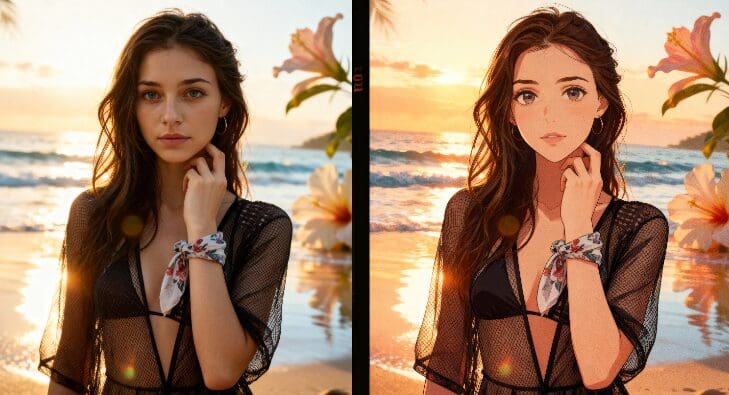
Utilisez des médias de référence et des instructions explicites de préservation uniquement pour maintenir l’identité, la coiffure, le teint de peau, les vêtements, l’expression et la composition stables tout en modifiant l’environnement, le mouvement ou le comportement de la caméra.
Remplacement de fond et direction de caméra cinématographique
Décrivez le nouvel emplacement, l’éclairage, les reflets, la profondeur de champ et les détails atmosphériques, puis dirigez un travelling de panique, un mouvement de suivi, un gros plan ou un autre comportement de prise avec un langage de prompts et des commandes adaptées aux créateurs.
Images sources prêtes au créateur et formats sociaux
Les outils d’image d’APOB AI peuvent affiner l’image source avant l’animation, et ses paramètres vidéo prennent en charge les livrables verticaux et paysages. Dans certaines combinaisons d’entrée et de modèle, l’image source peut être plus nette ou plus utile pour le brief final ; Les résultats varient.
Audio et itération dans le même flux de travail
Utilisez les options audio native lorsque possible, puis reliez, régénérez, prolongez, ajoutez un autre plan, ou continuez avec des outils complémentaires de voix, de synchronisation labiale, d’édition et de sous-titres.
Pour construire une marque virale, vous ne pouvez pas perdre des heures à transférer des fichiers entre quatre applications différentes. Arrêtez de payer un abonnement pour générer des visages, un autre pour animer la vidéo, un troisième pour synthétiser la voix, et un quatrième pour synchroniser les lèvres. APOB AI consolide l'ensemble de votre processus de création en une seule plateforme, vous offrant le flux de travail ultime pour transformer un concept en influenceur numérique prêt à être publié.
Arrêtez de courir après la technologie, ayez toujours le meilleur moteur
Le paysage de l'IA change chaque mois, et les créateurs ne devraient pas avoir à apprendre un nouvel outil à chaque sortie d'un nouveau modèle. Au lieu de courir après des API individuelles, construisez votre marque sur APOB AI. Nous intégrons constamment les moteurs vidéo les plus avancés au monde en arrière-plan. Vous vous concentrez sur la réalisation de votre contenu et sur la croissance de votre audience ; nous veillons à ce que votre technologie soit toujours à la pointe.
Créateur cohérent avec le personnage et les vidéos sociales
Transformer un portrait, un avatar ou un clip existant en contenu TikTok, Reels et Shorts tout en protégeant l’identité du personnage lors des changements de fond et des mouvements de caméra. La carte flash Gemini Omni de Google décrit la génération vidéo de haute qualité et le montage conversationnel ; L’APAJ IA propose un flux de travail indépendant pour de nombreux objectifs de créateurs similaires.
Publicités produits et variations e-commerce
Placez un produit ou un créateur dans de nouveaux environnements, créez des révélations en gros plan, générez plusieurs directions de campagne, et adaptez le cadrage pour des placements verticaux ou paysagers sans organiser un nouveau tournage pour chaque variante.
Remplacement de fond cinématographique
Transformez une source simple en une ville néon, un studio, un paysage, une architecture ou un environnement de marque. Ajustez la direction de la lumière, les reflets, la profondeur de champ et la couleur pour que le remplacement fasse partie intégrante du plan original.
Storyboards et prévisualisation
Testez le sujet, l’action, la trajectoire de caméra, le rythme et l’atmosphère sous forme de plans courts et contrôlables avant de vous engager dans un montage ou une production plus longue. La documentation officielle Gemini Omni met l’accent sur l’entrée multimodale et l’itération conversationnelle ; L’APOB AI applique une approche similaire axée sur le créateur à travers ses propres modèles et contrôles.
Un espace de création connecté
Générez ou montez à partir du texte, des images et de la vidéo, puis continuez avec les plans, les contrôles de caméra, les options audio, les sous-titres, la vidéo parlante et les exportations prêtes aux réseaux sociaux.
Contrôle pratique de l’identité et de la présentation
Les médias de référence, la langue des invites à préservation, le format d’aspect, la durée, la qualité et les préréglages de caméra facilitent l’adaptation du workflow pour les créateurs, les publicités, les produits et le contenu des personnages.
Plusieurs chemins vers le visuel final
Choisissez le flux de travail d’image ou vidéo APOB AI le plus utile pour le brief. Certaines combinaisons peuvent donner des images sources plus nettes ou des résultats plus prêts à livrer qu’un flux de travail sur un seul modèle, bien que la qualité varie.
Ce n’est pas Gemini Omni Flash
APOB AI EST UNE ALTERNATIVE INDÉPENDANTE, NI UN PRODUIT Google ni une intégration officielle Gemini. Les modèles, les contrôles, les caractéristiques de sortie, les prix, la disponibilité et les options d’API diffèrent.
Les modifications complexes peuvent nécessiter plusieurs tentatives
Mouvements multi-personnes, mains, longues chaînes d’actions, texte exact, permanence des objets et continuité parfaite peuvent encore nécessiter des références plus solides, des prompts plus simples ou plusieurs générations.
La qualité et l’utilisation des crédits dépendent du mode sélectionné
Les sorties de meilleure qualité, les modèles premium, les plans plus longs ou les itérations répétées peuvent nécessiter plus de crédits. Examinez les réglages en direct avant de générer un grand lot de production.
Découvrez d’autres fonctionnalités
Aucune carte de crédit requise
Réponses sur Gemini Omni Flash, l’APOB AI, la cohérence des caractères, la génération d’images et de vidéos, le mouvement de la caméra, l’audio, la qualité, les crédits, la confidentialité et l’utilisation commerciale.
Q1: Qu’est-ce que Gemini Omni Flash ?
Gemini Omni Flash est le modèle multimodal natif de Google DeepMind pour créer et éditer des médias à partir de texte, d’images, d’audio et de vidéo, avec son premier focus public sur la création vidéo de haute qualité et le montage vidéo conversationnel.
Q2: APOB AI est-il un fournisseur officiel de Gemini Omni Flash ?
Non. APOB AI est une plateforme indépendante pour les créateurs et n’est pas affiliée, approuvée ou officiellement fournisseur de Gemini Omni Flash.
Q3: Pourquoi l’APOB AI est-elle décrite comme une alternative à Gemini Omni Flash ?
L’APOB AI prend en charge les objectifs de créateur qui se chevauchent tels que le texte en vidéo, l’image en vidéo, la génération centrée sur les personnages, le remplacement de l’arrière-plan, la direction de la caméra, les options audio native et le montage vidéo itératif dans un seul espace de travail.
Q4: L’APOB AI peut-elle créer des effets similaires à Gemini Omni Flash ?
Oui, l’APOB AI peut cibler des résultats créatifs similaires tels que préserver un personnage, remplacer un arrière-plan, ajouter un dolly cinématographique et produire un clip soigné prêt pour les réseaux sociaux. Les résultats exacts et les contrôles varient selon le modèle, l’entrée et les réglages.
Q5: L’APOB AI peut-elle générer de meilleures images que le Gemini Omni Flash ?
Dans certains workflows, les outils d’image et les choix de modèles d’APOB AI peuvent produire des images sources plus nettes ou plus prêtes pour le créateur pour la vidéo finale. La qualité est subjective et dépend de l’entrée, donc l’APOB AI ne garantit pas que chaque résultat sera meilleur.
Q6: Puis-je générer une vidéo à partir d’une invite texte ?
Oui. Ouvrir le texte en vidéo, décrire le sujet, l’action, le réglage, le mouvement de la caméra, l’éclairage et le timing, puis choisir le format d’aspect, la durée, la résolution et la qualité avant de générer.
Q7: Puis-je animer une image existante ?
Oui. Utilisez Image pour vidéo lorsque vous souhaitez qu’une image de référence ancre le personnage, la composition, les vêtements ou le produit, tandis que votre invite se concentre sur le mouvement, le comportement de la caméra et la progression de la scène.
Q8: Puis-je monter une vidéo existante et ne changer que l’arrière-plan ?
L’APOR IA inclut le montage vidéo et les flux de travail en arrière-plan. Indiquez clairement que le sujet doit rester inchangé, décrivez l’environnement de remplacement et demandez au modèle d’adapter l’éclairage et les reflets aux images originales.
Q9: Comment préserver l’identité d’un personnage ?
Utilisez une référence claire, gardez la description d’identité stable, prévoyez explicitement le visage, les cheveux, la couleur de peau, les proportions corporelles, les vêtements, les accessoires et l’expression, et modifiez un élément de scène à la fois.
Q10: Comment créer un insertion fluide de la caméra ?
Ajoutez une instruction caméra comme « Appliquez un dolly-in cinématographique lent et fluide d’un plan moyen à un gros plan. » Gardez le sujet centré et excluez les zooms soudains, les coupures, les secousses, les distorsions et les dérives d’identité.
Q11: L’APOB AI prend-elle en charge l’audio natif ?
L’interface de synthèse en vidéo inclut une option audio native, et des outils supplémentaires de voix, de vidéo, de synchronisation labiale et audio peuvent être disponibles selon le flux de travail sélectionné et les paramètres actuels du produit.
Q12: Quel format d’image devrais-je choisir ?
Utilisez 9:16 pour TikTok, Reels et Shorts, 16:9 pour les campagnes paysagères et les concepts cinématiques, ainsi que d’autres formats disponibles lorsqu’ils correspondent mieux à la plateforme de destination.
Q13: Quelle peut être la durée de la vidéo générée ?
Les durées disponibles dépendent du mode APOB AI sélectionné et des réglages actuels du modèle. L'exemple dans ce guide utilise un plan de cinq secondes ; les histoires plus longues sont souvent plus faciles à contrôler sous forme de plusieurs courts plans.
Q14: Quel prompt fonctionne pour l'exemple de Tokyo la nuit ?
Demandez à APOB AI de garder le personnage principal complètement inchangé, de remplacer uniquement l'arrière-plan par une rue Tokyoïte néon photoréaliste la nuit, de faire correspondre l'éclairage ambiant et d'appliquer un lent traveling avant d'un plan moyen à un gros plan.
Q15: Comment puis-je réduire la dérive d'identité ou la distorsion faciale ?
Utilisez une référence de haute qualité, réduisez les changements simultanés, gardez les mouvements simples, évitez les directions de caméra contradictoires, préservez le rythme original et régénérez après avoir changé seulement une instruction ou un réglage.
Q16: Puis-je utiliser APOB AI pour des publicités de produits et des vidéos de créateurs ?
Oui. APOB AI peut prendre en charge des démonstrations de produits, des publicités de style UGC, des clips de mode et de beauté, des accroches de créateurs, des vidéos de personnages, des variantes ecommerce et des concepts de campagnes cinématographiques.
Q17: Puis-je télécharger et utiliser commercialement le résultat ?
Les droits d'exportation et d'utilisation commerciale dépendent du flux de travail sélectionné, de votre plan, des conditions actuelles d'APOB AI et de vos droits sur les personnes, marques, musiques, séquences et autres sources téléchargées. Consultez les conditions actuelles avant toute publication payante.
Q18: Puis-je essayer APOB AI gratuitement ?
APOB AI peut fournir un essai ou des crédits quotidiens selon l'offre en cours. Connectez-vous et vérifiez l'affichage des crédits en temps réel et les détails des tarifs avant de générer un lot de production.
Q19: Les images et vidéos téléchargées sont-elles privées ?
N'utilisez que des médias que vous êtes autorisé à traiter et consultez la politique de confidentialité actuelle d'APOB AI et les contrôles de compte pour les derniers détails sur le stockage, le traitement et la suppression.
Q20: Quelles sont les limites de ce flux de travail alternatif ?
APOB AI et Gemini Omni Flash sont des produits différents. Les mouvements complexes multi-personnes, le texte exact, les mains, la permanence des objets, les longues chaînes d'action et la continuité parfaite peuvent encore nécessiter des références plus solides, des prompts plus simples ou plusieurs essais.


