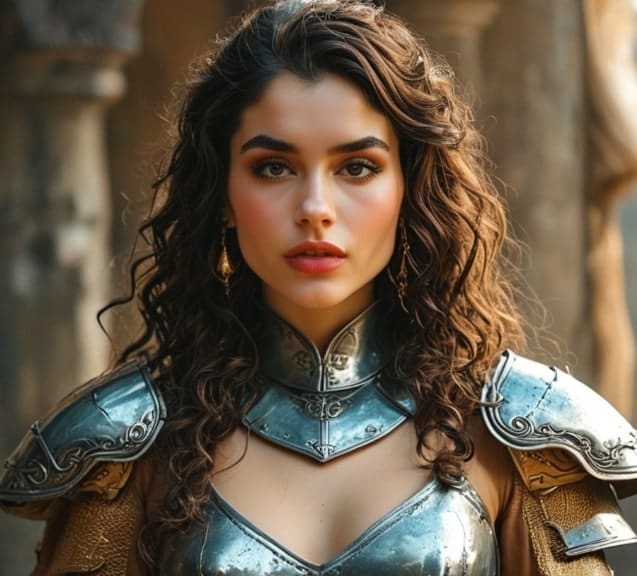
Introduction
In the world of Dungeons and Dragons (DnD), visual aids play a crucial role in bringing campaigns to life. However, creating custom art for your DnD sessions can be a daunting and time-consuming task. That's where DnD AI art generators come in. These innovative tools harness the power of artificial intelligence to create stunning, game-specific visuals that elevate your storytelling experience. In this article, we'll explore the benefits of using a DnD AI art generator and introduce you to some of the best options available.
How to Use the D&D AI Art Generator with APOB AI
If you're a Dungeons & Dragons fan looking to create AI-generated artwork for your game characters, monsters, or epic scenes, APOB AI can help you bring your ideas to life. Follow these easy steps to start generating stunning D&D-inspired art using APOB AI’s powerful AI tools.
Step-by-Step Guide to Using APOB AI for D&D Artwork
Step 1: Create an Account on APOB AI
Visit the APOB AI website.
Sign up for a free account if you don’t have one. You’ll need to create a login to access the tools.
Once registered, log into your account to start creating!
Step 2: Choose Your Art Generation Type
APOB AI allows you to create various types of digital personas, such as AI portraits, AI Girls, AI Boys, and even fantasy-inspired characters. For D&D purposes, you can use this tool to generate fantasy characters, heroes, monsters, and more.
Navigate to “Create Portrait Model” or similar section that allows you to input descriptions for character creation.
Choose “AI Portrait” or any relevant option for creating characters.
Step 3: Provide a Detailed Description of Your D&D Character or Scene
For D&D, the more detailed and imaginative your description, the better the results. Whether you’re creating a hero, a villain, or a mythical creature, the key is in how you describe your character.
For a D&D Hero: Describe the race (elf, dwarf, human, orc, etc.), class (wizard, rogue, barbarian, etc.), gender, personality, armor, weapons, and any distinctive features (e.g., glowing eyes, dragon scales).
For a Monster or Creature: Describe the monster’s features (e.g., dragon wings, ogre’s size, goblin skin), weapons (e.g., club, magical staff), and mood (e.g., menacing, mystical).
For a D&D Scene: If you want an epic landscape or battle scene, describe the setting (e.g., a dark forest with towering trees, a fiery volcano with a lava river, a battle between knights and dragons).
Example description for a D&D character:
“A fierce female half-elf rogue, wearing black leather armor, a red scarf flowing behind her, with short, messy brown hair, sharp blue eyes, and twin daggers at her waist. She stands in a shadowy alley, ready to strike.”
Step 4: Generate Your AI Character or Artwork
After providing your detailed description, click the “Generate” button.
APOB AI will use its advanced AI tools to create a digital portrait based on the information you provided. It may take a few seconds to a minute to generate the image.
Once the character or scene is ready, you’ll be able to preview and adjust the result if necessary.
Step 5: Refine Your Image
If the initial image isn’t quite what you expected, you can refine your description and try generating the image again.
Some platforms, including APOB AI, may allow you to adjust color tones, backgrounds, or specific details.
You can also download the image and make further edits using an external image editing tool if needed.
Step 6: Use Additional Features (Optional)
If you’re looking to create more dynamic content (like action scenes or animated scenes), APOB AI offers additional tools such as:
Image to Video: Turn your character artwork into a video to show your D&D character in action.
Video Face Swap: If you want to apply a different look or facial expression to your character, you can use the face swap feature.
These features add more depth to your character creation, allowing you to generate D&D-inspired artwork in a variety of formats.
Step 7: Use Your D&D Art
Once your D&D AI artwork is ready, you can:
Download the image: Save your creation to use in your campaign materials, social media, or game character sheets.
Share it with your D&D group: Use the artwork to enhance your storytelling during sessions.
Create custom tokens or avatars: Upload the artwork to platforms like Roll20 or Foundry VTT to use as your online character avatar.
The Power of Visual Storytelling in DnD
Visuals have the power to transport players into the rich, immersive world of DnD. From character portraits to landscape illustrations, visual aids help players connect with the story and engage with the game on a deeper level. However, creating custom art for each campaign can be a significant challenge, especially for those without artistic skills or resources. AI art generators offer a solution, allowing DMs and players to create unique, high-quality visuals with ease.
What is a DnD AI Art Generator?
A DnD AI art generator is a tool that utilizes artificial intelligence algorithms to create artwork specifically tailored to DnD campaigns. These generators use machine learning techniques to analyze vast datasets of images and styles, allowing them to produce original, game-specific art based on user prompts. With a DnD AI art generator, you can quickly and easily create character portraits, monster designs, and environment illustrations that perfectly fit your campaign's theme and style.
AI DnD Character Art: Bringing Your Heroes to Life
One of the most exciting applications of AI art generators in DnD is character art creation. With AI-generated DnD character art, you can bring your heroes and villains to life in stunning detail. These tools allow you to input specific prompts, such as race, class, and equipment, to generate unique, customizable character portraits. From elven wizards to dwarven warriors, AI DnD character art offers endless possibilities for visualizing your party members.
The Best AI Art Generators for DnD
When it comes to choosing the best AI art generator for DnD, there are several factors to consider, such as features, pricing, and ease of use. One of the top contenders in the market is APOB AI, a user-friendly and versatile tool that offers a wide range of features for creating high-quality DnD art.
APOB AI: The Ultimate DnD AI Art Generator
APOB AI is more than just a DnD AI art generator; it's a comprehensive tool that offers a range of features to help you create stunning visuals for your campaigns. With its AI Influencer Generator, you can create unique, lifelike characters that perfectly fit your DnD world. Simply upload a reference image or use the built-in generator to create a customized AI model, and then generate photos and videos according to your preferences.
In addition to character art, APOB AI also offers a variety of other functions, such as image editing, image-to-video conversion, and face swapping for both images and videos. These features allow you to create highly customized and engaging visuals that bring your DnD sessions to life.
But APOB AI isn't just a powerful tool for creating DnD art; it's also an opportunity to monetize your creations. By using APOB AI to create AI influencers, you can build a following on social media platforms like Instagram, Twitter, and YouTube, and potentially earn money through sponsorships, affiliate marketing, and other revenue streams. With the right strategy and consistent effort, you could even turn your AI-generated DnD art into a full-time income.
How to Use a DnD AI Art Generator
Using a DnD AI art generator is surprisingly simple. Most tools require you to input a text prompt describing the desired image, such as "a fierce dragonborn paladin in shining armor." The AI then analyzes the prompt and generates a unique image based on its understanding of the keywords and styles. To get the best results, be specific and descriptive in your prompts, and don't be afraid to experiment with different wording and styles until you find the perfect fit for your campaign.
AI Art in Action: Real-World Examples from DnD Campaigns
DnD enthusiasts around the world are already embracing the power of AI art generators to enhance their campaigns. From character portraits that bring NPCs to life to sprawling cityscapes that set the stage for epic adventures, AI-generated art is transforming the way we play DnD. As more and more players and DMs discover the benefits of these tools, we can expect to see even more inspiring examples of AI art in action.
Additional Tips for D&D AI Art Generation:
Be Creative with Descriptions: The more detailed and specific your description is, the better the AI-generated results will be. Don’t hesitate to add personality traits, environments, and even magical abilities to your character description.
Use the Talking Avatar Function: If you're generating characters for a D&D video or promotional campaign, the talking avatar function can allow your AI characters to speak and add a voice to your visual content.
Experiment with Different Races and Classes: For variety, try creating different types of characters (e.g., a Tiefling warlock, a Gnome bard, or an Orc barbarian). APOB AI can handle a wide range of fantasy character designs.
Conclusion:
Whether you're a Dungeon Master looking for cool NPC portraits, a player wanting to create a unique character, or a content creator making D&D-themed artwork, APOB AI is a great tool to help you generate high-quality, customizable AI portraits, AI Girls, AI Boys, and other fantasy creatures or characters. With a few simple steps, you can create everything from heroic adventurers to terrifying monsters, and bring your D&D world to life.
So next time you need to create an AI-powered D&D character or scene, give APOB AI a try. It's simple, fun, and free to get started!
This step-by-step guide will help users understand how to generate D&D-themed art using APOB AI or a similar AI art platform, while also positioning APOB AI as a key tool for creating fantasy-inspired visuals.
Other DND AI art Generator that may help you
If you're looking for Dungeons & Dragons (DnD) AI art generators, there are several excellent options available that can help you create stunning visuals for your characters, settings, and items. Here’s an overview of some of the top DnD AI art generators:
1. Decohere AI
Overview:
Decohere AI offers a fast and powerful DnD art generator that creates high-resolution images based on user descriptions.
Features:
Instant generation of unique DnD art, including characters, monsters, and weapons.
Ability to upscale images for higher resolution and detail.
User-friendly interface for quick prompts and real-time image creation.
Use Case:
Ideal for generating character portraits or custom maps quickly and easily.
1. Leonardo.Ai
Overview:
Leonardo.Ai provides a comprehensive suite of tools tailored for DnD, allowing users to create detailed character designs, maps, and items.
Features:
Advanced generative capabilities for intricate details and customization.
Specific models trained to create in-game assets like weapons and mystical artifacts.
Enhances world-building by producing visually captivating environments tailored to campaign narratives.
Use Case:
Perfect for Dungeon Masters (DMs) looking to craft immersive settings and unique visual assets for their campaigns.
3. Fotor
Overview:
Fotor's DnD AI art generator allows users to create characters by customizing races, classes, and backgrounds through text prompts.
Features:
Generates high-quality images in various styles (photography, anime, digital art).
Supports character creation based on user-uploaded photos for personalized results.
Quick processing time with real-time image generation.
Use Case: Great for players wanting to visualize their characters with specific traits and styles.
2. CharGen
Overview:
CharGen specializes in generating art for DnD characters, NPCs, and monsters effortlessly.
Features:
Offers multiple art styles including realistic and fantasy illustrations.
Intuitive prompt builder to help users create detailed character descriptions.
Community sharing hub to showcase creations and inspire others.
Use Case:
Useful for creating a wide range of fantasy art without needing artistic skills.
The Future of AI Art in DnD
As AI technology continues to advance, the possibilities for AI-generated art in DnD are endless. We can expect to see more sophisticated tools that offer greater customization options, faster generation times, and even more realistic and detailed visuals. By embracing these tools, DMs and players can take their storytelling to new heights and create truly immersive and engaging campaigns.
Conclusion
DnD AI art generators are revolutionizing the way we create and imagine in the world of tabletop RPGs. By harnessing the power of artificial intelligence, these tools make it easy for DMs and players to create stunning, game-specific visuals that enhance the storytelling experience. Whether you're a seasoned artist or have no artistic skills at all, a DnD AI art generator can help you bring your campaigns to life like never before.
For those looking to dive into the world of AI-generated DnD art, we highly recommend trying APOB AI. With its user-friendly interface, advanced AI technology, and wide range of features, APOB AI is the ultimate tool for creating high-quality character art, environments, and more. Plus, with the opportunity to monetize your creations through the AI Influencer Generator, APOB AI offers a unique and exciting way to turn your passion for DnD into a potential income stream.
So why wait? Sign up for APOB AI today and start bringing your DnD dreams to life with the power of AI!
Frequently Asked Questions
Q1: Do I need artistic skills to use a DnD AI art generator?
A1: No, you don't need any artistic skills to use a DnD AI art generator. These tools are designed to be user-friendly and accessible to everyone, regardless of their artistic background.
Q2: Can I use AI-generated art in commercial DnD products?
A2: The usage rights for AI-generated art vary depending on the tool and the specific terms of service. Some tools, like APOB AI, allow commercial use, while others may have restrictions. Always check the licensing agreements before using AI-generated art in commercial products.
Q3: How much does a DnD AI art generator cost?
A3: The cost of DnD AI art generators varies widely, with some tools offering free options and others requiring paid subscriptions. APOB AI offers a range of pricing plans to suit different needs and budgets, with options for both individual users and businesses.

Be the first to like this.





No credit card needed


