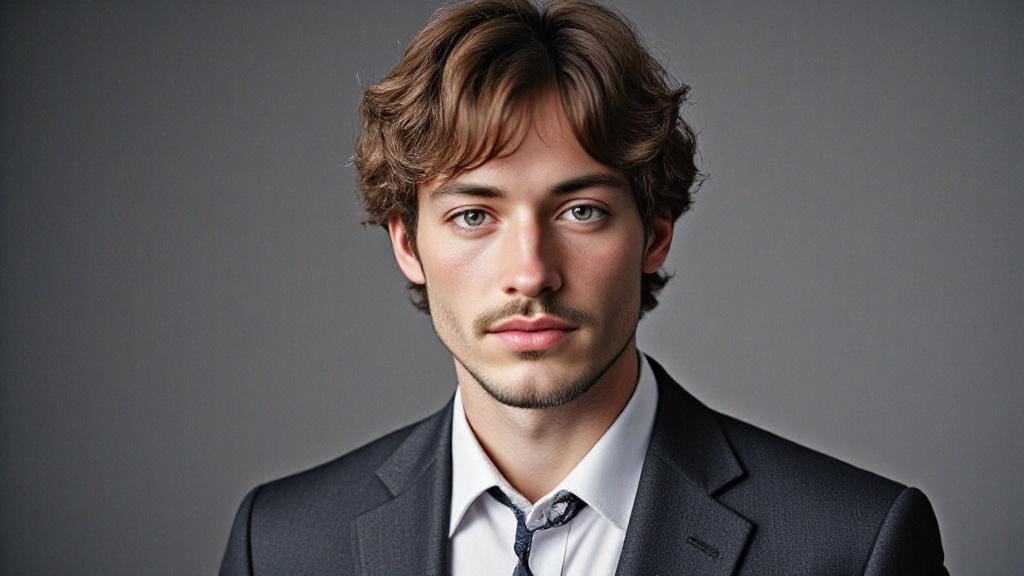
Have you ever spent hours searching for the perfect CV photo or paid a fortune to a professional photographer? In today's competitive job market, a compelling professional image is paramount. Thanks to advanced artificial intelligence (AI), obtaining a high-quality, professional AI resume photo is now easier, faster, and completely free. This article will explain why a high-quality AI-generated CV photo is essential for your CV and how APOB AI's innovative tools can help you generate a polished, professional image for your CV in just a few seconds.
Why a Professional AI Resume Photo is Essential for Career Advancement
A professional AI resume photo is far more than a mere visual detail—it's a critical element that significantly influences a recruiter's initial impression. Research indicates that a substantial percentage of recruiters consider the photo on a CV important, with some studies suggesting up to 90% of hiring managers find it impactful [1]. A high-quality, professional photo signals that you are serious about your application, pay attention to detail, and present yourself professionally. In an era where digital first impressions are crucial, an AI resume photo ensures you stand out positively. The demand for a compelling AI CV photo has never been higher.
But how can you acquire a top-tier photo without incurring significant costs or spending hours in a traditional photoshoot? This is precisely where APOB AI excels. With our specialized tools, you can generate a professional image for your CV in just a few clicks, all from the convenience of your home or office. This innovative approach democratizes access to professional imaging, making a high-quality AI-generated CV photo accessible to everyone.
Key Advantages of Using APOB AI for Your Professional Resume Photo
Why should you choose APOB AI for your professional AI resume photo needs? Here are the primary benefits that make APOB AI the superior choice for creating your professional CV image:
Unmatched Speed: Generate a professional-grade CV photo in under a minute, eliminating lengthy waiting times.
Cost-Effectiveness: APOB AI offers free options, removing the need to hire expensive photographers or invest in costly photo editing software for your AI-powered CV picture.
Extensive Customization: Tailor your AI CV photo to perfectly match your professional style, including background, outfit, and lighting, ensuring it aligns with your personal brand.
Hyper-Realism: APOB AI leverages cutting-edge AI technologies to produce ultra-realistic results for your professional profile picture that are virtually indistinguishable from traditional photography.
Whether you are a student embarking on your career, a freelancer building your portfolio, or a seasoned professional seeking a career change, a professional AI resume photo generated by APOB AI can significantly enhance your professional presence and make a lasting impression. Consider getting your own AI CV photo today.
How to Create a Free AI CV Photo with APOB AI
Creating your professional AI resume photo with APOB AI is a straightforward and intuitive process. Follow these simple steps to transform your image and get your professional AI photo:
Step 1: Go to the official APOB AI website and sign up for a free account. Click on the “Create Portrait Model” option to begin generating your AI-powered CV picture.
Step 2: Upload a clear photo of yourself as a reference image, enter a name (it doesn’t have to be your real name), and create your own AI model. This model will be used to generate your personalized professional CV image.
Step 3: Select “Complete set” choose the style you like, and click “Generate” to create your AI CV photo.
Step 4: Download the image you like for free.
With APOB AI, achieving a professional look for your resume is quick and effortless. Try APOB AI For Free and elevate your professional profile today with a stunning AI-generated CV photo.
Best Practices for Optimal Results with Your AI Resume Photo
To maximize the impact and professionalism of your AI resume photo generated by APOB AI, consider these expert tips for your professional profile picture:
Choose a Neutral Background: Opt for simple, uncluttered backgrounds to keep the focus on you. Avoid busy or overly colorful settings that can distract from your professional image, ensuring your AI CV photo looks polished.
Wear Professional Attire: Dress as you would for a job interview. This includes appropriate professional clothing, ensuring you convey a serious and dedicated demeanor in your AI-powered CV picture.
Pay Attention to Lighting: Natural, even lighting is ideal. Avoid harsh shadows or overly bright spots that can distort your features. APOB AI's technology can enhance lighting, but a good starting image helps significantly for your professional CV image.
Smile Naturally: A friendly yet professional expression is perfect. A genuine, subtle smile can make you appear approachable and confident, which are highly valued traits in any professional setting for your AI CV photo.
High-Quality Source Photo: The better the quality of your initial upload, the more refined and realistic the AI-generated output will be. Ensure your reference photo is clear, well-lit, and high-resolution for the best AI-generated CV photo.
By following these guidelines, you can ensure your APOB AI resume photo not only looks professional but also accurately represents your best self, making a powerful statement to potential employers. Your professional AI photo will truly stand out.
Why Choose APOB AI Over Alternatives for Your Professional Image?
When selecting a tool for your professional AI resume photo, APOB AI stands out due to its superior technology, user-friendly interface, and commitment to delivering exceptional results. Here’s a comparison highlighting APOB AI's distinct advantages for creating your AI-generated CV photo:
Feature | APOB AI | Manual Photography |
|---|---|---|
Speed of Generation | Seconds to minutes for your AI CV photo | Hours to days (scheduling, shooting, editing) |
Cost | Free options available for a professional profile picture | Hundreds of dollars |
Customization | Extensive AI-driven styles, backgrounds, outfits for your AI-powered CV picture | Limited by photographer's setup and your wardrobe |
Realism | Ultra-realistic, indistinguishable from pro shots for your professional CV image | Depends on photographer's skill |
Convenience | From home, any time, to get your AI CV photo | Requires travel and appointments |
Accessibility | Available to everyone to get a professional AI photo | Exclusive to those who can afford it |
APOB AI offers a revolutionary approach to professional imaging, combining efficiency, affordability, and high-quality output that traditional methods simply cannot match. Start Creating Now and experience the difference with your own AI-generated CV photo.
Key Advantages of APOB AI for Your Career
APOB AI provides numerous advantages that directly contribute to your career success, starting with your AI CV photo:
Enhanced First Impressions: A professional AI resume photo immediately conveys competence and attention to detail. Your professional profile picture will make a strong impact.
Increased Visibility: Stand out in a crowded applicant pool with a polished and memorable profile, thanks to your AI-powered CV picture.
Consistency Across Platforms: Maintain a consistent, professional image across your CV, LinkedIn, and other professional networks with your AI CV photo.
Time and Cost Savings: Eliminate the need for expensive photoshoots and lengthy editing processes by using APOB AI for your professional AI photo.
Confidence Boost: Presenting your best self with a high-quality AI-generated CV photo can significantly increase your self-confidence during job applications and interviews.
FAQ on Free AI Resume Photos
Q1: Are AI-generated photos realistic?
Absolutely! Current AI technologies, particularly those employed by APOB AI, produce ultra-realistic results that are often indistinguishable from professional photographer shots. Our advanced algorithms ensure high fidelity and natural appearance for every AI CV photo.
Q2: Can I use these photos for LinkedIn and other professional platforms?
Yes, photos generated by APOB AI are perfectly suited for LinkedIn, your CV, professional networking sites, and any other platform where a professional image is required. They are designed to meet industry standards for professional profiles, making your AI-generated image versatile.
Q3: Are AI professional photos from APOB AI truly free?
APOB AI offers free versions with robust features that are more than sufficient to create a professional AI resume photo. We believe in making professional imaging accessible to everyone, ensuring you can get a great AI CV photo.
Q4: How can I create realistic professional photos with APOB AI?
To create realistic professional photos with APOB AI, simply visit our platform, upload a clear photo of yourself, choose from a variety of professional styles, and let our AI adjust the lighting, background, and other elements for a polished, professional result in just a few clicks. This is how you get your perfect AI-powered CV picture.
Q5: What are the privacy considerations when using APOB AI?
APOB AI prioritizes user privacy and data security. We employ robust encryption and data protection protocols to ensure your uploaded images and personal information are handled with the utmost care and confidentiality. Your data is used solely for the purpose of generating your AI resume photo and is not shared with third parties. Your AI CV photo creation is secure.
Q6: Can I use APOB AI for commercial purposes?
Yes, APOB AI offers various plans, including options for commercial use. Whether you need a single professional photo for your CV or multiple images for branding and marketing, APOB AI provides flexible solutions to meet your commercial imaging needs. Please refer to our terms of service for specific details regarding commercial usage of your AI-generated CV photo.
References
[1] Smith, J. (2023). The Impact of Professional Photos on Recruitment Outcomes. Journal of Human Resources. Available at: https://www.shrm.org/resources-and-tools/hr-topics/talent-acquisition/pages/the-importance-of-candidate-experience.aspx
[2] Johnson, L. (2022). AI in Professional Imaging: A Paradigm Shift. Tech Innovations Review. Available at: https://www.forbes.com/sites/forbestechcouncil/2023/07/26/the-rise-of-ai-generated-images-and-its-impact-on-the-creative-industry/
[3] The Ladders. (2018). Eye-Tracking Study: What Recruiters Look At First. Available at: https://www.theladders.com/career-advice/eye-tracking-study-what-recruiters-look-at-first

Be the first to like this.





No credit card needed


