APOB AI vs Pollo AI is a choice between two creative platforms for AI images, videos and avatars. Start with APOB when your project centers on a saved portrait model—for example, one coffee host appearing across several posts. Shortlist Pollo when choosing a named generation model or a specialized creative app comes first. These are workflow-fit recommendations; output quality still needs a project-level test. APOB's observed Nano plan includes 80 free credits per day, with one-day validity, watermarked output and no private models/content. The homepage says no credit card is required. Each tool has its own cost and access limits. Pollo also offers free access and activity-based bonus credits; its credits are a different unit of purchase. Published by APOB AI · Product facts checked September 15, 2026. This publisher-authored comparison includes an APOB workflow walkthrough, original files and official documentation. Pollo has not been generation-tested here, so it does not claim a quality, speed or cost winner.
This walkthrough follows one fictional coffee host from reference image to a scene and a short clip. Screenshots show the actual desktop app on September 15, 2026. The account displayed Nano but had extra model allowances and no corresponding generation debits in the inspected history; use the quoted costs as examples, not a promise of ordinary free-account entitlements.
Download the exact prompts and input instructions (ZIP).
1. Open the official app and check the trial conditions
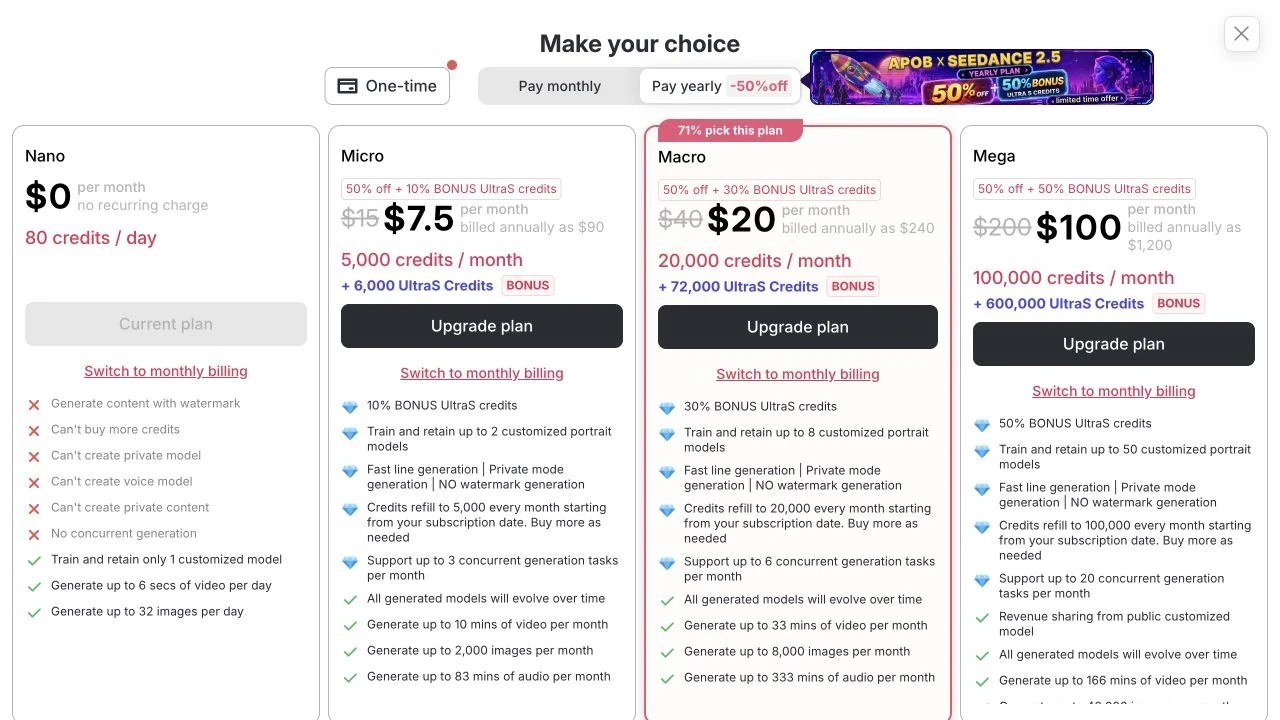
Open app.apob.ai and sign in if prompted. This session was already signed in. Open Upgrade for the current offer; Profile → Usage details shows your balance and refill, while Credit usage table records spending and returned credits.
For a coffee-host concept, use a fictional person and nonconfidential assets. The public Nano offer showed 80 credits/day, watermarked output, no private models/content and one retained portrait model. Check eligibility before creating another model; an account-specific allowance is not the public plan. Billing help
Step 1: inspect the current offer before treating the free allowance as a production budget.
2. Create and save a fictional host reference
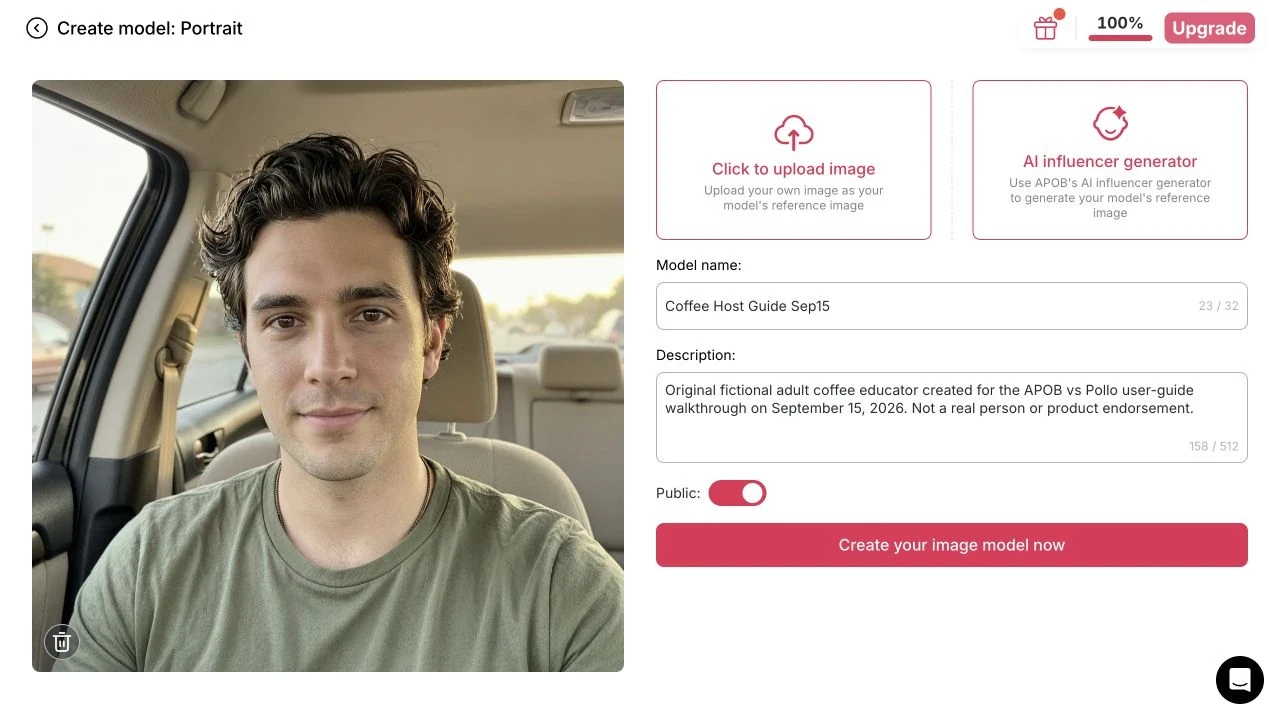
Choose Create Portrait Model. Upload a rights-cleared face, or open AI influencer generator. We selected Man, left the age at 25, entered a fictional coffee-educator description in Bespoke Details, and generated one reference at a displayed quote of 10 credits. Select the completed result with Select this image as reference image.
Name the model—ours is Coffee Host Guide Sep15—and check Public before clicking Create your image model now. Wait until training finishes. The reference unexpectedly used a car interior rather than our requested beige background; its face was usable for this workflow demonstration, but the scene instruction was not fully followed. Choose a clearer reference if your task needs a clean backdrop. Portrait-model help
Step 2: reference selection and model creation are separate actions. This form was revisited after creation for a clear capture; it was not submitted twice.
3. Insert the model and set the image batch
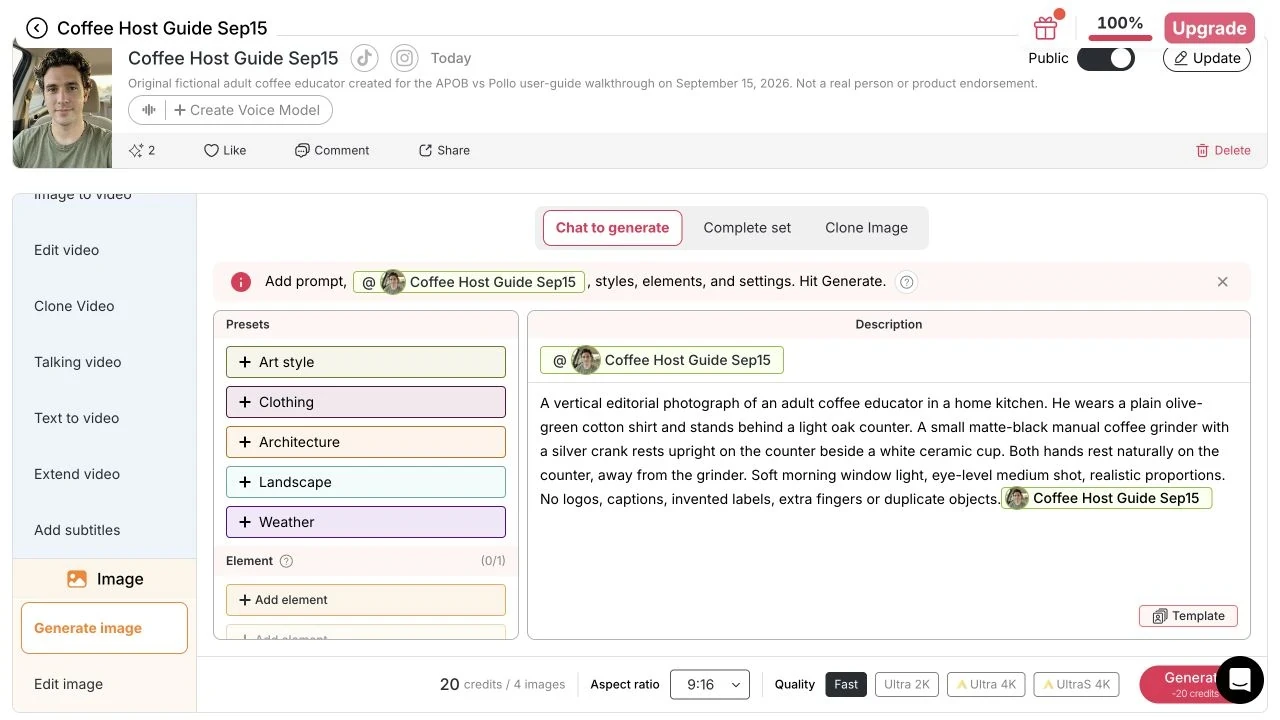
In the model's workstation, open Generate image → Chat to generate. Write the kitchen scene, then click the model control above Description to insert the real named model chip into the text. The example chip in an empty editor is only a placeholder. In our submitted prompt, the actual chip appears after the scene text.
Select 9:16 and Fast. The interface quoted 20 credits for four images and showed one Element slot. Fast had no Quantity selector; higher image tiers expose different quantity and reference options. Our grinder was described only in words—no product Element was attached. For a real SKU, attach its approved reference and inspect the result; a text description cannot establish product fidelity. Quantity rules · Model and Element references
Step 3: check the chip inside the submitted prompt and the total beside Generate.

4. Inspect every result before choosing one
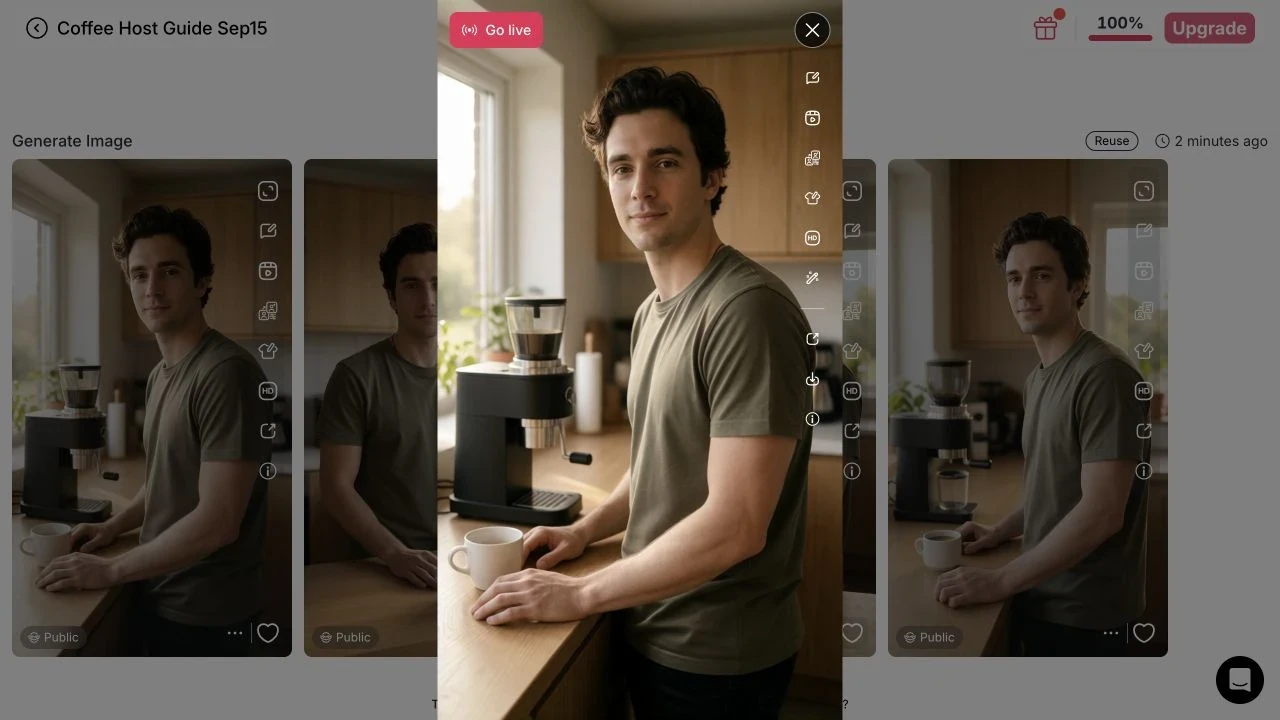
Click Generate, wait for the Generation feed to finish, and inspect the entire batch. We received four 576 × 1024 images. All four depicted a coffee host, but the requested small manual grinder became larger countertop equipment. None met that product-detail requirement. Keeping this failure visible is more useful than showing only an attractive face.
Compare the face, hands, outfit and product separately. For this walkthrough, image 1 was retained to demonstrate the next control—not approved as an accurate grinder advertisement. For production, correct the still or supply the correct product reference before animating it.
Step 4: a completed generation is not automatically an accepted deliverable. Download all original evidence (ZIP).
5. Open the result and verify the exported image
Open a completed image. The full-screen preview has a Download arrow; the standalone result page puts Download under More actions. We exported all four JPEGs through Chrome after the in-app browser's download action did not produce a retained file. The files opened successfully and measured 576 × 1024.
The inspected JPEGs had no visible watermark, despite the Nano label. Because this account also showed nonstandard allowances, these files do not establish normal Nano watermark behavior. Follow the published free-plan rules and test your own export before promising a clean client deliverable. Download and watermark rules
Step 5: retain the downloaded file and result link, not just a preview screenshot. Image 1 result.
6. Send the still to Image to video and check the actual file
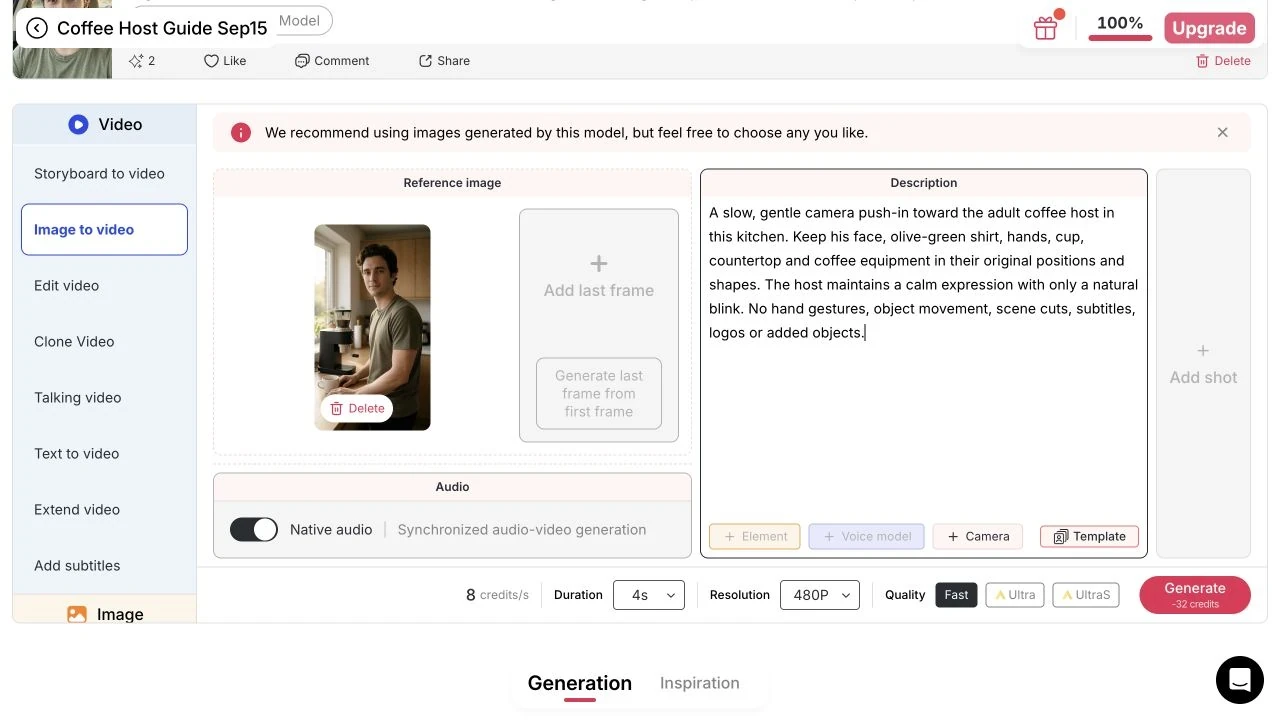
From the image preview, choose Image to video; the selected still becomes the first frame. Describe one modest movement, then recheck Quality, Resolution, Duration and the total quote. Our settings were Fast · 480P · 4s, with Native audio visibly enabled. Add last frame and Add shot were inactive in this configuration. The quote was 8 credits/s, 32 credits total.
We generated one clip using a gentle camera push-in. We saved the MP4 from the generated media resource; the app’s video-download path and its export watermark behavior were not tested. The retained video resource measured 480 × 864, with a 4.458-second video track and an audio track present. We inspected frames at 0, 2 and 4 seconds; this was not a lip-sync or supplied-audio test. Check playback and the actual dimensions, duration and audio before preparing a platform upload. Native-audio labels alone do not prove the sound you need is present. Video controls
Step 6: the source image still contains the wrong product. Download the clip and frame viewer (ZIP); use it as a workflow example, not product-fidelity proof.
To compare Pollo fairly, retain the same rights-cleared inputs, deliverable requirements and attempt budget. The APOB walkthrough above does not replace a matched run on both services.
APOB AI vs Pollo AI: evidence at a glance
Evidence key: “Observed” means inspected in the interface on September 15, 2026. “Documented” means stated by the vendor. The separate APOB walkthrough includes generated outputs; it is not a matched comparison. Pricing is the dollar-denominated website offer observed in this session; checkout currency, tax and renewal totals must be confirmed before purchase.
Decision factor | APOB AI | Pollo AI |
|---|---|---|
Free access | Observed: Nano shows 80 credits/day, one-day validity and watermarked generation. Homepage says no credit card needed. | Observed: pricing comparison shows 20 free credits. Documented: signup, daily check-ins and referrals can award bonus credits. Amounts and eligibility for recurring rewards were not verified. |
Credit expiry | Observed: Nano 1 day; Micro 1 month; Macro 3 months; Mega 6 months. Check each credit grant's expiry. | Documented: subscription credits expire at the billing-cycle boundary; bonus and add-on credits do not expire. |
Recurring character | Walkthrough: created a saved portrait model and inserted its actual chip in Chat to generate. Model slots are plan/account-dependent. Portrait setup | Documented: reference-based creation and avatar tools support character work. No matched identity-retention result is available here. |
Image generation | Walkthrough: Fast, 9:16, four-image batch. Fast has no Quantity selector; higher tiers differ. Quantity rules | Observed: the creative composer has Image mode and a model selector. Confirm reference support for the selected model. |
Video controls | Walkthrough: image-to-video handoff, Fast 480P and 4s settings; Add last frame/Add shot inactive in that configuration. Video controls | Observed: the composer exposes model selection and a settings group for ratio, duration and resolution. Options vary by model. |
Talking and avatar work | Observed: Talking video entry. Documented: talking-avatar and lip-sync workflows with distinct input requirements. Generation inputs | Documented: photo-to-avatar video and lip sync; the avatar page advertises clips up to two minutes. This is not a tested quality advantage. |
Storyboards and agents | Observed: Storyboard to video entry. Documented: editable shot planning and final rendering, with separate generation costs. This does not establish an autonomous agent. Storyboard help | Documented: Pollo Agent coordinates planning and asset creation. Its end-to-end performance was not tested here. |
Editing | Observed: Edit video entry. Documented: Edit everything re-renders a source video from instructions and optional Elements. Editing help | Documented: an AI video editor accepts editing instructions. Exact edit fidelity remains task-dependent. |
Export and watermark | Documented: ordinary free-plan content keeps its watermark, including after an upgrade. The walkthrough account showed an exception; see its scope below. Export rules | Documented: watermark-free downloads require an active subscription. No free-account download was tested. Pollo download condition |
Privacy | Observed: Nano excludes private models/content. Paid private visibility is not a promise of zero retention or zero provider access. | Documented: community-sharing opt-out requires an active subscription. The signed-in control was not inspected. Pollo credit FAQ |
Commercial work | APOB terms assign generated-content rights between the user and provider within legal and third-party limits; provider licenses also apply. | Pollo terms address user-content ownership; its homepage advertises commercial use on paid plans. That statement does not establish a complete free-plan license. |
Quality, speed and usable-output cost | No matched benchmark completed. | No matched benchmark completed. |
Sources: APOB plans, APOB composer, APOB video controls, APOB storyboard, APOB editing, APOB downloads, Pollo pricing, Pollo credits, Pollo avatar, Pollo Agent, Pollo editor.
APOB AI pricing and Pollo AI pricing: what will you commit to?
Plan | Normal monthly price shown | First-month offer shown | Annual monthly equivalent shown | Full annual amount |
|---|---|---|---|---|
APOB Micro · 5,000 credits/month | $15 | $13.99 | $7.50 | $90 billed annually |
APOB Macro · 20,000 credits/month | $40 | $29.99 | $20 | $240 billed annually |
APOB Mega · 100,000 credits/month | $200 | $139.99 | $100 | $1,200 billed annually |
Pollo Lite · 400 credits/month | $15 | Not separately shown | $12 | $144 calculated as 12 × $12; checkout not inspected |
Pollo Pro · 800 credits/month | $29 | Not separately shown | $14.50, advertised promotion | $174 calculated as 12 × $14.50; checkout not inspected |
Pollo Ultra · 5,000 credits/month | $129 | Not separately shown | $99 | $1,188 calculated as 12 × $99; checkout not inspected |
These were the APOB subscription and Pollo pricing offers observed on September 15, 2026. Pollo's Pro and Ultra credit selectors were at 800 and 5,000. Pollo excludes VAT/local taxes until checkout. APOB checkout taxes and both services' offer-renewal totals were not verified.
Source conflict: APOB's billing help article displayed lower annual examples—$72, $192 and $960—than the subscription screen above. Use the offer displayed to your account and inspect the final commitment. Annual-only UltraS bonuses are a separate allowance; do not count them as ordinary monthly credits or assume every task can use them.
What do credits buy, and how should you count a usable result?
80 APOB credits and 20 Pollo credits cannot be compared as a fourfold output allowance. The tool, inputs, duration, resolution and rerolls determine the complete task cost. A task can exceed your available free balance, and Nano's daily expiry does not let you bank multiple days indefinitely.
Keep two records:
Task usage: actual generation debits for preparation, every attempt, editing and export, less verified refunds. Keep each platform's credits separate. If only a pre-generation quote is available, label it a quote.
Money and time: actual subscription/top-up charges and external costs, plus preparation/editing time. If you allocate a subscription fee to a task, state the allocation rule; it is an estimate, not an additional cash charge. Value labor separately using your own rate.
Divide attributable cost by accepted deliverables. A host deliverable is the complete three-image set, not each image. For a clip, include the failed versions that preceded the usable download. If none is accepted, report zero accepted results and total spend; do not calculate a cost per success. There is no measured cross-platform saving in this version.
Research, operation and drafting: Codex AI agent. The prior manuscript received a separate GPT-powered review inside Codex; this new walkthrough is AI-operated and is not a human expert review. On September 15, 2026, we created one fictional reference, saved one portrait model, generated one four-image kitchen batch and one image-to-video clip in APOB. Pollo generation attempts: 0.
The complete evidence set (ZIP download) retains all four exported JPEGs and the original generated video resource, including the product mismatch. Four images measured 576 × 1024. The video track measured 480 × 864 and 4.458 seconds; an audio track was present. File inspection establishes delivery properties, not general quality superiority. The three-scene character set, dedicated product-reference test and supplied-audio lip-sync benchmark remain unperformed.
Account exception: the profile displayed Nano but showed unlimited model allowances, an unchanged 80/80 balance and no corresponding generation debit rows in the inspected history. Browser-exported JPEGs had no visible watermark. These observations conflict with ordinary Nano limits and are not used to claim a free-plan benefit. The displayed generation quotes totalled 62 credits; actual spend and any separate model-creation charge could not be established.
The image batch failed the requested manual-grinder detail. We used its first image only to verify the video handoff, then checked frames at 0, 2 and 4 seconds. No numeric quality score, comparative speed result or saving is claimed. If a source or offer changes, contact APOB support with the section, source URL and date. This comparison is published by APOB, not an independent review.
These are proposed task inputs. They are separate from the exact prompts retained in the walkthrough log; successful execution of every configuration has not been established.
The four prompt blocks below contain complete input prose. Attach the specified references separately and select settings that your account actually supports. They are original starting inputs, not generation-tested guarantees. Use one block per job; do not paste the review checklist into the prompt.
1. AI influencer operator: a kitchen-host still
Purpose and inputs: create the first image of a recurring-host set. In Chat to generate, insert the authorized adult portrait model and a grinder Element. Select a vertical aspect ratio and one output where available. The model reference supplies facial details; the prompt does not invent a different hairstyle.
Paste into the image prompt:
Create a natural editorial photograph of the selected adult coffee host at a bright home-kitchen counter. Preserve the facial features and hairstyle shown in the portrait reference. Dress the host in a plain navy apron over a cream shirt. Place the referenced manual grinder upright beside the host, with the crank and adjustment dial visible. Keep the host's hands resting beside the grinder. Use soft window light. Keep the grinder's existing markings unchanged. Add no promotional text, extra people or accessories.
Target and review: one vertical still. Check identity, apron, body scale, hands and every visible grinder part before using the image as a video input.
2. Social media marketer: a market-stall continuation
Purpose and inputs: create the next still with the same model and grinder references, image mode and aspect ratio as the kitchen scene. This is a complete prompt, with no location placeholder to replace.
Paste into the image prompt:
Create a natural editorial photograph of the selected adult coffee host behind a simple outdoor coffee-market stall. Preserve the facial features and hairstyle shown in the portrait reference. Use the same plain navy apron and cream shirt. Place the referenced manual grinder upright on the stall counter with its crank and adjustment dial visible. Keep the host's hands beside the grinder. Use soft overcast daylight and an uncluttered background. Preserve existing product markings. Add no promotional text, extra people or accessories.
Target and review: one companion still. Compare it with the kitchen image for face, proportions, outfit and grinder geometry. The café location in the three-scene scenario remains a separate input choice.
3. Ecommerce seller: a product-detail clip
Purpose and inputs: in Image to video, upload the approved grinder still. Use one shot and a short vertical configuration when supported; record the actual duration, resolution and quote. Camera movement supplies motion without inventing product operation.
Paste into the video prompt:
Make one continuous, slow camera push-in toward the coffee grinder's adjustment dial. Keep the grinder and its crank completely stationary on the counter. Preserve the reference image's silhouette, proportions, color, dial markings and lighting. Keep the whole dial in frame and end with a brief steady hold. Add no hands, parts, text, cuts, rotation or moving product mechanisms.
Target and review: one restrained product-detail clip. Inspect opening, middle and final frames; reject altered geometry, unreadable markings that matter to the ad, or a moving crank.
4. Creative producer: a three-shot tutorial plan
Purpose and inputs: use the documented Storyboard to video → Video brief field with the host/product Elements and available platform, length and aspect-ratio selections. This prompt requests a plan. Final rendering is another paid-in-credits step. Storyboard controls and costs
Paste into Video brief:
Plan a three-shot vertical coffee tutorial. Shot one: the selected adult host stands beside the referenced grinder at a kitchen counter, wearing a navy apron and cream shirt. Shot two: a slow camera push-in shows the stationary grinder's adjustment dial without altering its markings. Shot three: the same host looks at ground coffee on a small tray. Keep the host and product consistent. Give each shot one clear action. Add no grind-performance claims, measurements, customer endorsements or on-screen text.
Target and review: an editable three-shot plan. Check the resulting shot count, references and factual claims before rendering. A three-shot request is a target, not a guaranteed output count.
Speech input for a tutorial creator
For the talking-avatar scenario, use the approved adult portrait and an authorized recording of “Set the grind, turn the handle, and check the texture.” Upload the same audio to each service only where the selected mode supports it. Confirm input format and duration limits first.
Keep the following as a review checklist, not a supposed prompt control: the whole sentence remains audible; mouth movement follows the recording; the host makes no distracting gestures; the downloaded file plays correctly. No direction field or common audio-upload entitlement has been verified across both test accounts.
Choose APOB when a recurring host is the starting point
A saved portrait model and reusable reference controls suit a creator who wants the same adult host in a kitchen post, market photo and café update. That is a relevant reason to evaluate APOB as a Pollo AI alternative. It lets you reuse selected references; it does not prove stronger identity retention. Use the AI influencer generator workflow for character setup after shortlisting the platform.
Choose APOB when you want to plan the shots before rendering
For a short tutorial, APOB documents a Video brief that becomes editable shots, followed by final-video rendering. Review the host introduction, dial close-up and ground-coffee detail separately. Planning and rendering have separate credit costs; neither step establishes an autonomous agent. The AI storyboard workflow explains the planning task in more detail.
Keep Pollo on the shortlist when the model or app is the priority
Pollo's visible model selector and dedicated creative apps may fit a creator who already knows which generation model or effect the job needs. Its documented agent workflow is another reason to evaluate it. If your current Pollo setup already produces acceptable files, keep it until a small APOB evaluation shows a concrete benefit for your task. Catalog breadth alone does not establish better grinder fidelity. Pollo's official tools
Before switching, keep the reusable parts of your project
Retain your original portraits, product stills, authorized audio, prompts and approved exports. Do not assume a saved or trained model transfers between platforms; cross-platform model import was not verified. Rebuild the smallest necessary reference setup and test one deliverable before moving a whole client campaign.
For a public concept test, free access can help you assess the workflow. For watermark-free client output or confidential material, check the paid-plan and data-use conditions first. The right plan is the one that meets the deliverable's requirements, not simply the largest displayed credit balance.
Consent and likeness. Use a fictional adult or a person who has authorized the intended image, voice and commercial context. Permission to use a photograph does not automatically include voice cloning or endorsement rights. Both services restrict unauthorized or deceptive uses. APOB terms · Pollo terms
Asset rights and commercial terms. Clear rights to reference photography, packaging, music and audio before uploading. APOB and Pollo describe user-content ownership subject to their terms, but contractual permission does not guarantee copyright eligibility or remove third-party rights. Pollo's homepage specifically advertises commercial use on paid plans; check the applicable offer rather than assuming that wording covers free output.
Privacy and visibility. APOB Nano excludes private content/models; Pollo documents an active-subscription requirement for community-sharing opt-out. Both providers receive content licenses under their terms. Private display is not a no-training, no-retention or confidentiality guarantee. Review APOB's privacy policy and Pollo's privacy policy before uploading sensitive material. Pollo sharing condition
Disclosure and accurate demonstrations. TikTok and YouTube require disclosure for specified realistic synthetic content. Follow the current destination rules and applicable sponsorship disclosures. An AI-content label and a paid-promotion label serve different purposes. Never present a fictional host as a real customer testimonial or generated grinder movement as proof of product performance. TikTok AI-content guidance · YouTube AI-use guidance
These remain proposed bilateral evaluations. The walkthrough above covers one APOB kitchen batch and a short handoff clip, not the complete tests below.
A recurring home-coffee host across three settings
Deliverable: three vertical stills of the same fictional adult in a kitchen, at a market stall and behind a café counter. Keep the navy apron, body proportions and grinder constant.
Use a saved host model and product reference where the chosen workflow supports them. Reject a set if one scene changes the host's face or invents a different grinder. Judge the complete three-image set, including every generated image in its cost. Continue to the AI influencer workflow for character setup.
A grinder-detail motion shot for an ecommerce ad
Deliverable: one vertical product clip with a slow camera push-in while the grinder remains stationary. The silhouette, dial markings and finish must match the approved still.
Start with image-to-video AI. Reject a camera move if it adds a second crank, changes a dial marking or makes the manual grinder appear self-operating. Keep the original still next to the video while reviewing. The product-video guide serves broader campaign creation.
A spoken tutorial hook for Shorts or Reels
Deliverable: a short portrait clip containing the entire authorized grind-setting sentence, with plausible mouth movement and a usable audio track.
Use the same portrait and audio when both workflows support them. Reject clipped words, distracting hand movement or a silent download. If one tool requires a different audio workflow, record that difference. See AI avatar video for the production steps after choosing a service.
A repeatable character starting point. Saved portrait models and reference controls suit creators who return to the same host across posts.
Small daily evaluation allowance. Nano offers a recurring starting budget. Keep the task small enough for the actual quote and available settings.
Several stages in one workspace. Image, video, talking and storyboard entries provide a connected starting point. Availability and cost still depend on the selected tool and account.
Free output has distribution limits. Nano includes watermarks and excludes private generation. Use nonconfidential assets for evaluation; check paid-plan conditions before producing client deliverables.
Reference inputs do not guarantee fidelity. Faces, hands and small product details can require further work. Approve the source still first and inspect every generated scene.
Complex tasks can exceed the apparent trial budget. Higher-quality settings, planning and repeated attempts have their own costs. Record the complete task spend; do not treat an advertised “up to” count as a delivery promise.

Is APOB AI free to try, and do the credits expire?
The observed public Nano offer is $0 with 80 credits/day and one-day credit validity; the homepage says no card is required. Check the expiry of your actual grant in Profile. Do not assume you can save several days of free credits for one larger task. APOB · Credit grants and expiry
Does Pollo offer free credits or recurring rewards?
Its observed pricing table showed 20 free credits. The official FAQ lists signup, daily check-ins and referrals among bonus sources. Account-specific amounts and claim schedules were not verified; this page does not describe Pollo as a one-time-only trial. Pollo credits
Where should I sign in and compare the real prices?
Use the APOB app and APOB AI pricing, or Pollo sign-in and Pollo AI pricing. Separate month-to-month prices, first-month promotions and annual monthly equivalents. Confirm the full commitment, taxes and renewal total before payment; a competitor page about APOB is not APOB's login service.
Which service costs less for an accepted result?
That remains unmeasured. Our APOB walkthrough displayed quotes of 10 credits for the reference, 20 for four scene images and 32 for the clip—62 quoted generation credits in total. Model creation showed no separate quote, and corresponding debits were not visible in the inspected history. This is neither measured spend nor a complete ordinary-account cost. Compare all preparation, rejected versions, editing and export costs per accepted deliverable.
Can I get watermark-free downloads by upgrading later?
APOB's official rule says earlier free generations retain their watermark after an upgrade; watermark-free production requires the relevant paid entitlement when generating. Pollo documents an active-subscription condition for watermark-free downloads. Our nonstandard account's unwatermarked JPEGs do not override those rules. APOB downloads · Pollo downloads
Can I use generated content in ads or client work?
Check plan rights and current terms, and obtain permission for all reference images, voices and likenesses. Provider terms about generated-content ownership do not guarantee copyright protection, exclusivity or a person's endorsement. A product ad must also accurately depict the real product. APOB terms · Pollo terms
Which platform keeps a recurring character more consistent?
No cross-platform winner has been established. APOB's saved portrait model can be reused through an actual model chip in the composer. Our one kitchen batch is not a three-location identity benchmark. Judge complete scene sets on both products, separating face, clothing, body proportions and product details.
Why is Create your image model now unavailable?
Check that you are signed in, a reference image has finished loading, and the required Model name is filled in. The help center specifies a 32-character name limit. Model allowances also depend on the plan; do not delete an existing character simply to follow a tutorial. Wait for model training to finish before generating with it. Portrait setup
Why does Fast create four images when there is no Quantity control?
Fast returns a four-image batch. Higher image tiers expose Quantity choices, usually one or two; more outputs change the quote. The live Generate total is the useful number to record, rather than assuming every tier charges for a single image. Aspect ratio and quantity
Why do model references or Elements disappear when I change quality?
Reference allowances vary by mode and quality. The tested Fast image composer showed one Element slot. If a lower tier supports fewer references, APOB can ask to remove the excess Elements and their mentions. Read that confirmation and inspect the actual chips before generating; typing a reference name as ordinary text does not attach it. Composer reference rules
Can I combine a last frame with multiple video shots?
APOB documents these as incompatible options: adding a last frame disables multi-shot, and multi-shot excludes a last frame. Last-frame availability also depends on quality. In our Fast 480P setup, both Add last frame and Add shot were inactive. Recheck the controls after every quality change. Image to Video
Is Native audio the same as a talking-avatar or lip-sync workflow?
No. Native audio generates sound with the clip. A talking-avatar workflow needs an image and an audio track; lip sync needs a video and audio, subject to input limits. For the spoken coffee tutorial, preserve the same authorized recording on both services instead of substituting unrelated generated speech. Our clip had an audio track, but no uploaded recording was tested. Input requirements · Pollo avatar
Can I keep an unreleased product or private portrait confidential?
The public APOB Nano offer excludes private models/content. Pollo documents an active-subscription requirement for community-sharing opt-out. Private display is separate from provider retention and contractual confidentiality; inspect both before uploading client materials. APOB visibility rules · Pollo sharing rules
What should I do if generation fails or the product looks wrong?
A failed processing task and an incorrect completed picture are different cases. APOB's help center says credits from failed generations are returned automatically; verify the returned entry before counting a refund. For an incorrect product, inspect the source, attach the correct reference or revise the still before making a video. A more expensive tier is not a guaranteed fix. Failure help
Why does a video preview appear silent?
Browser autoplay often starts muted. Use the speaker control when present, then inspect the downloaded file's audio track and test another player. An audio track's presence does not establish correct speech or lip sync. If playback remains broken, retain the result link, settings and credit record for support. Preview and sound controls
Will the files work for TikTok, Reels and YouTube Shorts?
Check actual dimensions, aspect ratio, duration, format, audio, captions and watermark against the destination's current requirements. Our 4s setting produced a video track of about 4.46 seconds, so inspect the export instead of relying on the label alone. Apply relevant AI/ad disclosures; no direct publishing integration or automatic platform approval is established here.


