
Original portrait
The permitted fictional adult Base image before the first edit. Compare this full portrait with both generated directions, not only the hairstyle.
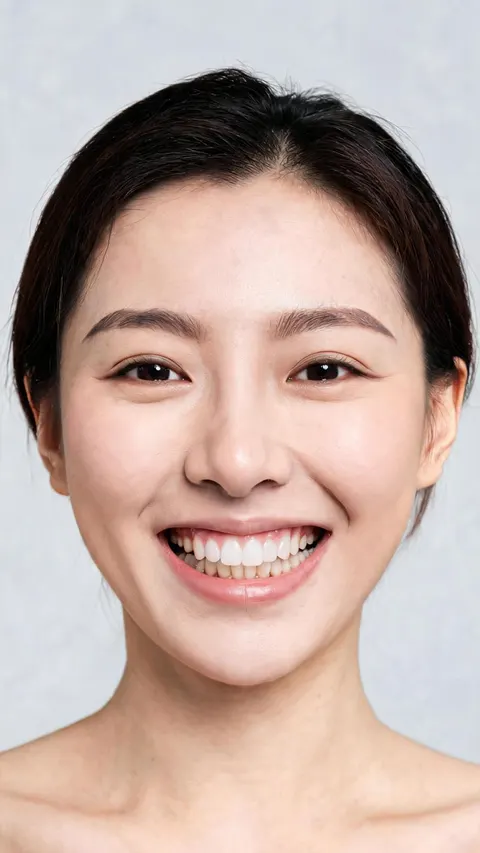
Use a permitted adult portrait to explore masculine, feminine, or androgynous styling with a written prompt. Compare the new still with its Base image before downloading. Nano currently includes 80 daily credits; each edit spends credits and free downloads are watermarked.
Explore a different gender presentation using a portrait you are allowed to edit. Sign up for APOB's free Nano plan with 80 daily credits, then open Edit image → Chat to edit. This AI gender swap workflow starts from your photo and a styling request rather than requiring a new portrait model.
Click Add in Source image to select a clear adult portrait. Keep the face, hairline, and neckline visible so you can compare identity cues later. The gender swap photo example moves from a feminine-presenting source toward a masculine presentation.
The clip asks for a masculine presentation while retaining recognizable identity. Type the shown request into Edit description: “Create a masculine presentation while preserving the same identity.”
Name any additional styling changes you want and ask to retain the expression, skin tone, pose, lighting, and background. This prompt guides the edit; it does not guarantee an identical face.
Check the aspect ratio, quality, and live credit quote before running a gender-swap candidate. Select Generate once the source and description are ready.
The example shows a masculine-presenting portrait, followed by a side-by-side comparison. Check the eyes, nose, mouth, hairline, neckline, and background against the source. Keep the version that fits your concept; reverse-direction examples elsewhere on this page are optional variations.
Download a portrait that fits the intended presentation without losing the identity cues you want to retain.
The permitted fictional adult Base image before the first edit. Compare this full portrait with both generated directions, not only the hairstyle.
Feminine to masculine
The first result uses a short haircut and masculine-presenting styling. Compare the Base image thumbnail and Edit description on the linked APOB result page; the request to preserve likeness is not a guarantee.
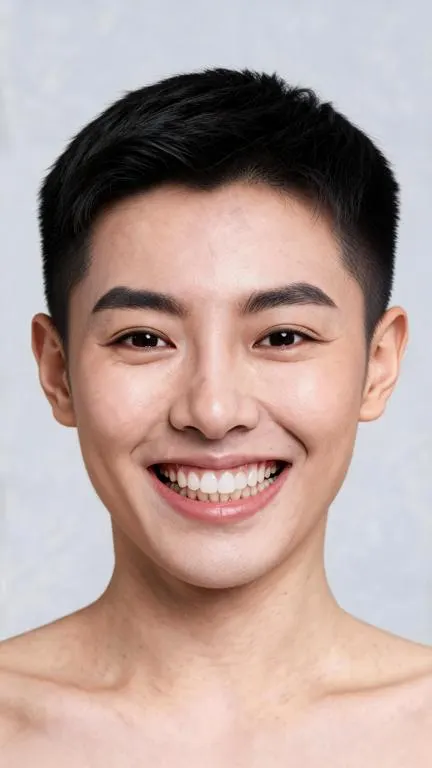
Masculine to feminine
The reverse edit uses medium-length dark hair and softer styling. Review the entire face and the linked Details page rather than assuming an exact reversal.
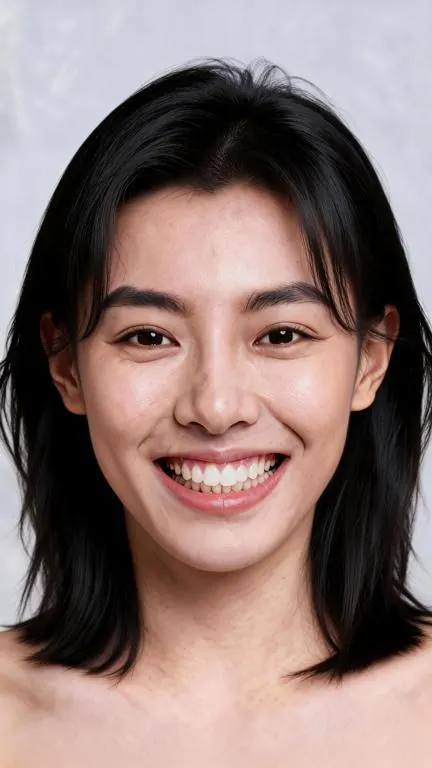
APOB's Chat to edit lets you state a presentation direction in ordinary language and name the features you want to retain. That is useful when a fixed gender swap filter preset would force one hairstyle or makeup style. The Base image remains visible in the result details, so you can compare the generated still with its source.
Both directions can be explored with separate prompts. The two supplied results use Ultra 4K and Keep original aspect ratio, but neither setting locks every facial detail. The edit is a new still image, not a live AR camera filter, a face replacement, or a forecast of how anyone would look in real life.
Nano currently provides 80 daily credits. Each generation spends a variable amount shown beside Generate. Nano downloads have a watermark; private content is a paid feature. Read APOB's current credits guide before planning a batch.

Costume reference for one performer. An adult performer tests a short-haired masculine-presenting and a shoulder-length feminine-presenting version of their own publicity photo. The two stills guide wig and wardrobe discussions; they are not predictions of a real transformation.
Character moodboard for a short film. A director with a licensed actor portrait drafts two looks for a fictional character's alternate timeline. The actor approves the concept before the images enter a private pitch deck, and the production team checks that the face remains recognizable.
Fashion casting concept. A stylist with a model release uses one portrait to explore how the same adult might be styled for two editorial directions. The outputs are labeled as AI concepts; garment fit, product color, and the model's real appearance still require a real shoot.
YouTube Shorts cover experiment. A creator compares a masculine-presenting and feminine-presenting cover image for a fictional skit. They choose the version that matches the story and use the platform's current AI disclosure controls when the photorealistic edit could be mistaken for a real photo.

Masculine-presenting portrait — Purpose: a natural costume reference. Prompt: “Create a photorealistic masculine-presenting version of this fictional adult for a creative portrait. Use a natural short haircut and subtle masculine styling. Keep the same adult recognizable; retain the smile, gaze, skin tone, pose, clothing coverage, lighting, background, and framing. Keep one person.” Expected output: a still portrait. Check jawline, eyes, teeth, and hairline against the Base image.
Feminine-presenting portrait — Purpose: a reverse character look. Prompt: “Create a photorealistic feminine-presenting version of this fictional adult with a natural medium-length dark hairstyle and softly feminine styling. Preserve the adult age, recognizable facial identity, skin tone, smile, gaze, pose, clothing coverage, background, lighting, and framing. Keep one person.” Expected output: a still image with a different presentation. Check for facial drift and added makeup you did not request.
Androgynous editorial portrait — Purpose: a nonbinary fashion moodboard without forcing a binary change. Prompt: “Restyle this authorized adult portrait with an androgynous editorial presentation: textured ear-length hair, restrained makeup, and tailored neutral clothing. Keep the person's facial structure, expression, skin tone, camera angle, and background as close to the source as possible. Do not infer or label their identity.” Expected output: one styling concept. Check that the person and clothing remain appropriate for the brief.
Subtle alternate look — Purpose: test whether a small presentation shift is enough for a creator avatar. Prompt: “Make a subtle gender-presentation styling edit to this adult portrait, changing only hairstyle and grooming cues. Keep the same adult, facial expression, eyes, nose, teeth, skin texture, lighting, and crop. Avoid dramatic beauty retouching.” Expected output: a restrained still; compare with the original for unrequested changes.
Pro — Directional prompts. Specify hair, grooming, makeup, and the traits to retain instead of accepting a fixed preset.
Pro — Source-based review. The Base image, prompt, and result details give you a practical check before you share.
Pro — Free credits to try. Nano currently replenishes 80 credits each day; inspect the live cost before you generate.
Con — Likeness can drift. Even a detailed preservation request cannot guarantee an unchanged face, smile, or background.
Con — Static photo only. This workflow does not produce a live camera filter, video, or a prediction of someone's identity or future appearance.
Con — Credits and watermark. Each edit spends credits; Nano downloads are watermarked and private content needs a paid plan.
Consent and likeness. Use your own image or an adult subject's explicit permission for editing and intended sharing. Do not gender-edit someone to mock, harass, impersonate, or falsely imply an endorsement. APOB's Terms prohibit unauthorized likeness use and deceptive impersonation.
Commercial rights and copyright. Get rights to the source photo, model likeness, styling references, trademarks, and any later campaign use. APOB's Terms describe rights in generated content between the user and APOB, subject to third-party rights and law; an AI result does not automatically clear a campaign.
Disclosure and platform rules. Mark a photorealistic edit as AI-assisted when the context could mislead viewers, and check current rules on each destination platform. YouTube's creator disclosure guidance covers meaningfully altered photorealistic content.
Privacy and expectations. Free Nano does not include private content. Review APOB's Privacy Policy and the current plan before uploading sensitive portraits. A generated style is creative exploration, not evidence of the subject's gender identity, a medical transition outcome, or their actual appearance.
Practical answers about photo inputs, prompt directions, free credits, likeness, privacy, and downloads.
Yes. APOB's Nano plan currently refills 80 credits daily. Each edit spends credits; check the amount shown beside Generate before you submit.
No. “Free” refers to Nano's daily credit allowance. Generation cost varies by plan and settings, and the allowance is not a promise of unlimited edits.
Yes. APOB's Content detail & sharing guide says Nano downloads are watermarked. Review current plan terms before using a file in client work.
Open Image → Edit image → Chat to edit, add an authorized adult portrait as the Base image, write a directional Edit description, check the credit quote, Generate, then inspect Details before downloading.
Yes. One supplied APOB example uses a feminine-presenting Base image and a prompt requesting a masculine-presenting creative portrait with short hair.
Yes. The supplied reverse example requests a feminine-presenting portrait with medium-length dark hair. Both outputs need a full-image review.
Yes. Describe concrete styling choices such as haircut, clothing, and makeup rather than asking the tool to infer or label anyone's identity.
No. This page uses Chat to edit to restyle one Base image. APOB's separate Face swap tool places a selected model or reference face into another image.
No. Chat to edit produces a new still image from a photo. It does not alter a live camera feed.
Not necessarily. Prompting for facial preservation helps state your goal, but generative edits can change facial proportions, expression, or small details. Compare the entire result with the source.
Use a permitted adult portrait with one clearly visible face, even lighting, a visible hairline, and enough resolution to inspect facial details. Avoid heavy filters or extreme angles.
APOB's Edit Image guide documents Upload image and a mobile Choose a tool sheet. Sign in to generate; controls may appear in different places on mobile.
The two supplied results show Ultra 4K quality and Keep original aspect ratio. These settings do not guarantee that facial details or the composition stay identical.
The amount is server-driven and displayed beside Generate for your current tool, plan, and settings. Do not rely on a past screenshot as a permanent price.
Open the completed result to inspect its details. Use the result's More actions menu for Download, as described in APOB's Content detail & sharing guide.
Potentially, if you have the necessary rights and permissions for the source photo, adult likeness, and campaign. Review APOB's Terms and the destination platform's rules; the AI file alone is not a rights clearance.
Do not assume so. Private content is a paid feature, and APOB's Privacy Policy explains how submitted data is handled. Avoid sensitive portraits without checking those terms.
Check each platform's current AI disclosure and likeness rules before posting. Identify the image as AI-assisted when a realistic edit could mislead viewers.
Use an authorized adult image. Nano has 80 daily credits; generation costs vary and downloads are watermarked.

