Combine two approved portraits into one realistic or stylized couple photo.
Step 1: Get permission and prepare one clear reference for each person
If you are looking for an AI couple photo generator from two photos, APOB's current route is Portrait Model + Character Element + Chat to generate. You do not need an existing photo of both people together.
Likely problem: The account holder has permission to save a selfie, but not necessarily to upload it, invent a romantic scene, or publish the result.
Ask both people to approve the source image, proposed pose or relationship context, audience, and any commercial use. “You can use this selfie” does not automatically mean “you can publish an invented engagement portrait.” For client work, collect a written likeness release that covers AI-assisted generation and the planned channels.
Choose recent, high-resolution portraits with an unobstructed face, simple background, and even light. APOB's upload guide explicitly contrasts high resolution, a clear face and background, and simple composition with blurred or cluttered alternatives. Avoid beauty filters, dark sunglasses, extreme wide-angle distortion, and tiny group-photo crops. The two backgrounds do not need to match because APOB will render a new scene.
Example: A long-distance couple agrees to make a private café portrait for an anniversary message. Each supplies a recent daylight selfie, approves a seated side-by-side pose, and agrees that the first version will stay in their private chat.

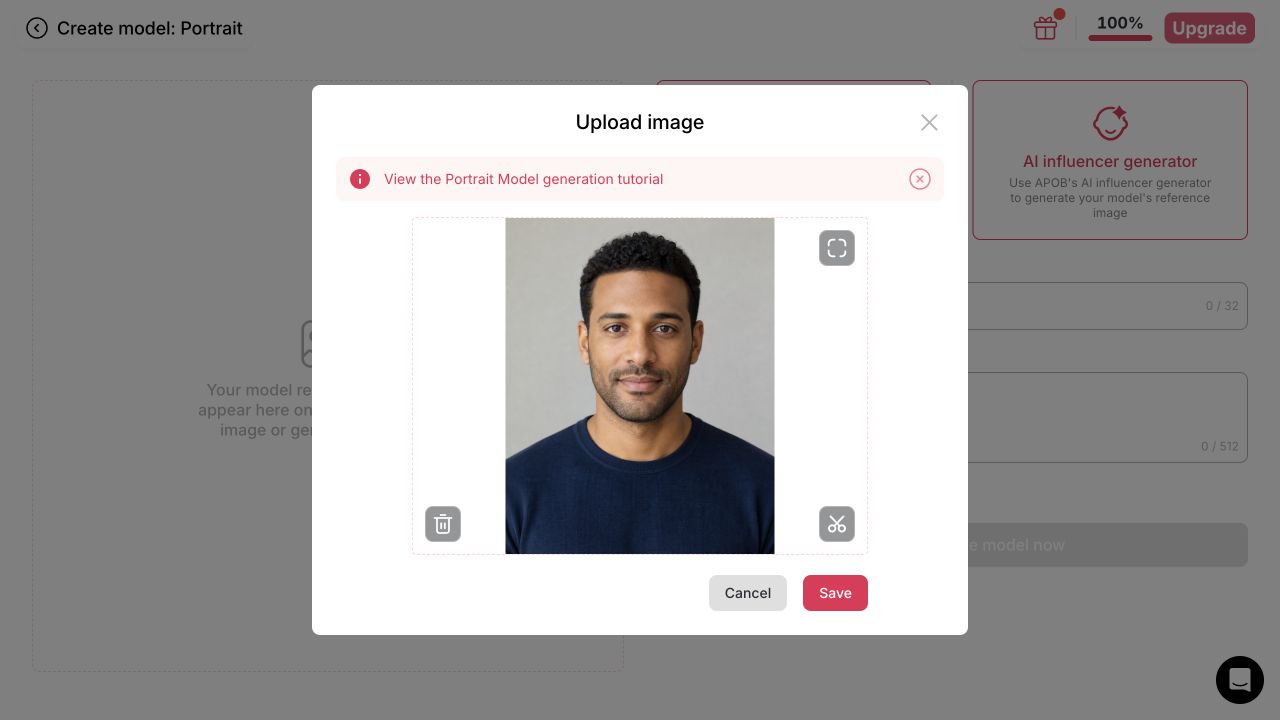
Step 2: Create or select person A's Portrait Model
Likely problem: A loose text description does not give APOB a stable identity anchor for the first person.
From Home, choose Create Portrait Model. Upload one approved image or use APOB's AI influencer generator, enter a name, review the Public toggle, and create the model. APOB says the model trains in the background and becomes the active character once ready. The model-creation form accepts one primary reference image; the uploader also provides crop and delete controls.
If the model already exists in Personal models, select it instead of training a duplicate. Wait for training to finish before generating; a still-training or failed model should not be used as evidence that the workflow worked.
Example: Maya uploads one front-facing daylight portrait, names the model Maya anniversary test, and keeps it private where her plan allows. A returning user selects an existing approved Maya model from Personal models.
Step 3: Save person B as a Character Element
Likely problem: A generic prompt such as “put us together” can merge facial traits, swap hair or clothing, or make one person dominate the composition.
Open the first Add element slot, switch to Personal, and choose Create Element. Add person B's frontal image, give the Element a unique name, keep the category as Character, and review the Public toggle before saving. APOB's current help documentation says a frontal image and name are required; extra images are optional and should show the same person and current appearance.
If only one real person is involved, create an original fictional character for the second role. Do not substitute a celebrity, ex-partner, crush, coworker, or private individual who has not explicitly agreed to appear in a romantic image.
Example: Jordan's front-facing portrait becomes a private Character Element named Jordan approved. For a solo novelty post, Maya instead pairs with an invented adult character whose face is not copied from a real person.

Step 4: Insert both references, describe their positions, and set the output
Likely problem: “Romantic couple at sunset” leaves the model to guess who stands where, how close they are, what each person wears, and where they look. That uncertainty often produces crossed limbs, swapped traits, or a generic pair that resembles neither reference.
In Generate Image > Chat to generate, keep person A's model mention and insert person B's Element chip. State left/right position, camera distance, body orientation, eye line, contact, wardrobe, setting, light direction, and style. Keep the first pose simple; two seated people with visible shoulders and separate hands are easier to verify than a close embrace that hides faces and limbs.
Choose the destination ratio before generating. APOB currently offers 9:16, 3:4, 16:9, 4:3, and 1:1. On Ultra 2K, Ultra 4K, and Ultra S 4K, Quantity can be 1 or 2; each additional image increases the live cost. The Generate bar shows the exact account-specific credit charge before submission.
Example prompt: @Maya sits on the left and @Jordan sits on the right at the same small café table, both facing the camera with shoulders visible, four hands resting separately on the table, soft window daylight, realistic editorial photography, natural skin texture, no extra people, no text.
For a horizontal keepsake, choose 4:3 and Quantity 1 for the first test. For a Story or vertical video starting frame, use 9:16; for a portrait feed post, use 3:4. Add exact names or dates later in a layout tool rather than asking the image model to spell them.
Step 5: Generate once, then review identity and anatomy separately
Likely problem: A pleasant mood can hide an altered face, wrong age cue, extra person, fused hand, swapped wardrobe, or implausible contact point.
Start with one output, then inspect person A, person B, and the interaction as three separate QA passes. Compare each face with the approved reference. Count people and hands. Check fingers, wrists, jewelry, hair overlaps, clothing boundaries, reflections, shadows, and contact points. Ask both depicted people to approve the selected result before public use.
Observed test, August 26, 2026: with one existing personal Portrait Model, one newly created private fictional Character Element, Quantity 1, 4:3, and Ultra 4K, the interface showed 36 credits before submission. The private result completed in about 80 seconds and downloaded at 4096 × 3072. It contained two adults, both faces, and four hands. This is one workflow observation, not a speed, price, or accuracy guarantee.
Example: If an anniversary portrait keeps both faces but joins two wrists, regenerate with “four hands resting separately, with visible space between them.” If an identity, pose, or body is structurally wrong, revise the main prompt instead of stacking corrective edits.


Step 6: Use a focused edit only when most of the image is already right
Likely problem: A small defect invites a broad rewrite that changes both identities or consumes credits without solving the original issue.
Open the finished image and choose Chat to edit only for a contained correction. APOB's result viewer also exposes Image to video, Clone Image, Edit clothing, Upscale, Remix, Share, Download, and Details. A useful edit names what must stay unchanged before describing one local fix.
Focused edit example: Keep both faces, clothing, camera angle, and café lighting unchanged. Place each person's hands separately on the table with a small visible gap. Show four natural hands with five fingers each; do not add or remove people.
If the problem affects a face, body, pose, or overall composition, go back to Chat to generate and regenerate. Download the approved still only after checking its Public/Private state and watermark. Image to video is an optional next workflow and requires separate consent because motion can change what the people appear to do.
Workflow verification note: The task-specific Element, prompt, generation, result, and edit handoff were tested in the live APOB app on August 26, 2026. A fresh synthetic Portrait Model upload reached the preview but did not persist after Save in this in-app browser session, so the successful generation used an existing account-owned personal model for person A. The draft does not claim that a new Portrait Model finished training during this test. The exact prompt, screenshot evidence, output, limitation, and observed costs are retained in the QA record.
Expert Prompts for AI Couple Photos
Replace the bracketed names with the actual Portrait Model and Character Element chips in APOB. Do not type a private person's name as a substitute for an approved reference.
1. Long-distance everyday portrait
Purpose: Make a shared image feel personal without inventing a major event. Prompt: [@PersonA] on the left and [@PersonB] on the right, sitting at the same small apartment breakfast table during a rainy morning, both faces fully visible, comfortable familiar body language, separate mugs, hands resting naturally and not overlapping, soft grey window light, 50 mm candid photograph, realistic skin texture, restrained color palette, no text, no extra people. Expected output: A quiet half-body lifestyle portrait with simple contact points and enough facial visibility to review both identities.
2. Engagement announcement concept
Purpose: Create a designed announcement image while keeping the actual date and typography outside the generator. Prompt: [@PersonA] standing on the left and [@PersonB] standing on the right in a botanical conservatory, both facing camera, one approved engagement ring visible on [@PersonA]'s left hand, hands held at waist level, elegant non-branded formal clothing, diffused morning light, vertical 3:4 editorial portrait, open negative space above their shoulders for later typography, no letters, no logos, no crowd. Expected output: A clean vertical concept with readable faces, a visible hand, and copy space for a designer to add the real announcement details.
3. Anniversary dinner without excessive physical contact
Purpose: Reduce hand and occlusion errors in a romantic scene. Prompt: [@PersonA] seated left and [@PersonB] seated right across the corner of the same restaurant table, shoulders turned toward each other, both looking at camera with relaxed expressions, hands separately visible beside their plates, one small candle centered between them, warm practical light balanced with soft fill, 35 mm documentary photograph, accurate height and skin tone, no touching faces, no merged fingers, no text. Expected output: A warm but inspectable composition in which the romance comes from gaze and setting rather than a technically difficult embrace.
4. Same-sex couple city portrait
Purpose: Preserve each person's styling and avoid the generator assigning stereotyped roles. Prompt: [@PersonA] on camera left wearing the approved navy jacket and [@PersonB] on camera right wearing the approved rust coat, walking side by side on a quiet city street after rain, equal visual prominence, both faces visible in three-quarter view, no gendered pose assumptions, natural stride, realistic reflections, evening shop light, cinematic 4:3 still, no brands, no bystanders looking at camera. Expected output: A balanced two-person street portrait in which wardrobe, position, and prominence are explicitly assigned.
5. Reimagined old snapshot
Purpose: Create a labeled reinterpretation of a poor archive image without claiming restoration. Prompt: Using [@PersonA] and [@PersonB] as current identity references, create a clearly new 1990s-inspired family snapshot at a lakeside picnic, [@PersonA] left and [@PersonB] right, both faces unobstructed, compact-camera flash, mild film grain, slightly imperfect candid framing, period-neutral clothing with no logos, natural hands, no date stamp, no text. Expected output: A deliberately synthetic period-style image that evokes an archive aesthetic while remaining distinct from the original record.
6. Original fictional future-partner concept
Purpose: Make novelty content without using a real stranger's likeness. Prompt: [@PersonA] taking a casual bookstore selfie with [@FictionalPartner], an original fictional adult character created in APOB, [@PersonA] closest to camera on the left, [@FictionalPartner] slightly behind on the right, both faces visible, friendly early-date body language, warm overhead light, ordinary clothing, realistic phone-camera perspective, playful but not intimate, no public figure resemblance, no text. Expected output: A clearly fictional “future date” image suitable for labeled novelty content, not a deceptive dating profile.
7. Anime couple illustration
Purpose: Shift away from photorealism while keeping the two references compositionally distinct. Prompt: Stylized hand-drawn anime illustration of [@PersonA] on the left and [@PersonB] on the right sharing an umbrella at a train platform, preserve each person's recognizable hairstyle, glasses, and color palette without copying a named artist or franchise, clean line work, soft cel shading, full hands visible, evening rain, vertical 9:16 composition, no text, no logo. Expected output: An original anime-style vertical illustration that avoids named living-artist or copyrighted-character imitation.
8. Photographer's pre-shoot lighting concept
Purpose: Preview composition and light without representing the output as a delivered photograph. Prompt: AI previsualization featuring approved client references [@PersonA] and [@PersonB], [@PersonA] seated on a wooden stool at camera left, [@PersonB] standing at camera right with one hand resting on the stool back, both faces fully visible, large softbox effect from camera left, white bounce from camera right, charcoal seamless backdrop, 85 mm studio portrait, 4:3 landscape, realistic height difference, simple unbranded clothing, no text. Expected output: A lighting and posing reference that a photographer can discuss with clients before attempting a real setup.
Choose this AI couple portrait generator workflow when both people need separate reference roles, reusable scene variations, and a path from the approved still into corrective editing or motion. If the job starts from an existing photo of both people and only needs a small repair, use an editor instead.
Two identities are referenced separately
A Portrait Model can anchor one person while a Character Element anchors the other. This is more controllable than asking a text-only generator to infer two real faces from a sentence, and it makes it easier to diagnose which reference or instruction needs to change.
The same approved people can appear in more than one scene
Saved models and Elements can be reused. A couple can test an everyday café portrait, an anniversary dinner, and an illustrated version without rebuilding both identities from scratch each time. Reuse does not guarantee perfect likeness, but it gives the workflow a consistent starting point.
The prompt controls the relationship inside the frame
APOB's prompt composer accepts normal scene description alongside saved references. Users can specify which person is on the left, where each person looks, how much contact occurs, what the camera sees, and which details must remain visible. That control matters more for two people than for a single portrait because every extra interaction introduces another opportunity for overlap or identity drift.
Image, corrective edit, and motion handoffs share one workspace
Generate the couple image, use Chat to edit for a contained correction, and send the approved still into Image to Video if the project also needs a Reel, Story, or short announcement clip. The handoff reduces file juggling, but each new stage still needs a fresh likeness and consent review.
Output settings reflect the publishing destination
Generate Image supports 9:16, 3:4, 16:9, 4:3, and 1:1. Choosing the final frame shape before generation protects faces, hands, and planned copy space from a destructive last-minute crop.
The live Generate bar exposes the cost before submission
APOB displays the account-specific cost beside Generate and updates it when quantity or quality changes. In the August 26 test, one Ultra 4K image at 4:3 showed 36 credits; opening Chat to edit with Ultra 4K showed 50 credits before submission. Those observations are not fixed pricing. Users can decide whether to draft at a lower setting, request one or two outputs, or skip an unnecessary edit before spending credits. See Credits, Plans & Billing.
This section is practical information, not legal advice. Requirements vary by country, state, platform, contract, and use case.
Obtain consent from both people for the complete use
Consent should cover four separate actions: uploading the source photo, generating the proposed relationship/pose, sharing the result with a defined audience, and using it commercially if applicable. An old permission to post a selfie does not automatically authorize an invented romantic, wedding, sexual, political, or endorsement context.
APOB's Terms prohibit content that appropriates a person's right of publicity by using their name, likeness, voice, or persona without explicit, verifiable consent. They also prohibit submitting material the user has no right to provide.
Treat romance as a sensitive context
Do not generate a romantic image with an ex, crush, coworker, celebrity, client, or private individual who has not explicitly agreed to that depiction. Never use the workflow for harassment, revenge, sexualized content, false relationship claims, fabricated infidelity, or coercion. Avoid real minors; where a legitimate family use involves a child, obtain guardian authorization and follow the tool's and destination platform's age and safety rules.
Check likeness and publicity rights before commercial use
For an ad, product page, paid post, print sale, or photographer add-on, obtain a model/likeness release from each identifiable person. The release should describe AI alteration, media, duration, territories, and whether materially new scenes may be generated. Public availability of a photograph is not permission to use the person's likeness commercially.
Disclose realistic synthetic scenes when context could mislead
Label an AI-generated couple image when viewers could reasonably read it as a real engagement, wedding, trip, date, endorsement, or newsworthy event. TikTok requires creators to label AI-generated content containing realistic images, audio, or video and prohibits harmful misleading impersonation.
Meta applies “AI info” labels when it detects industry signals or receives a user disclosure, while other Community Standards still apply.
If the image promotes a product or depicts an endorsement, the FTC's truth-in-advertising principles still apply. Material connections must be disclosed, and a synthetic person or scene must not communicate a false testimonial.
Do not assume “I generated it” settles copyright
APOB's Terms state that, as between the user and APOB, the user owns Generated Content to the fullest extent permitted by applicable law. That does not erase rights in uploaded photographs, logos, artwork, clothing designs, locations, or other third-party material.
In the United States, the Copyright Office concluded that purely AI-generated material is not protected and that prompts alone generally do not provide sufficient human control; human-authored selection, arrangement, or modification may be protectable case by case. Keep records of source permissions and human editing rather than promising exclusive copyright in every output.
Review privacy and visibility before uploading the second portrait
APOB's Terms treat uploaded portraits as User Input. They say the uploader retains whatever ownership rights they already had, while granting APOB a broad, perpetual license to store, modify, use, and make the input available to service providers for APOB-related purposes. The Terms also require the uploader to own the input or have the necessary permissions. Do not translate this into the unsupported promise that an uploaded portrait is used once and immediately erased.
APOB's Privacy Policy says retention depends on the purpose of collection, use, and user choices, after which information may be deleted or aggregated; it also allows retention for legal obligations, disputes, and enforcement. It adds a special warning that a sufficiently popular Public Model may be preserved even after broader data deletion. Review that policy with the second person before upload.
Current Help Center documentation says private models/content and watermark-free downloads are paid features. Users can manage and delete their own models and Elements, as well as generated content in History, but interface deletion is not proof that all lawful backups, logs, public copies, or third-party downloads are gone. Keep the model, Element, and result private where the plan permits, and never turn a partner's likeness public merely to obtain a share link.
Preserve the boundary between concept and evidence
An AI couple image can be a joke, illustration, previsualization, or creative keepsake. It should not be used to verify a relationship, prove attendance, support an insurance or immigration claim, manufacture an alibi, impersonate a dating match, or misrepresent a photographer's documentary portfolio.
The strongest use cases create a clearly synthetic shared scene that both people want—not evidence that an event or relationship occurred. Match the prompt, disclosure, and privacy setting to the real audience for the image.
Give a long-distance couple one believable shared frame
When travel dates, time zones, or work schedules prevent a real shoot, two approved portraits can become a private shared scene. Keep the concept grounded in something the couple actually likes—a kitchen video call recreated as a quiet breakfast, for example—rather than fabricating a milestone that never occurred.
This is designed for digital sharing: Meta reported in September 2025 that Instagram had reached 3 billion monthly active users, messaging had become the most popular way to share photos and videos on Instagram, and Reels were reshared more than 4.5 billion times per day across Meta platforms. Those figures describe the distribution environment, not proof that synthetic couple images improve a relationship.
Make an anniversary or engagement concept without pretending it is documentary photography
Build a portrait around a real date, place, color palette, or shared object, then add exact names and dates later in a layout tool. For an engagement concept, label the image as AI-generated if viewers might reasonably believe it records the actual proposal. Never use an invented ring, venue, or event as evidence in a personal, legal, or commercial dispute.
Explore “what would we look like together?” with a fictional partner
A solo user can pair their own approved portrait with a newly designed fictional character. This route fits novelty posts, story concepts, and dating-themed memes without appropriating a real person's likeness. Digital dating is a mainstream context: Pew Research Center found that 30% of U.S. adults—and 53% of adults ages 18 to 29—had ever used a dating site or app in its nationally representative survey. That does not justify a deceptive profile; a synthetic partner image should be presented as fiction, not as an existing relationship.
Reinterpret an old or unusable couple photo
An archive may contain the right memory but the wrong frame: one person blinked, the crop is too tight, or the only copy is small. Use current approved references to generate a clearly labeled reinterpretation with a similar mood. Keep the original file alongside it. AI generation is not restoration and should not silently replace the historical record.
Build relationship-themed creator content without a new shoot for every post
Creators can reuse approved character references for a recurring “date-night expectations versus reality” series, an anime-style duo, or a fictional relationship sketch. If the still becomes a Short, YouTube reported in June 2025 that Shorts averaged more than 200 billion daily views. That scale makes format fit and transparent labeling important; it does not guarantee reach for any individual creator.
The commercial creator market is also material: IAB projected U.S. creator ad spend at $37 billion in 2025, up 26% year over year. A sponsored couple image therefore needs the same truthful-advertising, consent, and material-connection review as other creator assets.
Offer photographers a previsualization or digital add-on
A photographer can use separately licensed client portraits for a virtual couple photoshoot concept: mock up a wardrobe direction, seasonal setting, or announcement crop before a real shoot. The deliverable should say “AI concept” and should not promise that a generated pose, venue, dress, or lighting setup can be reproduced exactly. For a finished commercial image, the photographer still needs releases for both people and licenses for any third-party wardrobe, artwork, product, or location material referenced.
Separate reference roles A Portrait Model and Character Element give the two people distinct inputs, which is easier to control and troubleshoot than a text-only description.
No shared source photo is required The people can provide separate approved portraits taken at different times and locations because the final scene is newly generated.
Repeatable scene variations Saved references can support multiple approved concepts, aspect ratios, and styles without preparing both identities from zero for every post.
One still can continue into editing or motion Small corrections can move to Chat to edit, and an approved image can become the first frame of an Image to Video project.
A safer fictional-partner route Solo users can design an original adult character instead of copying a celebrity, crush, ex, or stranger.
Exact likeness is not guaranteed Reference-based generation can still change facial structure, skin tone, age cues, hair, body proportions, or distinguishing marks. Both people must review the result.
Close-contact poses are error-prone Kisses, intertwined fingers, hugs, crossed arms, reflective surfaces, and partially hidden faces create more opportunities for geometry and identity mistakes.
Two-person privacy requires more planning The account holder is handling someone else's likeness. APOB's free tier does not unlock private models/content, so a sensitive project may require a paid privacy setting or a different workflow.
Good results may take several generations Source selection, prompt refinement, and reruns consume time and credits. The first attractive image is not necessarily the most accurate one.
A synthetic image is not an event record An AI engagement, travel, wedding, or date scene must not be presented as proof that the event or relationship occurred.
Generated text and fine details need separate QA Dates, names, jewelry, logos, signs, and small hand details may be wrong. Add important text later in a layout tool and check every commercial element.
No Credit Card Required


Answers about two-photo workflow, consent, privacy, quality, credits, watermarking, commercial use, and sharing.
What is an AI couple photo maker?
It is a generative image workflow that uses two identity references—or one identity plus an original fictional character—to create a new scene containing both people. Unlike a collage, the model renders a shared pose, background, light, and camera treatment. The output is synthetic and may not reproduce either person exactly.
How do I combine two photos into one couple photo?
In APOB, one approved portrait becomes the selected Portrait Model and the other becomes a Character Element. Insert both references into Chat to generate, then describe their positions, pose, setting, and camera style. The system renders a new shared scene; it does not merely merge the original backgrounds.
Can I use only one photo and ask AI to create a partner?
Yes, if the second person is an original fictional adult character. Create the fictional face in APOB rather than asking for a real celebrity, crush, ex, or stranger. Label public novelty content so viewers do not mistake the invented relationship for a real one.
Is APOB's AI couple photo workflow free?
APOB currently lists 80 daily credits for Nano. Generation and editing actions use different amounts, and the live cost appears before submission. In one August 26, 2026 test, a single Ultra 4K image showed 36 credits; that is an observation, not fixed pricing. Nano downloads carry a watermark, while current paid plans add private models/content and watermark removal. Check current billing documentation before relying on any price or allowance.
What photos produce the most realistic result?
For realistic AI couple photos, use recent, well-lit portraits with visible faces, natural skin texture, simple backgrounds, and minimal lens distortion. Avoid masks, sunglasses, blur, heavy filters, extreme shadows, and tiny crops. APOB requires one frontal Element image; its current Help Center says the form accepts up to two additional images, even though an on-screen hint may mention three. Prepare only consistent views of the same current appearance and follow the live form limit.
Will both people look exactly like themselves?
Not always. Clear references and explicit role assignments improve control, but generative systems can still change facial structure, age cues, skin tone, hair, height, or body proportions. Both people should compare the output with their source photos and reject any version that misrepresents them.
Does the workflow support same-sex couples and different gender expressions?
The prompt can describe any consenting adult pair. Avoid relying on stereotypes: specify each person's position, wardrobe, hairstyle, and body language directly so the model does not have to infer roles from gender presentation.
Can I make wedding, engagement, or anniversary photos?
Yes, as creative concepts or clearly labeled synthetic keepsakes. Do not present a generated proposal, ceremony, venue, ring, or guest list as a documentary record. Add exact names and dates in a design tool after generation.
Is it safe to upload my partner's photo?
Only upload it with explicit permission and after reviewing APOB's current Terms, Privacy Policy, visibility, and deletion controls. The other person should approve the pose, audience, and commercial use—not just the file upload. The Terms grant APOB a broad license to process User Input for service-related purposes, while the Privacy Policy describes purpose-dependent retention and special preservation rules for sufficiently popular Public Models. Private models/content are currently paid features. Interface deletion does not prove that no lawful backup, log, public copy, or prior download exists.
Can I generate a couple photo with a celebrity, crush, or ex?
Not without explicit, verifiable consent for that exact romantic depiction and use. A public photo is not permission. The safer alternative is an original fictional character that does not imitate a real person's recognizable likeness.
Can I use an AI couple photo commercially?
Potentially. APOB's Terms say that, as between the user and APOB, the user owns Generated Content to the fullest extent allowed by law, subject to third-party rights and the licenses granted to APOB. Commercial use still requires permission or releases from both identifiable people and clearance for every source photo, brand, artwork, location, or other protected material. Copyright protection for AI material can also vary by jurisdiction and degree of human authorship.
Can I use a generated couple photo on a dating profile?
Do not use it to imply a real partner, event, lifestyle, or appearance that does not exist. If a platform permits AI images, disclose that the image is synthetic and follow its profile-authenticity rules. A fictional-partner meme belongs in clearly labeled entertainment content, not a deceptive profile.
Which aspect ratio should I choose?
Use 9:16 for Stories or vertical video starting frames, 3:4 for portrait feed posts, 1:1 for square tiles and matching profile images, 4:3 for a horizontal portrait or print, and 16:9 for banners and landscape video. Leave safe space around both faces and any hand interaction.
Can I turn the finished couple photo into a video?
Yes. An approved still can move to APOB's Image to Video workflow. Ask for one restrained action first, then inspect every frame for face drift, hand changes, and unintended contact. Motion needs separate consent when it changes what the depicted people appear to do.
What should I do if the faces merge or swap details?
Return to the prompt and restate person A/person B positions, wardrobe, and visible features. Simplify contact, keep both faces unobstructed, and regenerate. Use Chat to edit for contained background or object fixes, not to rescue a fundamentally wrong identity or pose.
Can AI repair an old couple photo?
An editor or upscaler may improve an existing file, while the couple workflow can generate a new reinterpretation using current references. These are different tasks. Keep the original archive, label the new image as AI-generated, and do not describe an invented scene as restoration.
Is an AI couple photo the same as a face swap?
No. A face swap replaces a face in an existing image or template. An AI couple photo maker can generate a new two-person composition with a shared pose, light, background, and camera view. Face swap may be useful for a specific edit, but it does not solve the complete two-identity composition problem.
Where are my model, partner Element, and finished photo saved?
Open History > My. APOB organizes account-owned work into Models, Elements, and Contents; generated couple images appear under Contents and can be filtered to Image. History also provides management actions, but deleting an item from the interface should not be described as guaranteed deletion of every lawful backup or prior public copy.
Why is the Generate button disabled?
Chat to generate needs a loaded Portrait Model and some prompt content. Wait for a newly trained model to become ready, keep or reinsert the model mention, add a scene description, and confirm that required uploads have finished. For a new Element, Save stays disabled until a valid frontal image and unique supported name are present.
Will the downloaded couple photo have an APOB watermark?
Current Help Center guidance says Nano downloads carry a watermark. Paid accounts download without a watermark only when the content was generated by a paid account; upgrading later does not retroactively remove a watermark from older work. Confirm the plan before generating a client deliverable.


