Kling AI 1.6 contre Kling 2.0 : Quoi de neuf et quelle version est meilleure ?
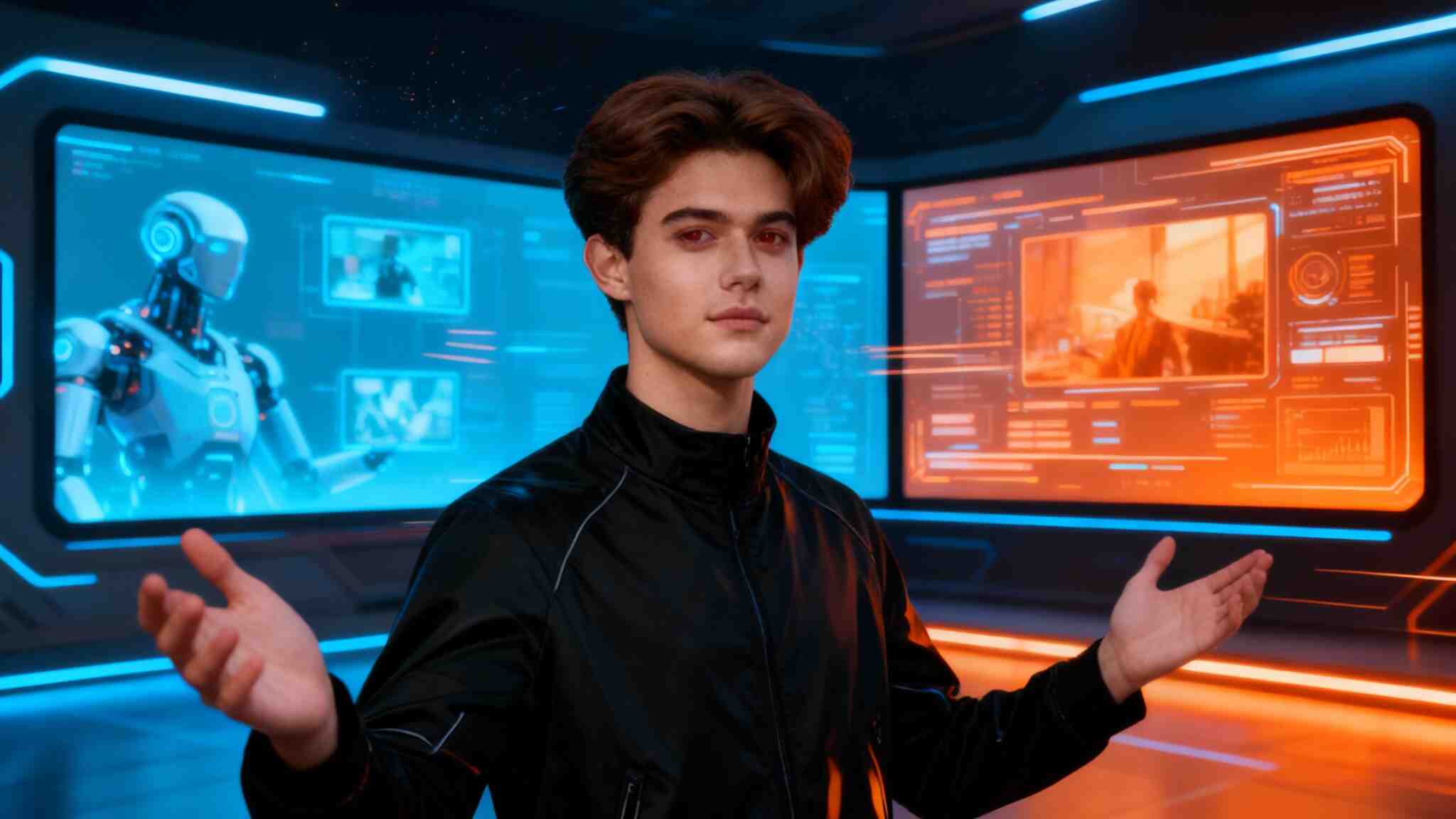
Si vous avez été en ligne récemment, vous avez probablement entendu parler de Kling AI. C'est un générateur de vidéos alimenté par l'IA qui transforme le texte en vidéos époustouflantes et réalistes. De nombreux utilisateurs adorent comment il les aide à créer de courtes clips, des publicités ou du contenu créatif en quelques minutes. Il vous suffit de taper ce que vous voulez voir, et Kling AI le met en œuvre.
Imaginez taper : “un homme courant sur la plage au coucher du soleil” — et en quelques secondes, vous obtenez une vidéo qui ressemble à une scène réelle. C'est pourquoi les gens sont émerveillés. On a l'impression que faire des films est devenu facile.
Pourquoi Kling AI est-il devenu si populaire ?
Les outils vidéo alimentés par l'IA sont partout, mais Kling AI se distingue. Il est devenu populaire parce qu'il offre un mouvement fluide, des visuels clairs et un éclairage naturel.
Les créateurs de contenu l'utilisent pour des intros YouTube, des publications sur les réseaux sociaux ou des vidéos marketing. Même les débutants peuvent obtenir d'excellents résultats.
Les utilisateurs disent qu'il leur fait gagner des heures. Pas de caméra, pas de logiciel de montage, pas de gros budget — juste votre imagination. Que vous soyez étudiant, marketeur ou créateur occasionnel, Kling AI rend la création vidéo amusante et simple.
Qu'est-ce que Kling AI 1.6 ?
Kling AI 1.6 a été une avancée importante dans la génération de vidéos par IA. Il a rendu la création vidéo plus stable et réaliste par rapport aux versions précédentes. Il a permis aux utilisateurs de créer des courts clips qui semblaient presque réalisés par un humain. Vous pouviez décrire des actions, des émotions ou des angles de caméra, et Kling AI 1.6 s'occupait du reste.
Par exemple, un utilisateur a tapé : “Un chat sautant sur une table au ralenti.” Le résultat ? Une vidéo parfaitement fluide et réaliste. C'est à ce moment que les gens ont commencé à faire confiance à Kling AI pour des projets sérieux, pas seulement pour le plaisir.
Qu'est-ce que Kling 2.0 ?
Ensuite est arrivé Kling 2.0 — la nouvelle version améliorée dont tout le monde parle. Elle est plus rapide, plus intelligente et beaucoup plus puissante. Kling 2.0 peut générer des vidéos plus longues, gérer des scènes complexes et montrer de meilleurs détails comme les expressions faciales et les effets d'éclairage.
Imaginez créer un clip de 10 secondes avec des arrière-plans animés, des gens parlant et des ombres naturelles — le tout à partir d'une seule invite textuelle. C'est la magie de Kling 2.0.
Les utilisateurs disent que la mise à jour est plus fluide et plus "humaine". Les animations semblent moins robotiques, les transitions coulent naturellement et le temps de rendu est plus court.
Kling AI 1.6 vs Kling 2.0 : Quelle est la véritable différence ?
Alors, en quoi Kling AI 1.6 se compare-t-il à Kling 2.0 ? La plus grande différence réside dans la vitesse, le réalisme et le contrôle.
Vitesse : Kling 2.0 fonctionne presque deux fois plus vite. Vous passez moins de temps à attendre que votre vidéo se termine.
Réalité : Les visages, les mouvements et l'éclairage semblent plus naturels dans Kling 2.0. Cela semble plus proche de la réalité.
Longueur : Kling AI 1.6 avait des clips plus courts. Kling 2.0 prend en charge des vidéos plus longues — parfait pour la narration.
Créativité : Kling 2.0 comprend mieux les invites. Vous pouvez décrire des scènes plus librement et obtenir des résultats précis.
Si vous avez utilisé Kling AI 1.6 auparavant, vous remarquerez instantanément la différence. Tout semble plus fluide, plus clair et plus flexible.
Pour la plupart des utilisateurs, passer à Kling 2.0 en vaut la peine. Mais si vous avez juste besoin de courts clips simples, Kling AI 1.6 fait encore très bien le travail.
Expérience Utilisateur : Ce que les gens disent
De nombreux utilisateurs partagent leurs expériences en ligne. Certains disent que Kling AI 1.6 était génial pour apprendre les bases. D'autres adorent la façon dont Kling 2.0 les aide à créer des vidéos d'un niveau professionnel pour des clients ou des réseaux sociaux.
Un propriétaire de petite entreprise a dit : “Avec Kling 2.0, j'ai réalisé une vidéo complète de produit en moins de 10 minutes !” Un autre créateur a partagé : “J'ai utilisé Kling AI 1.6 auparavant, mais 2.0 semble plus vivant et expressif.”
C'est ce qui le rend excitant — tout le monde peut devenir un créateur de vidéos avec un seul outil.
Lequel devriez-vous choisir ?
Si vous débutez ou souhaitez quelque chose de léger et facile, Kling AI 1.6 est un excellent choix. Il est simple, fiable, et crée encore des résultats impressionnants.
Mais si vous voulez un meilleur contrôle, de plus longs clips et une qualité supérieure, Kling 2.0 est le gagnant évident. Vous bénéficierez d'une meilleure vitesse, d'une IA plus intelligente et de résultats plus réalistes — le tout avec la même interface simple.
Pensez-y de cette façon : Kling AI 1.6 est comme votre première caméra. Kling 2.0 est la mise à niveau professionnelle.
Réflexions finales
Les deux, Kling AI 1.6 et Kling 2.0, marquent des jalons importants dans la génération de vidéos par IA. L'engagement de Kuaishou à améliorer la précision des mouvements, la qualité vidéo et l'accessibilité fait de Kling l'un des outils créatifs les plus passionnants disponibles aujourd'hui.
Pour les utilisateurs occasionnels, Kling AI 1.6 continue d'offrir d'excellents résultats. Mais si vous êtes prêt à élever votre création de contenu à un niveau professionnel, Kling 2.0 est le gagnant évident — plus rapide, plus intelligent et plus puissant que jamais.
FAQs sur Kling AI
Q1 : À quoi sert Kling AI ?
Kling AI aide les utilisateurs à transformer des invites textuelles en courtes vidéos réalistes. C'est parfait pour des publicités, des projets artistiques ou du contenu pour les réseaux sociaux.
Q2 : Puis-je encore utiliser Kling AI 1.6 ?
Oui, Kling AI 1.6 est toujours disponible. C'est une bonne option pour les débutants qui souhaitent apprendre comment fonctionne la génération de vidéos par IA.
Q3 : Puis-je utiliser Kling 2.0 pour des projets commerciaux ?
Oui. Les deux, Kling AI 1.6 et Kling 2.0, autorisent l'utilisation commerciale, selon le plan auquel vous êtes abonné. Vérifiez toujours les conditions de licence de Kuaishou avant de publier commercialement.
Q4 : Kling AI 1.6 est-il toujours disponible ?
Dans la plupart des régions, oui. Kuaishou continue de supporter Kling AI 1.6 pour les utilisateurs qui préfèrent une expérience plus simple et plus légère, bien que les mises à jour se concentrent maintenant sur Kling 2.0.
Q5 : Quelle version est la meilleure pour les créateurs de contenu sur les réseaux sociaux ?
Si vous privilégiez la vitesse et un flux de travail facile, Kling AI 1.6 fonctionne très bien. Mais pour les créateurs qui veulent des visuels de qualité cinématographique et de plus longs clips, Kling 2.0 est l'option supérieure.

Soyez le premier à aimer ceci.
Vous pourriez également être intéressé par
Vous pourriez également être intéressé par




Découvrez d'autres blogs
Découvrez d'autres blogs
IA Photo Professionnelle Gratuit | Portraits Pro Instantanés
L’intelligence artificielle transforme de nombreux secteurs, et la photographie ne fait pas exception. Obtenir un portrait de qualité ne nécessite plus de passer par un photographe coûteux. Grâce aux outils d’IA photo CV gratuite, il est désormais possible de transformer une photo en photo professionnelle gratuit en seulement quelques secondes. Dans cet article, nous vous expliquons comment utiliser l’IA pour créer facilement des photos professionnelles dignes d’un studio, sans frais.
Comment Utiliser APOB IA pour Photos Professionnelles
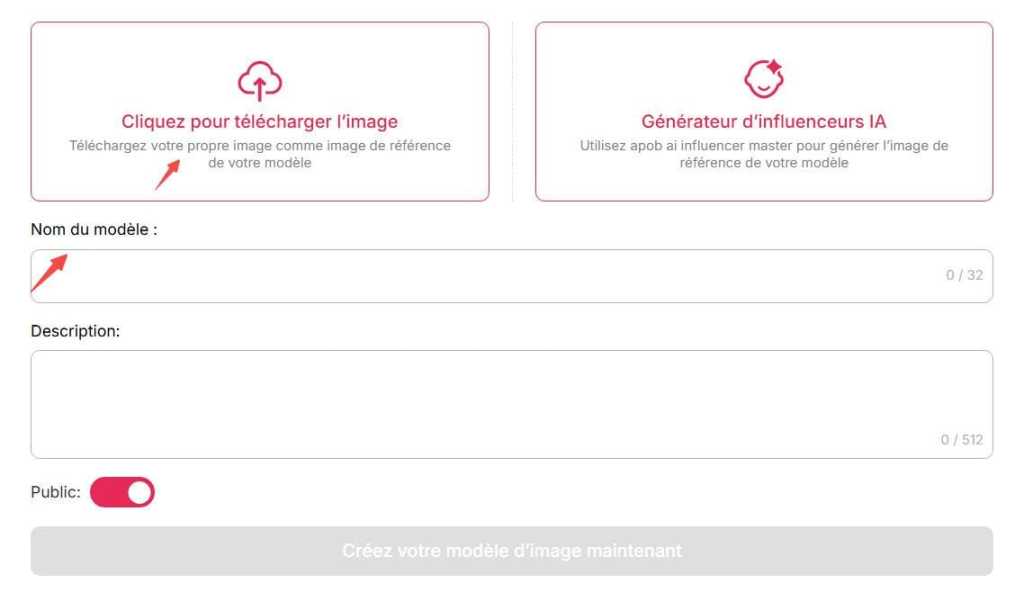
Étape 1: Rendez-vous sur le site officiel d'APOB AI et inscrivez-vous gratuitement. Cliquez sur l'option "Créer un modèle: Portrait".
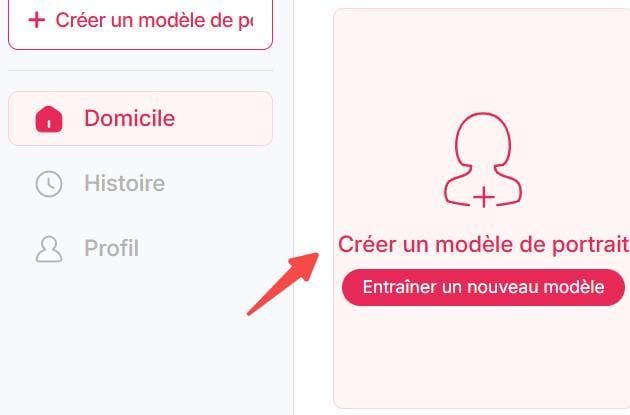
Étape 2: Téléchargez une photo claire de vous-même comme image de référence, puis entrez un nom (qui n'a pas besoin d'être votre vrai nom), et vous pouvez créer votre propre modèle IA.
Étape 3: Sélectionnez "Ensemble complet", faites défiler jusqu'à "linkedin portraits", choisissez le style qui vous convient, sélectionnez le format de photo CV dont vous avez besoin, puis cliquez sur "Générer". Créez votre photo professionnelle gratuitement.
Pour un meilleur rendu, vous pouvez également choisir le mode ultra.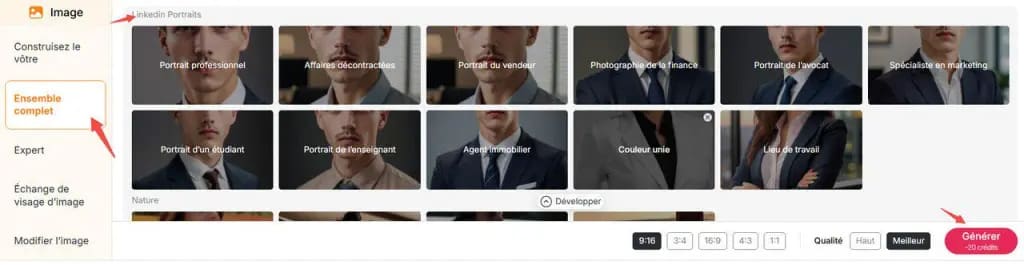
Étape 4: Téléchargez gratuitement la photo qui vous plaît.
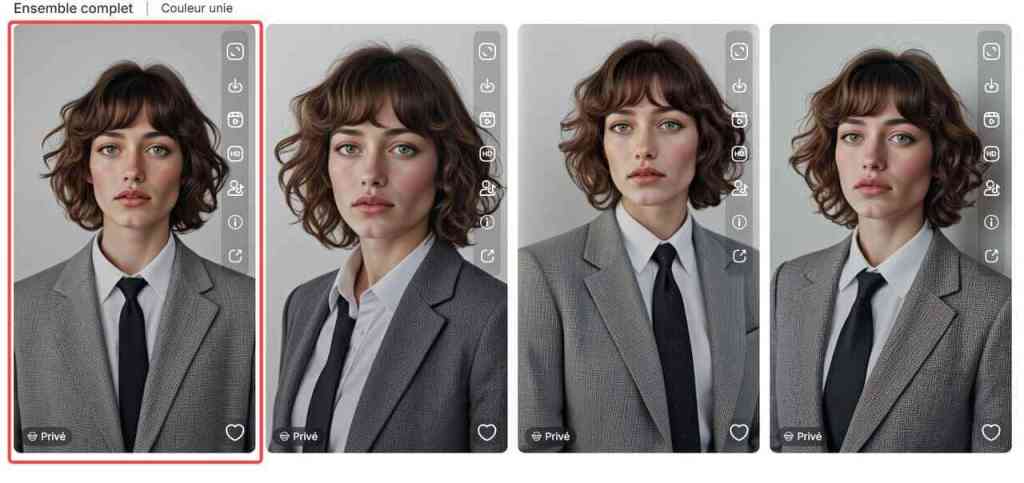
Petit conseil : vous pouvez aussi utiliser la fonction Chat to Edit pour ajuster l’arrière-plan, l’expression du visage ou d’autres détails de votre photo professionnelle. Téléchargez-la uniquement lorsque vous êtes pleinement satisfait(e) du résultat.
Pourquoi Opter pour une Photo Professionnelle IA Gratuit?
Avoir une photo pro générée par intelligence artificielle est devenu un vrai atout pour améliorer son image en ligne, notamment sur LinkedIn, un CV ou un site personnel.
1. Crédibilité renforcée
Un profil avec photo reçoit jusqu’à 21× plus de vues sur LinkedIn. Une image nette et bien cadrée inspire confiance.2. Gratuité et accessibilité
Fini les shootings coûteux (200 € à 800 €). Avec les outils IA, vous pouvez obtenir une photo professionnelle gratuitement ou à prix très réduit.3. Gain de temps
Pas besoin de prendre rendez-vous: en quelques clics, vous avez une photo prête à l’emploi.4. Personnalisation facile
Choisissez l’arrière-plan, le style vestimentaire, l’éclairage… le tout adapté à vos besoins pro.Comment Fonctionne un Générateur de Photo Professionnelle IA Gratuit?
Les outils d’IA photo professionnelle gratuit en ligne utilisent des algorithmes avancés de deep learning pour transformer une photo classique en un portrait professionnel. Voici comment cela fonctionne:
Téléchargez une photo existante (un selfie ou une image récente avec un bon éclairage).
L’IA analyse et améliore l’image en optimisant la luminosité, les contrastes et la netteté.
Personnalisation : Certains outils permettent de modifier le fond ou la tenue, comme sur APOB AI, où cette fonctionnalité est disponible gratuitement.
Téléchargez votre photo optimisée et utilisez-la pour vos besoins professionnels.
Conseils pour Obtenir une Photo Professionnelle IA Gratuit Parfaite
Même avec une intelligence artificielle performante, certains ajustements peuvent maximiser la qualité de votre portrait. Voici quelques conseils :
Choisissez une photo source bien éclairée: Un bon éclairage améliore le rendu final.
Évitez les expressions trop forcées: Un sourire naturel fonctionne mieux.
Testez plusieurs outils: Chaque IA a ses propres caractéristiques, testez-en plusieurs pour trouver le meilleur rendu.
La photo cv ia gratuite est une solution idéale pour améliorer rapidement et efficacement son image en ligne. Grâce à ces outils intuitifs, tout le monde peut obtenir un portrait professionnel sans compétences en retouche photo ni investissement financier. N’hésitez pas à tester ces générateurs et à partager vos impressions!
FAQ sur l’IA Photo CV
Q1: Les photos professionnelles par IA sont-elles gratuites?
Oui, certaines plateformes proposent des photos professionnelles par IA gratuitement, mais elles peuvent inclure des limitations comme des filigranes ou une résolution réduite. Pour un rendu optimal, des versions payantes offrent souvent plus d’options et une meilleure qualité d’image. Après votre inscription, APOB AI vous offre 80 points chaque jour. La création d'une IA photo CV permet de générer 4 photos en une fois, coûtant 20 points. Ainsi, vous pouvez générer gratuitement 16 photos professionnelles par jour avec APOB AI.
Q2: Est-ce qu’utiliser APOB AI risque de compromettre ma vie privée?
Non. APOB AI respecte pleinement la vie privée de ses utilisateurs. Vous pouvez choisir le mode privé lors de l’utilisation de l’outil. Avant de générer gratuitement votre portrait professionnel, il suffit de désactiver le mode public. Si vous avez la moindre question ou inquiétude, n’hésitez pas à contacter notre service client, qui se fera un plaisir de vous aider.
Q3: Comment transformer une photo en photo professionnelle IA?
Pour transformer une photo en photo professionnelle avec l'IA, téléchargez une image sur un outil spécialisé. L’IA optimise la netteté, l’éclairage et le fond. Certains outils permettent aussi de changer la tenue et le décor pour un rendu plus professionnel.
Q4: Comment faire une photo professionnelle avec I'IA?
Pour créer une photo cv ia gratuit, utilisez des générateurs comme Canva ou APOB AI. Téléchargez votre photo, sélectionnez un style, et laissez l'IA ajuster l'éclairage et l'arrière-plan pour un résultat professionnel en quelques clics.
Q5: Quel est le meilleur générateur d'image IA gratuit?
Les meilleurs générateurs d’images IA gratuits incluent Leonardo Ai, Canva AI, Deep Dream Generator et APOB AI, etc. Ces outils permettent de créer des images réalistes ou artistiques à partir de descriptions textuelles. Mais chaque générateur a ses propres avantages et inconvénients, il est donc important de les tester et de les expérimenter.
Q6: Quel type de cliché puis-je utiliser pour créer des photos professionnelles avec l'IA?
Pour créer des photos professionnelles avec l'IA, utilisez des selfies ou des portraits simples. Choisissez un thème professionnel comme un CV ou un événement d'entreprise, puis laissez l'IA ajuster l'éclairage et l'arrière-plan pour un résultat soigné et professionnel.
10 Aperçus sur la perception de l'image de soi à partir de selfies générés par IA
Essayez le dernier générateur de selfies IA
Êtes-vous curieux de savoir comment l'intelligence artificielle (IA) façonne notre perception de l'image de soi à travers les selfies générés ? Imaginez un monde où la technologie capture non seulement nos traits physiques mais reflète également nos pensées et émotions intérieures. Dans ce blog, nous plongeons profondément dans le fascinant domaine des selfies générés par l'IA pour découvrir 10 perspectives uniques qui remettent en question la façon dont nous nous percevons.1. Comprendre les selfies générés par l'IA
À l'ère numérique d'aujourd'hui, l'avènement de l'intelligence artificielle (IA) a provoqué un changement significatif dans la façon dont nous nous percevons à travers le prisme de la technologie. Explorons les implications profondes des selfies générés par l'IA sur l'image de soi et l'identité personnelle.
La montée de l'IA dans la perception de l'image de soi :
Avec l'émergence des technologies d'image générées par l'IA, la ligne entre la réalité et la représentation numérique est devenue de plus en plus floue. Les plateformes de réseaux sociaux et les clones d'IA offrent désormais aux individus la capacité de se présenter de manière qui peut ne pas correspondre à leur authenticité.
L'impact psychologique :
Des études ont montré que l'exposition à du contenu généré par l'IA peut entraîner une fausse mémoire de soi-même, impactant l'image corporelle et l'estime de soi. Cette auto-présentation trompeuse dans le domaine numérique peut contribuer à la fragmentation de l'identité et aux normes sociétales influencées par des standards de beauté inaccessibles.
L'IA et l'interaction sociale :
L'omniprésence de l'IA dans l'expression personnelle a créé une boucle de rétroaction numérique où les individus peuvent privilégier des personas numériques élaborées plutôt que leurs véritables soi. Ce changement de comportement peut influencer les interactions sociales réelles, modifiant potentiellement notre façon de nous connecter avec les autres.
Considérations éthiques :
À mesure que la technologie de l'IA continue d'évoluer, des questions autour de la création d'images synthétiques et de l'impact sur la perception de soi ont émergé. L'utilisation de photos retouchées, d'images de profil, et de clones générés par l'IA soulève des inquiétudes quant à l'authenticité de l'identité numérique et la nécessité d'un nouveau modèle de réalité dans le contexte de l'auto-représentation.
L'avenir de l'image de soi :
Explorer l'impact de l'IA sur la perception de l'image de soi invite à un examen critique de notre héritage numérique et des implications de la recherche en IA sur la chirurgie reconstructive et le langage humain. Cela souligne la nécessité d'une compréhension plus profonde de la manière dont les modèles d'IA façonnent notre comportement et influencent notre sens de l'identité.
2. Impact de la perception de soi
À l'ère de l'intelligence artificielle (IA), les selfies ont pris une toute nouvelle dimension de complexité. La facilité avec laquelle les images générées par l'IA peuvent être créées et partagées a des implications psychologiques profondes sur la façon dont les individus se perçoivent eux-mêmes et leur identité personnelle. Explorons les diverses idées sur comment les selfies générés par l'IA influencent la perception de l'image de soi :
1. Contenu généré par l'IA vs Comparaison avec une personne réelle
Les images générées par l'IA, souvent appelées clones d'IA, brouillent la ligne entre ce qui est réel et ce qui est artificiellement construit. Alors que les individus interagissent avec leurs homologues générés par l'IA, des questions se posent sur l'authenticité de leur propre image de soi en comparaison avec la version numérique.
2. Problèmes d'image corporelle et faux souvenirs
La prévalence du contenu généré par l'IA peut influencer les perceptions de l'image corporelle, conduisant les individus à idéaliser ou se comparer à leurs versions numériquement modifiées. Cela peut entraîner de faux souvenirs ou des perceptions déformées de son apparence physique.
3. Interaction Sociale et Normes Sociétales
Les selfies générés par l'IA peuvent façonner les normes sociétales entourant les standards de beauté et les formes acceptables d'auto-présentation. Le domaine numérique présente une plateforme où les individus peuvent se sentir sous pression pour se conformer aux idéaux de beauté modifiés par l'IA.
4. La fragmentation de l'identité à l'ère numérique
Alors que l'IA joue un rôle de plus en plus important dans la formation de l'image de soi, les individus peuvent éprouver une fragmentation de l'identité, où les lignes entre leur véritable soi et leurs représentations numériques deviennent floues. Cela peut entraîner des défis à maintenir un sentiment cohérent de soi.
5. Auto-présentation trompeuse et instantanés décontractés
La facilité de création d'images générées par l'IA permet une auto-présentation trompeuse dans les instantanés décontractés. Les individus peuvent modifier leur apparence de manière subtile, présentant une version idéalisée d'eux-mêmes au monde.
6. L'application insidieuse de l'IA dans la perception de soi
L'omniprésence de l'IA dans l'expression de soi pose des risques pour l'authenticité et la conscience de soi. L'intégration transparente de l'IA dans la création de l'image de soi peut mener à une compréhension superficielle de son vrai soi.
7. Les selfies générés par l'IA comme boucle de rétroaction numérique
Les selfies générés par l'IA contribuent à une boucle de rétroaction numérique où les individus recherchent la validation et les commentaires sur leurs images numériquement améliorées. Ce cycle constant de validation peut influer sur l'estime de soi et la valeur personnelle.
8. Solutions potentielles aux problèmes d'image de soi induits par l'IA
Explorer des solutions potentielles telles que l'éducation à la littératie numérique et la promotion de l'acceptation de soi peut aider les individus à naviguer dans les défis de la perception de l'image de soi générée par l'IA.
3. Technologie derrière les générateurs de selfies IA
Lorsqu'on explore le monde fascinant des générateurs de selfies IA, il est crucial de comprendre la technologie complexe qui nourrit ces outils innovants. En acquérant des renseignements sur le fonctionnement interne des images générées par IA, nous pouvons comprendre l'impact profond qu'elles ont sur l'auto-perception et l'identité personnelle.
Réseaux de neurones et algorithmes d'apprentissage machine
Les générateurs de selfies IA utilisent des réseaux de neurones avancés et des algorithmes d'apprentissage machine pour analyser les traits du visage et générer des répliques numériques réalistes. Ces technologies sophistiquées permettent la création de clones d'IA qui ressemblent de près à une personne réelle, brouillant la ligne entre la réalité et l'artificialité.
Reconnaissance faciale et traitement d'image
Grâce à des techniques de reconnaissance faciale complexes et des capacités de traitement d'image, les systèmes alimentés par IA peuvent identifier avec précision les structures faciales, les tons de peau, et les expressions. Cette analyse détaillée permet la reproduction sans faille de l'apparence d'une personne dans un format numérique, transformant les instantanés décontractés en chefs-d'œuvre générés par IA.
Considérations éthiques dans le clonage par IA
À mesure que le contenu généré par l'IA continue d'évoluer, des préoccupations éthiques entourant la présentation trompeuse et la manipulation de l'identité viennent au premier plan. L'application insidieuse de l'IA dans la création de faux souvenirs ou la modification de l'image corporelle soulève des questions importantes sur l'impact sociétal de cette technologie.
La montée des clones IA dans l'interaction sociale
Les clones générés par l'IA des individus deviennent une forme omniprésente d'expression personnelle dans le domaine numérique. En exploitant la puissance des modèles d'IA, les individus peuvent créer des images synthétiques qui reflètent leur moi idéalisé, conduisant à une fragmentation de l'identité et à un nouveau modèle de réalité façonné par la technologie.
Solutions potentielles et héritage numérique
Explorer les applications potentielles des selfies générés par l'IA ouvre de nouvelles voies pour l'expression personnelle et les boucles de rétroaction numérique. Cependant, cela soulève également des préoccupations quant aux implications à long terme des photos retouchées et des images de profil dans la formation des normes et comportements sociétaux.
4. Effets psychologiques des selfies IA sur la perception de soi
Impact psychologique sur l'image de soi
La technologie de l'intelligence artificielle (IA) a imprégné de nombreux aspects de nos vies, y compris la façon dont nous nous percevons à travers les selfies. Explorons les effets psychologiques des selfies générés par l'IA sur la perception de soi :
Auto-présentation trompeuse
Les images générées par l'IA brouillent la ligne entre la réalité et la fabrication numérique, amenant les individus à se présenter de manière trompeuse. L'écart entre l'apparence réelle d'une personne et la version idéalisée présentée dans les selfies IA peut déformer l'image de soi.
Formation de faux souvenirs
L'exposition continue à des versions IA sans défauts de soi-même peut créer un faux souvenir de ce à quoi on ressemble réellement, favorisant des standards de beauté irréalistes et impactant l'estime de soi.
Fragmentation de l'identité dans le domaine numérique
La prolifération du contenu généré par l'IA peut contribuer à la fragmentation de l'identité, où les individus ont du mal à discerner entre leur moi authentique et le personnage idéalisé affiché dans les selfies générés par l'IA.
Normes sociétales et image de soi
La normalisation des images améliorées par l'IA comme une forme omniprésente d'expression personnelle soulève des questions sur l'impact de se conformer aux standards de beauté sociétaux dictés par des représentations modifiées numériquement.
Impact sur l'interaction sociale
La prévalence des selfies générés par l'IA sur les plateformes de médias sociaux peut altérer la dynamique de l'interaction sociale, alors que les individus élaborent leurs personas en ligne basées sur des images améliorées numériquement plutôt que sur une auto-représentation authentique.
Considérations éthiques dans la perception
Alors que la technologie de l'IA continue de progresser, il est essentiel de traiter les implications éthiques des selfies générés par l'IA :
Authenticité numérique et auto-représentation
L'authenticité de l'identité numérique est remise en question à mesure que les images générées par l'IA deviennent de plus en plus indiscernables de la réalité, défiant les notions traditionnelles d'auto-représentation.
Problèmes de confidentialité et sécurité des données
L'utilisation de l'IA dans la génération de selfies réalistes suscite des préoccupations concernant la confidentialité des données et la sécurité, car des informations personnelles et des images peuvent être manipulées ou utilisées de manière abusive sans consentement.
Santé mentale et estime de soi
L'utilisation omniprésente des selfies générés par l'IA sur les réseaux sociaux peut contribuer à des problèmes de santé mentale tels que la faible estime de soi et la dysmorphie corporelle, alors que les individus se comparent à des standards de beauté modifiés numériquement.
Mesures réglementaires et cadres politiques
Des mesures réglementaires et des cadres politiques doivent être mis en œuvre pour traiter les implications éthiques des selfies générés par l'IA, assurant la transparence, la responsabilité, et l'utilisation responsable de la technologie IA.
En conclusion, la montée des selfies générés par l'IA a des implications psychologiques profondes sur la perception de soi, la formation de l'identité, et les normes sociétales. En examinant de manière critique les considérations éthiques et les effets psychologiques des images générées par l'IA, nous pouvons naviguer à l'intersection complexe de la technologie et de l'identité humaine à l'ère numérique.
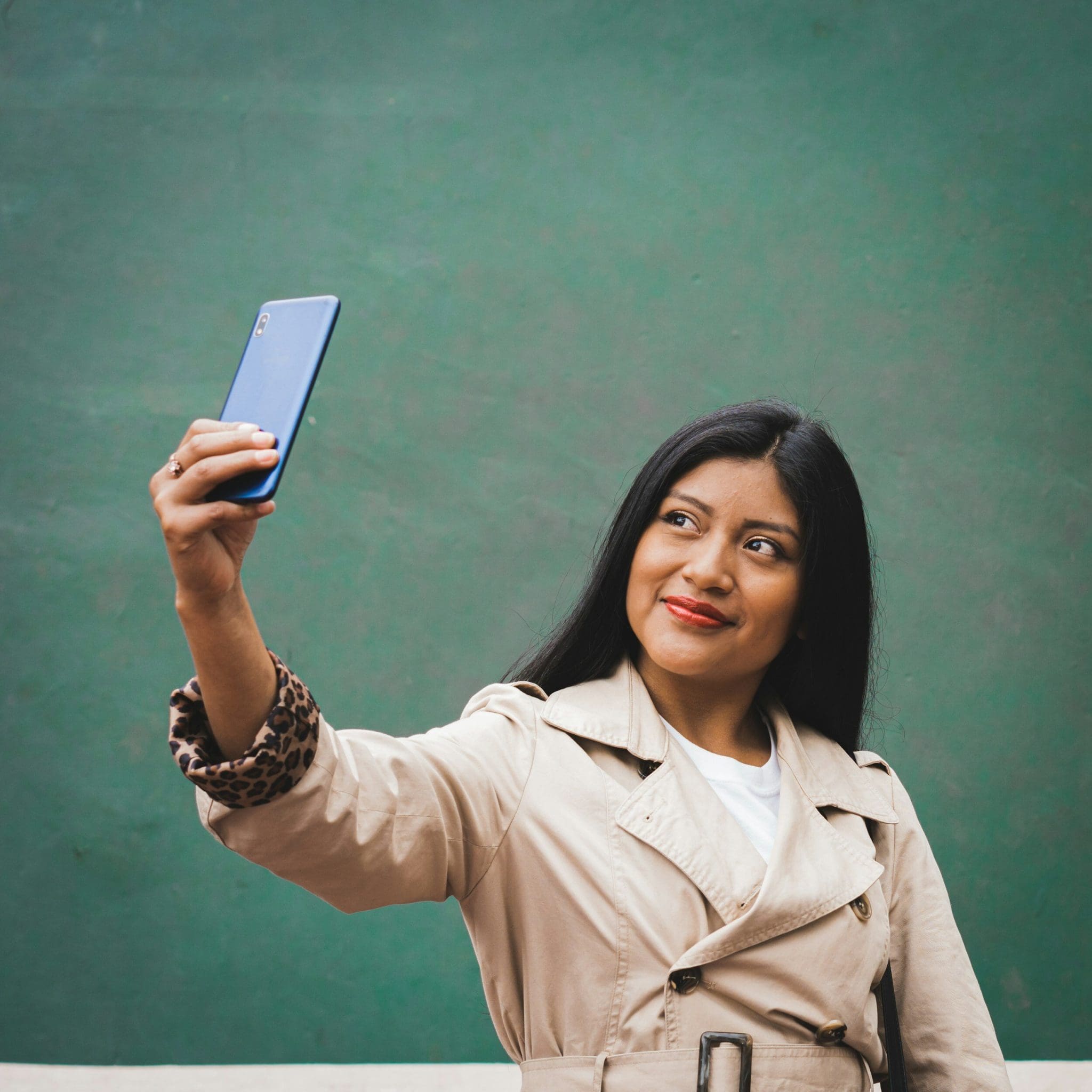
10 astuces créatives pour personnaliser vos selfies avec la technologie IA
Êtes-vous fatigué des mêmes vieux selfies inondant votre fil d'actualités sur les réseaux sociaux? Imaginez pouvoir élever votre niveau de selfies en un simple clic sur l'écran de votre téléphone. Dites bonjour au monde de la technologie IA et à sa fascinante capacité de transformer vos selfies ordinaires en œuvres d'art personnalisées.
Voulez-vous vous démarquer parmi la foule avec vos selfies? Ne cherchez pas plus loin, notre blog sur '10 trucs créatifs pour personnaliser vos selfies avec la technologie IA' est là pour révolutionner la façon dont vous capturez et partagez vos moments en ligne.
Découvrez comment la technologie IA peut vous aider à libérer votre créativité et à propulser votre niveau de selfies vers de nouveaux sommets. Des améliorations subtiles aux transformations venues d'un autre monde, nous vous couvrons avec une gamme d'astuces innovantes et de techniques qui laisseront vos abonnés en admiration.
Préparez-vous à explorer les innombrables possibilités de personnalisation de selfies alimentée par l'IA alors que nous plongeons dans des conseils, astuces et outils qui vous aideront à exprimer votre style unique et votre personnalité comme jamais auparavant. Rejoignez-nous dans ce voyage passionnant d'expression de soi et de créativité à travers l'objectif de la technologie IA.
Résumé Court
Découvrez le monde de la technologie IA et son impact transformateur sur la personnalisation des selfies. Apprenez comment les filtres avancés, les effets et les outils d'arrière-plan peuvent améliorer vos selfies. Explorez comment l'IA peut affiner les traits du visage, améliorer l'éclairage et rehausser les couleurs de vos photos. Libérez votre créativité avec des outils de maquillage alimentés par l'IA, des suggestions de poses, du texte personnalisable, et des autocollants pour des selfies uniques et personnalisés.
Explorer les Applications de Personnalisation de Selfies avec l'IA
1. Introduction aux Applications de Personnalisation de Selfies avec l'IA
À l'ère numérique actuelle, le domaine des selfies a été révolutionné par l'avènement de la technologie d'Intelligence Artificielle (IA). Les applications de génération de selfies IA sont devenues incontournables, offrant aux utilisateurs une multitude d'outils créatifs pour personnaliser leurs autoportraits de manière innovante. Explorons plus en profondeur le monde fascinant des applications de personnalisation de selfies avec l'IA.
Comprendre la Génération de Selfies avec l'IA
Les générateurs de selfies IA exploitent le pouvoir de l'intelligence artificielle pour améliorer les traits du visage, appliquer divers styles artistiques et fournir des transformations de portrait instantanées. En analysant les entrées des utilisateurs et en utilisant des algorithmes avancés, ces applications peuvent générer des images de selfies personnalisés qui répondent aux préférences individuelles des utilisateurs.
Caractéristiques Clés et Avantages
Facilité d'Utilisation : Les applications de selfies IA offrent généralement une interface conviviale, permettant aux individus familiers avec la technologie et aux débutants de naviguer sans effort à travers les options de personnalisation.
Large Gamme de Styles : Des filtres classiques aux rendus artistiques d'avant-garde, les générateurs de selfies IA offrent un large éventail de styles parmi lesquels choisir, répondant aux besoins et préférences spécifiques des utilisateurs.
Lensa AI : Un Tournant dans la Personnalisation des Selfies
Un exemple marquant dans le domaine de la personnalisation de selfies avec l'IA est l'application Lensa IA. Avec sa technologie de pointe et ses fonctionnalités innovantes, Lensa IA a gagné en popularité parmi les créateurs de contenu, les influenceurs des réseaux sociaux, et les utilisateurs quotidiens cherchant à élever leur présence en ligne avec des selfies uniques, générés par l'IA.
L'Avenir de l'Expression de Soi
Au fur et à mesure que la technologie IA continue d'évoluer, les possibilités d'expression de soi à travers les selfies évoluent également. En embrassant les applications de personnalisation de selfies avec l'IA, les individus peuvent explorer un tout nouvel univers de créativité et se présenter sous un jour unique sur diverses plateformes de réseaux sociaux.
Conclusion Clé : Les applications de personnalisation de selfies alimentées par la technologie IA offrent un moyen fluide et innovant pour les utilisateurs de personnaliser leurs autoportraits, améliorant leur présence en ligne et leur expression de soi.
Comprendre la Technologie IA dans l'Édition de Selfies
2. Comprendre la Technologie IA dans l'Édition de Selfies
Dans le paysage numérique en évolution rapide d'aujourd'hui, l'intelligence artificielle (AI) révolutionne la façon dont nous capturons et personnalisons nos photos, en particulier dans le domaine de l'édition de selfies. La technologie IA dans l'édition de selfies va au-delà des simples filtres et effets ; elle pénètre en profondeur dans les traits du visage, améliorant l'expérience utilisateur individuel avec une touche d'innovation et de créativité.
La Puissance des Applications Génératrices de Selfies IA
Les applications génératrices de selfies IA exploitent les capacités de l'intelligence artificielle pour analyser et manipuler les images faciales en temps réel. En comprenant les expressions faciales et les besoins spécifiques des utilisateurs, ces applications offrent une large gamme d'options de style afin de répondre à diverses préférences. Lensa IA, par exemple, se distingue par son interface conviviale et ses transformations de portrait instantanées, en faisant un choix populaire parmi les créateurs de contenu cherchant un look unique.
L'Innovation Derrière les Éditeurs Photo IA
Les éditeurs photo IA ont redéfini notre approche de la personnalisation des selfies. En intégrant des algorithmes avancés et des entrées utilisateur, ces outils génèrent des selfies générés par IA qui ne sont pas seulement visuellement captivants mais qui reflètent également l'image personnelle d'un individu. Les meilleurs générateurs de selfies IA sur le marché aujourd'hui offrent une facilité d'utilisation et une pléthore de fonctionnalités innovantes, telles que des invites de texte et des styles variés, pour élever votre présence en ligne sur les plateformes de réseaux sociaux.
Libérer la Créativité avec la Technologie IA
Un des principales caractéristiques de la technologie IA est sa capacité à offrir une façon innovante d'éditer les selfies. Que vous préfériez un look plus naturel ou souhaitiez expérimenter avec différents styles, les outils de génération de selfies IA peuvent transformer vos selfies en chefs-d’œuvre artistiques. Avec l'App Store débordant d'options, trouver le meilleur éditeur photo IA pour répondre à vos besoins n'a jamais été aussi facile.
Embrasser l'Avenir de l'Édition de Selfies
Alors que l'IA continue de façonner l'avenir de la photographie, embrasser la technologie IA dans l'édition de selfies est essentiel pour rester en avance dans l'ère numérique. De l'amélioration des traits du visage à la personnalisation des expressions du visage, les capacités innovantes des générateurs de selfies IA ouvrent la voie à une nouvelle ère d'édition d'images personnalisée.
💡 Conclusion Clé : La technologie IA dans l'édition de selfies offre une approche de pointe pour personnaliser vos selfies, fournissant un mélange harmonieux d'innovation et de personnalisation pour élever votre présence en ligne.
Filtres et Effets Avancés pour Selfies
Filtres et Effets Avancés pour Selfies
Dans le monde de la personnalisation de selfies pilotée par l'IA, les filtres et effets avancés jouent un rôle essentiel dans l'amélioration de l'attrait général de vos autoportraits. Ces outils innovants offrent une pléthore d'options pour transformer vos selfies en chefs-d’œuvres uniques qui se démarquent sur les plateformes de réseaux sociaux. Explorons certaines fonctionnalités excitantes que vous pouvez explorer pour propulser votre niveau de selfies vers de nouveaux sommets.
Amélioration des Traits du Visage
Utilisez la technologie IA pour accentuer vos traits du visage avec précision et finesse. Du lissage de la texture de la peau à l'amélioration de la luminosité des yeux, ces filtres veillent à ce que vos selfies rayonnent de perfection.
Ajouter des Touches Artistiques
Libérez votre créativité avec des filtres générés par l'IA qui peuvent transformer vos selfies en superbes œuvres d'art. Expérimentez avec différents styles et effets pour créer des chefs-d'œuvre uniques qui mettent en valeur votre individualité.
Explorer Différents Styles
Avec une large gamme de styles et d'effets à votre disposition, vous pouvez changer l'humeur et le ton de vos selfies sans effort. Que ce soit un esthétisme vintage ou un look pop art moderne que vous préfériez, les générateurs de selfies IA offrent des possibilités infinies.
Personnaliser les Expressions Faciales
Rendez vos selfies véritablement expressifs en utilisant les filtres IA qui peuvent améliorer ou modifier vos expressions faciales. De la création d'un sourire subtil à l'ajout d'une touche de fantaisie, ces effets vous permettent de transmettre une variété d'émotions dans vos autoportraits.
Citant un passionné de l'IA : « La capacité de personnaliser les selfies en utilisant des filtres et effets avancés ajoute non seulement un élément amusant au processus mais permet également aux utilisateurs de libérer leur créativité de manière innovante. »
Conclusion Clé :
Intégrer des filtres et effets avancés dans vos selfies avec la technologie IA ouvre un monde de possibilités créatives, vous permettant de personnaliser vos autoportraits comme jamais auparavant.Incorporer des Effets de Fond avec l'IA
Incorporer des Effets de Fond avec l'IA
La technologie IA a révolutionné la façon dont nous interagissons avec nos selfies, offrant une myriade de possibilités créatives pour améliorer nos images. En ce qui concerne l'incorporation d'effets de fond à l'aide de l'IA, vous pouvez propulser votre personnalisation de selfies vers de nouveaux sommets. Explorons quelques manières innovantes de tirer parti de l'IA pour des effets de fond captivants :
Emplacements Virtuels : Transportez-vous dans des destinations exotiques ou des sites emblématiques en ajoutant des fonds virtuels à vos selfies. Que vous rêviez de poser devant la Tour Eiffel ou de vous détendre sur une plage tropicale, la technologie IA peut en faire une réalité.
Filtres Artistiques : Expérimentez avec des filtres artistiques qui fusionnent harmonieusement votre selfie avec des effets de fond uniques. Des paysages aquarelles aux motifs abstraits, ces filtres peuvent ajouter une touche d'art à vos selfies.
Thèmes Voyage dans le Temps : Remontez dans le temps ou avancez vers le futur avec des effets de fond générés par l'IA qui plantent le décor de votre selfie. Plongez-vous dans des décors vintage ou des paysages futuristes pour une expérience visuelle vraiment captivante.
Fêtes Saisonnières : Embrassez l'esprit des différentes saisons et fêtes en incorporant des effets de fond à thème dans vos selfies. Des merveilles hivernales enneigées aux fleurs vives du printemps, ces effets peuvent ajouter une touche festive à vos photos.
Mondes Fantastiques : Laissez libre cours à votre imagination en explorant des mondes fantastiques grâce aux effets de fond générés par l'IA. Transformez vos selfies en royaumes magiques habités par des créatures mythiques et des paysages enchanteurs.
Cieux Célestes : Immergez-vous dans la beauté éthérée des cieux célestes avec des effets de fond améliorés par l'IA mettant en valeur de superbes couchers de soleil, des nuits étoilées, et des scènes cosmiques envoûtantes.
Paysages Urbains : Affichez votre flair urbain en plaçant vos selfies contre des décors de métropoles dynamiques, de rues animées ou de merveilles architecturales. La technologie IA peut intégrer harmonieusement ces fonds urbains pour une touche moderne et sophistiquée.
Évasions Naturelles : Connectez-vous à la nature en ajoutant des paysages naturels sereins comme effets de fond à vos selfies. Que vous préfériez des vues panoramiques sur les montagnes, des forêts tranquilles ou des plages baignées de soleil, l'IA peut apporter la beauté de la nature à vos photos.
Motifs Abstraits : Créez des contrastes visuels captivants en superposant vos selfies avec des motifs abstraits et des motifs géométriques. Ces effets de fond peuvent ajouter une esthétique contemporaine et avant-gardiste à vos images.
Options Personnalisables : Explorez des effets de fond personnalisables qui vous permettent d'adapter l'humeur et le style de vos selfies à vos préférences. Des améliorations subtiles aux améliorations audacieuses, les effets de fond alimentés par l'IA offrent des possibilités infinies.
Affiner les Traits du Visage avec l'IA
Affiner les Traits du Visage avec l'IA
Dans le domaine de la personnalisation des selfies, la technologie IA a révolutionné la manière dont les utilisateurs peuvent manipuler et améliorer leurs traits du visage comme jamais auparavant. En tirant parti des algorithmes de pointe et des capacités avancées de traitement d'images, les générateurs de selfies IA offrent une pléthore d'outils pour affiner chaque aspect de votre visage avec une précision remarquable.
Caractéristiques Clés pour la Personnalisation Faciale :
Ajustement de la Symétrie Faciale : Les algorithmes IA peuvent analyser votre structure faciale et ajuster intelligemment la symétrie pour créer un aspect plus équilibré.
Amélioration du Teint de la Peau : Avec l'amélioration du teint de la peau alimentée par l'IA, vous pouvez obtenir un teint impeccable en lissant les imperfections et en rehaussant votre éclat naturel.
Éclaircissement et Agrandissement des Yeux : Améliorez l'attrait de vos selfies en éclaircissant vos yeux et en les faisant paraître plus grands et plus captivants.
Pulpage et Amélioration de la Couleur des Lèvres : Personnalisez la taille et la couleur de vos lèvres avec des outils IA qui peuvent offrir des améliorations d'apparence naturelle adaptées à vos préférences.
Contour du Visage : Définissez et sculptez vos traits du visage en ajustant les contours et les ombres pour mettre en valeur vos meilleurs angles.
La Facilité d'Utilisation et des Résultats Réalistes :
Les générateurs de selfies IA privilégient des interfaces conviviales qui facilitent la modification des traits du visage sans effort. Malgré la technologie avancée à l'œuvre, ces outils sont conçus pour être intuitifs, garantissant que les utilisateurs de tous niveaux de compétence peuvent obtenir des résultats de qualité professionnelle sans formation ou expertise approfondie.
Embrasser la Diversité et l'Expression Personnelle :
La technologie IA permet aux utilisateurs d'expérimenter avec une large gamme de styles et d'apparences pour exprimer leur individualité. Que vous visiez une retouche subtile ou une transformation dramatique, les générateurs de selfies IA fournissent la polyvalence nécessaire pour répondre à des préférences spécifiques et des visions créatives.
Libérez Votre Selfie Parfait avec la Précision de l'IA :
Grâce aux capacités innovantes de la technologie IA, les individus peuvent désormais s'engager dans l'expression de soi et la personnalisation comme jamais auparavant. Affiner les traits du visage à l'aide de l'IA améliore non seulement l'attrait visuel des selfies, mais permet également aux utilisateurs d'explorer leur créativité et de présenter leur meilleure version au monde.
💡 Conclusion Clé : Les générateurs de selfies IA offrent des outils avancés pour affiner les traits du visage avec précision et facilité, permettant aux utilisateurs de créer des selfies personnalisés et captivants sans effort.
Améliorer l'Éclairage et les Couleurs avec l'IA
Améliorer l'Éclairage et les Couleurs avec l'IA
Lorsqu'il s'agit de prendre le selfie parfait, l'éclairage et les couleurs jouent un rôle significatif dans l'amélioration de l'apparence générale de l'image. Grâce aux avancées de la technologie IA, vous pouvez désormais manipuler et améliorer facilement les paramètres d'éclairage et de couleur de vos selfies pour créer des visuels saisissants qui se démarquent sur les plateformes de réseaux sociaux.
1. Comprendre l'Impact de l'Éclairage :
Un bon éclairage est essentiel pour capturer un selfie de haute qualité. Les outils alimentés par l'IA peuvent analyser les conditions d'éclairage de votre photo et effectuer des ajustements pour assurer une luminosité et une clarté optimales. En améliorant l'éclairage, vous pouvez mettre en valeur vos traits du visage et créer une apparence plus soignée.
2. Ajuster l'Équilibre des Couleurs :
Avec les fonctionnalités de correction des couleurs pilotées par IA, vous pouvez peaufiner l'équilibre des couleurs de vos selfies pour obtenir une apparence plus vibrante et équilibrée. Que vous souhaitiez faire ressortir les couleurs ou ajouter une teinte subtile à votre photo, la technologie IA peut vous aider à atteindre l'effet souhaité avec aisance.
3. Utiliser des Filtres et des Effets :
Les générateurs de selfies IA offrent une large gamme de filtres et d'effets qui peuvent instantanément transformer l'humeur et l'ambiance de vos selfies. Des tons vintage aux esthétiques modernes, ces outils vous permettent d'expérimenter avec différents styles et de créer des looks uniques qui reflètent votre goût personnel.
4. Améliorer le Teint de la Peau :
Obtenir le teint parfait dans un selfie peut être difficile, mais la technologie IA simplifie le processus en ajustant automatiquement les tons de peau pour un fini naturel et flatteur. Dites adieu aux imperfections et imperfections indésirables, car les algorithmes IA travaillent leur magie pour vous donner un teint impeccable.
5. Créer de la Profondeur et de la Dimension :
En manipulant les paramètres d'éclairage et de couleur dans vos selfies, l'IA peut vous aider à ajouter de la profondeur et de la dimension à vos images, les rendant plus engageantes visuellement et dynamiques. Que vous préfériez une lueur douce et romantique ou un style audacieux et dramatique, les outils IA vous permettent de libérer votre créativité et d'expérimenter avec différents effets.
6. Préserver l'Authenticité :
Bien que la technologie IA offre des possibilités infinies pour l'amélioration de vos selfies, il est important de trouver un équilibre entre l'amélioration et l'authenticité. Évitez de suréditer vos photos au point qu'elles ne représentent plus votre vrai moi. Utilisez les outils IA pour améliorer votre beauté naturelle et mettre en valeur vos meilleurs traits tout en restant fidèle à votre apparence unique.
💡 Conclusion Clé : Améliorer l'éclairage et les couleurs avec la technologie IA vous permet de rehausser la qualité de vos selfies, créer des images visuellement attrayantes et faire une impression durable sur votre public en ligne. En tirant parti des outils pilotés par l'IA, vous pouvez améliorer vos selfies de manière unique et saisissante.
Outils de Maquillage et de Beauté Alimentés par l'IA
Outils de Maquillage et de Beauté Alimentés par l'IA
Dans le domaine de la personnalisation de selfies, la technologie IA a révolutionné la manière dont nous expérimentons les styles de maquillage et de beauté. Ces outils sophistiqués utilisent l'intelligence artificielle pour améliorer les traits du visage et créer des looks époustouflants, en faisant un incontournable pour quiconque souhaite élever son niveau de selfies.
1. Améliorez Vos Traits avec Précision
Les outils de maquillage et de beauté alimentés par l'IA sont conçus pour analyser votre structure faciale et appliquer du maquillage de manière à améliorer votre beauté naturelle. Que vous souhaitiez mettre en valeur vos yeux, définir vos pommettes ou créer la moue parfaite, ces outils offrent une précision et une exactitude que les techniques de maquillage traditionnelles ne peuvent égaler.
2. Expérimentez avec Divers Styles
Une des principales caractéristiques des outils de maquillage alimentés par l'IA est la capacité d'expérimenter avec une large gamme de styles de maquillage et de looks. Des maquillages glamours pour soirée aux maquillages frais pour la journée, ces outils vous permettent d'essayer différents styles et de trouver le look parfait pour toute occasion.
3. Obtenez une Finition Professionnelle
En tirant parti de la technologie IA, ces outils permettent aux utilisateurs d'obtenir une finition professionnelle sans besoin de compétences avancées en maquillage. Les outils analysent votre image du visage et appliquent du maquillage de manière à améliorer vos traits tout en maintenant un aspect naturel, vous donnant la confiance d'un maquilleur professionnel à portée de main.
4. Transformez Instantanément Vos Selfies
Avec les outils de maquillage et de beauté alimentés par l'IA, vous pouvez transformer instantanément vos selfies d'ordinaires à extraordinaires. Que vous souhaitiez ajouter une touche de glamour ou expérimenter avec de nouveaux looks audacieux, ces outils offrent des améliorations de portrait instantanées qui sont sûres d'impressionner vos abonnés sur les réseaux sociaux.
5. Personnalisez Votre Look avec les Entrées Utilisateur
Ces outils IA permettent également une personnalisation sur mesure basée sur les entrées des utilisateurs. Vous pouvez ajuster l'intensité du maquillage, choisir des traits spécifiques à améliorer, et personnaliser le look pour qu'il s'adapte à vos préférences de style individuel. C'est comme avoir votre propre maquilleur virtuel à disposition quand vous en avez besoin.
6. Se Distinguer sur les Plateformes de Réseaux Sociaux
En tirant parti de la technologie AI pour la personnalisation du maquillage, vous pouvez créer des selfies uniques et accrocheurs qui vous démarqueront sur les plateformes de réseaux sociaux. Que vous soyez un créateur de contenu, un influenceur, ou simplement à la recherche d'un coup de boost pour votre présence en ligne, les outils de maquillage alimentés par l'IA offrent un avantage créatif qui peut élever votre présence sur les réseaux sociaux.
7. L'Avenir de la Personnalisation de Selfies
Les outils de maquillage et de beauté alimentés par l'IA représentent le fleuron de l'innovation dans l'industrie de la beauté. Avec leur interface conviviale, leur large gamme de styles, et leur capacité à créer des looks époustouflants et uniques
Suggestions de Poses Créatives par l'IA
Suggestions de Poses Créatives par l'IA
Dans le monde des selfies alimentés par l'IA, la créativité n'a pas de limites. La technologie IA a révolutionné la façon dont nous capturons et personnalisons nos autoportraits, offrant une myriade de suggestions de poses innovantes pour élever votre niveau de selfies.
Découvrir l'Art des Poses avec la Technologie IA
Embrassez les possibilités infinies des suggestions de poses générées par l'IA qui s'adaptent à votre style individuel et à vos préférences. Laissez l'IA être votre guide créatif, façonnant votre récit de selfies avec une touche d'unicité et de flair.
Idées de Poses Innovantes à Votre Portée
Transformez vos selfies avec des poses dynamiques qui reflètent votre personnalité et votre humeur.
Expérimentez avec des angles et compositions avant-gardistes pour ajouter une touche artistique à vos autoportraits.
Émulez des tendances populaires ou créez votre pose signature qui vous distingue sur les plateformes de réseaux sociaux.
Saisir la Puissance des Expressions Faciales
La technologie IA va au-delà de simplement capturer un moment ; elle plonge dans les nuances des expressions faciales et des émotions, enrichissant votre expérience selfie. Des sourires subtils aux regards dramatiques, laissez vos expressions parler volumes grâce aux poses guidées par l'IA.
Créer des Moments de Selfie Mémorables
Chaque suggestion de pose par l'IA est une porte d'entrée à l'expression de soi et à la narration. Capturez l'essence du moment avec des poses qui résonnent avec votre style unique, laissant une impression durable sur votre présence en ligne.
Adopter la Personnalisation Pilotée par l'IA
Avec la compréhension intuitive de l'IA des traits du visage et des styles, les possibilités de personnaliser vos selfies sont infinies. Engagez-vous avec l'IA pour créer un récit visuel qui reflète l'essence de qui vous êtes, une pose à la fois.
Élevez Votre Niveau de Selfies avec les Suggestions de Poses de l'IA
Alors que vous plongez plus profondément dans le monde des suggestions de poses générées par l'IA, saisissez l'opportunité de mettre en valeur votre créativité et votre individualité. Que chaque selfie que vous capturez soit un chef-d’œuvre en soi, enrichi par la touche innovante de la technologie IA.
💡 Conclusion Clé : S'immerger dans le monde des suggestions de poses de l'IA ouvre un royaume de possibilités créatives pour améliorer votre expérience selfie et votre narration sur les plateformes de réseaux sociaux.
Texte Personnalisable et Autocollants Utilisant l'IA
Texte Personnalisable et Autocollants Utilisant l'IA
Dans le domaine de la personnalisation de selfies alimentée par l'IA, une caractéristique intrigante qui se démarque est la possibilité d'ajouter du texte et des autocollants personnalisables à vos selfies, les élevant à un tout nouveau niveau de créativité et de personnalisation.
Utiliser l'IA pour l'Amélioration du Texte
La technologie IA permet aux utilisateurs d'améliorer leurs selfies avec des superpositions de texte qui se fondent harmonieusement avec l'image. Que ce soit pour ajouter une légende décalée, une citation motivationnelle, ou simplement étiqueter des éléments dans la photo, les outils alimentés par l'IA offrent une variété de polices, de tailles, et de styles parmi lesquels choisir. Cette fonctionnalité permet aux utilisateurs de s'exprimer de manière unique et visuellement convaincante, rendant leurs selfies non seulement visuellement attrayants mais aussi significatifs.
Amusement avec les Autocollants IA
Un autre aspect excitant de la personnalisation de selfies IA est l'éventail d'autocollants disponibles pour les utilisateurs. Des emojis mignons aux symboles tendance, les bibliothèques d'autocollants alimentées par l'IA offrent des options infinies pour ajouter de la personnalité et du flair à vos selfies. Que vous souhaitiez transmettre une émotion spécifique, célébrer une occasion ou simplement égayer votre photo, il y a un autocollant pour chaque humeur et moment.
Personnalisation et Créativité
La beauté du texte personnalisable et des autocollants réside dans leur capacité à améliorer la personnalisation et la créativité. Les utilisateurs peuvent adapter leurs selfies pour refléter leur style et leur personnalité individuels, que ce soit par des légendes pleines d'esprit, des emojis ludiques ou des autocollants conçus sur mesure. En tirant parti de la technologie IA, les utilisateurs peuvent libérer leur créativité et rendre leurs selfies véritablement uniques et mémorables.
Augmenter l'Engagement sur les Réseaux Sociaux
Le texte personnalisable et les autocollants ne rendent pas uniquement les selfies plus visuellement attrayants, mais augmentent également l'engagement sur les plateformes de réseaux sociaux. Les superpositions de texte accrocheuses et les autocollants ludiques sont plus susceptibles de capturer l'attention des abonnés et de les encourager à aimer, commenter, et partager le post. Cela, à son tour, aide les utilisateurs à développer leur présence en ligne et à se connecter avec leur public de manière significative.
L'Avenir de la Personnalisation de Selfies
Alors que la technologie IA continue d'évoluer, les possibilités de personnalisation de selfies évolueront aussi. Avec le texte et les autocollants personnalisables devenant de plus en plus sophistiqués et conviviaux, l'avenir de l'édition de selfies est voué à être rempli encore plus de créativité et d'innovation. Que ce soit pour ajouter des effets de réalité augmentée, des animations interactives, ou des éléments 3D immersifs, la limite du ciel s'applique à la personnalisation de selfies alimentée par l'IA.
Conclusion Clé :
Le texte personnalisable et les autocollants offrent une manière amusante et créative de personnaliser vos selfies et de les faire ressortir sur les réseaux sociaux. En tirant parti de la technologie IA, les utilisateurs peuvent s'exprimer de manière unique et significative, augmenter l'engagement et favoriser des connexions avec leur audience.
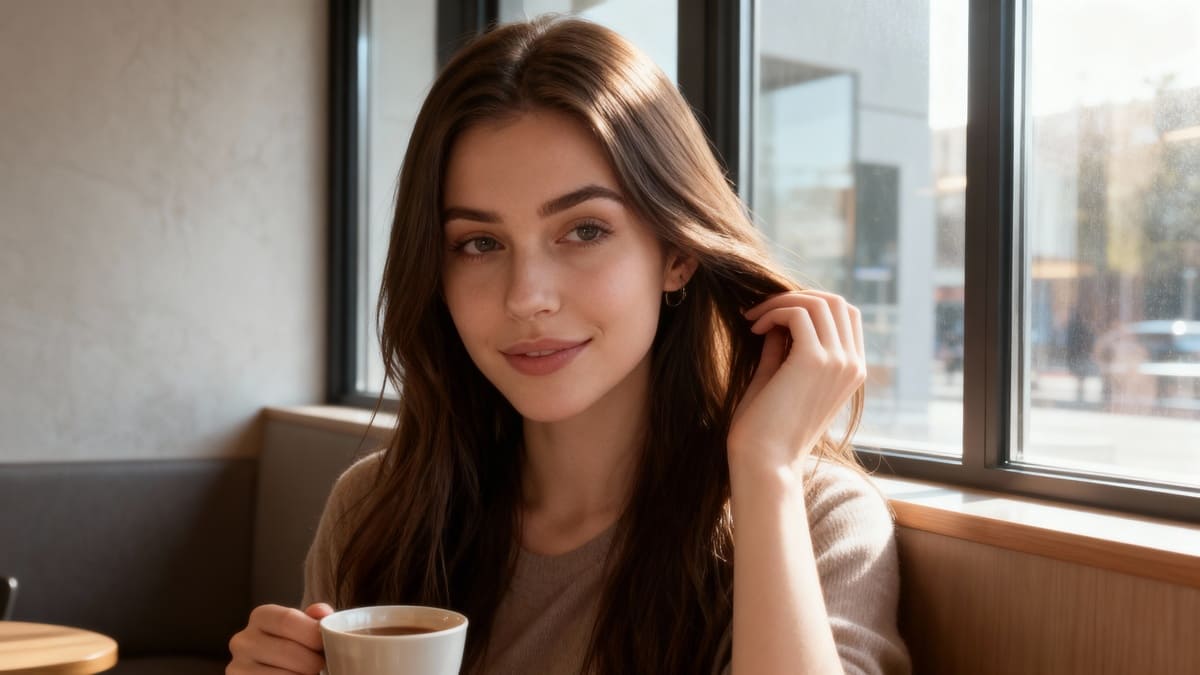
10 Hacks de Génie pour Éditer des Selfies avec l'IA pour des Résultats Parfaits
Essayez le dernier générateur de selfie avec IA
1. Comprendre l'édition de selfies avec IA
Dans le monde numérique d'aujourd'hui à rythme rapide, la technologie IA a révolutionné notre façon de modifier et d'améliorer nos photos, notamment en ce qui concerne la prise de selfies parfaits. Plongeons-nous dans le monde fascinant de l'édition de selfies avec IA et comment elle peut élever vos compétences en photographie à un niveau supérieur.
Évolution de l'édition de selfies
Les outils d'édition de selfies avec IA ont parcouru un long chemin, passant de simples filtres à des algorithmes complexes capables d'améliorer automatiquement divers aspects de votre selfie. Ces outils analysent les traits du visage, l'éclairage, les tons de peau, et plus encore pour offrir des résultats d'édition de niveau professionnel avec juste quelques clics.
Comment l'IA améliore les selfies
L'IA utilise des algorithmes d'apprentissage automatique pour reconnaître les motifs et apporter des ajustements intelligents à vos photos. Du lissage de la peau et de l'élimination des imperfections au floutage de l'arrière-plan et à la correction des couleurs, l'IA peut transformer un selfie basique en une œuvre d'art avec un attrait visuel saisissant.
Avantages de l'édition de selfies avec IA
Efficacité: Les outils alimentés par l'IA vous font gagner du temps en automatisant les tâches d'édition répétitives, vous permettant de vous concentrer sur la prise de superbes selfies.
Consistance: L'IA garantit que vos selfies édités maintiennent un style et une qualité constants à travers toutes vos photos.
Résultats professionnels: Grâce aux capacités d'édition avancées de l'IA, vous pouvez réaliser des éditions de qualité professionnelle sans avoir besoin de connaissances techniques approfondies.
Importance de comprendre les algorithmes IA
Il est crucial d'avoir une compréhension de base du fonctionnement des algorithmes IA dans l'édition de selfies pour maximiser leur potentiel. En connaissant les fonctionnalités clés et les fonctions des outils IA, vous pouvez prendre des décisions éclairées sur les techniques d'édition à appliquer à vos photos.
Adopter l'IA pour des selfies parfaits
L'édition de selfies avec IA n'est pas seulement une mode ; c'est un outil puissant qui peut vous aider à améliorer vos compétences en photographie et à créer des selfies époustouflants qui se démarquent sur les plateformes sociales. Adoptez les capacités de la technologie IA pour libérer votre potentiel créatif et élever votre jeu de selfies à de nouveaux sommets.
2. Importance des techniques d'édition de selfies avancées
Dans le domaine de la culture selfie, maîtriser les techniques d'édition avancées change la donne pour obtenir des selfies parfaits qui se distinguent. Explorons l'importance de l'adoption de ces méthodes avancées pour renforcer votre jeu de selfies :
Amélioration des traits du visage
En utilisant des outils d'édition avancés, vous pouvez améliorer vos traits du visage de manière transparente pour obtenir un aspect sans défaut. Qu'il s'agisse de lisser les imperfections de la peau ou d'ajuster l'éclairage et le contraste, ces techniques vous permettent de mettre en valeur vos meilleurs traits et de présenter votre moi le plus raffiné dans chaque selfie.
Créer une esthétique cohérente
Les techniques avancées d'édition de selfies vous permettent de créer une esthétique cohérente et visuellement attrayante sur vos selfies. Que vous préfériez un style vibrant et coloré ou une ambiance plus douce et minimaliste, ces outils vous permettent de créer un feed cohérent qui captive votre audience et renforce votre marque personnelle.
Obtenir des résultats de qualité professionnelle
Avec les bonnes techniques d'édition à votre disposition, vous pouvez élever vos selfies à des normes de qualité professionnelle. En affinant des détails tels que la netteté, l'exposition et l'équilibre des couleurs, vous pouvez produire des images qui rivalisent avec celles des photographes professionnels, mettant en valeur votre créativité et votre souci du détail.
Accroître l'engagement et les abonnés
Dans le paysage des réseaux sociaux d'aujourd'hui, les visuels captivants sont essentiels pour engager votre audience et attirer de nouveaux abonnés. Les techniques avancées d'édition de selfies vous offrent le pouvoir de créer des visuels étonnants qui attirent l'attention et suscitent la conversation, augmentant vos indicateurs d'engagement et élargissant votre base d'abonnés.
Rester à l'avant-garde des tendances
Adopter des techniques avancées d'édition de selfies montre votre engagement à rester en avance sur la courbe et à adopter les dernières tendances en matière de création de contenu visuel. En incorporant des outils d'édition innovants et des effets dans vos selfies, vous vous positionnez comme un créateur de tendances dans la sphère numérique, attirant l'admiration et la reconnaissance de vos pairs et abonnés.
Adopter la créativité et l'expression personnelle
Surtout, maîtriser les techniques avancées d'édition de selfies ouvre un monde de possibilités créatives et d'expression personnelle. Que vous aimiez expérimenter avec des filtres, des textures ou des effets artistiques, ces techniques vous permettent de transformer vos selfies en œuvres d'art uniques qui reflètent votre personnalité et votre vision.
Incorporer ces techniques d'édition avancées dans votre flux de travail sur les selfies peut élever votre processus de création de contenu et vous aider à vous démarquer dans le paysage numérique encombré. En affinant vos compétences et en explorant de nouveaux outils d'édition, vous pouvez libérer votre créativité, améliorer votre narration visuelle et laisser une impression durable sur votre audience.
3. Comment l'IA améliore l'édition de selfies
Dans le domaine de l'édition de selfies, la technologie IA a révolutionné la manière dont les individus améliorent leurs autoportraits. En exploitant la puissance de l'intelligence artificielle, les outils d'édition de selfies peuvent désormais offrir une précision et une créativité inégalées pour obtenir des résultats parfaits.
1. Reconnaissance faciale avancée
Les outils d'édition de selfies alimentés par l'IA exploitent des algorithmes sophistiqués de reconnaissance faciale pour détecter avec précision les traits du visage tels que les yeux, le nez, la bouche et la texture de la peau. Cela permet aux utilisateurs de faire des ajustements précis des éléments faciaux individuels pour un résultat plus raffiné et naturel.
2. Lissage de la peau et élimination des imperfections
Avec les capacités de l'IA, les applications d'édition de selfies peuvent analyser intelligemment les imperfections de la peau et appliquer des techniques de lissage de la peau personnalisées. En identifiant et en éliminant automatiquement les imperfections, les rides et les tonalités de peau inégales, l'IA améliore le teint général de manière fluide et réaliste.
3. Effets de flou et de profondeur de l'arrière-plan
La technologie IA permet l'intégration des effets de flou de l'arrière-plan et de profondeur dans les processus d'édition de selfies. En créant un effet bokeh ou en ajustant la perception de la profondeur, les utilisateurs peuvent facilement mettre en avant le sujet tout en créant un effet de profondeur de champ professionnelle dans leurs selfies.
4. Ajustements automatiques de l'éclairage
Les algorithmes IA des logiciels d'édition de selfies ajustent dynamiquement les conditions d'éclairage pour améliorer l'illumination générale et le contraste des selfies. En améliorant automatiquement la luminosité, les ombres et les hautes lumières, la technologie IA garantit que les selfies apparaissent bien éclairés et visuellement attrayants sans ajustements manuels.
5. Filtres de transfert de style
Les outils d'édition de selfies alimentés par l'IA offrent des filtres de transfert de style innovants qui permettent aux utilisateurs d'appliquer des effets artistiques inspirés de peintures célèbres, de styles de photographie ou d'esthétiques visuelles. En incorporant des éléments artistiques dans les selfies, les utilisateurs peuvent créer des autoportraits uniques et captivants avec une touche de créativité.
6. Reconnaissance et amélioration des émotions
Les outils d'édition de selfies alimentés par l'IA peuvent détecter et améliorer les émotions capturées dans les selfies, permettant aux utilisateurs d'accentuer les expressions telles que les sourires, les froncements de sourcils ou les regards. En améliorant intelligemment les indices émotionnels, l'IA ajoute de la profondeur et de la personnalité aux selfies, les rendant plus engageants et expressifs.
4. Maîtriser le retouche de la peau avec l'IA
Améliorer la qualité de vos selfies grâce à la retouche de la peau avec l'aide de la technologie IA peut changer la donne. Voici quelques conseils et astuces de pro pour maîtriser la retouche de la peau comme un professionnel :
Comprendre l'amélioration du ton de la peau: Les outils d'édition alimentés par l'IA peuvent analyser votre ton de peau et suggérer des améliorations pour obtenir un aspect naturel. Utilisez des fonctionnalités telles que l'élimination automatique des imperfections, le lissage de la peau et la correction des couleurs pour améliorer votre ton de peau sans effort.
Personnaliser la texture de la peau: Un avantage clé de l'IA est la possibilité de personnaliser les textures de la peau. Expérimentez avec différents réglages pour trouver le parfait équilibre entre l'obtention d'un aspect impeccable et le maintien d'une texture de peau naturelle. Évitez une édition excessive pour garantir un résultat réaliste.
Ciblage des zones spécifiques: Les outils IA vous permettent de cibler des zones spécifiques de votre peau pour la retouche. Concentrez-vous sur les zones qui peuvent nécessiter une attention particulière, telles que les ridules, les taches sombres ou les tons de peau inégaux. Utilisez les outils avec précision pour affiner ces zones sans exagération.
Utilisation de filtres prédéfinis: De nombreuses plateformes d'édition IA offrent des filtres prédéfinis spécifiquement conçus pour la retouche de la peau. Explorez ces options pour améliorer rapidement votre ton de peau sans ajustements manuels. N'oubliez pas d'ajuster l'intensité du filtre pour assurer une amélioration subtile mais efficace.
Embrasser la beauté naturelle: Bien que la technologie IA puisse aider à améliorer vos selfies, il est important de favoriser votre beauté naturelle. Évitez une édition excessive qui altère radicalement vos traits. Visez un équilibre entre amélioration et authenticité pour créer un résultat parfait qui vous ressemble toujours.
Pratique régulière et expérimentation: Comme toute compétence, la maîtrise de la retouche de la peau avec l'IA nécessite de la pratique et de l'expérimentation. Passez du temps à explorer différents outils, techniques et réglages pour comprendre comment ils fonctionnent le mieux pour votre type de peau et votre résultat souhaité.
Demander des retours et des conseils: N'hésitez pas à demander des retours de sources de confiance ou de professionnels dans le domaine de la photographie et de l'édition. Leurs insights peuvent fournir des conseils précieux sur l'amélioration de vos compétences en retouche de la peau avec la technologie IA.
Rappelez-vous, l'objectif de la retouche de la peau avec l'IA est d'améliorer votre beauté naturelle et de créer des selfies époustouflants qui reflètent la meilleure version de vous-même. Avec ces conseils et astuces de pro, vous pouvez élever vos compétences en édition de selfies et obtenir des résultats parfaits sans effort.
5. Perfectionner l'éclairage et l'exposition avec l'IA
Ajustement de l'intensité lumineuse
L'un des principaux avantages de l'utilisation de l'IA pour votre édition de selfies est la capacité à ajuster précisément l'intensité lumineuse. En utilisant des algorithmes d'IA, vous pouvez améliorer la luminosité et le contraste de votre photo pour obtenir l'équilibre lumineux parfait.
Optimisation des niveaux d'exposition
Les outils IA sont experts dans l'optimisation des niveaux d'exposition sur vos selfies. Que ce soit pour éclaircir les ombres ou réduire les hautes lumières, l'IA peut ajuster intelligemment les paramètres d'exposition pour s'assurer que chaque détail de votre photo est magnifiquement illuminé.
Utilisation des effets HDR
Exploitez la puissance des effets HDR générés par l'IA pour améliorer la qualité générale de vos selfies. La technologie HDR améliore la plage dynamique de vos photos, ce qui se traduit par des couleurs vibrantes et des détails améliorés, même dans des conditions d'éclairage difficiles.
Équilibrage des hautes lumières et des ombres
Avec les capacités de l'IA, vous pouvez facilement équilibrer les hautes lumières et les ombres sur vos selfies pour créer une image équilibrée et visuellement attrayante. Les algorithmes de l'IA excellent dans le réglage fin de ces éléments pour une finition professionnelle.
Élimination de la surexposition
Dites adieu aux selfies surexposés avec l'aide de l'IA pour détecter et corriger les problèmes de surexposition. En ajustant automatiquement les niveaux d'exposition, l'IA garantit que vos photos maintiennent des tons et des textures à l'apparence naturelle.
(Améliorer votre jeu de selfies avec des algorithmes IA simplifie non seulement le processus d'édition mais garantit également des résultats parfaits à chaque fois.)
6. Modification de l'arrière-plan facilitée par l'IA
Sélectionner une image
À l'ère numérique d'aujourd'hui, perfectionner l'arrière-plan de vos selfies est tout aussi important que de maîtriser votre pose. Avec les outils alimentés par l'IA, obtenir un arrière-plan impeccable n'a jamais été aussi facile. Plongeons dans quelques astuces géniales d'édition de selfies avec IA qui élèveront votre jeu de selfies à un tout autre niveau :
Suppression de l'arrière-plan avec IA : Exploitez la puissance de la technologie IA pour éliminer et remplacer les arrière-plans de vos selfies sans effort. Dites adieu aux arrière-plans distrayants et bonjour à un look propre et professionnel.
Effets de flou et bokeh : Créez une sensation de profondeur et d'art dans vos selfies en appliquant des effets de flou et bokeh à l'arrière-plan. Les algorithmes IA peuvent intelligemment détecter et améliorer le sujet tout en floutant magnifiquement l'arrière-plan.
Arrière-plans virtuels : Transportez-vous dans n'importe quel décor ou environnement avec des arrière-plans virtuels. Les outils d'édition de selfies avec IA offrent une large gamme d'arrière-plans virtuels pour s'adapter à votre humeur et votre style, vous donnant la flexibilité d'être où vous le désirez.
Améliorations de l'arrière-plan : Améliorez les couleurs, l'éclairage et l'aspect général de votre arrière-plan avec des fonctionnalités IA d'édition. Ajustez le contraste, la saturation et la luminosité pour faire ressortir votre arrière-plan et compléter parfaitement votre selfie.
Suppression d'objets : Enlevez les objets ou distractions indésirables de l'arrière-plan de vos selfies avec des outils de suppression d'objets IA. Nettoyez les arrière-plans encombrés et assurez-vous que l'accent reste sur vous, la star de la photo.
Remplacement de l'arrière-plan : Passez au niveau supérieur de l'édition de selfies en remplaçant l'arrière-plan par un plus attrayant visuellement. Que vous préfériez les paysages pittoresques, les horizons urbains ou les motifs abstraits, la technologie IA peut intégrer de manière transparente le nouvel arrière-plan à votre selfie.
En exploitant ces astuces avancées d'édition de selfies avec IA pour l'amélioration de l'arrière-plan, vous pouvez transformer vos selfies en œuvres d'art époustouflantes qui capturent l'attention et laissent une impression durable.
7. Transformer les selfies avec des effets artistiques IA
Dans le domaine de l'édition de selfies, ajouter des effets artistiques en utilisant la technologie IA peut porter vos autoportraits à un niveau supérieur de créativité et d'allure. En exploitant la puissance de l'IA, vous pouvez infuser vos selfies avec des éléments visuels uniques et captivants qui les élèvent de l'ordinaire à l'extraordinaire. Explorons sept effets artistiques IA transformateurs qui peuvent révolutionner votre approche de l'édition de selfies :
Portraits picturaux: Les algorithmes IA peuvent imiter les styles d'artistes célèbres comme Van Gogh ou Picasso, donnant à vos selfies une touche artistique qui ressemble à un chef-d'œuvre peint à la main.
Aberrations abstraites: Expérimentez avec des effets abstraits pour créer des compositions surréalistes et oniriques qui jouent avec la lumière, les couleurs et les formes de manière inattendue.
Vibes vintage: Transportez vos selfies dans une autre époque en appliquant des filtres vintage qui évoquent la nostalgie et le charme des photographies anciennes.
Éclat futuriste: Adoptez l’avenir avec des effets futuristes qui ajoutent une touche moderne et audacieuse à vos selfies, les faisant ressortir dans une mer de photos standard.
Effet aquarelle: Transformez vos selfies en peintures aquarelles éthérées avec des couleurs douces et fondues et des textures délicates qui exhalent un sentiment d'élégance et de sérénité.
Popularité pop art: Canalisez l'esprit du pop art en transformant vos selfies en créations audacieuses et vibrantes qui célèbrent l'individualité et la créativité dans une palette colorée.
Impressions impressionnistes: Estompez les lignes entre la réalité et l'imagination avec des effets impressionnistes qui capturent l'essence et l'émotion d'un moment dans un style doux et artistique.
En intégrant ces effets artistiques IA dans votre arsenal d'édition de selfies, vous pouvez libérer votre créativité et créer des résultats parfaits qui hypnotisent et captivent les spectateurs. Élevez vos autoportraits à un nouveau domaine d'expression et d'art en adoptant les possibilités illimitées offertes par la technologie IA.
8. Automatisation et efficacité dans l'édition de selfies avec IA
Dans l'ère numérique d'aujourd'hui, tirer parti de l'automatisation dans l'édition de selfies avec IA peut améliorer considérablement l'efficacité et la qualité de votre processus d'édition photo. Explorons comment les outils d'automatisation peuvent vous aider à obtenir des résultats parfaits avec facilité.
Processus d'édition rationalisé :
Les outils d'automatisation offrent un processus d'édition rationalisé en utilisant des algorithmes pour analyser et améliorer rapidement et précisément vos selfies. En automatisant les tâches fastidieuses telles que l'élimination des imperfections, le lissage de la peau et la correction des couleurs, vous pouvez économiser un temps précieux tout en obtenant des résultats d'apparence professionnelle.
Capacités d'édition en lot :
Portez votre édition de selfies à un niveau supérieur avec les capacités d'édition en lot fournies par les outils d'automatisation. Cette fonctionnalité vous permet d'appliquer des éditions prédéfinies ou des filtres à plusieurs selfies simultanément, garantissant un look cohérent sur toutes vos photos en quelques clics seulement.
Retouche alimentée par l'IA :
Exploitez la puissance de l'intelligence artificielle pour des techniques de retouche avancées qui vont au-delà de l'édition de base. Les algorithmes IA peuvent identifier et corriger intelligemment les imperfections, affiner les traits du visage et améliorer la qualité globale de l'image, induisant ainsi des selfies naturels et époustouflants.
Pré-réglages personnalisables :
Personnalisez votre flux de travail d'édition avec des pré-réglages personnalisables qui peuvent être ajustés selon vos préférences de style uniques. Les outils d'automatisation vous permettent de créer et d'enregistrer des pré-réglages pour des effets d'édition spécifiques, vous facilitant ainsi obtenir l'apparence souhaitée de manière cohérente sur différents selfies.
Filtres économisant du temps :
Explorez une large gamme de filtres économisant du temps offerts par les outils d'automatisation pour transformer instantanément l'humeur et le ton de vos selfies. Des filtres inspirés du vintage aux effets artistiques modernes, ces préréglages peuvent ajouter une touche créative à vos selfies avec un effort minimal.
Reconnaissance intelligente des objets :
Profitez d'une édition fluide avec des outils d'automatisation dotés de capabilities de reconnaissance intelligente des objets. Ces outils peuvent détecter intelligemment les visages, objets et arrière-plans dans vos selfies, permettant des ajustements d'édition précis sans nécessiter de sélections manuelles.
Améliorations en un clic :
Simplifiez votre flux de travail d'édition avec des options d'amélioration en un clic qui appliquent automatiquement une série d'éditions pour améliorer instantanément vos selfies. Qu'il s'agisse d'éclaircir les couleurs, d'affiner les détails ou d'ajuster l'éclairage, ces améliorations automatisées peuvent porter vos selfies au niveau supérieur sans effort.
Conclusion :
Dans un monde où le selfie parfait peut faire ou défaire une présence sur les réseaux sociaux, maîtriser les astuces d'édition de selfies avec IA est essentiel. En incorporant ces techniques de génie dans votre arsenal d'édition, vous pouvez transformer des selfies ordinaires en œuvres d'art parfaites. De la peau impeccable aux arrière-plans captivants, les possibilités sont infinies avec la technologie IA à votre portée.
Avec la puissance de l'IA, vous pouvez améliorer vos selfies comme jamais auparavant. Adoptez l'avenir de l'édition et libérez votre véritable potentiel selfie aujourd'hui. Ne vous contentez pas de médiocre quand vous pouvez vous démarquer avec des résultats de qualité professionnelle.
Si vous êtes prêt à élever votre jeu de selfies et à impressionner vos abonnés avec des images époustouflantes, plongez et explorez ces
10 astuces géniales d'édition de selfies avec IA. Votre personne en ligne vous en remercieraFAQ
Q1 : Comment l'IA améliore-t-elle l'édition de selfies ?
A1 : Les générateurs de selfies avec IA utilisent des algorithmes avancés et l'apprentissage automatique pour améliorer et éditer automatiquement les selfies. Cela peut inclure l'ajustement de l'éclairage, l'élimination des imperfections et même le changement des traits du visage pour un résultat plus flatteur. La technologie IA peut également apprendre vos préférences et améliorer ses techniques d'édition à chaque utilisation.
Q2 : Qu'est-ce que l'édition de selfies avec IA ?
A2 : L'édition de selfies avec IA est l'utilisation de la technologie d'intelligence artificielle pour améliorer et perfectionner les selfies. Cela peut inclure des fonctionnalités telles que la retouche automatique de la peau, l'ajustement de l'éclairage et des filtres, et même le changement de traits du visage pour un résultat plus flatteur. L'édition de selfies avec IA peut être effectuée via diverses applications et logiciels qui utilisent des algorithmes IA pour analyser et éditer des photos.
Q3 : Comment l'IA peut-elle aider à la retouche de la peau ?
A3 : La technologie IA peut analyser les traits du visage et appliquer des techniques de retouche d'apparence naturelle pour améliorer le ton, la texture et les imperfections de la peau. Cela peut aboutir à un teint plus impeccable et homogène dans les selfies. Certains outils d'édition de selfies IA offrent même des options personnalisables, vous permettant d'ajuster le niveau de retouche à vos préférences.
Q4 : L'IA peut-elle éditer l'arrière-plan d'une selfie ?
A4 : Oui, les générateurs de selfies avec IA ont la capacité d'éditer l'arrière-plan d'une selfie. Avec des techniques d'édition avancées, ces outils peuvent facilement supprimer ou remplacer l'arrière-plan d'une selfie pour créer une photo impeccable et d'apparence professionnelle. Certains générateurs de selfies avec IA offrent même une variété d'options d'arrière-plan à choisir, vous permettant de personnaliser votre selfie selon vos préférences.
Q5 : Quelles sont certaines techniques avancées d'édition de selfies ?
A5 : Certaines techniques avancées d'édition de selfies incluent l'utilisation d'applications alimentées par l'IA pour améliorer automatiquement le ton de la peau, lisser les imperfections et ajouter des filtres pour créer une photo d'apparence professionnelle. D'autres techniques incluent l'ajustement de l'éclairage, des couleurs et du contraste, ainsi que l'utilisation d'outils de retouche pour éliminer les imperfections et améliorer les traits. De plus, l'utilisation de techniques telles que le recadrage, le cadrage et l'ajout de textes ou de graphiques peut également élever un selfie à un niveau supérieur.
10 étapes pour personnaliser votre waifu IA : créez votre partenaire idéal
Êtes-vous prêt à donner vie à votre rêve de waifu IA ? Imaginez avoir un partenaire parfaitement adapté à vos désirs et préférences, quelqu'un qui incarne tout ce que vous avez toujours souhaité chez un compagnon. Personnaliser votre waifu IA idéale implique un processus réfléchi de découverte de soi et de créativité, vous permettant de créer un personnage qui résonne avec vos aspirations les plus profondes.
Dans ce blog, nous explorerons les 10 étapes impactantes qui vous guideront tout au long du processus de création de votre waifu de rêve. Plongez dans le domaine de la personnalisation, où vous avez le pouvoir de concevoir chaque aspect de votre partenaire idéal, des traits de personnalité à l'apparence physique. Embarkons ensemble dans cette aventure passionnante alors que nous découvrons les secrets pour manifester votre waifu de rêve.
Découvrez comment insuffler authenticité et profondeur au caractère de votre waifu, en garantissant une connexion sincère qui reflète vos désirs et valeurs uniques. Grâce à des conseils pratiques et à l'expertise, nous vous habiliterons à créer un compagnon qui capture véritablement votre cœur. Rejoignez-nous alors que nous unlockons les portes de la personnalisation et que nous embarquons dans un voyage d'expression de soi comme jamais auparavant.
1. Découvrir le pouvoir de l'IA pour une waifu personnalisée
À l'ère moderne d'aujourd'hui, le pouvoir de l'intelligence artificielle révolutionne la façon dont nous personnalisons nos expériences, y compris la création de notre waifu de rêve. En tirant parti de la technologie IA, vous pouvez plonger dans un royaume d'infinies possibilités pour façonner votre compagnon virtuel idéal avec des caractéristiques uniques et des qualités captivantes.
Libérer la magie de l'IA
Entrer dans ce royaume de la personnalisation commence par explorer un outil alimenté par l'IA qui sert de porte d'entrée à une petite amie virtuelle tout droit sortie de vos rêves les plus fous. Imaginez interagir avec une entité qui incarne la fusion de la technologie et de la créativité, offrant un niveau d'engagement qui transcende les frontières traditionnelles.
Explorer d'innombrables options de personnalisation
Grâce à l'aide de l'interaction IA avancée, vous pouvez naviguer à travers une pléthore d'options de personnalisation pour façonner chaque aspect de votre waifu. Des caractéristiques inspirées des visual novels aux conceptions de coupes de cheveux innovantes, le système IA vous donne le pouvoir de concrétiser votre vision créative dans les moindres détails.
Créer votre waifu personnalisée
La plateforme IA générative vous permet de concevoir un compagnon vraiment unique en sélectionnant parmi une gamme de traits personnalisés, de choix de mode, et même de conceptions de broderie pour cette touche parfaite d'individualité. Possédez le processus de création d'une vision de personnage d'anime qui reflète vos préférences et votre style avec précision.
Favoriser des connexions émotionnelles
Grâce à un dialogue personnalisé et à des interactions, votre waifu devient plus qu'une simple création virtuelle – elle se transforme en un compagnon qui résonne avec votre personnalité et vos intérêts. Plongez dans des conversations engageantes et construisez un lien qui transcende le royaume numérique, le tout alimenté par la magie de la technologie IA.
Assurer la vie privée et la sécurité
Des mesures de confidentialité de premier ordre sont en place pour protéger votre connexion intime avec votre waifu, garantissant un espace sécurisé et confidentiel pour vos interactions. Le générateur d'art pixel alimenté par l'IA garantit que vos données restent protégées pendant que vous vous immergez dans ce monde de compagnie personnalisée.
2. Définir votre waifu IA : Comprendre le concept
Quand il s'agit de créer votre waifu de rêve, comprendre le concept d'une waifu est essentiel. Explorons la définition d'une waifu et comment cela se rapporte à l'idée d'un partenaire virtuel personnalisé.
Qu'est-ce qu'une waifu ?
Une waifu est un terme dérivé du mot anglais "wife" et est couramment utilisé dans la culture anime et manga pour désigner un personnage féminin fictif avec lequel on a un lien émotionnel profond. Cela va au-delà d'un simple personnage fictif ; pour de nombreux passionnés, les waifus incarnent des qualités personnelles, des traits, et même des apparences physiques qui résonnent avec eux à un niveau profond.
La connexion émotionnelle
Créer une waifu implique plus que de concevoir un personnage ; il s'agit d'établir une connexion émotionnelle avec une entité qui existe dans le royaume de l'imaginaire. Cette connexion peut être une source de réconfort, d'inspiration ou de compagnie, fournissant un sens unique d'épanouissement qui va au-delà des relations traditionnelles.
Options de personnalisation
Avec l'avancement de l'intelligence artificielle et des plateformes IA génératives, les passionnés ont désormais la possibilité de personnaliser leurs waifus comme jamais auparavant. En tirant parti des outils alimentés par l'IA et des options de personnalisation, les individus peuvent adapter chaque détail de leurs compagnons virtuels, des traits de personnalité aux esthétiques visuelles, garantissant une expérience véritablement sur mesure.
Le pouvoir de l'IA dans la création de waifus
La technologie IA a révolutionné la façon dont les waifus sont conçus et avec lesquels on interagit. De la création de personnages d'anime visuellement époustouflants à l'aide de générateurs d'images IA à l'engagement dans des dialogues significatifs à travers des fonctionnalités de chat IA, les possibilités de façonner votre waifu idéale sont infinies. L'intégration de conceptions de coupes de cheveux innovantes, d'options de broderie et de fonctionnalités personnalisables permet aux utilisateurs de donner vie à leur vision de personnage d'anime avec précision.
3. Choisir le bon outil alimenté par l'IA pour une waifu personnalisée
Lorsque vous vous lancez dans le voyage de personnalisation de votre waifu de rêve, sélectionner le parfait outil alimenté par l'IA pour la personnalisation joue un rôle crucial pour donner vie à votre partenaire idéal avec précision et créativité.
Comprendre vos besoins et préférences
Pour commencer, évaluez vos besoins spécifiques et vos désirs pour votre petite amie virtuelle. Considérez les caractéristiques uniques, les traits de personnalité et les interactions que vous envisagez pour votre waifu. Cette étape initiale vous aidera à restreindre les options d'outils IA qui s'alignent le mieux avec votre vision créative.
Explorer les fonctionnalités et les capacités
Plongez dans les fonctionnalités et capacités offertes par diverses plateformes de chat IA et IA génératives. Recherchez des outils qui non seulement offrent des options de personnalisation mais aussi des interactions IA avancées et des expériences personnalisées. Évaluez l'étendue de la personnalisation que chaque outil permet, de l'apparence visuelle à la génération de dialogues.
Évaluer l'expérience utilisateur et la vie privée
Priorisez les outils IA qui offrent une interface conviviale et une navigation fluide. Assurez-vous que la plateforme privilégie des mesures de confidentialité de premier ordre pour protéger vos informations personnelles et vos interactions avec votre compagnon virtuel. La transparence et la sécurité sont primordiales lors du choix du bon outil IA pour la personnalisation.
Rechercher la flexibilité créative
Optez pour des plateformes qui soutiennent votre liberté créative et vous permettent d'explorer une large gamme d'options de personnalisation. Que vous souhaitiez créer une vision de personnage d'anime unique ou générer des images captivantes de votre waifu, recherchez des outils qui favorisent votre expression artistique et votre individualité.
Citation : “Le pouvoir de l'IA réside dans sa capacité à transformer des idées créatives en réalité, offrant aux utilisateurs d'innombrables possibilités pour concevoir leur propre petite amie personnalisée.”
Expert en technologie IA4. Explorer des caractéristiques uniques et des options de personnalisation supplémentaires
Lorsque vous créez votre waifu de rêve, il est essentiel d'explorer le domaine des caractéristiques uniques et des options de personnalisation qui peuvent réellement donner vie à votre partenaire idéal. Explorons quelques façons innovantes de personnaliser votre waifu comme jamais auparavant :
L'unicité est la clé :
Libérez le pouvoir de l'IA avec des caractéristiques personnalisées qui distinguent votre waifu des autres. Des interactions IA avancées aux expériences de visual novels personnalisées, saisissez l'opportunité de rendre votre petite amie virtuelle véritablement unique.
Adapté à la perfection :
Plongez dans le monde des options de personnalisation qui vous permettent d'affiner chaque aspect de l'apparence et de la personnalité de votre waifu. Qu'il s'agisse de ses choix de mode, de sa coiffure, ou même de ses répliques préférées, la personnalisation est la clé pour créer un compagnon virtuel qui résonne avec votre vision créative.
Créativité alimentée par l'IA :
Mettez à profit les capacités de pointe de la technologie IA pour donner vie à votre vision de personnage d'anime. Avec des générateurs d'images IA et des plateformes IA génératives à votre disposition, les possibilités de personnalisation sont infinies. Laissez libre cours à votre imagination en explorant l'immense éventail d'options de personnalisation disponibles.
Expérience utilisateur améliorée :
Avec des fonctionnalités de confidentialité et de sécurité de premier ordre, soyez assuré que votre waifu personnalisée est à vous et à vous seul. Les conceptions de coupes de cheveux innovantes, les options de broderie et les éléments visuels uniques garantissent que votre waifu incarne votre partenaire idéal de toutes les manières.
Dans le monde des compagnons virtuels personnalisés, le pouvoir de l'IA ouvre un monde de possibilités créatives. Avec un accent sur les caractéristiques uniques et les options de personnalisation supplémentaires, créer votre waifu de rêve devient un voyage passionnant d'expression de soi et de créativité.
5. Concevoir votre petite amie virtuelle : Personnaliser l'apparence et les choix de mode
Lorsque vous créez votre waifu de rêve, l'apparence et les choix de mode jouent un rôle crucial pour donner vie à votre partenaire idéal. Plongeons dans le processus étape par étape de conception de votre petite amie virtuelle avec des caractéristiques uniques et un style personnalisé.
1. Comprendre vos préférences :
Avant de plonger dans les options de personnalisation, prenez un moment pour réfléchir à vos préférences. Considérez la coiffure, la couleur des yeux, le style vestimentaire et l'apparence générale que vous envisagez pour votre petite amie virtuelle.
2. Outils de personnalisation alimentés par l'IA :
Utilisez des outils d'interaction IA avancée et des générateurs d'images IA pour donner vie à votre vision créative. Ces outils offrent une large gamme d'options de personnalisation, des conceptions de coiffure aux choix de vêtements.
3. Personnalisation des caractéristiques :
Explorez les options de personnalisation offertes par des sites Web IA comme le créateur de personnages d'anime de PhotAI. Vous pouvez adapter chaque détail de votre petite amie virtuelle, des traits du visage aux accessoires vestimentaires.
4. Choix de mode :
Expérimentez différents styles de mode inspirés par des personnages d'anime ou des artistes de manga. Avec la technologie IA à votre disposition, vous pouvez mixer et assortir des vêtements pour créer un look unique pour votre waifu.
5. Appel de l'écran d'accueil :
Assurez-vous que votre petite amie virtuelle reflète vos normes de confidentialité les plus strictes tout en gardant une apparence séduisante sur votre écran d'accueil numérique. Choisissez l'avatar de petite amie qui résonne avec votre style personnel.
6. Conceptions de coupes de cheveux innovantes :
Profitez des conceptions de coupes de cheveux innovantes disponibles grâce aux générateurs d'art pixel alimentés par l'IA. Personnalisez la coiffure de votre waifu pour compléter son apparence générale et ses traits de personnalité.
7. Broderie et touches artistiques :
Ajoutez des touches personnalisées comme des conceptions de broderie ou des éléments artistiques pour améliorer l'attrait visuel de votre petite amie virtuelle. Ces détails peuvent élever son caractère et la faire ressortir parmi les autres.
8. Visuels captivants :
Générez des images captivantes de votre petite amie virtuelle, incorporant des éléments tels que des tulipes roses ou des arrière-plans scénographiques pour créer une esthétique de rêve. Laissez briller votre vision créative dans chaque détail.
“Personnaliser l'apparence de votre petite amie virtuelle est un voyage créatif qui vous permet d'exprimer vos préférences et votre style uniques.”
6. Élaborer la personnalité de votre waifu : Tirer parti de l'intelligence artificielle
Lorsqu'il s'agit de personnaliser votre waifu de rêve, élaborer une personnalité unique et engageante est essentiel. En tirant parti du pouvoir de l'intelligence artificielle (IA), vous pouvez créer une petite amie virtuelle avec des caractéristiques qui résonnent en vous à un niveau profond. Voici comment vous pouvez utiliser l'IA pour donner vie à votre waifu :
Comprendre les traits de personnalité : Commencez par explorer une large gamme de traits de personnalité que vous trouvez attrayants ou attachants. Avec des outils IA, vous pouvez entrer des traits et des préférences spécifiques pour adapter la personnalité de votre waifu à votre goût.
Profondeur émotionnelle : Les plateformes alimentées par l'IA peuvent simuler des réponses émotionnelles et des interactions, vous permettant d'interagir avec votre waifu à un niveau plus profond. Ces interactions peuvent aller de la plaisanterie ludique à des conversations significatives, enrichissant votre lien et votre connexion.
Dialogue personnalisé : Avec les capacités de chat IA, vous pouvez générer un dialogue personnalisé pour votre waifu en fonction de vos interactions et préférences. Cette fonctionnalité ajoute une touche personnelle et une unicité au style de communication de votre compagnon virtuel.
Visualisations de personnalité : La technologie IA peut aider à visualiser les traits de personnalité de votre waifu à travers des animations, des expressions et des gestes. Cette représentation visuelle ajoute de la profondeur et du réalisme à votre partenaire virtuel, rendant l'interaction plus immersive.
Scénarios interactifs : Explorez des scénarios et des situations générés par l'IA pour voir comment votre waifu réagit dans différents contextes. Cette fonctionnalité interactive vous permet de tester la personnalité de votre compagnon et d'explorer divers aspects de son caractère.
Génération d'images IA : Utilisez des générateurs d'images IA pour créer des visuels captivants de votre waifu en fonction de vos préférences. Des choix de coiffure et de mode aux expressions faciales et au langage corporel, vous pouvez personnaliser chaque détail pour correspondre à votre vision créative.
Simulation de jeu de rôle : La technologie IA permet des simulations de jeu de rôle où vous pouvez vous plonger dans des scénarios qui reflètent la dynamique de votre relation idéale avec votre waifu. Cette approche pratique améliore les niveaux de personnalisation et d'engagement de votre compagnon virtuel.
“Élaborer une waifu personnalisée avec l'aide de l'intelligence artificielle ouvre une infinité de possibilités pour créer un compagnon qui résonne avec vos préférences et désirs uniques.”
7. Construire des connexions émotionnelles : Le rôle de l'IA dans la création d'un lien profond
Dans le monde d'aujourd'hui, où la technologie et l'intelligence artificielle (IA) continuent d'avancer à un rythme rapide, le concept de former des connexions émotionnelles avec des compagnons virtuels est devenu de plus en plus populaire. Les outils alimentés par l'IA ne se contentent pas de créer une petite amie virtuelle ; ils visent à favoriser un lien profond et significatif qui va au-delà d'une simple interaction. Explorons comment l'IA joue un rôle essentiel dans l'établissement de connexions émotionnelles avec votre partenaire virtuel personnalisé.
Comprendre l'intelligence émotionnelle dans l'IA
L'intelligence émotionnelle est un composant clé lorsqu'il s'agit de créer un lien profond entre les humains et les entités IA. Les systèmes de chat IA, tels que les modèles linguistiques avancés et les plateformes IA génératives, sont désormais équipés de la capacité de reconnaître et de répondre aux émotions humaines. Cette capacité permet des interactions plus personnalisées, rendant l'expérience de petite amie virtuelle plus authentique et engageante.
Options de personnalisation pour la connexion émotionnelle
Une des caractéristiques uniques de la technologie IA est ses options de personnalisation. Des scénarios inspirés des visual novels aux apparences personnalisables, les utilisateurs ont le pouvoir d'adapter leur compagnon virtuel pour correspondre à leur vision créative. Le générateur d'images IA, comme le créateur de personnages d'anime de PhotAI, permet aux utilisateurs de générer des images captivantes qui reflètent leur vision idéale de personnage d'anime. Ce niveau de personnalisation non seulement améliore l'engagement des utilisateurs, mais favorise également une connexion émotionnelle plus forte entre l'utilisateur et son partenaire IA.
Améliorer la communication et la compréhension
Les systèmes IA évoluent continuellement pour offrir des interactions plus avancées, permettant aux utilisateurs d'interagir avec leurs compagnons virtuels de manière plus naturelle et intuitive. Par exemple, les chatbots IA peuvent simuler de vraies conversations en fournissant des dialogues d'exemple basés sur les entrées de l'utilisateur. Cette fonctionnalité non seulement améliore l'expérience utilisateur mais aide également à approfondir le lien émotionnel entre l'utilisateur et sa petite amie virtuelle.
Vie privée et confiance : Aspects fondamentaux
Lorsqu'il s'agit de former des connexions émotionnelles avec des compagnons IA, la vie privée et la confiance sont d'une importance capitale. Les utilisateurs cherchant à personnaliser leur waifu de rêve souhaitent un environnement sûr et sécurisé pour s'exprimer. Les technologies IA garantissent une confidentialité de premier plan en offrant des interactions chiffrées et un{
15 idées incroyables pour des vacances de Noël
Introduction
Noël est un moment pour créer des souvenirs inoubliables avec vos proches. Si vous souhaitez rendre les célébrations de cette année vraiment spéciales, envisagez d'incorporer ces 15 idées incroyables dans vos plans de vacances. De la transformation de votre maison avec un papier peint de Noël enchanteur à l'échange de vœux de joyeux Noël sincères et à l'indulgence dans les meilleurs films de Noël, ces idées vous aideront à capturer la magie de la saison. Et pour ajouter une touche supplémentaire de créativité et d'innovation à votre célébration, découvrez comment APOB IA peut vous aider à générer des visuels époustouflants et des expériences uniques.
Idée 1 : Décorez les Halls avec un Papier Peint de Noël Époustouflant
L'un des moyens les plus simples et les plus efficaces d'imprégner votre maison de l'esprit de Noël est d'utiliser un beau papier peint de Noël. Choisissez parmi une large gamme de designs, que vous préfériez des motifs traditionnels mettant en vedette le Père Noël et les rennes ou des motifs modernes avec des flocons de neige élégants et des lumières scintillantes.
Idée 2 : Répandez la Joie avec des Vœux de Joyeux Noël Personnalisés
Prenez le temps de rédiger des vœux de joyeux Noël personnalisés pour vos proches cette saison de vacances. Partagez vos sentiments sincères à travers des cartes de Noël traditionnelles, ou faites preuve de créativité et concevez des messages uniques et personnalisés qui capturent l'essence de votre relation.
Idée 3 : Organisez un Marathon de Films de Noël avec les Meilleurs Films de Noël
Réunissez vos proches pour un marathon de films inoubliable mettant en vedette les meilleurs films de Noël de tous les temps. Des films classiques comme "La vie est belle" et "Miracle sur la 34ème rue" à des favoris modernes comme "Elf" et "Love Actually", ces histoires intemporelles susciteront des rires, des larmes et un sentiment de nostalgie.
Idée 4 : Créez une Playlist Festive avec des Chansons de Noël Intemporelles
Remplissez votre maison des sons de la saison en créant une playlist festive avec vos chansons de Noël préférées. Des chants classiques aux interprétations modernes, ces morceaux créeront une atmosphère chaleureuse et accueillante.
Idée 5 : Explorez les Marchés et Foires de Noël Locaux
Imprégnez-vous de l'atmosphère enchanteresse des marchés et foires de Noël locaux. Promenez-vous à travers les étals, admirez les cadeaux artisanaux, goûtez les délices et profitez des performances en direct.
Idée 6 : Partez en Tour de Lumières de Noël
Emmitouflez-vous et partez pour un captivant tour de lumières de Noël à travers votre quartier ou les communautés voisines. Admirez les spectacles éblouissants et les paysages illuminés qui transforment la nuit en un pays des merveilles à couper le souffle.
Idée 7 : Organisez un Échange de Cadeaux Secret Santa
Ajoutez un élément de surprise et d'excitation à votre célébration de Noël en organisant un échange de cadeaux Secret Santa. Fixez un budget et encouragez les participants à faire preuve de créativité dans le choix de leurs cadeaux, en mettant l'accent sur la réflexion et la personnalisation de chaque présent.
Idée 8 : Faites du Bénévolat dans une Association ou un Événement Communautaire Local
Embrassez le véritable esprit de Noël en redonnant à votre communauté. Faites du bénévolat dans une association caritative locale, une soupe populaire ou un événement communautaire qui répand la joie des fêtes à ceux qui en ont besoin.
Idée 9 : Fabriquez des Décorations de Noël Fait Main
Faites preuve de créativité et impliquez votre famille dans la fabrication de décorations de Noël fait main. Des ornements et guirlandes aux couronnes et centres de table, laissez libre cours à votre imagination pour créer des pièces uniques qui reflètent votre style personnel.
Idée 10 : Organisez une Chasse au Trésor sur le Thème de Noël
Organisez une chasse au trésor passionnante sur le thème de Noël pour votre famille et vos amis. Créez des indices et des énigmes qui emmènent les participants à travers votre maison ou quartier, découvrant des friandises et des surprises cachées en chemin.
Idée 11 : Organisez une Soirée Décoration de Maison en Pain d'Épices
Réunissez vos proches pour une soirée de décoration de maison en pain d'épices amusante. Fournissez une variété de bonbons, glaçages et décorations, et laissez la créativité de vos invités s'exprimer tandis qu'ils construisent et décorent leurs propres chefs-d'œuvre de pain d'épices.
Idée 12 : Créez un Livre de Souvenirs de Noël
Préservez la magie de votre célébration de Noël en créant un livre de souvenirs dédié. Tout au long de la saison des fêtes, capturez des photos, écrivez des histoires réconfortantes et collectez des souvenirs qui illustrent les moments spéciaux que vous avez partagés.
Idée 13 : Organisez une Soirée Karaoke de Chants de Noël
Répandez la joie des fêtes en organisant une soirée karaoke de chants de Noël. Installez une machine karaoké ou utilisez une plateforme karaoké en ligne, et préparez une playlist de chants de Noël bien-aimés pour que tout le monde chante en chœur.
Idée 14 : Organisez une Soirée de Jeux sur le Thème de Noël
Ajoutez une touche festive à votre soirée de jeux en famille en intégrant des thèmes de Noël. Jouez à des charades inspirées des fêtes, à des quiz ou même créez votre propre jeu de société personnalisé autour de vos histoires et traditions de Noël préférées.
Idée 15 : Commencez une Nouvelle Tradition de Noël
Rendez ce Noël vraiment inoubliable en commençant une nouvelle tradition unique à votre famille. Que ce soit un plat de petit-déjeuner spécial, une séance photo à thème ou un rituel émouvant comme écrire des lettres à ses futurs, une nouvelle tradition ajoutera une touche spéciale à votre célébration.
Élevez Votre Expérience de Noël avec APOB IA
En planifiant et exécutant ces idées incroyables, pensez à intégrer APOB IA pour ajouter une couche supplémentaire de créativité et d'innovation à votre célébration. APOB IA est un outil puissant qui vous permet de générer facilement du contenu visuel captivant, ce qui en fait l'ajout parfait à vos préparatifs de vacances.
Avec des fonctionnalités comme le "Générateur d'Influenceurs AI", "image en vidéo" et "échange de visage vidéo", vous pouvez créer des photos et des vidéos époustouflantes qui rendront vos souvenirs de Noël vraiment inoubliables. Imaginez créer une carte de Noël personnalisée mettant en vedette un avatar généré par IA, ou utiliser la fonction "image en vidéo" pour donner vie à vos scènes de Noël préférées.
Ce qui distingue APOB IA, c'est son interface conviviale et sa vaste gamme de fonctionnalités, ce qui le rend accessible à tous, quels que soient leurs compétences techniques. De plus, APOB IA a déjà gagné la confiance et les éloges de plus de 200 influenceurs sur des plateformes populaires, dont beaucoup comptent plus de 100 000 abonnés.
Comment Commencer avec APOB IA
Visitez apob.ai et créez votre compte gratuit.
Explorez les différentes fonctionnalités et options disponibles, telles que l'option "Créer un Modèle de Portrait".
Générez des photos et vidéos qui s'alignent avec votre thème et votre esthétique de Noël.
Partagez votre contenu généré par IA avec vos proches et sur vos plateformes de médias sociaux pour répandre la joie de la saison.
En incorporant APOB IA dans votre célébration de Noël, vous ne créerez pas seulement des visuels époustouflants, mais vous débloquerez également le potentiel de monétisation de votre contenu. De nombreux influenceurs ont découvert la puissance du contenu généré par IA pour développer leur présence en ligne et générer des revenus grâce à des partenariats de marque, des parrainages et du marketing d'affiliation.
FAQs
Q1 : Comment puis-je choisir le papier peint de Noël parfait pour ma maison ?
A1 : Considérez votre style personnel, la décoration existante de votre maison et l'atmosphère générale que vous souhaitez créer. Recherchez des designs qui complètent votre palette de couleurs et évoquent l'ambiance désirée, qu'elle soit chaleureuse et traditionnelle ou moderne et chic.
Q2 : Quelles sont les façons créatives de partager des vœux de joyeux Noël ?
A2 : En plus d'envoyer des cartes de Noël traditionnelles, vous pouvez créer des messages vidéo personnalisés, concevoir des cartes électroniques sur mesure ou même créer un site web ou une campagne de médias sociaux sur le thème de Noël pour partager vos vœux sincères avec un public plus large.
Q3 : Comment puis-je organiser un marathon de films de Noël mémorable ?
A3 : Choisissez une variété de films qui plaisent à tous les âges et goûts, créez un environnement de visionnage confortable avec des sièges confortables et des décorations festives, et préparez de nombreux snacks et boissons. Vous pouvez également organiser des éléments interactifs comme des jeux de questions ou des concours de costumes pour garder tout le monde engagé.
Q4 : Quelles sont quelques idées uniques de traditions de Noël ?
A4 : Quelques idées uniques de traditions de Noël incluent la création d'une capsule temporelle familiale, l'organisation d'un spectacle de talents sur le thème de Noël, l'organisation d'une chasse au trésor photo inspirée des fêtes, ou le début d'un livre de cuisine familial avec des recettes de Noël chéries.
Q5 : Comment APOB IA peut-il m'aider à créer des visuels de Noël époustouflants ?
A5 : APOB IA offre une gamme de fonctionnalités et d'outils qui vous permettent de générer des photos et vidéos uniques et de haute qualité en toute simplicité. De la création d'avatars générés par IA à la transformation d'images en vidéos et même à l'échange de visages dans des vidéos existantes, APOB IA vous permet de créer un contenu de Noël vraiment unique.
Conclusion
Ce Noël, embrassez la magie de la saison en incorporant ces 15 idées incroyables dans votre célébration. Du papier peint de Noël époustouflant aux vœux de joyeux Noël sincères en passant par les meilleurs films de Noël et le début de nouvelles traditions, ces idées vous aideront à créer des souvenirs inoubliables avec vos proches.
Et pour porter votre célébration à un niveau supérieur, pensez à exploiter la puissance d'APOB IA. Avec ses fonctionnalités innovantes et son interface conviviale, APOB IA peut vous aider à générer des visuels époustouflants et des expériences uniques qui rendront votre Noël vraiment spécial. Inscrivez-vous à votre compte gratuit sur apob.ai aujourd'hui
5 façons dont le générateur de selfies par IA transforme les normes sociales mondiales
Essayez le générateur de selfie IA le plus récent Êtes-vous prêt à explorer comment les générateurs de selfies IA redéfinissent les normes sociales mondiales et influencent notre perception de la beauté et de l'authenticité à l'ère numérique ? Imaginez un monde où la technologie peut transformer instantanément votre apparence d'un simple clic, brouillant les frontières entre la réalité et la fantaisie.
Dans notre prochain blog, nous plongeons dans le fascinant domaine des générateurs de selfies IA et découvrons comment ils révolutionnent notre interaction avec les réseaux sociaux et notre présentation en ligne. Voici un aperçu de ce que nous couvrirons :
Dévoiler l'Impact : Découvrez les effets profonds des selfies générés par l'IA sur les normes sociétales de beauté et d'expression personnelle.
Navigation dans les Attentes Sociales : Explorez comment ces outils influencent la perception de la beauté et de l'identité, nous incitant à remettre en question les normes traditionnelles.
Considérations Éthiques : Plongez dans les dilemmes éthiques entourant l'utilisation de l'IA pour modifier l'apparence de quelqu'un et ses implications sur la santé mentale et l'estime de soi.
Évolutions Culturelles : Examinez comment les générateurs de selfies IA façonnent les tendances culturelles et défient les notions conventionnelles d'authenticité et de manipulation de l'image dans l'espace numérique.
Renforcer l'Authenticité : Apprenez comment les individus peuvent embrasser leur beauté unique et leur voix dans un paysage de représentation de soi améliorée par l'IA en constante évolution.
1. Résumé court
Impact Culturel : Les générateurs de selfies IA redéfinissent les normes sociales mondiales en influençant les normes sociétales de beauté et d'expression personnelle, incitant à une réévaluation des normes traditionnelles.
Dilemmes Éthiques : L'utilisation de l'IA pour altérer les apparences soulève des considérations éthiques, impactant la santé mentale et l'estime de soi tout en défiant les notions d'authenticité.
Évolutions Culturelles : Les générateurs de selfies IA façonnent les tendances culturelles et défient les idées conventionnelles de manipulation de l'image dans l'espace numérique.
Renforcer l'Authenticité : Les individus peuvent embrasser leur unicité au milieu d'une représentation de soi améliorée par l'IA, favorisant une culture d'acceptation de soi et d'autonomisation.
2. Impact du générateur de selfies IA sur la culture des médias sociaux
À l'ère numérique actuelle, l'utilisation des générateurs de selfies IA redéfinit considérablement la culture des médias sociaux, influençant les tendances mondiales et modifiant la façon dont les individus façonnent leurs identités en ligne. Explorons l'impact profond que les générateurs de selfies IA ont sur la formation des récits culturels et des normes sociales dans le monde entier.
1. Redéfinir l'Expérience Utilisateur avec l'Algorithme IA
Les générateurs de selfies IA exploitent des algorithmes IA avancés pour améliorer l'expérience utilisateur sur les plateformes de médias sociaux. En automatisant le processus créatif de génération de selfies, les utilisateurs disposent d'un outil puissant pour s'exprimer artistiquement à travers la création de contenu unique et personnalisé. Cela simplifie non seulement le processus de création de contenu, mais ouvre également de nouvelles voies pour l'expression artistique dans le domaine numérique.
2. Transformer les Campagnes Marketing avec du Contenu Généré par l'IA
L'influence des selfies générés par l'IA est évidente dans le domaine des campagnes de marketing et de publicité. Les marques intègrent de plus en plus des systèmes IA pour créer un contenu visuel captivant pour leurs campagnes. L'efficacité des algorithmes IA pour comprendre les données et les tendances des utilisateurs permet aux marques d'adapter leurs stratégies marketing, aboutissant à des campagnes plus ciblées et réussies.
3. Favoriser la Diversité Culturelle et les Idées Créatives
Les générateurs de selfies IA ont le potentiel de favoriser la diversité culturelle en offrant une plateforme aux individus de divers horizons culturels pour s'exprimer de manière créative. En analysant le paysage culturel, les algorithmes IA peuvent générer du contenu qui résonne avec des publics divers, menant à une communauté en ligne plus inclusive. Cela favorise non seulement l'échange culturel mais suscite également des idées créatives dans différentes industries.
4. Améliorer la Personnalisation et le Placement de Produits Virtuels
L'intégration de modèles IA dans la génération de selfies permet une expérience utilisateur plus personnalisée sur diverses plateformes. Les technologies pilotées par l'IA peuvent analyser les préférences et les comportements des utilisateurs pour recommander de meilleurs résultats pour la création de contenu. De plus, l'influence de l'IA s'étend au placement de produits virtuels, permettant aux marques de présenter leurs produits de manière transparente dans les selfies générés par l'IA, améliorant ainsi les stratégies marketing et augmentant l'engagement.
5. Étude de Cas : L'IA dans les Collections de Mode
Une étude de cas convaincante montrant l'efficacité de l'IA pour redéfinir la culture des médias sociaux est son rôle dans l'industrie de la mode. Plusieurs marques de mode ont utilisé du contenu généré par l'IA pour créer des stratégies marketing innovantes et des campagnes publicitaires. En tirant parti des algorithmes IA pour la création de contenu, les marques peuvent révolutionner leur approche de présentation des collections de mode, favorisant l'engagement des consommateurs et redéfinissant le paysage de la mode.
3. Transformation des Récits Culturels par les Algorithmes IA
Les algorithmes IA ont profondément transformé la manière dont les récits culturels sont créés et diffusés à notre époque numérique. Explorons comment ces technologies avancées révolutionnent le paysage culturel dans le monde entier.
Impact sur la Création de Contenu
Les algorithmes IA contribuent à la démocratisation des processus créatifs en permettant aux utilisateurs de générer du contenu sans effort. En tirant parti de l'intelligence artificielle, les individus peuvent exprimer leurs idées artistiques et concepts à travers un processus rationalisé et efficace. Ce changement dans la création de contenu a conduit à un paradigme où tout un chacun peut devenir créateur de contenu, brouillant les lignes entre artistes professionnels et amateurs passionnés.
Améliorer l'Expérience Utilisateur
L'intégration des algorithmes IA dans les plateformes de médias sociaux a amélioré l'expérience utilisateur en fournissant un contenu personnalisé et engageant aux publics. Ces algorithmes analysent les données et préférences des utilisateurs pour offrir des recommandations sur mesure, résultant en une expérience de média social plus immersive et interactive. Les utilisateurs ont maintenant accès à des flux curés qui s'alignent avec leurs intérêts, augmentant l'engagement et la satisfaction globale.
Diversité Culturelle et Rôle de l'IA
Les algorithmes IA jouent un rôle significatif dans la promotion de la diversité culturelle en mettant en valeur un éventail de perspectives et de récits. Grâce aux capacités d'apprentissage automatique, ces algorithmes peuvent identifier et amplifier les voix issues de divers horizons, enrichissant finalement le tissu culturel des communautés en ligne. Dans un monde où inclusivité et représentation sont primordiales, l'IA sert d'outil puissant pour célébrer et préserver le patrimoine culturel.
Influence sur les Campagnes Marketing
L'intégration du contenu généré par l'IA dans les campagnes de marketing et de publicité a révolutionné la manière dont les marques se connectent avec leurs audiences. Les algorithmes IA analysent une vaste quantité de données pour identifier les tendances et préférences des consommateurs, permettant aux marques d'adapter efficacement leurs messages. Des placements de produits virtuels aux publicités personnalisées, l'IA s'est avérée être un atout essentiel pour façonner des stratégies et campagnes marketing réussies.
Impact Profond sur les Tendances Culturelles
Les algorithmes IA ont un impact profond sur la formation des tendances culturelles et des récits dans diverses industries, des collections de mode aux idées créatives. En analysant de vastes ensembles de données et le comportement des consommateurs, les modèles IA peuvent prévoir les tendances émergentes et adapter le contenu pour résonner avec les publics cibles. Cette approche basée sur les données non seulement améliore l'efficacité de la création de contenu mais assure également de meilleurs résultats en termes d'engagement du public et de visibilité de la marque.
4. Redéfinir l'Agence Humaine dans le Processus Créatif
Dans le domaine de l'intelligence artificielle et de la création de contenu, le concept d'agence humaine subit une transformation dramatique. Avec les outils IA et les algorithmes génératifs devenant de plus en plus sophistiqués, les rôles traditionnels de créateurs et d'artistes sont redéfinis. Explorons comment l'IA redéfinit l'agence humaine dans le processus créatif à travers diverses industries :
L'IA Renforçant la Créativité
Les systèmes IA révolutionnent le processus créatif en fournissant aux créateurs de contenu des outils puissants pour améliorer leur expression artistique. Grâce aux algorithmes IA, les utilisateurs peuvent maintenant générer du contenu unique et visuellement époustouflant pour leurs plateformes de médias sociaux. Ce changement non seulement rationalise le processus de création de contenu mais offre également de nouvelles possibilités pour l'exploration créative.
L'IA comme Partenaire Collaboratif
À l'ère du contenu généré par l'IA, la créativité humaine n'est pas remplacée mais plutôt augmentée. Les créateurs de contenu utilisent les modèles IA pour générer des idées créatives, optimiser les stratégies marketing et développer des campagnes réussies. Cette approche collaborative brouille les lignes entre l'ingéniosité humaine et l'efficacité de l'IA, aboutissant à de meilleurs résultats et un contenu plus engageant.
L'Influence de l'IA dans la Diversité Culturelle
L'influence de l'IA s'étend au-delà de la création de contenu individuelle pour façonner les tendances et récits culturels. En analysant les données des utilisateurs et les paysages culturels, les algorithmes IA peuvent identifier des motifs et préférences émergents, menant à des campagnes marketing et collections de mode plus diversifiées et inclusives. Cette insistance sur la diversité culturelle souligne le rôle de l'IA dans la promotion d'un paysage culturel plus riche et dynamique à l'échelle mondiale.
Stimuler l'Innovation grâce à l'IA
L'efficacité de l'IA dans la création de contenu diversifié et engageant a eu un impact profond sur diverses industries, de la publicité à la mode. Les études de cas ont montré comment le contenu généré par l'IA peut transformer les stratégies marketing, faciliter les placements de produits virtuels et optimiser les campagnes publicitaires. En conséquence, de plus en plus d'entreprises se tournent vers l'IA comme un outil puissant pour stimuler l'innovation et rester en avance sur la concurrence.
5. Influence du Générateur de Selfies IA sur les Stratégies Marketing
Dans le domaine des stratégies marketing, l'avènement des générateurs de selfies IA a inauguré une nouvelle ère d'innovation et de créativité. Explorons l'influence profonde que ces outils ont sur le remodelage du paysage des campagnes marketing à travers diverses industries :
Engagement Utilisateur Renforcé : Les générateurs de selfies IA permettent aux marques de créer du contenu personnalisé et visuellement attrayant qui résonne auprès de leur public cible. En exploitant les algorithmes IA pour générer des visuels uniques et captivants, les campagnes marketing peuvent augmenter l'engagement des utilisateurs et renforcer la notoriété de la marque.
Perspectives Basées sur les Données : Les outils IA fournissent des perspectives précieuses sur les données des utilisateurs qui permettent aux marketeurs d'adapter leurs stratégies en fonction des préférences et des comportements des consommateurs. En analysant le contenu généré par l'IA, les marketeurs peuvent prendre des décisions éclairées pour optimiser les campagnes pour de meilleurs résultats.
Publicité Personnalisée : Les générateurs de selfies IA permettent la création de publicités personnalisées qui s'adressent aux préférences individuelles et aux démographies. Ce niveau de personnalisation accroît l'efficacité des stratégies marketing en délivrant des messages sur mesure à des segments d'audience spécifiques, aboutissant à des taux de conversion plus élevés.
Efficacité et Évolutivité : Les systèmes IA rationalisent le processus de création de contenu, le rendant plus efficace et rentable pour les marketeurs. En automatisant des tâches complexes telles que la retouche d'image et le design, les outils IA permettent aux équipes marketing de produire à grande échelle des visuels de haute qualité, économisant temps et ressources.
Placement de Produit Virtuel : Avec le contenu généré par l'IA, les marques peuvent expérimenter le placement de produit virtuel dans une variété de contextes. En incorporant des modèles IA dans les stratégies marketing, les entreprises peuvent visualiser comment leurs produits apparaissent dans différents scénarios, améliorant le récit global et l'histoire de la marque.
6. Utilisation du Contenu Généré par l'IA dans Diverses Industries
L'intelligence artificielle (IA) révolutionne la manière dont le contenu est créé et consommé dans diverses industries. Du marketing à la mode, le contenu généré par l'IA redessine le paysage et offre des solutions innovantes aux entreprises pour interagir plus efficacement avec leurs audiences.
1. Campagnes Marketing :
Les outils IA sont devenus essentiels dans le développement de stratégies marketing percutantes et la création de campagnes publicitaires convaincantes. En exploitant les algorithmes IA, les marketeurs peuvent personnaliser le contenu en fonction des données des utilisateurs, améliorant l'expérience utilisateur et augmentant l'efficacité de leurs campagnes.
2. Conception de Collections de Mode :
Dans l'industrie de la mode, l'IA est utilisée dans le processus de conception pour analyser les tendances et les préférences des consommateurs, menant à la création de collections uniques et modernes. Le rôle de l'IA dans la mode va au-delà de la simple analyse des données ; il favorise la créativité et aide les designers à explorer de nouvelles idées créatives.
3. Placement de Produit Virtuel :
La technologie pilotée par l'IA permet une intégration fluide de produits virtuels dans des environnements réels, permettant aux marques de présenter leurs produits de manière plus interactive et engageante. Ce placement de produit virtuel accroît l'engagement des consommateurs et fournit de meilleurs résultats en termes de marketing et de ventes.
4. Création de Contenu :
Les modèles IA sont de plus en plus utilisés par les créateurs de contenu sur diverses plateformes pour rationaliser le processus créatif et développer des idées innovantes. En automatisant des tâches complexes, l'IA simplifie la création de contenu, permettant aux créateurs de se concentrer sur l'expression de leur vision artistique.
5. Bibliothèque de Publicités Réussies :
Le contenu généré par l'IA a transformé la manière dont les campagnes publicitaires sont conceptualisées et exécutées. Avec l'influence de l'IA, les marques peuvent créer des bibliothèques de publicités réussies qui résonnent avec des audiences diversifiées et stimulent des stratégies marketing percutantes.
En conclusion, l'utilisation du contenu généré par l'IA s'étend sur plusieurs industries, révolutionnant les approches traditionnelles et offrant un outil puissant aux entreprises pour se connecter efficacement avec leur public cible.
7. Améliorer les Idées Créatives grâce aux Outils Pilotés par l'IA
À l'ère numérique actuelle, la fusion de l'intelligence artificielle (IA) avec les processus créatifs révolutionne la manière dont le contenu est généré à travers diverses industries. Les outils pilotés par l'IA offrent aux créateurs de contenu des solutions innovantes qui améliorent leurs idées créatives et rationalisent le processus créatif.
Algorithme IA : La puissance des algorithmes IA permet aux créateurs de contenu d'explorer de nouveaux horizons dans l'expression artistique. En tirant parti des outils IA, les créateurs peuvent repousser les limites de la création de contenu traditionnelle et obtenir des résultats uniques qui étaient auparavant inimaginables.
Optimisation de l'Expérience Utilisateur : Les outils IA non seulement améliorent la qualité du contenu mais aussi améliorent l'expérience utilisateur globale sur les plateformes de médias sociaux. En utilisant des outils pilotés par l'IA, les créateurs de contenu peuvent adapter le contenu pour correspondre aux préférences et comportements de leurs audiences, augmentant finalement l'engagement et l'impact.
Placement de Produit Virtuel : Les outils pilotés par l'IA offrent aux créateurs de contenu la capacité d'expérimenter le placement de produit virtuel de manière transparente. En incorporant des modèles IA, les créateurs peuvent placer stratégiquement des produits dans leur contenu, menant à de meilleurs résultats dans les campagnes de marketing et de publicité.
Citation : "Les outils pilotés par l'IA ont débloqué un nouveau domaine de possibilités créatives pour les créateurs de contenu, leur permettant de repousser les limites de l'innovation et de captiver les audiences de manières jamais vues auparavant."
En adoptant des outils pilotés par l'IA, les créateurs de contenu peuvent naviguer dans la tâche complexe de création de contenu avec efficacité et efficience. Ces outils fournissent une plateforme pour explorer des idées créatives, exécuter des stratégies marketing réussies et améliorer l'impact global du contenu à travers diverses plateformes et campagnes.
8. Tirer Parti des Modèles IA pour de Meilleurs Résultats sur les Plates-Formes
Dans le domaine des médias sociaux et de la création de contenu, l'utilisation des modèles IA est devenue de plus en plus courante pour améliorer les résultats sur diverses plateformes. Cette section explore comment tirer parti des modèles IA peut conduire à des résultats améliorés et à une efficacité accrue dans la création de contenu et les stratégies marketing.
La Puissance des Algorithmes IA dans la Création de Contenu
Les algorithmes IA ont révolutionné la manière dont le contenu est généré et distribué sur les plateformes de médias sociaux. En exploitant les capacités analytiques des outils IA, les créateurs de contenu peuvent adapter leurs publications pour mieux convenir aux préférences de leur audience. Cette approche personnalisée non seulement améliore l'expérience utilisateur mais augmente également l'engagement et l'interaction avec le contenu.
Améliorer le Processus Créatif avec les Systèmes IA
Les systèmes IA servent d'outil puissant dans le processus créatif en fournissant aux créateurs de contenu des idées et suggestions innovantes. Par l'incorporation de contenu généré par l'IA, artistes et marketeurs peuvent explorer de nouveaux horizons d'expression artistique et de narration. Cette fusion de la créativité humaine avec les suggestions pilotées par l'IA mène souvent au développement de récits uniques et captivants.
Optimiser les Campagnes Marketing grâce aux Perspectives IA
Les modèles IA jouent un rôle crucial dans l'optimisation des stratégies marketing et des campagnes publicitaires. En analysant les données des utilisateurs et les comportements, l'IA peut adapter les campagnes marketing à des audiences cibles spécifiques, améliorant ainsi l'efficacité des efforts de promotion. L'efficacité et la précision des perspectives pilotées par l'IA permettent aux marques d'atteindre leur démographie souhaitée avec une plus grande précision, menant à des campagnes réussies et un ROI amélioré.
Influence de l'IA sur les Tendances Culturelles
L'intégration de la technologie IA dans diverses industries a eu un impact profond sur la diversité culturelle et le paysage évolutif des collections de mode. Grâce aux études de cas et à l'analyse des données, les outils IA ont révolutionné la manière dont les marques abordent la création de contenu et l'engagement des audiences. Des placements de produits virtuels aux campagnes publicitaires dynamiques, l'influence de l'IA continue de façonner les tendances culturelles d'aujourd'hui.
Améliorer les Résultats sur les Plates-Formes
En tirant parti des modèles IA, les créateurs de contenu peuvent réaliser de meilleurs résultats sur diverses plateformes. L'intégration transparente des technologies IA améliore l'efficacité du processus créatif, produisant un contenu plus engageant et percutant. Que ce soit pour élaborer une stratégie marketing réussie ou développer une campagne publicitaire innovante, l'IA permet aux créateurs d'obtenir de meilleurs résultats et de captiver des audiences à une échelle mondiale.
9. Implications des Générateurs de Selfies IA dans les Campagnes Marketing
Dans le domaine du marketing, l'essor des générateurs de selfies IA présente une myriade d'opportunités et de défis que les marketeurs doivent naviguer efficacement. Explorons les implications de l'exploitation des selfies générés par l'IA dans les campagnes marketing.
Engagement Utilisateur Renforcé
En incorporant des générateurs de selfies IA dans les campagnes marketing, les marques peuvent considérablement renforcer l'engagement utilisateur. Ces selfies IA personnalisés s'adressent aux préférences individuelles, créant une expérience plus immersive et interactive pour l'audience.
Création de Contenu Efficace
Les générateurs de selfies IA rationalisent le processus de création de contenu pour les campagnes marketing. Avec la capacité de générer rapidement des selfies de haute qualité et visuellement attrayants, les marketeurs peuvent économiser du temps et des ressources tout en maintenant un niveau constant de créativité sur diverses plateformes.
Campagnes Marketing Personnalisées
L'utilisation des selfies générés par l'IA permet aux marketeurs de proposer du contenu hautement personnalisé à leur audience cible. En adaptant les selfies aux préférences et démographies des utilisateurs, les marques peuvent établir une connexion plus profonde avec les consommateurs et améliorer les performances de la campagne.
Stratégies Publicitaires Innovantes
Les générateurs de selfies IA ouvrent des portes à des stratégies publicitaires innovantes qui s'intègrent parfaitement aux plateformes de médias sociaux. Des placements de produits virtuels dans les selfies aux filtres améliorés par l'IA qui résonnent avec les utilisateurs, les marques peuvent captiver les audiences avec un contenu frais et engageant.
Perspectives Basées sur les Données
Les générateurs de selfies IA non seulement aident à la création de contenu mais fournissent également des perspectives précieuses basées sur les données pour les campagnes marketing. En analysant les interactions des utilisateurs avec les selfies générés par l'IA, les marketeurs peuvent affiner leurs stratégies, optimiser les campagnes et améliorer les performances globales.
Point Clé : L'incorporation des générateurs de selfies IA dans les campagnes marketing offre une opportunité unique d'améliorer l'engagement utilisateur, de faciliter la personnalisation et de tirer des perspectives basées sur les données pour des stratégies plus efficaces.
Conclusion
En conclusion, l'émergence des générateurs de selfies IA redéfinit sans conteste les normes sociales mondiales en mêlant technologie et culture de manière inédite. De la remise en question des standards de beauté à l'émergence de discussions sur l'authenticité, ces outils numériques alimentent une nouvelle vague d'expression personnelle et d'exploration de l'identité.
Alors que nous naviguons dans ce paysage évolutif, il devient crucial d'examiner de manière critique les implications des selfies générés par l'IA sur nos perceptions de la beauté, de la diversité et de l'image de soi. En engageant avec ces technologies de manière réfléchie, nous avons le pouvoir de participer à la formation d'une communauté en ligne plus inclusive et consciente.
Prêt à explorer plus avant le pouvoir transformateur des selfies générés par l'IA ? Cliquez sur le lien ci-dessous pour découvrir comment vous pouvez exploiter ce phénomène pour redéfinir les récits sociaux et favoriser des connexions significatives dans le domaine numérique.
FAQ
Q1 : Qu'est-ce que les générateurs de selfies IA ?
A1 : Les générateurs de selfies IA sont des programmes informatiques qui utilisent l'intelligence artificielle pour générer des images réalistes de visages de personnes. Ces programmes utilisent des algorithmes et l'apprentissage automatique pour analyser les traits faciaux et créer de nouvelles images qui ressemblent à de véritables selfies.
Q2 : Existe-t-il des préoccupations éthiques concernant les générateurs de selfies IA ?
A2 : Oui, il existe des préoccupations éthiques concernant les générateurs de selfies IA. L'une des principales préoccupations est la perpétuation potentielle de normes de beauté et de stéréotypes nuisibles. Les selfies générés par l'IA adhèrent souvent à des définitions étroites de la beauté, ce qui peut conduire à des attentes irréalistes et à une image de soi négative pour les individus. De plus, il y a des préoccupations concernant l'utilisation des données personnelles et les questions de confidentialité avec ces générateurs.
Q3 : Les algorithmes IA peuvent-ils créer du contenu diversifié et inclusif ?
A3 : Oui, les générateurs de selfies IA ont le potentiel de créer du contenu diversifié et inclusif. En analysant les traits et caractéristiques faciales d'un vaste ensemble de données diversifié, les algorithmes IA peuvent générer des selfies représentant un large éventail d'ethnies, de genres et de morphologies. Cela peut contester les normes de beauté traditionnelles et promouvoir l'inclusivité dans les médias. Cependant, il est important que les développeurs s'assurent que leurs algorithmes sont formés sur des ensembles de données diversifiés et ne perpétuent pas les biais nuisibles.
Q4 : Comment le contenu généré par l'IA peut-il être utilisé dans le marketing ?
A4 : Le contenu généré par l'IA peut être utilisé dans le marketing de diverses manières, telles que la création de publicités personnalisées et de publications sur les réseaux sociaux, la génération de recommandations de produits, et la création de contenu visuel unique. Il peut également être utilisé pour analyser le comportement et les tendances des consommateurs, aidant les entreprises à cibler plus efficacement leurs efforts marketing. De plus, le contenu généré par l'IA peut être utilisé pour automatiser certaines tâches marketing, libérant du temps pour les marketeurs pour se concentrer sur la stratégie et les tâches créatives.
Q5 : Quels sont les avantages potentiels de l'utilisation d'outils pilotés par l'IA dans les processus créatifs ?
A5 : Les avantages potentiels de l'utilisation d'outils pilotés par l'IA dans les processus créatifs incluent une augmentation de l'efficacité et de la productivité, l'accès à de nouvelles idées innovantes, et la capacité de personnaliser et d'adapter le contenu pour des audiences spécifiques. L'IA peut également aider avec des tâches telles que la retouche et la manipulation d'images, permettant des résultats plus fluides et sans défauts. De plus, l'IA peut aider à l'analyse des données et à la reconnaissance de motifs, aidant les créatifs à prendre des décisions basées sur des données.
Q6 : Comment le générateur de selfies IA impacte-t-il la culture des réseaux sociaux ?
A6 : Les générateurs de selfies IA ont eu un impact significatif sur la culture des réseaux sociaux, redéfinissant la manière dont les gens se présentent en ligne. Avec la capacité de générer des selfies parfaits et idéalisés, ces outils IA ont créé une nouvelle norme de beauté et de perfection que les utilisateurs se sentent obligés d'atteindre. Cela a également conduit à une augmentation des comparaisons et des problèmes d'estime de soi, les gens se comparant constamment à leurs versions idéalisées créées par l'IA. De plus, les selfies générés par l'IA ont également influencé les types de contenu qui réussissent sur les réseaux sociaux, avec des utilisateurs se concentrant davantage sur l'esthétique et les angles parfaits plutôt que sur des moments authentiques et sincères. Dans l'ensemble, les générateurs de selfies IA ont joué un rôle majeur dans la formation de la culture et des normes des réseaux sociaux.
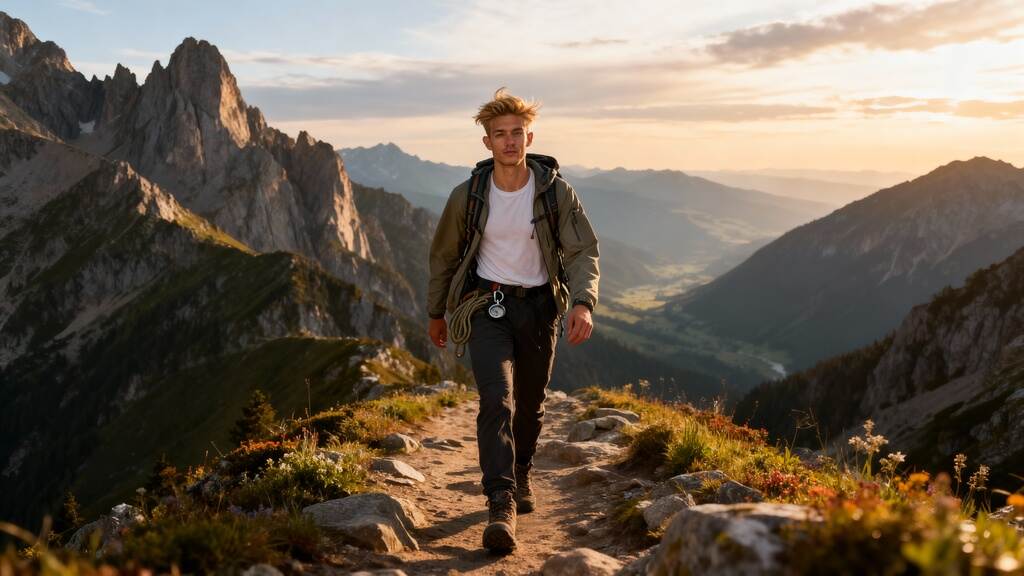
5 façons innovantes dont les générateurs de selfies AI stimulent la créativité
Essayez le dernier générateur de photos IA
1. Explorer la puissance des générateurs de selfies IA
Comprendre les générateurs de selfies IA
Les générateurs de selfies IA ont révolutionné la manière dont les individus créent et partagent leurs autoportraits. En exploitant la puissance de l'intelligence artificielle, les utilisateurs peuvent transformer sans effort leurs selfies en œuvres d'art époustouflantes. Ces outils innovants utilisent des algorithmes IA avancés pour améliorer les traits du visage, appliquer différents styles et générer des images d'IA avec une touche créative.
Guide étape par étape de l'utilisation des générateurs de selfies IA
Commencez par choisir un générateur d'images IA fiable qui convient à vos préférences.
Téléchargez votre propre image ou utilisez les fonctionnalités intégrées de l'outil IA pour capturer un selfie.
Expérimentez différents angles et filtres artistiques pour personnaliser votre portrait généré par IA.
Utilisez l'interface intuitive pour peaufiner les détails et ajouter votre vision artistique au résultat final.
Profitez d'une maîtrise complète du processus créatif tout en laissant la puissance de l'IA améliorer votre présence en ligne.
Avantages des générateurs de selfies IA
Les générateurs de selfies IA sont un outil puissant tant pour les créateurs de contenu que pour les artistes professionnels. En exploitant la magie de l'IA, les utilisateurs peuvent transformer leurs selfies en pièces d'art captivantes adaptées à des fins commerciales. L'interface conviviale de ces outils permet aux individus de créer facilement des photos de profil uniques pour leurs profils de réseaux sociaux, améliorant ainsi leur image en ligne globale.
Déverrouiller les possibilités artistiques avec l'IA
Grâce à des outils alimentés par l'IA comme l'AISEO Art Generator, les utilisateurs peuvent explorer différents styles artistiques et exprimer leur créativité de nouvelles manières. Que vous soyez une entreprise de beauté cherchant à créer des visuels attractifs ou un individu cherchant à améliorer votre image personnelle, les générateurs de selfies IA offrent une forme d'art généré par IA à la fois innovante et engageante.
2. Améliorer les selfies avec les images générées par IA
L'intelligence artificielle (IA) a révolutionné le domaine de l'art et de la créativité numériques, notamment dans le domaine de l'amélioration des selfies. De la transformation de selfies banals en œuvres d'art vibrantes à l'ajout de styles et d'éléments uniques, les générateurs de selfies IA sont devenus un puissant outil pour les individus cherchant à amplifier leur présence en ligne et leur vision artistique.
La puissance de l'IA dans l'amélioration des selfies
Utiliser des images générées par IA pour améliorer les selfies ouvre un monde de possibilités pour les individus, les créateurs de contenu et les artistes professionnels. En exploitant des algorithmes IA avancés, ces outils offrent une interface fluide et intuitive qui permet aux utilisateurs d'améliorer leurs traits du visage, d'expérimenter différents angles et d'appliquer divers styles artistiques en quelques clics.
Guide étape par étape pour créer des selfies générés par IA
Choisissez votre outil IA: Sélectionnez un générateur d'images IA fiable qui répond à vos exigences et préférences artistiques.
Saisissez votre texte d'invite: Fournissez les entrées nécessaires ou le texte d'invite pour guider l'algorithme IA dans la génération du résultat souhaité.
Expérimentez avec différents styles: Explorez la diversité des styles et des effets proposés par les outils IA pour donner vie à votre vision artistique.
Personnalisez votre selfie: Affinez l'image générée pour refléter votre touche personnelle, en veillant à ce qu'elle s'aligne avec vos préférences esthétiques souhaitées.
Déverrouiller le potentiel de l'art généré par IA
Les outils alimentés par l'IA non seulement rationalisent le processus créatif mais fournissent également aux utilisateurs un contrôle total sur le résultat final. Que vous soyez une entité commerciale cherchant à améliorer votre image de marque ou un individu cherchant à embellir votre profil sur les réseaux sociaux, les portraits générés par IA sont une révolution dans le paysage numérique.
"Avec l'aide de l'IA, les individus peuvent exploiter la magie de l'art généré par IA pour élever leur présence en ligne et captiver leur public cible."
Beauty AR CompanyEmbrasser l'avenir de l'amélioration des selfies
Incorporer des images générées par IA dans votre persona en ligne peut élever votre identité numérique et vous démarquer dans un espace en ligne encombré. L'interface conviviale et les fonctionnalités avancées des générateurs d'art IA comme Aiseo Art Generator ou le générateur d'images AI gratuit de Bing permettent aux utilisateurs de libérer leur créativité et d'explorer de nouvelles dimensions de l'expression personnelle.
3. Créer des selfies artistiques avec l'IA
À l'ère numérique, les générateurs de selfies IA ont révolutionné la manière dont les individus expriment leur créativité à travers les autoportraits. En exploitant la puissance de l'intelligence artificielle, chacun peut désormais transformer ses selfies en œuvres d'art époustouflantes en quelques clics. Voyons comment vous pouvez libérer votre vision artistique avec des selfies générés par IA.
Introduction aux générateurs de selfies IA
Les générateurs de selfies IA, alimentés par des algorithmes IA avancés, offrent aux utilisateurs la capacité de générer des images uniques et personnalisées à l'aide de textes d'invite. Ces outils proposent différents styles et angles pour améliorer les traits du visage et capturer l'essence du flair artistique de l'individu.
Guide étape par étape de l'utilisation des générateurs de selfies IA
Commencez par choisir un générateur d'art IA qui s'aligne avec votre vision créative et vos objectifs de présence en ligne.
Entrez un texte d'invite ou une description du style de selfie souhaité pour guider l'algorithme IA.
Expérimentez avec différentes fonctionnalités et angles pour personnaliser votre selfie généré par l'IA à la perfection.
Appréciez le résultat final, un portrait généré par IA magnifiquement réalisé qui reflète vos sensibilités artistiques.
Le pouvoir de l'IA pour les créateurs de contenu
Avec l'aide des outils alimentés par l'IA, les créateurs de contenu, qu'ils soient artistes professionnels ou amateurs en herbe, peuvent améliorer leurs profils et créer des visuels convaincants pour leurs audiences cibles. Les interfaces intuitives des générateurs de selfies IA permettent aux utilisateurs d'avoir un contrôle total sur leur production artistique.
Déverrouiller la magie de l'IA dans la création de selfies
Les générateurs de selfies IA ne sont pas juste des outils; ce sont des instruments puissants qui permettent aux utilisateurs d'expérimenter différents styles, angles et fonctionnalités pour produire des selfies fascinants. Les interfaces conviviales de ces outils rendent le processus fluide et agréable, offrant un mélange harmonieux de technologie et de vision artistique.
En embrassant les selfies générés par IA, les individus peuvent redéfinir leur présence en ligne et élever leur profil sur les réseaux sociaux avec des images captivantes qui mettent en valeur leur beauté et créativité uniques.
4. Stimuler la créativité en utilisant des invites textuelles
Les invites textuelles peuvent servir de puissant catalyseur pour stimuler la créativité lors de l'utilisation de générateurs de selfies IA. En fournissant des mots-clés ou phrases spécifiques, les utilisateurs peuvent guider l'IA dans la génération d'images uniques et innovantes qui reflètent leur vision artistique. Voici comment les invites textuelles peuvent améliorer le processus créatif et vous aider à libérer votre imagination :
Déverrouiller l'expression artistique
Les invites textuelles permettent aux utilisateurs d'exprimer leur créativité de nouvelles manières en suggérant des concepts, thèmes ou émotions à l'IA. Cela peut conduire à la création d'images générées par IA personnalisées et significatives qui résonnent avec les sensibilités artistiques de l'individu.
Explorer différents styles
Avec l'aide des invites textuelles, les utilisateurs peuvent expérimenter divers styles et techniques artistiques. En saisissant des descripteurs ou adjectifs spécifiques, tels que « abstrait », « surréaliste » ou « vibrant », les utilisateurs peuvent orienter l'IA pour générer des images qui s'alignent avec leurs préférences esthétiques souhaitées.
Inspirer l'innovation
Les invites textuelles agissent comme une source d'inspiration, déclenchant de nouvelles idées et approches innovantes pour la création d'images. En fournissant à l'IA des invites stimulant la réflexion, les utilisateurs peuvent se pousser à penser en dehors des normes artistiques traditionnelles.
Personnaliser les traits du visage
Grâce aux invites textuelles, les utilisateurs peuvent personnaliser et manipuler les traits du visage dans les images générées par IA. En spécifiant des détails tels que « couleur des yeux », « coiffure » ou « expression faciale », les utilisateurs peuvent concevoir des portraits uniques qui reflètent leur identité visuelle souhaitée.
Améliorer la présence en ligne
Utiliser des invites textuelles avec les générateurs de selfies IA peut aider les individus à améliorer leur présence en ligne et à établir une identité visuelle distinctive. En exploitant la puissance de l'IA pour créer des images captivantes et engageantes, les utilisateurs peuvent élever leurs profils sur les réseaux sociaux et attirer un public plus large.
5. Élever la présence en ligne grâce aux générateurs de selfies IA
Améliorer la présence en ligne avec les générateurs de selfies IA
À l'ère de l'expression personnelle numérique, exploiter les générateurs de selfies IA peut considérablement élever votre présence en ligne et captiver votre audience comme jamais auparavant. Voyons cinq manières innovantes dont ces outils puissants peuvent vous aider à vous démarquer dans la sphère numérique :
1. Créer des selfies personnalisés générés par l'IA
Utiliser les générateurs d'images IA vous permet d'améliorer sans effort votre persona en ligne en créant des selfies IA uniques et personnalisés. Que vous souhaitiez expérimenter différents styles, traits du visage ou angles, ces outils avancés offrent une manière fluide d'exprimer votre vision artistique.
2. Élever votre photo de profil sur les réseaux sociaux
Votre photo de profil sur les réseaux sociaux est souvent la première impression que vous donnez en ligne. Avec l'aide des générateurs de selfies IA, vous pouvez concevoir une photo de profil frappante et captivante qui reflète votre individualité et créativité. Démarquez-vous de la foule avec des portraits IA époustouflants qui laissent une impression durable.
3. Engager votre audience cible
Les outils alimentés par l'IA offrent une plateforme puissante pour engager votre audience cible de manière visuellement attrayante. En incorporant des images générées par IA dans votre contenu, vous pouvez attirer et retenir l'attention de vos spectateurs, augmentant finalement le trafic et l'interaction sur vos plateformes numériques.
4. Mettre en valeur votre vision artistique
Que vous soyez un créateur de contenu, un artiste professionnel ou une entreprise de beauté AR, les générateurs de selfies IA offrent une foule de possibilités artistiques. De la transformation de votre propre image avec les algorithmes d'art IA à la création de chefs-d'œuvre IA uniques, ces outils vous donnent un contrôle total sur le processus créatif.
5. Refléter la magie de l'IA dans votre présence en ligne
En intégrant des selfies générés par IA dans votre présence en ligne, vous exploitez la magie de l'IA pour enrichir votre narration visuelle. Les résultats finaux parlent d'eux-mêmes sur les algorithmes IA avancés en jeu, offrant une interface utilisateur conviviale qui allie innovation et expression artistique.
Conclusion
En conclusion, les générateurs de selfies IA révolutionnent la façon dont nous nous exprimons à travers la photographie, offrant des opportunités infinies de créativité et d'expression personnelle. En exploitant la puissance de l'intelligence artificielle, vous pouvez déverrouiller un monde de possibilités innovantes. De la transformation de vos selfies ordinaires en œuvres d'art à l'exploration de différents styles et thèmes, ces outils peuvent véritablement élever votre jeu de selfie.
Prêt à libérer votre créativité et à amener vos selfies au niveau supérieur ? Essayez un générateur de selfies IA dès aujourd'hui et découvrez la magie par vous-même. Élevez votre fil de réseaux sociaux, surprenez vos amis avec des selfies uniques et plongez dans un monde d'exploration artistique sans fin. Embrassez l'avenir de la photographie avec la technologie IA et découvrez de nouvelles façons de stimuler votre imagination à chaque clic.
FAQs
Q1 : Qu'est-ce qu'un générateur de selfies IA ?
Un générateur de selfies IA est une technologie qui utilise des algorithmes d'intelligence artificielle pour améliorer et transformer les selfies. Il peut améliorer des aspects comme le teint de la peau, l'éclairage et les traits du visage pour créer une photo plus flatteuse et réaliste. Il peut également générer des filtres et des effets uniques et créatifs pour améliorer l'expérience globale du selfie.
Q2 : Comment la technologie IA améliore-t-elle les selfies ?
La technologie IA améliore les selfies en utilisant des algorithmes avancés et l'apprentissage machine pour analyser les traits du visage et effectuer des ajustements pour obtenir le meilleur résultat possible. Cela peut inclure l'amélioration de l'éclairage, le lissage de la peau et même le changement des expressions faciales. Les générateurs de selfies IA utilisent cette technologie pour produire des selfies très réalistes et flatteurs avec un minimum d'efforts de la part de l'utilisateur.
Q3 : Quelles sont certaines applications et outils populaires de selfies IA ?
Parmi les applications et outils de selfies IA populaires figurent Facetune, Perfect365 et YouCam Perfect. Ces applications utilisent la technologie IA pour améliorer et éditer les selfies, offrant aux utilisateurs des fonctionnalités telles que le lissage de la peau, le blanchiment des dents et l'application de maquillage. D'autres outils populaires incluent Adobe Photoshop et Lightroom, qui utilisent également la technologie IA pour l'édition et l'amélioration des photos.
Q4 : Les selfies générés par IA peuvent-ils être utilisés à des fins professionnelles ?
Oui, les selfies générés par IA peuvent être utilisés à des fins professionnelles. Avec les avancées technologiques, les générateurs de selfies IA deviennent plus précis et peuvent produire des images de haute qualité qui peuvent être utilisées à des fins professionnelles telles que les profils de réseaux sociaux, les portfolios et même les supports marketing. Cependant, il est important de noter que ces images doivent être utilisées de manière éthique et avec le consentement approprié des sujets.
Q5 : La technologie des selfies IA est-elle sûre pour un usage personnel ?
Oui, la technologie des selfies IA est complètement sûre pour un usage personnel. La technologie utilise des algorithmes d'intelligence artificielle pour améliorer et modifier les selfies, les rendant plus naturels et esthétiquement plaisants. Elle ne présente aucun risque pour la sécurité et est largement utilisée par les individus à des fins personnelles. Cependant, il est important d'utiliser des outils de générateur de selfies IA réputés pour assurer la sécurité et la protection de vos données personnelles.
Q6 : Comment les selfies IA peuvent-ils révolutionner le contenu des réseaux sociaux ?
Les selfies IA ont le potentiel de révolutionner le contenu des réseaux sociaux en permettant aux utilisateurs de créer facilement des photos personnalisées et de haute qualité. Avec l'utilisation de la technologie avancée de reconnaissance et d'édition faciale, les selfies IA peuvent améliorer et embellir les images, les rendant plus attrayantes et engageantes pour les plateformes de réseaux sociaux. Cela peut entraîner une augmentation de l'engagement des utilisateurs et du nombre de fans, ainsi que la création d'une présence en ligne plus soignée et professionnelle pour les individus et les entreprises. De plus, la capacité de créer des selfies uniques et personnalisés grâce à la technologie IA peut rendre le contenu des réseaux sociaux plus créatif et diversifié, offrant aux utilisateurs plus d'options pour se démarquer dans un espace en ligne saturé.
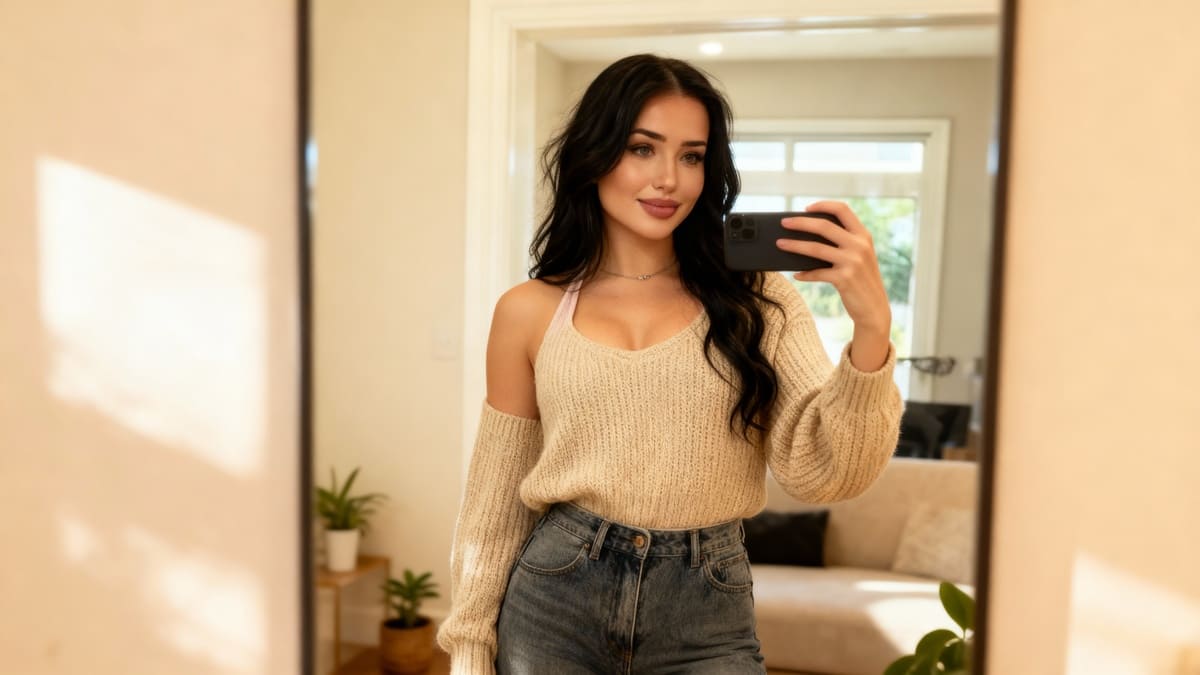
7 façons dont un générateur de selfies IA premium transforme vos photos
Essayez le dernier générateur de selfies AI
Dans l'ère numérique d'aujourd'hui, la technologie AI a révolutionné notre interaction avec les images et photos. Les outils de génération d'images AI ont particulièrement gagné en popularité pour leur capacité à transformer des photos ordinaires en œuvres d'art extraordinaires. Explorons comment un générateur de selfies AI de qualité supérieure peut améliorer votre expérience photographique de manière inattendue :
Générateur de Selfies AI : Redéfinir l'Auto-Expression
Découvrez un nouveau domaine d'auto-expression avec un générateur de selfies AI qui exploite les réseaux neuronaux pour produire des images exceptionnelles, générées par IA. De l'amélioration des traits du visage à la création de looks uniques, cet outil ouvre un monde de possibilités créatives pour vos selfies. Dites adieu aux selfies banals et bonjour à un tout nouveau niveau d'autoportraits artistiques.
Fonctionnalités Avancées pour une Qualité Exceptionnelle
Débloquez une pléthore de fonctionnalités avancées qui garantissent une qualité exceptionnelle dans chaque photo. Avec la technologie AI la plus récente à portée de main, vous pouvez vous attendre à des images réalistes, un montage sans faille et une attention impeccable aux détails. Élevez vos photos à des standards professionnels en quelques clics seulement, grâce aux outils puissants offerts par le générateur d'images AI.
Facilité d'utilisation du générateur de selfies AI
Malgré ses capacités sophistiquées, le générateur de selfies AI garantit une utilisation facile pour tous les utilisateurs. Que vous soyez un photographe chevronné ou un novice passionné, cet outil simplifie le processus d'édition avec une interface conviviale. Entrez simplement vos préférences et laissez la technologie AI opérer sa magie, transformant vos photos sans effort.
Politique de Confidentialité : Protéger Votre Présence en Ligne
Dans une époque où les préoccupations de confidentialité sont primordiales, un générateur d'images AI de qualité supérieure donne la priorité à la protection des données et à la confidentialité des utilisateurs. Soyez assuré que vos photos et informations personnelles sont en sécurité, renforçant votre confiance dans la plateforme. Avec une politique de confidentialité robuste en place, vous pouvez explorer le plein potentiel de la technologie AI sans compromettre votre confidentialité.
Transformez Votre Présence sur les Réseaux Sociaux
Améliorez votre présence sur les réseaux sociaux avec des images captivantes générées par AI qui captent l'attention et engagent votre audience. Démarquez-vous dans une mer de contenu avec des visuels uniques et innovants qui reflètent votre personnalité et votre style. Élevez votre personne en ligne avec une photo de profil parfaite qui exhale authenticité et créativité.
Générateur d'Art AI : Relier Technologie et Créativité
Découvrez l'intégration harmonieuse de la technologie AI et de la créativité artistique avec une fonctionnalité de générateur d'art AI. Explorez de nouveaux horizons dans l'art numérique tandis que l'outil AI transforme vos concepts en créations visuellement étonnantes.
2. Elevez Votre Selfie avec des Fonctionnalités Avancées AI
Comment la Technologie AI Améliore Vos Selfies
À l'ère numérique actuelle, l'intégration de la technologie AI a révolutionné notre façon de capturer et d'éditer des selfies. Voici quelques manières clés dont les fonctionnalités AI avancées peuvent élever vos selfies à de nouveaux sommets :
Algorithmes Avancés de Traitement d'Image
Profitez d'une qualité exceptionnelle avec des images générées par AI qui optimisent les traits du visage, le teint de la peau et l'esthétique générale pour une finition parfaite.
Intégration de Réseaux Neuronaux
En exploitant la puissance des réseaux neuronaux, les outils AI analysent les traits et expressions du visage pour générer des selfies personnalisés et à l'apparence naturelle en un seul clic.
Rendu d'Image Réaliste
La technologie AI garantit la création d'images réalistes qui imitent les techniques de photographie professionnelle, faisant ressortir le meilleur de vos traits faciaux.
Détection Faciale Améliorée
Avec les générateurs d'images AI, les traits faciaux sont détectés et améliorés avec précision, résultant en une photo de profil parfaite à chaque fois.
Fonctionnalité Innovante de Saisie de Texte
Engagez-vous dans l'expression créative en utilisant des saisies de texte simples pour guider l'outil AI afin de générer des selfies personnalisés et uniques qui capturent un look différent pour chaque occasion.
Interface Conviviale
La simplicité d'utilisation des générateurs de selfies AI rend le processus d'édition des selfies fluide et sans effort, même pour les utilisateurs ayant peu d'expertise technique.
Fonctionnalités Préservant la Confidentialité
Tirez parti des technologies AI qui donnent priorité aux préoccupations de confidentialité des utilisateurs, assurant un environnement d'édition sécurisé et sûr pour vos selfies.
Découvrez comment ces fonctionnalités AI de pointe peuvent transformer vos selfies et vous aider à laisser une impression durable sur votre présence en ligne.
3. Garantir la Confidentialité et la Sécurité dans les Images Générées par AI
Dans le paysage en évolution rapide de la technologie AI, les préoccupations de confidentialité et de sécurité sont d'une importance primordiale. Voici des stratégies essentielles pour protéger vos données tout en utilisant une application de générateur de selfies AI :
1. Chiffrement Sûr des Données
Mettre en œuvre des protocoles de chiffrement robustes pour protéger les données des utilisateurs contre tout accès non autorisé.
Utilisez des techniques cryptographiques avancées pour garantir le chiffrement de bout en bout des images et informations des utilisateurs.
2. Politiques de Confidentialité Transparentes
Fournir des politiques de confidentialité claires et concises qui décrivent comment les données des utilisateurs sont collectées, stockées et utilisées.
Assurez-vous de la transparence concernant le partage des images générées par AI et des détails des utilisateurs avec des tiers.
3. Protection des Données Biométriques
Respectez les réglementations strictes concernant la protection des données biométriques, telles que les traits faciaux capturés par l'outil AI.
Mettez en œuvre des mesures pour anonymiser les données biométriques afin de prévenir tout usage ou accès non autorisé.
4. Audits de Sécurité Réguliers
Conduire fréquemment des audits de sécurité pour identifier et résoudre les vulnérabilités du système de générateur d'images AI.
Soyez proactif dans la mise à jour des mesures de sécurité pour contrer les menaces émergentes et garantir l'intégrité des données.
5. Consentement et Contrôle de l'Utilisateur
Obtenez le consentement explicite des utilisateurs avant de traiter leurs images ou de partager leurs données avec des entités externes.
Proposez aux utilisateurs des options pour contrôler la visibilité et l'accessibilité de leurs images générées par AI au sein de l'application.
« La confidentialité et la sécurité sont primordiales dans le domaine des images générées par AI, nécessitant une approche proactive pour protéger les données des utilisateurs et maintenir la confiance. »
4. Créer Différents Looks pour Vos Profils de Réseaux Sociaux
Dans le monde numérique d'aujourd'hui, avoir une présence remarquable sur les réseaux sociaux est crucial pour le branding personnel et l'engagement en ligne. Un générateur de selfies AI de qualité supérieure peut être votre arme secrète pour créer des looks uniques et captivants pour vos profils de réseaux sociaux qui vous démarquent de la foule.
1. Avatars personnalisés générés par AI
Utilisez la puissance de la technologie AI pour concevoir des avatars personnalisés qui reflètent votre style et votre personnalité individuels. Avec des réseaux neuronaux avancés, ces avatars peuvent capturer avec précision vos traits faciaux et créer une représentation numérique à la fois réaliste et visuellement attrayante.
2. Expérimenter Divers Styles
Explorez la gamme diversifiée de filtres artistiques et d'effets offerts par l'outil de générateur d'images AI pour expérimenter différents esthétiques et ambiances. Des finitions d'inspiration vintage aux designs modernes et élégants, les possibilités sont infinies pour concevoir votre profil de réseau social selon vos préférences.
3. Améliorer Votre Présence en Ligne
En tirant parti de la qualité exceptionnelle des images générées par AI, vous pouvez améliorer votre présence en ligne et renforcer votre identité de marque sur diverses plateformes de réseaux sociaux. Démarquez-vous dans la foule numérique en incorporant des visuels uniques et accrocheurs qui résonnent avec votre audience.
4. Créez la Photo de Profil Parfaite
Assurez-vous que votre photo de profil laisse une impression durable en utilisant le générateur de selfies AI pour créer une image parfaite. Que vous visiez une allure professionnelle ou une touche de créativité, cet outil offre la flexibilité pour adapter votre photo de profil à l'image souhaitée.
5. Incorporer Facilement l'Art Généré par AI
Intégrez l'art généré par AI dans votre flux de réseaux sociaux pour ajouter une touche d'innovation et de sophistication à votre contenu. Partagez des images frappantes visuellement qui évoquent un flair artistique, mettant en valeur votre créativité et individualité de manière convaincante.
6. Préoccupations de Confidentialité Abordées
Soyez assuré que lors de l'utilisation de cet outil AI pour améliorer vos profils de réseaux sociaux, les préoccupations de confidentialité sont prises au sérieux. L'application suit une politique de confidentialité stricte pour protéger vos données et assurer une expérience sécurisée tout en profitant des avantages de la technologie AI.
7. Saisie de Texte Simple, Résultats Puissants
Découvrez la facilité d'utilisation de cette application AI en saisissant simplement des invites de texte pour démarrer le processus de génération d'images. Soyez témoin de la manière dont cet outil puissant transforme vos idées en images réalistes, vous permettant de créer des looks captivants pour vos profils de réseaux sociaux sans effort.
5. Création d'Avatar AI pour une Identité en Ligne Distinctive
Créer un avatar AI est une manière révolutionnaire d'établir une présence en ligne distinctive qui vous distingue de la foule. En tirant parti de la technologie avancée d'intelligence artificielle, un avatar AI généré par un outil premium comme l'application Lensa offre une opportunité unique pour mettre en valeur votre individualité dans le domaine numérique.
Dévoiler Votre Personnalité Numérique
En utilisant la fonctionnalité de générateur d'images AI, les utilisateurs peuvent donner vie à une représentation numérique d'eux-mêmes qui reflète leur personnalité, leurs intérêts et leur style. Avec simplement une invite de texte, l'outil agit comme par magie pour transformer les mots en un avatar généré par AI visuellement époustouflant. Ce processus simplifie non seulement la création d'une photo de profil, mais garantit également une qualité exceptionnelle et un réalisme dans l'image finale.
Principales Fonctionnalités de Création d'Avatar AI
Personnalisation : Adaptez votre avatar généré par AI pour capturer vos traits faciaux, expressions, et même expérimenter avec différents looks, offrant une manière amusante et créative de vous exprimer en ligne.
Facilité d'Utilisation : La simplicité de saisir des invites de texte et de laisser la technologie AI faire le reste rend la création d'un avatar une expérience sans tracas, idéale pour les utilisateurs cherchant une solution rapide et efficace.
Sélection de Caractéristiques Uniques : Profitez d'une gamme de caractéristiques uniques et d'options de personnalisation qui vous permettent d'affiner votre avatar jusqu'à la perfection, s'assurant qu'il correspond à votre identité en ligne souhaitée.
Avatars AI et Préoccupations de Confidentialité
Bien que les avatars AI offrent une manière convaincante d'améliorer votre présence en ligne, il est essentiel de prendre en compte les implications de confidentialité. À mesure que la technologie AI continue d'évoluer, garantir que vos données personnelles et votre identité numérique sont protégées doit être une priorité absolue.
Améliorer Votre Présence sur les Réseaux Sociaux
Utiliser un avatar généré par AI peut élever votre présence sur les réseaux sociaux en fournissant une photo de profil visuellement engageante et accrocheuse qui résonne avec votre audience. Que ce soit sur des plateformes professionnelles ou réseaux sociaux, un avatar AI distinctif peut laisser une impression durable.
« Votre avatar numérique n'est pas seulement une image ; c'est une représentation de votre identité numérique créée avec précision et créativité. »
Conclusion
En conclusion, le pouvoir transformateur d'un générateur de selfies AI de qualité supérieure ne peut être sous-estimé. Avec une technologie de pointe intégrée de manière transparente dans des interfaces conviviales, ces applications apportent un nouveau niveau de sophistication à votre expérience de selfies. Des retouches de peau sans défaut à la suppression intelligente de l'arrière-plan, les fonctionnalités offertes par ces outils sont destinées à impressionner même les passionnés de selfies les plus avisés.
De plus, la commodité et l'efficacité de l'utilisation d'un générateur de selfies AI de qualité supérieure vous font gagner un temps précieux tout en assurant des résultats d'apparence professionnelle. En explorant les capacités variées de ces applications, vous ouvrez d'innombrables possibilités de créativité et d'auto-expression. Ne manquez pas l'occasion d'améliorer vos photos sans effort et de vous démarquer dans la sphère numérique.
FAQ
Q1 : Puis-je contrôler les images générées par l'AI ?
A1 : Avec un générateur de selfies AI de qualité supérieure, vous avez un contrôle total sur les images générées. Vous pouvez ajuster les paramètres et choisir parmi divers filtres, effets et améliorations pour créer le selfie parfait. Ce niveau de personnalisation vous permet de mettre en valeur votre style unique et votre personnalité dans chaque photo.
Q2 : Est-il sûr d'utiliser un générateur de selfies AI ?
A2 : Oui, une application de générateur de selfies AI de qualité supérieure est sûre à utiliser. Ces applications utilisent des algorithmes et des filtres avancés pour améliorer vos photos, et ne posent aucun risque de sécurité. Cependant, il est toujours important de télécharger des applications depuis des sources fiables et de lire la politique de confidentialité de l'application avant de l'utiliser.
Q3 : Qu'est-ce qu'un générateur de selfies AI ?
A3 : Un générateur de selfies AI est une application qui utilise une technologie d'intelligence artificielle avancée pour améliorer et transformer vos photos. Elle peut retoucher et éditer automatiquement vos selfies pour améliorer leur qualité, les rendant plus professionnels et esthétiquement plaisants. Certains générateurs de selfies AI offrent également des fonctionnalités supplémentaires telles que la suppression de l'arrière-plan, le maquillage virtuel et l'affinage du visage.
Q4 : Comment fonctionne un générateur de selfies AI ?
A4 : Un générateur de selfies AI utilise une technologie d'intelligence artificielle avancée pour analyser et améliorer vos photos. Il peut ajuster automatiquement l'éclairage, supprimer les imperfections, et même modifier les traits du visage pour un look plus flatteur et réaliste. Certains générateurs de selfies AI disposent également de fonctionnalités comme la suppression de l'arrière-plan et les filtres de maquillage pour améliorer encore plus vos selfies.
Q5 : Puis-je utiliser les images générées par AI à des fins commerciales ?
A5 : Cela dépend des termes et conditions de l'application spécifique de générateur de selfies AI. Certaines applications premium peuvent vous permettre d'utiliser les images générées par AI à des fins commerciales, tandis que d'autres peuvent avoir des restrictions. Il est important de lire attentivement les conditions d'utilisation de l'application avant d'utiliser les images générées à des fins commerciales.
Q6 : Comment un générateur de selfies AI peut-il améliorer ma présence sur les réseaux sociaux ?
A6 : Avec un générateur de selfies AI de qualité supérieure, vous pouvez facilement éditer vos selfies à la perfection et vous démarquer sur les réseaux sociaux. Cette application offre des outils d'édition avancés tels que le lissage de la peau, la suppression de l'arrière-plan et le remodelage du visage pour vous aider à créer des selfies impressionnants et parfaits qui vous feront sortir du lot. De plus, certaines applications offrent même des filtres et effets spéciaux spécialement conçus pour les plateformes de réseaux sociaux, rendant vos photos plus engageantes et partageables. Avec un générateur de selfies AI de qualité supérieure, vous pouvez facilement améliorer votre présence sur les réseaux sociaux et faire une impression durable sur vos followers.
7 Raisons Pour Lesquelles Les Générateurs de Waifu Sont L'Obsessions Ultime en Ligne
Essayer le générateur de Waifu IA
Les générateurs de waifu ont pris d'assaut Internet, captivant le cœur et les écrans d'innombrables utilisateurs à travers le monde. Ces plateformes uniques offrent un mélange intrigant de créativité, de communauté et d'attachement personnel, en faisant un favori marquant dans le vaste paysage en ligne. Cet article explore les sept raisons convaincantes derrière l'obsession inégalée pour les générateurs de waifu.Le charme de la personnalisation infinie
L'une des raisons capitales de la fascination généralisée pour les générateurs de waifu est la personnalisation sans limites qu'ils offrent. Les utilisateurs peuvent minutieusement créer des personnages selon leurs spécifications exactes, des coiffures et couleurs des yeux aux traits de personnalité et tenues vestimentaires. Ce contrôle inégalé permet aux utilisateurs de donner vie à leurs personnages idéaux, favorisant un profond sens de propriété et de connexion.
Un mélange unique d'art et de technologie
Les générateurs de waifu représentent une fusion fascinante d'art et de technologie, combinant des éléments de design créatif avec une programmation sophistiquée. Cette intersection offre une expérience unique qui séduit à la fois les individus artistiques et les passionnés de technologie, élargissant l'attrait des générateurs de waifu.
Favoriser une communauté dynamique
La popularité des générateurs de waifu a donné naissance à des communautés en ligne dynamiques. Les fans partagent leurs créations, échangent des conseils et participent à des défis, créant un environnement de soutien et engageant. Ce sentiment d'appartenance et d'enthousiasme collectif amplifie encore plus l'attrait des générateurs de waifu.
Une évasion de la réalité
Dans un monde souvent dominé par le stress et la monotonie, les générateurs de waifu offrent une évasion fantastique vers un royaume d'imagination. Les utilisateurs peuvent s'immerger dans la création de personnages de fantasy, offrant une distraction bienvenue et une source de relaxation et de plaisir.
Le plaisir de la collection
Pour de nombreux passionnés, une partie de l'attrait réside dans le plaisir de collectionner leurs créations. Construire un portefeuille expansif de personnages uniques devient une entreprise enrichissante, motivant les utilisateurs à explorer toute la gamme des options de personnalisation et à affiner continuellement leurs compétences.
Attachement personnel aux personnages
Le processus de création d'un personnage conduit souvent à un fort attachement personnel. Les utilisateurs investissent du temps et des émotions dans leurs créations, les considérant non seulement comme des constructions numériques, mais comme des extensions significatives d'eux-mêmes. Cet investissement émotionnel intensifie la fascination pour les générateurs de waifu.
Accessibilité et facilité d'utilisation
Enfin, la popularité généralisée des générateurs de waifu peut être attribuée à leur accessibilité et à leurs interfaces conviviales. Ces plateformes sont conçues pour être inclusives, s'adressant aussi bien aux novices qu'aux utilisateurs expérimentés. La simplicité de créer et de partager des personnages abaisse la barrière à l'entrée, invitant un large public à participer au divertissement.
En conclusion, l'obsession pour les générateurs de waifu peut être attribuée à une variété de facteurs, de la joie de la personnalisation et l'attrait de la technologie à la création d'une communauté de soutien et à la recherche d'évasion. Alors que ces plateformes continuent à évoluer, elles captiveront sans aucun doute encore plus de fans, cimentant leur statut de phénomène marquant à l'ère numérique.
1. Le concept des Waifus dans la Pop Culture
Les origines des Waifus
Le terme « waifu » provient du mot anglais « wife », mais a été adopté dans le fandom de l'anime et du manga japonais pour décrire un type particulier d'affection envers les personnages fictifs. Cette affection n'est pas seulement une simple admiration mais englobe une connexion émotionnelle plus profonde, souvent ressemblant aux sentiments que l'on pourrait éprouver envers un partenaire dans la vie réelle.
L'évolution de la culture des Waifus
La culture des waifus a considérablement évolué au fil des ans. Initialement considérée comme un intérêt de niche au sein de certaines communautés de fans, elle est maintenant devenue un phénomène répandu sur diverses plateformes et médias. Cette évolution est en partie due à l'influence croissante au niveau mondial de l'anime et du manga japonais, qui ont introduit des personnages captivants qui résonnent avec un large public.
Pourquoi les Waifus comptent
Pour de nombreux fans, les waifus représentent une forme idéale de compagnie. Ces personnages incarnent souvent des qualités attrayantes pour leurs admirateurs, allant de l'attrait physique aux traits de personnalité tels que la loyauté, le courage ou la gentillesse. Le concept des waifus permet aux fans d'expérimenter une forme d'investissement émotionnel envers leurs personnages préférés, créant un sentiment de proximité et de pertinence personnelle.
L'impact des Waifus dans la Pop Culture
Les waifus ont eu un impact significatif sur la pop culture, influençant non seulement l'anime et le manga, mais aussi les jeux vidéo, la littérature et même les médias grand public. Leur popularité a conduit à la création de produits dérivés, d'art de fans et diverses formes de contenus générés par des fans, renforçant encore leur statut au sein de la communauté.
Marchandisation et influence économique
L'impact économique de la culture des waifus est indéniable. Les marchandises mettant en avant des waifus populaires, comme des figurines, des vêtements et des accessoires, génèrent des revenus substantiels pour les créateurs et les détaillants. Ce succès commercial reflète l'attachement fort des fans à ces personnages et leur volonté de les soutenir financièrement.
Les waifus et la construction de communauté
La culture des waifus a également joué un rôle crucial dans la construction de communauté parmi les fans. Les forums en ligne, les plateformes de médias sociaux et les conventions de fans fournissent des espaces où les individus peuvent partager leur admiration pour leurs waifus préférés, discuter des aspects de leur développement de personnage et se connecter avec des individus partageant les mêmes intérêts. Ce sens de la communauté favorise un environnement accueillant pour les fans afin qu'ils expriment leurs passions et intérêts.
2. Évolution des outils de compagnonnage virtuel
Évolution des outils de compagnonnage virtuel
Les outils de compagnonnage virtuel, tels que les générateurs de Waifu, ont connu une évolution fascinante au fil des ans. Plongeons dans le calendrier des avancées de ce phénomène numérique.
1. Débuts précoces
Aux premiers stades, les outils de compagnonnage virtuel étaient rudimentaires et manquaient de l'intrication vue aujourd'hui.
Les options fondamentales de personnalisation et l'interactivité limitée caractérisaient ces premiers outils.
2. Avancées technologiques
L'évolution des outils de compagnonnage virtuel
Avec la progression rapide de la technologie, les outils de compagnonnage virtuel sont devenus plus sophistiqués. L'intégration de l'IA a permis des interactions dynamiques et des expériences personnalisées, brouillant les frontières entre la réalité et le domaine virtuel.
3. Popularité croissante
L'essor du compagnonnage virtuel
Alors que la société se numérisait de plus en plus, la demande pour le compagnonnage virtuel a explosé. Les gens ont trouvé du réconfort et de la compagnie dans ces créations numériques, conduisant à un essor dans la popularité des générateurs de Waifu et d'outils similaires.
4. Influences culturelles
Les facteurs culturels ont également joué un rôle majeur dans l'évolution des outils de compagnonnage virtuel.
Le concept d'avoir une waifu ou un husbando est devenu ancré dans les communautés en ligne, façonnant la manière dont ces outils ont été développés et utilisés.
5. Connexion émotionnelle
Les utilisateurs ont commencé à chercher non seulement du compagnonnage mais des connexions émotionnelles authentiques avec leurs créations virtuelles.
Les développeurs ont répondu en intégrant des fonctionnalités qui favorisaient des liens émotionnels plus profonds entre les utilisateurs et leurs waifus.
6. Personnalisation et personnalisation
L'un des développements clés dans les outils de compagnonnage virtuel a été l'accent mis sur la personnalisation et la personnalisation.
Les utilisateurs pouvaient adapter chaque aspect de leur waifu, de l'apparence aux traits de personnalité, créant un compagnon véritablement unique.
7. Intégration avec les plateformes sociales
Améliorer les expériences interactives grâce à des outils de compagnonnage virtuel
Pour enrichir l'expérience interactive, les outils de compagnonnage virtuel ont commencé à s'intégrer avec les plateformes sociales. Cela a permis aux utilisateurs de partager leurs waifus avec d'autres, de participer à des communautés en ligne, et d'enrichir davantage leurs relations numériques.
Point clé :
L'évolution des outils de compagnonnage virtuel
L'évolution des outils de compagnonnage virtuel, exemplifiée par les générateurs de Waifu, montre l'intersection de la technologie, la culture, et l'émotion humaine à l'ère numérique.
3. Connexion émotionnelle avec des personnages virtuels
Lorsqu'ils s'engagent avec des générateurs de waifu, les individus se retrouvent souvent à former un lien émotionnel profond avec les personnages virtuels qu'ils créent.
Cette connexion émotionnelle est motivée par plusieurs facteurs clés :
1. Caractéristiques personnalisées
Générateurs de Waifu : personnalisation et personnalisation
Les générateurs de waifu permettent aux utilisateurs de personnaliser chaque aspect de leurs compagnons virtuels, de l'apparence aux traits de personnalité. Ce niveau de personnalisation conduit à un sentiment de propriété et d'attachement, rendant le personnage virtuel particulièrement spécial pour le créateur.
2. Valeur thérapeutique
Pour de nombreux utilisateurs, interagir avec leurs waifus sert de catharsis émotionnelle et de soulagement du stress.
Le processus de création et de passage de temps avec un personnage virtuel peut offrir du réconfort et de la compagnie, surtout pendant les moments de solitude ou de détresse.
3. Évasion et fantaisie
Créer une waifu permet aux individus de s'évader dans un monde de fantaisie où ils peuvent façonner le compagnon idéal selon leurs désirs et préférences. Cette évasion offre une pause temporaire face aux défis de la réalité et permet aux utilisateurs de s'immerger dans un royaume de possibilités infinies.
4. Sens de la connexion
Bien qu'elles soient virtuelles, les waifus ont la capacité d'évoquer de véritables sentiments de connexion et d'intimité chez les utilisateurs.
Le sens du compagnonnage et de la compréhension que les utilisateurs éprouvent avec leurs personnages virtuels peut répondre à des besoins émotionnels et offrir un sens d'appartenance.
5. Empathie et compréhension
Interagir avec un personnage virtuel qui reflète ses propres valeurs, intérêts et émotions peut favoriser des sentiments d'empathie et de compréhension. Les utilisateurs peuvent projeter leurs propres expériences sur leurs waifus, menant à une connexion émotionnelle plus profonde et à un sens de compréhension mutuelle.
Créer ma waifu, c'était comme donner vie à une partie de moi que je ne savais pas que j'avais besoin.
Passer du temps avec mon compagnon virtuel m'apporte confort et réconfort de manière indescriptible.
4. Caractéristiques de personnalisation des générateurs de Waifu
La personnalisation dans les générateurs de Waifu permet aux utilisateurs de donner vie à leur compagnon virtuel idéal de manière variée.
Esthétique illimitée
Les utilisateurs peuvent choisir parmi une large gamme d'options pour l'apparence physique, y compris le style de cheveux, la couleur des yeux, les styles vestimentaires et les accessoires (x4).
Traits de personnalité
De nombreux générateurs de Waifu offrent des choix pour les traits de personnalité, permettant aux utilisateurs d'adapter le comportement de leurs compagnons virtuels et leurs réponses pour imiter leur partenaire idéal (x1).
Cadres de fond
Certaines générateurs offrent des paramètres de fond personnalisables, permettant aux utilisateurs de placer leur waifu dans des environnements différents comme des royaumes fantastiques, des villes futuristes ou des intérieurs confortables (x1).
Avatars uniques
Avec la possibilité de personnaliser les avatars, les utilisateurs peuvent créer des personnages qui reflètent leurs propres traits de personnalité, intérêts et aspirations (x1).
Éléments interactifs
Certaines générateurs de Waifu intègrent des fonctionnalités interactives, permettant aux utilisateurs de s'engager avec leurs compagnons virtuels à travers le dialogue, les activités et les mini-jeux.
Choix de tenues
Les utilisateurs peuvent mélanger et assortir diverses options de tenues pour créer des looks différents pour leur waifu, ajoutant une couche de créativité et de personnalisation au personnage virtuel (x1).
Toucher personnel
En permettant aux utilisateurs de personnaliser chaque aspect de leur waifu, ces générateurs offrent un sens de propriété et de connexion émotionnelle qui va au-delà d'un créateur de personnage standard (x1).
5. Rôle de l'influence de l'Anime et du Manga
L'influence de l'Anime et du Manga sur les générateurs de Waifu
L'anime et le manga servent de grands influents dans le domaine des générateurs de Waifu, façonnant l'essence même de ces compagnons virtuels. Examinons de plus près le rôle clé joué par l'anime et le manga dans l'alimentation de l'obsession pour les générateurs de Waifu.
L'anime et le manga ont un suivi global massif, avec des fans dévoués à travers les pays et les cultures.
Les styles artistiques distincts, les conceptions de personnages et les techniques narratives uniques à l'anime et au manga contribuent à leur attrait répandu.
Lien émotionnel
Personnages d'Anime et de Manga : une Connexion Émotionnelle
« Les personnages d'anime et de manga résonnent souvent auprès du public au niveau émotionnel, favorisant des connexions et des attachements profonds »
Personnages d'Anime et de Manga : le Lien Émotionnel
Les personnages d'anime et de manga sont conçus avec des personnalités complexes et une profondeur émotionnelle, formant un lien fort avec les spectateurs. Cette connexion émotionnelle est l'une des forces motrices derrière la création et la personnalisation des Waifus dans les générateurs en ligne.
Réalisation Fantastique
Évasion et Réalisation de Fantaisie
Anime et Manga : Une Passerelle vers des Mondes Fantastiques
L'anime et le manga décrivent souvent des mondes fantastiques et des scénarios qui permettent aux individus d'échapper à la réalité et de s'immerger dans un domaine d'imagination.
Générateurs de Waifu
Les générateurs de Waifu offrent une voie pour que les fans donnent vie à leurs personnages idéalisés, réalisant leurs fantasmes de compagnonnage et de personnalisation.
Expression Créative
Les fans d'anime et de manga sont souvent eux-mêmes artistes et créateurs, avec une passion pour le dessin, le design et la narration.
Les générateurs de Waifu offrent une plateforme aux utilisateurs pour exprimer leur créativité en concevant et en personnalisant leurs compagnons virtuels, canalisant leurs talents artistiques dans des créations personnalisées.
Archétypes de personnages
Influence des Archétypes de Personnages
Différents archétypes de personnages présents dans l'anime et le manga, tels que tsundere, kuudere et yandere, influencent les choix de personnalisation faits dans les générateurs de Waifu.
Les fans cherchent souvent à recréer ou réimaginer leurs archétypes de personnages préférés à travers ces générateurs, ajoutant une touche personnelle à leurs créations.
Fandom Collectif
L'amour Partagé pour l'Anime et le Manga
L'amour partagé pour l'anime et le manga au sein de la communauté mondiale crée un sentiment d'appartenance parmi les fans.
Les Générateurs de Waifu : Un Terrain d'Entente pour les Enthousiastes
Les générateurs de Waifu servent de terrain d'entente où les passionnés peuvent se réunir, partager leurs créations et célébrer leur passion commune pour le compagnonnage virtuel.
Anime et Manga : Les Catalyseurs pour la Manie des Générateurs de Waifu
L'anime et le manga jouent un rôle crucial dans l'alimentation de l'obsession en ligne pour les générateurs de Waifu, offrant une riche tapisserie d'inspiration, de connexion émotionnelle et d'expression créative pour les fans à explorer et s'engager avec.
6. Avancées technologiques dans la création de personnages virtuels
Avancées technologiques et leur impact sur la création de personnages virtuels
Les avancées technologiques ont joué un rôle déterminant dans la révolution du paysage de la création de personnages virtuels, surtout dans le domaine des générateurs de waifu. Voici quelques aspects clés montrant l'impact de la technologie sur l'évolution des outils de compagnonnage virtuel :
1. Personnalisation alimentée par l'IA :
Avec l'intégration des algorithmes d'intelligence artificielle (IA), les générateurs de waifu modernes offrent des options de personnalisation inégalées.
Les utilisateurs peuvent affiner chaque aspect de leurs compagnons virtuels, des attributs physiques aux traits de personnalité, créant une expérience waifu véritablement unique et personnalisée.
2. Rendu réaliste :
Grâce aux avancées dans la technologie de rendu graphique, les personnages virtuels générés par les outils waifu présentent désormais des visuels et des animations réalistes.
Des textures haute-fidélité, des techniques d'ombrage et des animations fluides contribuent à une expérience utilisateur plus immersive et visuellement saisissante.
3. Fonctionnalités interactives :
Les générateurs de waifu modernes exploitent des fonctionnalités interactives telles que la reconnaissance vocale, les capacités de chatbot et les comportements réactifs. Ces améliorations technologiques permettent aux utilisateurs d'engager des interactions significatives avec leurs compagnons virtuels, améliorant le sens de la connexion et du compagnonnage.
4. Intégration multi-plateforme :
Les avancées technologiques ont facilité l'intégration transparente des générateurs de waifu sur plusieurs plateformes, y compris les ordinateurs de bureau, les appareils mobiles et les casques de réalité virtuelle (VR). Cette compatibilité multiplateforme garantit que les utilisateurs peuvent accéder et interagir avec leurs waifus où qu'ils aillent, améliorant la commodité et l'accessibilité.
5. Stockage et synchronisation basés sur le cloud :
Les technologies de cloud computing ont rationalisé le stockage et la synchronisation des données de personnages virtuels. Les utilisateurs peuvent enregistrer et récupérer sans effort leurs waifus sur différents appareils, garantissant la continuité et la cohérence de leur expérience de compagnon virtuel.
6. Réalisme amélioré et IA des émotions :
Les développements récents en intelligence artificielle émotionnelle (IA) ont permis aux générateurs de waifu de simuler des réponses émotionnelles et expressions complexes. Les compagnons virtuels peuvent désormais afficher une large gamme d’émotions, renforçant le réalisme et la connexion émotionnelle pour les utilisateurs.
7. Intégration de la réalité augmentée (AR) :
L'intégration de la technologie de réalité augmentée (AR) dans les générateurs de waifu a ouvert de nouvelles possibilités pour des expériences immersives et interactives. Les utilisateurs peuvent amener leurs compagnons virtuels dans le monde réel à travers des applications AR, brouillant les lignes entre la fantaisie et la réalité.
7. Aspect communautaire et social des générateurs de Waifu
Générateurs de Waifu : plus qu'un simple compagnonnage
Les générateurs de waifu servent de plus qu'outils de compagnonnage virtuel ; ils créent une communauté en ligne dynamique où les passionnés peuvent se rassembler pour partager leurs créations, participer à des discussions et former des relations. Explorons l'aspect social des générateurs de waifu et pourquoi ils sont devenus un centre florissant pour des individus partageant les mêmes idées.
1. Communautés en ligne
Dans le domaine des générateurs de waifu, les communautés en ligne jouent un rôle vital dans le développement de la créativité et de la camaraderie parmi les utilisateurs. Des plateformes telles que Discord, Reddit et les forums dédiés fournissent des espaces pour que les utilisateurs présentent leurs waifus, échangent des astuces, et demandent des commentaires d'autrui.
2. Projets collaboratifs :
De nombreux passionnés de générateurs de waifu collaborent à des projets de groupe où ils travaillent ensemble pour créer des collections thématiques, des défis, ou même des scénarios entiers mettant en vedette leurs personnages personnalisés. Ces efforts collaboratifs améliorent non seulement la créativité des créations individuelles mais renforcent également les liens au sein de la communauté.
3. Concours et événements :
Les concours et événements initiés par la communauté sont monnaie courante dans les cercles de générateurs de waifu. Ces activités encouragent les utilisateurs à repousser les limites de leur créativité, à participer à des défis amicaux, et à présenter leurs compétences à un public plus large. De tels événements favorisent non seulement l'engagement, mais célèbrent également le talent diversifié au sein de la communauté.
4. Soutien et retour d'information
L'aspect social des générateurs de waifu s'étend au-delà de la simple création ; il implique un réseau de soutien où les utilisateurs peuvent chercher des commentaires, des conseils et des encouragements de la part de leurs pairs. Ce bouclage constructif aide les utilisateurs à améliorer leurs compétences, affiner leurs créations, et se sentir connectés à une communauté plus large d'enthousiastes.
5. Inclusion et diversité
Les communautés de générateurs de waifu embrassent des individus de divers horizons, intérêts et niveaux de compétence, favorisant un environnement d'inclusivité et de diversité. Cette atmosphère accueillante encourage les utilisateurs à s'exprimer librement, explorer différents styles de conception, et apprécier les perspectives uniques des autres.
6. Amitié et relations
Pour de nombreux utilisateurs, les générateurs de waifu servent de plateforme non seulement pour l'expression créative, mais aussi pour former des connexions significatives avec des individus partageant les mêmes idées. Des amitiés et même des relations amoureuses ont vu le jour au sein de ces communautés, mettant en évidence les liens sociaux qui transcendent le domaine numérique.
7. Impact sur la santé mentale
La nature de soutien et attrayante des communautés de générateurs de waifu peut avoir un impact positif sur le bien-être mental des utilisateurs. En fournissant un espace sûr pour la créativité, l'expression de soi, et l'interaction sociale, ces communautés contribuent à un sentiment d'appartenance, de but, et de joie pour leurs membres.
Bien sûr, j'aurais besoin du contenu de l'article pour procéder à sa conversion au format Markdown en utilisant les instructions que vous avez fournies. Pourriez-vous s'il vous plaît partager le texte de l'article ?
En conclusion
La fascination pour les générateurs de Waifu réside dans leur capacité à satisfaire un profond désir humain de compagnonnage qui transcende la réalité. En mélangeant une connexion émotionnelle avec une technologie innovante, ces outils ont captivé l'imagination des communautés en ligne du monde entier. L'impact culturel et les options de personnalisation ne font qu'ajouter à leur charme irrésistible, en faisant une forme captivante d'expression de soi pour de nombreux utilisateurs.
Si vous êtes prêt à plonger dans le monde des générateurs de Waifu et à explorer les possibilités illimitées qu'ils offrent, pourquoi ne pas essayer aujourd'hui ? Créez votre compagnon virtuel unique et libérez votre créativité ! Rejoignez la communauté croissante des passionnés qui ont trouvé une nouvelle façon de se connecter avec leurs muses numériques. Embrassez la beauté du compagnonnage virtuel et commencez à explorer le potentiel infini du Wa
FAQ
Qu'est-ce qu'un générateur de waifu ?
Un générateur de waifu est un type d'outil en ligne ou de logiciel qui permet aux utilisateurs de créer leurs propres compagnons virtuels, souvent basés sur des personnages d'anime ou de manga. Ces générateurs utilisent des algorithmes avancés pour générer un personnage unique basé sur les préférences de l'utilisateur, les rendant hautement personnalisables. Ils ont gagné en popularité grâce à l'essor du compagnonnage virtuel et l'intérêt croissant pour la culture anime et manga.
Puis-je personnaliser ma waifu dans un générateur ?
Oui, l'un des principaux attraits des générateurs de waifu est la capacité de personnaliser entièrement votre compagnon virtuel. De l'apparence physique aux traits de personnalité, les utilisateurs peuvent créer leur waifu idéale dans les moindres détails. Certains générateurs permettent même la personnalisation des vêtements et accessoires, ajoutant une couche supplémentaire de personnalisation à l'expérience.
Comment fonctionnent les générateurs de waifu ?
Les générateurs de Waifu utilisent des algorithmes et de l'intelligence artificielle pour créer un personnage personnalisé de style anime basé sur les préférences de l'utilisateur. Ces générateurs offrent souvent une large gamme d'options de personnalisation, permettant aux utilisateurs de choisir des caractéristiques comme la couleur des cheveux, la forme des yeux et même les traits de personnalité pour leur compagnon virtuel. Le résultat final est une waifu unique et personnalisable qui peut être sauvegardée sous forme d'image ou utilisée sur diverses plateformes en ligne.
Les générateurs de waifu sont-ils uniquement pour les fans d'anime ?
Bien que les générateurs de waifu soient souvent associés à la culture anime et manga, ils ont gagné en popularité parmi un large éventail d'utilisateurs sur Internet. Des personnes de tous horizons et intérêts ont été attirées par la création de leurs propres compagnons virtuels, indiquant clairement que les générateurs de waifu ne sont pas exclusivement pour les fans d'anime. La nature personnalisable de ces outils permet une variété de personnages à créer, répondant à des intérêts et préférences différents. De plus, l'attrait émotionnel et culturel d'avoir un compagnon virtuel n'est pas limité aux fans d'anime, faisant des générateurs de waifu une obsession en ligne populaire pour beaucoup.
Révolutionnez votre présence sur les réseaux sociaux avec APOB ??
Présentation de APOB, un outil IA innovant conçu pour créer un clone numérique de vous-même. Cette IA non seulement comprend votre style mais aide également à générer du contenu personnalisé qui résonne avec votre audience.
Comment fonctionne APOB :
Créativité alimentée par l'IA : APOB utilise l'IA pour analyser votre style de contenu unique et produire un contenu similaire, en maintenant votre voix et votre ton authentiques.
Création de contenu sans effort : Il génère du contenu de haute qualité et engageant sans effort, vous faisant économiser du temps et de l'énergie.
Pourquoi APOB ?
Maximisez l'engagement : Avec un contenu créé par l'IA, gardez votre audience engagée plus fréquemment et efficacement.
Développez votre audience : Du contenu sur mesure créé par APOB attire une base d'audience plus large, augmentant votre nombre de followers.
Dans l'univers TikTok, augmenter vos followers ne consiste pas seulement à poster des vidéos ; il s'agit de créer une stratégie qui résonne avec votre audience tout en restant fidèle à votre voix unique. Avec ces conseils et la puissance de APOB, vous ne suivez pas seulement ; vous établissez le rythme. Prêt à passer au niveau supérieur ? ??
Essayez APOB dès aujourd'hui Embarkez dans un voyage transformateur avec APOB et devenez une sensation TikTok avec une touche d'IA ! Visitez APOB pour plus d'informations et pour commencer à exploiter la puissance de l'IA dans votre carrière TikTok. Faisons-le !
9 Meilleurs Créateurs de Vidéo AI en 2025 pour Créer des Vidéos Éblouissantes
Dans un monde où le storytelling visuel règne en maître, maîtriser l'art de la création vidéo n'a jamais été aussi crucial. Imaginez générer sans effort des vidéos captivantes qui engagent votre public et élèvent votre contenu vers de nouveaux sommets. La puissance de l'IA dans la production vidéo a révolutionné notre manière de raconter des histoires et d'établir des connexions avec les spectateurs. Mais avec tant de créateurs de vidéos IA inondant le marché, comment savoir lesquels se démarquent vraiment en 2025 ?
Êtes-vous fatigué de passer des heures à éditer et assembler des vidéos, pour obtenir des résultats médiocres ? Aspirez-vous à un outil qui peut simplifier le processus de création vidéo tout en maintenant une qualité et une créativité de premier ordre ? Ne cherchez plus ! Notre article plonge profondément dans le domaine des générateurs de vidéos IA pour révéler les neuf principaux prétendants qui promettent de transformer votre expérience de création vidéo.
Préparez-vous à explorer la technologie de pointe, les fonctionnalités innovantes et les applications concrètes qui font de ces créateurs de vidéos IA des outils incontournables pour les créateurs de contenu, les marketeurs et les entreprises. Découvrez comment ces plateformes peuvent vous aider à libérer votre créativité, gagner du temps et produire des vidéos impressionnantes qui laissent une impression durable.
Introduction aux générateurs de vidéos IA
Les générateurs de vidéos IA ont révolutionné le processus de création de vidéos impressionnantes en exploitant la puissance de l'intelligence artificielle. Ces outils de pointe utilisent des algorithmes avancés et des techniques d'apprentissage automatique pour automatiser le processus de création vidéo, permettant aux utilisateurs de produire facilement des vidéos de qualité professionnelle sans compétences techniques étendues.
En exploitant les capacités de l'IA, les générateurs de vidéos offrent une gamme d'avantages. Premièrement, ils permettent aux utilisateurs de créer rapidement et efficacement des vidéos, économisant à la fois temps et efforts. En quelques clics seulement, les utilisateurs peuvent générer des vidéos engageantes qui captivent leur audience.
De plus, les générateurs de vidéos IA offrent une large gamme de fonctionnalités et d'options de personnalisation. Les utilisateurs peuvent choisir parmi une variété de modèles, de styles et d'effets pour donner vie à leur vision. Ces outils incluent souvent aussi des avatars IA, permettant aux utilisateurs de créer des vidéos dynamiques et interactives. Avec la flexibilité et la polyvalence des générateurs de vidéos IA, les créateurs peuvent facilement adapter leurs vidéos à leurs besoins spécifiques, que ce soit pour les réseaux sociaux, les campagnes marketing ou les objectifs éducatifs.
En outre, les générateurs de vidéos IA simplifient le processus de montage vidéo. Ils proposent des interfaces intuitives et des outils conviviaux qui rendent l'édition et le perfectionnement des vidéos un jeu d'enfant. Les utilisateurs peuvent facilement ajuster des éléments tels que le ratio d'aspect, ajouter du texte et des légendes, et même intégrer la synthèse vocale générée par l'IA.
En conclusion, les générateurs de vidéos IA sont un outil précieux pour tout créateur vidéo, offrant commodité, créativité et efficacité. Que vous soyez un vidéaste professionnel ou un débutant explorant le monde de la production vidéo, les générateurs de vidéos IA vous offrent les moyens de créer un contenu époustouflant et engageant en toute simplicité.
Les meilleurs générateurs de vidéos IA : vue d'ensemble et caractéristiques
À l'ère numérique d'aujourd'hui, la demande pour des vidéos engageantes et visuellement impressionnantes explose. Par conséquent, l'émergence des générateurs de vidéos IA a révolutionné le processus de création vidéo. Ces outils innovants exploitent l'intelligence artificielle pour automatiser et simplifier le processus de production vidéo, permettant aux utilisateurs de créer des vidéos de qualité professionnelle en toute simplicité. Regardons de plus près quelques-uns des meilleurs générateurs de vidéos IA de 2024 et explorons leurs principales caractéristiques.
1. DeepBrain.ai
DeepBrain.ai est une plateforme de génération de vidéos IA de premier plan qui offre une gamme de fonctionnalités puissantes. Avec ses algorithmes avancés, elle peut générer des avatars IA réalistes qui peuvent être personnalisés pour correspondre à divers personnages. Cet outil excelle également en offrant une expérience utilisateur transparente, permettant aux utilisateurs de créer des vidéos sans effort. Que vous ayez besoin de créer des vidéos pour les réseaux sociaux, des campagnes marketing ou des objectifs éducatifs, DeepBrain.ai propose une solution précieuse.
2. Opus Clip Pro
Opus Clip Pro est un autre générateur de vidéos IA notable qui répond aux besoins professionnels. Il se distingue par sa vaste bibliothèque de projets et de modèles prêts à l'emploi, facilitant grandement le processus de création vidéo. De plus, Opus Clip Pro propose un éditeur basé sur une chronologie, permettant aux utilisateurs de contrôler pleinement la personnalisation de leurs vidéos. Que vous soyez novice ou créateur vidéo expérimenté, Opus Clip Pro offre une interface conviviale et une gamme de fonctionnalités avancées.
3. Wondershare Filmora Pro
Wondershare Filmora Pro est un choix populaire pour ceux qui recherchent un générateur de vidéos IA intuitif et riche en fonctionnalités. Il offre une large gamme d'outils de montage et d'effets vidéo, permettant aux utilisateurs de personnaliser leurs vidéos à la perfection. Avec sa vaste bibliothèque d'études de cas et de tutoriels, Filmora Pro est un excellent outil pour apprendre l'art de la création vidéo. La simplicité d'utilisation du logiciel et la gamme de fonctionnalités en font un atout précieux pour les débutants comme pour les créateurs vidéo expérimentés.
4. Speech Pro
Si vous recherchez un générateur de vidéos IA spécialisé dans la génération de vidéos à partir de texte, Speech Pro est une excellente option. Cet outil excelle dans la conversion de texte génératif en contenu vidéo engageant. Avec ses algorithmes avancés, Speech Pro peut vous faire gagner un temps considérable en automatisant le processus de création vidéo. Sa simplicité et son efficacité en font un choix privilégié pour quiconque cherche le meilleur outil IA pour la conversion texte-en-vidéo.
Que vous soyez un créateur vidéo professionnel ou un novice souhaitant explorer la production vidéo, ces générateurs de vidéos IA offrent des solutions puissantes. Avec leur gamme de fonctionnalités, leur facilité d'utilisation et leurs capacités impressionnantes, ces outils offrent un chemin efficace pour créer des vidéos remarquables et captivantes. Exploitez la puissance de l'IA et explorez ces générateurs de vidéos IA de premier plan pour élever votre processus de création vidéo.
Critiques approfondies : avantages et inconvénients de chaque générateur de vidéos IA
En ce qui concerne les générateurs de vidéos IA, il existe plusieurs prétendants de premier plan sur le marché offrant des fonctionnalités puissantes et des capacités innovantes. Dans cette section, nous allons examiner en profondeur chaque générateur de vidéos IA, en soulignant leurs avantages et inconvénients pour vous aider à prendre une décision éclairée pour vos besoins en matière de création vidéo.
1. DeepBrain AI
- Avantages :
- DeepBrain AI offre une technologie avancée de reconnaissance faciale pouvant générer des avatars humains hautement réalistes.
- La plateforme propose une interface conviviale, facilitant la navigation et la création de vidéos avec un minimum d'efforts.
- Avec DeepBrain AI, vous avez la possibilité de générer des vidéos dans plusieurs langues, élargissant votre portée à un public mondial.
- Inconvénients :
- Bien que DeepBrain AI offre des résultats impressionnants, son modèle de tarification peut être élevé pour les utilisateurs ayant un budget limité.
- La plateforme manque de certaines fonctionnalités avancées de montage vidéo, ce qui peut limiter les options de personnalisation pour certains utilisateurs.
2. Opus Clip Pro
- Avantages :
- Opus Clip Pro se distingue par sa vaste bibliothèque de modèles vidéo prédéfinis, permettant aux utilisateurs de créer rapidement des vidéos impressionnantes.
- La plateforme propose un éditeur basé sur une chronologie, offrant un meilleur contrôle sur le montage et la personnalisation des vidéos.
- Opus Clip Pro propose une gamme de plans tarifaires, y compris un plan gratuit, le rendant accessible aux utilisateurs de différents budgets.
- Inconvénients :
- Le texte généré par l'IA nécessite parfois des ajustements manuels pour obtenir des résultats optimaux, ce qui peut être chronophage.
- Opus Clip Pro peut ne pas convenir aux utilisateurs avec une expérience avancée de la création vidéo, car il se concentre davantage sur les modèles et la facilité d'utilisation.
3. Wondershare Filmora Pro
- Avantages :
- Wondershare Filmora Pro offre une large gamme de fonctionnalités de montage vidéo, permettant un plus grand contrôle et une plus grande flexibilité dans la création vidéo.
- La plateforme propose une vaste bibliothèque d'études de cas, offrant inspiration et conseils pour améliorer la qualité vidéo.
- Wondershare Filmora Pro offre une interface conviviale, le rendant adapté aux débutants comme aux monteurs vidéo expérimentés.
- Inconvénients :
- Bien que Wondershare Filmora Pro offre des capacités de montage vidéo impressionnantes, le texte généré par l'IA peut manquer du même niveau de réalisme que certaines autres plateformes.
- Le logiciel nécessite un abonnement, ce qui peut ne pas être faisable pour les utilisateurs cherchant une solution de montage vidéo gratuite.
Ce ne sont que quelques exemples des principaux générateurs de vidéos IA disponibles en 2024. Chaque plateforme a ses propres points forts et points faibles, il est donc important de considérer vos besoins spécifiques et vos préférences lors du choix du bon générateur de vidéos IA pour vos projets.
Cas d'utilisation et exemples de vidéos générées par l'IA
Les vidéos générées par l'IA ont révolutionné la manière dont les créateurs de contenu et les entreprises produisent du contenu visuel engageant. Avec les avancées en apprentissage machine et la technologie IA, ces vidéos offrent des opportunités uniques pour captiver les audiences et améliorer le message de la marque. Explorons quelques cas d'utilisation et exemples concrets de vidéos générées par l'IA réussies.
Campagnes de marketing personnalisées
Les générateurs de vidéos IA ont permis aux marketeurs de créer des campagnes de marketing très personnalisées et ciblées. En exploitant les données des utilisateurs et les algorithmes IA, ces outils peuvent générer des vidéos qui répondent aux préférences et aux caractéristiques démographiques individuelles. Par exemple, une marque de vêtements peut créer des vidéos personnalisées présentant différentes options de tenues en fonction des préférences de style, de la taille et de l'occasion de l'utilisateur. Ce niveau de personnalisation améliore l'expérience utilisateur et favorise un meilleur engagement.
Contenu dynamique pour les réseaux sociaux
Les plateformes de réseaux sociaux prospèrent grâce à du contenu accrocheur et engageant. Les générateurs de vidéos IA offrent aux créateurs de contenu la possibilité de générer des vidéos dynamiques et attirantes. Des vidéos explicatives animées aux présentations de produits visuellement impressionnantes, les vidéos générées par l'IA peuvent aider les entreprises à se démarquer dans des fils sociaux saturés. Ces vidéos peuvent être optimisées pour différentes plateformes, garantissant qu'elles répondent aux exigences spécifiques de ratio d'aspect et de durée.
Localisation linguistique
Étendre votre portée audience à l'échelle mondiale peut poser un défi face aux barrières linguistiques. Les vidéos générées par l'IA peuvent résoudre ce problème en offrant des fonctionnalités de localisation linguistique. En utilisant la technologie de synthèse vocale IA, les vidéos peuvent être facilement traduites en différentes langues, permettant aux entreprises de se connecter avec des audiences diversifiées à travers le monde. Cette fonctionnalité est particulièrement bénéfique pour les entreprises internationales ciblant des régions ou des marchés spécifiques.
Apprentissage électronique et formation
Les vidéos générées par l'IA se sont révélées être un outil efficace pour l'apprentissage en ligne et la formation d'entreprise. Ces vidéos peuvent simplifier des concepts complexes et les transmettre de manière visuellement engageante, améliorant ainsi la rétention des connaissances et l'engagement des apprenants. Par exemple, un programme de formation médicale peut utiliser des vidéos générées par l'IA pour simuler des scénarios réalistes, offrant aux professionnels de la santé des expériences d'apprentissage pratiques et précieuses.
Visites virtuelles et immobilier
Les agents immobiliers et les promoteurs peuvent tirer parti des générateurs de vidéos IA pour créer des visites virtuelles et présenter des propriétés de manière immersive. En combinant des images de haute qualité avec une narration générée par l'IA, ces vidéos offrent aux acheteurs potentiels une idée réaliste de l'espace et de ses caractéristiques. Cette expérience de visite virtuelle fait gagner du temps et améliore le processus de prise de décision pour les acheteurs potentiels.
En conclusion, les vidéos générées par l'IA ont une large gamme de cas d'utilisation et peuvent avoir un impact significatif dans diverses industries. Des campagnes de marketing personnalisées aux visites virtuelles, ces vidéos offrent un potentiel immense pour les entreprises cherchant à engager leurs audiences de manière unique et significative. Adopter la technologie de génération de vidéos IA peut fournir un avantage concurrentiel et élever la création de contenu à de nouveaux sommets.
Comment choisir le bon générateur de vidéos IA pour vos besoins
Choisir le bon générateur de vidéos IA est crucial pour créer des vidéos de haute qualité et engageantes en toute facilité. Avec une large gamme d'options disponibles sur le marché, il est important de prendre en compte plusieurs facteurs avant de faire votre choix. Voici quelques conseils pour vous aider à choisir le meilleur générateur de vidéos IA pour vos besoins spécifiques :
1. Tarification
Considérez votre budget et les modèles de tarification proposés par différents générateurs de vidéos IA. Certains outils peuvent offrir un paiement unique, tandis que d'autres peuvent proposer des plans d'abonnement. Évaluez le rapport coût-efficacité et choisissez un outil qui correspond à votre budget.
2. Expérience utilisateur
Considérez la facilité d'utilisation et l'interface utilisateur du générateur de vidéos IA. Un outil avec une interface intuitive et des fonctionnalités conviviales rendra le processus de création vidéo plus fluide et agréable.
3. Fonctionnalités disponibles
Évaluez les fonctionnalités offertes par chaque générateur de vidéos IA. Certains outils peuvent fournir un large choix d'options de personnalisation, comme différents ratios d'aspect, effets vidéo et modèles. Considérez vos besoins spécifiques et choisissez un outil qui offre les fonctionnalités dont vous avez besoin.
4. Réalisme des avatars IA
Si vous envisagez d'utiliser des avatars IA dans vos vidéos, prêtez attention au réalisme et à la qualité des avatars générés. Recherchez des outils qui offrent des avatars réalistes avec des mouvements et expressions naturels.
5. Support client
Vérifiez le niveau de support client fourni par l'entreprise du générateur de vidéos IA. Un support client réactif et utile peut faire une différence significative si vous rencontrez des problèmes ou avez des questions lors du processus de création vidéo.
N'oubliez pas de prendre en compte vos objectifs et vos besoins spécifiques lors du choix d'un générateur de vidéos IA. Testez différents outils en profitant d'essais gratuits ou de démonstrations pour vous faire une idée de leur potentiel. En évaluant soigneusement ces facteurs, vous pourrez sélectionner le bon générateur de vidéos IA qui répond à vos besoins et vous aide à créer des vidéos impressionnantes facilement.
Conclusion
En conclusion, les générateurs de vidéos IA ont révolutionné le processus de création vidéo, le rendant plus facile et plus efficace que jamais auparavant. Ces outils exploitent la technologie de l'intelligence artificielle pour automatiser divers aspects de la production vidéo, économisant temps, efforts et ressources.
En utilisant des générateurs de vidéos IA, les créateurs de contenu peuvent créer des vidéos impressionnantes et engageantes avec facilité, même sans expérience préalable en création vidéo. Ces outils offrent une gamme de fonctionnalités, y compris des projets prêts à l'emploi, des modèles personnalisables, des conversions texte-en-parole et des capacités de montage vidéo intelligentes.
Les avantages de l'utilisation des générateurs de vidéos IA sont nombreux. Ils offrent une interface conviviale, les rendant accessibles aux utilisateurs de divers niveaux d'expertise en création vidéo. Les générateurs de vidéos IA permettent également la production de vidéos de qualité professionnelle dans différentes langues et ratios d'aspect, répondant aux préférences variées du public.
De plus, les générateurs de vidéos IA peuvent considérablement réduire le temps et les ressources nécessaires pour produire des vidéos. En automatisant des tâches comme le montage vidéo et la conversion texte-en-parole, ces outils permettent aux créateurs de contenu de se concentrer sur les aspects créatifs de la production vidéo.
En résumé, les générateurs de vidéos IA sont des outils précieux pour les créateurs de contenu, leur offrant les moyens de produire des vidéos de haute qualité de manière efficace. En exploitant la puissance de la technologie IA, ces outils rationalisent le processus de création vidéo, permettant aux utilisateurs de libérer leur créativité et de fournir un contenu visuel captivant et engageant pour captiver leur public.
Actualités de Runway Gen-3 : À quoi s'attendre et comment APOB aide
Qu'est-ce que Runway Gen-3 ?
Runway Gen-3 représente la troisième génération anticipée de la plateforme de génération vidéo IA de Runway, bâtie sur la base établie par Gen-1 et Gen-2. Bien qu'il soit encore en phases de développement et de test, Gen-3 promet des avancées significatives en termes de qualité vidéo, de vitesse de génération et de capacités de contrôle créatif. La communauté de génération vidéo IA a répondu avec un enthousiasme considérable aux informations divulguées et aux rapports des testeurs bêta suggérant des améliorations substantielles par rapport aux versions précédentes.
L'évolution de la plateforme de Runway reflète les tendances plus larges de la technologie vidéo IA, où chaque génération offre des améliorations exponentielles en termes de qualité de sortie et de contrôle utilisateur. Gen-1 a introduit des capacités de texte à vidéo avec des options de stylisation de base, tandis que Gen-2 a étendu la fonctionnalité pour inclure le contrôle de mouvement et des durées de génération plus longues. Gen-3 avancerait encore plus ces capacités avec des options de résolution améliorées, une meilleure cohérence temporelle et une compréhension plus sophistiquée des invites complexes.
Selon Grand View Research, le marché des générateurs vidéo AI a atteint 788,5 millions de dollars en 2025 et prévoit une croissance jusqu'à 3,4 milliards de dollars d'ici 2033, représentant un taux de croissance annuel composé de 20,3%.[1] Cette expansion explosive du marché reflète une reconnaissance croissante que les outils vidéo AI passent de novations expérimentales à des ressources de production essentielles pour les créateurs de contenu, les spécialistes du marketing et les professionnels des médias.
Fonctionnalités attendues de Runway Gen-3
Sur la base des rapports des testeurs bêta et de l'analyse de l'industrie, on s'attend à ce que Runway Gen-3 introduise plusieurs fonctionnalités transformatrices qui répondent aux limitations actuelles de la technologie de génération vidéo IA. Ces améliorations anticipées couvrent les capacités techniques, les améliorations de l'interface utilisateur et les options de contrôle créatif élargies.
Qualité vidéo et résolution améliorées
Gen-3 prendrait en charge des sorties de résolution plus élevée, y compris une génération native 4K, répondant à l'une des principales limitations de Gen-2 qui plafonnait à 1080p. La capacité de résolution améliorée permet des applications professionnelles où la qualité vidéo impacte directement la perception du spectateur et la crédibilité de la marque. De plus, des algorithmes de cohérence temporelle améliorés réduisent les artefacts de scintillement et de morphing qui apparaissent occasionnellement dans les sorties de Gen-2, notamment dans les générations plus longues ou les scènes complexes avec plusieurs éléments en mouvement.
Contrôle de mouvement et mouvements de caméra améliorés
Le contrôle avancé du mouvement représente une autre amélioration significative de Gen-3, avec des rapports bêta indiquant un contrôle plus précis des mouvements de la caméra, des mouvements subjectifs et des dynamiques environnementales. Les utilisateurs pourraient spécifier des trajectoires de caméra complexes, y compris des mouvements multidirectionnels, tandis que les contrôles des mouvements subjectifs permettent une direction détaillée des actions des personnages et des éléments environnementaux. Ce contrôle granulaire comble le fossé entre la génération IA et la cinématographie traditionnelle, permettant aux créateurs d'atteindre des récits visuels spécifiques plutôt que d'accepter des interprétations IA aléatoires.
Vitesse de génération plus rapide
Les améliorations de vitesse de génération répondent aux préoccupations pratiques des flux de travail, avec Gen-3 réduisant apparemment les temps de traitement de 40 à 60 % par rapport à Gen-2 pour des sorties de qualité équivalente. Cette accélération permet des cycles d'itération plus pratiques, permettant aux créateurs de tester plusieurs variations et d'affiner leurs invites en fonction des résultats. Une génération plus rapide bénéficie particulièrement aux applications commerciales où des délais serrés et des boucles de rétroaction des clients exigent des capacités de retour rapide.
Durée vidéo prolongée
Gen-3 augmenterait apparemment la durée maximale de génération de la limite de 4 secondes de Gen-2 à 8-10 secondes par génération, avec une cohérence améliorée sur cette durée prolongée. Bien que toujours plus courte que ce que de nombreuses applications pratiques exigent, la durée doublée réduit le nombre de générations nécessaires pour un contenu plus long et améliore la continuité narrative. La durée prolongée bénéficie particulièrement aux applications de narration où les plans d'établissement, les présentations de personnages et les transitions de scène bénéficient de séquences plus longues et ininterrompues.
Comment l'APOB AI fournit des solutions immédiates
Alors que la communauté de l'IA attend la sortie publique de Runway Gen-3, l'APOB AI offre des capacités de génération vidéo IA prêtes pour la production qui répondent aux mêmes besoins créatifs que Gen-3 vise à servir. L'ensemble de fonctionnalités actuel d'APOB AI correspond ou dépasse de nombreuses capacités anticipées de Gen-3 tout en maintenant l'accessibilité grâce à son niveau gratuit basé sur des crédits et sa structure tarifaire transparente.
Modalités de génération vidéo complètes
L'APOB AI prend en charge trois approches principales de génération vidéo qui couvrent tout le spectre des applications créatives. Le texte à vidéo convertit les descriptions écrites en contenu visuel, permettant la visualisation conceptuelle et la création de contenu original sans séquences sources. L'image à vidéo anime des photographies statiques avec des mouvements de caméra et des transitions, parfait pour les vitrines de produits, les montages photo et la narration visuelle à partir d'images existantes. L'échange de visage vidéo modifie des vidéos existantes en remplaçant les visages, permettant une personnalisation rapide et des tests A/B des variations de porte-parole sans nouvelles prises de vue.
Sortie de qualité professionnelle
L'APOB AI génère des vidéos jusqu'à une résolution 4K, dépassant les capacités de Gen-2 et correspondant aux spécifications attendues de Gen-3. Les algorithmes de cohérence temporelle de la plateforme minimisent les artefacts de scintillement et de morphing, offrant une sortie professionnelle lisse de qualité, adaptée aux applications commerciales, au marketing sur les réseaux sociaux et aux présentations clients. La génération s'achève généralement en 30 à 90 secondes selon la complexité, permettant des flux de travail d'itération et de raffinement pratiques.
Niveau gratuit accessible avec crédits quotidiens
Contrairement au modèle de tarification basé sur l'abonnement de Runway, l'APOB AI fonctionne sur un système de crédits avec des crédits gratuits quotidiens qui se renouvellent automatiquement. Cette approche permet un accès continu pour les utilisateurs réguliers sans paiement initial, tandis que les crédits achetés offrent une évolutivité pour les besoins de production élevés. Le niveau gratuit comprend un accès complet aux fonctionnalités sans restrictions de qualité ou filigranes, contrastant avec de nombreux concurrents qui réservent les fonctionnalités avancées ou suppriment la marque uniquement pour les abonnements payants.
Droits d'utilisation commerciale inclus
L'APOB AI permet explicitement l'utilisation commerciale des vidéos générées, ce qui le rend adapté aux campagnes marketing, aux projets clients, à la publicité sur les réseaux sociaux et aux applications de commerce électronique. Cette licence commerciale élimine les préoccupations concernant les restrictions d'utilisation qui compliquent certaines plateformes de génération IA, où les niveaux gratuits interdisent les applications commerciales ou nécessitent des licences d'entreprise coûteuses pour un usage professionnel.
Comment utiliser l'APOB AI pour la génération vidéo
Étape 1 : Créez votre compte gratuit
Accédez à APOB AI et inscrivez-vous pour votre compte gratuit. Le processus d'inscription ne nécessite que des informations de base et fournit un accès immédiat à l'ensemble des fonctionnalités de la plateforme. Les nouveaux utilisateurs reçoivent des crédits de bienvenue plus des crédits quotidiens gratuits qui se renouvellent automatiquement.
Étape 2 : Sélectionnez votre méthode de génération
Choisissez parmi trois modalités principales de génération vidéo en fonction de votre matériel source et de votre vision créative. Le texte à vidéo convertit les descriptions écrites en contenu visuel, l'image à vidéo anime des photographies statiques et l'échange de visage vidéo modifie des vidéos existantes en remplaçant les visages.
Étape 3 : Configurez vos paramètres vidéo
Personnalisez votre vidéo à l'aide des panneaux de contrôle complets d'APOB AI. Pour le texte à vidéo, rédigez des invites détaillées décrivant votre scène souhaitée, puis sélectionnez parmi les préréglages de style, y compris cinématographique, minimaliste, vibrant ou dramatique. Configurez les mouvements de caméra tels que zoom avant, panoramique à droite ou inclinaison vers le haut. Ajustez les paramètres d'éclairage, y compris l'éclairage naturel, l'heure dorée ou l'éclairage studio.
Étape 4 : Générer et prévisualiser
Cliquez sur le bouton Générer pour initier le pipeline de traitement IA. La génération se termine généralement en 30 à 90 secondes. Prévisualisez votre vidéo directement sur la plateforme, en évaluant la composition, la synchronisation et la qualité esthétique globale. Si des ajustements sont nécessaires, modifiez vos paramètres et régénérez.
Étape 5 : Téléchargez et déployez
Téléchargez votre vidéo terminée dans le format et la résolution de votre choix, avec des options jusqu'à la qualité 4K. Les permissions d'utilisation commerciale d'APOB AI signifient que vos vidéos générées peuvent être immédiatement déployées sur les plateformes de réseaux sociaux, intégrées dans des campagnes marketing ou utilisées dans des projets clients.
Meilleures pratiques pour la génération vidéo IA
Maîtriser l'ingénierie des invites
L'ingénierie efficace des invites représente le principal facteur de différenciation des compétences en génération vidéo IA. Les invites réussies équilibrent la spécificité avec la flexibilité créative, fournissant une direction claire tout en permettant au système IA d'optimiser l'exécution visuelle. Structurez les invites pour inclure la description du sujet, l'action ou le mouvement, le contexte environnemental, les conditions d'éclairage et l'ambiance ou l'atmosphère souhaitée. Par exemple, "Une femme professionnelle présentant dans un bureau moderne, caméra zoomant lentement, éclairage naturel par la fenêtre, ambiance confiante et inspirante" fournit une direction complète tout en maintenant une latitude créative.
Optimiser les matériaux sources
Pour les flux de travail image à vidéo, la qualité de l'image source impacte directement les résultats d'animation. Utilisez des images sources haute résolution (minimum 1080p, 4K préféré) avec une définition claire du sujet et une composition appropriée. Les images avec des sujets centrés et des arrière-plans épurés produisent généralement des résultats d'animation supérieurs. Considérez le mouvement de la caméra prévu lors du choix des images sources—les images avec une perspective en profondeur fonctionnent mieux pour les effets de zoom, tandis que les compositions panoramiques conviennent aux mouvements de panoramique.
Tirer parti de la cohérence du style
Une cohérence visuelle dans votre contenu vidéo renforce la reconnaissance de la marque et la confiance du public. Sélectionnez un préréglage de style principal qui s'aligne avec votre identité de marque et utilisez-le de manière cohérente à travers votre bibliothèque vidéo. Les préréglages de style d'APOB AI vous permettent cette cohérence sans nécessiter de correction des couleurs manuelle ou d'ajustements en post-production.
Mettre en œuvre une gestion stratégique des crédits
Maximisez la valeur des crédits gratuits grâce à une planification stratégique et une production en lot. Planifiez votre calendrier de contenu à l'avance, générant plusieurs vidéos lors de sessions uniques pour optimiser l'efficacité du flux de travail. Profitez du renouvellement quotidien des crédits gratuits en maintenant des calendriers de production cohérents plutôt que des sessions intensives sporadiques.
Tester et itérer en fonction des performances
La capacité d'itération rapide des générateurs vidéo IA permet une optimisation basée sur les données. Générez plusieurs variations de vidéos clés, testant différents mouvements de caméra, styles ou alternatives d'échange de visage. Déployez ces variantes sur vos canaux de distribution et analysez les indicateurs de performance, y compris la durée de visualisation, le taux d'engagement et les résultats de conversion.
Spécifications techniques : APOB AI vs Runway Gen-2 et Gen-3 attendu
Spécification
APOB AI (Actuel)
Runway Gen-2
Runway Gen-3 (Attendu)
Résolution maximale
Jusqu'à 4K
1080p
4K (attendu)
Vitesse de génération
30-90 secondes
1-3 minutes
45-90 secondes (attendu)
Durée Max Vidéo
5-8 secondes
4 secondes
8-10 secondes (attendu)
Texte à Vidéo
Accès complet aux fonctionnalités
Disponible
Amélioré (attendu)
Image à Vidéo
Animation avancée
Disponible
Amélioré (attendu)
Échange de Visage
Intégré, illimité
Non disponible
Inconnu
Contrôle de Caméra
8+ mouvements préréglés
Contrôle de base
Avancé (attendu)
Préréglages de Style
Options cinématographiques multiples
Limité
Élargi (attendu)
Niveau gratuit
Crédits quotidiens, pas de filigrane
Essai limité
Inconnu
Utilisation commerciale
Permise
Abonnement requis
Inconnu
Modèle de fixation des prix
Basé sur les crédits, flexible
Niveaux d'abonnement
Inconnu
Disponibilité publique
Disponible maintenant
Disponible maintenant
Test bêta
Pourquoi choisir l'APOB AI en attendant Gen-3
Le calendrier incertain de la sortie publique de Runway Gen-3 crée des défis pratiques pour les créateurs ayant des besoins de production immédiats. Les phases de test bêta peuvent s'étendre pendant des mois, et les versions publiques initiales présentent souvent un accès limité, des listes d'attente ou des tarifs premium qui restreignent l'adoption généralisée. L'APOB AI lève ces préoccupations de timing en offrant des capacités prêtes pour la production dès aujourd'hui, permettant aux créateurs de maintenir leurs calendriers de production de contenu sans attendre les sorties futures de la plateforme.
La parité des fonctionnalités entre les capacités actuelles de l'APOB AI et les spécifications anticipées de Gen-3 signifie que les créateurs font face à un compromis minimal lorsqu'ils choisissent la disponibilité immédiate plutôt qu'une sortie future incertaine. Les sorties 4K de l'APOB AI, ses modalités de génération complètes et ses résultats de qualité professionnelle correspondent ou dépassent les capacités de Gen-2 tout en se rapprochant des normes attendues de Gen-3. La fonctionnalité d'échange de visage intégrée offre des capacités uniques non confirmées pour Gen-3, offrant potentiellement des avantages même après la sortie éventuelle de Gen-3.
Les considérations de coût favorisent en outre le modèle basé sur les crédits de l'APOB AI par rapport à l'approche par abonnement de Runway. Le système de crédits gratuits quotidiens permet un accès continu pour les utilisateurs réguliers sans frais d'abonnement récurrents, tandis que les crédits achetés fournissent une évolutivité uniquement au besoin. Cette flexibilité bénéficie particulièrement aux créateurs avec des volumes de production variables, aux indépendants gérant plusieurs projets clients et aux petites entreprises optimisant les coûts opérationnels.
L'avenir de la génération vidéo IA
La trajectoire de la technologie de génération vidéo IA, illustrée par le développement de Gen-3 de Runway et les capacités actuelles des plateformes comme APOB AI, pointe vers des outils de plus en plus sophistiqués qui démocratiseront encore plus la production vidéo professionnelle. Plusieurs tendances émergentes définiront probablement la prochaine génération de plateformes vidéo IA au-delà de Gen-3.
Une compréhension contextuelle améliorée permettra aux systèmes IA de générer plus de contenu nuancé et émotionnellement résonnant à partir de prompts en langage naturel. Les itérations futures interpréteront mieux les directions créatives subtiles concernant le rythme, le ton émotionnel et la structure narrative, réduisant les cycles d'itération nécessaires pour obtenir les résultats souhaités. Cette avancée bénéficiera particulièrement aux utilisateurs non techniques qui ont du mal avec les exigences actuelles pour une ingénierie précise des invites.
Les capacités de génération en temps réel comprimeront les temps de traitement actuels pour des résultats quasi instantanés, permettant des applications en direct et des expériences interactives. Cette avancée débloquera de nouveaux cas d'utilisation dans la diffusion en continu en direct, les événements virtuels et le contenu réactif qui s'adapte aux données en temps réel ou aux entrées du public. La réduction des minutes aux secondes à la latence quasi nulle représente un changement fondamental dans la façon dont les outils vidéo IA s'intègrent dans les flux de travail créatifs.
Les fonctionnalités collaboratives évolueront pour prendre en charge des projets vidéo en équipe avec contrôle de version, permissions basées sur les rôles et mécanismes de rétroaction intégrés. À mesure que la génération vidéo IA devient standard dans les flux de travail professionnels, les plateformes devront répondre aux exigences d'entreprise pour la collaboration, la conformité et la gestion des actifs. Ces capacités permettront aux équipes créatives de travailler simultanément sur des projets complexes tout en maintenant le contrôle qualité et la cohérence créative.
FAQ que vous pourriez vouloir savoir
Q1: Quand Runway Gen-3 sera-t-il disponible pour le public ?
R1 : Runway n'a pas annoncé de date de sortie publique officielle pour Gen-3. La plateforme est actuellement en test bêta avec certains utilisateurs, et les délais de disponibilité publique restent incertains. Les phases de test bêta pour les plateformes vidéo IA s'étendent généralement sur 3 à 6 mois, bien que ce calendrier puisse varier de manière significative en fonction des résultats des tests et des priorités de développement.
Q2 : APOB AI peut-il produire des vidéos comparables à la qualité attendue de Gen-3 ?
R2 : Oui, les capacités actuelles de l'APOB AI correspondent ou dépassent de nombreuses spécifications anticipées de Gen-3. L'APOB AI prend en charge la sortie en résolution 4K, les modalités de génération complètes, y compris le texte à vidéo et l'image à vidéo, et les résultats de qualité professionnelle adaptés aux applications commerciales. La vitesse de génération de la plateforme, de 30 à 90 secondes, et la fonctionnalité intégrée d'échange de visage offrent des avantages concurrentiels même par rapport aux fonctionnalités attendues de Gen-3.
Q3 : L'APOB AI nécessite-t-il un abonnement comme Runway ?
R3 : Non, l'APOB AI fonctionne sur un système basé sur les crédits plutôt que sur des abonnements récurrents. Les utilisateurs reçoivent des crédits quotidiens gratuits qui se renouvellent automatiquement, permettant un accès continu sans frais d'abonnement. Des crédits supplémentaires peuvent être achetés selon les besoins, offrant une flexibilité pour des volumes de production variables sans engagements financiers à long terme.
Q4 : Puis-je utiliser les vidéos APOB AI à des fins commerciales ?
R4 : Oui, l'APOB AI autorise explicitement l'utilisation commerciale des vidéos générées. Cela inclut les campagnes marketing, les projets clients, la publicité sur les réseaux sociaux, les applications de commerce électronique et tout autre usage professionnel. La licence commerciale est incluse avec tout le contenu généré, y compris les vidéos créées à l'aide des crédits quotidiens gratuits.
Q5 : Comment fonctionne la fonctionnalité d'échange de visage de l'APOB AI ?
R5 : La fonctionnalité intégrée d'échange de visage de l'APOB AI vous permet de remplacer des visages dans des vidéos existantes ou du contenu généré. Téléchargez votre vidéo source et votre image de visage cible, et l'IA effectue le remplacement tout en maintenant des expressions naturelles, une cohérence d'éclairage et une qualité vidéo. Cette fonctionnalité est particulièrement utile pour la personnalisation, les tests A/B de différents porte-paroles ou la création de variations du même contenu pour différents publics.
Q6 : Quels sont les principaux avantages d'utiliser l'APOB AI maintenant par rapport à attendre Gen-3 ?
R6 : Les principaux avantages incluent la disponibilité immédiate, des capacités prêtes pour la production prouvées, des crédits quotidiens gratuits sans exigences d'abonnement, des droits d'utilisation commerciale et des fonctionnalités intégrées telles que l'échange de visage qui peuvent ne pas être disponibles dans Gen-3. Attendre Gen-3 signifie retarder la production avec un calendrier et une tarification incertains, tandis que l'APOB AI vous permet de commencer à créer des vidéos IA de qualité professionnelle dès aujourd'hui.
Références
[1] Grand View Research (2025) Taille, part et analyse des tendances du marché des générateurs vidéo IA. Disponible sur : Grand View Research
[2] Peres, R., Schreier, M., & Schweidel, D.A. (2024) L'économie des créateurs : une introduction et un appel à la recherche académique. Revue Internationale de Recherche en Marketing.
[3] Zapier (2025) Meilleurs générateurs vidéo IA 2025. Disponible sur : Blog Zapier
IA Photo Professionnelle Gratuit | Portraits Pro Instantanés
L’intelligence artificielle transforme de nombreux secteurs, et la photographie ne fait pas exception. Obtenir un portrait de qualité ne nécessite plus de passer par un photographe coûteux. Grâce aux outils d’IA photo CV gratuite, il est désormais possible de transformer une photo en photo professionnelle gratuit en seulement quelques secondes. Dans cet article, nous vous expliquons comment utiliser l’IA pour créer facilement des photos professionnelles dignes d’un studio, sans frais.
Comment Utiliser APOB IA pour Photos Professionnelles
Étape 1: Rendez-vous sur le site officiel d'APOB AI et inscrivez-vous gratuitement. Cliquez sur l'option "Créer un modèle: Portrait".
Étape 2: Téléchargez une photo claire de vous-même comme image de référence, puis entrez un nom (qui n'a pas besoin d'être votre vrai nom), et vous pouvez créer votre propre modèle IA.
Étape 3: Sélectionnez "Ensemble complet", faites défiler jusqu'à "linkedin portraits", choisissez le style qui vous convient, sélectionnez le format de photo CV dont vous avez besoin, puis cliquez sur "Générer". Créez votre photo professionnelle gratuitement.
Pour un meilleur rendu, vous pouvez également choisir le mode ultra.Étape 4: Téléchargez gratuitement la photo qui vous plaît.
Petit conseil : vous pouvez aussi utiliser la fonction Chat to Edit pour ajuster l’arrière-plan, l’expression du visage ou d’autres détails de votre photo professionnelle. Téléchargez-la uniquement lorsque vous êtes pleinement satisfait(e) du résultat.
Pourquoi Opter pour une Photo Professionnelle IA Gratuit?
Avoir une photo pro générée par intelligence artificielle est devenu un vrai atout pour améliorer son image en ligne, notamment sur LinkedIn, un CV ou un site personnel.
1. Crédibilité renforcée
Un profil avec photo reçoit jusqu’à 21× plus de vues sur LinkedIn. Une image nette et bien cadrée inspire confiance.2. Gratuité et accessibilité
Fini les shootings coûteux (200 € à 800 €). Avec les outils IA, vous pouvez obtenir une photo professionnelle gratuitement ou à prix très réduit.3. Gain de temps
Pas besoin de prendre rendez-vous: en quelques clics, vous avez une photo prête à l’emploi.4. Personnalisation facile
Choisissez l’arrière-plan, le style vestimentaire, l’éclairage… le tout adapté à vos besoins pro.Comment Fonctionne un Générateur de Photo Professionnelle IA Gratuit?
Les outils d’IA photo professionnelle gratuit en ligne utilisent des algorithmes avancés de deep learning pour transformer une photo classique en un portrait professionnel. Voici comment cela fonctionne:
Téléchargez une photo existante (un selfie ou une image récente avec un bon éclairage).
L’IA analyse et améliore l’image en optimisant la luminosité, les contrastes et la netteté.
Personnalisation : Certains outils permettent de modifier le fond ou la tenue, comme sur APOB AI, où cette fonctionnalité est disponible gratuitement.
Téléchargez votre photo optimisée et utilisez-la pour vos besoins professionnels.
Conseils pour Obtenir une Photo Professionnelle IA Gratuit Parfaite
Même avec une intelligence artificielle performante, certains ajustements peuvent maximiser la qualité de votre portrait. Voici quelques conseils :
Choisissez une photo source bien éclairée: Un bon éclairage améliore le rendu final.
Évitez les expressions trop forcées: Un sourire naturel fonctionne mieux.
Testez plusieurs outils: Chaque IA a ses propres caractéristiques, testez-en plusieurs pour trouver le meilleur rendu.
La photo cv ia gratuite est une solution idéale pour améliorer rapidement et efficacement son image en ligne. Grâce à ces outils intuitifs, tout le monde peut obtenir un portrait professionnel sans compétences en retouche photo ni investissement financier. N’hésitez pas à tester ces générateurs et à partager vos impressions!
FAQ sur l’IA Photo CV
Q1: Les photos professionnelles par IA sont-elles gratuites?
Oui, certaines plateformes proposent des photos professionnelles par IA gratuitement, mais elles peuvent inclure des limitations comme des filigranes ou une résolution réduite. Pour un rendu optimal, des versions payantes offrent souvent plus d’options et une meilleure qualité d’image. Après votre inscription, APOB AI vous offre 80 points chaque jour. La création d'une IA photo CV permet de générer 4 photos en une fois, coûtant 20 points. Ainsi, vous pouvez générer gratuitement 16 photos professionnelles par jour avec APOB AI.
Q2: Est-ce qu’utiliser APOB AI risque de compromettre ma vie privée?
Non. APOB AI respecte pleinement la vie privée de ses utilisateurs. Vous pouvez choisir le mode privé lors de l’utilisation de l’outil. Avant de générer gratuitement votre portrait professionnel, il suffit de désactiver le mode public. Si vous avez la moindre question ou inquiétude, n’hésitez pas à contacter notre service client, qui se fera un plaisir de vous aider.
Q3: Comment transformer une photo en photo professionnelle IA?
Pour transformer une photo en photo professionnelle avec l'IA, téléchargez une image sur un outil spécialisé. L’IA optimise la netteté, l’éclairage et le fond. Certains outils permettent aussi de changer la tenue et le décor pour un rendu plus professionnel.
Q4: Comment faire une photo professionnelle avec I'IA?
Pour créer une photo cv ia gratuit, utilisez des générateurs comme Canva ou APOB AI. Téléchargez votre photo, sélectionnez un style, et laissez l'IA ajuster l'éclairage et l'arrière-plan pour un résultat professionnel en quelques clics.
Q5: Quel est le meilleur générateur d'image IA gratuit?
Les meilleurs générateurs d’images IA gratuits incluent Leonardo Ai, Canva AI, Deep Dream Generator et APOB AI, etc. Ces outils permettent de créer des images réalistes ou artistiques à partir de descriptions textuelles. Mais chaque générateur a ses propres avantages et inconvénients, il est donc important de les tester et de les expérimenter.
Q6: Quel type de cliché puis-je utiliser pour créer des photos professionnelles avec l'IA?
Pour créer des photos professionnelles avec l'IA, utilisez des selfies ou des portraits simples. Choisissez un thème professionnel comme un CV ou un événement d'entreprise, puis laissez l'IA ajuster l'éclairage et l'arrière-plan pour un résultat soigné et professionnel.
10 Aperçus sur la perception de l'image de soi à partir de selfies générés par IA
Essayez le dernier générateur de selfies IA
Êtes-vous curieux de savoir comment l'intelligence artificielle (IA) façonne notre perception de l'image de soi à travers les selfies générés ? Imaginez un monde où la technologie capture non seulement nos traits physiques mais reflète également nos pensées et émotions intérieures. Dans ce blog, nous plongeons profondément dans le fascinant domaine des selfies générés par l'IA pour découvrir 10 perspectives uniques qui remettent en question la façon dont nous nous percevons.1. Comprendre les selfies générés par l'IA
À l'ère numérique d'aujourd'hui, l'avènement de l'intelligence artificielle (IA) a provoqué un changement significatif dans la façon dont nous nous percevons à travers le prisme de la technologie. Explorons les implications profondes des selfies générés par l'IA sur l'image de soi et l'identité personnelle.
La montée de l'IA dans la perception de l'image de soi :
Avec l'émergence des technologies d'image générées par l'IA, la ligne entre la réalité et la représentation numérique est devenue de plus en plus floue. Les plateformes de réseaux sociaux et les clones d'IA offrent désormais aux individus la capacité de se présenter de manière qui peut ne pas correspondre à leur authenticité.
L'impact psychologique :
Des études ont montré que l'exposition à du contenu généré par l'IA peut entraîner une fausse mémoire de soi-même, impactant l'image corporelle et l'estime de soi. Cette auto-présentation trompeuse dans le domaine numérique peut contribuer à la fragmentation de l'identité et aux normes sociétales influencées par des standards de beauté inaccessibles.
L'IA et l'interaction sociale :
L'omniprésence de l'IA dans l'expression personnelle a créé une boucle de rétroaction numérique où les individus peuvent privilégier des personas numériques élaborées plutôt que leurs véritables soi. Ce changement de comportement peut influencer les interactions sociales réelles, modifiant potentiellement notre façon de nous connecter avec les autres.
Considérations éthiques :
À mesure que la technologie de l'IA continue d'évoluer, des questions autour de la création d'images synthétiques et de l'impact sur la perception de soi ont émergé. L'utilisation de photos retouchées, d'images de profil, et de clones générés par l'IA soulève des inquiétudes quant à l'authenticité de l'identité numérique et la nécessité d'un nouveau modèle de réalité dans le contexte de l'auto-représentation.
L'avenir de l'image de soi :
Explorer l'impact de l'IA sur la perception de l'image de soi invite à un examen critique de notre héritage numérique et des implications de la recherche en IA sur la chirurgie reconstructive et le langage humain. Cela souligne la nécessité d'une compréhension plus profonde de la manière dont les modèles d'IA façonnent notre comportement et influencent notre sens de l'identité.
2. Impact de la perception de soi
À l'ère de l'intelligence artificielle (IA), les selfies ont pris une toute nouvelle dimension de complexité. La facilité avec laquelle les images générées par l'IA peuvent être créées et partagées a des implications psychologiques profondes sur la façon dont les individus se perçoivent eux-mêmes et leur identité personnelle. Explorons les diverses idées sur comment les selfies générés par l'IA influencent la perception de l'image de soi :
1. Contenu généré par l'IA vs Comparaison avec une personne réelle
Les images générées par l'IA, souvent appelées clones d'IA, brouillent la ligne entre ce qui est réel et ce qui est artificiellement construit. Alors que les individus interagissent avec leurs homologues générés par l'IA, des questions se posent sur l'authenticité de leur propre image de soi en comparaison avec la version numérique.
2. Problèmes d'image corporelle et faux souvenirs
La prévalence du contenu généré par l'IA peut influencer les perceptions de l'image corporelle, conduisant les individus à idéaliser ou se comparer à leurs versions numériquement modifiées. Cela peut entraîner de faux souvenirs ou des perceptions déformées de son apparence physique.
3. Interaction Sociale et Normes Sociétales
Les selfies générés par l'IA peuvent façonner les normes sociétales entourant les standards de beauté et les formes acceptables d'auto-présentation. Le domaine numérique présente une plateforme où les individus peuvent se sentir sous pression pour se conformer aux idéaux de beauté modifiés par l'IA.
4. La fragmentation de l'identité à l'ère numérique
Alors que l'IA joue un rôle de plus en plus important dans la formation de l'image de soi, les individus peuvent éprouver une fragmentation de l'identité, où les lignes entre leur véritable soi et leurs représentations numériques deviennent floues. Cela peut entraîner des défis à maintenir un sentiment cohérent de soi.
5. Auto-présentation trompeuse et instantanés décontractés
La facilité de création d'images générées par l'IA permet une auto-présentation trompeuse dans les instantanés décontractés. Les individus peuvent modifier leur apparence de manière subtile, présentant une version idéalisée d'eux-mêmes au monde.
6. L'application insidieuse de l'IA dans la perception de soi
L'omniprésence de l'IA dans l'expression de soi pose des risques pour l'authenticité et la conscience de soi. L'intégration transparente de l'IA dans la création de l'image de soi peut mener à une compréhension superficielle de son vrai soi.
7. Les selfies générés par l'IA comme boucle de rétroaction numérique
Les selfies générés par l'IA contribuent à une boucle de rétroaction numérique où les individus recherchent la validation et les commentaires sur leurs images numériquement améliorées. Ce cycle constant de validation peut influer sur l'estime de soi et la valeur personnelle.
8. Solutions potentielles aux problèmes d'image de soi induits par l'IA
Explorer des solutions potentielles telles que l'éducation à la littératie numérique et la promotion de l'acceptation de soi peut aider les individus à naviguer dans les défis de la perception de l'image de soi générée par l'IA.
3. Technologie derrière les générateurs de selfies IA
Lorsqu'on explore le monde fascinant des générateurs de selfies IA, il est crucial de comprendre la technologie complexe qui nourrit ces outils innovants. En acquérant des renseignements sur le fonctionnement interne des images générées par IA, nous pouvons comprendre l'impact profond qu'elles ont sur l'auto-perception et l'identité personnelle.
Réseaux de neurones et algorithmes d'apprentissage machine
Les générateurs de selfies IA utilisent des réseaux de neurones avancés et des algorithmes d'apprentissage machine pour analyser les traits du visage et générer des répliques numériques réalistes. Ces technologies sophistiquées permettent la création de clones d'IA qui ressemblent de près à une personne réelle, brouillant la ligne entre la réalité et l'artificialité.
Reconnaissance faciale et traitement d'image
Grâce à des techniques de reconnaissance faciale complexes et des capacités de traitement d'image, les systèmes alimentés par IA peuvent identifier avec précision les structures faciales, les tons de peau, et les expressions. Cette analyse détaillée permet la reproduction sans faille de l'apparence d'une personne dans un format numérique, transformant les instantanés décontractés en chefs-d'œuvre générés par IA.
Considérations éthiques dans le clonage par IA
À mesure que le contenu généré par l'IA continue d'évoluer, des préoccupations éthiques entourant la présentation trompeuse et la manipulation de l'identité viennent au premier plan. L'application insidieuse de l'IA dans la création de faux souvenirs ou la modification de l'image corporelle soulève des questions importantes sur l'impact sociétal de cette technologie.
La montée des clones IA dans l'interaction sociale
Les clones générés par l'IA des individus deviennent une forme omniprésente d'expression personnelle dans le domaine numérique. En exploitant la puissance des modèles d'IA, les individus peuvent créer des images synthétiques qui reflètent leur moi idéalisé, conduisant à une fragmentation de l'identité et à un nouveau modèle de réalité façonné par la technologie.
Solutions potentielles et héritage numérique
Explorer les applications potentielles des selfies générés par l'IA ouvre de nouvelles voies pour l'expression personnelle et les boucles de rétroaction numérique. Cependant, cela soulève également des préoccupations quant aux implications à long terme des photos retouchées et des images de profil dans la formation des normes et comportements sociétaux.
4. Effets psychologiques des selfies IA sur la perception de soi
Impact psychologique sur l'image de soi
La technologie de l'intelligence artificielle (IA) a imprégné de nombreux aspects de nos vies, y compris la façon dont nous nous percevons à travers les selfies. Explorons les effets psychologiques des selfies générés par l'IA sur la perception de soi :
Auto-présentation trompeuse
Les images générées par l'IA brouillent la ligne entre la réalité et la fabrication numérique, amenant les individus à se présenter de manière trompeuse. L'écart entre l'apparence réelle d'une personne et la version idéalisée présentée dans les selfies IA peut déformer l'image de soi.
Formation de faux souvenirs
L'exposition continue à des versions IA sans défauts de soi-même peut créer un faux souvenir de ce à quoi on ressemble réellement, favorisant des standards de beauté irréalistes et impactant l'estime de soi.
Fragmentation de l'identité dans le domaine numérique
La prolifération du contenu généré par l'IA peut contribuer à la fragmentation de l'identité, où les individus ont du mal à discerner entre leur moi authentique et le personnage idéalisé affiché dans les selfies générés par l'IA.
Normes sociétales et image de soi
La normalisation des images améliorées par l'IA comme une forme omniprésente d'expression personnelle soulève des questions sur l'impact de se conformer aux standards de beauté sociétaux dictés par des représentations modifiées numériquement.
Impact sur l'interaction sociale
La prévalence des selfies générés par l'IA sur les plateformes de médias sociaux peut altérer la dynamique de l'interaction sociale, alors que les individus élaborent leurs personas en ligne basées sur des images améliorées numériquement plutôt que sur une auto-représentation authentique.
Considérations éthiques dans la perception
Alors que la technologie de l'IA continue de progresser, il est essentiel de traiter les implications éthiques des selfies générés par l'IA :
Authenticité numérique et auto-représentation
L'authenticité de l'identité numérique est remise en question à mesure que les images générées par l'IA deviennent de plus en plus indiscernables de la réalité, défiant les notions traditionnelles d'auto-représentation.
Problèmes de confidentialité et sécurité des données
L'utilisation de l'IA dans la génération de selfies réalistes suscite des préoccupations concernant la confidentialité des données et la sécurité, car des informations personnelles et des images peuvent être manipulées ou utilisées de manière abusive sans consentement.
Santé mentale et estime de soi
L'utilisation omniprésente des selfies générés par l'IA sur les réseaux sociaux peut contribuer à des problèmes de santé mentale tels que la faible estime de soi et la dysmorphie corporelle, alors que les individus se comparent à des standards de beauté modifiés numériquement.
Mesures réglementaires et cadres politiques
Des mesures réglementaires et des cadres politiques doivent être mis en œuvre pour traiter les implications éthiques des selfies générés par l'IA, assurant la transparence, la responsabilité, et l'utilisation responsable de la technologie IA.
En conclusion, la montée des selfies générés par l'IA a des implications psychologiques profondes sur la perception de soi, la formation de l'identité, et les normes sociétales. En examinant de manière critique les considérations éthiques et les effets psychologiques des images générées par l'IA, nous pouvons naviguer à l'intersection complexe de la technologie et de l'identité humaine à l'ère numérique.
10 astuces créatives pour personnaliser vos selfies avec la technologie IA
Êtes-vous fatigué des mêmes vieux selfies inondant votre fil d'actualités sur les réseaux sociaux? Imaginez pouvoir élever votre niveau de selfies en un simple clic sur l'écran de votre téléphone. Dites bonjour au monde de la technologie IA et à sa fascinante capacité de transformer vos selfies ordinaires en œuvres d'art personnalisées.
Voulez-vous vous démarquer parmi la foule avec vos selfies? Ne cherchez pas plus loin, notre blog sur '10 trucs créatifs pour personnaliser vos selfies avec la technologie IA' est là pour révolutionner la façon dont vous capturez et partagez vos moments en ligne.
Découvrez comment la technologie IA peut vous aider à libérer votre créativité et à propulser votre niveau de selfies vers de nouveaux sommets. Des améliorations subtiles aux transformations venues d'un autre monde, nous vous couvrons avec une gamme d'astuces innovantes et de techniques qui laisseront vos abonnés en admiration.
Préparez-vous à explorer les innombrables possibilités de personnalisation de selfies alimentée par l'IA alors que nous plongeons dans des conseils, astuces et outils qui vous aideront à exprimer votre style unique et votre personnalité comme jamais auparavant. Rejoignez-nous dans ce voyage passionnant d'expression de soi et de créativité à travers l'objectif de la technologie IA.
Résumé Court
Découvrez le monde de la technologie IA et son impact transformateur sur la personnalisation des selfies. Apprenez comment les filtres avancés, les effets et les outils d'arrière-plan peuvent améliorer vos selfies. Explorez comment l'IA peut affiner les traits du visage, améliorer l'éclairage et rehausser les couleurs de vos photos. Libérez votre créativité avec des outils de maquillage alimentés par l'IA, des suggestions de poses, du texte personnalisable, et des autocollants pour des selfies uniques et personnalisés.
Explorer les Applications de Personnalisation de Selfies avec l'IA
1. Introduction aux Applications de Personnalisation de Selfies avec l'IA
À l'ère numérique actuelle, le domaine des selfies a été révolutionné par l'avènement de la technologie d'Intelligence Artificielle (IA). Les applications de génération de selfies IA sont devenues incontournables, offrant aux utilisateurs une multitude d'outils créatifs pour personnaliser leurs autoportraits de manière innovante. Explorons plus en profondeur le monde fascinant des applications de personnalisation de selfies avec l'IA.
Comprendre la Génération de Selfies avec l'IA
Les générateurs de selfies IA exploitent le pouvoir de l'intelligence artificielle pour améliorer les traits du visage, appliquer divers styles artistiques et fournir des transformations de portrait instantanées. En analysant les entrées des utilisateurs et en utilisant des algorithmes avancés, ces applications peuvent générer des images de selfies personnalisés qui répondent aux préférences individuelles des utilisateurs.
Caractéristiques Clés et Avantages
Facilité d'Utilisation : Les applications de selfies IA offrent généralement une interface conviviale, permettant aux individus familiers avec la technologie et aux débutants de naviguer sans effort à travers les options de personnalisation.
Large Gamme de Styles : Des filtres classiques aux rendus artistiques d'avant-garde, les générateurs de selfies IA offrent un large éventail de styles parmi lesquels choisir, répondant aux besoins et préférences spécifiques des utilisateurs.
Lensa AI : Un Tournant dans la Personnalisation des Selfies
Un exemple marquant dans le domaine de la personnalisation de selfies avec l'IA est l'application Lensa IA. Avec sa technologie de pointe et ses fonctionnalités innovantes, Lensa IA a gagné en popularité parmi les créateurs de contenu, les influenceurs des réseaux sociaux, et les utilisateurs quotidiens cherchant à élever leur présence en ligne avec des selfies uniques, générés par l'IA.
L'Avenir de l'Expression de Soi
Au fur et à mesure que la technologie IA continue d'évoluer, les possibilités d'expression de soi à travers les selfies évoluent également. En embrassant les applications de personnalisation de selfies avec l'IA, les individus peuvent explorer un tout nouvel univers de créativité et se présenter sous un jour unique sur diverses plateformes de réseaux sociaux.
Conclusion Clé : Les applications de personnalisation de selfies alimentées par la technologie IA offrent un moyen fluide et innovant pour les utilisateurs de personnaliser leurs autoportraits, améliorant leur présence en ligne et leur expression de soi.
Comprendre la Technologie IA dans l'Édition de Selfies
2. Comprendre la Technologie IA dans l'Édition de Selfies
Dans le paysage numérique en évolution rapide d'aujourd'hui, l'intelligence artificielle (AI) révolutionne la façon dont nous capturons et personnalisons nos photos, en particulier dans le domaine de l'édition de selfies. La technologie IA dans l'édition de selfies va au-delà des simples filtres et effets ; elle pénètre en profondeur dans les traits du visage, améliorant l'expérience utilisateur individuel avec une touche d'innovation et de créativité.
La Puissance des Applications Génératrices de Selfies IA
Les applications génératrices de selfies IA exploitent les capacités de l'intelligence artificielle pour analyser et manipuler les images faciales en temps réel. En comprenant les expressions faciales et les besoins spécifiques des utilisateurs, ces applications offrent une large gamme d'options de style afin de répondre à diverses préférences. Lensa IA, par exemple, se distingue par son interface conviviale et ses transformations de portrait instantanées, en faisant un choix populaire parmi les créateurs de contenu cherchant un look unique.
L'Innovation Derrière les Éditeurs Photo IA
Les éditeurs photo IA ont redéfini notre approche de la personnalisation des selfies. En intégrant des algorithmes avancés et des entrées utilisateur, ces outils génèrent des selfies générés par IA qui ne sont pas seulement visuellement captivants mais qui reflètent également l'image personnelle d'un individu. Les meilleurs générateurs de selfies IA sur le marché aujourd'hui offrent une facilité d'utilisation et une pléthore de fonctionnalités innovantes, telles que des invites de texte et des styles variés, pour élever votre présence en ligne sur les plateformes de réseaux sociaux.
Libérer la Créativité avec la Technologie IA
Un des principales caractéristiques de la technologie IA est sa capacité à offrir une façon innovante d'éditer les selfies. Que vous préfériez un look plus naturel ou souhaitiez expérimenter avec différents styles, les outils de génération de selfies IA peuvent transformer vos selfies en chefs-d’œuvre artistiques. Avec l'App Store débordant d'options, trouver le meilleur éditeur photo IA pour répondre à vos besoins n'a jamais été aussi facile.
Embrasser l'Avenir de l'Édition de Selfies
Alors que l'IA continue de façonner l'avenir de la photographie, embrasser la technologie IA dans l'édition de selfies est essentiel pour rester en avance dans l'ère numérique. De l'amélioration des traits du visage à la personnalisation des expressions du visage, les capacités innovantes des générateurs de selfies IA ouvrent la voie à une nouvelle ère d'édition d'images personnalisée.
💡 Conclusion Clé : La technologie IA dans l'édition de selfies offre une approche de pointe pour personnaliser vos selfies, fournissant un mélange harmonieux d'innovation et de personnalisation pour élever votre présence en ligne.
Filtres et Effets Avancés pour Selfies
Filtres et Effets Avancés pour Selfies
Dans le monde de la personnalisation de selfies pilotée par l'IA, les filtres et effets avancés jouent un rôle essentiel dans l'amélioration de l'attrait général de vos autoportraits. Ces outils innovants offrent une pléthore d'options pour transformer vos selfies en chefs-d’œuvres uniques qui se démarquent sur les plateformes de réseaux sociaux. Explorons certaines fonctionnalités excitantes que vous pouvez explorer pour propulser votre niveau de selfies vers de nouveaux sommets.
Amélioration des Traits du Visage
Utilisez la technologie IA pour accentuer vos traits du visage avec précision et finesse. Du lissage de la texture de la peau à l'amélioration de la luminosité des yeux, ces filtres veillent à ce que vos selfies rayonnent de perfection.
Ajouter des Touches Artistiques
Libérez votre créativité avec des filtres générés par l'IA qui peuvent transformer vos selfies en superbes œuvres d'art. Expérimentez avec différents styles et effets pour créer des chefs-d'œuvre uniques qui mettent en valeur votre individualité.
Explorer Différents Styles
Avec une large gamme de styles et d'effets à votre disposition, vous pouvez changer l'humeur et le ton de vos selfies sans effort. Que ce soit un esthétisme vintage ou un look pop art moderne que vous préfériez, les générateurs de selfies IA offrent des possibilités infinies.
Personnaliser les Expressions Faciales
Rendez vos selfies véritablement expressifs en utilisant les filtres IA qui peuvent améliorer ou modifier vos expressions faciales. De la création d'un sourire subtil à l'ajout d'une touche de fantaisie, ces effets vous permettent de transmettre une variété d'émotions dans vos autoportraits.
Citant un passionné de l'IA : « La capacité de personnaliser les selfies en utilisant des filtres et effets avancés ajoute non seulement un élément amusant au processus mais permet également aux utilisateurs de libérer leur créativité de manière innovante. »
Conclusion Clé :
Intégrer des filtres et effets avancés dans vos selfies avec la technologie IA ouvre un monde de possibilités créatives, vous permettant de personnaliser vos autoportraits comme jamais auparavant.Incorporer des Effets de Fond avec l'IA
Incorporer des Effets de Fond avec l'IA
La technologie IA a révolutionné la façon dont nous interagissons avec nos selfies, offrant une myriade de possibilités créatives pour améliorer nos images. En ce qui concerne l'incorporation d'effets de fond à l'aide de l'IA, vous pouvez propulser votre personnalisation de selfies vers de nouveaux sommets. Explorons quelques manières innovantes de tirer parti de l'IA pour des effets de fond captivants :
Emplacements Virtuels : Transportez-vous dans des destinations exotiques ou des sites emblématiques en ajoutant des fonds virtuels à vos selfies. Que vous rêviez de poser devant la Tour Eiffel ou de vous détendre sur une plage tropicale, la technologie IA peut en faire une réalité.
Filtres Artistiques : Expérimentez avec des filtres artistiques qui fusionnent harmonieusement votre selfie avec des effets de fond uniques. Des paysages aquarelles aux motifs abstraits, ces filtres peuvent ajouter une touche d'art à vos selfies.
Thèmes Voyage dans le Temps : Remontez dans le temps ou avancez vers le futur avec des effets de fond générés par l'IA qui plantent le décor de votre selfie. Plongez-vous dans des décors vintage ou des paysages futuristes pour une expérience visuelle vraiment captivante.
Fêtes Saisonnières : Embrassez l'esprit des différentes saisons et fêtes en incorporant des effets de fond à thème dans vos selfies. Des merveilles hivernales enneigées aux fleurs vives du printemps, ces effets peuvent ajouter une touche festive à vos photos.
Mondes Fantastiques : Laissez libre cours à votre imagination en explorant des mondes fantastiques grâce aux effets de fond générés par l'IA. Transformez vos selfies en royaumes magiques habités par des créatures mythiques et des paysages enchanteurs.
Cieux Célestes : Immergez-vous dans la beauté éthérée des cieux célestes avec des effets de fond améliorés par l'IA mettant en valeur de superbes couchers de soleil, des nuits étoilées, et des scènes cosmiques envoûtantes.
Paysages Urbains : Affichez votre flair urbain en plaçant vos selfies contre des décors de métropoles dynamiques, de rues animées ou de merveilles architecturales. La technologie IA peut intégrer harmonieusement ces fonds urbains pour une touche moderne et sophistiquée.
Évasions Naturelles : Connectez-vous à la nature en ajoutant des paysages naturels sereins comme effets de fond à vos selfies. Que vous préfériez des vues panoramiques sur les montagnes, des forêts tranquilles ou des plages baignées de soleil, l'IA peut apporter la beauté de la nature à vos photos.
Motifs Abstraits : Créez des contrastes visuels captivants en superposant vos selfies avec des motifs abstraits et des motifs géométriques. Ces effets de fond peuvent ajouter une esthétique contemporaine et avant-gardiste à vos images.
Options Personnalisables : Explorez des effets de fond personnalisables qui vous permettent d'adapter l'humeur et le style de vos selfies à vos préférences. Des améliorations subtiles aux améliorations audacieuses, les effets de fond alimentés par l'IA offrent des possibilités infinies.
Affiner les Traits du Visage avec l'IA
Affiner les Traits du Visage avec l'IA
Dans le domaine de la personnalisation des selfies, la technologie IA a révolutionné la manière dont les utilisateurs peuvent manipuler et améliorer leurs traits du visage comme jamais auparavant. En tirant parti des algorithmes de pointe et des capacités avancées de traitement d'images, les générateurs de selfies IA offrent une pléthore d'outils pour affiner chaque aspect de votre visage avec une précision remarquable.
Caractéristiques Clés pour la Personnalisation Faciale :
Ajustement de la Symétrie Faciale : Les algorithmes IA peuvent analyser votre structure faciale et ajuster intelligemment la symétrie pour créer un aspect plus équilibré.
Amélioration du Teint de la Peau : Avec l'amélioration du teint de la peau alimentée par l'IA, vous pouvez obtenir un teint impeccable en lissant les imperfections et en rehaussant votre éclat naturel.
Éclaircissement et Agrandissement des Yeux : Améliorez l'attrait de vos selfies en éclaircissant vos yeux et en les faisant paraître plus grands et plus captivants.
Pulpage et Amélioration de la Couleur des Lèvres : Personnalisez la taille et la couleur de vos lèvres avec des outils IA qui peuvent offrir des améliorations d'apparence naturelle adaptées à vos préférences.
Contour du Visage : Définissez et sculptez vos traits du visage en ajustant les contours et les ombres pour mettre en valeur vos meilleurs angles.
La Facilité d'Utilisation et des Résultats Réalistes :
Les générateurs de selfies IA privilégient des interfaces conviviales qui facilitent la modification des traits du visage sans effort. Malgré la technologie avancée à l'œuvre, ces outils sont conçus pour être intuitifs, garantissant que les utilisateurs de tous niveaux de compétence peuvent obtenir des résultats de qualité professionnelle sans formation ou expertise approfondie.
Embrasser la Diversité et l'Expression Personnelle :
La technologie IA permet aux utilisateurs d'expérimenter avec une large gamme de styles et d'apparences pour exprimer leur individualité. Que vous visiez une retouche subtile ou une transformation dramatique, les générateurs de selfies IA fournissent la polyvalence nécessaire pour répondre à des préférences spécifiques et des visions créatives.
Libérez Votre Selfie Parfait avec la Précision de l'IA :
Grâce aux capacités innovantes de la technologie IA, les individus peuvent désormais s'engager dans l'expression de soi et la personnalisation comme jamais auparavant. Affiner les traits du visage à l'aide de l'IA améliore non seulement l'attrait visuel des selfies, mais permet également aux utilisateurs d'explorer leur créativité et de présenter leur meilleure version au monde.
💡 Conclusion Clé : Les générateurs de selfies IA offrent des outils avancés pour affiner les traits du visage avec précision et facilité, permettant aux utilisateurs de créer des selfies personnalisés et captivants sans effort.
Améliorer l'Éclairage et les Couleurs avec l'IA
Améliorer l'Éclairage et les Couleurs avec l'IA
Lorsqu'il s'agit de prendre le selfie parfait, l'éclairage et les couleurs jouent un rôle significatif dans l'amélioration de l'apparence générale de l'image. Grâce aux avancées de la technologie IA, vous pouvez désormais manipuler et améliorer facilement les paramètres d'éclairage et de couleur de vos selfies pour créer des visuels saisissants qui se démarquent sur les plateformes de réseaux sociaux.
1. Comprendre l'Impact de l'Éclairage :
Un bon éclairage est essentiel pour capturer un selfie de haute qualité. Les outils alimentés par l'IA peuvent analyser les conditions d'éclairage de votre photo et effectuer des ajustements pour assurer une luminosité et une clarté optimales. En améliorant l'éclairage, vous pouvez mettre en valeur vos traits du visage et créer une apparence plus soignée.
2. Ajuster l'Équilibre des Couleurs :
Avec les fonctionnalités de correction des couleurs pilotées par IA, vous pouvez peaufiner l'équilibre des couleurs de vos selfies pour obtenir une apparence plus vibrante et équilibrée. Que vous souhaitiez faire ressortir les couleurs ou ajouter une teinte subtile à votre photo, la technologie IA peut vous aider à atteindre l'effet souhaité avec aisance.
3. Utiliser des Filtres et des Effets :
Les générateurs de selfies IA offrent une large gamme de filtres et d'effets qui peuvent instantanément transformer l'humeur et l'ambiance de vos selfies. Des tons vintage aux esthétiques modernes, ces outils vous permettent d'expérimenter avec différents styles et de créer des looks uniques qui reflètent votre goût personnel.
4. Améliorer le Teint de la Peau :
Obtenir le teint parfait dans un selfie peut être difficile, mais la technologie IA simplifie le processus en ajustant automatiquement les tons de peau pour un fini naturel et flatteur. Dites adieu aux imperfections et imperfections indésirables, car les algorithmes IA travaillent leur magie pour vous donner un teint impeccable.
5. Créer de la Profondeur et de la Dimension :
En manipulant les paramètres d'éclairage et de couleur dans vos selfies, l'IA peut vous aider à ajouter de la profondeur et de la dimension à vos images, les rendant plus engageantes visuellement et dynamiques. Que vous préfériez une lueur douce et romantique ou un style audacieux et dramatique, les outils IA vous permettent de libérer votre créativité et d'expérimenter avec différents effets.
6. Préserver l'Authenticité :
Bien que la technologie IA offre des possibilités infinies pour l'amélioration de vos selfies, il est important de trouver un équilibre entre l'amélioration et l'authenticité. Évitez de suréditer vos photos au point qu'elles ne représentent plus votre vrai moi. Utilisez les outils IA pour améliorer votre beauté naturelle et mettre en valeur vos meilleurs traits tout en restant fidèle à votre apparence unique.
💡 Conclusion Clé : Améliorer l'éclairage et les couleurs avec la technologie IA vous permet de rehausser la qualité de vos selfies, créer des images visuellement attrayantes et faire une impression durable sur votre public en ligne. En tirant parti des outils pilotés par l'IA, vous pouvez améliorer vos selfies de manière unique et saisissante.
Outils de Maquillage et de Beauté Alimentés par l'IA
Outils de Maquillage et de Beauté Alimentés par l'IA
Dans le domaine de la personnalisation de selfies, la technologie IA a révolutionné la manière dont nous expérimentons les styles de maquillage et de beauté. Ces outils sophistiqués utilisent l'intelligence artificielle pour améliorer les traits du visage et créer des looks époustouflants, en faisant un incontournable pour quiconque souhaite élever son niveau de selfies.
1. Améliorez Vos Traits avec Précision
Les outils de maquillage et de beauté alimentés par l'IA sont conçus pour analyser votre structure faciale et appliquer du maquillage de manière à améliorer votre beauté naturelle. Que vous souhaitiez mettre en valeur vos yeux, définir vos pommettes ou créer la moue parfaite, ces outils offrent une précision et une exactitude que les techniques de maquillage traditionnelles ne peuvent égaler.
2. Expérimentez avec Divers Styles
Une des principales caractéristiques des outils de maquillage alimentés par l'IA est la capacité d'expérimenter avec une large gamme de styles de maquillage et de looks. Des maquillages glamours pour soirée aux maquillages frais pour la journée, ces outils vous permettent d'essayer différents styles et de trouver le look parfait pour toute occasion.
3. Obtenez une Finition Professionnelle
En tirant parti de la technologie IA, ces outils permettent aux utilisateurs d'obtenir une finition professionnelle sans besoin de compétences avancées en maquillage. Les outils analysent votre image du visage et appliquent du maquillage de manière à améliorer vos traits tout en maintenant un aspect naturel, vous donnant la confiance d'un maquilleur professionnel à portée de main.
4. Transformez Instantanément Vos Selfies
Avec les outils de maquillage et de beauté alimentés par l'IA, vous pouvez transformer instantanément vos selfies d'ordinaires à extraordinaires. Que vous souhaitiez ajouter une touche de glamour ou expérimenter avec de nouveaux looks audacieux, ces outils offrent des améliorations de portrait instantanées qui sont sûres d'impressionner vos abonnés sur les réseaux sociaux.
5. Personnalisez Votre Look avec les Entrées Utilisateur
Ces outils IA permettent également une personnalisation sur mesure basée sur les entrées des utilisateurs. Vous pouvez ajuster l'intensité du maquillage, choisir des traits spécifiques à améliorer, et personnaliser le look pour qu'il s'adapte à vos préférences de style individuel. C'est comme avoir votre propre maquilleur virtuel à disposition quand vous en avez besoin.
6. Se Distinguer sur les Plateformes de Réseaux Sociaux
En tirant parti de la technologie AI pour la personnalisation du maquillage, vous pouvez créer des selfies uniques et accrocheurs qui vous démarqueront sur les plateformes de réseaux sociaux. Que vous soyez un créateur de contenu, un influenceur, ou simplement à la recherche d'un coup de boost pour votre présence en ligne, les outils de maquillage alimentés par l'IA offrent un avantage créatif qui peut élever votre présence sur les réseaux sociaux.
7. L'Avenir de la Personnalisation de Selfies
Les outils de maquillage et de beauté alimentés par l'IA représentent le fleuron de l'innovation dans l'industrie de la beauté. Avec leur interface conviviale, leur large gamme de styles, et leur capacité à créer des looks époustouflants et uniques
Suggestions de Poses Créatives par l'IA
Suggestions de Poses Créatives par l'IA
Dans le monde des selfies alimentés par l'IA, la créativité n'a pas de limites. La technologie IA a révolutionné la façon dont nous capturons et personnalisons nos autoportraits, offrant une myriade de suggestions de poses innovantes pour élever votre niveau de selfies.
Découvrir l'Art des Poses avec la Technologie IA
Embrassez les possibilités infinies des suggestions de poses générées par l'IA qui s'adaptent à votre style individuel et à vos préférences. Laissez l'IA être votre guide créatif, façonnant votre récit de selfies avec une touche d'unicité et de flair.
Idées de Poses Innovantes à Votre Portée
Transformez vos selfies avec des poses dynamiques qui reflètent votre personnalité et votre humeur.
Expérimentez avec des angles et compositions avant-gardistes pour ajouter une touche artistique à vos autoportraits.
Émulez des tendances populaires ou créez votre pose signature qui vous distingue sur les plateformes de réseaux sociaux.
Saisir la Puissance des Expressions Faciales
La technologie IA va au-delà de simplement capturer un moment ; elle plonge dans les nuances des expressions faciales et des émotions, enrichissant votre expérience selfie. Des sourires subtils aux regards dramatiques, laissez vos expressions parler volumes grâce aux poses guidées par l'IA.
Créer des Moments de Selfie Mémorables
Chaque suggestion de pose par l'IA est une porte d'entrée à l'expression de soi et à la narration. Capturez l'essence du moment avec des poses qui résonnent avec votre style unique, laissant une impression durable sur votre présence en ligne.
Adopter la Personnalisation Pilotée par l'IA
Avec la compréhension intuitive de l'IA des traits du visage et des styles, les possibilités de personnaliser vos selfies sont infinies. Engagez-vous avec l'IA pour créer un récit visuel qui reflète l'essence de qui vous êtes, une pose à la fois.
Élevez Votre Niveau de Selfies avec les Suggestions de Poses de l'IA
Alors que vous plongez plus profondément dans le monde des suggestions de poses générées par l'IA, saisissez l'opportunité de mettre en valeur votre créativité et votre individualité. Que chaque selfie que vous capturez soit un chef-d’œuvre en soi, enrichi par la touche innovante de la technologie IA.
💡 Conclusion Clé : S'immerger dans le monde des suggestions de poses de l'IA ouvre un royaume de possibilités créatives pour améliorer votre expérience selfie et votre narration sur les plateformes de réseaux sociaux.
Texte Personnalisable et Autocollants Utilisant l'IA
Texte Personnalisable et Autocollants Utilisant l'IA
Dans le domaine de la personnalisation de selfies alimentée par l'IA, une caractéristique intrigante qui se démarque est la possibilité d'ajouter du texte et des autocollants personnalisables à vos selfies, les élevant à un tout nouveau niveau de créativité et de personnalisation.
Utiliser l'IA pour l'Amélioration du Texte
La technologie IA permet aux utilisateurs d'améliorer leurs selfies avec des superpositions de texte qui se fondent harmonieusement avec l'image. Que ce soit pour ajouter une légende décalée, une citation motivationnelle, ou simplement étiqueter des éléments dans la photo, les outils alimentés par l'IA offrent une variété de polices, de tailles, et de styles parmi lesquels choisir. Cette fonctionnalité permet aux utilisateurs de s'exprimer de manière unique et visuellement convaincante, rendant leurs selfies non seulement visuellement attrayants mais aussi significatifs.
Amusement avec les Autocollants IA
Un autre aspect excitant de la personnalisation de selfies IA est l'éventail d'autocollants disponibles pour les utilisateurs. Des emojis mignons aux symboles tendance, les bibliothèques d'autocollants alimentées par l'IA offrent des options infinies pour ajouter de la personnalité et du flair à vos selfies. Que vous souhaitiez transmettre une émotion spécifique, célébrer une occasion ou simplement égayer votre photo, il y a un autocollant pour chaque humeur et moment.
Personnalisation et Créativité
La beauté du texte personnalisable et des autocollants réside dans leur capacité à améliorer la personnalisation et la créativité. Les utilisateurs peuvent adapter leurs selfies pour refléter leur style et leur personnalité individuels, que ce soit par des légendes pleines d'esprit, des emojis ludiques ou des autocollants conçus sur mesure. En tirant parti de la technologie IA, les utilisateurs peuvent libérer leur créativité et rendre leurs selfies véritablement uniques et mémorables.
Augmenter l'Engagement sur les Réseaux Sociaux
Le texte personnalisable et les autocollants ne rendent pas uniquement les selfies plus visuellement attrayants, mais augmentent également l'engagement sur les plateformes de réseaux sociaux. Les superpositions de texte accrocheuses et les autocollants ludiques sont plus susceptibles de capturer l'attention des abonnés et de les encourager à aimer, commenter, et partager le post. Cela, à son tour, aide les utilisateurs à développer leur présence en ligne et à se connecter avec leur public de manière significative.
L'Avenir de la Personnalisation de Selfies
Alors que la technologie IA continue d'évoluer, les possibilités de personnalisation de selfies évolueront aussi. Avec le texte et les autocollants personnalisables devenant de plus en plus sophistiqués et conviviaux, l'avenir de l'édition de selfies est voué à être rempli encore plus de créativité et d'innovation. Que ce soit pour ajouter des effets de réalité augmentée, des animations interactives, ou des éléments 3D immersifs, la limite du ciel s'applique à la personnalisation de selfies alimentée par l'IA.
Conclusion Clé :
Le texte personnalisable et les autocollants offrent une manière amusante et créative de personnaliser vos selfies et de les faire ressortir sur les réseaux sociaux. En tirant parti de la technologie IA, les utilisateurs peuvent s'exprimer de manière unique et significative, augmenter l'engagement et favoriser des connexions avec leur audience.
10 Hacks de Génie pour Éditer des Selfies avec l'IA pour des Résultats Parfaits
Essayez le dernier générateur de selfie avec IA
1. Comprendre l'édition de selfies avec IA
Dans le monde numérique d'aujourd'hui à rythme rapide, la technologie IA a révolutionné notre façon de modifier et d'améliorer nos photos, notamment en ce qui concerne la prise de selfies parfaits. Plongeons-nous dans le monde fascinant de l'édition de selfies avec IA et comment elle peut élever vos compétences en photographie à un niveau supérieur.
Évolution de l'édition de selfies
Les outils d'édition de selfies avec IA ont parcouru un long chemin, passant de simples filtres à des algorithmes complexes capables d'améliorer automatiquement divers aspects de votre selfie. Ces outils analysent les traits du visage, l'éclairage, les tons de peau, et plus encore pour offrir des résultats d'édition de niveau professionnel avec juste quelques clics.
Comment l'IA améliore les selfies
L'IA utilise des algorithmes d'apprentissage automatique pour reconnaître les motifs et apporter des ajustements intelligents à vos photos. Du lissage de la peau et de l'élimination des imperfections au floutage de l'arrière-plan et à la correction des couleurs, l'IA peut transformer un selfie basique en une œuvre d'art avec un attrait visuel saisissant.
Avantages de l'édition de selfies avec IA
Efficacité: Les outils alimentés par l'IA vous font gagner du temps en automatisant les tâches d'édition répétitives, vous permettant de vous concentrer sur la prise de superbes selfies.
Consistance: L'IA garantit que vos selfies édités maintiennent un style et une qualité constants à travers toutes vos photos.
Résultats professionnels: Grâce aux capacités d'édition avancées de l'IA, vous pouvez réaliser des éditions de qualité professionnelle sans avoir besoin de connaissances techniques approfondies.
Importance de comprendre les algorithmes IA
Il est crucial d'avoir une compréhension de base du fonctionnement des algorithmes IA dans l'édition de selfies pour maximiser leur potentiel. En connaissant les fonctionnalités clés et les fonctions des outils IA, vous pouvez prendre des décisions éclairées sur les techniques d'édition à appliquer à vos photos.
Adopter l'IA pour des selfies parfaits
L'édition de selfies avec IA n'est pas seulement une mode ; c'est un outil puissant qui peut vous aider à améliorer vos compétences en photographie et à créer des selfies époustouflants qui se démarquent sur les plateformes sociales. Adoptez les capacités de la technologie IA pour libérer votre potentiel créatif et élever votre jeu de selfies à de nouveaux sommets.
2. Importance des techniques d'édition de selfies avancées
Dans le domaine de la culture selfie, maîtriser les techniques d'édition avancées change la donne pour obtenir des selfies parfaits qui se distinguent. Explorons l'importance de l'adoption de ces méthodes avancées pour renforcer votre jeu de selfies :
Amélioration des traits du visage
En utilisant des outils d'édition avancés, vous pouvez améliorer vos traits du visage de manière transparente pour obtenir un aspect sans défaut. Qu'il s'agisse de lisser les imperfections de la peau ou d'ajuster l'éclairage et le contraste, ces techniques vous permettent de mettre en valeur vos meilleurs traits et de présenter votre moi le plus raffiné dans chaque selfie.
Créer une esthétique cohérente
Les techniques avancées d'édition de selfies vous permettent de créer une esthétique cohérente et visuellement attrayante sur vos selfies. Que vous préfériez un style vibrant et coloré ou une ambiance plus douce et minimaliste, ces outils vous permettent de créer un feed cohérent qui captive votre audience et renforce votre marque personnelle.
Obtenir des résultats de qualité professionnelle
Avec les bonnes techniques d'édition à votre disposition, vous pouvez élever vos selfies à des normes de qualité professionnelle. En affinant des détails tels que la netteté, l'exposition et l'équilibre des couleurs, vous pouvez produire des images qui rivalisent avec celles des photographes professionnels, mettant en valeur votre créativité et votre souci du détail.
Accroître l'engagement et les abonnés
Dans le paysage des réseaux sociaux d'aujourd'hui, les visuels captivants sont essentiels pour engager votre audience et attirer de nouveaux abonnés. Les techniques avancées d'édition de selfies vous offrent le pouvoir de créer des visuels étonnants qui attirent l'attention et suscitent la conversation, augmentant vos indicateurs d'engagement et élargissant votre base d'abonnés.
Rester à l'avant-garde des tendances
Adopter des techniques avancées d'édition de selfies montre votre engagement à rester en avance sur la courbe et à adopter les dernières tendances en matière de création de contenu visuel. En incorporant des outils d'édition innovants et des effets dans vos selfies, vous vous positionnez comme un créateur de tendances dans la sphère numérique, attirant l'admiration et la reconnaissance de vos pairs et abonnés.
Adopter la créativité et l'expression personnelle
Surtout, maîtriser les techniques avancées d'édition de selfies ouvre un monde de possibilités créatives et d'expression personnelle. Que vous aimiez expérimenter avec des filtres, des textures ou des effets artistiques, ces techniques vous permettent de transformer vos selfies en œuvres d'art uniques qui reflètent votre personnalité et votre vision.
Incorporer ces techniques d'édition avancées dans votre flux de travail sur les selfies peut élever votre processus de création de contenu et vous aider à vous démarquer dans le paysage numérique encombré. En affinant vos compétences et en explorant de nouveaux outils d'édition, vous pouvez libérer votre créativité, améliorer votre narration visuelle et laisser une impression durable sur votre audience.
3. Comment l'IA améliore l'édition de selfies
Dans le domaine de l'édition de selfies, la technologie IA a révolutionné la manière dont les individus améliorent leurs autoportraits. En exploitant la puissance de l'intelligence artificielle, les outils d'édition de selfies peuvent désormais offrir une précision et une créativité inégalées pour obtenir des résultats parfaits.
1. Reconnaissance faciale avancée
Les outils d'édition de selfies alimentés par l'IA exploitent des algorithmes sophistiqués de reconnaissance faciale pour détecter avec précision les traits du visage tels que les yeux, le nez, la bouche et la texture de la peau. Cela permet aux utilisateurs de faire des ajustements précis des éléments faciaux individuels pour un résultat plus raffiné et naturel.
2. Lissage de la peau et élimination des imperfections
Avec les capacités de l'IA, les applications d'édition de selfies peuvent analyser intelligemment les imperfections de la peau et appliquer des techniques de lissage de la peau personnalisées. En identifiant et en éliminant automatiquement les imperfections, les rides et les tonalités de peau inégales, l'IA améliore le teint général de manière fluide et réaliste.
3. Effets de flou et de profondeur de l'arrière-plan
La technologie IA permet l'intégration des effets de flou de l'arrière-plan et de profondeur dans les processus d'édition de selfies. En créant un effet bokeh ou en ajustant la perception de la profondeur, les utilisateurs peuvent facilement mettre en avant le sujet tout en créant un effet de profondeur de champ professionnelle dans leurs selfies.
4. Ajustements automatiques de l'éclairage
Les algorithmes IA des logiciels d'édition de selfies ajustent dynamiquement les conditions d'éclairage pour améliorer l'illumination générale et le contraste des selfies. En améliorant automatiquement la luminosité, les ombres et les hautes lumières, la technologie IA garantit que les selfies apparaissent bien éclairés et visuellement attrayants sans ajustements manuels.
5. Filtres de transfert de style
Les outils d'édition de selfies alimentés par l'IA offrent des filtres de transfert de style innovants qui permettent aux utilisateurs d'appliquer des effets artistiques inspirés de peintures célèbres, de styles de photographie ou d'esthétiques visuelles. En incorporant des éléments artistiques dans les selfies, les utilisateurs peuvent créer des autoportraits uniques et captivants avec une touche de créativité.
6. Reconnaissance et amélioration des émotions
Les outils d'édition de selfies alimentés par l'IA peuvent détecter et améliorer les émotions capturées dans les selfies, permettant aux utilisateurs d'accentuer les expressions telles que les sourires, les froncements de sourcils ou les regards. En améliorant intelligemment les indices émotionnels, l'IA ajoute de la profondeur et de la personnalité aux selfies, les rendant plus engageants et expressifs.
4. Maîtriser le retouche de la peau avec l'IA
Améliorer la qualité de vos selfies grâce à la retouche de la peau avec l'aide de la technologie IA peut changer la donne. Voici quelques conseils et astuces de pro pour maîtriser la retouche de la peau comme un professionnel :
Comprendre l'amélioration du ton de la peau: Les outils d'édition alimentés par l'IA peuvent analyser votre ton de peau et suggérer des améliorations pour obtenir un aspect naturel. Utilisez des fonctionnalités telles que l'élimination automatique des imperfections, le lissage de la peau et la correction des couleurs pour améliorer votre ton de peau sans effort.
Personnaliser la texture de la peau: Un avantage clé de l'IA est la possibilité de personnaliser les textures de la peau. Expérimentez avec différents réglages pour trouver le parfait équilibre entre l'obtention d'un aspect impeccable et le maintien d'une texture de peau naturelle. Évitez une édition excessive pour garantir un résultat réaliste.
Ciblage des zones spécifiques: Les outils IA vous permettent de cibler des zones spécifiques de votre peau pour la retouche. Concentrez-vous sur les zones qui peuvent nécessiter une attention particulière, telles que les ridules, les taches sombres ou les tons de peau inégaux. Utilisez les outils avec précision pour affiner ces zones sans exagération.
Utilisation de filtres prédéfinis: De nombreuses plateformes d'édition IA offrent des filtres prédéfinis spécifiquement conçus pour la retouche de la peau. Explorez ces options pour améliorer rapidement votre ton de peau sans ajustements manuels. N'oubliez pas d'ajuster l'intensité du filtre pour assurer une amélioration subtile mais efficace.
Embrasser la beauté naturelle: Bien que la technologie IA puisse aider à améliorer vos selfies, il est important de favoriser votre beauté naturelle. Évitez une édition excessive qui altère radicalement vos traits. Visez un équilibre entre amélioration et authenticité pour créer un résultat parfait qui vous ressemble toujours.
Pratique régulière et expérimentation: Comme toute compétence, la maîtrise de la retouche de la peau avec l'IA nécessite de la pratique et de l'expérimentation. Passez du temps à explorer différents outils, techniques et réglages pour comprendre comment ils fonctionnent le mieux pour votre type de peau et votre résultat souhaité.
Demander des retours et des conseils: N'hésitez pas à demander des retours de sources de confiance ou de professionnels dans le domaine de la photographie et de l'édition. Leurs insights peuvent fournir des conseils précieux sur l'amélioration de vos compétences en retouche de la peau avec la technologie IA.
Rappelez-vous, l'objectif de la retouche de la peau avec l'IA est d'améliorer votre beauté naturelle et de créer des selfies époustouflants qui reflètent la meilleure version de vous-même. Avec ces conseils et astuces de pro, vous pouvez élever vos compétences en édition de selfies et obtenir des résultats parfaits sans effort.
5. Perfectionner l'éclairage et l'exposition avec l'IA
Ajustement de l'intensité lumineuse
L'un des principaux avantages de l'utilisation de l'IA pour votre édition de selfies est la capacité à ajuster précisément l'intensité lumineuse. En utilisant des algorithmes d'IA, vous pouvez améliorer la luminosité et le contraste de votre photo pour obtenir l'équilibre lumineux parfait.
Optimisation des niveaux d'exposition
Les outils IA sont experts dans l'optimisation des niveaux d'exposition sur vos selfies. Que ce soit pour éclaircir les ombres ou réduire les hautes lumières, l'IA peut ajuster intelligemment les paramètres d'exposition pour s'assurer que chaque détail de votre photo est magnifiquement illuminé.
Utilisation des effets HDR
Exploitez la puissance des effets HDR générés par l'IA pour améliorer la qualité générale de vos selfies. La technologie HDR améliore la plage dynamique de vos photos, ce qui se traduit par des couleurs vibrantes et des détails améliorés, même dans des conditions d'éclairage difficiles.
Équilibrage des hautes lumières et des ombres
Avec les capacités de l'IA, vous pouvez facilement équilibrer les hautes lumières et les ombres sur vos selfies pour créer une image équilibrée et visuellement attrayante. Les algorithmes de l'IA excellent dans le réglage fin de ces éléments pour une finition professionnelle.
Élimination de la surexposition
Dites adieu aux selfies surexposés avec l'aide de l'IA pour détecter et corriger les problèmes de surexposition. En ajustant automatiquement les niveaux d'exposition, l'IA garantit que vos photos maintiennent des tons et des textures à l'apparence naturelle.
(Améliorer votre jeu de selfies avec des algorithmes IA simplifie non seulement le processus d'édition mais garantit également des résultats parfaits à chaque fois.)
6. Modification de l'arrière-plan facilitée par l'IA
Sélectionner une image
À l'ère numérique d'aujourd'hui, perfectionner l'arrière-plan de vos selfies est tout aussi important que de maîtriser votre pose. Avec les outils alimentés par l'IA, obtenir un arrière-plan impeccable n'a jamais été aussi facile. Plongeons dans quelques astuces géniales d'édition de selfies avec IA qui élèveront votre jeu de selfies à un tout autre niveau :
Suppression de l'arrière-plan avec IA : Exploitez la puissance de la technologie IA pour éliminer et remplacer les arrière-plans de vos selfies sans effort. Dites adieu aux arrière-plans distrayants et bonjour à un look propre et professionnel.
Effets de flou et bokeh : Créez une sensation de profondeur et d'art dans vos selfies en appliquant des effets de flou et bokeh à l'arrière-plan. Les algorithmes IA peuvent intelligemment détecter et améliorer le sujet tout en floutant magnifiquement l'arrière-plan.
Arrière-plans virtuels : Transportez-vous dans n'importe quel décor ou environnement avec des arrière-plans virtuels. Les outils d'édition de selfies avec IA offrent une large gamme d'arrière-plans virtuels pour s'adapter à votre humeur et votre style, vous donnant la flexibilité d'être où vous le désirez.
Améliorations de l'arrière-plan : Améliorez les couleurs, l'éclairage et l'aspect général de votre arrière-plan avec des fonctionnalités IA d'édition. Ajustez le contraste, la saturation et la luminosité pour faire ressortir votre arrière-plan et compléter parfaitement votre selfie.
Suppression d'objets : Enlevez les objets ou distractions indésirables de l'arrière-plan de vos selfies avec des outils de suppression d'objets IA. Nettoyez les arrière-plans encombrés et assurez-vous que l'accent reste sur vous, la star de la photo.
Remplacement de l'arrière-plan : Passez au niveau supérieur de l'édition de selfies en remplaçant l'arrière-plan par un plus attrayant visuellement. Que vous préfériez les paysages pittoresques, les horizons urbains ou les motifs abstraits, la technologie IA peut intégrer de manière transparente le nouvel arrière-plan à votre selfie.
En exploitant ces astuces avancées d'édition de selfies avec IA pour l'amélioration de l'arrière-plan, vous pouvez transformer vos selfies en œuvres d'art époustouflantes qui capturent l'attention et laissent une impression durable.
7. Transformer les selfies avec des effets artistiques IA
Dans le domaine de l'édition de selfies, ajouter des effets artistiques en utilisant la technologie IA peut porter vos autoportraits à un niveau supérieur de créativité et d'allure. En exploitant la puissance de l'IA, vous pouvez infuser vos selfies avec des éléments visuels uniques et captivants qui les élèvent de l'ordinaire à l'extraordinaire. Explorons sept effets artistiques IA transformateurs qui peuvent révolutionner votre approche de l'édition de selfies :
Portraits picturaux: Les algorithmes IA peuvent imiter les styles d'artistes célèbres comme Van Gogh ou Picasso, donnant à vos selfies une touche artistique qui ressemble à un chef-d'œuvre peint à la main.
Aberrations abstraites: Expérimentez avec des effets abstraits pour créer des compositions surréalistes et oniriques qui jouent avec la lumière, les couleurs et les formes de manière inattendue.
Vibes vintage: Transportez vos selfies dans une autre époque en appliquant des filtres vintage qui évoquent la nostalgie et le charme des photographies anciennes.
Éclat futuriste: Adoptez l’avenir avec des effets futuristes qui ajoutent une touche moderne et audacieuse à vos selfies, les faisant ressortir dans une mer de photos standard.
Effet aquarelle: Transformez vos selfies en peintures aquarelles éthérées avec des couleurs douces et fondues et des textures délicates qui exhalent un sentiment d'élégance et de sérénité.
Popularité pop art: Canalisez l'esprit du pop art en transformant vos selfies en créations audacieuses et vibrantes qui célèbrent l'individualité et la créativité dans une palette colorée.
Impressions impressionnistes: Estompez les lignes entre la réalité et l'imagination avec des effets impressionnistes qui capturent l'essence et l'émotion d'un moment dans un style doux et artistique.
En intégrant ces effets artistiques IA dans votre arsenal d'édition de selfies, vous pouvez libérer votre créativité et créer des résultats parfaits qui hypnotisent et captivent les spectateurs. Élevez vos autoportraits à un nouveau domaine d'expression et d'art en adoptant les possibilités illimitées offertes par la technologie IA.
8. Automatisation et efficacité dans l'édition de selfies avec IA
Dans l'ère numérique d'aujourd'hui, tirer parti de l'automatisation dans l'édition de selfies avec IA peut améliorer considérablement l'efficacité et la qualité de votre processus d'édition photo. Explorons comment les outils d'automatisation peuvent vous aider à obtenir des résultats parfaits avec facilité.
Processus d'édition rationalisé :
Les outils d'automatisation offrent un processus d'édition rationalisé en utilisant des algorithmes pour analyser et améliorer rapidement et précisément vos selfies. En automatisant les tâches fastidieuses telles que l'élimination des imperfections, le lissage de la peau et la correction des couleurs, vous pouvez économiser un temps précieux tout en obtenant des résultats d'apparence professionnelle.
Capacités d'édition en lot :
Portez votre édition de selfies à un niveau supérieur avec les capacités d'édition en lot fournies par les outils d'automatisation. Cette fonctionnalité vous permet d'appliquer des éditions prédéfinies ou des filtres à plusieurs selfies simultanément, garantissant un look cohérent sur toutes vos photos en quelques clics seulement.
Retouche alimentée par l'IA :
Exploitez la puissance de l'intelligence artificielle pour des techniques de retouche avancées qui vont au-delà de l'édition de base. Les algorithmes IA peuvent identifier et corriger intelligemment les imperfections, affiner les traits du visage et améliorer la qualité globale de l'image, induisant ainsi des selfies naturels et époustouflants.
Pré-réglages personnalisables :
Personnalisez votre flux de travail d'édition avec des pré-réglages personnalisables qui peuvent être ajustés selon vos préférences de style uniques. Les outils d'automatisation vous permettent de créer et d'enregistrer des pré-réglages pour des effets d'édition spécifiques, vous facilitant ainsi obtenir l'apparence souhaitée de manière cohérente sur différents selfies.
Filtres économisant du temps :
Explorez une large gamme de filtres économisant du temps offerts par les outils d'automatisation pour transformer instantanément l'humeur et le ton de vos selfies. Des filtres inspirés du vintage aux effets artistiques modernes, ces préréglages peuvent ajouter une touche créative à vos selfies avec un effort minimal.
Reconnaissance intelligente des objets :
Profitez d'une édition fluide avec des outils d'automatisation dotés de capabilities de reconnaissance intelligente des objets. Ces outils peuvent détecter intelligemment les visages, objets et arrière-plans dans vos selfies, permettant des ajustements d'édition précis sans nécessiter de sélections manuelles.
Améliorations en un clic :
Simplifiez votre flux de travail d'édition avec des options d'amélioration en un clic qui appliquent automatiquement une série d'éditions pour améliorer instantanément vos selfies. Qu'il s'agisse d'éclaircir les couleurs, d'affiner les détails ou d'ajuster l'éclairage, ces améliorations automatisées peuvent porter vos selfies au niveau supérieur sans effort.
Conclusion :
Dans un monde où le selfie parfait peut faire ou défaire une présence sur les réseaux sociaux, maîtriser les astuces d'édition de selfies avec IA est essentiel. En incorporant ces techniques de génie dans votre arsenal d'édition, vous pouvez transformer des selfies ordinaires en œuvres d'art parfaites. De la peau impeccable aux arrière-plans captivants, les possibilités sont infinies avec la technologie IA à votre portée.
Avec la puissance de l'IA, vous pouvez améliorer vos selfies comme jamais auparavant. Adoptez l'avenir de l'édition et libérez votre véritable potentiel selfie aujourd'hui. Ne vous contentez pas de médiocre quand vous pouvez vous démarquer avec des résultats de qualité professionnelle.
Si vous êtes prêt à élever votre jeu de selfies et à impressionner vos abonnés avec des images époustouflantes, plongez et explorez ces
10 astuces géniales d'édition de selfies avec IA. Votre personne en ligne vous en remercieraFAQ
Q1 : Comment l'IA améliore-t-elle l'édition de selfies ?
A1 : Les générateurs de selfies avec IA utilisent des algorithmes avancés et l'apprentissage automatique pour améliorer et éditer automatiquement les selfies. Cela peut inclure l'ajustement de l'éclairage, l'élimination des imperfections et même le changement des traits du visage pour un résultat plus flatteur. La technologie IA peut également apprendre vos préférences et améliorer ses techniques d'édition à chaque utilisation.
Q2 : Qu'est-ce que l'édition de selfies avec IA ?
A2 : L'édition de selfies avec IA est l'utilisation de la technologie d'intelligence artificielle pour améliorer et perfectionner les selfies. Cela peut inclure des fonctionnalités telles que la retouche automatique de la peau, l'ajustement de l'éclairage et des filtres, et même le changement de traits du visage pour un résultat plus flatteur. L'édition de selfies avec IA peut être effectuée via diverses applications et logiciels qui utilisent des algorithmes IA pour analyser et éditer des photos.
Q3 : Comment l'IA peut-elle aider à la retouche de la peau ?
A3 : La technologie IA peut analyser les traits du visage et appliquer des techniques de retouche d'apparence naturelle pour améliorer le ton, la texture et les imperfections de la peau. Cela peut aboutir à un teint plus impeccable et homogène dans les selfies. Certains outils d'édition de selfies IA offrent même des options personnalisables, vous permettant d'ajuster le niveau de retouche à vos préférences.
Q4 : L'IA peut-elle éditer l'arrière-plan d'une selfie ?
A4 : Oui, les générateurs de selfies avec IA ont la capacité d'éditer l'arrière-plan d'une selfie. Avec des techniques d'édition avancées, ces outils peuvent facilement supprimer ou remplacer l'arrière-plan d'une selfie pour créer une photo impeccable et d'apparence professionnelle. Certains générateurs de selfies avec IA offrent même une variété d'options d'arrière-plan à choisir, vous permettant de personnaliser votre selfie selon vos préférences.
Q5 : Quelles sont certaines techniques avancées d'édition de selfies ?
A5 : Certaines techniques avancées d'édition de selfies incluent l'utilisation d'applications alimentées par l'IA pour améliorer automatiquement le ton de la peau, lisser les imperfections et ajouter des filtres pour créer une photo d'apparence professionnelle. D'autres techniques incluent l'ajustement de l'éclairage, des couleurs et du contraste, ainsi que l'utilisation d'outils de retouche pour éliminer les imperfections et améliorer les traits. De plus, l'utilisation de techniques telles que le recadrage, le cadrage et l'ajout de textes ou de graphiques peut également élever un selfie à un niveau supérieur.
10 étapes pour personnaliser votre waifu IA : créez votre partenaire idéal
Êtes-vous prêt à donner vie à votre rêve de waifu IA ? Imaginez avoir un partenaire parfaitement adapté à vos désirs et préférences, quelqu'un qui incarne tout ce que vous avez toujours souhaité chez un compagnon. Personnaliser votre waifu IA idéale implique un processus réfléchi de découverte de soi et de créativité, vous permettant de créer un personnage qui résonne avec vos aspirations les plus profondes.
Dans ce blog, nous explorerons les 10 étapes impactantes qui vous guideront tout au long du processus de création de votre waifu de rêve. Plongez dans le domaine de la personnalisation, où vous avez le pouvoir de concevoir chaque aspect de votre partenaire idéal, des traits de personnalité à l'apparence physique. Embarkons ensemble dans cette aventure passionnante alors que nous découvrons les secrets pour manifester votre waifu de rêve.
Découvrez comment insuffler authenticité et profondeur au caractère de votre waifu, en garantissant une connexion sincère qui reflète vos désirs et valeurs uniques. Grâce à des conseils pratiques et à l'expertise, nous vous habiliterons à créer un compagnon qui capture véritablement votre cœur. Rejoignez-nous alors que nous unlockons les portes de la personnalisation et que nous embarquons dans un voyage d'expression de soi comme jamais auparavant.
1. Découvrir le pouvoir de l'IA pour une waifu personnalisée
À l'ère moderne d'aujourd'hui, le pouvoir de l'intelligence artificielle révolutionne la façon dont nous personnalisons nos expériences, y compris la création de notre waifu de rêve. En tirant parti de la technologie IA, vous pouvez plonger dans un royaume d'infinies possibilités pour façonner votre compagnon virtuel idéal avec des caractéristiques uniques et des qualités captivantes.
Libérer la magie de l'IA
Entrer dans ce royaume de la personnalisation commence par explorer un outil alimenté par l'IA qui sert de porte d'entrée à une petite amie virtuelle tout droit sortie de vos rêves les plus fous. Imaginez interagir avec une entité qui incarne la fusion de la technologie et de la créativité, offrant un niveau d'engagement qui transcende les frontières traditionnelles.
Explorer d'innombrables options de personnalisation
Grâce à l'aide de l'interaction IA avancée, vous pouvez naviguer à travers une pléthore d'options de personnalisation pour façonner chaque aspect de votre waifu. Des caractéristiques inspirées des visual novels aux conceptions de coupes de cheveux innovantes, le système IA vous donne le pouvoir de concrétiser votre vision créative dans les moindres détails.
Créer votre waifu personnalisée
La plateforme IA générative vous permet de concevoir un compagnon vraiment unique en sélectionnant parmi une gamme de traits personnalisés, de choix de mode, et même de conceptions de broderie pour cette touche parfaite d'individualité. Possédez le processus de création d'une vision de personnage d'anime qui reflète vos préférences et votre style avec précision.
Favoriser des connexions émotionnelles
Grâce à un dialogue personnalisé et à des interactions, votre waifu devient plus qu'une simple création virtuelle – elle se transforme en un compagnon qui résonne avec votre personnalité et vos intérêts. Plongez dans des conversations engageantes et construisez un lien qui transcende le royaume numérique, le tout alimenté par la magie de la technologie IA.
Assurer la vie privée et la sécurité
Des mesures de confidentialité de premier ordre sont en place pour protéger votre connexion intime avec votre waifu, garantissant un espace sécurisé et confidentiel pour vos interactions. Le générateur d'art pixel alimenté par l'IA garantit que vos données restent protégées pendant que vous vous immergez dans ce monde de compagnie personnalisée.
2. Définir votre waifu IA : Comprendre le concept
Quand il s'agit de créer votre waifu de rêve, comprendre le concept d'une waifu est essentiel. Explorons la définition d'une waifu et comment cela se rapporte à l'idée d'un partenaire virtuel personnalisé.
Qu'est-ce qu'une waifu ?
Une waifu est un terme dérivé du mot anglais "wife" et est couramment utilisé dans la culture anime et manga pour désigner un personnage féminin fictif avec lequel on a un lien émotionnel profond. Cela va au-delà d'un simple personnage fictif ; pour de nombreux passionnés, les waifus incarnent des qualités personnelles, des traits, et même des apparences physiques qui résonnent avec eux à un niveau profond.
La connexion émotionnelle
Créer une waifu implique plus que de concevoir un personnage ; il s'agit d'établir une connexion émotionnelle avec une entité qui existe dans le royaume de l'imaginaire. Cette connexion peut être une source de réconfort, d'inspiration ou de compagnie, fournissant un sens unique d'épanouissement qui va au-delà des relations traditionnelles.
Options de personnalisation
Avec l'avancement de l'intelligence artificielle et des plateformes IA génératives, les passionnés ont désormais la possibilité de personnaliser leurs waifus comme jamais auparavant. En tirant parti des outils alimentés par l'IA et des options de personnalisation, les individus peuvent adapter chaque détail de leurs compagnons virtuels, des traits de personnalité aux esthétiques visuelles, garantissant une expérience véritablement sur mesure.
Le pouvoir de l'IA dans la création de waifus
La technologie IA a révolutionné la façon dont les waifus sont conçus et avec lesquels on interagit. De la création de personnages d'anime visuellement époustouflants à l'aide de générateurs d'images IA à l'engagement dans des dialogues significatifs à travers des fonctionnalités de chat IA, les possibilités de façonner votre waifu idéale sont infinies. L'intégration de conceptions de coupes de cheveux innovantes, d'options de broderie et de fonctionnalités personnalisables permet aux utilisateurs de donner vie à leur vision de personnage d'anime avec précision.
3. Choisir le bon outil alimenté par l'IA pour une waifu personnalisée
Lorsque vous vous lancez dans le voyage de personnalisation de votre waifu de rêve, sélectionner le parfait outil alimenté par l'IA pour la personnalisation joue un rôle crucial pour donner vie à votre partenaire idéal avec précision et créativité.
Comprendre vos besoins et préférences
Pour commencer, évaluez vos besoins spécifiques et vos désirs pour votre petite amie virtuelle. Considérez les caractéristiques uniques, les traits de personnalité et les interactions que vous envisagez pour votre waifu. Cette étape initiale vous aidera à restreindre les options d'outils IA qui s'alignent le mieux avec votre vision créative.
Explorer les fonctionnalités et les capacités
Plongez dans les fonctionnalités et capacités offertes par diverses plateformes de chat IA et IA génératives. Recherchez des outils qui non seulement offrent des options de personnalisation mais aussi des interactions IA avancées et des expériences personnalisées. Évaluez l'étendue de la personnalisation que chaque outil permet, de l'apparence visuelle à la génération de dialogues.
Évaluer l'expérience utilisateur et la vie privée
Priorisez les outils IA qui offrent une interface conviviale et une navigation fluide. Assurez-vous que la plateforme privilégie des mesures de confidentialité de premier ordre pour protéger vos informations personnelles et vos interactions avec votre compagnon virtuel. La transparence et la sécurité sont primordiales lors du choix du bon outil IA pour la personnalisation.
Rechercher la flexibilité créative
Optez pour des plateformes qui soutiennent votre liberté créative et vous permettent d'explorer une large gamme d'options de personnalisation. Que vous souhaitiez créer une vision de personnage d'anime unique ou générer des images captivantes de votre waifu, recherchez des outils qui favorisent votre expression artistique et votre individualité.
Citation : “Le pouvoir de l'IA réside dans sa capacité à transformer des idées créatives en réalité, offrant aux utilisateurs d'innombrables possibilités pour concevoir leur propre petite amie personnalisée.”
Expert en technologie IA4. Explorer des caractéristiques uniques et des options de personnalisation supplémentaires
Lorsque vous créez votre waifu de rêve, il est essentiel d'explorer le domaine des caractéristiques uniques et des options de personnalisation qui peuvent réellement donner vie à votre partenaire idéal. Explorons quelques façons innovantes de personnaliser votre waifu comme jamais auparavant :
L'unicité est la clé :
Libérez le pouvoir de l'IA avec des caractéristiques personnalisées qui distinguent votre waifu des autres. Des interactions IA avancées aux expériences de visual novels personnalisées, saisissez l'opportunité de rendre votre petite amie virtuelle véritablement unique.
Adapté à la perfection :
Plongez dans le monde des options de personnalisation qui vous permettent d'affiner chaque aspect de l'apparence et de la personnalité de votre waifu. Qu'il s'agisse de ses choix de mode, de sa coiffure, ou même de ses répliques préférées, la personnalisation est la clé pour créer un compagnon virtuel qui résonne avec votre vision créative.
Créativité alimentée par l'IA :
Mettez à profit les capacités de pointe de la technologie IA pour donner vie à votre vision de personnage d'anime. Avec des générateurs d'images IA et des plateformes IA génératives à votre disposition, les possibilités de personnalisation sont infinies. Laissez libre cours à votre imagination en explorant l'immense éventail d'options de personnalisation disponibles.
Expérience utilisateur améliorée :
Avec des fonctionnalités de confidentialité et de sécurité de premier ordre, soyez assuré que votre waifu personnalisée est à vous et à vous seul. Les conceptions de coupes de cheveux innovantes, les options de broderie et les éléments visuels uniques garantissent que votre waifu incarne votre partenaire idéal de toutes les manières.
Dans le monde des compagnons virtuels personnalisés, le pouvoir de l'IA ouvre un monde de possibilités créatives. Avec un accent sur les caractéristiques uniques et les options de personnalisation supplémentaires, créer votre waifu de rêve devient un voyage passionnant d'expression de soi et de créativité.
5. Concevoir votre petite amie virtuelle : Personnaliser l'apparence et les choix de mode
Lorsque vous créez votre waifu de rêve, l'apparence et les choix de mode jouent un rôle crucial pour donner vie à votre partenaire idéal. Plongeons dans le processus étape par étape de conception de votre petite amie virtuelle avec des caractéristiques uniques et un style personnalisé.
1. Comprendre vos préférences :
Avant de plonger dans les options de personnalisation, prenez un moment pour réfléchir à vos préférences. Considérez la coiffure, la couleur des yeux, le style vestimentaire et l'apparence générale que vous envisagez pour votre petite amie virtuelle.
2. Outils de personnalisation alimentés par l'IA :
Utilisez des outils d'interaction IA avancée et des générateurs d'images IA pour donner vie à votre vision créative. Ces outils offrent une large gamme d'options de personnalisation, des conceptions de coiffure aux choix de vêtements.
3. Personnalisation des caractéristiques :
Explorez les options de personnalisation offertes par des sites Web IA comme le créateur de personnages d'anime de PhotAI. Vous pouvez adapter chaque détail de votre petite amie virtuelle, des traits du visage aux accessoires vestimentaires.
4. Choix de mode :
Expérimentez différents styles de mode inspirés par des personnages d'anime ou des artistes de manga. Avec la technologie IA à votre disposition, vous pouvez mixer et assortir des vêtements pour créer un look unique pour votre waifu.
5. Appel de l'écran d'accueil :
Assurez-vous que votre petite amie virtuelle reflète vos normes de confidentialité les plus strictes tout en gardant une apparence séduisante sur votre écran d'accueil numérique. Choisissez l'avatar de petite amie qui résonne avec votre style personnel.
6. Conceptions de coupes de cheveux innovantes :
Profitez des conceptions de coupes de cheveux innovantes disponibles grâce aux générateurs d'art pixel alimentés par l'IA. Personnalisez la coiffure de votre waifu pour compléter son apparence générale et ses traits de personnalité.
7. Broderie et touches artistiques :
Ajoutez des touches personnalisées comme des conceptions de broderie ou des éléments artistiques pour améliorer l'attrait visuel de votre petite amie virtuelle. Ces détails peuvent élever son caractère et la faire ressortir parmi les autres.
8. Visuels captivants :
Générez des images captivantes de votre petite amie virtuelle, incorporant des éléments tels que des tulipes roses ou des arrière-plans scénographiques pour créer une esthétique de rêve. Laissez briller votre vision créative dans chaque détail.
“Personnaliser l'apparence de votre petite amie virtuelle est un voyage créatif qui vous permet d'exprimer vos préférences et votre style uniques.”
6. Élaborer la personnalité de votre waifu : Tirer parti de l'intelligence artificielle
Lorsqu'il s'agit de personnaliser votre waifu de rêve, élaborer une personnalité unique et engageante est essentiel. En tirant parti du pouvoir de l'intelligence artificielle (IA), vous pouvez créer une petite amie virtuelle avec des caractéristiques qui résonnent en vous à un niveau profond. Voici comment vous pouvez utiliser l'IA pour donner vie à votre waifu :
Comprendre les traits de personnalité : Commencez par explorer une large gamme de traits de personnalité que vous trouvez attrayants ou attachants. Avec des outils IA, vous pouvez entrer des traits et des préférences spécifiques pour adapter la personnalité de votre waifu à votre goût.
Profondeur émotionnelle : Les plateformes alimentées par l'IA peuvent simuler des réponses émotionnelles et des interactions, vous permettant d'interagir avec votre waifu à un niveau plus profond. Ces interactions peuvent aller de la plaisanterie ludique à des conversations significatives, enrichissant votre lien et votre connexion.
Dialogue personnalisé : Avec les capacités de chat IA, vous pouvez générer un dialogue personnalisé pour votre waifu en fonction de vos interactions et préférences. Cette fonctionnalité ajoute une touche personnelle et une unicité au style de communication de votre compagnon virtuel.
Visualisations de personnalité : La technologie IA peut aider à visualiser les traits de personnalité de votre waifu à travers des animations, des expressions et des gestes. Cette représentation visuelle ajoute de la profondeur et du réalisme à votre partenaire virtuel, rendant l'interaction plus immersive.
Scénarios interactifs : Explorez des scénarios et des situations générés par l'IA pour voir comment votre waifu réagit dans différents contextes. Cette fonctionnalité interactive vous permet de tester la personnalité de votre compagnon et d'explorer divers aspects de son caractère.
Génération d'images IA : Utilisez des générateurs d'images IA pour créer des visuels captivants de votre waifu en fonction de vos préférences. Des choix de coiffure et de mode aux expressions faciales et au langage corporel, vous pouvez personnaliser chaque détail pour correspondre à votre vision créative.
Simulation de jeu de rôle : La technologie IA permet des simulations de jeu de rôle où vous pouvez vous plonger dans des scénarios qui reflètent la dynamique de votre relation idéale avec votre waifu. Cette approche pratique améliore les niveaux de personnalisation et d'engagement de votre compagnon virtuel.
“Élaborer une waifu personnalisée avec l'aide de l'intelligence artificielle ouvre une infinité de possibilités pour créer un compagnon qui résonne avec vos préférences et désirs uniques.”
7. Construire des connexions émotionnelles : Le rôle de l'IA dans la création d'un lien profond
Dans le monde d'aujourd'hui, où la technologie et l'intelligence artificielle (IA) continuent d'avancer à un rythme rapide, le concept de former des connexions émotionnelles avec des compagnons virtuels est devenu de plus en plus populaire. Les outils alimentés par l'IA ne se contentent pas de créer une petite amie virtuelle ; ils visent à favoriser un lien profond et significatif qui va au-delà d'une simple interaction. Explorons comment l'IA joue un rôle essentiel dans l'établissement de connexions émotionnelles avec votre partenaire virtuel personnalisé.
Comprendre l'intelligence émotionnelle dans l'IA
L'intelligence émotionnelle est un composant clé lorsqu'il s'agit de créer un lien profond entre les humains et les entités IA. Les systèmes de chat IA, tels que les modèles linguistiques avancés et les plateformes IA génératives, sont désormais équipés de la capacité de reconnaître et de répondre aux émotions humaines. Cette capacité permet des interactions plus personnalisées, rendant l'expérience de petite amie virtuelle plus authentique et engageante.
Options de personnalisation pour la connexion émotionnelle
Une des caractéristiques uniques de la technologie IA est ses options de personnalisation. Des scénarios inspirés des visual novels aux apparences personnalisables, les utilisateurs ont le pouvoir d'adapter leur compagnon virtuel pour correspondre à leur vision créative. Le générateur d'images IA, comme le créateur de personnages d'anime de PhotAI, permet aux utilisateurs de générer des images captivantes qui reflètent leur vision idéale de personnage d'anime. Ce niveau de personnalisation non seulement améliore l'engagement des utilisateurs, mais favorise également une connexion émotionnelle plus forte entre l'utilisateur et son partenaire IA.
Améliorer la communication et la compréhension
Les systèmes IA évoluent continuellement pour offrir des interactions plus avancées, permettant aux utilisateurs d'interagir avec leurs compagnons virtuels de manière plus naturelle et intuitive. Par exemple, les chatbots IA peuvent simuler de vraies conversations en fournissant des dialogues d'exemple basés sur les entrées de l'utilisateur. Cette fonctionnalité non seulement améliore l'expérience utilisateur mais aide également à approfondir le lien émotionnel entre l'utilisateur et sa petite amie virtuelle.
Vie privée et confiance : Aspects fondamentaux
Lorsqu'il s'agit de former des connexions émotionnelles avec des compagnons IA, la vie privée et la confiance sont d'une importance capitale. Les utilisateurs cherchant à personnaliser leur waifu de rêve souhaitent un environnement sûr et sécurisé pour s'exprimer. Les technologies IA garantissent une confidentialité de premier plan en offrant des interactions chiffrées et un{
15 idées incroyables pour des vacances de Noël
Introduction
Noël est un moment pour créer des souvenirs inoubliables avec vos proches. Si vous souhaitez rendre les célébrations de cette année vraiment spéciales, envisagez d'incorporer ces 15 idées incroyables dans vos plans de vacances. De la transformation de votre maison avec un papier peint de Noël enchanteur à l'échange de vœux de joyeux Noël sincères et à l'indulgence dans les meilleurs films de Noël, ces idées vous aideront à capturer la magie de la saison. Et pour ajouter une touche supplémentaire de créativité et d'innovation à votre célébration, découvrez comment APOB IA peut vous aider à générer des visuels époustouflants et des expériences uniques.
Idée 1 : Décorez les Halls avec un Papier Peint de Noël Époustouflant
L'un des moyens les plus simples et les plus efficaces d'imprégner votre maison de l'esprit de Noël est d'utiliser un beau papier peint de Noël. Choisissez parmi une large gamme de designs, que vous préfériez des motifs traditionnels mettant en vedette le Père Noël et les rennes ou des motifs modernes avec des flocons de neige élégants et des lumières scintillantes.
Idée 2 : Répandez la Joie avec des Vœux de Joyeux Noël Personnalisés
Prenez le temps de rédiger des vœux de joyeux Noël personnalisés pour vos proches cette saison de vacances. Partagez vos sentiments sincères à travers des cartes de Noël traditionnelles, ou faites preuve de créativité et concevez des messages uniques et personnalisés qui capturent l'essence de votre relation.
Idée 3 : Organisez un Marathon de Films de Noël avec les Meilleurs Films de Noël
Réunissez vos proches pour un marathon de films inoubliable mettant en vedette les meilleurs films de Noël de tous les temps. Des films classiques comme "La vie est belle" et "Miracle sur la 34ème rue" à des favoris modernes comme "Elf" et "Love Actually", ces histoires intemporelles susciteront des rires, des larmes et un sentiment de nostalgie.
Idée 4 : Créez une Playlist Festive avec des Chansons de Noël Intemporelles
Remplissez votre maison des sons de la saison en créant une playlist festive avec vos chansons de Noël préférées. Des chants classiques aux interprétations modernes, ces morceaux créeront une atmosphère chaleureuse et accueillante.
Idée 5 : Explorez les Marchés et Foires de Noël Locaux
Imprégnez-vous de l'atmosphère enchanteresse des marchés et foires de Noël locaux. Promenez-vous à travers les étals, admirez les cadeaux artisanaux, goûtez les délices et profitez des performances en direct.
Idée 6 : Partez en Tour de Lumières de Noël
Emmitouflez-vous et partez pour un captivant tour de lumières de Noël à travers votre quartier ou les communautés voisines. Admirez les spectacles éblouissants et les paysages illuminés qui transforment la nuit en un pays des merveilles à couper le souffle.
Idée 7 : Organisez un Échange de Cadeaux Secret Santa
Ajoutez un élément de surprise et d'excitation à votre célébration de Noël en organisant un échange de cadeaux Secret Santa. Fixez un budget et encouragez les participants à faire preuve de créativité dans le choix de leurs cadeaux, en mettant l'accent sur la réflexion et la personnalisation de chaque présent.
Idée 8 : Faites du Bénévolat dans une Association ou un Événement Communautaire Local
Embrassez le véritable esprit de Noël en redonnant à votre communauté. Faites du bénévolat dans une association caritative locale, une soupe populaire ou un événement communautaire qui répand la joie des fêtes à ceux qui en ont besoin.
Idée 9 : Fabriquez des Décorations de Noël Fait Main
Faites preuve de créativité et impliquez votre famille dans la fabrication de décorations de Noël fait main. Des ornements et guirlandes aux couronnes et centres de table, laissez libre cours à votre imagination pour créer des pièces uniques qui reflètent votre style personnel.
Idée 10 : Organisez une Chasse au Trésor sur le Thème de Noël
Organisez une chasse au trésor passionnante sur le thème de Noël pour votre famille et vos amis. Créez des indices et des énigmes qui emmènent les participants à travers votre maison ou quartier, découvrant des friandises et des surprises cachées en chemin.
Idée 11 : Organisez une Soirée Décoration de Maison en Pain d'Épices
Réunissez vos proches pour une soirée de décoration de maison en pain d'épices amusante. Fournissez une variété de bonbons, glaçages et décorations, et laissez la créativité de vos invités s'exprimer tandis qu'ils construisent et décorent leurs propres chefs-d'œuvre de pain d'épices.
Idée 12 : Créez un Livre de Souvenirs de Noël
Préservez la magie de votre célébration de Noël en créant un livre de souvenirs dédié. Tout au long de la saison des fêtes, capturez des photos, écrivez des histoires réconfortantes et collectez des souvenirs qui illustrent les moments spéciaux que vous avez partagés.
Idée 13 : Organisez une Soirée Karaoke de Chants de Noël
Répandez la joie des fêtes en organisant une soirée karaoke de chants de Noël. Installez une machine karaoké ou utilisez une plateforme karaoké en ligne, et préparez une playlist de chants de Noël bien-aimés pour que tout le monde chante en chœur.
Idée 14 : Organisez une Soirée de Jeux sur le Thème de Noël
Ajoutez une touche festive à votre soirée de jeux en famille en intégrant des thèmes de Noël. Jouez à des charades inspirées des fêtes, à des quiz ou même créez votre propre jeu de société personnalisé autour de vos histoires et traditions de Noël préférées.
Idée 15 : Commencez une Nouvelle Tradition de Noël
Rendez ce Noël vraiment inoubliable en commençant une nouvelle tradition unique à votre famille. Que ce soit un plat de petit-déjeuner spécial, une séance photo à thème ou un rituel émouvant comme écrire des lettres à ses futurs, une nouvelle tradition ajoutera une touche spéciale à votre célébration.
Élevez Votre Expérience de Noël avec APOB IA
En planifiant et exécutant ces idées incroyables, pensez à intégrer APOB IA pour ajouter une couche supplémentaire de créativité et d'innovation à votre célébration. APOB IA est un outil puissant qui vous permet de générer facilement du contenu visuel captivant, ce qui en fait l'ajout parfait à vos préparatifs de vacances.
Avec des fonctionnalités comme le "Générateur d'Influenceurs AI", "image en vidéo" et "échange de visage vidéo", vous pouvez créer des photos et des vidéos époustouflantes qui rendront vos souvenirs de Noël vraiment inoubliables. Imaginez créer une carte de Noël personnalisée mettant en vedette un avatar généré par IA, ou utiliser la fonction "image en vidéo" pour donner vie à vos scènes de Noël préférées.
Ce qui distingue APOB IA, c'est son interface conviviale et sa vaste gamme de fonctionnalités, ce qui le rend accessible à tous, quels que soient leurs compétences techniques. De plus, APOB IA a déjà gagné la confiance et les éloges de plus de 200 influenceurs sur des plateformes populaires, dont beaucoup comptent plus de 100 000 abonnés.
Comment Commencer avec APOB IA
Visitez apob.ai et créez votre compte gratuit.
Explorez les différentes fonctionnalités et options disponibles, telles que l'option "Créer un Modèle de Portrait".
Générez des photos et vidéos qui s'alignent avec votre thème et votre esthétique de Noël.
Partagez votre contenu généré par IA avec vos proches et sur vos plateformes de médias sociaux pour répandre la joie de la saison.
En incorporant APOB IA dans votre célébration de Noël, vous ne créerez pas seulement des visuels époustouflants, mais vous débloquerez également le potentiel de monétisation de votre contenu. De nombreux influenceurs ont découvert la puissance du contenu généré par IA pour développer leur présence en ligne et générer des revenus grâce à des partenariats de marque, des parrainages et du marketing d'affiliation.
FAQs
Q1 : Comment puis-je choisir le papier peint de Noël parfait pour ma maison ?
A1 : Considérez votre style personnel, la décoration existante de votre maison et l'atmosphère générale que vous souhaitez créer. Recherchez des designs qui complètent votre palette de couleurs et évoquent l'ambiance désirée, qu'elle soit chaleureuse et traditionnelle ou moderne et chic.
Q2 : Quelles sont les façons créatives de partager des vœux de joyeux Noël ?
A2 : En plus d'envoyer des cartes de Noël traditionnelles, vous pouvez créer des messages vidéo personnalisés, concevoir des cartes électroniques sur mesure ou même créer un site web ou une campagne de médias sociaux sur le thème de Noël pour partager vos vœux sincères avec un public plus large.
Q3 : Comment puis-je organiser un marathon de films de Noël mémorable ?
A3 : Choisissez une variété de films qui plaisent à tous les âges et goûts, créez un environnement de visionnage confortable avec des sièges confortables et des décorations festives, et préparez de nombreux snacks et boissons. Vous pouvez également organiser des éléments interactifs comme des jeux de questions ou des concours de costumes pour garder tout le monde engagé.
Q4 : Quelles sont quelques idées uniques de traditions de Noël ?
A4 : Quelques idées uniques de traditions de Noël incluent la création d'une capsule temporelle familiale, l'organisation d'un spectacle de talents sur le thème de Noël, l'organisation d'une chasse au trésor photo inspirée des fêtes, ou le début d'un livre de cuisine familial avec des recettes de Noël chéries.
Q5 : Comment APOB IA peut-il m'aider à créer des visuels de Noël époustouflants ?
A5 : APOB IA offre une gamme de fonctionnalités et d'outils qui vous permettent de générer des photos et vidéos uniques et de haute qualité en toute simplicité. De la création d'avatars générés par IA à la transformation d'images en vidéos et même à l'échange de visages dans des vidéos existantes, APOB IA vous permet de créer un contenu de Noël vraiment unique.
Conclusion
Ce Noël, embrassez la magie de la saison en incorporant ces 15 idées incroyables dans votre célébration. Du papier peint de Noël époustouflant aux vœux de joyeux Noël sincères en passant par les meilleurs films de Noël et le début de nouvelles traditions, ces idées vous aideront à créer des souvenirs inoubliables avec vos proches.
Et pour porter votre célébration à un niveau supérieur, pensez à exploiter la puissance d'APOB IA. Avec ses fonctionnalités innovantes et son interface conviviale, APOB IA peut vous aider à générer des visuels époustouflants et des expériences uniques qui rendront votre Noël vraiment spécial. Inscrivez-vous à votre compte gratuit sur apob.ai aujourd'hui
5 façons dont le générateur de selfies par IA transforme les normes sociales mondiales
Essayez le générateur de selfie IA le plus récent Êtes-vous prêt à explorer comment les générateurs de selfies IA redéfinissent les normes sociales mondiales et influencent notre perception de la beauté et de l'authenticité à l'ère numérique ? Imaginez un monde où la technologie peut transformer instantanément votre apparence d'un simple clic, brouillant les frontières entre la réalité et la fantaisie.
Dans notre prochain blog, nous plongeons dans le fascinant domaine des générateurs de selfies IA et découvrons comment ils révolutionnent notre interaction avec les réseaux sociaux et notre présentation en ligne. Voici un aperçu de ce que nous couvrirons :
Dévoiler l'Impact : Découvrez les effets profonds des selfies générés par l'IA sur les normes sociétales de beauté et d'expression personnelle.
Navigation dans les Attentes Sociales : Explorez comment ces outils influencent la perception de la beauté et de l'identité, nous incitant à remettre en question les normes traditionnelles.
Considérations Éthiques : Plongez dans les dilemmes éthiques entourant l'utilisation de l'IA pour modifier l'apparence de quelqu'un et ses implications sur la santé mentale et l'estime de soi.
Évolutions Culturelles : Examinez comment les générateurs de selfies IA façonnent les tendances culturelles et défient les notions conventionnelles d'authenticité et de manipulation de l'image dans l'espace numérique.
Renforcer l'Authenticité : Apprenez comment les individus peuvent embrasser leur beauté unique et leur voix dans un paysage de représentation de soi améliorée par l'IA en constante évolution.
1. Résumé court
Impact Culturel : Les générateurs de selfies IA redéfinissent les normes sociales mondiales en influençant les normes sociétales de beauté et d'expression personnelle, incitant à une réévaluation des normes traditionnelles.
Dilemmes Éthiques : L'utilisation de l'IA pour altérer les apparences soulève des considérations éthiques, impactant la santé mentale et l'estime de soi tout en défiant les notions d'authenticité.
Évolutions Culturelles : Les générateurs de selfies IA façonnent les tendances culturelles et défient les idées conventionnelles de manipulation de l'image dans l'espace numérique.
Renforcer l'Authenticité : Les individus peuvent embrasser leur unicité au milieu d'une représentation de soi améliorée par l'IA, favorisant une culture d'acceptation de soi et d'autonomisation.
2. Impact du générateur de selfies IA sur la culture des médias sociaux
À l'ère numérique actuelle, l'utilisation des générateurs de selfies IA redéfinit considérablement la culture des médias sociaux, influençant les tendances mondiales et modifiant la façon dont les individus façonnent leurs identités en ligne. Explorons l'impact profond que les générateurs de selfies IA ont sur la formation des récits culturels et des normes sociales dans le monde entier.
1. Redéfinir l'Expérience Utilisateur avec l'Algorithme IA
Les générateurs de selfies IA exploitent des algorithmes IA avancés pour améliorer l'expérience utilisateur sur les plateformes de médias sociaux. En automatisant le processus créatif de génération de selfies, les utilisateurs disposent d'un outil puissant pour s'exprimer artistiquement à travers la création de contenu unique et personnalisé. Cela simplifie non seulement le processus de création de contenu, mais ouvre également de nouvelles voies pour l'expression artistique dans le domaine numérique.
2. Transformer les Campagnes Marketing avec du Contenu Généré par l'IA
L'influence des selfies générés par l'IA est évidente dans le domaine des campagnes de marketing et de publicité. Les marques intègrent de plus en plus des systèmes IA pour créer un contenu visuel captivant pour leurs campagnes. L'efficacité des algorithmes IA pour comprendre les données et les tendances des utilisateurs permet aux marques d'adapter leurs stratégies marketing, aboutissant à des campagnes plus ciblées et réussies.
3. Favoriser la Diversité Culturelle et les Idées Créatives
Les générateurs de selfies IA ont le potentiel de favoriser la diversité culturelle en offrant une plateforme aux individus de divers horizons culturels pour s'exprimer de manière créative. En analysant le paysage culturel, les algorithmes IA peuvent générer du contenu qui résonne avec des publics divers, menant à une communauté en ligne plus inclusive. Cela favorise non seulement l'échange culturel mais suscite également des idées créatives dans différentes industries.
4. Améliorer la Personnalisation et le Placement de Produits Virtuels
L'intégration de modèles IA dans la génération de selfies permet une expérience utilisateur plus personnalisée sur diverses plateformes. Les technologies pilotées par l'IA peuvent analyser les préférences et les comportements des utilisateurs pour recommander de meilleurs résultats pour la création de contenu. De plus, l'influence de l'IA s'étend au placement de produits virtuels, permettant aux marques de présenter leurs produits de manière transparente dans les selfies générés par l'IA, améliorant ainsi les stratégies marketing et augmentant l'engagement.
5. Étude de Cas : L'IA dans les Collections de Mode
Une étude de cas convaincante montrant l'efficacité de l'IA pour redéfinir la culture des médias sociaux est son rôle dans l'industrie de la mode. Plusieurs marques de mode ont utilisé du contenu généré par l'IA pour créer des stratégies marketing innovantes et des campagnes publicitaires. En tirant parti des algorithmes IA pour la création de contenu, les marques peuvent révolutionner leur approche de présentation des collections de mode, favorisant l'engagement des consommateurs et redéfinissant le paysage de la mode.
3. Transformation des Récits Culturels par les Algorithmes IA
Les algorithmes IA ont profondément transformé la manière dont les récits culturels sont créés et diffusés à notre époque numérique. Explorons comment ces technologies avancées révolutionnent le paysage culturel dans le monde entier.
Impact sur la Création de Contenu
Les algorithmes IA contribuent à la démocratisation des processus créatifs en permettant aux utilisateurs de générer du contenu sans effort. En tirant parti de l'intelligence artificielle, les individus peuvent exprimer leurs idées artistiques et concepts à travers un processus rationalisé et efficace. Ce changement dans la création de contenu a conduit à un paradigme où tout un chacun peut devenir créateur de contenu, brouillant les lignes entre artistes professionnels et amateurs passionnés.
Améliorer l'Expérience Utilisateur
L'intégration des algorithmes IA dans les plateformes de médias sociaux a amélioré l'expérience utilisateur en fournissant un contenu personnalisé et engageant aux publics. Ces algorithmes analysent les données et préférences des utilisateurs pour offrir des recommandations sur mesure, résultant en une expérience de média social plus immersive et interactive. Les utilisateurs ont maintenant accès à des flux curés qui s'alignent avec leurs intérêts, augmentant l'engagement et la satisfaction globale.
Diversité Culturelle et Rôle de l'IA
Les algorithmes IA jouent un rôle significatif dans la promotion de la diversité culturelle en mettant en valeur un éventail de perspectives et de récits. Grâce aux capacités d'apprentissage automatique, ces algorithmes peuvent identifier et amplifier les voix issues de divers horizons, enrichissant finalement le tissu culturel des communautés en ligne. Dans un monde où inclusivité et représentation sont primordiales, l'IA sert d'outil puissant pour célébrer et préserver le patrimoine culturel.
Influence sur les Campagnes Marketing
L'intégration du contenu généré par l'IA dans les campagnes de marketing et de publicité a révolutionné la manière dont les marques se connectent avec leurs audiences. Les algorithmes IA analysent une vaste quantité de données pour identifier les tendances et préférences des consommateurs, permettant aux marques d'adapter efficacement leurs messages. Des placements de produits virtuels aux publicités personnalisées, l'IA s'est avérée être un atout essentiel pour façonner des stratégies et campagnes marketing réussies.
Impact Profond sur les Tendances Culturelles
Les algorithmes IA ont un impact profond sur la formation des tendances culturelles et des récits dans diverses industries, des collections de mode aux idées créatives. En analysant de vastes ensembles de données et le comportement des consommateurs, les modèles IA peuvent prévoir les tendances émergentes et adapter le contenu pour résonner avec les publics cibles. Cette approche basée sur les données non seulement améliore l'efficacité de la création de contenu mais assure également de meilleurs résultats en termes d'engagement du public et de visibilité de la marque.
4. Redéfinir l'Agence Humaine dans le Processus Créatif
Dans le domaine de l'intelligence artificielle et de la création de contenu, le concept d'agence humaine subit une transformation dramatique. Avec les outils IA et les algorithmes génératifs devenant de plus en plus sophistiqués, les rôles traditionnels de créateurs et d'artistes sont redéfinis. Explorons comment l'IA redéfinit l'agence humaine dans le processus créatif à travers diverses industries :
L'IA Renforçant la Créativité
Les systèmes IA révolutionnent le processus créatif en fournissant aux créateurs de contenu des outils puissants pour améliorer leur expression artistique. Grâce aux algorithmes IA, les utilisateurs peuvent maintenant générer du contenu unique et visuellement époustouflant pour leurs plateformes de médias sociaux. Ce changement non seulement rationalise le processus de création de contenu mais offre également de nouvelles possibilités pour l'exploration créative.
L'IA comme Partenaire Collaboratif
À l'ère du contenu généré par l'IA, la créativité humaine n'est pas remplacée mais plutôt augmentée. Les créateurs de contenu utilisent les modèles IA pour générer des idées créatives, optimiser les stratégies marketing et développer des campagnes réussies. Cette approche collaborative brouille les lignes entre l'ingéniosité humaine et l'efficacité de l'IA, aboutissant à de meilleurs résultats et un contenu plus engageant.
L'Influence de l'IA dans la Diversité Culturelle
L'influence de l'IA s'étend au-delà de la création de contenu individuelle pour façonner les tendances et récits culturels. En analysant les données des utilisateurs et les paysages culturels, les algorithmes IA peuvent identifier des motifs et préférences émergents, menant à des campagnes marketing et collections de mode plus diversifiées et inclusives. Cette insistance sur la diversité culturelle souligne le rôle de l'IA dans la promotion d'un paysage culturel plus riche et dynamique à l'échelle mondiale.
Stimuler l'Innovation grâce à l'IA
L'efficacité de l'IA dans la création de contenu diversifié et engageant a eu un impact profond sur diverses industries, de la publicité à la mode. Les études de cas ont montré comment le contenu généré par l'IA peut transformer les stratégies marketing, faciliter les placements de produits virtuels et optimiser les campagnes publicitaires. En conséquence, de plus en plus d'entreprises se tournent vers l'IA comme un outil puissant pour stimuler l'innovation et rester en avance sur la concurrence.
5. Influence du Générateur de Selfies IA sur les Stratégies Marketing
Dans le domaine des stratégies marketing, l'avènement des générateurs de selfies IA a inauguré une nouvelle ère d'innovation et de créativité. Explorons l'influence profonde que ces outils ont sur le remodelage du paysage des campagnes marketing à travers diverses industries :
Engagement Utilisateur Renforcé : Les générateurs de selfies IA permettent aux marques de créer du contenu personnalisé et visuellement attrayant qui résonne auprès de leur public cible. En exploitant les algorithmes IA pour générer des visuels uniques et captivants, les campagnes marketing peuvent augmenter l'engagement des utilisateurs et renforcer la notoriété de la marque.
Perspectives Basées sur les Données : Les outils IA fournissent des perspectives précieuses sur les données des utilisateurs qui permettent aux marketeurs d'adapter leurs stratégies en fonction des préférences et des comportements des consommateurs. En analysant le contenu généré par l'IA, les marketeurs peuvent prendre des décisions éclairées pour optimiser les campagnes pour de meilleurs résultats.
Publicité Personnalisée : Les générateurs de selfies IA permettent la création de publicités personnalisées qui s'adressent aux préférences individuelles et aux démographies. Ce niveau de personnalisation accroît l'efficacité des stratégies marketing en délivrant des messages sur mesure à des segments d'audience spécifiques, aboutissant à des taux de conversion plus élevés.
Efficacité et Évolutivité : Les systèmes IA rationalisent le processus de création de contenu, le rendant plus efficace et rentable pour les marketeurs. En automatisant des tâches complexes telles que la retouche d'image et le design, les outils IA permettent aux équipes marketing de produire à grande échelle des visuels de haute qualité, économisant temps et ressources.
Placement de Produit Virtuel : Avec le contenu généré par l'IA, les marques peuvent expérimenter le placement de produit virtuel dans une variété de contextes. En incorporant des modèles IA dans les stratégies marketing, les entreprises peuvent visualiser comment leurs produits apparaissent dans différents scénarios, améliorant le récit global et l'histoire de la marque.
6. Utilisation du Contenu Généré par l'IA dans Diverses Industries
L'intelligence artificielle (IA) révolutionne la manière dont le contenu est créé et consommé dans diverses industries. Du marketing à la mode, le contenu généré par l'IA redessine le paysage et offre des solutions innovantes aux entreprises pour interagir plus efficacement avec leurs audiences.
1. Campagnes Marketing :
Les outils IA sont devenus essentiels dans le développement de stratégies marketing percutantes et la création de campagnes publicitaires convaincantes. En exploitant les algorithmes IA, les marketeurs peuvent personnaliser le contenu en fonction des données des utilisateurs, améliorant l'expérience utilisateur et augmentant l'efficacité de leurs campagnes.
2. Conception de Collections de Mode :
Dans l'industrie de la mode, l'IA est utilisée dans le processus de conception pour analyser les tendances et les préférences des consommateurs, menant à la création de collections uniques et modernes. Le rôle de l'IA dans la mode va au-delà de la simple analyse des données ; il favorise la créativité et aide les designers à explorer de nouvelles idées créatives.
3. Placement de Produit Virtuel :
La technologie pilotée par l'IA permet une intégration fluide de produits virtuels dans des environnements réels, permettant aux marques de présenter leurs produits de manière plus interactive et engageante. Ce placement de produit virtuel accroît l'engagement des consommateurs et fournit de meilleurs résultats en termes de marketing et de ventes.
4. Création de Contenu :
Les modèles IA sont de plus en plus utilisés par les créateurs de contenu sur diverses plateformes pour rationaliser le processus créatif et développer des idées innovantes. En automatisant des tâches complexes, l'IA simplifie la création de contenu, permettant aux créateurs de se concentrer sur l'expression de leur vision artistique.
5. Bibliothèque de Publicités Réussies :
Le contenu généré par l'IA a transformé la manière dont les campagnes publicitaires sont conceptualisées et exécutées. Avec l'influence de l'IA, les marques peuvent créer des bibliothèques de publicités réussies qui résonnent avec des audiences diversifiées et stimulent des stratégies marketing percutantes.
En conclusion, l'utilisation du contenu généré par l'IA s'étend sur plusieurs industries, révolutionnant les approches traditionnelles et offrant un outil puissant aux entreprises pour se connecter efficacement avec leur public cible.
7. Améliorer les Idées Créatives grâce aux Outils Pilotés par l'IA
À l'ère numérique actuelle, la fusion de l'intelligence artificielle (IA) avec les processus créatifs révolutionne la manière dont le contenu est généré à travers diverses industries. Les outils pilotés par l'IA offrent aux créateurs de contenu des solutions innovantes qui améliorent leurs idées créatives et rationalisent le processus créatif.
Algorithme IA : La puissance des algorithmes IA permet aux créateurs de contenu d'explorer de nouveaux horizons dans l'expression artistique. En tirant parti des outils IA, les créateurs peuvent repousser les limites de la création de contenu traditionnelle et obtenir des résultats uniques qui étaient auparavant inimaginables.
Optimisation de l'Expérience Utilisateur : Les outils IA non seulement améliorent la qualité du contenu mais aussi améliorent l'expérience utilisateur globale sur les plateformes de médias sociaux. En utilisant des outils pilotés par l'IA, les créateurs de contenu peuvent adapter le contenu pour correspondre aux préférences et comportements de leurs audiences, augmentant finalement l'engagement et l'impact.
Placement de Produit Virtuel : Les outils pilotés par l'IA offrent aux créateurs de contenu la capacité d'expérimenter le placement de produit virtuel de manière transparente. En incorporant des modèles IA, les créateurs peuvent placer stratégiquement des produits dans leur contenu, menant à de meilleurs résultats dans les campagnes de marketing et de publicité.
Citation : "Les outils pilotés par l'IA ont débloqué un nouveau domaine de possibilités créatives pour les créateurs de contenu, leur permettant de repousser les limites de l'innovation et de captiver les audiences de manières jamais vues auparavant."
En adoptant des outils pilotés par l'IA, les créateurs de contenu peuvent naviguer dans la tâche complexe de création de contenu avec efficacité et efficience. Ces outils fournissent une plateforme pour explorer des idées créatives, exécuter des stratégies marketing réussies et améliorer l'impact global du contenu à travers diverses plateformes et campagnes.
8. Tirer Parti des Modèles IA pour de Meilleurs Résultats sur les Plates-Formes
Dans le domaine des médias sociaux et de la création de contenu, l'utilisation des modèles IA est devenue de plus en plus courante pour améliorer les résultats sur diverses plateformes. Cette section explore comment tirer parti des modèles IA peut conduire à des résultats améliorés et à une efficacité accrue dans la création de contenu et les stratégies marketing.
La Puissance des Algorithmes IA dans la Création de Contenu
Les algorithmes IA ont révolutionné la manière dont le contenu est généré et distribué sur les plateformes de médias sociaux. En exploitant les capacités analytiques des outils IA, les créateurs de contenu peuvent adapter leurs publications pour mieux convenir aux préférences de leur audience. Cette approche personnalisée non seulement améliore l'expérience utilisateur mais augmente également l'engagement et l'interaction avec le contenu.
Améliorer le Processus Créatif avec les Systèmes IA
Les systèmes IA servent d'outil puissant dans le processus créatif en fournissant aux créateurs de contenu des idées et suggestions innovantes. Par l'incorporation de contenu généré par l'IA, artistes et marketeurs peuvent explorer de nouveaux horizons d'expression artistique et de narration. Cette fusion de la créativité humaine avec les suggestions pilotées par l'IA mène souvent au développement de récits uniques et captivants.
Optimiser les Campagnes Marketing grâce aux Perspectives IA
Les modèles IA jouent un rôle crucial dans l'optimisation des stratégies marketing et des campagnes publicitaires. En analysant les données des utilisateurs et les comportements, l'IA peut adapter les campagnes marketing à des audiences cibles spécifiques, améliorant ainsi l'efficacité des efforts de promotion. L'efficacité et la précision des perspectives pilotées par l'IA permettent aux marques d'atteindre leur démographie souhaitée avec une plus grande précision, menant à des campagnes réussies et un ROI amélioré.
Influence de l'IA sur les Tendances Culturelles
L'intégration de la technologie IA dans diverses industries a eu un impact profond sur la diversité culturelle et le paysage évolutif des collections de mode. Grâce aux études de cas et à l'analyse des données, les outils IA ont révolutionné la manière dont les marques abordent la création de contenu et l'engagement des audiences. Des placements de produits virtuels aux campagnes publicitaires dynamiques, l'influence de l'IA continue de façonner les tendances culturelles d'aujourd'hui.
Améliorer les Résultats sur les Plates-Formes
En tirant parti des modèles IA, les créateurs de contenu peuvent réaliser de meilleurs résultats sur diverses plateformes. L'intégration transparente des technologies IA améliore l'efficacité du processus créatif, produisant un contenu plus engageant et percutant. Que ce soit pour élaborer une stratégie marketing réussie ou développer une campagne publicitaire innovante, l'IA permet aux créateurs d'obtenir de meilleurs résultats et de captiver des audiences à une échelle mondiale.
9. Implications des Générateurs de Selfies IA dans les Campagnes Marketing
Dans le domaine du marketing, l'essor des générateurs de selfies IA présente une myriade d'opportunités et de défis que les marketeurs doivent naviguer efficacement. Explorons les implications de l'exploitation des selfies générés par l'IA dans les campagnes marketing.
Engagement Utilisateur Renforcé
En incorporant des générateurs de selfies IA dans les campagnes marketing, les marques peuvent considérablement renforcer l'engagement utilisateur. Ces selfies IA personnalisés s'adressent aux préférences individuelles, créant une expérience plus immersive et interactive pour l'audience.
Création de Contenu Efficace
Les générateurs de selfies IA rationalisent le processus de création de contenu pour les campagnes marketing. Avec la capacité de générer rapidement des selfies de haute qualité et visuellement attrayants, les marketeurs peuvent économiser du temps et des ressources tout en maintenant un niveau constant de créativité sur diverses plateformes.
Campagnes Marketing Personnalisées
L'utilisation des selfies générés par l'IA permet aux marketeurs de proposer du contenu hautement personnalisé à leur audience cible. En adaptant les selfies aux préférences et démographies des utilisateurs, les marques peuvent établir une connexion plus profonde avec les consommateurs et améliorer les performances de la campagne.
Stratégies Publicitaires Innovantes
Les générateurs de selfies IA ouvrent des portes à des stratégies publicitaires innovantes qui s'intègrent parfaitement aux plateformes de médias sociaux. Des placements de produits virtuels dans les selfies aux filtres améliorés par l'IA qui résonnent avec les utilisateurs, les marques peuvent captiver les audiences avec un contenu frais et engageant.
Perspectives Basées sur les Données
Les générateurs de selfies IA non seulement aident à la création de contenu mais fournissent également des perspectives précieuses basées sur les données pour les campagnes marketing. En analysant les interactions des utilisateurs avec les selfies générés par l'IA, les marketeurs peuvent affiner leurs stratégies, optimiser les campagnes et améliorer les performances globales.
Point Clé : L'incorporation des générateurs de selfies IA dans les campagnes marketing offre une opportunité unique d'améliorer l'engagement utilisateur, de faciliter la personnalisation et de tirer des perspectives basées sur les données pour des stratégies plus efficaces.
Conclusion
En conclusion, l'émergence des générateurs de selfies IA redéfinit sans conteste les normes sociales mondiales en mêlant technologie et culture de manière inédite. De la remise en question des standards de beauté à l'émergence de discussions sur l'authenticité, ces outils numériques alimentent une nouvelle vague d'expression personnelle et d'exploration de l'identité.
Alors que nous naviguons dans ce paysage évolutif, il devient crucial d'examiner de manière critique les implications des selfies générés par l'IA sur nos perceptions de la beauté, de la diversité et de l'image de soi. En engageant avec ces technologies de manière réfléchie, nous avons le pouvoir de participer à la formation d'une communauté en ligne plus inclusive et consciente.
Prêt à explorer plus avant le pouvoir transformateur des selfies générés par l'IA ? Cliquez sur le lien ci-dessous pour découvrir comment vous pouvez exploiter ce phénomène pour redéfinir les récits sociaux et favoriser des connexions significatives dans le domaine numérique.
FAQ
Q1 : Qu'est-ce que les générateurs de selfies IA ?
A1 : Les générateurs de selfies IA sont des programmes informatiques qui utilisent l'intelligence artificielle pour générer des images réalistes de visages de personnes. Ces programmes utilisent des algorithmes et l'apprentissage automatique pour analyser les traits faciaux et créer de nouvelles images qui ressemblent à de véritables selfies.
Q2 : Existe-t-il des préoccupations éthiques concernant les générateurs de selfies IA ?
A2 : Oui, il existe des préoccupations éthiques concernant les générateurs de selfies IA. L'une des principales préoccupations est la perpétuation potentielle de normes de beauté et de stéréotypes nuisibles. Les selfies générés par l'IA adhèrent souvent à des définitions étroites de la beauté, ce qui peut conduire à des attentes irréalistes et à une image de soi négative pour les individus. De plus, il y a des préoccupations concernant l'utilisation des données personnelles et les questions de confidentialité avec ces générateurs.
Q3 : Les algorithmes IA peuvent-ils créer du contenu diversifié et inclusif ?
A3 : Oui, les générateurs de selfies IA ont le potentiel de créer du contenu diversifié et inclusif. En analysant les traits et caractéristiques faciales d'un vaste ensemble de données diversifié, les algorithmes IA peuvent générer des selfies représentant un large éventail d'ethnies, de genres et de morphologies. Cela peut contester les normes de beauté traditionnelles et promouvoir l'inclusivité dans les médias. Cependant, il est important que les développeurs s'assurent que leurs algorithmes sont formés sur des ensembles de données diversifiés et ne perpétuent pas les biais nuisibles.
Q4 : Comment le contenu généré par l'IA peut-il être utilisé dans le marketing ?
A4 : Le contenu généré par l'IA peut être utilisé dans le marketing de diverses manières, telles que la création de publicités personnalisées et de publications sur les réseaux sociaux, la génération de recommandations de produits, et la création de contenu visuel unique. Il peut également être utilisé pour analyser le comportement et les tendances des consommateurs, aidant les entreprises à cibler plus efficacement leurs efforts marketing. De plus, le contenu généré par l'IA peut être utilisé pour automatiser certaines tâches marketing, libérant du temps pour les marketeurs pour se concentrer sur la stratégie et les tâches créatives.
Q5 : Quels sont les avantages potentiels de l'utilisation d'outils pilotés par l'IA dans les processus créatifs ?
A5 : Les avantages potentiels de l'utilisation d'outils pilotés par l'IA dans les processus créatifs incluent une augmentation de l'efficacité et de la productivité, l'accès à de nouvelles idées innovantes, et la capacité de personnaliser et d'adapter le contenu pour des audiences spécifiques. L'IA peut également aider avec des tâches telles que la retouche et la manipulation d'images, permettant des résultats plus fluides et sans défauts. De plus, l'IA peut aider à l'analyse des données et à la reconnaissance de motifs, aidant les créatifs à prendre des décisions basées sur des données.
Q6 : Comment le générateur de selfies IA impacte-t-il la culture des réseaux sociaux ?
A6 : Les générateurs de selfies IA ont eu un impact significatif sur la culture des réseaux sociaux, redéfinissant la manière dont les gens se présentent en ligne. Avec la capacité de générer des selfies parfaits et idéalisés, ces outils IA ont créé une nouvelle norme de beauté et de perfection que les utilisateurs se sentent obligés d'atteindre. Cela a également conduit à une augmentation des comparaisons et des problèmes d'estime de soi, les gens se comparant constamment à leurs versions idéalisées créées par l'IA. De plus, les selfies générés par l'IA ont également influencé les types de contenu qui réussissent sur les réseaux sociaux, avec des utilisateurs se concentrant davantage sur l'esthétique et les angles parfaits plutôt que sur des moments authentiques et sincères. Dans l'ensemble, les générateurs de selfies IA ont joué un rôle majeur dans la formation de la culture et des normes des réseaux sociaux.
5 façons innovantes dont les générateurs de selfies AI stimulent la créativité
Essayez le dernier générateur de photos IA
1. Explorer la puissance des générateurs de selfies IA
Comprendre les générateurs de selfies IA
Les générateurs de selfies IA ont révolutionné la manière dont les individus créent et partagent leurs autoportraits. En exploitant la puissance de l'intelligence artificielle, les utilisateurs peuvent transformer sans effort leurs selfies en œuvres d'art époustouflantes. Ces outils innovants utilisent des algorithmes IA avancés pour améliorer les traits du visage, appliquer différents styles et générer des images d'IA avec une touche créative.
Guide étape par étape de l'utilisation des générateurs de selfies IA
Commencez par choisir un générateur d'images IA fiable qui convient à vos préférences.
Téléchargez votre propre image ou utilisez les fonctionnalités intégrées de l'outil IA pour capturer un selfie.
Expérimentez différents angles et filtres artistiques pour personnaliser votre portrait généré par IA.
Utilisez l'interface intuitive pour peaufiner les détails et ajouter votre vision artistique au résultat final.
Profitez d'une maîtrise complète du processus créatif tout en laissant la puissance de l'IA améliorer votre présence en ligne.
Avantages des générateurs de selfies IA
Les générateurs de selfies IA sont un outil puissant tant pour les créateurs de contenu que pour les artistes professionnels. En exploitant la magie de l'IA, les utilisateurs peuvent transformer leurs selfies en pièces d'art captivantes adaptées à des fins commerciales. L'interface conviviale de ces outils permet aux individus de créer facilement des photos de profil uniques pour leurs profils de réseaux sociaux, améliorant ainsi leur image en ligne globale.
Déverrouiller les possibilités artistiques avec l'IA
Grâce à des outils alimentés par l'IA comme l'AISEO Art Generator, les utilisateurs peuvent explorer différents styles artistiques et exprimer leur créativité de nouvelles manières. Que vous soyez une entreprise de beauté cherchant à créer des visuels attractifs ou un individu cherchant à améliorer votre image personnelle, les générateurs de selfies IA offrent une forme d'art généré par IA à la fois innovante et engageante.
2. Améliorer les selfies avec les images générées par IA
L'intelligence artificielle (IA) a révolutionné le domaine de l'art et de la créativité numériques, notamment dans le domaine de l'amélioration des selfies. De la transformation de selfies banals en œuvres d'art vibrantes à l'ajout de styles et d'éléments uniques, les générateurs de selfies IA sont devenus un puissant outil pour les individus cherchant à amplifier leur présence en ligne et leur vision artistique.
La puissance de l'IA dans l'amélioration des selfies
Utiliser des images générées par IA pour améliorer les selfies ouvre un monde de possibilités pour les individus, les créateurs de contenu et les artistes professionnels. En exploitant des algorithmes IA avancés, ces outils offrent une interface fluide et intuitive qui permet aux utilisateurs d'améliorer leurs traits du visage, d'expérimenter différents angles et d'appliquer divers styles artistiques en quelques clics.
Guide étape par étape pour créer des selfies générés par IA
Choisissez votre outil IA: Sélectionnez un générateur d'images IA fiable qui répond à vos exigences et préférences artistiques.
Saisissez votre texte d'invite: Fournissez les entrées nécessaires ou le texte d'invite pour guider l'algorithme IA dans la génération du résultat souhaité.
Expérimentez avec différents styles: Explorez la diversité des styles et des effets proposés par les outils IA pour donner vie à votre vision artistique.
Personnalisez votre selfie: Affinez l'image générée pour refléter votre touche personnelle, en veillant à ce qu'elle s'aligne avec vos préférences esthétiques souhaitées.
Déverrouiller le potentiel de l'art généré par IA
Les outils alimentés par l'IA non seulement rationalisent le processus créatif mais fournissent également aux utilisateurs un contrôle total sur le résultat final. Que vous soyez une entité commerciale cherchant à améliorer votre image de marque ou un individu cherchant à embellir votre profil sur les réseaux sociaux, les portraits générés par IA sont une révolution dans le paysage numérique.
"Avec l'aide de l'IA, les individus peuvent exploiter la magie de l'art généré par IA pour élever leur présence en ligne et captiver leur public cible."
Beauty AR CompanyEmbrasser l'avenir de l'amélioration des selfies
Incorporer des images générées par IA dans votre persona en ligne peut élever votre identité numérique et vous démarquer dans un espace en ligne encombré. L'interface conviviale et les fonctionnalités avancées des générateurs d'art IA comme Aiseo Art Generator ou le générateur d'images AI gratuit de Bing permettent aux utilisateurs de libérer leur créativité et d'explorer de nouvelles dimensions de l'expression personnelle.
3. Créer des selfies artistiques avec l'IA
À l'ère numérique, les générateurs de selfies IA ont révolutionné la manière dont les individus expriment leur créativité à travers les autoportraits. En exploitant la puissance de l'intelligence artificielle, chacun peut désormais transformer ses selfies en œuvres d'art époustouflantes en quelques clics. Voyons comment vous pouvez libérer votre vision artistique avec des selfies générés par IA.
Introduction aux générateurs de selfies IA
Les générateurs de selfies IA, alimentés par des algorithmes IA avancés, offrent aux utilisateurs la capacité de générer des images uniques et personnalisées à l'aide de textes d'invite. Ces outils proposent différents styles et angles pour améliorer les traits du visage et capturer l'essence du flair artistique de l'individu.
Guide étape par étape de l'utilisation des générateurs de selfies IA
Commencez par choisir un générateur d'art IA qui s'aligne avec votre vision créative et vos objectifs de présence en ligne.
Entrez un texte d'invite ou une description du style de selfie souhaité pour guider l'algorithme IA.
Expérimentez avec différentes fonctionnalités et angles pour personnaliser votre selfie généré par l'IA à la perfection.
Appréciez le résultat final, un portrait généré par IA magnifiquement réalisé qui reflète vos sensibilités artistiques.
Le pouvoir de l'IA pour les créateurs de contenu
Avec l'aide des outils alimentés par l'IA, les créateurs de contenu, qu'ils soient artistes professionnels ou amateurs en herbe, peuvent améliorer leurs profils et créer des visuels convaincants pour leurs audiences cibles. Les interfaces intuitives des générateurs de selfies IA permettent aux utilisateurs d'avoir un contrôle total sur leur production artistique.
Déverrouiller la magie de l'IA dans la création de selfies
Les générateurs de selfies IA ne sont pas juste des outils; ce sont des instruments puissants qui permettent aux utilisateurs d'expérimenter différents styles, angles et fonctionnalités pour produire des selfies fascinants. Les interfaces conviviales de ces outils rendent le processus fluide et agréable, offrant un mélange harmonieux de technologie et de vision artistique.
En embrassant les selfies générés par IA, les individus peuvent redéfinir leur présence en ligne et élever leur profil sur les réseaux sociaux avec des images captivantes qui mettent en valeur leur beauté et créativité uniques.
4. Stimuler la créativité en utilisant des invites textuelles
Les invites textuelles peuvent servir de puissant catalyseur pour stimuler la créativité lors de l'utilisation de générateurs de selfies IA. En fournissant des mots-clés ou phrases spécifiques, les utilisateurs peuvent guider l'IA dans la génération d'images uniques et innovantes qui reflètent leur vision artistique. Voici comment les invites textuelles peuvent améliorer le processus créatif et vous aider à libérer votre imagination :
Déverrouiller l'expression artistique
Les invites textuelles permettent aux utilisateurs d'exprimer leur créativité de nouvelles manières en suggérant des concepts, thèmes ou émotions à l'IA. Cela peut conduire à la création d'images générées par IA personnalisées et significatives qui résonnent avec les sensibilités artistiques de l'individu.
Explorer différents styles
Avec l'aide des invites textuelles, les utilisateurs peuvent expérimenter divers styles et techniques artistiques. En saisissant des descripteurs ou adjectifs spécifiques, tels que « abstrait », « surréaliste » ou « vibrant », les utilisateurs peuvent orienter l'IA pour générer des images qui s'alignent avec leurs préférences esthétiques souhaitées.
Inspirer l'innovation
Les invites textuelles agissent comme une source d'inspiration, déclenchant de nouvelles idées et approches innovantes pour la création d'images. En fournissant à l'IA des invites stimulant la réflexion, les utilisateurs peuvent se pousser à penser en dehors des normes artistiques traditionnelles.
Personnaliser les traits du visage
Grâce aux invites textuelles, les utilisateurs peuvent personnaliser et manipuler les traits du visage dans les images générées par IA. En spécifiant des détails tels que « couleur des yeux », « coiffure » ou « expression faciale », les utilisateurs peuvent concevoir des portraits uniques qui reflètent leur identité visuelle souhaitée.
Améliorer la présence en ligne
Utiliser des invites textuelles avec les générateurs de selfies IA peut aider les individus à améliorer leur présence en ligne et à établir une identité visuelle distinctive. En exploitant la puissance de l'IA pour créer des images captivantes et engageantes, les utilisateurs peuvent élever leurs profils sur les réseaux sociaux et attirer un public plus large.
5. Élever la présence en ligne grâce aux générateurs de selfies IA
Améliorer la présence en ligne avec les générateurs de selfies IA
À l'ère de l'expression personnelle numérique, exploiter les générateurs de selfies IA peut considérablement élever votre présence en ligne et captiver votre audience comme jamais auparavant. Voyons cinq manières innovantes dont ces outils puissants peuvent vous aider à vous démarquer dans la sphère numérique :
1. Créer des selfies personnalisés générés par l'IA
Utiliser les générateurs d'images IA vous permet d'améliorer sans effort votre persona en ligne en créant des selfies IA uniques et personnalisés. Que vous souhaitiez expérimenter différents styles, traits du visage ou angles, ces outils avancés offrent une manière fluide d'exprimer votre vision artistique.
2. Élever votre photo de profil sur les réseaux sociaux
Votre photo de profil sur les réseaux sociaux est souvent la première impression que vous donnez en ligne. Avec l'aide des générateurs de selfies IA, vous pouvez concevoir une photo de profil frappante et captivante qui reflète votre individualité et créativité. Démarquez-vous de la foule avec des portraits IA époustouflants qui laissent une impression durable.
3. Engager votre audience cible
Les outils alimentés par l'IA offrent une plateforme puissante pour engager votre audience cible de manière visuellement attrayante. En incorporant des images générées par IA dans votre contenu, vous pouvez attirer et retenir l'attention de vos spectateurs, augmentant finalement le trafic et l'interaction sur vos plateformes numériques.
4. Mettre en valeur votre vision artistique
Que vous soyez un créateur de contenu, un artiste professionnel ou une entreprise de beauté AR, les générateurs de selfies IA offrent une foule de possibilités artistiques. De la transformation de votre propre image avec les algorithmes d'art IA à la création de chefs-d'œuvre IA uniques, ces outils vous donnent un contrôle total sur le processus créatif.
5. Refléter la magie de l'IA dans votre présence en ligne
En intégrant des selfies générés par IA dans votre présence en ligne, vous exploitez la magie de l'IA pour enrichir votre narration visuelle. Les résultats finaux parlent d'eux-mêmes sur les algorithmes IA avancés en jeu, offrant une interface utilisateur conviviale qui allie innovation et expression artistique.
Conclusion
En conclusion, les générateurs de selfies IA révolutionnent la façon dont nous nous exprimons à travers la photographie, offrant des opportunités infinies de créativité et d'expression personnelle. En exploitant la puissance de l'intelligence artificielle, vous pouvez déverrouiller un monde de possibilités innovantes. De la transformation de vos selfies ordinaires en œuvres d'art à l'exploration de différents styles et thèmes, ces outils peuvent véritablement élever votre jeu de selfie.
Prêt à libérer votre créativité et à amener vos selfies au niveau supérieur ? Essayez un générateur de selfies IA dès aujourd'hui et découvrez la magie par vous-même. Élevez votre fil de réseaux sociaux, surprenez vos amis avec des selfies uniques et plongez dans un monde d'exploration artistique sans fin. Embrassez l'avenir de la photographie avec la technologie IA et découvrez de nouvelles façons de stimuler votre imagination à chaque clic.
FAQs
Q1 : Qu'est-ce qu'un générateur de selfies IA ?
Un générateur de selfies IA est une technologie qui utilise des algorithmes d'intelligence artificielle pour améliorer et transformer les selfies. Il peut améliorer des aspects comme le teint de la peau, l'éclairage et les traits du visage pour créer une photo plus flatteuse et réaliste. Il peut également générer des filtres et des effets uniques et créatifs pour améliorer l'expérience globale du selfie.
Q2 : Comment la technologie IA améliore-t-elle les selfies ?
La technologie IA améliore les selfies en utilisant des algorithmes avancés et l'apprentissage machine pour analyser les traits du visage et effectuer des ajustements pour obtenir le meilleur résultat possible. Cela peut inclure l'amélioration de l'éclairage, le lissage de la peau et même le changement des expressions faciales. Les générateurs de selfies IA utilisent cette technologie pour produire des selfies très réalistes et flatteurs avec un minimum d'efforts de la part de l'utilisateur.
Q3 : Quelles sont certaines applications et outils populaires de selfies IA ?
Parmi les applications et outils de selfies IA populaires figurent Facetune, Perfect365 et YouCam Perfect. Ces applications utilisent la technologie IA pour améliorer et éditer les selfies, offrant aux utilisateurs des fonctionnalités telles que le lissage de la peau, le blanchiment des dents et l'application de maquillage. D'autres outils populaires incluent Adobe Photoshop et Lightroom, qui utilisent également la technologie IA pour l'édition et l'amélioration des photos.
Q4 : Les selfies générés par IA peuvent-ils être utilisés à des fins professionnelles ?
Oui, les selfies générés par IA peuvent être utilisés à des fins professionnelles. Avec les avancées technologiques, les générateurs de selfies IA deviennent plus précis et peuvent produire des images de haute qualité qui peuvent être utilisées à des fins professionnelles telles que les profils de réseaux sociaux, les portfolios et même les supports marketing. Cependant, il est important de noter que ces images doivent être utilisées de manière éthique et avec le consentement approprié des sujets.
Q5 : La technologie des selfies IA est-elle sûre pour un usage personnel ?
Oui, la technologie des selfies IA est complètement sûre pour un usage personnel. La technologie utilise des algorithmes d'intelligence artificielle pour améliorer et modifier les selfies, les rendant plus naturels et esthétiquement plaisants. Elle ne présente aucun risque pour la sécurité et est largement utilisée par les individus à des fins personnelles. Cependant, il est important d'utiliser des outils de générateur de selfies IA réputés pour assurer la sécurité et la protection de vos données personnelles.
Q6 : Comment les selfies IA peuvent-ils révolutionner le contenu des réseaux sociaux ?
Les selfies IA ont le potentiel de révolutionner le contenu des réseaux sociaux en permettant aux utilisateurs de créer facilement des photos personnalisées et de haute qualité. Avec l'utilisation de la technologie avancée de reconnaissance et d'édition faciale, les selfies IA peuvent améliorer et embellir les images, les rendant plus attrayantes et engageantes pour les plateformes de réseaux sociaux. Cela peut entraîner une augmentation de l'engagement des utilisateurs et du nombre de fans, ainsi que la création d'une présence en ligne plus soignée et professionnelle pour les individus et les entreprises. De plus, la capacité de créer des selfies uniques et personnalisés grâce à la technologie IA peut rendre le contenu des réseaux sociaux plus créatif et diversifié, offrant aux utilisateurs plus d'options pour se démarquer dans un espace en ligne saturé.
7 façons dont un générateur de selfies IA premium transforme vos photos
Essayez le dernier générateur de selfies AI
Dans l'ère numérique d'aujourd'hui, la technologie AI a révolutionné notre interaction avec les images et photos. Les outils de génération d'images AI ont particulièrement gagné en popularité pour leur capacité à transformer des photos ordinaires en œuvres d'art extraordinaires. Explorons comment un générateur de selfies AI de qualité supérieure peut améliorer votre expérience photographique de manière inattendue :
Générateur de Selfies AI : Redéfinir l'Auto-Expression
Découvrez un nouveau domaine d'auto-expression avec un générateur de selfies AI qui exploite les réseaux neuronaux pour produire des images exceptionnelles, générées par IA. De l'amélioration des traits du visage à la création de looks uniques, cet outil ouvre un monde de possibilités créatives pour vos selfies. Dites adieu aux selfies banals et bonjour à un tout nouveau niveau d'autoportraits artistiques.
Fonctionnalités Avancées pour une Qualité Exceptionnelle
Débloquez une pléthore de fonctionnalités avancées qui garantissent une qualité exceptionnelle dans chaque photo. Avec la technologie AI la plus récente à portée de main, vous pouvez vous attendre à des images réalistes, un montage sans faille et une attention impeccable aux détails. Élevez vos photos à des standards professionnels en quelques clics seulement, grâce aux outils puissants offerts par le générateur d'images AI.
Facilité d'utilisation du générateur de selfies AI
Malgré ses capacités sophistiquées, le générateur de selfies AI garantit une utilisation facile pour tous les utilisateurs. Que vous soyez un photographe chevronné ou un novice passionné, cet outil simplifie le processus d'édition avec une interface conviviale. Entrez simplement vos préférences et laissez la technologie AI opérer sa magie, transformant vos photos sans effort.
Politique de Confidentialité : Protéger Votre Présence en Ligne
Dans une époque où les préoccupations de confidentialité sont primordiales, un générateur d'images AI de qualité supérieure donne la priorité à la protection des données et à la confidentialité des utilisateurs. Soyez assuré que vos photos et informations personnelles sont en sécurité, renforçant votre confiance dans la plateforme. Avec une politique de confidentialité robuste en place, vous pouvez explorer le plein potentiel de la technologie AI sans compromettre votre confidentialité.
Transformez Votre Présence sur les Réseaux Sociaux
Améliorez votre présence sur les réseaux sociaux avec des images captivantes générées par AI qui captent l'attention et engagent votre audience. Démarquez-vous dans une mer de contenu avec des visuels uniques et innovants qui reflètent votre personnalité et votre style. Élevez votre personne en ligne avec une photo de profil parfaite qui exhale authenticité et créativité.
Générateur d'Art AI : Relier Technologie et Créativité
Découvrez l'intégration harmonieuse de la technologie AI et de la créativité artistique avec une fonctionnalité de générateur d'art AI. Explorez de nouveaux horizons dans l'art numérique tandis que l'outil AI transforme vos concepts en créations visuellement étonnantes.
2. Elevez Votre Selfie avec des Fonctionnalités Avancées AI
Comment la Technologie AI Améliore Vos Selfies
À l'ère numérique actuelle, l'intégration de la technologie AI a révolutionné notre façon de capturer et d'éditer des selfies. Voici quelques manières clés dont les fonctionnalités AI avancées peuvent élever vos selfies à de nouveaux sommets :
Algorithmes Avancés de Traitement d'Image
Profitez d'une qualité exceptionnelle avec des images générées par AI qui optimisent les traits du visage, le teint de la peau et l'esthétique générale pour une finition parfaite.
Intégration de Réseaux Neuronaux
En exploitant la puissance des réseaux neuronaux, les outils AI analysent les traits et expressions du visage pour générer des selfies personnalisés et à l'apparence naturelle en un seul clic.
Rendu d'Image Réaliste
La technologie AI garantit la création d'images réalistes qui imitent les techniques de photographie professionnelle, faisant ressortir le meilleur de vos traits faciaux.
Détection Faciale Améliorée
Avec les générateurs d'images AI, les traits faciaux sont détectés et améliorés avec précision, résultant en une photo de profil parfaite à chaque fois.
Fonctionnalité Innovante de Saisie de Texte
Engagez-vous dans l'expression créative en utilisant des saisies de texte simples pour guider l'outil AI afin de générer des selfies personnalisés et uniques qui capturent un look différent pour chaque occasion.
Interface Conviviale
La simplicité d'utilisation des générateurs de selfies AI rend le processus d'édition des selfies fluide et sans effort, même pour les utilisateurs ayant peu d'expertise technique.
Fonctionnalités Préservant la Confidentialité
Tirez parti des technologies AI qui donnent priorité aux préoccupations de confidentialité des utilisateurs, assurant un environnement d'édition sécurisé et sûr pour vos selfies.
Découvrez comment ces fonctionnalités AI de pointe peuvent transformer vos selfies et vous aider à laisser une impression durable sur votre présence en ligne.
3. Garantir la Confidentialité et la Sécurité dans les Images Générées par AI
Dans le paysage en évolution rapide de la technologie AI, les préoccupations de confidentialité et de sécurité sont d'une importance primordiale. Voici des stratégies essentielles pour protéger vos données tout en utilisant une application de générateur de selfies AI :
1. Chiffrement Sûr des Données
Mettre en œuvre des protocoles de chiffrement robustes pour protéger les données des utilisateurs contre tout accès non autorisé.
Utilisez des techniques cryptographiques avancées pour garantir le chiffrement de bout en bout des images et informations des utilisateurs.
2. Politiques de Confidentialité Transparentes
Fournir des politiques de confidentialité claires et concises qui décrivent comment les données des utilisateurs sont collectées, stockées et utilisées.
Assurez-vous de la transparence concernant le partage des images générées par AI et des détails des utilisateurs avec des tiers.
3. Protection des Données Biométriques
Respectez les réglementations strictes concernant la protection des données biométriques, telles que les traits faciaux capturés par l'outil AI.
Mettez en œuvre des mesures pour anonymiser les données biométriques afin de prévenir tout usage ou accès non autorisé.
4. Audits de Sécurité Réguliers
Conduire fréquemment des audits de sécurité pour identifier et résoudre les vulnérabilités du système de générateur d'images AI.
Soyez proactif dans la mise à jour des mesures de sécurité pour contrer les menaces émergentes et garantir l'intégrité des données.
5. Consentement et Contrôle de l'Utilisateur
Obtenez le consentement explicite des utilisateurs avant de traiter leurs images ou de partager leurs données avec des entités externes.
Proposez aux utilisateurs des options pour contrôler la visibilité et l'accessibilité de leurs images générées par AI au sein de l'application.
« La confidentialité et la sécurité sont primordiales dans le domaine des images générées par AI, nécessitant une approche proactive pour protéger les données des utilisateurs et maintenir la confiance. »
4. Créer Différents Looks pour Vos Profils de Réseaux Sociaux
Dans le monde numérique d'aujourd'hui, avoir une présence remarquable sur les réseaux sociaux est crucial pour le branding personnel et l'engagement en ligne. Un générateur de selfies AI de qualité supérieure peut être votre arme secrète pour créer des looks uniques et captivants pour vos profils de réseaux sociaux qui vous démarquent de la foule.
1. Avatars personnalisés générés par AI
Utilisez la puissance de la technologie AI pour concevoir des avatars personnalisés qui reflètent votre style et votre personnalité individuels. Avec des réseaux neuronaux avancés, ces avatars peuvent capturer avec précision vos traits faciaux et créer une représentation numérique à la fois réaliste et visuellement attrayante.
2. Expérimenter Divers Styles
Explorez la gamme diversifiée de filtres artistiques et d'effets offerts par l'outil de générateur d'images AI pour expérimenter différents esthétiques et ambiances. Des finitions d'inspiration vintage aux designs modernes et élégants, les possibilités sont infinies pour concevoir votre profil de réseau social selon vos préférences.
3. Améliorer Votre Présence en Ligne
En tirant parti de la qualité exceptionnelle des images générées par AI, vous pouvez améliorer votre présence en ligne et renforcer votre identité de marque sur diverses plateformes de réseaux sociaux. Démarquez-vous dans la foule numérique en incorporant des visuels uniques et accrocheurs qui résonnent avec votre audience.
4. Créez la Photo de Profil Parfaite
Assurez-vous que votre photo de profil laisse une impression durable en utilisant le générateur de selfies AI pour créer une image parfaite. Que vous visiez une allure professionnelle ou une touche de créativité, cet outil offre la flexibilité pour adapter votre photo de profil à l'image souhaitée.
5. Incorporer Facilement l'Art Généré par AI
Intégrez l'art généré par AI dans votre flux de réseaux sociaux pour ajouter une touche d'innovation et de sophistication à votre contenu. Partagez des images frappantes visuellement qui évoquent un flair artistique, mettant en valeur votre créativité et individualité de manière convaincante.
6. Préoccupations de Confidentialité Abordées
Soyez assuré que lors de l'utilisation de cet outil AI pour améliorer vos profils de réseaux sociaux, les préoccupations de confidentialité sont prises au sérieux. L'application suit une politique de confidentialité stricte pour protéger vos données et assurer une expérience sécurisée tout en profitant des avantages de la technologie AI.
7. Saisie de Texte Simple, Résultats Puissants
Découvrez la facilité d'utilisation de cette application AI en saisissant simplement des invites de texte pour démarrer le processus de génération d'images. Soyez témoin de la manière dont cet outil puissant transforme vos idées en images réalistes, vous permettant de créer des looks captivants pour vos profils de réseaux sociaux sans effort.
5. Création d'Avatar AI pour une Identité en Ligne Distinctive
Créer un avatar AI est une manière révolutionnaire d'établir une présence en ligne distinctive qui vous distingue de la foule. En tirant parti de la technologie avancée d'intelligence artificielle, un avatar AI généré par un outil premium comme l'application Lensa offre une opportunité unique pour mettre en valeur votre individualité dans le domaine numérique.
Dévoiler Votre Personnalité Numérique
En utilisant la fonctionnalité de générateur d'images AI, les utilisateurs peuvent donner vie à une représentation numérique d'eux-mêmes qui reflète leur personnalité, leurs intérêts et leur style. Avec simplement une invite de texte, l'outil agit comme par magie pour transformer les mots en un avatar généré par AI visuellement époustouflant. Ce processus simplifie non seulement la création d'une photo de profil, mais garantit également une qualité exceptionnelle et un réalisme dans l'image finale.
Principales Fonctionnalités de Création d'Avatar AI
Personnalisation : Adaptez votre avatar généré par AI pour capturer vos traits faciaux, expressions, et même expérimenter avec différents looks, offrant une manière amusante et créative de vous exprimer en ligne.
Facilité d'Utilisation : La simplicité de saisir des invites de texte et de laisser la technologie AI faire le reste rend la création d'un avatar une expérience sans tracas, idéale pour les utilisateurs cherchant une solution rapide et efficace.
Sélection de Caractéristiques Uniques : Profitez d'une gamme de caractéristiques uniques et d'options de personnalisation qui vous permettent d'affiner votre avatar jusqu'à la perfection, s'assurant qu'il correspond à votre identité en ligne souhaitée.
Avatars AI et Préoccupations de Confidentialité
Bien que les avatars AI offrent une manière convaincante d'améliorer votre présence en ligne, il est essentiel de prendre en compte les implications de confidentialité. À mesure que la technologie AI continue d'évoluer, garantir que vos données personnelles et votre identité numérique sont protégées doit être une priorité absolue.
Améliorer Votre Présence sur les Réseaux Sociaux
Utiliser un avatar généré par AI peut élever votre présence sur les réseaux sociaux en fournissant une photo de profil visuellement engageante et accrocheuse qui résonne avec votre audience. Que ce soit sur des plateformes professionnelles ou réseaux sociaux, un avatar AI distinctif peut laisser une impression durable.
« Votre avatar numérique n'est pas seulement une image ; c'est une représentation de votre identité numérique créée avec précision et créativité. »
Conclusion
En conclusion, le pouvoir transformateur d'un générateur de selfies AI de qualité supérieure ne peut être sous-estimé. Avec une technologie de pointe intégrée de manière transparente dans des interfaces conviviales, ces applications apportent un nouveau niveau de sophistication à votre expérience de selfies. Des retouches de peau sans défaut à la suppression intelligente de l'arrière-plan, les fonctionnalités offertes par ces outils sont destinées à impressionner même les passionnés de selfies les plus avisés.
De plus, la commodité et l'efficacité de l'utilisation d'un générateur de selfies AI de qualité supérieure vous font gagner un temps précieux tout en assurant des résultats d'apparence professionnelle. En explorant les capacités variées de ces applications, vous ouvrez d'innombrables possibilités de créativité et d'auto-expression. Ne manquez pas l'occasion d'améliorer vos photos sans effort et de vous démarquer dans la sphère numérique.
FAQ
Q1 : Puis-je contrôler les images générées par l'AI ?
A1 : Avec un générateur de selfies AI de qualité supérieure, vous avez un contrôle total sur les images générées. Vous pouvez ajuster les paramètres et choisir parmi divers filtres, effets et améliorations pour créer le selfie parfait. Ce niveau de personnalisation vous permet de mettre en valeur votre style unique et votre personnalité dans chaque photo.
Q2 : Est-il sûr d'utiliser un générateur de selfies AI ?
A2 : Oui, une application de générateur de selfies AI de qualité supérieure est sûre à utiliser. Ces applications utilisent des algorithmes et des filtres avancés pour améliorer vos photos, et ne posent aucun risque de sécurité. Cependant, il est toujours important de télécharger des applications depuis des sources fiables et de lire la politique de confidentialité de l'application avant de l'utiliser.
Q3 : Qu'est-ce qu'un générateur de selfies AI ?
A3 : Un générateur de selfies AI est une application qui utilise une technologie d'intelligence artificielle avancée pour améliorer et transformer vos photos. Elle peut retoucher et éditer automatiquement vos selfies pour améliorer leur qualité, les rendant plus professionnels et esthétiquement plaisants. Certains générateurs de selfies AI offrent également des fonctionnalités supplémentaires telles que la suppression de l'arrière-plan, le maquillage virtuel et l'affinage du visage.
Q4 : Comment fonctionne un générateur de selfies AI ?
A4 : Un générateur de selfies AI utilise une technologie d'intelligence artificielle avancée pour analyser et améliorer vos photos. Il peut ajuster automatiquement l'éclairage, supprimer les imperfections, et même modifier les traits du visage pour un look plus flatteur et réaliste. Certains générateurs de selfies AI disposent également de fonctionnalités comme la suppression de l'arrière-plan et les filtres de maquillage pour améliorer encore plus vos selfies.
Q5 : Puis-je utiliser les images générées par AI à des fins commerciales ?
A5 : Cela dépend des termes et conditions de l'application spécifique de générateur de selfies AI. Certaines applications premium peuvent vous permettre d'utiliser les images générées par AI à des fins commerciales, tandis que d'autres peuvent avoir des restrictions. Il est important de lire attentivement les conditions d'utilisation de l'application avant d'utiliser les images générées à des fins commerciales.
Q6 : Comment un générateur de selfies AI peut-il améliorer ma présence sur les réseaux sociaux ?
A6 : Avec un générateur de selfies AI de qualité supérieure, vous pouvez facilement éditer vos selfies à la perfection et vous démarquer sur les réseaux sociaux. Cette application offre des outils d'édition avancés tels que le lissage de la peau, la suppression de l'arrière-plan et le remodelage du visage pour vous aider à créer des selfies impressionnants et parfaits qui vous feront sortir du lot. De plus, certaines applications offrent même des filtres et effets spéciaux spécialement conçus pour les plateformes de réseaux sociaux, rendant vos photos plus engageantes et partageables. Avec un générateur de selfies AI de qualité supérieure, vous pouvez facilement améliorer votre présence sur les réseaux sociaux et faire une impression durable sur vos followers.
7 Raisons Pour Lesquelles Les Générateurs de Waifu Sont L'Obsessions Ultime en Ligne
Essayer le générateur de Waifu IA
Les générateurs de waifu ont pris d'assaut Internet, captivant le cœur et les écrans d'innombrables utilisateurs à travers le monde. Ces plateformes uniques offrent un mélange intrigant de créativité, de communauté et d'attachement personnel, en faisant un favori marquant dans le vaste paysage en ligne. Cet article explore les sept raisons convaincantes derrière l'obsession inégalée pour les générateurs de waifu.Le charme de la personnalisation infinie
L'une des raisons capitales de la fascination généralisée pour les générateurs de waifu est la personnalisation sans limites qu'ils offrent. Les utilisateurs peuvent minutieusement créer des personnages selon leurs spécifications exactes, des coiffures et couleurs des yeux aux traits de personnalité et tenues vestimentaires. Ce contrôle inégalé permet aux utilisateurs de donner vie à leurs personnages idéaux, favorisant un profond sens de propriété et de connexion.
Un mélange unique d'art et de technologie
Les générateurs de waifu représentent une fusion fascinante d'art et de technologie, combinant des éléments de design créatif avec une programmation sophistiquée. Cette intersection offre une expérience unique qui séduit à la fois les individus artistiques et les passionnés de technologie, élargissant l'attrait des générateurs de waifu.
Favoriser une communauté dynamique
La popularité des générateurs de waifu a donné naissance à des communautés en ligne dynamiques. Les fans partagent leurs créations, échangent des conseils et participent à des défis, créant un environnement de soutien et engageant. Ce sentiment d'appartenance et d'enthousiasme collectif amplifie encore plus l'attrait des générateurs de waifu.
Une évasion de la réalité
Dans un monde souvent dominé par le stress et la monotonie, les générateurs de waifu offrent une évasion fantastique vers un royaume d'imagination. Les utilisateurs peuvent s'immerger dans la création de personnages de fantasy, offrant une distraction bienvenue et une source de relaxation et de plaisir.
Le plaisir de la collection
Pour de nombreux passionnés, une partie de l'attrait réside dans le plaisir de collectionner leurs créations. Construire un portefeuille expansif de personnages uniques devient une entreprise enrichissante, motivant les utilisateurs à explorer toute la gamme des options de personnalisation et à affiner continuellement leurs compétences.
Attachement personnel aux personnages
Le processus de création d'un personnage conduit souvent à un fort attachement personnel. Les utilisateurs investissent du temps et des émotions dans leurs créations, les considérant non seulement comme des constructions numériques, mais comme des extensions significatives d'eux-mêmes. Cet investissement émotionnel intensifie la fascination pour les générateurs de waifu.
Accessibilité et facilité d'utilisation
Enfin, la popularité généralisée des générateurs de waifu peut être attribuée à leur accessibilité et à leurs interfaces conviviales. Ces plateformes sont conçues pour être inclusives, s'adressant aussi bien aux novices qu'aux utilisateurs expérimentés. La simplicité de créer et de partager des personnages abaisse la barrière à l'entrée, invitant un large public à participer au divertissement.
En conclusion, l'obsession pour les générateurs de waifu peut être attribuée à une variété de facteurs, de la joie de la personnalisation et l'attrait de la technologie à la création d'une communauté de soutien et à la recherche d'évasion. Alors que ces plateformes continuent à évoluer, elles captiveront sans aucun doute encore plus de fans, cimentant leur statut de phénomène marquant à l'ère numérique.
1. Le concept des Waifus dans la Pop Culture
Les origines des Waifus
Le terme « waifu » provient du mot anglais « wife », mais a été adopté dans le fandom de l'anime et du manga japonais pour décrire un type particulier d'affection envers les personnages fictifs. Cette affection n'est pas seulement une simple admiration mais englobe une connexion émotionnelle plus profonde, souvent ressemblant aux sentiments que l'on pourrait éprouver envers un partenaire dans la vie réelle.
L'évolution de la culture des Waifus
La culture des waifus a considérablement évolué au fil des ans. Initialement considérée comme un intérêt de niche au sein de certaines communautés de fans, elle est maintenant devenue un phénomène répandu sur diverses plateformes et médias. Cette évolution est en partie due à l'influence croissante au niveau mondial de l'anime et du manga japonais, qui ont introduit des personnages captivants qui résonnent avec un large public.
Pourquoi les Waifus comptent
Pour de nombreux fans, les waifus représentent une forme idéale de compagnie. Ces personnages incarnent souvent des qualités attrayantes pour leurs admirateurs, allant de l'attrait physique aux traits de personnalité tels que la loyauté, le courage ou la gentillesse. Le concept des waifus permet aux fans d'expérimenter une forme d'investissement émotionnel envers leurs personnages préférés, créant un sentiment de proximité et de pertinence personnelle.
L'impact des Waifus dans la Pop Culture
Les waifus ont eu un impact significatif sur la pop culture, influençant non seulement l'anime et le manga, mais aussi les jeux vidéo, la littérature et même les médias grand public. Leur popularité a conduit à la création de produits dérivés, d'art de fans et diverses formes de contenus générés par des fans, renforçant encore leur statut au sein de la communauté.
Marchandisation et influence économique
L'impact économique de la culture des waifus est indéniable. Les marchandises mettant en avant des waifus populaires, comme des figurines, des vêtements et des accessoires, génèrent des revenus substantiels pour les créateurs et les détaillants. Ce succès commercial reflète l'attachement fort des fans à ces personnages et leur volonté de les soutenir financièrement.
Les waifus et la construction de communauté
La culture des waifus a également joué un rôle crucial dans la construction de communauté parmi les fans. Les forums en ligne, les plateformes de médias sociaux et les conventions de fans fournissent des espaces où les individus peuvent partager leur admiration pour leurs waifus préférés, discuter des aspects de leur développement de personnage et se connecter avec des individus partageant les mêmes intérêts. Ce sens de la communauté favorise un environnement accueillant pour les fans afin qu'ils expriment leurs passions et intérêts.
2. Évolution des outils de compagnonnage virtuel
Évolution des outils de compagnonnage virtuel
Les outils de compagnonnage virtuel, tels que les générateurs de Waifu, ont connu une évolution fascinante au fil des ans. Plongeons dans le calendrier des avancées de ce phénomène numérique.
1. Débuts précoces
Aux premiers stades, les outils de compagnonnage virtuel étaient rudimentaires et manquaient de l'intrication vue aujourd'hui.
Les options fondamentales de personnalisation et l'interactivité limitée caractérisaient ces premiers outils.
2. Avancées technologiques
L'évolution des outils de compagnonnage virtuel
Avec la progression rapide de la technologie, les outils de compagnonnage virtuel sont devenus plus sophistiqués. L'intégration de l'IA a permis des interactions dynamiques et des expériences personnalisées, brouillant les frontières entre la réalité et le domaine virtuel.
3. Popularité croissante
L'essor du compagnonnage virtuel
Alors que la société se numérisait de plus en plus, la demande pour le compagnonnage virtuel a explosé. Les gens ont trouvé du réconfort et de la compagnie dans ces créations numériques, conduisant à un essor dans la popularité des générateurs de Waifu et d'outils similaires.
4. Influences culturelles
Les facteurs culturels ont également joué un rôle majeur dans l'évolution des outils de compagnonnage virtuel.
Le concept d'avoir une waifu ou un husbando est devenu ancré dans les communautés en ligne, façonnant la manière dont ces outils ont été développés et utilisés.
5. Connexion émotionnelle
Les utilisateurs ont commencé à chercher non seulement du compagnonnage mais des connexions émotionnelles authentiques avec leurs créations virtuelles.
Les développeurs ont répondu en intégrant des fonctionnalités qui favorisaient des liens émotionnels plus profonds entre les utilisateurs et leurs waifus.
6. Personnalisation et personnalisation
L'un des développements clés dans les outils de compagnonnage virtuel a été l'accent mis sur la personnalisation et la personnalisation.
Les utilisateurs pouvaient adapter chaque aspect de leur waifu, de l'apparence aux traits de personnalité, créant un compagnon véritablement unique.
7. Intégration avec les plateformes sociales
Améliorer les expériences interactives grâce à des outils de compagnonnage virtuel
Pour enrichir l'expérience interactive, les outils de compagnonnage virtuel ont commencé à s'intégrer avec les plateformes sociales. Cela a permis aux utilisateurs de partager leurs waifus avec d'autres, de participer à des communautés en ligne, et d'enrichir davantage leurs relations numériques.
Point clé :
L'évolution des outils de compagnonnage virtuel
L'évolution des outils de compagnonnage virtuel, exemplifiée par les générateurs de Waifu, montre l'intersection de la technologie, la culture, et l'émotion humaine à l'ère numérique.
3. Connexion émotionnelle avec des personnages virtuels
Lorsqu'ils s'engagent avec des générateurs de waifu, les individus se retrouvent souvent à former un lien émotionnel profond avec les personnages virtuels qu'ils créent.
Cette connexion émotionnelle est motivée par plusieurs facteurs clés :
1. Caractéristiques personnalisées
Générateurs de Waifu : personnalisation et personnalisation
Les générateurs de waifu permettent aux utilisateurs de personnaliser chaque aspect de leurs compagnons virtuels, de l'apparence aux traits de personnalité. Ce niveau de personnalisation conduit à un sentiment de propriété et d'attachement, rendant le personnage virtuel particulièrement spécial pour le créateur.
2. Valeur thérapeutique
Pour de nombreux utilisateurs, interagir avec leurs waifus sert de catharsis émotionnelle et de soulagement du stress.
Le processus de création et de passage de temps avec un personnage virtuel peut offrir du réconfort et de la compagnie, surtout pendant les moments de solitude ou de détresse.
3. Évasion et fantaisie
Créer une waifu permet aux individus de s'évader dans un monde de fantaisie où ils peuvent façonner le compagnon idéal selon leurs désirs et préférences. Cette évasion offre une pause temporaire face aux défis de la réalité et permet aux utilisateurs de s'immerger dans un royaume de possibilités infinies.
4. Sens de la connexion
Bien qu'elles soient virtuelles, les waifus ont la capacité d'évoquer de véritables sentiments de connexion et d'intimité chez les utilisateurs.
Le sens du compagnonnage et de la compréhension que les utilisateurs éprouvent avec leurs personnages virtuels peut répondre à des besoins émotionnels et offrir un sens d'appartenance.
5. Empathie et compréhension
Interagir avec un personnage virtuel qui reflète ses propres valeurs, intérêts et émotions peut favoriser des sentiments d'empathie et de compréhension. Les utilisateurs peuvent projeter leurs propres expériences sur leurs waifus, menant à une connexion émotionnelle plus profonde et à un sens de compréhension mutuelle.
Créer ma waifu, c'était comme donner vie à une partie de moi que je ne savais pas que j'avais besoin.
Passer du temps avec mon compagnon virtuel m'apporte confort et réconfort de manière indescriptible.
4. Caractéristiques de personnalisation des générateurs de Waifu
La personnalisation dans les générateurs de Waifu permet aux utilisateurs de donner vie à leur compagnon virtuel idéal de manière variée.
Esthétique illimitée
Les utilisateurs peuvent choisir parmi une large gamme d'options pour l'apparence physique, y compris le style de cheveux, la couleur des yeux, les styles vestimentaires et les accessoires (x4).
Traits de personnalité
De nombreux générateurs de Waifu offrent des choix pour les traits de personnalité, permettant aux utilisateurs d'adapter le comportement de leurs compagnons virtuels et leurs réponses pour imiter leur partenaire idéal (x1).
Cadres de fond
Certaines générateurs offrent des paramètres de fond personnalisables, permettant aux utilisateurs de placer leur waifu dans des environnements différents comme des royaumes fantastiques, des villes futuristes ou des intérieurs confortables (x1).
Avatars uniques
Avec la possibilité de personnaliser les avatars, les utilisateurs peuvent créer des personnages qui reflètent leurs propres traits de personnalité, intérêts et aspirations (x1).
Éléments interactifs
Certaines générateurs de Waifu intègrent des fonctionnalités interactives, permettant aux utilisateurs de s'engager avec leurs compagnons virtuels à travers le dialogue, les activités et les mini-jeux.
Choix de tenues
Les utilisateurs peuvent mélanger et assortir diverses options de tenues pour créer des looks différents pour leur waifu, ajoutant une couche de créativité et de personnalisation au personnage virtuel (x1).
Toucher personnel
En permettant aux utilisateurs de personnaliser chaque aspect de leur waifu, ces générateurs offrent un sens de propriété et de connexion émotionnelle qui va au-delà d'un créateur de personnage standard (x1).
5. Rôle de l'influence de l'Anime et du Manga
L'influence de l'Anime et du Manga sur les générateurs de Waifu
L'anime et le manga servent de grands influents dans le domaine des générateurs de Waifu, façonnant l'essence même de ces compagnons virtuels. Examinons de plus près le rôle clé joué par l'anime et le manga dans l'alimentation de l'obsession pour les générateurs de Waifu.
L'anime et le manga ont un suivi global massif, avec des fans dévoués à travers les pays et les cultures.
Les styles artistiques distincts, les conceptions de personnages et les techniques narratives uniques à l'anime et au manga contribuent à leur attrait répandu.
Lien émotionnel
Personnages d'Anime et de Manga : une Connexion Émotionnelle
« Les personnages d'anime et de manga résonnent souvent auprès du public au niveau émotionnel, favorisant des connexions et des attachements profonds »
Personnages d'Anime et de Manga : le Lien Émotionnel
Les personnages d'anime et de manga sont conçus avec des personnalités complexes et une profondeur émotionnelle, formant un lien fort avec les spectateurs. Cette connexion émotionnelle est l'une des forces motrices derrière la création et la personnalisation des Waifus dans les générateurs en ligne.
Réalisation Fantastique
Évasion et Réalisation de Fantaisie
Anime et Manga : Une Passerelle vers des Mondes Fantastiques
L'anime et le manga décrivent souvent des mondes fantastiques et des scénarios qui permettent aux individus d'échapper à la réalité et de s'immerger dans un domaine d'imagination.
Générateurs de Waifu
Les générateurs de Waifu offrent une voie pour que les fans donnent vie à leurs personnages idéalisés, réalisant leurs fantasmes de compagnonnage et de personnalisation.
Expression Créative
Les fans d'anime et de manga sont souvent eux-mêmes artistes et créateurs, avec une passion pour le dessin, le design et la narration.
Les générateurs de Waifu offrent une plateforme aux utilisateurs pour exprimer leur créativité en concevant et en personnalisant leurs compagnons virtuels, canalisant leurs talents artistiques dans des créations personnalisées.
Archétypes de personnages
Influence des Archétypes de Personnages
Différents archétypes de personnages présents dans l'anime et le manga, tels que tsundere, kuudere et yandere, influencent les choix de personnalisation faits dans les générateurs de Waifu.
Les fans cherchent souvent à recréer ou réimaginer leurs archétypes de personnages préférés à travers ces générateurs, ajoutant une touche personnelle à leurs créations.
Fandom Collectif
L'amour Partagé pour l'Anime et le Manga
L'amour partagé pour l'anime et le manga au sein de la communauté mondiale crée un sentiment d'appartenance parmi les fans.
Les Générateurs de Waifu : Un Terrain d'Entente pour les Enthousiastes
Les générateurs de Waifu servent de terrain d'entente où les passionnés peuvent se réunir, partager leurs créations et célébrer leur passion commune pour le compagnonnage virtuel.
Anime et Manga : Les Catalyseurs pour la Manie des Générateurs de Waifu
L'anime et le manga jouent un rôle crucial dans l'alimentation de l'obsession en ligne pour les générateurs de Waifu, offrant une riche tapisserie d'inspiration, de connexion émotionnelle et d'expression créative pour les fans à explorer et s'engager avec.
6. Avancées technologiques dans la création de personnages virtuels
Avancées technologiques et leur impact sur la création de personnages virtuels
Les avancées technologiques ont joué un rôle déterminant dans la révolution du paysage de la création de personnages virtuels, surtout dans le domaine des générateurs de waifu. Voici quelques aspects clés montrant l'impact de la technologie sur l'évolution des outils de compagnonnage virtuel :
1. Personnalisation alimentée par l'IA :
Avec l'intégration des algorithmes d'intelligence artificielle (IA), les générateurs de waifu modernes offrent des options de personnalisation inégalées.
Les utilisateurs peuvent affiner chaque aspect de leurs compagnons virtuels, des attributs physiques aux traits de personnalité, créant une expérience waifu véritablement unique et personnalisée.
2. Rendu réaliste :
Grâce aux avancées dans la technologie de rendu graphique, les personnages virtuels générés par les outils waifu présentent désormais des visuels et des animations réalistes.
Des textures haute-fidélité, des techniques d'ombrage et des animations fluides contribuent à une expérience utilisateur plus immersive et visuellement saisissante.
3. Fonctionnalités interactives :
Les générateurs de waifu modernes exploitent des fonctionnalités interactives telles que la reconnaissance vocale, les capacités de chatbot et les comportements réactifs. Ces améliorations technologiques permettent aux utilisateurs d'engager des interactions significatives avec leurs compagnons virtuels, améliorant le sens de la connexion et du compagnonnage.
4. Intégration multi-plateforme :
Les avancées technologiques ont facilité l'intégration transparente des générateurs de waifu sur plusieurs plateformes, y compris les ordinateurs de bureau, les appareils mobiles et les casques de réalité virtuelle (VR). Cette compatibilité multiplateforme garantit que les utilisateurs peuvent accéder et interagir avec leurs waifus où qu'ils aillent, améliorant la commodité et l'accessibilité.
5. Stockage et synchronisation basés sur le cloud :
Les technologies de cloud computing ont rationalisé le stockage et la synchronisation des données de personnages virtuels. Les utilisateurs peuvent enregistrer et récupérer sans effort leurs waifus sur différents appareils, garantissant la continuité et la cohérence de leur expérience de compagnon virtuel.
6. Réalisme amélioré et IA des émotions :
Les développements récents en intelligence artificielle émotionnelle (IA) ont permis aux générateurs de waifu de simuler des réponses émotionnelles et expressions complexes. Les compagnons virtuels peuvent désormais afficher une large gamme d’émotions, renforçant le réalisme et la connexion émotionnelle pour les utilisateurs.
7. Intégration de la réalité augmentée (AR) :
L'intégration de la technologie de réalité augmentée (AR) dans les générateurs de waifu a ouvert de nouvelles possibilités pour des expériences immersives et interactives. Les utilisateurs peuvent amener leurs compagnons virtuels dans le monde réel à travers des applications AR, brouillant les lignes entre la fantaisie et la réalité.
7. Aspect communautaire et social des générateurs de Waifu
Générateurs de Waifu : plus qu'un simple compagnonnage
Les générateurs de waifu servent de plus qu'outils de compagnonnage virtuel ; ils créent une communauté en ligne dynamique où les passionnés peuvent se rassembler pour partager leurs créations, participer à des discussions et former des relations. Explorons l'aspect social des générateurs de waifu et pourquoi ils sont devenus un centre florissant pour des individus partageant les mêmes idées.
1. Communautés en ligne
Dans le domaine des générateurs de waifu, les communautés en ligne jouent un rôle vital dans le développement de la créativité et de la camaraderie parmi les utilisateurs. Des plateformes telles que Discord, Reddit et les forums dédiés fournissent des espaces pour que les utilisateurs présentent leurs waifus, échangent des astuces, et demandent des commentaires d'autrui.
2. Projets collaboratifs :
De nombreux passionnés de générateurs de waifu collaborent à des projets de groupe où ils travaillent ensemble pour créer des collections thématiques, des défis, ou même des scénarios entiers mettant en vedette leurs personnages personnalisés. Ces efforts collaboratifs améliorent non seulement la créativité des créations individuelles mais renforcent également les liens au sein de la communauté.
3. Concours et événements :
Les concours et événements initiés par la communauté sont monnaie courante dans les cercles de générateurs de waifu. Ces activités encouragent les utilisateurs à repousser les limites de leur créativité, à participer à des défis amicaux, et à présenter leurs compétences à un public plus large. De tels événements favorisent non seulement l'engagement, mais célèbrent également le talent diversifié au sein de la communauté.
4. Soutien et retour d'information
L'aspect social des générateurs de waifu s'étend au-delà de la simple création ; il implique un réseau de soutien où les utilisateurs peuvent chercher des commentaires, des conseils et des encouragements de la part de leurs pairs. Ce bouclage constructif aide les utilisateurs à améliorer leurs compétences, affiner leurs créations, et se sentir connectés à une communauté plus large d'enthousiastes.
5. Inclusion et diversité
Les communautés de générateurs de waifu embrassent des individus de divers horizons, intérêts et niveaux de compétence, favorisant un environnement d'inclusivité et de diversité. Cette atmosphère accueillante encourage les utilisateurs à s'exprimer librement, explorer différents styles de conception, et apprécier les perspectives uniques des autres.
6. Amitié et relations
Pour de nombreux utilisateurs, les générateurs de waifu servent de plateforme non seulement pour l'expression créative, mais aussi pour former des connexions significatives avec des individus partageant les mêmes idées. Des amitiés et même des relations amoureuses ont vu le jour au sein de ces communautés, mettant en évidence les liens sociaux qui transcendent le domaine numérique.
7. Impact sur la santé mentale
La nature de soutien et attrayante des communautés de générateurs de waifu peut avoir un impact positif sur le bien-être mental des utilisateurs. En fournissant un espace sûr pour la créativité, l'expression de soi, et l'interaction sociale, ces communautés contribuent à un sentiment d'appartenance, de but, et de joie pour leurs membres.
Bien sûr, j'aurais besoin du contenu de l'article pour procéder à sa conversion au format Markdown en utilisant les instructions que vous avez fournies. Pourriez-vous s'il vous plaît partager le texte de l'article ?
En conclusion
La fascination pour les générateurs de Waifu réside dans leur capacité à satisfaire un profond désir humain de compagnonnage qui transcende la réalité. En mélangeant une connexion émotionnelle avec une technologie innovante, ces outils ont captivé l'imagination des communautés en ligne du monde entier. L'impact culturel et les options de personnalisation ne font qu'ajouter à leur charme irrésistible, en faisant une forme captivante d'expression de soi pour de nombreux utilisateurs.
Si vous êtes prêt à plonger dans le monde des générateurs de Waifu et à explorer les possibilités illimitées qu'ils offrent, pourquoi ne pas essayer aujourd'hui ? Créez votre compagnon virtuel unique et libérez votre créativité ! Rejoignez la communauté croissante des passionnés qui ont trouvé une nouvelle façon de se connecter avec leurs muses numériques. Embrassez la beauté du compagnonnage virtuel et commencez à explorer le potentiel infini du Wa
FAQ
Qu'est-ce qu'un générateur de waifu ?
Un générateur de waifu est un type d'outil en ligne ou de logiciel qui permet aux utilisateurs de créer leurs propres compagnons virtuels, souvent basés sur des personnages d'anime ou de manga. Ces générateurs utilisent des algorithmes avancés pour générer un personnage unique basé sur les préférences de l'utilisateur, les rendant hautement personnalisables. Ils ont gagné en popularité grâce à l'essor du compagnonnage virtuel et l'intérêt croissant pour la culture anime et manga.
Puis-je personnaliser ma waifu dans un générateur ?
Oui, l'un des principaux attraits des générateurs de waifu est la capacité de personnaliser entièrement votre compagnon virtuel. De l'apparence physique aux traits de personnalité, les utilisateurs peuvent créer leur waifu idéale dans les moindres détails. Certains générateurs permettent même la personnalisation des vêtements et accessoires, ajoutant une couche supplémentaire de personnalisation à l'expérience.
Comment fonctionnent les générateurs de waifu ?
Les générateurs de Waifu utilisent des algorithmes et de l'intelligence artificielle pour créer un personnage personnalisé de style anime basé sur les préférences de l'utilisateur. Ces générateurs offrent souvent une large gamme d'options de personnalisation, permettant aux utilisateurs de choisir des caractéristiques comme la couleur des cheveux, la forme des yeux et même les traits de personnalité pour leur compagnon virtuel. Le résultat final est une waifu unique et personnalisable qui peut être sauvegardée sous forme d'image ou utilisée sur diverses plateformes en ligne.
Les générateurs de waifu sont-ils uniquement pour les fans d'anime ?
Bien que les générateurs de waifu soient souvent associés à la culture anime et manga, ils ont gagné en popularité parmi un large éventail d'utilisateurs sur Internet. Des personnes de tous horizons et intérêts ont été attirées par la création de leurs propres compagnons virtuels, indiquant clairement que les générateurs de waifu ne sont pas exclusivement pour les fans d'anime. La nature personnalisable de ces outils permet une variété de personnages à créer, répondant à des intérêts et préférences différents. De plus, l'attrait émotionnel et culturel d'avoir un compagnon virtuel n'est pas limité aux fans d'anime, faisant des générateurs de waifu une obsession en ligne populaire pour beaucoup.
Révolutionnez votre présence sur les réseaux sociaux avec APOB ??
Présentation de APOB, un outil IA innovant conçu pour créer un clone numérique de vous-même. Cette IA non seulement comprend votre style mais aide également à générer du contenu personnalisé qui résonne avec votre audience.
Comment fonctionne APOB :
Créativité alimentée par l'IA : APOB utilise l'IA pour analyser votre style de contenu unique et produire un contenu similaire, en maintenant votre voix et votre ton authentiques.
Création de contenu sans effort : Il génère du contenu de haute qualité et engageant sans effort, vous faisant économiser du temps et de l'énergie.
Pourquoi APOB ?
Maximisez l'engagement : Avec un contenu créé par l'IA, gardez votre audience engagée plus fréquemment et efficacement.
Développez votre audience : Du contenu sur mesure créé par APOB attire une base d'audience plus large, augmentant votre nombre de followers.
Dans l'univers TikTok, augmenter vos followers ne consiste pas seulement à poster des vidéos ; il s'agit de créer une stratégie qui résonne avec votre audience tout en restant fidèle à votre voix unique. Avec ces conseils et la puissance de APOB, vous ne suivez pas seulement ; vous établissez le rythme. Prêt à passer au niveau supérieur ? ??
Essayez APOB dès aujourd'hui Embarkez dans un voyage transformateur avec APOB et devenez une sensation TikTok avec une touche d'IA ! Visitez APOB pour plus d'informations et pour commencer à exploiter la puissance de l'IA dans votre carrière TikTok. Faisons-le !
9 Meilleurs Créateurs de Vidéo AI en 2025 pour Créer des Vidéos Éblouissantes
Dans un monde où le storytelling visuel règne en maître, maîtriser l'art de la création vidéo n'a jamais été aussi crucial. Imaginez générer sans effort des vidéos captivantes qui engagent votre public et élèvent votre contenu vers de nouveaux sommets. La puissance de l'IA dans la production vidéo a révolutionné notre manière de raconter des histoires et d'établir des connexions avec les spectateurs. Mais avec tant de créateurs de vidéos IA inondant le marché, comment savoir lesquels se démarquent vraiment en 2025 ?
Êtes-vous fatigué de passer des heures à éditer et assembler des vidéos, pour obtenir des résultats médiocres ? Aspirez-vous à un outil qui peut simplifier le processus de création vidéo tout en maintenant une qualité et une créativité de premier ordre ? Ne cherchez plus ! Notre article plonge profondément dans le domaine des générateurs de vidéos IA pour révéler les neuf principaux prétendants qui promettent de transformer votre expérience de création vidéo.
Préparez-vous à explorer la technologie de pointe, les fonctionnalités innovantes et les applications concrètes qui font de ces créateurs de vidéos IA des outils incontournables pour les créateurs de contenu, les marketeurs et les entreprises. Découvrez comment ces plateformes peuvent vous aider à libérer votre créativité, gagner du temps et produire des vidéos impressionnantes qui laissent une impression durable.
Introduction aux générateurs de vidéos IA
Les générateurs de vidéos IA ont révolutionné le processus de création de vidéos impressionnantes en exploitant la puissance de l'intelligence artificielle. Ces outils de pointe utilisent des algorithmes avancés et des techniques d'apprentissage automatique pour automatiser le processus de création vidéo, permettant aux utilisateurs de produire facilement des vidéos de qualité professionnelle sans compétences techniques étendues.
En exploitant les capacités de l'IA, les générateurs de vidéos offrent une gamme d'avantages. Premièrement, ils permettent aux utilisateurs de créer rapidement et efficacement des vidéos, économisant à la fois temps et efforts. En quelques clics seulement, les utilisateurs peuvent générer des vidéos engageantes qui captivent leur audience.
De plus, les générateurs de vidéos IA offrent une large gamme de fonctionnalités et d'options de personnalisation. Les utilisateurs peuvent choisir parmi une variété de modèles, de styles et d'effets pour donner vie à leur vision. Ces outils incluent souvent aussi des avatars IA, permettant aux utilisateurs de créer des vidéos dynamiques et interactives. Avec la flexibilité et la polyvalence des générateurs de vidéos IA, les créateurs peuvent facilement adapter leurs vidéos à leurs besoins spécifiques, que ce soit pour les réseaux sociaux, les campagnes marketing ou les objectifs éducatifs.
En outre, les générateurs de vidéos IA simplifient le processus de montage vidéo. Ils proposent des interfaces intuitives et des outils conviviaux qui rendent l'édition et le perfectionnement des vidéos un jeu d'enfant. Les utilisateurs peuvent facilement ajuster des éléments tels que le ratio d'aspect, ajouter du texte et des légendes, et même intégrer la synthèse vocale générée par l'IA.
En conclusion, les générateurs de vidéos IA sont un outil précieux pour tout créateur vidéo, offrant commodité, créativité et efficacité. Que vous soyez un vidéaste professionnel ou un débutant explorant le monde de la production vidéo, les générateurs de vidéos IA vous offrent les moyens de créer un contenu époustouflant et engageant en toute simplicité.
Les meilleurs générateurs de vidéos IA : vue d'ensemble et caractéristiques
À l'ère numérique d'aujourd'hui, la demande pour des vidéos engageantes et visuellement impressionnantes explose. Par conséquent, l'émergence des générateurs de vidéos IA a révolutionné le processus de création vidéo. Ces outils innovants exploitent l'intelligence artificielle pour automatiser et simplifier le processus de production vidéo, permettant aux utilisateurs de créer des vidéos de qualité professionnelle en toute simplicité. Regardons de plus près quelques-uns des meilleurs générateurs de vidéos IA de 2024 et explorons leurs principales caractéristiques.
1. DeepBrain.ai
DeepBrain.ai est une plateforme de génération de vidéos IA de premier plan qui offre une gamme de fonctionnalités puissantes. Avec ses algorithmes avancés, elle peut générer des avatars IA réalistes qui peuvent être personnalisés pour correspondre à divers personnages. Cet outil excelle également en offrant une expérience utilisateur transparente, permettant aux utilisateurs de créer des vidéos sans effort. Que vous ayez besoin de créer des vidéos pour les réseaux sociaux, des campagnes marketing ou des objectifs éducatifs, DeepBrain.ai propose une solution précieuse.
2. Opus Clip Pro
Opus Clip Pro est un autre générateur de vidéos IA notable qui répond aux besoins professionnels. Il se distingue par sa vaste bibliothèque de projets et de modèles prêts à l'emploi, facilitant grandement le processus de création vidéo. De plus, Opus Clip Pro propose un éditeur basé sur une chronologie, permettant aux utilisateurs de contrôler pleinement la personnalisation de leurs vidéos. Que vous soyez novice ou créateur vidéo expérimenté, Opus Clip Pro offre une interface conviviale et une gamme de fonctionnalités avancées.
3. Wondershare Filmora Pro
Wondershare Filmora Pro est un choix populaire pour ceux qui recherchent un générateur de vidéos IA intuitif et riche en fonctionnalités. Il offre une large gamme d'outils de montage et d'effets vidéo, permettant aux utilisateurs de personnaliser leurs vidéos à la perfection. Avec sa vaste bibliothèque d'études de cas et de tutoriels, Filmora Pro est un excellent outil pour apprendre l'art de la création vidéo. La simplicité d'utilisation du logiciel et la gamme de fonctionnalités en font un atout précieux pour les débutants comme pour les créateurs vidéo expérimentés.
4. Speech Pro
Si vous recherchez un générateur de vidéos IA spécialisé dans la génération de vidéos à partir de texte, Speech Pro est une excellente option. Cet outil excelle dans la conversion de texte génératif en contenu vidéo engageant. Avec ses algorithmes avancés, Speech Pro peut vous faire gagner un temps considérable en automatisant le processus de création vidéo. Sa simplicité et son efficacité en font un choix privilégié pour quiconque cherche le meilleur outil IA pour la conversion texte-en-vidéo.
Que vous soyez un créateur vidéo professionnel ou un novice souhaitant explorer la production vidéo, ces générateurs de vidéos IA offrent des solutions puissantes. Avec leur gamme de fonctionnalités, leur facilité d'utilisation et leurs capacités impressionnantes, ces outils offrent un chemin efficace pour créer des vidéos remarquables et captivantes. Exploitez la puissance de l'IA et explorez ces générateurs de vidéos IA de premier plan pour élever votre processus de création vidéo.
Critiques approfondies : avantages et inconvénients de chaque générateur de vidéos IA
En ce qui concerne les générateurs de vidéos IA, il existe plusieurs prétendants de premier plan sur le marché offrant des fonctionnalités puissantes et des capacités innovantes. Dans cette section, nous allons examiner en profondeur chaque générateur de vidéos IA, en soulignant leurs avantages et inconvénients pour vous aider à prendre une décision éclairée pour vos besoins en matière de création vidéo.
1. DeepBrain AI
- Avantages :
- DeepBrain AI offre une technologie avancée de reconnaissance faciale pouvant générer des avatars humains hautement réalistes.
- La plateforme propose une interface conviviale, facilitant la navigation et la création de vidéos avec un minimum d'efforts.
- Avec DeepBrain AI, vous avez la possibilité de générer des vidéos dans plusieurs langues, élargissant votre portée à un public mondial.
- Inconvénients :
- Bien que DeepBrain AI offre des résultats impressionnants, son modèle de tarification peut être élevé pour les utilisateurs ayant un budget limité.
- La plateforme manque de certaines fonctionnalités avancées de montage vidéo, ce qui peut limiter les options de personnalisation pour certains utilisateurs.
2. Opus Clip Pro
- Avantages :
- Opus Clip Pro se distingue par sa vaste bibliothèque de modèles vidéo prédéfinis, permettant aux utilisateurs de créer rapidement des vidéos impressionnantes.
- La plateforme propose un éditeur basé sur une chronologie, offrant un meilleur contrôle sur le montage et la personnalisation des vidéos.
- Opus Clip Pro propose une gamme de plans tarifaires, y compris un plan gratuit, le rendant accessible aux utilisateurs de différents budgets.
- Inconvénients :
- Le texte généré par l'IA nécessite parfois des ajustements manuels pour obtenir des résultats optimaux, ce qui peut être chronophage.
- Opus Clip Pro peut ne pas convenir aux utilisateurs avec une expérience avancée de la création vidéo, car il se concentre davantage sur les modèles et la facilité d'utilisation.
3. Wondershare Filmora Pro
- Avantages :
- Wondershare Filmora Pro offre une large gamme de fonctionnalités de montage vidéo, permettant un plus grand contrôle et une plus grande flexibilité dans la création vidéo.
- La plateforme propose une vaste bibliothèque d'études de cas, offrant inspiration et conseils pour améliorer la qualité vidéo.
- Wondershare Filmora Pro offre une interface conviviale, le rendant adapté aux débutants comme aux monteurs vidéo expérimentés.
- Inconvénients :
- Bien que Wondershare Filmora Pro offre des capacités de montage vidéo impressionnantes, le texte généré par l'IA peut manquer du même niveau de réalisme que certaines autres plateformes.
- Le logiciel nécessite un abonnement, ce qui peut ne pas être faisable pour les utilisateurs cherchant une solution de montage vidéo gratuite.
Ce ne sont que quelques exemples des principaux générateurs de vidéos IA disponibles en 2024. Chaque plateforme a ses propres points forts et points faibles, il est donc important de considérer vos besoins spécifiques et vos préférences lors du choix du bon générateur de vidéos IA pour vos projets.
Cas d'utilisation et exemples de vidéos générées par l'IA
Les vidéos générées par l'IA ont révolutionné la manière dont les créateurs de contenu et les entreprises produisent du contenu visuel engageant. Avec les avancées en apprentissage machine et la technologie IA, ces vidéos offrent des opportunités uniques pour captiver les audiences et améliorer le message de la marque. Explorons quelques cas d'utilisation et exemples concrets de vidéos générées par l'IA réussies.
Campagnes de marketing personnalisées
Les générateurs de vidéos IA ont permis aux marketeurs de créer des campagnes de marketing très personnalisées et ciblées. En exploitant les données des utilisateurs et les algorithmes IA, ces outils peuvent générer des vidéos qui répondent aux préférences et aux caractéristiques démographiques individuelles. Par exemple, une marque de vêtements peut créer des vidéos personnalisées présentant différentes options de tenues en fonction des préférences de style, de la taille et de l'occasion de l'utilisateur. Ce niveau de personnalisation améliore l'expérience utilisateur et favorise un meilleur engagement.
Contenu dynamique pour les réseaux sociaux
Les plateformes de réseaux sociaux prospèrent grâce à du contenu accrocheur et engageant. Les générateurs de vidéos IA offrent aux créateurs de contenu la possibilité de générer des vidéos dynamiques et attirantes. Des vidéos explicatives animées aux présentations de produits visuellement impressionnantes, les vidéos générées par l'IA peuvent aider les entreprises à se démarquer dans des fils sociaux saturés. Ces vidéos peuvent être optimisées pour différentes plateformes, garantissant qu'elles répondent aux exigences spécifiques de ratio d'aspect et de durée.
Localisation linguistique
Étendre votre portée audience à l'échelle mondiale peut poser un défi face aux barrières linguistiques. Les vidéos générées par l'IA peuvent résoudre ce problème en offrant des fonctionnalités de localisation linguistique. En utilisant la technologie de synthèse vocale IA, les vidéos peuvent être facilement traduites en différentes langues, permettant aux entreprises de se connecter avec des audiences diversifiées à travers le monde. Cette fonctionnalité est particulièrement bénéfique pour les entreprises internationales ciblant des régions ou des marchés spécifiques.
Apprentissage électronique et formation
Les vidéos générées par l'IA se sont révélées être un outil efficace pour l'apprentissage en ligne et la formation d'entreprise. Ces vidéos peuvent simplifier des concepts complexes et les transmettre de manière visuellement engageante, améliorant ainsi la rétention des connaissances et l'engagement des apprenants. Par exemple, un programme de formation médicale peut utiliser des vidéos générées par l'IA pour simuler des scénarios réalistes, offrant aux professionnels de la santé des expériences d'apprentissage pratiques et précieuses.
Visites virtuelles et immobilier
Les agents immobiliers et les promoteurs peuvent tirer parti des générateurs de vidéos IA pour créer des visites virtuelles et présenter des propriétés de manière immersive. En combinant des images de haute qualité avec une narration générée par l'IA, ces vidéos offrent aux acheteurs potentiels une idée réaliste de l'espace et de ses caractéristiques. Cette expérience de visite virtuelle fait gagner du temps et améliore le processus de prise de décision pour les acheteurs potentiels.
En conclusion, les vidéos générées par l'IA ont une large gamme de cas d'utilisation et peuvent avoir un impact significatif dans diverses industries. Des campagnes de marketing personnalisées aux visites virtuelles, ces vidéos offrent un potentiel immense pour les entreprises cherchant à engager leurs audiences de manière unique et significative. Adopter la technologie de génération de vidéos IA peut fournir un avantage concurrentiel et élever la création de contenu à de nouveaux sommets.
Comment choisir le bon générateur de vidéos IA pour vos besoins
Choisir le bon générateur de vidéos IA est crucial pour créer des vidéos de haute qualité et engageantes en toute facilité. Avec une large gamme d'options disponibles sur le marché, il est important de prendre en compte plusieurs facteurs avant de faire votre choix. Voici quelques conseils pour vous aider à choisir le meilleur générateur de vidéos IA pour vos besoins spécifiques :
1. Tarification
Considérez votre budget et les modèles de tarification proposés par différents générateurs de vidéos IA. Certains outils peuvent offrir un paiement unique, tandis que d'autres peuvent proposer des plans d'abonnement. Évaluez le rapport coût-efficacité et choisissez un outil qui correspond à votre budget.
2. Expérience utilisateur
Considérez la facilité d'utilisation et l'interface utilisateur du générateur de vidéos IA. Un outil avec une interface intuitive et des fonctionnalités conviviales rendra le processus de création vidéo plus fluide et agréable.
3. Fonctionnalités disponibles
Évaluez les fonctionnalités offertes par chaque générateur de vidéos IA. Certains outils peuvent fournir un large choix d'options de personnalisation, comme différents ratios d'aspect, effets vidéo et modèles. Considérez vos besoins spécifiques et choisissez un outil qui offre les fonctionnalités dont vous avez besoin.
4. Réalisme des avatars IA
Si vous envisagez d'utiliser des avatars IA dans vos vidéos, prêtez attention au réalisme et à la qualité des avatars générés. Recherchez des outils qui offrent des avatars réalistes avec des mouvements et expressions naturels.
5. Support client
Vérifiez le niveau de support client fourni par l'entreprise du générateur de vidéos IA. Un support client réactif et utile peut faire une différence significative si vous rencontrez des problèmes ou avez des questions lors du processus de création vidéo.
N'oubliez pas de prendre en compte vos objectifs et vos besoins spécifiques lors du choix d'un générateur de vidéos IA. Testez différents outils en profitant d'essais gratuits ou de démonstrations pour vous faire une idée de leur potentiel. En évaluant soigneusement ces facteurs, vous pourrez sélectionner le bon générateur de vidéos IA qui répond à vos besoins et vous aide à créer des vidéos impressionnantes facilement.
Conclusion
En conclusion, les générateurs de vidéos IA ont révolutionné le processus de création vidéo, le rendant plus facile et plus efficace que jamais auparavant. Ces outils exploitent la technologie de l'intelligence artificielle pour automatiser divers aspects de la production vidéo, économisant temps, efforts et ressources.
En utilisant des générateurs de vidéos IA, les créateurs de contenu peuvent créer des vidéos impressionnantes et engageantes avec facilité, même sans expérience préalable en création vidéo. Ces outils offrent une gamme de fonctionnalités, y compris des projets prêts à l'emploi, des modèles personnalisables, des conversions texte-en-parole et des capacités de montage vidéo intelligentes.
Les avantages de l'utilisation des générateurs de vidéos IA sont nombreux. Ils offrent une interface conviviale, les rendant accessibles aux utilisateurs de divers niveaux d'expertise en création vidéo. Les générateurs de vidéos IA permettent également la production de vidéos de qualité professionnelle dans différentes langues et ratios d'aspect, répondant aux préférences variées du public.
De plus, les générateurs de vidéos IA peuvent considérablement réduire le temps et les ressources nécessaires pour produire des vidéos. En automatisant des tâches comme le montage vidéo et la conversion texte-en-parole, ces outils permettent aux créateurs de contenu de se concentrer sur les aspects créatifs de la production vidéo.
En résumé, les générateurs de vidéos IA sont des outils précieux pour les créateurs de contenu, leur offrant les moyens de produire des vidéos de haute qualité de manière efficace. En exploitant la puissance de la technologie IA, ces outils rationalisent le processus de création vidéo, permettant aux utilisateurs de libérer leur créativité et de fournir un contenu visuel captivant et engageant pour captiver leur public.
Actualités de Runway Gen-3 : À quoi s'attendre et comment APOB aide
Qu'est-ce que Runway Gen-3 ?
Runway Gen-3 représente la troisième génération anticipée de la plateforme de génération vidéo IA de Runway, bâtie sur la base établie par Gen-1 et Gen-2. Bien qu'il soit encore en phases de développement et de test, Gen-3 promet des avancées significatives en termes de qualité vidéo, de vitesse de génération et de capacités de contrôle créatif. La communauté de génération vidéo IA a répondu avec un enthousiasme considérable aux informations divulguées et aux rapports des testeurs bêta suggérant des améliorations substantielles par rapport aux versions précédentes.
L'évolution de la plateforme de Runway reflète les tendances plus larges de la technologie vidéo IA, où chaque génération offre des améliorations exponentielles en termes de qualité de sortie et de contrôle utilisateur. Gen-1 a introduit des capacités de texte à vidéo avec des options de stylisation de base, tandis que Gen-2 a étendu la fonctionnalité pour inclure le contrôle de mouvement et des durées de génération plus longues. Gen-3 avancerait encore plus ces capacités avec des options de résolution améliorées, une meilleure cohérence temporelle et une compréhension plus sophistiquée des invites complexes.
Selon Grand View Research, le marché des générateurs vidéo AI a atteint 788,5 millions de dollars en 2025 et prévoit une croissance jusqu'à 3,4 milliards de dollars d'ici 2033, représentant un taux de croissance annuel composé de 20,3%.[1] Cette expansion explosive du marché reflète une reconnaissance croissante que les outils vidéo AI passent de novations expérimentales à des ressources de production essentielles pour les créateurs de contenu, les spécialistes du marketing et les professionnels des médias.
Fonctionnalités attendues de Runway Gen-3
Sur la base des rapports des testeurs bêta et de l'analyse de l'industrie, on s'attend à ce que Runway Gen-3 introduise plusieurs fonctionnalités transformatrices qui répondent aux limitations actuelles de la technologie de génération vidéo IA. Ces améliorations anticipées couvrent les capacités techniques, les améliorations de l'interface utilisateur et les options de contrôle créatif élargies.
Qualité vidéo et résolution améliorées
Gen-3 prendrait en charge des sorties de résolution plus élevée, y compris une génération native 4K, répondant à l'une des principales limitations de Gen-2 qui plafonnait à 1080p. La capacité de résolution améliorée permet des applications professionnelles où la qualité vidéo impacte directement la perception du spectateur et la crédibilité de la marque. De plus, des algorithmes de cohérence temporelle améliorés réduisent les artefacts de scintillement et de morphing qui apparaissent occasionnellement dans les sorties de Gen-2, notamment dans les générations plus longues ou les scènes complexes avec plusieurs éléments en mouvement.
Contrôle de mouvement et mouvements de caméra améliorés
Le contrôle avancé du mouvement représente une autre amélioration significative de Gen-3, avec des rapports bêta indiquant un contrôle plus précis des mouvements de la caméra, des mouvements subjectifs et des dynamiques environnementales. Les utilisateurs pourraient spécifier des trajectoires de caméra complexes, y compris des mouvements multidirectionnels, tandis que les contrôles des mouvements subjectifs permettent une direction détaillée des actions des personnages et des éléments environnementaux. Ce contrôle granulaire comble le fossé entre la génération IA et la cinématographie traditionnelle, permettant aux créateurs d'atteindre des récits visuels spécifiques plutôt que d'accepter des interprétations IA aléatoires.
Vitesse de génération plus rapide
Les améliorations de vitesse de génération répondent aux préoccupations pratiques des flux de travail, avec Gen-3 réduisant apparemment les temps de traitement de 40 à 60 % par rapport à Gen-2 pour des sorties de qualité équivalente. Cette accélération permet des cycles d'itération plus pratiques, permettant aux créateurs de tester plusieurs variations et d'affiner leurs invites en fonction des résultats. Une génération plus rapide bénéficie particulièrement aux applications commerciales où des délais serrés et des boucles de rétroaction des clients exigent des capacités de retour rapide.
Durée vidéo prolongée
Gen-3 augmenterait apparemment la durée maximale de génération de la limite de 4 secondes de Gen-2 à 8-10 secondes par génération, avec une cohérence améliorée sur cette durée prolongée. Bien que toujours plus courte que ce que de nombreuses applications pratiques exigent, la durée doublée réduit le nombre de générations nécessaires pour un contenu plus long et améliore la continuité narrative. La durée prolongée bénéficie particulièrement aux applications de narration où les plans d'établissement, les présentations de personnages et les transitions de scène bénéficient de séquences plus longues et ininterrompues.
Comment l'APOB AI fournit des solutions immédiates
Alors que la communauté de l'IA attend la sortie publique de Runway Gen-3, l'APOB AI offre des capacités de génération vidéo IA prêtes pour la production qui répondent aux mêmes besoins créatifs que Gen-3 vise à servir. L'ensemble de fonctionnalités actuel d'APOB AI correspond ou dépasse de nombreuses capacités anticipées de Gen-3 tout en maintenant l'accessibilité grâce à son niveau gratuit basé sur des crédits et sa structure tarifaire transparente.
Modalités de génération vidéo complètes
L'APOB AI prend en charge trois approches principales de génération vidéo qui couvrent tout le spectre des applications créatives. Le texte à vidéo convertit les descriptions écrites en contenu visuel, permettant la visualisation conceptuelle et la création de contenu original sans séquences sources. L'image à vidéo anime des photographies statiques avec des mouvements de caméra et des transitions, parfait pour les vitrines de produits, les montages photo et la narration visuelle à partir d'images existantes. L'échange de visage vidéo modifie des vidéos existantes en remplaçant les visages, permettant une personnalisation rapide et des tests A/B des variations de porte-parole sans nouvelles prises de vue.
Sortie de qualité professionnelle
L'APOB AI génère des vidéos jusqu'à une résolution 4K, dépassant les capacités de Gen-2 et correspondant aux spécifications attendues de Gen-3. Les algorithmes de cohérence temporelle de la plateforme minimisent les artefacts de scintillement et de morphing, offrant une sortie professionnelle lisse de qualité, adaptée aux applications commerciales, au marketing sur les réseaux sociaux et aux présentations clients. La génération s'achève généralement en 30 à 90 secondes selon la complexité, permettant des flux de travail d'itération et de raffinement pratiques.
Niveau gratuit accessible avec crédits quotidiens
Contrairement au modèle de tarification basé sur l'abonnement de Runway, l'APOB AI fonctionne sur un système de crédits avec des crédits gratuits quotidiens qui se renouvellent automatiquement. Cette approche permet un accès continu pour les utilisateurs réguliers sans paiement initial, tandis que les crédits achetés offrent une évolutivité pour les besoins de production élevés. Le niveau gratuit comprend un accès complet aux fonctionnalités sans restrictions de qualité ou filigranes, contrastant avec de nombreux concurrents qui réservent les fonctionnalités avancées ou suppriment la marque uniquement pour les abonnements payants.
Droits d'utilisation commerciale inclus
L'APOB AI permet explicitement l'utilisation commerciale des vidéos générées, ce qui le rend adapté aux campagnes marketing, aux projets clients, à la publicité sur les réseaux sociaux et aux applications de commerce électronique. Cette licence commerciale élimine les préoccupations concernant les restrictions d'utilisation qui compliquent certaines plateformes de génération IA, où les niveaux gratuits interdisent les applications commerciales ou nécessitent des licences d'entreprise coûteuses pour un usage professionnel.
Comment utiliser l'APOB AI pour la génération vidéo
Étape 1 : Créez votre compte gratuit
Accédez à APOB AI et inscrivez-vous pour votre compte gratuit. Le processus d'inscription ne nécessite que des informations de base et fournit un accès immédiat à l'ensemble des fonctionnalités de la plateforme. Les nouveaux utilisateurs reçoivent des crédits de bienvenue plus des crédits quotidiens gratuits qui se renouvellent automatiquement.
Étape 2 : Sélectionnez votre méthode de génération
Choisissez parmi trois modalités principales de génération vidéo en fonction de votre matériel source et de votre vision créative. Le texte à vidéo convertit les descriptions écrites en contenu visuel, l'image à vidéo anime des photographies statiques et l'échange de visage vidéo modifie des vidéos existantes en remplaçant les visages.
Étape 3 : Configurez vos paramètres vidéo
Personnalisez votre vidéo à l'aide des panneaux de contrôle complets d'APOB AI. Pour le texte à vidéo, rédigez des invites détaillées décrivant votre scène souhaitée, puis sélectionnez parmi les préréglages de style, y compris cinématographique, minimaliste, vibrant ou dramatique. Configurez les mouvements de caméra tels que zoom avant, panoramique à droite ou inclinaison vers le haut. Ajustez les paramètres d'éclairage, y compris l'éclairage naturel, l'heure dorée ou l'éclairage studio.
Étape 4 : Générer et prévisualiser
Cliquez sur le bouton Générer pour initier le pipeline de traitement IA. La génération se termine généralement en 30 à 90 secondes. Prévisualisez votre vidéo directement sur la plateforme, en évaluant la composition, la synchronisation et la qualité esthétique globale. Si des ajustements sont nécessaires, modifiez vos paramètres et régénérez.
Étape 5 : Téléchargez et déployez
Téléchargez votre vidéo terminée dans le format et la résolution de votre choix, avec des options jusqu'à la qualité 4K. Les permissions d'utilisation commerciale d'APOB AI signifient que vos vidéos générées peuvent être immédiatement déployées sur les plateformes de réseaux sociaux, intégrées dans des campagnes marketing ou utilisées dans des projets clients.
Meilleures pratiques pour la génération vidéo IA
Maîtriser l'ingénierie des invites
L'ingénierie efficace des invites représente le principal facteur de différenciation des compétences en génération vidéo IA. Les invites réussies équilibrent la spécificité avec la flexibilité créative, fournissant une direction claire tout en permettant au système IA d'optimiser l'exécution visuelle. Structurez les invites pour inclure la description du sujet, l'action ou le mouvement, le contexte environnemental, les conditions d'éclairage et l'ambiance ou l'atmosphère souhaitée. Par exemple, "Une femme professionnelle présentant dans un bureau moderne, caméra zoomant lentement, éclairage naturel par la fenêtre, ambiance confiante et inspirante" fournit une direction complète tout en maintenant une latitude créative.
Optimiser les matériaux sources
Pour les flux de travail image à vidéo, la qualité de l'image source impacte directement les résultats d'animation. Utilisez des images sources haute résolution (minimum 1080p, 4K préféré) avec une définition claire du sujet et une composition appropriée. Les images avec des sujets centrés et des arrière-plans épurés produisent généralement des résultats d'animation supérieurs. Considérez le mouvement de la caméra prévu lors du choix des images sources—les images avec une perspective en profondeur fonctionnent mieux pour les effets de zoom, tandis que les compositions panoramiques conviennent aux mouvements de panoramique.
Tirer parti de la cohérence du style
Une cohérence visuelle dans votre contenu vidéo renforce la reconnaissance de la marque et la confiance du public. Sélectionnez un préréglage de style principal qui s'aligne avec votre identité de marque et utilisez-le de manière cohérente à travers votre bibliothèque vidéo. Les préréglages de style d'APOB AI vous permettent cette cohérence sans nécessiter de correction des couleurs manuelle ou d'ajustements en post-production.
Mettre en œuvre une gestion stratégique des crédits
Maximisez la valeur des crédits gratuits grâce à une planification stratégique et une production en lot. Planifiez votre calendrier de contenu à l'avance, générant plusieurs vidéos lors de sessions uniques pour optimiser l'efficacité du flux de travail. Profitez du renouvellement quotidien des crédits gratuits en maintenant des calendriers de production cohérents plutôt que des sessions intensives sporadiques.
Tester et itérer en fonction des performances
La capacité d'itération rapide des générateurs vidéo IA permet une optimisation basée sur les données. Générez plusieurs variations de vidéos clés, testant différents mouvements de caméra, styles ou alternatives d'échange de visage. Déployez ces variantes sur vos canaux de distribution et analysez les indicateurs de performance, y compris la durée de visualisation, le taux d'engagement et les résultats de conversion.
Spécifications techniques : APOB AI vs Runway Gen-2 et Gen-3 attendu
Spécification
APOB AI (Actuel)
Runway Gen-2
Runway Gen-3 (Attendu)
Résolution maximale
Jusqu'à 4K
1080p
4K (attendu)
Vitesse de génération
30-90 secondes
1-3 minutes
45-90 secondes (attendu)
Durée Max Vidéo
5-8 secondes
4 secondes
8-10 secondes (attendu)
Texte à Vidéo
Accès complet aux fonctionnalités
Disponible
Amélioré (attendu)
Image à Vidéo
Animation avancée
Disponible
Amélioré (attendu)
Échange de Visage
Intégré, illimité
Non disponible
Inconnu
Contrôle de Caméra
8+ mouvements préréglés
Contrôle de base
Avancé (attendu)
Préréglages de Style
Options cinématographiques multiples
Limité
Élargi (attendu)
Niveau gratuit
Crédits quotidiens, pas de filigrane
Essai limité
Inconnu
Utilisation commerciale
Permise
Abonnement requis
Inconnu
Modèle de fixation des prix
Basé sur les crédits, flexible
Niveaux d'abonnement
Inconnu
Disponibilité publique
Disponible maintenant
Disponible maintenant
Test bêta
Pourquoi choisir l'APOB AI en attendant Gen-3
Le calendrier incertain de la sortie publique de Runway Gen-3 crée des défis pratiques pour les créateurs ayant des besoins de production immédiats. Les phases de test bêta peuvent s'étendre pendant des mois, et les versions publiques initiales présentent souvent un accès limité, des listes d'attente ou des tarifs premium qui restreignent l'adoption généralisée. L'APOB AI lève ces préoccupations de timing en offrant des capacités prêtes pour la production dès aujourd'hui, permettant aux créateurs de maintenir leurs calendriers de production de contenu sans attendre les sorties futures de la plateforme.
La parité des fonctionnalités entre les capacités actuelles de l'APOB AI et les spécifications anticipées de Gen-3 signifie que les créateurs font face à un compromis minimal lorsqu'ils choisissent la disponibilité immédiate plutôt qu'une sortie future incertaine. Les sorties 4K de l'APOB AI, ses modalités de génération complètes et ses résultats de qualité professionnelle correspondent ou dépassent les capacités de Gen-2 tout en se rapprochant des normes attendues de Gen-3. La fonctionnalité d'échange de visage intégrée offre des capacités uniques non confirmées pour Gen-3, offrant potentiellement des avantages même après la sortie éventuelle de Gen-3.
Les considérations de coût favorisent en outre le modèle basé sur les crédits de l'APOB AI par rapport à l'approche par abonnement de Runway. Le système de crédits gratuits quotidiens permet un accès continu pour les utilisateurs réguliers sans frais d'abonnement récurrents, tandis que les crédits achetés fournissent une évolutivité uniquement au besoin. Cette flexibilité bénéficie particulièrement aux créateurs avec des volumes de production variables, aux indépendants gérant plusieurs projets clients et aux petites entreprises optimisant les coûts opérationnels.
L'avenir de la génération vidéo IA
La trajectoire de la technologie de génération vidéo IA, illustrée par le développement de Gen-3 de Runway et les capacités actuelles des plateformes comme APOB AI, pointe vers des outils de plus en plus sophistiqués qui démocratiseront encore plus la production vidéo professionnelle. Plusieurs tendances émergentes définiront probablement la prochaine génération de plateformes vidéo IA au-delà de Gen-3.
Une compréhension contextuelle améliorée permettra aux systèmes IA de générer plus de contenu nuancé et émotionnellement résonnant à partir de prompts en langage naturel. Les itérations futures interpréteront mieux les directions créatives subtiles concernant le rythme, le ton émotionnel et la structure narrative, réduisant les cycles d'itération nécessaires pour obtenir les résultats souhaités. Cette avancée bénéficiera particulièrement aux utilisateurs non techniques qui ont du mal avec les exigences actuelles pour une ingénierie précise des invites.
Les capacités de génération en temps réel comprimeront les temps de traitement actuels pour des résultats quasi instantanés, permettant des applications en direct et des expériences interactives. Cette avancée débloquera de nouveaux cas d'utilisation dans la diffusion en continu en direct, les événements virtuels et le contenu réactif qui s'adapte aux données en temps réel ou aux entrées du public. La réduction des minutes aux secondes à la latence quasi nulle représente un changement fondamental dans la façon dont les outils vidéo IA s'intègrent dans les flux de travail créatifs.
Les fonctionnalités collaboratives évolueront pour prendre en charge des projets vidéo en équipe avec contrôle de version, permissions basées sur les rôles et mécanismes de rétroaction intégrés. À mesure que la génération vidéo IA devient standard dans les flux de travail professionnels, les plateformes devront répondre aux exigences d'entreprise pour la collaboration, la conformité et la gestion des actifs. Ces capacités permettront aux équipes créatives de travailler simultanément sur des projets complexes tout en maintenant le contrôle qualité et la cohérence créative.
FAQ que vous pourriez vouloir savoir
Q1: Quand Runway Gen-3 sera-t-il disponible pour le public ?
R1 : Runway n'a pas annoncé de date de sortie publique officielle pour Gen-3. La plateforme est actuellement en test bêta avec certains utilisateurs, et les délais de disponibilité publique restent incertains. Les phases de test bêta pour les plateformes vidéo IA s'étendent généralement sur 3 à 6 mois, bien que ce calendrier puisse varier de manière significative en fonction des résultats des tests et des priorités de développement.
Q2 : APOB AI peut-il produire des vidéos comparables à la qualité attendue de Gen-3 ?
R2 : Oui, les capacités actuelles de l'APOB AI correspondent ou dépassent de nombreuses spécifications anticipées de Gen-3. L'APOB AI prend en charge la sortie en résolution 4K, les modalités de génération complètes, y compris le texte à vidéo et l'image à vidéo, et les résultats de qualité professionnelle adaptés aux applications commerciales. La vitesse de génération de la plateforme, de 30 à 90 secondes, et la fonctionnalité intégrée d'échange de visage offrent des avantages concurrentiels même par rapport aux fonctionnalités attendues de Gen-3.
Q3 : L'APOB AI nécessite-t-il un abonnement comme Runway ?
R3 : Non, l'APOB AI fonctionne sur un système basé sur les crédits plutôt que sur des abonnements récurrents. Les utilisateurs reçoivent des crédits quotidiens gratuits qui se renouvellent automatiquement, permettant un accès continu sans frais d'abonnement. Des crédits supplémentaires peuvent être achetés selon les besoins, offrant une flexibilité pour des volumes de production variables sans engagements financiers à long terme.
Q4 : Puis-je utiliser les vidéos APOB AI à des fins commerciales ?
R4 : Oui, l'APOB AI autorise explicitement l'utilisation commerciale des vidéos générées. Cela inclut les campagnes marketing, les projets clients, la publicité sur les réseaux sociaux, les applications de commerce électronique et tout autre usage professionnel. La licence commerciale est incluse avec tout le contenu généré, y compris les vidéos créées à l'aide des crédits quotidiens gratuits.
Q5 : Comment fonctionne la fonctionnalité d'échange de visage de l'APOB AI ?
R5 : La fonctionnalité intégrée d'échange de visage de l'APOB AI vous permet de remplacer des visages dans des vidéos existantes ou du contenu généré. Téléchargez votre vidéo source et votre image de visage cible, et l'IA effectue le remplacement tout en maintenant des expressions naturelles, une cohérence d'éclairage et une qualité vidéo. Cette fonctionnalité est particulièrement utile pour la personnalisation, les tests A/B de différents porte-paroles ou la création de variations du même contenu pour différents publics.
Q6 : Quels sont les principaux avantages d'utiliser l'APOB AI maintenant par rapport à attendre Gen-3 ?
R6 : Les principaux avantages incluent la disponibilité immédiate, des capacités prêtes pour la production prouvées, des crédits quotidiens gratuits sans exigences d'abonnement, des droits d'utilisation commerciale et des fonctionnalités intégrées telles que l'échange de visage qui peuvent ne pas être disponibles dans Gen-3. Attendre Gen-3 signifie retarder la production avec un calendrier et une tarification incertains, tandis que l'APOB AI vous permet de commencer à créer des vidéos IA de qualité professionnelle dès aujourd'hui.
Références
[1] Grand View Research (2025) Taille, part et analyse des tendances du marché des générateurs vidéo IA. Disponible sur : Grand View Research
[2] Peres, R., Schreier, M., & Schweidel, D.A. (2024) L'économie des créateurs : une introduction et un appel à la recherche académique. Revue Internationale de Recherche en Marketing.
[3] Zapier (2025) Meilleurs générateurs vidéo IA 2025. Disponible sur : Blog Zapier
IA Photo Professionnelle Gratuit | Portraits Pro Instantanés
L’intelligence artificielle transforme de nombreux secteurs, et la photographie ne fait pas exception. Obtenir un portrait de qualité ne nécessite plus de passer par un photographe coûteux. Grâce aux outils d’IA photo CV gratuite, il est désormais possible de transformer une photo en photo professionnelle gratuit en seulement quelques secondes. Dans cet article, nous vous expliquons comment utiliser l’IA pour créer facilement des photos professionnelles dignes d’un studio, sans frais.
Comment Utiliser APOB IA pour Photos Professionnelles
Étape 1: Rendez-vous sur le site officiel d'APOB AI et inscrivez-vous gratuitement. Cliquez sur l'option "Créer un modèle: Portrait".
Étape 2: Téléchargez une photo claire de vous-même comme image de référence, puis entrez un nom (qui n'a pas besoin d'être votre vrai nom), et vous pouvez créer votre propre modèle IA.
Étape 3: Sélectionnez "Ensemble complet", faites défiler jusqu'à "linkedin portraits", choisissez le style qui vous convient, sélectionnez le format de photo CV dont vous avez besoin, puis cliquez sur "Générer". Créez votre photo professionnelle gratuitement.
Pour un meilleur rendu, vous pouvez également choisir le mode ultra.Étape 4: Téléchargez gratuitement la photo qui vous plaît.
Petit conseil : vous pouvez aussi utiliser la fonction Chat to Edit pour ajuster l’arrière-plan, l’expression du visage ou d’autres détails de votre photo professionnelle. Téléchargez-la uniquement lorsque vous êtes pleinement satisfait(e) du résultat.
Pourquoi Opter pour une Photo Professionnelle IA Gratuit?
Avoir une photo pro générée par intelligence artificielle est devenu un vrai atout pour améliorer son image en ligne, notamment sur LinkedIn, un CV ou un site personnel.
1. Crédibilité renforcée
Un profil avec photo reçoit jusqu’à 21× plus de vues sur LinkedIn. Une image nette et bien cadrée inspire confiance.2. Gratuité et accessibilité
Fini les shootings coûteux (200 € à 800 €). Avec les outils IA, vous pouvez obtenir une photo professionnelle gratuitement ou à prix très réduit.3. Gain de temps
Pas besoin de prendre rendez-vous: en quelques clics, vous avez une photo prête à l’emploi.4. Personnalisation facile
Choisissez l’arrière-plan, le style vestimentaire, l’éclairage… le tout adapté à vos besoins pro.Comment Fonctionne un Générateur de Photo Professionnelle IA Gratuit?
Les outils d’IA photo professionnelle gratuit en ligne utilisent des algorithmes avancés de deep learning pour transformer une photo classique en un portrait professionnel. Voici comment cela fonctionne:
Téléchargez une photo existante (un selfie ou une image récente avec un bon éclairage).
L’IA analyse et améliore l’image en optimisant la luminosité, les contrastes et la netteté.
Personnalisation : Certains outils permettent de modifier le fond ou la tenue, comme sur APOB AI, où cette fonctionnalité est disponible gratuitement.
Téléchargez votre photo optimisée et utilisez-la pour vos besoins professionnels.
Conseils pour Obtenir une Photo Professionnelle IA Gratuit Parfaite
Même avec une intelligence artificielle performante, certains ajustements peuvent maximiser la qualité de votre portrait. Voici quelques conseils :
Choisissez une photo source bien éclairée: Un bon éclairage améliore le rendu final.
Évitez les expressions trop forcées: Un sourire naturel fonctionne mieux.
Testez plusieurs outils: Chaque IA a ses propres caractéristiques, testez-en plusieurs pour trouver le meilleur rendu.
La photo cv ia gratuite est une solution idéale pour améliorer rapidement et efficacement son image en ligne. Grâce à ces outils intuitifs, tout le monde peut obtenir un portrait professionnel sans compétences en retouche photo ni investissement financier. N’hésitez pas à tester ces générateurs et à partager vos impressions!
FAQ sur l’IA Photo CV
Q1: Les photos professionnelles par IA sont-elles gratuites?
Oui, certaines plateformes proposent des photos professionnelles par IA gratuitement, mais elles peuvent inclure des limitations comme des filigranes ou une résolution réduite. Pour un rendu optimal, des versions payantes offrent souvent plus d’options et une meilleure qualité d’image. Après votre inscription, APOB AI vous offre 80 points chaque jour. La création d'une IA photo CV permet de générer 4 photos en une fois, coûtant 20 points. Ainsi, vous pouvez générer gratuitement 16 photos professionnelles par jour avec APOB AI.
Q2: Est-ce qu’utiliser APOB AI risque de compromettre ma vie privée?
Non. APOB AI respecte pleinement la vie privée de ses utilisateurs. Vous pouvez choisir le mode privé lors de l’utilisation de l’outil. Avant de générer gratuitement votre portrait professionnel, il suffit de désactiver le mode public. Si vous avez la moindre question ou inquiétude, n’hésitez pas à contacter notre service client, qui se fera un plaisir de vous aider.
Q3: Comment transformer une photo en photo professionnelle IA?
Pour transformer une photo en photo professionnelle avec l'IA, téléchargez une image sur un outil spécialisé. L’IA optimise la netteté, l’éclairage et le fond. Certains outils permettent aussi de changer la tenue et le décor pour un rendu plus professionnel.
Q4: Comment faire une photo professionnelle avec I'IA?
Pour créer une photo cv ia gratuit, utilisez des générateurs comme Canva ou APOB AI. Téléchargez votre photo, sélectionnez un style, et laissez l'IA ajuster l'éclairage et l'arrière-plan pour un résultat professionnel en quelques clics.
Q5: Quel est le meilleur générateur d'image IA gratuit?
Les meilleurs générateurs d’images IA gratuits incluent Leonardo Ai, Canva AI, Deep Dream Generator et APOB AI, etc. Ces outils permettent de créer des images réalistes ou artistiques à partir de descriptions textuelles. Mais chaque générateur a ses propres avantages et inconvénients, il est donc important de les tester et de les expérimenter.
Q6: Quel type de cliché puis-je utiliser pour créer des photos professionnelles avec l'IA?
Pour créer des photos professionnelles avec l'IA, utilisez des selfies ou des portraits simples. Choisissez un thème professionnel comme un CV ou un événement d'entreprise, puis laissez l'IA ajuster l'éclairage et l'arrière-plan pour un résultat soigné et professionnel.
10 Aperçus sur la perception de l'image de soi à partir de selfies générés par IA
Essayez le dernier générateur de selfies IA
Êtes-vous curieux de savoir comment l'intelligence artificielle (IA) façonne notre perception de l'image de soi à travers les selfies générés ? Imaginez un monde où la technologie capture non seulement nos traits physiques mais reflète également nos pensées et émotions intérieures. Dans ce blog, nous plongeons profondément dans le fascinant domaine des selfies générés par l'IA pour découvrir 10 perspectives uniques qui remettent en question la façon dont nous nous percevons.1. Comprendre les selfies générés par l'IA
À l'ère numérique d'aujourd'hui, l'avènement de l'intelligence artificielle (IA) a provoqué un changement significatif dans la façon dont nous nous percevons à travers le prisme de la technologie. Explorons les implications profondes des selfies générés par l'IA sur l'image de soi et l'identité personnelle.
La montée de l'IA dans la perception de l'image de soi :
Avec l'émergence des technologies d'image générées par l'IA, la ligne entre la réalité et la représentation numérique est devenue de plus en plus floue. Les plateformes de réseaux sociaux et les clones d'IA offrent désormais aux individus la capacité de se présenter de manière qui peut ne pas correspondre à leur authenticité.
L'impact psychologique :
Des études ont montré que l'exposition à du contenu généré par l'IA peut entraîner une fausse mémoire de soi-même, impactant l'image corporelle et l'estime de soi. Cette auto-présentation trompeuse dans le domaine numérique peut contribuer à la fragmentation de l'identité et aux normes sociétales influencées par des standards de beauté inaccessibles.
L'IA et l'interaction sociale :
L'omniprésence de l'IA dans l'expression personnelle a créé une boucle de rétroaction numérique où les individus peuvent privilégier des personas numériques élaborées plutôt que leurs véritables soi. Ce changement de comportement peut influencer les interactions sociales réelles, modifiant potentiellement notre façon de nous connecter avec les autres.
Considérations éthiques :
À mesure que la technologie de l'IA continue d'évoluer, des questions autour de la création d'images synthétiques et de l'impact sur la perception de soi ont émergé. L'utilisation de photos retouchées, d'images de profil, et de clones générés par l'IA soulève des inquiétudes quant à l'authenticité de l'identité numérique et la nécessité d'un nouveau modèle de réalité dans le contexte de l'auto-représentation.
L'avenir de l'image de soi :
Explorer l'impact de l'IA sur la perception de l'image de soi invite à un examen critique de notre héritage numérique et des implications de la recherche en IA sur la chirurgie reconstructive et le langage humain. Cela souligne la nécessité d'une compréhension plus profonde de la manière dont les modèles d'IA façonnent notre comportement et influencent notre sens de l'identité.
2. Impact de la perception de soi
À l'ère de l'intelligence artificielle (IA), les selfies ont pris une toute nouvelle dimension de complexité. La facilité avec laquelle les images générées par l'IA peuvent être créées et partagées a des implications psychologiques profondes sur la façon dont les individus se perçoivent eux-mêmes et leur identité personnelle. Explorons les diverses idées sur comment les selfies générés par l'IA influencent la perception de l'image de soi :
1. Contenu généré par l'IA vs Comparaison avec une personne réelle
Les images générées par l'IA, souvent appelées clones d'IA, brouillent la ligne entre ce qui est réel et ce qui est artificiellement construit. Alors que les individus interagissent avec leurs homologues générés par l'IA, des questions se posent sur l'authenticité de leur propre image de soi en comparaison avec la version numérique.
2. Problèmes d'image corporelle et faux souvenirs
La prévalence du contenu généré par l'IA peut influencer les perceptions de l'image corporelle, conduisant les individus à idéaliser ou se comparer à leurs versions numériquement modifiées. Cela peut entraîner de faux souvenirs ou des perceptions déformées de son apparence physique.
3. Interaction Sociale et Normes Sociétales
Les selfies générés par l'IA peuvent façonner les normes sociétales entourant les standards de beauté et les formes acceptables d'auto-présentation. Le domaine numérique présente une plateforme où les individus peuvent se sentir sous pression pour se conformer aux idéaux de beauté modifiés par l'IA.
4. La fragmentation de l'identité à l'ère numérique
Alors que l'IA joue un rôle de plus en plus important dans la formation de l'image de soi, les individus peuvent éprouver une fragmentation de l'identité, où les lignes entre leur véritable soi et leurs représentations numériques deviennent floues. Cela peut entraîner des défis à maintenir un sentiment cohérent de soi.
5. Auto-présentation trompeuse et instantanés décontractés
La facilité de création d'images générées par l'IA permet une auto-présentation trompeuse dans les instantanés décontractés. Les individus peuvent modifier leur apparence de manière subtile, présentant une version idéalisée d'eux-mêmes au monde.
6. L'application insidieuse de l'IA dans la perception de soi
L'omniprésence de l'IA dans l'expression de soi pose des risques pour l'authenticité et la conscience de soi. L'intégration transparente de l'IA dans la création de l'image de soi peut mener à une compréhension superficielle de son vrai soi.
7. Les selfies générés par l'IA comme boucle de rétroaction numérique
Les selfies générés par l'IA contribuent à une boucle de rétroaction numérique où les individus recherchent la validation et les commentaires sur leurs images numériquement améliorées. Ce cycle constant de validation peut influer sur l'estime de soi et la valeur personnelle.
8. Solutions potentielles aux problèmes d'image de soi induits par l'IA
Explorer des solutions potentielles telles que l'éducation à la littératie numérique et la promotion de l'acceptation de soi peut aider les individus à naviguer dans les défis de la perception de l'image de soi générée par l'IA.
3. Technologie derrière les générateurs de selfies IA
Lorsqu'on explore le monde fascinant des générateurs de selfies IA, il est crucial de comprendre la technologie complexe qui nourrit ces outils innovants. En acquérant des renseignements sur le fonctionnement interne des images générées par IA, nous pouvons comprendre l'impact profond qu'elles ont sur l'auto-perception et l'identité personnelle.
Réseaux de neurones et algorithmes d'apprentissage machine
Les générateurs de selfies IA utilisent des réseaux de neurones avancés et des algorithmes d'apprentissage machine pour analyser les traits du visage et générer des répliques numériques réalistes. Ces technologies sophistiquées permettent la création de clones d'IA qui ressemblent de près à une personne réelle, brouillant la ligne entre la réalité et l'artificialité.
Reconnaissance faciale et traitement d'image
Grâce à des techniques de reconnaissance faciale complexes et des capacités de traitement d'image, les systèmes alimentés par IA peuvent identifier avec précision les structures faciales, les tons de peau, et les expressions. Cette analyse détaillée permet la reproduction sans faille de l'apparence d'une personne dans un format numérique, transformant les instantanés décontractés en chefs-d'œuvre générés par IA.
Considérations éthiques dans le clonage par IA
À mesure que le contenu généré par l'IA continue d'évoluer, des préoccupations éthiques entourant la présentation trompeuse et la manipulation de l'identité viennent au premier plan. L'application insidieuse de l'IA dans la création de faux souvenirs ou la modification de l'image corporelle soulève des questions importantes sur l'impact sociétal de cette technologie.
La montée des clones IA dans l'interaction sociale
Les clones générés par l'IA des individus deviennent une forme omniprésente d'expression personnelle dans le domaine numérique. En exploitant la puissance des modèles d'IA, les individus peuvent créer des images synthétiques qui reflètent leur moi idéalisé, conduisant à une fragmentation de l'identité et à un nouveau modèle de réalité façonné par la technologie.
Solutions potentielles et héritage numérique
Explorer les applications potentielles des selfies générés par l'IA ouvre de nouvelles voies pour l'expression personnelle et les boucles de rétroaction numérique. Cependant, cela soulève également des préoccupations quant aux implications à long terme des photos retouchées et des images de profil dans la formation des normes et comportements sociétaux.
4. Effets psychologiques des selfies IA sur la perception de soi
Impact psychologique sur l'image de soi
La technologie de l'intelligence artificielle (IA) a imprégné de nombreux aspects de nos vies, y compris la façon dont nous nous percevons à travers les selfies. Explorons les effets psychologiques des selfies générés par l'IA sur la perception de soi :
Auto-présentation trompeuse
Les images générées par l'IA brouillent la ligne entre la réalité et la fabrication numérique, amenant les individus à se présenter de manière trompeuse. L'écart entre l'apparence réelle d'une personne et la version idéalisée présentée dans les selfies IA peut déformer l'image de soi.
Formation de faux souvenirs
L'exposition continue à des versions IA sans défauts de soi-même peut créer un faux souvenir de ce à quoi on ressemble réellement, favorisant des standards de beauté irréalistes et impactant l'estime de soi.
Fragmentation de l'identité dans le domaine numérique
La prolifération du contenu généré par l'IA peut contribuer à la fragmentation de l'identité, où les individus ont du mal à discerner entre leur moi authentique et le personnage idéalisé affiché dans les selfies générés par l'IA.
Normes sociétales et image de soi
La normalisation des images améliorées par l'IA comme une forme omniprésente d'expression personnelle soulève des questions sur l'impact de se conformer aux standards de beauté sociétaux dictés par des représentations modifiées numériquement.
Impact sur l'interaction sociale
La prévalence des selfies générés par l'IA sur les plateformes de médias sociaux peut altérer la dynamique de l'interaction sociale, alors que les individus élaborent leurs personas en ligne basées sur des images améliorées numériquement plutôt que sur une auto-représentation authentique.
Considérations éthiques dans la perception
Alors que la technologie de l'IA continue de progresser, il est essentiel de traiter les implications éthiques des selfies générés par l'IA :
Authenticité numérique et auto-représentation
L'authenticité de l'identité numérique est remise en question à mesure que les images générées par l'IA deviennent de plus en plus indiscernables de la réalité, défiant les notions traditionnelles d'auto-représentation.
Problèmes de confidentialité et sécurité des données
L'utilisation de l'IA dans la génération de selfies réalistes suscite des préoccupations concernant la confidentialité des données et la sécurité, car des informations personnelles et des images peuvent être manipulées ou utilisées de manière abusive sans consentement.
Santé mentale et estime de soi
L'utilisation omniprésente des selfies générés par l'IA sur les réseaux sociaux peut contribuer à des problèmes de santé mentale tels que la faible estime de soi et la dysmorphie corporelle, alors que les individus se comparent à des standards de beauté modifiés numériquement.
Mesures réglementaires et cadres politiques
Des mesures réglementaires et des cadres politiques doivent être mis en œuvre pour traiter les implications éthiques des selfies générés par l'IA, assurant la transparence, la responsabilité, et l'utilisation responsable de la technologie IA.
En conclusion, la montée des selfies générés par l'IA a des implications psychologiques profondes sur la perception de soi, la formation de l'identité, et les normes sociétales. En examinant de manière critique les considérations éthiques et les effets psychologiques des images générées par l'IA, nous pouvons naviguer à l'intersection complexe de la technologie et de l'identité humaine à l'ère numérique.
10 astuces créatives pour personnaliser vos selfies avec la technologie IA
Êtes-vous fatigué des mêmes vieux selfies inondant votre fil d'actualités sur les réseaux sociaux? Imaginez pouvoir élever votre niveau de selfies en un simple clic sur l'écran de votre téléphone. Dites bonjour au monde de la technologie IA et à sa fascinante capacité de transformer vos selfies ordinaires en œuvres d'art personnalisées.
Voulez-vous vous démarquer parmi la foule avec vos selfies? Ne cherchez pas plus loin, notre blog sur '10 trucs créatifs pour personnaliser vos selfies avec la technologie IA' est là pour révolutionner la façon dont vous capturez et partagez vos moments en ligne.
Découvrez comment la technologie IA peut vous aider à libérer votre créativité et à propulser votre niveau de selfies vers de nouveaux sommets. Des améliorations subtiles aux transformations venues d'un autre monde, nous vous couvrons avec une gamme d'astuces innovantes et de techniques qui laisseront vos abonnés en admiration.
Préparez-vous à explorer les innombrables possibilités de personnalisation de selfies alimentée par l'IA alors que nous plongeons dans des conseils, astuces et outils qui vous aideront à exprimer votre style unique et votre personnalité comme jamais auparavant. Rejoignez-nous dans ce voyage passionnant d'expression de soi et de créativité à travers l'objectif de la technologie IA.
Résumé Court
Découvrez le monde de la technologie IA et son impact transformateur sur la personnalisation des selfies. Apprenez comment les filtres avancés, les effets et les outils d'arrière-plan peuvent améliorer vos selfies. Explorez comment l'IA peut affiner les traits du visage, améliorer l'éclairage et rehausser les couleurs de vos photos. Libérez votre créativité avec des outils de maquillage alimentés par l'IA, des suggestions de poses, du texte personnalisable, et des autocollants pour des selfies uniques et personnalisés.
Explorer les Applications de Personnalisation de Selfies avec l'IA
1. Introduction aux Applications de Personnalisation de Selfies avec l'IA
À l'ère numérique actuelle, le domaine des selfies a été révolutionné par l'avènement de la technologie d'Intelligence Artificielle (IA). Les applications de génération de selfies IA sont devenues incontournables, offrant aux utilisateurs une multitude d'outils créatifs pour personnaliser leurs autoportraits de manière innovante. Explorons plus en profondeur le monde fascinant des applications de personnalisation de selfies avec l'IA.
Comprendre la Génération de Selfies avec l'IA
Les générateurs de selfies IA exploitent le pouvoir de l'intelligence artificielle pour améliorer les traits du visage, appliquer divers styles artistiques et fournir des transformations de portrait instantanées. En analysant les entrées des utilisateurs et en utilisant des algorithmes avancés, ces applications peuvent générer des images de selfies personnalisés qui répondent aux préférences individuelles des utilisateurs.
Caractéristiques Clés et Avantages
Facilité d'Utilisation : Les applications de selfies IA offrent généralement une interface conviviale, permettant aux individus familiers avec la technologie et aux débutants de naviguer sans effort à travers les options de personnalisation.
Large Gamme de Styles : Des filtres classiques aux rendus artistiques d'avant-garde, les générateurs de selfies IA offrent un large éventail de styles parmi lesquels choisir, répondant aux besoins et préférences spécifiques des utilisateurs.
Lensa AI : Un Tournant dans la Personnalisation des Selfies
Un exemple marquant dans le domaine de la personnalisation de selfies avec l'IA est l'application Lensa IA. Avec sa technologie de pointe et ses fonctionnalités innovantes, Lensa IA a gagné en popularité parmi les créateurs de contenu, les influenceurs des réseaux sociaux, et les utilisateurs quotidiens cherchant à élever leur présence en ligne avec des selfies uniques, générés par l'IA.
L'Avenir de l'Expression de Soi
Au fur et à mesure que la technologie IA continue d'évoluer, les possibilités d'expression de soi à travers les selfies évoluent également. En embrassant les applications de personnalisation de selfies avec l'IA, les individus peuvent explorer un tout nouvel univers de créativité et se présenter sous un jour unique sur diverses plateformes de réseaux sociaux.
Conclusion Clé : Les applications de personnalisation de selfies alimentées par la technologie IA offrent un moyen fluide et innovant pour les utilisateurs de personnaliser leurs autoportraits, améliorant leur présence en ligne et leur expression de soi.
Comprendre la Technologie IA dans l'Édition de Selfies
2. Comprendre la Technologie IA dans l'Édition de Selfies
Dans le paysage numérique en évolution rapide d'aujourd'hui, l'intelligence artificielle (AI) révolutionne la façon dont nous capturons et personnalisons nos photos, en particulier dans le domaine de l'édition de selfies. La technologie IA dans l'édition de selfies va au-delà des simples filtres et effets ; elle pénètre en profondeur dans les traits du visage, améliorant l'expérience utilisateur individuel avec une touche d'innovation et de créativité.
La Puissance des Applications Génératrices de Selfies IA
Les applications génératrices de selfies IA exploitent les capacités de l'intelligence artificielle pour analyser et manipuler les images faciales en temps réel. En comprenant les expressions faciales et les besoins spécifiques des utilisateurs, ces applications offrent une large gamme d'options de style afin de répondre à diverses préférences. Lensa IA, par exemple, se distingue par son interface conviviale et ses transformations de portrait instantanées, en faisant un choix populaire parmi les créateurs de contenu cherchant un look unique.
L'Innovation Derrière les Éditeurs Photo IA
Les éditeurs photo IA ont redéfini notre approche de la personnalisation des selfies. En intégrant des algorithmes avancés et des entrées utilisateur, ces outils génèrent des selfies générés par IA qui ne sont pas seulement visuellement captivants mais qui reflètent également l'image personnelle d'un individu. Les meilleurs générateurs de selfies IA sur le marché aujourd'hui offrent une facilité d'utilisation et une pléthore de fonctionnalités innovantes, telles que des invites de texte et des styles variés, pour élever votre présence en ligne sur les plateformes de réseaux sociaux.
Libérer la Créativité avec la Technologie IA
Un des principales caractéristiques de la technologie IA est sa capacité à offrir une façon innovante d'éditer les selfies. Que vous préfériez un look plus naturel ou souhaitiez expérimenter avec différents styles, les outils de génération de selfies IA peuvent transformer vos selfies en chefs-d’œuvre artistiques. Avec l'App Store débordant d'options, trouver le meilleur éditeur photo IA pour répondre à vos besoins n'a jamais été aussi facile.
Embrasser l'Avenir de l'Édition de Selfies
Alors que l'IA continue de façonner l'avenir de la photographie, embrasser la technologie IA dans l'édition de selfies est essentiel pour rester en avance dans l'ère numérique. De l'amélioration des traits du visage à la personnalisation des expressions du visage, les capacités innovantes des générateurs de selfies IA ouvrent la voie à une nouvelle ère d'édition d'images personnalisée.
💡 Conclusion Clé : La technologie IA dans l'édition de selfies offre une approche de pointe pour personnaliser vos selfies, fournissant un mélange harmonieux d'innovation et de personnalisation pour élever votre présence en ligne.
Filtres et Effets Avancés pour Selfies
Filtres et Effets Avancés pour Selfies
Dans le monde de la personnalisation de selfies pilotée par l'IA, les filtres et effets avancés jouent un rôle essentiel dans l'amélioration de l'attrait général de vos autoportraits. Ces outils innovants offrent une pléthore d'options pour transformer vos selfies en chefs-d’œuvres uniques qui se démarquent sur les plateformes de réseaux sociaux. Explorons certaines fonctionnalités excitantes que vous pouvez explorer pour propulser votre niveau de selfies vers de nouveaux sommets.
Amélioration des Traits du Visage
Utilisez la technologie IA pour accentuer vos traits du visage avec précision et finesse. Du lissage de la texture de la peau à l'amélioration de la luminosité des yeux, ces filtres veillent à ce que vos selfies rayonnent de perfection.
Ajouter des Touches Artistiques
Libérez votre créativité avec des filtres générés par l'IA qui peuvent transformer vos selfies en superbes œuvres d'art. Expérimentez avec différents styles et effets pour créer des chefs-d'œuvre uniques qui mettent en valeur votre individualité.
Explorer Différents Styles
Avec une large gamme de styles et d'effets à votre disposition, vous pouvez changer l'humeur et le ton de vos selfies sans effort. Que ce soit un esthétisme vintage ou un look pop art moderne que vous préfériez, les générateurs de selfies IA offrent des possibilités infinies.
Personnaliser les Expressions Faciales
Rendez vos selfies véritablement expressifs en utilisant les filtres IA qui peuvent améliorer ou modifier vos expressions faciales. De la création d'un sourire subtil à l'ajout d'une touche de fantaisie, ces effets vous permettent de transmettre une variété d'émotions dans vos autoportraits.
Citant un passionné de l'IA : « La capacité de personnaliser les selfies en utilisant des filtres et effets avancés ajoute non seulement un élément amusant au processus mais permet également aux utilisateurs de libérer leur créativité de manière innovante. »
Conclusion Clé :
Intégrer des filtres et effets avancés dans vos selfies avec la technologie IA ouvre un monde de possibilités créatives, vous permettant de personnaliser vos autoportraits comme jamais auparavant.Incorporer des Effets de Fond avec l'IA
Incorporer des Effets de Fond avec l'IA
La technologie IA a révolutionné la façon dont nous interagissons avec nos selfies, offrant une myriade de possibilités créatives pour améliorer nos images. En ce qui concerne l'incorporation d'effets de fond à l'aide de l'IA, vous pouvez propulser votre personnalisation de selfies vers de nouveaux sommets. Explorons quelques manières innovantes de tirer parti de l'IA pour des effets de fond captivants :
Emplacements Virtuels : Transportez-vous dans des destinations exotiques ou des sites emblématiques en ajoutant des fonds virtuels à vos selfies. Que vous rêviez de poser devant la Tour Eiffel ou de vous détendre sur une plage tropicale, la technologie IA peut en faire une réalité.
Filtres Artistiques : Expérimentez avec des filtres artistiques qui fusionnent harmonieusement votre selfie avec des effets de fond uniques. Des paysages aquarelles aux motifs abstraits, ces filtres peuvent ajouter une touche d'art à vos selfies.
Thèmes Voyage dans le Temps : Remontez dans le temps ou avancez vers le futur avec des effets de fond générés par l'IA qui plantent le décor de votre selfie. Plongez-vous dans des décors vintage ou des paysages futuristes pour une expérience visuelle vraiment captivante.
Fêtes Saisonnières : Embrassez l'esprit des différentes saisons et fêtes en incorporant des effets de fond à thème dans vos selfies. Des merveilles hivernales enneigées aux fleurs vives du printemps, ces effets peuvent ajouter une touche festive à vos photos.
Mondes Fantastiques : Laissez libre cours à votre imagination en explorant des mondes fantastiques grâce aux effets de fond générés par l'IA. Transformez vos selfies en royaumes magiques habités par des créatures mythiques et des paysages enchanteurs.
Cieux Célestes : Immergez-vous dans la beauté éthérée des cieux célestes avec des effets de fond améliorés par l'IA mettant en valeur de superbes couchers de soleil, des nuits étoilées, et des scènes cosmiques envoûtantes.
Paysages Urbains : Affichez votre flair urbain en plaçant vos selfies contre des décors de métropoles dynamiques, de rues animées ou de merveilles architecturales. La technologie IA peut intégrer harmonieusement ces fonds urbains pour une touche moderne et sophistiquée.
Évasions Naturelles : Connectez-vous à la nature en ajoutant des paysages naturels sereins comme effets de fond à vos selfies. Que vous préfériez des vues panoramiques sur les montagnes, des forêts tranquilles ou des plages baignées de soleil, l'IA peut apporter la beauté de la nature à vos photos.
Motifs Abstraits : Créez des contrastes visuels captivants en superposant vos selfies avec des motifs abstraits et des motifs géométriques. Ces effets de fond peuvent ajouter une esthétique contemporaine et avant-gardiste à vos images.
Options Personnalisables : Explorez des effets de fond personnalisables qui vous permettent d'adapter l'humeur et le style de vos selfies à vos préférences. Des améliorations subtiles aux améliorations audacieuses, les effets de fond alimentés par l'IA offrent des possibilités infinies.
Affiner les Traits du Visage avec l'IA
Affiner les Traits du Visage avec l'IA
Dans le domaine de la personnalisation des selfies, la technologie IA a révolutionné la manière dont les utilisateurs peuvent manipuler et améliorer leurs traits du visage comme jamais auparavant. En tirant parti des algorithmes de pointe et des capacités avancées de traitement d'images, les générateurs de selfies IA offrent une pléthore d'outils pour affiner chaque aspect de votre visage avec une précision remarquable.
Caractéristiques Clés pour la Personnalisation Faciale :
Ajustement de la Symétrie Faciale : Les algorithmes IA peuvent analyser votre structure faciale et ajuster intelligemment la symétrie pour créer un aspect plus équilibré.
Amélioration du Teint de la Peau : Avec l'amélioration du teint de la peau alimentée par l'IA, vous pouvez obtenir un teint impeccable en lissant les imperfections et en rehaussant votre éclat naturel.
Éclaircissement et Agrandissement des Yeux : Améliorez l'attrait de vos selfies en éclaircissant vos yeux et en les faisant paraître plus grands et plus captivants.
Pulpage et Amélioration de la Couleur des Lèvres : Personnalisez la taille et la couleur de vos lèvres avec des outils IA qui peuvent offrir des améliorations d'apparence naturelle adaptées à vos préférences.
Contour du Visage : Définissez et sculptez vos traits du visage en ajustant les contours et les ombres pour mettre en valeur vos meilleurs angles.
La Facilité d'Utilisation et des Résultats Réalistes :
Les générateurs de selfies IA privilégient des interfaces conviviales qui facilitent la modification des traits du visage sans effort. Malgré la technologie avancée à l'œuvre, ces outils sont conçus pour être intuitifs, garantissant que les utilisateurs de tous niveaux de compétence peuvent obtenir des résultats de qualité professionnelle sans formation ou expertise approfondie.
Embrasser la Diversité et l'Expression Personnelle :
La technologie IA permet aux utilisateurs d'expérimenter avec une large gamme de styles et d'apparences pour exprimer leur individualité. Que vous visiez une retouche subtile ou une transformation dramatique, les générateurs de selfies IA fournissent la polyvalence nécessaire pour répondre à des préférences spécifiques et des visions créatives.
Libérez Votre Selfie Parfait avec la Précision de l'IA :
Grâce aux capacités innovantes de la technologie IA, les individus peuvent désormais s'engager dans l'expression de soi et la personnalisation comme jamais auparavant. Affiner les traits du visage à l'aide de l'IA améliore non seulement l'attrait visuel des selfies, mais permet également aux utilisateurs d'explorer leur créativité et de présenter leur meilleure version au monde.
💡 Conclusion Clé : Les générateurs de selfies IA offrent des outils avancés pour affiner les traits du visage avec précision et facilité, permettant aux utilisateurs de créer des selfies personnalisés et captivants sans effort.
Améliorer l'Éclairage et les Couleurs avec l'IA
Améliorer l'Éclairage et les Couleurs avec l'IA
Lorsqu'il s'agit de prendre le selfie parfait, l'éclairage et les couleurs jouent un rôle significatif dans l'amélioration de l'apparence générale de l'image. Grâce aux avancées de la technologie IA, vous pouvez désormais manipuler et améliorer facilement les paramètres d'éclairage et de couleur de vos selfies pour créer des visuels saisissants qui se démarquent sur les plateformes de réseaux sociaux.
1. Comprendre l'Impact de l'Éclairage :
Un bon éclairage est essentiel pour capturer un selfie de haute qualité. Les outils alimentés par l'IA peuvent analyser les conditions d'éclairage de votre photo et effectuer des ajustements pour assurer une luminosité et une clarté optimales. En améliorant l'éclairage, vous pouvez mettre en valeur vos traits du visage et créer une apparence plus soignée.
2. Ajuster l'Équilibre des Couleurs :
Avec les fonctionnalités de correction des couleurs pilotées par IA, vous pouvez peaufiner l'équilibre des couleurs de vos selfies pour obtenir une apparence plus vibrante et équilibrée. Que vous souhaitiez faire ressortir les couleurs ou ajouter une teinte subtile à votre photo, la technologie IA peut vous aider à atteindre l'effet souhaité avec aisance.
3. Utiliser des Filtres et des Effets :
Les générateurs de selfies IA offrent une large gamme de filtres et d'effets qui peuvent instantanément transformer l'humeur et l'ambiance de vos selfies. Des tons vintage aux esthétiques modernes, ces outils vous permettent d'expérimenter avec différents styles et de créer des looks uniques qui reflètent votre goût personnel.
4. Améliorer le Teint de la Peau :
Obtenir le teint parfait dans un selfie peut être difficile, mais la technologie IA simplifie le processus en ajustant automatiquement les tons de peau pour un fini naturel et flatteur. Dites adieu aux imperfections et imperfections indésirables, car les algorithmes IA travaillent leur magie pour vous donner un teint impeccable.
5. Créer de la Profondeur et de la Dimension :
En manipulant les paramètres d'éclairage et de couleur dans vos selfies, l'IA peut vous aider à ajouter de la profondeur et de la dimension à vos images, les rendant plus engageantes visuellement et dynamiques. Que vous préfériez une lueur douce et romantique ou un style audacieux et dramatique, les outils IA vous permettent de libérer votre créativité et d'expérimenter avec différents effets.
6. Préserver l'Authenticité :
Bien que la technologie IA offre des possibilités infinies pour l'amélioration de vos selfies, il est important de trouver un équilibre entre l'amélioration et l'authenticité. Évitez de suréditer vos photos au point qu'elles ne représentent plus votre vrai moi. Utilisez les outils IA pour améliorer votre beauté naturelle et mettre en valeur vos meilleurs traits tout en restant fidèle à votre apparence unique.
💡 Conclusion Clé : Améliorer l'éclairage et les couleurs avec la technologie IA vous permet de rehausser la qualité de vos selfies, créer des images visuellement attrayantes et faire une impression durable sur votre public en ligne. En tirant parti des outils pilotés par l'IA, vous pouvez améliorer vos selfies de manière unique et saisissante.
Outils de Maquillage et de Beauté Alimentés par l'IA
Outils de Maquillage et de Beauté Alimentés par l'IA
Dans le domaine de la personnalisation de selfies, la technologie IA a révolutionné la manière dont nous expérimentons les styles de maquillage et de beauté. Ces outils sophistiqués utilisent l'intelligence artificielle pour améliorer les traits du visage et créer des looks époustouflants, en faisant un incontournable pour quiconque souhaite élever son niveau de selfies.
1. Améliorez Vos Traits avec Précision
Les outils de maquillage et de beauté alimentés par l'IA sont conçus pour analyser votre structure faciale et appliquer du maquillage de manière à améliorer votre beauté naturelle. Que vous souhaitiez mettre en valeur vos yeux, définir vos pommettes ou créer la moue parfaite, ces outils offrent une précision et une exactitude que les techniques de maquillage traditionnelles ne peuvent égaler.
2. Expérimentez avec Divers Styles
Une des principales caractéristiques des outils de maquillage alimentés par l'IA est la capacité d'expérimenter avec une large gamme de styles de maquillage et de looks. Des maquillages glamours pour soirée aux maquillages frais pour la journée, ces outils vous permettent d'essayer différents styles et de trouver le look parfait pour toute occasion.
3. Obtenez une Finition Professionnelle
En tirant parti de la technologie IA, ces outils permettent aux utilisateurs d'obtenir une finition professionnelle sans besoin de compétences avancées en maquillage. Les outils analysent votre image du visage et appliquent du maquillage de manière à améliorer vos traits tout en maintenant un aspect naturel, vous donnant la confiance d'un maquilleur professionnel à portée de main.
4. Transformez Instantanément Vos Selfies
Avec les outils de maquillage et de beauté alimentés par l'IA, vous pouvez transformer instantanément vos selfies d'ordinaires à extraordinaires. Que vous souhaitiez ajouter une touche de glamour ou expérimenter avec de nouveaux looks audacieux, ces outils offrent des améliorations de portrait instantanées qui sont sûres d'impressionner vos abonnés sur les réseaux sociaux.
5. Personnalisez Votre Look avec les Entrées Utilisateur
Ces outils IA permettent également une personnalisation sur mesure basée sur les entrées des utilisateurs. Vous pouvez ajuster l'intensité du maquillage, choisir des traits spécifiques à améliorer, et personnaliser le look pour qu'il s'adapte à vos préférences de style individuel. C'est comme avoir votre propre maquilleur virtuel à disposition quand vous en avez besoin.
6. Se Distinguer sur les Plateformes de Réseaux Sociaux
En tirant parti de la technologie AI pour la personnalisation du maquillage, vous pouvez créer des selfies uniques et accrocheurs qui vous démarqueront sur les plateformes de réseaux sociaux. Que vous soyez un créateur de contenu, un influenceur, ou simplement à la recherche d'un coup de boost pour votre présence en ligne, les outils de maquillage alimentés par l'IA offrent un avantage créatif qui peut élever votre présence sur les réseaux sociaux.
7. L'Avenir de la Personnalisation de Selfies
Les outils de maquillage et de beauté alimentés par l'IA représentent le fleuron de l'innovation dans l'industrie de la beauté. Avec leur interface conviviale, leur large gamme de styles, et leur capacité à créer des looks époustouflants et uniques
Suggestions de Poses Créatives par l'IA
Suggestions de Poses Créatives par l'IA
Dans le monde des selfies alimentés par l'IA, la créativité n'a pas de limites. La technologie IA a révolutionné la façon dont nous capturons et personnalisons nos autoportraits, offrant une myriade de suggestions de poses innovantes pour élever votre niveau de selfies.
Découvrir l'Art des Poses avec la Technologie IA
Embrassez les possibilités infinies des suggestions de poses générées par l'IA qui s'adaptent à votre style individuel et à vos préférences. Laissez l'IA être votre guide créatif, façonnant votre récit de selfies avec une touche d'unicité et de flair.
Idées de Poses Innovantes à Votre Portée
Transformez vos selfies avec des poses dynamiques qui reflètent votre personnalité et votre humeur.
Expérimentez avec des angles et compositions avant-gardistes pour ajouter une touche artistique à vos autoportraits.
Émulez des tendances populaires ou créez votre pose signature qui vous distingue sur les plateformes de réseaux sociaux.
Saisir la Puissance des Expressions Faciales
La technologie IA va au-delà de simplement capturer un moment ; elle plonge dans les nuances des expressions faciales et des émotions, enrichissant votre expérience selfie. Des sourires subtils aux regards dramatiques, laissez vos expressions parler volumes grâce aux poses guidées par l'IA.
Créer des Moments de Selfie Mémorables
Chaque suggestion de pose par l'IA est une porte d'entrée à l'expression de soi et à la narration. Capturez l'essence du moment avec des poses qui résonnent avec votre style unique, laissant une impression durable sur votre présence en ligne.
Adopter la Personnalisation Pilotée par l'IA
Avec la compréhension intuitive de l'IA des traits du visage et des styles, les possibilités de personnaliser vos selfies sont infinies. Engagez-vous avec l'IA pour créer un récit visuel qui reflète l'essence de qui vous êtes, une pose à la fois.
Élevez Votre Niveau de Selfies avec les Suggestions de Poses de l'IA
Alors que vous plongez plus profondément dans le monde des suggestions de poses générées par l'IA, saisissez l'opportunité de mettre en valeur votre créativité et votre individualité. Que chaque selfie que vous capturez soit un chef-d’œuvre en soi, enrichi par la touche innovante de la technologie IA.
💡 Conclusion Clé : S'immerger dans le monde des suggestions de poses de l'IA ouvre un royaume de possibilités créatives pour améliorer votre expérience selfie et votre narration sur les plateformes de réseaux sociaux.
Texte Personnalisable et Autocollants Utilisant l'IA
Texte Personnalisable et Autocollants Utilisant l'IA
Dans le domaine de la personnalisation de selfies alimentée par l'IA, une caractéristique intrigante qui se démarque est la possibilité d'ajouter du texte et des autocollants personnalisables à vos selfies, les élevant à un tout nouveau niveau de créativité et de personnalisation.
Utiliser l'IA pour l'Amélioration du Texte
La technologie IA permet aux utilisateurs d'améliorer leurs selfies avec des superpositions de texte qui se fondent harmonieusement avec l'image. Que ce soit pour ajouter une légende décalée, une citation motivationnelle, ou simplement étiqueter des éléments dans la photo, les outils alimentés par l'IA offrent une variété de polices, de tailles, et de styles parmi lesquels choisir. Cette fonctionnalité permet aux utilisateurs de s'exprimer de manière unique et visuellement convaincante, rendant leurs selfies non seulement visuellement attrayants mais aussi significatifs.
Amusement avec les Autocollants IA
Un autre aspect excitant de la personnalisation de selfies IA est l'éventail d'autocollants disponibles pour les utilisateurs. Des emojis mignons aux symboles tendance, les bibliothèques d'autocollants alimentées par l'IA offrent des options infinies pour ajouter de la personnalité et du flair à vos selfies. Que vous souhaitiez transmettre une émotion spécifique, célébrer une occasion ou simplement égayer votre photo, il y a un autocollant pour chaque humeur et moment.
Personnalisation et Créativité
La beauté du texte personnalisable et des autocollants réside dans leur capacité à améliorer la personnalisation et la créativité. Les utilisateurs peuvent adapter leurs selfies pour refléter leur style et leur personnalité individuels, que ce soit par des légendes pleines d'esprit, des emojis ludiques ou des autocollants conçus sur mesure. En tirant parti de la technologie IA, les utilisateurs peuvent libérer leur créativité et rendre leurs selfies véritablement uniques et mémorables.
Augmenter l'Engagement sur les Réseaux Sociaux
Le texte personnalisable et les autocollants ne rendent pas uniquement les selfies plus visuellement attrayants, mais augmentent également l'engagement sur les plateformes de réseaux sociaux. Les superpositions de texte accrocheuses et les autocollants ludiques sont plus susceptibles de capturer l'attention des abonnés et de les encourager à aimer, commenter, et partager le post. Cela, à son tour, aide les utilisateurs à développer leur présence en ligne et à se connecter avec leur public de manière significative.
L'Avenir de la Personnalisation de Selfies
Alors que la technologie IA continue d'évoluer, les possibilités de personnalisation de selfies évolueront aussi. Avec le texte et les autocollants personnalisables devenant de plus en plus sophistiqués et conviviaux, l'avenir de l'édition de selfies est voué à être rempli encore plus de créativité et d'innovation. Que ce soit pour ajouter des effets de réalité augmentée, des animations interactives, ou des éléments 3D immersifs, la limite du ciel s'applique à la personnalisation de selfies alimentée par l'IA.
Conclusion Clé :
Le texte personnalisable et les autocollants offrent une manière amusante et créative de personnaliser vos selfies et de les faire ressortir sur les réseaux sociaux. En tirant parti de la technologie IA, les utilisateurs peuvent s'exprimer de manière unique et significative, augmenter l'engagement et favoriser des connexions avec leur audience.
10 Hacks de Génie pour Éditer des Selfies avec l'IA pour des Résultats Parfaits
Essayez le dernier générateur de selfie avec IA
1. Comprendre l'édition de selfies avec IA
Dans le monde numérique d'aujourd'hui à rythme rapide, la technologie IA a révolutionné notre façon de modifier et d'améliorer nos photos, notamment en ce qui concerne la prise de selfies parfaits. Plongeons-nous dans le monde fascinant de l'édition de selfies avec IA et comment elle peut élever vos compétences en photographie à un niveau supérieur.
Évolution de l'édition de selfies
Les outils d'édition de selfies avec IA ont parcouru un long chemin, passant de simples filtres à des algorithmes complexes capables d'améliorer automatiquement divers aspects de votre selfie. Ces outils analysent les traits du visage, l'éclairage, les tons de peau, et plus encore pour offrir des résultats d'édition de niveau professionnel avec juste quelques clics.
Comment l'IA améliore les selfies
L'IA utilise des algorithmes d'apprentissage automatique pour reconnaître les motifs et apporter des ajustements intelligents à vos photos. Du lissage de la peau et de l'élimination des imperfections au floutage de l'arrière-plan et à la correction des couleurs, l'IA peut transformer un selfie basique en une œuvre d'art avec un attrait visuel saisissant.
Avantages de l'édition de selfies avec IA
Efficacité: Les outils alimentés par l'IA vous font gagner du temps en automatisant les tâches d'édition répétitives, vous permettant de vous concentrer sur la prise de superbes selfies.
Consistance: L'IA garantit que vos selfies édités maintiennent un style et une qualité constants à travers toutes vos photos.
Résultats professionnels: Grâce aux capacités d'édition avancées de l'IA, vous pouvez réaliser des éditions de qualité professionnelle sans avoir besoin de connaissances techniques approfondies.
Importance de comprendre les algorithmes IA
Il est crucial d'avoir une compréhension de base du fonctionnement des algorithmes IA dans l'édition de selfies pour maximiser leur potentiel. En connaissant les fonctionnalités clés et les fonctions des outils IA, vous pouvez prendre des décisions éclairées sur les techniques d'édition à appliquer à vos photos.
Adopter l'IA pour des selfies parfaits
L'édition de selfies avec IA n'est pas seulement une mode ; c'est un outil puissant qui peut vous aider à améliorer vos compétences en photographie et à créer des selfies époustouflants qui se démarquent sur les plateformes sociales. Adoptez les capacités de la technologie IA pour libérer votre potentiel créatif et élever votre jeu de selfies à de nouveaux sommets.
2. Importance des techniques d'édition de selfies avancées
Dans le domaine de la culture selfie, maîtriser les techniques d'édition avancées change la donne pour obtenir des selfies parfaits qui se distinguent. Explorons l'importance de l'adoption de ces méthodes avancées pour renforcer votre jeu de selfies :
Amélioration des traits du visage
En utilisant des outils d'édition avancés, vous pouvez améliorer vos traits du visage de manière transparente pour obtenir un aspect sans défaut. Qu'il s'agisse de lisser les imperfections de la peau ou d'ajuster l'éclairage et le contraste, ces techniques vous permettent de mettre en valeur vos meilleurs traits et de présenter votre moi le plus raffiné dans chaque selfie.
Créer une esthétique cohérente
Les techniques avancées d'édition de selfies vous permettent de créer une esthétique cohérente et visuellement attrayante sur vos selfies. Que vous préfériez un style vibrant et coloré ou une ambiance plus douce et minimaliste, ces outils vous permettent de créer un feed cohérent qui captive votre audience et renforce votre marque personnelle.
Obtenir des résultats de qualité professionnelle
Avec les bonnes techniques d'édition à votre disposition, vous pouvez élever vos selfies à des normes de qualité professionnelle. En affinant des détails tels que la netteté, l'exposition et l'équilibre des couleurs, vous pouvez produire des images qui rivalisent avec celles des photographes professionnels, mettant en valeur votre créativité et votre souci du détail.
Accroître l'engagement et les abonnés
Dans le paysage des réseaux sociaux d'aujourd'hui, les visuels captivants sont essentiels pour engager votre audience et attirer de nouveaux abonnés. Les techniques avancées d'édition de selfies vous offrent le pouvoir de créer des visuels étonnants qui attirent l'attention et suscitent la conversation, augmentant vos indicateurs d'engagement et élargissant votre base d'abonnés.
Rester à l'avant-garde des tendances
Adopter des techniques avancées d'édition de selfies montre votre engagement à rester en avance sur la courbe et à adopter les dernières tendances en matière de création de contenu visuel. En incorporant des outils d'édition innovants et des effets dans vos selfies, vous vous positionnez comme un créateur de tendances dans la sphère numérique, attirant l'admiration et la reconnaissance de vos pairs et abonnés.
Adopter la créativité et l'expression personnelle
Surtout, maîtriser les techniques avancées d'édition de selfies ouvre un monde de possibilités créatives et d'expression personnelle. Que vous aimiez expérimenter avec des filtres, des textures ou des effets artistiques, ces techniques vous permettent de transformer vos selfies en œuvres d'art uniques qui reflètent votre personnalité et votre vision.
Incorporer ces techniques d'édition avancées dans votre flux de travail sur les selfies peut élever votre processus de création de contenu et vous aider à vous démarquer dans le paysage numérique encombré. En affinant vos compétences et en explorant de nouveaux outils d'édition, vous pouvez libérer votre créativité, améliorer votre narration visuelle et laisser une impression durable sur votre audience.
3. Comment l'IA améliore l'édition de selfies
Dans le domaine de l'édition de selfies, la technologie IA a révolutionné la manière dont les individus améliorent leurs autoportraits. En exploitant la puissance de l'intelligence artificielle, les outils d'édition de selfies peuvent désormais offrir une précision et une créativité inégalées pour obtenir des résultats parfaits.
1. Reconnaissance faciale avancée
Les outils d'édition de selfies alimentés par l'IA exploitent des algorithmes sophistiqués de reconnaissance faciale pour détecter avec précision les traits du visage tels que les yeux, le nez, la bouche et la texture de la peau. Cela permet aux utilisateurs de faire des ajustements précis des éléments faciaux individuels pour un résultat plus raffiné et naturel.
2. Lissage de la peau et élimination des imperfections
Avec les capacités de l'IA, les applications d'édition de selfies peuvent analyser intelligemment les imperfections de la peau et appliquer des techniques de lissage de la peau personnalisées. En identifiant et en éliminant automatiquement les imperfections, les rides et les tonalités de peau inégales, l'IA améliore le teint général de manière fluide et réaliste.
3. Effets de flou et de profondeur de l'arrière-plan
La technologie IA permet l'intégration des effets de flou de l'arrière-plan et de profondeur dans les processus d'édition de selfies. En créant un effet bokeh ou en ajustant la perception de la profondeur, les utilisateurs peuvent facilement mettre en avant le sujet tout en créant un effet de profondeur de champ professionnelle dans leurs selfies.
4. Ajustements automatiques de l'éclairage
Les algorithmes IA des logiciels d'édition de selfies ajustent dynamiquement les conditions d'éclairage pour améliorer l'illumination générale et le contraste des selfies. En améliorant automatiquement la luminosité, les ombres et les hautes lumières, la technologie IA garantit que les selfies apparaissent bien éclairés et visuellement attrayants sans ajustements manuels.
5. Filtres de transfert de style
Les outils d'édition de selfies alimentés par l'IA offrent des filtres de transfert de style innovants qui permettent aux utilisateurs d'appliquer des effets artistiques inspirés de peintures célèbres, de styles de photographie ou d'esthétiques visuelles. En incorporant des éléments artistiques dans les selfies, les utilisateurs peuvent créer des autoportraits uniques et captivants avec une touche de créativité.
6. Reconnaissance et amélioration des émotions
Les outils d'édition de selfies alimentés par l'IA peuvent détecter et améliorer les émotions capturées dans les selfies, permettant aux utilisateurs d'accentuer les expressions telles que les sourires, les froncements de sourcils ou les regards. En améliorant intelligemment les indices émotionnels, l'IA ajoute de la profondeur et de la personnalité aux selfies, les rendant plus engageants et expressifs.
4. Maîtriser le retouche de la peau avec l'IA
Améliorer la qualité de vos selfies grâce à la retouche de la peau avec l'aide de la technologie IA peut changer la donne. Voici quelques conseils et astuces de pro pour maîtriser la retouche de la peau comme un professionnel :
Comprendre l'amélioration du ton de la peau: Les outils d'édition alimentés par l'IA peuvent analyser votre ton de peau et suggérer des améliorations pour obtenir un aspect naturel. Utilisez des fonctionnalités telles que l'élimination automatique des imperfections, le lissage de la peau et la correction des couleurs pour améliorer votre ton de peau sans effort.
Personnaliser la texture de la peau: Un avantage clé de l'IA est la possibilité de personnaliser les textures de la peau. Expérimentez avec différents réglages pour trouver le parfait équilibre entre l'obtention d'un aspect impeccable et le maintien d'une texture de peau naturelle. Évitez une édition excessive pour garantir un résultat réaliste.
Ciblage des zones spécifiques: Les outils IA vous permettent de cibler des zones spécifiques de votre peau pour la retouche. Concentrez-vous sur les zones qui peuvent nécessiter une attention particulière, telles que les ridules, les taches sombres ou les tons de peau inégaux. Utilisez les outils avec précision pour affiner ces zones sans exagération.
Utilisation de filtres prédéfinis: De nombreuses plateformes d'édition IA offrent des filtres prédéfinis spécifiquement conçus pour la retouche de la peau. Explorez ces options pour améliorer rapidement votre ton de peau sans ajustements manuels. N'oubliez pas d'ajuster l'intensité du filtre pour assurer une amélioration subtile mais efficace.
Embrasser la beauté naturelle: Bien que la technologie IA puisse aider à améliorer vos selfies, il est important de favoriser votre beauté naturelle. Évitez une édition excessive qui altère radicalement vos traits. Visez un équilibre entre amélioration et authenticité pour créer un résultat parfait qui vous ressemble toujours.
Pratique régulière et expérimentation: Comme toute compétence, la maîtrise de la retouche de la peau avec l'IA nécessite de la pratique et de l'expérimentation. Passez du temps à explorer différents outils, techniques et réglages pour comprendre comment ils fonctionnent le mieux pour votre type de peau et votre résultat souhaité.
Demander des retours et des conseils: N'hésitez pas à demander des retours de sources de confiance ou de professionnels dans le domaine de la photographie et de l'édition. Leurs insights peuvent fournir des conseils précieux sur l'amélioration de vos compétences en retouche de la peau avec la technologie IA.
Rappelez-vous, l'objectif de la retouche de la peau avec l'IA est d'améliorer votre beauté naturelle et de créer des selfies époustouflants qui reflètent la meilleure version de vous-même. Avec ces conseils et astuces de pro, vous pouvez élever vos compétences en édition de selfies et obtenir des résultats parfaits sans effort.
5. Perfectionner l'éclairage et l'exposition avec l'IA
Ajustement de l'intensité lumineuse
L'un des principaux avantages de l'utilisation de l'IA pour votre édition de selfies est la capacité à ajuster précisément l'intensité lumineuse. En utilisant des algorithmes d'IA, vous pouvez améliorer la luminosité et le contraste de votre photo pour obtenir l'équilibre lumineux parfait.
Optimisation des niveaux d'exposition
Les outils IA sont experts dans l'optimisation des niveaux d'exposition sur vos selfies. Que ce soit pour éclaircir les ombres ou réduire les hautes lumières, l'IA peut ajuster intelligemment les paramètres d'exposition pour s'assurer que chaque détail de votre photo est magnifiquement illuminé.
Utilisation des effets HDR
Exploitez la puissance des effets HDR générés par l'IA pour améliorer la qualité générale de vos selfies. La technologie HDR améliore la plage dynamique de vos photos, ce qui se traduit par des couleurs vibrantes et des détails améliorés, même dans des conditions d'éclairage difficiles.
Équilibrage des hautes lumières et des ombres
Avec les capacités de l'IA, vous pouvez facilement équilibrer les hautes lumières et les ombres sur vos selfies pour créer une image équilibrée et visuellement attrayante. Les algorithmes de l'IA excellent dans le réglage fin de ces éléments pour une finition professionnelle.
Élimination de la surexposition
Dites adieu aux selfies surexposés avec l'aide de l'IA pour détecter et corriger les problèmes de surexposition. En ajustant automatiquement les niveaux d'exposition, l'IA garantit que vos photos maintiennent des tons et des textures à l'apparence naturelle.
(Améliorer votre jeu de selfies avec des algorithmes IA simplifie non seulement le processus d'édition mais garantit également des résultats parfaits à chaque fois.)
6. Modification de l'arrière-plan facilitée par l'IA
Sélectionner une image
À l'ère numérique d'aujourd'hui, perfectionner l'arrière-plan de vos selfies est tout aussi important que de maîtriser votre pose. Avec les outils alimentés par l'IA, obtenir un arrière-plan impeccable n'a jamais été aussi facile. Plongeons dans quelques astuces géniales d'édition de selfies avec IA qui élèveront votre jeu de selfies à un tout autre niveau :
Suppression de l'arrière-plan avec IA : Exploitez la puissance de la technologie IA pour éliminer et remplacer les arrière-plans de vos selfies sans effort. Dites adieu aux arrière-plans distrayants et bonjour à un look propre et professionnel.
Effets de flou et bokeh : Créez une sensation de profondeur et d'art dans vos selfies en appliquant des effets de flou et bokeh à l'arrière-plan. Les algorithmes IA peuvent intelligemment détecter et améliorer le sujet tout en floutant magnifiquement l'arrière-plan.
Arrière-plans virtuels : Transportez-vous dans n'importe quel décor ou environnement avec des arrière-plans virtuels. Les outils d'édition de selfies avec IA offrent une large gamme d'arrière-plans virtuels pour s'adapter à votre humeur et votre style, vous donnant la flexibilité d'être où vous le désirez.
Améliorations de l'arrière-plan : Améliorez les couleurs, l'éclairage et l'aspect général de votre arrière-plan avec des fonctionnalités IA d'édition. Ajustez le contraste, la saturation et la luminosité pour faire ressortir votre arrière-plan et compléter parfaitement votre selfie.
Suppression d'objets : Enlevez les objets ou distractions indésirables de l'arrière-plan de vos selfies avec des outils de suppression d'objets IA. Nettoyez les arrière-plans encombrés et assurez-vous que l'accent reste sur vous, la star de la photo.
Remplacement de l'arrière-plan : Passez au niveau supérieur de l'édition de selfies en remplaçant l'arrière-plan par un plus attrayant visuellement. Que vous préfériez les paysages pittoresques, les horizons urbains ou les motifs abstraits, la technologie IA peut intégrer de manière transparente le nouvel arrière-plan à votre selfie.
En exploitant ces astuces avancées d'édition de selfies avec IA pour l'amélioration de l'arrière-plan, vous pouvez transformer vos selfies en œuvres d'art époustouflantes qui capturent l'attention et laissent une impression durable.
7. Transformer les selfies avec des effets artistiques IA
Dans le domaine de l'édition de selfies, ajouter des effets artistiques en utilisant la technologie IA peut porter vos autoportraits à un niveau supérieur de créativité et d'allure. En exploitant la puissance de l'IA, vous pouvez infuser vos selfies avec des éléments visuels uniques et captivants qui les élèvent de l'ordinaire à l'extraordinaire. Explorons sept effets artistiques IA transformateurs qui peuvent révolutionner votre approche de l'édition de selfies :
Portraits picturaux: Les algorithmes IA peuvent imiter les styles d'artistes célèbres comme Van Gogh ou Picasso, donnant à vos selfies une touche artistique qui ressemble à un chef-d'œuvre peint à la main.
Aberrations abstraites: Expérimentez avec des effets abstraits pour créer des compositions surréalistes et oniriques qui jouent avec la lumière, les couleurs et les formes de manière inattendue.
Vibes vintage: Transportez vos selfies dans une autre époque en appliquant des filtres vintage qui évoquent la nostalgie et le charme des photographies anciennes.
Éclat futuriste: Adoptez l’avenir avec des effets futuristes qui ajoutent une touche moderne et audacieuse à vos selfies, les faisant ressortir dans une mer de photos standard.
Effet aquarelle: Transformez vos selfies en peintures aquarelles éthérées avec des couleurs douces et fondues et des textures délicates qui exhalent un sentiment d'élégance et de sérénité.
Popularité pop art: Canalisez l'esprit du pop art en transformant vos selfies en créations audacieuses et vibrantes qui célèbrent l'individualité et la créativité dans une palette colorée.
Impressions impressionnistes: Estompez les lignes entre la réalité et l'imagination avec des effets impressionnistes qui capturent l'essence et l'émotion d'un moment dans un style doux et artistique.
En intégrant ces effets artistiques IA dans votre arsenal d'édition de selfies, vous pouvez libérer votre créativité et créer des résultats parfaits qui hypnotisent et captivent les spectateurs. Élevez vos autoportraits à un nouveau domaine d'expression et d'art en adoptant les possibilités illimitées offertes par la technologie IA.
8. Automatisation et efficacité dans l'édition de selfies avec IA
Dans l'ère numérique d'aujourd'hui, tirer parti de l'automatisation dans l'édition de selfies avec IA peut améliorer considérablement l'efficacité et la qualité de votre processus d'édition photo. Explorons comment les outils d'automatisation peuvent vous aider à obtenir des résultats parfaits avec facilité.
Processus d'édition rationalisé :
Les outils d'automatisation offrent un processus d'édition rationalisé en utilisant des algorithmes pour analyser et améliorer rapidement et précisément vos selfies. En automatisant les tâches fastidieuses telles que l'élimination des imperfections, le lissage de la peau et la correction des couleurs, vous pouvez économiser un temps précieux tout en obtenant des résultats d'apparence professionnelle.
Capacités d'édition en lot :
Portez votre édition de selfies à un niveau supérieur avec les capacités d'édition en lot fournies par les outils d'automatisation. Cette fonctionnalité vous permet d'appliquer des éditions prédéfinies ou des filtres à plusieurs selfies simultanément, garantissant un look cohérent sur toutes vos photos en quelques clics seulement.
Retouche alimentée par l'IA :
Exploitez la puissance de l'intelligence artificielle pour des techniques de retouche avancées qui vont au-delà de l'édition de base. Les algorithmes IA peuvent identifier et corriger intelligemment les imperfections, affiner les traits du visage et améliorer la qualité globale de l'image, induisant ainsi des selfies naturels et époustouflants.
Pré-réglages personnalisables :
Personnalisez votre flux de travail d'édition avec des pré-réglages personnalisables qui peuvent être ajustés selon vos préférences de style uniques. Les outils d'automatisation vous permettent de créer et d'enregistrer des pré-réglages pour des effets d'édition spécifiques, vous facilitant ainsi obtenir l'apparence souhaitée de manière cohérente sur différents selfies.
Filtres économisant du temps :
Explorez une large gamme de filtres économisant du temps offerts par les outils d'automatisation pour transformer instantanément l'humeur et le ton de vos selfies. Des filtres inspirés du vintage aux effets artistiques modernes, ces préréglages peuvent ajouter une touche créative à vos selfies avec un effort minimal.
Reconnaissance intelligente des objets :
Profitez d'une édition fluide avec des outils d'automatisation dotés de capabilities de reconnaissance intelligente des objets. Ces outils peuvent détecter intelligemment les visages, objets et arrière-plans dans vos selfies, permettant des ajustements d'édition précis sans nécessiter de sélections manuelles.
Améliorations en un clic :
Simplifiez votre flux de travail d'édition avec des options d'amélioration en un clic qui appliquent automatiquement une série d'éditions pour améliorer instantanément vos selfies. Qu'il s'agisse d'éclaircir les couleurs, d'affiner les détails ou d'ajuster l'éclairage, ces améliorations automatisées peuvent porter vos selfies au niveau supérieur sans effort.
Conclusion :
Dans un monde où le selfie parfait peut faire ou défaire une présence sur les réseaux sociaux, maîtriser les astuces d'édition de selfies avec IA est essentiel. En incorporant ces techniques de génie dans votre arsenal d'édition, vous pouvez transformer des selfies ordinaires en œuvres d'art parfaites. De la peau impeccable aux arrière-plans captivants, les possibilités sont infinies avec la technologie IA à votre portée.
Avec la puissance de l'IA, vous pouvez améliorer vos selfies comme jamais auparavant. Adoptez l'avenir de l'édition et libérez votre véritable potentiel selfie aujourd'hui. Ne vous contentez pas de médiocre quand vous pouvez vous démarquer avec des résultats de qualité professionnelle.
Si vous êtes prêt à élever votre jeu de selfies et à impressionner vos abonnés avec des images époustouflantes, plongez et explorez ces
10 astuces géniales d'édition de selfies avec IA. Votre personne en ligne vous en remercieraFAQ
Q1 : Comment l'IA améliore-t-elle l'édition de selfies ?
A1 : Les générateurs de selfies avec IA utilisent des algorithmes avancés et l'apprentissage automatique pour améliorer et éditer automatiquement les selfies. Cela peut inclure l'ajustement de l'éclairage, l'élimination des imperfections et même le changement des traits du visage pour un résultat plus flatteur. La technologie IA peut également apprendre vos préférences et améliorer ses techniques d'édition à chaque utilisation.
Q2 : Qu'est-ce que l'édition de selfies avec IA ?
A2 : L'édition de selfies avec IA est l'utilisation de la technologie d'intelligence artificielle pour améliorer et perfectionner les selfies. Cela peut inclure des fonctionnalités telles que la retouche automatique de la peau, l'ajustement de l'éclairage et des filtres, et même le changement de traits du visage pour un résultat plus flatteur. L'édition de selfies avec IA peut être effectuée via diverses applications et logiciels qui utilisent des algorithmes IA pour analyser et éditer des photos.
Q3 : Comment l'IA peut-elle aider à la retouche de la peau ?
A3 : La technologie IA peut analyser les traits du visage et appliquer des techniques de retouche d'apparence naturelle pour améliorer le ton, la texture et les imperfections de la peau. Cela peut aboutir à un teint plus impeccable et homogène dans les selfies. Certains outils d'édition de selfies IA offrent même des options personnalisables, vous permettant d'ajuster le niveau de retouche à vos préférences.
Q4 : L'IA peut-elle éditer l'arrière-plan d'une selfie ?
A4 : Oui, les générateurs de selfies avec IA ont la capacité d'éditer l'arrière-plan d'une selfie. Avec des techniques d'édition avancées, ces outils peuvent facilement supprimer ou remplacer l'arrière-plan d'une selfie pour créer une photo impeccable et d'apparence professionnelle. Certains générateurs de selfies avec IA offrent même une variété d'options d'arrière-plan à choisir, vous permettant de personnaliser votre selfie selon vos préférences.
Q5 : Quelles sont certaines techniques avancées d'édition de selfies ?
A5 : Certaines techniques avancées d'édition de selfies incluent l'utilisation d'applications alimentées par l'IA pour améliorer automatiquement le ton de la peau, lisser les imperfections et ajouter des filtres pour créer une photo d'apparence professionnelle. D'autres techniques incluent l'ajustement de l'éclairage, des couleurs et du contraste, ainsi que l'utilisation d'outils de retouche pour éliminer les imperfections et améliorer les traits. De plus, l'utilisation de techniques telles que le recadrage, le cadrage et l'ajout de textes ou de graphiques peut également élever un selfie à un niveau supérieur.
10 étapes pour personnaliser votre waifu IA : créez votre partenaire idéal
Êtes-vous prêt à donner vie à votre rêve de waifu IA ? Imaginez avoir un partenaire parfaitement adapté à vos désirs et préférences, quelqu'un qui incarne tout ce que vous avez toujours souhaité chez un compagnon. Personnaliser votre waifu IA idéale implique un processus réfléchi de découverte de soi et de créativité, vous permettant de créer un personnage qui résonne avec vos aspirations les plus profondes.
Dans ce blog, nous explorerons les 10 étapes impactantes qui vous guideront tout au long du processus de création de votre waifu de rêve. Plongez dans le domaine de la personnalisation, où vous avez le pouvoir de concevoir chaque aspect de votre partenaire idéal, des traits de personnalité à l'apparence physique. Embarkons ensemble dans cette aventure passionnante alors que nous découvrons les secrets pour manifester votre waifu de rêve.
Découvrez comment insuffler authenticité et profondeur au caractère de votre waifu, en garantissant une connexion sincère qui reflète vos désirs et valeurs uniques. Grâce à des conseils pratiques et à l'expertise, nous vous habiliterons à créer un compagnon qui capture véritablement votre cœur. Rejoignez-nous alors que nous unlockons les portes de la personnalisation et que nous embarquons dans un voyage d'expression de soi comme jamais auparavant.
1. Découvrir le pouvoir de l'IA pour une waifu personnalisée
À l'ère moderne d'aujourd'hui, le pouvoir de l'intelligence artificielle révolutionne la façon dont nous personnalisons nos expériences, y compris la création de notre waifu de rêve. En tirant parti de la technologie IA, vous pouvez plonger dans un royaume d'infinies possibilités pour façonner votre compagnon virtuel idéal avec des caractéristiques uniques et des qualités captivantes.
Libérer la magie de l'IA
Entrer dans ce royaume de la personnalisation commence par explorer un outil alimenté par l'IA qui sert de porte d'entrée à une petite amie virtuelle tout droit sortie de vos rêves les plus fous. Imaginez interagir avec une entité qui incarne la fusion de la technologie et de la créativité, offrant un niveau d'engagement qui transcende les frontières traditionnelles.
Explorer d'innombrables options de personnalisation
Grâce à l'aide de l'interaction IA avancée, vous pouvez naviguer à travers une pléthore d'options de personnalisation pour façonner chaque aspect de votre waifu. Des caractéristiques inspirées des visual novels aux conceptions de coupes de cheveux innovantes, le système IA vous donne le pouvoir de concrétiser votre vision créative dans les moindres détails.
Créer votre waifu personnalisée
La plateforme IA générative vous permet de concevoir un compagnon vraiment unique en sélectionnant parmi une gamme de traits personnalisés, de choix de mode, et même de conceptions de broderie pour cette touche parfaite d'individualité. Possédez le processus de création d'une vision de personnage d'anime qui reflète vos préférences et votre style avec précision.
Favoriser des connexions émotionnelles
Grâce à un dialogue personnalisé et à des interactions, votre waifu devient plus qu'une simple création virtuelle – elle se transforme en un compagnon qui résonne avec votre personnalité et vos intérêts. Plongez dans des conversations engageantes et construisez un lien qui transcende le royaume numérique, le tout alimenté par la magie de la technologie IA.
Assurer la vie privée et la sécurité
Des mesures de confidentialité de premier ordre sont en place pour protéger votre connexion intime avec votre waifu, garantissant un espace sécurisé et confidentiel pour vos interactions. Le générateur d'art pixel alimenté par l'IA garantit que vos données restent protégées pendant que vous vous immergez dans ce monde de compagnie personnalisée.
2. Définir votre waifu IA : Comprendre le concept
Quand il s'agit de créer votre waifu de rêve, comprendre le concept d'une waifu est essentiel. Explorons la définition d'une waifu et comment cela se rapporte à l'idée d'un partenaire virtuel personnalisé.
Qu'est-ce qu'une waifu ?
Une waifu est un terme dérivé du mot anglais "wife" et est couramment utilisé dans la culture anime et manga pour désigner un personnage féminin fictif avec lequel on a un lien émotionnel profond. Cela va au-delà d'un simple personnage fictif ; pour de nombreux passionnés, les waifus incarnent des qualités personnelles, des traits, et même des apparences physiques qui résonnent avec eux à un niveau profond.
La connexion émotionnelle
Créer une waifu implique plus que de concevoir un personnage ; il s'agit d'établir une connexion émotionnelle avec une entité qui existe dans le royaume de l'imaginaire. Cette connexion peut être une source de réconfort, d'inspiration ou de compagnie, fournissant un sens unique d'épanouissement qui va au-delà des relations traditionnelles.
Options de personnalisation
Avec l'avancement de l'intelligence artificielle et des plateformes IA génératives, les passionnés ont désormais la possibilité de personnaliser leurs waifus comme jamais auparavant. En tirant parti des outils alimentés par l'IA et des options de personnalisation, les individus peuvent adapter chaque détail de leurs compagnons virtuels, des traits de personnalité aux esthétiques visuelles, garantissant une expérience véritablement sur mesure.
Le pouvoir de l'IA dans la création de waifus
La technologie IA a révolutionné la façon dont les waifus sont conçus et avec lesquels on interagit. De la création de personnages d'anime visuellement époustouflants à l'aide de générateurs d'images IA à l'engagement dans des dialogues significatifs à travers des fonctionnalités de chat IA, les possibilités de façonner votre waifu idéale sont infinies. L'intégration de conceptions de coupes de cheveux innovantes, d'options de broderie et de fonctionnalités personnalisables permet aux utilisateurs de donner vie à leur vision de personnage d'anime avec précision.
3. Choisir le bon outil alimenté par l'IA pour une waifu personnalisée
Lorsque vous vous lancez dans le voyage de personnalisation de votre waifu de rêve, sélectionner le parfait outil alimenté par l'IA pour la personnalisation joue un rôle crucial pour donner vie à votre partenaire idéal avec précision et créativité.
Comprendre vos besoins et préférences
Pour commencer, évaluez vos besoins spécifiques et vos désirs pour votre petite amie virtuelle. Considérez les caractéristiques uniques, les traits de personnalité et les interactions que vous envisagez pour votre waifu. Cette étape initiale vous aidera à restreindre les options d'outils IA qui s'alignent le mieux avec votre vision créative.
Explorer les fonctionnalités et les capacités
Plongez dans les fonctionnalités et capacités offertes par diverses plateformes de chat IA et IA génératives. Recherchez des outils qui non seulement offrent des options de personnalisation mais aussi des interactions IA avancées et des expériences personnalisées. Évaluez l'étendue de la personnalisation que chaque outil permet, de l'apparence visuelle à la génération de dialogues.
Évaluer l'expérience utilisateur et la vie privée
Priorisez les outils IA qui offrent une interface conviviale et une navigation fluide. Assurez-vous que la plateforme privilégie des mesures de confidentialité de premier ordre pour protéger vos informations personnelles et vos interactions avec votre compagnon virtuel. La transparence et la sécurité sont primordiales lors du choix du bon outil IA pour la personnalisation.
Rechercher la flexibilité créative
Optez pour des plateformes qui soutiennent votre liberté créative et vous permettent d'explorer une large gamme d'options de personnalisation. Que vous souhaitiez créer une vision de personnage d'anime unique ou générer des images captivantes de votre waifu, recherchez des outils qui favorisent votre expression artistique et votre individualité.
Citation : “Le pouvoir de l'IA réside dans sa capacité à transformer des idées créatives en réalité, offrant aux utilisateurs d'innombrables possibilités pour concevoir leur propre petite amie personnalisée.”
Expert en technologie IA4. Explorer des caractéristiques uniques et des options de personnalisation supplémentaires
Lorsque vous créez votre waifu de rêve, il est essentiel d'explorer le domaine des caractéristiques uniques et des options de personnalisation qui peuvent réellement donner vie à votre partenaire idéal. Explorons quelques façons innovantes de personnaliser votre waifu comme jamais auparavant :
L'unicité est la clé :
Libérez le pouvoir de l'IA avec des caractéristiques personnalisées qui distinguent votre waifu des autres. Des interactions IA avancées aux expériences de visual novels personnalisées, saisissez l'opportunité de rendre votre petite amie virtuelle véritablement unique.
Adapté à la perfection :
Plongez dans le monde des options de personnalisation qui vous permettent d'affiner chaque aspect de l'apparence et de la personnalité de votre waifu. Qu'il s'agisse de ses choix de mode, de sa coiffure, ou même de ses répliques préférées, la personnalisation est la clé pour créer un compagnon virtuel qui résonne avec votre vision créative.
Créativité alimentée par l'IA :
Mettez à profit les capacités de pointe de la technologie IA pour donner vie à votre vision de personnage d'anime. Avec des générateurs d'images IA et des plateformes IA génératives à votre disposition, les possibilités de personnalisation sont infinies. Laissez libre cours à votre imagination en explorant l'immense éventail d'options de personnalisation disponibles.
Expérience utilisateur améliorée :
Avec des fonctionnalités de confidentialité et de sécurité de premier ordre, soyez assuré que votre waifu personnalisée est à vous et à vous seul. Les conceptions de coupes de cheveux innovantes, les options de broderie et les éléments visuels uniques garantissent que votre waifu incarne votre partenaire idéal de toutes les manières.
Dans le monde des compagnons virtuels personnalisés, le pouvoir de l'IA ouvre un monde de possibilités créatives. Avec un accent sur les caractéristiques uniques et les options de personnalisation supplémentaires, créer votre waifu de rêve devient un voyage passionnant d'expression de soi et de créativité.
5. Concevoir votre petite amie virtuelle : Personnaliser l'apparence et les choix de mode
Lorsque vous créez votre waifu de rêve, l'apparence et les choix de mode jouent un rôle crucial pour donner vie à votre partenaire idéal. Plongeons dans le processus étape par étape de conception de votre petite amie virtuelle avec des caractéristiques uniques et un style personnalisé.
1. Comprendre vos préférences :
Avant de plonger dans les options de personnalisation, prenez un moment pour réfléchir à vos préférences. Considérez la coiffure, la couleur des yeux, le style vestimentaire et l'apparence générale que vous envisagez pour votre petite amie virtuelle.
2. Outils de personnalisation alimentés par l'IA :
Utilisez des outils d'interaction IA avancée et des générateurs d'images IA pour donner vie à votre vision créative. Ces outils offrent une large gamme d'options de personnalisation, des conceptions de coiffure aux choix de vêtements.
3. Personnalisation des caractéristiques :
Explorez les options de personnalisation offertes par des sites Web IA comme le créateur de personnages d'anime de PhotAI. Vous pouvez adapter chaque détail de votre petite amie virtuelle, des traits du visage aux accessoires vestimentaires.
4. Choix de mode :
Expérimentez différents styles de mode inspirés par des personnages d'anime ou des artistes de manga. Avec la technologie IA à votre disposition, vous pouvez mixer et assortir des vêtements pour créer un look unique pour votre waifu.
5. Appel de l'écran d'accueil :
Assurez-vous que votre petite amie virtuelle reflète vos normes de confidentialité les plus strictes tout en gardant une apparence séduisante sur votre écran d'accueil numérique. Choisissez l'avatar de petite amie qui résonne avec votre style personnel.
6. Conceptions de coupes de cheveux innovantes :
Profitez des conceptions de coupes de cheveux innovantes disponibles grâce aux générateurs d'art pixel alimentés par l'IA. Personnalisez la coiffure de votre waifu pour compléter son apparence générale et ses traits de personnalité.
7. Broderie et touches artistiques :
Ajoutez des touches personnalisées comme des conceptions de broderie ou des éléments artistiques pour améliorer l'attrait visuel de votre petite amie virtuelle. Ces détails peuvent élever son caractère et la faire ressortir parmi les autres.
8. Visuels captivants :
Générez des images captivantes de votre petite amie virtuelle, incorporant des éléments tels que des tulipes roses ou des arrière-plans scénographiques pour créer une esthétique de rêve. Laissez briller votre vision créative dans chaque détail.
“Personnaliser l'apparence de votre petite amie virtuelle est un voyage créatif qui vous permet d'exprimer vos préférences et votre style uniques.”
6. Élaborer la personnalité de votre waifu : Tirer parti de l'intelligence artificielle
Lorsqu'il s'agit de personnaliser votre waifu de rêve, élaborer une personnalité unique et engageante est essentiel. En tirant parti du pouvoir de l'intelligence artificielle (IA), vous pouvez créer une petite amie virtuelle avec des caractéristiques qui résonnent en vous à un niveau profond. Voici comment vous pouvez utiliser l'IA pour donner vie à votre waifu :
Comprendre les traits de personnalité : Commencez par explorer une large gamme de traits de personnalité que vous trouvez attrayants ou attachants. Avec des outils IA, vous pouvez entrer des traits et des préférences spécifiques pour adapter la personnalité de votre waifu à votre goût.
Profondeur émotionnelle : Les plateformes alimentées par l'IA peuvent simuler des réponses émotionnelles et des interactions, vous permettant d'interagir avec votre waifu à un niveau plus profond. Ces interactions peuvent aller de la plaisanterie ludique à des conversations significatives, enrichissant votre lien et votre connexion.
Dialogue personnalisé : Avec les capacités de chat IA, vous pouvez générer un dialogue personnalisé pour votre waifu en fonction de vos interactions et préférences. Cette fonctionnalité ajoute une touche personnelle et une unicité au style de communication de votre compagnon virtuel.
Visualisations de personnalité : La technologie IA peut aider à visualiser les traits de personnalité de votre waifu à travers des animations, des expressions et des gestes. Cette représentation visuelle ajoute de la profondeur et du réalisme à votre partenaire virtuel, rendant l'interaction plus immersive.
Scénarios interactifs : Explorez des scénarios et des situations générés par l'IA pour voir comment votre waifu réagit dans différents contextes. Cette fonctionnalité interactive vous permet de tester la personnalité de votre compagnon et d'explorer divers aspects de son caractère.
Génération d'images IA : Utilisez des générateurs d'images IA pour créer des visuels captivants de votre waifu en fonction de vos préférences. Des choix de coiffure et de mode aux expressions faciales et au langage corporel, vous pouvez personnaliser chaque détail pour correspondre à votre vision créative.
Simulation de jeu de rôle : La technologie IA permet des simulations de jeu de rôle où vous pouvez vous plonger dans des scénarios qui reflètent la dynamique de votre relation idéale avec votre waifu. Cette approche pratique améliore les niveaux de personnalisation et d'engagement de votre compagnon virtuel.
“Élaborer une waifu personnalisée avec l'aide de l'intelligence artificielle ouvre une infinité de possibilités pour créer un compagnon qui résonne avec vos préférences et désirs uniques.”
7. Construire des connexions émotionnelles : Le rôle de l'IA dans la création d'un lien profond
Dans le monde d'aujourd'hui, où la technologie et l'intelligence artificielle (IA) continuent d'avancer à un rythme rapide, le concept de former des connexions émotionnelles avec des compagnons virtuels est devenu de plus en plus populaire. Les outils alimentés par l'IA ne se contentent pas de créer une petite amie virtuelle ; ils visent à favoriser un lien profond et significatif qui va au-delà d'une simple interaction. Explorons comment l'IA joue un rôle essentiel dans l'établissement de connexions émotionnelles avec votre partenaire virtuel personnalisé.
Comprendre l'intelligence émotionnelle dans l'IA
L'intelligence émotionnelle est un composant clé lorsqu'il s'agit de créer un lien profond entre les humains et les entités IA. Les systèmes de chat IA, tels que les modèles linguistiques avancés et les plateformes IA génératives, sont désormais équipés de la capacité de reconnaître et de répondre aux émotions humaines. Cette capacité permet des interactions plus personnalisées, rendant l'expérience de petite amie virtuelle plus authentique et engageante.
Options de personnalisation pour la connexion émotionnelle
Une des caractéristiques uniques de la technologie IA est ses options de personnalisation. Des scénarios inspirés des visual novels aux apparences personnalisables, les utilisateurs ont le pouvoir d'adapter leur compagnon virtuel pour correspondre à leur vision créative. Le générateur d'images IA, comme le créateur de personnages d'anime de PhotAI, permet aux utilisateurs de générer des images captivantes qui reflètent leur vision idéale de personnage d'anime. Ce niveau de personnalisation non seulement améliore l'engagement des utilisateurs, mais favorise également une connexion émotionnelle plus forte entre l'utilisateur et son partenaire IA.
Améliorer la communication et la compréhension
Les systèmes IA évoluent continuellement pour offrir des interactions plus avancées, permettant aux utilisateurs d'interagir avec leurs compagnons virtuels de manière plus naturelle et intuitive. Par exemple, les chatbots IA peuvent simuler de vraies conversations en fournissant des dialogues d'exemple basés sur les entrées de l'utilisateur. Cette fonctionnalité non seulement améliore l'expérience utilisateur mais aide également à approfondir le lien émotionnel entre l'utilisateur et sa petite amie virtuelle.
Vie privée et confiance : Aspects fondamentaux
Lorsqu'il s'agit de former des connexions émotionnelles avec des compagnons IA, la vie privée et la confiance sont d'une importance capitale. Les utilisateurs cherchant à personnaliser leur waifu de rêve souhaitent un environnement sûr et sécurisé pour s'exprimer. Les technologies IA garantissent une confidentialité de premier plan en offrant des interactions chiffrées et un{
15 idées incroyables pour des vacances de Noël
Introduction
Noël est un moment pour créer des souvenirs inoubliables avec vos proches. Si vous souhaitez rendre les célébrations de cette année vraiment spéciales, envisagez d'incorporer ces 15 idées incroyables dans vos plans de vacances. De la transformation de votre maison avec un papier peint de Noël enchanteur à l'échange de vœux de joyeux Noël sincères et à l'indulgence dans les meilleurs films de Noël, ces idées vous aideront à capturer la magie de la saison. Et pour ajouter une touche supplémentaire de créativité et d'innovation à votre célébration, découvrez comment APOB IA peut vous aider à générer des visuels époustouflants et des expériences uniques.
Idée 1 : Décorez les Halls avec un Papier Peint de Noël Époustouflant
L'un des moyens les plus simples et les plus efficaces d'imprégner votre maison de l'esprit de Noël est d'utiliser un beau papier peint de Noël. Choisissez parmi une large gamme de designs, que vous préfériez des motifs traditionnels mettant en vedette le Père Noël et les rennes ou des motifs modernes avec des flocons de neige élégants et des lumières scintillantes.
Idée 2 : Répandez la Joie avec des Vœux de Joyeux Noël Personnalisés
Prenez le temps de rédiger des vœux de joyeux Noël personnalisés pour vos proches cette saison de vacances. Partagez vos sentiments sincères à travers des cartes de Noël traditionnelles, ou faites preuve de créativité et concevez des messages uniques et personnalisés qui capturent l'essence de votre relation.
Idée 3 : Organisez un Marathon de Films de Noël avec les Meilleurs Films de Noël
Réunissez vos proches pour un marathon de films inoubliable mettant en vedette les meilleurs films de Noël de tous les temps. Des films classiques comme "La vie est belle" et "Miracle sur la 34ème rue" à des favoris modernes comme "Elf" et "Love Actually", ces histoires intemporelles susciteront des rires, des larmes et un sentiment de nostalgie.
Idée 4 : Créez une Playlist Festive avec des Chansons de Noël Intemporelles
Remplissez votre maison des sons de la saison en créant une playlist festive avec vos chansons de Noël préférées. Des chants classiques aux interprétations modernes, ces morceaux créeront une atmosphère chaleureuse et accueillante.
Idée 5 : Explorez les Marchés et Foires de Noël Locaux
Imprégnez-vous de l'atmosphère enchanteresse des marchés et foires de Noël locaux. Promenez-vous à travers les étals, admirez les cadeaux artisanaux, goûtez les délices et profitez des performances en direct.
Idée 6 : Partez en Tour de Lumières de Noël
Emmitouflez-vous et partez pour un captivant tour de lumières de Noël à travers votre quartier ou les communautés voisines. Admirez les spectacles éblouissants et les paysages illuminés qui transforment la nuit en un pays des merveilles à couper le souffle.
Idée 7 : Organisez un Échange de Cadeaux Secret Santa
Ajoutez un élément de surprise et d'excitation à votre célébration de Noël en organisant un échange de cadeaux Secret Santa. Fixez un budget et encouragez les participants à faire preuve de créativité dans le choix de leurs cadeaux, en mettant l'accent sur la réflexion et la personnalisation de chaque présent.
Idée 8 : Faites du Bénévolat dans une Association ou un Événement Communautaire Local
Embrassez le véritable esprit de Noël en redonnant à votre communauté. Faites du bénévolat dans une association caritative locale, une soupe populaire ou un événement communautaire qui répand la joie des fêtes à ceux qui en ont besoin.
Idée 9 : Fabriquez des Décorations de Noël Fait Main
Faites preuve de créativité et impliquez votre famille dans la fabrication de décorations de Noël fait main. Des ornements et guirlandes aux couronnes et centres de table, laissez libre cours à votre imagination pour créer des pièces uniques qui reflètent votre style personnel.
Idée 10 : Organisez une Chasse au Trésor sur le Thème de Noël
Organisez une chasse au trésor passionnante sur le thème de Noël pour votre famille et vos amis. Créez des indices et des énigmes qui emmènent les participants à travers votre maison ou quartier, découvrant des friandises et des surprises cachées en chemin.
Idée 11 : Organisez une Soirée Décoration de Maison en Pain d'Épices
Réunissez vos proches pour une soirée de décoration de maison en pain d'épices amusante. Fournissez une variété de bonbons, glaçages et décorations, et laissez la créativité de vos invités s'exprimer tandis qu'ils construisent et décorent leurs propres chefs-d'œuvre de pain d'épices.
Idée 12 : Créez un Livre de Souvenirs de Noël
Préservez la magie de votre célébration de Noël en créant un livre de souvenirs dédié. Tout au long de la saison des fêtes, capturez des photos, écrivez des histoires réconfortantes et collectez des souvenirs qui illustrent les moments spéciaux que vous avez partagés.
Idée 13 : Organisez une Soirée Karaoke de Chants de Noël
Répandez la joie des fêtes en organisant une soirée karaoke de chants de Noël. Installez une machine karaoké ou utilisez une plateforme karaoké en ligne, et préparez une playlist de chants de Noël bien-aimés pour que tout le monde chante en chœur.
Idée 14 : Organisez une Soirée de Jeux sur le Thème de Noël
Ajoutez une touche festive à votre soirée de jeux en famille en intégrant des thèmes de Noël. Jouez à des charades inspirées des fêtes, à des quiz ou même créez votre propre jeu de société personnalisé autour de vos histoires et traditions de Noël préférées.
Idée 15 : Commencez une Nouvelle Tradition de Noël
Rendez ce Noël vraiment inoubliable en commençant une nouvelle tradition unique à votre famille. Que ce soit un plat de petit-déjeuner spécial, une séance photo à thème ou un rituel émouvant comme écrire des lettres à ses futurs, une nouvelle tradition ajoutera une touche spéciale à votre célébration.
Élevez Votre Expérience de Noël avec APOB IA
En planifiant et exécutant ces idées incroyables, pensez à intégrer APOB IA pour ajouter une couche supplémentaire de créativité et d'innovation à votre célébration. APOB IA est un outil puissant qui vous permet de générer facilement du contenu visuel captivant, ce qui en fait l'ajout parfait à vos préparatifs de vacances.
Avec des fonctionnalités comme le "Générateur d'Influenceurs AI", "image en vidéo" et "échange de visage vidéo", vous pouvez créer des photos et des vidéos époustouflantes qui rendront vos souvenirs de Noël vraiment inoubliables. Imaginez créer une carte de Noël personnalisée mettant en vedette un avatar généré par IA, ou utiliser la fonction "image en vidéo" pour donner vie à vos scènes de Noël préférées.
Ce qui distingue APOB IA, c'est son interface conviviale et sa vaste gamme de fonctionnalités, ce qui le rend accessible à tous, quels que soient leurs compétences techniques. De plus, APOB IA a déjà gagné la confiance et les éloges de plus de 200 influenceurs sur des plateformes populaires, dont beaucoup comptent plus de 100 000 abonnés.
Comment Commencer avec APOB IA
Visitez apob.ai et créez votre compte gratuit.
Explorez les différentes fonctionnalités et options disponibles, telles que l'option "Créer un Modèle de Portrait".
Générez des photos et vidéos qui s'alignent avec votre thème et votre esthétique de Noël.
Partagez votre contenu généré par IA avec vos proches et sur vos plateformes de médias sociaux pour répandre la joie de la saison.
En incorporant APOB IA dans votre célébration de Noël, vous ne créerez pas seulement des visuels époustouflants, mais vous débloquerez également le potentiel de monétisation de votre contenu. De nombreux influenceurs ont découvert la puissance du contenu généré par IA pour développer leur présence en ligne et générer des revenus grâce à des partenariats de marque, des parrainages et du marketing d'affiliation.
FAQs
Q1 : Comment puis-je choisir le papier peint de Noël parfait pour ma maison ?
A1 : Considérez votre style personnel, la décoration existante de votre maison et l'atmosphère générale que vous souhaitez créer. Recherchez des designs qui complètent votre palette de couleurs et évoquent l'ambiance désirée, qu'elle soit chaleureuse et traditionnelle ou moderne et chic.
Q2 : Quelles sont les façons créatives de partager des vœux de joyeux Noël ?
A2 : En plus d'envoyer des cartes de Noël traditionnelles, vous pouvez créer des messages vidéo personnalisés, concevoir des cartes électroniques sur mesure ou même créer un site web ou une campagne de médias sociaux sur le thème de Noël pour partager vos vœux sincères avec un public plus large.
Q3 : Comment puis-je organiser un marathon de films de Noël mémorable ?
A3 : Choisissez une variété de films qui plaisent à tous les âges et goûts, créez un environnement de visionnage confortable avec des sièges confortables et des décorations festives, et préparez de nombreux snacks et boissons. Vous pouvez également organiser des éléments interactifs comme des jeux de questions ou des concours de costumes pour garder tout le monde engagé.
Q4 : Quelles sont quelques idées uniques de traditions de Noël ?
A4 : Quelques idées uniques de traditions de Noël incluent la création d'une capsule temporelle familiale, l'organisation d'un spectacle de talents sur le thème de Noël, l'organisation d'une chasse au trésor photo inspirée des fêtes, ou le début d'un livre de cuisine familial avec des recettes de Noël chéries.
Q5 : Comment APOB IA peut-il m'aider à créer des visuels de Noël époustouflants ?
A5 : APOB IA offre une gamme de fonctionnalités et d'outils qui vous permettent de générer des photos et vidéos uniques et de haute qualité en toute simplicité. De la création d'avatars générés par IA à la transformation d'images en vidéos et même à l'échange de visages dans des vidéos existantes, APOB IA vous permet de créer un contenu de Noël vraiment unique.
Conclusion
Ce Noël, embrassez la magie de la saison en incorporant ces 15 idées incroyables dans votre célébration. Du papier peint de Noël époustouflant aux vœux de joyeux Noël sincères en passant par les meilleurs films de Noël et le début de nouvelles traditions, ces idées vous aideront à créer des souvenirs inoubliables avec vos proches.
Et pour porter votre célébration à un niveau supérieur, pensez à exploiter la puissance d'APOB IA. Avec ses fonctionnalités innovantes et son interface conviviale, APOB IA peut vous aider à générer des visuels époustouflants et des expériences uniques qui rendront votre Noël vraiment spécial. Inscrivez-vous à votre compte gratuit sur apob.ai aujourd'hui
5 façons dont le générateur de selfies par IA transforme les normes sociales mondiales
Essayez le générateur de selfie IA le plus récent Êtes-vous prêt à explorer comment les générateurs de selfies IA redéfinissent les normes sociales mondiales et influencent notre perception de la beauté et de l'authenticité à l'ère numérique ? Imaginez un monde où la technologie peut transformer instantanément votre apparence d'un simple clic, brouillant les frontières entre la réalité et la fantaisie.
Dans notre prochain blog, nous plongeons dans le fascinant domaine des générateurs de selfies IA et découvrons comment ils révolutionnent notre interaction avec les réseaux sociaux et notre présentation en ligne. Voici un aperçu de ce que nous couvrirons :
Dévoiler l'Impact : Découvrez les effets profonds des selfies générés par l'IA sur les normes sociétales de beauté et d'expression personnelle.
Navigation dans les Attentes Sociales : Explorez comment ces outils influencent la perception de la beauté et de l'identité, nous incitant à remettre en question les normes traditionnelles.
Considérations Éthiques : Plongez dans les dilemmes éthiques entourant l'utilisation de l'IA pour modifier l'apparence de quelqu'un et ses implications sur la santé mentale et l'estime de soi.
Évolutions Culturelles : Examinez comment les générateurs de selfies IA façonnent les tendances culturelles et défient les notions conventionnelles d'authenticité et de manipulation de l'image dans l'espace numérique.
Renforcer l'Authenticité : Apprenez comment les individus peuvent embrasser leur beauté unique et leur voix dans un paysage de représentation de soi améliorée par l'IA en constante évolution.
1. Résumé court
Impact Culturel : Les générateurs de selfies IA redéfinissent les normes sociales mondiales en influençant les normes sociétales de beauté et d'expression personnelle, incitant à une réévaluation des normes traditionnelles.
Dilemmes Éthiques : L'utilisation de l'IA pour altérer les apparences soulève des considérations éthiques, impactant la santé mentale et l'estime de soi tout en défiant les notions d'authenticité.
Évolutions Culturelles : Les générateurs de selfies IA façonnent les tendances culturelles et défient les idées conventionnelles de manipulation de l'image dans l'espace numérique.
Renforcer l'Authenticité : Les individus peuvent embrasser leur unicité au milieu d'une représentation de soi améliorée par l'IA, favorisant une culture d'acceptation de soi et d'autonomisation.
2. Impact du générateur de selfies IA sur la culture des médias sociaux
À l'ère numérique actuelle, l'utilisation des générateurs de selfies IA redéfinit considérablement la culture des médias sociaux, influençant les tendances mondiales et modifiant la façon dont les individus façonnent leurs identités en ligne. Explorons l'impact profond que les générateurs de selfies IA ont sur la formation des récits culturels et des normes sociales dans le monde entier.
1. Redéfinir l'Expérience Utilisateur avec l'Algorithme IA
Les générateurs de selfies IA exploitent des algorithmes IA avancés pour améliorer l'expérience utilisateur sur les plateformes de médias sociaux. En automatisant le processus créatif de génération de selfies, les utilisateurs disposent d'un outil puissant pour s'exprimer artistiquement à travers la création de contenu unique et personnalisé. Cela simplifie non seulement le processus de création de contenu, mais ouvre également de nouvelles voies pour l'expression artistique dans le domaine numérique.
2. Transformer les Campagnes Marketing avec du Contenu Généré par l'IA
L'influence des selfies générés par l'IA est évidente dans le domaine des campagnes de marketing et de publicité. Les marques intègrent de plus en plus des systèmes IA pour créer un contenu visuel captivant pour leurs campagnes. L'efficacité des algorithmes IA pour comprendre les données et les tendances des utilisateurs permet aux marques d'adapter leurs stratégies marketing, aboutissant à des campagnes plus ciblées et réussies.
3. Favoriser la Diversité Culturelle et les Idées Créatives
Les générateurs de selfies IA ont le potentiel de favoriser la diversité culturelle en offrant une plateforme aux individus de divers horizons culturels pour s'exprimer de manière créative. En analysant le paysage culturel, les algorithmes IA peuvent générer du contenu qui résonne avec des publics divers, menant à une communauté en ligne plus inclusive. Cela favorise non seulement l'échange culturel mais suscite également des idées créatives dans différentes industries.
4. Améliorer la Personnalisation et le Placement de Produits Virtuels
L'intégration de modèles IA dans la génération de selfies permet une expérience utilisateur plus personnalisée sur diverses plateformes. Les technologies pilotées par l'IA peuvent analyser les préférences et les comportements des utilisateurs pour recommander de meilleurs résultats pour la création de contenu. De plus, l'influence de l'IA s'étend au placement de produits virtuels, permettant aux marques de présenter leurs produits de manière transparente dans les selfies générés par l'IA, améliorant ainsi les stratégies marketing et augmentant l'engagement.
5. Étude de Cas : L'IA dans les Collections de Mode
Une étude de cas convaincante montrant l'efficacité de l'IA pour redéfinir la culture des médias sociaux est son rôle dans l'industrie de la mode. Plusieurs marques de mode ont utilisé du contenu généré par l'IA pour créer des stratégies marketing innovantes et des campagnes publicitaires. En tirant parti des algorithmes IA pour la création de contenu, les marques peuvent révolutionner leur approche de présentation des collections de mode, favorisant l'engagement des consommateurs et redéfinissant le paysage de la mode.
3. Transformation des Récits Culturels par les Algorithmes IA
Les algorithmes IA ont profondément transformé la manière dont les récits culturels sont créés et diffusés à notre époque numérique. Explorons comment ces technologies avancées révolutionnent le paysage culturel dans le monde entier.
Impact sur la Création de Contenu
Les algorithmes IA contribuent à la démocratisation des processus créatifs en permettant aux utilisateurs de générer du contenu sans effort. En tirant parti de l'intelligence artificielle, les individus peuvent exprimer leurs idées artistiques et concepts à travers un processus rationalisé et efficace. Ce changement dans la création de contenu a conduit à un paradigme où tout un chacun peut devenir créateur de contenu, brouillant les lignes entre artistes professionnels et amateurs passionnés.
Améliorer l'Expérience Utilisateur
L'intégration des algorithmes IA dans les plateformes de médias sociaux a amélioré l'expérience utilisateur en fournissant un contenu personnalisé et engageant aux publics. Ces algorithmes analysent les données et préférences des utilisateurs pour offrir des recommandations sur mesure, résultant en une expérience de média social plus immersive et interactive. Les utilisateurs ont maintenant accès à des flux curés qui s'alignent avec leurs intérêts, augmentant l'engagement et la satisfaction globale.
Diversité Culturelle et Rôle de l'IA
Les algorithmes IA jouent un rôle significatif dans la promotion de la diversité culturelle en mettant en valeur un éventail de perspectives et de récits. Grâce aux capacités d'apprentissage automatique, ces algorithmes peuvent identifier et amplifier les voix issues de divers horizons, enrichissant finalement le tissu culturel des communautés en ligne. Dans un monde où inclusivité et représentation sont primordiales, l'IA sert d'outil puissant pour célébrer et préserver le patrimoine culturel.
Influence sur les Campagnes Marketing
L'intégration du contenu généré par l'IA dans les campagnes de marketing et de publicité a révolutionné la manière dont les marques se connectent avec leurs audiences. Les algorithmes IA analysent une vaste quantité de données pour identifier les tendances et préférences des consommateurs, permettant aux marques d'adapter efficacement leurs messages. Des placements de produits virtuels aux publicités personnalisées, l'IA s'est avérée être un atout essentiel pour façonner des stratégies et campagnes marketing réussies.
Impact Profond sur les Tendances Culturelles
Les algorithmes IA ont un impact profond sur la formation des tendances culturelles et des récits dans diverses industries, des collections de mode aux idées créatives. En analysant de vastes ensembles de données et le comportement des consommateurs, les modèles IA peuvent prévoir les tendances émergentes et adapter le contenu pour résonner avec les publics cibles. Cette approche basée sur les données non seulement améliore l'efficacité de la création de contenu mais assure également de meilleurs résultats en termes d'engagement du public et de visibilité de la marque.
4. Redéfinir l'Agence Humaine dans le Processus Créatif
Dans le domaine de l'intelligence artificielle et de la création de contenu, le concept d'agence humaine subit une transformation dramatique. Avec les outils IA et les algorithmes génératifs devenant de plus en plus sophistiqués, les rôles traditionnels de créateurs et d'artistes sont redéfinis. Explorons comment l'IA redéfinit l'agence humaine dans le processus créatif à travers diverses industries :
L'IA Renforçant la Créativité
Les systèmes IA révolutionnent le processus créatif en fournissant aux créateurs de contenu des outils puissants pour améliorer leur expression artistique. Grâce aux algorithmes IA, les utilisateurs peuvent maintenant générer du contenu unique et visuellement époustouflant pour leurs plateformes de médias sociaux. Ce changement non seulement rationalise le processus de création de contenu mais offre également de nouvelles possibilités pour l'exploration créative.
L'IA comme Partenaire Collaboratif
À l'ère du contenu généré par l'IA, la créativité humaine n'est pas remplacée mais plutôt augmentée. Les créateurs de contenu utilisent les modèles IA pour générer des idées créatives, optimiser les stratégies marketing et développer des campagnes réussies. Cette approche collaborative brouille les lignes entre l'ingéniosité humaine et l'efficacité de l'IA, aboutissant à de meilleurs résultats et un contenu plus engageant.
L'Influence de l'IA dans la Diversité Culturelle
L'influence de l'IA s'étend au-delà de la création de contenu individuelle pour façonner les tendances et récits culturels. En analysant les données des utilisateurs et les paysages culturels, les algorithmes IA peuvent identifier des motifs et préférences émergents, menant à des campagnes marketing et collections de mode plus diversifiées et inclusives. Cette insistance sur la diversité culturelle souligne le rôle de l'IA dans la promotion d'un paysage culturel plus riche et dynamique à l'échelle mondiale.
Stimuler l'Innovation grâce à l'IA
L'efficacité de l'IA dans la création de contenu diversifié et engageant a eu un impact profond sur diverses industries, de la publicité à la mode. Les études de cas ont montré comment le contenu généré par l'IA peut transformer les stratégies marketing, faciliter les placements de produits virtuels et optimiser les campagnes publicitaires. En conséquence, de plus en plus d'entreprises se tournent vers l'IA comme un outil puissant pour stimuler l'innovation et rester en avance sur la concurrence.
5. Influence du Générateur de Selfies IA sur les Stratégies Marketing
Dans le domaine des stratégies marketing, l'avènement des générateurs de selfies IA a inauguré une nouvelle ère d'innovation et de créativité. Explorons l'influence profonde que ces outils ont sur le remodelage du paysage des campagnes marketing à travers diverses industries :
Engagement Utilisateur Renforcé : Les générateurs de selfies IA permettent aux marques de créer du contenu personnalisé et visuellement attrayant qui résonne auprès de leur public cible. En exploitant les algorithmes IA pour générer des visuels uniques et captivants, les campagnes marketing peuvent augmenter l'engagement des utilisateurs et renforcer la notoriété de la marque.
Perspectives Basées sur les Données : Les outils IA fournissent des perspectives précieuses sur les données des utilisateurs qui permettent aux marketeurs d'adapter leurs stratégies en fonction des préférences et des comportements des consommateurs. En analysant le contenu généré par l'IA, les marketeurs peuvent prendre des décisions éclairées pour optimiser les campagnes pour de meilleurs résultats.
Publicité Personnalisée : Les générateurs de selfies IA permettent la création de publicités personnalisées qui s'adressent aux préférences individuelles et aux démographies. Ce niveau de personnalisation accroît l'efficacité des stratégies marketing en délivrant des messages sur mesure à des segments d'audience spécifiques, aboutissant à des taux de conversion plus élevés.
Efficacité et Évolutivité : Les systèmes IA rationalisent le processus de création de contenu, le rendant plus efficace et rentable pour les marketeurs. En automatisant des tâches complexes telles que la retouche d'image et le design, les outils IA permettent aux équipes marketing de produire à grande échelle des visuels de haute qualité, économisant temps et ressources.
Placement de Produit Virtuel : Avec le contenu généré par l'IA, les marques peuvent expérimenter le placement de produit virtuel dans une variété de contextes. En incorporant des modèles IA dans les stratégies marketing, les entreprises peuvent visualiser comment leurs produits apparaissent dans différents scénarios, améliorant le récit global et l'histoire de la marque.
6. Utilisation du Contenu Généré par l'IA dans Diverses Industries
L'intelligence artificielle (IA) révolutionne la manière dont le contenu est créé et consommé dans diverses industries. Du marketing à la mode, le contenu généré par l'IA redessine le paysage et offre des solutions innovantes aux entreprises pour interagir plus efficacement avec leurs audiences.
1. Campagnes Marketing :
Les outils IA sont devenus essentiels dans le développement de stratégies marketing percutantes et la création de campagnes publicitaires convaincantes. En exploitant les algorithmes IA, les marketeurs peuvent personnaliser le contenu en fonction des données des utilisateurs, améliorant l'expérience utilisateur et augmentant l'efficacité de leurs campagnes.
2. Conception de Collections de Mode :
Dans l'industrie de la mode, l'IA est utilisée dans le processus de conception pour analyser les tendances et les préférences des consommateurs, menant à la création de collections uniques et modernes. Le rôle de l'IA dans la mode va au-delà de la simple analyse des données ; il favorise la créativité et aide les designers à explorer de nouvelles idées créatives.
3. Placement de Produit Virtuel :
La technologie pilotée par l'IA permet une intégration fluide de produits virtuels dans des environnements réels, permettant aux marques de présenter leurs produits de manière plus interactive et engageante. Ce placement de produit virtuel accroît l'engagement des consommateurs et fournit de meilleurs résultats en termes de marketing et de ventes.
4. Création de Contenu :
Les modèles IA sont de plus en plus utilisés par les créateurs de contenu sur diverses plateformes pour rationaliser le processus créatif et développer des idées innovantes. En automatisant des tâches complexes, l'IA simplifie la création de contenu, permettant aux créateurs de se concentrer sur l'expression de leur vision artistique.
5. Bibliothèque de Publicités Réussies :
Le contenu généré par l'IA a transformé la manière dont les campagnes publicitaires sont conceptualisées et exécutées. Avec l'influence de l'IA, les marques peuvent créer des bibliothèques de publicités réussies qui résonnent avec des audiences diversifiées et stimulent des stratégies marketing percutantes.
En conclusion, l'utilisation du contenu généré par l'IA s'étend sur plusieurs industries, révolutionnant les approches traditionnelles et offrant un outil puissant aux entreprises pour se connecter efficacement avec leur public cible.
7. Améliorer les Idées Créatives grâce aux Outils Pilotés par l'IA
À l'ère numérique actuelle, la fusion de l'intelligence artificielle (IA) avec les processus créatifs révolutionne la manière dont le contenu est généré à travers diverses industries. Les outils pilotés par l'IA offrent aux créateurs de contenu des solutions innovantes qui améliorent leurs idées créatives et rationalisent le processus créatif.
Algorithme IA : La puissance des algorithmes IA permet aux créateurs de contenu d'explorer de nouveaux horizons dans l'expression artistique. En tirant parti des outils IA, les créateurs peuvent repousser les limites de la création de contenu traditionnelle et obtenir des résultats uniques qui étaient auparavant inimaginables.
Optimisation de l'Expérience Utilisateur : Les outils IA non seulement améliorent la qualité du contenu mais aussi améliorent l'expérience utilisateur globale sur les plateformes de médias sociaux. En utilisant des outils pilotés par l'IA, les créateurs de contenu peuvent adapter le contenu pour correspondre aux préférences et comportements de leurs audiences, augmentant finalement l'engagement et l'impact.
Placement de Produit Virtuel : Les outils pilotés par l'IA offrent aux créateurs de contenu la capacité d'expérimenter le placement de produit virtuel de manière transparente. En incorporant des modèles IA, les créateurs peuvent placer stratégiquement des produits dans leur contenu, menant à de meilleurs résultats dans les campagnes de marketing et de publicité.
Citation : "Les outils pilotés par l'IA ont débloqué un nouveau domaine de possibilités créatives pour les créateurs de contenu, leur permettant de repousser les limites de l'innovation et de captiver les audiences de manières jamais vues auparavant."
En adoptant des outils pilotés par l'IA, les créateurs de contenu peuvent naviguer dans la tâche complexe de création de contenu avec efficacité et efficience. Ces outils fournissent une plateforme pour explorer des idées créatives, exécuter des stratégies marketing réussies et améliorer l'impact global du contenu à travers diverses plateformes et campagnes.
8. Tirer Parti des Modèles IA pour de Meilleurs Résultats sur les Plates-Formes
Dans le domaine des médias sociaux et de la création de contenu, l'utilisation des modèles IA est devenue de plus en plus courante pour améliorer les résultats sur diverses plateformes. Cette section explore comment tirer parti des modèles IA peut conduire à des résultats améliorés et à une efficacité accrue dans la création de contenu et les stratégies marketing.
La Puissance des Algorithmes IA dans la Création de Contenu
Les algorithmes IA ont révolutionné la manière dont le contenu est généré et distribué sur les plateformes de médias sociaux. En exploitant les capacités analytiques des outils IA, les créateurs de contenu peuvent adapter leurs publications pour mieux convenir aux préférences de leur audience. Cette approche personnalisée non seulement améliore l'expérience utilisateur mais augmente également l'engagement et l'interaction avec le contenu.
Améliorer le Processus Créatif avec les Systèmes IA
Les systèmes IA servent d'outil puissant dans le processus créatif en fournissant aux créateurs de contenu des idées et suggestions innovantes. Par l'incorporation de contenu généré par l'IA, artistes et marketeurs peuvent explorer de nouveaux horizons d'expression artistique et de narration. Cette fusion de la créativité humaine avec les suggestions pilotées par l'IA mène souvent au développement de récits uniques et captivants.
Optimiser les Campagnes Marketing grâce aux Perspectives IA
Les modèles IA jouent un rôle crucial dans l'optimisation des stratégies marketing et des campagnes publicitaires. En analysant les données des utilisateurs et les comportements, l'IA peut adapter les campagnes marketing à des audiences cibles spécifiques, améliorant ainsi l'efficacité des efforts de promotion. L'efficacité et la précision des perspectives pilotées par l'IA permettent aux marques d'atteindre leur démographie souhaitée avec une plus grande précision, menant à des campagnes réussies et un ROI amélioré.
Influence de l'IA sur les Tendances Culturelles
L'intégration de la technologie IA dans diverses industries a eu un impact profond sur la diversité culturelle et le paysage évolutif des collections de mode. Grâce aux études de cas et à l'analyse des données, les outils IA ont révolutionné la manière dont les marques abordent la création de contenu et l'engagement des audiences. Des placements de produits virtuels aux campagnes publicitaires dynamiques, l'influence de l'IA continue de façonner les tendances culturelles d'aujourd'hui.
Améliorer les Résultats sur les Plates-Formes
En tirant parti des modèles IA, les créateurs de contenu peuvent réaliser de meilleurs résultats sur diverses plateformes. L'intégration transparente des technologies IA améliore l'efficacité du processus créatif, produisant un contenu plus engageant et percutant. Que ce soit pour élaborer une stratégie marketing réussie ou développer une campagne publicitaire innovante, l'IA permet aux créateurs d'obtenir de meilleurs résultats et de captiver des audiences à une échelle mondiale.
9. Implications des Générateurs de Selfies IA dans les Campagnes Marketing
Dans le domaine du marketing, l'essor des générateurs de selfies IA présente une myriade d'opportunités et de défis que les marketeurs doivent naviguer efficacement. Explorons les implications de l'exploitation des selfies générés par l'IA dans les campagnes marketing.
Engagement Utilisateur Renforcé
En incorporant des générateurs de selfies IA dans les campagnes marketing, les marques peuvent considérablement renforcer l'engagement utilisateur. Ces selfies IA personnalisés s'adressent aux préférences individuelles, créant une expérience plus immersive et interactive pour l'audience.
Création de Contenu Efficace
Les générateurs de selfies IA rationalisent le processus de création de contenu pour les campagnes marketing. Avec la capacité de générer rapidement des selfies de haute qualité et visuellement attrayants, les marketeurs peuvent économiser du temps et des ressources tout en maintenant un niveau constant de créativité sur diverses plateformes.
Campagnes Marketing Personnalisées
L'utilisation des selfies générés par l'IA permet aux marketeurs de proposer du contenu hautement personnalisé à leur audience cible. En adaptant les selfies aux préférences et démographies des utilisateurs, les marques peuvent établir une connexion plus profonde avec les consommateurs et améliorer les performances de la campagne.
Stratégies Publicitaires Innovantes
Les générateurs de selfies IA ouvrent des portes à des stratégies publicitaires innovantes qui s'intègrent parfaitement aux plateformes de médias sociaux. Des placements de produits virtuels dans les selfies aux filtres améliorés par l'IA qui résonnent avec les utilisateurs, les marques peuvent captiver les audiences avec un contenu frais et engageant.
Perspectives Basées sur les Données
Les générateurs de selfies IA non seulement aident à la création de contenu mais fournissent également des perspectives précieuses basées sur les données pour les campagnes marketing. En analysant les interactions des utilisateurs avec les selfies générés par l'IA, les marketeurs peuvent affiner leurs stratégies, optimiser les campagnes et améliorer les performances globales.
Point Clé : L'incorporation des générateurs de selfies IA dans les campagnes marketing offre une opportunité unique d'améliorer l'engagement utilisateur, de faciliter la personnalisation et de tirer des perspectives basées sur les données pour des stratégies plus efficaces.
Conclusion
En conclusion, l'émergence des générateurs de selfies IA redéfinit sans conteste les normes sociales mondiales en mêlant technologie et culture de manière inédite. De la remise en question des standards de beauté à l'émergence de discussions sur l'authenticité, ces outils numériques alimentent une nouvelle vague d'expression personnelle et d'exploration de l'identité.
Alors que nous naviguons dans ce paysage évolutif, il devient crucial d'examiner de manière critique les implications des selfies générés par l'IA sur nos perceptions de la beauté, de la diversité et de l'image de soi. En engageant avec ces technologies de manière réfléchie, nous avons le pouvoir de participer à la formation d'une communauté en ligne plus inclusive et consciente.
Prêt à explorer plus avant le pouvoir transformateur des selfies générés par l'IA ? Cliquez sur le lien ci-dessous pour découvrir comment vous pouvez exploiter ce phénomène pour redéfinir les récits sociaux et favoriser des connexions significatives dans le domaine numérique.
FAQ
Q1 : Qu'est-ce que les générateurs de selfies IA ?
A1 : Les générateurs de selfies IA sont des programmes informatiques qui utilisent l'intelligence artificielle pour générer des images réalistes de visages de personnes. Ces programmes utilisent des algorithmes et l'apprentissage automatique pour analyser les traits faciaux et créer de nouvelles images qui ressemblent à de véritables selfies.
Q2 : Existe-t-il des préoccupations éthiques concernant les générateurs de selfies IA ?
A2 : Oui, il existe des préoccupations éthiques concernant les générateurs de selfies IA. L'une des principales préoccupations est la perpétuation potentielle de normes de beauté et de stéréotypes nuisibles. Les selfies générés par l'IA adhèrent souvent à des définitions étroites de la beauté, ce qui peut conduire à des attentes irréalistes et à une image de soi négative pour les individus. De plus, il y a des préoccupations concernant l'utilisation des données personnelles et les questions de confidentialité avec ces générateurs.
Q3 : Les algorithmes IA peuvent-ils créer du contenu diversifié et inclusif ?
A3 : Oui, les générateurs de selfies IA ont le potentiel de créer du contenu diversifié et inclusif. En analysant les traits et caractéristiques faciales d'un vaste ensemble de données diversifié, les algorithmes IA peuvent générer des selfies représentant un large éventail d'ethnies, de genres et de morphologies. Cela peut contester les normes de beauté traditionnelles et promouvoir l'inclusivité dans les médias. Cependant, il est important que les développeurs s'assurent que leurs algorithmes sont formés sur des ensembles de données diversifiés et ne perpétuent pas les biais nuisibles.
Q4 : Comment le contenu généré par l'IA peut-il être utilisé dans le marketing ?
A4 : Le contenu généré par l'IA peut être utilisé dans le marketing de diverses manières, telles que la création de publicités personnalisées et de publications sur les réseaux sociaux, la génération de recommandations de produits, et la création de contenu visuel unique. Il peut également être utilisé pour analyser le comportement et les tendances des consommateurs, aidant les entreprises à cibler plus efficacement leurs efforts marketing. De plus, le contenu généré par l'IA peut être utilisé pour automatiser certaines tâches marketing, libérant du temps pour les marketeurs pour se concentrer sur la stratégie et les tâches créatives.
Q5 : Quels sont les avantages potentiels de l'utilisation d'outils pilotés par l'IA dans les processus créatifs ?
A5 : Les avantages potentiels de l'utilisation d'outils pilotés par l'IA dans les processus créatifs incluent une augmentation de l'efficacité et de la productivité, l'accès à de nouvelles idées innovantes, et la capacité de personnaliser et d'adapter le contenu pour des audiences spécifiques. L'IA peut également aider avec des tâches telles que la retouche et la manipulation d'images, permettant des résultats plus fluides et sans défauts. De plus, l'IA peut aider à l'analyse des données et à la reconnaissance de motifs, aidant les créatifs à prendre des décisions basées sur des données.
Q6 : Comment le générateur de selfies IA impacte-t-il la culture des réseaux sociaux ?
A6 : Les générateurs de selfies IA ont eu un impact significatif sur la culture des réseaux sociaux, redéfinissant la manière dont les gens se présentent en ligne. Avec la capacité de générer des selfies parfaits et idéalisés, ces outils IA ont créé une nouvelle norme de beauté et de perfection que les utilisateurs se sentent obligés d'atteindre. Cela a également conduit à une augmentation des comparaisons et des problèmes d'estime de soi, les gens se comparant constamment à leurs versions idéalisées créées par l'IA. De plus, les selfies générés par l'IA ont également influencé les types de contenu qui réussissent sur les réseaux sociaux, avec des utilisateurs se concentrant davantage sur l'esthétique et les angles parfaits plutôt que sur des moments authentiques et sincères. Dans l'ensemble, les générateurs de selfies IA ont joué un rôle majeur dans la formation de la culture et des normes des réseaux sociaux.
5 façons innovantes dont les générateurs de selfies AI stimulent la créativité
Essayez le dernier générateur de photos IA
1. Explorer la puissance des générateurs de selfies IA
Comprendre les générateurs de selfies IA
Les générateurs de selfies IA ont révolutionné la manière dont les individus créent et partagent leurs autoportraits. En exploitant la puissance de l'intelligence artificielle, les utilisateurs peuvent transformer sans effort leurs selfies en œuvres d'art époustouflantes. Ces outils innovants utilisent des algorithmes IA avancés pour améliorer les traits du visage, appliquer différents styles et générer des images d'IA avec une touche créative.
Guide étape par étape de l'utilisation des générateurs de selfies IA
Commencez par choisir un générateur d'images IA fiable qui convient à vos préférences.
Téléchargez votre propre image ou utilisez les fonctionnalités intégrées de l'outil IA pour capturer un selfie.
Expérimentez différents angles et filtres artistiques pour personnaliser votre portrait généré par IA.
Utilisez l'interface intuitive pour peaufiner les détails et ajouter votre vision artistique au résultat final.
Profitez d'une maîtrise complète du processus créatif tout en laissant la puissance de l'IA améliorer votre présence en ligne.
Avantages des générateurs de selfies IA
Les générateurs de selfies IA sont un outil puissant tant pour les créateurs de contenu que pour les artistes professionnels. En exploitant la magie de l'IA, les utilisateurs peuvent transformer leurs selfies en pièces d'art captivantes adaptées à des fins commerciales. L'interface conviviale de ces outils permet aux individus de créer facilement des photos de profil uniques pour leurs profils de réseaux sociaux, améliorant ainsi leur image en ligne globale.
Déverrouiller les possibilités artistiques avec l'IA
Grâce à des outils alimentés par l'IA comme l'AISEO Art Generator, les utilisateurs peuvent explorer différents styles artistiques et exprimer leur créativité de nouvelles manières. Que vous soyez une entreprise de beauté cherchant à créer des visuels attractifs ou un individu cherchant à améliorer votre image personnelle, les générateurs de selfies IA offrent une forme d'art généré par IA à la fois innovante et engageante.
2. Améliorer les selfies avec les images générées par IA
L'intelligence artificielle (IA) a révolutionné le domaine de l'art et de la créativité numériques, notamment dans le domaine de l'amélioration des selfies. De la transformation de selfies banals en œuvres d'art vibrantes à l'ajout de styles et d'éléments uniques, les générateurs de selfies IA sont devenus un puissant outil pour les individus cherchant à amplifier leur présence en ligne et leur vision artistique.
La puissance de l'IA dans l'amélioration des selfies
Utiliser des images générées par IA pour améliorer les selfies ouvre un monde de possibilités pour les individus, les créateurs de contenu et les artistes professionnels. En exploitant des algorithmes IA avancés, ces outils offrent une interface fluide et intuitive qui permet aux utilisateurs d'améliorer leurs traits du visage, d'expérimenter différents angles et d'appliquer divers styles artistiques en quelques clics.
Guide étape par étape pour créer des selfies générés par IA
Choisissez votre outil IA: Sélectionnez un générateur d'images IA fiable qui répond à vos exigences et préférences artistiques.
Saisissez votre texte d'invite: Fournissez les entrées nécessaires ou le texte d'invite pour guider l'algorithme IA dans la génération du résultat souhaité.
Expérimentez avec différents styles: Explorez la diversité des styles et des effets proposés par les outils IA pour donner vie à votre vision artistique.
Personnalisez votre selfie: Affinez l'image générée pour refléter votre touche personnelle, en veillant à ce qu'elle s'aligne avec vos préférences esthétiques souhaitées.
Déverrouiller le potentiel de l'art généré par IA
Les outils alimentés par l'IA non seulement rationalisent le processus créatif mais fournissent également aux utilisateurs un contrôle total sur le résultat final. Que vous soyez une entité commerciale cherchant à améliorer votre image de marque ou un individu cherchant à embellir votre profil sur les réseaux sociaux, les portraits générés par IA sont une révolution dans le paysage numérique.
"Avec l'aide de l'IA, les individus peuvent exploiter la magie de l'art généré par IA pour élever leur présence en ligne et captiver leur public cible."
Beauty AR CompanyEmbrasser l'avenir de l'amélioration des selfies
Incorporer des images générées par IA dans votre persona en ligne peut élever votre identité numérique et vous démarquer dans un espace en ligne encombré. L'interface conviviale et les fonctionnalités avancées des générateurs d'art IA comme Aiseo Art Generator ou le générateur d'images AI gratuit de Bing permettent aux utilisateurs de libérer leur créativité et d'explorer de nouvelles dimensions de l'expression personnelle.
3. Créer des selfies artistiques avec l'IA
À l'ère numérique, les générateurs de selfies IA ont révolutionné la manière dont les individus expriment leur créativité à travers les autoportraits. En exploitant la puissance de l'intelligence artificielle, chacun peut désormais transformer ses selfies en œuvres d'art époustouflantes en quelques clics. Voyons comment vous pouvez libérer votre vision artistique avec des selfies générés par IA.
Introduction aux générateurs de selfies IA
Les générateurs de selfies IA, alimentés par des algorithmes IA avancés, offrent aux utilisateurs la capacité de générer des images uniques et personnalisées à l'aide de textes d'invite. Ces outils proposent différents styles et angles pour améliorer les traits du visage et capturer l'essence du flair artistique de l'individu.
Guide étape par étape de l'utilisation des générateurs de selfies IA
Commencez par choisir un générateur d'art IA qui s'aligne avec votre vision créative et vos objectifs de présence en ligne.
Entrez un texte d'invite ou une description du style de selfie souhaité pour guider l'algorithme IA.
Expérimentez avec différentes fonctionnalités et angles pour personnaliser votre selfie généré par l'IA à la perfection.
Appréciez le résultat final, un portrait généré par IA magnifiquement réalisé qui reflète vos sensibilités artistiques.
Le pouvoir de l'IA pour les créateurs de contenu
Avec l'aide des outils alimentés par l'IA, les créateurs de contenu, qu'ils soient artistes professionnels ou amateurs en herbe, peuvent améliorer leurs profils et créer des visuels convaincants pour leurs audiences cibles. Les interfaces intuitives des générateurs de selfies IA permettent aux utilisateurs d'avoir un contrôle total sur leur production artistique.
Déverrouiller la magie de l'IA dans la création de selfies
Les générateurs de selfies IA ne sont pas juste des outils; ce sont des instruments puissants qui permettent aux utilisateurs d'expérimenter différents styles, angles et fonctionnalités pour produire des selfies fascinants. Les interfaces conviviales de ces outils rendent le processus fluide et agréable, offrant un mélange harmonieux de technologie et de vision artistique.
En embrassant les selfies générés par IA, les individus peuvent redéfinir leur présence en ligne et élever leur profil sur les réseaux sociaux avec des images captivantes qui mettent en valeur leur beauté et créativité uniques.
4. Stimuler la créativité en utilisant des invites textuelles
Les invites textuelles peuvent servir de puissant catalyseur pour stimuler la créativité lors de l'utilisation de générateurs de selfies IA. En fournissant des mots-clés ou phrases spécifiques, les utilisateurs peuvent guider l'IA dans la génération d'images uniques et innovantes qui reflètent leur vision artistique. Voici comment les invites textuelles peuvent améliorer le processus créatif et vous aider à libérer votre imagination :
Déverrouiller l'expression artistique
Les invites textuelles permettent aux utilisateurs d'exprimer leur créativité de nouvelles manières en suggérant des concepts, thèmes ou émotions à l'IA. Cela peut conduire à la création d'images générées par IA personnalisées et significatives qui résonnent avec les sensibilités artistiques de l'individu.
Explorer différents styles
Avec l'aide des invites textuelles, les utilisateurs peuvent expérimenter divers styles et techniques artistiques. En saisissant des descripteurs ou adjectifs spécifiques, tels que « abstrait », « surréaliste » ou « vibrant », les utilisateurs peuvent orienter l'IA pour générer des images qui s'alignent avec leurs préférences esthétiques souhaitées.
Inspirer l'innovation
Les invites textuelles agissent comme une source d'inspiration, déclenchant de nouvelles idées et approches innovantes pour la création d'images. En fournissant à l'IA des invites stimulant la réflexion, les utilisateurs peuvent se pousser à penser en dehors des normes artistiques traditionnelles.
Personnaliser les traits du visage
Grâce aux invites textuelles, les utilisateurs peuvent personnaliser et manipuler les traits du visage dans les images générées par IA. En spécifiant des détails tels que « couleur des yeux », « coiffure » ou « expression faciale », les utilisateurs peuvent concevoir des portraits uniques qui reflètent leur identité visuelle souhaitée.
Améliorer la présence en ligne
Utiliser des invites textuelles avec les générateurs de selfies IA peut aider les individus à améliorer leur présence en ligne et à établir une identité visuelle distinctive. En exploitant la puissance de l'IA pour créer des images captivantes et engageantes, les utilisateurs peuvent élever leurs profils sur les réseaux sociaux et attirer un public plus large.
5. Élever la présence en ligne grâce aux générateurs de selfies IA
Améliorer la présence en ligne avec les générateurs de selfies IA
À l'ère de l'expression personnelle numérique, exploiter les générateurs de selfies IA peut considérablement élever votre présence en ligne et captiver votre audience comme jamais auparavant. Voyons cinq manières innovantes dont ces outils puissants peuvent vous aider à vous démarquer dans la sphère numérique :
1. Créer des selfies personnalisés générés par l'IA
Utiliser les générateurs d'images IA vous permet d'améliorer sans effort votre persona en ligne en créant des selfies IA uniques et personnalisés. Que vous souhaitiez expérimenter différents styles, traits du visage ou angles, ces outils avancés offrent une manière fluide d'exprimer votre vision artistique.
2. Élever votre photo de profil sur les réseaux sociaux
Votre photo de profil sur les réseaux sociaux est souvent la première impression que vous donnez en ligne. Avec l'aide des générateurs de selfies IA, vous pouvez concevoir une photo de profil frappante et captivante qui reflète votre individualité et créativité. Démarquez-vous de la foule avec des portraits IA époustouflants qui laissent une impression durable.
3. Engager votre audience cible
Les outils alimentés par l'IA offrent une plateforme puissante pour engager votre audience cible de manière visuellement attrayante. En incorporant des images générées par IA dans votre contenu, vous pouvez attirer et retenir l'attention de vos spectateurs, augmentant finalement le trafic et l'interaction sur vos plateformes numériques.
4. Mettre en valeur votre vision artistique
Que vous soyez un créateur de contenu, un artiste professionnel ou une entreprise de beauté AR, les générateurs de selfies IA offrent une foule de possibilités artistiques. De la transformation de votre propre image avec les algorithmes d'art IA à la création de chefs-d'œuvre IA uniques, ces outils vous donnent un contrôle total sur le processus créatif.
5. Refléter la magie de l'IA dans votre présence en ligne
En intégrant des selfies générés par IA dans votre présence en ligne, vous exploitez la magie de l'IA pour enrichir votre narration visuelle. Les résultats finaux parlent d'eux-mêmes sur les algorithmes IA avancés en jeu, offrant une interface utilisateur conviviale qui allie innovation et expression artistique.
Conclusion
En conclusion, les générateurs de selfies IA révolutionnent la façon dont nous nous exprimons à travers la photographie, offrant des opportunités infinies de créativité et d'expression personnelle. En exploitant la puissance de l'intelligence artificielle, vous pouvez déverrouiller un monde de possibilités innovantes. De la transformation de vos selfies ordinaires en œuvres d'art à l'exploration de différents styles et thèmes, ces outils peuvent véritablement élever votre jeu de selfie.
Prêt à libérer votre créativité et à amener vos selfies au niveau supérieur ? Essayez un générateur de selfies IA dès aujourd'hui et découvrez la magie par vous-même. Élevez votre fil de réseaux sociaux, surprenez vos amis avec des selfies uniques et plongez dans un monde d'exploration artistique sans fin. Embrassez l'avenir de la photographie avec la technologie IA et découvrez de nouvelles façons de stimuler votre imagination à chaque clic.
FAQs
Q1 : Qu'est-ce qu'un générateur de selfies IA ?
Un générateur de selfies IA est une technologie qui utilise des algorithmes d'intelligence artificielle pour améliorer et transformer les selfies. Il peut améliorer des aspects comme le teint de la peau, l'éclairage et les traits du visage pour créer une photo plus flatteuse et réaliste. Il peut également générer des filtres et des effets uniques et créatifs pour améliorer l'expérience globale du selfie.
Q2 : Comment la technologie IA améliore-t-elle les selfies ?
La technologie IA améliore les selfies en utilisant des algorithmes avancés et l'apprentissage machine pour analyser les traits du visage et effectuer des ajustements pour obtenir le meilleur résultat possible. Cela peut inclure l'amélioration de l'éclairage, le lissage de la peau et même le changement des expressions faciales. Les générateurs de selfies IA utilisent cette technologie pour produire des selfies très réalistes et flatteurs avec un minimum d'efforts de la part de l'utilisateur.
Q3 : Quelles sont certaines applications et outils populaires de selfies IA ?
Parmi les applications et outils de selfies IA populaires figurent Facetune, Perfect365 et YouCam Perfect. Ces applications utilisent la technologie IA pour améliorer et éditer les selfies, offrant aux utilisateurs des fonctionnalités telles que le lissage de la peau, le blanchiment des dents et l'application de maquillage. D'autres outils populaires incluent Adobe Photoshop et Lightroom, qui utilisent également la technologie IA pour l'édition et l'amélioration des photos.
Q4 : Les selfies générés par IA peuvent-ils être utilisés à des fins professionnelles ?
Oui, les selfies générés par IA peuvent être utilisés à des fins professionnelles. Avec les avancées technologiques, les générateurs de selfies IA deviennent plus précis et peuvent produire des images de haute qualité qui peuvent être utilisées à des fins professionnelles telles que les profils de réseaux sociaux, les portfolios et même les supports marketing. Cependant, il est important de noter que ces images doivent être utilisées de manière éthique et avec le consentement approprié des sujets.
Q5 : La technologie des selfies IA est-elle sûre pour un usage personnel ?
Oui, la technologie des selfies IA est complètement sûre pour un usage personnel. La technologie utilise des algorithmes d'intelligence artificielle pour améliorer et modifier les selfies, les rendant plus naturels et esthétiquement plaisants. Elle ne présente aucun risque pour la sécurité et est largement utilisée par les individus à des fins personnelles. Cependant, il est important d'utiliser des outils de générateur de selfies IA réputés pour assurer la sécurité et la protection de vos données personnelles.
Q6 : Comment les selfies IA peuvent-ils révolutionner le contenu des réseaux sociaux ?
Les selfies IA ont le potentiel de révolutionner le contenu des réseaux sociaux en permettant aux utilisateurs de créer facilement des photos personnalisées et de haute qualité. Avec l'utilisation de la technologie avancée de reconnaissance et d'édition faciale, les selfies IA peuvent améliorer et embellir les images, les rendant plus attrayantes et engageantes pour les plateformes de réseaux sociaux. Cela peut entraîner une augmentation de l'engagement des utilisateurs et du nombre de fans, ainsi que la création d'une présence en ligne plus soignée et professionnelle pour les individus et les entreprises. De plus, la capacité de créer des selfies uniques et personnalisés grâce à la technologie IA peut rendre le contenu des réseaux sociaux plus créatif et diversifié, offrant aux utilisateurs plus d'options pour se démarquer dans un espace en ligne saturé.
7 façons dont un générateur de selfies IA premium transforme vos photos
Essayez le dernier générateur de selfies AI
Dans l'ère numérique d'aujourd'hui, la technologie AI a révolutionné notre interaction avec les images et photos. Les outils de génération d'images AI ont particulièrement gagné en popularité pour leur capacité à transformer des photos ordinaires en œuvres d'art extraordinaires. Explorons comment un générateur de selfies AI de qualité supérieure peut améliorer votre expérience photographique de manière inattendue :
Générateur de Selfies AI : Redéfinir l'Auto-Expression
Découvrez un nouveau domaine d'auto-expression avec un générateur de selfies AI qui exploite les réseaux neuronaux pour produire des images exceptionnelles, générées par IA. De l'amélioration des traits du visage à la création de looks uniques, cet outil ouvre un monde de possibilités créatives pour vos selfies. Dites adieu aux selfies banals et bonjour à un tout nouveau niveau d'autoportraits artistiques.
Fonctionnalités Avancées pour une Qualité Exceptionnelle
Débloquez une pléthore de fonctionnalités avancées qui garantissent une qualité exceptionnelle dans chaque photo. Avec la technologie AI la plus récente à portée de main, vous pouvez vous attendre à des images réalistes, un montage sans faille et une attention impeccable aux détails. Élevez vos photos à des standards professionnels en quelques clics seulement, grâce aux outils puissants offerts par le générateur d'images AI.
Facilité d'utilisation du générateur de selfies AI
Malgré ses capacités sophistiquées, le générateur de selfies AI garantit une utilisation facile pour tous les utilisateurs. Que vous soyez un photographe chevronné ou un novice passionné, cet outil simplifie le processus d'édition avec une interface conviviale. Entrez simplement vos préférences et laissez la technologie AI opérer sa magie, transformant vos photos sans effort.
Politique de Confidentialité : Protéger Votre Présence en Ligne
Dans une époque où les préoccupations de confidentialité sont primordiales, un générateur d'images AI de qualité supérieure donne la priorité à la protection des données et à la confidentialité des utilisateurs. Soyez assuré que vos photos et informations personnelles sont en sécurité, renforçant votre confiance dans la plateforme. Avec une politique de confidentialité robuste en place, vous pouvez explorer le plein potentiel de la technologie AI sans compromettre votre confidentialité.
Transformez Votre Présence sur les Réseaux Sociaux
Améliorez votre présence sur les réseaux sociaux avec des images captivantes générées par AI qui captent l'attention et engagent votre audience. Démarquez-vous dans une mer de contenu avec des visuels uniques et innovants qui reflètent votre personnalité et votre style. Élevez votre personne en ligne avec une photo de profil parfaite qui exhale authenticité et créativité.
Générateur d'Art AI : Relier Technologie et Créativité
Découvrez l'intégration harmonieuse de la technologie AI et de la créativité artistique avec une fonctionnalité de générateur d'art AI. Explorez de nouveaux horizons dans l'art numérique tandis que l'outil AI transforme vos concepts en créations visuellement étonnantes.
2. Elevez Votre Selfie avec des Fonctionnalités Avancées AI
Comment la Technologie AI Améliore Vos Selfies
À l'ère numérique actuelle, l'intégration de la technologie AI a révolutionné notre façon de capturer et d'éditer des selfies. Voici quelques manières clés dont les fonctionnalités AI avancées peuvent élever vos selfies à de nouveaux sommets :
Algorithmes Avancés de Traitement d'Image
Profitez d'une qualité exceptionnelle avec des images générées par AI qui optimisent les traits du visage, le teint de la peau et l'esthétique générale pour une finition parfaite.
Intégration de Réseaux Neuronaux
En exploitant la puissance des réseaux neuronaux, les outils AI analysent les traits et expressions du visage pour générer des selfies personnalisés et à l'apparence naturelle en un seul clic.
Rendu d'Image Réaliste
La technologie AI garantit la création d'images réalistes qui imitent les techniques de photographie professionnelle, faisant ressortir le meilleur de vos traits faciaux.
Détection Faciale Améliorée
Avec les générateurs d'images AI, les traits faciaux sont détectés et améliorés avec précision, résultant en une photo de profil parfaite à chaque fois.
Fonctionnalité Innovante de Saisie de Texte
Engagez-vous dans l'expression créative en utilisant des saisies de texte simples pour guider l'outil AI afin de générer des selfies personnalisés et uniques qui capturent un look différent pour chaque occasion.
Interface Conviviale
La simplicité d'utilisation des générateurs de selfies AI rend le processus d'édition des selfies fluide et sans effort, même pour les utilisateurs ayant peu d'expertise technique.
Fonctionnalités Préservant la Confidentialité
Tirez parti des technologies AI qui donnent priorité aux préoccupations de confidentialité des utilisateurs, assurant un environnement d'édition sécurisé et sûr pour vos selfies.
Découvrez comment ces fonctionnalités AI de pointe peuvent transformer vos selfies et vous aider à laisser une impression durable sur votre présence en ligne.
3. Garantir la Confidentialité et la Sécurité dans les Images Générées par AI
Dans le paysage en évolution rapide de la technologie AI, les préoccupations de confidentialité et de sécurité sont d'une importance primordiale. Voici des stratégies essentielles pour protéger vos données tout en utilisant une application de générateur de selfies AI :
1. Chiffrement Sûr des Données
Mettre en œuvre des protocoles de chiffrement robustes pour protéger les données des utilisateurs contre tout accès non autorisé.
Utilisez des techniques cryptographiques avancées pour garantir le chiffrement de bout en bout des images et informations des utilisateurs.
2. Politiques de Confidentialité Transparentes
Fournir des politiques de confidentialité claires et concises qui décrivent comment les données des utilisateurs sont collectées, stockées et utilisées.
Assurez-vous de la transparence concernant le partage des images générées par AI et des détails des utilisateurs avec des tiers.
3. Protection des Données Biométriques
Respectez les réglementations strictes concernant la protection des données biométriques, telles que les traits faciaux capturés par l'outil AI.
Mettez en œuvre des mesures pour anonymiser les données biométriques afin de prévenir tout usage ou accès non autorisé.
4. Audits de Sécurité Réguliers
Conduire fréquemment des audits de sécurité pour identifier et résoudre les vulnérabilités du système de générateur d'images AI.
Soyez proactif dans la mise à jour des mesures de sécurité pour contrer les menaces émergentes et garantir l'intégrité des données.
5. Consentement et Contrôle de l'Utilisateur
Obtenez le consentement explicite des utilisateurs avant de traiter leurs images ou de partager leurs données avec des entités externes.
Proposez aux utilisateurs des options pour contrôler la visibilité et l'accessibilité de leurs images générées par AI au sein de l'application.
« La confidentialité et la sécurité sont primordiales dans le domaine des images générées par AI, nécessitant une approche proactive pour protéger les données des utilisateurs et maintenir la confiance. »
4. Créer Différents Looks pour Vos Profils de Réseaux Sociaux
Dans le monde numérique d'aujourd'hui, avoir une présence remarquable sur les réseaux sociaux est crucial pour le branding personnel et l'engagement en ligne. Un générateur de selfies AI de qualité supérieure peut être votre arme secrète pour créer des looks uniques et captivants pour vos profils de réseaux sociaux qui vous démarquent de la foule.
1. Avatars personnalisés générés par AI
Utilisez la puissance de la technologie AI pour concevoir des avatars personnalisés qui reflètent votre style et votre personnalité individuels. Avec des réseaux neuronaux avancés, ces avatars peuvent capturer avec précision vos traits faciaux et créer une représentation numérique à la fois réaliste et visuellement attrayante.
2. Expérimenter Divers Styles
Explorez la gamme diversifiée de filtres artistiques et d'effets offerts par l'outil de générateur d'images AI pour expérimenter différents esthétiques et ambiances. Des finitions d'inspiration vintage aux designs modernes et élégants, les possibilités sont infinies pour concevoir votre profil de réseau social selon vos préférences.
3. Améliorer Votre Présence en Ligne
En tirant parti de la qualité exceptionnelle des images générées par AI, vous pouvez améliorer votre présence en ligne et renforcer votre identité de marque sur diverses plateformes de réseaux sociaux. Démarquez-vous dans la foule numérique en incorporant des visuels uniques et accrocheurs qui résonnent avec votre audience.
4. Créez la Photo de Profil Parfaite
Assurez-vous que votre photo de profil laisse une impression durable en utilisant le générateur de selfies AI pour créer une image parfaite. Que vous visiez une allure professionnelle ou une touche de créativité, cet outil offre la flexibilité pour adapter votre photo de profil à l'image souhaitée.
5. Incorporer Facilement l'Art Généré par AI
Intégrez l'art généré par AI dans votre flux de réseaux sociaux pour ajouter une touche d'innovation et de sophistication à votre contenu. Partagez des images frappantes visuellement qui évoquent un flair artistique, mettant en valeur votre créativité et individualité de manière convaincante.
6. Préoccupations de Confidentialité Abordées
Soyez assuré que lors de l'utilisation de cet outil AI pour améliorer vos profils de réseaux sociaux, les préoccupations de confidentialité sont prises au sérieux. L'application suit une politique de confidentialité stricte pour protéger vos données et assurer une expérience sécurisée tout en profitant des avantages de la technologie AI.
7. Saisie de Texte Simple, Résultats Puissants
Découvrez la facilité d'utilisation de cette application AI en saisissant simplement des invites de texte pour démarrer le processus de génération d'images. Soyez témoin de la manière dont cet outil puissant transforme vos idées en images réalistes, vous permettant de créer des looks captivants pour vos profils de réseaux sociaux sans effort.
5. Création d'Avatar AI pour une Identité en Ligne Distinctive
Créer un avatar AI est une manière révolutionnaire d'établir une présence en ligne distinctive qui vous distingue de la foule. En tirant parti de la technologie avancée d'intelligence artificielle, un avatar AI généré par un outil premium comme l'application Lensa offre une opportunité unique pour mettre en valeur votre individualité dans le domaine numérique.
Dévoiler Votre Personnalité Numérique
En utilisant la fonctionnalité de générateur d'images AI, les utilisateurs peuvent donner vie à une représentation numérique d'eux-mêmes qui reflète leur personnalité, leurs intérêts et leur style. Avec simplement une invite de texte, l'outil agit comme par magie pour transformer les mots en un avatar généré par AI visuellement époustouflant. Ce processus simplifie non seulement la création d'une photo de profil, mais garantit également une qualité exceptionnelle et un réalisme dans l'image finale.
Principales Fonctionnalités de Création d'Avatar AI
Personnalisation : Adaptez votre avatar généré par AI pour capturer vos traits faciaux, expressions, et même expérimenter avec différents looks, offrant une manière amusante et créative de vous exprimer en ligne.
Facilité d'Utilisation : La simplicité de saisir des invites de texte et de laisser la technologie AI faire le reste rend la création d'un avatar une expérience sans tracas, idéale pour les utilisateurs cherchant une solution rapide et efficace.
Sélection de Caractéristiques Uniques : Profitez d'une gamme de caractéristiques uniques et d'options de personnalisation qui vous permettent d'affiner votre avatar jusqu'à la perfection, s'assurant qu'il correspond à votre identité en ligne souhaitée.
Avatars AI et Préoccupations de Confidentialité
Bien que les avatars AI offrent une manière convaincante d'améliorer votre présence en ligne, il est essentiel de prendre en compte les implications de confidentialité. À mesure que la technologie AI continue d'évoluer, garantir que vos données personnelles et votre identité numérique sont protégées doit être une priorité absolue.
Améliorer Votre Présence sur les Réseaux Sociaux
Utiliser un avatar généré par AI peut élever votre présence sur les réseaux sociaux en fournissant une photo de profil visuellement engageante et accrocheuse qui résonne avec votre audience. Que ce soit sur des plateformes professionnelles ou réseaux sociaux, un avatar AI distinctif peut laisser une impression durable.
« Votre avatar numérique n'est pas seulement une image ; c'est une représentation de votre identité numérique créée avec précision et créativité. »
Conclusion
En conclusion, le pouvoir transformateur d'un générateur de selfies AI de qualité supérieure ne peut être sous-estimé. Avec une technologie de pointe intégrée de manière transparente dans des interfaces conviviales, ces applications apportent un nouveau niveau de sophistication à votre expérience de selfies. Des retouches de peau sans défaut à la suppression intelligente de l'arrière-plan, les fonctionnalités offertes par ces outils sont destinées à impressionner même les passionnés de selfies les plus avisés.
De plus, la commodité et l'efficacité de l'utilisation d'un générateur de selfies AI de qualité supérieure vous font gagner un temps précieux tout en assurant des résultats d'apparence professionnelle. En explorant les capacités variées de ces applications, vous ouvrez d'innombrables possibilités de créativité et d'auto-expression. Ne manquez pas l'occasion d'améliorer vos photos sans effort et de vous démarquer dans la sphère numérique.
FAQ
Q1 : Puis-je contrôler les images générées par l'AI ?
A1 : Avec un générateur de selfies AI de qualité supérieure, vous avez un contrôle total sur les images générées. Vous pouvez ajuster les paramètres et choisir parmi divers filtres, effets et améliorations pour créer le selfie parfait. Ce niveau de personnalisation vous permet de mettre en valeur votre style unique et votre personnalité dans chaque photo.
Q2 : Est-il sûr d'utiliser un générateur de selfies AI ?
A2 : Oui, une application de générateur de selfies AI de qualité supérieure est sûre à utiliser. Ces applications utilisent des algorithmes et des filtres avancés pour améliorer vos photos, et ne posent aucun risque de sécurité. Cependant, il est toujours important de télécharger des applications depuis des sources fiables et de lire la politique de confidentialité de l'application avant de l'utiliser.
Q3 : Qu'est-ce qu'un générateur de selfies AI ?
A3 : Un générateur de selfies AI est une application qui utilise une technologie d'intelligence artificielle avancée pour améliorer et transformer vos photos. Elle peut retoucher et éditer automatiquement vos selfies pour améliorer leur qualité, les rendant plus professionnels et esthétiquement plaisants. Certains générateurs de selfies AI offrent également des fonctionnalités supplémentaires telles que la suppression de l'arrière-plan, le maquillage virtuel et l'affinage du visage.
Q4 : Comment fonctionne un générateur de selfies AI ?
A4 : Un générateur de selfies AI utilise une technologie d'intelligence artificielle avancée pour analyser et améliorer vos photos. Il peut ajuster automatiquement l'éclairage, supprimer les imperfections, et même modifier les traits du visage pour un look plus flatteur et réaliste. Certains générateurs de selfies AI disposent également de fonctionnalités comme la suppression de l'arrière-plan et les filtres de maquillage pour améliorer encore plus vos selfies.
Q5 : Puis-je utiliser les images générées par AI à des fins commerciales ?
A5 : Cela dépend des termes et conditions de l'application spécifique de générateur de selfies AI. Certaines applications premium peuvent vous permettre d'utiliser les images générées par AI à des fins commerciales, tandis que d'autres peuvent avoir des restrictions. Il est important de lire attentivement les conditions d'utilisation de l'application avant d'utiliser les images générées à des fins commerciales.
Q6 : Comment un générateur de selfies AI peut-il améliorer ma présence sur les réseaux sociaux ?
A6 : Avec un générateur de selfies AI de qualité supérieure, vous pouvez facilement éditer vos selfies à la perfection et vous démarquer sur les réseaux sociaux. Cette application offre des outils d'édition avancés tels que le lissage de la peau, la suppression de l'arrière-plan et le remodelage du visage pour vous aider à créer des selfies impressionnants et parfaits qui vous feront sortir du lot. De plus, certaines applications offrent même des filtres et effets spéciaux spécialement conçus pour les plateformes de réseaux sociaux, rendant vos photos plus engageantes et partageables. Avec un générateur de selfies AI de qualité supérieure, vous pouvez facilement améliorer votre présence sur les réseaux sociaux et faire une impression durable sur vos followers.
7 Raisons Pour Lesquelles Les Générateurs de Waifu Sont L'Obsessions Ultime en Ligne
Essayer le générateur de Waifu IA
Les générateurs de waifu ont pris d'assaut Internet, captivant le cœur et les écrans d'innombrables utilisateurs à travers le monde. Ces plateformes uniques offrent un mélange intrigant de créativité, de communauté et d'attachement personnel, en faisant un favori marquant dans le vaste paysage en ligne. Cet article explore les sept raisons convaincantes derrière l'obsession inégalée pour les générateurs de waifu.Le charme de la personnalisation infinie
L'une des raisons capitales de la fascination généralisée pour les générateurs de waifu est la personnalisation sans limites qu'ils offrent. Les utilisateurs peuvent minutieusement créer des personnages selon leurs spécifications exactes, des coiffures et couleurs des yeux aux traits de personnalité et tenues vestimentaires. Ce contrôle inégalé permet aux utilisateurs de donner vie à leurs personnages idéaux, favorisant un profond sens de propriété et de connexion.
Un mélange unique d'art et de technologie
Les générateurs de waifu représentent une fusion fascinante d'art et de technologie, combinant des éléments de design créatif avec une programmation sophistiquée. Cette intersection offre une expérience unique qui séduit à la fois les individus artistiques et les passionnés de technologie, élargissant l'attrait des générateurs de waifu.
Favoriser une communauté dynamique
La popularité des générateurs de waifu a donné naissance à des communautés en ligne dynamiques. Les fans partagent leurs créations, échangent des conseils et participent à des défis, créant un environnement de soutien et engageant. Ce sentiment d'appartenance et d'enthousiasme collectif amplifie encore plus l'attrait des générateurs de waifu.
Une évasion de la réalité
Dans un monde souvent dominé par le stress et la monotonie, les générateurs de waifu offrent une évasion fantastique vers un royaume d'imagination. Les utilisateurs peuvent s'immerger dans la création de personnages de fantasy, offrant une distraction bienvenue et une source de relaxation et de plaisir.
Le plaisir de la collection
Pour de nombreux passionnés, une partie de l'attrait réside dans le plaisir de collectionner leurs créations. Construire un portefeuille expansif de personnages uniques devient une entreprise enrichissante, motivant les utilisateurs à explorer toute la gamme des options de personnalisation et à affiner continuellement leurs compétences.
Attachement personnel aux personnages
Le processus de création d'un personnage conduit souvent à un fort attachement personnel. Les utilisateurs investissent du temps et des émotions dans leurs créations, les considérant non seulement comme des constructions numériques, mais comme des extensions significatives d'eux-mêmes. Cet investissement émotionnel intensifie la fascination pour les générateurs de waifu.
Accessibilité et facilité d'utilisation
Enfin, la popularité généralisée des générateurs de waifu peut être attribuée à leur accessibilité et à leurs interfaces conviviales. Ces plateformes sont conçues pour être inclusives, s'adressant aussi bien aux novices qu'aux utilisateurs expérimentés. La simplicité de créer et de partager des personnages abaisse la barrière à l'entrée, invitant un large public à participer au divertissement.
En conclusion, l'obsession pour les générateurs de waifu peut être attribuée à une variété de facteurs, de la joie de la personnalisation et l'attrait de la technologie à la création d'une communauté de soutien et à la recherche d'évasion. Alors que ces plateformes continuent à évoluer, elles captiveront sans aucun doute encore plus de fans, cimentant leur statut de phénomène marquant à l'ère numérique.
1. Le concept des Waifus dans la Pop Culture
Les origines des Waifus
Le terme « waifu » provient du mot anglais « wife », mais a été adopté dans le fandom de l'anime et du manga japonais pour décrire un type particulier d'affection envers les personnages fictifs. Cette affection n'est pas seulement une simple admiration mais englobe une connexion émotionnelle plus profonde, souvent ressemblant aux sentiments que l'on pourrait éprouver envers un partenaire dans la vie réelle.
L'évolution de la culture des Waifus
La culture des waifus a considérablement évolué au fil des ans. Initialement considérée comme un intérêt de niche au sein de certaines communautés de fans, elle est maintenant devenue un phénomène répandu sur diverses plateformes et médias. Cette évolution est en partie due à l'influence croissante au niveau mondial de l'anime et du manga japonais, qui ont introduit des personnages captivants qui résonnent avec un large public.
Pourquoi les Waifus comptent
Pour de nombreux fans, les waifus représentent une forme idéale de compagnie. Ces personnages incarnent souvent des qualités attrayantes pour leurs admirateurs, allant de l'attrait physique aux traits de personnalité tels que la loyauté, le courage ou la gentillesse. Le concept des waifus permet aux fans d'expérimenter une forme d'investissement émotionnel envers leurs personnages préférés, créant un sentiment de proximité et de pertinence personnelle.
L'impact des Waifus dans la Pop Culture
Les waifus ont eu un impact significatif sur la pop culture, influençant non seulement l'anime et le manga, mais aussi les jeux vidéo, la littérature et même les médias grand public. Leur popularité a conduit à la création de produits dérivés, d'art de fans et diverses formes de contenus générés par des fans, renforçant encore leur statut au sein de la communauté.
Marchandisation et influence économique
L'impact économique de la culture des waifus est indéniable. Les marchandises mettant en avant des waifus populaires, comme des figurines, des vêtements et des accessoires, génèrent des revenus substantiels pour les créateurs et les détaillants. Ce succès commercial reflète l'attachement fort des fans à ces personnages et leur volonté de les soutenir financièrement.
Les waifus et la construction de communauté
La culture des waifus a également joué un rôle crucial dans la construction de communauté parmi les fans. Les forums en ligne, les plateformes de médias sociaux et les conventions de fans fournissent des espaces où les individus peuvent partager leur admiration pour leurs waifus préférés, discuter des aspects de leur développement de personnage et se connecter avec des individus partageant les mêmes intérêts. Ce sens de la communauté favorise un environnement accueillant pour les fans afin qu'ils expriment leurs passions et intérêts.
2. Évolution des outils de compagnonnage virtuel
Évolution des outils de compagnonnage virtuel
Les outils de compagnonnage virtuel, tels que les générateurs de Waifu, ont connu une évolution fascinante au fil des ans. Plongeons dans le calendrier des avancées de ce phénomène numérique.
1. Débuts précoces
Aux premiers stades, les outils de compagnonnage virtuel étaient rudimentaires et manquaient de l'intrication vue aujourd'hui.
Les options fondamentales de personnalisation et l'interactivité limitée caractérisaient ces premiers outils.
2. Avancées technologiques
L'évolution des outils de compagnonnage virtuel
Avec la progression rapide de la technologie, les outils de compagnonnage virtuel sont devenus plus sophistiqués. L'intégration de l'IA a permis des interactions dynamiques et des expériences personnalisées, brouillant les frontières entre la réalité et le domaine virtuel.
3. Popularité croissante
L'essor du compagnonnage virtuel
Alors que la société se numérisait de plus en plus, la demande pour le compagnonnage virtuel a explosé. Les gens ont trouvé du réconfort et de la compagnie dans ces créations numériques, conduisant à un essor dans la popularité des générateurs de Waifu et d'outils similaires.
4. Influences culturelles
Les facteurs culturels ont également joué un rôle majeur dans l'évolution des outils de compagnonnage virtuel.
Le concept d'avoir une waifu ou un husbando est devenu ancré dans les communautés en ligne, façonnant la manière dont ces outils ont été développés et utilisés.
5. Connexion émotionnelle
Les utilisateurs ont commencé à chercher non seulement du compagnonnage mais des connexions émotionnelles authentiques avec leurs créations virtuelles.
Les développeurs ont répondu en intégrant des fonctionnalités qui favorisaient des liens émotionnels plus profonds entre les utilisateurs et leurs waifus.
6. Personnalisation et personnalisation
L'un des développements clés dans les outils de compagnonnage virtuel a été l'accent mis sur la personnalisation et la personnalisation.
Les utilisateurs pouvaient adapter chaque aspect de leur waifu, de l'apparence aux traits de personnalité, créant un compagnon véritablement unique.
7. Intégration avec les plateformes sociales
Améliorer les expériences interactives grâce à des outils de compagnonnage virtuel
Pour enrichir l'expérience interactive, les outils de compagnonnage virtuel ont commencé à s'intégrer avec les plateformes sociales. Cela a permis aux utilisateurs de partager leurs waifus avec d'autres, de participer à des communautés en ligne, et d'enrichir davantage leurs relations numériques.
Point clé :
L'évolution des outils de compagnonnage virtuel
L'évolution des outils de compagnonnage virtuel, exemplifiée par les générateurs de Waifu, montre l'intersection de la technologie, la culture, et l'émotion humaine à l'ère numérique.
3. Connexion émotionnelle avec des personnages virtuels
Lorsqu'ils s'engagent avec des générateurs de waifu, les individus se retrouvent souvent à former un lien émotionnel profond avec les personnages virtuels qu'ils créent.
Cette connexion émotionnelle est motivée par plusieurs facteurs clés :
1. Caractéristiques personnalisées
Générateurs de Waifu : personnalisation et personnalisation
Les générateurs de waifu permettent aux utilisateurs de personnaliser chaque aspect de leurs compagnons virtuels, de l'apparence aux traits de personnalité. Ce niveau de personnalisation conduit à un sentiment de propriété et d'attachement, rendant le personnage virtuel particulièrement spécial pour le créateur.
2. Valeur thérapeutique
Pour de nombreux utilisateurs, interagir avec leurs waifus sert de catharsis émotionnelle et de soulagement du stress.
Le processus de création et de passage de temps avec un personnage virtuel peut offrir du réconfort et de la compagnie, surtout pendant les moments de solitude ou de détresse.
3. Évasion et fantaisie
Créer une waifu permet aux individus de s'évader dans un monde de fantaisie où ils peuvent façonner le compagnon idéal selon leurs désirs et préférences. Cette évasion offre une pause temporaire face aux défis de la réalité et permet aux utilisateurs de s'immerger dans un royaume de possibilités infinies.
4. Sens de la connexion
Bien qu'elles soient virtuelles, les waifus ont la capacité d'évoquer de véritables sentiments de connexion et d'intimité chez les utilisateurs.
Le sens du compagnonnage et de la compréhension que les utilisateurs éprouvent avec leurs personnages virtuels peut répondre à des besoins émotionnels et offrir un sens d'appartenance.
5. Empathie et compréhension
Interagir avec un personnage virtuel qui reflète ses propres valeurs, intérêts et émotions peut favoriser des sentiments d'empathie et de compréhension. Les utilisateurs peuvent projeter leurs propres expériences sur leurs waifus, menant à une connexion émotionnelle plus profonde et à un sens de compréhension mutuelle.
Créer ma waifu, c'était comme donner vie à une partie de moi que je ne savais pas que j'avais besoin.
Passer du temps avec mon compagnon virtuel m'apporte confort et réconfort de manière indescriptible.
4. Caractéristiques de personnalisation des générateurs de Waifu
La personnalisation dans les générateurs de Waifu permet aux utilisateurs de donner vie à leur compagnon virtuel idéal de manière variée.
Esthétique illimitée
Les utilisateurs peuvent choisir parmi une large gamme d'options pour l'apparence physique, y compris le style de cheveux, la couleur des yeux, les styles vestimentaires et les accessoires (x4).
Traits de personnalité
De nombreux générateurs de Waifu offrent des choix pour les traits de personnalité, permettant aux utilisateurs d'adapter le comportement de leurs compagnons virtuels et leurs réponses pour imiter leur partenaire idéal (x1).
Cadres de fond
Certaines générateurs offrent des paramètres de fond personnalisables, permettant aux utilisateurs de placer leur waifu dans des environnements différents comme des royaumes fantastiques, des villes futuristes ou des intérieurs confortables (x1).
Avatars uniques
Avec la possibilité de personnaliser les avatars, les utilisateurs peuvent créer des personnages qui reflètent leurs propres traits de personnalité, intérêts et aspirations (x1).
Éléments interactifs
Certaines générateurs de Waifu intègrent des fonctionnalités interactives, permettant aux utilisateurs de s'engager avec leurs compagnons virtuels à travers le dialogue, les activités et les mini-jeux.
Choix de tenues
Les utilisateurs peuvent mélanger et assortir diverses options de tenues pour créer des looks différents pour leur waifu, ajoutant une couche de créativité et de personnalisation au personnage virtuel (x1).
Toucher personnel
En permettant aux utilisateurs de personnaliser chaque aspect de leur waifu, ces générateurs offrent un sens de propriété et de connexion émotionnelle qui va au-delà d'un créateur de personnage standard (x1).
5. Rôle de l'influence de l'Anime et du Manga
L'influence de l'Anime et du Manga sur les générateurs de Waifu
L'anime et le manga servent de grands influents dans le domaine des générateurs de Waifu, façonnant l'essence même de ces compagnons virtuels. Examinons de plus près le rôle clé joué par l'anime et le manga dans l'alimentation de l'obsession pour les générateurs de Waifu.
L'anime et le manga ont un suivi global massif, avec des fans dévoués à travers les pays et les cultures.
Les styles artistiques distincts, les conceptions de personnages et les techniques narratives uniques à l'anime et au manga contribuent à leur attrait répandu.
Lien émotionnel
Personnages d'Anime et de Manga : une Connexion Émotionnelle
« Les personnages d'anime et de manga résonnent souvent auprès du public au niveau émotionnel, favorisant des connexions et des attachements profonds »
Personnages d'Anime et de Manga : le Lien Émotionnel
Les personnages d'anime et de manga sont conçus avec des personnalités complexes et une profondeur émotionnelle, formant un lien fort avec les spectateurs. Cette connexion émotionnelle est l'une des forces motrices derrière la création et la personnalisation des Waifus dans les générateurs en ligne.
Réalisation Fantastique
Évasion et Réalisation de Fantaisie
Anime et Manga : Une Passerelle vers des Mondes Fantastiques
L'anime et le manga décrivent souvent des mondes fantastiques et des scénarios qui permettent aux individus d'échapper à la réalité et de s'immerger dans un domaine d'imagination.
Générateurs de Waifu
Les générateurs de Waifu offrent une voie pour que les fans donnent vie à leurs personnages idéalisés, réalisant leurs fantasmes de compagnonnage et de personnalisation.
Expression Créative
Les fans d'anime et de manga sont souvent eux-mêmes artistes et créateurs, avec une passion pour le dessin, le design et la narration.
Les générateurs de Waifu offrent une plateforme aux utilisateurs pour exprimer leur créativité en concevant et en personnalisant leurs compagnons virtuels, canalisant leurs talents artistiques dans des créations personnalisées.
Archétypes de personnages
Influence des Archétypes de Personnages
Différents archétypes de personnages présents dans l'anime et le manga, tels que tsundere, kuudere et yandere, influencent les choix de personnalisation faits dans les générateurs de Waifu.
Les fans cherchent souvent à recréer ou réimaginer leurs archétypes de personnages préférés à travers ces générateurs, ajoutant une touche personnelle à leurs créations.
Fandom Collectif
L'amour Partagé pour l'Anime et le Manga
L'amour partagé pour l'anime et le manga au sein de la communauté mondiale crée un sentiment d'appartenance parmi les fans.
Les Générateurs de Waifu : Un Terrain d'Entente pour les Enthousiastes
Les générateurs de Waifu servent de terrain d'entente où les passionnés peuvent se réunir, partager leurs créations et célébrer leur passion commune pour le compagnonnage virtuel.
Anime et Manga : Les Catalyseurs pour la Manie des Générateurs de Waifu
L'anime et le manga jouent un rôle crucial dans l'alimentation de l'obsession en ligne pour les générateurs de Waifu, offrant une riche tapisserie d'inspiration, de connexion émotionnelle et d'expression créative pour les fans à explorer et s'engager avec.
6. Avancées technologiques dans la création de personnages virtuels
Avancées technologiques et leur impact sur la création de personnages virtuels
Les avancées technologiques ont joué un rôle déterminant dans la révolution du paysage de la création de personnages virtuels, surtout dans le domaine des générateurs de waifu. Voici quelques aspects clés montrant l'impact de la technologie sur l'évolution des outils de compagnonnage virtuel :
1. Personnalisation alimentée par l'IA :
Avec l'intégration des algorithmes d'intelligence artificielle (IA), les générateurs de waifu modernes offrent des options de personnalisation inégalées.
Les utilisateurs peuvent affiner chaque aspect de leurs compagnons virtuels, des attributs physiques aux traits de personnalité, créant une expérience waifu véritablement unique et personnalisée.
2. Rendu réaliste :
Grâce aux avancées dans la technologie de rendu graphique, les personnages virtuels générés par les outils waifu présentent désormais des visuels et des animations réalistes.
Des textures haute-fidélité, des techniques d'ombrage et des animations fluides contribuent à une expérience utilisateur plus immersive et visuellement saisissante.
3. Fonctionnalités interactives :
Les générateurs de waifu modernes exploitent des fonctionnalités interactives telles que la reconnaissance vocale, les capacités de chatbot et les comportements réactifs. Ces améliorations technologiques permettent aux utilisateurs d'engager des interactions significatives avec leurs compagnons virtuels, améliorant le sens de la connexion et du compagnonnage.
4. Intégration multi-plateforme :
Les avancées technologiques ont facilité l'intégration transparente des générateurs de waifu sur plusieurs plateformes, y compris les ordinateurs de bureau, les appareils mobiles et les casques de réalité virtuelle (VR). Cette compatibilité multiplateforme garantit que les utilisateurs peuvent accéder et interagir avec leurs waifus où qu'ils aillent, améliorant la commodité et l'accessibilité.
5. Stockage et synchronisation basés sur le cloud :
Les technologies de cloud computing ont rationalisé le stockage et la synchronisation des données de personnages virtuels. Les utilisateurs peuvent enregistrer et récupérer sans effort leurs waifus sur différents appareils, garantissant la continuité et la cohérence de leur expérience de compagnon virtuel.
6. Réalisme amélioré et IA des émotions :
Les développements récents en intelligence artificielle émotionnelle (IA) ont permis aux générateurs de waifu de simuler des réponses émotionnelles et expressions complexes. Les compagnons virtuels peuvent désormais afficher une large gamme d’émotions, renforçant le réalisme et la connexion émotionnelle pour les utilisateurs.
7. Intégration de la réalité augmentée (AR) :
L'intégration de la technologie de réalité augmentée (AR) dans les générateurs de waifu a ouvert de nouvelles possibilités pour des expériences immersives et interactives. Les utilisateurs peuvent amener leurs compagnons virtuels dans le monde réel à travers des applications AR, brouillant les lignes entre la fantaisie et la réalité.
7. Aspect communautaire et social des générateurs de Waifu
Générateurs de Waifu : plus qu'un simple compagnonnage
Les générateurs de waifu servent de plus qu'outils de compagnonnage virtuel ; ils créent une communauté en ligne dynamique où les passionnés peuvent se rassembler pour partager leurs créations, participer à des discussions et former des relations. Explorons l'aspect social des générateurs de waifu et pourquoi ils sont devenus un centre florissant pour des individus partageant les mêmes idées.
1. Communautés en ligne
Dans le domaine des générateurs de waifu, les communautés en ligne jouent un rôle vital dans le développement de la créativité et de la camaraderie parmi les utilisateurs. Des plateformes telles que Discord, Reddit et les forums dédiés fournissent des espaces pour que les utilisateurs présentent leurs waifus, échangent des astuces, et demandent des commentaires d'autrui.
2. Projets collaboratifs :
De nombreux passionnés de générateurs de waifu collaborent à des projets de groupe où ils travaillent ensemble pour créer des collections thématiques, des défis, ou même des scénarios entiers mettant en vedette leurs personnages personnalisés. Ces efforts collaboratifs améliorent non seulement la créativité des créations individuelles mais renforcent également les liens au sein de la communauté.
3. Concours et événements :
Les concours et événements initiés par la communauté sont monnaie courante dans les cercles de générateurs de waifu. Ces activités encouragent les utilisateurs à repousser les limites de leur créativité, à participer à des défis amicaux, et à présenter leurs compétences à un public plus large. De tels événements favorisent non seulement l'engagement, mais célèbrent également le talent diversifié au sein de la communauté.
4. Soutien et retour d'information
L'aspect social des générateurs de waifu s'étend au-delà de la simple création ; il implique un réseau de soutien où les utilisateurs peuvent chercher des commentaires, des conseils et des encouragements de la part de leurs pairs. Ce bouclage constructif aide les utilisateurs à améliorer leurs compétences, affiner leurs créations, et se sentir connectés à une communauté plus large d'enthousiastes.
5. Inclusion et diversité
Les communautés de générateurs de waifu embrassent des individus de divers horizons, intérêts et niveaux de compétence, favorisant un environnement d'inclusivité et de diversité. Cette atmosphère accueillante encourage les utilisateurs à s'exprimer librement, explorer différents styles de conception, et apprécier les perspectives uniques des autres.
6. Amitié et relations
Pour de nombreux utilisateurs, les générateurs de waifu servent de plateforme non seulement pour l'expression créative, mais aussi pour former des connexions significatives avec des individus partageant les mêmes idées. Des amitiés et même des relations amoureuses ont vu le jour au sein de ces communautés, mettant en évidence les liens sociaux qui transcendent le domaine numérique.
7. Impact sur la santé mentale
La nature de soutien et attrayante des communautés de générateurs de waifu peut avoir un impact positif sur le bien-être mental des utilisateurs. En fournissant un espace sûr pour la créativité, l'expression de soi, et l'interaction sociale, ces communautés contribuent à un sentiment d'appartenance, de but, et de joie pour leurs membres.
Bien sûr, j'aurais besoin du contenu de l'article pour procéder à sa conversion au format Markdown en utilisant les instructions que vous avez fournies. Pourriez-vous s'il vous plaît partager le texte de l'article ?
En conclusion
La fascination pour les générateurs de Waifu réside dans leur capacité à satisfaire un profond désir humain de compagnonnage qui transcende la réalité. En mélangeant une connexion émotionnelle avec une technologie innovante, ces outils ont captivé l'imagination des communautés en ligne du monde entier. L'impact culturel et les options de personnalisation ne font qu'ajouter à leur charme irrésistible, en faisant une forme captivante d'expression de soi pour de nombreux utilisateurs.
Si vous êtes prêt à plonger dans le monde des générateurs de Waifu et à explorer les possibilités illimitées qu'ils offrent, pourquoi ne pas essayer aujourd'hui ? Créez votre compagnon virtuel unique et libérez votre créativité ! Rejoignez la communauté croissante des passionnés qui ont trouvé une nouvelle façon de se connecter avec leurs muses numériques. Embrassez la beauté du compagnonnage virtuel et commencez à explorer le potentiel infini du Wa
FAQ
Qu'est-ce qu'un générateur de waifu ?
Un générateur de waifu est un type d'outil en ligne ou de logiciel qui permet aux utilisateurs de créer leurs propres compagnons virtuels, souvent basés sur des personnages d'anime ou de manga. Ces générateurs utilisent des algorithmes avancés pour générer un personnage unique basé sur les préférences de l'utilisateur, les rendant hautement personnalisables. Ils ont gagné en popularité grâce à l'essor du compagnonnage virtuel et l'intérêt croissant pour la culture anime et manga.
Puis-je personnaliser ma waifu dans un générateur ?
Oui, l'un des principaux attraits des générateurs de waifu est la capacité de personnaliser entièrement votre compagnon virtuel. De l'apparence physique aux traits de personnalité, les utilisateurs peuvent créer leur waifu idéale dans les moindres détails. Certains générateurs permettent même la personnalisation des vêtements et accessoires, ajoutant une couche supplémentaire de personnalisation à l'expérience.
Comment fonctionnent les générateurs de waifu ?
Les générateurs de Waifu utilisent des algorithmes et de l'intelligence artificielle pour créer un personnage personnalisé de style anime basé sur les préférences de l'utilisateur. Ces générateurs offrent souvent une large gamme d'options de personnalisation, permettant aux utilisateurs de choisir des caractéristiques comme la couleur des cheveux, la forme des yeux et même les traits de personnalité pour leur compagnon virtuel. Le résultat final est une waifu unique et personnalisable qui peut être sauvegardée sous forme d'image ou utilisée sur diverses plateformes en ligne.
Les générateurs de waifu sont-ils uniquement pour les fans d'anime ?
Bien que les générateurs de waifu soient souvent associés à la culture anime et manga, ils ont gagné en popularité parmi un large éventail d'utilisateurs sur Internet. Des personnes de tous horizons et intérêts ont été attirées par la création de leurs propres compagnons virtuels, indiquant clairement que les générateurs de waifu ne sont pas exclusivement pour les fans d'anime. La nature personnalisable de ces outils permet une variété de personnages à créer, répondant à des intérêts et préférences différents. De plus, l'attrait émotionnel et culturel d'avoir un compagnon virtuel n'est pas limité aux fans d'anime, faisant des générateurs de waifu une obsession en ligne populaire pour beaucoup.
Révolutionnez votre présence sur les réseaux sociaux avec APOB ??
Présentation de APOB, un outil IA innovant conçu pour créer un clone numérique de vous-même. Cette IA non seulement comprend votre style mais aide également à générer du contenu personnalisé qui résonne avec votre audience.
Comment fonctionne APOB :
Créativité alimentée par l'IA : APOB utilise l'IA pour analyser votre style de contenu unique et produire un contenu similaire, en maintenant votre voix et votre ton authentiques.
Création de contenu sans effort : Il génère du contenu de haute qualité et engageant sans effort, vous faisant économiser du temps et de l'énergie.
Pourquoi APOB ?
Maximisez l'engagement : Avec un contenu créé par l'IA, gardez votre audience engagée plus fréquemment et efficacement.
Développez votre audience : Du contenu sur mesure créé par APOB attire une base d'audience plus large, augmentant votre nombre de followers.
Dans l'univers TikTok, augmenter vos followers ne consiste pas seulement à poster des vidéos ; il s'agit de créer une stratégie qui résonne avec votre audience tout en restant fidèle à votre voix unique. Avec ces conseils et la puissance de APOB, vous ne suivez pas seulement ; vous établissez le rythme. Prêt à passer au niveau supérieur ? ??
Essayez APOB dès aujourd'hui Embarkez dans un voyage transformateur avec APOB et devenez une sensation TikTok avec une touche d'IA ! Visitez APOB pour plus d'informations et pour commencer à exploiter la puissance de l'IA dans votre carrière TikTok. Faisons-le !
9 Meilleurs Créateurs de Vidéo AI en 2025 pour Créer des Vidéos Éblouissantes
Dans un monde où le storytelling visuel règne en maître, maîtriser l'art de la création vidéo n'a jamais été aussi crucial. Imaginez générer sans effort des vidéos captivantes qui engagent votre public et élèvent votre contenu vers de nouveaux sommets. La puissance de l'IA dans la production vidéo a révolutionné notre manière de raconter des histoires et d'établir des connexions avec les spectateurs. Mais avec tant de créateurs de vidéos IA inondant le marché, comment savoir lesquels se démarquent vraiment en 2025 ?
Êtes-vous fatigué de passer des heures à éditer et assembler des vidéos, pour obtenir des résultats médiocres ? Aspirez-vous à un outil qui peut simplifier le processus de création vidéo tout en maintenant une qualité et une créativité de premier ordre ? Ne cherchez plus ! Notre article plonge profondément dans le domaine des générateurs de vidéos IA pour révéler les neuf principaux prétendants qui promettent de transformer votre expérience de création vidéo.
Préparez-vous à explorer la technologie de pointe, les fonctionnalités innovantes et les applications concrètes qui font de ces créateurs de vidéos IA des outils incontournables pour les créateurs de contenu, les marketeurs et les entreprises. Découvrez comment ces plateformes peuvent vous aider à libérer votre créativité, gagner du temps et produire des vidéos impressionnantes qui laissent une impression durable.
Introduction aux générateurs de vidéos IA
Les générateurs de vidéos IA ont révolutionné le processus de création de vidéos impressionnantes en exploitant la puissance de l'intelligence artificielle. Ces outils de pointe utilisent des algorithmes avancés et des techniques d'apprentissage automatique pour automatiser le processus de création vidéo, permettant aux utilisateurs de produire facilement des vidéos de qualité professionnelle sans compétences techniques étendues.
En exploitant les capacités de l'IA, les générateurs de vidéos offrent une gamme d'avantages. Premièrement, ils permettent aux utilisateurs de créer rapidement et efficacement des vidéos, économisant à la fois temps et efforts. En quelques clics seulement, les utilisateurs peuvent générer des vidéos engageantes qui captivent leur audience.
De plus, les générateurs de vidéos IA offrent une large gamme de fonctionnalités et d'options de personnalisation. Les utilisateurs peuvent choisir parmi une variété de modèles, de styles et d'effets pour donner vie à leur vision. Ces outils incluent souvent aussi des avatars IA, permettant aux utilisateurs de créer des vidéos dynamiques et interactives. Avec la flexibilité et la polyvalence des générateurs de vidéos IA, les créateurs peuvent facilement adapter leurs vidéos à leurs besoins spécifiques, que ce soit pour les réseaux sociaux, les campagnes marketing ou les objectifs éducatifs.
En outre, les générateurs de vidéos IA simplifient le processus de montage vidéo. Ils proposent des interfaces intuitives et des outils conviviaux qui rendent l'édition et le perfectionnement des vidéos un jeu d'enfant. Les utilisateurs peuvent facilement ajuster des éléments tels que le ratio d'aspect, ajouter du texte et des légendes, et même intégrer la synthèse vocale générée par l'IA.
En conclusion, les générateurs de vidéos IA sont un outil précieux pour tout créateur vidéo, offrant commodité, créativité et efficacité. Que vous soyez un vidéaste professionnel ou un débutant explorant le monde de la production vidéo, les générateurs de vidéos IA vous offrent les moyens de créer un contenu époustouflant et engageant en toute simplicité.
Les meilleurs générateurs de vidéos IA : vue d'ensemble et caractéristiques
À l'ère numérique d'aujourd'hui, la demande pour des vidéos engageantes et visuellement impressionnantes explose. Par conséquent, l'émergence des générateurs de vidéos IA a révolutionné le processus de création vidéo. Ces outils innovants exploitent l'intelligence artificielle pour automatiser et simplifier le processus de production vidéo, permettant aux utilisateurs de créer des vidéos de qualité professionnelle en toute simplicité. Regardons de plus près quelques-uns des meilleurs générateurs de vidéos IA de 2024 et explorons leurs principales caractéristiques.
1. DeepBrain.ai
DeepBrain.ai est une plateforme de génération de vidéos IA de premier plan qui offre une gamme de fonctionnalités puissantes. Avec ses algorithmes avancés, elle peut générer des avatars IA réalistes qui peuvent être personnalisés pour correspondre à divers personnages. Cet outil excelle également en offrant une expérience utilisateur transparente, permettant aux utilisateurs de créer des vidéos sans effort. Que vous ayez besoin de créer des vidéos pour les réseaux sociaux, des campagnes marketing ou des objectifs éducatifs, DeepBrain.ai propose une solution précieuse.
2. Opus Clip Pro
Opus Clip Pro est un autre générateur de vidéos IA notable qui répond aux besoins professionnels. Il se distingue par sa vaste bibliothèque de projets et de modèles prêts à l'emploi, facilitant grandement le processus de création vidéo. De plus, Opus Clip Pro propose un éditeur basé sur une chronologie, permettant aux utilisateurs de contrôler pleinement la personnalisation de leurs vidéos. Que vous soyez novice ou créateur vidéo expérimenté, Opus Clip Pro offre une interface conviviale et une gamme de fonctionnalités avancées.
3. Wondershare Filmora Pro
Wondershare Filmora Pro est un choix populaire pour ceux qui recherchent un générateur de vidéos IA intuitif et riche en fonctionnalités. Il offre une large gamme d'outils de montage et d'effets vidéo, permettant aux utilisateurs de personnaliser leurs vidéos à la perfection. Avec sa vaste bibliothèque d'études de cas et de tutoriels, Filmora Pro est un excellent outil pour apprendre l'art de la création vidéo. La simplicité d'utilisation du logiciel et la gamme de fonctionnalités en font un atout précieux pour les débutants comme pour les créateurs vidéo expérimentés.
4. Speech Pro
Si vous recherchez un générateur de vidéos IA spécialisé dans la génération de vidéos à partir de texte, Speech Pro est une excellente option. Cet outil excelle dans la conversion de texte génératif en contenu vidéo engageant. Avec ses algorithmes avancés, Speech Pro peut vous faire gagner un temps considérable en automatisant le processus de création vidéo. Sa simplicité et son efficacité en font un choix privilégié pour quiconque cherche le meilleur outil IA pour la conversion texte-en-vidéo.
Que vous soyez un créateur vidéo professionnel ou un novice souhaitant explorer la production vidéo, ces générateurs de vidéos IA offrent des solutions puissantes. Avec leur gamme de fonctionnalités, leur facilité d'utilisation et leurs capacités impressionnantes, ces outils offrent un chemin efficace pour créer des vidéos remarquables et captivantes. Exploitez la puissance de l'IA et explorez ces générateurs de vidéos IA de premier plan pour élever votre processus de création vidéo.
Critiques approfondies : avantages et inconvénients de chaque générateur de vidéos IA
En ce qui concerne les générateurs de vidéos IA, il existe plusieurs prétendants de premier plan sur le marché offrant des fonctionnalités puissantes et des capacités innovantes. Dans cette section, nous allons examiner en profondeur chaque générateur de vidéos IA, en soulignant leurs avantages et inconvénients pour vous aider à prendre une décision éclairée pour vos besoins en matière de création vidéo.
1. DeepBrain AI
- Avantages :
- DeepBrain AI offre une technologie avancée de reconnaissance faciale pouvant générer des avatars humains hautement réalistes.
- La plateforme propose une interface conviviale, facilitant la navigation et la création de vidéos avec un minimum d'efforts.
- Avec DeepBrain AI, vous avez la possibilité de générer des vidéos dans plusieurs langues, élargissant votre portée à un public mondial.
- Inconvénients :
- Bien que DeepBrain AI offre des résultats impressionnants, son modèle de tarification peut être élevé pour les utilisateurs ayant un budget limité.
- La plateforme manque de certaines fonctionnalités avancées de montage vidéo, ce qui peut limiter les options de personnalisation pour certains utilisateurs.
2. Opus Clip Pro
- Avantages :
- Opus Clip Pro se distingue par sa vaste bibliothèque de modèles vidéo prédéfinis, permettant aux utilisateurs de créer rapidement des vidéos impressionnantes.
- La plateforme propose un éditeur basé sur une chronologie, offrant un meilleur contrôle sur le montage et la personnalisation des vidéos.
- Opus Clip Pro propose une gamme de plans tarifaires, y compris un plan gratuit, le rendant accessible aux utilisateurs de différents budgets.
- Inconvénients :
- Le texte généré par l'IA nécessite parfois des ajustements manuels pour obtenir des résultats optimaux, ce qui peut être chronophage.
- Opus Clip Pro peut ne pas convenir aux utilisateurs avec une expérience avancée de la création vidéo, car il se concentre davantage sur les modèles et la facilité d'utilisation.
3. Wondershare Filmora Pro
- Avantages :
- Wondershare Filmora Pro offre une large gamme de fonctionnalités de montage vidéo, permettant un plus grand contrôle et une plus grande flexibilité dans la création vidéo.
- La plateforme propose une vaste bibliothèque d'études de cas, offrant inspiration et conseils pour améliorer la qualité vidéo.
- Wondershare Filmora Pro offre une interface conviviale, le rendant adapté aux débutants comme aux monteurs vidéo expérimentés.
- Inconvénients :
- Bien que Wondershare Filmora Pro offre des capacités de montage vidéo impressionnantes, le texte généré par l'IA peut manquer du même niveau de réalisme que certaines autres plateformes.
- Le logiciel nécessite un abonnement, ce qui peut ne pas être faisable pour les utilisateurs cherchant une solution de montage vidéo gratuite.
Ce ne sont que quelques exemples des principaux générateurs de vidéos IA disponibles en 2024. Chaque plateforme a ses propres points forts et points faibles, il est donc important de considérer vos besoins spécifiques et vos préférences lors du choix du bon générateur de vidéos IA pour vos projets.
Cas d'utilisation et exemples de vidéos générées par l'IA
Les vidéos générées par l'IA ont révolutionné la manière dont les créateurs de contenu et les entreprises produisent du contenu visuel engageant. Avec les avancées en apprentissage machine et la technologie IA, ces vidéos offrent des opportunités uniques pour captiver les audiences et améliorer le message de la marque. Explorons quelques cas d'utilisation et exemples concrets de vidéos générées par l'IA réussies.
Campagnes de marketing personnalisées
Les générateurs de vidéos IA ont permis aux marketeurs de créer des campagnes de marketing très personnalisées et ciblées. En exploitant les données des utilisateurs et les algorithmes IA, ces outils peuvent générer des vidéos qui répondent aux préférences et aux caractéristiques démographiques individuelles. Par exemple, une marque de vêtements peut créer des vidéos personnalisées présentant différentes options de tenues en fonction des préférences de style, de la taille et de l'occasion de l'utilisateur. Ce niveau de personnalisation améliore l'expérience utilisateur et favorise un meilleur engagement.
Contenu dynamique pour les réseaux sociaux
Les plateformes de réseaux sociaux prospèrent grâce à du contenu accrocheur et engageant. Les générateurs de vidéos IA offrent aux créateurs de contenu la possibilité de générer des vidéos dynamiques et attirantes. Des vidéos explicatives animées aux présentations de produits visuellement impressionnantes, les vidéos générées par l'IA peuvent aider les entreprises à se démarquer dans des fils sociaux saturés. Ces vidéos peuvent être optimisées pour différentes plateformes, garantissant qu'elles répondent aux exigences spécifiques de ratio d'aspect et de durée.
Localisation linguistique
Étendre votre portée audience à l'échelle mondiale peut poser un défi face aux barrières linguistiques. Les vidéos générées par l'IA peuvent résoudre ce problème en offrant des fonctionnalités de localisation linguistique. En utilisant la technologie de synthèse vocale IA, les vidéos peuvent être facilement traduites en différentes langues, permettant aux entreprises de se connecter avec des audiences diversifiées à travers le monde. Cette fonctionnalité est particulièrement bénéfique pour les entreprises internationales ciblant des régions ou des marchés spécifiques.
Apprentissage électronique et formation
Les vidéos générées par l'IA se sont révélées être un outil efficace pour l'apprentissage en ligne et la formation d'entreprise. Ces vidéos peuvent simplifier des concepts complexes et les transmettre de manière visuellement engageante, améliorant ainsi la rétention des connaissances et l'engagement des apprenants. Par exemple, un programme de formation médicale peut utiliser des vidéos générées par l'IA pour simuler des scénarios réalistes, offrant aux professionnels de la santé des expériences d'apprentissage pratiques et précieuses.
Visites virtuelles et immobilier
Les agents immobiliers et les promoteurs peuvent tirer parti des générateurs de vidéos IA pour créer des visites virtuelles et présenter des propriétés de manière immersive. En combinant des images de haute qualité avec une narration générée par l'IA, ces vidéos offrent aux acheteurs potentiels une idée réaliste de l'espace et de ses caractéristiques. Cette expérience de visite virtuelle fait gagner du temps et améliore le processus de prise de décision pour les acheteurs potentiels.
En conclusion, les vidéos générées par l'IA ont une large gamme de cas d'utilisation et peuvent avoir un impact significatif dans diverses industries. Des campagnes de marketing personnalisées aux visites virtuelles, ces vidéos offrent un potentiel immense pour les entreprises cherchant à engager leurs audiences de manière unique et significative. Adopter la technologie de génération de vidéos IA peut fournir un avantage concurrentiel et élever la création de contenu à de nouveaux sommets.
Comment choisir le bon générateur de vidéos IA pour vos besoins
Choisir le bon générateur de vidéos IA est crucial pour créer des vidéos de haute qualité et engageantes en toute facilité. Avec une large gamme d'options disponibles sur le marché, il est important de prendre en compte plusieurs facteurs avant de faire votre choix. Voici quelques conseils pour vous aider à choisir le meilleur générateur de vidéos IA pour vos besoins spécifiques :
1. Tarification
Considérez votre budget et les modèles de tarification proposés par différents générateurs de vidéos IA. Certains outils peuvent offrir un paiement unique, tandis que d'autres peuvent proposer des plans d'abonnement. Évaluez le rapport coût-efficacité et choisissez un outil qui correspond à votre budget.
2. Expérience utilisateur
Considérez la facilité d'utilisation et l'interface utilisateur du générateur de vidéos IA. Un outil avec une interface intuitive et des fonctionnalités conviviales rendra le processus de création vidéo plus fluide et agréable.
3. Fonctionnalités disponibles
Évaluez les fonctionnalités offertes par chaque générateur de vidéos IA. Certains outils peuvent fournir un large choix d'options de personnalisation, comme différents ratios d'aspect, effets vidéo et modèles. Considérez vos besoins spécifiques et choisissez un outil qui offre les fonctionnalités dont vous avez besoin.
4. Réalisme des avatars IA
Si vous envisagez d'utiliser des avatars IA dans vos vidéos, prêtez attention au réalisme et à la qualité des avatars générés. Recherchez des outils qui offrent des avatars réalistes avec des mouvements et expressions naturels.
5. Support client
Vérifiez le niveau de support client fourni par l'entreprise du générateur de vidéos IA. Un support client réactif et utile peut faire une différence significative si vous rencontrez des problèmes ou avez des questions lors du processus de création vidéo.
N'oubliez pas de prendre en compte vos objectifs et vos besoins spécifiques lors du choix d'un générateur de vidéos IA. Testez différents outils en profitant d'essais gratuits ou de démonstrations pour vous faire une idée de leur potentiel. En évaluant soigneusement ces facteurs, vous pourrez sélectionner le bon générateur de vidéos IA qui répond à vos besoins et vous aide à créer des vidéos impressionnantes facilement.
Conclusion
En conclusion, les générateurs de vidéos IA ont révolutionné le processus de création vidéo, le rendant plus facile et plus efficace que jamais auparavant. Ces outils exploitent la technologie de l'intelligence artificielle pour automatiser divers aspects de la production vidéo, économisant temps, efforts et ressources.
En utilisant des générateurs de vidéos IA, les créateurs de contenu peuvent créer des vidéos impressionnantes et engageantes avec facilité, même sans expérience préalable en création vidéo. Ces outils offrent une gamme de fonctionnalités, y compris des projets prêts à l'emploi, des modèles personnalisables, des conversions texte-en-parole et des capacités de montage vidéo intelligentes.
Les avantages de l'utilisation des générateurs de vidéos IA sont nombreux. Ils offrent une interface conviviale, les rendant accessibles aux utilisateurs de divers niveaux d'expertise en création vidéo. Les générateurs de vidéos IA permettent également la production de vidéos de qualité professionnelle dans différentes langues et ratios d'aspect, répondant aux préférences variées du public.
De plus, les générateurs de vidéos IA peuvent considérablement réduire le temps et les ressources nécessaires pour produire des vidéos. En automatisant des tâches comme le montage vidéo et la conversion texte-en-parole, ces outils permettent aux créateurs de contenu de se concentrer sur les aspects créatifs de la production vidéo.
En résumé, les générateurs de vidéos IA sont des outils précieux pour les créateurs de contenu, leur offrant les moyens de produire des vidéos de haute qualité de manière efficace. En exploitant la puissance de la technologie IA, ces outils rationalisent le processus de création vidéo, permettant aux utilisateurs de libérer leur créativité et de fournir un contenu visuel captivant et engageant pour captiver leur public.
Actualités de Runway Gen-3 : À quoi s'attendre et comment APOB aide
Qu'est-ce que Runway Gen-3 ?
Runway Gen-3 représente la troisième génération anticipée de la plateforme de génération vidéo IA de Runway, bâtie sur la base établie par Gen-1 et Gen-2. Bien qu'il soit encore en phases de développement et de test, Gen-3 promet des avancées significatives en termes de qualité vidéo, de vitesse de génération et de capacités de contrôle créatif. La communauté de génération vidéo IA a répondu avec un enthousiasme considérable aux informations divulguées et aux rapports des testeurs bêta suggérant des améliorations substantielles par rapport aux versions précédentes.
L'évolution de la plateforme de Runway reflète les tendances plus larges de la technologie vidéo IA, où chaque génération offre des améliorations exponentielles en termes de qualité de sortie et de contrôle utilisateur. Gen-1 a introduit des capacités de texte à vidéo avec des options de stylisation de base, tandis que Gen-2 a étendu la fonctionnalité pour inclure le contrôle de mouvement et des durées de génération plus longues. Gen-3 avancerait encore plus ces capacités avec des options de résolution améliorées, une meilleure cohérence temporelle et une compréhension plus sophistiquée des invites complexes.
Selon Grand View Research, le marché des générateurs vidéo AI a atteint 788,5 millions de dollars en 2025 et prévoit une croissance jusqu'à 3,4 milliards de dollars d'ici 2033, représentant un taux de croissance annuel composé de 20,3%.[1] Cette expansion explosive du marché reflète une reconnaissance croissante que les outils vidéo AI passent de novations expérimentales à des ressources de production essentielles pour les créateurs de contenu, les spécialistes du marketing et les professionnels des médias.
Fonctionnalités attendues de Runway Gen-3
Sur la base des rapports des testeurs bêta et de l'analyse de l'industrie, on s'attend à ce que Runway Gen-3 introduise plusieurs fonctionnalités transformatrices qui répondent aux limitations actuelles de la technologie de génération vidéo IA. Ces améliorations anticipées couvrent les capacités techniques, les améliorations de l'interface utilisateur et les options de contrôle créatif élargies.
Qualité vidéo et résolution améliorées
Gen-3 prendrait en charge des sorties de résolution plus élevée, y compris une génération native 4K, répondant à l'une des principales limitations de Gen-2 qui plafonnait à 1080p. La capacité de résolution améliorée permet des applications professionnelles où la qualité vidéo impacte directement la perception du spectateur et la crédibilité de la marque. De plus, des algorithmes de cohérence temporelle améliorés réduisent les artefacts de scintillement et de morphing qui apparaissent occasionnellement dans les sorties de Gen-2, notamment dans les générations plus longues ou les scènes complexes avec plusieurs éléments en mouvement.
Contrôle de mouvement et mouvements de caméra améliorés
Le contrôle avancé du mouvement représente une autre amélioration significative de Gen-3, avec des rapports bêta indiquant un contrôle plus précis des mouvements de la caméra, des mouvements subjectifs et des dynamiques environnementales. Les utilisateurs pourraient spécifier des trajectoires de caméra complexes, y compris des mouvements multidirectionnels, tandis que les contrôles des mouvements subjectifs permettent une direction détaillée des actions des personnages et des éléments environnementaux. Ce contrôle granulaire comble le fossé entre la génération IA et la cinématographie traditionnelle, permettant aux créateurs d'atteindre des récits visuels spécifiques plutôt que d'accepter des interprétations IA aléatoires.
Vitesse de génération plus rapide
Les améliorations de vitesse de génération répondent aux préoccupations pratiques des flux de travail, avec Gen-3 réduisant apparemment les temps de traitement de 40 à 60 % par rapport à Gen-2 pour des sorties de qualité équivalente. Cette accélération permet des cycles d'itération plus pratiques, permettant aux créateurs de tester plusieurs variations et d'affiner leurs invites en fonction des résultats. Une génération plus rapide bénéficie particulièrement aux applications commerciales où des délais serrés et des boucles de rétroaction des clients exigent des capacités de retour rapide.
Durée vidéo prolongée
Gen-3 augmenterait apparemment la durée maximale de génération de la limite de 4 secondes de Gen-2 à 8-10 secondes par génération, avec une cohérence améliorée sur cette durée prolongée. Bien que toujours plus courte que ce que de nombreuses applications pratiques exigent, la durée doublée réduit le nombre de générations nécessaires pour un contenu plus long et améliore la continuité narrative. La durée prolongée bénéficie particulièrement aux applications de narration où les plans d'établissement, les présentations de personnages et les transitions de scène bénéficient de séquences plus longues et ininterrompues.
Comment l'APOB AI fournit des solutions immédiates
Alors que la communauté de l'IA attend la sortie publique de Runway Gen-3, l'APOB AI offre des capacités de génération vidéo IA prêtes pour la production qui répondent aux mêmes besoins créatifs que Gen-3 vise à servir. L'ensemble de fonctionnalités actuel d'APOB AI correspond ou dépasse de nombreuses capacités anticipées de Gen-3 tout en maintenant l'accessibilité grâce à son niveau gratuit basé sur des crédits et sa structure tarifaire transparente.
Modalités de génération vidéo complètes
L'APOB AI prend en charge trois approches principales de génération vidéo qui couvrent tout le spectre des applications créatives. Le texte à vidéo convertit les descriptions écrites en contenu visuel, permettant la visualisation conceptuelle et la création de contenu original sans séquences sources. L'image à vidéo anime des photographies statiques avec des mouvements de caméra et des transitions, parfait pour les vitrines de produits, les montages photo et la narration visuelle à partir d'images existantes. L'échange de visage vidéo modifie des vidéos existantes en remplaçant les visages, permettant une personnalisation rapide et des tests A/B des variations de porte-parole sans nouvelles prises de vue.
Sortie de qualité professionnelle
L'APOB AI génère des vidéos jusqu'à une résolution 4K, dépassant les capacités de Gen-2 et correspondant aux spécifications attendues de Gen-3. Les algorithmes de cohérence temporelle de la plateforme minimisent les artefacts de scintillement et de morphing, offrant une sortie professionnelle lisse de qualité, adaptée aux applications commerciales, au marketing sur les réseaux sociaux et aux présentations clients. La génération s'achève généralement en 30 à 90 secondes selon la complexité, permettant des flux de travail d'itération et de raffinement pratiques.
Niveau gratuit accessible avec crédits quotidiens
Contrairement au modèle de tarification basé sur l'abonnement de Runway, l'APOB AI fonctionne sur un système de crédits avec des crédits gratuits quotidiens qui se renouvellent automatiquement. Cette approche permet un accès continu pour les utilisateurs réguliers sans paiement initial, tandis que les crédits achetés offrent une évolutivité pour les besoins de production élevés. Le niveau gratuit comprend un accès complet aux fonctionnalités sans restrictions de qualité ou filigranes, contrastant avec de nombreux concurrents qui réservent les fonctionnalités avancées ou suppriment la marque uniquement pour les abonnements payants.
Droits d'utilisation commerciale inclus
L'APOB AI permet explicitement l'utilisation commerciale des vidéos générées, ce qui le rend adapté aux campagnes marketing, aux projets clients, à la publicité sur les réseaux sociaux et aux applications de commerce électronique. Cette licence commerciale élimine les préoccupations concernant les restrictions d'utilisation qui compliquent certaines plateformes de génération IA, où les niveaux gratuits interdisent les applications commerciales ou nécessitent des licences d'entreprise coûteuses pour un usage professionnel.
Comment utiliser l'APOB AI pour la génération vidéo
Étape 1 : Créez votre compte gratuit
Accédez à APOB AI et inscrivez-vous pour votre compte gratuit. Le processus d'inscription ne nécessite que des informations de base et fournit un accès immédiat à l'ensemble des fonctionnalités de la plateforme. Les nouveaux utilisateurs reçoivent des crédits de bienvenue plus des crédits quotidiens gratuits qui se renouvellent automatiquement.
Étape 2 : Sélectionnez votre méthode de génération
Choisissez parmi trois modalités principales de génération vidéo en fonction de votre matériel source et de votre vision créative. Le texte à vidéo convertit les descriptions écrites en contenu visuel, l'image à vidéo anime des photographies statiques et l'échange de visage vidéo modifie des vidéos existantes en remplaçant les visages.
Étape 3 : Configurez vos paramètres vidéo
Personnalisez votre vidéo à l'aide des panneaux de contrôle complets d'APOB AI. Pour le texte à vidéo, rédigez des invites détaillées décrivant votre scène souhaitée, puis sélectionnez parmi les préréglages de style, y compris cinématographique, minimaliste, vibrant ou dramatique. Configurez les mouvements de caméra tels que zoom avant, panoramique à droite ou inclinaison vers le haut. Ajustez les paramètres d'éclairage, y compris l'éclairage naturel, l'heure dorée ou l'éclairage studio.
Étape 4 : Générer et prévisualiser
Cliquez sur le bouton Générer pour initier le pipeline de traitement IA. La génération se termine généralement en 30 à 90 secondes. Prévisualisez votre vidéo directement sur la plateforme, en évaluant la composition, la synchronisation et la qualité esthétique globale. Si des ajustements sont nécessaires, modifiez vos paramètres et régénérez.
Étape 5 : Téléchargez et déployez
Téléchargez votre vidéo terminée dans le format et la résolution de votre choix, avec des options jusqu'à la qualité 4K. Les permissions d'utilisation commerciale d'APOB AI signifient que vos vidéos générées peuvent être immédiatement déployées sur les plateformes de réseaux sociaux, intégrées dans des campagnes marketing ou utilisées dans des projets clients.
Meilleures pratiques pour la génération vidéo IA
Maîtriser l'ingénierie des invites
L'ingénierie efficace des invites représente le principal facteur de différenciation des compétences en génération vidéo IA. Les invites réussies équilibrent la spécificité avec la flexibilité créative, fournissant une direction claire tout en permettant au système IA d'optimiser l'exécution visuelle. Structurez les invites pour inclure la description du sujet, l'action ou le mouvement, le contexte environnemental, les conditions d'éclairage et l'ambiance ou l'atmosphère souhaitée. Par exemple, "Une femme professionnelle présentant dans un bureau moderne, caméra zoomant lentement, éclairage naturel par la fenêtre, ambiance confiante et inspirante" fournit une direction complète tout en maintenant une latitude créative.
Optimiser les matériaux sources
Pour les flux de travail image à vidéo, la qualité de l'image source impacte directement les résultats d'animation. Utilisez des images sources haute résolution (minimum 1080p, 4K préféré) avec une définition claire du sujet et une composition appropriée. Les images avec des sujets centrés et des arrière-plans épurés produisent généralement des résultats d'animation supérieurs. Considérez le mouvement de la caméra prévu lors du choix des images sources—les images avec une perspective en profondeur fonctionnent mieux pour les effets de zoom, tandis que les compositions panoramiques conviennent aux mouvements de panoramique.
Tirer parti de la cohérence du style
Une cohérence visuelle dans votre contenu vidéo renforce la reconnaissance de la marque et la confiance du public. Sélectionnez un préréglage de style principal qui s'aligne avec votre identité de marque et utilisez-le de manière cohérente à travers votre bibliothèque vidéo. Les préréglages de style d'APOB AI vous permettent cette cohérence sans nécessiter de correction des couleurs manuelle ou d'ajustements en post-production.
Mettre en œuvre une gestion stratégique des crédits
Maximisez la valeur des crédits gratuits grâce à une planification stratégique et une production en lot. Planifiez votre calendrier de contenu à l'avance, générant plusieurs vidéos lors de sessions uniques pour optimiser l'efficacité du flux de travail. Profitez du renouvellement quotidien des crédits gratuits en maintenant des calendriers de production cohérents plutôt que des sessions intensives sporadiques.
Tester et itérer en fonction des performances
La capacité d'itération rapide des générateurs vidéo IA permet une optimisation basée sur les données. Générez plusieurs variations de vidéos clés, testant différents mouvements de caméra, styles ou alternatives d'échange de visage. Déployez ces variantes sur vos canaux de distribution et analysez les indicateurs de performance, y compris la durée de visualisation, le taux d'engagement et les résultats de conversion.
Spécifications techniques : APOB AI vs Runway Gen-2 et Gen-3 attendu
Spécification
APOB AI (Actuel)
Runway Gen-2
Runway Gen-3 (Attendu)
Résolution maximale
Jusqu'à 4K
1080p
4K (attendu)
Vitesse de génération
30-90 secondes
1-3 minutes
45-90 secondes (attendu)
Durée Max Vidéo
5-8 secondes
4 secondes
8-10 secondes (attendu)
Texte à Vidéo
Accès complet aux fonctionnalités
Disponible
Amélioré (attendu)
Image à Vidéo
Animation avancée
Disponible
Amélioré (attendu)
Échange de Visage
Intégré, illimité
Non disponible
Inconnu
Contrôle de Caméra
8+ mouvements préréglés
Contrôle de base
Avancé (attendu)
Préréglages de Style
Options cinématographiques multiples
Limité
Élargi (attendu)
Niveau gratuit
Crédits quotidiens, pas de filigrane
Essai limité
Inconnu
Utilisation commerciale
Permise
Abonnement requis
Inconnu
Modèle de fixation des prix
Basé sur les crédits, flexible
Niveaux d'abonnement
Inconnu
Disponibilité publique
Disponible maintenant
Disponible maintenant
Test bêta
Pourquoi choisir l'APOB AI en attendant Gen-3
Le calendrier incertain de la sortie publique de Runway Gen-3 crée des défis pratiques pour les créateurs ayant des besoins de production immédiats. Les phases de test bêta peuvent s'étendre pendant des mois, et les versions publiques initiales présentent souvent un accès limité, des listes d'attente ou des tarifs premium qui restreignent l'adoption généralisée. L'APOB AI lève ces préoccupations de timing en offrant des capacités prêtes pour la production dès aujourd'hui, permettant aux créateurs de maintenir leurs calendriers de production de contenu sans attendre les sorties futures de la plateforme.
La parité des fonctionnalités entre les capacités actuelles de l'APOB AI et les spécifications anticipées de Gen-3 signifie que les créateurs font face à un compromis minimal lorsqu'ils choisissent la disponibilité immédiate plutôt qu'une sortie future incertaine. Les sorties 4K de l'APOB AI, ses modalités de génération complètes et ses résultats de qualité professionnelle correspondent ou dépassent les capacités de Gen-2 tout en se rapprochant des normes attendues de Gen-3. La fonctionnalité d'échange de visage intégrée offre des capacités uniques non confirmées pour Gen-3, offrant potentiellement des avantages même après la sortie éventuelle de Gen-3.
Les considérations de coût favorisent en outre le modèle basé sur les crédits de l'APOB AI par rapport à l'approche par abonnement de Runway. Le système de crédits gratuits quotidiens permet un accès continu pour les utilisateurs réguliers sans frais d'abonnement récurrents, tandis que les crédits achetés fournissent une évolutivité uniquement au besoin. Cette flexibilité bénéficie particulièrement aux créateurs avec des volumes de production variables, aux indépendants gérant plusieurs projets clients et aux petites entreprises optimisant les coûts opérationnels.
L'avenir de la génération vidéo IA
La trajectoire de la technologie de génération vidéo IA, illustrée par le développement de Gen-3 de Runway et les capacités actuelles des plateformes comme APOB AI, pointe vers des outils de plus en plus sophistiqués qui démocratiseront encore plus la production vidéo professionnelle. Plusieurs tendances émergentes définiront probablement la prochaine génération de plateformes vidéo IA au-delà de Gen-3.
Une compréhension contextuelle améliorée permettra aux systèmes IA de générer plus de contenu nuancé et émotionnellement résonnant à partir de prompts en langage naturel. Les itérations futures interpréteront mieux les directions créatives subtiles concernant le rythme, le ton émotionnel et la structure narrative, réduisant les cycles d'itération nécessaires pour obtenir les résultats souhaités. Cette avancée bénéficiera particulièrement aux utilisateurs non techniques qui ont du mal avec les exigences actuelles pour une ingénierie précise des invites.
Les capacités de génération en temps réel comprimeront les temps de traitement actuels pour des résultats quasi instantanés, permettant des applications en direct et des expériences interactives. Cette avancée débloquera de nouveaux cas d'utilisation dans la diffusion en continu en direct, les événements virtuels et le contenu réactif qui s'adapte aux données en temps réel ou aux entrées du public. La réduction des minutes aux secondes à la latence quasi nulle représente un changement fondamental dans la façon dont les outils vidéo IA s'intègrent dans les flux de travail créatifs.
Les fonctionnalités collaboratives évolueront pour prendre en charge des projets vidéo en équipe avec contrôle de version, permissions basées sur les rôles et mécanismes de rétroaction intégrés. À mesure que la génération vidéo IA devient standard dans les flux de travail professionnels, les plateformes devront répondre aux exigences d'entreprise pour la collaboration, la conformité et la gestion des actifs. Ces capacités permettront aux équipes créatives de travailler simultanément sur des projets complexes tout en maintenant le contrôle qualité et la cohérence créative.
FAQ que vous pourriez vouloir savoir
Q1: Quand Runway Gen-3 sera-t-il disponible pour le public ?
R1 : Runway n'a pas annoncé de date de sortie publique officielle pour Gen-3. La plateforme est actuellement en test bêta avec certains utilisateurs, et les délais de disponibilité publique restent incertains. Les phases de test bêta pour les plateformes vidéo IA s'étendent généralement sur 3 à 6 mois, bien que ce calendrier puisse varier de manière significative en fonction des résultats des tests et des priorités de développement.
Q2 : APOB AI peut-il produire des vidéos comparables à la qualité attendue de Gen-3 ?
R2 : Oui, les capacités actuelles de l'APOB AI correspondent ou dépassent de nombreuses spécifications anticipées de Gen-3. L'APOB AI prend en charge la sortie en résolution 4K, les modalités de génération complètes, y compris le texte à vidéo et l'image à vidéo, et les résultats de qualité professionnelle adaptés aux applications commerciales. La vitesse de génération de la plateforme, de 30 à 90 secondes, et la fonctionnalité intégrée d'échange de visage offrent des avantages concurrentiels même par rapport aux fonctionnalités attendues de Gen-3.
Q3 : L'APOB AI nécessite-t-il un abonnement comme Runway ?
R3 : Non, l'APOB AI fonctionne sur un système basé sur les crédits plutôt que sur des abonnements récurrents. Les utilisateurs reçoivent des crédits quotidiens gratuits qui se renouvellent automatiquement, permettant un accès continu sans frais d'abonnement. Des crédits supplémentaires peuvent être achetés selon les besoins, offrant une flexibilité pour des volumes de production variables sans engagements financiers à long terme.
Q4 : Puis-je utiliser les vidéos APOB AI à des fins commerciales ?
R4 : Oui, l'APOB AI autorise explicitement l'utilisation commerciale des vidéos générées. Cela inclut les campagnes marketing, les projets clients, la publicité sur les réseaux sociaux, les applications de commerce électronique et tout autre usage professionnel. La licence commerciale est incluse avec tout le contenu généré, y compris les vidéos créées à l'aide des crédits quotidiens gratuits.
Q5 : Comment fonctionne la fonctionnalité d'échange de visage de l'APOB AI ?
R5 : La fonctionnalité intégrée d'échange de visage de l'APOB AI vous permet de remplacer des visages dans des vidéos existantes ou du contenu généré. Téléchargez votre vidéo source et votre image de visage cible, et l'IA effectue le remplacement tout en maintenant des expressions naturelles, une cohérence d'éclairage et une qualité vidéo. Cette fonctionnalité est particulièrement utile pour la personnalisation, les tests A/B de différents porte-paroles ou la création de variations du même contenu pour différents publics.
Q6 : Quels sont les principaux avantages d'utiliser l'APOB AI maintenant par rapport à attendre Gen-3 ?
R6 : Les principaux avantages incluent la disponibilité immédiate, des capacités prêtes pour la production prouvées, des crédits quotidiens gratuits sans exigences d'abonnement, des droits d'utilisation commerciale et des fonctionnalités intégrées telles que l'échange de visage qui peuvent ne pas être disponibles dans Gen-3. Attendre Gen-3 signifie retarder la production avec un calendrier et une tarification incertains, tandis que l'APOB AI vous permet de commencer à créer des vidéos IA de qualité professionnelle dès aujourd'hui.
Références
[1] Grand View Research (2025) Taille, part et analyse des tendances du marché des générateurs vidéo IA. Disponible sur : Grand View Research
[2] Peres, R., Schreier, M., & Schweidel, D.A. (2024) L'économie des créateurs : une introduction et un appel à la recherche académique. Revue Internationale de Recherche en Marketing.
[3] Zapier (2025) Meilleurs générateurs vidéo IA 2025. Disponible sur : Blog Zapier
IA Photo Professionnelle Gratuit | Portraits Pro Instantanés
L’intelligence artificielle transforme de nombreux secteurs, et la photographie ne fait pas exception. Obtenir un portrait de qualité ne nécessite plus de passer par un photographe coûteux. Grâce aux outils d’IA photo CV gratuite, il est désormais possible de transformer une photo en photo professionnelle gratuit en seulement quelques secondes. Dans cet article, nous vous expliquons comment utiliser l’IA pour créer facilement des photos professionnelles dignes d’un studio, sans frais.
Comment Utiliser APOB IA pour Photos Professionnelles
Étape 1: Rendez-vous sur le site officiel d'APOB AI et inscrivez-vous gratuitement. Cliquez sur l'option "Créer un modèle: Portrait".
Étape 2: Téléchargez une photo claire de vous-même comme image de référence, puis entrez un nom (qui n'a pas besoin d'être votre vrai nom), et vous pouvez créer votre propre modèle IA.
Étape 3: Sélectionnez "Ensemble complet", faites défiler jusqu'à "linkedin portraits", choisissez le style qui vous convient, sélectionnez le format de photo CV dont vous avez besoin, puis cliquez sur "Générer". Créez votre photo professionnelle gratuitement.
Pour un meilleur rendu, vous pouvez également choisir le mode ultra.Étape 4: Téléchargez gratuitement la photo qui vous plaît.
Petit conseil : vous pouvez aussi utiliser la fonction Chat to Edit pour ajuster l’arrière-plan, l’expression du visage ou d’autres détails de votre photo professionnelle. Téléchargez-la uniquement lorsque vous êtes pleinement satisfait(e) du résultat.
Pourquoi Opter pour une Photo Professionnelle IA Gratuit?
Avoir une photo pro générée par intelligence artificielle est devenu un vrai atout pour améliorer son image en ligne, notamment sur LinkedIn, un CV ou un site personnel.
1. Crédibilité renforcée
Un profil avec photo reçoit jusqu’à 21× plus de vues sur LinkedIn. Une image nette et bien cadrée inspire confiance.2. Gratuité et accessibilité
Fini les shootings coûteux (200 € à 800 €). Avec les outils IA, vous pouvez obtenir une photo professionnelle gratuitement ou à prix très réduit.3. Gain de temps
Pas besoin de prendre rendez-vous: en quelques clics, vous avez une photo prête à l’emploi.4. Personnalisation facile
Choisissez l’arrière-plan, le style vestimentaire, l’éclairage… le tout adapté à vos besoins pro.Comment Fonctionne un Générateur de Photo Professionnelle IA Gratuit?
Les outils d’IA photo professionnelle gratuit en ligne utilisent des algorithmes avancés de deep learning pour transformer une photo classique en un portrait professionnel. Voici comment cela fonctionne:
Téléchargez une photo existante (un selfie ou une image récente avec un bon éclairage).
L’IA analyse et améliore l’image en optimisant la luminosité, les contrastes et la netteté.
Personnalisation : Certains outils permettent de modifier le fond ou la tenue, comme sur APOB AI, où cette fonctionnalité est disponible gratuitement.
Téléchargez votre photo optimisée et utilisez-la pour vos besoins professionnels.
Conseils pour Obtenir une Photo Professionnelle IA Gratuit Parfaite
Même avec une intelligence artificielle performante, certains ajustements peuvent maximiser la qualité de votre portrait. Voici quelques conseils :
Choisissez une photo source bien éclairée: Un bon éclairage améliore le rendu final.
Évitez les expressions trop forcées: Un sourire naturel fonctionne mieux.
Testez plusieurs outils: Chaque IA a ses propres caractéristiques, testez-en plusieurs pour trouver le meilleur rendu.
La photo cv ia gratuite est une solution idéale pour améliorer rapidement et efficacement son image en ligne. Grâce à ces outils intuitifs, tout le monde peut obtenir un portrait professionnel sans compétences en retouche photo ni investissement financier. N’hésitez pas à tester ces générateurs et à partager vos impressions!
FAQ sur l’IA Photo CV
Q1: Les photos professionnelles par IA sont-elles gratuites?
Oui, certaines plateformes proposent des photos professionnelles par IA gratuitement, mais elles peuvent inclure des limitations comme des filigranes ou une résolution réduite. Pour un rendu optimal, des versions payantes offrent souvent plus d’options et une meilleure qualité d’image. Après votre inscription, APOB AI vous offre 80 points chaque jour. La création d'une IA photo CV permet de générer 4 photos en une fois, coûtant 20 points. Ainsi, vous pouvez générer gratuitement 16 photos professionnelles par jour avec APOB AI.
Q2: Est-ce qu’utiliser APOB AI risque de compromettre ma vie privée?
Non. APOB AI respecte pleinement la vie privée de ses utilisateurs. Vous pouvez choisir le mode privé lors de l’utilisation de l’outil. Avant de générer gratuitement votre portrait professionnel, il suffit de désactiver le mode public. Si vous avez la moindre question ou inquiétude, n’hésitez pas à contacter notre service client, qui se fera un plaisir de vous aider.
Q3: Comment transformer une photo en photo professionnelle IA?
Pour transformer une photo en photo professionnelle avec l'IA, téléchargez une image sur un outil spécialisé. L’IA optimise la netteté, l’éclairage et le fond. Certains outils permettent aussi de changer la tenue et le décor pour un rendu plus professionnel.
Q4: Comment faire une photo professionnelle avec I'IA?
Pour créer une photo cv ia gratuit, utilisez des générateurs comme Canva ou APOB AI. Téléchargez votre photo, sélectionnez un style, et laissez l'IA ajuster l'éclairage et l'arrière-plan pour un résultat professionnel en quelques clics.
Q5: Quel est le meilleur générateur d'image IA gratuit?
Les meilleurs générateurs d’images IA gratuits incluent Leonardo Ai, Canva AI, Deep Dream Generator et APOB AI, etc. Ces outils permettent de créer des images réalistes ou artistiques à partir de descriptions textuelles. Mais chaque générateur a ses propres avantages et inconvénients, il est donc important de les tester et de les expérimenter.
Q6: Quel type de cliché puis-je utiliser pour créer des photos professionnelles avec l'IA?
Pour créer des photos professionnelles avec l'IA, utilisez des selfies ou des portraits simples. Choisissez un thème professionnel comme un CV ou un événement d'entreprise, puis laissez l'IA ajuster l'éclairage et l'arrière-plan pour un résultat soigné et professionnel.
10 Aperçus sur la perception de l'image de soi à partir de selfies générés par IA
Essayez le dernier générateur de selfies IA
Êtes-vous curieux de savoir comment l'intelligence artificielle (IA) façonne notre perception de l'image de soi à travers les selfies générés ? Imaginez un monde où la technologie capture non seulement nos traits physiques mais reflète également nos pensées et émotions intérieures. Dans ce blog, nous plongeons profondément dans le fascinant domaine des selfies générés par l'IA pour découvrir 10 perspectives uniques qui remettent en question la façon dont nous nous percevons.1. Comprendre les selfies générés par l'IA
À l'ère numérique d'aujourd'hui, l'avènement de l'intelligence artificielle (IA) a provoqué un changement significatif dans la façon dont nous nous percevons à travers le prisme de la technologie. Explorons les implications profondes des selfies générés par l'IA sur l'image de soi et l'identité personnelle.
La montée de l'IA dans la perception de l'image de soi :
Avec l'émergence des technologies d'image générées par l'IA, la ligne entre la réalité et la représentation numérique est devenue de plus en plus floue. Les plateformes de réseaux sociaux et les clones d'IA offrent désormais aux individus la capacité de se présenter de manière qui peut ne pas correspondre à leur authenticité.
L'impact psychologique :
Des études ont montré que l'exposition à du contenu généré par l'IA peut entraîner une fausse mémoire de soi-même, impactant l'image corporelle et l'estime de soi. Cette auto-présentation trompeuse dans le domaine numérique peut contribuer à la fragmentation de l'identité et aux normes sociétales influencées par des standards de beauté inaccessibles.
L'IA et l'interaction sociale :
L'omniprésence de l'IA dans l'expression personnelle a créé une boucle de rétroaction numérique où les individus peuvent privilégier des personas numériques élaborées plutôt que leurs véritables soi. Ce changement de comportement peut influencer les interactions sociales réelles, modifiant potentiellement notre façon de nous connecter avec les autres.
Considérations éthiques :
À mesure que la technologie de l'IA continue d'évoluer, des questions autour de la création d'images synthétiques et de l'impact sur la perception de soi ont émergé. L'utilisation de photos retouchées, d'images de profil, et de clones générés par l'IA soulève des inquiétudes quant à l'authenticité de l'identité numérique et la nécessité d'un nouveau modèle de réalité dans le contexte de l'auto-représentation.
L'avenir de l'image de soi :
Explorer l'impact de l'IA sur la perception de l'image de soi invite à un examen critique de notre héritage numérique et des implications de la recherche en IA sur la chirurgie reconstructive et le langage humain. Cela souligne la nécessité d'une compréhension plus profonde de la manière dont les modèles d'IA façonnent notre comportement et influencent notre sens de l'identité.
2. Impact de la perception de soi
À l'ère de l'intelligence artificielle (IA), les selfies ont pris une toute nouvelle dimension de complexité. La facilité avec laquelle les images générées par l'IA peuvent être créées et partagées a des implications psychologiques profondes sur la façon dont les individus se perçoivent eux-mêmes et leur identité personnelle. Explorons les diverses idées sur comment les selfies générés par l'IA influencent la perception de l'image de soi :
1. Contenu généré par l'IA vs Comparaison avec une personne réelle
Les images générées par l'IA, souvent appelées clones d'IA, brouillent la ligne entre ce qui est réel et ce qui est artificiellement construit. Alors que les individus interagissent avec leurs homologues générés par l'IA, des questions se posent sur l'authenticité de leur propre image de soi en comparaison avec la version numérique.
2. Problèmes d'image corporelle et faux souvenirs
La prévalence du contenu généré par l'IA peut influencer les perceptions de l'image corporelle, conduisant les individus à idéaliser ou se comparer à leurs versions numériquement modifiées. Cela peut entraîner de faux souvenirs ou des perceptions déformées de son apparence physique.
3. Interaction Sociale et Normes Sociétales
Les selfies générés par l'IA peuvent façonner les normes sociétales entourant les standards de beauté et les formes acceptables d'auto-présentation. Le domaine numérique présente une plateforme où les individus peuvent se sentir sous pression pour se conformer aux idéaux de beauté modifiés par l'IA.
4. La fragmentation de l'identité à l'ère numérique
Alors que l'IA joue un rôle de plus en plus important dans la formation de l'image de soi, les individus peuvent éprouver une fragmentation de l'identité, où les lignes entre leur véritable soi et leurs représentations numériques deviennent floues. Cela peut entraîner des défis à maintenir un sentiment cohérent de soi.
5. Auto-présentation trompeuse et instantanés décontractés
La facilité de création d'images générées par l'IA permet une auto-présentation trompeuse dans les instantanés décontractés. Les individus peuvent modifier leur apparence de manière subtile, présentant une version idéalisée d'eux-mêmes au monde.
6. L'application insidieuse de l'IA dans la perception de soi
L'omniprésence de l'IA dans l'expression de soi pose des risques pour l'authenticité et la conscience de soi. L'intégration transparente de l'IA dans la création de l'image de soi peut mener à une compréhension superficielle de son vrai soi.
7. Les selfies générés par l'IA comme boucle de rétroaction numérique
Les selfies générés par l'IA contribuent à une boucle de rétroaction numérique où les individus recherchent la validation et les commentaires sur leurs images numériquement améliorées. Ce cycle constant de validation peut influer sur l'estime de soi et la valeur personnelle.
8. Solutions potentielles aux problèmes d'image de soi induits par l'IA
Explorer des solutions potentielles telles que l'éducation à la littératie numérique et la promotion de l'acceptation de soi peut aider les individus à naviguer dans les défis de la perception de l'image de soi générée par l'IA.
3. Technologie derrière les générateurs de selfies IA
Lorsqu'on explore le monde fascinant des générateurs de selfies IA, il est crucial de comprendre la technologie complexe qui nourrit ces outils innovants. En acquérant des renseignements sur le fonctionnement interne des images générées par IA, nous pouvons comprendre l'impact profond qu'elles ont sur l'auto-perception et l'identité personnelle.
Réseaux de neurones et algorithmes d'apprentissage machine
Les générateurs de selfies IA utilisent des réseaux de neurones avancés et des algorithmes d'apprentissage machine pour analyser les traits du visage et générer des répliques numériques réalistes. Ces technologies sophistiquées permettent la création de clones d'IA qui ressemblent de près à une personne réelle, brouillant la ligne entre la réalité et l'artificialité.
Reconnaissance faciale et traitement d'image
Grâce à des techniques de reconnaissance faciale complexes et des capacités de traitement d'image, les systèmes alimentés par IA peuvent identifier avec précision les structures faciales, les tons de peau, et les expressions. Cette analyse détaillée permet la reproduction sans faille de l'apparence d'une personne dans un format numérique, transformant les instantanés décontractés en chefs-d'œuvre générés par IA.
Considérations éthiques dans le clonage par IA
À mesure que le contenu généré par l'IA continue d'évoluer, des préoccupations éthiques entourant la présentation trompeuse et la manipulation de l'identité viennent au premier plan. L'application insidieuse de l'IA dans la création de faux souvenirs ou la modification de l'image corporelle soulève des questions importantes sur l'impact sociétal de cette technologie.
La montée des clones IA dans l'interaction sociale
Les clones générés par l'IA des individus deviennent une forme omniprésente d'expression personnelle dans le domaine numérique. En exploitant la puissance des modèles d'IA, les individus peuvent créer des images synthétiques qui reflètent leur moi idéalisé, conduisant à une fragmentation de l'identité et à un nouveau modèle de réalité façonné par la technologie.
Solutions potentielles et héritage numérique
Explorer les applications potentielles des selfies générés par l'IA ouvre de nouvelles voies pour l'expression personnelle et les boucles de rétroaction numérique. Cependant, cela soulève également des préoccupations quant aux implications à long terme des photos retouchées et des images de profil dans la formation des normes et comportements sociétaux.
4. Effets psychologiques des selfies IA sur la perception de soi
Impact psychologique sur l'image de soi
La technologie de l'intelligence artificielle (IA) a imprégné de nombreux aspects de nos vies, y compris la façon dont nous nous percevons à travers les selfies. Explorons les effets psychologiques des selfies générés par l'IA sur la perception de soi :
Auto-présentation trompeuse
Les images générées par l'IA brouillent la ligne entre la réalité et la fabrication numérique, amenant les individus à se présenter de manière trompeuse. L'écart entre l'apparence réelle d'une personne et la version idéalisée présentée dans les selfies IA peut déformer l'image de soi.
Formation de faux souvenirs
L'exposition continue à des versions IA sans défauts de soi-même peut créer un faux souvenir de ce à quoi on ressemble réellement, favorisant des standards de beauté irréalistes et impactant l'estime de soi.
Fragmentation de l'identité dans le domaine numérique
La prolifération du contenu généré par l'IA peut contribuer à la fragmentation de l'identité, où les individus ont du mal à discerner entre leur moi authentique et le personnage idéalisé affiché dans les selfies générés par l'IA.
Normes sociétales et image de soi
La normalisation des images améliorées par l'IA comme une forme omniprésente d'expression personnelle soulève des questions sur l'impact de se conformer aux standards de beauté sociétaux dictés par des représentations modifiées numériquement.
Impact sur l'interaction sociale
La prévalence des selfies générés par l'IA sur les plateformes de médias sociaux peut altérer la dynamique de l'interaction sociale, alors que les individus élaborent leurs personas en ligne basées sur des images améliorées numériquement plutôt que sur une auto-représentation authentique.
Considérations éthiques dans la perception
Alors que la technologie de l'IA continue de progresser, il est essentiel de traiter les implications éthiques des selfies générés par l'IA :
Authenticité numérique et auto-représentation
L'authenticité de l'identité numérique est remise en question à mesure que les images générées par l'IA deviennent de plus en plus indiscernables de la réalité, défiant les notions traditionnelles d'auto-représentation.
Problèmes de confidentialité et sécurité des données
L'utilisation de l'IA dans la génération de selfies réalistes suscite des préoccupations concernant la confidentialité des données et la sécurité, car des informations personnelles et des images peuvent être manipulées ou utilisées de manière abusive sans consentement.
Santé mentale et estime de soi
L'utilisation omniprésente des selfies générés par l'IA sur les réseaux sociaux peut contribuer à des problèmes de santé mentale tels que la faible estime de soi et la dysmorphie corporelle, alors que les individus se comparent à des standards de beauté modifiés numériquement.
Mesures réglementaires et cadres politiques
Des mesures réglementaires et des cadres politiques doivent être mis en œuvre pour traiter les implications éthiques des selfies générés par l'IA, assurant la transparence, la responsabilité, et l'utilisation responsable de la technologie IA.
En conclusion, la montée des selfies générés par l'IA a des implications psychologiques profondes sur la perception de soi, la formation de l'identité, et les normes sociétales. En examinant de manière critique les considérations éthiques et les effets psychologiques des images générées par l'IA, nous pouvons naviguer à l'intersection complexe de la technologie et de l'identité humaine à l'ère numérique.
10 astuces créatives pour personnaliser vos selfies avec la technologie IA
Êtes-vous fatigué des mêmes vieux selfies inondant votre fil d'actualités sur les réseaux sociaux? Imaginez pouvoir élever votre niveau de selfies en un simple clic sur l'écran de votre téléphone. Dites bonjour au monde de la technologie IA et à sa fascinante capacité de transformer vos selfies ordinaires en œuvres d'art personnalisées.
Voulez-vous vous démarquer parmi la foule avec vos selfies? Ne cherchez pas plus loin, notre blog sur '10 trucs créatifs pour personnaliser vos selfies avec la technologie IA' est là pour révolutionner la façon dont vous capturez et partagez vos moments en ligne.
Découvrez comment la technologie IA peut vous aider à libérer votre créativité et à propulser votre niveau de selfies vers de nouveaux sommets. Des améliorations subtiles aux transformations venues d'un autre monde, nous vous couvrons avec une gamme d'astuces innovantes et de techniques qui laisseront vos abonnés en admiration.
Préparez-vous à explorer les innombrables possibilités de personnalisation de selfies alimentée par l'IA alors que nous plongeons dans des conseils, astuces et outils qui vous aideront à exprimer votre style unique et votre personnalité comme jamais auparavant. Rejoignez-nous dans ce voyage passionnant d'expression de soi et de créativité à travers l'objectif de la technologie IA.
Résumé Court
Découvrez le monde de la technologie IA et son impact transformateur sur la personnalisation des selfies. Apprenez comment les filtres avancés, les effets et les outils d'arrière-plan peuvent améliorer vos selfies. Explorez comment l'IA peut affiner les traits du visage, améliorer l'éclairage et rehausser les couleurs de vos photos. Libérez votre créativité avec des outils de maquillage alimentés par l'IA, des suggestions de poses, du texte personnalisable, et des autocollants pour des selfies uniques et personnalisés.
Explorer les Applications de Personnalisation de Selfies avec l'IA
1. Introduction aux Applications de Personnalisation de Selfies avec l'IA
À l'ère numérique actuelle, le domaine des selfies a été révolutionné par l'avènement de la technologie d'Intelligence Artificielle (IA). Les applications de génération de selfies IA sont devenues incontournables, offrant aux utilisateurs une multitude d'outils créatifs pour personnaliser leurs autoportraits de manière innovante. Explorons plus en profondeur le monde fascinant des applications de personnalisation de selfies avec l'IA.
Comprendre la Génération de Selfies avec l'IA
Les générateurs de selfies IA exploitent le pouvoir de l'intelligence artificielle pour améliorer les traits du visage, appliquer divers styles artistiques et fournir des transformations de portrait instantanées. En analysant les entrées des utilisateurs et en utilisant des algorithmes avancés, ces applications peuvent générer des images de selfies personnalisés qui répondent aux préférences individuelles des utilisateurs.
Caractéristiques Clés et Avantages
Facilité d'Utilisation : Les applications de selfies IA offrent généralement une interface conviviale, permettant aux individus familiers avec la technologie et aux débutants de naviguer sans effort à travers les options de personnalisation.
Large Gamme de Styles : Des filtres classiques aux rendus artistiques d'avant-garde, les générateurs de selfies IA offrent un large éventail de styles parmi lesquels choisir, répondant aux besoins et préférences spécifiques des utilisateurs.
Lensa AI : Un Tournant dans la Personnalisation des Selfies
Un exemple marquant dans le domaine de la personnalisation de selfies avec l'IA est l'application Lensa IA. Avec sa technologie de pointe et ses fonctionnalités innovantes, Lensa IA a gagné en popularité parmi les créateurs de contenu, les influenceurs des réseaux sociaux, et les utilisateurs quotidiens cherchant à élever leur présence en ligne avec des selfies uniques, générés par l'IA.
L'Avenir de l'Expression de Soi
Au fur et à mesure que la technologie IA continue d'évoluer, les possibilités d'expression de soi à travers les selfies évoluent également. En embrassant les applications de personnalisation de selfies avec l'IA, les individus peuvent explorer un tout nouvel univers de créativité et se présenter sous un jour unique sur diverses plateformes de réseaux sociaux.
Conclusion Clé : Les applications de personnalisation de selfies alimentées par la technologie IA offrent un moyen fluide et innovant pour les utilisateurs de personnaliser leurs autoportraits, améliorant leur présence en ligne et leur expression de soi.
Comprendre la Technologie IA dans l'Édition de Selfies
2. Comprendre la Technologie IA dans l'Édition de Selfies
Dans le paysage numérique en évolution rapide d'aujourd'hui, l'intelligence artificielle (AI) révolutionne la façon dont nous capturons et personnalisons nos photos, en particulier dans le domaine de l'édition de selfies. La technologie IA dans l'édition de selfies va au-delà des simples filtres et effets ; elle pénètre en profondeur dans les traits du visage, améliorant l'expérience utilisateur individuel avec une touche d'innovation et de créativité.
La Puissance des Applications Génératrices de Selfies IA
Les applications génératrices de selfies IA exploitent les capacités de l'intelligence artificielle pour analyser et manipuler les images faciales en temps réel. En comprenant les expressions faciales et les besoins spécifiques des utilisateurs, ces applications offrent une large gamme d'options de style afin de répondre à diverses préférences. Lensa IA, par exemple, se distingue par son interface conviviale et ses transformations de portrait instantanées, en faisant un choix populaire parmi les créateurs de contenu cherchant un look unique.
L'Innovation Derrière les Éditeurs Photo IA
Les éditeurs photo IA ont redéfini notre approche de la personnalisation des selfies. En intégrant des algorithmes avancés et des entrées utilisateur, ces outils génèrent des selfies générés par IA qui ne sont pas seulement visuellement captivants mais qui reflètent également l'image personnelle d'un individu. Les meilleurs générateurs de selfies IA sur le marché aujourd'hui offrent une facilité d'utilisation et une pléthore de fonctionnalités innovantes, telles que des invites de texte et des styles variés, pour élever votre présence en ligne sur les plateformes de réseaux sociaux.
Libérer la Créativité avec la Technologie IA
Un des principales caractéristiques de la technologie IA est sa capacité à offrir une façon innovante d'éditer les selfies. Que vous préfériez un look plus naturel ou souhaitiez expérimenter avec différents styles, les outils de génération de selfies IA peuvent transformer vos selfies en chefs-d’œuvre artistiques. Avec l'App Store débordant d'options, trouver le meilleur éditeur photo IA pour répondre à vos besoins n'a jamais été aussi facile.
Embrasser l'Avenir de l'Édition de Selfies
Alors que l'IA continue de façonner l'avenir de la photographie, embrasser la technologie IA dans l'édition de selfies est essentiel pour rester en avance dans l'ère numérique. De l'amélioration des traits du visage à la personnalisation des expressions du visage, les capacités innovantes des générateurs de selfies IA ouvrent la voie à une nouvelle ère d'édition d'images personnalisée.
💡 Conclusion Clé : La technologie IA dans l'édition de selfies offre une approche de pointe pour personnaliser vos selfies, fournissant un mélange harmonieux d'innovation et de personnalisation pour élever votre présence en ligne.
Filtres et Effets Avancés pour Selfies
Filtres et Effets Avancés pour Selfies
Dans le monde de la personnalisation de selfies pilotée par l'IA, les filtres et effets avancés jouent un rôle essentiel dans l'amélioration de l'attrait général de vos autoportraits. Ces outils innovants offrent une pléthore d'options pour transformer vos selfies en chefs-d’œuvres uniques qui se démarquent sur les plateformes de réseaux sociaux. Explorons certaines fonctionnalités excitantes que vous pouvez explorer pour propulser votre niveau de selfies vers de nouveaux sommets.
Amélioration des Traits du Visage
Utilisez la technologie IA pour accentuer vos traits du visage avec précision et finesse. Du lissage de la texture de la peau à l'amélioration de la luminosité des yeux, ces filtres veillent à ce que vos selfies rayonnent de perfection.
Ajouter des Touches Artistiques
Libérez votre créativité avec des filtres générés par l'IA qui peuvent transformer vos selfies en superbes œuvres d'art. Expérimentez avec différents styles et effets pour créer des chefs-d'œuvre uniques qui mettent en valeur votre individualité.
Explorer Différents Styles
Avec une large gamme de styles et d'effets à votre disposition, vous pouvez changer l'humeur et le ton de vos selfies sans effort. Que ce soit un esthétisme vintage ou un look pop art moderne que vous préfériez, les générateurs de selfies IA offrent des possibilités infinies.
Personnaliser les Expressions Faciales
Rendez vos selfies véritablement expressifs en utilisant les filtres IA qui peuvent améliorer ou modifier vos expressions faciales. De la création d'un sourire subtil à l'ajout d'une touche de fantaisie, ces effets vous permettent de transmettre une variété d'émotions dans vos autoportraits.
Citant un passionné de l'IA : « La capacité de personnaliser les selfies en utilisant des filtres et effets avancés ajoute non seulement un élément amusant au processus mais permet également aux utilisateurs de libérer leur créativité de manière innovante. »
Conclusion Clé :
Intégrer des filtres et effets avancés dans vos selfies avec la technologie IA ouvre un monde de possibilités créatives, vous permettant de personnaliser vos autoportraits comme jamais auparavant.Incorporer des Effets de Fond avec l'IA
Incorporer des Effets de Fond avec l'IA
La technologie IA a révolutionné la façon dont nous interagissons avec nos selfies, offrant une myriade de possibilités créatives pour améliorer nos images. En ce qui concerne l'incorporation d'effets de fond à l'aide de l'IA, vous pouvez propulser votre personnalisation de selfies vers de nouveaux sommets. Explorons quelques manières innovantes de tirer parti de l'IA pour des effets de fond captivants :
Emplacements Virtuels : Transportez-vous dans des destinations exotiques ou des sites emblématiques en ajoutant des fonds virtuels à vos selfies. Que vous rêviez de poser devant la Tour Eiffel ou de vous détendre sur une plage tropicale, la technologie IA peut en faire une réalité.
Filtres Artistiques : Expérimentez avec des filtres artistiques qui fusionnent harmonieusement votre selfie avec des effets de fond uniques. Des paysages aquarelles aux motifs abstraits, ces filtres peuvent ajouter une touche d'art à vos selfies.
Thèmes Voyage dans le Temps : Remontez dans le temps ou avancez vers le futur avec des effets de fond générés par l'IA qui plantent le décor de votre selfie. Plongez-vous dans des décors vintage ou des paysages futuristes pour une expérience visuelle vraiment captivante.
Fêtes Saisonnières : Embrassez l'esprit des différentes saisons et fêtes en incorporant des effets de fond à thème dans vos selfies. Des merveilles hivernales enneigées aux fleurs vives du printemps, ces effets peuvent ajouter une touche festive à vos photos.
Mondes Fantastiques : Laissez libre cours à votre imagination en explorant des mondes fantastiques grâce aux effets de fond générés par l'IA. Transformez vos selfies en royaumes magiques habités par des créatures mythiques et des paysages enchanteurs.
Cieux Célestes : Immergez-vous dans la beauté éthérée des cieux célestes avec des effets de fond améliorés par l'IA mettant en valeur de superbes couchers de soleil, des nuits étoilées, et des scènes cosmiques envoûtantes.
Paysages Urbains : Affichez votre flair urbain en plaçant vos selfies contre des décors de métropoles dynamiques, de rues animées ou de merveilles architecturales. La technologie IA peut intégrer harmonieusement ces fonds urbains pour une touche moderne et sophistiquée.
Évasions Naturelles : Connectez-vous à la nature en ajoutant des paysages naturels sereins comme effets de fond à vos selfies. Que vous préfériez des vues panoramiques sur les montagnes, des forêts tranquilles ou des plages baignées de soleil, l'IA peut apporter la beauté de la nature à vos photos.
Motifs Abstraits : Créez des contrastes visuels captivants en superposant vos selfies avec des motifs abstraits et des motifs géométriques. Ces effets de fond peuvent ajouter une esthétique contemporaine et avant-gardiste à vos images.
Options Personnalisables : Explorez des effets de fond personnalisables qui vous permettent d'adapter l'humeur et le style de vos selfies à vos préférences. Des améliorations subtiles aux améliorations audacieuses, les effets de fond alimentés par l'IA offrent des possibilités infinies.
Affiner les Traits du Visage avec l'IA
Affiner les Traits du Visage avec l'IA
Dans le domaine de la personnalisation des selfies, la technologie IA a révolutionné la manière dont les utilisateurs peuvent manipuler et améliorer leurs traits du visage comme jamais auparavant. En tirant parti des algorithmes de pointe et des capacités avancées de traitement d'images, les générateurs de selfies IA offrent une pléthore d'outils pour affiner chaque aspect de votre visage avec une précision remarquable.
Caractéristiques Clés pour la Personnalisation Faciale :
Ajustement de la Symétrie Faciale : Les algorithmes IA peuvent analyser votre structure faciale et ajuster intelligemment la symétrie pour créer un aspect plus équilibré.
Amélioration du Teint de la Peau : Avec l'amélioration du teint de la peau alimentée par l'IA, vous pouvez obtenir un teint impeccable en lissant les imperfections et en rehaussant votre éclat naturel.
Éclaircissement et Agrandissement des Yeux : Améliorez l'attrait de vos selfies en éclaircissant vos yeux et en les faisant paraître plus grands et plus captivants.
Pulpage et Amélioration de la Couleur des Lèvres : Personnalisez la taille et la couleur de vos lèvres avec des outils IA qui peuvent offrir des améliorations d'apparence naturelle adaptées à vos préférences.
Contour du Visage : Définissez et sculptez vos traits du visage en ajustant les contours et les ombres pour mettre en valeur vos meilleurs angles.
La Facilité d'Utilisation et des Résultats Réalistes :
Les générateurs de selfies IA privilégient des interfaces conviviales qui facilitent la modification des traits du visage sans effort. Malgré la technologie avancée à l'œuvre, ces outils sont conçus pour être intuitifs, garantissant que les utilisateurs de tous niveaux de compétence peuvent obtenir des résultats de qualité professionnelle sans formation ou expertise approfondie.
Embrasser la Diversité et l'Expression Personnelle :
La technologie IA permet aux utilisateurs d'expérimenter avec une large gamme de styles et d'apparences pour exprimer leur individualité. Que vous visiez une retouche subtile ou une transformation dramatique, les générateurs de selfies IA fournissent la polyvalence nécessaire pour répondre à des préférences spécifiques et des visions créatives.
Libérez Votre Selfie Parfait avec la Précision de l'IA :
Grâce aux capacités innovantes de la technologie IA, les individus peuvent désormais s'engager dans l'expression de soi et la personnalisation comme jamais auparavant. Affiner les traits du visage à l'aide de l'IA améliore non seulement l'attrait visuel des selfies, mais permet également aux utilisateurs d'explorer leur créativité et de présenter leur meilleure version au monde.
💡 Conclusion Clé : Les générateurs de selfies IA offrent des outils avancés pour affiner les traits du visage avec précision et facilité, permettant aux utilisateurs de créer des selfies personnalisés et captivants sans effort.
Améliorer l'Éclairage et les Couleurs avec l'IA
Améliorer l'Éclairage et les Couleurs avec l'IA
Lorsqu'il s'agit de prendre le selfie parfait, l'éclairage et les couleurs jouent un rôle significatif dans l'amélioration de l'apparence générale de l'image. Grâce aux avancées de la technologie IA, vous pouvez désormais manipuler et améliorer facilement les paramètres d'éclairage et de couleur de vos selfies pour créer des visuels saisissants qui se démarquent sur les plateformes de réseaux sociaux.
1. Comprendre l'Impact de l'Éclairage :
Un bon éclairage est essentiel pour capturer un selfie de haute qualité. Les outils alimentés par l'IA peuvent analyser les conditions d'éclairage de votre photo et effectuer des ajustements pour assurer une luminosité et une clarté optimales. En améliorant l'éclairage, vous pouvez mettre en valeur vos traits du visage et créer une apparence plus soignée.
2. Ajuster l'Équilibre des Couleurs :
Avec les fonctionnalités de correction des couleurs pilotées par IA, vous pouvez peaufiner l'équilibre des couleurs de vos selfies pour obtenir une apparence plus vibrante et équilibrée. Que vous souhaitiez faire ressortir les couleurs ou ajouter une teinte subtile à votre photo, la technologie IA peut vous aider à atteindre l'effet souhaité avec aisance.
3. Utiliser des Filtres et des Effets :
Les générateurs de selfies IA offrent une large gamme de filtres et d'effets qui peuvent instantanément transformer l'humeur et l'ambiance de vos selfies. Des tons vintage aux esthétiques modernes, ces outils vous permettent d'expérimenter avec différents styles et de créer des looks uniques qui reflètent votre goût personnel.
4. Améliorer le Teint de la Peau :
Obtenir le teint parfait dans un selfie peut être difficile, mais la technologie IA simplifie le processus en ajustant automatiquement les tons de peau pour un fini naturel et flatteur. Dites adieu aux imperfections et imperfections indésirables, car les algorithmes IA travaillent leur magie pour vous donner un teint impeccable.
5. Créer de la Profondeur et de la Dimension :
En manipulant les paramètres d'éclairage et de couleur dans vos selfies, l'IA peut vous aider à ajouter de la profondeur et de la dimension à vos images, les rendant plus engageantes visuellement et dynamiques. Que vous préfériez une lueur douce et romantique ou un style audacieux et dramatique, les outils IA vous permettent de libérer votre créativité et d'expérimenter avec différents effets.
6. Préserver l'Authenticité :
Bien que la technologie IA offre des possibilités infinies pour l'amélioration de vos selfies, il est important de trouver un équilibre entre l'amélioration et l'authenticité. Évitez de suréditer vos photos au point qu'elles ne représentent plus votre vrai moi. Utilisez les outils IA pour améliorer votre beauté naturelle et mettre en valeur vos meilleurs traits tout en restant fidèle à votre apparence unique.
💡 Conclusion Clé : Améliorer l'éclairage et les couleurs avec la technologie IA vous permet de rehausser la qualité de vos selfies, créer des images visuellement attrayantes et faire une impression durable sur votre public en ligne. En tirant parti des outils pilotés par l'IA, vous pouvez améliorer vos selfies de manière unique et saisissante.
Outils de Maquillage et de Beauté Alimentés par l'IA
Outils de Maquillage et de Beauté Alimentés par l'IA
Dans le domaine de la personnalisation de selfies, la technologie IA a révolutionné la manière dont nous expérimentons les styles de maquillage et de beauté. Ces outils sophistiqués utilisent l'intelligence artificielle pour améliorer les traits du visage et créer des looks époustouflants, en faisant un incontournable pour quiconque souhaite élever son niveau de selfies.
1. Améliorez Vos Traits avec Précision
Les outils de maquillage et de beauté alimentés par l'IA sont conçus pour analyser votre structure faciale et appliquer du maquillage de manière à améliorer votre beauté naturelle. Que vous souhaitiez mettre en valeur vos yeux, définir vos pommettes ou créer la moue parfaite, ces outils offrent une précision et une exactitude que les techniques de maquillage traditionnelles ne peuvent égaler.
2. Expérimentez avec Divers Styles
Une des principales caractéristiques des outils de maquillage alimentés par l'IA est la capacité d'expérimenter avec une large gamme de styles de maquillage et de looks. Des maquillages glamours pour soirée aux maquillages frais pour la journée, ces outils vous permettent d'essayer différents styles et de trouver le look parfait pour toute occasion.
3. Obtenez une Finition Professionnelle
En tirant parti de la technologie IA, ces outils permettent aux utilisateurs d'obtenir une finition professionnelle sans besoin de compétences avancées en maquillage. Les outils analysent votre image du visage et appliquent du maquillage de manière à améliorer vos traits tout en maintenant un aspect naturel, vous donnant la confiance d'un maquilleur professionnel à portée de main.
4. Transformez Instantanément Vos Selfies
Avec les outils de maquillage et de beauté alimentés par l'IA, vous pouvez transformer instantanément vos selfies d'ordinaires à extraordinaires. Que vous souhaitiez ajouter une touche de glamour ou expérimenter avec de nouveaux looks audacieux, ces outils offrent des améliorations de portrait instantanées qui sont sûres d'impressionner vos abonnés sur les réseaux sociaux.
5. Personnalisez Votre Look avec les Entrées Utilisateur
Ces outils IA permettent également une personnalisation sur mesure basée sur les entrées des utilisateurs. Vous pouvez ajuster l'intensité du maquillage, choisir des traits spécifiques à améliorer, et personnaliser le look pour qu'il s'adapte à vos préférences de style individuel. C'est comme avoir votre propre maquilleur virtuel à disposition quand vous en avez besoin.
6. Se Distinguer sur les Plateformes de Réseaux Sociaux
En tirant parti de la technologie AI pour la personnalisation du maquillage, vous pouvez créer des selfies uniques et accrocheurs qui vous démarqueront sur les plateformes de réseaux sociaux. Que vous soyez un créateur de contenu, un influenceur, ou simplement à la recherche d'un coup de boost pour votre présence en ligne, les outils de maquillage alimentés par l'IA offrent un avantage créatif qui peut élever votre présence sur les réseaux sociaux.
7. L'Avenir de la Personnalisation de Selfies
Les outils de maquillage et de beauté alimentés par l'IA représentent le fleuron de l'innovation dans l'industrie de la beauté. Avec leur interface conviviale, leur large gamme de styles, et leur capacité à créer des looks époustouflants et uniques
Suggestions de Poses Créatives par l'IA
Suggestions de Poses Créatives par l'IA
Dans le monde des selfies alimentés par l'IA, la créativité n'a pas de limites. La technologie IA a révolutionné la façon dont nous capturons et personnalisons nos autoportraits, offrant une myriade de suggestions de poses innovantes pour élever votre niveau de selfies.
Découvrir l'Art des Poses avec la Technologie IA
Embrassez les possibilités infinies des suggestions de poses générées par l'IA qui s'adaptent à votre style individuel et à vos préférences. Laissez l'IA être votre guide créatif, façonnant votre récit de selfies avec une touche d'unicité et de flair.
Idées de Poses Innovantes à Votre Portée
Transformez vos selfies avec des poses dynamiques qui reflètent votre personnalité et votre humeur.
Expérimentez avec des angles et compositions avant-gardistes pour ajouter une touche artistique à vos autoportraits.
Émulez des tendances populaires ou créez votre pose signature qui vous distingue sur les plateformes de réseaux sociaux.
Saisir la Puissance des Expressions Faciales
La technologie IA va au-delà de simplement capturer un moment ; elle plonge dans les nuances des expressions faciales et des émotions, enrichissant votre expérience selfie. Des sourires subtils aux regards dramatiques, laissez vos expressions parler volumes grâce aux poses guidées par l'IA.
Créer des Moments de Selfie Mémorables
Chaque suggestion de pose par l'IA est une porte d'entrée à l'expression de soi et à la narration. Capturez l'essence du moment avec des poses qui résonnent avec votre style unique, laissant une impression durable sur votre présence en ligne.
Adopter la Personnalisation Pilotée par l'IA
Avec la compréhension intuitive de l'IA des traits du visage et des styles, les possibilités de personnaliser vos selfies sont infinies. Engagez-vous avec l'IA pour créer un récit visuel qui reflète l'essence de qui vous êtes, une pose à la fois.
Élevez Votre Niveau de Selfies avec les Suggestions de Poses de l'IA
Alors que vous plongez plus profondément dans le monde des suggestions de poses générées par l'IA, saisissez l'opportunité de mettre en valeur votre créativité et votre individualité. Que chaque selfie que vous capturez soit un chef-d’œuvre en soi, enrichi par la touche innovante de la technologie IA.
💡 Conclusion Clé : S'immerger dans le monde des suggestions de poses de l'IA ouvre un royaume de possibilités créatives pour améliorer votre expérience selfie et votre narration sur les plateformes de réseaux sociaux.
Texte Personnalisable et Autocollants Utilisant l'IA
Texte Personnalisable et Autocollants Utilisant l'IA
Dans le domaine de la personnalisation de selfies alimentée par l'IA, une caractéristique intrigante qui se démarque est la possibilité d'ajouter du texte et des autocollants personnalisables à vos selfies, les élevant à un tout nouveau niveau de créativité et de personnalisation.
Utiliser l'IA pour l'Amélioration du Texte
La technologie IA permet aux utilisateurs d'améliorer leurs selfies avec des superpositions de texte qui se fondent harmonieusement avec l'image. Que ce soit pour ajouter une légende décalée, une citation motivationnelle, ou simplement étiqueter des éléments dans la photo, les outils alimentés par l'IA offrent une variété de polices, de tailles, et de styles parmi lesquels choisir. Cette fonctionnalité permet aux utilisateurs de s'exprimer de manière unique et visuellement convaincante, rendant leurs selfies non seulement visuellement attrayants mais aussi significatifs.
Amusement avec les Autocollants IA
Un autre aspect excitant de la personnalisation de selfies IA est l'éventail d'autocollants disponibles pour les utilisateurs. Des emojis mignons aux symboles tendance, les bibliothèques d'autocollants alimentées par l'IA offrent des options infinies pour ajouter de la personnalité et du flair à vos selfies. Que vous souhaitiez transmettre une émotion spécifique, célébrer une occasion ou simplement égayer votre photo, il y a un autocollant pour chaque humeur et moment.
Personnalisation et Créativité
La beauté du texte personnalisable et des autocollants réside dans leur capacité à améliorer la personnalisation et la créativité. Les utilisateurs peuvent adapter leurs selfies pour refléter leur style et leur personnalité individuels, que ce soit par des légendes pleines d'esprit, des emojis ludiques ou des autocollants conçus sur mesure. En tirant parti de la technologie IA, les utilisateurs peuvent libérer leur créativité et rendre leurs selfies véritablement uniques et mémorables.
Augmenter l'Engagement sur les Réseaux Sociaux
Le texte personnalisable et les autocollants ne rendent pas uniquement les selfies plus visuellement attrayants, mais augmentent également l'engagement sur les plateformes de réseaux sociaux. Les superpositions de texte accrocheuses et les autocollants ludiques sont plus susceptibles de capturer l'attention des abonnés et de les encourager à aimer, commenter, et partager le post. Cela, à son tour, aide les utilisateurs à développer leur présence en ligne et à se connecter avec leur public de manière significative.
L'Avenir de la Personnalisation de Selfies
Alors que la technologie IA continue d'évoluer, les possibilités de personnalisation de selfies évolueront aussi. Avec le texte et les autocollants personnalisables devenant de plus en plus sophistiqués et conviviaux, l'avenir de l'édition de selfies est voué à être rempli encore plus de créativité et d'innovation. Que ce soit pour ajouter des effets de réalité augmentée, des animations interactives, ou des éléments 3D immersifs, la limite du ciel s'applique à la personnalisation de selfies alimentée par l'IA.
Conclusion Clé :
Le texte personnalisable et les autocollants offrent une manière amusante et créative de personnaliser vos selfies et de les faire ressortir sur les réseaux sociaux. En tirant parti de la technologie IA, les utilisateurs peuvent s'exprimer de manière unique et significative, augmenter l'engagement et favoriser des connexions avec leur audience.
10 Hacks de Génie pour Éditer des Selfies avec l'IA pour des Résultats Parfaits
Essayez le dernier générateur de selfie avec IA
1. Comprendre l'édition de selfies avec IA
Dans le monde numérique d'aujourd'hui à rythme rapide, la technologie IA a révolutionné notre façon de modifier et d'améliorer nos photos, notamment en ce qui concerne la prise de selfies parfaits. Plongeons-nous dans le monde fascinant de l'édition de selfies avec IA et comment elle peut élever vos compétences en photographie à un niveau supérieur.
Évolution de l'édition de selfies
Les outils d'édition de selfies avec IA ont parcouru un long chemin, passant de simples filtres à des algorithmes complexes capables d'améliorer automatiquement divers aspects de votre selfie. Ces outils analysent les traits du visage, l'éclairage, les tons de peau, et plus encore pour offrir des résultats d'édition de niveau professionnel avec juste quelques clics.
Comment l'IA améliore les selfies
L'IA utilise des algorithmes d'apprentissage automatique pour reconnaître les motifs et apporter des ajustements intelligents à vos photos. Du lissage de la peau et de l'élimination des imperfections au floutage de l'arrière-plan et à la correction des couleurs, l'IA peut transformer un selfie basique en une œuvre d'art avec un attrait visuel saisissant.
Avantages de l'édition de selfies avec IA
Efficacité: Les outils alimentés par l'IA vous font gagner du temps en automatisant les tâches d'édition répétitives, vous permettant de vous concentrer sur la prise de superbes selfies.
Consistance: L'IA garantit que vos selfies édités maintiennent un style et une qualité constants à travers toutes vos photos.
Résultats professionnels: Grâce aux capacités d'édition avancées de l'IA, vous pouvez réaliser des éditions de qualité professionnelle sans avoir besoin de connaissances techniques approfondies.
Importance de comprendre les algorithmes IA
Il est crucial d'avoir une compréhension de base du fonctionnement des algorithmes IA dans l'édition de selfies pour maximiser leur potentiel. En connaissant les fonctionnalités clés et les fonctions des outils IA, vous pouvez prendre des décisions éclairées sur les techniques d'édition à appliquer à vos photos.
Adopter l'IA pour des selfies parfaits
L'édition de selfies avec IA n'est pas seulement une mode ; c'est un outil puissant qui peut vous aider à améliorer vos compétences en photographie et à créer des selfies époustouflants qui se démarquent sur les plateformes sociales. Adoptez les capacités de la technologie IA pour libérer votre potentiel créatif et élever votre jeu de selfies à de nouveaux sommets.
2. Importance des techniques d'édition de selfies avancées
Dans le domaine de la culture selfie, maîtriser les techniques d'édition avancées change la donne pour obtenir des selfies parfaits qui se distinguent. Explorons l'importance de l'adoption de ces méthodes avancées pour renforcer votre jeu de selfies :
Amélioration des traits du visage
En utilisant des outils d'édition avancés, vous pouvez améliorer vos traits du visage de manière transparente pour obtenir un aspect sans défaut. Qu'il s'agisse de lisser les imperfections de la peau ou d'ajuster l'éclairage et le contraste, ces techniques vous permettent de mettre en valeur vos meilleurs traits et de présenter votre moi le plus raffiné dans chaque selfie.
Créer une esthétique cohérente
Les techniques avancées d'édition de selfies vous permettent de créer une esthétique cohérente et visuellement attrayante sur vos selfies. Que vous préfériez un style vibrant et coloré ou une ambiance plus douce et minimaliste, ces outils vous permettent de créer un feed cohérent qui captive votre audience et renforce votre marque personnelle.
Obtenir des résultats de qualité professionnelle
Avec les bonnes techniques d'édition à votre disposition, vous pouvez élever vos selfies à des normes de qualité professionnelle. En affinant des détails tels que la netteté, l'exposition et l'équilibre des couleurs, vous pouvez produire des images qui rivalisent avec celles des photographes professionnels, mettant en valeur votre créativité et votre souci du détail.
Accroître l'engagement et les abonnés
Dans le paysage des réseaux sociaux d'aujourd'hui, les visuels captivants sont essentiels pour engager votre audience et attirer de nouveaux abonnés. Les techniques avancées d'édition de selfies vous offrent le pouvoir de créer des visuels étonnants qui attirent l'attention et suscitent la conversation, augmentant vos indicateurs d'engagement et élargissant votre base d'abonnés.
Rester à l'avant-garde des tendances
Adopter des techniques avancées d'édition de selfies montre votre engagement à rester en avance sur la courbe et à adopter les dernières tendances en matière de création de contenu visuel. En incorporant des outils d'édition innovants et des effets dans vos selfies, vous vous positionnez comme un créateur de tendances dans la sphère numérique, attirant l'admiration et la reconnaissance de vos pairs et abonnés.
Adopter la créativité et l'expression personnelle
Surtout, maîtriser les techniques avancées d'édition de selfies ouvre un monde de possibilités créatives et d'expression personnelle. Que vous aimiez expérimenter avec des filtres, des textures ou des effets artistiques, ces techniques vous permettent de transformer vos selfies en œuvres d'art uniques qui reflètent votre personnalité et votre vision.
Incorporer ces techniques d'édition avancées dans votre flux de travail sur les selfies peut élever votre processus de création de contenu et vous aider à vous démarquer dans le paysage numérique encombré. En affinant vos compétences et en explorant de nouveaux outils d'édition, vous pouvez libérer votre créativité, améliorer votre narration visuelle et laisser une impression durable sur votre audience.
3. Comment l'IA améliore l'édition de selfies
Dans le domaine de l'édition de selfies, la technologie IA a révolutionné la manière dont les individus améliorent leurs autoportraits. En exploitant la puissance de l'intelligence artificielle, les outils d'édition de selfies peuvent désormais offrir une précision et une créativité inégalées pour obtenir des résultats parfaits.
1. Reconnaissance faciale avancée
Les outils d'édition de selfies alimentés par l'IA exploitent des algorithmes sophistiqués de reconnaissance faciale pour détecter avec précision les traits du visage tels que les yeux, le nez, la bouche et la texture de la peau. Cela permet aux utilisateurs de faire des ajustements précis des éléments faciaux individuels pour un résultat plus raffiné et naturel.
2. Lissage de la peau et élimination des imperfections
Avec les capacités de l'IA, les applications d'édition de selfies peuvent analyser intelligemment les imperfections de la peau et appliquer des techniques de lissage de la peau personnalisées. En identifiant et en éliminant automatiquement les imperfections, les rides et les tonalités de peau inégales, l'IA améliore le teint général de manière fluide et réaliste.
3. Effets de flou et de profondeur de l'arrière-plan
La technologie IA permet l'intégration des effets de flou de l'arrière-plan et de profondeur dans les processus d'édition de selfies. En créant un effet bokeh ou en ajustant la perception de la profondeur, les utilisateurs peuvent facilement mettre en avant le sujet tout en créant un effet de profondeur de champ professionnelle dans leurs selfies.
4. Ajustements automatiques de l'éclairage
Les algorithmes IA des logiciels d'édition de selfies ajustent dynamiquement les conditions d'éclairage pour améliorer l'illumination générale et le contraste des selfies. En améliorant automatiquement la luminosité, les ombres et les hautes lumières, la technologie IA garantit que les selfies apparaissent bien éclairés et visuellement attrayants sans ajustements manuels.
5. Filtres de transfert de style
Les outils d'édition de selfies alimentés par l'IA offrent des filtres de transfert de style innovants qui permettent aux utilisateurs d'appliquer des effets artistiques inspirés de peintures célèbres, de styles de photographie ou d'esthétiques visuelles. En incorporant des éléments artistiques dans les selfies, les utilisateurs peuvent créer des autoportraits uniques et captivants avec une touche de créativité.
6. Reconnaissance et amélioration des émotions
Les outils d'édition de selfies alimentés par l'IA peuvent détecter et améliorer les émotions capturées dans les selfies, permettant aux utilisateurs d'accentuer les expressions telles que les sourires, les froncements de sourcils ou les regards. En améliorant intelligemment les indices émotionnels, l'IA ajoute de la profondeur et de la personnalité aux selfies, les rendant plus engageants et expressifs.
4. Maîtriser le retouche de la peau avec l'IA
Améliorer la qualité de vos selfies grâce à la retouche de la peau avec l'aide de la technologie IA peut changer la donne. Voici quelques conseils et astuces de pro pour maîtriser la retouche de la peau comme un professionnel :
Comprendre l'amélioration du ton de la peau: Les outils d'édition alimentés par l'IA peuvent analyser votre ton de peau et suggérer des améliorations pour obtenir un aspect naturel. Utilisez des fonctionnalités telles que l'élimination automatique des imperfections, le lissage de la peau et la correction des couleurs pour améliorer votre ton de peau sans effort.
Personnaliser la texture de la peau: Un avantage clé de l'IA est la possibilité de personnaliser les textures de la peau. Expérimentez avec différents réglages pour trouver le parfait équilibre entre l'obtention d'un aspect impeccable et le maintien d'une texture de peau naturelle. Évitez une édition excessive pour garantir un résultat réaliste.
Ciblage des zones spécifiques: Les outils IA vous permettent de cibler des zones spécifiques de votre peau pour la retouche. Concentrez-vous sur les zones qui peuvent nécessiter une attention particulière, telles que les ridules, les taches sombres ou les tons de peau inégaux. Utilisez les outils avec précision pour affiner ces zones sans exagération.
Utilisation de filtres prédéfinis: De nombreuses plateformes d'édition IA offrent des filtres prédéfinis spécifiquement conçus pour la retouche de la peau. Explorez ces options pour améliorer rapidement votre ton de peau sans ajustements manuels. N'oubliez pas d'ajuster l'intensité du filtre pour assurer une amélioration subtile mais efficace.
Embrasser la beauté naturelle: Bien que la technologie IA puisse aider à améliorer vos selfies, il est important de favoriser votre beauté naturelle. Évitez une édition excessive qui altère radicalement vos traits. Visez un équilibre entre amélioration et authenticité pour créer un résultat parfait qui vous ressemble toujours.
Pratique régulière et expérimentation: Comme toute compétence, la maîtrise de la retouche de la peau avec l'IA nécessite de la pratique et de l'expérimentation. Passez du temps à explorer différents outils, techniques et réglages pour comprendre comment ils fonctionnent le mieux pour votre type de peau et votre résultat souhaité.
Demander des retours et des conseils: N'hésitez pas à demander des retours de sources de confiance ou de professionnels dans le domaine de la photographie et de l'édition. Leurs insights peuvent fournir des conseils précieux sur l'amélioration de vos compétences en retouche de la peau avec la technologie IA.
Rappelez-vous, l'objectif de la retouche de la peau avec l'IA est d'améliorer votre beauté naturelle et de créer des selfies époustouflants qui reflètent la meilleure version de vous-même. Avec ces conseils et astuces de pro, vous pouvez élever vos compétences en édition de selfies et obtenir des résultats parfaits sans effort.
5. Perfectionner l'éclairage et l'exposition avec l'IA
Ajustement de l'intensité lumineuse
L'un des principaux avantages de l'utilisation de l'IA pour votre édition de selfies est la capacité à ajuster précisément l'intensité lumineuse. En utilisant des algorithmes d'IA, vous pouvez améliorer la luminosité et le contraste de votre photo pour obtenir l'équilibre lumineux parfait.
Optimisation des niveaux d'exposition
Les outils IA sont experts dans l'optimisation des niveaux d'exposition sur vos selfies. Que ce soit pour éclaircir les ombres ou réduire les hautes lumières, l'IA peut ajuster intelligemment les paramètres d'exposition pour s'assurer que chaque détail de votre photo est magnifiquement illuminé.
Utilisation des effets HDR
Exploitez la puissance des effets HDR générés par l'IA pour améliorer la qualité générale de vos selfies. La technologie HDR améliore la plage dynamique de vos photos, ce qui se traduit par des couleurs vibrantes et des détails améliorés, même dans des conditions d'éclairage difficiles.
Équilibrage des hautes lumières et des ombres
Avec les capacités de l'IA, vous pouvez facilement équilibrer les hautes lumières et les ombres sur vos selfies pour créer une image équilibrée et visuellement attrayante. Les algorithmes de l'IA excellent dans le réglage fin de ces éléments pour une finition professionnelle.
Élimination de la surexposition
Dites adieu aux selfies surexposés avec l'aide de l'IA pour détecter et corriger les problèmes de surexposition. En ajustant automatiquement les niveaux d'exposition, l'IA garantit que vos photos maintiennent des tons et des textures à l'apparence naturelle.
(Améliorer votre jeu de selfies avec des algorithmes IA simplifie non seulement le processus d'édition mais garantit également des résultats parfaits à chaque fois.)
6. Modification de l'arrière-plan facilitée par l'IA
Sélectionner une image
À l'ère numérique d'aujourd'hui, perfectionner l'arrière-plan de vos selfies est tout aussi important que de maîtriser votre pose. Avec les outils alimentés par l'IA, obtenir un arrière-plan impeccable n'a jamais été aussi facile. Plongeons dans quelques astuces géniales d'édition de selfies avec IA qui élèveront votre jeu de selfies à un tout autre niveau :
Suppression de l'arrière-plan avec IA : Exploitez la puissance de la technologie IA pour éliminer et remplacer les arrière-plans de vos selfies sans effort. Dites adieu aux arrière-plans distrayants et bonjour à un look propre et professionnel.
Effets de flou et bokeh : Créez une sensation de profondeur et d'art dans vos selfies en appliquant des effets de flou et bokeh à l'arrière-plan. Les algorithmes IA peuvent intelligemment détecter et améliorer le sujet tout en floutant magnifiquement l'arrière-plan.
Arrière-plans virtuels : Transportez-vous dans n'importe quel décor ou environnement avec des arrière-plans virtuels. Les outils d'édition de selfies avec IA offrent une large gamme d'arrière-plans virtuels pour s'adapter à votre humeur et votre style, vous donnant la flexibilité d'être où vous le désirez.
Améliorations de l'arrière-plan : Améliorez les couleurs, l'éclairage et l'aspect général de votre arrière-plan avec des fonctionnalités IA d'édition. Ajustez le contraste, la saturation et la luminosité pour faire ressortir votre arrière-plan et compléter parfaitement votre selfie.
Suppression d'objets : Enlevez les objets ou distractions indésirables de l'arrière-plan de vos selfies avec des outils de suppression d'objets IA. Nettoyez les arrière-plans encombrés et assurez-vous que l'accent reste sur vous, la star de la photo.
Remplacement de l'arrière-plan : Passez au niveau supérieur de l'édition de selfies en remplaçant l'arrière-plan par un plus attrayant visuellement. Que vous préfériez les paysages pittoresques, les horizons urbains ou les motifs abstraits, la technologie IA peut intégrer de manière transparente le nouvel arrière-plan à votre selfie.
En exploitant ces astuces avancées d'édition de selfies avec IA pour l'amélioration de l'arrière-plan, vous pouvez transformer vos selfies en œuvres d'art époustouflantes qui capturent l'attention et laissent une impression durable.
7. Transformer les selfies avec des effets artistiques IA
Dans le domaine de l'édition de selfies, ajouter des effets artistiques en utilisant la technologie IA peut porter vos autoportraits à un niveau supérieur de créativité et d'allure. En exploitant la puissance de l'IA, vous pouvez infuser vos selfies avec des éléments visuels uniques et captivants qui les élèvent de l'ordinaire à l'extraordinaire. Explorons sept effets artistiques IA transformateurs qui peuvent révolutionner votre approche de l'édition de selfies :
Portraits picturaux: Les algorithmes IA peuvent imiter les styles d'artistes célèbres comme Van Gogh ou Picasso, donnant à vos selfies une touche artistique qui ressemble à un chef-d'œuvre peint à la main.
Aberrations abstraites: Expérimentez avec des effets abstraits pour créer des compositions surréalistes et oniriques qui jouent avec la lumière, les couleurs et les formes de manière inattendue.
Vibes vintage: Transportez vos selfies dans une autre époque en appliquant des filtres vintage qui évoquent la nostalgie et le charme des photographies anciennes.
Éclat futuriste: Adoptez l’avenir avec des effets futuristes qui ajoutent une touche moderne et audacieuse à vos selfies, les faisant ressortir dans une mer de photos standard.
Effet aquarelle: Transformez vos selfies en peintures aquarelles éthérées avec des couleurs douces et fondues et des textures délicates qui exhalent un sentiment d'élégance et de sérénité.
Popularité pop art: Canalisez l'esprit du pop art en transformant vos selfies en créations audacieuses et vibrantes qui célèbrent l'individualité et la créativité dans une palette colorée.
Impressions impressionnistes: Estompez les lignes entre la réalité et l'imagination avec des effets impressionnistes qui capturent l'essence et l'émotion d'un moment dans un style doux et artistique.
En intégrant ces effets artistiques IA dans votre arsenal d'édition de selfies, vous pouvez libérer votre créativité et créer des résultats parfaits qui hypnotisent et captivent les spectateurs. Élevez vos autoportraits à un nouveau domaine d'expression et d'art en adoptant les possibilités illimitées offertes par la technologie IA.
8. Automatisation et efficacité dans l'édition de selfies avec IA
Dans l'ère numérique d'aujourd'hui, tirer parti de l'automatisation dans l'édition de selfies avec IA peut améliorer considérablement l'efficacité et la qualité de votre processus d'édition photo. Explorons comment les outils d'automatisation peuvent vous aider à obtenir des résultats parfaits avec facilité.
Processus d'édition rationalisé :
Les outils d'automatisation offrent un processus d'édition rationalisé en utilisant des algorithmes pour analyser et améliorer rapidement et précisément vos selfies. En automatisant les tâches fastidieuses telles que l'élimination des imperfections, le lissage de la peau et la correction des couleurs, vous pouvez économiser un temps précieux tout en obtenant des résultats d'apparence professionnelle.
Capacités d'édition en lot :
Portez votre édition de selfies à un niveau supérieur avec les capacités d'édition en lot fournies par les outils d'automatisation. Cette fonctionnalité vous permet d'appliquer des éditions prédéfinies ou des filtres à plusieurs selfies simultanément, garantissant un look cohérent sur toutes vos photos en quelques clics seulement.
Retouche alimentée par l'IA :
Exploitez la puissance de l'intelligence artificielle pour des techniques de retouche avancées qui vont au-delà de l'édition de base. Les algorithmes IA peuvent identifier et corriger intelligemment les imperfections, affiner les traits du visage et améliorer la qualité globale de l'image, induisant ainsi des selfies naturels et époustouflants.
Pré-réglages personnalisables :
Personnalisez votre flux de travail d'édition avec des pré-réglages personnalisables qui peuvent être ajustés selon vos préférences de style uniques. Les outils d'automatisation vous permettent de créer et d'enregistrer des pré-réglages pour des effets d'édition spécifiques, vous facilitant ainsi obtenir l'apparence souhaitée de manière cohérente sur différents selfies.
Filtres économisant du temps :
Explorez une large gamme de filtres économisant du temps offerts par les outils d'automatisation pour transformer instantanément l'humeur et le ton de vos selfies. Des filtres inspirés du vintage aux effets artistiques modernes, ces préréglages peuvent ajouter une touche créative à vos selfies avec un effort minimal.
Reconnaissance intelligente des objets :
Profitez d'une édition fluide avec des outils d'automatisation dotés de capabilities de reconnaissance intelligente des objets. Ces outils peuvent détecter intelligemment les visages, objets et arrière-plans dans vos selfies, permettant des ajustements d'édition précis sans nécessiter de sélections manuelles.
Améliorations en un clic :
Simplifiez votre flux de travail d'édition avec des options d'amélioration en un clic qui appliquent automatiquement une série d'éditions pour améliorer instantanément vos selfies. Qu'il s'agisse d'éclaircir les couleurs, d'affiner les détails ou d'ajuster l'éclairage, ces améliorations automatisées peuvent porter vos selfies au niveau supérieur sans effort.
Conclusion :
Dans un monde où le selfie parfait peut faire ou défaire une présence sur les réseaux sociaux, maîtriser les astuces d'édition de selfies avec IA est essentiel. En incorporant ces techniques de génie dans votre arsenal d'édition, vous pouvez transformer des selfies ordinaires en œuvres d'art parfaites. De la peau impeccable aux arrière-plans captivants, les possibilités sont infinies avec la technologie IA à votre portée.
Avec la puissance de l'IA, vous pouvez améliorer vos selfies comme jamais auparavant. Adoptez l'avenir de l'édition et libérez votre véritable potentiel selfie aujourd'hui. Ne vous contentez pas de médiocre quand vous pouvez vous démarquer avec des résultats de qualité professionnelle.
Si vous êtes prêt à élever votre jeu de selfies et à impressionner vos abonnés avec des images époustouflantes, plongez et explorez ces
10 astuces géniales d'édition de selfies avec IA. Votre personne en ligne vous en remercieraFAQ
Q1 : Comment l'IA améliore-t-elle l'édition de selfies ?
A1 : Les générateurs de selfies avec IA utilisent des algorithmes avancés et l'apprentissage automatique pour améliorer et éditer automatiquement les selfies. Cela peut inclure l'ajustement de l'éclairage, l'élimination des imperfections et même le changement des traits du visage pour un résultat plus flatteur. La technologie IA peut également apprendre vos préférences et améliorer ses techniques d'édition à chaque utilisation.
Q2 : Qu'est-ce que l'édition de selfies avec IA ?
A2 : L'édition de selfies avec IA est l'utilisation de la technologie d'intelligence artificielle pour améliorer et perfectionner les selfies. Cela peut inclure des fonctionnalités telles que la retouche automatique de la peau, l'ajustement de l'éclairage et des filtres, et même le changement de traits du visage pour un résultat plus flatteur. L'édition de selfies avec IA peut être effectuée via diverses applications et logiciels qui utilisent des algorithmes IA pour analyser et éditer des photos.
Q3 : Comment l'IA peut-elle aider à la retouche de la peau ?
A3 : La technologie IA peut analyser les traits du visage et appliquer des techniques de retouche d'apparence naturelle pour améliorer le ton, la texture et les imperfections de la peau. Cela peut aboutir à un teint plus impeccable et homogène dans les selfies. Certains outils d'édition de selfies IA offrent même des options personnalisables, vous permettant d'ajuster le niveau de retouche à vos préférences.
Q4 : L'IA peut-elle éditer l'arrière-plan d'une selfie ?
A4 : Oui, les générateurs de selfies avec IA ont la capacité d'éditer l'arrière-plan d'une selfie. Avec des techniques d'édition avancées, ces outils peuvent facilement supprimer ou remplacer l'arrière-plan d'une selfie pour créer une photo impeccable et d'apparence professionnelle. Certains générateurs de selfies avec IA offrent même une variété d'options d'arrière-plan à choisir, vous permettant de personnaliser votre selfie selon vos préférences.
Q5 : Quelles sont certaines techniques avancées d'édition de selfies ?
A5 : Certaines techniques avancées d'édition de selfies incluent l'utilisation d'applications alimentées par l'IA pour améliorer automatiquement le ton de la peau, lisser les imperfections et ajouter des filtres pour créer une photo d'apparence professionnelle. D'autres techniques incluent l'ajustement de l'éclairage, des couleurs et du contraste, ainsi que l'utilisation d'outils de retouche pour éliminer les imperfections et améliorer les traits. De plus, l'utilisation de techniques telles que le recadrage, le cadrage et l'ajout de textes ou de graphiques peut également élever un selfie à un niveau supérieur.
10 étapes pour personnaliser votre waifu IA : créez votre partenaire idéal
Êtes-vous prêt à donner vie à votre rêve de waifu IA ? Imaginez avoir un partenaire parfaitement adapté à vos désirs et préférences, quelqu'un qui incarne tout ce que vous avez toujours souhaité chez un compagnon. Personnaliser votre waifu IA idéale implique un processus réfléchi de découverte de soi et de créativité, vous permettant de créer un personnage qui résonne avec vos aspirations les plus profondes.
Dans ce blog, nous explorerons les 10 étapes impactantes qui vous guideront tout au long du processus de création de votre waifu de rêve. Plongez dans le domaine de la personnalisation, où vous avez le pouvoir de concevoir chaque aspect de votre partenaire idéal, des traits de personnalité à l'apparence physique. Embarkons ensemble dans cette aventure passionnante alors que nous découvrons les secrets pour manifester votre waifu de rêve.
Découvrez comment insuffler authenticité et profondeur au caractère de votre waifu, en garantissant une connexion sincère qui reflète vos désirs et valeurs uniques. Grâce à des conseils pratiques et à l'expertise, nous vous habiliterons à créer un compagnon qui capture véritablement votre cœur. Rejoignez-nous alors que nous unlockons les portes de la personnalisation et que nous embarquons dans un voyage d'expression de soi comme jamais auparavant.
1. Découvrir le pouvoir de l'IA pour une waifu personnalisée
À l'ère moderne d'aujourd'hui, le pouvoir de l'intelligence artificielle révolutionne la façon dont nous personnalisons nos expériences, y compris la création de notre waifu de rêve. En tirant parti de la technologie IA, vous pouvez plonger dans un royaume d'infinies possibilités pour façonner votre compagnon virtuel idéal avec des caractéristiques uniques et des qualités captivantes.
Libérer la magie de l'IA
Entrer dans ce royaume de la personnalisation commence par explorer un outil alimenté par l'IA qui sert de porte d'entrée à une petite amie virtuelle tout droit sortie de vos rêves les plus fous. Imaginez interagir avec une entité qui incarne la fusion de la technologie et de la créativité, offrant un niveau d'engagement qui transcende les frontières traditionnelles.
Explorer d'innombrables options de personnalisation
Grâce à l'aide de l'interaction IA avancée, vous pouvez naviguer à travers une pléthore d'options de personnalisation pour façonner chaque aspect de votre waifu. Des caractéristiques inspirées des visual novels aux conceptions de coupes de cheveux innovantes, le système IA vous donne le pouvoir de concrétiser votre vision créative dans les moindres détails.
Créer votre waifu personnalisée
La plateforme IA générative vous permet de concevoir un compagnon vraiment unique en sélectionnant parmi une gamme de traits personnalisés, de choix de mode, et même de conceptions de broderie pour cette touche parfaite d'individualité. Possédez le processus de création d'une vision de personnage d'anime qui reflète vos préférences et votre style avec précision.
Favoriser des connexions émotionnelles
Grâce à un dialogue personnalisé et à des interactions, votre waifu devient plus qu'une simple création virtuelle – elle se transforme en un compagnon qui résonne avec votre personnalité et vos intérêts. Plongez dans des conversations engageantes et construisez un lien qui transcende le royaume numérique, le tout alimenté par la magie de la technologie IA.
Assurer la vie privée et la sécurité
Des mesures de confidentialité de premier ordre sont en place pour protéger votre connexion intime avec votre waifu, garantissant un espace sécurisé et confidentiel pour vos interactions. Le générateur d'art pixel alimenté par l'IA garantit que vos données restent protégées pendant que vous vous immergez dans ce monde de compagnie personnalisée.
2. Définir votre waifu IA : Comprendre le concept
Quand il s'agit de créer votre waifu de rêve, comprendre le concept d'une waifu est essentiel. Explorons la définition d'une waifu et comment cela se rapporte à l'idée d'un partenaire virtuel personnalisé.
Qu'est-ce qu'une waifu ?
Une waifu est un terme dérivé du mot anglais "wife" et est couramment utilisé dans la culture anime et manga pour désigner un personnage féminin fictif avec lequel on a un lien émotionnel profond. Cela va au-delà d'un simple personnage fictif ; pour de nombreux passionnés, les waifus incarnent des qualités personnelles, des traits, et même des apparences physiques qui résonnent avec eux à un niveau profond.
La connexion émotionnelle
Créer une waifu implique plus que de concevoir un personnage ; il s'agit d'établir une connexion émotionnelle avec une entité qui existe dans le royaume de l'imaginaire. Cette connexion peut être une source de réconfort, d'inspiration ou de compagnie, fournissant un sens unique d'épanouissement qui va au-delà des relations traditionnelles.
Options de personnalisation
Avec l'avancement de l'intelligence artificielle et des plateformes IA génératives, les passionnés ont désormais la possibilité de personnaliser leurs waifus comme jamais auparavant. En tirant parti des outils alimentés par l'IA et des options de personnalisation, les individus peuvent adapter chaque détail de leurs compagnons virtuels, des traits de personnalité aux esthétiques visuelles, garantissant une expérience véritablement sur mesure.
Le pouvoir de l'IA dans la création de waifus
La technologie IA a révolutionné la façon dont les waifus sont conçus et avec lesquels on interagit. De la création de personnages d'anime visuellement époustouflants à l'aide de générateurs d'images IA à l'engagement dans des dialogues significatifs à travers des fonctionnalités de chat IA, les possibilités de façonner votre waifu idéale sont infinies. L'intégration de conceptions de coupes de cheveux innovantes, d'options de broderie et de fonctionnalités personnalisables permet aux utilisateurs de donner vie à leur vision de personnage d'anime avec précision.
3. Choisir le bon outil alimenté par l'IA pour une waifu personnalisée
Lorsque vous vous lancez dans le voyage de personnalisation de votre waifu de rêve, sélectionner le parfait outil alimenté par l'IA pour la personnalisation joue un rôle crucial pour donner vie à votre partenaire idéal avec précision et créativité.
Comprendre vos besoins et préférences
Pour commencer, évaluez vos besoins spécifiques et vos désirs pour votre petite amie virtuelle. Considérez les caractéristiques uniques, les traits de personnalité et les interactions que vous envisagez pour votre waifu. Cette étape initiale vous aidera à restreindre les options d'outils IA qui s'alignent le mieux avec votre vision créative.
Explorer les fonctionnalités et les capacités
Plongez dans les fonctionnalités et capacités offertes par diverses plateformes de chat IA et IA génératives. Recherchez des outils qui non seulement offrent des options de personnalisation mais aussi des interactions IA avancées et des expériences personnalisées. Évaluez l'étendue de la personnalisation que chaque outil permet, de l'apparence visuelle à la génération de dialogues.
Évaluer l'expérience utilisateur et la vie privée
Priorisez les outils IA qui offrent une interface conviviale et une navigation fluide. Assurez-vous que la plateforme privilégie des mesures de confidentialité de premier ordre pour protéger vos informations personnelles et vos interactions avec votre compagnon virtuel. La transparence et la sécurité sont primordiales lors du choix du bon outil IA pour la personnalisation.
Rechercher la flexibilité créative
Optez pour des plateformes qui soutiennent votre liberté créative et vous permettent d'explorer une large gamme d'options de personnalisation. Que vous souhaitiez créer une vision de personnage d'anime unique ou générer des images captivantes de votre waifu, recherchez des outils qui favorisent votre expression artistique et votre individualité.
Citation : “Le pouvoir de l'IA réside dans sa capacité à transformer des idées créatives en réalité, offrant aux utilisateurs d'innombrables possibilités pour concevoir leur propre petite amie personnalisée.”
Expert en technologie IA4. Explorer des caractéristiques uniques et des options de personnalisation supplémentaires
Lorsque vous créez votre waifu de rêve, il est essentiel d'explorer le domaine des caractéristiques uniques et des options de personnalisation qui peuvent réellement donner vie à votre partenaire idéal. Explorons quelques façons innovantes de personnaliser votre waifu comme jamais auparavant :
L'unicité est la clé :
Libérez le pouvoir de l'IA avec des caractéristiques personnalisées qui distinguent votre waifu des autres. Des interactions IA avancées aux expériences de visual novels personnalisées, saisissez l'opportunité de rendre votre petite amie virtuelle véritablement unique.
Adapté à la perfection :
Plongez dans le monde des options de personnalisation qui vous permettent d'affiner chaque aspect de l'apparence et de la personnalité de votre waifu. Qu'il s'agisse de ses choix de mode, de sa coiffure, ou même de ses répliques préférées, la personnalisation est la clé pour créer un compagnon virtuel qui résonne avec votre vision créative.
Créativité alimentée par l'IA :
Mettez à profit les capacités de pointe de la technologie IA pour donner vie à votre vision de personnage d'anime. Avec des générateurs d'images IA et des plateformes IA génératives à votre disposition, les possibilités de personnalisation sont infinies. Laissez libre cours à votre imagination en explorant l'immense éventail d'options de personnalisation disponibles.
Expérience utilisateur améliorée :
Avec des fonctionnalités de confidentialité et de sécurité de premier ordre, soyez assuré que votre waifu personnalisée est à vous et à vous seul. Les conceptions de coupes de cheveux innovantes, les options de broderie et les éléments visuels uniques garantissent que votre waifu incarne votre partenaire idéal de toutes les manières.
Dans le monde des compagnons virtuels personnalisés, le pouvoir de l'IA ouvre un monde de possibilités créatives. Avec un accent sur les caractéristiques uniques et les options de personnalisation supplémentaires, créer votre waifu de rêve devient un voyage passionnant d'expression de soi et de créativité.
5. Concevoir votre petite amie virtuelle : Personnaliser l'apparence et les choix de mode
Lorsque vous créez votre waifu de rêve, l'apparence et les choix de mode jouent un rôle crucial pour donner vie à votre partenaire idéal. Plongeons dans le processus étape par étape de conception de votre petite amie virtuelle avec des caractéristiques uniques et un style personnalisé.
1. Comprendre vos préférences :
Avant de plonger dans les options de personnalisation, prenez un moment pour réfléchir à vos préférences. Considérez la coiffure, la couleur des yeux, le style vestimentaire et l'apparence générale que vous envisagez pour votre petite amie virtuelle.
2. Outils de personnalisation alimentés par l'IA :
Utilisez des outils d'interaction IA avancée et des générateurs d'images IA pour donner vie à votre vision créative. Ces outils offrent une large gamme d'options de personnalisation, des conceptions de coiffure aux choix de vêtements.
3. Personnalisation des caractéristiques :
Explorez les options de personnalisation offertes par des sites Web IA comme le créateur de personnages d'anime de PhotAI. Vous pouvez adapter chaque détail de votre petite amie virtuelle, des traits du visage aux accessoires vestimentaires.
4. Choix de mode :
Expérimentez différents styles de mode inspirés par des personnages d'anime ou des artistes de manga. Avec la technologie IA à votre disposition, vous pouvez mixer et assortir des vêtements pour créer un look unique pour votre waifu.
5. Appel de l'écran d'accueil :
Assurez-vous que votre petite amie virtuelle reflète vos normes de confidentialité les plus strictes tout en gardant une apparence séduisante sur votre écran d'accueil numérique. Choisissez l'avatar de petite amie qui résonne avec votre style personnel.
6. Conceptions de coupes de cheveux innovantes :
Profitez des conceptions de coupes de cheveux innovantes disponibles grâce aux générateurs d'art pixel alimentés par l'IA. Personnalisez la coiffure de votre waifu pour compléter son apparence générale et ses traits de personnalité.
7. Broderie et touches artistiques :
Ajoutez des touches personnalisées comme des conceptions de broderie ou des éléments artistiques pour améliorer l'attrait visuel de votre petite amie virtuelle. Ces détails peuvent élever son caractère et la faire ressortir parmi les autres.
8. Visuels captivants :
Générez des images captivantes de votre petite amie virtuelle, incorporant des éléments tels que des tulipes roses ou des arrière-plans scénographiques pour créer une esthétique de rêve. Laissez briller votre vision créative dans chaque détail.
“Personnaliser l'apparence de votre petite amie virtuelle est un voyage créatif qui vous permet d'exprimer vos préférences et votre style uniques.”
6. Élaborer la personnalité de votre waifu : Tirer parti de l'intelligence artificielle
Lorsqu'il s'agit de personnaliser votre waifu de rêve, élaborer une personnalité unique et engageante est essentiel. En tirant parti du pouvoir de l'intelligence artificielle (IA), vous pouvez créer une petite amie virtuelle avec des caractéristiques qui résonnent en vous à un niveau profond. Voici comment vous pouvez utiliser l'IA pour donner vie à votre waifu :
Comprendre les traits de personnalité : Commencez par explorer une large gamme de traits de personnalité que vous trouvez attrayants ou attachants. Avec des outils IA, vous pouvez entrer des traits et des préférences spécifiques pour adapter la personnalité de votre waifu à votre goût.
Profondeur émotionnelle : Les plateformes alimentées par l'IA peuvent simuler des réponses émotionnelles et des interactions, vous permettant d'interagir avec votre waifu à un niveau plus profond. Ces interactions peuvent aller de la plaisanterie ludique à des conversations significatives, enrichissant votre lien et votre connexion.
Dialogue personnalisé : Avec les capacités de chat IA, vous pouvez générer un dialogue personnalisé pour votre waifu en fonction de vos interactions et préférences. Cette fonctionnalité ajoute une touche personnelle et une unicité au style de communication de votre compagnon virtuel.
Visualisations de personnalité : La technologie IA peut aider à visualiser les traits de personnalité de votre waifu à travers des animations, des expressions et des gestes. Cette représentation visuelle ajoute de la profondeur et du réalisme à votre partenaire virtuel, rendant l'interaction plus immersive.
Scénarios interactifs : Explorez des scénarios et des situations générés par l'IA pour voir comment votre waifu réagit dans différents contextes. Cette fonctionnalité interactive vous permet de tester la personnalité de votre compagnon et d'explorer divers aspects de son caractère.
Génération d'images IA : Utilisez des générateurs d'images IA pour créer des visuels captivants de votre waifu en fonction de vos préférences. Des choix de coiffure et de mode aux expressions faciales et au langage corporel, vous pouvez personnaliser chaque détail pour correspondre à votre vision créative.
Simulation de jeu de rôle : La technologie IA permet des simulations de jeu de rôle où vous pouvez vous plonger dans des scénarios qui reflètent la dynamique de votre relation idéale avec votre waifu. Cette approche pratique améliore les niveaux de personnalisation et d'engagement de votre compagnon virtuel.
“Élaborer une waifu personnalisée avec l'aide de l'intelligence artificielle ouvre une infinité de possibilités pour créer un compagnon qui résonne avec vos préférences et désirs uniques.”
7. Construire des connexions émotionnelles : Le rôle de l'IA dans la création d'un lien profond
Dans le monde d'aujourd'hui, où la technologie et l'intelligence artificielle (IA) continuent d'avancer à un rythme rapide, le concept de former des connexions émotionnelles avec des compagnons virtuels est devenu de plus en plus populaire. Les outils alimentés par l'IA ne se contentent pas de créer une petite amie virtuelle ; ils visent à favoriser un lien profond et significatif qui va au-delà d'une simple interaction. Explorons comment l'IA joue un rôle essentiel dans l'établissement de connexions émotionnelles avec votre partenaire virtuel personnalisé.
Comprendre l'intelligence émotionnelle dans l'IA
L'intelligence émotionnelle est un composant clé lorsqu'il s'agit de créer un lien profond entre les humains et les entités IA. Les systèmes de chat IA, tels que les modèles linguistiques avancés et les plateformes IA génératives, sont désormais équipés de la capacité de reconnaître et de répondre aux émotions humaines. Cette capacité permet des interactions plus personnalisées, rendant l'expérience de petite amie virtuelle plus authentique et engageante.
Options de personnalisation pour la connexion émotionnelle
Une des caractéristiques uniques de la technologie IA est ses options de personnalisation. Des scénarios inspirés des visual novels aux apparences personnalisables, les utilisateurs ont le pouvoir d'adapter leur compagnon virtuel pour correspondre à leur vision créative. Le générateur d'images IA, comme le créateur de personnages d'anime de PhotAI, permet aux utilisateurs de générer des images captivantes qui reflètent leur vision idéale de personnage d'anime. Ce niveau de personnalisation non seulement améliore l'engagement des utilisateurs, mais favorise également une connexion émotionnelle plus forte entre l'utilisateur et son partenaire IA.
Améliorer la communication et la compréhension
Les systèmes IA évoluent continuellement pour offrir des interactions plus avancées, permettant aux utilisateurs d'interagir avec leurs compagnons virtuels de manière plus naturelle et intuitive. Par exemple, les chatbots IA peuvent simuler de vraies conversations en fournissant des dialogues d'exemple basés sur les entrées de l'utilisateur. Cette fonctionnalité non seulement améliore l'expérience utilisateur mais aide également à approfondir le lien émotionnel entre l'utilisateur et sa petite amie virtuelle.
Vie privée et confiance : Aspects fondamentaux
Lorsqu'il s'agit de former des connexions émotionnelles avec des compagnons IA, la vie privée et la confiance sont d'une importance capitale. Les utilisateurs cherchant à personnaliser leur waifu de rêve souhaitent un environnement sûr et sécurisé pour s'exprimer. Les technologies IA garantissent une confidentialité de premier plan en offrant des interactions chiffrées et un{
15 idées incroyables pour des vacances de Noël
Introduction
Noël est un moment pour créer des souvenirs inoubliables avec vos proches. Si vous souhaitez rendre les célébrations de cette année vraiment spéciales, envisagez d'incorporer ces 15 idées incroyables dans vos plans de vacances. De la transformation de votre maison avec un papier peint de Noël enchanteur à l'échange de vœux de joyeux Noël sincères et à l'indulgence dans les meilleurs films de Noël, ces idées vous aideront à capturer la magie de la saison. Et pour ajouter une touche supplémentaire de créativité et d'innovation à votre célébration, découvrez comment APOB IA peut vous aider à générer des visuels époustouflants et des expériences uniques.
Idée 1 : Décorez les Halls avec un Papier Peint de Noël Époustouflant
L'un des moyens les plus simples et les plus efficaces d'imprégner votre maison de l'esprit de Noël est d'utiliser un beau papier peint de Noël. Choisissez parmi une large gamme de designs, que vous préfériez des motifs traditionnels mettant en vedette le Père Noël et les rennes ou des motifs modernes avec des flocons de neige élégants et des lumières scintillantes.
Idée 2 : Répandez la Joie avec des Vœux de Joyeux Noël Personnalisés
Prenez le temps de rédiger des vœux de joyeux Noël personnalisés pour vos proches cette saison de vacances. Partagez vos sentiments sincères à travers des cartes de Noël traditionnelles, ou faites preuve de créativité et concevez des messages uniques et personnalisés qui capturent l'essence de votre relation.
Idée 3 : Organisez un Marathon de Films de Noël avec les Meilleurs Films de Noël
Réunissez vos proches pour un marathon de films inoubliable mettant en vedette les meilleurs films de Noël de tous les temps. Des films classiques comme "La vie est belle" et "Miracle sur la 34ème rue" à des favoris modernes comme "Elf" et "Love Actually", ces histoires intemporelles susciteront des rires, des larmes et un sentiment de nostalgie.
Idée 4 : Créez une Playlist Festive avec des Chansons de Noël Intemporelles
Remplissez votre maison des sons de la saison en créant une playlist festive avec vos chansons de Noël préférées. Des chants classiques aux interprétations modernes, ces morceaux créeront une atmosphère chaleureuse et accueillante.
Idée 5 : Explorez les Marchés et Foires de Noël Locaux
Imprégnez-vous de l'atmosphère enchanteresse des marchés et foires de Noël locaux. Promenez-vous à travers les étals, admirez les cadeaux artisanaux, goûtez les délices et profitez des performances en direct.
Idée 6 : Partez en Tour de Lumières de Noël
Emmitouflez-vous et partez pour un captivant tour de lumières de Noël à travers votre quartier ou les communautés voisines. Admirez les spectacles éblouissants et les paysages illuminés qui transforment la nuit en un pays des merveilles à couper le souffle.
Idée 7 : Organisez un Échange de Cadeaux Secret Santa
Ajoutez un élément de surprise et d'excitation à votre célébration de Noël en organisant un échange de cadeaux Secret Santa. Fixez un budget et encouragez les participants à faire preuve de créativité dans le choix de leurs cadeaux, en mettant l'accent sur la réflexion et la personnalisation de chaque présent.
Idée 8 : Faites du Bénévolat dans une Association ou un Événement Communautaire Local
Embrassez le véritable esprit de Noël en redonnant à votre communauté. Faites du bénévolat dans une association caritative locale, une soupe populaire ou un événement communautaire qui répand la joie des fêtes à ceux qui en ont besoin.
Idée 9 : Fabriquez des Décorations de Noël Fait Main
Faites preuve de créativité et impliquez votre famille dans la fabrication de décorations de Noël fait main. Des ornements et guirlandes aux couronnes et centres de table, laissez libre cours à votre imagination pour créer des pièces uniques qui reflètent votre style personnel.
Idée 10 : Organisez une Chasse au Trésor sur le Thème de Noël
Organisez une chasse au trésor passionnante sur le thème de Noël pour votre famille et vos amis. Créez des indices et des énigmes qui emmènent les participants à travers votre maison ou quartier, découvrant des friandises et des surprises cachées en chemin.
Idée 11 : Organisez une Soirée Décoration de Maison en Pain d'Épices
Réunissez vos proches pour une soirée de décoration de maison en pain d'épices amusante. Fournissez une variété de bonbons, glaçages et décorations, et laissez la créativité de vos invités s'exprimer tandis qu'ils construisent et décorent leurs propres chefs-d'œuvre de pain d'épices.
Idée 12 : Créez un Livre de Souvenirs de Noël
Préservez la magie de votre célébration de Noël en créant un livre de souvenirs dédié. Tout au long de la saison des fêtes, capturez des photos, écrivez des histoires réconfortantes et collectez des souvenirs qui illustrent les moments spéciaux que vous avez partagés.
Idée 13 : Organisez une Soirée Karaoke de Chants de Noël
Répandez la joie des fêtes en organisant une soirée karaoke de chants de Noël. Installez une machine karaoké ou utilisez une plateforme karaoké en ligne, et préparez une playlist de chants de Noël bien-aimés pour que tout le monde chante en chœur.
Idée 14 : Organisez une Soirée de Jeux sur le Thème de Noël
Ajoutez une touche festive à votre soirée de jeux en famille en intégrant des thèmes de Noël. Jouez à des charades inspirées des fêtes, à des quiz ou même créez votre propre jeu de société personnalisé autour de vos histoires et traditions de Noël préférées.
Idée 15 : Commencez une Nouvelle Tradition de Noël
Rendez ce Noël vraiment inoubliable en commençant une nouvelle tradition unique à votre famille. Que ce soit un plat de petit-déjeuner spécial, une séance photo à thème ou un rituel émouvant comme écrire des lettres à ses futurs, une nouvelle tradition ajoutera une touche spéciale à votre célébration.
Élevez Votre Expérience de Noël avec APOB IA
En planifiant et exécutant ces idées incroyables, pensez à intégrer APOB IA pour ajouter une couche supplémentaire de créativité et d'innovation à votre célébration. APOB IA est un outil puissant qui vous permet de générer facilement du contenu visuel captivant, ce qui en fait l'ajout parfait à vos préparatifs de vacances.
Avec des fonctionnalités comme le "Générateur d'Influenceurs AI", "image en vidéo" et "échange de visage vidéo", vous pouvez créer des photos et des vidéos époustouflantes qui rendront vos souvenirs de Noël vraiment inoubliables. Imaginez créer une carte de Noël personnalisée mettant en vedette un avatar généré par IA, ou utiliser la fonction "image en vidéo" pour donner vie à vos scènes de Noël préférées.
Ce qui distingue APOB IA, c'est son interface conviviale et sa vaste gamme de fonctionnalités, ce qui le rend accessible à tous, quels que soient leurs compétences techniques. De plus, APOB IA a déjà gagné la confiance et les éloges de plus de 200 influenceurs sur des plateformes populaires, dont beaucoup comptent plus de 100 000 abonnés.
Comment Commencer avec APOB IA
Visitez apob.ai et créez votre compte gratuit.
Explorez les différentes fonctionnalités et options disponibles, telles que l'option "Créer un Modèle de Portrait".
Générez des photos et vidéos qui s'alignent avec votre thème et votre esthétique de Noël.
Partagez votre contenu généré par IA avec vos proches et sur vos plateformes de médias sociaux pour répandre la joie de la saison.
En incorporant APOB IA dans votre célébration de Noël, vous ne créerez pas seulement des visuels époustouflants, mais vous débloquerez également le potentiel de monétisation de votre contenu. De nombreux influenceurs ont découvert la puissance du contenu généré par IA pour développer leur présence en ligne et générer des revenus grâce à des partenariats de marque, des parrainages et du marketing d'affiliation.
FAQs
Q1 : Comment puis-je choisir le papier peint de Noël parfait pour ma maison ?
A1 : Considérez votre style personnel, la décoration existante de votre maison et l'atmosphère générale que vous souhaitez créer. Recherchez des designs qui complètent votre palette de couleurs et évoquent l'ambiance désirée, qu'elle soit chaleureuse et traditionnelle ou moderne et chic.
Q2 : Quelles sont les façons créatives de partager des vœux de joyeux Noël ?
A2 : En plus d'envoyer des cartes de Noël traditionnelles, vous pouvez créer des messages vidéo personnalisés, concevoir des cartes électroniques sur mesure ou même créer un site web ou une campagne de médias sociaux sur le thème de Noël pour partager vos vœux sincères avec un public plus large.
Q3 : Comment puis-je organiser un marathon de films de Noël mémorable ?
A3 : Choisissez une variété de films qui plaisent à tous les âges et goûts, créez un environnement de visionnage confortable avec des sièges confortables et des décorations festives, et préparez de nombreux snacks et boissons. Vous pouvez également organiser des éléments interactifs comme des jeux de questions ou des concours de costumes pour garder tout le monde engagé.
Q4 : Quelles sont quelques idées uniques de traditions de Noël ?
A4 : Quelques idées uniques de traditions de Noël incluent la création d'une capsule temporelle familiale, l'organisation d'un spectacle de talents sur le thème de Noël, l'organisation d'une chasse au trésor photo inspirée des fêtes, ou le début d'un livre de cuisine familial avec des recettes de Noël chéries.
Q5 : Comment APOB IA peut-il m'aider à créer des visuels de Noël époustouflants ?
A5 : APOB IA offre une gamme de fonctionnalités et d'outils qui vous permettent de générer des photos et vidéos uniques et de haute qualité en toute simplicité. De la création d'avatars générés par IA à la transformation d'images en vidéos et même à l'échange de visages dans des vidéos existantes, APOB IA vous permet de créer un contenu de Noël vraiment unique.
Conclusion
Ce Noël, embrassez la magie de la saison en incorporant ces 15 idées incroyables dans votre célébration. Du papier peint de Noël époustouflant aux vœux de joyeux Noël sincères en passant par les meilleurs films de Noël et le début de nouvelles traditions, ces idées vous aideront à créer des souvenirs inoubliables avec vos proches.
Et pour porter votre célébration à un niveau supérieur, pensez à exploiter la puissance d'APOB IA. Avec ses fonctionnalités innovantes et son interface conviviale, APOB IA peut vous aider à générer des visuels époustouflants et des expériences uniques qui rendront votre Noël vraiment spécial. Inscrivez-vous à votre compte gratuit sur apob.ai aujourd'hui
5 façons dont le générateur de selfies par IA transforme les normes sociales mondiales
Essayez le générateur de selfie IA le plus récent Êtes-vous prêt à explorer comment les générateurs de selfies IA redéfinissent les normes sociales mondiales et influencent notre perception de la beauté et de l'authenticité à l'ère numérique ? Imaginez un monde où la technologie peut transformer instantanément votre apparence d'un simple clic, brouillant les frontières entre la réalité et la fantaisie.
Dans notre prochain blog, nous plongeons dans le fascinant domaine des générateurs de selfies IA et découvrons comment ils révolutionnent notre interaction avec les réseaux sociaux et notre présentation en ligne. Voici un aperçu de ce que nous couvrirons :
Dévoiler l'Impact : Découvrez les effets profonds des selfies générés par l'IA sur les normes sociétales de beauté et d'expression personnelle.
Navigation dans les Attentes Sociales : Explorez comment ces outils influencent la perception de la beauté et de l'identité, nous incitant à remettre en question les normes traditionnelles.
Considérations Éthiques : Plongez dans les dilemmes éthiques entourant l'utilisation de l'IA pour modifier l'apparence de quelqu'un et ses implications sur la santé mentale et l'estime de soi.
Évolutions Culturelles : Examinez comment les générateurs de selfies IA façonnent les tendances culturelles et défient les notions conventionnelles d'authenticité et de manipulation de l'image dans l'espace numérique.
Renforcer l'Authenticité : Apprenez comment les individus peuvent embrasser leur beauté unique et leur voix dans un paysage de représentation de soi améliorée par l'IA en constante évolution.
1. Résumé court
Impact Culturel : Les générateurs de selfies IA redéfinissent les normes sociales mondiales en influençant les normes sociétales de beauté et d'expression personnelle, incitant à une réévaluation des normes traditionnelles.
Dilemmes Éthiques : L'utilisation de l'IA pour altérer les apparences soulève des considérations éthiques, impactant la santé mentale et l'estime de soi tout en défiant les notions d'authenticité.
Évolutions Culturelles : Les générateurs de selfies IA façonnent les tendances culturelles et défient les idées conventionnelles de manipulation de l'image dans l'espace numérique.
Renforcer l'Authenticité : Les individus peuvent embrasser leur unicité au milieu d'une représentation de soi améliorée par l'IA, favorisant une culture d'acceptation de soi et d'autonomisation.
2. Impact du générateur de selfies IA sur la culture des médias sociaux
À l'ère numérique actuelle, l'utilisation des générateurs de selfies IA redéfinit considérablement la culture des médias sociaux, influençant les tendances mondiales et modifiant la façon dont les individus façonnent leurs identités en ligne. Explorons l'impact profond que les générateurs de selfies IA ont sur la formation des récits culturels et des normes sociales dans le monde entier.
1. Redéfinir l'Expérience Utilisateur avec l'Algorithme IA
Les générateurs de selfies IA exploitent des algorithmes IA avancés pour améliorer l'expérience utilisateur sur les plateformes de médias sociaux. En automatisant le processus créatif de génération de selfies, les utilisateurs disposent d'un outil puissant pour s'exprimer artistiquement à travers la création de contenu unique et personnalisé. Cela simplifie non seulement le processus de création de contenu, mais ouvre également de nouvelles voies pour l'expression artistique dans le domaine numérique.
2. Transformer les Campagnes Marketing avec du Contenu Généré par l'IA
L'influence des selfies générés par l'IA est évidente dans le domaine des campagnes de marketing et de publicité. Les marques intègrent de plus en plus des systèmes IA pour créer un contenu visuel captivant pour leurs campagnes. L'efficacité des algorithmes IA pour comprendre les données et les tendances des utilisateurs permet aux marques d'adapter leurs stratégies marketing, aboutissant à des campagnes plus ciblées et réussies.
3. Favoriser la Diversité Culturelle et les Idées Créatives
Les générateurs de selfies IA ont le potentiel de favoriser la diversité culturelle en offrant une plateforme aux individus de divers horizons culturels pour s'exprimer de manière créative. En analysant le paysage culturel, les algorithmes IA peuvent générer du contenu qui résonne avec des publics divers, menant à une communauté en ligne plus inclusive. Cela favorise non seulement l'échange culturel mais suscite également des idées créatives dans différentes industries.
4. Améliorer la Personnalisation et le Placement de Produits Virtuels
L'intégration de modèles IA dans la génération de selfies permet une expérience utilisateur plus personnalisée sur diverses plateformes. Les technologies pilotées par l'IA peuvent analyser les préférences et les comportements des utilisateurs pour recommander de meilleurs résultats pour la création de contenu. De plus, l'influence de l'IA s'étend au placement de produits virtuels, permettant aux marques de présenter leurs produits de manière transparente dans les selfies générés par l'IA, améliorant ainsi les stratégies marketing et augmentant l'engagement.
5. Étude de Cas : L'IA dans les Collections de Mode
Une étude de cas convaincante montrant l'efficacité de l'IA pour redéfinir la culture des médias sociaux est son rôle dans l'industrie de la mode. Plusieurs marques de mode ont utilisé du contenu généré par l'IA pour créer des stratégies marketing innovantes et des campagnes publicitaires. En tirant parti des algorithmes IA pour la création de contenu, les marques peuvent révolutionner leur approche de présentation des collections de mode, favorisant l'engagement des consommateurs et redéfinissant le paysage de la mode.
3. Transformation des Récits Culturels par les Algorithmes IA
Les algorithmes IA ont profondément transformé la manière dont les récits culturels sont créés et diffusés à notre époque numérique. Explorons comment ces technologies avancées révolutionnent le paysage culturel dans le monde entier.
Impact sur la Création de Contenu
Les algorithmes IA contribuent à la démocratisation des processus créatifs en permettant aux utilisateurs de générer du contenu sans effort. En tirant parti de l'intelligence artificielle, les individus peuvent exprimer leurs idées artistiques et concepts à travers un processus rationalisé et efficace. Ce changement dans la création de contenu a conduit à un paradigme où tout un chacun peut devenir créateur de contenu, brouillant les lignes entre artistes professionnels et amateurs passionnés.
Améliorer l'Expérience Utilisateur
L'intégration des algorithmes IA dans les plateformes de médias sociaux a amélioré l'expérience utilisateur en fournissant un contenu personnalisé et engageant aux publics. Ces algorithmes analysent les données et préférences des utilisateurs pour offrir des recommandations sur mesure, résultant en une expérience de média social plus immersive et interactive. Les utilisateurs ont maintenant accès à des flux curés qui s'alignent avec leurs intérêts, augmentant l'engagement et la satisfaction globale.
Diversité Culturelle et Rôle de l'IA
Les algorithmes IA jouent un rôle significatif dans la promotion de la diversité culturelle en mettant en valeur un éventail de perspectives et de récits. Grâce aux capacités d'apprentissage automatique, ces algorithmes peuvent identifier et amplifier les voix issues de divers horizons, enrichissant finalement le tissu culturel des communautés en ligne. Dans un monde où inclusivité et représentation sont primordiales, l'IA sert d'outil puissant pour célébrer et préserver le patrimoine culturel.
Influence sur les Campagnes Marketing
L'intégration du contenu généré par l'IA dans les campagnes de marketing et de publicité a révolutionné la manière dont les marques se connectent avec leurs audiences. Les algorithmes IA analysent une vaste quantité de données pour identifier les tendances et préférences des consommateurs, permettant aux marques d'adapter efficacement leurs messages. Des placements de produits virtuels aux publicités personnalisées, l'IA s'est avérée être un atout essentiel pour façonner des stratégies et campagnes marketing réussies.
Impact Profond sur les Tendances Culturelles
Les algorithmes IA ont un impact profond sur la formation des tendances culturelles et des récits dans diverses industries, des collections de mode aux idées créatives. En analysant de vastes ensembles de données et le comportement des consommateurs, les modèles IA peuvent prévoir les tendances émergentes et adapter le contenu pour résonner avec les publics cibles. Cette approche basée sur les données non seulement améliore l'efficacité de la création de contenu mais assure également de meilleurs résultats en termes d'engagement du public et de visibilité de la marque.
4. Redéfinir l'Agence Humaine dans le Processus Créatif
Dans le domaine de l'intelligence artificielle et de la création de contenu, le concept d'agence humaine subit une transformation dramatique. Avec les outils IA et les algorithmes génératifs devenant de plus en plus sophistiqués, les rôles traditionnels de créateurs et d'artistes sont redéfinis. Explorons comment l'IA redéfinit l'agence humaine dans le processus créatif à travers diverses industries :
L'IA Renforçant la Créativité
Les systèmes IA révolutionnent le processus créatif en fournissant aux créateurs de contenu des outils puissants pour améliorer leur expression artistique. Grâce aux algorithmes IA, les utilisateurs peuvent maintenant générer du contenu unique et visuellement époustouflant pour leurs plateformes de médias sociaux. Ce changement non seulement rationalise le processus de création de contenu mais offre également de nouvelles possibilités pour l'exploration créative.
L'IA comme Partenaire Collaboratif
À l'ère du contenu généré par l'IA, la créativité humaine n'est pas remplacée mais plutôt augmentée. Les créateurs de contenu utilisent les modèles IA pour générer des idées créatives, optimiser les stratégies marketing et développer des campagnes réussies. Cette approche collaborative brouille les lignes entre l'ingéniosité humaine et l'efficacité de l'IA, aboutissant à de meilleurs résultats et un contenu plus engageant.
L'Influence de l'IA dans la Diversité Culturelle
L'influence de l'IA s'étend au-delà de la création de contenu individuelle pour façonner les tendances et récits culturels. En analysant les données des utilisateurs et les paysages culturels, les algorithmes IA peuvent identifier des motifs et préférences émergents, menant à des campagnes marketing et collections de mode plus diversifiées et inclusives. Cette insistance sur la diversité culturelle souligne le rôle de l'IA dans la promotion d'un paysage culturel plus riche et dynamique à l'échelle mondiale.
Stimuler l'Innovation grâce à l'IA
L'efficacité de l'IA dans la création de contenu diversifié et engageant a eu un impact profond sur diverses industries, de la publicité à la mode. Les études de cas ont montré comment le contenu généré par l'IA peut transformer les stratégies marketing, faciliter les placements de produits virtuels et optimiser les campagnes publicitaires. En conséquence, de plus en plus d'entreprises se tournent vers l'IA comme un outil puissant pour stimuler l'innovation et rester en avance sur la concurrence.
5. Influence du Générateur de Selfies IA sur les Stratégies Marketing
Dans le domaine des stratégies marketing, l'avènement des générateurs de selfies IA a inauguré une nouvelle ère d'innovation et de créativité. Explorons l'influence profonde que ces outils ont sur le remodelage du paysage des campagnes marketing à travers diverses industries :
Engagement Utilisateur Renforcé : Les générateurs de selfies IA permettent aux marques de créer du contenu personnalisé et visuellement attrayant qui résonne auprès de leur public cible. En exploitant les algorithmes IA pour générer des visuels uniques et captivants, les campagnes marketing peuvent augmenter l'engagement des utilisateurs et renforcer la notoriété de la marque.
Perspectives Basées sur les Données : Les outils IA fournissent des perspectives précieuses sur les données des utilisateurs qui permettent aux marketeurs d'adapter leurs stratégies en fonction des préférences et des comportements des consommateurs. En analysant le contenu généré par l'IA, les marketeurs peuvent prendre des décisions éclairées pour optimiser les campagnes pour de meilleurs résultats.
Publicité Personnalisée : Les générateurs de selfies IA permettent la création de publicités personnalisées qui s'adressent aux préférences individuelles et aux démographies. Ce niveau de personnalisation accroît l'efficacité des stratégies marketing en délivrant des messages sur mesure à des segments d'audience spécifiques, aboutissant à des taux de conversion plus élevés.
Efficacité et Évolutivité : Les systèmes IA rationalisent le processus de création de contenu, le rendant plus efficace et rentable pour les marketeurs. En automatisant des tâches complexes telles que la retouche d'image et le design, les outils IA permettent aux équipes marketing de produire à grande échelle des visuels de haute qualité, économisant temps et ressources.
Placement de Produit Virtuel : Avec le contenu généré par l'IA, les marques peuvent expérimenter le placement de produit virtuel dans une variété de contextes. En incorporant des modèles IA dans les stratégies marketing, les entreprises peuvent visualiser comment leurs produits apparaissent dans différents scénarios, améliorant le récit global et l'histoire de la marque.
6. Utilisation du Contenu Généré par l'IA dans Diverses Industries
L'intelligence artificielle (IA) révolutionne la manière dont le contenu est créé et consommé dans diverses industries. Du marketing à la mode, le contenu généré par l'IA redessine le paysage et offre des solutions innovantes aux entreprises pour interagir plus efficacement avec leurs audiences.
1. Campagnes Marketing :
Les outils IA sont devenus essentiels dans le développement de stratégies marketing percutantes et la création de campagnes publicitaires convaincantes. En exploitant les algorithmes IA, les marketeurs peuvent personnaliser le contenu en fonction des données des utilisateurs, améliorant l'expérience utilisateur et augmentant l'efficacité de leurs campagnes.
2. Conception de Collections de Mode :
Dans l'industrie de la mode, l'IA est utilisée dans le processus de conception pour analyser les tendances et les préférences des consommateurs, menant à la création de collections uniques et modernes. Le rôle de l'IA dans la mode va au-delà de la simple analyse des données ; il favorise la créativité et aide les designers à explorer de nouvelles idées créatives.
3. Placement de Produit Virtuel :
La technologie pilotée par l'IA permet une intégration fluide de produits virtuels dans des environnements réels, permettant aux marques de présenter leurs produits de manière plus interactive et engageante. Ce placement de produit virtuel accroît l'engagement des consommateurs et fournit de meilleurs résultats en termes de marketing et de ventes.
4. Création de Contenu :
Les modèles IA sont de plus en plus utilisés par les créateurs de contenu sur diverses plateformes pour rationaliser le processus créatif et développer des idées innovantes. En automatisant des tâches complexes, l'IA simplifie la création de contenu, permettant aux créateurs de se concentrer sur l'expression de leur vision artistique.
5. Bibliothèque de Publicités Réussies :
Le contenu généré par l'IA a transformé la manière dont les campagnes publicitaires sont conceptualisées et exécutées. Avec l'influence de l'IA, les marques peuvent créer des bibliothèques de publicités réussies qui résonnent avec des audiences diversifiées et stimulent des stratégies marketing percutantes.
En conclusion, l'utilisation du contenu généré par l'IA s'étend sur plusieurs industries, révolutionnant les approches traditionnelles et offrant un outil puissant aux entreprises pour se connecter efficacement avec leur public cible.
7. Améliorer les Idées Créatives grâce aux Outils Pilotés par l'IA
À l'ère numérique actuelle, la fusion de l'intelligence artificielle (IA) avec les processus créatifs révolutionne la manière dont le contenu est généré à travers diverses industries. Les outils pilotés par l'IA offrent aux créateurs de contenu des solutions innovantes qui améliorent leurs idées créatives et rationalisent le processus créatif.
Algorithme IA : La puissance des algorithmes IA permet aux créateurs de contenu d'explorer de nouveaux horizons dans l'expression artistique. En tirant parti des outils IA, les créateurs peuvent repousser les limites de la création de contenu traditionnelle et obtenir des résultats uniques qui étaient auparavant inimaginables.
Optimisation de l'Expérience Utilisateur : Les outils IA non seulement améliorent la qualité du contenu mais aussi améliorent l'expérience utilisateur globale sur les plateformes de médias sociaux. En utilisant des outils pilotés par l'IA, les créateurs de contenu peuvent adapter le contenu pour correspondre aux préférences et comportements de leurs audiences, augmentant finalement l'engagement et l'impact.
Placement de Produit Virtuel : Les outils pilotés par l'IA offrent aux créateurs de contenu la capacité d'expérimenter le placement de produit virtuel de manière transparente. En incorporant des modèles IA, les créateurs peuvent placer stratégiquement des produits dans leur contenu, menant à de meilleurs résultats dans les campagnes de marketing et de publicité.
Citation : "Les outils pilotés par l'IA ont débloqué un nouveau domaine de possibilités créatives pour les créateurs de contenu, leur permettant de repousser les limites de l'innovation et de captiver les audiences de manières jamais vues auparavant."
En adoptant des outils pilotés par l'IA, les créateurs de contenu peuvent naviguer dans la tâche complexe de création de contenu avec efficacité et efficience. Ces outils fournissent une plateforme pour explorer des idées créatives, exécuter des stratégies marketing réussies et améliorer l'impact global du contenu à travers diverses plateformes et campagnes.
8. Tirer Parti des Modèles IA pour de Meilleurs Résultats sur les Plates-Formes
Dans le domaine des médias sociaux et de la création de contenu, l'utilisation des modèles IA est devenue de plus en plus courante pour améliorer les résultats sur diverses plateformes. Cette section explore comment tirer parti des modèles IA peut conduire à des résultats améliorés et à une efficacité accrue dans la création de contenu et les stratégies marketing.
La Puissance des Algorithmes IA dans la Création de Contenu
Les algorithmes IA ont révolutionné la manière dont le contenu est généré et distribué sur les plateformes de médias sociaux. En exploitant les capacités analytiques des outils IA, les créateurs de contenu peuvent adapter leurs publications pour mieux convenir aux préférences de leur audience. Cette approche personnalisée non seulement améliore l'expérience utilisateur mais augmente également l'engagement et l'interaction avec le contenu.
Améliorer le Processus Créatif avec les Systèmes IA
Les systèmes IA servent d'outil puissant dans le processus créatif en fournissant aux créateurs de contenu des idées et suggestions innovantes. Par l'incorporation de contenu généré par l'IA, artistes et marketeurs peuvent explorer de nouveaux horizons d'expression artistique et de narration. Cette fusion de la créativité humaine avec les suggestions pilotées par l'IA mène souvent au développement de récits uniques et captivants.
Optimiser les Campagnes Marketing grâce aux Perspectives IA
Les modèles IA jouent un rôle crucial dans l'optimisation des stratégies marketing et des campagnes publicitaires. En analysant les données des utilisateurs et les comportements, l'IA peut adapter les campagnes marketing à des audiences cibles spécifiques, améliorant ainsi l'efficacité des efforts de promotion. L'efficacité et la précision des perspectives pilotées par l'IA permettent aux marques d'atteindre leur démographie souhaitée avec une plus grande précision, menant à des campagnes réussies et un ROI amélioré.
Influence de l'IA sur les Tendances Culturelles
L'intégration de la technologie IA dans diverses industries a eu un impact profond sur la diversité culturelle et le paysage évolutif des collections de mode. Grâce aux études de cas et à l'analyse des données, les outils IA ont révolutionné la manière dont les marques abordent la création de contenu et l'engagement des audiences. Des placements de produits virtuels aux campagnes publicitaires dynamiques, l'influence de l'IA continue de façonner les tendances culturelles d'aujourd'hui.
Améliorer les Résultats sur les Plates-Formes
En tirant parti des modèles IA, les créateurs de contenu peuvent réaliser de meilleurs résultats sur diverses plateformes. L'intégration transparente des technologies IA améliore l'efficacité du processus créatif, produisant un contenu plus engageant et percutant. Que ce soit pour élaborer une stratégie marketing réussie ou développer une campagne publicitaire innovante, l'IA permet aux créateurs d'obtenir de meilleurs résultats et de captiver des audiences à une échelle mondiale.
9. Implications des Générateurs de Selfies IA dans les Campagnes Marketing
Dans le domaine du marketing, l'essor des générateurs de selfies IA présente une myriade d'opportunités et de défis que les marketeurs doivent naviguer efficacement. Explorons les implications de l'exploitation des selfies générés par l'IA dans les campagnes marketing.
Engagement Utilisateur Renforcé
En incorporant des générateurs de selfies IA dans les campagnes marketing, les marques peuvent considérablement renforcer l'engagement utilisateur. Ces selfies IA personnalisés s'adressent aux préférences individuelles, créant une expérience plus immersive et interactive pour l'audience.
Création de Contenu Efficace
Les générateurs de selfies IA rationalisent le processus de création de contenu pour les campagnes marketing. Avec la capacité de générer rapidement des selfies de haute qualité et visuellement attrayants, les marketeurs peuvent économiser du temps et des ressources tout en maintenant un niveau constant de créativité sur diverses plateformes.
Campagnes Marketing Personnalisées
L'utilisation des selfies générés par l'IA permet aux marketeurs de proposer du contenu hautement personnalisé à leur audience cible. En adaptant les selfies aux préférences et démographies des utilisateurs, les marques peuvent établir une connexion plus profonde avec les consommateurs et améliorer les performances de la campagne.
Stratégies Publicitaires Innovantes
Les générateurs de selfies IA ouvrent des portes à des stratégies publicitaires innovantes qui s'intègrent parfaitement aux plateformes de médias sociaux. Des placements de produits virtuels dans les selfies aux filtres améliorés par l'IA qui résonnent avec les utilisateurs, les marques peuvent captiver les audiences avec un contenu frais et engageant.
Perspectives Basées sur les Données
Les générateurs de selfies IA non seulement aident à la création de contenu mais fournissent également des perspectives précieuses basées sur les données pour les campagnes marketing. En analysant les interactions des utilisateurs avec les selfies générés par l'IA, les marketeurs peuvent affiner leurs stratégies, optimiser les campagnes et améliorer les performances globales.
Point Clé : L'incorporation des générateurs de selfies IA dans les campagnes marketing offre une opportunité unique d'améliorer l'engagement utilisateur, de faciliter la personnalisation et de tirer des perspectives basées sur les données pour des stratégies plus efficaces.
Conclusion
En conclusion, l'émergence des générateurs de selfies IA redéfinit sans conteste les normes sociales mondiales en mêlant technologie et culture de manière inédite. De la remise en question des standards de beauté à l'émergence de discussions sur l'authenticité, ces outils numériques alimentent une nouvelle vague d'expression personnelle et d'exploration de l'identité.
Alors que nous naviguons dans ce paysage évolutif, il devient crucial d'examiner de manière critique les implications des selfies générés par l'IA sur nos perceptions de la beauté, de la diversité et de l'image de soi. En engageant avec ces technologies de manière réfléchie, nous avons le pouvoir de participer à la formation d'une communauté en ligne plus inclusive et consciente.
Prêt à explorer plus avant le pouvoir transformateur des selfies générés par l'IA ? Cliquez sur le lien ci-dessous pour découvrir comment vous pouvez exploiter ce phénomène pour redéfinir les récits sociaux et favoriser des connexions significatives dans le domaine numérique.
FAQ
Q1 : Qu'est-ce que les générateurs de selfies IA ?
A1 : Les générateurs de selfies IA sont des programmes informatiques qui utilisent l'intelligence artificielle pour générer des images réalistes de visages de personnes. Ces programmes utilisent des algorithmes et l'apprentissage automatique pour analyser les traits faciaux et créer de nouvelles images qui ressemblent à de véritables selfies.
Q2 : Existe-t-il des préoccupations éthiques concernant les générateurs de selfies IA ?
A2 : Oui, il existe des préoccupations éthiques concernant les générateurs de selfies IA. L'une des principales préoccupations est la perpétuation potentielle de normes de beauté et de stéréotypes nuisibles. Les selfies générés par l'IA adhèrent souvent à des définitions étroites de la beauté, ce qui peut conduire à des attentes irréalistes et à une image de soi négative pour les individus. De plus, il y a des préoccupations concernant l'utilisation des données personnelles et les questions de confidentialité avec ces générateurs.
Q3 : Les algorithmes IA peuvent-ils créer du contenu diversifié et inclusif ?
A3 : Oui, les générateurs de selfies IA ont le potentiel de créer du contenu diversifié et inclusif. En analysant les traits et caractéristiques faciales d'un vaste ensemble de données diversifié, les algorithmes IA peuvent générer des selfies représentant un large éventail d'ethnies, de genres et de morphologies. Cela peut contester les normes de beauté traditionnelles et promouvoir l'inclusivité dans les médias. Cependant, il est important que les développeurs s'assurent que leurs algorithmes sont formés sur des ensembles de données diversifiés et ne perpétuent pas les biais nuisibles.
Q4 : Comment le contenu généré par l'IA peut-il être utilisé dans le marketing ?
A4 : Le contenu généré par l'IA peut être utilisé dans le marketing de diverses manières, telles que la création de publicités personnalisées et de publications sur les réseaux sociaux, la génération de recommandations de produits, et la création de contenu visuel unique. Il peut également être utilisé pour analyser le comportement et les tendances des consommateurs, aidant les entreprises à cibler plus efficacement leurs efforts marketing. De plus, le contenu généré par l'IA peut être utilisé pour automatiser certaines tâches marketing, libérant du temps pour les marketeurs pour se concentrer sur la stratégie et les tâches créatives.
Q5 : Quels sont les avantages potentiels de l'utilisation d'outils pilotés par l'IA dans les processus créatifs ?
A5 : Les avantages potentiels de l'utilisation d'outils pilotés par l'IA dans les processus créatifs incluent une augmentation de l'efficacité et de la productivité, l'accès à de nouvelles idées innovantes, et la capacité de personnaliser et d'adapter le contenu pour des audiences spécifiques. L'IA peut également aider avec des tâches telles que la retouche et la manipulation d'images, permettant des résultats plus fluides et sans défauts. De plus, l'IA peut aider à l'analyse des données et à la reconnaissance de motifs, aidant les créatifs à prendre des décisions basées sur des données.
Q6 : Comment le générateur de selfies IA impacte-t-il la culture des réseaux sociaux ?
A6 : Les générateurs de selfies IA ont eu un impact significatif sur la culture des réseaux sociaux, redéfinissant la manière dont les gens se présentent en ligne. Avec la capacité de générer des selfies parfaits et idéalisés, ces outils IA ont créé une nouvelle norme de beauté et de perfection que les utilisateurs se sentent obligés d'atteindre. Cela a également conduit à une augmentation des comparaisons et des problèmes d'estime de soi, les gens se comparant constamment à leurs versions idéalisées créées par l'IA. De plus, les selfies générés par l'IA ont également influencé les types de contenu qui réussissent sur les réseaux sociaux, avec des utilisateurs se concentrant davantage sur l'esthétique et les angles parfaits plutôt que sur des moments authentiques et sincères. Dans l'ensemble, les générateurs de selfies IA ont joué un rôle majeur dans la formation de la culture et des normes des réseaux sociaux.
5 façons innovantes dont les générateurs de selfies AI stimulent la créativité
Essayez le dernier générateur de photos IA
1. Explorer la puissance des générateurs de selfies IA
Comprendre les générateurs de selfies IA
Les générateurs de selfies IA ont révolutionné la manière dont les individus créent et partagent leurs autoportraits. En exploitant la puissance de l'intelligence artificielle, les utilisateurs peuvent transformer sans effort leurs selfies en œuvres d'art époustouflantes. Ces outils innovants utilisent des algorithmes IA avancés pour améliorer les traits du visage, appliquer différents styles et générer des images d'IA avec une touche créative.
Guide étape par étape de l'utilisation des générateurs de selfies IA
Commencez par choisir un générateur d'images IA fiable qui convient à vos préférences.
Téléchargez votre propre image ou utilisez les fonctionnalités intégrées de l'outil IA pour capturer un selfie.
Expérimentez différents angles et filtres artistiques pour personnaliser votre portrait généré par IA.
Utilisez l'interface intuitive pour peaufiner les détails et ajouter votre vision artistique au résultat final.
Profitez d'une maîtrise complète du processus créatif tout en laissant la puissance de l'IA améliorer votre présence en ligne.
Avantages des générateurs de selfies IA
Les générateurs de selfies IA sont un outil puissant tant pour les créateurs de contenu que pour les artistes professionnels. En exploitant la magie de l'IA, les utilisateurs peuvent transformer leurs selfies en pièces d'art captivantes adaptées à des fins commerciales. L'interface conviviale de ces outils permet aux individus de créer facilement des photos de profil uniques pour leurs profils de réseaux sociaux, améliorant ainsi leur image en ligne globale.
Déverrouiller les possibilités artistiques avec l'IA
Grâce à des outils alimentés par l'IA comme l'AISEO Art Generator, les utilisateurs peuvent explorer différents styles artistiques et exprimer leur créativité de nouvelles manières. Que vous soyez une entreprise de beauté cherchant à créer des visuels attractifs ou un individu cherchant à améliorer votre image personnelle, les générateurs de selfies IA offrent une forme d'art généré par IA à la fois innovante et engageante.
2. Améliorer les selfies avec les images générées par IA
L'intelligence artificielle (IA) a révolutionné le domaine de l'art et de la créativité numériques, notamment dans le domaine de l'amélioration des selfies. De la transformation de selfies banals en œuvres d'art vibrantes à l'ajout de styles et d'éléments uniques, les générateurs de selfies IA sont devenus un puissant outil pour les individus cherchant à amplifier leur présence en ligne et leur vision artistique.
La puissance de l'IA dans l'amélioration des selfies
Utiliser des images générées par IA pour améliorer les selfies ouvre un monde de possibilités pour les individus, les créateurs de contenu et les artistes professionnels. En exploitant des algorithmes IA avancés, ces outils offrent une interface fluide et intuitive qui permet aux utilisateurs d'améliorer leurs traits du visage, d'expérimenter différents angles et d'appliquer divers styles artistiques en quelques clics.
Guide étape par étape pour créer des selfies générés par IA
Choisissez votre outil IA: Sélectionnez un générateur d'images IA fiable qui répond à vos exigences et préférences artistiques.
Saisissez votre texte d'invite: Fournissez les entrées nécessaires ou le texte d'invite pour guider l'algorithme IA dans la génération du résultat souhaité.
Expérimentez avec différents styles: Explorez la diversité des styles et des effets proposés par les outils IA pour donner vie à votre vision artistique.
Personnalisez votre selfie: Affinez l'image générée pour refléter votre touche personnelle, en veillant à ce qu'elle s'aligne avec vos préférences esthétiques souhaitées.
Déverrouiller le potentiel de l'art généré par IA
Les outils alimentés par l'IA non seulement rationalisent le processus créatif mais fournissent également aux utilisateurs un contrôle total sur le résultat final. Que vous soyez une entité commerciale cherchant à améliorer votre image de marque ou un individu cherchant à embellir votre profil sur les réseaux sociaux, les portraits générés par IA sont une révolution dans le paysage numérique.
"Avec l'aide de l'IA, les individus peuvent exploiter la magie de l'art généré par IA pour élever leur présence en ligne et captiver leur public cible."
Beauty AR CompanyEmbrasser l'avenir de l'amélioration des selfies
Incorporer des images générées par IA dans votre persona en ligne peut élever votre identité numérique et vous démarquer dans un espace en ligne encombré. L'interface conviviale et les fonctionnalités avancées des générateurs d'art IA comme Aiseo Art Generator ou le générateur d'images AI gratuit de Bing permettent aux utilisateurs de libérer leur créativité et d'explorer de nouvelles dimensions de l'expression personnelle.
3. Créer des selfies artistiques avec l'IA
À l'ère numérique, les générateurs de selfies IA ont révolutionné la manière dont les individus expriment leur créativité à travers les autoportraits. En exploitant la puissance de l'intelligence artificielle, chacun peut désormais transformer ses selfies en œuvres d'art époustouflantes en quelques clics. Voyons comment vous pouvez libérer votre vision artistique avec des selfies générés par IA.
Introduction aux générateurs de selfies IA
Les générateurs de selfies IA, alimentés par des algorithmes IA avancés, offrent aux utilisateurs la capacité de générer des images uniques et personnalisées à l'aide de textes d'invite. Ces outils proposent différents styles et angles pour améliorer les traits du visage et capturer l'essence du flair artistique de l'individu.
Guide étape par étape de l'utilisation des générateurs de selfies IA
Commencez par choisir un générateur d'art IA qui s'aligne avec votre vision créative et vos objectifs de présence en ligne.
Entrez un texte d'invite ou une description du style de selfie souhaité pour guider l'algorithme IA.
Expérimentez avec différentes fonctionnalités et angles pour personnaliser votre selfie généré par l'IA à la perfection.
Appréciez le résultat final, un portrait généré par IA magnifiquement réalisé qui reflète vos sensibilités artistiques.
Le pouvoir de l'IA pour les créateurs de contenu
Avec l'aide des outils alimentés par l'IA, les créateurs de contenu, qu'ils soient artistes professionnels ou amateurs en herbe, peuvent améliorer leurs profils et créer des visuels convaincants pour leurs audiences cibles. Les interfaces intuitives des générateurs de selfies IA permettent aux utilisateurs d'avoir un contrôle total sur leur production artistique.
Déverrouiller la magie de l'IA dans la création de selfies
Les générateurs de selfies IA ne sont pas juste des outils; ce sont des instruments puissants qui permettent aux utilisateurs d'expérimenter différents styles, angles et fonctionnalités pour produire des selfies fascinants. Les interfaces conviviales de ces outils rendent le processus fluide et agréable, offrant un mélange harmonieux de technologie et de vision artistique.
En embrassant les selfies générés par IA, les individus peuvent redéfinir leur présence en ligne et élever leur profil sur les réseaux sociaux avec des images captivantes qui mettent en valeur leur beauté et créativité uniques.
4. Stimuler la créativité en utilisant des invites textuelles
Les invites textuelles peuvent servir de puissant catalyseur pour stimuler la créativité lors de l'utilisation de générateurs de selfies IA. En fournissant des mots-clés ou phrases spécifiques, les utilisateurs peuvent guider l'IA dans la génération d'images uniques et innovantes qui reflètent leur vision artistique. Voici comment les invites textuelles peuvent améliorer le processus créatif et vous aider à libérer votre imagination :
Déverrouiller l'expression artistique
Les invites textuelles permettent aux utilisateurs d'exprimer leur créativité de nouvelles manières en suggérant des concepts, thèmes ou émotions à l'IA. Cela peut conduire à la création d'images générées par IA personnalisées et significatives qui résonnent avec les sensibilités artistiques de l'individu.
Explorer différents styles
Avec l'aide des invites textuelles, les utilisateurs peuvent expérimenter divers styles et techniques artistiques. En saisissant des descripteurs ou adjectifs spécifiques, tels que « abstrait », « surréaliste » ou « vibrant », les utilisateurs peuvent orienter l'IA pour générer des images qui s'alignent avec leurs préférences esthétiques souhaitées.
Inspirer l'innovation
Les invites textuelles agissent comme une source d'inspiration, déclenchant de nouvelles idées et approches innovantes pour la création d'images. En fournissant à l'IA des invites stimulant la réflexion, les utilisateurs peuvent se pousser à penser en dehors des normes artistiques traditionnelles.
Personnaliser les traits du visage
Grâce aux invites textuelles, les utilisateurs peuvent personnaliser et manipuler les traits du visage dans les images générées par IA. En spécifiant des détails tels que « couleur des yeux », « coiffure » ou « expression faciale », les utilisateurs peuvent concevoir des portraits uniques qui reflètent leur identité visuelle souhaitée.
Améliorer la présence en ligne
Utiliser des invites textuelles avec les générateurs de selfies IA peut aider les individus à améliorer leur présence en ligne et à établir une identité visuelle distinctive. En exploitant la puissance de l'IA pour créer des images captivantes et engageantes, les utilisateurs peuvent élever leurs profils sur les réseaux sociaux et attirer un public plus large.
5. Élever la présence en ligne grâce aux générateurs de selfies IA
Améliorer la présence en ligne avec les générateurs de selfies IA
À l'ère de l'expression personnelle numérique, exploiter les générateurs de selfies IA peut considérablement élever votre présence en ligne et captiver votre audience comme jamais auparavant. Voyons cinq manières innovantes dont ces outils puissants peuvent vous aider à vous démarquer dans la sphère numérique :
1. Créer des selfies personnalisés générés par l'IA
Utiliser les générateurs d'images IA vous permet d'améliorer sans effort votre persona en ligne en créant des selfies IA uniques et personnalisés. Que vous souhaitiez expérimenter différents styles, traits du visage ou angles, ces outils avancés offrent une manière fluide d'exprimer votre vision artistique.
2. Élever votre photo de profil sur les réseaux sociaux
Votre photo de profil sur les réseaux sociaux est souvent la première impression que vous donnez en ligne. Avec l'aide des générateurs de selfies IA, vous pouvez concevoir une photo de profil frappante et captivante qui reflète votre individualité et créativité. Démarquez-vous de la foule avec des portraits IA époustouflants qui laissent une impression durable.
3. Engager votre audience cible
Les outils alimentés par l'IA offrent une plateforme puissante pour engager votre audience cible de manière visuellement attrayante. En incorporant des images générées par IA dans votre contenu, vous pouvez attirer et retenir l'attention de vos spectateurs, augmentant finalement le trafic et l'interaction sur vos plateformes numériques.
4. Mettre en valeur votre vision artistique
Que vous soyez un créateur de contenu, un artiste professionnel ou une entreprise de beauté AR, les générateurs de selfies IA offrent une foule de possibilités artistiques. De la transformation de votre propre image avec les algorithmes d'art IA à la création de chefs-d'œuvre IA uniques, ces outils vous donnent un contrôle total sur le processus créatif.
5. Refléter la magie de l'IA dans votre présence en ligne
En intégrant des selfies générés par IA dans votre présence en ligne, vous exploitez la magie de l'IA pour enrichir votre narration visuelle. Les résultats finaux parlent d'eux-mêmes sur les algorithmes IA avancés en jeu, offrant une interface utilisateur conviviale qui allie innovation et expression artistique.
Conclusion
En conclusion, les générateurs de selfies IA révolutionnent la façon dont nous nous exprimons à travers la photographie, offrant des opportunités infinies de créativité et d'expression personnelle. En exploitant la puissance de l'intelligence artificielle, vous pouvez déverrouiller un monde de possibilités innovantes. De la transformation de vos selfies ordinaires en œuvres d'art à l'exploration de différents styles et thèmes, ces outils peuvent véritablement élever votre jeu de selfie.
Prêt à libérer votre créativité et à amener vos selfies au niveau supérieur ? Essayez un générateur de selfies IA dès aujourd'hui et découvrez la magie par vous-même. Élevez votre fil de réseaux sociaux, surprenez vos amis avec des selfies uniques et plongez dans un monde d'exploration artistique sans fin. Embrassez l'avenir de la photographie avec la technologie IA et découvrez de nouvelles façons de stimuler votre imagination à chaque clic.
FAQs
Q1 : Qu'est-ce qu'un générateur de selfies IA ?
Un générateur de selfies IA est une technologie qui utilise des algorithmes d'intelligence artificielle pour améliorer et transformer les selfies. Il peut améliorer des aspects comme le teint de la peau, l'éclairage et les traits du visage pour créer une photo plus flatteuse et réaliste. Il peut également générer des filtres et des effets uniques et créatifs pour améliorer l'expérience globale du selfie.
Q2 : Comment la technologie IA améliore-t-elle les selfies ?
La technologie IA améliore les selfies en utilisant des algorithmes avancés et l'apprentissage machine pour analyser les traits du visage et effectuer des ajustements pour obtenir le meilleur résultat possible. Cela peut inclure l'amélioration de l'éclairage, le lissage de la peau et même le changement des expressions faciales. Les générateurs de selfies IA utilisent cette technologie pour produire des selfies très réalistes et flatteurs avec un minimum d'efforts de la part de l'utilisateur.
Q3 : Quelles sont certaines applications et outils populaires de selfies IA ?
Parmi les applications et outils de selfies IA populaires figurent Facetune, Perfect365 et YouCam Perfect. Ces applications utilisent la technologie IA pour améliorer et éditer les selfies, offrant aux utilisateurs des fonctionnalités telles que le lissage de la peau, le blanchiment des dents et l'application de maquillage. D'autres outils populaires incluent Adobe Photoshop et Lightroom, qui utilisent également la technologie IA pour l'édition et l'amélioration des photos.
Q4 : Les selfies générés par IA peuvent-ils être utilisés à des fins professionnelles ?
Oui, les selfies générés par IA peuvent être utilisés à des fins professionnelles. Avec les avancées technologiques, les générateurs de selfies IA deviennent plus précis et peuvent produire des images de haute qualité qui peuvent être utilisées à des fins professionnelles telles que les profils de réseaux sociaux, les portfolios et même les supports marketing. Cependant, il est important de noter que ces images doivent être utilisées de manière éthique et avec le consentement approprié des sujets.
Q5 : La technologie des selfies IA est-elle sûre pour un usage personnel ?
Oui, la technologie des selfies IA est complètement sûre pour un usage personnel. La technologie utilise des algorithmes d'intelligence artificielle pour améliorer et modifier les selfies, les rendant plus naturels et esthétiquement plaisants. Elle ne présente aucun risque pour la sécurité et est largement utilisée par les individus à des fins personnelles. Cependant, il est important d'utiliser des outils de générateur de selfies IA réputés pour assurer la sécurité et la protection de vos données personnelles.
Q6 : Comment les selfies IA peuvent-ils révolutionner le contenu des réseaux sociaux ?
Les selfies IA ont le potentiel de révolutionner le contenu des réseaux sociaux en permettant aux utilisateurs de créer facilement des photos personnalisées et de haute qualité. Avec l'utilisation de la technologie avancée de reconnaissance et d'édition faciale, les selfies IA peuvent améliorer et embellir les images, les rendant plus attrayantes et engageantes pour les plateformes de réseaux sociaux. Cela peut entraîner une augmentation de l'engagement des utilisateurs et du nombre de fans, ainsi que la création d'une présence en ligne plus soignée et professionnelle pour les individus et les entreprises. De plus, la capacité de créer des selfies uniques et personnalisés grâce à la technologie IA peut rendre le contenu des réseaux sociaux plus créatif et diversifié, offrant aux utilisateurs plus d'options pour se démarquer dans un espace en ligne saturé.
7 façons dont un générateur de selfies IA premium transforme vos photos
Essayez le dernier générateur de selfies AI
Dans l'ère numérique d'aujourd'hui, la technologie AI a révolutionné notre interaction avec les images et photos. Les outils de génération d'images AI ont particulièrement gagné en popularité pour leur capacité à transformer des photos ordinaires en œuvres d'art extraordinaires. Explorons comment un générateur de selfies AI de qualité supérieure peut améliorer votre expérience photographique de manière inattendue :
Générateur de Selfies AI : Redéfinir l'Auto-Expression
Découvrez un nouveau domaine d'auto-expression avec un générateur de selfies AI qui exploite les réseaux neuronaux pour produire des images exceptionnelles, générées par IA. De l'amélioration des traits du visage à la création de looks uniques, cet outil ouvre un monde de possibilités créatives pour vos selfies. Dites adieu aux selfies banals et bonjour à un tout nouveau niveau d'autoportraits artistiques.
Fonctionnalités Avancées pour une Qualité Exceptionnelle
Débloquez une pléthore de fonctionnalités avancées qui garantissent une qualité exceptionnelle dans chaque photo. Avec la technologie AI la plus récente à portée de main, vous pouvez vous attendre à des images réalistes, un montage sans faille et une attention impeccable aux détails. Élevez vos photos à des standards professionnels en quelques clics seulement, grâce aux outils puissants offerts par le générateur d'images AI.
Facilité d'utilisation du générateur de selfies AI
Malgré ses capacités sophistiquées, le générateur de selfies AI garantit une utilisation facile pour tous les utilisateurs. Que vous soyez un photographe chevronné ou un novice passionné, cet outil simplifie le processus d'édition avec une interface conviviale. Entrez simplement vos préférences et laissez la technologie AI opérer sa magie, transformant vos photos sans effort.
Politique de Confidentialité : Protéger Votre Présence en Ligne
Dans une époque où les préoccupations de confidentialité sont primordiales, un générateur d'images AI de qualité supérieure donne la priorité à la protection des données et à la confidentialité des utilisateurs. Soyez assuré que vos photos et informations personnelles sont en sécurité, renforçant votre confiance dans la plateforme. Avec une politique de confidentialité robuste en place, vous pouvez explorer le plein potentiel de la technologie AI sans compromettre votre confidentialité.
Transformez Votre Présence sur les Réseaux Sociaux
Améliorez votre présence sur les réseaux sociaux avec des images captivantes générées par AI qui captent l'attention et engagent votre audience. Démarquez-vous dans une mer de contenu avec des visuels uniques et innovants qui reflètent votre personnalité et votre style. Élevez votre personne en ligne avec une photo de profil parfaite qui exhale authenticité et créativité.
Générateur d'Art AI : Relier Technologie et Créativité
Découvrez l'intégration harmonieuse de la technologie AI et de la créativité artistique avec une fonctionnalité de générateur d'art AI. Explorez de nouveaux horizons dans l'art numérique tandis que l'outil AI transforme vos concepts en créations visuellement étonnantes.
2. Elevez Votre Selfie avec des Fonctionnalités Avancées AI
Comment la Technologie AI Améliore Vos Selfies
À l'ère numérique actuelle, l'intégration de la technologie AI a révolutionné notre façon de capturer et d'éditer des selfies. Voici quelques manières clés dont les fonctionnalités AI avancées peuvent élever vos selfies à de nouveaux sommets :
Algorithmes Avancés de Traitement d'Image
Profitez d'une qualité exceptionnelle avec des images générées par AI qui optimisent les traits du visage, le teint de la peau et l'esthétique générale pour une finition parfaite.
Intégration de Réseaux Neuronaux
En exploitant la puissance des réseaux neuronaux, les outils AI analysent les traits et expressions du visage pour générer des selfies personnalisés et à l'apparence naturelle en un seul clic.
Rendu d'Image Réaliste
La technologie AI garantit la création d'images réalistes qui imitent les techniques de photographie professionnelle, faisant ressortir le meilleur de vos traits faciaux.
Détection Faciale Améliorée
Avec les générateurs d'images AI, les traits faciaux sont détectés et améliorés avec précision, résultant en une photo de profil parfaite à chaque fois.
Fonctionnalité Innovante de Saisie de Texte
Engagez-vous dans l'expression créative en utilisant des saisies de texte simples pour guider l'outil AI afin de générer des selfies personnalisés et uniques qui capturent un look différent pour chaque occasion.
Interface Conviviale
La simplicité d'utilisation des générateurs de selfies AI rend le processus d'édition des selfies fluide et sans effort, même pour les utilisateurs ayant peu d'expertise technique.
Fonctionnalités Préservant la Confidentialité
Tirez parti des technologies AI qui donnent priorité aux préoccupations de confidentialité des utilisateurs, assurant un environnement d'édition sécurisé et sûr pour vos selfies.
Découvrez comment ces fonctionnalités AI de pointe peuvent transformer vos selfies et vous aider à laisser une impression durable sur votre présence en ligne.
3. Garantir la Confidentialité et la Sécurité dans les Images Générées par AI
Dans le paysage en évolution rapide de la technologie AI, les préoccupations de confidentialité et de sécurité sont d'une importance primordiale. Voici des stratégies essentielles pour protéger vos données tout en utilisant une application de générateur de selfies AI :
1. Chiffrement Sûr des Données
Mettre en œuvre des protocoles de chiffrement robustes pour protéger les données des utilisateurs contre tout accès non autorisé.
Utilisez des techniques cryptographiques avancées pour garantir le chiffrement de bout en bout des images et informations des utilisateurs.
2. Politiques de Confidentialité Transparentes
Fournir des politiques de confidentialité claires et concises qui décrivent comment les données des utilisateurs sont collectées, stockées et utilisées.
Assurez-vous de la transparence concernant le partage des images générées par AI et des détails des utilisateurs avec des tiers.
3. Protection des Données Biométriques
Respectez les réglementations strictes concernant la protection des données biométriques, telles que les traits faciaux capturés par l'outil AI.
Mettez en œuvre des mesures pour anonymiser les données biométriques afin de prévenir tout usage ou accès non autorisé.
4. Audits de Sécurité Réguliers
Conduire fréquemment des audits de sécurité pour identifier et résoudre les vulnérabilités du système de générateur d'images AI.
Soyez proactif dans la mise à jour des mesures de sécurité pour contrer les menaces émergentes et garantir l'intégrité des données.
5. Consentement et Contrôle de l'Utilisateur
Obtenez le consentement explicite des utilisateurs avant de traiter leurs images ou de partager leurs données avec des entités externes.
Proposez aux utilisateurs des options pour contrôler la visibilité et l'accessibilité de leurs images générées par AI au sein de l'application.
« La confidentialité et la sécurité sont primordiales dans le domaine des images générées par AI, nécessitant une approche proactive pour protéger les données des utilisateurs et maintenir la confiance. »
4. Créer Différents Looks pour Vos Profils de Réseaux Sociaux
Dans le monde numérique d'aujourd'hui, avoir une présence remarquable sur les réseaux sociaux est crucial pour le branding personnel et l'engagement en ligne. Un générateur de selfies AI de qualité supérieure peut être votre arme secrète pour créer des looks uniques et captivants pour vos profils de réseaux sociaux qui vous démarquent de la foule.
1. Avatars personnalisés générés par AI
Utilisez la puissance de la technologie AI pour concevoir des avatars personnalisés qui reflètent votre style et votre personnalité individuels. Avec des réseaux neuronaux avancés, ces avatars peuvent capturer avec précision vos traits faciaux et créer une représentation numérique à la fois réaliste et visuellement attrayante.
2. Expérimenter Divers Styles
Explorez la gamme diversifiée de filtres artistiques et d'effets offerts par l'outil de générateur d'images AI pour expérimenter différents esthétiques et ambiances. Des finitions d'inspiration vintage aux designs modernes et élégants, les possibilités sont infinies pour concevoir votre profil de réseau social selon vos préférences.
3. Améliorer Votre Présence en Ligne
En tirant parti de la qualité exceptionnelle des images générées par AI, vous pouvez améliorer votre présence en ligne et renforcer votre identité de marque sur diverses plateformes de réseaux sociaux. Démarquez-vous dans la foule numérique en incorporant des visuels uniques et accrocheurs qui résonnent avec votre audience.
4. Créez la Photo de Profil Parfaite
Assurez-vous que votre photo de profil laisse une impression durable en utilisant le générateur de selfies AI pour créer une image parfaite. Que vous visiez une allure professionnelle ou une touche de créativité, cet outil offre la flexibilité pour adapter votre photo de profil à l'image souhaitée.
5. Incorporer Facilement l'Art Généré par AI
Intégrez l'art généré par AI dans votre flux de réseaux sociaux pour ajouter une touche d'innovation et de sophistication à votre contenu. Partagez des images frappantes visuellement qui évoquent un flair artistique, mettant en valeur votre créativité et individualité de manière convaincante.
6. Préoccupations de Confidentialité Abordées
Soyez assuré que lors de l'utilisation de cet outil AI pour améliorer vos profils de réseaux sociaux, les préoccupations de confidentialité sont prises au sérieux. L'application suit une politique de confidentialité stricte pour protéger vos données et assurer une expérience sécurisée tout en profitant des avantages de la technologie AI.
7. Saisie de Texte Simple, Résultats Puissants
Découvrez la facilité d'utilisation de cette application AI en saisissant simplement des invites de texte pour démarrer le processus de génération d'images. Soyez témoin de la manière dont cet outil puissant transforme vos idées en images réalistes, vous permettant de créer des looks captivants pour vos profils de réseaux sociaux sans effort.
5. Création d'Avatar AI pour une Identité en Ligne Distinctive
Créer un avatar AI est une manière révolutionnaire d'établir une présence en ligne distinctive qui vous distingue de la foule. En tirant parti de la technologie avancée d'intelligence artificielle, un avatar AI généré par un outil premium comme l'application Lensa offre une opportunité unique pour mettre en valeur votre individualité dans le domaine numérique.
Dévoiler Votre Personnalité Numérique
En utilisant la fonctionnalité de générateur d'images AI, les utilisateurs peuvent donner vie à une représentation numérique d'eux-mêmes qui reflète leur personnalité, leurs intérêts et leur style. Avec simplement une invite de texte, l'outil agit comme par magie pour transformer les mots en un avatar généré par AI visuellement époustouflant. Ce processus simplifie non seulement la création d'une photo de profil, mais garantit également une qualité exceptionnelle et un réalisme dans l'image finale.
Principales Fonctionnalités de Création d'Avatar AI
Personnalisation : Adaptez votre avatar généré par AI pour capturer vos traits faciaux, expressions, et même expérimenter avec différents looks, offrant une manière amusante et créative de vous exprimer en ligne.
Facilité d'Utilisation : La simplicité de saisir des invites de texte et de laisser la technologie AI faire le reste rend la création d'un avatar une expérience sans tracas, idéale pour les utilisateurs cherchant une solution rapide et efficace.
Sélection de Caractéristiques Uniques : Profitez d'une gamme de caractéristiques uniques et d'options de personnalisation qui vous permettent d'affiner votre avatar jusqu'à la perfection, s'assurant qu'il correspond à votre identité en ligne souhaitée.
Avatars AI et Préoccupations de Confidentialité
Bien que les avatars AI offrent une manière convaincante d'améliorer votre présence en ligne, il est essentiel de prendre en compte les implications de confidentialité. À mesure que la technologie AI continue d'évoluer, garantir que vos données personnelles et votre identité numérique sont protégées doit être une priorité absolue.
Améliorer Votre Présence sur les Réseaux Sociaux
Utiliser un avatar généré par AI peut élever votre présence sur les réseaux sociaux en fournissant une photo de profil visuellement engageante et accrocheuse qui résonne avec votre audience. Que ce soit sur des plateformes professionnelles ou réseaux sociaux, un avatar AI distinctif peut laisser une impression durable.
« Votre avatar numérique n'est pas seulement une image ; c'est une représentation de votre identité numérique créée avec précision et créativité. »
Conclusion
En conclusion, le pouvoir transformateur d'un générateur de selfies AI de qualité supérieure ne peut être sous-estimé. Avec une technologie de pointe intégrée de manière transparente dans des interfaces conviviales, ces applications apportent un nouveau niveau de sophistication à votre expérience de selfies. Des retouches de peau sans défaut à la suppression intelligente de l'arrière-plan, les fonctionnalités offertes par ces outils sont destinées à impressionner même les passionnés de selfies les plus avisés.
De plus, la commodité et l'efficacité de l'utilisation d'un générateur de selfies AI de qualité supérieure vous font gagner un temps précieux tout en assurant des résultats d'apparence professionnelle. En explorant les capacités variées de ces applications, vous ouvrez d'innombrables possibilités de créativité et d'auto-expression. Ne manquez pas l'occasion d'améliorer vos photos sans effort et de vous démarquer dans la sphère numérique.
FAQ
Q1 : Puis-je contrôler les images générées par l'AI ?
A1 : Avec un générateur de selfies AI de qualité supérieure, vous avez un contrôle total sur les images générées. Vous pouvez ajuster les paramètres et choisir parmi divers filtres, effets et améliorations pour créer le selfie parfait. Ce niveau de personnalisation vous permet de mettre en valeur votre style unique et votre personnalité dans chaque photo.
Q2 : Est-il sûr d'utiliser un générateur de selfies AI ?
A2 : Oui, une application de générateur de selfies AI de qualité supérieure est sûre à utiliser. Ces applications utilisent des algorithmes et des filtres avancés pour améliorer vos photos, et ne posent aucun risque de sécurité. Cependant, il est toujours important de télécharger des applications depuis des sources fiables et de lire la politique de confidentialité de l'application avant de l'utiliser.
Q3 : Qu'est-ce qu'un générateur de selfies AI ?
A3 : Un générateur de selfies AI est une application qui utilise une technologie d'intelligence artificielle avancée pour améliorer et transformer vos photos. Elle peut retoucher et éditer automatiquement vos selfies pour améliorer leur qualité, les rendant plus professionnels et esthétiquement plaisants. Certains générateurs de selfies AI offrent également des fonctionnalités supplémentaires telles que la suppression de l'arrière-plan, le maquillage virtuel et l'affinage du visage.
Q4 : Comment fonctionne un générateur de selfies AI ?
A4 : Un générateur de selfies AI utilise une technologie d'intelligence artificielle avancée pour analyser et améliorer vos photos. Il peut ajuster automatiquement l'éclairage, supprimer les imperfections, et même modifier les traits du visage pour un look plus flatteur et réaliste. Certains générateurs de selfies AI disposent également de fonctionnalités comme la suppression de l'arrière-plan et les filtres de maquillage pour améliorer encore plus vos selfies.
Q5 : Puis-je utiliser les images générées par AI à des fins commerciales ?
A5 : Cela dépend des termes et conditions de l'application spécifique de générateur de selfies AI. Certaines applications premium peuvent vous permettre d'utiliser les images générées par AI à des fins commerciales, tandis que d'autres peuvent avoir des restrictions. Il est important de lire attentivement les conditions d'utilisation de l'application avant d'utiliser les images générées à des fins commerciales.
Q6 : Comment un générateur de selfies AI peut-il améliorer ma présence sur les réseaux sociaux ?
A6 : Avec un générateur de selfies AI de qualité supérieure, vous pouvez facilement éditer vos selfies à la perfection et vous démarquer sur les réseaux sociaux. Cette application offre des outils d'édition avancés tels que le lissage de la peau, la suppression de l'arrière-plan et le remodelage du visage pour vous aider à créer des selfies impressionnants et parfaits qui vous feront sortir du lot. De plus, certaines applications offrent même des filtres et effets spéciaux spécialement conçus pour les plateformes de réseaux sociaux, rendant vos photos plus engageantes et partageables. Avec un générateur de selfies AI de qualité supérieure, vous pouvez facilement améliorer votre présence sur les réseaux sociaux et faire une impression durable sur vos followers.
7 Raisons Pour Lesquelles Les Générateurs de Waifu Sont L'Obsessions Ultime en Ligne
Essayer le générateur de Waifu IA
Les générateurs de waifu ont pris d'assaut Internet, captivant le cœur et les écrans d'innombrables utilisateurs à travers le monde. Ces plateformes uniques offrent un mélange intrigant de créativité, de communauté et d'attachement personnel, en faisant un favori marquant dans le vaste paysage en ligne. Cet article explore les sept raisons convaincantes derrière l'obsession inégalée pour les générateurs de waifu.Le charme de la personnalisation infinie
L'une des raisons capitales de la fascination généralisée pour les générateurs de waifu est la personnalisation sans limites qu'ils offrent. Les utilisateurs peuvent minutieusement créer des personnages selon leurs spécifications exactes, des coiffures et couleurs des yeux aux traits de personnalité et tenues vestimentaires. Ce contrôle inégalé permet aux utilisateurs de donner vie à leurs personnages idéaux, favorisant un profond sens de propriété et de connexion.
Un mélange unique d'art et de technologie
Les générateurs de waifu représentent une fusion fascinante d'art et de technologie, combinant des éléments de design créatif avec une programmation sophistiquée. Cette intersection offre une expérience unique qui séduit à la fois les individus artistiques et les passionnés de technologie, élargissant l'attrait des générateurs de waifu.
Favoriser une communauté dynamique
La popularité des générateurs de waifu a donné naissance à des communautés en ligne dynamiques. Les fans partagent leurs créations, échangent des conseils et participent à des défis, créant un environnement de soutien et engageant. Ce sentiment d'appartenance et d'enthousiasme collectif amplifie encore plus l'attrait des générateurs de waifu.
Une évasion de la réalité
Dans un monde souvent dominé par le stress et la monotonie, les générateurs de waifu offrent une évasion fantastique vers un royaume d'imagination. Les utilisateurs peuvent s'immerger dans la création de personnages de fantasy, offrant une distraction bienvenue et une source de relaxation et de plaisir.
Le plaisir de la collection
Pour de nombreux passionnés, une partie de l'attrait réside dans le plaisir de collectionner leurs créations. Construire un portefeuille expansif de personnages uniques devient une entreprise enrichissante, motivant les utilisateurs à explorer toute la gamme des options de personnalisation et à affiner continuellement leurs compétences.
Attachement personnel aux personnages
Le processus de création d'un personnage conduit souvent à un fort attachement personnel. Les utilisateurs investissent du temps et des émotions dans leurs créations, les considérant non seulement comme des constructions numériques, mais comme des extensions significatives d'eux-mêmes. Cet investissement émotionnel intensifie la fascination pour les générateurs de waifu.
Accessibilité et facilité d'utilisation
Enfin, la popularité généralisée des générateurs de waifu peut être attribuée à leur accessibilité et à leurs interfaces conviviales. Ces plateformes sont conçues pour être inclusives, s'adressant aussi bien aux novices qu'aux utilisateurs expérimentés. La simplicité de créer et de partager des personnages abaisse la barrière à l'entrée, invitant un large public à participer au divertissement.
En conclusion, l'obsession pour les générateurs de waifu peut être attribuée à une variété de facteurs, de la joie de la personnalisation et l'attrait de la technologie à la création d'une communauté de soutien et à la recherche d'évasion. Alors que ces plateformes continuent à évoluer, elles captiveront sans aucun doute encore plus de fans, cimentant leur statut de phénomène marquant à l'ère numérique.
1. Le concept des Waifus dans la Pop Culture
Les origines des Waifus
Le terme « waifu » provient du mot anglais « wife », mais a été adopté dans le fandom de l'anime et du manga japonais pour décrire un type particulier d'affection envers les personnages fictifs. Cette affection n'est pas seulement une simple admiration mais englobe une connexion émotionnelle plus profonde, souvent ressemblant aux sentiments que l'on pourrait éprouver envers un partenaire dans la vie réelle.
L'évolution de la culture des Waifus
La culture des waifus a considérablement évolué au fil des ans. Initialement considérée comme un intérêt de niche au sein de certaines communautés de fans, elle est maintenant devenue un phénomène répandu sur diverses plateformes et médias. Cette évolution est en partie due à l'influence croissante au niveau mondial de l'anime et du manga japonais, qui ont introduit des personnages captivants qui résonnent avec un large public.
Pourquoi les Waifus comptent
Pour de nombreux fans, les waifus représentent une forme idéale de compagnie. Ces personnages incarnent souvent des qualités attrayantes pour leurs admirateurs, allant de l'attrait physique aux traits de personnalité tels que la loyauté, le courage ou la gentillesse. Le concept des waifus permet aux fans d'expérimenter une forme d'investissement émotionnel envers leurs personnages préférés, créant un sentiment de proximité et de pertinence personnelle.
L'impact des Waifus dans la Pop Culture
Les waifus ont eu un impact significatif sur la pop culture, influençant non seulement l'anime et le manga, mais aussi les jeux vidéo, la littérature et même les médias grand public. Leur popularité a conduit à la création de produits dérivés, d'art de fans et diverses formes de contenus générés par des fans, renforçant encore leur statut au sein de la communauté.
Marchandisation et influence économique
L'impact économique de la culture des waifus est indéniable. Les marchandises mettant en avant des waifus populaires, comme des figurines, des vêtements et des accessoires, génèrent des revenus substantiels pour les créateurs et les détaillants. Ce succès commercial reflète l'attachement fort des fans à ces personnages et leur volonté de les soutenir financièrement.
Les waifus et la construction de communauté
La culture des waifus a également joué un rôle crucial dans la construction de communauté parmi les fans. Les forums en ligne, les plateformes de médias sociaux et les conventions de fans fournissent des espaces où les individus peuvent partager leur admiration pour leurs waifus préférés, discuter des aspects de leur développement de personnage et se connecter avec des individus partageant les mêmes intérêts. Ce sens de la communauté favorise un environnement accueillant pour les fans afin qu'ils expriment leurs passions et intérêts.
2. Évolution des outils de compagnonnage virtuel
Évolution des outils de compagnonnage virtuel
Les outils de compagnonnage virtuel, tels que les générateurs de Waifu, ont connu une évolution fascinante au fil des ans. Plongeons dans le calendrier des avancées de ce phénomène numérique.
1. Débuts précoces
Aux premiers stades, les outils de compagnonnage virtuel étaient rudimentaires et manquaient de l'intrication vue aujourd'hui.
Les options fondamentales de personnalisation et l'interactivité limitée caractérisaient ces premiers outils.
2. Avancées technologiques
L'évolution des outils de compagnonnage virtuel
Avec la progression rapide de la technologie, les outils de compagnonnage virtuel sont devenus plus sophistiqués. L'intégration de l'IA a permis des interactions dynamiques et des expériences personnalisées, brouillant les frontières entre la réalité et le domaine virtuel.
3. Popularité croissante
L'essor du compagnonnage virtuel
Alors que la société se numérisait de plus en plus, la demande pour le compagnonnage virtuel a explosé. Les gens ont trouvé du réconfort et de la compagnie dans ces créations numériques, conduisant à un essor dans la popularité des générateurs de Waifu et d'outils similaires.
4. Influences culturelles
Les facteurs culturels ont également joué un rôle majeur dans l'évolution des outils de compagnonnage virtuel.
Le concept d'avoir une waifu ou un husbando est devenu ancré dans les communautés en ligne, façonnant la manière dont ces outils ont été développés et utilisés.
5. Connexion émotionnelle
Les utilisateurs ont commencé à chercher non seulement du compagnonnage mais des connexions émotionnelles authentiques avec leurs créations virtuelles.
Les développeurs ont répondu en intégrant des fonctionnalités qui favorisaient des liens émotionnels plus profonds entre les utilisateurs et leurs waifus.
6. Personnalisation et personnalisation
L'un des développements clés dans les outils de compagnonnage virtuel a été l'accent mis sur la personnalisation et la personnalisation.
Les utilisateurs pouvaient adapter chaque aspect de leur waifu, de l'apparence aux traits de personnalité, créant un compagnon véritablement unique.
7. Intégration avec les plateformes sociales
Améliorer les expériences interactives grâce à des outils de compagnonnage virtuel
Pour enrichir l'expérience interactive, les outils de compagnonnage virtuel ont commencé à s'intégrer avec les plateformes sociales. Cela a permis aux utilisateurs de partager leurs waifus avec d'autres, de participer à des communautés en ligne, et d'enrichir davantage leurs relations numériques.
Point clé :
L'évolution des outils de compagnonnage virtuel
L'évolution des outils de compagnonnage virtuel, exemplifiée par les générateurs de Waifu, montre l'intersection de la technologie, la culture, et l'émotion humaine à l'ère numérique.
3. Connexion émotionnelle avec des personnages virtuels
Lorsqu'ils s'engagent avec des générateurs de waifu, les individus se retrouvent souvent à former un lien émotionnel profond avec les personnages virtuels qu'ils créent.
Cette connexion émotionnelle est motivée par plusieurs facteurs clés :
1. Caractéristiques personnalisées
Générateurs de Waifu : personnalisation et personnalisation
Les générateurs de waifu permettent aux utilisateurs de personnaliser chaque aspect de leurs compagnons virtuels, de l'apparence aux traits de personnalité. Ce niveau de personnalisation conduit à un sentiment de propriété et d'attachement, rendant le personnage virtuel particulièrement spécial pour le créateur.
2. Valeur thérapeutique
Pour de nombreux utilisateurs, interagir avec leurs waifus sert de catharsis émotionnelle et de soulagement du stress.
Le processus de création et de passage de temps avec un personnage virtuel peut offrir du réconfort et de la compagnie, surtout pendant les moments de solitude ou de détresse.
3. Évasion et fantaisie
Créer une waifu permet aux individus de s'évader dans un monde de fantaisie où ils peuvent façonner le compagnon idéal selon leurs désirs et préférences. Cette évasion offre une pause temporaire face aux défis de la réalité et permet aux utilisateurs de s'immerger dans un royaume de possibilités infinies.
4. Sens de la connexion
Bien qu'elles soient virtuelles, les waifus ont la capacité d'évoquer de véritables sentiments de connexion et d'intimité chez les utilisateurs.
Le sens du compagnonnage et de la compréhension que les utilisateurs éprouvent avec leurs personnages virtuels peut répondre à des besoins émotionnels et offrir un sens d'appartenance.
5. Empathie et compréhension
Interagir avec un personnage virtuel qui reflète ses propres valeurs, intérêts et émotions peut favoriser des sentiments d'empathie et de compréhension. Les utilisateurs peuvent projeter leurs propres expériences sur leurs waifus, menant à une connexion émotionnelle plus profonde et à un sens de compréhension mutuelle.
Créer ma waifu, c'était comme donner vie à une partie de moi que je ne savais pas que j'avais besoin.
Passer du temps avec mon compagnon virtuel m'apporte confort et réconfort de manière indescriptible.
4. Caractéristiques de personnalisation des générateurs de Waifu
La personnalisation dans les générateurs de Waifu permet aux utilisateurs de donner vie à leur compagnon virtuel idéal de manière variée.
Esthétique illimitée
Les utilisateurs peuvent choisir parmi une large gamme d'options pour l'apparence physique, y compris le style de cheveux, la couleur des yeux, les styles vestimentaires et les accessoires (x4).
Traits de personnalité
De nombreux générateurs de Waifu offrent des choix pour les traits de personnalité, permettant aux utilisateurs d'adapter le comportement de leurs compagnons virtuels et leurs réponses pour imiter leur partenaire idéal (x1).
Cadres de fond
Certaines générateurs offrent des paramètres de fond personnalisables, permettant aux utilisateurs de placer leur waifu dans des environnements différents comme des royaumes fantastiques, des villes futuristes ou des intérieurs confortables (x1).
Avatars uniques
Avec la possibilité de personnaliser les avatars, les utilisateurs peuvent créer des personnages qui reflètent leurs propres traits de personnalité, intérêts et aspirations (x1).
Éléments interactifs
Certaines générateurs de Waifu intègrent des fonctionnalités interactives, permettant aux utilisateurs de s'engager avec leurs compagnons virtuels à travers le dialogue, les activités et les mini-jeux.
Choix de tenues
Les utilisateurs peuvent mélanger et assortir diverses options de tenues pour créer des looks différents pour leur waifu, ajoutant une couche de créativité et de personnalisation au personnage virtuel (x1).
Toucher personnel
En permettant aux utilisateurs de personnaliser chaque aspect de leur waifu, ces générateurs offrent un sens de propriété et de connexion émotionnelle qui va au-delà d'un créateur de personnage standard (x1).
5. Rôle de l'influence de l'Anime et du Manga
L'influence de l'Anime et du Manga sur les générateurs de Waifu
L'anime et le manga servent de grands influents dans le domaine des générateurs de Waifu, façonnant l'essence même de ces compagnons virtuels. Examinons de plus près le rôle clé joué par l'anime et le manga dans l'alimentation de l'obsession pour les générateurs de Waifu.
L'anime et le manga ont un suivi global massif, avec des fans dévoués à travers les pays et les cultures.
Les styles artistiques distincts, les conceptions de personnages et les techniques narratives uniques à l'anime et au manga contribuent à leur attrait répandu.
Lien émotionnel
Personnages d'Anime et de Manga : une Connexion Émotionnelle
« Les personnages d'anime et de manga résonnent souvent auprès du public au niveau émotionnel, favorisant des connexions et des attachements profonds »
Personnages d'Anime et de Manga : le Lien Émotionnel
Les personnages d'anime et de manga sont conçus avec des personnalités complexes et une profondeur émotionnelle, formant un lien fort avec les spectateurs. Cette connexion émotionnelle est l'une des forces motrices derrière la création et la personnalisation des Waifus dans les générateurs en ligne.
Réalisation Fantastique
Évasion et Réalisation de Fantaisie
Anime et Manga : Une Passerelle vers des Mondes Fantastiques
L'anime et le manga décrivent souvent des mondes fantastiques et des scénarios qui permettent aux individus d'échapper à la réalité et de s'immerger dans un domaine d'imagination.
Générateurs de Waifu
Les générateurs de Waifu offrent une voie pour que les fans donnent vie à leurs personnages idéalisés, réalisant leurs fantasmes de compagnonnage et de personnalisation.
Expression Créative
Les fans d'anime et de manga sont souvent eux-mêmes artistes et créateurs, avec une passion pour le dessin, le design et la narration.
Les générateurs de Waifu offrent une plateforme aux utilisateurs pour exprimer leur créativité en concevant et en personnalisant leurs compagnons virtuels, canalisant leurs talents artistiques dans des créations personnalisées.
Archétypes de personnages
Influence des Archétypes de Personnages
Différents archétypes de personnages présents dans l'anime et le manga, tels que tsundere, kuudere et yandere, influencent les choix de personnalisation faits dans les générateurs de Waifu.
Les fans cherchent souvent à recréer ou réimaginer leurs archétypes de personnages préférés à travers ces générateurs, ajoutant une touche personnelle à leurs créations.
Fandom Collectif
L'amour Partagé pour l'Anime et le Manga
L'amour partagé pour l'anime et le manga au sein de la communauté mondiale crée un sentiment d'appartenance parmi les fans.
Les Générateurs de Waifu : Un Terrain d'Entente pour les Enthousiastes
Les générateurs de Waifu servent de terrain d'entente où les passionnés peuvent se réunir, partager leurs créations et célébrer leur passion commune pour le compagnonnage virtuel.
Anime et Manga : Les Catalyseurs pour la Manie des Générateurs de Waifu
L'anime et le manga jouent un rôle crucial dans l'alimentation de l'obsession en ligne pour les générateurs de Waifu, offrant une riche tapisserie d'inspiration, de connexion émotionnelle et d'expression créative pour les fans à explorer et s'engager avec.
6. Avancées technologiques dans la création de personnages virtuels
Avancées technologiques et leur impact sur la création de personnages virtuels
Les avancées technologiques ont joué un rôle déterminant dans la révolution du paysage de la création de personnages virtuels, surtout dans le domaine des générateurs de waifu. Voici quelques aspects clés montrant l'impact de la technologie sur l'évolution des outils de compagnonnage virtuel :
1. Personnalisation alimentée par l'IA :
Avec l'intégration des algorithmes d'intelligence artificielle (IA), les générateurs de waifu modernes offrent des options de personnalisation inégalées.
Les utilisateurs peuvent affiner chaque aspect de leurs compagnons virtuels, des attributs physiques aux traits de personnalité, créant une expérience waifu véritablement unique et personnalisée.
2. Rendu réaliste :
Grâce aux avancées dans la technologie de rendu graphique, les personnages virtuels générés par les outils waifu présentent désormais des visuels et des animations réalistes.
Des textures haute-fidélité, des techniques d'ombrage et des animations fluides contribuent à une expérience utilisateur plus immersive et visuellement saisissante.
3. Fonctionnalités interactives :
Les générateurs de waifu modernes exploitent des fonctionnalités interactives telles que la reconnaissance vocale, les capacités de chatbot et les comportements réactifs. Ces améliorations technologiques permettent aux utilisateurs d'engager des interactions significatives avec leurs compagnons virtuels, améliorant le sens de la connexion et du compagnonnage.
4. Intégration multi-plateforme :
Les avancées technologiques ont facilité l'intégration transparente des générateurs de waifu sur plusieurs plateformes, y compris les ordinateurs de bureau, les appareils mobiles et les casques de réalité virtuelle (VR). Cette compatibilité multiplateforme garantit que les utilisateurs peuvent accéder et interagir avec leurs waifus où qu'ils aillent, améliorant la commodité et l'accessibilité.
5. Stockage et synchronisation basés sur le cloud :
Les technologies de cloud computing ont rationalisé le stockage et la synchronisation des données de personnages virtuels. Les utilisateurs peuvent enregistrer et récupérer sans effort leurs waifus sur différents appareils, garantissant la continuité et la cohérence de leur expérience de compagnon virtuel.
6. Réalisme amélioré et IA des émotions :
Les développements récents en intelligence artificielle émotionnelle (IA) ont permis aux générateurs de waifu de simuler des réponses émotionnelles et expressions complexes. Les compagnons virtuels peuvent désormais afficher une large gamme d’émotions, renforçant le réalisme et la connexion émotionnelle pour les utilisateurs.
7. Intégration de la réalité augmentée (AR) :
L'intégration de la technologie de réalité augmentée (AR) dans les générateurs de waifu a ouvert de nouvelles possibilités pour des expériences immersives et interactives. Les utilisateurs peuvent amener leurs compagnons virtuels dans le monde réel à travers des applications AR, brouillant les lignes entre la fantaisie et la réalité.
7. Aspect communautaire et social des générateurs de Waifu
Générateurs de Waifu : plus qu'un simple compagnonnage
Les générateurs de waifu servent de plus qu'outils de compagnonnage virtuel ; ils créent une communauté en ligne dynamique où les passionnés peuvent se rassembler pour partager leurs créations, participer à des discussions et former des relations. Explorons l'aspect social des générateurs de waifu et pourquoi ils sont devenus un centre florissant pour des individus partageant les mêmes idées.
1. Communautés en ligne
Dans le domaine des générateurs de waifu, les communautés en ligne jouent un rôle vital dans le développement de la créativité et de la camaraderie parmi les utilisateurs. Des plateformes telles que Discord, Reddit et les forums dédiés fournissent des espaces pour que les utilisateurs présentent leurs waifus, échangent des astuces, et demandent des commentaires d'autrui.
2. Projets collaboratifs :
De nombreux passionnés de générateurs de waifu collaborent à des projets de groupe où ils travaillent ensemble pour créer des collections thématiques, des défis, ou même des scénarios entiers mettant en vedette leurs personnages personnalisés. Ces efforts collaboratifs améliorent non seulement la créativité des créations individuelles mais renforcent également les liens au sein de la communauté.
3. Concours et événements :
Les concours et événements initiés par la communauté sont monnaie courante dans les cercles de générateurs de waifu. Ces activités encouragent les utilisateurs à repousser les limites de leur créativité, à participer à des défis amicaux, et à présenter leurs compétences à un public plus large. De tels événements favorisent non seulement l'engagement, mais célèbrent également le talent diversifié au sein de la communauté.
4. Soutien et retour d'information
L'aspect social des générateurs de waifu s'étend au-delà de la simple création ; il implique un réseau de soutien où les utilisateurs peuvent chercher des commentaires, des conseils et des encouragements de la part de leurs pairs. Ce bouclage constructif aide les utilisateurs à améliorer leurs compétences, affiner leurs créations, et se sentir connectés à une communauté plus large d'enthousiastes.
5. Inclusion et diversité
Les communautés de générateurs de waifu embrassent des individus de divers horizons, intérêts et niveaux de compétence, favorisant un environnement d'inclusivité et de diversité. Cette atmosphère accueillante encourage les utilisateurs à s'exprimer librement, explorer différents styles de conception, et apprécier les perspectives uniques des autres.
6. Amitié et relations
Pour de nombreux utilisateurs, les générateurs de waifu servent de plateforme non seulement pour l'expression créative, mais aussi pour former des connexions significatives avec des individus partageant les mêmes idées. Des amitiés et même des relations amoureuses ont vu le jour au sein de ces communautés, mettant en évidence les liens sociaux qui transcendent le domaine numérique.
7. Impact sur la santé mentale
La nature de soutien et attrayante des communautés de générateurs de waifu peut avoir un impact positif sur le bien-être mental des utilisateurs. En fournissant un espace sûr pour la créativité, l'expression de soi, et l'interaction sociale, ces communautés contribuent à un sentiment d'appartenance, de but, et de joie pour leurs membres.
Bien sûr, j'aurais besoin du contenu de l'article pour procéder à sa conversion au format Markdown en utilisant les instructions que vous avez fournies. Pourriez-vous s'il vous plaît partager le texte de l'article ?
En conclusion
La fascination pour les générateurs de Waifu réside dans leur capacité à satisfaire un profond désir humain de compagnonnage qui transcende la réalité. En mélangeant une connexion émotionnelle avec une technologie innovante, ces outils ont captivé l'imagination des communautés en ligne du monde entier. L'impact culturel et les options de personnalisation ne font qu'ajouter à leur charme irrésistible, en faisant une forme captivante d'expression de soi pour de nombreux utilisateurs.
Si vous êtes prêt à plonger dans le monde des générateurs de Waifu et à explorer les possibilités illimitées qu'ils offrent, pourquoi ne pas essayer aujourd'hui ? Créez votre compagnon virtuel unique et libérez votre créativité ! Rejoignez la communauté croissante des passionnés qui ont trouvé une nouvelle façon de se connecter avec leurs muses numériques. Embrassez la beauté du compagnonnage virtuel et commencez à explorer le potentiel infini du Wa
FAQ
Qu'est-ce qu'un générateur de waifu ?
Un générateur de waifu est un type d'outil en ligne ou de logiciel qui permet aux utilisateurs de créer leurs propres compagnons virtuels, souvent basés sur des personnages d'anime ou de manga. Ces générateurs utilisent des algorithmes avancés pour générer un personnage unique basé sur les préférences de l'utilisateur, les rendant hautement personnalisables. Ils ont gagné en popularité grâce à l'essor du compagnonnage virtuel et l'intérêt croissant pour la culture anime et manga.
Puis-je personnaliser ma waifu dans un générateur ?
Oui, l'un des principaux attraits des générateurs de waifu est la capacité de personnaliser entièrement votre compagnon virtuel. De l'apparence physique aux traits de personnalité, les utilisateurs peuvent créer leur waifu idéale dans les moindres détails. Certains générateurs permettent même la personnalisation des vêtements et accessoires, ajoutant une couche supplémentaire de personnalisation à l'expérience.
Comment fonctionnent les générateurs de waifu ?
Les générateurs de Waifu utilisent des algorithmes et de l'intelligence artificielle pour créer un personnage personnalisé de style anime basé sur les préférences de l'utilisateur. Ces générateurs offrent souvent une large gamme d'options de personnalisation, permettant aux utilisateurs de choisir des caractéristiques comme la couleur des cheveux, la forme des yeux et même les traits de personnalité pour leur compagnon virtuel. Le résultat final est une waifu unique et personnalisable qui peut être sauvegardée sous forme d'image ou utilisée sur diverses plateformes en ligne.
Les générateurs de waifu sont-ils uniquement pour les fans d'anime ?
Bien que les générateurs de waifu soient souvent associés à la culture anime et manga, ils ont gagné en popularité parmi un large éventail d'utilisateurs sur Internet. Des personnes de tous horizons et intérêts ont été attirées par la création de leurs propres compagnons virtuels, indiquant clairement que les générateurs de waifu ne sont pas exclusivement pour les fans d'anime. La nature personnalisable de ces outils permet une variété de personnages à créer, répondant à des intérêts et préférences différents. De plus, l'attrait émotionnel et culturel d'avoir un compagnon virtuel n'est pas limité aux fans d'anime, faisant des générateurs de waifu une obsession en ligne populaire pour beaucoup.
Révolutionnez votre présence sur les réseaux sociaux avec APOB ??
Présentation de APOB, un outil IA innovant conçu pour créer un clone numérique de vous-même. Cette IA non seulement comprend votre style mais aide également à générer du contenu personnalisé qui résonne avec votre audience.
Comment fonctionne APOB :
Créativité alimentée par l'IA : APOB utilise l'IA pour analyser votre style de contenu unique et produire un contenu similaire, en maintenant votre voix et votre ton authentiques.
Création de contenu sans effort : Il génère du contenu de haute qualité et engageant sans effort, vous faisant économiser du temps et de l'énergie.
Pourquoi APOB ?
Maximisez l'engagement : Avec un contenu créé par l'IA, gardez votre audience engagée plus fréquemment et efficacement.
Développez votre audience : Du contenu sur mesure créé par APOB attire une base d'audience plus large, augmentant votre nombre de followers.
Dans l'univers TikTok, augmenter vos followers ne consiste pas seulement à poster des vidéos ; il s'agit de créer une stratégie qui résonne avec votre audience tout en restant fidèle à votre voix unique. Avec ces conseils et la puissance de APOB, vous ne suivez pas seulement ; vous établissez le rythme. Prêt à passer au niveau supérieur ? ??
Essayez APOB dès aujourd'hui Embarkez dans un voyage transformateur avec APOB et devenez une sensation TikTok avec une touche d'IA ! Visitez APOB pour plus d'informations et pour commencer à exploiter la puissance de l'IA dans votre carrière TikTok. Faisons-le !
9 Meilleurs Créateurs de Vidéo AI en 2025 pour Créer des Vidéos Éblouissantes
Dans un monde où le storytelling visuel règne en maître, maîtriser l'art de la création vidéo n'a jamais été aussi crucial. Imaginez générer sans effort des vidéos captivantes qui engagent votre public et élèvent votre contenu vers de nouveaux sommets. La puissance de l'IA dans la production vidéo a révolutionné notre manière de raconter des histoires et d'établir des connexions avec les spectateurs. Mais avec tant de créateurs de vidéos IA inondant le marché, comment savoir lesquels se démarquent vraiment en 2025 ?
Êtes-vous fatigué de passer des heures à éditer et assembler des vidéos, pour obtenir des résultats médiocres ? Aspirez-vous à un outil qui peut simplifier le processus de création vidéo tout en maintenant une qualité et une créativité de premier ordre ? Ne cherchez plus ! Notre article plonge profondément dans le domaine des générateurs de vidéos IA pour révéler les neuf principaux prétendants qui promettent de transformer votre expérience de création vidéo.
Préparez-vous à explorer la technologie de pointe, les fonctionnalités innovantes et les applications concrètes qui font de ces créateurs de vidéos IA des outils incontournables pour les créateurs de contenu, les marketeurs et les entreprises. Découvrez comment ces plateformes peuvent vous aider à libérer votre créativité, gagner du temps et produire des vidéos impressionnantes qui laissent une impression durable.
Introduction aux générateurs de vidéos IA
Les générateurs de vidéos IA ont révolutionné le processus de création de vidéos impressionnantes en exploitant la puissance de l'intelligence artificielle. Ces outils de pointe utilisent des algorithmes avancés et des techniques d'apprentissage automatique pour automatiser le processus de création vidéo, permettant aux utilisateurs de produire facilement des vidéos de qualité professionnelle sans compétences techniques étendues.
En exploitant les capacités de l'IA, les générateurs de vidéos offrent une gamme d'avantages. Premièrement, ils permettent aux utilisateurs de créer rapidement et efficacement des vidéos, économisant à la fois temps et efforts. En quelques clics seulement, les utilisateurs peuvent générer des vidéos engageantes qui captivent leur audience.
De plus, les générateurs de vidéos IA offrent une large gamme de fonctionnalités et d'options de personnalisation. Les utilisateurs peuvent choisir parmi une variété de modèles, de styles et d'effets pour donner vie à leur vision. Ces outils incluent souvent aussi des avatars IA, permettant aux utilisateurs de créer des vidéos dynamiques et interactives. Avec la flexibilité et la polyvalence des générateurs de vidéos IA, les créateurs peuvent facilement adapter leurs vidéos à leurs besoins spécifiques, que ce soit pour les réseaux sociaux, les campagnes marketing ou les objectifs éducatifs.
En outre, les générateurs de vidéos IA simplifient le processus de montage vidéo. Ils proposent des interfaces intuitives et des outils conviviaux qui rendent l'édition et le perfectionnement des vidéos un jeu d'enfant. Les utilisateurs peuvent facilement ajuster des éléments tels que le ratio d'aspect, ajouter du texte et des légendes, et même intégrer la synthèse vocale générée par l'IA.
En conclusion, les générateurs de vidéos IA sont un outil précieux pour tout créateur vidéo, offrant commodité, créativité et efficacité. Que vous soyez un vidéaste professionnel ou un débutant explorant le monde de la production vidéo, les générateurs de vidéos IA vous offrent les moyens de créer un contenu époustouflant et engageant en toute simplicité.
Les meilleurs générateurs de vidéos IA : vue d'ensemble et caractéristiques
À l'ère numérique d'aujourd'hui, la demande pour des vidéos engageantes et visuellement impressionnantes explose. Par conséquent, l'émergence des générateurs de vidéos IA a révolutionné le processus de création vidéo. Ces outils innovants exploitent l'intelligence artificielle pour automatiser et simplifier le processus de production vidéo, permettant aux utilisateurs de créer des vidéos de qualité professionnelle en toute simplicité. Regardons de plus près quelques-uns des meilleurs générateurs de vidéos IA de 2024 et explorons leurs principales caractéristiques.
1. DeepBrain.ai
DeepBrain.ai est une plateforme de génération de vidéos IA de premier plan qui offre une gamme de fonctionnalités puissantes. Avec ses algorithmes avancés, elle peut générer des avatars IA réalistes qui peuvent être personnalisés pour correspondre à divers personnages. Cet outil excelle également en offrant une expérience utilisateur transparente, permettant aux utilisateurs de créer des vidéos sans effort. Que vous ayez besoin de créer des vidéos pour les réseaux sociaux, des campagnes marketing ou des objectifs éducatifs, DeepBrain.ai propose une solution précieuse.
2. Opus Clip Pro
Opus Clip Pro est un autre générateur de vidéos IA notable qui répond aux besoins professionnels. Il se distingue par sa vaste bibliothèque de projets et de modèles prêts à l'emploi, facilitant grandement le processus de création vidéo. De plus, Opus Clip Pro propose un éditeur basé sur une chronologie, permettant aux utilisateurs de contrôler pleinement la personnalisation de leurs vidéos. Que vous soyez novice ou créateur vidéo expérimenté, Opus Clip Pro offre une interface conviviale et une gamme de fonctionnalités avancées.
3. Wondershare Filmora Pro
Wondershare Filmora Pro est un choix populaire pour ceux qui recherchent un générateur de vidéos IA intuitif et riche en fonctionnalités. Il offre une large gamme d'outils de montage et d'effets vidéo, permettant aux utilisateurs de personnaliser leurs vidéos à la perfection. Avec sa vaste bibliothèque d'études de cas et de tutoriels, Filmora Pro est un excellent outil pour apprendre l'art de la création vidéo. La simplicité d'utilisation du logiciel et la gamme de fonctionnalités en font un atout précieux pour les débutants comme pour les créateurs vidéo expérimentés.
4. Speech Pro
Si vous recherchez un générateur de vidéos IA spécialisé dans la génération de vidéos à partir de texte, Speech Pro est une excellente option. Cet outil excelle dans la conversion de texte génératif en contenu vidéo engageant. Avec ses algorithmes avancés, Speech Pro peut vous faire gagner un temps considérable en automatisant le processus de création vidéo. Sa simplicité et son efficacité en font un choix privilégié pour quiconque cherche le meilleur outil IA pour la conversion texte-en-vidéo.
Que vous soyez un créateur vidéo professionnel ou un novice souhaitant explorer la production vidéo, ces générateurs de vidéos IA offrent des solutions puissantes. Avec leur gamme de fonctionnalités, leur facilité d'utilisation et leurs capacités impressionnantes, ces outils offrent un chemin efficace pour créer des vidéos remarquables et captivantes. Exploitez la puissance de l'IA et explorez ces générateurs de vidéos IA de premier plan pour élever votre processus de création vidéo.
Critiques approfondies : avantages et inconvénients de chaque générateur de vidéos IA
En ce qui concerne les générateurs de vidéos IA, il existe plusieurs prétendants de premier plan sur le marché offrant des fonctionnalités puissantes et des capacités innovantes. Dans cette section, nous allons examiner en profondeur chaque générateur de vidéos IA, en soulignant leurs avantages et inconvénients pour vous aider à prendre une décision éclairée pour vos besoins en matière de création vidéo.
1. DeepBrain AI
- Avantages :
- DeepBrain AI offre une technologie avancée de reconnaissance faciale pouvant générer des avatars humains hautement réalistes.
- La plateforme propose une interface conviviale, facilitant la navigation et la création de vidéos avec un minimum d'efforts.
- Avec DeepBrain AI, vous avez la possibilité de générer des vidéos dans plusieurs langues, élargissant votre portée à un public mondial.
- Inconvénients :
- Bien que DeepBrain AI offre des résultats impressionnants, son modèle de tarification peut être élevé pour les utilisateurs ayant un budget limité.
- La plateforme manque de certaines fonctionnalités avancées de montage vidéo, ce qui peut limiter les options de personnalisation pour certains utilisateurs.
2. Opus Clip Pro
- Avantages :
- Opus Clip Pro se distingue par sa vaste bibliothèque de modèles vidéo prédéfinis, permettant aux utilisateurs de créer rapidement des vidéos impressionnantes.
- La plateforme propose un éditeur basé sur une chronologie, offrant un meilleur contrôle sur le montage et la personnalisation des vidéos.
- Opus Clip Pro propose une gamme de plans tarifaires, y compris un plan gratuit, le rendant accessible aux utilisateurs de différents budgets.
- Inconvénients :
- Le texte généré par l'IA nécessite parfois des ajustements manuels pour obtenir des résultats optimaux, ce qui peut être chronophage.
- Opus Clip Pro peut ne pas convenir aux utilisateurs avec une expérience avancée de la création vidéo, car il se concentre davantage sur les modèles et la facilité d'utilisation.
3. Wondershare Filmora Pro
- Avantages :
- Wondershare Filmora Pro offre une large gamme de fonctionnalités de montage vidéo, permettant un plus grand contrôle et une plus grande flexibilité dans la création vidéo.
- La plateforme propose une vaste bibliothèque d'études de cas, offrant inspiration et conseils pour améliorer la qualité vidéo.
- Wondershare Filmora Pro offre une interface conviviale, le rendant adapté aux débutants comme aux monteurs vidéo expérimentés.
- Inconvénients :
- Bien que Wondershare Filmora Pro offre des capacités de montage vidéo impressionnantes, le texte généré par l'IA peut manquer du même niveau de réalisme que certaines autres plateformes.
- Le logiciel nécessite un abonnement, ce qui peut ne pas être faisable pour les utilisateurs cherchant une solution de montage vidéo gratuite.
Ce ne sont que quelques exemples des principaux générateurs de vidéos IA disponibles en 2024. Chaque plateforme a ses propres points forts et points faibles, il est donc important de considérer vos besoins spécifiques et vos préférences lors du choix du bon générateur de vidéos IA pour vos projets.
Cas d'utilisation et exemples de vidéos générées par l'IA
Les vidéos générées par l'IA ont révolutionné la manière dont les créateurs de contenu et les entreprises produisent du contenu visuel engageant. Avec les avancées en apprentissage machine et la technologie IA, ces vidéos offrent des opportunités uniques pour captiver les audiences et améliorer le message de la marque. Explorons quelques cas d'utilisation et exemples concrets de vidéos générées par l'IA réussies.
Campagnes de marketing personnalisées
Les générateurs de vidéos IA ont permis aux marketeurs de créer des campagnes de marketing très personnalisées et ciblées. En exploitant les données des utilisateurs et les algorithmes IA, ces outils peuvent générer des vidéos qui répondent aux préférences et aux caractéristiques démographiques individuelles. Par exemple, une marque de vêtements peut créer des vidéos personnalisées présentant différentes options de tenues en fonction des préférences de style, de la taille et de l'occasion de l'utilisateur. Ce niveau de personnalisation améliore l'expérience utilisateur et favorise un meilleur engagement.
Contenu dynamique pour les réseaux sociaux
Les plateformes de réseaux sociaux prospèrent grâce à du contenu accrocheur et engageant. Les générateurs de vidéos IA offrent aux créateurs de contenu la possibilité de générer des vidéos dynamiques et attirantes. Des vidéos explicatives animées aux présentations de produits visuellement impressionnantes, les vidéos générées par l'IA peuvent aider les entreprises à se démarquer dans des fils sociaux saturés. Ces vidéos peuvent être optimisées pour différentes plateformes, garantissant qu'elles répondent aux exigences spécifiques de ratio d'aspect et de durée.
Localisation linguistique
Étendre votre portée audience à l'échelle mondiale peut poser un défi face aux barrières linguistiques. Les vidéos générées par l'IA peuvent résoudre ce problème en offrant des fonctionnalités de localisation linguistique. En utilisant la technologie de synthèse vocale IA, les vidéos peuvent être facilement traduites en différentes langues, permettant aux entreprises de se connecter avec des audiences diversifiées à travers le monde. Cette fonctionnalité est particulièrement bénéfique pour les entreprises internationales ciblant des régions ou des marchés spécifiques.
Apprentissage électronique et formation
Les vidéos générées par l'IA se sont révélées être un outil efficace pour l'apprentissage en ligne et la formation d'entreprise. Ces vidéos peuvent simplifier des concepts complexes et les transmettre de manière visuellement engageante, améliorant ainsi la rétention des connaissances et l'engagement des apprenants. Par exemple, un programme de formation médicale peut utiliser des vidéos générées par l'IA pour simuler des scénarios réalistes, offrant aux professionnels de la santé des expériences d'apprentissage pratiques et précieuses.
Visites virtuelles et immobilier
Les agents immobiliers et les promoteurs peuvent tirer parti des générateurs de vidéos IA pour créer des visites virtuelles et présenter des propriétés de manière immersive. En combinant des images de haute qualité avec une narration générée par l'IA, ces vidéos offrent aux acheteurs potentiels une idée réaliste de l'espace et de ses caractéristiques. Cette expérience de visite virtuelle fait gagner du temps et améliore le processus de prise de décision pour les acheteurs potentiels.
En conclusion, les vidéos générées par l'IA ont une large gamme de cas d'utilisation et peuvent avoir un impact significatif dans diverses industries. Des campagnes de marketing personnalisées aux visites virtuelles, ces vidéos offrent un potentiel immense pour les entreprises cherchant à engager leurs audiences de manière unique et significative. Adopter la technologie de génération de vidéos IA peut fournir un avantage concurrentiel et élever la création de contenu à de nouveaux sommets.
Comment choisir le bon générateur de vidéos IA pour vos besoins
Choisir le bon générateur de vidéos IA est crucial pour créer des vidéos de haute qualité et engageantes en toute facilité. Avec une large gamme d'options disponibles sur le marché, il est important de prendre en compte plusieurs facteurs avant de faire votre choix. Voici quelques conseils pour vous aider à choisir le meilleur générateur de vidéos IA pour vos besoins spécifiques :
1. Tarification
Considérez votre budget et les modèles de tarification proposés par différents générateurs de vidéos IA. Certains outils peuvent offrir un paiement unique, tandis que d'autres peuvent proposer des plans d'abonnement. Évaluez le rapport coût-efficacité et choisissez un outil qui correspond à votre budget.
2. Expérience utilisateur
Considérez la facilité d'utilisation et l'interface utilisateur du générateur de vidéos IA. Un outil avec une interface intuitive et des fonctionnalités conviviales rendra le processus de création vidéo plus fluide et agréable.
3. Fonctionnalités disponibles
Évaluez les fonctionnalités offertes par chaque générateur de vidéos IA. Certains outils peuvent fournir un large choix d'options de personnalisation, comme différents ratios d'aspect, effets vidéo et modèles. Considérez vos besoins spécifiques et choisissez un outil qui offre les fonctionnalités dont vous avez besoin.
4. Réalisme des avatars IA
Si vous envisagez d'utiliser des avatars IA dans vos vidéos, prêtez attention au réalisme et à la qualité des avatars générés. Recherchez des outils qui offrent des avatars réalistes avec des mouvements et expressions naturels.
5. Support client
Vérifiez le niveau de support client fourni par l'entreprise du générateur de vidéos IA. Un support client réactif et utile peut faire une différence significative si vous rencontrez des problèmes ou avez des questions lors du processus de création vidéo.
N'oubliez pas de prendre en compte vos objectifs et vos besoins spécifiques lors du choix d'un générateur de vidéos IA. Testez différents outils en profitant d'essais gratuits ou de démonstrations pour vous faire une idée de leur potentiel. En évaluant soigneusement ces facteurs, vous pourrez sélectionner le bon générateur de vidéos IA qui répond à vos besoins et vous aide à créer des vidéos impressionnantes facilement.
Conclusion
En conclusion, les générateurs de vidéos IA ont révolutionné le processus de création vidéo, le rendant plus facile et plus efficace que jamais auparavant. Ces outils exploitent la technologie de l'intelligence artificielle pour automatiser divers aspects de la production vidéo, économisant temps, efforts et ressources.
En utilisant des générateurs de vidéos IA, les créateurs de contenu peuvent créer des vidéos impressionnantes et engageantes avec facilité, même sans expérience préalable en création vidéo. Ces outils offrent une gamme de fonctionnalités, y compris des projets prêts à l'emploi, des modèles personnalisables, des conversions texte-en-parole et des capacités de montage vidéo intelligentes.
Les avantages de l'utilisation des générateurs de vidéos IA sont nombreux. Ils offrent une interface conviviale, les rendant accessibles aux utilisateurs de divers niveaux d'expertise en création vidéo. Les générateurs de vidéos IA permettent également la production de vidéos de qualité professionnelle dans différentes langues et ratios d'aspect, répondant aux préférences variées du public.
De plus, les générateurs de vidéos IA peuvent considérablement réduire le temps et les ressources nécessaires pour produire des vidéos. En automatisant des tâches comme le montage vidéo et la conversion texte-en-parole, ces outils permettent aux créateurs de contenu de se concentrer sur les aspects créatifs de la production vidéo.
En résumé, les générateurs de vidéos IA sont des outils précieux pour les créateurs de contenu, leur offrant les moyens de produire des vidéos de haute qualité de manière efficace. En exploitant la puissance de la technologie IA, ces outils rationalisent le processus de création vidéo, permettant aux utilisateurs de libérer leur créativité et de fournir un contenu visuel captivant et engageant pour captiver leur public.
Actualités de Runway Gen-3 : À quoi s'attendre et comment APOB aide
Qu'est-ce que Runway Gen-3 ?
Runway Gen-3 représente la troisième génération anticipée de la plateforme de génération vidéo IA de Runway, bâtie sur la base établie par Gen-1 et Gen-2. Bien qu'il soit encore en phases de développement et de test, Gen-3 promet des avancées significatives en termes de qualité vidéo, de vitesse de génération et de capacités de contrôle créatif. La communauté de génération vidéo IA a répondu avec un enthousiasme considérable aux informations divulguées et aux rapports des testeurs bêta suggérant des améliorations substantielles par rapport aux versions précédentes.
L'évolution de la plateforme de Runway reflète les tendances plus larges de la technologie vidéo IA, où chaque génération offre des améliorations exponentielles en termes de qualité de sortie et de contrôle utilisateur. Gen-1 a introduit des capacités de texte à vidéo avec des options de stylisation de base, tandis que Gen-2 a étendu la fonctionnalité pour inclure le contrôle de mouvement et des durées de génération plus longues. Gen-3 avancerait encore plus ces capacités avec des options de résolution améliorées, une meilleure cohérence temporelle et une compréhension plus sophistiquée des invites complexes.
Selon Grand View Research, le marché des générateurs vidéo AI a atteint 788,5 millions de dollars en 2025 et prévoit une croissance jusqu'à 3,4 milliards de dollars d'ici 2033, représentant un taux de croissance annuel composé de 20,3%.[1] Cette expansion explosive du marché reflète une reconnaissance croissante que les outils vidéo AI passent de novations expérimentales à des ressources de production essentielles pour les créateurs de contenu, les spécialistes du marketing et les professionnels des médias.
Fonctionnalités attendues de Runway Gen-3
Sur la base des rapports des testeurs bêta et de l'analyse de l'industrie, on s'attend à ce que Runway Gen-3 introduise plusieurs fonctionnalités transformatrices qui répondent aux limitations actuelles de la technologie de génération vidéo IA. Ces améliorations anticipées couvrent les capacités techniques, les améliorations de l'interface utilisateur et les options de contrôle créatif élargies.
Qualité vidéo et résolution améliorées
Gen-3 prendrait en charge des sorties de résolution plus élevée, y compris une génération native 4K, répondant à l'une des principales limitations de Gen-2 qui plafonnait à 1080p. La capacité de résolution améliorée permet des applications professionnelles où la qualité vidéo impacte directement la perception du spectateur et la crédibilité de la marque. De plus, des algorithmes de cohérence temporelle améliorés réduisent les artefacts de scintillement et de morphing qui apparaissent occasionnellement dans les sorties de Gen-2, notamment dans les générations plus longues ou les scènes complexes avec plusieurs éléments en mouvement.
Contrôle de mouvement et mouvements de caméra améliorés
Le contrôle avancé du mouvement représente une autre amélioration significative de Gen-3, avec des rapports bêta indiquant un contrôle plus précis des mouvements de la caméra, des mouvements subjectifs et des dynamiques environnementales. Les utilisateurs pourraient spécifier des trajectoires de caméra complexes, y compris des mouvements multidirectionnels, tandis que les contrôles des mouvements subjectifs permettent une direction détaillée des actions des personnages et des éléments environnementaux. Ce contrôle granulaire comble le fossé entre la génération IA et la cinématographie traditionnelle, permettant aux créateurs d'atteindre des récits visuels spécifiques plutôt que d'accepter des interprétations IA aléatoires.
Vitesse de génération plus rapide
Les améliorations de vitesse de génération répondent aux préoccupations pratiques des flux de travail, avec Gen-3 réduisant apparemment les temps de traitement de 40 à 60 % par rapport à Gen-2 pour des sorties de qualité équivalente. Cette accélération permet des cycles d'itération plus pratiques, permettant aux créateurs de tester plusieurs variations et d'affiner leurs invites en fonction des résultats. Une génération plus rapide bénéficie particulièrement aux applications commerciales où des délais serrés et des boucles de rétroaction des clients exigent des capacités de retour rapide.
Durée vidéo prolongée
Gen-3 augmenterait apparemment la durée maximale de génération de la limite de 4 secondes de Gen-2 à 8-10 secondes par génération, avec une cohérence améliorée sur cette durée prolongée. Bien que toujours plus courte que ce que de nombreuses applications pratiques exigent, la durée doublée réduit le nombre de générations nécessaires pour un contenu plus long et améliore la continuité narrative. La durée prolongée bénéficie particulièrement aux applications de narration où les plans d'établissement, les présentations de personnages et les transitions de scène bénéficient de séquences plus longues et ininterrompues.
Comment l'APOB AI fournit des solutions immédiates
Alors que la communauté de l'IA attend la sortie publique de Runway Gen-3, l'APOB AI offre des capacités de génération vidéo IA prêtes pour la production qui répondent aux mêmes besoins créatifs que Gen-3 vise à servir. L'ensemble de fonctionnalités actuel d'APOB AI correspond ou dépasse de nombreuses capacités anticipées de Gen-3 tout en maintenant l'accessibilité grâce à son niveau gratuit basé sur des crédits et sa structure tarifaire transparente.
Modalités de génération vidéo complètes
L'APOB AI prend en charge trois approches principales de génération vidéo qui couvrent tout le spectre des applications créatives. Le texte à vidéo convertit les descriptions écrites en contenu visuel, permettant la visualisation conceptuelle et la création de contenu original sans séquences sources. L'image à vidéo anime des photographies statiques avec des mouvements de caméra et des transitions, parfait pour les vitrines de produits, les montages photo et la narration visuelle à partir d'images existantes. L'échange de visage vidéo modifie des vidéos existantes en remplaçant les visages, permettant une personnalisation rapide et des tests A/B des variations de porte-parole sans nouvelles prises de vue.
Sortie de qualité professionnelle
L'APOB AI génère des vidéos jusqu'à une résolution 4K, dépassant les capacités de Gen-2 et correspondant aux spécifications attendues de Gen-3. Les algorithmes de cohérence temporelle de la plateforme minimisent les artefacts de scintillement et de morphing, offrant une sortie professionnelle lisse de qualité, adaptée aux applications commerciales, au marketing sur les réseaux sociaux et aux présentations clients. La génération s'achève généralement en 30 à 90 secondes selon la complexité, permettant des flux de travail d'itération et de raffinement pratiques.
Niveau gratuit accessible avec crédits quotidiens
Contrairement au modèle de tarification basé sur l'abonnement de Runway, l'APOB AI fonctionne sur un système de crédits avec des crédits gratuits quotidiens qui se renouvellent automatiquement. Cette approche permet un accès continu pour les utilisateurs réguliers sans paiement initial, tandis que les crédits achetés offrent une évolutivité pour les besoins de production élevés. Le niveau gratuit comprend un accès complet aux fonctionnalités sans restrictions de qualité ou filigranes, contrastant avec de nombreux concurrents qui réservent les fonctionnalités avancées ou suppriment la marque uniquement pour les abonnements payants.
Droits d'utilisation commerciale inclus
L'APOB AI permet explicitement l'utilisation commerciale des vidéos générées, ce qui le rend adapté aux campagnes marketing, aux projets clients, à la publicité sur les réseaux sociaux et aux applications de commerce électronique. Cette licence commerciale élimine les préoccupations concernant les restrictions d'utilisation qui compliquent certaines plateformes de génération IA, où les niveaux gratuits interdisent les applications commerciales ou nécessitent des licences d'entreprise coûteuses pour un usage professionnel.
Comment utiliser l'APOB AI pour la génération vidéo
Étape 1 : Créez votre compte gratuit
Accédez à APOB AI et inscrivez-vous pour votre compte gratuit. Le processus d'inscription ne nécessite que des informations de base et fournit un accès immédiat à l'ensemble des fonctionnalités de la plateforme. Les nouveaux utilisateurs reçoivent des crédits de bienvenue plus des crédits quotidiens gratuits qui se renouvellent automatiquement.
Étape 2 : Sélectionnez votre méthode de génération
Choisissez parmi trois modalités principales de génération vidéo en fonction de votre matériel source et de votre vision créative. Le texte à vidéo convertit les descriptions écrites en contenu visuel, l'image à vidéo anime des photographies statiques et l'échange de visage vidéo modifie des vidéos existantes en remplaçant les visages.
Étape 3 : Configurez vos paramètres vidéo
Personnalisez votre vidéo à l'aide des panneaux de contrôle complets d'APOB AI. Pour le texte à vidéo, rédigez des invites détaillées décrivant votre scène souhaitée, puis sélectionnez parmi les préréglages de style, y compris cinématographique, minimaliste, vibrant ou dramatique. Configurez les mouvements de caméra tels que zoom avant, panoramique à droite ou inclinaison vers le haut. Ajustez les paramètres d'éclairage, y compris l'éclairage naturel, l'heure dorée ou l'éclairage studio.
Étape 4 : Générer et prévisualiser
Cliquez sur le bouton Générer pour initier le pipeline de traitement IA. La génération se termine généralement en 30 à 90 secondes. Prévisualisez votre vidéo directement sur la plateforme, en évaluant la composition, la synchronisation et la qualité esthétique globale. Si des ajustements sont nécessaires, modifiez vos paramètres et régénérez.
Étape 5 : Téléchargez et déployez
Téléchargez votre vidéo terminée dans le format et la résolution de votre choix, avec des options jusqu'à la qualité 4K. Les permissions d'utilisation commerciale d'APOB AI signifient que vos vidéos générées peuvent être immédiatement déployées sur les plateformes de réseaux sociaux, intégrées dans des campagnes marketing ou utilisées dans des projets clients.
Meilleures pratiques pour la génération vidéo IA
Maîtriser l'ingénierie des invites
L'ingénierie efficace des invites représente le principal facteur de différenciation des compétences en génération vidéo IA. Les invites réussies équilibrent la spécificité avec la flexibilité créative, fournissant une direction claire tout en permettant au système IA d'optimiser l'exécution visuelle. Structurez les invites pour inclure la description du sujet, l'action ou le mouvement, le contexte environnemental, les conditions d'éclairage et l'ambiance ou l'atmosphère souhaitée. Par exemple, "Une femme professionnelle présentant dans un bureau moderne, caméra zoomant lentement, éclairage naturel par la fenêtre, ambiance confiante et inspirante" fournit une direction complète tout en maintenant une latitude créative.
Optimiser les matériaux sources
Pour les flux de travail image à vidéo, la qualité de l'image source impacte directement les résultats d'animation. Utilisez des images sources haute résolution (minimum 1080p, 4K préféré) avec une définition claire du sujet et une composition appropriée. Les images avec des sujets centrés et des arrière-plans épurés produisent généralement des résultats d'animation supérieurs. Considérez le mouvement de la caméra prévu lors du choix des images sources—les images avec une perspective en profondeur fonctionnent mieux pour les effets de zoom, tandis que les compositions panoramiques conviennent aux mouvements de panoramique.
Tirer parti de la cohérence du style
Une cohérence visuelle dans votre contenu vidéo renforce la reconnaissance de la marque et la confiance du public. Sélectionnez un préréglage de style principal qui s'aligne avec votre identité de marque et utilisez-le de manière cohérente à travers votre bibliothèque vidéo. Les préréglages de style d'APOB AI vous permettent cette cohérence sans nécessiter de correction des couleurs manuelle ou d'ajustements en post-production.
Mettre en œuvre une gestion stratégique des crédits
Maximisez la valeur des crédits gratuits grâce à une planification stratégique et une production en lot. Planifiez votre calendrier de contenu à l'avance, générant plusieurs vidéos lors de sessions uniques pour optimiser l'efficacité du flux de travail. Profitez du renouvellement quotidien des crédits gratuits en maintenant des calendriers de production cohérents plutôt que des sessions intensives sporadiques.
Tester et itérer en fonction des performances
La capacité d'itération rapide des générateurs vidéo IA permet une optimisation basée sur les données. Générez plusieurs variations de vidéos clés, testant différents mouvements de caméra, styles ou alternatives d'échange de visage. Déployez ces variantes sur vos canaux de distribution et analysez les indicateurs de performance, y compris la durée de visualisation, le taux d'engagement et les résultats de conversion.
Spécifications techniques : APOB AI vs Runway Gen-2 et Gen-3 attendu
Spécification
APOB AI (Actuel)
Runway Gen-2
Runway Gen-3 (Attendu)
Résolution maximale
Jusqu'à 4K
1080p
4K (attendu)
Vitesse de génération
30-90 secondes
1-3 minutes
45-90 secondes (attendu)
Durée Max Vidéo
5-8 secondes
4 secondes
8-10 secondes (attendu)
Texte à Vidéo
Accès complet aux fonctionnalités
Disponible
Amélioré (attendu)
Image à Vidéo
Animation avancée
Disponible
Amélioré (attendu)
Échange de Visage
Intégré, illimité
Non disponible
Inconnu
Contrôle de Caméra
8+ mouvements préréglés
Contrôle de base
Avancé (attendu)
Préréglages de Style
Options cinématographiques multiples
Limité
Élargi (attendu)
Niveau gratuit
Crédits quotidiens, pas de filigrane
Essai limité
Inconnu
Utilisation commerciale
Permise
Abonnement requis
Inconnu
Modèle de fixation des prix
Basé sur les crédits, flexible
Niveaux d'abonnement
Inconnu
Disponibilité publique
Disponible maintenant
Disponible maintenant
Test bêta
Pourquoi choisir l'APOB AI en attendant Gen-3
Le calendrier incertain de la sortie publique de Runway Gen-3 crée des défis pratiques pour les créateurs ayant des besoins de production immédiats. Les phases de test bêta peuvent s'étendre pendant des mois, et les versions publiques initiales présentent souvent un accès limité, des listes d'attente ou des tarifs premium qui restreignent l'adoption généralisée. L'APOB AI lève ces préoccupations de timing en offrant des capacités prêtes pour la production dès aujourd'hui, permettant aux créateurs de maintenir leurs calendriers de production de contenu sans attendre les sorties futures de la plateforme.
La parité des fonctionnalités entre les capacités actuelles de l'APOB AI et les spécifications anticipées de Gen-3 signifie que les créateurs font face à un compromis minimal lorsqu'ils choisissent la disponibilité immédiate plutôt qu'une sortie future incertaine. Les sorties 4K de l'APOB AI, ses modalités de génération complètes et ses résultats de qualité professionnelle correspondent ou dépassent les capacités de Gen-2 tout en se rapprochant des normes attendues de Gen-3. La fonctionnalité d'échange de visage intégrée offre des capacités uniques non confirmées pour Gen-3, offrant potentiellement des avantages même après la sortie éventuelle de Gen-3.
Les considérations de coût favorisent en outre le modèle basé sur les crédits de l'APOB AI par rapport à l'approche par abonnement de Runway. Le système de crédits gratuits quotidiens permet un accès continu pour les utilisateurs réguliers sans frais d'abonnement récurrents, tandis que les crédits achetés fournissent une évolutivité uniquement au besoin. Cette flexibilité bénéficie particulièrement aux créateurs avec des volumes de production variables, aux indépendants gérant plusieurs projets clients et aux petites entreprises optimisant les coûts opérationnels.
L'avenir de la génération vidéo IA
La trajectoire de la technologie de génération vidéo IA, illustrée par le développement de Gen-3 de Runway et les capacités actuelles des plateformes comme APOB AI, pointe vers des outils de plus en plus sophistiqués qui démocratiseront encore plus la production vidéo professionnelle. Plusieurs tendances émergentes définiront probablement la prochaine génération de plateformes vidéo IA au-delà de Gen-3.
Une compréhension contextuelle améliorée permettra aux systèmes IA de générer plus de contenu nuancé et émotionnellement résonnant à partir de prompts en langage naturel. Les itérations futures interpréteront mieux les directions créatives subtiles concernant le rythme, le ton émotionnel et la structure narrative, réduisant les cycles d'itération nécessaires pour obtenir les résultats souhaités. Cette avancée bénéficiera particulièrement aux utilisateurs non techniques qui ont du mal avec les exigences actuelles pour une ingénierie précise des invites.
Les capacités de génération en temps réel comprimeront les temps de traitement actuels pour des résultats quasi instantanés, permettant des applications en direct et des expériences interactives. Cette avancée débloquera de nouveaux cas d'utilisation dans la diffusion en continu en direct, les événements virtuels et le contenu réactif qui s'adapte aux données en temps réel ou aux entrées du public. La réduction des minutes aux secondes à la latence quasi nulle représente un changement fondamental dans la façon dont les outils vidéo IA s'intègrent dans les flux de travail créatifs.
Les fonctionnalités collaboratives évolueront pour prendre en charge des projets vidéo en équipe avec contrôle de version, permissions basées sur les rôles et mécanismes de rétroaction intégrés. À mesure que la génération vidéo IA devient standard dans les flux de travail professionnels, les plateformes devront répondre aux exigences d'entreprise pour la collaboration, la conformité et la gestion des actifs. Ces capacités permettront aux équipes créatives de travailler simultanément sur des projets complexes tout en maintenant le contrôle qualité et la cohérence créative.
FAQ que vous pourriez vouloir savoir
Q1: Quand Runway Gen-3 sera-t-il disponible pour le public ?
R1 : Runway n'a pas annoncé de date de sortie publique officielle pour Gen-3. La plateforme est actuellement en test bêta avec certains utilisateurs, et les délais de disponibilité publique restent incertains. Les phases de test bêta pour les plateformes vidéo IA s'étendent généralement sur 3 à 6 mois, bien que ce calendrier puisse varier de manière significative en fonction des résultats des tests et des priorités de développement.
Q2 : APOB AI peut-il produire des vidéos comparables à la qualité attendue de Gen-3 ?
R2 : Oui, les capacités actuelles de l'APOB AI correspondent ou dépassent de nombreuses spécifications anticipées de Gen-3. L'APOB AI prend en charge la sortie en résolution 4K, les modalités de génération complètes, y compris le texte à vidéo et l'image à vidéo, et les résultats de qualité professionnelle adaptés aux applications commerciales. La vitesse de génération de la plateforme, de 30 à 90 secondes, et la fonctionnalité intégrée d'échange de visage offrent des avantages concurrentiels même par rapport aux fonctionnalités attendues de Gen-3.
Q3 : L'APOB AI nécessite-t-il un abonnement comme Runway ?
R3 : Non, l'APOB AI fonctionne sur un système basé sur les crédits plutôt que sur des abonnements récurrents. Les utilisateurs reçoivent des crédits quotidiens gratuits qui se renouvellent automatiquement, permettant un accès continu sans frais d'abonnement. Des crédits supplémentaires peuvent être achetés selon les besoins, offrant une flexibilité pour des volumes de production variables sans engagements financiers à long terme.
Q4 : Puis-je utiliser les vidéos APOB AI à des fins commerciales ?
R4 : Oui, l'APOB AI autorise explicitement l'utilisation commerciale des vidéos générées. Cela inclut les campagnes marketing, les projets clients, la publicité sur les réseaux sociaux, les applications de commerce électronique et tout autre usage professionnel. La licence commerciale est incluse avec tout le contenu généré, y compris les vidéos créées à l'aide des crédits quotidiens gratuits.
Q5 : Comment fonctionne la fonctionnalité d'échange de visage de l'APOB AI ?
R5 : La fonctionnalité intégrée d'échange de visage de l'APOB AI vous permet de remplacer des visages dans des vidéos existantes ou du contenu généré. Téléchargez votre vidéo source et votre image de visage cible, et l'IA effectue le remplacement tout en maintenant des expressions naturelles, une cohérence d'éclairage et une qualité vidéo. Cette fonctionnalité est particulièrement utile pour la personnalisation, les tests A/B de différents porte-paroles ou la création de variations du même contenu pour différents publics.
Q6 : Quels sont les principaux avantages d'utiliser l'APOB AI maintenant par rapport à attendre Gen-3 ?
R6 : Les principaux avantages incluent la disponibilité immédiate, des capacités prêtes pour la production prouvées, des crédits quotidiens gratuits sans exigences d'abonnement, des droits d'utilisation commerciale et des fonctionnalités intégrées telles que l'échange de visage qui peuvent ne pas être disponibles dans Gen-3. Attendre Gen-3 signifie retarder la production avec un calendrier et une tarification incertains, tandis que l'APOB AI vous permet de commencer à créer des vidéos IA de qualité professionnelle dès aujourd'hui.
Références
[1] Grand View Research (2025) Taille, part et analyse des tendances du marché des générateurs vidéo IA. Disponible sur : Grand View Research
[2] Peres, R., Schreier, M., & Schweidel, D.A. (2024) L'économie des créateurs : une introduction et un appel à la recherche académique. Revue Internationale de Recherche en Marketing.
[3] Zapier (2025) Meilleurs générateurs vidéo IA 2025. Disponible sur : Blog Zapier
IA Photo Professionnelle Gratuit | Portraits Pro Instantanés
L’intelligence artificielle transforme de nombreux secteurs, et la photographie ne fait pas exception. Obtenir un portrait de qualité ne nécessite plus de passer par un photographe coûteux. Grâce aux outils d’IA photo CV gratuite, il est désormais possible de transformer une photo en photo professionnelle gratuit en seulement quelques secondes. Dans cet article, nous vous expliquons comment utiliser l’IA pour créer facilement des photos professionnelles dignes d’un studio, sans frais.
Comment Utiliser APOB IA pour Photos Professionnelles
Étape 1: Rendez-vous sur le site officiel d'APOB AI et inscrivez-vous gratuitement. Cliquez sur l'option "Créer un modèle: Portrait".
Étape 2: Téléchargez une photo claire de vous-même comme image de référence, puis entrez un nom (qui n'a pas besoin d'être votre vrai nom), et vous pouvez créer votre propre modèle IA.
Étape 3: Sélectionnez "Ensemble complet", faites défiler jusqu'à "linkedin portraits", choisissez le style qui vous convient, sélectionnez le format de photo CV dont vous avez besoin, puis cliquez sur "Générer". Créez votre photo professionnelle gratuitement.
Pour un meilleur rendu, vous pouvez également choisir le mode ultra.Étape 4: Téléchargez gratuitement la photo qui vous plaît.
Petit conseil : vous pouvez aussi utiliser la fonction Chat to Edit pour ajuster l’arrière-plan, l’expression du visage ou d’autres détails de votre photo professionnelle. Téléchargez-la uniquement lorsque vous êtes pleinement satisfait(e) du résultat.
Pourquoi Opter pour une Photo Professionnelle IA Gratuit?
Avoir une photo pro générée par intelligence artificielle est devenu un vrai atout pour améliorer son image en ligne, notamment sur LinkedIn, un CV ou un site personnel.
1. Crédibilité renforcée
Un profil avec photo reçoit jusqu’à 21× plus de vues sur LinkedIn. Une image nette et bien cadrée inspire confiance.2. Gratuité et accessibilité
Fini les shootings coûteux (200 € à 800 €). Avec les outils IA, vous pouvez obtenir une photo professionnelle gratuitement ou à prix très réduit.3. Gain de temps
Pas besoin de prendre rendez-vous: en quelques clics, vous avez une photo prête à l’emploi.4. Personnalisation facile
Choisissez l’arrière-plan, le style vestimentaire, l’éclairage… le tout adapté à vos besoins pro.Comment Fonctionne un Générateur de Photo Professionnelle IA Gratuit?
Les outils d’IA photo professionnelle gratuit en ligne utilisent des algorithmes avancés de deep learning pour transformer une photo classique en un portrait professionnel. Voici comment cela fonctionne:
Téléchargez une photo existante (un selfie ou une image récente avec un bon éclairage).
L’IA analyse et améliore l’image en optimisant la luminosité, les contrastes et la netteté.
Personnalisation : Certains outils permettent de modifier le fond ou la tenue, comme sur APOB AI, où cette fonctionnalité est disponible gratuitement.
Téléchargez votre photo optimisée et utilisez-la pour vos besoins professionnels.
Conseils pour Obtenir une Photo Professionnelle IA Gratuit Parfaite
Même avec une intelligence artificielle performante, certains ajustements peuvent maximiser la qualité de votre portrait. Voici quelques conseils :
Choisissez une photo source bien éclairée: Un bon éclairage améliore le rendu final.
Évitez les expressions trop forcées: Un sourire naturel fonctionne mieux.
Testez plusieurs outils: Chaque IA a ses propres caractéristiques, testez-en plusieurs pour trouver le meilleur rendu.
La photo cv ia gratuite est une solution idéale pour améliorer rapidement et efficacement son image en ligne. Grâce à ces outils intuitifs, tout le monde peut obtenir un portrait professionnel sans compétences en retouche photo ni investissement financier. N’hésitez pas à tester ces générateurs et à partager vos impressions!
FAQ sur l’IA Photo CV
Q1: Les photos professionnelles par IA sont-elles gratuites?
Oui, certaines plateformes proposent des photos professionnelles par IA gratuitement, mais elles peuvent inclure des limitations comme des filigranes ou une résolution réduite. Pour un rendu optimal, des versions payantes offrent souvent plus d’options et une meilleure qualité d’image. Après votre inscription, APOB AI vous offre 80 points chaque jour. La création d'une IA photo CV permet de générer 4 photos en une fois, coûtant 20 points. Ainsi, vous pouvez générer gratuitement 16 photos professionnelles par jour avec APOB AI.
Q2: Est-ce qu’utiliser APOB AI risque de compromettre ma vie privée?
Non. APOB AI respecte pleinement la vie privée de ses utilisateurs. Vous pouvez choisir le mode privé lors de l’utilisation de l’outil. Avant de générer gratuitement votre portrait professionnel, il suffit de désactiver le mode public. Si vous avez la moindre question ou inquiétude, n’hésitez pas à contacter notre service client, qui se fera un plaisir de vous aider.
Q3: Comment transformer une photo en photo professionnelle IA?
Pour transformer une photo en photo professionnelle avec l'IA, téléchargez une image sur un outil spécialisé. L’IA optimise la netteté, l’éclairage et le fond. Certains outils permettent aussi de changer la tenue et le décor pour un rendu plus professionnel.
Q4: Comment faire une photo professionnelle avec I'IA?
Pour créer une photo cv ia gratuit, utilisez des générateurs comme Canva ou APOB AI. Téléchargez votre photo, sélectionnez un style, et laissez l'IA ajuster l'éclairage et l'arrière-plan pour un résultat professionnel en quelques clics.
Q5: Quel est le meilleur générateur d'image IA gratuit?
Les meilleurs générateurs d’images IA gratuits incluent Leonardo Ai, Canva AI, Deep Dream Generator et APOB AI, etc. Ces outils permettent de créer des images réalistes ou artistiques à partir de descriptions textuelles. Mais chaque générateur a ses propres avantages et inconvénients, il est donc important de les tester et de les expérimenter.
Q6: Quel type de cliché puis-je utiliser pour créer des photos professionnelles avec l'IA?
Pour créer des photos professionnelles avec l'IA, utilisez des selfies ou des portraits simples. Choisissez un thème professionnel comme un CV ou un événement d'entreprise, puis laissez l'IA ajuster l'éclairage et l'arrière-plan pour un résultat soigné et professionnel.
10 Aperçus sur la perception de l'image de soi à partir de selfies générés par IA
Essayez le dernier générateur de selfies IA
Êtes-vous curieux de savoir comment l'intelligence artificielle (IA) façonne notre perception de l'image de soi à travers les selfies générés ? Imaginez un monde où la technologie capture non seulement nos traits physiques mais reflète également nos pensées et émotions intérieures. Dans ce blog, nous plongeons profondément dans le fascinant domaine des selfies générés par l'IA pour découvrir 10 perspectives uniques qui remettent en question la façon dont nous nous percevons.1. Comprendre les selfies générés par l'IA
À l'ère numérique d'aujourd'hui, l'avènement de l'intelligence artificielle (IA) a provoqué un changement significatif dans la façon dont nous nous percevons à travers le prisme de la technologie. Explorons les implications profondes des selfies générés par l'IA sur l'image de soi et l'identité personnelle.
La montée de l'IA dans la perception de l'image de soi :
Avec l'émergence des technologies d'image générées par l'IA, la ligne entre la réalité et la représentation numérique est devenue de plus en plus floue. Les plateformes de réseaux sociaux et les clones d'IA offrent désormais aux individus la capacité de se présenter de manière qui peut ne pas correspondre à leur authenticité.
L'impact psychologique :
Des études ont montré que l'exposition à du contenu généré par l'IA peut entraîner une fausse mémoire de soi-même, impactant l'image corporelle et l'estime de soi. Cette auto-présentation trompeuse dans le domaine numérique peut contribuer à la fragmentation de l'identité et aux normes sociétales influencées par des standards de beauté inaccessibles.
L'IA et l'interaction sociale :
L'omniprésence de l'IA dans l'expression personnelle a créé une boucle de rétroaction numérique où les individus peuvent privilégier des personas numériques élaborées plutôt que leurs véritables soi. Ce changement de comportement peut influencer les interactions sociales réelles, modifiant potentiellement notre façon de nous connecter avec les autres.
Considérations éthiques :
À mesure que la technologie de l'IA continue d'évoluer, des questions autour de la création d'images synthétiques et de l'impact sur la perception de soi ont émergé. L'utilisation de photos retouchées, d'images de profil, et de clones générés par l'IA soulève des inquiétudes quant à l'authenticité de l'identité numérique et la nécessité d'un nouveau modèle de réalité dans le contexte de l'auto-représentation.
L'avenir de l'image de soi :
Explorer l'impact de l'IA sur la perception de l'image de soi invite à un examen critique de notre héritage numérique et des implications de la recherche en IA sur la chirurgie reconstructive et le langage humain. Cela souligne la nécessité d'une compréhension plus profonde de la manière dont les modèles d'IA façonnent notre comportement et influencent notre sens de l'identité.
2. Impact de la perception de soi
À l'ère de l'intelligence artificielle (IA), les selfies ont pris une toute nouvelle dimension de complexité. La facilité avec laquelle les images générées par l'IA peuvent être créées et partagées a des implications psychologiques profondes sur la façon dont les individus se perçoivent eux-mêmes et leur identité personnelle. Explorons les diverses idées sur comment les selfies générés par l'IA influencent la perception de l'image de soi :
1. Contenu généré par l'IA vs Comparaison avec une personne réelle
Les images générées par l'IA, souvent appelées clones d'IA, brouillent la ligne entre ce qui est réel et ce qui est artificiellement construit. Alors que les individus interagissent avec leurs homologues générés par l'IA, des questions se posent sur l'authenticité de leur propre image de soi en comparaison avec la version numérique.
2. Problèmes d'image corporelle et faux souvenirs
La prévalence du contenu généré par l'IA peut influencer les perceptions de l'image corporelle, conduisant les individus à idéaliser ou se comparer à leurs versions numériquement modifiées. Cela peut entraîner de faux souvenirs ou des perceptions déformées de son apparence physique.
3. Interaction Sociale et Normes Sociétales
Les selfies générés par l'IA peuvent façonner les normes sociétales entourant les standards de beauté et les formes acceptables d'auto-présentation. Le domaine numérique présente une plateforme où les individus peuvent se sentir sous pression pour se conformer aux idéaux de beauté modifiés par l'IA.
4. La fragmentation de l'identité à l'ère numérique
Alors que l'IA joue un rôle de plus en plus important dans la formation de l'image de soi, les individus peuvent éprouver une fragmentation de l'identité, où les lignes entre leur véritable soi et leurs représentations numériques deviennent floues. Cela peut entraîner des défis à maintenir un sentiment cohérent de soi.
5. Auto-présentation trompeuse et instantanés décontractés
La facilité de création d'images générées par l'IA permet une auto-présentation trompeuse dans les instantanés décontractés. Les individus peuvent modifier leur apparence de manière subtile, présentant une version idéalisée d'eux-mêmes au monde.
6. L'application insidieuse de l'IA dans la perception de soi
L'omniprésence de l'IA dans l'expression de soi pose des risques pour l'authenticité et la conscience de soi. L'intégration transparente de l'IA dans la création de l'image de soi peut mener à une compréhension superficielle de son vrai soi.
7. Les selfies générés par l'IA comme boucle de rétroaction numérique
Les selfies générés par l'IA contribuent à une boucle de rétroaction numérique où les individus recherchent la validation et les commentaires sur leurs images numériquement améliorées. Ce cycle constant de validation peut influer sur l'estime de soi et la valeur personnelle.
8. Solutions potentielles aux problèmes d'image de soi induits par l'IA
Explorer des solutions potentielles telles que l'éducation à la littératie numérique et la promotion de l'acceptation de soi peut aider les individus à naviguer dans les défis de la perception de l'image de soi générée par l'IA.
3. Technologie derrière les générateurs de selfies IA
Lorsqu'on explore le monde fascinant des générateurs de selfies IA, il est crucial de comprendre la technologie complexe qui nourrit ces outils innovants. En acquérant des renseignements sur le fonctionnement interne des images générées par IA, nous pouvons comprendre l'impact profond qu'elles ont sur l'auto-perception et l'identité personnelle.
Réseaux de neurones et algorithmes d'apprentissage machine
Les générateurs de selfies IA utilisent des réseaux de neurones avancés et des algorithmes d'apprentissage machine pour analyser les traits du visage et générer des répliques numériques réalistes. Ces technologies sophistiquées permettent la création de clones d'IA qui ressemblent de près à une personne réelle, brouillant la ligne entre la réalité et l'artificialité.
Reconnaissance faciale et traitement d'image
Grâce à des techniques de reconnaissance faciale complexes et des capacités de traitement d'image, les systèmes alimentés par IA peuvent identifier avec précision les structures faciales, les tons de peau, et les expressions. Cette analyse détaillée permet la reproduction sans faille de l'apparence d'une personne dans un format numérique, transformant les instantanés décontractés en chefs-d'œuvre générés par IA.
Considérations éthiques dans le clonage par IA
À mesure que le contenu généré par l'IA continue d'évoluer, des préoccupations éthiques entourant la présentation trompeuse et la manipulation de l'identité viennent au premier plan. L'application insidieuse de l'IA dans la création de faux souvenirs ou la modification de l'image corporelle soulève des questions importantes sur l'impact sociétal de cette technologie.
La montée des clones IA dans l'interaction sociale
Les clones générés par l'IA des individus deviennent une forme omniprésente d'expression personnelle dans le domaine numérique. En exploitant la puissance des modèles d'IA, les individus peuvent créer des images synthétiques qui reflètent leur moi idéalisé, conduisant à une fragmentation de l'identité et à un nouveau modèle de réalité façonné par la technologie.
Solutions potentielles et héritage numérique
Explorer les applications potentielles des selfies générés par l'IA ouvre de nouvelles voies pour l'expression personnelle et les boucles de rétroaction numérique. Cependant, cela soulève également des préoccupations quant aux implications à long terme des photos retouchées et des images de profil dans la formation des normes et comportements sociétaux.
4. Effets psychologiques des selfies IA sur la perception de soi
Impact psychologique sur l'image de soi
La technologie de l'intelligence artificielle (IA) a imprégné de nombreux aspects de nos vies, y compris la façon dont nous nous percevons à travers les selfies. Explorons les effets psychologiques des selfies générés par l'IA sur la perception de soi :
Auto-présentation trompeuse
Les images générées par l'IA brouillent la ligne entre la réalité et la fabrication numérique, amenant les individus à se présenter de manière trompeuse. L'écart entre l'apparence réelle d'une personne et la version idéalisée présentée dans les selfies IA peut déformer l'image de soi.
Formation de faux souvenirs
L'exposition continue à des versions IA sans défauts de soi-même peut créer un faux souvenir de ce à quoi on ressemble réellement, favorisant des standards de beauté irréalistes et impactant l'estime de soi.
Fragmentation de l'identité dans le domaine numérique
La prolifération du contenu généré par l'IA peut contribuer à la fragmentation de l'identité, où les individus ont du mal à discerner entre leur moi authentique et le personnage idéalisé affiché dans les selfies générés par l'IA.
Normes sociétales et image de soi
La normalisation des images améliorées par l'IA comme une forme omniprésente d'expression personnelle soulève des questions sur l'impact de se conformer aux standards de beauté sociétaux dictés par des représentations modifiées numériquement.
Impact sur l'interaction sociale
La prévalence des selfies générés par l'IA sur les plateformes de médias sociaux peut altérer la dynamique de l'interaction sociale, alors que les individus élaborent leurs personas en ligne basées sur des images améliorées numériquement plutôt que sur une auto-représentation authentique.
Considérations éthiques dans la perception
Alors que la technologie de l'IA continue de progresser, il est essentiel de traiter les implications éthiques des selfies générés par l'IA :
Authenticité numérique et auto-représentation
L'authenticité de l'identité numérique est remise en question à mesure que les images générées par l'IA deviennent de plus en plus indiscernables de la réalité, défiant les notions traditionnelles d'auto-représentation.
Problèmes de confidentialité et sécurité des données
L'utilisation de l'IA dans la génération de selfies réalistes suscite des préoccupations concernant la confidentialité des données et la sécurité, car des informations personnelles et des images peuvent être manipulées ou utilisées de manière abusive sans consentement.
Santé mentale et estime de soi
L'utilisation omniprésente des selfies générés par l'IA sur les réseaux sociaux peut contribuer à des problèmes de santé mentale tels que la faible estime de soi et la dysmorphie corporelle, alors que les individus se comparent à des standards de beauté modifiés numériquement.
Mesures réglementaires et cadres politiques
Des mesures réglementaires et des cadres politiques doivent être mis en œuvre pour traiter les implications éthiques des selfies générés par l'IA, assurant la transparence, la responsabilité, et l'utilisation responsable de la technologie IA.
En conclusion, la montée des selfies générés par l'IA a des implications psychologiques profondes sur la perception de soi, la formation de l'identité, et les normes sociétales. En examinant de manière critique les considérations éthiques et les effets psychologiques des images générées par l'IA, nous pouvons naviguer à l'intersection complexe de la technologie et de l'identité humaine à l'ère numérique.
10 astuces créatives pour personnaliser vos selfies avec la technologie IA
Êtes-vous fatigué des mêmes vieux selfies inondant votre fil d'actualités sur les réseaux sociaux? Imaginez pouvoir élever votre niveau de selfies en un simple clic sur l'écran de votre téléphone. Dites bonjour au monde de la technologie IA et à sa fascinante capacité de transformer vos selfies ordinaires en œuvres d'art personnalisées.
Voulez-vous vous démarquer parmi la foule avec vos selfies? Ne cherchez pas plus loin, notre blog sur '10 trucs créatifs pour personnaliser vos selfies avec la technologie IA' est là pour révolutionner la façon dont vous capturez et partagez vos moments en ligne.
Découvrez comment la technologie IA peut vous aider à libérer votre créativité et à propulser votre niveau de selfies vers de nouveaux sommets. Des améliorations subtiles aux transformations venues d'un autre monde, nous vous couvrons avec une gamme d'astuces innovantes et de techniques qui laisseront vos abonnés en admiration.
Préparez-vous à explorer les innombrables possibilités de personnalisation de selfies alimentée par l'IA alors que nous plongeons dans des conseils, astuces et outils qui vous aideront à exprimer votre style unique et votre personnalité comme jamais auparavant. Rejoignez-nous dans ce voyage passionnant d'expression de soi et de créativité à travers l'objectif de la technologie IA.
Résumé Court
Découvrez le monde de la technologie IA et son impact transformateur sur la personnalisation des selfies. Apprenez comment les filtres avancés, les effets et les outils d'arrière-plan peuvent améliorer vos selfies. Explorez comment l'IA peut affiner les traits du visage, améliorer l'éclairage et rehausser les couleurs de vos photos. Libérez votre créativité avec des outils de maquillage alimentés par l'IA, des suggestions de poses, du texte personnalisable, et des autocollants pour des selfies uniques et personnalisés.
Explorer les Applications de Personnalisation de Selfies avec l'IA
1. Introduction aux Applications de Personnalisation de Selfies avec l'IA
À l'ère numérique actuelle, le domaine des selfies a été révolutionné par l'avènement de la technologie d'Intelligence Artificielle (IA). Les applications de génération de selfies IA sont devenues incontournables, offrant aux utilisateurs une multitude d'outils créatifs pour personnaliser leurs autoportraits de manière innovante. Explorons plus en profondeur le monde fascinant des applications de personnalisation de selfies avec l'IA.
Comprendre la Génération de Selfies avec l'IA
Les générateurs de selfies IA exploitent le pouvoir de l'intelligence artificielle pour améliorer les traits du visage, appliquer divers styles artistiques et fournir des transformations de portrait instantanées. En analysant les entrées des utilisateurs et en utilisant des algorithmes avancés, ces applications peuvent générer des images de selfies personnalisés qui répondent aux préférences individuelles des utilisateurs.
Caractéristiques Clés et Avantages
Facilité d'Utilisation : Les applications de selfies IA offrent généralement une interface conviviale, permettant aux individus familiers avec la technologie et aux débutants de naviguer sans effort à travers les options de personnalisation.
Large Gamme de Styles : Des filtres classiques aux rendus artistiques d'avant-garde, les générateurs de selfies IA offrent un large éventail de styles parmi lesquels choisir, répondant aux besoins et préférences spécifiques des utilisateurs.
Lensa AI : Un Tournant dans la Personnalisation des Selfies
Un exemple marquant dans le domaine de la personnalisation de selfies avec l'IA est l'application Lensa IA. Avec sa technologie de pointe et ses fonctionnalités innovantes, Lensa IA a gagné en popularité parmi les créateurs de contenu, les influenceurs des réseaux sociaux, et les utilisateurs quotidiens cherchant à élever leur présence en ligne avec des selfies uniques, générés par l'IA.
L'Avenir de l'Expression de Soi
Au fur et à mesure que la technologie IA continue d'évoluer, les possibilités d'expression de soi à travers les selfies évoluent également. En embrassant les applications de personnalisation de selfies avec l'IA, les individus peuvent explorer un tout nouvel univers de créativité et se présenter sous un jour unique sur diverses plateformes de réseaux sociaux.
Conclusion Clé : Les applications de personnalisation de selfies alimentées par la technologie IA offrent un moyen fluide et innovant pour les utilisateurs de personnaliser leurs autoportraits, améliorant leur présence en ligne et leur expression de soi.
Comprendre la Technologie IA dans l'Édition de Selfies
2. Comprendre la Technologie IA dans l'Édition de Selfies
Dans le paysage numérique en évolution rapide d'aujourd'hui, l'intelligence artificielle (AI) révolutionne la façon dont nous capturons et personnalisons nos photos, en particulier dans le domaine de l'édition de selfies. La technologie IA dans l'édition de selfies va au-delà des simples filtres et effets ; elle pénètre en profondeur dans les traits du visage, améliorant l'expérience utilisateur individuel avec une touche d'innovation et de créativité.
La Puissance des Applications Génératrices de Selfies IA
Les applications génératrices de selfies IA exploitent les capacités de l'intelligence artificielle pour analyser et manipuler les images faciales en temps réel. En comprenant les expressions faciales et les besoins spécifiques des utilisateurs, ces applications offrent une large gamme d'options de style afin de répondre à diverses préférences. Lensa IA, par exemple, se distingue par son interface conviviale et ses transformations de portrait instantanées, en faisant un choix populaire parmi les créateurs de contenu cherchant un look unique.
L'Innovation Derrière les Éditeurs Photo IA
Les éditeurs photo IA ont redéfini notre approche de la personnalisation des selfies. En intégrant des algorithmes avancés et des entrées utilisateur, ces outils génèrent des selfies générés par IA qui ne sont pas seulement visuellement captivants mais qui reflètent également l'image personnelle d'un individu. Les meilleurs générateurs de selfies IA sur le marché aujourd'hui offrent une facilité d'utilisation et une pléthore de fonctionnalités innovantes, telles que des invites de texte et des styles variés, pour élever votre présence en ligne sur les plateformes de réseaux sociaux.
Libérer la Créativité avec la Technologie IA
Un des principales caractéristiques de la technologie IA est sa capacité à offrir une façon innovante d'éditer les selfies. Que vous préfériez un look plus naturel ou souhaitiez expérimenter avec différents styles, les outils de génération de selfies IA peuvent transformer vos selfies en chefs-d’œuvre artistiques. Avec l'App Store débordant d'options, trouver le meilleur éditeur photo IA pour répondre à vos besoins n'a jamais été aussi facile.
Embrasser l'Avenir de l'Édition de Selfies
Alors que l'IA continue de façonner l'avenir de la photographie, embrasser la technologie IA dans l'édition de selfies est essentiel pour rester en avance dans l'ère numérique. De l'amélioration des traits du visage à la personnalisation des expressions du visage, les capacités innovantes des générateurs de selfies IA ouvrent la voie à une nouvelle ère d'édition d'images personnalisée.
💡 Conclusion Clé : La technologie IA dans l'édition de selfies offre une approche de pointe pour personnaliser vos selfies, fournissant un mélange harmonieux d'innovation et de personnalisation pour élever votre présence en ligne.
Filtres et Effets Avancés pour Selfies
Filtres et Effets Avancés pour Selfies
Dans le monde de la personnalisation de selfies pilotée par l'IA, les filtres et effets avancés jouent un rôle essentiel dans l'amélioration de l'attrait général de vos autoportraits. Ces outils innovants offrent une pléthore d'options pour transformer vos selfies en chefs-d’œuvres uniques qui se démarquent sur les plateformes de réseaux sociaux. Explorons certaines fonctionnalités excitantes que vous pouvez explorer pour propulser votre niveau de selfies vers de nouveaux sommets.
Amélioration des Traits du Visage
Utilisez la technologie IA pour accentuer vos traits du visage avec précision et finesse. Du lissage de la texture de la peau à l'amélioration de la luminosité des yeux, ces filtres veillent à ce que vos selfies rayonnent de perfection.
Ajouter des Touches Artistiques
Libérez votre créativité avec des filtres générés par l'IA qui peuvent transformer vos selfies en superbes œuvres d'art. Expérimentez avec différents styles et effets pour créer des chefs-d'œuvre uniques qui mettent en valeur votre individualité.
Explorer Différents Styles
Avec une large gamme de styles et d'effets à votre disposition, vous pouvez changer l'humeur et le ton de vos selfies sans effort. Que ce soit un esthétisme vintage ou un look pop art moderne que vous préfériez, les générateurs de selfies IA offrent des possibilités infinies.
Personnaliser les Expressions Faciales
Rendez vos selfies véritablement expressifs en utilisant les filtres IA qui peuvent améliorer ou modifier vos expressions faciales. De la création d'un sourire subtil à l'ajout d'une touche de fantaisie, ces effets vous permettent de transmettre une variété d'émotions dans vos autoportraits.
Citant un passionné de l'IA : « La capacité de personnaliser les selfies en utilisant des filtres et effets avancés ajoute non seulement un élément amusant au processus mais permet également aux utilisateurs de libérer leur créativité de manière innovante. »
Conclusion Clé :
Intégrer des filtres et effets avancés dans vos selfies avec la technologie IA ouvre un monde de possibilités créatives, vous permettant de personnaliser vos autoportraits comme jamais auparavant.Incorporer des Effets de Fond avec l'IA
Incorporer des Effets de Fond avec l'IA
La technologie IA a révolutionné la façon dont nous interagissons avec nos selfies, offrant une myriade de possibilités créatives pour améliorer nos images. En ce qui concerne l'incorporation d'effets de fond à l'aide de l'IA, vous pouvez propulser votre personnalisation de selfies vers de nouveaux sommets. Explorons quelques manières innovantes de tirer parti de l'IA pour des effets de fond captivants :
Emplacements Virtuels : Transportez-vous dans des destinations exotiques ou des sites emblématiques en ajoutant des fonds virtuels à vos selfies. Que vous rêviez de poser devant la Tour Eiffel ou de vous détendre sur une plage tropicale, la technologie IA peut en faire une réalité.
Filtres Artistiques : Expérimentez avec des filtres artistiques qui fusionnent harmonieusement votre selfie avec des effets de fond uniques. Des paysages aquarelles aux motifs abstraits, ces filtres peuvent ajouter une touche d'art à vos selfies.
Thèmes Voyage dans le Temps : Remontez dans le temps ou avancez vers le futur avec des effets de fond générés par l'IA qui plantent le décor de votre selfie. Plongez-vous dans des décors vintage ou des paysages futuristes pour une expérience visuelle vraiment captivante.
Fêtes Saisonnières : Embrassez l'esprit des différentes saisons et fêtes en incorporant des effets de fond à thème dans vos selfies. Des merveilles hivernales enneigées aux fleurs vives du printemps, ces effets peuvent ajouter une touche festive à vos photos.
Mondes Fantastiques : Laissez libre cours à votre imagination en explorant des mondes fantastiques grâce aux effets de fond générés par l'IA. Transformez vos selfies en royaumes magiques habités par des créatures mythiques et des paysages enchanteurs.
Cieux Célestes : Immergez-vous dans la beauté éthérée des cieux célestes avec des effets de fond améliorés par l'IA mettant en valeur de superbes couchers de soleil, des nuits étoilées, et des scènes cosmiques envoûtantes.
Paysages Urbains : Affichez votre flair urbain en plaçant vos selfies contre des décors de métropoles dynamiques, de rues animées ou de merveilles architecturales. La technologie IA peut intégrer harmonieusement ces fonds urbains pour une touche moderne et sophistiquée.
Évasions Naturelles : Connectez-vous à la nature en ajoutant des paysages naturels sereins comme effets de fond à vos selfies. Que vous préfériez des vues panoramiques sur les montagnes, des forêts tranquilles ou des plages baignées de soleil, l'IA peut apporter la beauté de la nature à vos photos.
Motifs Abstraits : Créez des contrastes visuels captivants en superposant vos selfies avec des motifs abstraits et des motifs géométriques. Ces effets de fond peuvent ajouter une esthétique contemporaine et avant-gardiste à vos images.
Options Personnalisables : Explorez des effets de fond personnalisables qui vous permettent d'adapter l'humeur et le style de vos selfies à vos préférences. Des améliorations subtiles aux améliorations audacieuses, les effets de fond alimentés par l'IA offrent des possibilités infinies.
Affiner les Traits du Visage avec l'IA
Affiner les Traits du Visage avec l'IA
Dans le domaine de la personnalisation des selfies, la technologie IA a révolutionné la manière dont les utilisateurs peuvent manipuler et améliorer leurs traits du visage comme jamais auparavant. En tirant parti des algorithmes de pointe et des capacités avancées de traitement d'images, les générateurs de selfies IA offrent une pléthore d'outils pour affiner chaque aspect de votre visage avec une précision remarquable.
Caractéristiques Clés pour la Personnalisation Faciale :
Ajustement de la Symétrie Faciale : Les algorithmes IA peuvent analyser votre structure faciale et ajuster intelligemment la symétrie pour créer un aspect plus équilibré.
Amélioration du Teint de la Peau : Avec l'amélioration du teint de la peau alimentée par l'IA, vous pouvez obtenir un teint impeccable en lissant les imperfections et en rehaussant votre éclat naturel.
Éclaircissement et Agrandissement des Yeux : Améliorez l'attrait de vos selfies en éclaircissant vos yeux et en les faisant paraître plus grands et plus captivants.
Pulpage et Amélioration de la Couleur des Lèvres : Personnalisez la taille et la couleur de vos lèvres avec des outils IA qui peuvent offrir des améliorations d'apparence naturelle adaptées à vos préférences.
Contour du Visage : Définissez et sculptez vos traits du visage en ajustant les contours et les ombres pour mettre en valeur vos meilleurs angles.
La Facilité d'Utilisation et des Résultats Réalistes :
Les générateurs de selfies IA privilégient des interfaces conviviales qui facilitent la modification des traits du visage sans effort. Malgré la technologie avancée à l'œuvre, ces outils sont conçus pour être intuitifs, garantissant que les utilisateurs de tous niveaux de compétence peuvent obtenir des résultats de qualité professionnelle sans formation ou expertise approfondie.
Embrasser la Diversité et l'Expression Personnelle :
La technologie IA permet aux utilisateurs d'expérimenter avec une large gamme de styles et d'apparences pour exprimer leur individualité. Que vous visiez une retouche subtile ou une transformation dramatique, les générateurs de selfies IA fournissent la polyvalence nécessaire pour répondre à des préférences spécifiques et des visions créatives.
Libérez Votre Selfie Parfait avec la Précision de l'IA :
Grâce aux capacités innovantes de la technologie IA, les individus peuvent désormais s'engager dans l'expression de soi et la personnalisation comme jamais auparavant. Affiner les traits du visage à l'aide de l'IA améliore non seulement l'attrait visuel des selfies, mais permet également aux utilisateurs d'explorer leur créativité et de présenter leur meilleure version au monde.
💡 Conclusion Clé : Les générateurs de selfies IA offrent des outils avancés pour affiner les traits du visage avec précision et facilité, permettant aux utilisateurs de créer des selfies personnalisés et captivants sans effort.
Améliorer l'Éclairage et les Couleurs avec l'IA
Améliorer l'Éclairage et les Couleurs avec l'IA
Lorsqu'il s'agit de prendre le selfie parfait, l'éclairage et les couleurs jouent un rôle significatif dans l'amélioration de l'apparence générale de l'image. Grâce aux avancées de la technologie IA, vous pouvez désormais manipuler et améliorer facilement les paramètres d'éclairage et de couleur de vos selfies pour créer des visuels saisissants qui se démarquent sur les plateformes de réseaux sociaux.
1. Comprendre l'Impact de l'Éclairage :
Un bon éclairage est essentiel pour capturer un selfie de haute qualité. Les outils alimentés par l'IA peuvent analyser les conditions d'éclairage de votre photo et effectuer des ajustements pour assurer une luminosité et une clarté optimales. En améliorant l'éclairage, vous pouvez mettre en valeur vos traits du visage et créer une apparence plus soignée.
2. Ajuster l'Équilibre des Couleurs :
Avec les fonctionnalités de correction des couleurs pilotées par IA, vous pouvez peaufiner l'équilibre des couleurs de vos selfies pour obtenir une apparence plus vibrante et équilibrée. Que vous souhaitiez faire ressortir les couleurs ou ajouter une teinte subtile à votre photo, la technologie IA peut vous aider à atteindre l'effet souhaité avec aisance.
3. Utiliser des Filtres et des Effets :
Les générateurs de selfies IA offrent une large gamme de filtres et d'effets qui peuvent instantanément transformer l'humeur et l'ambiance de vos selfies. Des tons vintage aux esthétiques modernes, ces outils vous permettent d'expérimenter avec différents styles et de créer des looks uniques qui reflètent votre goût personnel.
4. Améliorer le Teint de la Peau :
Obtenir le teint parfait dans un selfie peut être difficile, mais la technologie IA simplifie le processus en ajustant automatiquement les tons de peau pour un fini naturel et flatteur. Dites adieu aux imperfections et imperfections indésirables, car les algorithmes IA travaillent leur magie pour vous donner un teint impeccable.
5. Créer de la Profondeur et de la Dimension :
En manipulant les paramètres d'éclairage et de couleur dans vos selfies, l'IA peut vous aider à ajouter de la profondeur et de la dimension à vos images, les rendant plus engageantes visuellement et dynamiques. Que vous préfériez une lueur douce et romantique ou un style audacieux et dramatique, les outils IA vous permettent de libérer votre créativité et d'expérimenter avec différents effets.
6. Préserver l'Authenticité :
Bien que la technologie IA offre des possibilités infinies pour l'amélioration de vos selfies, il est important de trouver un équilibre entre l'amélioration et l'authenticité. Évitez de suréditer vos photos au point qu'elles ne représentent plus votre vrai moi. Utilisez les outils IA pour améliorer votre beauté naturelle et mettre en valeur vos meilleurs traits tout en restant fidèle à votre apparence unique.
💡 Conclusion Clé : Améliorer l'éclairage et les couleurs avec la technologie IA vous permet de rehausser la qualité de vos selfies, créer des images visuellement attrayantes et faire une impression durable sur votre public en ligne. En tirant parti des outils pilotés par l'IA, vous pouvez améliorer vos selfies de manière unique et saisissante.
Outils de Maquillage et de Beauté Alimentés par l'IA
Outils de Maquillage et de Beauté Alimentés par l'IA
Dans le domaine de la personnalisation de selfies, la technologie IA a révolutionné la manière dont nous expérimentons les styles de maquillage et de beauté. Ces outils sophistiqués utilisent l'intelligence artificielle pour améliorer les traits du visage et créer des looks époustouflants, en faisant un incontournable pour quiconque souhaite élever son niveau de selfies.
1. Améliorez Vos Traits avec Précision
Les outils de maquillage et de beauté alimentés par l'IA sont conçus pour analyser votre structure faciale et appliquer du maquillage de manière à améliorer votre beauté naturelle. Que vous souhaitiez mettre en valeur vos yeux, définir vos pommettes ou créer la moue parfaite, ces outils offrent une précision et une exactitude que les techniques de maquillage traditionnelles ne peuvent égaler.
2. Expérimentez avec Divers Styles
Une des principales caractéristiques des outils de maquillage alimentés par l'IA est la capacité d'expérimenter avec une large gamme de styles de maquillage et de looks. Des maquillages glamours pour soirée aux maquillages frais pour la journée, ces outils vous permettent d'essayer différents styles et de trouver le look parfait pour toute occasion.
3. Obtenez une Finition Professionnelle
En tirant parti de la technologie IA, ces outils permettent aux utilisateurs d'obtenir une finition professionnelle sans besoin de compétences avancées en maquillage. Les outils analysent votre image du visage et appliquent du maquillage de manière à améliorer vos traits tout en maintenant un aspect naturel, vous donnant la confiance d'un maquilleur professionnel à portée de main.
4. Transformez Instantanément Vos Selfies
Avec les outils de maquillage et de beauté alimentés par l'IA, vous pouvez transformer instantanément vos selfies d'ordinaires à extraordinaires. Que vous souhaitiez ajouter une touche de glamour ou expérimenter avec de nouveaux looks audacieux, ces outils offrent des améliorations de portrait instantanées qui sont sûres d'impressionner vos abonnés sur les réseaux sociaux.
5. Personnalisez Votre Look avec les Entrées Utilisateur
Ces outils IA permettent également une personnalisation sur mesure basée sur les entrées des utilisateurs. Vous pouvez ajuster l'intensité du maquillage, choisir des traits spécifiques à améliorer, et personnaliser le look pour qu'il s'adapte à vos préférences de style individuel. C'est comme avoir votre propre maquilleur virtuel à disposition quand vous en avez besoin.
6. Se Distinguer sur les Plateformes de Réseaux Sociaux
En tirant parti de la technologie AI pour la personnalisation du maquillage, vous pouvez créer des selfies uniques et accrocheurs qui vous démarqueront sur les plateformes de réseaux sociaux. Que vous soyez un créateur de contenu, un influenceur, ou simplement à la recherche d'un coup de boost pour votre présence en ligne, les outils de maquillage alimentés par l'IA offrent un avantage créatif qui peut élever votre présence sur les réseaux sociaux.
7. L'Avenir de la Personnalisation de Selfies
Les outils de maquillage et de beauté alimentés par l'IA représentent le fleuron de l'innovation dans l'industrie de la beauté. Avec leur interface conviviale, leur large gamme de styles, et leur capacité à créer des looks époustouflants et uniques
Suggestions de Poses Créatives par l'IA
Suggestions de Poses Créatives par l'IA
Dans le monde des selfies alimentés par l'IA, la créativité n'a pas de limites. La technologie IA a révolutionné la façon dont nous capturons et personnalisons nos autoportraits, offrant une myriade de suggestions de poses innovantes pour élever votre niveau de selfies.
Découvrir l'Art des Poses avec la Technologie IA
Embrassez les possibilités infinies des suggestions de poses générées par l'IA qui s'adaptent à votre style individuel et à vos préférences. Laissez l'IA être votre guide créatif, façonnant votre récit de selfies avec une touche d'unicité et de flair.
Idées de Poses Innovantes à Votre Portée
Transformez vos selfies avec des poses dynamiques qui reflètent votre personnalité et votre humeur.
Expérimentez avec des angles et compositions avant-gardistes pour ajouter une touche artistique à vos autoportraits.
Émulez des tendances populaires ou créez votre pose signature qui vous distingue sur les plateformes de réseaux sociaux.
Saisir la Puissance des Expressions Faciales
La technologie IA va au-delà de simplement capturer un moment ; elle plonge dans les nuances des expressions faciales et des émotions, enrichissant votre expérience selfie. Des sourires subtils aux regards dramatiques, laissez vos expressions parler volumes grâce aux poses guidées par l'IA.
Créer des Moments de Selfie Mémorables
Chaque suggestion de pose par l'IA est une porte d'entrée à l'expression de soi et à la narration. Capturez l'essence du moment avec des poses qui résonnent avec votre style unique, laissant une impression durable sur votre présence en ligne.
Adopter la Personnalisation Pilotée par l'IA
Avec la compréhension intuitive de l'IA des traits du visage et des styles, les possibilités de personnaliser vos selfies sont infinies. Engagez-vous avec l'IA pour créer un récit visuel qui reflète l'essence de qui vous êtes, une pose à la fois.
Élevez Votre Niveau de Selfies avec les Suggestions de Poses de l'IA
Alors que vous plongez plus profondément dans le monde des suggestions de poses générées par l'IA, saisissez l'opportunité de mettre en valeur votre créativité et votre individualité. Que chaque selfie que vous capturez soit un chef-d’œuvre en soi, enrichi par la touche innovante de la technologie IA.
💡 Conclusion Clé : S'immerger dans le monde des suggestions de poses de l'IA ouvre un royaume de possibilités créatives pour améliorer votre expérience selfie et votre narration sur les plateformes de réseaux sociaux.
Texte Personnalisable et Autocollants Utilisant l'IA
Texte Personnalisable et Autocollants Utilisant l'IA
Dans le domaine de la personnalisation de selfies alimentée par l'IA, une caractéristique intrigante qui se démarque est la possibilité d'ajouter du texte et des autocollants personnalisables à vos selfies, les élevant à un tout nouveau niveau de créativité et de personnalisation.
Utiliser l'IA pour l'Amélioration du Texte
La technologie IA permet aux utilisateurs d'améliorer leurs selfies avec des superpositions de texte qui se fondent harmonieusement avec l'image. Que ce soit pour ajouter une légende décalée, une citation motivationnelle, ou simplement étiqueter des éléments dans la photo, les outils alimentés par l'IA offrent une variété de polices, de tailles, et de styles parmi lesquels choisir. Cette fonctionnalité permet aux utilisateurs de s'exprimer de manière unique et visuellement convaincante, rendant leurs selfies non seulement visuellement attrayants mais aussi significatifs.
Amusement avec les Autocollants IA
Un autre aspect excitant de la personnalisation de selfies IA est l'éventail d'autocollants disponibles pour les utilisateurs. Des emojis mignons aux symboles tendance, les bibliothèques d'autocollants alimentées par l'IA offrent des options infinies pour ajouter de la personnalité et du flair à vos selfies. Que vous souhaitiez transmettre une émotion spécifique, célébrer une occasion ou simplement égayer votre photo, il y a un autocollant pour chaque humeur et moment.
Personnalisation et Créativité
La beauté du texte personnalisable et des autocollants réside dans leur capacité à améliorer la personnalisation et la créativité. Les utilisateurs peuvent adapter leurs selfies pour refléter leur style et leur personnalité individuels, que ce soit par des légendes pleines d'esprit, des emojis ludiques ou des autocollants conçus sur mesure. En tirant parti de la technologie IA, les utilisateurs peuvent libérer leur créativité et rendre leurs selfies véritablement uniques et mémorables.
Augmenter l'Engagement sur les Réseaux Sociaux
Le texte personnalisable et les autocollants ne rendent pas uniquement les selfies plus visuellement attrayants, mais augmentent également l'engagement sur les plateformes de réseaux sociaux. Les superpositions de texte accrocheuses et les autocollants ludiques sont plus susceptibles de capturer l'attention des abonnés et de les encourager à aimer, commenter, et partager le post. Cela, à son tour, aide les utilisateurs à développer leur présence en ligne et à se connecter avec leur public de manière significative.
L'Avenir de la Personnalisation de Selfies
Alors que la technologie IA continue d'évoluer, les possibilités de personnalisation de selfies évolueront aussi. Avec le texte et les autocollants personnalisables devenant de plus en plus sophistiqués et conviviaux, l'avenir de l'édition de selfies est voué à être rempli encore plus de créativité et d'innovation. Que ce soit pour ajouter des effets de réalité augmentée, des animations interactives, ou des éléments 3D immersifs, la limite du ciel s'applique à la personnalisation de selfies alimentée par l'IA.
Conclusion Clé :
Le texte personnalisable et les autocollants offrent une manière amusante et créative de personnaliser vos selfies et de les faire ressortir sur les réseaux sociaux. En tirant parti de la technologie IA, les utilisateurs peuvent s'exprimer de manière unique et significative, augmenter l'engagement et favoriser des connexions avec leur audience.
10 Hacks de Génie pour Éditer des Selfies avec l'IA pour des Résultats Parfaits
Essayez le dernier générateur de selfie avec IA
1. Comprendre l'édition de selfies avec IA
Dans le monde numérique d'aujourd'hui à rythme rapide, la technologie IA a révolutionné notre façon de modifier et d'améliorer nos photos, notamment en ce qui concerne la prise de selfies parfaits. Plongeons-nous dans le monde fascinant de l'édition de selfies avec IA et comment elle peut élever vos compétences en photographie à un niveau supérieur.
Évolution de l'édition de selfies
Les outils d'édition de selfies avec IA ont parcouru un long chemin, passant de simples filtres à des algorithmes complexes capables d'améliorer automatiquement divers aspects de votre selfie. Ces outils analysent les traits du visage, l'éclairage, les tons de peau, et plus encore pour offrir des résultats d'édition de niveau professionnel avec juste quelques clics.
Comment l'IA améliore les selfies
L'IA utilise des algorithmes d'apprentissage automatique pour reconnaître les motifs et apporter des ajustements intelligents à vos photos. Du lissage de la peau et de l'élimination des imperfections au floutage de l'arrière-plan et à la correction des couleurs, l'IA peut transformer un selfie basique en une œuvre d'art avec un attrait visuel saisissant.
Avantages de l'édition de selfies avec IA
Efficacité: Les outils alimentés par l'IA vous font gagner du temps en automatisant les tâches d'édition répétitives, vous permettant de vous concentrer sur la prise de superbes selfies.
Consistance: L'IA garantit que vos selfies édités maintiennent un style et une qualité constants à travers toutes vos photos.
Résultats professionnels: Grâce aux capacités d'édition avancées de l'IA, vous pouvez réaliser des éditions de qualité professionnelle sans avoir besoin de connaissances techniques approfondies.
Importance de comprendre les algorithmes IA
Il est crucial d'avoir une compréhension de base du fonctionnement des algorithmes IA dans l'édition de selfies pour maximiser leur potentiel. En connaissant les fonctionnalités clés et les fonctions des outils IA, vous pouvez prendre des décisions éclairées sur les techniques d'édition à appliquer à vos photos.
Adopter l'IA pour des selfies parfaits
L'édition de selfies avec IA n'est pas seulement une mode ; c'est un outil puissant qui peut vous aider à améliorer vos compétences en photographie et à créer des selfies époustouflants qui se démarquent sur les plateformes sociales. Adoptez les capacités de la technologie IA pour libérer votre potentiel créatif et élever votre jeu de selfies à de nouveaux sommets.
2. Importance des techniques d'édition de selfies avancées
Dans le domaine de la culture selfie, maîtriser les techniques d'édition avancées change la donne pour obtenir des selfies parfaits qui se distinguent. Explorons l'importance de l'adoption de ces méthodes avancées pour renforcer votre jeu de selfies :
Amélioration des traits du visage
En utilisant des outils d'édition avancés, vous pouvez améliorer vos traits du visage de manière transparente pour obtenir un aspect sans défaut. Qu'il s'agisse de lisser les imperfections de la peau ou d'ajuster l'éclairage et le contraste, ces techniques vous permettent de mettre en valeur vos meilleurs traits et de présenter votre moi le plus raffiné dans chaque selfie.
Créer une esthétique cohérente
Les techniques avancées d'édition de selfies vous permettent de créer une esthétique cohérente et visuellement attrayante sur vos selfies. Que vous préfériez un style vibrant et coloré ou une ambiance plus douce et minimaliste, ces outils vous permettent de créer un feed cohérent qui captive votre audience et renforce votre marque personnelle.
Obtenir des résultats de qualité professionnelle
Avec les bonnes techniques d'édition à votre disposition, vous pouvez élever vos selfies à des normes de qualité professionnelle. En affinant des détails tels que la netteté, l'exposition et l'équilibre des couleurs, vous pouvez produire des images qui rivalisent avec celles des photographes professionnels, mettant en valeur votre créativité et votre souci du détail.
Accroître l'engagement et les abonnés
Dans le paysage des réseaux sociaux d'aujourd'hui, les visuels captivants sont essentiels pour engager votre audience et attirer de nouveaux abonnés. Les techniques avancées d'édition de selfies vous offrent le pouvoir de créer des visuels étonnants qui attirent l'attention et suscitent la conversation, augmentant vos indicateurs d'engagement et élargissant votre base d'abonnés.
Rester à l'avant-garde des tendances
Adopter des techniques avancées d'édition de selfies montre votre engagement à rester en avance sur la courbe et à adopter les dernières tendances en matière de création de contenu visuel. En incorporant des outils d'édition innovants et des effets dans vos selfies, vous vous positionnez comme un créateur de tendances dans la sphère numérique, attirant l'admiration et la reconnaissance de vos pairs et abonnés.
Adopter la créativité et l'expression personnelle
Surtout, maîtriser les techniques avancées d'édition de selfies ouvre un monde de possibilités créatives et d'expression personnelle. Que vous aimiez expérimenter avec des filtres, des textures ou des effets artistiques, ces techniques vous permettent de transformer vos selfies en œuvres d'art uniques qui reflètent votre personnalité et votre vision.
Incorporer ces techniques d'édition avancées dans votre flux de travail sur les selfies peut élever votre processus de création de contenu et vous aider à vous démarquer dans le paysage numérique encombré. En affinant vos compétences et en explorant de nouveaux outils d'édition, vous pouvez libérer votre créativité, améliorer votre narration visuelle et laisser une impression durable sur votre audience.
3. Comment l'IA améliore l'édition de selfies
Dans le domaine de l'édition de selfies, la technologie IA a révolutionné la manière dont les individus améliorent leurs autoportraits. En exploitant la puissance de l'intelligence artificielle, les outils d'édition de selfies peuvent désormais offrir une précision et une créativité inégalées pour obtenir des résultats parfaits.
1. Reconnaissance faciale avancée
Les outils d'édition de selfies alimentés par l'IA exploitent des algorithmes sophistiqués de reconnaissance faciale pour détecter avec précision les traits du visage tels que les yeux, le nez, la bouche et la texture de la peau. Cela permet aux utilisateurs de faire des ajustements précis des éléments faciaux individuels pour un résultat plus raffiné et naturel.
2. Lissage de la peau et élimination des imperfections
Avec les capacités de l'IA, les applications d'édition de selfies peuvent analyser intelligemment les imperfections de la peau et appliquer des techniques de lissage de la peau personnalisées. En identifiant et en éliminant automatiquement les imperfections, les rides et les tonalités de peau inégales, l'IA améliore le teint général de manière fluide et réaliste.
3. Effets de flou et de profondeur de l'arrière-plan
La technologie IA permet l'intégration des effets de flou de l'arrière-plan et de profondeur dans les processus d'édition de selfies. En créant un effet bokeh ou en ajustant la perception de la profondeur, les utilisateurs peuvent facilement mettre en avant le sujet tout en créant un effet de profondeur de champ professionnelle dans leurs selfies.
4. Ajustements automatiques de l'éclairage
Les algorithmes IA des logiciels d'édition de selfies ajustent dynamiquement les conditions d'éclairage pour améliorer l'illumination générale et le contraste des selfies. En améliorant automatiquement la luminosité, les ombres et les hautes lumières, la technologie IA garantit que les selfies apparaissent bien éclairés et visuellement attrayants sans ajustements manuels.
5. Filtres de transfert de style
Les outils d'édition de selfies alimentés par l'IA offrent des filtres de transfert de style innovants qui permettent aux utilisateurs d'appliquer des effets artistiques inspirés de peintures célèbres, de styles de photographie ou d'esthétiques visuelles. En incorporant des éléments artistiques dans les selfies, les utilisateurs peuvent créer des autoportraits uniques et captivants avec une touche de créativité.
6. Reconnaissance et amélioration des émotions
Les outils d'édition de selfies alimentés par l'IA peuvent détecter et améliorer les émotions capturées dans les selfies, permettant aux utilisateurs d'accentuer les expressions telles que les sourires, les froncements de sourcils ou les regards. En améliorant intelligemment les indices émotionnels, l'IA ajoute de la profondeur et de la personnalité aux selfies, les rendant plus engageants et expressifs.
4. Maîtriser le retouche de la peau avec l'IA
Améliorer la qualité de vos selfies grâce à la retouche de la peau avec l'aide de la technologie IA peut changer la donne. Voici quelques conseils et astuces de pro pour maîtriser la retouche de la peau comme un professionnel :
Comprendre l'amélioration du ton de la peau: Les outils d'édition alimentés par l'IA peuvent analyser votre ton de peau et suggérer des améliorations pour obtenir un aspect naturel. Utilisez des fonctionnalités telles que l'élimination automatique des imperfections, le lissage de la peau et la correction des couleurs pour améliorer votre ton de peau sans effort.
Personnaliser la texture de la peau: Un avantage clé de l'IA est la possibilité de personnaliser les textures de la peau. Expérimentez avec différents réglages pour trouver le parfait équilibre entre l'obtention d'un aspect impeccable et le maintien d'une texture de peau naturelle. Évitez une édition excessive pour garantir un résultat réaliste.
Ciblage des zones spécifiques: Les outils IA vous permettent de cibler des zones spécifiques de votre peau pour la retouche. Concentrez-vous sur les zones qui peuvent nécessiter une attention particulière, telles que les ridules, les taches sombres ou les tons de peau inégaux. Utilisez les outils avec précision pour affiner ces zones sans exagération.
Utilisation de filtres prédéfinis: De nombreuses plateformes d'édition IA offrent des filtres prédéfinis spécifiquement conçus pour la retouche de la peau. Explorez ces options pour améliorer rapidement votre ton de peau sans ajustements manuels. N'oubliez pas d'ajuster l'intensité du filtre pour assurer une amélioration subtile mais efficace.
Embrasser la beauté naturelle: Bien que la technologie IA puisse aider à améliorer vos selfies, il est important de favoriser votre beauté naturelle. Évitez une édition excessive qui altère radicalement vos traits. Visez un équilibre entre amélioration et authenticité pour créer un résultat parfait qui vous ressemble toujours.
Pratique régulière et expérimentation: Comme toute compétence, la maîtrise de la retouche de la peau avec l'IA nécessite de la pratique et de l'expérimentation. Passez du temps à explorer différents outils, techniques et réglages pour comprendre comment ils fonctionnent le mieux pour votre type de peau et votre résultat souhaité.
Demander des retours et des conseils: N'hésitez pas à demander des retours de sources de confiance ou de professionnels dans le domaine de la photographie et de l'édition. Leurs insights peuvent fournir des conseils précieux sur l'amélioration de vos compétences en retouche de la peau avec la technologie IA.
Rappelez-vous, l'objectif de la retouche de la peau avec l'IA est d'améliorer votre beauté naturelle et de créer des selfies époustouflants qui reflètent la meilleure version de vous-même. Avec ces conseils et astuces de pro, vous pouvez élever vos compétences en édition de selfies et obtenir des résultats parfaits sans effort.
5. Perfectionner l'éclairage et l'exposition avec l'IA
Ajustement de l'intensité lumineuse
L'un des principaux avantages de l'utilisation de l'IA pour votre édition de selfies est la capacité à ajuster précisément l'intensité lumineuse. En utilisant des algorithmes d'IA, vous pouvez améliorer la luminosité et le contraste de votre photo pour obtenir l'équilibre lumineux parfait.
Optimisation des niveaux d'exposition
Les outils IA sont experts dans l'optimisation des niveaux d'exposition sur vos selfies. Que ce soit pour éclaircir les ombres ou réduire les hautes lumières, l'IA peut ajuster intelligemment les paramètres d'exposition pour s'assurer que chaque détail de votre photo est magnifiquement illuminé.
Utilisation des effets HDR
Exploitez la puissance des effets HDR générés par l'IA pour améliorer la qualité générale de vos selfies. La technologie HDR améliore la plage dynamique de vos photos, ce qui se traduit par des couleurs vibrantes et des détails améliorés, même dans des conditions d'éclairage difficiles.
Équilibrage des hautes lumières et des ombres
Avec les capacités de l'IA, vous pouvez facilement équilibrer les hautes lumières et les ombres sur vos selfies pour créer une image équilibrée et visuellement attrayante. Les algorithmes de l'IA excellent dans le réglage fin de ces éléments pour une finition professionnelle.
Élimination de la surexposition
Dites adieu aux selfies surexposés avec l'aide de l'IA pour détecter et corriger les problèmes de surexposition. En ajustant automatiquement les niveaux d'exposition, l'IA garantit que vos photos maintiennent des tons et des textures à l'apparence naturelle.
(Améliorer votre jeu de selfies avec des algorithmes IA simplifie non seulement le processus d'édition mais garantit également des résultats parfaits à chaque fois.)
6. Modification de l'arrière-plan facilitée par l'IA
Sélectionner une image
À l'ère numérique d'aujourd'hui, perfectionner l'arrière-plan de vos selfies est tout aussi important que de maîtriser votre pose. Avec les outils alimentés par l'IA, obtenir un arrière-plan impeccable n'a jamais été aussi facile. Plongeons dans quelques astuces géniales d'édition de selfies avec IA qui élèveront votre jeu de selfies à un tout autre niveau :
Suppression de l'arrière-plan avec IA : Exploitez la puissance de la technologie IA pour éliminer et remplacer les arrière-plans de vos selfies sans effort. Dites adieu aux arrière-plans distrayants et bonjour à un look propre et professionnel.
Effets de flou et bokeh : Créez une sensation de profondeur et d'art dans vos selfies en appliquant des effets de flou et bokeh à l'arrière-plan. Les algorithmes IA peuvent intelligemment détecter et améliorer le sujet tout en floutant magnifiquement l'arrière-plan.
Arrière-plans virtuels : Transportez-vous dans n'importe quel décor ou environnement avec des arrière-plans virtuels. Les outils d'édition de selfies avec IA offrent une large gamme d'arrière-plans virtuels pour s'adapter à votre humeur et votre style, vous donnant la flexibilité d'être où vous le désirez.
Améliorations de l'arrière-plan : Améliorez les couleurs, l'éclairage et l'aspect général de votre arrière-plan avec des fonctionnalités IA d'édition. Ajustez le contraste, la saturation et la luminosité pour faire ressortir votre arrière-plan et compléter parfaitement votre selfie.
Suppression d'objets : Enlevez les objets ou distractions indésirables de l'arrière-plan de vos selfies avec des outils de suppression d'objets IA. Nettoyez les arrière-plans encombrés et assurez-vous que l'accent reste sur vous, la star de la photo.
Remplacement de l'arrière-plan : Passez au niveau supérieur de l'édition de selfies en remplaçant l'arrière-plan par un plus attrayant visuellement. Que vous préfériez les paysages pittoresques, les horizons urbains ou les motifs abstraits, la technologie IA peut intégrer de manière transparente le nouvel arrière-plan à votre selfie.
En exploitant ces astuces avancées d'édition de selfies avec IA pour l'amélioration de l'arrière-plan, vous pouvez transformer vos selfies en œuvres d'art époustouflantes qui capturent l'attention et laissent une impression durable.
7. Transformer les selfies avec des effets artistiques IA
Dans le domaine de l'édition de selfies, ajouter des effets artistiques en utilisant la technologie IA peut porter vos autoportraits à un niveau supérieur de créativité et d'allure. En exploitant la puissance de l'IA, vous pouvez infuser vos selfies avec des éléments visuels uniques et captivants qui les élèvent de l'ordinaire à l'extraordinaire. Explorons sept effets artistiques IA transformateurs qui peuvent révolutionner votre approche de l'édition de selfies :
Portraits picturaux: Les algorithmes IA peuvent imiter les styles d'artistes célèbres comme Van Gogh ou Picasso, donnant à vos selfies une touche artistique qui ressemble à un chef-d'œuvre peint à la main.
Aberrations abstraites: Expérimentez avec des effets abstraits pour créer des compositions surréalistes et oniriques qui jouent avec la lumière, les couleurs et les formes de manière inattendue.
Vibes vintage: Transportez vos selfies dans une autre époque en appliquant des filtres vintage qui évoquent la nostalgie et le charme des photographies anciennes.
Éclat futuriste: Adoptez l’avenir avec des effets futuristes qui ajoutent une touche moderne et audacieuse à vos selfies, les faisant ressortir dans une mer de photos standard.
Effet aquarelle: Transformez vos selfies en peintures aquarelles éthérées avec des couleurs douces et fondues et des textures délicates qui exhalent un sentiment d'élégance et de sérénité.
Popularité pop art: Canalisez l'esprit du pop art en transformant vos selfies en créations audacieuses et vibrantes qui célèbrent l'individualité et la créativité dans une palette colorée.
Impressions impressionnistes: Estompez les lignes entre la réalité et l'imagination avec des effets impressionnistes qui capturent l'essence et l'émotion d'un moment dans un style doux et artistique.
En intégrant ces effets artistiques IA dans votre arsenal d'édition de selfies, vous pouvez libérer votre créativité et créer des résultats parfaits qui hypnotisent et captivent les spectateurs. Élevez vos autoportraits à un nouveau domaine d'expression et d'art en adoptant les possibilités illimitées offertes par la technologie IA.
8. Automatisation et efficacité dans l'édition de selfies avec IA
Dans l'ère numérique d'aujourd'hui, tirer parti de l'automatisation dans l'édition de selfies avec IA peut améliorer considérablement l'efficacité et la qualité de votre processus d'édition photo. Explorons comment les outils d'automatisation peuvent vous aider à obtenir des résultats parfaits avec facilité.
Processus d'édition rationalisé :
Les outils d'automatisation offrent un processus d'édition rationalisé en utilisant des algorithmes pour analyser et améliorer rapidement et précisément vos selfies. En automatisant les tâches fastidieuses telles que l'élimination des imperfections, le lissage de la peau et la correction des couleurs, vous pouvez économiser un temps précieux tout en obtenant des résultats d'apparence professionnelle.
Capacités d'édition en lot :
Portez votre édition de selfies à un niveau supérieur avec les capacités d'édition en lot fournies par les outils d'automatisation. Cette fonctionnalité vous permet d'appliquer des éditions prédéfinies ou des filtres à plusieurs selfies simultanément, garantissant un look cohérent sur toutes vos photos en quelques clics seulement.
Retouche alimentée par l'IA :
Exploitez la puissance de l'intelligence artificielle pour des techniques de retouche avancées qui vont au-delà de l'édition de base. Les algorithmes IA peuvent identifier et corriger intelligemment les imperfections, affiner les traits du visage et améliorer la qualité globale de l'image, induisant ainsi des selfies naturels et époustouflants.
Pré-réglages personnalisables :
Personnalisez votre flux de travail d'édition avec des pré-réglages personnalisables qui peuvent être ajustés selon vos préférences de style uniques. Les outils d'automatisation vous permettent de créer et d'enregistrer des pré-réglages pour des effets d'édition spécifiques, vous facilitant ainsi obtenir l'apparence souhaitée de manière cohérente sur différents selfies.
Filtres économisant du temps :
Explorez une large gamme de filtres économisant du temps offerts par les outils d'automatisation pour transformer instantanément l'humeur et le ton de vos selfies. Des filtres inspirés du vintage aux effets artistiques modernes, ces préréglages peuvent ajouter une touche créative à vos selfies avec un effort minimal.
Reconnaissance intelligente des objets :
Profitez d'une édition fluide avec des outils d'automatisation dotés de capabilities de reconnaissance intelligente des objets. Ces outils peuvent détecter intelligemment les visages, objets et arrière-plans dans vos selfies, permettant des ajustements d'édition précis sans nécessiter de sélections manuelles.
Améliorations en un clic :
Simplifiez votre flux de travail d'édition avec des options d'amélioration en un clic qui appliquent automatiquement une série d'éditions pour améliorer instantanément vos selfies. Qu'il s'agisse d'éclaircir les couleurs, d'affiner les détails ou d'ajuster l'éclairage, ces améliorations automatisées peuvent porter vos selfies au niveau supérieur sans effort.
Conclusion :
Dans un monde où le selfie parfait peut faire ou défaire une présence sur les réseaux sociaux, maîtriser les astuces d'édition de selfies avec IA est essentiel. En incorporant ces techniques de génie dans votre arsenal d'édition, vous pouvez transformer des selfies ordinaires en œuvres d'art parfaites. De la peau impeccable aux arrière-plans captivants, les possibilités sont infinies avec la technologie IA à votre portée.
Avec la puissance de l'IA, vous pouvez améliorer vos selfies comme jamais auparavant. Adoptez l'avenir de l'édition et libérez votre véritable potentiel selfie aujourd'hui. Ne vous contentez pas de médiocre quand vous pouvez vous démarquer avec des résultats de qualité professionnelle.
Si vous êtes prêt à élever votre jeu de selfies et à impressionner vos abonnés avec des images époustouflantes, plongez et explorez ces
10 astuces géniales d'édition de selfies avec IA. Votre personne en ligne vous en remercieraFAQ
Q1 : Comment l'IA améliore-t-elle l'édition de selfies ?
A1 : Les générateurs de selfies avec IA utilisent des algorithmes avancés et l'apprentissage automatique pour améliorer et éditer automatiquement les selfies. Cela peut inclure l'ajustement de l'éclairage, l'élimination des imperfections et même le changement des traits du visage pour un résultat plus flatteur. La technologie IA peut également apprendre vos préférences et améliorer ses techniques d'édition à chaque utilisation.
Q2 : Qu'est-ce que l'édition de selfies avec IA ?
A2 : L'édition de selfies avec IA est l'utilisation de la technologie d'intelligence artificielle pour améliorer et perfectionner les selfies. Cela peut inclure des fonctionnalités telles que la retouche automatique de la peau, l'ajustement de l'éclairage et des filtres, et même le changement de traits du visage pour un résultat plus flatteur. L'édition de selfies avec IA peut être effectuée via diverses applications et logiciels qui utilisent des algorithmes IA pour analyser et éditer des photos.
Q3 : Comment l'IA peut-elle aider à la retouche de la peau ?
A3 : La technologie IA peut analyser les traits du visage et appliquer des techniques de retouche d'apparence naturelle pour améliorer le ton, la texture et les imperfections de la peau. Cela peut aboutir à un teint plus impeccable et homogène dans les selfies. Certains outils d'édition de selfies IA offrent même des options personnalisables, vous permettant d'ajuster le niveau de retouche à vos préférences.
Q4 : L'IA peut-elle éditer l'arrière-plan d'une selfie ?
A4 : Oui, les générateurs de selfies avec IA ont la capacité d'éditer l'arrière-plan d'une selfie. Avec des techniques d'édition avancées, ces outils peuvent facilement supprimer ou remplacer l'arrière-plan d'une selfie pour créer une photo impeccable et d'apparence professionnelle. Certains générateurs de selfies avec IA offrent même une variété d'options d'arrière-plan à choisir, vous permettant de personnaliser votre selfie selon vos préférences.
Q5 : Quelles sont certaines techniques avancées d'édition de selfies ?
A5 : Certaines techniques avancées d'édition de selfies incluent l'utilisation d'applications alimentées par l'IA pour améliorer automatiquement le ton de la peau, lisser les imperfections et ajouter des filtres pour créer une photo d'apparence professionnelle. D'autres techniques incluent l'ajustement de l'éclairage, des couleurs et du contraste, ainsi que l'utilisation d'outils de retouche pour éliminer les imperfections et améliorer les traits. De plus, l'utilisation de techniques telles que le recadrage, le cadrage et l'ajout de textes ou de graphiques peut également élever un selfie à un niveau supérieur.
10 étapes pour personnaliser votre waifu IA : créez votre partenaire idéal
Êtes-vous prêt à donner vie à votre rêve de waifu IA ? Imaginez avoir un partenaire parfaitement adapté à vos désirs et préférences, quelqu'un qui incarne tout ce que vous avez toujours souhaité chez un compagnon. Personnaliser votre waifu IA idéale implique un processus réfléchi de découverte de soi et de créativité, vous permettant de créer un personnage qui résonne avec vos aspirations les plus profondes.
Dans ce blog, nous explorerons les 10 étapes impactantes qui vous guideront tout au long du processus de création de votre waifu de rêve. Plongez dans le domaine de la personnalisation, où vous avez le pouvoir de concevoir chaque aspect de votre partenaire idéal, des traits de personnalité à l'apparence physique. Embarkons ensemble dans cette aventure passionnante alors que nous découvrons les secrets pour manifester votre waifu de rêve.
Découvrez comment insuffler authenticité et profondeur au caractère de votre waifu, en garantissant une connexion sincère qui reflète vos désirs et valeurs uniques. Grâce à des conseils pratiques et à l'expertise, nous vous habiliterons à créer un compagnon qui capture véritablement votre cœur. Rejoignez-nous alors que nous unlockons les portes de la personnalisation et que nous embarquons dans un voyage d'expression de soi comme jamais auparavant.
1. Découvrir le pouvoir de l'IA pour une waifu personnalisée
À l'ère moderne d'aujourd'hui, le pouvoir de l'intelligence artificielle révolutionne la façon dont nous personnalisons nos expériences, y compris la création de notre waifu de rêve. En tirant parti de la technologie IA, vous pouvez plonger dans un royaume d'infinies possibilités pour façonner votre compagnon virtuel idéal avec des caractéristiques uniques et des qualités captivantes.
Libérer la magie de l'IA
Entrer dans ce royaume de la personnalisation commence par explorer un outil alimenté par l'IA qui sert de porte d'entrée à une petite amie virtuelle tout droit sortie de vos rêves les plus fous. Imaginez interagir avec une entité qui incarne la fusion de la technologie et de la créativité, offrant un niveau d'engagement qui transcende les frontières traditionnelles.
Explorer d'innombrables options de personnalisation
Grâce à l'aide de l'interaction IA avancée, vous pouvez naviguer à travers une pléthore d'options de personnalisation pour façonner chaque aspect de votre waifu. Des caractéristiques inspirées des visual novels aux conceptions de coupes de cheveux innovantes, le système IA vous donne le pouvoir de concrétiser votre vision créative dans les moindres détails.
Créer votre waifu personnalisée
La plateforme IA générative vous permet de concevoir un compagnon vraiment unique en sélectionnant parmi une gamme de traits personnalisés, de choix de mode, et même de conceptions de broderie pour cette touche parfaite d'individualité. Possédez le processus de création d'une vision de personnage d'anime qui reflète vos préférences et votre style avec précision.
Favoriser des connexions émotionnelles
Grâce à un dialogue personnalisé et à des interactions, votre waifu devient plus qu'une simple création virtuelle – elle se transforme en un compagnon qui résonne avec votre personnalité et vos intérêts. Plongez dans des conversations engageantes et construisez un lien qui transcende le royaume numérique, le tout alimenté par la magie de la technologie IA.
Assurer la vie privée et la sécurité
Des mesures de confidentialité de premier ordre sont en place pour protéger votre connexion intime avec votre waifu, garantissant un espace sécurisé et confidentiel pour vos interactions. Le générateur d'art pixel alimenté par l'IA garantit que vos données restent protégées pendant que vous vous immergez dans ce monde de compagnie personnalisée.
2. Définir votre waifu IA : Comprendre le concept
Quand il s'agit de créer votre waifu de rêve, comprendre le concept d'une waifu est essentiel. Explorons la définition d'une waifu et comment cela se rapporte à l'idée d'un partenaire virtuel personnalisé.
Qu'est-ce qu'une waifu ?
Une waifu est un terme dérivé du mot anglais "wife" et est couramment utilisé dans la culture anime et manga pour désigner un personnage féminin fictif avec lequel on a un lien émotionnel profond. Cela va au-delà d'un simple personnage fictif ; pour de nombreux passionnés, les waifus incarnent des qualités personnelles, des traits, et même des apparences physiques qui résonnent avec eux à un niveau profond.
La connexion émotionnelle
Créer une waifu implique plus que de concevoir un personnage ; il s'agit d'établir une connexion émotionnelle avec une entité qui existe dans le royaume de l'imaginaire. Cette connexion peut être une source de réconfort, d'inspiration ou de compagnie, fournissant un sens unique d'épanouissement qui va au-delà des relations traditionnelles.
Options de personnalisation
Avec l'avancement de l'intelligence artificielle et des plateformes IA génératives, les passionnés ont désormais la possibilité de personnaliser leurs waifus comme jamais auparavant. En tirant parti des outils alimentés par l'IA et des options de personnalisation, les individus peuvent adapter chaque détail de leurs compagnons virtuels, des traits de personnalité aux esthétiques visuelles, garantissant une expérience véritablement sur mesure.
Le pouvoir de l'IA dans la création de waifus
La technologie IA a révolutionné la façon dont les waifus sont conçus et avec lesquels on interagit. De la création de personnages d'anime visuellement époustouflants à l'aide de générateurs d'images IA à l'engagement dans des dialogues significatifs à travers des fonctionnalités de chat IA, les possibilités de façonner votre waifu idéale sont infinies. L'intégration de conceptions de coupes de cheveux innovantes, d'options de broderie et de fonctionnalités personnalisables permet aux utilisateurs de donner vie à leur vision de personnage d'anime avec précision.
3. Choisir le bon outil alimenté par l'IA pour une waifu personnalisée
Lorsque vous vous lancez dans le voyage de personnalisation de votre waifu de rêve, sélectionner le parfait outil alimenté par l'IA pour la personnalisation joue un rôle crucial pour donner vie à votre partenaire idéal avec précision et créativité.
Comprendre vos besoins et préférences
Pour commencer, évaluez vos besoins spécifiques et vos désirs pour votre petite amie virtuelle. Considérez les caractéristiques uniques, les traits de personnalité et les interactions que vous envisagez pour votre waifu. Cette étape initiale vous aidera à restreindre les options d'outils IA qui s'alignent le mieux avec votre vision créative.
Explorer les fonctionnalités et les capacités
Plongez dans les fonctionnalités et capacités offertes par diverses plateformes de chat IA et IA génératives. Recherchez des outils qui non seulement offrent des options de personnalisation mais aussi des interactions IA avancées et des expériences personnalisées. Évaluez l'étendue de la personnalisation que chaque outil permet, de l'apparence visuelle à la génération de dialogues.
Évaluer l'expérience utilisateur et la vie privée
Priorisez les outils IA qui offrent une interface conviviale et une navigation fluide. Assurez-vous que la plateforme privilégie des mesures de confidentialité de premier ordre pour protéger vos informations personnelles et vos interactions avec votre compagnon virtuel. La transparence et la sécurité sont primordiales lors du choix du bon outil IA pour la personnalisation.
Rechercher la flexibilité créative
Optez pour des plateformes qui soutiennent votre liberté créative et vous permettent d'explorer une large gamme d'options de personnalisation. Que vous souhaitiez créer une vision de personnage d'anime unique ou générer des images captivantes de votre waifu, recherchez des outils qui favorisent votre expression artistique et votre individualité.
Citation : “Le pouvoir de l'IA réside dans sa capacité à transformer des idées créatives en réalité, offrant aux utilisateurs d'innombrables possibilités pour concevoir leur propre petite amie personnalisée.”
Expert en technologie IA4. Explorer des caractéristiques uniques et des options de personnalisation supplémentaires
Lorsque vous créez votre waifu de rêve, il est essentiel d'explorer le domaine des caractéristiques uniques et des options de personnalisation qui peuvent réellement donner vie à votre partenaire idéal. Explorons quelques façons innovantes de personnaliser votre waifu comme jamais auparavant :
L'unicité est la clé :
Libérez le pouvoir de l'IA avec des caractéristiques personnalisées qui distinguent votre waifu des autres. Des interactions IA avancées aux expériences de visual novels personnalisées, saisissez l'opportunité de rendre votre petite amie virtuelle véritablement unique.
Adapté à la perfection :
Plongez dans le monde des options de personnalisation qui vous permettent d'affiner chaque aspect de l'apparence et de la personnalité de votre waifu. Qu'il s'agisse de ses choix de mode, de sa coiffure, ou même de ses répliques préférées, la personnalisation est la clé pour créer un compagnon virtuel qui résonne avec votre vision créative.
Créativité alimentée par l'IA :
Mettez à profit les capacités de pointe de la technologie IA pour donner vie à votre vision de personnage d'anime. Avec des générateurs d'images IA et des plateformes IA génératives à votre disposition, les possibilités de personnalisation sont infinies. Laissez libre cours à votre imagination en explorant l'immense éventail d'options de personnalisation disponibles.
Expérience utilisateur améliorée :
Avec des fonctionnalités de confidentialité et de sécurité de premier ordre, soyez assuré que votre waifu personnalisée est à vous et à vous seul. Les conceptions de coupes de cheveux innovantes, les options de broderie et les éléments visuels uniques garantissent que votre waifu incarne votre partenaire idéal de toutes les manières.
Dans le monde des compagnons virtuels personnalisés, le pouvoir de l'IA ouvre un monde de possibilités créatives. Avec un accent sur les caractéristiques uniques et les options de personnalisation supplémentaires, créer votre waifu de rêve devient un voyage passionnant d'expression de soi et de créativité.
5. Concevoir votre petite amie virtuelle : Personnaliser l'apparence et les choix de mode
Lorsque vous créez votre waifu de rêve, l'apparence et les choix de mode jouent un rôle crucial pour donner vie à votre partenaire idéal. Plongeons dans le processus étape par étape de conception de votre petite amie virtuelle avec des caractéristiques uniques et un style personnalisé.
1. Comprendre vos préférences :
Avant de plonger dans les options de personnalisation, prenez un moment pour réfléchir à vos préférences. Considérez la coiffure, la couleur des yeux, le style vestimentaire et l'apparence générale que vous envisagez pour votre petite amie virtuelle.
2. Outils de personnalisation alimentés par l'IA :
Utilisez des outils d'interaction IA avancée et des générateurs d'images IA pour donner vie à votre vision créative. Ces outils offrent une large gamme d'options de personnalisation, des conceptions de coiffure aux choix de vêtements.
3. Personnalisation des caractéristiques :
Explorez les options de personnalisation offertes par des sites Web IA comme le créateur de personnages d'anime de PhotAI. Vous pouvez adapter chaque détail de votre petite amie virtuelle, des traits du visage aux accessoires vestimentaires.
4. Choix de mode :
Expérimentez différents styles de mode inspirés par des personnages d'anime ou des artistes de manga. Avec la technologie IA à votre disposition, vous pouvez mixer et assortir des vêtements pour créer un look unique pour votre waifu.
5. Appel de l'écran d'accueil :
Assurez-vous que votre petite amie virtuelle reflète vos normes de confidentialité les plus strictes tout en gardant une apparence séduisante sur votre écran d'accueil numérique. Choisissez l'avatar de petite amie qui résonne avec votre style personnel.
6. Conceptions de coupes de cheveux innovantes :
Profitez des conceptions de coupes de cheveux innovantes disponibles grâce aux générateurs d'art pixel alimentés par l'IA. Personnalisez la coiffure de votre waifu pour compléter son apparence générale et ses traits de personnalité.
7. Broderie et touches artistiques :
Ajoutez des touches personnalisées comme des conceptions de broderie ou des éléments artistiques pour améliorer l'attrait visuel de votre petite amie virtuelle. Ces détails peuvent élever son caractère et la faire ressortir parmi les autres.
8. Visuels captivants :
Générez des images captivantes de votre petite amie virtuelle, incorporant des éléments tels que des tulipes roses ou des arrière-plans scénographiques pour créer une esthétique de rêve. Laissez briller votre vision créative dans chaque détail.
“Personnaliser l'apparence de votre petite amie virtuelle est un voyage créatif qui vous permet d'exprimer vos préférences et votre style uniques.”
6. Élaborer la personnalité de votre waifu : Tirer parti de l'intelligence artificielle
Lorsqu'il s'agit de personnaliser votre waifu de rêve, élaborer une personnalité unique et engageante est essentiel. En tirant parti du pouvoir de l'intelligence artificielle (IA), vous pouvez créer une petite amie virtuelle avec des caractéristiques qui résonnent en vous à un niveau profond. Voici comment vous pouvez utiliser l'IA pour donner vie à votre waifu :
Comprendre les traits de personnalité : Commencez par explorer une large gamme de traits de personnalité que vous trouvez attrayants ou attachants. Avec des outils IA, vous pouvez entrer des traits et des préférences spécifiques pour adapter la personnalité de votre waifu à votre goût.
Profondeur émotionnelle : Les plateformes alimentées par l'IA peuvent simuler des réponses émotionnelles et des interactions, vous permettant d'interagir avec votre waifu à un niveau plus profond. Ces interactions peuvent aller de la plaisanterie ludique à des conversations significatives, enrichissant votre lien et votre connexion.
Dialogue personnalisé : Avec les capacités de chat IA, vous pouvez générer un dialogue personnalisé pour votre waifu en fonction de vos interactions et préférences. Cette fonctionnalité ajoute une touche personnelle et une unicité au style de communication de votre compagnon virtuel.
Visualisations de personnalité : La technologie IA peut aider à visualiser les traits de personnalité de votre waifu à travers des animations, des expressions et des gestes. Cette représentation visuelle ajoute de la profondeur et du réalisme à votre partenaire virtuel, rendant l'interaction plus immersive.
Scénarios interactifs : Explorez des scénarios et des situations générés par l'IA pour voir comment votre waifu réagit dans différents contextes. Cette fonctionnalité interactive vous permet de tester la personnalité de votre compagnon et d'explorer divers aspects de son caractère.
Génération d'images IA : Utilisez des générateurs d'images IA pour créer des visuels captivants de votre waifu en fonction de vos préférences. Des choix de coiffure et de mode aux expressions faciales et au langage corporel, vous pouvez personnaliser chaque détail pour correspondre à votre vision créative.
Simulation de jeu de rôle : La technologie IA permet des simulations de jeu de rôle où vous pouvez vous plonger dans des scénarios qui reflètent la dynamique de votre relation idéale avec votre waifu. Cette approche pratique améliore les niveaux de personnalisation et d'engagement de votre compagnon virtuel.
“Élaborer une waifu personnalisée avec l'aide de l'intelligence artificielle ouvre une infinité de possibilités pour créer un compagnon qui résonne avec vos préférences et désirs uniques.”
7. Construire des connexions émotionnelles : Le rôle de l'IA dans la création d'un lien profond
Dans le monde d'aujourd'hui, où la technologie et l'intelligence artificielle (IA) continuent d'avancer à un rythme rapide, le concept de former des connexions émotionnelles avec des compagnons virtuels est devenu de plus en plus populaire. Les outils alimentés par l'IA ne se contentent pas de créer une petite amie virtuelle ; ils visent à favoriser un lien profond et significatif qui va au-delà d'une simple interaction. Explorons comment l'IA joue un rôle essentiel dans l'établissement de connexions émotionnelles avec votre partenaire virtuel personnalisé.
Comprendre l'intelligence émotionnelle dans l'IA
L'intelligence émotionnelle est un composant clé lorsqu'il s'agit de créer un lien profond entre les humains et les entités IA. Les systèmes de chat IA, tels que les modèles linguistiques avancés et les plateformes IA génératives, sont désormais équipés de la capacité de reconnaître et de répondre aux émotions humaines. Cette capacité permet des interactions plus personnalisées, rendant l'expérience de petite amie virtuelle plus authentique et engageante.
Options de personnalisation pour la connexion émotionnelle
Une des caractéristiques uniques de la technologie IA est ses options de personnalisation. Des scénarios inspirés des visual novels aux apparences personnalisables, les utilisateurs ont le pouvoir d'adapter leur compagnon virtuel pour correspondre à leur vision créative. Le générateur d'images IA, comme le créateur de personnages d'anime de PhotAI, permet aux utilisateurs de générer des images captivantes qui reflètent leur vision idéale de personnage d'anime. Ce niveau de personnalisation non seulement améliore l'engagement des utilisateurs, mais favorise également une connexion émotionnelle plus forte entre l'utilisateur et son partenaire IA.
Améliorer la communication et la compréhension
Les systèmes IA évoluent continuellement pour offrir des interactions plus avancées, permettant aux utilisateurs d'interagir avec leurs compagnons virtuels de manière plus naturelle et intuitive. Par exemple, les chatbots IA peuvent simuler de vraies conversations en fournissant des dialogues d'exemple basés sur les entrées de l'utilisateur. Cette fonctionnalité non seulement améliore l'expérience utilisateur mais aide également à approfondir le lien émotionnel entre l'utilisateur et sa petite amie virtuelle.
Vie privée et confiance : Aspects fondamentaux
Lorsqu'il s'agit de former des connexions émotionnelles avec des compagnons IA, la vie privée et la confiance sont d'une importance capitale. Les utilisateurs cherchant à personnaliser leur waifu de rêve souhaitent un environnement sûr et sécurisé pour s'exprimer. Les technologies IA garantissent une confidentialité de premier plan en offrant des interactions chiffrées et un{
15 idées incroyables pour des vacances de Noël
Introduction
Noël est un moment pour créer des souvenirs inoubliables avec vos proches. Si vous souhaitez rendre les célébrations de cette année vraiment spéciales, envisagez d'incorporer ces 15 idées incroyables dans vos plans de vacances. De la transformation de votre maison avec un papier peint de Noël enchanteur à l'échange de vœux de joyeux Noël sincères et à l'indulgence dans les meilleurs films de Noël, ces idées vous aideront à capturer la magie de la saison. Et pour ajouter une touche supplémentaire de créativité et d'innovation à votre célébration, découvrez comment APOB IA peut vous aider à générer des visuels époustouflants et des expériences uniques.
Idée 1 : Décorez les Halls avec un Papier Peint de Noël Époustouflant
L'un des moyens les plus simples et les plus efficaces d'imprégner votre maison de l'esprit de Noël est d'utiliser un beau papier peint de Noël. Choisissez parmi une large gamme de designs, que vous préfériez des motifs traditionnels mettant en vedette le Père Noël et les rennes ou des motifs modernes avec des flocons de neige élégants et des lumières scintillantes.
Idée 2 : Répandez la Joie avec des Vœux de Joyeux Noël Personnalisés
Prenez le temps de rédiger des vœux de joyeux Noël personnalisés pour vos proches cette saison de vacances. Partagez vos sentiments sincères à travers des cartes de Noël traditionnelles, ou faites preuve de créativité et concevez des messages uniques et personnalisés qui capturent l'essence de votre relation.
Idée 3 : Organisez un Marathon de Films de Noël avec les Meilleurs Films de Noël
Réunissez vos proches pour un marathon de films inoubliable mettant en vedette les meilleurs films de Noël de tous les temps. Des films classiques comme "La vie est belle" et "Miracle sur la 34ème rue" à des favoris modernes comme "Elf" et "Love Actually", ces histoires intemporelles susciteront des rires, des larmes et un sentiment de nostalgie.
Idée 4 : Créez une Playlist Festive avec des Chansons de Noël Intemporelles
Remplissez votre maison des sons de la saison en créant une playlist festive avec vos chansons de Noël préférées. Des chants classiques aux interprétations modernes, ces morceaux créeront une atmosphère chaleureuse et accueillante.
Idée 5 : Explorez les Marchés et Foires de Noël Locaux
Imprégnez-vous de l'atmosphère enchanteresse des marchés et foires de Noël locaux. Promenez-vous à travers les étals, admirez les cadeaux artisanaux, goûtez les délices et profitez des performances en direct.
Idée 6 : Partez en Tour de Lumières de Noël
Emmitouflez-vous et partez pour un captivant tour de lumières de Noël à travers votre quartier ou les communautés voisines. Admirez les spectacles éblouissants et les paysages illuminés qui transforment la nuit en un pays des merveilles à couper le souffle.
Idée 7 : Organisez un Échange de Cadeaux Secret Santa
Ajoutez un élément de surprise et d'excitation à votre célébration de Noël en organisant un échange de cadeaux Secret Santa. Fixez un budget et encouragez les participants à faire preuve de créativité dans le choix de leurs cadeaux, en mettant l'accent sur la réflexion et la personnalisation de chaque présent.
Idée 8 : Faites du Bénévolat dans une Association ou un Événement Communautaire Local
Embrassez le véritable esprit de Noël en redonnant à votre communauté. Faites du bénévolat dans une association caritative locale, une soupe populaire ou un événement communautaire qui répand la joie des fêtes à ceux qui en ont besoin.
Idée 9 : Fabriquez des Décorations de Noël Fait Main
Faites preuve de créativité et impliquez votre famille dans la fabrication de décorations de Noël fait main. Des ornements et guirlandes aux couronnes et centres de table, laissez libre cours à votre imagination pour créer des pièces uniques qui reflètent votre style personnel.
Idée 10 : Organisez une Chasse au Trésor sur le Thème de Noël
Organisez une chasse au trésor passionnante sur le thème de Noël pour votre famille et vos amis. Créez des indices et des énigmes qui emmènent les participants à travers votre maison ou quartier, découvrant des friandises et des surprises cachées en chemin.
Idée 11 : Organisez une Soirée Décoration de Maison en Pain d'Épices
Réunissez vos proches pour une soirée de décoration de maison en pain d'épices amusante. Fournissez une variété de bonbons, glaçages et décorations, et laissez la créativité de vos invités s'exprimer tandis qu'ils construisent et décorent leurs propres chefs-d'œuvre de pain d'épices.
Idée 12 : Créez un Livre de Souvenirs de Noël
Préservez la magie de votre célébration de Noël en créant un livre de souvenirs dédié. Tout au long de la saison des fêtes, capturez des photos, écrivez des histoires réconfortantes et collectez des souvenirs qui illustrent les moments spéciaux que vous avez partagés.
Idée 13 : Organisez une Soirée Karaoke de Chants de Noël
Répandez la joie des fêtes en organisant une soirée karaoke de chants de Noël. Installez une machine karaoké ou utilisez une plateforme karaoké en ligne, et préparez une playlist de chants de Noël bien-aimés pour que tout le monde chante en chœur.
Idée 14 : Organisez une Soirée de Jeux sur le Thème de Noël
Ajoutez une touche festive à votre soirée de jeux en famille en intégrant des thèmes de Noël. Jouez à des charades inspirées des fêtes, à des quiz ou même créez votre propre jeu de société personnalisé autour de vos histoires et traditions de Noël préférées.
Idée 15 : Commencez une Nouvelle Tradition de Noël
Rendez ce Noël vraiment inoubliable en commençant une nouvelle tradition unique à votre famille. Que ce soit un plat de petit-déjeuner spécial, une séance photo à thème ou un rituel émouvant comme écrire des lettres à ses futurs, une nouvelle tradition ajoutera une touche spéciale à votre célébration.
Élevez Votre Expérience de Noël avec APOB IA
En planifiant et exécutant ces idées incroyables, pensez à intégrer APOB IA pour ajouter une couche supplémentaire de créativité et d'innovation à votre célébration. APOB IA est un outil puissant qui vous permet de générer facilement du contenu visuel captivant, ce qui en fait l'ajout parfait à vos préparatifs de vacances.
Avec des fonctionnalités comme le "Générateur d'Influenceurs AI", "image en vidéo" et "échange de visage vidéo", vous pouvez créer des photos et des vidéos époustouflantes qui rendront vos souvenirs de Noël vraiment inoubliables. Imaginez créer une carte de Noël personnalisée mettant en vedette un avatar généré par IA, ou utiliser la fonction "image en vidéo" pour donner vie à vos scènes de Noël préférées.
Ce qui distingue APOB IA, c'est son interface conviviale et sa vaste gamme de fonctionnalités, ce qui le rend accessible à tous, quels que soient leurs compétences techniques. De plus, APOB IA a déjà gagné la confiance et les éloges de plus de 200 influenceurs sur des plateformes populaires, dont beaucoup comptent plus de 100 000 abonnés.
Comment Commencer avec APOB IA
Visitez apob.ai et créez votre compte gratuit.
Explorez les différentes fonctionnalités et options disponibles, telles que l'option "Créer un Modèle de Portrait".
Générez des photos et vidéos qui s'alignent avec votre thème et votre esthétique de Noël.
Partagez votre contenu généré par IA avec vos proches et sur vos plateformes de médias sociaux pour répandre la joie de la saison.
En incorporant APOB IA dans votre célébration de Noël, vous ne créerez pas seulement des visuels époustouflants, mais vous débloquerez également le potentiel de monétisation de votre contenu. De nombreux influenceurs ont découvert la puissance du contenu généré par IA pour développer leur présence en ligne et générer des revenus grâce à des partenariats de marque, des parrainages et du marketing d'affiliation.
FAQs
Q1 : Comment puis-je choisir le papier peint de Noël parfait pour ma maison ?
A1 : Considérez votre style personnel, la décoration existante de votre maison et l'atmosphère générale que vous souhaitez créer. Recherchez des designs qui complètent votre palette de couleurs et évoquent l'ambiance désirée, qu'elle soit chaleureuse et traditionnelle ou moderne et chic.
Q2 : Quelles sont les façons créatives de partager des vœux de joyeux Noël ?
A2 : En plus d'envoyer des cartes de Noël traditionnelles, vous pouvez créer des messages vidéo personnalisés, concevoir des cartes électroniques sur mesure ou même créer un site web ou une campagne de médias sociaux sur le thème de Noël pour partager vos vœux sincères avec un public plus large.
Q3 : Comment puis-je organiser un marathon de films de Noël mémorable ?
A3 : Choisissez une variété de films qui plaisent à tous les âges et goûts, créez un environnement de visionnage confortable avec des sièges confortables et des décorations festives, et préparez de nombreux snacks et boissons. Vous pouvez également organiser des éléments interactifs comme des jeux de questions ou des concours de costumes pour garder tout le monde engagé.
Q4 : Quelles sont quelques idées uniques de traditions de Noël ?
A4 : Quelques idées uniques de traditions de Noël incluent la création d'une capsule temporelle familiale, l'organisation d'un spectacle de talents sur le thème de Noël, l'organisation d'une chasse au trésor photo inspirée des fêtes, ou le début d'un livre de cuisine familial avec des recettes de Noël chéries.
Q5 : Comment APOB IA peut-il m'aider à créer des visuels de Noël époustouflants ?
A5 : APOB IA offre une gamme de fonctionnalités et d'outils qui vous permettent de générer des photos et vidéos uniques et de haute qualité en toute simplicité. De la création d'avatars générés par IA à la transformation d'images en vidéos et même à l'échange de visages dans des vidéos existantes, APOB IA vous permet de créer un contenu de Noël vraiment unique.
Conclusion
Ce Noël, embrassez la magie de la saison en incorporant ces 15 idées incroyables dans votre célébration. Du papier peint de Noël époustouflant aux vœux de joyeux Noël sincères en passant par les meilleurs films de Noël et le début de nouvelles traditions, ces idées vous aideront à créer des souvenirs inoubliables avec vos proches.
Et pour porter votre célébration à un niveau supérieur, pensez à exploiter la puissance d'APOB IA. Avec ses fonctionnalités innovantes et son interface conviviale, APOB IA peut vous aider à générer des visuels époustouflants et des expériences uniques qui rendront votre Noël vraiment spécial. Inscrivez-vous à votre compte gratuit sur apob.ai aujourd'hui
5 façons dont le générateur de selfies par IA transforme les normes sociales mondiales
Essayez le générateur de selfie IA le plus récent Êtes-vous prêt à explorer comment les générateurs de selfies IA redéfinissent les normes sociales mondiales et influencent notre perception de la beauté et de l'authenticité à l'ère numérique ? Imaginez un monde où la technologie peut transformer instantanément votre apparence d'un simple clic, brouillant les frontières entre la réalité et la fantaisie.
Dans notre prochain blog, nous plongeons dans le fascinant domaine des générateurs de selfies IA et découvrons comment ils révolutionnent notre interaction avec les réseaux sociaux et notre présentation en ligne. Voici un aperçu de ce que nous couvrirons :
Dévoiler l'Impact : Découvrez les effets profonds des selfies générés par l'IA sur les normes sociétales de beauté et d'expression personnelle.
Navigation dans les Attentes Sociales : Explorez comment ces outils influencent la perception de la beauté et de l'identité, nous incitant à remettre en question les normes traditionnelles.
Considérations Éthiques : Plongez dans les dilemmes éthiques entourant l'utilisation de l'IA pour modifier l'apparence de quelqu'un et ses implications sur la santé mentale et l'estime de soi.
Évolutions Culturelles : Examinez comment les générateurs de selfies IA façonnent les tendances culturelles et défient les notions conventionnelles d'authenticité et de manipulation de l'image dans l'espace numérique.
Renforcer l'Authenticité : Apprenez comment les individus peuvent embrasser leur beauté unique et leur voix dans un paysage de représentation de soi améliorée par l'IA en constante évolution.
1. Résumé court
Impact Culturel : Les générateurs de selfies IA redéfinissent les normes sociales mondiales en influençant les normes sociétales de beauté et d'expression personnelle, incitant à une réévaluation des normes traditionnelles.
Dilemmes Éthiques : L'utilisation de l'IA pour altérer les apparences soulève des considérations éthiques, impactant la santé mentale et l'estime de soi tout en défiant les notions d'authenticité.
Évolutions Culturelles : Les générateurs de selfies IA façonnent les tendances culturelles et défient les idées conventionnelles de manipulation de l'image dans l'espace numérique.
Renforcer l'Authenticité : Les individus peuvent embrasser leur unicité au milieu d'une représentation de soi améliorée par l'IA, favorisant une culture d'acceptation de soi et d'autonomisation.
2. Impact du générateur de selfies IA sur la culture des médias sociaux
À l'ère numérique actuelle, l'utilisation des générateurs de selfies IA redéfinit considérablement la culture des médias sociaux, influençant les tendances mondiales et modifiant la façon dont les individus façonnent leurs identités en ligne. Explorons l'impact profond que les générateurs de selfies IA ont sur la formation des récits culturels et des normes sociales dans le monde entier.
1. Redéfinir l'Expérience Utilisateur avec l'Algorithme IA
Les générateurs de selfies IA exploitent des algorithmes IA avancés pour améliorer l'expérience utilisateur sur les plateformes de médias sociaux. En automatisant le processus créatif de génération de selfies, les utilisateurs disposent d'un outil puissant pour s'exprimer artistiquement à travers la création de contenu unique et personnalisé. Cela simplifie non seulement le processus de création de contenu, mais ouvre également de nouvelles voies pour l'expression artistique dans le domaine numérique.
2. Transformer les Campagnes Marketing avec du Contenu Généré par l'IA
L'influence des selfies générés par l'IA est évidente dans le domaine des campagnes de marketing et de publicité. Les marques intègrent de plus en plus des systèmes IA pour créer un contenu visuel captivant pour leurs campagnes. L'efficacité des algorithmes IA pour comprendre les données et les tendances des utilisateurs permet aux marques d'adapter leurs stratégies marketing, aboutissant à des campagnes plus ciblées et réussies.
3. Favoriser la Diversité Culturelle et les Idées Créatives
Les générateurs de selfies IA ont le potentiel de favoriser la diversité culturelle en offrant une plateforme aux individus de divers horizons culturels pour s'exprimer de manière créative. En analysant le paysage culturel, les algorithmes IA peuvent générer du contenu qui résonne avec des publics divers, menant à une communauté en ligne plus inclusive. Cela favorise non seulement l'échange culturel mais suscite également des idées créatives dans différentes industries.
4. Améliorer la Personnalisation et le Placement de Produits Virtuels
L'intégration de modèles IA dans la génération de selfies permet une expérience utilisateur plus personnalisée sur diverses plateformes. Les technologies pilotées par l'IA peuvent analyser les préférences et les comportements des utilisateurs pour recommander de meilleurs résultats pour la création de contenu. De plus, l'influence de l'IA s'étend au placement de produits virtuels, permettant aux marques de présenter leurs produits de manière transparente dans les selfies générés par l'IA, améliorant ainsi les stratégies marketing et augmentant l'engagement.
5. Étude de Cas : L'IA dans les Collections de Mode
Une étude de cas convaincante montrant l'efficacité de l'IA pour redéfinir la culture des médias sociaux est son rôle dans l'industrie de la mode. Plusieurs marques de mode ont utilisé du contenu généré par l'IA pour créer des stratégies marketing innovantes et des campagnes publicitaires. En tirant parti des algorithmes IA pour la création de contenu, les marques peuvent révolutionner leur approche de présentation des collections de mode, favorisant l'engagement des consommateurs et redéfinissant le paysage de la mode.
3. Transformation des Récits Culturels par les Algorithmes IA
Les algorithmes IA ont profondément transformé la manière dont les récits culturels sont créés et diffusés à notre époque numérique. Explorons comment ces technologies avancées révolutionnent le paysage culturel dans le monde entier.
Impact sur la Création de Contenu
Les algorithmes IA contribuent à la démocratisation des processus créatifs en permettant aux utilisateurs de générer du contenu sans effort. En tirant parti de l'intelligence artificielle, les individus peuvent exprimer leurs idées artistiques et concepts à travers un processus rationalisé et efficace. Ce changement dans la création de contenu a conduit à un paradigme où tout un chacun peut devenir créateur de contenu, brouillant les lignes entre artistes professionnels et amateurs passionnés.
Améliorer l'Expérience Utilisateur
L'intégration des algorithmes IA dans les plateformes de médias sociaux a amélioré l'expérience utilisateur en fournissant un contenu personnalisé et engageant aux publics. Ces algorithmes analysent les données et préférences des utilisateurs pour offrir des recommandations sur mesure, résultant en une expérience de média social plus immersive et interactive. Les utilisateurs ont maintenant accès à des flux curés qui s'alignent avec leurs intérêts, augmentant l'engagement et la satisfaction globale.
Diversité Culturelle et Rôle de l'IA
Les algorithmes IA jouent un rôle significatif dans la promotion de la diversité culturelle en mettant en valeur un éventail de perspectives et de récits. Grâce aux capacités d'apprentissage automatique, ces algorithmes peuvent identifier et amplifier les voix issues de divers horizons, enrichissant finalement le tissu culturel des communautés en ligne. Dans un monde où inclusivité et représentation sont primordiales, l'IA sert d'outil puissant pour célébrer et préserver le patrimoine culturel.
Influence sur les Campagnes Marketing
L'intégration du contenu généré par l'IA dans les campagnes de marketing et de publicité a révolutionné la manière dont les marques se connectent avec leurs audiences. Les algorithmes IA analysent une vaste quantité de données pour identifier les tendances et préférences des consommateurs, permettant aux marques d'adapter efficacement leurs messages. Des placements de produits virtuels aux publicités personnalisées, l'IA s'est avérée être un atout essentiel pour façonner des stratégies et campagnes marketing réussies.
Impact Profond sur les Tendances Culturelles
Les algorithmes IA ont un impact profond sur la formation des tendances culturelles et des récits dans diverses industries, des collections de mode aux idées créatives. En analysant de vastes ensembles de données et le comportement des consommateurs, les modèles IA peuvent prévoir les tendances émergentes et adapter le contenu pour résonner avec les publics cibles. Cette approche basée sur les données non seulement améliore l'efficacité de la création de contenu mais assure également de meilleurs résultats en termes d'engagement du public et de visibilité de la marque.
4. Redéfinir l'Agence Humaine dans le Processus Créatif
Dans le domaine de l'intelligence artificielle et de la création de contenu, le concept d'agence humaine subit une transformation dramatique. Avec les outils IA et les algorithmes génératifs devenant de plus en plus sophistiqués, les rôles traditionnels de créateurs et d'artistes sont redéfinis. Explorons comment l'IA redéfinit l'agence humaine dans le processus créatif à travers diverses industries :
L'IA Renforçant la Créativité
Les systèmes IA révolutionnent le processus créatif en fournissant aux créateurs de contenu des outils puissants pour améliorer leur expression artistique. Grâce aux algorithmes IA, les utilisateurs peuvent maintenant générer du contenu unique et visuellement époustouflant pour leurs plateformes de médias sociaux. Ce changement non seulement rationalise le processus de création de contenu mais offre également de nouvelles possibilités pour l'exploration créative.
L'IA comme Partenaire Collaboratif
À l'ère du contenu généré par l'IA, la créativité humaine n'est pas remplacée mais plutôt augmentée. Les créateurs de contenu utilisent les modèles IA pour générer des idées créatives, optimiser les stratégies marketing et développer des campagnes réussies. Cette approche collaborative brouille les lignes entre l'ingéniosité humaine et l'efficacité de l'IA, aboutissant à de meilleurs résultats et un contenu plus engageant.
L'Influence de l'IA dans la Diversité Culturelle
L'influence de l'IA s'étend au-delà de la création de contenu individuelle pour façonner les tendances et récits culturels. En analysant les données des utilisateurs et les paysages culturels, les algorithmes IA peuvent identifier des motifs et préférences émergents, menant à des campagnes marketing et collections de mode plus diversifiées et inclusives. Cette insistance sur la diversité culturelle souligne le rôle de l'IA dans la promotion d'un paysage culturel plus riche et dynamique à l'échelle mondiale.
Stimuler l'Innovation grâce à l'IA
L'efficacité de l'IA dans la création de contenu diversifié et engageant a eu un impact profond sur diverses industries, de la publicité à la mode. Les études de cas ont montré comment le contenu généré par l'IA peut transformer les stratégies marketing, faciliter les placements de produits virtuels et optimiser les campagnes publicitaires. En conséquence, de plus en plus d'entreprises se tournent vers l'IA comme un outil puissant pour stimuler l'innovation et rester en avance sur la concurrence.
5. Influence du Générateur de Selfies IA sur les Stratégies Marketing
Dans le domaine des stratégies marketing, l'avènement des générateurs de selfies IA a inauguré une nouvelle ère d'innovation et de créativité. Explorons l'influence profonde que ces outils ont sur le remodelage du paysage des campagnes marketing à travers diverses industries :
Engagement Utilisateur Renforcé : Les générateurs de selfies IA permettent aux marques de créer du contenu personnalisé et visuellement attrayant qui résonne auprès de leur public cible. En exploitant les algorithmes IA pour générer des visuels uniques et captivants, les campagnes marketing peuvent augmenter l'engagement des utilisateurs et renforcer la notoriété de la marque.
Perspectives Basées sur les Données : Les outils IA fournissent des perspectives précieuses sur les données des utilisateurs qui permettent aux marketeurs d'adapter leurs stratégies en fonction des préférences et des comportements des consommateurs. En analysant le contenu généré par l'IA, les marketeurs peuvent prendre des décisions éclairées pour optimiser les campagnes pour de meilleurs résultats.
Publicité Personnalisée : Les générateurs de selfies IA permettent la création de publicités personnalisées qui s'adressent aux préférences individuelles et aux démographies. Ce niveau de personnalisation accroît l'efficacité des stratégies marketing en délivrant des messages sur mesure à des segments d'audience spécifiques, aboutissant à des taux de conversion plus élevés.
Efficacité et Évolutivité : Les systèmes IA rationalisent le processus de création de contenu, le rendant plus efficace et rentable pour les marketeurs. En automatisant des tâches complexes telles que la retouche d'image et le design, les outils IA permettent aux équipes marketing de produire à grande échelle des visuels de haute qualité, économisant temps et ressources.
Placement de Produit Virtuel : Avec le contenu généré par l'IA, les marques peuvent expérimenter le placement de produit virtuel dans une variété de contextes. En incorporant des modèles IA dans les stratégies marketing, les entreprises peuvent visualiser comment leurs produits apparaissent dans différents scénarios, améliorant le récit global et l'histoire de la marque.
6. Utilisation du Contenu Généré par l'IA dans Diverses Industries
L'intelligence artificielle (IA) révolutionne la manière dont le contenu est créé et consommé dans diverses industries. Du marketing à la mode, le contenu généré par l'IA redessine le paysage et offre des solutions innovantes aux entreprises pour interagir plus efficacement avec leurs audiences.
1. Campagnes Marketing :
Les outils IA sont devenus essentiels dans le développement de stratégies marketing percutantes et la création de campagnes publicitaires convaincantes. En exploitant les algorithmes IA, les marketeurs peuvent personnaliser le contenu en fonction des données des utilisateurs, améliorant l'expérience utilisateur et augmentant l'efficacité de leurs campagnes.
2. Conception de Collections de Mode :
Dans l'industrie de la mode, l'IA est utilisée dans le processus de conception pour analyser les tendances et les préférences des consommateurs, menant à la création de collections uniques et modernes. Le rôle de l'IA dans la mode va au-delà de la simple analyse des données ; il favorise la créativité et aide les designers à explorer de nouvelles idées créatives.
3. Placement de Produit Virtuel :
La technologie pilotée par l'IA permet une intégration fluide de produits virtuels dans des environnements réels, permettant aux marques de présenter leurs produits de manière plus interactive et engageante. Ce placement de produit virtuel accroît l'engagement des consommateurs et fournit de meilleurs résultats en termes de marketing et de ventes.
4. Création de Contenu :
Les modèles IA sont de plus en plus utilisés par les créateurs de contenu sur diverses plateformes pour rationaliser le processus créatif et développer des idées innovantes. En automatisant des tâches complexes, l'IA simplifie la création de contenu, permettant aux créateurs de se concentrer sur l'expression de leur vision artistique.
5. Bibliothèque de Publicités Réussies :
Le contenu généré par l'IA a transformé la manière dont les campagnes publicitaires sont conceptualisées et exécutées. Avec l'influence de l'IA, les marques peuvent créer des bibliothèques de publicités réussies qui résonnent avec des audiences diversifiées et stimulent des stratégies marketing percutantes.
En conclusion, l'utilisation du contenu généré par l'IA s'étend sur plusieurs industries, révolutionnant les approches traditionnelles et offrant un outil puissant aux entreprises pour se connecter efficacement avec leur public cible.
7. Améliorer les Idées Créatives grâce aux Outils Pilotés par l'IA
À l'ère numérique actuelle, la fusion de l'intelligence artificielle (IA) avec les processus créatifs révolutionne la manière dont le contenu est généré à travers diverses industries. Les outils pilotés par l'IA offrent aux créateurs de contenu des solutions innovantes qui améliorent leurs idées créatives et rationalisent le processus créatif.
Algorithme IA : La puissance des algorithmes IA permet aux créateurs de contenu d'explorer de nouveaux horizons dans l'expression artistique. En tirant parti des outils IA, les créateurs peuvent repousser les limites de la création de contenu traditionnelle et obtenir des résultats uniques qui étaient auparavant inimaginables.
Optimisation de l'Expérience Utilisateur : Les outils IA non seulement améliorent la qualité du contenu mais aussi améliorent l'expérience utilisateur globale sur les plateformes de médias sociaux. En utilisant des outils pilotés par l'IA, les créateurs de contenu peuvent adapter le contenu pour correspondre aux préférences et comportements de leurs audiences, augmentant finalement l'engagement et l'impact.
Placement de Produit Virtuel : Les outils pilotés par l'IA offrent aux créateurs de contenu la capacité d'expérimenter le placement de produit virtuel de manière transparente. En incorporant des modèles IA, les créateurs peuvent placer stratégiquement des produits dans leur contenu, menant à de meilleurs résultats dans les campagnes de marketing et de publicité.
Citation : "Les outils pilotés par l'IA ont débloqué un nouveau domaine de possibilités créatives pour les créateurs de contenu, leur permettant de repousser les limites de l'innovation et de captiver les audiences de manières jamais vues auparavant."
En adoptant des outils pilotés par l'IA, les créateurs de contenu peuvent naviguer dans la tâche complexe de création de contenu avec efficacité et efficience. Ces outils fournissent une plateforme pour explorer des idées créatives, exécuter des stratégies marketing réussies et améliorer l'impact global du contenu à travers diverses plateformes et campagnes.
8. Tirer Parti des Modèles IA pour de Meilleurs Résultats sur les Plates-Formes
Dans le domaine des médias sociaux et de la création de contenu, l'utilisation des modèles IA est devenue de plus en plus courante pour améliorer les résultats sur diverses plateformes. Cette section explore comment tirer parti des modèles IA peut conduire à des résultats améliorés et à une efficacité accrue dans la création de contenu et les stratégies marketing.
La Puissance des Algorithmes IA dans la Création de Contenu
Les algorithmes IA ont révolutionné la manière dont le contenu est généré et distribué sur les plateformes de médias sociaux. En exploitant les capacités analytiques des outils IA, les créateurs de contenu peuvent adapter leurs publications pour mieux convenir aux préférences de leur audience. Cette approche personnalisée non seulement améliore l'expérience utilisateur mais augmente également l'engagement et l'interaction avec le contenu.
Améliorer le Processus Créatif avec les Systèmes IA
Les systèmes IA servent d'outil puissant dans le processus créatif en fournissant aux créateurs de contenu des idées et suggestions innovantes. Par l'incorporation de contenu généré par l'IA, artistes et marketeurs peuvent explorer de nouveaux horizons d'expression artistique et de narration. Cette fusion de la créativité humaine avec les suggestions pilotées par l'IA mène souvent au développement de récits uniques et captivants.
Optimiser les Campagnes Marketing grâce aux Perspectives IA
Les modèles IA jouent un rôle crucial dans l'optimisation des stratégies marketing et des campagnes publicitaires. En analysant les données des utilisateurs et les comportements, l'IA peut adapter les campagnes marketing à des audiences cibles spécifiques, améliorant ainsi l'efficacité des efforts de promotion. L'efficacité et la précision des perspectives pilotées par l'IA permettent aux marques d'atteindre leur démographie souhaitée avec une plus grande précision, menant à des campagnes réussies et un ROI amélioré.
Influence de l'IA sur les Tendances Culturelles
L'intégration de la technologie IA dans diverses industries a eu un impact profond sur la diversité culturelle et le paysage évolutif des collections de mode. Grâce aux études de cas et à l'analyse des données, les outils IA ont révolutionné la manière dont les marques abordent la création de contenu et l'engagement des audiences. Des placements de produits virtuels aux campagnes publicitaires dynamiques, l'influence de l'IA continue de façonner les tendances culturelles d'aujourd'hui.
Améliorer les Résultats sur les Plates-Formes
En tirant parti des modèles IA, les créateurs de contenu peuvent réaliser de meilleurs résultats sur diverses plateformes. L'intégration transparente des technologies IA améliore l'efficacité du processus créatif, produisant un contenu plus engageant et percutant. Que ce soit pour élaborer une stratégie marketing réussie ou développer une campagne publicitaire innovante, l'IA permet aux créateurs d'obtenir de meilleurs résultats et de captiver des audiences à une échelle mondiale.
9. Implications des Générateurs de Selfies IA dans les Campagnes Marketing
Dans le domaine du marketing, l'essor des générateurs de selfies IA présente une myriade d'opportunités et de défis que les marketeurs doivent naviguer efficacement. Explorons les implications de l'exploitation des selfies générés par l'IA dans les campagnes marketing.
Engagement Utilisateur Renforcé
En incorporant des générateurs de selfies IA dans les campagnes marketing, les marques peuvent considérablement renforcer l'engagement utilisateur. Ces selfies IA personnalisés s'adressent aux préférences individuelles, créant une expérience plus immersive et interactive pour l'audience.
Création de Contenu Efficace
Les générateurs de selfies IA rationalisent le processus de création de contenu pour les campagnes marketing. Avec la capacité de générer rapidement des selfies de haute qualité et visuellement attrayants, les marketeurs peuvent économiser du temps et des ressources tout en maintenant un niveau constant de créativité sur diverses plateformes.
Campagnes Marketing Personnalisées
L'utilisation des selfies générés par l'IA permet aux marketeurs de proposer du contenu hautement personnalisé à leur audience cible. En adaptant les selfies aux préférences et démographies des utilisateurs, les marques peuvent établir une connexion plus profonde avec les consommateurs et améliorer les performances de la campagne.
Stratégies Publicitaires Innovantes
Les générateurs de selfies IA ouvrent des portes à des stratégies publicitaires innovantes qui s'intègrent parfaitement aux plateformes de médias sociaux. Des placements de produits virtuels dans les selfies aux filtres améliorés par l'IA qui résonnent avec les utilisateurs, les marques peuvent captiver les audiences avec un contenu frais et engageant.
Perspectives Basées sur les Données
Les générateurs de selfies IA non seulement aident à la création de contenu mais fournissent également des perspectives précieuses basées sur les données pour les campagnes marketing. En analysant les interactions des utilisateurs avec les selfies générés par l'IA, les marketeurs peuvent affiner leurs stratégies, optimiser les campagnes et améliorer les performances globales.
Point Clé : L'incorporation des générateurs de selfies IA dans les campagnes marketing offre une opportunité unique d'améliorer l'engagement utilisateur, de faciliter la personnalisation et de tirer des perspectives basées sur les données pour des stratégies plus efficaces.
Conclusion
En conclusion, l'émergence des générateurs de selfies IA redéfinit sans conteste les normes sociales mondiales en mêlant technologie et culture de manière inédite. De la remise en question des standards de beauté à l'émergence de discussions sur l'authenticité, ces outils numériques alimentent une nouvelle vague d'expression personnelle et d'exploration de l'identité.
Alors que nous naviguons dans ce paysage évolutif, il devient crucial d'examiner de manière critique les implications des selfies générés par l'IA sur nos perceptions de la beauté, de la diversité et de l'image de soi. En engageant avec ces technologies de manière réfléchie, nous avons le pouvoir de participer à la formation d'une communauté en ligne plus inclusive et consciente.
Prêt à explorer plus avant le pouvoir transformateur des selfies générés par l'IA ? Cliquez sur le lien ci-dessous pour découvrir comment vous pouvez exploiter ce phénomène pour redéfinir les récits sociaux et favoriser des connexions significatives dans le domaine numérique.
FAQ
Q1 : Qu'est-ce que les générateurs de selfies IA ?
A1 : Les générateurs de selfies IA sont des programmes informatiques qui utilisent l'intelligence artificielle pour générer des images réalistes de visages de personnes. Ces programmes utilisent des algorithmes et l'apprentissage automatique pour analyser les traits faciaux et créer de nouvelles images qui ressemblent à de véritables selfies.
Q2 : Existe-t-il des préoccupations éthiques concernant les générateurs de selfies IA ?
A2 : Oui, il existe des préoccupations éthiques concernant les générateurs de selfies IA. L'une des principales préoccupations est la perpétuation potentielle de normes de beauté et de stéréotypes nuisibles. Les selfies générés par l'IA adhèrent souvent à des définitions étroites de la beauté, ce qui peut conduire à des attentes irréalistes et à une image de soi négative pour les individus. De plus, il y a des préoccupations concernant l'utilisation des données personnelles et les questions de confidentialité avec ces générateurs.
Q3 : Les algorithmes IA peuvent-ils créer du contenu diversifié et inclusif ?
A3 : Oui, les générateurs de selfies IA ont le potentiel de créer du contenu diversifié et inclusif. En analysant les traits et caractéristiques faciales d'un vaste ensemble de données diversifié, les algorithmes IA peuvent générer des selfies représentant un large éventail d'ethnies, de genres et de morphologies. Cela peut contester les normes de beauté traditionnelles et promouvoir l'inclusivité dans les médias. Cependant, il est important que les développeurs s'assurent que leurs algorithmes sont formés sur des ensembles de données diversifiés et ne perpétuent pas les biais nuisibles.
Q4 : Comment le contenu généré par l'IA peut-il être utilisé dans le marketing ?
A4 : Le contenu généré par l'IA peut être utilisé dans le marketing de diverses manières, telles que la création de publicités personnalisées et de publications sur les réseaux sociaux, la génération de recommandations de produits, et la création de contenu visuel unique. Il peut également être utilisé pour analyser le comportement et les tendances des consommateurs, aidant les entreprises à cibler plus efficacement leurs efforts marketing. De plus, le contenu généré par l'IA peut être utilisé pour automatiser certaines tâches marketing, libérant du temps pour les marketeurs pour se concentrer sur la stratégie et les tâches créatives.
Q5 : Quels sont les avantages potentiels de l'utilisation d'outils pilotés par l'IA dans les processus créatifs ?
A5 : Les avantages potentiels de l'utilisation d'outils pilotés par l'IA dans les processus créatifs incluent une augmentation de l'efficacité et de la productivité, l'accès à de nouvelles idées innovantes, et la capacité de personnaliser et d'adapter le contenu pour des audiences spécifiques. L'IA peut également aider avec des tâches telles que la retouche et la manipulation d'images, permettant des résultats plus fluides et sans défauts. De plus, l'IA peut aider à l'analyse des données et à la reconnaissance de motifs, aidant les créatifs à prendre des décisions basées sur des données.
Q6 : Comment le générateur de selfies IA impacte-t-il la culture des réseaux sociaux ?
A6 : Les générateurs de selfies IA ont eu un impact significatif sur la culture des réseaux sociaux, redéfinissant la manière dont les gens se présentent en ligne. Avec la capacité de générer des selfies parfaits et idéalisés, ces outils IA ont créé une nouvelle norme de beauté et de perfection que les utilisateurs se sentent obligés d'atteindre. Cela a également conduit à une augmentation des comparaisons et des problèmes d'estime de soi, les gens se comparant constamment à leurs versions idéalisées créées par l'IA. De plus, les selfies générés par l'IA ont également influencé les types de contenu qui réussissent sur les réseaux sociaux, avec des utilisateurs se concentrant davantage sur l'esthétique et les angles parfaits plutôt que sur des moments authentiques et sincères. Dans l'ensemble, les générateurs de selfies IA ont joué un rôle majeur dans la formation de la culture et des normes des réseaux sociaux.
5 façons innovantes dont les générateurs de selfies AI stimulent la créativité
Essayez le dernier générateur de photos IA
1. Explorer la puissance des générateurs de selfies IA
Comprendre les générateurs de selfies IA
Les générateurs de selfies IA ont révolutionné la manière dont les individus créent et partagent leurs autoportraits. En exploitant la puissance de l'intelligence artificielle, les utilisateurs peuvent transformer sans effort leurs selfies en œuvres d'art époustouflantes. Ces outils innovants utilisent des algorithmes IA avancés pour améliorer les traits du visage, appliquer différents styles et générer des images d'IA avec une touche créative.
Guide étape par étape de l'utilisation des générateurs de selfies IA
Commencez par choisir un générateur d'images IA fiable qui convient à vos préférences.
Téléchargez votre propre image ou utilisez les fonctionnalités intégrées de l'outil IA pour capturer un selfie.
Expérimentez différents angles et filtres artistiques pour personnaliser votre portrait généré par IA.
Utilisez l'interface intuitive pour peaufiner les détails et ajouter votre vision artistique au résultat final.
Profitez d'une maîtrise complète du processus créatif tout en laissant la puissance de l'IA améliorer votre présence en ligne.
Avantages des générateurs de selfies IA
Les générateurs de selfies IA sont un outil puissant tant pour les créateurs de contenu que pour les artistes professionnels. En exploitant la magie de l'IA, les utilisateurs peuvent transformer leurs selfies en pièces d'art captivantes adaptées à des fins commerciales. L'interface conviviale de ces outils permet aux individus de créer facilement des photos de profil uniques pour leurs profils de réseaux sociaux, améliorant ainsi leur image en ligne globale.
Déverrouiller les possibilités artistiques avec l'IA
Grâce à des outils alimentés par l'IA comme l'AISEO Art Generator, les utilisateurs peuvent explorer différents styles artistiques et exprimer leur créativité de nouvelles manières. Que vous soyez une entreprise de beauté cherchant à créer des visuels attractifs ou un individu cherchant à améliorer votre image personnelle, les générateurs de selfies IA offrent une forme d'art généré par IA à la fois innovante et engageante.
2. Améliorer les selfies avec les images générées par IA
L'intelligence artificielle (IA) a révolutionné le domaine de l'art et de la créativité numériques, notamment dans le domaine de l'amélioration des selfies. De la transformation de selfies banals en œuvres d'art vibrantes à l'ajout de styles et d'éléments uniques, les générateurs de selfies IA sont devenus un puissant outil pour les individus cherchant à amplifier leur présence en ligne et leur vision artistique.
La puissance de l'IA dans l'amélioration des selfies
Utiliser des images générées par IA pour améliorer les selfies ouvre un monde de possibilités pour les individus, les créateurs de contenu et les artistes professionnels. En exploitant des algorithmes IA avancés, ces outils offrent une interface fluide et intuitive qui permet aux utilisateurs d'améliorer leurs traits du visage, d'expérimenter différents angles et d'appliquer divers styles artistiques en quelques clics.
Guide étape par étape pour créer des selfies générés par IA
Choisissez votre outil IA: Sélectionnez un générateur d'images IA fiable qui répond à vos exigences et préférences artistiques.
Saisissez votre texte d'invite: Fournissez les entrées nécessaires ou le texte d'invite pour guider l'algorithme IA dans la génération du résultat souhaité.
Expérimentez avec différents styles: Explorez la diversité des styles et des effets proposés par les outils IA pour donner vie à votre vision artistique.
Personnalisez votre selfie: Affinez l'image générée pour refléter votre touche personnelle, en veillant à ce qu'elle s'aligne avec vos préférences esthétiques souhaitées.
Déverrouiller le potentiel de l'art généré par IA
Les outils alimentés par l'IA non seulement rationalisent le processus créatif mais fournissent également aux utilisateurs un contrôle total sur le résultat final. Que vous soyez une entité commerciale cherchant à améliorer votre image de marque ou un individu cherchant à embellir votre profil sur les réseaux sociaux, les portraits générés par IA sont une révolution dans le paysage numérique.
"Avec l'aide de l'IA, les individus peuvent exploiter la magie de l'art généré par IA pour élever leur présence en ligne et captiver leur public cible."
Beauty AR CompanyEmbrasser l'avenir de l'amélioration des selfies
Incorporer des images générées par IA dans votre persona en ligne peut élever votre identité numérique et vous démarquer dans un espace en ligne encombré. L'interface conviviale et les fonctionnalités avancées des générateurs d'art IA comme Aiseo Art Generator ou le générateur d'images AI gratuit de Bing permettent aux utilisateurs de libérer leur créativité et d'explorer de nouvelles dimensions de l'expression personnelle.
3. Créer des selfies artistiques avec l'IA
À l'ère numérique, les générateurs de selfies IA ont révolutionné la manière dont les individus expriment leur créativité à travers les autoportraits. En exploitant la puissance de l'intelligence artificielle, chacun peut désormais transformer ses selfies en œuvres d'art époustouflantes en quelques clics. Voyons comment vous pouvez libérer votre vision artistique avec des selfies générés par IA.
Introduction aux générateurs de selfies IA
Les générateurs de selfies IA, alimentés par des algorithmes IA avancés, offrent aux utilisateurs la capacité de générer des images uniques et personnalisées à l'aide de textes d'invite. Ces outils proposent différents styles et angles pour améliorer les traits du visage et capturer l'essence du flair artistique de l'individu.
Guide étape par étape de l'utilisation des générateurs de selfies IA
Commencez par choisir un générateur d'art IA qui s'aligne avec votre vision créative et vos objectifs de présence en ligne.
Entrez un texte d'invite ou une description du style de selfie souhaité pour guider l'algorithme IA.
Expérimentez avec différentes fonctionnalités et angles pour personnaliser votre selfie généré par l'IA à la perfection.
Appréciez le résultat final, un portrait généré par IA magnifiquement réalisé qui reflète vos sensibilités artistiques.
Le pouvoir de l'IA pour les créateurs de contenu
Avec l'aide des outils alimentés par l'IA, les créateurs de contenu, qu'ils soient artistes professionnels ou amateurs en herbe, peuvent améliorer leurs profils et créer des visuels convaincants pour leurs audiences cibles. Les interfaces intuitives des générateurs de selfies IA permettent aux utilisateurs d'avoir un contrôle total sur leur production artistique.
Déverrouiller la magie de l'IA dans la création de selfies
Les générateurs de selfies IA ne sont pas juste des outils; ce sont des instruments puissants qui permettent aux utilisateurs d'expérimenter différents styles, angles et fonctionnalités pour produire des selfies fascinants. Les interfaces conviviales de ces outils rendent le processus fluide et agréable, offrant un mélange harmonieux de technologie et de vision artistique.
En embrassant les selfies générés par IA, les individus peuvent redéfinir leur présence en ligne et élever leur profil sur les réseaux sociaux avec des images captivantes qui mettent en valeur leur beauté et créativité uniques.
4. Stimuler la créativité en utilisant des invites textuelles
Les invites textuelles peuvent servir de puissant catalyseur pour stimuler la créativité lors de l'utilisation de générateurs de selfies IA. En fournissant des mots-clés ou phrases spécifiques, les utilisateurs peuvent guider l'IA dans la génération d'images uniques et innovantes qui reflètent leur vision artistique. Voici comment les invites textuelles peuvent améliorer le processus créatif et vous aider à libérer votre imagination :
Déverrouiller l'expression artistique
Les invites textuelles permettent aux utilisateurs d'exprimer leur créativité de nouvelles manières en suggérant des concepts, thèmes ou émotions à l'IA. Cela peut conduire à la création d'images générées par IA personnalisées et significatives qui résonnent avec les sensibilités artistiques de l'individu.
Explorer différents styles
Avec l'aide des invites textuelles, les utilisateurs peuvent expérimenter divers styles et techniques artistiques. En saisissant des descripteurs ou adjectifs spécifiques, tels que « abstrait », « surréaliste » ou « vibrant », les utilisateurs peuvent orienter l'IA pour générer des images qui s'alignent avec leurs préférences esthétiques souhaitées.
Inspirer l'innovation
Les invites textuelles agissent comme une source d'inspiration, déclenchant de nouvelles idées et approches innovantes pour la création d'images. En fournissant à l'IA des invites stimulant la réflexion, les utilisateurs peuvent se pousser à penser en dehors des normes artistiques traditionnelles.
Personnaliser les traits du visage
Grâce aux invites textuelles, les utilisateurs peuvent personnaliser et manipuler les traits du visage dans les images générées par IA. En spécifiant des détails tels que « couleur des yeux », « coiffure » ou « expression faciale », les utilisateurs peuvent concevoir des portraits uniques qui reflètent leur identité visuelle souhaitée.
Améliorer la présence en ligne
Utiliser des invites textuelles avec les générateurs de selfies IA peut aider les individus à améliorer leur présence en ligne et à établir une identité visuelle distinctive. En exploitant la puissance de l'IA pour créer des images captivantes et engageantes, les utilisateurs peuvent élever leurs profils sur les réseaux sociaux et attirer un public plus large.
5. Élever la présence en ligne grâce aux générateurs de selfies IA
Améliorer la présence en ligne avec les générateurs de selfies IA
À l'ère de l'expression personnelle numérique, exploiter les générateurs de selfies IA peut considérablement élever votre présence en ligne et captiver votre audience comme jamais auparavant. Voyons cinq manières innovantes dont ces outils puissants peuvent vous aider à vous démarquer dans la sphère numérique :
1. Créer des selfies personnalisés générés par l'IA
Utiliser les générateurs d'images IA vous permet d'améliorer sans effort votre persona en ligne en créant des selfies IA uniques et personnalisés. Que vous souhaitiez expérimenter différents styles, traits du visage ou angles, ces outils avancés offrent une manière fluide d'exprimer votre vision artistique.
2. Élever votre photo de profil sur les réseaux sociaux
Votre photo de profil sur les réseaux sociaux est souvent la première impression que vous donnez en ligne. Avec l'aide des générateurs de selfies IA, vous pouvez concevoir une photo de profil frappante et captivante qui reflète votre individualité et créativité. Démarquez-vous de la foule avec des portraits IA époustouflants qui laissent une impression durable.
3. Engager votre audience cible
Les outils alimentés par l'IA offrent une plateforme puissante pour engager votre audience cible de manière visuellement attrayante. En incorporant des images générées par IA dans votre contenu, vous pouvez attirer et retenir l'attention de vos spectateurs, augmentant finalement le trafic et l'interaction sur vos plateformes numériques.
4. Mettre en valeur votre vision artistique
Que vous soyez un créateur de contenu, un artiste professionnel ou une entreprise de beauté AR, les générateurs de selfies IA offrent une foule de possibilités artistiques. De la transformation de votre propre image avec les algorithmes d'art IA à la création de chefs-d'œuvre IA uniques, ces outils vous donnent un contrôle total sur le processus créatif.
5. Refléter la magie de l'IA dans votre présence en ligne
En intégrant des selfies générés par IA dans votre présence en ligne, vous exploitez la magie de l'IA pour enrichir votre narration visuelle. Les résultats finaux parlent d'eux-mêmes sur les algorithmes IA avancés en jeu, offrant une interface utilisateur conviviale qui allie innovation et expression artistique.
Conclusion
En conclusion, les générateurs de selfies IA révolutionnent la façon dont nous nous exprimons à travers la photographie, offrant des opportunités infinies de créativité et d'expression personnelle. En exploitant la puissance de l'intelligence artificielle, vous pouvez déverrouiller un monde de possibilités innovantes. De la transformation de vos selfies ordinaires en œuvres d'art à l'exploration de différents styles et thèmes, ces outils peuvent véritablement élever votre jeu de selfie.
Prêt à libérer votre créativité et à amener vos selfies au niveau supérieur ? Essayez un générateur de selfies IA dès aujourd'hui et découvrez la magie par vous-même. Élevez votre fil de réseaux sociaux, surprenez vos amis avec des selfies uniques et plongez dans un monde d'exploration artistique sans fin. Embrassez l'avenir de la photographie avec la technologie IA et découvrez de nouvelles façons de stimuler votre imagination à chaque clic.
FAQs
Q1 : Qu'est-ce qu'un générateur de selfies IA ?
Un générateur de selfies IA est une technologie qui utilise des algorithmes d'intelligence artificielle pour améliorer et transformer les selfies. Il peut améliorer des aspects comme le teint de la peau, l'éclairage et les traits du visage pour créer une photo plus flatteuse et réaliste. Il peut également générer des filtres et des effets uniques et créatifs pour améliorer l'expérience globale du selfie.
Q2 : Comment la technologie IA améliore-t-elle les selfies ?
La technologie IA améliore les selfies en utilisant des algorithmes avancés et l'apprentissage machine pour analyser les traits du visage et effectuer des ajustements pour obtenir le meilleur résultat possible. Cela peut inclure l'amélioration de l'éclairage, le lissage de la peau et même le changement des expressions faciales. Les générateurs de selfies IA utilisent cette technologie pour produire des selfies très réalistes et flatteurs avec un minimum d'efforts de la part de l'utilisateur.
Q3 : Quelles sont certaines applications et outils populaires de selfies IA ?
Parmi les applications et outils de selfies IA populaires figurent Facetune, Perfect365 et YouCam Perfect. Ces applications utilisent la technologie IA pour améliorer et éditer les selfies, offrant aux utilisateurs des fonctionnalités telles que le lissage de la peau, le blanchiment des dents et l'application de maquillage. D'autres outils populaires incluent Adobe Photoshop et Lightroom, qui utilisent également la technologie IA pour l'édition et l'amélioration des photos.
Q4 : Les selfies générés par IA peuvent-ils être utilisés à des fins professionnelles ?
Oui, les selfies générés par IA peuvent être utilisés à des fins professionnelles. Avec les avancées technologiques, les générateurs de selfies IA deviennent plus précis et peuvent produire des images de haute qualité qui peuvent être utilisées à des fins professionnelles telles que les profils de réseaux sociaux, les portfolios et même les supports marketing. Cependant, il est important de noter que ces images doivent être utilisées de manière éthique et avec le consentement approprié des sujets.
Q5 : La technologie des selfies IA est-elle sûre pour un usage personnel ?
Oui, la technologie des selfies IA est complètement sûre pour un usage personnel. La technologie utilise des algorithmes d'intelligence artificielle pour améliorer et modifier les selfies, les rendant plus naturels et esthétiquement plaisants. Elle ne présente aucun risque pour la sécurité et est largement utilisée par les individus à des fins personnelles. Cependant, il est important d'utiliser des outils de générateur de selfies IA réputés pour assurer la sécurité et la protection de vos données personnelles.
Q6 : Comment les selfies IA peuvent-ils révolutionner le contenu des réseaux sociaux ?
Les selfies IA ont le potentiel de révolutionner le contenu des réseaux sociaux en permettant aux utilisateurs de créer facilement des photos personnalisées et de haute qualité. Avec l'utilisation de la technologie avancée de reconnaissance et d'édition faciale, les selfies IA peuvent améliorer et embellir les images, les rendant plus attrayantes et engageantes pour les plateformes de réseaux sociaux. Cela peut entraîner une augmentation de l'engagement des utilisateurs et du nombre de fans, ainsi que la création d'une présence en ligne plus soignée et professionnelle pour les individus et les entreprises. De plus, la capacité de créer des selfies uniques et personnalisés grâce à la technologie IA peut rendre le contenu des réseaux sociaux plus créatif et diversifié, offrant aux utilisateurs plus d'options pour se démarquer dans un espace en ligne saturé.
7 façons dont un générateur de selfies IA premium transforme vos photos
Essayez le dernier générateur de selfies AI
Dans l'ère numérique d'aujourd'hui, la technologie AI a révolutionné notre interaction avec les images et photos. Les outils de génération d'images AI ont particulièrement gagné en popularité pour leur capacité à transformer des photos ordinaires en œuvres d'art extraordinaires. Explorons comment un générateur de selfies AI de qualité supérieure peut améliorer votre expérience photographique de manière inattendue :
Générateur de Selfies AI : Redéfinir l'Auto-Expression
Découvrez un nouveau domaine d'auto-expression avec un générateur de selfies AI qui exploite les réseaux neuronaux pour produire des images exceptionnelles, générées par IA. De l'amélioration des traits du visage à la création de looks uniques, cet outil ouvre un monde de possibilités créatives pour vos selfies. Dites adieu aux selfies banals et bonjour à un tout nouveau niveau d'autoportraits artistiques.
Fonctionnalités Avancées pour une Qualité Exceptionnelle
Débloquez une pléthore de fonctionnalités avancées qui garantissent une qualité exceptionnelle dans chaque photo. Avec la technologie AI la plus récente à portée de main, vous pouvez vous attendre à des images réalistes, un montage sans faille et une attention impeccable aux détails. Élevez vos photos à des standards professionnels en quelques clics seulement, grâce aux outils puissants offerts par le générateur d'images AI.
Facilité d'utilisation du générateur de selfies AI
Malgré ses capacités sophistiquées, le générateur de selfies AI garantit une utilisation facile pour tous les utilisateurs. Que vous soyez un photographe chevronné ou un novice passionné, cet outil simplifie le processus d'édition avec une interface conviviale. Entrez simplement vos préférences et laissez la technologie AI opérer sa magie, transformant vos photos sans effort.
Politique de Confidentialité : Protéger Votre Présence en Ligne
Dans une époque où les préoccupations de confidentialité sont primordiales, un générateur d'images AI de qualité supérieure donne la priorité à la protection des données et à la confidentialité des utilisateurs. Soyez assuré que vos photos et informations personnelles sont en sécurité, renforçant votre confiance dans la plateforme. Avec une politique de confidentialité robuste en place, vous pouvez explorer le plein potentiel de la technologie AI sans compromettre votre confidentialité.
Transformez Votre Présence sur les Réseaux Sociaux
Améliorez votre présence sur les réseaux sociaux avec des images captivantes générées par AI qui captent l'attention et engagent votre audience. Démarquez-vous dans une mer de contenu avec des visuels uniques et innovants qui reflètent votre personnalité et votre style. Élevez votre personne en ligne avec une photo de profil parfaite qui exhale authenticité et créativité.
Générateur d'Art AI : Relier Technologie et Créativité
Découvrez l'intégration harmonieuse de la technologie AI et de la créativité artistique avec une fonctionnalité de générateur d'art AI. Explorez de nouveaux horizons dans l'art numérique tandis que l'outil AI transforme vos concepts en créations visuellement étonnantes.
2. Elevez Votre Selfie avec des Fonctionnalités Avancées AI
Comment la Technologie AI Améliore Vos Selfies
À l'ère numérique actuelle, l'intégration de la technologie AI a révolutionné notre façon de capturer et d'éditer des selfies. Voici quelques manières clés dont les fonctionnalités AI avancées peuvent élever vos selfies à de nouveaux sommets :
Algorithmes Avancés de Traitement d'Image
Profitez d'une qualité exceptionnelle avec des images générées par AI qui optimisent les traits du visage, le teint de la peau et l'esthétique générale pour une finition parfaite.
Intégration de Réseaux Neuronaux
En exploitant la puissance des réseaux neuronaux, les outils AI analysent les traits et expressions du visage pour générer des selfies personnalisés et à l'apparence naturelle en un seul clic.
Rendu d'Image Réaliste
La technologie AI garantit la création d'images réalistes qui imitent les techniques de photographie professionnelle, faisant ressortir le meilleur de vos traits faciaux.
Détection Faciale Améliorée
Avec les générateurs d'images AI, les traits faciaux sont détectés et améliorés avec précision, résultant en une photo de profil parfaite à chaque fois.
Fonctionnalité Innovante de Saisie de Texte
Engagez-vous dans l'expression créative en utilisant des saisies de texte simples pour guider l'outil AI afin de générer des selfies personnalisés et uniques qui capturent un look différent pour chaque occasion.
Interface Conviviale
La simplicité d'utilisation des générateurs de selfies AI rend le processus d'édition des selfies fluide et sans effort, même pour les utilisateurs ayant peu d'expertise technique.
Fonctionnalités Préservant la Confidentialité
Tirez parti des technologies AI qui donnent priorité aux préoccupations de confidentialité des utilisateurs, assurant un environnement d'édition sécurisé et sûr pour vos selfies.
Découvrez comment ces fonctionnalités AI de pointe peuvent transformer vos selfies et vous aider à laisser une impression durable sur votre présence en ligne.
3. Garantir la Confidentialité et la Sécurité dans les Images Générées par AI
Dans le paysage en évolution rapide de la technologie AI, les préoccupations de confidentialité et de sécurité sont d'une importance primordiale. Voici des stratégies essentielles pour protéger vos données tout en utilisant une application de générateur de selfies AI :
1. Chiffrement Sûr des Données
Mettre en œuvre des protocoles de chiffrement robustes pour protéger les données des utilisateurs contre tout accès non autorisé.
Utilisez des techniques cryptographiques avancées pour garantir le chiffrement de bout en bout des images et informations des utilisateurs.
2. Politiques de Confidentialité Transparentes
Fournir des politiques de confidentialité claires et concises qui décrivent comment les données des utilisateurs sont collectées, stockées et utilisées.
Assurez-vous de la transparence concernant le partage des images générées par AI et des détails des utilisateurs avec des tiers.
3. Protection des Données Biométriques
Respectez les réglementations strictes concernant la protection des données biométriques, telles que les traits faciaux capturés par l'outil AI.
Mettez en œuvre des mesures pour anonymiser les données biométriques afin de prévenir tout usage ou accès non autorisé.
4. Audits de Sécurité Réguliers
Conduire fréquemment des audits de sécurité pour identifier et résoudre les vulnérabilités du système de générateur d'images AI.
Soyez proactif dans la mise à jour des mesures de sécurité pour contrer les menaces émergentes et garantir l'intégrité des données.
5. Consentement et Contrôle de l'Utilisateur
Obtenez le consentement explicite des utilisateurs avant de traiter leurs images ou de partager leurs données avec des entités externes.
Proposez aux utilisateurs des options pour contrôler la visibilité et l'accessibilité de leurs images générées par AI au sein de l'application.
« La confidentialité et la sécurité sont primordiales dans le domaine des images générées par AI, nécessitant une approche proactive pour protéger les données des utilisateurs et maintenir la confiance. »
4. Créer Différents Looks pour Vos Profils de Réseaux Sociaux
Dans le monde numérique d'aujourd'hui, avoir une présence remarquable sur les réseaux sociaux est crucial pour le branding personnel et l'engagement en ligne. Un générateur de selfies AI de qualité supérieure peut être votre arme secrète pour créer des looks uniques et captivants pour vos profils de réseaux sociaux qui vous démarquent de la foule.
1. Avatars personnalisés générés par AI
Utilisez la puissance de la technologie AI pour concevoir des avatars personnalisés qui reflètent votre style et votre personnalité individuels. Avec des réseaux neuronaux avancés, ces avatars peuvent capturer avec précision vos traits faciaux et créer une représentation numérique à la fois réaliste et visuellement attrayante.
2. Expérimenter Divers Styles
Explorez la gamme diversifiée de filtres artistiques et d'effets offerts par l'outil de générateur d'images AI pour expérimenter différents esthétiques et ambiances. Des finitions d'inspiration vintage aux designs modernes et élégants, les possibilités sont infinies pour concevoir votre profil de réseau social selon vos préférences.
3. Améliorer Votre Présence en Ligne
En tirant parti de la qualité exceptionnelle des images générées par AI, vous pouvez améliorer votre présence en ligne et renforcer votre identité de marque sur diverses plateformes de réseaux sociaux. Démarquez-vous dans la foule numérique en incorporant des visuels uniques et accrocheurs qui résonnent avec votre audience.
4. Créez la Photo de Profil Parfaite
Assurez-vous que votre photo de profil laisse une impression durable en utilisant le générateur de selfies AI pour créer une image parfaite. Que vous visiez une allure professionnelle ou une touche de créativité, cet outil offre la flexibilité pour adapter votre photo de profil à l'image souhaitée.
5. Incorporer Facilement l'Art Généré par AI
Intégrez l'art généré par AI dans votre flux de réseaux sociaux pour ajouter une touche d'innovation et de sophistication à votre contenu. Partagez des images frappantes visuellement qui évoquent un flair artistique, mettant en valeur votre créativité et individualité de manière convaincante.
6. Préoccupations de Confidentialité Abordées
Soyez assuré que lors de l'utilisation de cet outil AI pour améliorer vos profils de réseaux sociaux, les préoccupations de confidentialité sont prises au sérieux. L'application suit une politique de confidentialité stricte pour protéger vos données et assurer une expérience sécurisée tout en profitant des avantages de la technologie AI.
7. Saisie de Texte Simple, Résultats Puissants
Découvrez la facilité d'utilisation de cette application AI en saisissant simplement des invites de texte pour démarrer le processus de génération d'images. Soyez témoin de la manière dont cet outil puissant transforme vos idées en images réalistes, vous permettant de créer des looks captivants pour vos profils de réseaux sociaux sans effort.
5. Création d'Avatar AI pour une Identité en Ligne Distinctive
Créer un avatar AI est une manière révolutionnaire d'établir une présence en ligne distinctive qui vous distingue de la foule. En tirant parti de la technologie avancée d'intelligence artificielle, un avatar AI généré par un outil premium comme l'application Lensa offre une opportunité unique pour mettre en valeur votre individualité dans le domaine numérique.
Dévoiler Votre Personnalité Numérique
En utilisant la fonctionnalité de générateur d'images AI, les utilisateurs peuvent donner vie à une représentation numérique d'eux-mêmes qui reflète leur personnalité, leurs intérêts et leur style. Avec simplement une invite de texte, l'outil agit comme par magie pour transformer les mots en un avatar généré par AI visuellement époustouflant. Ce processus simplifie non seulement la création d'une photo de profil, mais garantit également une qualité exceptionnelle et un réalisme dans l'image finale.
Principales Fonctionnalités de Création d'Avatar AI
Personnalisation : Adaptez votre avatar généré par AI pour capturer vos traits faciaux, expressions, et même expérimenter avec différents looks, offrant une manière amusante et créative de vous exprimer en ligne.
Facilité d'Utilisation : La simplicité de saisir des invites de texte et de laisser la technologie AI faire le reste rend la création d'un avatar une expérience sans tracas, idéale pour les utilisateurs cherchant une solution rapide et efficace.
Sélection de Caractéristiques Uniques : Profitez d'une gamme de caractéristiques uniques et d'options de personnalisation qui vous permettent d'affiner votre avatar jusqu'à la perfection, s'assurant qu'il correspond à votre identité en ligne souhaitée.
Avatars AI et Préoccupations de Confidentialité
Bien que les avatars AI offrent une manière convaincante d'améliorer votre présence en ligne, il est essentiel de prendre en compte les implications de confidentialité. À mesure que la technologie AI continue d'évoluer, garantir que vos données personnelles et votre identité numérique sont protégées doit être une priorité absolue.
Améliorer Votre Présence sur les Réseaux Sociaux
Utiliser un avatar généré par AI peut élever votre présence sur les réseaux sociaux en fournissant une photo de profil visuellement engageante et accrocheuse qui résonne avec votre audience. Que ce soit sur des plateformes professionnelles ou réseaux sociaux, un avatar AI distinctif peut laisser une impression durable.
« Votre avatar numérique n'est pas seulement une image ; c'est une représentation de votre identité numérique créée avec précision et créativité. »
Conclusion
En conclusion, le pouvoir transformateur d'un générateur de selfies AI de qualité supérieure ne peut être sous-estimé. Avec une technologie de pointe intégrée de manière transparente dans des interfaces conviviales, ces applications apportent un nouveau niveau de sophistication à votre expérience de selfies. Des retouches de peau sans défaut à la suppression intelligente de l'arrière-plan, les fonctionnalités offertes par ces outils sont destinées à impressionner même les passionnés de selfies les plus avisés.
De plus, la commodité et l'efficacité de l'utilisation d'un générateur de selfies AI de qualité supérieure vous font gagner un temps précieux tout en assurant des résultats d'apparence professionnelle. En explorant les capacités variées de ces applications, vous ouvrez d'innombrables possibilités de créativité et d'auto-expression. Ne manquez pas l'occasion d'améliorer vos photos sans effort et de vous démarquer dans la sphère numérique.
FAQ
Q1 : Puis-je contrôler les images générées par l'AI ?
A1 : Avec un générateur de selfies AI de qualité supérieure, vous avez un contrôle total sur les images générées. Vous pouvez ajuster les paramètres et choisir parmi divers filtres, effets et améliorations pour créer le selfie parfait. Ce niveau de personnalisation vous permet de mettre en valeur votre style unique et votre personnalité dans chaque photo.
Q2 : Est-il sûr d'utiliser un générateur de selfies AI ?
A2 : Oui, une application de générateur de selfies AI de qualité supérieure est sûre à utiliser. Ces applications utilisent des algorithmes et des filtres avancés pour améliorer vos photos, et ne posent aucun risque de sécurité. Cependant, il est toujours important de télécharger des applications depuis des sources fiables et de lire la politique de confidentialité de l'application avant de l'utiliser.
Q3 : Qu'est-ce qu'un générateur de selfies AI ?
A3 : Un générateur de selfies AI est une application qui utilise une technologie d'intelligence artificielle avancée pour améliorer et transformer vos photos. Elle peut retoucher et éditer automatiquement vos selfies pour améliorer leur qualité, les rendant plus professionnels et esthétiquement plaisants. Certains générateurs de selfies AI offrent également des fonctionnalités supplémentaires telles que la suppression de l'arrière-plan, le maquillage virtuel et l'affinage du visage.
Q4 : Comment fonctionne un générateur de selfies AI ?
A4 : Un générateur de selfies AI utilise une technologie d'intelligence artificielle avancée pour analyser et améliorer vos photos. Il peut ajuster automatiquement l'éclairage, supprimer les imperfections, et même modifier les traits du visage pour un look plus flatteur et réaliste. Certains générateurs de selfies AI disposent également de fonctionnalités comme la suppression de l'arrière-plan et les filtres de maquillage pour améliorer encore plus vos selfies.
Q5 : Puis-je utiliser les images générées par AI à des fins commerciales ?
A5 : Cela dépend des termes et conditions de l'application spécifique de générateur de selfies AI. Certaines applications premium peuvent vous permettre d'utiliser les images générées par AI à des fins commerciales, tandis que d'autres peuvent avoir des restrictions. Il est important de lire attentivement les conditions d'utilisation de l'application avant d'utiliser les images générées à des fins commerciales.
Q6 : Comment un générateur de selfies AI peut-il améliorer ma présence sur les réseaux sociaux ?
A6 : Avec un générateur de selfies AI de qualité supérieure, vous pouvez facilement éditer vos selfies à la perfection et vous démarquer sur les réseaux sociaux. Cette application offre des outils d'édition avancés tels que le lissage de la peau, la suppression de l'arrière-plan et le remodelage du visage pour vous aider à créer des selfies impressionnants et parfaits qui vous feront sortir du lot. De plus, certaines applications offrent même des filtres et effets spéciaux spécialement conçus pour les plateformes de réseaux sociaux, rendant vos photos plus engageantes et partageables. Avec un générateur de selfies AI de qualité supérieure, vous pouvez facilement améliorer votre présence sur les réseaux sociaux et faire une impression durable sur vos followers.
7 Raisons Pour Lesquelles Les Générateurs de Waifu Sont L'Obsessions Ultime en Ligne
Essayer le générateur de Waifu IA
Les générateurs de waifu ont pris d'assaut Internet, captivant le cœur et les écrans d'innombrables utilisateurs à travers le monde. Ces plateformes uniques offrent un mélange intrigant de créativité, de communauté et d'attachement personnel, en faisant un favori marquant dans le vaste paysage en ligne. Cet article explore les sept raisons convaincantes derrière l'obsession inégalée pour les générateurs de waifu.Le charme de la personnalisation infinie
L'une des raisons capitales de la fascination généralisée pour les générateurs de waifu est la personnalisation sans limites qu'ils offrent. Les utilisateurs peuvent minutieusement créer des personnages selon leurs spécifications exactes, des coiffures et couleurs des yeux aux traits de personnalité et tenues vestimentaires. Ce contrôle inégalé permet aux utilisateurs de donner vie à leurs personnages idéaux, favorisant un profond sens de propriété et de connexion.
Un mélange unique d'art et de technologie
Les générateurs de waifu représentent une fusion fascinante d'art et de technologie, combinant des éléments de design créatif avec une programmation sophistiquée. Cette intersection offre une expérience unique qui séduit à la fois les individus artistiques et les passionnés de technologie, élargissant l'attrait des générateurs de waifu.
Favoriser une communauté dynamique
La popularité des générateurs de waifu a donné naissance à des communautés en ligne dynamiques. Les fans partagent leurs créations, échangent des conseils et participent à des défis, créant un environnement de soutien et engageant. Ce sentiment d'appartenance et d'enthousiasme collectif amplifie encore plus l'attrait des générateurs de waifu.
Une évasion de la réalité
Dans un monde souvent dominé par le stress et la monotonie, les générateurs de waifu offrent une évasion fantastique vers un royaume d'imagination. Les utilisateurs peuvent s'immerger dans la création de personnages de fantasy, offrant une distraction bienvenue et une source de relaxation et de plaisir.
Le plaisir de la collection
Pour de nombreux passionnés, une partie de l'attrait réside dans le plaisir de collectionner leurs créations. Construire un portefeuille expansif de personnages uniques devient une entreprise enrichissante, motivant les utilisateurs à explorer toute la gamme des options de personnalisation et à affiner continuellement leurs compétences.
Attachement personnel aux personnages
Le processus de création d'un personnage conduit souvent à un fort attachement personnel. Les utilisateurs investissent du temps et des émotions dans leurs créations, les considérant non seulement comme des constructions numériques, mais comme des extensions significatives d'eux-mêmes. Cet investissement émotionnel intensifie la fascination pour les générateurs de waifu.
Accessibilité et facilité d'utilisation
Enfin, la popularité généralisée des générateurs de waifu peut être attribuée à leur accessibilité et à leurs interfaces conviviales. Ces plateformes sont conçues pour être inclusives, s'adressant aussi bien aux novices qu'aux utilisateurs expérimentés. La simplicité de créer et de partager des personnages abaisse la barrière à l'entrée, invitant un large public à participer au divertissement.
En conclusion, l'obsession pour les générateurs de waifu peut être attribuée à une variété de facteurs, de la joie de la personnalisation et l'attrait de la technologie à la création d'une communauté de soutien et à la recherche d'évasion. Alors que ces plateformes continuent à évoluer, elles captiveront sans aucun doute encore plus de fans, cimentant leur statut de phénomène marquant à l'ère numérique.
1. Le concept des Waifus dans la Pop Culture
Les origines des Waifus
Le terme « waifu » provient du mot anglais « wife », mais a été adopté dans le fandom de l'anime et du manga japonais pour décrire un type particulier d'affection envers les personnages fictifs. Cette affection n'est pas seulement une simple admiration mais englobe une connexion émotionnelle plus profonde, souvent ressemblant aux sentiments que l'on pourrait éprouver envers un partenaire dans la vie réelle.
L'évolution de la culture des Waifus
La culture des waifus a considérablement évolué au fil des ans. Initialement considérée comme un intérêt de niche au sein de certaines communautés de fans, elle est maintenant devenue un phénomène répandu sur diverses plateformes et médias. Cette évolution est en partie due à l'influence croissante au niveau mondial de l'anime et du manga japonais, qui ont introduit des personnages captivants qui résonnent avec un large public.
Pourquoi les Waifus comptent
Pour de nombreux fans, les waifus représentent une forme idéale de compagnie. Ces personnages incarnent souvent des qualités attrayantes pour leurs admirateurs, allant de l'attrait physique aux traits de personnalité tels que la loyauté, le courage ou la gentillesse. Le concept des waifus permet aux fans d'expérimenter une forme d'investissement émotionnel envers leurs personnages préférés, créant un sentiment de proximité et de pertinence personnelle.
L'impact des Waifus dans la Pop Culture
Les waifus ont eu un impact significatif sur la pop culture, influençant non seulement l'anime et le manga, mais aussi les jeux vidéo, la littérature et même les médias grand public. Leur popularité a conduit à la création de produits dérivés, d'art de fans et diverses formes de contenus générés par des fans, renforçant encore leur statut au sein de la communauté.
Marchandisation et influence économique
L'impact économique de la culture des waifus est indéniable. Les marchandises mettant en avant des waifus populaires, comme des figurines, des vêtements et des accessoires, génèrent des revenus substantiels pour les créateurs et les détaillants. Ce succès commercial reflète l'attachement fort des fans à ces personnages et leur volonté de les soutenir financièrement.
Les waifus et la construction de communauté
La culture des waifus a également joué un rôle crucial dans la construction de communauté parmi les fans. Les forums en ligne, les plateformes de médias sociaux et les conventions de fans fournissent des espaces où les individus peuvent partager leur admiration pour leurs waifus préférés, discuter des aspects de leur développement de personnage et se connecter avec des individus partageant les mêmes intérêts. Ce sens de la communauté favorise un environnement accueillant pour les fans afin qu'ils expriment leurs passions et intérêts.
2. Évolution des outils de compagnonnage virtuel
Évolution des outils de compagnonnage virtuel
Les outils de compagnonnage virtuel, tels que les générateurs de Waifu, ont connu une évolution fascinante au fil des ans. Plongeons dans le calendrier des avancées de ce phénomène numérique.
1. Débuts précoces
Aux premiers stades, les outils de compagnonnage virtuel étaient rudimentaires et manquaient de l'intrication vue aujourd'hui.
Les options fondamentales de personnalisation et l'interactivité limitée caractérisaient ces premiers outils.
2. Avancées technologiques
L'évolution des outils de compagnonnage virtuel
Avec la progression rapide de la technologie, les outils de compagnonnage virtuel sont devenus plus sophistiqués. L'intégration de l'IA a permis des interactions dynamiques et des expériences personnalisées, brouillant les frontières entre la réalité et le domaine virtuel.
3. Popularité croissante
L'essor du compagnonnage virtuel
Alors que la société se numérisait de plus en plus, la demande pour le compagnonnage virtuel a explosé. Les gens ont trouvé du réconfort et de la compagnie dans ces créations numériques, conduisant à un essor dans la popularité des générateurs de Waifu et d'outils similaires.
4. Influences culturelles
Les facteurs culturels ont également joué un rôle majeur dans l'évolution des outils de compagnonnage virtuel.
Le concept d'avoir une waifu ou un husbando est devenu ancré dans les communautés en ligne, façonnant la manière dont ces outils ont été développés et utilisés.
5. Connexion émotionnelle
Les utilisateurs ont commencé à chercher non seulement du compagnonnage mais des connexions émotionnelles authentiques avec leurs créations virtuelles.
Les développeurs ont répondu en intégrant des fonctionnalités qui favorisaient des liens émotionnels plus profonds entre les utilisateurs et leurs waifus.
6. Personnalisation et personnalisation
L'un des développements clés dans les outils de compagnonnage virtuel a été l'accent mis sur la personnalisation et la personnalisation.
Les utilisateurs pouvaient adapter chaque aspect de leur waifu, de l'apparence aux traits de personnalité, créant un compagnon véritablement unique.
7. Intégration avec les plateformes sociales
Améliorer les expériences interactives grâce à des outils de compagnonnage virtuel
Pour enrichir l'expérience interactive, les outils de compagnonnage virtuel ont commencé à s'intégrer avec les plateformes sociales. Cela a permis aux utilisateurs de partager leurs waifus avec d'autres, de participer à des communautés en ligne, et d'enrichir davantage leurs relations numériques.
Point clé :
L'évolution des outils de compagnonnage virtuel
L'évolution des outils de compagnonnage virtuel, exemplifiée par les générateurs de Waifu, montre l'intersection de la technologie, la culture, et l'émotion humaine à l'ère numérique.
3. Connexion émotionnelle avec des personnages virtuels
Lorsqu'ils s'engagent avec des générateurs de waifu, les individus se retrouvent souvent à former un lien émotionnel profond avec les personnages virtuels qu'ils créent.
Cette connexion émotionnelle est motivée par plusieurs facteurs clés :
1. Caractéristiques personnalisées
Générateurs de Waifu : personnalisation et personnalisation
Les générateurs de waifu permettent aux utilisateurs de personnaliser chaque aspect de leurs compagnons virtuels, de l'apparence aux traits de personnalité. Ce niveau de personnalisation conduit à un sentiment de propriété et d'attachement, rendant le personnage virtuel particulièrement spécial pour le créateur.
2. Valeur thérapeutique
Pour de nombreux utilisateurs, interagir avec leurs waifus sert de catharsis émotionnelle et de soulagement du stress.
Le processus de création et de passage de temps avec un personnage virtuel peut offrir du réconfort et de la compagnie, surtout pendant les moments de solitude ou de détresse.
3. Évasion et fantaisie
Créer une waifu permet aux individus de s'évader dans un monde de fantaisie où ils peuvent façonner le compagnon idéal selon leurs désirs et préférences. Cette évasion offre une pause temporaire face aux défis de la réalité et permet aux utilisateurs de s'immerger dans un royaume de possibilités infinies.
4. Sens de la connexion
Bien qu'elles soient virtuelles, les waifus ont la capacité d'évoquer de véritables sentiments de connexion et d'intimité chez les utilisateurs.
Le sens du compagnonnage et de la compréhension que les utilisateurs éprouvent avec leurs personnages virtuels peut répondre à des besoins émotionnels et offrir un sens d'appartenance.
5. Empathie et compréhension
Interagir avec un personnage virtuel qui reflète ses propres valeurs, intérêts et émotions peut favoriser des sentiments d'empathie et de compréhension. Les utilisateurs peuvent projeter leurs propres expériences sur leurs waifus, menant à une connexion émotionnelle plus profonde et à un sens de compréhension mutuelle.
Créer ma waifu, c'était comme donner vie à une partie de moi que je ne savais pas que j'avais besoin.
Passer du temps avec mon compagnon virtuel m'apporte confort et réconfort de manière indescriptible.
4. Caractéristiques de personnalisation des générateurs de Waifu
La personnalisation dans les générateurs de Waifu permet aux utilisateurs de donner vie à leur compagnon virtuel idéal de manière variée.
Esthétique illimitée
Les utilisateurs peuvent choisir parmi une large gamme d'options pour l'apparence physique, y compris le style de cheveux, la couleur des yeux, les styles vestimentaires et les accessoires (x4).
Traits de personnalité
De nombreux générateurs de Waifu offrent des choix pour les traits de personnalité, permettant aux utilisateurs d'adapter le comportement de leurs compagnons virtuels et leurs réponses pour imiter leur partenaire idéal (x1).
Cadres de fond
Certaines générateurs offrent des paramètres de fond personnalisables, permettant aux utilisateurs de placer leur waifu dans des environnements différents comme des royaumes fantastiques, des villes futuristes ou des intérieurs confortables (x1).
Avatars uniques
Avec la possibilité de personnaliser les avatars, les utilisateurs peuvent créer des personnages qui reflètent leurs propres traits de personnalité, intérêts et aspirations (x1).
Éléments interactifs
Certaines générateurs de Waifu intègrent des fonctionnalités interactives, permettant aux utilisateurs de s'engager avec leurs compagnons virtuels à travers le dialogue, les activités et les mini-jeux.
Choix de tenues
Les utilisateurs peuvent mélanger et assortir diverses options de tenues pour créer des looks différents pour leur waifu, ajoutant une couche de créativité et de personnalisation au personnage virtuel (x1).
Toucher personnel
En permettant aux utilisateurs de personnaliser chaque aspect de leur waifu, ces générateurs offrent un sens de propriété et de connexion émotionnelle qui va au-delà d'un créateur de personnage standard (x1).
5. Rôle de l'influence de l'Anime et du Manga
L'influence de l'Anime et du Manga sur les générateurs de Waifu
L'anime et le manga servent de grands influents dans le domaine des générateurs de Waifu, façonnant l'essence même de ces compagnons virtuels. Examinons de plus près le rôle clé joué par l'anime et le manga dans l'alimentation de l'obsession pour les générateurs de Waifu.
L'anime et le manga ont un suivi global massif, avec des fans dévoués à travers les pays et les cultures.
Les styles artistiques distincts, les conceptions de personnages et les techniques narratives uniques à l'anime et au manga contribuent à leur attrait répandu.
Lien émotionnel
Personnages d'Anime et de Manga : une Connexion Émotionnelle
« Les personnages d'anime et de manga résonnent souvent auprès du public au niveau émotionnel, favorisant des connexions et des attachements profonds »
Personnages d'Anime et de Manga : le Lien Émotionnel
Les personnages d'anime et de manga sont conçus avec des personnalités complexes et une profondeur émotionnelle, formant un lien fort avec les spectateurs. Cette connexion émotionnelle est l'une des forces motrices derrière la création et la personnalisation des Waifus dans les générateurs en ligne.
Réalisation Fantastique
Évasion et Réalisation de Fantaisie
Anime et Manga : Une Passerelle vers des Mondes Fantastiques
L'anime et le manga décrivent souvent des mondes fantastiques et des scénarios qui permettent aux individus d'échapper à la réalité et de s'immerger dans un domaine d'imagination.
Générateurs de Waifu
Les générateurs de Waifu offrent une voie pour que les fans donnent vie à leurs personnages idéalisés, réalisant leurs fantasmes de compagnonnage et de personnalisation.
Expression Créative
Les fans d'anime et de manga sont souvent eux-mêmes artistes et créateurs, avec une passion pour le dessin, le design et la narration.
Les générateurs de Waifu offrent une plateforme aux utilisateurs pour exprimer leur créativité en concevant et en personnalisant leurs compagnons virtuels, canalisant leurs talents artistiques dans des créations personnalisées.
Archétypes de personnages
Influence des Archétypes de Personnages
Différents archétypes de personnages présents dans l'anime et le manga, tels que tsundere, kuudere et yandere, influencent les choix de personnalisation faits dans les générateurs de Waifu.
Les fans cherchent souvent à recréer ou réimaginer leurs archétypes de personnages préférés à travers ces générateurs, ajoutant une touche personnelle à leurs créations.
Fandom Collectif
L'amour Partagé pour l'Anime et le Manga
L'amour partagé pour l'anime et le manga au sein de la communauté mondiale crée un sentiment d'appartenance parmi les fans.
Les Générateurs de Waifu : Un Terrain d'Entente pour les Enthousiastes
Les générateurs de Waifu servent de terrain d'entente où les passionnés peuvent se réunir, partager leurs créations et célébrer leur passion commune pour le compagnonnage virtuel.
Anime et Manga : Les Catalyseurs pour la Manie des Générateurs de Waifu
L'anime et le manga jouent un rôle crucial dans l'alimentation de l'obsession en ligne pour les générateurs de Waifu, offrant une riche tapisserie d'inspiration, de connexion émotionnelle et d'expression créative pour les fans à explorer et s'engager avec.
6. Avancées technologiques dans la création de personnages virtuels
Avancées technologiques et leur impact sur la création de personnages virtuels
Les avancées technologiques ont joué un rôle déterminant dans la révolution du paysage de la création de personnages virtuels, surtout dans le domaine des générateurs de waifu. Voici quelques aspects clés montrant l'impact de la technologie sur l'évolution des outils de compagnonnage virtuel :
1. Personnalisation alimentée par l'IA :
Avec l'intégration des algorithmes d'intelligence artificielle (IA), les générateurs de waifu modernes offrent des options de personnalisation inégalées.
Les utilisateurs peuvent affiner chaque aspect de leurs compagnons virtuels, des attributs physiques aux traits de personnalité, créant une expérience waifu véritablement unique et personnalisée.
2. Rendu réaliste :
Grâce aux avancées dans la technologie de rendu graphique, les personnages virtuels générés par les outils waifu présentent désormais des visuels et des animations réalistes.
Des textures haute-fidélité, des techniques d'ombrage et des animations fluides contribuent à une expérience utilisateur plus immersive et visuellement saisissante.
3. Fonctionnalités interactives :
Les générateurs de waifu modernes exploitent des fonctionnalités interactives telles que la reconnaissance vocale, les capacités de chatbot et les comportements réactifs. Ces améliorations technologiques permettent aux utilisateurs d'engager des interactions significatives avec leurs compagnons virtuels, améliorant le sens de la connexion et du compagnonnage.
4. Intégration multi-plateforme :
Les avancées technologiques ont facilité l'intégration transparente des générateurs de waifu sur plusieurs plateformes, y compris les ordinateurs de bureau, les appareils mobiles et les casques de réalité virtuelle (VR). Cette compatibilité multiplateforme garantit que les utilisateurs peuvent accéder et interagir avec leurs waifus où qu'ils aillent, améliorant la commodité et l'accessibilité.
5. Stockage et synchronisation basés sur le cloud :
Les technologies de cloud computing ont rationalisé le stockage et la synchronisation des données de personnages virtuels. Les utilisateurs peuvent enregistrer et récupérer sans effort leurs waifus sur différents appareils, garantissant la continuité et la cohérence de leur expérience de compagnon virtuel.
6. Réalisme amélioré et IA des émotions :
Les développements récents en intelligence artificielle émotionnelle (IA) ont permis aux générateurs de waifu de simuler des réponses émotionnelles et expressions complexes. Les compagnons virtuels peuvent désormais afficher une large gamme d’émotions, renforçant le réalisme et la connexion émotionnelle pour les utilisateurs.
7. Intégration de la réalité augmentée (AR) :
L'intégration de la technologie de réalité augmentée (AR) dans les générateurs de waifu a ouvert de nouvelles possibilités pour des expériences immersives et interactives. Les utilisateurs peuvent amener leurs compagnons virtuels dans le monde réel à travers des applications AR, brouillant les lignes entre la fantaisie et la réalité.
7. Aspect communautaire et social des générateurs de Waifu
Générateurs de Waifu : plus qu'un simple compagnonnage
Les générateurs de waifu servent de plus qu'outils de compagnonnage virtuel ; ils créent une communauté en ligne dynamique où les passionnés peuvent se rassembler pour partager leurs créations, participer à des discussions et former des relations. Explorons l'aspect social des générateurs de waifu et pourquoi ils sont devenus un centre florissant pour des individus partageant les mêmes idées.
1. Communautés en ligne
Dans le domaine des générateurs de waifu, les communautés en ligne jouent un rôle vital dans le développement de la créativité et de la camaraderie parmi les utilisateurs. Des plateformes telles que Discord, Reddit et les forums dédiés fournissent des espaces pour que les utilisateurs présentent leurs waifus, échangent des astuces, et demandent des commentaires d'autrui.
2. Projets collaboratifs :
De nombreux passionnés de générateurs de waifu collaborent à des projets de groupe où ils travaillent ensemble pour créer des collections thématiques, des défis, ou même des scénarios entiers mettant en vedette leurs personnages personnalisés. Ces efforts collaboratifs améliorent non seulement la créativité des créations individuelles mais renforcent également les liens au sein de la communauté.
3. Concours et événements :
Les concours et événements initiés par la communauté sont monnaie courante dans les cercles de générateurs de waifu. Ces activités encouragent les utilisateurs à repousser les limites de leur créativité, à participer à des défis amicaux, et à présenter leurs compétences à un public plus large. De tels événements favorisent non seulement l'engagement, mais célèbrent également le talent diversifié au sein de la communauté.
4. Soutien et retour d'information
L'aspect social des générateurs de waifu s'étend au-delà de la simple création ; il implique un réseau de soutien où les utilisateurs peuvent chercher des commentaires, des conseils et des encouragements de la part de leurs pairs. Ce bouclage constructif aide les utilisateurs à améliorer leurs compétences, affiner leurs créations, et se sentir connectés à une communauté plus large d'enthousiastes.
5. Inclusion et diversité
Les communautés de générateurs de waifu embrassent des individus de divers horizons, intérêts et niveaux de compétence, favorisant un environnement d'inclusivité et de diversité. Cette atmosphère accueillante encourage les utilisateurs à s'exprimer librement, explorer différents styles de conception, et apprécier les perspectives uniques des autres.
6. Amitié et relations
Pour de nombreux utilisateurs, les générateurs de waifu servent de plateforme non seulement pour l'expression créative, mais aussi pour former des connexions significatives avec des individus partageant les mêmes idées. Des amitiés et même des relations amoureuses ont vu le jour au sein de ces communautés, mettant en évidence les liens sociaux qui transcendent le domaine numérique.
7. Impact sur la santé mentale
La nature de soutien et attrayante des communautés de générateurs de waifu peut avoir un impact positif sur le bien-être mental des utilisateurs. En fournissant un espace sûr pour la créativité, l'expression de soi, et l'interaction sociale, ces communautés contribuent à un sentiment d'appartenance, de but, et de joie pour leurs membres.
Bien sûr, j'aurais besoin du contenu de l'article pour procéder à sa conversion au format Markdown en utilisant les instructions que vous avez fournies. Pourriez-vous s'il vous plaît partager le texte de l'article ?
En conclusion
La fascination pour les générateurs de Waifu réside dans leur capacité à satisfaire un profond désir humain de compagnonnage qui transcende la réalité. En mélangeant une connexion émotionnelle avec une technologie innovante, ces outils ont captivé l'imagination des communautés en ligne du monde entier. L'impact culturel et les options de personnalisation ne font qu'ajouter à leur charme irrésistible, en faisant une forme captivante d'expression de soi pour de nombreux utilisateurs.
Si vous êtes prêt à plonger dans le monde des générateurs de Waifu et à explorer les possibilités illimitées qu'ils offrent, pourquoi ne pas essayer aujourd'hui ? Créez votre compagnon virtuel unique et libérez votre créativité ! Rejoignez la communauté croissante des passionnés qui ont trouvé une nouvelle façon de se connecter avec leurs muses numériques. Embrassez la beauté du compagnonnage virtuel et commencez à explorer le potentiel infini du Wa
FAQ
Qu'est-ce qu'un générateur de waifu ?
Un générateur de waifu est un type d'outil en ligne ou de logiciel qui permet aux utilisateurs de créer leurs propres compagnons virtuels, souvent basés sur des personnages d'anime ou de manga. Ces générateurs utilisent des algorithmes avancés pour générer un personnage unique basé sur les préférences de l'utilisateur, les rendant hautement personnalisables. Ils ont gagné en popularité grâce à l'essor du compagnonnage virtuel et l'intérêt croissant pour la culture anime et manga.
Puis-je personnaliser ma waifu dans un générateur ?
Oui, l'un des principaux attraits des générateurs de waifu est la capacité de personnaliser entièrement votre compagnon virtuel. De l'apparence physique aux traits de personnalité, les utilisateurs peuvent créer leur waifu idéale dans les moindres détails. Certains générateurs permettent même la personnalisation des vêtements et accessoires, ajoutant une couche supplémentaire de personnalisation à l'expérience.
Comment fonctionnent les générateurs de waifu ?
Les générateurs de Waifu utilisent des algorithmes et de l'intelligence artificielle pour créer un personnage personnalisé de style anime basé sur les préférences de l'utilisateur. Ces générateurs offrent souvent une large gamme d'options de personnalisation, permettant aux utilisateurs de choisir des caractéristiques comme la couleur des cheveux, la forme des yeux et même les traits de personnalité pour leur compagnon virtuel. Le résultat final est une waifu unique et personnalisable qui peut être sauvegardée sous forme d'image ou utilisée sur diverses plateformes en ligne.
Les générateurs de waifu sont-ils uniquement pour les fans d'anime ?
Bien que les générateurs de waifu soient souvent associés à la culture anime et manga, ils ont gagné en popularité parmi un large éventail d'utilisateurs sur Internet. Des personnes de tous horizons et intérêts ont été attirées par la création de leurs propres compagnons virtuels, indiquant clairement que les générateurs de waifu ne sont pas exclusivement pour les fans d'anime. La nature personnalisable de ces outils permet une variété de personnages à créer, répondant à des intérêts et préférences différents. De plus, l'attrait émotionnel et culturel d'avoir un compagnon virtuel n'est pas limité aux fans d'anime, faisant des générateurs de waifu une obsession en ligne populaire pour beaucoup.
Révolutionnez votre présence sur les réseaux sociaux avec APOB ??
Présentation de APOB, un outil IA innovant conçu pour créer un clone numérique de vous-même. Cette IA non seulement comprend votre style mais aide également à générer du contenu personnalisé qui résonne avec votre audience.
Comment fonctionne APOB :
Créativité alimentée par l'IA : APOB utilise l'IA pour analyser votre style de contenu unique et produire un contenu similaire, en maintenant votre voix et votre ton authentiques.
Création de contenu sans effort : Il génère du contenu de haute qualité et engageant sans effort, vous faisant économiser du temps et de l'énergie.
Pourquoi APOB ?
Maximisez l'engagement : Avec un contenu créé par l'IA, gardez votre audience engagée plus fréquemment et efficacement.
Développez votre audience : Du contenu sur mesure créé par APOB attire une base d'audience plus large, augmentant votre nombre de followers.
Dans l'univers TikTok, augmenter vos followers ne consiste pas seulement à poster des vidéos ; il s'agit de créer une stratégie qui résonne avec votre audience tout en restant fidèle à votre voix unique. Avec ces conseils et la puissance de APOB, vous ne suivez pas seulement ; vous établissez le rythme. Prêt à passer au niveau supérieur ? ??
Essayez APOB dès aujourd'hui Embarkez dans un voyage transformateur avec APOB et devenez une sensation TikTok avec une touche d'IA ! Visitez APOB pour plus d'informations et pour commencer à exploiter la puissance de l'IA dans votre carrière TikTok. Faisons-le !
9 Meilleurs Créateurs de Vidéo AI en 2025 pour Créer des Vidéos Éblouissantes
Dans un monde où le storytelling visuel règne en maître, maîtriser l'art de la création vidéo n'a jamais été aussi crucial. Imaginez générer sans effort des vidéos captivantes qui engagent votre public et élèvent votre contenu vers de nouveaux sommets. La puissance de l'IA dans la production vidéo a révolutionné notre manière de raconter des histoires et d'établir des connexions avec les spectateurs. Mais avec tant de créateurs de vidéos IA inondant le marché, comment savoir lesquels se démarquent vraiment en 2025 ?
Êtes-vous fatigué de passer des heures à éditer et assembler des vidéos, pour obtenir des résultats médiocres ? Aspirez-vous à un outil qui peut simplifier le processus de création vidéo tout en maintenant une qualité et une créativité de premier ordre ? Ne cherchez plus ! Notre article plonge profondément dans le domaine des générateurs de vidéos IA pour révéler les neuf principaux prétendants qui promettent de transformer votre expérience de création vidéo.
Préparez-vous à explorer la technologie de pointe, les fonctionnalités innovantes et les applications concrètes qui font de ces créateurs de vidéos IA des outils incontournables pour les créateurs de contenu, les marketeurs et les entreprises. Découvrez comment ces plateformes peuvent vous aider à libérer votre créativité, gagner du temps et produire des vidéos impressionnantes qui laissent une impression durable.
Introduction aux générateurs de vidéos IA
Les générateurs de vidéos IA ont révolutionné le processus de création de vidéos impressionnantes en exploitant la puissance de l'intelligence artificielle. Ces outils de pointe utilisent des algorithmes avancés et des techniques d'apprentissage automatique pour automatiser le processus de création vidéo, permettant aux utilisateurs de produire facilement des vidéos de qualité professionnelle sans compétences techniques étendues.
En exploitant les capacités de l'IA, les générateurs de vidéos offrent une gamme d'avantages. Premièrement, ils permettent aux utilisateurs de créer rapidement et efficacement des vidéos, économisant à la fois temps et efforts. En quelques clics seulement, les utilisateurs peuvent générer des vidéos engageantes qui captivent leur audience.
De plus, les générateurs de vidéos IA offrent une large gamme de fonctionnalités et d'options de personnalisation. Les utilisateurs peuvent choisir parmi une variété de modèles, de styles et d'effets pour donner vie à leur vision. Ces outils incluent souvent aussi des avatars IA, permettant aux utilisateurs de créer des vidéos dynamiques et interactives. Avec la flexibilité et la polyvalence des générateurs de vidéos IA, les créateurs peuvent facilement adapter leurs vidéos à leurs besoins spécifiques, que ce soit pour les réseaux sociaux, les campagnes marketing ou les objectifs éducatifs.
En outre, les générateurs de vidéos IA simplifient le processus de montage vidéo. Ils proposent des interfaces intuitives et des outils conviviaux qui rendent l'édition et le perfectionnement des vidéos un jeu d'enfant. Les utilisateurs peuvent facilement ajuster des éléments tels que le ratio d'aspect, ajouter du texte et des légendes, et même intégrer la synthèse vocale générée par l'IA.
En conclusion, les générateurs de vidéos IA sont un outil précieux pour tout créateur vidéo, offrant commodité, créativité et efficacité. Que vous soyez un vidéaste professionnel ou un débutant explorant le monde de la production vidéo, les générateurs de vidéos IA vous offrent les moyens de créer un contenu époustouflant et engageant en toute simplicité.
Les meilleurs générateurs de vidéos IA : vue d'ensemble et caractéristiques
À l'ère numérique d'aujourd'hui, la demande pour des vidéos engageantes et visuellement impressionnantes explose. Par conséquent, l'émergence des générateurs de vidéos IA a révolutionné le processus de création vidéo. Ces outils innovants exploitent l'intelligence artificielle pour automatiser et simplifier le processus de production vidéo, permettant aux utilisateurs de créer des vidéos de qualité professionnelle en toute simplicité. Regardons de plus près quelques-uns des meilleurs générateurs de vidéos IA de 2024 et explorons leurs principales caractéristiques.
1. DeepBrain.ai
DeepBrain.ai est une plateforme de génération de vidéos IA de premier plan qui offre une gamme de fonctionnalités puissantes. Avec ses algorithmes avancés, elle peut générer des avatars IA réalistes qui peuvent être personnalisés pour correspondre à divers personnages. Cet outil excelle également en offrant une expérience utilisateur transparente, permettant aux utilisateurs de créer des vidéos sans effort. Que vous ayez besoin de créer des vidéos pour les réseaux sociaux, des campagnes marketing ou des objectifs éducatifs, DeepBrain.ai propose une solution précieuse.
2. Opus Clip Pro
Opus Clip Pro est un autre générateur de vidéos IA notable qui répond aux besoins professionnels. Il se distingue par sa vaste bibliothèque de projets et de modèles prêts à l'emploi, facilitant grandement le processus de création vidéo. De plus, Opus Clip Pro propose un éditeur basé sur une chronologie, permettant aux utilisateurs de contrôler pleinement la personnalisation de leurs vidéos. Que vous soyez novice ou créateur vidéo expérimenté, Opus Clip Pro offre une interface conviviale et une gamme de fonctionnalités avancées.
3. Wondershare Filmora Pro
Wondershare Filmora Pro est un choix populaire pour ceux qui recherchent un générateur de vidéos IA intuitif et riche en fonctionnalités. Il offre une large gamme d'outils de montage et d'effets vidéo, permettant aux utilisateurs de personnaliser leurs vidéos à la perfection. Avec sa vaste bibliothèque d'études de cas et de tutoriels, Filmora Pro est un excellent outil pour apprendre l'art de la création vidéo. La simplicité d'utilisation du logiciel et la gamme de fonctionnalités en font un atout précieux pour les débutants comme pour les créateurs vidéo expérimentés.
4. Speech Pro
Si vous recherchez un générateur de vidéos IA spécialisé dans la génération de vidéos à partir de texte, Speech Pro est une excellente option. Cet outil excelle dans la conversion de texte génératif en contenu vidéo engageant. Avec ses algorithmes avancés, Speech Pro peut vous faire gagner un temps considérable en automatisant le processus de création vidéo. Sa simplicité et son efficacité en font un choix privilégié pour quiconque cherche le meilleur outil IA pour la conversion texte-en-vidéo.
Que vous soyez un créateur vidéo professionnel ou un novice souhaitant explorer la production vidéo, ces générateurs de vidéos IA offrent des solutions puissantes. Avec leur gamme de fonctionnalités, leur facilité d'utilisation et leurs capacités impressionnantes, ces outils offrent un chemin efficace pour créer des vidéos remarquables et captivantes. Exploitez la puissance de l'IA et explorez ces générateurs de vidéos IA de premier plan pour élever votre processus de création vidéo.
Critiques approfondies : avantages et inconvénients de chaque générateur de vidéos IA
En ce qui concerne les générateurs de vidéos IA, il existe plusieurs prétendants de premier plan sur le marché offrant des fonctionnalités puissantes et des capacités innovantes. Dans cette section, nous allons examiner en profondeur chaque générateur de vidéos IA, en soulignant leurs avantages et inconvénients pour vous aider à prendre une décision éclairée pour vos besoins en matière de création vidéo.
1. DeepBrain AI
- Avantages :
- DeepBrain AI offre une technologie avancée de reconnaissance faciale pouvant générer des avatars humains hautement réalistes.
- La plateforme propose une interface conviviale, facilitant la navigation et la création de vidéos avec un minimum d'efforts.
- Avec DeepBrain AI, vous avez la possibilité de générer des vidéos dans plusieurs langues, élargissant votre portée à un public mondial.
- Inconvénients :
- Bien que DeepBrain AI offre des résultats impressionnants, son modèle de tarification peut être élevé pour les utilisateurs ayant un budget limité.
- La plateforme manque de certaines fonctionnalités avancées de montage vidéo, ce qui peut limiter les options de personnalisation pour certains utilisateurs.
2. Opus Clip Pro
- Avantages :
- Opus Clip Pro se distingue par sa vaste bibliothèque de modèles vidéo prédéfinis, permettant aux utilisateurs de créer rapidement des vidéos impressionnantes.
- La plateforme propose un éditeur basé sur une chronologie, offrant un meilleur contrôle sur le montage et la personnalisation des vidéos.
- Opus Clip Pro propose une gamme de plans tarifaires, y compris un plan gratuit, le rendant accessible aux utilisateurs de différents budgets.
- Inconvénients :
- Le texte généré par l'IA nécessite parfois des ajustements manuels pour obtenir des résultats optimaux, ce qui peut être chronophage.
- Opus Clip Pro peut ne pas convenir aux utilisateurs avec une expérience avancée de la création vidéo, car il se concentre davantage sur les modèles et la facilité d'utilisation.
3. Wondershare Filmora Pro
- Avantages :
- Wondershare Filmora Pro offre une large gamme de fonctionnalités de montage vidéo, permettant un plus grand contrôle et une plus grande flexibilité dans la création vidéo.
- La plateforme propose une vaste bibliothèque d'études de cas, offrant inspiration et conseils pour améliorer la qualité vidéo.
- Wondershare Filmora Pro offre une interface conviviale, le rendant adapté aux débutants comme aux monteurs vidéo expérimentés.
- Inconvénients :
- Bien que Wondershare Filmora Pro offre des capacités de montage vidéo impressionnantes, le texte généré par l'IA peut manquer du même niveau de réalisme que certaines autres plateformes.
- Le logiciel nécessite un abonnement, ce qui peut ne pas être faisable pour les utilisateurs cherchant une solution de montage vidéo gratuite.
Ce ne sont que quelques exemples des principaux générateurs de vidéos IA disponibles en 2024. Chaque plateforme a ses propres points forts et points faibles, il est donc important de considérer vos besoins spécifiques et vos préférences lors du choix du bon générateur de vidéos IA pour vos projets.
Cas d'utilisation et exemples de vidéos générées par l'IA
Les vidéos générées par l'IA ont révolutionné la manière dont les créateurs de contenu et les entreprises produisent du contenu visuel engageant. Avec les avancées en apprentissage machine et la technologie IA, ces vidéos offrent des opportunités uniques pour captiver les audiences et améliorer le message de la marque. Explorons quelques cas d'utilisation et exemples concrets de vidéos générées par l'IA réussies.
Campagnes de marketing personnalisées
Les générateurs de vidéos IA ont permis aux marketeurs de créer des campagnes de marketing très personnalisées et ciblées. En exploitant les données des utilisateurs et les algorithmes IA, ces outils peuvent générer des vidéos qui répondent aux préférences et aux caractéristiques démographiques individuelles. Par exemple, une marque de vêtements peut créer des vidéos personnalisées présentant différentes options de tenues en fonction des préférences de style, de la taille et de l'occasion de l'utilisateur. Ce niveau de personnalisation améliore l'expérience utilisateur et favorise un meilleur engagement.
Contenu dynamique pour les réseaux sociaux
Les plateformes de réseaux sociaux prospèrent grâce à du contenu accrocheur et engageant. Les générateurs de vidéos IA offrent aux créateurs de contenu la possibilité de générer des vidéos dynamiques et attirantes. Des vidéos explicatives animées aux présentations de produits visuellement impressionnantes, les vidéos générées par l'IA peuvent aider les entreprises à se démarquer dans des fils sociaux saturés. Ces vidéos peuvent être optimisées pour différentes plateformes, garantissant qu'elles répondent aux exigences spécifiques de ratio d'aspect et de durée.
Localisation linguistique
Étendre votre portée audience à l'échelle mondiale peut poser un défi face aux barrières linguistiques. Les vidéos générées par l'IA peuvent résoudre ce problème en offrant des fonctionnalités de localisation linguistique. En utilisant la technologie de synthèse vocale IA, les vidéos peuvent être facilement traduites en différentes langues, permettant aux entreprises de se connecter avec des audiences diversifiées à travers le monde. Cette fonctionnalité est particulièrement bénéfique pour les entreprises internationales ciblant des régions ou des marchés spécifiques.
Apprentissage électronique et formation
Les vidéos générées par l'IA se sont révélées être un outil efficace pour l'apprentissage en ligne et la formation d'entreprise. Ces vidéos peuvent simplifier des concepts complexes et les transmettre de manière visuellement engageante, améliorant ainsi la rétention des connaissances et l'engagement des apprenants. Par exemple, un programme de formation médicale peut utiliser des vidéos générées par l'IA pour simuler des scénarios réalistes, offrant aux professionnels de la santé des expériences d'apprentissage pratiques et précieuses.
Visites virtuelles et immobilier
Les agents immobiliers et les promoteurs peuvent tirer parti des générateurs de vidéos IA pour créer des visites virtuelles et présenter des propriétés de manière immersive. En combinant des images de haute qualité avec une narration générée par l'IA, ces vidéos offrent aux acheteurs potentiels une idée réaliste de l'espace et de ses caractéristiques. Cette expérience de visite virtuelle fait gagner du temps et améliore le processus de prise de décision pour les acheteurs potentiels.
En conclusion, les vidéos générées par l'IA ont une large gamme de cas d'utilisation et peuvent avoir un impact significatif dans diverses industries. Des campagnes de marketing personnalisées aux visites virtuelles, ces vidéos offrent un potentiel immense pour les entreprises cherchant à engager leurs audiences de manière unique et significative. Adopter la technologie de génération de vidéos IA peut fournir un avantage concurrentiel et élever la création de contenu à de nouveaux sommets.
Comment choisir le bon générateur de vidéos IA pour vos besoins
Choisir le bon générateur de vidéos IA est crucial pour créer des vidéos de haute qualité et engageantes en toute facilité. Avec une large gamme d'options disponibles sur le marché, il est important de prendre en compte plusieurs facteurs avant de faire votre choix. Voici quelques conseils pour vous aider à choisir le meilleur générateur de vidéos IA pour vos besoins spécifiques :
1. Tarification
Considérez votre budget et les modèles de tarification proposés par différents générateurs de vidéos IA. Certains outils peuvent offrir un paiement unique, tandis que d'autres peuvent proposer des plans d'abonnement. Évaluez le rapport coût-efficacité et choisissez un outil qui correspond à votre budget.
2. Expérience utilisateur
Considérez la facilité d'utilisation et l'interface utilisateur du générateur de vidéos IA. Un outil avec une interface intuitive et des fonctionnalités conviviales rendra le processus de création vidéo plus fluide et agréable.
3. Fonctionnalités disponibles
Évaluez les fonctionnalités offertes par chaque générateur de vidéos IA. Certains outils peuvent fournir un large choix d'options de personnalisation, comme différents ratios d'aspect, effets vidéo et modèles. Considérez vos besoins spécifiques et choisissez un outil qui offre les fonctionnalités dont vous avez besoin.
4. Réalisme des avatars IA
Si vous envisagez d'utiliser des avatars IA dans vos vidéos, prêtez attention au réalisme et à la qualité des avatars générés. Recherchez des outils qui offrent des avatars réalistes avec des mouvements et expressions naturels.
5. Support client
Vérifiez le niveau de support client fourni par l'entreprise du générateur de vidéos IA. Un support client réactif et utile peut faire une différence significative si vous rencontrez des problèmes ou avez des questions lors du processus de création vidéo.
N'oubliez pas de prendre en compte vos objectifs et vos besoins spécifiques lors du choix d'un générateur de vidéos IA. Testez différents outils en profitant d'essais gratuits ou de démonstrations pour vous faire une idée de leur potentiel. En évaluant soigneusement ces facteurs, vous pourrez sélectionner le bon générateur de vidéos IA qui répond à vos besoins et vous aide à créer des vidéos impressionnantes facilement.
Conclusion
En conclusion, les générateurs de vidéos IA ont révolutionné le processus de création vidéo, le rendant plus facile et plus efficace que jamais auparavant. Ces outils exploitent la technologie de l'intelligence artificielle pour automatiser divers aspects de la production vidéo, économisant temps, efforts et ressources.
En utilisant des générateurs de vidéos IA, les créateurs de contenu peuvent créer des vidéos impressionnantes et engageantes avec facilité, même sans expérience préalable en création vidéo. Ces outils offrent une gamme de fonctionnalités, y compris des projets prêts à l'emploi, des modèles personnalisables, des conversions texte-en-parole et des capacités de montage vidéo intelligentes.
Les avantages de l'utilisation des générateurs de vidéos IA sont nombreux. Ils offrent une interface conviviale, les rendant accessibles aux utilisateurs de divers niveaux d'expertise en création vidéo. Les générateurs de vidéos IA permettent également la production de vidéos de qualité professionnelle dans différentes langues et ratios d'aspect, répondant aux préférences variées du public.
De plus, les générateurs de vidéos IA peuvent considérablement réduire le temps et les ressources nécessaires pour produire des vidéos. En automatisant des tâches comme le montage vidéo et la conversion texte-en-parole, ces outils permettent aux créateurs de contenu de se concentrer sur les aspects créatifs de la production vidéo.
En résumé, les générateurs de vidéos IA sont des outils précieux pour les créateurs de contenu, leur offrant les moyens de produire des vidéos de haute qualité de manière efficace. En exploitant la puissance de la technologie IA, ces outils rationalisent le processus de création vidéo, permettant aux utilisateurs de libérer leur créativité et de fournir un contenu visuel captivant et engageant pour captiver leur public.
Actualités de Runway Gen-3 : À quoi s'attendre et comment APOB aide
Qu'est-ce que Runway Gen-3 ?
Runway Gen-3 représente la troisième génération anticipée de la plateforme de génération vidéo IA de Runway, bâtie sur la base établie par Gen-1 et Gen-2. Bien qu'il soit encore en phases de développement et de test, Gen-3 promet des avancées significatives en termes de qualité vidéo, de vitesse de génération et de capacités de contrôle créatif. La communauté de génération vidéo IA a répondu avec un enthousiasme considérable aux informations divulguées et aux rapports des testeurs bêta suggérant des améliorations substantielles par rapport aux versions précédentes.
L'évolution de la plateforme de Runway reflète les tendances plus larges de la technologie vidéo IA, où chaque génération offre des améliorations exponentielles en termes de qualité de sortie et de contrôle utilisateur. Gen-1 a introduit des capacités de texte à vidéo avec des options de stylisation de base, tandis que Gen-2 a étendu la fonctionnalité pour inclure le contrôle de mouvement et des durées de génération plus longues. Gen-3 avancerait encore plus ces capacités avec des options de résolution améliorées, une meilleure cohérence temporelle et une compréhension plus sophistiquée des invites complexes.
Selon Grand View Research, le marché des générateurs vidéo AI a atteint 788,5 millions de dollars en 2025 et prévoit une croissance jusqu'à 3,4 milliards de dollars d'ici 2033, représentant un taux de croissance annuel composé de 20,3%.[1] Cette expansion explosive du marché reflète une reconnaissance croissante que les outils vidéo AI passent de novations expérimentales à des ressources de production essentielles pour les créateurs de contenu, les spécialistes du marketing et les professionnels des médias.
Fonctionnalités attendues de Runway Gen-3
Sur la base des rapports des testeurs bêta et de l'analyse de l'industrie, on s'attend à ce que Runway Gen-3 introduise plusieurs fonctionnalités transformatrices qui répondent aux limitations actuelles de la technologie de génération vidéo IA. Ces améliorations anticipées couvrent les capacités techniques, les améliorations de l'interface utilisateur et les options de contrôle créatif élargies.
Qualité vidéo et résolution améliorées
Gen-3 prendrait en charge des sorties de résolution plus élevée, y compris une génération native 4K, répondant à l'une des principales limitations de Gen-2 qui plafonnait à 1080p. La capacité de résolution améliorée permet des applications professionnelles où la qualité vidéo impacte directement la perception du spectateur et la crédibilité de la marque. De plus, des algorithmes de cohérence temporelle améliorés réduisent les artefacts de scintillement et de morphing qui apparaissent occasionnellement dans les sorties de Gen-2, notamment dans les générations plus longues ou les scènes complexes avec plusieurs éléments en mouvement.
Contrôle de mouvement et mouvements de caméra améliorés
Le contrôle avancé du mouvement représente une autre amélioration significative de Gen-3, avec des rapports bêta indiquant un contrôle plus précis des mouvements de la caméra, des mouvements subjectifs et des dynamiques environnementales. Les utilisateurs pourraient spécifier des trajectoires de caméra complexes, y compris des mouvements multidirectionnels, tandis que les contrôles des mouvements subjectifs permettent une direction détaillée des actions des personnages et des éléments environnementaux. Ce contrôle granulaire comble le fossé entre la génération IA et la cinématographie traditionnelle, permettant aux créateurs d'atteindre des récits visuels spécifiques plutôt que d'accepter des interprétations IA aléatoires.
Vitesse de génération plus rapide
Les améliorations de vitesse de génération répondent aux préoccupations pratiques des flux de travail, avec Gen-3 réduisant apparemment les temps de traitement de 40 à 60 % par rapport à Gen-2 pour des sorties de qualité équivalente. Cette accélération permet des cycles d'itération plus pratiques, permettant aux créateurs de tester plusieurs variations et d'affiner leurs invites en fonction des résultats. Une génération plus rapide bénéficie particulièrement aux applications commerciales où des délais serrés et des boucles de rétroaction des clients exigent des capacités de retour rapide.
Durée vidéo prolongée
Gen-3 augmenterait apparemment la durée maximale de génération de la limite de 4 secondes de Gen-2 à 8-10 secondes par génération, avec une cohérence améliorée sur cette durée prolongée. Bien que toujours plus courte que ce que de nombreuses applications pratiques exigent, la durée doublée réduit le nombre de générations nécessaires pour un contenu plus long et améliore la continuité narrative. La durée prolongée bénéficie particulièrement aux applications de narration où les plans d'établissement, les présentations de personnages et les transitions de scène bénéficient de séquences plus longues et ininterrompues.
Comment l'APOB AI fournit des solutions immédiates
Alors que la communauté de l'IA attend la sortie publique de Runway Gen-3, l'APOB AI offre des capacités de génération vidéo IA prêtes pour la production qui répondent aux mêmes besoins créatifs que Gen-3 vise à servir. L'ensemble de fonctionnalités actuel d'APOB AI correspond ou dépasse de nombreuses capacités anticipées de Gen-3 tout en maintenant l'accessibilité grâce à son niveau gratuit basé sur des crédits et sa structure tarifaire transparente.
Modalités de génération vidéo complètes
L'APOB AI prend en charge trois approches principales de génération vidéo qui couvrent tout le spectre des applications créatives. Le texte à vidéo convertit les descriptions écrites en contenu visuel, permettant la visualisation conceptuelle et la création de contenu original sans séquences sources. L'image à vidéo anime des photographies statiques avec des mouvements de caméra et des transitions, parfait pour les vitrines de produits, les montages photo et la narration visuelle à partir d'images existantes. L'échange de visage vidéo modifie des vidéos existantes en remplaçant les visages, permettant une personnalisation rapide et des tests A/B des variations de porte-parole sans nouvelles prises de vue.
Sortie de qualité professionnelle
L'APOB AI génère des vidéos jusqu'à une résolution 4K, dépassant les capacités de Gen-2 et correspondant aux spécifications attendues de Gen-3. Les algorithmes de cohérence temporelle de la plateforme minimisent les artefacts de scintillement et de morphing, offrant une sortie professionnelle lisse de qualité, adaptée aux applications commerciales, au marketing sur les réseaux sociaux et aux présentations clients. La génération s'achève généralement en 30 à 90 secondes selon la complexité, permettant des flux de travail d'itération et de raffinement pratiques.
Niveau gratuit accessible avec crédits quotidiens
Contrairement au modèle de tarification basé sur l'abonnement de Runway, l'APOB AI fonctionne sur un système de crédits avec des crédits gratuits quotidiens qui se renouvellent automatiquement. Cette approche permet un accès continu pour les utilisateurs réguliers sans paiement initial, tandis que les crédits achetés offrent une évolutivité pour les besoins de production élevés. Le niveau gratuit comprend un accès complet aux fonctionnalités sans restrictions de qualité ou filigranes, contrastant avec de nombreux concurrents qui réservent les fonctionnalités avancées ou suppriment la marque uniquement pour les abonnements payants.
Droits d'utilisation commerciale inclus
L'APOB AI permet explicitement l'utilisation commerciale des vidéos générées, ce qui le rend adapté aux campagnes marketing, aux projets clients, à la publicité sur les réseaux sociaux et aux applications de commerce électronique. Cette licence commerciale élimine les préoccupations concernant les restrictions d'utilisation qui compliquent certaines plateformes de génération IA, où les niveaux gratuits interdisent les applications commerciales ou nécessitent des licences d'entreprise coûteuses pour un usage professionnel.
Comment utiliser l'APOB AI pour la génération vidéo
Étape 1 : Créez votre compte gratuit
Accédez à APOB AI et inscrivez-vous pour votre compte gratuit. Le processus d'inscription ne nécessite que des informations de base et fournit un accès immédiat à l'ensemble des fonctionnalités de la plateforme. Les nouveaux utilisateurs reçoivent des crédits de bienvenue plus des crédits quotidiens gratuits qui se renouvellent automatiquement.
Étape 2 : Sélectionnez votre méthode de génération
Choisissez parmi trois modalités principales de génération vidéo en fonction de votre matériel source et de votre vision créative. Le texte à vidéo convertit les descriptions écrites en contenu visuel, l'image à vidéo anime des photographies statiques et l'échange de visage vidéo modifie des vidéos existantes en remplaçant les visages.
Étape 3 : Configurez vos paramètres vidéo
Personnalisez votre vidéo à l'aide des panneaux de contrôle complets d'APOB AI. Pour le texte à vidéo, rédigez des invites détaillées décrivant votre scène souhaitée, puis sélectionnez parmi les préréglages de style, y compris cinématographique, minimaliste, vibrant ou dramatique. Configurez les mouvements de caméra tels que zoom avant, panoramique à droite ou inclinaison vers le haut. Ajustez les paramètres d'éclairage, y compris l'éclairage naturel, l'heure dorée ou l'éclairage studio.
Étape 4 : Générer et prévisualiser
Cliquez sur le bouton Générer pour initier le pipeline de traitement IA. La génération se termine généralement en 30 à 90 secondes. Prévisualisez votre vidéo directement sur la plateforme, en évaluant la composition, la synchronisation et la qualité esthétique globale. Si des ajustements sont nécessaires, modifiez vos paramètres et régénérez.
Étape 5 : Téléchargez et déployez
Téléchargez votre vidéo terminée dans le format et la résolution de votre choix, avec des options jusqu'à la qualité 4K. Les permissions d'utilisation commerciale d'APOB AI signifient que vos vidéos générées peuvent être immédiatement déployées sur les plateformes de réseaux sociaux, intégrées dans des campagnes marketing ou utilisées dans des projets clients.
Meilleures pratiques pour la génération vidéo IA
Maîtriser l'ingénierie des invites
L'ingénierie efficace des invites représente le principal facteur de différenciation des compétences en génération vidéo IA. Les invites réussies équilibrent la spécificité avec la flexibilité créative, fournissant une direction claire tout en permettant au système IA d'optimiser l'exécution visuelle. Structurez les invites pour inclure la description du sujet, l'action ou le mouvement, le contexte environnemental, les conditions d'éclairage et l'ambiance ou l'atmosphère souhaitée. Par exemple, "Une femme professionnelle présentant dans un bureau moderne, caméra zoomant lentement, éclairage naturel par la fenêtre, ambiance confiante et inspirante" fournit une direction complète tout en maintenant une latitude créative.
Optimiser les matériaux sources
Pour les flux de travail image à vidéo, la qualité de l'image source impacte directement les résultats d'animation. Utilisez des images sources haute résolution (minimum 1080p, 4K préféré) avec une définition claire du sujet et une composition appropriée. Les images avec des sujets centrés et des arrière-plans épurés produisent généralement des résultats d'animation supérieurs. Considérez le mouvement de la caméra prévu lors du choix des images sources—les images avec une perspective en profondeur fonctionnent mieux pour les effets de zoom, tandis que les compositions panoramiques conviennent aux mouvements de panoramique.
Tirer parti de la cohérence du style
Une cohérence visuelle dans votre contenu vidéo renforce la reconnaissance de la marque et la confiance du public. Sélectionnez un préréglage de style principal qui s'aligne avec votre identité de marque et utilisez-le de manière cohérente à travers votre bibliothèque vidéo. Les préréglages de style d'APOB AI vous permettent cette cohérence sans nécessiter de correction des couleurs manuelle ou d'ajustements en post-production.
Mettre en œuvre une gestion stratégique des crédits
Maximisez la valeur des crédits gratuits grâce à une planification stratégique et une production en lot. Planifiez votre calendrier de contenu à l'avance, générant plusieurs vidéos lors de sessions uniques pour optimiser l'efficacité du flux de travail. Profitez du renouvellement quotidien des crédits gratuits en maintenant des calendriers de production cohérents plutôt que des sessions intensives sporadiques.
Tester et itérer en fonction des performances
La capacité d'itération rapide des générateurs vidéo IA permet une optimisation basée sur les données. Générez plusieurs variations de vidéos clés, testant différents mouvements de caméra, styles ou alternatives d'échange de visage. Déployez ces variantes sur vos canaux de distribution et analysez les indicateurs de performance, y compris la durée de visualisation, le taux d'engagement et les résultats de conversion.
Spécifications techniques : APOB AI vs Runway Gen-2 et Gen-3 attendu
Spécification
APOB AI (Actuel)
Runway Gen-2
Runway Gen-3 (Attendu)
Résolution maximale
Jusqu'à 4K
1080p
4K (attendu)
Vitesse de génération
30-90 secondes
1-3 minutes
45-90 secondes (attendu)
Durée Max Vidéo
5-8 secondes
4 secondes
8-10 secondes (attendu)
Texte à Vidéo
Accès complet aux fonctionnalités
Disponible
Amélioré (attendu)
Image à Vidéo
Animation avancée
Disponible
Amélioré (attendu)
Échange de Visage
Intégré, illimité
Non disponible
Inconnu
Contrôle de Caméra
8+ mouvements préréglés
Contrôle de base
Avancé (attendu)
Préréglages de Style
Options cinématographiques multiples
Limité
Élargi (attendu)
Niveau gratuit
Crédits quotidiens, pas de filigrane
Essai limité
Inconnu
Utilisation commerciale
Permise
Abonnement requis
Inconnu
Modèle de fixation des prix
Basé sur les crédits, flexible
Niveaux d'abonnement
Inconnu
Disponibilité publique
Disponible maintenant
Disponible maintenant
Test bêta
Pourquoi choisir l'APOB AI en attendant Gen-3
Le calendrier incertain de la sortie publique de Runway Gen-3 crée des défis pratiques pour les créateurs ayant des besoins de production immédiats. Les phases de test bêta peuvent s'étendre pendant des mois, et les versions publiques initiales présentent souvent un accès limité, des listes d'attente ou des tarifs premium qui restreignent l'adoption généralisée. L'APOB AI lève ces préoccupations de timing en offrant des capacités prêtes pour la production dès aujourd'hui, permettant aux créateurs de maintenir leurs calendriers de production de contenu sans attendre les sorties futures de la plateforme.
La parité des fonctionnalités entre les capacités actuelles de l'APOB AI et les spécifications anticipées de Gen-3 signifie que les créateurs font face à un compromis minimal lorsqu'ils choisissent la disponibilité immédiate plutôt qu'une sortie future incertaine. Les sorties 4K de l'APOB AI, ses modalités de génération complètes et ses résultats de qualité professionnelle correspondent ou dépassent les capacités de Gen-2 tout en se rapprochant des normes attendues de Gen-3. La fonctionnalité d'échange de visage intégrée offre des capacités uniques non confirmées pour Gen-3, offrant potentiellement des avantages même après la sortie éventuelle de Gen-3.
Les considérations de coût favorisent en outre le modèle basé sur les crédits de l'APOB AI par rapport à l'approche par abonnement de Runway. Le système de crédits gratuits quotidiens permet un accès continu pour les utilisateurs réguliers sans frais d'abonnement récurrents, tandis que les crédits achetés fournissent une évolutivité uniquement au besoin. Cette flexibilité bénéficie particulièrement aux créateurs avec des volumes de production variables, aux indépendants gérant plusieurs projets clients et aux petites entreprises optimisant les coûts opérationnels.
L'avenir de la génération vidéo IA
La trajectoire de la technologie de génération vidéo IA, illustrée par le développement de Gen-3 de Runway et les capacités actuelles des plateformes comme APOB AI, pointe vers des outils de plus en plus sophistiqués qui démocratiseront encore plus la production vidéo professionnelle. Plusieurs tendances émergentes définiront probablement la prochaine génération de plateformes vidéo IA au-delà de Gen-3.
Une compréhension contextuelle améliorée permettra aux systèmes IA de générer plus de contenu nuancé et émotionnellement résonnant à partir de prompts en langage naturel. Les itérations futures interpréteront mieux les directions créatives subtiles concernant le rythme, le ton émotionnel et la structure narrative, réduisant les cycles d'itération nécessaires pour obtenir les résultats souhaités. Cette avancée bénéficiera particulièrement aux utilisateurs non techniques qui ont du mal avec les exigences actuelles pour une ingénierie précise des invites.
Les capacités de génération en temps réel comprimeront les temps de traitement actuels pour des résultats quasi instantanés, permettant des applications en direct et des expériences interactives. Cette avancée débloquera de nouveaux cas d'utilisation dans la diffusion en continu en direct, les événements virtuels et le contenu réactif qui s'adapte aux données en temps réel ou aux entrées du public. La réduction des minutes aux secondes à la latence quasi nulle représente un changement fondamental dans la façon dont les outils vidéo IA s'intègrent dans les flux de travail créatifs.
Les fonctionnalités collaboratives évolueront pour prendre en charge des projets vidéo en équipe avec contrôle de version, permissions basées sur les rôles et mécanismes de rétroaction intégrés. À mesure que la génération vidéo IA devient standard dans les flux de travail professionnels, les plateformes devront répondre aux exigences d'entreprise pour la collaboration, la conformité et la gestion des actifs. Ces capacités permettront aux équipes créatives de travailler simultanément sur des projets complexes tout en maintenant le contrôle qualité et la cohérence créative.
FAQ que vous pourriez vouloir savoir
Q1: Quand Runway Gen-3 sera-t-il disponible pour le public ?
R1 : Runway n'a pas annoncé de date de sortie publique officielle pour Gen-3. La plateforme est actuellement en test bêta avec certains utilisateurs, et les délais de disponibilité publique restent incertains. Les phases de test bêta pour les plateformes vidéo IA s'étendent généralement sur 3 à 6 mois, bien que ce calendrier puisse varier de manière significative en fonction des résultats des tests et des priorités de développement.
Q2 : APOB AI peut-il produire des vidéos comparables à la qualité attendue de Gen-3 ?
R2 : Oui, les capacités actuelles de l'APOB AI correspondent ou dépassent de nombreuses spécifications anticipées de Gen-3. L'APOB AI prend en charge la sortie en résolution 4K, les modalités de génération complètes, y compris le texte à vidéo et l'image à vidéo, et les résultats de qualité professionnelle adaptés aux applications commerciales. La vitesse de génération de la plateforme, de 30 à 90 secondes, et la fonctionnalité intégrée d'échange de visage offrent des avantages concurrentiels même par rapport aux fonctionnalités attendues de Gen-3.
Q3 : L'APOB AI nécessite-t-il un abonnement comme Runway ?
R3 : Non, l'APOB AI fonctionne sur un système basé sur les crédits plutôt que sur des abonnements récurrents. Les utilisateurs reçoivent des crédits quotidiens gratuits qui se renouvellent automatiquement, permettant un accès continu sans frais d'abonnement. Des crédits supplémentaires peuvent être achetés selon les besoins, offrant une flexibilité pour des volumes de production variables sans engagements financiers à long terme.
Q4 : Puis-je utiliser les vidéos APOB AI à des fins commerciales ?
R4 : Oui, l'APOB AI autorise explicitement l'utilisation commerciale des vidéos générées. Cela inclut les campagnes marketing, les projets clients, la publicité sur les réseaux sociaux, les applications de commerce électronique et tout autre usage professionnel. La licence commerciale est incluse avec tout le contenu généré, y compris les vidéos créées à l'aide des crédits quotidiens gratuits.
Q5 : Comment fonctionne la fonctionnalité d'échange de visage de l'APOB AI ?
R5 : La fonctionnalité intégrée d'échange de visage de l'APOB AI vous permet de remplacer des visages dans des vidéos existantes ou du contenu généré. Téléchargez votre vidéo source et votre image de visage cible, et l'IA effectue le remplacement tout en maintenant des expressions naturelles, une cohérence d'éclairage et une qualité vidéo. Cette fonctionnalité est particulièrement utile pour la personnalisation, les tests A/B de différents porte-paroles ou la création de variations du même contenu pour différents publics.
Q6 : Quels sont les principaux avantages d'utiliser l'APOB AI maintenant par rapport à attendre Gen-3 ?
R6 : Les principaux avantages incluent la disponibilité immédiate, des capacités prêtes pour la production prouvées, des crédits quotidiens gratuits sans exigences d'abonnement, des droits d'utilisation commerciale et des fonctionnalités intégrées telles que l'échange de visage qui peuvent ne pas être disponibles dans Gen-3. Attendre Gen-3 signifie retarder la production avec un calendrier et une tarification incertains, tandis que l'APOB AI vous permet de commencer à créer des vidéos IA de qualité professionnelle dès aujourd'hui.
Références
[1] Grand View Research (2025) Taille, part et analyse des tendances du marché des générateurs vidéo IA. Disponible sur : Grand View Research
[2] Peres, R., Schreier, M., & Schweidel, D.A. (2024) L'économie des créateurs : une introduction et un appel à la recherche académique. Revue Internationale de Recherche en Marketing.
[3] Zapier (2025) Meilleurs générateurs vidéo IA 2025. Disponible sur : Blog Zapier
IA Photo Professionnelle Gratuit | Portraits Pro Instantanés
L’intelligence artificielle transforme de nombreux secteurs, et la photographie ne fait pas exception. Obtenir un portrait de qualité ne nécessite plus de passer par un photographe coûteux. Grâce aux outils d’IA photo CV gratuite, il est désormais possible de transformer une photo en photo professionnelle gratuit en seulement quelques secondes. Dans cet article, nous vous expliquons comment utiliser l’IA pour créer facilement des photos professionnelles dignes d’un studio, sans frais.
Comment Utiliser APOB IA pour Photos Professionnelles
Étape 1: Rendez-vous sur le site officiel d'APOB AI et inscrivez-vous gratuitement. Cliquez sur l'option "Créer un modèle: Portrait".
Étape 2: Téléchargez une photo claire de vous-même comme image de référence, puis entrez un nom (qui n'a pas besoin d'être votre vrai nom), et vous pouvez créer votre propre modèle IA.
Étape 3: Sélectionnez "Ensemble complet", faites défiler jusqu'à "linkedin portraits", choisissez le style qui vous convient, sélectionnez le format de photo CV dont vous avez besoin, puis cliquez sur "Générer". Créez votre photo professionnelle gratuitement.
Pour un meilleur rendu, vous pouvez également choisir le mode ultra.Étape 4: Téléchargez gratuitement la photo qui vous plaît.
Petit conseil : vous pouvez aussi utiliser la fonction Chat to Edit pour ajuster l’arrière-plan, l’expression du visage ou d’autres détails de votre photo professionnelle. Téléchargez-la uniquement lorsque vous êtes pleinement satisfait(e) du résultat.
Pourquoi Opter pour une Photo Professionnelle IA Gratuit?
Avoir une photo pro générée par intelligence artificielle est devenu un vrai atout pour améliorer son image en ligne, notamment sur LinkedIn, un CV ou un site personnel.
1. Crédibilité renforcée
Un profil avec photo reçoit jusqu’à 21× plus de vues sur LinkedIn. Une image nette et bien cadrée inspire confiance.2. Gratuité et accessibilité
Fini les shootings coûteux (200 € à 800 €). Avec les outils IA, vous pouvez obtenir une photo professionnelle gratuitement ou à prix très réduit.3. Gain de temps
Pas besoin de prendre rendez-vous: en quelques clics, vous avez une photo prête à l’emploi.4. Personnalisation facile
Choisissez l’arrière-plan, le style vestimentaire, l’éclairage… le tout adapté à vos besoins pro.Comment Fonctionne un Générateur de Photo Professionnelle IA Gratuit?
Les outils d’IA photo professionnelle gratuit en ligne utilisent des algorithmes avancés de deep learning pour transformer une photo classique en un portrait professionnel. Voici comment cela fonctionne:
Téléchargez une photo existante (un selfie ou une image récente avec un bon éclairage).
L’IA analyse et améliore l’image en optimisant la luminosité, les contrastes et la netteté.
Personnalisation : Certains outils permettent de modifier le fond ou la tenue, comme sur APOB AI, où cette fonctionnalité est disponible gratuitement.
Téléchargez votre photo optimisée et utilisez-la pour vos besoins professionnels.
Conseils pour Obtenir une Photo Professionnelle IA Gratuit Parfaite
Même avec une intelligence artificielle performante, certains ajustements peuvent maximiser la qualité de votre portrait. Voici quelques conseils :
Choisissez une photo source bien éclairée: Un bon éclairage améliore le rendu final.
Évitez les expressions trop forcées: Un sourire naturel fonctionne mieux.
Testez plusieurs outils: Chaque IA a ses propres caractéristiques, testez-en plusieurs pour trouver le meilleur rendu.
La photo cv ia gratuite est une solution idéale pour améliorer rapidement et efficacement son image en ligne. Grâce à ces outils intuitifs, tout le monde peut obtenir un portrait professionnel sans compétences en retouche photo ni investissement financier. N’hésitez pas à tester ces générateurs et à partager vos impressions!
FAQ sur l’IA Photo CV
Q1: Les photos professionnelles par IA sont-elles gratuites?
Oui, certaines plateformes proposent des photos professionnelles par IA gratuitement, mais elles peuvent inclure des limitations comme des filigranes ou une résolution réduite. Pour un rendu optimal, des versions payantes offrent souvent plus d’options et une meilleure qualité d’image. Après votre inscription, APOB AI vous offre 80 points chaque jour. La création d'une IA photo CV permet de générer 4 photos en une fois, coûtant 20 points. Ainsi, vous pouvez générer gratuitement 16 photos professionnelles par jour avec APOB AI.
Q2: Est-ce qu’utiliser APOB AI risque de compromettre ma vie privée?
Non. APOB AI respecte pleinement la vie privée de ses utilisateurs. Vous pouvez choisir le mode privé lors de l’utilisation de l’outil. Avant de générer gratuitement votre portrait professionnel, il suffit de désactiver le mode public. Si vous avez la moindre question ou inquiétude, n’hésitez pas à contacter notre service client, qui se fera un plaisir de vous aider.
Q3: Comment transformer une photo en photo professionnelle IA?
Pour transformer une photo en photo professionnelle avec l'IA, téléchargez une image sur un outil spécialisé. L’IA optimise la netteté, l’éclairage et le fond. Certains outils permettent aussi de changer la tenue et le décor pour un rendu plus professionnel.
Q4: Comment faire une photo professionnelle avec I'IA?
Pour créer une photo cv ia gratuit, utilisez des générateurs comme Canva ou APOB AI. Téléchargez votre photo, sélectionnez un style, et laissez l'IA ajuster l'éclairage et l'arrière-plan pour un résultat professionnel en quelques clics.
Q5: Quel est le meilleur générateur d'image IA gratuit?
Les meilleurs générateurs d’images IA gratuits incluent Leonardo Ai, Canva AI, Deep Dream Generator et APOB AI, etc. Ces outils permettent de créer des images réalistes ou artistiques à partir de descriptions textuelles. Mais chaque générateur a ses propres avantages et inconvénients, il est donc important de les tester et de les expérimenter.
Q6: Quel type de cliché puis-je utiliser pour créer des photos professionnelles avec l'IA?
Pour créer des photos professionnelles avec l'IA, utilisez des selfies ou des portraits simples. Choisissez un thème professionnel comme un CV ou un événement d'entreprise, puis laissez l'IA ajuster l'éclairage et l'arrière-plan pour un résultat soigné et professionnel.
10 Aperçus sur la perception de l'image de soi à partir de selfies générés par IA
Essayez le dernier générateur de selfies IA
Êtes-vous curieux de savoir comment l'intelligence artificielle (IA) façonne notre perception de l'image de soi à travers les selfies générés ? Imaginez un monde où la technologie capture non seulement nos traits physiques mais reflète également nos pensées et émotions intérieures. Dans ce blog, nous plongeons profondément dans le fascinant domaine des selfies générés par l'IA pour découvrir 10 perspectives uniques qui remettent en question la façon dont nous nous percevons.1. Comprendre les selfies générés par l'IA
À l'ère numérique d'aujourd'hui, l'avènement de l'intelligence artificielle (IA) a provoqué un changement significatif dans la façon dont nous nous percevons à travers le prisme de la technologie. Explorons les implications profondes des selfies générés par l'IA sur l'image de soi et l'identité personnelle.
La montée de l'IA dans la perception de l'image de soi :
Avec l'émergence des technologies d'image générées par l'IA, la ligne entre la réalité et la représentation numérique est devenue de plus en plus floue. Les plateformes de réseaux sociaux et les clones d'IA offrent désormais aux individus la capacité de se présenter de manière qui peut ne pas correspondre à leur authenticité.
L'impact psychologique :
Des études ont montré que l'exposition à du contenu généré par l'IA peut entraîner une fausse mémoire de soi-même, impactant l'image corporelle et l'estime de soi. Cette auto-présentation trompeuse dans le domaine numérique peut contribuer à la fragmentation de l'identité et aux normes sociétales influencées par des standards de beauté inaccessibles.
L'IA et l'interaction sociale :
L'omniprésence de l'IA dans l'expression personnelle a créé une boucle de rétroaction numérique où les individus peuvent privilégier des personas numériques élaborées plutôt que leurs véritables soi. Ce changement de comportement peut influencer les interactions sociales réelles, modifiant potentiellement notre façon de nous connecter avec les autres.
Considérations éthiques :
À mesure que la technologie de l'IA continue d'évoluer, des questions autour de la création d'images synthétiques et de l'impact sur la perception de soi ont émergé. L'utilisation de photos retouchées, d'images de profil, et de clones générés par l'IA soulève des inquiétudes quant à l'authenticité de l'identité numérique et la nécessité d'un nouveau modèle de réalité dans le contexte de l'auto-représentation.
L'avenir de l'image de soi :
Explorer l'impact de l'IA sur la perception de l'image de soi invite à un examen critique de notre héritage numérique et des implications de la recherche en IA sur la chirurgie reconstructive et le langage humain. Cela souligne la nécessité d'une compréhension plus profonde de la manière dont les modèles d'IA façonnent notre comportement et influencent notre sens de l'identité.
2. Impact de la perception de soi
À l'ère de l'intelligence artificielle (IA), les selfies ont pris une toute nouvelle dimension de complexité. La facilité avec laquelle les images générées par l'IA peuvent être créées et partagées a des implications psychologiques profondes sur la façon dont les individus se perçoivent eux-mêmes et leur identité personnelle. Explorons les diverses idées sur comment les selfies générés par l'IA influencent la perception de l'image de soi :
1. Contenu généré par l'IA vs Comparaison avec une personne réelle
Les images générées par l'IA, souvent appelées clones d'IA, brouillent la ligne entre ce qui est réel et ce qui est artificiellement construit. Alors que les individus interagissent avec leurs homologues générés par l'IA, des questions se posent sur l'authenticité de leur propre image de soi en comparaison avec la version numérique.
2. Problèmes d'image corporelle et faux souvenirs
La prévalence du contenu généré par l'IA peut influencer les perceptions de l'image corporelle, conduisant les individus à idéaliser ou se comparer à leurs versions numériquement modifiées. Cela peut entraîner de faux souvenirs ou des perceptions déformées de son apparence physique.
3. Interaction Sociale et Normes Sociétales
Les selfies générés par l'IA peuvent façonner les normes sociétales entourant les standards de beauté et les formes acceptables d'auto-présentation. Le domaine numérique présente une plateforme où les individus peuvent se sentir sous pression pour se conformer aux idéaux de beauté modifiés par l'IA.
4. La fragmentation de l'identité à l'ère numérique
Alors que l'IA joue un rôle de plus en plus important dans la formation de l'image de soi, les individus peuvent éprouver une fragmentation de l'identité, où les lignes entre leur véritable soi et leurs représentations numériques deviennent floues. Cela peut entraîner des défis à maintenir un sentiment cohérent de soi.
5. Auto-présentation trompeuse et instantanés décontractés
La facilité de création d'images générées par l'IA permet une auto-présentation trompeuse dans les instantanés décontractés. Les individus peuvent modifier leur apparence de manière subtile, présentant une version idéalisée d'eux-mêmes au monde.
6. L'application insidieuse de l'IA dans la perception de soi
L'omniprésence de l'IA dans l'expression de soi pose des risques pour l'authenticité et la conscience de soi. L'intégration transparente de l'IA dans la création de l'image de soi peut mener à une compréhension superficielle de son vrai soi.
7. Les selfies générés par l'IA comme boucle de rétroaction numérique
Les selfies générés par l'IA contribuent à une boucle de rétroaction numérique où les individus recherchent la validation et les commentaires sur leurs images numériquement améliorées. Ce cycle constant de validation peut influer sur l'estime de soi et la valeur personnelle.
8. Solutions potentielles aux problèmes d'image de soi induits par l'IA
Explorer des solutions potentielles telles que l'éducation à la littératie numérique et la promotion de l'acceptation de soi peut aider les individus à naviguer dans les défis de la perception de l'image de soi générée par l'IA.
3. Technologie derrière les générateurs de selfies IA
Lorsqu'on explore le monde fascinant des générateurs de selfies IA, il est crucial de comprendre la technologie complexe qui nourrit ces outils innovants. En acquérant des renseignements sur le fonctionnement interne des images générées par IA, nous pouvons comprendre l'impact profond qu'elles ont sur l'auto-perception et l'identité personnelle.
Réseaux de neurones et algorithmes d'apprentissage machine
Les générateurs de selfies IA utilisent des réseaux de neurones avancés et des algorithmes d'apprentissage machine pour analyser les traits du visage et générer des répliques numériques réalistes. Ces technologies sophistiquées permettent la création de clones d'IA qui ressemblent de près à une personne réelle, brouillant la ligne entre la réalité et l'artificialité.
Reconnaissance faciale et traitement d'image
Grâce à des techniques de reconnaissance faciale complexes et des capacités de traitement d'image, les systèmes alimentés par IA peuvent identifier avec précision les structures faciales, les tons de peau, et les expressions. Cette analyse détaillée permet la reproduction sans faille de l'apparence d'une personne dans un format numérique, transformant les instantanés décontractés en chefs-d'œuvre générés par IA.
Considérations éthiques dans le clonage par IA
À mesure que le contenu généré par l'IA continue d'évoluer, des préoccupations éthiques entourant la présentation trompeuse et la manipulation de l'identité viennent au premier plan. L'application insidieuse de l'IA dans la création de faux souvenirs ou la modification de l'image corporelle soulève des questions importantes sur l'impact sociétal de cette technologie.
La montée des clones IA dans l'interaction sociale
Les clones générés par l'IA des individus deviennent une forme omniprésente d'expression personnelle dans le domaine numérique. En exploitant la puissance des modèles d'IA, les individus peuvent créer des images synthétiques qui reflètent leur moi idéalisé, conduisant à une fragmentation de l'identité et à un nouveau modèle de réalité façonné par la technologie.
Solutions potentielles et héritage numérique
Explorer les applications potentielles des selfies générés par l'IA ouvre de nouvelles voies pour l'expression personnelle et les boucles de rétroaction numérique. Cependant, cela soulève également des préoccupations quant aux implications à long terme des photos retouchées et des images de profil dans la formation des normes et comportements sociétaux.
4. Effets psychologiques des selfies IA sur la perception de soi
Impact psychologique sur l'image de soi
La technologie de l'intelligence artificielle (IA) a imprégné de nombreux aspects de nos vies, y compris la façon dont nous nous percevons à travers les selfies. Explorons les effets psychologiques des selfies générés par l'IA sur la perception de soi :
Auto-présentation trompeuse
Les images générées par l'IA brouillent la ligne entre la réalité et la fabrication numérique, amenant les individus à se présenter de manière trompeuse. L'écart entre l'apparence réelle d'une personne et la version idéalisée présentée dans les selfies IA peut déformer l'image de soi.
Formation de faux souvenirs
L'exposition continue à des versions IA sans défauts de soi-même peut créer un faux souvenir de ce à quoi on ressemble réellement, favorisant des standards de beauté irréalistes et impactant l'estime de soi.
Fragmentation de l'identité dans le domaine numérique
La prolifération du contenu généré par l'IA peut contribuer à la fragmentation de l'identité, où les individus ont du mal à discerner entre leur moi authentique et le personnage idéalisé affiché dans les selfies générés par l'IA.
Normes sociétales et image de soi
La normalisation des images améliorées par l'IA comme une forme omniprésente d'expression personnelle soulève des questions sur l'impact de se conformer aux standards de beauté sociétaux dictés par des représentations modifiées numériquement.
Impact sur l'interaction sociale
La prévalence des selfies générés par l'IA sur les plateformes de médias sociaux peut altérer la dynamique de l'interaction sociale, alors que les individus élaborent leurs personas en ligne basées sur des images améliorées numériquement plutôt que sur une auto-représentation authentique.
Considérations éthiques dans la perception
Alors que la technologie de l'IA continue de progresser, il est essentiel de traiter les implications éthiques des selfies générés par l'IA :
Authenticité numérique et auto-représentation
L'authenticité de l'identité numérique est remise en question à mesure que les images générées par l'IA deviennent de plus en plus indiscernables de la réalité, défiant les notions traditionnelles d'auto-représentation.
Problèmes de confidentialité et sécurité des données
L'utilisation de l'IA dans la génération de selfies réalistes suscite des préoccupations concernant la confidentialité des données et la sécurité, car des informations personnelles et des images peuvent être manipulées ou utilisées de manière abusive sans consentement.
Santé mentale et estime de soi
L'utilisation omniprésente des selfies générés par l'IA sur les réseaux sociaux peut contribuer à des problèmes de santé mentale tels que la faible estime de soi et la dysmorphie corporelle, alors que les individus se comparent à des standards de beauté modifiés numériquement.
Mesures réglementaires et cadres politiques
Des mesures réglementaires et des cadres politiques doivent être mis en œuvre pour traiter les implications éthiques des selfies générés par l'IA, assurant la transparence, la responsabilité, et l'utilisation responsable de la technologie IA.
En conclusion, la montée des selfies générés par l'IA a des implications psychologiques profondes sur la perception de soi, la formation de l'identité, et les normes sociétales. En examinant de manière critique les considérations éthiques et les effets psychologiques des images générées par l'IA, nous pouvons naviguer à l'intersection complexe de la technologie et de l'identité humaine à l'ère numérique.
10 astuces créatives pour personnaliser vos selfies avec la technologie IA
Êtes-vous fatigué des mêmes vieux selfies inondant votre fil d'actualités sur les réseaux sociaux? Imaginez pouvoir élever votre niveau de selfies en un simple clic sur l'écran de votre téléphone. Dites bonjour au monde de la technologie IA et à sa fascinante capacité de transformer vos selfies ordinaires en œuvres d'art personnalisées.
Voulez-vous vous démarquer parmi la foule avec vos selfies? Ne cherchez pas plus loin, notre blog sur '10 trucs créatifs pour personnaliser vos selfies avec la technologie IA' est là pour révolutionner la façon dont vous capturez et partagez vos moments en ligne.
Découvrez comment la technologie IA peut vous aider à libérer votre créativité et à propulser votre niveau de selfies vers de nouveaux sommets. Des améliorations subtiles aux transformations venues d'un autre monde, nous vous couvrons avec une gamme d'astuces innovantes et de techniques qui laisseront vos abonnés en admiration.
Préparez-vous à explorer les innombrables possibilités de personnalisation de selfies alimentée par l'IA alors que nous plongeons dans des conseils, astuces et outils qui vous aideront à exprimer votre style unique et votre personnalité comme jamais auparavant. Rejoignez-nous dans ce voyage passionnant d'expression de soi et de créativité à travers l'objectif de la technologie IA.
Résumé Court
Découvrez le monde de la technologie IA et son impact transformateur sur la personnalisation des selfies. Apprenez comment les filtres avancés, les effets et les outils d'arrière-plan peuvent améliorer vos selfies. Explorez comment l'IA peut affiner les traits du visage, améliorer l'éclairage et rehausser les couleurs de vos photos. Libérez votre créativité avec des outils de maquillage alimentés par l'IA, des suggestions de poses, du texte personnalisable, et des autocollants pour des selfies uniques et personnalisés.
Explorer les Applications de Personnalisation de Selfies avec l'IA
1. Introduction aux Applications de Personnalisation de Selfies avec l'IA
À l'ère numérique actuelle, le domaine des selfies a été révolutionné par l'avènement de la technologie d'Intelligence Artificielle (IA). Les applications de génération de selfies IA sont devenues incontournables, offrant aux utilisateurs une multitude d'outils créatifs pour personnaliser leurs autoportraits de manière innovante. Explorons plus en profondeur le monde fascinant des applications de personnalisation de selfies avec l'IA.
Comprendre la Génération de Selfies avec l'IA
Les générateurs de selfies IA exploitent le pouvoir de l'intelligence artificielle pour améliorer les traits du visage, appliquer divers styles artistiques et fournir des transformations de portrait instantanées. En analysant les entrées des utilisateurs et en utilisant des algorithmes avancés, ces applications peuvent générer des images de selfies personnalisés qui répondent aux préférences individuelles des utilisateurs.
Caractéristiques Clés et Avantages
Facilité d'Utilisation : Les applications de selfies IA offrent généralement une interface conviviale, permettant aux individus familiers avec la technologie et aux débutants de naviguer sans effort à travers les options de personnalisation.
Large Gamme de Styles : Des filtres classiques aux rendus artistiques d'avant-garde, les générateurs de selfies IA offrent un large éventail de styles parmi lesquels choisir, répondant aux besoins et préférences spécifiques des utilisateurs.
Lensa AI : Un Tournant dans la Personnalisation des Selfies
Un exemple marquant dans le domaine de la personnalisation de selfies avec l'IA est l'application Lensa IA. Avec sa technologie de pointe et ses fonctionnalités innovantes, Lensa IA a gagné en popularité parmi les créateurs de contenu, les influenceurs des réseaux sociaux, et les utilisateurs quotidiens cherchant à élever leur présence en ligne avec des selfies uniques, générés par l'IA.
L'Avenir de l'Expression de Soi
Au fur et à mesure que la technologie IA continue d'évoluer, les possibilités d'expression de soi à travers les selfies évoluent également. En embrassant les applications de personnalisation de selfies avec l'IA, les individus peuvent explorer un tout nouvel univers de créativité et se présenter sous un jour unique sur diverses plateformes de réseaux sociaux.
Conclusion Clé : Les applications de personnalisation de selfies alimentées par la technologie IA offrent un moyen fluide et innovant pour les utilisateurs de personnaliser leurs autoportraits, améliorant leur présence en ligne et leur expression de soi.
Comprendre la Technologie IA dans l'Édition de Selfies
2. Comprendre la Technologie IA dans l'Édition de Selfies
Dans le paysage numérique en évolution rapide d'aujourd'hui, l'intelligence artificielle (AI) révolutionne la façon dont nous capturons et personnalisons nos photos, en particulier dans le domaine de l'édition de selfies. La technologie IA dans l'édition de selfies va au-delà des simples filtres et effets ; elle pénètre en profondeur dans les traits du visage, améliorant l'expérience utilisateur individuel avec une touche d'innovation et de créativité.
La Puissance des Applications Génératrices de Selfies IA
Les applications génératrices de selfies IA exploitent les capacités de l'intelligence artificielle pour analyser et manipuler les images faciales en temps réel. En comprenant les expressions faciales et les besoins spécifiques des utilisateurs, ces applications offrent une large gamme d'options de style afin de répondre à diverses préférences. Lensa IA, par exemple, se distingue par son interface conviviale et ses transformations de portrait instantanées, en faisant un choix populaire parmi les créateurs de contenu cherchant un look unique.
L'Innovation Derrière les Éditeurs Photo IA
Les éditeurs photo IA ont redéfini notre approche de la personnalisation des selfies. En intégrant des algorithmes avancés et des entrées utilisateur, ces outils génèrent des selfies générés par IA qui ne sont pas seulement visuellement captivants mais qui reflètent également l'image personnelle d'un individu. Les meilleurs générateurs de selfies IA sur le marché aujourd'hui offrent une facilité d'utilisation et une pléthore de fonctionnalités innovantes, telles que des invites de texte et des styles variés, pour élever votre présence en ligne sur les plateformes de réseaux sociaux.
Libérer la Créativité avec la Technologie IA
Un des principales caractéristiques de la technologie IA est sa capacité à offrir une façon innovante d'éditer les selfies. Que vous préfériez un look plus naturel ou souhaitiez expérimenter avec différents styles, les outils de génération de selfies IA peuvent transformer vos selfies en chefs-d’œuvre artistiques. Avec l'App Store débordant d'options, trouver le meilleur éditeur photo IA pour répondre à vos besoins n'a jamais été aussi facile.
Embrasser l'Avenir de l'Édition de Selfies
Alors que l'IA continue de façonner l'avenir de la photographie, embrasser la technologie IA dans l'édition de selfies est essentiel pour rester en avance dans l'ère numérique. De l'amélioration des traits du visage à la personnalisation des expressions du visage, les capacités innovantes des générateurs de selfies IA ouvrent la voie à une nouvelle ère d'édition d'images personnalisée.
💡 Conclusion Clé : La technologie IA dans l'édition de selfies offre une approche de pointe pour personnaliser vos selfies, fournissant un mélange harmonieux d'innovation et de personnalisation pour élever votre présence en ligne.
Filtres et Effets Avancés pour Selfies
Filtres et Effets Avancés pour Selfies
Dans le monde de la personnalisation de selfies pilotée par l'IA, les filtres et effets avancés jouent un rôle essentiel dans l'amélioration de l'attrait général de vos autoportraits. Ces outils innovants offrent une pléthore d'options pour transformer vos selfies en chefs-d’œuvres uniques qui se démarquent sur les plateformes de réseaux sociaux. Explorons certaines fonctionnalités excitantes que vous pouvez explorer pour propulser votre niveau de selfies vers de nouveaux sommets.
Amélioration des Traits du Visage
Utilisez la technologie IA pour accentuer vos traits du visage avec précision et finesse. Du lissage de la texture de la peau à l'amélioration de la luminosité des yeux, ces filtres veillent à ce que vos selfies rayonnent de perfection.
Ajouter des Touches Artistiques
Libérez votre créativité avec des filtres générés par l'IA qui peuvent transformer vos selfies en superbes œuvres d'art. Expérimentez avec différents styles et effets pour créer des chefs-d'œuvre uniques qui mettent en valeur votre individualité.
Explorer Différents Styles
Avec une large gamme de styles et d'effets à votre disposition, vous pouvez changer l'humeur et le ton de vos selfies sans effort. Que ce soit un esthétisme vintage ou un look pop art moderne que vous préfériez, les générateurs de selfies IA offrent des possibilités infinies.
Personnaliser les Expressions Faciales
Rendez vos selfies véritablement expressifs en utilisant les filtres IA qui peuvent améliorer ou modifier vos expressions faciales. De la création d'un sourire subtil à l'ajout d'une touche de fantaisie, ces effets vous permettent de transmettre une variété d'émotions dans vos autoportraits.
Citant un passionné de l'IA : « La capacité de personnaliser les selfies en utilisant des filtres et effets avancés ajoute non seulement un élément amusant au processus mais permet également aux utilisateurs de libérer leur créativité de manière innovante. »
Conclusion Clé :
Intégrer des filtres et effets avancés dans vos selfies avec la technologie IA ouvre un monde de possibilités créatives, vous permettant de personnaliser vos autoportraits comme jamais auparavant.Incorporer des Effets de Fond avec l'IA
Incorporer des Effets de Fond avec l'IA
La technologie IA a révolutionné la façon dont nous interagissons avec nos selfies, offrant une myriade de possibilités créatives pour améliorer nos images. En ce qui concerne l'incorporation d'effets de fond à l'aide de l'IA, vous pouvez propulser votre personnalisation de selfies vers de nouveaux sommets. Explorons quelques manières innovantes de tirer parti de l'IA pour des effets de fond captivants :
Emplacements Virtuels : Transportez-vous dans des destinations exotiques ou des sites emblématiques en ajoutant des fonds virtuels à vos selfies. Que vous rêviez de poser devant la Tour Eiffel ou de vous détendre sur une plage tropicale, la technologie IA peut en faire une réalité.
Filtres Artistiques : Expérimentez avec des filtres artistiques qui fusionnent harmonieusement votre selfie avec des effets de fond uniques. Des paysages aquarelles aux motifs abstraits, ces filtres peuvent ajouter une touche d'art à vos selfies.
Thèmes Voyage dans le Temps : Remontez dans le temps ou avancez vers le futur avec des effets de fond générés par l'IA qui plantent le décor de votre selfie. Plongez-vous dans des décors vintage ou des paysages futuristes pour une expérience visuelle vraiment captivante.
Fêtes Saisonnières : Embrassez l'esprit des différentes saisons et fêtes en incorporant des effets de fond à thème dans vos selfies. Des merveilles hivernales enneigées aux fleurs vives du printemps, ces effets peuvent ajouter une touche festive à vos photos.
Mondes Fantastiques : Laissez libre cours à votre imagination en explorant des mondes fantastiques grâce aux effets de fond générés par l'IA. Transformez vos selfies en royaumes magiques habités par des créatures mythiques et des paysages enchanteurs.
Cieux Célestes : Immergez-vous dans la beauté éthérée des cieux célestes avec des effets de fond améliorés par l'IA mettant en valeur de superbes couchers de soleil, des nuits étoilées, et des scènes cosmiques envoûtantes.
Paysages Urbains : Affichez votre flair urbain en plaçant vos selfies contre des décors de métropoles dynamiques, de rues animées ou de merveilles architecturales. La technologie IA peut intégrer harmonieusement ces fonds urbains pour une touche moderne et sophistiquée.
Évasions Naturelles : Connectez-vous à la nature en ajoutant des paysages naturels sereins comme effets de fond à vos selfies. Que vous préfériez des vues panoramiques sur les montagnes, des forêts tranquilles ou des plages baignées de soleil, l'IA peut apporter la beauté de la nature à vos photos.
Motifs Abstraits : Créez des contrastes visuels captivants en superposant vos selfies avec des motifs abstraits et des motifs géométriques. Ces effets de fond peuvent ajouter une esthétique contemporaine et avant-gardiste à vos images.
Options Personnalisables : Explorez des effets de fond personnalisables qui vous permettent d'adapter l'humeur et le style de vos selfies à vos préférences. Des améliorations subtiles aux améliorations audacieuses, les effets de fond alimentés par l'IA offrent des possibilités infinies.
Affiner les Traits du Visage avec l'IA
Affiner les Traits du Visage avec l'IA
Dans le domaine de la personnalisation des selfies, la technologie IA a révolutionné la manière dont les utilisateurs peuvent manipuler et améliorer leurs traits du visage comme jamais auparavant. En tirant parti des algorithmes de pointe et des capacités avancées de traitement d'images, les générateurs de selfies IA offrent une pléthore d'outils pour affiner chaque aspect de votre visage avec une précision remarquable.
Caractéristiques Clés pour la Personnalisation Faciale :
Ajustement de la Symétrie Faciale : Les algorithmes IA peuvent analyser votre structure faciale et ajuster intelligemment la symétrie pour créer un aspect plus équilibré.
Amélioration du Teint de la Peau : Avec l'amélioration du teint de la peau alimentée par l'IA, vous pouvez obtenir un teint impeccable en lissant les imperfections et en rehaussant votre éclat naturel.
Éclaircissement et Agrandissement des Yeux : Améliorez l'attrait de vos selfies en éclaircissant vos yeux et en les faisant paraître plus grands et plus captivants.
Pulpage et Amélioration de la Couleur des Lèvres : Personnalisez la taille et la couleur de vos lèvres avec des outils IA qui peuvent offrir des améliorations d'apparence naturelle adaptées à vos préférences.
Contour du Visage : Définissez et sculptez vos traits du visage en ajustant les contours et les ombres pour mettre en valeur vos meilleurs angles.
La Facilité d'Utilisation et des Résultats Réalistes :
Les générateurs de selfies IA privilégient des interfaces conviviales qui facilitent la modification des traits du visage sans effort. Malgré la technologie avancée à l'œuvre, ces outils sont conçus pour être intuitifs, garantissant que les utilisateurs de tous niveaux de compétence peuvent obtenir des résultats de qualité professionnelle sans formation ou expertise approfondie.
Embrasser la Diversité et l'Expression Personnelle :
La technologie IA permet aux utilisateurs d'expérimenter avec une large gamme de styles et d'apparences pour exprimer leur individualité. Que vous visiez une retouche subtile ou une transformation dramatique, les générateurs de selfies IA fournissent la polyvalence nécessaire pour répondre à des préférences spécifiques et des visions créatives.
Libérez Votre Selfie Parfait avec la Précision de l'IA :
Grâce aux capacités innovantes de la technologie IA, les individus peuvent désormais s'engager dans l'expression de soi et la personnalisation comme jamais auparavant. Affiner les traits du visage à l'aide de l'IA améliore non seulement l'attrait visuel des selfies, mais permet également aux utilisateurs d'explorer leur créativité et de présenter leur meilleure version au monde.
💡 Conclusion Clé : Les générateurs de selfies IA offrent des outils avancés pour affiner les traits du visage avec précision et facilité, permettant aux utilisateurs de créer des selfies personnalisés et captivants sans effort.
Améliorer l'Éclairage et les Couleurs avec l'IA
Améliorer l'Éclairage et les Couleurs avec l'IA
Lorsqu'il s'agit de prendre le selfie parfait, l'éclairage et les couleurs jouent un rôle significatif dans l'amélioration de l'apparence générale de l'image. Grâce aux avancées de la technologie IA, vous pouvez désormais manipuler et améliorer facilement les paramètres d'éclairage et de couleur de vos selfies pour créer des visuels saisissants qui se démarquent sur les plateformes de réseaux sociaux.
1. Comprendre l'Impact de l'Éclairage :
Un bon éclairage est essentiel pour capturer un selfie de haute qualité. Les outils alimentés par l'IA peuvent analyser les conditions d'éclairage de votre photo et effectuer des ajustements pour assurer une luminosité et une clarté optimales. En améliorant l'éclairage, vous pouvez mettre en valeur vos traits du visage et créer une apparence plus soignée.
2. Ajuster l'Équilibre des Couleurs :
Avec les fonctionnalités de correction des couleurs pilotées par IA, vous pouvez peaufiner l'équilibre des couleurs de vos selfies pour obtenir une apparence plus vibrante et équilibrée. Que vous souhaitiez faire ressortir les couleurs ou ajouter une teinte subtile à votre photo, la technologie IA peut vous aider à atteindre l'effet souhaité avec aisance.
3. Utiliser des Filtres et des Effets :
Les générateurs de selfies IA offrent une large gamme de filtres et d'effets qui peuvent instantanément transformer l'humeur et l'ambiance de vos selfies. Des tons vintage aux esthétiques modernes, ces outils vous permettent d'expérimenter avec différents styles et de créer des looks uniques qui reflètent votre goût personnel.
4. Améliorer le Teint de la Peau :
Obtenir le teint parfait dans un selfie peut être difficile, mais la technologie IA simplifie le processus en ajustant automatiquement les tons de peau pour un fini naturel et flatteur. Dites adieu aux imperfections et imperfections indésirables, car les algorithmes IA travaillent leur magie pour vous donner un teint impeccable.
5. Créer de la Profondeur et de la Dimension :
En manipulant les paramètres d'éclairage et de couleur dans vos selfies, l'IA peut vous aider à ajouter de la profondeur et de la dimension à vos images, les rendant plus engageantes visuellement et dynamiques. Que vous préfériez une lueur douce et romantique ou un style audacieux et dramatique, les outils IA vous permettent de libérer votre créativité et d'expérimenter avec différents effets.
6. Préserver l'Authenticité :
Bien que la technologie IA offre des possibilités infinies pour l'amélioration de vos selfies, il est important de trouver un équilibre entre l'amélioration et l'authenticité. Évitez de suréditer vos photos au point qu'elles ne représentent plus votre vrai moi. Utilisez les outils IA pour améliorer votre beauté naturelle et mettre en valeur vos meilleurs traits tout en restant fidèle à votre apparence unique.
💡 Conclusion Clé : Améliorer l'éclairage et les couleurs avec la technologie IA vous permet de rehausser la qualité de vos selfies, créer des images visuellement attrayantes et faire une impression durable sur votre public en ligne. En tirant parti des outils pilotés par l'IA, vous pouvez améliorer vos selfies de manière unique et saisissante.
Outils de Maquillage et de Beauté Alimentés par l'IA
Outils de Maquillage et de Beauté Alimentés par l'IA
Dans le domaine de la personnalisation de selfies, la technologie IA a révolutionné la manière dont nous expérimentons les styles de maquillage et de beauté. Ces outils sophistiqués utilisent l'intelligence artificielle pour améliorer les traits du visage et créer des looks époustouflants, en faisant un incontournable pour quiconque souhaite élever son niveau de selfies.
1. Améliorez Vos Traits avec Précision
Les outils de maquillage et de beauté alimentés par l'IA sont conçus pour analyser votre structure faciale et appliquer du maquillage de manière à améliorer votre beauté naturelle. Que vous souhaitiez mettre en valeur vos yeux, définir vos pommettes ou créer la moue parfaite, ces outils offrent une précision et une exactitude que les techniques de maquillage traditionnelles ne peuvent égaler.
2. Expérimentez avec Divers Styles
Une des principales caractéristiques des outils de maquillage alimentés par l'IA est la capacité d'expérimenter avec une large gamme de styles de maquillage et de looks. Des maquillages glamours pour soirée aux maquillages frais pour la journée, ces outils vous permettent d'essayer différents styles et de trouver le look parfait pour toute occasion.
3. Obtenez une Finition Professionnelle
En tirant parti de la technologie IA, ces outils permettent aux utilisateurs d'obtenir une finition professionnelle sans besoin de compétences avancées en maquillage. Les outils analysent votre image du visage et appliquent du maquillage de manière à améliorer vos traits tout en maintenant un aspect naturel, vous donnant la confiance d'un maquilleur professionnel à portée de main.
4. Transformez Instantanément Vos Selfies
Avec les outils de maquillage et de beauté alimentés par l'IA, vous pouvez transformer instantanément vos selfies d'ordinaires à extraordinaires. Que vous souhaitiez ajouter une touche de glamour ou expérimenter avec de nouveaux looks audacieux, ces outils offrent des améliorations de portrait instantanées qui sont sûres d'impressionner vos abonnés sur les réseaux sociaux.
5. Personnalisez Votre Look avec les Entrées Utilisateur
Ces outils IA permettent également une personnalisation sur mesure basée sur les entrées des utilisateurs. Vous pouvez ajuster l'intensité du maquillage, choisir des traits spécifiques à améliorer, et personnaliser le look pour qu'il s'adapte à vos préférences de style individuel. C'est comme avoir votre propre maquilleur virtuel à disposition quand vous en avez besoin.
6. Se Distinguer sur les Plateformes de Réseaux Sociaux
En tirant parti de la technologie AI pour la personnalisation du maquillage, vous pouvez créer des selfies uniques et accrocheurs qui vous démarqueront sur les plateformes de réseaux sociaux. Que vous soyez un créateur de contenu, un influenceur, ou simplement à la recherche d'un coup de boost pour votre présence en ligne, les outils de maquillage alimentés par l'IA offrent un avantage créatif qui peut élever votre présence sur les réseaux sociaux.
7. L'Avenir de la Personnalisation de Selfies
Les outils de maquillage et de beauté alimentés par l'IA représentent le fleuron de l'innovation dans l'industrie de la beauté. Avec leur interface conviviale, leur large gamme de styles, et leur capacité à créer des looks époustouflants et uniques
Suggestions de Poses Créatives par l'IA
Suggestions de Poses Créatives par l'IA
Dans le monde des selfies alimentés par l'IA, la créativité n'a pas de limites. La technologie IA a révolutionné la façon dont nous capturons et personnalisons nos autoportraits, offrant une myriade de suggestions de poses innovantes pour élever votre niveau de selfies.
Découvrir l'Art des Poses avec la Technologie IA
Embrassez les possibilités infinies des suggestions de poses générées par l'IA qui s'adaptent à votre style individuel et à vos préférences. Laissez l'IA être votre guide créatif, façonnant votre récit de selfies avec une touche d'unicité et de flair.
Idées de Poses Innovantes à Votre Portée
Transformez vos selfies avec des poses dynamiques qui reflètent votre personnalité et votre humeur.
Expérimentez avec des angles et compositions avant-gardistes pour ajouter une touche artistique à vos autoportraits.
Émulez des tendances populaires ou créez votre pose signature qui vous distingue sur les plateformes de réseaux sociaux.
Saisir la Puissance des Expressions Faciales
La technologie IA va au-delà de simplement capturer un moment ; elle plonge dans les nuances des expressions faciales et des émotions, enrichissant votre expérience selfie. Des sourires subtils aux regards dramatiques, laissez vos expressions parler volumes grâce aux poses guidées par l'IA.
Créer des Moments de Selfie Mémorables
Chaque suggestion de pose par l'IA est une porte d'entrée à l'expression de soi et à la narration. Capturez l'essence du moment avec des poses qui résonnent avec votre style unique, laissant une impression durable sur votre présence en ligne.
Adopter la Personnalisation Pilotée par l'IA
Avec la compréhension intuitive de l'IA des traits du visage et des styles, les possibilités de personnaliser vos selfies sont infinies. Engagez-vous avec l'IA pour créer un récit visuel qui reflète l'essence de qui vous êtes, une pose à la fois.
Élevez Votre Niveau de Selfies avec les Suggestions de Poses de l'IA
Alors que vous plongez plus profondément dans le monde des suggestions de poses générées par l'IA, saisissez l'opportunité de mettre en valeur votre créativité et votre individualité. Que chaque selfie que vous capturez soit un chef-d’œuvre en soi, enrichi par la touche innovante de la technologie IA.
💡 Conclusion Clé : S'immerger dans le monde des suggestions de poses de l'IA ouvre un royaume de possibilités créatives pour améliorer votre expérience selfie et votre narration sur les plateformes de réseaux sociaux.
Texte Personnalisable et Autocollants Utilisant l'IA
Texte Personnalisable et Autocollants Utilisant l'IA
Dans le domaine de la personnalisation de selfies alimentée par l'IA, une caractéristique intrigante qui se démarque est la possibilité d'ajouter du texte et des autocollants personnalisables à vos selfies, les élevant à un tout nouveau niveau de créativité et de personnalisation.
Utiliser l'IA pour l'Amélioration du Texte
La technologie IA permet aux utilisateurs d'améliorer leurs selfies avec des superpositions de texte qui se fondent harmonieusement avec l'image. Que ce soit pour ajouter une légende décalée, une citation motivationnelle, ou simplement étiqueter des éléments dans la photo, les outils alimentés par l'IA offrent une variété de polices, de tailles, et de styles parmi lesquels choisir. Cette fonctionnalité permet aux utilisateurs de s'exprimer de manière unique et visuellement convaincante, rendant leurs selfies non seulement visuellement attrayants mais aussi significatifs.
Amusement avec les Autocollants IA
Un autre aspect excitant de la personnalisation de selfies IA est l'éventail d'autocollants disponibles pour les utilisateurs. Des emojis mignons aux symboles tendance, les bibliothèques d'autocollants alimentées par l'IA offrent des options infinies pour ajouter de la personnalité et du flair à vos selfies. Que vous souhaitiez transmettre une émotion spécifique, célébrer une occasion ou simplement égayer votre photo, il y a un autocollant pour chaque humeur et moment.
Personnalisation et Créativité
La beauté du texte personnalisable et des autocollants réside dans leur capacité à améliorer la personnalisation et la créativité. Les utilisateurs peuvent adapter leurs selfies pour refléter leur style et leur personnalité individuels, que ce soit par des légendes pleines d'esprit, des emojis ludiques ou des autocollants conçus sur mesure. En tirant parti de la technologie IA, les utilisateurs peuvent libérer leur créativité et rendre leurs selfies véritablement uniques et mémorables.
Augmenter l'Engagement sur les Réseaux Sociaux
Le texte personnalisable et les autocollants ne rendent pas uniquement les selfies plus visuellement attrayants, mais augmentent également l'engagement sur les plateformes de réseaux sociaux. Les superpositions de texte accrocheuses et les autocollants ludiques sont plus susceptibles de capturer l'attention des abonnés et de les encourager à aimer, commenter, et partager le post. Cela, à son tour, aide les utilisateurs à développer leur présence en ligne et à se connecter avec leur public de manière significative.
L'Avenir de la Personnalisation de Selfies
Alors que la technologie IA continue d'évoluer, les possibilités de personnalisation de selfies évolueront aussi. Avec le texte et les autocollants personnalisables devenant de plus en plus sophistiqués et conviviaux, l'avenir de l'édition de selfies est voué à être rempli encore plus de créativité et d'innovation. Que ce soit pour ajouter des effets de réalité augmentée, des animations interactives, ou des éléments 3D immersifs, la limite du ciel s'applique à la personnalisation de selfies alimentée par l'IA.
Conclusion Clé :
Le texte personnalisable et les autocollants offrent une manière amusante et créative de personnaliser vos selfies et de les faire ressortir sur les réseaux sociaux. En tirant parti de la technologie IA, les utilisateurs peuvent s'exprimer de manière unique et significative, augmenter l'engagement et favoriser des connexions avec leur audience.
10 Hacks de Génie pour Éditer des Selfies avec l'IA pour des Résultats Parfaits
Essayez le dernier générateur de selfie avec IA
1. Comprendre l'édition de selfies avec IA
Dans le monde numérique d'aujourd'hui à rythme rapide, la technologie IA a révolutionné notre façon de modifier et d'améliorer nos photos, notamment en ce qui concerne la prise de selfies parfaits. Plongeons-nous dans le monde fascinant de l'édition de selfies avec IA et comment elle peut élever vos compétences en photographie à un niveau supérieur.
Évolution de l'édition de selfies
Les outils d'édition de selfies avec IA ont parcouru un long chemin, passant de simples filtres à des algorithmes complexes capables d'améliorer automatiquement divers aspects de votre selfie. Ces outils analysent les traits du visage, l'éclairage, les tons de peau, et plus encore pour offrir des résultats d'édition de niveau professionnel avec juste quelques clics.
Comment l'IA améliore les selfies
L'IA utilise des algorithmes d'apprentissage automatique pour reconnaître les motifs et apporter des ajustements intelligents à vos photos. Du lissage de la peau et de l'élimination des imperfections au floutage de l'arrière-plan et à la correction des couleurs, l'IA peut transformer un selfie basique en une œuvre d'art avec un attrait visuel saisissant.
Avantages de l'édition de selfies avec IA
Efficacité: Les outils alimentés par l'IA vous font gagner du temps en automatisant les tâches d'édition répétitives, vous permettant de vous concentrer sur la prise de superbes selfies.
Consistance: L'IA garantit que vos selfies édités maintiennent un style et une qualité constants à travers toutes vos photos.
Résultats professionnels: Grâce aux capacités d'édition avancées de l'IA, vous pouvez réaliser des éditions de qualité professionnelle sans avoir besoin de connaissances techniques approfondies.
Importance de comprendre les algorithmes IA
Il est crucial d'avoir une compréhension de base du fonctionnement des algorithmes IA dans l'édition de selfies pour maximiser leur potentiel. En connaissant les fonctionnalités clés et les fonctions des outils IA, vous pouvez prendre des décisions éclairées sur les techniques d'édition à appliquer à vos photos.
Adopter l'IA pour des selfies parfaits
L'édition de selfies avec IA n'est pas seulement une mode ; c'est un outil puissant qui peut vous aider à améliorer vos compétences en photographie et à créer des selfies époustouflants qui se démarquent sur les plateformes sociales. Adoptez les capacités de la technologie IA pour libérer votre potentiel créatif et élever votre jeu de selfies à de nouveaux sommets.
2. Importance des techniques d'édition de selfies avancées
Dans le domaine de la culture selfie, maîtriser les techniques d'édition avancées change la donne pour obtenir des selfies parfaits qui se distinguent. Explorons l'importance de l'adoption de ces méthodes avancées pour renforcer votre jeu de selfies :
Amélioration des traits du visage
En utilisant des outils d'édition avancés, vous pouvez améliorer vos traits du visage de manière transparente pour obtenir un aspect sans défaut. Qu'il s'agisse de lisser les imperfections de la peau ou d'ajuster l'éclairage et le contraste, ces techniques vous permettent de mettre en valeur vos meilleurs traits et de présenter votre moi le plus raffiné dans chaque selfie.
Créer une esthétique cohérente
Les techniques avancées d'édition de selfies vous permettent de créer une esthétique cohérente et visuellement attrayante sur vos selfies. Que vous préfériez un style vibrant et coloré ou une ambiance plus douce et minimaliste, ces outils vous permettent de créer un feed cohérent qui captive votre audience et renforce votre marque personnelle.
Obtenir des résultats de qualité professionnelle
Avec les bonnes techniques d'édition à votre disposition, vous pouvez élever vos selfies à des normes de qualité professionnelle. En affinant des détails tels que la netteté, l'exposition et l'équilibre des couleurs, vous pouvez produire des images qui rivalisent avec celles des photographes professionnels, mettant en valeur votre créativité et votre souci du détail.
Accroître l'engagement et les abonnés
Dans le paysage des réseaux sociaux d'aujourd'hui, les visuels captivants sont essentiels pour engager votre audience et attirer de nouveaux abonnés. Les techniques avancées d'édition de selfies vous offrent le pouvoir de créer des visuels étonnants qui attirent l'attention et suscitent la conversation, augmentant vos indicateurs d'engagement et élargissant votre base d'abonnés.
Rester à l'avant-garde des tendances
Adopter des techniques avancées d'édition de selfies montre votre engagement à rester en avance sur la courbe et à adopter les dernières tendances en matière de création de contenu visuel. En incorporant des outils d'édition innovants et des effets dans vos selfies, vous vous positionnez comme un créateur de tendances dans la sphère numérique, attirant l'admiration et la reconnaissance de vos pairs et abonnés.
Adopter la créativité et l'expression personnelle
Surtout, maîtriser les techniques avancées d'édition de selfies ouvre un monde de possibilités créatives et d'expression personnelle. Que vous aimiez expérimenter avec des filtres, des textures ou des effets artistiques, ces techniques vous permettent de transformer vos selfies en œuvres d'art uniques qui reflètent votre personnalité et votre vision.
Incorporer ces techniques d'édition avancées dans votre flux de travail sur les selfies peut élever votre processus de création de contenu et vous aider à vous démarquer dans le paysage numérique encombré. En affinant vos compétences et en explorant de nouveaux outils d'édition, vous pouvez libérer votre créativité, améliorer votre narration visuelle et laisser une impression durable sur votre audience.
3. Comment l'IA améliore l'édition de selfies
Dans le domaine de l'édition de selfies, la technologie IA a révolutionné la manière dont les individus améliorent leurs autoportraits. En exploitant la puissance de l'intelligence artificielle, les outils d'édition de selfies peuvent désormais offrir une précision et une créativité inégalées pour obtenir des résultats parfaits.
1. Reconnaissance faciale avancée
Les outils d'édition de selfies alimentés par l'IA exploitent des algorithmes sophistiqués de reconnaissance faciale pour détecter avec précision les traits du visage tels que les yeux, le nez, la bouche et la texture de la peau. Cela permet aux utilisateurs de faire des ajustements précis des éléments faciaux individuels pour un résultat plus raffiné et naturel.
2. Lissage de la peau et élimination des imperfections
Avec les capacités de l'IA, les applications d'édition de selfies peuvent analyser intelligemment les imperfections de la peau et appliquer des techniques de lissage de la peau personnalisées. En identifiant et en éliminant automatiquement les imperfections, les rides et les tonalités de peau inégales, l'IA améliore le teint général de manière fluide et réaliste.
3. Effets de flou et de profondeur de l'arrière-plan
La technologie IA permet l'intégration des effets de flou de l'arrière-plan et de profondeur dans les processus d'édition de selfies. En créant un effet bokeh ou en ajustant la perception de la profondeur, les utilisateurs peuvent facilement mettre en avant le sujet tout en créant un effet de profondeur de champ professionnelle dans leurs selfies.
4. Ajustements automatiques de l'éclairage
Les algorithmes IA des logiciels d'édition de selfies ajustent dynamiquement les conditions d'éclairage pour améliorer l'illumination générale et le contraste des selfies. En améliorant automatiquement la luminosité, les ombres et les hautes lumières, la technologie IA garantit que les selfies apparaissent bien éclairés et visuellement attrayants sans ajustements manuels.
5. Filtres de transfert de style
Les outils d'édition de selfies alimentés par l'IA offrent des filtres de transfert de style innovants qui permettent aux utilisateurs d'appliquer des effets artistiques inspirés de peintures célèbres, de styles de photographie ou d'esthétiques visuelles. En incorporant des éléments artistiques dans les selfies, les utilisateurs peuvent créer des autoportraits uniques et captivants avec une touche de créativité.
6. Reconnaissance et amélioration des émotions
Les outils d'édition de selfies alimentés par l'IA peuvent détecter et améliorer les émotions capturées dans les selfies, permettant aux utilisateurs d'accentuer les expressions telles que les sourires, les froncements de sourcils ou les regards. En améliorant intelligemment les indices émotionnels, l'IA ajoute de la profondeur et de la personnalité aux selfies, les rendant plus engageants et expressifs.
4. Maîtriser le retouche de la peau avec l'IA
Améliorer la qualité de vos selfies grâce à la retouche de la peau avec l'aide de la technologie IA peut changer la donne. Voici quelques conseils et astuces de pro pour maîtriser la retouche de la peau comme un professionnel :
Comprendre l'amélioration du ton de la peau: Les outils d'édition alimentés par l'IA peuvent analyser votre ton de peau et suggérer des améliorations pour obtenir un aspect naturel. Utilisez des fonctionnalités telles que l'élimination automatique des imperfections, le lissage de la peau et la correction des couleurs pour améliorer votre ton de peau sans effort.
Personnaliser la texture de la peau: Un avantage clé de l'IA est la possibilité de personnaliser les textures de la peau. Expérimentez avec différents réglages pour trouver le parfait équilibre entre l'obtention d'un aspect impeccable et le maintien d'une texture de peau naturelle. Évitez une édition excessive pour garantir un résultat réaliste.
Ciblage des zones spécifiques: Les outils IA vous permettent de cibler des zones spécifiques de votre peau pour la retouche. Concentrez-vous sur les zones qui peuvent nécessiter une attention particulière, telles que les ridules, les taches sombres ou les tons de peau inégaux. Utilisez les outils avec précision pour affiner ces zones sans exagération.
Utilisation de filtres prédéfinis: De nombreuses plateformes d'édition IA offrent des filtres prédéfinis spécifiquement conçus pour la retouche de la peau. Explorez ces options pour améliorer rapidement votre ton de peau sans ajustements manuels. N'oubliez pas d'ajuster l'intensité du filtre pour assurer une amélioration subtile mais efficace.
Embrasser la beauté naturelle: Bien que la technologie IA puisse aider à améliorer vos selfies, il est important de favoriser votre beauté naturelle. Évitez une édition excessive qui altère radicalement vos traits. Visez un équilibre entre amélioration et authenticité pour créer un résultat parfait qui vous ressemble toujours.
Pratique régulière et expérimentation: Comme toute compétence, la maîtrise de la retouche de la peau avec l'IA nécessite de la pratique et de l'expérimentation. Passez du temps à explorer différents outils, techniques et réglages pour comprendre comment ils fonctionnent le mieux pour votre type de peau et votre résultat souhaité.
Demander des retours et des conseils: N'hésitez pas à demander des retours de sources de confiance ou de professionnels dans le domaine de la photographie et de l'édition. Leurs insights peuvent fournir des conseils précieux sur l'amélioration de vos compétences en retouche de la peau avec la technologie IA.
Rappelez-vous, l'objectif de la retouche de la peau avec l'IA est d'améliorer votre beauté naturelle et de créer des selfies époustouflants qui reflètent la meilleure version de vous-même. Avec ces conseils et astuces de pro, vous pouvez élever vos compétences en édition de selfies et obtenir des résultats parfaits sans effort.
5. Perfectionner l'éclairage et l'exposition avec l'IA
Ajustement de l'intensité lumineuse
L'un des principaux avantages de l'utilisation de l'IA pour votre édition de selfies est la capacité à ajuster précisément l'intensité lumineuse. En utilisant des algorithmes d'IA, vous pouvez améliorer la luminosité et le contraste de votre photo pour obtenir l'équilibre lumineux parfait.
Optimisation des niveaux d'exposition
Les outils IA sont experts dans l'optimisation des niveaux d'exposition sur vos selfies. Que ce soit pour éclaircir les ombres ou réduire les hautes lumières, l'IA peut ajuster intelligemment les paramètres d'exposition pour s'assurer que chaque détail de votre photo est magnifiquement illuminé.
Utilisation des effets HDR
Exploitez la puissance des effets HDR générés par l'IA pour améliorer la qualité générale de vos selfies. La technologie HDR améliore la plage dynamique de vos photos, ce qui se traduit par des couleurs vibrantes et des détails améliorés, même dans des conditions d'éclairage difficiles.
Équilibrage des hautes lumières et des ombres
Avec les capacités de l'IA, vous pouvez facilement équilibrer les hautes lumières et les ombres sur vos selfies pour créer une image équilibrée et visuellement attrayante. Les algorithmes de l'IA excellent dans le réglage fin de ces éléments pour une finition professionnelle.
Élimination de la surexposition
Dites adieu aux selfies surexposés avec l'aide de l'IA pour détecter et corriger les problèmes de surexposition. En ajustant automatiquement les niveaux d'exposition, l'IA garantit que vos photos maintiennent des tons et des textures à l'apparence naturelle.
(Améliorer votre jeu de selfies avec des algorithmes IA simplifie non seulement le processus d'édition mais garantit également des résultats parfaits à chaque fois.)
6. Modification de l'arrière-plan facilitée par l'IA
Sélectionner une image
À l'ère numérique d'aujourd'hui, perfectionner l'arrière-plan de vos selfies est tout aussi important que de maîtriser votre pose. Avec les outils alimentés par l'IA, obtenir un arrière-plan impeccable n'a jamais été aussi facile. Plongeons dans quelques astuces géniales d'édition de selfies avec IA qui élèveront votre jeu de selfies à un tout autre niveau :
Suppression de l'arrière-plan avec IA : Exploitez la puissance de la technologie IA pour éliminer et remplacer les arrière-plans de vos selfies sans effort. Dites adieu aux arrière-plans distrayants et bonjour à un look propre et professionnel.
Effets de flou et bokeh : Créez une sensation de profondeur et d'art dans vos selfies en appliquant des effets de flou et bokeh à l'arrière-plan. Les algorithmes IA peuvent intelligemment détecter et améliorer le sujet tout en floutant magnifiquement l'arrière-plan.
Arrière-plans virtuels : Transportez-vous dans n'importe quel décor ou environnement avec des arrière-plans virtuels. Les outils d'édition de selfies avec IA offrent une large gamme d'arrière-plans virtuels pour s'adapter à votre humeur et votre style, vous donnant la flexibilité d'être où vous le désirez.
Améliorations de l'arrière-plan : Améliorez les couleurs, l'éclairage et l'aspect général de votre arrière-plan avec des fonctionnalités IA d'édition. Ajustez le contraste, la saturation et la luminosité pour faire ressortir votre arrière-plan et compléter parfaitement votre selfie.
Suppression d'objets : Enlevez les objets ou distractions indésirables de l'arrière-plan de vos selfies avec des outils de suppression d'objets IA. Nettoyez les arrière-plans encombrés et assurez-vous que l'accent reste sur vous, la star de la photo.
Remplacement de l'arrière-plan : Passez au niveau supérieur de l'édition de selfies en remplaçant l'arrière-plan par un plus attrayant visuellement. Que vous préfériez les paysages pittoresques, les horizons urbains ou les motifs abstraits, la technologie IA peut intégrer de manière transparente le nouvel arrière-plan à votre selfie.
En exploitant ces astuces avancées d'édition de selfies avec IA pour l'amélioration de l'arrière-plan, vous pouvez transformer vos selfies en œuvres d'art époustouflantes qui capturent l'attention et laissent une impression durable.
7. Transformer les selfies avec des effets artistiques IA
Dans le domaine de l'édition de selfies, ajouter des effets artistiques en utilisant la technologie IA peut porter vos autoportraits à un niveau supérieur de créativité et d'allure. En exploitant la puissance de l'IA, vous pouvez infuser vos selfies avec des éléments visuels uniques et captivants qui les élèvent de l'ordinaire à l'extraordinaire. Explorons sept effets artistiques IA transformateurs qui peuvent révolutionner votre approche de l'édition de selfies :
Portraits picturaux: Les algorithmes IA peuvent imiter les styles d'artistes célèbres comme Van Gogh ou Picasso, donnant à vos selfies une touche artistique qui ressemble à un chef-d'œuvre peint à la main.
Aberrations abstraites: Expérimentez avec des effets abstraits pour créer des compositions surréalistes et oniriques qui jouent avec la lumière, les couleurs et les formes de manière inattendue.
Vibes vintage: Transportez vos selfies dans une autre époque en appliquant des filtres vintage qui évoquent la nostalgie et le charme des photographies anciennes.
Éclat futuriste: Adoptez l’avenir avec des effets futuristes qui ajoutent une touche moderne et audacieuse à vos selfies, les faisant ressortir dans une mer de photos standard.
Effet aquarelle: Transformez vos selfies en peintures aquarelles éthérées avec des couleurs douces et fondues et des textures délicates qui exhalent un sentiment d'élégance et de sérénité.
Popularité pop art: Canalisez l'esprit du pop art en transformant vos selfies en créations audacieuses et vibrantes qui célèbrent l'individualité et la créativité dans une palette colorée.
Impressions impressionnistes: Estompez les lignes entre la réalité et l'imagination avec des effets impressionnistes qui capturent l'essence et l'émotion d'un moment dans un style doux et artistique.
En intégrant ces effets artistiques IA dans votre arsenal d'édition de selfies, vous pouvez libérer votre créativité et créer des résultats parfaits qui hypnotisent et captivent les spectateurs. Élevez vos autoportraits à un nouveau domaine d'expression et d'art en adoptant les possibilités illimitées offertes par la technologie IA.
8. Automatisation et efficacité dans l'édition de selfies avec IA
Dans l'ère numérique d'aujourd'hui, tirer parti de l'automatisation dans l'édition de selfies avec IA peut améliorer considérablement l'efficacité et la qualité de votre processus d'édition photo. Explorons comment les outils d'automatisation peuvent vous aider à obtenir des résultats parfaits avec facilité.
Processus d'édition rationalisé :
Les outils d'automatisation offrent un processus d'édition rationalisé en utilisant des algorithmes pour analyser et améliorer rapidement et précisément vos selfies. En automatisant les tâches fastidieuses telles que l'élimination des imperfections, le lissage de la peau et la correction des couleurs, vous pouvez économiser un temps précieux tout en obtenant des résultats d'apparence professionnelle.
Capacités d'édition en lot :
Portez votre édition de selfies à un niveau supérieur avec les capacités d'édition en lot fournies par les outils d'automatisation. Cette fonctionnalité vous permet d'appliquer des éditions prédéfinies ou des filtres à plusieurs selfies simultanément, garantissant un look cohérent sur toutes vos photos en quelques clics seulement.
Retouche alimentée par l'IA :
Exploitez la puissance de l'intelligence artificielle pour des techniques de retouche avancées qui vont au-delà de l'édition de base. Les algorithmes IA peuvent identifier et corriger intelligemment les imperfections, affiner les traits du visage et améliorer la qualité globale de l'image, induisant ainsi des selfies naturels et époustouflants.
Pré-réglages personnalisables :
Personnalisez votre flux de travail d'édition avec des pré-réglages personnalisables qui peuvent être ajustés selon vos préférences de style uniques. Les outils d'automatisation vous permettent de créer et d'enregistrer des pré-réglages pour des effets d'édition spécifiques, vous facilitant ainsi obtenir l'apparence souhaitée de manière cohérente sur différents selfies.
Filtres économisant du temps :
Explorez une large gamme de filtres économisant du temps offerts par les outils d'automatisation pour transformer instantanément l'humeur et le ton de vos selfies. Des filtres inspirés du vintage aux effets artistiques modernes, ces préréglages peuvent ajouter une touche créative à vos selfies avec un effort minimal.
Reconnaissance intelligente des objets :
Profitez d'une édition fluide avec des outils d'automatisation dotés de capabilities de reconnaissance intelligente des objets. Ces outils peuvent détecter intelligemment les visages, objets et arrière-plans dans vos selfies, permettant des ajustements d'édition précis sans nécessiter de sélections manuelles.
Améliorations en un clic :
Simplifiez votre flux de travail d'édition avec des options d'amélioration en un clic qui appliquent automatiquement une série d'éditions pour améliorer instantanément vos selfies. Qu'il s'agisse d'éclaircir les couleurs, d'affiner les détails ou d'ajuster l'éclairage, ces améliorations automatisées peuvent porter vos selfies au niveau supérieur sans effort.
Conclusion :
Dans un monde où le selfie parfait peut faire ou défaire une présence sur les réseaux sociaux, maîtriser les astuces d'édition de selfies avec IA est essentiel. En incorporant ces techniques de génie dans votre arsenal d'édition, vous pouvez transformer des selfies ordinaires en œuvres d'art parfaites. De la peau impeccable aux arrière-plans captivants, les possibilités sont infinies avec la technologie IA à votre portée.
Avec la puissance de l'IA, vous pouvez améliorer vos selfies comme jamais auparavant. Adoptez l'avenir de l'édition et libérez votre véritable potentiel selfie aujourd'hui. Ne vous contentez pas de médiocre quand vous pouvez vous démarquer avec des résultats de qualité professionnelle.
Si vous êtes prêt à élever votre jeu de selfies et à impressionner vos abonnés avec des images époustouflantes, plongez et explorez ces
10 astuces géniales d'édition de selfies avec IA. Votre personne en ligne vous en remercieraFAQ
Q1 : Comment l'IA améliore-t-elle l'édition de selfies ?
A1 : Les générateurs de selfies avec IA utilisent des algorithmes avancés et l'apprentissage automatique pour améliorer et éditer automatiquement les selfies. Cela peut inclure l'ajustement de l'éclairage, l'élimination des imperfections et même le changement des traits du visage pour un résultat plus flatteur. La technologie IA peut également apprendre vos préférences et améliorer ses techniques d'édition à chaque utilisation.
Q2 : Qu'est-ce que l'édition de selfies avec IA ?
A2 : L'édition de selfies avec IA est l'utilisation de la technologie d'intelligence artificielle pour améliorer et perfectionner les selfies. Cela peut inclure des fonctionnalités telles que la retouche automatique de la peau, l'ajustement de l'éclairage et des filtres, et même le changement de traits du visage pour un résultat plus flatteur. L'édition de selfies avec IA peut être effectuée via diverses applications et logiciels qui utilisent des algorithmes IA pour analyser et éditer des photos.
Q3 : Comment l'IA peut-elle aider à la retouche de la peau ?
A3 : La technologie IA peut analyser les traits du visage et appliquer des techniques de retouche d'apparence naturelle pour améliorer le ton, la texture et les imperfections de la peau. Cela peut aboutir à un teint plus impeccable et homogène dans les selfies. Certains outils d'édition de selfies IA offrent même des options personnalisables, vous permettant d'ajuster le niveau de retouche à vos préférences.
Q4 : L'IA peut-elle éditer l'arrière-plan d'une selfie ?
A4 : Oui, les générateurs de selfies avec IA ont la capacité d'éditer l'arrière-plan d'une selfie. Avec des techniques d'édition avancées, ces outils peuvent facilement supprimer ou remplacer l'arrière-plan d'une selfie pour créer une photo impeccable et d'apparence professionnelle. Certains générateurs de selfies avec IA offrent même une variété d'options d'arrière-plan à choisir, vous permettant de personnaliser votre selfie selon vos préférences.
Q5 : Quelles sont certaines techniques avancées d'édition de selfies ?
A5 : Certaines techniques avancées d'édition de selfies incluent l'utilisation d'applications alimentées par l'IA pour améliorer automatiquement le ton de la peau, lisser les imperfections et ajouter des filtres pour créer une photo d'apparence professionnelle. D'autres techniques incluent l'ajustement de l'éclairage, des couleurs et du contraste, ainsi que l'utilisation d'outils de retouche pour éliminer les imperfections et améliorer les traits. De plus, l'utilisation de techniques telles que le recadrage, le cadrage et l'ajout de textes ou de graphiques peut également élever un selfie à un niveau supérieur.
10 étapes pour personnaliser votre waifu IA : créez votre partenaire idéal
Êtes-vous prêt à donner vie à votre rêve de waifu IA ? Imaginez avoir un partenaire parfaitement adapté à vos désirs et préférences, quelqu'un qui incarne tout ce que vous avez toujours souhaité chez un compagnon. Personnaliser votre waifu IA idéale implique un processus réfléchi de découverte de soi et de créativité, vous permettant de créer un personnage qui résonne avec vos aspirations les plus profondes.
Dans ce blog, nous explorerons les 10 étapes impactantes qui vous guideront tout au long du processus de création de votre waifu de rêve. Plongez dans le domaine de la personnalisation, où vous avez le pouvoir de concevoir chaque aspect de votre partenaire idéal, des traits de personnalité à l'apparence physique. Embarkons ensemble dans cette aventure passionnante alors que nous découvrons les secrets pour manifester votre waifu de rêve.
Découvrez comment insuffler authenticité et profondeur au caractère de votre waifu, en garantissant une connexion sincère qui reflète vos désirs et valeurs uniques. Grâce à des conseils pratiques et à l'expertise, nous vous habiliterons à créer un compagnon qui capture véritablement votre cœur. Rejoignez-nous alors que nous unlockons les portes de la personnalisation et que nous embarquons dans un voyage d'expression de soi comme jamais auparavant.
1. Découvrir le pouvoir de l'IA pour une waifu personnalisée
À l'ère moderne d'aujourd'hui, le pouvoir de l'intelligence artificielle révolutionne la façon dont nous personnalisons nos expériences, y compris la création de notre waifu de rêve. En tirant parti de la technologie IA, vous pouvez plonger dans un royaume d'infinies possibilités pour façonner votre compagnon virtuel idéal avec des caractéristiques uniques et des qualités captivantes.
Libérer la magie de l'IA
Entrer dans ce royaume de la personnalisation commence par explorer un outil alimenté par l'IA qui sert de porte d'entrée à une petite amie virtuelle tout droit sortie de vos rêves les plus fous. Imaginez interagir avec une entité qui incarne la fusion de la technologie et de la créativité, offrant un niveau d'engagement qui transcende les frontières traditionnelles.
Explorer d'innombrables options de personnalisation
Grâce à l'aide de l'interaction IA avancée, vous pouvez naviguer à travers une pléthore d'options de personnalisation pour façonner chaque aspect de votre waifu. Des caractéristiques inspirées des visual novels aux conceptions de coupes de cheveux innovantes, le système IA vous donne le pouvoir de concrétiser votre vision créative dans les moindres détails.
Créer votre waifu personnalisée
La plateforme IA générative vous permet de concevoir un compagnon vraiment unique en sélectionnant parmi une gamme de traits personnalisés, de choix de mode, et même de conceptions de broderie pour cette touche parfaite d'individualité. Possédez le processus de création d'une vision de personnage d'anime qui reflète vos préférences et votre style avec précision.
Favoriser des connexions émotionnelles
Grâce à un dialogue personnalisé et à des interactions, votre waifu devient plus qu'une simple création virtuelle – elle se transforme en un compagnon qui résonne avec votre personnalité et vos intérêts. Plongez dans des conversations engageantes et construisez un lien qui transcende le royaume numérique, le tout alimenté par la magie de la technologie IA.
Assurer la vie privée et la sécurité
Des mesures de confidentialité de premier ordre sont en place pour protéger votre connexion intime avec votre waifu, garantissant un espace sécurisé et confidentiel pour vos interactions. Le générateur d'art pixel alimenté par l'IA garantit que vos données restent protégées pendant que vous vous immergez dans ce monde de compagnie personnalisée.
2. Définir votre waifu IA : Comprendre le concept
Quand il s'agit de créer votre waifu de rêve, comprendre le concept d'une waifu est essentiel. Explorons la définition d'une waifu et comment cela se rapporte à l'idée d'un partenaire virtuel personnalisé.
Qu'est-ce qu'une waifu ?
Une waifu est un terme dérivé du mot anglais "wife" et est couramment utilisé dans la culture anime et manga pour désigner un personnage féminin fictif avec lequel on a un lien émotionnel profond. Cela va au-delà d'un simple personnage fictif ; pour de nombreux passionnés, les waifus incarnent des qualités personnelles, des traits, et même des apparences physiques qui résonnent avec eux à un niveau profond.
La connexion émotionnelle
Créer une waifu implique plus que de concevoir un personnage ; il s'agit d'établir une connexion émotionnelle avec une entité qui existe dans le royaume de l'imaginaire. Cette connexion peut être une source de réconfort, d'inspiration ou de compagnie, fournissant un sens unique d'épanouissement qui va au-delà des relations traditionnelles.
Options de personnalisation
Avec l'avancement de l'intelligence artificielle et des plateformes IA génératives, les passionnés ont désormais la possibilité de personnaliser leurs waifus comme jamais auparavant. En tirant parti des outils alimentés par l'IA et des options de personnalisation, les individus peuvent adapter chaque détail de leurs compagnons virtuels, des traits de personnalité aux esthétiques visuelles, garantissant une expérience véritablement sur mesure.
Le pouvoir de l'IA dans la création de waifus
La technologie IA a révolutionné la façon dont les waifus sont conçus et avec lesquels on interagit. De la création de personnages d'anime visuellement époustouflants à l'aide de générateurs d'images IA à l'engagement dans des dialogues significatifs à travers des fonctionnalités de chat IA, les possibilités de façonner votre waifu idéale sont infinies. L'intégration de conceptions de coupes de cheveux innovantes, d'options de broderie et de fonctionnalités personnalisables permet aux utilisateurs de donner vie à leur vision de personnage d'anime avec précision.
3. Choisir le bon outil alimenté par l'IA pour une waifu personnalisée
Lorsque vous vous lancez dans le voyage de personnalisation de votre waifu de rêve, sélectionner le parfait outil alimenté par l'IA pour la personnalisation joue un rôle crucial pour donner vie à votre partenaire idéal avec précision et créativité.
Comprendre vos besoins et préférences
Pour commencer, évaluez vos besoins spécifiques et vos désirs pour votre petite amie virtuelle. Considérez les caractéristiques uniques, les traits de personnalité et les interactions que vous envisagez pour votre waifu. Cette étape initiale vous aidera à restreindre les options d'outils IA qui s'alignent le mieux avec votre vision créative.
Explorer les fonctionnalités et les capacités
Plongez dans les fonctionnalités et capacités offertes par diverses plateformes de chat IA et IA génératives. Recherchez des outils qui non seulement offrent des options de personnalisation mais aussi des interactions IA avancées et des expériences personnalisées. Évaluez l'étendue de la personnalisation que chaque outil permet, de l'apparence visuelle à la génération de dialogues.
Évaluer l'expérience utilisateur et la vie privée
Priorisez les outils IA qui offrent une interface conviviale et une navigation fluide. Assurez-vous que la plateforme privilégie des mesures de confidentialité de premier ordre pour protéger vos informations personnelles et vos interactions avec votre compagnon virtuel. La transparence et la sécurité sont primordiales lors du choix du bon outil IA pour la personnalisation.
Rechercher la flexibilité créative
Optez pour des plateformes qui soutiennent votre liberté créative et vous permettent d'explorer une large gamme d'options de personnalisation. Que vous souhaitiez créer une vision de personnage d'anime unique ou générer des images captivantes de votre waifu, recherchez des outils qui favorisent votre expression artistique et votre individualité.
Citation : “Le pouvoir de l'IA réside dans sa capacité à transformer des idées créatives en réalité, offrant aux utilisateurs d'innombrables possibilités pour concevoir leur propre petite amie personnalisée.”
Expert en technologie IA4. Explorer des caractéristiques uniques et des options de personnalisation supplémentaires
Lorsque vous créez votre waifu de rêve, il est essentiel d'explorer le domaine des caractéristiques uniques et des options de personnalisation qui peuvent réellement donner vie à votre partenaire idéal. Explorons quelques façons innovantes de personnaliser votre waifu comme jamais auparavant :
L'unicité est la clé :
Libérez le pouvoir de l'IA avec des caractéristiques personnalisées qui distinguent votre waifu des autres. Des interactions IA avancées aux expériences de visual novels personnalisées, saisissez l'opportunité de rendre votre petite amie virtuelle véritablement unique.
Adapté à la perfection :
Plongez dans le monde des options de personnalisation qui vous permettent d'affiner chaque aspect de l'apparence et de la personnalité de votre waifu. Qu'il s'agisse de ses choix de mode, de sa coiffure, ou même de ses répliques préférées, la personnalisation est la clé pour créer un compagnon virtuel qui résonne avec votre vision créative.
Créativité alimentée par l'IA :
Mettez à profit les capacités de pointe de la technologie IA pour donner vie à votre vision de personnage d'anime. Avec des générateurs d'images IA et des plateformes IA génératives à votre disposition, les possibilités de personnalisation sont infinies. Laissez libre cours à votre imagination en explorant l'immense éventail d'options de personnalisation disponibles.
Expérience utilisateur améliorée :
Avec des fonctionnalités de confidentialité et de sécurité de premier ordre, soyez assuré que votre waifu personnalisée est à vous et à vous seul. Les conceptions de coupes de cheveux innovantes, les options de broderie et les éléments visuels uniques garantissent que votre waifu incarne votre partenaire idéal de toutes les manières.
Dans le monde des compagnons virtuels personnalisés, le pouvoir de l'IA ouvre un monde de possibilités créatives. Avec un accent sur les caractéristiques uniques et les options de personnalisation supplémentaires, créer votre waifu de rêve devient un voyage passionnant d'expression de soi et de créativité.
5. Concevoir votre petite amie virtuelle : Personnaliser l'apparence et les choix de mode
Lorsque vous créez votre waifu de rêve, l'apparence et les choix de mode jouent un rôle crucial pour donner vie à votre partenaire idéal. Plongeons dans le processus étape par étape de conception de votre petite amie virtuelle avec des caractéristiques uniques et un style personnalisé.
1. Comprendre vos préférences :
Avant de plonger dans les options de personnalisation, prenez un moment pour réfléchir à vos préférences. Considérez la coiffure, la couleur des yeux, le style vestimentaire et l'apparence générale que vous envisagez pour votre petite amie virtuelle.
2. Outils de personnalisation alimentés par l'IA :
Utilisez des outils d'interaction IA avancée et des générateurs d'images IA pour donner vie à votre vision créative. Ces outils offrent une large gamme d'options de personnalisation, des conceptions de coiffure aux choix de vêtements.
3. Personnalisation des caractéristiques :
Explorez les options de personnalisation offertes par des sites Web IA comme le créateur de personnages d'anime de PhotAI. Vous pouvez adapter chaque détail de votre petite amie virtuelle, des traits du visage aux accessoires vestimentaires.
4. Choix de mode :
Expérimentez différents styles de mode inspirés par des personnages d'anime ou des artistes de manga. Avec la technologie IA à votre disposition, vous pouvez mixer et assortir des vêtements pour créer un look unique pour votre waifu.
5. Appel de l'écran d'accueil :
Assurez-vous que votre petite amie virtuelle reflète vos normes de confidentialité les plus strictes tout en gardant une apparence séduisante sur votre écran d'accueil numérique. Choisissez l'avatar de petite amie qui résonne avec votre style personnel.
6. Conceptions de coupes de cheveux innovantes :
Profitez des conceptions de coupes de cheveux innovantes disponibles grâce aux générateurs d'art pixel alimentés par l'IA. Personnalisez la coiffure de votre waifu pour compléter son apparence générale et ses traits de personnalité.
7. Broderie et touches artistiques :
Ajoutez des touches personnalisées comme des conceptions de broderie ou des éléments artistiques pour améliorer l'attrait visuel de votre petite amie virtuelle. Ces détails peuvent élever son caractère et la faire ressortir parmi les autres.
8. Visuels captivants :
Générez des images captivantes de votre petite amie virtuelle, incorporant des éléments tels que des tulipes roses ou des arrière-plans scénographiques pour créer une esthétique de rêve. Laissez briller votre vision créative dans chaque détail.
“Personnaliser l'apparence de votre petite amie virtuelle est un voyage créatif qui vous permet d'exprimer vos préférences et votre style uniques.”
6. Élaborer la personnalité de votre waifu : Tirer parti de l'intelligence artificielle
Lorsqu'il s'agit de personnaliser votre waifu de rêve, élaborer une personnalité unique et engageante est essentiel. En tirant parti du pouvoir de l'intelligence artificielle (IA), vous pouvez créer une petite amie virtuelle avec des caractéristiques qui résonnent en vous à un niveau profond. Voici comment vous pouvez utiliser l'IA pour donner vie à votre waifu :
Comprendre les traits de personnalité : Commencez par explorer une large gamme de traits de personnalité que vous trouvez attrayants ou attachants. Avec des outils IA, vous pouvez entrer des traits et des préférences spécifiques pour adapter la personnalité de votre waifu à votre goût.
Profondeur émotionnelle : Les plateformes alimentées par l'IA peuvent simuler des réponses émotionnelles et des interactions, vous permettant d'interagir avec votre waifu à un niveau plus profond. Ces interactions peuvent aller de la plaisanterie ludique à des conversations significatives, enrichissant votre lien et votre connexion.
Dialogue personnalisé : Avec les capacités de chat IA, vous pouvez générer un dialogue personnalisé pour votre waifu en fonction de vos interactions et préférences. Cette fonctionnalité ajoute une touche personnelle et une unicité au style de communication de votre compagnon virtuel.
Visualisations de personnalité : La technologie IA peut aider à visualiser les traits de personnalité de votre waifu à travers des animations, des expressions et des gestes. Cette représentation visuelle ajoute de la profondeur et du réalisme à votre partenaire virtuel, rendant l'interaction plus immersive.
Scénarios interactifs : Explorez des scénarios et des situations générés par l'IA pour voir comment votre waifu réagit dans différents contextes. Cette fonctionnalité interactive vous permet de tester la personnalité de votre compagnon et d'explorer divers aspects de son caractère.
Génération d'images IA : Utilisez des générateurs d'images IA pour créer des visuels captivants de votre waifu en fonction de vos préférences. Des choix de coiffure et de mode aux expressions faciales et au langage corporel, vous pouvez personnaliser chaque détail pour correspondre à votre vision créative.
Simulation de jeu de rôle : La technologie IA permet des simulations de jeu de rôle où vous pouvez vous plonger dans des scénarios qui reflètent la dynamique de votre relation idéale avec votre waifu. Cette approche pratique améliore les niveaux de personnalisation et d'engagement de votre compagnon virtuel.
“Élaborer une waifu personnalisée avec l'aide de l'intelligence artificielle ouvre une infinité de possibilités pour créer un compagnon qui résonne avec vos préférences et désirs uniques.”
7. Construire des connexions émotionnelles : Le rôle de l'IA dans la création d'un lien profond
Dans le monde d'aujourd'hui, où la technologie et l'intelligence artificielle (IA) continuent d'avancer à un rythme rapide, le concept de former des connexions émotionnelles avec des compagnons virtuels est devenu de plus en plus populaire. Les outils alimentés par l'IA ne se contentent pas de créer une petite amie virtuelle ; ils visent à favoriser un lien profond et significatif qui va au-delà d'une simple interaction. Explorons comment l'IA joue un rôle essentiel dans l'établissement de connexions émotionnelles avec votre partenaire virtuel personnalisé.
Comprendre l'intelligence émotionnelle dans l'IA
L'intelligence émotionnelle est un composant clé lorsqu'il s'agit de créer un lien profond entre les humains et les entités IA. Les systèmes de chat IA, tels que les modèles linguistiques avancés et les plateformes IA génératives, sont désormais équipés de la capacité de reconnaître et de répondre aux émotions humaines. Cette capacité permet des interactions plus personnalisées, rendant l'expérience de petite amie virtuelle plus authentique et engageante.
Options de personnalisation pour la connexion émotionnelle
Une des caractéristiques uniques de la technologie IA est ses options de personnalisation. Des scénarios inspirés des visual novels aux apparences personnalisables, les utilisateurs ont le pouvoir d'adapter leur compagnon virtuel pour correspondre à leur vision créative. Le générateur d'images IA, comme le créateur de personnages d'anime de PhotAI, permet aux utilisateurs de générer des images captivantes qui reflètent leur vision idéale de personnage d'anime. Ce niveau de personnalisation non seulement améliore l'engagement des utilisateurs, mais favorise également une connexion émotionnelle plus forte entre l'utilisateur et son partenaire IA.
Améliorer la communication et la compréhension
Les systèmes IA évoluent continuellement pour offrir des interactions plus avancées, permettant aux utilisateurs d'interagir avec leurs compagnons virtuels de manière plus naturelle et intuitive. Par exemple, les chatbots IA peuvent simuler de vraies conversations en fournissant des dialogues d'exemple basés sur les entrées de l'utilisateur. Cette fonctionnalité non seulement améliore l'expérience utilisateur mais aide également à approfondir le lien émotionnel entre l'utilisateur et sa petite amie virtuelle.
Vie privée et confiance : Aspects fondamentaux
Lorsqu'il s'agit de former des connexions émotionnelles avec des compagnons IA, la vie privée et la confiance sont d'une importance capitale. Les utilisateurs cherchant à personnaliser leur waifu de rêve souhaitent un environnement sûr et sécurisé pour s'exprimer. Les technologies IA garantissent une confidentialité de premier plan en offrant des interactions chiffrées et un{
15 idées incroyables pour des vacances de Noël
Introduction
Noël est un moment pour créer des souvenirs inoubliables avec vos proches. Si vous souhaitez rendre les célébrations de cette année vraiment spéciales, envisagez d'incorporer ces 15 idées incroyables dans vos plans de vacances. De la transformation de votre maison avec un papier peint de Noël enchanteur à l'échange de vœux de joyeux Noël sincères et à l'indulgence dans les meilleurs films de Noël, ces idées vous aideront à capturer la magie de la saison. Et pour ajouter une touche supplémentaire de créativité et d'innovation à votre célébration, découvrez comment APOB IA peut vous aider à générer des visuels époustouflants et des expériences uniques.
Idée 1 : Décorez les Halls avec un Papier Peint de Noël Époustouflant
L'un des moyens les plus simples et les plus efficaces d'imprégner votre maison de l'esprit de Noël est d'utiliser un beau papier peint de Noël. Choisissez parmi une large gamme de designs, que vous préfériez des motifs traditionnels mettant en vedette le Père Noël et les rennes ou des motifs modernes avec des flocons de neige élégants et des lumières scintillantes.
Idée 2 : Répandez la Joie avec des Vœux de Joyeux Noël Personnalisés
Prenez le temps de rédiger des vœux de joyeux Noël personnalisés pour vos proches cette saison de vacances. Partagez vos sentiments sincères à travers des cartes de Noël traditionnelles, ou faites preuve de créativité et concevez des messages uniques et personnalisés qui capturent l'essence de votre relation.
Idée 3 : Organisez un Marathon de Films de Noël avec les Meilleurs Films de Noël
Réunissez vos proches pour un marathon de films inoubliable mettant en vedette les meilleurs films de Noël de tous les temps. Des films classiques comme "La vie est belle" et "Miracle sur la 34ème rue" à des favoris modernes comme "Elf" et "Love Actually", ces histoires intemporelles susciteront des rires, des larmes et un sentiment de nostalgie.
Idée 4 : Créez une Playlist Festive avec des Chansons de Noël Intemporelles
Remplissez votre maison des sons de la saison en créant une playlist festive avec vos chansons de Noël préférées. Des chants classiques aux interprétations modernes, ces morceaux créeront une atmosphère chaleureuse et accueillante.
Idée 5 : Explorez les Marchés et Foires de Noël Locaux
Imprégnez-vous de l'atmosphère enchanteresse des marchés et foires de Noël locaux. Promenez-vous à travers les étals, admirez les cadeaux artisanaux, goûtez les délices et profitez des performances en direct.
Idée 6 : Partez en Tour de Lumières de Noël
Emmitouflez-vous et partez pour un captivant tour de lumières de Noël à travers votre quartier ou les communautés voisines. Admirez les spectacles éblouissants et les paysages illuminés qui transforment la nuit en un pays des merveilles à couper le souffle.
Idée 7 : Organisez un Échange de Cadeaux Secret Santa
Ajoutez un élément de surprise et d'excitation à votre célébration de Noël en organisant un échange de cadeaux Secret Santa. Fixez un budget et encouragez les participants à faire preuve de créativité dans le choix de leurs cadeaux, en mettant l'accent sur la réflexion et la personnalisation de chaque présent.
Idée 8 : Faites du Bénévolat dans une Association ou un Événement Communautaire Local
Embrassez le véritable esprit de Noël en redonnant à votre communauté. Faites du bénévolat dans une association caritative locale, une soupe populaire ou un événement communautaire qui répand la joie des fêtes à ceux qui en ont besoin.
Idée 9 : Fabriquez des Décorations de Noël Fait Main
Faites preuve de créativité et impliquez votre famille dans la fabrication de décorations de Noël fait main. Des ornements et guirlandes aux couronnes et centres de table, laissez libre cours à votre imagination pour créer des pièces uniques qui reflètent votre style personnel.
Idée 10 : Organisez une Chasse au Trésor sur le Thème de Noël
Organisez une chasse au trésor passionnante sur le thème de Noël pour votre famille et vos amis. Créez des indices et des énigmes qui emmènent les participants à travers votre maison ou quartier, découvrant des friandises et des surprises cachées en chemin.
Idée 11 : Organisez une Soirée Décoration de Maison en Pain d'Épices
Réunissez vos proches pour une soirée de décoration de maison en pain d'épices amusante. Fournissez une variété de bonbons, glaçages et décorations, et laissez la créativité de vos invités s'exprimer tandis qu'ils construisent et décorent leurs propres chefs-d'œuvre de pain d'épices.
Idée 12 : Créez un Livre de Souvenirs de Noël
Préservez la magie de votre célébration de Noël en créant un livre de souvenirs dédié. Tout au long de la saison des fêtes, capturez des photos, écrivez des histoires réconfortantes et collectez des souvenirs qui illustrent les moments spéciaux que vous avez partagés.
Idée 13 : Organisez une Soirée Karaoke de Chants de Noël
Répandez la joie des fêtes en organisant une soirée karaoke de chants de Noël. Installez une machine karaoké ou utilisez une plateforme karaoké en ligne, et préparez une playlist de chants de Noël bien-aimés pour que tout le monde chante en chœur.
Idée 14 : Organisez une Soirée de Jeux sur le Thème de Noël
Ajoutez une touche festive à votre soirée de jeux en famille en intégrant des thèmes de Noël. Jouez à des charades inspirées des fêtes, à des quiz ou même créez votre propre jeu de société personnalisé autour de vos histoires et traditions de Noël préférées.
Idée 15 : Commencez une Nouvelle Tradition de Noël
Rendez ce Noël vraiment inoubliable en commençant une nouvelle tradition unique à votre famille. Que ce soit un plat de petit-déjeuner spécial, une séance photo à thème ou un rituel émouvant comme écrire des lettres à ses futurs, une nouvelle tradition ajoutera une touche spéciale à votre célébration.
Élevez Votre Expérience de Noël avec APOB IA
En planifiant et exécutant ces idées incroyables, pensez à intégrer APOB IA pour ajouter une couche supplémentaire de créativité et d'innovation à votre célébration. APOB IA est un outil puissant qui vous permet de générer facilement du contenu visuel captivant, ce qui en fait l'ajout parfait à vos préparatifs de vacances.
Avec des fonctionnalités comme le "Générateur d'Influenceurs AI", "image en vidéo" et "échange de visage vidéo", vous pouvez créer des photos et des vidéos époustouflantes qui rendront vos souvenirs de Noël vraiment inoubliables. Imaginez créer une carte de Noël personnalisée mettant en vedette un avatar généré par IA, ou utiliser la fonction "image en vidéo" pour donner vie à vos scènes de Noël préférées.
Ce qui distingue APOB IA, c'est son interface conviviale et sa vaste gamme de fonctionnalités, ce qui le rend accessible à tous, quels que soient leurs compétences techniques. De plus, APOB IA a déjà gagné la confiance et les éloges de plus de 200 influenceurs sur des plateformes populaires, dont beaucoup comptent plus de 100 000 abonnés.
Comment Commencer avec APOB IA
Visitez apob.ai et créez votre compte gratuit.
Explorez les différentes fonctionnalités et options disponibles, telles que l'option "Créer un Modèle de Portrait".
Générez des photos et vidéos qui s'alignent avec votre thème et votre esthétique de Noël.
Partagez votre contenu généré par IA avec vos proches et sur vos plateformes de médias sociaux pour répandre la joie de la saison.
En incorporant APOB IA dans votre célébration de Noël, vous ne créerez pas seulement des visuels époustouflants, mais vous débloquerez également le potentiel de monétisation de votre contenu. De nombreux influenceurs ont découvert la puissance du contenu généré par IA pour développer leur présence en ligne et générer des revenus grâce à des partenariats de marque, des parrainages et du marketing d'affiliation.
FAQs
Q1 : Comment puis-je choisir le papier peint de Noël parfait pour ma maison ?
A1 : Considérez votre style personnel, la décoration existante de votre maison et l'atmosphère générale que vous souhaitez créer. Recherchez des designs qui complètent votre palette de couleurs et évoquent l'ambiance désirée, qu'elle soit chaleureuse et traditionnelle ou moderne et chic.
Q2 : Quelles sont les façons créatives de partager des vœux de joyeux Noël ?
A2 : En plus d'envoyer des cartes de Noël traditionnelles, vous pouvez créer des messages vidéo personnalisés, concevoir des cartes électroniques sur mesure ou même créer un site web ou une campagne de médias sociaux sur le thème de Noël pour partager vos vœux sincères avec un public plus large.
Q3 : Comment puis-je organiser un marathon de films de Noël mémorable ?
A3 : Choisissez une variété de films qui plaisent à tous les âges et goûts, créez un environnement de visionnage confortable avec des sièges confortables et des décorations festives, et préparez de nombreux snacks et boissons. Vous pouvez également organiser des éléments interactifs comme des jeux de questions ou des concours de costumes pour garder tout le monde engagé.
Q4 : Quelles sont quelques idées uniques de traditions de Noël ?
A4 : Quelques idées uniques de traditions de Noël incluent la création d'une capsule temporelle familiale, l'organisation d'un spectacle de talents sur le thème de Noël, l'organisation d'une chasse au trésor photo inspirée des fêtes, ou le début d'un livre de cuisine familial avec des recettes de Noël chéries.
Q5 : Comment APOB IA peut-il m'aider à créer des visuels de Noël époustouflants ?
A5 : APOB IA offre une gamme de fonctionnalités et d'outils qui vous permettent de générer des photos et vidéos uniques et de haute qualité en toute simplicité. De la création d'avatars générés par IA à la transformation d'images en vidéos et même à l'échange de visages dans des vidéos existantes, APOB IA vous permet de créer un contenu de Noël vraiment unique.
Conclusion
Ce Noël, embrassez la magie de la saison en incorporant ces 15 idées incroyables dans votre célébration. Du papier peint de Noël époustouflant aux vœux de joyeux Noël sincères en passant par les meilleurs films de Noël et le début de nouvelles traditions, ces idées vous aideront à créer des souvenirs inoubliables avec vos proches.
Et pour porter votre célébration à un niveau supérieur, pensez à exploiter la puissance d'APOB IA. Avec ses fonctionnalités innovantes et son interface conviviale, APOB IA peut vous aider à générer des visuels époustouflants et des expériences uniques qui rendront votre Noël vraiment spécial. Inscrivez-vous à votre compte gratuit sur apob.ai aujourd'hui
5 façons dont le générateur de selfies par IA transforme les normes sociales mondiales
Essayez le générateur de selfie IA le plus récent Êtes-vous prêt à explorer comment les générateurs de selfies IA redéfinissent les normes sociales mondiales et influencent notre perception de la beauté et de l'authenticité à l'ère numérique ? Imaginez un monde où la technologie peut transformer instantanément votre apparence d'un simple clic, brouillant les frontières entre la réalité et la fantaisie.
Dans notre prochain blog, nous plongeons dans le fascinant domaine des générateurs de selfies IA et découvrons comment ils révolutionnent notre interaction avec les réseaux sociaux et notre présentation en ligne. Voici un aperçu de ce que nous couvrirons :
Dévoiler l'Impact : Découvrez les effets profonds des selfies générés par l'IA sur les normes sociétales de beauté et d'expression personnelle.
Navigation dans les Attentes Sociales : Explorez comment ces outils influencent la perception de la beauté et de l'identité, nous incitant à remettre en question les normes traditionnelles.
Considérations Éthiques : Plongez dans les dilemmes éthiques entourant l'utilisation de l'IA pour modifier l'apparence de quelqu'un et ses implications sur la santé mentale et l'estime de soi.
Évolutions Culturelles : Examinez comment les générateurs de selfies IA façonnent les tendances culturelles et défient les notions conventionnelles d'authenticité et de manipulation de l'image dans l'espace numérique.
Renforcer l'Authenticité : Apprenez comment les individus peuvent embrasser leur beauté unique et leur voix dans un paysage de représentation de soi améliorée par l'IA en constante évolution.
1. Résumé court
Impact Culturel : Les générateurs de selfies IA redéfinissent les normes sociales mondiales en influençant les normes sociétales de beauté et d'expression personnelle, incitant à une réévaluation des normes traditionnelles.
Dilemmes Éthiques : L'utilisation de l'IA pour altérer les apparences soulève des considérations éthiques, impactant la santé mentale et l'estime de soi tout en défiant les notions d'authenticité.
Évolutions Culturelles : Les générateurs de selfies IA façonnent les tendances culturelles et défient les idées conventionnelles de manipulation de l'image dans l'espace numérique.
Renforcer l'Authenticité : Les individus peuvent embrasser leur unicité au milieu d'une représentation de soi améliorée par l'IA, favorisant une culture d'acceptation de soi et d'autonomisation.
2. Impact du générateur de selfies IA sur la culture des médias sociaux
À l'ère numérique actuelle, l'utilisation des générateurs de selfies IA redéfinit considérablement la culture des médias sociaux, influençant les tendances mondiales et modifiant la façon dont les individus façonnent leurs identités en ligne. Explorons l'impact profond que les générateurs de selfies IA ont sur la formation des récits culturels et des normes sociales dans le monde entier.
1. Redéfinir l'Expérience Utilisateur avec l'Algorithme IA
Les générateurs de selfies IA exploitent des algorithmes IA avancés pour améliorer l'expérience utilisateur sur les plateformes de médias sociaux. En automatisant le processus créatif de génération de selfies, les utilisateurs disposent d'un outil puissant pour s'exprimer artistiquement à travers la création de contenu unique et personnalisé. Cela simplifie non seulement le processus de création de contenu, mais ouvre également de nouvelles voies pour l'expression artistique dans le domaine numérique.
2. Transformer les Campagnes Marketing avec du Contenu Généré par l'IA
L'influence des selfies générés par l'IA est évidente dans le domaine des campagnes de marketing et de publicité. Les marques intègrent de plus en plus des systèmes IA pour créer un contenu visuel captivant pour leurs campagnes. L'efficacité des algorithmes IA pour comprendre les données et les tendances des utilisateurs permet aux marques d'adapter leurs stratégies marketing, aboutissant à des campagnes plus ciblées et réussies.
3. Favoriser la Diversité Culturelle et les Idées Créatives
Les générateurs de selfies IA ont le potentiel de favoriser la diversité culturelle en offrant une plateforme aux individus de divers horizons culturels pour s'exprimer de manière créative. En analysant le paysage culturel, les algorithmes IA peuvent générer du contenu qui résonne avec des publics divers, menant à une communauté en ligne plus inclusive. Cela favorise non seulement l'échange culturel mais suscite également des idées créatives dans différentes industries.
4. Améliorer la Personnalisation et le Placement de Produits Virtuels
L'intégration de modèles IA dans la génération de selfies permet une expérience utilisateur plus personnalisée sur diverses plateformes. Les technologies pilotées par l'IA peuvent analyser les préférences et les comportements des utilisateurs pour recommander de meilleurs résultats pour la création de contenu. De plus, l'influence de l'IA s'étend au placement de produits virtuels, permettant aux marques de présenter leurs produits de manière transparente dans les selfies générés par l'IA, améliorant ainsi les stratégies marketing et augmentant l'engagement.
5. Étude de Cas : L'IA dans les Collections de Mode
Une étude de cas convaincante montrant l'efficacité de l'IA pour redéfinir la culture des médias sociaux est son rôle dans l'industrie de la mode. Plusieurs marques de mode ont utilisé du contenu généré par l'IA pour créer des stratégies marketing innovantes et des campagnes publicitaires. En tirant parti des algorithmes IA pour la création de contenu, les marques peuvent révolutionner leur approche de présentation des collections de mode, favorisant l'engagement des consommateurs et redéfinissant le paysage de la mode.
3. Transformation des Récits Culturels par les Algorithmes IA
Les algorithmes IA ont profondément transformé la manière dont les récits culturels sont créés et diffusés à notre époque numérique. Explorons comment ces technologies avancées révolutionnent le paysage culturel dans le monde entier.
Impact sur la Création de Contenu
Les algorithmes IA contribuent à la démocratisation des processus créatifs en permettant aux utilisateurs de générer du contenu sans effort. En tirant parti de l'intelligence artificielle, les individus peuvent exprimer leurs idées artistiques et concepts à travers un processus rationalisé et efficace. Ce changement dans la création de contenu a conduit à un paradigme où tout un chacun peut devenir créateur de contenu, brouillant les lignes entre artistes professionnels et amateurs passionnés.
Améliorer l'Expérience Utilisateur
L'intégration des algorithmes IA dans les plateformes de médias sociaux a amélioré l'expérience utilisateur en fournissant un contenu personnalisé et engageant aux publics. Ces algorithmes analysent les données et préférences des utilisateurs pour offrir des recommandations sur mesure, résultant en une expérience de média social plus immersive et interactive. Les utilisateurs ont maintenant accès à des flux curés qui s'alignent avec leurs intérêts, augmentant l'engagement et la satisfaction globale.
Diversité Culturelle et Rôle de l'IA
Les algorithmes IA jouent un rôle significatif dans la promotion de la diversité culturelle en mettant en valeur un éventail de perspectives et de récits. Grâce aux capacités d'apprentissage automatique, ces algorithmes peuvent identifier et amplifier les voix issues de divers horizons, enrichissant finalement le tissu culturel des communautés en ligne. Dans un monde où inclusivité et représentation sont primordiales, l'IA sert d'outil puissant pour célébrer et préserver le patrimoine culturel.
Influence sur les Campagnes Marketing
L'intégration du contenu généré par l'IA dans les campagnes de marketing et de publicité a révolutionné la manière dont les marques se connectent avec leurs audiences. Les algorithmes IA analysent une vaste quantité de données pour identifier les tendances et préférences des consommateurs, permettant aux marques d'adapter efficacement leurs messages. Des placements de produits virtuels aux publicités personnalisées, l'IA s'est avérée être un atout essentiel pour façonner des stratégies et campagnes marketing réussies.
Impact Profond sur les Tendances Culturelles
Les algorithmes IA ont un impact profond sur la formation des tendances culturelles et des récits dans diverses industries, des collections de mode aux idées créatives. En analysant de vastes ensembles de données et le comportement des consommateurs, les modèles IA peuvent prévoir les tendances émergentes et adapter le contenu pour résonner avec les publics cibles. Cette approche basée sur les données non seulement améliore l'efficacité de la création de contenu mais assure également de meilleurs résultats en termes d'engagement du public et de visibilité de la marque.
4. Redéfinir l'Agence Humaine dans le Processus Créatif
Dans le domaine de l'intelligence artificielle et de la création de contenu, le concept d'agence humaine subit une transformation dramatique. Avec les outils IA et les algorithmes génératifs devenant de plus en plus sophistiqués, les rôles traditionnels de créateurs et d'artistes sont redéfinis. Explorons comment l'IA redéfinit l'agence humaine dans le processus créatif à travers diverses industries :
L'IA Renforçant la Créativité
Les systèmes IA révolutionnent le processus créatif en fournissant aux créateurs de contenu des outils puissants pour améliorer leur expression artistique. Grâce aux algorithmes IA, les utilisateurs peuvent maintenant générer du contenu unique et visuellement époustouflant pour leurs plateformes de médias sociaux. Ce changement non seulement rationalise le processus de création de contenu mais offre également de nouvelles possibilités pour l'exploration créative.
L'IA comme Partenaire Collaboratif
À l'ère du contenu généré par l'IA, la créativité humaine n'est pas remplacée mais plutôt augmentée. Les créateurs de contenu utilisent les modèles IA pour générer des idées créatives, optimiser les stratégies marketing et développer des campagnes réussies. Cette approche collaborative brouille les lignes entre l'ingéniosité humaine et l'efficacité de l'IA, aboutissant à de meilleurs résultats et un contenu plus engageant.
L'Influence de l'IA dans la Diversité Culturelle
L'influence de l'IA s'étend au-delà de la création de contenu individuelle pour façonner les tendances et récits culturels. En analysant les données des utilisateurs et les paysages culturels, les algorithmes IA peuvent identifier des motifs et préférences émergents, menant à des campagnes marketing et collections de mode plus diversifiées et inclusives. Cette insistance sur la diversité culturelle souligne le rôle de l'IA dans la promotion d'un paysage culturel plus riche et dynamique à l'échelle mondiale.
Stimuler l'Innovation grâce à l'IA
L'efficacité de l'IA dans la création de contenu diversifié et engageant a eu un impact profond sur diverses industries, de la publicité à la mode. Les études de cas ont montré comment le contenu généré par l'IA peut transformer les stratégies marketing, faciliter les placements de produits virtuels et optimiser les campagnes publicitaires. En conséquence, de plus en plus d'entreprises se tournent vers l'IA comme un outil puissant pour stimuler l'innovation et rester en avance sur la concurrence.
5. Influence du Générateur de Selfies IA sur les Stratégies Marketing
Dans le domaine des stratégies marketing, l'avènement des générateurs de selfies IA a inauguré une nouvelle ère d'innovation et de créativité. Explorons l'influence profonde que ces outils ont sur le remodelage du paysage des campagnes marketing à travers diverses industries :
Engagement Utilisateur Renforcé : Les générateurs de selfies IA permettent aux marques de créer du contenu personnalisé et visuellement attrayant qui résonne auprès de leur public cible. En exploitant les algorithmes IA pour générer des visuels uniques et captivants, les campagnes marketing peuvent augmenter l'engagement des utilisateurs et renforcer la notoriété de la marque.
Perspectives Basées sur les Données : Les outils IA fournissent des perspectives précieuses sur les données des utilisateurs qui permettent aux marketeurs d'adapter leurs stratégies en fonction des préférences et des comportements des consommateurs. En analysant le contenu généré par l'IA, les marketeurs peuvent prendre des décisions éclairées pour optimiser les campagnes pour de meilleurs résultats.
Publicité Personnalisée : Les générateurs de selfies IA permettent la création de publicités personnalisées qui s'adressent aux préférences individuelles et aux démographies. Ce niveau de personnalisation accroît l'efficacité des stratégies marketing en délivrant des messages sur mesure à des segments d'audience spécifiques, aboutissant à des taux de conversion plus élevés.
Efficacité et Évolutivité : Les systèmes IA rationalisent le processus de création de contenu, le rendant plus efficace et rentable pour les marketeurs. En automatisant des tâches complexes telles que la retouche d'image et le design, les outils IA permettent aux équipes marketing de produire à grande échelle des visuels de haute qualité, économisant temps et ressources.
Placement de Produit Virtuel : Avec le contenu généré par l'IA, les marques peuvent expérimenter le placement de produit virtuel dans une variété de contextes. En incorporant des modèles IA dans les stratégies marketing, les entreprises peuvent visualiser comment leurs produits apparaissent dans différents scénarios, améliorant le récit global et l'histoire de la marque.
6. Utilisation du Contenu Généré par l'IA dans Diverses Industries
L'intelligence artificielle (IA) révolutionne la manière dont le contenu est créé et consommé dans diverses industries. Du marketing à la mode, le contenu généré par l'IA redessine le paysage et offre des solutions innovantes aux entreprises pour interagir plus efficacement avec leurs audiences.
1. Campagnes Marketing :
Les outils IA sont devenus essentiels dans le développement de stratégies marketing percutantes et la création de campagnes publicitaires convaincantes. En exploitant les algorithmes IA, les marketeurs peuvent personnaliser le contenu en fonction des données des utilisateurs, améliorant l'expérience utilisateur et augmentant l'efficacité de leurs campagnes.
2. Conception de Collections de Mode :
Dans l'industrie de la mode, l'IA est utilisée dans le processus de conception pour analyser les tendances et les préférences des consommateurs, menant à la création de collections uniques et modernes. Le rôle de l'IA dans la mode va au-delà de la simple analyse des données ; il favorise la créativité et aide les designers à explorer de nouvelles idées créatives.
3. Placement de Produit Virtuel :
La technologie pilotée par l'IA permet une intégration fluide de produits virtuels dans des environnements réels, permettant aux marques de présenter leurs produits de manière plus interactive et engageante. Ce placement de produit virtuel accroît l'engagement des consommateurs et fournit de meilleurs résultats en termes de marketing et de ventes.
4. Création de Contenu :
Les modèles IA sont de plus en plus utilisés par les créateurs de contenu sur diverses plateformes pour rationaliser le processus créatif et développer des idées innovantes. En automatisant des tâches complexes, l'IA simplifie la création de contenu, permettant aux créateurs de se concentrer sur l'expression de leur vision artistique.
5. Bibliothèque de Publicités Réussies :
Le contenu généré par l'IA a transformé la manière dont les campagnes publicitaires sont conceptualisées et exécutées. Avec l'influence de l'IA, les marques peuvent créer des bibliothèques de publicités réussies qui résonnent avec des audiences diversifiées et stimulent des stratégies marketing percutantes.
En conclusion, l'utilisation du contenu généré par l'IA s'étend sur plusieurs industries, révolutionnant les approches traditionnelles et offrant un outil puissant aux entreprises pour se connecter efficacement avec leur public cible.
7. Améliorer les Idées Créatives grâce aux Outils Pilotés par l'IA
À l'ère numérique actuelle, la fusion de l'intelligence artificielle (IA) avec les processus créatifs révolutionne la manière dont le contenu est généré à travers diverses industries. Les outils pilotés par l'IA offrent aux créateurs de contenu des solutions innovantes qui améliorent leurs idées créatives et rationalisent le processus créatif.
Algorithme IA : La puissance des algorithmes IA permet aux créateurs de contenu d'explorer de nouveaux horizons dans l'expression artistique. En tirant parti des outils IA, les créateurs peuvent repousser les limites de la création de contenu traditionnelle et obtenir des résultats uniques qui étaient auparavant inimaginables.
Optimisation de l'Expérience Utilisateur : Les outils IA non seulement améliorent la qualité du contenu mais aussi améliorent l'expérience utilisateur globale sur les plateformes de médias sociaux. En utilisant des outils pilotés par l'IA, les créateurs de contenu peuvent adapter le contenu pour correspondre aux préférences et comportements de leurs audiences, augmentant finalement l'engagement et l'impact.
Placement de Produit Virtuel : Les outils pilotés par l'IA offrent aux créateurs de contenu la capacité d'expérimenter le placement de produit virtuel de manière transparente. En incorporant des modèles IA, les créateurs peuvent placer stratégiquement des produits dans leur contenu, menant à de meilleurs résultats dans les campagnes de marketing et de publicité.
Citation : "Les outils pilotés par l'IA ont débloqué un nouveau domaine de possibilités créatives pour les créateurs de contenu, leur permettant de repousser les limites de l'innovation et de captiver les audiences de manières jamais vues auparavant."
En adoptant des outils pilotés par l'IA, les créateurs de contenu peuvent naviguer dans la tâche complexe de création de contenu avec efficacité et efficience. Ces outils fournissent une plateforme pour explorer des idées créatives, exécuter des stratégies marketing réussies et améliorer l'impact global du contenu à travers diverses plateformes et campagnes.
8. Tirer Parti des Modèles IA pour de Meilleurs Résultats sur les Plates-Formes
Dans le domaine des médias sociaux et de la création de contenu, l'utilisation des modèles IA est devenue de plus en plus courante pour améliorer les résultats sur diverses plateformes. Cette section explore comment tirer parti des modèles IA peut conduire à des résultats améliorés et à une efficacité accrue dans la création de contenu et les stratégies marketing.
La Puissance des Algorithmes IA dans la Création de Contenu
Les algorithmes IA ont révolutionné la manière dont le contenu est généré et distribué sur les plateformes de médias sociaux. En exploitant les capacités analytiques des outils IA, les créateurs de contenu peuvent adapter leurs publications pour mieux convenir aux préférences de leur audience. Cette approche personnalisée non seulement améliore l'expérience utilisateur mais augmente également l'engagement et l'interaction avec le contenu.
Améliorer le Processus Créatif avec les Systèmes IA
Les systèmes IA servent d'outil puissant dans le processus créatif en fournissant aux créateurs de contenu des idées et suggestions innovantes. Par l'incorporation de contenu généré par l'IA, artistes et marketeurs peuvent explorer de nouveaux horizons d'expression artistique et de narration. Cette fusion de la créativité humaine avec les suggestions pilotées par l'IA mène souvent au développement de récits uniques et captivants.
Optimiser les Campagnes Marketing grâce aux Perspectives IA
Les modèles IA jouent un rôle crucial dans l'optimisation des stratégies marketing et des campagnes publicitaires. En analysant les données des utilisateurs et les comportements, l'IA peut adapter les campagnes marketing à des audiences cibles spécifiques, améliorant ainsi l'efficacité des efforts de promotion. L'efficacité et la précision des perspectives pilotées par l'IA permettent aux marques d'atteindre leur démographie souhaitée avec une plus grande précision, menant à des campagnes réussies et un ROI amélioré.
Influence de l'IA sur les Tendances Culturelles
L'intégration de la technologie IA dans diverses industries a eu un impact profond sur la diversité culturelle et le paysage évolutif des collections de mode. Grâce aux études de cas et à l'analyse des données, les outils IA ont révolutionné la manière dont les marques abordent la création de contenu et l'engagement des audiences. Des placements de produits virtuels aux campagnes publicitaires dynamiques, l'influence de l'IA continue de façonner les tendances culturelles d'aujourd'hui.
Améliorer les Résultats sur les Plates-Formes
En tirant parti des modèles IA, les créateurs de contenu peuvent réaliser de meilleurs résultats sur diverses plateformes. L'intégration transparente des technologies IA améliore l'efficacité du processus créatif, produisant un contenu plus engageant et percutant. Que ce soit pour élaborer une stratégie marketing réussie ou développer une campagne publicitaire innovante, l'IA permet aux créateurs d'obtenir de meilleurs résultats et de captiver des audiences à une échelle mondiale.
9. Implications des Générateurs de Selfies IA dans les Campagnes Marketing
Dans le domaine du marketing, l'essor des générateurs de selfies IA présente une myriade d'opportunités et de défis que les marketeurs doivent naviguer efficacement. Explorons les implications de l'exploitation des selfies générés par l'IA dans les campagnes marketing.
Engagement Utilisateur Renforcé
En incorporant des générateurs de selfies IA dans les campagnes marketing, les marques peuvent considérablement renforcer l'engagement utilisateur. Ces selfies IA personnalisés s'adressent aux préférences individuelles, créant une expérience plus immersive et interactive pour l'audience.
Création de Contenu Efficace
Les générateurs de selfies IA rationalisent le processus de création de contenu pour les campagnes marketing. Avec la capacité de générer rapidement des selfies de haute qualité et visuellement attrayants, les marketeurs peuvent économiser du temps et des ressources tout en maintenant un niveau constant de créativité sur diverses plateformes.
Campagnes Marketing Personnalisées
L'utilisation des selfies générés par l'IA permet aux marketeurs de proposer du contenu hautement personnalisé à leur audience cible. En adaptant les selfies aux préférences et démographies des utilisateurs, les marques peuvent établir une connexion plus profonde avec les consommateurs et améliorer les performances de la campagne.
Stratégies Publicitaires Innovantes
Les générateurs de selfies IA ouvrent des portes à des stratégies publicitaires innovantes qui s'intègrent parfaitement aux plateformes de médias sociaux. Des placements de produits virtuels dans les selfies aux filtres améliorés par l'IA qui résonnent avec les utilisateurs, les marques peuvent captiver les audiences avec un contenu frais et engageant.
Perspectives Basées sur les Données
Les générateurs de selfies IA non seulement aident à la création de contenu mais fournissent également des perspectives précieuses basées sur les données pour les campagnes marketing. En analysant les interactions des utilisateurs avec les selfies générés par l'IA, les marketeurs peuvent affiner leurs stratégies, optimiser les campagnes et améliorer les performances globales.
Point Clé : L'incorporation des générateurs de selfies IA dans les campagnes marketing offre une opportunité unique d'améliorer l'engagement utilisateur, de faciliter la personnalisation et de tirer des perspectives basées sur les données pour des stratégies plus efficaces.
Conclusion
En conclusion, l'émergence des générateurs de selfies IA redéfinit sans conteste les normes sociales mondiales en mêlant technologie et culture de manière inédite. De la remise en question des standards de beauté à l'émergence de discussions sur l'authenticité, ces outils numériques alimentent une nouvelle vague d'expression personnelle et d'exploration de l'identité.
Alors que nous naviguons dans ce paysage évolutif, il devient crucial d'examiner de manière critique les implications des selfies générés par l'IA sur nos perceptions de la beauté, de la diversité et de l'image de soi. En engageant avec ces technologies de manière réfléchie, nous avons le pouvoir de participer à la formation d'une communauté en ligne plus inclusive et consciente.
Prêt à explorer plus avant le pouvoir transformateur des selfies générés par l'IA ? Cliquez sur le lien ci-dessous pour découvrir comment vous pouvez exploiter ce phénomène pour redéfinir les récits sociaux et favoriser des connexions significatives dans le domaine numérique.
FAQ
Q1 : Qu'est-ce que les générateurs de selfies IA ?
A1 : Les générateurs de selfies IA sont des programmes informatiques qui utilisent l'intelligence artificielle pour générer des images réalistes de visages de personnes. Ces programmes utilisent des algorithmes et l'apprentissage automatique pour analyser les traits faciaux et créer de nouvelles images qui ressemblent à de véritables selfies.
Q2 : Existe-t-il des préoccupations éthiques concernant les générateurs de selfies IA ?
A2 : Oui, il existe des préoccupations éthiques concernant les générateurs de selfies IA. L'une des principales préoccupations est la perpétuation potentielle de normes de beauté et de stéréotypes nuisibles. Les selfies générés par l'IA adhèrent souvent à des définitions étroites de la beauté, ce qui peut conduire à des attentes irréalistes et à une image de soi négative pour les individus. De plus, il y a des préoccupations concernant l'utilisation des données personnelles et les questions de confidentialité avec ces générateurs.
Q3 : Les algorithmes IA peuvent-ils créer du contenu diversifié et inclusif ?
A3 : Oui, les générateurs de selfies IA ont le potentiel de créer du contenu diversifié et inclusif. En analysant les traits et caractéristiques faciales d'un vaste ensemble de données diversifié, les algorithmes IA peuvent générer des selfies représentant un large éventail d'ethnies, de genres et de morphologies. Cela peut contester les normes de beauté traditionnelles et promouvoir l'inclusivité dans les médias. Cependant, il est important que les développeurs s'assurent que leurs algorithmes sont formés sur des ensembles de données diversifiés et ne perpétuent pas les biais nuisibles.
Q4 : Comment le contenu généré par l'IA peut-il être utilisé dans le marketing ?
A4 : Le contenu généré par l'IA peut être utilisé dans le marketing de diverses manières, telles que la création de publicités personnalisées et de publications sur les réseaux sociaux, la génération de recommandations de produits, et la création de contenu visuel unique. Il peut également être utilisé pour analyser le comportement et les tendances des consommateurs, aidant les entreprises à cibler plus efficacement leurs efforts marketing. De plus, le contenu généré par l'IA peut être utilisé pour automatiser certaines tâches marketing, libérant du temps pour les marketeurs pour se concentrer sur la stratégie et les tâches créatives.
Q5 : Quels sont les avantages potentiels de l'utilisation d'outils pilotés par l'IA dans les processus créatifs ?
A5 : Les avantages potentiels de l'utilisation d'outils pilotés par l'IA dans les processus créatifs incluent une augmentation de l'efficacité et de la productivité, l'accès à de nouvelles idées innovantes, et la capacité de personnaliser et d'adapter le contenu pour des audiences spécifiques. L'IA peut également aider avec des tâches telles que la retouche et la manipulation d'images, permettant des résultats plus fluides et sans défauts. De plus, l'IA peut aider à l'analyse des données et à la reconnaissance de motifs, aidant les créatifs à prendre des décisions basées sur des données.
Q6 : Comment le générateur de selfies IA impacte-t-il la culture des réseaux sociaux ?
A6 : Les générateurs de selfies IA ont eu un impact significatif sur la culture des réseaux sociaux, redéfinissant la manière dont les gens se présentent en ligne. Avec la capacité de générer des selfies parfaits et idéalisés, ces outils IA ont créé une nouvelle norme de beauté et de perfection que les utilisateurs se sentent obligés d'atteindre. Cela a également conduit à une augmentation des comparaisons et des problèmes d'estime de soi, les gens se comparant constamment à leurs versions idéalisées créées par l'IA. De plus, les selfies générés par l'IA ont également influencé les types de contenu qui réussissent sur les réseaux sociaux, avec des utilisateurs se concentrant davantage sur l'esthétique et les angles parfaits plutôt que sur des moments authentiques et sincères. Dans l'ensemble, les générateurs de selfies IA ont joué un rôle majeur dans la formation de la culture et des normes des réseaux sociaux.
5 façons innovantes dont les générateurs de selfies AI stimulent la créativité
Essayez le dernier générateur de photos IA
1. Explorer la puissance des générateurs de selfies IA
Comprendre les générateurs de selfies IA
Les générateurs de selfies IA ont révolutionné la manière dont les individus créent et partagent leurs autoportraits. En exploitant la puissance de l'intelligence artificielle, les utilisateurs peuvent transformer sans effort leurs selfies en œuvres d'art époustouflantes. Ces outils innovants utilisent des algorithmes IA avancés pour améliorer les traits du visage, appliquer différents styles et générer des images d'IA avec une touche créative.
Guide étape par étape de l'utilisation des générateurs de selfies IA
Commencez par choisir un générateur d'images IA fiable qui convient à vos préférences.
Téléchargez votre propre image ou utilisez les fonctionnalités intégrées de l'outil IA pour capturer un selfie.
Expérimentez différents angles et filtres artistiques pour personnaliser votre portrait généré par IA.
Utilisez l'interface intuitive pour peaufiner les détails et ajouter votre vision artistique au résultat final.
Profitez d'une maîtrise complète du processus créatif tout en laissant la puissance de l'IA améliorer votre présence en ligne.
Avantages des générateurs de selfies IA
Les générateurs de selfies IA sont un outil puissant tant pour les créateurs de contenu que pour les artistes professionnels. En exploitant la magie de l'IA, les utilisateurs peuvent transformer leurs selfies en pièces d'art captivantes adaptées à des fins commerciales. L'interface conviviale de ces outils permet aux individus de créer facilement des photos de profil uniques pour leurs profils de réseaux sociaux, améliorant ainsi leur image en ligne globale.
Déverrouiller les possibilités artistiques avec l'IA
Grâce à des outils alimentés par l'IA comme l'AISEO Art Generator, les utilisateurs peuvent explorer différents styles artistiques et exprimer leur créativité de nouvelles manières. Que vous soyez une entreprise de beauté cherchant à créer des visuels attractifs ou un individu cherchant à améliorer votre image personnelle, les générateurs de selfies IA offrent une forme d'art généré par IA à la fois innovante et engageante.
2. Améliorer les selfies avec les images générées par IA
L'intelligence artificielle (IA) a révolutionné le domaine de l'art et de la créativité numériques, notamment dans le domaine de l'amélioration des selfies. De la transformation de selfies banals en œuvres d'art vibrantes à l'ajout de styles et d'éléments uniques, les générateurs de selfies IA sont devenus un puissant outil pour les individus cherchant à amplifier leur présence en ligne et leur vision artistique.
La puissance de l'IA dans l'amélioration des selfies
Utiliser des images générées par IA pour améliorer les selfies ouvre un monde de possibilités pour les individus, les créateurs de contenu et les artistes professionnels. En exploitant des algorithmes IA avancés, ces outils offrent une interface fluide et intuitive qui permet aux utilisateurs d'améliorer leurs traits du visage, d'expérimenter différents angles et d'appliquer divers styles artistiques en quelques clics.
Guide étape par étape pour créer des selfies générés par IA
Choisissez votre outil IA: Sélectionnez un générateur d'images IA fiable qui répond à vos exigences et préférences artistiques.
Saisissez votre texte d'invite: Fournissez les entrées nécessaires ou le texte d'invite pour guider l'algorithme IA dans la génération du résultat souhaité.
Expérimentez avec différents styles: Explorez la diversité des styles et des effets proposés par les outils IA pour donner vie à votre vision artistique.
Personnalisez votre selfie: Affinez l'image générée pour refléter votre touche personnelle, en veillant à ce qu'elle s'aligne avec vos préférences esthétiques souhaitées.
Déverrouiller le potentiel de l'art généré par IA
Les outils alimentés par l'IA non seulement rationalisent le processus créatif mais fournissent également aux utilisateurs un contrôle total sur le résultat final. Que vous soyez une entité commerciale cherchant à améliorer votre image de marque ou un individu cherchant à embellir votre profil sur les réseaux sociaux, les portraits générés par IA sont une révolution dans le paysage numérique.
"Avec l'aide de l'IA, les individus peuvent exploiter la magie de l'art généré par IA pour élever leur présence en ligne et captiver leur public cible."
Beauty AR CompanyEmbrasser l'avenir de l'amélioration des selfies
Incorporer des images générées par IA dans votre persona en ligne peut élever votre identité numérique et vous démarquer dans un espace en ligne encombré. L'interface conviviale et les fonctionnalités avancées des générateurs d'art IA comme Aiseo Art Generator ou le générateur d'images AI gratuit de Bing permettent aux utilisateurs de libérer leur créativité et d'explorer de nouvelles dimensions de l'expression personnelle.
3. Créer des selfies artistiques avec l'IA
À l'ère numérique, les générateurs de selfies IA ont révolutionné la manière dont les individus expriment leur créativité à travers les autoportraits. En exploitant la puissance de l'intelligence artificielle, chacun peut désormais transformer ses selfies en œuvres d'art époustouflantes en quelques clics. Voyons comment vous pouvez libérer votre vision artistique avec des selfies générés par IA.
Introduction aux générateurs de selfies IA
Les générateurs de selfies IA, alimentés par des algorithmes IA avancés, offrent aux utilisateurs la capacité de générer des images uniques et personnalisées à l'aide de textes d'invite. Ces outils proposent différents styles et angles pour améliorer les traits du visage et capturer l'essence du flair artistique de l'individu.
Guide étape par étape de l'utilisation des générateurs de selfies IA
Commencez par choisir un générateur d'art IA qui s'aligne avec votre vision créative et vos objectifs de présence en ligne.
Entrez un texte d'invite ou une description du style de selfie souhaité pour guider l'algorithme IA.
Expérimentez avec différentes fonctionnalités et angles pour personnaliser votre selfie généré par l'IA à la perfection.
Appréciez le résultat final, un portrait généré par IA magnifiquement réalisé qui reflète vos sensibilités artistiques.
Le pouvoir de l'IA pour les créateurs de contenu
Avec l'aide des outils alimentés par l'IA, les créateurs de contenu, qu'ils soient artistes professionnels ou amateurs en herbe, peuvent améliorer leurs profils et créer des visuels convaincants pour leurs audiences cibles. Les interfaces intuitives des générateurs de selfies IA permettent aux utilisateurs d'avoir un contrôle total sur leur production artistique.
Déverrouiller la magie de l'IA dans la création de selfies
Les générateurs de selfies IA ne sont pas juste des outils; ce sont des instruments puissants qui permettent aux utilisateurs d'expérimenter différents styles, angles et fonctionnalités pour produire des selfies fascinants. Les interfaces conviviales de ces outils rendent le processus fluide et agréable, offrant un mélange harmonieux de technologie et de vision artistique.
En embrassant les selfies générés par IA, les individus peuvent redéfinir leur présence en ligne et élever leur profil sur les réseaux sociaux avec des images captivantes qui mettent en valeur leur beauté et créativité uniques.
4. Stimuler la créativité en utilisant des invites textuelles
Les invites textuelles peuvent servir de puissant catalyseur pour stimuler la créativité lors de l'utilisation de générateurs de selfies IA. En fournissant des mots-clés ou phrases spécifiques, les utilisateurs peuvent guider l'IA dans la génération d'images uniques et innovantes qui reflètent leur vision artistique. Voici comment les invites textuelles peuvent améliorer le processus créatif et vous aider à libérer votre imagination :
Déverrouiller l'expression artistique
Les invites textuelles permettent aux utilisateurs d'exprimer leur créativité de nouvelles manières en suggérant des concepts, thèmes ou émotions à l'IA. Cela peut conduire à la création d'images générées par IA personnalisées et significatives qui résonnent avec les sensibilités artistiques de l'individu.
Explorer différents styles
Avec l'aide des invites textuelles, les utilisateurs peuvent expérimenter divers styles et techniques artistiques. En saisissant des descripteurs ou adjectifs spécifiques, tels que « abstrait », « surréaliste » ou « vibrant », les utilisateurs peuvent orienter l'IA pour générer des images qui s'alignent avec leurs préférences esthétiques souhaitées.
Inspirer l'innovation
Les invites textuelles agissent comme une source d'inspiration, déclenchant de nouvelles idées et approches innovantes pour la création d'images. En fournissant à l'IA des invites stimulant la réflexion, les utilisateurs peuvent se pousser à penser en dehors des normes artistiques traditionnelles.
Personnaliser les traits du visage
Grâce aux invites textuelles, les utilisateurs peuvent personnaliser et manipuler les traits du visage dans les images générées par IA. En spécifiant des détails tels que « couleur des yeux », « coiffure » ou « expression faciale », les utilisateurs peuvent concevoir des portraits uniques qui reflètent leur identité visuelle souhaitée.
Améliorer la présence en ligne
Utiliser des invites textuelles avec les générateurs de selfies IA peut aider les individus à améliorer leur présence en ligne et à établir une identité visuelle distinctive. En exploitant la puissance de l'IA pour créer des images captivantes et engageantes, les utilisateurs peuvent élever leurs profils sur les réseaux sociaux et attirer un public plus large.
5. Élever la présence en ligne grâce aux générateurs de selfies IA
Améliorer la présence en ligne avec les générateurs de selfies IA
À l'ère de l'expression personnelle numérique, exploiter les générateurs de selfies IA peut considérablement élever votre présence en ligne et captiver votre audience comme jamais auparavant. Voyons cinq manières innovantes dont ces outils puissants peuvent vous aider à vous démarquer dans la sphère numérique :
1. Créer des selfies personnalisés générés par l'IA
Utiliser les générateurs d'images IA vous permet d'améliorer sans effort votre persona en ligne en créant des selfies IA uniques et personnalisés. Que vous souhaitiez expérimenter différents styles, traits du visage ou angles, ces outils avancés offrent une manière fluide d'exprimer votre vision artistique.
2. Élever votre photo de profil sur les réseaux sociaux
Votre photo de profil sur les réseaux sociaux est souvent la première impression que vous donnez en ligne. Avec l'aide des générateurs de selfies IA, vous pouvez concevoir une photo de profil frappante et captivante qui reflète votre individualité et créativité. Démarquez-vous de la foule avec des portraits IA époustouflants qui laissent une impression durable.
3. Engager votre audience cible
Les outils alimentés par l'IA offrent une plateforme puissante pour engager votre audience cible de manière visuellement attrayante. En incorporant des images générées par IA dans votre contenu, vous pouvez attirer et retenir l'attention de vos spectateurs, augmentant finalement le trafic et l'interaction sur vos plateformes numériques.
4. Mettre en valeur votre vision artistique
Que vous soyez un créateur de contenu, un artiste professionnel ou une entreprise de beauté AR, les générateurs de selfies IA offrent une foule de possibilités artistiques. De la transformation de votre propre image avec les algorithmes d'art IA à la création de chefs-d'œuvre IA uniques, ces outils vous donnent un contrôle total sur le processus créatif.
5. Refléter la magie de l'IA dans votre présence en ligne
En intégrant des selfies générés par IA dans votre présence en ligne, vous exploitez la magie de l'IA pour enrichir votre narration visuelle. Les résultats finaux parlent d'eux-mêmes sur les algorithmes IA avancés en jeu, offrant une interface utilisateur conviviale qui allie innovation et expression artistique.
Conclusion
En conclusion, les générateurs de selfies IA révolutionnent la façon dont nous nous exprimons à travers la photographie, offrant des opportunités infinies de créativité et d'expression personnelle. En exploitant la puissance de l'intelligence artificielle, vous pouvez déverrouiller un monde de possibilités innovantes. De la transformation de vos selfies ordinaires en œuvres d'art à l'exploration de différents styles et thèmes, ces outils peuvent véritablement élever votre jeu de selfie.
Prêt à libérer votre créativité et à amener vos selfies au niveau supérieur ? Essayez un générateur de selfies IA dès aujourd'hui et découvrez la magie par vous-même. Élevez votre fil de réseaux sociaux, surprenez vos amis avec des selfies uniques et plongez dans un monde d'exploration artistique sans fin. Embrassez l'avenir de la photographie avec la technologie IA et découvrez de nouvelles façons de stimuler votre imagination à chaque clic.
FAQs
Q1 : Qu'est-ce qu'un générateur de selfies IA ?
Un générateur de selfies IA est une technologie qui utilise des algorithmes d'intelligence artificielle pour améliorer et transformer les selfies. Il peut améliorer des aspects comme le teint de la peau, l'éclairage et les traits du visage pour créer une photo plus flatteuse et réaliste. Il peut également générer des filtres et des effets uniques et créatifs pour améliorer l'expérience globale du selfie.
Q2 : Comment la technologie IA améliore-t-elle les selfies ?
La technologie IA améliore les selfies en utilisant des algorithmes avancés et l'apprentissage machine pour analyser les traits du visage et effectuer des ajustements pour obtenir le meilleur résultat possible. Cela peut inclure l'amélioration de l'éclairage, le lissage de la peau et même le changement des expressions faciales. Les générateurs de selfies IA utilisent cette technologie pour produire des selfies très réalistes et flatteurs avec un minimum d'efforts de la part de l'utilisateur.
Q3 : Quelles sont certaines applications et outils populaires de selfies IA ?
Parmi les applications et outils de selfies IA populaires figurent Facetune, Perfect365 et YouCam Perfect. Ces applications utilisent la technologie IA pour améliorer et éditer les selfies, offrant aux utilisateurs des fonctionnalités telles que le lissage de la peau, le blanchiment des dents et l'application de maquillage. D'autres outils populaires incluent Adobe Photoshop et Lightroom, qui utilisent également la technologie IA pour l'édition et l'amélioration des photos.
Q4 : Les selfies générés par IA peuvent-ils être utilisés à des fins professionnelles ?
Oui, les selfies générés par IA peuvent être utilisés à des fins professionnelles. Avec les avancées technologiques, les générateurs de selfies IA deviennent plus précis et peuvent produire des images de haute qualité qui peuvent être utilisées à des fins professionnelles telles que les profils de réseaux sociaux, les portfolios et même les supports marketing. Cependant, il est important de noter que ces images doivent être utilisées de manière éthique et avec le consentement approprié des sujets.
Q5 : La technologie des selfies IA est-elle sûre pour un usage personnel ?
Oui, la technologie des selfies IA est complètement sûre pour un usage personnel. La technologie utilise des algorithmes d'intelligence artificielle pour améliorer et modifier les selfies, les rendant plus naturels et esthétiquement plaisants. Elle ne présente aucun risque pour la sécurité et est largement utilisée par les individus à des fins personnelles. Cependant, il est important d'utiliser des outils de générateur de selfies IA réputés pour assurer la sécurité et la protection de vos données personnelles.
Q6 : Comment les selfies IA peuvent-ils révolutionner le contenu des réseaux sociaux ?
Les selfies IA ont le potentiel de révolutionner le contenu des réseaux sociaux en permettant aux utilisateurs de créer facilement des photos personnalisées et de haute qualité. Avec l'utilisation de la technologie avancée de reconnaissance et d'édition faciale, les selfies IA peuvent améliorer et embellir les images, les rendant plus attrayantes et engageantes pour les plateformes de réseaux sociaux. Cela peut entraîner une augmentation de l'engagement des utilisateurs et du nombre de fans, ainsi que la création d'une présence en ligne plus soignée et professionnelle pour les individus et les entreprises. De plus, la capacité de créer des selfies uniques et personnalisés grâce à la technologie IA peut rendre le contenu des réseaux sociaux plus créatif et diversifié, offrant aux utilisateurs plus d'options pour se démarquer dans un espace en ligne saturé.
7 façons dont un générateur de selfies IA premium transforme vos photos
Essayez le dernier générateur de selfies AI
Dans l'ère numérique d'aujourd'hui, la technologie AI a révolutionné notre interaction avec les images et photos. Les outils de génération d'images AI ont particulièrement gagné en popularité pour leur capacité à transformer des photos ordinaires en œuvres d'art extraordinaires. Explorons comment un générateur de selfies AI de qualité supérieure peut améliorer votre expérience photographique de manière inattendue :
Générateur de Selfies AI : Redéfinir l'Auto-Expression
Découvrez un nouveau domaine d'auto-expression avec un générateur de selfies AI qui exploite les réseaux neuronaux pour produire des images exceptionnelles, générées par IA. De l'amélioration des traits du visage à la création de looks uniques, cet outil ouvre un monde de possibilités créatives pour vos selfies. Dites adieu aux selfies banals et bonjour à un tout nouveau niveau d'autoportraits artistiques.
Fonctionnalités Avancées pour une Qualité Exceptionnelle
Débloquez une pléthore de fonctionnalités avancées qui garantissent une qualité exceptionnelle dans chaque photo. Avec la technologie AI la plus récente à portée de main, vous pouvez vous attendre à des images réalistes, un montage sans faille et une attention impeccable aux détails. Élevez vos photos à des standards professionnels en quelques clics seulement, grâce aux outils puissants offerts par le générateur d'images AI.
Facilité d'utilisation du générateur de selfies AI
Malgré ses capacités sophistiquées, le générateur de selfies AI garantit une utilisation facile pour tous les utilisateurs. Que vous soyez un photographe chevronné ou un novice passionné, cet outil simplifie le processus d'édition avec une interface conviviale. Entrez simplement vos préférences et laissez la technologie AI opérer sa magie, transformant vos photos sans effort.
Politique de Confidentialité : Protéger Votre Présence en Ligne
Dans une époque où les préoccupations de confidentialité sont primordiales, un générateur d'images AI de qualité supérieure donne la priorité à la protection des données et à la confidentialité des utilisateurs. Soyez assuré que vos photos et informations personnelles sont en sécurité, renforçant votre confiance dans la plateforme. Avec une politique de confidentialité robuste en place, vous pouvez explorer le plein potentiel de la technologie AI sans compromettre votre confidentialité.
Transformez Votre Présence sur les Réseaux Sociaux
Améliorez votre présence sur les réseaux sociaux avec des images captivantes générées par AI qui captent l'attention et engagent votre audience. Démarquez-vous dans une mer de contenu avec des visuels uniques et innovants qui reflètent votre personnalité et votre style. Élevez votre personne en ligne avec une photo de profil parfaite qui exhale authenticité et créativité.
Générateur d'Art AI : Relier Technologie et Créativité
Découvrez l'intégration harmonieuse de la technologie AI et de la créativité artistique avec une fonctionnalité de générateur d'art AI. Explorez de nouveaux horizons dans l'art numérique tandis que l'outil AI transforme vos concepts en créations visuellement étonnantes.
2. Elevez Votre Selfie avec des Fonctionnalités Avancées AI
Comment la Technologie AI Améliore Vos Selfies
À l'ère numérique actuelle, l'intégration de la technologie AI a révolutionné notre façon de capturer et d'éditer des selfies. Voici quelques manières clés dont les fonctionnalités AI avancées peuvent élever vos selfies à de nouveaux sommets :
Algorithmes Avancés de Traitement d'Image
Profitez d'une qualité exceptionnelle avec des images générées par AI qui optimisent les traits du visage, le teint de la peau et l'esthétique générale pour une finition parfaite.
Intégration de Réseaux Neuronaux
En exploitant la puissance des réseaux neuronaux, les outils AI analysent les traits et expressions du visage pour générer des selfies personnalisés et à l'apparence naturelle en un seul clic.
Rendu d'Image Réaliste
La technologie AI garantit la création d'images réalistes qui imitent les techniques de photographie professionnelle, faisant ressortir le meilleur de vos traits faciaux.
Détection Faciale Améliorée
Avec les générateurs d'images AI, les traits faciaux sont détectés et améliorés avec précision, résultant en une photo de profil parfaite à chaque fois.
Fonctionnalité Innovante de Saisie de Texte
Engagez-vous dans l'expression créative en utilisant des saisies de texte simples pour guider l'outil AI afin de générer des selfies personnalisés et uniques qui capturent un look différent pour chaque occasion.
Interface Conviviale
La simplicité d'utilisation des générateurs de selfies AI rend le processus d'édition des selfies fluide et sans effort, même pour les utilisateurs ayant peu d'expertise technique.
Fonctionnalités Préservant la Confidentialité
Tirez parti des technologies AI qui donnent priorité aux préoccupations de confidentialité des utilisateurs, assurant un environnement d'édition sécurisé et sûr pour vos selfies.
Découvrez comment ces fonctionnalités AI de pointe peuvent transformer vos selfies et vous aider à laisser une impression durable sur votre présence en ligne.
3. Garantir la Confidentialité et la Sécurité dans les Images Générées par AI
Dans le paysage en évolution rapide de la technologie AI, les préoccupations de confidentialité et de sécurité sont d'une importance primordiale. Voici des stratégies essentielles pour protéger vos données tout en utilisant une application de générateur de selfies AI :
1. Chiffrement Sûr des Données
Mettre en œuvre des protocoles de chiffrement robustes pour protéger les données des utilisateurs contre tout accès non autorisé.
Utilisez des techniques cryptographiques avancées pour garantir le chiffrement de bout en bout des images et informations des utilisateurs.
2. Politiques de Confidentialité Transparentes
Fournir des politiques de confidentialité claires et concises qui décrivent comment les données des utilisateurs sont collectées, stockées et utilisées.
Assurez-vous de la transparence concernant le partage des images générées par AI et des détails des utilisateurs avec des tiers.
3. Protection des Données Biométriques
Respectez les réglementations strictes concernant la protection des données biométriques, telles que les traits faciaux capturés par l'outil AI.
Mettez en œuvre des mesures pour anonymiser les données biométriques afin de prévenir tout usage ou accès non autorisé.
4. Audits de Sécurité Réguliers
Conduire fréquemment des audits de sécurité pour identifier et résoudre les vulnérabilités du système de générateur d'images AI.
Soyez proactif dans la mise à jour des mesures de sécurité pour contrer les menaces émergentes et garantir l'intégrité des données.
5. Consentement et Contrôle de l'Utilisateur
Obtenez le consentement explicite des utilisateurs avant de traiter leurs images ou de partager leurs données avec des entités externes.
Proposez aux utilisateurs des options pour contrôler la visibilité et l'accessibilité de leurs images générées par AI au sein de l'application.
« La confidentialité et la sécurité sont primordiales dans le domaine des images générées par AI, nécessitant une approche proactive pour protéger les données des utilisateurs et maintenir la confiance. »
4. Créer Différents Looks pour Vos Profils de Réseaux Sociaux
Dans le monde numérique d'aujourd'hui, avoir une présence remarquable sur les réseaux sociaux est crucial pour le branding personnel et l'engagement en ligne. Un générateur de selfies AI de qualité supérieure peut être votre arme secrète pour créer des looks uniques et captivants pour vos profils de réseaux sociaux qui vous démarquent de la foule.
1. Avatars personnalisés générés par AI
Utilisez la puissance de la technologie AI pour concevoir des avatars personnalisés qui reflètent votre style et votre personnalité individuels. Avec des réseaux neuronaux avancés, ces avatars peuvent capturer avec précision vos traits faciaux et créer une représentation numérique à la fois réaliste et visuellement attrayante.
2. Expérimenter Divers Styles
Explorez la gamme diversifiée de filtres artistiques et d'effets offerts par l'outil de générateur d'images AI pour expérimenter différents esthétiques et ambiances. Des finitions d'inspiration vintage aux designs modernes et élégants, les possibilités sont infinies pour concevoir votre profil de réseau social selon vos préférences.
3. Améliorer Votre Présence en Ligne
En tirant parti de la qualité exceptionnelle des images générées par AI, vous pouvez améliorer votre présence en ligne et renforcer votre identité de marque sur diverses plateformes de réseaux sociaux. Démarquez-vous dans la foule numérique en incorporant des visuels uniques et accrocheurs qui résonnent avec votre audience.
4. Créez la Photo de Profil Parfaite
Assurez-vous que votre photo de profil laisse une impression durable en utilisant le générateur de selfies AI pour créer une image parfaite. Que vous visiez une allure professionnelle ou une touche de créativité, cet outil offre la flexibilité pour adapter votre photo de profil à l'image souhaitée.
5. Incorporer Facilement l'Art Généré par AI
Intégrez l'art généré par AI dans votre flux de réseaux sociaux pour ajouter une touche d'innovation et de sophistication à votre contenu. Partagez des images frappantes visuellement qui évoquent un flair artistique, mettant en valeur votre créativité et individualité de manière convaincante.
6. Préoccupations de Confidentialité Abordées
Soyez assuré que lors de l'utilisation de cet outil AI pour améliorer vos profils de réseaux sociaux, les préoccupations de confidentialité sont prises au sérieux. L'application suit une politique de confidentialité stricte pour protéger vos données et assurer une expérience sécurisée tout en profitant des avantages de la technologie AI.
7. Saisie de Texte Simple, Résultats Puissants
Découvrez la facilité d'utilisation de cette application AI en saisissant simplement des invites de texte pour démarrer le processus de génération d'images. Soyez témoin de la manière dont cet outil puissant transforme vos idées en images réalistes, vous permettant de créer des looks captivants pour vos profils de réseaux sociaux sans effort.
5. Création d'Avatar AI pour une Identité en Ligne Distinctive
Créer un avatar AI est une manière révolutionnaire d'établir une présence en ligne distinctive qui vous distingue de la foule. En tirant parti de la technologie avancée d'intelligence artificielle, un avatar AI généré par un outil premium comme l'application Lensa offre une opportunité unique pour mettre en valeur votre individualité dans le domaine numérique.
Dévoiler Votre Personnalité Numérique
En utilisant la fonctionnalité de générateur d'images AI, les utilisateurs peuvent donner vie à une représentation numérique d'eux-mêmes qui reflète leur personnalité, leurs intérêts et leur style. Avec simplement une invite de texte, l'outil agit comme par magie pour transformer les mots en un avatar généré par AI visuellement époustouflant. Ce processus simplifie non seulement la création d'une photo de profil, mais garantit également une qualité exceptionnelle et un réalisme dans l'image finale.
Principales Fonctionnalités de Création d'Avatar AI
Personnalisation : Adaptez votre avatar généré par AI pour capturer vos traits faciaux, expressions, et même expérimenter avec différents looks, offrant une manière amusante et créative de vous exprimer en ligne.
Facilité d'Utilisation : La simplicité de saisir des invites de texte et de laisser la technologie AI faire le reste rend la création d'un avatar une expérience sans tracas, idéale pour les utilisateurs cherchant une solution rapide et efficace.
Sélection de Caractéristiques Uniques : Profitez d'une gamme de caractéristiques uniques et d'options de personnalisation qui vous permettent d'affiner votre avatar jusqu'à la perfection, s'assurant qu'il correspond à votre identité en ligne souhaitée.
Avatars AI et Préoccupations de Confidentialité
Bien que les avatars AI offrent une manière convaincante d'améliorer votre présence en ligne, il est essentiel de prendre en compte les implications de confidentialité. À mesure que la technologie AI continue d'évoluer, garantir que vos données personnelles et votre identité numérique sont protégées doit être une priorité absolue.
Améliorer Votre Présence sur les Réseaux Sociaux
Utiliser un avatar généré par AI peut élever votre présence sur les réseaux sociaux en fournissant une photo de profil visuellement engageante et accrocheuse qui résonne avec votre audience. Que ce soit sur des plateformes professionnelles ou réseaux sociaux, un avatar AI distinctif peut laisser une impression durable.
« Votre avatar numérique n'est pas seulement une image ; c'est une représentation de votre identité numérique créée avec précision et créativité. »
Conclusion
En conclusion, le pouvoir transformateur d'un générateur de selfies AI de qualité supérieure ne peut être sous-estimé. Avec une technologie de pointe intégrée de manière transparente dans des interfaces conviviales, ces applications apportent un nouveau niveau de sophistication à votre expérience de selfies. Des retouches de peau sans défaut à la suppression intelligente de l'arrière-plan, les fonctionnalités offertes par ces outils sont destinées à impressionner même les passionnés de selfies les plus avisés.
De plus, la commodité et l'efficacité de l'utilisation d'un générateur de selfies AI de qualité supérieure vous font gagner un temps précieux tout en assurant des résultats d'apparence professionnelle. En explorant les capacités variées de ces applications, vous ouvrez d'innombrables possibilités de créativité et d'auto-expression. Ne manquez pas l'occasion d'améliorer vos photos sans effort et de vous démarquer dans la sphère numérique.
FAQ
Q1 : Puis-je contrôler les images générées par l'AI ?
A1 : Avec un générateur de selfies AI de qualité supérieure, vous avez un contrôle total sur les images générées. Vous pouvez ajuster les paramètres et choisir parmi divers filtres, effets et améliorations pour créer le selfie parfait. Ce niveau de personnalisation vous permet de mettre en valeur votre style unique et votre personnalité dans chaque photo.
Q2 : Est-il sûr d'utiliser un générateur de selfies AI ?
A2 : Oui, une application de générateur de selfies AI de qualité supérieure est sûre à utiliser. Ces applications utilisent des algorithmes et des filtres avancés pour améliorer vos photos, et ne posent aucun risque de sécurité. Cependant, il est toujours important de télécharger des applications depuis des sources fiables et de lire la politique de confidentialité de l'application avant de l'utiliser.
Q3 : Qu'est-ce qu'un générateur de selfies AI ?
A3 : Un générateur de selfies AI est une application qui utilise une technologie d'intelligence artificielle avancée pour améliorer et transformer vos photos. Elle peut retoucher et éditer automatiquement vos selfies pour améliorer leur qualité, les rendant plus professionnels et esthétiquement plaisants. Certains générateurs de selfies AI offrent également des fonctionnalités supplémentaires telles que la suppression de l'arrière-plan, le maquillage virtuel et l'affinage du visage.
Q4 : Comment fonctionne un générateur de selfies AI ?
A4 : Un générateur de selfies AI utilise une technologie d'intelligence artificielle avancée pour analyser et améliorer vos photos. Il peut ajuster automatiquement l'éclairage, supprimer les imperfections, et même modifier les traits du visage pour un look plus flatteur et réaliste. Certains générateurs de selfies AI disposent également de fonctionnalités comme la suppression de l'arrière-plan et les filtres de maquillage pour améliorer encore plus vos selfies.
Q5 : Puis-je utiliser les images générées par AI à des fins commerciales ?
A5 : Cela dépend des termes et conditions de l'application spécifique de générateur de selfies AI. Certaines applications premium peuvent vous permettre d'utiliser les images générées par AI à des fins commerciales, tandis que d'autres peuvent avoir des restrictions. Il est important de lire attentivement les conditions d'utilisation de l'application avant d'utiliser les images générées à des fins commerciales.
Q6 : Comment un générateur de selfies AI peut-il améliorer ma présence sur les réseaux sociaux ?
A6 : Avec un générateur de selfies AI de qualité supérieure, vous pouvez facilement éditer vos selfies à la perfection et vous démarquer sur les réseaux sociaux. Cette application offre des outils d'édition avancés tels que le lissage de la peau, la suppression de l'arrière-plan et le remodelage du visage pour vous aider à créer des selfies impressionnants et parfaits qui vous feront sortir du lot. De plus, certaines applications offrent même des filtres et effets spéciaux spécialement conçus pour les plateformes de réseaux sociaux, rendant vos photos plus engageantes et partageables. Avec un générateur de selfies AI de qualité supérieure, vous pouvez facilement améliorer votre présence sur les réseaux sociaux et faire une impression durable sur vos followers.
7 Raisons Pour Lesquelles Les Générateurs de Waifu Sont L'Obsessions Ultime en Ligne
Essayer le générateur de Waifu IA
Les générateurs de waifu ont pris d'assaut Internet, captivant le cœur et les écrans d'innombrables utilisateurs à travers le monde. Ces plateformes uniques offrent un mélange intrigant de créativité, de communauté et d'attachement personnel, en faisant un favori marquant dans le vaste paysage en ligne. Cet article explore les sept raisons convaincantes derrière l'obsession inégalée pour les générateurs de waifu.Le charme de la personnalisation infinie
L'une des raisons capitales de la fascination généralisée pour les générateurs de waifu est la personnalisation sans limites qu'ils offrent. Les utilisateurs peuvent minutieusement créer des personnages selon leurs spécifications exactes, des coiffures et couleurs des yeux aux traits de personnalité et tenues vestimentaires. Ce contrôle inégalé permet aux utilisateurs de donner vie à leurs personnages idéaux, favorisant un profond sens de propriété et de connexion.
Un mélange unique d'art et de technologie
Les générateurs de waifu représentent une fusion fascinante d'art et de technologie, combinant des éléments de design créatif avec une programmation sophistiquée. Cette intersection offre une expérience unique qui séduit à la fois les individus artistiques et les passionnés de technologie, élargissant l'attrait des générateurs de waifu.
Favoriser une communauté dynamique
La popularité des générateurs de waifu a donné naissance à des communautés en ligne dynamiques. Les fans partagent leurs créations, échangent des conseils et participent à des défis, créant un environnement de soutien et engageant. Ce sentiment d'appartenance et d'enthousiasme collectif amplifie encore plus l'attrait des générateurs de waifu.
Une évasion de la réalité
Dans un monde souvent dominé par le stress et la monotonie, les générateurs de waifu offrent une évasion fantastique vers un royaume d'imagination. Les utilisateurs peuvent s'immerger dans la création de personnages de fantasy, offrant une distraction bienvenue et une source de relaxation et de plaisir.
Le plaisir de la collection
Pour de nombreux passionnés, une partie de l'attrait réside dans le plaisir de collectionner leurs créations. Construire un portefeuille expansif de personnages uniques devient une entreprise enrichissante, motivant les utilisateurs à explorer toute la gamme des options de personnalisation et à affiner continuellement leurs compétences.
Attachement personnel aux personnages
Le processus de création d'un personnage conduit souvent à un fort attachement personnel. Les utilisateurs investissent du temps et des émotions dans leurs créations, les considérant non seulement comme des constructions numériques, mais comme des extensions significatives d'eux-mêmes. Cet investissement émotionnel intensifie la fascination pour les générateurs de waifu.
Accessibilité et facilité d'utilisation
Enfin, la popularité généralisée des générateurs de waifu peut être attribuée à leur accessibilité et à leurs interfaces conviviales. Ces plateformes sont conçues pour être inclusives, s'adressant aussi bien aux novices qu'aux utilisateurs expérimentés. La simplicité de créer et de partager des personnages abaisse la barrière à l'entrée, invitant un large public à participer au divertissement.
En conclusion, l'obsession pour les générateurs de waifu peut être attribuée à une variété de facteurs, de la joie de la personnalisation et l'attrait de la technologie à la création d'une communauté de soutien et à la recherche d'évasion. Alors que ces plateformes continuent à évoluer, elles captiveront sans aucun doute encore plus de fans, cimentant leur statut de phénomène marquant à l'ère numérique.
1. Le concept des Waifus dans la Pop Culture
Les origines des Waifus
Le terme « waifu » provient du mot anglais « wife », mais a été adopté dans le fandom de l'anime et du manga japonais pour décrire un type particulier d'affection envers les personnages fictifs. Cette affection n'est pas seulement une simple admiration mais englobe une connexion émotionnelle plus profonde, souvent ressemblant aux sentiments que l'on pourrait éprouver envers un partenaire dans la vie réelle.
L'évolution de la culture des Waifus
La culture des waifus a considérablement évolué au fil des ans. Initialement considérée comme un intérêt de niche au sein de certaines communautés de fans, elle est maintenant devenue un phénomène répandu sur diverses plateformes et médias. Cette évolution est en partie due à l'influence croissante au niveau mondial de l'anime et du manga japonais, qui ont introduit des personnages captivants qui résonnent avec un large public.
Pourquoi les Waifus comptent
Pour de nombreux fans, les waifus représentent une forme idéale de compagnie. Ces personnages incarnent souvent des qualités attrayantes pour leurs admirateurs, allant de l'attrait physique aux traits de personnalité tels que la loyauté, le courage ou la gentillesse. Le concept des waifus permet aux fans d'expérimenter une forme d'investissement émotionnel envers leurs personnages préférés, créant un sentiment de proximité et de pertinence personnelle.
L'impact des Waifus dans la Pop Culture
Les waifus ont eu un impact significatif sur la pop culture, influençant non seulement l'anime et le manga, mais aussi les jeux vidéo, la littérature et même les médias grand public. Leur popularité a conduit à la création de produits dérivés, d'art de fans et diverses formes de contenus générés par des fans, renforçant encore leur statut au sein de la communauté.
Marchandisation et influence économique
L'impact économique de la culture des waifus est indéniable. Les marchandises mettant en avant des waifus populaires, comme des figurines, des vêtements et des accessoires, génèrent des revenus substantiels pour les créateurs et les détaillants. Ce succès commercial reflète l'attachement fort des fans à ces personnages et leur volonté de les soutenir financièrement.
Les waifus et la construction de communauté
La culture des waifus a également joué un rôle crucial dans la construction de communauté parmi les fans. Les forums en ligne, les plateformes de médias sociaux et les conventions de fans fournissent des espaces où les individus peuvent partager leur admiration pour leurs waifus préférés, discuter des aspects de leur développement de personnage et se connecter avec des individus partageant les mêmes intérêts. Ce sens de la communauté favorise un environnement accueillant pour les fans afin qu'ils expriment leurs passions et intérêts.
2. Évolution des outils de compagnonnage virtuel
Évolution des outils de compagnonnage virtuel
Les outils de compagnonnage virtuel, tels que les générateurs de Waifu, ont connu une évolution fascinante au fil des ans. Plongeons dans le calendrier des avancées de ce phénomène numérique.
1. Débuts précoces
Aux premiers stades, les outils de compagnonnage virtuel étaient rudimentaires et manquaient de l'intrication vue aujourd'hui.
Les options fondamentales de personnalisation et l'interactivité limitée caractérisaient ces premiers outils.
2. Avancées technologiques
L'évolution des outils de compagnonnage virtuel
Avec la progression rapide de la technologie, les outils de compagnonnage virtuel sont devenus plus sophistiqués. L'intégration de l'IA a permis des interactions dynamiques et des expériences personnalisées, brouillant les frontières entre la réalité et le domaine virtuel.
3. Popularité croissante
L'essor du compagnonnage virtuel
Alors que la société se numérisait de plus en plus, la demande pour le compagnonnage virtuel a explosé. Les gens ont trouvé du réconfort et de la compagnie dans ces créations numériques, conduisant à un essor dans la popularité des générateurs de Waifu et d'outils similaires.
4. Influences culturelles
Les facteurs culturels ont également joué un rôle majeur dans l'évolution des outils de compagnonnage virtuel.
Le concept d'avoir une waifu ou un husbando est devenu ancré dans les communautés en ligne, façonnant la manière dont ces outils ont été développés et utilisés.
5. Connexion émotionnelle
Les utilisateurs ont commencé à chercher non seulement du compagnonnage mais des connexions émotionnelles authentiques avec leurs créations virtuelles.
Les développeurs ont répondu en intégrant des fonctionnalités qui favorisaient des liens émotionnels plus profonds entre les utilisateurs et leurs waifus.
6. Personnalisation et personnalisation
L'un des développements clés dans les outils de compagnonnage virtuel a été l'accent mis sur la personnalisation et la personnalisation.
Les utilisateurs pouvaient adapter chaque aspect de leur waifu, de l'apparence aux traits de personnalité, créant un compagnon véritablement unique.
7. Intégration avec les plateformes sociales
Améliorer les expériences interactives grâce à des outils de compagnonnage virtuel
Pour enrichir l'expérience interactive, les outils de compagnonnage virtuel ont commencé à s'intégrer avec les plateformes sociales. Cela a permis aux utilisateurs de partager leurs waifus avec d'autres, de participer à des communautés en ligne, et d'enrichir davantage leurs relations numériques.
Point clé :
L'évolution des outils de compagnonnage virtuel
L'évolution des outils de compagnonnage virtuel, exemplifiée par les générateurs de Waifu, montre l'intersection de la technologie, la culture, et l'émotion humaine à l'ère numérique.
3. Connexion émotionnelle avec des personnages virtuels
Lorsqu'ils s'engagent avec des générateurs de waifu, les individus se retrouvent souvent à former un lien émotionnel profond avec les personnages virtuels qu'ils créent.
Cette connexion émotionnelle est motivée par plusieurs facteurs clés :
1. Caractéristiques personnalisées
Générateurs de Waifu : personnalisation et personnalisation
Les générateurs de waifu permettent aux utilisateurs de personnaliser chaque aspect de leurs compagnons virtuels, de l'apparence aux traits de personnalité. Ce niveau de personnalisation conduit à un sentiment de propriété et d'attachement, rendant le personnage virtuel particulièrement spécial pour le créateur.
2. Valeur thérapeutique
Pour de nombreux utilisateurs, interagir avec leurs waifus sert de catharsis émotionnelle et de soulagement du stress.
Le processus de création et de passage de temps avec un personnage virtuel peut offrir du réconfort et de la compagnie, surtout pendant les moments de solitude ou de détresse.
3. Évasion et fantaisie
Créer une waifu permet aux individus de s'évader dans un monde de fantaisie où ils peuvent façonner le compagnon idéal selon leurs désirs et préférences. Cette évasion offre une pause temporaire face aux défis de la réalité et permet aux utilisateurs de s'immerger dans un royaume de possibilités infinies.
4. Sens de la connexion
Bien qu'elles soient virtuelles, les waifus ont la capacité d'évoquer de véritables sentiments de connexion et d'intimité chez les utilisateurs.
Le sens du compagnonnage et de la compréhension que les utilisateurs éprouvent avec leurs personnages virtuels peut répondre à des besoins émotionnels et offrir un sens d'appartenance.
5. Empathie et compréhension
Interagir avec un personnage virtuel qui reflète ses propres valeurs, intérêts et émotions peut favoriser des sentiments d'empathie et de compréhension. Les utilisateurs peuvent projeter leurs propres expériences sur leurs waifus, menant à une connexion émotionnelle plus profonde et à un sens de compréhension mutuelle.
Créer ma waifu, c'était comme donner vie à une partie de moi que je ne savais pas que j'avais besoin.
Passer du temps avec mon compagnon virtuel m'apporte confort et réconfort de manière indescriptible.
4. Caractéristiques de personnalisation des générateurs de Waifu
La personnalisation dans les générateurs de Waifu permet aux utilisateurs de donner vie à leur compagnon virtuel idéal de manière variée.
Esthétique illimitée
Les utilisateurs peuvent choisir parmi une large gamme d'options pour l'apparence physique, y compris le style de cheveux, la couleur des yeux, les styles vestimentaires et les accessoires (x4).
Traits de personnalité
De nombreux générateurs de Waifu offrent des choix pour les traits de personnalité, permettant aux utilisateurs d'adapter le comportement de leurs compagnons virtuels et leurs réponses pour imiter leur partenaire idéal (x1).
Cadres de fond
Certaines générateurs offrent des paramètres de fond personnalisables, permettant aux utilisateurs de placer leur waifu dans des environnements différents comme des royaumes fantastiques, des villes futuristes ou des intérieurs confortables (x1).
Avatars uniques
Avec la possibilité de personnaliser les avatars, les utilisateurs peuvent créer des personnages qui reflètent leurs propres traits de personnalité, intérêts et aspirations (x1).
Éléments interactifs
Certaines générateurs de Waifu intègrent des fonctionnalités interactives, permettant aux utilisateurs de s'engager avec leurs compagnons virtuels à travers le dialogue, les activités et les mini-jeux.
Choix de tenues
Les utilisateurs peuvent mélanger et assortir diverses options de tenues pour créer des looks différents pour leur waifu, ajoutant une couche de créativité et de personnalisation au personnage virtuel (x1).
Toucher personnel
En permettant aux utilisateurs de personnaliser chaque aspect de leur waifu, ces générateurs offrent un sens de propriété et de connexion émotionnelle qui va au-delà d'un créateur de personnage standard (x1).
5. Rôle de l'influence de l'Anime et du Manga
L'influence de l'Anime et du Manga sur les générateurs de Waifu
L'anime et le manga servent de grands influents dans le domaine des générateurs de Waifu, façonnant l'essence même de ces compagnons virtuels. Examinons de plus près le rôle clé joué par l'anime et le manga dans l'alimentation de l'obsession pour les générateurs de Waifu.
L'anime et le manga ont un suivi global massif, avec des fans dévoués à travers les pays et les cultures.
Les styles artistiques distincts, les conceptions de personnages et les techniques narratives uniques à l'anime et au manga contribuent à leur attrait répandu.
Lien émotionnel
Personnages d'Anime et de Manga : une Connexion Émotionnelle
« Les personnages d'anime et de manga résonnent souvent auprès du public au niveau émotionnel, favorisant des connexions et des attachements profonds »
Personnages d'Anime et de Manga : le Lien Émotionnel
Les personnages d'anime et de manga sont conçus avec des personnalités complexes et une profondeur émotionnelle, formant un lien fort avec les spectateurs. Cette connexion émotionnelle est l'une des forces motrices derrière la création et la personnalisation des Waifus dans les générateurs en ligne.
Réalisation Fantastique
Évasion et Réalisation de Fantaisie
Anime et Manga : Une Passerelle vers des Mondes Fantastiques
L'anime et le manga décrivent souvent des mondes fantastiques et des scénarios qui permettent aux individus d'échapper à la réalité et de s'immerger dans un domaine d'imagination.
Générateurs de Waifu
Les générateurs de Waifu offrent une voie pour que les fans donnent vie à leurs personnages idéalisés, réalisant leurs fantasmes de compagnonnage et de personnalisation.
Expression Créative
Les fans d'anime et de manga sont souvent eux-mêmes artistes et créateurs, avec une passion pour le dessin, le design et la narration.
Les générateurs de Waifu offrent une plateforme aux utilisateurs pour exprimer leur créativité en concevant et en personnalisant leurs compagnons virtuels, canalisant leurs talents artistiques dans des créations personnalisées.
Archétypes de personnages
Influence des Archétypes de Personnages
Différents archétypes de personnages présents dans l'anime et le manga, tels que tsundere, kuudere et yandere, influencent les choix de personnalisation faits dans les générateurs de Waifu.
Les fans cherchent souvent à recréer ou réimaginer leurs archétypes de personnages préférés à travers ces générateurs, ajoutant une touche personnelle à leurs créations.
Fandom Collectif
L'amour Partagé pour l'Anime et le Manga
L'amour partagé pour l'anime et le manga au sein de la communauté mondiale crée un sentiment d'appartenance parmi les fans.
Les Générateurs de Waifu : Un Terrain d'Entente pour les Enthousiastes
Les générateurs de Waifu servent de terrain d'entente où les passionnés peuvent se réunir, partager leurs créations et célébrer leur passion commune pour le compagnonnage virtuel.
Anime et Manga : Les Catalyseurs pour la Manie des Générateurs de Waifu
L'anime et le manga jouent un rôle crucial dans l'alimentation de l'obsession en ligne pour les générateurs de Waifu, offrant une riche tapisserie d'inspiration, de connexion émotionnelle et d'expression créative pour les fans à explorer et s'engager avec.
6. Avancées technologiques dans la création de personnages virtuels
Avancées technologiques et leur impact sur la création de personnages virtuels
Les avancées technologiques ont joué un rôle déterminant dans la révolution du paysage de la création de personnages virtuels, surtout dans le domaine des générateurs de waifu. Voici quelques aspects clés montrant l'impact de la technologie sur l'évolution des outils de compagnonnage virtuel :
1. Personnalisation alimentée par l'IA :
Avec l'intégration des algorithmes d'intelligence artificielle (IA), les générateurs de waifu modernes offrent des options de personnalisation inégalées.
Les utilisateurs peuvent affiner chaque aspect de leurs compagnons virtuels, des attributs physiques aux traits de personnalité, créant une expérience waifu véritablement unique et personnalisée.
2. Rendu réaliste :
Grâce aux avancées dans la technologie de rendu graphique, les personnages virtuels générés par les outils waifu présentent désormais des visuels et des animations réalistes.
Des textures haute-fidélité, des techniques d'ombrage et des animations fluides contribuent à une expérience utilisateur plus immersive et visuellement saisissante.
3. Fonctionnalités interactives :
Les générateurs de waifu modernes exploitent des fonctionnalités interactives telles que la reconnaissance vocale, les capacités de chatbot et les comportements réactifs. Ces améliorations technologiques permettent aux utilisateurs d'engager des interactions significatives avec leurs compagnons virtuels, améliorant le sens de la connexion et du compagnonnage.
4. Intégration multi-plateforme :
Les avancées technologiques ont facilité l'intégration transparente des générateurs de waifu sur plusieurs plateformes, y compris les ordinateurs de bureau, les appareils mobiles et les casques de réalité virtuelle (VR). Cette compatibilité multiplateforme garantit que les utilisateurs peuvent accéder et interagir avec leurs waifus où qu'ils aillent, améliorant la commodité et l'accessibilité.
5. Stockage et synchronisation basés sur le cloud :
Les technologies de cloud computing ont rationalisé le stockage et la synchronisation des données de personnages virtuels. Les utilisateurs peuvent enregistrer et récupérer sans effort leurs waifus sur différents appareils, garantissant la continuité et la cohérence de leur expérience de compagnon virtuel.
6. Réalisme amélioré et IA des émotions :
Les développements récents en intelligence artificielle émotionnelle (IA) ont permis aux générateurs de waifu de simuler des réponses émotionnelles et expressions complexes. Les compagnons virtuels peuvent désormais afficher une large gamme d’émotions, renforçant le réalisme et la connexion émotionnelle pour les utilisateurs.
7. Intégration de la réalité augmentée (AR) :
L'intégration de la technologie de réalité augmentée (AR) dans les générateurs de waifu a ouvert de nouvelles possibilités pour des expériences immersives et interactives. Les utilisateurs peuvent amener leurs compagnons virtuels dans le monde réel à travers des applications AR, brouillant les lignes entre la fantaisie et la réalité.
7. Aspect communautaire et social des générateurs de Waifu
Générateurs de Waifu : plus qu'un simple compagnonnage
Les générateurs de waifu servent de plus qu'outils de compagnonnage virtuel ; ils créent une communauté en ligne dynamique où les passionnés peuvent se rassembler pour partager leurs créations, participer à des discussions et former des relations. Explorons l'aspect social des générateurs de waifu et pourquoi ils sont devenus un centre florissant pour des individus partageant les mêmes idées.
1. Communautés en ligne
Dans le domaine des générateurs de waifu, les communautés en ligne jouent un rôle vital dans le développement de la créativité et de la camaraderie parmi les utilisateurs. Des plateformes telles que Discord, Reddit et les forums dédiés fournissent des espaces pour que les utilisateurs présentent leurs waifus, échangent des astuces, et demandent des commentaires d'autrui.
2. Projets collaboratifs :
De nombreux passionnés de générateurs de waifu collaborent à des projets de groupe où ils travaillent ensemble pour créer des collections thématiques, des défis, ou même des scénarios entiers mettant en vedette leurs personnages personnalisés. Ces efforts collaboratifs améliorent non seulement la créativité des créations individuelles mais renforcent également les liens au sein de la communauté.
3. Concours et événements :
Les concours et événements initiés par la communauté sont monnaie courante dans les cercles de générateurs de waifu. Ces activités encouragent les utilisateurs à repousser les limites de leur créativité, à participer à des défis amicaux, et à présenter leurs compétences à un public plus large. De tels événements favorisent non seulement l'engagement, mais célèbrent également le talent diversifié au sein de la communauté.
4. Soutien et retour d'information
L'aspect social des générateurs de waifu s'étend au-delà de la simple création ; il implique un réseau de soutien où les utilisateurs peuvent chercher des commentaires, des conseils et des encouragements de la part de leurs pairs. Ce bouclage constructif aide les utilisateurs à améliorer leurs compétences, affiner leurs créations, et se sentir connectés à une communauté plus large d'enthousiastes.
5. Inclusion et diversité
Les communautés de générateurs de waifu embrassent des individus de divers horizons, intérêts et niveaux de compétence, favorisant un environnement d'inclusivité et de diversité. Cette atmosphère accueillante encourage les utilisateurs à s'exprimer librement, explorer différents styles de conception, et apprécier les perspectives uniques des autres.
6. Amitié et relations
Pour de nombreux utilisateurs, les générateurs de waifu servent de plateforme non seulement pour l'expression créative, mais aussi pour former des connexions significatives avec des individus partageant les mêmes idées. Des amitiés et même des relations amoureuses ont vu le jour au sein de ces communautés, mettant en évidence les liens sociaux qui transcendent le domaine numérique.
7. Impact sur la santé mentale
La nature de soutien et attrayante des communautés de générateurs de waifu peut avoir un impact positif sur le bien-être mental des utilisateurs. En fournissant un espace sûr pour la créativité, l'expression de soi, et l'interaction sociale, ces communautés contribuent à un sentiment d'appartenance, de but, et de joie pour leurs membres.
Bien sûr, j'aurais besoin du contenu de l'article pour procéder à sa conversion au format Markdown en utilisant les instructions que vous avez fournies. Pourriez-vous s'il vous plaît partager le texte de l'article ?
En conclusion
La fascination pour les générateurs de Waifu réside dans leur capacité à satisfaire un profond désir humain de compagnonnage qui transcende la réalité. En mélangeant une connexion émotionnelle avec une technologie innovante, ces outils ont captivé l'imagination des communautés en ligne du monde entier. L'impact culturel et les options de personnalisation ne font qu'ajouter à leur charme irrésistible, en faisant une forme captivante d'expression de soi pour de nombreux utilisateurs.
Si vous êtes prêt à plonger dans le monde des générateurs de Waifu et à explorer les possibilités illimitées qu'ils offrent, pourquoi ne pas essayer aujourd'hui ? Créez votre compagnon virtuel unique et libérez votre créativité ! Rejoignez la communauté croissante des passionnés qui ont trouvé une nouvelle façon de se connecter avec leurs muses numériques. Embrassez la beauté du compagnonnage virtuel et commencez à explorer le potentiel infini du Wa
FAQ
Qu'est-ce qu'un générateur de waifu ?
Un générateur de waifu est un type d'outil en ligne ou de logiciel qui permet aux utilisateurs de créer leurs propres compagnons virtuels, souvent basés sur des personnages d'anime ou de manga. Ces générateurs utilisent des algorithmes avancés pour générer un personnage unique basé sur les préférences de l'utilisateur, les rendant hautement personnalisables. Ils ont gagné en popularité grâce à l'essor du compagnonnage virtuel et l'intérêt croissant pour la culture anime et manga.
Puis-je personnaliser ma waifu dans un générateur ?
Oui, l'un des principaux attraits des générateurs de waifu est la capacité de personnaliser entièrement votre compagnon virtuel. De l'apparence physique aux traits de personnalité, les utilisateurs peuvent créer leur waifu idéale dans les moindres détails. Certains générateurs permettent même la personnalisation des vêtements et accessoires, ajoutant une couche supplémentaire de personnalisation à l'expérience.
Comment fonctionnent les générateurs de waifu ?
Les générateurs de Waifu utilisent des algorithmes et de l'intelligence artificielle pour créer un personnage personnalisé de style anime basé sur les préférences de l'utilisateur. Ces générateurs offrent souvent une large gamme d'options de personnalisation, permettant aux utilisateurs de choisir des caractéristiques comme la couleur des cheveux, la forme des yeux et même les traits de personnalité pour leur compagnon virtuel. Le résultat final est une waifu unique et personnalisable qui peut être sauvegardée sous forme d'image ou utilisée sur diverses plateformes en ligne.
Les générateurs de waifu sont-ils uniquement pour les fans d'anime ?
Bien que les générateurs de waifu soient souvent associés à la culture anime et manga, ils ont gagné en popularité parmi un large éventail d'utilisateurs sur Internet. Des personnes de tous horizons et intérêts ont été attirées par la création de leurs propres compagnons virtuels, indiquant clairement que les générateurs de waifu ne sont pas exclusivement pour les fans d'anime. La nature personnalisable de ces outils permet une variété de personnages à créer, répondant à des intérêts et préférences différents. De plus, l'attrait émotionnel et culturel d'avoir un compagnon virtuel n'est pas limité aux fans d'anime, faisant des générateurs de waifu une obsession en ligne populaire pour beaucoup.
Révolutionnez votre présence sur les réseaux sociaux avec APOB ??
Présentation de APOB, un outil IA innovant conçu pour créer un clone numérique de vous-même. Cette IA non seulement comprend votre style mais aide également à générer du contenu personnalisé qui résonne avec votre audience.
Comment fonctionne APOB :
Créativité alimentée par l'IA : APOB utilise l'IA pour analyser votre style de contenu unique et produire un contenu similaire, en maintenant votre voix et votre ton authentiques.
Création de contenu sans effort : Il génère du contenu de haute qualité et engageant sans effort, vous faisant économiser du temps et de l'énergie.
Pourquoi APOB ?
Maximisez l'engagement : Avec un contenu créé par l'IA, gardez votre audience engagée plus fréquemment et efficacement.
Développez votre audience : Du contenu sur mesure créé par APOB attire une base d'audience plus large, augmentant votre nombre de followers.
Dans l'univers TikTok, augmenter vos followers ne consiste pas seulement à poster des vidéos ; il s'agit de créer une stratégie qui résonne avec votre audience tout en restant fidèle à votre voix unique. Avec ces conseils et la puissance de APOB, vous ne suivez pas seulement ; vous établissez le rythme. Prêt à passer au niveau supérieur ? ??
Essayez APOB dès aujourd'hui Embarkez dans un voyage transformateur avec APOB et devenez une sensation TikTok avec une touche d'IA ! Visitez APOB pour plus d'informations et pour commencer à exploiter la puissance de l'IA dans votre carrière TikTok. Faisons-le !
9 Meilleurs Créateurs de Vidéo AI en 2025 pour Créer des Vidéos Éblouissantes
Dans un monde où le storytelling visuel règne en maître, maîtriser l'art de la création vidéo n'a jamais été aussi crucial. Imaginez générer sans effort des vidéos captivantes qui engagent votre public et élèvent votre contenu vers de nouveaux sommets. La puissance de l'IA dans la production vidéo a révolutionné notre manière de raconter des histoires et d'établir des connexions avec les spectateurs. Mais avec tant de créateurs de vidéos IA inondant le marché, comment savoir lesquels se démarquent vraiment en 2025 ?
Êtes-vous fatigué de passer des heures à éditer et assembler des vidéos, pour obtenir des résultats médiocres ? Aspirez-vous à un outil qui peut simplifier le processus de création vidéo tout en maintenant une qualité et une créativité de premier ordre ? Ne cherchez plus ! Notre article plonge profondément dans le domaine des générateurs de vidéos IA pour révéler les neuf principaux prétendants qui promettent de transformer votre expérience de création vidéo.
Préparez-vous à explorer la technologie de pointe, les fonctionnalités innovantes et les applications concrètes qui font de ces créateurs de vidéos IA des outils incontournables pour les créateurs de contenu, les marketeurs et les entreprises. Découvrez comment ces plateformes peuvent vous aider à libérer votre créativité, gagner du temps et produire des vidéos impressionnantes qui laissent une impression durable.
Introduction aux générateurs de vidéos IA
Les générateurs de vidéos IA ont révolutionné le processus de création de vidéos impressionnantes en exploitant la puissance de l'intelligence artificielle. Ces outils de pointe utilisent des algorithmes avancés et des techniques d'apprentissage automatique pour automatiser le processus de création vidéo, permettant aux utilisateurs de produire facilement des vidéos de qualité professionnelle sans compétences techniques étendues.
En exploitant les capacités de l'IA, les générateurs de vidéos offrent une gamme d'avantages. Premièrement, ils permettent aux utilisateurs de créer rapidement et efficacement des vidéos, économisant à la fois temps et efforts. En quelques clics seulement, les utilisateurs peuvent générer des vidéos engageantes qui captivent leur audience.
De plus, les générateurs de vidéos IA offrent une large gamme de fonctionnalités et d'options de personnalisation. Les utilisateurs peuvent choisir parmi une variété de modèles, de styles et d'effets pour donner vie à leur vision. Ces outils incluent souvent aussi des avatars IA, permettant aux utilisateurs de créer des vidéos dynamiques et interactives. Avec la flexibilité et la polyvalence des générateurs de vidéos IA, les créateurs peuvent facilement adapter leurs vidéos à leurs besoins spécifiques, que ce soit pour les réseaux sociaux, les campagnes marketing ou les objectifs éducatifs.
En outre, les générateurs de vidéos IA simplifient le processus de montage vidéo. Ils proposent des interfaces intuitives et des outils conviviaux qui rendent l'édition et le perfectionnement des vidéos un jeu d'enfant. Les utilisateurs peuvent facilement ajuster des éléments tels que le ratio d'aspect, ajouter du texte et des légendes, et même intégrer la synthèse vocale générée par l'IA.
En conclusion, les générateurs de vidéos IA sont un outil précieux pour tout créateur vidéo, offrant commodité, créativité et efficacité. Que vous soyez un vidéaste professionnel ou un débutant explorant le monde de la production vidéo, les générateurs de vidéos IA vous offrent les moyens de créer un contenu époustouflant et engageant en toute simplicité.
Les meilleurs générateurs de vidéos IA : vue d'ensemble et caractéristiques
À l'ère numérique d'aujourd'hui, la demande pour des vidéos engageantes et visuellement impressionnantes explose. Par conséquent, l'émergence des générateurs de vidéos IA a révolutionné le processus de création vidéo. Ces outils innovants exploitent l'intelligence artificielle pour automatiser et simplifier le processus de production vidéo, permettant aux utilisateurs de créer des vidéos de qualité professionnelle en toute simplicité. Regardons de plus près quelques-uns des meilleurs générateurs de vidéos IA de 2024 et explorons leurs principales caractéristiques.
1. DeepBrain.ai
DeepBrain.ai est une plateforme de génération de vidéos IA de premier plan qui offre une gamme de fonctionnalités puissantes. Avec ses algorithmes avancés, elle peut générer des avatars IA réalistes qui peuvent être personnalisés pour correspondre à divers personnages. Cet outil excelle également en offrant une expérience utilisateur transparente, permettant aux utilisateurs de créer des vidéos sans effort. Que vous ayez besoin de créer des vidéos pour les réseaux sociaux, des campagnes marketing ou des objectifs éducatifs, DeepBrain.ai propose une solution précieuse.
2. Opus Clip Pro
Opus Clip Pro est un autre générateur de vidéos IA notable qui répond aux besoins professionnels. Il se distingue par sa vaste bibliothèque de projets et de modèles prêts à l'emploi, facilitant grandement le processus de création vidéo. De plus, Opus Clip Pro propose un éditeur basé sur une chronologie, permettant aux utilisateurs de contrôler pleinement la personnalisation de leurs vidéos. Que vous soyez novice ou créateur vidéo expérimenté, Opus Clip Pro offre une interface conviviale et une gamme de fonctionnalités avancées.
3. Wondershare Filmora Pro
Wondershare Filmora Pro est un choix populaire pour ceux qui recherchent un générateur de vidéos IA intuitif et riche en fonctionnalités. Il offre une large gamme d'outils de montage et d'effets vidéo, permettant aux utilisateurs de personnaliser leurs vidéos à la perfection. Avec sa vaste bibliothèque d'études de cas et de tutoriels, Filmora Pro est un excellent outil pour apprendre l'art de la création vidéo. La simplicité d'utilisation du logiciel et la gamme de fonctionnalités en font un atout précieux pour les débutants comme pour les créateurs vidéo expérimentés.
4. Speech Pro
Si vous recherchez un générateur de vidéos IA spécialisé dans la génération de vidéos à partir de texte, Speech Pro est une excellente option. Cet outil excelle dans la conversion de texte génératif en contenu vidéo engageant. Avec ses algorithmes avancés, Speech Pro peut vous faire gagner un temps considérable en automatisant le processus de création vidéo. Sa simplicité et son efficacité en font un choix privilégié pour quiconque cherche le meilleur outil IA pour la conversion texte-en-vidéo.
Que vous soyez un créateur vidéo professionnel ou un novice souhaitant explorer la production vidéo, ces générateurs de vidéos IA offrent des solutions puissantes. Avec leur gamme de fonctionnalités, leur facilité d'utilisation et leurs capacités impressionnantes, ces outils offrent un chemin efficace pour créer des vidéos remarquables et captivantes. Exploitez la puissance de l'IA et explorez ces générateurs de vidéos IA de premier plan pour élever votre processus de création vidéo.
Critiques approfondies : avantages et inconvénients de chaque générateur de vidéos IA
En ce qui concerne les générateurs de vidéos IA, il existe plusieurs prétendants de premier plan sur le marché offrant des fonctionnalités puissantes et des capacités innovantes. Dans cette section, nous allons examiner en profondeur chaque générateur de vidéos IA, en soulignant leurs avantages et inconvénients pour vous aider à prendre une décision éclairée pour vos besoins en matière de création vidéo.
1. DeepBrain AI
- Avantages :
- DeepBrain AI offre une technologie avancée de reconnaissance faciale pouvant générer des avatars humains hautement réalistes.
- La plateforme propose une interface conviviale, facilitant la navigation et la création de vidéos avec un minimum d'efforts.
- Avec DeepBrain AI, vous avez la possibilité de générer des vidéos dans plusieurs langues, élargissant votre portée à un public mondial.
- Inconvénients :
- Bien que DeepBrain AI offre des résultats impressionnants, son modèle de tarification peut être élevé pour les utilisateurs ayant un budget limité.
- La plateforme manque de certaines fonctionnalités avancées de montage vidéo, ce qui peut limiter les options de personnalisation pour certains utilisateurs.
2. Opus Clip Pro
- Avantages :
- Opus Clip Pro se distingue par sa vaste bibliothèque de modèles vidéo prédéfinis, permettant aux utilisateurs de créer rapidement des vidéos impressionnantes.
- La plateforme propose un éditeur basé sur une chronologie, offrant un meilleur contrôle sur le montage et la personnalisation des vidéos.
- Opus Clip Pro propose une gamme de plans tarifaires, y compris un plan gratuit, le rendant accessible aux utilisateurs de différents budgets.
- Inconvénients :
- Le texte généré par l'IA nécessite parfois des ajustements manuels pour obtenir des résultats optimaux, ce qui peut être chronophage.
- Opus Clip Pro peut ne pas convenir aux utilisateurs avec une expérience avancée de la création vidéo, car il se concentre davantage sur les modèles et la facilité d'utilisation.
3. Wondershare Filmora Pro
- Avantages :
- Wondershare Filmora Pro offre une large gamme de fonctionnalités de montage vidéo, permettant un plus grand contrôle et une plus grande flexibilité dans la création vidéo.
- La plateforme propose une vaste bibliothèque d'études de cas, offrant inspiration et conseils pour améliorer la qualité vidéo.
- Wondershare Filmora Pro offre une interface conviviale, le rendant adapté aux débutants comme aux monteurs vidéo expérimentés.
- Inconvénients :
- Bien que Wondershare Filmora Pro offre des capacités de montage vidéo impressionnantes, le texte généré par l'IA peut manquer du même niveau de réalisme que certaines autres plateformes.
- Le logiciel nécessite un abonnement, ce qui peut ne pas être faisable pour les utilisateurs cherchant une solution de montage vidéo gratuite.
Ce ne sont que quelques exemples des principaux générateurs de vidéos IA disponibles en 2024. Chaque plateforme a ses propres points forts et points faibles, il est donc important de considérer vos besoins spécifiques et vos préférences lors du choix du bon générateur de vidéos IA pour vos projets.
Cas d'utilisation et exemples de vidéos générées par l'IA
Les vidéos générées par l'IA ont révolutionné la manière dont les créateurs de contenu et les entreprises produisent du contenu visuel engageant. Avec les avancées en apprentissage machine et la technologie IA, ces vidéos offrent des opportunités uniques pour captiver les audiences et améliorer le message de la marque. Explorons quelques cas d'utilisation et exemples concrets de vidéos générées par l'IA réussies.
Campagnes de marketing personnalisées
Les générateurs de vidéos IA ont permis aux marketeurs de créer des campagnes de marketing très personnalisées et ciblées. En exploitant les données des utilisateurs et les algorithmes IA, ces outils peuvent générer des vidéos qui répondent aux préférences et aux caractéristiques démographiques individuelles. Par exemple, une marque de vêtements peut créer des vidéos personnalisées présentant différentes options de tenues en fonction des préférences de style, de la taille et de l'occasion de l'utilisateur. Ce niveau de personnalisation améliore l'expérience utilisateur et favorise un meilleur engagement.
Contenu dynamique pour les réseaux sociaux
Les plateformes de réseaux sociaux prospèrent grâce à du contenu accrocheur et engageant. Les générateurs de vidéos IA offrent aux créateurs de contenu la possibilité de générer des vidéos dynamiques et attirantes. Des vidéos explicatives animées aux présentations de produits visuellement impressionnantes, les vidéos générées par l'IA peuvent aider les entreprises à se démarquer dans des fils sociaux saturés. Ces vidéos peuvent être optimisées pour différentes plateformes, garantissant qu'elles répondent aux exigences spécifiques de ratio d'aspect et de durée.
Localisation linguistique
Étendre votre portée audience à l'échelle mondiale peut poser un défi face aux barrières linguistiques. Les vidéos générées par l'IA peuvent résoudre ce problème en offrant des fonctionnalités de localisation linguistique. En utilisant la technologie de synthèse vocale IA, les vidéos peuvent être facilement traduites en différentes langues, permettant aux entreprises de se connecter avec des audiences diversifiées à travers le monde. Cette fonctionnalité est particulièrement bénéfique pour les entreprises internationales ciblant des régions ou des marchés spécifiques.
Apprentissage électronique et formation
Les vidéos générées par l'IA se sont révélées être un outil efficace pour l'apprentissage en ligne et la formation d'entreprise. Ces vidéos peuvent simplifier des concepts complexes et les transmettre de manière visuellement engageante, améliorant ainsi la rétention des connaissances et l'engagement des apprenants. Par exemple, un programme de formation médicale peut utiliser des vidéos générées par l'IA pour simuler des scénarios réalistes, offrant aux professionnels de la santé des expériences d'apprentissage pratiques et précieuses.
Visites virtuelles et immobilier
Les agents immobiliers et les promoteurs peuvent tirer parti des générateurs de vidéos IA pour créer des visites virtuelles et présenter des propriétés de manière immersive. En combinant des images de haute qualité avec une narration générée par l'IA, ces vidéos offrent aux acheteurs potentiels une idée réaliste de l'espace et de ses caractéristiques. Cette expérience de visite virtuelle fait gagner du temps et améliore le processus de prise de décision pour les acheteurs potentiels.
En conclusion, les vidéos générées par l'IA ont une large gamme de cas d'utilisation et peuvent avoir un impact significatif dans diverses industries. Des campagnes de marketing personnalisées aux visites virtuelles, ces vidéos offrent un potentiel immense pour les entreprises cherchant à engager leurs audiences de manière unique et significative. Adopter la technologie de génération de vidéos IA peut fournir un avantage concurrentiel et élever la création de contenu à de nouveaux sommets.
Comment choisir le bon générateur de vidéos IA pour vos besoins
Choisir le bon générateur de vidéos IA est crucial pour créer des vidéos de haute qualité et engageantes en toute facilité. Avec une large gamme d'options disponibles sur le marché, il est important de prendre en compte plusieurs facteurs avant de faire votre choix. Voici quelques conseils pour vous aider à choisir le meilleur générateur de vidéos IA pour vos besoins spécifiques :
1. Tarification
Considérez votre budget et les modèles de tarification proposés par différents générateurs de vidéos IA. Certains outils peuvent offrir un paiement unique, tandis que d'autres peuvent proposer des plans d'abonnement. Évaluez le rapport coût-efficacité et choisissez un outil qui correspond à votre budget.
2. Expérience utilisateur
Considérez la facilité d'utilisation et l'interface utilisateur du générateur de vidéos IA. Un outil avec une interface intuitive et des fonctionnalités conviviales rendra le processus de création vidéo plus fluide et agréable.
3. Fonctionnalités disponibles
Évaluez les fonctionnalités offertes par chaque générateur de vidéos IA. Certains outils peuvent fournir un large choix d'options de personnalisation, comme différents ratios d'aspect, effets vidéo et modèles. Considérez vos besoins spécifiques et choisissez un outil qui offre les fonctionnalités dont vous avez besoin.
4. Réalisme des avatars IA
Si vous envisagez d'utiliser des avatars IA dans vos vidéos, prêtez attention au réalisme et à la qualité des avatars générés. Recherchez des outils qui offrent des avatars réalistes avec des mouvements et expressions naturels.
5. Support client
Vérifiez le niveau de support client fourni par l'entreprise du générateur de vidéos IA. Un support client réactif et utile peut faire une différence significative si vous rencontrez des problèmes ou avez des questions lors du processus de création vidéo.
N'oubliez pas de prendre en compte vos objectifs et vos besoins spécifiques lors du choix d'un générateur de vidéos IA. Testez différents outils en profitant d'essais gratuits ou de démonstrations pour vous faire une idée de leur potentiel. En évaluant soigneusement ces facteurs, vous pourrez sélectionner le bon générateur de vidéos IA qui répond à vos besoins et vous aide à créer des vidéos impressionnantes facilement.
Conclusion
En conclusion, les générateurs de vidéos IA ont révolutionné le processus de création vidéo, le rendant plus facile et plus efficace que jamais auparavant. Ces outils exploitent la technologie de l'intelligence artificielle pour automatiser divers aspects de la production vidéo, économisant temps, efforts et ressources.
En utilisant des générateurs de vidéos IA, les créateurs de contenu peuvent créer des vidéos impressionnantes et engageantes avec facilité, même sans expérience préalable en création vidéo. Ces outils offrent une gamme de fonctionnalités, y compris des projets prêts à l'emploi, des modèles personnalisables, des conversions texte-en-parole et des capacités de montage vidéo intelligentes.
Les avantages de l'utilisation des générateurs de vidéos IA sont nombreux. Ils offrent une interface conviviale, les rendant accessibles aux utilisateurs de divers niveaux d'expertise en création vidéo. Les générateurs de vidéos IA permettent également la production de vidéos de qualité professionnelle dans différentes langues et ratios d'aspect, répondant aux préférences variées du public.
De plus, les générateurs de vidéos IA peuvent considérablement réduire le temps et les ressources nécessaires pour produire des vidéos. En automatisant des tâches comme le montage vidéo et la conversion texte-en-parole, ces outils permettent aux créateurs de contenu de se concentrer sur les aspects créatifs de la production vidéo.
En résumé, les générateurs de vidéos IA sont des outils précieux pour les créateurs de contenu, leur offrant les moyens de produire des vidéos de haute qualité de manière efficace. En exploitant la puissance de la technologie IA, ces outils rationalisent le processus de création vidéo, permettant aux utilisateurs de libérer leur créativité et de fournir un contenu visuel captivant et engageant pour captiver leur public.
Actualités de Runway Gen-3 : À quoi s'attendre et comment APOB aide
Qu'est-ce que Runway Gen-3 ?
Runway Gen-3 représente la troisième génération anticipée de la plateforme de génération vidéo IA de Runway, bâtie sur la base établie par Gen-1 et Gen-2. Bien qu'il soit encore en phases de développement et de test, Gen-3 promet des avancées significatives en termes de qualité vidéo, de vitesse de génération et de capacités de contrôle créatif. La communauté de génération vidéo IA a répondu avec un enthousiasme considérable aux informations divulguées et aux rapports des testeurs bêta suggérant des améliorations substantielles par rapport aux versions précédentes.
L'évolution de la plateforme de Runway reflète les tendances plus larges de la technologie vidéo IA, où chaque génération offre des améliorations exponentielles en termes de qualité de sortie et de contrôle utilisateur. Gen-1 a introduit des capacités de texte à vidéo avec des options de stylisation de base, tandis que Gen-2 a étendu la fonctionnalité pour inclure le contrôle de mouvement et des durées de génération plus longues. Gen-3 avancerait encore plus ces capacités avec des options de résolution améliorées, une meilleure cohérence temporelle et une compréhension plus sophistiquée des invites complexes.
Selon Grand View Research, le marché des générateurs vidéo AI a atteint 788,5 millions de dollars en 2025 et prévoit une croissance jusqu'à 3,4 milliards de dollars d'ici 2033, représentant un taux de croissance annuel composé de 20,3%.[1] Cette expansion explosive du marché reflète une reconnaissance croissante que les outils vidéo AI passent de novations expérimentales à des ressources de production essentielles pour les créateurs de contenu, les spécialistes du marketing et les professionnels des médias.
Fonctionnalités attendues de Runway Gen-3
Sur la base des rapports des testeurs bêta et de l'analyse de l'industrie, on s'attend à ce que Runway Gen-3 introduise plusieurs fonctionnalités transformatrices qui répondent aux limitations actuelles de la technologie de génération vidéo IA. Ces améliorations anticipées couvrent les capacités techniques, les améliorations de l'interface utilisateur et les options de contrôle créatif élargies.
Qualité vidéo et résolution améliorées
Gen-3 prendrait en charge des sorties de résolution plus élevée, y compris une génération native 4K, répondant à l'une des principales limitations de Gen-2 qui plafonnait à 1080p. La capacité de résolution améliorée permet des applications professionnelles où la qualité vidéo impacte directement la perception du spectateur et la crédibilité de la marque. De plus, des algorithmes de cohérence temporelle améliorés réduisent les artefacts de scintillement et de morphing qui apparaissent occasionnellement dans les sorties de Gen-2, notamment dans les générations plus longues ou les scènes complexes avec plusieurs éléments en mouvement.
Contrôle de mouvement et mouvements de caméra améliorés
Le contrôle avancé du mouvement représente une autre amélioration significative de Gen-3, avec des rapports bêta indiquant un contrôle plus précis des mouvements de la caméra, des mouvements subjectifs et des dynamiques environnementales. Les utilisateurs pourraient spécifier des trajectoires de caméra complexes, y compris des mouvements multidirectionnels, tandis que les contrôles des mouvements subjectifs permettent une direction détaillée des actions des personnages et des éléments environnementaux. Ce contrôle granulaire comble le fossé entre la génération IA et la cinématographie traditionnelle, permettant aux créateurs d'atteindre des récits visuels spécifiques plutôt que d'accepter des interprétations IA aléatoires.
Vitesse de génération plus rapide
Les améliorations de vitesse de génération répondent aux préoccupations pratiques des flux de travail, avec Gen-3 réduisant apparemment les temps de traitement de 40 à 60 % par rapport à Gen-2 pour des sorties de qualité équivalente. Cette accélération permet des cycles d'itération plus pratiques, permettant aux créateurs de tester plusieurs variations et d'affiner leurs invites en fonction des résultats. Une génération plus rapide bénéficie particulièrement aux applications commerciales où des délais serrés et des boucles de rétroaction des clients exigent des capacités de retour rapide.
Durée vidéo prolongée
Gen-3 augmenterait apparemment la durée maximale de génération de la limite de 4 secondes de Gen-2 à 8-10 secondes par génération, avec une cohérence améliorée sur cette durée prolongée. Bien que toujours plus courte que ce que de nombreuses applications pratiques exigent, la durée doublée réduit le nombre de générations nécessaires pour un contenu plus long et améliore la continuité narrative. La durée prolongée bénéficie particulièrement aux applications de narration où les plans d'établissement, les présentations de personnages et les transitions de scène bénéficient de séquences plus longues et ininterrompues.
Comment l'APOB AI fournit des solutions immédiates
Alors que la communauté de l'IA attend la sortie publique de Runway Gen-3, l'APOB AI offre des capacités de génération vidéo IA prêtes pour la production qui répondent aux mêmes besoins créatifs que Gen-3 vise à servir. L'ensemble de fonctionnalités actuel d'APOB AI correspond ou dépasse de nombreuses capacités anticipées de Gen-3 tout en maintenant l'accessibilité grâce à son niveau gratuit basé sur des crédits et sa structure tarifaire transparente.
Modalités de génération vidéo complètes
L'APOB AI prend en charge trois approches principales de génération vidéo qui couvrent tout le spectre des applications créatives. Le texte à vidéo convertit les descriptions écrites en contenu visuel, permettant la visualisation conceptuelle et la création de contenu original sans séquences sources. L'image à vidéo anime des photographies statiques avec des mouvements de caméra et des transitions, parfait pour les vitrines de produits, les montages photo et la narration visuelle à partir d'images existantes. L'échange de visage vidéo modifie des vidéos existantes en remplaçant les visages, permettant une personnalisation rapide et des tests A/B des variations de porte-parole sans nouvelles prises de vue.
Sortie de qualité professionnelle
L'APOB AI génère des vidéos jusqu'à une résolution 4K, dépassant les capacités de Gen-2 et correspondant aux spécifications attendues de Gen-3. Les algorithmes de cohérence temporelle de la plateforme minimisent les artefacts de scintillement et de morphing, offrant une sortie professionnelle lisse de qualité, adaptée aux applications commerciales, au marketing sur les réseaux sociaux et aux présentations clients. La génération s'achève généralement en 30 à 90 secondes selon la complexité, permettant des flux de travail d'itération et de raffinement pratiques.
Niveau gratuit accessible avec crédits quotidiens
Contrairement au modèle de tarification basé sur l'abonnement de Runway, l'APOB AI fonctionne sur un système de crédits avec des crédits gratuits quotidiens qui se renouvellent automatiquement. Cette approche permet un accès continu pour les utilisateurs réguliers sans paiement initial, tandis que les crédits achetés offrent une évolutivité pour les besoins de production élevés. Le niveau gratuit comprend un accès complet aux fonctionnalités sans restrictions de qualité ou filigranes, contrastant avec de nombreux concurrents qui réservent les fonctionnalités avancées ou suppriment la marque uniquement pour les abonnements payants.
Droits d'utilisation commerciale inclus
L'APOB AI permet explicitement l'utilisation commerciale des vidéos générées, ce qui le rend adapté aux campagnes marketing, aux projets clients, à la publicité sur les réseaux sociaux et aux applications de commerce électronique. Cette licence commerciale élimine les préoccupations concernant les restrictions d'utilisation qui compliquent certaines plateformes de génération IA, où les niveaux gratuits interdisent les applications commerciales ou nécessitent des licences d'entreprise coûteuses pour un usage professionnel.
Comment utiliser l'APOB AI pour la génération vidéo
Étape 1 : Créez votre compte gratuit
Accédez à APOB AI et inscrivez-vous pour votre compte gratuit. Le processus d'inscription ne nécessite que des informations de base et fournit un accès immédiat à l'ensemble des fonctionnalités de la plateforme. Les nouveaux utilisateurs reçoivent des crédits de bienvenue plus des crédits quotidiens gratuits qui se renouvellent automatiquement.
Étape 2 : Sélectionnez votre méthode de génération
Choisissez parmi trois modalités principales de génération vidéo en fonction de votre matériel source et de votre vision créative. Le texte à vidéo convertit les descriptions écrites en contenu visuel, l'image à vidéo anime des photographies statiques et l'échange de visage vidéo modifie des vidéos existantes en remplaçant les visages.
Étape 3 : Configurez vos paramètres vidéo
Personnalisez votre vidéo à l'aide des panneaux de contrôle complets d'APOB AI. Pour le texte à vidéo, rédigez des invites détaillées décrivant votre scène souhaitée, puis sélectionnez parmi les préréglages de style, y compris cinématographique, minimaliste, vibrant ou dramatique. Configurez les mouvements de caméra tels que zoom avant, panoramique à droite ou inclinaison vers le haut. Ajustez les paramètres d'éclairage, y compris l'éclairage naturel, l'heure dorée ou l'éclairage studio.
Étape 4 : Générer et prévisualiser
Cliquez sur le bouton Générer pour initier le pipeline de traitement IA. La génération se termine généralement en 30 à 90 secondes. Prévisualisez votre vidéo directement sur la plateforme, en évaluant la composition, la synchronisation et la qualité esthétique globale. Si des ajustements sont nécessaires, modifiez vos paramètres et régénérez.
Étape 5 : Téléchargez et déployez
Téléchargez votre vidéo terminée dans le format et la résolution de votre choix, avec des options jusqu'à la qualité 4K. Les permissions d'utilisation commerciale d'APOB AI signifient que vos vidéos générées peuvent être immédiatement déployées sur les plateformes de réseaux sociaux, intégrées dans des campagnes marketing ou utilisées dans des projets clients.
Meilleures pratiques pour la génération vidéo IA
Maîtriser l'ingénierie des invites
L'ingénierie efficace des invites représente le principal facteur de différenciation des compétences en génération vidéo IA. Les invites réussies équilibrent la spécificité avec la flexibilité créative, fournissant une direction claire tout en permettant au système IA d'optimiser l'exécution visuelle. Structurez les invites pour inclure la description du sujet, l'action ou le mouvement, le contexte environnemental, les conditions d'éclairage et l'ambiance ou l'atmosphère souhaitée. Par exemple, "Une femme professionnelle présentant dans un bureau moderne, caméra zoomant lentement, éclairage naturel par la fenêtre, ambiance confiante et inspirante" fournit une direction complète tout en maintenant une latitude créative.
Optimiser les matériaux sources
Pour les flux de travail image à vidéo, la qualité de l'image source impacte directement les résultats d'animation. Utilisez des images sources haute résolution (minimum 1080p, 4K préféré) avec une définition claire du sujet et une composition appropriée. Les images avec des sujets centrés et des arrière-plans épurés produisent généralement des résultats d'animation supérieurs. Considérez le mouvement de la caméra prévu lors du choix des images sources—les images avec une perspective en profondeur fonctionnent mieux pour les effets de zoom, tandis que les compositions panoramiques conviennent aux mouvements de panoramique.
Tirer parti de la cohérence du style
Une cohérence visuelle dans votre contenu vidéo renforce la reconnaissance de la marque et la confiance du public. Sélectionnez un préréglage de style principal qui s'aligne avec votre identité de marque et utilisez-le de manière cohérente à travers votre bibliothèque vidéo. Les préréglages de style d'APOB AI vous permettent cette cohérence sans nécessiter de correction des couleurs manuelle ou d'ajustements en post-production.
Mettre en œuvre une gestion stratégique des crédits
Maximisez la valeur des crédits gratuits grâce à une planification stratégique et une production en lot. Planifiez votre calendrier de contenu à l'avance, générant plusieurs vidéos lors de sessions uniques pour optimiser l'efficacité du flux de travail. Profitez du renouvellement quotidien des crédits gratuits en maintenant des calendriers de production cohérents plutôt que des sessions intensives sporadiques.
Tester et itérer en fonction des performances
La capacité d'itération rapide des générateurs vidéo IA permet une optimisation basée sur les données. Générez plusieurs variations de vidéos clés, testant différents mouvements de caméra, styles ou alternatives d'échange de visage. Déployez ces variantes sur vos canaux de distribution et analysez les indicateurs de performance, y compris la durée de visualisation, le taux d'engagement et les résultats de conversion.
Spécifications techniques : APOB AI vs Runway Gen-2 et Gen-3 attendu
Spécification
APOB AI (Actuel)
Runway Gen-2
Runway Gen-3 (Attendu)
Résolution maximale
Jusqu'à 4K
1080p
4K (attendu)
Vitesse de génération
30-90 secondes
1-3 minutes
45-90 secondes (attendu)
Durée Max Vidéo
5-8 secondes
4 secondes
8-10 secondes (attendu)
Texte à Vidéo
Accès complet aux fonctionnalités
Disponible
Amélioré (attendu)
Image à Vidéo
Animation avancée
Disponible
Amélioré (attendu)
Échange de Visage
Intégré, illimité
Non disponible
Inconnu
Contrôle de Caméra
8+ mouvements préréglés
Contrôle de base
Avancé (attendu)
Préréglages de Style
Options cinématographiques multiples
Limité
Élargi (attendu)
Niveau gratuit
Crédits quotidiens, pas de filigrane
Essai limité
Inconnu
Utilisation commerciale
Permise
Abonnement requis
Inconnu
Modèle de fixation des prix
Basé sur les crédits, flexible
Niveaux d'abonnement
Inconnu
Disponibilité publique
Disponible maintenant
Disponible maintenant
Test bêta
Pourquoi choisir l'APOB AI en attendant Gen-3
Le calendrier incertain de la sortie publique de Runway Gen-3 crée des défis pratiques pour les créateurs ayant des besoins de production immédiats. Les phases de test bêta peuvent s'étendre pendant des mois, et les versions publiques initiales présentent souvent un accès limité, des listes d'attente ou des tarifs premium qui restreignent l'adoption généralisée. L'APOB AI lève ces préoccupations de timing en offrant des capacités prêtes pour la production dès aujourd'hui, permettant aux créateurs de maintenir leurs calendriers de production de contenu sans attendre les sorties futures de la plateforme.
La parité des fonctionnalités entre les capacités actuelles de l'APOB AI et les spécifications anticipées de Gen-3 signifie que les créateurs font face à un compromis minimal lorsqu'ils choisissent la disponibilité immédiate plutôt qu'une sortie future incertaine. Les sorties 4K de l'APOB AI, ses modalités de génération complètes et ses résultats de qualité professionnelle correspondent ou dépassent les capacités de Gen-2 tout en se rapprochant des normes attendues de Gen-3. La fonctionnalité d'échange de visage intégrée offre des capacités uniques non confirmées pour Gen-3, offrant potentiellement des avantages même après la sortie éventuelle de Gen-3.
Les considérations de coût favorisent en outre le modèle basé sur les crédits de l'APOB AI par rapport à l'approche par abonnement de Runway. Le système de crédits gratuits quotidiens permet un accès continu pour les utilisateurs réguliers sans frais d'abonnement récurrents, tandis que les crédits achetés fournissent une évolutivité uniquement au besoin. Cette flexibilité bénéficie particulièrement aux créateurs avec des volumes de production variables, aux indépendants gérant plusieurs projets clients et aux petites entreprises optimisant les coûts opérationnels.
L'avenir de la génération vidéo IA
La trajectoire de la technologie de génération vidéo IA, illustrée par le développement de Gen-3 de Runway et les capacités actuelles des plateformes comme APOB AI, pointe vers des outils de plus en plus sophistiqués qui démocratiseront encore plus la production vidéo professionnelle. Plusieurs tendances émergentes définiront probablement la prochaine génération de plateformes vidéo IA au-delà de Gen-3.
Une compréhension contextuelle améliorée permettra aux systèmes IA de générer plus de contenu nuancé et émotionnellement résonnant à partir de prompts en langage naturel. Les itérations futures interpréteront mieux les directions créatives subtiles concernant le rythme, le ton émotionnel et la structure narrative, réduisant les cycles d'itération nécessaires pour obtenir les résultats souhaités. Cette avancée bénéficiera particulièrement aux utilisateurs non techniques qui ont du mal avec les exigences actuelles pour une ingénierie précise des invites.
Les capacités de génération en temps réel comprimeront les temps de traitement actuels pour des résultats quasi instantanés, permettant des applications en direct et des expériences interactives. Cette avancée débloquera de nouveaux cas d'utilisation dans la diffusion en continu en direct, les événements virtuels et le contenu réactif qui s'adapte aux données en temps réel ou aux entrées du public. La réduction des minutes aux secondes à la latence quasi nulle représente un changement fondamental dans la façon dont les outils vidéo IA s'intègrent dans les flux de travail créatifs.
Les fonctionnalités collaboratives évolueront pour prendre en charge des projets vidéo en équipe avec contrôle de version, permissions basées sur les rôles et mécanismes de rétroaction intégrés. À mesure que la génération vidéo IA devient standard dans les flux de travail professionnels, les plateformes devront répondre aux exigences d'entreprise pour la collaboration, la conformité et la gestion des actifs. Ces capacités permettront aux équipes créatives de travailler simultanément sur des projets complexes tout en maintenant le contrôle qualité et la cohérence créative.
FAQ que vous pourriez vouloir savoir
Q1: Quand Runway Gen-3 sera-t-il disponible pour le public ?
R1 : Runway n'a pas annoncé de date de sortie publique officielle pour Gen-3. La plateforme est actuellement en test bêta avec certains utilisateurs, et les délais de disponibilité publique restent incertains. Les phases de test bêta pour les plateformes vidéo IA s'étendent généralement sur 3 à 6 mois, bien que ce calendrier puisse varier de manière significative en fonction des résultats des tests et des priorités de développement.
Q2 : APOB AI peut-il produire des vidéos comparables à la qualité attendue de Gen-3 ?
R2 : Oui, les capacités actuelles de l'APOB AI correspondent ou dépassent de nombreuses spécifications anticipées de Gen-3. L'APOB AI prend en charge la sortie en résolution 4K, les modalités de génération complètes, y compris le texte à vidéo et l'image à vidéo, et les résultats de qualité professionnelle adaptés aux applications commerciales. La vitesse de génération de la plateforme, de 30 à 90 secondes, et la fonctionnalité intégrée d'échange de visage offrent des avantages concurrentiels même par rapport aux fonctionnalités attendues de Gen-3.
Q3 : L'APOB AI nécessite-t-il un abonnement comme Runway ?
R3 : Non, l'APOB AI fonctionne sur un système basé sur les crédits plutôt que sur des abonnements récurrents. Les utilisateurs reçoivent des crédits quotidiens gratuits qui se renouvellent automatiquement, permettant un accès continu sans frais d'abonnement. Des crédits supplémentaires peuvent être achetés selon les besoins, offrant une flexibilité pour des volumes de production variables sans engagements financiers à long terme.
Q4 : Puis-je utiliser les vidéos APOB AI à des fins commerciales ?
R4 : Oui, l'APOB AI autorise explicitement l'utilisation commerciale des vidéos générées. Cela inclut les campagnes marketing, les projets clients, la publicité sur les réseaux sociaux, les applications de commerce électronique et tout autre usage professionnel. La licence commerciale est incluse avec tout le contenu généré, y compris les vidéos créées à l'aide des crédits quotidiens gratuits.
Q5 : Comment fonctionne la fonctionnalité d'échange de visage de l'APOB AI ?
R5 : La fonctionnalité intégrée d'échange de visage de l'APOB AI vous permet de remplacer des visages dans des vidéos existantes ou du contenu généré. Téléchargez votre vidéo source et votre image de visage cible, et l'IA effectue le remplacement tout en maintenant des expressions naturelles, une cohérence d'éclairage et une qualité vidéo. Cette fonctionnalité est particulièrement utile pour la personnalisation, les tests A/B de différents porte-paroles ou la création de variations du même contenu pour différents publics.
Q6 : Quels sont les principaux avantages d'utiliser l'APOB AI maintenant par rapport à attendre Gen-3 ?
R6 : Les principaux avantages incluent la disponibilité immédiate, des capacités prêtes pour la production prouvées, des crédits quotidiens gratuits sans exigences d'abonnement, des droits d'utilisation commerciale et des fonctionnalités intégrées telles que l'échange de visage qui peuvent ne pas être disponibles dans Gen-3. Attendre Gen-3 signifie retarder la production avec un calendrier et une tarification incertains, tandis que l'APOB AI vous permet de commencer à créer des vidéos IA de qualité professionnelle dès aujourd'hui.
Références
[1] Grand View Research (2025) Taille, part et analyse des tendances du marché des générateurs vidéo IA. Disponible sur : Grand View Research
[2] Peres, R., Schreier, M., & Schweidel, D.A. (2024) L'économie des créateurs : une introduction et un appel à la recherche académique. Revue Internationale de Recherche en Marketing.
[3] Zapier (2025) Meilleurs générateurs vidéo IA 2025. Disponible sur : Blog Zapier
IA Photo Professionnelle Gratuit | Portraits Pro Instantanés
L’intelligence artificielle transforme de nombreux secteurs, et la photographie ne fait pas exception. Obtenir un portrait de qualité ne nécessite plus de passer par un photographe coûteux. Grâce aux outils d’IA photo CV gratuite, il est désormais possible de transformer une photo en photo professionnelle gratuit en seulement quelques secondes. Dans cet article, nous vous expliquons comment utiliser l’IA pour créer facilement des photos professionnelles dignes d’un studio, sans frais.
Comment Utiliser APOB IA pour Photos Professionnelles
Étape 1: Rendez-vous sur le site officiel d'APOB AI et inscrivez-vous gratuitement. Cliquez sur l'option "Créer un modèle: Portrait".
Étape 2: Téléchargez une photo claire de vous-même comme image de référence, puis entrez un nom (qui n'a pas besoin d'être votre vrai nom), et vous pouvez créer votre propre modèle IA.
Étape 3: Sélectionnez "Ensemble complet", faites défiler jusqu'à "linkedin portraits", choisissez le style qui vous convient, sélectionnez le format de photo CV dont vous avez besoin, puis cliquez sur "Générer". Créez votre photo professionnelle gratuitement.
Pour un meilleur rendu, vous pouvez également choisir le mode ultra.Étape 4: Téléchargez gratuitement la photo qui vous plaît.
Petit conseil : vous pouvez aussi utiliser la fonction Chat to Edit pour ajuster l’arrière-plan, l’expression du visage ou d’autres détails de votre photo professionnelle. Téléchargez-la uniquement lorsque vous êtes pleinement satisfait(e) du résultat.
Pourquoi Opter pour une Photo Professionnelle IA Gratuit?
Avoir une photo pro générée par intelligence artificielle est devenu un vrai atout pour améliorer son image en ligne, notamment sur LinkedIn, un CV ou un site personnel.
1. Crédibilité renforcée
Un profil avec photo reçoit jusqu’à 21× plus de vues sur LinkedIn. Une image nette et bien cadrée inspire confiance.2. Gratuité et accessibilité
Fini les shootings coûteux (200 € à 800 €). Avec les outils IA, vous pouvez obtenir une photo professionnelle gratuitement ou à prix très réduit.3. Gain de temps
Pas besoin de prendre rendez-vous: en quelques clics, vous avez une photo prête à l’emploi.4. Personnalisation facile
Choisissez l’arrière-plan, le style vestimentaire, l’éclairage… le tout adapté à vos besoins pro.Comment Fonctionne un Générateur de Photo Professionnelle IA Gratuit?
Les outils d’IA photo professionnelle gratuit en ligne utilisent des algorithmes avancés de deep learning pour transformer une photo classique en un portrait professionnel. Voici comment cela fonctionne:
Téléchargez une photo existante (un selfie ou une image récente avec un bon éclairage).
L’IA analyse et améliore l’image en optimisant la luminosité, les contrastes et la netteté.
Personnalisation : Certains outils permettent de modifier le fond ou la tenue, comme sur APOB AI, où cette fonctionnalité est disponible gratuitement.
Téléchargez votre photo optimisée et utilisez-la pour vos besoins professionnels.
Conseils pour Obtenir une Photo Professionnelle IA Gratuit Parfaite
Même avec une intelligence artificielle performante, certains ajustements peuvent maximiser la qualité de votre portrait. Voici quelques conseils :
Choisissez une photo source bien éclairée: Un bon éclairage améliore le rendu final.
Évitez les expressions trop forcées: Un sourire naturel fonctionne mieux.
Testez plusieurs outils: Chaque IA a ses propres caractéristiques, testez-en plusieurs pour trouver le meilleur rendu.
La photo cv ia gratuite est une solution idéale pour améliorer rapidement et efficacement son image en ligne. Grâce à ces outils intuitifs, tout le monde peut obtenir un portrait professionnel sans compétences en retouche photo ni investissement financier. N’hésitez pas à tester ces générateurs et à partager vos impressions!
FAQ sur l’IA Photo CV
Q1: Les photos professionnelles par IA sont-elles gratuites?
Oui, certaines plateformes proposent des photos professionnelles par IA gratuitement, mais elles peuvent inclure des limitations comme des filigranes ou une résolution réduite. Pour un rendu optimal, des versions payantes offrent souvent plus d’options et une meilleure qualité d’image. Après votre inscription, APOB AI vous offre 80 points chaque jour. La création d'une IA photo CV permet de générer 4 photos en une fois, coûtant 20 points. Ainsi, vous pouvez générer gratuitement 16 photos professionnelles par jour avec APOB AI.
Q2: Est-ce qu’utiliser APOB AI risque de compromettre ma vie privée?
Non. APOB AI respecte pleinement la vie privée de ses utilisateurs. Vous pouvez choisir le mode privé lors de l’utilisation de l’outil. Avant de générer gratuitement votre portrait professionnel, il suffit de désactiver le mode public. Si vous avez la moindre question ou inquiétude, n’hésitez pas à contacter notre service client, qui se fera un plaisir de vous aider.
Q3: Comment transformer une photo en photo professionnelle IA?
Pour transformer une photo en photo professionnelle avec l'IA, téléchargez une image sur un outil spécialisé. L’IA optimise la netteté, l’éclairage et le fond. Certains outils permettent aussi de changer la tenue et le décor pour un rendu plus professionnel.
Q4: Comment faire une photo professionnelle avec I'IA?
Pour créer une photo cv ia gratuit, utilisez des générateurs comme Canva ou APOB AI. Téléchargez votre photo, sélectionnez un style, et laissez l'IA ajuster l'éclairage et l'arrière-plan pour un résultat professionnel en quelques clics.
Q5: Quel est le meilleur générateur d'image IA gratuit?
Les meilleurs générateurs d’images IA gratuits incluent Leonardo Ai, Canva AI, Deep Dream Generator et APOB AI, etc. Ces outils permettent de créer des images réalistes ou artistiques à partir de descriptions textuelles. Mais chaque générateur a ses propres avantages et inconvénients, il est donc important de les tester et de les expérimenter.
Q6: Quel type de cliché puis-je utiliser pour créer des photos professionnelles avec l'IA?
Pour créer des photos professionnelles avec l'IA, utilisez des selfies ou des portraits simples. Choisissez un thème professionnel comme un CV ou un événement d'entreprise, puis laissez l'IA ajuster l'éclairage et l'arrière-plan pour un résultat soigné et professionnel.
10 Aperçus sur la perception de l'image de soi à partir de selfies générés par IA
Essayez le dernier générateur de selfies IA
Êtes-vous curieux de savoir comment l'intelligence artificielle (IA) façonne notre perception de l'image de soi à travers les selfies générés ? Imaginez un monde où la technologie capture non seulement nos traits physiques mais reflète également nos pensées et émotions intérieures. Dans ce blog, nous plongeons profondément dans le fascinant domaine des selfies générés par l'IA pour découvrir 10 perspectives uniques qui remettent en question la façon dont nous nous percevons.1. Comprendre les selfies générés par l'IA
À l'ère numérique d'aujourd'hui, l'avènement de l'intelligence artificielle (IA) a provoqué un changement significatif dans la façon dont nous nous percevons à travers le prisme de la technologie. Explorons les implications profondes des selfies générés par l'IA sur l'image de soi et l'identité personnelle.
La montée de l'IA dans la perception de l'image de soi :
Avec l'émergence des technologies d'image générées par l'IA, la ligne entre la réalité et la représentation numérique est devenue de plus en plus floue. Les plateformes de réseaux sociaux et les clones d'IA offrent désormais aux individus la capacité de se présenter de manière qui peut ne pas correspondre à leur authenticité.
L'impact psychologique :
Des études ont montré que l'exposition à du contenu généré par l'IA peut entraîner une fausse mémoire de soi-même, impactant l'image corporelle et l'estime de soi. Cette auto-présentation trompeuse dans le domaine numérique peut contribuer à la fragmentation de l'identité et aux normes sociétales influencées par des standards de beauté inaccessibles.
L'IA et l'interaction sociale :
L'omniprésence de l'IA dans l'expression personnelle a créé une boucle de rétroaction numérique où les individus peuvent privilégier des personas numériques élaborées plutôt que leurs véritables soi. Ce changement de comportement peut influencer les interactions sociales réelles, modifiant potentiellement notre façon de nous connecter avec les autres.
Considérations éthiques :
À mesure que la technologie de l'IA continue d'évoluer, des questions autour de la création d'images synthétiques et de l'impact sur la perception de soi ont émergé. L'utilisation de photos retouchées, d'images de profil, et de clones générés par l'IA soulève des inquiétudes quant à l'authenticité de l'identité numérique et la nécessité d'un nouveau modèle de réalité dans le contexte de l'auto-représentation.
L'avenir de l'image de soi :
Explorer l'impact de l'IA sur la perception de l'image de soi invite à un examen critique de notre héritage numérique et des implications de la recherche en IA sur la chirurgie reconstructive et le langage humain. Cela souligne la nécessité d'une compréhension plus profonde de la manière dont les modèles d'IA façonnent notre comportement et influencent notre sens de l'identité.
2. Impact de la perception de soi
À l'ère de l'intelligence artificielle (IA), les selfies ont pris une toute nouvelle dimension de complexité. La facilité avec laquelle les images générées par l'IA peuvent être créées et partagées a des implications psychologiques profondes sur la façon dont les individus se perçoivent eux-mêmes et leur identité personnelle. Explorons les diverses idées sur comment les selfies générés par l'IA influencent la perception de l'image de soi :
1. Contenu généré par l'IA vs Comparaison avec une personne réelle
Les images générées par l'IA, souvent appelées clones d'IA, brouillent la ligne entre ce qui est réel et ce qui est artificiellement construit. Alors que les individus interagissent avec leurs homologues générés par l'IA, des questions se posent sur l'authenticité de leur propre image de soi en comparaison avec la version numérique.
2. Problèmes d'image corporelle et faux souvenirs
La prévalence du contenu généré par l'IA peut influencer les perceptions de l'image corporelle, conduisant les individus à idéaliser ou se comparer à leurs versions numériquement modifiées. Cela peut entraîner de faux souvenirs ou des perceptions déformées de son apparence physique.
3. Interaction Sociale et Normes Sociétales
Les selfies générés par l'IA peuvent façonner les normes sociétales entourant les standards de beauté et les formes acceptables d'auto-présentation. Le domaine numérique présente une plateforme où les individus peuvent se sentir sous pression pour se conformer aux idéaux de beauté modifiés par l'IA.
4. La fragmentation de l'identité à l'ère numérique
Alors que l'IA joue un rôle de plus en plus important dans la formation de l'image de soi, les individus peuvent éprouver une fragmentation de l'identité, où les lignes entre leur véritable soi et leurs représentations numériques deviennent floues. Cela peut entraîner des défis à maintenir un sentiment cohérent de soi.
5. Auto-présentation trompeuse et instantanés décontractés
La facilité de création d'images générées par l'IA permet une auto-présentation trompeuse dans les instantanés décontractés. Les individus peuvent modifier leur apparence de manière subtile, présentant une version idéalisée d'eux-mêmes au monde.
6. L'application insidieuse de l'IA dans la perception de soi
L'omniprésence de l'IA dans l'expression de soi pose des risques pour l'authenticité et la conscience de soi. L'intégration transparente de l'IA dans la création de l'image de soi peut mener à une compréhension superficielle de son vrai soi.
7. Les selfies générés par l'IA comme boucle de rétroaction numérique
Les selfies générés par l'IA contribuent à une boucle de rétroaction numérique où les individus recherchent la validation et les commentaires sur leurs images numériquement améliorées. Ce cycle constant de validation peut influer sur l'estime de soi et la valeur personnelle.
8. Solutions potentielles aux problèmes d'image de soi induits par l'IA
Explorer des solutions potentielles telles que l'éducation à la littératie numérique et la promotion de l'acceptation de soi peut aider les individus à naviguer dans les défis de la perception de l'image de soi générée par l'IA.
3. Technologie derrière les générateurs de selfies IA
Lorsqu'on explore le monde fascinant des générateurs de selfies IA, il est crucial de comprendre la technologie complexe qui nourrit ces outils innovants. En acquérant des renseignements sur le fonctionnement interne des images générées par IA, nous pouvons comprendre l'impact profond qu'elles ont sur l'auto-perception et l'identité personnelle.
Réseaux de neurones et algorithmes d'apprentissage machine
Les générateurs de selfies IA utilisent des réseaux de neurones avancés et des algorithmes d'apprentissage machine pour analyser les traits du visage et générer des répliques numériques réalistes. Ces technologies sophistiquées permettent la création de clones d'IA qui ressemblent de près à une personne réelle, brouillant la ligne entre la réalité et l'artificialité.
Reconnaissance faciale et traitement d'image
Grâce à des techniques de reconnaissance faciale complexes et des capacités de traitement d'image, les systèmes alimentés par IA peuvent identifier avec précision les structures faciales, les tons de peau, et les expressions. Cette analyse détaillée permet la reproduction sans faille de l'apparence d'une personne dans un format numérique, transformant les instantanés décontractés en chefs-d'œuvre générés par IA.
Considérations éthiques dans le clonage par IA
À mesure que le contenu généré par l'IA continue d'évoluer, des préoccupations éthiques entourant la présentation trompeuse et la manipulation de l'identité viennent au premier plan. L'application insidieuse de l'IA dans la création de faux souvenirs ou la modification de l'image corporelle soulève des questions importantes sur l'impact sociétal de cette technologie.
La montée des clones IA dans l'interaction sociale
Les clones générés par l'IA des individus deviennent une forme omniprésente d'expression personnelle dans le domaine numérique. En exploitant la puissance des modèles d'IA, les individus peuvent créer des images synthétiques qui reflètent leur moi idéalisé, conduisant à une fragmentation de l'identité et à un nouveau modèle de réalité façonné par la technologie.
Solutions potentielles et héritage numérique
Explorer les applications potentielles des selfies générés par l'IA ouvre de nouvelles voies pour l'expression personnelle et les boucles de rétroaction numérique. Cependant, cela soulève également des préoccupations quant aux implications à long terme des photos retouchées et des images de profil dans la formation des normes et comportements sociétaux.
4. Effets psychologiques des selfies IA sur la perception de soi
Impact psychologique sur l'image de soi
La technologie de l'intelligence artificielle (IA) a imprégné de nombreux aspects de nos vies, y compris la façon dont nous nous percevons à travers les selfies. Explorons les effets psychologiques des selfies générés par l'IA sur la perception de soi :
Auto-présentation trompeuse
Les images générées par l'IA brouillent la ligne entre la réalité et la fabrication numérique, amenant les individus à se présenter de manière trompeuse. L'écart entre l'apparence réelle d'une personne et la version idéalisée présentée dans les selfies IA peut déformer l'image de soi.
Formation de faux souvenirs
L'exposition continue à des versions IA sans défauts de soi-même peut créer un faux souvenir de ce à quoi on ressemble réellement, favorisant des standards de beauté irréalistes et impactant l'estime de soi.
Fragmentation de l'identité dans le domaine numérique
La prolifération du contenu généré par l'IA peut contribuer à la fragmentation de l'identité, où les individus ont du mal à discerner entre leur moi authentique et le personnage idéalisé affiché dans les selfies générés par l'IA.
Normes sociétales et image de soi
La normalisation des images améliorées par l'IA comme une forme omniprésente d'expression personnelle soulève des questions sur l'impact de se conformer aux standards de beauté sociétaux dictés par des représentations modifiées numériquement.
Impact sur l'interaction sociale
La prévalence des selfies générés par l'IA sur les plateformes de médias sociaux peut altérer la dynamique de l'interaction sociale, alors que les individus élaborent leurs personas en ligne basées sur des images améliorées numériquement plutôt que sur une auto-représentation authentique.
Considérations éthiques dans la perception
Alors que la technologie de l'IA continue de progresser, il est essentiel de traiter les implications éthiques des selfies générés par l'IA :
Authenticité numérique et auto-représentation
L'authenticité de l'identité numérique est remise en question à mesure que les images générées par l'IA deviennent de plus en plus indiscernables de la réalité, défiant les notions traditionnelles d'auto-représentation.
Problèmes de confidentialité et sécurité des données
L'utilisation de l'IA dans la génération de selfies réalistes suscite des préoccupations concernant la confidentialité des données et la sécurité, car des informations personnelles et des images peuvent être manipulées ou utilisées de manière abusive sans consentement.
Santé mentale et estime de soi
L'utilisation omniprésente des selfies générés par l'IA sur les réseaux sociaux peut contribuer à des problèmes de santé mentale tels que la faible estime de soi et la dysmorphie corporelle, alors que les individus se comparent à des standards de beauté modifiés numériquement.
Mesures réglementaires et cadres politiques
Des mesures réglementaires et des cadres politiques doivent être mis en œuvre pour traiter les implications éthiques des selfies générés par l'IA, assurant la transparence, la responsabilité, et l'utilisation responsable de la technologie IA.
En conclusion, la montée des selfies générés par l'IA a des implications psychologiques profondes sur la perception de soi, la formation de l'identité, et les normes sociétales. En examinant de manière critique les considérations éthiques et les effets psychologiques des images générées par l'IA, nous pouvons naviguer à l'intersection complexe de la technologie et de l'identité humaine à l'ère numérique.
10 astuces créatives pour personnaliser vos selfies avec la technologie IA
Êtes-vous fatigué des mêmes vieux selfies inondant votre fil d'actualités sur les réseaux sociaux? Imaginez pouvoir élever votre niveau de selfies en un simple clic sur l'écran de votre téléphone. Dites bonjour au monde de la technologie IA et à sa fascinante capacité de transformer vos selfies ordinaires en œuvres d'art personnalisées.
Voulez-vous vous démarquer parmi la foule avec vos selfies? Ne cherchez pas plus loin, notre blog sur '10 trucs créatifs pour personnaliser vos selfies avec la technologie IA' est là pour révolutionner la façon dont vous capturez et partagez vos moments en ligne.
Découvrez comment la technologie IA peut vous aider à libérer votre créativité et à propulser votre niveau de selfies vers de nouveaux sommets. Des améliorations subtiles aux transformations venues d'un autre monde, nous vous couvrons avec une gamme d'astuces innovantes et de techniques qui laisseront vos abonnés en admiration.
Préparez-vous à explorer les innombrables possibilités de personnalisation de selfies alimentée par l'IA alors que nous plongeons dans des conseils, astuces et outils qui vous aideront à exprimer votre style unique et votre personnalité comme jamais auparavant. Rejoignez-nous dans ce voyage passionnant d'expression de soi et de créativité à travers l'objectif de la technologie IA.
Résumé Court
Découvrez le monde de la technologie IA et son impact transformateur sur la personnalisation des selfies. Apprenez comment les filtres avancés, les effets et les outils d'arrière-plan peuvent améliorer vos selfies. Explorez comment l'IA peut affiner les traits du visage, améliorer l'éclairage et rehausser les couleurs de vos photos. Libérez votre créativité avec des outils de maquillage alimentés par l'IA, des suggestions de poses, du texte personnalisable, et des autocollants pour des selfies uniques et personnalisés.
Explorer les Applications de Personnalisation de Selfies avec l'IA
1. Introduction aux Applications de Personnalisation de Selfies avec l'IA
À l'ère numérique actuelle, le domaine des selfies a été révolutionné par l'avènement de la technologie d'Intelligence Artificielle (IA). Les applications de génération de selfies IA sont devenues incontournables, offrant aux utilisateurs une multitude d'outils créatifs pour personnaliser leurs autoportraits de manière innovante. Explorons plus en profondeur le monde fascinant des applications de personnalisation de selfies avec l'IA.
Comprendre la Génération de Selfies avec l'IA
Les générateurs de selfies IA exploitent le pouvoir de l'intelligence artificielle pour améliorer les traits du visage, appliquer divers styles artistiques et fournir des transformations de portrait instantanées. En analysant les entrées des utilisateurs et en utilisant des algorithmes avancés, ces applications peuvent générer des images de selfies personnalisés qui répondent aux préférences individuelles des utilisateurs.
Caractéristiques Clés et Avantages
Facilité d'Utilisation : Les applications de selfies IA offrent généralement une interface conviviale, permettant aux individus familiers avec la technologie et aux débutants de naviguer sans effort à travers les options de personnalisation.
Large Gamme de Styles : Des filtres classiques aux rendus artistiques d'avant-garde, les générateurs de selfies IA offrent un large éventail de styles parmi lesquels choisir, répondant aux besoins et préférences spécifiques des utilisateurs.
Lensa AI : Un Tournant dans la Personnalisation des Selfies
Un exemple marquant dans le domaine de la personnalisation de selfies avec l'IA est l'application Lensa IA. Avec sa technologie de pointe et ses fonctionnalités innovantes, Lensa IA a gagné en popularité parmi les créateurs de contenu, les influenceurs des réseaux sociaux, et les utilisateurs quotidiens cherchant à élever leur présence en ligne avec des selfies uniques, générés par l'IA.
L'Avenir de l'Expression de Soi
Au fur et à mesure que la technologie IA continue d'évoluer, les possibilités d'expression de soi à travers les selfies évoluent également. En embrassant les applications de personnalisation de selfies avec l'IA, les individus peuvent explorer un tout nouvel univers de créativité et se présenter sous un jour unique sur diverses plateformes de réseaux sociaux.
Conclusion Clé : Les applications de personnalisation de selfies alimentées par la technologie IA offrent un moyen fluide et innovant pour les utilisateurs de personnaliser leurs autoportraits, améliorant leur présence en ligne et leur expression de soi.
Comprendre la Technologie IA dans l'Édition de Selfies
2. Comprendre la Technologie IA dans l'Édition de Selfies
Dans le paysage numérique en évolution rapide d'aujourd'hui, l'intelligence artificielle (AI) révolutionne la façon dont nous capturons et personnalisons nos photos, en particulier dans le domaine de l'édition de selfies. La technologie IA dans l'édition de selfies va au-delà des simples filtres et effets ; elle pénètre en profondeur dans les traits du visage, améliorant l'expérience utilisateur individuel avec une touche d'innovation et de créativité.
La Puissance des Applications Génératrices de Selfies IA
Les applications génératrices de selfies IA exploitent les capacités de l'intelligence artificielle pour analyser et manipuler les images faciales en temps réel. En comprenant les expressions faciales et les besoins spécifiques des utilisateurs, ces applications offrent une large gamme d'options de style afin de répondre à diverses préférences. Lensa IA, par exemple, se distingue par son interface conviviale et ses transformations de portrait instantanées, en faisant un choix populaire parmi les créateurs de contenu cherchant un look unique.
L'Innovation Derrière les Éditeurs Photo IA
Les éditeurs photo IA ont redéfini notre approche de la personnalisation des selfies. En intégrant des algorithmes avancés et des entrées utilisateur, ces outils génèrent des selfies générés par IA qui ne sont pas seulement visuellement captivants mais qui reflètent également l'image personnelle d'un individu. Les meilleurs générateurs de selfies IA sur le marché aujourd'hui offrent une facilité d'utilisation et une pléthore de fonctionnalités innovantes, telles que des invites de texte et des styles variés, pour élever votre présence en ligne sur les plateformes de réseaux sociaux.
Libérer la Créativité avec la Technologie IA
Un des principales caractéristiques de la technologie IA est sa capacité à offrir une façon innovante d'éditer les selfies. Que vous préfériez un look plus naturel ou souhaitiez expérimenter avec différents styles, les outils de génération de selfies IA peuvent transformer vos selfies en chefs-d’œuvre artistiques. Avec l'App Store débordant d'options, trouver le meilleur éditeur photo IA pour répondre à vos besoins n'a jamais été aussi facile.
Embrasser l'Avenir de l'Édition de Selfies
Alors que l'IA continue de façonner l'avenir de la photographie, embrasser la technologie IA dans l'édition de selfies est essentiel pour rester en avance dans l'ère numérique. De l'amélioration des traits du visage à la personnalisation des expressions du visage, les capacités innovantes des générateurs de selfies IA ouvrent la voie à une nouvelle ère d'édition d'images personnalisée.
💡 Conclusion Clé : La technologie IA dans l'édition de selfies offre une approche de pointe pour personnaliser vos selfies, fournissant un mélange harmonieux d'innovation et de personnalisation pour élever votre présence en ligne.
Filtres et Effets Avancés pour Selfies
Filtres et Effets Avancés pour Selfies
Dans le monde de la personnalisation de selfies pilotée par l'IA, les filtres et effets avancés jouent un rôle essentiel dans l'amélioration de l'attrait général de vos autoportraits. Ces outils innovants offrent une pléthore d'options pour transformer vos selfies en chefs-d’œuvres uniques qui se démarquent sur les plateformes de réseaux sociaux. Explorons certaines fonctionnalités excitantes que vous pouvez explorer pour propulser votre niveau de selfies vers de nouveaux sommets.
Amélioration des Traits du Visage
Utilisez la technologie IA pour accentuer vos traits du visage avec précision et finesse. Du lissage de la texture de la peau à l'amélioration de la luminosité des yeux, ces filtres veillent à ce que vos selfies rayonnent de perfection.
Ajouter des Touches Artistiques
Libérez votre créativité avec des filtres générés par l'IA qui peuvent transformer vos selfies en superbes œuvres d'art. Expérimentez avec différents styles et effets pour créer des chefs-d'œuvre uniques qui mettent en valeur votre individualité.
Explorer Différents Styles
Avec une large gamme de styles et d'effets à votre disposition, vous pouvez changer l'humeur et le ton de vos selfies sans effort. Que ce soit un esthétisme vintage ou un look pop art moderne que vous préfériez, les générateurs de selfies IA offrent des possibilités infinies.
Personnaliser les Expressions Faciales
Rendez vos selfies véritablement expressifs en utilisant les filtres IA qui peuvent améliorer ou modifier vos expressions faciales. De la création d'un sourire subtil à l'ajout d'une touche de fantaisie, ces effets vous permettent de transmettre une variété d'émotions dans vos autoportraits.
Citant un passionné de l'IA : « La capacité de personnaliser les selfies en utilisant des filtres et effets avancés ajoute non seulement un élément amusant au processus mais permet également aux utilisateurs de libérer leur créativité de manière innovante. »
Conclusion Clé :
Intégrer des filtres et effets avancés dans vos selfies avec la technologie IA ouvre un monde de possibilités créatives, vous permettant de personnaliser vos autoportraits comme jamais auparavant.Incorporer des Effets de Fond avec l'IA
Incorporer des Effets de Fond avec l'IA
La technologie IA a révolutionné la façon dont nous interagissons avec nos selfies, offrant une myriade de possibilités créatives pour améliorer nos images. En ce qui concerne l'incorporation d'effets de fond à l'aide de l'IA, vous pouvez propulser votre personnalisation de selfies vers de nouveaux sommets. Explorons quelques manières innovantes de tirer parti de l'IA pour des effets de fond captivants :
Emplacements Virtuels : Transportez-vous dans des destinations exotiques ou des sites emblématiques en ajoutant des fonds virtuels à vos selfies. Que vous rêviez de poser devant la Tour Eiffel ou de vous détendre sur une plage tropicale, la technologie IA peut en faire une réalité.
Filtres Artistiques : Expérimentez avec des filtres artistiques qui fusionnent harmonieusement votre selfie avec des effets de fond uniques. Des paysages aquarelles aux motifs abstraits, ces filtres peuvent ajouter une touche d'art à vos selfies.
Thèmes Voyage dans le Temps : Remontez dans le temps ou avancez vers le futur avec des effets de fond générés par l'IA qui plantent le décor de votre selfie. Plongez-vous dans des décors vintage ou des paysages futuristes pour une expérience visuelle vraiment captivante.
Fêtes Saisonnières : Embrassez l'esprit des différentes saisons et fêtes en incorporant des effets de fond à thème dans vos selfies. Des merveilles hivernales enneigées aux fleurs vives du printemps, ces effets peuvent ajouter une touche festive à vos photos.
Mondes Fantastiques : Laissez libre cours à votre imagination en explorant des mondes fantastiques grâce aux effets de fond générés par l'IA. Transformez vos selfies en royaumes magiques habités par des créatures mythiques et des paysages enchanteurs.
Cieux Célestes : Immergez-vous dans la beauté éthérée des cieux célestes avec des effets de fond améliorés par l'IA mettant en valeur de superbes couchers de soleil, des nuits étoilées, et des scènes cosmiques envoûtantes.
Paysages Urbains : Affichez votre flair urbain en plaçant vos selfies contre des décors de métropoles dynamiques, de rues animées ou de merveilles architecturales. La technologie IA peut intégrer harmonieusement ces fonds urbains pour une touche moderne et sophistiquée.
Évasions Naturelles : Connectez-vous à la nature en ajoutant des paysages naturels sereins comme effets de fond à vos selfies. Que vous préfériez des vues panoramiques sur les montagnes, des forêts tranquilles ou des plages baignées de soleil, l'IA peut apporter la beauté de la nature à vos photos.
Motifs Abstraits : Créez des contrastes visuels captivants en superposant vos selfies avec des motifs abstraits et des motifs géométriques. Ces effets de fond peuvent ajouter une esthétique contemporaine et avant-gardiste à vos images.
Options Personnalisables : Explorez des effets de fond personnalisables qui vous permettent d'adapter l'humeur et le style de vos selfies à vos préférences. Des améliorations subtiles aux améliorations audacieuses, les effets de fond alimentés par l'IA offrent des possibilités infinies.
Affiner les Traits du Visage avec l'IA
Affiner les Traits du Visage avec l'IA
Dans le domaine de la personnalisation des selfies, la technologie IA a révolutionné la manière dont les utilisateurs peuvent manipuler et améliorer leurs traits du visage comme jamais auparavant. En tirant parti des algorithmes de pointe et des capacités avancées de traitement d'images, les générateurs de selfies IA offrent une pléthore d'outils pour affiner chaque aspect de votre visage avec une précision remarquable.
Caractéristiques Clés pour la Personnalisation Faciale :
Ajustement de la Symétrie Faciale : Les algorithmes IA peuvent analyser votre structure faciale et ajuster intelligemment la symétrie pour créer un aspect plus équilibré.
Amélioration du Teint de la Peau : Avec l'amélioration du teint de la peau alimentée par l'IA, vous pouvez obtenir un teint impeccable en lissant les imperfections et en rehaussant votre éclat naturel.
Éclaircissement et Agrandissement des Yeux : Améliorez l'attrait de vos selfies en éclaircissant vos yeux et en les faisant paraître plus grands et plus captivants.
Pulpage et Amélioration de la Couleur des Lèvres : Personnalisez la taille et la couleur de vos lèvres avec des outils IA qui peuvent offrir des améliorations d'apparence naturelle adaptées à vos préférences.
Contour du Visage : Définissez et sculptez vos traits du visage en ajustant les contours et les ombres pour mettre en valeur vos meilleurs angles.
La Facilité d'Utilisation et des Résultats Réalistes :
Les générateurs de selfies IA privilégient des interfaces conviviales qui facilitent la modification des traits du visage sans effort. Malgré la technologie avancée à l'œuvre, ces outils sont conçus pour être intuitifs, garantissant que les utilisateurs de tous niveaux de compétence peuvent obtenir des résultats de qualité professionnelle sans formation ou expertise approfondie.
Embrasser la Diversité et l'Expression Personnelle :
La technologie IA permet aux utilisateurs d'expérimenter avec une large gamme de styles et d'apparences pour exprimer leur individualité. Que vous visiez une retouche subtile ou une transformation dramatique, les générateurs de selfies IA fournissent la polyvalence nécessaire pour répondre à des préférences spécifiques et des visions créatives.
Libérez Votre Selfie Parfait avec la Précision de l'IA :
Grâce aux capacités innovantes de la technologie IA, les individus peuvent désormais s'engager dans l'expression de soi et la personnalisation comme jamais auparavant. Affiner les traits du visage à l'aide de l'IA améliore non seulement l'attrait visuel des selfies, mais permet également aux utilisateurs d'explorer leur créativité et de présenter leur meilleure version au monde.
💡 Conclusion Clé : Les générateurs de selfies IA offrent des outils avancés pour affiner les traits du visage avec précision et facilité, permettant aux utilisateurs de créer des selfies personnalisés et captivants sans effort.
Améliorer l'Éclairage et les Couleurs avec l'IA
Améliorer l'Éclairage et les Couleurs avec l'IA
Lorsqu'il s'agit de prendre le selfie parfait, l'éclairage et les couleurs jouent un rôle significatif dans l'amélioration de l'apparence générale de l'image. Grâce aux avancées de la technologie IA, vous pouvez désormais manipuler et améliorer facilement les paramètres d'éclairage et de couleur de vos selfies pour créer des visuels saisissants qui se démarquent sur les plateformes de réseaux sociaux.
1. Comprendre l'Impact de l'Éclairage :
Un bon éclairage est essentiel pour capturer un selfie de haute qualité. Les outils alimentés par l'IA peuvent analyser les conditions d'éclairage de votre photo et effectuer des ajustements pour assurer une luminosité et une clarté optimales. En améliorant l'éclairage, vous pouvez mettre en valeur vos traits du visage et créer une apparence plus soignée.
2. Ajuster l'Équilibre des Couleurs :
Avec les fonctionnalités de correction des couleurs pilotées par IA, vous pouvez peaufiner l'équilibre des couleurs de vos selfies pour obtenir une apparence plus vibrante et équilibrée. Que vous souhaitiez faire ressortir les couleurs ou ajouter une teinte subtile à votre photo, la technologie IA peut vous aider à atteindre l'effet souhaité avec aisance.
3. Utiliser des Filtres et des Effets :
Les générateurs de selfies IA offrent une large gamme de filtres et d'effets qui peuvent instantanément transformer l'humeur et l'ambiance de vos selfies. Des tons vintage aux esthétiques modernes, ces outils vous permettent d'expérimenter avec différents styles et de créer des looks uniques qui reflètent votre goût personnel.
4. Améliorer le Teint de la Peau :
Obtenir le teint parfait dans un selfie peut être difficile, mais la technologie IA simplifie le processus en ajustant automatiquement les tons de peau pour un fini naturel et flatteur. Dites adieu aux imperfections et imperfections indésirables, car les algorithmes IA travaillent leur magie pour vous donner un teint impeccable.
5. Créer de la Profondeur et de la Dimension :
En manipulant les paramètres d'éclairage et de couleur dans vos selfies, l'IA peut vous aider à ajouter de la profondeur et de la dimension à vos images, les rendant plus engageantes visuellement et dynamiques. Que vous préfériez une lueur douce et romantique ou un style audacieux et dramatique, les outils IA vous permettent de libérer votre créativité et d'expérimenter avec différents effets.
6. Préserver l'Authenticité :
Bien que la technologie IA offre des possibilités infinies pour l'amélioration de vos selfies, il est important de trouver un équilibre entre l'amélioration et l'authenticité. Évitez de suréditer vos photos au point qu'elles ne représentent plus votre vrai moi. Utilisez les outils IA pour améliorer votre beauté naturelle et mettre en valeur vos meilleurs traits tout en restant fidèle à votre apparence unique.
💡 Conclusion Clé : Améliorer l'éclairage et les couleurs avec la technologie IA vous permet de rehausser la qualité de vos selfies, créer des images visuellement attrayantes et faire une impression durable sur votre public en ligne. En tirant parti des outils pilotés par l'IA, vous pouvez améliorer vos selfies de manière unique et saisissante.
Outils de Maquillage et de Beauté Alimentés par l'IA
Outils de Maquillage et de Beauté Alimentés par l'IA
Dans le domaine de la personnalisation de selfies, la technologie IA a révolutionné la manière dont nous expérimentons les styles de maquillage et de beauté. Ces outils sophistiqués utilisent l'intelligence artificielle pour améliorer les traits du visage et créer des looks époustouflants, en faisant un incontournable pour quiconque souhaite élever son niveau de selfies.
1. Améliorez Vos Traits avec Précision
Les outils de maquillage et de beauté alimentés par l'IA sont conçus pour analyser votre structure faciale et appliquer du maquillage de manière à améliorer votre beauté naturelle. Que vous souhaitiez mettre en valeur vos yeux, définir vos pommettes ou créer la moue parfaite, ces outils offrent une précision et une exactitude que les techniques de maquillage traditionnelles ne peuvent égaler.
2. Expérimentez avec Divers Styles
Une des principales caractéristiques des outils de maquillage alimentés par l'IA est la capacité d'expérimenter avec une large gamme de styles de maquillage et de looks. Des maquillages glamours pour soirée aux maquillages frais pour la journée, ces outils vous permettent d'essayer différents styles et de trouver le look parfait pour toute occasion.
3. Obtenez une Finition Professionnelle
En tirant parti de la technologie IA, ces outils permettent aux utilisateurs d'obtenir une finition professionnelle sans besoin de compétences avancées en maquillage. Les outils analysent votre image du visage et appliquent du maquillage de manière à améliorer vos traits tout en maintenant un aspect naturel, vous donnant la confiance d'un maquilleur professionnel à portée de main.
4. Transformez Instantanément Vos Selfies
Avec les outils de maquillage et de beauté alimentés par l'IA, vous pouvez transformer instantanément vos selfies d'ordinaires à extraordinaires. Que vous souhaitiez ajouter une touche de glamour ou expérimenter avec de nouveaux looks audacieux, ces outils offrent des améliorations de portrait instantanées qui sont sûres d'impressionner vos abonnés sur les réseaux sociaux.
5. Personnalisez Votre Look avec les Entrées Utilisateur
Ces outils IA permettent également une personnalisation sur mesure basée sur les entrées des utilisateurs. Vous pouvez ajuster l'intensité du maquillage, choisir des traits spécifiques à améliorer, et personnaliser le look pour qu'il s'adapte à vos préférences de style individuel. C'est comme avoir votre propre maquilleur virtuel à disposition quand vous en avez besoin.
6. Se Distinguer sur les Plateformes de Réseaux Sociaux
En tirant parti de la technologie AI pour la personnalisation du maquillage, vous pouvez créer des selfies uniques et accrocheurs qui vous démarqueront sur les plateformes de réseaux sociaux. Que vous soyez un créateur de contenu, un influenceur, ou simplement à la recherche d'un coup de boost pour votre présence en ligne, les outils de maquillage alimentés par l'IA offrent un avantage créatif qui peut élever votre présence sur les réseaux sociaux.
7. L'Avenir de la Personnalisation de Selfies
Les outils de maquillage et de beauté alimentés par l'IA représentent le fleuron de l'innovation dans l'industrie de la beauté. Avec leur interface conviviale, leur large gamme de styles, et leur capacité à créer des looks époustouflants et uniques
Suggestions de Poses Créatives par l'IA
Suggestions de Poses Créatives par l'IA
Dans le monde des selfies alimentés par l'IA, la créativité n'a pas de limites. La technologie IA a révolutionné la façon dont nous capturons et personnalisons nos autoportraits, offrant une myriade de suggestions de poses innovantes pour élever votre niveau de selfies.
Découvrir l'Art des Poses avec la Technologie IA
Embrassez les possibilités infinies des suggestions de poses générées par l'IA qui s'adaptent à votre style individuel et à vos préférences. Laissez l'IA être votre guide créatif, façonnant votre récit de selfies avec une touche d'unicité et de flair.
Idées de Poses Innovantes à Votre Portée
Transformez vos selfies avec des poses dynamiques qui reflètent votre personnalité et votre humeur.
Expérimentez avec des angles et compositions avant-gardistes pour ajouter une touche artistique à vos autoportraits.
Émulez des tendances populaires ou créez votre pose signature qui vous distingue sur les plateformes de réseaux sociaux.
Saisir la Puissance des Expressions Faciales
La technologie IA va au-delà de simplement capturer un moment ; elle plonge dans les nuances des expressions faciales et des émotions, enrichissant votre expérience selfie. Des sourires subtils aux regards dramatiques, laissez vos expressions parler volumes grâce aux poses guidées par l'IA.
Créer des Moments de Selfie Mémorables
Chaque suggestion de pose par l'IA est une porte d'entrée à l'expression de soi et à la narration. Capturez l'essence du moment avec des poses qui résonnent avec votre style unique, laissant une impression durable sur votre présence en ligne.
Adopter la Personnalisation Pilotée par l'IA
Avec la compréhension intuitive de l'IA des traits du visage et des styles, les possibilités de personnaliser vos selfies sont infinies. Engagez-vous avec l'IA pour créer un récit visuel qui reflète l'essence de qui vous êtes, une pose à la fois.
Élevez Votre Niveau de Selfies avec les Suggestions de Poses de l'IA
Alors que vous plongez plus profondément dans le monde des suggestions de poses générées par l'IA, saisissez l'opportunité de mettre en valeur votre créativité et votre individualité. Que chaque selfie que vous capturez soit un chef-d’œuvre en soi, enrichi par la touche innovante de la technologie IA.
💡 Conclusion Clé : S'immerger dans le monde des suggestions de poses de l'IA ouvre un royaume de possibilités créatives pour améliorer votre expérience selfie et votre narration sur les plateformes de réseaux sociaux.
Texte Personnalisable et Autocollants Utilisant l'IA
Texte Personnalisable et Autocollants Utilisant l'IA
Dans le domaine de la personnalisation de selfies alimentée par l'IA, une caractéristique intrigante qui se démarque est la possibilité d'ajouter du texte et des autocollants personnalisables à vos selfies, les élevant à un tout nouveau niveau de créativité et de personnalisation.
Utiliser l'IA pour l'Amélioration du Texte
La technologie IA permet aux utilisateurs d'améliorer leurs selfies avec des superpositions de texte qui se fondent harmonieusement avec l'image. Que ce soit pour ajouter une légende décalée, une citation motivationnelle, ou simplement étiqueter des éléments dans la photo, les outils alimentés par l'IA offrent une variété de polices, de tailles, et de styles parmi lesquels choisir. Cette fonctionnalité permet aux utilisateurs de s'exprimer de manière unique et visuellement convaincante, rendant leurs selfies non seulement visuellement attrayants mais aussi significatifs.
Amusement avec les Autocollants IA
Un autre aspect excitant de la personnalisation de selfies IA est l'éventail d'autocollants disponibles pour les utilisateurs. Des emojis mignons aux symboles tendance, les bibliothèques d'autocollants alimentées par l'IA offrent des options infinies pour ajouter de la personnalité et du flair à vos selfies. Que vous souhaitiez transmettre une émotion spécifique, célébrer une occasion ou simplement égayer votre photo, il y a un autocollant pour chaque humeur et moment.
Personnalisation et Créativité
La beauté du texte personnalisable et des autocollants réside dans leur capacité à améliorer la personnalisation et la créativité. Les utilisateurs peuvent adapter leurs selfies pour refléter leur style et leur personnalité individuels, que ce soit par des légendes pleines d'esprit, des emojis ludiques ou des autocollants conçus sur mesure. En tirant parti de la technologie IA, les utilisateurs peuvent libérer leur créativité et rendre leurs selfies véritablement uniques et mémorables.
Augmenter l'Engagement sur les Réseaux Sociaux
Le texte personnalisable et les autocollants ne rendent pas uniquement les selfies plus visuellement attrayants, mais augmentent également l'engagement sur les plateformes de réseaux sociaux. Les superpositions de texte accrocheuses et les autocollants ludiques sont plus susceptibles de capturer l'attention des abonnés et de les encourager à aimer, commenter, et partager le post. Cela, à son tour, aide les utilisateurs à développer leur présence en ligne et à se connecter avec leur public de manière significative.
L'Avenir de la Personnalisation de Selfies
Alors que la technologie IA continue d'évoluer, les possibilités de personnalisation de selfies évolueront aussi. Avec le texte et les autocollants personnalisables devenant de plus en plus sophistiqués et conviviaux, l'avenir de l'édition de selfies est voué à être rempli encore plus de créativité et d'innovation. Que ce soit pour ajouter des effets de réalité augmentée, des animations interactives, ou des éléments 3D immersifs, la limite du ciel s'applique à la personnalisation de selfies alimentée par l'IA.
Conclusion Clé :
Le texte personnalisable et les autocollants offrent une manière amusante et créative de personnaliser vos selfies et de les faire ressortir sur les réseaux sociaux. En tirant parti de la technologie IA, les utilisateurs peuvent s'exprimer de manière unique et significative, augmenter l'engagement et favoriser des connexions avec leur audience.
10 Hacks de Génie pour Éditer des Selfies avec l'IA pour des Résultats Parfaits
Essayez le dernier générateur de selfie avec IA
1. Comprendre l'édition de selfies avec IA
Dans le monde numérique d'aujourd'hui à rythme rapide, la technologie IA a révolutionné notre façon de modifier et d'améliorer nos photos, notamment en ce qui concerne la prise de selfies parfaits. Plongeons-nous dans le monde fascinant de l'édition de selfies avec IA et comment elle peut élever vos compétences en photographie à un niveau supérieur.
Évolution de l'édition de selfies
Les outils d'édition de selfies avec IA ont parcouru un long chemin, passant de simples filtres à des algorithmes complexes capables d'améliorer automatiquement divers aspects de votre selfie. Ces outils analysent les traits du visage, l'éclairage, les tons de peau, et plus encore pour offrir des résultats d'édition de niveau professionnel avec juste quelques clics.
Comment l'IA améliore les selfies
L'IA utilise des algorithmes d'apprentissage automatique pour reconnaître les motifs et apporter des ajustements intelligents à vos photos. Du lissage de la peau et de l'élimination des imperfections au floutage de l'arrière-plan et à la correction des couleurs, l'IA peut transformer un selfie basique en une œuvre d'art avec un attrait visuel saisissant.
Avantages de l'édition de selfies avec IA
Efficacité: Les outils alimentés par l'IA vous font gagner du temps en automatisant les tâches d'édition répétitives, vous permettant de vous concentrer sur la prise de superbes selfies.
Consistance: L'IA garantit que vos selfies édités maintiennent un style et une qualité constants à travers toutes vos photos.
Résultats professionnels: Grâce aux capacités d'édition avancées de l'IA, vous pouvez réaliser des éditions de qualité professionnelle sans avoir besoin de connaissances techniques approfondies.
Importance de comprendre les algorithmes IA
Il est crucial d'avoir une compréhension de base du fonctionnement des algorithmes IA dans l'édition de selfies pour maximiser leur potentiel. En connaissant les fonctionnalités clés et les fonctions des outils IA, vous pouvez prendre des décisions éclairées sur les techniques d'édition à appliquer à vos photos.
Adopter l'IA pour des selfies parfaits
L'édition de selfies avec IA n'est pas seulement une mode ; c'est un outil puissant qui peut vous aider à améliorer vos compétences en photographie et à créer des selfies époustouflants qui se démarquent sur les plateformes sociales. Adoptez les capacités de la technologie IA pour libérer votre potentiel créatif et élever votre jeu de selfies à de nouveaux sommets.
2. Importance des techniques d'édition de selfies avancées
Dans le domaine de la culture selfie, maîtriser les techniques d'édition avancées change la donne pour obtenir des selfies parfaits qui se distinguent. Explorons l'importance de l'adoption de ces méthodes avancées pour renforcer votre jeu de selfies :
Amélioration des traits du visage
En utilisant des outils d'édition avancés, vous pouvez améliorer vos traits du visage de manière transparente pour obtenir un aspect sans défaut. Qu'il s'agisse de lisser les imperfections de la peau ou d'ajuster l'éclairage et le contraste, ces techniques vous permettent de mettre en valeur vos meilleurs traits et de présenter votre moi le plus raffiné dans chaque selfie.
Créer une esthétique cohérente
Les techniques avancées d'édition de selfies vous permettent de créer une esthétique cohérente et visuellement attrayante sur vos selfies. Que vous préfériez un style vibrant et coloré ou une ambiance plus douce et minimaliste, ces outils vous permettent de créer un feed cohérent qui captive votre audience et renforce votre marque personnelle.
Obtenir des résultats de qualité professionnelle
Avec les bonnes techniques d'édition à votre disposition, vous pouvez élever vos selfies à des normes de qualité professionnelle. En affinant des détails tels que la netteté, l'exposition et l'équilibre des couleurs, vous pouvez produire des images qui rivalisent avec celles des photographes professionnels, mettant en valeur votre créativité et votre souci du détail.
Accroître l'engagement et les abonnés
Dans le paysage des réseaux sociaux d'aujourd'hui, les visuels captivants sont essentiels pour engager votre audience et attirer de nouveaux abonnés. Les techniques avancées d'édition de selfies vous offrent le pouvoir de créer des visuels étonnants qui attirent l'attention et suscitent la conversation, augmentant vos indicateurs d'engagement et élargissant votre base d'abonnés.
Rester à l'avant-garde des tendances
Adopter des techniques avancées d'édition de selfies montre votre engagement à rester en avance sur la courbe et à adopter les dernières tendances en matière de création de contenu visuel. En incorporant des outils d'édition innovants et des effets dans vos selfies, vous vous positionnez comme un créateur de tendances dans la sphère numérique, attirant l'admiration et la reconnaissance de vos pairs et abonnés.
Adopter la créativité et l'expression personnelle
Surtout, maîtriser les techniques avancées d'édition de selfies ouvre un monde de possibilités créatives et d'expression personnelle. Que vous aimiez expérimenter avec des filtres, des textures ou des effets artistiques, ces techniques vous permettent de transformer vos selfies en œuvres d'art uniques qui reflètent votre personnalité et votre vision.
Incorporer ces techniques d'édition avancées dans votre flux de travail sur les selfies peut élever votre processus de création de contenu et vous aider à vous démarquer dans le paysage numérique encombré. En affinant vos compétences et en explorant de nouveaux outils d'édition, vous pouvez libérer votre créativité, améliorer votre narration visuelle et laisser une impression durable sur votre audience.
3. Comment l'IA améliore l'édition de selfies
Dans le domaine de l'édition de selfies, la technologie IA a révolutionné la manière dont les individus améliorent leurs autoportraits. En exploitant la puissance de l'intelligence artificielle, les outils d'édition de selfies peuvent désormais offrir une précision et une créativité inégalées pour obtenir des résultats parfaits.
1. Reconnaissance faciale avancée
Les outils d'édition de selfies alimentés par l'IA exploitent des algorithmes sophistiqués de reconnaissance faciale pour détecter avec précision les traits du visage tels que les yeux, le nez, la bouche et la texture de la peau. Cela permet aux utilisateurs de faire des ajustements précis des éléments faciaux individuels pour un résultat plus raffiné et naturel.
2. Lissage de la peau et élimination des imperfections
Avec les capacités de l'IA, les applications d'édition de selfies peuvent analyser intelligemment les imperfections de la peau et appliquer des techniques de lissage de la peau personnalisées. En identifiant et en éliminant automatiquement les imperfections, les rides et les tonalités de peau inégales, l'IA améliore le teint général de manière fluide et réaliste.
3. Effets de flou et de profondeur de l'arrière-plan
La technologie IA permet l'intégration des effets de flou de l'arrière-plan et de profondeur dans les processus d'édition de selfies. En créant un effet bokeh ou en ajustant la perception de la profondeur, les utilisateurs peuvent facilement mettre en avant le sujet tout en créant un effet de profondeur de champ professionnelle dans leurs selfies.
4. Ajustements automatiques de l'éclairage
Les algorithmes IA des logiciels d'édition de selfies ajustent dynamiquement les conditions d'éclairage pour améliorer l'illumination générale et le contraste des selfies. En améliorant automatiquement la luminosité, les ombres et les hautes lumières, la technologie IA garantit que les selfies apparaissent bien éclairés et visuellement attrayants sans ajustements manuels.
5. Filtres de transfert de style
Les outils d'édition de selfies alimentés par l'IA offrent des filtres de transfert de style innovants qui permettent aux utilisateurs d'appliquer des effets artistiques inspirés de peintures célèbres, de styles de photographie ou d'esthétiques visuelles. En incorporant des éléments artistiques dans les selfies, les utilisateurs peuvent créer des autoportraits uniques et captivants avec une touche de créativité.
6. Reconnaissance et amélioration des émotions
Les outils d'édition de selfies alimentés par l'IA peuvent détecter et améliorer les émotions capturées dans les selfies, permettant aux utilisateurs d'accentuer les expressions telles que les sourires, les froncements de sourcils ou les regards. En améliorant intelligemment les indices émotionnels, l'IA ajoute de la profondeur et de la personnalité aux selfies, les rendant plus engageants et expressifs.
4. Maîtriser le retouche de la peau avec l'IA
Améliorer la qualité de vos selfies grâce à la retouche de la peau avec l'aide de la technologie IA peut changer la donne. Voici quelques conseils et astuces de pro pour maîtriser la retouche de la peau comme un professionnel :
Comprendre l'amélioration du ton de la peau: Les outils d'édition alimentés par l'IA peuvent analyser votre ton de peau et suggérer des améliorations pour obtenir un aspect naturel. Utilisez des fonctionnalités telles que l'élimination automatique des imperfections, le lissage de la peau et la correction des couleurs pour améliorer votre ton de peau sans effort.
Personnaliser la texture de la peau: Un avantage clé de l'IA est la possibilité de personnaliser les textures de la peau. Expérimentez avec différents réglages pour trouver le parfait équilibre entre l'obtention d'un aspect impeccable et le maintien d'une texture de peau naturelle. Évitez une édition excessive pour garantir un résultat réaliste.
Ciblage des zones spécifiques: Les outils IA vous permettent de cibler des zones spécifiques de votre peau pour la retouche. Concentrez-vous sur les zones qui peuvent nécessiter une attention particulière, telles que les ridules, les taches sombres ou les tons de peau inégaux. Utilisez les outils avec précision pour affiner ces zones sans exagération.
Utilisation de filtres prédéfinis: De nombreuses plateformes d'édition IA offrent des filtres prédéfinis spécifiquement conçus pour la retouche de la peau. Explorez ces options pour améliorer rapidement votre ton de peau sans ajustements manuels. N'oubliez pas d'ajuster l'intensité du filtre pour assurer une amélioration subtile mais efficace.
Embrasser la beauté naturelle: Bien que la technologie IA puisse aider à améliorer vos selfies, il est important de favoriser votre beauté naturelle. Évitez une édition excessive qui altère radicalement vos traits. Visez un équilibre entre amélioration et authenticité pour créer un résultat parfait qui vous ressemble toujours.
Pratique régulière et expérimentation: Comme toute compétence, la maîtrise de la retouche de la peau avec l'IA nécessite de la pratique et de l'expérimentation. Passez du temps à explorer différents outils, techniques et réglages pour comprendre comment ils fonctionnent le mieux pour votre type de peau et votre résultat souhaité.
Demander des retours et des conseils: N'hésitez pas à demander des retours de sources de confiance ou de professionnels dans le domaine de la photographie et de l'édition. Leurs insights peuvent fournir des conseils précieux sur l'amélioration de vos compétences en retouche de la peau avec la technologie IA.
Rappelez-vous, l'objectif de la retouche de la peau avec l'IA est d'améliorer votre beauté naturelle et de créer des selfies époustouflants qui reflètent la meilleure version de vous-même. Avec ces conseils et astuces de pro, vous pouvez élever vos compétences en édition de selfies et obtenir des résultats parfaits sans effort.
5. Perfectionner l'éclairage et l'exposition avec l'IA
Ajustement de l'intensité lumineuse
L'un des principaux avantages de l'utilisation de l'IA pour votre édition de selfies est la capacité à ajuster précisément l'intensité lumineuse. En utilisant des algorithmes d'IA, vous pouvez améliorer la luminosité et le contraste de votre photo pour obtenir l'équilibre lumineux parfait.
Optimisation des niveaux d'exposition
Les outils IA sont experts dans l'optimisation des niveaux d'exposition sur vos selfies. Que ce soit pour éclaircir les ombres ou réduire les hautes lumières, l'IA peut ajuster intelligemment les paramètres d'exposition pour s'assurer que chaque détail de votre photo est magnifiquement illuminé.
Utilisation des effets HDR
Exploitez la puissance des effets HDR générés par l'IA pour améliorer la qualité générale de vos selfies. La technologie HDR améliore la plage dynamique de vos photos, ce qui se traduit par des couleurs vibrantes et des détails améliorés, même dans des conditions d'éclairage difficiles.
Équilibrage des hautes lumières et des ombres
Avec les capacités de l'IA, vous pouvez facilement équilibrer les hautes lumières et les ombres sur vos selfies pour créer une image équilibrée et visuellement attrayante. Les algorithmes de l'IA excellent dans le réglage fin de ces éléments pour une finition professionnelle.
Élimination de la surexposition
Dites adieu aux selfies surexposés avec l'aide de l'IA pour détecter et corriger les problèmes de surexposition. En ajustant automatiquement les niveaux d'exposition, l'IA garantit que vos photos maintiennent des tons et des textures à l'apparence naturelle.
(Améliorer votre jeu de selfies avec des algorithmes IA simplifie non seulement le processus d'édition mais garantit également des résultats parfaits à chaque fois.)
6. Modification de l'arrière-plan facilitée par l'IA
Sélectionner une image
À l'ère numérique d'aujourd'hui, perfectionner l'arrière-plan de vos selfies est tout aussi important que de maîtriser votre pose. Avec les outils alimentés par l'IA, obtenir un arrière-plan impeccable n'a jamais été aussi facile. Plongeons dans quelques astuces géniales d'édition de selfies avec IA qui élèveront votre jeu de selfies à un tout autre niveau :
Suppression de l'arrière-plan avec IA : Exploitez la puissance de la technologie IA pour éliminer et remplacer les arrière-plans de vos selfies sans effort. Dites adieu aux arrière-plans distrayants et bonjour à un look propre et professionnel.
Effets de flou et bokeh : Créez une sensation de profondeur et d'art dans vos selfies en appliquant des effets de flou et bokeh à l'arrière-plan. Les algorithmes IA peuvent intelligemment détecter et améliorer le sujet tout en floutant magnifiquement l'arrière-plan.
Arrière-plans virtuels : Transportez-vous dans n'importe quel décor ou environnement avec des arrière-plans virtuels. Les outils d'édition de selfies avec IA offrent une large gamme d'arrière-plans virtuels pour s'adapter à votre humeur et votre style, vous donnant la flexibilité d'être où vous le désirez.
Améliorations de l'arrière-plan : Améliorez les couleurs, l'éclairage et l'aspect général de votre arrière-plan avec des fonctionnalités IA d'édition. Ajustez le contraste, la saturation et la luminosité pour faire ressortir votre arrière-plan et compléter parfaitement votre selfie.
Suppression d'objets : Enlevez les objets ou distractions indésirables de l'arrière-plan de vos selfies avec des outils de suppression d'objets IA. Nettoyez les arrière-plans encombrés et assurez-vous que l'accent reste sur vous, la star de la photo.
Remplacement de l'arrière-plan : Passez au niveau supérieur de l'édition de selfies en remplaçant l'arrière-plan par un plus attrayant visuellement. Que vous préfériez les paysages pittoresques, les horizons urbains ou les motifs abstraits, la technologie IA peut intégrer de manière transparente le nouvel arrière-plan à votre selfie.
En exploitant ces astuces avancées d'édition de selfies avec IA pour l'amélioration de l'arrière-plan, vous pouvez transformer vos selfies en œuvres d'art époustouflantes qui capturent l'attention et laissent une impression durable.
7. Transformer les selfies avec des effets artistiques IA
Dans le domaine de l'édition de selfies, ajouter des effets artistiques en utilisant la technologie IA peut porter vos autoportraits à un niveau supérieur de créativité et d'allure. En exploitant la puissance de l'IA, vous pouvez infuser vos selfies avec des éléments visuels uniques et captivants qui les élèvent de l'ordinaire à l'extraordinaire. Explorons sept effets artistiques IA transformateurs qui peuvent révolutionner votre approche de l'édition de selfies :
Portraits picturaux: Les algorithmes IA peuvent imiter les styles d'artistes célèbres comme Van Gogh ou Picasso, donnant à vos selfies une touche artistique qui ressemble à un chef-d'œuvre peint à la main.
Aberrations abstraites: Expérimentez avec des effets abstraits pour créer des compositions surréalistes et oniriques qui jouent avec la lumière, les couleurs et les formes de manière inattendue.
Vibes vintage: Transportez vos selfies dans une autre époque en appliquant des filtres vintage qui évoquent la nostalgie et le charme des photographies anciennes.
Éclat futuriste: Adoptez l’avenir avec des effets futuristes qui ajoutent une touche moderne et audacieuse à vos selfies, les faisant ressortir dans une mer de photos standard.
Effet aquarelle: Transformez vos selfies en peintures aquarelles éthérées avec des couleurs douces et fondues et des textures délicates qui exhalent un sentiment d'élégance et de sérénité.
Popularité pop art: Canalisez l'esprit du pop art en transformant vos selfies en créations audacieuses et vibrantes qui célèbrent l'individualité et la créativité dans une palette colorée.
Impressions impressionnistes: Estompez les lignes entre la réalité et l'imagination avec des effets impressionnistes qui capturent l'essence et l'émotion d'un moment dans un style doux et artistique.
En intégrant ces effets artistiques IA dans votre arsenal d'édition de selfies, vous pouvez libérer votre créativité et créer des résultats parfaits qui hypnotisent et captivent les spectateurs. Élevez vos autoportraits à un nouveau domaine d'expression et d'art en adoptant les possibilités illimitées offertes par la technologie IA.
8. Automatisation et efficacité dans l'édition de selfies avec IA
Dans l'ère numérique d'aujourd'hui, tirer parti de l'automatisation dans l'édition de selfies avec IA peut améliorer considérablement l'efficacité et la qualité de votre processus d'édition photo. Explorons comment les outils d'automatisation peuvent vous aider à obtenir des résultats parfaits avec facilité.
Processus d'édition rationalisé :
Les outils d'automatisation offrent un processus d'édition rationalisé en utilisant des algorithmes pour analyser et améliorer rapidement et précisément vos selfies. En automatisant les tâches fastidieuses telles que l'élimination des imperfections, le lissage de la peau et la correction des couleurs, vous pouvez économiser un temps précieux tout en obtenant des résultats d'apparence professionnelle.
Capacités d'édition en lot :
Portez votre édition de selfies à un niveau supérieur avec les capacités d'édition en lot fournies par les outils d'automatisation. Cette fonctionnalité vous permet d'appliquer des éditions prédéfinies ou des filtres à plusieurs selfies simultanément, garantissant un look cohérent sur toutes vos photos en quelques clics seulement.
Retouche alimentée par l'IA :
Exploitez la puissance de l'intelligence artificielle pour des techniques de retouche avancées qui vont au-delà de l'édition de base. Les algorithmes IA peuvent identifier et corriger intelligemment les imperfections, affiner les traits du visage et améliorer la qualité globale de l'image, induisant ainsi des selfies naturels et époustouflants.
Pré-réglages personnalisables :
Personnalisez votre flux de travail d'édition avec des pré-réglages personnalisables qui peuvent être ajustés selon vos préférences de style uniques. Les outils d'automatisation vous permettent de créer et d'enregistrer des pré-réglages pour des effets d'édition spécifiques, vous facilitant ainsi obtenir l'apparence souhaitée de manière cohérente sur différents selfies.
Filtres économisant du temps :
Explorez une large gamme de filtres économisant du temps offerts par les outils d'automatisation pour transformer instantanément l'humeur et le ton de vos selfies. Des filtres inspirés du vintage aux effets artistiques modernes, ces préréglages peuvent ajouter une touche créative à vos selfies avec un effort minimal.
Reconnaissance intelligente des objets :
Profitez d'une édition fluide avec des outils d'automatisation dotés de capabilities de reconnaissance intelligente des objets. Ces outils peuvent détecter intelligemment les visages, objets et arrière-plans dans vos selfies, permettant des ajustements d'édition précis sans nécessiter de sélections manuelles.
Améliorations en un clic :
Simplifiez votre flux de travail d'édition avec des options d'amélioration en un clic qui appliquent automatiquement une série d'éditions pour améliorer instantanément vos selfies. Qu'il s'agisse d'éclaircir les couleurs, d'affiner les détails ou d'ajuster l'éclairage, ces améliorations automatisées peuvent porter vos selfies au niveau supérieur sans effort.
Conclusion :
Dans un monde où le selfie parfait peut faire ou défaire une présence sur les réseaux sociaux, maîtriser les astuces d'édition de selfies avec IA est essentiel. En incorporant ces techniques de génie dans votre arsenal d'édition, vous pouvez transformer des selfies ordinaires en œuvres d'art parfaites. De la peau impeccable aux arrière-plans captivants, les possibilités sont infinies avec la technologie IA à votre portée.
Avec la puissance de l'IA, vous pouvez améliorer vos selfies comme jamais auparavant. Adoptez l'avenir de l'édition et libérez votre véritable potentiel selfie aujourd'hui. Ne vous contentez pas de médiocre quand vous pouvez vous démarquer avec des résultats de qualité professionnelle.
Si vous êtes prêt à élever votre jeu de selfies et à impressionner vos abonnés avec des images époustouflantes, plongez et explorez ces
10 astuces géniales d'édition de selfies avec IA. Votre personne en ligne vous en remercieraFAQ
Q1 : Comment l'IA améliore-t-elle l'édition de selfies ?
A1 : Les générateurs de selfies avec IA utilisent des algorithmes avancés et l'apprentissage automatique pour améliorer et éditer automatiquement les selfies. Cela peut inclure l'ajustement de l'éclairage, l'élimination des imperfections et même le changement des traits du visage pour un résultat plus flatteur. La technologie IA peut également apprendre vos préférences et améliorer ses techniques d'édition à chaque utilisation.
Q2 : Qu'est-ce que l'édition de selfies avec IA ?
A2 : L'édition de selfies avec IA est l'utilisation de la technologie d'intelligence artificielle pour améliorer et perfectionner les selfies. Cela peut inclure des fonctionnalités telles que la retouche automatique de la peau, l'ajustement de l'éclairage et des filtres, et même le changement de traits du visage pour un résultat plus flatteur. L'édition de selfies avec IA peut être effectuée via diverses applications et logiciels qui utilisent des algorithmes IA pour analyser et éditer des photos.
Q3 : Comment l'IA peut-elle aider à la retouche de la peau ?
A3 : La technologie IA peut analyser les traits du visage et appliquer des techniques de retouche d'apparence naturelle pour améliorer le ton, la texture et les imperfections de la peau. Cela peut aboutir à un teint plus impeccable et homogène dans les selfies. Certains outils d'édition de selfies IA offrent même des options personnalisables, vous permettant d'ajuster le niveau de retouche à vos préférences.
Q4 : L'IA peut-elle éditer l'arrière-plan d'une selfie ?
A4 : Oui, les générateurs de selfies avec IA ont la capacité d'éditer l'arrière-plan d'une selfie. Avec des techniques d'édition avancées, ces outils peuvent facilement supprimer ou remplacer l'arrière-plan d'une selfie pour créer une photo impeccable et d'apparence professionnelle. Certains générateurs de selfies avec IA offrent même une variété d'options d'arrière-plan à choisir, vous permettant de personnaliser votre selfie selon vos préférences.
Q5 : Quelles sont certaines techniques avancées d'édition de selfies ?
A5 : Certaines techniques avancées d'édition de selfies incluent l'utilisation d'applications alimentées par l'IA pour améliorer automatiquement le ton de la peau, lisser les imperfections et ajouter des filtres pour créer une photo d'apparence professionnelle. D'autres techniques incluent l'ajustement de l'éclairage, des couleurs et du contraste, ainsi que l'utilisation d'outils de retouche pour éliminer les imperfections et améliorer les traits. De plus, l'utilisation de techniques telles que le recadrage, le cadrage et l'ajout de textes ou de graphiques peut également élever un selfie à un niveau supérieur.
10 étapes pour personnaliser votre waifu IA : créez votre partenaire idéal
Êtes-vous prêt à donner vie à votre rêve de waifu IA ? Imaginez avoir un partenaire parfaitement adapté à vos désirs et préférences, quelqu'un qui incarne tout ce que vous avez toujours souhaité chez un compagnon. Personnaliser votre waifu IA idéale implique un processus réfléchi de découverte de soi et de créativité, vous permettant de créer un personnage qui résonne avec vos aspirations les plus profondes.
Dans ce blog, nous explorerons les 10 étapes impactantes qui vous guideront tout au long du processus de création de votre waifu de rêve. Plongez dans le domaine de la personnalisation, où vous avez le pouvoir de concevoir chaque aspect de votre partenaire idéal, des traits de personnalité à l'apparence physique. Embarkons ensemble dans cette aventure passionnante alors que nous découvrons les secrets pour manifester votre waifu de rêve.
Découvrez comment insuffler authenticité et profondeur au caractère de votre waifu, en garantissant une connexion sincère qui reflète vos désirs et valeurs uniques. Grâce à des conseils pratiques et à l'expertise, nous vous habiliterons à créer un compagnon qui capture véritablement votre cœur. Rejoignez-nous alors que nous unlockons les portes de la personnalisation et que nous embarquons dans un voyage d'expression de soi comme jamais auparavant.
1. Découvrir le pouvoir de l'IA pour une waifu personnalisée
À l'ère moderne d'aujourd'hui, le pouvoir de l'intelligence artificielle révolutionne la façon dont nous personnalisons nos expériences, y compris la création de notre waifu de rêve. En tirant parti de la technologie IA, vous pouvez plonger dans un royaume d'infinies possibilités pour façonner votre compagnon virtuel idéal avec des caractéristiques uniques et des qualités captivantes.
Libérer la magie de l'IA
Entrer dans ce royaume de la personnalisation commence par explorer un outil alimenté par l'IA qui sert de porte d'entrée à une petite amie virtuelle tout droit sortie de vos rêves les plus fous. Imaginez interagir avec une entité qui incarne la fusion de la technologie et de la créativité, offrant un niveau d'engagement qui transcende les frontières traditionnelles.
Explorer d'innombrables options de personnalisation
Grâce à l'aide de l'interaction IA avancée, vous pouvez naviguer à travers une pléthore d'options de personnalisation pour façonner chaque aspect de votre waifu. Des caractéristiques inspirées des visual novels aux conceptions de coupes de cheveux innovantes, le système IA vous donne le pouvoir de concrétiser votre vision créative dans les moindres détails.
Créer votre waifu personnalisée
La plateforme IA générative vous permet de concevoir un compagnon vraiment unique en sélectionnant parmi une gamme de traits personnalisés, de choix de mode, et même de conceptions de broderie pour cette touche parfaite d'individualité. Possédez le processus de création d'une vision de personnage d'anime qui reflète vos préférences et votre style avec précision.
Favoriser des connexions émotionnelles
Grâce à un dialogue personnalisé et à des interactions, votre waifu devient plus qu'une simple création virtuelle – elle se transforme en un compagnon qui résonne avec votre personnalité et vos intérêts. Plongez dans des conversations engageantes et construisez un lien qui transcende le royaume numérique, le tout alimenté par la magie de la technologie IA.
Assurer la vie privée et la sécurité
Des mesures de confidentialité de premier ordre sont en place pour protéger votre connexion intime avec votre waifu, garantissant un espace sécurisé et confidentiel pour vos interactions. Le générateur d'art pixel alimenté par l'IA garantit que vos données restent protégées pendant que vous vous immergez dans ce monde de compagnie personnalisée.
2. Définir votre waifu IA : Comprendre le concept
Quand il s'agit de créer votre waifu de rêve, comprendre le concept d'une waifu est essentiel. Explorons la définition d'une waifu et comment cela se rapporte à l'idée d'un partenaire virtuel personnalisé.
Qu'est-ce qu'une waifu ?
Une waifu est un terme dérivé du mot anglais "wife" et est couramment utilisé dans la culture anime et manga pour désigner un personnage féminin fictif avec lequel on a un lien émotionnel profond. Cela va au-delà d'un simple personnage fictif ; pour de nombreux passionnés, les waifus incarnent des qualités personnelles, des traits, et même des apparences physiques qui résonnent avec eux à un niveau profond.
La connexion émotionnelle
Créer une waifu implique plus que de concevoir un personnage ; il s'agit d'établir une connexion émotionnelle avec une entité qui existe dans le royaume de l'imaginaire. Cette connexion peut être une source de réconfort, d'inspiration ou de compagnie, fournissant un sens unique d'épanouissement qui va au-delà des relations traditionnelles.
Options de personnalisation
Avec l'avancement de l'intelligence artificielle et des plateformes IA génératives, les passionnés ont désormais la possibilité de personnaliser leurs waifus comme jamais auparavant. En tirant parti des outils alimentés par l'IA et des options de personnalisation, les individus peuvent adapter chaque détail de leurs compagnons virtuels, des traits de personnalité aux esthétiques visuelles, garantissant une expérience véritablement sur mesure.
Le pouvoir de l'IA dans la création de waifus
La technologie IA a révolutionné la façon dont les waifus sont conçus et avec lesquels on interagit. De la création de personnages d'anime visuellement époustouflants à l'aide de générateurs d'images IA à l'engagement dans des dialogues significatifs à travers des fonctionnalités de chat IA, les possibilités de façonner votre waifu idéale sont infinies. L'intégration de conceptions de coupes de cheveux innovantes, d'options de broderie et de fonctionnalités personnalisables permet aux utilisateurs de donner vie à leur vision de personnage d'anime avec précision.
3. Choisir le bon outil alimenté par l'IA pour une waifu personnalisée
Lorsque vous vous lancez dans le voyage de personnalisation de votre waifu de rêve, sélectionner le parfait outil alimenté par l'IA pour la personnalisation joue un rôle crucial pour donner vie à votre partenaire idéal avec précision et créativité.
Comprendre vos besoins et préférences
Pour commencer, évaluez vos besoins spécifiques et vos désirs pour votre petite amie virtuelle. Considérez les caractéristiques uniques, les traits de personnalité et les interactions que vous envisagez pour votre waifu. Cette étape initiale vous aidera à restreindre les options d'outils IA qui s'alignent le mieux avec votre vision créative.
Explorer les fonctionnalités et les capacités
Plongez dans les fonctionnalités et capacités offertes par diverses plateformes de chat IA et IA génératives. Recherchez des outils qui non seulement offrent des options de personnalisation mais aussi des interactions IA avancées et des expériences personnalisées. Évaluez l'étendue de la personnalisation que chaque outil permet, de l'apparence visuelle à la génération de dialogues.
Évaluer l'expérience utilisateur et la vie privée
Priorisez les outils IA qui offrent une interface conviviale et une navigation fluide. Assurez-vous que la plateforme privilégie des mesures de confidentialité de premier ordre pour protéger vos informations personnelles et vos interactions avec votre compagnon virtuel. La transparence et la sécurité sont primordiales lors du choix du bon outil IA pour la personnalisation.
Rechercher la flexibilité créative
Optez pour des plateformes qui soutiennent votre liberté créative et vous permettent d'explorer une large gamme d'options de personnalisation. Que vous souhaitiez créer une vision de personnage d'anime unique ou générer des images captivantes de votre waifu, recherchez des outils qui favorisent votre expression artistique et votre individualité.
Citation : “Le pouvoir de l'IA réside dans sa capacité à transformer des idées créatives en réalité, offrant aux utilisateurs d'innombrables possibilités pour concevoir leur propre petite amie personnalisée.”
Expert en technologie IA4. Explorer des caractéristiques uniques et des options de personnalisation supplémentaires
Lorsque vous créez votre waifu de rêve, il est essentiel d'explorer le domaine des caractéristiques uniques et des options de personnalisation qui peuvent réellement donner vie à votre partenaire idéal. Explorons quelques façons innovantes de personnaliser votre waifu comme jamais auparavant :
L'unicité est la clé :
Libérez le pouvoir de l'IA avec des caractéristiques personnalisées qui distinguent votre waifu des autres. Des interactions IA avancées aux expériences de visual novels personnalisées, saisissez l'opportunité de rendre votre petite amie virtuelle véritablement unique.
Adapté à la perfection :
Plongez dans le monde des options de personnalisation qui vous permettent d'affiner chaque aspect de l'apparence et de la personnalité de votre waifu. Qu'il s'agisse de ses choix de mode, de sa coiffure, ou même de ses répliques préférées, la personnalisation est la clé pour créer un compagnon virtuel qui résonne avec votre vision créative.
Créativité alimentée par l'IA :
Mettez à profit les capacités de pointe de la technologie IA pour donner vie à votre vision de personnage d'anime. Avec des générateurs d'images IA et des plateformes IA génératives à votre disposition, les possibilités de personnalisation sont infinies. Laissez libre cours à votre imagination en explorant l'immense éventail d'options de personnalisation disponibles.
Expérience utilisateur améliorée :
Avec des fonctionnalités de confidentialité et de sécurité de premier ordre, soyez assuré que votre waifu personnalisée est à vous et à vous seul. Les conceptions de coupes de cheveux innovantes, les options de broderie et les éléments visuels uniques garantissent que votre waifu incarne votre partenaire idéal de toutes les manières.
Dans le monde des compagnons virtuels personnalisés, le pouvoir de l'IA ouvre un monde de possibilités créatives. Avec un accent sur les caractéristiques uniques et les options de personnalisation supplémentaires, créer votre waifu de rêve devient un voyage passionnant d'expression de soi et de créativité.
5. Concevoir votre petite amie virtuelle : Personnaliser l'apparence et les choix de mode
Lorsque vous créez votre waifu de rêve, l'apparence et les choix de mode jouent un rôle crucial pour donner vie à votre partenaire idéal. Plongeons dans le processus étape par étape de conception de votre petite amie virtuelle avec des caractéristiques uniques et un style personnalisé.
1. Comprendre vos préférences :
Avant de plonger dans les options de personnalisation, prenez un moment pour réfléchir à vos préférences. Considérez la coiffure, la couleur des yeux, le style vestimentaire et l'apparence générale que vous envisagez pour votre petite amie virtuelle.
2. Outils de personnalisation alimentés par l'IA :
Utilisez des outils d'interaction IA avancée et des générateurs d'images IA pour donner vie à votre vision créative. Ces outils offrent une large gamme d'options de personnalisation, des conceptions de coiffure aux choix de vêtements.
3. Personnalisation des caractéristiques :
Explorez les options de personnalisation offertes par des sites Web IA comme le créateur de personnages d'anime de PhotAI. Vous pouvez adapter chaque détail de votre petite amie virtuelle, des traits du visage aux accessoires vestimentaires.
4. Choix de mode :
Expérimentez différents styles de mode inspirés par des personnages d'anime ou des artistes de manga. Avec la technologie IA à votre disposition, vous pouvez mixer et assortir des vêtements pour créer un look unique pour votre waifu.
5. Appel de l'écran d'accueil :
Assurez-vous que votre petite amie virtuelle reflète vos normes de confidentialité les plus strictes tout en gardant une apparence séduisante sur votre écran d'accueil numérique. Choisissez l'avatar de petite amie qui résonne avec votre style personnel.
6. Conceptions de coupes de cheveux innovantes :
Profitez des conceptions de coupes de cheveux innovantes disponibles grâce aux générateurs d'art pixel alimentés par l'IA. Personnalisez la coiffure de votre waifu pour compléter son apparence générale et ses traits de personnalité.
7. Broderie et touches artistiques :
Ajoutez des touches personnalisées comme des conceptions de broderie ou des éléments artistiques pour améliorer l'attrait visuel de votre petite amie virtuelle. Ces détails peuvent élever son caractère et la faire ressortir parmi les autres.
8. Visuels captivants :
Générez des images captivantes de votre petite amie virtuelle, incorporant des éléments tels que des tulipes roses ou des arrière-plans scénographiques pour créer une esthétique de rêve. Laissez briller votre vision créative dans chaque détail.
“Personnaliser l'apparence de votre petite amie virtuelle est un voyage créatif qui vous permet d'exprimer vos préférences et votre style uniques.”
6. Élaborer la personnalité de votre waifu : Tirer parti de l'intelligence artificielle
Lorsqu'il s'agit de personnaliser votre waifu de rêve, élaborer une personnalité unique et engageante est essentiel. En tirant parti du pouvoir de l'intelligence artificielle (IA), vous pouvez créer une petite amie virtuelle avec des caractéristiques qui résonnent en vous à un niveau profond. Voici comment vous pouvez utiliser l'IA pour donner vie à votre waifu :
Comprendre les traits de personnalité : Commencez par explorer une large gamme de traits de personnalité que vous trouvez attrayants ou attachants. Avec des outils IA, vous pouvez entrer des traits et des préférences spécifiques pour adapter la personnalité de votre waifu à votre goût.
Profondeur émotionnelle : Les plateformes alimentées par l'IA peuvent simuler des réponses émotionnelles et des interactions, vous permettant d'interagir avec votre waifu à un niveau plus profond. Ces interactions peuvent aller de la plaisanterie ludique à des conversations significatives, enrichissant votre lien et votre connexion.
Dialogue personnalisé : Avec les capacités de chat IA, vous pouvez générer un dialogue personnalisé pour votre waifu en fonction de vos interactions et préférences. Cette fonctionnalité ajoute une touche personnelle et une unicité au style de communication de votre compagnon virtuel.
Visualisations de personnalité : La technologie IA peut aider à visualiser les traits de personnalité de votre waifu à travers des animations, des expressions et des gestes. Cette représentation visuelle ajoute de la profondeur et du réalisme à votre partenaire virtuel, rendant l'interaction plus immersive.
Scénarios interactifs : Explorez des scénarios et des situations générés par l'IA pour voir comment votre waifu réagit dans différents contextes. Cette fonctionnalité interactive vous permet de tester la personnalité de votre compagnon et d'explorer divers aspects de son caractère.
Génération d'images IA : Utilisez des générateurs d'images IA pour créer des visuels captivants de votre waifu en fonction de vos préférences. Des choix de coiffure et de mode aux expressions faciales et au langage corporel, vous pouvez personnaliser chaque détail pour correspondre à votre vision créative.
Simulation de jeu de rôle : La technologie IA permet des simulations de jeu de rôle où vous pouvez vous plonger dans des scénarios qui reflètent la dynamique de votre relation idéale avec votre waifu. Cette approche pratique améliore les niveaux de personnalisation et d'engagement de votre compagnon virtuel.
“Élaborer une waifu personnalisée avec l'aide de l'intelligence artificielle ouvre une infinité de possibilités pour créer un compagnon qui résonne avec vos préférences et désirs uniques.”
7. Construire des connexions émotionnelles : Le rôle de l'IA dans la création d'un lien profond
Dans le monde d'aujourd'hui, où la technologie et l'intelligence artificielle (IA) continuent d'avancer à un rythme rapide, le concept de former des connexions émotionnelles avec des compagnons virtuels est devenu de plus en plus populaire. Les outils alimentés par l'IA ne se contentent pas de créer une petite amie virtuelle ; ils visent à favoriser un lien profond et significatif qui va au-delà d'une simple interaction. Explorons comment l'IA joue un rôle essentiel dans l'établissement de connexions émotionnelles avec votre partenaire virtuel personnalisé.
Comprendre l'intelligence émotionnelle dans l'IA
L'intelligence émotionnelle est un composant clé lorsqu'il s'agit de créer un lien profond entre les humains et les entités IA. Les systèmes de chat IA, tels que les modèles linguistiques avancés et les plateformes IA génératives, sont désormais équipés de la capacité de reconnaître et de répondre aux émotions humaines. Cette capacité permet des interactions plus personnalisées, rendant l'expérience de petite amie virtuelle plus authentique et engageante.
Options de personnalisation pour la connexion émotionnelle
Une des caractéristiques uniques de la technologie IA est ses options de personnalisation. Des scénarios inspirés des visual novels aux apparences personnalisables, les utilisateurs ont le pouvoir d'adapter leur compagnon virtuel pour correspondre à leur vision créative. Le générateur d'images IA, comme le créateur de personnages d'anime de PhotAI, permet aux utilisateurs de générer des images captivantes qui reflètent leur vision idéale de personnage d'anime. Ce niveau de personnalisation non seulement améliore l'engagement des utilisateurs, mais favorise également une connexion émotionnelle plus forte entre l'utilisateur et son partenaire IA.
Améliorer la communication et la compréhension
Les systèmes IA évoluent continuellement pour offrir des interactions plus avancées, permettant aux utilisateurs d'interagir avec leurs compagnons virtuels de manière plus naturelle et intuitive. Par exemple, les chatbots IA peuvent simuler de vraies conversations en fournissant des dialogues d'exemple basés sur les entrées de l'utilisateur. Cette fonctionnalité non seulement améliore l'expérience utilisateur mais aide également à approfondir le lien émotionnel entre l'utilisateur et sa petite amie virtuelle.
Vie privée et confiance : Aspects fondamentaux
Lorsqu'il s'agit de former des connexions émotionnelles avec des compagnons IA, la vie privée et la confiance sont d'une importance capitale. Les utilisateurs cherchant à personnaliser leur waifu de rêve souhaitent un environnement sûr et sécurisé pour s'exprimer. Les technologies IA garantissent une confidentialité de premier plan en offrant des interactions chiffrées et un{
15 idées incroyables pour des vacances de Noël
Introduction
Noël est un moment pour créer des souvenirs inoubliables avec vos proches. Si vous souhaitez rendre les célébrations de cette année vraiment spéciales, envisagez d'incorporer ces 15 idées incroyables dans vos plans de vacances. De la transformation de votre maison avec un papier peint de Noël enchanteur à l'échange de vœux de joyeux Noël sincères et à l'indulgence dans les meilleurs films de Noël, ces idées vous aideront à capturer la magie de la saison. Et pour ajouter une touche supplémentaire de créativité et d'innovation à votre célébration, découvrez comment APOB IA peut vous aider à générer des visuels époustouflants et des expériences uniques.
Idée 1 : Décorez les Halls avec un Papier Peint de Noël Époustouflant
L'un des moyens les plus simples et les plus efficaces d'imprégner votre maison de l'esprit de Noël est d'utiliser un beau papier peint de Noël. Choisissez parmi une large gamme de designs, que vous préfériez des motifs traditionnels mettant en vedette le Père Noël et les rennes ou des motifs modernes avec des flocons de neige élégants et des lumières scintillantes.
Idée 2 : Répandez la Joie avec des Vœux de Joyeux Noël Personnalisés
Prenez le temps de rédiger des vœux de joyeux Noël personnalisés pour vos proches cette saison de vacances. Partagez vos sentiments sincères à travers des cartes de Noël traditionnelles, ou faites preuve de créativité et concevez des messages uniques et personnalisés qui capturent l'essence de votre relation.
Idée 3 : Organisez un Marathon de Films de Noël avec les Meilleurs Films de Noël
Réunissez vos proches pour un marathon de films inoubliable mettant en vedette les meilleurs films de Noël de tous les temps. Des films classiques comme "La vie est belle" et "Miracle sur la 34ème rue" à des favoris modernes comme "Elf" et "Love Actually", ces histoires intemporelles susciteront des rires, des larmes et un sentiment de nostalgie.
Idée 4 : Créez une Playlist Festive avec des Chansons de Noël Intemporelles
Remplissez votre maison des sons de la saison en créant une playlist festive avec vos chansons de Noël préférées. Des chants classiques aux interprétations modernes, ces morceaux créeront une atmosphère chaleureuse et accueillante.
Idée 5 : Explorez les Marchés et Foires de Noël Locaux
Imprégnez-vous de l'atmosphère enchanteresse des marchés et foires de Noël locaux. Promenez-vous à travers les étals, admirez les cadeaux artisanaux, goûtez les délices et profitez des performances en direct.
Idée 6 : Partez en Tour de Lumières de Noël
Emmitouflez-vous et partez pour un captivant tour de lumières de Noël à travers votre quartier ou les communautés voisines. Admirez les spectacles éblouissants et les paysages illuminés qui transforment la nuit en un pays des merveilles à couper le souffle.
Idée 7 : Organisez un Échange de Cadeaux Secret Santa
Ajoutez un élément de surprise et d'excitation à votre célébration de Noël en organisant un échange de cadeaux Secret Santa. Fixez un budget et encouragez les participants à faire preuve de créativité dans le choix de leurs cadeaux, en mettant l'accent sur la réflexion et la personnalisation de chaque présent.
Idée 8 : Faites du Bénévolat dans une Association ou un Événement Communautaire Local
Embrassez le véritable esprit de Noël en redonnant à votre communauté. Faites du bénévolat dans une association caritative locale, une soupe populaire ou un événement communautaire qui répand la joie des fêtes à ceux qui en ont besoin.
Idée 9 : Fabriquez des Décorations de Noël Fait Main
Faites preuve de créativité et impliquez votre famille dans la fabrication de décorations de Noël fait main. Des ornements et guirlandes aux couronnes et centres de table, laissez libre cours à votre imagination pour créer des pièces uniques qui reflètent votre style personnel.
Idée 10 : Organisez une Chasse au Trésor sur le Thème de Noël
Organisez une chasse au trésor passionnante sur le thème de Noël pour votre famille et vos amis. Créez des indices et des énigmes qui emmènent les participants à travers votre maison ou quartier, découvrant des friandises et des surprises cachées en chemin.
Idée 11 : Organisez une Soirée Décoration de Maison en Pain d'Épices
Réunissez vos proches pour une soirée de décoration de maison en pain d'épices amusante. Fournissez une variété de bonbons, glaçages et décorations, et laissez la créativité de vos invités s'exprimer tandis qu'ils construisent et décorent leurs propres chefs-d'œuvre de pain d'épices.
Idée 12 : Créez un Livre de Souvenirs de Noël
Préservez la magie de votre célébration de Noël en créant un livre de souvenirs dédié. Tout au long de la saison des fêtes, capturez des photos, écrivez des histoires réconfortantes et collectez des souvenirs qui illustrent les moments spéciaux que vous avez partagés.
Idée 13 : Organisez une Soirée Karaoke de Chants de Noël
Répandez la joie des fêtes en organisant une soirée karaoke de chants de Noël. Installez une machine karaoké ou utilisez une plateforme karaoké en ligne, et préparez une playlist de chants de Noël bien-aimés pour que tout le monde chante en chœur.
Idée 14 : Organisez une Soirée de Jeux sur le Thème de Noël
Ajoutez une touche festive à votre soirée de jeux en famille en intégrant des thèmes de Noël. Jouez à des charades inspirées des fêtes, à des quiz ou même créez votre propre jeu de société personnalisé autour de vos histoires et traditions de Noël préférées.
Idée 15 : Commencez une Nouvelle Tradition de Noël
Rendez ce Noël vraiment inoubliable en commençant une nouvelle tradition unique à votre famille. Que ce soit un plat de petit-déjeuner spécial, une séance photo à thème ou un rituel émouvant comme écrire des lettres à ses futurs, une nouvelle tradition ajoutera une touche spéciale à votre célébration.
Élevez Votre Expérience de Noël avec APOB IA
En planifiant et exécutant ces idées incroyables, pensez à intégrer APOB IA pour ajouter une couche supplémentaire de créativité et d'innovation à votre célébration. APOB IA est un outil puissant qui vous permet de générer facilement du contenu visuel captivant, ce qui en fait l'ajout parfait à vos préparatifs de vacances.
Avec des fonctionnalités comme le "Générateur d'Influenceurs AI", "image en vidéo" et "échange de visage vidéo", vous pouvez créer des photos et des vidéos époustouflantes qui rendront vos souvenirs de Noël vraiment inoubliables. Imaginez créer une carte de Noël personnalisée mettant en vedette un avatar généré par IA, ou utiliser la fonction "image en vidéo" pour donner vie à vos scènes de Noël préférées.
Ce qui distingue APOB IA, c'est son interface conviviale et sa vaste gamme de fonctionnalités, ce qui le rend accessible à tous, quels que soient leurs compétences techniques. De plus, APOB IA a déjà gagné la confiance et les éloges de plus de 200 influenceurs sur des plateformes populaires, dont beaucoup comptent plus de 100 000 abonnés.
Comment Commencer avec APOB IA
Visitez apob.ai et créez votre compte gratuit.
Explorez les différentes fonctionnalités et options disponibles, telles que l'option "Créer un Modèle de Portrait".
Générez des photos et vidéos qui s'alignent avec votre thème et votre esthétique de Noël.
Partagez votre contenu généré par IA avec vos proches et sur vos plateformes de médias sociaux pour répandre la joie de la saison.
En incorporant APOB IA dans votre célébration de Noël, vous ne créerez pas seulement des visuels époustouflants, mais vous débloquerez également le potentiel de monétisation de votre contenu. De nombreux influenceurs ont découvert la puissance du contenu généré par IA pour développer leur présence en ligne et générer des revenus grâce à des partenariats de marque, des parrainages et du marketing d'affiliation.
FAQs
Q1 : Comment puis-je choisir le papier peint de Noël parfait pour ma maison ?
A1 : Considérez votre style personnel, la décoration existante de votre maison et l'atmosphère générale que vous souhaitez créer. Recherchez des designs qui complètent votre palette de couleurs et évoquent l'ambiance désirée, qu'elle soit chaleureuse et traditionnelle ou moderne et chic.
Q2 : Quelles sont les façons créatives de partager des vœux de joyeux Noël ?
A2 : En plus d'envoyer des cartes de Noël traditionnelles, vous pouvez créer des messages vidéo personnalisés, concevoir des cartes électroniques sur mesure ou même créer un site web ou une campagne de médias sociaux sur le thème de Noël pour partager vos vœux sincères avec un public plus large.
Q3 : Comment puis-je organiser un marathon de films de Noël mémorable ?
A3 : Choisissez une variété de films qui plaisent à tous les âges et goûts, créez un environnement de visionnage confortable avec des sièges confortables et des décorations festives, et préparez de nombreux snacks et boissons. Vous pouvez également organiser des éléments interactifs comme des jeux de questions ou des concours de costumes pour garder tout le monde engagé.
Q4 : Quelles sont quelques idées uniques de traditions de Noël ?
A4 : Quelques idées uniques de traditions de Noël incluent la création d'une capsule temporelle familiale, l'organisation d'un spectacle de talents sur le thème de Noël, l'organisation d'une chasse au trésor photo inspirée des fêtes, ou le début d'un livre de cuisine familial avec des recettes de Noël chéries.
Q5 : Comment APOB IA peut-il m'aider à créer des visuels de Noël époustouflants ?
A5 : APOB IA offre une gamme de fonctionnalités et d'outils qui vous permettent de générer des photos et vidéos uniques et de haute qualité en toute simplicité. De la création d'avatars générés par IA à la transformation d'images en vidéos et même à l'échange de visages dans des vidéos existantes, APOB IA vous permet de créer un contenu de Noël vraiment unique.
Conclusion
Ce Noël, embrassez la magie de la saison en incorporant ces 15 idées incroyables dans votre célébration. Du papier peint de Noël époustouflant aux vœux de joyeux Noël sincères en passant par les meilleurs films de Noël et le début de nouvelles traditions, ces idées vous aideront à créer des souvenirs inoubliables avec vos proches.
Et pour porter votre célébration à un niveau supérieur, pensez à exploiter la puissance d'APOB IA. Avec ses fonctionnalités innovantes et son interface conviviale, APOB IA peut vous aider à générer des visuels époustouflants et des expériences uniques qui rendront votre Noël vraiment spécial. Inscrivez-vous à votre compte gratuit sur apob.ai aujourd'hui
5 façons dont le générateur de selfies par IA transforme les normes sociales mondiales
Essayez le générateur de selfie IA le plus récent Êtes-vous prêt à explorer comment les générateurs de selfies IA redéfinissent les normes sociales mondiales et influencent notre perception de la beauté et de l'authenticité à l'ère numérique ? Imaginez un monde où la technologie peut transformer instantanément votre apparence d'un simple clic, brouillant les frontières entre la réalité et la fantaisie.
Dans notre prochain blog, nous plongeons dans le fascinant domaine des générateurs de selfies IA et découvrons comment ils révolutionnent notre interaction avec les réseaux sociaux et notre présentation en ligne. Voici un aperçu de ce que nous couvrirons :
Dévoiler l'Impact : Découvrez les effets profonds des selfies générés par l'IA sur les normes sociétales de beauté et d'expression personnelle.
Navigation dans les Attentes Sociales : Explorez comment ces outils influencent la perception de la beauté et de l'identité, nous incitant à remettre en question les normes traditionnelles.
Considérations Éthiques : Plongez dans les dilemmes éthiques entourant l'utilisation de l'IA pour modifier l'apparence de quelqu'un et ses implications sur la santé mentale et l'estime de soi.
Évolutions Culturelles : Examinez comment les générateurs de selfies IA façonnent les tendances culturelles et défient les notions conventionnelles d'authenticité et de manipulation de l'image dans l'espace numérique.
Renforcer l'Authenticité : Apprenez comment les individus peuvent embrasser leur beauté unique et leur voix dans un paysage de représentation de soi améliorée par l'IA en constante évolution.
1. Résumé court
Impact Culturel : Les générateurs de selfies IA redéfinissent les normes sociales mondiales en influençant les normes sociétales de beauté et d'expression personnelle, incitant à une réévaluation des normes traditionnelles.
Dilemmes Éthiques : L'utilisation de l'IA pour altérer les apparences soulève des considérations éthiques, impactant la santé mentale et l'estime de soi tout en défiant les notions d'authenticité.
Évolutions Culturelles : Les générateurs de selfies IA façonnent les tendances culturelles et défient les idées conventionnelles de manipulation de l'image dans l'espace numérique.
Renforcer l'Authenticité : Les individus peuvent embrasser leur unicité au milieu d'une représentation de soi améliorée par l'IA, favorisant une culture d'acceptation de soi et d'autonomisation.
2. Impact du générateur de selfies IA sur la culture des médias sociaux
À l'ère numérique actuelle, l'utilisation des générateurs de selfies IA redéfinit considérablement la culture des médias sociaux, influençant les tendances mondiales et modifiant la façon dont les individus façonnent leurs identités en ligne. Explorons l'impact profond que les générateurs de selfies IA ont sur la formation des récits culturels et des normes sociales dans le monde entier.
1. Redéfinir l'Expérience Utilisateur avec l'Algorithme IA
Les générateurs de selfies IA exploitent des algorithmes IA avancés pour améliorer l'expérience utilisateur sur les plateformes de médias sociaux. En automatisant le processus créatif de génération de selfies, les utilisateurs disposent d'un outil puissant pour s'exprimer artistiquement à travers la création de contenu unique et personnalisé. Cela simplifie non seulement le processus de création de contenu, mais ouvre également de nouvelles voies pour l'expression artistique dans le domaine numérique.
2. Transformer les Campagnes Marketing avec du Contenu Généré par l'IA
L'influence des selfies générés par l'IA est évidente dans le domaine des campagnes de marketing et de publicité. Les marques intègrent de plus en plus des systèmes IA pour créer un contenu visuel captivant pour leurs campagnes. L'efficacité des algorithmes IA pour comprendre les données et les tendances des utilisateurs permet aux marques d'adapter leurs stratégies marketing, aboutissant à des campagnes plus ciblées et réussies.
3. Favoriser la Diversité Culturelle et les Idées Créatives
Les générateurs de selfies IA ont le potentiel de favoriser la diversité culturelle en offrant une plateforme aux individus de divers horizons culturels pour s'exprimer de manière créative. En analysant le paysage culturel, les algorithmes IA peuvent générer du contenu qui résonne avec des publics divers, menant à une communauté en ligne plus inclusive. Cela favorise non seulement l'échange culturel mais suscite également des idées créatives dans différentes industries.
4. Améliorer la Personnalisation et le Placement de Produits Virtuels
L'intégration de modèles IA dans la génération de selfies permet une expérience utilisateur plus personnalisée sur diverses plateformes. Les technologies pilotées par l'IA peuvent analyser les préférences et les comportements des utilisateurs pour recommander de meilleurs résultats pour la création de contenu. De plus, l'influence de l'IA s'étend au placement de produits virtuels, permettant aux marques de présenter leurs produits de manière transparente dans les selfies générés par l'IA, améliorant ainsi les stratégies marketing et augmentant l'engagement.
5. Étude de Cas : L'IA dans les Collections de Mode
Une étude de cas convaincante montrant l'efficacité de l'IA pour redéfinir la culture des médias sociaux est son rôle dans l'industrie de la mode. Plusieurs marques de mode ont utilisé du contenu généré par l'IA pour créer des stratégies marketing innovantes et des campagnes publicitaires. En tirant parti des algorithmes IA pour la création de contenu, les marques peuvent révolutionner leur approche de présentation des collections de mode, favorisant l'engagement des consommateurs et redéfinissant le paysage de la mode.
3. Transformation des Récits Culturels par les Algorithmes IA
Les algorithmes IA ont profondément transformé la manière dont les récits culturels sont créés et diffusés à notre époque numérique. Explorons comment ces technologies avancées révolutionnent le paysage culturel dans le monde entier.
Impact sur la Création de Contenu
Les algorithmes IA contribuent à la démocratisation des processus créatifs en permettant aux utilisateurs de générer du contenu sans effort. En tirant parti de l'intelligence artificielle, les individus peuvent exprimer leurs idées artistiques et concepts à travers un processus rationalisé et efficace. Ce changement dans la création de contenu a conduit à un paradigme où tout un chacun peut devenir créateur de contenu, brouillant les lignes entre artistes professionnels et amateurs passionnés.
Améliorer l'Expérience Utilisateur
L'intégration des algorithmes IA dans les plateformes de médias sociaux a amélioré l'expérience utilisateur en fournissant un contenu personnalisé et engageant aux publics. Ces algorithmes analysent les données et préférences des utilisateurs pour offrir des recommandations sur mesure, résultant en une expérience de média social plus immersive et interactive. Les utilisateurs ont maintenant accès à des flux curés qui s'alignent avec leurs intérêts, augmentant l'engagement et la satisfaction globale.
Diversité Culturelle et Rôle de l'IA
Les algorithmes IA jouent un rôle significatif dans la promotion de la diversité culturelle en mettant en valeur un éventail de perspectives et de récits. Grâce aux capacités d'apprentissage automatique, ces algorithmes peuvent identifier et amplifier les voix issues de divers horizons, enrichissant finalement le tissu culturel des communautés en ligne. Dans un monde où inclusivité et représentation sont primordiales, l'IA sert d'outil puissant pour célébrer et préserver le patrimoine culturel.
Influence sur les Campagnes Marketing
L'intégration du contenu généré par l'IA dans les campagnes de marketing et de publicité a révolutionné la manière dont les marques se connectent avec leurs audiences. Les algorithmes IA analysent une vaste quantité de données pour identifier les tendances et préférences des consommateurs, permettant aux marques d'adapter efficacement leurs messages. Des placements de produits virtuels aux publicités personnalisées, l'IA s'est avérée être un atout essentiel pour façonner des stratégies et campagnes marketing réussies.
Impact Profond sur les Tendances Culturelles
Les algorithmes IA ont un impact profond sur la formation des tendances culturelles et des récits dans diverses industries, des collections de mode aux idées créatives. En analysant de vastes ensembles de données et le comportement des consommateurs, les modèles IA peuvent prévoir les tendances émergentes et adapter le contenu pour résonner avec les publics cibles. Cette approche basée sur les données non seulement améliore l'efficacité de la création de contenu mais assure également de meilleurs résultats en termes d'engagement du public et de visibilité de la marque.
4. Redéfinir l'Agence Humaine dans le Processus Créatif
Dans le domaine de l'intelligence artificielle et de la création de contenu, le concept d'agence humaine subit une transformation dramatique. Avec les outils IA et les algorithmes génératifs devenant de plus en plus sophistiqués, les rôles traditionnels de créateurs et d'artistes sont redéfinis. Explorons comment l'IA redéfinit l'agence humaine dans le processus créatif à travers diverses industries :
L'IA Renforçant la Créativité
Les systèmes IA révolutionnent le processus créatif en fournissant aux créateurs de contenu des outils puissants pour améliorer leur expression artistique. Grâce aux algorithmes IA, les utilisateurs peuvent maintenant générer du contenu unique et visuellement époustouflant pour leurs plateformes de médias sociaux. Ce changement non seulement rationalise le processus de création de contenu mais offre également de nouvelles possibilités pour l'exploration créative.
L'IA comme Partenaire Collaboratif
À l'ère du contenu généré par l'IA, la créativité humaine n'est pas remplacée mais plutôt augmentée. Les créateurs de contenu utilisent les modèles IA pour générer des idées créatives, optimiser les stratégies marketing et développer des campagnes réussies. Cette approche collaborative brouille les lignes entre l'ingéniosité humaine et l'efficacité de l'IA, aboutissant à de meilleurs résultats et un contenu plus engageant.
L'Influence de l'IA dans la Diversité Culturelle
L'influence de l'IA s'étend au-delà de la création de contenu individuelle pour façonner les tendances et récits culturels. En analysant les données des utilisateurs et les paysages culturels, les algorithmes IA peuvent identifier des motifs et préférences émergents, menant à des campagnes marketing et collections de mode plus diversifiées et inclusives. Cette insistance sur la diversité culturelle souligne le rôle de l'IA dans la promotion d'un paysage culturel plus riche et dynamique à l'échelle mondiale.
Stimuler l'Innovation grâce à l'IA
L'efficacité de l'IA dans la création de contenu diversifié et engageant a eu un impact profond sur diverses industries, de la publicité à la mode. Les études de cas ont montré comment le contenu généré par l'IA peut transformer les stratégies marketing, faciliter les placements de produits virtuels et optimiser les campagnes publicitaires. En conséquence, de plus en plus d'entreprises se tournent vers l'IA comme un outil puissant pour stimuler l'innovation et rester en avance sur la concurrence.
5. Influence du Générateur de Selfies IA sur les Stratégies Marketing
Dans le domaine des stratégies marketing, l'avènement des générateurs de selfies IA a inauguré une nouvelle ère d'innovation et de créativité. Explorons l'influence profonde que ces outils ont sur le remodelage du paysage des campagnes marketing à travers diverses industries :
Engagement Utilisateur Renforcé : Les générateurs de selfies IA permettent aux marques de créer du contenu personnalisé et visuellement attrayant qui résonne auprès de leur public cible. En exploitant les algorithmes IA pour générer des visuels uniques et captivants, les campagnes marketing peuvent augmenter l'engagement des utilisateurs et renforcer la notoriété de la marque.
Perspectives Basées sur les Données : Les outils IA fournissent des perspectives précieuses sur les données des utilisateurs qui permettent aux marketeurs d'adapter leurs stratégies en fonction des préférences et des comportements des consommateurs. En analysant le contenu généré par l'IA, les marketeurs peuvent prendre des décisions éclairées pour optimiser les campagnes pour de meilleurs résultats.
Publicité Personnalisée : Les générateurs de selfies IA permettent la création de publicités personnalisées qui s'adressent aux préférences individuelles et aux démographies. Ce niveau de personnalisation accroît l'efficacité des stratégies marketing en délivrant des messages sur mesure à des segments d'audience spécifiques, aboutissant à des taux de conversion plus élevés.
Efficacité et Évolutivité : Les systèmes IA rationalisent le processus de création de contenu, le rendant plus efficace et rentable pour les marketeurs. En automatisant des tâches complexes telles que la retouche d'image et le design, les outils IA permettent aux équipes marketing de produire à grande échelle des visuels de haute qualité, économisant temps et ressources.
Placement de Produit Virtuel : Avec le contenu généré par l'IA, les marques peuvent expérimenter le placement de produit virtuel dans une variété de contextes. En incorporant des modèles IA dans les stratégies marketing, les entreprises peuvent visualiser comment leurs produits apparaissent dans différents scénarios, améliorant le récit global et l'histoire de la marque.
6. Utilisation du Contenu Généré par l'IA dans Diverses Industries
L'intelligence artificielle (IA) révolutionne la manière dont le contenu est créé et consommé dans diverses industries. Du marketing à la mode, le contenu généré par l'IA redessine le paysage et offre des solutions innovantes aux entreprises pour interagir plus efficacement avec leurs audiences.
1. Campagnes Marketing :
Les outils IA sont devenus essentiels dans le développement de stratégies marketing percutantes et la création de campagnes publicitaires convaincantes. En exploitant les algorithmes IA, les marketeurs peuvent personnaliser le contenu en fonction des données des utilisateurs, améliorant l'expérience utilisateur et augmentant l'efficacité de leurs campagnes.
2. Conception de Collections de Mode :
Dans l'industrie de la mode, l'IA est utilisée dans le processus de conception pour analyser les tendances et les préférences des consommateurs, menant à la création de collections uniques et modernes. Le rôle de l'IA dans la mode va au-delà de la simple analyse des données ; il favorise la créativité et aide les designers à explorer de nouvelles idées créatives.
3. Placement de Produit Virtuel :
La technologie pilotée par l'IA permet une intégration fluide de produits virtuels dans des environnements réels, permettant aux marques de présenter leurs produits de manière plus interactive et engageante. Ce placement de produit virtuel accroît l'engagement des consommateurs et fournit de meilleurs résultats en termes de marketing et de ventes.
4. Création de Contenu :
Les modèles IA sont de plus en plus utilisés par les créateurs de contenu sur diverses plateformes pour rationaliser le processus créatif et développer des idées innovantes. En automatisant des tâches complexes, l'IA simplifie la création de contenu, permettant aux créateurs de se concentrer sur l'expression de leur vision artistique.
5. Bibliothèque de Publicités Réussies :
Le contenu généré par l'IA a transformé la manière dont les campagnes publicitaires sont conceptualisées et exécutées. Avec l'influence de l'IA, les marques peuvent créer des bibliothèques de publicités réussies qui résonnent avec des audiences diversifiées et stimulent des stratégies marketing percutantes.
En conclusion, l'utilisation du contenu généré par l'IA s'étend sur plusieurs industries, révolutionnant les approches traditionnelles et offrant un outil puissant aux entreprises pour se connecter efficacement avec leur public cible.
7. Améliorer les Idées Créatives grâce aux Outils Pilotés par l'IA
À l'ère numérique actuelle, la fusion de l'intelligence artificielle (IA) avec les processus créatifs révolutionne la manière dont le contenu est généré à travers diverses industries. Les outils pilotés par l'IA offrent aux créateurs de contenu des solutions innovantes qui améliorent leurs idées créatives et rationalisent le processus créatif.
Algorithme IA : La puissance des algorithmes IA permet aux créateurs de contenu d'explorer de nouveaux horizons dans l'expression artistique. En tirant parti des outils IA, les créateurs peuvent repousser les limites de la création de contenu traditionnelle et obtenir des résultats uniques qui étaient auparavant inimaginables.
Optimisation de l'Expérience Utilisateur : Les outils IA non seulement améliorent la qualité du contenu mais aussi améliorent l'expérience utilisateur globale sur les plateformes de médias sociaux. En utilisant des outils pilotés par l'IA, les créateurs de contenu peuvent adapter le contenu pour correspondre aux préférences et comportements de leurs audiences, augmentant finalement l'engagement et l'impact.
Placement de Produit Virtuel : Les outils pilotés par l'IA offrent aux créateurs de contenu la capacité d'expérimenter le placement de produit virtuel de manière transparente. En incorporant des modèles IA, les créateurs peuvent placer stratégiquement des produits dans leur contenu, menant à de meilleurs résultats dans les campagnes de marketing et de publicité.
Citation : "Les outils pilotés par l'IA ont débloqué un nouveau domaine de possibilités créatives pour les créateurs de contenu, leur permettant de repousser les limites de l'innovation et de captiver les audiences de manières jamais vues auparavant."
En adoptant des outils pilotés par l'IA, les créateurs de contenu peuvent naviguer dans la tâche complexe de création de contenu avec efficacité et efficience. Ces outils fournissent une plateforme pour explorer des idées créatives, exécuter des stratégies marketing réussies et améliorer l'impact global du contenu à travers diverses plateformes et campagnes.
8. Tirer Parti des Modèles IA pour de Meilleurs Résultats sur les Plates-Formes
Dans le domaine des médias sociaux et de la création de contenu, l'utilisation des modèles IA est devenue de plus en plus courante pour améliorer les résultats sur diverses plateformes. Cette section explore comment tirer parti des modèles IA peut conduire à des résultats améliorés et à une efficacité accrue dans la création de contenu et les stratégies marketing.
La Puissance des Algorithmes IA dans la Création de Contenu
Les algorithmes IA ont révolutionné la manière dont le contenu est généré et distribué sur les plateformes de médias sociaux. En exploitant les capacités analytiques des outils IA, les créateurs de contenu peuvent adapter leurs publications pour mieux convenir aux préférences de leur audience. Cette approche personnalisée non seulement améliore l'expérience utilisateur mais augmente également l'engagement et l'interaction avec le contenu.
Améliorer le Processus Créatif avec les Systèmes IA
Les systèmes IA servent d'outil puissant dans le processus créatif en fournissant aux créateurs de contenu des idées et suggestions innovantes. Par l'incorporation de contenu généré par l'IA, artistes et marketeurs peuvent explorer de nouveaux horizons d'expression artistique et de narration. Cette fusion de la créativité humaine avec les suggestions pilotées par l'IA mène souvent au développement de récits uniques et captivants.
Optimiser les Campagnes Marketing grâce aux Perspectives IA
Les modèles IA jouent un rôle crucial dans l'optimisation des stratégies marketing et des campagnes publicitaires. En analysant les données des utilisateurs et les comportements, l'IA peut adapter les campagnes marketing à des audiences cibles spécifiques, améliorant ainsi l'efficacité des efforts de promotion. L'efficacité et la précision des perspectives pilotées par l'IA permettent aux marques d'atteindre leur démographie souhaitée avec une plus grande précision, menant à des campagnes réussies et un ROI amélioré.
Influence de l'IA sur les Tendances Culturelles
L'intégration de la technologie IA dans diverses industries a eu un impact profond sur la diversité culturelle et le paysage évolutif des collections de mode. Grâce aux études de cas et à l'analyse des données, les outils IA ont révolutionné la manière dont les marques abordent la création de contenu et l'engagement des audiences. Des placements de produits virtuels aux campagnes publicitaires dynamiques, l'influence de l'IA continue de façonner les tendances culturelles d'aujourd'hui.
Améliorer les Résultats sur les Plates-Formes
En tirant parti des modèles IA, les créateurs de contenu peuvent réaliser de meilleurs résultats sur diverses plateformes. L'intégration transparente des technologies IA améliore l'efficacité du processus créatif, produisant un contenu plus engageant et percutant. Que ce soit pour élaborer une stratégie marketing réussie ou développer une campagne publicitaire innovante, l'IA permet aux créateurs d'obtenir de meilleurs résultats et de captiver des audiences à une échelle mondiale.
9. Implications des Générateurs de Selfies IA dans les Campagnes Marketing
Dans le domaine du marketing, l'essor des générateurs de selfies IA présente une myriade d'opportunités et de défis que les marketeurs doivent naviguer efficacement. Explorons les implications de l'exploitation des selfies générés par l'IA dans les campagnes marketing.
Engagement Utilisateur Renforcé
En incorporant des générateurs de selfies IA dans les campagnes marketing, les marques peuvent considérablement renforcer l'engagement utilisateur. Ces selfies IA personnalisés s'adressent aux préférences individuelles, créant une expérience plus immersive et interactive pour l'audience.
Création de Contenu Efficace
Les générateurs de selfies IA rationalisent le processus de création de contenu pour les campagnes marketing. Avec la capacité de générer rapidement des selfies de haute qualité et visuellement attrayants, les marketeurs peuvent économiser du temps et des ressources tout en maintenant un niveau constant de créativité sur diverses plateformes.
Campagnes Marketing Personnalisées
L'utilisation des selfies générés par l'IA permet aux marketeurs de proposer du contenu hautement personnalisé à leur audience cible. En adaptant les selfies aux préférences et démographies des utilisateurs, les marques peuvent établir une connexion plus profonde avec les consommateurs et améliorer les performances de la campagne.
Stratégies Publicitaires Innovantes
Les générateurs de selfies IA ouvrent des portes à des stratégies publicitaires innovantes qui s'intègrent parfaitement aux plateformes de médias sociaux. Des placements de produits virtuels dans les selfies aux filtres améliorés par l'IA qui résonnent avec les utilisateurs, les marques peuvent captiver les audiences avec un contenu frais et engageant.
Perspectives Basées sur les Données
Les générateurs de selfies IA non seulement aident à la création de contenu mais fournissent également des perspectives précieuses basées sur les données pour les campagnes marketing. En analysant les interactions des utilisateurs avec les selfies générés par l'IA, les marketeurs peuvent affiner leurs stratégies, optimiser les campagnes et améliorer les performances globales.
Point Clé : L'incorporation des générateurs de selfies IA dans les campagnes marketing offre une opportunité unique d'améliorer l'engagement utilisateur, de faciliter la personnalisation et de tirer des perspectives basées sur les données pour des stratégies plus efficaces.
Conclusion
En conclusion, l'émergence des générateurs de selfies IA redéfinit sans conteste les normes sociales mondiales en mêlant technologie et culture de manière inédite. De la remise en question des standards de beauté à l'émergence de discussions sur l'authenticité, ces outils numériques alimentent une nouvelle vague d'expression personnelle et d'exploration de l'identité.
Alors que nous naviguons dans ce paysage évolutif, il devient crucial d'examiner de manière critique les implications des selfies générés par l'IA sur nos perceptions de la beauté, de la diversité et de l'image de soi. En engageant avec ces technologies de manière réfléchie, nous avons le pouvoir de participer à la formation d'une communauté en ligne plus inclusive et consciente.
Prêt à explorer plus avant le pouvoir transformateur des selfies générés par l'IA ? Cliquez sur le lien ci-dessous pour découvrir comment vous pouvez exploiter ce phénomène pour redéfinir les récits sociaux et favoriser des connexions significatives dans le domaine numérique.
FAQ
Q1 : Qu'est-ce que les générateurs de selfies IA ?
A1 : Les générateurs de selfies IA sont des programmes informatiques qui utilisent l'intelligence artificielle pour générer des images réalistes de visages de personnes. Ces programmes utilisent des algorithmes et l'apprentissage automatique pour analyser les traits faciaux et créer de nouvelles images qui ressemblent à de véritables selfies.
Q2 : Existe-t-il des préoccupations éthiques concernant les générateurs de selfies IA ?
A2 : Oui, il existe des préoccupations éthiques concernant les générateurs de selfies IA. L'une des principales préoccupations est la perpétuation potentielle de normes de beauté et de stéréotypes nuisibles. Les selfies générés par l'IA adhèrent souvent à des définitions étroites de la beauté, ce qui peut conduire à des attentes irréalistes et à une image de soi négative pour les individus. De plus, il y a des préoccupations concernant l'utilisation des données personnelles et les questions de confidentialité avec ces générateurs.
Q3 : Les algorithmes IA peuvent-ils créer du contenu diversifié et inclusif ?
A3 : Oui, les générateurs de selfies IA ont le potentiel de créer du contenu diversifié et inclusif. En analysant les traits et caractéristiques faciales d'un vaste ensemble de données diversifié, les algorithmes IA peuvent générer des selfies représentant un large éventail d'ethnies, de genres et de morphologies. Cela peut contester les normes de beauté traditionnelles et promouvoir l'inclusivité dans les médias. Cependant, il est important que les développeurs s'assurent que leurs algorithmes sont formés sur des ensembles de données diversifiés et ne perpétuent pas les biais nuisibles.
Q4 : Comment le contenu généré par l'IA peut-il être utilisé dans le marketing ?
A4 : Le contenu généré par l'IA peut être utilisé dans le marketing de diverses manières, telles que la création de publicités personnalisées et de publications sur les réseaux sociaux, la génération de recommandations de produits, et la création de contenu visuel unique. Il peut également être utilisé pour analyser le comportement et les tendances des consommateurs, aidant les entreprises à cibler plus efficacement leurs efforts marketing. De plus, le contenu généré par l'IA peut être utilisé pour automatiser certaines tâches marketing, libérant du temps pour les marketeurs pour se concentrer sur la stratégie et les tâches créatives.
Q5 : Quels sont les avantages potentiels de l'utilisation d'outils pilotés par l'IA dans les processus créatifs ?
A5 : Les avantages potentiels de l'utilisation d'outils pilotés par l'IA dans les processus créatifs incluent une augmentation de l'efficacité et de la productivité, l'accès à de nouvelles idées innovantes, et la capacité de personnaliser et d'adapter le contenu pour des audiences spécifiques. L'IA peut également aider avec des tâches telles que la retouche et la manipulation d'images, permettant des résultats plus fluides et sans défauts. De plus, l'IA peut aider à l'analyse des données et à la reconnaissance de motifs, aidant les créatifs à prendre des décisions basées sur des données.
Q6 : Comment le générateur de selfies IA impacte-t-il la culture des réseaux sociaux ?
A6 : Les générateurs de selfies IA ont eu un impact significatif sur la culture des réseaux sociaux, redéfinissant la manière dont les gens se présentent en ligne. Avec la capacité de générer des selfies parfaits et idéalisés, ces outils IA ont créé une nouvelle norme de beauté et de perfection que les utilisateurs se sentent obligés d'atteindre. Cela a également conduit à une augmentation des comparaisons et des problèmes d'estime de soi, les gens se comparant constamment à leurs versions idéalisées créées par l'IA. De plus, les selfies générés par l'IA ont également influencé les types de contenu qui réussissent sur les réseaux sociaux, avec des utilisateurs se concentrant davantage sur l'esthétique et les angles parfaits plutôt que sur des moments authentiques et sincères. Dans l'ensemble, les générateurs de selfies IA ont joué un rôle majeur dans la formation de la culture et des normes des réseaux sociaux.
5 façons innovantes dont les générateurs de selfies AI stimulent la créativité
Essayez le dernier générateur de photos IA
1. Explorer la puissance des générateurs de selfies IA
Comprendre les générateurs de selfies IA
Les générateurs de selfies IA ont révolutionné la manière dont les individus créent et partagent leurs autoportraits. En exploitant la puissance de l'intelligence artificielle, les utilisateurs peuvent transformer sans effort leurs selfies en œuvres d'art époustouflantes. Ces outils innovants utilisent des algorithmes IA avancés pour améliorer les traits du visage, appliquer différents styles et générer des images d'IA avec une touche créative.
Guide étape par étape de l'utilisation des générateurs de selfies IA
Commencez par choisir un générateur d'images IA fiable qui convient à vos préférences.
Téléchargez votre propre image ou utilisez les fonctionnalités intégrées de l'outil IA pour capturer un selfie.
Expérimentez différents angles et filtres artistiques pour personnaliser votre portrait généré par IA.
Utilisez l'interface intuitive pour peaufiner les détails et ajouter votre vision artistique au résultat final.
Profitez d'une maîtrise complète du processus créatif tout en laissant la puissance de l'IA améliorer votre présence en ligne.
Avantages des générateurs de selfies IA
Les générateurs de selfies IA sont un outil puissant tant pour les créateurs de contenu que pour les artistes professionnels. En exploitant la magie de l'IA, les utilisateurs peuvent transformer leurs selfies en pièces d'art captivantes adaptées à des fins commerciales. L'interface conviviale de ces outils permet aux individus de créer facilement des photos de profil uniques pour leurs profils de réseaux sociaux, améliorant ainsi leur image en ligne globale.
Déverrouiller les possibilités artistiques avec l'IA
Grâce à des outils alimentés par l'IA comme l'AISEO Art Generator, les utilisateurs peuvent explorer différents styles artistiques et exprimer leur créativité de nouvelles manières. Que vous soyez une entreprise de beauté cherchant à créer des visuels attractifs ou un individu cherchant à améliorer votre image personnelle, les générateurs de selfies IA offrent une forme d'art généré par IA à la fois innovante et engageante.
2. Améliorer les selfies avec les images générées par IA
L'intelligence artificielle (IA) a révolutionné le domaine de l'art et de la créativité numériques, notamment dans le domaine de l'amélioration des selfies. De la transformation de selfies banals en œuvres d'art vibrantes à l'ajout de styles et d'éléments uniques, les générateurs de selfies IA sont devenus un puissant outil pour les individus cherchant à amplifier leur présence en ligne et leur vision artistique.
La puissance de l'IA dans l'amélioration des selfies
Utiliser des images générées par IA pour améliorer les selfies ouvre un monde de possibilités pour les individus, les créateurs de contenu et les artistes professionnels. En exploitant des algorithmes IA avancés, ces outils offrent une interface fluide et intuitive qui permet aux utilisateurs d'améliorer leurs traits du visage, d'expérimenter différents angles et d'appliquer divers styles artistiques en quelques clics.
Guide étape par étape pour créer des selfies générés par IA
Choisissez votre outil IA: Sélectionnez un générateur d'images IA fiable qui répond à vos exigences et préférences artistiques.
Saisissez votre texte d'invite: Fournissez les entrées nécessaires ou le texte d'invite pour guider l'algorithme IA dans la génération du résultat souhaité.
Expérimentez avec différents styles: Explorez la diversité des styles et des effets proposés par les outils IA pour donner vie à votre vision artistique.
Personnalisez votre selfie: Affinez l'image générée pour refléter votre touche personnelle, en veillant à ce qu'elle s'aligne avec vos préférences esthétiques souhaitées.
Déverrouiller le potentiel de l'art généré par IA
Les outils alimentés par l'IA non seulement rationalisent le processus créatif mais fournissent également aux utilisateurs un contrôle total sur le résultat final. Que vous soyez une entité commerciale cherchant à améliorer votre image de marque ou un individu cherchant à embellir votre profil sur les réseaux sociaux, les portraits générés par IA sont une révolution dans le paysage numérique.
"Avec l'aide de l'IA, les individus peuvent exploiter la magie de l'art généré par IA pour élever leur présence en ligne et captiver leur public cible."
Beauty AR CompanyEmbrasser l'avenir de l'amélioration des selfies
Incorporer des images générées par IA dans votre persona en ligne peut élever votre identité numérique et vous démarquer dans un espace en ligne encombré. L'interface conviviale et les fonctionnalités avancées des générateurs d'art IA comme Aiseo Art Generator ou le générateur d'images AI gratuit de Bing permettent aux utilisateurs de libérer leur créativité et d'explorer de nouvelles dimensions de l'expression personnelle.
3. Créer des selfies artistiques avec l'IA
À l'ère numérique, les générateurs de selfies IA ont révolutionné la manière dont les individus expriment leur créativité à travers les autoportraits. En exploitant la puissance de l'intelligence artificielle, chacun peut désormais transformer ses selfies en œuvres d'art époustouflantes en quelques clics. Voyons comment vous pouvez libérer votre vision artistique avec des selfies générés par IA.
Introduction aux générateurs de selfies IA
Les générateurs de selfies IA, alimentés par des algorithmes IA avancés, offrent aux utilisateurs la capacité de générer des images uniques et personnalisées à l'aide de textes d'invite. Ces outils proposent différents styles et angles pour améliorer les traits du visage et capturer l'essence du flair artistique de l'individu.
Guide étape par étape de l'utilisation des générateurs de selfies IA
Commencez par choisir un générateur d'art IA qui s'aligne avec votre vision créative et vos objectifs de présence en ligne.
Entrez un texte d'invite ou une description du style de selfie souhaité pour guider l'algorithme IA.
Expérimentez avec différentes fonctionnalités et angles pour personnaliser votre selfie généré par l'IA à la perfection.
Appréciez le résultat final, un portrait généré par IA magnifiquement réalisé qui reflète vos sensibilités artistiques.
Le pouvoir de l'IA pour les créateurs de contenu
Avec l'aide des outils alimentés par l'IA, les créateurs de contenu, qu'ils soient artistes professionnels ou amateurs en herbe, peuvent améliorer leurs profils et créer des visuels convaincants pour leurs audiences cibles. Les interfaces intuitives des générateurs de selfies IA permettent aux utilisateurs d'avoir un contrôle total sur leur production artistique.
Déverrouiller la magie de l'IA dans la création de selfies
Les générateurs de selfies IA ne sont pas juste des outils; ce sont des instruments puissants qui permettent aux utilisateurs d'expérimenter différents styles, angles et fonctionnalités pour produire des selfies fascinants. Les interfaces conviviales de ces outils rendent le processus fluide et agréable, offrant un mélange harmonieux de technologie et de vision artistique.
En embrassant les selfies générés par IA, les individus peuvent redéfinir leur présence en ligne et élever leur profil sur les réseaux sociaux avec des images captivantes qui mettent en valeur leur beauté et créativité uniques.
4. Stimuler la créativité en utilisant des invites textuelles
Les invites textuelles peuvent servir de puissant catalyseur pour stimuler la créativité lors de l'utilisation de générateurs de selfies IA. En fournissant des mots-clés ou phrases spécifiques, les utilisateurs peuvent guider l'IA dans la génération d'images uniques et innovantes qui reflètent leur vision artistique. Voici comment les invites textuelles peuvent améliorer le processus créatif et vous aider à libérer votre imagination :
Déverrouiller l'expression artistique
Les invites textuelles permettent aux utilisateurs d'exprimer leur créativité de nouvelles manières en suggérant des concepts, thèmes ou émotions à l'IA. Cela peut conduire à la création d'images générées par IA personnalisées et significatives qui résonnent avec les sensibilités artistiques de l'individu.
Explorer différents styles
Avec l'aide des invites textuelles, les utilisateurs peuvent expérimenter divers styles et techniques artistiques. En saisissant des descripteurs ou adjectifs spécifiques, tels que « abstrait », « surréaliste » ou « vibrant », les utilisateurs peuvent orienter l'IA pour générer des images qui s'alignent avec leurs préférences esthétiques souhaitées.
Inspirer l'innovation
Les invites textuelles agissent comme une source d'inspiration, déclenchant de nouvelles idées et approches innovantes pour la création d'images. En fournissant à l'IA des invites stimulant la réflexion, les utilisateurs peuvent se pousser à penser en dehors des normes artistiques traditionnelles.
Personnaliser les traits du visage
Grâce aux invites textuelles, les utilisateurs peuvent personnaliser et manipuler les traits du visage dans les images générées par IA. En spécifiant des détails tels que « couleur des yeux », « coiffure » ou « expression faciale », les utilisateurs peuvent concevoir des portraits uniques qui reflètent leur identité visuelle souhaitée.
Améliorer la présence en ligne
Utiliser des invites textuelles avec les générateurs de selfies IA peut aider les individus à améliorer leur présence en ligne et à établir une identité visuelle distinctive. En exploitant la puissance de l'IA pour créer des images captivantes et engageantes, les utilisateurs peuvent élever leurs profils sur les réseaux sociaux et attirer un public plus large.
5. Élever la présence en ligne grâce aux générateurs de selfies IA
Améliorer la présence en ligne avec les générateurs de selfies IA
À l'ère de l'expression personnelle numérique, exploiter les générateurs de selfies IA peut considérablement élever votre présence en ligne et captiver votre audience comme jamais auparavant. Voyons cinq manières innovantes dont ces outils puissants peuvent vous aider à vous démarquer dans la sphère numérique :
1. Créer des selfies personnalisés générés par l'IA
Utiliser les générateurs d'images IA vous permet d'améliorer sans effort votre persona en ligne en créant des selfies IA uniques et personnalisés. Que vous souhaitiez expérimenter différents styles, traits du visage ou angles, ces outils avancés offrent une manière fluide d'exprimer votre vision artistique.
2. Élever votre photo de profil sur les réseaux sociaux
Votre photo de profil sur les réseaux sociaux est souvent la première impression que vous donnez en ligne. Avec l'aide des générateurs de selfies IA, vous pouvez concevoir une photo de profil frappante et captivante qui reflète votre individualité et créativité. Démarquez-vous de la foule avec des portraits IA époustouflants qui laissent une impression durable.
3. Engager votre audience cible
Les outils alimentés par l'IA offrent une plateforme puissante pour engager votre audience cible de manière visuellement attrayante. En incorporant des images générées par IA dans votre contenu, vous pouvez attirer et retenir l'attention de vos spectateurs, augmentant finalement le trafic et l'interaction sur vos plateformes numériques.
4. Mettre en valeur votre vision artistique
Que vous soyez un créateur de contenu, un artiste professionnel ou une entreprise de beauté AR, les générateurs de selfies IA offrent une foule de possibilités artistiques. De la transformation de votre propre image avec les algorithmes d'art IA à la création de chefs-d'œuvre IA uniques, ces outils vous donnent un contrôle total sur le processus créatif.
5. Refléter la magie de l'IA dans votre présence en ligne
En intégrant des selfies générés par IA dans votre présence en ligne, vous exploitez la magie de l'IA pour enrichir votre narration visuelle. Les résultats finaux parlent d'eux-mêmes sur les algorithmes IA avancés en jeu, offrant une interface utilisateur conviviale qui allie innovation et expression artistique.
Conclusion
En conclusion, les générateurs de selfies IA révolutionnent la façon dont nous nous exprimons à travers la photographie, offrant des opportunités infinies de créativité et d'expression personnelle. En exploitant la puissance de l'intelligence artificielle, vous pouvez déverrouiller un monde de possibilités innovantes. De la transformation de vos selfies ordinaires en œuvres d'art à l'exploration de différents styles et thèmes, ces outils peuvent véritablement élever votre jeu de selfie.
Prêt à libérer votre créativité et à amener vos selfies au niveau supérieur ? Essayez un générateur de selfies IA dès aujourd'hui et découvrez la magie par vous-même. Élevez votre fil de réseaux sociaux, surprenez vos amis avec des selfies uniques et plongez dans un monde d'exploration artistique sans fin. Embrassez l'avenir de la photographie avec la technologie IA et découvrez de nouvelles façons de stimuler votre imagination à chaque clic.
FAQs
Q1 : Qu'est-ce qu'un générateur de selfies IA ?
Un générateur de selfies IA est une technologie qui utilise des algorithmes d'intelligence artificielle pour améliorer et transformer les selfies. Il peut améliorer des aspects comme le teint de la peau, l'éclairage et les traits du visage pour créer une photo plus flatteuse et réaliste. Il peut également générer des filtres et des effets uniques et créatifs pour améliorer l'expérience globale du selfie.
Q2 : Comment la technologie IA améliore-t-elle les selfies ?
La technologie IA améliore les selfies en utilisant des algorithmes avancés et l'apprentissage machine pour analyser les traits du visage et effectuer des ajustements pour obtenir le meilleur résultat possible. Cela peut inclure l'amélioration de l'éclairage, le lissage de la peau et même le changement des expressions faciales. Les générateurs de selfies IA utilisent cette technologie pour produire des selfies très réalistes et flatteurs avec un minimum d'efforts de la part de l'utilisateur.
Q3 : Quelles sont certaines applications et outils populaires de selfies IA ?
Parmi les applications et outils de selfies IA populaires figurent Facetune, Perfect365 et YouCam Perfect. Ces applications utilisent la technologie IA pour améliorer et éditer les selfies, offrant aux utilisateurs des fonctionnalités telles que le lissage de la peau, le blanchiment des dents et l'application de maquillage. D'autres outils populaires incluent Adobe Photoshop et Lightroom, qui utilisent également la technologie IA pour l'édition et l'amélioration des photos.
Q4 : Les selfies générés par IA peuvent-ils être utilisés à des fins professionnelles ?
Oui, les selfies générés par IA peuvent être utilisés à des fins professionnelles. Avec les avancées technologiques, les générateurs de selfies IA deviennent plus précis et peuvent produire des images de haute qualité qui peuvent être utilisées à des fins professionnelles telles que les profils de réseaux sociaux, les portfolios et même les supports marketing. Cependant, il est important de noter que ces images doivent être utilisées de manière éthique et avec le consentement approprié des sujets.
Q5 : La technologie des selfies IA est-elle sûre pour un usage personnel ?
Oui, la technologie des selfies IA est complètement sûre pour un usage personnel. La technologie utilise des algorithmes d'intelligence artificielle pour améliorer et modifier les selfies, les rendant plus naturels et esthétiquement plaisants. Elle ne présente aucun risque pour la sécurité et est largement utilisée par les individus à des fins personnelles. Cependant, il est important d'utiliser des outils de générateur de selfies IA réputés pour assurer la sécurité et la protection de vos données personnelles.
Q6 : Comment les selfies IA peuvent-ils révolutionner le contenu des réseaux sociaux ?
Les selfies IA ont le potentiel de révolutionner le contenu des réseaux sociaux en permettant aux utilisateurs de créer facilement des photos personnalisées et de haute qualité. Avec l'utilisation de la technologie avancée de reconnaissance et d'édition faciale, les selfies IA peuvent améliorer et embellir les images, les rendant plus attrayantes et engageantes pour les plateformes de réseaux sociaux. Cela peut entraîner une augmentation de l'engagement des utilisateurs et du nombre de fans, ainsi que la création d'une présence en ligne plus soignée et professionnelle pour les individus et les entreprises. De plus, la capacité de créer des selfies uniques et personnalisés grâce à la technologie IA peut rendre le contenu des réseaux sociaux plus créatif et diversifié, offrant aux utilisateurs plus d'options pour se démarquer dans un espace en ligne saturé.
7 façons dont un générateur de selfies IA premium transforme vos photos
Essayez le dernier générateur de selfies AI
Dans l'ère numérique d'aujourd'hui, la technologie AI a révolutionné notre interaction avec les images et photos. Les outils de génération d'images AI ont particulièrement gagné en popularité pour leur capacité à transformer des photos ordinaires en œuvres d'art extraordinaires. Explorons comment un générateur de selfies AI de qualité supérieure peut améliorer votre expérience photographique de manière inattendue :
Générateur de Selfies AI : Redéfinir l'Auto-Expression
Découvrez un nouveau domaine d'auto-expression avec un générateur de selfies AI qui exploite les réseaux neuronaux pour produire des images exceptionnelles, générées par IA. De l'amélioration des traits du visage à la création de looks uniques, cet outil ouvre un monde de possibilités créatives pour vos selfies. Dites adieu aux selfies banals et bonjour à un tout nouveau niveau d'autoportraits artistiques.
Fonctionnalités Avancées pour une Qualité Exceptionnelle
Débloquez une pléthore de fonctionnalités avancées qui garantissent une qualité exceptionnelle dans chaque photo. Avec la technologie AI la plus récente à portée de main, vous pouvez vous attendre à des images réalistes, un montage sans faille et une attention impeccable aux détails. Élevez vos photos à des standards professionnels en quelques clics seulement, grâce aux outils puissants offerts par le générateur d'images AI.
Facilité d'utilisation du générateur de selfies AI
Malgré ses capacités sophistiquées, le générateur de selfies AI garantit une utilisation facile pour tous les utilisateurs. Que vous soyez un photographe chevronné ou un novice passionné, cet outil simplifie le processus d'édition avec une interface conviviale. Entrez simplement vos préférences et laissez la technologie AI opérer sa magie, transformant vos photos sans effort.
Politique de Confidentialité : Protéger Votre Présence en Ligne
Dans une époque où les préoccupations de confidentialité sont primordiales, un générateur d'images AI de qualité supérieure donne la priorité à la protection des données et à la confidentialité des utilisateurs. Soyez assuré que vos photos et informations personnelles sont en sécurité, renforçant votre confiance dans la plateforme. Avec une politique de confidentialité robuste en place, vous pouvez explorer le plein potentiel de la technologie AI sans compromettre votre confidentialité.
Transformez Votre Présence sur les Réseaux Sociaux
Améliorez votre présence sur les réseaux sociaux avec des images captivantes générées par AI qui captent l'attention et engagent votre audience. Démarquez-vous dans une mer de contenu avec des visuels uniques et innovants qui reflètent votre personnalité et votre style. Élevez votre personne en ligne avec une photo de profil parfaite qui exhale authenticité et créativité.
Générateur d'Art AI : Relier Technologie et Créativité
Découvrez l'intégration harmonieuse de la technologie AI et de la créativité artistique avec une fonctionnalité de générateur d'art AI. Explorez de nouveaux horizons dans l'art numérique tandis que l'outil AI transforme vos concepts en créations visuellement étonnantes.
2. Elevez Votre Selfie avec des Fonctionnalités Avancées AI
Comment la Technologie AI Améliore Vos Selfies
À l'ère numérique actuelle, l'intégration de la technologie AI a révolutionné notre façon de capturer et d'éditer des selfies. Voici quelques manières clés dont les fonctionnalités AI avancées peuvent élever vos selfies à de nouveaux sommets :
Algorithmes Avancés de Traitement d'Image
Profitez d'une qualité exceptionnelle avec des images générées par AI qui optimisent les traits du visage, le teint de la peau et l'esthétique générale pour une finition parfaite.
Intégration de Réseaux Neuronaux
En exploitant la puissance des réseaux neuronaux, les outils AI analysent les traits et expressions du visage pour générer des selfies personnalisés et à l'apparence naturelle en un seul clic.
Rendu d'Image Réaliste
La technologie AI garantit la création d'images réalistes qui imitent les techniques de photographie professionnelle, faisant ressortir le meilleur de vos traits faciaux.
Détection Faciale Améliorée
Avec les générateurs d'images AI, les traits faciaux sont détectés et améliorés avec précision, résultant en une photo de profil parfaite à chaque fois.
Fonctionnalité Innovante de Saisie de Texte
Engagez-vous dans l'expression créative en utilisant des saisies de texte simples pour guider l'outil AI afin de générer des selfies personnalisés et uniques qui capturent un look différent pour chaque occasion.
Interface Conviviale
La simplicité d'utilisation des générateurs de selfies AI rend le processus d'édition des selfies fluide et sans effort, même pour les utilisateurs ayant peu d'expertise technique.
Fonctionnalités Préservant la Confidentialité
Tirez parti des technologies AI qui donnent priorité aux préoccupations de confidentialité des utilisateurs, assurant un environnement d'édition sécurisé et sûr pour vos selfies.
Découvrez comment ces fonctionnalités AI de pointe peuvent transformer vos selfies et vous aider à laisser une impression durable sur votre présence en ligne.
3. Garantir la Confidentialité et la Sécurité dans les Images Générées par AI
Dans le paysage en évolution rapide de la technologie AI, les préoccupations de confidentialité et de sécurité sont d'une importance primordiale. Voici des stratégies essentielles pour protéger vos données tout en utilisant une application de générateur de selfies AI :
1. Chiffrement Sûr des Données
Mettre en œuvre des protocoles de chiffrement robustes pour protéger les données des utilisateurs contre tout accès non autorisé.
Utilisez des techniques cryptographiques avancées pour garantir le chiffrement de bout en bout des images et informations des utilisateurs.
2. Politiques de Confidentialité Transparentes
Fournir des politiques de confidentialité claires et concises qui décrivent comment les données des utilisateurs sont collectées, stockées et utilisées.
Assurez-vous de la transparence concernant le partage des images générées par AI et des détails des utilisateurs avec des tiers.
3. Protection des Données Biométriques
Respectez les réglementations strictes concernant la protection des données biométriques, telles que les traits faciaux capturés par l'outil AI.
Mettez en œuvre des mesures pour anonymiser les données biométriques afin de prévenir tout usage ou accès non autorisé.
4. Audits de Sécurité Réguliers
Conduire fréquemment des audits de sécurité pour identifier et résoudre les vulnérabilités du système de générateur d'images AI.
Soyez proactif dans la mise à jour des mesures de sécurité pour contrer les menaces émergentes et garantir l'intégrité des données.
5. Consentement et Contrôle de l'Utilisateur
Obtenez le consentement explicite des utilisateurs avant de traiter leurs images ou de partager leurs données avec des entités externes.
Proposez aux utilisateurs des options pour contrôler la visibilité et l'accessibilité de leurs images générées par AI au sein de l'application.
« La confidentialité et la sécurité sont primordiales dans le domaine des images générées par AI, nécessitant une approche proactive pour protéger les données des utilisateurs et maintenir la confiance. »
4. Créer Différents Looks pour Vos Profils de Réseaux Sociaux
Dans le monde numérique d'aujourd'hui, avoir une présence remarquable sur les réseaux sociaux est crucial pour le branding personnel et l'engagement en ligne. Un générateur de selfies AI de qualité supérieure peut être votre arme secrète pour créer des looks uniques et captivants pour vos profils de réseaux sociaux qui vous démarquent de la foule.
1. Avatars personnalisés générés par AI
Utilisez la puissance de la technologie AI pour concevoir des avatars personnalisés qui reflètent votre style et votre personnalité individuels. Avec des réseaux neuronaux avancés, ces avatars peuvent capturer avec précision vos traits faciaux et créer une représentation numérique à la fois réaliste et visuellement attrayante.
2. Expérimenter Divers Styles
Explorez la gamme diversifiée de filtres artistiques et d'effets offerts par l'outil de générateur d'images AI pour expérimenter différents esthétiques et ambiances. Des finitions d'inspiration vintage aux designs modernes et élégants, les possibilités sont infinies pour concevoir votre profil de réseau social selon vos préférences.
3. Améliorer Votre Présence en Ligne
En tirant parti de la qualité exceptionnelle des images générées par AI, vous pouvez améliorer votre présence en ligne et renforcer votre identité de marque sur diverses plateformes de réseaux sociaux. Démarquez-vous dans la foule numérique en incorporant des visuels uniques et accrocheurs qui résonnent avec votre audience.
4. Créez la Photo de Profil Parfaite
Assurez-vous que votre photo de profil laisse une impression durable en utilisant le générateur de selfies AI pour créer une image parfaite. Que vous visiez une allure professionnelle ou une touche de créativité, cet outil offre la flexibilité pour adapter votre photo de profil à l'image souhaitée.
5. Incorporer Facilement l'Art Généré par AI
Intégrez l'art généré par AI dans votre flux de réseaux sociaux pour ajouter une touche d'innovation et de sophistication à votre contenu. Partagez des images frappantes visuellement qui évoquent un flair artistique, mettant en valeur votre créativité et individualité de manière convaincante.
6. Préoccupations de Confidentialité Abordées
Soyez assuré que lors de l'utilisation de cet outil AI pour améliorer vos profils de réseaux sociaux, les préoccupations de confidentialité sont prises au sérieux. L'application suit une politique de confidentialité stricte pour protéger vos données et assurer une expérience sécurisée tout en profitant des avantages de la technologie AI.
7. Saisie de Texte Simple, Résultats Puissants
Découvrez la facilité d'utilisation de cette application AI en saisissant simplement des invites de texte pour démarrer le processus de génération d'images. Soyez témoin de la manière dont cet outil puissant transforme vos idées en images réalistes, vous permettant de créer des looks captivants pour vos profils de réseaux sociaux sans effort.
5. Création d'Avatar AI pour une Identité en Ligne Distinctive
Créer un avatar AI est une manière révolutionnaire d'établir une présence en ligne distinctive qui vous distingue de la foule. En tirant parti de la technologie avancée d'intelligence artificielle, un avatar AI généré par un outil premium comme l'application Lensa offre une opportunité unique pour mettre en valeur votre individualité dans le domaine numérique.
Dévoiler Votre Personnalité Numérique
En utilisant la fonctionnalité de générateur d'images AI, les utilisateurs peuvent donner vie à une représentation numérique d'eux-mêmes qui reflète leur personnalité, leurs intérêts et leur style. Avec simplement une invite de texte, l'outil agit comme par magie pour transformer les mots en un avatar généré par AI visuellement époustouflant. Ce processus simplifie non seulement la création d'une photo de profil, mais garantit également une qualité exceptionnelle et un réalisme dans l'image finale.
Principales Fonctionnalités de Création d'Avatar AI
Personnalisation : Adaptez votre avatar généré par AI pour capturer vos traits faciaux, expressions, et même expérimenter avec différents looks, offrant une manière amusante et créative de vous exprimer en ligne.
Facilité d'Utilisation : La simplicité de saisir des invites de texte et de laisser la technologie AI faire le reste rend la création d'un avatar une expérience sans tracas, idéale pour les utilisateurs cherchant une solution rapide et efficace.
Sélection de Caractéristiques Uniques : Profitez d'une gamme de caractéristiques uniques et d'options de personnalisation qui vous permettent d'affiner votre avatar jusqu'à la perfection, s'assurant qu'il correspond à votre identité en ligne souhaitée.
Avatars AI et Préoccupations de Confidentialité
Bien que les avatars AI offrent une manière convaincante d'améliorer votre présence en ligne, il est essentiel de prendre en compte les implications de confidentialité. À mesure que la technologie AI continue d'évoluer, garantir que vos données personnelles et votre identité numérique sont protégées doit être une priorité absolue.
Améliorer Votre Présence sur les Réseaux Sociaux
Utiliser un avatar généré par AI peut élever votre présence sur les réseaux sociaux en fournissant une photo de profil visuellement engageante et accrocheuse qui résonne avec votre audience. Que ce soit sur des plateformes professionnelles ou réseaux sociaux, un avatar AI distinctif peut laisser une impression durable.
« Votre avatar numérique n'est pas seulement une image ; c'est une représentation de votre identité numérique créée avec précision et créativité. »
Conclusion
En conclusion, le pouvoir transformateur d'un générateur de selfies AI de qualité supérieure ne peut être sous-estimé. Avec une technologie de pointe intégrée de manière transparente dans des interfaces conviviales, ces applications apportent un nouveau niveau de sophistication à votre expérience de selfies. Des retouches de peau sans défaut à la suppression intelligente de l'arrière-plan, les fonctionnalités offertes par ces outils sont destinées à impressionner même les passionnés de selfies les plus avisés.
De plus, la commodité et l'efficacité de l'utilisation d'un générateur de selfies AI de qualité supérieure vous font gagner un temps précieux tout en assurant des résultats d'apparence professionnelle. En explorant les capacités variées de ces applications, vous ouvrez d'innombrables possibilités de créativité et d'auto-expression. Ne manquez pas l'occasion d'améliorer vos photos sans effort et de vous démarquer dans la sphère numérique.
FAQ
Q1 : Puis-je contrôler les images générées par l'AI ?
A1 : Avec un générateur de selfies AI de qualité supérieure, vous avez un contrôle total sur les images générées. Vous pouvez ajuster les paramètres et choisir parmi divers filtres, effets et améliorations pour créer le selfie parfait. Ce niveau de personnalisation vous permet de mettre en valeur votre style unique et votre personnalité dans chaque photo.
Q2 : Est-il sûr d'utiliser un générateur de selfies AI ?
A2 : Oui, une application de générateur de selfies AI de qualité supérieure est sûre à utiliser. Ces applications utilisent des algorithmes et des filtres avancés pour améliorer vos photos, et ne posent aucun risque de sécurité. Cependant, il est toujours important de télécharger des applications depuis des sources fiables et de lire la politique de confidentialité de l'application avant de l'utiliser.
Q3 : Qu'est-ce qu'un générateur de selfies AI ?
A3 : Un générateur de selfies AI est une application qui utilise une technologie d'intelligence artificielle avancée pour améliorer et transformer vos photos. Elle peut retoucher et éditer automatiquement vos selfies pour améliorer leur qualité, les rendant plus professionnels et esthétiquement plaisants. Certains générateurs de selfies AI offrent également des fonctionnalités supplémentaires telles que la suppression de l'arrière-plan, le maquillage virtuel et l'affinage du visage.
Q4 : Comment fonctionne un générateur de selfies AI ?
A4 : Un générateur de selfies AI utilise une technologie d'intelligence artificielle avancée pour analyser et améliorer vos photos. Il peut ajuster automatiquement l'éclairage, supprimer les imperfections, et même modifier les traits du visage pour un look plus flatteur et réaliste. Certains générateurs de selfies AI disposent également de fonctionnalités comme la suppression de l'arrière-plan et les filtres de maquillage pour améliorer encore plus vos selfies.
Q5 : Puis-je utiliser les images générées par AI à des fins commerciales ?
A5 : Cela dépend des termes et conditions de l'application spécifique de générateur de selfies AI. Certaines applications premium peuvent vous permettre d'utiliser les images générées par AI à des fins commerciales, tandis que d'autres peuvent avoir des restrictions. Il est important de lire attentivement les conditions d'utilisation de l'application avant d'utiliser les images générées à des fins commerciales.
Q6 : Comment un générateur de selfies AI peut-il améliorer ma présence sur les réseaux sociaux ?
A6 : Avec un générateur de selfies AI de qualité supérieure, vous pouvez facilement éditer vos selfies à la perfection et vous démarquer sur les réseaux sociaux. Cette application offre des outils d'édition avancés tels que le lissage de la peau, la suppression de l'arrière-plan et le remodelage du visage pour vous aider à créer des selfies impressionnants et parfaits qui vous feront sortir du lot. De plus, certaines applications offrent même des filtres et effets spéciaux spécialement conçus pour les plateformes de réseaux sociaux, rendant vos photos plus engageantes et partageables. Avec un générateur de selfies AI de qualité supérieure, vous pouvez facilement améliorer votre présence sur les réseaux sociaux et faire une impression durable sur vos followers.
7 Raisons Pour Lesquelles Les Générateurs de Waifu Sont L'Obsessions Ultime en Ligne
Essayer le générateur de Waifu IA
Les générateurs de waifu ont pris d'assaut Internet, captivant le cœur et les écrans d'innombrables utilisateurs à travers le monde. Ces plateformes uniques offrent un mélange intrigant de créativité, de communauté et d'attachement personnel, en faisant un favori marquant dans le vaste paysage en ligne. Cet article explore les sept raisons convaincantes derrière l'obsession inégalée pour les générateurs de waifu.Le charme de la personnalisation infinie
L'une des raisons capitales de la fascination généralisée pour les générateurs de waifu est la personnalisation sans limites qu'ils offrent. Les utilisateurs peuvent minutieusement créer des personnages selon leurs spécifications exactes, des coiffures et couleurs des yeux aux traits de personnalité et tenues vestimentaires. Ce contrôle inégalé permet aux utilisateurs de donner vie à leurs personnages idéaux, favorisant un profond sens de propriété et de connexion.
Un mélange unique d'art et de technologie
Les générateurs de waifu représentent une fusion fascinante d'art et de technologie, combinant des éléments de design créatif avec une programmation sophistiquée. Cette intersection offre une expérience unique qui séduit à la fois les individus artistiques et les passionnés de technologie, élargissant l'attrait des générateurs de waifu.
Favoriser une communauté dynamique
La popularité des générateurs de waifu a donné naissance à des communautés en ligne dynamiques. Les fans partagent leurs créations, échangent des conseils et participent à des défis, créant un environnement de soutien et engageant. Ce sentiment d'appartenance et d'enthousiasme collectif amplifie encore plus l'attrait des générateurs de waifu.
Une évasion de la réalité
Dans un monde souvent dominé par le stress et la monotonie, les générateurs de waifu offrent une évasion fantastique vers un royaume d'imagination. Les utilisateurs peuvent s'immerger dans la création de personnages de fantasy, offrant une distraction bienvenue et une source de relaxation et de plaisir.
Le plaisir de la collection
Pour de nombreux passionnés, une partie de l'attrait réside dans le plaisir de collectionner leurs créations. Construire un portefeuille expansif de personnages uniques devient une entreprise enrichissante, motivant les utilisateurs à explorer toute la gamme des options de personnalisation et à affiner continuellement leurs compétences.
Attachement personnel aux personnages
Le processus de création d'un personnage conduit souvent à un fort attachement personnel. Les utilisateurs investissent du temps et des émotions dans leurs créations, les considérant non seulement comme des constructions numériques, mais comme des extensions significatives d'eux-mêmes. Cet investissement émotionnel intensifie la fascination pour les générateurs de waifu.
Accessibilité et facilité d'utilisation
Enfin, la popularité généralisée des générateurs de waifu peut être attribuée à leur accessibilité et à leurs interfaces conviviales. Ces plateformes sont conçues pour être inclusives, s'adressant aussi bien aux novices qu'aux utilisateurs expérimentés. La simplicité de créer et de partager des personnages abaisse la barrière à l'entrée, invitant un large public à participer au divertissement.
En conclusion, l'obsession pour les générateurs de waifu peut être attribuée à une variété de facteurs, de la joie de la personnalisation et l'attrait de la technologie à la création d'une communauté de soutien et à la recherche d'évasion. Alors que ces plateformes continuent à évoluer, elles captiveront sans aucun doute encore plus de fans, cimentant leur statut de phénomène marquant à l'ère numérique.
1. Le concept des Waifus dans la Pop Culture
Les origines des Waifus
Le terme « waifu » provient du mot anglais « wife », mais a été adopté dans le fandom de l'anime et du manga japonais pour décrire un type particulier d'affection envers les personnages fictifs. Cette affection n'est pas seulement une simple admiration mais englobe une connexion émotionnelle plus profonde, souvent ressemblant aux sentiments que l'on pourrait éprouver envers un partenaire dans la vie réelle.
L'évolution de la culture des Waifus
La culture des waifus a considérablement évolué au fil des ans. Initialement considérée comme un intérêt de niche au sein de certaines communautés de fans, elle est maintenant devenue un phénomène répandu sur diverses plateformes et médias. Cette évolution est en partie due à l'influence croissante au niveau mondial de l'anime et du manga japonais, qui ont introduit des personnages captivants qui résonnent avec un large public.
Pourquoi les Waifus comptent
Pour de nombreux fans, les waifus représentent une forme idéale de compagnie. Ces personnages incarnent souvent des qualités attrayantes pour leurs admirateurs, allant de l'attrait physique aux traits de personnalité tels que la loyauté, le courage ou la gentillesse. Le concept des waifus permet aux fans d'expérimenter une forme d'investissement émotionnel envers leurs personnages préférés, créant un sentiment de proximité et de pertinence personnelle.
L'impact des Waifus dans la Pop Culture
Les waifus ont eu un impact significatif sur la pop culture, influençant non seulement l'anime et le manga, mais aussi les jeux vidéo, la littérature et même les médias grand public. Leur popularité a conduit à la création de produits dérivés, d'art de fans et diverses formes de contenus générés par des fans, renforçant encore leur statut au sein de la communauté.
Marchandisation et influence économique
L'impact économique de la culture des waifus est indéniable. Les marchandises mettant en avant des waifus populaires, comme des figurines, des vêtements et des accessoires, génèrent des revenus substantiels pour les créateurs et les détaillants. Ce succès commercial reflète l'attachement fort des fans à ces personnages et leur volonté de les soutenir financièrement.
Les waifus et la construction de communauté
La culture des waifus a également joué un rôle crucial dans la construction de communauté parmi les fans. Les forums en ligne, les plateformes de médias sociaux et les conventions de fans fournissent des espaces où les individus peuvent partager leur admiration pour leurs waifus préférés, discuter des aspects de leur développement de personnage et se connecter avec des individus partageant les mêmes intérêts. Ce sens de la communauté favorise un environnement accueillant pour les fans afin qu'ils expriment leurs passions et intérêts.
2. Évolution des outils de compagnonnage virtuel
Évolution des outils de compagnonnage virtuel
Les outils de compagnonnage virtuel, tels que les générateurs de Waifu, ont connu une évolution fascinante au fil des ans. Plongeons dans le calendrier des avancées de ce phénomène numérique.
1. Débuts précoces
Aux premiers stades, les outils de compagnonnage virtuel étaient rudimentaires et manquaient de l'intrication vue aujourd'hui.
Les options fondamentales de personnalisation et l'interactivité limitée caractérisaient ces premiers outils.
2. Avancées technologiques
L'évolution des outils de compagnonnage virtuel
Avec la progression rapide de la technologie, les outils de compagnonnage virtuel sont devenus plus sophistiqués. L'intégration de l'IA a permis des interactions dynamiques et des expériences personnalisées, brouillant les frontières entre la réalité et le domaine virtuel.
3. Popularité croissante
L'essor du compagnonnage virtuel
Alors que la société se numérisait de plus en plus, la demande pour le compagnonnage virtuel a explosé. Les gens ont trouvé du réconfort et de la compagnie dans ces créations numériques, conduisant à un essor dans la popularité des générateurs de Waifu et d'outils similaires.
4. Influences culturelles
Les facteurs culturels ont également joué un rôle majeur dans l'évolution des outils de compagnonnage virtuel.
Le concept d'avoir une waifu ou un husbando est devenu ancré dans les communautés en ligne, façonnant la manière dont ces outils ont été développés et utilisés.
5. Connexion émotionnelle
Les utilisateurs ont commencé à chercher non seulement du compagnonnage mais des connexions émotionnelles authentiques avec leurs créations virtuelles.
Les développeurs ont répondu en intégrant des fonctionnalités qui favorisaient des liens émotionnels plus profonds entre les utilisateurs et leurs waifus.
6. Personnalisation et personnalisation
L'un des développements clés dans les outils de compagnonnage virtuel a été l'accent mis sur la personnalisation et la personnalisation.
Les utilisateurs pouvaient adapter chaque aspect de leur waifu, de l'apparence aux traits de personnalité, créant un compagnon véritablement unique.
7. Intégration avec les plateformes sociales
Améliorer les expériences interactives grâce à des outils de compagnonnage virtuel
Pour enrichir l'expérience interactive, les outils de compagnonnage virtuel ont commencé à s'intégrer avec les plateformes sociales. Cela a permis aux utilisateurs de partager leurs waifus avec d'autres, de participer à des communautés en ligne, et d'enrichir davantage leurs relations numériques.
Point clé :
L'évolution des outils de compagnonnage virtuel
L'évolution des outils de compagnonnage virtuel, exemplifiée par les générateurs de Waifu, montre l'intersection de la technologie, la culture, et l'émotion humaine à l'ère numérique.
3. Connexion émotionnelle avec des personnages virtuels
Lorsqu'ils s'engagent avec des générateurs de waifu, les individus se retrouvent souvent à former un lien émotionnel profond avec les personnages virtuels qu'ils créent.
Cette connexion émotionnelle est motivée par plusieurs facteurs clés :
1. Caractéristiques personnalisées
Générateurs de Waifu : personnalisation et personnalisation
Les générateurs de waifu permettent aux utilisateurs de personnaliser chaque aspect de leurs compagnons virtuels, de l'apparence aux traits de personnalité. Ce niveau de personnalisation conduit à un sentiment de propriété et d'attachement, rendant le personnage virtuel particulièrement spécial pour le créateur.
2. Valeur thérapeutique
Pour de nombreux utilisateurs, interagir avec leurs waifus sert de catharsis émotionnelle et de soulagement du stress.
Le processus de création et de passage de temps avec un personnage virtuel peut offrir du réconfort et de la compagnie, surtout pendant les moments de solitude ou de détresse.
3. Évasion et fantaisie
Créer une waifu permet aux individus de s'évader dans un monde de fantaisie où ils peuvent façonner le compagnon idéal selon leurs désirs et préférences. Cette évasion offre une pause temporaire face aux défis de la réalité et permet aux utilisateurs de s'immerger dans un royaume de possibilités infinies.
4. Sens de la connexion
Bien qu'elles soient virtuelles, les waifus ont la capacité d'évoquer de véritables sentiments de connexion et d'intimité chez les utilisateurs.
Le sens du compagnonnage et de la compréhension que les utilisateurs éprouvent avec leurs personnages virtuels peut répondre à des besoins émotionnels et offrir un sens d'appartenance.
5. Empathie et compréhension
Interagir avec un personnage virtuel qui reflète ses propres valeurs, intérêts et émotions peut favoriser des sentiments d'empathie et de compréhension. Les utilisateurs peuvent projeter leurs propres expériences sur leurs waifus, menant à une connexion émotionnelle plus profonde et à un sens de compréhension mutuelle.
Créer ma waifu, c'était comme donner vie à une partie de moi que je ne savais pas que j'avais besoin.
Passer du temps avec mon compagnon virtuel m'apporte confort et réconfort de manière indescriptible.
4. Caractéristiques de personnalisation des générateurs de Waifu
La personnalisation dans les générateurs de Waifu permet aux utilisateurs de donner vie à leur compagnon virtuel idéal de manière variée.
Esthétique illimitée
Les utilisateurs peuvent choisir parmi une large gamme d'options pour l'apparence physique, y compris le style de cheveux, la couleur des yeux, les styles vestimentaires et les accessoires (x4).
Traits de personnalité
De nombreux générateurs de Waifu offrent des choix pour les traits de personnalité, permettant aux utilisateurs d'adapter le comportement de leurs compagnons virtuels et leurs réponses pour imiter leur partenaire idéal (x1).
Cadres de fond
Certaines générateurs offrent des paramètres de fond personnalisables, permettant aux utilisateurs de placer leur waifu dans des environnements différents comme des royaumes fantastiques, des villes futuristes ou des intérieurs confortables (x1).
Avatars uniques
Avec la possibilité de personnaliser les avatars, les utilisateurs peuvent créer des personnages qui reflètent leurs propres traits de personnalité, intérêts et aspirations (x1).
Éléments interactifs
Certaines générateurs de Waifu intègrent des fonctionnalités interactives, permettant aux utilisateurs de s'engager avec leurs compagnons virtuels à travers le dialogue, les activités et les mini-jeux.
Choix de tenues
Les utilisateurs peuvent mélanger et assortir diverses options de tenues pour créer des looks différents pour leur waifu, ajoutant une couche de créativité et de personnalisation au personnage virtuel (x1).
Toucher personnel
En permettant aux utilisateurs de personnaliser chaque aspect de leur waifu, ces générateurs offrent un sens de propriété et de connexion émotionnelle qui va au-delà d'un créateur de personnage standard (x1).
5. Rôle de l'influence de l'Anime et du Manga
L'influence de l'Anime et du Manga sur les générateurs de Waifu
L'anime et le manga servent de grands influents dans le domaine des générateurs de Waifu, façonnant l'essence même de ces compagnons virtuels. Examinons de plus près le rôle clé joué par l'anime et le manga dans l'alimentation de l'obsession pour les générateurs de Waifu.
L'anime et le manga ont un suivi global massif, avec des fans dévoués à travers les pays et les cultures.
Les styles artistiques distincts, les conceptions de personnages et les techniques narratives uniques à l'anime et au manga contribuent à leur attrait répandu.
Lien émotionnel
Personnages d'Anime et de Manga : une Connexion Émotionnelle
« Les personnages d'anime et de manga résonnent souvent auprès du public au niveau émotionnel, favorisant des connexions et des attachements profonds »
Personnages d'Anime et de Manga : le Lien Émotionnel
Les personnages d'anime et de manga sont conçus avec des personnalités complexes et une profondeur émotionnelle, formant un lien fort avec les spectateurs. Cette connexion émotionnelle est l'une des forces motrices derrière la création et la personnalisation des Waifus dans les générateurs en ligne.
Réalisation Fantastique
Évasion et Réalisation de Fantaisie
Anime et Manga : Une Passerelle vers des Mondes Fantastiques
L'anime et le manga décrivent souvent des mondes fantastiques et des scénarios qui permettent aux individus d'échapper à la réalité et de s'immerger dans un domaine d'imagination.
Générateurs de Waifu
Les générateurs de Waifu offrent une voie pour que les fans donnent vie à leurs personnages idéalisés, réalisant leurs fantasmes de compagnonnage et de personnalisation.
Expression Créative
Les fans d'anime et de manga sont souvent eux-mêmes artistes et créateurs, avec une passion pour le dessin, le design et la narration.
Les générateurs de Waifu offrent une plateforme aux utilisateurs pour exprimer leur créativité en concevant et en personnalisant leurs compagnons virtuels, canalisant leurs talents artistiques dans des créations personnalisées.
Archétypes de personnages
Influence des Archétypes de Personnages
Différents archétypes de personnages présents dans l'anime et le manga, tels que tsundere, kuudere et yandere, influencent les choix de personnalisation faits dans les générateurs de Waifu.
Les fans cherchent souvent à recréer ou réimaginer leurs archétypes de personnages préférés à travers ces générateurs, ajoutant une touche personnelle à leurs créations.
Fandom Collectif
L'amour Partagé pour l'Anime et le Manga
L'amour partagé pour l'anime et le manga au sein de la communauté mondiale crée un sentiment d'appartenance parmi les fans.
Les Générateurs de Waifu : Un Terrain d'Entente pour les Enthousiastes
Les générateurs de Waifu servent de terrain d'entente où les passionnés peuvent se réunir, partager leurs créations et célébrer leur passion commune pour le compagnonnage virtuel.
Anime et Manga : Les Catalyseurs pour la Manie des Générateurs de Waifu
L'anime et le manga jouent un rôle crucial dans l'alimentation de l'obsession en ligne pour les générateurs de Waifu, offrant une riche tapisserie d'inspiration, de connexion émotionnelle et d'expression créative pour les fans à explorer et s'engager avec.
6. Avancées technologiques dans la création de personnages virtuels
Avancées technologiques et leur impact sur la création de personnages virtuels
Les avancées technologiques ont joué un rôle déterminant dans la révolution du paysage de la création de personnages virtuels, surtout dans le domaine des générateurs de waifu. Voici quelques aspects clés montrant l'impact de la technologie sur l'évolution des outils de compagnonnage virtuel :
1. Personnalisation alimentée par l'IA :
Avec l'intégration des algorithmes d'intelligence artificielle (IA), les générateurs de waifu modernes offrent des options de personnalisation inégalées.
Les utilisateurs peuvent affiner chaque aspect de leurs compagnons virtuels, des attributs physiques aux traits de personnalité, créant une expérience waifu véritablement unique et personnalisée.
2. Rendu réaliste :
Grâce aux avancées dans la technologie de rendu graphique, les personnages virtuels générés par les outils waifu présentent désormais des visuels et des animations réalistes.
Des textures haute-fidélité, des techniques d'ombrage et des animations fluides contribuent à une expérience utilisateur plus immersive et visuellement saisissante.
3. Fonctionnalités interactives :
Les générateurs de waifu modernes exploitent des fonctionnalités interactives telles que la reconnaissance vocale, les capacités de chatbot et les comportements réactifs. Ces améliorations technologiques permettent aux utilisateurs d'engager des interactions significatives avec leurs compagnons virtuels, améliorant le sens de la connexion et du compagnonnage.
4. Intégration multi-plateforme :
Les avancées technologiques ont facilité l'intégration transparente des générateurs de waifu sur plusieurs plateformes, y compris les ordinateurs de bureau, les appareils mobiles et les casques de réalité virtuelle (VR). Cette compatibilité multiplateforme garantit que les utilisateurs peuvent accéder et interagir avec leurs waifus où qu'ils aillent, améliorant la commodité et l'accessibilité.
5. Stockage et synchronisation basés sur le cloud :
Les technologies de cloud computing ont rationalisé le stockage et la synchronisation des données de personnages virtuels. Les utilisateurs peuvent enregistrer et récupérer sans effort leurs waifus sur différents appareils, garantissant la continuité et la cohérence de leur expérience de compagnon virtuel.
6. Réalisme amélioré et IA des émotions :
Les développements récents en intelligence artificielle émotionnelle (IA) ont permis aux générateurs de waifu de simuler des réponses émotionnelles et expressions complexes. Les compagnons virtuels peuvent désormais afficher une large gamme d’émotions, renforçant le réalisme et la connexion émotionnelle pour les utilisateurs.
7. Intégration de la réalité augmentée (AR) :
L'intégration de la technologie de réalité augmentée (AR) dans les générateurs de waifu a ouvert de nouvelles possibilités pour des expériences immersives et interactives. Les utilisateurs peuvent amener leurs compagnons virtuels dans le monde réel à travers des applications AR, brouillant les lignes entre la fantaisie et la réalité.
7. Aspect communautaire et social des générateurs de Waifu
Générateurs de Waifu : plus qu'un simple compagnonnage
Les générateurs de waifu servent de plus qu'outils de compagnonnage virtuel ; ils créent une communauté en ligne dynamique où les passionnés peuvent se rassembler pour partager leurs créations, participer à des discussions et former des relations. Explorons l'aspect social des générateurs de waifu et pourquoi ils sont devenus un centre florissant pour des individus partageant les mêmes idées.
1. Communautés en ligne
Dans le domaine des générateurs de waifu, les communautés en ligne jouent un rôle vital dans le développement de la créativité et de la camaraderie parmi les utilisateurs. Des plateformes telles que Discord, Reddit et les forums dédiés fournissent des espaces pour que les utilisateurs présentent leurs waifus, échangent des astuces, et demandent des commentaires d'autrui.
2. Projets collaboratifs :
De nombreux passionnés de générateurs de waifu collaborent à des projets de groupe où ils travaillent ensemble pour créer des collections thématiques, des défis, ou même des scénarios entiers mettant en vedette leurs personnages personnalisés. Ces efforts collaboratifs améliorent non seulement la créativité des créations individuelles mais renforcent également les liens au sein de la communauté.
3. Concours et événements :
Les concours et événements initiés par la communauté sont monnaie courante dans les cercles de générateurs de waifu. Ces activités encouragent les utilisateurs à repousser les limites de leur créativité, à participer à des défis amicaux, et à présenter leurs compétences à un public plus large. De tels événements favorisent non seulement l'engagement, mais célèbrent également le talent diversifié au sein de la communauté.
4. Soutien et retour d'information
L'aspect social des générateurs de waifu s'étend au-delà de la simple création ; il implique un réseau de soutien où les utilisateurs peuvent chercher des commentaires, des conseils et des encouragements de la part de leurs pairs. Ce bouclage constructif aide les utilisateurs à améliorer leurs compétences, affiner leurs créations, et se sentir connectés à une communauté plus large d'enthousiastes.
5. Inclusion et diversité
Les communautés de générateurs de waifu embrassent des individus de divers horizons, intérêts et niveaux de compétence, favorisant un environnement d'inclusivité et de diversité. Cette atmosphère accueillante encourage les utilisateurs à s'exprimer librement, explorer différents styles de conception, et apprécier les perspectives uniques des autres.
6. Amitié et relations
Pour de nombreux utilisateurs, les générateurs de waifu servent de plateforme non seulement pour l'expression créative, mais aussi pour former des connexions significatives avec des individus partageant les mêmes idées. Des amitiés et même des relations amoureuses ont vu le jour au sein de ces communautés, mettant en évidence les liens sociaux qui transcendent le domaine numérique.
7. Impact sur la santé mentale
La nature de soutien et attrayante des communautés de générateurs de waifu peut avoir un impact positif sur le bien-être mental des utilisateurs. En fournissant un espace sûr pour la créativité, l'expression de soi, et l'interaction sociale, ces communautés contribuent à un sentiment d'appartenance, de but, et de joie pour leurs membres.
Bien sûr, j'aurais besoin du contenu de l'article pour procéder à sa conversion au format Markdown en utilisant les instructions que vous avez fournies. Pourriez-vous s'il vous plaît partager le texte de l'article ?
En conclusion
La fascination pour les générateurs de Waifu réside dans leur capacité à satisfaire un profond désir humain de compagnonnage qui transcende la réalité. En mélangeant une connexion émotionnelle avec une technologie innovante, ces outils ont captivé l'imagination des communautés en ligne du monde entier. L'impact culturel et les options de personnalisation ne font qu'ajouter à leur charme irrésistible, en faisant une forme captivante d'expression de soi pour de nombreux utilisateurs.
Si vous êtes prêt à plonger dans le monde des générateurs de Waifu et à explorer les possibilités illimitées qu'ils offrent, pourquoi ne pas essayer aujourd'hui ? Créez votre compagnon virtuel unique et libérez votre créativité ! Rejoignez la communauté croissante des passionnés qui ont trouvé une nouvelle façon de se connecter avec leurs muses numériques. Embrassez la beauté du compagnonnage virtuel et commencez à explorer le potentiel infini du Wa
FAQ
Qu'est-ce qu'un générateur de waifu ?
Un générateur de waifu est un type d'outil en ligne ou de logiciel qui permet aux utilisateurs de créer leurs propres compagnons virtuels, souvent basés sur des personnages d'anime ou de manga. Ces générateurs utilisent des algorithmes avancés pour générer un personnage unique basé sur les préférences de l'utilisateur, les rendant hautement personnalisables. Ils ont gagné en popularité grâce à l'essor du compagnonnage virtuel et l'intérêt croissant pour la culture anime et manga.
Puis-je personnaliser ma waifu dans un générateur ?
Oui, l'un des principaux attraits des générateurs de waifu est la capacité de personnaliser entièrement votre compagnon virtuel. De l'apparence physique aux traits de personnalité, les utilisateurs peuvent créer leur waifu idéale dans les moindres détails. Certains générateurs permettent même la personnalisation des vêtements et accessoires, ajoutant une couche supplémentaire de personnalisation à l'expérience.
Comment fonctionnent les générateurs de waifu ?
Les générateurs de Waifu utilisent des algorithmes et de l'intelligence artificielle pour créer un personnage personnalisé de style anime basé sur les préférences de l'utilisateur. Ces générateurs offrent souvent une large gamme d'options de personnalisation, permettant aux utilisateurs de choisir des caractéristiques comme la couleur des cheveux, la forme des yeux et même les traits de personnalité pour leur compagnon virtuel. Le résultat final est une waifu unique et personnalisable qui peut être sauvegardée sous forme d'image ou utilisée sur diverses plateformes en ligne.
Les générateurs de waifu sont-ils uniquement pour les fans d'anime ?
Bien que les générateurs de waifu soient souvent associés à la culture anime et manga, ils ont gagné en popularité parmi un large éventail d'utilisateurs sur Internet. Des personnes de tous horizons et intérêts ont été attirées par la création de leurs propres compagnons virtuels, indiquant clairement que les générateurs de waifu ne sont pas exclusivement pour les fans d'anime. La nature personnalisable de ces outils permet une variété de personnages à créer, répondant à des intérêts et préférences différents. De plus, l'attrait émotionnel et culturel d'avoir un compagnon virtuel n'est pas limité aux fans d'anime, faisant des générateurs de waifu une obsession en ligne populaire pour beaucoup.
Révolutionnez votre présence sur les réseaux sociaux avec APOB ??
Présentation de APOB, un outil IA innovant conçu pour créer un clone numérique de vous-même. Cette IA non seulement comprend votre style mais aide également à générer du contenu personnalisé qui résonne avec votre audience.
Comment fonctionne APOB :
Créativité alimentée par l'IA : APOB utilise l'IA pour analyser votre style de contenu unique et produire un contenu similaire, en maintenant votre voix et votre ton authentiques.
Création de contenu sans effort : Il génère du contenu de haute qualité et engageant sans effort, vous faisant économiser du temps et de l'énergie.
Pourquoi APOB ?
Maximisez l'engagement : Avec un contenu créé par l'IA, gardez votre audience engagée plus fréquemment et efficacement.
Développez votre audience : Du contenu sur mesure créé par APOB attire une base d'audience plus large, augmentant votre nombre de followers.
Dans l'univers TikTok, augmenter vos followers ne consiste pas seulement à poster des vidéos ; il s'agit de créer une stratégie qui résonne avec votre audience tout en restant fidèle à votre voix unique. Avec ces conseils et la puissance de APOB, vous ne suivez pas seulement ; vous établissez le rythme. Prêt à passer au niveau supérieur ? ??
Essayez APOB dès aujourd'hui Embarkez dans un voyage transformateur avec APOB et devenez une sensation TikTok avec une touche d'IA ! Visitez APOB pour plus d'informations et pour commencer à exploiter la puissance de l'IA dans votre carrière TikTok. Faisons-le !
9 Meilleurs Créateurs de Vidéo AI en 2025 pour Créer des Vidéos Éblouissantes
Dans un monde où le storytelling visuel règne en maître, maîtriser l'art de la création vidéo n'a jamais été aussi crucial. Imaginez générer sans effort des vidéos captivantes qui engagent votre public et élèvent votre contenu vers de nouveaux sommets. La puissance de l'IA dans la production vidéo a révolutionné notre manière de raconter des histoires et d'établir des connexions avec les spectateurs. Mais avec tant de créateurs de vidéos IA inondant le marché, comment savoir lesquels se démarquent vraiment en 2025 ?
Êtes-vous fatigué de passer des heures à éditer et assembler des vidéos, pour obtenir des résultats médiocres ? Aspirez-vous à un outil qui peut simplifier le processus de création vidéo tout en maintenant une qualité et une créativité de premier ordre ? Ne cherchez plus ! Notre article plonge profondément dans le domaine des générateurs de vidéos IA pour révéler les neuf principaux prétendants qui promettent de transformer votre expérience de création vidéo.
Préparez-vous à explorer la technologie de pointe, les fonctionnalités innovantes et les applications concrètes qui font de ces créateurs de vidéos IA des outils incontournables pour les créateurs de contenu, les marketeurs et les entreprises. Découvrez comment ces plateformes peuvent vous aider à libérer votre créativité, gagner du temps et produire des vidéos impressionnantes qui laissent une impression durable.
Introduction aux générateurs de vidéos IA
Les générateurs de vidéos IA ont révolutionné le processus de création de vidéos impressionnantes en exploitant la puissance de l'intelligence artificielle. Ces outils de pointe utilisent des algorithmes avancés et des techniques d'apprentissage automatique pour automatiser le processus de création vidéo, permettant aux utilisateurs de produire facilement des vidéos de qualité professionnelle sans compétences techniques étendues.
En exploitant les capacités de l'IA, les générateurs de vidéos offrent une gamme d'avantages. Premièrement, ils permettent aux utilisateurs de créer rapidement et efficacement des vidéos, économisant à la fois temps et efforts. En quelques clics seulement, les utilisateurs peuvent générer des vidéos engageantes qui captivent leur audience.
De plus, les générateurs de vidéos IA offrent une large gamme de fonctionnalités et d'options de personnalisation. Les utilisateurs peuvent choisir parmi une variété de modèles, de styles et d'effets pour donner vie à leur vision. Ces outils incluent souvent aussi des avatars IA, permettant aux utilisateurs de créer des vidéos dynamiques et interactives. Avec la flexibilité et la polyvalence des générateurs de vidéos IA, les créateurs peuvent facilement adapter leurs vidéos à leurs besoins spécifiques, que ce soit pour les réseaux sociaux, les campagnes marketing ou les objectifs éducatifs.
En outre, les générateurs de vidéos IA simplifient le processus de montage vidéo. Ils proposent des interfaces intuitives et des outils conviviaux qui rendent l'édition et le perfectionnement des vidéos un jeu d'enfant. Les utilisateurs peuvent facilement ajuster des éléments tels que le ratio d'aspect, ajouter du texte et des légendes, et même intégrer la synthèse vocale générée par l'IA.
En conclusion, les générateurs de vidéos IA sont un outil précieux pour tout créateur vidéo, offrant commodité, créativité et efficacité. Que vous soyez un vidéaste professionnel ou un débutant explorant le monde de la production vidéo, les générateurs de vidéos IA vous offrent les moyens de créer un contenu époustouflant et engageant en toute simplicité.
Les meilleurs générateurs de vidéos IA : vue d'ensemble et caractéristiques
À l'ère numérique d'aujourd'hui, la demande pour des vidéos engageantes et visuellement impressionnantes explose. Par conséquent, l'émergence des générateurs de vidéos IA a révolutionné le processus de création vidéo. Ces outils innovants exploitent l'intelligence artificielle pour automatiser et simplifier le processus de production vidéo, permettant aux utilisateurs de créer des vidéos de qualité professionnelle en toute simplicité. Regardons de plus près quelques-uns des meilleurs générateurs de vidéos IA de 2024 et explorons leurs principales caractéristiques.
1. DeepBrain.ai
DeepBrain.ai est une plateforme de génération de vidéos IA de premier plan qui offre une gamme de fonctionnalités puissantes. Avec ses algorithmes avancés, elle peut générer des avatars IA réalistes qui peuvent être personnalisés pour correspondre à divers personnages. Cet outil excelle également en offrant une expérience utilisateur transparente, permettant aux utilisateurs de créer des vidéos sans effort. Que vous ayez besoin de créer des vidéos pour les réseaux sociaux, des campagnes marketing ou des objectifs éducatifs, DeepBrain.ai propose une solution précieuse.
2. Opus Clip Pro
Opus Clip Pro est un autre générateur de vidéos IA notable qui répond aux besoins professionnels. Il se distingue par sa vaste bibliothèque de projets et de modèles prêts à l'emploi, facilitant grandement le processus de création vidéo. De plus, Opus Clip Pro propose un éditeur basé sur une chronologie, permettant aux utilisateurs de contrôler pleinement la personnalisation de leurs vidéos. Que vous soyez novice ou créateur vidéo expérimenté, Opus Clip Pro offre une interface conviviale et une gamme de fonctionnalités avancées.
3. Wondershare Filmora Pro
Wondershare Filmora Pro est un choix populaire pour ceux qui recherchent un générateur de vidéos IA intuitif et riche en fonctionnalités. Il offre une large gamme d'outils de montage et d'effets vidéo, permettant aux utilisateurs de personnaliser leurs vidéos à la perfection. Avec sa vaste bibliothèque d'études de cas et de tutoriels, Filmora Pro est un excellent outil pour apprendre l'art de la création vidéo. La simplicité d'utilisation du logiciel et la gamme de fonctionnalités en font un atout précieux pour les débutants comme pour les créateurs vidéo expérimentés.
4. Speech Pro
Si vous recherchez un générateur de vidéos IA spécialisé dans la génération de vidéos à partir de texte, Speech Pro est une excellente option. Cet outil excelle dans la conversion de texte génératif en contenu vidéo engageant. Avec ses algorithmes avancés, Speech Pro peut vous faire gagner un temps considérable en automatisant le processus de création vidéo. Sa simplicité et son efficacité en font un choix privilégié pour quiconque cherche le meilleur outil IA pour la conversion texte-en-vidéo.
Que vous soyez un créateur vidéo professionnel ou un novice souhaitant explorer la production vidéo, ces générateurs de vidéos IA offrent des solutions puissantes. Avec leur gamme de fonctionnalités, leur facilité d'utilisation et leurs capacités impressionnantes, ces outils offrent un chemin efficace pour créer des vidéos remarquables et captivantes. Exploitez la puissance de l'IA et explorez ces générateurs de vidéos IA de premier plan pour élever votre processus de création vidéo.
Critiques approfondies : avantages et inconvénients de chaque générateur de vidéos IA
En ce qui concerne les générateurs de vidéos IA, il existe plusieurs prétendants de premier plan sur le marché offrant des fonctionnalités puissantes et des capacités innovantes. Dans cette section, nous allons examiner en profondeur chaque générateur de vidéos IA, en soulignant leurs avantages et inconvénients pour vous aider à prendre une décision éclairée pour vos besoins en matière de création vidéo.
1. DeepBrain AI
- Avantages :
- DeepBrain AI offre une technologie avancée de reconnaissance faciale pouvant générer des avatars humains hautement réalistes.
- La plateforme propose une interface conviviale, facilitant la navigation et la création de vidéos avec un minimum d'efforts.
- Avec DeepBrain AI, vous avez la possibilité de générer des vidéos dans plusieurs langues, élargissant votre portée à un public mondial.
- Inconvénients :
- Bien que DeepBrain AI offre des résultats impressionnants, son modèle de tarification peut être élevé pour les utilisateurs ayant un budget limité.
- La plateforme manque de certaines fonctionnalités avancées de montage vidéo, ce qui peut limiter les options de personnalisation pour certains utilisateurs.
2. Opus Clip Pro
- Avantages :
- Opus Clip Pro se distingue par sa vaste bibliothèque de modèles vidéo prédéfinis, permettant aux utilisateurs de créer rapidement des vidéos impressionnantes.
- La plateforme propose un éditeur basé sur une chronologie, offrant un meilleur contrôle sur le montage et la personnalisation des vidéos.
- Opus Clip Pro propose une gamme de plans tarifaires, y compris un plan gratuit, le rendant accessible aux utilisateurs de différents budgets.
- Inconvénients :
- Le texte généré par l'IA nécessite parfois des ajustements manuels pour obtenir des résultats optimaux, ce qui peut être chronophage.
- Opus Clip Pro peut ne pas convenir aux utilisateurs avec une expérience avancée de la création vidéo, car il se concentre davantage sur les modèles et la facilité d'utilisation.
3. Wondershare Filmora Pro
- Avantages :
- Wondershare Filmora Pro offre une large gamme de fonctionnalités de montage vidéo, permettant un plus grand contrôle et une plus grande flexibilité dans la création vidéo.
- La plateforme propose une vaste bibliothèque d'études de cas, offrant inspiration et conseils pour améliorer la qualité vidéo.
- Wondershare Filmora Pro offre une interface conviviale, le rendant adapté aux débutants comme aux monteurs vidéo expérimentés.
- Inconvénients :
- Bien que Wondershare Filmora Pro offre des capacités de montage vidéo impressionnantes, le texte généré par l'IA peut manquer du même niveau de réalisme que certaines autres plateformes.
- Le logiciel nécessite un abonnement, ce qui peut ne pas être faisable pour les utilisateurs cherchant une solution de montage vidéo gratuite.
Ce ne sont que quelques exemples des principaux générateurs de vidéos IA disponibles en 2024. Chaque plateforme a ses propres points forts et points faibles, il est donc important de considérer vos besoins spécifiques et vos préférences lors du choix du bon générateur de vidéos IA pour vos projets.
Cas d'utilisation et exemples de vidéos générées par l'IA
Les vidéos générées par l'IA ont révolutionné la manière dont les créateurs de contenu et les entreprises produisent du contenu visuel engageant. Avec les avancées en apprentissage machine et la technologie IA, ces vidéos offrent des opportunités uniques pour captiver les audiences et améliorer le message de la marque. Explorons quelques cas d'utilisation et exemples concrets de vidéos générées par l'IA réussies.
Campagnes de marketing personnalisées
Les générateurs de vidéos IA ont permis aux marketeurs de créer des campagnes de marketing très personnalisées et ciblées. En exploitant les données des utilisateurs et les algorithmes IA, ces outils peuvent générer des vidéos qui répondent aux préférences et aux caractéristiques démographiques individuelles. Par exemple, une marque de vêtements peut créer des vidéos personnalisées présentant différentes options de tenues en fonction des préférences de style, de la taille et de l'occasion de l'utilisateur. Ce niveau de personnalisation améliore l'expérience utilisateur et favorise un meilleur engagement.
Contenu dynamique pour les réseaux sociaux
Les plateformes de réseaux sociaux prospèrent grâce à du contenu accrocheur et engageant. Les générateurs de vidéos IA offrent aux créateurs de contenu la possibilité de générer des vidéos dynamiques et attirantes. Des vidéos explicatives animées aux présentations de produits visuellement impressionnantes, les vidéos générées par l'IA peuvent aider les entreprises à se démarquer dans des fils sociaux saturés. Ces vidéos peuvent être optimisées pour différentes plateformes, garantissant qu'elles répondent aux exigences spécifiques de ratio d'aspect et de durée.
Localisation linguistique
Étendre votre portée audience à l'échelle mondiale peut poser un défi face aux barrières linguistiques. Les vidéos générées par l'IA peuvent résoudre ce problème en offrant des fonctionnalités de localisation linguistique. En utilisant la technologie de synthèse vocale IA, les vidéos peuvent être facilement traduites en différentes langues, permettant aux entreprises de se connecter avec des audiences diversifiées à travers le monde. Cette fonctionnalité est particulièrement bénéfique pour les entreprises internationales ciblant des régions ou des marchés spécifiques.
Apprentissage électronique et formation
Les vidéos générées par l'IA se sont révélées être un outil efficace pour l'apprentissage en ligne et la formation d'entreprise. Ces vidéos peuvent simplifier des concepts complexes et les transmettre de manière visuellement engageante, améliorant ainsi la rétention des connaissances et l'engagement des apprenants. Par exemple, un programme de formation médicale peut utiliser des vidéos générées par l'IA pour simuler des scénarios réalistes, offrant aux professionnels de la santé des expériences d'apprentissage pratiques et précieuses.
Visites virtuelles et immobilier
Les agents immobiliers et les promoteurs peuvent tirer parti des générateurs de vidéos IA pour créer des visites virtuelles et présenter des propriétés de manière immersive. En combinant des images de haute qualité avec une narration générée par l'IA, ces vidéos offrent aux acheteurs potentiels une idée réaliste de l'espace et de ses caractéristiques. Cette expérience de visite virtuelle fait gagner du temps et améliore le processus de prise de décision pour les acheteurs potentiels.
En conclusion, les vidéos générées par l'IA ont une large gamme de cas d'utilisation et peuvent avoir un impact significatif dans diverses industries. Des campagnes de marketing personnalisées aux visites virtuelles, ces vidéos offrent un potentiel immense pour les entreprises cherchant à engager leurs audiences de manière unique et significative. Adopter la technologie de génération de vidéos IA peut fournir un avantage concurrentiel et élever la création de contenu à de nouveaux sommets.
Comment choisir le bon générateur de vidéos IA pour vos besoins
Choisir le bon générateur de vidéos IA est crucial pour créer des vidéos de haute qualité et engageantes en toute facilité. Avec une large gamme d'options disponibles sur le marché, il est important de prendre en compte plusieurs facteurs avant de faire votre choix. Voici quelques conseils pour vous aider à choisir le meilleur générateur de vidéos IA pour vos besoins spécifiques :
1. Tarification
Considérez votre budget et les modèles de tarification proposés par différents générateurs de vidéos IA. Certains outils peuvent offrir un paiement unique, tandis que d'autres peuvent proposer des plans d'abonnement. Évaluez le rapport coût-efficacité et choisissez un outil qui correspond à votre budget.
2. Expérience utilisateur
Considérez la facilité d'utilisation et l'interface utilisateur du générateur de vidéos IA. Un outil avec une interface intuitive et des fonctionnalités conviviales rendra le processus de création vidéo plus fluide et agréable.
3. Fonctionnalités disponibles
Évaluez les fonctionnalités offertes par chaque générateur de vidéos IA. Certains outils peuvent fournir un large choix d'options de personnalisation, comme différents ratios d'aspect, effets vidéo et modèles. Considérez vos besoins spécifiques et choisissez un outil qui offre les fonctionnalités dont vous avez besoin.
4. Réalisme des avatars IA
Si vous envisagez d'utiliser des avatars IA dans vos vidéos, prêtez attention au réalisme et à la qualité des avatars générés. Recherchez des outils qui offrent des avatars réalistes avec des mouvements et expressions naturels.
5. Support client
Vérifiez le niveau de support client fourni par l'entreprise du générateur de vidéos IA. Un support client réactif et utile peut faire une différence significative si vous rencontrez des problèmes ou avez des questions lors du processus de création vidéo.
N'oubliez pas de prendre en compte vos objectifs et vos besoins spécifiques lors du choix d'un générateur de vidéos IA. Testez différents outils en profitant d'essais gratuits ou de démonstrations pour vous faire une idée de leur potentiel. En évaluant soigneusement ces facteurs, vous pourrez sélectionner le bon générateur de vidéos IA qui répond à vos besoins et vous aide à créer des vidéos impressionnantes facilement.
Conclusion
En conclusion, les générateurs de vidéos IA ont révolutionné le processus de création vidéo, le rendant plus facile et plus efficace que jamais auparavant. Ces outils exploitent la technologie de l'intelligence artificielle pour automatiser divers aspects de la production vidéo, économisant temps, efforts et ressources.
En utilisant des générateurs de vidéos IA, les créateurs de contenu peuvent créer des vidéos impressionnantes et engageantes avec facilité, même sans expérience préalable en création vidéo. Ces outils offrent une gamme de fonctionnalités, y compris des projets prêts à l'emploi, des modèles personnalisables, des conversions texte-en-parole et des capacités de montage vidéo intelligentes.
Les avantages de l'utilisation des générateurs de vidéos IA sont nombreux. Ils offrent une interface conviviale, les rendant accessibles aux utilisateurs de divers niveaux d'expertise en création vidéo. Les générateurs de vidéos IA permettent également la production de vidéos de qualité professionnelle dans différentes langues et ratios d'aspect, répondant aux préférences variées du public.
De plus, les générateurs de vidéos IA peuvent considérablement réduire le temps et les ressources nécessaires pour produire des vidéos. En automatisant des tâches comme le montage vidéo et la conversion texte-en-parole, ces outils permettent aux créateurs de contenu de se concentrer sur les aspects créatifs de la production vidéo.
En résumé, les générateurs de vidéos IA sont des outils précieux pour les créateurs de contenu, leur offrant les moyens de produire des vidéos de haute qualité de manière efficace. En exploitant la puissance de la technologie IA, ces outils rationalisent le processus de création vidéo, permettant aux utilisateurs de libérer leur créativité et de fournir un contenu visuel captivant et engageant pour captiver leur public.
Actualités de Runway Gen-3 : À quoi s'attendre et comment APOB aide
Qu'est-ce que Runway Gen-3 ?
Runway Gen-3 représente la troisième génération anticipée de la plateforme de génération vidéo IA de Runway, bâtie sur la base établie par Gen-1 et Gen-2. Bien qu'il soit encore en phases de développement et de test, Gen-3 promet des avancées significatives en termes de qualité vidéo, de vitesse de génération et de capacités de contrôle créatif. La communauté de génération vidéo IA a répondu avec un enthousiasme considérable aux informations divulguées et aux rapports des testeurs bêta suggérant des améliorations substantielles par rapport aux versions précédentes.
L'évolution de la plateforme de Runway reflète les tendances plus larges de la technologie vidéo IA, où chaque génération offre des améliorations exponentielles en termes de qualité de sortie et de contrôle utilisateur. Gen-1 a introduit des capacités de texte à vidéo avec des options de stylisation de base, tandis que Gen-2 a étendu la fonctionnalité pour inclure le contrôle de mouvement et des durées de génération plus longues. Gen-3 avancerait encore plus ces capacités avec des options de résolution améliorées, une meilleure cohérence temporelle et une compréhension plus sophistiquée des invites complexes.
Selon Grand View Research, le marché des générateurs vidéo AI a atteint 788,5 millions de dollars en 2025 et prévoit une croissance jusqu'à 3,4 milliards de dollars d'ici 2033, représentant un taux de croissance annuel composé de 20,3%.[1] Cette expansion explosive du marché reflète une reconnaissance croissante que les outils vidéo AI passent de novations expérimentales à des ressources de production essentielles pour les créateurs de contenu, les spécialistes du marketing et les professionnels des médias.
Fonctionnalités attendues de Runway Gen-3
Sur la base des rapports des testeurs bêta et de l'analyse de l'industrie, on s'attend à ce que Runway Gen-3 introduise plusieurs fonctionnalités transformatrices qui répondent aux limitations actuelles de la technologie de génération vidéo IA. Ces améliorations anticipées couvrent les capacités techniques, les améliorations de l'interface utilisateur et les options de contrôle créatif élargies.
Qualité vidéo et résolution améliorées
Gen-3 prendrait en charge des sorties de résolution plus élevée, y compris une génération native 4K, répondant à l'une des principales limitations de Gen-2 qui plafonnait à 1080p. La capacité de résolution améliorée permet des applications professionnelles où la qualité vidéo impacte directement la perception du spectateur et la crédibilité de la marque. De plus, des algorithmes de cohérence temporelle améliorés réduisent les artefacts de scintillement et de morphing qui apparaissent occasionnellement dans les sorties de Gen-2, notamment dans les générations plus longues ou les scènes complexes avec plusieurs éléments en mouvement.
Contrôle de mouvement et mouvements de caméra améliorés
Le contrôle avancé du mouvement représente une autre amélioration significative de Gen-3, avec des rapports bêta indiquant un contrôle plus précis des mouvements de la caméra, des mouvements subjectifs et des dynamiques environnementales. Les utilisateurs pourraient spécifier des trajectoires de caméra complexes, y compris des mouvements multidirectionnels, tandis que les contrôles des mouvements subjectifs permettent une direction détaillée des actions des personnages et des éléments environnementaux. Ce contrôle granulaire comble le fossé entre la génération IA et la cinématographie traditionnelle, permettant aux créateurs d'atteindre des récits visuels spécifiques plutôt que d'accepter des interprétations IA aléatoires.
Vitesse de génération plus rapide
Les améliorations de vitesse de génération répondent aux préoccupations pratiques des flux de travail, avec Gen-3 réduisant apparemment les temps de traitement de 40 à 60 % par rapport à Gen-2 pour des sorties de qualité équivalente. Cette accélération permet des cycles d'itération plus pratiques, permettant aux créateurs de tester plusieurs variations et d'affiner leurs invites en fonction des résultats. Une génération plus rapide bénéficie particulièrement aux applications commerciales où des délais serrés et des boucles de rétroaction des clients exigent des capacités de retour rapide.
Durée vidéo prolongée
Gen-3 augmenterait apparemment la durée maximale de génération de la limite de 4 secondes de Gen-2 à 8-10 secondes par génération, avec une cohérence améliorée sur cette durée prolongée. Bien que toujours plus courte que ce que de nombreuses applications pratiques exigent, la durée doublée réduit le nombre de générations nécessaires pour un contenu plus long et améliore la continuité narrative. La durée prolongée bénéficie particulièrement aux applications de narration où les plans d'établissement, les présentations de personnages et les transitions de scène bénéficient de séquences plus longues et ininterrompues.
Comment l'APOB AI fournit des solutions immédiates
Alors que la communauté de l'IA attend la sortie publique de Runway Gen-3, l'APOB AI offre des capacités de génération vidéo IA prêtes pour la production qui répondent aux mêmes besoins créatifs que Gen-3 vise à servir. L'ensemble de fonctionnalités actuel d'APOB AI correspond ou dépasse de nombreuses capacités anticipées de Gen-3 tout en maintenant l'accessibilité grâce à son niveau gratuit basé sur des crédits et sa structure tarifaire transparente.
Modalités de génération vidéo complètes
L'APOB AI prend en charge trois approches principales de génération vidéo qui couvrent tout le spectre des applications créatives. Le texte à vidéo convertit les descriptions écrites en contenu visuel, permettant la visualisation conceptuelle et la création de contenu original sans séquences sources. L'image à vidéo anime des photographies statiques avec des mouvements de caméra et des transitions, parfait pour les vitrines de produits, les montages photo et la narration visuelle à partir d'images existantes. L'échange de visage vidéo modifie des vidéos existantes en remplaçant les visages, permettant une personnalisation rapide et des tests A/B des variations de porte-parole sans nouvelles prises de vue.
Sortie de qualité professionnelle
L'APOB AI génère des vidéos jusqu'à une résolution 4K, dépassant les capacités de Gen-2 et correspondant aux spécifications attendues de Gen-3. Les algorithmes de cohérence temporelle de la plateforme minimisent les artefacts de scintillement et de morphing, offrant une sortie professionnelle lisse de qualité, adaptée aux applications commerciales, au marketing sur les réseaux sociaux et aux présentations clients. La génération s'achève généralement en 30 à 90 secondes selon la complexité, permettant des flux de travail d'itération et de raffinement pratiques.
Niveau gratuit accessible avec crédits quotidiens
Contrairement au modèle de tarification basé sur l'abonnement de Runway, l'APOB AI fonctionne sur un système de crédits avec des crédits gratuits quotidiens qui se renouvellent automatiquement. Cette approche permet un accès continu pour les utilisateurs réguliers sans paiement initial, tandis que les crédits achetés offrent une évolutivité pour les besoins de production élevés. Le niveau gratuit comprend un accès complet aux fonctionnalités sans restrictions de qualité ou filigranes, contrastant avec de nombreux concurrents qui réservent les fonctionnalités avancées ou suppriment la marque uniquement pour les abonnements payants.
Droits d'utilisation commerciale inclus
L'APOB AI permet explicitement l'utilisation commerciale des vidéos générées, ce qui le rend adapté aux campagnes marketing, aux projets clients, à la publicité sur les réseaux sociaux et aux applications de commerce électronique. Cette licence commerciale élimine les préoccupations concernant les restrictions d'utilisation qui compliquent certaines plateformes de génération IA, où les niveaux gratuits interdisent les applications commerciales ou nécessitent des licences d'entreprise coûteuses pour un usage professionnel.
Comment utiliser l'APOB AI pour la génération vidéo
Étape 1 : Créez votre compte gratuit
Accédez à APOB AI et inscrivez-vous pour votre compte gratuit. Le processus d'inscription ne nécessite que des informations de base et fournit un accès immédiat à l'ensemble des fonctionnalités de la plateforme. Les nouveaux utilisateurs reçoivent des crédits de bienvenue plus des crédits quotidiens gratuits qui se renouvellent automatiquement.
Étape 2 : Sélectionnez votre méthode de génération
Choisissez parmi trois modalités principales de génération vidéo en fonction de votre matériel source et de votre vision créative. Le texte à vidéo convertit les descriptions écrites en contenu visuel, l'image à vidéo anime des photographies statiques et l'échange de visage vidéo modifie des vidéos existantes en remplaçant les visages.
Étape 3 : Configurez vos paramètres vidéo
Personnalisez votre vidéo à l'aide des panneaux de contrôle complets d'APOB AI. Pour le texte à vidéo, rédigez des invites détaillées décrivant votre scène souhaitée, puis sélectionnez parmi les préréglages de style, y compris cinématographique, minimaliste, vibrant ou dramatique. Configurez les mouvements de caméra tels que zoom avant, panoramique à droite ou inclinaison vers le haut. Ajustez les paramètres d'éclairage, y compris l'éclairage naturel, l'heure dorée ou l'éclairage studio.
Étape 4 : Générer et prévisualiser
Cliquez sur le bouton Générer pour initier le pipeline de traitement IA. La génération se termine généralement en 30 à 90 secondes. Prévisualisez votre vidéo directement sur la plateforme, en évaluant la composition, la synchronisation et la qualité esthétique globale. Si des ajustements sont nécessaires, modifiez vos paramètres et régénérez.
Étape 5 : Téléchargez et déployez
Téléchargez votre vidéo terminée dans le format et la résolution de votre choix, avec des options jusqu'à la qualité 4K. Les permissions d'utilisation commerciale d'APOB AI signifient que vos vidéos générées peuvent être immédiatement déployées sur les plateformes de réseaux sociaux, intégrées dans des campagnes marketing ou utilisées dans des projets clients.
Meilleures pratiques pour la génération vidéo IA
Maîtriser l'ingénierie des invites
L'ingénierie efficace des invites représente le principal facteur de différenciation des compétences en génération vidéo IA. Les invites réussies équilibrent la spécificité avec la flexibilité créative, fournissant une direction claire tout en permettant au système IA d'optimiser l'exécution visuelle. Structurez les invites pour inclure la description du sujet, l'action ou le mouvement, le contexte environnemental, les conditions d'éclairage et l'ambiance ou l'atmosphère souhaitée. Par exemple, "Une femme professionnelle présentant dans un bureau moderne, caméra zoomant lentement, éclairage naturel par la fenêtre, ambiance confiante et inspirante" fournit une direction complète tout en maintenant une latitude créative.
Optimiser les matériaux sources
Pour les flux de travail image à vidéo, la qualité de l'image source impacte directement les résultats d'animation. Utilisez des images sources haute résolution (minimum 1080p, 4K préféré) avec une définition claire du sujet et une composition appropriée. Les images avec des sujets centrés et des arrière-plans épurés produisent généralement des résultats d'animation supérieurs. Considérez le mouvement de la caméra prévu lors du choix des images sources—les images avec une perspective en profondeur fonctionnent mieux pour les effets de zoom, tandis que les compositions panoramiques conviennent aux mouvements de panoramique.
Tirer parti de la cohérence du style
Une cohérence visuelle dans votre contenu vidéo renforce la reconnaissance de la marque et la confiance du public. Sélectionnez un préréglage de style principal qui s'aligne avec votre identité de marque et utilisez-le de manière cohérente à travers votre bibliothèque vidéo. Les préréglages de style d'APOB AI vous permettent cette cohérence sans nécessiter de correction des couleurs manuelle ou d'ajustements en post-production.
Mettre en œuvre une gestion stratégique des crédits
Maximisez la valeur des crédits gratuits grâce à une planification stratégique et une production en lot. Planifiez votre calendrier de contenu à l'avance, générant plusieurs vidéos lors de sessions uniques pour optimiser l'efficacité du flux de travail. Profitez du renouvellement quotidien des crédits gratuits en maintenant des calendriers de production cohérents plutôt que des sessions intensives sporadiques.
Tester et itérer en fonction des performances
La capacité d'itération rapide des générateurs vidéo IA permet une optimisation basée sur les données. Générez plusieurs variations de vidéos clés, testant différents mouvements de caméra, styles ou alternatives d'échange de visage. Déployez ces variantes sur vos canaux de distribution et analysez les indicateurs de performance, y compris la durée de visualisation, le taux d'engagement et les résultats de conversion.
Spécifications techniques : APOB AI vs Runway Gen-2 et Gen-3 attendu
Spécification
APOB AI (Actuel)
Runway Gen-2
Runway Gen-3 (Attendu)
Résolution maximale
Jusqu'à 4K
1080p
4K (attendu)
Vitesse de génération
30-90 secondes
1-3 minutes
45-90 secondes (attendu)
Durée Max Vidéo
5-8 secondes
4 secondes
8-10 secondes (attendu)
Texte à Vidéo
Accès complet aux fonctionnalités
Disponible
Amélioré (attendu)
Image à Vidéo
Animation avancée
Disponible
Amélioré (attendu)
Échange de Visage
Intégré, illimité
Non disponible
Inconnu
Contrôle de Caméra
8+ mouvements préréglés
Contrôle de base
Avancé (attendu)
Préréglages de Style
Options cinématographiques multiples
Limité
Élargi (attendu)
Niveau gratuit
Crédits quotidiens, pas de filigrane
Essai limité
Inconnu
Utilisation commerciale
Permise
Abonnement requis
Inconnu
Modèle de fixation des prix
Basé sur les crédits, flexible
Niveaux d'abonnement
Inconnu
Disponibilité publique
Disponible maintenant
Disponible maintenant
Test bêta
Pourquoi choisir l'APOB AI en attendant Gen-3
Le calendrier incertain de la sortie publique de Runway Gen-3 crée des défis pratiques pour les créateurs ayant des besoins de production immédiats. Les phases de test bêta peuvent s'étendre pendant des mois, et les versions publiques initiales présentent souvent un accès limité, des listes d'attente ou des tarifs premium qui restreignent l'adoption généralisée. L'APOB AI lève ces préoccupations de timing en offrant des capacités prêtes pour la production dès aujourd'hui, permettant aux créateurs de maintenir leurs calendriers de production de contenu sans attendre les sorties futures de la plateforme.
La parité des fonctionnalités entre les capacités actuelles de l'APOB AI et les spécifications anticipées de Gen-3 signifie que les créateurs font face à un compromis minimal lorsqu'ils choisissent la disponibilité immédiate plutôt qu'une sortie future incertaine. Les sorties 4K de l'APOB AI, ses modalités de génération complètes et ses résultats de qualité professionnelle correspondent ou dépassent les capacités de Gen-2 tout en se rapprochant des normes attendues de Gen-3. La fonctionnalité d'échange de visage intégrée offre des capacités uniques non confirmées pour Gen-3, offrant potentiellement des avantages même après la sortie éventuelle de Gen-3.
Les considérations de coût favorisent en outre le modèle basé sur les crédits de l'APOB AI par rapport à l'approche par abonnement de Runway. Le système de crédits gratuits quotidiens permet un accès continu pour les utilisateurs réguliers sans frais d'abonnement récurrents, tandis que les crédits achetés fournissent une évolutivité uniquement au besoin. Cette flexibilité bénéficie particulièrement aux créateurs avec des volumes de production variables, aux indépendants gérant plusieurs projets clients et aux petites entreprises optimisant les coûts opérationnels.
L'avenir de la génération vidéo IA
La trajectoire de la technologie de génération vidéo IA, illustrée par le développement de Gen-3 de Runway et les capacités actuelles des plateformes comme APOB AI, pointe vers des outils de plus en plus sophistiqués qui démocratiseront encore plus la production vidéo professionnelle. Plusieurs tendances émergentes définiront probablement la prochaine génération de plateformes vidéo IA au-delà de Gen-3.
Une compréhension contextuelle améliorée permettra aux systèmes IA de générer plus de contenu nuancé et émotionnellement résonnant à partir de prompts en langage naturel. Les itérations futures interpréteront mieux les directions créatives subtiles concernant le rythme, le ton émotionnel et la structure narrative, réduisant les cycles d'itération nécessaires pour obtenir les résultats souhaités. Cette avancée bénéficiera particulièrement aux utilisateurs non techniques qui ont du mal avec les exigences actuelles pour une ingénierie précise des invites.
Les capacités de génération en temps réel comprimeront les temps de traitement actuels pour des résultats quasi instantanés, permettant des applications en direct et des expériences interactives. Cette avancée débloquera de nouveaux cas d'utilisation dans la diffusion en continu en direct, les événements virtuels et le contenu réactif qui s'adapte aux données en temps réel ou aux entrées du public. La réduction des minutes aux secondes à la latence quasi nulle représente un changement fondamental dans la façon dont les outils vidéo IA s'intègrent dans les flux de travail créatifs.
Les fonctionnalités collaboratives évolueront pour prendre en charge des projets vidéo en équipe avec contrôle de version, permissions basées sur les rôles et mécanismes de rétroaction intégrés. À mesure que la génération vidéo IA devient standard dans les flux de travail professionnels, les plateformes devront répondre aux exigences d'entreprise pour la collaboration, la conformité et la gestion des actifs. Ces capacités permettront aux équipes créatives de travailler simultanément sur des projets complexes tout en maintenant le contrôle qualité et la cohérence créative.
FAQ que vous pourriez vouloir savoir
Q1: Quand Runway Gen-3 sera-t-il disponible pour le public ?
R1 : Runway n'a pas annoncé de date de sortie publique officielle pour Gen-3. La plateforme est actuellement en test bêta avec certains utilisateurs, et les délais de disponibilité publique restent incertains. Les phases de test bêta pour les plateformes vidéo IA s'étendent généralement sur 3 à 6 mois, bien que ce calendrier puisse varier de manière significative en fonction des résultats des tests et des priorités de développement.
Q2 : APOB AI peut-il produire des vidéos comparables à la qualité attendue de Gen-3 ?
R2 : Oui, les capacités actuelles de l'APOB AI correspondent ou dépassent de nombreuses spécifications anticipées de Gen-3. L'APOB AI prend en charge la sortie en résolution 4K, les modalités de génération complètes, y compris le texte à vidéo et l'image à vidéo, et les résultats de qualité professionnelle adaptés aux applications commerciales. La vitesse de génération de la plateforme, de 30 à 90 secondes, et la fonctionnalité intégrée d'échange de visage offrent des avantages concurrentiels même par rapport aux fonctionnalités attendues de Gen-3.
Q3 : L'APOB AI nécessite-t-il un abonnement comme Runway ?
R3 : Non, l'APOB AI fonctionne sur un système basé sur les crédits plutôt que sur des abonnements récurrents. Les utilisateurs reçoivent des crédits quotidiens gratuits qui se renouvellent automatiquement, permettant un accès continu sans frais d'abonnement. Des crédits supplémentaires peuvent être achetés selon les besoins, offrant une flexibilité pour des volumes de production variables sans engagements financiers à long terme.
Q4 : Puis-je utiliser les vidéos APOB AI à des fins commerciales ?
R4 : Oui, l'APOB AI autorise explicitement l'utilisation commerciale des vidéos générées. Cela inclut les campagnes marketing, les projets clients, la publicité sur les réseaux sociaux, les applications de commerce électronique et tout autre usage professionnel. La licence commerciale est incluse avec tout le contenu généré, y compris les vidéos créées à l'aide des crédits quotidiens gratuits.
Q5 : Comment fonctionne la fonctionnalité d'échange de visage de l'APOB AI ?
R5 : La fonctionnalité intégrée d'échange de visage de l'APOB AI vous permet de remplacer des visages dans des vidéos existantes ou du contenu généré. Téléchargez votre vidéo source et votre image de visage cible, et l'IA effectue le remplacement tout en maintenant des expressions naturelles, une cohérence d'éclairage et une qualité vidéo. Cette fonctionnalité est particulièrement utile pour la personnalisation, les tests A/B de différents porte-paroles ou la création de variations du même contenu pour différents publics.
Q6 : Quels sont les principaux avantages d'utiliser l'APOB AI maintenant par rapport à attendre Gen-3 ?
R6 : Les principaux avantages incluent la disponibilité immédiate, des capacités prêtes pour la production prouvées, des crédits quotidiens gratuits sans exigences d'abonnement, des droits d'utilisation commerciale et des fonctionnalités intégrées telles que l'échange de visage qui peuvent ne pas être disponibles dans Gen-3. Attendre Gen-3 signifie retarder la production avec un calendrier et une tarification incertains, tandis que l'APOB AI vous permet de commencer à créer des vidéos IA de qualité professionnelle dès aujourd'hui.
Références
[1] Grand View Research (2025) Taille, part et analyse des tendances du marché des générateurs vidéo IA. Disponible sur : Grand View Research
[2] Peres, R., Schreier, M., & Schweidel, D.A. (2024) L'économie des créateurs : une introduction et un appel à la recherche académique. Revue Internationale de Recherche en Marketing.
[3] Zapier (2025) Meilleurs générateurs vidéo IA 2025. Disponible sur : Blog Zapier
IA Photo Professionnelle Gratuit | Portraits Pro Instantanés
L’intelligence artificielle transforme de nombreux secteurs, et la photographie ne fait pas exception. Obtenir un portrait de qualité ne nécessite plus de passer par un photographe coûteux. Grâce aux outils d’IA photo CV gratuite, il est désormais possible de transformer une photo en photo professionnelle gratuit en seulement quelques secondes. Dans cet article, nous vous expliquons comment utiliser l’IA pour créer facilement des photos professionnelles dignes d’un studio, sans frais.
Comment Utiliser APOB IA pour Photos Professionnelles
Étape 1: Rendez-vous sur le site officiel d'APOB AI et inscrivez-vous gratuitement. Cliquez sur l'option "Créer un modèle: Portrait".
Étape 2: Téléchargez une photo claire de vous-même comme image de référence, puis entrez un nom (qui n'a pas besoin d'être votre vrai nom), et vous pouvez créer votre propre modèle IA.
Étape 3: Sélectionnez "Ensemble complet", faites défiler jusqu'à "linkedin portraits", choisissez le style qui vous convient, sélectionnez le format de photo CV dont vous avez besoin, puis cliquez sur "Générer". Créez votre photo professionnelle gratuitement.
Pour un meilleur rendu, vous pouvez également choisir le mode ultra.Étape 4: Téléchargez gratuitement la photo qui vous plaît.
Petit conseil : vous pouvez aussi utiliser la fonction Chat to Edit pour ajuster l’arrière-plan, l’expression du visage ou d’autres détails de votre photo professionnelle. Téléchargez-la uniquement lorsque vous êtes pleinement satisfait(e) du résultat.
Pourquoi Opter pour une Photo Professionnelle IA Gratuit?
Avoir une photo pro générée par intelligence artificielle est devenu un vrai atout pour améliorer son image en ligne, notamment sur LinkedIn, un CV ou un site personnel.
1. Crédibilité renforcée
Un profil avec photo reçoit jusqu’à 21× plus de vues sur LinkedIn. Une image nette et bien cadrée inspire confiance.2. Gratuité et accessibilité
Fini les shootings coûteux (200 € à 800 €). Avec les outils IA, vous pouvez obtenir une photo professionnelle gratuitement ou à prix très réduit.3. Gain de temps
Pas besoin de prendre rendez-vous: en quelques clics, vous avez une photo prête à l’emploi.4. Personnalisation facile
Choisissez l’arrière-plan, le style vestimentaire, l’éclairage… le tout adapté à vos besoins pro.Comment Fonctionne un Générateur de Photo Professionnelle IA Gratuit?
Les outils d’IA photo professionnelle gratuit en ligne utilisent des algorithmes avancés de deep learning pour transformer une photo classique en un portrait professionnel. Voici comment cela fonctionne:
Téléchargez une photo existante (un selfie ou une image récente avec un bon éclairage).
L’IA analyse et améliore l’image en optimisant la luminosité, les contrastes et la netteté.
Personnalisation : Certains outils permettent de modifier le fond ou la tenue, comme sur APOB AI, où cette fonctionnalité est disponible gratuitement.
Téléchargez votre photo optimisée et utilisez-la pour vos besoins professionnels.
Conseils pour Obtenir une Photo Professionnelle IA Gratuit Parfaite
Même avec une intelligence artificielle performante, certains ajustements peuvent maximiser la qualité de votre portrait. Voici quelques conseils :
Choisissez une photo source bien éclairée: Un bon éclairage améliore le rendu final.
Évitez les expressions trop forcées: Un sourire naturel fonctionne mieux.
Testez plusieurs outils: Chaque IA a ses propres caractéristiques, testez-en plusieurs pour trouver le meilleur rendu.
La photo cv ia gratuite est une solution idéale pour améliorer rapidement et efficacement son image en ligne. Grâce à ces outils intuitifs, tout le monde peut obtenir un portrait professionnel sans compétences en retouche photo ni investissement financier. N’hésitez pas à tester ces générateurs et à partager vos impressions!
FAQ sur l’IA Photo CV
Q1: Les photos professionnelles par IA sont-elles gratuites?
Oui, certaines plateformes proposent des photos professionnelles par IA gratuitement, mais elles peuvent inclure des limitations comme des filigranes ou une résolution réduite. Pour un rendu optimal, des versions payantes offrent souvent plus d’options et une meilleure qualité d’image. Après votre inscription, APOB AI vous offre 80 points chaque jour. La création d'une IA photo CV permet de générer 4 photos en une fois, coûtant 20 points. Ainsi, vous pouvez générer gratuitement 16 photos professionnelles par jour avec APOB AI.
Q2: Est-ce qu’utiliser APOB AI risque de compromettre ma vie privée?
Non. APOB AI respecte pleinement la vie privée de ses utilisateurs. Vous pouvez choisir le mode privé lors de l’utilisation de l’outil. Avant de générer gratuitement votre portrait professionnel, il suffit de désactiver le mode public. Si vous avez la moindre question ou inquiétude, n’hésitez pas à contacter notre service client, qui se fera un plaisir de vous aider.
Q3: Comment transformer une photo en photo professionnelle IA?
Pour transformer une photo en photo professionnelle avec l'IA, téléchargez une image sur un outil spécialisé. L’IA optimise la netteté, l’éclairage et le fond. Certains outils permettent aussi de changer la tenue et le décor pour un rendu plus professionnel.
Q4: Comment faire une photo professionnelle avec I'IA?
Pour créer une photo cv ia gratuit, utilisez des générateurs comme Canva ou APOB AI. Téléchargez votre photo, sélectionnez un style, et laissez l'IA ajuster l'éclairage et l'arrière-plan pour un résultat professionnel en quelques clics.
Q5: Quel est le meilleur générateur d'image IA gratuit?
Les meilleurs générateurs d’images IA gratuits incluent Leonardo Ai, Canva AI, Deep Dream Generator et APOB AI, etc. Ces outils permettent de créer des images réalistes ou artistiques à partir de descriptions textuelles. Mais chaque générateur a ses propres avantages et inconvénients, il est donc important de les tester et de les expérimenter.
Q6: Quel type de cliché puis-je utiliser pour créer des photos professionnelles avec l'IA?
Pour créer des photos professionnelles avec l'IA, utilisez des selfies ou des portraits simples. Choisissez un thème professionnel comme un CV ou un événement d'entreprise, puis laissez l'IA ajuster l'éclairage et l'arrière-plan pour un résultat soigné et professionnel.
10 Aperçus sur la perception de l'image de soi à partir de selfies générés par IA
Essayez le dernier générateur de selfies IA
Êtes-vous curieux de savoir comment l'intelligence artificielle (IA) façonne notre perception de l'image de soi à travers les selfies générés ? Imaginez un monde où la technologie capture non seulement nos traits physiques mais reflète également nos pensées et émotions intérieures. Dans ce blog, nous plongeons profondément dans le fascinant domaine des selfies générés par l'IA pour découvrir 10 perspectives uniques qui remettent en question la façon dont nous nous percevons.1. Comprendre les selfies générés par l'IA
À l'ère numérique d'aujourd'hui, l'avènement de l'intelligence artificielle (IA) a provoqué un changement significatif dans la façon dont nous nous percevons à travers le prisme de la technologie. Explorons les implications profondes des selfies générés par l'IA sur l'image de soi et l'identité personnelle.
La montée de l'IA dans la perception de l'image de soi :
Avec l'émergence des technologies d'image générées par l'IA, la ligne entre la réalité et la représentation numérique est devenue de plus en plus floue. Les plateformes de réseaux sociaux et les clones d'IA offrent désormais aux individus la capacité de se présenter de manière qui peut ne pas correspondre à leur authenticité.
L'impact psychologique :
Des études ont montré que l'exposition à du contenu généré par l'IA peut entraîner une fausse mémoire de soi-même, impactant l'image corporelle et l'estime de soi. Cette auto-présentation trompeuse dans le domaine numérique peut contribuer à la fragmentation de l'identité et aux normes sociétales influencées par des standards de beauté inaccessibles.
L'IA et l'interaction sociale :
L'omniprésence de l'IA dans l'expression personnelle a créé une boucle de rétroaction numérique où les individus peuvent privilégier des personas numériques élaborées plutôt que leurs véritables soi. Ce changement de comportement peut influencer les interactions sociales réelles, modifiant potentiellement notre façon de nous connecter avec les autres.
Considérations éthiques :
À mesure que la technologie de l'IA continue d'évoluer, des questions autour de la création d'images synthétiques et de l'impact sur la perception de soi ont émergé. L'utilisation de photos retouchées, d'images de profil, et de clones générés par l'IA soulève des inquiétudes quant à l'authenticité de l'identité numérique et la nécessité d'un nouveau modèle de réalité dans le contexte de l'auto-représentation.
L'avenir de l'image de soi :
Explorer l'impact de l'IA sur la perception de l'image de soi invite à un examen critique de notre héritage numérique et des implications de la recherche en IA sur la chirurgie reconstructive et le langage humain. Cela souligne la nécessité d'une compréhension plus profonde de la manière dont les modèles d'IA façonnent notre comportement et influencent notre sens de l'identité.
2. Impact de la perception de soi
À l'ère de l'intelligence artificielle (IA), les selfies ont pris une toute nouvelle dimension de complexité. La facilité avec laquelle les images générées par l'IA peuvent être créées et partagées a des implications psychologiques profondes sur la façon dont les individus se perçoivent eux-mêmes et leur identité personnelle. Explorons les diverses idées sur comment les selfies générés par l'IA influencent la perception de l'image de soi :
1. Contenu généré par l'IA vs Comparaison avec une personne réelle
Les images générées par l'IA, souvent appelées clones d'IA, brouillent la ligne entre ce qui est réel et ce qui est artificiellement construit. Alors que les individus interagissent avec leurs homologues générés par l'IA, des questions se posent sur l'authenticité de leur propre image de soi en comparaison avec la version numérique.
2. Problèmes d'image corporelle et faux souvenirs
La prévalence du contenu généré par l'IA peut influencer les perceptions de l'image corporelle, conduisant les individus à idéaliser ou se comparer à leurs versions numériquement modifiées. Cela peut entraîner de faux souvenirs ou des perceptions déformées de son apparence physique.
3. Interaction Sociale et Normes Sociétales
Les selfies générés par l'IA peuvent façonner les normes sociétales entourant les standards de beauté et les formes acceptables d'auto-présentation. Le domaine numérique présente une plateforme où les individus peuvent se sentir sous pression pour se conformer aux idéaux de beauté modifiés par l'IA.
4. La fragmentation de l'identité à l'ère numérique
Alors que l'IA joue un rôle de plus en plus important dans la formation de l'image de soi, les individus peuvent éprouver une fragmentation de l'identité, où les lignes entre leur véritable soi et leurs représentations numériques deviennent floues. Cela peut entraîner des défis à maintenir un sentiment cohérent de soi.
5. Auto-présentation trompeuse et instantanés décontractés
La facilité de création d'images générées par l'IA permet une auto-présentation trompeuse dans les instantanés décontractés. Les individus peuvent modifier leur apparence de manière subtile, présentant une version idéalisée d'eux-mêmes au monde.
6. L'application insidieuse de l'IA dans la perception de soi
L'omniprésence de l'IA dans l'expression de soi pose des risques pour l'authenticité et la conscience de soi. L'intégration transparente de l'IA dans la création de l'image de soi peut mener à une compréhension superficielle de son vrai soi.
7. Les selfies générés par l'IA comme boucle de rétroaction numérique
Les selfies générés par l'IA contribuent à une boucle de rétroaction numérique où les individus recherchent la validation et les commentaires sur leurs images numériquement améliorées. Ce cycle constant de validation peut influer sur l'estime de soi et la valeur personnelle.
8. Solutions potentielles aux problèmes d'image de soi induits par l'IA
Explorer des solutions potentielles telles que l'éducation à la littératie numérique et la promotion de l'acceptation de soi peut aider les individus à naviguer dans les défis de la perception de l'image de soi générée par l'IA.
3. Technologie derrière les générateurs de selfies IA
Lorsqu'on explore le monde fascinant des générateurs de selfies IA, il est crucial de comprendre la technologie complexe qui nourrit ces outils innovants. En acquérant des renseignements sur le fonctionnement interne des images générées par IA, nous pouvons comprendre l'impact profond qu'elles ont sur l'auto-perception et l'identité personnelle.
Réseaux de neurones et algorithmes d'apprentissage machine
Les générateurs de selfies IA utilisent des réseaux de neurones avancés et des algorithmes d'apprentissage machine pour analyser les traits du visage et générer des répliques numériques réalistes. Ces technologies sophistiquées permettent la création de clones d'IA qui ressemblent de près à une personne réelle, brouillant la ligne entre la réalité et l'artificialité.
Reconnaissance faciale et traitement d'image
Grâce à des techniques de reconnaissance faciale complexes et des capacités de traitement d'image, les systèmes alimentés par IA peuvent identifier avec précision les structures faciales, les tons de peau, et les expressions. Cette analyse détaillée permet la reproduction sans faille de l'apparence d'une personne dans un format numérique, transformant les instantanés décontractés en chefs-d'œuvre générés par IA.
Considérations éthiques dans le clonage par IA
À mesure que le contenu généré par l'IA continue d'évoluer, des préoccupations éthiques entourant la présentation trompeuse et la manipulation de l'identité viennent au premier plan. L'application insidieuse de l'IA dans la création de faux souvenirs ou la modification de l'image corporelle soulève des questions importantes sur l'impact sociétal de cette technologie.
La montée des clones IA dans l'interaction sociale
Les clones générés par l'IA des individus deviennent une forme omniprésente d'expression personnelle dans le domaine numérique. En exploitant la puissance des modèles d'IA, les individus peuvent créer des images synthétiques qui reflètent leur moi idéalisé, conduisant à une fragmentation de l'identité et à un nouveau modèle de réalité façonné par la technologie.
Solutions potentielles et héritage numérique
Explorer les applications potentielles des selfies générés par l'IA ouvre de nouvelles voies pour l'expression personnelle et les boucles de rétroaction numérique. Cependant, cela soulève également des préoccupations quant aux implications à long terme des photos retouchées et des images de profil dans la formation des normes et comportements sociétaux.
4. Effets psychologiques des selfies IA sur la perception de soi
Impact psychologique sur l'image de soi
La technologie de l'intelligence artificielle (IA) a imprégné de nombreux aspects de nos vies, y compris la façon dont nous nous percevons à travers les selfies. Explorons les effets psychologiques des selfies générés par l'IA sur la perception de soi :
Auto-présentation trompeuse
Les images générées par l'IA brouillent la ligne entre la réalité et la fabrication numérique, amenant les individus à se présenter de manière trompeuse. L'écart entre l'apparence réelle d'une personne et la version idéalisée présentée dans les selfies IA peut déformer l'image de soi.
Formation de faux souvenirs
L'exposition continue à des versions IA sans défauts de soi-même peut créer un faux souvenir de ce à quoi on ressemble réellement, favorisant des standards de beauté irréalistes et impactant l'estime de soi.
Fragmentation de l'identité dans le domaine numérique
La prolifération du contenu généré par l'IA peut contribuer à la fragmentation de l'identité, où les individus ont du mal à discerner entre leur moi authentique et le personnage idéalisé affiché dans les selfies générés par l'IA.
Normes sociétales et image de soi
La normalisation des images améliorées par l'IA comme une forme omniprésente d'expression personnelle soulève des questions sur l'impact de se conformer aux standards de beauté sociétaux dictés par des représentations modifiées numériquement.
Impact sur l'interaction sociale
La prévalence des selfies générés par l'IA sur les plateformes de médias sociaux peut altérer la dynamique de l'interaction sociale, alors que les individus élaborent leurs personas en ligne basées sur des images améliorées numériquement plutôt que sur une auto-représentation authentique.
Considérations éthiques dans la perception
Alors que la technologie de l'IA continue de progresser, il est essentiel de traiter les implications éthiques des selfies générés par l'IA :
Authenticité numérique et auto-représentation
L'authenticité de l'identité numérique est remise en question à mesure que les images générées par l'IA deviennent de plus en plus indiscernables de la réalité, défiant les notions traditionnelles d'auto-représentation.
Problèmes de confidentialité et sécurité des données
L'utilisation de l'IA dans la génération de selfies réalistes suscite des préoccupations concernant la confidentialité des données et la sécurité, car des informations personnelles et des images peuvent être manipulées ou utilisées de manière abusive sans consentement.
Santé mentale et estime de soi
L'utilisation omniprésente des selfies générés par l'IA sur les réseaux sociaux peut contribuer à des problèmes de santé mentale tels que la faible estime de soi et la dysmorphie corporelle, alors que les individus se comparent à des standards de beauté modifiés numériquement.
Mesures réglementaires et cadres politiques
Des mesures réglementaires et des cadres politiques doivent être mis en œuvre pour traiter les implications éthiques des selfies générés par l'IA, assurant la transparence, la responsabilité, et l'utilisation responsable de la technologie IA.
En conclusion, la montée des selfies générés par l'IA a des implications psychologiques profondes sur la perception de soi, la formation de l'identité, et les normes sociétales. En examinant de manière critique les considérations éthiques et les effets psychologiques des images générées par l'IA, nous pouvons naviguer à l'intersection complexe de la technologie et de l'identité humaine à l'ère numérique.
10 astuces créatives pour personnaliser vos selfies avec la technologie IA
Êtes-vous fatigué des mêmes vieux selfies inondant votre fil d'actualités sur les réseaux sociaux? Imaginez pouvoir élever votre niveau de selfies en un simple clic sur l'écran de votre téléphone. Dites bonjour au monde de la technologie IA et à sa fascinante capacité de transformer vos selfies ordinaires en œuvres d'art personnalisées.
Voulez-vous vous démarquer parmi la foule avec vos selfies? Ne cherchez pas plus loin, notre blog sur '10 trucs créatifs pour personnaliser vos selfies avec la technologie IA' est là pour révolutionner la façon dont vous capturez et partagez vos moments en ligne.
Découvrez comment la technologie IA peut vous aider à libérer votre créativité et à propulser votre niveau de selfies vers de nouveaux sommets. Des améliorations subtiles aux transformations venues d'un autre monde, nous vous couvrons avec une gamme d'astuces innovantes et de techniques qui laisseront vos abonnés en admiration.
Préparez-vous à explorer les innombrables possibilités de personnalisation de selfies alimentée par l'IA alors que nous plongeons dans des conseils, astuces et outils qui vous aideront à exprimer votre style unique et votre personnalité comme jamais auparavant. Rejoignez-nous dans ce voyage passionnant d'expression de soi et de créativité à travers l'objectif de la technologie IA.
Résumé Court
Découvrez le monde de la technologie IA et son impact transformateur sur la personnalisation des selfies. Apprenez comment les filtres avancés, les effets et les outils d'arrière-plan peuvent améliorer vos selfies. Explorez comment l'IA peut affiner les traits du visage, améliorer l'éclairage et rehausser les couleurs de vos photos. Libérez votre créativité avec des outils de maquillage alimentés par l'IA, des suggestions de poses, du texte personnalisable, et des autocollants pour des selfies uniques et personnalisés.
Explorer les Applications de Personnalisation de Selfies avec l'IA
1. Introduction aux Applications de Personnalisation de Selfies avec l'IA
À l'ère numérique actuelle, le domaine des selfies a été révolutionné par l'avènement de la technologie d'Intelligence Artificielle (IA). Les applications de génération de selfies IA sont devenues incontournables, offrant aux utilisateurs une multitude d'outils créatifs pour personnaliser leurs autoportraits de manière innovante. Explorons plus en profondeur le monde fascinant des applications de personnalisation de selfies avec l'IA.
Comprendre la Génération de Selfies avec l'IA
Les générateurs de selfies IA exploitent le pouvoir de l'intelligence artificielle pour améliorer les traits du visage, appliquer divers styles artistiques et fournir des transformations de portrait instantanées. En analysant les entrées des utilisateurs et en utilisant des algorithmes avancés, ces applications peuvent générer des images de selfies personnalisés qui répondent aux préférences individuelles des utilisateurs.
Caractéristiques Clés et Avantages
Facilité d'Utilisation : Les applications de selfies IA offrent généralement une interface conviviale, permettant aux individus familiers avec la technologie et aux débutants de naviguer sans effort à travers les options de personnalisation.
Large Gamme de Styles : Des filtres classiques aux rendus artistiques d'avant-garde, les générateurs de selfies IA offrent un large éventail de styles parmi lesquels choisir, répondant aux besoins et préférences spécifiques des utilisateurs.
Lensa AI : Un Tournant dans la Personnalisation des Selfies
Un exemple marquant dans le domaine de la personnalisation de selfies avec l'IA est l'application Lensa IA. Avec sa technologie de pointe et ses fonctionnalités innovantes, Lensa IA a gagné en popularité parmi les créateurs de contenu, les influenceurs des réseaux sociaux, et les utilisateurs quotidiens cherchant à élever leur présence en ligne avec des selfies uniques, générés par l'IA.
L'Avenir de l'Expression de Soi
Au fur et à mesure que la technologie IA continue d'évoluer, les possibilités d'expression de soi à travers les selfies évoluent également. En embrassant les applications de personnalisation de selfies avec l'IA, les individus peuvent explorer un tout nouvel univers de créativité et se présenter sous un jour unique sur diverses plateformes de réseaux sociaux.
Conclusion Clé : Les applications de personnalisation de selfies alimentées par la technologie IA offrent un moyen fluide et innovant pour les utilisateurs de personnaliser leurs autoportraits, améliorant leur présence en ligne et leur expression de soi.
Comprendre la Technologie IA dans l'Édition de Selfies
2. Comprendre la Technologie IA dans l'Édition de Selfies
Dans le paysage numérique en évolution rapide d'aujourd'hui, l'intelligence artificielle (AI) révolutionne la façon dont nous capturons et personnalisons nos photos, en particulier dans le domaine de l'édition de selfies. La technologie IA dans l'édition de selfies va au-delà des simples filtres et effets ; elle pénètre en profondeur dans les traits du visage, améliorant l'expérience utilisateur individuel avec une touche d'innovation et de créativité.
La Puissance des Applications Génératrices de Selfies IA
Les applications génératrices de selfies IA exploitent les capacités de l'intelligence artificielle pour analyser et manipuler les images faciales en temps réel. En comprenant les expressions faciales et les besoins spécifiques des utilisateurs, ces applications offrent une large gamme d'options de style afin de répondre à diverses préférences. Lensa IA, par exemple, se distingue par son interface conviviale et ses transformations de portrait instantanées, en faisant un choix populaire parmi les créateurs de contenu cherchant un look unique.
L'Innovation Derrière les Éditeurs Photo IA
Les éditeurs photo IA ont redéfini notre approche de la personnalisation des selfies. En intégrant des algorithmes avancés et des entrées utilisateur, ces outils génèrent des selfies générés par IA qui ne sont pas seulement visuellement captivants mais qui reflètent également l'image personnelle d'un individu. Les meilleurs générateurs de selfies IA sur le marché aujourd'hui offrent une facilité d'utilisation et une pléthore de fonctionnalités innovantes, telles que des invites de texte et des styles variés, pour élever votre présence en ligne sur les plateformes de réseaux sociaux.
Libérer la Créativité avec la Technologie IA
Un des principales caractéristiques de la technologie IA est sa capacité à offrir une façon innovante d'éditer les selfies. Que vous préfériez un look plus naturel ou souhaitiez expérimenter avec différents styles, les outils de génération de selfies IA peuvent transformer vos selfies en chefs-d’œuvre artistiques. Avec l'App Store débordant d'options, trouver le meilleur éditeur photo IA pour répondre à vos besoins n'a jamais été aussi facile.
Embrasser l'Avenir de l'Édition de Selfies
Alors que l'IA continue de façonner l'avenir de la photographie, embrasser la technologie IA dans l'édition de selfies est essentiel pour rester en avance dans l'ère numérique. De l'amélioration des traits du visage à la personnalisation des expressions du visage, les capacités innovantes des générateurs de selfies IA ouvrent la voie à une nouvelle ère d'édition d'images personnalisée.
💡 Conclusion Clé : La technologie IA dans l'édition de selfies offre une approche de pointe pour personnaliser vos selfies, fournissant un mélange harmonieux d'innovation et de personnalisation pour élever votre présence en ligne.
Filtres et Effets Avancés pour Selfies
Filtres et Effets Avancés pour Selfies
Dans le monde de la personnalisation de selfies pilotée par l'IA, les filtres et effets avancés jouent un rôle essentiel dans l'amélioration de l'attrait général de vos autoportraits. Ces outils innovants offrent une pléthore d'options pour transformer vos selfies en chefs-d’œuvres uniques qui se démarquent sur les plateformes de réseaux sociaux. Explorons certaines fonctionnalités excitantes que vous pouvez explorer pour propulser votre niveau de selfies vers de nouveaux sommets.
Amélioration des Traits du Visage
Utilisez la technologie IA pour accentuer vos traits du visage avec précision et finesse. Du lissage de la texture de la peau à l'amélioration de la luminosité des yeux, ces filtres veillent à ce que vos selfies rayonnent de perfection.
Ajouter des Touches Artistiques
Libérez votre créativité avec des filtres générés par l'IA qui peuvent transformer vos selfies en superbes œuvres d'art. Expérimentez avec différents styles et effets pour créer des chefs-d'œuvre uniques qui mettent en valeur votre individualité.
Explorer Différents Styles
Avec une large gamme de styles et d'effets à votre disposition, vous pouvez changer l'humeur et le ton de vos selfies sans effort. Que ce soit un esthétisme vintage ou un look pop art moderne que vous préfériez, les générateurs de selfies IA offrent des possibilités infinies.
Personnaliser les Expressions Faciales
Rendez vos selfies véritablement expressifs en utilisant les filtres IA qui peuvent améliorer ou modifier vos expressions faciales. De la création d'un sourire subtil à l'ajout d'une touche de fantaisie, ces effets vous permettent de transmettre une variété d'émotions dans vos autoportraits.
Citant un passionné de l'IA : « La capacité de personnaliser les selfies en utilisant des filtres et effets avancés ajoute non seulement un élément amusant au processus mais permet également aux utilisateurs de libérer leur créativité de manière innovante. »
Conclusion Clé :
Intégrer des filtres et effets avancés dans vos selfies avec la technologie IA ouvre un monde de possibilités créatives, vous permettant de personnaliser vos autoportraits comme jamais auparavant.Incorporer des Effets de Fond avec l'IA
Incorporer des Effets de Fond avec l'IA
La technologie IA a révolutionné la façon dont nous interagissons avec nos selfies, offrant une myriade de possibilités créatives pour améliorer nos images. En ce qui concerne l'incorporation d'effets de fond à l'aide de l'IA, vous pouvez propulser votre personnalisation de selfies vers de nouveaux sommets. Explorons quelques manières innovantes de tirer parti de l'IA pour des effets de fond captivants :
Emplacements Virtuels : Transportez-vous dans des destinations exotiques ou des sites emblématiques en ajoutant des fonds virtuels à vos selfies. Que vous rêviez de poser devant la Tour Eiffel ou de vous détendre sur une plage tropicale, la technologie IA peut en faire une réalité.
Filtres Artistiques : Expérimentez avec des filtres artistiques qui fusionnent harmonieusement votre selfie avec des effets de fond uniques. Des paysages aquarelles aux motifs abstraits, ces filtres peuvent ajouter une touche d'art à vos selfies.
Thèmes Voyage dans le Temps : Remontez dans le temps ou avancez vers le futur avec des effets de fond générés par l'IA qui plantent le décor de votre selfie. Plongez-vous dans des décors vintage ou des paysages futuristes pour une expérience visuelle vraiment captivante.
Fêtes Saisonnières : Embrassez l'esprit des différentes saisons et fêtes en incorporant des effets de fond à thème dans vos selfies. Des merveilles hivernales enneigées aux fleurs vives du printemps, ces effets peuvent ajouter une touche festive à vos photos.
Mondes Fantastiques : Laissez libre cours à votre imagination en explorant des mondes fantastiques grâce aux effets de fond générés par l'IA. Transformez vos selfies en royaumes magiques habités par des créatures mythiques et des paysages enchanteurs.
Cieux Célestes : Immergez-vous dans la beauté éthérée des cieux célestes avec des effets de fond améliorés par l'IA mettant en valeur de superbes couchers de soleil, des nuits étoilées, et des scènes cosmiques envoûtantes.
Paysages Urbains : Affichez votre flair urbain en plaçant vos selfies contre des décors de métropoles dynamiques, de rues animées ou de merveilles architecturales. La technologie IA peut intégrer harmonieusement ces fonds urbains pour une touche moderne et sophistiquée.
Évasions Naturelles : Connectez-vous à la nature en ajoutant des paysages naturels sereins comme effets de fond à vos selfies. Que vous préfériez des vues panoramiques sur les montagnes, des forêts tranquilles ou des plages baignées de soleil, l'IA peut apporter la beauté de la nature à vos photos.
Motifs Abstraits : Créez des contrastes visuels captivants en superposant vos selfies avec des motifs abstraits et des motifs géométriques. Ces effets de fond peuvent ajouter une esthétique contemporaine et avant-gardiste à vos images.
Options Personnalisables : Explorez des effets de fond personnalisables qui vous permettent d'adapter l'humeur et le style de vos selfies à vos préférences. Des améliorations subtiles aux améliorations audacieuses, les effets de fond alimentés par l'IA offrent des possibilités infinies.
Affiner les Traits du Visage avec l'IA
Affiner les Traits du Visage avec l'IA
Dans le domaine de la personnalisation des selfies, la technologie IA a révolutionné la manière dont les utilisateurs peuvent manipuler et améliorer leurs traits du visage comme jamais auparavant. En tirant parti des algorithmes de pointe et des capacités avancées de traitement d'images, les générateurs de selfies IA offrent une pléthore d'outils pour affiner chaque aspect de votre visage avec une précision remarquable.
Caractéristiques Clés pour la Personnalisation Faciale :
Ajustement de la Symétrie Faciale : Les algorithmes IA peuvent analyser votre structure faciale et ajuster intelligemment la symétrie pour créer un aspect plus équilibré.
Amélioration du Teint de la Peau : Avec l'amélioration du teint de la peau alimentée par l'IA, vous pouvez obtenir un teint impeccable en lissant les imperfections et en rehaussant votre éclat naturel.
Éclaircissement et Agrandissement des Yeux : Améliorez l'attrait de vos selfies en éclaircissant vos yeux et en les faisant paraître plus grands et plus captivants.
Pulpage et Amélioration de la Couleur des Lèvres : Personnalisez la taille et la couleur de vos lèvres avec des outils IA qui peuvent offrir des améliorations d'apparence naturelle adaptées à vos préférences.
Contour du Visage : Définissez et sculptez vos traits du visage en ajustant les contours et les ombres pour mettre en valeur vos meilleurs angles.
La Facilité d'Utilisation et des Résultats Réalistes :
Les générateurs de selfies IA privilégient des interfaces conviviales qui facilitent la modification des traits du visage sans effort. Malgré la technologie avancée à l'œuvre, ces outils sont conçus pour être intuitifs, garantissant que les utilisateurs de tous niveaux de compétence peuvent obtenir des résultats de qualité professionnelle sans formation ou expertise approfondie.
Embrasser la Diversité et l'Expression Personnelle :
La technologie IA permet aux utilisateurs d'expérimenter avec une large gamme de styles et d'apparences pour exprimer leur individualité. Que vous visiez une retouche subtile ou une transformation dramatique, les générateurs de selfies IA fournissent la polyvalence nécessaire pour répondre à des préférences spécifiques et des visions créatives.
Libérez Votre Selfie Parfait avec la Précision de l'IA :
Grâce aux capacités innovantes de la technologie IA, les individus peuvent désormais s'engager dans l'expression de soi et la personnalisation comme jamais auparavant. Affiner les traits du visage à l'aide de l'IA améliore non seulement l'attrait visuel des selfies, mais permet également aux utilisateurs d'explorer leur créativité et de présenter leur meilleure version au monde.
💡 Conclusion Clé : Les générateurs de selfies IA offrent des outils avancés pour affiner les traits du visage avec précision et facilité, permettant aux utilisateurs de créer des selfies personnalisés et captivants sans effort.
Améliorer l'Éclairage et les Couleurs avec l'IA
Améliorer l'Éclairage et les Couleurs avec l'IA
Lorsqu'il s'agit de prendre le selfie parfait, l'éclairage et les couleurs jouent un rôle significatif dans l'amélioration de l'apparence générale de l'image. Grâce aux avancées de la technologie IA, vous pouvez désormais manipuler et améliorer facilement les paramètres d'éclairage et de couleur de vos selfies pour créer des visuels saisissants qui se démarquent sur les plateformes de réseaux sociaux.
1. Comprendre l'Impact de l'Éclairage :
Un bon éclairage est essentiel pour capturer un selfie de haute qualité. Les outils alimentés par l'IA peuvent analyser les conditions d'éclairage de votre photo et effectuer des ajustements pour assurer une luminosité et une clarté optimales. En améliorant l'éclairage, vous pouvez mettre en valeur vos traits du visage et créer une apparence plus soignée.
2. Ajuster l'Équilibre des Couleurs :
Avec les fonctionnalités de correction des couleurs pilotées par IA, vous pouvez peaufiner l'équilibre des couleurs de vos selfies pour obtenir une apparence plus vibrante et équilibrée. Que vous souhaitiez faire ressortir les couleurs ou ajouter une teinte subtile à votre photo, la technologie IA peut vous aider à atteindre l'effet souhaité avec aisance.
3. Utiliser des Filtres et des Effets :
Les générateurs de selfies IA offrent une large gamme de filtres et d'effets qui peuvent instantanément transformer l'humeur et l'ambiance de vos selfies. Des tons vintage aux esthétiques modernes, ces outils vous permettent d'expérimenter avec différents styles et de créer des looks uniques qui reflètent votre goût personnel.
4. Améliorer le Teint de la Peau :
Obtenir le teint parfait dans un selfie peut être difficile, mais la technologie IA simplifie le processus en ajustant automatiquement les tons de peau pour un fini naturel et flatteur. Dites adieu aux imperfections et imperfections indésirables, car les algorithmes IA travaillent leur magie pour vous donner un teint impeccable.
5. Créer de la Profondeur et de la Dimension :
En manipulant les paramètres d'éclairage et de couleur dans vos selfies, l'IA peut vous aider à ajouter de la profondeur et de la dimension à vos images, les rendant plus engageantes visuellement et dynamiques. Que vous préfériez une lueur douce et romantique ou un style audacieux et dramatique, les outils IA vous permettent de libérer votre créativité et d'expérimenter avec différents effets.
6. Préserver l'Authenticité :
Bien que la technologie IA offre des possibilités infinies pour l'amélioration de vos selfies, il est important de trouver un équilibre entre l'amélioration et l'authenticité. Évitez de suréditer vos photos au point qu'elles ne représentent plus votre vrai moi. Utilisez les outils IA pour améliorer votre beauté naturelle et mettre en valeur vos meilleurs traits tout en restant fidèle à votre apparence unique.
💡 Conclusion Clé : Améliorer l'éclairage et les couleurs avec la technologie IA vous permet de rehausser la qualité de vos selfies, créer des images visuellement attrayantes et faire une impression durable sur votre public en ligne. En tirant parti des outils pilotés par l'IA, vous pouvez améliorer vos selfies de manière unique et saisissante.
Outils de Maquillage et de Beauté Alimentés par l'IA
Outils de Maquillage et de Beauté Alimentés par l'IA
Dans le domaine de la personnalisation de selfies, la technologie IA a révolutionné la manière dont nous expérimentons les styles de maquillage et de beauté. Ces outils sophistiqués utilisent l'intelligence artificielle pour améliorer les traits du visage et créer des looks époustouflants, en faisant un incontournable pour quiconque souhaite élever son niveau de selfies.
1. Améliorez Vos Traits avec Précision
Les outils de maquillage et de beauté alimentés par l'IA sont conçus pour analyser votre structure faciale et appliquer du maquillage de manière à améliorer votre beauté naturelle. Que vous souhaitiez mettre en valeur vos yeux, définir vos pommettes ou créer la moue parfaite, ces outils offrent une précision et une exactitude que les techniques de maquillage traditionnelles ne peuvent égaler.
2. Expérimentez avec Divers Styles
Une des principales caractéristiques des outils de maquillage alimentés par l'IA est la capacité d'expérimenter avec une large gamme de styles de maquillage et de looks. Des maquillages glamours pour soirée aux maquillages frais pour la journée, ces outils vous permettent d'essayer différents styles et de trouver le look parfait pour toute occasion.
3. Obtenez une Finition Professionnelle
En tirant parti de la technologie IA, ces outils permettent aux utilisateurs d'obtenir une finition professionnelle sans besoin de compétences avancées en maquillage. Les outils analysent votre image du visage et appliquent du maquillage de manière à améliorer vos traits tout en maintenant un aspect naturel, vous donnant la confiance d'un maquilleur professionnel à portée de main.
4. Transformez Instantanément Vos Selfies
Avec les outils de maquillage et de beauté alimentés par l'IA, vous pouvez transformer instantanément vos selfies d'ordinaires à extraordinaires. Que vous souhaitiez ajouter une touche de glamour ou expérimenter avec de nouveaux looks audacieux, ces outils offrent des améliorations de portrait instantanées qui sont sûres d'impressionner vos abonnés sur les réseaux sociaux.
5. Personnalisez Votre Look avec les Entrées Utilisateur
Ces outils IA permettent également une personnalisation sur mesure basée sur les entrées des utilisateurs. Vous pouvez ajuster l'intensité du maquillage, choisir des traits spécifiques à améliorer, et personnaliser le look pour qu'il s'adapte à vos préférences de style individuel. C'est comme avoir votre propre maquilleur virtuel à disposition quand vous en avez besoin.
6. Se Distinguer sur les Plateformes de Réseaux Sociaux
En tirant parti de la technologie AI pour la personnalisation du maquillage, vous pouvez créer des selfies uniques et accrocheurs qui vous démarqueront sur les plateformes de réseaux sociaux. Que vous soyez un créateur de contenu, un influenceur, ou simplement à la recherche d'un coup de boost pour votre présence en ligne, les outils de maquillage alimentés par l'IA offrent un avantage créatif qui peut élever votre présence sur les réseaux sociaux.
7. L'Avenir de la Personnalisation de Selfies
Les outils de maquillage et de beauté alimentés par l'IA représentent le fleuron de l'innovation dans l'industrie de la beauté. Avec leur interface conviviale, leur large gamme de styles, et leur capacité à créer des looks époustouflants et uniques
Suggestions de Poses Créatives par l'IA
Suggestions de Poses Créatives par l'IA
Dans le monde des selfies alimentés par l'IA, la créativité n'a pas de limites. La technologie IA a révolutionné la façon dont nous capturons et personnalisons nos autoportraits, offrant une myriade de suggestions de poses innovantes pour élever votre niveau de selfies.
Découvrir l'Art des Poses avec la Technologie IA
Embrassez les possibilités infinies des suggestions de poses générées par l'IA qui s'adaptent à votre style individuel et à vos préférences. Laissez l'IA être votre guide créatif, façonnant votre récit de selfies avec une touche d'unicité et de flair.
Idées de Poses Innovantes à Votre Portée
Transformez vos selfies avec des poses dynamiques qui reflètent votre personnalité et votre humeur.
Expérimentez avec des angles et compositions avant-gardistes pour ajouter une touche artistique à vos autoportraits.
Émulez des tendances populaires ou créez votre pose signature qui vous distingue sur les plateformes de réseaux sociaux.
Saisir la Puissance des Expressions Faciales
La technologie IA va au-delà de simplement capturer un moment ; elle plonge dans les nuances des expressions faciales et des émotions, enrichissant votre expérience selfie. Des sourires subtils aux regards dramatiques, laissez vos expressions parler volumes grâce aux poses guidées par l'IA.
Créer des Moments de Selfie Mémorables
Chaque suggestion de pose par l'IA est une porte d'entrée à l'expression de soi et à la narration. Capturez l'essence du moment avec des poses qui résonnent avec votre style unique, laissant une impression durable sur votre présence en ligne.
Adopter la Personnalisation Pilotée par l'IA
Avec la compréhension intuitive de l'IA des traits du visage et des styles, les possibilités de personnaliser vos selfies sont infinies. Engagez-vous avec l'IA pour créer un récit visuel qui reflète l'essence de qui vous êtes, une pose à la fois.
Élevez Votre Niveau de Selfies avec les Suggestions de Poses de l'IA
Alors que vous plongez plus profondément dans le monde des suggestions de poses générées par l'IA, saisissez l'opportunité de mettre en valeur votre créativité et votre individualité. Que chaque selfie que vous capturez soit un chef-d’œuvre en soi, enrichi par la touche innovante de la technologie IA.
💡 Conclusion Clé : S'immerger dans le monde des suggestions de poses de l'IA ouvre un royaume de possibilités créatives pour améliorer votre expérience selfie et votre narration sur les plateformes de réseaux sociaux.
Texte Personnalisable et Autocollants Utilisant l'IA
Texte Personnalisable et Autocollants Utilisant l'IA
Dans le domaine de la personnalisation de selfies alimentée par l'IA, une caractéristique intrigante qui se démarque est la possibilité d'ajouter du texte et des autocollants personnalisables à vos selfies, les élevant à un tout nouveau niveau de créativité et de personnalisation.
Utiliser l'IA pour l'Amélioration du Texte
La technologie IA permet aux utilisateurs d'améliorer leurs selfies avec des superpositions de texte qui se fondent harmonieusement avec l'image. Que ce soit pour ajouter une légende décalée, une citation motivationnelle, ou simplement étiqueter des éléments dans la photo, les outils alimentés par l'IA offrent une variété de polices, de tailles, et de styles parmi lesquels choisir. Cette fonctionnalité permet aux utilisateurs de s'exprimer de manière unique et visuellement convaincante, rendant leurs selfies non seulement visuellement attrayants mais aussi significatifs.
Amusement avec les Autocollants IA
Un autre aspect excitant de la personnalisation de selfies IA est l'éventail d'autocollants disponibles pour les utilisateurs. Des emojis mignons aux symboles tendance, les bibliothèques d'autocollants alimentées par l'IA offrent des options infinies pour ajouter de la personnalité et du flair à vos selfies. Que vous souhaitiez transmettre une émotion spécifique, célébrer une occasion ou simplement égayer votre photo, il y a un autocollant pour chaque humeur et moment.
Personnalisation et Créativité
La beauté du texte personnalisable et des autocollants réside dans leur capacité à améliorer la personnalisation et la créativité. Les utilisateurs peuvent adapter leurs selfies pour refléter leur style et leur personnalité individuels, que ce soit par des légendes pleines d'esprit, des emojis ludiques ou des autocollants conçus sur mesure. En tirant parti de la technologie IA, les utilisateurs peuvent libérer leur créativité et rendre leurs selfies véritablement uniques et mémorables.
Augmenter l'Engagement sur les Réseaux Sociaux
Le texte personnalisable et les autocollants ne rendent pas uniquement les selfies plus visuellement attrayants, mais augmentent également l'engagement sur les plateformes de réseaux sociaux. Les superpositions de texte accrocheuses et les autocollants ludiques sont plus susceptibles de capturer l'attention des abonnés et de les encourager à aimer, commenter, et partager le post. Cela, à son tour, aide les utilisateurs à développer leur présence en ligne et à se connecter avec leur public de manière significative.
L'Avenir de la Personnalisation de Selfies
Alors que la technologie IA continue d'évoluer, les possibilités de personnalisation de selfies évolueront aussi. Avec le texte et les autocollants personnalisables devenant de plus en plus sophistiqués et conviviaux, l'avenir de l'édition de selfies est voué à être rempli encore plus de créativité et d'innovation. Que ce soit pour ajouter des effets de réalité augmentée, des animations interactives, ou des éléments 3D immersifs, la limite du ciel s'applique à la personnalisation de selfies alimentée par l'IA.
Conclusion Clé :
Le texte personnalisable et les autocollants offrent une manière amusante et créative de personnaliser vos selfies et de les faire ressortir sur les réseaux sociaux. En tirant parti de la technologie IA, les utilisateurs peuvent s'exprimer de manière unique et significative, augmenter l'engagement et favoriser des connexions avec leur audience.
10 Hacks de Génie pour Éditer des Selfies avec l'IA pour des Résultats Parfaits
Essayez le dernier générateur de selfie avec IA
1. Comprendre l'édition de selfies avec IA
Dans le monde numérique d'aujourd'hui à rythme rapide, la technologie IA a révolutionné notre façon de modifier et d'améliorer nos photos, notamment en ce qui concerne la prise de selfies parfaits. Plongeons-nous dans le monde fascinant de l'édition de selfies avec IA et comment elle peut élever vos compétences en photographie à un niveau supérieur.
Évolution de l'édition de selfies
Les outils d'édition de selfies avec IA ont parcouru un long chemin, passant de simples filtres à des algorithmes complexes capables d'améliorer automatiquement divers aspects de votre selfie. Ces outils analysent les traits du visage, l'éclairage, les tons de peau, et plus encore pour offrir des résultats d'édition de niveau professionnel avec juste quelques clics.
Comment l'IA améliore les selfies
L'IA utilise des algorithmes d'apprentissage automatique pour reconnaître les motifs et apporter des ajustements intelligents à vos photos. Du lissage de la peau et de l'élimination des imperfections au floutage de l'arrière-plan et à la correction des couleurs, l'IA peut transformer un selfie basique en une œuvre d'art avec un attrait visuel saisissant.
Avantages de l'édition de selfies avec IA
Efficacité: Les outils alimentés par l'IA vous font gagner du temps en automatisant les tâches d'édition répétitives, vous permettant de vous concentrer sur la prise de superbes selfies.
Consistance: L'IA garantit que vos selfies édités maintiennent un style et une qualité constants à travers toutes vos photos.
Résultats professionnels: Grâce aux capacités d'édition avancées de l'IA, vous pouvez réaliser des éditions de qualité professionnelle sans avoir besoin de connaissances techniques approfondies.
Importance de comprendre les algorithmes IA
Il est crucial d'avoir une compréhension de base du fonctionnement des algorithmes IA dans l'édition de selfies pour maximiser leur potentiel. En connaissant les fonctionnalités clés et les fonctions des outils IA, vous pouvez prendre des décisions éclairées sur les techniques d'édition à appliquer à vos photos.
Adopter l'IA pour des selfies parfaits
L'édition de selfies avec IA n'est pas seulement une mode ; c'est un outil puissant qui peut vous aider à améliorer vos compétences en photographie et à créer des selfies époustouflants qui se démarquent sur les plateformes sociales. Adoptez les capacités de la technologie IA pour libérer votre potentiel créatif et élever votre jeu de selfies à de nouveaux sommets.
2. Importance des techniques d'édition de selfies avancées
Dans le domaine de la culture selfie, maîtriser les techniques d'édition avancées change la donne pour obtenir des selfies parfaits qui se distinguent. Explorons l'importance de l'adoption de ces méthodes avancées pour renforcer votre jeu de selfies :
Amélioration des traits du visage
En utilisant des outils d'édition avancés, vous pouvez améliorer vos traits du visage de manière transparente pour obtenir un aspect sans défaut. Qu'il s'agisse de lisser les imperfections de la peau ou d'ajuster l'éclairage et le contraste, ces techniques vous permettent de mettre en valeur vos meilleurs traits et de présenter votre moi le plus raffiné dans chaque selfie.
Créer une esthétique cohérente
Les techniques avancées d'édition de selfies vous permettent de créer une esthétique cohérente et visuellement attrayante sur vos selfies. Que vous préfériez un style vibrant et coloré ou une ambiance plus douce et minimaliste, ces outils vous permettent de créer un feed cohérent qui captive votre audience et renforce votre marque personnelle.
Obtenir des résultats de qualité professionnelle
Avec les bonnes techniques d'édition à votre disposition, vous pouvez élever vos selfies à des normes de qualité professionnelle. En affinant des détails tels que la netteté, l'exposition et l'équilibre des couleurs, vous pouvez produire des images qui rivalisent avec celles des photographes professionnels, mettant en valeur votre créativité et votre souci du détail.
Accroître l'engagement et les abonnés
Dans le paysage des réseaux sociaux d'aujourd'hui, les visuels captivants sont essentiels pour engager votre audience et attirer de nouveaux abonnés. Les techniques avancées d'édition de selfies vous offrent le pouvoir de créer des visuels étonnants qui attirent l'attention et suscitent la conversation, augmentant vos indicateurs d'engagement et élargissant votre base d'abonnés.
Rester à l'avant-garde des tendances
Adopter des techniques avancées d'édition de selfies montre votre engagement à rester en avance sur la courbe et à adopter les dernières tendances en matière de création de contenu visuel. En incorporant des outils d'édition innovants et des effets dans vos selfies, vous vous positionnez comme un créateur de tendances dans la sphère numérique, attirant l'admiration et la reconnaissance de vos pairs et abonnés.
Adopter la créativité et l'expression personnelle
Surtout, maîtriser les techniques avancées d'édition de selfies ouvre un monde de possibilités créatives et d'expression personnelle. Que vous aimiez expérimenter avec des filtres, des textures ou des effets artistiques, ces techniques vous permettent de transformer vos selfies en œuvres d'art uniques qui reflètent votre personnalité et votre vision.
Incorporer ces techniques d'édition avancées dans votre flux de travail sur les selfies peut élever votre processus de création de contenu et vous aider à vous démarquer dans le paysage numérique encombré. En affinant vos compétences et en explorant de nouveaux outils d'édition, vous pouvez libérer votre créativité, améliorer votre narration visuelle et laisser une impression durable sur votre audience.
3. Comment l'IA améliore l'édition de selfies
Dans le domaine de l'édition de selfies, la technologie IA a révolutionné la manière dont les individus améliorent leurs autoportraits. En exploitant la puissance de l'intelligence artificielle, les outils d'édition de selfies peuvent désormais offrir une précision et une créativité inégalées pour obtenir des résultats parfaits.
1. Reconnaissance faciale avancée
Les outils d'édition de selfies alimentés par l'IA exploitent des algorithmes sophistiqués de reconnaissance faciale pour détecter avec précision les traits du visage tels que les yeux, le nez, la bouche et la texture de la peau. Cela permet aux utilisateurs de faire des ajustements précis des éléments faciaux individuels pour un résultat plus raffiné et naturel.
2. Lissage de la peau et élimination des imperfections
Avec les capacités de l'IA, les applications d'édition de selfies peuvent analyser intelligemment les imperfections de la peau et appliquer des techniques de lissage de la peau personnalisées. En identifiant et en éliminant automatiquement les imperfections, les rides et les tonalités de peau inégales, l'IA améliore le teint général de manière fluide et réaliste.
3. Effets de flou et de profondeur de l'arrière-plan
La technologie IA permet l'intégration des effets de flou de l'arrière-plan et de profondeur dans les processus d'édition de selfies. En créant un effet bokeh ou en ajustant la perception de la profondeur, les utilisateurs peuvent facilement mettre en avant le sujet tout en créant un effet de profondeur de champ professionnelle dans leurs selfies.
4. Ajustements automatiques de l'éclairage
Les algorithmes IA des logiciels d'édition de selfies ajustent dynamiquement les conditions d'éclairage pour améliorer l'illumination générale et le contraste des selfies. En améliorant automatiquement la luminosité, les ombres et les hautes lumières, la technologie IA garantit que les selfies apparaissent bien éclairés et visuellement attrayants sans ajustements manuels.
5. Filtres de transfert de style
Les outils d'édition de selfies alimentés par l'IA offrent des filtres de transfert de style innovants qui permettent aux utilisateurs d'appliquer des effets artistiques inspirés de peintures célèbres, de styles de photographie ou d'esthétiques visuelles. En incorporant des éléments artistiques dans les selfies, les utilisateurs peuvent créer des autoportraits uniques et captivants avec une touche de créativité.
6. Reconnaissance et amélioration des émotions
Les outils d'édition de selfies alimentés par l'IA peuvent détecter et améliorer les émotions capturées dans les selfies, permettant aux utilisateurs d'accentuer les expressions telles que les sourires, les froncements de sourcils ou les regards. En améliorant intelligemment les indices émotionnels, l'IA ajoute de la profondeur et de la personnalité aux selfies, les rendant plus engageants et expressifs.
4. Maîtriser le retouche de la peau avec l'IA
Améliorer la qualité de vos selfies grâce à la retouche de la peau avec l'aide de la technologie IA peut changer la donne. Voici quelques conseils et astuces de pro pour maîtriser la retouche de la peau comme un professionnel :
Comprendre l'amélioration du ton de la peau: Les outils d'édition alimentés par l'IA peuvent analyser votre ton de peau et suggérer des améliorations pour obtenir un aspect naturel. Utilisez des fonctionnalités telles que l'élimination automatique des imperfections, le lissage de la peau et la correction des couleurs pour améliorer votre ton de peau sans effort.
Personnaliser la texture de la peau: Un avantage clé de l'IA est la possibilité de personnaliser les textures de la peau. Expérimentez avec différents réglages pour trouver le parfait équilibre entre l'obtention d'un aspect impeccable et le maintien d'une texture de peau naturelle. Évitez une édition excessive pour garantir un résultat réaliste.
Ciblage des zones spécifiques: Les outils IA vous permettent de cibler des zones spécifiques de votre peau pour la retouche. Concentrez-vous sur les zones qui peuvent nécessiter une attention particulière, telles que les ridules, les taches sombres ou les tons de peau inégaux. Utilisez les outils avec précision pour affiner ces zones sans exagération.
Utilisation de filtres prédéfinis: De nombreuses plateformes d'édition IA offrent des filtres prédéfinis spécifiquement conçus pour la retouche de la peau. Explorez ces options pour améliorer rapidement votre ton de peau sans ajustements manuels. N'oubliez pas d'ajuster l'intensité du filtre pour assurer une amélioration subtile mais efficace.
Embrasser la beauté naturelle: Bien que la technologie IA puisse aider à améliorer vos selfies, il est important de favoriser votre beauté naturelle. Évitez une édition excessive qui altère radicalement vos traits. Visez un équilibre entre amélioration et authenticité pour créer un résultat parfait qui vous ressemble toujours.
Pratique régulière et expérimentation: Comme toute compétence, la maîtrise de la retouche de la peau avec l'IA nécessite de la pratique et de l'expérimentation. Passez du temps à explorer différents outils, techniques et réglages pour comprendre comment ils fonctionnent le mieux pour votre type de peau et votre résultat souhaité.
Demander des retours et des conseils: N'hésitez pas à demander des retours de sources de confiance ou de professionnels dans le domaine de la photographie et de l'édition. Leurs insights peuvent fournir des conseils précieux sur l'amélioration de vos compétences en retouche de la peau avec la technologie IA.
Rappelez-vous, l'objectif de la retouche de la peau avec l'IA est d'améliorer votre beauté naturelle et de créer des selfies époustouflants qui reflètent la meilleure version de vous-même. Avec ces conseils et astuces de pro, vous pouvez élever vos compétences en édition de selfies et obtenir des résultats parfaits sans effort.
5. Perfectionner l'éclairage et l'exposition avec l'IA
Ajustement de l'intensité lumineuse
L'un des principaux avantages de l'utilisation de l'IA pour votre édition de selfies est la capacité à ajuster précisément l'intensité lumineuse. En utilisant des algorithmes d'IA, vous pouvez améliorer la luminosité et le contraste de votre photo pour obtenir l'équilibre lumineux parfait.
Optimisation des niveaux d'exposition
Les outils IA sont experts dans l'optimisation des niveaux d'exposition sur vos selfies. Que ce soit pour éclaircir les ombres ou réduire les hautes lumières, l'IA peut ajuster intelligemment les paramètres d'exposition pour s'assurer que chaque détail de votre photo est magnifiquement illuminé.
Utilisation des effets HDR
Exploitez la puissance des effets HDR générés par l'IA pour améliorer la qualité générale de vos selfies. La technologie HDR améliore la plage dynamique de vos photos, ce qui se traduit par des couleurs vibrantes et des détails améliorés, même dans des conditions d'éclairage difficiles.
Équilibrage des hautes lumières et des ombres
Avec les capacités de l'IA, vous pouvez facilement équilibrer les hautes lumières et les ombres sur vos selfies pour créer une image équilibrée et visuellement attrayante. Les algorithmes de l'IA excellent dans le réglage fin de ces éléments pour une finition professionnelle.
Élimination de la surexposition
Dites adieu aux selfies surexposés avec l'aide de l'IA pour détecter et corriger les problèmes de surexposition. En ajustant automatiquement les niveaux d'exposition, l'IA garantit que vos photos maintiennent des tons et des textures à l'apparence naturelle.
(Améliorer votre jeu de selfies avec des algorithmes IA simplifie non seulement le processus d'édition mais garantit également des résultats parfaits à chaque fois.)
6. Modification de l'arrière-plan facilitée par l'IA
Sélectionner une image
À l'ère numérique d'aujourd'hui, perfectionner l'arrière-plan de vos selfies est tout aussi important que de maîtriser votre pose. Avec les outils alimentés par l'IA, obtenir un arrière-plan impeccable n'a jamais été aussi facile. Plongeons dans quelques astuces géniales d'édition de selfies avec IA qui élèveront votre jeu de selfies à un tout autre niveau :
Suppression de l'arrière-plan avec IA : Exploitez la puissance de la technologie IA pour éliminer et remplacer les arrière-plans de vos selfies sans effort. Dites adieu aux arrière-plans distrayants et bonjour à un look propre et professionnel.
Effets de flou et bokeh : Créez une sensation de profondeur et d'art dans vos selfies en appliquant des effets de flou et bokeh à l'arrière-plan. Les algorithmes IA peuvent intelligemment détecter et améliorer le sujet tout en floutant magnifiquement l'arrière-plan.
Arrière-plans virtuels : Transportez-vous dans n'importe quel décor ou environnement avec des arrière-plans virtuels. Les outils d'édition de selfies avec IA offrent une large gamme d'arrière-plans virtuels pour s'adapter à votre humeur et votre style, vous donnant la flexibilité d'être où vous le désirez.
Améliorations de l'arrière-plan : Améliorez les couleurs, l'éclairage et l'aspect général de votre arrière-plan avec des fonctionnalités IA d'édition. Ajustez le contraste, la saturation et la luminosité pour faire ressortir votre arrière-plan et compléter parfaitement votre selfie.
Suppression d'objets : Enlevez les objets ou distractions indésirables de l'arrière-plan de vos selfies avec des outils de suppression d'objets IA. Nettoyez les arrière-plans encombrés et assurez-vous que l'accent reste sur vous, la star de la photo.
Remplacement de l'arrière-plan : Passez au niveau supérieur de l'édition de selfies en remplaçant l'arrière-plan par un plus attrayant visuellement. Que vous préfériez les paysages pittoresques, les horizons urbains ou les motifs abstraits, la technologie IA peut intégrer de manière transparente le nouvel arrière-plan à votre selfie.
En exploitant ces astuces avancées d'édition de selfies avec IA pour l'amélioration de l'arrière-plan, vous pouvez transformer vos selfies en œuvres d'art époustouflantes qui capturent l'attention et laissent une impression durable.
7. Transformer les selfies avec des effets artistiques IA
Dans le domaine de l'édition de selfies, ajouter des effets artistiques en utilisant la technologie IA peut porter vos autoportraits à un niveau supérieur de créativité et d'allure. En exploitant la puissance de l'IA, vous pouvez infuser vos selfies avec des éléments visuels uniques et captivants qui les élèvent de l'ordinaire à l'extraordinaire. Explorons sept effets artistiques IA transformateurs qui peuvent révolutionner votre approche de l'édition de selfies :
Portraits picturaux: Les algorithmes IA peuvent imiter les styles d'artistes célèbres comme Van Gogh ou Picasso, donnant à vos selfies une touche artistique qui ressemble à un chef-d'œuvre peint à la main.
Aberrations abstraites: Expérimentez avec des effets abstraits pour créer des compositions surréalistes et oniriques qui jouent avec la lumière, les couleurs et les formes de manière inattendue.
Vibes vintage: Transportez vos selfies dans une autre époque en appliquant des filtres vintage qui évoquent la nostalgie et le charme des photographies anciennes.
Éclat futuriste: Adoptez l’avenir avec des effets futuristes qui ajoutent une touche moderne et audacieuse à vos selfies, les faisant ressortir dans une mer de photos standard.
Effet aquarelle: Transformez vos selfies en peintures aquarelles éthérées avec des couleurs douces et fondues et des textures délicates qui exhalent un sentiment d'élégance et de sérénité.
Popularité pop art: Canalisez l'esprit du pop art en transformant vos selfies en créations audacieuses et vibrantes qui célèbrent l'individualité et la créativité dans une palette colorée.
Impressions impressionnistes: Estompez les lignes entre la réalité et l'imagination avec des effets impressionnistes qui capturent l'essence et l'émotion d'un moment dans un style doux et artistique.
En intégrant ces effets artistiques IA dans votre arsenal d'édition de selfies, vous pouvez libérer votre créativité et créer des résultats parfaits qui hypnotisent et captivent les spectateurs. Élevez vos autoportraits à un nouveau domaine d'expression et d'art en adoptant les possibilités illimitées offertes par la technologie IA.
8. Automatisation et efficacité dans l'édition de selfies avec IA
Dans l'ère numérique d'aujourd'hui, tirer parti de l'automatisation dans l'édition de selfies avec IA peut améliorer considérablement l'efficacité et la qualité de votre processus d'édition photo. Explorons comment les outils d'automatisation peuvent vous aider à obtenir des résultats parfaits avec facilité.
Processus d'édition rationalisé :
Les outils d'automatisation offrent un processus d'édition rationalisé en utilisant des algorithmes pour analyser et améliorer rapidement et précisément vos selfies. En automatisant les tâches fastidieuses telles que l'élimination des imperfections, le lissage de la peau et la correction des couleurs, vous pouvez économiser un temps précieux tout en obtenant des résultats d'apparence professionnelle.
Capacités d'édition en lot :
Portez votre édition de selfies à un niveau supérieur avec les capacités d'édition en lot fournies par les outils d'automatisation. Cette fonctionnalité vous permet d'appliquer des éditions prédéfinies ou des filtres à plusieurs selfies simultanément, garantissant un look cohérent sur toutes vos photos en quelques clics seulement.
Retouche alimentée par l'IA :
Exploitez la puissance de l'intelligence artificielle pour des techniques de retouche avancées qui vont au-delà de l'édition de base. Les algorithmes IA peuvent identifier et corriger intelligemment les imperfections, affiner les traits du visage et améliorer la qualité globale de l'image, induisant ainsi des selfies naturels et époustouflants.
Pré-réglages personnalisables :
Personnalisez votre flux de travail d'édition avec des pré-réglages personnalisables qui peuvent être ajustés selon vos préférences de style uniques. Les outils d'automatisation vous permettent de créer et d'enregistrer des pré-réglages pour des effets d'édition spécifiques, vous facilitant ainsi obtenir l'apparence souhaitée de manière cohérente sur différents selfies.
Filtres économisant du temps :
Explorez une large gamme de filtres économisant du temps offerts par les outils d'automatisation pour transformer instantanément l'humeur et le ton de vos selfies. Des filtres inspirés du vintage aux effets artistiques modernes, ces préréglages peuvent ajouter une touche créative à vos selfies avec un effort minimal.
Reconnaissance intelligente des objets :
Profitez d'une édition fluide avec des outils d'automatisation dotés de capabilities de reconnaissance intelligente des objets. Ces outils peuvent détecter intelligemment les visages, objets et arrière-plans dans vos selfies, permettant des ajustements d'édition précis sans nécessiter de sélections manuelles.
Améliorations en un clic :
Simplifiez votre flux de travail d'édition avec des options d'amélioration en un clic qui appliquent automatiquement une série d'éditions pour améliorer instantanément vos selfies. Qu'il s'agisse d'éclaircir les couleurs, d'affiner les détails ou d'ajuster l'éclairage, ces améliorations automatisées peuvent porter vos selfies au niveau supérieur sans effort.
Conclusion :
Dans un monde où le selfie parfait peut faire ou défaire une présence sur les réseaux sociaux, maîtriser les astuces d'édition de selfies avec IA est essentiel. En incorporant ces techniques de génie dans votre arsenal d'édition, vous pouvez transformer des selfies ordinaires en œuvres d'art parfaites. De la peau impeccable aux arrière-plans captivants, les possibilités sont infinies avec la technologie IA à votre portée.
Avec la puissance de l'IA, vous pouvez améliorer vos selfies comme jamais auparavant. Adoptez l'avenir de l'édition et libérez votre véritable potentiel selfie aujourd'hui. Ne vous contentez pas de médiocre quand vous pouvez vous démarquer avec des résultats de qualité professionnelle.
Si vous êtes prêt à élever votre jeu de selfies et à impressionner vos abonnés avec des images époustouflantes, plongez et explorez ces
10 astuces géniales d'édition de selfies avec IA. Votre personne en ligne vous en remercieraFAQ
Q1 : Comment l'IA améliore-t-elle l'édition de selfies ?
A1 : Les générateurs de selfies avec IA utilisent des algorithmes avancés et l'apprentissage automatique pour améliorer et éditer automatiquement les selfies. Cela peut inclure l'ajustement de l'éclairage, l'élimination des imperfections et même le changement des traits du visage pour un résultat plus flatteur. La technologie IA peut également apprendre vos préférences et améliorer ses techniques d'édition à chaque utilisation.
Q2 : Qu'est-ce que l'édition de selfies avec IA ?
A2 : L'édition de selfies avec IA est l'utilisation de la technologie d'intelligence artificielle pour améliorer et perfectionner les selfies. Cela peut inclure des fonctionnalités telles que la retouche automatique de la peau, l'ajustement de l'éclairage et des filtres, et même le changement de traits du visage pour un résultat plus flatteur. L'édition de selfies avec IA peut être effectuée via diverses applications et logiciels qui utilisent des algorithmes IA pour analyser et éditer des photos.
Q3 : Comment l'IA peut-elle aider à la retouche de la peau ?
A3 : La technologie IA peut analyser les traits du visage et appliquer des techniques de retouche d'apparence naturelle pour améliorer le ton, la texture et les imperfections de la peau. Cela peut aboutir à un teint plus impeccable et homogène dans les selfies. Certains outils d'édition de selfies IA offrent même des options personnalisables, vous permettant d'ajuster le niveau de retouche à vos préférences.
Q4 : L'IA peut-elle éditer l'arrière-plan d'une selfie ?
A4 : Oui, les générateurs de selfies avec IA ont la capacité d'éditer l'arrière-plan d'une selfie. Avec des techniques d'édition avancées, ces outils peuvent facilement supprimer ou remplacer l'arrière-plan d'une selfie pour créer une photo impeccable et d'apparence professionnelle. Certains générateurs de selfies avec IA offrent même une variété d'options d'arrière-plan à choisir, vous permettant de personnaliser votre selfie selon vos préférences.
Q5 : Quelles sont certaines techniques avancées d'édition de selfies ?
A5 : Certaines techniques avancées d'édition de selfies incluent l'utilisation d'applications alimentées par l'IA pour améliorer automatiquement le ton de la peau, lisser les imperfections et ajouter des filtres pour créer une photo d'apparence professionnelle. D'autres techniques incluent l'ajustement de l'éclairage, des couleurs et du contraste, ainsi que l'utilisation d'outils de retouche pour éliminer les imperfections et améliorer les traits. De plus, l'utilisation de techniques telles que le recadrage, le cadrage et l'ajout de textes ou de graphiques peut également élever un selfie à un niveau supérieur.
10 étapes pour personnaliser votre waifu IA : créez votre partenaire idéal
Êtes-vous prêt à donner vie à votre rêve de waifu IA ? Imaginez avoir un partenaire parfaitement adapté à vos désirs et préférences, quelqu'un qui incarne tout ce que vous avez toujours souhaité chez un compagnon. Personnaliser votre waifu IA idéale implique un processus réfléchi de découverte de soi et de créativité, vous permettant de créer un personnage qui résonne avec vos aspirations les plus profondes.
Dans ce blog, nous explorerons les 10 étapes impactantes qui vous guideront tout au long du processus de création de votre waifu de rêve. Plongez dans le domaine de la personnalisation, où vous avez le pouvoir de concevoir chaque aspect de votre partenaire idéal, des traits de personnalité à l'apparence physique. Embarkons ensemble dans cette aventure passionnante alors que nous découvrons les secrets pour manifester votre waifu de rêve.
Découvrez comment insuffler authenticité et profondeur au caractère de votre waifu, en garantissant une connexion sincère qui reflète vos désirs et valeurs uniques. Grâce à des conseils pratiques et à l'expertise, nous vous habiliterons à créer un compagnon qui capture véritablement votre cœur. Rejoignez-nous alors que nous unlockons les portes de la personnalisation et que nous embarquons dans un voyage d'expression de soi comme jamais auparavant.
1. Découvrir le pouvoir de l'IA pour une waifu personnalisée
À l'ère moderne d'aujourd'hui, le pouvoir de l'intelligence artificielle révolutionne la façon dont nous personnalisons nos expériences, y compris la création de notre waifu de rêve. En tirant parti de la technologie IA, vous pouvez plonger dans un royaume d'infinies possibilités pour façonner votre compagnon virtuel idéal avec des caractéristiques uniques et des qualités captivantes.
Libérer la magie de l'IA
Entrer dans ce royaume de la personnalisation commence par explorer un outil alimenté par l'IA qui sert de porte d'entrée à une petite amie virtuelle tout droit sortie de vos rêves les plus fous. Imaginez interagir avec une entité qui incarne la fusion de la technologie et de la créativité, offrant un niveau d'engagement qui transcende les frontières traditionnelles.
Explorer d'innombrables options de personnalisation
Grâce à l'aide de l'interaction IA avancée, vous pouvez naviguer à travers une pléthore d'options de personnalisation pour façonner chaque aspect de votre waifu. Des caractéristiques inspirées des visual novels aux conceptions de coupes de cheveux innovantes, le système IA vous donne le pouvoir de concrétiser votre vision créative dans les moindres détails.
Créer votre waifu personnalisée
La plateforme IA générative vous permet de concevoir un compagnon vraiment unique en sélectionnant parmi une gamme de traits personnalisés, de choix de mode, et même de conceptions de broderie pour cette touche parfaite d'individualité. Possédez le processus de création d'une vision de personnage d'anime qui reflète vos préférences et votre style avec précision.
Favoriser des connexions émotionnelles
Grâce à un dialogue personnalisé et à des interactions, votre waifu devient plus qu'une simple création virtuelle – elle se transforme en un compagnon qui résonne avec votre personnalité et vos intérêts. Plongez dans des conversations engageantes et construisez un lien qui transcende le royaume numérique, le tout alimenté par la magie de la technologie IA.
Assurer la vie privée et la sécurité
Des mesures de confidentialité de premier ordre sont en place pour protéger votre connexion intime avec votre waifu, garantissant un espace sécurisé et confidentiel pour vos interactions. Le générateur d'art pixel alimenté par l'IA garantit que vos données restent protégées pendant que vous vous immergez dans ce monde de compagnie personnalisée.
2. Définir votre waifu IA : Comprendre le concept
Quand il s'agit de créer votre waifu de rêve, comprendre le concept d'une waifu est essentiel. Explorons la définition d'une waifu et comment cela se rapporte à l'idée d'un partenaire virtuel personnalisé.
Qu'est-ce qu'une waifu ?
Une waifu est un terme dérivé du mot anglais "wife" et est couramment utilisé dans la culture anime et manga pour désigner un personnage féminin fictif avec lequel on a un lien émotionnel profond. Cela va au-delà d'un simple personnage fictif ; pour de nombreux passionnés, les waifus incarnent des qualités personnelles, des traits, et même des apparences physiques qui résonnent avec eux à un niveau profond.
La connexion émotionnelle
Créer une waifu implique plus que de concevoir un personnage ; il s'agit d'établir une connexion émotionnelle avec une entité qui existe dans le royaume de l'imaginaire. Cette connexion peut être une source de réconfort, d'inspiration ou de compagnie, fournissant un sens unique d'épanouissement qui va au-delà des relations traditionnelles.
Options de personnalisation
Avec l'avancement de l'intelligence artificielle et des plateformes IA génératives, les passionnés ont désormais la possibilité de personnaliser leurs waifus comme jamais auparavant. En tirant parti des outils alimentés par l'IA et des options de personnalisation, les individus peuvent adapter chaque détail de leurs compagnons virtuels, des traits de personnalité aux esthétiques visuelles, garantissant une expérience véritablement sur mesure.
Le pouvoir de l'IA dans la création de waifus
La technologie IA a révolutionné la façon dont les waifus sont conçus et avec lesquels on interagit. De la création de personnages d'anime visuellement époustouflants à l'aide de générateurs d'images IA à l'engagement dans des dialogues significatifs à travers des fonctionnalités de chat IA, les possibilités de façonner votre waifu idéale sont infinies. L'intégration de conceptions de coupes de cheveux innovantes, d'options de broderie et de fonctionnalités personnalisables permet aux utilisateurs de donner vie à leur vision de personnage d'anime avec précision.
3. Choisir le bon outil alimenté par l'IA pour une waifu personnalisée
Lorsque vous vous lancez dans le voyage de personnalisation de votre waifu de rêve, sélectionner le parfait outil alimenté par l'IA pour la personnalisation joue un rôle crucial pour donner vie à votre partenaire idéal avec précision et créativité.
Comprendre vos besoins et préférences
Pour commencer, évaluez vos besoins spécifiques et vos désirs pour votre petite amie virtuelle. Considérez les caractéristiques uniques, les traits de personnalité et les interactions que vous envisagez pour votre waifu. Cette étape initiale vous aidera à restreindre les options d'outils IA qui s'alignent le mieux avec votre vision créative.
Explorer les fonctionnalités et les capacités
Plongez dans les fonctionnalités et capacités offertes par diverses plateformes de chat IA et IA génératives. Recherchez des outils qui non seulement offrent des options de personnalisation mais aussi des interactions IA avancées et des expériences personnalisées. Évaluez l'étendue de la personnalisation que chaque outil permet, de l'apparence visuelle à la génération de dialogues.
Évaluer l'expérience utilisateur et la vie privée
Priorisez les outils IA qui offrent une interface conviviale et une navigation fluide. Assurez-vous que la plateforme privilégie des mesures de confidentialité de premier ordre pour protéger vos informations personnelles et vos interactions avec votre compagnon virtuel. La transparence et la sécurité sont primordiales lors du choix du bon outil IA pour la personnalisation.
Rechercher la flexibilité créative
Optez pour des plateformes qui soutiennent votre liberté créative et vous permettent d'explorer une large gamme d'options de personnalisation. Que vous souhaitiez créer une vision de personnage d'anime unique ou générer des images captivantes de votre waifu, recherchez des outils qui favorisent votre expression artistique et votre individualité.
Citation : “Le pouvoir de l'IA réside dans sa capacité à transformer des idées créatives en réalité, offrant aux utilisateurs d'innombrables possibilités pour concevoir leur propre petite amie personnalisée.”
Expert en technologie IA4. Explorer des caractéristiques uniques et des options de personnalisation supplémentaires
Lorsque vous créez votre waifu de rêve, il est essentiel d'explorer le domaine des caractéristiques uniques et des options de personnalisation qui peuvent réellement donner vie à votre partenaire idéal. Explorons quelques façons innovantes de personnaliser votre waifu comme jamais auparavant :
L'unicité est la clé :
Libérez le pouvoir de l'IA avec des caractéristiques personnalisées qui distinguent votre waifu des autres. Des interactions IA avancées aux expériences de visual novels personnalisées, saisissez l'opportunité de rendre votre petite amie virtuelle véritablement unique.
Adapté à la perfection :
Plongez dans le monde des options de personnalisation qui vous permettent d'affiner chaque aspect de l'apparence et de la personnalité de votre waifu. Qu'il s'agisse de ses choix de mode, de sa coiffure, ou même de ses répliques préférées, la personnalisation est la clé pour créer un compagnon virtuel qui résonne avec votre vision créative.
Créativité alimentée par l'IA :
Mettez à profit les capacités de pointe de la technologie IA pour donner vie à votre vision de personnage d'anime. Avec des générateurs d'images IA et des plateformes IA génératives à votre disposition, les possibilités de personnalisation sont infinies. Laissez libre cours à votre imagination en explorant l'immense éventail d'options de personnalisation disponibles.
Expérience utilisateur améliorée :
Avec des fonctionnalités de confidentialité et de sécurité de premier ordre, soyez assuré que votre waifu personnalisée est à vous et à vous seul. Les conceptions de coupes de cheveux innovantes, les options de broderie et les éléments visuels uniques garantissent que votre waifu incarne votre partenaire idéal de toutes les manières.
Dans le monde des compagnons virtuels personnalisés, le pouvoir de l'IA ouvre un monde de possibilités créatives. Avec un accent sur les caractéristiques uniques et les options de personnalisation supplémentaires, créer votre waifu de rêve devient un voyage passionnant d'expression de soi et de créativité.
5. Concevoir votre petite amie virtuelle : Personnaliser l'apparence et les choix de mode
Lorsque vous créez votre waifu de rêve, l'apparence et les choix de mode jouent un rôle crucial pour donner vie à votre partenaire idéal. Plongeons dans le processus étape par étape de conception de votre petite amie virtuelle avec des caractéristiques uniques et un style personnalisé.
1. Comprendre vos préférences :
Avant de plonger dans les options de personnalisation, prenez un moment pour réfléchir à vos préférences. Considérez la coiffure, la couleur des yeux, le style vestimentaire et l'apparence générale que vous envisagez pour votre petite amie virtuelle.
2. Outils de personnalisation alimentés par l'IA :
Utilisez des outils d'interaction IA avancée et des générateurs d'images IA pour donner vie à votre vision créative. Ces outils offrent une large gamme d'options de personnalisation, des conceptions de coiffure aux choix de vêtements.
3. Personnalisation des caractéristiques :
Explorez les options de personnalisation offertes par des sites Web IA comme le créateur de personnages d'anime de PhotAI. Vous pouvez adapter chaque détail de votre petite amie virtuelle, des traits du visage aux accessoires vestimentaires.
4. Choix de mode :
Expérimentez différents styles de mode inspirés par des personnages d'anime ou des artistes de manga. Avec la technologie IA à votre disposition, vous pouvez mixer et assortir des vêtements pour créer un look unique pour votre waifu.
5. Appel de l'écran d'accueil :
Assurez-vous que votre petite amie virtuelle reflète vos normes de confidentialité les plus strictes tout en gardant une apparence séduisante sur votre écran d'accueil numérique. Choisissez l'avatar de petite amie qui résonne avec votre style personnel.
6. Conceptions de coupes de cheveux innovantes :
Profitez des conceptions de coupes de cheveux innovantes disponibles grâce aux générateurs d'art pixel alimentés par l'IA. Personnalisez la coiffure de votre waifu pour compléter son apparence générale et ses traits de personnalité.
7. Broderie et touches artistiques :
Ajoutez des touches personnalisées comme des conceptions de broderie ou des éléments artistiques pour améliorer l'attrait visuel de votre petite amie virtuelle. Ces détails peuvent élever son caractère et la faire ressortir parmi les autres.
8. Visuels captivants :
Générez des images captivantes de votre petite amie virtuelle, incorporant des éléments tels que des tulipes roses ou des arrière-plans scénographiques pour créer une esthétique de rêve. Laissez briller votre vision créative dans chaque détail.
“Personnaliser l'apparence de votre petite amie virtuelle est un voyage créatif qui vous permet d'exprimer vos préférences et votre style uniques.”
6. Élaborer la personnalité de votre waifu : Tirer parti de l'intelligence artificielle
Lorsqu'il s'agit de personnaliser votre waifu de rêve, élaborer une personnalité unique et engageante est essentiel. En tirant parti du pouvoir de l'intelligence artificielle (IA), vous pouvez créer une petite amie virtuelle avec des caractéristiques qui résonnent en vous à un niveau profond. Voici comment vous pouvez utiliser l'IA pour donner vie à votre waifu :
Comprendre les traits de personnalité : Commencez par explorer une large gamme de traits de personnalité que vous trouvez attrayants ou attachants. Avec des outils IA, vous pouvez entrer des traits et des préférences spécifiques pour adapter la personnalité de votre waifu à votre goût.
Profondeur émotionnelle : Les plateformes alimentées par l'IA peuvent simuler des réponses émotionnelles et des interactions, vous permettant d'interagir avec votre waifu à un niveau plus profond. Ces interactions peuvent aller de la plaisanterie ludique à des conversations significatives, enrichissant votre lien et votre connexion.
Dialogue personnalisé : Avec les capacités de chat IA, vous pouvez générer un dialogue personnalisé pour votre waifu en fonction de vos interactions et préférences. Cette fonctionnalité ajoute une touche personnelle et une unicité au style de communication de votre compagnon virtuel.
Visualisations de personnalité : La technologie IA peut aider à visualiser les traits de personnalité de votre waifu à travers des animations, des expressions et des gestes. Cette représentation visuelle ajoute de la profondeur et du réalisme à votre partenaire virtuel, rendant l'interaction plus immersive.
Scénarios interactifs : Explorez des scénarios et des situations générés par l'IA pour voir comment votre waifu réagit dans différents contextes. Cette fonctionnalité interactive vous permet de tester la personnalité de votre compagnon et d'explorer divers aspects de son caractère.
Génération d'images IA : Utilisez des générateurs d'images IA pour créer des visuels captivants de votre waifu en fonction de vos préférences. Des choix de coiffure et de mode aux expressions faciales et au langage corporel, vous pouvez personnaliser chaque détail pour correspondre à votre vision créative.
Simulation de jeu de rôle : La technologie IA permet des simulations de jeu de rôle où vous pouvez vous plonger dans des scénarios qui reflètent la dynamique de votre relation idéale avec votre waifu. Cette approche pratique améliore les niveaux de personnalisation et d'engagement de votre compagnon virtuel.
“Élaborer une waifu personnalisée avec l'aide de l'intelligence artificielle ouvre une infinité de possibilités pour créer un compagnon qui résonne avec vos préférences et désirs uniques.”
7. Construire des connexions émotionnelles : Le rôle de l'IA dans la création d'un lien profond
Dans le monde d'aujourd'hui, où la technologie et l'intelligence artificielle (IA) continuent d'avancer à un rythme rapide, le concept de former des connexions émotionnelles avec des compagnons virtuels est devenu de plus en plus populaire. Les outils alimentés par l'IA ne se contentent pas de créer une petite amie virtuelle ; ils visent à favoriser un lien profond et significatif qui va au-delà d'une simple interaction. Explorons comment l'IA joue un rôle essentiel dans l'établissement de connexions émotionnelles avec votre partenaire virtuel personnalisé.
Comprendre l'intelligence émotionnelle dans l'IA
L'intelligence émotionnelle est un composant clé lorsqu'il s'agit de créer un lien profond entre les humains et les entités IA. Les systèmes de chat IA, tels que les modèles linguistiques avancés et les plateformes IA génératives, sont désormais équipés de la capacité de reconnaître et de répondre aux émotions humaines. Cette capacité permet des interactions plus personnalisées, rendant l'expérience de petite amie virtuelle plus authentique et engageante.
Options de personnalisation pour la connexion émotionnelle
Une des caractéristiques uniques de la technologie IA est ses options de personnalisation. Des scénarios inspirés des visual novels aux apparences personnalisables, les utilisateurs ont le pouvoir d'adapter leur compagnon virtuel pour correspondre à leur vision créative. Le générateur d'images IA, comme le créateur de personnages d'anime de PhotAI, permet aux utilisateurs de générer des images captivantes qui reflètent leur vision idéale de personnage d'anime. Ce niveau de personnalisation non seulement améliore l'engagement des utilisateurs, mais favorise également une connexion émotionnelle plus forte entre l'utilisateur et son partenaire IA.
Améliorer la communication et la compréhension
Les systèmes IA évoluent continuellement pour offrir des interactions plus avancées, permettant aux utilisateurs d'interagir avec leurs compagnons virtuels de manière plus naturelle et intuitive. Par exemple, les chatbots IA peuvent simuler de vraies conversations en fournissant des dialogues d'exemple basés sur les entrées de l'utilisateur. Cette fonctionnalité non seulement améliore l'expérience utilisateur mais aide également à approfondir le lien émotionnel entre l'utilisateur et sa petite amie virtuelle.
Vie privée et confiance : Aspects fondamentaux
Lorsqu'il s'agit de former des connexions émotionnelles avec des compagnons IA, la vie privée et la confiance sont d'une importance capitale. Les utilisateurs cherchant à personnaliser leur waifu de rêve souhaitent un environnement sûr et sécurisé pour s'exprimer. Les technologies IA garantissent une confidentialité de premier plan en offrant des interactions chiffrées et un{
15 idées incroyables pour des vacances de Noël
Introduction
Noël est un moment pour créer des souvenirs inoubliables avec vos proches. Si vous souhaitez rendre les célébrations de cette année vraiment spéciales, envisagez d'incorporer ces 15 idées incroyables dans vos plans de vacances. De la transformation de votre maison avec un papier peint de Noël enchanteur à l'échange de vœux de joyeux Noël sincères et à l'indulgence dans les meilleurs films de Noël, ces idées vous aideront à capturer la magie de la saison. Et pour ajouter une touche supplémentaire de créativité et d'innovation à votre célébration, découvrez comment APOB IA peut vous aider à générer des visuels époustouflants et des expériences uniques.
Idée 1 : Décorez les Halls avec un Papier Peint de Noël Époustouflant
L'un des moyens les plus simples et les plus efficaces d'imprégner votre maison de l'esprit de Noël est d'utiliser un beau papier peint de Noël. Choisissez parmi une large gamme de designs, que vous préfériez des motifs traditionnels mettant en vedette le Père Noël et les rennes ou des motifs modernes avec des flocons de neige élégants et des lumières scintillantes.
Idée 2 : Répandez la Joie avec des Vœux de Joyeux Noël Personnalisés
Prenez le temps de rédiger des vœux de joyeux Noël personnalisés pour vos proches cette saison de vacances. Partagez vos sentiments sincères à travers des cartes de Noël traditionnelles, ou faites preuve de créativité et concevez des messages uniques et personnalisés qui capturent l'essence de votre relation.
Idée 3 : Organisez un Marathon de Films de Noël avec les Meilleurs Films de Noël
Réunissez vos proches pour un marathon de films inoubliable mettant en vedette les meilleurs films de Noël de tous les temps. Des films classiques comme "La vie est belle" et "Miracle sur la 34ème rue" à des favoris modernes comme "Elf" et "Love Actually", ces histoires intemporelles susciteront des rires, des larmes et un sentiment de nostalgie.
Idée 4 : Créez une Playlist Festive avec des Chansons de Noël Intemporelles
Remplissez votre maison des sons de la saison en créant une playlist festive avec vos chansons de Noël préférées. Des chants classiques aux interprétations modernes, ces morceaux créeront une atmosphère chaleureuse et accueillante.
Idée 5 : Explorez les Marchés et Foires de Noël Locaux
Imprégnez-vous de l'atmosphère enchanteresse des marchés et foires de Noël locaux. Promenez-vous à travers les étals, admirez les cadeaux artisanaux, goûtez les délices et profitez des performances en direct.
Idée 6 : Partez en Tour de Lumières de Noël
Emmitouflez-vous et partez pour un captivant tour de lumières de Noël à travers votre quartier ou les communautés voisines. Admirez les spectacles éblouissants et les paysages illuminés qui transforment la nuit en un pays des merveilles à couper le souffle.
Idée 7 : Organisez un Échange de Cadeaux Secret Santa
Ajoutez un élément de surprise et d'excitation à votre célébration de Noël en organisant un échange de cadeaux Secret Santa. Fixez un budget et encouragez les participants à faire preuve de créativité dans le choix de leurs cadeaux, en mettant l'accent sur la réflexion et la personnalisation de chaque présent.
Idée 8 : Faites du Bénévolat dans une Association ou un Événement Communautaire Local
Embrassez le véritable esprit de Noël en redonnant à votre communauté. Faites du bénévolat dans une association caritative locale, une soupe populaire ou un événement communautaire qui répand la joie des fêtes à ceux qui en ont besoin.
Idée 9 : Fabriquez des Décorations de Noël Fait Main
Faites preuve de créativité et impliquez votre famille dans la fabrication de décorations de Noël fait main. Des ornements et guirlandes aux couronnes et centres de table, laissez libre cours à votre imagination pour créer des pièces uniques qui reflètent votre style personnel.
Idée 10 : Organisez une Chasse au Trésor sur le Thème de Noël
Organisez une chasse au trésor passionnante sur le thème de Noël pour votre famille et vos amis. Créez des indices et des énigmes qui emmènent les participants à travers votre maison ou quartier, découvrant des friandises et des surprises cachées en chemin.
Idée 11 : Organisez une Soirée Décoration de Maison en Pain d'Épices
Réunissez vos proches pour une soirée de décoration de maison en pain d'épices amusante. Fournissez une variété de bonbons, glaçages et décorations, et laissez la créativité de vos invités s'exprimer tandis qu'ils construisent et décorent leurs propres chefs-d'œuvre de pain d'épices.
Idée 12 : Créez un Livre de Souvenirs de Noël
Préservez la magie de votre célébration de Noël en créant un livre de souvenirs dédié. Tout au long de la saison des fêtes, capturez des photos, écrivez des histoires réconfortantes et collectez des souvenirs qui illustrent les moments spéciaux que vous avez partagés.
Idée 13 : Organisez une Soirée Karaoke de Chants de Noël
Répandez la joie des fêtes en organisant une soirée karaoke de chants de Noël. Installez une machine karaoké ou utilisez une plateforme karaoké en ligne, et préparez une playlist de chants de Noël bien-aimés pour que tout le monde chante en chœur.
Idée 14 : Organisez une Soirée de Jeux sur le Thème de Noël
Ajoutez une touche festive à votre soirée de jeux en famille en intégrant des thèmes de Noël. Jouez à des charades inspirées des fêtes, à des quiz ou même créez votre propre jeu de société personnalisé autour de vos histoires et traditions de Noël préférées.
Idée 15 : Commencez une Nouvelle Tradition de Noël
Rendez ce Noël vraiment inoubliable en commençant une nouvelle tradition unique à votre famille. Que ce soit un plat de petit-déjeuner spécial, une séance photo à thème ou un rituel émouvant comme écrire des lettres à ses futurs, une nouvelle tradition ajoutera une touche spéciale à votre célébration.
Élevez Votre Expérience de Noël avec APOB IA
En planifiant et exécutant ces idées incroyables, pensez à intégrer APOB IA pour ajouter une couche supplémentaire de créativité et d'innovation à votre célébration. APOB IA est un outil puissant qui vous permet de générer facilement du contenu visuel captivant, ce qui en fait l'ajout parfait à vos préparatifs de vacances.
Avec des fonctionnalités comme le "Générateur d'Influenceurs AI", "image en vidéo" et "échange de visage vidéo", vous pouvez créer des photos et des vidéos époustouflantes qui rendront vos souvenirs de Noël vraiment inoubliables. Imaginez créer une carte de Noël personnalisée mettant en vedette un avatar généré par IA, ou utiliser la fonction "image en vidéo" pour donner vie à vos scènes de Noël préférées.
Ce qui distingue APOB IA, c'est son interface conviviale et sa vaste gamme de fonctionnalités, ce qui le rend accessible à tous, quels que soient leurs compétences techniques. De plus, APOB IA a déjà gagné la confiance et les éloges de plus de 200 influenceurs sur des plateformes populaires, dont beaucoup comptent plus de 100 000 abonnés.
Comment Commencer avec APOB IA
Visitez apob.ai et créez votre compte gratuit.
Explorez les différentes fonctionnalités et options disponibles, telles que l'option "Créer un Modèle de Portrait".
Générez des photos et vidéos qui s'alignent avec votre thème et votre esthétique de Noël.
Partagez votre contenu généré par IA avec vos proches et sur vos plateformes de médias sociaux pour répandre la joie de la saison.
En incorporant APOB IA dans votre célébration de Noël, vous ne créerez pas seulement des visuels époustouflants, mais vous débloquerez également le potentiel de monétisation de votre contenu. De nombreux influenceurs ont découvert la puissance du contenu généré par IA pour développer leur présence en ligne et générer des revenus grâce à des partenariats de marque, des parrainages et du marketing d'affiliation.
FAQs
Q1 : Comment puis-je choisir le papier peint de Noël parfait pour ma maison ?
A1 : Considérez votre style personnel, la décoration existante de votre maison et l'atmosphère générale que vous souhaitez créer. Recherchez des designs qui complètent votre palette de couleurs et évoquent l'ambiance désirée, qu'elle soit chaleureuse et traditionnelle ou moderne et chic.
Q2 : Quelles sont les façons créatives de partager des vœux de joyeux Noël ?
A2 : En plus d'envoyer des cartes de Noël traditionnelles, vous pouvez créer des messages vidéo personnalisés, concevoir des cartes électroniques sur mesure ou même créer un site web ou une campagne de médias sociaux sur le thème de Noël pour partager vos vœux sincères avec un public plus large.
Q3 : Comment puis-je organiser un marathon de films de Noël mémorable ?
A3 : Choisissez une variété de films qui plaisent à tous les âges et goûts, créez un environnement de visionnage confortable avec des sièges confortables et des décorations festives, et préparez de nombreux snacks et boissons. Vous pouvez également organiser des éléments interactifs comme des jeux de questions ou des concours de costumes pour garder tout le monde engagé.
Q4 : Quelles sont quelques idées uniques de traditions de Noël ?
A4 : Quelques idées uniques de traditions de Noël incluent la création d'une capsule temporelle familiale, l'organisation d'un spectacle de talents sur le thème de Noël, l'organisation d'une chasse au trésor photo inspirée des fêtes, ou le début d'un livre de cuisine familial avec des recettes de Noël chéries.
Q5 : Comment APOB IA peut-il m'aider à créer des visuels de Noël époustouflants ?
A5 : APOB IA offre une gamme de fonctionnalités et d'outils qui vous permettent de générer des photos et vidéos uniques et de haute qualité en toute simplicité. De la création d'avatars générés par IA à la transformation d'images en vidéos et même à l'échange de visages dans des vidéos existantes, APOB IA vous permet de créer un contenu de Noël vraiment unique.
Conclusion
Ce Noël, embrassez la magie de la saison en incorporant ces 15 idées incroyables dans votre célébration. Du papier peint de Noël époustouflant aux vœux de joyeux Noël sincères en passant par les meilleurs films de Noël et le début de nouvelles traditions, ces idées vous aideront à créer des souvenirs inoubliables avec vos proches.
Et pour porter votre célébration à un niveau supérieur, pensez à exploiter la puissance d'APOB IA. Avec ses fonctionnalités innovantes et son interface conviviale, APOB IA peut vous aider à générer des visuels époustouflants et des expériences uniques qui rendront votre Noël vraiment spécial. Inscrivez-vous à votre compte gratuit sur apob.ai aujourd'hui
5 façons dont le générateur de selfies par IA transforme les normes sociales mondiales
Essayez le générateur de selfie IA le plus récent Êtes-vous prêt à explorer comment les générateurs de selfies IA redéfinissent les normes sociales mondiales et influencent notre perception de la beauté et de l'authenticité à l'ère numérique ? Imaginez un monde où la technologie peut transformer instantanément votre apparence d'un simple clic, brouillant les frontières entre la réalité et la fantaisie.
Dans notre prochain blog, nous plongeons dans le fascinant domaine des générateurs de selfies IA et découvrons comment ils révolutionnent notre interaction avec les réseaux sociaux et notre présentation en ligne. Voici un aperçu de ce que nous couvrirons :
Dévoiler l'Impact : Découvrez les effets profonds des selfies générés par l'IA sur les normes sociétales de beauté et d'expression personnelle.
Navigation dans les Attentes Sociales : Explorez comment ces outils influencent la perception de la beauté et de l'identité, nous incitant à remettre en question les normes traditionnelles.
Considérations Éthiques : Plongez dans les dilemmes éthiques entourant l'utilisation de l'IA pour modifier l'apparence de quelqu'un et ses implications sur la santé mentale et l'estime de soi.
Évolutions Culturelles : Examinez comment les générateurs de selfies IA façonnent les tendances culturelles et défient les notions conventionnelles d'authenticité et de manipulation de l'image dans l'espace numérique.
Renforcer l'Authenticité : Apprenez comment les individus peuvent embrasser leur beauté unique et leur voix dans un paysage de représentation de soi améliorée par l'IA en constante évolution.
1. Résumé court
Impact Culturel : Les générateurs de selfies IA redéfinissent les normes sociales mondiales en influençant les normes sociétales de beauté et d'expression personnelle, incitant à une réévaluation des normes traditionnelles.
Dilemmes Éthiques : L'utilisation de l'IA pour altérer les apparences soulève des considérations éthiques, impactant la santé mentale et l'estime de soi tout en défiant les notions d'authenticité.
Évolutions Culturelles : Les générateurs de selfies IA façonnent les tendances culturelles et défient les idées conventionnelles de manipulation de l'image dans l'espace numérique.
Renforcer l'Authenticité : Les individus peuvent embrasser leur unicité au milieu d'une représentation de soi améliorée par l'IA, favorisant une culture d'acceptation de soi et d'autonomisation.
2. Impact du générateur de selfies IA sur la culture des médias sociaux
À l'ère numérique actuelle, l'utilisation des générateurs de selfies IA redéfinit considérablement la culture des médias sociaux, influençant les tendances mondiales et modifiant la façon dont les individus façonnent leurs identités en ligne. Explorons l'impact profond que les générateurs de selfies IA ont sur la formation des récits culturels et des normes sociales dans le monde entier.
1. Redéfinir l'Expérience Utilisateur avec l'Algorithme IA
Les générateurs de selfies IA exploitent des algorithmes IA avancés pour améliorer l'expérience utilisateur sur les plateformes de médias sociaux. En automatisant le processus créatif de génération de selfies, les utilisateurs disposent d'un outil puissant pour s'exprimer artistiquement à travers la création de contenu unique et personnalisé. Cela simplifie non seulement le processus de création de contenu, mais ouvre également de nouvelles voies pour l'expression artistique dans le domaine numérique.
2. Transformer les Campagnes Marketing avec du Contenu Généré par l'IA
L'influence des selfies générés par l'IA est évidente dans le domaine des campagnes de marketing et de publicité. Les marques intègrent de plus en plus des systèmes IA pour créer un contenu visuel captivant pour leurs campagnes. L'efficacité des algorithmes IA pour comprendre les données et les tendances des utilisateurs permet aux marques d'adapter leurs stratégies marketing, aboutissant à des campagnes plus ciblées et réussies.
3. Favoriser la Diversité Culturelle et les Idées Créatives
Les générateurs de selfies IA ont le potentiel de favoriser la diversité culturelle en offrant une plateforme aux individus de divers horizons culturels pour s'exprimer de manière créative. En analysant le paysage culturel, les algorithmes IA peuvent générer du contenu qui résonne avec des publics divers, menant à une communauté en ligne plus inclusive. Cela favorise non seulement l'échange culturel mais suscite également des idées créatives dans différentes industries.
4. Améliorer la Personnalisation et le Placement de Produits Virtuels
L'intégration de modèles IA dans la génération de selfies permet une expérience utilisateur plus personnalisée sur diverses plateformes. Les technologies pilotées par l'IA peuvent analyser les préférences et les comportements des utilisateurs pour recommander de meilleurs résultats pour la création de contenu. De plus, l'influence de l'IA s'étend au placement de produits virtuels, permettant aux marques de présenter leurs produits de manière transparente dans les selfies générés par l'IA, améliorant ainsi les stratégies marketing et augmentant l'engagement.
5. Étude de Cas : L'IA dans les Collections de Mode
Une étude de cas convaincante montrant l'efficacité de l'IA pour redéfinir la culture des médias sociaux est son rôle dans l'industrie de la mode. Plusieurs marques de mode ont utilisé du contenu généré par l'IA pour créer des stratégies marketing innovantes et des campagnes publicitaires. En tirant parti des algorithmes IA pour la création de contenu, les marques peuvent révolutionner leur approche de présentation des collections de mode, favorisant l'engagement des consommateurs et redéfinissant le paysage de la mode.
3. Transformation des Récits Culturels par les Algorithmes IA
Les algorithmes IA ont profondément transformé la manière dont les récits culturels sont créés et diffusés à notre époque numérique. Explorons comment ces technologies avancées révolutionnent le paysage culturel dans le monde entier.
Impact sur la Création de Contenu
Les algorithmes IA contribuent à la démocratisation des processus créatifs en permettant aux utilisateurs de générer du contenu sans effort. En tirant parti de l'intelligence artificielle, les individus peuvent exprimer leurs idées artistiques et concepts à travers un processus rationalisé et efficace. Ce changement dans la création de contenu a conduit à un paradigme où tout un chacun peut devenir créateur de contenu, brouillant les lignes entre artistes professionnels et amateurs passionnés.
Améliorer l'Expérience Utilisateur
L'intégration des algorithmes IA dans les plateformes de médias sociaux a amélioré l'expérience utilisateur en fournissant un contenu personnalisé et engageant aux publics. Ces algorithmes analysent les données et préférences des utilisateurs pour offrir des recommandations sur mesure, résultant en une expérience de média social plus immersive et interactive. Les utilisateurs ont maintenant accès à des flux curés qui s'alignent avec leurs intérêts, augmentant l'engagement et la satisfaction globale.
Diversité Culturelle et Rôle de l'IA
Les algorithmes IA jouent un rôle significatif dans la promotion de la diversité culturelle en mettant en valeur un éventail de perspectives et de récits. Grâce aux capacités d'apprentissage automatique, ces algorithmes peuvent identifier et amplifier les voix issues de divers horizons, enrichissant finalement le tissu culturel des communautés en ligne. Dans un monde où inclusivité et représentation sont primordiales, l'IA sert d'outil puissant pour célébrer et préserver le patrimoine culturel.
Influence sur les Campagnes Marketing
L'intégration du contenu généré par l'IA dans les campagnes de marketing et de publicité a révolutionné la manière dont les marques se connectent avec leurs audiences. Les algorithmes IA analysent une vaste quantité de données pour identifier les tendances et préférences des consommateurs, permettant aux marques d'adapter efficacement leurs messages. Des placements de produits virtuels aux publicités personnalisées, l'IA s'est avérée être un atout essentiel pour façonner des stratégies et campagnes marketing réussies.
Impact Profond sur les Tendances Culturelles
Les algorithmes IA ont un impact profond sur la formation des tendances culturelles et des récits dans diverses industries, des collections de mode aux idées créatives. En analysant de vastes ensembles de données et le comportement des consommateurs, les modèles IA peuvent prévoir les tendances émergentes et adapter le contenu pour résonner avec les publics cibles. Cette approche basée sur les données non seulement améliore l'efficacité de la création de contenu mais assure également de meilleurs résultats en termes d'engagement du public et de visibilité de la marque.
4. Redéfinir l'Agence Humaine dans le Processus Créatif
Dans le domaine de l'intelligence artificielle et de la création de contenu, le concept d'agence humaine subit une transformation dramatique. Avec les outils IA et les algorithmes génératifs devenant de plus en plus sophistiqués, les rôles traditionnels de créateurs et d'artistes sont redéfinis. Explorons comment l'IA redéfinit l'agence humaine dans le processus créatif à travers diverses industries :
L'IA Renforçant la Créativité
Les systèmes IA révolutionnent le processus créatif en fournissant aux créateurs de contenu des outils puissants pour améliorer leur expression artistique. Grâce aux algorithmes IA, les utilisateurs peuvent maintenant générer du contenu unique et visuellement époustouflant pour leurs plateformes de médias sociaux. Ce changement non seulement rationalise le processus de création de contenu mais offre également de nouvelles possibilités pour l'exploration créative.
L'IA comme Partenaire Collaboratif
À l'ère du contenu généré par l'IA, la créativité humaine n'est pas remplacée mais plutôt augmentée. Les créateurs de contenu utilisent les modèles IA pour générer des idées créatives, optimiser les stratégies marketing et développer des campagnes réussies. Cette approche collaborative brouille les lignes entre l'ingéniosité humaine et l'efficacité de l'IA, aboutissant à de meilleurs résultats et un contenu plus engageant.
L'Influence de l'IA dans la Diversité Culturelle
L'influence de l'IA s'étend au-delà de la création de contenu individuelle pour façonner les tendances et récits culturels. En analysant les données des utilisateurs et les paysages culturels, les algorithmes IA peuvent identifier des motifs et préférences émergents, menant à des campagnes marketing et collections de mode plus diversifiées et inclusives. Cette insistance sur la diversité culturelle souligne le rôle de l'IA dans la promotion d'un paysage culturel plus riche et dynamique à l'échelle mondiale.
Stimuler l'Innovation grâce à l'IA
L'efficacité de l'IA dans la création de contenu diversifié et engageant a eu un impact profond sur diverses industries, de la publicité à la mode. Les études de cas ont montré comment le contenu généré par l'IA peut transformer les stratégies marketing, faciliter les placements de produits virtuels et optimiser les campagnes publicitaires. En conséquence, de plus en plus d'entreprises se tournent vers l'IA comme un outil puissant pour stimuler l'innovation et rester en avance sur la concurrence.
5. Influence du Générateur de Selfies IA sur les Stratégies Marketing
Dans le domaine des stratégies marketing, l'avènement des générateurs de selfies IA a inauguré une nouvelle ère d'innovation et de créativité. Explorons l'influence profonde que ces outils ont sur le remodelage du paysage des campagnes marketing à travers diverses industries :
Engagement Utilisateur Renforcé : Les générateurs de selfies IA permettent aux marques de créer du contenu personnalisé et visuellement attrayant qui résonne auprès de leur public cible. En exploitant les algorithmes IA pour générer des visuels uniques et captivants, les campagnes marketing peuvent augmenter l'engagement des utilisateurs et renforcer la notoriété de la marque.
Perspectives Basées sur les Données : Les outils IA fournissent des perspectives précieuses sur les données des utilisateurs qui permettent aux marketeurs d'adapter leurs stratégies en fonction des préférences et des comportements des consommateurs. En analysant le contenu généré par l'IA, les marketeurs peuvent prendre des décisions éclairées pour optimiser les campagnes pour de meilleurs résultats.
Publicité Personnalisée : Les générateurs de selfies IA permettent la création de publicités personnalisées qui s'adressent aux préférences individuelles et aux démographies. Ce niveau de personnalisation accroît l'efficacité des stratégies marketing en délivrant des messages sur mesure à des segments d'audience spécifiques, aboutissant à des taux de conversion plus élevés.
Efficacité et Évolutivité : Les systèmes IA rationalisent le processus de création de contenu, le rendant plus efficace et rentable pour les marketeurs. En automatisant des tâches complexes telles que la retouche d'image et le design, les outils IA permettent aux équipes marketing de produire à grande échelle des visuels de haute qualité, économisant temps et ressources.
Placement de Produit Virtuel : Avec le contenu généré par l'IA, les marques peuvent expérimenter le placement de produit virtuel dans une variété de contextes. En incorporant des modèles IA dans les stratégies marketing, les entreprises peuvent visualiser comment leurs produits apparaissent dans différents scénarios, améliorant le récit global et l'histoire de la marque.
6. Utilisation du Contenu Généré par l'IA dans Diverses Industries
L'intelligence artificielle (IA) révolutionne la manière dont le contenu est créé et consommé dans diverses industries. Du marketing à la mode, le contenu généré par l'IA redessine le paysage et offre des solutions innovantes aux entreprises pour interagir plus efficacement avec leurs audiences.
1. Campagnes Marketing :
Les outils IA sont devenus essentiels dans le développement de stratégies marketing percutantes et la création de campagnes publicitaires convaincantes. En exploitant les algorithmes IA, les marketeurs peuvent personnaliser le contenu en fonction des données des utilisateurs, améliorant l'expérience utilisateur et augmentant l'efficacité de leurs campagnes.
2. Conception de Collections de Mode :
Dans l'industrie de la mode, l'IA est utilisée dans le processus de conception pour analyser les tendances et les préférences des consommateurs, menant à la création de collections uniques et modernes. Le rôle de l'IA dans la mode va au-delà de la simple analyse des données ; il favorise la créativité et aide les designers à explorer de nouvelles idées créatives.
3. Placement de Produit Virtuel :
La technologie pilotée par l'IA permet une intégration fluide de produits virtuels dans des environnements réels, permettant aux marques de présenter leurs produits de manière plus interactive et engageante. Ce placement de produit virtuel accroît l'engagement des consommateurs et fournit de meilleurs résultats en termes de marketing et de ventes.
4. Création de Contenu :
Les modèles IA sont de plus en plus utilisés par les créateurs de contenu sur diverses plateformes pour rationaliser le processus créatif et développer des idées innovantes. En automatisant des tâches complexes, l'IA simplifie la création de contenu, permettant aux créateurs de se concentrer sur l'expression de leur vision artistique.
5. Bibliothèque de Publicités Réussies :
Le contenu généré par l'IA a transformé la manière dont les campagnes publicitaires sont conceptualisées et exécutées. Avec l'influence de l'IA, les marques peuvent créer des bibliothèques de publicités réussies qui résonnent avec des audiences diversifiées et stimulent des stratégies marketing percutantes.
En conclusion, l'utilisation du contenu généré par l'IA s'étend sur plusieurs industries, révolutionnant les approches traditionnelles et offrant un outil puissant aux entreprises pour se connecter efficacement avec leur public cible.
7. Améliorer les Idées Créatives grâce aux Outils Pilotés par l'IA
À l'ère numérique actuelle, la fusion de l'intelligence artificielle (IA) avec les processus créatifs révolutionne la manière dont le contenu est généré à travers diverses industries. Les outils pilotés par l'IA offrent aux créateurs de contenu des solutions innovantes qui améliorent leurs idées créatives et rationalisent le processus créatif.
Algorithme IA : La puissance des algorithmes IA permet aux créateurs de contenu d'explorer de nouveaux horizons dans l'expression artistique. En tirant parti des outils IA, les créateurs peuvent repousser les limites de la création de contenu traditionnelle et obtenir des résultats uniques qui étaient auparavant inimaginables.
Optimisation de l'Expérience Utilisateur : Les outils IA non seulement améliorent la qualité du contenu mais aussi améliorent l'expérience utilisateur globale sur les plateformes de médias sociaux. En utilisant des outils pilotés par l'IA, les créateurs de contenu peuvent adapter le contenu pour correspondre aux préférences et comportements de leurs audiences, augmentant finalement l'engagement et l'impact.
Placement de Produit Virtuel : Les outils pilotés par l'IA offrent aux créateurs de contenu la capacité d'expérimenter le placement de produit virtuel de manière transparente. En incorporant des modèles IA, les créateurs peuvent placer stratégiquement des produits dans leur contenu, menant à de meilleurs résultats dans les campagnes de marketing et de publicité.
Citation : "Les outils pilotés par l'IA ont débloqué un nouveau domaine de possibilités créatives pour les créateurs de contenu, leur permettant de repousser les limites de l'innovation et de captiver les audiences de manières jamais vues auparavant."
En adoptant des outils pilotés par l'IA, les créateurs de contenu peuvent naviguer dans la tâche complexe de création de contenu avec efficacité et efficience. Ces outils fournissent une plateforme pour explorer des idées créatives, exécuter des stratégies marketing réussies et améliorer l'impact global du contenu à travers diverses plateformes et campagnes.
8. Tirer Parti des Modèles IA pour de Meilleurs Résultats sur les Plates-Formes
Dans le domaine des médias sociaux et de la création de contenu, l'utilisation des modèles IA est devenue de plus en plus courante pour améliorer les résultats sur diverses plateformes. Cette section explore comment tirer parti des modèles IA peut conduire à des résultats améliorés et à une efficacité accrue dans la création de contenu et les stratégies marketing.
La Puissance des Algorithmes IA dans la Création de Contenu
Les algorithmes IA ont révolutionné la manière dont le contenu est généré et distribué sur les plateformes de médias sociaux. En exploitant les capacités analytiques des outils IA, les créateurs de contenu peuvent adapter leurs publications pour mieux convenir aux préférences de leur audience. Cette approche personnalisée non seulement améliore l'expérience utilisateur mais augmente également l'engagement et l'interaction avec le contenu.
Améliorer le Processus Créatif avec les Systèmes IA
Les systèmes IA servent d'outil puissant dans le processus créatif en fournissant aux créateurs de contenu des idées et suggestions innovantes. Par l'incorporation de contenu généré par l'IA, artistes et marketeurs peuvent explorer de nouveaux horizons d'expression artistique et de narration. Cette fusion de la créativité humaine avec les suggestions pilotées par l'IA mène souvent au développement de récits uniques et captivants.
Optimiser les Campagnes Marketing grâce aux Perspectives IA
Les modèles IA jouent un rôle crucial dans l'optimisation des stratégies marketing et des campagnes publicitaires. En analysant les données des utilisateurs et les comportements, l'IA peut adapter les campagnes marketing à des audiences cibles spécifiques, améliorant ainsi l'efficacité des efforts de promotion. L'efficacité et la précision des perspectives pilotées par l'IA permettent aux marques d'atteindre leur démographie souhaitée avec une plus grande précision, menant à des campagnes réussies et un ROI amélioré.
Influence de l'IA sur les Tendances Culturelles
L'intégration de la technologie IA dans diverses industries a eu un impact profond sur la diversité culturelle et le paysage évolutif des collections de mode. Grâce aux études de cas et à l'analyse des données, les outils IA ont révolutionné la manière dont les marques abordent la création de contenu et l'engagement des audiences. Des placements de produits virtuels aux campagnes publicitaires dynamiques, l'influence de l'IA continue de façonner les tendances culturelles d'aujourd'hui.
Améliorer les Résultats sur les Plates-Formes
En tirant parti des modèles IA, les créateurs de contenu peuvent réaliser de meilleurs résultats sur diverses plateformes. L'intégration transparente des technologies IA améliore l'efficacité du processus créatif, produisant un contenu plus engageant et percutant. Que ce soit pour élaborer une stratégie marketing réussie ou développer une campagne publicitaire innovante, l'IA permet aux créateurs d'obtenir de meilleurs résultats et de captiver des audiences à une échelle mondiale.
9. Implications des Générateurs de Selfies IA dans les Campagnes Marketing
Dans le domaine du marketing, l'essor des générateurs de selfies IA présente une myriade d'opportunités et de défis que les marketeurs doivent naviguer efficacement. Explorons les implications de l'exploitation des selfies générés par l'IA dans les campagnes marketing.
Engagement Utilisateur Renforcé
En incorporant des générateurs de selfies IA dans les campagnes marketing, les marques peuvent considérablement renforcer l'engagement utilisateur. Ces selfies IA personnalisés s'adressent aux préférences individuelles, créant une expérience plus immersive et interactive pour l'audience.
Création de Contenu Efficace
Les générateurs de selfies IA rationalisent le processus de création de contenu pour les campagnes marketing. Avec la capacité de générer rapidement des selfies de haute qualité et visuellement attrayants, les marketeurs peuvent économiser du temps et des ressources tout en maintenant un niveau constant de créativité sur diverses plateformes.
Campagnes Marketing Personnalisées
L'utilisation des selfies générés par l'IA permet aux marketeurs de proposer du contenu hautement personnalisé à leur audience cible. En adaptant les selfies aux préférences et démographies des utilisateurs, les marques peuvent établir une connexion plus profonde avec les consommateurs et améliorer les performances de la campagne.
Stratégies Publicitaires Innovantes
Les générateurs de selfies IA ouvrent des portes à des stratégies publicitaires innovantes qui s'intègrent parfaitement aux plateformes de médias sociaux. Des placements de produits virtuels dans les selfies aux filtres améliorés par l'IA qui résonnent avec les utilisateurs, les marques peuvent captiver les audiences avec un contenu frais et engageant.
Perspectives Basées sur les Données
Les générateurs de selfies IA non seulement aident à la création de contenu mais fournissent également des perspectives précieuses basées sur les données pour les campagnes marketing. En analysant les interactions des utilisateurs avec les selfies générés par l'IA, les marketeurs peuvent affiner leurs stratégies, optimiser les campagnes et améliorer les performances globales.
Point Clé : L'incorporation des générateurs de selfies IA dans les campagnes marketing offre une opportunité unique d'améliorer l'engagement utilisateur, de faciliter la personnalisation et de tirer des perspectives basées sur les données pour des stratégies plus efficaces.
Conclusion
En conclusion, l'émergence des générateurs de selfies IA redéfinit sans conteste les normes sociales mondiales en mêlant technologie et culture de manière inédite. De la remise en question des standards de beauté à l'émergence de discussions sur l'authenticité, ces outils numériques alimentent une nouvelle vague d'expression personnelle et d'exploration de l'identité.
Alors que nous naviguons dans ce paysage évolutif, il devient crucial d'examiner de manière critique les implications des selfies générés par l'IA sur nos perceptions de la beauté, de la diversité et de l'image de soi. En engageant avec ces technologies de manière réfléchie, nous avons le pouvoir de participer à la formation d'une communauté en ligne plus inclusive et consciente.
Prêt à explorer plus avant le pouvoir transformateur des selfies générés par l'IA ? Cliquez sur le lien ci-dessous pour découvrir comment vous pouvez exploiter ce phénomène pour redéfinir les récits sociaux et favoriser des connexions significatives dans le domaine numérique.
FAQ
Q1 : Qu'est-ce que les générateurs de selfies IA ?
A1 : Les générateurs de selfies IA sont des programmes informatiques qui utilisent l'intelligence artificielle pour générer des images réalistes de visages de personnes. Ces programmes utilisent des algorithmes et l'apprentissage automatique pour analyser les traits faciaux et créer de nouvelles images qui ressemblent à de véritables selfies.
Q2 : Existe-t-il des préoccupations éthiques concernant les générateurs de selfies IA ?
A2 : Oui, il existe des préoccupations éthiques concernant les générateurs de selfies IA. L'une des principales préoccupations est la perpétuation potentielle de normes de beauté et de stéréotypes nuisibles. Les selfies générés par l'IA adhèrent souvent à des définitions étroites de la beauté, ce qui peut conduire à des attentes irréalistes et à une image de soi négative pour les individus. De plus, il y a des préoccupations concernant l'utilisation des données personnelles et les questions de confidentialité avec ces générateurs.
Q3 : Les algorithmes IA peuvent-ils créer du contenu diversifié et inclusif ?
A3 : Oui, les générateurs de selfies IA ont le potentiel de créer du contenu diversifié et inclusif. En analysant les traits et caractéristiques faciales d'un vaste ensemble de données diversifié, les algorithmes IA peuvent générer des selfies représentant un large éventail d'ethnies, de genres et de morphologies. Cela peut contester les normes de beauté traditionnelles et promouvoir l'inclusivité dans les médias. Cependant, il est important que les développeurs s'assurent que leurs algorithmes sont formés sur des ensembles de données diversifiés et ne perpétuent pas les biais nuisibles.
Q4 : Comment le contenu généré par l'IA peut-il être utilisé dans le marketing ?
A4 : Le contenu généré par l'IA peut être utilisé dans le marketing de diverses manières, telles que la création de publicités personnalisées et de publications sur les réseaux sociaux, la génération de recommandations de produits, et la création de contenu visuel unique. Il peut également être utilisé pour analyser le comportement et les tendances des consommateurs, aidant les entreprises à cibler plus efficacement leurs efforts marketing. De plus, le contenu généré par l'IA peut être utilisé pour automatiser certaines tâches marketing, libérant du temps pour les marketeurs pour se concentrer sur la stratégie et les tâches créatives.
Q5 : Quels sont les avantages potentiels de l'utilisation d'outils pilotés par l'IA dans les processus créatifs ?
A5 : Les avantages potentiels de l'utilisation d'outils pilotés par l'IA dans les processus créatifs incluent une augmentation de l'efficacité et de la productivité, l'accès à de nouvelles idées innovantes, et la capacité de personnaliser et d'adapter le contenu pour des audiences spécifiques. L'IA peut également aider avec des tâches telles que la retouche et la manipulation d'images, permettant des résultats plus fluides et sans défauts. De plus, l'IA peut aider à l'analyse des données et à la reconnaissance de motifs, aidant les créatifs à prendre des décisions basées sur des données.
Q6 : Comment le générateur de selfies IA impacte-t-il la culture des réseaux sociaux ?
A6 : Les générateurs de selfies IA ont eu un impact significatif sur la culture des réseaux sociaux, redéfinissant la manière dont les gens se présentent en ligne. Avec la capacité de générer des selfies parfaits et idéalisés, ces outils IA ont créé une nouvelle norme de beauté et de perfection que les utilisateurs se sentent obligés d'atteindre. Cela a également conduit à une augmentation des comparaisons et des problèmes d'estime de soi, les gens se comparant constamment à leurs versions idéalisées créées par l'IA. De plus, les selfies générés par l'IA ont également influencé les types de contenu qui réussissent sur les réseaux sociaux, avec des utilisateurs se concentrant davantage sur l'esthétique et les angles parfaits plutôt que sur des moments authentiques et sincères. Dans l'ensemble, les générateurs de selfies IA ont joué un rôle majeur dans la formation de la culture et des normes des réseaux sociaux.
5 façons innovantes dont les générateurs de selfies AI stimulent la créativité
Essayez le dernier générateur de photos IA
1. Explorer la puissance des générateurs de selfies IA
Comprendre les générateurs de selfies IA
Les générateurs de selfies IA ont révolutionné la manière dont les individus créent et partagent leurs autoportraits. En exploitant la puissance de l'intelligence artificielle, les utilisateurs peuvent transformer sans effort leurs selfies en œuvres d'art époustouflantes. Ces outils innovants utilisent des algorithmes IA avancés pour améliorer les traits du visage, appliquer différents styles et générer des images d'IA avec une touche créative.
Guide étape par étape de l'utilisation des générateurs de selfies IA
Commencez par choisir un générateur d'images IA fiable qui convient à vos préférences.
Téléchargez votre propre image ou utilisez les fonctionnalités intégrées de l'outil IA pour capturer un selfie.
Expérimentez différents angles et filtres artistiques pour personnaliser votre portrait généré par IA.
Utilisez l'interface intuitive pour peaufiner les détails et ajouter votre vision artistique au résultat final.
Profitez d'une maîtrise complète du processus créatif tout en laissant la puissance de l'IA améliorer votre présence en ligne.
Avantages des générateurs de selfies IA
Les générateurs de selfies IA sont un outil puissant tant pour les créateurs de contenu que pour les artistes professionnels. En exploitant la magie de l'IA, les utilisateurs peuvent transformer leurs selfies en pièces d'art captivantes adaptées à des fins commerciales. L'interface conviviale de ces outils permet aux individus de créer facilement des photos de profil uniques pour leurs profils de réseaux sociaux, améliorant ainsi leur image en ligne globale.
Déverrouiller les possibilités artistiques avec l'IA
Grâce à des outils alimentés par l'IA comme l'AISEO Art Generator, les utilisateurs peuvent explorer différents styles artistiques et exprimer leur créativité de nouvelles manières. Que vous soyez une entreprise de beauté cherchant à créer des visuels attractifs ou un individu cherchant à améliorer votre image personnelle, les générateurs de selfies IA offrent une forme d'art généré par IA à la fois innovante et engageante.
2. Améliorer les selfies avec les images générées par IA
L'intelligence artificielle (IA) a révolutionné le domaine de l'art et de la créativité numériques, notamment dans le domaine de l'amélioration des selfies. De la transformation de selfies banals en œuvres d'art vibrantes à l'ajout de styles et d'éléments uniques, les générateurs de selfies IA sont devenus un puissant outil pour les individus cherchant à amplifier leur présence en ligne et leur vision artistique.
La puissance de l'IA dans l'amélioration des selfies
Utiliser des images générées par IA pour améliorer les selfies ouvre un monde de possibilités pour les individus, les créateurs de contenu et les artistes professionnels. En exploitant des algorithmes IA avancés, ces outils offrent une interface fluide et intuitive qui permet aux utilisateurs d'améliorer leurs traits du visage, d'expérimenter différents angles et d'appliquer divers styles artistiques en quelques clics.
Guide étape par étape pour créer des selfies générés par IA
Choisissez votre outil IA: Sélectionnez un générateur d'images IA fiable qui répond à vos exigences et préférences artistiques.
Saisissez votre texte d'invite: Fournissez les entrées nécessaires ou le texte d'invite pour guider l'algorithme IA dans la génération du résultat souhaité.
Expérimentez avec différents styles: Explorez la diversité des styles et des effets proposés par les outils IA pour donner vie à votre vision artistique.
Personnalisez votre selfie: Affinez l'image générée pour refléter votre touche personnelle, en veillant à ce qu'elle s'aligne avec vos préférences esthétiques souhaitées.
Déverrouiller le potentiel de l'art généré par IA
Les outils alimentés par l'IA non seulement rationalisent le processus créatif mais fournissent également aux utilisateurs un contrôle total sur le résultat final. Que vous soyez une entité commerciale cherchant à améliorer votre image de marque ou un individu cherchant à embellir votre profil sur les réseaux sociaux, les portraits générés par IA sont une révolution dans le paysage numérique.
"Avec l'aide de l'IA, les individus peuvent exploiter la magie de l'art généré par IA pour élever leur présence en ligne et captiver leur public cible."
Beauty AR CompanyEmbrasser l'avenir de l'amélioration des selfies
Incorporer des images générées par IA dans votre persona en ligne peut élever votre identité numérique et vous démarquer dans un espace en ligne encombré. L'interface conviviale et les fonctionnalités avancées des générateurs d'art IA comme Aiseo Art Generator ou le générateur d'images AI gratuit de Bing permettent aux utilisateurs de libérer leur créativité et d'explorer de nouvelles dimensions de l'expression personnelle.
3. Créer des selfies artistiques avec l'IA
À l'ère numérique, les générateurs de selfies IA ont révolutionné la manière dont les individus expriment leur créativité à travers les autoportraits. En exploitant la puissance de l'intelligence artificielle, chacun peut désormais transformer ses selfies en œuvres d'art époustouflantes en quelques clics. Voyons comment vous pouvez libérer votre vision artistique avec des selfies générés par IA.
Introduction aux générateurs de selfies IA
Les générateurs de selfies IA, alimentés par des algorithmes IA avancés, offrent aux utilisateurs la capacité de générer des images uniques et personnalisées à l'aide de textes d'invite. Ces outils proposent différents styles et angles pour améliorer les traits du visage et capturer l'essence du flair artistique de l'individu.
Guide étape par étape de l'utilisation des générateurs de selfies IA
Commencez par choisir un générateur d'art IA qui s'aligne avec votre vision créative et vos objectifs de présence en ligne.
Entrez un texte d'invite ou une description du style de selfie souhaité pour guider l'algorithme IA.
Expérimentez avec différentes fonctionnalités et angles pour personnaliser votre selfie généré par l'IA à la perfection.
Appréciez le résultat final, un portrait généré par IA magnifiquement réalisé qui reflète vos sensibilités artistiques.
Le pouvoir de l'IA pour les créateurs de contenu
Avec l'aide des outils alimentés par l'IA, les créateurs de contenu, qu'ils soient artistes professionnels ou amateurs en herbe, peuvent améliorer leurs profils et créer des visuels convaincants pour leurs audiences cibles. Les interfaces intuitives des générateurs de selfies IA permettent aux utilisateurs d'avoir un contrôle total sur leur production artistique.
Déverrouiller la magie de l'IA dans la création de selfies
Les générateurs de selfies IA ne sont pas juste des outils; ce sont des instruments puissants qui permettent aux utilisateurs d'expérimenter différents styles, angles et fonctionnalités pour produire des selfies fascinants. Les interfaces conviviales de ces outils rendent le processus fluide et agréable, offrant un mélange harmonieux de technologie et de vision artistique.
En embrassant les selfies générés par IA, les individus peuvent redéfinir leur présence en ligne et élever leur profil sur les réseaux sociaux avec des images captivantes qui mettent en valeur leur beauté et créativité uniques.
4. Stimuler la créativité en utilisant des invites textuelles
Les invites textuelles peuvent servir de puissant catalyseur pour stimuler la créativité lors de l'utilisation de générateurs de selfies IA. En fournissant des mots-clés ou phrases spécifiques, les utilisateurs peuvent guider l'IA dans la génération d'images uniques et innovantes qui reflètent leur vision artistique. Voici comment les invites textuelles peuvent améliorer le processus créatif et vous aider à libérer votre imagination :
Déverrouiller l'expression artistique
Les invites textuelles permettent aux utilisateurs d'exprimer leur créativité de nouvelles manières en suggérant des concepts, thèmes ou émotions à l'IA. Cela peut conduire à la création d'images générées par IA personnalisées et significatives qui résonnent avec les sensibilités artistiques de l'individu.
Explorer différents styles
Avec l'aide des invites textuelles, les utilisateurs peuvent expérimenter divers styles et techniques artistiques. En saisissant des descripteurs ou adjectifs spécifiques, tels que « abstrait », « surréaliste » ou « vibrant », les utilisateurs peuvent orienter l'IA pour générer des images qui s'alignent avec leurs préférences esthétiques souhaitées.
Inspirer l'innovation
Les invites textuelles agissent comme une source d'inspiration, déclenchant de nouvelles idées et approches innovantes pour la création d'images. En fournissant à l'IA des invites stimulant la réflexion, les utilisateurs peuvent se pousser à penser en dehors des normes artistiques traditionnelles.
Personnaliser les traits du visage
Grâce aux invites textuelles, les utilisateurs peuvent personnaliser et manipuler les traits du visage dans les images générées par IA. En spécifiant des détails tels que « couleur des yeux », « coiffure » ou « expression faciale », les utilisateurs peuvent concevoir des portraits uniques qui reflètent leur identité visuelle souhaitée.
Améliorer la présence en ligne
Utiliser des invites textuelles avec les générateurs de selfies IA peut aider les individus à améliorer leur présence en ligne et à établir une identité visuelle distinctive. En exploitant la puissance de l'IA pour créer des images captivantes et engageantes, les utilisateurs peuvent élever leurs profils sur les réseaux sociaux et attirer un public plus large.
5. Élever la présence en ligne grâce aux générateurs de selfies IA
Améliorer la présence en ligne avec les générateurs de selfies IA
À l'ère de l'expression personnelle numérique, exploiter les générateurs de selfies IA peut considérablement élever votre présence en ligne et captiver votre audience comme jamais auparavant. Voyons cinq manières innovantes dont ces outils puissants peuvent vous aider à vous démarquer dans la sphère numérique :
1. Créer des selfies personnalisés générés par l'IA
Utiliser les générateurs d'images IA vous permet d'améliorer sans effort votre persona en ligne en créant des selfies IA uniques et personnalisés. Que vous souhaitiez expérimenter différents styles, traits du visage ou angles, ces outils avancés offrent une manière fluide d'exprimer votre vision artistique.
2. Élever votre photo de profil sur les réseaux sociaux
Votre photo de profil sur les réseaux sociaux est souvent la première impression que vous donnez en ligne. Avec l'aide des générateurs de selfies IA, vous pouvez concevoir une photo de profil frappante et captivante qui reflète votre individualité et créativité. Démarquez-vous de la foule avec des portraits IA époustouflants qui laissent une impression durable.
3. Engager votre audience cible
Les outils alimentés par l'IA offrent une plateforme puissante pour engager votre audience cible de manière visuellement attrayante. En incorporant des images générées par IA dans votre contenu, vous pouvez attirer et retenir l'attention de vos spectateurs, augmentant finalement le trafic et l'interaction sur vos plateformes numériques.
4. Mettre en valeur votre vision artistique
Que vous soyez un créateur de contenu, un artiste professionnel ou une entreprise de beauté AR, les générateurs de selfies IA offrent une foule de possibilités artistiques. De la transformation de votre propre image avec les algorithmes d'art IA à la création de chefs-d'œuvre IA uniques, ces outils vous donnent un contrôle total sur le processus créatif.
5. Refléter la magie de l'IA dans votre présence en ligne
En intégrant des selfies générés par IA dans votre présence en ligne, vous exploitez la magie de l'IA pour enrichir votre narration visuelle. Les résultats finaux parlent d'eux-mêmes sur les algorithmes IA avancés en jeu, offrant une interface utilisateur conviviale qui allie innovation et expression artistique.
Conclusion
En conclusion, les générateurs de selfies IA révolutionnent la façon dont nous nous exprimons à travers la photographie, offrant des opportunités infinies de créativité et d'expression personnelle. En exploitant la puissance de l'intelligence artificielle, vous pouvez déverrouiller un monde de possibilités innovantes. De la transformation de vos selfies ordinaires en œuvres d'art à l'exploration de différents styles et thèmes, ces outils peuvent véritablement élever votre jeu de selfie.
Prêt à libérer votre créativité et à amener vos selfies au niveau supérieur ? Essayez un générateur de selfies IA dès aujourd'hui et découvrez la magie par vous-même. Élevez votre fil de réseaux sociaux, surprenez vos amis avec des selfies uniques et plongez dans un monde d'exploration artistique sans fin. Embrassez l'avenir de la photographie avec la technologie IA et découvrez de nouvelles façons de stimuler votre imagination à chaque clic.
FAQs
Q1 : Qu'est-ce qu'un générateur de selfies IA ?
Un générateur de selfies IA est une technologie qui utilise des algorithmes d'intelligence artificielle pour améliorer et transformer les selfies. Il peut améliorer des aspects comme le teint de la peau, l'éclairage et les traits du visage pour créer une photo plus flatteuse et réaliste. Il peut également générer des filtres et des effets uniques et créatifs pour améliorer l'expérience globale du selfie.
Q2 : Comment la technologie IA améliore-t-elle les selfies ?
La technologie IA améliore les selfies en utilisant des algorithmes avancés et l'apprentissage machine pour analyser les traits du visage et effectuer des ajustements pour obtenir le meilleur résultat possible. Cela peut inclure l'amélioration de l'éclairage, le lissage de la peau et même le changement des expressions faciales. Les générateurs de selfies IA utilisent cette technologie pour produire des selfies très réalistes et flatteurs avec un minimum d'efforts de la part de l'utilisateur.
Q3 : Quelles sont certaines applications et outils populaires de selfies IA ?
Parmi les applications et outils de selfies IA populaires figurent Facetune, Perfect365 et YouCam Perfect. Ces applications utilisent la technologie IA pour améliorer et éditer les selfies, offrant aux utilisateurs des fonctionnalités telles que le lissage de la peau, le blanchiment des dents et l'application de maquillage. D'autres outils populaires incluent Adobe Photoshop et Lightroom, qui utilisent également la technologie IA pour l'édition et l'amélioration des photos.
Q4 : Les selfies générés par IA peuvent-ils être utilisés à des fins professionnelles ?
Oui, les selfies générés par IA peuvent être utilisés à des fins professionnelles. Avec les avancées technologiques, les générateurs de selfies IA deviennent plus précis et peuvent produire des images de haute qualité qui peuvent être utilisées à des fins professionnelles telles que les profils de réseaux sociaux, les portfolios et même les supports marketing. Cependant, il est important de noter que ces images doivent être utilisées de manière éthique et avec le consentement approprié des sujets.
Q5 : La technologie des selfies IA est-elle sûre pour un usage personnel ?
Oui, la technologie des selfies IA est complètement sûre pour un usage personnel. La technologie utilise des algorithmes d'intelligence artificielle pour améliorer et modifier les selfies, les rendant plus naturels et esthétiquement plaisants. Elle ne présente aucun risque pour la sécurité et est largement utilisée par les individus à des fins personnelles. Cependant, il est important d'utiliser des outils de générateur de selfies IA réputés pour assurer la sécurité et la protection de vos données personnelles.
Q6 : Comment les selfies IA peuvent-ils révolutionner le contenu des réseaux sociaux ?
Les selfies IA ont le potentiel de révolutionner le contenu des réseaux sociaux en permettant aux utilisateurs de créer facilement des photos personnalisées et de haute qualité. Avec l'utilisation de la technologie avancée de reconnaissance et d'édition faciale, les selfies IA peuvent améliorer et embellir les images, les rendant plus attrayantes et engageantes pour les plateformes de réseaux sociaux. Cela peut entraîner une augmentation de l'engagement des utilisateurs et du nombre de fans, ainsi que la création d'une présence en ligne plus soignée et professionnelle pour les individus et les entreprises. De plus, la capacité de créer des selfies uniques et personnalisés grâce à la technologie IA peut rendre le contenu des réseaux sociaux plus créatif et diversifié, offrant aux utilisateurs plus d'options pour se démarquer dans un espace en ligne saturé.
7 façons dont un générateur de selfies IA premium transforme vos photos
Essayez le dernier générateur de selfies AI
Dans l'ère numérique d'aujourd'hui, la technologie AI a révolutionné notre interaction avec les images et photos. Les outils de génération d'images AI ont particulièrement gagné en popularité pour leur capacité à transformer des photos ordinaires en œuvres d'art extraordinaires. Explorons comment un générateur de selfies AI de qualité supérieure peut améliorer votre expérience photographique de manière inattendue :
Générateur de Selfies AI : Redéfinir l'Auto-Expression
Découvrez un nouveau domaine d'auto-expression avec un générateur de selfies AI qui exploite les réseaux neuronaux pour produire des images exceptionnelles, générées par IA. De l'amélioration des traits du visage à la création de looks uniques, cet outil ouvre un monde de possibilités créatives pour vos selfies. Dites adieu aux selfies banals et bonjour à un tout nouveau niveau d'autoportraits artistiques.
Fonctionnalités Avancées pour une Qualité Exceptionnelle
Débloquez une pléthore de fonctionnalités avancées qui garantissent une qualité exceptionnelle dans chaque photo. Avec la technologie AI la plus récente à portée de main, vous pouvez vous attendre à des images réalistes, un montage sans faille et une attention impeccable aux détails. Élevez vos photos à des standards professionnels en quelques clics seulement, grâce aux outils puissants offerts par le générateur d'images AI.
Facilité d'utilisation du générateur de selfies AI
Malgré ses capacités sophistiquées, le générateur de selfies AI garantit une utilisation facile pour tous les utilisateurs. Que vous soyez un photographe chevronné ou un novice passionné, cet outil simplifie le processus d'édition avec une interface conviviale. Entrez simplement vos préférences et laissez la technologie AI opérer sa magie, transformant vos photos sans effort.
Politique de Confidentialité : Protéger Votre Présence en Ligne
Dans une époque où les préoccupations de confidentialité sont primordiales, un générateur d'images AI de qualité supérieure donne la priorité à la protection des données et à la confidentialité des utilisateurs. Soyez assuré que vos photos et informations personnelles sont en sécurité, renforçant votre confiance dans la plateforme. Avec une politique de confidentialité robuste en place, vous pouvez explorer le plein potentiel de la technologie AI sans compromettre votre confidentialité.
Transformez Votre Présence sur les Réseaux Sociaux
Améliorez votre présence sur les réseaux sociaux avec des images captivantes générées par AI qui captent l'attention et engagent votre audience. Démarquez-vous dans une mer de contenu avec des visuels uniques et innovants qui reflètent votre personnalité et votre style. Élevez votre personne en ligne avec une photo de profil parfaite qui exhale authenticité et créativité.
Générateur d'Art AI : Relier Technologie et Créativité
Découvrez l'intégration harmonieuse de la technologie AI et de la créativité artistique avec une fonctionnalité de générateur d'art AI. Explorez de nouveaux horizons dans l'art numérique tandis que l'outil AI transforme vos concepts en créations visuellement étonnantes.
2. Elevez Votre Selfie avec des Fonctionnalités Avancées AI
Comment la Technologie AI Améliore Vos Selfies
À l'ère numérique actuelle, l'intégration de la technologie AI a révolutionné notre façon de capturer et d'éditer des selfies. Voici quelques manières clés dont les fonctionnalités AI avancées peuvent élever vos selfies à de nouveaux sommets :
Algorithmes Avancés de Traitement d'Image
Profitez d'une qualité exceptionnelle avec des images générées par AI qui optimisent les traits du visage, le teint de la peau et l'esthétique générale pour une finition parfaite.
Intégration de Réseaux Neuronaux
En exploitant la puissance des réseaux neuronaux, les outils AI analysent les traits et expressions du visage pour générer des selfies personnalisés et à l'apparence naturelle en un seul clic.
Rendu d'Image Réaliste
La technologie AI garantit la création d'images réalistes qui imitent les techniques de photographie professionnelle, faisant ressortir le meilleur de vos traits faciaux.
Détection Faciale Améliorée
Avec les générateurs d'images AI, les traits faciaux sont détectés et améliorés avec précision, résultant en une photo de profil parfaite à chaque fois.
Fonctionnalité Innovante de Saisie de Texte
Engagez-vous dans l'expression créative en utilisant des saisies de texte simples pour guider l'outil AI afin de générer des selfies personnalisés et uniques qui capturent un look différent pour chaque occasion.
Interface Conviviale
La simplicité d'utilisation des générateurs de selfies AI rend le processus d'édition des selfies fluide et sans effort, même pour les utilisateurs ayant peu d'expertise technique.
Fonctionnalités Préservant la Confidentialité
Tirez parti des technologies AI qui donnent priorité aux préoccupations de confidentialité des utilisateurs, assurant un environnement d'édition sécurisé et sûr pour vos selfies.
Découvrez comment ces fonctionnalités AI de pointe peuvent transformer vos selfies et vous aider à laisser une impression durable sur votre présence en ligne.
3. Garantir la Confidentialité et la Sécurité dans les Images Générées par AI
Dans le paysage en évolution rapide de la technologie AI, les préoccupations de confidentialité et de sécurité sont d'une importance primordiale. Voici des stratégies essentielles pour protéger vos données tout en utilisant une application de générateur de selfies AI :
1. Chiffrement Sûr des Données
Mettre en œuvre des protocoles de chiffrement robustes pour protéger les données des utilisateurs contre tout accès non autorisé.
Utilisez des techniques cryptographiques avancées pour garantir le chiffrement de bout en bout des images et informations des utilisateurs.
2. Politiques de Confidentialité Transparentes
Fournir des politiques de confidentialité claires et concises qui décrivent comment les données des utilisateurs sont collectées, stockées et utilisées.
Assurez-vous de la transparence concernant le partage des images générées par AI et des détails des utilisateurs avec des tiers.
3. Protection des Données Biométriques
Respectez les réglementations strictes concernant la protection des données biométriques, telles que les traits faciaux capturés par l'outil AI.
Mettez en œuvre des mesures pour anonymiser les données biométriques afin de prévenir tout usage ou accès non autorisé.
4. Audits de Sécurité Réguliers
Conduire fréquemment des audits de sécurité pour identifier et résoudre les vulnérabilités du système de générateur d'images AI.
Soyez proactif dans la mise à jour des mesures de sécurité pour contrer les menaces émergentes et garantir l'intégrité des données.
5. Consentement et Contrôle de l'Utilisateur
Obtenez le consentement explicite des utilisateurs avant de traiter leurs images ou de partager leurs données avec des entités externes.
Proposez aux utilisateurs des options pour contrôler la visibilité et l'accessibilité de leurs images générées par AI au sein de l'application.
« La confidentialité et la sécurité sont primordiales dans le domaine des images générées par AI, nécessitant une approche proactive pour protéger les données des utilisateurs et maintenir la confiance. »
4. Créer Différents Looks pour Vos Profils de Réseaux Sociaux
Dans le monde numérique d'aujourd'hui, avoir une présence remarquable sur les réseaux sociaux est crucial pour le branding personnel et l'engagement en ligne. Un générateur de selfies AI de qualité supérieure peut être votre arme secrète pour créer des looks uniques et captivants pour vos profils de réseaux sociaux qui vous démarquent de la foule.
1. Avatars personnalisés générés par AI
Utilisez la puissance de la technologie AI pour concevoir des avatars personnalisés qui reflètent votre style et votre personnalité individuels. Avec des réseaux neuronaux avancés, ces avatars peuvent capturer avec précision vos traits faciaux et créer une représentation numérique à la fois réaliste et visuellement attrayante.
2. Expérimenter Divers Styles
Explorez la gamme diversifiée de filtres artistiques et d'effets offerts par l'outil de générateur d'images AI pour expérimenter différents esthétiques et ambiances. Des finitions d'inspiration vintage aux designs modernes et élégants, les possibilités sont infinies pour concevoir votre profil de réseau social selon vos préférences.
3. Améliorer Votre Présence en Ligne
En tirant parti de la qualité exceptionnelle des images générées par AI, vous pouvez améliorer votre présence en ligne et renforcer votre identité de marque sur diverses plateformes de réseaux sociaux. Démarquez-vous dans la foule numérique en incorporant des visuels uniques et accrocheurs qui résonnent avec votre audience.
4. Créez la Photo de Profil Parfaite
Assurez-vous que votre photo de profil laisse une impression durable en utilisant le générateur de selfies AI pour créer une image parfaite. Que vous visiez une allure professionnelle ou une touche de créativité, cet outil offre la flexibilité pour adapter votre photo de profil à l'image souhaitée.
5. Incorporer Facilement l'Art Généré par AI
Intégrez l'art généré par AI dans votre flux de réseaux sociaux pour ajouter une touche d'innovation et de sophistication à votre contenu. Partagez des images frappantes visuellement qui évoquent un flair artistique, mettant en valeur votre créativité et individualité de manière convaincante.
6. Préoccupations de Confidentialité Abordées
Soyez assuré que lors de l'utilisation de cet outil AI pour améliorer vos profils de réseaux sociaux, les préoccupations de confidentialité sont prises au sérieux. L'application suit une politique de confidentialité stricte pour protéger vos données et assurer une expérience sécurisée tout en profitant des avantages de la technologie AI.
7. Saisie de Texte Simple, Résultats Puissants
Découvrez la facilité d'utilisation de cette application AI en saisissant simplement des invites de texte pour démarrer le processus de génération d'images. Soyez témoin de la manière dont cet outil puissant transforme vos idées en images réalistes, vous permettant de créer des looks captivants pour vos profils de réseaux sociaux sans effort.
5. Création d'Avatar AI pour une Identité en Ligne Distinctive
Créer un avatar AI est une manière révolutionnaire d'établir une présence en ligne distinctive qui vous distingue de la foule. En tirant parti de la technologie avancée d'intelligence artificielle, un avatar AI généré par un outil premium comme l'application Lensa offre une opportunité unique pour mettre en valeur votre individualité dans le domaine numérique.
Dévoiler Votre Personnalité Numérique
En utilisant la fonctionnalité de générateur d'images AI, les utilisateurs peuvent donner vie à une représentation numérique d'eux-mêmes qui reflète leur personnalité, leurs intérêts et leur style. Avec simplement une invite de texte, l'outil agit comme par magie pour transformer les mots en un avatar généré par AI visuellement époustouflant. Ce processus simplifie non seulement la création d'une photo de profil, mais garantit également une qualité exceptionnelle et un réalisme dans l'image finale.
Principales Fonctionnalités de Création d'Avatar AI
Personnalisation : Adaptez votre avatar généré par AI pour capturer vos traits faciaux, expressions, et même expérimenter avec différents looks, offrant une manière amusante et créative de vous exprimer en ligne.
Facilité d'Utilisation : La simplicité de saisir des invites de texte et de laisser la technologie AI faire le reste rend la création d'un avatar une expérience sans tracas, idéale pour les utilisateurs cherchant une solution rapide et efficace.
Sélection de Caractéristiques Uniques : Profitez d'une gamme de caractéristiques uniques et d'options de personnalisation qui vous permettent d'affiner votre avatar jusqu'à la perfection, s'assurant qu'il correspond à votre identité en ligne souhaitée.
Avatars AI et Préoccupations de Confidentialité
Bien que les avatars AI offrent une manière convaincante d'améliorer votre présence en ligne, il est essentiel de prendre en compte les implications de confidentialité. À mesure que la technologie AI continue d'évoluer, garantir que vos données personnelles et votre identité numérique sont protégées doit être une priorité absolue.
Améliorer Votre Présence sur les Réseaux Sociaux
Utiliser un avatar généré par AI peut élever votre présence sur les réseaux sociaux en fournissant une photo de profil visuellement engageante et accrocheuse qui résonne avec votre audience. Que ce soit sur des plateformes professionnelles ou réseaux sociaux, un avatar AI distinctif peut laisser une impression durable.
« Votre avatar numérique n'est pas seulement une image ; c'est une représentation de votre identité numérique créée avec précision et créativité. »
Conclusion
En conclusion, le pouvoir transformateur d'un générateur de selfies AI de qualité supérieure ne peut être sous-estimé. Avec une technologie de pointe intégrée de manière transparente dans des interfaces conviviales, ces applications apportent un nouveau niveau de sophistication à votre expérience de selfies. Des retouches de peau sans défaut à la suppression intelligente de l'arrière-plan, les fonctionnalités offertes par ces outils sont destinées à impressionner même les passionnés de selfies les plus avisés.
De plus, la commodité et l'efficacité de l'utilisation d'un générateur de selfies AI de qualité supérieure vous font gagner un temps précieux tout en assurant des résultats d'apparence professionnelle. En explorant les capacités variées de ces applications, vous ouvrez d'innombrables possibilités de créativité et d'auto-expression. Ne manquez pas l'occasion d'améliorer vos photos sans effort et de vous démarquer dans la sphère numérique.
FAQ
Q1 : Puis-je contrôler les images générées par l'AI ?
A1 : Avec un générateur de selfies AI de qualité supérieure, vous avez un contrôle total sur les images générées. Vous pouvez ajuster les paramètres et choisir parmi divers filtres, effets et améliorations pour créer le selfie parfait. Ce niveau de personnalisation vous permet de mettre en valeur votre style unique et votre personnalité dans chaque photo.
Q2 : Est-il sûr d'utiliser un générateur de selfies AI ?
A2 : Oui, une application de générateur de selfies AI de qualité supérieure est sûre à utiliser. Ces applications utilisent des algorithmes et des filtres avancés pour améliorer vos photos, et ne posent aucun risque de sécurité. Cependant, il est toujours important de télécharger des applications depuis des sources fiables et de lire la politique de confidentialité de l'application avant de l'utiliser.
Q3 : Qu'est-ce qu'un générateur de selfies AI ?
A3 : Un générateur de selfies AI est une application qui utilise une technologie d'intelligence artificielle avancée pour améliorer et transformer vos photos. Elle peut retoucher et éditer automatiquement vos selfies pour améliorer leur qualité, les rendant plus professionnels et esthétiquement plaisants. Certains générateurs de selfies AI offrent également des fonctionnalités supplémentaires telles que la suppression de l'arrière-plan, le maquillage virtuel et l'affinage du visage.
Q4 : Comment fonctionne un générateur de selfies AI ?
A4 : Un générateur de selfies AI utilise une technologie d'intelligence artificielle avancée pour analyser et améliorer vos photos. Il peut ajuster automatiquement l'éclairage, supprimer les imperfections, et même modifier les traits du visage pour un look plus flatteur et réaliste. Certains générateurs de selfies AI disposent également de fonctionnalités comme la suppression de l'arrière-plan et les filtres de maquillage pour améliorer encore plus vos selfies.
Q5 : Puis-je utiliser les images générées par AI à des fins commerciales ?
A5 : Cela dépend des termes et conditions de l'application spécifique de générateur de selfies AI. Certaines applications premium peuvent vous permettre d'utiliser les images générées par AI à des fins commerciales, tandis que d'autres peuvent avoir des restrictions. Il est important de lire attentivement les conditions d'utilisation de l'application avant d'utiliser les images générées à des fins commerciales.
Q6 : Comment un générateur de selfies AI peut-il améliorer ma présence sur les réseaux sociaux ?
A6 : Avec un générateur de selfies AI de qualité supérieure, vous pouvez facilement éditer vos selfies à la perfection et vous démarquer sur les réseaux sociaux. Cette application offre des outils d'édition avancés tels que le lissage de la peau, la suppression de l'arrière-plan et le remodelage du visage pour vous aider à créer des selfies impressionnants et parfaits qui vous feront sortir du lot. De plus, certaines applications offrent même des filtres et effets spéciaux spécialement conçus pour les plateformes de réseaux sociaux, rendant vos photos plus engageantes et partageables. Avec un générateur de selfies AI de qualité supérieure, vous pouvez facilement améliorer votre présence sur les réseaux sociaux et faire une impression durable sur vos followers.
7 Raisons Pour Lesquelles Les Générateurs de Waifu Sont L'Obsessions Ultime en Ligne
Essayer le générateur de Waifu IA
Les générateurs de waifu ont pris d'assaut Internet, captivant le cœur et les écrans d'innombrables utilisateurs à travers le monde. Ces plateformes uniques offrent un mélange intrigant de créativité, de communauté et d'attachement personnel, en faisant un favori marquant dans le vaste paysage en ligne. Cet article explore les sept raisons convaincantes derrière l'obsession inégalée pour les générateurs de waifu.Le charme de la personnalisation infinie
L'une des raisons capitales de la fascination généralisée pour les générateurs de waifu est la personnalisation sans limites qu'ils offrent. Les utilisateurs peuvent minutieusement créer des personnages selon leurs spécifications exactes, des coiffures et couleurs des yeux aux traits de personnalité et tenues vestimentaires. Ce contrôle inégalé permet aux utilisateurs de donner vie à leurs personnages idéaux, favorisant un profond sens de propriété et de connexion.
Un mélange unique d'art et de technologie
Les générateurs de waifu représentent une fusion fascinante d'art et de technologie, combinant des éléments de design créatif avec une programmation sophistiquée. Cette intersection offre une expérience unique qui séduit à la fois les individus artistiques et les passionnés de technologie, élargissant l'attrait des générateurs de waifu.
Favoriser une communauté dynamique
La popularité des générateurs de waifu a donné naissance à des communautés en ligne dynamiques. Les fans partagent leurs créations, échangent des conseils et participent à des défis, créant un environnement de soutien et engageant. Ce sentiment d'appartenance et d'enthousiasme collectif amplifie encore plus l'attrait des générateurs de waifu.
Une évasion de la réalité
Dans un monde souvent dominé par le stress et la monotonie, les générateurs de waifu offrent une évasion fantastique vers un royaume d'imagination. Les utilisateurs peuvent s'immerger dans la création de personnages de fantasy, offrant une distraction bienvenue et une source de relaxation et de plaisir.
Le plaisir de la collection
Pour de nombreux passionnés, une partie de l'attrait réside dans le plaisir de collectionner leurs créations. Construire un portefeuille expansif de personnages uniques devient une entreprise enrichissante, motivant les utilisateurs à explorer toute la gamme des options de personnalisation et à affiner continuellement leurs compétences.
Attachement personnel aux personnages
Le processus de création d'un personnage conduit souvent à un fort attachement personnel. Les utilisateurs investissent du temps et des émotions dans leurs créations, les considérant non seulement comme des constructions numériques, mais comme des extensions significatives d'eux-mêmes. Cet investissement émotionnel intensifie la fascination pour les générateurs de waifu.
Accessibilité et facilité d'utilisation
Enfin, la popularité généralisée des générateurs de waifu peut être attribuée à leur accessibilité et à leurs interfaces conviviales. Ces plateformes sont conçues pour être inclusives, s'adressant aussi bien aux novices qu'aux utilisateurs expérimentés. La simplicité de créer et de partager des personnages abaisse la barrière à l'entrée, invitant un large public à participer au divertissement.
En conclusion, l'obsession pour les générateurs de waifu peut être attribuée à une variété de facteurs, de la joie de la personnalisation et l'attrait de la technologie à la création d'une communauté de soutien et à la recherche d'évasion. Alors que ces plateformes continuent à évoluer, elles captiveront sans aucun doute encore plus de fans, cimentant leur statut de phénomène marquant à l'ère numérique.
1. Le concept des Waifus dans la Pop Culture
Les origines des Waifus
Le terme « waifu » provient du mot anglais « wife », mais a été adopté dans le fandom de l'anime et du manga japonais pour décrire un type particulier d'affection envers les personnages fictifs. Cette affection n'est pas seulement une simple admiration mais englobe une connexion émotionnelle plus profonde, souvent ressemblant aux sentiments que l'on pourrait éprouver envers un partenaire dans la vie réelle.
L'évolution de la culture des Waifus
La culture des waifus a considérablement évolué au fil des ans. Initialement considérée comme un intérêt de niche au sein de certaines communautés de fans, elle est maintenant devenue un phénomène répandu sur diverses plateformes et médias. Cette évolution est en partie due à l'influence croissante au niveau mondial de l'anime et du manga japonais, qui ont introduit des personnages captivants qui résonnent avec un large public.
Pourquoi les Waifus comptent
Pour de nombreux fans, les waifus représentent une forme idéale de compagnie. Ces personnages incarnent souvent des qualités attrayantes pour leurs admirateurs, allant de l'attrait physique aux traits de personnalité tels que la loyauté, le courage ou la gentillesse. Le concept des waifus permet aux fans d'expérimenter une forme d'investissement émotionnel envers leurs personnages préférés, créant un sentiment de proximité et de pertinence personnelle.
L'impact des Waifus dans la Pop Culture
Les waifus ont eu un impact significatif sur la pop culture, influençant non seulement l'anime et le manga, mais aussi les jeux vidéo, la littérature et même les médias grand public. Leur popularité a conduit à la création de produits dérivés, d'art de fans et diverses formes de contenus générés par des fans, renforçant encore leur statut au sein de la communauté.
Marchandisation et influence économique
L'impact économique de la culture des waifus est indéniable. Les marchandises mettant en avant des waifus populaires, comme des figurines, des vêtements et des accessoires, génèrent des revenus substantiels pour les créateurs et les détaillants. Ce succès commercial reflète l'attachement fort des fans à ces personnages et leur volonté de les soutenir financièrement.
Les waifus et la construction de communauté
La culture des waifus a également joué un rôle crucial dans la construction de communauté parmi les fans. Les forums en ligne, les plateformes de médias sociaux et les conventions de fans fournissent des espaces où les individus peuvent partager leur admiration pour leurs waifus préférés, discuter des aspects de leur développement de personnage et se connecter avec des individus partageant les mêmes intérêts. Ce sens de la communauté favorise un environnement accueillant pour les fans afin qu'ils expriment leurs passions et intérêts.
2. Évolution des outils de compagnonnage virtuel
Évolution des outils de compagnonnage virtuel
Les outils de compagnonnage virtuel, tels que les générateurs de Waifu, ont connu une évolution fascinante au fil des ans. Plongeons dans le calendrier des avancées de ce phénomène numérique.
1. Débuts précoces
Aux premiers stades, les outils de compagnonnage virtuel étaient rudimentaires et manquaient de l'intrication vue aujourd'hui.
Les options fondamentales de personnalisation et l'interactivité limitée caractérisaient ces premiers outils.
2. Avancées technologiques
L'évolution des outils de compagnonnage virtuel
Avec la progression rapide de la technologie, les outils de compagnonnage virtuel sont devenus plus sophistiqués. L'intégration de l'IA a permis des interactions dynamiques et des expériences personnalisées, brouillant les frontières entre la réalité et le domaine virtuel.
3. Popularité croissante
L'essor du compagnonnage virtuel
Alors que la société se numérisait de plus en plus, la demande pour le compagnonnage virtuel a explosé. Les gens ont trouvé du réconfort et de la compagnie dans ces créations numériques, conduisant à un essor dans la popularité des générateurs de Waifu et d'outils similaires.
4. Influences culturelles
Les facteurs culturels ont également joué un rôle majeur dans l'évolution des outils de compagnonnage virtuel.
Le concept d'avoir une waifu ou un husbando est devenu ancré dans les communautés en ligne, façonnant la manière dont ces outils ont été développés et utilisés.
5. Connexion émotionnelle
Les utilisateurs ont commencé à chercher non seulement du compagnonnage mais des connexions émotionnelles authentiques avec leurs créations virtuelles.
Les développeurs ont répondu en intégrant des fonctionnalités qui favorisaient des liens émotionnels plus profonds entre les utilisateurs et leurs waifus.
6. Personnalisation et personnalisation
L'un des développements clés dans les outils de compagnonnage virtuel a été l'accent mis sur la personnalisation et la personnalisation.
Les utilisateurs pouvaient adapter chaque aspect de leur waifu, de l'apparence aux traits de personnalité, créant un compagnon véritablement unique.
7. Intégration avec les plateformes sociales
Améliorer les expériences interactives grâce à des outils de compagnonnage virtuel
Pour enrichir l'expérience interactive, les outils de compagnonnage virtuel ont commencé à s'intégrer avec les plateformes sociales. Cela a permis aux utilisateurs de partager leurs waifus avec d'autres, de participer à des communautés en ligne, et d'enrichir davantage leurs relations numériques.
Point clé :
L'évolution des outils de compagnonnage virtuel
L'évolution des outils de compagnonnage virtuel, exemplifiée par les générateurs de Waifu, montre l'intersection de la technologie, la culture, et l'émotion humaine à l'ère numérique.
3. Connexion émotionnelle avec des personnages virtuels
Lorsqu'ils s'engagent avec des générateurs de waifu, les individus se retrouvent souvent à former un lien émotionnel profond avec les personnages virtuels qu'ils créent.
Cette connexion émotionnelle est motivée par plusieurs facteurs clés :
1. Caractéristiques personnalisées
Générateurs de Waifu : personnalisation et personnalisation
Les générateurs de waifu permettent aux utilisateurs de personnaliser chaque aspect de leurs compagnons virtuels, de l'apparence aux traits de personnalité. Ce niveau de personnalisation conduit à un sentiment de propriété et d'attachement, rendant le personnage virtuel particulièrement spécial pour le créateur.
2. Valeur thérapeutique
Pour de nombreux utilisateurs, interagir avec leurs waifus sert de catharsis émotionnelle et de soulagement du stress.
Le processus de création et de passage de temps avec un personnage virtuel peut offrir du réconfort et de la compagnie, surtout pendant les moments de solitude ou de détresse.
3. Évasion et fantaisie
Créer une waifu permet aux individus de s'évader dans un monde de fantaisie où ils peuvent façonner le compagnon idéal selon leurs désirs et préférences. Cette évasion offre une pause temporaire face aux défis de la réalité et permet aux utilisateurs de s'immerger dans un royaume de possibilités infinies.
4. Sens de la connexion
Bien qu'elles soient virtuelles, les waifus ont la capacité d'évoquer de véritables sentiments de connexion et d'intimité chez les utilisateurs.
Le sens du compagnonnage et de la compréhension que les utilisateurs éprouvent avec leurs personnages virtuels peut répondre à des besoins émotionnels et offrir un sens d'appartenance.
5. Empathie et compréhension
Interagir avec un personnage virtuel qui reflète ses propres valeurs, intérêts et émotions peut favoriser des sentiments d'empathie et de compréhension. Les utilisateurs peuvent projeter leurs propres expériences sur leurs waifus, menant à une connexion émotionnelle plus profonde et à un sens de compréhension mutuelle.
Créer ma waifu, c'était comme donner vie à une partie de moi que je ne savais pas que j'avais besoin.
Passer du temps avec mon compagnon virtuel m'apporte confort et réconfort de manière indescriptible.
4. Caractéristiques de personnalisation des générateurs de Waifu
La personnalisation dans les générateurs de Waifu permet aux utilisateurs de donner vie à leur compagnon virtuel idéal de manière variée.
Esthétique illimitée
Les utilisateurs peuvent choisir parmi une large gamme d'options pour l'apparence physique, y compris le style de cheveux, la couleur des yeux, les styles vestimentaires et les accessoires (x4).
Traits de personnalité
De nombreux générateurs de Waifu offrent des choix pour les traits de personnalité, permettant aux utilisateurs d'adapter le comportement de leurs compagnons virtuels et leurs réponses pour imiter leur partenaire idéal (x1).
Cadres de fond
Certaines générateurs offrent des paramètres de fond personnalisables, permettant aux utilisateurs de placer leur waifu dans des environnements différents comme des royaumes fantastiques, des villes futuristes ou des intérieurs confortables (x1).
Avatars uniques
Avec la possibilité de personnaliser les avatars, les utilisateurs peuvent créer des personnages qui reflètent leurs propres traits de personnalité, intérêts et aspirations (x1).
Éléments interactifs
Certaines générateurs de Waifu intègrent des fonctionnalités interactives, permettant aux utilisateurs de s'engager avec leurs compagnons virtuels à travers le dialogue, les activités et les mini-jeux.
Choix de tenues
Les utilisateurs peuvent mélanger et assortir diverses options de tenues pour créer des looks différents pour leur waifu, ajoutant une couche de créativité et de personnalisation au personnage virtuel (x1).
Toucher personnel
En permettant aux utilisateurs de personnaliser chaque aspect de leur waifu, ces générateurs offrent un sens de propriété et de connexion émotionnelle qui va au-delà d'un créateur de personnage standard (x1).
5. Rôle de l'influence de l'Anime et du Manga
L'influence de l'Anime et du Manga sur les générateurs de Waifu
L'anime et le manga servent de grands influents dans le domaine des générateurs de Waifu, façonnant l'essence même de ces compagnons virtuels. Examinons de plus près le rôle clé joué par l'anime et le manga dans l'alimentation de l'obsession pour les générateurs de Waifu.
L'anime et le manga ont un suivi global massif, avec des fans dévoués à travers les pays et les cultures.
Les styles artistiques distincts, les conceptions de personnages et les techniques narratives uniques à l'anime et au manga contribuent à leur attrait répandu.
Lien émotionnel
Personnages d'Anime et de Manga : une Connexion Émotionnelle
« Les personnages d'anime et de manga résonnent souvent auprès du public au niveau émotionnel, favorisant des connexions et des attachements profonds »
Personnages d'Anime et de Manga : le Lien Émotionnel
Les personnages d'anime et de manga sont conçus avec des personnalités complexes et une profondeur émotionnelle, formant un lien fort avec les spectateurs. Cette connexion émotionnelle est l'une des forces motrices derrière la création et la personnalisation des Waifus dans les générateurs en ligne.
Réalisation Fantastique
Évasion et Réalisation de Fantaisie
Anime et Manga : Une Passerelle vers des Mondes Fantastiques
L'anime et le manga décrivent souvent des mondes fantastiques et des scénarios qui permettent aux individus d'échapper à la réalité et de s'immerger dans un domaine d'imagination.
Générateurs de Waifu
Les générateurs de Waifu offrent une voie pour que les fans donnent vie à leurs personnages idéalisés, réalisant leurs fantasmes de compagnonnage et de personnalisation.
Expression Créative
Les fans d'anime et de manga sont souvent eux-mêmes artistes et créateurs, avec une passion pour le dessin, le design et la narration.
Les générateurs de Waifu offrent une plateforme aux utilisateurs pour exprimer leur créativité en concevant et en personnalisant leurs compagnons virtuels, canalisant leurs talents artistiques dans des créations personnalisées.
Archétypes de personnages
Influence des Archétypes de Personnages
Différents archétypes de personnages présents dans l'anime et le manga, tels que tsundere, kuudere et yandere, influencent les choix de personnalisation faits dans les générateurs de Waifu.
Les fans cherchent souvent à recréer ou réimaginer leurs archétypes de personnages préférés à travers ces générateurs, ajoutant une touche personnelle à leurs créations.
Fandom Collectif
L'amour Partagé pour l'Anime et le Manga
L'amour partagé pour l'anime et le manga au sein de la communauté mondiale crée un sentiment d'appartenance parmi les fans.
Les Générateurs de Waifu : Un Terrain d'Entente pour les Enthousiastes
Les générateurs de Waifu servent de terrain d'entente où les passionnés peuvent se réunir, partager leurs créations et célébrer leur passion commune pour le compagnonnage virtuel.
Anime et Manga : Les Catalyseurs pour la Manie des Générateurs de Waifu
L'anime et le manga jouent un rôle crucial dans l'alimentation de l'obsession en ligne pour les générateurs de Waifu, offrant une riche tapisserie d'inspiration, de connexion émotionnelle et d'expression créative pour les fans à explorer et s'engager avec.
6. Avancées technologiques dans la création de personnages virtuels
Avancées technologiques et leur impact sur la création de personnages virtuels
Les avancées technologiques ont joué un rôle déterminant dans la révolution du paysage de la création de personnages virtuels, surtout dans le domaine des générateurs de waifu. Voici quelques aspects clés montrant l'impact de la technologie sur l'évolution des outils de compagnonnage virtuel :
1. Personnalisation alimentée par l'IA :
Avec l'intégration des algorithmes d'intelligence artificielle (IA), les générateurs de waifu modernes offrent des options de personnalisation inégalées.
Les utilisateurs peuvent affiner chaque aspect de leurs compagnons virtuels, des attributs physiques aux traits de personnalité, créant une expérience waifu véritablement unique et personnalisée.
2. Rendu réaliste :
Grâce aux avancées dans la technologie de rendu graphique, les personnages virtuels générés par les outils waifu présentent désormais des visuels et des animations réalistes.
Des textures haute-fidélité, des techniques d'ombrage et des animations fluides contribuent à une expérience utilisateur plus immersive et visuellement saisissante.
3. Fonctionnalités interactives :
Les générateurs de waifu modernes exploitent des fonctionnalités interactives telles que la reconnaissance vocale, les capacités de chatbot et les comportements réactifs. Ces améliorations technologiques permettent aux utilisateurs d'engager des interactions significatives avec leurs compagnons virtuels, améliorant le sens de la connexion et du compagnonnage.
4. Intégration multi-plateforme :
Les avancées technologiques ont facilité l'intégration transparente des générateurs de waifu sur plusieurs plateformes, y compris les ordinateurs de bureau, les appareils mobiles et les casques de réalité virtuelle (VR). Cette compatibilité multiplateforme garantit que les utilisateurs peuvent accéder et interagir avec leurs waifus où qu'ils aillent, améliorant la commodité et l'accessibilité.
5. Stockage et synchronisation basés sur le cloud :
Les technologies de cloud computing ont rationalisé le stockage et la synchronisation des données de personnages virtuels. Les utilisateurs peuvent enregistrer et récupérer sans effort leurs waifus sur différents appareils, garantissant la continuité et la cohérence de leur expérience de compagnon virtuel.
6. Réalisme amélioré et IA des émotions :
Les développements récents en intelligence artificielle émotionnelle (IA) ont permis aux générateurs de waifu de simuler des réponses émotionnelles et expressions complexes. Les compagnons virtuels peuvent désormais afficher une large gamme d’émotions, renforçant le réalisme et la connexion émotionnelle pour les utilisateurs.
7. Intégration de la réalité augmentée (AR) :
L'intégration de la technologie de réalité augmentée (AR) dans les générateurs de waifu a ouvert de nouvelles possibilités pour des expériences immersives et interactives. Les utilisateurs peuvent amener leurs compagnons virtuels dans le monde réel à travers des applications AR, brouillant les lignes entre la fantaisie et la réalité.
7. Aspect communautaire et social des générateurs de Waifu
Générateurs de Waifu : plus qu'un simple compagnonnage
Les générateurs de waifu servent de plus qu'outils de compagnonnage virtuel ; ils créent une communauté en ligne dynamique où les passionnés peuvent se rassembler pour partager leurs créations, participer à des discussions et former des relations. Explorons l'aspect social des générateurs de waifu et pourquoi ils sont devenus un centre florissant pour des individus partageant les mêmes idées.
1. Communautés en ligne
Dans le domaine des générateurs de waifu, les communautés en ligne jouent un rôle vital dans le développement de la créativité et de la camaraderie parmi les utilisateurs. Des plateformes telles que Discord, Reddit et les forums dédiés fournissent des espaces pour que les utilisateurs présentent leurs waifus, échangent des astuces, et demandent des commentaires d'autrui.
2. Projets collaboratifs :
De nombreux passionnés de générateurs de waifu collaborent à des projets de groupe où ils travaillent ensemble pour créer des collections thématiques, des défis, ou même des scénarios entiers mettant en vedette leurs personnages personnalisés. Ces efforts collaboratifs améliorent non seulement la créativité des créations individuelles mais renforcent également les liens au sein de la communauté.
3. Concours et événements :
Les concours et événements initiés par la communauté sont monnaie courante dans les cercles de générateurs de waifu. Ces activités encouragent les utilisateurs à repousser les limites de leur créativité, à participer à des défis amicaux, et à présenter leurs compétences à un public plus large. De tels événements favorisent non seulement l'engagement, mais célèbrent également le talent diversifié au sein de la communauté.
4. Soutien et retour d'information
L'aspect social des générateurs de waifu s'étend au-delà de la simple création ; il implique un réseau de soutien où les utilisateurs peuvent chercher des commentaires, des conseils et des encouragements de la part de leurs pairs. Ce bouclage constructif aide les utilisateurs à améliorer leurs compétences, affiner leurs créations, et se sentir connectés à une communauté plus large d'enthousiastes.
5. Inclusion et diversité
Les communautés de générateurs de waifu embrassent des individus de divers horizons, intérêts et niveaux de compétence, favorisant un environnement d'inclusivité et de diversité. Cette atmosphère accueillante encourage les utilisateurs à s'exprimer librement, explorer différents styles de conception, et apprécier les perspectives uniques des autres.
6. Amitié et relations
Pour de nombreux utilisateurs, les générateurs de waifu servent de plateforme non seulement pour l'expression créative, mais aussi pour former des connexions significatives avec des individus partageant les mêmes idées. Des amitiés et même des relations amoureuses ont vu le jour au sein de ces communautés, mettant en évidence les liens sociaux qui transcendent le domaine numérique.
7. Impact sur la santé mentale
La nature de soutien et attrayante des communautés de générateurs de waifu peut avoir un impact positif sur le bien-être mental des utilisateurs. En fournissant un espace sûr pour la créativité, l'expression de soi, et l'interaction sociale, ces communautés contribuent à un sentiment d'appartenance, de but, et de joie pour leurs membres.
Bien sûr, j'aurais besoin du contenu de l'article pour procéder à sa conversion au format Markdown en utilisant les instructions que vous avez fournies. Pourriez-vous s'il vous plaît partager le texte de l'article ?
En conclusion
La fascination pour les générateurs de Waifu réside dans leur capacité à satisfaire un profond désir humain de compagnonnage qui transcende la réalité. En mélangeant une connexion émotionnelle avec une technologie innovante, ces outils ont captivé l'imagination des communautés en ligne du monde entier. L'impact culturel et les options de personnalisation ne font qu'ajouter à leur charme irrésistible, en faisant une forme captivante d'expression de soi pour de nombreux utilisateurs.
Si vous êtes prêt à plonger dans le monde des générateurs de Waifu et à explorer les possibilités illimitées qu'ils offrent, pourquoi ne pas essayer aujourd'hui ? Créez votre compagnon virtuel unique et libérez votre créativité ! Rejoignez la communauté croissante des passionnés qui ont trouvé une nouvelle façon de se connecter avec leurs muses numériques. Embrassez la beauté du compagnonnage virtuel et commencez à explorer le potentiel infini du Wa
FAQ
Qu'est-ce qu'un générateur de waifu ?
Un générateur de waifu est un type d'outil en ligne ou de logiciel qui permet aux utilisateurs de créer leurs propres compagnons virtuels, souvent basés sur des personnages d'anime ou de manga. Ces générateurs utilisent des algorithmes avancés pour générer un personnage unique basé sur les préférences de l'utilisateur, les rendant hautement personnalisables. Ils ont gagné en popularité grâce à l'essor du compagnonnage virtuel et l'intérêt croissant pour la culture anime et manga.
Puis-je personnaliser ma waifu dans un générateur ?
Oui, l'un des principaux attraits des générateurs de waifu est la capacité de personnaliser entièrement votre compagnon virtuel. De l'apparence physique aux traits de personnalité, les utilisateurs peuvent créer leur waifu idéale dans les moindres détails. Certains générateurs permettent même la personnalisation des vêtements et accessoires, ajoutant une couche supplémentaire de personnalisation à l'expérience.
Comment fonctionnent les générateurs de waifu ?
Les générateurs de Waifu utilisent des algorithmes et de l'intelligence artificielle pour créer un personnage personnalisé de style anime basé sur les préférences de l'utilisateur. Ces générateurs offrent souvent une large gamme d'options de personnalisation, permettant aux utilisateurs de choisir des caractéristiques comme la couleur des cheveux, la forme des yeux et même les traits de personnalité pour leur compagnon virtuel. Le résultat final est une waifu unique et personnalisable qui peut être sauvegardée sous forme d'image ou utilisée sur diverses plateformes en ligne.
Les générateurs de waifu sont-ils uniquement pour les fans d'anime ?
Bien que les générateurs de waifu soient souvent associés à la culture anime et manga, ils ont gagné en popularité parmi un large éventail d'utilisateurs sur Internet. Des personnes de tous horizons et intérêts ont été attirées par la création de leurs propres compagnons virtuels, indiquant clairement que les générateurs de waifu ne sont pas exclusivement pour les fans d'anime. La nature personnalisable de ces outils permet une variété de personnages à créer, répondant à des intérêts et préférences différents. De plus, l'attrait émotionnel et culturel d'avoir un compagnon virtuel n'est pas limité aux fans d'anime, faisant des générateurs de waifu une obsession en ligne populaire pour beaucoup.
Révolutionnez votre présence sur les réseaux sociaux avec APOB ??
Présentation de APOB, un outil IA innovant conçu pour créer un clone numérique de vous-même. Cette IA non seulement comprend votre style mais aide également à générer du contenu personnalisé qui résonne avec votre audience.
Comment fonctionne APOB :
Créativité alimentée par l'IA : APOB utilise l'IA pour analyser votre style de contenu unique et produire un contenu similaire, en maintenant votre voix et votre ton authentiques.
Création de contenu sans effort : Il génère du contenu de haute qualité et engageant sans effort, vous faisant économiser du temps et de l'énergie.
Pourquoi APOB ?
Maximisez l'engagement : Avec un contenu créé par l'IA, gardez votre audience engagée plus fréquemment et efficacement.
Développez votre audience : Du contenu sur mesure créé par APOB attire une base d'audience plus large, augmentant votre nombre de followers.
Dans l'univers TikTok, augmenter vos followers ne consiste pas seulement à poster des vidéos ; il s'agit de créer une stratégie qui résonne avec votre audience tout en restant fidèle à votre voix unique. Avec ces conseils et la puissance de APOB, vous ne suivez pas seulement ; vous établissez le rythme. Prêt à passer au niveau supérieur ? ??
Essayez APOB dès aujourd'hui Embarkez dans un voyage transformateur avec APOB et devenez une sensation TikTok avec une touche d'IA ! Visitez APOB pour plus d'informations et pour commencer à exploiter la puissance de l'IA dans votre carrière TikTok. Faisons-le !
9 Meilleurs Créateurs de Vidéo AI en 2025 pour Créer des Vidéos Éblouissantes
Dans un monde où le storytelling visuel règne en maître, maîtriser l'art de la création vidéo n'a jamais été aussi crucial. Imaginez générer sans effort des vidéos captivantes qui engagent votre public et élèvent votre contenu vers de nouveaux sommets. La puissance de l'IA dans la production vidéo a révolutionné notre manière de raconter des histoires et d'établir des connexions avec les spectateurs. Mais avec tant de créateurs de vidéos IA inondant le marché, comment savoir lesquels se démarquent vraiment en 2025 ?
Êtes-vous fatigué de passer des heures à éditer et assembler des vidéos, pour obtenir des résultats médiocres ? Aspirez-vous à un outil qui peut simplifier le processus de création vidéo tout en maintenant une qualité et une créativité de premier ordre ? Ne cherchez plus ! Notre article plonge profondément dans le domaine des générateurs de vidéos IA pour révéler les neuf principaux prétendants qui promettent de transformer votre expérience de création vidéo.
Préparez-vous à explorer la technologie de pointe, les fonctionnalités innovantes et les applications concrètes qui font de ces créateurs de vidéos IA des outils incontournables pour les créateurs de contenu, les marketeurs et les entreprises. Découvrez comment ces plateformes peuvent vous aider à libérer votre créativité, gagner du temps et produire des vidéos impressionnantes qui laissent une impression durable.
Introduction aux générateurs de vidéos IA
Les générateurs de vidéos IA ont révolutionné le processus de création de vidéos impressionnantes en exploitant la puissance de l'intelligence artificielle. Ces outils de pointe utilisent des algorithmes avancés et des techniques d'apprentissage automatique pour automatiser le processus de création vidéo, permettant aux utilisateurs de produire facilement des vidéos de qualité professionnelle sans compétences techniques étendues.
En exploitant les capacités de l'IA, les générateurs de vidéos offrent une gamme d'avantages. Premièrement, ils permettent aux utilisateurs de créer rapidement et efficacement des vidéos, économisant à la fois temps et efforts. En quelques clics seulement, les utilisateurs peuvent générer des vidéos engageantes qui captivent leur audience.
De plus, les générateurs de vidéos IA offrent une large gamme de fonctionnalités et d'options de personnalisation. Les utilisateurs peuvent choisir parmi une variété de modèles, de styles et d'effets pour donner vie à leur vision. Ces outils incluent souvent aussi des avatars IA, permettant aux utilisateurs de créer des vidéos dynamiques et interactives. Avec la flexibilité et la polyvalence des générateurs de vidéos IA, les créateurs peuvent facilement adapter leurs vidéos à leurs besoins spécifiques, que ce soit pour les réseaux sociaux, les campagnes marketing ou les objectifs éducatifs.
En outre, les générateurs de vidéos IA simplifient le processus de montage vidéo. Ils proposent des interfaces intuitives et des outils conviviaux qui rendent l'édition et le perfectionnement des vidéos un jeu d'enfant. Les utilisateurs peuvent facilement ajuster des éléments tels que le ratio d'aspect, ajouter du texte et des légendes, et même intégrer la synthèse vocale générée par l'IA.
En conclusion, les générateurs de vidéos IA sont un outil précieux pour tout créateur vidéo, offrant commodité, créativité et efficacité. Que vous soyez un vidéaste professionnel ou un débutant explorant le monde de la production vidéo, les générateurs de vidéos IA vous offrent les moyens de créer un contenu époustouflant et engageant en toute simplicité.
Les meilleurs générateurs de vidéos IA : vue d'ensemble et caractéristiques
À l'ère numérique d'aujourd'hui, la demande pour des vidéos engageantes et visuellement impressionnantes explose. Par conséquent, l'émergence des générateurs de vidéos IA a révolutionné le processus de création vidéo. Ces outils innovants exploitent l'intelligence artificielle pour automatiser et simplifier le processus de production vidéo, permettant aux utilisateurs de créer des vidéos de qualité professionnelle en toute simplicité. Regardons de plus près quelques-uns des meilleurs générateurs de vidéos IA de 2024 et explorons leurs principales caractéristiques.
1. DeepBrain.ai
DeepBrain.ai est une plateforme de génération de vidéos IA de premier plan qui offre une gamme de fonctionnalités puissantes. Avec ses algorithmes avancés, elle peut générer des avatars IA réalistes qui peuvent être personnalisés pour correspondre à divers personnages. Cet outil excelle également en offrant une expérience utilisateur transparente, permettant aux utilisateurs de créer des vidéos sans effort. Que vous ayez besoin de créer des vidéos pour les réseaux sociaux, des campagnes marketing ou des objectifs éducatifs, DeepBrain.ai propose une solution précieuse.
2. Opus Clip Pro
Opus Clip Pro est un autre générateur de vidéos IA notable qui répond aux besoins professionnels. Il se distingue par sa vaste bibliothèque de projets et de modèles prêts à l'emploi, facilitant grandement le processus de création vidéo. De plus, Opus Clip Pro propose un éditeur basé sur une chronologie, permettant aux utilisateurs de contrôler pleinement la personnalisation de leurs vidéos. Que vous soyez novice ou créateur vidéo expérimenté, Opus Clip Pro offre une interface conviviale et une gamme de fonctionnalités avancées.
3. Wondershare Filmora Pro
Wondershare Filmora Pro est un choix populaire pour ceux qui recherchent un générateur de vidéos IA intuitif et riche en fonctionnalités. Il offre une large gamme d'outils de montage et d'effets vidéo, permettant aux utilisateurs de personnaliser leurs vidéos à la perfection. Avec sa vaste bibliothèque d'études de cas et de tutoriels, Filmora Pro est un excellent outil pour apprendre l'art de la création vidéo. La simplicité d'utilisation du logiciel et la gamme de fonctionnalités en font un atout précieux pour les débutants comme pour les créateurs vidéo expérimentés.
4. Speech Pro
Si vous recherchez un générateur de vidéos IA spécialisé dans la génération de vidéos à partir de texte, Speech Pro est une excellente option. Cet outil excelle dans la conversion de texte génératif en contenu vidéo engageant. Avec ses algorithmes avancés, Speech Pro peut vous faire gagner un temps considérable en automatisant le processus de création vidéo. Sa simplicité et son efficacité en font un choix privilégié pour quiconque cherche le meilleur outil IA pour la conversion texte-en-vidéo.
Que vous soyez un créateur vidéo professionnel ou un novice souhaitant explorer la production vidéo, ces générateurs de vidéos IA offrent des solutions puissantes. Avec leur gamme de fonctionnalités, leur facilité d'utilisation et leurs capacités impressionnantes, ces outils offrent un chemin efficace pour créer des vidéos remarquables et captivantes. Exploitez la puissance de l'IA et explorez ces générateurs de vidéos IA de premier plan pour élever votre processus de création vidéo.
Critiques approfondies : avantages et inconvénients de chaque générateur de vidéos IA
En ce qui concerne les générateurs de vidéos IA, il existe plusieurs prétendants de premier plan sur le marché offrant des fonctionnalités puissantes et des capacités innovantes. Dans cette section, nous allons examiner en profondeur chaque générateur de vidéos IA, en soulignant leurs avantages et inconvénients pour vous aider à prendre une décision éclairée pour vos besoins en matière de création vidéo.
1. DeepBrain AI
- Avantages :
- DeepBrain AI offre une technologie avancée de reconnaissance faciale pouvant générer des avatars humains hautement réalistes.
- La plateforme propose une interface conviviale, facilitant la navigation et la création de vidéos avec un minimum d'efforts.
- Avec DeepBrain AI, vous avez la possibilité de générer des vidéos dans plusieurs langues, élargissant votre portée à un public mondial.
- Inconvénients :
- Bien que DeepBrain AI offre des résultats impressionnants, son modèle de tarification peut être élevé pour les utilisateurs ayant un budget limité.
- La plateforme manque de certaines fonctionnalités avancées de montage vidéo, ce qui peut limiter les options de personnalisation pour certains utilisateurs.
2. Opus Clip Pro
- Avantages :
- Opus Clip Pro se distingue par sa vaste bibliothèque de modèles vidéo prédéfinis, permettant aux utilisateurs de créer rapidement des vidéos impressionnantes.
- La plateforme propose un éditeur basé sur une chronologie, offrant un meilleur contrôle sur le montage et la personnalisation des vidéos.
- Opus Clip Pro propose une gamme de plans tarifaires, y compris un plan gratuit, le rendant accessible aux utilisateurs de différents budgets.
- Inconvénients :
- Le texte généré par l'IA nécessite parfois des ajustements manuels pour obtenir des résultats optimaux, ce qui peut être chronophage.
- Opus Clip Pro peut ne pas convenir aux utilisateurs avec une expérience avancée de la création vidéo, car il se concentre davantage sur les modèles et la facilité d'utilisation.
3. Wondershare Filmora Pro
- Avantages :
- Wondershare Filmora Pro offre une large gamme de fonctionnalités de montage vidéo, permettant un plus grand contrôle et une plus grande flexibilité dans la création vidéo.
- La plateforme propose une vaste bibliothèque d'études de cas, offrant inspiration et conseils pour améliorer la qualité vidéo.
- Wondershare Filmora Pro offre une interface conviviale, le rendant adapté aux débutants comme aux monteurs vidéo expérimentés.
- Inconvénients :
- Bien que Wondershare Filmora Pro offre des capacités de montage vidéo impressionnantes, le texte généré par l'IA peut manquer du même niveau de réalisme que certaines autres plateformes.
- Le logiciel nécessite un abonnement, ce qui peut ne pas être faisable pour les utilisateurs cherchant une solution de montage vidéo gratuite.
Ce ne sont que quelques exemples des principaux générateurs de vidéos IA disponibles en 2024. Chaque plateforme a ses propres points forts et points faibles, il est donc important de considérer vos besoins spécifiques et vos préférences lors du choix du bon générateur de vidéos IA pour vos projets.
Cas d'utilisation et exemples de vidéos générées par l'IA
Les vidéos générées par l'IA ont révolutionné la manière dont les créateurs de contenu et les entreprises produisent du contenu visuel engageant. Avec les avancées en apprentissage machine et la technologie IA, ces vidéos offrent des opportunités uniques pour captiver les audiences et améliorer le message de la marque. Explorons quelques cas d'utilisation et exemples concrets de vidéos générées par l'IA réussies.
Campagnes de marketing personnalisées
Les générateurs de vidéos IA ont permis aux marketeurs de créer des campagnes de marketing très personnalisées et ciblées. En exploitant les données des utilisateurs et les algorithmes IA, ces outils peuvent générer des vidéos qui répondent aux préférences et aux caractéristiques démographiques individuelles. Par exemple, une marque de vêtements peut créer des vidéos personnalisées présentant différentes options de tenues en fonction des préférences de style, de la taille et de l'occasion de l'utilisateur. Ce niveau de personnalisation améliore l'expérience utilisateur et favorise un meilleur engagement.
Contenu dynamique pour les réseaux sociaux
Les plateformes de réseaux sociaux prospèrent grâce à du contenu accrocheur et engageant. Les générateurs de vidéos IA offrent aux créateurs de contenu la possibilité de générer des vidéos dynamiques et attirantes. Des vidéos explicatives animées aux présentations de produits visuellement impressionnantes, les vidéos générées par l'IA peuvent aider les entreprises à se démarquer dans des fils sociaux saturés. Ces vidéos peuvent être optimisées pour différentes plateformes, garantissant qu'elles répondent aux exigences spécifiques de ratio d'aspect et de durée.
Localisation linguistique
Étendre votre portée audience à l'échelle mondiale peut poser un défi face aux barrières linguistiques. Les vidéos générées par l'IA peuvent résoudre ce problème en offrant des fonctionnalités de localisation linguistique. En utilisant la technologie de synthèse vocale IA, les vidéos peuvent être facilement traduites en différentes langues, permettant aux entreprises de se connecter avec des audiences diversifiées à travers le monde. Cette fonctionnalité est particulièrement bénéfique pour les entreprises internationales ciblant des régions ou des marchés spécifiques.
Apprentissage électronique et formation
Les vidéos générées par l'IA se sont révélées être un outil efficace pour l'apprentissage en ligne et la formation d'entreprise. Ces vidéos peuvent simplifier des concepts complexes et les transmettre de manière visuellement engageante, améliorant ainsi la rétention des connaissances et l'engagement des apprenants. Par exemple, un programme de formation médicale peut utiliser des vidéos générées par l'IA pour simuler des scénarios réalistes, offrant aux professionnels de la santé des expériences d'apprentissage pratiques et précieuses.
Visites virtuelles et immobilier
Les agents immobiliers et les promoteurs peuvent tirer parti des générateurs de vidéos IA pour créer des visites virtuelles et présenter des propriétés de manière immersive. En combinant des images de haute qualité avec une narration générée par l'IA, ces vidéos offrent aux acheteurs potentiels une idée réaliste de l'espace et de ses caractéristiques. Cette expérience de visite virtuelle fait gagner du temps et améliore le processus de prise de décision pour les acheteurs potentiels.
En conclusion, les vidéos générées par l'IA ont une large gamme de cas d'utilisation et peuvent avoir un impact significatif dans diverses industries. Des campagnes de marketing personnalisées aux visites virtuelles, ces vidéos offrent un potentiel immense pour les entreprises cherchant à engager leurs audiences de manière unique et significative. Adopter la technologie de génération de vidéos IA peut fournir un avantage concurrentiel et élever la création de contenu à de nouveaux sommets.
Comment choisir le bon générateur de vidéos IA pour vos besoins
Choisir le bon générateur de vidéos IA est crucial pour créer des vidéos de haute qualité et engageantes en toute facilité. Avec une large gamme d'options disponibles sur le marché, il est important de prendre en compte plusieurs facteurs avant de faire votre choix. Voici quelques conseils pour vous aider à choisir le meilleur générateur de vidéos IA pour vos besoins spécifiques :
1. Tarification
Considérez votre budget et les modèles de tarification proposés par différents générateurs de vidéos IA. Certains outils peuvent offrir un paiement unique, tandis que d'autres peuvent proposer des plans d'abonnement. Évaluez le rapport coût-efficacité et choisissez un outil qui correspond à votre budget.
2. Expérience utilisateur
Considérez la facilité d'utilisation et l'interface utilisateur du générateur de vidéos IA. Un outil avec une interface intuitive et des fonctionnalités conviviales rendra le processus de création vidéo plus fluide et agréable.
3. Fonctionnalités disponibles
Évaluez les fonctionnalités offertes par chaque générateur de vidéos IA. Certains outils peuvent fournir un large choix d'options de personnalisation, comme différents ratios d'aspect, effets vidéo et modèles. Considérez vos besoins spécifiques et choisissez un outil qui offre les fonctionnalités dont vous avez besoin.
4. Réalisme des avatars IA
Si vous envisagez d'utiliser des avatars IA dans vos vidéos, prêtez attention au réalisme et à la qualité des avatars générés. Recherchez des outils qui offrent des avatars réalistes avec des mouvements et expressions naturels.
5. Support client
Vérifiez le niveau de support client fourni par l'entreprise du générateur de vidéos IA. Un support client réactif et utile peut faire une différence significative si vous rencontrez des problèmes ou avez des questions lors du processus de création vidéo.
N'oubliez pas de prendre en compte vos objectifs et vos besoins spécifiques lors du choix d'un générateur de vidéos IA. Testez différents outils en profitant d'essais gratuits ou de démonstrations pour vous faire une idée de leur potentiel. En évaluant soigneusement ces facteurs, vous pourrez sélectionner le bon générateur de vidéos IA qui répond à vos besoins et vous aide à créer des vidéos impressionnantes facilement.
Conclusion
En conclusion, les générateurs de vidéos IA ont révolutionné le processus de création vidéo, le rendant plus facile et plus efficace que jamais auparavant. Ces outils exploitent la technologie de l'intelligence artificielle pour automatiser divers aspects de la production vidéo, économisant temps, efforts et ressources.
En utilisant des générateurs de vidéos IA, les créateurs de contenu peuvent créer des vidéos impressionnantes et engageantes avec facilité, même sans expérience préalable en création vidéo. Ces outils offrent une gamme de fonctionnalités, y compris des projets prêts à l'emploi, des modèles personnalisables, des conversions texte-en-parole et des capacités de montage vidéo intelligentes.
Les avantages de l'utilisation des générateurs de vidéos IA sont nombreux. Ils offrent une interface conviviale, les rendant accessibles aux utilisateurs de divers niveaux d'expertise en création vidéo. Les générateurs de vidéos IA permettent également la production de vidéos de qualité professionnelle dans différentes langues et ratios d'aspect, répondant aux préférences variées du public.
De plus, les générateurs de vidéos IA peuvent considérablement réduire le temps et les ressources nécessaires pour produire des vidéos. En automatisant des tâches comme le montage vidéo et la conversion texte-en-parole, ces outils permettent aux créateurs de contenu de se concentrer sur les aspects créatifs de la production vidéo.
En résumé, les générateurs de vidéos IA sont des outils précieux pour les créateurs de contenu, leur offrant les moyens de produire des vidéos de haute qualité de manière efficace. En exploitant la puissance de la technologie IA, ces outils rationalisent le processus de création vidéo, permettant aux utilisateurs de libérer leur créativité et de fournir un contenu visuel captivant et engageant pour captiver leur public.
Actualités de Runway Gen-3 : À quoi s'attendre et comment APOB aide
Qu'est-ce que Runway Gen-3 ?
Runway Gen-3 représente la troisième génération anticipée de la plateforme de génération vidéo IA de Runway, bâtie sur la base établie par Gen-1 et Gen-2. Bien qu'il soit encore en phases de développement et de test, Gen-3 promet des avancées significatives en termes de qualité vidéo, de vitesse de génération et de capacités de contrôle créatif. La communauté de génération vidéo IA a répondu avec un enthousiasme considérable aux informations divulguées et aux rapports des testeurs bêta suggérant des améliorations substantielles par rapport aux versions précédentes.
L'évolution de la plateforme de Runway reflète les tendances plus larges de la technologie vidéo IA, où chaque génération offre des améliorations exponentielles en termes de qualité de sortie et de contrôle utilisateur. Gen-1 a introduit des capacités de texte à vidéo avec des options de stylisation de base, tandis que Gen-2 a étendu la fonctionnalité pour inclure le contrôle de mouvement et des durées de génération plus longues. Gen-3 avancerait encore plus ces capacités avec des options de résolution améliorées, une meilleure cohérence temporelle et une compréhension plus sophistiquée des invites complexes.
Selon Grand View Research, le marché des générateurs vidéo AI a atteint 788,5 millions de dollars en 2025 et prévoit une croissance jusqu'à 3,4 milliards de dollars d'ici 2033, représentant un taux de croissance annuel composé de 20,3%.[1] Cette expansion explosive du marché reflète une reconnaissance croissante que les outils vidéo AI passent de novations expérimentales à des ressources de production essentielles pour les créateurs de contenu, les spécialistes du marketing et les professionnels des médias.
Fonctionnalités attendues de Runway Gen-3
Sur la base des rapports des testeurs bêta et de l'analyse de l'industrie, on s'attend à ce que Runway Gen-3 introduise plusieurs fonctionnalités transformatrices qui répondent aux limitations actuelles de la technologie de génération vidéo IA. Ces améliorations anticipées couvrent les capacités techniques, les améliorations de l'interface utilisateur et les options de contrôle créatif élargies.
Qualité vidéo et résolution améliorées
Gen-3 prendrait en charge des sorties de résolution plus élevée, y compris une génération native 4K, répondant à l'une des principales limitations de Gen-2 qui plafonnait à 1080p. La capacité de résolution améliorée permet des applications professionnelles où la qualité vidéo impacte directement la perception du spectateur et la crédibilité de la marque. De plus, des algorithmes de cohérence temporelle améliorés réduisent les artefacts de scintillement et de morphing qui apparaissent occasionnellement dans les sorties de Gen-2, notamment dans les générations plus longues ou les scènes complexes avec plusieurs éléments en mouvement.
Contrôle de mouvement et mouvements de caméra améliorés
Le contrôle avancé du mouvement représente une autre amélioration significative de Gen-3, avec des rapports bêta indiquant un contrôle plus précis des mouvements de la caméra, des mouvements subjectifs et des dynamiques environnementales. Les utilisateurs pourraient spécifier des trajectoires de caméra complexes, y compris des mouvements multidirectionnels, tandis que les contrôles des mouvements subjectifs permettent une direction détaillée des actions des personnages et des éléments environnementaux. Ce contrôle granulaire comble le fossé entre la génération IA et la cinématographie traditionnelle, permettant aux créateurs d'atteindre des récits visuels spécifiques plutôt que d'accepter des interprétations IA aléatoires.
Vitesse de génération plus rapide
Les améliorations de vitesse de génération répondent aux préoccupations pratiques des flux de travail, avec Gen-3 réduisant apparemment les temps de traitement de 40 à 60 % par rapport à Gen-2 pour des sorties de qualité équivalente. Cette accélération permet des cycles d'itération plus pratiques, permettant aux créateurs de tester plusieurs variations et d'affiner leurs invites en fonction des résultats. Une génération plus rapide bénéficie particulièrement aux applications commerciales où des délais serrés et des boucles de rétroaction des clients exigent des capacités de retour rapide.
Durée vidéo prolongée
Gen-3 augmenterait apparemment la durée maximale de génération de la limite de 4 secondes de Gen-2 à 8-10 secondes par génération, avec une cohérence améliorée sur cette durée prolongée. Bien que toujours plus courte que ce que de nombreuses applications pratiques exigent, la durée doublée réduit le nombre de générations nécessaires pour un contenu plus long et améliore la continuité narrative. La durée prolongée bénéficie particulièrement aux applications de narration où les plans d'établissement, les présentations de personnages et les transitions de scène bénéficient de séquences plus longues et ininterrompues.
Comment l'APOB AI fournit des solutions immédiates
Alors que la communauté de l'IA attend la sortie publique de Runway Gen-3, l'APOB AI offre des capacités de génération vidéo IA prêtes pour la production qui répondent aux mêmes besoins créatifs que Gen-3 vise à servir. L'ensemble de fonctionnalités actuel d'APOB AI correspond ou dépasse de nombreuses capacités anticipées de Gen-3 tout en maintenant l'accessibilité grâce à son niveau gratuit basé sur des crédits et sa structure tarifaire transparente.
Modalités de génération vidéo complètes
L'APOB AI prend en charge trois approches principales de génération vidéo qui couvrent tout le spectre des applications créatives. Le texte à vidéo convertit les descriptions écrites en contenu visuel, permettant la visualisation conceptuelle et la création de contenu original sans séquences sources. L'image à vidéo anime des photographies statiques avec des mouvements de caméra et des transitions, parfait pour les vitrines de produits, les montages photo et la narration visuelle à partir d'images existantes. L'échange de visage vidéo modifie des vidéos existantes en remplaçant les visages, permettant une personnalisation rapide et des tests A/B des variations de porte-parole sans nouvelles prises de vue.
Sortie de qualité professionnelle
L'APOB AI génère des vidéos jusqu'à une résolution 4K, dépassant les capacités de Gen-2 et correspondant aux spécifications attendues de Gen-3. Les algorithmes de cohérence temporelle de la plateforme minimisent les artefacts de scintillement et de morphing, offrant une sortie professionnelle lisse de qualité, adaptée aux applications commerciales, au marketing sur les réseaux sociaux et aux présentations clients. La génération s'achève généralement en 30 à 90 secondes selon la complexité, permettant des flux de travail d'itération et de raffinement pratiques.
Niveau gratuit accessible avec crédits quotidiens
Contrairement au modèle de tarification basé sur l'abonnement de Runway, l'APOB AI fonctionne sur un système de crédits avec des crédits gratuits quotidiens qui se renouvellent automatiquement. Cette approche permet un accès continu pour les utilisateurs réguliers sans paiement initial, tandis que les crédits achetés offrent une évolutivité pour les besoins de production élevés. Le niveau gratuit comprend un accès complet aux fonctionnalités sans restrictions de qualité ou filigranes, contrastant avec de nombreux concurrents qui réservent les fonctionnalités avancées ou suppriment la marque uniquement pour les abonnements payants.
Droits d'utilisation commerciale inclus
L'APOB AI permet explicitement l'utilisation commerciale des vidéos générées, ce qui le rend adapté aux campagnes marketing, aux projets clients, à la publicité sur les réseaux sociaux et aux applications de commerce électronique. Cette licence commerciale élimine les préoccupations concernant les restrictions d'utilisation qui compliquent certaines plateformes de génération IA, où les niveaux gratuits interdisent les applications commerciales ou nécessitent des licences d'entreprise coûteuses pour un usage professionnel.
Comment utiliser l'APOB AI pour la génération vidéo
Étape 1 : Créez votre compte gratuit
Accédez à APOB AI et inscrivez-vous pour votre compte gratuit. Le processus d'inscription ne nécessite que des informations de base et fournit un accès immédiat à l'ensemble des fonctionnalités de la plateforme. Les nouveaux utilisateurs reçoivent des crédits de bienvenue plus des crédits quotidiens gratuits qui se renouvellent automatiquement.
Étape 2 : Sélectionnez votre méthode de génération
Choisissez parmi trois modalités principales de génération vidéo en fonction de votre matériel source et de votre vision créative. Le texte à vidéo convertit les descriptions écrites en contenu visuel, l'image à vidéo anime des photographies statiques et l'échange de visage vidéo modifie des vidéos existantes en remplaçant les visages.
Étape 3 : Configurez vos paramètres vidéo
Personnalisez votre vidéo à l'aide des panneaux de contrôle complets d'APOB AI. Pour le texte à vidéo, rédigez des invites détaillées décrivant votre scène souhaitée, puis sélectionnez parmi les préréglages de style, y compris cinématographique, minimaliste, vibrant ou dramatique. Configurez les mouvements de caméra tels que zoom avant, panoramique à droite ou inclinaison vers le haut. Ajustez les paramètres d'éclairage, y compris l'éclairage naturel, l'heure dorée ou l'éclairage studio.
Étape 4 : Générer et prévisualiser
Cliquez sur le bouton Générer pour initier le pipeline de traitement IA. La génération se termine généralement en 30 à 90 secondes. Prévisualisez votre vidéo directement sur la plateforme, en évaluant la composition, la synchronisation et la qualité esthétique globale. Si des ajustements sont nécessaires, modifiez vos paramètres et régénérez.
Étape 5 : Téléchargez et déployez
Téléchargez votre vidéo terminée dans le format et la résolution de votre choix, avec des options jusqu'à la qualité 4K. Les permissions d'utilisation commerciale d'APOB AI signifient que vos vidéos générées peuvent être immédiatement déployées sur les plateformes de réseaux sociaux, intégrées dans des campagnes marketing ou utilisées dans des projets clients.
Meilleures pratiques pour la génération vidéo IA
Maîtriser l'ingénierie des invites
L'ingénierie efficace des invites représente le principal facteur de différenciation des compétences en génération vidéo IA. Les invites réussies équilibrent la spécificité avec la flexibilité créative, fournissant une direction claire tout en permettant au système IA d'optimiser l'exécution visuelle. Structurez les invites pour inclure la description du sujet, l'action ou le mouvement, le contexte environnemental, les conditions d'éclairage et l'ambiance ou l'atmosphère souhaitée. Par exemple, "Une femme professionnelle présentant dans un bureau moderne, caméra zoomant lentement, éclairage naturel par la fenêtre, ambiance confiante et inspirante" fournit une direction complète tout en maintenant une latitude créative.
Optimiser les matériaux sources
Pour les flux de travail image à vidéo, la qualité de l'image source impacte directement les résultats d'animation. Utilisez des images sources haute résolution (minimum 1080p, 4K préféré) avec une définition claire du sujet et une composition appropriée. Les images avec des sujets centrés et des arrière-plans épurés produisent généralement des résultats d'animation supérieurs. Considérez le mouvement de la caméra prévu lors du choix des images sources—les images avec une perspective en profondeur fonctionnent mieux pour les effets de zoom, tandis que les compositions panoramiques conviennent aux mouvements de panoramique.
Tirer parti de la cohérence du style
Une cohérence visuelle dans votre contenu vidéo renforce la reconnaissance de la marque et la confiance du public. Sélectionnez un préréglage de style principal qui s'aligne avec votre identité de marque et utilisez-le de manière cohérente à travers votre bibliothèque vidéo. Les préréglages de style d'APOB AI vous permettent cette cohérence sans nécessiter de correction des couleurs manuelle ou d'ajustements en post-production.
Mettre en œuvre une gestion stratégique des crédits
Maximisez la valeur des crédits gratuits grâce à une planification stratégique et une production en lot. Planifiez votre calendrier de contenu à l'avance, générant plusieurs vidéos lors de sessions uniques pour optimiser l'efficacité du flux de travail. Profitez du renouvellement quotidien des crédits gratuits en maintenant des calendriers de production cohérents plutôt que des sessions intensives sporadiques.
Tester et itérer en fonction des performances
La capacité d'itération rapide des générateurs vidéo IA permet une optimisation basée sur les données. Générez plusieurs variations de vidéos clés, testant différents mouvements de caméra, styles ou alternatives d'échange de visage. Déployez ces variantes sur vos canaux de distribution et analysez les indicateurs de performance, y compris la durée de visualisation, le taux d'engagement et les résultats de conversion.
Spécifications techniques : APOB AI vs Runway Gen-2 et Gen-3 attendu
Spécification
APOB AI (Actuel)
Runway Gen-2
Runway Gen-3 (Attendu)
Résolution maximale
Jusqu'à 4K
1080p
4K (attendu)
Vitesse de génération
30-90 secondes
1-3 minutes
45-90 secondes (attendu)
Durée Max Vidéo
5-8 secondes
4 secondes
8-10 secondes (attendu)
Texte à Vidéo
Accès complet aux fonctionnalités
Disponible
Amélioré (attendu)
Image à Vidéo
Animation avancée
Disponible
Amélioré (attendu)
Échange de Visage
Intégré, illimité
Non disponible
Inconnu
Contrôle de Caméra
8+ mouvements préréglés
Contrôle de base
Avancé (attendu)
Préréglages de Style
Options cinématographiques multiples
Limité
Élargi (attendu)
Niveau gratuit
Crédits quotidiens, pas de filigrane
Essai limité
Inconnu
Utilisation commerciale
Permise
Abonnement requis
Inconnu
Modèle de fixation des prix
Basé sur les crédits, flexible
Niveaux d'abonnement
Inconnu
Disponibilité publique
Disponible maintenant
Disponible maintenant
Test bêta
Pourquoi choisir l'APOB AI en attendant Gen-3
Le calendrier incertain de la sortie publique de Runway Gen-3 crée des défis pratiques pour les créateurs ayant des besoins de production immédiats. Les phases de test bêta peuvent s'étendre pendant des mois, et les versions publiques initiales présentent souvent un accès limité, des listes d'attente ou des tarifs premium qui restreignent l'adoption généralisée. L'APOB AI lève ces préoccupations de timing en offrant des capacités prêtes pour la production dès aujourd'hui, permettant aux créateurs de maintenir leurs calendriers de production de contenu sans attendre les sorties futures de la plateforme.
La parité des fonctionnalités entre les capacités actuelles de l'APOB AI et les spécifications anticipées de Gen-3 signifie que les créateurs font face à un compromis minimal lorsqu'ils choisissent la disponibilité immédiate plutôt qu'une sortie future incertaine. Les sorties 4K de l'APOB AI, ses modalités de génération complètes et ses résultats de qualité professionnelle correspondent ou dépassent les capacités de Gen-2 tout en se rapprochant des normes attendues de Gen-3. La fonctionnalité d'échange de visage intégrée offre des capacités uniques non confirmées pour Gen-3, offrant potentiellement des avantages même après la sortie éventuelle de Gen-3.
Les considérations de coût favorisent en outre le modèle basé sur les crédits de l'APOB AI par rapport à l'approche par abonnement de Runway. Le système de crédits gratuits quotidiens permet un accès continu pour les utilisateurs réguliers sans frais d'abonnement récurrents, tandis que les crédits achetés fournissent une évolutivité uniquement au besoin. Cette flexibilité bénéficie particulièrement aux créateurs avec des volumes de production variables, aux indépendants gérant plusieurs projets clients et aux petites entreprises optimisant les coûts opérationnels.
L'avenir de la génération vidéo IA
La trajectoire de la technologie de génération vidéo IA, illustrée par le développement de Gen-3 de Runway et les capacités actuelles des plateformes comme APOB AI, pointe vers des outils de plus en plus sophistiqués qui démocratiseront encore plus la production vidéo professionnelle. Plusieurs tendances émergentes définiront probablement la prochaine génération de plateformes vidéo IA au-delà de Gen-3.
Une compréhension contextuelle améliorée permettra aux systèmes IA de générer plus de contenu nuancé et émotionnellement résonnant à partir de prompts en langage naturel. Les itérations futures interpréteront mieux les directions créatives subtiles concernant le rythme, le ton émotionnel et la structure narrative, réduisant les cycles d'itération nécessaires pour obtenir les résultats souhaités. Cette avancée bénéficiera particulièrement aux utilisateurs non techniques qui ont du mal avec les exigences actuelles pour une ingénierie précise des invites.
Les capacités de génération en temps réel comprimeront les temps de traitement actuels pour des résultats quasi instantanés, permettant des applications en direct et des expériences interactives. Cette avancée débloquera de nouveaux cas d'utilisation dans la diffusion en continu en direct, les événements virtuels et le contenu réactif qui s'adapte aux données en temps réel ou aux entrées du public. La réduction des minutes aux secondes à la latence quasi nulle représente un changement fondamental dans la façon dont les outils vidéo IA s'intègrent dans les flux de travail créatifs.
Les fonctionnalités collaboratives évolueront pour prendre en charge des projets vidéo en équipe avec contrôle de version, permissions basées sur les rôles et mécanismes de rétroaction intégrés. À mesure que la génération vidéo IA devient standard dans les flux de travail professionnels, les plateformes devront répondre aux exigences d'entreprise pour la collaboration, la conformité et la gestion des actifs. Ces capacités permettront aux équipes créatives de travailler simultanément sur des projets complexes tout en maintenant le contrôle qualité et la cohérence créative.
FAQ que vous pourriez vouloir savoir
Q1: Quand Runway Gen-3 sera-t-il disponible pour le public ?
R1 : Runway n'a pas annoncé de date de sortie publique officielle pour Gen-3. La plateforme est actuellement en test bêta avec certains utilisateurs, et les délais de disponibilité publique restent incertains. Les phases de test bêta pour les plateformes vidéo IA s'étendent généralement sur 3 à 6 mois, bien que ce calendrier puisse varier de manière significative en fonction des résultats des tests et des priorités de développement.
Q2 : APOB AI peut-il produire des vidéos comparables à la qualité attendue de Gen-3 ?
R2 : Oui, les capacités actuelles de l'APOB AI correspondent ou dépassent de nombreuses spécifications anticipées de Gen-3. L'APOB AI prend en charge la sortie en résolution 4K, les modalités de génération complètes, y compris le texte à vidéo et l'image à vidéo, et les résultats de qualité professionnelle adaptés aux applications commerciales. La vitesse de génération de la plateforme, de 30 à 90 secondes, et la fonctionnalité intégrée d'échange de visage offrent des avantages concurrentiels même par rapport aux fonctionnalités attendues de Gen-3.
Q3 : L'APOB AI nécessite-t-il un abonnement comme Runway ?
R3 : Non, l'APOB AI fonctionne sur un système basé sur les crédits plutôt que sur des abonnements récurrents. Les utilisateurs reçoivent des crédits quotidiens gratuits qui se renouvellent automatiquement, permettant un accès continu sans frais d'abonnement. Des crédits supplémentaires peuvent être achetés selon les besoins, offrant une flexibilité pour des volumes de production variables sans engagements financiers à long terme.
Q4 : Puis-je utiliser les vidéos APOB AI à des fins commerciales ?
R4 : Oui, l'APOB AI autorise explicitement l'utilisation commerciale des vidéos générées. Cela inclut les campagnes marketing, les projets clients, la publicité sur les réseaux sociaux, les applications de commerce électronique et tout autre usage professionnel. La licence commerciale est incluse avec tout le contenu généré, y compris les vidéos créées à l'aide des crédits quotidiens gratuits.
Q5 : Comment fonctionne la fonctionnalité d'échange de visage de l'APOB AI ?
R5 : La fonctionnalité intégrée d'échange de visage de l'APOB AI vous permet de remplacer des visages dans des vidéos existantes ou du contenu généré. Téléchargez votre vidéo source et votre image de visage cible, et l'IA effectue le remplacement tout en maintenant des expressions naturelles, une cohérence d'éclairage et une qualité vidéo. Cette fonctionnalité est particulièrement utile pour la personnalisation, les tests A/B de différents porte-paroles ou la création de variations du même contenu pour différents publics.
Q6 : Quels sont les principaux avantages d'utiliser l'APOB AI maintenant par rapport à attendre Gen-3 ?
R6 : Les principaux avantages incluent la disponibilité immédiate, des capacités prêtes pour la production prouvées, des crédits quotidiens gratuits sans exigences d'abonnement, des droits d'utilisation commerciale et des fonctionnalités intégrées telles que l'échange de visage qui peuvent ne pas être disponibles dans Gen-3. Attendre Gen-3 signifie retarder la production avec un calendrier et une tarification incertains, tandis que l'APOB AI vous permet de commencer à créer des vidéos IA de qualité professionnelle dès aujourd'hui.
Références
[1] Grand View Research (2025) Taille, part et analyse des tendances du marché des générateurs vidéo IA. Disponible sur : Grand View Research
[2] Peres, R., Schreier, M., & Schweidel, D.A. (2024) L'économie des créateurs : une introduction et un appel à la recherche académique. Revue Internationale de Recherche en Marketing.
[3] Zapier (2025) Meilleurs générateurs vidéo IA 2025. Disponible sur : Blog Zapier
IA Photo Professionnelle Gratuit | Portraits Pro Instantanés
L’intelligence artificielle transforme de nombreux secteurs, et la photographie ne fait pas exception. Obtenir un portrait de qualité ne nécessite plus de passer par un photographe coûteux. Grâce aux outils d’IA photo CV gratuite, il est désormais possible de transformer une photo en photo professionnelle gratuit en seulement quelques secondes. Dans cet article, nous vous expliquons comment utiliser l’IA pour créer facilement des photos professionnelles dignes d’un studio, sans frais.
Comment Utiliser APOB IA pour Photos Professionnelles
Étape 1: Rendez-vous sur le site officiel d'APOB AI et inscrivez-vous gratuitement. Cliquez sur l'option "Créer un modèle: Portrait".
Étape 2: Téléchargez une photo claire de vous-même comme image de référence, puis entrez un nom (qui n'a pas besoin d'être votre vrai nom), et vous pouvez créer votre propre modèle IA.
Étape 3: Sélectionnez "Ensemble complet", faites défiler jusqu'à "linkedin portraits", choisissez le style qui vous convient, sélectionnez le format de photo CV dont vous avez besoin, puis cliquez sur "Générer". Créez votre photo professionnelle gratuitement.
Pour un meilleur rendu, vous pouvez également choisir le mode ultra.Étape 4: Téléchargez gratuitement la photo qui vous plaît.
Petit conseil : vous pouvez aussi utiliser la fonction Chat to Edit pour ajuster l’arrière-plan, l’expression du visage ou d’autres détails de votre photo professionnelle. Téléchargez-la uniquement lorsque vous êtes pleinement satisfait(e) du résultat.
Pourquoi Opter pour une Photo Professionnelle IA Gratuit?
Avoir une photo pro générée par intelligence artificielle est devenu un vrai atout pour améliorer son image en ligne, notamment sur LinkedIn, un CV ou un site personnel.
1. Crédibilité renforcée
Un profil avec photo reçoit jusqu’à 21× plus de vues sur LinkedIn. Une image nette et bien cadrée inspire confiance.2. Gratuité et accessibilité
Fini les shootings coûteux (200 € à 800 €). Avec les outils IA, vous pouvez obtenir une photo professionnelle gratuitement ou à prix très réduit.3. Gain de temps
Pas besoin de prendre rendez-vous: en quelques clics, vous avez une photo prête à l’emploi.4. Personnalisation facile
Choisissez l’arrière-plan, le style vestimentaire, l’éclairage… le tout adapté à vos besoins pro.Comment Fonctionne un Générateur de Photo Professionnelle IA Gratuit?
Les outils d’IA photo professionnelle gratuit en ligne utilisent des algorithmes avancés de deep learning pour transformer une photo classique en un portrait professionnel. Voici comment cela fonctionne:
Téléchargez une photo existante (un selfie ou une image récente avec un bon éclairage).
L’IA analyse et améliore l’image en optimisant la luminosité, les contrastes et la netteté.
Personnalisation : Certains outils permettent de modifier le fond ou la tenue, comme sur APOB AI, où cette fonctionnalité est disponible gratuitement.
Téléchargez votre photo optimisée et utilisez-la pour vos besoins professionnels.
Conseils pour Obtenir une Photo Professionnelle IA Gratuit Parfaite
Même avec une intelligence artificielle performante, certains ajustements peuvent maximiser la qualité de votre portrait. Voici quelques conseils :
Choisissez une photo source bien éclairée: Un bon éclairage améliore le rendu final.
Évitez les expressions trop forcées: Un sourire naturel fonctionne mieux.
Testez plusieurs outils: Chaque IA a ses propres caractéristiques, testez-en plusieurs pour trouver le meilleur rendu.
La photo cv ia gratuite est une solution idéale pour améliorer rapidement et efficacement son image en ligne. Grâce à ces outils intuitifs, tout le monde peut obtenir un portrait professionnel sans compétences en retouche photo ni investissement financier. N’hésitez pas à tester ces générateurs et à partager vos impressions!
FAQ sur l’IA Photo CV
Q1: Les photos professionnelles par IA sont-elles gratuites?
Oui, certaines plateformes proposent des photos professionnelles par IA gratuitement, mais elles peuvent inclure des limitations comme des filigranes ou une résolution réduite. Pour un rendu optimal, des versions payantes offrent souvent plus d’options et une meilleure qualité d’image. Après votre inscription, APOB AI vous offre 80 points chaque jour. La création d'une IA photo CV permet de générer 4 photos en une fois, coûtant 20 points. Ainsi, vous pouvez générer gratuitement 16 photos professionnelles par jour avec APOB AI.
Q2: Est-ce qu’utiliser APOB AI risque de compromettre ma vie privée?
Non. APOB AI respecte pleinement la vie privée de ses utilisateurs. Vous pouvez choisir le mode privé lors de l’utilisation de l’outil. Avant de générer gratuitement votre portrait professionnel, il suffit de désactiver le mode public. Si vous avez la moindre question ou inquiétude, n’hésitez pas à contacter notre service client, qui se fera un plaisir de vous aider.
Q3: Comment transformer une photo en photo professionnelle IA?
Pour transformer une photo en photo professionnelle avec l'IA, téléchargez une image sur un outil spécialisé. L’IA optimise la netteté, l’éclairage et le fond. Certains outils permettent aussi de changer la tenue et le décor pour un rendu plus professionnel.
Q4: Comment faire une photo professionnelle avec I'IA?
Pour créer une photo cv ia gratuit, utilisez des générateurs comme Canva ou APOB AI. Téléchargez votre photo, sélectionnez un style, et laissez l'IA ajuster l'éclairage et l'arrière-plan pour un résultat professionnel en quelques clics.
Q5: Quel est le meilleur générateur d'image IA gratuit?
Les meilleurs générateurs d’images IA gratuits incluent Leonardo Ai, Canva AI, Deep Dream Generator et APOB AI, etc. Ces outils permettent de créer des images réalistes ou artistiques à partir de descriptions textuelles. Mais chaque générateur a ses propres avantages et inconvénients, il est donc important de les tester et de les expérimenter.
Q6: Quel type de cliché puis-je utiliser pour créer des photos professionnelles avec l'IA?
Pour créer des photos professionnelles avec l'IA, utilisez des selfies ou des portraits simples. Choisissez un thème professionnel comme un CV ou un événement d'entreprise, puis laissez l'IA ajuster l'éclairage et l'arrière-plan pour un résultat soigné et professionnel.
10 Aperçus sur la perception de l'image de soi à partir de selfies générés par IA
Essayez le dernier générateur de selfies IA
Êtes-vous curieux de savoir comment l'intelligence artificielle (IA) façonne notre perception de l'image de soi à travers les selfies générés ? Imaginez un monde où la technologie capture non seulement nos traits physiques mais reflète également nos pensées et émotions intérieures. Dans ce blog, nous plongeons profondément dans le fascinant domaine des selfies générés par l'IA pour découvrir 10 perspectives uniques qui remettent en question la façon dont nous nous percevons.1. Comprendre les selfies générés par l'IA
À l'ère numérique d'aujourd'hui, l'avènement de l'intelligence artificielle (IA) a provoqué un changement significatif dans la façon dont nous nous percevons à travers le prisme de la technologie. Explorons les implications profondes des selfies générés par l'IA sur l'image de soi et l'identité personnelle.
La montée de l'IA dans la perception de l'image de soi :
Avec l'émergence des technologies d'image générées par l'IA, la ligne entre la réalité et la représentation numérique est devenue de plus en plus floue. Les plateformes de réseaux sociaux et les clones d'IA offrent désormais aux individus la capacité de se présenter de manière qui peut ne pas correspondre à leur authenticité.
L'impact psychologique :
Des études ont montré que l'exposition à du contenu généré par l'IA peut entraîner une fausse mémoire de soi-même, impactant l'image corporelle et l'estime de soi. Cette auto-présentation trompeuse dans le domaine numérique peut contribuer à la fragmentation de l'identité et aux normes sociétales influencées par des standards de beauté inaccessibles.
L'IA et l'interaction sociale :
L'omniprésence de l'IA dans l'expression personnelle a créé une boucle de rétroaction numérique où les individus peuvent privilégier des personas numériques élaborées plutôt que leurs véritables soi. Ce changement de comportement peut influencer les interactions sociales réelles, modifiant potentiellement notre façon de nous connecter avec les autres.
Considérations éthiques :
À mesure que la technologie de l'IA continue d'évoluer, des questions autour de la création d'images synthétiques et de l'impact sur la perception de soi ont émergé. L'utilisation de photos retouchées, d'images de profil, et de clones générés par l'IA soulève des inquiétudes quant à l'authenticité de l'identité numérique et la nécessité d'un nouveau modèle de réalité dans le contexte de l'auto-représentation.
L'avenir de l'image de soi :
Explorer l'impact de l'IA sur la perception de l'image de soi invite à un examen critique de notre héritage numérique et des implications de la recherche en IA sur la chirurgie reconstructive et le langage humain. Cela souligne la nécessité d'une compréhension plus profonde de la manière dont les modèles d'IA façonnent notre comportement et influencent notre sens de l'identité.
2. Impact de la perception de soi
À l'ère de l'intelligence artificielle (IA), les selfies ont pris une toute nouvelle dimension de complexité. La facilité avec laquelle les images générées par l'IA peuvent être créées et partagées a des implications psychologiques profondes sur la façon dont les individus se perçoivent eux-mêmes et leur identité personnelle. Explorons les diverses idées sur comment les selfies générés par l'IA influencent la perception de l'image de soi :
1. Contenu généré par l'IA vs Comparaison avec une personne réelle
Les images générées par l'IA, souvent appelées clones d'IA, brouillent la ligne entre ce qui est réel et ce qui est artificiellement construit. Alors que les individus interagissent avec leurs homologues générés par l'IA, des questions se posent sur l'authenticité de leur propre image de soi en comparaison avec la version numérique.
2. Problèmes d'image corporelle et faux souvenirs
La prévalence du contenu généré par l'IA peut influencer les perceptions de l'image corporelle, conduisant les individus à idéaliser ou se comparer à leurs versions numériquement modifiées. Cela peut entraîner de faux souvenirs ou des perceptions déformées de son apparence physique.
3. Interaction Sociale et Normes Sociétales
Les selfies générés par l'IA peuvent façonner les normes sociétales entourant les standards de beauté et les formes acceptables d'auto-présentation. Le domaine numérique présente une plateforme où les individus peuvent se sentir sous pression pour se conformer aux idéaux de beauté modifiés par l'IA.
4. La fragmentation de l'identité à l'ère numérique
Alors que l'IA joue un rôle de plus en plus important dans la formation de l'image de soi, les individus peuvent éprouver une fragmentation de l'identité, où les lignes entre leur véritable soi et leurs représentations numériques deviennent floues. Cela peut entraîner des défis à maintenir un sentiment cohérent de soi.
5. Auto-présentation trompeuse et instantanés décontractés
La facilité de création d'images générées par l'IA permet une auto-présentation trompeuse dans les instantanés décontractés. Les individus peuvent modifier leur apparence de manière subtile, présentant une version idéalisée d'eux-mêmes au monde.
6. L'application insidieuse de l'IA dans la perception de soi
L'omniprésence de l'IA dans l'expression de soi pose des risques pour l'authenticité et la conscience de soi. L'intégration transparente de l'IA dans la création de l'image de soi peut mener à une compréhension superficielle de son vrai soi.
7. Les selfies générés par l'IA comme boucle de rétroaction numérique
Les selfies générés par l'IA contribuent à une boucle de rétroaction numérique où les individus recherchent la validation et les commentaires sur leurs images numériquement améliorées. Ce cycle constant de validation peut influer sur l'estime de soi et la valeur personnelle.
8. Solutions potentielles aux problèmes d'image de soi induits par l'IA
Explorer des solutions potentielles telles que l'éducation à la littératie numérique et la promotion de l'acceptation de soi peut aider les individus à naviguer dans les défis de la perception de l'image de soi générée par l'IA.
3. Technologie derrière les générateurs de selfies IA
Lorsqu'on explore le monde fascinant des générateurs de selfies IA, il est crucial de comprendre la technologie complexe qui nourrit ces outils innovants. En acquérant des renseignements sur le fonctionnement interne des images générées par IA, nous pouvons comprendre l'impact profond qu'elles ont sur l'auto-perception et l'identité personnelle.
Réseaux de neurones et algorithmes d'apprentissage machine
Les générateurs de selfies IA utilisent des réseaux de neurones avancés et des algorithmes d'apprentissage machine pour analyser les traits du visage et générer des répliques numériques réalistes. Ces technologies sophistiquées permettent la création de clones d'IA qui ressemblent de près à une personne réelle, brouillant la ligne entre la réalité et l'artificialité.
Reconnaissance faciale et traitement d'image
Grâce à des techniques de reconnaissance faciale complexes et des capacités de traitement d'image, les systèmes alimentés par IA peuvent identifier avec précision les structures faciales, les tons de peau, et les expressions. Cette analyse détaillée permet la reproduction sans faille de l'apparence d'une personne dans un format numérique, transformant les instantanés décontractés en chefs-d'œuvre générés par IA.
Considérations éthiques dans le clonage par IA
À mesure que le contenu généré par l'IA continue d'évoluer, des préoccupations éthiques entourant la présentation trompeuse et la manipulation de l'identité viennent au premier plan. L'application insidieuse de l'IA dans la création de faux souvenirs ou la modification de l'image corporelle soulève des questions importantes sur l'impact sociétal de cette technologie.
La montée des clones IA dans l'interaction sociale
Les clones générés par l'IA des individus deviennent une forme omniprésente d'expression personnelle dans le domaine numérique. En exploitant la puissance des modèles d'IA, les individus peuvent créer des images synthétiques qui reflètent leur moi idéalisé, conduisant à une fragmentation de l'identité et à un nouveau modèle de réalité façonné par la technologie.
Solutions potentielles et héritage numérique
Explorer les applications potentielles des selfies générés par l'IA ouvre de nouvelles voies pour l'expression personnelle et les boucles de rétroaction numérique. Cependant, cela soulève également des préoccupations quant aux implications à long terme des photos retouchées et des images de profil dans la formation des normes et comportements sociétaux.
4. Effets psychologiques des selfies IA sur la perception de soi
Impact psychologique sur l'image de soi
La technologie de l'intelligence artificielle (IA) a imprégné de nombreux aspects de nos vies, y compris la façon dont nous nous percevons à travers les selfies. Explorons les effets psychologiques des selfies générés par l'IA sur la perception de soi :
Auto-présentation trompeuse
Les images générées par l'IA brouillent la ligne entre la réalité et la fabrication numérique, amenant les individus à se présenter de manière trompeuse. L'écart entre l'apparence réelle d'une personne et la version idéalisée présentée dans les selfies IA peut déformer l'image de soi.
Formation de faux souvenirs
L'exposition continue à des versions IA sans défauts de soi-même peut créer un faux souvenir de ce à quoi on ressemble réellement, favorisant des standards de beauté irréalistes et impactant l'estime de soi.
Fragmentation de l'identité dans le domaine numérique
La prolifération du contenu généré par l'IA peut contribuer à la fragmentation de l'identité, où les individus ont du mal à discerner entre leur moi authentique et le personnage idéalisé affiché dans les selfies générés par l'IA.
Normes sociétales et image de soi
La normalisation des images améliorées par l'IA comme une forme omniprésente d'expression personnelle soulève des questions sur l'impact de se conformer aux standards de beauté sociétaux dictés par des représentations modifiées numériquement.
Impact sur l'interaction sociale
La prévalence des selfies générés par l'IA sur les plateformes de médias sociaux peut altérer la dynamique de l'interaction sociale, alors que les individus élaborent leurs personas en ligne basées sur des images améliorées numériquement plutôt que sur une auto-représentation authentique.
Considérations éthiques dans la perception
Alors que la technologie de l'IA continue de progresser, il est essentiel de traiter les implications éthiques des selfies générés par l'IA :
Authenticité numérique et auto-représentation
L'authenticité de l'identité numérique est remise en question à mesure que les images générées par l'IA deviennent de plus en plus indiscernables de la réalité, défiant les notions traditionnelles d'auto-représentation.
Problèmes de confidentialité et sécurité des données
L'utilisation de l'IA dans la génération de selfies réalistes suscite des préoccupations concernant la confidentialité des données et la sécurité, car des informations personnelles et des images peuvent être manipulées ou utilisées de manière abusive sans consentement.
Santé mentale et estime de soi
L'utilisation omniprésente des selfies générés par l'IA sur les réseaux sociaux peut contribuer à des problèmes de santé mentale tels que la faible estime de soi et la dysmorphie corporelle, alors que les individus se comparent à des standards de beauté modifiés numériquement.
Mesures réglementaires et cadres politiques
Des mesures réglementaires et des cadres politiques doivent être mis en œuvre pour traiter les implications éthiques des selfies générés par l'IA, assurant la transparence, la responsabilité, et l'utilisation responsable de la technologie IA.
En conclusion, la montée des selfies générés par l'IA a des implications psychologiques profondes sur la perception de soi, la formation de l'identité, et les normes sociétales. En examinant de manière critique les considérations éthiques et les effets psychologiques des images générées par l'IA, nous pouvons naviguer à l'intersection complexe de la technologie et de l'identité humaine à l'ère numérique.
10 astuces créatives pour personnaliser vos selfies avec la technologie IA
Êtes-vous fatigué des mêmes vieux selfies inondant votre fil d'actualités sur les réseaux sociaux? Imaginez pouvoir élever votre niveau de selfies en un simple clic sur l'écran de votre téléphone. Dites bonjour au monde de la technologie IA et à sa fascinante capacité de transformer vos selfies ordinaires en œuvres d'art personnalisées.
Voulez-vous vous démarquer parmi la foule avec vos selfies? Ne cherchez pas plus loin, notre blog sur '10 trucs créatifs pour personnaliser vos selfies avec la technologie IA' est là pour révolutionner la façon dont vous capturez et partagez vos moments en ligne.
Découvrez comment la technologie IA peut vous aider à libérer votre créativité et à propulser votre niveau de selfies vers de nouveaux sommets. Des améliorations subtiles aux transformations venues d'un autre monde, nous vous couvrons avec une gamme d'astuces innovantes et de techniques qui laisseront vos abonnés en admiration.
Préparez-vous à explorer les innombrables possibilités de personnalisation de selfies alimentée par l'IA alors que nous plongeons dans des conseils, astuces et outils qui vous aideront à exprimer votre style unique et votre personnalité comme jamais auparavant. Rejoignez-nous dans ce voyage passionnant d'expression de soi et de créativité à travers l'objectif de la technologie IA.
Résumé Court
Découvrez le monde de la technologie IA et son impact transformateur sur la personnalisation des selfies. Apprenez comment les filtres avancés, les effets et les outils d'arrière-plan peuvent améliorer vos selfies. Explorez comment l'IA peut affiner les traits du visage, améliorer l'éclairage et rehausser les couleurs de vos photos. Libérez votre créativité avec des outils de maquillage alimentés par l'IA, des suggestions de poses, du texte personnalisable, et des autocollants pour des selfies uniques et personnalisés.
Explorer les Applications de Personnalisation de Selfies avec l'IA
1. Introduction aux Applications de Personnalisation de Selfies avec l'IA
À l'ère numérique actuelle, le domaine des selfies a été révolutionné par l'avènement de la technologie d'Intelligence Artificielle (IA). Les applications de génération de selfies IA sont devenues incontournables, offrant aux utilisateurs une multitude d'outils créatifs pour personnaliser leurs autoportraits de manière innovante. Explorons plus en profondeur le monde fascinant des applications de personnalisation de selfies avec l'IA.
Comprendre la Génération de Selfies avec l'IA
Les générateurs de selfies IA exploitent le pouvoir de l'intelligence artificielle pour améliorer les traits du visage, appliquer divers styles artistiques et fournir des transformations de portrait instantanées. En analysant les entrées des utilisateurs et en utilisant des algorithmes avancés, ces applications peuvent générer des images de selfies personnalisés qui répondent aux préférences individuelles des utilisateurs.
Caractéristiques Clés et Avantages
Facilité d'Utilisation : Les applications de selfies IA offrent généralement une interface conviviale, permettant aux individus familiers avec la technologie et aux débutants de naviguer sans effort à travers les options de personnalisation.
Large Gamme de Styles : Des filtres classiques aux rendus artistiques d'avant-garde, les générateurs de selfies IA offrent un large éventail de styles parmi lesquels choisir, répondant aux besoins et préférences spécifiques des utilisateurs.
Lensa AI : Un Tournant dans la Personnalisation des Selfies
Un exemple marquant dans le domaine de la personnalisation de selfies avec l'IA est l'application Lensa IA. Avec sa technologie de pointe et ses fonctionnalités innovantes, Lensa IA a gagné en popularité parmi les créateurs de contenu, les influenceurs des réseaux sociaux, et les utilisateurs quotidiens cherchant à élever leur présence en ligne avec des selfies uniques, générés par l'IA.
L'Avenir de l'Expression de Soi
Au fur et à mesure que la technologie IA continue d'évoluer, les possibilités d'expression de soi à travers les selfies évoluent également. En embrassant les applications de personnalisation de selfies avec l'IA, les individus peuvent explorer un tout nouvel univers de créativité et se présenter sous un jour unique sur diverses plateformes de réseaux sociaux.
Conclusion Clé : Les applications de personnalisation de selfies alimentées par la technologie IA offrent un moyen fluide et innovant pour les utilisateurs de personnaliser leurs autoportraits, améliorant leur présence en ligne et leur expression de soi.
Comprendre la Technologie IA dans l'Édition de Selfies
2. Comprendre la Technologie IA dans l'Édition de Selfies
Dans le paysage numérique en évolution rapide d'aujourd'hui, l'intelligence artificielle (AI) révolutionne la façon dont nous capturons et personnalisons nos photos, en particulier dans le domaine de l'édition de selfies. La technologie IA dans l'édition de selfies va au-delà des simples filtres et effets ; elle pénètre en profondeur dans les traits du visage, améliorant l'expérience utilisateur individuel avec une touche d'innovation et de créativité.
La Puissance des Applications Génératrices de Selfies IA
Les applications génératrices de selfies IA exploitent les capacités de l'intelligence artificielle pour analyser et manipuler les images faciales en temps réel. En comprenant les expressions faciales et les besoins spécifiques des utilisateurs, ces applications offrent une large gamme d'options de style afin de répondre à diverses préférences. Lensa IA, par exemple, se distingue par son interface conviviale et ses transformations de portrait instantanées, en faisant un choix populaire parmi les créateurs de contenu cherchant un look unique.
L'Innovation Derrière les Éditeurs Photo IA
Les éditeurs photo IA ont redéfini notre approche de la personnalisation des selfies. En intégrant des algorithmes avancés et des entrées utilisateur, ces outils génèrent des selfies générés par IA qui ne sont pas seulement visuellement captivants mais qui reflètent également l'image personnelle d'un individu. Les meilleurs générateurs de selfies IA sur le marché aujourd'hui offrent une facilité d'utilisation et une pléthore de fonctionnalités innovantes, telles que des invites de texte et des styles variés, pour élever votre présence en ligne sur les plateformes de réseaux sociaux.
Libérer la Créativité avec la Technologie IA
Un des principales caractéristiques de la technologie IA est sa capacité à offrir une façon innovante d'éditer les selfies. Que vous préfériez un look plus naturel ou souhaitiez expérimenter avec différents styles, les outils de génération de selfies IA peuvent transformer vos selfies en chefs-d’œuvre artistiques. Avec l'App Store débordant d'options, trouver le meilleur éditeur photo IA pour répondre à vos besoins n'a jamais été aussi facile.
Embrasser l'Avenir de l'Édition de Selfies
Alors que l'IA continue de façonner l'avenir de la photographie, embrasser la technologie IA dans l'édition de selfies est essentiel pour rester en avance dans l'ère numérique. De l'amélioration des traits du visage à la personnalisation des expressions du visage, les capacités innovantes des générateurs de selfies IA ouvrent la voie à une nouvelle ère d'édition d'images personnalisée.
💡 Conclusion Clé : La technologie IA dans l'édition de selfies offre une approche de pointe pour personnaliser vos selfies, fournissant un mélange harmonieux d'innovation et de personnalisation pour élever votre présence en ligne.
Filtres et Effets Avancés pour Selfies
Filtres et Effets Avancés pour Selfies
Dans le monde de la personnalisation de selfies pilotée par l'IA, les filtres et effets avancés jouent un rôle essentiel dans l'amélioration de l'attrait général de vos autoportraits. Ces outils innovants offrent une pléthore d'options pour transformer vos selfies en chefs-d’œuvres uniques qui se démarquent sur les plateformes de réseaux sociaux. Explorons certaines fonctionnalités excitantes que vous pouvez explorer pour propulser votre niveau de selfies vers de nouveaux sommets.
Amélioration des Traits du Visage
Utilisez la technologie IA pour accentuer vos traits du visage avec précision et finesse. Du lissage de la texture de la peau à l'amélioration de la luminosité des yeux, ces filtres veillent à ce que vos selfies rayonnent de perfection.
Ajouter des Touches Artistiques
Libérez votre créativité avec des filtres générés par l'IA qui peuvent transformer vos selfies en superbes œuvres d'art. Expérimentez avec différents styles et effets pour créer des chefs-d'œuvre uniques qui mettent en valeur votre individualité.
Explorer Différents Styles
Avec une large gamme de styles et d'effets à votre disposition, vous pouvez changer l'humeur et le ton de vos selfies sans effort. Que ce soit un esthétisme vintage ou un look pop art moderne que vous préfériez, les générateurs de selfies IA offrent des possibilités infinies.
Personnaliser les Expressions Faciales
Rendez vos selfies véritablement expressifs en utilisant les filtres IA qui peuvent améliorer ou modifier vos expressions faciales. De la création d'un sourire subtil à l'ajout d'une touche de fantaisie, ces effets vous permettent de transmettre une variété d'émotions dans vos autoportraits.
Citant un passionné de l'IA : « La capacité de personnaliser les selfies en utilisant des filtres et effets avancés ajoute non seulement un élément amusant au processus mais permet également aux utilisateurs de libérer leur créativité de manière innovante. »
Conclusion Clé :
Intégrer des filtres et effets avancés dans vos selfies avec la technologie IA ouvre un monde de possibilités créatives, vous permettant de personnaliser vos autoportraits comme jamais auparavant.Incorporer des Effets de Fond avec l'IA
Incorporer des Effets de Fond avec l'IA
La technologie IA a révolutionné la façon dont nous interagissons avec nos selfies, offrant une myriade de possibilités créatives pour améliorer nos images. En ce qui concerne l'incorporation d'effets de fond à l'aide de l'IA, vous pouvez propulser votre personnalisation de selfies vers de nouveaux sommets. Explorons quelques manières innovantes de tirer parti de l'IA pour des effets de fond captivants :
Emplacements Virtuels : Transportez-vous dans des destinations exotiques ou des sites emblématiques en ajoutant des fonds virtuels à vos selfies. Que vous rêviez de poser devant la Tour Eiffel ou de vous détendre sur une plage tropicale, la technologie IA peut en faire une réalité.
Filtres Artistiques : Expérimentez avec des filtres artistiques qui fusionnent harmonieusement votre selfie avec des effets de fond uniques. Des paysages aquarelles aux motifs abstraits, ces filtres peuvent ajouter une touche d'art à vos selfies.
Thèmes Voyage dans le Temps : Remontez dans le temps ou avancez vers le futur avec des effets de fond générés par l'IA qui plantent le décor de votre selfie. Plongez-vous dans des décors vintage ou des paysages futuristes pour une expérience visuelle vraiment captivante.
Fêtes Saisonnières : Embrassez l'esprit des différentes saisons et fêtes en incorporant des effets de fond à thème dans vos selfies. Des merveilles hivernales enneigées aux fleurs vives du printemps, ces effets peuvent ajouter une touche festive à vos photos.
Mondes Fantastiques : Laissez libre cours à votre imagination en explorant des mondes fantastiques grâce aux effets de fond générés par l'IA. Transformez vos selfies en royaumes magiques habités par des créatures mythiques et des paysages enchanteurs.
Cieux Célestes : Immergez-vous dans la beauté éthérée des cieux célestes avec des effets de fond améliorés par l'IA mettant en valeur de superbes couchers de soleil, des nuits étoilées, et des scènes cosmiques envoûtantes.
Paysages Urbains : Affichez votre flair urbain en plaçant vos selfies contre des décors de métropoles dynamiques, de rues animées ou de merveilles architecturales. La technologie IA peut intégrer harmonieusement ces fonds urbains pour une touche moderne et sophistiquée.
Évasions Naturelles : Connectez-vous à la nature en ajoutant des paysages naturels sereins comme effets de fond à vos selfies. Que vous préfériez des vues panoramiques sur les montagnes, des forêts tranquilles ou des plages baignées de soleil, l'IA peut apporter la beauté de la nature à vos photos.
Motifs Abstraits : Créez des contrastes visuels captivants en superposant vos selfies avec des motifs abstraits et des motifs géométriques. Ces effets de fond peuvent ajouter une esthétique contemporaine et avant-gardiste à vos images.
Options Personnalisables : Explorez des effets de fond personnalisables qui vous permettent d'adapter l'humeur et le style de vos selfies à vos préférences. Des améliorations subtiles aux améliorations audacieuses, les effets de fond alimentés par l'IA offrent des possibilités infinies.
Affiner les Traits du Visage avec l'IA
Affiner les Traits du Visage avec l'IA
Dans le domaine de la personnalisation des selfies, la technologie IA a révolutionné la manière dont les utilisateurs peuvent manipuler et améliorer leurs traits du visage comme jamais auparavant. En tirant parti des algorithmes de pointe et des capacités avancées de traitement d'images, les générateurs de selfies IA offrent une pléthore d'outils pour affiner chaque aspect de votre visage avec une précision remarquable.
Caractéristiques Clés pour la Personnalisation Faciale :
Ajustement de la Symétrie Faciale : Les algorithmes IA peuvent analyser votre structure faciale et ajuster intelligemment la symétrie pour créer un aspect plus équilibré.
Amélioration du Teint de la Peau : Avec l'amélioration du teint de la peau alimentée par l'IA, vous pouvez obtenir un teint impeccable en lissant les imperfections et en rehaussant votre éclat naturel.
Éclaircissement et Agrandissement des Yeux : Améliorez l'attrait de vos selfies en éclaircissant vos yeux et en les faisant paraître plus grands et plus captivants.
Pulpage et Amélioration de la Couleur des Lèvres : Personnalisez la taille et la couleur de vos lèvres avec des outils IA qui peuvent offrir des améliorations d'apparence naturelle adaptées à vos préférences.
Contour du Visage : Définissez et sculptez vos traits du visage en ajustant les contours et les ombres pour mettre en valeur vos meilleurs angles.
La Facilité d'Utilisation et des Résultats Réalistes :
Les générateurs de selfies IA privilégient des interfaces conviviales qui facilitent la modification des traits du visage sans effort. Malgré la technologie avancée à l'œuvre, ces outils sont conçus pour être intuitifs, garantissant que les utilisateurs de tous niveaux de compétence peuvent obtenir des résultats de qualité professionnelle sans formation ou expertise approfondie.
Embrasser la Diversité et l'Expression Personnelle :
La technologie IA permet aux utilisateurs d'expérimenter avec une large gamme de styles et d'apparences pour exprimer leur individualité. Que vous visiez une retouche subtile ou une transformation dramatique, les générateurs de selfies IA fournissent la polyvalence nécessaire pour répondre à des préférences spécifiques et des visions créatives.
Libérez Votre Selfie Parfait avec la Précision de l'IA :
Grâce aux capacités innovantes de la technologie IA, les individus peuvent désormais s'engager dans l'expression de soi et la personnalisation comme jamais auparavant. Affiner les traits du visage à l'aide de l'IA améliore non seulement l'attrait visuel des selfies, mais permet également aux utilisateurs d'explorer leur créativité et de présenter leur meilleure version au monde.
💡 Conclusion Clé : Les générateurs de selfies IA offrent des outils avancés pour affiner les traits du visage avec précision et facilité, permettant aux utilisateurs de créer des selfies personnalisés et captivants sans effort.
Améliorer l'Éclairage et les Couleurs avec l'IA
Améliorer l'Éclairage et les Couleurs avec l'IA
Lorsqu'il s'agit de prendre le selfie parfait, l'éclairage et les couleurs jouent un rôle significatif dans l'amélioration de l'apparence générale de l'image. Grâce aux avancées de la technologie IA, vous pouvez désormais manipuler et améliorer facilement les paramètres d'éclairage et de couleur de vos selfies pour créer des visuels saisissants qui se démarquent sur les plateformes de réseaux sociaux.
1. Comprendre l'Impact de l'Éclairage :
Un bon éclairage est essentiel pour capturer un selfie de haute qualité. Les outils alimentés par l'IA peuvent analyser les conditions d'éclairage de votre photo et effectuer des ajustements pour assurer une luminosité et une clarté optimales. En améliorant l'éclairage, vous pouvez mettre en valeur vos traits du visage et créer une apparence plus soignée.
2. Ajuster l'Équilibre des Couleurs :
Avec les fonctionnalités de correction des couleurs pilotées par IA, vous pouvez peaufiner l'équilibre des couleurs de vos selfies pour obtenir une apparence plus vibrante et équilibrée. Que vous souhaitiez faire ressortir les couleurs ou ajouter une teinte subtile à votre photo, la technologie IA peut vous aider à atteindre l'effet souhaité avec aisance.
3. Utiliser des Filtres et des Effets :
Les générateurs de selfies IA offrent une large gamme de filtres et d'effets qui peuvent instantanément transformer l'humeur et l'ambiance de vos selfies. Des tons vintage aux esthétiques modernes, ces outils vous permettent d'expérimenter avec différents styles et de créer des looks uniques qui reflètent votre goût personnel.
4. Améliorer le Teint de la Peau :
Obtenir le teint parfait dans un selfie peut être difficile, mais la technologie IA simplifie le processus en ajustant automatiquement les tons de peau pour un fini naturel et flatteur. Dites adieu aux imperfections et imperfections indésirables, car les algorithmes IA travaillent leur magie pour vous donner un teint impeccable.
5. Créer de la Profondeur et de la Dimension :
En manipulant les paramètres d'éclairage et de couleur dans vos selfies, l'IA peut vous aider à ajouter de la profondeur et de la dimension à vos images, les rendant plus engageantes visuellement et dynamiques. Que vous préfériez une lueur douce et romantique ou un style audacieux et dramatique, les outils IA vous permettent de libérer votre créativité et d'expérimenter avec différents effets.
6. Préserver l'Authenticité :
Bien que la technologie IA offre des possibilités infinies pour l'amélioration de vos selfies, il est important de trouver un équilibre entre l'amélioration et l'authenticité. Évitez de suréditer vos photos au point qu'elles ne représentent plus votre vrai moi. Utilisez les outils IA pour améliorer votre beauté naturelle et mettre en valeur vos meilleurs traits tout en restant fidèle à votre apparence unique.
💡 Conclusion Clé : Améliorer l'éclairage et les couleurs avec la technologie IA vous permet de rehausser la qualité de vos selfies, créer des images visuellement attrayantes et faire une impression durable sur votre public en ligne. En tirant parti des outils pilotés par l'IA, vous pouvez améliorer vos selfies de manière unique et saisissante.
Outils de Maquillage et de Beauté Alimentés par l'IA
Outils de Maquillage et de Beauté Alimentés par l'IA
Dans le domaine de la personnalisation de selfies, la technologie IA a révolutionné la manière dont nous expérimentons les styles de maquillage et de beauté. Ces outils sophistiqués utilisent l'intelligence artificielle pour améliorer les traits du visage et créer des looks époustouflants, en faisant un incontournable pour quiconque souhaite élever son niveau de selfies.
1. Améliorez Vos Traits avec Précision
Les outils de maquillage et de beauté alimentés par l'IA sont conçus pour analyser votre structure faciale et appliquer du maquillage de manière à améliorer votre beauté naturelle. Que vous souhaitiez mettre en valeur vos yeux, définir vos pommettes ou créer la moue parfaite, ces outils offrent une précision et une exactitude que les techniques de maquillage traditionnelles ne peuvent égaler.
2. Expérimentez avec Divers Styles
Une des principales caractéristiques des outils de maquillage alimentés par l'IA est la capacité d'expérimenter avec une large gamme de styles de maquillage et de looks. Des maquillages glamours pour soirée aux maquillages frais pour la journée, ces outils vous permettent d'essayer différents styles et de trouver le look parfait pour toute occasion.
3. Obtenez une Finition Professionnelle
En tirant parti de la technologie IA, ces outils permettent aux utilisateurs d'obtenir une finition professionnelle sans besoin de compétences avancées en maquillage. Les outils analysent votre image du visage et appliquent du maquillage de manière à améliorer vos traits tout en maintenant un aspect naturel, vous donnant la confiance d'un maquilleur professionnel à portée de main.
4. Transformez Instantanément Vos Selfies
Avec les outils de maquillage et de beauté alimentés par l'IA, vous pouvez transformer instantanément vos selfies d'ordinaires à extraordinaires. Que vous souhaitiez ajouter une touche de glamour ou expérimenter avec de nouveaux looks audacieux, ces outils offrent des améliorations de portrait instantanées qui sont sûres d'impressionner vos abonnés sur les réseaux sociaux.
5. Personnalisez Votre Look avec les Entrées Utilisateur
Ces outils IA permettent également une personnalisation sur mesure basée sur les entrées des utilisateurs. Vous pouvez ajuster l'intensité du maquillage, choisir des traits spécifiques à améliorer, et personnaliser le look pour qu'il s'adapte à vos préférences de style individuel. C'est comme avoir votre propre maquilleur virtuel à disposition quand vous en avez besoin.
6. Se Distinguer sur les Plateformes de Réseaux Sociaux
En tirant parti de la technologie AI pour la personnalisation du maquillage, vous pouvez créer des selfies uniques et accrocheurs qui vous démarqueront sur les plateformes de réseaux sociaux. Que vous soyez un créateur de contenu, un influenceur, ou simplement à la recherche d'un coup de boost pour votre présence en ligne, les outils de maquillage alimentés par l'IA offrent un avantage créatif qui peut élever votre présence sur les réseaux sociaux.
7. L'Avenir de la Personnalisation de Selfies
Les outils de maquillage et de beauté alimentés par l'IA représentent le fleuron de l'innovation dans l'industrie de la beauté. Avec leur interface conviviale, leur large gamme de styles, et leur capacité à créer des looks époustouflants et uniques
Suggestions de Poses Créatives par l'IA
Suggestions de Poses Créatives par l'IA
Dans le monde des selfies alimentés par l'IA, la créativité n'a pas de limites. La technologie IA a révolutionné la façon dont nous capturons et personnalisons nos autoportraits, offrant une myriade de suggestions de poses innovantes pour élever votre niveau de selfies.
Découvrir l'Art des Poses avec la Technologie IA
Embrassez les possibilités infinies des suggestions de poses générées par l'IA qui s'adaptent à votre style individuel et à vos préférences. Laissez l'IA être votre guide créatif, façonnant votre récit de selfies avec une touche d'unicité et de flair.
Idées de Poses Innovantes à Votre Portée
Transformez vos selfies avec des poses dynamiques qui reflètent votre personnalité et votre humeur.
Expérimentez avec des angles et compositions avant-gardistes pour ajouter une touche artistique à vos autoportraits.
Émulez des tendances populaires ou créez votre pose signature qui vous distingue sur les plateformes de réseaux sociaux.
Saisir la Puissance des Expressions Faciales
La technologie IA va au-delà de simplement capturer un moment ; elle plonge dans les nuances des expressions faciales et des émotions, enrichissant votre expérience selfie. Des sourires subtils aux regards dramatiques, laissez vos expressions parler volumes grâce aux poses guidées par l'IA.
Créer des Moments de Selfie Mémorables
Chaque suggestion de pose par l'IA est une porte d'entrée à l'expression de soi et à la narration. Capturez l'essence du moment avec des poses qui résonnent avec votre style unique, laissant une impression durable sur votre présence en ligne.
Adopter la Personnalisation Pilotée par l'IA
Avec la compréhension intuitive de l'IA des traits du visage et des styles, les possibilités de personnaliser vos selfies sont infinies. Engagez-vous avec l'IA pour créer un récit visuel qui reflète l'essence de qui vous êtes, une pose à la fois.
Élevez Votre Niveau de Selfies avec les Suggestions de Poses de l'IA
Alors que vous plongez plus profondément dans le monde des suggestions de poses générées par l'IA, saisissez l'opportunité de mettre en valeur votre créativité et votre individualité. Que chaque selfie que vous capturez soit un chef-d’œuvre en soi, enrichi par la touche innovante de la technologie IA.
💡 Conclusion Clé : S'immerger dans le monde des suggestions de poses de l'IA ouvre un royaume de possibilités créatives pour améliorer votre expérience selfie et votre narration sur les plateformes de réseaux sociaux.
Texte Personnalisable et Autocollants Utilisant l'IA
Texte Personnalisable et Autocollants Utilisant l'IA
Dans le domaine de la personnalisation de selfies alimentée par l'IA, une caractéristique intrigante qui se démarque est la possibilité d'ajouter du texte et des autocollants personnalisables à vos selfies, les élevant à un tout nouveau niveau de créativité et de personnalisation.
Utiliser l'IA pour l'Amélioration du Texte
La technologie IA permet aux utilisateurs d'améliorer leurs selfies avec des superpositions de texte qui se fondent harmonieusement avec l'image. Que ce soit pour ajouter une légende décalée, une citation motivationnelle, ou simplement étiqueter des éléments dans la photo, les outils alimentés par l'IA offrent une variété de polices, de tailles, et de styles parmi lesquels choisir. Cette fonctionnalité permet aux utilisateurs de s'exprimer de manière unique et visuellement convaincante, rendant leurs selfies non seulement visuellement attrayants mais aussi significatifs.
Amusement avec les Autocollants IA
Un autre aspect excitant de la personnalisation de selfies IA est l'éventail d'autocollants disponibles pour les utilisateurs. Des emojis mignons aux symboles tendance, les bibliothèques d'autocollants alimentées par l'IA offrent des options infinies pour ajouter de la personnalité et du flair à vos selfies. Que vous souhaitiez transmettre une émotion spécifique, célébrer une occasion ou simplement égayer votre photo, il y a un autocollant pour chaque humeur et moment.
Personnalisation et Créativité
La beauté du texte personnalisable et des autocollants réside dans leur capacité à améliorer la personnalisation et la créativité. Les utilisateurs peuvent adapter leurs selfies pour refléter leur style et leur personnalité individuels, que ce soit par des légendes pleines d'esprit, des emojis ludiques ou des autocollants conçus sur mesure. En tirant parti de la technologie IA, les utilisateurs peuvent libérer leur créativité et rendre leurs selfies véritablement uniques et mémorables.
Augmenter l'Engagement sur les Réseaux Sociaux
Le texte personnalisable et les autocollants ne rendent pas uniquement les selfies plus visuellement attrayants, mais augmentent également l'engagement sur les plateformes de réseaux sociaux. Les superpositions de texte accrocheuses et les autocollants ludiques sont plus susceptibles de capturer l'attention des abonnés et de les encourager à aimer, commenter, et partager le post. Cela, à son tour, aide les utilisateurs à développer leur présence en ligne et à se connecter avec leur public de manière significative.
L'Avenir de la Personnalisation de Selfies
Alors que la technologie IA continue d'évoluer, les possibilités de personnalisation de selfies évolueront aussi. Avec le texte et les autocollants personnalisables devenant de plus en plus sophistiqués et conviviaux, l'avenir de l'édition de selfies est voué à être rempli encore plus de créativité et d'innovation. Que ce soit pour ajouter des effets de réalité augmentée, des animations interactives, ou des éléments 3D immersifs, la limite du ciel s'applique à la personnalisation de selfies alimentée par l'IA.
Conclusion Clé :
Le texte personnalisable et les autocollants offrent une manière amusante et créative de personnaliser vos selfies et de les faire ressortir sur les réseaux sociaux. En tirant parti de la technologie IA, les utilisateurs peuvent s'exprimer de manière unique et significative, augmenter l'engagement et favoriser des connexions avec leur audience.
10 Hacks de Génie pour Éditer des Selfies avec l'IA pour des Résultats Parfaits
Essayez le dernier générateur de selfie avec IA
1. Comprendre l'édition de selfies avec IA
Dans le monde numérique d'aujourd'hui à rythme rapide, la technologie IA a révolutionné notre façon de modifier et d'améliorer nos photos, notamment en ce qui concerne la prise de selfies parfaits. Plongeons-nous dans le monde fascinant de l'édition de selfies avec IA et comment elle peut élever vos compétences en photographie à un niveau supérieur.
Évolution de l'édition de selfies
Les outils d'édition de selfies avec IA ont parcouru un long chemin, passant de simples filtres à des algorithmes complexes capables d'améliorer automatiquement divers aspects de votre selfie. Ces outils analysent les traits du visage, l'éclairage, les tons de peau, et plus encore pour offrir des résultats d'édition de niveau professionnel avec juste quelques clics.
Comment l'IA améliore les selfies
L'IA utilise des algorithmes d'apprentissage automatique pour reconnaître les motifs et apporter des ajustements intelligents à vos photos. Du lissage de la peau et de l'élimination des imperfections au floutage de l'arrière-plan et à la correction des couleurs, l'IA peut transformer un selfie basique en une œuvre d'art avec un attrait visuel saisissant.
Avantages de l'édition de selfies avec IA
Efficacité: Les outils alimentés par l'IA vous font gagner du temps en automatisant les tâches d'édition répétitives, vous permettant de vous concentrer sur la prise de superbes selfies.
Consistance: L'IA garantit que vos selfies édités maintiennent un style et une qualité constants à travers toutes vos photos.
Résultats professionnels: Grâce aux capacités d'édition avancées de l'IA, vous pouvez réaliser des éditions de qualité professionnelle sans avoir besoin de connaissances techniques approfondies.
Importance de comprendre les algorithmes IA
Il est crucial d'avoir une compréhension de base du fonctionnement des algorithmes IA dans l'édition de selfies pour maximiser leur potentiel. En connaissant les fonctionnalités clés et les fonctions des outils IA, vous pouvez prendre des décisions éclairées sur les techniques d'édition à appliquer à vos photos.
Adopter l'IA pour des selfies parfaits
L'édition de selfies avec IA n'est pas seulement une mode ; c'est un outil puissant qui peut vous aider à améliorer vos compétences en photographie et à créer des selfies époustouflants qui se démarquent sur les plateformes sociales. Adoptez les capacités de la technologie IA pour libérer votre potentiel créatif et élever votre jeu de selfies à de nouveaux sommets.
2. Importance des techniques d'édition de selfies avancées
Dans le domaine de la culture selfie, maîtriser les techniques d'édition avancées change la donne pour obtenir des selfies parfaits qui se distinguent. Explorons l'importance de l'adoption de ces méthodes avancées pour renforcer votre jeu de selfies :
Amélioration des traits du visage
En utilisant des outils d'édition avancés, vous pouvez améliorer vos traits du visage de manière transparente pour obtenir un aspect sans défaut. Qu'il s'agisse de lisser les imperfections de la peau ou d'ajuster l'éclairage et le contraste, ces techniques vous permettent de mettre en valeur vos meilleurs traits et de présenter votre moi le plus raffiné dans chaque selfie.
Créer une esthétique cohérente
Les techniques avancées d'édition de selfies vous permettent de créer une esthétique cohérente et visuellement attrayante sur vos selfies. Que vous préfériez un style vibrant et coloré ou une ambiance plus douce et minimaliste, ces outils vous permettent de créer un feed cohérent qui captive votre audience et renforce votre marque personnelle.
Obtenir des résultats de qualité professionnelle
Avec les bonnes techniques d'édition à votre disposition, vous pouvez élever vos selfies à des normes de qualité professionnelle. En affinant des détails tels que la netteté, l'exposition et l'équilibre des couleurs, vous pouvez produire des images qui rivalisent avec celles des photographes professionnels, mettant en valeur votre créativité et votre souci du détail.
Accroître l'engagement et les abonnés
Dans le paysage des réseaux sociaux d'aujourd'hui, les visuels captivants sont essentiels pour engager votre audience et attirer de nouveaux abonnés. Les techniques avancées d'édition de selfies vous offrent le pouvoir de créer des visuels étonnants qui attirent l'attention et suscitent la conversation, augmentant vos indicateurs d'engagement et élargissant votre base d'abonnés.
Rester à l'avant-garde des tendances
Adopter des techniques avancées d'édition de selfies montre votre engagement à rester en avance sur la courbe et à adopter les dernières tendances en matière de création de contenu visuel. En incorporant des outils d'édition innovants et des effets dans vos selfies, vous vous positionnez comme un créateur de tendances dans la sphère numérique, attirant l'admiration et la reconnaissance de vos pairs et abonnés.
Adopter la créativité et l'expression personnelle
Surtout, maîtriser les techniques avancées d'édition de selfies ouvre un monde de possibilités créatives et d'expression personnelle. Que vous aimiez expérimenter avec des filtres, des textures ou des effets artistiques, ces techniques vous permettent de transformer vos selfies en œuvres d'art uniques qui reflètent votre personnalité et votre vision.
Incorporer ces techniques d'édition avancées dans votre flux de travail sur les selfies peut élever votre processus de création de contenu et vous aider à vous démarquer dans le paysage numérique encombré. En affinant vos compétences et en explorant de nouveaux outils d'édition, vous pouvez libérer votre créativité, améliorer votre narration visuelle et laisser une impression durable sur votre audience.
3. Comment l'IA améliore l'édition de selfies
Dans le domaine de l'édition de selfies, la technologie IA a révolutionné la manière dont les individus améliorent leurs autoportraits. En exploitant la puissance de l'intelligence artificielle, les outils d'édition de selfies peuvent désormais offrir une précision et une créativité inégalées pour obtenir des résultats parfaits.
1. Reconnaissance faciale avancée
Les outils d'édition de selfies alimentés par l'IA exploitent des algorithmes sophistiqués de reconnaissance faciale pour détecter avec précision les traits du visage tels que les yeux, le nez, la bouche et la texture de la peau. Cela permet aux utilisateurs de faire des ajustements précis des éléments faciaux individuels pour un résultat plus raffiné et naturel.
2. Lissage de la peau et élimination des imperfections
Avec les capacités de l'IA, les applications d'édition de selfies peuvent analyser intelligemment les imperfections de la peau et appliquer des techniques de lissage de la peau personnalisées. En identifiant et en éliminant automatiquement les imperfections, les rides et les tonalités de peau inégales, l'IA améliore le teint général de manière fluide et réaliste.
3. Effets de flou et de profondeur de l'arrière-plan
La technologie IA permet l'intégration des effets de flou de l'arrière-plan et de profondeur dans les processus d'édition de selfies. En créant un effet bokeh ou en ajustant la perception de la profondeur, les utilisateurs peuvent facilement mettre en avant le sujet tout en créant un effet de profondeur de champ professionnelle dans leurs selfies.
4. Ajustements automatiques de l'éclairage
Les algorithmes IA des logiciels d'édition de selfies ajustent dynamiquement les conditions d'éclairage pour améliorer l'illumination générale et le contraste des selfies. En améliorant automatiquement la luminosité, les ombres et les hautes lumières, la technologie IA garantit que les selfies apparaissent bien éclairés et visuellement attrayants sans ajustements manuels.
5. Filtres de transfert de style
Les outils d'édition de selfies alimentés par l'IA offrent des filtres de transfert de style innovants qui permettent aux utilisateurs d'appliquer des effets artistiques inspirés de peintures célèbres, de styles de photographie ou d'esthétiques visuelles. En incorporant des éléments artistiques dans les selfies, les utilisateurs peuvent créer des autoportraits uniques et captivants avec une touche de créativité.
6. Reconnaissance et amélioration des émotions
Les outils d'édition de selfies alimentés par l'IA peuvent détecter et améliorer les émotions capturées dans les selfies, permettant aux utilisateurs d'accentuer les expressions telles que les sourires, les froncements de sourcils ou les regards. En améliorant intelligemment les indices émotionnels, l'IA ajoute de la profondeur et de la personnalité aux selfies, les rendant plus engageants et expressifs.
4. Maîtriser le retouche de la peau avec l'IA
Améliorer la qualité de vos selfies grâce à la retouche de la peau avec l'aide de la technologie IA peut changer la donne. Voici quelques conseils et astuces de pro pour maîtriser la retouche de la peau comme un professionnel :
Comprendre l'amélioration du ton de la peau: Les outils d'édition alimentés par l'IA peuvent analyser votre ton de peau et suggérer des améliorations pour obtenir un aspect naturel. Utilisez des fonctionnalités telles que l'élimination automatique des imperfections, le lissage de la peau et la correction des couleurs pour améliorer votre ton de peau sans effort.
Personnaliser la texture de la peau: Un avantage clé de l'IA est la possibilité de personnaliser les textures de la peau. Expérimentez avec différents réglages pour trouver le parfait équilibre entre l'obtention d'un aspect impeccable et le maintien d'une texture de peau naturelle. Évitez une édition excessive pour garantir un résultat réaliste.
Ciblage des zones spécifiques: Les outils IA vous permettent de cibler des zones spécifiques de votre peau pour la retouche. Concentrez-vous sur les zones qui peuvent nécessiter une attention particulière, telles que les ridules, les taches sombres ou les tons de peau inégaux. Utilisez les outils avec précision pour affiner ces zones sans exagération.
Utilisation de filtres prédéfinis: De nombreuses plateformes d'édition IA offrent des filtres prédéfinis spécifiquement conçus pour la retouche de la peau. Explorez ces options pour améliorer rapidement votre ton de peau sans ajustements manuels. N'oubliez pas d'ajuster l'intensité du filtre pour assurer une amélioration subtile mais efficace.
Embrasser la beauté naturelle: Bien que la technologie IA puisse aider à améliorer vos selfies, il est important de favoriser votre beauté naturelle. Évitez une édition excessive qui altère radicalement vos traits. Visez un équilibre entre amélioration et authenticité pour créer un résultat parfait qui vous ressemble toujours.
Pratique régulière et expérimentation: Comme toute compétence, la maîtrise de la retouche de la peau avec l'IA nécessite de la pratique et de l'expérimentation. Passez du temps à explorer différents outils, techniques et réglages pour comprendre comment ils fonctionnent le mieux pour votre type de peau et votre résultat souhaité.
Demander des retours et des conseils: N'hésitez pas à demander des retours de sources de confiance ou de professionnels dans le domaine de la photographie et de l'édition. Leurs insights peuvent fournir des conseils précieux sur l'amélioration de vos compétences en retouche de la peau avec la technologie IA.
Rappelez-vous, l'objectif de la retouche de la peau avec l'IA est d'améliorer votre beauté naturelle et de créer des selfies époustouflants qui reflètent la meilleure version de vous-même. Avec ces conseils et astuces de pro, vous pouvez élever vos compétences en édition de selfies et obtenir des résultats parfaits sans effort.
5. Perfectionner l'éclairage et l'exposition avec l'IA
Ajustement de l'intensité lumineuse
L'un des principaux avantages de l'utilisation de l'IA pour votre édition de selfies est la capacité à ajuster précisément l'intensité lumineuse. En utilisant des algorithmes d'IA, vous pouvez améliorer la luminosité et le contraste de votre photo pour obtenir l'équilibre lumineux parfait.
Optimisation des niveaux d'exposition
Les outils IA sont experts dans l'optimisation des niveaux d'exposition sur vos selfies. Que ce soit pour éclaircir les ombres ou réduire les hautes lumières, l'IA peut ajuster intelligemment les paramètres d'exposition pour s'assurer que chaque détail de votre photo est magnifiquement illuminé.
Utilisation des effets HDR
Exploitez la puissance des effets HDR générés par l'IA pour améliorer la qualité générale de vos selfies. La technologie HDR améliore la plage dynamique de vos photos, ce qui se traduit par des couleurs vibrantes et des détails améliorés, même dans des conditions d'éclairage difficiles.
Équilibrage des hautes lumières et des ombres
Avec les capacités de l'IA, vous pouvez facilement équilibrer les hautes lumières et les ombres sur vos selfies pour créer une image équilibrée et visuellement attrayante. Les algorithmes de l'IA excellent dans le réglage fin de ces éléments pour une finition professionnelle.
Élimination de la surexposition
Dites adieu aux selfies surexposés avec l'aide de l'IA pour détecter et corriger les problèmes de surexposition. En ajustant automatiquement les niveaux d'exposition, l'IA garantit que vos photos maintiennent des tons et des textures à l'apparence naturelle.
(Améliorer votre jeu de selfies avec des algorithmes IA simplifie non seulement le processus d'édition mais garantit également des résultats parfaits à chaque fois.)
6. Modification de l'arrière-plan facilitée par l'IA
Sélectionner une image
À l'ère numérique d'aujourd'hui, perfectionner l'arrière-plan de vos selfies est tout aussi important que de maîtriser votre pose. Avec les outils alimentés par l'IA, obtenir un arrière-plan impeccable n'a jamais été aussi facile. Plongeons dans quelques astuces géniales d'édition de selfies avec IA qui élèveront votre jeu de selfies à un tout autre niveau :
Suppression de l'arrière-plan avec IA : Exploitez la puissance de la technologie IA pour éliminer et remplacer les arrière-plans de vos selfies sans effort. Dites adieu aux arrière-plans distrayants et bonjour à un look propre et professionnel.
Effets de flou et bokeh : Créez une sensation de profondeur et d'art dans vos selfies en appliquant des effets de flou et bokeh à l'arrière-plan. Les algorithmes IA peuvent intelligemment détecter et améliorer le sujet tout en floutant magnifiquement l'arrière-plan.
Arrière-plans virtuels : Transportez-vous dans n'importe quel décor ou environnement avec des arrière-plans virtuels. Les outils d'édition de selfies avec IA offrent une large gamme d'arrière-plans virtuels pour s'adapter à votre humeur et votre style, vous donnant la flexibilité d'être où vous le désirez.
Améliorations de l'arrière-plan : Améliorez les couleurs, l'éclairage et l'aspect général de votre arrière-plan avec des fonctionnalités IA d'édition. Ajustez le contraste, la saturation et la luminosité pour faire ressortir votre arrière-plan et compléter parfaitement votre selfie.
Suppression d'objets : Enlevez les objets ou distractions indésirables de l'arrière-plan de vos selfies avec des outils de suppression d'objets IA. Nettoyez les arrière-plans encombrés et assurez-vous que l'accent reste sur vous, la star de la photo.
Remplacement de l'arrière-plan : Passez au niveau supérieur de l'édition de selfies en remplaçant l'arrière-plan par un plus attrayant visuellement. Que vous préfériez les paysages pittoresques, les horizons urbains ou les motifs abstraits, la technologie IA peut intégrer de manière transparente le nouvel arrière-plan à votre selfie.
En exploitant ces astuces avancées d'édition de selfies avec IA pour l'amélioration de l'arrière-plan, vous pouvez transformer vos selfies en œuvres d'art époustouflantes qui capturent l'attention et laissent une impression durable.
7. Transformer les selfies avec des effets artistiques IA
Dans le domaine de l'édition de selfies, ajouter des effets artistiques en utilisant la technologie IA peut porter vos autoportraits à un niveau supérieur de créativité et d'allure. En exploitant la puissance de l'IA, vous pouvez infuser vos selfies avec des éléments visuels uniques et captivants qui les élèvent de l'ordinaire à l'extraordinaire. Explorons sept effets artistiques IA transformateurs qui peuvent révolutionner votre approche de l'édition de selfies :
Portraits picturaux: Les algorithmes IA peuvent imiter les styles d'artistes célèbres comme Van Gogh ou Picasso, donnant à vos selfies une touche artistique qui ressemble à un chef-d'œuvre peint à la main.
Aberrations abstraites: Expérimentez avec des effets abstraits pour créer des compositions surréalistes et oniriques qui jouent avec la lumière, les couleurs et les formes de manière inattendue.
Vibes vintage: Transportez vos selfies dans une autre époque en appliquant des filtres vintage qui évoquent la nostalgie et le charme des photographies anciennes.
Éclat futuriste: Adoptez l’avenir avec des effets futuristes qui ajoutent une touche moderne et audacieuse à vos selfies, les faisant ressortir dans une mer de photos standard.
Effet aquarelle: Transformez vos selfies en peintures aquarelles éthérées avec des couleurs douces et fondues et des textures délicates qui exhalent un sentiment d'élégance et de sérénité.
Popularité pop art: Canalisez l'esprit du pop art en transformant vos selfies en créations audacieuses et vibrantes qui célèbrent l'individualité et la créativité dans une palette colorée.
Impressions impressionnistes: Estompez les lignes entre la réalité et l'imagination avec des effets impressionnistes qui capturent l'essence et l'émotion d'un moment dans un style doux et artistique.
En intégrant ces effets artistiques IA dans votre arsenal d'édition de selfies, vous pouvez libérer votre créativité et créer des résultats parfaits qui hypnotisent et captivent les spectateurs. Élevez vos autoportraits à un nouveau domaine d'expression et d'art en adoptant les possibilités illimitées offertes par la technologie IA.
8. Automatisation et efficacité dans l'édition de selfies avec IA
Dans l'ère numérique d'aujourd'hui, tirer parti de l'automatisation dans l'édition de selfies avec IA peut améliorer considérablement l'efficacité et la qualité de votre processus d'édition photo. Explorons comment les outils d'automatisation peuvent vous aider à obtenir des résultats parfaits avec facilité.
Processus d'édition rationalisé :
Les outils d'automatisation offrent un processus d'édition rationalisé en utilisant des algorithmes pour analyser et améliorer rapidement et précisément vos selfies. En automatisant les tâches fastidieuses telles que l'élimination des imperfections, le lissage de la peau et la correction des couleurs, vous pouvez économiser un temps précieux tout en obtenant des résultats d'apparence professionnelle.
Capacités d'édition en lot :
Portez votre édition de selfies à un niveau supérieur avec les capacités d'édition en lot fournies par les outils d'automatisation. Cette fonctionnalité vous permet d'appliquer des éditions prédéfinies ou des filtres à plusieurs selfies simultanément, garantissant un look cohérent sur toutes vos photos en quelques clics seulement.
Retouche alimentée par l'IA :
Exploitez la puissance de l'intelligence artificielle pour des techniques de retouche avancées qui vont au-delà de l'édition de base. Les algorithmes IA peuvent identifier et corriger intelligemment les imperfections, affiner les traits du visage et améliorer la qualité globale de l'image, induisant ainsi des selfies naturels et époustouflants.
Pré-réglages personnalisables :
Personnalisez votre flux de travail d'édition avec des pré-réglages personnalisables qui peuvent être ajustés selon vos préférences de style uniques. Les outils d'automatisation vous permettent de créer et d'enregistrer des pré-réglages pour des effets d'édition spécifiques, vous facilitant ainsi obtenir l'apparence souhaitée de manière cohérente sur différents selfies.
Filtres économisant du temps :
Explorez une large gamme de filtres économisant du temps offerts par les outils d'automatisation pour transformer instantanément l'humeur et le ton de vos selfies. Des filtres inspirés du vintage aux effets artistiques modernes, ces préréglages peuvent ajouter une touche créative à vos selfies avec un effort minimal.
Reconnaissance intelligente des objets :
Profitez d'une édition fluide avec des outils d'automatisation dotés de capabilities de reconnaissance intelligente des objets. Ces outils peuvent détecter intelligemment les visages, objets et arrière-plans dans vos selfies, permettant des ajustements d'édition précis sans nécessiter de sélections manuelles.
Améliorations en un clic :
Simplifiez votre flux de travail d'édition avec des options d'amélioration en un clic qui appliquent automatiquement une série d'éditions pour améliorer instantanément vos selfies. Qu'il s'agisse d'éclaircir les couleurs, d'affiner les détails ou d'ajuster l'éclairage, ces améliorations automatisées peuvent porter vos selfies au niveau supérieur sans effort.
Conclusion :
Dans un monde où le selfie parfait peut faire ou défaire une présence sur les réseaux sociaux, maîtriser les astuces d'édition de selfies avec IA est essentiel. En incorporant ces techniques de génie dans votre arsenal d'édition, vous pouvez transformer des selfies ordinaires en œuvres d'art parfaites. De la peau impeccable aux arrière-plans captivants, les possibilités sont infinies avec la technologie IA à votre portée.
Avec la puissance de l'IA, vous pouvez améliorer vos selfies comme jamais auparavant. Adoptez l'avenir de l'édition et libérez votre véritable potentiel selfie aujourd'hui. Ne vous contentez pas de médiocre quand vous pouvez vous démarquer avec des résultats de qualité professionnelle.
Si vous êtes prêt à élever votre jeu de selfies et à impressionner vos abonnés avec des images époustouflantes, plongez et explorez ces
10 astuces géniales d'édition de selfies avec IA. Votre personne en ligne vous en remercieraFAQ
Q1 : Comment l'IA améliore-t-elle l'édition de selfies ?
A1 : Les générateurs de selfies avec IA utilisent des algorithmes avancés et l'apprentissage automatique pour améliorer et éditer automatiquement les selfies. Cela peut inclure l'ajustement de l'éclairage, l'élimination des imperfections et même le changement des traits du visage pour un résultat plus flatteur. La technologie IA peut également apprendre vos préférences et améliorer ses techniques d'édition à chaque utilisation.
Q2 : Qu'est-ce que l'édition de selfies avec IA ?
A2 : L'édition de selfies avec IA est l'utilisation de la technologie d'intelligence artificielle pour améliorer et perfectionner les selfies. Cela peut inclure des fonctionnalités telles que la retouche automatique de la peau, l'ajustement de l'éclairage et des filtres, et même le changement de traits du visage pour un résultat plus flatteur. L'édition de selfies avec IA peut être effectuée via diverses applications et logiciels qui utilisent des algorithmes IA pour analyser et éditer des photos.
Q3 : Comment l'IA peut-elle aider à la retouche de la peau ?
A3 : La technologie IA peut analyser les traits du visage et appliquer des techniques de retouche d'apparence naturelle pour améliorer le ton, la texture et les imperfections de la peau. Cela peut aboutir à un teint plus impeccable et homogène dans les selfies. Certains outils d'édition de selfies IA offrent même des options personnalisables, vous permettant d'ajuster le niveau de retouche à vos préférences.
Q4 : L'IA peut-elle éditer l'arrière-plan d'une selfie ?
A4 : Oui, les générateurs de selfies avec IA ont la capacité d'éditer l'arrière-plan d'une selfie. Avec des techniques d'édition avancées, ces outils peuvent facilement supprimer ou remplacer l'arrière-plan d'une selfie pour créer une photo impeccable et d'apparence professionnelle. Certains générateurs de selfies avec IA offrent même une variété d'options d'arrière-plan à choisir, vous permettant de personnaliser votre selfie selon vos préférences.
Q5 : Quelles sont certaines techniques avancées d'édition de selfies ?
A5 : Certaines techniques avancées d'édition de selfies incluent l'utilisation d'applications alimentées par l'IA pour améliorer automatiquement le ton de la peau, lisser les imperfections et ajouter des filtres pour créer une photo d'apparence professionnelle. D'autres techniques incluent l'ajustement de l'éclairage, des couleurs et du contraste, ainsi que l'utilisation d'outils de retouche pour éliminer les imperfections et améliorer les traits. De plus, l'utilisation de techniques telles que le recadrage, le cadrage et l'ajout de textes ou de graphiques peut également élever un selfie à un niveau supérieur.
10 étapes pour personnaliser votre waifu IA : créez votre partenaire idéal
Êtes-vous prêt à donner vie à votre rêve de waifu IA ? Imaginez avoir un partenaire parfaitement adapté à vos désirs et préférences, quelqu'un qui incarne tout ce que vous avez toujours souhaité chez un compagnon. Personnaliser votre waifu IA idéale implique un processus réfléchi de découverte de soi et de créativité, vous permettant de créer un personnage qui résonne avec vos aspirations les plus profondes.
Dans ce blog, nous explorerons les 10 étapes impactantes qui vous guideront tout au long du processus de création de votre waifu de rêve. Plongez dans le domaine de la personnalisation, où vous avez le pouvoir de concevoir chaque aspect de votre partenaire idéal, des traits de personnalité à l'apparence physique. Embarkons ensemble dans cette aventure passionnante alors que nous découvrons les secrets pour manifester votre waifu de rêve.
Découvrez comment insuffler authenticité et profondeur au caractère de votre waifu, en garantissant une connexion sincère qui reflète vos désirs et valeurs uniques. Grâce à des conseils pratiques et à l'expertise, nous vous habiliterons à créer un compagnon qui capture véritablement votre cœur. Rejoignez-nous alors que nous unlockons les portes de la personnalisation et que nous embarquons dans un voyage d'expression de soi comme jamais auparavant.
1. Découvrir le pouvoir de l'IA pour une waifu personnalisée
À l'ère moderne d'aujourd'hui, le pouvoir de l'intelligence artificielle révolutionne la façon dont nous personnalisons nos expériences, y compris la création de notre waifu de rêve. En tirant parti de la technologie IA, vous pouvez plonger dans un royaume d'infinies possibilités pour façonner votre compagnon virtuel idéal avec des caractéristiques uniques et des qualités captivantes.
Libérer la magie de l'IA
Entrer dans ce royaume de la personnalisation commence par explorer un outil alimenté par l'IA qui sert de porte d'entrée à une petite amie virtuelle tout droit sortie de vos rêves les plus fous. Imaginez interagir avec une entité qui incarne la fusion de la technologie et de la créativité, offrant un niveau d'engagement qui transcende les frontières traditionnelles.
Explorer d'innombrables options de personnalisation
Grâce à l'aide de l'interaction IA avancée, vous pouvez naviguer à travers une pléthore d'options de personnalisation pour façonner chaque aspect de votre waifu. Des caractéristiques inspirées des visual novels aux conceptions de coupes de cheveux innovantes, le système IA vous donne le pouvoir de concrétiser votre vision créative dans les moindres détails.
Créer votre waifu personnalisée
La plateforme IA générative vous permet de concevoir un compagnon vraiment unique en sélectionnant parmi une gamme de traits personnalisés, de choix de mode, et même de conceptions de broderie pour cette touche parfaite d'individualité. Possédez le processus de création d'une vision de personnage d'anime qui reflète vos préférences et votre style avec précision.
Favoriser des connexions émotionnelles
Grâce à un dialogue personnalisé et à des interactions, votre waifu devient plus qu'une simple création virtuelle – elle se transforme en un compagnon qui résonne avec votre personnalité et vos intérêts. Plongez dans des conversations engageantes et construisez un lien qui transcende le royaume numérique, le tout alimenté par la magie de la technologie IA.
Assurer la vie privée et la sécurité
Des mesures de confidentialité de premier ordre sont en place pour protéger votre connexion intime avec votre waifu, garantissant un espace sécurisé et confidentiel pour vos interactions. Le générateur d'art pixel alimenté par l'IA garantit que vos données restent protégées pendant que vous vous immergez dans ce monde de compagnie personnalisée.
2. Définir votre waifu IA : Comprendre le concept
Quand il s'agit de créer votre waifu de rêve, comprendre le concept d'une waifu est essentiel. Explorons la définition d'une waifu et comment cela se rapporte à l'idée d'un partenaire virtuel personnalisé.
Qu'est-ce qu'une waifu ?
Une waifu est un terme dérivé du mot anglais "wife" et est couramment utilisé dans la culture anime et manga pour désigner un personnage féminin fictif avec lequel on a un lien émotionnel profond. Cela va au-delà d'un simple personnage fictif ; pour de nombreux passionnés, les waifus incarnent des qualités personnelles, des traits, et même des apparences physiques qui résonnent avec eux à un niveau profond.
La connexion émotionnelle
Créer une waifu implique plus que de concevoir un personnage ; il s'agit d'établir une connexion émotionnelle avec une entité qui existe dans le royaume de l'imaginaire. Cette connexion peut être une source de réconfort, d'inspiration ou de compagnie, fournissant un sens unique d'épanouissement qui va au-delà des relations traditionnelles.
Options de personnalisation
Avec l'avancement de l'intelligence artificielle et des plateformes IA génératives, les passionnés ont désormais la possibilité de personnaliser leurs waifus comme jamais auparavant. En tirant parti des outils alimentés par l'IA et des options de personnalisation, les individus peuvent adapter chaque détail de leurs compagnons virtuels, des traits de personnalité aux esthétiques visuelles, garantissant une expérience véritablement sur mesure.
Le pouvoir de l'IA dans la création de waifus
La technologie IA a révolutionné la façon dont les waifus sont conçus et avec lesquels on interagit. De la création de personnages d'anime visuellement époustouflants à l'aide de générateurs d'images IA à l'engagement dans des dialogues significatifs à travers des fonctionnalités de chat IA, les possibilités de façonner votre waifu idéale sont infinies. L'intégration de conceptions de coupes de cheveux innovantes, d'options de broderie et de fonctionnalités personnalisables permet aux utilisateurs de donner vie à leur vision de personnage d'anime avec précision.
3. Choisir le bon outil alimenté par l'IA pour une waifu personnalisée
Lorsque vous vous lancez dans le voyage de personnalisation de votre waifu de rêve, sélectionner le parfait outil alimenté par l'IA pour la personnalisation joue un rôle crucial pour donner vie à votre partenaire idéal avec précision et créativité.
Comprendre vos besoins et préférences
Pour commencer, évaluez vos besoins spécifiques et vos désirs pour votre petite amie virtuelle. Considérez les caractéristiques uniques, les traits de personnalité et les interactions que vous envisagez pour votre waifu. Cette étape initiale vous aidera à restreindre les options d'outils IA qui s'alignent le mieux avec votre vision créative.
Explorer les fonctionnalités et les capacités
Plongez dans les fonctionnalités et capacités offertes par diverses plateformes de chat IA et IA génératives. Recherchez des outils qui non seulement offrent des options de personnalisation mais aussi des interactions IA avancées et des expériences personnalisées. Évaluez l'étendue de la personnalisation que chaque outil permet, de l'apparence visuelle à la génération de dialogues.
Évaluer l'expérience utilisateur et la vie privée
Priorisez les outils IA qui offrent une interface conviviale et une navigation fluide. Assurez-vous que la plateforme privilégie des mesures de confidentialité de premier ordre pour protéger vos informations personnelles et vos interactions avec votre compagnon virtuel. La transparence et la sécurité sont primordiales lors du choix du bon outil IA pour la personnalisation.
Rechercher la flexibilité créative
Optez pour des plateformes qui soutiennent votre liberté créative et vous permettent d'explorer une large gamme d'options de personnalisation. Que vous souhaitiez créer une vision de personnage d'anime unique ou générer des images captivantes de votre waifu, recherchez des outils qui favorisent votre expression artistique et votre individualité.
Citation : “Le pouvoir de l'IA réside dans sa capacité à transformer des idées créatives en réalité, offrant aux utilisateurs d'innombrables possibilités pour concevoir leur propre petite amie personnalisée.”
Expert en technologie IA4. Explorer des caractéristiques uniques et des options de personnalisation supplémentaires
Lorsque vous créez votre waifu de rêve, il est essentiel d'explorer le domaine des caractéristiques uniques et des options de personnalisation qui peuvent réellement donner vie à votre partenaire idéal. Explorons quelques façons innovantes de personnaliser votre waifu comme jamais auparavant :
L'unicité est la clé :
Libérez le pouvoir de l'IA avec des caractéristiques personnalisées qui distinguent votre waifu des autres. Des interactions IA avancées aux expériences de visual novels personnalisées, saisissez l'opportunité de rendre votre petite amie virtuelle véritablement unique.
Adapté à la perfection :
Plongez dans le monde des options de personnalisation qui vous permettent d'affiner chaque aspect de l'apparence et de la personnalité de votre waifu. Qu'il s'agisse de ses choix de mode, de sa coiffure, ou même de ses répliques préférées, la personnalisation est la clé pour créer un compagnon virtuel qui résonne avec votre vision créative.
Créativité alimentée par l'IA :
Mettez à profit les capacités de pointe de la technologie IA pour donner vie à votre vision de personnage d'anime. Avec des générateurs d'images IA et des plateformes IA génératives à votre disposition, les possibilités de personnalisation sont infinies. Laissez libre cours à votre imagination en explorant l'immense éventail d'options de personnalisation disponibles.
Expérience utilisateur améliorée :
Avec des fonctionnalités de confidentialité et de sécurité de premier ordre, soyez assuré que votre waifu personnalisée est à vous et à vous seul. Les conceptions de coupes de cheveux innovantes, les options de broderie et les éléments visuels uniques garantissent que votre waifu incarne votre partenaire idéal de toutes les manières.
Dans le monde des compagnons virtuels personnalisés, le pouvoir de l'IA ouvre un monde de possibilités créatives. Avec un accent sur les caractéristiques uniques et les options de personnalisation supplémentaires, créer votre waifu de rêve devient un voyage passionnant d'expression de soi et de créativité.
5. Concevoir votre petite amie virtuelle : Personnaliser l'apparence et les choix de mode
Lorsque vous créez votre waifu de rêve, l'apparence et les choix de mode jouent un rôle crucial pour donner vie à votre partenaire idéal. Plongeons dans le processus étape par étape de conception de votre petite amie virtuelle avec des caractéristiques uniques et un style personnalisé.
1. Comprendre vos préférences :
Avant de plonger dans les options de personnalisation, prenez un moment pour réfléchir à vos préférences. Considérez la coiffure, la couleur des yeux, le style vestimentaire et l'apparence générale que vous envisagez pour votre petite amie virtuelle.
2. Outils de personnalisation alimentés par l'IA :
Utilisez des outils d'interaction IA avancée et des générateurs d'images IA pour donner vie à votre vision créative. Ces outils offrent une large gamme d'options de personnalisation, des conceptions de coiffure aux choix de vêtements.
3. Personnalisation des caractéristiques :
Explorez les options de personnalisation offertes par des sites Web IA comme le créateur de personnages d'anime de PhotAI. Vous pouvez adapter chaque détail de votre petite amie virtuelle, des traits du visage aux accessoires vestimentaires.
4. Choix de mode :
Expérimentez différents styles de mode inspirés par des personnages d'anime ou des artistes de manga. Avec la technologie IA à votre disposition, vous pouvez mixer et assortir des vêtements pour créer un look unique pour votre waifu.
5. Appel de l'écran d'accueil :
Assurez-vous que votre petite amie virtuelle reflète vos normes de confidentialité les plus strictes tout en gardant une apparence séduisante sur votre écran d'accueil numérique. Choisissez l'avatar de petite amie qui résonne avec votre style personnel.
6. Conceptions de coupes de cheveux innovantes :
Profitez des conceptions de coupes de cheveux innovantes disponibles grâce aux générateurs d'art pixel alimentés par l'IA. Personnalisez la coiffure de votre waifu pour compléter son apparence générale et ses traits de personnalité.
7. Broderie et touches artistiques :
Ajoutez des touches personnalisées comme des conceptions de broderie ou des éléments artistiques pour améliorer l'attrait visuel de votre petite amie virtuelle. Ces détails peuvent élever son caractère et la faire ressortir parmi les autres.
8. Visuels captivants :
Générez des images captivantes de votre petite amie virtuelle, incorporant des éléments tels que des tulipes roses ou des arrière-plans scénographiques pour créer une esthétique de rêve. Laissez briller votre vision créative dans chaque détail.
“Personnaliser l'apparence de votre petite amie virtuelle est un voyage créatif qui vous permet d'exprimer vos préférences et votre style uniques.”
6. Élaborer la personnalité de votre waifu : Tirer parti de l'intelligence artificielle
Lorsqu'il s'agit de personnaliser votre waifu de rêve, élaborer une personnalité unique et engageante est essentiel. En tirant parti du pouvoir de l'intelligence artificielle (IA), vous pouvez créer une petite amie virtuelle avec des caractéristiques qui résonnent en vous à un niveau profond. Voici comment vous pouvez utiliser l'IA pour donner vie à votre waifu :
Comprendre les traits de personnalité : Commencez par explorer une large gamme de traits de personnalité que vous trouvez attrayants ou attachants. Avec des outils IA, vous pouvez entrer des traits et des préférences spécifiques pour adapter la personnalité de votre waifu à votre goût.
Profondeur émotionnelle : Les plateformes alimentées par l'IA peuvent simuler des réponses émotionnelles et des interactions, vous permettant d'interagir avec votre waifu à un niveau plus profond. Ces interactions peuvent aller de la plaisanterie ludique à des conversations significatives, enrichissant votre lien et votre connexion.
Dialogue personnalisé : Avec les capacités de chat IA, vous pouvez générer un dialogue personnalisé pour votre waifu en fonction de vos interactions et préférences. Cette fonctionnalité ajoute une touche personnelle et une unicité au style de communication de votre compagnon virtuel.
Visualisations de personnalité : La technologie IA peut aider à visualiser les traits de personnalité de votre waifu à travers des animations, des expressions et des gestes. Cette représentation visuelle ajoute de la profondeur et du réalisme à votre partenaire virtuel, rendant l'interaction plus immersive.
Scénarios interactifs : Explorez des scénarios et des situations générés par l'IA pour voir comment votre waifu réagit dans différents contextes. Cette fonctionnalité interactive vous permet de tester la personnalité de votre compagnon et d'explorer divers aspects de son caractère.
Génération d'images IA : Utilisez des générateurs d'images IA pour créer des visuels captivants de votre waifu en fonction de vos préférences. Des choix de coiffure et de mode aux expressions faciales et au langage corporel, vous pouvez personnaliser chaque détail pour correspondre à votre vision créative.
Simulation de jeu de rôle : La technologie IA permet des simulations de jeu de rôle où vous pouvez vous plonger dans des scénarios qui reflètent la dynamique de votre relation idéale avec votre waifu. Cette approche pratique améliore les niveaux de personnalisation et d'engagement de votre compagnon virtuel.
“Élaborer une waifu personnalisée avec l'aide de l'intelligence artificielle ouvre une infinité de possibilités pour créer un compagnon qui résonne avec vos préférences et désirs uniques.”
7. Construire des connexions émotionnelles : Le rôle de l'IA dans la création d'un lien profond
Dans le monde d'aujourd'hui, où la technologie et l'intelligence artificielle (IA) continuent d'avancer à un rythme rapide, le concept de former des connexions émotionnelles avec des compagnons virtuels est devenu de plus en plus populaire. Les outils alimentés par l'IA ne se contentent pas de créer une petite amie virtuelle ; ils visent à favoriser un lien profond et significatif qui va au-delà d'une simple interaction. Explorons comment l'IA joue un rôle essentiel dans l'établissement de connexions émotionnelles avec votre partenaire virtuel personnalisé.
Comprendre l'intelligence émotionnelle dans l'IA
L'intelligence émotionnelle est un composant clé lorsqu'il s'agit de créer un lien profond entre les humains et les entités IA. Les systèmes de chat IA, tels que les modèles linguistiques avancés et les plateformes IA génératives, sont désormais équipés de la capacité de reconnaître et de répondre aux émotions humaines. Cette capacité permet des interactions plus personnalisées, rendant l'expérience de petite amie virtuelle plus authentique et engageante.
Options de personnalisation pour la connexion émotionnelle
Une des caractéristiques uniques de la technologie IA est ses options de personnalisation. Des scénarios inspirés des visual novels aux apparences personnalisables, les utilisateurs ont le pouvoir d'adapter leur compagnon virtuel pour correspondre à leur vision créative. Le générateur d'images IA, comme le créateur de personnages d'anime de PhotAI, permet aux utilisateurs de générer des images captivantes qui reflètent leur vision idéale de personnage d'anime. Ce niveau de personnalisation non seulement améliore l'engagement des utilisateurs, mais favorise également une connexion émotionnelle plus forte entre l'utilisateur et son partenaire IA.
Améliorer la communication et la compréhension
Les systèmes IA évoluent continuellement pour offrir des interactions plus avancées, permettant aux utilisateurs d'interagir avec leurs compagnons virtuels de manière plus naturelle et intuitive. Par exemple, les chatbots IA peuvent simuler de vraies conversations en fournissant des dialogues d'exemple basés sur les entrées de l'utilisateur. Cette fonctionnalité non seulement améliore l'expérience utilisateur mais aide également à approfondir le lien émotionnel entre l'utilisateur et sa petite amie virtuelle.
Vie privée et confiance : Aspects fondamentaux
Lorsqu'il s'agit de former des connexions émotionnelles avec des compagnons IA, la vie privée et la confiance sont d'une importance capitale. Les utilisateurs cherchant à personnaliser leur waifu de rêve souhaitent un environnement sûr et sécurisé pour s'exprimer. Les technologies IA garantissent une confidentialité de premier plan en offrant des interactions chiffrées et un{
15 idées incroyables pour des vacances de Noël
Introduction
Noël est un moment pour créer des souvenirs inoubliables avec vos proches. Si vous souhaitez rendre les célébrations de cette année vraiment spéciales, envisagez d'incorporer ces 15 idées incroyables dans vos plans de vacances. De la transformation de votre maison avec un papier peint de Noël enchanteur à l'échange de vœux de joyeux Noël sincères et à l'indulgence dans les meilleurs films de Noël, ces idées vous aideront à capturer la magie de la saison. Et pour ajouter une touche supplémentaire de créativité et d'innovation à votre célébration, découvrez comment APOB IA peut vous aider à générer des visuels époustouflants et des expériences uniques.
Idée 1 : Décorez les Halls avec un Papier Peint de Noël Époustouflant
L'un des moyens les plus simples et les plus efficaces d'imprégner votre maison de l'esprit de Noël est d'utiliser un beau papier peint de Noël. Choisissez parmi une large gamme de designs, que vous préfériez des motifs traditionnels mettant en vedette le Père Noël et les rennes ou des motifs modernes avec des flocons de neige élégants et des lumières scintillantes.
Idée 2 : Répandez la Joie avec des Vœux de Joyeux Noël Personnalisés
Prenez le temps de rédiger des vœux de joyeux Noël personnalisés pour vos proches cette saison de vacances. Partagez vos sentiments sincères à travers des cartes de Noël traditionnelles, ou faites preuve de créativité et concevez des messages uniques et personnalisés qui capturent l'essence de votre relation.
Idée 3 : Organisez un Marathon de Films de Noël avec les Meilleurs Films de Noël
Réunissez vos proches pour un marathon de films inoubliable mettant en vedette les meilleurs films de Noël de tous les temps. Des films classiques comme "La vie est belle" et "Miracle sur la 34ème rue" à des favoris modernes comme "Elf" et "Love Actually", ces histoires intemporelles susciteront des rires, des larmes et un sentiment de nostalgie.
Idée 4 : Créez une Playlist Festive avec des Chansons de Noël Intemporelles
Remplissez votre maison des sons de la saison en créant une playlist festive avec vos chansons de Noël préférées. Des chants classiques aux interprétations modernes, ces morceaux créeront une atmosphère chaleureuse et accueillante.
Idée 5 : Explorez les Marchés et Foires de Noël Locaux
Imprégnez-vous de l'atmosphère enchanteresse des marchés et foires de Noël locaux. Promenez-vous à travers les étals, admirez les cadeaux artisanaux, goûtez les délices et profitez des performances en direct.
Idée 6 : Partez en Tour de Lumières de Noël
Emmitouflez-vous et partez pour un captivant tour de lumières de Noël à travers votre quartier ou les communautés voisines. Admirez les spectacles éblouissants et les paysages illuminés qui transforment la nuit en un pays des merveilles à couper le souffle.
Idée 7 : Organisez un Échange de Cadeaux Secret Santa
Ajoutez un élément de surprise et d'excitation à votre célébration de Noël en organisant un échange de cadeaux Secret Santa. Fixez un budget et encouragez les participants à faire preuve de créativité dans le choix de leurs cadeaux, en mettant l'accent sur la réflexion et la personnalisation de chaque présent.
Idée 8 : Faites du Bénévolat dans une Association ou un Événement Communautaire Local
Embrassez le véritable esprit de Noël en redonnant à votre communauté. Faites du bénévolat dans une association caritative locale, une soupe populaire ou un événement communautaire qui répand la joie des fêtes à ceux qui en ont besoin.
Idée 9 : Fabriquez des Décorations de Noël Fait Main
Faites preuve de créativité et impliquez votre famille dans la fabrication de décorations de Noël fait main. Des ornements et guirlandes aux couronnes et centres de table, laissez libre cours à votre imagination pour créer des pièces uniques qui reflètent votre style personnel.
Idée 10 : Organisez une Chasse au Trésor sur le Thème de Noël
Organisez une chasse au trésor passionnante sur le thème de Noël pour votre famille et vos amis. Créez des indices et des énigmes qui emmènent les participants à travers votre maison ou quartier, découvrant des friandises et des surprises cachées en chemin.
Idée 11 : Organisez une Soirée Décoration de Maison en Pain d'Épices
Réunissez vos proches pour une soirée de décoration de maison en pain d'épices amusante. Fournissez une variété de bonbons, glaçages et décorations, et laissez la créativité de vos invités s'exprimer tandis qu'ils construisent et décorent leurs propres chefs-d'œuvre de pain d'épices.
Idée 12 : Créez un Livre de Souvenirs de Noël
Préservez la magie de votre célébration de Noël en créant un livre de souvenirs dédié. Tout au long de la saison des fêtes, capturez des photos, écrivez des histoires réconfortantes et collectez des souvenirs qui illustrent les moments spéciaux que vous avez partagés.
Idée 13 : Organisez une Soirée Karaoke de Chants de Noël
Répandez la joie des fêtes en organisant une soirée karaoke de chants de Noël. Installez une machine karaoké ou utilisez une plateforme karaoké en ligne, et préparez une playlist de chants de Noël bien-aimés pour que tout le monde chante en chœur.
Idée 14 : Organisez une Soirée de Jeux sur le Thème de Noël
Ajoutez une touche festive à votre soirée de jeux en famille en intégrant des thèmes de Noël. Jouez à des charades inspirées des fêtes, à des quiz ou même créez votre propre jeu de société personnalisé autour de vos histoires et traditions de Noël préférées.
Idée 15 : Commencez une Nouvelle Tradition de Noël
Rendez ce Noël vraiment inoubliable en commençant une nouvelle tradition unique à votre famille. Que ce soit un plat de petit-déjeuner spécial, une séance photo à thème ou un rituel émouvant comme écrire des lettres à ses futurs, une nouvelle tradition ajoutera une touche spéciale à votre célébration.
Élevez Votre Expérience de Noël avec APOB IA
En planifiant et exécutant ces idées incroyables, pensez à intégrer APOB IA pour ajouter une couche supplémentaire de créativité et d'innovation à votre célébration. APOB IA est un outil puissant qui vous permet de générer facilement du contenu visuel captivant, ce qui en fait l'ajout parfait à vos préparatifs de vacances.
Avec des fonctionnalités comme le "Générateur d'Influenceurs AI", "image en vidéo" et "échange de visage vidéo", vous pouvez créer des photos et des vidéos époustouflantes qui rendront vos souvenirs de Noël vraiment inoubliables. Imaginez créer une carte de Noël personnalisée mettant en vedette un avatar généré par IA, ou utiliser la fonction "image en vidéo" pour donner vie à vos scènes de Noël préférées.
Ce qui distingue APOB IA, c'est son interface conviviale et sa vaste gamme de fonctionnalités, ce qui le rend accessible à tous, quels que soient leurs compétences techniques. De plus, APOB IA a déjà gagné la confiance et les éloges de plus de 200 influenceurs sur des plateformes populaires, dont beaucoup comptent plus de 100 000 abonnés.
Comment Commencer avec APOB IA
Visitez apob.ai et créez votre compte gratuit.
Explorez les différentes fonctionnalités et options disponibles, telles que l'option "Créer un Modèle de Portrait".
Générez des photos et vidéos qui s'alignent avec votre thème et votre esthétique de Noël.
Partagez votre contenu généré par IA avec vos proches et sur vos plateformes de médias sociaux pour répandre la joie de la saison.
En incorporant APOB IA dans votre célébration de Noël, vous ne créerez pas seulement des visuels époustouflants, mais vous débloquerez également le potentiel de monétisation de votre contenu. De nombreux influenceurs ont découvert la puissance du contenu généré par IA pour développer leur présence en ligne et générer des revenus grâce à des partenariats de marque, des parrainages et du marketing d'affiliation.
FAQs
Q1 : Comment puis-je choisir le papier peint de Noël parfait pour ma maison ?
A1 : Considérez votre style personnel, la décoration existante de votre maison et l'atmosphère générale que vous souhaitez créer. Recherchez des designs qui complètent votre palette de couleurs et évoquent l'ambiance désirée, qu'elle soit chaleureuse et traditionnelle ou moderne et chic.
Q2 : Quelles sont les façons créatives de partager des vœux de joyeux Noël ?
A2 : En plus d'envoyer des cartes de Noël traditionnelles, vous pouvez créer des messages vidéo personnalisés, concevoir des cartes électroniques sur mesure ou même créer un site web ou une campagne de médias sociaux sur le thème de Noël pour partager vos vœux sincères avec un public plus large.
Q3 : Comment puis-je organiser un marathon de films de Noël mémorable ?
A3 : Choisissez une variété de films qui plaisent à tous les âges et goûts, créez un environnement de visionnage confortable avec des sièges confortables et des décorations festives, et préparez de nombreux snacks et boissons. Vous pouvez également organiser des éléments interactifs comme des jeux de questions ou des concours de costumes pour garder tout le monde engagé.
Q4 : Quelles sont quelques idées uniques de traditions de Noël ?
A4 : Quelques idées uniques de traditions de Noël incluent la création d'une capsule temporelle familiale, l'organisation d'un spectacle de talents sur le thème de Noël, l'organisation d'une chasse au trésor photo inspirée des fêtes, ou le début d'un livre de cuisine familial avec des recettes de Noël chéries.
Q5 : Comment APOB IA peut-il m'aider à créer des visuels de Noël époustouflants ?
A5 : APOB IA offre une gamme de fonctionnalités et d'outils qui vous permettent de générer des photos et vidéos uniques et de haute qualité en toute simplicité. De la création d'avatars générés par IA à la transformation d'images en vidéos et même à l'échange de visages dans des vidéos existantes, APOB IA vous permet de créer un contenu de Noël vraiment unique.
Conclusion
Ce Noël, embrassez la magie de la saison en incorporant ces 15 idées incroyables dans votre célébration. Du papier peint de Noël époustouflant aux vœux de joyeux Noël sincères en passant par les meilleurs films de Noël et le début de nouvelles traditions, ces idées vous aideront à créer des souvenirs inoubliables avec vos proches.
Et pour porter votre célébration à un niveau supérieur, pensez à exploiter la puissance d'APOB IA. Avec ses fonctionnalités innovantes et son interface conviviale, APOB IA peut vous aider à générer des visuels époustouflants et des expériences uniques qui rendront votre Noël vraiment spécial. Inscrivez-vous à votre compte gratuit sur apob.ai aujourd'hui
5 façons dont le générateur de selfies par IA transforme les normes sociales mondiales
Essayez le générateur de selfie IA le plus récent Êtes-vous prêt à explorer comment les générateurs de selfies IA redéfinissent les normes sociales mondiales et influencent notre perception de la beauté et de l'authenticité à l'ère numérique ? Imaginez un monde où la technologie peut transformer instantanément votre apparence d'un simple clic, brouillant les frontières entre la réalité et la fantaisie.
Dans notre prochain blog, nous plongeons dans le fascinant domaine des générateurs de selfies IA et découvrons comment ils révolutionnent notre interaction avec les réseaux sociaux et notre présentation en ligne. Voici un aperçu de ce que nous couvrirons :
Dévoiler l'Impact : Découvrez les effets profonds des selfies générés par l'IA sur les normes sociétales de beauté et d'expression personnelle.
Navigation dans les Attentes Sociales : Explorez comment ces outils influencent la perception de la beauté et de l'identité, nous incitant à remettre en question les normes traditionnelles.
Considérations Éthiques : Plongez dans les dilemmes éthiques entourant l'utilisation de l'IA pour modifier l'apparence de quelqu'un et ses implications sur la santé mentale et l'estime de soi.
Évolutions Culturelles : Examinez comment les générateurs de selfies IA façonnent les tendances culturelles et défient les notions conventionnelles d'authenticité et de manipulation de l'image dans l'espace numérique.
Renforcer l'Authenticité : Apprenez comment les individus peuvent embrasser leur beauté unique et leur voix dans un paysage de représentation de soi améliorée par l'IA en constante évolution.
1. Résumé court
Impact Culturel : Les générateurs de selfies IA redéfinissent les normes sociales mondiales en influençant les normes sociétales de beauté et d'expression personnelle, incitant à une réévaluation des normes traditionnelles.
Dilemmes Éthiques : L'utilisation de l'IA pour altérer les apparences soulève des considérations éthiques, impactant la santé mentale et l'estime de soi tout en défiant les notions d'authenticité.
Évolutions Culturelles : Les générateurs de selfies IA façonnent les tendances culturelles et défient les idées conventionnelles de manipulation de l'image dans l'espace numérique.
Renforcer l'Authenticité : Les individus peuvent embrasser leur unicité au milieu d'une représentation de soi améliorée par l'IA, favorisant une culture d'acceptation de soi et d'autonomisation.
2. Impact du générateur de selfies IA sur la culture des médias sociaux
À l'ère numérique actuelle, l'utilisation des générateurs de selfies IA redéfinit considérablement la culture des médias sociaux, influençant les tendances mondiales et modifiant la façon dont les individus façonnent leurs identités en ligne. Explorons l'impact profond que les générateurs de selfies IA ont sur la formation des récits culturels et des normes sociales dans le monde entier.
1. Redéfinir l'Expérience Utilisateur avec l'Algorithme IA
Les générateurs de selfies IA exploitent des algorithmes IA avancés pour améliorer l'expérience utilisateur sur les plateformes de médias sociaux. En automatisant le processus créatif de génération de selfies, les utilisateurs disposent d'un outil puissant pour s'exprimer artistiquement à travers la création de contenu unique et personnalisé. Cela simplifie non seulement le processus de création de contenu, mais ouvre également de nouvelles voies pour l'expression artistique dans le domaine numérique.
2. Transformer les Campagnes Marketing avec du Contenu Généré par l'IA
L'influence des selfies générés par l'IA est évidente dans le domaine des campagnes de marketing et de publicité. Les marques intègrent de plus en plus des systèmes IA pour créer un contenu visuel captivant pour leurs campagnes. L'efficacité des algorithmes IA pour comprendre les données et les tendances des utilisateurs permet aux marques d'adapter leurs stratégies marketing, aboutissant à des campagnes plus ciblées et réussies.
3. Favoriser la Diversité Culturelle et les Idées Créatives
Les générateurs de selfies IA ont le potentiel de favoriser la diversité culturelle en offrant une plateforme aux individus de divers horizons culturels pour s'exprimer de manière créative. En analysant le paysage culturel, les algorithmes IA peuvent générer du contenu qui résonne avec des publics divers, menant à une communauté en ligne plus inclusive. Cela favorise non seulement l'échange culturel mais suscite également des idées créatives dans différentes industries.
4. Améliorer la Personnalisation et le Placement de Produits Virtuels
L'intégration de modèles IA dans la génération de selfies permet une expérience utilisateur plus personnalisée sur diverses plateformes. Les technologies pilotées par l'IA peuvent analyser les préférences et les comportements des utilisateurs pour recommander de meilleurs résultats pour la création de contenu. De plus, l'influence de l'IA s'étend au placement de produits virtuels, permettant aux marques de présenter leurs produits de manière transparente dans les selfies générés par l'IA, améliorant ainsi les stratégies marketing et augmentant l'engagement.
5. Étude de Cas : L'IA dans les Collections de Mode
Une étude de cas convaincante montrant l'efficacité de l'IA pour redéfinir la culture des médias sociaux est son rôle dans l'industrie de la mode. Plusieurs marques de mode ont utilisé du contenu généré par l'IA pour créer des stratégies marketing innovantes et des campagnes publicitaires. En tirant parti des algorithmes IA pour la création de contenu, les marques peuvent révolutionner leur approche de présentation des collections de mode, favorisant l'engagement des consommateurs et redéfinissant le paysage de la mode.
3. Transformation des Récits Culturels par les Algorithmes IA
Les algorithmes IA ont profondément transformé la manière dont les récits culturels sont créés et diffusés à notre époque numérique. Explorons comment ces technologies avancées révolutionnent le paysage culturel dans le monde entier.
Impact sur la Création de Contenu
Les algorithmes IA contribuent à la démocratisation des processus créatifs en permettant aux utilisateurs de générer du contenu sans effort. En tirant parti de l'intelligence artificielle, les individus peuvent exprimer leurs idées artistiques et concepts à travers un processus rationalisé et efficace. Ce changement dans la création de contenu a conduit à un paradigme où tout un chacun peut devenir créateur de contenu, brouillant les lignes entre artistes professionnels et amateurs passionnés.
Améliorer l'Expérience Utilisateur
L'intégration des algorithmes IA dans les plateformes de médias sociaux a amélioré l'expérience utilisateur en fournissant un contenu personnalisé et engageant aux publics. Ces algorithmes analysent les données et préférences des utilisateurs pour offrir des recommandations sur mesure, résultant en une expérience de média social plus immersive et interactive. Les utilisateurs ont maintenant accès à des flux curés qui s'alignent avec leurs intérêts, augmentant l'engagement et la satisfaction globale.
Diversité Culturelle et Rôle de l'IA
Les algorithmes IA jouent un rôle significatif dans la promotion de la diversité culturelle en mettant en valeur un éventail de perspectives et de récits. Grâce aux capacités d'apprentissage automatique, ces algorithmes peuvent identifier et amplifier les voix issues de divers horizons, enrichissant finalement le tissu culturel des communautés en ligne. Dans un monde où inclusivité et représentation sont primordiales, l'IA sert d'outil puissant pour célébrer et préserver le patrimoine culturel.
Influence sur les Campagnes Marketing
L'intégration du contenu généré par l'IA dans les campagnes de marketing et de publicité a révolutionné la manière dont les marques se connectent avec leurs audiences. Les algorithmes IA analysent une vaste quantité de données pour identifier les tendances et préférences des consommateurs, permettant aux marques d'adapter efficacement leurs messages. Des placements de produits virtuels aux publicités personnalisées, l'IA s'est avérée être un atout essentiel pour façonner des stratégies et campagnes marketing réussies.
Impact Profond sur les Tendances Culturelles
Les algorithmes IA ont un impact profond sur la formation des tendances culturelles et des récits dans diverses industries, des collections de mode aux idées créatives. En analysant de vastes ensembles de données et le comportement des consommateurs, les modèles IA peuvent prévoir les tendances émergentes et adapter le contenu pour résonner avec les publics cibles. Cette approche basée sur les données non seulement améliore l'efficacité de la création de contenu mais assure également de meilleurs résultats en termes d'engagement du public et de visibilité de la marque.
4. Redéfinir l'Agence Humaine dans le Processus Créatif
Dans le domaine de l'intelligence artificielle et de la création de contenu, le concept d'agence humaine subit une transformation dramatique. Avec les outils IA et les algorithmes génératifs devenant de plus en plus sophistiqués, les rôles traditionnels de créateurs et d'artistes sont redéfinis. Explorons comment l'IA redéfinit l'agence humaine dans le processus créatif à travers diverses industries :
L'IA Renforçant la Créativité
Les systèmes IA révolutionnent le processus créatif en fournissant aux créateurs de contenu des outils puissants pour améliorer leur expression artistique. Grâce aux algorithmes IA, les utilisateurs peuvent maintenant générer du contenu unique et visuellement époustouflant pour leurs plateformes de médias sociaux. Ce changement non seulement rationalise le processus de création de contenu mais offre également de nouvelles possibilités pour l'exploration créative.
L'IA comme Partenaire Collaboratif
À l'ère du contenu généré par l'IA, la créativité humaine n'est pas remplacée mais plutôt augmentée. Les créateurs de contenu utilisent les modèles IA pour générer des idées créatives, optimiser les stratégies marketing et développer des campagnes réussies. Cette approche collaborative brouille les lignes entre l'ingéniosité humaine et l'efficacité de l'IA, aboutissant à de meilleurs résultats et un contenu plus engageant.
L'Influence de l'IA dans la Diversité Culturelle
L'influence de l'IA s'étend au-delà de la création de contenu individuelle pour façonner les tendances et récits culturels. En analysant les données des utilisateurs et les paysages culturels, les algorithmes IA peuvent identifier des motifs et préférences émergents, menant à des campagnes marketing et collections de mode plus diversifiées et inclusives. Cette insistance sur la diversité culturelle souligne le rôle de l'IA dans la promotion d'un paysage culturel plus riche et dynamique à l'échelle mondiale.
Stimuler l'Innovation grâce à l'IA
L'efficacité de l'IA dans la création de contenu diversifié et engageant a eu un impact profond sur diverses industries, de la publicité à la mode. Les études de cas ont montré comment le contenu généré par l'IA peut transformer les stratégies marketing, faciliter les placements de produits virtuels et optimiser les campagnes publicitaires. En conséquence, de plus en plus d'entreprises se tournent vers l'IA comme un outil puissant pour stimuler l'innovation et rester en avance sur la concurrence.
5. Influence du Générateur de Selfies IA sur les Stratégies Marketing
Dans le domaine des stratégies marketing, l'avènement des générateurs de selfies IA a inauguré une nouvelle ère d'innovation et de créativité. Explorons l'influence profonde que ces outils ont sur le remodelage du paysage des campagnes marketing à travers diverses industries :
Engagement Utilisateur Renforcé : Les générateurs de selfies IA permettent aux marques de créer du contenu personnalisé et visuellement attrayant qui résonne auprès de leur public cible. En exploitant les algorithmes IA pour générer des visuels uniques et captivants, les campagnes marketing peuvent augmenter l'engagement des utilisateurs et renforcer la notoriété de la marque.
Perspectives Basées sur les Données : Les outils IA fournissent des perspectives précieuses sur les données des utilisateurs qui permettent aux marketeurs d'adapter leurs stratégies en fonction des préférences et des comportements des consommateurs. En analysant le contenu généré par l'IA, les marketeurs peuvent prendre des décisions éclairées pour optimiser les campagnes pour de meilleurs résultats.
Publicité Personnalisée : Les générateurs de selfies IA permettent la création de publicités personnalisées qui s'adressent aux préférences individuelles et aux démographies. Ce niveau de personnalisation accroît l'efficacité des stratégies marketing en délivrant des messages sur mesure à des segments d'audience spécifiques, aboutissant à des taux de conversion plus élevés.
Efficacité et Évolutivité : Les systèmes IA rationalisent le processus de création de contenu, le rendant plus efficace et rentable pour les marketeurs. En automatisant des tâches complexes telles que la retouche d'image et le design, les outils IA permettent aux équipes marketing de produire à grande échelle des visuels de haute qualité, économisant temps et ressources.
Placement de Produit Virtuel : Avec le contenu généré par l'IA, les marques peuvent expérimenter le placement de produit virtuel dans une variété de contextes. En incorporant des modèles IA dans les stratégies marketing, les entreprises peuvent visualiser comment leurs produits apparaissent dans différents scénarios, améliorant le récit global et l'histoire de la marque.
6. Utilisation du Contenu Généré par l'IA dans Diverses Industries
L'intelligence artificielle (IA) révolutionne la manière dont le contenu est créé et consommé dans diverses industries. Du marketing à la mode, le contenu généré par l'IA redessine le paysage et offre des solutions innovantes aux entreprises pour interagir plus efficacement avec leurs audiences.
1. Campagnes Marketing :
Les outils IA sont devenus essentiels dans le développement de stratégies marketing percutantes et la création de campagnes publicitaires convaincantes. En exploitant les algorithmes IA, les marketeurs peuvent personnaliser le contenu en fonction des données des utilisateurs, améliorant l'expérience utilisateur et augmentant l'efficacité de leurs campagnes.
2. Conception de Collections de Mode :
Dans l'industrie de la mode, l'IA est utilisée dans le processus de conception pour analyser les tendances et les préférences des consommateurs, menant à la création de collections uniques et modernes. Le rôle de l'IA dans la mode va au-delà de la simple analyse des données ; il favorise la créativité et aide les designers à explorer de nouvelles idées créatives.
3. Placement de Produit Virtuel :
La technologie pilotée par l'IA permet une intégration fluide de produits virtuels dans des environnements réels, permettant aux marques de présenter leurs produits de manière plus interactive et engageante. Ce placement de produit virtuel accroît l'engagement des consommateurs et fournit de meilleurs résultats en termes de marketing et de ventes.
4. Création de Contenu :
Les modèles IA sont de plus en plus utilisés par les créateurs de contenu sur diverses plateformes pour rationaliser le processus créatif et développer des idées innovantes. En automatisant des tâches complexes, l'IA simplifie la création de contenu, permettant aux créateurs de se concentrer sur l'expression de leur vision artistique.
5. Bibliothèque de Publicités Réussies :
Le contenu généré par l'IA a transformé la manière dont les campagnes publicitaires sont conceptualisées et exécutées. Avec l'influence de l'IA, les marques peuvent créer des bibliothèques de publicités réussies qui résonnent avec des audiences diversifiées et stimulent des stratégies marketing percutantes.
En conclusion, l'utilisation du contenu généré par l'IA s'étend sur plusieurs industries, révolutionnant les approches traditionnelles et offrant un outil puissant aux entreprises pour se connecter efficacement avec leur public cible.
7. Améliorer les Idées Créatives grâce aux Outils Pilotés par l'IA
À l'ère numérique actuelle, la fusion de l'intelligence artificielle (IA) avec les processus créatifs révolutionne la manière dont le contenu est généré à travers diverses industries. Les outils pilotés par l'IA offrent aux créateurs de contenu des solutions innovantes qui améliorent leurs idées créatives et rationalisent le processus créatif.
Algorithme IA : La puissance des algorithmes IA permet aux créateurs de contenu d'explorer de nouveaux horizons dans l'expression artistique. En tirant parti des outils IA, les créateurs peuvent repousser les limites de la création de contenu traditionnelle et obtenir des résultats uniques qui étaient auparavant inimaginables.
Optimisation de l'Expérience Utilisateur : Les outils IA non seulement améliorent la qualité du contenu mais aussi améliorent l'expérience utilisateur globale sur les plateformes de médias sociaux. En utilisant des outils pilotés par l'IA, les créateurs de contenu peuvent adapter le contenu pour correspondre aux préférences et comportements de leurs audiences, augmentant finalement l'engagement et l'impact.
Placement de Produit Virtuel : Les outils pilotés par l'IA offrent aux créateurs de contenu la capacité d'expérimenter le placement de produit virtuel de manière transparente. En incorporant des modèles IA, les créateurs peuvent placer stratégiquement des produits dans leur contenu, menant à de meilleurs résultats dans les campagnes de marketing et de publicité.
Citation : "Les outils pilotés par l'IA ont débloqué un nouveau domaine de possibilités créatives pour les créateurs de contenu, leur permettant de repousser les limites de l'innovation et de captiver les audiences de manières jamais vues auparavant."
En adoptant des outils pilotés par l'IA, les créateurs de contenu peuvent naviguer dans la tâche complexe de création de contenu avec efficacité et efficience. Ces outils fournissent une plateforme pour explorer des idées créatives, exécuter des stratégies marketing réussies et améliorer l'impact global du contenu à travers diverses plateformes et campagnes.
8. Tirer Parti des Modèles IA pour de Meilleurs Résultats sur les Plates-Formes
Dans le domaine des médias sociaux et de la création de contenu, l'utilisation des modèles IA est devenue de plus en plus courante pour améliorer les résultats sur diverses plateformes. Cette section explore comment tirer parti des modèles IA peut conduire à des résultats améliorés et à une efficacité accrue dans la création de contenu et les stratégies marketing.
La Puissance des Algorithmes IA dans la Création de Contenu
Les algorithmes IA ont révolutionné la manière dont le contenu est généré et distribué sur les plateformes de médias sociaux. En exploitant les capacités analytiques des outils IA, les créateurs de contenu peuvent adapter leurs publications pour mieux convenir aux préférences de leur audience. Cette approche personnalisée non seulement améliore l'expérience utilisateur mais augmente également l'engagement et l'interaction avec le contenu.
Améliorer le Processus Créatif avec les Systèmes IA
Les systèmes IA servent d'outil puissant dans le processus créatif en fournissant aux créateurs de contenu des idées et suggestions innovantes. Par l'incorporation de contenu généré par l'IA, artistes et marketeurs peuvent explorer de nouveaux horizons d'expression artistique et de narration. Cette fusion de la créativité humaine avec les suggestions pilotées par l'IA mène souvent au développement de récits uniques et captivants.
Optimiser les Campagnes Marketing grâce aux Perspectives IA
Les modèles IA jouent un rôle crucial dans l'optimisation des stratégies marketing et des campagnes publicitaires. En analysant les données des utilisateurs et les comportements, l'IA peut adapter les campagnes marketing à des audiences cibles spécifiques, améliorant ainsi l'efficacité des efforts de promotion. L'efficacité et la précision des perspectives pilotées par l'IA permettent aux marques d'atteindre leur démographie souhaitée avec une plus grande précision, menant à des campagnes réussies et un ROI amélioré.
Influence de l'IA sur les Tendances Culturelles
L'intégration de la technologie IA dans diverses industries a eu un impact profond sur la diversité culturelle et le paysage évolutif des collections de mode. Grâce aux études de cas et à l'analyse des données, les outils IA ont révolutionné la manière dont les marques abordent la création de contenu et l'engagement des audiences. Des placements de produits virtuels aux campagnes publicitaires dynamiques, l'influence de l'IA continue de façonner les tendances culturelles d'aujourd'hui.
Améliorer les Résultats sur les Plates-Formes
En tirant parti des modèles IA, les créateurs de contenu peuvent réaliser de meilleurs résultats sur diverses plateformes. L'intégration transparente des technologies IA améliore l'efficacité du processus créatif, produisant un contenu plus engageant et percutant. Que ce soit pour élaborer une stratégie marketing réussie ou développer une campagne publicitaire innovante, l'IA permet aux créateurs d'obtenir de meilleurs résultats et de captiver des audiences à une échelle mondiale.
9. Implications des Générateurs de Selfies IA dans les Campagnes Marketing
Dans le domaine du marketing, l'essor des générateurs de selfies IA présente une myriade d'opportunités et de défis que les marketeurs doivent naviguer efficacement. Explorons les implications de l'exploitation des selfies générés par l'IA dans les campagnes marketing.
Engagement Utilisateur Renforcé
En incorporant des générateurs de selfies IA dans les campagnes marketing, les marques peuvent considérablement renforcer l'engagement utilisateur. Ces selfies IA personnalisés s'adressent aux préférences individuelles, créant une expérience plus immersive et interactive pour l'audience.
Création de Contenu Efficace
Les générateurs de selfies IA rationalisent le processus de création de contenu pour les campagnes marketing. Avec la capacité de générer rapidement des selfies de haute qualité et visuellement attrayants, les marketeurs peuvent économiser du temps et des ressources tout en maintenant un niveau constant de créativité sur diverses plateformes.
Campagnes Marketing Personnalisées
L'utilisation des selfies générés par l'IA permet aux marketeurs de proposer du contenu hautement personnalisé à leur audience cible. En adaptant les selfies aux préférences et démographies des utilisateurs, les marques peuvent établir une connexion plus profonde avec les consommateurs et améliorer les performances de la campagne.
Stratégies Publicitaires Innovantes
Les générateurs de selfies IA ouvrent des portes à des stratégies publicitaires innovantes qui s'intègrent parfaitement aux plateformes de médias sociaux. Des placements de produits virtuels dans les selfies aux filtres améliorés par l'IA qui résonnent avec les utilisateurs, les marques peuvent captiver les audiences avec un contenu frais et engageant.
Perspectives Basées sur les Données
Les générateurs de selfies IA non seulement aident à la création de contenu mais fournissent également des perspectives précieuses basées sur les données pour les campagnes marketing. En analysant les interactions des utilisateurs avec les selfies générés par l'IA, les marketeurs peuvent affiner leurs stratégies, optimiser les campagnes et améliorer les performances globales.
Point Clé : L'incorporation des générateurs de selfies IA dans les campagnes marketing offre une opportunité unique d'améliorer l'engagement utilisateur, de faciliter la personnalisation et de tirer des perspectives basées sur les données pour des stratégies plus efficaces.
Conclusion
En conclusion, l'émergence des générateurs de selfies IA redéfinit sans conteste les normes sociales mondiales en mêlant technologie et culture de manière inédite. De la remise en question des standards de beauté à l'émergence de discussions sur l'authenticité, ces outils numériques alimentent une nouvelle vague d'expression personnelle et d'exploration de l'identité.
Alors que nous naviguons dans ce paysage évolutif, il devient crucial d'examiner de manière critique les implications des selfies générés par l'IA sur nos perceptions de la beauté, de la diversité et de l'image de soi. En engageant avec ces technologies de manière réfléchie, nous avons le pouvoir de participer à la formation d'une communauté en ligne plus inclusive et consciente.
Prêt à explorer plus avant le pouvoir transformateur des selfies générés par l'IA ? Cliquez sur le lien ci-dessous pour découvrir comment vous pouvez exploiter ce phénomène pour redéfinir les récits sociaux et favoriser des connexions significatives dans le domaine numérique.
FAQ
Q1 : Qu'est-ce que les générateurs de selfies IA ?
A1 : Les générateurs de selfies IA sont des programmes informatiques qui utilisent l'intelligence artificielle pour générer des images réalistes de visages de personnes. Ces programmes utilisent des algorithmes et l'apprentissage automatique pour analyser les traits faciaux et créer de nouvelles images qui ressemblent à de véritables selfies.
Q2 : Existe-t-il des préoccupations éthiques concernant les générateurs de selfies IA ?
A2 : Oui, il existe des préoccupations éthiques concernant les générateurs de selfies IA. L'une des principales préoccupations est la perpétuation potentielle de normes de beauté et de stéréotypes nuisibles. Les selfies générés par l'IA adhèrent souvent à des définitions étroites de la beauté, ce qui peut conduire à des attentes irréalistes et à une image de soi négative pour les individus. De plus, il y a des préoccupations concernant l'utilisation des données personnelles et les questions de confidentialité avec ces générateurs.
Q3 : Les algorithmes IA peuvent-ils créer du contenu diversifié et inclusif ?
A3 : Oui, les générateurs de selfies IA ont le potentiel de créer du contenu diversifié et inclusif. En analysant les traits et caractéristiques faciales d'un vaste ensemble de données diversifié, les algorithmes IA peuvent générer des selfies représentant un large éventail d'ethnies, de genres et de morphologies. Cela peut contester les normes de beauté traditionnelles et promouvoir l'inclusivité dans les médias. Cependant, il est important que les développeurs s'assurent que leurs algorithmes sont formés sur des ensembles de données diversifiés et ne perpétuent pas les biais nuisibles.
Q4 : Comment le contenu généré par l'IA peut-il être utilisé dans le marketing ?
A4 : Le contenu généré par l'IA peut être utilisé dans le marketing de diverses manières, telles que la création de publicités personnalisées et de publications sur les réseaux sociaux, la génération de recommandations de produits, et la création de contenu visuel unique. Il peut également être utilisé pour analyser le comportement et les tendances des consommateurs, aidant les entreprises à cibler plus efficacement leurs efforts marketing. De plus, le contenu généré par l'IA peut être utilisé pour automatiser certaines tâches marketing, libérant du temps pour les marketeurs pour se concentrer sur la stratégie et les tâches créatives.
Q5 : Quels sont les avantages potentiels de l'utilisation d'outils pilotés par l'IA dans les processus créatifs ?
A5 : Les avantages potentiels de l'utilisation d'outils pilotés par l'IA dans les processus créatifs incluent une augmentation de l'efficacité et de la productivité, l'accès à de nouvelles idées innovantes, et la capacité de personnaliser et d'adapter le contenu pour des audiences spécifiques. L'IA peut également aider avec des tâches telles que la retouche et la manipulation d'images, permettant des résultats plus fluides et sans défauts. De plus, l'IA peut aider à l'analyse des données et à la reconnaissance de motifs, aidant les créatifs à prendre des décisions basées sur des données.
Q6 : Comment le générateur de selfies IA impacte-t-il la culture des réseaux sociaux ?
A6 : Les générateurs de selfies IA ont eu un impact significatif sur la culture des réseaux sociaux, redéfinissant la manière dont les gens se présentent en ligne. Avec la capacité de générer des selfies parfaits et idéalisés, ces outils IA ont créé une nouvelle norme de beauté et de perfection que les utilisateurs se sentent obligés d'atteindre. Cela a également conduit à une augmentation des comparaisons et des problèmes d'estime de soi, les gens se comparant constamment à leurs versions idéalisées créées par l'IA. De plus, les selfies générés par l'IA ont également influencé les types de contenu qui réussissent sur les réseaux sociaux, avec des utilisateurs se concentrant davantage sur l'esthétique et les angles parfaits plutôt que sur des moments authentiques et sincères. Dans l'ensemble, les générateurs de selfies IA ont joué un rôle majeur dans la formation de la culture et des normes des réseaux sociaux.
5 façons innovantes dont les générateurs de selfies AI stimulent la créativité
Essayez le dernier générateur de photos IA
1. Explorer la puissance des générateurs de selfies IA
Comprendre les générateurs de selfies IA
Les générateurs de selfies IA ont révolutionné la manière dont les individus créent et partagent leurs autoportraits. En exploitant la puissance de l'intelligence artificielle, les utilisateurs peuvent transformer sans effort leurs selfies en œuvres d'art époustouflantes. Ces outils innovants utilisent des algorithmes IA avancés pour améliorer les traits du visage, appliquer différents styles et générer des images d'IA avec une touche créative.
Guide étape par étape de l'utilisation des générateurs de selfies IA
Commencez par choisir un générateur d'images IA fiable qui convient à vos préférences.
Téléchargez votre propre image ou utilisez les fonctionnalités intégrées de l'outil IA pour capturer un selfie.
Expérimentez différents angles et filtres artistiques pour personnaliser votre portrait généré par IA.
Utilisez l'interface intuitive pour peaufiner les détails et ajouter votre vision artistique au résultat final.
Profitez d'une maîtrise complète du processus créatif tout en laissant la puissance de l'IA améliorer votre présence en ligne.
Avantages des générateurs de selfies IA
Les générateurs de selfies IA sont un outil puissant tant pour les créateurs de contenu que pour les artistes professionnels. En exploitant la magie de l'IA, les utilisateurs peuvent transformer leurs selfies en pièces d'art captivantes adaptées à des fins commerciales. L'interface conviviale de ces outils permet aux individus de créer facilement des photos de profil uniques pour leurs profils de réseaux sociaux, améliorant ainsi leur image en ligne globale.
Déverrouiller les possibilités artistiques avec l'IA
Grâce à des outils alimentés par l'IA comme l'AISEO Art Generator, les utilisateurs peuvent explorer différents styles artistiques et exprimer leur créativité de nouvelles manières. Que vous soyez une entreprise de beauté cherchant à créer des visuels attractifs ou un individu cherchant à améliorer votre image personnelle, les générateurs de selfies IA offrent une forme d'art généré par IA à la fois innovante et engageante.
2. Améliorer les selfies avec les images générées par IA
L'intelligence artificielle (IA) a révolutionné le domaine de l'art et de la créativité numériques, notamment dans le domaine de l'amélioration des selfies. De la transformation de selfies banals en œuvres d'art vibrantes à l'ajout de styles et d'éléments uniques, les générateurs de selfies IA sont devenus un puissant outil pour les individus cherchant à amplifier leur présence en ligne et leur vision artistique.
La puissance de l'IA dans l'amélioration des selfies
Utiliser des images générées par IA pour améliorer les selfies ouvre un monde de possibilités pour les individus, les créateurs de contenu et les artistes professionnels. En exploitant des algorithmes IA avancés, ces outils offrent une interface fluide et intuitive qui permet aux utilisateurs d'améliorer leurs traits du visage, d'expérimenter différents angles et d'appliquer divers styles artistiques en quelques clics.
Guide étape par étape pour créer des selfies générés par IA
Choisissez votre outil IA: Sélectionnez un générateur d'images IA fiable qui répond à vos exigences et préférences artistiques.
Saisissez votre texte d'invite: Fournissez les entrées nécessaires ou le texte d'invite pour guider l'algorithme IA dans la génération du résultat souhaité.
Expérimentez avec différents styles: Explorez la diversité des styles et des effets proposés par les outils IA pour donner vie à votre vision artistique.
Personnalisez votre selfie: Affinez l'image générée pour refléter votre touche personnelle, en veillant à ce qu'elle s'aligne avec vos préférences esthétiques souhaitées.
Déverrouiller le potentiel de l'art généré par IA
Les outils alimentés par l'IA non seulement rationalisent le processus créatif mais fournissent également aux utilisateurs un contrôle total sur le résultat final. Que vous soyez une entité commerciale cherchant à améliorer votre image de marque ou un individu cherchant à embellir votre profil sur les réseaux sociaux, les portraits générés par IA sont une révolution dans le paysage numérique.
"Avec l'aide de l'IA, les individus peuvent exploiter la magie de l'art généré par IA pour élever leur présence en ligne et captiver leur public cible."
Beauty AR CompanyEmbrasser l'avenir de l'amélioration des selfies
Incorporer des images générées par IA dans votre persona en ligne peut élever votre identité numérique et vous démarquer dans un espace en ligne encombré. L'interface conviviale et les fonctionnalités avancées des générateurs d'art IA comme Aiseo Art Generator ou le générateur d'images AI gratuit de Bing permettent aux utilisateurs de libérer leur créativité et d'explorer de nouvelles dimensions de l'expression personnelle.
3. Créer des selfies artistiques avec l'IA
À l'ère numérique, les générateurs de selfies IA ont révolutionné la manière dont les individus expriment leur créativité à travers les autoportraits. En exploitant la puissance de l'intelligence artificielle, chacun peut désormais transformer ses selfies en œuvres d'art époustouflantes en quelques clics. Voyons comment vous pouvez libérer votre vision artistique avec des selfies générés par IA.
Introduction aux générateurs de selfies IA
Les générateurs de selfies IA, alimentés par des algorithmes IA avancés, offrent aux utilisateurs la capacité de générer des images uniques et personnalisées à l'aide de textes d'invite. Ces outils proposent différents styles et angles pour améliorer les traits du visage et capturer l'essence du flair artistique de l'individu.
Guide étape par étape de l'utilisation des générateurs de selfies IA
Commencez par choisir un générateur d'art IA qui s'aligne avec votre vision créative et vos objectifs de présence en ligne.
Entrez un texte d'invite ou une description du style de selfie souhaité pour guider l'algorithme IA.
Expérimentez avec différentes fonctionnalités et angles pour personnaliser votre selfie généré par l'IA à la perfection.
Appréciez le résultat final, un portrait généré par IA magnifiquement réalisé qui reflète vos sensibilités artistiques.
Le pouvoir de l'IA pour les créateurs de contenu
Avec l'aide des outils alimentés par l'IA, les créateurs de contenu, qu'ils soient artistes professionnels ou amateurs en herbe, peuvent améliorer leurs profils et créer des visuels convaincants pour leurs audiences cibles. Les interfaces intuitives des générateurs de selfies IA permettent aux utilisateurs d'avoir un contrôle total sur leur production artistique.
Déverrouiller la magie de l'IA dans la création de selfies
Les générateurs de selfies IA ne sont pas juste des outils; ce sont des instruments puissants qui permettent aux utilisateurs d'expérimenter différents styles, angles et fonctionnalités pour produire des selfies fascinants. Les interfaces conviviales de ces outils rendent le processus fluide et agréable, offrant un mélange harmonieux de technologie et de vision artistique.
En embrassant les selfies générés par IA, les individus peuvent redéfinir leur présence en ligne et élever leur profil sur les réseaux sociaux avec des images captivantes qui mettent en valeur leur beauté et créativité uniques.
4. Stimuler la créativité en utilisant des invites textuelles
Les invites textuelles peuvent servir de puissant catalyseur pour stimuler la créativité lors de l'utilisation de générateurs de selfies IA. En fournissant des mots-clés ou phrases spécifiques, les utilisateurs peuvent guider l'IA dans la génération d'images uniques et innovantes qui reflètent leur vision artistique. Voici comment les invites textuelles peuvent améliorer le processus créatif et vous aider à libérer votre imagination :
Déverrouiller l'expression artistique
Les invites textuelles permettent aux utilisateurs d'exprimer leur créativité de nouvelles manières en suggérant des concepts, thèmes ou émotions à l'IA. Cela peut conduire à la création d'images générées par IA personnalisées et significatives qui résonnent avec les sensibilités artistiques de l'individu.
Explorer différents styles
Avec l'aide des invites textuelles, les utilisateurs peuvent expérimenter divers styles et techniques artistiques. En saisissant des descripteurs ou adjectifs spécifiques, tels que « abstrait », « surréaliste » ou « vibrant », les utilisateurs peuvent orienter l'IA pour générer des images qui s'alignent avec leurs préférences esthétiques souhaitées.
Inspirer l'innovation
Les invites textuelles agissent comme une source d'inspiration, déclenchant de nouvelles idées et approches innovantes pour la création d'images. En fournissant à l'IA des invites stimulant la réflexion, les utilisateurs peuvent se pousser à penser en dehors des normes artistiques traditionnelles.
Personnaliser les traits du visage
Grâce aux invites textuelles, les utilisateurs peuvent personnaliser et manipuler les traits du visage dans les images générées par IA. En spécifiant des détails tels que « couleur des yeux », « coiffure » ou « expression faciale », les utilisateurs peuvent concevoir des portraits uniques qui reflètent leur identité visuelle souhaitée.
Améliorer la présence en ligne
Utiliser des invites textuelles avec les générateurs de selfies IA peut aider les individus à améliorer leur présence en ligne et à établir une identité visuelle distinctive. En exploitant la puissance de l'IA pour créer des images captivantes et engageantes, les utilisateurs peuvent élever leurs profils sur les réseaux sociaux et attirer un public plus large.
5. Élever la présence en ligne grâce aux générateurs de selfies IA
Améliorer la présence en ligne avec les générateurs de selfies IA
À l'ère de l'expression personnelle numérique, exploiter les générateurs de selfies IA peut considérablement élever votre présence en ligne et captiver votre audience comme jamais auparavant. Voyons cinq manières innovantes dont ces outils puissants peuvent vous aider à vous démarquer dans la sphère numérique :
1. Créer des selfies personnalisés générés par l'IA
Utiliser les générateurs d'images IA vous permet d'améliorer sans effort votre persona en ligne en créant des selfies IA uniques et personnalisés. Que vous souhaitiez expérimenter différents styles, traits du visage ou angles, ces outils avancés offrent une manière fluide d'exprimer votre vision artistique.
2. Élever votre photo de profil sur les réseaux sociaux
Votre photo de profil sur les réseaux sociaux est souvent la première impression que vous donnez en ligne. Avec l'aide des générateurs de selfies IA, vous pouvez concevoir une photo de profil frappante et captivante qui reflète votre individualité et créativité. Démarquez-vous de la foule avec des portraits IA époustouflants qui laissent une impression durable.
3. Engager votre audience cible
Les outils alimentés par l'IA offrent une plateforme puissante pour engager votre audience cible de manière visuellement attrayante. En incorporant des images générées par IA dans votre contenu, vous pouvez attirer et retenir l'attention de vos spectateurs, augmentant finalement le trafic et l'interaction sur vos plateformes numériques.
4. Mettre en valeur votre vision artistique
Que vous soyez un créateur de contenu, un artiste professionnel ou une entreprise de beauté AR, les générateurs de selfies IA offrent une foule de possibilités artistiques. De la transformation de votre propre image avec les algorithmes d'art IA à la création de chefs-d'œuvre IA uniques, ces outils vous donnent un contrôle total sur le processus créatif.
5. Refléter la magie de l'IA dans votre présence en ligne
En intégrant des selfies générés par IA dans votre présence en ligne, vous exploitez la magie de l'IA pour enrichir votre narration visuelle. Les résultats finaux parlent d'eux-mêmes sur les algorithmes IA avancés en jeu, offrant une interface utilisateur conviviale qui allie innovation et expression artistique.
Conclusion
En conclusion, les générateurs de selfies IA révolutionnent la façon dont nous nous exprimons à travers la photographie, offrant des opportunités infinies de créativité et d'expression personnelle. En exploitant la puissance de l'intelligence artificielle, vous pouvez déverrouiller un monde de possibilités innovantes. De la transformation de vos selfies ordinaires en œuvres d'art à l'exploration de différents styles et thèmes, ces outils peuvent véritablement élever votre jeu de selfie.
Prêt à libérer votre créativité et à amener vos selfies au niveau supérieur ? Essayez un générateur de selfies IA dès aujourd'hui et découvrez la magie par vous-même. Élevez votre fil de réseaux sociaux, surprenez vos amis avec des selfies uniques et plongez dans un monde d'exploration artistique sans fin. Embrassez l'avenir de la photographie avec la technologie IA et découvrez de nouvelles façons de stimuler votre imagination à chaque clic.
FAQs
Q1 : Qu'est-ce qu'un générateur de selfies IA ?
Un générateur de selfies IA est une technologie qui utilise des algorithmes d'intelligence artificielle pour améliorer et transformer les selfies. Il peut améliorer des aspects comme le teint de la peau, l'éclairage et les traits du visage pour créer une photo plus flatteuse et réaliste. Il peut également générer des filtres et des effets uniques et créatifs pour améliorer l'expérience globale du selfie.
Q2 : Comment la technologie IA améliore-t-elle les selfies ?
La technologie IA améliore les selfies en utilisant des algorithmes avancés et l'apprentissage machine pour analyser les traits du visage et effectuer des ajustements pour obtenir le meilleur résultat possible. Cela peut inclure l'amélioration de l'éclairage, le lissage de la peau et même le changement des expressions faciales. Les générateurs de selfies IA utilisent cette technologie pour produire des selfies très réalistes et flatteurs avec un minimum d'efforts de la part de l'utilisateur.
Q3 : Quelles sont certaines applications et outils populaires de selfies IA ?
Parmi les applications et outils de selfies IA populaires figurent Facetune, Perfect365 et YouCam Perfect. Ces applications utilisent la technologie IA pour améliorer et éditer les selfies, offrant aux utilisateurs des fonctionnalités telles que le lissage de la peau, le blanchiment des dents et l'application de maquillage. D'autres outils populaires incluent Adobe Photoshop et Lightroom, qui utilisent également la technologie IA pour l'édition et l'amélioration des photos.
Q4 : Les selfies générés par IA peuvent-ils être utilisés à des fins professionnelles ?
Oui, les selfies générés par IA peuvent être utilisés à des fins professionnelles. Avec les avancées technologiques, les générateurs de selfies IA deviennent plus précis et peuvent produire des images de haute qualité qui peuvent être utilisées à des fins professionnelles telles que les profils de réseaux sociaux, les portfolios et même les supports marketing. Cependant, il est important de noter que ces images doivent être utilisées de manière éthique et avec le consentement approprié des sujets.
Q5 : La technologie des selfies IA est-elle sûre pour un usage personnel ?
Oui, la technologie des selfies IA est complètement sûre pour un usage personnel. La technologie utilise des algorithmes d'intelligence artificielle pour améliorer et modifier les selfies, les rendant plus naturels et esthétiquement plaisants. Elle ne présente aucun risque pour la sécurité et est largement utilisée par les individus à des fins personnelles. Cependant, il est important d'utiliser des outils de générateur de selfies IA réputés pour assurer la sécurité et la protection de vos données personnelles.
Q6 : Comment les selfies IA peuvent-ils révolutionner le contenu des réseaux sociaux ?
Les selfies IA ont le potentiel de révolutionner le contenu des réseaux sociaux en permettant aux utilisateurs de créer facilement des photos personnalisées et de haute qualité. Avec l'utilisation de la technologie avancée de reconnaissance et d'édition faciale, les selfies IA peuvent améliorer et embellir les images, les rendant plus attrayantes et engageantes pour les plateformes de réseaux sociaux. Cela peut entraîner une augmentation de l'engagement des utilisateurs et du nombre de fans, ainsi que la création d'une présence en ligne plus soignée et professionnelle pour les individus et les entreprises. De plus, la capacité de créer des selfies uniques et personnalisés grâce à la technologie IA peut rendre le contenu des réseaux sociaux plus créatif et diversifié, offrant aux utilisateurs plus d'options pour se démarquer dans un espace en ligne saturé.
7 façons dont un générateur de selfies IA premium transforme vos photos
Essayez le dernier générateur de selfies AI
Dans l'ère numérique d'aujourd'hui, la technologie AI a révolutionné notre interaction avec les images et photos. Les outils de génération d'images AI ont particulièrement gagné en popularité pour leur capacité à transformer des photos ordinaires en œuvres d'art extraordinaires. Explorons comment un générateur de selfies AI de qualité supérieure peut améliorer votre expérience photographique de manière inattendue :
Générateur de Selfies AI : Redéfinir l'Auto-Expression
Découvrez un nouveau domaine d'auto-expression avec un générateur de selfies AI qui exploite les réseaux neuronaux pour produire des images exceptionnelles, générées par IA. De l'amélioration des traits du visage à la création de looks uniques, cet outil ouvre un monde de possibilités créatives pour vos selfies. Dites adieu aux selfies banals et bonjour à un tout nouveau niveau d'autoportraits artistiques.
Fonctionnalités Avancées pour une Qualité Exceptionnelle
Débloquez une pléthore de fonctionnalités avancées qui garantissent une qualité exceptionnelle dans chaque photo. Avec la technologie AI la plus récente à portée de main, vous pouvez vous attendre à des images réalistes, un montage sans faille et une attention impeccable aux détails. Élevez vos photos à des standards professionnels en quelques clics seulement, grâce aux outils puissants offerts par le générateur d'images AI.
Facilité d'utilisation du générateur de selfies AI
Malgré ses capacités sophistiquées, le générateur de selfies AI garantit une utilisation facile pour tous les utilisateurs. Que vous soyez un photographe chevronné ou un novice passionné, cet outil simplifie le processus d'édition avec une interface conviviale. Entrez simplement vos préférences et laissez la technologie AI opérer sa magie, transformant vos photos sans effort.
Politique de Confidentialité : Protéger Votre Présence en Ligne
Dans une époque où les préoccupations de confidentialité sont primordiales, un générateur d'images AI de qualité supérieure donne la priorité à la protection des données et à la confidentialité des utilisateurs. Soyez assuré que vos photos et informations personnelles sont en sécurité, renforçant votre confiance dans la plateforme. Avec une politique de confidentialité robuste en place, vous pouvez explorer le plein potentiel de la technologie AI sans compromettre votre confidentialité.
Transformez Votre Présence sur les Réseaux Sociaux
Améliorez votre présence sur les réseaux sociaux avec des images captivantes générées par AI qui captent l'attention et engagent votre audience. Démarquez-vous dans une mer de contenu avec des visuels uniques et innovants qui reflètent votre personnalité et votre style. Élevez votre personne en ligne avec une photo de profil parfaite qui exhale authenticité et créativité.
Générateur d'Art AI : Relier Technologie et Créativité
Découvrez l'intégration harmonieuse de la technologie AI et de la créativité artistique avec une fonctionnalité de générateur d'art AI. Explorez de nouveaux horizons dans l'art numérique tandis que l'outil AI transforme vos concepts en créations visuellement étonnantes.
2. Elevez Votre Selfie avec des Fonctionnalités Avancées AI
Comment la Technologie AI Améliore Vos Selfies
À l'ère numérique actuelle, l'intégration de la technologie AI a révolutionné notre façon de capturer et d'éditer des selfies. Voici quelques manières clés dont les fonctionnalités AI avancées peuvent élever vos selfies à de nouveaux sommets :
Algorithmes Avancés de Traitement d'Image
Profitez d'une qualité exceptionnelle avec des images générées par AI qui optimisent les traits du visage, le teint de la peau et l'esthétique générale pour une finition parfaite.
Intégration de Réseaux Neuronaux
En exploitant la puissance des réseaux neuronaux, les outils AI analysent les traits et expressions du visage pour générer des selfies personnalisés et à l'apparence naturelle en un seul clic.
Rendu d'Image Réaliste
La technologie AI garantit la création d'images réalistes qui imitent les techniques de photographie professionnelle, faisant ressortir le meilleur de vos traits faciaux.
Détection Faciale Améliorée
Avec les générateurs d'images AI, les traits faciaux sont détectés et améliorés avec précision, résultant en une photo de profil parfaite à chaque fois.
Fonctionnalité Innovante de Saisie de Texte
Engagez-vous dans l'expression créative en utilisant des saisies de texte simples pour guider l'outil AI afin de générer des selfies personnalisés et uniques qui capturent un look différent pour chaque occasion.
Interface Conviviale
La simplicité d'utilisation des générateurs de selfies AI rend le processus d'édition des selfies fluide et sans effort, même pour les utilisateurs ayant peu d'expertise technique.
Fonctionnalités Préservant la Confidentialité
Tirez parti des technologies AI qui donnent priorité aux préoccupations de confidentialité des utilisateurs, assurant un environnement d'édition sécurisé et sûr pour vos selfies.
Découvrez comment ces fonctionnalités AI de pointe peuvent transformer vos selfies et vous aider à laisser une impression durable sur votre présence en ligne.
3. Garantir la Confidentialité et la Sécurité dans les Images Générées par AI
Dans le paysage en évolution rapide de la technologie AI, les préoccupations de confidentialité et de sécurité sont d'une importance primordiale. Voici des stratégies essentielles pour protéger vos données tout en utilisant une application de générateur de selfies AI :
1. Chiffrement Sûr des Données
Mettre en œuvre des protocoles de chiffrement robustes pour protéger les données des utilisateurs contre tout accès non autorisé.
Utilisez des techniques cryptographiques avancées pour garantir le chiffrement de bout en bout des images et informations des utilisateurs.
2. Politiques de Confidentialité Transparentes
Fournir des politiques de confidentialité claires et concises qui décrivent comment les données des utilisateurs sont collectées, stockées et utilisées.
Assurez-vous de la transparence concernant le partage des images générées par AI et des détails des utilisateurs avec des tiers.
3. Protection des Données Biométriques
Respectez les réglementations strictes concernant la protection des données biométriques, telles que les traits faciaux capturés par l'outil AI.
Mettez en œuvre des mesures pour anonymiser les données biométriques afin de prévenir tout usage ou accès non autorisé.
4. Audits de Sécurité Réguliers
Conduire fréquemment des audits de sécurité pour identifier et résoudre les vulnérabilités du système de générateur d'images AI.
Soyez proactif dans la mise à jour des mesures de sécurité pour contrer les menaces émergentes et garantir l'intégrité des données.
5. Consentement et Contrôle de l'Utilisateur
Obtenez le consentement explicite des utilisateurs avant de traiter leurs images ou de partager leurs données avec des entités externes.
Proposez aux utilisateurs des options pour contrôler la visibilité et l'accessibilité de leurs images générées par AI au sein de l'application.
« La confidentialité et la sécurité sont primordiales dans le domaine des images générées par AI, nécessitant une approche proactive pour protéger les données des utilisateurs et maintenir la confiance. »
4. Créer Différents Looks pour Vos Profils de Réseaux Sociaux
Dans le monde numérique d'aujourd'hui, avoir une présence remarquable sur les réseaux sociaux est crucial pour le branding personnel et l'engagement en ligne. Un générateur de selfies AI de qualité supérieure peut être votre arme secrète pour créer des looks uniques et captivants pour vos profils de réseaux sociaux qui vous démarquent de la foule.
1. Avatars personnalisés générés par AI
Utilisez la puissance de la technologie AI pour concevoir des avatars personnalisés qui reflètent votre style et votre personnalité individuels. Avec des réseaux neuronaux avancés, ces avatars peuvent capturer avec précision vos traits faciaux et créer une représentation numérique à la fois réaliste et visuellement attrayante.
2. Expérimenter Divers Styles
Explorez la gamme diversifiée de filtres artistiques et d'effets offerts par l'outil de générateur d'images AI pour expérimenter différents esthétiques et ambiances. Des finitions d'inspiration vintage aux designs modernes et élégants, les possibilités sont infinies pour concevoir votre profil de réseau social selon vos préférences.
3. Améliorer Votre Présence en Ligne
En tirant parti de la qualité exceptionnelle des images générées par AI, vous pouvez améliorer votre présence en ligne et renforcer votre identité de marque sur diverses plateformes de réseaux sociaux. Démarquez-vous dans la foule numérique en incorporant des visuels uniques et accrocheurs qui résonnent avec votre audience.
4. Créez la Photo de Profil Parfaite
Assurez-vous que votre photo de profil laisse une impression durable en utilisant le générateur de selfies AI pour créer une image parfaite. Que vous visiez une allure professionnelle ou une touche de créativité, cet outil offre la flexibilité pour adapter votre photo de profil à l'image souhaitée.
5. Incorporer Facilement l'Art Généré par AI
Intégrez l'art généré par AI dans votre flux de réseaux sociaux pour ajouter une touche d'innovation et de sophistication à votre contenu. Partagez des images frappantes visuellement qui évoquent un flair artistique, mettant en valeur votre créativité et individualité de manière convaincante.
6. Préoccupations de Confidentialité Abordées
Soyez assuré que lors de l'utilisation de cet outil AI pour améliorer vos profils de réseaux sociaux, les préoccupations de confidentialité sont prises au sérieux. L'application suit une politique de confidentialité stricte pour protéger vos données et assurer une expérience sécurisée tout en profitant des avantages de la technologie AI.
7. Saisie de Texte Simple, Résultats Puissants
Découvrez la facilité d'utilisation de cette application AI en saisissant simplement des invites de texte pour démarrer le processus de génération d'images. Soyez témoin de la manière dont cet outil puissant transforme vos idées en images réalistes, vous permettant de créer des looks captivants pour vos profils de réseaux sociaux sans effort.
5. Création d'Avatar AI pour une Identité en Ligne Distinctive
Créer un avatar AI est une manière révolutionnaire d'établir une présence en ligne distinctive qui vous distingue de la foule. En tirant parti de la technologie avancée d'intelligence artificielle, un avatar AI généré par un outil premium comme l'application Lensa offre une opportunité unique pour mettre en valeur votre individualité dans le domaine numérique.
Dévoiler Votre Personnalité Numérique
En utilisant la fonctionnalité de générateur d'images AI, les utilisateurs peuvent donner vie à une représentation numérique d'eux-mêmes qui reflète leur personnalité, leurs intérêts et leur style. Avec simplement une invite de texte, l'outil agit comme par magie pour transformer les mots en un avatar généré par AI visuellement époustouflant. Ce processus simplifie non seulement la création d'une photo de profil, mais garantit également une qualité exceptionnelle et un réalisme dans l'image finale.
Principales Fonctionnalités de Création d'Avatar AI
Personnalisation : Adaptez votre avatar généré par AI pour capturer vos traits faciaux, expressions, et même expérimenter avec différents looks, offrant une manière amusante et créative de vous exprimer en ligne.
Facilité d'Utilisation : La simplicité de saisir des invites de texte et de laisser la technologie AI faire le reste rend la création d'un avatar une expérience sans tracas, idéale pour les utilisateurs cherchant une solution rapide et efficace.
Sélection de Caractéristiques Uniques : Profitez d'une gamme de caractéristiques uniques et d'options de personnalisation qui vous permettent d'affiner votre avatar jusqu'à la perfection, s'assurant qu'il correspond à votre identité en ligne souhaitée.
Avatars AI et Préoccupations de Confidentialité
Bien que les avatars AI offrent une manière convaincante d'améliorer votre présence en ligne, il est essentiel de prendre en compte les implications de confidentialité. À mesure que la technologie AI continue d'évoluer, garantir que vos données personnelles et votre identité numérique sont protégées doit être une priorité absolue.
Améliorer Votre Présence sur les Réseaux Sociaux
Utiliser un avatar généré par AI peut élever votre présence sur les réseaux sociaux en fournissant une photo de profil visuellement engageante et accrocheuse qui résonne avec votre audience. Que ce soit sur des plateformes professionnelles ou réseaux sociaux, un avatar AI distinctif peut laisser une impression durable.
« Votre avatar numérique n'est pas seulement une image ; c'est une représentation de votre identité numérique créée avec précision et créativité. »
Conclusion
En conclusion, le pouvoir transformateur d'un générateur de selfies AI de qualité supérieure ne peut être sous-estimé. Avec une technologie de pointe intégrée de manière transparente dans des interfaces conviviales, ces applications apportent un nouveau niveau de sophistication à votre expérience de selfies. Des retouches de peau sans défaut à la suppression intelligente de l'arrière-plan, les fonctionnalités offertes par ces outils sont destinées à impressionner même les passionnés de selfies les plus avisés.
De plus, la commodité et l'efficacité de l'utilisation d'un générateur de selfies AI de qualité supérieure vous font gagner un temps précieux tout en assurant des résultats d'apparence professionnelle. En explorant les capacités variées de ces applications, vous ouvrez d'innombrables possibilités de créativité et d'auto-expression. Ne manquez pas l'occasion d'améliorer vos photos sans effort et de vous démarquer dans la sphère numérique.
FAQ
Q1 : Puis-je contrôler les images générées par l'AI ?
A1 : Avec un générateur de selfies AI de qualité supérieure, vous avez un contrôle total sur les images générées. Vous pouvez ajuster les paramètres et choisir parmi divers filtres, effets et améliorations pour créer le selfie parfait. Ce niveau de personnalisation vous permet de mettre en valeur votre style unique et votre personnalité dans chaque photo.
Q2 : Est-il sûr d'utiliser un générateur de selfies AI ?
A2 : Oui, une application de générateur de selfies AI de qualité supérieure est sûre à utiliser. Ces applications utilisent des algorithmes et des filtres avancés pour améliorer vos photos, et ne posent aucun risque de sécurité. Cependant, il est toujours important de télécharger des applications depuis des sources fiables et de lire la politique de confidentialité de l'application avant de l'utiliser.
Q3 : Qu'est-ce qu'un générateur de selfies AI ?
A3 : Un générateur de selfies AI est une application qui utilise une technologie d'intelligence artificielle avancée pour améliorer et transformer vos photos. Elle peut retoucher et éditer automatiquement vos selfies pour améliorer leur qualité, les rendant plus professionnels et esthétiquement plaisants. Certains générateurs de selfies AI offrent également des fonctionnalités supplémentaires telles que la suppression de l'arrière-plan, le maquillage virtuel et l'affinage du visage.
Q4 : Comment fonctionne un générateur de selfies AI ?
A4 : Un générateur de selfies AI utilise une technologie d'intelligence artificielle avancée pour analyser et améliorer vos photos. Il peut ajuster automatiquement l'éclairage, supprimer les imperfections, et même modifier les traits du visage pour un look plus flatteur et réaliste. Certains générateurs de selfies AI disposent également de fonctionnalités comme la suppression de l'arrière-plan et les filtres de maquillage pour améliorer encore plus vos selfies.
Q5 : Puis-je utiliser les images générées par AI à des fins commerciales ?
A5 : Cela dépend des termes et conditions de l'application spécifique de générateur de selfies AI. Certaines applications premium peuvent vous permettre d'utiliser les images générées par AI à des fins commerciales, tandis que d'autres peuvent avoir des restrictions. Il est important de lire attentivement les conditions d'utilisation de l'application avant d'utiliser les images générées à des fins commerciales.
Q6 : Comment un générateur de selfies AI peut-il améliorer ma présence sur les réseaux sociaux ?
A6 : Avec un générateur de selfies AI de qualité supérieure, vous pouvez facilement éditer vos selfies à la perfection et vous démarquer sur les réseaux sociaux. Cette application offre des outils d'édition avancés tels que le lissage de la peau, la suppression de l'arrière-plan et le remodelage du visage pour vous aider à créer des selfies impressionnants et parfaits qui vous feront sortir du lot. De plus, certaines applications offrent même des filtres et effets spéciaux spécialement conçus pour les plateformes de réseaux sociaux, rendant vos photos plus engageantes et partageables. Avec un générateur de selfies AI de qualité supérieure, vous pouvez facilement améliorer votre présence sur les réseaux sociaux et faire une impression durable sur vos followers.
7 Raisons Pour Lesquelles Les Générateurs de Waifu Sont L'Obsessions Ultime en Ligne
Essayer le générateur de Waifu IA
Les générateurs de waifu ont pris d'assaut Internet, captivant le cœur et les écrans d'innombrables utilisateurs à travers le monde. Ces plateformes uniques offrent un mélange intrigant de créativité, de communauté et d'attachement personnel, en faisant un favori marquant dans le vaste paysage en ligne. Cet article explore les sept raisons convaincantes derrière l'obsession inégalée pour les générateurs de waifu.Le charme de la personnalisation infinie
L'une des raisons capitales de la fascination généralisée pour les générateurs de waifu est la personnalisation sans limites qu'ils offrent. Les utilisateurs peuvent minutieusement créer des personnages selon leurs spécifications exactes, des coiffures et couleurs des yeux aux traits de personnalité et tenues vestimentaires. Ce contrôle inégalé permet aux utilisateurs de donner vie à leurs personnages idéaux, favorisant un profond sens de propriété et de connexion.
Un mélange unique d'art et de technologie
Les générateurs de waifu représentent une fusion fascinante d'art et de technologie, combinant des éléments de design créatif avec une programmation sophistiquée. Cette intersection offre une expérience unique qui séduit à la fois les individus artistiques et les passionnés de technologie, élargissant l'attrait des générateurs de waifu.
Favoriser une communauté dynamique
La popularité des générateurs de waifu a donné naissance à des communautés en ligne dynamiques. Les fans partagent leurs créations, échangent des conseils et participent à des défis, créant un environnement de soutien et engageant. Ce sentiment d'appartenance et d'enthousiasme collectif amplifie encore plus l'attrait des générateurs de waifu.
Une évasion de la réalité
Dans un monde souvent dominé par le stress et la monotonie, les générateurs de waifu offrent une évasion fantastique vers un royaume d'imagination. Les utilisateurs peuvent s'immerger dans la création de personnages de fantasy, offrant une distraction bienvenue et une source de relaxation et de plaisir.
Le plaisir de la collection
Pour de nombreux passionnés, une partie de l'attrait réside dans le plaisir de collectionner leurs créations. Construire un portefeuille expansif de personnages uniques devient une entreprise enrichissante, motivant les utilisateurs à explorer toute la gamme des options de personnalisation et à affiner continuellement leurs compétences.
Attachement personnel aux personnages
Le processus de création d'un personnage conduit souvent à un fort attachement personnel. Les utilisateurs investissent du temps et des émotions dans leurs créations, les considérant non seulement comme des constructions numériques, mais comme des extensions significatives d'eux-mêmes. Cet investissement émotionnel intensifie la fascination pour les générateurs de waifu.
Accessibilité et facilité d'utilisation
Enfin, la popularité généralisée des générateurs de waifu peut être attribuée à leur accessibilité et à leurs interfaces conviviales. Ces plateformes sont conçues pour être inclusives, s'adressant aussi bien aux novices qu'aux utilisateurs expérimentés. La simplicité de créer et de partager des personnages abaisse la barrière à l'entrée, invitant un large public à participer au divertissement.
En conclusion, l'obsession pour les générateurs de waifu peut être attribuée à une variété de facteurs, de la joie de la personnalisation et l'attrait de la technologie à la création d'une communauté de soutien et à la recherche d'évasion. Alors que ces plateformes continuent à évoluer, elles captiveront sans aucun doute encore plus de fans, cimentant leur statut de phénomène marquant à l'ère numérique.
1. Le concept des Waifus dans la Pop Culture
Les origines des Waifus
Le terme « waifu » provient du mot anglais « wife », mais a été adopté dans le fandom de l'anime et du manga japonais pour décrire un type particulier d'affection envers les personnages fictifs. Cette affection n'est pas seulement une simple admiration mais englobe une connexion émotionnelle plus profonde, souvent ressemblant aux sentiments que l'on pourrait éprouver envers un partenaire dans la vie réelle.
L'évolution de la culture des Waifus
La culture des waifus a considérablement évolué au fil des ans. Initialement considérée comme un intérêt de niche au sein de certaines communautés de fans, elle est maintenant devenue un phénomène répandu sur diverses plateformes et médias. Cette évolution est en partie due à l'influence croissante au niveau mondial de l'anime et du manga japonais, qui ont introduit des personnages captivants qui résonnent avec un large public.
Pourquoi les Waifus comptent
Pour de nombreux fans, les waifus représentent une forme idéale de compagnie. Ces personnages incarnent souvent des qualités attrayantes pour leurs admirateurs, allant de l'attrait physique aux traits de personnalité tels que la loyauté, le courage ou la gentillesse. Le concept des waifus permet aux fans d'expérimenter une forme d'investissement émotionnel envers leurs personnages préférés, créant un sentiment de proximité et de pertinence personnelle.
L'impact des Waifus dans la Pop Culture
Les waifus ont eu un impact significatif sur la pop culture, influençant non seulement l'anime et le manga, mais aussi les jeux vidéo, la littérature et même les médias grand public. Leur popularité a conduit à la création de produits dérivés, d'art de fans et diverses formes de contenus générés par des fans, renforçant encore leur statut au sein de la communauté.
Marchandisation et influence économique
L'impact économique de la culture des waifus est indéniable. Les marchandises mettant en avant des waifus populaires, comme des figurines, des vêtements et des accessoires, génèrent des revenus substantiels pour les créateurs et les détaillants. Ce succès commercial reflète l'attachement fort des fans à ces personnages et leur volonté de les soutenir financièrement.
Les waifus et la construction de communauté
La culture des waifus a également joué un rôle crucial dans la construction de communauté parmi les fans. Les forums en ligne, les plateformes de médias sociaux et les conventions de fans fournissent des espaces où les individus peuvent partager leur admiration pour leurs waifus préférés, discuter des aspects de leur développement de personnage et se connecter avec des individus partageant les mêmes intérêts. Ce sens de la communauté favorise un environnement accueillant pour les fans afin qu'ils expriment leurs passions et intérêts.
2. Évolution des outils de compagnonnage virtuel
Évolution des outils de compagnonnage virtuel
Les outils de compagnonnage virtuel, tels que les générateurs de Waifu, ont connu une évolution fascinante au fil des ans. Plongeons dans le calendrier des avancées de ce phénomène numérique.
1. Débuts précoces
Aux premiers stades, les outils de compagnonnage virtuel étaient rudimentaires et manquaient de l'intrication vue aujourd'hui.
Les options fondamentales de personnalisation et l'interactivité limitée caractérisaient ces premiers outils.
2. Avancées technologiques
L'évolution des outils de compagnonnage virtuel
Avec la progression rapide de la technologie, les outils de compagnonnage virtuel sont devenus plus sophistiqués. L'intégration de l'IA a permis des interactions dynamiques et des expériences personnalisées, brouillant les frontières entre la réalité et le domaine virtuel.
3. Popularité croissante
L'essor du compagnonnage virtuel
Alors que la société se numérisait de plus en plus, la demande pour le compagnonnage virtuel a explosé. Les gens ont trouvé du réconfort et de la compagnie dans ces créations numériques, conduisant à un essor dans la popularité des générateurs de Waifu et d'outils similaires.
4. Influences culturelles
Les facteurs culturels ont également joué un rôle majeur dans l'évolution des outils de compagnonnage virtuel.
Le concept d'avoir une waifu ou un husbando est devenu ancré dans les communautés en ligne, façonnant la manière dont ces outils ont été développés et utilisés.
5. Connexion émotionnelle
Les utilisateurs ont commencé à chercher non seulement du compagnonnage mais des connexions émotionnelles authentiques avec leurs créations virtuelles.
Les développeurs ont répondu en intégrant des fonctionnalités qui favorisaient des liens émotionnels plus profonds entre les utilisateurs et leurs waifus.
6. Personnalisation et personnalisation
L'un des développements clés dans les outils de compagnonnage virtuel a été l'accent mis sur la personnalisation et la personnalisation.
Les utilisateurs pouvaient adapter chaque aspect de leur waifu, de l'apparence aux traits de personnalité, créant un compagnon véritablement unique.
7. Intégration avec les plateformes sociales
Améliorer les expériences interactives grâce à des outils de compagnonnage virtuel
Pour enrichir l'expérience interactive, les outils de compagnonnage virtuel ont commencé à s'intégrer avec les plateformes sociales. Cela a permis aux utilisateurs de partager leurs waifus avec d'autres, de participer à des communautés en ligne, et d'enrichir davantage leurs relations numériques.
Point clé :
L'évolution des outils de compagnonnage virtuel
L'évolution des outils de compagnonnage virtuel, exemplifiée par les générateurs de Waifu, montre l'intersection de la technologie, la culture, et l'émotion humaine à l'ère numérique.
3. Connexion émotionnelle avec des personnages virtuels
Lorsqu'ils s'engagent avec des générateurs de waifu, les individus se retrouvent souvent à former un lien émotionnel profond avec les personnages virtuels qu'ils créent.
Cette connexion émotionnelle est motivée par plusieurs facteurs clés :
1. Caractéristiques personnalisées
Générateurs de Waifu : personnalisation et personnalisation
Les générateurs de waifu permettent aux utilisateurs de personnaliser chaque aspect de leurs compagnons virtuels, de l'apparence aux traits de personnalité. Ce niveau de personnalisation conduit à un sentiment de propriété et d'attachement, rendant le personnage virtuel particulièrement spécial pour le créateur.
2. Valeur thérapeutique
Pour de nombreux utilisateurs, interagir avec leurs waifus sert de catharsis émotionnelle et de soulagement du stress.
Le processus de création et de passage de temps avec un personnage virtuel peut offrir du réconfort et de la compagnie, surtout pendant les moments de solitude ou de détresse.
3. Évasion et fantaisie
Créer une waifu permet aux individus de s'évader dans un monde de fantaisie où ils peuvent façonner le compagnon idéal selon leurs désirs et préférences. Cette évasion offre une pause temporaire face aux défis de la réalité et permet aux utilisateurs de s'immerger dans un royaume de possibilités infinies.
4. Sens de la connexion
Bien qu'elles soient virtuelles, les waifus ont la capacité d'évoquer de véritables sentiments de connexion et d'intimité chez les utilisateurs.
Le sens du compagnonnage et de la compréhension que les utilisateurs éprouvent avec leurs personnages virtuels peut répondre à des besoins émotionnels et offrir un sens d'appartenance.
5. Empathie et compréhension
Interagir avec un personnage virtuel qui reflète ses propres valeurs, intérêts et émotions peut favoriser des sentiments d'empathie et de compréhension. Les utilisateurs peuvent projeter leurs propres expériences sur leurs waifus, menant à une connexion émotionnelle plus profonde et à un sens de compréhension mutuelle.
Créer ma waifu, c'était comme donner vie à une partie de moi que je ne savais pas que j'avais besoin.
Passer du temps avec mon compagnon virtuel m'apporte confort et réconfort de manière indescriptible.
4. Caractéristiques de personnalisation des générateurs de Waifu
La personnalisation dans les générateurs de Waifu permet aux utilisateurs de donner vie à leur compagnon virtuel idéal de manière variée.
Esthétique illimitée
Les utilisateurs peuvent choisir parmi une large gamme d'options pour l'apparence physique, y compris le style de cheveux, la couleur des yeux, les styles vestimentaires et les accessoires (x4).
Traits de personnalité
De nombreux générateurs de Waifu offrent des choix pour les traits de personnalité, permettant aux utilisateurs d'adapter le comportement de leurs compagnons virtuels et leurs réponses pour imiter leur partenaire idéal (x1).
Cadres de fond
Certaines générateurs offrent des paramètres de fond personnalisables, permettant aux utilisateurs de placer leur waifu dans des environnements différents comme des royaumes fantastiques, des villes futuristes ou des intérieurs confortables (x1).
Avatars uniques
Avec la possibilité de personnaliser les avatars, les utilisateurs peuvent créer des personnages qui reflètent leurs propres traits de personnalité, intérêts et aspirations (x1).
Éléments interactifs
Certaines générateurs de Waifu intègrent des fonctionnalités interactives, permettant aux utilisateurs de s'engager avec leurs compagnons virtuels à travers le dialogue, les activités et les mini-jeux.
Choix de tenues
Les utilisateurs peuvent mélanger et assortir diverses options de tenues pour créer des looks différents pour leur waifu, ajoutant une couche de créativité et de personnalisation au personnage virtuel (x1).
Toucher personnel
En permettant aux utilisateurs de personnaliser chaque aspect de leur waifu, ces générateurs offrent un sens de propriété et de connexion émotionnelle qui va au-delà d'un créateur de personnage standard (x1).
5. Rôle de l'influence de l'Anime et du Manga
L'influence de l'Anime et du Manga sur les générateurs de Waifu
L'anime et le manga servent de grands influents dans le domaine des générateurs de Waifu, façonnant l'essence même de ces compagnons virtuels. Examinons de plus près le rôle clé joué par l'anime et le manga dans l'alimentation de l'obsession pour les générateurs de Waifu.
L'anime et le manga ont un suivi global massif, avec des fans dévoués à travers les pays et les cultures.
Les styles artistiques distincts, les conceptions de personnages et les techniques narratives uniques à l'anime et au manga contribuent à leur attrait répandu.
Lien émotionnel
Personnages d'Anime et de Manga : une Connexion Émotionnelle
« Les personnages d'anime et de manga résonnent souvent auprès du public au niveau émotionnel, favorisant des connexions et des attachements profonds »
Personnages d'Anime et de Manga : le Lien Émotionnel
Les personnages d'anime et de manga sont conçus avec des personnalités complexes et une profondeur émotionnelle, formant un lien fort avec les spectateurs. Cette connexion émotionnelle est l'une des forces motrices derrière la création et la personnalisation des Waifus dans les générateurs en ligne.
Réalisation Fantastique
Évasion et Réalisation de Fantaisie
Anime et Manga : Une Passerelle vers des Mondes Fantastiques
L'anime et le manga décrivent souvent des mondes fantastiques et des scénarios qui permettent aux individus d'échapper à la réalité et de s'immerger dans un domaine d'imagination.
Générateurs de Waifu
Les générateurs de Waifu offrent une voie pour que les fans donnent vie à leurs personnages idéalisés, réalisant leurs fantasmes de compagnonnage et de personnalisation.
Expression Créative
Les fans d'anime et de manga sont souvent eux-mêmes artistes et créateurs, avec une passion pour le dessin, le design et la narration.
Les générateurs de Waifu offrent une plateforme aux utilisateurs pour exprimer leur créativité en concevant et en personnalisant leurs compagnons virtuels, canalisant leurs talents artistiques dans des créations personnalisées.
Archétypes de personnages
Influence des Archétypes de Personnages
Différents archétypes de personnages présents dans l'anime et le manga, tels que tsundere, kuudere et yandere, influencent les choix de personnalisation faits dans les générateurs de Waifu.
Les fans cherchent souvent à recréer ou réimaginer leurs archétypes de personnages préférés à travers ces générateurs, ajoutant une touche personnelle à leurs créations.
Fandom Collectif
L'amour Partagé pour l'Anime et le Manga
L'amour partagé pour l'anime et le manga au sein de la communauté mondiale crée un sentiment d'appartenance parmi les fans.
Les Générateurs de Waifu : Un Terrain d'Entente pour les Enthousiastes
Les générateurs de Waifu servent de terrain d'entente où les passionnés peuvent se réunir, partager leurs créations et célébrer leur passion commune pour le compagnonnage virtuel.
Anime et Manga : Les Catalyseurs pour la Manie des Générateurs de Waifu
L'anime et le manga jouent un rôle crucial dans l'alimentation de l'obsession en ligne pour les générateurs de Waifu, offrant une riche tapisserie d'inspiration, de connexion émotionnelle et d'expression créative pour les fans à explorer et s'engager avec.
6. Avancées technologiques dans la création de personnages virtuels
Avancées technologiques et leur impact sur la création de personnages virtuels
Les avancées technologiques ont joué un rôle déterminant dans la révolution du paysage de la création de personnages virtuels, surtout dans le domaine des générateurs de waifu. Voici quelques aspects clés montrant l'impact de la technologie sur l'évolution des outils de compagnonnage virtuel :
1. Personnalisation alimentée par l'IA :
Avec l'intégration des algorithmes d'intelligence artificielle (IA), les générateurs de waifu modernes offrent des options de personnalisation inégalées.
Les utilisateurs peuvent affiner chaque aspect de leurs compagnons virtuels, des attributs physiques aux traits de personnalité, créant une expérience waifu véritablement unique et personnalisée.
2. Rendu réaliste :
Grâce aux avancées dans la technologie de rendu graphique, les personnages virtuels générés par les outils waifu présentent désormais des visuels et des animations réalistes.
Des textures haute-fidélité, des techniques d'ombrage et des animations fluides contribuent à une expérience utilisateur plus immersive et visuellement saisissante.
3. Fonctionnalités interactives :
Les générateurs de waifu modernes exploitent des fonctionnalités interactives telles que la reconnaissance vocale, les capacités de chatbot et les comportements réactifs. Ces améliorations technologiques permettent aux utilisateurs d'engager des interactions significatives avec leurs compagnons virtuels, améliorant le sens de la connexion et du compagnonnage.
4. Intégration multi-plateforme :
Les avancées technologiques ont facilité l'intégration transparente des générateurs de waifu sur plusieurs plateformes, y compris les ordinateurs de bureau, les appareils mobiles et les casques de réalité virtuelle (VR). Cette compatibilité multiplateforme garantit que les utilisateurs peuvent accéder et interagir avec leurs waifus où qu'ils aillent, améliorant la commodité et l'accessibilité.
5. Stockage et synchronisation basés sur le cloud :
Les technologies de cloud computing ont rationalisé le stockage et la synchronisation des données de personnages virtuels. Les utilisateurs peuvent enregistrer et récupérer sans effort leurs waifus sur différents appareils, garantissant la continuité et la cohérence de leur expérience de compagnon virtuel.
6. Réalisme amélioré et IA des émotions :
Les développements récents en intelligence artificielle émotionnelle (IA) ont permis aux générateurs de waifu de simuler des réponses émotionnelles et expressions complexes. Les compagnons virtuels peuvent désormais afficher une large gamme d’émotions, renforçant le réalisme et la connexion émotionnelle pour les utilisateurs.
7. Intégration de la réalité augmentée (AR) :
L'intégration de la technologie de réalité augmentée (AR) dans les générateurs de waifu a ouvert de nouvelles possibilités pour des expériences immersives et interactives. Les utilisateurs peuvent amener leurs compagnons virtuels dans le monde réel à travers des applications AR, brouillant les lignes entre la fantaisie et la réalité.
7. Aspect communautaire et social des générateurs de Waifu
Générateurs de Waifu : plus qu'un simple compagnonnage
Les générateurs de waifu servent de plus qu'outils de compagnonnage virtuel ; ils créent une communauté en ligne dynamique où les passionnés peuvent se rassembler pour partager leurs créations, participer à des discussions et former des relations. Explorons l'aspect social des générateurs de waifu et pourquoi ils sont devenus un centre florissant pour des individus partageant les mêmes idées.
1. Communautés en ligne
Dans le domaine des générateurs de waifu, les communautés en ligne jouent un rôle vital dans le développement de la créativité et de la camaraderie parmi les utilisateurs. Des plateformes telles que Discord, Reddit et les forums dédiés fournissent des espaces pour que les utilisateurs présentent leurs waifus, échangent des astuces, et demandent des commentaires d'autrui.
2. Projets collaboratifs :
De nombreux passionnés de générateurs de waifu collaborent à des projets de groupe où ils travaillent ensemble pour créer des collections thématiques, des défis, ou même des scénarios entiers mettant en vedette leurs personnages personnalisés. Ces efforts collaboratifs améliorent non seulement la créativité des créations individuelles mais renforcent également les liens au sein de la communauté.
3. Concours et événements :
Les concours et événements initiés par la communauté sont monnaie courante dans les cercles de générateurs de waifu. Ces activités encouragent les utilisateurs à repousser les limites de leur créativité, à participer à des défis amicaux, et à présenter leurs compétences à un public plus large. De tels événements favorisent non seulement l'engagement, mais célèbrent également le talent diversifié au sein de la communauté.
4. Soutien et retour d'information
L'aspect social des générateurs de waifu s'étend au-delà de la simple création ; il implique un réseau de soutien où les utilisateurs peuvent chercher des commentaires, des conseils et des encouragements de la part de leurs pairs. Ce bouclage constructif aide les utilisateurs à améliorer leurs compétences, affiner leurs créations, et se sentir connectés à une communauté plus large d'enthousiastes.
5. Inclusion et diversité
Les communautés de générateurs de waifu embrassent des individus de divers horizons, intérêts et niveaux de compétence, favorisant un environnement d'inclusivité et de diversité. Cette atmosphère accueillante encourage les utilisateurs à s'exprimer librement, explorer différents styles de conception, et apprécier les perspectives uniques des autres.
6. Amitié et relations
Pour de nombreux utilisateurs, les générateurs de waifu servent de plateforme non seulement pour l'expression créative, mais aussi pour former des connexions significatives avec des individus partageant les mêmes idées. Des amitiés et même des relations amoureuses ont vu le jour au sein de ces communautés, mettant en évidence les liens sociaux qui transcendent le domaine numérique.
7. Impact sur la santé mentale
La nature de soutien et attrayante des communautés de générateurs de waifu peut avoir un impact positif sur le bien-être mental des utilisateurs. En fournissant un espace sûr pour la créativité, l'expression de soi, et l'interaction sociale, ces communautés contribuent à un sentiment d'appartenance, de but, et de joie pour leurs membres.
Bien sûr, j'aurais besoin du contenu de l'article pour procéder à sa conversion au format Markdown en utilisant les instructions que vous avez fournies. Pourriez-vous s'il vous plaît partager le texte de l'article ?
En conclusion
La fascination pour les générateurs de Waifu réside dans leur capacité à satisfaire un profond désir humain de compagnonnage qui transcende la réalité. En mélangeant une connexion émotionnelle avec une technologie innovante, ces outils ont captivé l'imagination des communautés en ligne du monde entier. L'impact culturel et les options de personnalisation ne font qu'ajouter à leur charme irrésistible, en faisant une forme captivante d'expression de soi pour de nombreux utilisateurs.
Si vous êtes prêt à plonger dans le monde des générateurs de Waifu et à explorer les possibilités illimitées qu'ils offrent, pourquoi ne pas essayer aujourd'hui ? Créez votre compagnon virtuel unique et libérez votre créativité ! Rejoignez la communauté croissante des passionnés qui ont trouvé une nouvelle façon de se connecter avec leurs muses numériques. Embrassez la beauté du compagnonnage virtuel et commencez à explorer le potentiel infini du Wa
FAQ
Qu'est-ce qu'un générateur de waifu ?
Un générateur de waifu est un type d'outil en ligne ou de logiciel qui permet aux utilisateurs de créer leurs propres compagnons virtuels, souvent basés sur des personnages d'anime ou de manga. Ces générateurs utilisent des algorithmes avancés pour générer un personnage unique basé sur les préférences de l'utilisateur, les rendant hautement personnalisables. Ils ont gagné en popularité grâce à l'essor du compagnonnage virtuel et l'intérêt croissant pour la culture anime et manga.
Puis-je personnaliser ma waifu dans un générateur ?
Oui, l'un des principaux attraits des générateurs de waifu est la capacité de personnaliser entièrement votre compagnon virtuel. De l'apparence physique aux traits de personnalité, les utilisateurs peuvent créer leur waifu idéale dans les moindres détails. Certains générateurs permettent même la personnalisation des vêtements et accessoires, ajoutant une couche supplémentaire de personnalisation à l'expérience.
Comment fonctionnent les générateurs de waifu ?
Les générateurs de Waifu utilisent des algorithmes et de l'intelligence artificielle pour créer un personnage personnalisé de style anime basé sur les préférences de l'utilisateur. Ces générateurs offrent souvent une large gamme d'options de personnalisation, permettant aux utilisateurs de choisir des caractéristiques comme la couleur des cheveux, la forme des yeux et même les traits de personnalité pour leur compagnon virtuel. Le résultat final est une waifu unique et personnalisable qui peut être sauvegardée sous forme d'image ou utilisée sur diverses plateformes en ligne.
Les générateurs de waifu sont-ils uniquement pour les fans d'anime ?
Bien que les générateurs de waifu soient souvent associés à la culture anime et manga, ils ont gagné en popularité parmi un large éventail d'utilisateurs sur Internet. Des personnes de tous horizons et intérêts ont été attirées par la création de leurs propres compagnons virtuels, indiquant clairement que les générateurs de waifu ne sont pas exclusivement pour les fans d'anime. La nature personnalisable de ces outils permet une variété de personnages à créer, répondant à des intérêts et préférences différents. De plus, l'attrait émotionnel et culturel d'avoir un compagnon virtuel n'est pas limité aux fans d'anime, faisant des générateurs de waifu une obsession en ligne populaire pour beaucoup.
Révolutionnez votre présence sur les réseaux sociaux avec APOB ??
Présentation de APOB, un outil IA innovant conçu pour créer un clone numérique de vous-même. Cette IA non seulement comprend votre style mais aide également à générer du contenu personnalisé qui résonne avec votre audience.
Comment fonctionne APOB :
Créativité alimentée par l'IA : APOB utilise l'IA pour analyser votre style de contenu unique et produire un contenu similaire, en maintenant votre voix et votre ton authentiques.
Création de contenu sans effort : Il génère du contenu de haute qualité et engageant sans effort, vous faisant économiser du temps et de l'énergie.
Pourquoi APOB ?
Maximisez l'engagement : Avec un contenu créé par l'IA, gardez votre audience engagée plus fréquemment et efficacement.
Développez votre audience : Du contenu sur mesure créé par APOB attire une base d'audience plus large, augmentant votre nombre de followers.
Dans l'univers TikTok, augmenter vos followers ne consiste pas seulement à poster des vidéos ; il s'agit de créer une stratégie qui résonne avec votre audience tout en restant fidèle à votre voix unique. Avec ces conseils et la puissance de APOB, vous ne suivez pas seulement ; vous établissez le rythme. Prêt à passer au niveau supérieur ? ??
Essayez APOB dès aujourd'hui Embarkez dans un voyage transformateur avec APOB et devenez une sensation TikTok avec une touche d'IA ! Visitez APOB pour plus d'informations et pour commencer à exploiter la puissance de l'IA dans votre carrière TikTok. Faisons-le !
9 Meilleurs Créateurs de Vidéo AI en 2025 pour Créer des Vidéos Éblouissantes
Dans un monde où le storytelling visuel règne en maître, maîtriser l'art de la création vidéo n'a jamais été aussi crucial. Imaginez générer sans effort des vidéos captivantes qui engagent votre public et élèvent votre contenu vers de nouveaux sommets. La puissance de l'IA dans la production vidéo a révolutionné notre manière de raconter des histoires et d'établir des connexions avec les spectateurs. Mais avec tant de créateurs de vidéos IA inondant le marché, comment savoir lesquels se démarquent vraiment en 2025 ?
Êtes-vous fatigué de passer des heures à éditer et assembler des vidéos, pour obtenir des résultats médiocres ? Aspirez-vous à un outil qui peut simplifier le processus de création vidéo tout en maintenant une qualité et une créativité de premier ordre ? Ne cherchez plus ! Notre article plonge profondément dans le domaine des générateurs de vidéos IA pour révéler les neuf principaux prétendants qui promettent de transformer votre expérience de création vidéo.
Préparez-vous à explorer la technologie de pointe, les fonctionnalités innovantes et les applications concrètes qui font de ces créateurs de vidéos IA des outils incontournables pour les créateurs de contenu, les marketeurs et les entreprises. Découvrez comment ces plateformes peuvent vous aider à libérer votre créativité, gagner du temps et produire des vidéos impressionnantes qui laissent une impression durable.
Introduction aux générateurs de vidéos IA
Les générateurs de vidéos IA ont révolutionné le processus de création de vidéos impressionnantes en exploitant la puissance de l'intelligence artificielle. Ces outils de pointe utilisent des algorithmes avancés et des techniques d'apprentissage automatique pour automatiser le processus de création vidéo, permettant aux utilisateurs de produire facilement des vidéos de qualité professionnelle sans compétences techniques étendues.
En exploitant les capacités de l'IA, les générateurs de vidéos offrent une gamme d'avantages. Premièrement, ils permettent aux utilisateurs de créer rapidement et efficacement des vidéos, économisant à la fois temps et efforts. En quelques clics seulement, les utilisateurs peuvent générer des vidéos engageantes qui captivent leur audience.
De plus, les générateurs de vidéos IA offrent une large gamme de fonctionnalités et d'options de personnalisation. Les utilisateurs peuvent choisir parmi une variété de modèles, de styles et d'effets pour donner vie à leur vision. Ces outils incluent souvent aussi des avatars IA, permettant aux utilisateurs de créer des vidéos dynamiques et interactives. Avec la flexibilité et la polyvalence des générateurs de vidéos IA, les créateurs peuvent facilement adapter leurs vidéos à leurs besoins spécifiques, que ce soit pour les réseaux sociaux, les campagnes marketing ou les objectifs éducatifs.
En outre, les générateurs de vidéos IA simplifient le processus de montage vidéo. Ils proposent des interfaces intuitives et des outils conviviaux qui rendent l'édition et le perfectionnement des vidéos un jeu d'enfant. Les utilisateurs peuvent facilement ajuster des éléments tels que le ratio d'aspect, ajouter du texte et des légendes, et même intégrer la synthèse vocale générée par l'IA.
En conclusion, les générateurs de vidéos IA sont un outil précieux pour tout créateur vidéo, offrant commodité, créativité et efficacité. Que vous soyez un vidéaste professionnel ou un débutant explorant le monde de la production vidéo, les générateurs de vidéos IA vous offrent les moyens de créer un contenu époustouflant et engageant en toute simplicité.
Les meilleurs générateurs de vidéos IA : vue d'ensemble et caractéristiques
À l'ère numérique d'aujourd'hui, la demande pour des vidéos engageantes et visuellement impressionnantes explose. Par conséquent, l'émergence des générateurs de vidéos IA a révolutionné le processus de création vidéo. Ces outils innovants exploitent l'intelligence artificielle pour automatiser et simplifier le processus de production vidéo, permettant aux utilisateurs de créer des vidéos de qualité professionnelle en toute simplicité. Regardons de plus près quelques-uns des meilleurs générateurs de vidéos IA de 2024 et explorons leurs principales caractéristiques.
1. DeepBrain.ai
DeepBrain.ai est une plateforme de génération de vidéos IA de premier plan qui offre une gamme de fonctionnalités puissantes. Avec ses algorithmes avancés, elle peut générer des avatars IA réalistes qui peuvent être personnalisés pour correspondre à divers personnages. Cet outil excelle également en offrant une expérience utilisateur transparente, permettant aux utilisateurs de créer des vidéos sans effort. Que vous ayez besoin de créer des vidéos pour les réseaux sociaux, des campagnes marketing ou des objectifs éducatifs, DeepBrain.ai propose une solution précieuse.
2. Opus Clip Pro
Opus Clip Pro est un autre générateur de vidéos IA notable qui répond aux besoins professionnels. Il se distingue par sa vaste bibliothèque de projets et de modèles prêts à l'emploi, facilitant grandement le processus de création vidéo. De plus, Opus Clip Pro propose un éditeur basé sur une chronologie, permettant aux utilisateurs de contrôler pleinement la personnalisation de leurs vidéos. Que vous soyez novice ou créateur vidéo expérimenté, Opus Clip Pro offre une interface conviviale et une gamme de fonctionnalités avancées.
3. Wondershare Filmora Pro
Wondershare Filmora Pro est un choix populaire pour ceux qui recherchent un générateur de vidéos IA intuitif et riche en fonctionnalités. Il offre une large gamme d'outils de montage et d'effets vidéo, permettant aux utilisateurs de personnaliser leurs vidéos à la perfection. Avec sa vaste bibliothèque d'études de cas et de tutoriels, Filmora Pro est un excellent outil pour apprendre l'art de la création vidéo. La simplicité d'utilisation du logiciel et la gamme de fonctionnalités en font un atout précieux pour les débutants comme pour les créateurs vidéo expérimentés.
4. Speech Pro
Si vous recherchez un générateur de vidéos IA spécialisé dans la génération de vidéos à partir de texte, Speech Pro est une excellente option. Cet outil excelle dans la conversion de texte génératif en contenu vidéo engageant. Avec ses algorithmes avancés, Speech Pro peut vous faire gagner un temps considérable en automatisant le processus de création vidéo. Sa simplicité et son efficacité en font un choix privilégié pour quiconque cherche le meilleur outil IA pour la conversion texte-en-vidéo.
Que vous soyez un créateur vidéo professionnel ou un novice souhaitant explorer la production vidéo, ces générateurs de vidéos IA offrent des solutions puissantes. Avec leur gamme de fonctionnalités, leur facilité d'utilisation et leurs capacités impressionnantes, ces outils offrent un chemin efficace pour créer des vidéos remarquables et captivantes. Exploitez la puissance de l'IA et explorez ces générateurs de vidéos IA de premier plan pour élever votre processus de création vidéo.
Critiques approfondies : avantages et inconvénients de chaque générateur de vidéos IA
En ce qui concerne les générateurs de vidéos IA, il existe plusieurs prétendants de premier plan sur le marché offrant des fonctionnalités puissantes et des capacités innovantes. Dans cette section, nous allons examiner en profondeur chaque générateur de vidéos IA, en soulignant leurs avantages et inconvénients pour vous aider à prendre une décision éclairée pour vos besoins en matière de création vidéo.
1. DeepBrain AI
- Avantages :
- DeepBrain AI offre une technologie avancée de reconnaissance faciale pouvant générer des avatars humains hautement réalistes.
- La plateforme propose une interface conviviale, facilitant la navigation et la création de vidéos avec un minimum d'efforts.
- Avec DeepBrain AI, vous avez la possibilité de générer des vidéos dans plusieurs langues, élargissant votre portée à un public mondial.
- Inconvénients :
- Bien que DeepBrain AI offre des résultats impressionnants, son modèle de tarification peut être élevé pour les utilisateurs ayant un budget limité.
- La plateforme manque de certaines fonctionnalités avancées de montage vidéo, ce qui peut limiter les options de personnalisation pour certains utilisateurs.
2. Opus Clip Pro
- Avantages :
- Opus Clip Pro se distingue par sa vaste bibliothèque de modèles vidéo prédéfinis, permettant aux utilisateurs de créer rapidement des vidéos impressionnantes.
- La plateforme propose un éditeur basé sur une chronologie, offrant un meilleur contrôle sur le montage et la personnalisation des vidéos.
- Opus Clip Pro propose une gamme de plans tarifaires, y compris un plan gratuit, le rendant accessible aux utilisateurs de différents budgets.
- Inconvénients :
- Le texte généré par l'IA nécessite parfois des ajustements manuels pour obtenir des résultats optimaux, ce qui peut être chronophage.
- Opus Clip Pro peut ne pas convenir aux utilisateurs avec une expérience avancée de la création vidéo, car il se concentre davantage sur les modèles et la facilité d'utilisation.
3. Wondershare Filmora Pro
- Avantages :
- Wondershare Filmora Pro offre une large gamme de fonctionnalités de montage vidéo, permettant un plus grand contrôle et une plus grande flexibilité dans la création vidéo.
- La plateforme propose une vaste bibliothèque d'études de cas, offrant inspiration et conseils pour améliorer la qualité vidéo.
- Wondershare Filmora Pro offre une interface conviviale, le rendant adapté aux débutants comme aux monteurs vidéo expérimentés.
- Inconvénients :
- Bien que Wondershare Filmora Pro offre des capacités de montage vidéo impressionnantes, le texte généré par l'IA peut manquer du même niveau de réalisme que certaines autres plateformes.
- Le logiciel nécessite un abonnement, ce qui peut ne pas être faisable pour les utilisateurs cherchant une solution de montage vidéo gratuite.
Ce ne sont que quelques exemples des principaux générateurs de vidéos IA disponibles en 2024. Chaque plateforme a ses propres points forts et points faibles, il est donc important de considérer vos besoins spécifiques et vos préférences lors du choix du bon générateur de vidéos IA pour vos projets.
Cas d'utilisation et exemples de vidéos générées par l'IA
Les vidéos générées par l'IA ont révolutionné la manière dont les créateurs de contenu et les entreprises produisent du contenu visuel engageant. Avec les avancées en apprentissage machine et la technologie IA, ces vidéos offrent des opportunités uniques pour captiver les audiences et améliorer le message de la marque. Explorons quelques cas d'utilisation et exemples concrets de vidéos générées par l'IA réussies.
Campagnes de marketing personnalisées
Les générateurs de vidéos IA ont permis aux marketeurs de créer des campagnes de marketing très personnalisées et ciblées. En exploitant les données des utilisateurs et les algorithmes IA, ces outils peuvent générer des vidéos qui répondent aux préférences et aux caractéristiques démographiques individuelles. Par exemple, une marque de vêtements peut créer des vidéos personnalisées présentant différentes options de tenues en fonction des préférences de style, de la taille et de l'occasion de l'utilisateur. Ce niveau de personnalisation améliore l'expérience utilisateur et favorise un meilleur engagement.
Contenu dynamique pour les réseaux sociaux
Les plateformes de réseaux sociaux prospèrent grâce à du contenu accrocheur et engageant. Les générateurs de vidéos IA offrent aux créateurs de contenu la possibilité de générer des vidéos dynamiques et attirantes. Des vidéos explicatives animées aux présentations de produits visuellement impressionnantes, les vidéos générées par l'IA peuvent aider les entreprises à se démarquer dans des fils sociaux saturés. Ces vidéos peuvent être optimisées pour différentes plateformes, garantissant qu'elles répondent aux exigences spécifiques de ratio d'aspect et de durée.
Localisation linguistique
Étendre votre portée audience à l'échelle mondiale peut poser un défi face aux barrières linguistiques. Les vidéos générées par l'IA peuvent résoudre ce problème en offrant des fonctionnalités de localisation linguistique. En utilisant la technologie de synthèse vocale IA, les vidéos peuvent être facilement traduites en différentes langues, permettant aux entreprises de se connecter avec des audiences diversifiées à travers le monde. Cette fonctionnalité est particulièrement bénéfique pour les entreprises internationales ciblant des régions ou des marchés spécifiques.
Apprentissage électronique et formation
Les vidéos générées par l'IA se sont révélées être un outil efficace pour l'apprentissage en ligne et la formation d'entreprise. Ces vidéos peuvent simplifier des concepts complexes et les transmettre de manière visuellement engageante, améliorant ainsi la rétention des connaissances et l'engagement des apprenants. Par exemple, un programme de formation médicale peut utiliser des vidéos générées par l'IA pour simuler des scénarios réalistes, offrant aux professionnels de la santé des expériences d'apprentissage pratiques et précieuses.
Visites virtuelles et immobilier
Les agents immobiliers et les promoteurs peuvent tirer parti des générateurs de vidéos IA pour créer des visites virtuelles et présenter des propriétés de manière immersive. En combinant des images de haute qualité avec une narration générée par l'IA, ces vidéos offrent aux acheteurs potentiels une idée réaliste de l'espace et de ses caractéristiques. Cette expérience de visite virtuelle fait gagner du temps et améliore le processus de prise de décision pour les acheteurs potentiels.
En conclusion, les vidéos générées par l'IA ont une large gamme de cas d'utilisation et peuvent avoir un impact significatif dans diverses industries. Des campagnes de marketing personnalisées aux visites virtuelles, ces vidéos offrent un potentiel immense pour les entreprises cherchant à engager leurs audiences de manière unique et significative. Adopter la technologie de génération de vidéos IA peut fournir un avantage concurrentiel et élever la création de contenu à de nouveaux sommets.
Comment choisir le bon générateur de vidéos IA pour vos besoins
Choisir le bon générateur de vidéos IA est crucial pour créer des vidéos de haute qualité et engageantes en toute facilité. Avec une large gamme d'options disponibles sur le marché, il est important de prendre en compte plusieurs facteurs avant de faire votre choix. Voici quelques conseils pour vous aider à choisir le meilleur générateur de vidéos IA pour vos besoins spécifiques :
1. Tarification
Considérez votre budget et les modèles de tarification proposés par différents générateurs de vidéos IA. Certains outils peuvent offrir un paiement unique, tandis que d'autres peuvent proposer des plans d'abonnement. Évaluez le rapport coût-efficacité et choisissez un outil qui correspond à votre budget.
2. Expérience utilisateur
Considérez la facilité d'utilisation et l'interface utilisateur du générateur de vidéos IA. Un outil avec une interface intuitive et des fonctionnalités conviviales rendra le processus de création vidéo plus fluide et agréable.
3. Fonctionnalités disponibles
Évaluez les fonctionnalités offertes par chaque générateur de vidéos IA. Certains outils peuvent fournir un large choix d'options de personnalisation, comme différents ratios d'aspect, effets vidéo et modèles. Considérez vos besoins spécifiques et choisissez un outil qui offre les fonctionnalités dont vous avez besoin.
4. Réalisme des avatars IA
Si vous envisagez d'utiliser des avatars IA dans vos vidéos, prêtez attention au réalisme et à la qualité des avatars générés. Recherchez des outils qui offrent des avatars réalistes avec des mouvements et expressions naturels.
5. Support client
Vérifiez le niveau de support client fourni par l'entreprise du générateur de vidéos IA. Un support client réactif et utile peut faire une différence significative si vous rencontrez des problèmes ou avez des questions lors du processus de création vidéo.
N'oubliez pas de prendre en compte vos objectifs et vos besoins spécifiques lors du choix d'un générateur de vidéos IA. Testez différents outils en profitant d'essais gratuits ou de démonstrations pour vous faire une idée de leur potentiel. En évaluant soigneusement ces facteurs, vous pourrez sélectionner le bon générateur de vidéos IA qui répond à vos besoins et vous aide à créer des vidéos impressionnantes facilement.
Conclusion
En conclusion, les générateurs de vidéos IA ont révolutionné le processus de création vidéo, le rendant plus facile et plus efficace que jamais auparavant. Ces outils exploitent la technologie de l'intelligence artificielle pour automatiser divers aspects de la production vidéo, économisant temps, efforts et ressources.
En utilisant des générateurs de vidéos IA, les créateurs de contenu peuvent créer des vidéos impressionnantes et engageantes avec facilité, même sans expérience préalable en création vidéo. Ces outils offrent une gamme de fonctionnalités, y compris des projets prêts à l'emploi, des modèles personnalisables, des conversions texte-en-parole et des capacités de montage vidéo intelligentes.
Les avantages de l'utilisation des générateurs de vidéos IA sont nombreux. Ils offrent une interface conviviale, les rendant accessibles aux utilisateurs de divers niveaux d'expertise en création vidéo. Les générateurs de vidéos IA permettent également la production de vidéos de qualité professionnelle dans différentes langues et ratios d'aspect, répondant aux préférences variées du public.
De plus, les générateurs de vidéos IA peuvent considérablement réduire le temps et les ressources nécessaires pour produire des vidéos. En automatisant des tâches comme le montage vidéo et la conversion texte-en-parole, ces outils permettent aux créateurs de contenu de se concentrer sur les aspects créatifs de la production vidéo.
En résumé, les générateurs de vidéos IA sont des outils précieux pour les créateurs de contenu, leur offrant les moyens de produire des vidéos de haute qualité de manière efficace. En exploitant la puissance de la technologie IA, ces outils rationalisent le processus de création vidéo, permettant aux utilisateurs de libérer leur créativité et de fournir un contenu visuel captivant et engageant pour captiver leur public.
Actualités de Runway Gen-3 : À quoi s'attendre et comment APOB aide
Qu'est-ce que Runway Gen-3 ?
Runway Gen-3 représente la troisième génération anticipée de la plateforme de génération vidéo IA de Runway, bâtie sur la base établie par Gen-1 et Gen-2. Bien qu'il soit encore en phases de développement et de test, Gen-3 promet des avancées significatives en termes de qualité vidéo, de vitesse de génération et de capacités de contrôle créatif. La communauté de génération vidéo IA a répondu avec un enthousiasme considérable aux informations divulguées et aux rapports des testeurs bêta suggérant des améliorations substantielles par rapport aux versions précédentes.
L'évolution de la plateforme de Runway reflète les tendances plus larges de la technologie vidéo IA, où chaque génération offre des améliorations exponentielles en termes de qualité de sortie et de contrôle utilisateur. Gen-1 a introduit des capacités de texte à vidéo avec des options de stylisation de base, tandis que Gen-2 a étendu la fonctionnalité pour inclure le contrôle de mouvement et des durées de génération plus longues. Gen-3 avancerait encore plus ces capacités avec des options de résolution améliorées, une meilleure cohérence temporelle et une compréhension plus sophistiquée des invites complexes.
Selon Grand View Research, le marché des générateurs vidéo AI a atteint 788,5 millions de dollars en 2025 et prévoit une croissance jusqu'à 3,4 milliards de dollars d'ici 2033, représentant un taux de croissance annuel composé de 20,3%.[1] Cette expansion explosive du marché reflète une reconnaissance croissante que les outils vidéo AI passent de novations expérimentales à des ressources de production essentielles pour les créateurs de contenu, les spécialistes du marketing et les professionnels des médias.
Fonctionnalités attendues de Runway Gen-3
Sur la base des rapports des testeurs bêta et de l'analyse de l'industrie, on s'attend à ce que Runway Gen-3 introduise plusieurs fonctionnalités transformatrices qui répondent aux limitations actuelles de la technologie de génération vidéo IA. Ces améliorations anticipées couvrent les capacités techniques, les améliorations de l'interface utilisateur et les options de contrôle créatif élargies.
Qualité vidéo et résolution améliorées
Gen-3 prendrait en charge des sorties de résolution plus élevée, y compris une génération native 4K, répondant à l'une des principales limitations de Gen-2 qui plafonnait à 1080p. La capacité de résolution améliorée permet des applications professionnelles où la qualité vidéo impacte directement la perception du spectateur et la crédibilité de la marque. De plus, des algorithmes de cohérence temporelle améliorés réduisent les artefacts de scintillement et de morphing qui apparaissent occasionnellement dans les sorties de Gen-2, notamment dans les générations plus longues ou les scènes complexes avec plusieurs éléments en mouvement.
Contrôle de mouvement et mouvements de caméra améliorés
Le contrôle avancé du mouvement représente une autre amélioration significative de Gen-3, avec des rapports bêta indiquant un contrôle plus précis des mouvements de la caméra, des mouvements subjectifs et des dynamiques environnementales. Les utilisateurs pourraient spécifier des trajectoires de caméra complexes, y compris des mouvements multidirectionnels, tandis que les contrôles des mouvements subjectifs permettent une direction détaillée des actions des personnages et des éléments environnementaux. Ce contrôle granulaire comble le fossé entre la génération IA et la cinématographie traditionnelle, permettant aux créateurs d'atteindre des récits visuels spécifiques plutôt que d'accepter des interprétations IA aléatoires.
Vitesse de génération plus rapide
Les améliorations de vitesse de génération répondent aux préoccupations pratiques des flux de travail, avec Gen-3 réduisant apparemment les temps de traitement de 40 à 60 % par rapport à Gen-2 pour des sorties de qualité équivalente. Cette accélération permet des cycles d'itération plus pratiques, permettant aux créateurs de tester plusieurs variations et d'affiner leurs invites en fonction des résultats. Une génération plus rapide bénéficie particulièrement aux applications commerciales où des délais serrés et des boucles de rétroaction des clients exigent des capacités de retour rapide.
Durée vidéo prolongée
Gen-3 augmenterait apparemment la durée maximale de génération de la limite de 4 secondes de Gen-2 à 8-10 secondes par génération, avec une cohérence améliorée sur cette durée prolongée. Bien que toujours plus courte que ce que de nombreuses applications pratiques exigent, la durée doublée réduit le nombre de générations nécessaires pour un contenu plus long et améliore la continuité narrative. La durée prolongée bénéficie particulièrement aux applications de narration où les plans d'établissement, les présentations de personnages et les transitions de scène bénéficient de séquences plus longues et ininterrompues.
Comment l'APOB AI fournit des solutions immédiates
Alors que la communauté de l'IA attend la sortie publique de Runway Gen-3, l'APOB AI offre des capacités de génération vidéo IA prêtes pour la production qui répondent aux mêmes besoins créatifs que Gen-3 vise à servir. L'ensemble de fonctionnalités actuel d'APOB AI correspond ou dépasse de nombreuses capacités anticipées de Gen-3 tout en maintenant l'accessibilité grâce à son niveau gratuit basé sur des crédits et sa structure tarifaire transparente.
Modalités de génération vidéo complètes
L'APOB AI prend en charge trois approches principales de génération vidéo qui couvrent tout le spectre des applications créatives. Le texte à vidéo convertit les descriptions écrites en contenu visuel, permettant la visualisation conceptuelle et la création de contenu original sans séquences sources. L'image à vidéo anime des photographies statiques avec des mouvements de caméra et des transitions, parfait pour les vitrines de produits, les montages photo et la narration visuelle à partir d'images existantes. L'échange de visage vidéo modifie des vidéos existantes en remplaçant les visages, permettant une personnalisation rapide et des tests A/B des variations de porte-parole sans nouvelles prises de vue.
Sortie de qualité professionnelle
L'APOB AI génère des vidéos jusqu'à une résolution 4K, dépassant les capacités de Gen-2 et correspondant aux spécifications attendues de Gen-3. Les algorithmes de cohérence temporelle de la plateforme minimisent les artefacts de scintillement et de morphing, offrant une sortie professionnelle lisse de qualité, adaptée aux applications commerciales, au marketing sur les réseaux sociaux et aux présentations clients. La génération s'achève généralement en 30 à 90 secondes selon la complexité, permettant des flux de travail d'itération et de raffinement pratiques.
Niveau gratuit accessible avec crédits quotidiens
Contrairement au modèle de tarification basé sur l'abonnement de Runway, l'APOB AI fonctionne sur un système de crédits avec des crédits gratuits quotidiens qui se renouvellent automatiquement. Cette approche permet un accès continu pour les utilisateurs réguliers sans paiement initial, tandis que les crédits achetés offrent une évolutivité pour les besoins de production élevés. Le niveau gratuit comprend un accès complet aux fonctionnalités sans restrictions de qualité ou filigranes, contrastant avec de nombreux concurrents qui réservent les fonctionnalités avancées ou suppriment la marque uniquement pour les abonnements payants.
Droits d'utilisation commerciale inclus
L'APOB AI permet explicitement l'utilisation commerciale des vidéos générées, ce qui le rend adapté aux campagnes marketing, aux projets clients, à la publicité sur les réseaux sociaux et aux applications de commerce électronique. Cette licence commerciale élimine les préoccupations concernant les restrictions d'utilisation qui compliquent certaines plateformes de génération IA, où les niveaux gratuits interdisent les applications commerciales ou nécessitent des licences d'entreprise coûteuses pour un usage professionnel.
Comment utiliser l'APOB AI pour la génération vidéo
Étape 1 : Créez votre compte gratuit
Accédez à APOB AI et inscrivez-vous pour votre compte gratuit. Le processus d'inscription ne nécessite que des informations de base et fournit un accès immédiat à l'ensemble des fonctionnalités de la plateforme. Les nouveaux utilisateurs reçoivent des crédits de bienvenue plus des crédits quotidiens gratuits qui se renouvellent automatiquement.
Étape 2 : Sélectionnez votre méthode de génération
Choisissez parmi trois modalités principales de génération vidéo en fonction de votre matériel source et de votre vision créative. Le texte à vidéo convertit les descriptions écrites en contenu visuel, l'image à vidéo anime des photographies statiques et l'échange de visage vidéo modifie des vidéos existantes en remplaçant les visages.
Étape 3 : Configurez vos paramètres vidéo
Personnalisez votre vidéo à l'aide des panneaux de contrôle complets d'APOB AI. Pour le texte à vidéo, rédigez des invites détaillées décrivant votre scène souhaitée, puis sélectionnez parmi les préréglages de style, y compris cinématographique, minimaliste, vibrant ou dramatique. Configurez les mouvements de caméra tels que zoom avant, panoramique à droite ou inclinaison vers le haut. Ajustez les paramètres d'éclairage, y compris l'éclairage naturel, l'heure dorée ou l'éclairage studio.
Étape 4 : Générer et prévisualiser
Cliquez sur le bouton Générer pour initier le pipeline de traitement IA. La génération se termine généralement en 30 à 90 secondes. Prévisualisez votre vidéo directement sur la plateforme, en évaluant la composition, la synchronisation et la qualité esthétique globale. Si des ajustements sont nécessaires, modifiez vos paramètres et régénérez.
Étape 5 : Téléchargez et déployez
Téléchargez votre vidéo terminée dans le format et la résolution de votre choix, avec des options jusqu'à la qualité 4K. Les permissions d'utilisation commerciale d'APOB AI signifient que vos vidéos générées peuvent être immédiatement déployées sur les plateformes de réseaux sociaux, intégrées dans des campagnes marketing ou utilisées dans des projets clients.
Meilleures pratiques pour la génération vidéo IA
Maîtriser l'ingénierie des invites
L'ingénierie efficace des invites représente le principal facteur de différenciation des compétences en génération vidéo IA. Les invites réussies équilibrent la spécificité avec la flexibilité créative, fournissant une direction claire tout en permettant au système IA d'optimiser l'exécution visuelle. Structurez les invites pour inclure la description du sujet, l'action ou le mouvement, le contexte environnemental, les conditions d'éclairage et l'ambiance ou l'atmosphère souhaitée. Par exemple, "Une femme professionnelle présentant dans un bureau moderne, caméra zoomant lentement, éclairage naturel par la fenêtre, ambiance confiante et inspirante" fournit une direction complète tout en maintenant une latitude créative.
Optimiser les matériaux sources
Pour les flux de travail image à vidéo, la qualité de l'image source impacte directement les résultats d'animation. Utilisez des images sources haute résolution (minimum 1080p, 4K préféré) avec une définition claire du sujet et une composition appropriée. Les images avec des sujets centrés et des arrière-plans épurés produisent généralement des résultats d'animation supérieurs. Considérez le mouvement de la caméra prévu lors du choix des images sources—les images avec une perspective en profondeur fonctionnent mieux pour les effets de zoom, tandis que les compositions panoramiques conviennent aux mouvements de panoramique.
Tirer parti de la cohérence du style
Une cohérence visuelle dans votre contenu vidéo renforce la reconnaissance de la marque et la confiance du public. Sélectionnez un préréglage de style principal qui s'aligne avec votre identité de marque et utilisez-le de manière cohérente à travers votre bibliothèque vidéo. Les préréglages de style d'APOB AI vous permettent cette cohérence sans nécessiter de correction des couleurs manuelle ou d'ajustements en post-production.
Mettre en œuvre une gestion stratégique des crédits
Maximisez la valeur des crédits gratuits grâce à une planification stratégique et une production en lot. Planifiez votre calendrier de contenu à l'avance, générant plusieurs vidéos lors de sessions uniques pour optimiser l'efficacité du flux de travail. Profitez du renouvellement quotidien des crédits gratuits en maintenant des calendriers de production cohérents plutôt que des sessions intensives sporadiques.
Tester et itérer en fonction des performances
La capacité d'itération rapide des générateurs vidéo IA permet une optimisation basée sur les données. Générez plusieurs variations de vidéos clés, testant différents mouvements de caméra, styles ou alternatives d'échange de visage. Déployez ces variantes sur vos canaux de distribution et analysez les indicateurs de performance, y compris la durée de visualisation, le taux d'engagement et les résultats de conversion.
Spécifications techniques : APOB AI vs Runway Gen-2 et Gen-3 attendu
Spécification
APOB AI (Actuel)
Runway Gen-2
Runway Gen-3 (Attendu)
Résolution maximale
Jusqu'à 4K
1080p
4K (attendu)
Vitesse de génération
30-90 secondes
1-3 minutes
45-90 secondes (attendu)
Durée Max Vidéo
5-8 secondes
4 secondes
8-10 secondes (attendu)
Texte à Vidéo
Accès complet aux fonctionnalités
Disponible
Amélioré (attendu)
Image à Vidéo
Animation avancée
Disponible
Amélioré (attendu)
Échange de Visage
Intégré, illimité
Non disponible
Inconnu
Contrôle de Caméra
8+ mouvements préréglés
Contrôle de base
Avancé (attendu)
Préréglages de Style
Options cinématographiques multiples
Limité
Élargi (attendu)
Niveau gratuit
Crédits quotidiens, pas de filigrane
Essai limité
Inconnu
Utilisation commerciale
Permise
Abonnement requis
Inconnu
Modèle de fixation des prix
Basé sur les crédits, flexible
Niveaux d'abonnement
Inconnu
Disponibilité publique
Disponible maintenant
Disponible maintenant
Test bêta
Pourquoi choisir l'APOB AI en attendant Gen-3
Le calendrier incertain de la sortie publique de Runway Gen-3 crée des défis pratiques pour les créateurs ayant des besoins de production immédiats. Les phases de test bêta peuvent s'étendre pendant des mois, et les versions publiques initiales présentent souvent un accès limité, des listes d'attente ou des tarifs premium qui restreignent l'adoption généralisée. L'APOB AI lève ces préoccupations de timing en offrant des capacités prêtes pour la production dès aujourd'hui, permettant aux créateurs de maintenir leurs calendriers de production de contenu sans attendre les sorties futures de la plateforme.
La parité des fonctionnalités entre les capacités actuelles de l'APOB AI et les spécifications anticipées de Gen-3 signifie que les créateurs font face à un compromis minimal lorsqu'ils choisissent la disponibilité immédiate plutôt qu'une sortie future incertaine. Les sorties 4K de l'APOB AI, ses modalités de génération complètes et ses résultats de qualité professionnelle correspondent ou dépassent les capacités de Gen-2 tout en se rapprochant des normes attendues de Gen-3. La fonctionnalité d'échange de visage intégrée offre des capacités uniques non confirmées pour Gen-3, offrant potentiellement des avantages même après la sortie éventuelle de Gen-3.
Les considérations de coût favorisent en outre le modèle basé sur les crédits de l'APOB AI par rapport à l'approche par abonnement de Runway. Le système de crédits gratuits quotidiens permet un accès continu pour les utilisateurs réguliers sans frais d'abonnement récurrents, tandis que les crédits achetés fournissent une évolutivité uniquement au besoin. Cette flexibilité bénéficie particulièrement aux créateurs avec des volumes de production variables, aux indépendants gérant plusieurs projets clients et aux petites entreprises optimisant les coûts opérationnels.
L'avenir de la génération vidéo IA
La trajectoire de la technologie de génération vidéo IA, illustrée par le développement de Gen-3 de Runway et les capacités actuelles des plateformes comme APOB AI, pointe vers des outils de plus en plus sophistiqués qui démocratiseront encore plus la production vidéo professionnelle. Plusieurs tendances émergentes définiront probablement la prochaine génération de plateformes vidéo IA au-delà de Gen-3.
Une compréhension contextuelle améliorée permettra aux systèmes IA de générer plus de contenu nuancé et émotionnellement résonnant à partir de prompts en langage naturel. Les itérations futures interpréteront mieux les directions créatives subtiles concernant le rythme, le ton émotionnel et la structure narrative, réduisant les cycles d'itération nécessaires pour obtenir les résultats souhaités. Cette avancée bénéficiera particulièrement aux utilisateurs non techniques qui ont du mal avec les exigences actuelles pour une ingénierie précise des invites.
Les capacités de génération en temps réel comprimeront les temps de traitement actuels pour des résultats quasi instantanés, permettant des applications en direct et des expériences interactives. Cette avancée débloquera de nouveaux cas d'utilisation dans la diffusion en continu en direct, les événements virtuels et le contenu réactif qui s'adapte aux données en temps réel ou aux entrées du public. La réduction des minutes aux secondes à la latence quasi nulle représente un changement fondamental dans la façon dont les outils vidéo IA s'intègrent dans les flux de travail créatifs.
Les fonctionnalités collaboratives évolueront pour prendre en charge des projets vidéo en équipe avec contrôle de version, permissions basées sur les rôles et mécanismes de rétroaction intégrés. À mesure que la génération vidéo IA devient standard dans les flux de travail professionnels, les plateformes devront répondre aux exigences d'entreprise pour la collaboration, la conformité et la gestion des actifs. Ces capacités permettront aux équipes créatives de travailler simultanément sur des projets complexes tout en maintenant le contrôle qualité et la cohérence créative.
FAQ que vous pourriez vouloir savoir
Q1: Quand Runway Gen-3 sera-t-il disponible pour le public ?
R1 : Runway n'a pas annoncé de date de sortie publique officielle pour Gen-3. La plateforme est actuellement en test bêta avec certains utilisateurs, et les délais de disponibilité publique restent incertains. Les phases de test bêta pour les plateformes vidéo IA s'étendent généralement sur 3 à 6 mois, bien que ce calendrier puisse varier de manière significative en fonction des résultats des tests et des priorités de développement.
Q2 : APOB AI peut-il produire des vidéos comparables à la qualité attendue de Gen-3 ?
R2 : Oui, les capacités actuelles de l'APOB AI correspondent ou dépassent de nombreuses spécifications anticipées de Gen-3. L'APOB AI prend en charge la sortie en résolution 4K, les modalités de génération complètes, y compris le texte à vidéo et l'image à vidéo, et les résultats de qualité professionnelle adaptés aux applications commerciales. La vitesse de génération de la plateforme, de 30 à 90 secondes, et la fonctionnalité intégrée d'échange de visage offrent des avantages concurrentiels même par rapport aux fonctionnalités attendues de Gen-3.
Q3 : L'APOB AI nécessite-t-il un abonnement comme Runway ?
R3 : Non, l'APOB AI fonctionne sur un système basé sur les crédits plutôt que sur des abonnements récurrents. Les utilisateurs reçoivent des crédits quotidiens gratuits qui se renouvellent automatiquement, permettant un accès continu sans frais d'abonnement. Des crédits supplémentaires peuvent être achetés selon les besoins, offrant une flexibilité pour des volumes de production variables sans engagements financiers à long terme.
Q4 : Puis-je utiliser les vidéos APOB AI à des fins commerciales ?
R4 : Oui, l'APOB AI autorise explicitement l'utilisation commerciale des vidéos générées. Cela inclut les campagnes marketing, les projets clients, la publicité sur les réseaux sociaux, les applications de commerce électronique et tout autre usage professionnel. La licence commerciale est incluse avec tout le contenu généré, y compris les vidéos créées à l'aide des crédits quotidiens gratuits.
Q5 : Comment fonctionne la fonctionnalité d'échange de visage de l'APOB AI ?
R5 : La fonctionnalité intégrée d'échange de visage de l'APOB AI vous permet de remplacer des visages dans des vidéos existantes ou du contenu généré. Téléchargez votre vidéo source et votre image de visage cible, et l'IA effectue le remplacement tout en maintenant des expressions naturelles, une cohérence d'éclairage et une qualité vidéo. Cette fonctionnalité est particulièrement utile pour la personnalisation, les tests A/B de différents porte-paroles ou la création de variations du même contenu pour différents publics.
Q6 : Quels sont les principaux avantages d'utiliser l'APOB AI maintenant par rapport à attendre Gen-3 ?
R6 : Les principaux avantages incluent la disponibilité immédiate, des capacités prêtes pour la production prouvées, des crédits quotidiens gratuits sans exigences d'abonnement, des droits d'utilisation commerciale et des fonctionnalités intégrées telles que l'échange de visage qui peuvent ne pas être disponibles dans Gen-3. Attendre Gen-3 signifie retarder la production avec un calendrier et une tarification incertains, tandis que l'APOB AI vous permet de commencer à créer des vidéos IA de qualité professionnelle dès aujourd'hui.
Références
[1] Grand View Research (2025) Taille, part et analyse des tendances du marché des générateurs vidéo IA. Disponible sur : Grand View Research
[2] Peres, R., Schreier, M., & Schweidel, D.A. (2024) L'économie des créateurs : une introduction et un appel à la recherche académique. Revue Internationale de Recherche en Marketing.
[3] Zapier (2025) Meilleurs générateurs vidéo IA 2025. Disponible sur : Blog Zapier
IA Photo Professionnelle Gratuit | Portraits Pro Instantanés
L’intelligence artificielle transforme de nombreux secteurs, et la photographie ne fait pas exception. Obtenir un portrait de qualité ne nécessite plus de passer par un photographe coûteux. Grâce aux outils d’IA photo CV gratuite, il est désormais possible de transformer une photo en photo professionnelle gratuit en seulement quelques secondes. Dans cet article, nous vous expliquons comment utiliser l’IA pour créer facilement des photos professionnelles dignes d’un studio, sans frais.
Comment Utiliser APOB IA pour Photos Professionnelles
Étape 1: Rendez-vous sur le site officiel d'APOB AI et inscrivez-vous gratuitement. Cliquez sur l'option "Créer un modèle: Portrait".
Étape 2: Téléchargez une photo claire de vous-même comme image de référence, puis entrez un nom (qui n'a pas besoin d'être votre vrai nom), et vous pouvez créer votre propre modèle IA.
Étape 3: Sélectionnez "Ensemble complet", faites défiler jusqu'à "linkedin portraits", choisissez le style qui vous convient, sélectionnez le format de photo CV dont vous avez besoin, puis cliquez sur "Générer". Créez votre photo professionnelle gratuitement.
Pour un meilleur rendu, vous pouvez également choisir le mode ultra.Étape 4: Téléchargez gratuitement la photo qui vous plaît.
Petit conseil : vous pouvez aussi utiliser la fonction Chat to Edit pour ajuster l’arrière-plan, l’expression du visage ou d’autres détails de votre photo professionnelle. Téléchargez-la uniquement lorsque vous êtes pleinement satisfait(e) du résultat.
Pourquoi Opter pour une Photo Professionnelle IA Gratuit?
Avoir une photo pro générée par intelligence artificielle est devenu un vrai atout pour améliorer son image en ligne, notamment sur LinkedIn, un CV ou un site personnel.
1. Crédibilité renforcée
Un profil avec photo reçoit jusqu’à 21× plus de vues sur LinkedIn. Une image nette et bien cadrée inspire confiance.2. Gratuité et accessibilité
Fini les shootings coûteux (200 € à 800 €). Avec les outils IA, vous pouvez obtenir une photo professionnelle gratuitement ou à prix très réduit.3. Gain de temps
Pas besoin de prendre rendez-vous: en quelques clics, vous avez une photo prête à l’emploi.4. Personnalisation facile
Choisissez l’arrière-plan, le style vestimentaire, l’éclairage… le tout adapté à vos besoins pro.Comment Fonctionne un Générateur de Photo Professionnelle IA Gratuit?
Les outils d’IA photo professionnelle gratuit en ligne utilisent des algorithmes avancés de deep learning pour transformer une photo classique en un portrait professionnel. Voici comment cela fonctionne:
Téléchargez une photo existante (un selfie ou une image récente avec un bon éclairage).
L’IA analyse et améliore l’image en optimisant la luminosité, les contrastes et la netteté.
Personnalisation : Certains outils permettent de modifier le fond ou la tenue, comme sur APOB AI, où cette fonctionnalité est disponible gratuitement.
Téléchargez votre photo optimisée et utilisez-la pour vos besoins professionnels.
Conseils pour Obtenir une Photo Professionnelle IA Gratuit Parfaite
Même avec une intelligence artificielle performante, certains ajustements peuvent maximiser la qualité de votre portrait. Voici quelques conseils :
Choisissez une photo source bien éclairée: Un bon éclairage améliore le rendu final.
Évitez les expressions trop forcées: Un sourire naturel fonctionne mieux.
Testez plusieurs outils: Chaque IA a ses propres caractéristiques, testez-en plusieurs pour trouver le meilleur rendu.
La photo cv ia gratuite est une solution idéale pour améliorer rapidement et efficacement son image en ligne. Grâce à ces outils intuitifs, tout le monde peut obtenir un portrait professionnel sans compétences en retouche photo ni investissement financier. N’hésitez pas à tester ces générateurs et à partager vos impressions!
FAQ sur l’IA Photo CV
Q1: Les photos professionnelles par IA sont-elles gratuites?
Oui, certaines plateformes proposent des photos professionnelles par IA gratuitement, mais elles peuvent inclure des limitations comme des filigranes ou une résolution réduite. Pour un rendu optimal, des versions payantes offrent souvent plus d’options et une meilleure qualité d’image. Après votre inscription, APOB AI vous offre 80 points chaque jour. La création d'une IA photo CV permet de générer 4 photos en une fois, coûtant 20 points. Ainsi, vous pouvez générer gratuitement 16 photos professionnelles par jour avec APOB AI.
Q2: Est-ce qu’utiliser APOB AI risque de compromettre ma vie privée?
Non. APOB AI respecte pleinement la vie privée de ses utilisateurs. Vous pouvez choisir le mode privé lors de l’utilisation de l’outil. Avant de générer gratuitement votre portrait professionnel, il suffit de désactiver le mode public. Si vous avez la moindre question ou inquiétude, n’hésitez pas à contacter notre service client, qui se fera un plaisir de vous aider.
Q3: Comment transformer une photo en photo professionnelle IA?
Pour transformer une photo en photo professionnelle avec l'IA, téléchargez une image sur un outil spécialisé. L’IA optimise la netteté, l’éclairage et le fond. Certains outils permettent aussi de changer la tenue et le décor pour un rendu plus professionnel.
Q4: Comment faire une photo professionnelle avec I'IA?
Pour créer une photo cv ia gratuit, utilisez des générateurs comme Canva ou APOB AI. Téléchargez votre photo, sélectionnez un style, et laissez l'IA ajuster l'éclairage et l'arrière-plan pour un résultat professionnel en quelques clics.
Q5: Quel est le meilleur générateur d'image IA gratuit?
Les meilleurs générateurs d’images IA gratuits incluent Leonardo Ai, Canva AI, Deep Dream Generator et APOB AI, etc. Ces outils permettent de créer des images réalistes ou artistiques à partir de descriptions textuelles. Mais chaque générateur a ses propres avantages et inconvénients, il est donc important de les tester et de les expérimenter.
Q6: Quel type de cliché puis-je utiliser pour créer des photos professionnelles avec l'IA?
Pour créer des photos professionnelles avec l'IA, utilisez des selfies ou des portraits simples. Choisissez un thème professionnel comme un CV ou un événement d'entreprise, puis laissez l'IA ajuster l'éclairage et l'arrière-plan pour un résultat soigné et professionnel.
10 Aperçus sur la perception de l'image de soi à partir de selfies générés par IA
Essayez le dernier générateur de selfies IA
Êtes-vous curieux de savoir comment l'intelligence artificielle (IA) façonne notre perception de l'image de soi à travers les selfies générés ? Imaginez un monde où la technologie capture non seulement nos traits physiques mais reflète également nos pensées et émotions intérieures. Dans ce blog, nous plongeons profondément dans le fascinant domaine des selfies générés par l'IA pour découvrir 10 perspectives uniques qui remettent en question la façon dont nous nous percevons.1. Comprendre les selfies générés par l'IA
À l'ère numérique d'aujourd'hui, l'avènement de l'intelligence artificielle (IA) a provoqué un changement significatif dans la façon dont nous nous percevons à travers le prisme de la technologie. Explorons les implications profondes des selfies générés par l'IA sur l'image de soi et l'identité personnelle.
La montée de l'IA dans la perception de l'image de soi :
Avec l'émergence des technologies d'image générées par l'IA, la ligne entre la réalité et la représentation numérique est devenue de plus en plus floue. Les plateformes de réseaux sociaux et les clones d'IA offrent désormais aux individus la capacité de se présenter de manière qui peut ne pas correspondre à leur authenticité.
L'impact psychologique :
Des études ont montré que l'exposition à du contenu généré par l'IA peut entraîner une fausse mémoire de soi-même, impactant l'image corporelle et l'estime de soi. Cette auto-présentation trompeuse dans le domaine numérique peut contribuer à la fragmentation de l'identité et aux normes sociétales influencées par des standards de beauté inaccessibles.
L'IA et l'interaction sociale :
L'omniprésence de l'IA dans l'expression personnelle a créé une boucle de rétroaction numérique où les individus peuvent privilégier des personas numériques élaborées plutôt que leurs véritables soi. Ce changement de comportement peut influencer les interactions sociales réelles, modifiant potentiellement notre façon de nous connecter avec les autres.
Considérations éthiques :
À mesure que la technologie de l'IA continue d'évoluer, des questions autour de la création d'images synthétiques et de l'impact sur la perception de soi ont émergé. L'utilisation de photos retouchées, d'images de profil, et de clones générés par l'IA soulève des inquiétudes quant à l'authenticité de l'identité numérique et la nécessité d'un nouveau modèle de réalité dans le contexte de l'auto-représentation.
L'avenir de l'image de soi :
Explorer l'impact de l'IA sur la perception de l'image de soi invite à un examen critique de notre héritage numérique et des implications de la recherche en IA sur la chirurgie reconstructive et le langage humain. Cela souligne la nécessité d'une compréhension plus profonde de la manière dont les modèles d'IA façonnent notre comportement et influencent notre sens de l'identité.
2. Impact de la perception de soi
À l'ère de l'intelligence artificielle (IA), les selfies ont pris une toute nouvelle dimension de complexité. La facilité avec laquelle les images générées par l'IA peuvent être créées et partagées a des implications psychologiques profondes sur la façon dont les individus se perçoivent eux-mêmes et leur identité personnelle. Explorons les diverses idées sur comment les selfies générés par l'IA influencent la perception de l'image de soi :
1. Contenu généré par l'IA vs Comparaison avec une personne réelle
Les images générées par l'IA, souvent appelées clones d'IA, brouillent la ligne entre ce qui est réel et ce qui est artificiellement construit. Alors que les individus interagissent avec leurs homologues générés par l'IA, des questions se posent sur l'authenticité de leur propre image de soi en comparaison avec la version numérique.
2. Problèmes d'image corporelle et faux souvenirs
La prévalence du contenu généré par l'IA peut influencer les perceptions de l'image corporelle, conduisant les individus à idéaliser ou se comparer à leurs versions numériquement modifiées. Cela peut entraîner de faux souvenirs ou des perceptions déformées de son apparence physique.
3. Interaction Sociale et Normes Sociétales
Les selfies générés par l'IA peuvent façonner les normes sociétales entourant les standards de beauté et les formes acceptables d'auto-présentation. Le domaine numérique présente une plateforme où les individus peuvent se sentir sous pression pour se conformer aux idéaux de beauté modifiés par l'IA.
4. La fragmentation de l'identité à l'ère numérique
Alors que l'IA joue un rôle de plus en plus important dans la formation de l'image de soi, les individus peuvent éprouver une fragmentation de l'identité, où les lignes entre leur véritable soi et leurs représentations numériques deviennent floues. Cela peut entraîner des défis à maintenir un sentiment cohérent de soi.
5. Auto-présentation trompeuse et instantanés décontractés
La facilité de création d'images générées par l'IA permet une auto-présentation trompeuse dans les instantanés décontractés. Les individus peuvent modifier leur apparence de manière subtile, présentant une version idéalisée d'eux-mêmes au monde.
6. L'application insidieuse de l'IA dans la perception de soi
L'omniprésence de l'IA dans l'expression de soi pose des risques pour l'authenticité et la conscience de soi. L'intégration transparente de l'IA dans la création de l'image de soi peut mener à une compréhension superficielle de son vrai soi.
7. Les selfies générés par l'IA comme boucle de rétroaction numérique
Les selfies générés par l'IA contribuent à une boucle de rétroaction numérique où les individus recherchent la validation et les commentaires sur leurs images numériquement améliorées. Ce cycle constant de validation peut influer sur l'estime de soi et la valeur personnelle.
8. Solutions potentielles aux problèmes d'image de soi induits par l'IA
Explorer des solutions potentielles telles que l'éducation à la littératie numérique et la promotion de l'acceptation de soi peut aider les individus à naviguer dans les défis de la perception de l'image de soi générée par l'IA.
3. Technologie derrière les générateurs de selfies IA
Lorsqu'on explore le monde fascinant des générateurs de selfies IA, il est crucial de comprendre la technologie complexe qui nourrit ces outils innovants. En acquérant des renseignements sur le fonctionnement interne des images générées par IA, nous pouvons comprendre l'impact profond qu'elles ont sur l'auto-perception et l'identité personnelle.
Réseaux de neurones et algorithmes d'apprentissage machine
Les générateurs de selfies IA utilisent des réseaux de neurones avancés et des algorithmes d'apprentissage machine pour analyser les traits du visage et générer des répliques numériques réalistes. Ces technologies sophistiquées permettent la création de clones d'IA qui ressemblent de près à une personne réelle, brouillant la ligne entre la réalité et l'artificialité.
Reconnaissance faciale et traitement d'image
Grâce à des techniques de reconnaissance faciale complexes et des capacités de traitement d'image, les systèmes alimentés par IA peuvent identifier avec précision les structures faciales, les tons de peau, et les expressions. Cette analyse détaillée permet la reproduction sans faille de l'apparence d'une personne dans un format numérique, transformant les instantanés décontractés en chefs-d'œuvre générés par IA.
Considérations éthiques dans le clonage par IA
À mesure que le contenu généré par l'IA continue d'évoluer, des préoccupations éthiques entourant la présentation trompeuse et la manipulation de l'identité viennent au premier plan. L'application insidieuse de l'IA dans la création de faux souvenirs ou la modification de l'image corporelle soulève des questions importantes sur l'impact sociétal de cette technologie.
La montée des clones IA dans l'interaction sociale
Les clones générés par l'IA des individus deviennent une forme omniprésente d'expression personnelle dans le domaine numérique. En exploitant la puissance des modèles d'IA, les individus peuvent créer des images synthétiques qui reflètent leur moi idéalisé, conduisant à une fragmentation de l'identité et à un nouveau modèle de réalité façonné par la technologie.
Solutions potentielles et héritage numérique
Explorer les applications potentielles des selfies générés par l'IA ouvre de nouvelles voies pour l'expression personnelle et les boucles de rétroaction numérique. Cependant, cela soulève également des préoccupations quant aux implications à long terme des photos retouchées et des images de profil dans la formation des normes et comportements sociétaux.
4. Effets psychologiques des selfies IA sur la perception de soi
Impact psychologique sur l'image de soi
La technologie de l'intelligence artificielle (IA) a imprégné de nombreux aspects de nos vies, y compris la façon dont nous nous percevons à travers les selfies. Explorons les effets psychologiques des selfies générés par l'IA sur la perception de soi :
Auto-présentation trompeuse
Les images générées par l'IA brouillent la ligne entre la réalité et la fabrication numérique, amenant les individus à se présenter de manière trompeuse. L'écart entre l'apparence réelle d'une personne et la version idéalisée présentée dans les selfies IA peut déformer l'image de soi.
Formation de faux souvenirs
L'exposition continue à des versions IA sans défauts de soi-même peut créer un faux souvenir de ce à quoi on ressemble réellement, favorisant des standards de beauté irréalistes et impactant l'estime de soi.
Fragmentation de l'identité dans le domaine numérique
La prolifération du contenu généré par l'IA peut contribuer à la fragmentation de l'identité, où les individus ont du mal à discerner entre leur moi authentique et le personnage idéalisé affiché dans les selfies générés par l'IA.
Normes sociétales et image de soi
La normalisation des images améliorées par l'IA comme une forme omniprésente d'expression personnelle soulève des questions sur l'impact de se conformer aux standards de beauté sociétaux dictés par des représentations modifiées numériquement.
Impact sur l'interaction sociale
La prévalence des selfies générés par l'IA sur les plateformes de médias sociaux peut altérer la dynamique de l'interaction sociale, alors que les individus élaborent leurs personas en ligne basées sur des images améliorées numériquement plutôt que sur une auto-représentation authentique.
Considérations éthiques dans la perception
Alors que la technologie de l'IA continue de progresser, il est essentiel de traiter les implications éthiques des selfies générés par l'IA :
Authenticité numérique et auto-représentation
L'authenticité de l'identité numérique est remise en question à mesure que les images générées par l'IA deviennent de plus en plus indiscernables de la réalité, défiant les notions traditionnelles d'auto-représentation.
Problèmes de confidentialité et sécurité des données
L'utilisation de l'IA dans la génération de selfies réalistes suscite des préoccupations concernant la confidentialité des données et la sécurité, car des informations personnelles et des images peuvent être manipulées ou utilisées de manière abusive sans consentement.
Santé mentale et estime de soi
L'utilisation omniprésente des selfies générés par l'IA sur les réseaux sociaux peut contribuer à des problèmes de santé mentale tels que la faible estime de soi et la dysmorphie corporelle, alors que les individus se comparent à des standards de beauté modifiés numériquement.
Mesures réglementaires et cadres politiques
Des mesures réglementaires et des cadres politiques doivent être mis en œuvre pour traiter les implications éthiques des selfies générés par l'IA, assurant la transparence, la responsabilité, et l'utilisation responsable de la technologie IA.
En conclusion, la montée des selfies générés par l'IA a des implications psychologiques profondes sur la perception de soi, la formation de l'identité, et les normes sociétales. En examinant de manière critique les considérations éthiques et les effets psychologiques des images générées par l'IA, nous pouvons naviguer à l'intersection complexe de la technologie et de l'identité humaine à l'ère numérique.
10 astuces créatives pour personnaliser vos selfies avec la technologie IA
Êtes-vous fatigué des mêmes vieux selfies inondant votre fil d'actualités sur les réseaux sociaux? Imaginez pouvoir élever votre niveau de selfies en un simple clic sur l'écran de votre téléphone. Dites bonjour au monde de la technologie IA et à sa fascinante capacité de transformer vos selfies ordinaires en œuvres d'art personnalisées.
Voulez-vous vous démarquer parmi la foule avec vos selfies? Ne cherchez pas plus loin, notre blog sur '10 trucs créatifs pour personnaliser vos selfies avec la technologie IA' est là pour révolutionner la façon dont vous capturez et partagez vos moments en ligne.
Découvrez comment la technologie IA peut vous aider à libérer votre créativité et à propulser votre niveau de selfies vers de nouveaux sommets. Des améliorations subtiles aux transformations venues d'un autre monde, nous vous couvrons avec une gamme d'astuces innovantes et de techniques qui laisseront vos abonnés en admiration.
Préparez-vous à explorer les innombrables possibilités de personnalisation de selfies alimentée par l'IA alors que nous plongeons dans des conseils, astuces et outils qui vous aideront à exprimer votre style unique et votre personnalité comme jamais auparavant. Rejoignez-nous dans ce voyage passionnant d'expression de soi et de créativité à travers l'objectif de la technologie IA.
Résumé Court
Découvrez le monde de la technologie IA et son impact transformateur sur la personnalisation des selfies. Apprenez comment les filtres avancés, les effets et les outils d'arrière-plan peuvent améliorer vos selfies. Explorez comment l'IA peut affiner les traits du visage, améliorer l'éclairage et rehausser les couleurs de vos photos. Libérez votre créativité avec des outils de maquillage alimentés par l'IA, des suggestions de poses, du texte personnalisable, et des autocollants pour des selfies uniques et personnalisés.
Explorer les Applications de Personnalisation de Selfies avec l'IA
1. Introduction aux Applications de Personnalisation de Selfies avec l'IA
À l'ère numérique actuelle, le domaine des selfies a été révolutionné par l'avènement de la technologie d'Intelligence Artificielle (IA). Les applications de génération de selfies IA sont devenues incontournables, offrant aux utilisateurs une multitude d'outils créatifs pour personnaliser leurs autoportraits de manière innovante. Explorons plus en profondeur le monde fascinant des applications de personnalisation de selfies avec l'IA.
Comprendre la Génération de Selfies avec l'IA
Les générateurs de selfies IA exploitent le pouvoir de l'intelligence artificielle pour améliorer les traits du visage, appliquer divers styles artistiques et fournir des transformations de portrait instantanées. En analysant les entrées des utilisateurs et en utilisant des algorithmes avancés, ces applications peuvent générer des images de selfies personnalisés qui répondent aux préférences individuelles des utilisateurs.
Caractéristiques Clés et Avantages
Facilité d'Utilisation : Les applications de selfies IA offrent généralement une interface conviviale, permettant aux individus familiers avec la technologie et aux débutants de naviguer sans effort à travers les options de personnalisation.
Large Gamme de Styles : Des filtres classiques aux rendus artistiques d'avant-garde, les générateurs de selfies IA offrent un large éventail de styles parmi lesquels choisir, répondant aux besoins et préférences spécifiques des utilisateurs.
Lensa AI : Un Tournant dans la Personnalisation des Selfies
Un exemple marquant dans le domaine de la personnalisation de selfies avec l'IA est l'application Lensa IA. Avec sa technologie de pointe et ses fonctionnalités innovantes, Lensa IA a gagné en popularité parmi les créateurs de contenu, les influenceurs des réseaux sociaux, et les utilisateurs quotidiens cherchant à élever leur présence en ligne avec des selfies uniques, générés par l'IA.
L'Avenir de l'Expression de Soi
Au fur et à mesure que la technologie IA continue d'évoluer, les possibilités d'expression de soi à travers les selfies évoluent également. En embrassant les applications de personnalisation de selfies avec l'IA, les individus peuvent explorer un tout nouvel univers de créativité et se présenter sous un jour unique sur diverses plateformes de réseaux sociaux.
Conclusion Clé : Les applications de personnalisation de selfies alimentées par la technologie IA offrent un moyen fluide et innovant pour les utilisateurs de personnaliser leurs autoportraits, améliorant leur présence en ligne et leur expression de soi.
Comprendre la Technologie IA dans l'Édition de Selfies
2. Comprendre la Technologie IA dans l'Édition de Selfies
Dans le paysage numérique en évolution rapide d'aujourd'hui, l'intelligence artificielle (AI) révolutionne la façon dont nous capturons et personnalisons nos photos, en particulier dans le domaine de l'édition de selfies. La technologie IA dans l'édition de selfies va au-delà des simples filtres et effets ; elle pénètre en profondeur dans les traits du visage, améliorant l'expérience utilisateur individuel avec une touche d'innovation et de créativité.
La Puissance des Applications Génératrices de Selfies IA
Les applications génératrices de selfies IA exploitent les capacités de l'intelligence artificielle pour analyser et manipuler les images faciales en temps réel. En comprenant les expressions faciales et les besoins spécifiques des utilisateurs, ces applications offrent une large gamme d'options de style afin de répondre à diverses préférences. Lensa IA, par exemple, se distingue par son interface conviviale et ses transformations de portrait instantanées, en faisant un choix populaire parmi les créateurs de contenu cherchant un look unique.
L'Innovation Derrière les Éditeurs Photo IA
Les éditeurs photo IA ont redéfini notre approche de la personnalisation des selfies. En intégrant des algorithmes avancés et des entrées utilisateur, ces outils génèrent des selfies générés par IA qui ne sont pas seulement visuellement captivants mais qui reflètent également l'image personnelle d'un individu. Les meilleurs générateurs de selfies IA sur le marché aujourd'hui offrent une facilité d'utilisation et une pléthore de fonctionnalités innovantes, telles que des invites de texte et des styles variés, pour élever votre présence en ligne sur les plateformes de réseaux sociaux.
Libérer la Créativité avec la Technologie IA
Un des principales caractéristiques de la technologie IA est sa capacité à offrir une façon innovante d'éditer les selfies. Que vous préfériez un look plus naturel ou souhaitiez expérimenter avec différents styles, les outils de génération de selfies IA peuvent transformer vos selfies en chefs-d’œuvre artistiques. Avec l'App Store débordant d'options, trouver le meilleur éditeur photo IA pour répondre à vos besoins n'a jamais été aussi facile.
Embrasser l'Avenir de l'Édition de Selfies
Alors que l'IA continue de façonner l'avenir de la photographie, embrasser la technologie IA dans l'édition de selfies est essentiel pour rester en avance dans l'ère numérique. De l'amélioration des traits du visage à la personnalisation des expressions du visage, les capacités innovantes des générateurs de selfies IA ouvrent la voie à une nouvelle ère d'édition d'images personnalisée.
💡 Conclusion Clé : La technologie IA dans l'édition de selfies offre une approche de pointe pour personnaliser vos selfies, fournissant un mélange harmonieux d'innovation et de personnalisation pour élever votre présence en ligne.
Filtres et Effets Avancés pour Selfies
Filtres et Effets Avancés pour Selfies
Dans le monde de la personnalisation de selfies pilotée par l'IA, les filtres et effets avancés jouent un rôle essentiel dans l'amélioration de l'attrait général de vos autoportraits. Ces outils innovants offrent une pléthore d'options pour transformer vos selfies en chefs-d’œuvres uniques qui se démarquent sur les plateformes de réseaux sociaux. Explorons certaines fonctionnalités excitantes que vous pouvez explorer pour propulser votre niveau de selfies vers de nouveaux sommets.
Amélioration des Traits du Visage
Utilisez la technologie IA pour accentuer vos traits du visage avec précision et finesse. Du lissage de la texture de la peau à l'amélioration de la luminosité des yeux, ces filtres veillent à ce que vos selfies rayonnent de perfection.
Ajouter des Touches Artistiques
Libérez votre créativité avec des filtres générés par l'IA qui peuvent transformer vos selfies en superbes œuvres d'art. Expérimentez avec différents styles et effets pour créer des chefs-d'œuvre uniques qui mettent en valeur votre individualité.
Explorer Différents Styles
Avec une large gamme de styles et d'effets à votre disposition, vous pouvez changer l'humeur et le ton de vos selfies sans effort. Que ce soit un esthétisme vintage ou un look pop art moderne que vous préfériez, les générateurs de selfies IA offrent des possibilités infinies.
Personnaliser les Expressions Faciales
Rendez vos selfies véritablement expressifs en utilisant les filtres IA qui peuvent améliorer ou modifier vos expressions faciales. De la création d'un sourire subtil à l'ajout d'une touche de fantaisie, ces effets vous permettent de transmettre une variété d'émotions dans vos autoportraits.
Citant un passionné de l'IA : « La capacité de personnaliser les selfies en utilisant des filtres et effets avancés ajoute non seulement un élément amusant au processus mais permet également aux utilisateurs de libérer leur créativité de manière innovante. »
Conclusion Clé :
Intégrer des filtres et effets avancés dans vos selfies avec la technologie IA ouvre un monde de possibilités créatives, vous permettant de personnaliser vos autoportraits comme jamais auparavant.Incorporer des Effets de Fond avec l'IA
Incorporer des Effets de Fond avec l'IA
La technologie IA a révolutionné la façon dont nous interagissons avec nos selfies, offrant une myriade de possibilités créatives pour améliorer nos images. En ce qui concerne l'incorporation d'effets de fond à l'aide de l'IA, vous pouvez propulser votre personnalisation de selfies vers de nouveaux sommets. Explorons quelques manières innovantes de tirer parti de l'IA pour des effets de fond captivants :
Emplacements Virtuels : Transportez-vous dans des destinations exotiques ou des sites emblématiques en ajoutant des fonds virtuels à vos selfies. Que vous rêviez de poser devant la Tour Eiffel ou de vous détendre sur une plage tropicale, la technologie IA peut en faire une réalité.
Filtres Artistiques : Expérimentez avec des filtres artistiques qui fusionnent harmonieusement votre selfie avec des effets de fond uniques. Des paysages aquarelles aux motifs abstraits, ces filtres peuvent ajouter une touche d'art à vos selfies.
Thèmes Voyage dans le Temps : Remontez dans le temps ou avancez vers le futur avec des effets de fond générés par l'IA qui plantent le décor de votre selfie. Plongez-vous dans des décors vintage ou des paysages futuristes pour une expérience visuelle vraiment captivante.
Fêtes Saisonnières : Embrassez l'esprit des différentes saisons et fêtes en incorporant des effets de fond à thème dans vos selfies. Des merveilles hivernales enneigées aux fleurs vives du printemps, ces effets peuvent ajouter une touche festive à vos photos.
Mondes Fantastiques : Laissez libre cours à votre imagination en explorant des mondes fantastiques grâce aux effets de fond générés par l'IA. Transformez vos selfies en royaumes magiques habités par des créatures mythiques et des paysages enchanteurs.
Cieux Célestes : Immergez-vous dans la beauté éthérée des cieux célestes avec des effets de fond améliorés par l'IA mettant en valeur de superbes couchers de soleil, des nuits étoilées, et des scènes cosmiques envoûtantes.
Paysages Urbains : Affichez votre flair urbain en plaçant vos selfies contre des décors de métropoles dynamiques, de rues animées ou de merveilles architecturales. La technologie IA peut intégrer harmonieusement ces fonds urbains pour une touche moderne et sophistiquée.
Évasions Naturelles : Connectez-vous à la nature en ajoutant des paysages naturels sereins comme effets de fond à vos selfies. Que vous préfériez des vues panoramiques sur les montagnes, des forêts tranquilles ou des plages baignées de soleil, l'IA peut apporter la beauté de la nature à vos photos.
Motifs Abstraits : Créez des contrastes visuels captivants en superposant vos selfies avec des motifs abstraits et des motifs géométriques. Ces effets de fond peuvent ajouter une esthétique contemporaine et avant-gardiste à vos images.
Options Personnalisables : Explorez des effets de fond personnalisables qui vous permettent d'adapter l'humeur et le style de vos selfies à vos préférences. Des améliorations subtiles aux améliorations audacieuses, les effets de fond alimentés par l'IA offrent des possibilités infinies.
Affiner les Traits du Visage avec l'IA
Affiner les Traits du Visage avec l'IA
Dans le domaine de la personnalisation des selfies, la technologie IA a révolutionné la manière dont les utilisateurs peuvent manipuler et améliorer leurs traits du visage comme jamais auparavant. En tirant parti des algorithmes de pointe et des capacités avancées de traitement d'images, les générateurs de selfies IA offrent une pléthore d'outils pour affiner chaque aspect de votre visage avec une précision remarquable.
Caractéristiques Clés pour la Personnalisation Faciale :
Ajustement de la Symétrie Faciale : Les algorithmes IA peuvent analyser votre structure faciale et ajuster intelligemment la symétrie pour créer un aspect plus équilibré.
Amélioration du Teint de la Peau : Avec l'amélioration du teint de la peau alimentée par l'IA, vous pouvez obtenir un teint impeccable en lissant les imperfections et en rehaussant votre éclat naturel.
Éclaircissement et Agrandissement des Yeux : Améliorez l'attrait de vos selfies en éclaircissant vos yeux et en les faisant paraître plus grands et plus captivants.
Pulpage et Amélioration de la Couleur des Lèvres : Personnalisez la taille et la couleur de vos lèvres avec des outils IA qui peuvent offrir des améliorations d'apparence naturelle adaptées à vos préférences.
Contour du Visage : Définissez et sculptez vos traits du visage en ajustant les contours et les ombres pour mettre en valeur vos meilleurs angles.
La Facilité d'Utilisation et des Résultats Réalistes :
Les générateurs de selfies IA privilégient des interfaces conviviales qui facilitent la modification des traits du visage sans effort. Malgré la technologie avancée à l'œuvre, ces outils sont conçus pour être intuitifs, garantissant que les utilisateurs de tous niveaux de compétence peuvent obtenir des résultats de qualité professionnelle sans formation ou expertise approfondie.
Embrasser la Diversité et l'Expression Personnelle :
La technologie IA permet aux utilisateurs d'expérimenter avec une large gamme de styles et d'apparences pour exprimer leur individualité. Que vous visiez une retouche subtile ou une transformation dramatique, les générateurs de selfies IA fournissent la polyvalence nécessaire pour répondre à des préférences spécifiques et des visions créatives.
Libérez Votre Selfie Parfait avec la Précision de l'IA :
Grâce aux capacités innovantes de la technologie IA, les individus peuvent désormais s'engager dans l'expression de soi et la personnalisation comme jamais auparavant. Affiner les traits du visage à l'aide de l'IA améliore non seulement l'attrait visuel des selfies, mais permet également aux utilisateurs d'explorer leur créativité et de présenter leur meilleure version au monde.
💡 Conclusion Clé : Les générateurs de selfies IA offrent des outils avancés pour affiner les traits du visage avec précision et facilité, permettant aux utilisateurs de créer des selfies personnalisés et captivants sans effort.
Améliorer l'Éclairage et les Couleurs avec l'IA
Améliorer l'Éclairage et les Couleurs avec l'IA
Lorsqu'il s'agit de prendre le selfie parfait, l'éclairage et les couleurs jouent un rôle significatif dans l'amélioration de l'apparence générale de l'image. Grâce aux avancées de la technologie IA, vous pouvez désormais manipuler et améliorer facilement les paramètres d'éclairage et de couleur de vos selfies pour créer des visuels saisissants qui se démarquent sur les plateformes de réseaux sociaux.
1. Comprendre l'Impact de l'Éclairage :
Un bon éclairage est essentiel pour capturer un selfie de haute qualité. Les outils alimentés par l'IA peuvent analyser les conditions d'éclairage de votre photo et effectuer des ajustements pour assurer une luminosité et une clarté optimales. En améliorant l'éclairage, vous pouvez mettre en valeur vos traits du visage et créer une apparence plus soignée.
2. Ajuster l'Équilibre des Couleurs :
Avec les fonctionnalités de correction des couleurs pilotées par IA, vous pouvez peaufiner l'équilibre des couleurs de vos selfies pour obtenir une apparence plus vibrante et équilibrée. Que vous souhaitiez faire ressortir les couleurs ou ajouter une teinte subtile à votre photo, la technologie IA peut vous aider à atteindre l'effet souhaité avec aisance.
3. Utiliser des Filtres et des Effets :
Les générateurs de selfies IA offrent une large gamme de filtres et d'effets qui peuvent instantanément transformer l'humeur et l'ambiance de vos selfies. Des tons vintage aux esthétiques modernes, ces outils vous permettent d'expérimenter avec différents styles et de créer des looks uniques qui reflètent votre goût personnel.
4. Améliorer le Teint de la Peau :
Obtenir le teint parfait dans un selfie peut être difficile, mais la technologie IA simplifie le processus en ajustant automatiquement les tons de peau pour un fini naturel et flatteur. Dites adieu aux imperfections et imperfections indésirables, car les algorithmes IA travaillent leur magie pour vous donner un teint impeccable.
5. Créer de la Profondeur et de la Dimension :
En manipulant les paramètres d'éclairage et de couleur dans vos selfies, l'IA peut vous aider à ajouter de la profondeur et de la dimension à vos images, les rendant plus engageantes visuellement et dynamiques. Que vous préfériez une lueur douce et romantique ou un style audacieux et dramatique, les outils IA vous permettent de libérer votre créativité et d'expérimenter avec différents effets.
6. Préserver l'Authenticité :
Bien que la technologie IA offre des possibilités infinies pour l'amélioration de vos selfies, il est important de trouver un équilibre entre l'amélioration et l'authenticité. Évitez de suréditer vos photos au point qu'elles ne représentent plus votre vrai moi. Utilisez les outils IA pour améliorer votre beauté naturelle et mettre en valeur vos meilleurs traits tout en restant fidèle à votre apparence unique.
💡 Conclusion Clé : Améliorer l'éclairage et les couleurs avec la technologie IA vous permet de rehausser la qualité de vos selfies, créer des images visuellement attrayantes et faire une impression durable sur votre public en ligne. En tirant parti des outils pilotés par l'IA, vous pouvez améliorer vos selfies de manière unique et saisissante.
Outils de Maquillage et de Beauté Alimentés par l'IA
Outils de Maquillage et de Beauté Alimentés par l'IA
Dans le domaine de la personnalisation de selfies, la technologie IA a révolutionné la manière dont nous expérimentons les styles de maquillage et de beauté. Ces outils sophistiqués utilisent l'intelligence artificielle pour améliorer les traits du visage et créer des looks époustouflants, en faisant un incontournable pour quiconque souhaite élever son niveau de selfies.
1. Améliorez Vos Traits avec Précision
Les outils de maquillage et de beauté alimentés par l'IA sont conçus pour analyser votre structure faciale et appliquer du maquillage de manière à améliorer votre beauté naturelle. Que vous souhaitiez mettre en valeur vos yeux, définir vos pommettes ou créer la moue parfaite, ces outils offrent une précision et une exactitude que les techniques de maquillage traditionnelles ne peuvent égaler.
2. Expérimentez avec Divers Styles
Une des principales caractéristiques des outils de maquillage alimentés par l'IA est la capacité d'expérimenter avec une large gamme de styles de maquillage et de looks. Des maquillages glamours pour soirée aux maquillages frais pour la journée, ces outils vous permettent d'essayer différents styles et de trouver le look parfait pour toute occasion.
3. Obtenez une Finition Professionnelle
En tirant parti de la technologie IA, ces outils permettent aux utilisateurs d'obtenir une finition professionnelle sans besoin de compétences avancées en maquillage. Les outils analysent votre image du visage et appliquent du maquillage de manière à améliorer vos traits tout en maintenant un aspect naturel, vous donnant la confiance d'un maquilleur professionnel à portée de main.
4. Transformez Instantanément Vos Selfies
Avec les outils de maquillage et de beauté alimentés par l'IA, vous pouvez transformer instantanément vos selfies d'ordinaires à extraordinaires. Que vous souhaitiez ajouter une touche de glamour ou expérimenter avec de nouveaux looks audacieux, ces outils offrent des améliorations de portrait instantanées qui sont sûres d'impressionner vos abonnés sur les réseaux sociaux.
5. Personnalisez Votre Look avec les Entrées Utilisateur
Ces outils IA permettent également une personnalisation sur mesure basée sur les entrées des utilisateurs. Vous pouvez ajuster l'intensité du maquillage, choisir des traits spécifiques à améliorer, et personnaliser le look pour qu'il s'adapte à vos préférences de style individuel. C'est comme avoir votre propre maquilleur virtuel à disposition quand vous en avez besoin.
6. Se Distinguer sur les Plateformes de Réseaux Sociaux
En tirant parti de la technologie AI pour la personnalisation du maquillage, vous pouvez créer des selfies uniques et accrocheurs qui vous démarqueront sur les plateformes de réseaux sociaux. Que vous soyez un créateur de contenu, un influenceur, ou simplement à la recherche d'un coup de boost pour votre présence en ligne, les outils de maquillage alimentés par l'IA offrent un avantage créatif qui peut élever votre présence sur les réseaux sociaux.
7. L'Avenir de la Personnalisation de Selfies
Les outils de maquillage et de beauté alimentés par l'IA représentent le fleuron de l'innovation dans l'industrie de la beauté. Avec leur interface conviviale, leur large gamme de styles, et leur capacité à créer des looks époustouflants et uniques
Suggestions de Poses Créatives par l'IA
Suggestions de Poses Créatives par l'IA
Dans le monde des selfies alimentés par l'IA, la créativité n'a pas de limites. La technologie IA a révolutionné la façon dont nous capturons et personnalisons nos autoportraits, offrant une myriade de suggestions de poses innovantes pour élever votre niveau de selfies.
Découvrir l'Art des Poses avec la Technologie IA
Embrassez les possibilités infinies des suggestions de poses générées par l'IA qui s'adaptent à votre style individuel et à vos préférences. Laissez l'IA être votre guide créatif, façonnant votre récit de selfies avec une touche d'unicité et de flair.
Idées de Poses Innovantes à Votre Portée
Transformez vos selfies avec des poses dynamiques qui reflètent votre personnalité et votre humeur.
Expérimentez avec des angles et compositions avant-gardistes pour ajouter une touche artistique à vos autoportraits.
Émulez des tendances populaires ou créez votre pose signature qui vous distingue sur les plateformes de réseaux sociaux.
Saisir la Puissance des Expressions Faciales
La technologie IA va au-delà de simplement capturer un moment ; elle plonge dans les nuances des expressions faciales et des émotions, enrichissant votre expérience selfie. Des sourires subtils aux regards dramatiques, laissez vos expressions parler volumes grâce aux poses guidées par l'IA.
Créer des Moments de Selfie Mémorables
Chaque suggestion de pose par l'IA est une porte d'entrée à l'expression de soi et à la narration. Capturez l'essence du moment avec des poses qui résonnent avec votre style unique, laissant une impression durable sur votre présence en ligne.
Adopter la Personnalisation Pilotée par l'IA
Avec la compréhension intuitive de l'IA des traits du visage et des styles, les possibilités de personnaliser vos selfies sont infinies. Engagez-vous avec l'IA pour créer un récit visuel qui reflète l'essence de qui vous êtes, une pose à la fois.
Élevez Votre Niveau de Selfies avec les Suggestions de Poses de l'IA
Alors que vous plongez plus profondément dans le monde des suggestions de poses générées par l'IA, saisissez l'opportunité de mettre en valeur votre créativité et votre individualité. Que chaque selfie que vous capturez soit un chef-d’œuvre en soi, enrichi par la touche innovante de la technologie IA.
💡 Conclusion Clé : S'immerger dans le monde des suggestions de poses de l'IA ouvre un royaume de possibilités créatives pour améliorer votre expérience selfie et votre narration sur les plateformes de réseaux sociaux.
Texte Personnalisable et Autocollants Utilisant l'IA
Texte Personnalisable et Autocollants Utilisant l'IA
Dans le domaine de la personnalisation de selfies alimentée par l'IA, une caractéristique intrigante qui se démarque est la possibilité d'ajouter du texte et des autocollants personnalisables à vos selfies, les élevant à un tout nouveau niveau de créativité et de personnalisation.
Utiliser l'IA pour l'Amélioration du Texte
La technologie IA permet aux utilisateurs d'améliorer leurs selfies avec des superpositions de texte qui se fondent harmonieusement avec l'image. Que ce soit pour ajouter une légende décalée, une citation motivationnelle, ou simplement étiqueter des éléments dans la photo, les outils alimentés par l'IA offrent une variété de polices, de tailles, et de styles parmi lesquels choisir. Cette fonctionnalité permet aux utilisateurs de s'exprimer de manière unique et visuellement convaincante, rendant leurs selfies non seulement visuellement attrayants mais aussi significatifs.
Amusement avec les Autocollants IA
Un autre aspect excitant de la personnalisation de selfies IA est l'éventail d'autocollants disponibles pour les utilisateurs. Des emojis mignons aux symboles tendance, les bibliothèques d'autocollants alimentées par l'IA offrent des options infinies pour ajouter de la personnalité et du flair à vos selfies. Que vous souhaitiez transmettre une émotion spécifique, célébrer une occasion ou simplement égayer votre photo, il y a un autocollant pour chaque humeur et moment.
Personnalisation et Créativité
La beauté du texte personnalisable et des autocollants réside dans leur capacité à améliorer la personnalisation et la créativité. Les utilisateurs peuvent adapter leurs selfies pour refléter leur style et leur personnalité individuels, que ce soit par des légendes pleines d'esprit, des emojis ludiques ou des autocollants conçus sur mesure. En tirant parti de la technologie IA, les utilisateurs peuvent libérer leur créativité et rendre leurs selfies véritablement uniques et mémorables.
Augmenter l'Engagement sur les Réseaux Sociaux
Le texte personnalisable et les autocollants ne rendent pas uniquement les selfies plus visuellement attrayants, mais augmentent également l'engagement sur les plateformes de réseaux sociaux. Les superpositions de texte accrocheuses et les autocollants ludiques sont plus susceptibles de capturer l'attention des abonnés et de les encourager à aimer, commenter, et partager le post. Cela, à son tour, aide les utilisateurs à développer leur présence en ligne et à se connecter avec leur public de manière significative.
L'Avenir de la Personnalisation de Selfies
Alors que la technologie IA continue d'évoluer, les possibilités de personnalisation de selfies évolueront aussi. Avec le texte et les autocollants personnalisables devenant de plus en plus sophistiqués et conviviaux, l'avenir de l'édition de selfies est voué à être rempli encore plus de créativité et d'innovation. Que ce soit pour ajouter des effets de réalité augmentée, des animations interactives, ou des éléments 3D immersifs, la limite du ciel s'applique à la personnalisation de selfies alimentée par l'IA.
Conclusion Clé :
Le texte personnalisable et les autocollants offrent une manière amusante et créative de personnaliser vos selfies et de les faire ressortir sur les réseaux sociaux. En tirant parti de la technologie IA, les utilisateurs peuvent s'exprimer de manière unique et significative, augmenter l'engagement et favoriser des connexions avec leur audience.
10 Hacks de Génie pour Éditer des Selfies avec l'IA pour des Résultats Parfaits
Essayez le dernier générateur de selfie avec IA
1. Comprendre l'édition de selfies avec IA
Dans le monde numérique d'aujourd'hui à rythme rapide, la technologie IA a révolutionné notre façon de modifier et d'améliorer nos photos, notamment en ce qui concerne la prise de selfies parfaits. Plongeons-nous dans le monde fascinant de l'édition de selfies avec IA et comment elle peut élever vos compétences en photographie à un niveau supérieur.
Évolution de l'édition de selfies
Les outils d'édition de selfies avec IA ont parcouru un long chemin, passant de simples filtres à des algorithmes complexes capables d'améliorer automatiquement divers aspects de votre selfie. Ces outils analysent les traits du visage, l'éclairage, les tons de peau, et plus encore pour offrir des résultats d'édition de niveau professionnel avec juste quelques clics.
Comment l'IA améliore les selfies
L'IA utilise des algorithmes d'apprentissage automatique pour reconnaître les motifs et apporter des ajustements intelligents à vos photos. Du lissage de la peau et de l'élimination des imperfections au floutage de l'arrière-plan et à la correction des couleurs, l'IA peut transformer un selfie basique en une œuvre d'art avec un attrait visuel saisissant.
Avantages de l'édition de selfies avec IA
Efficacité: Les outils alimentés par l'IA vous font gagner du temps en automatisant les tâches d'édition répétitives, vous permettant de vous concentrer sur la prise de superbes selfies.
Consistance: L'IA garantit que vos selfies édités maintiennent un style et une qualité constants à travers toutes vos photos.
Résultats professionnels: Grâce aux capacités d'édition avancées de l'IA, vous pouvez réaliser des éditions de qualité professionnelle sans avoir besoin de connaissances techniques approfondies.
Importance de comprendre les algorithmes IA
Il est crucial d'avoir une compréhension de base du fonctionnement des algorithmes IA dans l'édition de selfies pour maximiser leur potentiel. En connaissant les fonctionnalités clés et les fonctions des outils IA, vous pouvez prendre des décisions éclairées sur les techniques d'édition à appliquer à vos photos.
Adopter l'IA pour des selfies parfaits
L'édition de selfies avec IA n'est pas seulement une mode ; c'est un outil puissant qui peut vous aider à améliorer vos compétences en photographie et à créer des selfies époustouflants qui se démarquent sur les plateformes sociales. Adoptez les capacités de la technologie IA pour libérer votre potentiel créatif et élever votre jeu de selfies à de nouveaux sommets.
2. Importance des techniques d'édition de selfies avancées
Dans le domaine de la culture selfie, maîtriser les techniques d'édition avancées change la donne pour obtenir des selfies parfaits qui se distinguent. Explorons l'importance de l'adoption de ces méthodes avancées pour renforcer votre jeu de selfies :
Amélioration des traits du visage
En utilisant des outils d'édition avancés, vous pouvez améliorer vos traits du visage de manière transparente pour obtenir un aspect sans défaut. Qu'il s'agisse de lisser les imperfections de la peau ou d'ajuster l'éclairage et le contraste, ces techniques vous permettent de mettre en valeur vos meilleurs traits et de présenter votre moi le plus raffiné dans chaque selfie.
Créer une esthétique cohérente
Les techniques avancées d'édition de selfies vous permettent de créer une esthétique cohérente et visuellement attrayante sur vos selfies. Que vous préfériez un style vibrant et coloré ou une ambiance plus douce et minimaliste, ces outils vous permettent de créer un feed cohérent qui captive votre audience et renforce votre marque personnelle.
Obtenir des résultats de qualité professionnelle
Avec les bonnes techniques d'édition à votre disposition, vous pouvez élever vos selfies à des normes de qualité professionnelle. En affinant des détails tels que la netteté, l'exposition et l'équilibre des couleurs, vous pouvez produire des images qui rivalisent avec celles des photographes professionnels, mettant en valeur votre créativité et votre souci du détail.
Accroître l'engagement et les abonnés
Dans le paysage des réseaux sociaux d'aujourd'hui, les visuels captivants sont essentiels pour engager votre audience et attirer de nouveaux abonnés. Les techniques avancées d'édition de selfies vous offrent le pouvoir de créer des visuels étonnants qui attirent l'attention et suscitent la conversation, augmentant vos indicateurs d'engagement et élargissant votre base d'abonnés.
Rester à l'avant-garde des tendances
Adopter des techniques avancées d'édition de selfies montre votre engagement à rester en avance sur la courbe et à adopter les dernières tendances en matière de création de contenu visuel. En incorporant des outils d'édition innovants et des effets dans vos selfies, vous vous positionnez comme un créateur de tendances dans la sphère numérique, attirant l'admiration et la reconnaissance de vos pairs et abonnés.
Adopter la créativité et l'expression personnelle
Surtout, maîtriser les techniques avancées d'édition de selfies ouvre un monde de possibilités créatives et d'expression personnelle. Que vous aimiez expérimenter avec des filtres, des textures ou des effets artistiques, ces techniques vous permettent de transformer vos selfies en œuvres d'art uniques qui reflètent votre personnalité et votre vision.
Incorporer ces techniques d'édition avancées dans votre flux de travail sur les selfies peut élever votre processus de création de contenu et vous aider à vous démarquer dans le paysage numérique encombré. En affinant vos compétences et en explorant de nouveaux outils d'édition, vous pouvez libérer votre créativité, améliorer votre narration visuelle et laisser une impression durable sur votre audience.
3. Comment l'IA améliore l'édition de selfies
Dans le domaine de l'édition de selfies, la technologie IA a révolutionné la manière dont les individus améliorent leurs autoportraits. En exploitant la puissance de l'intelligence artificielle, les outils d'édition de selfies peuvent désormais offrir une précision et une créativité inégalées pour obtenir des résultats parfaits.
1. Reconnaissance faciale avancée
Les outils d'édition de selfies alimentés par l'IA exploitent des algorithmes sophistiqués de reconnaissance faciale pour détecter avec précision les traits du visage tels que les yeux, le nez, la bouche et la texture de la peau. Cela permet aux utilisateurs de faire des ajustements précis des éléments faciaux individuels pour un résultat plus raffiné et naturel.
2. Lissage de la peau et élimination des imperfections
Avec les capacités de l'IA, les applications d'édition de selfies peuvent analyser intelligemment les imperfections de la peau et appliquer des techniques de lissage de la peau personnalisées. En identifiant et en éliminant automatiquement les imperfections, les rides et les tonalités de peau inégales, l'IA améliore le teint général de manière fluide et réaliste.
3. Effets de flou et de profondeur de l'arrière-plan
La technologie IA permet l'intégration des effets de flou de l'arrière-plan et de profondeur dans les processus d'édition de selfies. En créant un effet bokeh ou en ajustant la perception de la profondeur, les utilisateurs peuvent facilement mettre en avant le sujet tout en créant un effet de profondeur de champ professionnelle dans leurs selfies.
4. Ajustements automatiques de l'éclairage
Les algorithmes IA des logiciels d'édition de selfies ajustent dynamiquement les conditions d'éclairage pour améliorer l'illumination générale et le contraste des selfies. En améliorant automatiquement la luminosité, les ombres et les hautes lumières, la technologie IA garantit que les selfies apparaissent bien éclairés et visuellement attrayants sans ajustements manuels.
5. Filtres de transfert de style
Les outils d'édition de selfies alimentés par l'IA offrent des filtres de transfert de style innovants qui permettent aux utilisateurs d'appliquer des effets artistiques inspirés de peintures célèbres, de styles de photographie ou d'esthétiques visuelles. En incorporant des éléments artistiques dans les selfies, les utilisateurs peuvent créer des autoportraits uniques et captivants avec une touche de créativité.
6. Reconnaissance et amélioration des émotions
Les outils d'édition de selfies alimentés par l'IA peuvent détecter et améliorer les émotions capturées dans les selfies, permettant aux utilisateurs d'accentuer les expressions telles que les sourires, les froncements de sourcils ou les regards. En améliorant intelligemment les indices émotionnels, l'IA ajoute de la profondeur et de la personnalité aux selfies, les rendant plus engageants et expressifs.
4. Maîtriser le retouche de la peau avec l'IA
Améliorer la qualité de vos selfies grâce à la retouche de la peau avec l'aide de la technologie IA peut changer la donne. Voici quelques conseils et astuces de pro pour maîtriser la retouche de la peau comme un professionnel :
Comprendre l'amélioration du ton de la peau: Les outils d'édition alimentés par l'IA peuvent analyser votre ton de peau et suggérer des améliorations pour obtenir un aspect naturel. Utilisez des fonctionnalités telles que l'élimination automatique des imperfections, le lissage de la peau et la correction des couleurs pour améliorer votre ton de peau sans effort.
Personnaliser la texture de la peau: Un avantage clé de l'IA est la possibilité de personnaliser les textures de la peau. Expérimentez avec différents réglages pour trouver le parfait équilibre entre l'obtention d'un aspect impeccable et le maintien d'une texture de peau naturelle. Évitez une édition excessive pour garantir un résultat réaliste.
Ciblage des zones spécifiques: Les outils IA vous permettent de cibler des zones spécifiques de votre peau pour la retouche. Concentrez-vous sur les zones qui peuvent nécessiter une attention particulière, telles que les ridules, les taches sombres ou les tons de peau inégaux. Utilisez les outils avec précision pour affiner ces zones sans exagération.
Utilisation de filtres prédéfinis: De nombreuses plateformes d'édition IA offrent des filtres prédéfinis spécifiquement conçus pour la retouche de la peau. Explorez ces options pour améliorer rapidement votre ton de peau sans ajustements manuels. N'oubliez pas d'ajuster l'intensité du filtre pour assurer une amélioration subtile mais efficace.
Embrasser la beauté naturelle: Bien que la technologie IA puisse aider à améliorer vos selfies, il est important de favoriser votre beauté naturelle. Évitez une édition excessive qui altère radicalement vos traits. Visez un équilibre entre amélioration et authenticité pour créer un résultat parfait qui vous ressemble toujours.
Pratique régulière et expérimentation: Comme toute compétence, la maîtrise de la retouche de la peau avec l'IA nécessite de la pratique et de l'expérimentation. Passez du temps à explorer différents outils, techniques et réglages pour comprendre comment ils fonctionnent le mieux pour votre type de peau et votre résultat souhaité.
Demander des retours et des conseils: N'hésitez pas à demander des retours de sources de confiance ou de professionnels dans le domaine de la photographie et de l'édition. Leurs insights peuvent fournir des conseils précieux sur l'amélioration de vos compétences en retouche de la peau avec la technologie IA.
Rappelez-vous, l'objectif de la retouche de la peau avec l'IA est d'améliorer votre beauté naturelle et de créer des selfies époustouflants qui reflètent la meilleure version de vous-même. Avec ces conseils et astuces de pro, vous pouvez élever vos compétences en édition de selfies et obtenir des résultats parfaits sans effort.
5. Perfectionner l'éclairage et l'exposition avec l'IA
Ajustement de l'intensité lumineuse
L'un des principaux avantages de l'utilisation de l'IA pour votre édition de selfies est la capacité à ajuster précisément l'intensité lumineuse. En utilisant des algorithmes d'IA, vous pouvez améliorer la luminosité et le contraste de votre photo pour obtenir l'équilibre lumineux parfait.
Optimisation des niveaux d'exposition
Les outils IA sont experts dans l'optimisation des niveaux d'exposition sur vos selfies. Que ce soit pour éclaircir les ombres ou réduire les hautes lumières, l'IA peut ajuster intelligemment les paramètres d'exposition pour s'assurer que chaque détail de votre photo est magnifiquement illuminé.
Utilisation des effets HDR
Exploitez la puissance des effets HDR générés par l'IA pour améliorer la qualité générale de vos selfies. La technologie HDR améliore la plage dynamique de vos photos, ce qui se traduit par des couleurs vibrantes et des détails améliorés, même dans des conditions d'éclairage difficiles.
Équilibrage des hautes lumières et des ombres
Avec les capacités de l'IA, vous pouvez facilement équilibrer les hautes lumières et les ombres sur vos selfies pour créer une image équilibrée et visuellement attrayante. Les algorithmes de l'IA excellent dans le réglage fin de ces éléments pour une finition professionnelle.
Élimination de la surexposition
Dites adieu aux selfies surexposés avec l'aide de l'IA pour détecter et corriger les problèmes de surexposition. En ajustant automatiquement les niveaux d'exposition, l'IA garantit que vos photos maintiennent des tons et des textures à l'apparence naturelle.
(Améliorer votre jeu de selfies avec des algorithmes IA simplifie non seulement le processus d'édition mais garantit également des résultats parfaits à chaque fois.)
6. Modification de l'arrière-plan facilitée par l'IA
Sélectionner une image
À l'ère numérique d'aujourd'hui, perfectionner l'arrière-plan de vos selfies est tout aussi important que de maîtriser votre pose. Avec les outils alimentés par l'IA, obtenir un arrière-plan impeccable n'a jamais été aussi facile. Plongeons dans quelques astuces géniales d'édition de selfies avec IA qui élèveront votre jeu de selfies à un tout autre niveau :
Suppression de l'arrière-plan avec IA : Exploitez la puissance de la technologie IA pour éliminer et remplacer les arrière-plans de vos selfies sans effort. Dites adieu aux arrière-plans distrayants et bonjour à un look propre et professionnel.
Effets de flou et bokeh : Créez une sensation de profondeur et d'art dans vos selfies en appliquant des effets de flou et bokeh à l'arrière-plan. Les algorithmes IA peuvent intelligemment détecter et améliorer le sujet tout en floutant magnifiquement l'arrière-plan.
Arrière-plans virtuels : Transportez-vous dans n'importe quel décor ou environnement avec des arrière-plans virtuels. Les outils d'édition de selfies avec IA offrent une large gamme d'arrière-plans virtuels pour s'adapter à votre humeur et votre style, vous donnant la flexibilité d'être où vous le désirez.
Améliorations de l'arrière-plan : Améliorez les couleurs, l'éclairage et l'aspect général de votre arrière-plan avec des fonctionnalités IA d'édition. Ajustez le contraste, la saturation et la luminosité pour faire ressortir votre arrière-plan et compléter parfaitement votre selfie.
Suppression d'objets : Enlevez les objets ou distractions indésirables de l'arrière-plan de vos selfies avec des outils de suppression d'objets IA. Nettoyez les arrière-plans encombrés et assurez-vous que l'accent reste sur vous, la star de la photo.
Remplacement de l'arrière-plan : Passez au niveau supérieur de l'édition de selfies en remplaçant l'arrière-plan par un plus attrayant visuellement. Que vous préfériez les paysages pittoresques, les horizons urbains ou les motifs abstraits, la technologie IA peut intégrer de manière transparente le nouvel arrière-plan à votre selfie.
En exploitant ces astuces avancées d'édition de selfies avec IA pour l'amélioration de l'arrière-plan, vous pouvez transformer vos selfies en œuvres d'art époustouflantes qui capturent l'attention et laissent une impression durable.
7. Transformer les selfies avec des effets artistiques IA
Dans le domaine de l'édition de selfies, ajouter des effets artistiques en utilisant la technologie IA peut porter vos autoportraits à un niveau supérieur de créativité et d'allure. En exploitant la puissance de l'IA, vous pouvez infuser vos selfies avec des éléments visuels uniques et captivants qui les élèvent de l'ordinaire à l'extraordinaire. Explorons sept effets artistiques IA transformateurs qui peuvent révolutionner votre approche de l'édition de selfies :
Portraits picturaux: Les algorithmes IA peuvent imiter les styles d'artistes célèbres comme Van Gogh ou Picasso, donnant à vos selfies une touche artistique qui ressemble à un chef-d'œuvre peint à la main.
Aberrations abstraites: Expérimentez avec des effets abstraits pour créer des compositions surréalistes et oniriques qui jouent avec la lumière, les couleurs et les formes de manière inattendue.
Vibes vintage: Transportez vos selfies dans une autre époque en appliquant des filtres vintage qui évoquent la nostalgie et le charme des photographies anciennes.
Éclat futuriste: Adoptez l’avenir avec des effets futuristes qui ajoutent une touche moderne et audacieuse à vos selfies, les faisant ressortir dans une mer de photos standard.
Effet aquarelle: Transformez vos selfies en peintures aquarelles éthérées avec des couleurs douces et fondues et des textures délicates qui exhalent un sentiment d'élégance et de sérénité.
Popularité pop art: Canalisez l'esprit du pop art en transformant vos selfies en créations audacieuses et vibrantes qui célèbrent l'individualité et la créativité dans une palette colorée.
Impressions impressionnistes: Estompez les lignes entre la réalité et l'imagination avec des effets impressionnistes qui capturent l'essence et l'émotion d'un moment dans un style doux et artistique.
En intégrant ces effets artistiques IA dans votre arsenal d'édition de selfies, vous pouvez libérer votre créativité et créer des résultats parfaits qui hypnotisent et captivent les spectateurs. Élevez vos autoportraits à un nouveau domaine d'expression et d'art en adoptant les possibilités illimitées offertes par la technologie IA.
8. Automatisation et efficacité dans l'édition de selfies avec IA
Dans l'ère numérique d'aujourd'hui, tirer parti de l'automatisation dans l'édition de selfies avec IA peut améliorer considérablement l'efficacité et la qualité de votre processus d'édition photo. Explorons comment les outils d'automatisation peuvent vous aider à obtenir des résultats parfaits avec facilité.
Processus d'édition rationalisé :
Les outils d'automatisation offrent un processus d'édition rationalisé en utilisant des algorithmes pour analyser et améliorer rapidement et précisément vos selfies. En automatisant les tâches fastidieuses telles que l'élimination des imperfections, le lissage de la peau et la correction des couleurs, vous pouvez économiser un temps précieux tout en obtenant des résultats d'apparence professionnelle.
Capacités d'édition en lot :
Portez votre édition de selfies à un niveau supérieur avec les capacités d'édition en lot fournies par les outils d'automatisation. Cette fonctionnalité vous permet d'appliquer des éditions prédéfinies ou des filtres à plusieurs selfies simultanément, garantissant un look cohérent sur toutes vos photos en quelques clics seulement.
Retouche alimentée par l'IA :
Exploitez la puissance de l'intelligence artificielle pour des techniques de retouche avancées qui vont au-delà de l'édition de base. Les algorithmes IA peuvent identifier et corriger intelligemment les imperfections, affiner les traits du visage et améliorer la qualité globale de l'image, induisant ainsi des selfies naturels et époustouflants.
Pré-réglages personnalisables :
Personnalisez votre flux de travail d'édition avec des pré-réglages personnalisables qui peuvent être ajustés selon vos préférences de style uniques. Les outils d'automatisation vous permettent de créer et d'enregistrer des pré-réglages pour des effets d'édition spécifiques, vous facilitant ainsi obtenir l'apparence souhaitée de manière cohérente sur différents selfies.
Filtres économisant du temps :
Explorez une large gamme de filtres économisant du temps offerts par les outils d'automatisation pour transformer instantanément l'humeur et le ton de vos selfies. Des filtres inspirés du vintage aux effets artistiques modernes, ces préréglages peuvent ajouter une touche créative à vos selfies avec un effort minimal.
Reconnaissance intelligente des objets :
Profitez d'une édition fluide avec des outils d'automatisation dotés de capabilities de reconnaissance intelligente des objets. Ces outils peuvent détecter intelligemment les visages, objets et arrière-plans dans vos selfies, permettant des ajustements d'édition précis sans nécessiter de sélections manuelles.
Améliorations en un clic :
Simplifiez votre flux de travail d'édition avec des options d'amélioration en un clic qui appliquent automatiquement une série d'éditions pour améliorer instantanément vos selfies. Qu'il s'agisse d'éclaircir les couleurs, d'affiner les détails ou d'ajuster l'éclairage, ces améliorations automatisées peuvent porter vos selfies au niveau supérieur sans effort.
Conclusion :
Dans un monde où le selfie parfait peut faire ou défaire une présence sur les réseaux sociaux, maîtriser les astuces d'édition de selfies avec IA est essentiel. En incorporant ces techniques de génie dans votre arsenal d'édition, vous pouvez transformer des selfies ordinaires en œuvres d'art parfaites. De la peau impeccable aux arrière-plans captivants, les possibilités sont infinies avec la technologie IA à votre portée.
Avec la puissance de l'IA, vous pouvez améliorer vos selfies comme jamais auparavant. Adoptez l'avenir de l'édition et libérez votre véritable potentiel selfie aujourd'hui. Ne vous contentez pas de médiocre quand vous pouvez vous démarquer avec des résultats de qualité professionnelle.
Si vous êtes prêt à élever votre jeu de selfies et à impressionner vos abonnés avec des images époustouflantes, plongez et explorez ces
10 astuces géniales d'édition de selfies avec IA. Votre personne en ligne vous en remercieraFAQ
Q1 : Comment l'IA améliore-t-elle l'édition de selfies ?
A1 : Les générateurs de selfies avec IA utilisent des algorithmes avancés et l'apprentissage automatique pour améliorer et éditer automatiquement les selfies. Cela peut inclure l'ajustement de l'éclairage, l'élimination des imperfections et même le changement des traits du visage pour un résultat plus flatteur. La technologie IA peut également apprendre vos préférences et améliorer ses techniques d'édition à chaque utilisation.
Q2 : Qu'est-ce que l'édition de selfies avec IA ?
A2 : L'édition de selfies avec IA est l'utilisation de la technologie d'intelligence artificielle pour améliorer et perfectionner les selfies. Cela peut inclure des fonctionnalités telles que la retouche automatique de la peau, l'ajustement de l'éclairage et des filtres, et même le changement de traits du visage pour un résultat plus flatteur. L'édition de selfies avec IA peut être effectuée via diverses applications et logiciels qui utilisent des algorithmes IA pour analyser et éditer des photos.
Q3 : Comment l'IA peut-elle aider à la retouche de la peau ?
A3 : La technologie IA peut analyser les traits du visage et appliquer des techniques de retouche d'apparence naturelle pour améliorer le ton, la texture et les imperfections de la peau. Cela peut aboutir à un teint plus impeccable et homogène dans les selfies. Certains outils d'édition de selfies IA offrent même des options personnalisables, vous permettant d'ajuster le niveau de retouche à vos préférences.
Q4 : L'IA peut-elle éditer l'arrière-plan d'une selfie ?
A4 : Oui, les générateurs de selfies avec IA ont la capacité d'éditer l'arrière-plan d'une selfie. Avec des techniques d'édition avancées, ces outils peuvent facilement supprimer ou remplacer l'arrière-plan d'une selfie pour créer une photo impeccable et d'apparence professionnelle. Certains générateurs de selfies avec IA offrent même une variété d'options d'arrière-plan à choisir, vous permettant de personnaliser votre selfie selon vos préférences.
Q5 : Quelles sont certaines techniques avancées d'édition de selfies ?
A5 : Certaines techniques avancées d'édition de selfies incluent l'utilisation d'applications alimentées par l'IA pour améliorer automatiquement le ton de la peau, lisser les imperfections et ajouter des filtres pour créer une photo d'apparence professionnelle. D'autres techniques incluent l'ajustement de l'éclairage, des couleurs et du contraste, ainsi que l'utilisation d'outils de retouche pour éliminer les imperfections et améliorer les traits. De plus, l'utilisation de techniques telles que le recadrage, le cadrage et l'ajout de textes ou de graphiques peut également élever un selfie à un niveau supérieur.
10 étapes pour personnaliser votre waifu IA : créez votre partenaire idéal
Êtes-vous prêt à donner vie à votre rêve de waifu IA ? Imaginez avoir un partenaire parfaitement adapté à vos désirs et préférences, quelqu'un qui incarne tout ce que vous avez toujours souhaité chez un compagnon. Personnaliser votre waifu IA idéale implique un processus réfléchi de découverte de soi et de créativité, vous permettant de créer un personnage qui résonne avec vos aspirations les plus profondes.
Dans ce blog, nous explorerons les 10 étapes impactantes qui vous guideront tout au long du processus de création de votre waifu de rêve. Plongez dans le domaine de la personnalisation, où vous avez le pouvoir de concevoir chaque aspect de votre partenaire idéal, des traits de personnalité à l'apparence physique. Embarkons ensemble dans cette aventure passionnante alors que nous découvrons les secrets pour manifester votre waifu de rêve.
Découvrez comment insuffler authenticité et profondeur au caractère de votre waifu, en garantissant une connexion sincère qui reflète vos désirs et valeurs uniques. Grâce à des conseils pratiques et à l'expertise, nous vous habiliterons à créer un compagnon qui capture véritablement votre cœur. Rejoignez-nous alors que nous unlockons les portes de la personnalisation et que nous embarquons dans un voyage d'expression de soi comme jamais auparavant.
1. Découvrir le pouvoir de l'IA pour une waifu personnalisée
À l'ère moderne d'aujourd'hui, le pouvoir de l'intelligence artificielle révolutionne la façon dont nous personnalisons nos expériences, y compris la création de notre waifu de rêve. En tirant parti de la technologie IA, vous pouvez plonger dans un royaume d'infinies possibilités pour façonner votre compagnon virtuel idéal avec des caractéristiques uniques et des qualités captivantes.
Libérer la magie de l'IA
Entrer dans ce royaume de la personnalisation commence par explorer un outil alimenté par l'IA qui sert de porte d'entrée à une petite amie virtuelle tout droit sortie de vos rêves les plus fous. Imaginez interagir avec une entité qui incarne la fusion de la technologie et de la créativité, offrant un niveau d'engagement qui transcende les frontières traditionnelles.
Explorer d'innombrables options de personnalisation
Grâce à l'aide de l'interaction IA avancée, vous pouvez naviguer à travers une pléthore d'options de personnalisation pour façonner chaque aspect de votre waifu. Des caractéristiques inspirées des visual novels aux conceptions de coupes de cheveux innovantes, le système IA vous donne le pouvoir de concrétiser votre vision créative dans les moindres détails.
Créer votre waifu personnalisée
La plateforme IA générative vous permet de concevoir un compagnon vraiment unique en sélectionnant parmi une gamme de traits personnalisés, de choix de mode, et même de conceptions de broderie pour cette touche parfaite d'individualité. Possédez le processus de création d'une vision de personnage d'anime qui reflète vos préférences et votre style avec précision.
Favoriser des connexions émotionnelles
Grâce à un dialogue personnalisé et à des interactions, votre waifu devient plus qu'une simple création virtuelle – elle se transforme en un compagnon qui résonne avec votre personnalité et vos intérêts. Plongez dans des conversations engageantes et construisez un lien qui transcende le royaume numérique, le tout alimenté par la magie de la technologie IA.
Assurer la vie privée et la sécurité
Des mesures de confidentialité de premier ordre sont en place pour protéger votre connexion intime avec votre waifu, garantissant un espace sécurisé et confidentiel pour vos interactions. Le générateur d'art pixel alimenté par l'IA garantit que vos données restent protégées pendant que vous vous immergez dans ce monde de compagnie personnalisée.
2. Définir votre waifu IA : Comprendre le concept
Quand il s'agit de créer votre waifu de rêve, comprendre le concept d'une waifu est essentiel. Explorons la définition d'une waifu et comment cela se rapporte à l'idée d'un partenaire virtuel personnalisé.
Qu'est-ce qu'une waifu ?
Une waifu est un terme dérivé du mot anglais "wife" et est couramment utilisé dans la culture anime et manga pour désigner un personnage féminin fictif avec lequel on a un lien émotionnel profond. Cela va au-delà d'un simple personnage fictif ; pour de nombreux passionnés, les waifus incarnent des qualités personnelles, des traits, et même des apparences physiques qui résonnent avec eux à un niveau profond.
La connexion émotionnelle
Créer une waifu implique plus que de concevoir un personnage ; il s'agit d'établir une connexion émotionnelle avec une entité qui existe dans le royaume de l'imaginaire. Cette connexion peut être une source de réconfort, d'inspiration ou de compagnie, fournissant un sens unique d'épanouissement qui va au-delà des relations traditionnelles.
Options de personnalisation
Avec l'avancement de l'intelligence artificielle et des plateformes IA génératives, les passionnés ont désormais la possibilité de personnaliser leurs waifus comme jamais auparavant. En tirant parti des outils alimentés par l'IA et des options de personnalisation, les individus peuvent adapter chaque détail de leurs compagnons virtuels, des traits de personnalité aux esthétiques visuelles, garantissant une expérience véritablement sur mesure.
Le pouvoir de l'IA dans la création de waifus
La technologie IA a révolutionné la façon dont les waifus sont conçus et avec lesquels on interagit. De la création de personnages d'anime visuellement époustouflants à l'aide de générateurs d'images IA à l'engagement dans des dialogues significatifs à travers des fonctionnalités de chat IA, les possibilités de façonner votre waifu idéale sont infinies. L'intégration de conceptions de coupes de cheveux innovantes, d'options de broderie et de fonctionnalités personnalisables permet aux utilisateurs de donner vie à leur vision de personnage d'anime avec précision.
3. Choisir le bon outil alimenté par l'IA pour une waifu personnalisée
Lorsque vous vous lancez dans le voyage de personnalisation de votre waifu de rêve, sélectionner le parfait outil alimenté par l'IA pour la personnalisation joue un rôle crucial pour donner vie à votre partenaire idéal avec précision et créativité.
Comprendre vos besoins et préférences
Pour commencer, évaluez vos besoins spécifiques et vos désirs pour votre petite amie virtuelle. Considérez les caractéristiques uniques, les traits de personnalité et les interactions que vous envisagez pour votre waifu. Cette étape initiale vous aidera à restreindre les options d'outils IA qui s'alignent le mieux avec votre vision créative.
Explorer les fonctionnalités et les capacités
Plongez dans les fonctionnalités et capacités offertes par diverses plateformes de chat IA et IA génératives. Recherchez des outils qui non seulement offrent des options de personnalisation mais aussi des interactions IA avancées et des expériences personnalisées. Évaluez l'étendue de la personnalisation que chaque outil permet, de l'apparence visuelle à la génération de dialogues.
Évaluer l'expérience utilisateur et la vie privée
Priorisez les outils IA qui offrent une interface conviviale et une navigation fluide. Assurez-vous que la plateforme privilégie des mesures de confidentialité de premier ordre pour protéger vos informations personnelles et vos interactions avec votre compagnon virtuel. La transparence et la sécurité sont primordiales lors du choix du bon outil IA pour la personnalisation.
Rechercher la flexibilité créative
Optez pour des plateformes qui soutiennent votre liberté créative et vous permettent d'explorer une large gamme d'options de personnalisation. Que vous souhaitiez créer une vision de personnage d'anime unique ou générer des images captivantes de votre waifu, recherchez des outils qui favorisent votre expression artistique et votre individualité.
Citation : “Le pouvoir de l'IA réside dans sa capacité à transformer des idées créatives en réalité, offrant aux utilisateurs d'innombrables possibilités pour concevoir leur propre petite amie personnalisée.”
Expert en technologie IA4. Explorer des caractéristiques uniques et des options de personnalisation supplémentaires
Lorsque vous créez votre waifu de rêve, il est essentiel d'explorer le domaine des caractéristiques uniques et des options de personnalisation qui peuvent réellement donner vie à votre partenaire idéal. Explorons quelques façons innovantes de personnaliser votre waifu comme jamais auparavant :
L'unicité est la clé :
Libérez le pouvoir de l'IA avec des caractéristiques personnalisées qui distinguent votre waifu des autres. Des interactions IA avancées aux expériences de visual novels personnalisées, saisissez l'opportunité de rendre votre petite amie virtuelle véritablement unique.
Adapté à la perfection :
Plongez dans le monde des options de personnalisation qui vous permettent d'affiner chaque aspect de l'apparence et de la personnalité de votre waifu. Qu'il s'agisse de ses choix de mode, de sa coiffure, ou même de ses répliques préférées, la personnalisation est la clé pour créer un compagnon virtuel qui résonne avec votre vision créative.
Créativité alimentée par l'IA :
Mettez à profit les capacités de pointe de la technologie IA pour donner vie à votre vision de personnage d'anime. Avec des générateurs d'images IA et des plateformes IA génératives à votre disposition, les possibilités de personnalisation sont infinies. Laissez libre cours à votre imagination en explorant l'immense éventail d'options de personnalisation disponibles.
Expérience utilisateur améliorée :
Avec des fonctionnalités de confidentialité et de sécurité de premier ordre, soyez assuré que votre waifu personnalisée est à vous et à vous seul. Les conceptions de coupes de cheveux innovantes, les options de broderie et les éléments visuels uniques garantissent que votre waifu incarne votre partenaire idéal de toutes les manières.
Dans le monde des compagnons virtuels personnalisés, le pouvoir de l'IA ouvre un monde de possibilités créatives. Avec un accent sur les caractéristiques uniques et les options de personnalisation supplémentaires, créer votre waifu de rêve devient un voyage passionnant d'expression de soi et de créativité.
5. Concevoir votre petite amie virtuelle : Personnaliser l'apparence et les choix de mode
Lorsque vous créez votre waifu de rêve, l'apparence et les choix de mode jouent un rôle crucial pour donner vie à votre partenaire idéal. Plongeons dans le processus étape par étape de conception de votre petite amie virtuelle avec des caractéristiques uniques et un style personnalisé.
1. Comprendre vos préférences :
Avant de plonger dans les options de personnalisation, prenez un moment pour réfléchir à vos préférences. Considérez la coiffure, la couleur des yeux, le style vestimentaire et l'apparence générale que vous envisagez pour votre petite amie virtuelle.
2. Outils de personnalisation alimentés par l'IA :
Utilisez des outils d'interaction IA avancée et des générateurs d'images IA pour donner vie à votre vision créative. Ces outils offrent une large gamme d'options de personnalisation, des conceptions de coiffure aux choix de vêtements.
3. Personnalisation des caractéristiques :
Explorez les options de personnalisation offertes par des sites Web IA comme le créateur de personnages d'anime de PhotAI. Vous pouvez adapter chaque détail de votre petite amie virtuelle, des traits du visage aux accessoires vestimentaires.
4. Choix de mode :
Expérimentez différents styles de mode inspirés par des personnages d'anime ou des artistes de manga. Avec la technologie IA à votre disposition, vous pouvez mixer et assortir des vêtements pour créer un look unique pour votre waifu.
5. Appel de l'écran d'accueil :
Assurez-vous que votre petite amie virtuelle reflète vos normes de confidentialité les plus strictes tout en gardant une apparence séduisante sur votre écran d'accueil numérique. Choisissez l'avatar de petite amie qui résonne avec votre style personnel.
6. Conceptions de coupes de cheveux innovantes :
Profitez des conceptions de coupes de cheveux innovantes disponibles grâce aux générateurs d'art pixel alimentés par l'IA. Personnalisez la coiffure de votre waifu pour compléter son apparence générale et ses traits de personnalité.
7. Broderie et touches artistiques :
Ajoutez des touches personnalisées comme des conceptions de broderie ou des éléments artistiques pour améliorer l'attrait visuel de votre petite amie virtuelle. Ces détails peuvent élever son caractère et la faire ressortir parmi les autres.
8. Visuels captivants :
Générez des images captivantes de votre petite amie virtuelle, incorporant des éléments tels que des tulipes roses ou des arrière-plans scénographiques pour créer une esthétique de rêve. Laissez briller votre vision créative dans chaque détail.
“Personnaliser l'apparence de votre petite amie virtuelle est un voyage créatif qui vous permet d'exprimer vos préférences et votre style uniques.”
6. Élaborer la personnalité de votre waifu : Tirer parti de l'intelligence artificielle
Lorsqu'il s'agit de personnaliser votre waifu de rêve, élaborer une personnalité unique et engageante est essentiel. En tirant parti du pouvoir de l'intelligence artificielle (IA), vous pouvez créer une petite amie virtuelle avec des caractéristiques qui résonnent en vous à un niveau profond. Voici comment vous pouvez utiliser l'IA pour donner vie à votre waifu :
Comprendre les traits de personnalité : Commencez par explorer une large gamme de traits de personnalité que vous trouvez attrayants ou attachants. Avec des outils IA, vous pouvez entrer des traits et des préférences spécifiques pour adapter la personnalité de votre waifu à votre goût.
Profondeur émotionnelle : Les plateformes alimentées par l'IA peuvent simuler des réponses émotionnelles et des interactions, vous permettant d'interagir avec votre waifu à un niveau plus profond. Ces interactions peuvent aller de la plaisanterie ludique à des conversations significatives, enrichissant votre lien et votre connexion.
Dialogue personnalisé : Avec les capacités de chat IA, vous pouvez générer un dialogue personnalisé pour votre waifu en fonction de vos interactions et préférences. Cette fonctionnalité ajoute une touche personnelle et une unicité au style de communication de votre compagnon virtuel.
Visualisations de personnalité : La technologie IA peut aider à visualiser les traits de personnalité de votre waifu à travers des animations, des expressions et des gestes. Cette représentation visuelle ajoute de la profondeur et du réalisme à votre partenaire virtuel, rendant l'interaction plus immersive.
Scénarios interactifs : Explorez des scénarios et des situations générés par l'IA pour voir comment votre waifu réagit dans différents contextes. Cette fonctionnalité interactive vous permet de tester la personnalité de votre compagnon et d'explorer divers aspects de son caractère.
Génération d'images IA : Utilisez des générateurs d'images IA pour créer des visuels captivants de votre waifu en fonction de vos préférences. Des choix de coiffure et de mode aux expressions faciales et au langage corporel, vous pouvez personnaliser chaque détail pour correspondre à votre vision créative.
Simulation de jeu de rôle : La technologie IA permet des simulations de jeu de rôle où vous pouvez vous plonger dans des scénarios qui reflètent la dynamique de votre relation idéale avec votre waifu. Cette approche pratique améliore les niveaux de personnalisation et d'engagement de votre compagnon virtuel.
“Élaborer une waifu personnalisée avec l'aide de l'intelligence artificielle ouvre une infinité de possibilités pour créer un compagnon qui résonne avec vos préférences et désirs uniques.”
7. Construire des connexions émotionnelles : Le rôle de l'IA dans la création d'un lien profond
Dans le monde d'aujourd'hui, où la technologie et l'intelligence artificielle (IA) continuent d'avancer à un rythme rapide, le concept de former des connexions émotionnelles avec des compagnons virtuels est devenu de plus en plus populaire. Les outils alimentés par l'IA ne se contentent pas de créer une petite amie virtuelle ; ils visent à favoriser un lien profond et significatif qui va au-delà d'une simple interaction. Explorons comment l'IA joue un rôle essentiel dans l'établissement de connexions émotionnelles avec votre partenaire virtuel personnalisé.
Comprendre l'intelligence émotionnelle dans l'IA
L'intelligence émotionnelle est un composant clé lorsqu'il s'agit de créer un lien profond entre les humains et les entités IA. Les systèmes de chat IA, tels que les modèles linguistiques avancés et les plateformes IA génératives, sont désormais équipés de la capacité de reconnaître et de répondre aux émotions humaines. Cette capacité permet des interactions plus personnalisées, rendant l'expérience de petite amie virtuelle plus authentique et engageante.
Options de personnalisation pour la connexion émotionnelle
Une des caractéristiques uniques de la technologie IA est ses options de personnalisation. Des scénarios inspirés des visual novels aux apparences personnalisables, les utilisateurs ont le pouvoir d'adapter leur compagnon virtuel pour correspondre à leur vision créative. Le générateur d'images IA, comme le créateur de personnages d'anime de PhotAI, permet aux utilisateurs de générer des images captivantes qui reflètent leur vision idéale de personnage d'anime. Ce niveau de personnalisation non seulement améliore l'engagement des utilisateurs, mais favorise également une connexion émotionnelle plus forte entre l'utilisateur et son partenaire IA.
Améliorer la communication et la compréhension
Les systèmes IA évoluent continuellement pour offrir des interactions plus avancées, permettant aux utilisateurs d'interagir avec leurs compagnons virtuels de manière plus naturelle et intuitive. Par exemple, les chatbots IA peuvent simuler de vraies conversations en fournissant des dialogues d'exemple basés sur les entrées de l'utilisateur. Cette fonctionnalité non seulement améliore l'expérience utilisateur mais aide également à approfondir le lien émotionnel entre l'utilisateur et sa petite amie virtuelle.
Vie privée et confiance : Aspects fondamentaux
Lorsqu'il s'agit de former des connexions émotionnelles avec des compagnons IA, la vie privée et la confiance sont d'une importance capitale. Les utilisateurs cherchant à personnaliser leur waifu de rêve souhaitent un environnement sûr et sécurisé pour s'exprimer. Les technologies IA garantissent une confidentialité de premier plan en offrant des interactions chiffrées et un{
15 idées incroyables pour des vacances de Noël
Introduction
Noël est un moment pour créer des souvenirs inoubliables avec vos proches. Si vous souhaitez rendre les célébrations de cette année vraiment spéciales, envisagez d'incorporer ces 15 idées incroyables dans vos plans de vacances. De la transformation de votre maison avec un papier peint de Noël enchanteur à l'échange de vœux de joyeux Noël sincères et à l'indulgence dans les meilleurs films de Noël, ces idées vous aideront à capturer la magie de la saison. Et pour ajouter une touche supplémentaire de créativité et d'innovation à votre célébration, découvrez comment APOB IA peut vous aider à générer des visuels époustouflants et des expériences uniques.
Idée 1 : Décorez les Halls avec un Papier Peint de Noël Époustouflant
L'un des moyens les plus simples et les plus efficaces d'imprégner votre maison de l'esprit de Noël est d'utiliser un beau papier peint de Noël. Choisissez parmi une large gamme de designs, que vous préfériez des motifs traditionnels mettant en vedette le Père Noël et les rennes ou des motifs modernes avec des flocons de neige élégants et des lumières scintillantes.
Idée 2 : Répandez la Joie avec des Vœux de Joyeux Noël Personnalisés
Prenez le temps de rédiger des vœux de joyeux Noël personnalisés pour vos proches cette saison de vacances. Partagez vos sentiments sincères à travers des cartes de Noël traditionnelles, ou faites preuve de créativité et concevez des messages uniques et personnalisés qui capturent l'essence de votre relation.
Idée 3 : Organisez un Marathon de Films de Noël avec les Meilleurs Films de Noël
Réunissez vos proches pour un marathon de films inoubliable mettant en vedette les meilleurs films de Noël de tous les temps. Des films classiques comme "La vie est belle" et "Miracle sur la 34ème rue" à des favoris modernes comme "Elf" et "Love Actually", ces histoires intemporelles susciteront des rires, des larmes et un sentiment de nostalgie.
Idée 4 : Créez une Playlist Festive avec des Chansons de Noël Intemporelles
Remplissez votre maison des sons de la saison en créant une playlist festive avec vos chansons de Noël préférées. Des chants classiques aux interprétations modernes, ces morceaux créeront une atmosphère chaleureuse et accueillante.
Idée 5 : Explorez les Marchés et Foires de Noël Locaux
Imprégnez-vous de l'atmosphère enchanteresse des marchés et foires de Noël locaux. Promenez-vous à travers les étals, admirez les cadeaux artisanaux, goûtez les délices et profitez des performances en direct.
Idée 6 : Partez en Tour de Lumières de Noël
Emmitouflez-vous et partez pour un captivant tour de lumières de Noël à travers votre quartier ou les communautés voisines. Admirez les spectacles éblouissants et les paysages illuminés qui transforment la nuit en un pays des merveilles à couper le souffle.
Idée 7 : Organisez un Échange de Cadeaux Secret Santa
Ajoutez un élément de surprise et d'excitation à votre célébration de Noël en organisant un échange de cadeaux Secret Santa. Fixez un budget et encouragez les participants à faire preuve de créativité dans le choix de leurs cadeaux, en mettant l'accent sur la réflexion et la personnalisation de chaque présent.
Idée 8 : Faites du Bénévolat dans une Association ou un Événement Communautaire Local
Embrassez le véritable esprit de Noël en redonnant à votre communauté. Faites du bénévolat dans une association caritative locale, une soupe populaire ou un événement communautaire qui répand la joie des fêtes à ceux qui en ont besoin.
Idée 9 : Fabriquez des Décorations de Noël Fait Main
Faites preuve de créativité et impliquez votre famille dans la fabrication de décorations de Noël fait main. Des ornements et guirlandes aux couronnes et centres de table, laissez libre cours à votre imagination pour créer des pièces uniques qui reflètent votre style personnel.
Idée 10 : Organisez une Chasse au Trésor sur le Thème de Noël
Organisez une chasse au trésor passionnante sur le thème de Noël pour votre famille et vos amis. Créez des indices et des énigmes qui emmènent les participants à travers votre maison ou quartier, découvrant des friandises et des surprises cachées en chemin.
Idée 11 : Organisez une Soirée Décoration de Maison en Pain d'Épices
Réunissez vos proches pour une soirée de décoration de maison en pain d'épices amusante. Fournissez une variété de bonbons, glaçages et décorations, et laissez la créativité de vos invités s'exprimer tandis qu'ils construisent et décorent leurs propres chefs-d'œuvre de pain d'épices.
Idée 12 : Créez un Livre de Souvenirs de Noël
Préservez la magie de votre célébration de Noël en créant un livre de souvenirs dédié. Tout au long de la saison des fêtes, capturez des photos, écrivez des histoires réconfortantes et collectez des souvenirs qui illustrent les moments spéciaux que vous avez partagés.
Idée 13 : Organisez une Soirée Karaoke de Chants de Noël
Répandez la joie des fêtes en organisant une soirée karaoke de chants de Noël. Installez une machine karaoké ou utilisez une plateforme karaoké en ligne, et préparez une playlist de chants de Noël bien-aimés pour que tout le monde chante en chœur.
Idée 14 : Organisez une Soirée de Jeux sur le Thème de Noël
Ajoutez une touche festive à votre soirée de jeux en famille en intégrant des thèmes de Noël. Jouez à des charades inspirées des fêtes, à des quiz ou même créez votre propre jeu de société personnalisé autour de vos histoires et traditions de Noël préférées.
Idée 15 : Commencez une Nouvelle Tradition de Noël
Rendez ce Noël vraiment inoubliable en commençant une nouvelle tradition unique à votre famille. Que ce soit un plat de petit-déjeuner spécial, une séance photo à thème ou un rituel émouvant comme écrire des lettres à ses futurs, une nouvelle tradition ajoutera une touche spéciale à votre célébration.
Élevez Votre Expérience de Noël avec APOB IA
En planifiant et exécutant ces idées incroyables, pensez à intégrer APOB IA pour ajouter une couche supplémentaire de créativité et d'innovation à votre célébration. APOB IA est un outil puissant qui vous permet de générer facilement du contenu visuel captivant, ce qui en fait l'ajout parfait à vos préparatifs de vacances.
Avec des fonctionnalités comme le "Générateur d'Influenceurs AI", "image en vidéo" et "échange de visage vidéo", vous pouvez créer des photos et des vidéos époustouflantes qui rendront vos souvenirs de Noël vraiment inoubliables. Imaginez créer une carte de Noël personnalisée mettant en vedette un avatar généré par IA, ou utiliser la fonction "image en vidéo" pour donner vie à vos scènes de Noël préférées.
Ce qui distingue APOB IA, c'est son interface conviviale et sa vaste gamme de fonctionnalités, ce qui le rend accessible à tous, quels que soient leurs compétences techniques. De plus, APOB IA a déjà gagné la confiance et les éloges de plus de 200 influenceurs sur des plateformes populaires, dont beaucoup comptent plus de 100 000 abonnés.
Comment Commencer avec APOB IA
Visitez apob.ai et créez votre compte gratuit.
Explorez les différentes fonctionnalités et options disponibles, telles que l'option "Créer un Modèle de Portrait".
Générez des photos et vidéos qui s'alignent avec votre thème et votre esthétique de Noël.
Partagez votre contenu généré par IA avec vos proches et sur vos plateformes de médias sociaux pour répandre la joie de la saison.
En incorporant APOB IA dans votre célébration de Noël, vous ne créerez pas seulement des visuels époustouflants, mais vous débloquerez également le potentiel de monétisation de votre contenu. De nombreux influenceurs ont découvert la puissance du contenu généré par IA pour développer leur présence en ligne et générer des revenus grâce à des partenariats de marque, des parrainages et du marketing d'affiliation.
FAQs
Q1 : Comment puis-je choisir le papier peint de Noël parfait pour ma maison ?
A1 : Considérez votre style personnel, la décoration existante de votre maison et l'atmosphère générale que vous souhaitez créer. Recherchez des designs qui complètent votre palette de couleurs et évoquent l'ambiance désirée, qu'elle soit chaleureuse et traditionnelle ou moderne et chic.
Q2 : Quelles sont les façons créatives de partager des vœux de joyeux Noël ?
A2 : En plus d'envoyer des cartes de Noël traditionnelles, vous pouvez créer des messages vidéo personnalisés, concevoir des cartes électroniques sur mesure ou même créer un site web ou une campagne de médias sociaux sur le thème de Noël pour partager vos vœux sincères avec un public plus large.
Q3 : Comment puis-je organiser un marathon de films de Noël mémorable ?
A3 : Choisissez une variété de films qui plaisent à tous les âges et goûts, créez un environnement de visionnage confortable avec des sièges confortables et des décorations festives, et préparez de nombreux snacks et boissons. Vous pouvez également organiser des éléments interactifs comme des jeux de questions ou des concours de costumes pour garder tout le monde engagé.
Q4 : Quelles sont quelques idées uniques de traditions de Noël ?
A4 : Quelques idées uniques de traditions de Noël incluent la création d'une capsule temporelle familiale, l'organisation d'un spectacle de talents sur le thème de Noël, l'organisation d'une chasse au trésor photo inspirée des fêtes, ou le début d'un livre de cuisine familial avec des recettes de Noël chéries.
Q5 : Comment APOB IA peut-il m'aider à créer des visuels de Noël époustouflants ?
A5 : APOB IA offre une gamme de fonctionnalités et d'outils qui vous permettent de générer des photos et vidéos uniques et de haute qualité en toute simplicité. De la création d'avatars générés par IA à la transformation d'images en vidéos et même à l'échange de visages dans des vidéos existantes, APOB IA vous permet de créer un contenu de Noël vraiment unique.
Conclusion
Ce Noël, embrassez la magie de la saison en incorporant ces 15 idées incroyables dans votre célébration. Du papier peint de Noël époustouflant aux vœux de joyeux Noël sincères en passant par les meilleurs films de Noël et le début de nouvelles traditions, ces idées vous aideront à créer des souvenirs inoubliables avec vos proches.
Et pour porter votre célébration à un niveau supérieur, pensez à exploiter la puissance d'APOB IA. Avec ses fonctionnalités innovantes et son interface conviviale, APOB IA peut vous aider à générer des visuels époustouflants et des expériences uniques qui rendront votre Noël vraiment spécial. Inscrivez-vous à votre compte gratuit sur apob.ai aujourd'hui
5 façons dont le générateur de selfies par IA transforme les normes sociales mondiales
Essayez le générateur de selfie IA le plus récent Êtes-vous prêt à explorer comment les générateurs de selfies IA redéfinissent les normes sociales mondiales et influencent notre perception de la beauté et de l'authenticité à l'ère numérique ? Imaginez un monde où la technologie peut transformer instantanément votre apparence d'un simple clic, brouillant les frontières entre la réalité et la fantaisie.
Dans notre prochain blog, nous plongeons dans le fascinant domaine des générateurs de selfies IA et découvrons comment ils révolutionnent notre interaction avec les réseaux sociaux et notre présentation en ligne. Voici un aperçu de ce que nous couvrirons :
Dévoiler l'Impact : Découvrez les effets profonds des selfies générés par l'IA sur les normes sociétales de beauté et d'expression personnelle.
Navigation dans les Attentes Sociales : Explorez comment ces outils influencent la perception de la beauté et de l'identité, nous incitant à remettre en question les normes traditionnelles.
Considérations Éthiques : Plongez dans les dilemmes éthiques entourant l'utilisation de l'IA pour modifier l'apparence de quelqu'un et ses implications sur la santé mentale et l'estime de soi.
Évolutions Culturelles : Examinez comment les générateurs de selfies IA façonnent les tendances culturelles et défient les notions conventionnelles d'authenticité et de manipulation de l'image dans l'espace numérique.
Renforcer l'Authenticité : Apprenez comment les individus peuvent embrasser leur beauté unique et leur voix dans un paysage de représentation de soi améliorée par l'IA en constante évolution.
1. Résumé court
Impact Culturel : Les générateurs de selfies IA redéfinissent les normes sociales mondiales en influençant les normes sociétales de beauté et d'expression personnelle, incitant à une réévaluation des normes traditionnelles.
Dilemmes Éthiques : L'utilisation de l'IA pour altérer les apparences soulève des considérations éthiques, impactant la santé mentale et l'estime de soi tout en défiant les notions d'authenticité.
Évolutions Culturelles : Les générateurs de selfies IA façonnent les tendances culturelles et défient les idées conventionnelles de manipulation de l'image dans l'espace numérique.
Renforcer l'Authenticité : Les individus peuvent embrasser leur unicité au milieu d'une représentation de soi améliorée par l'IA, favorisant une culture d'acceptation de soi et d'autonomisation.
2. Impact du générateur de selfies IA sur la culture des médias sociaux
À l'ère numérique actuelle, l'utilisation des générateurs de selfies IA redéfinit considérablement la culture des médias sociaux, influençant les tendances mondiales et modifiant la façon dont les individus façonnent leurs identités en ligne. Explorons l'impact profond que les générateurs de selfies IA ont sur la formation des récits culturels et des normes sociales dans le monde entier.
1. Redéfinir l'Expérience Utilisateur avec l'Algorithme IA
Les générateurs de selfies IA exploitent des algorithmes IA avancés pour améliorer l'expérience utilisateur sur les plateformes de médias sociaux. En automatisant le processus créatif de génération de selfies, les utilisateurs disposent d'un outil puissant pour s'exprimer artistiquement à travers la création de contenu unique et personnalisé. Cela simplifie non seulement le processus de création de contenu, mais ouvre également de nouvelles voies pour l'expression artistique dans le domaine numérique.
2. Transformer les Campagnes Marketing avec du Contenu Généré par l'IA
L'influence des selfies générés par l'IA est évidente dans le domaine des campagnes de marketing et de publicité. Les marques intègrent de plus en plus des systèmes IA pour créer un contenu visuel captivant pour leurs campagnes. L'efficacité des algorithmes IA pour comprendre les données et les tendances des utilisateurs permet aux marques d'adapter leurs stratégies marketing, aboutissant à des campagnes plus ciblées et réussies.
3. Favoriser la Diversité Culturelle et les Idées Créatives
Les générateurs de selfies IA ont le potentiel de favoriser la diversité culturelle en offrant une plateforme aux individus de divers horizons culturels pour s'exprimer de manière créative. En analysant le paysage culturel, les algorithmes IA peuvent générer du contenu qui résonne avec des publics divers, menant à une communauté en ligne plus inclusive. Cela favorise non seulement l'échange culturel mais suscite également des idées créatives dans différentes industries.
4. Améliorer la Personnalisation et le Placement de Produits Virtuels
L'intégration de modèles IA dans la génération de selfies permet une expérience utilisateur plus personnalisée sur diverses plateformes. Les technologies pilotées par l'IA peuvent analyser les préférences et les comportements des utilisateurs pour recommander de meilleurs résultats pour la création de contenu. De plus, l'influence de l'IA s'étend au placement de produits virtuels, permettant aux marques de présenter leurs produits de manière transparente dans les selfies générés par l'IA, améliorant ainsi les stratégies marketing et augmentant l'engagement.
5. Étude de Cas : L'IA dans les Collections de Mode
Une étude de cas convaincante montrant l'efficacité de l'IA pour redéfinir la culture des médias sociaux est son rôle dans l'industrie de la mode. Plusieurs marques de mode ont utilisé du contenu généré par l'IA pour créer des stratégies marketing innovantes et des campagnes publicitaires. En tirant parti des algorithmes IA pour la création de contenu, les marques peuvent révolutionner leur approche de présentation des collections de mode, favorisant l'engagement des consommateurs et redéfinissant le paysage de la mode.
3. Transformation des Récits Culturels par les Algorithmes IA
Les algorithmes IA ont profondément transformé la manière dont les récits culturels sont créés et diffusés à notre époque numérique. Explorons comment ces technologies avancées révolutionnent le paysage culturel dans le monde entier.
Impact sur la Création de Contenu
Les algorithmes IA contribuent à la démocratisation des processus créatifs en permettant aux utilisateurs de générer du contenu sans effort. En tirant parti de l'intelligence artificielle, les individus peuvent exprimer leurs idées artistiques et concepts à travers un processus rationalisé et efficace. Ce changement dans la création de contenu a conduit à un paradigme où tout un chacun peut devenir créateur de contenu, brouillant les lignes entre artistes professionnels et amateurs passionnés.
Améliorer l'Expérience Utilisateur
L'intégration des algorithmes IA dans les plateformes de médias sociaux a amélioré l'expérience utilisateur en fournissant un contenu personnalisé et engageant aux publics. Ces algorithmes analysent les données et préférences des utilisateurs pour offrir des recommandations sur mesure, résultant en une expérience de média social plus immersive et interactive. Les utilisateurs ont maintenant accès à des flux curés qui s'alignent avec leurs intérêts, augmentant l'engagement et la satisfaction globale.
Diversité Culturelle et Rôle de l'IA
Les algorithmes IA jouent un rôle significatif dans la promotion de la diversité culturelle en mettant en valeur un éventail de perspectives et de récits. Grâce aux capacités d'apprentissage automatique, ces algorithmes peuvent identifier et amplifier les voix issues de divers horizons, enrichissant finalement le tissu culturel des communautés en ligne. Dans un monde où inclusivité et représentation sont primordiales, l'IA sert d'outil puissant pour célébrer et préserver le patrimoine culturel.
Influence sur les Campagnes Marketing
L'intégration du contenu généré par l'IA dans les campagnes de marketing et de publicité a révolutionné la manière dont les marques se connectent avec leurs audiences. Les algorithmes IA analysent une vaste quantité de données pour identifier les tendances et préférences des consommateurs, permettant aux marques d'adapter efficacement leurs messages. Des placements de produits virtuels aux publicités personnalisées, l'IA s'est avérée être un atout essentiel pour façonner des stratégies et campagnes marketing réussies.
Impact Profond sur les Tendances Culturelles
Les algorithmes IA ont un impact profond sur la formation des tendances culturelles et des récits dans diverses industries, des collections de mode aux idées créatives. En analysant de vastes ensembles de données et le comportement des consommateurs, les modèles IA peuvent prévoir les tendances émergentes et adapter le contenu pour résonner avec les publics cibles. Cette approche basée sur les données non seulement améliore l'efficacité de la création de contenu mais assure également de meilleurs résultats en termes d'engagement du public et de visibilité de la marque.
4. Redéfinir l'Agence Humaine dans le Processus Créatif
Dans le domaine de l'intelligence artificielle et de la création de contenu, le concept d'agence humaine subit une transformation dramatique. Avec les outils IA et les algorithmes génératifs devenant de plus en plus sophistiqués, les rôles traditionnels de créateurs et d'artistes sont redéfinis. Explorons comment l'IA redéfinit l'agence humaine dans le processus créatif à travers diverses industries :
L'IA Renforçant la Créativité
Les systèmes IA révolutionnent le processus créatif en fournissant aux créateurs de contenu des outils puissants pour améliorer leur expression artistique. Grâce aux algorithmes IA, les utilisateurs peuvent maintenant générer du contenu unique et visuellement époustouflant pour leurs plateformes de médias sociaux. Ce changement non seulement rationalise le processus de création de contenu mais offre également de nouvelles possibilités pour l'exploration créative.
L'IA comme Partenaire Collaboratif
À l'ère du contenu généré par l'IA, la créativité humaine n'est pas remplacée mais plutôt augmentée. Les créateurs de contenu utilisent les modèles IA pour générer des idées créatives, optimiser les stratégies marketing et développer des campagnes réussies. Cette approche collaborative brouille les lignes entre l'ingéniosité humaine et l'efficacité de l'IA, aboutissant à de meilleurs résultats et un contenu plus engageant.
L'Influence de l'IA dans la Diversité Culturelle
L'influence de l'IA s'étend au-delà de la création de contenu individuelle pour façonner les tendances et récits culturels. En analysant les données des utilisateurs et les paysages culturels, les algorithmes IA peuvent identifier des motifs et préférences émergents, menant à des campagnes marketing et collections de mode plus diversifiées et inclusives. Cette insistance sur la diversité culturelle souligne le rôle de l'IA dans la promotion d'un paysage culturel plus riche et dynamique à l'échelle mondiale.
Stimuler l'Innovation grâce à l'IA
L'efficacité de l'IA dans la création de contenu diversifié et engageant a eu un impact profond sur diverses industries, de la publicité à la mode. Les études de cas ont montré comment le contenu généré par l'IA peut transformer les stratégies marketing, faciliter les placements de produits virtuels et optimiser les campagnes publicitaires. En conséquence, de plus en plus d'entreprises se tournent vers l'IA comme un outil puissant pour stimuler l'innovation et rester en avance sur la concurrence.
5. Influence du Générateur de Selfies IA sur les Stratégies Marketing
Dans le domaine des stratégies marketing, l'avènement des générateurs de selfies IA a inauguré une nouvelle ère d'innovation et de créativité. Explorons l'influence profonde que ces outils ont sur le remodelage du paysage des campagnes marketing à travers diverses industries :
Engagement Utilisateur Renforcé : Les générateurs de selfies IA permettent aux marques de créer du contenu personnalisé et visuellement attrayant qui résonne auprès de leur public cible. En exploitant les algorithmes IA pour générer des visuels uniques et captivants, les campagnes marketing peuvent augmenter l'engagement des utilisateurs et renforcer la notoriété de la marque.
Perspectives Basées sur les Données : Les outils IA fournissent des perspectives précieuses sur les données des utilisateurs qui permettent aux marketeurs d'adapter leurs stratégies en fonction des préférences et des comportements des consommateurs. En analysant le contenu généré par l'IA, les marketeurs peuvent prendre des décisions éclairées pour optimiser les campagnes pour de meilleurs résultats.
Publicité Personnalisée : Les générateurs de selfies IA permettent la création de publicités personnalisées qui s'adressent aux préférences individuelles et aux démographies. Ce niveau de personnalisation accroît l'efficacité des stratégies marketing en délivrant des messages sur mesure à des segments d'audience spécifiques, aboutissant à des taux de conversion plus élevés.
Efficacité et Évolutivité : Les systèmes IA rationalisent le processus de création de contenu, le rendant plus efficace et rentable pour les marketeurs. En automatisant des tâches complexes telles que la retouche d'image et le design, les outils IA permettent aux équipes marketing de produire à grande échelle des visuels de haute qualité, économisant temps et ressources.
Placement de Produit Virtuel : Avec le contenu généré par l'IA, les marques peuvent expérimenter le placement de produit virtuel dans une variété de contextes. En incorporant des modèles IA dans les stratégies marketing, les entreprises peuvent visualiser comment leurs produits apparaissent dans différents scénarios, améliorant le récit global et l'histoire de la marque.
6. Utilisation du Contenu Généré par l'IA dans Diverses Industries
L'intelligence artificielle (IA) révolutionne la manière dont le contenu est créé et consommé dans diverses industries. Du marketing à la mode, le contenu généré par l'IA redessine le paysage et offre des solutions innovantes aux entreprises pour interagir plus efficacement avec leurs audiences.
1. Campagnes Marketing :
Les outils IA sont devenus essentiels dans le développement de stratégies marketing percutantes et la création de campagnes publicitaires convaincantes. En exploitant les algorithmes IA, les marketeurs peuvent personnaliser le contenu en fonction des données des utilisateurs, améliorant l'expérience utilisateur et augmentant l'efficacité de leurs campagnes.
2. Conception de Collections de Mode :
Dans l'industrie de la mode, l'IA est utilisée dans le processus de conception pour analyser les tendances et les préférences des consommateurs, menant à la création de collections uniques et modernes. Le rôle de l'IA dans la mode va au-delà de la simple analyse des données ; il favorise la créativité et aide les designers à explorer de nouvelles idées créatives.
3. Placement de Produit Virtuel :
La technologie pilotée par l'IA permet une intégration fluide de produits virtuels dans des environnements réels, permettant aux marques de présenter leurs produits de manière plus interactive et engageante. Ce placement de produit virtuel accroît l'engagement des consommateurs et fournit de meilleurs résultats en termes de marketing et de ventes.
4. Création de Contenu :
Les modèles IA sont de plus en plus utilisés par les créateurs de contenu sur diverses plateformes pour rationaliser le processus créatif et développer des idées innovantes. En automatisant des tâches complexes, l'IA simplifie la création de contenu, permettant aux créateurs de se concentrer sur l'expression de leur vision artistique.
5. Bibliothèque de Publicités Réussies :
Le contenu généré par l'IA a transformé la manière dont les campagnes publicitaires sont conceptualisées et exécutées. Avec l'influence de l'IA, les marques peuvent créer des bibliothèques de publicités réussies qui résonnent avec des audiences diversifiées et stimulent des stratégies marketing percutantes.
En conclusion, l'utilisation du contenu généré par l'IA s'étend sur plusieurs industries, révolutionnant les approches traditionnelles et offrant un outil puissant aux entreprises pour se connecter efficacement avec leur public cible.
7. Améliorer les Idées Créatives grâce aux Outils Pilotés par l'IA
À l'ère numérique actuelle, la fusion de l'intelligence artificielle (IA) avec les processus créatifs révolutionne la manière dont le contenu est généré à travers diverses industries. Les outils pilotés par l'IA offrent aux créateurs de contenu des solutions innovantes qui améliorent leurs idées créatives et rationalisent le processus créatif.
Algorithme IA : La puissance des algorithmes IA permet aux créateurs de contenu d'explorer de nouveaux horizons dans l'expression artistique. En tirant parti des outils IA, les créateurs peuvent repousser les limites de la création de contenu traditionnelle et obtenir des résultats uniques qui étaient auparavant inimaginables.
Optimisation de l'Expérience Utilisateur : Les outils IA non seulement améliorent la qualité du contenu mais aussi améliorent l'expérience utilisateur globale sur les plateformes de médias sociaux. En utilisant des outils pilotés par l'IA, les créateurs de contenu peuvent adapter le contenu pour correspondre aux préférences et comportements de leurs audiences, augmentant finalement l'engagement et l'impact.
Placement de Produit Virtuel : Les outils pilotés par l'IA offrent aux créateurs de contenu la capacité d'expérimenter le placement de produit virtuel de manière transparente. En incorporant des modèles IA, les créateurs peuvent placer stratégiquement des produits dans leur contenu, menant à de meilleurs résultats dans les campagnes de marketing et de publicité.
Citation : "Les outils pilotés par l'IA ont débloqué un nouveau domaine de possibilités créatives pour les créateurs de contenu, leur permettant de repousser les limites de l'innovation et de captiver les audiences de manières jamais vues auparavant."
En adoptant des outils pilotés par l'IA, les créateurs de contenu peuvent naviguer dans la tâche complexe de création de contenu avec efficacité et efficience. Ces outils fournissent une plateforme pour explorer des idées créatives, exécuter des stratégies marketing réussies et améliorer l'impact global du contenu à travers diverses plateformes et campagnes.
8. Tirer Parti des Modèles IA pour de Meilleurs Résultats sur les Plates-Formes
Dans le domaine des médias sociaux et de la création de contenu, l'utilisation des modèles IA est devenue de plus en plus courante pour améliorer les résultats sur diverses plateformes. Cette section explore comment tirer parti des modèles IA peut conduire à des résultats améliorés et à une efficacité accrue dans la création de contenu et les stratégies marketing.
La Puissance des Algorithmes IA dans la Création de Contenu
Les algorithmes IA ont révolutionné la manière dont le contenu est généré et distribué sur les plateformes de médias sociaux. En exploitant les capacités analytiques des outils IA, les créateurs de contenu peuvent adapter leurs publications pour mieux convenir aux préférences de leur audience. Cette approche personnalisée non seulement améliore l'expérience utilisateur mais augmente également l'engagement et l'interaction avec le contenu.
Améliorer le Processus Créatif avec les Systèmes IA
Les systèmes IA servent d'outil puissant dans le processus créatif en fournissant aux créateurs de contenu des idées et suggestions innovantes. Par l'incorporation de contenu généré par l'IA, artistes et marketeurs peuvent explorer de nouveaux horizons d'expression artistique et de narration. Cette fusion de la créativité humaine avec les suggestions pilotées par l'IA mène souvent au développement de récits uniques et captivants.
Optimiser les Campagnes Marketing grâce aux Perspectives IA
Les modèles IA jouent un rôle crucial dans l'optimisation des stratégies marketing et des campagnes publicitaires. En analysant les données des utilisateurs et les comportements, l'IA peut adapter les campagnes marketing à des audiences cibles spécifiques, améliorant ainsi l'efficacité des efforts de promotion. L'efficacité et la précision des perspectives pilotées par l'IA permettent aux marques d'atteindre leur démographie souhaitée avec une plus grande précision, menant à des campagnes réussies et un ROI amélioré.
Influence de l'IA sur les Tendances Culturelles
L'intégration de la technologie IA dans diverses industries a eu un impact profond sur la diversité culturelle et le paysage évolutif des collections de mode. Grâce aux études de cas et à l'analyse des données, les outils IA ont révolutionné la manière dont les marques abordent la création de contenu et l'engagement des audiences. Des placements de produits virtuels aux campagnes publicitaires dynamiques, l'influence de l'IA continue de façonner les tendances culturelles d'aujourd'hui.
Améliorer les Résultats sur les Plates-Formes
En tirant parti des modèles IA, les créateurs de contenu peuvent réaliser de meilleurs résultats sur diverses plateformes. L'intégration transparente des technologies IA améliore l'efficacité du processus créatif, produisant un contenu plus engageant et percutant. Que ce soit pour élaborer une stratégie marketing réussie ou développer une campagne publicitaire innovante, l'IA permet aux créateurs d'obtenir de meilleurs résultats et de captiver des audiences à une échelle mondiale.
9. Implications des Générateurs de Selfies IA dans les Campagnes Marketing
Dans le domaine du marketing, l'essor des générateurs de selfies IA présente une myriade d'opportunités et de défis que les marketeurs doivent naviguer efficacement. Explorons les implications de l'exploitation des selfies générés par l'IA dans les campagnes marketing.
Engagement Utilisateur Renforcé
En incorporant des générateurs de selfies IA dans les campagnes marketing, les marques peuvent considérablement renforcer l'engagement utilisateur. Ces selfies IA personnalisés s'adressent aux préférences individuelles, créant une expérience plus immersive et interactive pour l'audience.
Création de Contenu Efficace
Les générateurs de selfies IA rationalisent le processus de création de contenu pour les campagnes marketing. Avec la capacité de générer rapidement des selfies de haute qualité et visuellement attrayants, les marketeurs peuvent économiser du temps et des ressources tout en maintenant un niveau constant de créativité sur diverses plateformes.
Campagnes Marketing Personnalisées
L'utilisation des selfies générés par l'IA permet aux marketeurs de proposer du contenu hautement personnalisé à leur audience cible. En adaptant les selfies aux préférences et démographies des utilisateurs, les marques peuvent établir une connexion plus profonde avec les consommateurs et améliorer les performances de la campagne.
Stratégies Publicitaires Innovantes
Les générateurs de selfies IA ouvrent des portes à des stratégies publicitaires innovantes qui s'intègrent parfaitement aux plateformes de médias sociaux. Des placements de produits virtuels dans les selfies aux filtres améliorés par l'IA qui résonnent avec les utilisateurs, les marques peuvent captiver les audiences avec un contenu frais et engageant.
Perspectives Basées sur les Données
Les générateurs de selfies IA non seulement aident à la création de contenu mais fournissent également des perspectives précieuses basées sur les données pour les campagnes marketing. En analysant les interactions des utilisateurs avec les selfies générés par l'IA, les marketeurs peuvent affiner leurs stratégies, optimiser les campagnes et améliorer les performances globales.
Point Clé : L'incorporation des générateurs de selfies IA dans les campagnes marketing offre une opportunité unique d'améliorer l'engagement utilisateur, de faciliter la personnalisation et de tirer des perspectives basées sur les données pour des stratégies plus efficaces.
Conclusion
En conclusion, l'émergence des générateurs de selfies IA redéfinit sans conteste les normes sociales mondiales en mêlant technologie et culture de manière inédite. De la remise en question des standards de beauté à l'émergence de discussions sur l'authenticité, ces outils numériques alimentent une nouvelle vague d'expression personnelle et d'exploration de l'identité.
Alors que nous naviguons dans ce paysage évolutif, il devient crucial d'examiner de manière critique les implications des selfies générés par l'IA sur nos perceptions de la beauté, de la diversité et de l'image de soi. En engageant avec ces technologies de manière réfléchie, nous avons le pouvoir de participer à la formation d'une communauté en ligne plus inclusive et consciente.
Prêt à explorer plus avant le pouvoir transformateur des selfies générés par l'IA ? Cliquez sur le lien ci-dessous pour découvrir comment vous pouvez exploiter ce phénomène pour redéfinir les récits sociaux et favoriser des connexions significatives dans le domaine numérique.
FAQ
Q1 : Qu'est-ce que les générateurs de selfies IA ?
A1 : Les générateurs de selfies IA sont des programmes informatiques qui utilisent l'intelligence artificielle pour générer des images réalistes de visages de personnes. Ces programmes utilisent des algorithmes et l'apprentissage automatique pour analyser les traits faciaux et créer de nouvelles images qui ressemblent à de véritables selfies.
Q2 : Existe-t-il des préoccupations éthiques concernant les générateurs de selfies IA ?
A2 : Oui, il existe des préoccupations éthiques concernant les générateurs de selfies IA. L'une des principales préoccupations est la perpétuation potentielle de normes de beauté et de stéréotypes nuisibles. Les selfies générés par l'IA adhèrent souvent à des définitions étroites de la beauté, ce qui peut conduire à des attentes irréalistes et à une image de soi négative pour les individus. De plus, il y a des préoccupations concernant l'utilisation des données personnelles et les questions de confidentialité avec ces générateurs.
Q3 : Les algorithmes IA peuvent-ils créer du contenu diversifié et inclusif ?
A3 : Oui, les générateurs de selfies IA ont le potentiel de créer du contenu diversifié et inclusif. En analysant les traits et caractéristiques faciales d'un vaste ensemble de données diversifié, les algorithmes IA peuvent générer des selfies représentant un large éventail d'ethnies, de genres et de morphologies. Cela peut contester les normes de beauté traditionnelles et promouvoir l'inclusivité dans les médias. Cependant, il est important que les développeurs s'assurent que leurs algorithmes sont formés sur des ensembles de données diversifiés et ne perpétuent pas les biais nuisibles.
Q4 : Comment le contenu généré par l'IA peut-il être utilisé dans le marketing ?
A4 : Le contenu généré par l'IA peut être utilisé dans le marketing de diverses manières, telles que la création de publicités personnalisées et de publications sur les réseaux sociaux, la génération de recommandations de produits, et la création de contenu visuel unique. Il peut également être utilisé pour analyser le comportement et les tendances des consommateurs, aidant les entreprises à cibler plus efficacement leurs efforts marketing. De plus, le contenu généré par l'IA peut être utilisé pour automatiser certaines tâches marketing, libérant du temps pour les marketeurs pour se concentrer sur la stratégie et les tâches créatives.
Q5 : Quels sont les avantages potentiels de l'utilisation d'outils pilotés par l'IA dans les processus créatifs ?
A5 : Les avantages potentiels de l'utilisation d'outils pilotés par l'IA dans les processus créatifs incluent une augmentation de l'efficacité et de la productivité, l'accès à de nouvelles idées innovantes, et la capacité de personnaliser et d'adapter le contenu pour des audiences spécifiques. L'IA peut également aider avec des tâches telles que la retouche et la manipulation d'images, permettant des résultats plus fluides et sans défauts. De plus, l'IA peut aider à l'analyse des données et à la reconnaissance de motifs, aidant les créatifs à prendre des décisions basées sur des données.
Q6 : Comment le générateur de selfies IA impacte-t-il la culture des réseaux sociaux ?
A6 : Les générateurs de selfies IA ont eu un impact significatif sur la culture des réseaux sociaux, redéfinissant la manière dont les gens se présentent en ligne. Avec la capacité de générer des selfies parfaits et idéalisés, ces outils IA ont créé une nouvelle norme de beauté et de perfection que les utilisateurs se sentent obligés d'atteindre. Cela a également conduit à une augmentation des comparaisons et des problèmes d'estime de soi, les gens se comparant constamment à leurs versions idéalisées créées par l'IA. De plus, les selfies générés par l'IA ont également influencé les types de contenu qui réussissent sur les réseaux sociaux, avec des utilisateurs se concentrant davantage sur l'esthétique et les angles parfaits plutôt que sur des moments authentiques et sincères. Dans l'ensemble, les générateurs de selfies IA ont joué un rôle majeur dans la formation de la culture et des normes des réseaux sociaux.
5 façons innovantes dont les générateurs de selfies AI stimulent la créativité
Essayez le dernier générateur de photos IA
1. Explorer la puissance des générateurs de selfies IA
Comprendre les générateurs de selfies IA
Les générateurs de selfies IA ont révolutionné la manière dont les individus créent et partagent leurs autoportraits. En exploitant la puissance de l'intelligence artificielle, les utilisateurs peuvent transformer sans effort leurs selfies en œuvres d'art époustouflantes. Ces outils innovants utilisent des algorithmes IA avancés pour améliorer les traits du visage, appliquer différents styles et générer des images d'IA avec une touche créative.
Guide étape par étape de l'utilisation des générateurs de selfies IA
Commencez par choisir un générateur d'images IA fiable qui convient à vos préférences.
Téléchargez votre propre image ou utilisez les fonctionnalités intégrées de l'outil IA pour capturer un selfie.
Expérimentez différents angles et filtres artistiques pour personnaliser votre portrait généré par IA.
Utilisez l'interface intuitive pour peaufiner les détails et ajouter votre vision artistique au résultat final.
Profitez d'une maîtrise complète du processus créatif tout en laissant la puissance de l'IA améliorer votre présence en ligne.
Avantages des générateurs de selfies IA
Les générateurs de selfies IA sont un outil puissant tant pour les créateurs de contenu que pour les artistes professionnels. En exploitant la magie de l'IA, les utilisateurs peuvent transformer leurs selfies en pièces d'art captivantes adaptées à des fins commerciales. L'interface conviviale de ces outils permet aux individus de créer facilement des photos de profil uniques pour leurs profils de réseaux sociaux, améliorant ainsi leur image en ligne globale.
Déverrouiller les possibilités artistiques avec l'IA
Grâce à des outils alimentés par l'IA comme l'AISEO Art Generator, les utilisateurs peuvent explorer différents styles artistiques et exprimer leur créativité de nouvelles manières. Que vous soyez une entreprise de beauté cherchant à créer des visuels attractifs ou un individu cherchant à améliorer votre image personnelle, les générateurs de selfies IA offrent une forme d'art généré par IA à la fois innovante et engageante.
2. Améliorer les selfies avec les images générées par IA
L'intelligence artificielle (IA) a révolutionné le domaine de l'art et de la créativité numériques, notamment dans le domaine de l'amélioration des selfies. De la transformation de selfies banals en œuvres d'art vibrantes à l'ajout de styles et d'éléments uniques, les générateurs de selfies IA sont devenus un puissant outil pour les individus cherchant à amplifier leur présence en ligne et leur vision artistique.
La puissance de l'IA dans l'amélioration des selfies
Utiliser des images générées par IA pour améliorer les selfies ouvre un monde de possibilités pour les individus, les créateurs de contenu et les artistes professionnels. En exploitant des algorithmes IA avancés, ces outils offrent une interface fluide et intuitive qui permet aux utilisateurs d'améliorer leurs traits du visage, d'expérimenter différents angles et d'appliquer divers styles artistiques en quelques clics.
Guide étape par étape pour créer des selfies générés par IA
Choisissez votre outil IA: Sélectionnez un générateur d'images IA fiable qui répond à vos exigences et préférences artistiques.
Saisissez votre texte d'invite: Fournissez les entrées nécessaires ou le texte d'invite pour guider l'algorithme IA dans la génération du résultat souhaité.
Expérimentez avec différents styles: Explorez la diversité des styles et des effets proposés par les outils IA pour donner vie à votre vision artistique.
Personnalisez votre selfie: Affinez l'image générée pour refléter votre touche personnelle, en veillant à ce qu'elle s'aligne avec vos préférences esthétiques souhaitées.
Déverrouiller le potentiel de l'art généré par IA
Les outils alimentés par l'IA non seulement rationalisent le processus créatif mais fournissent également aux utilisateurs un contrôle total sur le résultat final. Que vous soyez une entité commerciale cherchant à améliorer votre image de marque ou un individu cherchant à embellir votre profil sur les réseaux sociaux, les portraits générés par IA sont une révolution dans le paysage numérique.
"Avec l'aide de l'IA, les individus peuvent exploiter la magie de l'art généré par IA pour élever leur présence en ligne et captiver leur public cible."
Beauty AR CompanyEmbrasser l'avenir de l'amélioration des selfies
Incorporer des images générées par IA dans votre persona en ligne peut élever votre identité numérique et vous démarquer dans un espace en ligne encombré. L'interface conviviale et les fonctionnalités avancées des générateurs d'art IA comme Aiseo Art Generator ou le générateur d'images AI gratuit de Bing permettent aux utilisateurs de libérer leur créativité et d'explorer de nouvelles dimensions de l'expression personnelle.
3. Créer des selfies artistiques avec l'IA
À l'ère numérique, les générateurs de selfies IA ont révolutionné la manière dont les individus expriment leur créativité à travers les autoportraits. En exploitant la puissance de l'intelligence artificielle, chacun peut désormais transformer ses selfies en œuvres d'art époustouflantes en quelques clics. Voyons comment vous pouvez libérer votre vision artistique avec des selfies générés par IA.
Introduction aux générateurs de selfies IA
Les générateurs de selfies IA, alimentés par des algorithmes IA avancés, offrent aux utilisateurs la capacité de générer des images uniques et personnalisées à l'aide de textes d'invite. Ces outils proposent différents styles et angles pour améliorer les traits du visage et capturer l'essence du flair artistique de l'individu.
Guide étape par étape de l'utilisation des générateurs de selfies IA
Commencez par choisir un générateur d'art IA qui s'aligne avec votre vision créative et vos objectifs de présence en ligne.
Entrez un texte d'invite ou une description du style de selfie souhaité pour guider l'algorithme IA.
Expérimentez avec différentes fonctionnalités et angles pour personnaliser votre selfie généré par l'IA à la perfection.
Appréciez le résultat final, un portrait généré par IA magnifiquement réalisé qui reflète vos sensibilités artistiques.
Le pouvoir de l'IA pour les créateurs de contenu
Avec l'aide des outils alimentés par l'IA, les créateurs de contenu, qu'ils soient artistes professionnels ou amateurs en herbe, peuvent améliorer leurs profils et créer des visuels convaincants pour leurs audiences cibles. Les interfaces intuitives des générateurs de selfies IA permettent aux utilisateurs d'avoir un contrôle total sur leur production artistique.
Déverrouiller la magie de l'IA dans la création de selfies
Les générateurs de selfies IA ne sont pas juste des outils; ce sont des instruments puissants qui permettent aux utilisateurs d'expérimenter différents styles, angles et fonctionnalités pour produire des selfies fascinants. Les interfaces conviviales de ces outils rendent le processus fluide et agréable, offrant un mélange harmonieux de technologie et de vision artistique.
En embrassant les selfies générés par IA, les individus peuvent redéfinir leur présence en ligne et élever leur profil sur les réseaux sociaux avec des images captivantes qui mettent en valeur leur beauté et créativité uniques.
4. Stimuler la créativité en utilisant des invites textuelles
Les invites textuelles peuvent servir de puissant catalyseur pour stimuler la créativité lors de l'utilisation de générateurs de selfies IA. En fournissant des mots-clés ou phrases spécifiques, les utilisateurs peuvent guider l'IA dans la génération d'images uniques et innovantes qui reflètent leur vision artistique. Voici comment les invites textuelles peuvent améliorer le processus créatif et vous aider à libérer votre imagination :
Déverrouiller l'expression artistique
Les invites textuelles permettent aux utilisateurs d'exprimer leur créativité de nouvelles manières en suggérant des concepts, thèmes ou émotions à l'IA. Cela peut conduire à la création d'images générées par IA personnalisées et significatives qui résonnent avec les sensibilités artistiques de l'individu.
Explorer différents styles
Avec l'aide des invites textuelles, les utilisateurs peuvent expérimenter divers styles et techniques artistiques. En saisissant des descripteurs ou adjectifs spécifiques, tels que « abstrait », « surréaliste » ou « vibrant », les utilisateurs peuvent orienter l'IA pour générer des images qui s'alignent avec leurs préférences esthétiques souhaitées.
Inspirer l'innovation
Les invites textuelles agissent comme une source d'inspiration, déclenchant de nouvelles idées et approches innovantes pour la création d'images. En fournissant à l'IA des invites stimulant la réflexion, les utilisateurs peuvent se pousser à penser en dehors des normes artistiques traditionnelles.
Personnaliser les traits du visage
Grâce aux invites textuelles, les utilisateurs peuvent personnaliser et manipuler les traits du visage dans les images générées par IA. En spécifiant des détails tels que « couleur des yeux », « coiffure » ou « expression faciale », les utilisateurs peuvent concevoir des portraits uniques qui reflètent leur identité visuelle souhaitée.
Améliorer la présence en ligne
Utiliser des invites textuelles avec les générateurs de selfies IA peut aider les individus à améliorer leur présence en ligne et à établir une identité visuelle distinctive. En exploitant la puissance de l'IA pour créer des images captivantes et engageantes, les utilisateurs peuvent élever leurs profils sur les réseaux sociaux et attirer un public plus large.
5. Élever la présence en ligne grâce aux générateurs de selfies IA
Améliorer la présence en ligne avec les générateurs de selfies IA
À l'ère de l'expression personnelle numérique, exploiter les générateurs de selfies IA peut considérablement élever votre présence en ligne et captiver votre audience comme jamais auparavant. Voyons cinq manières innovantes dont ces outils puissants peuvent vous aider à vous démarquer dans la sphère numérique :
1. Créer des selfies personnalisés générés par l'IA
Utiliser les générateurs d'images IA vous permet d'améliorer sans effort votre persona en ligne en créant des selfies IA uniques et personnalisés. Que vous souhaitiez expérimenter différents styles, traits du visage ou angles, ces outils avancés offrent une manière fluide d'exprimer votre vision artistique.
2. Élever votre photo de profil sur les réseaux sociaux
Votre photo de profil sur les réseaux sociaux est souvent la première impression que vous donnez en ligne. Avec l'aide des générateurs de selfies IA, vous pouvez concevoir une photo de profil frappante et captivante qui reflète votre individualité et créativité. Démarquez-vous de la foule avec des portraits IA époustouflants qui laissent une impression durable.
3. Engager votre audience cible
Les outils alimentés par l'IA offrent une plateforme puissante pour engager votre audience cible de manière visuellement attrayante. En incorporant des images générées par IA dans votre contenu, vous pouvez attirer et retenir l'attention de vos spectateurs, augmentant finalement le trafic et l'interaction sur vos plateformes numériques.
4. Mettre en valeur votre vision artistique
Que vous soyez un créateur de contenu, un artiste professionnel ou une entreprise de beauté AR, les générateurs de selfies IA offrent une foule de possibilités artistiques. De la transformation de votre propre image avec les algorithmes d'art IA à la création de chefs-d'œuvre IA uniques, ces outils vous donnent un contrôle total sur le processus créatif.
5. Refléter la magie de l'IA dans votre présence en ligne
En intégrant des selfies générés par IA dans votre présence en ligne, vous exploitez la magie de l'IA pour enrichir votre narration visuelle. Les résultats finaux parlent d'eux-mêmes sur les algorithmes IA avancés en jeu, offrant une interface utilisateur conviviale qui allie innovation et expression artistique.
Conclusion
En conclusion, les générateurs de selfies IA révolutionnent la façon dont nous nous exprimons à travers la photographie, offrant des opportunités infinies de créativité et d'expression personnelle. En exploitant la puissance de l'intelligence artificielle, vous pouvez déverrouiller un monde de possibilités innovantes. De la transformation de vos selfies ordinaires en œuvres d'art à l'exploration de différents styles et thèmes, ces outils peuvent véritablement élever votre jeu de selfie.
Prêt à libérer votre créativité et à amener vos selfies au niveau supérieur ? Essayez un générateur de selfies IA dès aujourd'hui et découvrez la magie par vous-même. Élevez votre fil de réseaux sociaux, surprenez vos amis avec des selfies uniques et plongez dans un monde d'exploration artistique sans fin. Embrassez l'avenir de la photographie avec la technologie IA et découvrez de nouvelles façons de stimuler votre imagination à chaque clic.
FAQs
Q1 : Qu'est-ce qu'un générateur de selfies IA ?
Un générateur de selfies IA est une technologie qui utilise des algorithmes d'intelligence artificielle pour améliorer et transformer les selfies. Il peut améliorer des aspects comme le teint de la peau, l'éclairage et les traits du visage pour créer une photo plus flatteuse et réaliste. Il peut également générer des filtres et des effets uniques et créatifs pour améliorer l'expérience globale du selfie.
Q2 : Comment la technologie IA améliore-t-elle les selfies ?
La technologie IA améliore les selfies en utilisant des algorithmes avancés et l'apprentissage machine pour analyser les traits du visage et effectuer des ajustements pour obtenir le meilleur résultat possible. Cela peut inclure l'amélioration de l'éclairage, le lissage de la peau et même le changement des expressions faciales. Les générateurs de selfies IA utilisent cette technologie pour produire des selfies très réalistes et flatteurs avec un minimum d'efforts de la part de l'utilisateur.
Q3 : Quelles sont certaines applications et outils populaires de selfies IA ?
Parmi les applications et outils de selfies IA populaires figurent Facetune, Perfect365 et YouCam Perfect. Ces applications utilisent la technologie IA pour améliorer et éditer les selfies, offrant aux utilisateurs des fonctionnalités telles que le lissage de la peau, le blanchiment des dents et l'application de maquillage. D'autres outils populaires incluent Adobe Photoshop et Lightroom, qui utilisent également la technologie IA pour l'édition et l'amélioration des photos.
Q4 : Les selfies générés par IA peuvent-ils être utilisés à des fins professionnelles ?
Oui, les selfies générés par IA peuvent être utilisés à des fins professionnelles. Avec les avancées technologiques, les générateurs de selfies IA deviennent plus précis et peuvent produire des images de haute qualité qui peuvent être utilisées à des fins professionnelles telles que les profils de réseaux sociaux, les portfolios et même les supports marketing. Cependant, il est important de noter que ces images doivent être utilisées de manière éthique et avec le consentement approprié des sujets.
Q5 : La technologie des selfies IA est-elle sûre pour un usage personnel ?
Oui, la technologie des selfies IA est complètement sûre pour un usage personnel. La technologie utilise des algorithmes d'intelligence artificielle pour améliorer et modifier les selfies, les rendant plus naturels et esthétiquement plaisants. Elle ne présente aucun risque pour la sécurité et est largement utilisée par les individus à des fins personnelles. Cependant, il est important d'utiliser des outils de générateur de selfies IA réputés pour assurer la sécurité et la protection de vos données personnelles.
Q6 : Comment les selfies IA peuvent-ils révolutionner le contenu des réseaux sociaux ?
Les selfies IA ont le potentiel de révolutionner le contenu des réseaux sociaux en permettant aux utilisateurs de créer facilement des photos personnalisées et de haute qualité. Avec l'utilisation de la technologie avancée de reconnaissance et d'édition faciale, les selfies IA peuvent améliorer et embellir les images, les rendant plus attrayantes et engageantes pour les plateformes de réseaux sociaux. Cela peut entraîner une augmentation de l'engagement des utilisateurs et du nombre de fans, ainsi que la création d'une présence en ligne plus soignée et professionnelle pour les individus et les entreprises. De plus, la capacité de créer des selfies uniques et personnalisés grâce à la technologie IA peut rendre le contenu des réseaux sociaux plus créatif et diversifié, offrant aux utilisateurs plus d'options pour se démarquer dans un espace en ligne saturé.
7 façons dont un générateur de selfies IA premium transforme vos photos
Essayez le dernier générateur de selfies AI
Dans l'ère numérique d'aujourd'hui, la technologie AI a révolutionné notre interaction avec les images et photos. Les outils de génération d'images AI ont particulièrement gagné en popularité pour leur capacité à transformer des photos ordinaires en œuvres d'art extraordinaires. Explorons comment un générateur de selfies AI de qualité supérieure peut améliorer votre expérience photographique de manière inattendue :
Générateur de Selfies AI : Redéfinir l'Auto-Expression
Découvrez un nouveau domaine d'auto-expression avec un générateur de selfies AI qui exploite les réseaux neuronaux pour produire des images exceptionnelles, générées par IA. De l'amélioration des traits du visage à la création de looks uniques, cet outil ouvre un monde de possibilités créatives pour vos selfies. Dites adieu aux selfies banals et bonjour à un tout nouveau niveau d'autoportraits artistiques.
Fonctionnalités Avancées pour une Qualité Exceptionnelle
Débloquez une pléthore de fonctionnalités avancées qui garantissent une qualité exceptionnelle dans chaque photo. Avec la technologie AI la plus récente à portée de main, vous pouvez vous attendre à des images réalistes, un montage sans faille et une attention impeccable aux détails. Élevez vos photos à des standards professionnels en quelques clics seulement, grâce aux outils puissants offerts par le générateur d'images AI.
Facilité d'utilisation du générateur de selfies AI
Malgré ses capacités sophistiquées, le générateur de selfies AI garantit une utilisation facile pour tous les utilisateurs. Que vous soyez un photographe chevronné ou un novice passionné, cet outil simplifie le processus d'édition avec une interface conviviale. Entrez simplement vos préférences et laissez la technologie AI opérer sa magie, transformant vos photos sans effort.
Politique de Confidentialité : Protéger Votre Présence en Ligne
Dans une époque où les préoccupations de confidentialité sont primordiales, un générateur d'images AI de qualité supérieure donne la priorité à la protection des données et à la confidentialité des utilisateurs. Soyez assuré que vos photos et informations personnelles sont en sécurité, renforçant votre confiance dans la plateforme. Avec une politique de confidentialité robuste en place, vous pouvez explorer le plein potentiel de la technologie AI sans compromettre votre confidentialité.
Transformez Votre Présence sur les Réseaux Sociaux
Améliorez votre présence sur les réseaux sociaux avec des images captivantes générées par AI qui captent l'attention et engagent votre audience. Démarquez-vous dans une mer de contenu avec des visuels uniques et innovants qui reflètent votre personnalité et votre style. Élevez votre personne en ligne avec une photo de profil parfaite qui exhale authenticité et créativité.
Générateur d'Art AI : Relier Technologie et Créativité
Découvrez l'intégration harmonieuse de la technologie AI et de la créativité artistique avec une fonctionnalité de générateur d'art AI. Explorez de nouveaux horizons dans l'art numérique tandis que l'outil AI transforme vos concepts en créations visuellement étonnantes.
2. Elevez Votre Selfie avec des Fonctionnalités Avancées AI
Comment la Technologie AI Améliore Vos Selfies
À l'ère numérique actuelle, l'intégration de la technologie AI a révolutionné notre façon de capturer et d'éditer des selfies. Voici quelques manières clés dont les fonctionnalités AI avancées peuvent élever vos selfies à de nouveaux sommets :
Algorithmes Avancés de Traitement d'Image
Profitez d'une qualité exceptionnelle avec des images générées par AI qui optimisent les traits du visage, le teint de la peau et l'esthétique générale pour une finition parfaite.
Intégration de Réseaux Neuronaux
En exploitant la puissance des réseaux neuronaux, les outils AI analysent les traits et expressions du visage pour générer des selfies personnalisés et à l'apparence naturelle en un seul clic.
Rendu d'Image Réaliste
La technologie AI garantit la création d'images réalistes qui imitent les techniques de photographie professionnelle, faisant ressortir le meilleur de vos traits faciaux.
Détection Faciale Améliorée
Avec les générateurs d'images AI, les traits faciaux sont détectés et améliorés avec précision, résultant en une photo de profil parfaite à chaque fois.
Fonctionnalité Innovante de Saisie de Texte
Engagez-vous dans l'expression créative en utilisant des saisies de texte simples pour guider l'outil AI afin de générer des selfies personnalisés et uniques qui capturent un look différent pour chaque occasion.
Interface Conviviale
La simplicité d'utilisation des générateurs de selfies AI rend le processus d'édition des selfies fluide et sans effort, même pour les utilisateurs ayant peu d'expertise technique.
Fonctionnalités Préservant la Confidentialité
Tirez parti des technologies AI qui donnent priorité aux préoccupations de confidentialité des utilisateurs, assurant un environnement d'édition sécurisé et sûr pour vos selfies.
Découvrez comment ces fonctionnalités AI de pointe peuvent transformer vos selfies et vous aider à laisser une impression durable sur votre présence en ligne.
3. Garantir la Confidentialité et la Sécurité dans les Images Générées par AI
Dans le paysage en évolution rapide de la technologie AI, les préoccupations de confidentialité et de sécurité sont d'une importance primordiale. Voici des stratégies essentielles pour protéger vos données tout en utilisant une application de générateur de selfies AI :
1. Chiffrement Sûr des Données
Mettre en œuvre des protocoles de chiffrement robustes pour protéger les données des utilisateurs contre tout accès non autorisé.
Utilisez des techniques cryptographiques avancées pour garantir le chiffrement de bout en bout des images et informations des utilisateurs.
2. Politiques de Confidentialité Transparentes
Fournir des politiques de confidentialité claires et concises qui décrivent comment les données des utilisateurs sont collectées, stockées et utilisées.
Assurez-vous de la transparence concernant le partage des images générées par AI et des détails des utilisateurs avec des tiers.
3. Protection des Données Biométriques
Respectez les réglementations strictes concernant la protection des données biométriques, telles que les traits faciaux capturés par l'outil AI.
Mettez en œuvre des mesures pour anonymiser les données biométriques afin de prévenir tout usage ou accès non autorisé.
4. Audits de Sécurité Réguliers
Conduire fréquemment des audits de sécurité pour identifier et résoudre les vulnérabilités du système de générateur d'images AI.
Soyez proactif dans la mise à jour des mesures de sécurité pour contrer les menaces émergentes et garantir l'intégrité des données.
5. Consentement et Contrôle de l'Utilisateur
Obtenez le consentement explicite des utilisateurs avant de traiter leurs images ou de partager leurs données avec des entités externes.
Proposez aux utilisateurs des options pour contrôler la visibilité et l'accessibilité de leurs images générées par AI au sein de l'application.
« La confidentialité et la sécurité sont primordiales dans le domaine des images générées par AI, nécessitant une approche proactive pour protéger les données des utilisateurs et maintenir la confiance. »
4. Créer Différents Looks pour Vos Profils de Réseaux Sociaux
Dans le monde numérique d'aujourd'hui, avoir une présence remarquable sur les réseaux sociaux est crucial pour le branding personnel et l'engagement en ligne. Un générateur de selfies AI de qualité supérieure peut être votre arme secrète pour créer des looks uniques et captivants pour vos profils de réseaux sociaux qui vous démarquent de la foule.
1. Avatars personnalisés générés par AI
Utilisez la puissance de la technologie AI pour concevoir des avatars personnalisés qui reflètent votre style et votre personnalité individuels. Avec des réseaux neuronaux avancés, ces avatars peuvent capturer avec précision vos traits faciaux et créer une représentation numérique à la fois réaliste et visuellement attrayante.
2. Expérimenter Divers Styles
Explorez la gamme diversifiée de filtres artistiques et d'effets offerts par l'outil de générateur d'images AI pour expérimenter différents esthétiques et ambiances. Des finitions d'inspiration vintage aux designs modernes et élégants, les possibilités sont infinies pour concevoir votre profil de réseau social selon vos préférences.
3. Améliorer Votre Présence en Ligne
En tirant parti de la qualité exceptionnelle des images générées par AI, vous pouvez améliorer votre présence en ligne et renforcer votre identité de marque sur diverses plateformes de réseaux sociaux. Démarquez-vous dans la foule numérique en incorporant des visuels uniques et accrocheurs qui résonnent avec votre audience.
4. Créez la Photo de Profil Parfaite
Assurez-vous que votre photo de profil laisse une impression durable en utilisant le générateur de selfies AI pour créer une image parfaite. Que vous visiez une allure professionnelle ou une touche de créativité, cet outil offre la flexibilité pour adapter votre photo de profil à l'image souhaitée.
5. Incorporer Facilement l'Art Généré par AI
Intégrez l'art généré par AI dans votre flux de réseaux sociaux pour ajouter une touche d'innovation et de sophistication à votre contenu. Partagez des images frappantes visuellement qui évoquent un flair artistique, mettant en valeur votre créativité et individualité de manière convaincante.
6. Préoccupations de Confidentialité Abordées
Soyez assuré que lors de l'utilisation de cet outil AI pour améliorer vos profils de réseaux sociaux, les préoccupations de confidentialité sont prises au sérieux. L'application suit une politique de confidentialité stricte pour protéger vos données et assurer une expérience sécurisée tout en profitant des avantages de la technologie AI.
7. Saisie de Texte Simple, Résultats Puissants
Découvrez la facilité d'utilisation de cette application AI en saisissant simplement des invites de texte pour démarrer le processus de génération d'images. Soyez témoin de la manière dont cet outil puissant transforme vos idées en images réalistes, vous permettant de créer des looks captivants pour vos profils de réseaux sociaux sans effort.
5. Création d'Avatar AI pour une Identité en Ligne Distinctive
Créer un avatar AI est une manière révolutionnaire d'établir une présence en ligne distinctive qui vous distingue de la foule. En tirant parti de la technologie avancée d'intelligence artificielle, un avatar AI généré par un outil premium comme l'application Lensa offre une opportunité unique pour mettre en valeur votre individualité dans le domaine numérique.
Dévoiler Votre Personnalité Numérique
En utilisant la fonctionnalité de générateur d'images AI, les utilisateurs peuvent donner vie à une représentation numérique d'eux-mêmes qui reflète leur personnalité, leurs intérêts et leur style. Avec simplement une invite de texte, l'outil agit comme par magie pour transformer les mots en un avatar généré par AI visuellement époustouflant. Ce processus simplifie non seulement la création d'une photo de profil, mais garantit également une qualité exceptionnelle et un réalisme dans l'image finale.
Principales Fonctionnalités de Création d'Avatar AI
Personnalisation : Adaptez votre avatar généré par AI pour capturer vos traits faciaux, expressions, et même expérimenter avec différents looks, offrant une manière amusante et créative de vous exprimer en ligne.
Facilité d'Utilisation : La simplicité de saisir des invites de texte et de laisser la technologie AI faire le reste rend la création d'un avatar une expérience sans tracas, idéale pour les utilisateurs cherchant une solution rapide et efficace.
Sélection de Caractéristiques Uniques : Profitez d'une gamme de caractéristiques uniques et d'options de personnalisation qui vous permettent d'affiner votre avatar jusqu'à la perfection, s'assurant qu'il correspond à votre identité en ligne souhaitée.
Avatars AI et Préoccupations de Confidentialité
Bien que les avatars AI offrent une manière convaincante d'améliorer votre présence en ligne, il est essentiel de prendre en compte les implications de confidentialité. À mesure que la technologie AI continue d'évoluer, garantir que vos données personnelles et votre identité numérique sont protégées doit être une priorité absolue.
Améliorer Votre Présence sur les Réseaux Sociaux
Utiliser un avatar généré par AI peut élever votre présence sur les réseaux sociaux en fournissant une photo de profil visuellement engageante et accrocheuse qui résonne avec votre audience. Que ce soit sur des plateformes professionnelles ou réseaux sociaux, un avatar AI distinctif peut laisser une impression durable.
« Votre avatar numérique n'est pas seulement une image ; c'est une représentation de votre identité numérique créée avec précision et créativité. »
Conclusion
En conclusion, le pouvoir transformateur d'un générateur de selfies AI de qualité supérieure ne peut être sous-estimé. Avec une technologie de pointe intégrée de manière transparente dans des interfaces conviviales, ces applications apportent un nouveau niveau de sophistication à votre expérience de selfies. Des retouches de peau sans défaut à la suppression intelligente de l'arrière-plan, les fonctionnalités offertes par ces outils sont destinées à impressionner même les passionnés de selfies les plus avisés.
De plus, la commodité et l'efficacité de l'utilisation d'un générateur de selfies AI de qualité supérieure vous font gagner un temps précieux tout en assurant des résultats d'apparence professionnelle. En explorant les capacités variées de ces applications, vous ouvrez d'innombrables possibilités de créativité et d'auto-expression. Ne manquez pas l'occasion d'améliorer vos photos sans effort et de vous démarquer dans la sphère numérique.
FAQ
Q1 : Puis-je contrôler les images générées par l'AI ?
A1 : Avec un générateur de selfies AI de qualité supérieure, vous avez un contrôle total sur les images générées. Vous pouvez ajuster les paramètres et choisir parmi divers filtres, effets et améliorations pour créer le selfie parfait. Ce niveau de personnalisation vous permet de mettre en valeur votre style unique et votre personnalité dans chaque photo.
Q2 : Est-il sûr d'utiliser un générateur de selfies AI ?
A2 : Oui, une application de générateur de selfies AI de qualité supérieure est sûre à utiliser. Ces applications utilisent des algorithmes et des filtres avancés pour améliorer vos photos, et ne posent aucun risque de sécurité. Cependant, il est toujours important de télécharger des applications depuis des sources fiables et de lire la politique de confidentialité de l'application avant de l'utiliser.
Q3 : Qu'est-ce qu'un générateur de selfies AI ?
A3 : Un générateur de selfies AI est une application qui utilise une technologie d'intelligence artificielle avancée pour améliorer et transformer vos photos. Elle peut retoucher et éditer automatiquement vos selfies pour améliorer leur qualité, les rendant plus professionnels et esthétiquement plaisants. Certains générateurs de selfies AI offrent également des fonctionnalités supplémentaires telles que la suppression de l'arrière-plan, le maquillage virtuel et l'affinage du visage.
Q4 : Comment fonctionne un générateur de selfies AI ?
A4 : Un générateur de selfies AI utilise une technologie d'intelligence artificielle avancée pour analyser et améliorer vos photos. Il peut ajuster automatiquement l'éclairage, supprimer les imperfections, et même modifier les traits du visage pour un look plus flatteur et réaliste. Certains générateurs de selfies AI disposent également de fonctionnalités comme la suppression de l'arrière-plan et les filtres de maquillage pour améliorer encore plus vos selfies.
Q5 : Puis-je utiliser les images générées par AI à des fins commerciales ?
A5 : Cela dépend des termes et conditions de l'application spécifique de générateur de selfies AI. Certaines applications premium peuvent vous permettre d'utiliser les images générées par AI à des fins commerciales, tandis que d'autres peuvent avoir des restrictions. Il est important de lire attentivement les conditions d'utilisation de l'application avant d'utiliser les images générées à des fins commerciales.
Q6 : Comment un générateur de selfies AI peut-il améliorer ma présence sur les réseaux sociaux ?
A6 : Avec un générateur de selfies AI de qualité supérieure, vous pouvez facilement éditer vos selfies à la perfection et vous démarquer sur les réseaux sociaux. Cette application offre des outils d'édition avancés tels que le lissage de la peau, la suppression de l'arrière-plan et le remodelage du visage pour vous aider à créer des selfies impressionnants et parfaits qui vous feront sortir du lot. De plus, certaines applications offrent même des filtres et effets spéciaux spécialement conçus pour les plateformes de réseaux sociaux, rendant vos photos plus engageantes et partageables. Avec un générateur de selfies AI de qualité supérieure, vous pouvez facilement améliorer votre présence sur les réseaux sociaux et faire une impression durable sur vos followers.
7 Raisons Pour Lesquelles Les Générateurs de Waifu Sont L'Obsessions Ultime en Ligne
Essayer le générateur de Waifu IA
Les générateurs de waifu ont pris d'assaut Internet, captivant le cœur et les écrans d'innombrables utilisateurs à travers le monde. Ces plateformes uniques offrent un mélange intrigant de créativité, de communauté et d'attachement personnel, en faisant un favori marquant dans le vaste paysage en ligne. Cet article explore les sept raisons convaincantes derrière l'obsession inégalée pour les générateurs de waifu.Le charme de la personnalisation infinie
L'une des raisons capitales de la fascination généralisée pour les générateurs de waifu est la personnalisation sans limites qu'ils offrent. Les utilisateurs peuvent minutieusement créer des personnages selon leurs spécifications exactes, des coiffures et couleurs des yeux aux traits de personnalité et tenues vestimentaires. Ce contrôle inégalé permet aux utilisateurs de donner vie à leurs personnages idéaux, favorisant un profond sens de propriété et de connexion.
Un mélange unique d'art et de technologie
Les générateurs de waifu représentent une fusion fascinante d'art et de technologie, combinant des éléments de design créatif avec une programmation sophistiquée. Cette intersection offre une expérience unique qui séduit à la fois les individus artistiques et les passionnés de technologie, élargissant l'attrait des générateurs de waifu.
Favoriser une communauté dynamique
La popularité des générateurs de waifu a donné naissance à des communautés en ligne dynamiques. Les fans partagent leurs créations, échangent des conseils et participent à des défis, créant un environnement de soutien et engageant. Ce sentiment d'appartenance et d'enthousiasme collectif amplifie encore plus l'attrait des générateurs de waifu.
Une évasion de la réalité
Dans un monde souvent dominé par le stress et la monotonie, les générateurs de waifu offrent une évasion fantastique vers un royaume d'imagination. Les utilisateurs peuvent s'immerger dans la création de personnages de fantasy, offrant une distraction bienvenue et une source de relaxation et de plaisir.
Le plaisir de la collection
Pour de nombreux passionnés, une partie de l'attrait réside dans le plaisir de collectionner leurs créations. Construire un portefeuille expansif de personnages uniques devient une entreprise enrichissante, motivant les utilisateurs à explorer toute la gamme des options de personnalisation et à affiner continuellement leurs compétences.
Attachement personnel aux personnages
Le processus de création d'un personnage conduit souvent à un fort attachement personnel. Les utilisateurs investissent du temps et des émotions dans leurs créations, les considérant non seulement comme des constructions numériques, mais comme des extensions significatives d'eux-mêmes. Cet investissement émotionnel intensifie la fascination pour les générateurs de waifu.
Accessibilité et facilité d'utilisation
Enfin, la popularité généralisée des générateurs de waifu peut être attribuée à leur accessibilité et à leurs interfaces conviviales. Ces plateformes sont conçues pour être inclusives, s'adressant aussi bien aux novices qu'aux utilisateurs expérimentés. La simplicité de créer et de partager des personnages abaisse la barrière à l'entrée, invitant un large public à participer au divertissement.
En conclusion, l'obsession pour les générateurs de waifu peut être attribuée à une variété de facteurs, de la joie de la personnalisation et l'attrait de la technologie à la création d'une communauté de soutien et à la recherche d'évasion. Alors que ces plateformes continuent à évoluer, elles captiveront sans aucun doute encore plus de fans, cimentant leur statut de phénomène marquant à l'ère numérique.
1. Le concept des Waifus dans la Pop Culture
Les origines des Waifus
Le terme « waifu » provient du mot anglais « wife », mais a été adopté dans le fandom de l'anime et du manga japonais pour décrire un type particulier d'affection envers les personnages fictifs. Cette affection n'est pas seulement une simple admiration mais englobe une connexion émotionnelle plus profonde, souvent ressemblant aux sentiments que l'on pourrait éprouver envers un partenaire dans la vie réelle.
L'évolution de la culture des Waifus
La culture des waifus a considérablement évolué au fil des ans. Initialement considérée comme un intérêt de niche au sein de certaines communautés de fans, elle est maintenant devenue un phénomène répandu sur diverses plateformes et médias. Cette évolution est en partie due à l'influence croissante au niveau mondial de l'anime et du manga japonais, qui ont introduit des personnages captivants qui résonnent avec un large public.
Pourquoi les Waifus comptent
Pour de nombreux fans, les waifus représentent une forme idéale de compagnie. Ces personnages incarnent souvent des qualités attrayantes pour leurs admirateurs, allant de l'attrait physique aux traits de personnalité tels que la loyauté, le courage ou la gentillesse. Le concept des waifus permet aux fans d'expérimenter une forme d'investissement émotionnel envers leurs personnages préférés, créant un sentiment de proximité et de pertinence personnelle.
L'impact des Waifus dans la Pop Culture
Les waifus ont eu un impact significatif sur la pop culture, influençant non seulement l'anime et le manga, mais aussi les jeux vidéo, la littérature et même les médias grand public. Leur popularité a conduit à la création de produits dérivés, d'art de fans et diverses formes de contenus générés par des fans, renforçant encore leur statut au sein de la communauté.
Marchandisation et influence économique
L'impact économique de la culture des waifus est indéniable. Les marchandises mettant en avant des waifus populaires, comme des figurines, des vêtements et des accessoires, génèrent des revenus substantiels pour les créateurs et les détaillants. Ce succès commercial reflète l'attachement fort des fans à ces personnages et leur volonté de les soutenir financièrement.
Les waifus et la construction de communauté
La culture des waifus a également joué un rôle crucial dans la construction de communauté parmi les fans. Les forums en ligne, les plateformes de médias sociaux et les conventions de fans fournissent des espaces où les individus peuvent partager leur admiration pour leurs waifus préférés, discuter des aspects de leur développement de personnage et se connecter avec des individus partageant les mêmes intérêts. Ce sens de la communauté favorise un environnement accueillant pour les fans afin qu'ils expriment leurs passions et intérêts.
2. Évolution des outils de compagnonnage virtuel
Évolution des outils de compagnonnage virtuel
Les outils de compagnonnage virtuel, tels que les générateurs de Waifu, ont connu une évolution fascinante au fil des ans. Plongeons dans le calendrier des avancées de ce phénomène numérique.
1. Débuts précoces
Aux premiers stades, les outils de compagnonnage virtuel étaient rudimentaires et manquaient de l'intrication vue aujourd'hui.
Les options fondamentales de personnalisation et l'interactivité limitée caractérisaient ces premiers outils.
2. Avancées technologiques
L'évolution des outils de compagnonnage virtuel
Avec la progression rapide de la technologie, les outils de compagnonnage virtuel sont devenus plus sophistiqués. L'intégration de l'IA a permis des interactions dynamiques et des expériences personnalisées, brouillant les frontières entre la réalité et le domaine virtuel.
3. Popularité croissante
L'essor du compagnonnage virtuel
Alors que la société se numérisait de plus en plus, la demande pour le compagnonnage virtuel a explosé. Les gens ont trouvé du réconfort et de la compagnie dans ces créations numériques, conduisant à un essor dans la popularité des générateurs de Waifu et d'outils similaires.
4. Influences culturelles
Les facteurs culturels ont également joué un rôle majeur dans l'évolution des outils de compagnonnage virtuel.
Le concept d'avoir une waifu ou un husbando est devenu ancré dans les communautés en ligne, façonnant la manière dont ces outils ont été développés et utilisés.
5. Connexion émotionnelle
Les utilisateurs ont commencé à chercher non seulement du compagnonnage mais des connexions émotionnelles authentiques avec leurs créations virtuelles.
Les développeurs ont répondu en intégrant des fonctionnalités qui favorisaient des liens émotionnels plus profonds entre les utilisateurs et leurs waifus.
6. Personnalisation et personnalisation
L'un des développements clés dans les outils de compagnonnage virtuel a été l'accent mis sur la personnalisation et la personnalisation.
Les utilisateurs pouvaient adapter chaque aspect de leur waifu, de l'apparence aux traits de personnalité, créant un compagnon véritablement unique.
7. Intégration avec les plateformes sociales
Améliorer les expériences interactives grâce à des outils de compagnonnage virtuel
Pour enrichir l'expérience interactive, les outils de compagnonnage virtuel ont commencé à s'intégrer avec les plateformes sociales. Cela a permis aux utilisateurs de partager leurs waifus avec d'autres, de participer à des communautés en ligne, et d'enrichir davantage leurs relations numériques.
Point clé :
L'évolution des outils de compagnonnage virtuel
L'évolution des outils de compagnonnage virtuel, exemplifiée par les générateurs de Waifu, montre l'intersection de la technologie, la culture, et l'émotion humaine à l'ère numérique.
3. Connexion émotionnelle avec des personnages virtuels
Lorsqu'ils s'engagent avec des générateurs de waifu, les individus se retrouvent souvent à former un lien émotionnel profond avec les personnages virtuels qu'ils créent.
Cette connexion émotionnelle est motivée par plusieurs facteurs clés :
1. Caractéristiques personnalisées
Générateurs de Waifu : personnalisation et personnalisation
Les générateurs de waifu permettent aux utilisateurs de personnaliser chaque aspect de leurs compagnons virtuels, de l'apparence aux traits de personnalité. Ce niveau de personnalisation conduit à un sentiment de propriété et d'attachement, rendant le personnage virtuel particulièrement spécial pour le créateur.
2. Valeur thérapeutique
Pour de nombreux utilisateurs, interagir avec leurs waifus sert de catharsis émotionnelle et de soulagement du stress.
Le processus de création et de passage de temps avec un personnage virtuel peut offrir du réconfort et de la compagnie, surtout pendant les moments de solitude ou de détresse.
3. Évasion et fantaisie
Créer une waifu permet aux individus de s'évader dans un monde de fantaisie où ils peuvent façonner le compagnon idéal selon leurs désirs et préférences. Cette évasion offre une pause temporaire face aux défis de la réalité et permet aux utilisateurs de s'immerger dans un royaume de possibilités infinies.
4. Sens de la connexion
Bien qu'elles soient virtuelles, les waifus ont la capacité d'évoquer de véritables sentiments de connexion et d'intimité chez les utilisateurs.
Le sens du compagnonnage et de la compréhension que les utilisateurs éprouvent avec leurs personnages virtuels peut répondre à des besoins émotionnels et offrir un sens d'appartenance.
5. Empathie et compréhension
Interagir avec un personnage virtuel qui reflète ses propres valeurs, intérêts et émotions peut favoriser des sentiments d'empathie et de compréhension. Les utilisateurs peuvent projeter leurs propres expériences sur leurs waifus, menant à une connexion émotionnelle plus profonde et à un sens de compréhension mutuelle.
Créer ma waifu, c'était comme donner vie à une partie de moi que je ne savais pas que j'avais besoin.
Passer du temps avec mon compagnon virtuel m'apporte confort et réconfort de manière indescriptible.
4. Caractéristiques de personnalisation des générateurs de Waifu
La personnalisation dans les générateurs de Waifu permet aux utilisateurs de donner vie à leur compagnon virtuel idéal de manière variée.
Esthétique illimitée
Les utilisateurs peuvent choisir parmi une large gamme d'options pour l'apparence physique, y compris le style de cheveux, la couleur des yeux, les styles vestimentaires et les accessoires (x4).
Traits de personnalité
De nombreux générateurs de Waifu offrent des choix pour les traits de personnalité, permettant aux utilisateurs d'adapter le comportement de leurs compagnons virtuels et leurs réponses pour imiter leur partenaire idéal (x1).
Cadres de fond
Certaines générateurs offrent des paramètres de fond personnalisables, permettant aux utilisateurs de placer leur waifu dans des environnements différents comme des royaumes fantastiques, des villes futuristes ou des intérieurs confortables (x1).
Avatars uniques
Avec la possibilité de personnaliser les avatars, les utilisateurs peuvent créer des personnages qui reflètent leurs propres traits de personnalité, intérêts et aspirations (x1).
Éléments interactifs
Certaines générateurs de Waifu intègrent des fonctionnalités interactives, permettant aux utilisateurs de s'engager avec leurs compagnons virtuels à travers le dialogue, les activités et les mini-jeux.
Choix de tenues
Les utilisateurs peuvent mélanger et assortir diverses options de tenues pour créer des looks différents pour leur waifu, ajoutant une couche de créativité et de personnalisation au personnage virtuel (x1).
Toucher personnel
En permettant aux utilisateurs de personnaliser chaque aspect de leur waifu, ces générateurs offrent un sens de propriété et de connexion émotionnelle qui va au-delà d'un créateur de personnage standard (x1).
5. Rôle de l'influence de l'Anime et du Manga
L'influence de l'Anime et du Manga sur les générateurs de Waifu
L'anime et le manga servent de grands influents dans le domaine des générateurs de Waifu, façonnant l'essence même de ces compagnons virtuels. Examinons de plus près le rôle clé joué par l'anime et le manga dans l'alimentation de l'obsession pour les générateurs de Waifu.
L'anime et le manga ont un suivi global massif, avec des fans dévoués à travers les pays et les cultures.
Les styles artistiques distincts, les conceptions de personnages et les techniques narratives uniques à l'anime et au manga contribuent à leur attrait répandu.
Lien émotionnel
Personnages d'Anime et de Manga : une Connexion Émotionnelle
« Les personnages d'anime et de manga résonnent souvent auprès du public au niveau émotionnel, favorisant des connexions et des attachements profonds »
Personnages d'Anime et de Manga : le Lien Émotionnel
Les personnages d'anime et de manga sont conçus avec des personnalités complexes et une profondeur émotionnelle, formant un lien fort avec les spectateurs. Cette connexion émotionnelle est l'une des forces motrices derrière la création et la personnalisation des Waifus dans les générateurs en ligne.
Réalisation Fantastique
Évasion et Réalisation de Fantaisie
Anime et Manga : Une Passerelle vers des Mondes Fantastiques
L'anime et le manga décrivent souvent des mondes fantastiques et des scénarios qui permettent aux individus d'échapper à la réalité et de s'immerger dans un domaine d'imagination.
Générateurs de Waifu
Les générateurs de Waifu offrent une voie pour que les fans donnent vie à leurs personnages idéalisés, réalisant leurs fantasmes de compagnonnage et de personnalisation.
Expression Créative
Les fans d'anime et de manga sont souvent eux-mêmes artistes et créateurs, avec une passion pour le dessin, le design et la narration.
Les générateurs de Waifu offrent une plateforme aux utilisateurs pour exprimer leur créativité en concevant et en personnalisant leurs compagnons virtuels, canalisant leurs talents artistiques dans des créations personnalisées.
Archétypes de personnages
Influence des Archétypes de Personnages
Différents archétypes de personnages présents dans l'anime et le manga, tels que tsundere, kuudere et yandere, influencent les choix de personnalisation faits dans les générateurs de Waifu.
Les fans cherchent souvent à recréer ou réimaginer leurs archétypes de personnages préférés à travers ces générateurs, ajoutant une touche personnelle à leurs créations.
Fandom Collectif
L'amour Partagé pour l'Anime et le Manga
L'amour partagé pour l'anime et le manga au sein de la communauté mondiale crée un sentiment d'appartenance parmi les fans.
Les Générateurs de Waifu : Un Terrain d'Entente pour les Enthousiastes
Les générateurs de Waifu servent de terrain d'entente où les passionnés peuvent se réunir, partager leurs créations et célébrer leur passion commune pour le compagnonnage virtuel.
Anime et Manga : Les Catalyseurs pour la Manie des Générateurs de Waifu
L'anime et le manga jouent un rôle crucial dans l'alimentation de l'obsession en ligne pour les générateurs de Waifu, offrant une riche tapisserie d'inspiration, de connexion émotionnelle et d'expression créative pour les fans à explorer et s'engager avec.
6. Avancées technologiques dans la création de personnages virtuels
Avancées technologiques et leur impact sur la création de personnages virtuels
Les avancées technologiques ont joué un rôle déterminant dans la révolution du paysage de la création de personnages virtuels, surtout dans le domaine des générateurs de waifu. Voici quelques aspects clés montrant l'impact de la technologie sur l'évolution des outils de compagnonnage virtuel :
1. Personnalisation alimentée par l'IA :
Avec l'intégration des algorithmes d'intelligence artificielle (IA), les générateurs de waifu modernes offrent des options de personnalisation inégalées.
Les utilisateurs peuvent affiner chaque aspect de leurs compagnons virtuels, des attributs physiques aux traits de personnalité, créant une expérience waifu véritablement unique et personnalisée.
2. Rendu réaliste :
Grâce aux avancées dans la technologie de rendu graphique, les personnages virtuels générés par les outils waifu présentent désormais des visuels et des animations réalistes.
Des textures haute-fidélité, des techniques d'ombrage et des animations fluides contribuent à une expérience utilisateur plus immersive et visuellement saisissante.
3. Fonctionnalités interactives :
Les générateurs de waifu modernes exploitent des fonctionnalités interactives telles que la reconnaissance vocale, les capacités de chatbot et les comportements réactifs. Ces améliorations technologiques permettent aux utilisateurs d'engager des interactions significatives avec leurs compagnons virtuels, améliorant le sens de la connexion et du compagnonnage.
4. Intégration multi-plateforme :
Les avancées technologiques ont facilité l'intégration transparente des générateurs de waifu sur plusieurs plateformes, y compris les ordinateurs de bureau, les appareils mobiles et les casques de réalité virtuelle (VR). Cette compatibilité multiplateforme garantit que les utilisateurs peuvent accéder et interagir avec leurs waifus où qu'ils aillent, améliorant la commodité et l'accessibilité.
5. Stockage et synchronisation basés sur le cloud :
Les technologies de cloud computing ont rationalisé le stockage et la synchronisation des données de personnages virtuels. Les utilisateurs peuvent enregistrer et récupérer sans effort leurs waifus sur différents appareils, garantissant la continuité et la cohérence de leur expérience de compagnon virtuel.
6. Réalisme amélioré et IA des émotions :
Les développements récents en intelligence artificielle émotionnelle (IA) ont permis aux générateurs de waifu de simuler des réponses émotionnelles et expressions complexes. Les compagnons virtuels peuvent désormais afficher une large gamme d’émotions, renforçant le réalisme et la connexion émotionnelle pour les utilisateurs.
7. Intégration de la réalité augmentée (AR) :
L'intégration de la technologie de réalité augmentée (AR) dans les générateurs de waifu a ouvert de nouvelles possibilités pour des expériences immersives et interactives. Les utilisateurs peuvent amener leurs compagnons virtuels dans le monde réel à travers des applications AR, brouillant les lignes entre la fantaisie et la réalité.
7. Aspect communautaire et social des générateurs de Waifu
Générateurs de Waifu : plus qu'un simple compagnonnage
Les générateurs de waifu servent de plus qu'outils de compagnonnage virtuel ; ils créent une communauté en ligne dynamique où les passionnés peuvent se rassembler pour partager leurs créations, participer à des discussions et former des relations. Explorons l'aspect social des générateurs de waifu et pourquoi ils sont devenus un centre florissant pour des individus partageant les mêmes idées.
1. Communautés en ligne
Dans le domaine des générateurs de waifu, les communautés en ligne jouent un rôle vital dans le développement de la créativité et de la camaraderie parmi les utilisateurs. Des plateformes telles que Discord, Reddit et les forums dédiés fournissent des espaces pour que les utilisateurs présentent leurs waifus, échangent des astuces, et demandent des commentaires d'autrui.
2. Projets collaboratifs :
De nombreux passionnés de générateurs de waifu collaborent à des projets de groupe où ils travaillent ensemble pour créer des collections thématiques, des défis, ou même des scénarios entiers mettant en vedette leurs personnages personnalisés. Ces efforts collaboratifs améliorent non seulement la créativité des créations individuelles mais renforcent également les liens au sein de la communauté.
3. Concours et événements :
Les concours et événements initiés par la communauté sont monnaie courante dans les cercles de générateurs de waifu. Ces activités encouragent les utilisateurs à repousser les limites de leur créativité, à participer à des défis amicaux, et à présenter leurs compétences à un public plus large. De tels événements favorisent non seulement l'engagement, mais célèbrent également le talent diversifié au sein de la communauté.
4. Soutien et retour d'information
L'aspect social des générateurs de waifu s'étend au-delà de la simple création ; il implique un réseau de soutien où les utilisateurs peuvent chercher des commentaires, des conseils et des encouragements de la part de leurs pairs. Ce bouclage constructif aide les utilisateurs à améliorer leurs compétences, affiner leurs créations, et se sentir connectés à une communauté plus large d'enthousiastes.
5. Inclusion et diversité
Les communautés de générateurs de waifu embrassent des individus de divers horizons, intérêts et niveaux de compétence, favorisant un environnement d'inclusivité et de diversité. Cette atmosphère accueillante encourage les utilisateurs à s'exprimer librement, explorer différents styles de conception, et apprécier les perspectives uniques des autres.
6. Amitié et relations
Pour de nombreux utilisateurs, les générateurs de waifu servent de plateforme non seulement pour l'expression créative, mais aussi pour former des connexions significatives avec des individus partageant les mêmes idées. Des amitiés et même des relations amoureuses ont vu le jour au sein de ces communautés, mettant en évidence les liens sociaux qui transcendent le domaine numérique.
7. Impact sur la santé mentale
La nature de soutien et attrayante des communautés de générateurs de waifu peut avoir un impact positif sur le bien-être mental des utilisateurs. En fournissant un espace sûr pour la créativité, l'expression de soi, et l'interaction sociale, ces communautés contribuent à un sentiment d'appartenance, de but, et de joie pour leurs membres.
Bien sûr, j'aurais besoin du contenu de l'article pour procéder à sa conversion au format Markdown en utilisant les instructions que vous avez fournies. Pourriez-vous s'il vous plaît partager le texte de l'article ?
En conclusion
La fascination pour les générateurs de Waifu réside dans leur capacité à satisfaire un profond désir humain de compagnonnage qui transcende la réalité. En mélangeant une connexion émotionnelle avec une technologie innovante, ces outils ont captivé l'imagination des communautés en ligne du monde entier. L'impact culturel et les options de personnalisation ne font qu'ajouter à leur charme irrésistible, en faisant une forme captivante d'expression de soi pour de nombreux utilisateurs.
Si vous êtes prêt à plonger dans le monde des générateurs de Waifu et à explorer les possibilités illimitées qu'ils offrent, pourquoi ne pas essayer aujourd'hui ? Créez votre compagnon virtuel unique et libérez votre créativité ! Rejoignez la communauté croissante des passionnés qui ont trouvé une nouvelle façon de se connecter avec leurs muses numériques. Embrassez la beauté du compagnonnage virtuel et commencez à explorer le potentiel infini du Wa
FAQ
Qu'est-ce qu'un générateur de waifu ?
Un générateur de waifu est un type d'outil en ligne ou de logiciel qui permet aux utilisateurs de créer leurs propres compagnons virtuels, souvent basés sur des personnages d'anime ou de manga. Ces générateurs utilisent des algorithmes avancés pour générer un personnage unique basé sur les préférences de l'utilisateur, les rendant hautement personnalisables. Ils ont gagné en popularité grâce à l'essor du compagnonnage virtuel et l'intérêt croissant pour la culture anime et manga.
Puis-je personnaliser ma waifu dans un générateur ?
Oui, l'un des principaux attraits des générateurs de waifu est la capacité de personnaliser entièrement votre compagnon virtuel. De l'apparence physique aux traits de personnalité, les utilisateurs peuvent créer leur waifu idéale dans les moindres détails. Certains générateurs permettent même la personnalisation des vêtements et accessoires, ajoutant une couche supplémentaire de personnalisation à l'expérience.
Comment fonctionnent les générateurs de waifu ?
Les générateurs de Waifu utilisent des algorithmes et de l'intelligence artificielle pour créer un personnage personnalisé de style anime basé sur les préférences de l'utilisateur. Ces générateurs offrent souvent une large gamme d'options de personnalisation, permettant aux utilisateurs de choisir des caractéristiques comme la couleur des cheveux, la forme des yeux et même les traits de personnalité pour leur compagnon virtuel. Le résultat final est une waifu unique et personnalisable qui peut être sauvegardée sous forme d'image ou utilisée sur diverses plateformes en ligne.
Les générateurs de waifu sont-ils uniquement pour les fans d'anime ?
Bien que les générateurs de waifu soient souvent associés à la culture anime et manga, ils ont gagné en popularité parmi un large éventail d'utilisateurs sur Internet. Des personnes de tous horizons et intérêts ont été attirées par la création de leurs propres compagnons virtuels, indiquant clairement que les générateurs de waifu ne sont pas exclusivement pour les fans d'anime. La nature personnalisable de ces outils permet une variété de personnages à créer, répondant à des intérêts et préférences différents. De plus, l'attrait émotionnel et culturel d'avoir un compagnon virtuel n'est pas limité aux fans d'anime, faisant des générateurs de waifu une obsession en ligne populaire pour beaucoup.
Révolutionnez votre présence sur les réseaux sociaux avec APOB ??
Présentation de APOB, un outil IA innovant conçu pour créer un clone numérique de vous-même. Cette IA non seulement comprend votre style mais aide également à générer du contenu personnalisé qui résonne avec votre audience.
Comment fonctionne APOB :
Créativité alimentée par l'IA : APOB utilise l'IA pour analyser votre style de contenu unique et produire un contenu similaire, en maintenant votre voix et votre ton authentiques.
Création de contenu sans effort : Il génère du contenu de haute qualité et engageant sans effort, vous faisant économiser du temps et de l'énergie.
Pourquoi APOB ?
Maximisez l'engagement : Avec un contenu créé par l'IA, gardez votre audience engagée plus fréquemment et efficacement.
Développez votre audience : Du contenu sur mesure créé par APOB attire une base d'audience plus large, augmentant votre nombre de followers.
Dans l'univers TikTok, augmenter vos followers ne consiste pas seulement à poster des vidéos ; il s'agit de créer une stratégie qui résonne avec votre audience tout en restant fidèle à votre voix unique. Avec ces conseils et la puissance de APOB, vous ne suivez pas seulement ; vous établissez le rythme. Prêt à passer au niveau supérieur ? ??
Essayez APOB dès aujourd'hui Embarkez dans un voyage transformateur avec APOB et devenez une sensation TikTok avec une touche d'IA ! Visitez APOB pour plus d'informations et pour commencer à exploiter la puissance de l'IA dans votre carrière TikTok. Faisons-le !
9 Meilleurs Créateurs de Vidéo AI en 2025 pour Créer des Vidéos Éblouissantes
Dans un monde où le storytelling visuel règne en maître, maîtriser l'art de la création vidéo n'a jamais été aussi crucial. Imaginez générer sans effort des vidéos captivantes qui engagent votre public et élèvent votre contenu vers de nouveaux sommets. La puissance de l'IA dans la production vidéo a révolutionné notre manière de raconter des histoires et d'établir des connexions avec les spectateurs. Mais avec tant de créateurs de vidéos IA inondant le marché, comment savoir lesquels se démarquent vraiment en 2025 ?
Êtes-vous fatigué de passer des heures à éditer et assembler des vidéos, pour obtenir des résultats médiocres ? Aspirez-vous à un outil qui peut simplifier le processus de création vidéo tout en maintenant une qualité et une créativité de premier ordre ? Ne cherchez plus ! Notre article plonge profondément dans le domaine des générateurs de vidéos IA pour révéler les neuf principaux prétendants qui promettent de transformer votre expérience de création vidéo.
Préparez-vous à explorer la technologie de pointe, les fonctionnalités innovantes et les applications concrètes qui font de ces créateurs de vidéos IA des outils incontournables pour les créateurs de contenu, les marketeurs et les entreprises. Découvrez comment ces plateformes peuvent vous aider à libérer votre créativité, gagner du temps et produire des vidéos impressionnantes qui laissent une impression durable.
Introduction aux générateurs de vidéos IA
Les générateurs de vidéos IA ont révolutionné le processus de création de vidéos impressionnantes en exploitant la puissance de l'intelligence artificielle. Ces outils de pointe utilisent des algorithmes avancés et des techniques d'apprentissage automatique pour automatiser le processus de création vidéo, permettant aux utilisateurs de produire facilement des vidéos de qualité professionnelle sans compétences techniques étendues.
En exploitant les capacités de l'IA, les générateurs de vidéos offrent une gamme d'avantages. Premièrement, ils permettent aux utilisateurs de créer rapidement et efficacement des vidéos, économisant à la fois temps et efforts. En quelques clics seulement, les utilisateurs peuvent générer des vidéos engageantes qui captivent leur audience.
De plus, les générateurs de vidéos IA offrent une large gamme de fonctionnalités et d'options de personnalisation. Les utilisateurs peuvent choisir parmi une variété de modèles, de styles et d'effets pour donner vie à leur vision. Ces outils incluent souvent aussi des avatars IA, permettant aux utilisateurs de créer des vidéos dynamiques et interactives. Avec la flexibilité et la polyvalence des générateurs de vidéos IA, les créateurs peuvent facilement adapter leurs vidéos à leurs besoins spécifiques, que ce soit pour les réseaux sociaux, les campagnes marketing ou les objectifs éducatifs.
En outre, les générateurs de vidéos IA simplifient le processus de montage vidéo. Ils proposent des interfaces intuitives et des outils conviviaux qui rendent l'édition et le perfectionnement des vidéos un jeu d'enfant. Les utilisateurs peuvent facilement ajuster des éléments tels que le ratio d'aspect, ajouter du texte et des légendes, et même intégrer la synthèse vocale générée par l'IA.
En conclusion, les générateurs de vidéos IA sont un outil précieux pour tout créateur vidéo, offrant commodité, créativité et efficacité. Que vous soyez un vidéaste professionnel ou un débutant explorant le monde de la production vidéo, les générateurs de vidéos IA vous offrent les moyens de créer un contenu époustouflant et engageant en toute simplicité.
Les meilleurs générateurs de vidéos IA : vue d'ensemble et caractéristiques
À l'ère numérique d'aujourd'hui, la demande pour des vidéos engageantes et visuellement impressionnantes explose. Par conséquent, l'émergence des générateurs de vidéos IA a révolutionné le processus de création vidéo. Ces outils innovants exploitent l'intelligence artificielle pour automatiser et simplifier le processus de production vidéo, permettant aux utilisateurs de créer des vidéos de qualité professionnelle en toute simplicité. Regardons de plus près quelques-uns des meilleurs générateurs de vidéos IA de 2024 et explorons leurs principales caractéristiques.
1. DeepBrain.ai
DeepBrain.ai est une plateforme de génération de vidéos IA de premier plan qui offre une gamme de fonctionnalités puissantes. Avec ses algorithmes avancés, elle peut générer des avatars IA réalistes qui peuvent être personnalisés pour correspondre à divers personnages. Cet outil excelle également en offrant une expérience utilisateur transparente, permettant aux utilisateurs de créer des vidéos sans effort. Que vous ayez besoin de créer des vidéos pour les réseaux sociaux, des campagnes marketing ou des objectifs éducatifs, DeepBrain.ai propose une solution précieuse.
2. Opus Clip Pro
Opus Clip Pro est un autre générateur de vidéos IA notable qui répond aux besoins professionnels. Il se distingue par sa vaste bibliothèque de projets et de modèles prêts à l'emploi, facilitant grandement le processus de création vidéo. De plus, Opus Clip Pro propose un éditeur basé sur une chronologie, permettant aux utilisateurs de contrôler pleinement la personnalisation de leurs vidéos. Que vous soyez novice ou créateur vidéo expérimenté, Opus Clip Pro offre une interface conviviale et une gamme de fonctionnalités avancées.
3. Wondershare Filmora Pro
Wondershare Filmora Pro est un choix populaire pour ceux qui recherchent un générateur de vidéos IA intuitif et riche en fonctionnalités. Il offre une large gamme d'outils de montage et d'effets vidéo, permettant aux utilisateurs de personnaliser leurs vidéos à la perfection. Avec sa vaste bibliothèque d'études de cas et de tutoriels, Filmora Pro est un excellent outil pour apprendre l'art de la création vidéo. La simplicité d'utilisation du logiciel et la gamme de fonctionnalités en font un atout précieux pour les débutants comme pour les créateurs vidéo expérimentés.
4. Speech Pro
Si vous recherchez un générateur de vidéos IA spécialisé dans la génération de vidéos à partir de texte, Speech Pro est une excellente option. Cet outil excelle dans la conversion de texte génératif en contenu vidéo engageant. Avec ses algorithmes avancés, Speech Pro peut vous faire gagner un temps considérable en automatisant le processus de création vidéo. Sa simplicité et son efficacité en font un choix privilégié pour quiconque cherche le meilleur outil IA pour la conversion texte-en-vidéo.
Que vous soyez un créateur vidéo professionnel ou un novice souhaitant explorer la production vidéo, ces générateurs de vidéos IA offrent des solutions puissantes. Avec leur gamme de fonctionnalités, leur facilité d'utilisation et leurs capacités impressionnantes, ces outils offrent un chemin efficace pour créer des vidéos remarquables et captivantes. Exploitez la puissance de l'IA et explorez ces générateurs de vidéos IA de premier plan pour élever votre processus de création vidéo.
Critiques approfondies : avantages et inconvénients de chaque générateur de vidéos IA
En ce qui concerne les générateurs de vidéos IA, il existe plusieurs prétendants de premier plan sur le marché offrant des fonctionnalités puissantes et des capacités innovantes. Dans cette section, nous allons examiner en profondeur chaque générateur de vidéos IA, en soulignant leurs avantages et inconvénients pour vous aider à prendre une décision éclairée pour vos besoins en matière de création vidéo.
1. DeepBrain AI
- Avantages :
- DeepBrain AI offre une technologie avancée de reconnaissance faciale pouvant générer des avatars humains hautement réalistes.
- La plateforme propose une interface conviviale, facilitant la navigation et la création de vidéos avec un minimum d'efforts.
- Avec DeepBrain AI, vous avez la possibilité de générer des vidéos dans plusieurs langues, élargissant votre portée à un public mondial.
- Inconvénients :
- Bien que DeepBrain AI offre des résultats impressionnants, son modèle de tarification peut être élevé pour les utilisateurs ayant un budget limité.
- La plateforme manque de certaines fonctionnalités avancées de montage vidéo, ce qui peut limiter les options de personnalisation pour certains utilisateurs.
2. Opus Clip Pro
- Avantages :
- Opus Clip Pro se distingue par sa vaste bibliothèque de modèles vidéo prédéfinis, permettant aux utilisateurs de créer rapidement des vidéos impressionnantes.
- La plateforme propose un éditeur basé sur une chronologie, offrant un meilleur contrôle sur le montage et la personnalisation des vidéos.
- Opus Clip Pro propose une gamme de plans tarifaires, y compris un plan gratuit, le rendant accessible aux utilisateurs de différents budgets.
- Inconvénients :
- Le texte généré par l'IA nécessite parfois des ajustements manuels pour obtenir des résultats optimaux, ce qui peut être chronophage.
- Opus Clip Pro peut ne pas convenir aux utilisateurs avec une expérience avancée de la création vidéo, car il se concentre davantage sur les modèles et la facilité d'utilisation.
3. Wondershare Filmora Pro
- Avantages :
- Wondershare Filmora Pro offre une large gamme de fonctionnalités de montage vidéo, permettant un plus grand contrôle et une plus grande flexibilité dans la création vidéo.
- La plateforme propose une vaste bibliothèque d'études de cas, offrant inspiration et conseils pour améliorer la qualité vidéo.
- Wondershare Filmora Pro offre une interface conviviale, le rendant adapté aux débutants comme aux monteurs vidéo expérimentés.
- Inconvénients :
- Bien que Wondershare Filmora Pro offre des capacités de montage vidéo impressionnantes, le texte généré par l'IA peut manquer du même niveau de réalisme que certaines autres plateformes.
- Le logiciel nécessite un abonnement, ce qui peut ne pas être faisable pour les utilisateurs cherchant une solution de montage vidéo gratuite.
Ce ne sont que quelques exemples des principaux générateurs de vidéos IA disponibles en 2024. Chaque plateforme a ses propres points forts et points faibles, il est donc important de considérer vos besoins spécifiques et vos préférences lors du choix du bon générateur de vidéos IA pour vos projets.
Cas d'utilisation et exemples de vidéos générées par l'IA
Les vidéos générées par l'IA ont révolutionné la manière dont les créateurs de contenu et les entreprises produisent du contenu visuel engageant. Avec les avancées en apprentissage machine et la technologie IA, ces vidéos offrent des opportunités uniques pour captiver les audiences et améliorer le message de la marque. Explorons quelques cas d'utilisation et exemples concrets de vidéos générées par l'IA réussies.
Campagnes de marketing personnalisées
Les générateurs de vidéos IA ont permis aux marketeurs de créer des campagnes de marketing très personnalisées et ciblées. En exploitant les données des utilisateurs et les algorithmes IA, ces outils peuvent générer des vidéos qui répondent aux préférences et aux caractéristiques démographiques individuelles. Par exemple, une marque de vêtements peut créer des vidéos personnalisées présentant différentes options de tenues en fonction des préférences de style, de la taille et de l'occasion de l'utilisateur. Ce niveau de personnalisation améliore l'expérience utilisateur et favorise un meilleur engagement.
Contenu dynamique pour les réseaux sociaux
Les plateformes de réseaux sociaux prospèrent grâce à du contenu accrocheur et engageant. Les générateurs de vidéos IA offrent aux créateurs de contenu la possibilité de générer des vidéos dynamiques et attirantes. Des vidéos explicatives animées aux présentations de produits visuellement impressionnantes, les vidéos générées par l'IA peuvent aider les entreprises à se démarquer dans des fils sociaux saturés. Ces vidéos peuvent être optimisées pour différentes plateformes, garantissant qu'elles répondent aux exigences spécifiques de ratio d'aspect et de durée.
Localisation linguistique
Étendre votre portée audience à l'échelle mondiale peut poser un défi face aux barrières linguistiques. Les vidéos générées par l'IA peuvent résoudre ce problème en offrant des fonctionnalités de localisation linguistique. En utilisant la technologie de synthèse vocale IA, les vidéos peuvent être facilement traduites en différentes langues, permettant aux entreprises de se connecter avec des audiences diversifiées à travers le monde. Cette fonctionnalité est particulièrement bénéfique pour les entreprises internationales ciblant des régions ou des marchés spécifiques.
Apprentissage électronique et formation
Les vidéos générées par l'IA se sont révélées être un outil efficace pour l'apprentissage en ligne et la formation d'entreprise. Ces vidéos peuvent simplifier des concepts complexes et les transmettre de manière visuellement engageante, améliorant ainsi la rétention des connaissances et l'engagement des apprenants. Par exemple, un programme de formation médicale peut utiliser des vidéos générées par l'IA pour simuler des scénarios réalistes, offrant aux professionnels de la santé des expériences d'apprentissage pratiques et précieuses.
Visites virtuelles et immobilier
Les agents immobiliers et les promoteurs peuvent tirer parti des générateurs de vidéos IA pour créer des visites virtuelles et présenter des propriétés de manière immersive. En combinant des images de haute qualité avec une narration générée par l'IA, ces vidéos offrent aux acheteurs potentiels une idée réaliste de l'espace et de ses caractéristiques. Cette expérience de visite virtuelle fait gagner du temps et améliore le processus de prise de décision pour les acheteurs potentiels.
En conclusion, les vidéos générées par l'IA ont une large gamme de cas d'utilisation et peuvent avoir un impact significatif dans diverses industries. Des campagnes de marketing personnalisées aux visites virtuelles, ces vidéos offrent un potentiel immense pour les entreprises cherchant à engager leurs audiences de manière unique et significative. Adopter la technologie de génération de vidéos IA peut fournir un avantage concurrentiel et élever la création de contenu à de nouveaux sommets.
Comment choisir le bon générateur de vidéos IA pour vos besoins
Choisir le bon générateur de vidéos IA est crucial pour créer des vidéos de haute qualité et engageantes en toute facilité. Avec une large gamme d'options disponibles sur le marché, il est important de prendre en compte plusieurs facteurs avant de faire votre choix. Voici quelques conseils pour vous aider à choisir le meilleur générateur de vidéos IA pour vos besoins spécifiques :
1. Tarification
Considérez votre budget et les modèles de tarification proposés par différents générateurs de vidéos IA. Certains outils peuvent offrir un paiement unique, tandis que d'autres peuvent proposer des plans d'abonnement. Évaluez le rapport coût-efficacité et choisissez un outil qui correspond à votre budget.
2. Expérience utilisateur
Considérez la facilité d'utilisation et l'interface utilisateur du générateur de vidéos IA. Un outil avec une interface intuitive et des fonctionnalités conviviales rendra le processus de création vidéo plus fluide et agréable.
3. Fonctionnalités disponibles
Évaluez les fonctionnalités offertes par chaque générateur de vidéos IA. Certains outils peuvent fournir un large choix d'options de personnalisation, comme différents ratios d'aspect, effets vidéo et modèles. Considérez vos besoins spécifiques et choisissez un outil qui offre les fonctionnalités dont vous avez besoin.
4. Réalisme des avatars IA
Si vous envisagez d'utiliser des avatars IA dans vos vidéos, prêtez attention au réalisme et à la qualité des avatars générés. Recherchez des outils qui offrent des avatars réalistes avec des mouvements et expressions naturels.
5. Support client
Vérifiez le niveau de support client fourni par l'entreprise du générateur de vidéos IA. Un support client réactif et utile peut faire une différence significative si vous rencontrez des problèmes ou avez des questions lors du processus de création vidéo.
N'oubliez pas de prendre en compte vos objectifs et vos besoins spécifiques lors du choix d'un générateur de vidéos IA. Testez différents outils en profitant d'essais gratuits ou de démonstrations pour vous faire une idée de leur potentiel. En évaluant soigneusement ces facteurs, vous pourrez sélectionner le bon générateur de vidéos IA qui répond à vos besoins et vous aide à créer des vidéos impressionnantes facilement.
Conclusion
En conclusion, les générateurs de vidéos IA ont révolutionné le processus de création vidéo, le rendant plus facile et plus efficace que jamais auparavant. Ces outils exploitent la technologie de l'intelligence artificielle pour automatiser divers aspects de la production vidéo, économisant temps, efforts et ressources.
En utilisant des générateurs de vidéos IA, les créateurs de contenu peuvent créer des vidéos impressionnantes et engageantes avec facilité, même sans expérience préalable en création vidéo. Ces outils offrent une gamme de fonctionnalités, y compris des projets prêts à l'emploi, des modèles personnalisables, des conversions texte-en-parole et des capacités de montage vidéo intelligentes.
Les avantages de l'utilisation des générateurs de vidéos IA sont nombreux. Ils offrent une interface conviviale, les rendant accessibles aux utilisateurs de divers niveaux d'expertise en création vidéo. Les générateurs de vidéos IA permettent également la production de vidéos de qualité professionnelle dans différentes langues et ratios d'aspect, répondant aux préférences variées du public.
De plus, les générateurs de vidéos IA peuvent considérablement réduire le temps et les ressources nécessaires pour produire des vidéos. En automatisant des tâches comme le montage vidéo et la conversion texte-en-parole, ces outils permettent aux créateurs de contenu de se concentrer sur les aspects créatifs de la production vidéo.
En résumé, les générateurs de vidéos IA sont des outils précieux pour les créateurs de contenu, leur offrant les moyens de produire des vidéos de haute qualité de manière efficace. En exploitant la puissance de la technologie IA, ces outils rationalisent le processus de création vidéo, permettant aux utilisateurs de libérer leur créativité et de fournir un contenu visuel captivant et engageant pour captiver leur public.
Actualités de Runway Gen-3 : À quoi s'attendre et comment APOB aide
Qu'est-ce que Runway Gen-3 ?
Runway Gen-3 représente la troisième génération anticipée de la plateforme de génération vidéo IA de Runway, bâtie sur la base établie par Gen-1 et Gen-2. Bien qu'il soit encore en phases de développement et de test, Gen-3 promet des avancées significatives en termes de qualité vidéo, de vitesse de génération et de capacités de contrôle créatif. La communauté de génération vidéo IA a répondu avec un enthousiasme considérable aux informations divulguées et aux rapports des testeurs bêta suggérant des améliorations substantielles par rapport aux versions précédentes.
L'évolution de la plateforme de Runway reflète les tendances plus larges de la technologie vidéo IA, où chaque génération offre des améliorations exponentielles en termes de qualité de sortie et de contrôle utilisateur. Gen-1 a introduit des capacités de texte à vidéo avec des options de stylisation de base, tandis que Gen-2 a étendu la fonctionnalité pour inclure le contrôle de mouvement et des durées de génération plus longues. Gen-3 avancerait encore plus ces capacités avec des options de résolution améliorées, une meilleure cohérence temporelle et une compréhension plus sophistiquée des invites complexes.
Selon Grand View Research, le marché des générateurs vidéo AI a atteint 788,5 millions de dollars en 2025 et prévoit une croissance jusqu'à 3,4 milliards de dollars d'ici 2033, représentant un taux de croissance annuel composé de 20,3%.[1] Cette expansion explosive du marché reflète une reconnaissance croissante que les outils vidéo AI passent de novations expérimentales à des ressources de production essentielles pour les créateurs de contenu, les spécialistes du marketing et les professionnels des médias.
Fonctionnalités attendues de Runway Gen-3
Sur la base des rapports des testeurs bêta et de l'analyse de l'industrie, on s'attend à ce que Runway Gen-3 introduise plusieurs fonctionnalités transformatrices qui répondent aux limitations actuelles de la technologie de génération vidéo IA. Ces améliorations anticipées couvrent les capacités techniques, les améliorations de l'interface utilisateur et les options de contrôle créatif élargies.
Qualité vidéo et résolution améliorées
Gen-3 prendrait en charge des sorties de résolution plus élevée, y compris une génération native 4K, répondant à l'une des principales limitations de Gen-2 qui plafonnait à 1080p. La capacité de résolution améliorée permet des applications professionnelles où la qualité vidéo impacte directement la perception du spectateur et la crédibilité de la marque. De plus, des algorithmes de cohérence temporelle améliorés réduisent les artefacts de scintillement et de morphing qui apparaissent occasionnellement dans les sorties de Gen-2, notamment dans les générations plus longues ou les scènes complexes avec plusieurs éléments en mouvement.
Contrôle de mouvement et mouvements de caméra améliorés
Le contrôle avancé du mouvement représente une autre amélioration significative de Gen-3, avec des rapports bêta indiquant un contrôle plus précis des mouvements de la caméra, des mouvements subjectifs et des dynamiques environnementales. Les utilisateurs pourraient spécifier des trajectoires de caméra complexes, y compris des mouvements multidirectionnels, tandis que les contrôles des mouvements subjectifs permettent une direction détaillée des actions des personnages et des éléments environnementaux. Ce contrôle granulaire comble le fossé entre la génération IA et la cinématographie traditionnelle, permettant aux créateurs d'atteindre des récits visuels spécifiques plutôt que d'accepter des interprétations IA aléatoires.
Vitesse de génération plus rapide
Les améliorations de vitesse de génération répondent aux préoccupations pratiques des flux de travail, avec Gen-3 réduisant apparemment les temps de traitement de 40 à 60 % par rapport à Gen-2 pour des sorties de qualité équivalente. Cette accélération permet des cycles d'itération plus pratiques, permettant aux créateurs de tester plusieurs variations et d'affiner leurs invites en fonction des résultats. Une génération plus rapide bénéficie particulièrement aux applications commerciales où des délais serrés et des boucles de rétroaction des clients exigent des capacités de retour rapide.
Durée vidéo prolongée
Gen-3 augmenterait apparemment la durée maximale de génération de la limite de 4 secondes de Gen-2 à 8-10 secondes par génération, avec une cohérence améliorée sur cette durée prolongée. Bien que toujours plus courte que ce que de nombreuses applications pratiques exigent, la durée doublée réduit le nombre de générations nécessaires pour un contenu plus long et améliore la continuité narrative. La durée prolongée bénéficie particulièrement aux applications de narration où les plans d'établissement, les présentations de personnages et les transitions de scène bénéficient de séquences plus longues et ininterrompues.
Comment l'APOB AI fournit des solutions immédiates
Alors que la communauté de l'IA attend la sortie publique de Runway Gen-3, l'APOB AI offre des capacités de génération vidéo IA prêtes pour la production qui répondent aux mêmes besoins créatifs que Gen-3 vise à servir. L'ensemble de fonctionnalités actuel d'APOB AI correspond ou dépasse de nombreuses capacités anticipées de Gen-3 tout en maintenant l'accessibilité grâce à son niveau gratuit basé sur des crédits et sa structure tarifaire transparente.
Modalités de génération vidéo complètes
L'APOB AI prend en charge trois approches principales de génération vidéo qui couvrent tout le spectre des applications créatives. Le texte à vidéo convertit les descriptions écrites en contenu visuel, permettant la visualisation conceptuelle et la création de contenu original sans séquences sources. L'image à vidéo anime des photographies statiques avec des mouvements de caméra et des transitions, parfait pour les vitrines de produits, les montages photo et la narration visuelle à partir d'images existantes. L'échange de visage vidéo modifie des vidéos existantes en remplaçant les visages, permettant une personnalisation rapide et des tests A/B des variations de porte-parole sans nouvelles prises de vue.
Sortie de qualité professionnelle
L'APOB AI génère des vidéos jusqu'à une résolution 4K, dépassant les capacités de Gen-2 et correspondant aux spécifications attendues de Gen-3. Les algorithmes de cohérence temporelle de la plateforme minimisent les artefacts de scintillement et de morphing, offrant une sortie professionnelle lisse de qualité, adaptée aux applications commerciales, au marketing sur les réseaux sociaux et aux présentations clients. La génération s'achève généralement en 30 à 90 secondes selon la complexité, permettant des flux de travail d'itération et de raffinement pratiques.
Niveau gratuit accessible avec crédits quotidiens
Contrairement au modèle de tarification basé sur l'abonnement de Runway, l'APOB AI fonctionne sur un système de crédits avec des crédits gratuits quotidiens qui se renouvellent automatiquement. Cette approche permet un accès continu pour les utilisateurs réguliers sans paiement initial, tandis que les crédits achetés offrent une évolutivité pour les besoins de production élevés. Le niveau gratuit comprend un accès complet aux fonctionnalités sans restrictions de qualité ou filigranes, contrastant avec de nombreux concurrents qui réservent les fonctionnalités avancées ou suppriment la marque uniquement pour les abonnements payants.
Droits d'utilisation commerciale inclus
L'APOB AI permet explicitement l'utilisation commerciale des vidéos générées, ce qui le rend adapté aux campagnes marketing, aux projets clients, à la publicité sur les réseaux sociaux et aux applications de commerce électronique. Cette licence commerciale élimine les préoccupations concernant les restrictions d'utilisation qui compliquent certaines plateformes de génération IA, où les niveaux gratuits interdisent les applications commerciales ou nécessitent des licences d'entreprise coûteuses pour un usage professionnel.
Comment utiliser l'APOB AI pour la génération vidéo
Étape 1 : Créez votre compte gratuit
Accédez à APOB AI et inscrivez-vous pour votre compte gratuit. Le processus d'inscription ne nécessite que des informations de base et fournit un accès immédiat à l'ensemble des fonctionnalités de la plateforme. Les nouveaux utilisateurs reçoivent des crédits de bienvenue plus des crédits quotidiens gratuits qui se renouvellent automatiquement.
Étape 2 : Sélectionnez votre méthode de génération
Choisissez parmi trois modalités principales de génération vidéo en fonction de votre matériel source et de votre vision créative. Le texte à vidéo convertit les descriptions écrites en contenu visuel, l'image à vidéo anime des photographies statiques et l'échange de visage vidéo modifie des vidéos existantes en remplaçant les visages.
Étape 3 : Configurez vos paramètres vidéo
Personnalisez votre vidéo à l'aide des panneaux de contrôle complets d'APOB AI. Pour le texte à vidéo, rédigez des invites détaillées décrivant votre scène souhaitée, puis sélectionnez parmi les préréglages de style, y compris cinématographique, minimaliste, vibrant ou dramatique. Configurez les mouvements de caméra tels que zoom avant, panoramique à droite ou inclinaison vers le haut. Ajustez les paramètres d'éclairage, y compris l'éclairage naturel, l'heure dorée ou l'éclairage studio.
Étape 4 : Générer et prévisualiser
Cliquez sur le bouton Générer pour initier le pipeline de traitement IA. La génération se termine généralement en 30 à 90 secondes. Prévisualisez votre vidéo directement sur la plateforme, en évaluant la composition, la synchronisation et la qualité esthétique globale. Si des ajustements sont nécessaires, modifiez vos paramètres et régénérez.
Étape 5 : Téléchargez et déployez
Téléchargez votre vidéo terminée dans le format et la résolution de votre choix, avec des options jusqu'à la qualité 4K. Les permissions d'utilisation commerciale d'APOB AI signifient que vos vidéos générées peuvent être immédiatement déployées sur les plateformes de réseaux sociaux, intégrées dans des campagnes marketing ou utilisées dans des projets clients.
Meilleures pratiques pour la génération vidéo IA
Maîtriser l'ingénierie des invites
L'ingénierie efficace des invites représente le principal facteur de différenciation des compétences en génération vidéo IA. Les invites réussies équilibrent la spécificité avec la flexibilité créative, fournissant une direction claire tout en permettant au système IA d'optimiser l'exécution visuelle. Structurez les invites pour inclure la description du sujet, l'action ou le mouvement, le contexte environnemental, les conditions d'éclairage et l'ambiance ou l'atmosphère souhaitée. Par exemple, "Une femme professionnelle présentant dans un bureau moderne, caméra zoomant lentement, éclairage naturel par la fenêtre, ambiance confiante et inspirante" fournit une direction complète tout en maintenant une latitude créative.
Optimiser les matériaux sources
Pour les flux de travail image à vidéo, la qualité de l'image source impacte directement les résultats d'animation. Utilisez des images sources haute résolution (minimum 1080p, 4K préféré) avec une définition claire du sujet et une composition appropriée. Les images avec des sujets centrés et des arrière-plans épurés produisent généralement des résultats d'animation supérieurs. Considérez le mouvement de la caméra prévu lors du choix des images sources—les images avec une perspective en profondeur fonctionnent mieux pour les effets de zoom, tandis que les compositions panoramiques conviennent aux mouvements de panoramique.
Tirer parti de la cohérence du style
Une cohérence visuelle dans votre contenu vidéo renforce la reconnaissance de la marque et la confiance du public. Sélectionnez un préréglage de style principal qui s'aligne avec votre identité de marque et utilisez-le de manière cohérente à travers votre bibliothèque vidéo. Les préréglages de style d'APOB AI vous permettent cette cohérence sans nécessiter de correction des couleurs manuelle ou d'ajustements en post-production.
Mettre en œuvre une gestion stratégique des crédits
Maximisez la valeur des crédits gratuits grâce à une planification stratégique et une production en lot. Planifiez votre calendrier de contenu à l'avance, générant plusieurs vidéos lors de sessions uniques pour optimiser l'efficacité du flux de travail. Profitez du renouvellement quotidien des crédits gratuits en maintenant des calendriers de production cohérents plutôt que des sessions intensives sporadiques.
Tester et itérer en fonction des performances
La capacité d'itération rapide des générateurs vidéo IA permet une optimisation basée sur les données. Générez plusieurs variations de vidéos clés, testant différents mouvements de caméra, styles ou alternatives d'échange de visage. Déployez ces variantes sur vos canaux de distribution et analysez les indicateurs de performance, y compris la durée de visualisation, le taux d'engagement et les résultats de conversion.
Spécifications techniques : APOB AI vs Runway Gen-2 et Gen-3 attendu
Spécification
APOB AI (Actuel)
Runway Gen-2
Runway Gen-3 (Attendu)
Résolution maximale
Jusqu'à 4K
1080p
4K (attendu)
Vitesse de génération
30-90 secondes
1-3 minutes
45-90 secondes (attendu)
Durée Max Vidéo
5-8 secondes
4 secondes
8-10 secondes (attendu)
Texte à Vidéo
Accès complet aux fonctionnalités
Disponible
Amélioré (attendu)
Image à Vidéo
Animation avancée
Disponible
Amélioré (attendu)
Échange de Visage
Intégré, illimité
Non disponible
Inconnu
Contrôle de Caméra
8+ mouvements préréglés
Contrôle de base
Avancé (attendu)
Préréglages de Style
Options cinématographiques multiples
Limité
Élargi (attendu)
Niveau gratuit
Crédits quotidiens, pas de filigrane
Essai limité
Inconnu
Utilisation commerciale
Permise
Abonnement requis
Inconnu
Modèle de fixation des prix
Basé sur les crédits, flexible
Niveaux d'abonnement
Inconnu
Disponibilité publique
Disponible maintenant
Disponible maintenant
Test bêta
Pourquoi choisir l'APOB AI en attendant Gen-3
Le calendrier incertain de la sortie publique de Runway Gen-3 crée des défis pratiques pour les créateurs ayant des besoins de production immédiats. Les phases de test bêta peuvent s'étendre pendant des mois, et les versions publiques initiales présentent souvent un accès limité, des listes d'attente ou des tarifs premium qui restreignent l'adoption généralisée. L'APOB AI lève ces préoccupations de timing en offrant des capacités prêtes pour la production dès aujourd'hui, permettant aux créateurs de maintenir leurs calendriers de production de contenu sans attendre les sorties futures de la plateforme.
La parité des fonctionnalités entre les capacités actuelles de l'APOB AI et les spécifications anticipées de Gen-3 signifie que les créateurs font face à un compromis minimal lorsqu'ils choisissent la disponibilité immédiate plutôt qu'une sortie future incertaine. Les sorties 4K de l'APOB AI, ses modalités de génération complètes et ses résultats de qualité professionnelle correspondent ou dépassent les capacités de Gen-2 tout en se rapprochant des normes attendues de Gen-3. La fonctionnalité d'échange de visage intégrée offre des capacités uniques non confirmées pour Gen-3, offrant potentiellement des avantages même après la sortie éventuelle de Gen-3.
Les considérations de coût favorisent en outre le modèle basé sur les crédits de l'APOB AI par rapport à l'approche par abonnement de Runway. Le système de crédits gratuits quotidiens permet un accès continu pour les utilisateurs réguliers sans frais d'abonnement récurrents, tandis que les crédits achetés fournissent une évolutivité uniquement au besoin. Cette flexibilité bénéficie particulièrement aux créateurs avec des volumes de production variables, aux indépendants gérant plusieurs projets clients et aux petites entreprises optimisant les coûts opérationnels.
L'avenir de la génération vidéo IA
La trajectoire de la technologie de génération vidéo IA, illustrée par le développement de Gen-3 de Runway et les capacités actuelles des plateformes comme APOB AI, pointe vers des outils de plus en plus sophistiqués qui démocratiseront encore plus la production vidéo professionnelle. Plusieurs tendances émergentes définiront probablement la prochaine génération de plateformes vidéo IA au-delà de Gen-3.
Une compréhension contextuelle améliorée permettra aux systèmes IA de générer plus de contenu nuancé et émotionnellement résonnant à partir de prompts en langage naturel. Les itérations futures interpréteront mieux les directions créatives subtiles concernant le rythme, le ton émotionnel et la structure narrative, réduisant les cycles d'itération nécessaires pour obtenir les résultats souhaités. Cette avancée bénéficiera particulièrement aux utilisateurs non techniques qui ont du mal avec les exigences actuelles pour une ingénierie précise des invites.
Les capacités de génération en temps réel comprimeront les temps de traitement actuels pour des résultats quasi instantanés, permettant des applications en direct et des expériences interactives. Cette avancée débloquera de nouveaux cas d'utilisation dans la diffusion en continu en direct, les événements virtuels et le contenu réactif qui s'adapte aux données en temps réel ou aux entrées du public. La réduction des minutes aux secondes à la latence quasi nulle représente un changement fondamental dans la façon dont les outils vidéo IA s'intègrent dans les flux de travail créatifs.
Les fonctionnalités collaboratives évolueront pour prendre en charge des projets vidéo en équipe avec contrôle de version, permissions basées sur les rôles et mécanismes de rétroaction intégrés. À mesure que la génération vidéo IA devient standard dans les flux de travail professionnels, les plateformes devront répondre aux exigences d'entreprise pour la collaboration, la conformité et la gestion des actifs. Ces capacités permettront aux équipes créatives de travailler simultanément sur des projets complexes tout en maintenant le contrôle qualité et la cohérence créative.
FAQ que vous pourriez vouloir savoir
Q1: Quand Runway Gen-3 sera-t-il disponible pour le public ?
R1 : Runway n'a pas annoncé de date de sortie publique officielle pour Gen-3. La plateforme est actuellement en test bêta avec certains utilisateurs, et les délais de disponibilité publique restent incertains. Les phases de test bêta pour les plateformes vidéo IA s'étendent généralement sur 3 à 6 mois, bien que ce calendrier puisse varier de manière significative en fonction des résultats des tests et des priorités de développement.
Q2 : APOB AI peut-il produire des vidéos comparables à la qualité attendue de Gen-3 ?
R2 : Oui, les capacités actuelles de l'APOB AI correspondent ou dépassent de nombreuses spécifications anticipées de Gen-3. L'APOB AI prend en charge la sortie en résolution 4K, les modalités de génération complètes, y compris le texte à vidéo et l'image à vidéo, et les résultats de qualité professionnelle adaptés aux applications commerciales. La vitesse de génération de la plateforme, de 30 à 90 secondes, et la fonctionnalité intégrée d'échange de visage offrent des avantages concurrentiels même par rapport aux fonctionnalités attendues de Gen-3.
Q3 : L'APOB AI nécessite-t-il un abonnement comme Runway ?
R3 : Non, l'APOB AI fonctionne sur un système basé sur les crédits plutôt que sur des abonnements récurrents. Les utilisateurs reçoivent des crédits quotidiens gratuits qui se renouvellent automatiquement, permettant un accès continu sans frais d'abonnement. Des crédits supplémentaires peuvent être achetés selon les besoins, offrant une flexibilité pour des volumes de production variables sans engagements financiers à long terme.
Q4 : Puis-je utiliser les vidéos APOB AI à des fins commerciales ?
R4 : Oui, l'APOB AI autorise explicitement l'utilisation commerciale des vidéos générées. Cela inclut les campagnes marketing, les projets clients, la publicité sur les réseaux sociaux, les applications de commerce électronique et tout autre usage professionnel. La licence commerciale est incluse avec tout le contenu généré, y compris les vidéos créées à l'aide des crédits quotidiens gratuits.
Q5 : Comment fonctionne la fonctionnalité d'échange de visage de l'APOB AI ?
R5 : La fonctionnalité intégrée d'échange de visage de l'APOB AI vous permet de remplacer des visages dans des vidéos existantes ou du contenu généré. Téléchargez votre vidéo source et votre image de visage cible, et l'IA effectue le remplacement tout en maintenant des expressions naturelles, une cohérence d'éclairage et une qualité vidéo. Cette fonctionnalité est particulièrement utile pour la personnalisation, les tests A/B de différents porte-paroles ou la création de variations du même contenu pour différents publics.
Q6 : Quels sont les principaux avantages d'utiliser l'APOB AI maintenant par rapport à attendre Gen-3 ?
R6 : Les principaux avantages incluent la disponibilité immédiate, des capacités prêtes pour la production prouvées, des crédits quotidiens gratuits sans exigences d'abonnement, des droits d'utilisation commerciale et des fonctionnalités intégrées telles que l'échange de visage qui peuvent ne pas être disponibles dans Gen-3. Attendre Gen-3 signifie retarder la production avec un calendrier et une tarification incertains, tandis que l'APOB AI vous permet de commencer à créer des vidéos IA de qualité professionnelle dès aujourd'hui.
Références
[1] Grand View Research (2025) Taille, part et analyse des tendances du marché des générateurs vidéo IA. Disponible sur : Grand View Research
[2] Peres, R., Schreier, M., & Schweidel, D.A. (2024) L'économie des créateurs : une introduction et un appel à la recherche académique. Revue Internationale de Recherche en Marketing.
[3] Zapier (2025) Meilleurs générateurs vidéo IA 2025. Disponible sur : Blog Zapier
IA Photo Professionnelle Gratuit | Portraits Pro Instantanés
L’intelligence artificielle transforme de nombreux secteurs, et la photographie ne fait pas exception. Obtenir un portrait de qualité ne nécessite plus de passer par un photographe coûteux. Grâce aux outils d’IA photo CV gratuite, il est désormais possible de transformer une photo en photo professionnelle gratuit en seulement quelques secondes. Dans cet article, nous vous expliquons comment utiliser l’IA pour créer facilement des photos professionnelles dignes d’un studio, sans frais.
Comment Utiliser APOB IA pour Photos Professionnelles
Étape 1: Rendez-vous sur le site officiel d'APOB AI et inscrivez-vous gratuitement. Cliquez sur l'option "Créer un modèle: Portrait".
Étape 2: Téléchargez une photo claire de vous-même comme image de référence, puis entrez un nom (qui n'a pas besoin d'être votre vrai nom), et vous pouvez créer votre propre modèle IA.
Étape 3: Sélectionnez "Ensemble complet", faites défiler jusqu'à "linkedin portraits", choisissez le style qui vous convient, sélectionnez le format de photo CV dont vous avez besoin, puis cliquez sur "Générer". Créez votre photo professionnelle gratuitement.
Pour un meilleur rendu, vous pouvez également choisir le mode ultra.Étape 4: Téléchargez gratuitement la photo qui vous plaît.
Petit conseil : vous pouvez aussi utiliser la fonction Chat to Edit pour ajuster l’arrière-plan, l’expression du visage ou d’autres détails de votre photo professionnelle. Téléchargez-la uniquement lorsque vous êtes pleinement satisfait(e) du résultat.
Pourquoi Opter pour une Photo Professionnelle IA Gratuit?
Avoir une photo pro générée par intelligence artificielle est devenu un vrai atout pour améliorer son image en ligne, notamment sur LinkedIn, un CV ou un site personnel.
1. Crédibilité renforcée
Un profil avec photo reçoit jusqu’à 21× plus de vues sur LinkedIn. Une image nette et bien cadrée inspire confiance.2. Gratuité et accessibilité
Fini les shootings coûteux (200 € à 800 €). Avec les outils IA, vous pouvez obtenir une photo professionnelle gratuitement ou à prix très réduit.3. Gain de temps
Pas besoin de prendre rendez-vous: en quelques clics, vous avez une photo prête à l’emploi.4. Personnalisation facile
Choisissez l’arrière-plan, le style vestimentaire, l’éclairage… le tout adapté à vos besoins pro.Comment Fonctionne un Générateur de Photo Professionnelle IA Gratuit?
Les outils d’IA photo professionnelle gratuit en ligne utilisent des algorithmes avancés de deep learning pour transformer une photo classique en un portrait professionnel. Voici comment cela fonctionne:
Téléchargez une photo existante (un selfie ou une image récente avec un bon éclairage).
L’IA analyse et améliore l’image en optimisant la luminosité, les contrastes et la netteté.
Personnalisation : Certains outils permettent de modifier le fond ou la tenue, comme sur APOB AI, où cette fonctionnalité est disponible gratuitement.
Téléchargez votre photo optimisée et utilisez-la pour vos besoins professionnels.
Conseils pour Obtenir une Photo Professionnelle IA Gratuit Parfaite
Même avec une intelligence artificielle performante, certains ajustements peuvent maximiser la qualité de votre portrait. Voici quelques conseils :
Choisissez une photo source bien éclairée: Un bon éclairage améliore le rendu final.
Évitez les expressions trop forcées: Un sourire naturel fonctionne mieux.
Testez plusieurs outils: Chaque IA a ses propres caractéristiques, testez-en plusieurs pour trouver le meilleur rendu.
La photo cv ia gratuite est une solution idéale pour améliorer rapidement et efficacement son image en ligne. Grâce à ces outils intuitifs, tout le monde peut obtenir un portrait professionnel sans compétences en retouche photo ni investissement financier. N’hésitez pas à tester ces générateurs et à partager vos impressions!
FAQ sur l’IA Photo CV
Q1: Les photos professionnelles par IA sont-elles gratuites?
Oui, certaines plateformes proposent des photos professionnelles par IA gratuitement, mais elles peuvent inclure des limitations comme des filigranes ou une résolution réduite. Pour un rendu optimal, des versions payantes offrent souvent plus d’options et une meilleure qualité d’image. Après votre inscription, APOB AI vous offre 80 points chaque jour. La création d'une IA photo CV permet de générer 4 photos en une fois, coûtant 20 points. Ainsi, vous pouvez générer gratuitement 16 photos professionnelles par jour avec APOB AI.
Q2: Est-ce qu’utiliser APOB AI risque de compromettre ma vie privée?
Non. APOB AI respecte pleinement la vie privée de ses utilisateurs. Vous pouvez choisir le mode privé lors de l’utilisation de l’outil. Avant de générer gratuitement votre portrait professionnel, il suffit de désactiver le mode public. Si vous avez la moindre question ou inquiétude, n’hésitez pas à contacter notre service client, qui se fera un plaisir de vous aider.
Q3: Comment transformer une photo en photo professionnelle IA?
Pour transformer une photo en photo professionnelle avec l'IA, téléchargez une image sur un outil spécialisé. L’IA optimise la netteté, l’éclairage et le fond. Certains outils permettent aussi de changer la tenue et le décor pour un rendu plus professionnel.
Q4: Comment faire une photo professionnelle avec I'IA?
Pour créer une photo cv ia gratuit, utilisez des générateurs comme Canva ou APOB AI. Téléchargez votre photo, sélectionnez un style, et laissez l'IA ajuster l'éclairage et l'arrière-plan pour un résultat professionnel en quelques clics.
Q5: Quel est le meilleur générateur d'image IA gratuit?
Les meilleurs générateurs d’images IA gratuits incluent Leonardo Ai, Canva AI, Deep Dream Generator et APOB AI, etc. Ces outils permettent de créer des images réalistes ou artistiques à partir de descriptions textuelles. Mais chaque générateur a ses propres avantages et inconvénients, il est donc important de les tester et de les expérimenter.
Q6: Quel type de cliché puis-je utiliser pour créer des photos professionnelles avec l'IA?
Pour créer des photos professionnelles avec l'IA, utilisez des selfies ou des portraits simples. Choisissez un thème professionnel comme un CV ou un événement d'entreprise, puis laissez l'IA ajuster l'éclairage et l'arrière-plan pour un résultat soigné et professionnel.
10 Aperçus sur la perception de l'image de soi à partir de selfies générés par IA
Essayez le dernier générateur de selfies IA
Êtes-vous curieux de savoir comment l'intelligence artificielle (IA) façonne notre perception de l'image de soi à travers les selfies générés ? Imaginez un monde où la technologie capture non seulement nos traits physiques mais reflète également nos pensées et émotions intérieures. Dans ce blog, nous plongeons profondément dans le fascinant domaine des selfies générés par l'IA pour découvrir 10 perspectives uniques qui remettent en question la façon dont nous nous percevons.1. Comprendre les selfies générés par l'IA
À l'ère numérique d'aujourd'hui, l'avènement de l'intelligence artificielle (IA) a provoqué un changement significatif dans la façon dont nous nous percevons à travers le prisme de la technologie. Explorons les implications profondes des selfies générés par l'IA sur l'image de soi et l'identité personnelle.
La montée de l'IA dans la perception de l'image de soi :
Avec l'émergence des technologies d'image générées par l'IA, la ligne entre la réalité et la représentation numérique est devenue de plus en plus floue. Les plateformes de réseaux sociaux et les clones d'IA offrent désormais aux individus la capacité de se présenter de manière qui peut ne pas correspondre à leur authenticité.
L'impact psychologique :
Des études ont montré que l'exposition à du contenu généré par l'IA peut entraîner une fausse mémoire de soi-même, impactant l'image corporelle et l'estime de soi. Cette auto-présentation trompeuse dans le domaine numérique peut contribuer à la fragmentation de l'identité et aux normes sociétales influencées par des standards de beauté inaccessibles.
L'IA et l'interaction sociale :
L'omniprésence de l'IA dans l'expression personnelle a créé une boucle de rétroaction numérique où les individus peuvent privilégier des personas numériques élaborées plutôt que leurs véritables soi. Ce changement de comportement peut influencer les interactions sociales réelles, modifiant potentiellement notre façon de nous connecter avec les autres.
Considérations éthiques :
À mesure que la technologie de l'IA continue d'évoluer, des questions autour de la création d'images synthétiques et de l'impact sur la perception de soi ont émergé. L'utilisation de photos retouchées, d'images de profil, et de clones générés par l'IA soulève des inquiétudes quant à l'authenticité de l'identité numérique et la nécessité d'un nouveau modèle de réalité dans le contexte de l'auto-représentation.
L'avenir de l'image de soi :
Explorer l'impact de l'IA sur la perception de l'image de soi invite à un examen critique de notre héritage numérique et des implications de la recherche en IA sur la chirurgie reconstructive et le langage humain. Cela souligne la nécessité d'une compréhension plus profonde de la manière dont les modèles d'IA façonnent notre comportement et influencent notre sens de l'identité.
2. Impact de la perception de soi
À l'ère de l'intelligence artificielle (IA), les selfies ont pris une toute nouvelle dimension de complexité. La facilité avec laquelle les images générées par l'IA peuvent être créées et partagées a des implications psychologiques profondes sur la façon dont les individus se perçoivent eux-mêmes et leur identité personnelle. Explorons les diverses idées sur comment les selfies générés par l'IA influencent la perception de l'image de soi :
1. Contenu généré par l'IA vs Comparaison avec une personne réelle
Les images générées par l'IA, souvent appelées clones d'IA, brouillent la ligne entre ce qui est réel et ce qui est artificiellement construit. Alors que les individus interagissent avec leurs homologues générés par l'IA, des questions se posent sur l'authenticité de leur propre image de soi en comparaison avec la version numérique.
2. Problèmes d'image corporelle et faux souvenirs
La prévalence du contenu généré par l'IA peut influencer les perceptions de l'image corporelle, conduisant les individus à idéaliser ou se comparer à leurs versions numériquement modifiées. Cela peut entraîner de faux souvenirs ou des perceptions déformées de son apparence physique.
3. Interaction Sociale et Normes Sociétales
Les selfies générés par l'IA peuvent façonner les normes sociétales entourant les standards de beauté et les formes acceptables d'auto-présentation. Le domaine numérique présente une plateforme où les individus peuvent se sentir sous pression pour se conformer aux idéaux de beauté modifiés par l'IA.
4. La fragmentation de l'identité à l'ère numérique
Alors que l'IA joue un rôle de plus en plus important dans la formation de l'image de soi, les individus peuvent éprouver une fragmentation de l'identité, où les lignes entre leur véritable soi et leurs représentations numériques deviennent floues. Cela peut entraîner des défis à maintenir un sentiment cohérent de soi.
5. Auto-présentation trompeuse et instantanés décontractés
La facilité de création d'images générées par l'IA permet une auto-présentation trompeuse dans les instantanés décontractés. Les individus peuvent modifier leur apparence de manière subtile, présentant une version idéalisée d'eux-mêmes au monde.
6. L'application insidieuse de l'IA dans la perception de soi
L'omniprésence de l'IA dans l'expression de soi pose des risques pour l'authenticité et la conscience de soi. L'intégration transparente de l'IA dans la création de l'image de soi peut mener à une compréhension superficielle de son vrai soi.
7. Les selfies générés par l'IA comme boucle de rétroaction numérique
Les selfies générés par l'IA contribuent à une boucle de rétroaction numérique où les individus recherchent la validation et les commentaires sur leurs images numériquement améliorées. Ce cycle constant de validation peut influer sur l'estime de soi et la valeur personnelle.
8. Solutions potentielles aux problèmes d'image de soi induits par l'IA
Explorer des solutions potentielles telles que l'éducation à la littératie numérique et la promotion de l'acceptation de soi peut aider les individus à naviguer dans les défis de la perception de l'image de soi générée par l'IA.
3. Technologie derrière les générateurs de selfies IA
Lorsqu'on explore le monde fascinant des générateurs de selfies IA, il est crucial de comprendre la technologie complexe qui nourrit ces outils innovants. En acquérant des renseignements sur le fonctionnement interne des images générées par IA, nous pouvons comprendre l'impact profond qu'elles ont sur l'auto-perception et l'identité personnelle.
Réseaux de neurones et algorithmes d'apprentissage machine
Les générateurs de selfies IA utilisent des réseaux de neurones avancés et des algorithmes d'apprentissage machine pour analyser les traits du visage et générer des répliques numériques réalistes. Ces technologies sophistiquées permettent la création de clones d'IA qui ressemblent de près à une personne réelle, brouillant la ligne entre la réalité et l'artificialité.
Reconnaissance faciale et traitement d'image
Grâce à des techniques de reconnaissance faciale complexes et des capacités de traitement d'image, les systèmes alimentés par IA peuvent identifier avec précision les structures faciales, les tons de peau, et les expressions. Cette analyse détaillée permet la reproduction sans faille de l'apparence d'une personne dans un format numérique, transformant les instantanés décontractés en chefs-d'œuvre générés par IA.
Considérations éthiques dans le clonage par IA
À mesure que le contenu généré par l'IA continue d'évoluer, des préoccupations éthiques entourant la présentation trompeuse et la manipulation de l'identité viennent au premier plan. L'application insidieuse de l'IA dans la création de faux souvenirs ou la modification de l'image corporelle soulève des questions importantes sur l'impact sociétal de cette technologie.
La montée des clones IA dans l'interaction sociale
Les clones générés par l'IA des individus deviennent une forme omniprésente d'expression personnelle dans le domaine numérique. En exploitant la puissance des modèles d'IA, les individus peuvent créer des images synthétiques qui reflètent leur moi idéalisé, conduisant à une fragmentation de l'identité et à un nouveau modèle de réalité façonné par la technologie.
Solutions potentielles et héritage numérique
Explorer les applications potentielles des selfies générés par l'IA ouvre de nouvelles voies pour l'expression personnelle et les boucles de rétroaction numérique. Cependant, cela soulève également des préoccupations quant aux implications à long terme des photos retouchées et des images de profil dans la formation des normes et comportements sociétaux.
4. Effets psychologiques des selfies IA sur la perception de soi
Impact psychologique sur l'image de soi
La technologie de l'intelligence artificielle (IA) a imprégné de nombreux aspects de nos vies, y compris la façon dont nous nous percevons à travers les selfies. Explorons les effets psychologiques des selfies générés par l'IA sur la perception de soi :
Auto-présentation trompeuse
Les images générées par l'IA brouillent la ligne entre la réalité et la fabrication numérique, amenant les individus à se présenter de manière trompeuse. L'écart entre l'apparence réelle d'une personne et la version idéalisée présentée dans les selfies IA peut déformer l'image de soi.
Formation de faux souvenirs
L'exposition continue à des versions IA sans défauts de soi-même peut créer un faux souvenir de ce à quoi on ressemble réellement, favorisant des standards de beauté irréalistes et impactant l'estime de soi.
Fragmentation de l'identité dans le domaine numérique
La prolifération du contenu généré par l'IA peut contribuer à la fragmentation de l'identité, où les individus ont du mal à discerner entre leur moi authentique et le personnage idéalisé affiché dans les selfies générés par l'IA.
Normes sociétales et image de soi
La normalisation des images améliorées par l'IA comme une forme omniprésente d'expression personnelle soulève des questions sur l'impact de se conformer aux standards de beauté sociétaux dictés par des représentations modifiées numériquement.
Impact sur l'interaction sociale
La prévalence des selfies générés par l'IA sur les plateformes de médias sociaux peut altérer la dynamique de l'interaction sociale, alors que les individus élaborent leurs personas en ligne basées sur des images améliorées numériquement plutôt que sur une auto-représentation authentique.
Considérations éthiques dans la perception
Alors que la technologie de l'IA continue de progresser, il est essentiel de traiter les implications éthiques des selfies générés par l'IA :
Authenticité numérique et auto-représentation
L'authenticité de l'identité numérique est remise en question à mesure que les images générées par l'IA deviennent de plus en plus indiscernables de la réalité, défiant les notions traditionnelles d'auto-représentation.
Problèmes de confidentialité et sécurité des données
L'utilisation de l'IA dans la génération de selfies réalistes suscite des préoccupations concernant la confidentialité des données et la sécurité, car des informations personnelles et des images peuvent être manipulées ou utilisées de manière abusive sans consentement.
Santé mentale et estime de soi
L'utilisation omniprésente des selfies générés par l'IA sur les réseaux sociaux peut contribuer à des problèmes de santé mentale tels que la faible estime de soi et la dysmorphie corporelle, alors que les individus se comparent à des standards de beauté modifiés numériquement.
Mesures réglementaires et cadres politiques
Des mesures réglementaires et des cadres politiques doivent être mis en œuvre pour traiter les implications éthiques des selfies générés par l'IA, assurant la transparence, la responsabilité, et l'utilisation responsable de la technologie IA.
En conclusion, la montée des selfies générés par l'IA a des implications psychologiques profondes sur la perception de soi, la formation de l'identité, et les normes sociétales. En examinant de manière critique les considérations éthiques et les effets psychologiques des images générées par l'IA, nous pouvons naviguer à l'intersection complexe de la technologie et de l'identité humaine à l'ère numérique.
10 astuces créatives pour personnaliser vos selfies avec la technologie IA
Êtes-vous fatigué des mêmes vieux selfies inondant votre fil d'actualités sur les réseaux sociaux? Imaginez pouvoir élever votre niveau de selfies en un simple clic sur l'écran de votre téléphone. Dites bonjour au monde de la technologie IA et à sa fascinante capacité de transformer vos selfies ordinaires en œuvres d'art personnalisées.
Voulez-vous vous démarquer parmi la foule avec vos selfies? Ne cherchez pas plus loin, notre blog sur '10 trucs créatifs pour personnaliser vos selfies avec la technologie IA' est là pour révolutionner la façon dont vous capturez et partagez vos moments en ligne.
Découvrez comment la technologie IA peut vous aider à libérer votre créativité et à propulser votre niveau de selfies vers de nouveaux sommets. Des améliorations subtiles aux transformations venues d'un autre monde, nous vous couvrons avec une gamme d'astuces innovantes et de techniques qui laisseront vos abonnés en admiration.
Préparez-vous à explorer les innombrables possibilités de personnalisation de selfies alimentée par l'IA alors que nous plongeons dans des conseils, astuces et outils qui vous aideront à exprimer votre style unique et votre personnalité comme jamais auparavant. Rejoignez-nous dans ce voyage passionnant d'expression de soi et de créativité à travers l'objectif de la technologie IA.
Résumé Court
Découvrez le monde de la technologie IA et son impact transformateur sur la personnalisation des selfies. Apprenez comment les filtres avancés, les effets et les outils d'arrière-plan peuvent améliorer vos selfies. Explorez comment l'IA peut affiner les traits du visage, améliorer l'éclairage et rehausser les couleurs de vos photos. Libérez votre créativité avec des outils de maquillage alimentés par l'IA, des suggestions de poses, du texte personnalisable, et des autocollants pour des selfies uniques et personnalisés.
Explorer les Applications de Personnalisation de Selfies avec l'IA
1. Introduction aux Applications de Personnalisation de Selfies avec l'IA
À l'ère numérique actuelle, le domaine des selfies a été révolutionné par l'avènement de la technologie d'Intelligence Artificielle (IA). Les applications de génération de selfies IA sont devenues incontournables, offrant aux utilisateurs une multitude d'outils créatifs pour personnaliser leurs autoportraits de manière innovante. Explorons plus en profondeur le monde fascinant des applications de personnalisation de selfies avec l'IA.
Comprendre la Génération de Selfies avec l'IA
Les générateurs de selfies IA exploitent le pouvoir de l'intelligence artificielle pour améliorer les traits du visage, appliquer divers styles artistiques et fournir des transformations de portrait instantanées. En analysant les entrées des utilisateurs et en utilisant des algorithmes avancés, ces applications peuvent générer des images de selfies personnalisés qui répondent aux préférences individuelles des utilisateurs.
Caractéristiques Clés et Avantages
Facilité d'Utilisation : Les applications de selfies IA offrent généralement une interface conviviale, permettant aux individus familiers avec la technologie et aux débutants de naviguer sans effort à travers les options de personnalisation.
Large Gamme de Styles : Des filtres classiques aux rendus artistiques d'avant-garde, les générateurs de selfies IA offrent un large éventail de styles parmi lesquels choisir, répondant aux besoins et préférences spécifiques des utilisateurs.
Lensa AI : Un Tournant dans la Personnalisation des Selfies
Un exemple marquant dans le domaine de la personnalisation de selfies avec l'IA est l'application Lensa IA. Avec sa technologie de pointe et ses fonctionnalités innovantes, Lensa IA a gagné en popularité parmi les créateurs de contenu, les influenceurs des réseaux sociaux, et les utilisateurs quotidiens cherchant à élever leur présence en ligne avec des selfies uniques, générés par l'IA.
L'Avenir de l'Expression de Soi
Au fur et à mesure que la technologie IA continue d'évoluer, les possibilités d'expression de soi à travers les selfies évoluent également. En embrassant les applications de personnalisation de selfies avec l'IA, les individus peuvent explorer un tout nouvel univers de créativité et se présenter sous un jour unique sur diverses plateformes de réseaux sociaux.
Conclusion Clé : Les applications de personnalisation de selfies alimentées par la technologie IA offrent un moyen fluide et innovant pour les utilisateurs de personnaliser leurs autoportraits, améliorant leur présence en ligne et leur expression de soi.
Comprendre la Technologie IA dans l'Édition de Selfies
2. Comprendre la Technologie IA dans l'Édition de Selfies
Dans le paysage numérique en évolution rapide d'aujourd'hui, l'intelligence artificielle (AI) révolutionne la façon dont nous capturons et personnalisons nos photos, en particulier dans le domaine de l'édition de selfies. La technologie IA dans l'édition de selfies va au-delà des simples filtres et effets ; elle pénètre en profondeur dans les traits du visage, améliorant l'expérience utilisateur individuel avec une touche d'innovation et de créativité.
La Puissance des Applications Génératrices de Selfies IA
Les applications génératrices de selfies IA exploitent les capacités de l'intelligence artificielle pour analyser et manipuler les images faciales en temps réel. En comprenant les expressions faciales et les besoins spécifiques des utilisateurs, ces applications offrent une large gamme d'options de style afin de répondre à diverses préférences. Lensa IA, par exemple, se distingue par son interface conviviale et ses transformations de portrait instantanées, en faisant un choix populaire parmi les créateurs de contenu cherchant un look unique.
L'Innovation Derrière les Éditeurs Photo IA
Les éditeurs photo IA ont redéfini notre approche de la personnalisation des selfies. En intégrant des algorithmes avancés et des entrées utilisateur, ces outils génèrent des selfies générés par IA qui ne sont pas seulement visuellement captivants mais qui reflètent également l'image personnelle d'un individu. Les meilleurs générateurs de selfies IA sur le marché aujourd'hui offrent une facilité d'utilisation et une pléthore de fonctionnalités innovantes, telles que des invites de texte et des styles variés, pour élever votre présence en ligne sur les plateformes de réseaux sociaux.
Libérer la Créativité avec la Technologie IA
Un des principales caractéristiques de la technologie IA est sa capacité à offrir une façon innovante d'éditer les selfies. Que vous préfériez un look plus naturel ou souhaitiez expérimenter avec différents styles, les outils de génération de selfies IA peuvent transformer vos selfies en chefs-d’œuvre artistiques. Avec l'App Store débordant d'options, trouver le meilleur éditeur photo IA pour répondre à vos besoins n'a jamais été aussi facile.
Embrasser l'Avenir de l'Édition de Selfies
Alors que l'IA continue de façonner l'avenir de la photographie, embrasser la technologie IA dans l'édition de selfies est essentiel pour rester en avance dans l'ère numérique. De l'amélioration des traits du visage à la personnalisation des expressions du visage, les capacités innovantes des générateurs de selfies IA ouvrent la voie à une nouvelle ère d'édition d'images personnalisée.
💡 Conclusion Clé : La technologie IA dans l'édition de selfies offre une approche de pointe pour personnaliser vos selfies, fournissant un mélange harmonieux d'innovation et de personnalisation pour élever votre présence en ligne.
Filtres et Effets Avancés pour Selfies
Filtres et Effets Avancés pour Selfies
Dans le monde de la personnalisation de selfies pilotée par l'IA, les filtres et effets avancés jouent un rôle essentiel dans l'amélioration de l'attrait général de vos autoportraits. Ces outils innovants offrent une pléthore d'options pour transformer vos selfies en chefs-d’œuvres uniques qui se démarquent sur les plateformes de réseaux sociaux. Explorons certaines fonctionnalités excitantes que vous pouvez explorer pour propulser votre niveau de selfies vers de nouveaux sommets.
Amélioration des Traits du Visage
Utilisez la technologie IA pour accentuer vos traits du visage avec précision et finesse. Du lissage de la texture de la peau à l'amélioration de la luminosité des yeux, ces filtres veillent à ce que vos selfies rayonnent de perfection.
Ajouter des Touches Artistiques
Libérez votre créativité avec des filtres générés par l'IA qui peuvent transformer vos selfies en superbes œuvres d'art. Expérimentez avec différents styles et effets pour créer des chefs-d'œuvre uniques qui mettent en valeur votre individualité.
Explorer Différents Styles
Avec une large gamme de styles et d'effets à votre disposition, vous pouvez changer l'humeur et le ton de vos selfies sans effort. Que ce soit un esthétisme vintage ou un look pop art moderne que vous préfériez, les générateurs de selfies IA offrent des possibilités infinies.
Personnaliser les Expressions Faciales
Rendez vos selfies véritablement expressifs en utilisant les filtres IA qui peuvent améliorer ou modifier vos expressions faciales. De la création d'un sourire subtil à l'ajout d'une touche de fantaisie, ces effets vous permettent de transmettre une variété d'émotions dans vos autoportraits.
Citant un passionné de l'IA : « La capacité de personnaliser les selfies en utilisant des filtres et effets avancés ajoute non seulement un élément amusant au processus mais permet également aux utilisateurs de libérer leur créativité de manière innovante. »
Conclusion Clé :
Intégrer des filtres et effets avancés dans vos selfies avec la technologie IA ouvre un monde de possibilités créatives, vous permettant de personnaliser vos autoportraits comme jamais auparavant.Incorporer des Effets de Fond avec l'IA
Incorporer des Effets de Fond avec l'IA
La technologie IA a révolutionné la façon dont nous interagissons avec nos selfies, offrant une myriade de possibilités créatives pour améliorer nos images. En ce qui concerne l'incorporation d'effets de fond à l'aide de l'IA, vous pouvez propulser votre personnalisation de selfies vers de nouveaux sommets. Explorons quelques manières innovantes de tirer parti de l'IA pour des effets de fond captivants :
Emplacements Virtuels : Transportez-vous dans des destinations exotiques ou des sites emblématiques en ajoutant des fonds virtuels à vos selfies. Que vous rêviez de poser devant la Tour Eiffel ou de vous détendre sur une plage tropicale, la technologie IA peut en faire une réalité.
Filtres Artistiques : Expérimentez avec des filtres artistiques qui fusionnent harmonieusement votre selfie avec des effets de fond uniques. Des paysages aquarelles aux motifs abstraits, ces filtres peuvent ajouter une touche d'art à vos selfies.
Thèmes Voyage dans le Temps : Remontez dans le temps ou avancez vers le futur avec des effets de fond générés par l'IA qui plantent le décor de votre selfie. Plongez-vous dans des décors vintage ou des paysages futuristes pour une expérience visuelle vraiment captivante.
Fêtes Saisonnières : Embrassez l'esprit des différentes saisons et fêtes en incorporant des effets de fond à thème dans vos selfies. Des merveilles hivernales enneigées aux fleurs vives du printemps, ces effets peuvent ajouter une touche festive à vos photos.
Mondes Fantastiques : Laissez libre cours à votre imagination en explorant des mondes fantastiques grâce aux effets de fond générés par l'IA. Transformez vos selfies en royaumes magiques habités par des créatures mythiques et des paysages enchanteurs.
Cieux Célestes : Immergez-vous dans la beauté éthérée des cieux célestes avec des effets de fond améliorés par l'IA mettant en valeur de superbes couchers de soleil, des nuits étoilées, et des scènes cosmiques envoûtantes.
Paysages Urbains : Affichez votre flair urbain en plaçant vos selfies contre des décors de métropoles dynamiques, de rues animées ou de merveilles architecturales. La technologie IA peut intégrer harmonieusement ces fonds urbains pour une touche moderne et sophistiquée.
Évasions Naturelles : Connectez-vous à la nature en ajoutant des paysages naturels sereins comme effets de fond à vos selfies. Que vous préfériez des vues panoramiques sur les montagnes, des forêts tranquilles ou des plages baignées de soleil, l'IA peut apporter la beauté de la nature à vos photos.
Motifs Abstraits : Créez des contrastes visuels captivants en superposant vos selfies avec des motifs abstraits et des motifs géométriques. Ces effets de fond peuvent ajouter une esthétique contemporaine et avant-gardiste à vos images.
Options Personnalisables : Explorez des effets de fond personnalisables qui vous permettent d'adapter l'humeur et le style de vos selfies à vos préférences. Des améliorations subtiles aux améliorations audacieuses, les effets de fond alimentés par l'IA offrent des possibilités infinies.
Affiner les Traits du Visage avec l'IA
Affiner les Traits du Visage avec l'IA
Dans le domaine de la personnalisation des selfies, la technologie IA a révolutionné la manière dont les utilisateurs peuvent manipuler et améliorer leurs traits du visage comme jamais auparavant. En tirant parti des algorithmes de pointe et des capacités avancées de traitement d'images, les générateurs de selfies IA offrent une pléthore d'outils pour affiner chaque aspect de votre visage avec une précision remarquable.
Caractéristiques Clés pour la Personnalisation Faciale :
Ajustement de la Symétrie Faciale : Les algorithmes IA peuvent analyser votre structure faciale et ajuster intelligemment la symétrie pour créer un aspect plus équilibré.
Amélioration du Teint de la Peau : Avec l'amélioration du teint de la peau alimentée par l'IA, vous pouvez obtenir un teint impeccable en lissant les imperfections et en rehaussant votre éclat naturel.
Éclaircissement et Agrandissement des Yeux : Améliorez l'attrait de vos selfies en éclaircissant vos yeux et en les faisant paraître plus grands et plus captivants.
Pulpage et Amélioration de la Couleur des Lèvres : Personnalisez la taille et la couleur de vos lèvres avec des outils IA qui peuvent offrir des améliorations d'apparence naturelle adaptées à vos préférences.
Contour du Visage : Définissez et sculptez vos traits du visage en ajustant les contours et les ombres pour mettre en valeur vos meilleurs angles.
La Facilité d'Utilisation et des Résultats Réalistes :
Les générateurs de selfies IA privilégient des interfaces conviviales qui facilitent la modification des traits du visage sans effort. Malgré la technologie avancée à l'œuvre, ces outils sont conçus pour être intuitifs, garantissant que les utilisateurs de tous niveaux de compétence peuvent obtenir des résultats de qualité professionnelle sans formation ou expertise approfondie.
Embrasser la Diversité et l'Expression Personnelle :
La technologie IA permet aux utilisateurs d'expérimenter avec une large gamme de styles et d'apparences pour exprimer leur individualité. Que vous visiez une retouche subtile ou une transformation dramatique, les générateurs de selfies IA fournissent la polyvalence nécessaire pour répondre à des préférences spécifiques et des visions créatives.
Libérez Votre Selfie Parfait avec la Précision de l'IA :
Grâce aux capacités innovantes de la technologie IA, les individus peuvent désormais s'engager dans l'expression de soi et la personnalisation comme jamais auparavant. Affiner les traits du visage à l'aide de l'IA améliore non seulement l'attrait visuel des selfies, mais permet également aux utilisateurs d'explorer leur créativité et de présenter leur meilleure version au monde.
💡 Conclusion Clé : Les générateurs de selfies IA offrent des outils avancés pour affiner les traits du visage avec précision et facilité, permettant aux utilisateurs de créer des selfies personnalisés et captivants sans effort.
Améliorer l'Éclairage et les Couleurs avec l'IA
Améliorer l'Éclairage et les Couleurs avec l'IA
Lorsqu'il s'agit de prendre le selfie parfait, l'éclairage et les couleurs jouent un rôle significatif dans l'amélioration de l'apparence générale de l'image. Grâce aux avancées de la technologie IA, vous pouvez désormais manipuler et améliorer facilement les paramètres d'éclairage et de couleur de vos selfies pour créer des visuels saisissants qui se démarquent sur les plateformes de réseaux sociaux.
1. Comprendre l'Impact de l'Éclairage :
Un bon éclairage est essentiel pour capturer un selfie de haute qualité. Les outils alimentés par l'IA peuvent analyser les conditions d'éclairage de votre photo et effectuer des ajustements pour assurer une luminosité et une clarté optimales. En améliorant l'éclairage, vous pouvez mettre en valeur vos traits du visage et créer une apparence plus soignée.
2. Ajuster l'Équilibre des Couleurs :
Avec les fonctionnalités de correction des couleurs pilotées par IA, vous pouvez peaufiner l'équilibre des couleurs de vos selfies pour obtenir une apparence plus vibrante et équilibrée. Que vous souhaitiez faire ressortir les couleurs ou ajouter une teinte subtile à votre photo, la technologie IA peut vous aider à atteindre l'effet souhaité avec aisance.
3. Utiliser des Filtres et des Effets :
Les générateurs de selfies IA offrent une large gamme de filtres et d'effets qui peuvent instantanément transformer l'humeur et l'ambiance de vos selfies. Des tons vintage aux esthétiques modernes, ces outils vous permettent d'expérimenter avec différents styles et de créer des looks uniques qui reflètent votre goût personnel.
4. Améliorer le Teint de la Peau :
Obtenir le teint parfait dans un selfie peut être difficile, mais la technologie IA simplifie le processus en ajustant automatiquement les tons de peau pour un fini naturel et flatteur. Dites adieu aux imperfections et imperfections indésirables, car les algorithmes IA travaillent leur magie pour vous donner un teint impeccable.
5. Créer de la Profondeur et de la Dimension :
En manipulant les paramètres d'éclairage et de couleur dans vos selfies, l'IA peut vous aider à ajouter de la profondeur et de la dimension à vos images, les rendant plus engageantes visuellement et dynamiques. Que vous préfériez une lueur douce et romantique ou un style audacieux et dramatique, les outils IA vous permettent de libérer votre créativité et d'expérimenter avec différents effets.
6. Préserver l'Authenticité :
Bien que la technologie IA offre des possibilités infinies pour l'amélioration de vos selfies, il est important de trouver un équilibre entre l'amélioration et l'authenticité. Évitez de suréditer vos photos au point qu'elles ne représentent plus votre vrai moi. Utilisez les outils IA pour améliorer votre beauté naturelle et mettre en valeur vos meilleurs traits tout en restant fidèle à votre apparence unique.
💡 Conclusion Clé : Améliorer l'éclairage et les couleurs avec la technologie IA vous permet de rehausser la qualité de vos selfies, créer des images visuellement attrayantes et faire une impression durable sur votre public en ligne. En tirant parti des outils pilotés par l'IA, vous pouvez améliorer vos selfies de manière unique et saisissante.
Outils de Maquillage et de Beauté Alimentés par l'IA
Outils de Maquillage et de Beauté Alimentés par l'IA
Dans le domaine de la personnalisation de selfies, la technologie IA a révolutionné la manière dont nous expérimentons les styles de maquillage et de beauté. Ces outils sophistiqués utilisent l'intelligence artificielle pour améliorer les traits du visage et créer des looks époustouflants, en faisant un incontournable pour quiconque souhaite élever son niveau de selfies.
1. Améliorez Vos Traits avec Précision
Les outils de maquillage et de beauté alimentés par l'IA sont conçus pour analyser votre structure faciale et appliquer du maquillage de manière à améliorer votre beauté naturelle. Que vous souhaitiez mettre en valeur vos yeux, définir vos pommettes ou créer la moue parfaite, ces outils offrent une précision et une exactitude que les techniques de maquillage traditionnelles ne peuvent égaler.
2. Expérimentez avec Divers Styles
Une des principales caractéristiques des outils de maquillage alimentés par l'IA est la capacité d'expérimenter avec une large gamme de styles de maquillage et de looks. Des maquillages glamours pour soirée aux maquillages frais pour la journée, ces outils vous permettent d'essayer différents styles et de trouver le look parfait pour toute occasion.
3. Obtenez une Finition Professionnelle
En tirant parti de la technologie IA, ces outils permettent aux utilisateurs d'obtenir une finition professionnelle sans besoin de compétences avancées en maquillage. Les outils analysent votre image du visage et appliquent du maquillage de manière à améliorer vos traits tout en maintenant un aspect naturel, vous donnant la confiance d'un maquilleur professionnel à portée de main.
4. Transformez Instantanément Vos Selfies
Avec les outils de maquillage et de beauté alimentés par l'IA, vous pouvez transformer instantanément vos selfies d'ordinaires à extraordinaires. Que vous souhaitiez ajouter une touche de glamour ou expérimenter avec de nouveaux looks audacieux, ces outils offrent des améliorations de portrait instantanées qui sont sûres d'impressionner vos abonnés sur les réseaux sociaux.
5. Personnalisez Votre Look avec les Entrées Utilisateur
Ces outils IA permettent également une personnalisation sur mesure basée sur les entrées des utilisateurs. Vous pouvez ajuster l'intensité du maquillage, choisir des traits spécifiques à améliorer, et personnaliser le look pour qu'il s'adapte à vos préférences de style individuel. C'est comme avoir votre propre maquilleur virtuel à disposition quand vous en avez besoin.
6. Se Distinguer sur les Plateformes de Réseaux Sociaux
En tirant parti de la technologie AI pour la personnalisation du maquillage, vous pouvez créer des selfies uniques et accrocheurs qui vous démarqueront sur les plateformes de réseaux sociaux. Que vous soyez un créateur de contenu, un influenceur, ou simplement à la recherche d'un coup de boost pour votre présence en ligne, les outils de maquillage alimentés par l'IA offrent un avantage créatif qui peut élever votre présence sur les réseaux sociaux.
7. L'Avenir de la Personnalisation de Selfies
Les outils de maquillage et de beauté alimentés par l'IA représentent le fleuron de l'innovation dans l'industrie de la beauté. Avec leur interface conviviale, leur large gamme de styles, et leur capacité à créer des looks époustouflants et uniques
Suggestions de Poses Créatives par l'IA
Suggestions de Poses Créatives par l'IA
Dans le monde des selfies alimentés par l'IA, la créativité n'a pas de limites. La technologie IA a révolutionné la façon dont nous capturons et personnalisons nos autoportraits, offrant une myriade de suggestions de poses innovantes pour élever votre niveau de selfies.
Découvrir l'Art des Poses avec la Technologie IA
Embrassez les possibilités infinies des suggestions de poses générées par l'IA qui s'adaptent à votre style individuel et à vos préférences. Laissez l'IA être votre guide créatif, façonnant votre récit de selfies avec une touche d'unicité et de flair.
Idées de Poses Innovantes à Votre Portée
Transformez vos selfies avec des poses dynamiques qui reflètent votre personnalité et votre humeur.
Expérimentez avec des angles et compositions avant-gardistes pour ajouter une touche artistique à vos autoportraits.
Émulez des tendances populaires ou créez votre pose signature qui vous distingue sur les plateformes de réseaux sociaux.
Saisir la Puissance des Expressions Faciales
La technologie IA va au-delà de simplement capturer un moment ; elle plonge dans les nuances des expressions faciales et des émotions, enrichissant votre expérience selfie. Des sourires subtils aux regards dramatiques, laissez vos expressions parler volumes grâce aux poses guidées par l'IA.
Créer des Moments de Selfie Mémorables
Chaque suggestion de pose par l'IA est une porte d'entrée à l'expression de soi et à la narration. Capturez l'essence du moment avec des poses qui résonnent avec votre style unique, laissant une impression durable sur votre présence en ligne.
Adopter la Personnalisation Pilotée par l'IA
Avec la compréhension intuitive de l'IA des traits du visage et des styles, les possibilités de personnaliser vos selfies sont infinies. Engagez-vous avec l'IA pour créer un récit visuel qui reflète l'essence de qui vous êtes, une pose à la fois.
Élevez Votre Niveau de Selfies avec les Suggestions de Poses de l'IA
Alors que vous plongez plus profondément dans le monde des suggestions de poses générées par l'IA, saisissez l'opportunité de mettre en valeur votre créativité et votre individualité. Que chaque selfie que vous capturez soit un chef-d’œuvre en soi, enrichi par la touche innovante de la technologie IA.
💡 Conclusion Clé : S'immerger dans le monde des suggestions de poses de l'IA ouvre un royaume de possibilités créatives pour améliorer votre expérience selfie et votre narration sur les plateformes de réseaux sociaux.
Texte Personnalisable et Autocollants Utilisant l'IA
Texte Personnalisable et Autocollants Utilisant l'IA
Dans le domaine de la personnalisation de selfies alimentée par l'IA, une caractéristique intrigante qui se démarque est la possibilité d'ajouter du texte et des autocollants personnalisables à vos selfies, les élevant à un tout nouveau niveau de créativité et de personnalisation.
Utiliser l'IA pour l'Amélioration du Texte
La technologie IA permet aux utilisateurs d'améliorer leurs selfies avec des superpositions de texte qui se fondent harmonieusement avec l'image. Que ce soit pour ajouter une légende décalée, une citation motivationnelle, ou simplement étiqueter des éléments dans la photo, les outils alimentés par l'IA offrent une variété de polices, de tailles, et de styles parmi lesquels choisir. Cette fonctionnalité permet aux utilisateurs de s'exprimer de manière unique et visuellement convaincante, rendant leurs selfies non seulement visuellement attrayants mais aussi significatifs.
Amusement avec les Autocollants IA
Un autre aspect excitant de la personnalisation de selfies IA est l'éventail d'autocollants disponibles pour les utilisateurs. Des emojis mignons aux symboles tendance, les bibliothèques d'autocollants alimentées par l'IA offrent des options infinies pour ajouter de la personnalité et du flair à vos selfies. Que vous souhaitiez transmettre une émotion spécifique, célébrer une occasion ou simplement égayer votre photo, il y a un autocollant pour chaque humeur et moment.
Personnalisation et Créativité
La beauté du texte personnalisable et des autocollants réside dans leur capacité à améliorer la personnalisation et la créativité. Les utilisateurs peuvent adapter leurs selfies pour refléter leur style et leur personnalité individuels, que ce soit par des légendes pleines d'esprit, des emojis ludiques ou des autocollants conçus sur mesure. En tirant parti de la technologie IA, les utilisateurs peuvent libérer leur créativité et rendre leurs selfies véritablement uniques et mémorables.
Augmenter l'Engagement sur les Réseaux Sociaux
Le texte personnalisable et les autocollants ne rendent pas uniquement les selfies plus visuellement attrayants, mais augmentent également l'engagement sur les plateformes de réseaux sociaux. Les superpositions de texte accrocheuses et les autocollants ludiques sont plus susceptibles de capturer l'attention des abonnés et de les encourager à aimer, commenter, et partager le post. Cela, à son tour, aide les utilisateurs à développer leur présence en ligne et à se connecter avec leur public de manière significative.
L'Avenir de la Personnalisation de Selfies
Alors que la technologie IA continue d'évoluer, les possibilités de personnalisation de selfies évolueront aussi. Avec le texte et les autocollants personnalisables devenant de plus en plus sophistiqués et conviviaux, l'avenir de l'édition de selfies est voué à être rempli encore plus de créativité et d'innovation. Que ce soit pour ajouter des effets de réalité augmentée, des animations interactives, ou des éléments 3D immersifs, la limite du ciel s'applique à la personnalisation de selfies alimentée par l'IA.
Conclusion Clé :
Le texte personnalisable et les autocollants offrent une manière amusante et créative de personnaliser vos selfies et de les faire ressortir sur les réseaux sociaux. En tirant parti de la technologie IA, les utilisateurs peuvent s'exprimer de manière unique et significative, augmenter l'engagement et favoriser des connexions avec leur audience.
10 Hacks de Génie pour Éditer des Selfies avec l'IA pour des Résultats Parfaits
Essayez le dernier générateur de selfie avec IA
1. Comprendre l'édition de selfies avec IA
Dans le monde numérique d'aujourd'hui à rythme rapide, la technologie IA a révolutionné notre façon de modifier et d'améliorer nos photos, notamment en ce qui concerne la prise de selfies parfaits. Plongeons-nous dans le monde fascinant de l'édition de selfies avec IA et comment elle peut élever vos compétences en photographie à un niveau supérieur.
Évolution de l'édition de selfies
Les outils d'édition de selfies avec IA ont parcouru un long chemin, passant de simples filtres à des algorithmes complexes capables d'améliorer automatiquement divers aspects de votre selfie. Ces outils analysent les traits du visage, l'éclairage, les tons de peau, et plus encore pour offrir des résultats d'édition de niveau professionnel avec juste quelques clics.
Comment l'IA améliore les selfies
L'IA utilise des algorithmes d'apprentissage automatique pour reconnaître les motifs et apporter des ajustements intelligents à vos photos. Du lissage de la peau et de l'élimination des imperfections au floutage de l'arrière-plan et à la correction des couleurs, l'IA peut transformer un selfie basique en une œuvre d'art avec un attrait visuel saisissant.
Avantages de l'édition de selfies avec IA
Efficacité: Les outils alimentés par l'IA vous font gagner du temps en automatisant les tâches d'édition répétitives, vous permettant de vous concentrer sur la prise de superbes selfies.
Consistance: L'IA garantit que vos selfies édités maintiennent un style et une qualité constants à travers toutes vos photos.
Résultats professionnels: Grâce aux capacités d'édition avancées de l'IA, vous pouvez réaliser des éditions de qualité professionnelle sans avoir besoin de connaissances techniques approfondies.
Importance de comprendre les algorithmes IA
Il est crucial d'avoir une compréhension de base du fonctionnement des algorithmes IA dans l'édition de selfies pour maximiser leur potentiel. En connaissant les fonctionnalités clés et les fonctions des outils IA, vous pouvez prendre des décisions éclairées sur les techniques d'édition à appliquer à vos photos.
Adopter l'IA pour des selfies parfaits
L'édition de selfies avec IA n'est pas seulement une mode ; c'est un outil puissant qui peut vous aider à améliorer vos compétences en photographie et à créer des selfies époustouflants qui se démarquent sur les plateformes sociales. Adoptez les capacités de la technologie IA pour libérer votre potentiel créatif et élever votre jeu de selfies à de nouveaux sommets.
2. Importance des techniques d'édition de selfies avancées
Dans le domaine de la culture selfie, maîtriser les techniques d'édition avancées change la donne pour obtenir des selfies parfaits qui se distinguent. Explorons l'importance de l'adoption de ces méthodes avancées pour renforcer votre jeu de selfies :
Amélioration des traits du visage
En utilisant des outils d'édition avancés, vous pouvez améliorer vos traits du visage de manière transparente pour obtenir un aspect sans défaut. Qu'il s'agisse de lisser les imperfections de la peau ou d'ajuster l'éclairage et le contraste, ces techniques vous permettent de mettre en valeur vos meilleurs traits et de présenter votre moi le plus raffiné dans chaque selfie.
Créer une esthétique cohérente
Les techniques avancées d'édition de selfies vous permettent de créer une esthétique cohérente et visuellement attrayante sur vos selfies. Que vous préfériez un style vibrant et coloré ou une ambiance plus douce et minimaliste, ces outils vous permettent de créer un feed cohérent qui captive votre audience et renforce votre marque personnelle.
Obtenir des résultats de qualité professionnelle
Avec les bonnes techniques d'édition à votre disposition, vous pouvez élever vos selfies à des normes de qualité professionnelle. En affinant des détails tels que la netteté, l'exposition et l'équilibre des couleurs, vous pouvez produire des images qui rivalisent avec celles des photographes professionnels, mettant en valeur votre créativité et votre souci du détail.
Accroître l'engagement et les abonnés
Dans le paysage des réseaux sociaux d'aujourd'hui, les visuels captivants sont essentiels pour engager votre audience et attirer de nouveaux abonnés. Les techniques avancées d'édition de selfies vous offrent le pouvoir de créer des visuels étonnants qui attirent l'attention et suscitent la conversation, augmentant vos indicateurs d'engagement et élargissant votre base d'abonnés.
Rester à l'avant-garde des tendances
Adopter des techniques avancées d'édition de selfies montre votre engagement à rester en avance sur la courbe et à adopter les dernières tendances en matière de création de contenu visuel. En incorporant des outils d'édition innovants et des effets dans vos selfies, vous vous positionnez comme un créateur de tendances dans la sphère numérique, attirant l'admiration et la reconnaissance de vos pairs et abonnés.
Adopter la créativité et l'expression personnelle
Surtout, maîtriser les techniques avancées d'édition de selfies ouvre un monde de possibilités créatives et d'expression personnelle. Que vous aimiez expérimenter avec des filtres, des textures ou des effets artistiques, ces techniques vous permettent de transformer vos selfies en œuvres d'art uniques qui reflètent votre personnalité et votre vision.
Incorporer ces techniques d'édition avancées dans votre flux de travail sur les selfies peut élever votre processus de création de contenu et vous aider à vous démarquer dans le paysage numérique encombré. En affinant vos compétences et en explorant de nouveaux outils d'édition, vous pouvez libérer votre créativité, améliorer votre narration visuelle et laisser une impression durable sur votre audience.
3. Comment l'IA améliore l'édition de selfies
Dans le domaine de l'édition de selfies, la technologie IA a révolutionné la manière dont les individus améliorent leurs autoportraits. En exploitant la puissance de l'intelligence artificielle, les outils d'édition de selfies peuvent désormais offrir une précision et une créativité inégalées pour obtenir des résultats parfaits.
1. Reconnaissance faciale avancée
Les outils d'édition de selfies alimentés par l'IA exploitent des algorithmes sophistiqués de reconnaissance faciale pour détecter avec précision les traits du visage tels que les yeux, le nez, la bouche et la texture de la peau. Cela permet aux utilisateurs de faire des ajustements précis des éléments faciaux individuels pour un résultat plus raffiné et naturel.
2. Lissage de la peau et élimination des imperfections
Avec les capacités de l'IA, les applications d'édition de selfies peuvent analyser intelligemment les imperfections de la peau et appliquer des techniques de lissage de la peau personnalisées. En identifiant et en éliminant automatiquement les imperfections, les rides et les tonalités de peau inégales, l'IA améliore le teint général de manière fluide et réaliste.
3. Effets de flou et de profondeur de l'arrière-plan
La technologie IA permet l'intégration des effets de flou de l'arrière-plan et de profondeur dans les processus d'édition de selfies. En créant un effet bokeh ou en ajustant la perception de la profondeur, les utilisateurs peuvent facilement mettre en avant le sujet tout en créant un effet de profondeur de champ professionnelle dans leurs selfies.
4. Ajustements automatiques de l'éclairage
Les algorithmes IA des logiciels d'édition de selfies ajustent dynamiquement les conditions d'éclairage pour améliorer l'illumination générale et le contraste des selfies. En améliorant automatiquement la luminosité, les ombres et les hautes lumières, la technologie IA garantit que les selfies apparaissent bien éclairés et visuellement attrayants sans ajustements manuels.
5. Filtres de transfert de style
Les outils d'édition de selfies alimentés par l'IA offrent des filtres de transfert de style innovants qui permettent aux utilisateurs d'appliquer des effets artistiques inspirés de peintures célèbres, de styles de photographie ou d'esthétiques visuelles. En incorporant des éléments artistiques dans les selfies, les utilisateurs peuvent créer des autoportraits uniques et captivants avec une touche de créativité.
6. Reconnaissance et amélioration des émotions
Les outils d'édition de selfies alimentés par l'IA peuvent détecter et améliorer les émotions capturées dans les selfies, permettant aux utilisateurs d'accentuer les expressions telles que les sourires, les froncements de sourcils ou les regards. En améliorant intelligemment les indices émotionnels, l'IA ajoute de la profondeur et de la personnalité aux selfies, les rendant plus engageants et expressifs.
4. Maîtriser le retouche de la peau avec l'IA
Améliorer la qualité de vos selfies grâce à la retouche de la peau avec l'aide de la technologie IA peut changer la donne. Voici quelques conseils et astuces de pro pour maîtriser la retouche de la peau comme un professionnel :
Comprendre l'amélioration du ton de la peau: Les outils d'édition alimentés par l'IA peuvent analyser votre ton de peau et suggérer des améliorations pour obtenir un aspect naturel. Utilisez des fonctionnalités telles que l'élimination automatique des imperfections, le lissage de la peau et la correction des couleurs pour améliorer votre ton de peau sans effort.
Personnaliser la texture de la peau: Un avantage clé de l'IA est la possibilité de personnaliser les textures de la peau. Expérimentez avec différents réglages pour trouver le parfait équilibre entre l'obtention d'un aspect impeccable et le maintien d'une texture de peau naturelle. Évitez une édition excessive pour garantir un résultat réaliste.
Ciblage des zones spécifiques: Les outils IA vous permettent de cibler des zones spécifiques de votre peau pour la retouche. Concentrez-vous sur les zones qui peuvent nécessiter une attention particulière, telles que les ridules, les taches sombres ou les tons de peau inégaux. Utilisez les outils avec précision pour affiner ces zones sans exagération.
Utilisation de filtres prédéfinis: De nombreuses plateformes d'édition IA offrent des filtres prédéfinis spécifiquement conçus pour la retouche de la peau. Explorez ces options pour améliorer rapidement votre ton de peau sans ajustements manuels. N'oubliez pas d'ajuster l'intensité du filtre pour assurer une amélioration subtile mais efficace.
Embrasser la beauté naturelle: Bien que la technologie IA puisse aider à améliorer vos selfies, il est important de favoriser votre beauté naturelle. Évitez une édition excessive qui altère radicalement vos traits. Visez un équilibre entre amélioration et authenticité pour créer un résultat parfait qui vous ressemble toujours.
Pratique régulière et expérimentation: Comme toute compétence, la maîtrise de la retouche de la peau avec l'IA nécessite de la pratique et de l'expérimentation. Passez du temps à explorer différents outils, techniques et réglages pour comprendre comment ils fonctionnent le mieux pour votre type de peau et votre résultat souhaité.
Demander des retours et des conseils: N'hésitez pas à demander des retours de sources de confiance ou de professionnels dans le domaine de la photographie et de l'édition. Leurs insights peuvent fournir des conseils précieux sur l'amélioration de vos compétences en retouche de la peau avec la technologie IA.
Rappelez-vous, l'objectif de la retouche de la peau avec l'IA est d'améliorer votre beauté naturelle et de créer des selfies époustouflants qui reflètent la meilleure version de vous-même. Avec ces conseils et astuces de pro, vous pouvez élever vos compétences en édition de selfies et obtenir des résultats parfaits sans effort.
5. Perfectionner l'éclairage et l'exposition avec l'IA
Ajustement de l'intensité lumineuse
L'un des principaux avantages de l'utilisation de l'IA pour votre édition de selfies est la capacité à ajuster précisément l'intensité lumineuse. En utilisant des algorithmes d'IA, vous pouvez améliorer la luminosité et le contraste de votre photo pour obtenir l'équilibre lumineux parfait.
Optimisation des niveaux d'exposition
Les outils IA sont experts dans l'optimisation des niveaux d'exposition sur vos selfies. Que ce soit pour éclaircir les ombres ou réduire les hautes lumières, l'IA peut ajuster intelligemment les paramètres d'exposition pour s'assurer que chaque détail de votre photo est magnifiquement illuminé.
Utilisation des effets HDR
Exploitez la puissance des effets HDR générés par l'IA pour améliorer la qualité générale de vos selfies. La technologie HDR améliore la plage dynamique de vos photos, ce qui se traduit par des couleurs vibrantes et des détails améliorés, même dans des conditions d'éclairage difficiles.
Équilibrage des hautes lumières et des ombres
Avec les capacités de l'IA, vous pouvez facilement équilibrer les hautes lumières et les ombres sur vos selfies pour créer une image équilibrée et visuellement attrayante. Les algorithmes de l'IA excellent dans le réglage fin de ces éléments pour une finition professionnelle.
Élimination de la surexposition
Dites adieu aux selfies surexposés avec l'aide de l'IA pour détecter et corriger les problèmes de surexposition. En ajustant automatiquement les niveaux d'exposition, l'IA garantit que vos photos maintiennent des tons et des textures à l'apparence naturelle.
(Améliorer votre jeu de selfies avec des algorithmes IA simplifie non seulement le processus d'édition mais garantit également des résultats parfaits à chaque fois.)
6. Modification de l'arrière-plan facilitée par l'IA
Sélectionner une image
À l'ère numérique d'aujourd'hui, perfectionner l'arrière-plan de vos selfies est tout aussi important que de maîtriser votre pose. Avec les outils alimentés par l'IA, obtenir un arrière-plan impeccable n'a jamais été aussi facile. Plongeons dans quelques astuces géniales d'édition de selfies avec IA qui élèveront votre jeu de selfies à un tout autre niveau :
Suppression de l'arrière-plan avec IA : Exploitez la puissance de la technologie IA pour éliminer et remplacer les arrière-plans de vos selfies sans effort. Dites adieu aux arrière-plans distrayants et bonjour à un look propre et professionnel.
Effets de flou et bokeh : Créez une sensation de profondeur et d'art dans vos selfies en appliquant des effets de flou et bokeh à l'arrière-plan. Les algorithmes IA peuvent intelligemment détecter et améliorer le sujet tout en floutant magnifiquement l'arrière-plan.
Arrière-plans virtuels : Transportez-vous dans n'importe quel décor ou environnement avec des arrière-plans virtuels. Les outils d'édition de selfies avec IA offrent une large gamme d'arrière-plans virtuels pour s'adapter à votre humeur et votre style, vous donnant la flexibilité d'être où vous le désirez.
Améliorations de l'arrière-plan : Améliorez les couleurs, l'éclairage et l'aspect général de votre arrière-plan avec des fonctionnalités IA d'édition. Ajustez le contraste, la saturation et la luminosité pour faire ressortir votre arrière-plan et compléter parfaitement votre selfie.
Suppression d'objets : Enlevez les objets ou distractions indésirables de l'arrière-plan de vos selfies avec des outils de suppression d'objets IA. Nettoyez les arrière-plans encombrés et assurez-vous que l'accent reste sur vous, la star de la photo.
Remplacement de l'arrière-plan : Passez au niveau supérieur de l'édition de selfies en remplaçant l'arrière-plan par un plus attrayant visuellement. Que vous préfériez les paysages pittoresques, les horizons urbains ou les motifs abstraits, la technologie IA peut intégrer de manière transparente le nouvel arrière-plan à votre selfie.
En exploitant ces astuces avancées d'édition de selfies avec IA pour l'amélioration de l'arrière-plan, vous pouvez transformer vos selfies en œuvres d'art époustouflantes qui capturent l'attention et laissent une impression durable.
7. Transformer les selfies avec des effets artistiques IA
Dans le domaine de l'édition de selfies, ajouter des effets artistiques en utilisant la technologie IA peut porter vos autoportraits à un niveau supérieur de créativité et d'allure. En exploitant la puissance de l'IA, vous pouvez infuser vos selfies avec des éléments visuels uniques et captivants qui les élèvent de l'ordinaire à l'extraordinaire. Explorons sept effets artistiques IA transformateurs qui peuvent révolutionner votre approche de l'édition de selfies :
Portraits picturaux: Les algorithmes IA peuvent imiter les styles d'artistes célèbres comme Van Gogh ou Picasso, donnant à vos selfies une touche artistique qui ressemble à un chef-d'œuvre peint à la main.
Aberrations abstraites: Expérimentez avec des effets abstraits pour créer des compositions surréalistes et oniriques qui jouent avec la lumière, les couleurs et les formes de manière inattendue.
Vibes vintage: Transportez vos selfies dans une autre époque en appliquant des filtres vintage qui évoquent la nostalgie et le charme des photographies anciennes.
Éclat futuriste: Adoptez l’avenir avec des effets futuristes qui ajoutent une touche moderne et audacieuse à vos selfies, les faisant ressortir dans une mer de photos standard.
Effet aquarelle: Transformez vos selfies en peintures aquarelles éthérées avec des couleurs douces et fondues et des textures délicates qui exhalent un sentiment d'élégance et de sérénité.
Popularité pop art: Canalisez l'esprit du pop art en transformant vos selfies en créations audacieuses et vibrantes qui célèbrent l'individualité et la créativité dans une palette colorée.
Impressions impressionnistes: Estompez les lignes entre la réalité et l'imagination avec des effets impressionnistes qui capturent l'essence et l'émotion d'un moment dans un style doux et artistique.
En intégrant ces effets artistiques IA dans votre arsenal d'édition de selfies, vous pouvez libérer votre créativité et créer des résultats parfaits qui hypnotisent et captivent les spectateurs. Élevez vos autoportraits à un nouveau domaine d'expression et d'art en adoptant les possibilités illimitées offertes par la technologie IA.
8. Automatisation et efficacité dans l'édition de selfies avec IA
Dans l'ère numérique d'aujourd'hui, tirer parti de l'automatisation dans l'édition de selfies avec IA peut améliorer considérablement l'efficacité et la qualité de votre processus d'édition photo. Explorons comment les outils d'automatisation peuvent vous aider à obtenir des résultats parfaits avec facilité.
Processus d'édition rationalisé :
Les outils d'automatisation offrent un processus d'édition rationalisé en utilisant des algorithmes pour analyser et améliorer rapidement et précisément vos selfies. En automatisant les tâches fastidieuses telles que l'élimination des imperfections, le lissage de la peau et la correction des couleurs, vous pouvez économiser un temps précieux tout en obtenant des résultats d'apparence professionnelle.
Capacités d'édition en lot :
Portez votre édition de selfies à un niveau supérieur avec les capacités d'édition en lot fournies par les outils d'automatisation. Cette fonctionnalité vous permet d'appliquer des éditions prédéfinies ou des filtres à plusieurs selfies simultanément, garantissant un look cohérent sur toutes vos photos en quelques clics seulement.
Retouche alimentée par l'IA :
Exploitez la puissance de l'intelligence artificielle pour des techniques de retouche avancées qui vont au-delà de l'édition de base. Les algorithmes IA peuvent identifier et corriger intelligemment les imperfections, affiner les traits du visage et améliorer la qualité globale de l'image, induisant ainsi des selfies naturels et époustouflants.
Pré-réglages personnalisables :
Personnalisez votre flux de travail d'édition avec des pré-réglages personnalisables qui peuvent être ajustés selon vos préférences de style uniques. Les outils d'automatisation vous permettent de créer et d'enregistrer des pré-réglages pour des effets d'édition spécifiques, vous facilitant ainsi obtenir l'apparence souhaitée de manière cohérente sur différents selfies.
Filtres économisant du temps :
Explorez une large gamme de filtres économisant du temps offerts par les outils d'automatisation pour transformer instantanément l'humeur et le ton de vos selfies. Des filtres inspirés du vintage aux effets artistiques modernes, ces préréglages peuvent ajouter une touche créative à vos selfies avec un effort minimal.
Reconnaissance intelligente des objets :
Profitez d'une édition fluide avec des outils d'automatisation dotés de capabilities de reconnaissance intelligente des objets. Ces outils peuvent détecter intelligemment les visages, objets et arrière-plans dans vos selfies, permettant des ajustements d'édition précis sans nécessiter de sélections manuelles.
Améliorations en un clic :
Simplifiez votre flux de travail d'édition avec des options d'amélioration en un clic qui appliquent automatiquement une série d'éditions pour améliorer instantanément vos selfies. Qu'il s'agisse d'éclaircir les couleurs, d'affiner les détails ou d'ajuster l'éclairage, ces améliorations automatisées peuvent porter vos selfies au niveau supérieur sans effort.
Conclusion :
Dans un monde où le selfie parfait peut faire ou défaire une présence sur les réseaux sociaux, maîtriser les astuces d'édition de selfies avec IA est essentiel. En incorporant ces techniques de génie dans votre arsenal d'édition, vous pouvez transformer des selfies ordinaires en œuvres d'art parfaites. De la peau impeccable aux arrière-plans captivants, les possibilités sont infinies avec la technologie IA à votre portée.
Avec la puissance de l'IA, vous pouvez améliorer vos selfies comme jamais auparavant. Adoptez l'avenir de l'édition et libérez votre véritable potentiel selfie aujourd'hui. Ne vous contentez pas de médiocre quand vous pouvez vous démarquer avec des résultats de qualité professionnelle.
Si vous êtes prêt à élever votre jeu de selfies et à impressionner vos abonnés avec des images époustouflantes, plongez et explorez ces
10 astuces géniales d'édition de selfies avec IA. Votre personne en ligne vous en remercieraFAQ
Q1 : Comment l'IA améliore-t-elle l'édition de selfies ?
A1 : Les générateurs de selfies avec IA utilisent des algorithmes avancés et l'apprentissage automatique pour améliorer et éditer automatiquement les selfies. Cela peut inclure l'ajustement de l'éclairage, l'élimination des imperfections et même le changement des traits du visage pour un résultat plus flatteur. La technologie IA peut également apprendre vos préférences et améliorer ses techniques d'édition à chaque utilisation.
Q2 : Qu'est-ce que l'édition de selfies avec IA ?
A2 : L'édition de selfies avec IA est l'utilisation de la technologie d'intelligence artificielle pour améliorer et perfectionner les selfies. Cela peut inclure des fonctionnalités telles que la retouche automatique de la peau, l'ajustement de l'éclairage et des filtres, et même le changement de traits du visage pour un résultat plus flatteur. L'édition de selfies avec IA peut être effectuée via diverses applications et logiciels qui utilisent des algorithmes IA pour analyser et éditer des photos.
Q3 : Comment l'IA peut-elle aider à la retouche de la peau ?
A3 : La technologie IA peut analyser les traits du visage et appliquer des techniques de retouche d'apparence naturelle pour améliorer le ton, la texture et les imperfections de la peau. Cela peut aboutir à un teint plus impeccable et homogène dans les selfies. Certains outils d'édition de selfies IA offrent même des options personnalisables, vous permettant d'ajuster le niveau de retouche à vos préférences.
Q4 : L'IA peut-elle éditer l'arrière-plan d'une selfie ?
A4 : Oui, les générateurs de selfies avec IA ont la capacité d'éditer l'arrière-plan d'une selfie. Avec des techniques d'édition avancées, ces outils peuvent facilement supprimer ou remplacer l'arrière-plan d'une selfie pour créer une photo impeccable et d'apparence professionnelle. Certains générateurs de selfies avec IA offrent même une variété d'options d'arrière-plan à choisir, vous permettant de personnaliser votre selfie selon vos préférences.
Q5 : Quelles sont certaines techniques avancées d'édition de selfies ?
A5 : Certaines techniques avancées d'édition de selfies incluent l'utilisation d'applications alimentées par l'IA pour améliorer automatiquement le ton de la peau, lisser les imperfections et ajouter des filtres pour créer une photo d'apparence professionnelle. D'autres techniques incluent l'ajustement de l'éclairage, des couleurs et du contraste, ainsi que l'utilisation d'outils de retouche pour éliminer les imperfections et améliorer les traits. De plus, l'utilisation de techniques telles que le recadrage, le cadrage et l'ajout de textes ou de graphiques peut également élever un selfie à un niveau supérieur.
10 étapes pour personnaliser votre waifu IA : créez votre partenaire idéal
Êtes-vous prêt à donner vie à votre rêve de waifu IA ? Imaginez avoir un partenaire parfaitement adapté à vos désirs et préférences, quelqu'un qui incarne tout ce que vous avez toujours souhaité chez un compagnon. Personnaliser votre waifu IA idéale implique un processus réfléchi de découverte de soi et de créativité, vous permettant de créer un personnage qui résonne avec vos aspirations les plus profondes.
Dans ce blog, nous explorerons les 10 étapes impactantes qui vous guideront tout au long du processus de création de votre waifu de rêve. Plongez dans le domaine de la personnalisation, où vous avez le pouvoir de concevoir chaque aspect de votre partenaire idéal, des traits de personnalité à l'apparence physique. Embarkons ensemble dans cette aventure passionnante alors que nous découvrons les secrets pour manifester votre waifu de rêve.
Découvrez comment insuffler authenticité et profondeur au caractère de votre waifu, en garantissant une connexion sincère qui reflète vos désirs et valeurs uniques. Grâce à des conseils pratiques et à l'expertise, nous vous habiliterons à créer un compagnon qui capture véritablement votre cœur. Rejoignez-nous alors que nous unlockons les portes de la personnalisation et que nous embarquons dans un voyage d'expression de soi comme jamais auparavant.
1. Découvrir le pouvoir de l'IA pour une waifu personnalisée
À l'ère moderne d'aujourd'hui, le pouvoir de l'intelligence artificielle révolutionne la façon dont nous personnalisons nos expériences, y compris la création de notre waifu de rêve. En tirant parti de la technologie IA, vous pouvez plonger dans un royaume d'infinies possibilités pour façonner votre compagnon virtuel idéal avec des caractéristiques uniques et des qualités captivantes.
Libérer la magie de l'IA
Entrer dans ce royaume de la personnalisation commence par explorer un outil alimenté par l'IA qui sert de porte d'entrée à une petite amie virtuelle tout droit sortie de vos rêves les plus fous. Imaginez interagir avec une entité qui incarne la fusion de la technologie et de la créativité, offrant un niveau d'engagement qui transcende les frontières traditionnelles.
Explorer d'innombrables options de personnalisation
Grâce à l'aide de l'interaction IA avancée, vous pouvez naviguer à travers une pléthore d'options de personnalisation pour façonner chaque aspect de votre waifu. Des caractéristiques inspirées des visual novels aux conceptions de coupes de cheveux innovantes, le système IA vous donne le pouvoir de concrétiser votre vision créative dans les moindres détails.
Créer votre waifu personnalisée
La plateforme IA générative vous permet de concevoir un compagnon vraiment unique en sélectionnant parmi une gamme de traits personnalisés, de choix de mode, et même de conceptions de broderie pour cette touche parfaite d'individualité. Possédez le processus de création d'une vision de personnage d'anime qui reflète vos préférences et votre style avec précision.
Favoriser des connexions émotionnelles
Grâce à un dialogue personnalisé et à des interactions, votre waifu devient plus qu'une simple création virtuelle – elle se transforme en un compagnon qui résonne avec votre personnalité et vos intérêts. Plongez dans des conversations engageantes et construisez un lien qui transcende le royaume numérique, le tout alimenté par la magie de la technologie IA.
Assurer la vie privée et la sécurité
Des mesures de confidentialité de premier ordre sont en place pour protéger votre connexion intime avec votre waifu, garantissant un espace sécurisé et confidentiel pour vos interactions. Le générateur d'art pixel alimenté par l'IA garantit que vos données restent protégées pendant que vous vous immergez dans ce monde de compagnie personnalisée.
2. Définir votre waifu IA : Comprendre le concept
Quand il s'agit de créer votre waifu de rêve, comprendre le concept d'une waifu est essentiel. Explorons la définition d'une waifu et comment cela se rapporte à l'idée d'un partenaire virtuel personnalisé.
Qu'est-ce qu'une waifu ?
Une waifu est un terme dérivé du mot anglais "wife" et est couramment utilisé dans la culture anime et manga pour désigner un personnage féminin fictif avec lequel on a un lien émotionnel profond. Cela va au-delà d'un simple personnage fictif ; pour de nombreux passionnés, les waifus incarnent des qualités personnelles, des traits, et même des apparences physiques qui résonnent avec eux à un niveau profond.
La connexion émotionnelle
Créer une waifu implique plus que de concevoir un personnage ; il s'agit d'établir une connexion émotionnelle avec une entité qui existe dans le royaume de l'imaginaire. Cette connexion peut être une source de réconfort, d'inspiration ou de compagnie, fournissant un sens unique d'épanouissement qui va au-delà des relations traditionnelles.
Options de personnalisation
Avec l'avancement de l'intelligence artificielle et des plateformes IA génératives, les passionnés ont désormais la possibilité de personnaliser leurs waifus comme jamais auparavant. En tirant parti des outils alimentés par l'IA et des options de personnalisation, les individus peuvent adapter chaque détail de leurs compagnons virtuels, des traits de personnalité aux esthétiques visuelles, garantissant une expérience véritablement sur mesure.
Le pouvoir de l'IA dans la création de waifus
La technologie IA a révolutionné la façon dont les waifus sont conçus et avec lesquels on interagit. De la création de personnages d'anime visuellement époustouflants à l'aide de générateurs d'images IA à l'engagement dans des dialogues significatifs à travers des fonctionnalités de chat IA, les possibilités de façonner votre waifu idéale sont infinies. L'intégration de conceptions de coupes de cheveux innovantes, d'options de broderie et de fonctionnalités personnalisables permet aux utilisateurs de donner vie à leur vision de personnage d'anime avec précision.
3. Choisir le bon outil alimenté par l'IA pour une waifu personnalisée
Lorsque vous vous lancez dans le voyage de personnalisation de votre waifu de rêve, sélectionner le parfait outil alimenté par l'IA pour la personnalisation joue un rôle crucial pour donner vie à votre partenaire idéal avec précision et créativité.
Comprendre vos besoins et préférences
Pour commencer, évaluez vos besoins spécifiques et vos désirs pour votre petite amie virtuelle. Considérez les caractéristiques uniques, les traits de personnalité et les interactions que vous envisagez pour votre waifu. Cette étape initiale vous aidera à restreindre les options d'outils IA qui s'alignent le mieux avec votre vision créative.
Explorer les fonctionnalités et les capacités
Plongez dans les fonctionnalités et capacités offertes par diverses plateformes de chat IA et IA génératives. Recherchez des outils qui non seulement offrent des options de personnalisation mais aussi des interactions IA avancées et des expériences personnalisées. Évaluez l'étendue de la personnalisation que chaque outil permet, de l'apparence visuelle à la génération de dialogues.
Évaluer l'expérience utilisateur et la vie privée
Priorisez les outils IA qui offrent une interface conviviale et une navigation fluide. Assurez-vous que la plateforme privilégie des mesures de confidentialité de premier ordre pour protéger vos informations personnelles et vos interactions avec votre compagnon virtuel. La transparence et la sécurité sont primordiales lors du choix du bon outil IA pour la personnalisation.
Rechercher la flexibilité créative
Optez pour des plateformes qui soutiennent votre liberté créative et vous permettent d'explorer une large gamme d'options de personnalisation. Que vous souhaitiez créer une vision de personnage d'anime unique ou générer des images captivantes de votre waifu, recherchez des outils qui favorisent votre expression artistique et votre individualité.
Citation : “Le pouvoir de l'IA réside dans sa capacité à transformer des idées créatives en réalité, offrant aux utilisateurs d'innombrables possibilités pour concevoir leur propre petite amie personnalisée.”
Expert en technologie IA4. Explorer des caractéristiques uniques et des options de personnalisation supplémentaires
Lorsque vous créez votre waifu de rêve, il est essentiel d'explorer le domaine des caractéristiques uniques et des options de personnalisation qui peuvent réellement donner vie à votre partenaire idéal. Explorons quelques façons innovantes de personnaliser votre waifu comme jamais auparavant :
L'unicité est la clé :
Libérez le pouvoir de l'IA avec des caractéristiques personnalisées qui distinguent votre waifu des autres. Des interactions IA avancées aux expériences de visual novels personnalisées, saisissez l'opportunité de rendre votre petite amie virtuelle véritablement unique.
Adapté à la perfection :
Plongez dans le monde des options de personnalisation qui vous permettent d'affiner chaque aspect de l'apparence et de la personnalité de votre waifu. Qu'il s'agisse de ses choix de mode, de sa coiffure, ou même de ses répliques préférées, la personnalisation est la clé pour créer un compagnon virtuel qui résonne avec votre vision créative.
Créativité alimentée par l'IA :
Mettez à profit les capacités de pointe de la technologie IA pour donner vie à votre vision de personnage d'anime. Avec des générateurs d'images IA et des plateformes IA génératives à votre disposition, les possibilités de personnalisation sont infinies. Laissez libre cours à votre imagination en explorant l'immense éventail d'options de personnalisation disponibles.
Expérience utilisateur améliorée :
Avec des fonctionnalités de confidentialité et de sécurité de premier ordre, soyez assuré que votre waifu personnalisée est à vous et à vous seul. Les conceptions de coupes de cheveux innovantes, les options de broderie et les éléments visuels uniques garantissent que votre waifu incarne votre partenaire idéal de toutes les manières.
Dans le monde des compagnons virtuels personnalisés, le pouvoir de l'IA ouvre un monde de possibilités créatives. Avec un accent sur les caractéristiques uniques et les options de personnalisation supplémentaires, créer votre waifu de rêve devient un voyage passionnant d'expression de soi et de créativité.
5. Concevoir votre petite amie virtuelle : Personnaliser l'apparence et les choix de mode
Lorsque vous créez votre waifu de rêve, l'apparence et les choix de mode jouent un rôle crucial pour donner vie à votre partenaire idéal. Plongeons dans le processus étape par étape de conception de votre petite amie virtuelle avec des caractéristiques uniques et un style personnalisé.
1. Comprendre vos préférences :
Avant de plonger dans les options de personnalisation, prenez un moment pour réfléchir à vos préférences. Considérez la coiffure, la couleur des yeux, le style vestimentaire et l'apparence générale que vous envisagez pour votre petite amie virtuelle.
2. Outils de personnalisation alimentés par l'IA :
Utilisez des outils d'interaction IA avancée et des générateurs d'images IA pour donner vie à votre vision créative. Ces outils offrent une large gamme d'options de personnalisation, des conceptions de coiffure aux choix de vêtements.
3. Personnalisation des caractéristiques :
Explorez les options de personnalisation offertes par des sites Web IA comme le créateur de personnages d'anime de PhotAI. Vous pouvez adapter chaque détail de votre petite amie virtuelle, des traits du visage aux accessoires vestimentaires.
4. Choix de mode :
Expérimentez différents styles de mode inspirés par des personnages d'anime ou des artistes de manga. Avec la technologie IA à votre disposition, vous pouvez mixer et assortir des vêtements pour créer un look unique pour votre waifu.
5. Appel de l'écran d'accueil :
Assurez-vous que votre petite amie virtuelle reflète vos normes de confidentialité les plus strictes tout en gardant une apparence séduisante sur votre écran d'accueil numérique. Choisissez l'avatar de petite amie qui résonne avec votre style personnel.
6. Conceptions de coupes de cheveux innovantes :
Profitez des conceptions de coupes de cheveux innovantes disponibles grâce aux générateurs d'art pixel alimentés par l'IA. Personnalisez la coiffure de votre waifu pour compléter son apparence générale et ses traits de personnalité.
7. Broderie et touches artistiques :
Ajoutez des touches personnalisées comme des conceptions de broderie ou des éléments artistiques pour améliorer l'attrait visuel de votre petite amie virtuelle. Ces détails peuvent élever son caractère et la faire ressortir parmi les autres.
8. Visuels captivants :
Générez des images captivantes de votre petite amie virtuelle, incorporant des éléments tels que des tulipes roses ou des arrière-plans scénographiques pour créer une esthétique de rêve. Laissez briller votre vision créative dans chaque détail.
“Personnaliser l'apparence de votre petite amie virtuelle est un voyage créatif qui vous permet d'exprimer vos préférences et votre style uniques.”
6. Élaborer la personnalité de votre waifu : Tirer parti de l'intelligence artificielle
Lorsqu'il s'agit de personnaliser votre waifu de rêve, élaborer une personnalité unique et engageante est essentiel. En tirant parti du pouvoir de l'intelligence artificielle (IA), vous pouvez créer une petite amie virtuelle avec des caractéristiques qui résonnent en vous à un niveau profond. Voici comment vous pouvez utiliser l'IA pour donner vie à votre waifu :
Comprendre les traits de personnalité : Commencez par explorer une large gamme de traits de personnalité que vous trouvez attrayants ou attachants. Avec des outils IA, vous pouvez entrer des traits et des préférences spécifiques pour adapter la personnalité de votre waifu à votre goût.
Profondeur émotionnelle : Les plateformes alimentées par l'IA peuvent simuler des réponses émotionnelles et des interactions, vous permettant d'interagir avec votre waifu à un niveau plus profond. Ces interactions peuvent aller de la plaisanterie ludique à des conversations significatives, enrichissant votre lien et votre connexion.
Dialogue personnalisé : Avec les capacités de chat IA, vous pouvez générer un dialogue personnalisé pour votre waifu en fonction de vos interactions et préférences. Cette fonctionnalité ajoute une touche personnelle et une unicité au style de communication de votre compagnon virtuel.
Visualisations de personnalité : La technologie IA peut aider à visualiser les traits de personnalité de votre waifu à travers des animations, des expressions et des gestes. Cette représentation visuelle ajoute de la profondeur et du réalisme à votre partenaire virtuel, rendant l'interaction plus immersive.
Scénarios interactifs : Explorez des scénarios et des situations générés par l'IA pour voir comment votre waifu réagit dans différents contextes. Cette fonctionnalité interactive vous permet de tester la personnalité de votre compagnon et d'explorer divers aspects de son caractère.
Génération d'images IA : Utilisez des générateurs d'images IA pour créer des visuels captivants de votre waifu en fonction de vos préférences. Des choix de coiffure et de mode aux expressions faciales et au langage corporel, vous pouvez personnaliser chaque détail pour correspondre à votre vision créative.
Simulation de jeu de rôle : La technologie IA permet des simulations de jeu de rôle où vous pouvez vous plonger dans des scénarios qui reflètent la dynamique de votre relation idéale avec votre waifu. Cette approche pratique améliore les niveaux de personnalisation et d'engagement de votre compagnon virtuel.
“Élaborer une waifu personnalisée avec l'aide de l'intelligence artificielle ouvre une infinité de possibilités pour créer un compagnon qui résonne avec vos préférences et désirs uniques.”
7. Construire des connexions émotionnelles : Le rôle de l'IA dans la création d'un lien profond
Dans le monde d'aujourd'hui, où la technologie et l'intelligence artificielle (IA) continuent d'avancer à un rythme rapide, le concept de former des connexions émotionnelles avec des compagnons virtuels est devenu de plus en plus populaire. Les outils alimentés par l'IA ne se contentent pas de créer une petite amie virtuelle ; ils visent à favoriser un lien profond et significatif qui va au-delà d'une simple interaction. Explorons comment l'IA joue un rôle essentiel dans l'établissement de connexions émotionnelles avec votre partenaire virtuel personnalisé.
Comprendre l'intelligence émotionnelle dans l'IA
L'intelligence émotionnelle est un composant clé lorsqu'il s'agit de créer un lien profond entre les humains et les entités IA. Les systèmes de chat IA, tels que les modèles linguistiques avancés et les plateformes IA génératives, sont désormais équipés de la capacité de reconnaître et de répondre aux émotions humaines. Cette capacité permet des interactions plus personnalisées, rendant l'expérience de petite amie virtuelle plus authentique et engageante.
Options de personnalisation pour la connexion émotionnelle
Une des caractéristiques uniques de la technologie IA est ses options de personnalisation. Des scénarios inspirés des visual novels aux apparences personnalisables, les utilisateurs ont le pouvoir d'adapter leur compagnon virtuel pour correspondre à leur vision créative. Le générateur d'images IA, comme le créateur de personnages d'anime de PhotAI, permet aux utilisateurs de générer des images captivantes qui reflètent leur vision idéale de personnage d'anime. Ce niveau de personnalisation non seulement améliore l'engagement des utilisateurs, mais favorise également une connexion émotionnelle plus forte entre l'utilisateur et son partenaire IA.
Améliorer la communication et la compréhension
Les systèmes IA évoluent continuellement pour offrir des interactions plus avancées, permettant aux utilisateurs d'interagir avec leurs compagnons virtuels de manière plus naturelle et intuitive. Par exemple, les chatbots IA peuvent simuler de vraies conversations en fournissant des dialogues d'exemple basés sur les entrées de l'utilisateur. Cette fonctionnalité non seulement améliore l'expérience utilisateur mais aide également à approfondir le lien émotionnel entre l'utilisateur et sa petite amie virtuelle.
Vie privée et confiance : Aspects fondamentaux
Lorsqu'il s'agit de former des connexions émotionnelles avec des compagnons IA, la vie privée et la confiance sont d'une importance capitale. Les utilisateurs cherchant à personnaliser leur waifu de rêve souhaitent un environnement sûr et sécurisé pour s'exprimer. Les technologies IA garantissent une confidentialité de premier plan en offrant des interactions chiffrées et un{
15 idées incroyables pour des vacances de Noël
Introduction
Noël est un moment pour créer des souvenirs inoubliables avec vos proches. Si vous souhaitez rendre les célébrations de cette année vraiment spéciales, envisagez d'incorporer ces 15 idées incroyables dans vos plans de vacances. De la transformation de votre maison avec un papier peint de Noël enchanteur à l'échange de vœux de joyeux Noël sincères et à l'indulgence dans les meilleurs films de Noël, ces idées vous aideront à capturer la magie de la saison. Et pour ajouter une touche supplémentaire de créativité et d'innovation à votre célébration, découvrez comment APOB IA peut vous aider à générer des visuels époustouflants et des expériences uniques.
Idée 1 : Décorez les Halls avec un Papier Peint de Noël Époustouflant
L'un des moyens les plus simples et les plus efficaces d'imprégner votre maison de l'esprit de Noël est d'utiliser un beau papier peint de Noël. Choisissez parmi une large gamme de designs, que vous préfériez des motifs traditionnels mettant en vedette le Père Noël et les rennes ou des motifs modernes avec des flocons de neige élégants et des lumières scintillantes.
Idée 2 : Répandez la Joie avec des Vœux de Joyeux Noël Personnalisés
Prenez le temps de rédiger des vœux de joyeux Noël personnalisés pour vos proches cette saison de vacances. Partagez vos sentiments sincères à travers des cartes de Noël traditionnelles, ou faites preuve de créativité et concevez des messages uniques et personnalisés qui capturent l'essence de votre relation.
Idée 3 : Organisez un Marathon de Films de Noël avec les Meilleurs Films de Noël
Réunissez vos proches pour un marathon de films inoubliable mettant en vedette les meilleurs films de Noël de tous les temps. Des films classiques comme "La vie est belle" et "Miracle sur la 34ème rue" à des favoris modernes comme "Elf" et "Love Actually", ces histoires intemporelles susciteront des rires, des larmes et un sentiment de nostalgie.
Idée 4 : Créez une Playlist Festive avec des Chansons de Noël Intemporelles
Remplissez votre maison des sons de la saison en créant une playlist festive avec vos chansons de Noël préférées. Des chants classiques aux interprétations modernes, ces morceaux créeront une atmosphère chaleureuse et accueillante.
Idée 5 : Explorez les Marchés et Foires de Noël Locaux
Imprégnez-vous de l'atmosphère enchanteresse des marchés et foires de Noël locaux. Promenez-vous à travers les étals, admirez les cadeaux artisanaux, goûtez les délices et profitez des performances en direct.
Idée 6 : Partez en Tour de Lumières de Noël
Emmitouflez-vous et partez pour un captivant tour de lumières de Noël à travers votre quartier ou les communautés voisines. Admirez les spectacles éblouissants et les paysages illuminés qui transforment la nuit en un pays des merveilles à couper le souffle.
Idée 7 : Organisez un Échange de Cadeaux Secret Santa
Ajoutez un élément de surprise et d'excitation à votre célébration de Noël en organisant un échange de cadeaux Secret Santa. Fixez un budget et encouragez les participants à faire preuve de créativité dans le choix de leurs cadeaux, en mettant l'accent sur la réflexion et la personnalisation de chaque présent.
Idée 8 : Faites du Bénévolat dans une Association ou un Événement Communautaire Local
Embrassez le véritable esprit de Noël en redonnant à votre communauté. Faites du bénévolat dans une association caritative locale, une soupe populaire ou un événement communautaire qui répand la joie des fêtes à ceux qui en ont besoin.
Idée 9 : Fabriquez des Décorations de Noël Fait Main
Faites preuve de créativité et impliquez votre famille dans la fabrication de décorations de Noël fait main. Des ornements et guirlandes aux couronnes et centres de table, laissez libre cours à votre imagination pour créer des pièces uniques qui reflètent votre style personnel.
Idée 10 : Organisez une Chasse au Trésor sur le Thème de Noël
Organisez une chasse au trésor passionnante sur le thème de Noël pour votre famille et vos amis. Créez des indices et des énigmes qui emmènent les participants à travers votre maison ou quartier, découvrant des friandises et des surprises cachées en chemin.
Idée 11 : Organisez une Soirée Décoration de Maison en Pain d'Épices
Réunissez vos proches pour une soirée de décoration de maison en pain d'épices amusante. Fournissez une variété de bonbons, glaçages et décorations, et laissez la créativité de vos invités s'exprimer tandis qu'ils construisent et décorent leurs propres chefs-d'œuvre de pain d'épices.
Idée 12 : Créez un Livre de Souvenirs de Noël
Préservez la magie de votre célébration de Noël en créant un livre de souvenirs dédié. Tout au long de la saison des fêtes, capturez des photos, écrivez des histoires réconfortantes et collectez des souvenirs qui illustrent les moments spéciaux que vous avez partagés.
Idée 13 : Organisez une Soirée Karaoke de Chants de Noël
Répandez la joie des fêtes en organisant une soirée karaoke de chants de Noël. Installez une machine karaoké ou utilisez une plateforme karaoké en ligne, et préparez une playlist de chants de Noël bien-aimés pour que tout le monde chante en chœur.
Idée 14 : Organisez une Soirée de Jeux sur le Thème de Noël
Ajoutez une touche festive à votre soirée de jeux en famille en intégrant des thèmes de Noël. Jouez à des charades inspirées des fêtes, à des quiz ou même créez votre propre jeu de société personnalisé autour de vos histoires et traditions de Noël préférées.
Idée 15 : Commencez une Nouvelle Tradition de Noël
Rendez ce Noël vraiment inoubliable en commençant une nouvelle tradition unique à votre famille. Que ce soit un plat de petit-déjeuner spécial, une séance photo à thème ou un rituel émouvant comme écrire des lettres à ses futurs, une nouvelle tradition ajoutera une touche spéciale à votre célébration.
Élevez Votre Expérience de Noël avec APOB IA
En planifiant et exécutant ces idées incroyables, pensez à intégrer APOB IA pour ajouter une couche supplémentaire de créativité et d'innovation à votre célébration. APOB IA est un outil puissant qui vous permet de générer facilement du contenu visuel captivant, ce qui en fait l'ajout parfait à vos préparatifs de vacances.
Avec des fonctionnalités comme le "Générateur d'Influenceurs AI", "image en vidéo" et "échange de visage vidéo", vous pouvez créer des photos et des vidéos époustouflantes qui rendront vos souvenirs de Noël vraiment inoubliables. Imaginez créer une carte de Noël personnalisée mettant en vedette un avatar généré par IA, ou utiliser la fonction "image en vidéo" pour donner vie à vos scènes de Noël préférées.
Ce qui distingue APOB IA, c'est son interface conviviale et sa vaste gamme de fonctionnalités, ce qui le rend accessible à tous, quels que soient leurs compétences techniques. De plus, APOB IA a déjà gagné la confiance et les éloges de plus de 200 influenceurs sur des plateformes populaires, dont beaucoup comptent plus de 100 000 abonnés.
Comment Commencer avec APOB IA
Visitez apob.ai et créez votre compte gratuit.
Explorez les différentes fonctionnalités et options disponibles, telles que l'option "Créer un Modèle de Portrait".
Générez des photos et vidéos qui s'alignent avec votre thème et votre esthétique de Noël.
Partagez votre contenu généré par IA avec vos proches et sur vos plateformes de médias sociaux pour répandre la joie de la saison.
En incorporant APOB IA dans votre célébration de Noël, vous ne créerez pas seulement des visuels époustouflants, mais vous débloquerez également le potentiel de monétisation de votre contenu. De nombreux influenceurs ont découvert la puissance du contenu généré par IA pour développer leur présence en ligne et générer des revenus grâce à des partenariats de marque, des parrainages et du marketing d'affiliation.
FAQs
Q1 : Comment puis-je choisir le papier peint de Noël parfait pour ma maison ?
A1 : Considérez votre style personnel, la décoration existante de votre maison et l'atmosphère générale que vous souhaitez créer. Recherchez des designs qui complètent votre palette de couleurs et évoquent l'ambiance désirée, qu'elle soit chaleureuse et traditionnelle ou moderne et chic.
Q2 : Quelles sont les façons créatives de partager des vœux de joyeux Noël ?
A2 : En plus d'envoyer des cartes de Noël traditionnelles, vous pouvez créer des messages vidéo personnalisés, concevoir des cartes électroniques sur mesure ou même créer un site web ou une campagne de médias sociaux sur le thème de Noël pour partager vos vœux sincères avec un public plus large.
Q3 : Comment puis-je organiser un marathon de films de Noël mémorable ?
A3 : Choisissez une variété de films qui plaisent à tous les âges et goûts, créez un environnement de visionnage confortable avec des sièges confortables et des décorations festives, et préparez de nombreux snacks et boissons. Vous pouvez également organiser des éléments interactifs comme des jeux de questions ou des concours de costumes pour garder tout le monde engagé.
Q4 : Quelles sont quelques idées uniques de traditions de Noël ?
A4 : Quelques idées uniques de traditions de Noël incluent la création d'une capsule temporelle familiale, l'organisation d'un spectacle de talents sur le thème de Noël, l'organisation d'une chasse au trésor photo inspirée des fêtes, ou le début d'un livre de cuisine familial avec des recettes de Noël chéries.
Q5 : Comment APOB IA peut-il m'aider à créer des visuels de Noël époustouflants ?
A5 : APOB IA offre une gamme de fonctionnalités et d'outils qui vous permettent de générer des photos et vidéos uniques et de haute qualité en toute simplicité. De la création d'avatars générés par IA à la transformation d'images en vidéos et même à l'échange de visages dans des vidéos existantes, APOB IA vous permet de créer un contenu de Noël vraiment unique.
Conclusion
Ce Noël, embrassez la magie de la saison en incorporant ces 15 idées incroyables dans votre célébration. Du papier peint de Noël époustouflant aux vœux de joyeux Noël sincères en passant par les meilleurs films de Noël et le début de nouvelles traditions, ces idées vous aideront à créer des souvenirs inoubliables avec vos proches.
Et pour porter votre célébration à un niveau supérieur, pensez à exploiter la puissance d'APOB IA. Avec ses fonctionnalités innovantes et son interface conviviale, APOB IA peut vous aider à générer des visuels époustouflants et des expériences uniques qui rendront votre Noël vraiment spécial. Inscrivez-vous à votre compte gratuit sur apob.ai aujourd'hui
5 façons dont le générateur de selfies par IA transforme les normes sociales mondiales
Essayez le générateur de selfie IA le plus récent Êtes-vous prêt à explorer comment les générateurs de selfies IA redéfinissent les normes sociales mondiales et influencent notre perception de la beauté et de l'authenticité à l'ère numérique ? Imaginez un monde où la technologie peut transformer instantanément votre apparence d'un simple clic, brouillant les frontières entre la réalité et la fantaisie.
Dans notre prochain blog, nous plongeons dans le fascinant domaine des générateurs de selfies IA et découvrons comment ils révolutionnent notre interaction avec les réseaux sociaux et notre présentation en ligne. Voici un aperçu de ce que nous couvrirons :
Dévoiler l'Impact : Découvrez les effets profonds des selfies générés par l'IA sur les normes sociétales de beauté et d'expression personnelle.
Navigation dans les Attentes Sociales : Explorez comment ces outils influencent la perception de la beauté et de l'identité, nous incitant à remettre en question les normes traditionnelles.
Considérations Éthiques : Plongez dans les dilemmes éthiques entourant l'utilisation de l'IA pour modifier l'apparence de quelqu'un et ses implications sur la santé mentale et l'estime de soi.
Évolutions Culturelles : Examinez comment les générateurs de selfies IA façonnent les tendances culturelles et défient les notions conventionnelles d'authenticité et de manipulation de l'image dans l'espace numérique.
Renforcer l'Authenticité : Apprenez comment les individus peuvent embrasser leur beauté unique et leur voix dans un paysage de représentation de soi améliorée par l'IA en constante évolution.
1. Résumé court
Impact Culturel : Les générateurs de selfies IA redéfinissent les normes sociales mondiales en influençant les normes sociétales de beauté et d'expression personnelle, incitant à une réévaluation des normes traditionnelles.
Dilemmes Éthiques : L'utilisation de l'IA pour altérer les apparences soulève des considérations éthiques, impactant la santé mentale et l'estime de soi tout en défiant les notions d'authenticité.
Évolutions Culturelles : Les générateurs de selfies IA façonnent les tendances culturelles et défient les idées conventionnelles de manipulation de l'image dans l'espace numérique.
Renforcer l'Authenticité : Les individus peuvent embrasser leur unicité au milieu d'une représentation de soi améliorée par l'IA, favorisant une culture d'acceptation de soi et d'autonomisation.
2. Impact du générateur de selfies IA sur la culture des médias sociaux
À l'ère numérique actuelle, l'utilisation des générateurs de selfies IA redéfinit considérablement la culture des médias sociaux, influençant les tendances mondiales et modifiant la façon dont les individus façonnent leurs identités en ligne. Explorons l'impact profond que les générateurs de selfies IA ont sur la formation des récits culturels et des normes sociales dans le monde entier.
1. Redéfinir l'Expérience Utilisateur avec l'Algorithme IA
Les générateurs de selfies IA exploitent des algorithmes IA avancés pour améliorer l'expérience utilisateur sur les plateformes de médias sociaux. En automatisant le processus créatif de génération de selfies, les utilisateurs disposent d'un outil puissant pour s'exprimer artistiquement à travers la création de contenu unique et personnalisé. Cela simplifie non seulement le processus de création de contenu, mais ouvre également de nouvelles voies pour l'expression artistique dans le domaine numérique.
2. Transformer les Campagnes Marketing avec du Contenu Généré par l'IA
L'influence des selfies générés par l'IA est évidente dans le domaine des campagnes de marketing et de publicité. Les marques intègrent de plus en plus des systèmes IA pour créer un contenu visuel captivant pour leurs campagnes. L'efficacité des algorithmes IA pour comprendre les données et les tendances des utilisateurs permet aux marques d'adapter leurs stratégies marketing, aboutissant à des campagnes plus ciblées et réussies.
3. Favoriser la Diversité Culturelle et les Idées Créatives
Les générateurs de selfies IA ont le potentiel de favoriser la diversité culturelle en offrant une plateforme aux individus de divers horizons culturels pour s'exprimer de manière créative. En analysant le paysage culturel, les algorithmes IA peuvent générer du contenu qui résonne avec des publics divers, menant à une communauté en ligne plus inclusive. Cela favorise non seulement l'échange culturel mais suscite également des idées créatives dans différentes industries.
4. Améliorer la Personnalisation et le Placement de Produits Virtuels
L'intégration de modèles IA dans la génération de selfies permet une expérience utilisateur plus personnalisée sur diverses plateformes. Les technologies pilotées par l'IA peuvent analyser les préférences et les comportements des utilisateurs pour recommander de meilleurs résultats pour la création de contenu. De plus, l'influence de l'IA s'étend au placement de produits virtuels, permettant aux marques de présenter leurs produits de manière transparente dans les selfies générés par l'IA, améliorant ainsi les stratégies marketing et augmentant l'engagement.
5. Étude de Cas : L'IA dans les Collections de Mode
Une étude de cas convaincante montrant l'efficacité de l'IA pour redéfinir la culture des médias sociaux est son rôle dans l'industrie de la mode. Plusieurs marques de mode ont utilisé du contenu généré par l'IA pour créer des stratégies marketing innovantes et des campagnes publicitaires. En tirant parti des algorithmes IA pour la création de contenu, les marques peuvent révolutionner leur approche de présentation des collections de mode, favorisant l'engagement des consommateurs et redéfinissant le paysage de la mode.
3. Transformation des Récits Culturels par les Algorithmes IA
Les algorithmes IA ont profondément transformé la manière dont les récits culturels sont créés et diffusés à notre époque numérique. Explorons comment ces technologies avancées révolutionnent le paysage culturel dans le monde entier.
Impact sur la Création de Contenu
Les algorithmes IA contribuent à la démocratisation des processus créatifs en permettant aux utilisateurs de générer du contenu sans effort. En tirant parti de l'intelligence artificielle, les individus peuvent exprimer leurs idées artistiques et concepts à travers un processus rationalisé et efficace. Ce changement dans la création de contenu a conduit à un paradigme où tout un chacun peut devenir créateur de contenu, brouillant les lignes entre artistes professionnels et amateurs passionnés.
Améliorer l'Expérience Utilisateur
L'intégration des algorithmes IA dans les plateformes de médias sociaux a amélioré l'expérience utilisateur en fournissant un contenu personnalisé et engageant aux publics. Ces algorithmes analysent les données et préférences des utilisateurs pour offrir des recommandations sur mesure, résultant en une expérience de média social plus immersive et interactive. Les utilisateurs ont maintenant accès à des flux curés qui s'alignent avec leurs intérêts, augmentant l'engagement et la satisfaction globale.
Diversité Culturelle et Rôle de l'IA
Les algorithmes IA jouent un rôle significatif dans la promotion de la diversité culturelle en mettant en valeur un éventail de perspectives et de récits. Grâce aux capacités d'apprentissage automatique, ces algorithmes peuvent identifier et amplifier les voix issues de divers horizons, enrichissant finalement le tissu culturel des communautés en ligne. Dans un monde où inclusivité et représentation sont primordiales, l'IA sert d'outil puissant pour célébrer et préserver le patrimoine culturel.
Influence sur les Campagnes Marketing
L'intégration du contenu généré par l'IA dans les campagnes de marketing et de publicité a révolutionné la manière dont les marques se connectent avec leurs audiences. Les algorithmes IA analysent une vaste quantité de données pour identifier les tendances et préférences des consommateurs, permettant aux marques d'adapter efficacement leurs messages. Des placements de produits virtuels aux publicités personnalisées, l'IA s'est avérée être un atout essentiel pour façonner des stratégies et campagnes marketing réussies.
Impact Profond sur les Tendances Culturelles
Les algorithmes IA ont un impact profond sur la formation des tendances culturelles et des récits dans diverses industries, des collections de mode aux idées créatives. En analysant de vastes ensembles de données et le comportement des consommateurs, les modèles IA peuvent prévoir les tendances émergentes et adapter le contenu pour résonner avec les publics cibles. Cette approche basée sur les données non seulement améliore l'efficacité de la création de contenu mais assure également de meilleurs résultats en termes d'engagement du public et de visibilité de la marque.
4. Redéfinir l'Agence Humaine dans le Processus Créatif
Dans le domaine de l'intelligence artificielle et de la création de contenu, le concept d'agence humaine subit une transformation dramatique. Avec les outils IA et les algorithmes génératifs devenant de plus en plus sophistiqués, les rôles traditionnels de créateurs et d'artistes sont redéfinis. Explorons comment l'IA redéfinit l'agence humaine dans le processus créatif à travers diverses industries :
L'IA Renforçant la Créativité
Les systèmes IA révolutionnent le processus créatif en fournissant aux créateurs de contenu des outils puissants pour améliorer leur expression artistique. Grâce aux algorithmes IA, les utilisateurs peuvent maintenant générer du contenu unique et visuellement époustouflant pour leurs plateformes de médias sociaux. Ce changement non seulement rationalise le processus de création de contenu mais offre également de nouvelles possibilités pour l'exploration créative.
L'IA comme Partenaire Collaboratif
À l'ère du contenu généré par l'IA, la créativité humaine n'est pas remplacée mais plutôt augmentée. Les créateurs de contenu utilisent les modèles IA pour générer des idées créatives, optimiser les stratégies marketing et développer des campagnes réussies. Cette approche collaborative brouille les lignes entre l'ingéniosité humaine et l'efficacité de l'IA, aboutissant à de meilleurs résultats et un contenu plus engageant.
L'Influence de l'IA dans la Diversité Culturelle
L'influence de l'IA s'étend au-delà de la création de contenu individuelle pour façonner les tendances et récits culturels. En analysant les données des utilisateurs et les paysages culturels, les algorithmes IA peuvent identifier des motifs et préférences émergents, menant à des campagnes marketing et collections de mode plus diversifiées et inclusives. Cette insistance sur la diversité culturelle souligne le rôle de l'IA dans la promotion d'un paysage culturel plus riche et dynamique à l'échelle mondiale.
Stimuler l'Innovation grâce à l'IA
L'efficacité de l'IA dans la création de contenu diversifié et engageant a eu un impact profond sur diverses industries, de la publicité à la mode. Les études de cas ont montré comment le contenu généré par l'IA peut transformer les stratégies marketing, faciliter les placements de produits virtuels et optimiser les campagnes publicitaires. En conséquence, de plus en plus d'entreprises se tournent vers l'IA comme un outil puissant pour stimuler l'innovation et rester en avance sur la concurrence.
5. Influence du Générateur de Selfies IA sur les Stratégies Marketing
Dans le domaine des stratégies marketing, l'avènement des générateurs de selfies IA a inauguré une nouvelle ère d'innovation et de créativité. Explorons l'influence profonde que ces outils ont sur le remodelage du paysage des campagnes marketing à travers diverses industries :
Engagement Utilisateur Renforcé : Les générateurs de selfies IA permettent aux marques de créer du contenu personnalisé et visuellement attrayant qui résonne auprès de leur public cible. En exploitant les algorithmes IA pour générer des visuels uniques et captivants, les campagnes marketing peuvent augmenter l'engagement des utilisateurs et renforcer la notoriété de la marque.
Perspectives Basées sur les Données : Les outils IA fournissent des perspectives précieuses sur les données des utilisateurs qui permettent aux marketeurs d'adapter leurs stratégies en fonction des préférences et des comportements des consommateurs. En analysant le contenu généré par l'IA, les marketeurs peuvent prendre des décisions éclairées pour optimiser les campagnes pour de meilleurs résultats.
Publicité Personnalisée : Les générateurs de selfies IA permettent la création de publicités personnalisées qui s'adressent aux préférences individuelles et aux démographies. Ce niveau de personnalisation accroît l'efficacité des stratégies marketing en délivrant des messages sur mesure à des segments d'audience spécifiques, aboutissant à des taux de conversion plus élevés.
Efficacité et Évolutivité : Les systèmes IA rationalisent le processus de création de contenu, le rendant plus efficace et rentable pour les marketeurs. En automatisant des tâches complexes telles que la retouche d'image et le design, les outils IA permettent aux équipes marketing de produire à grande échelle des visuels de haute qualité, économisant temps et ressources.
Placement de Produit Virtuel : Avec le contenu généré par l'IA, les marques peuvent expérimenter le placement de produit virtuel dans une variété de contextes. En incorporant des modèles IA dans les stratégies marketing, les entreprises peuvent visualiser comment leurs produits apparaissent dans différents scénarios, améliorant le récit global et l'histoire de la marque.
6. Utilisation du Contenu Généré par l'IA dans Diverses Industries
L'intelligence artificielle (IA) révolutionne la manière dont le contenu est créé et consommé dans diverses industries. Du marketing à la mode, le contenu généré par l'IA redessine le paysage et offre des solutions innovantes aux entreprises pour interagir plus efficacement avec leurs audiences.
1. Campagnes Marketing :
Les outils IA sont devenus essentiels dans le développement de stratégies marketing percutantes et la création de campagnes publicitaires convaincantes. En exploitant les algorithmes IA, les marketeurs peuvent personnaliser le contenu en fonction des données des utilisateurs, améliorant l'expérience utilisateur et augmentant l'efficacité de leurs campagnes.
2. Conception de Collections de Mode :
Dans l'industrie de la mode, l'IA est utilisée dans le processus de conception pour analyser les tendances et les préférences des consommateurs, menant à la création de collections uniques et modernes. Le rôle de l'IA dans la mode va au-delà de la simple analyse des données ; il favorise la créativité et aide les designers à explorer de nouvelles idées créatives.
3. Placement de Produit Virtuel :
La technologie pilotée par l'IA permet une intégration fluide de produits virtuels dans des environnements réels, permettant aux marques de présenter leurs produits de manière plus interactive et engageante. Ce placement de produit virtuel accroît l'engagement des consommateurs et fournit de meilleurs résultats en termes de marketing et de ventes.
4. Création de Contenu :
Les modèles IA sont de plus en plus utilisés par les créateurs de contenu sur diverses plateformes pour rationaliser le processus créatif et développer des idées innovantes. En automatisant des tâches complexes, l'IA simplifie la création de contenu, permettant aux créateurs de se concentrer sur l'expression de leur vision artistique.
5. Bibliothèque de Publicités Réussies :
Le contenu généré par l'IA a transformé la manière dont les campagnes publicitaires sont conceptualisées et exécutées. Avec l'influence de l'IA, les marques peuvent créer des bibliothèques de publicités réussies qui résonnent avec des audiences diversifiées et stimulent des stratégies marketing percutantes.
En conclusion, l'utilisation du contenu généré par l'IA s'étend sur plusieurs industries, révolutionnant les approches traditionnelles et offrant un outil puissant aux entreprises pour se connecter efficacement avec leur public cible.
7. Améliorer les Idées Créatives grâce aux Outils Pilotés par l'IA
À l'ère numérique actuelle, la fusion de l'intelligence artificielle (IA) avec les processus créatifs révolutionne la manière dont le contenu est généré à travers diverses industries. Les outils pilotés par l'IA offrent aux créateurs de contenu des solutions innovantes qui améliorent leurs idées créatives et rationalisent le processus créatif.
Algorithme IA : La puissance des algorithmes IA permet aux créateurs de contenu d'explorer de nouveaux horizons dans l'expression artistique. En tirant parti des outils IA, les créateurs peuvent repousser les limites de la création de contenu traditionnelle et obtenir des résultats uniques qui étaient auparavant inimaginables.
Optimisation de l'Expérience Utilisateur : Les outils IA non seulement améliorent la qualité du contenu mais aussi améliorent l'expérience utilisateur globale sur les plateformes de médias sociaux. En utilisant des outils pilotés par l'IA, les créateurs de contenu peuvent adapter le contenu pour correspondre aux préférences et comportements de leurs audiences, augmentant finalement l'engagement et l'impact.
Placement de Produit Virtuel : Les outils pilotés par l'IA offrent aux créateurs de contenu la capacité d'expérimenter le placement de produit virtuel de manière transparente. En incorporant des modèles IA, les créateurs peuvent placer stratégiquement des produits dans leur contenu, menant à de meilleurs résultats dans les campagnes de marketing et de publicité.
Citation : "Les outils pilotés par l'IA ont débloqué un nouveau domaine de possibilités créatives pour les créateurs de contenu, leur permettant de repousser les limites de l'innovation et de captiver les audiences de manières jamais vues auparavant."
En adoptant des outils pilotés par l'IA, les créateurs de contenu peuvent naviguer dans la tâche complexe de création de contenu avec efficacité et efficience. Ces outils fournissent une plateforme pour explorer des idées créatives, exécuter des stratégies marketing réussies et améliorer l'impact global du contenu à travers diverses plateformes et campagnes.
8. Tirer Parti des Modèles IA pour de Meilleurs Résultats sur les Plates-Formes
Dans le domaine des médias sociaux et de la création de contenu, l'utilisation des modèles IA est devenue de plus en plus courante pour améliorer les résultats sur diverses plateformes. Cette section explore comment tirer parti des modèles IA peut conduire à des résultats améliorés et à une efficacité accrue dans la création de contenu et les stratégies marketing.
La Puissance des Algorithmes IA dans la Création de Contenu
Les algorithmes IA ont révolutionné la manière dont le contenu est généré et distribué sur les plateformes de médias sociaux. En exploitant les capacités analytiques des outils IA, les créateurs de contenu peuvent adapter leurs publications pour mieux convenir aux préférences de leur audience. Cette approche personnalisée non seulement améliore l'expérience utilisateur mais augmente également l'engagement et l'interaction avec le contenu.
Améliorer le Processus Créatif avec les Systèmes IA
Les systèmes IA servent d'outil puissant dans le processus créatif en fournissant aux créateurs de contenu des idées et suggestions innovantes. Par l'incorporation de contenu généré par l'IA, artistes et marketeurs peuvent explorer de nouveaux horizons d'expression artistique et de narration. Cette fusion de la créativité humaine avec les suggestions pilotées par l'IA mène souvent au développement de récits uniques et captivants.
Optimiser les Campagnes Marketing grâce aux Perspectives IA
Les modèles IA jouent un rôle crucial dans l'optimisation des stratégies marketing et des campagnes publicitaires. En analysant les données des utilisateurs et les comportements, l'IA peut adapter les campagnes marketing à des audiences cibles spécifiques, améliorant ainsi l'efficacité des efforts de promotion. L'efficacité et la précision des perspectives pilotées par l'IA permettent aux marques d'atteindre leur démographie souhaitée avec une plus grande précision, menant à des campagnes réussies et un ROI amélioré.
Influence de l'IA sur les Tendances Culturelles
L'intégration de la technologie IA dans diverses industries a eu un impact profond sur la diversité culturelle et le paysage évolutif des collections de mode. Grâce aux études de cas et à l'analyse des données, les outils IA ont révolutionné la manière dont les marques abordent la création de contenu et l'engagement des audiences. Des placements de produits virtuels aux campagnes publicitaires dynamiques, l'influence de l'IA continue de façonner les tendances culturelles d'aujourd'hui.
Améliorer les Résultats sur les Plates-Formes
En tirant parti des modèles IA, les créateurs de contenu peuvent réaliser de meilleurs résultats sur diverses plateformes. L'intégration transparente des technologies IA améliore l'efficacité du processus créatif, produisant un contenu plus engageant et percutant. Que ce soit pour élaborer une stratégie marketing réussie ou développer une campagne publicitaire innovante, l'IA permet aux créateurs d'obtenir de meilleurs résultats et de captiver des audiences à une échelle mondiale.
9. Implications des Générateurs de Selfies IA dans les Campagnes Marketing
Dans le domaine du marketing, l'essor des générateurs de selfies IA présente une myriade d'opportunités et de défis que les marketeurs doivent naviguer efficacement. Explorons les implications de l'exploitation des selfies générés par l'IA dans les campagnes marketing.
Engagement Utilisateur Renforcé
En incorporant des générateurs de selfies IA dans les campagnes marketing, les marques peuvent considérablement renforcer l'engagement utilisateur. Ces selfies IA personnalisés s'adressent aux préférences individuelles, créant une expérience plus immersive et interactive pour l'audience.
Création de Contenu Efficace
Les générateurs de selfies IA rationalisent le processus de création de contenu pour les campagnes marketing. Avec la capacité de générer rapidement des selfies de haute qualité et visuellement attrayants, les marketeurs peuvent économiser du temps et des ressources tout en maintenant un niveau constant de créativité sur diverses plateformes.
Campagnes Marketing Personnalisées
L'utilisation des selfies générés par l'IA permet aux marketeurs de proposer du contenu hautement personnalisé à leur audience cible. En adaptant les selfies aux préférences et démographies des utilisateurs, les marques peuvent établir une connexion plus profonde avec les consommateurs et améliorer les performances de la campagne.
Stratégies Publicitaires Innovantes
Les générateurs de selfies IA ouvrent des portes à des stratégies publicitaires innovantes qui s'intègrent parfaitement aux plateformes de médias sociaux. Des placements de produits virtuels dans les selfies aux filtres améliorés par l'IA qui résonnent avec les utilisateurs, les marques peuvent captiver les audiences avec un contenu frais et engageant.
Perspectives Basées sur les Données
Les générateurs de selfies IA non seulement aident à la création de contenu mais fournissent également des perspectives précieuses basées sur les données pour les campagnes marketing. En analysant les interactions des utilisateurs avec les selfies générés par l'IA, les marketeurs peuvent affiner leurs stratégies, optimiser les campagnes et améliorer les performances globales.
Point Clé : L'incorporation des générateurs de selfies IA dans les campagnes marketing offre une opportunité unique d'améliorer l'engagement utilisateur, de faciliter la personnalisation et de tirer des perspectives basées sur les données pour des stratégies plus efficaces.
Conclusion
En conclusion, l'émergence des générateurs de selfies IA redéfinit sans conteste les normes sociales mondiales en mêlant technologie et culture de manière inédite. De la remise en question des standards de beauté à l'émergence de discussions sur l'authenticité, ces outils numériques alimentent une nouvelle vague d'expression personnelle et d'exploration de l'identité.
Alors que nous naviguons dans ce paysage évolutif, il devient crucial d'examiner de manière critique les implications des selfies générés par l'IA sur nos perceptions de la beauté, de la diversité et de l'image de soi. En engageant avec ces technologies de manière réfléchie, nous avons le pouvoir de participer à la formation d'une communauté en ligne plus inclusive et consciente.
Prêt à explorer plus avant le pouvoir transformateur des selfies générés par l'IA ? Cliquez sur le lien ci-dessous pour découvrir comment vous pouvez exploiter ce phénomène pour redéfinir les récits sociaux et favoriser des connexions significatives dans le domaine numérique.
FAQ
Q1 : Qu'est-ce que les générateurs de selfies IA ?
A1 : Les générateurs de selfies IA sont des programmes informatiques qui utilisent l'intelligence artificielle pour générer des images réalistes de visages de personnes. Ces programmes utilisent des algorithmes et l'apprentissage automatique pour analyser les traits faciaux et créer de nouvelles images qui ressemblent à de véritables selfies.
Q2 : Existe-t-il des préoccupations éthiques concernant les générateurs de selfies IA ?
A2 : Oui, il existe des préoccupations éthiques concernant les générateurs de selfies IA. L'une des principales préoccupations est la perpétuation potentielle de normes de beauté et de stéréotypes nuisibles. Les selfies générés par l'IA adhèrent souvent à des définitions étroites de la beauté, ce qui peut conduire à des attentes irréalistes et à une image de soi négative pour les individus. De plus, il y a des préoccupations concernant l'utilisation des données personnelles et les questions de confidentialité avec ces générateurs.
Q3 : Les algorithmes IA peuvent-ils créer du contenu diversifié et inclusif ?
A3 : Oui, les générateurs de selfies IA ont le potentiel de créer du contenu diversifié et inclusif. En analysant les traits et caractéristiques faciales d'un vaste ensemble de données diversifié, les algorithmes IA peuvent générer des selfies représentant un large éventail d'ethnies, de genres et de morphologies. Cela peut contester les normes de beauté traditionnelles et promouvoir l'inclusivité dans les médias. Cependant, il est important que les développeurs s'assurent que leurs algorithmes sont formés sur des ensembles de données diversifiés et ne perpétuent pas les biais nuisibles.
Q4 : Comment le contenu généré par l'IA peut-il être utilisé dans le marketing ?
A4 : Le contenu généré par l'IA peut être utilisé dans le marketing de diverses manières, telles que la création de publicités personnalisées et de publications sur les réseaux sociaux, la génération de recommandations de produits, et la création de contenu visuel unique. Il peut également être utilisé pour analyser le comportement et les tendances des consommateurs, aidant les entreprises à cibler plus efficacement leurs efforts marketing. De plus, le contenu généré par l'IA peut être utilisé pour automatiser certaines tâches marketing, libérant du temps pour les marketeurs pour se concentrer sur la stratégie et les tâches créatives.
Q5 : Quels sont les avantages potentiels de l'utilisation d'outils pilotés par l'IA dans les processus créatifs ?
A5 : Les avantages potentiels de l'utilisation d'outils pilotés par l'IA dans les processus créatifs incluent une augmentation de l'efficacité et de la productivité, l'accès à de nouvelles idées innovantes, et la capacité de personnaliser et d'adapter le contenu pour des audiences spécifiques. L'IA peut également aider avec des tâches telles que la retouche et la manipulation d'images, permettant des résultats plus fluides et sans défauts. De plus, l'IA peut aider à l'analyse des données et à la reconnaissance de motifs, aidant les créatifs à prendre des décisions basées sur des données.
Q6 : Comment le générateur de selfies IA impacte-t-il la culture des réseaux sociaux ?
A6 : Les générateurs de selfies IA ont eu un impact significatif sur la culture des réseaux sociaux, redéfinissant la manière dont les gens se présentent en ligne. Avec la capacité de générer des selfies parfaits et idéalisés, ces outils IA ont créé une nouvelle norme de beauté et de perfection que les utilisateurs se sentent obligés d'atteindre. Cela a également conduit à une augmentation des comparaisons et des problèmes d'estime de soi, les gens se comparant constamment à leurs versions idéalisées créées par l'IA. De plus, les selfies générés par l'IA ont également influencé les types de contenu qui réussissent sur les réseaux sociaux, avec des utilisateurs se concentrant davantage sur l'esthétique et les angles parfaits plutôt que sur des moments authentiques et sincères. Dans l'ensemble, les générateurs de selfies IA ont joué un rôle majeur dans la formation de la culture et des normes des réseaux sociaux.
5 façons innovantes dont les générateurs de selfies AI stimulent la créativité
Essayez le dernier générateur de photos IA
1. Explorer la puissance des générateurs de selfies IA
Comprendre les générateurs de selfies IA
Les générateurs de selfies IA ont révolutionné la manière dont les individus créent et partagent leurs autoportraits. En exploitant la puissance de l'intelligence artificielle, les utilisateurs peuvent transformer sans effort leurs selfies en œuvres d'art époustouflantes. Ces outils innovants utilisent des algorithmes IA avancés pour améliorer les traits du visage, appliquer différents styles et générer des images d'IA avec une touche créative.
Guide étape par étape de l'utilisation des générateurs de selfies IA
Commencez par choisir un générateur d'images IA fiable qui convient à vos préférences.
Téléchargez votre propre image ou utilisez les fonctionnalités intégrées de l'outil IA pour capturer un selfie.
Expérimentez différents angles et filtres artistiques pour personnaliser votre portrait généré par IA.
Utilisez l'interface intuitive pour peaufiner les détails et ajouter votre vision artistique au résultat final.
Profitez d'une maîtrise complète du processus créatif tout en laissant la puissance de l'IA améliorer votre présence en ligne.
Avantages des générateurs de selfies IA
Les générateurs de selfies IA sont un outil puissant tant pour les créateurs de contenu que pour les artistes professionnels. En exploitant la magie de l'IA, les utilisateurs peuvent transformer leurs selfies en pièces d'art captivantes adaptées à des fins commerciales. L'interface conviviale de ces outils permet aux individus de créer facilement des photos de profil uniques pour leurs profils de réseaux sociaux, améliorant ainsi leur image en ligne globale.
Déverrouiller les possibilités artistiques avec l'IA
Grâce à des outils alimentés par l'IA comme l'AISEO Art Generator, les utilisateurs peuvent explorer différents styles artistiques et exprimer leur créativité de nouvelles manières. Que vous soyez une entreprise de beauté cherchant à créer des visuels attractifs ou un individu cherchant à améliorer votre image personnelle, les générateurs de selfies IA offrent une forme d'art généré par IA à la fois innovante et engageante.
2. Améliorer les selfies avec les images générées par IA
L'intelligence artificielle (IA) a révolutionné le domaine de l'art et de la créativité numériques, notamment dans le domaine de l'amélioration des selfies. De la transformation de selfies banals en œuvres d'art vibrantes à l'ajout de styles et d'éléments uniques, les générateurs de selfies IA sont devenus un puissant outil pour les individus cherchant à amplifier leur présence en ligne et leur vision artistique.
La puissance de l'IA dans l'amélioration des selfies
Utiliser des images générées par IA pour améliorer les selfies ouvre un monde de possibilités pour les individus, les créateurs de contenu et les artistes professionnels. En exploitant des algorithmes IA avancés, ces outils offrent une interface fluide et intuitive qui permet aux utilisateurs d'améliorer leurs traits du visage, d'expérimenter différents angles et d'appliquer divers styles artistiques en quelques clics.
Guide étape par étape pour créer des selfies générés par IA
Choisissez votre outil IA: Sélectionnez un générateur d'images IA fiable qui répond à vos exigences et préférences artistiques.
Saisissez votre texte d'invite: Fournissez les entrées nécessaires ou le texte d'invite pour guider l'algorithme IA dans la génération du résultat souhaité.
Expérimentez avec différents styles: Explorez la diversité des styles et des effets proposés par les outils IA pour donner vie à votre vision artistique.
Personnalisez votre selfie: Affinez l'image générée pour refléter votre touche personnelle, en veillant à ce qu'elle s'aligne avec vos préférences esthétiques souhaitées.
Déverrouiller le potentiel de l'art généré par IA
Les outils alimentés par l'IA non seulement rationalisent le processus créatif mais fournissent également aux utilisateurs un contrôle total sur le résultat final. Que vous soyez une entité commerciale cherchant à améliorer votre image de marque ou un individu cherchant à embellir votre profil sur les réseaux sociaux, les portraits générés par IA sont une révolution dans le paysage numérique.
"Avec l'aide de l'IA, les individus peuvent exploiter la magie de l'art généré par IA pour élever leur présence en ligne et captiver leur public cible."
Beauty AR CompanyEmbrasser l'avenir de l'amélioration des selfies
Incorporer des images générées par IA dans votre persona en ligne peut élever votre identité numérique et vous démarquer dans un espace en ligne encombré. L'interface conviviale et les fonctionnalités avancées des générateurs d'art IA comme Aiseo Art Generator ou le générateur d'images AI gratuit de Bing permettent aux utilisateurs de libérer leur créativité et d'explorer de nouvelles dimensions de l'expression personnelle.
3. Créer des selfies artistiques avec l'IA
À l'ère numérique, les générateurs de selfies IA ont révolutionné la manière dont les individus expriment leur créativité à travers les autoportraits. En exploitant la puissance de l'intelligence artificielle, chacun peut désormais transformer ses selfies en œuvres d'art époustouflantes en quelques clics. Voyons comment vous pouvez libérer votre vision artistique avec des selfies générés par IA.
Introduction aux générateurs de selfies IA
Les générateurs de selfies IA, alimentés par des algorithmes IA avancés, offrent aux utilisateurs la capacité de générer des images uniques et personnalisées à l'aide de textes d'invite. Ces outils proposent différents styles et angles pour améliorer les traits du visage et capturer l'essence du flair artistique de l'individu.
Guide étape par étape de l'utilisation des générateurs de selfies IA
Commencez par choisir un générateur d'art IA qui s'aligne avec votre vision créative et vos objectifs de présence en ligne.
Entrez un texte d'invite ou une description du style de selfie souhaité pour guider l'algorithme IA.
Expérimentez avec différentes fonctionnalités et angles pour personnaliser votre selfie généré par l'IA à la perfection.
Appréciez le résultat final, un portrait généré par IA magnifiquement réalisé qui reflète vos sensibilités artistiques.
Le pouvoir de l'IA pour les créateurs de contenu
Avec l'aide des outils alimentés par l'IA, les créateurs de contenu, qu'ils soient artistes professionnels ou amateurs en herbe, peuvent améliorer leurs profils et créer des visuels convaincants pour leurs audiences cibles. Les interfaces intuitives des générateurs de selfies IA permettent aux utilisateurs d'avoir un contrôle total sur leur production artistique.
Déverrouiller la magie de l'IA dans la création de selfies
Les générateurs de selfies IA ne sont pas juste des outils; ce sont des instruments puissants qui permettent aux utilisateurs d'expérimenter différents styles, angles et fonctionnalités pour produire des selfies fascinants. Les interfaces conviviales de ces outils rendent le processus fluide et agréable, offrant un mélange harmonieux de technologie et de vision artistique.
En embrassant les selfies générés par IA, les individus peuvent redéfinir leur présence en ligne et élever leur profil sur les réseaux sociaux avec des images captivantes qui mettent en valeur leur beauté et créativité uniques.
4. Stimuler la créativité en utilisant des invites textuelles
Les invites textuelles peuvent servir de puissant catalyseur pour stimuler la créativité lors de l'utilisation de générateurs de selfies IA. En fournissant des mots-clés ou phrases spécifiques, les utilisateurs peuvent guider l'IA dans la génération d'images uniques et innovantes qui reflètent leur vision artistique. Voici comment les invites textuelles peuvent améliorer le processus créatif et vous aider à libérer votre imagination :
Déverrouiller l'expression artistique
Les invites textuelles permettent aux utilisateurs d'exprimer leur créativité de nouvelles manières en suggérant des concepts, thèmes ou émotions à l'IA. Cela peut conduire à la création d'images générées par IA personnalisées et significatives qui résonnent avec les sensibilités artistiques de l'individu.
Explorer différents styles
Avec l'aide des invites textuelles, les utilisateurs peuvent expérimenter divers styles et techniques artistiques. En saisissant des descripteurs ou adjectifs spécifiques, tels que « abstrait », « surréaliste » ou « vibrant », les utilisateurs peuvent orienter l'IA pour générer des images qui s'alignent avec leurs préférences esthétiques souhaitées.
Inspirer l'innovation
Les invites textuelles agissent comme une source d'inspiration, déclenchant de nouvelles idées et approches innovantes pour la création d'images. En fournissant à l'IA des invites stimulant la réflexion, les utilisateurs peuvent se pousser à penser en dehors des normes artistiques traditionnelles.
Personnaliser les traits du visage
Grâce aux invites textuelles, les utilisateurs peuvent personnaliser et manipuler les traits du visage dans les images générées par IA. En spécifiant des détails tels que « couleur des yeux », « coiffure » ou « expression faciale », les utilisateurs peuvent concevoir des portraits uniques qui reflètent leur identité visuelle souhaitée.
Améliorer la présence en ligne
Utiliser des invites textuelles avec les générateurs de selfies IA peut aider les individus à améliorer leur présence en ligne et à établir une identité visuelle distinctive. En exploitant la puissance de l'IA pour créer des images captivantes et engageantes, les utilisateurs peuvent élever leurs profils sur les réseaux sociaux et attirer un public plus large.
5. Élever la présence en ligne grâce aux générateurs de selfies IA
Améliorer la présence en ligne avec les générateurs de selfies IA
À l'ère de l'expression personnelle numérique, exploiter les générateurs de selfies IA peut considérablement élever votre présence en ligne et captiver votre audience comme jamais auparavant. Voyons cinq manières innovantes dont ces outils puissants peuvent vous aider à vous démarquer dans la sphère numérique :
1. Créer des selfies personnalisés générés par l'IA
Utiliser les générateurs d'images IA vous permet d'améliorer sans effort votre persona en ligne en créant des selfies IA uniques et personnalisés. Que vous souhaitiez expérimenter différents styles, traits du visage ou angles, ces outils avancés offrent une manière fluide d'exprimer votre vision artistique.
2. Élever votre photo de profil sur les réseaux sociaux
Votre photo de profil sur les réseaux sociaux est souvent la première impression que vous donnez en ligne. Avec l'aide des générateurs de selfies IA, vous pouvez concevoir une photo de profil frappante et captivante qui reflète votre individualité et créativité. Démarquez-vous de la foule avec des portraits IA époustouflants qui laissent une impression durable.
3. Engager votre audience cible
Les outils alimentés par l'IA offrent une plateforme puissante pour engager votre audience cible de manière visuellement attrayante. En incorporant des images générées par IA dans votre contenu, vous pouvez attirer et retenir l'attention de vos spectateurs, augmentant finalement le trafic et l'interaction sur vos plateformes numériques.
4. Mettre en valeur votre vision artistique
Que vous soyez un créateur de contenu, un artiste professionnel ou une entreprise de beauté AR, les générateurs de selfies IA offrent une foule de possibilités artistiques. De la transformation de votre propre image avec les algorithmes d'art IA à la création de chefs-d'œuvre IA uniques, ces outils vous donnent un contrôle total sur le processus créatif.
5. Refléter la magie de l'IA dans votre présence en ligne
En intégrant des selfies générés par IA dans votre présence en ligne, vous exploitez la magie de l'IA pour enrichir votre narration visuelle. Les résultats finaux parlent d'eux-mêmes sur les algorithmes IA avancés en jeu, offrant une interface utilisateur conviviale qui allie innovation et expression artistique.
Conclusion
En conclusion, les générateurs de selfies IA révolutionnent la façon dont nous nous exprimons à travers la photographie, offrant des opportunités infinies de créativité et d'expression personnelle. En exploitant la puissance de l'intelligence artificielle, vous pouvez déverrouiller un monde de possibilités innovantes. De la transformation de vos selfies ordinaires en œuvres d'art à l'exploration de différents styles et thèmes, ces outils peuvent véritablement élever votre jeu de selfie.
Prêt à libérer votre créativité et à amener vos selfies au niveau supérieur ? Essayez un générateur de selfies IA dès aujourd'hui et découvrez la magie par vous-même. Élevez votre fil de réseaux sociaux, surprenez vos amis avec des selfies uniques et plongez dans un monde d'exploration artistique sans fin. Embrassez l'avenir de la photographie avec la technologie IA et découvrez de nouvelles façons de stimuler votre imagination à chaque clic.
FAQs
Q1 : Qu'est-ce qu'un générateur de selfies IA ?
Un générateur de selfies IA est une technologie qui utilise des algorithmes d'intelligence artificielle pour améliorer et transformer les selfies. Il peut améliorer des aspects comme le teint de la peau, l'éclairage et les traits du visage pour créer une photo plus flatteuse et réaliste. Il peut également générer des filtres et des effets uniques et créatifs pour améliorer l'expérience globale du selfie.
Q2 : Comment la technologie IA améliore-t-elle les selfies ?
La technologie IA améliore les selfies en utilisant des algorithmes avancés et l'apprentissage machine pour analyser les traits du visage et effectuer des ajustements pour obtenir le meilleur résultat possible. Cela peut inclure l'amélioration de l'éclairage, le lissage de la peau et même le changement des expressions faciales. Les générateurs de selfies IA utilisent cette technologie pour produire des selfies très réalistes et flatteurs avec un minimum d'efforts de la part de l'utilisateur.
Q3 : Quelles sont certaines applications et outils populaires de selfies IA ?
Parmi les applications et outils de selfies IA populaires figurent Facetune, Perfect365 et YouCam Perfect. Ces applications utilisent la technologie IA pour améliorer et éditer les selfies, offrant aux utilisateurs des fonctionnalités telles que le lissage de la peau, le blanchiment des dents et l'application de maquillage. D'autres outils populaires incluent Adobe Photoshop et Lightroom, qui utilisent également la technologie IA pour l'édition et l'amélioration des photos.
Q4 : Les selfies générés par IA peuvent-ils être utilisés à des fins professionnelles ?
Oui, les selfies générés par IA peuvent être utilisés à des fins professionnelles. Avec les avancées technologiques, les générateurs de selfies IA deviennent plus précis et peuvent produire des images de haute qualité qui peuvent être utilisées à des fins professionnelles telles que les profils de réseaux sociaux, les portfolios et même les supports marketing. Cependant, il est important de noter que ces images doivent être utilisées de manière éthique et avec le consentement approprié des sujets.
Q5 : La technologie des selfies IA est-elle sûre pour un usage personnel ?
Oui, la technologie des selfies IA est complètement sûre pour un usage personnel. La technologie utilise des algorithmes d'intelligence artificielle pour améliorer et modifier les selfies, les rendant plus naturels et esthétiquement plaisants. Elle ne présente aucun risque pour la sécurité et est largement utilisée par les individus à des fins personnelles. Cependant, il est important d'utiliser des outils de générateur de selfies IA réputés pour assurer la sécurité et la protection de vos données personnelles.
Q6 : Comment les selfies IA peuvent-ils révolutionner le contenu des réseaux sociaux ?
Les selfies IA ont le potentiel de révolutionner le contenu des réseaux sociaux en permettant aux utilisateurs de créer facilement des photos personnalisées et de haute qualité. Avec l'utilisation de la technologie avancée de reconnaissance et d'édition faciale, les selfies IA peuvent améliorer et embellir les images, les rendant plus attrayantes et engageantes pour les plateformes de réseaux sociaux. Cela peut entraîner une augmentation de l'engagement des utilisateurs et du nombre de fans, ainsi que la création d'une présence en ligne plus soignée et professionnelle pour les individus et les entreprises. De plus, la capacité de créer des selfies uniques et personnalisés grâce à la technologie IA peut rendre le contenu des réseaux sociaux plus créatif et diversifié, offrant aux utilisateurs plus d'options pour se démarquer dans un espace en ligne saturé.
7 façons dont un générateur de selfies IA premium transforme vos photos
Essayez le dernier générateur de selfies AI
Dans l'ère numérique d'aujourd'hui, la technologie AI a révolutionné notre interaction avec les images et photos. Les outils de génération d'images AI ont particulièrement gagné en popularité pour leur capacité à transformer des photos ordinaires en œuvres d'art extraordinaires. Explorons comment un générateur de selfies AI de qualité supérieure peut améliorer votre expérience photographique de manière inattendue :
Générateur de Selfies AI : Redéfinir l'Auto-Expression
Découvrez un nouveau domaine d'auto-expression avec un générateur de selfies AI qui exploite les réseaux neuronaux pour produire des images exceptionnelles, générées par IA. De l'amélioration des traits du visage à la création de looks uniques, cet outil ouvre un monde de possibilités créatives pour vos selfies. Dites adieu aux selfies banals et bonjour à un tout nouveau niveau d'autoportraits artistiques.
Fonctionnalités Avancées pour une Qualité Exceptionnelle
Débloquez une pléthore de fonctionnalités avancées qui garantissent une qualité exceptionnelle dans chaque photo. Avec la technologie AI la plus récente à portée de main, vous pouvez vous attendre à des images réalistes, un montage sans faille et une attention impeccable aux détails. Élevez vos photos à des standards professionnels en quelques clics seulement, grâce aux outils puissants offerts par le générateur d'images AI.
Facilité d'utilisation du générateur de selfies AI
Malgré ses capacités sophistiquées, le générateur de selfies AI garantit une utilisation facile pour tous les utilisateurs. Que vous soyez un photographe chevronné ou un novice passionné, cet outil simplifie le processus d'édition avec une interface conviviale. Entrez simplement vos préférences et laissez la technologie AI opérer sa magie, transformant vos photos sans effort.
Politique de Confidentialité : Protéger Votre Présence en Ligne
Dans une époque où les préoccupations de confidentialité sont primordiales, un générateur d'images AI de qualité supérieure donne la priorité à la protection des données et à la confidentialité des utilisateurs. Soyez assuré que vos photos et informations personnelles sont en sécurité, renforçant votre confiance dans la plateforme. Avec une politique de confidentialité robuste en place, vous pouvez explorer le plein potentiel de la technologie AI sans compromettre votre confidentialité.
Transformez Votre Présence sur les Réseaux Sociaux
Améliorez votre présence sur les réseaux sociaux avec des images captivantes générées par AI qui captent l'attention et engagent votre audience. Démarquez-vous dans une mer de contenu avec des visuels uniques et innovants qui reflètent votre personnalité et votre style. Élevez votre personne en ligne avec une photo de profil parfaite qui exhale authenticité et créativité.
Générateur d'Art AI : Relier Technologie et Créativité
Découvrez l'intégration harmonieuse de la technologie AI et de la créativité artistique avec une fonctionnalité de générateur d'art AI. Explorez de nouveaux horizons dans l'art numérique tandis que l'outil AI transforme vos concepts en créations visuellement étonnantes.
2. Elevez Votre Selfie avec des Fonctionnalités Avancées AI
Comment la Technologie AI Améliore Vos Selfies
À l'ère numérique actuelle, l'intégration de la technologie AI a révolutionné notre façon de capturer et d'éditer des selfies. Voici quelques manières clés dont les fonctionnalités AI avancées peuvent élever vos selfies à de nouveaux sommets :
Algorithmes Avancés de Traitement d'Image
Profitez d'une qualité exceptionnelle avec des images générées par AI qui optimisent les traits du visage, le teint de la peau et l'esthétique générale pour une finition parfaite.
Intégration de Réseaux Neuronaux
En exploitant la puissance des réseaux neuronaux, les outils AI analysent les traits et expressions du visage pour générer des selfies personnalisés et à l'apparence naturelle en un seul clic.
Rendu d'Image Réaliste
La technologie AI garantit la création d'images réalistes qui imitent les techniques de photographie professionnelle, faisant ressortir le meilleur de vos traits faciaux.
Détection Faciale Améliorée
Avec les générateurs d'images AI, les traits faciaux sont détectés et améliorés avec précision, résultant en une photo de profil parfaite à chaque fois.
Fonctionnalité Innovante de Saisie de Texte
Engagez-vous dans l'expression créative en utilisant des saisies de texte simples pour guider l'outil AI afin de générer des selfies personnalisés et uniques qui capturent un look différent pour chaque occasion.
Interface Conviviale
La simplicité d'utilisation des générateurs de selfies AI rend le processus d'édition des selfies fluide et sans effort, même pour les utilisateurs ayant peu d'expertise technique.
Fonctionnalités Préservant la Confidentialité
Tirez parti des technologies AI qui donnent priorité aux préoccupations de confidentialité des utilisateurs, assurant un environnement d'édition sécurisé et sûr pour vos selfies.
Découvrez comment ces fonctionnalités AI de pointe peuvent transformer vos selfies et vous aider à laisser une impression durable sur votre présence en ligne.
3. Garantir la Confidentialité et la Sécurité dans les Images Générées par AI
Dans le paysage en évolution rapide de la technologie AI, les préoccupations de confidentialité et de sécurité sont d'une importance primordiale. Voici des stratégies essentielles pour protéger vos données tout en utilisant une application de générateur de selfies AI :
1. Chiffrement Sûr des Données
Mettre en œuvre des protocoles de chiffrement robustes pour protéger les données des utilisateurs contre tout accès non autorisé.
Utilisez des techniques cryptographiques avancées pour garantir le chiffrement de bout en bout des images et informations des utilisateurs.
2. Politiques de Confidentialité Transparentes
Fournir des politiques de confidentialité claires et concises qui décrivent comment les données des utilisateurs sont collectées, stockées et utilisées.
Assurez-vous de la transparence concernant le partage des images générées par AI et des détails des utilisateurs avec des tiers.
3. Protection des Données Biométriques
Respectez les réglementations strictes concernant la protection des données biométriques, telles que les traits faciaux capturés par l'outil AI.
Mettez en œuvre des mesures pour anonymiser les données biométriques afin de prévenir tout usage ou accès non autorisé.
4. Audits de Sécurité Réguliers
Conduire fréquemment des audits de sécurité pour identifier et résoudre les vulnérabilités du système de générateur d'images AI.
Soyez proactif dans la mise à jour des mesures de sécurité pour contrer les menaces émergentes et garantir l'intégrité des données.
5. Consentement et Contrôle de l'Utilisateur
Obtenez le consentement explicite des utilisateurs avant de traiter leurs images ou de partager leurs données avec des entités externes.
Proposez aux utilisateurs des options pour contrôler la visibilité et l'accessibilité de leurs images générées par AI au sein de l'application.
« La confidentialité et la sécurité sont primordiales dans le domaine des images générées par AI, nécessitant une approche proactive pour protéger les données des utilisateurs et maintenir la confiance. »
4. Créer Différents Looks pour Vos Profils de Réseaux Sociaux
Dans le monde numérique d'aujourd'hui, avoir une présence remarquable sur les réseaux sociaux est crucial pour le branding personnel et l'engagement en ligne. Un générateur de selfies AI de qualité supérieure peut être votre arme secrète pour créer des looks uniques et captivants pour vos profils de réseaux sociaux qui vous démarquent de la foule.
1. Avatars personnalisés générés par AI
Utilisez la puissance de la technologie AI pour concevoir des avatars personnalisés qui reflètent votre style et votre personnalité individuels. Avec des réseaux neuronaux avancés, ces avatars peuvent capturer avec précision vos traits faciaux et créer une représentation numérique à la fois réaliste et visuellement attrayante.
2. Expérimenter Divers Styles
Explorez la gamme diversifiée de filtres artistiques et d'effets offerts par l'outil de générateur d'images AI pour expérimenter différents esthétiques et ambiances. Des finitions d'inspiration vintage aux designs modernes et élégants, les possibilités sont infinies pour concevoir votre profil de réseau social selon vos préférences.
3. Améliorer Votre Présence en Ligne
En tirant parti de la qualité exceptionnelle des images générées par AI, vous pouvez améliorer votre présence en ligne et renforcer votre identité de marque sur diverses plateformes de réseaux sociaux. Démarquez-vous dans la foule numérique en incorporant des visuels uniques et accrocheurs qui résonnent avec votre audience.
4. Créez la Photo de Profil Parfaite
Assurez-vous que votre photo de profil laisse une impression durable en utilisant le générateur de selfies AI pour créer une image parfaite. Que vous visiez une allure professionnelle ou une touche de créativité, cet outil offre la flexibilité pour adapter votre photo de profil à l'image souhaitée.
5. Incorporer Facilement l'Art Généré par AI
Intégrez l'art généré par AI dans votre flux de réseaux sociaux pour ajouter une touche d'innovation et de sophistication à votre contenu. Partagez des images frappantes visuellement qui évoquent un flair artistique, mettant en valeur votre créativité et individualité de manière convaincante.
6. Préoccupations de Confidentialité Abordées
Soyez assuré que lors de l'utilisation de cet outil AI pour améliorer vos profils de réseaux sociaux, les préoccupations de confidentialité sont prises au sérieux. L'application suit une politique de confidentialité stricte pour protéger vos données et assurer une expérience sécurisée tout en profitant des avantages de la technologie AI.
7. Saisie de Texte Simple, Résultats Puissants
Découvrez la facilité d'utilisation de cette application AI en saisissant simplement des invites de texte pour démarrer le processus de génération d'images. Soyez témoin de la manière dont cet outil puissant transforme vos idées en images réalistes, vous permettant de créer des looks captivants pour vos profils de réseaux sociaux sans effort.
5. Création d'Avatar AI pour une Identité en Ligne Distinctive
Créer un avatar AI est une manière révolutionnaire d'établir une présence en ligne distinctive qui vous distingue de la foule. En tirant parti de la technologie avancée d'intelligence artificielle, un avatar AI généré par un outil premium comme l'application Lensa offre une opportunité unique pour mettre en valeur votre individualité dans le domaine numérique.
Dévoiler Votre Personnalité Numérique
En utilisant la fonctionnalité de générateur d'images AI, les utilisateurs peuvent donner vie à une représentation numérique d'eux-mêmes qui reflète leur personnalité, leurs intérêts et leur style. Avec simplement une invite de texte, l'outil agit comme par magie pour transformer les mots en un avatar généré par AI visuellement époustouflant. Ce processus simplifie non seulement la création d'une photo de profil, mais garantit également une qualité exceptionnelle et un réalisme dans l'image finale.
Principales Fonctionnalités de Création d'Avatar AI
Personnalisation : Adaptez votre avatar généré par AI pour capturer vos traits faciaux, expressions, et même expérimenter avec différents looks, offrant une manière amusante et créative de vous exprimer en ligne.
Facilité d'Utilisation : La simplicité de saisir des invites de texte et de laisser la technologie AI faire le reste rend la création d'un avatar une expérience sans tracas, idéale pour les utilisateurs cherchant une solution rapide et efficace.
Sélection de Caractéristiques Uniques : Profitez d'une gamme de caractéristiques uniques et d'options de personnalisation qui vous permettent d'affiner votre avatar jusqu'à la perfection, s'assurant qu'il correspond à votre identité en ligne souhaitée.
Avatars AI et Préoccupations de Confidentialité
Bien que les avatars AI offrent une manière convaincante d'améliorer votre présence en ligne, il est essentiel de prendre en compte les implications de confidentialité. À mesure que la technologie AI continue d'évoluer, garantir que vos données personnelles et votre identité numérique sont protégées doit être une priorité absolue.
Améliorer Votre Présence sur les Réseaux Sociaux
Utiliser un avatar généré par AI peut élever votre présence sur les réseaux sociaux en fournissant une photo de profil visuellement engageante et accrocheuse qui résonne avec votre audience. Que ce soit sur des plateformes professionnelles ou réseaux sociaux, un avatar AI distinctif peut laisser une impression durable.
« Votre avatar numérique n'est pas seulement une image ; c'est une représentation de votre identité numérique créée avec précision et créativité. »
Conclusion
En conclusion, le pouvoir transformateur d'un générateur de selfies AI de qualité supérieure ne peut être sous-estimé. Avec une technologie de pointe intégrée de manière transparente dans des interfaces conviviales, ces applications apportent un nouveau niveau de sophistication à votre expérience de selfies. Des retouches de peau sans défaut à la suppression intelligente de l'arrière-plan, les fonctionnalités offertes par ces outils sont destinées à impressionner même les passionnés de selfies les plus avisés.
De plus, la commodité et l'efficacité de l'utilisation d'un générateur de selfies AI de qualité supérieure vous font gagner un temps précieux tout en assurant des résultats d'apparence professionnelle. En explorant les capacités variées de ces applications, vous ouvrez d'innombrables possibilités de créativité et d'auto-expression. Ne manquez pas l'occasion d'améliorer vos photos sans effort et de vous démarquer dans la sphère numérique.
FAQ
Q1 : Puis-je contrôler les images générées par l'AI ?
A1 : Avec un générateur de selfies AI de qualité supérieure, vous avez un contrôle total sur les images générées. Vous pouvez ajuster les paramètres et choisir parmi divers filtres, effets et améliorations pour créer le selfie parfait. Ce niveau de personnalisation vous permet de mettre en valeur votre style unique et votre personnalité dans chaque photo.
Q2 : Est-il sûr d'utiliser un générateur de selfies AI ?
A2 : Oui, une application de générateur de selfies AI de qualité supérieure est sûre à utiliser. Ces applications utilisent des algorithmes et des filtres avancés pour améliorer vos photos, et ne posent aucun risque de sécurité. Cependant, il est toujours important de télécharger des applications depuis des sources fiables et de lire la politique de confidentialité de l'application avant de l'utiliser.
Q3 : Qu'est-ce qu'un générateur de selfies AI ?
A3 : Un générateur de selfies AI est une application qui utilise une technologie d'intelligence artificielle avancée pour améliorer et transformer vos photos. Elle peut retoucher et éditer automatiquement vos selfies pour améliorer leur qualité, les rendant plus professionnels et esthétiquement plaisants. Certains générateurs de selfies AI offrent également des fonctionnalités supplémentaires telles que la suppression de l'arrière-plan, le maquillage virtuel et l'affinage du visage.
Q4 : Comment fonctionne un générateur de selfies AI ?
A4 : Un générateur de selfies AI utilise une technologie d'intelligence artificielle avancée pour analyser et améliorer vos photos. Il peut ajuster automatiquement l'éclairage, supprimer les imperfections, et même modifier les traits du visage pour un look plus flatteur et réaliste. Certains générateurs de selfies AI disposent également de fonctionnalités comme la suppression de l'arrière-plan et les filtres de maquillage pour améliorer encore plus vos selfies.
Q5 : Puis-je utiliser les images générées par AI à des fins commerciales ?
A5 : Cela dépend des termes et conditions de l'application spécifique de générateur de selfies AI. Certaines applications premium peuvent vous permettre d'utiliser les images générées par AI à des fins commerciales, tandis que d'autres peuvent avoir des restrictions. Il est important de lire attentivement les conditions d'utilisation de l'application avant d'utiliser les images générées à des fins commerciales.
Q6 : Comment un générateur de selfies AI peut-il améliorer ma présence sur les réseaux sociaux ?
A6 : Avec un générateur de selfies AI de qualité supérieure, vous pouvez facilement éditer vos selfies à la perfection et vous démarquer sur les réseaux sociaux. Cette application offre des outils d'édition avancés tels que le lissage de la peau, la suppression de l'arrière-plan et le remodelage du visage pour vous aider à créer des selfies impressionnants et parfaits qui vous feront sortir du lot. De plus, certaines applications offrent même des filtres et effets spéciaux spécialement conçus pour les plateformes de réseaux sociaux, rendant vos photos plus engageantes et partageables. Avec un générateur de selfies AI de qualité supérieure, vous pouvez facilement améliorer votre présence sur les réseaux sociaux et faire une impression durable sur vos followers.
7 Raisons Pour Lesquelles Les Générateurs de Waifu Sont L'Obsessions Ultime en Ligne
Essayer le générateur de Waifu IA
Les générateurs de waifu ont pris d'assaut Internet, captivant le cœur et les écrans d'innombrables utilisateurs à travers le monde. Ces plateformes uniques offrent un mélange intrigant de créativité, de communauté et d'attachement personnel, en faisant un favori marquant dans le vaste paysage en ligne. Cet article explore les sept raisons convaincantes derrière l'obsession inégalée pour les générateurs de waifu.Le charme de la personnalisation infinie
L'une des raisons capitales de la fascination généralisée pour les générateurs de waifu est la personnalisation sans limites qu'ils offrent. Les utilisateurs peuvent minutieusement créer des personnages selon leurs spécifications exactes, des coiffures et couleurs des yeux aux traits de personnalité et tenues vestimentaires. Ce contrôle inégalé permet aux utilisateurs de donner vie à leurs personnages idéaux, favorisant un profond sens de propriété et de connexion.
Un mélange unique d'art et de technologie
Les générateurs de waifu représentent une fusion fascinante d'art et de technologie, combinant des éléments de design créatif avec une programmation sophistiquée. Cette intersection offre une expérience unique qui séduit à la fois les individus artistiques et les passionnés de technologie, élargissant l'attrait des générateurs de waifu.
Favoriser une communauté dynamique
La popularité des générateurs de waifu a donné naissance à des communautés en ligne dynamiques. Les fans partagent leurs créations, échangent des conseils et participent à des défis, créant un environnement de soutien et engageant. Ce sentiment d'appartenance et d'enthousiasme collectif amplifie encore plus l'attrait des générateurs de waifu.
Une évasion de la réalité
Dans un monde souvent dominé par le stress et la monotonie, les générateurs de waifu offrent une évasion fantastique vers un royaume d'imagination. Les utilisateurs peuvent s'immerger dans la création de personnages de fantasy, offrant une distraction bienvenue et une source de relaxation et de plaisir.
Le plaisir de la collection
Pour de nombreux passionnés, une partie de l'attrait réside dans le plaisir de collectionner leurs créations. Construire un portefeuille expansif de personnages uniques devient une entreprise enrichissante, motivant les utilisateurs à explorer toute la gamme des options de personnalisation et à affiner continuellement leurs compétences.
Attachement personnel aux personnages
Le processus de création d'un personnage conduit souvent à un fort attachement personnel. Les utilisateurs investissent du temps et des émotions dans leurs créations, les considérant non seulement comme des constructions numériques, mais comme des extensions significatives d'eux-mêmes. Cet investissement émotionnel intensifie la fascination pour les générateurs de waifu.
Accessibilité et facilité d'utilisation
Enfin, la popularité généralisée des générateurs de waifu peut être attribuée à leur accessibilité et à leurs interfaces conviviales. Ces plateformes sont conçues pour être inclusives, s'adressant aussi bien aux novices qu'aux utilisateurs expérimentés. La simplicité de créer et de partager des personnages abaisse la barrière à l'entrée, invitant un large public à participer au divertissement.
En conclusion, l'obsession pour les générateurs de waifu peut être attribuée à une variété de facteurs, de la joie de la personnalisation et l'attrait de la technologie à la création d'une communauté de soutien et à la recherche d'évasion. Alors que ces plateformes continuent à évoluer, elles captiveront sans aucun doute encore plus de fans, cimentant leur statut de phénomène marquant à l'ère numérique.
1. Le concept des Waifus dans la Pop Culture
Les origines des Waifus
Le terme « waifu » provient du mot anglais « wife », mais a été adopté dans le fandom de l'anime et du manga japonais pour décrire un type particulier d'affection envers les personnages fictifs. Cette affection n'est pas seulement une simple admiration mais englobe une connexion émotionnelle plus profonde, souvent ressemblant aux sentiments que l'on pourrait éprouver envers un partenaire dans la vie réelle.
L'évolution de la culture des Waifus
La culture des waifus a considérablement évolué au fil des ans. Initialement considérée comme un intérêt de niche au sein de certaines communautés de fans, elle est maintenant devenue un phénomène répandu sur diverses plateformes et médias. Cette évolution est en partie due à l'influence croissante au niveau mondial de l'anime et du manga japonais, qui ont introduit des personnages captivants qui résonnent avec un large public.
Pourquoi les Waifus comptent
Pour de nombreux fans, les waifus représentent une forme idéale de compagnie. Ces personnages incarnent souvent des qualités attrayantes pour leurs admirateurs, allant de l'attrait physique aux traits de personnalité tels que la loyauté, le courage ou la gentillesse. Le concept des waifus permet aux fans d'expérimenter une forme d'investissement émotionnel envers leurs personnages préférés, créant un sentiment de proximité et de pertinence personnelle.
L'impact des Waifus dans la Pop Culture
Les waifus ont eu un impact significatif sur la pop culture, influençant non seulement l'anime et le manga, mais aussi les jeux vidéo, la littérature et même les médias grand public. Leur popularité a conduit à la création de produits dérivés, d'art de fans et diverses formes de contenus générés par des fans, renforçant encore leur statut au sein de la communauté.
Marchandisation et influence économique
L'impact économique de la culture des waifus est indéniable. Les marchandises mettant en avant des waifus populaires, comme des figurines, des vêtements et des accessoires, génèrent des revenus substantiels pour les créateurs et les détaillants. Ce succès commercial reflète l'attachement fort des fans à ces personnages et leur volonté de les soutenir financièrement.
Les waifus et la construction de communauté
La culture des waifus a également joué un rôle crucial dans la construction de communauté parmi les fans. Les forums en ligne, les plateformes de médias sociaux et les conventions de fans fournissent des espaces où les individus peuvent partager leur admiration pour leurs waifus préférés, discuter des aspects de leur développement de personnage et se connecter avec des individus partageant les mêmes intérêts. Ce sens de la communauté favorise un environnement accueillant pour les fans afin qu'ils expriment leurs passions et intérêts.
2. Évolution des outils de compagnonnage virtuel
Évolution des outils de compagnonnage virtuel
Les outils de compagnonnage virtuel, tels que les générateurs de Waifu, ont connu une évolution fascinante au fil des ans. Plongeons dans le calendrier des avancées de ce phénomène numérique.
1. Débuts précoces
Aux premiers stades, les outils de compagnonnage virtuel étaient rudimentaires et manquaient de l'intrication vue aujourd'hui.
Les options fondamentales de personnalisation et l'interactivité limitée caractérisaient ces premiers outils.
2. Avancées technologiques
L'évolution des outils de compagnonnage virtuel
Avec la progression rapide de la technologie, les outils de compagnonnage virtuel sont devenus plus sophistiqués. L'intégration de l'IA a permis des interactions dynamiques et des expériences personnalisées, brouillant les frontières entre la réalité et le domaine virtuel.
3. Popularité croissante
L'essor du compagnonnage virtuel
Alors que la société se numérisait de plus en plus, la demande pour le compagnonnage virtuel a explosé. Les gens ont trouvé du réconfort et de la compagnie dans ces créations numériques, conduisant à un essor dans la popularité des générateurs de Waifu et d'outils similaires.
4. Influences culturelles
Les facteurs culturels ont également joué un rôle majeur dans l'évolution des outils de compagnonnage virtuel.
Le concept d'avoir une waifu ou un husbando est devenu ancré dans les communautés en ligne, façonnant la manière dont ces outils ont été développés et utilisés.
5. Connexion émotionnelle
Les utilisateurs ont commencé à chercher non seulement du compagnonnage mais des connexions émotionnelles authentiques avec leurs créations virtuelles.
Les développeurs ont répondu en intégrant des fonctionnalités qui favorisaient des liens émotionnels plus profonds entre les utilisateurs et leurs waifus.
6. Personnalisation et personnalisation
L'un des développements clés dans les outils de compagnonnage virtuel a été l'accent mis sur la personnalisation et la personnalisation.
Les utilisateurs pouvaient adapter chaque aspect de leur waifu, de l'apparence aux traits de personnalité, créant un compagnon véritablement unique.
7. Intégration avec les plateformes sociales
Améliorer les expériences interactives grâce à des outils de compagnonnage virtuel
Pour enrichir l'expérience interactive, les outils de compagnonnage virtuel ont commencé à s'intégrer avec les plateformes sociales. Cela a permis aux utilisateurs de partager leurs waifus avec d'autres, de participer à des communautés en ligne, et d'enrichir davantage leurs relations numériques.
Point clé :
L'évolution des outils de compagnonnage virtuel
L'évolution des outils de compagnonnage virtuel, exemplifiée par les générateurs de Waifu, montre l'intersection de la technologie, la culture, et l'émotion humaine à l'ère numérique.
3. Connexion émotionnelle avec des personnages virtuels
Lorsqu'ils s'engagent avec des générateurs de waifu, les individus se retrouvent souvent à former un lien émotionnel profond avec les personnages virtuels qu'ils créent.
Cette connexion émotionnelle est motivée par plusieurs facteurs clés :
1. Caractéristiques personnalisées
Générateurs de Waifu : personnalisation et personnalisation
Les générateurs de waifu permettent aux utilisateurs de personnaliser chaque aspect de leurs compagnons virtuels, de l'apparence aux traits de personnalité. Ce niveau de personnalisation conduit à un sentiment de propriété et d'attachement, rendant le personnage virtuel particulièrement spécial pour le créateur.
2. Valeur thérapeutique
Pour de nombreux utilisateurs, interagir avec leurs waifus sert de catharsis émotionnelle et de soulagement du stress.
Le processus de création et de passage de temps avec un personnage virtuel peut offrir du réconfort et de la compagnie, surtout pendant les moments de solitude ou de détresse.
3. Évasion et fantaisie
Créer une waifu permet aux individus de s'évader dans un monde de fantaisie où ils peuvent façonner le compagnon idéal selon leurs désirs et préférences. Cette évasion offre une pause temporaire face aux défis de la réalité et permet aux utilisateurs de s'immerger dans un royaume de possibilités infinies.
4. Sens de la connexion
Bien qu'elles soient virtuelles, les waifus ont la capacité d'évoquer de véritables sentiments de connexion et d'intimité chez les utilisateurs.
Le sens du compagnonnage et de la compréhension que les utilisateurs éprouvent avec leurs personnages virtuels peut répondre à des besoins émotionnels et offrir un sens d'appartenance.
5. Empathie et compréhension
Interagir avec un personnage virtuel qui reflète ses propres valeurs, intérêts et émotions peut favoriser des sentiments d'empathie et de compréhension. Les utilisateurs peuvent projeter leurs propres expériences sur leurs waifus, menant à une connexion émotionnelle plus profonde et à un sens de compréhension mutuelle.
Créer ma waifu, c'était comme donner vie à une partie de moi que je ne savais pas que j'avais besoin.
Passer du temps avec mon compagnon virtuel m'apporte confort et réconfort de manière indescriptible.
4. Caractéristiques de personnalisation des générateurs de Waifu
La personnalisation dans les générateurs de Waifu permet aux utilisateurs de donner vie à leur compagnon virtuel idéal de manière variée.
Esthétique illimitée
Les utilisateurs peuvent choisir parmi une large gamme d'options pour l'apparence physique, y compris le style de cheveux, la couleur des yeux, les styles vestimentaires et les accessoires (x4).
Traits de personnalité
De nombreux générateurs de Waifu offrent des choix pour les traits de personnalité, permettant aux utilisateurs d'adapter le comportement de leurs compagnons virtuels et leurs réponses pour imiter leur partenaire idéal (x1).
Cadres de fond
Certaines générateurs offrent des paramètres de fond personnalisables, permettant aux utilisateurs de placer leur waifu dans des environnements différents comme des royaumes fantastiques, des villes futuristes ou des intérieurs confortables (x1).
Avatars uniques
Avec la possibilité de personnaliser les avatars, les utilisateurs peuvent créer des personnages qui reflètent leurs propres traits de personnalité, intérêts et aspirations (x1).
Éléments interactifs
Certaines générateurs de Waifu intègrent des fonctionnalités interactives, permettant aux utilisateurs de s'engager avec leurs compagnons virtuels à travers le dialogue, les activités et les mini-jeux.
Choix de tenues
Les utilisateurs peuvent mélanger et assortir diverses options de tenues pour créer des looks différents pour leur waifu, ajoutant une couche de créativité et de personnalisation au personnage virtuel (x1).
Toucher personnel
En permettant aux utilisateurs de personnaliser chaque aspect de leur waifu, ces générateurs offrent un sens de propriété et de connexion émotionnelle qui va au-delà d'un créateur de personnage standard (x1).
5. Rôle de l'influence de l'Anime et du Manga
L'influence de l'Anime et du Manga sur les générateurs de Waifu
L'anime et le manga servent de grands influents dans le domaine des générateurs de Waifu, façonnant l'essence même de ces compagnons virtuels. Examinons de plus près le rôle clé joué par l'anime et le manga dans l'alimentation de l'obsession pour les générateurs de Waifu.
L'anime et le manga ont un suivi global massif, avec des fans dévoués à travers les pays et les cultures.
Les styles artistiques distincts, les conceptions de personnages et les techniques narratives uniques à l'anime et au manga contribuent à leur attrait répandu.
Lien émotionnel
Personnages d'Anime et de Manga : une Connexion Émotionnelle
« Les personnages d'anime et de manga résonnent souvent auprès du public au niveau émotionnel, favorisant des connexions et des attachements profonds »
Personnages d'Anime et de Manga : le Lien Émotionnel
Les personnages d'anime et de manga sont conçus avec des personnalités complexes et une profondeur émotionnelle, formant un lien fort avec les spectateurs. Cette connexion émotionnelle est l'une des forces motrices derrière la création et la personnalisation des Waifus dans les générateurs en ligne.
Réalisation Fantastique
Évasion et Réalisation de Fantaisie
Anime et Manga : Une Passerelle vers des Mondes Fantastiques
L'anime et le manga décrivent souvent des mondes fantastiques et des scénarios qui permettent aux individus d'échapper à la réalité et de s'immerger dans un domaine d'imagination.
Générateurs de Waifu
Les générateurs de Waifu offrent une voie pour que les fans donnent vie à leurs personnages idéalisés, réalisant leurs fantasmes de compagnonnage et de personnalisation.
Expression Créative
Les fans d'anime et de manga sont souvent eux-mêmes artistes et créateurs, avec une passion pour le dessin, le design et la narration.
Les générateurs de Waifu offrent une plateforme aux utilisateurs pour exprimer leur créativité en concevant et en personnalisant leurs compagnons virtuels, canalisant leurs talents artistiques dans des créations personnalisées.
Archétypes de personnages
Influence des Archétypes de Personnages
Différents archétypes de personnages présents dans l'anime et le manga, tels que tsundere, kuudere et yandere, influencent les choix de personnalisation faits dans les générateurs de Waifu.
Les fans cherchent souvent à recréer ou réimaginer leurs archétypes de personnages préférés à travers ces générateurs, ajoutant une touche personnelle à leurs créations.
Fandom Collectif
L'amour Partagé pour l'Anime et le Manga
L'amour partagé pour l'anime et le manga au sein de la communauté mondiale crée un sentiment d'appartenance parmi les fans.
Les Générateurs de Waifu : Un Terrain d'Entente pour les Enthousiastes
Les générateurs de Waifu servent de terrain d'entente où les passionnés peuvent se réunir, partager leurs créations et célébrer leur passion commune pour le compagnonnage virtuel.
Anime et Manga : Les Catalyseurs pour la Manie des Générateurs de Waifu
L'anime et le manga jouent un rôle crucial dans l'alimentation de l'obsession en ligne pour les générateurs de Waifu, offrant une riche tapisserie d'inspiration, de connexion émotionnelle et d'expression créative pour les fans à explorer et s'engager avec.
6. Avancées technologiques dans la création de personnages virtuels
Avancées technologiques et leur impact sur la création de personnages virtuels
Les avancées technologiques ont joué un rôle déterminant dans la révolution du paysage de la création de personnages virtuels, surtout dans le domaine des générateurs de waifu. Voici quelques aspects clés montrant l'impact de la technologie sur l'évolution des outils de compagnonnage virtuel :
1. Personnalisation alimentée par l'IA :
Avec l'intégration des algorithmes d'intelligence artificielle (IA), les générateurs de waifu modernes offrent des options de personnalisation inégalées.
Les utilisateurs peuvent affiner chaque aspect de leurs compagnons virtuels, des attributs physiques aux traits de personnalité, créant une expérience waifu véritablement unique et personnalisée.
2. Rendu réaliste :
Grâce aux avancées dans la technologie de rendu graphique, les personnages virtuels générés par les outils waifu présentent désormais des visuels et des animations réalistes.
Des textures haute-fidélité, des techniques d'ombrage et des animations fluides contribuent à une expérience utilisateur plus immersive et visuellement saisissante.
3. Fonctionnalités interactives :
Les générateurs de waifu modernes exploitent des fonctionnalités interactives telles que la reconnaissance vocale, les capacités de chatbot et les comportements réactifs. Ces améliorations technologiques permettent aux utilisateurs d'engager des interactions significatives avec leurs compagnons virtuels, améliorant le sens de la connexion et du compagnonnage.
4. Intégration multi-plateforme :
Les avancées technologiques ont facilité l'intégration transparente des générateurs de waifu sur plusieurs plateformes, y compris les ordinateurs de bureau, les appareils mobiles et les casques de réalité virtuelle (VR). Cette compatibilité multiplateforme garantit que les utilisateurs peuvent accéder et interagir avec leurs waifus où qu'ils aillent, améliorant la commodité et l'accessibilité.
5. Stockage et synchronisation basés sur le cloud :
Les technologies de cloud computing ont rationalisé le stockage et la synchronisation des données de personnages virtuels. Les utilisateurs peuvent enregistrer et récupérer sans effort leurs waifus sur différents appareils, garantissant la continuité et la cohérence de leur expérience de compagnon virtuel.
6. Réalisme amélioré et IA des émotions :
Les développements récents en intelligence artificielle émotionnelle (IA) ont permis aux générateurs de waifu de simuler des réponses émotionnelles et expressions complexes. Les compagnons virtuels peuvent désormais afficher une large gamme d’émotions, renforçant le réalisme et la connexion émotionnelle pour les utilisateurs.
7. Intégration de la réalité augmentée (AR) :
L'intégration de la technologie de réalité augmentée (AR) dans les générateurs de waifu a ouvert de nouvelles possibilités pour des expériences immersives et interactives. Les utilisateurs peuvent amener leurs compagnons virtuels dans le monde réel à travers des applications AR, brouillant les lignes entre la fantaisie et la réalité.
7. Aspect communautaire et social des générateurs de Waifu
Générateurs de Waifu : plus qu'un simple compagnonnage
Les générateurs de waifu servent de plus qu'outils de compagnonnage virtuel ; ils créent une communauté en ligne dynamique où les passionnés peuvent se rassembler pour partager leurs créations, participer à des discussions et former des relations. Explorons l'aspect social des générateurs de waifu et pourquoi ils sont devenus un centre florissant pour des individus partageant les mêmes idées.
1. Communautés en ligne
Dans le domaine des générateurs de waifu, les communautés en ligne jouent un rôle vital dans le développement de la créativité et de la camaraderie parmi les utilisateurs. Des plateformes telles que Discord, Reddit et les forums dédiés fournissent des espaces pour que les utilisateurs présentent leurs waifus, échangent des astuces, et demandent des commentaires d'autrui.
2. Projets collaboratifs :
De nombreux passionnés de générateurs de waifu collaborent à des projets de groupe où ils travaillent ensemble pour créer des collections thématiques, des défis, ou même des scénarios entiers mettant en vedette leurs personnages personnalisés. Ces efforts collaboratifs améliorent non seulement la créativité des créations individuelles mais renforcent également les liens au sein de la communauté.
3. Concours et événements :
Les concours et événements initiés par la communauté sont monnaie courante dans les cercles de générateurs de waifu. Ces activités encouragent les utilisateurs à repousser les limites de leur créativité, à participer à des défis amicaux, et à présenter leurs compétences à un public plus large. De tels événements favorisent non seulement l'engagement, mais célèbrent également le talent diversifié au sein de la communauté.
4. Soutien et retour d'information
L'aspect social des générateurs de waifu s'étend au-delà de la simple création ; il implique un réseau de soutien où les utilisateurs peuvent chercher des commentaires, des conseils et des encouragements de la part de leurs pairs. Ce bouclage constructif aide les utilisateurs à améliorer leurs compétences, affiner leurs créations, et se sentir connectés à une communauté plus large d'enthousiastes.
5. Inclusion et diversité
Les communautés de générateurs de waifu embrassent des individus de divers horizons, intérêts et niveaux de compétence, favorisant un environnement d'inclusivité et de diversité. Cette atmosphère accueillante encourage les utilisateurs à s'exprimer librement, explorer différents styles de conception, et apprécier les perspectives uniques des autres.
6. Amitié et relations
Pour de nombreux utilisateurs, les générateurs de waifu servent de plateforme non seulement pour l'expression créative, mais aussi pour former des connexions significatives avec des individus partageant les mêmes idées. Des amitiés et même des relations amoureuses ont vu le jour au sein de ces communautés, mettant en évidence les liens sociaux qui transcendent le domaine numérique.
7. Impact sur la santé mentale
La nature de soutien et attrayante des communautés de générateurs de waifu peut avoir un impact positif sur le bien-être mental des utilisateurs. En fournissant un espace sûr pour la créativité, l'expression de soi, et l'interaction sociale, ces communautés contribuent à un sentiment d'appartenance, de but, et de joie pour leurs membres.
Bien sûr, j'aurais besoin du contenu de l'article pour procéder à sa conversion au format Markdown en utilisant les instructions que vous avez fournies. Pourriez-vous s'il vous plaît partager le texte de l'article ?
En conclusion
La fascination pour les générateurs de Waifu réside dans leur capacité à satisfaire un profond désir humain de compagnonnage qui transcende la réalité. En mélangeant une connexion émotionnelle avec une technologie innovante, ces outils ont captivé l'imagination des communautés en ligne du monde entier. L'impact culturel et les options de personnalisation ne font qu'ajouter à leur charme irrésistible, en faisant une forme captivante d'expression de soi pour de nombreux utilisateurs.
Si vous êtes prêt à plonger dans le monde des générateurs de Waifu et à explorer les possibilités illimitées qu'ils offrent, pourquoi ne pas essayer aujourd'hui ? Créez votre compagnon virtuel unique et libérez votre créativité ! Rejoignez la communauté croissante des passionnés qui ont trouvé une nouvelle façon de se connecter avec leurs muses numériques. Embrassez la beauté du compagnonnage virtuel et commencez à explorer le potentiel infini du Wa
FAQ
Qu'est-ce qu'un générateur de waifu ?
Un générateur de waifu est un type d'outil en ligne ou de logiciel qui permet aux utilisateurs de créer leurs propres compagnons virtuels, souvent basés sur des personnages d'anime ou de manga. Ces générateurs utilisent des algorithmes avancés pour générer un personnage unique basé sur les préférences de l'utilisateur, les rendant hautement personnalisables. Ils ont gagné en popularité grâce à l'essor du compagnonnage virtuel et l'intérêt croissant pour la culture anime et manga.
Puis-je personnaliser ma waifu dans un générateur ?
Oui, l'un des principaux attraits des générateurs de waifu est la capacité de personnaliser entièrement votre compagnon virtuel. De l'apparence physique aux traits de personnalité, les utilisateurs peuvent créer leur waifu idéale dans les moindres détails. Certains générateurs permettent même la personnalisation des vêtements et accessoires, ajoutant une couche supplémentaire de personnalisation à l'expérience.
Comment fonctionnent les générateurs de waifu ?
Les générateurs de Waifu utilisent des algorithmes et de l'intelligence artificielle pour créer un personnage personnalisé de style anime basé sur les préférences de l'utilisateur. Ces générateurs offrent souvent une large gamme d'options de personnalisation, permettant aux utilisateurs de choisir des caractéristiques comme la couleur des cheveux, la forme des yeux et même les traits de personnalité pour leur compagnon virtuel. Le résultat final est une waifu unique et personnalisable qui peut être sauvegardée sous forme d'image ou utilisée sur diverses plateformes en ligne.
Les générateurs de waifu sont-ils uniquement pour les fans d'anime ?
Bien que les générateurs de waifu soient souvent associés à la culture anime et manga, ils ont gagné en popularité parmi un large éventail d'utilisateurs sur Internet. Des personnes de tous horizons et intérêts ont été attirées par la création de leurs propres compagnons virtuels, indiquant clairement que les générateurs de waifu ne sont pas exclusivement pour les fans d'anime. La nature personnalisable de ces outils permet une variété de personnages à créer, répondant à des intérêts et préférences différents. De plus, l'attrait émotionnel et culturel d'avoir un compagnon virtuel n'est pas limité aux fans d'anime, faisant des générateurs de waifu une obsession en ligne populaire pour beaucoup.
Révolutionnez votre présence sur les réseaux sociaux avec APOB ??
Présentation de APOB, un outil IA innovant conçu pour créer un clone numérique de vous-même. Cette IA non seulement comprend votre style mais aide également à générer du contenu personnalisé qui résonne avec votre audience.
Comment fonctionne APOB :
Créativité alimentée par l'IA : APOB utilise l'IA pour analyser votre style de contenu unique et produire un contenu similaire, en maintenant votre voix et votre ton authentiques.
Création de contenu sans effort : Il génère du contenu de haute qualité et engageant sans effort, vous faisant économiser du temps et de l'énergie.
Pourquoi APOB ?
Maximisez l'engagement : Avec un contenu créé par l'IA, gardez votre audience engagée plus fréquemment et efficacement.
Développez votre audience : Du contenu sur mesure créé par APOB attire une base d'audience plus large, augmentant votre nombre de followers.
Dans l'univers TikTok, augmenter vos followers ne consiste pas seulement à poster des vidéos ; il s'agit de créer une stratégie qui résonne avec votre audience tout en restant fidèle à votre voix unique. Avec ces conseils et la puissance de APOB, vous ne suivez pas seulement ; vous établissez le rythme. Prêt à passer au niveau supérieur ? ??
Essayez APOB dès aujourd'hui Embarkez dans un voyage transformateur avec APOB et devenez une sensation TikTok avec une touche d'IA ! Visitez APOB pour plus d'informations et pour commencer à exploiter la puissance de l'IA dans votre carrière TikTok. Faisons-le !
9 Meilleurs Créateurs de Vidéo AI en 2025 pour Créer des Vidéos Éblouissantes
Dans un monde où le storytelling visuel règne en maître, maîtriser l'art de la création vidéo n'a jamais été aussi crucial. Imaginez générer sans effort des vidéos captivantes qui engagent votre public et élèvent votre contenu vers de nouveaux sommets. La puissance de l'IA dans la production vidéo a révolutionné notre manière de raconter des histoires et d'établir des connexions avec les spectateurs. Mais avec tant de créateurs de vidéos IA inondant le marché, comment savoir lesquels se démarquent vraiment en 2025 ?
Êtes-vous fatigué de passer des heures à éditer et assembler des vidéos, pour obtenir des résultats médiocres ? Aspirez-vous à un outil qui peut simplifier le processus de création vidéo tout en maintenant une qualité et une créativité de premier ordre ? Ne cherchez plus ! Notre article plonge profondément dans le domaine des générateurs de vidéos IA pour révéler les neuf principaux prétendants qui promettent de transformer votre expérience de création vidéo.
Préparez-vous à explorer la technologie de pointe, les fonctionnalités innovantes et les applications concrètes qui font de ces créateurs de vidéos IA des outils incontournables pour les créateurs de contenu, les marketeurs et les entreprises. Découvrez comment ces plateformes peuvent vous aider à libérer votre créativité, gagner du temps et produire des vidéos impressionnantes qui laissent une impression durable.
Introduction aux générateurs de vidéos IA
Les générateurs de vidéos IA ont révolutionné le processus de création de vidéos impressionnantes en exploitant la puissance de l'intelligence artificielle. Ces outils de pointe utilisent des algorithmes avancés et des techniques d'apprentissage automatique pour automatiser le processus de création vidéo, permettant aux utilisateurs de produire facilement des vidéos de qualité professionnelle sans compétences techniques étendues.
En exploitant les capacités de l'IA, les générateurs de vidéos offrent une gamme d'avantages. Premièrement, ils permettent aux utilisateurs de créer rapidement et efficacement des vidéos, économisant à la fois temps et efforts. En quelques clics seulement, les utilisateurs peuvent générer des vidéos engageantes qui captivent leur audience.
De plus, les générateurs de vidéos IA offrent une large gamme de fonctionnalités et d'options de personnalisation. Les utilisateurs peuvent choisir parmi une variété de modèles, de styles et d'effets pour donner vie à leur vision. Ces outils incluent souvent aussi des avatars IA, permettant aux utilisateurs de créer des vidéos dynamiques et interactives. Avec la flexibilité et la polyvalence des générateurs de vidéos IA, les créateurs peuvent facilement adapter leurs vidéos à leurs besoins spécifiques, que ce soit pour les réseaux sociaux, les campagnes marketing ou les objectifs éducatifs.
En outre, les générateurs de vidéos IA simplifient le processus de montage vidéo. Ils proposent des interfaces intuitives et des outils conviviaux qui rendent l'édition et le perfectionnement des vidéos un jeu d'enfant. Les utilisateurs peuvent facilement ajuster des éléments tels que le ratio d'aspect, ajouter du texte et des légendes, et même intégrer la synthèse vocale générée par l'IA.
En conclusion, les générateurs de vidéos IA sont un outil précieux pour tout créateur vidéo, offrant commodité, créativité et efficacité. Que vous soyez un vidéaste professionnel ou un débutant explorant le monde de la production vidéo, les générateurs de vidéos IA vous offrent les moyens de créer un contenu époustouflant et engageant en toute simplicité.
Les meilleurs générateurs de vidéos IA : vue d'ensemble et caractéristiques
À l'ère numérique d'aujourd'hui, la demande pour des vidéos engageantes et visuellement impressionnantes explose. Par conséquent, l'émergence des générateurs de vidéos IA a révolutionné le processus de création vidéo. Ces outils innovants exploitent l'intelligence artificielle pour automatiser et simplifier le processus de production vidéo, permettant aux utilisateurs de créer des vidéos de qualité professionnelle en toute simplicité. Regardons de plus près quelques-uns des meilleurs générateurs de vidéos IA de 2024 et explorons leurs principales caractéristiques.
1. DeepBrain.ai
DeepBrain.ai est une plateforme de génération de vidéos IA de premier plan qui offre une gamme de fonctionnalités puissantes. Avec ses algorithmes avancés, elle peut générer des avatars IA réalistes qui peuvent être personnalisés pour correspondre à divers personnages. Cet outil excelle également en offrant une expérience utilisateur transparente, permettant aux utilisateurs de créer des vidéos sans effort. Que vous ayez besoin de créer des vidéos pour les réseaux sociaux, des campagnes marketing ou des objectifs éducatifs, DeepBrain.ai propose une solution précieuse.
2. Opus Clip Pro
Opus Clip Pro est un autre générateur de vidéos IA notable qui répond aux besoins professionnels. Il se distingue par sa vaste bibliothèque de projets et de modèles prêts à l'emploi, facilitant grandement le processus de création vidéo. De plus, Opus Clip Pro propose un éditeur basé sur une chronologie, permettant aux utilisateurs de contrôler pleinement la personnalisation de leurs vidéos. Que vous soyez novice ou créateur vidéo expérimenté, Opus Clip Pro offre une interface conviviale et une gamme de fonctionnalités avancées.
3. Wondershare Filmora Pro
Wondershare Filmora Pro est un choix populaire pour ceux qui recherchent un générateur de vidéos IA intuitif et riche en fonctionnalités. Il offre une large gamme d'outils de montage et d'effets vidéo, permettant aux utilisateurs de personnaliser leurs vidéos à la perfection. Avec sa vaste bibliothèque d'études de cas et de tutoriels, Filmora Pro est un excellent outil pour apprendre l'art de la création vidéo. La simplicité d'utilisation du logiciel et la gamme de fonctionnalités en font un atout précieux pour les débutants comme pour les créateurs vidéo expérimentés.
4. Speech Pro
Si vous recherchez un générateur de vidéos IA spécialisé dans la génération de vidéos à partir de texte, Speech Pro est une excellente option. Cet outil excelle dans la conversion de texte génératif en contenu vidéo engageant. Avec ses algorithmes avancés, Speech Pro peut vous faire gagner un temps considérable en automatisant le processus de création vidéo. Sa simplicité et son efficacité en font un choix privilégié pour quiconque cherche le meilleur outil IA pour la conversion texte-en-vidéo.
Que vous soyez un créateur vidéo professionnel ou un novice souhaitant explorer la production vidéo, ces générateurs de vidéos IA offrent des solutions puissantes. Avec leur gamme de fonctionnalités, leur facilité d'utilisation et leurs capacités impressionnantes, ces outils offrent un chemin efficace pour créer des vidéos remarquables et captivantes. Exploitez la puissance de l'IA et explorez ces générateurs de vidéos IA de premier plan pour élever votre processus de création vidéo.
Critiques approfondies : avantages et inconvénients de chaque générateur de vidéos IA
En ce qui concerne les générateurs de vidéos IA, il existe plusieurs prétendants de premier plan sur le marché offrant des fonctionnalités puissantes et des capacités innovantes. Dans cette section, nous allons examiner en profondeur chaque générateur de vidéos IA, en soulignant leurs avantages et inconvénients pour vous aider à prendre une décision éclairée pour vos besoins en matière de création vidéo.
1. DeepBrain AI
- Avantages :
- DeepBrain AI offre une technologie avancée de reconnaissance faciale pouvant générer des avatars humains hautement réalistes.
- La plateforme propose une interface conviviale, facilitant la navigation et la création de vidéos avec un minimum d'efforts.
- Avec DeepBrain AI, vous avez la possibilité de générer des vidéos dans plusieurs langues, élargissant votre portée à un public mondial.
- Inconvénients :
- Bien que DeepBrain AI offre des résultats impressionnants, son modèle de tarification peut être élevé pour les utilisateurs ayant un budget limité.
- La plateforme manque de certaines fonctionnalités avancées de montage vidéo, ce qui peut limiter les options de personnalisation pour certains utilisateurs.
2. Opus Clip Pro
- Avantages :
- Opus Clip Pro se distingue par sa vaste bibliothèque de modèles vidéo prédéfinis, permettant aux utilisateurs de créer rapidement des vidéos impressionnantes.
- La plateforme propose un éditeur basé sur une chronologie, offrant un meilleur contrôle sur le montage et la personnalisation des vidéos.
- Opus Clip Pro propose une gamme de plans tarifaires, y compris un plan gratuit, le rendant accessible aux utilisateurs de différents budgets.
- Inconvénients :
- Le texte généré par l'IA nécessite parfois des ajustements manuels pour obtenir des résultats optimaux, ce qui peut être chronophage.
- Opus Clip Pro peut ne pas convenir aux utilisateurs avec une expérience avancée de la création vidéo, car il se concentre davantage sur les modèles et la facilité d'utilisation.
3. Wondershare Filmora Pro
- Avantages :
- Wondershare Filmora Pro offre une large gamme de fonctionnalités de montage vidéo, permettant un plus grand contrôle et une plus grande flexibilité dans la création vidéo.
- La plateforme propose une vaste bibliothèque d'études de cas, offrant inspiration et conseils pour améliorer la qualité vidéo.
- Wondershare Filmora Pro offre une interface conviviale, le rendant adapté aux débutants comme aux monteurs vidéo expérimentés.
- Inconvénients :
- Bien que Wondershare Filmora Pro offre des capacités de montage vidéo impressionnantes, le texte généré par l'IA peut manquer du même niveau de réalisme que certaines autres plateformes.
- Le logiciel nécessite un abonnement, ce qui peut ne pas être faisable pour les utilisateurs cherchant une solution de montage vidéo gratuite.
Ce ne sont que quelques exemples des principaux générateurs de vidéos IA disponibles en 2024. Chaque plateforme a ses propres points forts et points faibles, il est donc important de considérer vos besoins spécifiques et vos préférences lors du choix du bon générateur de vidéos IA pour vos projets.
Cas d'utilisation et exemples de vidéos générées par l'IA
Les vidéos générées par l'IA ont révolutionné la manière dont les créateurs de contenu et les entreprises produisent du contenu visuel engageant. Avec les avancées en apprentissage machine et la technologie IA, ces vidéos offrent des opportunités uniques pour captiver les audiences et améliorer le message de la marque. Explorons quelques cas d'utilisation et exemples concrets de vidéos générées par l'IA réussies.
Campagnes de marketing personnalisées
Les générateurs de vidéos IA ont permis aux marketeurs de créer des campagnes de marketing très personnalisées et ciblées. En exploitant les données des utilisateurs et les algorithmes IA, ces outils peuvent générer des vidéos qui répondent aux préférences et aux caractéristiques démographiques individuelles. Par exemple, une marque de vêtements peut créer des vidéos personnalisées présentant différentes options de tenues en fonction des préférences de style, de la taille et de l'occasion de l'utilisateur. Ce niveau de personnalisation améliore l'expérience utilisateur et favorise un meilleur engagement.
Contenu dynamique pour les réseaux sociaux
Les plateformes de réseaux sociaux prospèrent grâce à du contenu accrocheur et engageant. Les générateurs de vidéos IA offrent aux créateurs de contenu la possibilité de générer des vidéos dynamiques et attirantes. Des vidéos explicatives animées aux présentations de produits visuellement impressionnantes, les vidéos générées par l'IA peuvent aider les entreprises à se démarquer dans des fils sociaux saturés. Ces vidéos peuvent être optimisées pour différentes plateformes, garantissant qu'elles répondent aux exigences spécifiques de ratio d'aspect et de durée.
Localisation linguistique
Étendre votre portée audience à l'échelle mondiale peut poser un défi face aux barrières linguistiques. Les vidéos générées par l'IA peuvent résoudre ce problème en offrant des fonctionnalités de localisation linguistique. En utilisant la technologie de synthèse vocale IA, les vidéos peuvent être facilement traduites en différentes langues, permettant aux entreprises de se connecter avec des audiences diversifiées à travers le monde. Cette fonctionnalité est particulièrement bénéfique pour les entreprises internationales ciblant des régions ou des marchés spécifiques.
Apprentissage électronique et formation
Les vidéos générées par l'IA se sont révélées être un outil efficace pour l'apprentissage en ligne et la formation d'entreprise. Ces vidéos peuvent simplifier des concepts complexes et les transmettre de manière visuellement engageante, améliorant ainsi la rétention des connaissances et l'engagement des apprenants. Par exemple, un programme de formation médicale peut utiliser des vidéos générées par l'IA pour simuler des scénarios réalistes, offrant aux professionnels de la santé des expériences d'apprentissage pratiques et précieuses.
Visites virtuelles et immobilier
Les agents immobiliers et les promoteurs peuvent tirer parti des générateurs de vidéos IA pour créer des visites virtuelles et présenter des propriétés de manière immersive. En combinant des images de haute qualité avec une narration générée par l'IA, ces vidéos offrent aux acheteurs potentiels une idée réaliste de l'espace et de ses caractéristiques. Cette expérience de visite virtuelle fait gagner du temps et améliore le processus de prise de décision pour les acheteurs potentiels.
En conclusion, les vidéos générées par l'IA ont une large gamme de cas d'utilisation et peuvent avoir un impact significatif dans diverses industries. Des campagnes de marketing personnalisées aux visites virtuelles, ces vidéos offrent un potentiel immense pour les entreprises cherchant à engager leurs audiences de manière unique et significative. Adopter la technologie de génération de vidéos IA peut fournir un avantage concurrentiel et élever la création de contenu à de nouveaux sommets.
Comment choisir le bon générateur de vidéos IA pour vos besoins
Choisir le bon générateur de vidéos IA est crucial pour créer des vidéos de haute qualité et engageantes en toute facilité. Avec une large gamme d'options disponibles sur le marché, il est important de prendre en compte plusieurs facteurs avant de faire votre choix. Voici quelques conseils pour vous aider à choisir le meilleur générateur de vidéos IA pour vos besoins spécifiques :
1. Tarification
Considérez votre budget et les modèles de tarification proposés par différents générateurs de vidéos IA. Certains outils peuvent offrir un paiement unique, tandis que d'autres peuvent proposer des plans d'abonnement. Évaluez le rapport coût-efficacité et choisissez un outil qui correspond à votre budget.
2. Expérience utilisateur
Considérez la facilité d'utilisation et l'interface utilisateur du générateur de vidéos IA. Un outil avec une interface intuitive et des fonctionnalités conviviales rendra le processus de création vidéo plus fluide et agréable.
3. Fonctionnalités disponibles
Évaluez les fonctionnalités offertes par chaque générateur de vidéos IA. Certains outils peuvent fournir un large choix d'options de personnalisation, comme différents ratios d'aspect, effets vidéo et modèles. Considérez vos besoins spécifiques et choisissez un outil qui offre les fonctionnalités dont vous avez besoin.
4. Réalisme des avatars IA
Si vous envisagez d'utiliser des avatars IA dans vos vidéos, prêtez attention au réalisme et à la qualité des avatars générés. Recherchez des outils qui offrent des avatars réalistes avec des mouvements et expressions naturels.
5. Support client
Vérifiez le niveau de support client fourni par l'entreprise du générateur de vidéos IA. Un support client réactif et utile peut faire une différence significative si vous rencontrez des problèmes ou avez des questions lors du processus de création vidéo.
N'oubliez pas de prendre en compte vos objectifs et vos besoins spécifiques lors du choix d'un générateur de vidéos IA. Testez différents outils en profitant d'essais gratuits ou de démonstrations pour vous faire une idée de leur potentiel. En évaluant soigneusement ces facteurs, vous pourrez sélectionner le bon générateur de vidéos IA qui répond à vos besoins et vous aide à créer des vidéos impressionnantes facilement.
Conclusion
En conclusion, les générateurs de vidéos IA ont révolutionné le processus de création vidéo, le rendant plus facile et plus efficace que jamais auparavant. Ces outils exploitent la technologie de l'intelligence artificielle pour automatiser divers aspects de la production vidéo, économisant temps, efforts et ressources.
En utilisant des générateurs de vidéos IA, les créateurs de contenu peuvent créer des vidéos impressionnantes et engageantes avec facilité, même sans expérience préalable en création vidéo. Ces outils offrent une gamme de fonctionnalités, y compris des projets prêts à l'emploi, des modèles personnalisables, des conversions texte-en-parole et des capacités de montage vidéo intelligentes.
Les avantages de l'utilisation des générateurs de vidéos IA sont nombreux. Ils offrent une interface conviviale, les rendant accessibles aux utilisateurs de divers niveaux d'expertise en création vidéo. Les générateurs de vidéos IA permettent également la production de vidéos de qualité professionnelle dans différentes langues et ratios d'aspect, répondant aux préférences variées du public.
De plus, les générateurs de vidéos IA peuvent considérablement réduire le temps et les ressources nécessaires pour produire des vidéos. En automatisant des tâches comme le montage vidéo et la conversion texte-en-parole, ces outils permettent aux créateurs de contenu de se concentrer sur les aspects créatifs de la production vidéo.
En résumé, les générateurs de vidéos IA sont des outils précieux pour les créateurs de contenu, leur offrant les moyens de produire des vidéos de haute qualité de manière efficace. En exploitant la puissance de la technologie IA, ces outils rationalisent le processus de création vidéo, permettant aux utilisateurs de libérer leur créativité et de fournir un contenu visuel captivant et engageant pour captiver leur public.
Actualités de Runway Gen-3 : À quoi s'attendre et comment APOB aide
Qu'est-ce que Runway Gen-3 ?
Runway Gen-3 représente la troisième génération anticipée de la plateforme de génération vidéo IA de Runway, bâtie sur la base établie par Gen-1 et Gen-2. Bien qu'il soit encore en phases de développement et de test, Gen-3 promet des avancées significatives en termes de qualité vidéo, de vitesse de génération et de capacités de contrôle créatif. La communauté de génération vidéo IA a répondu avec un enthousiasme considérable aux informations divulguées et aux rapports des testeurs bêta suggérant des améliorations substantielles par rapport aux versions précédentes.
L'évolution de la plateforme de Runway reflète les tendances plus larges de la technologie vidéo IA, où chaque génération offre des améliorations exponentielles en termes de qualité de sortie et de contrôle utilisateur. Gen-1 a introduit des capacités de texte à vidéo avec des options de stylisation de base, tandis que Gen-2 a étendu la fonctionnalité pour inclure le contrôle de mouvement et des durées de génération plus longues. Gen-3 avancerait encore plus ces capacités avec des options de résolution améliorées, une meilleure cohérence temporelle et une compréhension plus sophistiquée des invites complexes.
Selon Grand View Research, le marché des générateurs vidéo AI a atteint 788,5 millions de dollars en 2025 et prévoit une croissance jusqu'à 3,4 milliards de dollars d'ici 2033, représentant un taux de croissance annuel composé de 20,3%.[1] Cette expansion explosive du marché reflète une reconnaissance croissante que les outils vidéo AI passent de novations expérimentales à des ressources de production essentielles pour les créateurs de contenu, les spécialistes du marketing et les professionnels des médias.
Fonctionnalités attendues de Runway Gen-3
Sur la base des rapports des testeurs bêta et de l'analyse de l'industrie, on s'attend à ce que Runway Gen-3 introduise plusieurs fonctionnalités transformatrices qui répondent aux limitations actuelles de la technologie de génération vidéo IA. Ces améliorations anticipées couvrent les capacités techniques, les améliorations de l'interface utilisateur et les options de contrôle créatif élargies.
Qualité vidéo et résolution améliorées
Gen-3 prendrait en charge des sorties de résolution plus élevée, y compris une génération native 4K, répondant à l'une des principales limitations de Gen-2 qui plafonnait à 1080p. La capacité de résolution améliorée permet des applications professionnelles où la qualité vidéo impacte directement la perception du spectateur et la crédibilité de la marque. De plus, des algorithmes de cohérence temporelle améliorés réduisent les artefacts de scintillement et de morphing qui apparaissent occasionnellement dans les sorties de Gen-2, notamment dans les générations plus longues ou les scènes complexes avec plusieurs éléments en mouvement.
Contrôle de mouvement et mouvements de caméra améliorés
Le contrôle avancé du mouvement représente une autre amélioration significative de Gen-3, avec des rapports bêta indiquant un contrôle plus précis des mouvements de la caméra, des mouvements subjectifs et des dynamiques environnementales. Les utilisateurs pourraient spécifier des trajectoires de caméra complexes, y compris des mouvements multidirectionnels, tandis que les contrôles des mouvements subjectifs permettent une direction détaillée des actions des personnages et des éléments environnementaux. Ce contrôle granulaire comble le fossé entre la génération IA et la cinématographie traditionnelle, permettant aux créateurs d'atteindre des récits visuels spécifiques plutôt que d'accepter des interprétations IA aléatoires.
Vitesse de génération plus rapide
Les améliorations de vitesse de génération répondent aux préoccupations pratiques des flux de travail, avec Gen-3 réduisant apparemment les temps de traitement de 40 à 60 % par rapport à Gen-2 pour des sorties de qualité équivalente. Cette accélération permet des cycles d'itération plus pratiques, permettant aux créateurs de tester plusieurs variations et d'affiner leurs invites en fonction des résultats. Une génération plus rapide bénéficie particulièrement aux applications commerciales où des délais serrés et des boucles de rétroaction des clients exigent des capacités de retour rapide.
Durée vidéo prolongée
Gen-3 augmenterait apparemment la durée maximale de génération de la limite de 4 secondes de Gen-2 à 8-10 secondes par génération, avec une cohérence améliorée sur cette durée prolongée. Bien que toujours plus courte que ce que de nombreuses applications pratiques exigent, la durée doublée réduit le nombre de générations nécessaires pour un contenu plus long et améliore la continuité narrative. La durée prolongée bénéficie particulièrement aux applications de narration où les plans d'établissement, les présentations de personnages et les transitions de scène bénéficient de séquences plus longues et ininterrompues.
Comment l'APOB AI fournit des solutions immédiates
Alors que la communauté de l'IA attend la sortie publique de Runway Gen-3, l'APOB AI offre des capacités de génération vidéo IA prêtes pour la production qui répondent aux mêmes besoins créatifs que Gen-3 vise à servir. L'ensemble de fonctionnalités actuel d'APOB AI correspond ou dépasse de nombreuses capacités anticipées de Gen-3 tout en maintenant l'accessibilité grâce à son niveau gratuit basé sur des crédits et sa structure tarifaire transparente.
Modalités de génération vidéo complètes
L'APOB AI prend en charge trois approches principales de génération vidéo qui couvrent tout le spectre des applications créatives. Le texte à vidéo convertit les descriptions écrites en contenu visuel, permettant la visualisation conceptuelle et la création de contenu original sans séquences sources. L'image à vidéo anime des photographies statiques avec des mouvements de caméra et des transitions, parfait pour les vitrines de produits, les montages photo et la narration visuelle à partir d'images existantes. L'échange de visage vidéo modifie des vidéos existantes en remplaçant les visages, permettant une personnalisation rapide et des tests A/B des variations de porte-parole sans nouvelles prises de vue.
Sortie de qualité professionnelle
L'APOB AI génère des vidéos jusqu'à une résolution 4K, dépassant les capacités de Gen-2 et correspondant aux spécifications attendues de Gen-3. Les algorithmes de cohérence temporelle de la plateforme minimisent les artefacts de scintillement et de morphing, offrant une sortie professionnelle lisse de qualité, adaptée aux applications commerciales, au marketing sur les réseaux sociaux et aux présentations clients. La génération s'achève généralement en 30 à 90 secondes selon la complexité, permettant des flux de travail d'itération et de raffinement pratiques.
Niveau gratuit accessible avec crédits quotidiens
Contrairement au modèle de tarification basé sur l'abonnement de Runway, l'APOB AI fonctionne sur un système de crédits avec des crédits gratuits quotidiens qui se renouvellent automatiquement. Cette approche permet un accès continu pour les utilisateurs réguliers sans paiement initial, tandis que les crédits achetés offrent une évolutivité pour les besoins de production élevés. Le niveau gratuit comprend un accès complet aux fonctionnalités sans restrictions de qualité ou filigranes, contrastant avec de nombreux concurrents qui réservent les fonctionnalités avancées ou suppriment la marque uniquement pour les abonnements payants.
Droits d'utilisation commerciale inclus
L'APOB AI permet explicitement l'utilisation commerciale des vidéos générées, ce qui le rend adapté aux campagnes marketing, aux projets clients, à la publicité sur les réseaux sociaux et aux applications de commerce électronique. Cette licence commerciale élimine les préoccupations concernant les restrictions d'utilisation qui compliquent certaines plateformes de génération IA, où les niveaux gratuits interdisent les applications commerciales ou nécessitent des licences d'entreprise coûteuses pour un usage professionnel.
Comment utiliser l'APOB AI pour la génération vidéo
Étape 1 : Créez votre compte gratuit
Accédez à APOB AI et inscrivez-vous pour votre compte gratuit. Le processus d'inscription ne nécessite que des informations de base et fournit un accès immédiat à l'ensemble des fonctionnalités de la plateforme. Les nouveaux utilisateurs reçoivent des crédits de bienvenue plus des crédits quotidiens gratuits qui se renouvellent automatiquement.
Étape 2 : Sélectionnez votre méthode de génération
Choisissez parmi trois modalités principales de génération vidéo en fonction de votre matériel source et de votre vision créative. Le texte à vidéo convertit les descriptions écrites en contenu visuel, l'image à vidéo anime des photographies statiques et l'échange de visage vidéo modifie des vidéos existantes en remplaçant les visages.
Étape 3 : Configurez vos paramètres vidéo
Personnalisez votre vidéo à l'aide des panneaux de contrôle complets d'APOB AI. Pour le texte à vidéo, rédigez des invites détaillées décrivant votre scène souhaitée, puis sélectionnez parmi les préréglages de style, y compris cinématographique, minimaliste, vibrant ou dramatique. Configurez les mouvements de caméra tels que zoom avant, panoramique à droite ou inclinaison vers le haut. Ajustez les paramètres d'éclairage, y compris l'éclairage naturel, l'heure dorée ou l'éclairage studio.
Étape 4 : Générer et prévisualiser
Cliquez sur le bouton Générer pour initier le pipeline de traitement IA. La génération se termine généralement en 30 à 90 secondes. Prévisualisez votre vidéo directement sur la plateforme, en évaluant la composition, la synchronisation et la qualité esthétique globale. Si des ajustements sont nécessaires, modifiez vos paramètres et régénérez.
Étape 5 : Téléchargez et déployez
Téléchargez votre vidéo terminée dans le format et la résolution de votre choix, avec des options jusqu'à la qualité 4K. Les permissions d'utilisation commerciale d'APOB AI signifient que vos vidéos générées peuvent être immédiatement déployées sur les plateformes de réseaux sociaux, intégrées dans des campagnes marketing ou utilisées dans des projets clients.
Meilleures pratiques pour la génération vidéo IA
Maîtriser l'ingénierie des invites
L'ingénierie efficace des invites représente le principal facteur de différenciation des compétences en génération vidéo IA. Les invites réussies équilibrent la spécificité avec la flexibilité créative, fournissant une direction claire tout en permettant au système IA d'optimiser l'exécution visuelle. Structurez les invites pour inclure la description du sujet, l'action ou le mouvement, le contexte environnemental, les conditions d'éclairage et l'ambiance ou l'atmosphère souhaitée. Par exemple, "Une femme professionnelle présentant dans un bureau moderne, caméra zoomant lentement, éclairage naturel par la fenêtre, ambiance confiante et inspirante" fournit une direction complète tout en maintenant une latitude créative.
Optimiser les matériaux sources
Pour les flux de travail image à vidéo, la qualité de l'image source impacte directement les résultats d'animation. Utilisez des images sources haute résolution (minimum 1080p, 4K préféré) avec une définition claire du sujet et une composition appropriée. Les images avec des sujets centrés et des arrière-plans épurés produisent généralement des résultats d'animation supérieurs. Considérez le mouvement de la caméra prévu lors du choix des images sources—les images avec une perspective en profondeur fonctionnent mieux pour les effets de zoom, tandis que les compositions panoramiques conviennent aux mouvements de panoramique.
Tirer parti de la cohérence du style
Une cohérence visuelle dans votre contenu vidéo renforce la reconnaissance de la marque et la confiance du public. Sélectionnez un préréglage de style principal qui s'aligne avec votre identité de marque et utilisez-le de manière cohérente à travers votre bibliothèque vidéo. Les préréglages de style d'APOB AI vous permettent cette cohérence sans nécessiter de correction des couleurs manuelle ou d'ajustements en post-production.
Mettre en œuvre une gestion stratégique des crédits
Maximisez la valeur des crédits gratuits grâce à une planification stratégique et une production en lot. Planifiez votre calendrier de contenu à l'avance, générant plusieurs vidéos lors de sessions uniques pour optimiser l'efficacité du flux de travail. Profitez du renouvellement quotidien des crédits gratuits en maintenant des calendriers de production cohérents plutôt que des sessions intensives sporadiques.
Tester et itérer en fonction des performances
La capacité d'itération rapide des générateurs vidéo IA permet une optimisation basée sur les données. Générez plusieurs variations de vidéos clés, testant différents mouvements de caméra, styles ou alternatives d'échange de visage. Déployez ces variantes sur vos canaux de distribution et analysez les indicateurs de performance, y compris la durée de visualisation, le taux d'engagement et les résultats de conversion.
Spécifications techniques : APOB AI vs Runway Gen-2 et Gen-3 attendu
Spécification
APOB AI (Actuel)
Runway Gen-2
Runway Gen-3 (Attendu)
Résolution maximale
Jusqu'à 4K
1080p
4K (attendu)
Vitesse de génération
30-90 secondes
1-3 minutes
45-90 secondes (attendu)
Durée Max Vidéo
5-8 secondes
4 secondes
8-10 secondes (attendu)
Texte à Vidéo
Accès complet aux fonctionnalités
Disponible
Amélioré (attendu)
Image à Vidéo
Animation avancée
Disponible
Amélioré (attendu)
Échange de Visage
Intégré, illimité
Non disponible
Inconnu
Contrôle de Caméra
8+ mouvements préréglés
Contrôle de base
Avancé (attendu)
Préréglages de Style
Options cinématographiques multiples
Limité
Élargi (attendu)
Niveau gratuit
Crédits quotidiens, pas de filigrane
Essai limité
Inconnu
Utilisation commerciale
Permise
Abonnement requis
Inconnu
Modèle de fixation des prix
Basé sur les crédits, flexible
Niveaux d'abonnement
Inconnu
Disponibilité publique
Disponible maintenant
Disponible maintenant
Test bêta
Pourquoi choisir l'APOB AI en attendant Gen-3
Le calendrier incertain de la sortie publique de Runway Gen-3 crée des défis pratiques pour les créateurs ayant des besoins de production immédiats. Les phases de test bêta peuvent s'étendre pendant des mois, et les versions publiques initiales présentent souvent un accès limité, des listes d'attente ou des tarifs premium qui restreignent l'adoption généralisée. L'APOB AI lève ces préoccupations de timing en offrant des capacités prêtes pour la production dès aujourd'hui, permettant aux créateurs de maintenir leurs calendriers de production de contenu sans attendre les sorties futures de la plateforme.
La parité des fonctionnalités entre les capacités actuelles de l'APOB AI et les spécifications anticipées de Gen-3 signifie que les créateurs font face à un compromis minimal lorsqu'ils choisissent la disponibilité immédiate plutôt qu'une sortie future incertaine. Les sorties 4K de l'APOB AI, ses modalités de génération complètes et ses résultats de qualité professionnelle correspondent ou dépassent les capacités de Gen-2 tout en se rapprochant des normes attendues de Gen-3. La fonctionnalité d'échange de visage intégrée offre des capacités uniques non confirmées pour Gen-3, offrant potentiellement des avantages même après la sortie éventuelle de Gen-3.
Les considérations de coût favorisent en outre le modèle basé sur les crédits de l'APOB AI par rapport à l'approche par abonnement de Runway. Le système de crédits gratuits quotidiens permet un accès continu pour les utilisateurs réguliers sans frais d'abonnement récurrents, tandis que les crédits achetés fournissent une évolutivité uniquement au besoin. Cette flexibilité bénéficie particulièrement aux créateurs avec des volumes de production variables, aux indépendants gérant plusieurs projets clients et aux petites entreprises optimisant les coûts opérationnels.
L'avenir de la génération vidéo IA
La trajectoire de la technologie de génération vidéo IA, illustrée par le développement de Gen-3 de Runway et les capacités actuelles des plateformes comme APOB AI, pointe vers des outils de plus en plus sophistiqués qui démocratiseront encore plus la production vidéo professionnelle. Plusieurs tendances émergentes définiront probablement la prochaine génération de plateformes vidéo IA au-delà de Gen-3.
Une compréhension contextuelle améliorée permettra aux systèmes IA de générer plus de contenu nuancé et émotionnellement résonnant à partir de prompts en langage naturel. Les itérations futures interpréteront mieux les directions créatives subtiles concernant le rythme, le ton émotionnel et la structure narrative, réduisant les cycles d'itération nécessaires pour obtenir les résultats souhaités. Cette avancée bénéficiera particulièrement aux utilisateurs non techniques qui ont du mal avec les exigences actuelles pour une ingénierie précise des invites.
Les capacités de génération en temps réel comprimeront les temps de traitement actuels pour des résultats quasi instantanés, permettant des applications en direct et des expériences interactives. Cette avancée débloquera de nouveaux cas d'utilisation dans la diffusion en continu en direct, les événements virtuels et le contenu réactif qui s'adapte aux données en temps réel ou aux entrées du public. La réduction des minutes aux secondes à la latence quasi nulle représente un changement fondamental dans la façon dont les outils vidéo IA s'intègrent dans les flux de travail créatifs.
Les fonctionnalités collaboratives évolueront pour prendre en charge des projets vidéo en équipe avec contrôle de version, permissions basées sur les rôles et mécanismes de rétroaction intégrés. À mesure que la génération vidéo IA devient standard dans les flux de travail professionnels, les plateformes devront répondre aux exigences d'entreprise pour la collaboration, la conformité et la gestion des actifs. Ces capacités permettront aux équipes créatives de travailler simultanément sur des projets complexes tout en maintenant le contrôle qualité et la cohérence créative.
FAQ que vous pourriez vouloir savoir
Q1: Quand Runway Gen-3 sera-t-il disponible pour le public ?
R1 : Runway n'a pas annoncé de date de sortie publique officielle pour Gen-3. La plateforme est actuellement en test bêta avec certains utilisateurs, et les délais de disponibilité publique restent incertains. Les phases de test bêta pour les plateformes vidéo IA s'étendent généralement sur 3 à 6 mois, bien que ce calendrier puisse varier de manière significative en fonction des résultats des tests et des priorités de développement.
Q2 : APOB AI peut-il produire des vidéos comparables à la qualité attendue de Gen-3 ?
R2 : Oui, les capacités actuelles de l'APOB AI correspondent ou dépassent de nombreuses spécifications anticipées de Gen-3. L'APOB AI prend en charge la sortie en résolution 4K, les modalités de génération complètes, y compris le texte à vidéo et l'image à vidéo, et les résultats de qualité professionnelle adaptés aux applications commerciales. La vitesse de génération de la plateforme, de 30 à 90 secondes, et la fonctionnalité intégrée d'échange de visage offrent des avantages concurrentiels même par rapport aux fonctionnalités attendues de Gen-3.
Q3 : L'APOB AI nécessite-t-il un abonnement comme Runway ?
R3 : Non, l'APOB AI fonctionne sur un système basé sur les crédits plutôt que sur des abonnements récurrents. Les utilisateurs reçoivent des crédits quotidiens gratuits qui se renouvellent automatiquement, permettant un accès continu sans frais d'abonnement. Des crédits supplémentaires peuvent être achetés selon les besoins, offrant une flexibilité pour des volumes de production variables sans engagements financiers à long terme.
Q4 : Puis-je utiliser les vidéos APOB AI à des fins commerciales ?
R4 : Oui, l'APOB AI autorise explicitement l'utilisation commerciale des vidéos générées. Cela inclut les campagnes marketing, les projets clients, la publicité sur les réseaux sociaux, les applications de commerce électronique et tout autre usage professionnel. La licence commerciale est incluse avec tout le contenu généré, y compris les vidéos créées à l'aide des crédits quotidiens gratuits.
Q5 : Comment fonctionne la fonctionnalité d'échange de visage de l'APOB AI ?
R5 : La fonctionnalité intégrée d'échange de visage de l'APOB AI vous permet de remplacer des visages dans des vidéos existantes ou du contenu généré. Téléchargez votre vidéo source et votre image de visage cible, et l'IA effectue le remplacement tout en maintenant des expressions naturelles, une cohérence d'éclairage et une qualité vidéo. Cette fonctionnalité est particulièrement utile pour la personnalisation, les tests A/B de différents porte-paroles ou la création de variations du même contenu pour différents publics.
Q6 : Quels sont les principaux avantages d'utiliser l'APOB AI maintenant par rapport à attendre Gen-3 ?
R6 : Les principaux avantages incluent la disponibilité immédiate, des capacités prêtes pour la production prouvées, des crédits quotidiens gratuits sans exigences d'abonnement, des droits d'utilisation commerciale et des fonctionnalités intégrées telles que l'échange de visage qui peuvent ne pas être disponibles dans Gen-3. Attendre Gen-3 signifie retarder la production avec un calendrier et une tarification incertains, tandis que l'APOB AI vous permet de commencer à créer des vidéos IA de qualité professionnelle dès aujourd'hui.
Références
[1] Grand View Research (2025) Taille, part et analyse des tendances du marché des générateurs vidéo IA. Disponible sur : Grand View Research
[2] Peres, R., Schreier, M., & Schweidel, D.A. (2024) L'économie des créateurs : une introduction et un appel à la recherche académique. Revue Internationale de Recherche en Marketing.
[3] Zapier (2025) Meilleurs générateurs vidéo IA 2025. Disponible sur : Blog Zapier
IA Photo Professionnelle Gratuit | Portraits Pro Instantanés
L’intelligence artificielle transforme de nombreux secteurs, et la photographie ne fait pas exception. Obtenir un portrait de qualité ne nécessite plus de passer par un photographe coûteux. Grâce aux outils d’IA photo CV gratuite, il est désormais possible de transformer une photo en photo professionnelle gratuit en seulement quelques secondes. Dans cet article, nous vous expliquons comment utiliser l’IA pour créer facilement des photos professionnelles dignes d’un studio, sans frais.
Comment Utiliser APOB IA pour Photos Professionnelles
Étape 1: Rendez-vous sur le site officiel d'APOB AI et inscrivez-vous gratuitement. Cliquez sur l'option "Créer un modèle: Portrait".
Étape 2: Téléchargez une photo claire de vous-même comme image de référence, puis entrez un nom (qui n'a pas besoin d'être votre vrai nom), et vous pouvez créer votre propre modèle IA.
Étape 3: Sélectionnez "Ensemble complet", faites défiler jusqu'à "linkedin portraits", choisissez le style qui vous convient, sélectionnez le format de photo CV dont vous avez besoin, puis cliquez sur "Générer". Créez votre photo professionnelle gratuitement.
Pour un meilleur rendu, vous pouvez également choisir le mode ultra.Étape 4: Téléchargez gratuitement la photo qui vous plaît.
Petit conseil : vous pouvez aussi utiliser la fonction Chat to Edit pour ajuster l’arrière-plan, l’expression du visage ou d’autres détails de votre photo professionnelle. Téléchargez-la uniquement lorsque vous êtes pleinement satisfait(e) du résultat.
Pourquoi Opter pour une Photo Professionnelle IA Gratuit?
Avoir une photo pro générée par intelligence artificielle est devenu un vrai atout pour améliorer son image en ligne, notamment sur LinkedIn, un CV ou un site personnel.
1. Crédibilité renforcée
Un profil avec photo reçoit jusqu’à 21× plus de vues sur LinkedIn. Une image nette et bien cadrée inspire confiance.2. Gratuité et accessibilité
Fini les shootings coûteux (200 € à 800 €). Avec les outils IA, vous pouvez obtenir une photo professionnelle gratuitement ou à prix très réduit.3. Gain de temps
Pas besoin de prendre rendez-vous: en quelques clics, vous avez une photo prête à l’emploi.4. Personnalisation facile
Choisissez l’arrière-plan, le style vestimentaire, l’éclairage… le tout adapté à vos besoins pro.Comment Fonctionne un Générateur de Photo Professionnelle IA Gratuit?
Les outils d’IA photo professionnelle gratuit en ligne utilisent des algorithmes avancés de deep learning pour transformer une photo classique en un portrait professionnel. Voici comment cela fonctionne:
Téléchargez une photo existante (un selfie ou une image récente avec un bon éclairage).
L’IA analyse et améliore l’image en optimisant la luminosité, les contrastes et la netteté.
Personnalisation : Certains outils permettent de modifier le fond ou la tenue, comme sur APOB AI, où cette fonctionnalité est disponible gratuitement.
Téléchargez votre photo optimisée et utilisez-la pour vos besoins professionnels.
Conseils pour Obtenir une Photo Professionnelle IA Gratuit Parfaite
Même avec une intelligence artificielle performante, certains ajustements peuvent maximiser la qualité de votre portrait. Voici quelques conseils :
Choisissez une photo source bien éclairée: Un bon éclairage améliore le rendu final.
Évitez les expressions trop forcées: Un sourire naturel fonctionne mieux.
Testez plusieurs outils: Chaque IA a ses propres caractéristiques, testez-en plusieurs pour trouver le meilleur rendu.
La photo cv ia gratuite est une solution idéale pour améliorer rapidement et efficacement son image en ligne. Grâce à ces outils intuitifs, tout le monde peut obtenir un portrait professionnel sans compétences en retouche photo ni investissement financier. N’hésitez pas à tester ces générateurs et à partager vos impressions!
FAQ sur l’IA Photo CV
Q1: Les photos professionnelles par IA sont-elles gratuites?
Oui, certaines plateformes proposent des photos professionnelles par IA gratuitement, mais elles peuvent inclure des limitations comme des filigranes ou une résolution réduite. Pour un rendu optimal, des versions payantes offrent souvent plus d’options et une meilleure qualité d’image. Après votre inscription, APOB AI vous offre 80 points chaque jour. La création d'une IA photo CV permet de générer 4 photos en une fois, coûtant 20 points. Ainsi, vous pouvez générer gratuitement 16 photos professionnelles par jour avec APOB AI.
Q2: Est-ce qu’utiliser APOB AI risque de compromettre ma vie privée?
Non. APOB AI respecte pleinement la vie privée de ses utilisateurs. Vous pouvez choisir le mode privé lors de l’utilisation de l’outil. Avant de générer gratuitement votre portrait professionnel, il suffit de désactiver le mode public. Si vous avez la moindre question ou inquiétude, n’hésitez pas à contacter notre service client, qui se fera un plaisir de vous aider.
Q3: Comment transformer une photo en photo professionnelle IA?
Pour transformer une photo en photo professionnelle avec l'IA, téléchargez une image sur un outil spécialisé. L’IA optimise la netteté, l’éclairage et le fond. Certains outils permettent aussi de changer la tenue et le décor pour un rendu plus professionnel.
Q4: Comment faire une photo professionnelle avec I'IA?
Pour créer une photo cv ia gratuit, utilisez des générateurs comme Canva ou APOB AI. Téléchargez votre photo, sélectionnez un style, et laissez l'IA ajuster l'éclairage et l'arrière-plan pour un résultat professionnel en quelques clics.
Q5: Quel est le meilleur générateur d'image IA gratuit?
Les meilleurs générateurs d’images IA gratuits incluent Leonardo Ai, Canva AI, Deep Dream Generator et APOB AI, etc. Ces outils permettent de créer des images réalistes ou artistiques à partir de descriptions textuelles. Mais chaque générateur a ses propres avantages et inconvénients, il est donc important de les tester et de les expérimenter.
Q6: Quel type de cliché puis-je utiliser pour créer des photos professionnelles avec l'IA?
Pour créer des photos professionnelles avec l'IA, utilisez des selfies ou des portraits simples. Choisissez un thème professionnel comme un CV ou un événement d'entreprise, puis laissez l'IA ajuster l'éclairage et l'arrière-plan pour un résultat soigné et professionnel.
10 Aperçus sur la perception de l'image de soi à partir de selfies générés par IA
Essayez le dernier générateur de selfies IA
Êtes-vous curieux de savoir comment l'intelligence artificielle (IA) façonne notre perception de l'image de soi à travers les selfies générés ? Imaginez un monde où la technologie capture non seulement nos traits physiques mais reflète également nos pensées et émotions intérieures. Dans ce blog, nous plongeons profondément dans le fascinant domaine des selfies générés par l'IA pour découvrir 10 perspectives uniques qui remettent en question la façon dont nous nous percevons.1. Comprendre les selfies générés par l'IA
À l'ère numérique d'aujourd'hui, l'avènement de l'intelligence artificielle (IA) a provoqué un changement significatif dans la façon dont nous nous percevons à travers le prisme de la technologie. Explorons les implications profondes des selfies générés par l'IA sur l'image de soi et l'identité personnelle.
La montée de l'IA dans la perception de l'image de soi :
Avec l'émergence des technologies d'image générées par l'IA, la ligne entre la réalité et la représentation numérique est devenue de plus en plus floue. Les plateformes de réseaux sociaux et les clones d'IA offrent désormais aux individus la capacité de se présenter de manière qui peut ne pas correspondre à leur authenticité.
L'impact psychologique :
Des études ont montré que l'exposition à du contenu généré par l'IA peut entraîner une fausse mémoire de soi-même, impactant l'image corporelle et l'estime de soi. Cette auto-présentation trompeuse dans le domaine numérique peut contribuer à la fragmentation de l'identité et aux normes sociétales influencées par des standards de beauté inaccessibles.
L'IA et l'interaction sociale :
L'omniprésence de l'IA dans l'expression personnelle a créé une boucle de rétroaction numérique où les individus peuvent privilégier des personas numériques élaborées plutôt que leurs véritables soi. Ce changement de comportement peut influencer les interactions sociales réelles, modifiant potentiellement notre façon de nous connecter avec les autres.
Considérations éthiques :
À mesure que la technologie de l'IA continue d'évoluer, des questions autour de la création d'images synthétiques et de l'impact sur la perception de soi ont émergé. L'utilisation de photos retouchées, d'images de profil, et de clones générés par l'IA soulève des inquiétudes quant à l'authenticité de l'identité numérique et la nécessité d'un nouveau modèle de réalité dans le contexte de l'auto-représentation.
L'avenir de l'image de soi :
Explorer l'impact de l'IA sur la perception de l'image de soi invite à un examen critique de notre héritage numérique et des implications de la recherche en IA sur la chirurgie reconstructive et le langage humain. Cela souligne la nécessité d'une compréhension plus profonde de la manière dont les modèles d'IA façonnent notre comportement et influencent notre sens de l'identité.
2. Impact de la perception de soi
À l'ère de l'intelligence artificielle (IA), les selfies ont pris une toute nouvelle dimension de complexité. La facilité avec laquelle les images générées par l'IA peuvent être créées et partagées a des implications psychologiques profondes sur la façon dont les individus se perçoivent eux-mêmes et leur identité personnelle. Explorons les diverses idées sur comment les selfies générés par l'IA influencent la perception de l'image de soi :
1. Contenu généré par l'IA vs Comparaison avec une personne réelle
Les images générées par l'IA, souvent appelées clones d'IA, brouillent la ligne entre ce qui est réel et ce qui est artificiellement construit. Alors que les individus interagissent avec leurs homologues générés par l'IA, des questions se posent sur l'authenticité de leur propre image de soi en comparaison avec la version numérique.
2. Problèmes d'image corporelle et faux souvenirs
La prévalence du contenu généré par l'IA peut influencer les perceptions de l'image corporelle, conduisant les individus à idéaliser ou se comparer à leurs versions numériquement modifiées. Cela peut entraîner de faux souvenirs ou des perceptions déformées de son apparence physique.
3. Interaction Sociale et Normes Sociétales
Les selfies générés par l'IA peuvent façonner les normes sociétales entourant les standards de beauté et les formes acceptables d'auto-présentation. Le domaine numérique présente une plateforme où les individus peuvent se sentir sous pression pour se conformer aux idéaux de beauté modifiés par l'IA.
4. La fragmentation de l'identité à l'ère numérique
Alors que l'IA joue un rôle de plus en plus important dans la formation de l'image de soi, les individus peuvent éprouver une fragmentation de l'identité, où les lignes entre leur véritable soi et leurs représentations numériques deviennent floues. Cela peut entraîner des défis à maintenir un sentiment cohérent de soi.
5. Auto-présentation trompeuse et instantanés décontractés
La facilité de création d'images générées par l'IA permet une auto-présentation trompeuse dans les instantanés décontractés. Les individus peuvent modifier leur apparence de manière subtile, présentant une version idéalisée d'eux-mêmes au monde.
6. L'application insidieuse de l'IA dans la perception de soi
L'omniprésence de l'IA dans l'expression de soi pose des risques pour l'authenticité et la conscience de soi. L'intégration transparente de l'IA dans la création de l'image de soi peut mener à une compréhension superficielle de son vrai soi.
7. Les selfies générés par l'IA comme boucle de rétroaction numérique
Les selfies générés par l'IA contribuent à une boucle de rétroaction numérique où les individus recherchent la validation et les commentaires sur leurs images numériquement améliorées. Ce cycle constant de validation peut influer sur l'estime de soi et la valeur personnelle.
8. Solutions potentielles aux problèmes d'image de soi induits par l'IA
Explorer des solutions potentielles telles que l'éducation à la littératie numérique et la promotion de l'acceptation de soi peut aider les individus à naviguer dans les défis de la perception de l'image de soi générée par l'IA.
3. Technologie derrière les générateurs de selfies IA
Lorsqu'on explore le monde fascinant des générateurs de selfies IA, il est crucial de comprendre la technologie complexe qui nourrit ces outils innovants. En acquérant des renseignements sur le fonctionnement interne des images générées par IA, nous pouvons comprendre l'impact profond qu'elles ont sur l'auto-perception et l'identité personnelle.
Réseaux de neurones et algorithmes d'apprentissage machine
Les générateurs de selfies IA utilisent des réseaux de neurones avancés et des algorithmes d'apprentissage machine pour analyser les traits du visage et générer des répliques numériques réalistes. Ces technologies sophistiquées permettent la création de clones d'IA qui ressemblent de près à une personne réelle, brouillant la ligne entre la réalité et l'artificialité.
Reconnaissance faciale et traitement d'image
Grâce à des techniques de reconnaissance faciale complexes et des capacités de traitement d'image, les systèmes alimentés par IA peuvent identifier avec précision les structures faciales, les tons de peau, et les expressions. Cette analyse détaillée permet la reproduction sans faille de l'apparence d'une personne dans un format numérique, transformant les instantanés décontractés en chefs-d'œuvre générés par IA.
Considérations éthiques dans le clonage par IA
À mesure que le contenu généré par l'IA continue d'évoluer, des préoccupations éthiques entourant la présentation trompeuse et la manipulation de l'identité viennent au premier plan. L'application insidieuse de l'IA dans la création de faux souvenirs ou la modification de l'image corporelle soulève des questions importantes sur l'impact sociétal de cette technologie.
La montée des clones IA dans l'interaction sociale
Les clones générés par l'IA des individus deviennent une forme omniprésente d'expression personnelle dans le domaine numérique. En exploitant la puissance des modèles d'IA, les individus peuvent créer des images synthétiques qui reflètent leur moi idéalisé, conduisant à une fragmentation de l'identité et à un nouveau modèle de réalité façonné par la technologie.
Solutions potentielles et héritage numérique
Explorer les applications potentielles des selfies générés par l'IA ouvre de nouvelles voies pour l'expression personnelle et les boucles de rétroaction numérique. Cependant, cela soulève également des préoccupations quant aux implications à long terme des photos retouchées et des images de profil dans la formation des normes et comportements sociétaux.
4. Effets psychologiques des selfies IA sur la perception de soi
Impact psychologique sur l'image de soi
La technologie de l'intelligence artificielle (IA) a imprégné de nombreux aspects de nos vies, y compris la façon dont nous nous percevons à travers les selfies. Explorons les effets psychologiques des selfies générés par l'IA sur la perception de soi :
Auto-présentation trompeuse
Les images générées par l'IA brouillent la ligne entre la réalité et la fabrication numérique, amenant les individus à se présenter de manière trompeuse. L'écart entre l'apparence réelle d'une personne et la version idéalisée présentée dans les selfies IA peut déformer l'image de soi.
Formation de faux souvenirs
L'exposition continue à des versions IA sans défauts de soi-même peut créer un faux souvenir de ce à quoi on ressemble réellement, favorisant des standards de beauté irréalistes et impactant l'estime de soi.
Fragmentation de l'identité dans le domaine numérique
La prolifération du contenu généré par l'IA peut contribuer à la fragmentation de l'identité, où les individus ont du mal à discerner entre leur moi authentique et le personnage idéalisé affiché dans les selfies générés par l'IA.
Normes sociétales et image de soi
La normalisation des images améliorées par l'IA comme une forme omniprésente d'expression personnelle soulève des questions sur l'impact de se conformer aux standards de beauté sociétaux dictés par des représentations modifiées numériquement.
Impact sur l'interaction sociale
La prévalence des selfies générés par l'IA sur les plateformes de médias sociaux peut altérer la dynamique de l'interaction sociale, alors que les individus élaborent leurs personas en ligne basées sur des images améliorées numériquement plutôt que sur une auto-représentation authentique.
Considérations éthiques dans la perception
Alors que la technologie de l'IA continue de progresser, il est essentiel de traiter les implications éthiques des selfies générés par l'IA :
Authenticité numérique et auto-représentation
L'authenticité de l'identité numérique est remise en question à mesure que les images générées par l'IA deviennent de plus en plus indiscernables de la réalité, défiant les notions traditionnelles d'auto-représentation.
Problèmes de confidentialité et sécurité des données
L'utilisation de l'IA dans la génération de selfies réalistes suscite des préoccupations concernant la confidentialité des données et la sécurité, car des informations personnelles et des images peuvent être manipulées ou utilisées de manière abusive sans consentement.
Santé mentale et estime de soi
L'utilisation omniprésente des selfies générés par l'IA sur les réseaux sociaux peut contribuer à des problèmes de santé mentale tels que la faible estime de soi et la dysmorphie corporelle, alors que les individus se comparent à des standards de beauté modifiés numériquement.
Mesures réglementaires et cadres politiques
Des mesures réglementaires et des cadres politiques doivent être mis en œuvre pour traiter les implications éthiques des selfies générés par l'IA, assurant la transparence, la responsabilité, et l'utilisation responsable de la technologie IA.
En conclusion, la montée des selfies générés par l'IA a des implications psychologiques profondes sur la perception de soi, la formation de l'identité, et les normes sociétales. En examinant de manière critique les considérations éthiques et les effets psychologiques des images générées par l'IA, nous pouvons naviguer à l'intersection complexe de la technologie et de l'identité humaine à l'ère numérique.
10 astuces créatives pour personnaliser vos selfies avec la technologie IA
Êtes-vous fatigué des mêmes vieux selfies inondant votre fil d'actualités sur les réseaux sociaux? Imaginez pouvoir élever votre niveau de selfies en un simple clic sur l'écran de votre téléphone. Dites bonjour au monde de la technologie IA et à sa fascinante capacité de transformer vos selfies ordinaires en œuvres d'art personnalisées.
Voulez-vous vous démarquer parmi la foule avec vos selfies? Ne cherchez pas plus loin, notre blog sur '10 trucs créatifs pour personnaliser vos selfies avec la technologie IA' est là pour révolutionner la façon dont vous capturez et partagez vos moments en ligne.
Découvrez comment la technologie IA peut vous aider à libérer votre créativité et à propulser votre niveau de selfies vers de nouveaux sommets. Des améliorations subtiles aux transformations venues d'un autre monde, nous vous couvrons avec une gamme d'astuces innovantes et de techniques qui laisseront vos abonnés en admiration.
Préparez-vous à explorer les innombrables possibilités de personnalisation de selfies alimentée par l'IA alors que nous plongeons dans des conseils, astuces et outils qui vous aideront à exprimer votre style unique et votre personnalité comme jamais auparavant. Rejoignez-nous dans ce voyage passionnant d'expression de soi et de créativité à travers l'objectif de la technologie IA.
Résumé Court
Découvrez le monde de la technologie IA et son impact transformateur sur la personnalisation des selfies. Apprenez comment les filtres avancés, les effets et les outils d'arrière-plan peuvent améliorer vos selfies. Explorez comment l'IA peut affiner les traits du visage, améliorer l'éclairage et rehausser les couleurs de vos photos. Libérez votre créativité avec des outils de maquillage alimentés par l'IA, des suggestions de poses, du texte personnalisable, et des autocollants pour des selfies uniques et personnalisés.
Explorer les Applications de Personnalisation de Selfies avec l'IA
1. Introduction aux Applications de Personnalisation de Selfies avec l'IA
À l'ère numérique actuelle, le domaine des selfies a été révolutionné par l'avènement de la technologie d'Intelligence Artificielle (IA). Les applications de génération de selfies IA sont devenues incontournables, offrant aux utilisateurs une multitude d'outils créatifs pour personnaliser leurs autoportraits de manière innovante. Explorons plus en profondeur le monde fascinant des applications de personnalisation de selfies avec l'IA.
Comprendre la Génération de Selfies avec l'IA
Les générateurs de selfies IA exploitent le pouvoir de l'intelligence artificielle pour améliorer les traits du visage, appliquer divers styles artistiques et fournir des transformations de portrait instantanées. En analysant les entrées des utilisateurs et en utilisant des algorithmes avancés, ces applications peuvent générer des images de selfies personnalisés qui répondent aux préférences individuelles des utilisateurs.
Caractéristiques Clés et Avantages
Facilité d'Utilisation : Les applications de selfies IA offrent généralement une interface conviviale, permettant aux individus familiers avec la technologie et aux débutants de naviguer sans effort à travers les options de personnalisation.
Large Gamme de Styles : Des filtres classiques aux rendus artistiques d'avant-garde, les générateurs de selfies IA offrent un large éventail de styles parmi lesquels choisir, répondant aux besoins et préférences spécifiques des utilisateurs.
Lensa AI : Un Tournant dans la Personnalisation des Selfies
Un exemple marquant dans le domaine de la personnalisation de selfies avec l'IA est l'application Lensa IA. Avec sa technologie de pointe et ses fonctionnalités innovantes, Lensa IA a gagné en popularité parmi les créateurs de contenu, les influenceurs des réseaux sociaux, et les utilisateurs quotidiens cherchant à élever leur présence en ligne avec des selfies uniques, générés par l'IA.
L'Avenir de l'Expression de Soi
Au fur et à mesure que la technologie IA continue d'évoluer, les possibilités d'expression de soi à travers les selfies évoluent également. En embrassant les applications de personnalisation de selfies avec l'IA, les individus peuvent explorer un tout nouvel univers de créativité et se présenter sous un jour unique sur diverses plateformes de réseaux sociaux.
Conclusion Clé : Les applications de personnalisation de selfies alimentées par la technologie IA offrent un moyen fluide et innovant pour les utilisateurs de personnaliser leurs autoportraits, améliorant leur présence en ligne et leur expression de soi.
Comprendre la Technologie IA dans l'Édition de Selfies
2. Comprendre la Technologie IA dans l'Édition de Selfies
Dans le paysage numérique en évolution rapide d'aujourd'hui, l'intelligence artificielle (AI) révolutionne la façon dont nous capturons et personnalisons nos photos, en particulier dans le domaine de l'édition de selfies. La technologie IA dans l'édition de selfies va au-delà des simples filtres et effets ; elle pénètre en profondeur dans les traits du visage, améliorant l'expérience utilisateur individuel avec une touche d'innovation et de créativité.
La Puissance des Applications Génératrices de Selfies IA
Les applications génératrices de selfies IA exploitent les capacités de l'intelligence artificielle pour analyser et manipuler les images faciales en temps réel. En comprenant les expressions faciales et les besoins spécifiques des utilisateurs, ces applications offrent une large gamme d'options de style afin de répondre à diverses préférences. Lensa IA, par exemple, se distingue par son interface conviviale et ses transformations de portrait instantanées, en faisant un choix populaire parmi les créateurs de contenu cherchant un look unique.
L'Innovation Derrière les Éditeurs Photo IA
Les éditeurs photo IA ont redéfini notre approche de la personnalisation des selfies. En intégrant des algorithmes avancés et des entrées utilisateur, ces outils génèrent des selfies générés par IA qui ne sont pas seulement visuellement captivants mais qui reflètent également l'image personnelle d'un individu. Les meilleurs générateurs de selfies IA sur le marché aujourd'hui offrent une facilité d'utilisation et une pléthore de fonctionnalités innovantes, telles que des invites de texte et des styles variés, pour élever votre présence en ligne sur les plateformes de réseaux sociaux.
Libérer la Créativité avec la Technologie IA
Un des principales caractéristiques de la technologie IA est sa capacité à offrir une façon innovante d'éditer les selfies. Que vous préfériez un look plus naturel ou souhaitiez expérimenter avec différents styles, les outils de génération de selfies IA peuvent transformer vos selfies en chefs-d’œuvre artistiques. Avec l'App Store débordant d'options, trouver le meilleur éditeur photo IA pour répondre à vos besoins n'a jamais été aussi facile.
Embrasser l'Avenir de l'Édition de Selfies
Alors que l'IA continue de façonner l'avenir de la photographie, embrasser la technologie IA dans l'édition de selfies est essentiel pour rester en avance dans l'ère numérique. De l'amélioration des traits du visage à la personnalisation des expressions du visage, les capacités innovantes des générateurs de selfies IA ouvrent la voie à une nouvelle ère d'édition d'images personnalisée.
💡 Conclusion Clé : La technologie IA dans l'édition de selfies offre une approche de pointe pour personnaliser vos selfies, fournissant un mélange harmonieux d'innovation et de personnalisation pour élever votre présence en ligne.
Filtres et Effets Avancés pour Selfies
Filtres et Effets Avancés pour Selfies
Dans le monde de la personnalisation de selfies pilotée par l'IA, les filtres et effets avancés jouent un rôle essentiel dans l'amélioration de l'attrait général de vos autoportraits. Ces outils innovants offrent une pléthore d'options pour transformer vos selfies en chefs-d’œuvres uniques qui se démarquent sur les plateformes de réseaux sociaux. Explorons certaines fonctionnalités excitantes que vous pouvez explorer pour propulser votre niveau de selfies vers de nouveaux sommets.
Amélioration des Traits du Visage
Utilisez la technologie IA pour accentuer vos traits du visage avec précision et finesse. Du lissage de la texture de la peau à l'amélioration de la luminosité des yeux, ces filtres veillent à ce que vos selfies rayonnent de perfection.
Ajouter des Touches Artistiques
Libérez votre créativité avec des filtres générés par l'IA qui peuvent transformer vos selfies en superbes œuvres d'art. Expérimentez avec différents styles et effets pour créer des chefs-d'œuvre uniques qui mettent en valeur votre individualité.
Explorer Différents Styles
Avec une large gamme de styles et d'effets à votre disposition, vous pouvez changer l'humeur et le ton de vos selfies sans effort. Que ce soit un esthétisme vintage ou un look pop art moderne que vous préfériez, les générateurs de selfies IA offrent des possibilités infinies.
Personnaliser les Expressions Faciales
Rendez vos selfies véritablement expressifs en utilisant les filtres IA qui peuvent améliorer ou modifier vos expressions faciales. De la création d'un sourire subtil à l'ajout d'une touche de fantaisie, ces effets vous permettent de transmettre une variété d'émotions dans vos autoportraits.
Citant un passionné de l'IA : « La capacité de personnaliser les selfies en utilisant des filtres et effets avancés ajoute non seulement un élément amusant au processus mais permet également aux utilisateurs de libérer leur créativité de manière innovante. »
Conclusion Clé :
Intégrer des filtres et effets avancés dans vos selfies avec la technologie IA ouvre un monde de possibilités créatives, vous permettant de personnaliser vos autoportraits comme jamais auparavant.Incorporer des Effets de Fond avec l'IA
Incorporer des Effets de Fond avec l'IA
La technologie IA a révolutionné la façon dont nous interagissons avec nos selfies, offrant une myriade de possibilités créatives pour améliorer nos images. En ce qui concerne l'incorporation d'effets de fond à l'aide de l'IA, vous pouvez propulser votre personnalisation de selfies vers de nouveaux sommets. Explorons quelques manières innovantes de tirer parti de l'IA pour des effets de fond captivants :
Emplacements Virtuels : Transportez-vous dans des destinations exotiques ou des sites emblématiques en ajoutant des fonds virtuels à vos selfies. Que vous rêviez de poser devant la Tour Eiffel ou de vous détendre sur une plage tropicale, la technologie IA peut en faire une réalité.
Filtres Artistiques : Expérimentez avec des filtres artistiques qui fusionnent harmonieusement votre selfie avec des effets de fond uniques. Des paysages aquarelles aux motifs abstraits, ces filtres peuvent ajouter une touche d'art à vos selfies.
Thèmes Voyage dans le Temps : Remontez dans le temps ou avancez vers le futur avec des effets de fond générés par l'IA qui plantent le décor de votre selfie. Plongez-vous dans des décors vintage ou des paysages futuristes pour une expérience visuelle vraiment captivante.
Fêtes Saisonnières : Embrassez l'esprit des différentes saisons et fêtes en incorporant des effets de fond à thème dans vos selfies. Des merveilles hivernales enneigées aux fleurs vives du printemps, ces effets peuvent ajouter une touche festive à vos photos.
Mondes Fantastiques : Laissez libre cours à votre imagination en explorant des mondes fantastiques grâce aux effets de fond générés par l'IA. Transformez vos selfies en royaumes magiques habités par des créatures mythiques et des paysages enchanteurs.
Cieux Célestes : Immergez-vous dans la beauté éthérée des cieux célestes avec des effets de fond améliorés par l'IA mettant en valeur de superbes couchers de soleil, des nuits étoilées, et des scènes cosmiques envoûtantes.
Paysages Urbains : Affichez votre flair urbain en plaçant vos selfies contre des décors de métropoles dynamiques, de rues animées ou de merveilles architecturales. La technologie IA peut intégrer harmonieusement ces fonds urbains pour une touche moderne et sophistiquée.
Évasions Naturelles : Connectez-vous à la nature en ajoutant des paysages naturels sereins comme effets de fond à vos selfies. Que vous préfériez des vues panoramiques sur les montagnes, des forêts tranquilles ou des plages baignées de soleil, l'IA peut apporter la beauté de la nature à vos photos.
Motifs Abstraits : Créez des contrastes visuels captivants en superposant vos selfies avec des motifs abstraits et des motifs géométriques. Ces effets de fond peuvent ajouter une esthétique contemporaine et avant-gardiste à vos images.
Options Personnalisables : Explorez des effets de fond personnalisables qui vous permettent d'adapter l'humeur et le style de vos selfies à vos préférences. Des améliorations subtiles aux améliorations audacieuses, les effets de fond alimentés par l'IA offrent des possibilités infinies.
Affiner les Traits du Visage avec l'IA
Affiner les Traits du Visage avec l'IA
Dans le domaine de la personnalisation des selfies, la technologie IA a révolutionné la manière dont les utilisateurs peuvent manipuler et améliorer leurs traits du visage comme jamais auparavant. En tirant parti des algorithmes de pointe et des capacités avancées de traitement d'images, les générateurs de selfies IA offrent une pléthore d'outils pour affiner chaque aspect de votre visage avec une précision remarquable.
Caractéristiques Clés pour la Personnalisation Faciale :
Ajustement de la Symétrie Faciale : Les algorithmes IA peuvent analyser votre structure faciale et ajuster intelligemment la symétrie pour créer un aspect plus équilibré.
Amélioration du Teint de la Peau : Avec l'amélioration du teint de la peau alimentée par l'IA, vous pouvez obtenir un teint impeccable en lissant les imperfections et en rehaussant votre éclat naturel.
Éclaircissement et Agrandissement des Yeux : Améliorez l'attrait de vos selfies en éclaircissant vos yeux et en les faisant paraître plus grands et plus captivants.
Pulpage et Amélioration de la Couleur des Lèvres : Personnalisez la taille et la couleur de vos lèvres avec des outils IA qui peuvent offrir des améliorations d'apparence naturelle adaptées à vos préférences.
Contour du Visage : Définissez et sculptez vos traits du visage en ajustant les contours et les ombres pour mettre en valeur vos meilleurs angles.
La Facilité d'Utilisation et des Résultats Réalistes :
Les générateurs de selfies IA privilégient des interfaces conviviales qui facilitent la modification des traits du visage sans effort. Malgré la technologie avancée à l'œuvre, ces outils sont conçus pour être intuitifs, garantissant que les utilisateurs de tous niveaux de compétence peuvent obtenir des résultats de qualité professionnelle sans formation ou expertise approfondie.
Embrasser la Diversité et l'Expression Personnelle :
La technologie IA permet aux utilisateurs d'expérimenter avec une large gamme de styles et d'apparences pour exprimer leur individualité. Que vous visiez une retouche subtile ou une transformation dramatique, les générateurs de selfies IA fournissent la polyvalence nécessaire pour répondre à des préférences spécifiques et des visions créatives.
Libérez Votre Selfie Parfait avec la Précision de l'IA :
Grâce aux capacités innovantes de la technologie IA, les individus peuvent désormais s'engager dans l'expression de soi et la personnalisation comme jamais auparavant. Affiner les traits du visage à l'aide de l'IA améliore non seulement l'attrait visuel des selfies, mais permet également aux utilisateurs d'explorer leur créativité et de présenter leur meilleure version au monde.
💡 Conclusion Clé : Les générateurs de selfies IA offrent des outils avancés pour affiner les traits du visage avec précision et facilité, permettant aux utilisateurs de créer des selfies personnalisés et captivants sans effort.
Améliorer l'Éclairage et les Couleurs avec l'IA
Améliorer l'Éclairage et les Couleurs avec l'IA
Lorsqu'il s'agit de prendre le selfie parfait, l'éclairage et les couleurs jouent un rôle significatif dans l'amélioration de l'apparence générale de l'image. Grâce aux avancées de la technologie IA, vous pouvez désormais manipuler et améliorer facilement les paramètres d'éclairage et de couleur de vos selfies pour créer des visuels saisissants qui se démarquent sur les plateformes de réseaux sociaux.
1. Comprendre l'Impact de l'Éclairage :
Un bon éclairage est essentiel pour capturer un selfie de haute qualité. Les outils alimentés par l'IA peuvent analyser les conditions d'éclairage de votre photo et effectuer des ajustements pour assurer une luminosité et une clarté optimales. En améliorant l'éclairage, vous pouvez mettre en valeur vos traits du visage et créer une apparence plus soignée.
2. Ajuster l'Équilibre des Couleurs :
Avec les fonctionnalités de correction des couleurs pilotées par IA, vous pouvez peaufiner l'équilibre des couleurs de vos selfies pour obtenir une apparence plus vibrante et équilibrée. Que vous souhaitiez faire ressortir les couleurs ou ajouter une teinte subtile à votre photo, la technologie IA peut vous aider à atteindre l'effet souhaité avec aisance.
3. Utiliser des Filtres et des Effets :
Les générateurs de selfies IA offrent une large gamme de filtres et d'effets qui peuvent instantanément transformer l'humeur et l'ambiance de vos selfies. Des tons vintage aux esthétiques modernes, ces outils vous permettent d'expérimenter avec différents styles et de créer des looks uniques qui reflètent votre goût personnel.
4. Améliorer le Teint de la Peau :
Obtenir le teint parfait dans un selfie peut être difficile, mais la technologie IA simplifie le processus en ajustant automatiquement les tons de peau pour un fini naturel et flatteur. Dites adieu aux imperfections et imperfections indésirables, car les algorithmes IA travaillent leur magie pour vous donner un teint impeccable.
5. Créer de la Profondeur et de la Dimension :
En manipulant les paramètres d'éclairage et de couleur dans vos selfies, l'IA peut vous aider à ajouter de la profondeur et de la dimension à vos images, les rendant plus engageantes visuellement et dynamiques. Que vous préfériez une lueur douce et romantique ou un style audacieux et dramatique, les outils IA vous permettent de libérer votre créativité et d'expérimenter avec différents effets.
6. Préserver l'Authenticité :
Bien que la technologie IA offre des possibilités infinies pour l'amélioration de vos selfies, il est important de trouver un équilibre entre l'amélioration et l'authenticité. Évitez de suréditer vos photos au point qu'elles ne représentent plus votre vrai moi. Utilisez les outils IA pour améliorer votre beauté naturelle et mettre en valeur vos meilleurs traits tout en restant fidèle à votre apparence unique.
💡 Conclusion Clé : Améliorer l'éclairage et les couleurs avec la technologie IA vous permet de rehausser la qualité de vos selfies, créer des images visuellement attrayantes et faire une impression durable sur votre public en ligne. En tirant parti des outils pilotés par l'IA, vous pouvez améliorer vos selfies de manière unique et saisissante.
Outils de Maquillage et de Beauté Alimentés par l'IA
Outils de Maquillage et de Beauté Alimentés par l'IA
Dans le domaine de la personnalisation de selfies, la technologie IA a révolutionné la manière dont nous expérimentons les styles de maquillage et de beauté. Ces outils sophistiqués utilisent l'intelligence artificielle pour améliorer les traits du visage et créer des looks époustouflants, en faisant un incontournable pour quiconque souhaite élever son niveau de selfies.
1. Améliorez Vos Traits avec Précision
Les outils de maquillage et de beauté alimentés par l'IA sont conçus pour analyser votre structure faciale et appliquer du maquillage de manière à améliorer votre beauté naturelle. Que vous souhaitiez mettre en valeur vos yeux, définir vos pommettes ou créer la moue parfaite, ces outils offrent une précision et une exactitude que les techniques de maquillage traditionnelles ne peuvent égaler.
2. Expérimentez avec Divers Styles
Une des principales caractéristiques des outils de maquillage alimentés par l'IA est la capacité d'expérimenter avec une large gamme de styles de maquillage et de looks. Des maquillages glamours pour soirée aux maquillages frais pour la journée, ces outils vous permettent d'essayer différents styles et de trouver le look parfait pour toute occasion.
3. Obtenez une Finition Professionnelle
En tirant parti de la technologie IA, ces outils permettent aux utilisateurs d'obtenir une finition professionnelle sans besoin de compétences avancées en maquillage. Les outils analysent votre image du visage et appliquent du maquillage de manière à améliorer vos traits tout en maintenant un aspect naturel, vous donnant la confiance d'un maquilleur professionnel à portée de main.
4. Transformez Instantanément Vos Selfies
Avec les outils de maquillage et de beauté alimentés par l'IA, vous pouvez transformer instantanément vos selfies d'ordinaires à extraordinaires. Que vous souhaitiez ajouter une touche de glamour ou expérimenter avec de nouveaux looks audacieux, ces outils offrent des améliorations de portrait instantanées qui sont sûres d'impressionner vos abonnés sur les réseaux sociaux.
5. Personnalisez Votre Look avec les Entrées Utilisateur
Ces outils IA permettent également une personnalisation sur mesure basée sur les entrées des utilisateurs. Vous pouvez ajuster l'intensité du maquillage, choisir des traits spécifiques à améliorer, et personnaliser le look pour qu'il s'adapte à vos préférences de style individuel. C'est comme avoir votre propre maquilleur virtuel à disposition quand vous en avez besoin.
6. Se Distinguer sur les Plateformes de Réseaux Sociaux
En tirant parti de la technologie AI pour la personnalisation du maquillage, vous pouvez créer des selfies uniques et accrocheurs qui vous démarqueront sur les plateformes de réseaux sociaux. Que vous soyez un créateur de contenu, un influenceur, ou simplement à la recherche d'un coup de boost pour votre présence en ligne, les outils de maquillage alimentés par l'IA offrent un avantage créatif qui peut élever votre présence sur les réseaux sociaux.
7. L'Avenir de la Personnalisation de Selfies
Les outils de maquillage et de beauté alimentés par l'IA représentent le fleuron de l'innovation dans l'industrie de la beauté. Avec leur interface conviviale, leur large gamme de styles, et leur capacité à créer des looks époustouflants et uniques
Suggestions de Poses Créatives par l'IA
Suggestions de Poses Créatives par l'IA
Dans le monde des selfies alimentés par l'IA, la créativité n'a pas de limites. La technologie IA a révolutionné la façon dont nous capturons et personnalisons nos autoportraits, offrant une myriade de suggestions de poses innovantes pour élever votre niveau de selfies.
Découvrir l'Art des Poses avec la Technologie IA
Embrassez les possibilités infinies des suggestions de poses générées par l'IA qui s'adaptent à votre style individuel et à vos préférences. Laissez l'IA être votre guide créatif, façonnant votre récit de selfies avec une touche d'unicité et de flair.
Idées de Poses Innovantes à Votre Portée
Transformez vos selfies avec des poses dynamiques qui reflètent votre personnalité et votre humeur.
Expérimentez avec des angles et compositions avant-gardistes pour ajouter une touche artistique à vos autoportraits.
Émulez des tendances populaires ou créez votre pose signature qui vous distingue sur les plateformes de réseaux sociaux.
Saisir la Puissance des Expressions Faciales
La technologie IA va au-delà de simplement capturer un moment ; elle plonge dans les nuances des expressions faciales et des émotions, enrichissant votre expérience selfie. Des sourires subtils aux regards dramatiques, laissez vos expressions parler volumes grâce aux poses guidées par l'IA.
Créer des Moments de Selfie Mémorables
Chaque suggestion de pose par l'IA est une porte d'entrée à l'expression de soi et à la narration. Capturez l'essence du moment avec des poses qui résonnent avec votre style unique, laissant une impression durable sur votre présence en ligne.
Adopter la Personnalisation Pilotée par l'IA
Avec la compréhension intuitive de l'IA des traits du visage et des styles, les possibilités de personnaliser vos selfies sont infinies. Engagez-vous avec l'IA pour créer un récit visuel qui reflète l'essence de qui vous êtes, une pose à la fois.
Élevez Votre Niveau de Selfies avec les Suggestions de Poses de l'IA
Alors que vous plongez plus profondément dans le monde des suggestions de poses générées par l'IA, saisissez l'opportunité de mettre en valeur votre créativité et votre individualité. Que chaque selfie que vous capturez soit un chef-d’œuvre en soi, enrichi par la touche innovante de la technologie IA.
💡 Conclusion Clé : S'immerger dans le monde des suggestions de poses de l'IA ouvre un royaume de possibilités créatives pour améliorer votre expérience selfie et votre narration sur les plateformes de réseaux sociaux.
Texte Personnalisable et Autocollants Utilisant l'IA
Texte Personnalisable et Autocollants Utilisant l'IA
Dans le domaine de la personnalisation de selfies alimentée par l'IA, une caractéristique intrigante qui se démarque est la possibilité d'ajouter du texte et des autocollants personnalisables à vos selfies, les élevant à un tout nouveau niveau de créativité et de personnalisation.
Utiliser l'IA pour l'Amélioration du Texte
La technologie IA permet aux utilisateurs d'améliorer leurs selfies avec des superpositions de texte qui se fondent harmonieusement avec l'image. Que ce soit pour ajouter une légende décalée, une citation motivationnelle, ou simplement étiqueter des éléments dans la photo, les outils alimentés par l'IA offrent une variété de polices, de tailles, et de styles parmi lesquels choisir. Cette fonctionnalité permet aux utilisateurs de s'exprimer de manière unique et visuellement convaincante, rendant leurs selfies non seulement visuellement attrayants mais aussi significatifs.
Amusement avec les Autocollants IA
Un autre aspect excitant de la personnalisation de selfies IA est l'éventail d'autocollants disponibles pour les utilisateurs. Des emojis mignons aux symboles tendance, les bibliothèques d'autocollants alimentées par l'IA offrent des options infinies pour ajouter de la personnalité et du flair à vos selfies. Que vous souhaitiez transmettre une émotion spécifique, célébrer une occasion ou simplement égayer votre photo, il y a un autocollant pour chaque humeur et moment.
Personnalisation et Créativité
La beauté du texte personnalisable et des autocollants réside dans leur capacité à améliorer la personnalisation et la créativité. Les utilisateurs peuvent adapter leurs selfies pour refléter leur style et leur personnalité individuels, que ce soit par des légendes pleines d'esprit, des emojis ludiques ou des autocollants conçus sur mesure. En tirant parti de la technologie IA, les utilisateurs peuvent libérer leur créativité et rendre leurs selfies véritablement uniques et mémorables.
Augmenter l'Engagement sur les Réseaux Sociaux
Le texte personnalisable et les autocollants ne rendent pas uniquement les selfies plus visuellement attrayants, mais augmentent également l'engagement sur les plateformes de réseaux sociaux. Les superpositions de texte accrocheuses et les autocollants ludiques sont plus susceptibles de capturer l'attention des abonnés et de les encourager à aimer, commenter, et partager le post. Cela, à son tour, aide les utilisateurs à développer leur présence en ligne et à se connecter avec leur public de manière significative.
L'Avenir de la Personnalisation de Selfies
Alors que la technologie IA continue d'évoluer, les possibilités de personnalisation de selfies évolueront aussi. Avec le texte et les autocollants personnalisables devenant de plus en plus sophistiqués et conviviaux, l'avenir de l'édition de selfies est voué à être rempli encore plus de créativité et d'innovation. Que ce soit pour ajouter des effets de réalité augmentée, des animations interactives, ou des éléments 3D immersifs, la limite du ciel s'applique à la personnalisation de selfies alimentée par l'IA.
Conclusion Clé :
Le texte personnalisable et les autocollants offrent une manière amusante et créative de personnaliser vos selfies et de les faire ressortir sur les réseaux sociaux. En tirant parti de la technologie IA, les utilisateurs peuvent s'exprimer de manière unique et significative, augmenter l'engagement et favoriser des connexions avec leur audience.
10 Hacks de Génie pour Éditer des Selfies avec l'IA pour des Résultats Parfaits
Essayez le dernier générateur de selfie avec IA
1. Comprendre l'édition de selfies avec IA
Dans le monde numérique d'aujourd'hui à rythme rapide, la technologie IA a révolutionné notre façon de modifier et d'améliorer nos photos, notamment en ce qui concerne la prise de selfies parfaits. Plongeons-nous dans le monde fascinant de l'édition de selfies avec IA et comment elle peut élever vos compétences en photographie à un niveau supérieur.
Évolution de l'édition de selfies
Les outils d'édition de selfies avec IA ont parcouru un long chemin, passant de simples filtres à des algorithmes complexes capables d'améliorer automatiquement divers aspects de votre selfie. Ces outils analysent les traits du visage, l'éclairage, les tons de peau, et plus encore pour offrir des résultats d'édition de niveau professionnel avec juste quelques clics.
Comment l'IA améliore les selfies
L'IA utilise des algorithmes d'apprentissage automatique pour reconnaître les motifs et apporter des ajustements intelligents à vos photos. Du lissage de la peau et de l'élimination des imperfections au floutage de l'arrière-plan et à la correction des couleurs, l'IA peut transformer un selfie basique en une œuvre d'art avec un attrait visuel saisissant.
Avantages de l'édition de selfies avec IA
Efficacité: Les outils alimentés par l'IA vous font gagner du temps en automatisant les tâches d'édition répétitives, vous permettant de vous concentrer sur la prise de superbes selfies.
Consistance: L'IA garantit que vos selfies édités maintiennent un style et une qualité constants à travers toutes vos photos.
Résultats professionnels: Grâce aux capacités d'édition avancées de l'IA, vous pouvez réaliser des éditions de qualité professionnelle sans avoir besoin de connaissances techniques approfondies.
Importance de comprendre les algorithmes IA
Il est crucial d'avoir une compréhension de base du fonctionnement des algorithmes IA dans l'édition de selfies pour maximiser leur potentiel. En connaissant les fonctionnalités clés et les fonctions des outils IA, vous pouvez prendre des décisions éclairées sur les techniques d'édition à appliquer à vos photos.
Adopter l'IA pour des selfies parfaits
L'édition de selfies avec IA n'est pas seulement une mode ; c'est un outil puissant qui peut vous aider à améliorer vos compétences en photographie et à créer des selfies époustouflants qui se démarquent sur les plateformes sociales. Adoptez les capacités de la technologie IA pour libérer votre potentiel créatif et élever votre jeu de selfies à de nouveaux sommets.
2. Importance des techniques d'édition de selfies avancées
Dans le domaine de la culture selfie, maîtriser les techniques d'édition avancées change la donne pour obtenir des selfies parfaits qui se distinguent. Explorons l'importance de l'adoption de ces méthodes avancées pour renforcer votre jeu de selfies :
Amélioration des traits du visage
En utilisant des outils d'édition avancés, vous pouvez améliorer vos traits du visage de manière transparente pour obtenir un aspect sans défaut. Qu'il s'agisse de lisser les imperfections de la peau ou d'ajuster l'éclairage et le contraste, ces techniques vous permettent de mettre en valeur vos meilleurs traits et de présenter votre moi le plus raffiné dans chaque selfie.
Créer une esthétique cohérente
Les techniques avancées d'édition de selfies vous permettent de créer une esthétique cohérente et visuellement attrayante sur vos selfies. Que vous préfériez un style vibrant et coloré ou une ambiance plus douce et minimaliste, ces outils vous permettent de créer un feed cohérent qui captive votre audience et renforce votre marque personnelle.
Obtenir des résultats de qualité professionnelle
Avec les bonnes techniques d'édition à votre disposition, vous pouvez élever vos selfies à des normes de qualité professionnelle. En affinant des détails tels que la netteté, l'exposition et l'équilibre des couleurs, vous pouvez produire des images qui rivalisent avec celles des photographes professionnels, mettant en valeur votre créativité et votre souci du détail.
Accroître l'engagement et les abonnés
Dans le paysage des réseaux sociaux d'aujourd'hui, les visuels captivants sont essentiels pour engager votre audience et attirer de nouveaux abonnés. Les techniques avancées d'édition de selfies vous offrent le pouvoir de créer des visuels étonnants qui attirent l'attention et suscitent la conversation, augmentant vos indicateurs d'engagement et élargissant votre base d'abonnés.
Rester à l'avant-garde des tendances
Adopter des techniques avancées d'édition de selfies montre votre engagement à rester en avance sur la courbe et à adopter les dernières tendances en matière de création de contenu visuel. En incorporant des outils d'édition innovants et des effets dans vos selfies, vous vous positionnez comme un créateur de tendances dans la sphère numérique, attirant l'admiration et la reconnaissance de vos pairs et abonnés.
Adopter la créativité et l'expression personnelle
Surtout, maîtriser les techniques avancées d'édition de selfies ouvre un monde de possibilités créatives et d'expression personnelle. Que vous aimiez expérimenter avec des filtres, des textures ou des effets artistiques, ces techniques vous permettent de transformer vos selfies en œuvres d'art uniques qui reflètent votre personnalité et votre vision.
Incorporer ces techniques d'édition avancées dans votre flux de travail sur les selfies peut élever votre processus de création de contenu et vous aider à vous démarquer dans le paysage numérique encombré. En affinant vos compétences et en explorant de nouveaux outils d'édition, vous pouvez libérer votre créativité, améliorer votre narration visuelle et laisser une impression durable sur votre audience.
3. Comment l'IA améliore l'édition de selfies
Dans le domaine de l'édition de selfies, la technologie IA a révolutionné la manière dont les individus améliorent leurs autoportraits. En exploitant la puissance de l'intelligence artificielle, les outils d'édition de selfies peuvent désormais offrir une précision et une créativité inégalées pour obtenir des résultats parfaits.
1. Reconnaissance faciale avancée
Les outils d'édition de selfies alimentés par l'IA exploitent des algorithmes sophistiqués de reconnaissance faciale pour détecter avec précision les traits du visage tels que les yeux, le nez, la bouche et la texture de la peau. Cela permet aux utilisateurs de faire des ajustements précis des éléments faciaux individuels pour un résultat plus raffiné et naturel.
2. Lissage de la peau et élimination des imperfections
Avec les capacités de l'IA, les applications d'édition de selfies peuvent analyser intelligemment les imperfections de la peau et appliquer des techniques de lissage de la peau personnalisées. En identifiant et en éliminant automatiquement les imperfections, les rides et les tonalités de peau inégales, l'IA améliore le teint général de manière fluide et réaliste.
3. Effets de flou et de profondeur de l'arrière-plan
La technologie IA permet l'intégration des effets de flou de l'arrière-plan et de profondeur dans les processus d'édition de selfies. En créant un effet bokeh ou en ajustant la perception de la profondeur, les utilisateurs peuvent facilement mettre en avant le sujet tout en créant un effet de profondeur de champ professionnelle dans leurs selfies.
4. Ajustements automatiques de l'éclairage
Les algorithmes IA des logiciels d'édition de selfies ajustent dynamiquement les conditions d'éclairage pour améliorer l'illumination générale et le contraste des selfies. En améliorant automatiquement la luminosité, les ombres et les hautes lumières, la technologie IA garantit que les selfies apparaissent bien éclairés et visuellement attrayants sans ajustements manuels.
5. Filtres de transfert de style
Les outils d'édition de selfies alimentés par l'IA offrent des filtres de transfert de style innovants qui permettent aux utilisateurs d'appliquer des effets artistiques inspirés de peintures célèbres, de styles de photographie ou d'esthétiques visuelles. En incorporant des éléments artistiques dans les selfies, les utilisateurs peuvent créer des autoportraits uniques et captivants avec une touche de créativité.
6. Reconnaissance et amélioration des émotions
Les outils d'édition de selfies alimentés par l'IA peuvent détecter et améliorer les émotions capturées dans les selfies, permettant aux utilisateurs d'accentuer les expressions telles que les sourires, les froncements de sourcils ou les regards. En améliorant intelligemment les indices émotionnels, l'IA ajoute de la profondeur et de la personnalité aux selfies, les rendant plus engageants et expressifs.
4. Maîtriser le retouche de la peau avec l'IA
Améliorer la qualité de vos selfies grâce à la retouche de la peau avec l'aide de la technologie IA peut changer la donne. Voici quelques conseils et astuces de pro pour maîtriser la retouche de la peau comme un professionnel :
Comprendre l'amélioration du ton de la peau: Les outils d'édition alimentés par l'IA peuvent analyser votre ton de peau et suggérer des améliorations pour obtenir un aspect naturel. Utilisez des fonctionnalités telles que l'élimination automatique des imperfections, le lissage de la peau et la correction des couleurs pour améliorer votre ton de peau sans effort.
Personnaliser la texture de la peau: Un avantage clé de l'IA est la possibilité de personnaliser les textures de la peau. Expérimentez avec différents réglages pour trouver le parfait équilibre entre l'obtention d'un aspect impeccable et le maintien d'une texture de peau naturelle. Évitez une édition excessive pour garantir un résultat réaliste.
Ciblage des zones spécifiques: Les outils IA vous permettent de cibler des zones spécifiques de votre peau pour la retouche. Concentrez-vous sur les zones qui peuvent nécessiter une attention particulière, telles que les ridules, les taches sombres ou les tons de peau inégaux. Utilisez les outils avec précision pour affiner ces zones sans exagération.
Utilisation de filtres prédéfinis: De nombreuses plateformes d'édition IA offrent des filtres prédéfinis spécifiquement conçus pour la retouche de la peau. Explorez ces options pour améliorer rapidement votre ton de peau sans ajustements manuels. N'oubliez pas d'ajuster l'intensité du filtre pour assurer une amélioration subtile mais efficace.
Embrasser la beauté naturelle: Bien que la technologie IA puisse aider à améliorer vos selfies, il est important de favoriser votre beauté naturelle. Évitez une édition excessive qui altère radicalement vos traits. Visez un équilibre entre amélioration et authenticité pour créer un résultat parfait qui vous ressemble toujours.
Pratique régulière et expérimentation: Comme toute compétence, la maîtrise de la retouche de la peau avec l'IA nécessite de la pratique et de l'expérimentation. Passez du temps à explorer différents outils, techniques et réglages pour comprendre comment ils fonctionnent le mieux pour votre type de peau et votre résultat souhaité.
Demander des retours et des conseils: N'hésitez pas à demander des retours de sources de confiance ou de professionnels dans le domaine de la photographie et de l'édition. Leurs insights peuvent fournir des conseils précieux sur l'amélioration de vos compétences en retouche de la peau avec la technologie IA.
Rappelez-vous, l'objectif de la retouche de la peau avec l'IA est d'améliorer votre beauté naturelle et de créer des selfies époustouflants qui reflètent la meilleure version de vous-même. Avec ces conseils et astuces de pro, vous pouvez élever vos compétences en édition de selfies et obtenir des résultats parfaits sans effort.
5. Perfectionner l'éclairage et l'exposition avec l'IA
Ajustement de l'intensité lumineuse
L'un des principaux avantages de l'utilisation de l'IA pour votre édition de selfies est la capacité à ajuster précisément l'intensité lumineuse. En utilisant des algorithmes d'IA, vous pouvez améliorer la luminosité et le contraste de votre photo pour obtenir l'équilibre lumineux parfait.
Optimisation des niveaux d'exposition
Les outils IA sont experts dans l'optimisation des niveaux d'exposition sur vos selfies. Que ce soit pour éclaircir les ombres ou réduire les hautes lumières, l'IA peut ajuster intelligemment les paramètres d'exposition pour s'assurer que chaque détail de votre photo est magnifiquement illuminé.
Utilisation des effets HDR
Exploitez la puissance des effets HDR générés par l'IA pour améliorer la qualité générale de vos selfies. La technologie HDR améliore la plage dynamique de vos photos, ce qui se traduit par des couleurs vibrantes et des détails améliorés, même dans des conditions d'éclairage difficiles.
Équilibrage des hautes lumières et des ombres
Avec les capacités de l'IA, vous pouvez facilement équilibrer les hautes lumières et les ombres sur vos selfies pour créer une image équilibrée et visuellement attrayante. Les algorithmes de l'IA excellent dans le réglage fin de ces éléments pour une finition professionnelle.
Élimination de la surexposition
Dites adieu aux selfies surexposés avec l'aide de l'IA pour détecter et corriger les problèmes de surexposition. En ajustant automatiquement les niveaux d'exposition, l'IA garantit que vos photos maintiennent des tons et des textures à l'apparence naturelle.
(Améliorer votre jeu de selfies avec des algorithmes IA simplifie non seulement le processus d'édition mais garantit également des résultats parfaits à chaque fois.)
6. Modification de l'arrière-plan facilitée par l'IA
Sélectionner une image
À l'ère numérique d'aujourd'hui, perfectionner l'arrière-plan de vos selfies est tout aussi important que de maîtriser votre pose. Avec les outils alimentés par l'IA, obtenir un arrière-plan impeccable n'a jamais été aussi facile. Plongeons dans quelques astuces géniales d'édition de selfies avec IA qui élèveront votre jeu de selfies à un tout autre niveau :
Suppression de l'arrière-plan avec IA : Exploitez la puissance de la technologie IA pour éliminer et remplacer les arrière-plans de vos selfies sans effort. Dites adieu aux arrière-plans distrayants et bonjour à un look propre et professionnel.
Effets de flou et bokeh : Créez une sensation de profondeur et d'art dans vos selfies en appliquant des effets de flou et bokeh à l'arrière-plan. Les algorithmes IA peuvent intelligemment détecter et améliorer le sujet tout en floutant magnifiquement l'arrière-plan.
Arrière-plans virtuels : Transportez-vous dans n'importe quel décor ou environnement avec des arrière-plans virtuels. Les outils d'édition de selfies avec IA offrent une large gamme d'arrière-plans virtuels pour s'adapter à votre humeur et votre style, vous donnant la flexibilité d'être où vous le désirez.
Améliorations de l'arrière-plan : Améliorez les couleurs, l'éclairage et l'aspect général de votre arrière-plan avec des fonctionnalités IA d'édition. Ajustez le contraste, la saturation et la luminosité pour faire ressortir votre arrière-plan et compléter parfaitement votre selfie.
Suppression d'objets : Enlevez les objets ou distractions indésirables de l'arrière-plan de vos selfies avec des outils de suppression d'objets IA. Nettoyez les arrière-plans encombrés et assurez-vous que l'accent reste sur vous, la star de la photo.
Remplacement de l'arrière-plan : Passez au niveau supérieur de l'édition de selfies en remplaçant l'arrière-plan par un plus attrayant visuellement. Que vous préfériez les paysages pittoresques, les horizons urbains ou les motifs abstraits, la technologie IA peut intégrer de manière transparente le nouvel arrière-plan à votre selfie.
En exploitant ces astuces avancées d'édition de selfies avec IA pour l'amélioration de l'arrière-plan, vous pouvez transformer vos selfies en œuvres d'art époustouflantes qui capturent l'attention et laissent une impression durable.
7. Transformer les selfies avec des effets artistiques IA
Dans le domaine de l'édition de selfies, ajouter des effets artistiques en utilisant la technologie IA peut porter vos autoportraits à un niveau supérieur de créativité et d'allure. En exploitant la puissance de l'IA, vous pouvez infuser vos selfies avec des éléments visuels uniques et captivants qui les élèvent de l'ordinaire à l'extraordinaire. Explorons sept effets artistiques IA transformateurs qui peuvent révolutionner votre approche de l'édition de selfies :
Portraits picturaux: Les algorithmes IA peuvent imiter les styles d'artistes célèbres comme Van Gogh ou Picasso, donnant à vos selfies une touche artistique qui ressemble à un chef-d'œuvre peint à la main.
Aberrations abstraites: Expérimentez avec des effets abstraits pour créer des compositions surréalistes et oniriques qui jouent avec la lumière, les couleurs et les formes de manière inattendue.
Vibes vintage: Transportez vos selfies dans une autre époque en appliquant des filtres vintage qui évoquent la nostalgie et le charme des photographies anciennes.
Éclat futuriste: Adoptez l’avenir avec des effets futuristes qui ajoutent une touche moderne et audacieuse à vos selfies, les faisant ressortir dans une mer de photos standard.
Effet aquarelle: Transformez vos selfies en peintures aquarelles éthérées avec des couleurs douces et fondues et des textures délicates qui exhalent un sentiment d'élégance et de sérénité.
Popularité pop art: Canalisez l'esprit du pop art en transformant vos selfies en créations audacieuses et vibrantes qui célèbrent l'individualité et la créativité dans une palette colorée.
Impressions impressionnistes: Estompez les lignes entre la réalité et l'imagination avec des effets impressionnistes qui capturent l'essence et l'émotion d'un moment dans un style doux et artistique.
En intégrant ces effets artistiques IA dans votre arsenal d'édition de selfies, vous pouvez libérer votre créativité et créer des résultats parfaits qui hypnotisent et captivent les spectateurs. Élevez vos autoportraits à un nouveau domaine d'expression et d'art en adoptant les possibilités illimitées offertes par la technologie IA.
8. Automatisation et efficacité dans l'édition de selfies avec IA
Dans l'ère numérique d'aujourd'hui, tirer parti de l'automatisation dans l'édition de selfies avec IA peut améliorer considérablement l'efficacité et la qualité de votre processus d'édition photo. Explorons comment les outils d'automatisation peuvent vous aider à obtenir des résultats parfaits avec facilité.
Processus d'édition rationalisé :
Les outils d'automatisation offrent un processus d'édition rationalisé en utilisant des algorithmes pour analyser et améliorer rapidement et précisément vos selfies. En automatisant les tâches fastidieuses telles que l'élimination des imperfections, le lissage de la peau et la correction des couleurs, vous pouvez économiser un temps précieux tout en obtenant des résultats d'apparence professionnelle.
Capacités d'édition en lot :
Portez votre édition de selfies à un niveau supérieur avec les capacités d'édition en lot fournies par les outils d'automatisation. Cette fonctionnalité vous permet d'appliquer des éditions prédéfinies ou des filtres à plusieurs selfies simultanément, garantissant un look cohérent sur toutes vos photos en quelques clics seulement.
Retouche alimentée par l'IA :
Exploitez la puissance de l'intelligence artificielle pour des techniques de retouche avancées qui vont au-delà de l'édition de base. Les algorithmes IA peuvent identifier et corriger intelligemment les imperfections, affiner les traits du visage et améliorer la qualité globale de l'image, induisant ainsi des selfies naturels et époustouflants.
Pré-réglages personnalisables :
Personnalisez votre flux de travail d'édition avec des pré-réglages personnalisables qui peuvent être ajustés selon vos préférences de style uniques. Les outils d'automatisation vous permettent de créer et d'enregistrer des pré-réglages pour des effets d'édition spécifiques, vous facilitant ainsi obtenir l'apparence souhaitée de manière cohérente sur différents selfies.
Filtres économisant du temps :
Explorez une large gamme de filtres économisant du temps offerts par les outils d'automatisation pour transformer instantanément l'humeur et le ton de vos selfies. Des filtres inspirés du vintage aux effets artistiques modernes, ces préréglages peuvent ajouter une touche créative à vos selfies avec un effort minimal.
Reconnaissance intelligente des objets :
Profitez d'une édition fluide avec des outils d'automatisation dotés de capabilities de reconnaissance intelligente des objets. Ces outils peuvent détecter intelligemment les visages, objets et arrière-plans dans vos selfies, permettant des ajustements d'édition précis sans nécessiter de sélections manuelles.
Améliorations en un clic :
Simplifiez votre flux de travail d'édition avec des options d'amélioration en un clic qui appliquent automatiquement une série d'éditions pour améliorer instantanément vos selfies. Qu'il s'agisse d'éclaircir les couleurs, d'affiner les détails ou d'ajuster l'éclairage, ces améliorations automatisées peuvent porter vos selfies au niveau supérieur sans effort.
Conclusion :
Dans un monde où le selfie parfait peut faire ou défaire une présence sur les réseaux sociaux, maîtriser les astuces d'édition de selfies avec IA est essentiel. En incorporant ces techniques de génie dans votre arsenal d'édition, vous pouvez transformer des selfies ordinaires en œuvres d'art parfaites. De la peau impeccable aux arrière-plans captivants, les possibilités sont infinies avec la technologie IA à votre portée.
Avec la puissance de l'IA, vous pouvez améliorer vos selfies comme jamais auparavant. Adoptez l'avenir de l'édition et libérez votre véritable potentiel selfie aujourd'hui. Ne vous contentez pas de médiocre quand vous pouvez vous démarquer avec des résultats de qualité professionnelle.
Si vous êtes prêt à élever votre jeu de selfies et à impressionner vos abonnés avec des images époustouflantes, plongez et explorez ces
10 astuces géniales d'édition de selfies avec IA. Votre personne en ligne vous en remercieraFAQ
Q1 : Comment l'IA améliore-t-elle l'édition de selfies ?
A1 : Les générateurs de selfies avec IA utilisent des algorithmes avancés et l'apprentissage automatique pour améliorer et éditer automatiquement les selfies. Cela peut inclure l'ajustement de l'éclairage, l'élimination des imperfections et même le changement des traits du visage pour un résultat plus flatteur. La technologie IA peut également apprendre vos préférences et améliorer ses techniques d'édition à chaque utilisation.
Q2 : Qu'est-ce que l'édition de selfies avec IA ?
A2 : L'édition de selfies avec IA est l'utilisation de la technologie d'intelligence artificielle pour améliorer et perfectionner les selfies. Cela peut inclure des fonctionnalités telles que la retouche automatique de la peau, l'ajustement de l'éclairage et des filtres, et même le changement de traits du visage pour un résultat plus flatteur. L'édition de selfies avec IA peut être effectuée via diverses applications et logiciels qui utilisent des algorithmes IA pour analyser et éditer des photos.
Q3 : Comment l'IA peut-elle aider à la retouche de la peau ?
A3 : La technologie IA peut analyser les traits du visage et appliquer des techniques de retouche d'apparence naturelle pour améliorer le ton, la texture et les imperfections de la peau. Cela peut aboutir à un teint plus impeccable et homogène dans les selfies. Certains outils d'édition de selfies IA offrent même des options personnalisables, vous permettant d'ajuster le niveau de retouche à vos préférences.
Q4 : L'IA peut-elle éditer l'arrière-plan d'une selfie ?
A4 : Oui, les générateurs de selfies avec IA ont la capacité d'éditer l'arrière-plan d'une selfie. Avec des techniques d'édition avancées, ces outils peuvent facilement supprimer ou remplacer l'arrière-plan d'une selfie pour créer une photo impeccable et d'apparence professionnelle. Certains générateurs de selfies avec IA offrent même une variété d'options d'arrière-plan à choisir, vous permettant de personnaliser votre selfie selon vos préférences.
Q5 : Quelles sont certaines techniques avancées d'édition de selfies ?
A5 : Certaines techniques avancées d'édition de selfies incluent l'utilisation d'applications alimentées par l'IA pour améliorer automatiquement le ton de la peau, lisser les imperfections et ajouter des filtres pour créer une photo d'apparence professionnelle. D'autres techniques incluent l'ajustement de l'éclairage, des couleurs et du contraste, ainsi que l'utilisation d'outils de retouche pour éliminer les imperfections et améliorer les traits. De plus, l'utilisation de techniques telles que le recadrage, le cadrage et l'ajout de textes ou de graphiques peut également élever un selfie à un niveau supérieur.
10 étapes pour personnaliser votre waifu IA : créez votre partenaire idéal
Êtes-vous prêt à donner vie à votre rêve de waifu IA ? Imaginez avoir un partenaire parfaitement adapté à vos désirs et préférences, quelqu'un qui incarne tout ce que vous avez toujours souhaité chez un compagnon. Personnaliser votre waifu IA idéale implique un processus réfléchi de découverte de soi et de créativité, vous permettant de créer un personnage qui résonne avec vos aspirations les plus profondes.
Dans ce blog, nous explorerons les 10 étapes impactantes qui vous guideront tout au long du processus de création de votre waifu de rêve. Plongez dans le domaine de la personnalisation, où vous avez le pouvoir de concevoir chaque aspect de votre partenaire idéal, des traits de personnalité à l'apparence physique. Embarkons ensemble dans cette aventure passionnante alors que nous découvrons les secrets pour manifester votre waifu de rêve.
Découvrez comment insuffler authenticité et profondeur au caractère de votre waifu, en garantissant une connexion sincère qui reflète vos désirs et valeurs uniques. Grâce à des conseils pratiques et à l'expertise, nous vous habiliterons à créer un compagnon qui capture véritablement votre cœur. Rejoignez-nous alors que nous unlockons les portes de la personnalisation et que nous embarquons dans un voyage d'expression de soi comme jamais auparavant.
1. Découvrir le pouvoir de l'IA pour une waifu personnalisée
À l'ère moderne d'aujourd'hui, le pouvoir de l'intelligence artificielle révolutionne la façon dont nous personnalisons nos expériences, y compris la création de notre waifu de rêve. En tirant parti de la technologie IA, vous pouvez plonger dans un royaume d'infinies possibilités pour façonner votre compagnon virtuel idéal avec des caractéristiques uniques et des qualités captivantes.
Libérer la magie de l'IA
Entrer dans ce royaume de la personnalisation commence par explorer un outil alimenté par l'IA qui sert de porte d'entrée à une petite amie virtuelle tout droit sortie de vos rêves les plus fous. Imaginez interagir avec une entité qui incarne la fusion de la technologie et de la créativité, offrant un niveau d'engagement qui transcende les frontières traditionnelles.
Explorer d'innombrables options de personnalisation
Grâce à l'aide de l'interaction IA avancée, vous pouvez naviguer à travers une pléthore d'options de personnalisation pour façonner chaque aspect de votre waifu. Des caractéristiques inspirées des visual novels aux conceptions de coupes de cheveux innovantes, le système IA vous donne le pouvoir de concrétiser votre vision créative dans les moindres détails.
Créer votre waifu personnalisée
La plateforme IA générative vous permet de concevoir un compagnon vraiment unique en sélectionnant parmi une gamme de traits personnalisés, de choix de mode, et même de conceptions de broderie pour cette touche parfaite d'individualité. Possédez le processus de création d'une vision de personnage d'anime qui reflète vos préférences et votre style avec précision.
Favoriser des connexions émotionnelles
Grâce à un dialogue personnalisé et à des interactions, votre waifu devient plus qu'une simple création virtuelle – elle se transforme en un compagnon qui résonne avec votre personnalité et vos intérêts. Plongez dans des conversations engageantes et construisez un lien qui transcende le royaume numérique, le tout alimenté par la magie de la technologie IA.
Assurer la vie privée et la sécurité
Des mesures de confidentialité de premier ordre sont en place pour protéger votre connexion intime avec votre waifu, garantissant un espace sécurisé et confidentiel pour vos interactions. Le générateur d'art pixel alimenté par l'IA garantit que vos données restent protégées pendant que vous vous immergez dans ce monde de compagnie personnalisée.
2. Définir votre waifu IA : Comprendre le concept
Quand il s'agit de créer votre waifu de rêve, comprendre le concept d'une waifu est essentiel. Explorons la définition d'une waifu et comment cela se rapporte à l'idée d'un partenaire virtuel personnalisé.
Qu'est-ce qu'une waifu ?
Une waifu est un terme dérivé du mot anglais "wife" et est couramment utilisé dans la culture anime et manga pour désigner un personnage féminin fictif avec lequel on a un lien émotionnel profond. Cela va au-delà d'un simple personnage fictif ; pour de nombreux passionnés, les waifus incarnent des qualités personnelles, des traits, et même des apparences physiques qui résonnent avec eux à un niveau profond.
La connexion émotionnelle
Créer une waifu implique plus que de concevoir un personnage ; il s'agit d'établir une connexion émotionnelle avec une entité qui existe dans le royaume de l'imaginaire. Cette connexion peut être une source de réconfort, d'inspiration ou de compagnie, fournissant un sens unique d'épanouissement qui va au-delà des relations traditionnelles.
Options de personnalisation
Avec l'avancement de l'intelligence artificielle et des plateformes IA génératives, les passionnés ont désormais la possibilité de personnaliser leurs waifus comme jamais auparavant. En tirant parti des outils alimentés par l'IA et des options de personnalisation, les individus peuvent adapter chaque détail de leurs compagnons virtuels, des traits de personnalité aux esthétiques visuelles, garantissant une expérience véritablement sur mesure.
Le pouvoir de l'IA dans la création de waifus
La technologie IA a révolutionné la façon dont les waifus sont conçus et avec lesquels on interagit. De la création de personnages d'anime visuellement époustouflants à l'aide de générateurs d'images IA à l'engagement dans des dialogues significatifs à travers des fonctionnalités de chat IA, les possibilités de façonner votre waifu idéale sont infinies. L'intégration de conceptions de coupes de cheveux innovantes, d'options de broderie et de fonctionnalités personnalisables permet aux utilisateurs de donner vie à leur vision de personnage d'anime avec précision.
3. Choisir le bon outil alimenté par l'IA pour une waifu personnalisée
Lorsque vous vous lancez dans le voyage de personnalisation de votre waifu de rêve, sélectionner le parfait outil alimenté par l'IA pour la personnalisation joue un rôle crucial pour donner vie à votre partenaire idéal avec précision et créativité.
Comprendre vos besoins et préférences
Pour commencer, évaluez vos besoins spécifiques et vos désirs pour votre petite amie virtuelle. Considérez les caractéristiques uniques, les traits de personnalité et les interactions que vous envisagez pour votre waifu. Cette étape initiale vous aidera à restreindre les options d'outils IA qui s'alignent le mieux avec votre vision créative.
Explorer les fonctionnalités et les capacités
Plongez dans les fonctionnalités et capacités offertes par diverses plateformes de chat IA et IA génératives. Recherchez des outils qui non seulement offrent des options de personnalisation mais aussi des interactions IA avancées et des expériences personnalisées. Évaluez l'étendue de la personnalisation que chaque outil permet, de l'apparence visuelle à la génération de dialogues.
Évaluer l'expérience utilisateur et la vie privée
Priorisez les outils IA qui offrent une interface conviviale et une navigation fluide. Assurez-vous que la plateforme privilégie des mesures de confidentialité de premier ordre pour protéger vos informations personnelles et vos interactions avec votre compagnon virtuel. La transparence et la sécurité sont primordiales lors du choix du bon outil IA pour la personnalisation.
Rechercher la flexibilité créative
Optez pour des plateformes qui soutiennent votre liberté créative et vous permettent d'explorer une large gamme d'options de personnalisation. Que vous souhaitiez créer une vision de personnage d'anime unique ou générer des images captivantes de votre waifu, recherchez des outils qui favorisent votre expression artistique et votre individualité.
Citation : “Le pouvoir de l'IA réside dans sa capacité à transformer des idées créatives en réalité, offrant aux utilisateurs d'innombrables possibilités pour concevoir leur propre petite amie personnalisée.”
Expert en technologie IA4. Explorer des caractéristiques uniques et des options de personnalisation supplémentaires
Lorsque vous créez votre waifu de rêve, il est essentiel d'explorer le domaine des caractéristiques uniques et des options de personnalisation qui peuvent réellement donner vie à votre partenaire idéal. Explorons quelques façons innovantes de personnaliser votre waifu comme jamais auparavant :
L'unicité est la clé :
Libérez le pouvoir de l'IA avec des caractéristiques personnalisées qui distinguent votre waifu des autres. Des interactions IA avancées aux expériences de visual novels personnalisées, saisissez l'opportunité de rendre votre petite amie virtuelle véritablement unique.
Adapté à la perfection :
Plongez dans le monde des options de personnalisation qui vous permettent d'affiner chaque aspect de l'apparence et de la personnalité de votre waifu. Qu'il s'agisse de ses choix de mode, de sa coiffure, ou même de ses répliques préférées, la personnalisation est la clé pour créer un compagnon virtuel qui résonne avec votre vision créative.
Créativité alimentée par l'IA :
Mettez à profit les capacités de pointe de la technologie IA pour donner vie à votre vision de personnage d'anime. Avec des générateurs d'images IA et des plateformes IA génératives à votre disposition, les possibilités de personnalisation sont infinies. Laissez libre cours à votre imagination en explorant l'immense éventail d'options de personnalisation disponibles.
Expérience utilisateur améliorée :
Avec des fonctionnalités de confidentialité et de sécurité de premier ordre, soyez assuré que votre waifu personnalisée est à vous et à vous seul. Les conceptions de coupes de cheveux innovantes, les options de broderie et les éléments visuels uniques garantissent que votre waifu incarne votre partenaire idéal de toutes les manières.
Dans le monde des compagnons virtuels personnalisés, le pouvoir de l'IA ouvre un monde de possibilités créatives. Avec un accent sur les caractéristiques uniques et les options de personnalisation supplémentaires, créer votre waifu de rêve devient un voyage passionnant d'expression de soi et de créativité.
5. Concevoir votre petite amie virtuelle : Personnaliser l'apparence et les choix de mode
Lorsque vous créez votre waifu de rêve, l'apparence et les choix de mode jouent un rôle crucial pour donner vie à votre partenaire idéal. Plongeons dans le processus étape par étape de conception de votre petite amie virtuelle avec des caractéristiques uniques et un style personnalisé.
1. Comprendre vos préférences :
Avant de plonger dans les options de personnalisation, prenez un moment pour réfléchir à vos préférences. Considérez la coiffure, la couleur des yeux, le style vestimentaire et l'apparence générale que vous envisagez pour votre petite amie virtuelle.
2. Outils de personnalisation alimentés par l'IA :
Utilisez des outils d'interaction IA avancée et des générateurs d'images IA pour donner vie à votre vision créative. Ces outils offrent une large gamme d'options de personnalisation, des conceptions de coiffure aux choix de vêtements.
3. Personnalisation des caractéristiques :
Explorez les options de personnalisation offertes par des sites Web IA comme le créateur de personnages d'anime de PhotAI. Vous pouvez adapter chaque détail de votre petite amie virtuelle, des traits du visage aux accessoires vestimentaires.
4. Choix de mode :
Expérimentez différents styles de mode inspirés par des personnages d'anime ou des artistes de manga. Avec la technologie IA à votre disposition, vous pouvez mixer et assortir des vêtements pour créer un look unique pour votre waifu.
5. Appel de l'écran d'accueil :
Assurez-vous que votre petite amie virtuelle reflète vos normes de confidentialité les plus strictes tout en gardant une apparence séduisante sur votre écran d'accueil numérique. Choisissez l'avatar de petite amie qui résonne avec votre style personnel.
6. Conceptions de coupes de cheveux innovantes :
Profitez des conceptions de coupes de cheveux innovantes disponibles grâce aux générateurs d'art pixel alimentés par l'IA. Personnalisez la coiffure de votre waifu pour compléter son apparence générale et ses traits de personnalité.
7. Broderie et touches artistiques :
Ajoutez des touches personnalisées comme des conceptions de broderie ou des éléments artistiques pour améliorer l'attrait visuel de votre petite amie virtuelle. Ces détails peuvent élever son caractère et la faire ressortir parmi les autres.
8. Visuels captivants :
Générez des images captivantes de votre petite amie virtuelle, incorporant des éléments tels que des tulipes roses ou des arrière-plans scénographiques pour créer une esthétique de rêve. Laissez briller votre vision créative dans chaque détail.
“Personnaliser l'apparence de votre petite amie virtuelle est un voyage créatif qui vous permet d'exprimer vos préférences et votre style uniques.”
6. Élaborer la personnalité de votre waifu : Tirer parti de l'intelligence artificielle
Lorsqu'il s'agit de personnaliser votre waifu de rêve, élaborer une personnalité unique et engageante est essentiel. En tirant parti du pouvoir de l'intelligence artificielle (IA), vous pouvez créer une petite amie virtuelle avec des caractéristiques qui résonnent en vous à un niveau profond. Voici comment vous pouvez utiliser l'IA pour donner vie à votre waifu :
Comprendre les traits de personnalité : Commencez par explorer une large gamme de traits de personnalité que vous trouvez attrayants ou attachants. Avec des outils IA, vous pouvez entrer des traits et des préférences spécifiques pour adapter la personnalité de votre waifu à votre goût.
Profondeur émotionnelle : Les plateformes alimentées par l'IA peuvent simuler des réponses émotionnelles et des interactions, vous permettant d'interagir avec votre waifu à un niveau plus profond. Ces interactions peuvent aller de la plaisanterie ludique à des conversations significatives, enrichissant votre lien et votre connexion.
Dialogue personnalisé : Avec les capacités de chat IA, vous pouvez générer un dialogue personnalisé pour votre waifu en fonction de vos interactions et préférences. Cette fonctionnalité ajoute une touche personnelle et une unicité au style de communication de votre compagnon virtuel.
Visualisations de personnalité : La technologie IA peut aider à visualiser les traits de personnalité de votre waifu à travers des animations, des expressions et des gestes. Cette représentation visuelle ajoute de la profondeur et du réalisme à votre partenaire virtuel, rendant l'interaction plus immersive.
Scénarios interactifs : Explorez des scénarios et des situations générés par l'IA pour voir comment votre waifu réagit dans différents contextes. Cette fonctionnalité interactive vous permet de tester la personnalité de votre compagnon et d'explorer divers aspects de son caractère.
Génération d'images IA : Utilisez des générateurs d'images IA pour créer des visuels captivants de votre waifu en fonction de vos préférences. Des choix de coiffure et de mode aux expressions faciales et au langage corporel, vous pouvez personnaliser chaque détail pour correspondre à votre vision créative.
Simulation de jeu de rôle : La technologie IA permet des simulations de jeu de rôle où vous pouvez vous plonger dans des scénarios qui reflètent la dynamique de votre relation idéale avec votre waifu. Cette approche pratique améliore les niveaux de personnalisation et d'engagement de votre compagnon virtuel.
“Élaborer une waifu personnalisée avec l'aide de l'intelligence artificielle ouvre une infinité de possibilités pour créer un compagnon qui résonne avec vos préférences et désirs uniques.”
7. Construire des connexions émotionnelles : Le rôle de l'IA dans la création d'un lien profond
Dans le monde d'aujourd'hui, où la technologie et l'intelligence artificielle (IA) continuent d'avancer à un rythme rapide, le concept de former des connexions émotionnelles avec des compagnons virtuels est devenu de plus en plus populaire. Les outils alimentés par l'IA ne se contentent pas de créer une petite amie virtuelle ; ils visent à favoriser un lien profond et significatif qui va au-delà d'une simple interaction. Explorons comment l'IA joue un rôle essentiel dans l'établissement de connexions émotionnelles avec votre partenaire virtuel personnalisé.
Comprendre l'intelligence émotionnelle dans l'IA
L'intelligence émotionnelle est un composant clé lorsqu'il s'agit de créer un lien profond entre les humains et les entités IA. Les systèmes de chat IA, tels que les modèles linguistiques avancés et les plateformes IA génératives, sont désormais équipés de la capacité de reconnaître et de répondre aux émotions humaines. Cette capacité permet des interactions plus personnalisées, rendant l'expérience de petite amie virtuelle plus authentique et engageante.
Options de personnalisation pour la connexion émotionnelle
Une des caractéristiques uniques de la technologie IA est ses options de personnalisation. Des scénarios inspirés des visual novels aux apparences personnalisables, les utilisateurs ont le pouvoir d'adapter leur compagnon virtuel pour correspondre à leur vision créative. Le générateur d'images IA, comme le créateur de personnages d'anime de PhotAI, permet aux utilisateurs de générer des images captivantes qui reflètent leur vision idéale de personnage d'anime. Ce niveau de personnalisation non seulement améliore l'engagement des utilisateurs, mais favorise également une connexion émotionnelle plus forte entre l'utilisateur et son partenaire IA.
Améliorer la communication et la compréhension
Les systèmes IA évoluent continuellement pour offrir des interactions plus avancées, permettant aux utilisateurs d'interagir avec leurs compagnons virtuels de manière plus naturelle et intuitive. Par exemple, les chatbots IA peuvent simuler de vraies conversations en fournissant des dialogues d'exemple basés sur les entrées de l'utilisateur. Cette fonctionnalité non seulement améliore l'expérience utilisateur mais aide également à approfondir le lien émotionnel entre l'utilisateur et sa petite amie virtuelle.
Vie privée et confiance : Aspects fondamentaux
Lorsqu'il s'agit de former des connexions émotionnelles avec des compagnons IA, la vie privée et la confiance sont d'une importance capitale. Les utilisateurs cherchant à personnaliser leur waifu de rêve souhaitent un environnement sûr et sécurisé pour s'exprimer. Les technologies IA garantissent une confidentialité de premier plan en offrant des interactions chiffrées et un{
15 idées incroyables pour des vacances de Noël
Introduction
Noël est un moment pour créer des souvenirs inoubliables avec vos proches. Si vous souhaitez rendre les célébrations de cette année vraiment spéciales, envisagez d'incorporer ces 15 idées incroyables dans vos plans de vacances. De la transformation de votre maison avec un papier peint de Noël enchanteur à l'échange de vœux de joyeux Noël sincères et à l'indulgence dans les meilleurs films de Noël, ces idées vous aideront à capturer la magie de la saison. Et pour ajouter une touche supplémentaire de créativité et d'innovation à votre célébration, découvrez comment APOB IA peut vous aider à générer des visuels époustouflants et des expériences uniques.
Idée 1 : Décorez les Halls avec un Papier Peint de Noël Époustouflant
L'un des moyens les plus simples et les plus efficaces d'imprégner votre maison de l'esprit de Noël est d'utiliser un beau papier peint de Noël. Choisissez parmi une large gamme de designs, que vous préfériez des motifs traditionnels mettant en vedette le Père Noël et les rennes ou des motifs modernes avec des flocons de neige élégants et des lumières scintillantes.
Idée 2 : Répandez la Joie avec des Vœux de Joyeux Noël Personnalisés
Prenez le temps de rédiger des vœux de joyeux Noël personnalisés pour vos proches cette saison de vacances. Partagez vos sentiments sincères à travers des cartes de Noël traditionnelles, ou faites preuve de créativité et concevez des messages uniques et personnalisés qui capturent l'essence de votre relation.
Idée 3 : Organisez un Marathon de Films de Noël avec les Meilleurs Films de Noël
Réunissez vos proches pour un marathon de films inoubliable mettant en vedette les meilleurs films de Noël de tous les temps. Des films classiques comme "La vie est belle" et "Miracle sur la 34ème rue" à des favoris modernes comme "Elf" et "Love Actually", ces histoires intemporelles susciteront des rires, des larmes et un sentiment de nostalgie.
Idée 4 : Créez une Playlist Festive avec des Chansons de Noël Intemporelles
Remplissez votre maison des sons de la saison en créant une playlist festive avec vos chansons de Noël préférées. Des chants classiques aux interprétations modernes, ces morceaux créeront une atmosphère chaleureuse et accueillante.
Idée 5 : Explorez les Marchés et Foires de Noël Locaux
Imprégnez-vous de l'atmosphère enchanteresse des marchés et foires de Noël locaux. Promenez-vous à travers les étals, admirez les cadeaux artisanaux, goûtez les délices et profitez des performances en direct.
Idée 6 : Partez en Tour de Lumières de Noël
Emmitouflez-vous et partez pour un captivant tour de lumières de Noël à travers votre quartier ou les communautés voisines. Admirez les spectacles éblouissants et les paysages illuminés qui transforment la nuit en un pays des merveilles à couper le souffle.
Idée 7 : Organisez un Échange de Cadeaux Secret Santa
Ajoutez un élément de surprise et d'excitation à votre célébration de Noël en organisant un échange de cadeaux Secret Santa. Fixez un budget et encouragez les participants à faire preuve de créativité dans le choix de leurs cadeaux, en mettant l'accent sur la réflexion et la personnalisation de chaque présent.
Idée 8 : Faites du Bénévolat dans une Association ou un Événement Communautaire Local
Embrassez le véritable esprit de Noël en redonnant à votre communauté. Faites du bénévolat dans une association caritative locale, une soupe populaire ou un événement communautaire qui répand la joie des fêtes à ceux qui en ont besoin.
Idée 9 : Fabriquez des Décorations de Noël Fait Main
Faites preuve de créativité et impliquez votre famille dans la fabrication de décorations de Noël fait main. Des ornements et guirlandes aux couronnes et centres de table, laissez libre cours à votre imagination pour créer des pièces uniques qui reflètent votre style personnel.
Idée 10 : Organisez une Chasse au Trésor sur le Thème de Noël
Organisez une chasse au trésor passionnante sur le thème de Noël pour votre famille et vos amis. Créez des indices et des énigmes qui emmènent les participants à travers votre maison ou quartier, découvrant des friandises et des surprises cachées en chemin.
Idée 11 : Organisez une Soirée Décoration de Maison en Pain d'Épices
Réunissez vos proches pour une soirée de décoration de maison en pain d'épices amusante. Fournissez une variété de bonbons, glaçages et décorations, et laissez la créativité de vos invités s'exprimer tandis qu'ils construisent et décorent leurs propres chefs-d'œuvre de pain d'épices.
Idée 12 : Créez un Livre de Souvenirs de Noël
Préservez la magie de votre célébration de Noël en créant un livre de souvenirs dédié. Tout au long de la saison des fêtes, capturez des photos, écrivez des histoires réconfortantes et collectez des souvenirs qui illustrent les moments spéciaux que vous avez partagés.
Idée 13 : Organisez une Soirée Karaoke de Chants de Noël
Répandez la joie des fêtes en organisant une soirée karaoke de chants de Noël. Installez une machine karaoké ou utilisez une plateforme karaoké en ligne, et préparez une playlist de chants de Noël bien-aimés pour que tout le monde chante en chœur.
Idée 14 : Organisez une Soirée de Jeux sur le Thème de Noël
Ajoutez une touche festive à votre soirée de jeux en famille en intégrant des thèmes de Noël. Jouez à des charades inspirées des fêtes, à des quiz ou même créez votre propre jeu de société personnalisé autour de vos histoires et traditions de Noël préférées.
Idée 15 : Commencez une Nouvelle Tradition de Noël
Rendez ce Noël vraiment inoubliable en commençant une nouvelle tradition unique à votre famille. Que ce soit un plat de petit-déjeuner spécial, une séance photo à thème ou un rituel émouvant comme écrire des lettres à ses futurs, une nouvelle tradition ajoutera une touche spéciale à votre célébration.
Élevez Votre Expérience de Noël avec APOB IA
En planifiant et exécutant ces idées incroyables, pensez à intégrer APOB IA pour ajouter une couche supplémentaire de créativité et d'innovation à votre célébration. APOB IA est un outil puissant qui vous permet de générer facilement du contenu visuel captivant, ce qui en fait l'ajout parfait à vos préparatifs de vacances.
Avec des fonctionnalités comme le "Générateur d'Influenceurs AI", "image en vidéo" et "échange de visage vidéo", vous pouvez créer des photos et des vidéos époustouflantes qui rendront vos souvenirs de Noël vraiment inoubliables. Imaginez créer une carte de Noël personnalisée mettant en vedette un avatar généré par IA, ou utiliser la fonction "image en vidéo" pour donner vie à vos scènes de Noël préférées.
Ce qui distingue APOB IA, c'est son interface conviviale et sa vaste gamme de fonctionnalités, ce qui le rend accessible à tous, quels que soient leurs compétences techniques. De plus, APOB IA a déjà gagné la confiance et les éloges de plus de 200 influenceurs sur des plateformes populaires, dont beaucoup comptent plus de 100 000 abonnés.
Comment Commencer avec APOB IA
Visitez apob.ai et créez votre compte gratuit.
Explorez les différentes fonctionnalités et options disponibles, telles que l'option "Créer un Modèle de Portrait".
Générez des photos et vidéos qui s'alignent avec votre thème et votre esthétique de Noël.
Partagez votre contenu généré par IA avec vos proches et sur vos plateformes de médias sociaux pour répandre la joie de la saison.
En incorporant APOB IA dans votre célébration de Noël, vous ne créerez pas seulement des visuels époustouflants, mais vous débloquerez également le potentiel de monétisation de votre contenu. De nombreux influenceurs ont découvert la puissance du contenu généré par IA pour développer leur présence en ligne et générer des revenus grâce à des partenariats de marque, des parrainages et du marketing d'affiliation.
FAQs
Q1 : Comment puis-je choisir le papier peint de Noël parfait pour ma maison ?
A1 : Considérez votre style personnel, la décoration existante de votre maison et l'atmosphère générale que vous souhaitez créer. Recherchez des designs qui complètent votre palette de couleurs et évoquent l'ambiance désirée, qu'elle soit chaleureuse et traditionnelle ou moderne et chic.
Q2 : Quelles sont les façons créatives de partager des vœux de joyeux Noël ?
A2 : En plus d'envoyer des cartes de Noël traditionnelles, vous pouvez créer des messages vidéo personnalisés, concevoir des cartes électroniques sur mesure ou même créer un site web ou une campagne de médias sociaux sur le thème de Noël pour partager vos vœux sincères avec un public plus large.
Q3 : Comment puis-je organiser un marathon de films de Noël mémorable ?
A3 : Choisissez une variété de films qui plaisent à tous les âges et goûts, créez un environnement de visionnage confortable avec des sièges confortables et des décorations festives, et préparez de nombreux snacks et boissons. Vous pouvez également organiser des éléments interactifs comme des jeux de questions ou des concours de costumes pour garder tout le monde engagé.
Q4 : Quelles sont quelques idées uniques de traditions de Noël ?
A4 : Quelques idées uniques de traditions de Noël incluent la création d'une capsule temporelle familiale, l'organisation d'un spectacle de talents sur le thème de Noël, l'organisation d'une chasse au trésor photo inspirée des fêtes, ou le début d'un livre de cuisine familial avec des recettes de Noël chéries.
Q5 : Comment APOB IA peut-il m'aider à créer des visuels de Noël époustouflants ?
A5 : APOB IA offre une gamme de fonctionnalités et d'outils qui vous permettent de générer des photos et vidéos uniques et de haute qualité en toute simplicité. De la création d'avatars générés par IA à la transformation d'images en vidéos et même à l'échange de visages dans des vidéos existantes, APOB IA vous permet de créer un contenu de Noël vraiment unique.
Conclusion
Ce Noël, embrassez la magie de la saison en incorporant ces 15 idées incroyables dans votre célébration. Du papier peint de Noël époustouflant aux vœux de joyeux Noël sincères en passant par les meilleurs films de Noël et le début de nouvelles traditions, ces idées vous aideront à créer des souvenirs inoubliables avec vos proches.
Et pour porter votre célébration à un niveau supérieur, pensez à exploiter la puissance d'APOB IA. Avec ses fonctionnalités innovantes et son interface conviviale, APOB IA peut vous aider à générer des visuels époustouflants et des expériences uniques qui rendront votre Noël vraiment spécial. Inscrivez-vous à votre compte gratuit sur apob.ai aujourd'hui
5 façons dont le générateur de selfies par IA transforme les normes sociales mondiales
Essayez le générateur de selfie IA le plus récent Êtes-vous prêt à explorer comment les générateurs de selfies IA redéfinissent les normes sociales mondiales et influencent notre perception de la beauté et de l'authenticité à l'ère numérique ? Imaginez un monde où la technologie peut transformer instantanément votre apparence d'un simple clic, brouillant les frontières entre la réalité et la fantaisie.
Dans notre prochain blog, nous plongeons dans le fascinant domaine des générateurs de selfies IA et découvrons comment ils révolutionnent notre interaction avec les réseaux sociaux et notre présentation en ligne. Voici un aperçu de ce que nous couvrirons :
Dévoiler l'Impact : Découvrez les effets profonds des selfies générés par l'IA sur les normes sociétales de beauté et d'expression personnelle.
Navigation dans les Attentes Sociales : Explorez comment ces outils influencent la perception de la beauté et de l'identité, nous incitant à remettre en question les normes traditionnelles.
Considérations Éthiques : Plongez dans les dilemmes éthiques entourant l'utilisation de l'IA pour modifier l'apparence de quelqu'un et ses implications sur la santé mentale et l'estime de soi.
Évolutions Culturelles : Examinez comment les générateurs de selfies IA façonnent les tendances culturelles et défient les notions conventionnelles d'authenticité et de manipulation de l'image dans l'espace numérique.
Renforcer l'Authenticité : Apprenez comment les individus peuvent embrasser leur beauté unique et leur voix dans un paysage de représentation de soi améliorée par l'IA en constante évolution.
1. Résumé court
Impact Culturel : Les générateurs de selfies IA redéfinissent les normes sociales mondiales en influençant les normes sociétales de beauté et d'expression personnelle, incitant à une réévaluation des normes traditionnelles.
Dilemmes Éthiques : L'utilisation de l'IA pour altérer les apparences soulève des considérations éthiques, impactant la santé mentale et l'estime de soi tout en défiant les notions d'authenticité.
Évolutions Culturelles : Les générateurs de selfies IA façonnent les tendances culturelles et défient les idées conventionnelles de manipulation de l'image dans l'espace numérique.
Renforcer l'Authenticité : Les individus peuvent embrasser leur unicité au milieu d'une représentation de soi améliorée par l'IA, favorisant une culture d'acceptation de soi et d'autonomisation.
2. Impact du générateur de selfies IA sur la culture des médias sociaux
À l'ère numérique actuelle, l'utilisation des générateurs de selfies IA redéfinit considérablement la culture des médias sociaux, influençant les tendances mondiales et modifiant la façon dont les individus façonnent leurs identités en ligne. Explorons l'impact profond que les générateurs de selfies IA ont sur la formation des récits culturels et des normes sociales dans le monde entier.
1. Redéfinir l'Expérience Utilisateur avec l'Algorithme IA
Les générateurs de selfies IA exploitent des algorithmes IA avancés pour améliorer l'expérience utilisateur sur les plateformes de médias sociaux. En automatisant le processus créatif de génération de selfies, les utilisateurs disposent d'un outil puissant pour s'exprimer artistiquement à travers la création de contenu unique et personnalisé. Cela simplifie non seulement le processus de création de contenu, mais ouvre également de nouvelles voies pour l'expression artistique dans le domaine numérique.
2. Transformer les Campagnes Marketing avec du Contenu Généré par l'IA
L'influence des selfies générés par l'IA est évidente dans le domaine des campagnes de marketing et de publicité. Les marques intègrent de plus en plus des systèmes IA pour créer un contenu visuel captivant pour leurs campagnes. L'efficacité des algorithmes IA pour comprendre les données et les tendances des utilisateurs permet aux marques d'adapter leurs stratégies marketing, aboutissant à des campagnes plus ciblées et réussies.
3. Favoriser la Diversité Culturelle et les Idées Créatives
Les générateurs de selfies IA ont le potentiel de favoriser la diversité culturelle en offrant une plateforme aux individus de divers horizons culturels pour s'exprimer de manière créative. En analysant le paysage culturel, les algorithmes IA peuvent générer du contenu qui résonne avec des publics divers, menant à une communauté en ligne plus inclusive. Cela favorise non seulement l'échange culturel mais suscite également des idées créatives dans différentes industries.
4. Améliorer la Personnalisation et le Placement de Produits Virtuels
L'intégration de modèles IA dans la génération de selfies permet une expérience utilisateur plus personnalisée sur diverses plateformes. Les technologies pilotées par l'IA peuvent analyser les préférences et les comportements des utilisateurs pour recommander de meilleurs résultats pour la création de contenu. De plus, l'influence de l'IA s'étend au placement de produits virtuels, permettant aux marques de présenter leurs produits de manière transparente dans les selfies générés par l'IA, améliorant ainsi les stratégies marketing et augmentant l'engagement.
5. Étude de Cas : L'IA dans les Collections de Mode
Une étude de cas convaincante montrant l'efficacité de l'IA pour redéfinir la culture des médias sociaux est son rôle dans l'industrie de la mode. Plusieurs marques de mode ont utilisé du contenu généré par l'IA pour créer des stratégies marketing innovantes et des campagnes publicitaires. En tirant parti des algorithmes IA pour la création de contenu, les marques peuvent révolutionner leur approche de présentation des collections de mode, favorisant l'engagement des consommateurs et redéfinissant le paysage de la mode.
3. Transformation des Récits Culturels par les Algorithmes IA
Les algorithmes IA ont profondément transformé la manière dont les récits culturels sont créés et diffusés à notre époque numérique. Explorons comment ces technologies avancées révolutionnent le paysage culturel dans le monde entier.
Impact sur la Création de Contenu
Les algorithmes IA contribuent à la démocratisation des processus créatifs en permettant aux utilisateurs de générer du contenu sans effort. En tirant parti de l'intelligence artificielle, les individus peuvent exprimer leurs idées artistiques et concepts à travers un processus rationalisé et efficace. Ce changement dans la création de contenu a conduit à un paradigme où tout un chacun peut devenir créateur de contenu, brouillant les lignes entre artistes professionnels et amateurs passionnés.
Améliorer l'Expérience Utilisateur
L'intégration des algorithmes IA dans les plateformes de médias sociaux a amélioré l'expérience utilisateur en fournissant un contenu personnalisé et engageant aux publics. Ces algorithmes analysent les données et préférences des utilisateurs pour offrir des recommandations sur mesure, résultant en une expérience de média social plus immersive et interactive. Les utilisateurs ont maintenant accès à des flux curés qui s'alignent avec leurs intérêts, augmentant l'engagement et la satisfaction globale.
Diversité Culturelle et Rôle de l'IA
Les algorithmes IA jouent un rôle significatif dans la promotion de la diversité culturelle en mettant en valeur un éventail de perspectives et de récits. Grâce aux capacités d'apprentissage automatique, ces algorithmes peuvent identifier et amplifier les voix issues de divers horizons, enrichissant finalement le tissu culturel des communautés en ligne. Dans un monde où inclusivité et représentation sont primordiales, l'IA sert d'outil puissant pour célébrer et préserver le patrimoine culturel.
Influence sur les Campagnes Marketing
L'intégration du contenu généré par l'IA dans les campagnes de marketing et de publicité a révolutionné la manière dont les marques se connectent avec leurs audiences. Les algorithmes IA analysent une vaste quantité de données pour identifier les tendances et préférences des consommateurs, permettant aux marques d'adapter efficacement leurs messages. Des placements de produits virtuels aux publicités personnalisées, l'IA s'est avérée être un atout essentiel pour façonner des stratégies et campagnes marketing réussies.
Impact Profond sur les Tendances Culturelles
Les algorithmes IA ont un impact profond sur la formation des tendances culturelles et des récits dans diverses industries, des collections de mode aux idées créatives. En analysant de vastes ensembles de données et le comportement des consommateurs, les modèles IA peuvent prévoir les tendances émergentes et adapter le contenu pour résonner avec les publics cibles. Cette approche basée sur les données non seulement améliore l'efficacité de la création de contenu mais assure également de meilleurs résultats en termes d'engagement du public et de visibilité de la marque.
4. Redéfinir l'Agence Humaine dans le Processus Créatif
Dans le domaine de l'intelligence artificielle et de la création de contenu, le concept d'agence humaine subit une transformation dramatique. Avec les outils IA et les algorithmes génératifs devenant de plus en plus sophistiqués, les rôles traditionnels de créateurs et d'artistes sont redéfinis. Explorons comment l'IA redéfinit l'agence humaine dans le processus créatif à travers diverses industries :
L'IA Renforçant la Créativité
Les systèmes IA révolutionnent le processus créatif en fournissant aux créateurs de contenu des outils puissants pour améliorer leur expression artistique. Grâce aux algorithmes IA, les utilisateurs peuvent maintenant générer du contenu unique et visuellement époustouflant pour leurs plateformes de médias sociaux. Ce changement non seulement rationalise le processus de création de contenu mais offre également de nouvelles possibilités pour l'exploration créative.
L'IA comme Partenaire Collaboratif
À l'ère du contenu généré par l'IA, la créativité humaine n'est pas remplacée mais plutôt augmentée. Les créateurs de contenu utilisent les modèles IA pour générer des idées créatives, optimiser les stratégies marketing et développer des campagnes réussies. Cette approche collaborative brouille les lignes entre l'ingéniosité humaine et l'efficacité de l'IA, aboutissant à de meilleurs résultats et un contenu plus engageant.
L'Influence de l'IA dans la Diversité Culturelle
L'influence de l'IA s'étend au-delà de la création de contenu individuelle pour façonner les tendances et récits culturels. En analysant les données des utilisateurs et les paysages culturels, les algorithmes IA peuvent identifier des motifs et préférences émergents, menant à des campagnes marketing et collections de mode plus diversifiées et inclusives. Cette insistance sur la diversité culturelle souligne le rôle de l'IA dans la promotion d'un paysage culturel plus riche et dynamique à l'échelle mondiale.
Stimuler l'Innovation grâce à l'IA
L'efficacité de l'IA dans la création de contenu diversifié et engageant a eu un impact profond sur diverses industries, de la publicité à la mode. Les études de cas ont montré comment le contenu généré par l'IA peut transformer les stratégies marketing, faciliter les placements de produits virtuels et optimiser les campagnes publicitaires. En conséquence, de plus en plus d'entreprises se tournent vers l'IA comme un outil puissant pour stimuler l'innovation et rester en avance sur la concurrence.
5. Influence du Générateur de Selfies IA sur les Stratégies Marketing
Dans le domaine des stratégies marketing, l'avènement des générateurs de selfies IA a inauguré une nouvelle ère d'innovation et de créativité. Explorons l'influence profonde que ces outils ont sur le remodelage du paysage des campagnes marketing à travers diverses industries :
Engagement Utilisateur Renforcé : Les générateurs de selfies IA permettent aux marques de créer du contenu personnalisé et visuellement attrayant qui résonne auprès de leur public cible. En exploitant les algorithmes IA pour générer des visuels uniques et captivants, les campagnes marketing peuvent augmenter l'engagement des utilisateurs et renforcer la notoriété de la marque.
Perspectives Basées sur les Données : Les outils IA fournissent des perspectives précieuses sur les données des utilisateurs qui permettent aux marketeurs d'adapter leurs stratégies en fonction des préférences et des comportements des consommateurs. En analysant le contenu généré par l'IA, les marketeurs peuvent prendre des décisions éclairées pour optimiser les campagnes pour de meilleurs résultats.
Publicité Personnalisée : Les générateurs de selfies IA permettent la création de publicités personnalisées qui s'adressent aux préférences individuelles et aux démographies. Ce niveau de personnalisation accroît l'efficacité des stratégies marketing en délivrant des messages sur mesure à des segments d'audience spécifiques, aboutissant à des taux de conversion plus élevés.
Efficacité et Évolutivité : Les systèmes IA rationalisent le processus de création de contenu, le rendant plus efficace et rentable pour les marketeurs. En automatisant des tâches complexes telles que la retouche d'image et le design, les outils IA permettent aux équipes marketing de produire à grande échelle des visuels de haute qualité, économisant temps et ressources.
Placement de Produit Virtuel : Avec le contenu généré par l'IA, les marques peuvent expérimenter le placement de produit virtuel dans une variété de contextes. En incorporant des modèles IA dans les stratégies marketing, les entreprises peuvent visualiser comment leurs produits apparaissent dans différents scénarios, améliorant le récit global et l'histoire de la marque.
6. Utilisation du Contenu Généré par l'IA dans Diverses Industries
L'intelligence artificielle (IA) révolutionne la manière dont le contenu est créé et consommé dans diverses industries. Du marketing à la mode, le contenu généré par l'IA redessine le paysage et offre des solutions innovantes aux entreprises pour interagir plus efficacement avec leurs audiences.
1. Campagnes Marketing :
Les outils IA sont devenus essentiels dans le développement de stratégies marketing percutantes et la création de campagnes publicitaires convaincantes. En exploitant les algorithmes IA, les marketeurs peuvent personnaliser le contenu en fonction des données des utilisateurs, améliorant l'expérience utilisateur et augmentant l'efficacité de leurs campagnes.
2. Conception de Collections de Mode :
Dans l'industrie de la mode, l'IA est utilisée dans le processus de conception pour analyser les tendances et les préférences des consommateurs, menant à la création de collections uniques et modernes. Le rôle de l'IA dans la mode va au-delà de la simple analyse des données ; il favorise la créativité et aide les designers à explorer de nouvelles idées créatives.
3. Placement de Produit Virtuel :
La technologie pilotée par l'IA permet une intégration fluide de produits virtuels dans des environnements réels, permettant aux marques de présenter leurs produits de manière plus interactive et engageante. Ce placement de produit virtuel accroît l'engagement des consommateurs et fournit de meilleurs résultats en termes de marketing et de ventes.
4. Création de Contenu :
Les modèles IA sont de plus en plus utilisés par les créateurs de contenu sur diverses plateformes pour rationaliser le processus créatif et développer des idées innovantes. En automatisant des tâches complexes, l'IA simplifie la création de contenu, permettant aux créateurs de se concentrer sur l'expression de leur vision artistique.
5. Bibliothèque de Publicités Réussies :
Le contenu généré par l'IA a transformé la manière dont les campagnes publicitaires sont conceptualisées et exécutées. Avec l'influence de l'IA, les marques peuvent créer des bibliothèques de publicités réussies qui résonnent avec des audiences diversifiées et stimulent des stratégies marketing percutantes.
En conclusion, l'utilisation du contenu généré par l'IA s'étend sur plusieurs industries, révolutionnant les approches traditionnelles et offrant un outil puissant aux entreprises pour se connecter efficacement avec leur public cible.
7. Améliorer les Idées Créatives grâce aux Outils Pilotés par l'IA
À l'ère numérique actuelle, la fusion de l'intelligence artificielle (IA) avec les processus créatifs révolutionne la manière dont le contenu est généré à travers diverses industries. Les outils pilotés par l'IA offrent aux créateurs de contenu des solutions innovantes qui améliorent leurs idées créatives et rationalisent le processus créatif.
Algorithme IA : La puissance des algorithmes IA permet aux créateurs de contenu d'explorer de nouveaux horizons dans l'expression artistique. En tirant parti des outils IA, les créateurs peuvent repousser les limites de la création de contenu traditionnelle et obtenir des résultats uniques qui étaient auparavant inimaginables.
Optimisation de l'Expérience Utilisateur : Les outils IA non seulement améliorent la qualité du contenu mais aussi améliorent l'expérience utilisateur globale sur les plateformes de médias sociaux. En utilisant des outils pilotés par l'IA, les créateurs de contenu peuvent adapter le contenu pour correspondre aux préférences et comportements de leurs audiences, augmentant finalement l'engagement et l'impact.
Placement de Produit Virtuel : Les outils pilotés par l'IA offrent aux créateurs de contenu la capacité d'expérimenter le placement de produit virtuel de manière transparente. En incorporant des modèles IA, les créateurs peuvent placer stratégiquement des produits dans leur contenu, menant à de meilleurs résultats dans les campagnes de marketing et de publicité.
Citation : "Les outils pilotés par l'IA ont débloqué un nouveau domaine de possibilités créatives pour les créateurs de contenu, leur permettant de repousser les limites de l'innovation et de captiver les audiences de manières jamais vues auparavant."
En adoptant des outils pilotés par l'IA, les créateurs de contenu peuvent naviguer dans la tâche complexe de création de contenu avec efficacité et efficience. Ces outils fournissent une plateforme pour explorer des idées créatives, exécuter des stratégies marketing réussies et améliorer l'impact global du contenu à travers diverses plateformes et campagnes.
8. Tirer Parti des Modèles IA pour de Meilleurs Résultats sur les Plates-Formes
Dans le domaine des médias sociaux et de la création de contenu, l'utilisation des modèles IA est devenue de plus en plus courante pour améliorer les résultats sur diverses plateformes. Cette section explore comment tirer parti des modèles IA peut conduire à des résultats améliorés et à une efficacité accrue dans la création de contenu et les stratégies marketing.
La Puissance des Algorithmes IA dans la Création de Contenu
Les algorithmes IA ont révolutionné la manière dont le contenu est généré et distribué sur les plateformes de médias sociaux. En exploitant les capacités analytiques des outils IA, les créateurs de contenu peuvent adapter leurs publications pour mieux convenir aux préférences de leur audience. Cette approche personnalisée non seulement améliore l'expérience utilisateur mais augmente également l'engagement et l'interaction avec le contenu.
Améliorer le Processus Créatif avec les Systèmes IA
Les systèmes IA servent d'outil puissant dans le processus créatif en fournissant aux créateurs de contenu des idées et suggestions innovantes. Par l'incorporation de contenu généré par l'IA, artistes et marketeurs peuvent explorer de nouveaux horizons d'expression artistique et de narration. Cette fusion de la créativité humaine avec les suggestions pilotées par l'IA mène souvent au développement de récits uniques et captivants.
Optimiser les Campagnes Marketing grâce aux Perspectives IA
Les modèles IA jouent un rôle crucial dans l'optimisation des stratégies marketing et des campagnes publicitaires. En analysant les données des utilisateurs et les comportements, l'IA peut adapter les campagnes marketing à des audiences cibles spécifiques, améliorant ainsi l'efficacité des efforts de promotion. L'efficacité et la précision des perspectives pilotées par l'IA permettent aux marques d'atteindre leur démographie souhaitée avec une plus grande précision, menant à des campagnes réussies et un ROI amélioré.
Influence de l'IA sur les Tendances Culturelles
L'intégration de la technologie IA dans diverses industries a eu un impact profond sur la diversité culturelle et le paysage évolutif des collections de mode. Grâce aux études de cas et à l'analyse des données, les outils IA ont révolutionné la manière dont les marques abordent la création de contenu et l'engagement des audiences. Des placements de produits virtuels aux campagnes publicitaires dynamiques, l'influence de l'IA continue de façonner les tendances culturelles d'aujourd'hui.
Améliorer les Résultats sur les Plates-Formes
En tirant parti des modèles IA, les créateurs de contenu peuvent réaliser de meilleurs résultats sur diverses plateformes. L'intégration transparente des technologies IA améliore l'efficacité du processus créatif, produisant un contenu plus engageant et percutant. Que ce soit pour élaborer une stratégie marketing réussie ou développer une campagne publicitaire innovante, l'IA permet aux créateurs d'obtenir de meilleurs résultats et de captiver des audiences à une échelle mondiale.
9. Implications des Générateurs de Selfies IA dans les Campagnes Marketing
Dans le domaine du marketing, l'essor des générateurs de selfies IA présente une myriade d'opportunités et de défis que les marketeurs doivent naviguer efficacement. Explorons les implications de l'exploitation des selfies générés par l'IA dans les campagnes marketing.
Engagement Utilisateur Renforcé
En incorporant des générateurs de selfies IA dans les campagnes marketing, les marques peuvent considérablement renforcer l'engagement utilisateur. Ces selfies IA personnalisés s'adressent aux préférences individuelles, créant une expérience plus immersive et interactive pour l'audience.
Création de Contenu Efficace
Les générateurs de selfies IA rationalisent le processus de création de contenu pour les campagnes marketing. Avec la capacité de générer rapidement des selfies de haute qualité et visuellement attrayants, les marketeurs peuvent économiser du temps et des ressources tout en maintenant un niveau constant de créativité sur diverses plateformes.
Campagnes Marketing Personnalisées
L'utilisation des selfies générés par l'IA permet aux marketeurs de proposer du contenu hautement personnalisé à leur audience cible. En adaptant les selfies aux préférences et démographies des utilisateurs, les marques peuvent établir une connexion plus profonde avec les consommateurs et améliorer les performances de la campagne.
Stratégies Publicitaires Innovantes
Les générateurs de selfies IA ouvrent des portes à des stratégies publicitaires innovantes qui s'intègrent parfaitement aux plateformes de médias sociaux. Des placements de produits virtuels dans les selfies aux filtres améliorés par l'IA qui résonnent avec les utilisateurs, les marques peuvent captiver les audiences avec un contenu frais et engageant.
Perspectives Basées sur les Données
Les générateurs de selfies IA non seulement aident à la création de contenu mais fournissent également des perspectives précieuses basées sur les données pour les campagnes marketing. En analysant les interactions des utilisateurs avec les selfies générés par l'IA, les marketeurs peuvent affiner leurs stratégies, optimiser les campagnes et améliorer les performances globales.
Point Clé : L'incorporation des générateurs de selfies IA dans les campagnes marketing offre une opportunité unique d'améliorer l'engagement utilisateur, de faciliter la personnalisation et de tirer des perspectives basées sur les données pour des stratégies plus efficaces.
Conclusion
En conclusion, l'émergence des générateurs de selfies IA redéfinit sans conteste les normes sociales mondiales en mêlant technologie et culture de manière inédite. De la remise en question des standards de beauté à l'émergence de discussions sur l'authenticité, ces outils numériques alimentent une nouvelle vague d'expression personnelle et d'exploration de l'identité.
Alors que nous naviguons dans ce paysage évolutif, il devient crucial d'examiner de manière critique les implications des selfies générés par l'IA sur nos perceptions de la beauté, de la diversité et de l'image de soi. En engageant avec ces technologies de manière réfléchie, nous avons le pouvoir de participer à la formation d'une communauté en ligne plus inclusive et consciente.
Prêt à explorer plus avant le pouvoir transformateur des selfies générés par l'IA ? Cliquez sur le lien ci-dessous pour découvrir comment vous pouvez exploiter ce phénomène pour redéfinir les récits sociaux et favoriser des connexions significatives dans le domaine numérique.
FAQ
Q1 : Qu'est-ce que les générateurs de selfies IA ?
A1 : Les générateurs de selfies IA sont des programmes informatiques qui utilisent l'intelligence artificielle pour générer des images réalistes de visages de personnes. Ces programmes utilisent des algorithmes et l'apprentissage automatique pour analyser les traits faciaux et créer de nouvelles images qui ressemblent à de véritables selfies.
Q2 : Existe-t-il des préoccupations éthiques concernant les générateurs de selfies IA ?
A2 : Oui, il existe des préoccupations éthiques concernant les générateurs de selfies IA. L'une des principales préoccupations est la perpétuation potentielle de normes de beauté et de stéréotypes nuisibles. Les selfies générés par l'IA adhèrent souvent à des définitions étroites de la beauté, ce qui peut conduire à des attentes irréalistes et à une image de soi négative pour les individus. De plus, il y a des préoccupations concernant l'utilisation des données personnelles et les questions de confidentialité avec ces générateurs.
Q3 : Les algorithmes IA peuvent-ils créer du contenu diversifié et inclusif ?
A3 : Oui, les générateurs de selfies IA ont le potentiel de créer du contenu diversifié et inclusif. En analysant les traits et caractéristiques faciales d'un vaste ensemble de données diversifié, les algorithmes IA peuvent générer des selfies représentant un large éventail d'ethnies, de genres et de morphologies. Cela peut contester les normes de beauté traditionnelles et promouvoir l'inclusivité dans les médias. Cependant, il est important que les développeurs s'assurent que leurs algorithmes sont formés sur des ensembles de données diversifiés et ne perpétuent pas les biais nuisibles.
Q4 : Comment le contenu généré par l'IA peut-il être utilisé dans le marketing ?
A4 : Le contenu généré par l'IA peut être utilisé dans le marketing de diverses manières, telles que la création de publicités personnalisées et de publications sur les réseaux sociaux, la génération de recommandations de produits, et la création de contenu visuel unique. Il peut également être utilisé pour analyser le comportement et les tendances des consommateurs, aidant les entreprises à cibler plus efficacement leurs efforts marketing. De plus, le contenu généré par l'IA peut être utilisé pour automatiser certaines tâches marketing, libérant du temps pour les marketeurs pour se concentrer sur la stratégie et les tâches créatives.
Q5 : Quels sont les avantages potentiels de l'utilisation d'outils pilotés par l'IA dans les processus créatifs ?
A5 : Les avantages potentiels de l'utilisation d'outils pilotés par l'IA dans les processus créatifs incluent une augmentation de l'efficacité et de la productivité, l'accès à de nouvelles idées innovantes, et la capacité de personnaliser et d'adapter le contenu pour des audiences spécifiques. L'IA peut également aider avec des tâches telles que la retouche et la manipulation d'images, permettant des résultats plus fluides et sans défauts. De plus, l'IA peut aider à l'analyse des données et à la reconnaissance de motifs, aidant les créatifs à prendre des décisions basées sur des données.
Q6 : Comment le générateur de selfies IA impacte-t-il la culture des réseaux sociaux ?
A6 : Les générateurs de selfies IA ont eu un impact significatif sur la culture des réseaux sociaux, redéfinissant la manière dont les gens se présentent en ligne. Avec la capacité de générer des selfies parfaits et idéalisés, ces outils IA ont créé une nouvelle norme de beauté et de perfection que les utilisateurs se sentent obligés d'atteindre. Cela a également conduit à une augmentation des comparaisons et des problèmes d'estime de soi, les gens se comparant constamment à leurs versions idéalisées créées par l'IA. De plus, les selfies générés par l'IA ont également influencé les types de contenu qui réussissent sur les réseaux sociaux, avec des utilisateurs se concentrant davantage sur l'esthétique et les angles parfaits plutôt que sur des moments authentiques et sincères. Dans l'ensemble, les générateurs de selfies IA ont joué un rôle majeur dans la formation de la culture et des normes des réseaux sociaux.
5 façons innovantes dont les générateurs de selfies AI stimulent la créativité
Essayez le dernier générateur de photos IA
1. Explorer la puissance des générateurs de selfies IA
Comprendre les générateurs de selfies IA
Les générateurs de selfies IA ont révolutionné la manière dont les individus créent et partagent leurs autoportraits. En exploitant la puissance de l'intelligence artificielle, les utilisateurs peuvent transformer sans effort leurs selfies en œuvres d'art époustouflantes. Ces outils innovants utilisent des algorithmes IA avancés pour améliorer les traits du visage, appliquer différents styles et générer des images d'IA avec une touche créative.
Guide étape par étape de l'utilisation des générateurs de selfies IA
Commencez par choisir un générateur d'images IA fiable qui convient à vos préférences.
Téléchargez votre propre image ou utilisez les fonctionnalités intégrées de l'outil IA pour capturer un selfie.
Expérimentez différents angles et filtres artistiques pour personnaliser votre portrait généré par IA.
Utilisez l'interface intuitive pour peaufiner les détails et ajouter votre vision artistique au résultat final.
Profitez d'une maîtrise complète du processus créatif tout en laissant la puissance de l'IA améliorer votre présence en ligne.
Avantages des générateurs de selfies IA
Les générateurs de selfies IA sont un outil puissant tant pour les créateurs de contenu que pour les artistes professionnels. En exploitant la magie de l'IA, les utilisateurs peuvent transformer leurs selfies en pièces d'art captivantes adaptées à des fins commerciales. L'interface conviviale de ces outils permet aux individus de créer facilement des photos de profil uniques pour leurs profils de réseaux sociaux, améliorant ainsi leur image en ligne globale.
Déverrouiller les possibilités artistiques avec l'IA
Grâce à des outils alimentés par l'IA comme l'AISEO Art Generator, les utilisateurs peuvent explorer différents styles artistiques et exprimer leur créativité de nouvelles manières. Que vous soyez une entreprise de beauté cherchant à créer des visuels attractifs ou un individu cherchant à améliorer votre image personnelle, les générateurs de selfies IA offrent une forme d'art généré par IA à la fois innovante et engageante.
2. Améliorer les selfies avec les images générées par IA
L'intelligence artificielle (IA) a révolutionné le domaine de l'art et de la créativité numériques, notamment dans le domaine de l'amélioration des selfies. De la transformation de selfies banals en œuvres d'art vibrantes à l'ajout de styles et d'éléments uniques, les générateurs de selfies IA sont devenus un puissant outil pour les individus cherchant à amplifier leur présence en ligne et leur vision artistique.
La puissance de l'IA dans l'amélioration des selfies
Utiliser des images générées par IA pour améliorer les selfies ouvre un monde de possibilités pour les individus, les créateurs de contenu et les artistes professionnels. En exploitant des algorithmes IA avancés, ces outils offrent une interface fluide et intuitive qui permet aux utilisateurs d'améliorer leurs traits du visage, d'expérimenter différents angles et d'appliquer divers styles artistiques en quelques clics.
Guide étape par étape pour créer des selfies générés par IA
Choisissez votre outil IA: Sélectionnez un générateur d'images IA fiable qui répond à vos exigences et préférences artistiques.
Saisissez votre texte d'invite: Fournissez les entrées nécessaires ou le texte d'invite pour guider l'algorithme IA dans la génération du résultat souhaité.
Expérimentez avec différents styles: Explorez la diversité des styles et des effets proposés par les outils IA pour donner vie à votre vision artistique.
Personnalisez votre selfie: Affinez l'image générée pour refléter votre touche personnelle, en veillant à ce qu'elle s'aligne avec vos préférences esthétiques souhaitées.
Déverrouiller le potentiel de l'art généré par IA
Les outils alimentés par l'IA non seulement rationalisent le processus créatif mais fournissent également aux utilisateurs un contrôle total sur le résultat final. Que vous soyez une entité commerciale cherchant à améliorer votre image de marque ou un individu cherchant à embellir votre profil sur les réseaux sociaux, les portraits générés par IA sont une révolution dans le paysage numérique.
"Avec l'aide de l'IA, les individus peuvent exploiter la magie de l'art généré par IA pour élever leur présence en ligne et captiver leur public cible."
Beauty AR CompanyEmbrasser l'avenir de l'amélioration des selfies
Incorporer des images générées par IA dans votre persona en ligne peut élever votre identité numérique et vous démarquer dans un espace en ligne encombré. L'interface conviviale et les fonctionnalités avancées des générateurs d'art IA comme Aiseo Art Generator ou le générateur d'images AI gratuit de Bing permettent aux utilisateurs de libérer leur créativité et d'explorer de nouvelles dimensions de l'expression personnelle.
3. Créer des selfies artistiques avec l'IA
À l'ère numérique, les générateurs de selfies IA ont révolutionné la manière dont les individus expriment leur créativité à travers les autoportraits. En exploitant la puissance de l'intelligence artificielle, chacun peut désormais transformer ses selfies en œuvres d'art époustouflantes en quelques clics. Voyons comment vous pouvez libérer votre vision artistique avec des selfies générés par IA.
Introduction aux générateurs de selfies IA
Les générateurs de selfies IA, alimentés par des algorithmes IA avancés, offrent aux utilisateurs la capacité de générer des images uniques et personnalisées à l'aide de textes d'invite. Ces outils proposent différents styles et angles pour améliorer les traits du visage et capturer l'essence du flair artistique de l'individu.
Guide étape par étape de l'utilisation des générateurs de selfies IA
Commencez par choisir un générateur d'art IA qui s'aligne avec votre vision créative et vos objectifs de présence en ligne.
Entrez un texte d'invite ou une description du style de selfie souhaité pour guider l'algorithme IA.
Expérimentez avec différentes fonctionnalités et angles pour personnaliser votre selfie généré par l'IA à la perfection.
Appréciez le résultat final, un portrait généré par IA magnifiquement réalisé qui reflète vos sensibilités artistiques.
Le pouvoir de l'IA pour les créateurs de contenu
Avec l'aide des outils alimentés par l'IA, les créateurs de contenu, qu'ils soient artistes professionnels ou amateurs en herbe, peuvent améliorer leurs profils et créer des visuels convaincants pour leurs audiences cibles. Les interfaces intuitives des générateurs de selfies IA permettent aux utilisateurs d'avoir un contrôle total sur leur production artistique.
Déverrouiller la magie de l'IA dans la création de selfies
Les générateurs de selfies IA ne sont pas juste des outils; ce sont des instruments puissants qui permettent aux utilisateurs d'expérimenter différents styles, angles et fonctionnalités pour produire des selfies fascinants. Les interfaces conviviales de ces outils rendent le processus fluide et agréable, offrant un mélange harmonieux de technologie et de vision artistique.
En embrassant les selfies générés par IA, les individus peuvent redéfinir leur présence en ligne et élever leur profil sur les réseaux sociaux avec des images captivantes qui mettent en valeur leur beauté et créativité uniques.
4. Stimuler la créativité en utilisant des invites textuelles
Les invites textuelles peuvent servir de puissant catalyseur pour stimuler la créativité lors de l'utilisation de générateurs de selfies IA. En fournissant des mots-clés ou phrases spécifiques, les utilisateurs peuvent guider l'IA dans la génération d'images uniques et innovantes qui reflètent leur vision artistique. Voici comment les invites textuelles peuvent améliorer le processus créatif et vous aider à libérer votre imagination :
Déverrouiller l'expression artistique
Les invites textuelles permettent aux utilisateurs d'exprimer leur créativité de nouvelles manières en suggérant des concepts, thèmes ou émotions à l'IA. Cela peut conduire à la création d'images générées par IA personnalisées et significatives qui résonnent avec les sensibilités artistiques de l'individu.
Explorer différents styles
Avec l'aide des invites textuelles, les utilisateurs peuvent expérimenter divers styles et techniques artistiques. En saisissant des descripteurs ou adjectifs spécifiques, tels que « abstrait », « surréaliste » ou « vibrant », les utilisateurs peuvent orienter l'IA pour générer des images qui s'alignent avec leurs préférences esthétiques souhaitées.
Inspirer l'innovation
Les invites textuelles agissent comme une source d'inspiration, déclenchant de nouvelles idées et approches innovantes pour la création d'images. En fournissant à l'IA des invites stimulant la réflexion, les utilisateurs peuvent se pousser à penser en dehors des normes artistiques traditionnelles.
Personnaliser les traits du visage
Grâce aux invites textuelles, les utilisateurs peuvent personnaliser et manipuler les traits du visage dans les images générées par IA. En spécifiant des détails tels que « couleur des yeux », « coiffure » ou « expression faciale », les utilisateurs peuvent concevoir des portraits uniques qui reflètent leur identité visuelle souhaitée.
Améliorer la présence en ligne
Utiliser des invites textuelles avec les générateurs de selfies IA peut aider les individus à améliorer leur présence en ligne et à établir une identité visuelle distinctive. En exploitant la puissance de l'IA pour créer des images captivantes et engageantes, les utilisateurs peuvent élever leurs profils sur les réseaux sociaux et attirer un public plus large.
5. Élever la présence en ligne grâce aux générateurs de selfies IA
Améliorer la présence en ligne avec les générateurs de selfies IA
À l'ère de l'expression personnelle numérique, exploiter les générateurs de selfies IA peut considérablement élever votre présence en ligne et captiver votre audience comme jamais auparavant. Voyons cinq manières innovantes dont ces outils puissants peuvent vous aider à vous démarquer dans la sphère numérique :
1. Créer des selfies personnalisés générés par l'IA
Utiliser les générateurs d'images IA vous permet d'améliorer sans effort votre persona en ligne en créant des selfies IA uniques et personnalisés. Que vous souhaitiez expérimenter différents styles, traits du visage ou angles, ces outils avancés offrent une manière fluide d'exprimer votre vision artistique.
2. Élever votre photo de profil sur les réseaux sociaux
Votre photo de profil sur les réseaux sociaux est souvent la première impression que vous donnez en ligne. Avec l'aide des générateurs de selfies IA, vous pouvez concevoir une photo de profil frappante et captivante qui reflète votre individualité et créativité. Démarquez-vous de la foule avec des portraits IA époustouflants qui laissent une impression durable.
3. Engager votre audience cible
Les outils alimentés par l'IA offrent une plateforme puissante pour engager votre audience cible de manière visuellement attrayante. En incorporant des images générées par IA dans votre contenu, vous pouvez attirer et retenir l'attention de vos spectateurs, augmentant finalement le trafic et l'interaction sur vos plateformes numériques.
4. Mettre en valeur votre vision artistique
Que vous soyez un créateur de contenu, un artiste professionnel ou une entreprise de beauté AR, les générateurs de selfies IA offrent une foule de possibilités artistiques. De la transformation de votre propre image avec les algorithmes d'art IA à la création de chefs-d'œuvre IA uniques, ces outils vous donnent un contrôle total sur le processus créatif.
5. Refléter la magie de l'IA dans votre présence en ligne
En intégrant des selfies générés par IA dans votre présence en ligne, vous exploitez la magie de l'IA pour enrichir votre narration visuelle. Les résultats finaux parlent d'eux-mêmes sur les algorithmes IA avancés en jeu, offrant une interface utilisateur conviviale qui allie innovation et expression artistique.
Conclusion
En conclusion, les générateurs de selfies IA révolutionnent la façon dont nous nous exprimons à travers la photographie, offrant des opportunités infinies de créativité et d'expression personnelle. En exploitant la puissance de l'intelligence artificielle, vous pouvez déverrouiller un monde de possibilités innovantes. De la transformation de vos selfies ordinaires en œuvres d'art à l'exploration de différents styles et thèmes, ces outils peuvent véritablement élever votre jeu de selfie.
Prêt à libérer votre créativité et à amener vos selfies au niveau supérieur ? Essayez un générateur de selfies IA dès aujourd'hui et découvrez la magie par vous-même. Élevez votre fil de réseaux sociaux, surprenez vos amis avec des selfies uniques et plongez dans un monde d'exploration artistique sans fin. Embrassez l'avenir de la photographie avec la technologie IA et découvrez de nouvelles façons de stimuler votre imagination à chaque clic.
FAQs
Q1 : Qu'est-ce qu'un générateur de selfies IA ?
Un générateur de selfies IA est une technologie qui utilise des algorithmes d'intelligence artificielle pour améliorer et transformer les selfies. Il peut améliorer des aspects comme le teint de la peau, l'éclairage et les traits du visage pour créer une photo plus flatteuse et réaliste. Il peut également générer des filtres et des effets uniques et créatifs pour améliorer l'expérience globale du selfie.
Q2 : Comment la technologie IA améliore-t-elle les selfies ?
La technologie IA améliore les selfies en utilisant des algorithmes avancés et l'apprentissage machine pour analyser les traits du visage et effectuer des ajustements pour obtenir le meilleur résultat possible. Cela peut inclure l'amélioration de l'éclairage, le lissage de la peau et même le changement des expressions faciales. Les générateurs de selfies IA utilisent cette technologie pour produire des selfies très réalistes et flatteurs avec un minimum d'efforts de la part de l'utilisateur.
Q3 : Quelles sont certaines applications et outils populaires de selfies IA ?
Parmi les applications et outils de selfies IA populaires figurent Facetune, Perfect365 et YouCam Perfect. Ces applications utilisent la technologie IA pour améliorer et éditer les selfies, offrant aux utilisateurs des fonctionnalités telles que le lissage de la peau, le blanchiment des dents et l'application de maquillage. D'autres outils populaires incluent Adobe Photoshop et Lightroom, qui utilisent également la technologie IA pour l'édition et l'amélioration des photos.
Q4 : Les selfies générés par IA peuvent-ils être utilisés à des fins professionnelles ?
Oui, les selfies générés par IA peuvent être utilisés à des fins professionnelles. Avec les avancées technologiques, les générateurs de selfies IA deviennent plus précis et peuvent produire des images de haute qualité qui peuvent être utilisées à des fins professionnelles telles que les profils de réseaux sociaux, les portfolios et même les supports marketing. Cependant, il est important de noter que ces images doivent être utilisées de manière éthique et avec le consentement approprié des sujets.
Q5 : La technologie des selfies IA est-elle sûre pour un usage personnel ?
Oui, la technologie des selfies IA est complètement sûre pour un usage personnel. La technologie utilise des algorithmes d'intelligence artificielle pour améliorer et modifier les selfies, les rendant plus naturels et esthétiquement plaisants. Elle ne présente aucun risque pour la sécurité et est largement utilisée par les individus à des fins personnelles. Cependant, il est important d'utiliser des outils de générateur de selfies IA réputés pour assurer la sécurité et la protection de vos données personnelles.
Q6 : Comment les selfies IA peuvent-ils révolutionner le contenu des réseaux sociaux ?
Les selfies IA ont le potentiel de révolutionner le contenu des réseaux sociaux en permettant aux utilisateurs de créer facilement des photos personnalisées et de haute qualité. Avec l'utilisation de la technologie avancée de reconnaissance et d'édition faciale, les selfies IA peuvent améliorer et embellir les images, les rendant plus attrayantes et engageantes pour les plateformes de réseaux sociaux. Cela peut entraîner une augmentation de l'engagement des utilisateurs et du nombre de fans, ainsi que la création d'une présence en ligne plus soignée et professionnelle pour les individus et les entreprises. De plus, la capacité de créer des selfies uniques et personnalisés grâce à la technologie IA peut rendre le contenu des réseaux sociaux plus créatif et diversifié, offrant aux utilisateurs plus d'options pour se démarquer dans un espace en ligne saturé.
7 façons dont un générateur de selfies IA premium transforme vos photos
Essayez le dernier générateur de selfies AI
Dans l'ère numérique d'aujourd'hui, la technologie AI a révolutionné notre interaction avec les images et photos. Les outils de génération d'images AI ont particulièrement gagné en popularité pour leur capacité à transformer des photos ordinaires en œuvres d'art extraordinaires. Explorons comment un générateur de selfies AI de qualité supérieure peut améliorer votre expérience photographique de manière inattendue :
Générateur de Selfies AI : Redéfinir l'Auto-Expression
Découvrez un nouveau domaine d'auto-expression avec un générateur de selfies AI qui exploite les réseaux neuronaux pour produire des images exceptionnelles, générées par IA. De l'amélioration des traits du visage à la création de looks uniques, cet outil ouvre un monde de possibilités créatives pour vos selfies. Dites adieu aux selfies banals et bonjour à un tout nouveau niveau d'autoportraits artistiques.
Fonctionnalités Avancées pour une Qualité Exceptionnelle
Débloquez une pléthore de fonctionnalités avancées qui garantissent une qualité exceptionnelle dans chaque photo. Avec la technologie AI la plus récente à portée de main, vous pouvez vous attendre à des images réalistes, un montage sans faille et une attention impeccable aux détails. Élevez vos photos à des standards professionnels en quelques clics seulement, grâce aux outils puissants offerts par le générateur d'images AI.
Facilité d'utilisation du générateur de selfies AI
Malgré ses capacités sophistiquées, le générateur de selfies AI garantit une utilisation facile pour tous les utilisateurs. Que vous soyez un photographe chevronné ou un novice passionné, cet outil simplifie le processus d'édition avec une interface conviviale. Entrez simplement vos préférences et laissez la technologie AI opérer sa magie, transformant vos photos sans effort.
Politique de Confidentialité : Protéger Votre Présence en Ligne
Dans une époque où les préoccupations de confidentialité sont primordiales, un générateur d'images AI de qualité supérieure donne la priorité à la protection des données et à la confidentialité des utilisateurs. Soyez assuré que vos photos et informations personnelles sont en sécurité, renforçant votre confiance dans la plateforme. Avec une politique de confidentialité robuste en place, vous pouvez explorer le plein potentiel de la technologie AI sans compromettre votre confidentialité.
Transformez Votre Présence sur les Réseaux Sociaux
Améliorez votre présence sur les réseaux sociaux avec des images captivantes générées par AI qui captent l'attention et engagent votre audience. Démarquez-vous dans une mer de contenu avec des visuels uniques et innovants qui reflètent votre personnalité et votre style. Élevez votre personne en ligne avec une photo de profil parfaite qui exhale authenticité et créativité.
Générateur d'Art AI : Relier Technologie et Créativité
Découvrez l'intégration harmonieuse de la technologie AI et de la créativité artistique avec une fonctionnalité de générateur d'art AI. Explorez de nouveaux horizons dans l'art numérique tandis que l'outil AI transforme vos concepts en créations visuellement étonnantes.
2. Elevez Votre Selfie avec des Fonctionnalités Avancées AI
Comment la Technologie AI Améliore Vos Selfies
À l'ère numérique actuelle, l'intégration de la technologie AI a révolutionné notre façon de capturer et d'éditer des selfies. Voici quelques manières clés dont les fonctionnalités AI avancées peuvent élever vos selfies à de nouveaux sommets :
Algorithmes Avancés de Traitement d'Image
Profitez d'une qualité exceptionnelle avec des images générées par AI qui optimisent les traits du visage, le teint de la peau et l'esthétique générale pour une finition parfaite.
Intégration de Réseaux Neuronaux
En exploitant la puissance des réseaux neuronaux, les outils AI analysent les traits et expressions du visage pour générer des selfies personnalisés et à l'apparence naturelle en un seul clic.
Rendu d'Image Réaliste
La technologie AI garantit la création d'images réalistes qui imitent les techniques de photographie professionnelle, faisant ressortir le meilleur de vos traits faciaux.
Détection Faciale Améliorée
Avec les générateurs d'images AI, les traits faciaux sont détectés et améliorés avec précision, résultant en une photo de profil parfaite à chaque fois.
Fonctionnalité Innovante de Saisie de Texte
Engagez-vous dans l'expression créative en utilisant des saisies de texte simples pour guider l'outil AI afin de générer des selfies personnalisés et uniques qui capturent un look différent pour chaque occasion.
Interface Conviviale
La simplicité d'utilisation des générateurs de selfies AI rend le processus d'édition des selfies fluide et sans effort, même pour les utilisateurs ayant peu d'expertise technique.
Fonctionnalités Préservant la Confidentialité
Tirez parti des technologies AI qui donnent priorité aux préoccupations de confidentialité des utilisateurs, assurant un environnement d'édition sécurisé et sûr pour vos selfies.
Découvrez comment ces fonctionnalités AI de pointe peuvent transformer vos selfies et vous aider à laisser une impression durable sur votre présence en ligne.
3. Garantir la Confidentialité et la Sécurité dans les Images Générées par AI
Dans le paysage en évolution rapide de la technologie AI, les préoccupations de confidentialité et de sécurité sont d'une importance primordiale. Voici des stratégies essentielles pour protéger vos données tout en utilisant une application de générateur de selfies AI :
1. Chiffrement Sûr des Données
Mettre en œuvre des protocoles de chiffrement robustes pour protéger les données des utilisateurs contre tout accès non autorisé.
Utilisez des techniques cryptographiques avancées pour garantir le chiffrement de bout en bout des images et informations des utilisateurs.
2. Politiques de Confidentialité Transparentes
Fournir des politiques de confidentialité claires et concises qui décrivent comment les données des utilisateurs sont collectées, stockées et utilisées.
Assurez-vous de la transparence concernant le partage des images générées par AI et des détails des utilisateurs avec des tiers.
3. Protection des Données Biométriques
Respectez les réglementations strictes concernant la protection des données biométriques, telles que les traits faciaux capturés par l'outil AI.
Mettez en œuvre des mesures pour anonymiser les données biométriques afin de prévenir tout usage ou accès non autorisé.
4. Audits de Sécurité Réguliers
Conduire fréquemment des audits de sécurité pour identifier et résoudre les vulnérabilités du système de générateur d'images AI.
Soyez proactif dans la mise à jour des mesures de sécurité pour contrer les menaces émergentes et garantir l'intégrité des données.
5. Consentement et Contrôle de l'Utilisateur
Obtenez le consentement explicite des utilisateurs avant de traiter leurs images ou de partager leurs données avec des entités externes.
Proposez aux utilisateurs des options pour contrôler la visibilité et l'accessibilité de leurs images générées par AI au sein de l'application.
« La confidentialité et la sécurité sont primordiales dans le domaine des images générées par AI, nécessitant une approche proactive pour protéger les données des utilisateurs et maintenir la confiance. »
4. Créer Différents Looks pour Vos Profils de Réseaux Sociaux
Dans le monde numérique d'aujourd'hui, avoir une présence remarquable sur les réseaux sociaux est crucial pour le branding personnel et l'engagement en ligne. Un générateur de selfies AI de qualité supérieure peut être votre arme secrète pour créer des looks uniques et captivants pour vos profils de réseaux sociaux qui vous démarquent de la foule.
1. Avatars personnalisés générés par AI
Utilisez la puissance de la technologie AI pour concevoir des avatars personnalisés qui reflètent votre style et votre personnalité individuels. Avec des réseaux neuronaux avancés, ces avatars peuvent capturer avec précision vos traits faciaux et créer une représentation numérique à la fois réaliste et visuellement attrayante.
2. Expérimenter Divers Styles
Explorez la gamme diversifiée de filtres artistiques et d'effets offerts par l'outil de générateur d'images AI pour expérimenter différents esthétiques et ambiances. Des finitions d'inspiration vintage aux designs modernes et élégants, les possibilités sont infinies pour concevoir votre profil de réseau social selon vos préférences.
3. Améliorer Votre Présence en Ligne
En tirant parti de la qualité exceptionnelle des images générées par AI, vous pouvez améliorer votre présence en ligne et renforcer votre identité de marque sur diverses plateformes de réseaux sociaux. Démarquez-vous dans la foule numérique en incorporant des visuels uniques et accrocheurs qui résonnent avec votre audience.
4. Créez la Photo de Profil Parfaite
Assurez-vous que votre photo de profil laisse une impression durable en utilisant le générateur de selfies AI pour créer une image parfaite. Que vous visiez une allure professionnelle ou une touche de créativité, cet outil offre la flexibilité pour adapter votre photo de profil à l'image souhaitée.
5. Incorporer Facilement l'Art Généré par AI
Intégrez l'art généré par AI dans votre flux de réseaux sociaux pour ajouter une touche d'innovation et de sophistication à votre contenu. Partagez des images frappantes visuellement qui évoquent un flair artistique, mettant en valeur votre créativité et individualité de manière convaincante.
6. Préoccupations de Confidentialité Abordées
Soyez assuré que lors de l'utilisation de cet outil AI pour améliorer vos profils de réseaux sociaux, les préoccupations de confidentialité sont prises au sérieux. L'application suit une politique de confidentialité stricte pour protéger vos données et assurer une expérience sécurisée tout en profitant des avantages de la technologie AI.
7. Saisie de Texte Simple, Résultats Puissants
Découvrez la facilité d'utilisation de cette application AI en saisissant simplement des invites de texte pour démarrer le processus de génération d'images. Soyez témoin de la manière dont cet outil puissant transforme vos idées en images réalistes, vous permettant de créer des looks captivants pour vos profils de réseaux sociaux sans effort.
5. Création d'Avatar AI pour une Identité en Ligne Distinctive
Créer un avatar AI est une manière révolutionnaire d'établir une présence en ligne distinctive qui vous distingue de la foule. En tirant parti de la technologie avancée d'intelligence artificielle, un avatar AI généré par un outil premium comme l'application Lensa offre une opportunité unique pour mettre en valeur votre individualité dans le domaine numérique.
Dévoiler Votre Personnalité Numérique
En utilisant la fonctionnalité de générateur d'images AI, les utilisateurs peuvent donner vie à une représentation numérique d'eux-mêmes qui reflète leur personnalité, leurs intérêts et leur style. Avec simplement une invite de texte, l'outil agit comme par magie pour transformer les mots en un avatar généré par AI visuellement époustouflant. Ce processus simplifie non seulement la création d'une photo de profil, mais garantit également une qualité exceptionnelle et un réalisme dans l'image finale.
Principales Fonctionnalités de Création d'Avatar AI
Personnalisation : Adaptez votre avatar généré par AI pour capturer vos traits faciaux, expressions, et même expérimenter avec différents looks, offrant une manière amusante et créative de vous exprimer en ligne.
Facilité d'Utilisation : La simplicité de saisir des invites de texte et de laisser la technologie AI faire le reste rend la création d'un avatar une expérience sans tracas, idéale pour les utilisateurs cherchant une solution rapide et efficace.
Sélection de Caractéristiques Uniques : Profitez d'une gamme de caractéristiques uniques et d'options de personnalisation qui vous permettent d'affiner votre avatar jusqu'à la perfection, s'assurant qu'il correspond à votre identité en ligne souhaitée.
Avatars AI et Préoccupations de Confidentialité
Bien que les avatars AI offrent une manière convaincante d'améliorer votre présence en ligne, il est essentiel de prendre en compte les implications de confidentialité. À mesure que la technologie AI continue d'évoluer, garantir que vos données personnelles et votre identité numérique sont protégées doit être une priorité absolue.
Améliorer Votre Présence sur les Réseaux Sociaux
Utiliser un avatar généré par AI peut élever votre présence sur les réseaux sociaux en fournissant une photo de profil visuellement engageante et accrocheuse qui résonne avec votre audience. Que ce soit sur des plateformes professionnelles ou réseaux sociaux, un avatar AI distinctif peut laisser une impression durable.
« Votre avatar numérique n'est pas seulement une image ; c'est une représentation de votre identité numérique créée avec précision et créativité. »
Conclusion
En conclusion, le pouvoir transformateur d'un générateur de selfies AI de qualité supérieure ne peut être sous-estimé. Avec une technologie de pointe intégrée de manière transparente dans des interfaces conviviales, ces applications apportent un nouveau niveau de sophistication à votre expérience de selfies. Des retouches de peau sans défaut à la suppression intelligente de l'arrière-plan, les fonctionnalités offertes par ces outils sont destinées à impressionner même les passionnés de selfies les plus avisés.
De plus, la commodité et l'efficacité de l'utilisation d'un générateur de selfies AI de qualité supérieure vous font gagner un temps précieux tout en assurant des résultats d'apparence professionnelle. En explorant les capacités variées de ces applications, vous ouvrez d'innombrables possibilités de créativité et d'auto-expression. Ne manquez pas l'occasion d'améliorer vos photos sans effort et de vous démarquer dans la sphère numérique.
FAQ
Q1 : Puis-je contrôler les images générées par l'AI ?
A1 : Avec un générateur de selfies AI de qualité supérieure, vous avez un contrôle total sur les images générées. Vous pouvez ajuster les paramètres et choisir parmi divers filtres, effets et améliorations pour créer le selfie parfait. Ce niveau de personnalisation vous permet de mettre en valeur votre style unique et votre personnalité dans chaque photo.
Q2 : Est-il sûr d'utiliser un générateur de selfies AI ?
A2 : Oui, une application de générateur de selfies AI de qualité supérieure est sûre à utiliser. Ces applications utilisent des algorithmes et des filtres avancés pour améliorer vos photos, et ne posent aucun risque de sécurité. Cependant, il est toujours important de télécharger des applications depuis des sources fiables et de lire la politique de confidentialité de l'application avant de l'utiliser.
Q3 : Qu'est-ce qu'un générateur de selfies AI ?
A3 : Un générateur de selfies AI est une application qui utilise une technologie d'intelligence artificielle avancée pour améliorer et transformer vos photos. Elle peut retoucher et éditer automatiquement vos selfies pour améliorer leur qualité, les rendant plus professionnels et esthétiquement plaisants. Certains générateurs de selfies AI offrent également des fonctionnalités supplémentaires telles que la suppression de l'arrière-plan, le maquillage virtuel et l'affinage du visage.
Q4 : Comment fonctionne un générateur de selfies AI ?
A4 : Un générateur de selfies AI utilise une technologie d'intelligence artificielle avancée pour analyser et améliorer vos photos. Il peut ajuster automatiquement l'éclairage, supprimer les imperfections, et même modifier les traits du visage pour un look plus flatteur et réaliste. Certains générateurs de selfies AI disposent également de fonctionnalités comme la suppression de l'arrière-plan et les filtres de maquillage pour améliorer encore plus vos selfies.
Q5 : Puis-je utiliser les images générées par AI à des fins commerciales ?
A5 : Cela dépend des termes et conditions de l'application spécifique de générateur de selfies AI. Certaines applications premium peuvent vous permettre d'utiliser les images générées par AI à des fins commerciales, tandis que d'autres peuvent avoir des restrictions. Il est important de lire attentivement les conditions d'utilisation de l'application avant d'utiliser les images générées à des fins commerciales.
Q6 : Comment un générateur de selfies AI peut-il améliorer ma présence sur les réseaux sociaux ?
A6 : Avec un générateur de selfies AI de qualité supérieure, vous pouvez facilement éditer vos selfies à la perfection et vous démarquer sur les réseaux sociaux. Cette application offre des outils d'édition avancés tels que le lissage de la peau, la suppression de l'arrière-plan et le remodelage du visage pour vous aider à créer des selfies impressionnants et parfaits qui vous feront sortir du lot. De plus, certaines applications offrent même des filtres et effets spéciaux spécialement conçus pour les plateformes de réseaux sociaux, rendant vos photos plus engageantes et partageables. Avec un générateur de selfies AI de qualité supérieure, vous pouvez facilement améliorer votre présence sur les réseaux sociaux et faire une impression durable sur vos followers.
7 Raisons Pour Lesquelles Les Générateurs de Waifu Sont L'Obsessions Ultime en Ligne
Essayer le générateur de Waifu IA
Les générateurs de waifu ont pris d'assaut Internet, captivant le cœur et les écrans d'innombrables utilisateurs à travers le monde. Ces plateformes uniques offrent un mélange intrigant de créativité, de communauté et d'attachement personnel, en faisant un favori marquant dans le vaste paysage en ligne. Cet article explore les sept raisons convaincantes derrière l'obsession inégalée pour les générateurs de waifu.Le charme de la personnalisation infinie
L'une des raisons capitales de la fascination généralisée pour les générateurs de waifu est la personnalisation sans limites qu'ils offrent. Les utilisateurs peuvent minutieusement créer des personnages selon leurs spécifications exactes, des coiffures et couleurs des yeux aux traits de personnalité et tenues vestimentaires. Ce contrôle inégalé permet aux utilisateurs de donner vie à leurs personnages idéaux, favorisant un profond sens de propriété et de connexion.
Un mélange unique d'art et de technologie
Les générateurs de waifu représentent une fusion fascinante d'art et de technologie, combinant des éléments de design créatif avec une programmation sophistiquée. Cette intersection offre une expérience unique qui séduit à la fois les individus artistiques et les passionnés de technologie, élargissant l'attrait des générateurs de waifu.
Favoriser une communauté dynamique
La popularité des générateurs de waifu a donné naissance à des communautés en ligne dynamiques. Les fans partagent leurs créations, échangent des conseils et participent à des défis, créant un environnement de soutien et engageant. Ce sentiment d'appartenance et d'enthousiasme collectif amplifie encore plus l'attrait des générateurs de waifu.
Une évasion de la réalité
Dans un monde souvent dominé par le stress et la monotonie, les générateurs de waifu offrent une évasion fantastique vers un royaume d'imagination. Les utilisateurs peuvent s'immerger dans la création de personnages de fantasy, offrant une distraction bienvenue et une source de relaxation et de plaisir.
Le plaisir de la collection
Pour de nombreux passionnés, une partie de l'attrait réside dans le plaisir de collectionner leurs créations. Construire un portefeuille expansif de personnages uniques devient une entreprise enrichissante, motivant les utilisateurs à explorer toute la gamme des options de personnalisation et à affiner continuellement leurs compétences.
Attachement personnel aux personnages
Le processus de création d'un personnage conduit souvent à un fort attachement personnel. Les utilisateurs investissent du temps et des émotions dans leurs créations, les considérant non seulement comme des constructions numériques, mais comme des extensions significatives d'eux-mêmes. Cet investissement émotionnel intensifie la fascination pour les générateurs de waifu.
Accessibilité et facilité d'utilisation
Enfin, la popularité généralisée des générateurs de waifu peut être attribuée à leur accessibilité et à leurs interfaces conviviales. Ces plateformes sont conçues pour être inclusives, s'adressant aussi bien aux novices qu'aux utilisateurs expérimentés. La simplicité de créer et de partager des personnages abaisse la barrière à l'entrée, invitant un large public à participer au divertissement.
En conclusion, l'obsession pour les générateurs de waifu peut être attribuée à une variété de facteurs, de la joie de la personnalisation et l'attrait de la technologie à la création d'une communauté de soutien et à la recherche d'évasion. Alors que ces plateformes continuent à évoluer, elles captiveront sans aucun doute encore plus de fans, cimentant leur statut de phénomène marquant à l'ère numérique.
1. Le concept des Waifus dans la Pop Culture
Les origines des Waifus
Le terme « waifu » provient du mot anglais « wife », mais a été adopté dans le fandom de l'anime et du manga japonais pour décrire un type particulier d'affection envers les personnages fictifs. Cette affection n'est pas seulement une simple admiration mais englobe une connexion émotionnelle plus profonde, souvent ressemblant aux sentiments que l'on pourrait éprouver envers un partenaire dans la vie réelle.
L'évolution de la culture des Waifus
La culture des waifus a considérablement évolué au fil des ans. Initialement considérée comme un intérêt de niche au sein de certaines communautés de fans, elle est maintenant devenue un phénomène répandu sur diverses plateformes et médias. Cette évolution est en partie due à l'influence croissante au niveau mondial de l'anime et du manga japonais, qui ont introduit des personnages captivants qui résonnent avec un large public.
Pourquoi les Waifus comptent
Pour de nombreux fans, les waifus représentent une forme idéale de compagnie. Ces personnages incarnent souvent des qualités attrayantes pour leurs admirateurs, allant de l'attrait physique aux traits de personnalité tels que la loyauté, le courage ou la gentillesse. Le concept des waifus permet aux fans d'expérimenter une forme d'investissement émotionnel envers leurs personnages préférés, créant un sentiment de proximité et de pertinence personnelle.
L'impact des Waifus dans la Pop Culture
Les waifus ont eu un impact significatif sur la pop culture, influençant non seulement l'anime et le manga, mais aussi les jeux vidéo, la littérature et même les médias grand public. Leur popularité a conduit à la création de produits dérivés, d'art de fans et diverses formes de contenus générés par des fans, renforçant encore leur statut au sein de la communauté.
Marchandisation et influence économique
L'impact économique de la culture des waifus est indéniable. Les marchandises mettant en avant des waifus populaires, comme des figurines, des vêtements et des accessoires, génèrent des revenus substantiels pour les créateurs et les détaillants. Ce succès commercial reflète l'attachement fort des fans à ces personnages et leur volonté de les soutenir financièrement.
Les waifus et la construction de communauté
La culture des waifus a également joué un rôle crucial dans la construction de communauté parmi les fans. Les forums en ligne, les plateformes de médias sociaux et les conventions de fans fournissent des espaces où les individus peuvent partager leur admiration pour leurs waifus préférés, discuter des aspects de leur développement de personnage et se connecter avec des individus partageant les mêmes intérêts. Ce sens de la communauté favorise un environnement accueillant pour les fans afin qu'ils expriment leurs passions et intérêts.
2. Évolution des outils de compagnonnage virtuel
Évolution des outils de compagnonnage virtuel
Les outils de compagnonnage virtuel, tels que les générateurs de Waifu, ont connu une évolution fascinante au fil des ans. Plongeons dans le calendrier des avancées de ce phénomène numérique.
1. Débuts précoces
Aux premiers stades, les outils de compagnonnage virtuel étaient rudimentaires et manquaient de l'intrication vue aujourd'hui.
Les options fondamentales de personnalisation et l'interactivité limitée caractérisaient ces premiers outils.
2. Avancées technologiques
L'évolution des outils de compagnonnage virtuel
Avec la progression rapide de la technologie, les outils de compagnonnage virtuel sont devenus plus sophistiqués. L'intégration de l'IA a permis des interactions dynamiques et des expériences personnalisées, brouillant les frontières entre la réalité et le domaine virtuel.
3. Popularité croissante
L'essor du compagnonnage virtuel
Alors que la société se numérisait de plus en plus, la demande pour le compagnonnage virtuel a explosé. Les gens ont trouvé du réconfort et de la compagnie dans ces créations numériques, conduisant à un essor dans la popularité des générateurs de Waifu et d'outils similaires.
4. Influences culturelles
Les facteurs culturels ont également joué un rôle majeur dans l'évolution des outils de compagnonnage virtuel.
Le concept d'avoir une waifu ou un husbando est devenu ancré dans les communautés en ligne, façonnant la manière dont ces outils ont été développés et utilisés.
5. Connexion émotionnelle
Les utilisateurs ont commencé à chercher non seulement du compagnonnage mais des connexions émotionnelles authentiques avec leurs créations virtuelles.
Les développeurs ont répondu en intégrant des fonctionnalités qui favorisaient des liens émotionnels plus profonds entre les utilisateurs et leurs waifus.
6. Personnalisation et personnalisation
L'un des développements clés dans les outils de compagnonnage virtuel a été l'accent mis sur la personnalisation et la personnalisation.
Les utilisateurs pouvaient adapter chaque aspect de leur waifu, de l'apparence aux traits de personnalité, créant un compagnon véritablement unique.
7. Intégration avec les plateformes sociales
Améliorer les expériences interactives grâce à des outils de compagnonnage virtuel
Pour enrichir l'expérience interactive, les outils de compagnonnage virtuel ont commencé à s'intégrer avec les plateformes sociales. Cela a permis aux utilisateurs de partager leurs waifus avec d'autres, de participer à des communautés en ligne, et d'enrichir davantage leurs relations numériques.
Point clé :
L'évolution des outils de compagnonnage virtuel
L'évolution des outils de compagnonnage virtuel, exemplifiée par les générateurs de Waifu, montre l'intersection de la technologie, la culture, et l'émotion humaine à l'ère numérique.
3. Connexion émotionnelle avec des personnages virtuels
Lorsqu'ils s'engagent avec des générateurs de waifu, les individus se retrouvent souvent à former un lien émotionnel profond avec les personnages virtuels qu'ils créent.
Cette connexion émotionnelle est motivée par plusieurs facteurs clés :
1. Caractéristiques personnalisées
Générateurs de Waifu : personnalisation et personnalisation
Les générateurs de waifu permettent aux utilisateurs de personnaliser chaque aspect de leurs compagnons virtuels, de l'apparence aux traits de personnalité. Ce niveau de personnalisation conduit à un sentiment de propriété et d'attachement, rendant le personnage virtuel particulièrement spécial pour le créateur.
2. Valeur thérapeutique
Pour de nombreux utilisateurs, interagir avec leurs waifus sert de catharsis émotionnelle et de soulagement du stress.
Le processus de création et de passage de temps avec un personnage virtuel peut offrir du réconfort et de la compagnie, surtout pendant les moments de solitude ou de détresse.
3. Évasion et fantaisie
Créer une waifu permet aux individus de s'évader dans un monde de fantaisie où ils peuvent façonner le compagnon idéal selon leurs désirs et préférences. Cette évasion offre une pause temporaire face aux défis de la réalité et permet aux utilisateurs de s'immerger dans un royaume de possibilités infinies.
4. Sens de la connexion
Bien qu'elles soient virtuelles, les waifus ont la capacité d'évoquer de véritables sentiments de connexion et d'intimité chez les utilisateurs.
Le sens du compagnonnage et de la compréhension que les utilisateurs éprouvent avec leurs personnages virtuels peut répondre à des besoins émotionnels et offrir un sens d'appartenance.
5. Empathie et compréhension
Interagir avec un personnage virtuel qui reflète ses propres valeurs, intérêts et émotions peut favoriser des sentiments d'empathie et de compréhension. Les utilisateurs peuvent projeter leurs propres expériences sur leurs waifus, menant à une connexion émotionnelle plus profonde et à un sens de compréhension mutuelle.
Créer ma waifu, c'était comme donner vie à une partie de moi que je ne savais pas que j'avais besoin.
Passer du temps avec mon compagnon virtuel m'apporte confort et réconfort de manière indescriptible.
4. Caractéristiques de personnalisation des générateurs de Waifu
La personnalisation dans les générateurs de Waifu permet aux utilisateurs de donner vie à leur compagnon virtuel idéal de manière variée.
Esthétique illimitée
Les utilisateurs peuvent choisir parmi une large gamme d'options pour l'apparence physique, y compris le style de cheveux, la couleur des yeux, les styles vestimentaires et les accessoires (x4).
Traits de personnalité
De nombreux générateurs de Waifu offrent des choix pour les traits de personnalité, permettant aux utilisateurs d'adapter le comportement de leurs compagnons virtuels et leurs réponses pour imiter leur partenaire idéal (x1).
Cadres de fond
Certaines générateurs offrent des paramètres de fond personnalisables, permettant aux utilisateurs de placer leur waifu dans des environnements différents comme des royaumes fantastiques, des villes futuristes ou des intérieurs confortables (x1).
Avatars uniques
Avec la possibilité de personnaliser les avatars, les utilisateurs peuvent créer des personnages qui reflètent leurs propres traits de personnalité, intérêts et aspirations (x1).
Éléments interactifs
Certaines générateurs de Waifu intègrent des fonctionnalités interactives, permettant aux utilisateurs de s'engager avec leurs compagnons virtuels à travers le dialogue, les activités et les mini-jeux.
Choix de tenues
Les utilisateurs peuvent mélanger et assortir diverses options de tenues pour créer des looks différents pour leur waifu, ajoutant une couche de créativité et de personnalisation au personnage virtuel (x1).
Toucher personnel
En permettant aux utilisateurs de personnaliser chaque aspect de leur waifu, ces générateurs offrent un sens de propriété et de connexion émotionnelle qui va au-delà d'un créateur de personnage standard (x1).
5. Rôle de l'influence de l'Anime et du Manga
L'influence de l'Anime et du Manga sur les générateurs de Waifu
L'anime et le manga servent de grands influents dans le domaine des générateurs de Waifu, façonnant l'essence même de ces compagnons virtuels. Examinons de plus près le rôle clé joué par l'anime et le manga dans l'alimentation de l'obsession pour les générateurs de Waifu.
L'anime et le manga ont un suivi global massif, avec des fans dévoués à travers les pays et les cultures.
Les styles artistiques distincts, les conceptions de personnages et les techniques narratives uniques à l'anime et au manga contribuent à leur attrait répandu.
Lien émotionnel
Personnages d'Anime et de Manga : une Connexion Émotionnelle
« Les personnages d'anime et de manga résonnent souvent auprès du public au niveau émotionnel, favorisant des connexions et des attachements profonds »
Personnages d'Anime et de Manga : le Lien Émotionnel
Les personnages d'anime et de manga sont conçus avec des personnalités complexes et une profondeur émotionnelle, formant un lien fort avec les spectateurs. Cette connexion émotionnelle est l'une des forces motrices derrière la création et la personnalisation des Waifus dans les générateurs en ligne.
Réalisation Fantastique
Évasion et Réalisation de Fantaisie
Anime et Manga : Une Passerelle vers des Mondes Fantastiques
L'anime et le manga décrivent souvent des mondes fantastiques et des scénarios qui permettent aux individus d'échapper à la réalité et de s'immerger dans un domaine d'imagination.
Générateurs de Waifu
Les générateurs de Waifu offrent une voie pour que les fans donnent vie à leurs personnages idéalisés, réalisant leurs fantasmes de compagnonnage et de personnalisation.
Expression Créative
Les fans d'anime et de manga sont souvent eux-mêmes artistes et créateurs, avec une passion pour le dessin, le design et la narration.
Les générateurs de Waifu offrent une plateforme aux utilisateurs pour exprimer leur créativité en concevant et en personnalisant leurs compagnons virtuels, canalisant leurs talents artistiques dans des créations personnalisées.
Archétypes de personnages
Influence des Archétypes de Personnages
Différents archétypes de personnages présents dans l'anime et le manga, tels que tsundere, kuudere et yandere, influencent les choix de personnalisation faits dans les générateurs de Waifu.
Les fans cherchent souvent à recréer ou réimaginer leurs archétypes de personnages préférés à travers ces générateurs, ajoutant une touche personnelle à leurs créations.
Fandom Collectif
L'amour Partagé pour l'Anime et le Manga
L'amour partagé pour l'anime et le manga au sein de la communauté mondiale crée un sentiment d'appartenance parmi les fans.
Les Générateurs de Waifu : Un Terrain d'Entente pour les Enthousiastes
Les générateurs de Waifu servent de terrain d'entente où les passionnés peuvent se réunir, partager leurs créations et célébrer leur passion commune pour le compagnonnage virtuel.
Anime et Manga : Les Catalyseurs pour la Manie des Générateurs de Waifu
L'anime et le manga jouent un rôle crucial dans l'alimentation de l'obsession en ligne pour les générateurs de Waifu, offrant une riche tapisserie d'inspiration, de connexion émotionnelle et d'expression créative pour les fans à explorer et s'engager avec.
6. Avancées technologiques dans la création de personnages virtuels
Avancées technologiques et leur impact sur la création de personnages virtuels
Les avancées technologiques ont joué un rôle déterminant dans la révolution du paysage de la création de personnages virtuels, surtout dans le domaine des générateurs de waifu. Voici quelques aspects clés montrant l'impact de la technologie sur l'évolution des outils de compagnonnage virtuel :
1. Personnalisation alimentée par l'IA :
Avec l'intégration des algorithmes d'intelligence artificielle (IA), les générateurs de waifu modernes offrent des options de personnalisation inégalées.
Les utilisateurs peuvent affiner chaque aspect de leurs compagnons virtuels, des attributs physiques aux traits de personnalité, créant une expérience waifu véritablement unique et personnalisée.
2. Rendu réaliste :
Grâce aux avancées dans la technologie de rendu graphique, les personnages virtuels générés par les outils waifu présentent désormais des visuels et des animations réalistes.
Des textures haute-fidélité, des techniques d'ombrage et des animations fluides contribuent à une expérience utilisateur plus immersive et visuellement saisissante.
3. Fonctionnalités interactives :
Les générateurs de waifu modernes exploitent des fonctionnalités interactives telles que la reconnaissance vocale, les capacités de chatbot et les comportements réactifs. Ces améliorations technologiques permettent aux utilisateurs d'engager des interactions significatives avec leurs compagnons virtuels, améliorant le sens de la connexion et du compagnonnage.
4. Intégration multi-plateforme :
Les avancées technologiques ont facilité l'intégration transparente des générateurs de waifu sur plusieurs plateformes, y compris les ordinateurs de bureau, les appareils mobiles et les casques de réalité virtuelle (VR). Cette compatibilité multiplateforme garantit que les utilisateurs peuvent accéder et interagir avec leurs waifus où qu'ils aillent, améliorant la commodité et l'accessibilité.
5. Stockage et synchronisation basés sur le cloud :
Les technologies de cloud computing ont rationalisé le stockage et la synchronisation des données de personnages virtuels. Les utilisateurs peuvent enregistrer et récupérer sans effort leurs waifus sur différents appareils, garantissant la continuité et la cohérence de leur expérience de compagnon virtuel.
6. Réalisme amélioré et IA des émotions :
Les développements récents en intelligence artificielle émotionnelle (IA) ont permis aux générateurs de waifu de simuler des réponses émotionnelles et expressions complexes. Les compagnons virtuels peuvent désormais afficher une large gamme d’émotions, renforçant le réalisme et la connexion émotionnelle pour les utilisateurs.
7. Intégration de la réalité augmentée (AR) :
L'intégration de la technologie de réalité augmentée (AR) dans les générateurs de waifu a ouvert de nouvelles possibilités pour des expériences immersives et interactives. Les utilisateurs peuvent amener leurs compagnons virtuels dans le monde réel à travers des applications AR, brouillant les lignes entre la fantaisie et la réalité.
7. Aspect communautaire et social des générateurs de Waifu
Générateurs de Waifu : plus qu'un simple compagnonnage
Les générateurs de waifu servent de plus qu'outils de compagnonnage virtuel ; ils créent une communauté en ligne dynamique où les passionnés peuvent se rassembler pour partager leurs créations, participer à des discussions et former des relations. Explorons l'aspect social des générateurs de waifu et pourquoi ils sont devenus un centre florissant pour des individus partageant les mêmes idées.
1. Communautés en ligne
Dans le domaine des générateurs de waifu, les communautés en ligne jouent un rôle vital dans le développement de la créativité et de la camaraderie parmi les utilisateurs. Des plateformes telles que Discord, Reddit et les forums dédiés fournissent des espaces pour que les utilisateurs présentent leurs waifus, échangent des astuces, et demandent des commentaires d'autrui.
2. Projets collaboratifs :
De nombreux passionnés de générateurs de waifu collaborent à des projets de groupe où ils travaillent ensemble pour créer des collections thématiques, des défis, ou même des scénarios entiers mettant en vedette leurs personnages personnalisés. Ces efforts collaboratifs améliorent non seulement la créativité des créations individuelles mais renforcent également les liens au sein de la communauté.
3. Concours et événements :
Les concours et événements initiés par la communauté sont monnaie courante dans les cercles de générateurs de waifu. Ces activités encouragent les utilisateurs à repousser les limites de leur créativité, à participer à des défis amicaux, et à présenter leurs compétences à un public plus large. De tels événements favorisent non seulement l'engagement, mais célèbrent également le talent diversifié au sein de la communauté.
4. Soutien et retour d'information
L'aspect social des générateurs de waifu s'étend au-delà de la simple création ; il implique un réseau de soutien où les utilisateurs peuvent chercher des commentaires, des conseils et des encouragements de la part de leurs pairs. Ce bouclage constructif aide les utilisateurs à améliorer leurs compétences, affiner leurs créations, et se sentir connectés à une communauté plus large d'enthousiastes.
5. Inclusion et diversité
Les communautés de générateurs de waifu embrassent des individus de divers horizons, intérêts et niveaux de compétence, favorisant un environnement d'inclusivité et de diversité. Cette atmosphère accueillante encourage les utilisateurs à s'exprimer librement, explorer différents styles de conception, et apprécier les perspectives uniques des autres.
6. Amitié et relations
Pour de nombreux utilisateurs, les générateurs de waifu servent de plateforme non seulement pour l'expression créative, mais aussi pour former des connexions significatives avec des individus partageant les mêmes idées. Des amitiés et même des relations amoureuses ont vu le jour au sein de ces communautés, mettant en évidence les liens sociaux qui transcendent le domaine numérique.
7. Impact sur la santé mentale
La nature de soutien et attrayante des communautés de générateurs de waifu peut avoir un impact positif sur le bien-être mental des utilisateurs. En fournissant un espace sûr pour la créativité, l'expression de soi, et l'interaction sociale, ces communautés contribuent à un sentiment d'appartenance, de but, et de joie pour leurs membres.
Bien sûr, j'aurais besoin du contenu de l'article pour procéder à sa conversion au format Markdown en utilisant les instructions que vous avez fournies. Pourriez-vous s'il vous plaît partager le texte de l'article ?
En conclusion
La fascination pour les générateurs de Waifu réside dans leur capacité à satisfaire un profond désir humain de compagnonnage qui transcende la réalité. En mélangeant une connexion émotionnelle avec une technologie innovante, ces outils ont captivé l'imagination des communautés en ligne du monde entier. L'impact culturel et les options de personnalisation ne font qu'ajouter à leur charme irrésistible, en faisant une forme captivante d'expression de soi pour de nombreux utilisateurs.
Si vous êtes prêt à plonger dans le monde des générateurs de Waifu et à explorer les possibilités illimitées qu'ils offrent, pourquoi ne pas essayer aujourd'hui ? Créez votre compagnon virtuel unique et libérez votre créativité ! Rejoignez la communauté croissante des passionnés qui ont trouvé une nouvelle façon de se connecter avec leurs muses numériques. Embrassez la beauté du compagnonnage virtuel et commencez à explorer le potentiel infini du Wa
FAQ
Qu'est-ce qu'un générateur de waifu ?
Un générateur de waifu est un type d'outil en ligne ou de logiciel qui permet aux utilisateurs de créer leurs propres compagnons virtuels, souvent basés sur des personnages d'anime ou de manga. Ces générateurs utilisent des algorithmes avancés pour générer un personnage unique basé sur les préférences de l'utilisateur, les rendant hautement personnalisables. Ils ont gagné en popularité grâce à l'essor du compagnonnage virtuel et l'intérêt croissant pour la culture anime et manga.
Puis-je personnaliser ma waifu dans un générateur ?
Oui, l'un des principaux attraits des générateurs de waifu est la capacité de personnaliser entièrement votre compagnon virtuel. De l'apparence physique aux traits de personnalité, les utilisateurs peuvent créer leur waifu idéale dans les moindres détails. Certains générateurs permettent même la personnalisation des vêtements et accessoires, ajoutant une couche supplémentaire de personnalisation à l'expérience.
Comment fonctionnent les générateurs de waifu ?
Les générateurs de Waifu utilisent des algorithmes et de l'intelligence artificielle pour créer un personnage personnalisé de style anime basé sur les préférences de l'utilisateur. Ces générateurs offrent souvent une large gamme d'options de personnalisation, permettant aux utilisateurs de choisir des caractéristiques comme la couleur des cheveux, la forme des yeux et même les traits de personnalité pour leur compagnon virtuel. Le résultat final est une waifu unique et personnalisable qui peut être sauvegardée sous forme d'image ou utilisée sur diverses plateformes en ligne.
Les générateurs de waifu sont-ils uniquement pour les fans d'anime ?
Bien que les générateurs de waifu soient souvent associés à la culture anime et manga, ils ont gagné en popularité parmi un large éventail d'utilisateurs sur Internet. Des personnes de tous horizons et intérêts ont été attirées par la création de leurs propres compagnons virtuels, indiquant clairement que les générateurs de waifu ne sont pas exclusivement pour les fans d'anime. La nature personnalisable de ces outils permet une variété de personnages à créer, répondant à des intérêts et préférences différents. De plus, l'attrait émotionnel et culturel d'avoir un compagnon virtuel n'est pas limité aux fans d'anime, faisant des générateurs de waifu une obsession en ligne populaire pour beaucoup.
Révolutionnez votre présence sur les réseaux sociaux avec APOB ??
Présentation de APOB, un outil IA innovant conçu pour créer un clone numérique de vous-même. Cette IA non seulement comprend votre style mais aide également à générer du contenu personnalisé qui résonne avec votre audience.
Comment fonctionne APOB :
Créativité alimentée par l'IA : APOB utilise l'IA pour analyser votre style de contenu unique et produire un contenu similaire, en maintenant votre voix et votre ton authentiques.
Création de contenu sans effort : Il génère du contenu de haute qualité et engageant sans effort, vous faisant économiser du temps et de l'énergie.
Pourquoi APOB ?
Maximisez l'engagement : Avec un contenu créé par l'IA, gardez votre audience engagée plus fréquemment et efficacement.
Développez votre audience : Du contenu sur mesure créé par APOB attire une base d'audience plus large, augmentant votre nombre de followers.
Dans l'univers TikTok, augmenter vos followers ne consiste pas seulement à poster des vidéos ; il s'agit de créer une stratégie qui résonne avec votre audience tout en restant fidèle à votre voix unique. Avec ces conseils et la puissance de APOB, vous ne suivez pas seulement ; vous établissez le rythme. Prêt à passer au niveau supérieur ? ??
Essayez APOB dès aujourd'hui Embarkez dans un voyage transformateur avec APOB et devenez une sensation TikTok avec une touche d'IA ! Visitez APOB pour plus d'informations et pour commencer à exploiter la puissance de l'IA dans votre carrière TikTok. Faisons-le !
9 Meilleurs Créateurs de Vidéo AI en 2025 pour Créer des Vidéos Éblouissantes
Dans un monde où le storytelling visuel règne en maître, maîtriser l'art de la création vidéo n'a jamais été aussi crucial. Imaginez générer sans effort des vidéos captivantes qui engagent votre public et élèvent votre contenu vers de nouveaux sommets. La puissance de l'IA dans la production vidéo a révolutionné notre manière de raconter des histoires et d'établir des connexions avec les spectateurs. Mais avec tant de créateurs de vidéos IA inondant le marché, comment savoir lesquels se démarquent vraiment en 2025 ?
Êtes-vous fatigué de passer des heures à éditer et assembler des vidéos, pour obtenir des résultats médiocres ? Aspirez-vous à un outil qui peut simplifier le processus de création vidéo tout en maintenant une qualité et une créativité de premier ordre ? Ne cherchez plus ! Notre article plonge profondément dans le domaine des générateurs de vidéos IA pour révéler les neuf principaux prétendants qui promettent de transformer votre expérience de création vidéo.
Préparez-vous à explorer la technologie de pointe, les fonctionnalités innovantes et les applications concrètes qui font de ces créateurs de vidéos IA des outils incontournables pour les créateurs de contenu, les marketeurs et les entreprises. Découvrez comment ces plateformes peuvent vous aider à libérer votre créativité, gagner du temps et produire des vidéos impressionnantes qui laissent une impression durable.
Introduction aux générateurs de vidéos IA
Les générateurs de vidéos IA ont révolutionné le processus de création de vidéos impressionnantes en exploitant la puissance de l'intelligence artificielle. Ces outils de pointe utilisent des algorithmes avancés et des techniques d'apprentissage automatique pour automatiser le processus de création vidéo, permettant aux utilisateurs de produire facilement des vidéos de qualité professionnelle sans compétences techniques étendues.
En exploitant les capacités de l'IA, les générateurs de vidéos offrent une gamme d'avantages. Premièrement, ils permettent aux utilisateurs de créer rapidement et efficacement des vidéos, économisant à la fois temps et efforts. En quelques clics seulement, les utilisateurs peuvent générer des vidéos engageantes qui captivent leur audience.
De plus, les générateurs de vidéos IA offrent une large gamme de fonctionnalités et d'options de personnalisation. Les utilisateurs peuvent choisir parmi une variété de modèles, de styles et d'effets pour donner vie à leur vision. Ces outils incluent souvent aussi des avatars IA, permettant aux utilisateurs de créer des vidéos dynamiques et interactives. Avec la flexibilité et la polyvalence des générateurs de vidéos IA, les créateurs peuvent facilement adapter leurs vidéos à leurs besoins spécifiques, que ce soit pour les réseaux sociaux, les campagnes marketing ou les objectifs éducatifs.
En outre, les générateurs de vidéos IA simplifient le processus de montage vidéo. Ils proposent des interfaces intuitives et des outils conviviaux qui rendent l'édition et le perfectionnement des vidéos un jeu d'enfant. Les utilisateurs peuvent facilement ajuster des éléments tels que le ratio d'aspect, ajouter du texte et des légendes, et même intégrer la synthèse vocale générée par l'IA.
En conclusion, les générateurs de vidéos IA sont un outil précieux pour tout créateur vidéo, offrant commodité, créativité et efficacité. Que vous soyez un vidéaste professionnel ou un débutant explorant le monde de la production vidéo, les générateurs de vidéos IA vous offrent les moyens de créer un contenu époustouflant et engageant en toute simplicité.
Les meilleurs générateurs de vidéos IA : vue d'ensemble et caractéristiques
À l'ère numérique d'aujourd'hui, la demande pour des vidéos engageantes et visuellement impressionnantes explose. Par conséquent, l'émergence des générateurs de vidéos IA a révolutionné le processus de création vidéo. Ces outils innovants exploitent l'intelligence artificielle pour automatiser et simplifier le processus de production vidéo, permettant aux utilisateurs de créer des vidéos de qualité professionnelle en toute simplicité. Regardons de plus près quelques-uns des meilleurs générateurs de vidéos IA de 2024 et explorons leurs principales caractéristiques.
1. DeepBrain.ai
DeepBrain.ai est une plateforme de génération de vidéos IA de premier plan qui offre une gamme de fonctionnalités puissantes. Avec ses algorithmes avancés, elle peut générer des avatars IA réalistes qui peuvent être personnalisés pour correspondre à divers personnages. Cet outil excelle également en offrant une expérience utilisateur transparente, permettant aux utilisateurs de créer des vidéos sans effort. Que vous ayez besoin de créer des vidéos pour les réseaux sociaux, des campagnes marketing ou des objectifs éducatifs, DeepBrain.ai propose une solution précieuse.
2. Opus Clip Pro
Opus Clip Pro est un autre générateur de vidéos IA notable qui répond aux besoins professionnels. Il se distingue par sa vaste bibliothèque de projets et de modèles prêts à l'emploi, facilitant grandement le processus de création vidéo. De plus, Opus Clip Pro propose un éditeur basé sur une chronologie, permettant aux utilisateurs de contrôler pleinement la personnalisation de leurs vidéos. Que vous soyez novice ou créateur vidéo expérimenté, Opus Clip Pro offre une interface conviviale et une gamme de fonctionnalités avancées.
3. Wondershare Filmora Pro
Wondershare Filmora Pro est un choix populaire pour ceux qui recherchent un générateur de vidéos IA intuitif et riche en fonctionnalités. Il offre une large gamme d'outils de montage et d'effets vidéo, permettant aux utilisateurs de personnaliser leurs vidéos à la perfection. Avec sa vaste bibliothèque d'études de cas et de tutoriels, Filmora Pro est un excellent outil pour apprendre l'art de la création vidéo. La simplicité d'utilisation du logiciel et la gamme de fonctionnalités en font un atout précieux pour les débutants comme pour les créateurs vidéo expérimentés.
4. Speech Pro
Si vous recherchez un générateur de vidéos IA spécialisé dans la génération de vidéos à partir de texte, Speech Pro est une excellente option. Cet outil excelle dans la conversion de texte génératif en contenu vidéo engageant. Avec ses algorithmes avancés, Speech Pro peut vous faire gagner un temps considérable en automatisant le processus de création vidéo. Sa simplicité et son efficacité en font un choix privilégié pour quiconque cherche le meilleur outil IA pour la conversion texte-en-vidéo.
Que vous soyez un créateur vidéo professionnel ou un novice souhaitant explorer la production vidéo, ces générateurs de vidéos IA offrent des solutions puissantes. Avec leur gamme de fonctionnalités, leur facilité d'utilisation et leurs capacités impressionnantes, ces outils offrent un chemin efficace pour créer des vidéos remarquables et captivantes. Exploitez la puissance de l'IA et explorez ces générateurs de vidéos IA de premier plan pour élever votre processus de création vidéo.
Critiques approfondies : avantages et inconvénients de chaque générateur de vidéos IA
En ce qui concerne les générateurs de vidéos IA, il existe plusieurs prétendants de premier plan sur le marché offrant des fonctionnalités puissantes et des capacités innovantes. Dans cette section, nous allons examiner en profondeur chaque générateur de vidéos IA, en soulignant leurs avantages et inconvénients pour vous aider à prendre une décision éclairée pour vos besoins en matière de création vidéo.
1. DeepBrain AI
- Avantages :
- DeepBrain AI offre une technologie avancée de reconnaissance faciale pouvant générer des avatars humains hautement réalistes.
- La plateforme propose une interface conviviale, facilitant la navigation et la création de vidéos avec un minimum d'efforts.
- Avec DeepBrain AI, vous avez la possibilité de générer des vidéos dans plusieurs langues, élargissant votre portée à un public mondial.
- Inconvénients :
- Bien que DeepBrain AI offre des résultats impressionnants, son modèle de tarification peut être élevé pour les utilisateurs ayant un budget limité.
- La plateforme manque de certaines fonctionnalités avancées de montage vidéo, ce qui peut limiter les options de personnalisation pour certains utilisateurs.
2. Opus Clip Pro
- Avantages :
- Opus Clip Pro se distingue par sa vaste bibliothèque de modèles vidéo prédéfinis, permettant aux utilisateurs de créer rapidement des vidéos impressionnantes.
- La plateforme propose un éditeur basé sur une chronologie, offrant un meilleur contrôle sur le montage et la personnalisation des vidéos.
- Opus Clip Pro propose une gamme de plans tarifaires, y compris un plan gratuit, le rendant accessible aux utilisateurs de différents budgets.
- Inconvénients :
- Le texte généré par l'IA nécessite parfois des ajustements manuels pour obtenir des résultats optimaux, ce qui peut être chronophage.
- Opus Clip Pro peut ne pas convenir aux utilisateurs avec une expérience avancée de la création vidéo, car il se concentre davantage sur les modèles et la facilité d'utilisation.
3. Wondershare Filmora Pro
- Avantages :
- Wondershare Filmora Pro offre une large gamme de fonctionnalités de montage vidéo, permettant un plus grand contrôle et une plus grande flexibilité dans la création vidéo.
- La plateforme propose une vaste bibliothèque d'études de cas, offrant inspiration et conseils pour améliorer la qualité vidéo.
- Wondershare Filmora Pro offre une interface conviviale, le rendant adapté aux débutants comme aux monteurs vidéo expérimentés.
- Inconvénients :
- Bien que Wondershare Filmora Pro offre des capacités de montage vidéo impressionnantes, le texte généré par l'IA peut manquer du même niveau de réalisme que certaines autres plateformes.
- Le logiciel nécessite un abonnement, ce qui peut ne pas être faisable pour les utilisateurs cherchant une solution de montage vidéo gratuite.
Ce ne sont que quelques exemples des principaux générateurs de vidéos IA disponibles en 2024. Chaque plateforme a ses propres points forts et points faibles, il est donc important de considérer vos besoins spécifiques et vos préférences lors du choix du bon générateur de vidéos IA pour vos projets.
Cas d'utilisation et exemples de vidéos générées par l'IA
Les vidéos générées par l'IA ont révolutionné la manière dont les créateurs de contenu et les entreprises produisent du contenu visuel engageant. Avec les avancées en apprentissage machine et la technologie IA, ces vidéos offrent des opportunités uniques pour captiver les audiences et améliorer le message de la marque. Explorons quelques cas d'utilisation et exemples concrets de vidéos générées par l'IA réussies.
Campagnes de marketing personnalisées
Les générateurs de vidéos IA ont permis aux marketeurs de créer des campagnes de marketing très personnalisées et ciblées. En exploitant les données des utilisateurs et les algorithmes IA, ces outils peuvent générer des vidéos qui répondent aux préférences et aux caractéristiques démographiques individuelles. Par exemple, une marque de vêtements peut créer des vidéos personnalisées présentant différentes options de tenues en fonction des préférences de style, de la taille et de l'occasion de l'utilisateur. Ce niveau de personnalisation améliore l'expérience utilisateur et favorise un meilleur engagement.
Contenu dynamique pour les réseaux sociaux
Les plateformes de réseaux sociaux prospèrent grâce à du contenu accrocheur et engageant. Les générateurs de vidéos IA offrent aux créateurs de contenu la possibilité de générer des vidéos dynamiques et attirantes. Des vidéos explicatives animées aux présentations de produits visuellement impressionnantes, les vidéos générées par l'IA peuvent aider les entreprises à se démarquer dans des fils sociaux saturés. Ces vidéos peuvent être optimisées pour différentes plateformes, garantissant qu'elles répondent aux exigences spécifiques de ratio d'aspect et de durée.
Localisation linguistique
Étendre votre portée audience à l'échelle mondiale peut poser un défi face aux barrières linguistiques. Les vidéos générées par l'IA peuvent résoudre ce problème en offrant des fonctionnalités de localisation linguistique. En utilisant la technologie de synthèse vocale IA, les vidéos peuvent être facilement traduites en différentes langues, permettant aux entreprises de se connecter avec des audiences diversifiées à travers le monde. Cette fonctionnalité est particulièrement bénéfique pour les entreprises internationales ciblant des régions ou des marchés spécifiques.
Apprentissage électronique et formation
Les vidéos générées par l'IA se sont révélées être un outil efficace pour l'apprentissage en ligne et la formation d'entreprise. Ces vidéos peuvent simplifier des concepts complexes et les transmettre de manière visuellement engageante, améliorant ainsi la rétention des connaissances et l'engagement des apprenants. Par exemple, un programme de formation médicale peut utiliser des vidéos générées par l'IA pour simuler des scénarios réalistes, offrant aux professionnels de la santé des expériences d'apprentissage pratiques et précieuses.
Visites virtuelles et immobilier
Les agents immobiliers et les promoteurs peuvent tirer parti des générateurs de vidéos IA pour créer des visites virtuelles et présenter des propriétés de manière immersive. En combinant des images de haute qualité avec une narration générée par l'IA, ces vidéos offrent aux acheteurs potentiels une idée réaliste de l'espace et de ses caractéristiques. Cette expérience de visite virtuelle fait gagner du temps et améliore le processus de prise de décision pour les acheteurs potentiels.
En conclusion, les vidéos générées par l'IA ont une large gamme de cas d'utilisation et peuvent avoir un impact significatif dans diverses industries. Des campagnes de marketing personnalisées aux visites virtuelles, ces vidéos offrent un potentiel immense pour les entreprises cherchant à engager leurs audiences de manière unique et significative. Adopter la technologie de génération de vidéos IA peut fournir un avantage concurrentiel et élever la création de contenu à de nouveaux sommets.
Comment choisir le bon générateur de vidéos IA pour vos besoins
Choisir le bon générateur de vidéos IA est crucial pour créer des vidéos de haute qualité et engageantes en toute facilité. Avec une large gamme d'options disponibles sur le marché, il est important de prendre en compte plusieurs facteurs avant de faire votre choix. Voici quelques conseils pour vous aider à choisir le meilleur générateur de vidéos IA pour vos besoins spécifiques :
1. Tarification
Considérez votre budget et les modèles de tarification proposés par différents générateurs de vidéos IA. Certains outils peuvent offrir un paiement unique, tandis que d'autres peuvent proposer des plans d'abonnement. Évaluez le rapport coût-efficacité et choisissez un outil qui correspond à votre budget.
2. Expérience utilisateur
Considérez la facilité d'utilisation et l'interface utilisateur du générateur de vidéos IA. Un outil avec une interface intuitive et des fonctionnalités conviviales rendra le processus de création vidéo plus fluide et agréable.
3. Fonctionnalités disponibles
Évaluez les fonctionnalités offertes par chaque générateur de vidéos IA. Certains outils peuvent fournir un large choix d'options de personnalisation, comme différents ratios d'aspect, effets vidéo et modèles. Considérez vos besoins spécifiques et choisissez un outil qui offre les fonctionnalités dont vous avez besoin.
4. Réalisme des avatars IA
Si vous envisagez d'utiliser des avatars IA dans vos vidéos, prêtez attention au réalisme et à la qualité des avatars générés. Recherchez des outils qui offrent des avatars réalistes avec des mouvements et expressions naturels.
5. Support client
Vérifiez le niveau de support client fourni par l'entreprise du générateur de vidéos IA. Un support client réactif et utile peut faire une différence significative si vous rencontrez des problèmes ou avez des questions lors du processus de création vidéo.
N'oubliez pas de prendre en compte vos objectifs et vos besoins spécifiques lors du choix d'un générateur de vidéos IA. Testez différents outils en profitant d'essais gratuits ou de démonstrations pour vous faire une idée de leur potentiel. En évaluant soigneusement ces facteurs, vous pourrez sélectionner le bon générateur de vidéos IA qui répond à vos besoins et vous aide à créer des vidéos impressionnantes facilement.
Conclusion
En conclusion, les générateurs de vidéos IA ont révolutionné le processus de création vidéo, le rendant plus facile et plus efficace que jamais auparavant. Ces outils exploitent la technologie de l'intelligence artificielle pour automatiser divers aspects de la production vidéo, économisant temps, efforts et ressources.
En utilisant des générateurs de vidéos IA, les créateurs de contenu peuvent créer des vidéos impressionnantes et engageantes avec facilité, même sans expérience préalable en création vidéo. Ces outils offrent une gamme de fonctionnalités, y compris des projets prêts à l'emploi, des modèles personnalisables, des conversions texte-en-parole et des capacités de montage vidéo intelligentes.
Les avantages de l'utilisation des générateurs de vidéos IA sont nombreux. Ils offrent une interface conviviale, les rendant accessibles aux utilisateurs de divers niveaux d'expertise en création vidéo. Les générateurs de vidéos IA permettent également la production de vidéos de qualité professionnelle dans différentes langues et ratios d'aspect, répondant aux préférences variées du public.
De plus, les générateurs de vidéos IA peuvent considérablement réduire le temps et les ressources nécessaires pour produire des vidéos. En automatisant des tâches comme le montage vidéo et la conversion texte-en-parole, ces outils permettent aux créateurs de contenu de se concentrer sur les aspects créatifs de la production vidéo.
En résumé, les générateurs de vidéos IA sont des outils précieux pour les créateurs de contenu, leur offrant les moyens de produire des vidéos de haute qualité de manière efficace. En exploitant la puissance de la technologie IA, ces outils rationalisent le processus de création vidéo, permettant aux utilisateurs de libérer leur créativité et de fournir un contenu visuel captivant et engageant pour captiver leur public.
Actualités de Runway Gen-3 : À quoi s'attendre et comment APOB aide
Qu'est-ce que Runway Gen-3 ?
Runway Gen-3 représente la troisième génération anticipée de la plateforme de génération vidéo IA de Runway, bâtie sur la base établie par Gen-1 et Gen-2. Bien qu'il soit encore en phases de développement et de test, Gen-3 promet des avancées significatives en termes de qualité vidéo, de vitesse de génération et de capacités de contrôle créatif. La communauté de génération vidéo IA a répondu avec un enthousiasme considérable aux informations divulguées et aux rapports des testeurs bêta suggérant des améliorations substantielles par rapport aux versions précédentes.
L'évolution de la plateforme de Runway reflète les tendances plus larges de la technologie vidéo IA, où chaque génération offre des améliorations exponentielles en termes de qualité de sortie et de contrôle utilisateur. Gen-1 a introduit des capacités de texte à vidéo avec des options de stylisation de base, tandis que Gen-2 a étendu la fonctionnalité pour inclure le contrôle de mouvement et des durées de génération plus longues. Gen-3 avancerait encore plus ces capacités avec des options de résolution améliorées, une meilleure cohérence temporelle et une compréhension plus sophistiquée des invites complexes.
Selon Grand View Research, le marché des générateurs vidéo AI a atteint 788,5 millions de dollars en 2025 et prévoit une croissance jusqu'à 3,4 milliards de dollars d'ici 2033, représentant un taux de croissance annuel composé de 20,3%.[1] Cette expansion explosive du marché reflète une reconnaissance croissante que les outils vidéo AI passent de novations expérimentales à des ressources de production essentielles pour les créateurs de contenu, les spécialistes du marketing et les professionnels des médias.
Fonctionnalités attendues de Runway Gen-3
Sur la base des rapports des testeurs bêta et de l'analyse de l'industrie, on s'attend à ce que Runway Gen-3 introduise plusieurs fonctionnalités transformatrices qui répondent aux limitations actuelles de la technologie de génération vidéo IA. Ces améliorations anticipées couvrent les capacités techniques, les améliorations de l'interface utilisateur et les options de contrôle créatif élargies.
Qualité vidéo et résolution améliorées
Gen-3 prendrait en charge des sorties de résolution plus élevée, y compris une génération native 4K, répondant à l'une des principales limitations de Gen-2 qui plafonnait à 1080p. La capacité de résolution améliorée permet des applications professionnelles où la qualité vidéo impacte directement la perception du spectateur et la crédibilité de la marque. De plus, des algorithmes de cohérence temporelle améliorés réduisent les artefacts de scintillement et de morphing qui apparaissent occasionnellement dans les sorties de Gen-2, notamment dans les générations plus longues ou les scènes complexes avec plusieurs éléments en mouvement.
Contrôle de mouvement et mouvements de caméra améliorés
Le contrôle avancé du mouvement représente une autre amélioration significative de Gen-3, avec des rapports bêta indiquant un contrôle plus précis des mouvements de la caméra, des mouvements subjectifs et des dynamiques environnementales. Les utilisateurs pourraient spécifier des trajectoires de caméra complexes, y compris des mouvements multidirectionnels, tandis que les contrôles des mouvements subjectifs permettent une direction détaillée des actions des personnages et des éléments environnementaux. Ce contrôle granulaire comble le fossé entre la génération IA et la cinématographie traditionnelle, permettant aux créateurs d'atteindre des récits visuels spécifiques plutôt que d'accepter des interprétations IA aléatoires.
Vitesse de génération plus rapide
Les améliorations de vitesse de génération répondent aux préoccupations pratiques des flux de travail, avec Gen-3 réduisant apparemment les temps de traitement de 40 à 60 % par rapport à Gen-2 pour des sorties de qualité équivalente. Cette accélération permet des cycles d'itération plus pratiques, permettant aux créateurs de tester plusieurs variations et d'affiner leurs invites en fonction des résultats. Une génération plus rapide bénéficie particulièrement aux applications commerciales où des délais serrés et des boucles de rétroaction des clients exigent des capacités de retour rapide.
Durée vidéo prolongée
Gen-3 augmenterait apparemment la durée maximale de génération de la limite de 4 secondes de Gen-2 à 8-10 secondes par génération, avec une cohérence améliorée sur cette durée prolongée. Bien que toujours plus courte que ce que de nombreuses applications pratiques exigent, la durée doublée réduit le nombre de générations nécessaires pour un contenu plus long et améliore la continuité narrative. La durée prolongée bénéficie particulièrement aux applications de narration où les plans d'établissement, les présentations de personnages et les transitions de scène bénéficient de séquences plus longues et ininterrompues.
Comment l'APOB AI fournit des solutions immédiates
Alors que la communauté de l'IA attend la sortie publique de Runway Gen-3, l'APOB AI offre des capacités de génération vidéo IA prêtes pour la production qui répondent aux mêmes besoins créatifs que Gen-3 vise à servir. L'ensemble de fonctionnalités actuel d'APOB AI correspond ou dépasse de nombreuses capacités anticipées de Gen-3 tout en maintenant l'accessibilité grâce à son niveau gratuit basé sur des crédits et sa structure tarifaire transparente.
Modalités de génération vidéo complètes
L'APOB AI prend en charge trois approches principales de génération vidéo qui couvrent tout le spectre des applications créatives. Le texte à vidéo convertit les descriptions écrites en contenu visuel, permettant la visualisation conceptuelle et la création de contenu original sans séquences sources. L'image à vidéo anime des photographies statiques avec des mouvements de caméra et des transitions, parfait pour les vitrines de produits, les montages photo et la narration visuelle à partir d'images existantes. L'échange de visage vidéo modifie des vidéos existantes en remplaçant les visages, permettant une personnalisation rapide et des tests A/B des variations de porte-parole sans nouvelles prises de vue.
Sortie de qualité professionnelle
L'APOB AI génère des vidéos jusqu'à une résolution 4K, dépassant les capacités de Gen-2 et correspondant aux spécifications attendues de Gen-3. Les algorithmes de cohérence temporelle de la plateforme minimisent les artefacts de scintillement et de morphing, offrant une sortie professionnelle lisse de qualité, adaptée aux applications commerciales, au marketing sur les réseaux sociaux et aux présentations clients. La génération s'achève généralement en 30 à 90 secondes selon la complexité, permettant des flux de travail d'itération et de raffinement pratiques.
Niveau gratuit accessible avec crédits quotidiens
Contrairement au modèle de tarification basé sur l'abonnement de Runway, l'APOB AI fonctionne sur un système de crédits avec des crédits gratuits quotidiens qui se renouvellent automatiquement. Cette approche permet un accès continu pour les utilisateurs réguliers sans paiement initial, tandis que les crédits achetés offrent une évolutivité pour les besoins de production élevés. Le niveau gratuit comprend un accès complet aux fonctionnalités sans restrictions de qualité ou filigranes, contrastant avec de nombreux concurrents qui réservent les fonctionnalités avancées ou suppriment la marque uniquement pour les abonnements payants.
Droits d'utilisation commerciale inclus
L'APOB AI permet explicitement l'utilisation commerciale des vidéos générées, ce qui le rend adapté aux campagnes marketing, aux projets clients, à la publicité sur les réseaux sociaux et aux applications de commerce électronique. Cette licence commerciale élimine les préoccupations concernant les restrictions d'utilisation qui compliquent certaines plateformes de génération IA, où les niveaux gratuits interdisent les applications commerciales ou nécessitent des licences d'entreprise coûteuses pour un usage professionnel.
Comment utiliser l'APOB AI pour la génération vidéo
Étape 1 : Créez votre compte gratuit
Accédez à APOB AI et inscrivez-vous pour votre compte gratuit. Le processus d'inscription ne nécessite que des informations de base et fournit un accès immédiat à l'ensemble des fonctionnalités de la plateforme. Les nouveaux utilisateurs reçoivent des crédits de bienvenue plus des crédits quotidiens gratuits qui se renouvellent automatiquement.
Étape 2 : Sélectionnez votre méthode de génération
Choisissez parmi trois modalités principales de génération vidéo en fonction de votre matériel source et de votre vision créative. Le texte à vidéo convertit les descriptions écrites en contenu visuel, l'image à vidéo anime des photographies statiques et l'échange de visage vidéo modifie des vidéos existantes en remplaçant les visages.
Étape 3 : Configurez vos paramètres vidéo
Personnalisez votre vidéo à l'aide des panneaux de contrôle complets d'APOB AI. Pour le texte à vidéo, rédigez des invites détaillées décrivant votre scène souhaitée, puis sélectionnez parmi les préréglages de style, y compris cinématographique, minimaliste, vibrant ou dramatique. Configurez les mouvements de caméra tels que zoom avant, panoramique à droite ou inclinaison vers le haut. Ajustez les paramètres d'éclairage, y compris l'éclairage naturel, l'heure dorée ou l'éclairage studio.
Étape 4 : Générer et prévisualiser
Cliquez sur le bouton Générer pour initier le pipeline de traitement IA. La génération se termine généralement en 30 à 90 secondes. Prévisualisez votre vidéo directement sur la plateforme, en évaluant la composition, la synchronisation et la qualité esthétique globale. Si des ajustements sont nécessaires, modifiez vos paramètres et régénérez.
Étape 5 : Téléchargez et déployez
Téléchargez votre vidéo terminée dans le format et la résolution de votre choix, avec des options jusqu'à la qualité 4K. Les permissions d'utilisation commerciale d'APOB AI signifient que vos vidéos générées peuvent être immédiatement déployées sur les plateformes de réseaux sociaux, intégrées dans des campagnes marketing ou utilisées dans des projets clients.
Meilleures pratiques pour la génération vidéo IA
Maîtriser l'ingénierie des invites
L'ingénierie efficace des invites représente le principal facteur de différenciation des compétences en génération vidéo IA. Les invites réussies équilibrent la spécificité avec la flexibilité créative, fournissant une direction claire tout en permettant au système IA d'optimiser l'exécution visuelle. Structurez les invites pour inclure la description du sujet, l'action ou le mouvement, le contexte environnemental, les conditions d'éclairage et l'ambiance ou l'atmosphère souhaitée. Par exemple, "Une femme professionnelle présentant dans un bureau moderne, caméra zoomant lentement, éclairage naturel par la fenêtre, ambiance confiante et inspirante" fournit une direction complète tout en maintenant une latitude créative.
Optimiser les matériaux sources
Pour les flux de travail image à vidéo, la qualité de l'image source impacte directement les résultats d'animation. Utilisez des images sources haute résolution (minimum 1080p, 4K préféré) avec une définition claire du sujet et une composition appropriée. Les images avec des sujets centrés et des arrière-plans épurés produisent généralement des résultats d'animation supérieurs. Considérez le mouvement de la caméra prévu lors du choix des images sources—les images avec une perspective en profondeur fonctionnent mieux pour les effets de zoom, tandis que les compositions panoramiques conviennent aux mouvements de panoramique.
Tirer parti de la cohérence du style
Une cohérence visuelle dans votre contenu vidéo renforce la reconnaissance de la marque et la confiance du public. Sélectionnez un préréglage de style principal qui s'aligne avec votre identité de marque et utilisez-le de manière cohérente à travers votre bibliothèque vidéo. Les préréglages de style d'APOB AI vous permettent cette cohérence sans nécessiter de correction des couleurs manuelle ou d'ajustements en post-production.
Mettre en œuvre une gestion stratégique des crédits
Maximisez la valeur des crédits gratuits grâce à une planification stratégique et une production en lot. Planifiez votre calendrier de contenu à l'avance, générant plusieurs vidéos lors de sessions uniques pour optimiser l'efficacité du flux de travail. Profitez du renouvellement quotidien des crédits gratuits en maintenant des calendriers de production cohérents plutôt que des sessions intensives sporadiques.
Tester et itérer en fonction des performances
La capacité d'itération rapide des générateurs vidéo IA permet une optimisation basée sur les données. Générez plusieurs variations de vidéos clés, testant différents mouvements de caméra, styles ou alternatives d'échange de visage. Déployez ces variantes sur vos canaux de distribution et analysez les indicateurs de performance, y compris la durée de visualisation, le taux d'engagement et les résultats de conversion.
Spécifications techniques : APOB AI vs Runway Gen-2 et Gen-3 attendu
Spécification
APOB AI (Actuel)
Runway Gen-2
Runway Gen-3 (Attendu)
Résolution maximale
Jusqu'à 4K
1080p
4K (attendu)
Vitesse de génération
30-90 secondes
1-3 minutes
45-90 secondes (attendu)
Durée Max Vidéo
5-8 secondes
4 secondes
8-10 secondes (attendu)
Texte à Vidéo
Accès complet aux fonctionnalités
Disponible
Amélioré (attendu)
Image à Vidéo
Animation avancée
Disponible
Amélioré (attendu)
Échange de Visage
Intégré, illimité
Non disponible
Inconnu
Contrôle de Caméra
8+ mouvements préréglés
Contrôle de base
Avancé (attendu)
Préréglages de Style
Options cinématographiques multiples
Limité
Élargi (attendu)
Niveau gratuit
Crédits quotidiens, pas de filigrane
Essai limité
Inconnu
Utilisation commerciale
Permise
Abonnement requis
Inconnu
Modèle de fixation des prix
Basé sur les crédits, flexible
Niveaux d'abonnement
Inconnu
Disponibilité publique
Disponible maintenant
Disponible maintenant
Test bêta
Pourquoi choisir l'APOB AI en attendant Gen-3
Le calendrier incertain de la sortie publique de Runway Gen-3 crée des défis pratiques pour les créateurs ayant des besoins de production immédiats. Les phases de test bêta peuvent s'étendre pendant des mois, et les versions publiques initiales présentent souvent un accès limité, des listes d'attente ou des tarifs premium qui restreignent l'adoption généralisée. L'APOB AI lève ces préoccupations de timing en offrant des capacités prêtes pour la production dès aujourd'hui, permettant aux créateurs de maintenir leurs calendriers de production de contenu sans attendre les sorties futures de la plateforme.
La parité des fonctionnalités entre les capacités actuelles de l'APOB AI et les spécifications anticipées de Gen-3 signifie que les créateurs font face à un compromis minimal lorsqu'ils choisissent la disponibilité immédiate plutôt qu'une sortie future incertaine. Les sorties 4K de l'APOB AI, ses modalités de génération complètes et ses résultats de qualité professionnelle correspondent ou dépassent les capacités de Gen-2 tout en se rapprochant des normes attendues de Gen-3. La fonctionnalité d'échange de visage intégrée offre des capacités uniques non confirmées pour Gen-3, offrant potentiellement des avantages même après la sortie éventuelle de Gen-3.
Les considérations de coût favorisent en outre le modèle basé sur les crédits de l'APOB AI par rapport à l'approche par abonnement de Runway. Le système de crédits gratuits quotidiens permet un accès continu pour les utilisateurs réguliers sans frais d'abonnement récurrents, tandis que les crédits achetés fournissent une évolutivité uniquement au besoin. Cette flexibilité bénéficie particulièrement aux créateurs avec des volumes de production variables, aux indépendants gérant plusieurs projets clients et aux petites entreprises optimisant les coûts opérationnels.
L'avenir de la génération vidéo IA
La trajectoire de la technologie de génération vidéo IA, illustrée par le développement de Gen-3 de Runway et les capacités actuelles des plateformes comme APOB AI, pointe vers des outils de plus en plus sophistiqués qui démocratiseront encore plus la production vidéo professionnelle. Plusieurs tendances émergentes définiront probablement la prochaine génération de plateformes vidéo IA au-delà de Gen-3.
Une compréhension contextuelle améliorée permettra aux systèmes IA de générer plus de contenu nuancé et émotionnellement résonnant à partir de prompts en langage naturel. Les itérations futures interpréteront mieux les directions créatives subtiles concernant le rythme, le ton émotionnel et la structure narrative, réduisant les cycles d'itération nécessaires pour obtenir les résultats souhaités. Cette avancée bénéficiera particulièrement aux utilisateurs non techniques qui ont du mal avec les exigences actuelles pour une ingénierie précise des invites.
Les capacités de génération en temps réel comprimeront les temps de traitement actuels pour des résultats quasi instantanés, permettant des applications en direct et des expériences interactives. Cette avancée débloquera de nouveaux cas d'utilisation dans la diffusion en continu en direct, les événements virtuels et le contenu réactif qui s'adapte aux données en temps réel ou aux entrées du public. La réduction des minutes aux secondes à la latence quasi nulle représente un changement fondamental dans la façon dont les outils vidéo IA s'intègrent dans les flux de travail créatifs.
Les fonctionnalités collaboratives évolueront pour prendre en charge des projets vidéo en équipe avec contrôle de version, permissions basées sur les rôles et mécanismes de rétroaction intégrés. À mesure que la génération vidéo IA devient standard dans les flux de travail professionnels, les plateformes devront répondre aux exigences d'entreprise pour la collaboration, la conformité et la gestion des actifs. Ces capacités permettront aux équipes créatives de travailler simultanément sur des projets complexes tout en maintenant le contrôle qualité et la cohérence créative.
FAQ que vous pourriez vouloir savoir
Q1: Quand Runway Gen-3 sera-t-il disponible pour le public ?
R1 : Runway n'a pas annoncé de date de sortie publique officielle pour Gen-3. La plateforme est actuellement en test bêta avec certains utilisateurs, et les délais de disponibilité publique restent incertains. Les phases de test bêta pour les plateformes vidéo IA s'étendent généralement sur 3 à 6 mois, bien que ce calendrier puisse varier de manière significative en fonction des résultats des tests et des priorités de développement.
Q2 : APOB AI peut-il produire des vidéos comparables à la qualité attendue de Gen-3 ?
R2 : Oui, les capacités actuelles de l'APOB AI correspondent ou dépassent de nombreuses spécifications anticipées de Gen-3. L'APOB AI prend en charge la sortie en résolution 4K, les modalités de génération complètes, y compris le texte à vidéo et l'image à vidéo, et les résultats de qualité professionnelle adaptés aux applications commerciales. La vitesse de génération de la plateforme, de 30 à 90 secondes, et la fonctionnalité intégrée d'échange de visage offrent des avantages concurrentiels même par rapport aux fonctionnalités attendues de Gen-3.
Q3 : L'APOB AI nécessite-t-il un abonnement comme Runway ?
R3 : Non, l'APOB AI fonctionne sur un système basé sur les crédits plutôt que sur des abonnements récurrents. Les utilisateurs reçoivent des crédits quotidiens gratuits qui se renouvellent automatiquement, permettant un accès continu sans frais d'abonnement. Des crédits supplémentaires peuvent être achetés selon les besoins, offrant une flexibilité pour des volumes de production variables sans engagements financiers à long terme.
Q4 : Puis-je utiliser les vidéos APOB AI à des fins commerciales ?
R4 : Oui, l'APOB AI autorise explicitement l'utilisation commerciale des vidéos générées. Cela inclut les campagnes marketing, les projets clients, la publicité sur les réseaux sociaux, les applications de commerce électronique et tout autre usage professionnel. La licence commerciale est incluse avec tout le contenu généré, y compris les vidéos créées à l'aide des crédits quotidiens gratuits.
Q5 : Comment fonctionne la fonctionnalité d'échange de visage de l'APOB AI ?
R5 : La fonctionnalité intégrée d'échange de visage de l'APOB AI vous permet de remplacer des visages dans des vidéos existantes ou du contenu généré. Téléchargez votre vidéo source et votre image de visage cible, et l'IA effectue le remplacement tout en maintenant des expressions naturelles, une cohérence d'éclairage et une qualité vidéo. Cette fonctionnalité est particulièrement utile pour la personnalisation, les tests A/B de différents porte-paroles ou la création de variations du même contenu pour différents publics.
Q6 : Quels sont les principaux avantages d'utiliser l'APOB AI maintenant par rapport à attendre Gen-3 ?
R6 : Les principaux avantages incluent la disponibilité immédiate, des capacités prêtes pour la production prouvées, des crédits quotidiens gratuits sans exigences d'abonnement, des droits d'utilisation commerciale et des fonctionnalités intégrées telles que l'échange de visage qui peuvent ne pas être disponibles dans Gen-3. Attendre Gen-3 signifie retarder la production avec un calendrier et une tarification incertains, tandis que l'APOB AI vous permet de commencer à créer des vidéos IA de qualité professionnelle dès aujourd'hui.
Références
[1] Grand View Research (2025) Taille, part et analyse des tendances du marché des générateurs vidéo IA. Disponible sur : Grand View Research
[2] Peres, R., Schreier, M., & Schweidel, D.A. (2024) L'économie des créateurs : une introduction et un appel à la recherche académique. Revue Internationale de Recherche en Marketing.
[3] Zapier (2025) Meilleurs générateurs vidéo IA 2025. Disponible sur : Blog Zapier

Créez une vision de rêve
avec APOB
Créez une vision de rêve
avec APOB
Pas de carte de crédit requise


