Résumé
La sortie de Kling 2.6 a établi une nouvelle référence en IA générative, en introduisant un contrôle sans précédent sur les mouvements des personnages et la qualité cinématographique. Alors que la demande de vidéo IA de qualité professionnelle augmente, de nombreux créateurs sont confrontés à des obstacles liés au coût et à l'accessibilité. Cet article explore les caractéristiques révolutionnaires du contrôle de mouvement Kling 2.6, sa supériorité technique en termes de cohérence des personnages, et comment les créateurs peuvent accéder à cette technologie de pointe gratuitement via la plate-forme APOB AI. En intégrant le moteur Kling dans une suite d'édition professionnelle, APOB AI offre un flux de travail sans faille pour ceux qui souhaitent maîtriser la cinématographie IA haute fidélité sans un investissement initial massif.
Essayez le contrôle de mouvement Kling 2.6 gratuitement
N'oubliez pas de lire le guide ci-dessous avant d'utiliser !
La Nouvelle Frontière : Explorer Kling 2.6 et Son Potentiel Créatif
Le paysage vidéo de l'IA évolue à un rythme effréné, et le passage à Kling 2.6 représente un bond significatif pour les conteurs numériques. Contrairement aux versions précédentes qui peinaient souvent avec des mouvements "semblables à de la gelée" ou perdaient des détails de personnage lors de séquences d'action, le contrôle de mouvement Kling 2.6 introduit un niveau de stabilité auparavant réservé aux studios VFX haut de gamme.
Pour comprendre pourquoi l'industrie est en effervescence, nous devons examiner comment cette version gère la physique. Qu'il s'agisse du léger balancement d'une robe en soie ou des mouvements squelettiques complexes d'une chorégraphie, Kling 2.6 veille à ce que chaque image semble intentionnelle. Cependant, pour de nombreux créateurs indépendants, l'accès direct à ces fonctionnalités peut être un défi. C'est là que des plateformes innovantes comme APOB AI entrent en jeu, servant de passerelle vers cette technologie haut de gamme.
Comprendre la Technologie de Contrôle de Mouvement de Kling AI 2.6
L'attrait principal du contrôle de mouvement Kling AI 2.6 réside dans ses capacités de "Video-to-Video" ou "Reference-to-Motion". Cette technologie permet aux utilisateurs de télécharger une image source et une vidéo de référence; l'IA extrait ensuite le mouvement squelettique de la vidéo et l'applique à l'image.
Par conséquent, la sortie n'est pas juste une animation aléatoire mais une imitation précise du mouvement de référence. Cela rend le contrôle de mouvement vidéo Kling 2.6 idéal pour :
Mode Virtuelle : Montrer de manière réaliste comment les tissus se déplacent sur un personnage spécifique.
Défis sur les Réseaux Sociaux : Reproduire des mouvements de danse à la mode avec une précision de 100 %.
Prévisualisation Cinématographique : Permettre aux réalisateurs de tester les angles de caméra et les mouvements des personnages avant un tournage physique.
Comment Accéder au Contrôle de Mouvement Kling 2.6 Gratuitement via APOB AI
Bien que les outils professionnels soient souvent accompagnés d'un prix professionnel, il existe un moyen de tester ces fonctionnalités sans se ruiner. APOB AI a intégré le moteur Kling dans son écosystème, offrant un environnement optimisé pour que les créateurs puissent expérimenter.
Si vous recherchez des options gratuites de contrôle de mouvement Kling 2.6, APOB AI offre une solution convaincante. Imaginez ce scénario : vous avez une superbe vidéo, mais vous n'êtes pas tout à fait satisfait de la performance du personnage, de son apparence, ou peut-être souhaitez-vous simplement remplacer le protagoniste entièrement. Traditionnellement, éditer une vidéo à ce niveau de complexité—interchanger des personnages ou modifier des actions spécifiques—est un véritable cauchemar.
Cela signifie-t-il que vous devez re-tourner toute la scène ? Devez-vous engager un nouveau modèle et recommencer à zéro ? Absolument pas. L'IA a introduit une manière plus rationalisée et portable de gérer la production vidéo. En suivant ce guide simple de APOB AI, vous pouvez obtenir des résultats professionnels en quelques minutes.
Essayez le contrôle de mouvement Kling 2.6 avec APOB AI
Étape 1 : Libérez votre Créativité (Gratuitement !)
Oubliez les coûts élevés d'engagement de talents ou de location d'espace de studio. Votre aventure commence simplement en vous inscrivant sur APOB AI.
Bonus : À l'inscription, vous recevrez une adhésion gratuite incluant 80 crédits quotidiens pour démarrer vos projets.
Action : Une fois connecté, cliquez sur “Créer un Modèle de Portrait” pour débuter votre transformation.
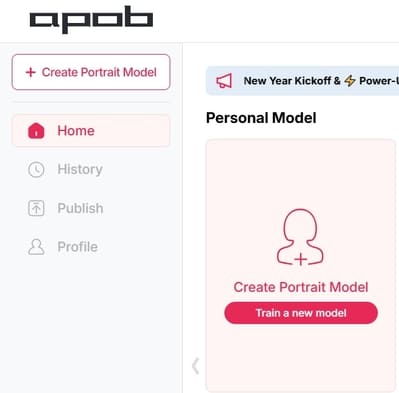
Étape 2 : Définissez Votre Star Principale
Que vous souhaitiez conserver la même personne ou en introduire une entièrement nouvelle, cette étape est là où la magie opère :
Option A (Personnage Cohérent) : Si vous souhaitez changer les actions mais garder l'apparence originelle de la personne, téléchargez un portrait clair et de haute qualité de cette personne comme référence pour le modèle.
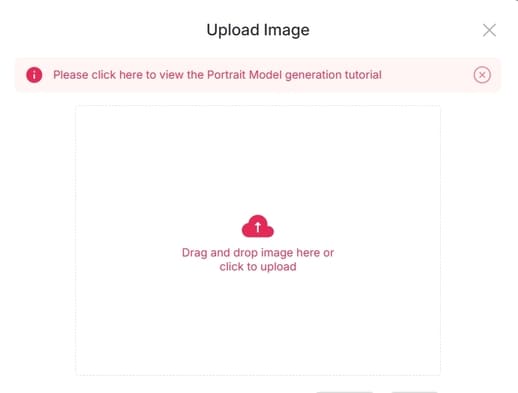
Option B (Nouveau Personnage) : Si vous avez une personne spécifique à l'esprit pour remplacer l'acteur original, téléchargez sa photo de référence ici.
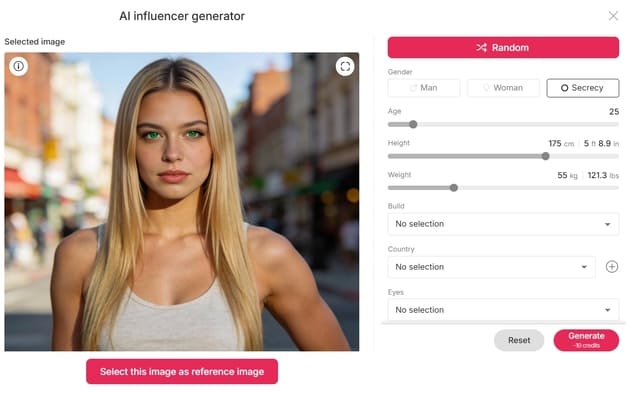
Option C (L'Influenceur IA) : Vous voulez créer un personnage à partir de zéro ? Cliquez sur le “Générateur d'Influenceur IA.” Vous pouvez personnaliser leur sexe, leurs traits du visage, leur poids, leur physique et leur nationalité. Le processus est incroyablement rapide et intuitif.
Étape 3 : Montage Vidéo Sans Effort
Maintenant que votre modèle est prêt, il est temps de passer aux gros travaux—sans la charge de travail lourde. Naviguez vers la section “Éditer Vidéo”. APOB AI a classé ses outils pour correspondre à vos besoins spécifiques :
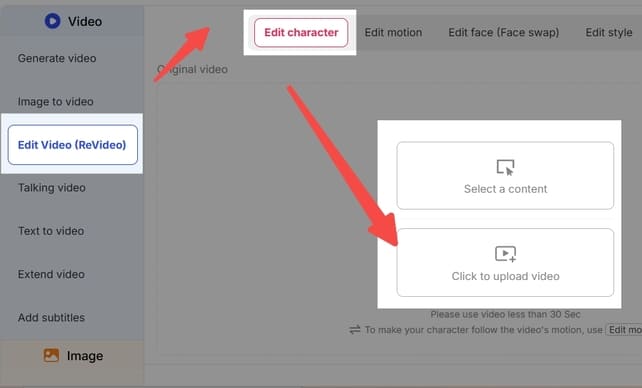
Éditer Personnage : Pour un remplacement complet du personnage.
Éditer Visage : Pour des ajustements précis du visage ou des échanges de visage.
Éditer Style : Pour transformer l'esthétique ou l'« ambiance » globale de la vidéo.
Note : Si vous vous sentez bloqué, notre équipe de support dédiée est toujours disponible pour vous guider.
Projecteur sur la Fonctionnalité : Comment Utiliser « Éditer Personnage »
Cette fonctionnalité est révolutionnaire pour ceux qui veulent remplacer le protagoniste dans une vidéo existante. Par exemple, imaginez que vous souhaitez voir quelqu'un qui ne sait pas danser exécuter une routine TikTok virale.
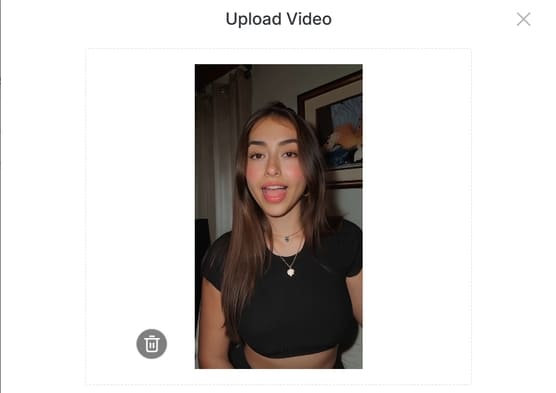
Télécharger : Cliquez sur “Éditer Personnage” et téléchargez votre vidéo originale.
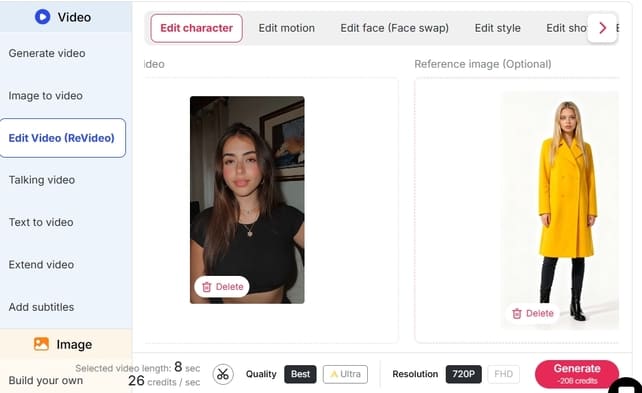
Sélectionnez Référence : Dans le panneau de droite, téléchargez l'image de la personne que vous souhaitez voir apparaître dans la vidéo.
Personnalisation (Facultatif) : Si vous souhaitez que le personnage ait une apparence légèrement différente—par exemple, portant un manteau jaune—cliquez sur “Générer Image de Référence.” Tapez simplement “porter un manteau jaune” dans la boîte de description.
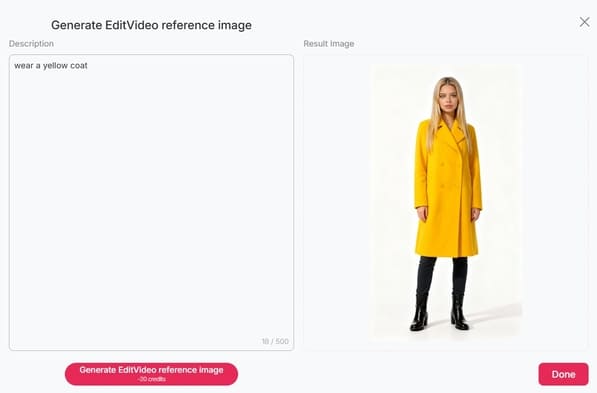
Définir : Si vous aimez l'aperçu généré, cliquez sur Terminé. Sinon, ajustez votre description et réessayez.
Générer : Une fois votre image de référence définie, cliquez sur “Générer.” Le Résultat : Vous recevrez une vidéo de haute qualité de votre personnage choisi (dans ce manteau jaune !) exécutant exactement les mêmes mouvements de danse que la vidéo originale. C'est aussi simple que ça !
Explorez Plus
Au-delà de Éditer Personnage, APOB AI offre une suite complète d'outils comme Éditer Visage et Éditer Style, conçus pour rendre la manipulation vidéo professionnelle accessible à tous.
Prêt à révolutionner votre contenu? Visitez APOB AI et commencez à créer dès aujourd'hui !
Pourquoi cette version fonctionne-t-elle mieux :
Langage Émotif : Utilise des accroches comme "Véritable cauchemar" et "Révolutionnaire" pour se connecter aux points douloureux de l'utilisateur.
Clarté Structurée : Utilise des puces et du texte en gras pour rendre les étapes "scannables".
Tonalité Professionnelle : Remplace "paradis" ou "oh mon dieu" par des alternatives plus professionnelles mais amicales.
Appel à l'Action Clair : Termine par une invitation à essayer le produit immédiatement.
Optimiser Votre Flux de Travail : Pourquoi Utiliser APOB AI ?
Utiliser le contrôle de mouvement vidéo Kling 2.6 au sein de APOB AI offre plus que de la simple accessibilité ; cela fournit un "Mode Conteur" qui améliore le résultat brut. Bien que la sortie standard de Kling soit impressionnante, APOB AI ajoute une couche de technologie "Identity-Lock". Cela garantit que les traits faciaux et les vêtements de votre personnage restent cohérents sur plusieurs plans, ce qui est le "graal" du cinéma IA.
De plus, la fonction "Éditer Vidéo" dans APOB AI permet des ajustements en temps réel. Si le mouvement est parfait mais que l'éclairage semble décalé, vous pouvez utiliser la fonction de chat pour affiner l'atmosphère sans perdre le mouvement généré par Kling.
Questions Fréquemment Posées (FAQs)
Q1 : Qu'est-ce qui rend Kling 2.6 meilleur que la version 2.5 ?
R1 : Kling 2.6 offre une fluidité de mouvement améliorée et une précision de "Extraction Squelettique" significantly. Il introduit également une synchronisation audio native, rendant les vidéos plus immersives comparées aux sorties silencieuses des versions précédentes.
Q2 : Est-ce que le contrôle de mouvement Kling 2.6 est vraiment gratuit à utiliser ?
R2 : L'accès direct via le site officiel nécessite généralement un abonnement payant. Cependant, vous pouvez expérimenter le contrôle de mouvement Kling 2.6 gratuitement en utilisant APOB AI, qui accorde 80 crédits gratuits par jour à tous les utilisateurs inscrits.
Q3 : Ai-je besoin de compétences d'édition professionnelles pour utiliser le contrôle de mouvement Kling AI 2.6 ?
R3 : Non. Grâce à l'interface conviviale de APOB AI, vous n'avez besoin que d'une image source et d'une vidéo de référence. L'IA gère la cartographie complexe des mouvements et le rendu pour vous.
Q4 : Puis-je maintenir la cohérence du personnage avec Kling 2.6 ?
R4 : Oui, surtout lorsqu'il est utilisé via APOB AI. La combinaison du moteur de mouvement de Kling et de la technologie Identity-Lock d'APOB minimise le "dérive" des personnages, garantissant que la personne dans la vidéo a le même aspect du début à la fin.

Soyez le premier à aimer ceci.





Pas de carte de crédit requise


