APOB AI es una alternativa independiente a Gemini Omni Flash para vídeos e imágenes listas para creadores. Preservar la identidad de los personajes, reemplazar fondos, añadir movimiento cinematográfico de cámara y generar resultados comparables; con algunas entradas, modelos y ajustes, APOB también puede producir imágenes fuente más nítidas para el entregable final.
Paso 1: Añade el personaje e introduce el prompt de edición
Abre el espacio de trabajo de vídeo de APOB AI y elige el flujo que corresponda a tu material. Añade el personaje o el clip existente y pega una instrucción de edición precisa. En este ejemplo, conserva la identidad, el rostro, el peinado, el tono de piel, las proporciones, la ropa, la expresión y el movimiento de la persona; sustituye únicamente el fondo por una calle nocturna de Tokio con luces de neón y aspecto fotorrealista; y solicita un lento travelling de aproximación cinematográfico. Indicaciones como «sin cortes», «sin vibraciones», «sin deformación facial» y «sin cambios de identidad» ayudan a proteger el resultado deseado.


Paso 2: Elige la configuración de salida y genera
Mantén activado el audio nativo cuando el sonido original debería seguir formando parte del resultado. Selecciona el formato de destino antes de generar: esta guía utiliza 9:16, cinco segundos, FHD y calidad Ultra para un clip social vertical. Presets como Movimiento de cámara pueden reforzar el dolly-in, mientras que el prompt sigue siendo la fuente de verdad para preservar la identidad, reemplazar fondos, iluminación y temporización de la toma.
Paso 3: Revisa el dolly nocturno de Tokio y refina
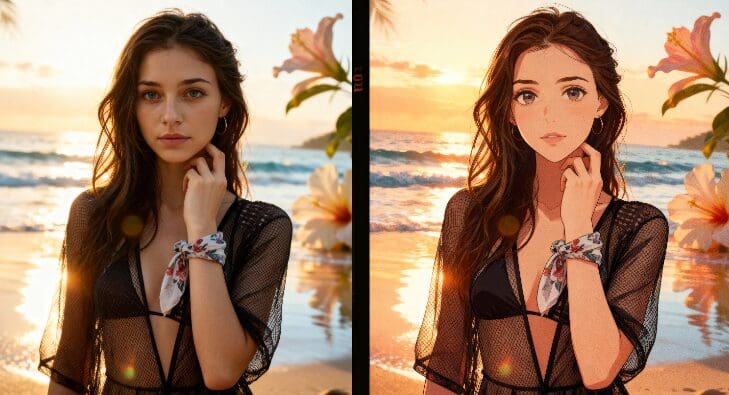
Compara la toma media inicial con el encuadre final más cercano. Comprueba que el personaje siga siendo reconocible, que el fondo nocturno de Tokio se sienta integrado, que la luz de neón y los reflejos del pavimento coincidan con el sujeto, y que el empuje sea suave en lugar de un zoom digital repentino. Si un detalle es débil, cambia solo esa instrucción o un ajuste de generación, y luego crea otra versión. Dependiendo del flujo de trabajo de imagen elegido, el modelo y la calidad de la fuente, la APOB AI también puede producir una imagen de entrada más nítida y lista para creadores antes de la animación.

Flujos de trabajo de creadores de texto, imagen y vídeo
Pasar de una escena escrita, una imagen de referencia o un clip existente a un resultado listo para el creador. La IA de APOB reúne la generación, edición, planificación de tomas, subtítulos, vídeos hablados y recursos reutilizables de campañas en un solo espacio de trabajo.
Edits que preservan personajes
Utiliza medios de referencia e instrucciones explícitas solo de preservación para mantener la identidad, el peinado, el tono de piel, la ropa, la expresión y la composición estables mientras se modifica el entorno, el movimiento o el comportamiento de la cámara.
Reemplazo de fondo y dirección de cámara cinematográfica
Describe la nueva localización, iluminación, reflejos, profundidad de campo y detalle atmosférico, luego dirige un travelling de camino, paneo, movimiento de seguimiento, primer plano u otro comportamiento de plano con lenguaje de prompts y controles amigables para el creador.
Imágenes fuente listas para creadores y formatos sociales
Las herramientas de imagen de APOB AI pueden refinar el fotograma fuente antes de la animación, y sus configuraciones de vídeo soportan entregables verticales y horizontales. En algunas combinaciones de entrada y modelo, la imagen fuente puede ser más nítida o más útil para el encargo final; los resultados varían.
Audio e iteración en el mismo flujo de trabajo
Utiliza opciones de audio nativo cuando estés disponible, luego revisa, regenera, extiende, añade otra toma o continúa con herramientas complementarias de voz, sincronización labial, edición y subtítulos.
Para construir una marca viral, no puedes perder horas transfiriendo archivos entre cuatro aplicaciones diferentes. Deja de pagar por una suscripción para generar rostros, otra para animar el video, una tercera para sintetizar la voz, y una cuarta para sincronizar los labios. APOB AI consolida todo tu proceso de creación en una sola plataforma, ofreciéndote el flujo de trabajo definitivo para convertir un concepto en un influencer digital listo para publicar.
Deja de Perseguir la Tecnología, Siempre Ten el Mejor Motor
El panorama de la IA cambia mensualmente, y los creadores no deberían tener que aprender una nueva herramienta cada vez que aparece un nuevo modelo. En lugar de perseguir APIs individuales, construye tu marca en APOB AI. Integrarmos constantemente los motores de video más avanzados del mundo detrás de escena. Tú te concentras en dirigir tu contenido y hacer crecer tu audiencia; nosotros nos aseguramos de que tu tecnología esté siempre a la vanguardia.
Videos sociales y de creador coherentes con el personaje
Convierte un retrato, avatar o clip existente en contenido para TikTok, Reels y Shorts mientras proteges la identidad del personaje frente a cambios de fondo y movimiento de cámara. La tarjeta de modelo de Gemini Omni de Google describe la generación de video de alta calidad y la edición conversacional; APOB AI ofrece un flujo de trabajo independiente para muchos de los mismos objetivos de los creadores.
Anuncios de productos y variaciones de comercio electrónico
Coloca un producto o creador en nuevos entornos, crea revelaciones en primer plano, genera varias direcciones de campaña y adapta el encuadre para formatos verticales o horizontales sin necesidad de organizar una nueva grabación para cada variación.
Reemplazo cinematográfico de fondos
Transforma una fuente simple en una ciudad de neón, estudio, paisaje, arquitectura o entorno de marca. Ajusta la dirección de la luz, reflejos, profundidad de campo y color para que el reemplazo se sienta parte de la toma original.
Storyboards y previsualización
Prueba el sujeto, la acción, la trayectoria de la cámara, el ritmo y la atmósfera como tomas cortas y controlables antes de comprometerse con un montaje o producción más largo. La documentación oficial de Gemini Omni enfatiza la entrada multimodal y la iteración conversacional; APOB AI aplica un enfoque similar centrado en el creador a través de sus propios modelos y controles.
Un espacio de trabajo conectado para creadores
Genera o edita a partir de texto, imágenes y video, y luego continúa con tomas, controles de cámara, opciones de audio, subtítulos, video hablante y exportaciones listas para redes sociales.
Control práctico sobre la identidad y presentación
Los medios de referencia, mantener solo el lenguaje del prompt, la relación de aspecto, duración, calidad y presets de cámara facilitan que el flujo de trabajo se adapte para creadores, anuncios, productos y contenido de personajes.
Múltiples caminos hacia el resultado visual final
Elige el flujo de trabajo de imagen o video de APOB AI más útil para el proyecto. Algunas combinaciones pueden crear imágenes fuente más nítidas o resultados más listos para entregar que un flujo de trabajo de un solo modelo, aunque la calidad varía.
No es Gemini Omni Flash
APOB AI es una alternativa independiente, ni un producto de Google ni una integración oficial con Gemini. Los modelos, controles, características de salida, precios, disponibilidad y opciones de API varían.
Las ediciones complejas pueden requerir varios intentos
El movimiento de varias personas, manos, cadenas de acciones largas, texto exacto, permanencia de objetos y continuidad perfecta aún pueden requerir referencias más fuertes, indicaciones más simples o múltiples generaciones.
La calidad y el uso de créditos dependen del modo seleccionado
Salidas de mayor calidad, modelos premium, disparos largos o iteraciones repetidas pueden requerir más créditos. Revisa los escenarios en directo antes de generar un lote de producción grande.
Explora más funciones
No se requiere tarjeta de crédito
Respuestas sobre Gemini Omni Flash, APOB AI, consistencia de caracteres, generación de imágenes y vídeos, movimiento de cámara, audio, calidad, créditos, privacidad y uso comercial.
Q1: ¿Qué es Gemini Omni Flash?
Gemini Omni Flash es el modelo multimodal nativo de Google DeepMind para crear y editar medios a partir de texto, imágenes, audio y vídeo, con su primer enfoque público en la creación de vídeo de alta calidad y la edición de vídeo conversacional.
Q2: ¿APOB AI es un proveedor oficial de Gemini Omni Flash?
No. APOB AI es una plataforma independiente de creadores y no está afiliada, avalada ni proveedora oficialmente de Gemini Omni Flash.
Q3: ¿Por qué se describe APOB AI como una alternativa a Gemini Omni Flash?
APOB AI SOPORTA OBJETIVOS DE CREADORES QUE SE SOLAPAN COMO TEXTO A VÍDEO, IMAGEN A VÍDEO, GENERACIÓN CENTRADA EN PERSONAJES, REEMPLAZO DE FONDOS, DIRECCIÓN DE CÁMARA, OPCIONES DE AUDIO NATIVO Y EDICIÓN ITERATIVA DE VÍDEO EN UN SOLO ESPACIO DE TRABAJO.
Q4: ¿Puede la IA de APOB crear efectos similares a Gemini Omni Flash?
Sí, la IA de APOB puede buscar resultados creativos comparables como preservar un personaje, reemplazar un fondo, añadir un carrito cinematográfico y producir un clip pulido y listo para social. Los resultados exactos y los controles varían según el modelo, la entrada y la configuración.
Q5: ¿Puede la IA de APOB generar mejores imágenes que el Gemini Omni Flash?
En algunos flujos de trabajo, las herramientas de imagen y las elecciones de modelos de APOB AI pueden producir imágenes fuente más nítidas o más listas para el creador para el vídeo final. La calidad es subjetiva y depende de la entrada, por lo que la IA de APOB no garantiza que todos los resultados sean mejores.
Q6: ¿Puedo generar vídeo a partir de un prompt de texto?
Sí. Abre texto a vídeo, describe el sujeto, la acción, el escenario, el movimiento de la cámara, la iluminación y el tiempo, y luego elige la relación de aspecto, duración, resolución y calidad antes de generar.
Q7: ¿Puedo animar una imagen existente?
Sí. Usa Imagen para grabar cuando quieras una imagen de referencia para anclar al personaje, la composición, la ropa o el producto, mientras tu prompt se centra en el movimiento, el comportamiento de la cámara y la progresión de la escena.
Q8: ¿Puedo editar un vídeo existente y cambiar solo el fondo?
APOB AI incluye edición de vídeo y flujos de trabajo en segundo plano. Indica claramente que el sujeto debe permanecer sin cambios, describe el entorno de reemplazo y pide al modelo que adapte la iluminación y los reflejos al metraje original.
Q9: ¿Cómo preservo la identidad de un personaje?
Usa una referencia clara, mantén la descripción de identidad estable, preserva explícitamente la cara, el pelo, el tono de piel, las proporciones del cuerpo, la ropa, los accesorios y la expresión, y cambia un elemento de escena a la vez.
Q10: ¿Cómo puedo crear un push-in suave de la cámara?
Añade una instrucción de cámara como "Aplicar un dolly-in cinematográfico lento y suave desde una toma media a un primer plano." Mantén al sujeto centrado y evita zooms bruscos, cortes, vibraciones, distorsiones y desviaciones de identidad.
Q11: ¿Soporta APOB AI audio nativo?
La interfaz de texto a vídeo incluye una opción de audio nativa, y pueden estar disponibles herramientas adicionales de voz, vídeo hablado, sincronización labial y audio según el flujo de trabajo seleccionado y la configuración actual del producto.
Q12: ¿Qué relación de aspecto debería elegir?
Usa 9:16 para TikTok, Reels y Shorts, 16:9 para campañas paisajísticas y conceptos cinematográficos, y otros formatos disponibles cuando mejor se adapten a la plataforma de destino.
Q13: ¿Cuánto puede durar el vídeo generado?
Las duraciones disponibles dependen del modo de APOB AI seleccionado y de la configuración actual del modelo. El ejemplo de esta guía utiliza un plano de cinco segundos; Las historias largas suelen ser más fáciles de controlar como varios planos cortos.
Q14: ¿Qué prompt funciona para el ejemplo de la noche de Tokio?
Pídele a la IA de APOB que mantenga al personaje principal completamente sin cambios, que sustituya solo el fondo por una calle de Tokio neón fotorrealista por la noche, que iguale la iluminación ambiental y que aplique un dolly-in lento de plano medio a primer plano.
Q15: ¿Cómo puedo reducir la deriva de identidad o la distorsión facial?
Utiliza una referencia de alta calidad, reduce cambios simultáneos, mantén el movimiento simple, evita direcciones contradictorias de la cámara, conserva el tiempo original y regenera tras cambiar solo una instrucción o configuración.
Q16: ¿Puedo usar APOB AI para anuncios de productos y vídeos de creadores?
Sí. La IA de APOB puede soportar demostraciones de productos, anuncios al estilo UGC, clips de moda y belleza, ganchos para creadores, vídeos de personajes, variaciones de comercio electrónico y conceptos de campañas cinematográficas.
Q17: ¿Puedo descargar y usar comercialmente el resultado?
Los derechos de exportación y uso comercial dependen del flujo de trabajo seleccionado, tu plan, los términos actuales de APOB AI y tus derechos sobre personas, marcas, música, material y otros materiales de origen subidos. Revisa los términos actuales antes de publicarlo de pago.
Q18: ¿Puedo probar APOB AI gratis?
APOB AI puede ofrecer créditos de prueba o diarios dependiendo de la oferta actual. Inicia sesión y revisa la visualización de créditos en tiempo real y los detalles de precios antes de generar un lote de producción.
Q19: ¿Las imágenes y vídeos subidos son privados?
Utiliza solo medios para los que tengas permiso para procesar y revisa la política de privacidad actual de APOB AI y los controles de cuentas para conocer los últimos detalles sobre almacenamiento, procesamiento y eliminación.
Q20: ¿Cuáles son las limitaciones de este flujo de trabajo alternativo?
APOB AI y Gemini Omni Flash son productos diferentes. El movimiento complejo de varias personas, el texto exacto, las manos, la permanencia del objeto, las largas cadenas de acciones y la continuidad perfecta pueden requerir referencias más fuertes, indicaciones más simples o varios intentos.


