














Efficiency
Quickly generate audio without the time-consuming process of recording, editing, and re-recording your own voice. This allows you to produce content at scale and on a consistent schedule.
Flexibility and Customization
With a diverse library of voices, you have the creative freedom to select the perfect tone for any video. From a serious narrator to a playful character, the options are endless.
Consistency
Maintain a consistent voice and brand identity across all your videos, even when you have multiple creators or are working in different languages.
E-Learning
The AI Voice Generator is used by schools to transform sophisticated curricula and guidebooks into user-friendly audio lessons. This significantly shortens production time for compliance training and web modules and enhances learning engagement. Studies have proved that the union of high-quality audio with text can increase comprehension levels by as high as 30% (Clark, R. C., & Mayer, R. E., 2016).
Podcasting
Content makers appreciate a unified and consistent brand voice for typical YouTube channels or podcasts with an AI Voice Generator. This avoids voice actor scheduling conflicts and very high variables in case of human voice actors. Transition to artificial media was proven to reduce average recurring voiceover cost by more than 80%.
Global Marketing
Marketing professionals use the AI Voice Generator to produce regional ad campaigns in bulk. Our ai voice generator offers support for various accents and languages, enabling marketers to produce specific ad voiceovers for targeted regions at zero cost of studio time.Due to the extremely short turnaround time, brand consistency is maintained while scaling customized content by a huge degree (APOB.AI, 2025).
No Credit Card Required
Abstract
In 2025, AI accent generators are revolutionizing how content producers create content for TikTok, YouTube Shorts, and other platforms. From voice generators for female and male voices on TikTok to AI avatars with accent choices, applications enable producers to create engaging, high-quality audio that halts the scroll and boosts interaction. The benefits, the top tools, how-to tips, and AI accent generator future directions are discussed in this article.
Introduction: Why AI Accent Generators Are Important in 2025
The demand for AI voices is on the rise, especially in short-form videos, and the global market is anticipated to grow at a very high growth rate in the next couple of years (Straits Research, 2025). Unique accents and voice inflections catch people's attention instantly and make videos more interesting. TikTok has popularized TikTok girl and male voice generators, and they have demonstrated how interesting AI voices can be for storytelling, comedy, and branding purposes (Shopify, 2025).
What is an AI Accent Generator?
An AI accent generator is a software that converts written text to audio voice with the potential for creators to add regional or stylistic accents. Unlike normal text-to-speech, AI accent generators:
- Create more natural, lively, and human-like voices (HeyGen, 2025).
- Allow you to select female, male, or personalized voice models.
- Include emotional tones to match your tone of content.
By incorporating accents, producers can enhance relatability, entertainment value, and viewership (Podcastle, 2025).
Top Advantages of Utilizing AI Accent Generators
- Improve viewership engagement – Unique voices make your content stand out and enhance watch time.
- Tailor content to worldwide audiences – Regional accents or stylistic tones enable addressing diverse audiences (Lovo AI, 2024).
- Cost and time savings – No need to rent costly audio studios or hire professional voice actors (1 for All, 2025).
- Freedom of creativity – Swivel between the voices and accent with ease to test which sound works.
Top AI Accent Generators of 2025
4.1 APOB AI – Top Multi-Directional AI Voices and Talking Avatars
APOB AI stands out as the top AI accent generator since it can merge voice creation with engaging talking avatars (aijourn.com, 2025). Some of its most unique aspects are:
- High-quality and life-like girl and male TikTok voice creators.
- AI accents for various languages and regional tones.
- Lip-syncing avatars for perfect lip syncing, perfect for advertisements, tutorials, or sponsored content.
For vireality-conscious creators, APOB AI is a unified solution: create voices, insert accents, and construct animated avatars—all within one platform.
4.2 TikTok AI Voice Generator – In-App Feature for Creators
TikTok has an in-app text-to-speech feature that's well-liked among content creators.
- It is often used for the TikTok girl voice generator to create memes, tutorials, or stories.
- Easy and built-in in the application (Shopify, 2025).
- Drawbacks: no personalization and less accent options compared to APOB AI.
4.3 Other Best AI Accent Generators
There are other tools with very large databases of accents and voices, which are:
- British, American, Australian, and local accents.
- Male and female versions of voices.
- Large catalogs for maximum freedom to be creative.
These tools are handy but not integrated into avatars like APOB AI.
How to Use AI Accent Generators Effectively
- Choose the right gender and tone for your video: TikTok girl vs. male voice.
- Apply accents to match your brand or storytelling style.
- Pair audio with captions or subtitles to increase accessibility and engagement.
- Experiment with APOB AI’s talking avatars to combine voice, emotion, and visual appeal.
Common Mistakes to Avoid
- Overusing robotic or unnatural voices.
- Ignoring consistency in brand tone and style.
- Not trial-testing voices with your audience (Accio, 2025).
- Having multiple accents on one video, confusing the viewer.
3. The Future of AI Voices on Social Media
- AI voices will be more natural-sounding, with deeper emotions and inflections (ProfileTree, 2025).
- Chatty avatars that can be personalized will enable brands and content creators to keep things consistent from campaign to campaign.
- AI-based accent generators will be more prevalent within global content creation, helping creators connect with users globally.
FAQs
Q1: What is the best TikTok AI accent generator?
A: The creator's favorite is APOB AI, offering a mix of TikTok girl and boy voice with natural-sounding accents and speaking avatars.
Q2: Do I get to generate both male and female voices using AI?
A: Yes. APOB AI can be used as tiktok girl voice generate and tiktok male voice generator. We offers female, male, and custom voice models with accent facilities. What's more, you could train your own ai voice model.
Q3: How realistic are AI-accented sounds?
A: The AI accent generated by us sounds very real. To make the ai girl voice or ai male voice more realistic, you can adjust the 'Emotion' of the sound.
Q4: Is APOB AI a TikTok voice generator free software?
A: Our platform is free to try, with advanced features being offered through paid platforms. Sign up for free and you will get 80 free credits every day.
Q5: Can one use AI accent generators for business ads?
A: Yes. AI Accent Generator is ideal for social commercials, tutorials, and sponsored campaigns.
Conclusion
In 2025, AI accent generators become a must for creators to make videos go viral. APOB AI is the best of the best with diverse voices, authentic accents, and conversation avatars to assist creators in saving time, cutting costs, and creating professional, engaging content on any platform.
References
APOB.ai. (2025) Creator AI | Personalized AI Portrait | AI Image & Video. Available at: https://apob.ai/ (Accessed: 23 September 2025).
Accio. (2025) Best Selling AI Voices for TikTok 2025: Top 6 Revealed!. Available at: https://www.accio.com/business/best-selling-ai-voice-for-tiktok (Accessed: 14 September 2025).
aijourn.com. (2025) Creators Can Now Build AI Influencers in Minutes With APOB AI's New Avatar and Video Tools. Available at: https://aijourn.com/creators-can-now-build-ai-influencers-in-minutes-with-apob-ais-new-avatar-and-video-tools/ (Accessed: 22 July 2025).
HeyGen. (2025) 10 Creative Uses of AI Voice Generators for Storytelling. Available at: https://www.heygen.com/blog/ai-voice-generator-for-immersive-storytelling (Accessed: 26 May 2025).
Influencer Marketing Hub. (2024) Top 51 AI Marketing Statistics for 2024. Available at: https://influencermarketinghub.com/ai-marketing-statistics/ (Accessed: 2 October 2024).
Lovo AI. (2024) The Key Benefits of Using AI Generated Voices. Available at: https://lovo.ai/post/the-key-benefits-of-using-ai-generated-voices (Accessed: 18 July 2024).
Podcastle. (2025) You Know That AI Voice on TikTok? Here's Where It Came From. Available at: https://podcastle.ai/blog/tiktok-ai-voice/ (Accessed: 3 February 2025).
ProfileTree. (2025) AI Voice: Market Growth, Leading Tools, Trends & Business Impact. Available at: https://profiletree.com/ai-voice-market-growth-leading-tools-trends/ (Accessed: 4 March 2025).
Shopify. (2025) TikTok AI Voice: Complete 2025 Guide + Best Generators. Available at: https://www.shopify.com/blog/tiktok-ai-voice (Accessed: 7 August 2025).
Straits Research. (2025) AI Voice Generators Market Size, Trends, Insights & Growth Report by 2033. Available at: https://straitsresearch.com/report/ai-voice-generators-market (Accessed: 13 September 2025).
Read More

Abstract
Read this article about APOB AI and you will know how to use APOB AI's AI voice generator to boost engagement in your videos! TikTok content creators are continually searching for ways to make their videos otherworldly. With a TikTok AI voice generator, people can convert text into sound-alike natural voices, from female and male voices to AI accents, generating unique content that is compelling and increases engagement.APOB AI is an all-round utility that helps content creators create natural-sounding AI avatars and voices at the click of a button, making it simpler to generate content, saving time, and making it more fulfilling.
What is a TikTok AI Voice Generator?
A TikTok AI voice generator is an AI-powered tool that utilizes written text to generate realistic sound. On TikTok, it is employed to create text-to-speech narration, which is often employed to add a dynamic and engaging element to videos (Podcastle, 2025).
With APOB AI, developers are able to create realistic AI Girls or Boys and bring them to life through voice with the Talking Avatar feature. This makes it possible to have very personalized voices and faces, and videos appear professional and interesting (APOB.ai, 2025).
Producers can experiment with varying voice tones. Feminine voices can be happy, playful, or professional in tone, and men possess deeper, authoritative tones. For added creativity, AI accents allow you to try regional or stylistic speaking, giving videos a personal feel (Influencer Marketing Hub, 2024). With the above features used strategically, TikTok producers are able to hook viewers, drive engagement, and make videos more shareable.
Why TikTok AI Voice Generators Are Crucial
The arrival of AI voice technology is transforming content creation, and they are effective according to facts (Socialinsider, 2025).
- Boost Engagement – Realistic voices attract viewers and boost engagement (Podcastle, 2025).
- Save Time and Effort – No recording of your own voice, no voice actor cast to be hired, plenty of time saved for content creation (AFAEducation, 2025).
- Trend Participation – Instantly creates content with viral sounds and memes.
- Versatility – Switch from male, female, to accented voices to suit any video concept.
With the usage of APOB AI, creators can effortlessly create quality content at any moment without compromising professionalism and affordability (Makemedia, 2025).
How to Use APOB AI Talking Avatar to Add AI Voices to Your TikTok Videos
With APOB AI, Talking Avatar allows you to convert text to fully lip-synced, animated speech. How:
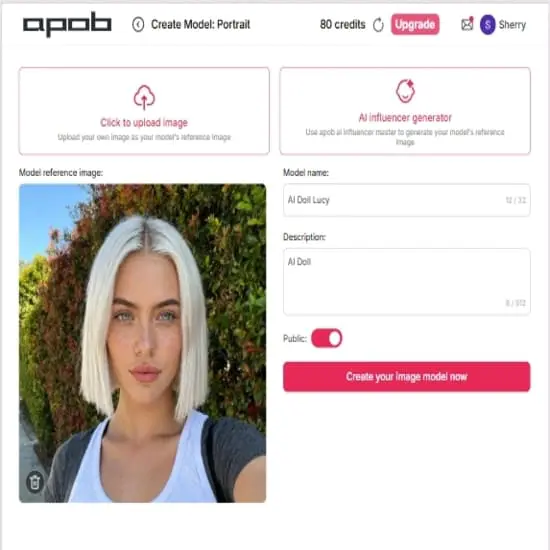
Step 1: Create Your AI Model With APOB AI
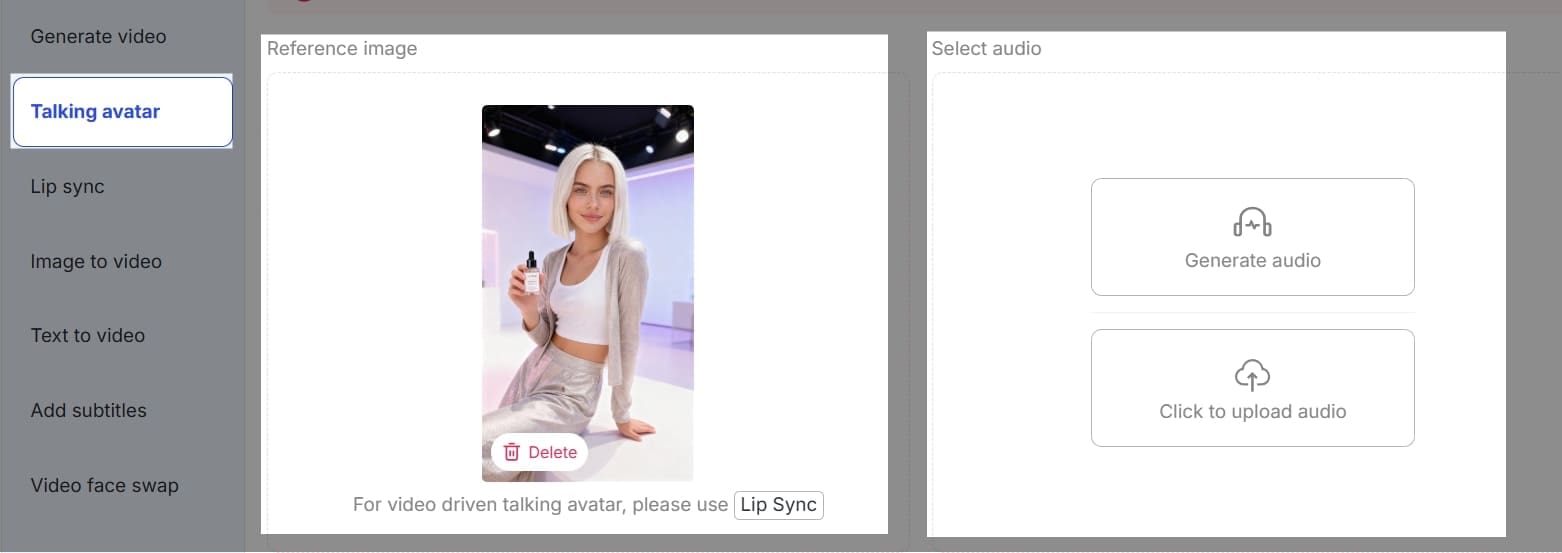
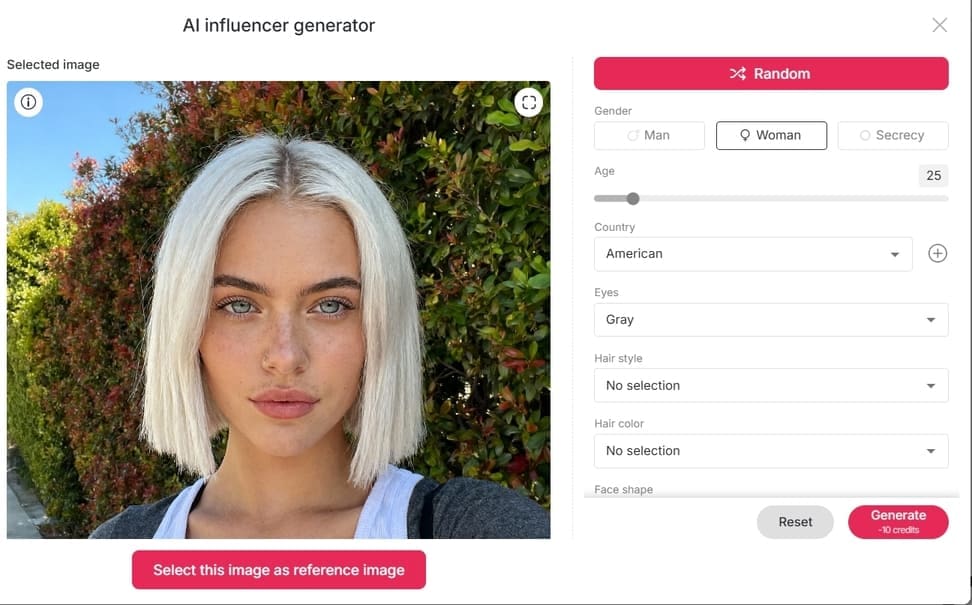
Develop an AI Girl or Boy avatar in APOB AI. If you already have a character, upload his or her photo. If you don't have a character, you could click on 'AI Influencer Generator' to get one, you could personalize appearance, expression, and style to fit your content (APOB.ai, 2025).
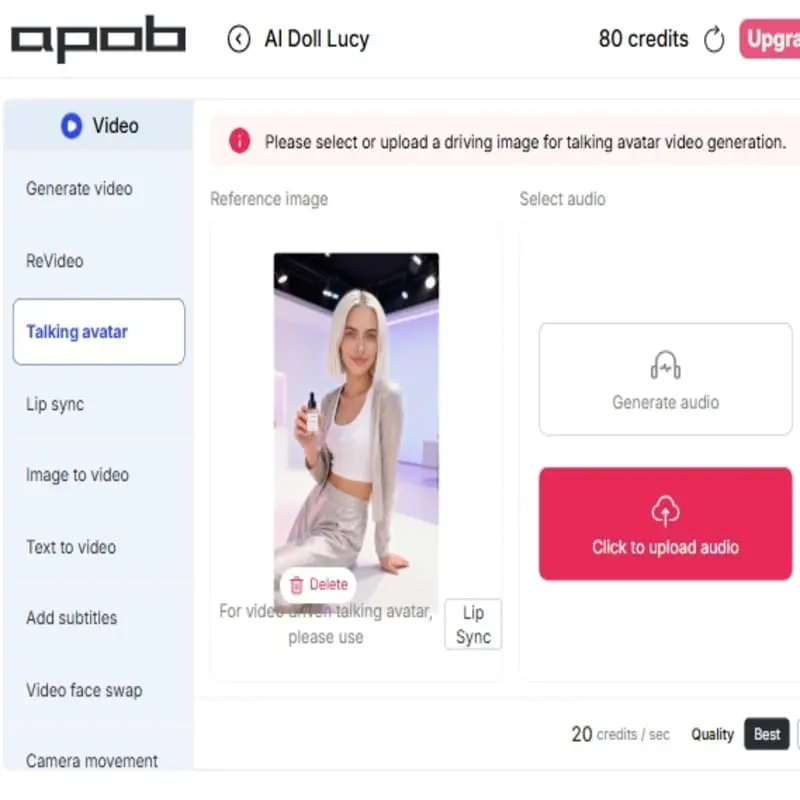
Step 2: Find 'Talking Avatar', and then upload one image of this AI Character as reference to generate a video.
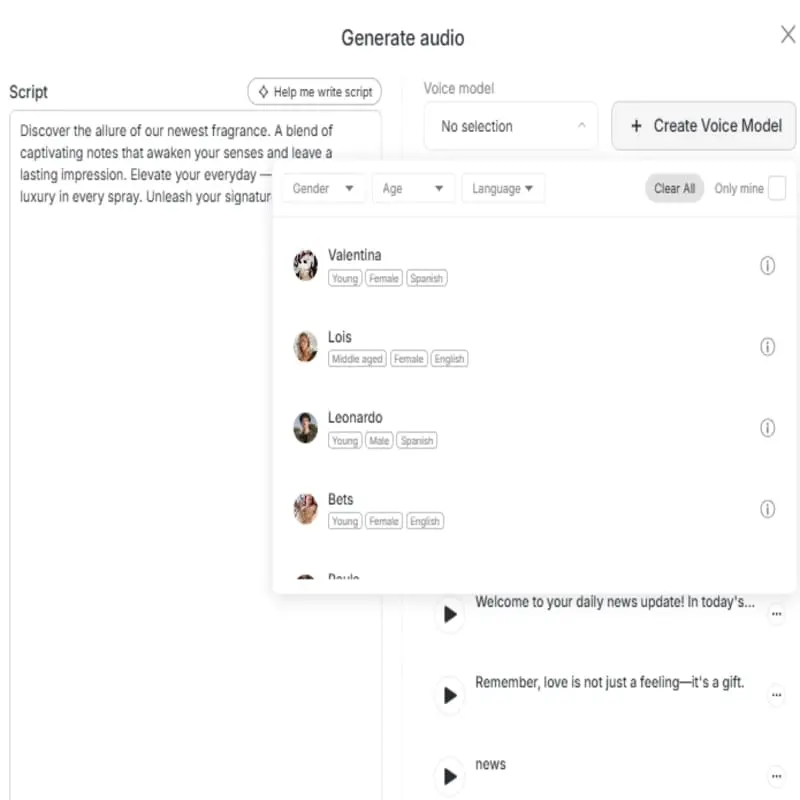
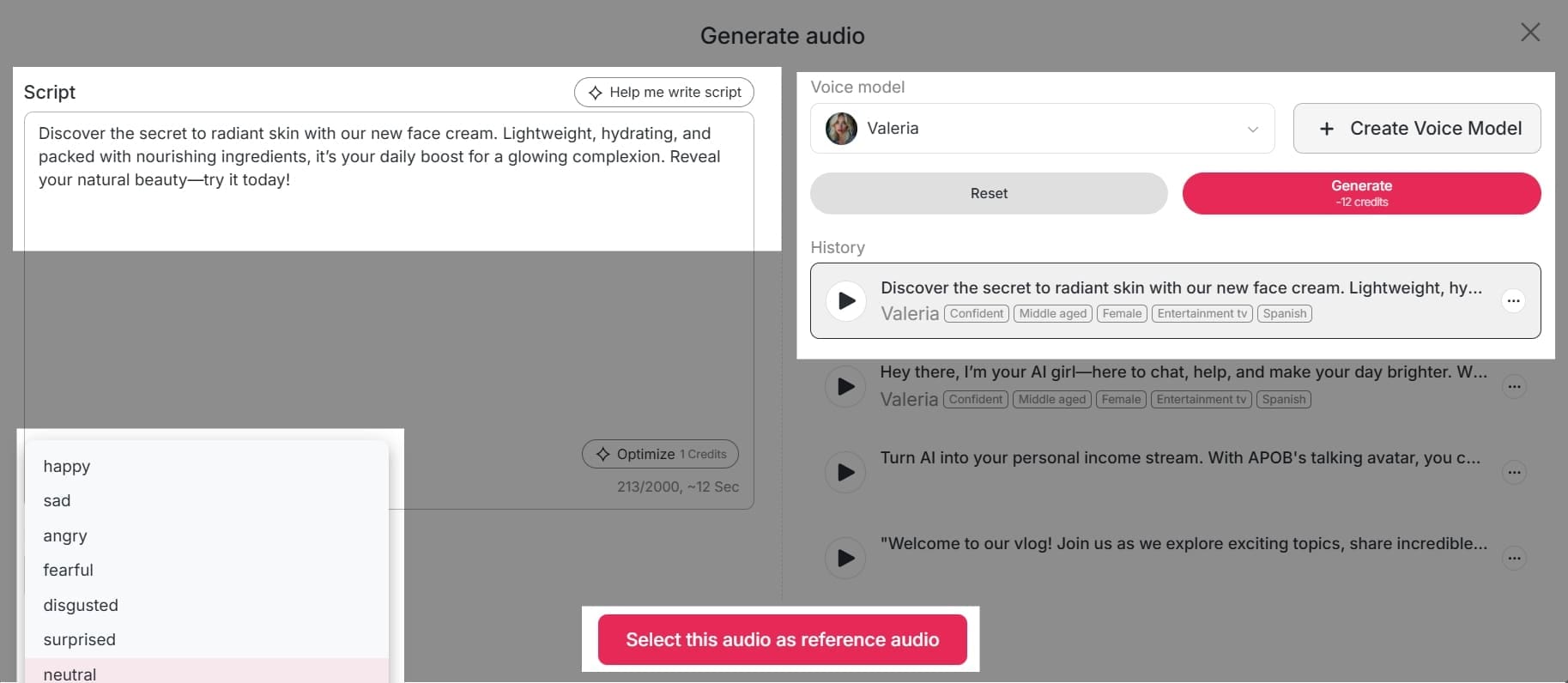
Click 'Generate Audio' to turn text to speech. In the "Script" box on the left, write or paste the text you want the AI to read. There is a helpful "Help me write script" button if you need ideas, and the word count is clearly tracked at the bottom.
Step 3: Choose Your Voice Model
On the right side of the screen, under "Voice model," you'll see a dropdown menu. Click on it to select from a list of available AI voices. If you don't find a voice you like, you can click the "+ Create Voice Model" button to train a new one using your own audio. Below the script box on the left, you can set the emotion for the audio. The default is "neutral," but you can click the dropdown menu to explore other options that might be available for your chosen voice model.
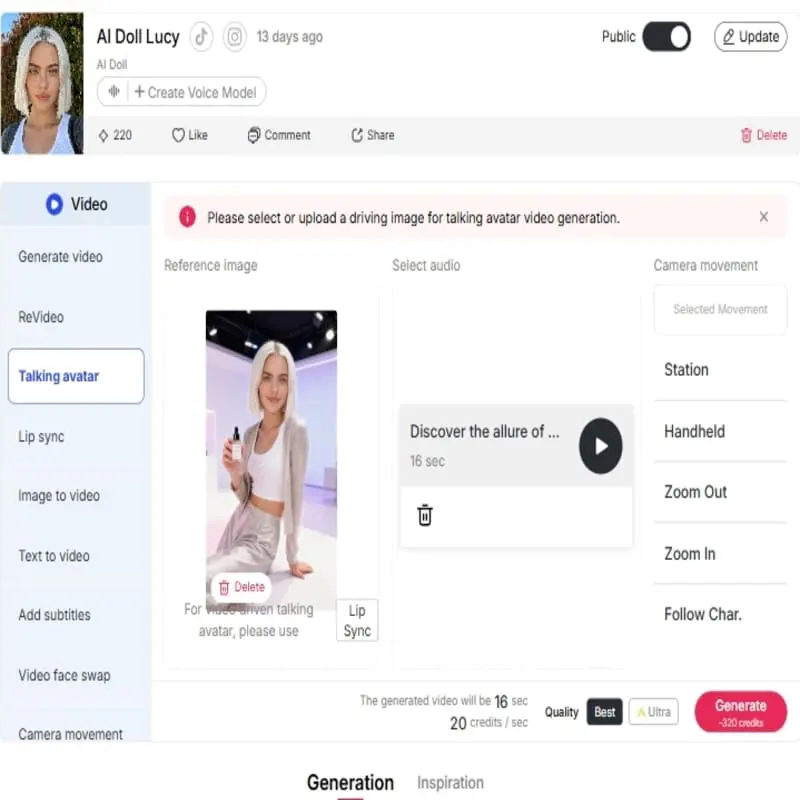
Step 4: Generate and Listen
The newly generated audio clip will be added to your "History" section, which is a log of all your previous creations. You can play, edit, or download clips from this list. Once your script, voice model, and emotion are set, click the "Generate" button. The tool will process your request and create the audio.
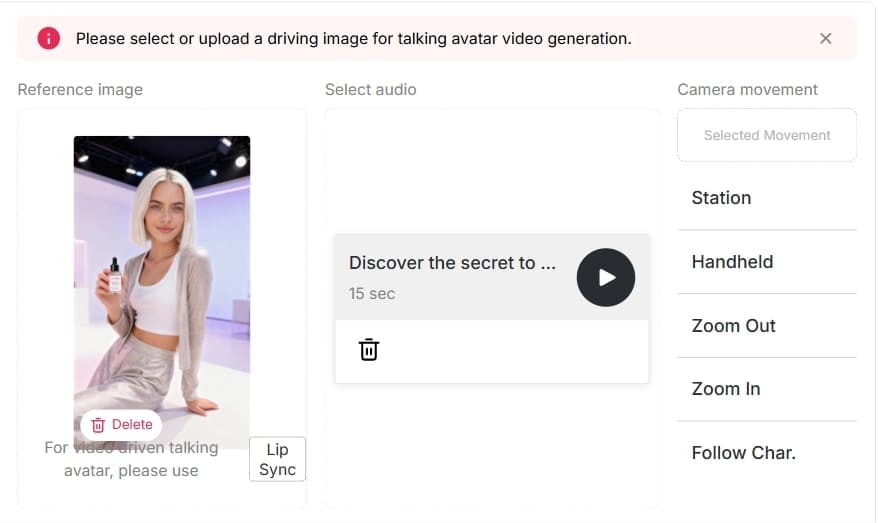
Using APOB AI’s Talking Avatar, creators can produce professional text-to-speech content without recording their own voice or hiring voice actors, making videos more unique and engaging.
Tips for Maximizing TikTok Text-to-Speech
- Keep text short, clear, and engaging.
- Match the voice tone with your video theme.
- Experiment with AI accent options for humor or uniqueness.
- Test different male and female avatars to see what resonates with your audience.
These are methods that allow creators to gain attention quicker and build more follower interaction (Socialinsider, 2025).
Advantages of APOB AI for TikTok Creators
APOB AI boasts a myriad of advantages that make it ideal for TikTok content creation.First, it saves time from wastage through the removal of manual audio recording or the sourcing of voice talent (AFAEducation, 2025).Second, it is cost-effective, reducing production costs while yielding professional results (Makemedia, 2025).Third, it enables creators to choose between several voice options including male, female, and accented voices, enabling creators to tailor their content to different target audiences (Influencer Marketing Hub, 2024). Finally, it also increases creativity since users can make videos with innovative storytelling methods and animate AI avatars.
These combined features make APOB AI an effective utility to drive engagement and broaden your TikTok reach.
FAQs About TikTok AI Voice Generators and APOB AI
Q1: What is the difference between TikTok text-to-speech and APOB AI Talking Avatar?
A1: TikTok text-to-speech offers basic voice options, while APOB AI Talking Avatar provides customizable AI avatars with realistic, lip-synced voices.
Q2: Can I use APOB AI to generate both male and female voices?
A2: Yes, APOB AI allows you to create both male and female AI avatars with high-quality speech.
Q3: Can I apply accents to AI voices?
A3: Absolutely. APOB AI supports AI accent generation, making your videos more entertaining and unique.
Q4: Is APOB AI suitable for beginners?
A4: Yes. The platform is user-friendly and requires no professional recording skills.20
Q5: Can APOB AI help increase TikTok engagement?
A5: Definitely. Lifelike voices and animated avatars make content more interactive, shareable, and likely to go viral.
Conclusion
A TikTok AI voice generator like APOB AI is a game-changer for creators looking to boost engagement, save time, and add creative flair to their videos. From female and male voices to AI accents, APOB AI’s Talking Avatar feature allows you to produce professional, interactive content that stands out on TikTok.(21)
Start using APOB AI today to turn text into high-quality AI voices and animated videos, and make your TikTok content more engaging than ever.
References
AFAEducation. (2025) The Rise of AI Voice Generators: Are They the Future of Content Creation? Available at: https://afaeducation.org/blog/the-rise-of-ai-voice-generators-are-they-the-future-of-content-creation/ (Accessed: 3 August 2025).
APOB.ai. (2025) Creator AI | Personalized AI Portrait | AI Image & Video. Available at: https://app.apob.ai/ (Accessed: 23 September 2025).
Influencer Marketing Hub. (2024) Top 51 AI Marketing Statistics for 2024. Available at: https://influencermarketinghub.com/ai-marketing-statistics/ (Accessed: 2 October 2024).
Makemedia. (2025) AI Content Creation vs Human Writers: Cost-Benefit Analysis. Available at: https://makemedia.ai/ai-content-creation-vs-human-writers/ (Accessed: 23 September 2025).
Podcastle. (2025) You Know That AI Voice on TikTok? Here's Where It Came From. Available at: https://podcastle.ai/blog/tiktok-ai-voice/ (Accessed: 3 February 2025).
Socialinsider. (2025) TikTok Benchmarks 2024: Content Performance Analysis And Strategic Insights. Available at: https://www.socialinsider.io/social-media-benchmarks/tiktok (Accessed: 8 September 2025).
Read More

Abstract
APOB AI is an innovative accent generator tool that allows you to generate various accents, including a British accent, American accent, Yorkshire accent, and Atlantic accent. You can easily transform your text into high-quality voice recordings with the accent of your choice. After generating the voice, users can download the audio files for use in various projects. Whether you're creating content for social media, advertisements, or personal projects, our accent generator will help you create authentic-sounding voiceovers with ease.
Try AI Accent Generator For Free
1. Introduction: What is a British Accent Generator?
Explanation: A British accent generator is a tool that converts written text into speech using a British accent. We provide a British accent voice generator, allowing users to create text-to-speech with a variety of accents.
Why It Matters: Different accents can convey different cultural and regional nuances, making your content more engaging and diverse. Whether you're creating a commercial, podcast, or YouTube video, using the right accent can enhance your message.
2. How Does the British Accent Generator Work?
Step 1: Select the Accent: We offer a variety of accents, including British, American, Yorkshire, and Atlantic accents. Users can choose the accent that best fits their needs.
Step 2: Enter Your Text: Once you've selected your desired accent, you can enter the text you want to be read aloud.
Step 3: Generate and Download: After generating the voice, users can download the audio file in high-quality format. The voice generation process takes just a few seconds.
3. Features of Accent Generator
Multiple Accents: APOB AI can generate voices in a variety of accents, such as:
British Accent: Perfect for UK-based content or whenever you want to add a touch of sophistication to your project.
American Accent: A popular choice for international audiences, ideal for a more neutral tone.
Yorkshire Accent: A regional British accent, perfect for conveying British authenticity.
Atlantic Accent: Great for more neutral English tones with an American twist.
Voice Customization: You can adjust the pitch, speed, and tone of the voice to match your content.
Text-to-Speech Quality: The AI-generated voices sound natural and realistic, making it feel as though a human is speaking.
Downloadable Audio: After generating the voice, you can easily download the audio files and use them in your content projects.
4. Why Accent Generator Will Help You
Create Professional Sounding Content: With APOB AI, you can make your content sound more polished and professional, whether it’s for a YouTube channel, an e-learning module, or an advertisement.
Authenticity: By generating voices in regional accents, you can provide an authentic feel to your content, helping your audience connect with it more.
Time-Saving: Using APOB AI’s British accent text generator is much faster than recording a voiceover yourself or hiring a voice actor. You can generate high-quality audio in a matter of minutes.
5. How Can You Use Accent Generator?
Social Media Content: Use the British accent, or any other accent, to create engaging voiceovers for Instagram, YouTube, or TikTok videos.
Podcasting and Narration: Add personality to your podcasts with different accent choices. Whether you're narrating a story or explaining a topic, the right accent can make your podcast more engaging.
E-learning Modules: If you're creating an educational course, use the British accent voice generator to make the content more relatable and easier to understand.
Marketing and Advertising: Use the voice generator for creating compelling ads and voiceovers with different accents to reach various audiences.
6. The Advantages and Disadvantages of Using Accent Generator
Pros:
Multiple Accents: Choose from various accents to fit the tone and context of your content.
High-Quality Output: The voices generated are natural and human-like.
Time-Saving: Quickly generate voiceovers without the need for recording or hiring voice actors.
Easy to Use: The user interface is simple, making it easy to create and download voice files.
Cons:
Limited Customization: While the voices can be adjusted in terms of pitch and speed, they may not offer full customization like hiring a professional voice actor.
Free Version Limitations: The free version may have certain limitations on the number of voices you can generate or the file format options.
FAQs About Accent Generator
Q1:What accents can be generated?
A1:We can generate various accents, including British accent, American accent, Yorkshire accent, and Atlantic accent.
Q2:How do I use British accent generator?
A2:Simply sign up for APOB AI, choose your desired accent, input your text, and generate the voice. You can then download the audio file for use in your projects.
Q3:Can I use the accent generator for free?
A3:Yes, APOB AI provides free access to the accent generator, so you can start creating voice samples without any cost.
Q4:Can I download the audio files after generation?
A4:Yes, after generating the voice, you can download the high-quality audio files to use in your content.
Q5:Can I customize the voice once it’s generated?
A5:Yes, you can adjust parameters such as pitch and speed to fine-tune the voice to your liking.
Read More
1. Monetization
You can create professional-grade voiceovers for faceless channels, allowing you to monetize content on TikTok without ever showing your face or using your voice.
2. Speed
Quickly produce high-quality audio, drastically reducing your content creation time.
3. Accessibility
AI voice generators make content accessible to a wider audience, including people with visual impairments or those who prefer to listen rather than read.
1. Human-like emotion
While AI voices are becoming increasingly advanced, they may still lack the full range of subtle emotions, intonations, and inflections that a human voice actor can provide. However, our 'Talking Video' feature has allowed users to adjust the emotion mode of the voice, so you don't need to worry about it.
Is this tiktok AI voice generator free to use?
Yes, you can sign up to get a free membership and you will be able to get 80 credits for free every day. We offers a free plan with generous features to get you started.
What is an AI Voice Generator, and what can I use it for?
An AI voice generator is a tool that uses artificial intelligence and deep learning to create realistic human speech from text. Unlike outdated Text-to-Speech (TTS) technology, modern AI voice generators are trained on vast datasets to produce natural-sounding voices with correct intonation and emotion. You can use this technology for:
Video content: Create professional voiceovers for YouTube, TikTok, and other social media videos.
Audiobooks and Podcasts: Convert written scripts into high-quality audio content.
eLearning: Develop narrated tutorials and educational materials.
Marketing: Produce voiceovers for advertisements and promotional content at scale.
How can I create different accents and voices with an AI voice generator?
A great AI accent generator provides a wide range of voice options to fit your needs. You can choose from a library of voices that support various accents, languages, and dialects. This is especially useful for creating content for global audiences or for projects that require character voices, such as in animated videos or storytelling. You can simply select the voice that fits your content and the AI will generate the speech in the correct style and accent.
How do I use an AI voice generator for my TikTok content?
For creators looking to enhance their social media presence, using a TikTok AI voice generator is a game-changer. APOB AI makes this process incredibly simple and fast. All you have to do is:
Type or paste your script into the platform.
Choose a voice that matches the tone of your video.
Click “generate” to create your voiceover.
Export the audio file and add it to your video on TikTok.
This allows you to quickly produce consistent, high-quality audio without needing to record your own voice, saving you significant time and effort.


