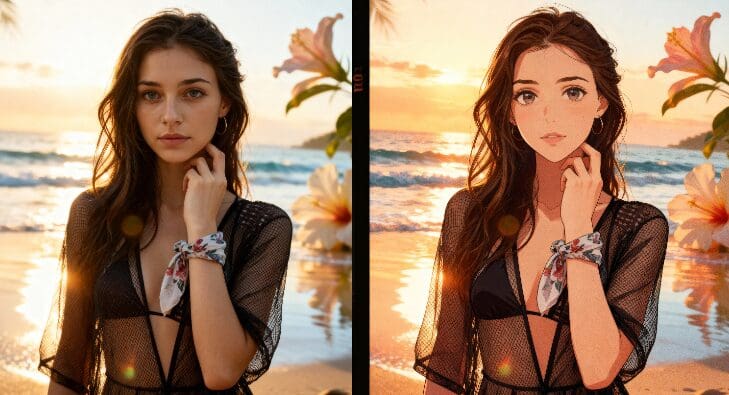
Turn any video into a cinematic masterpiece with Runway AI video editing. Upload, edit, or replace characters with ease. The AI video generator market is experiencing rapid growth, projected to expand from $788.5 million in 2025 to $3.4 billion by 2033[^1], making powerful yet accessible video editing tools more important than ever for creators.
What is Runway AI Video Editing?
Runway AI video editing is a cloud-based platform that uses AI to transform and enhance videos. You can upload an existing video and apply AI-powered edits like style transfer, object removal, and background replacement. The platform includes timeline-style projects where you place clips, apply transitions, and enhance footage.
It also features tools like super slow motion, color grading, face blurring for privacy, and other post-production effects. For instance, the "Video to Video" tool lets you input a video along with a prompt or an image, then the AI edits the video style, camera movement, or scene while keeping the original motion intact.
Runway stands out for generative AI video with advanced tools, including the Aleph model that enables edits like changing angles, weather, or props[^3]. Even on APOB AI, you can experience similar video editing features, making it easy for creators to produce professional-quality videos without expensive equipment.
How to Get Free Chances to Use Runway AI Video Editing
To try Runway AI video editing for free, click the button below to visit the website and claim 80 daily credits. These credits let you start creating with AI immediately. Begin by clicking Create Portrait Model to start your AI journey.
You can then choose Text to Video or Image to Video to generate videos. The AI will automatically add camera movement and background music for you.
If you already have a video, you can directly try the Revideo feature. Upload a 30-second video (later you can upload up to 5 minutes) and a single photo — the person in the photo will replace the character in the video. This feature costs 26 credits per second, but you can accumulate free credits daily.
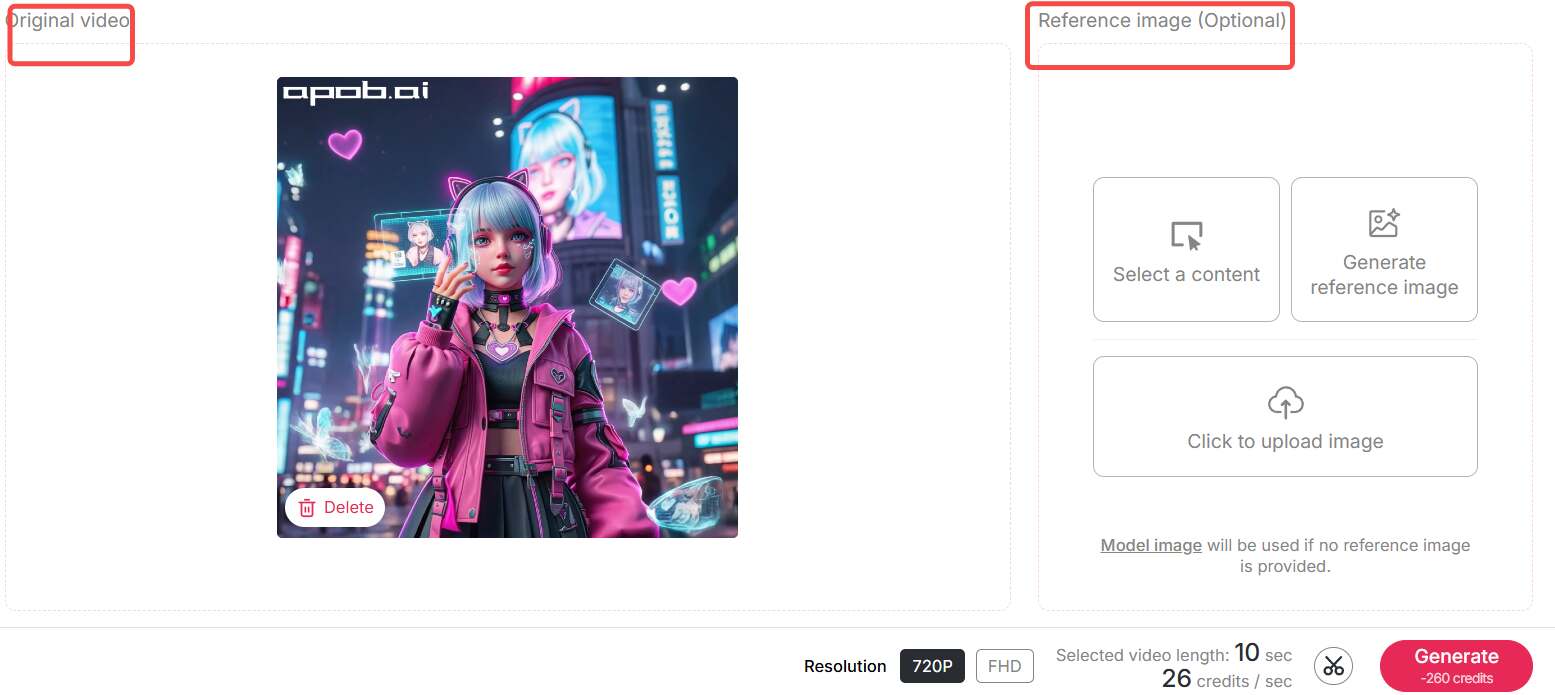
For promotional use, you may also contact APOB support to request 1000 free credits to produce marketing videos using Revideo.
Revideo Use Cases
Transform Video Styles
With Revideo, you can completely change a video's style. For example, use Chat to Edit to turn characters into anime style, then replace the original person with the new style character.

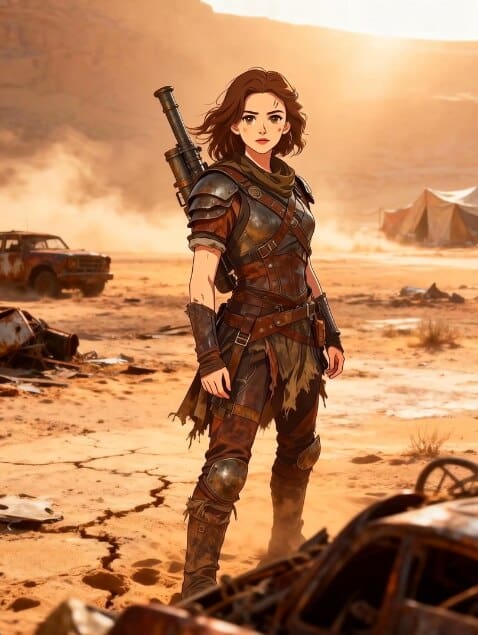
Tip: Ensure consistency in character design and angle to maintain smooth video transitions.
Replace Characters in Videos
Easily replace characters in existing videos. Upload a photo of the new character, and the AI will substitute them seamlessly.
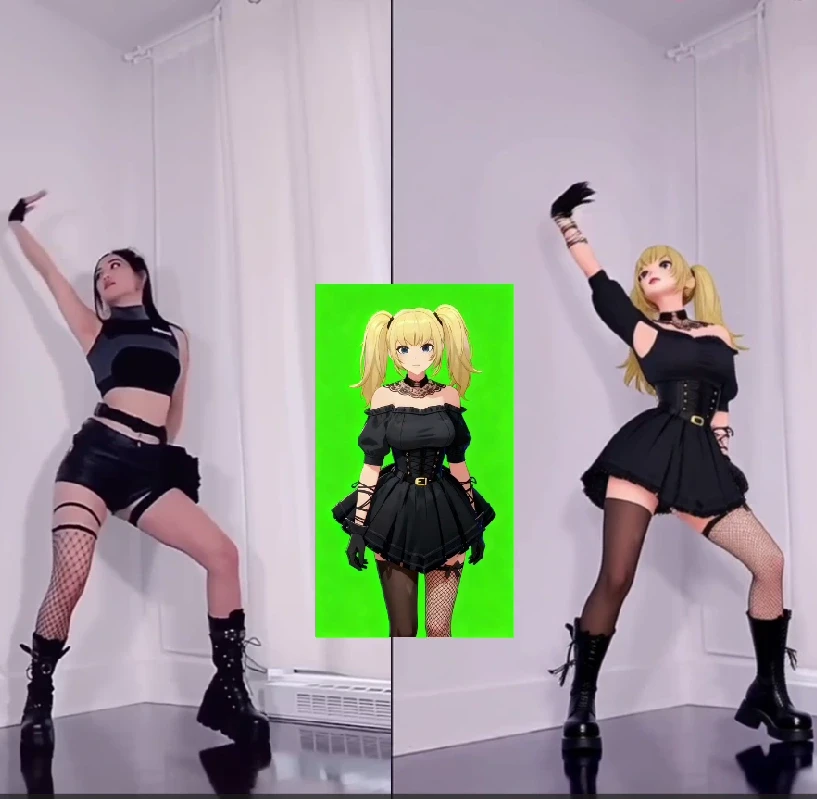

Tip: If you want higher clarity and resolution, click Video Upscale and select FHD to enhance the visual quality.
Best Practices for AI Video Editing
To maximize the quality and efficiency of your AI video editing workflow, consider these proven strategies that professional creators use with Runway AI video editing and similar platforms.
Optimize Your Prompts
Be specific with your prompts when using AI video editing tools. Include details about style (e.g., "cinematic," "anime," "realistic"), mood (e.g., "dramatic," "cheerful"), lighting conditions (e.g., "golden hour," "studio lighting"), and composition (e.g., "close-up," "wide shot"). The more precise your instructions, the better the AI can interpret your creative vision.
Manage Your Credits Strategically
With APOB AI's daily credit accumulation system (80 points per day), plan your projects in advance. For high-cost features like Revideo (26 credits per second), accumulate credits over several days before starting. This approach is particularly valuable for creators who rely on digital platforms and tools to generate and monetize content[^2], as it allows for better budget management.
Maintain Visual Consistency
When transforming video styles or replacing characters, ensure consistency in character design, camera angles, and lighting across all frames. This prevents jarring transitions and maintains professional quality. Use reference images to guide the AI and keep your visual style cohesive throughout the project.
Leverage Upscaling for Final Output
Always use the Video Upscale feature with FHD settings for your final exports, especially for client work or commercial use. While this consumes more credits, the enhanced resolution and clarity significantly improve the professional appearance of your videos.
Test Before Full Production
Before committing credits to a full video, test your concepts with shorter clips or lower-resolution previews. This helps you refine your prompts and settings without wasting valuable credits on iterations.
Technical Specifications Comparison
Understanding the technical capabilities of Runway AI video editing compared to APOB AI helps creators choose the right platform for their specific needs. Here's a detailed comparison:
Feature | Runway AI | APOB AI |
|---|---|---|
Free Credits | 125 total credits | 80 points/day (accumulative) |
Credit Accumulation | No | Yes, unlimited |
Video to Video | Yes, with Aleph model | Yes, with style transfer |
Character Replacement | Advanced | Revideo feature (26 credits/sec) |
Text to Video | Gen-3 Alpha | Multiple modes available |
Image to Video | Yes | Yes, with camera control |
Video Upscaling | Available | FHD upscaling |
Style Transfer | Advanced (Aleph) | Chat to Edit feature |
Max Video Length (Free) | Varies by credits | 30 sec initially, up to 5 min |
Camera Control | Advanced | Zoom, Follow, Around |
Background Music | Manual addition | Automatic integration |
Promotional Credits | Not available | 1000 credits on request |
Why You Should Use Runway AI Video Editing
Fast and Easy
Runway AI video editing saves time by automating complex post-production tasks. You don't need professional skills to create engaging videos. The intuitive interface and AI-powered automation make it accessible to beginners while providing advanced features for experienced creators.
High-Quality Output
Even free users can produce high-resolution videos with smooth transitions, camera movement, and built-in background music. The platform's advanced AI models ensure professional-grade results that are suitable for commercial use, client projects, and social media content.
Versatile Applications
From marketing content to social media clips or educational videos, Runway AI adapts to various creative needs. Whether you're creating product demonstrations, cinematic cuts, learning tutorials, or artistic animations, the platform provides the tools and flexibility to bring your vision to life.
Cost-Effective for Creators
With APOB AI's daily credit accumulation and the option to request promotional credits, creators can produce professional videos without significant upfront investment. In 2026, when creators earn most (59%) of their revenue from sponsored content[^4], having access to cost-effective video editing tools is essential for maximizing profitability.
Why Choose APOB AI for Video Editing
While Runway AI video editing offers powerful features, APOB AI provides several distinct advantages that make it particularly attractive for independent creators and small businesses:
Daily Credit Accumulation
Unlike Runway's fixed 125 credits, APOB AI provides 80 points daily that accumulate without expiration. This means you can save credits for larger projects without pressure to use them immediately. Over a week, you accumulate 560 points—enough for multiple high-quality video projects.
Promotional Support
APOB AI offers 1000 free credits for promotional purposes, enabling creators to produce marketing videos without depleting their regular credit balance. This is particularly valuable for businesses launching new products or campaigns.
Integrated Workflow
APOB AI combines character creation, image generation, and video editing in one platform. You can create AI characters, generate images, and convert them to videos without switching between multiple tools, streamlining your creative workflow.
Automatic Enhancements
APOB AI automatically adds camera movement and background music to your videos, reducing the manual work required for polishing. This automation helps creators produce professional content faster, which is crucial in today's fast-paced content creation environment.
FAQs
Q1: Can I use the videos and images commercially?
Of course, you can use these videos and images made with Runway AI commercially. Both Runway AI and APOB AI allow commercial use of generated content, making them suitable for client work, marketing materials, and monetized social media content.
Q2: How quickly does the generation process take?
The conversion speeds depend on the video complexity, length, and preferred format. The more complex and longer videos particularly require more time. Typically, a 30-second video with character replacement takes 2-5 minutes, while style transfer and upscaling may add additional processing time.
Q3: How can I get the best results?
Be more specific with your prompts. Include details about style, mood, lighting, and composition. For example, instead of "make it look good," try "cinematic style with warm golden hour lighting, close-up shot, dramatic mood." Experiment with different prompt variations and use reference images to guide the AI toward your desired outcome.
Q4: What kind of videos can be made with Runway AI video editing?
You can use Revideo to produce cinematic cuts, product demonstrations, learning tutorials, marketing videos, and artistic animations. The application has the capability to transform styles and characters, making it versatile for content creators, marketers, educators, and artists across various industries.
Q5: How do APOB AI's daily credits compare to Runway's free plan?
APOB AI provides 80 points daily that accumulate indefinitely, while Runway offers a one-time allocation of 125 credits. Over just two days, APOB AI users have more credits (160 points) than Runway's entire free plan, and this advantage grows exponentially over time. The accumulation feature makes APOB AI more sustainable for consistent content creation.
Q6: Can I upgrade video resolution after generation?
Yes! Both platforms offer video upscaling features. In APOB AI, click Video Upscale and select FHD to enhance your video's clarity and resolution. This is particularly useful when you've generated a video in standard quality and later decide you need higher resolution for professional use or large-screen display.
References
[^1]: Grand View Research. (2025). AI Video Generator Market Size, Share | Industry Report 2033. Retrieved from https://www.grandviewresearch.com/industry-analysis/ai-video-generator-market-report
[^2]: Peres, R., Schreier, M., & Schweidel, D.A. (2024). The creator economy: An introduction and a call for scholarly research. International Journal of Research in Marketing.
[^3]: Zapier. (2025). The 15 best AI video generators in 2025. Retrieved from https://zapier.com/blog/best-ai-video-generator/
[^4]: eMarketer. (2026). FAQ on the creator economy: How marketers can stand out in 2026. Retrieved from https://www.emarketer.com/content/faq-on-creator-economy--how-marketers-stand-2026-

Be the first to like this.





Master Runway ML Gen-2: Text to Video and AI Video Generation
The Runway ML Gen-2 is one of the most thrilling applications of AI technology that has recently gained popularity among media creators. Using the Runway ML Gen-2 application, one has the opportunity to develop complete animated videos from mere text input.
Whether you are still learning how to use AI for video editing or are already skilled in this process, the use of Runway Gen-2 AI video creation offers an easy means to realize your visions. Additionally, APOB AI has made it possible for users to take advantage of these functions.
What is Runway ML Gen-2?
The Runway ML Gen-2 is an intelligent AI video creation tool that has the capability to create videos from either text or images. The text to video function on this application is referred to as the Runway Gen-2 text to video function and allows one to write the description of the scene that the video will contain.
The features include artificial intelligence editing such as background swap, style transfer, and object removal. Additionally, there is APOB integration that enables you to produce videos with camera motions and music.
This makes the free plan in Runway ML Gen-2 perfect for new users who want to test without necessarily investing in the pro version. You can create short videos daily with the free credits that come with Runway ML Gen-2.
How to Use Runway Gen-2 Text to Video
Using Runway Gen-2 AI video generator is simple and intuitive:
Sign Up and Access the Free Plan Click the link on APOB AI to sign up for a free plan. You receive daily credits, enough to generate a short AI video from text.
Enter a Text Prompt In the text-to-video editor, type a clear description of your desired scene. For example: “A cozy kitchen with morning sunlight, a cat walking on the counter, realistic style”.
Adjust Video Settings You can choose video length, resolution, and style. APOB AI helps by providing templates for everyday scenarios, reducing the need for long prompts.
Generate the Video Click Generate, and the AI creates your video. Review it, make adjustments if needed, and download your final clip.
Enhance with Revideo If you already have a short video, you can use Revideo in APOB AI to replace characters or change the style. This works seamlessly with Runway Gen-2 AI video generation.
Life Scenario Examples
Social Media Content You can generate a 10-second promo clip for Instagram or TikTok. Describe your scene, and the AI will produce an engaging video with camera movement and background music.
Educational Videos Teachers can create animated explanations. For instance, typing “A solar system model with planets orbiting the sun, animated in 3D” creates a visual aid that saves time and effort.
Marketing & Advertising Small business owners can make product demo videos quickly. Describe a product scene, such as “A smartphone on a wooden table with morning sunlight”, and generate professional-quality video for ads.
Personal Projects For hobbies or personal storytelling, Runway ML Gen-2 free plan allows you to create creative animations like a cat chasing a toy in a living room or a person walking through a futuristic city.
User Review: “APOB Makes AI Creation So Easy and Fun!”
“I’ve been using APOB for a few weeks now, and it completely changed how I create content. The AI video generator is fast, accurate, and full of creative options. I just type my idea, and APOB turns it into a professional-looking clip in seconds! The results are vibrant and cinematic — perfect for my social media projects. Highly recommended for anyone who wants to make eye-catching AI videos effortlessly!” — Jason L., Content Creator
“As a designer, I love tools that inspire creativity, and APOB does exactly that. It’s incredibly easy to use — even for beginners — yet powerful enough to produce amazing AI visuals. I especially love the variety of art styles and the smooth animations it generates. Plus, the daily free credits are such a nice bonus! APOB has become my go-to tool for experimenting with AI art and storytelling.”— Emma K., Digital Artist
Conclusion
Runway ML Gen-2 makes AI video creation simple, fast, and fun. With APOB AI integration, you can access free daily credits, generate videos from text, enhance existing clips, and produce professional-quality content. Whether for social media, marketing, education, or personal projects, Runway Gen-2 AI video generator make video creation accessible to everyone.
FAQs
Q1: Can I use APOB for free?
Yes! APOB AI gives you daily free credits that let you use Runway ML Gen-2 free plan to generate short AI videos without paying.
Q2: How do I write a good prompt for Runway Gen-2 text to video?
Be specific! Include details about the scene, actions, style, lighting, and camera movement. Clear prompts make the AI video look realistic and polished.
Q3: Is Runway ML Gen-2 the latest version?
No, Runway ML Gen-3 is the newest version, but it is currently in an Alpha (early release) stage. Gen-2 remains the stable version for public use and daily projects.
Q4: What styles of AI video can I create?
You can generate realistic, cinematic, anime, cartoon, or stylized videos. The AI adapts to different themes and moods depending on your prompt.
Read More

Runway Gen-3 News: What to Expect & How APOB Helps
What is Runway Gen-3?
Runway Gen-3 represents the anticipated third generation of Runway's AI video generation platform, building upon the foundation established by Gen-1 and Gen-2. While still in development and testing phases, Gen-3 promises significant advancements in video quality, generation speed, and creative control capabilities. The AI video generation community has responded with considerable enthusiasm to leaked information and beta tester reports suggesting substantial improvements over previous iterations.
The evolution of Runway's platform reflects broader trends in AI video technology, where each generation delivers exponential improvements in output quality and user control. Gen-1 introduced text-to-video capabilities with basic stylization options, while Gen-2 expanded functionality to include motion control and longer generation durations. Gen-3 reportedly advances these capabilities further with enhanced resolution options, improved temporal consistency, and more sophisticated understanding of complex prompts.
According to Grand View Research, the AI video generator market reached $788.5 million in 2025 and projects growth to $3.4 billion by 2033, representing a compound annual growth rate of 20.3%.[1] This explosive market expansion reflects increasing recognition that AI video tools are transitioning from experimental novelties to essential production resources for content creators, marketers, and media professionals.
Expected Features of Runway Gen-3
Based on beta tester reports and industry analysis, Runway Gen-3 is expected to introduce several transformative features that address current limitations in AI video generation technology. These anticipated improvements span technical capabilities, user interface enhancements, and expanded creative control options.
Enhanced Video Quality and Resolution
Gen-3 reportedly supports higher resolution outputs including native 4K generation, addressing one of the primary limitations of Gen-2 which maxed out at 1080p. The improved resolution capability enables professional applications where video quality directly impacts viewer perception and brand credibility. Additionally, enhanced temporal consistency algorithms reduce the flickering and morphing artifacts that occasionally appear in Gen-2 outputs, particularly in longer generations or complex scenes with multiple moving elements.
Improved Motion Control and Camera Movements
Advanced motion control represents another significant Gen-3 enhancement, with beta reports indicating more precise control over camera movements, subject motion, and environmental dynamics. Users can reportedly specify complex camera paths including multi-axis movements, while subject motion controls enable detailed direction of character actions and environmental elements. This granular control bridges the gap between AI generation and traditional cinematography, enabling creators to achieve specific visual narratives rather than accepting randomized AI interpretations.
Faster Generation Speed
Generation speed improvements address practical workflow concerns, with Gen-3 reportedly reducing processing times by 40-60% compared to Gen-2 for equivalent quality outputs. This acceleration enables more practical iteration cycles, allowing creators to test multiple variations and refine their prompts based on results. Faster generation particularly benefits commercial applications where tight deadlines and client feedback loops demand rapid turnaround capabilities.
Extended Video Duration
Gen-3 reportedly extends maximum generation duration from Gen-2's 4-second limit to 8-10 seconds per generation, with improved consistency across the extended timeframe. While still shorter than many practical applications require, the doubled duration reduces the number of generations needed for longer content and improves narrative continuity. The extended duration particularly benefits storytelling applications where establishing shots, character introductions, and scene transitions benefit from longer uninterrupted sequences.
How APOB AI Provides Immediate Solutions
While the AI community awaits Runway Gen-3's public release, APOB AI delivers production-ready AI video generation capabilities that address the same creative needs Gen-3 aims to serve. APOB AI's current feature set matches or exceeds many anticipated Gen-3 capabilities while maintaining accessibility through its credit-based free tier and transparent pricing structure.
Comprehensive Video Generation Modalities
APOB AI supports three primary video generation approaches that cover the full spectrum of creative applications. Text to Video converts written descriptions into visual content, enabling concept visualization and original content creation without source footage. Image to Video animates static photographs with camera movements and transitions, perfect for product showcases, photo montages, and visual storytelling from existing imagery. Video Face Swap modifies existing videos by replacing faces, enabling rapid personalization and A/B testing of spokesperson variations without reshooting.
Professional Quality Output
APOB AI generates videos up to 4K resolution, exceeding Gen-2's capabilities and matching anticipated Gen-3 specifications. The platform's temporal consistency algorithms minimize flickering and morphing artifacts, delivering smooth professional-quality output suitable for commercial applications, social media marketing, and client presentations. Generation typically completes within 30-90 seconds depending on complexity, enabling practical iteration and refinement workflows.
Accessible Free Tier with Daily Credits
Unlike Runway's subscription-based pricing model, APOB AI operates on a credit system with daily free credits that replenish automatically. This approach enables continuous access for regular users without upfront payment, while purchased credits provide scalability for high-volume production needs. The free tier includes full feature access without quality restrictions or watermarks, contrasting with many competitors that reserve advanced features or remove branding only for paid subscriptions.
Commercial Use Rights Included
APOB AI explicitly permits commercial use of generated videos, making it suitable for marketing campaigns, client projects, social media advertising, and e-commerce applications. This commercial licensing eliminates concerns about usage restrictions that complicate some AI generation platforms, where free tiers prohibit commercial applications or require expensive enterprise licenses for business use.
How to Use APOB AI for Video Generation
Step 1: Create Your Free Account
Navigate to APOB AI and register for your free account. The registration process requires only basic information and provides immediate access to the platform's full feature set. New users receive welcome credits plus daily free credits that replenish automatically.
Step 2: Select Your Generation Method
Choose from three primary video generation modalities based on your source material and creative vision. Text to Video converts written descriptions into visual content, Image to Video animates static photographs, and Video Face Swap modifies existing videos by replacing faces.
Step 3: Configure Your Video Parameters
Customize your video using APOB AI's comprehensive control panels. For Text to Video, craft detailed prompts describing your desired scene, then select from style presets including Cinematic, Minimalist, Vibrant, or Dramatic. Configure camera movements such as Zoom In, Pan Right, or Tilt Up. Adjust lighting parameters including Natural Light, Golden Hour, or Studio Lighting.
Step 4: Generate and Preview
Click the Generate button to initiate the AI processing pipeline. Generation typically completes within 30-90 seconds. Preview your video directly within the platform, evaluating composition, timing, and overall aesthetic quality. If adjustments are needed, modify your parameters and regenerate.
Step 5: Download and Deploy
Download your completed video in your preferred format and resolution, with options up to 4K quality. APOB AI's commercial-use permissions mean your generated videos can be immediately deployed across social media platforms, incorporated into marketing campaigns, or used in client projects.
Best Practices for AI Video Generation
Master Prompt Engineering
Effective prompt engineering represents the primary skill differentiator in AI video generation. Successful prompts balance specificity with creative flexibility, providing clear direction while allowing the AI system to optimize visual execution. Structure prompts to include subject description, action or movement, environmental context, lighting conditions, and desired mood or atmosphere. For example, "A professional woman presenting in a modern office, camera slowly zooming in, natural window lighting, confident and inspiring atmosphere" provides comprehensive direction while maintaining creative latitude.
Optimize Source Materials
For Image to Video workflows, source image quality directly impacts animation results. Use high-resolution source images (1080p minimum, 4K preferred) with clear subject definition and appropriate composition. Images with centered subjects and uncluttered backgrounds typically produce superior animation results. Consider the intended camera movement when selecting source images—images with depth perspective work better for zoom effects, while panoramic compositions suit panning movements.
Leverage Style Consistency
Consistent visual styling across your video content strengthens brand recognition and audience trust. Select a primary style preset that aligns with your brand identity and use it consistently across your video library. APOB AI's style presets enable this consistency without requiring manual color grading or post-production adjustments.
Implement Strategic Credit Management
Maximize the value of free credits through strategic planning and batch production. Plan your content calendar in advance, generating multiple videos during single sessions to optimize workflow efficiency. Take advantage of daily free credit replenishment by maintaining consistent production schedules rather than sporadic intensive sessions.
Test and Iterate Based on Performance
The rapid iteration capability of AI video generators enables data-driven optimization. Generate multiple variations of key videos, testing different camera movements, styles, or Face Swap alternatives. Deploy these variations across your distribution channels and analyze performance metrics including view duration, engagement rate, and conversion outcomes.
Technical Specifications: APOB AI vs Runway Gen-2 and Expected Gen-3
Specification | APOB AI (Current) | Runway Gen-2 | Runway Gen-3 (Expected) |
|---|---|---|---|
Maximum Resolution | Up to 4K | 1080p | 4K (anticipated) |
Generation Speed | 30-90 seconds | 1-3 minutes | 45-90 seconds (anticipated) |
Max Video Duration | 5-8 seconds | 4 seconds | 8-10 seconds (anticipated) |
Text to Video | Full feature access | Available | Enhanced (anticipated) |
Image to Video | Advanced animation | Available | Improved (anticipated) |
Face Swap | Integrated, unlimited | Not available | Unknown |
Camera Control | 8+ preset movements | Basic control | Advanced (anticipated) |
Style Presets | Multiple cinematic options | Limited | Expanded (anticipated) |
Free Tier | Daily credits, no watermark | Limited trial | Unknown |
Commercial Use | Permitted | Subscription required | Unknown |
Pricing Model | Credit-based, flexible | Subscription tiers | Unknown |
Public Availability | Available now | Available now | Beta testing |
Why Choose APOB AI While Awaiting Gen-3
The uncertain timeline for Runway Gen-3's public release creates practical challenges for creators with immediate production needs. Beta testing phases can extend for months, and initial public releases often feature limited access, waitlists, or premium pricing that restricts widespread adoption. APOB AI addresses these timing concerns by delivering production-ready capabilities today, enabling creators to maintain content production schedules without waiting for future platform releases.
The feature parity between APOB AI's current capabilities and Gen-3's anticipated specifications means creators face minimal compromise when choosing immediate availability over uncertain future releases. APOB AI's 4K output, comprehensive generation modalities, and professional-quality results match or exceed Gen-2 capabilities while approaching anticipated Gen-3 standards. The integrated Face Swap functionality provides unique capabilities not confirmed for Gen-3, potentially offering advantages even after Gen-3's eventual release.
Cost considerations further favor APOB AI's credit-based model over Runway's subscription approach. The daily free credit system enables continuous access for regular users without recurring subscription fees, while purchased credits provide scalability only when needed. This flexibility particularly benefits creators with variable production volumes, freelancers managing multiple client projects, and small businesses optimizing operational costs.
The Future of AI Video Generation
The trajectory of AI video generation technology, exemplified by Runway's Gen-3 development and platforms like APOB AI's current capabilities, points toward increasingly sophisticated tools that will further democratize professional video production. Several emerging trends will likely define the next generation of AI video platforms beyond Gen-3.
Enhanced contextual understanding will enable AI systems to generate more nuanced and emotionally resonant content from natural language prompts. Future iterations will better interpret subtle creative direction regarding pacing, emotional tone, and narrative structure, reducing the iteration cycles required to achieve desired results. This advancement will particularly benefit non-technical users who struggle with current requirements for precise prompt engineering.
Real-time generation capabilities will compress current processing times to near-instantaneous results, enabling live applications and interactive experiences. This advancement will unlock new use cases in live streaming, virtual events, and responsive content that adapts to real-time data or audience input. The reduction from minutes to seconds to near-zero latency represents a fundamental shift in how AI video tools integrate into creative workflows.
Collaborative features will evolve to support team-based video projects with version control, role-based permissions, and integrated feedback mechanisms. As AI video generation becomes standard in professional workflows, platforms will need to accommodate enterprise requirements for collaboration, compliance, and asset management. These capabilities will enable creative teams to work simultaneously on complex projects while maintaining quality control and creative consistency.
FAQs you may want to know
Q1: When will Runway Gen-3 be publicly available?
A1: Runway has not announced an official public release date for Gen-3. The platform is currently in beta testing with select users, and public availability timelines remain uncertain. Beta testing phases for AI video platforms typically extend 3-6 months, though this timeline can vary significantly based on testing results and development priorities.
Q2: Can APOB AI produce videos comparable to expected Gen-3 quality?
A2: Yes, APOB AI's current capabilities match or exceed many anticipated Gen-3 specifications. APOB AI supports 4K resolution output, comprehensive generation modalities including Text to Video and Image to Video, and professional-quality results suitable for commercial applications. The platform's 30-90 second generation speed and integrated Face Swap functionality provide competitive advantages even compared to anticipated Gen-3 features.
Q3: Does APOB AI require a subscription like Runway?
A3: No, APOB AI operates on a credit-based system rather than recurring subscriptions. Users receive daily free credits that replenish automatically, enabling continuous access without subscription fees. Additional credits can be purchased as needed, providing flexibility for variable production volumes without long-term financial commitments.
Q4: Can I use APOB AI videos for commercial purposes?
A4: Yes, APOB AI explicitly permits commercial use of generated videos. This includes marketing campaigns, client projects, social media advertising, e-commerce applications, and any other business use. The commercial licensing is included with all generated content, including videos created using free daily credits.
Q5: How does APOB AI's Face Swap feature work?
A5: APOB AI's integrated Face Swap functionality enables you to replace faces in existing videos or generated content. Upload your source video and target face image, and the AI processes the swap while maintaining natural expressions, lighting consistency, and video quality. This feature is particularly useful for personalization, A/B testing different spokespersons, or creating variations of the same content for different audiences.
Q6: What are the main advantages of using APOB AI now versus waiting for Gen-3?
A6: The primary advantages include immediate availability, proven production-ready capabilities, daily free credits without subscription requirements, commercial use rights, and integrated features like Face Swap that may not be available in Gen-3. Waiting for Gen-3 means delaying production with uncertain timeline and pricing, while APOB AI enables you to start creating professional-quality AI videos today.
References
[1] Grand View Research (2025) AI Video Generator Market Size, Share & Trends Analysis Report. Available at: Grand View Research
[2] Peres, R., Schreier, M., & Schweidel, D.A. (2024) The creator economy: An introduction and a call for scholarly research. International Journal of Research in Marketing.
[3] Zapier (2025) Best AI Video Generators 2025. Available at: Zapier Blog
Read More

No credit card needed


