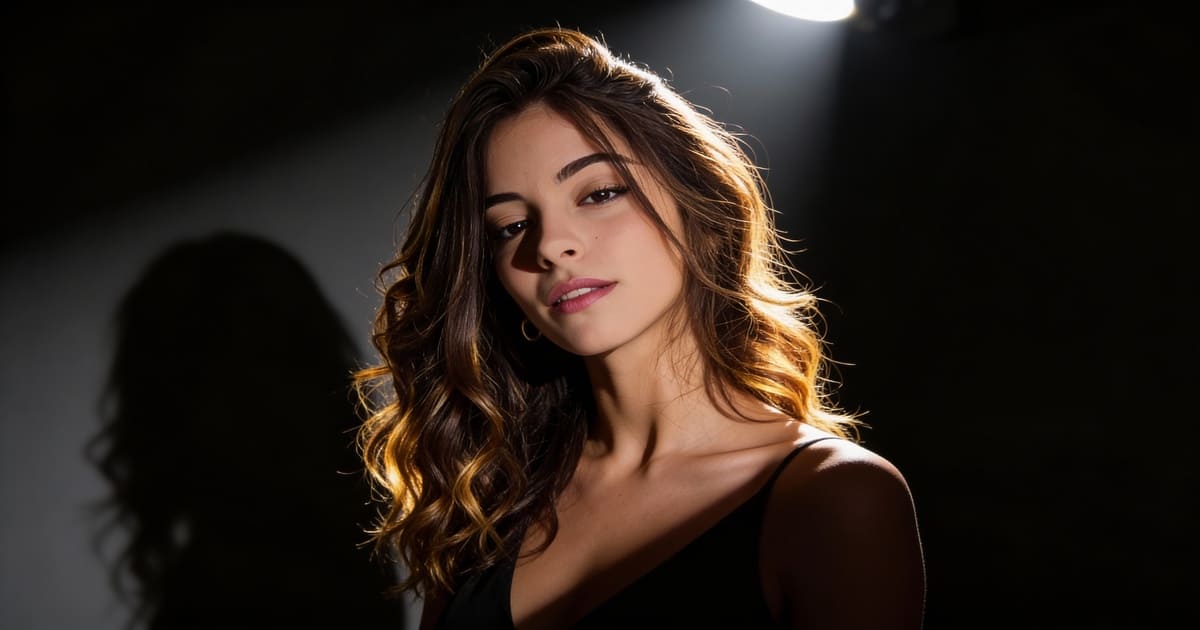
The AI video generation landscape is evolving rapidly, and the recent announcement of Kling AI 3.0 has sent shockwaves through the creator community. With promises of an "All-in-One" model and cinema-grade control, the hype is real.
But for creators eager to generate high-quality AI videos today, a major question remains: When will it actually be released, and what should you use while you wait?
In this article, we’ll dive into the leaked features of Kling 3.0 and introduce you to APOB AI, the best alternative you can use right now to create stunning, consistent AI character videos without the waitlist.
Try Kling AI 3.0 Alternative For Free
What’s New in Kling AI 3.0? (Feature Preview)
According to official previews, Kling 3.0 aims to solve the industry's biggest challenge: control. The update is built around the concept of "All in One, One for All," merging various capabilities into a single, powerful foundation model.
Here are the standout features coming to Kling 3.0:
1080p High-Definition Quality: The new model supports native 1080p generation, delivering richer details and more realistic lighting compared to previous iterations.
Motion Brush ("Paint to Move"): This highly anticipated feature gives creators granular control. You can paint over specific areas (like clouds or water) and draw trajectories to dictate exactly how they move.
Lip Sync & Audio: The update introduces precise lip-syncing capabilities, allowing characters to speak in perfect time with uploaded audio, ideal for digital human creation.
Professional Camera Control: Creators can simulate cinematic camera moves like pans, tilts, and zooms to enhance visual storytelling.
Start & End Frame Control: To ensure narrative consistency, users can upload both a starting image and an ending image, allowing the AI to generate the transition between them.
The Problem: The "Coming Soon" Frustration
While Kling 3.0 features like Motion Brush and Start/End Frame control sound incredible, there are significant hurdles for the average user:
It’s Not Available Yet: As of now, Kling 3.0 is in the announcement phase. Most users are stuck refreshing pages or waiting for beta access.
Complexity Overload: Features like trajectory painting and multi-frame control are powerful but require a steep learning curve.
Character Consistency Issues: Generalist models like Kling are great for landscapes, but they often struggle to keep a specific character's face consistent across different clips—a dealbreaker if you are creating an AI Girlfriend or virtual influencer.
Why wait for an invite code when you can start creating today?
The Best Alternative Available Now: APOB AI
If you are looking to create AI videos immediately—especially if your focus is on AI Characters, Virtual Partners, or Social Media Content—APOB AI is your best current solution.
Unlike generalist models that require complex prompting to get a human face right, APOB AI is optimized for portrait consistency and ease of use.
Why Choose APOB AI Over Waiting for Kling 3.0?
Zero Wait Time: No waitlists. Sign up and start creating instantly.
Specialized for AI Characters: If you want to animate your AI Girlfriend, APOB's algorithms keep her face consistent and natural, avoiding the "morphing" glitches common in other tools.
Free Daily Credits: You can experiment and create without an upfront subscription.
How to Create Your First AI Video with APOB AI (In 3 Simple Steps)
While waiting for Kling 3.0 might require mastering complex "Motion Brushes," using APOB AI is designed to be effortless. Here is how to animate your AI character in minutes:
Step 1: Get Your Free Access
Head over to APOB.ai and sign up. You will instantly receive free daily credits, allowing you to generate videos immediately without paying a cent.
Step 2: Choose Your Mode
For AI Characters (Recommended): Select "Image to Video". This is perfect for taking a static portrait of your AI Girlfriend or partner and bringing it to life.
For New Scenarios: Select "Text to Video" to create a scene from scratch using just words.
Step 3: Upload & Animate
Upload your favorite character portrait. Then, in the prompt box, describe the simple action you want.
Pro Tip: Keep it natural. Try a prompt like: "Slowly smiling at the camera, wind blowing through hair, subtle eye blink, 4k high quality."
Step 4: Generate & Download
Hit Generate. In about 60 seconds, your static image will transform into a high-definition video. Download it directly and share it on TikTok, Instagram, or YouTube Shorts.
Try Kling AI 3.0 Alternative For Free
Comparison: Kling 3.0 vs. APOB AI
Feature | Kling AI 3.0 (Upcoming) | APOB AI (Available Now) |
Availability | Unreleased / Waitlist | Live / Instant Access |
Primary Strength | Complex Physics & Trajectories | Character Consistency & Portraits |
Ideal For | Professional Filmmakers | Social Media & AI Partner Creators |
Learning Curve | High (Requires path drawing) | Low (One-click generation) |
Cost | Unknown / Likely Subscription | Free Daily Credits |
Conclusion
Kling 3.0 is undoubtedly shaping up to be a powerhouse for professional AI filmmaking with its new 1080p and motion control features. However, for creators who want to make engaging content today without the headache of complex tools or indefinite wait times, APOB AI is the superior choice.
Whether you are bringing an AI Girlfriend to life or creating viral social content, APOB AI offers the speed, consistency, and accessibility that modern creators need.

Be the first to like this.




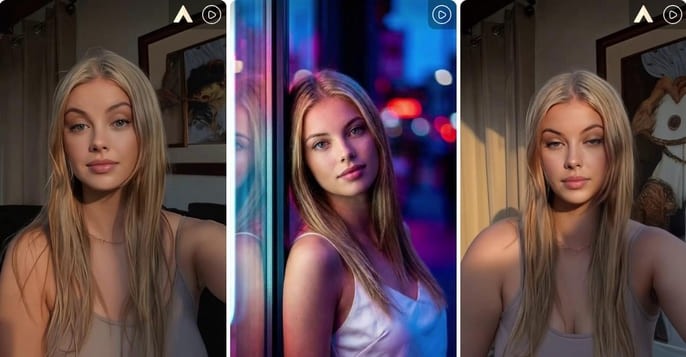
Kling 2.6 Motion Control: Try It Free on APOB AI
Abstract
The release of Kling 2.6 has set a new benchmark in generative AI, introducing unprecedented control over character movement and cinematic quality. While the demand for professional-grade AI video grows, many creators face barriers related to cost and accessibility. This article explores the breakthrough features of Kling 2.6 motion control, its technical superiority in character consistency, and how creators can access this cutting-edge technology for free through the APOB AI platform. By integrating the Kling engine into a professional editing suite, APOB AI offers a seamless workflow for those looking to master high-fidelity AI cinematography without a massive upfront investment.
Try Kling 2.6 Motion Control Free
Don't forget to read the guide below before using!
The Next Frontier: Exploring Kling 2.6 and Its Creative Potential
The AI video landscape is evolving at a breakneck pace, and the jump to Kling 2.6 represents a significant leap for digital storytellers. Unlike previous iterations that often struggled with "jello-like" movements or lost character details during action sequences, Kling 2.6 motion control introduces a level of stability previously reserved for high-end VFX studios.
In order to understand why the industry is buzzing, we must look at how this version handles physics. Whether it is the subtle sway of a silk dress or the complex skeletal movements of a dance routine, Kling 2.6 ensures that every frame feels intentional. However, for many independent creators, accessing these features directly can be a challenge. That is where innovative platforms like APOB AI come into play, serving as a bridge to this high-end technology.
Understanding Kling AI 2.6 Motion Control Technology
The core appeal of Kling AI 2.6 motion control lies in its "Video-to-Video" or "Reference-to-Motion" capabilities. This technology allows users to upload a source image and a reference video; the AI then extracts the skeletal motion from the video and applies it to the image.
Consequently, the output isn't just a random animation but a precise mimicry of the reference motion. This makes Kling video 2.6 motion control ideal for:
Virtual Fashion: Realistically showing how fabrics move on a specific character.
Social Media Challenges: Replicating trending dance moves with 100% accuracy.
Cinematic Pre-visualization: Allowing directors to test camera angles and character movements before a physical shoot.
How to Access Kling 2.6 Motion Control Free via APOB AI
While professional tools often come with a professional price tag, there is a way to test these features without breaking the bank. APOB AI has integrated the Kling engine into its ecosystem, providing an optimized environment for creators to experiment.
If you are looking for Kling 2.6 motion control free options, APOB AI offers a compelling solution. Imagine this scenario: you have a great video, but you aren’t quite happy with the character’s performance, their appearance, or perhaps you simply want to replace the protagonist entirely. Traditionally, editing a video at this level of complexity—swapping characters or altering specific actions—is an absolute nightmare.
Does this mean you have to re-shoot the entire scene? Do you need to hire a new model and start from scratch? Absolutely not. AI has introduced a more streamlined and portable way to handle video production. By following this simple guide from APOB AI, you can achieve professional results in minutes.
Try Kling 2.6 Motion Control with APOB AI
Step 1: Claim Your Creative Freedom (For Free!)
Forget the high costs of hiring talent or renting studio space. Your journey starts by simply registering on APOB AI.
Bonus: Upon signing up, you will receive a free membership including 80 daily credits to jumpstart your projects.
Action: Once logged in, click on “Create Portrait Model” to begin your transformation.
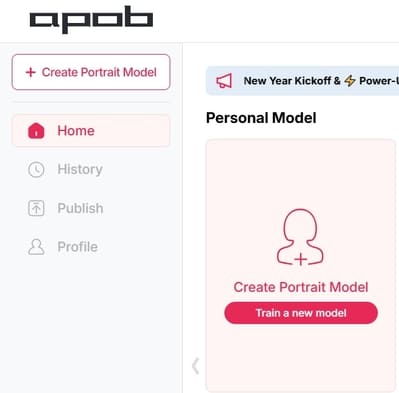
Step 2: Define Your Leading Star
Whether you want to keep the same person or introduce someone entirely new, this step is where the magic happens:
Option A (Consistent Character): If you want to change the actions but keep the person’s original look, upload a clear, high-quality headshot of that person as your model reference.
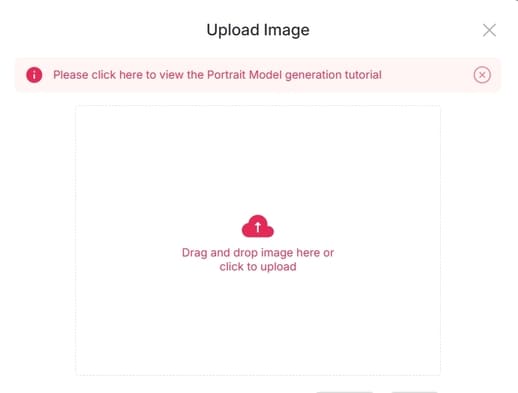
Option B (New Character): If you have a specific person in mind to replace the original actor, upload their reference photo here.
Option C (The AI Influencer): Want to create a character from scratch? Click on the “AI Influencer Generator.” You can customize their gender, facial features, weight, physique, and nationality. The process is incredibly fast and intuitive.
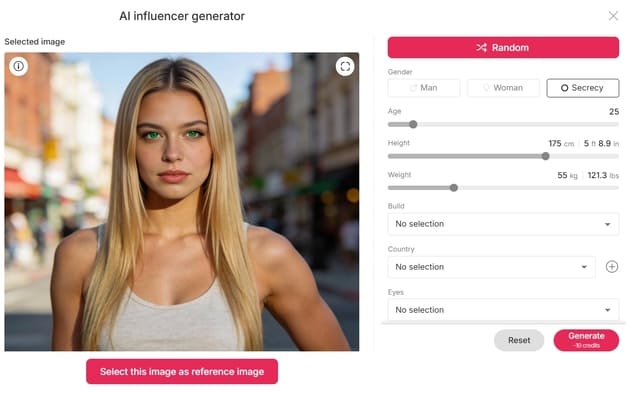
Step 3: Effortless Video Editing
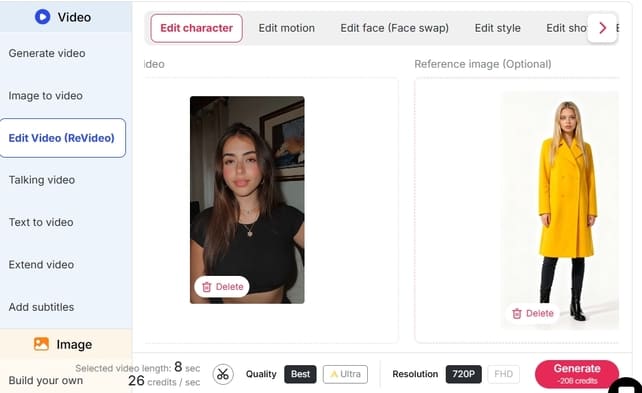
Now that your model is ready, it’s time for the heavy lifting—without the heavy workload. Navigate to the “Edit Video” section. APOB AI has categorized its tools to match your specific needs:
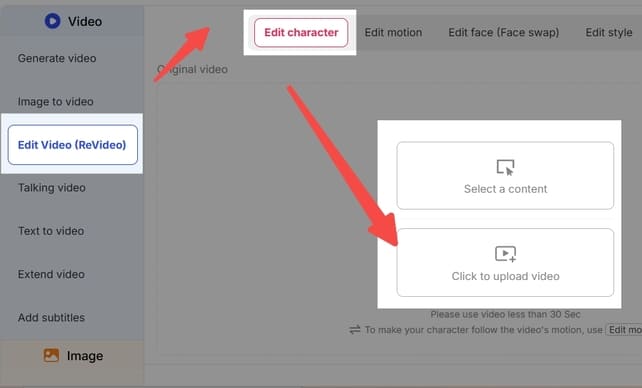
Edit Character: For total character replacement.
Edit Face: For precise facial adjustments or face-swapping.
Edit Style: To transform the overall aesthetic or "vibe" of the footage.
Note: If you ever feel stuck, our dedicated Support Team is always available to guide you through the process.
Feature Spotlight: How to Use "Edit Character"
This feature is a game-changer for those who want to replace the protagonist in an existing video. For example, imagine you want to see someone who can’t dance perform a viral TikTok routine.
Upload: Click “Edit Character” and upload your original video.
Select Reference: On the right panel, upload the image of the person you want to appear in the video.
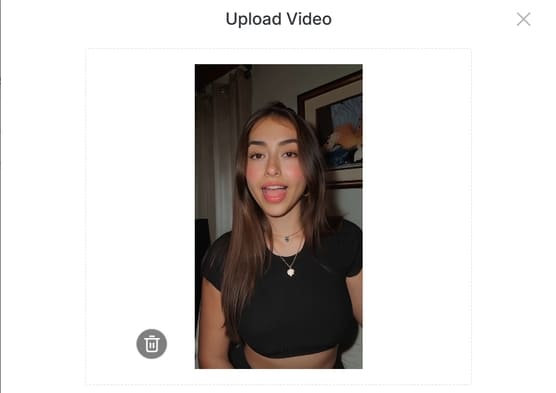
Customization (Optional): If you want the character to look slightly different—for instance, wearing a yellow coat—click “Generate Reference Image.” Simply type “wear a yellow coat” in the description box.
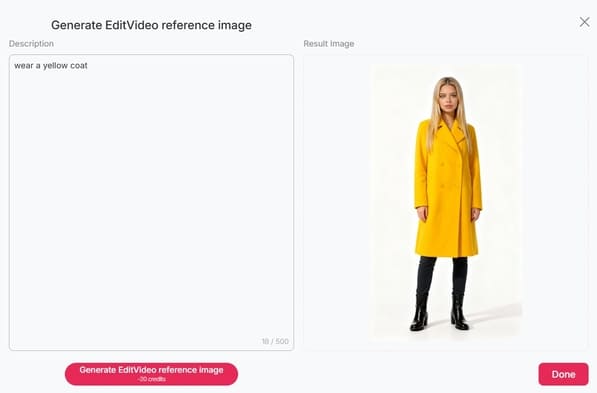
Define: If you like the generated preview, click Done. If not, tweak your description and try again.
Generate: Once your reference image is set, click “Generate.” The Result: You will receive a high-quality video of your chosen character (in that yellow coat!) performing the exact same dance moves as the original video. It’s that simple!
Explore More
Beyond Edit Character, APOB AI offers a full suite of tools like Edit Face and Edit Style, designed to make professional video manipulation accessible to everyone.
Ready to revolutionize your content? Visit APOB AI and start creating today!
Why this version works better:
Emotive Language: Uses hooks like "Absolute nightmare" and "Game-changer" to connect with the user's pain points.
Structured Clarity: Uses bullet points and bold text to make the steps "scannable."
Professional Tone: Replaces "heaven" or "oh my god" with more professional yet friendly alternatives.
Clear Call-to-Action: Ends with an invitation to try the product immediately.
Optimizing Your Workflow: Why Use APOB AI?
Using Kling video 2.6 motion control within APOB AI offers more than just accessibility; it provides a "Storyteller Mode" that enhances the raw output. While the standard Kling output is impressive, APOB AI adds a layer of "Identity-Lock" technology. This ensures that your character’s facial features and clothing remain consistent across multiple shots, which is the "holy grail" of AI filmmaking.
Furthermore, the "Edit Video" feature in APOB AI allows for real-time adjustments. If the motion is perfect but the lighting feels off, you can use the chat-to-edit function to refine the atmosphere without losing the underlying Kling-generated movement.
Frequently Asked Questions (FAQs)
Q1: What makes Kling 2.6 better than version 2.5?
A1: Kling 2.6 offers significantly improved motion smoothness and "Skeletal Extraction" accuracy. It also introduces native audio synchronization, making the videos feel more immersive compared to the silent outputs of previous versions.
Q2: Is Kling 2.6 motion control truly free to use?
A2: Direct access via the official site usually requires a paid subscription. However, you can experience Kling 2.6 motion control free by using APOB AI, which grants 80 free credits daily to all registered users.
Q3: Do I need professional editing skills to use Kling AI 2.6 motion control?
A3: No. Thanks to the user-friendly interface of APOB AI, you only need a source image and a reference video. The AI handles the complex motion mapping and rendering for you.
Q4: Can I maintain character consistency with Kling 2.6?
A4: Yes, especially when used through APOB AI. The combination of Kling’s motion engine and APOB’s Identity-Lock technology minimizes character "drifting," ensuring the person in the video looks the same from start to finish.
Read More
Kling AI Video Generator: How to Use?
Artificial intelligence is revolutionizing the way we create visual content. One of the latest tools capturing everyone’s attention is Kling AI Video Generator, developed by Kuaishou, the company behind one of China’s most popular video platforms. This powerful AI-driven tool enables anyone—from creators to marketers—to turn text or images into high-quality animated videos in minutes.
In this guide, we’ll explain what Kling AI is, explore its features, and provide a detailed, step-by-step tutorial on how to use Kling AI Video Generator efficiently for your next creative project.
Kling AI What Is Kling AI?
Kling AI is an innovative AI-powered video generation tool created by Kuaishou, a tech giant known for its short-video platform. The Kling AI Video Generator Kuaishou system specializes in producing dynamic, high-resolution videos from text descriptions or static images.
Unlike traditional video editing tools that require manual footage, timelines, and transitions, Kling AI uses generative AI models to animate visuals based on user prompts. It supports both text-to-video and image-to-video creation, making it ideal for digital artists, advertisers, and social media creators.
With support for up to 1080p resolution, smooth frame rates, and customizable aspect ratios (16:9, 9:16, 1:1), Kling AI brings cinematic creativity within reach—no filming or editing skills needed.
How to Use Kling AI Video Generator
Whether you’re creating a realistic cinematic sequence or an eye-catching TikTok clip, Kling AI Video Generator makes the process simple and intuitive. Here’s a full breakdown of how to get started:
Step 1: Choose the Input Mode
You can select between two main input methods:
Text Prompt → Generate Video
Upload a Static Image → Image to Video
If you want to bring a still image to life, upload it as your starting frame (or even an ending frame). Kling AI will then animate transitions, movements, and effects between them automatically.
Step 2: Write a Prompt or Upload Images
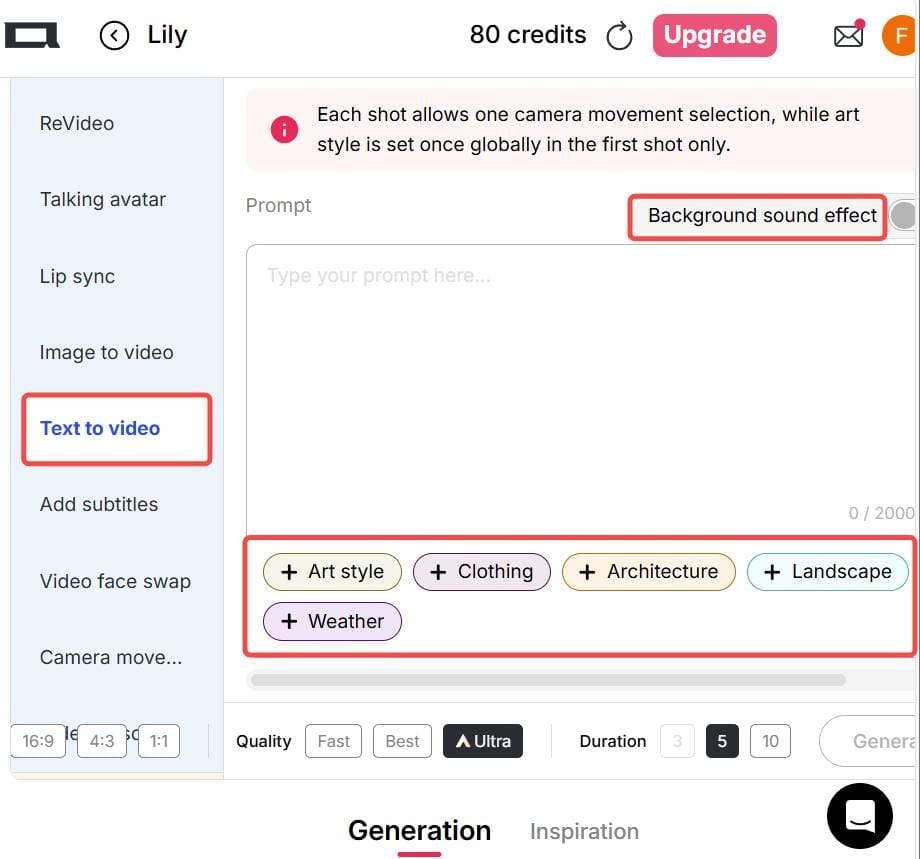
If you choose the Text-to-Video option, write a clear and specific description of your desired scene, action, camera movement, and style. For example:
“A slow camera pan from left to right, a traveler walking into an ancient Roman arena at sunset, realistic style.”
You can also use built-in preset options for style, lighting, weather, clothing, or background—saving you time typing long prompts.
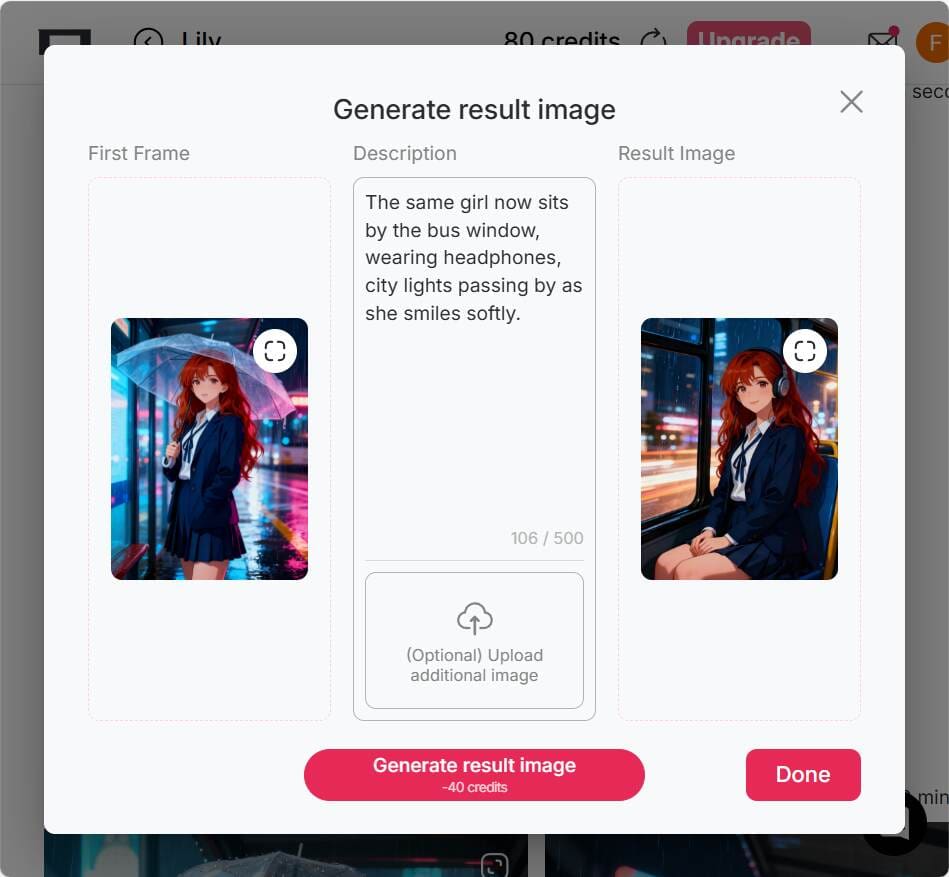
If you’re using the Image-to-Video mode, prepare two images:
The first image as your starting frame.
The second image as your ending frame. This helps Kling AI generate smooth motion between them.
💡 Tip: For the final frame, you can use a “chat-to-edit” feature or another AI image editor to generate a matching image for a seamless transition.
Step 3: Select Output Settings
Before generating your video, configure the output details:
Aspect Ratio: Choose from 16:9, 9:16, or 1:1 depending on your platform. (Vertical 9:16 is ideal for TikTok and Instagram Reels.)
Generation Mode: Options include fast, best, ultra, and ultra 4K—depending on your account tier.
Duration: Video length varies by subscription level or version.
Optional Settings: Control camera motion, add background music, or adjust dynamic effects.
💡 Tip: For social media clips, shorter videos (under 30 seconds) often perform better and generate more engagement.
Step 4: Generate & Download
Once you’ve written your prompt and chosen your settings, click Generate to start the AI rendering process. After the system finishes generating, preview your video. If you’re satisfied, you can download it directly.
Do note that free or trial versions may include watermarks, shorter duration limits, or lower resolution output. Still, they’re perfect for learning the workflow before upgrading.
Practical Tips for Better Kling AI Video Generation
To make the most out of your Kling AI Video Generator experience, keep these pro tips in mind:
Use Vertical Videos for Social Media: Choose a 9:16 aspect ratio for TikTok, Instagram Reels, or YouTube Shorts.
Ensure Consistency in Image-to-Video Mode: When using start and end images, keep both consistent in composition and color tone to avoid awkward transitions.
Be Specific with Prompts: The more detailed your text prompt, the better the video result. Mention objects, movements, lighting, and style (e.g., “cinematic lighting,” “realistic texture,” “slow motion”).
Use Revideo for Character Replacement: If you already have a video clip, try tools like Revideo. You can upload a short 30-second clip (and later up to 5 minutes), plus a single photo—allowing the photo’s person to replace the character in the video while keeping the same movements and background. It’s a great way to make personalized AI videos.
Why Creators Love Kling AI Video Generator
Easy to Use: No video editing experience needed.
High-Quality Results: Smooth motion and realistic rendering.
Creative Freedom: Combine imagination, text, and art effortlessly.
Cross-Platform Ready: Supports multiple aspect ratios and formats.
Powered by Kuaishou: Reliable AI technology from a trusted global brand.
Final Thoughts
The Kling AI Video Generator by Kuaishou opens endless creative possibilities. Whether you’re a beginner looking to make eye-catching clips or a seasoned creator exploring cinematic AI visuals, Kling AI offers an intuitive, efficient, and high-quality video generation experience.
So if you’ve ever imagined turning your words or images into motion—now’s the time to try Kling AI Video Generator and bring your vision to life.
FAQs About Kling AI Video Generator
Q1: Can I use Kling AI Video Generator for free?
Yes. Kling AI offers a free or trial version with limited resolution and duration. Premium tiers unlock higher quality and faster rendering.
Q2: Can the generated images and videos be used for commercial purposes?
Yes, you can use Kling AI videos for commercial purposes—such as social media promotions, marketing content, or creative ads—depending on the platform’s terms.
Q3: What’s the best aspect ratio for social media videos?
For social platforms like TikTok and Instagram Reels, the 9:16 vertical ratio works best. For YouTube or desktop use, 16:9 is preferred.
Q4: Is Kling AI safe to use?
Yes. Kling AI Video Generator is developed by Kuaishou, a reputable tech company with strong data protection and moderation policies. Always use the official site or verified app links.
Read More
Kling AI 1.6 vs Kling 2.0: What’s New and Which Version Is Better?
If you’ve been online lately, you’ve probably heard people talk about Kling AI. It’s an AI-powered video generator that turns text into stunning, realistic videos. Many users love how it helps them make short clips, ads, or creative content in just minutes. You simply type what you want to see, and Kling AI brings it to life.
Imagine typing: “a man running on the beach at sunset” — and within seconds, you get a video that looks like a real scene. That’s why people are amazed. It feels like movie-making made easy.
Why Has Kling AI Become So Popular?
AI video tools are everywhere, but Kling AI stands out. It became popular because it offers smooth motion, clear visuals, and natural lighting.
Content creators use it for YouTube intros, social media posts, or marketing videos. Even beginners can get great results.
Users say it saves them hours. No camera, no editing software, no big budget — just your imagination. Whether you’re a student, a marketer, or a casual creator, Kling AI makes video creation fun and simple.
What Is Kling AI 1.6?
Kling AI 1.6 was an important step forward in AI video generation. It made video creation more stable and realistic compared to earlier versions. It allowed users to create short clips that looked almost human-made. You could describe actions, emotions, or camera angles, and Kling AI 1.6 did the rest.
For example, one user typed: “A cat jumping on a table in slow motion.” The result? A perfectly smooth, lifelike video. That’s when people started trusting Kling AI for serious projects, not just for fun.
What Is Kling 2.0?
Then came Kling 2.0 — the new and improved version that everyone’s talking about. It’s faster, smarter, and much more powerful. Kling 2.0 can generate longer videos, handle complex scenes, and show better details like facial expressions and lighting effects.
Imagine creating a 10-second clip with moving backgrounds, people talking, and natural shadows — all from one text prompt. That’s the magic of Kling 2.0.
Users say the upgrade feels smoother and more “human.” Animations look less robotic, transitions flow naturally, and the render time is shorter.
Kling AI 1.6 vs Kling 2.0: What’s the Real Difference?
So, how does Kling AI 1.6 compare to Kling 2.0? The biggest difference lies in speed, realism, and control.
Speed: Kling 2.0 works almost twice as fast. You spend less time waiting for your video to finish.
Realism: Faces, movements, and lighting look more natural in Kling 2.0. It feels closer to real life.
Length: Kling AI 1.6 had shorter clips. Kling 2.0 supports longer videos — great for storytelling.
Creativity: Kling 2.0 understands prompts better. You can describe scenes more freely and still get accurate results.
If you’ve used Kling AI 1.6 before, you’ll instantly notice the difference. Everything feels smoother, clearer, and more flexible.
For most users, Kling 2.0 is worth switching to. But if you just need simple short clips, Kling AI 1.6 still does the job well.
User Experience: What People Are Saying
Many users share their experiences online. Some say Kling AI 1.6 was great for learning the basics. Others love how Kling 2.0 helps them create professional-level videos for clients or social media.
A small business owner said, “With Kling 2.0, I made a full product video in under 10 minutes!” Another creator shared, “I used Kling AI 1.6 before, but 2.0 feels more alive and expressive.”
That’s what makes it exciting — everyone can become a video creator with just one tool.
Which One Should You Choose?
If you’re just starting out or want something light and easy, Kling AI 1.6 is a great choice. It’s simple, reliable, and still creates impressive results.
But if you want better control, longer clips, and higher quality, Kling 2.0 is the clear winner. You’ll get better speed, smarter AI, and more realistic outputs — all with the same simple interface.
Think of it this way: Kling AI 1.6 is like your first camera. Kling 2.0 is the professional upgrade.
Final Thoughts
Both Kling AI 1.6 and Kling 2.0 mark important milestones in AI video generation. Kuaishou’s dedication to improving motion accuracy, video quality, and accessibility makes Kling one of the most exciting creative tools available today.
For casual users, Kling AI 1.6 still delivers excellent results. But if you’re ready to take your content creation to a professional level, Kling 2.0 is the clear winner—faster, smarter, and more powerful than ever.
FAQs About Kling AI
Q1: What is Kling AI used for?
Kling AI helps users turn text prompts into short, realistic videos. It’s perfect for ads, art projects, or social media content.
Q2: Can I still use Kling AI 1.6?
Yes, Kling AI 1.6 is still available. It’s a good option for beginners who want to learn how AI video generation works.
Q3: Can I use Kling 2.0 for commercial projects?
Yes. Both Kling AI 1.6 and Kling 2.0 allow commercial use, depending on the plan you subscribe to. Always check Kuaishou’s licensing terms before publishing commercially.
Q4: Is Kling AI 1.6 still available?
In most regions, yes. Kuaishou continues to support Kling AI 1.6 for users who prefer a simpler and lighter experience, though updates now focus on Kling 2.0.
Q5: Which version is best for social media content creators?
If you prioritize speed and easy workflows, Kling AI 1.6 works great. But for creators who want cinematic-quality visuals and longer clips, Kling 2.0 is the superior option.
Read More
Kling AI Image to Video Prompt Guide – Create Videos for Free
Have you ever wished your photo could move like a real video? That’s what Kling AI can do for you. It’s an AI video generator created by Kuaishou, a popular Chinese tech company. People love it because it turns text or images into realistic motion clips in minutes. You can use it for social media, marketing, or creative storytelling. It’s quick, free to try, and needs no video editing skills. That’s why Kling AI Image to Video is now trending worldwide.
Why is Kling AI Image to Video ?
It feels like magic. You upload a simple image, and Kling AI brings it to life. The movements are smooth, lighting looks natural, and the mood feels cinematic. Creators use it for TikTok, Instagram Reels, or YouTube Shorts. Some use it to make digital art move. Others test storyboards or product scenes.
It’s flexible, fun, and gives powerful results even on the free plan.
How to Use Kling AI Image to Video for Free ?
Step 1: Generate a Base Image
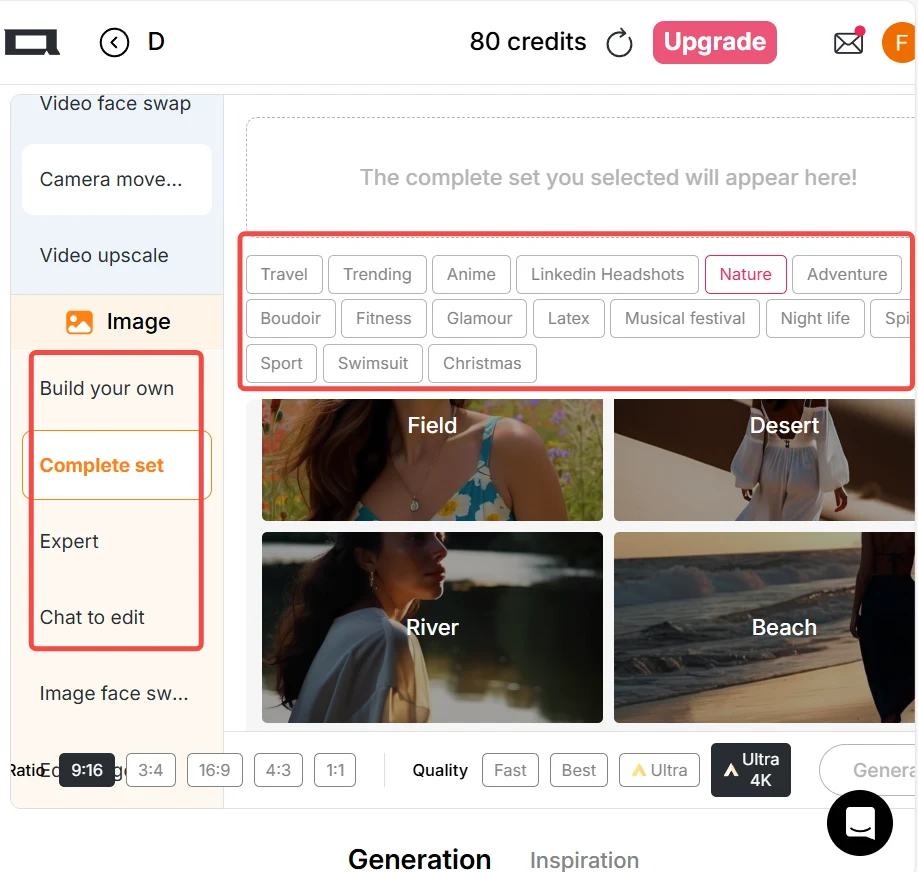
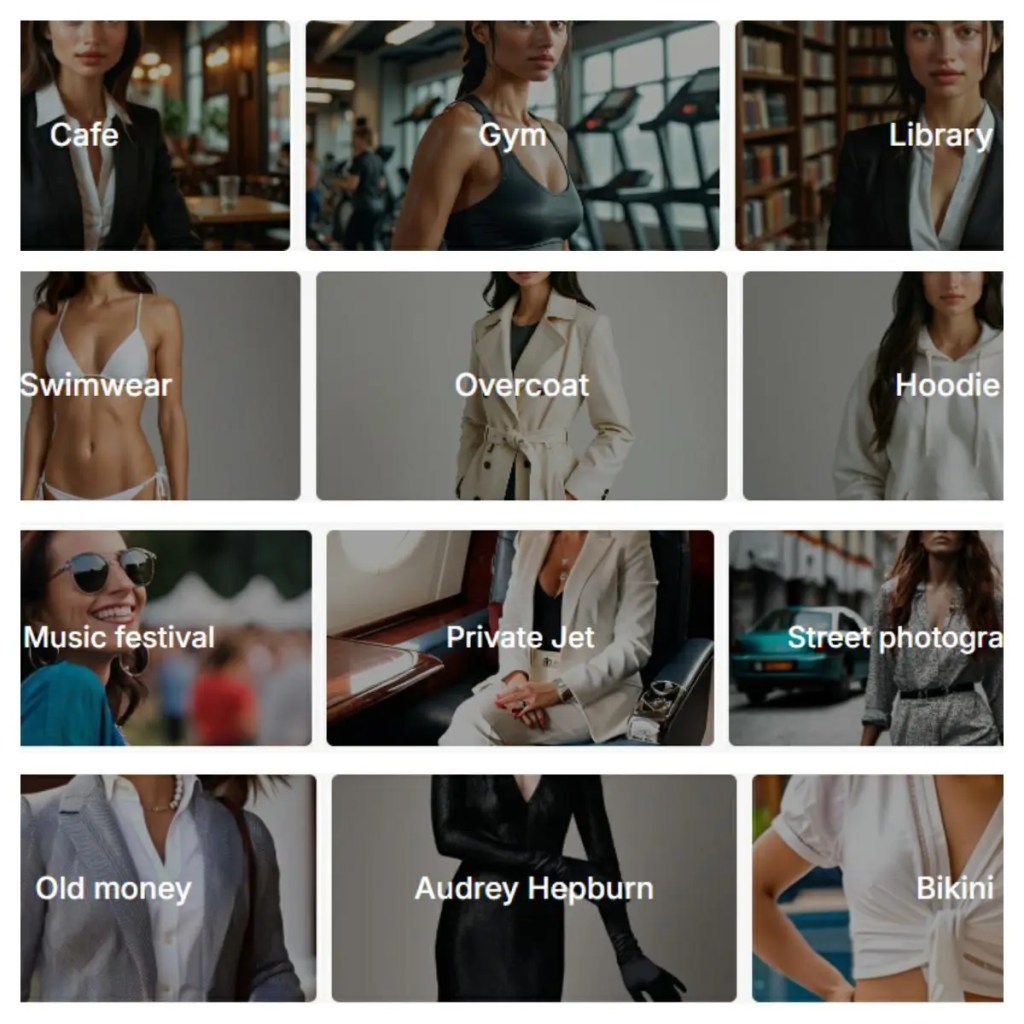
Click “Create Portrait Model” to start. You can create an AI model using the AI Influencer Generator. Use the “Build Your Own” or “Complete Set” options, or pick pre-made style choices such as nature, fantasy, or urban life to generate an image.You can also enter a text prompt to create your own picture. Once you find an image you like, select “Image to Video” mode. If you already have an image you love, you can skip the image generation step.
Step 2: Write Your Prompt
In the “Image to Video” box, clearly describe your scene. You can upload one static image as your base frame. If you want smoother motion, upload two images — a start frame and an end frame. This helps Kling AI understand how the scene should move. Explain what you want to happen and what mood you’d like to create. Be specific about camera movement, lighting, and atmosphere. The more detailed your description, the better your video will look.
Tip: Keep the image style and angle consistent to avoid jumpy transitions. You can also use the “Chat to Edit” feature to generate the end frame — it allows you to change character poses, backgrounds, facial expressions, and more based on your first image.
Step 3: Adjust Your Settings
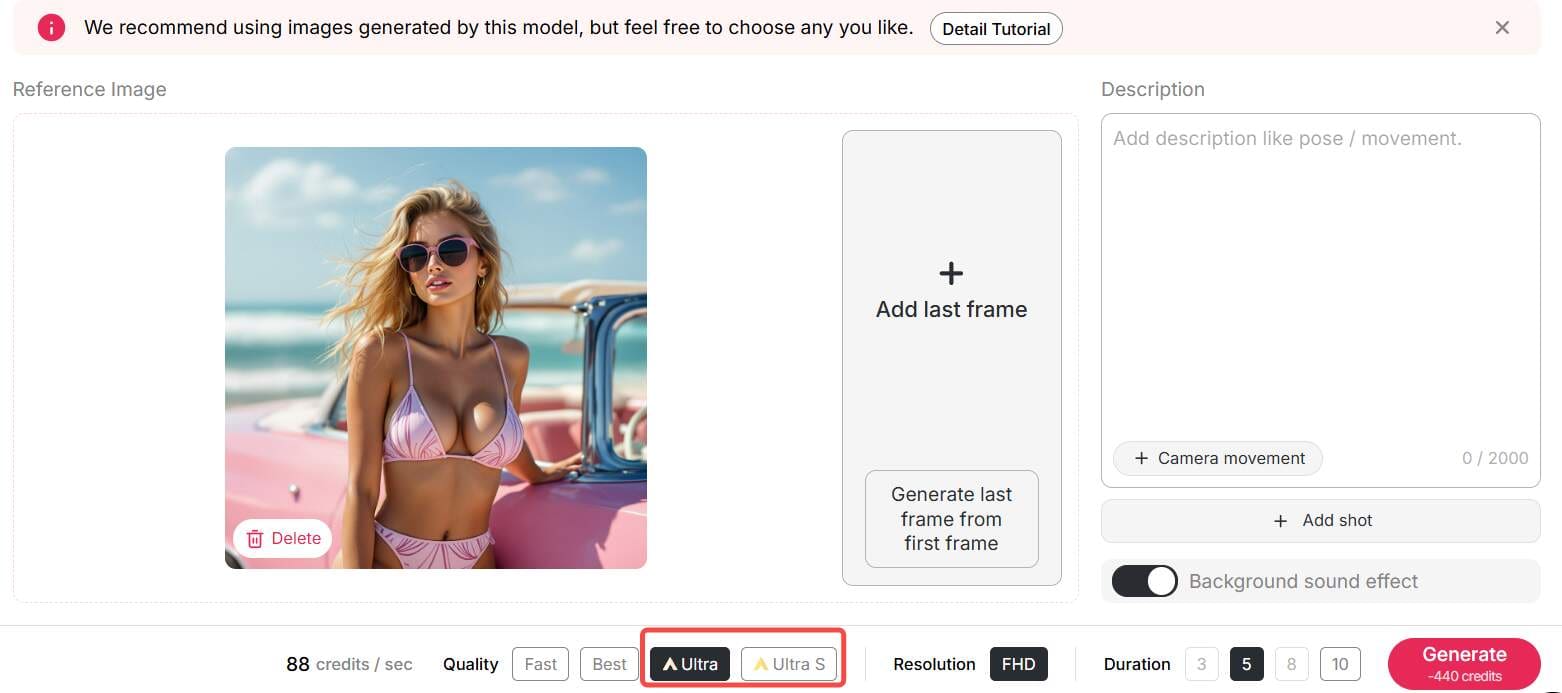
Next, select the output style. You can choose 16:9 for YouTube, 9:16 for TikTok, or 1:1 for Instagram. Pick the quality mode: fast, best, ultra, or ultra 4K. Free users often get short videos or low resolution, but it’s great for testing. You can also add motion control, sound, or background music. Try small clips first to see how the system handles your prompt.
Step 4: Generate and Download
Once your settings are ready, click Generate. Kling AI will process your image and turn it into a short video. Wait for a preview to appear. If you like the result, download it right away. Free plans may include watermarks, but the output still looks professional. Now you’ve made your first Kling AI Image to Video creation — and it cost nothing!
Pro Tips for Better Prompts
Here’s how to make your video look more natural:
Use camera actions like “pan left” or “zoom in.”
Describe lighting, such as “golden sunset” or “soft morning light.”
Add motion hints like “wind blowing” or “hair moving gently.”
Test short prompts first, then add details for precision.
Try different image pairs to explore creative transitions.
Remember, Kling AI is great at understanding visual tone. Treat it like a director — give it clear instructions, and it delivers magic.
Example: From Still Image to Video
Let’s say you upload a photo of a mountain. You type this prompt: “A drone flies slowly above the mountain at sunrise, cinematic tone.” In less than a minute, Kling AI turns your static photo into a moving aerial video. The clouds drift, the light changes, and it feels like real footage. That’s the power of Kling AI Image to Video.
Why Use Kling AI for Your Projects?
Because it saves time, looks great, and costs nothing to try.
Marketers can make ads in minutes.
Artists can animate their drawings.
Students can create visuals for presentations.
You don’t need to edit videos manually — Kling AI does the hard work.
Plus, you can explore upgrades later for high-res or watermark-free versions.
If you’re using Kling 2.0, you’ll see faster generation and better realism. But even Kling AI 1.6 still works fine for simple clips. The fun part is experimenting and watching your ideas come alive.
Conclusion
Kling AI Image to Video makes video creation easy for everyone. You don’t need cameras, editors, or expensive tools. Just one image, one prompt, and Kling AI does the rest. Start free today, explore your creativity, and watch your still photos turn into living stories. One thing is sure — your visuals will never stay still again.
FAQs
Q1: Can I use Kling AI videos for commercial purposes?
Yes. You can use Kling AI content for commercial projects, as long as you follow its usage terms.
Q2: What’s the difference between Kling AI 1.6 and Kling 2.0?
Kling 2.0 offers faster rendering, smoother motion, and more realistic lighting. It’s an upgrade worth trying.
Q3: Do I need to install any software to use Kling AI?
No, you don’t need to install any software to use Kling AI. Whether you’re on a computer, tablet, or mobile device, simply click the button below to visit the website and start creating right away.
Q4: How to write prompts for kling ai image to video?
To write effective Kling AI Image to Video prompts, describe your subject, motion, and mood clearly. Add camera movement, lighting, and style details for precision. For smoother transitions, upload start and end frames. Keep prompts concise yet vivid for the best animation results.
Read More
Kling AI 2.6: the Ultimate Video Generator for Creators
Have you ever wondered what it’s like to create a Hollywood movie scene sitting at your very own desk? Thanks to the rise of video solutions using AI technology, it’s now a reality sooner than you ever dreamed. Particularly, the Kling video AI generator has proven to be a game-changer, making developers question whether this could finally be what they need.
Chances are, if you're a tech trends follower, you're no stranger to the hype surrounding Kling AI. A giant in the industry, this is revolutionizing the way we look at video creation. But, at times, using its advanced features, such as Kling 2.6, can be a challenge. Here’s a look at how Apob AI incorporates this technology to make the creation of visuals a breeze for you.
What is the Kling AI Video Generator?
Kling AI is a highly advanced video generation model developed by Kuaishou Technology that quickly made it a rival to OpenAI’s Sora. It is designed to create high-definition videos in a realistic manner out of just a text description or an image. This model also does not possess the same limitations which the earlier models had. It can create a video of a maximum of 2 minutes at a resolution of 1080p at the speed of 30 frames every second.
In addition, with the launch of its next version, “Kling 2.6,” it has greatly improved its capabilities for replicating real-world physics. This means that it is setting a precedent for artificial intelligence in terms of video consistency.
How Does Apob AI Bring Kling 2.6 to You?
Although Kling AI has impressive power, sometimes obtaining the best models can be a bit challenging or limited. That’s where Apob AI comes in. At Apob AI, we have integrated the best features of the Kling 2.6 version’s power directly into our platform. That way, you can take advantage of its power without needing technical knowhow or wasting time in long queues.
Using Apob AI, you have the benefit of both worlds. You can leverage our intuitive interface to tap into the world’s best video generation models. Particularly, our ReVideo uses the sophisticated motion algorithms in Kling 2.6 to assure smooth, natural, and highly engaging video edits.
Guide: mastering the Kling AI Video Generator on Apob AI
Ready to start creating? Our process couldn’t be simpler. The ReVideo dashboard is where all of your content transformations take place. Read on to learn how to unleash the full power of the Kling AI video generator.
Step 1: Getting Started and Choosing Inputs
To start off, you will want to register for a free account on the Apob AI website. We want you to see the magic of Apob risk-free, and that means you get 80 free credits as soon as you sign up.
Once you have logged in, you need to open the page by clicking on the "ReVideo" tab. On the ReVideo page, you are given two options for where to find the content:
Click to upload video: Use this if you already have video footage, for example if you are recording a product video or a video of yourself.
Select a content: This is great for content creators who wish to maintain anonymity. You can choose a virtual model from our collection or one you may have created before. Apob AI will produce a video with your virtual model, which basically gives you the opportunity to create quality content without needing to switch on your camera.
Step 2: Choosing Your "Re" Mode with Kling AI 2.6
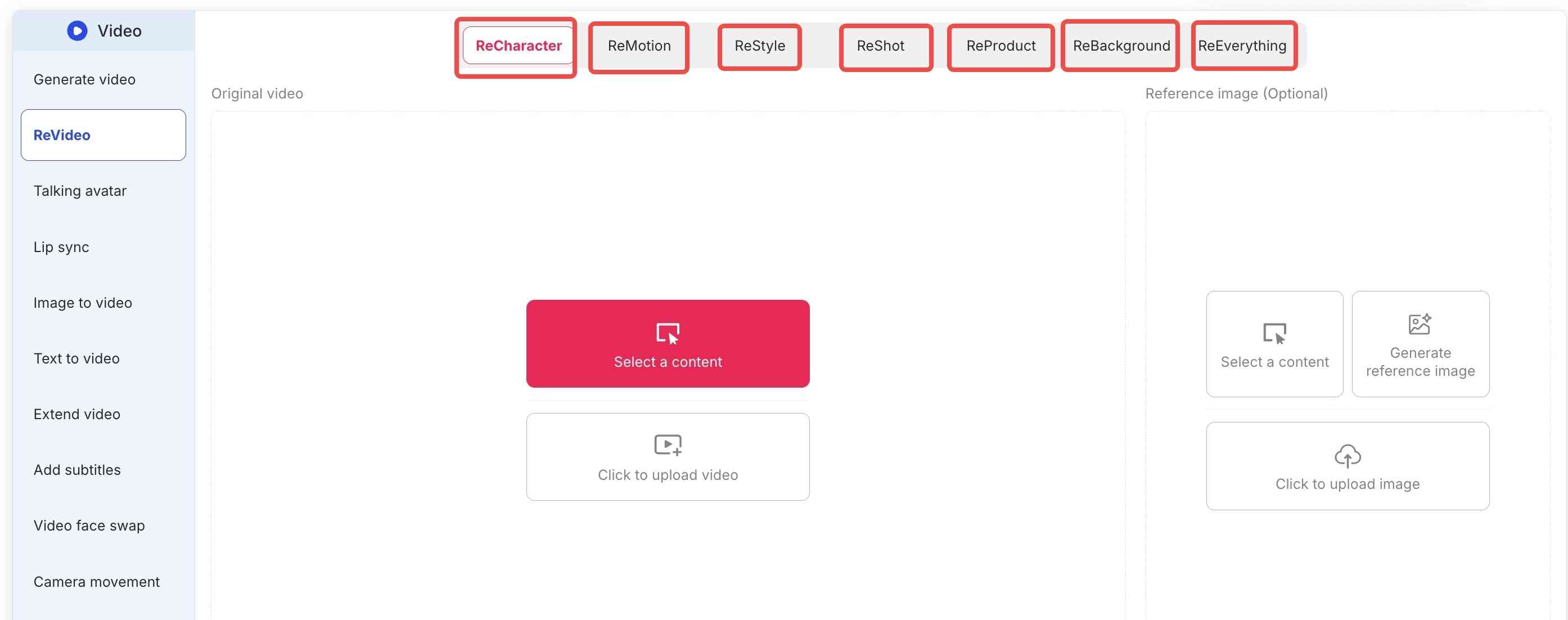
Apob AI’s true strength is the flexibility that the ReVideo toolbar brings. Depending on what you really need, you select either the following tabs:
ReCharacter: Do you want to change the actor appearing in your video? Upload a reference image, and the AI will replace the person while preserving all movements.
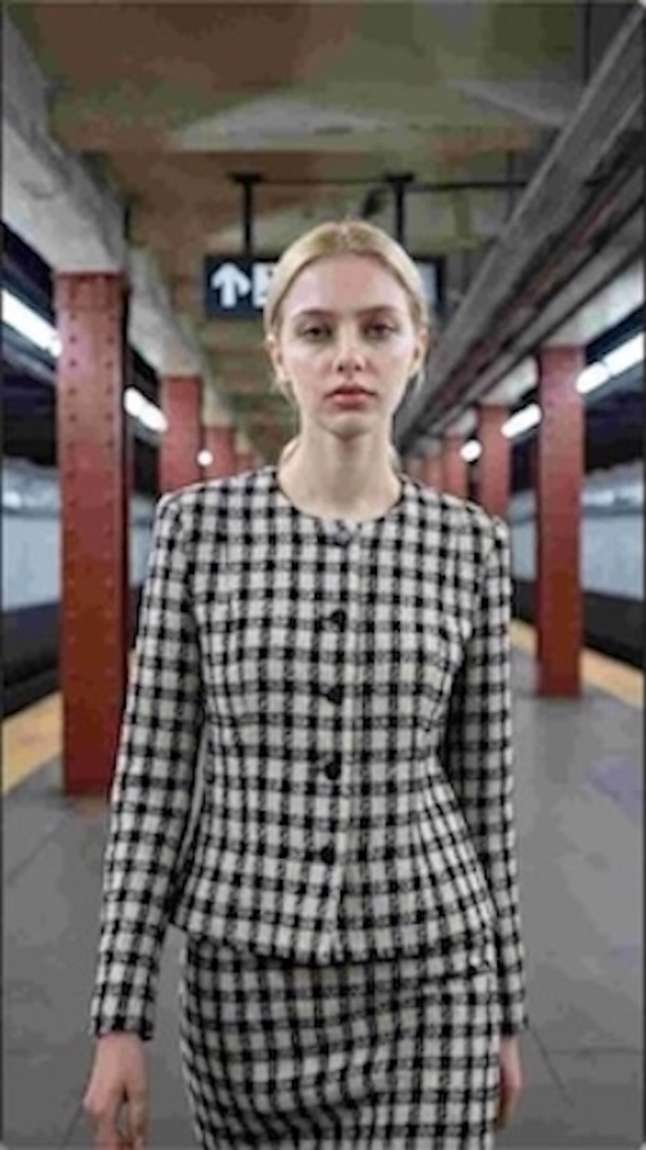
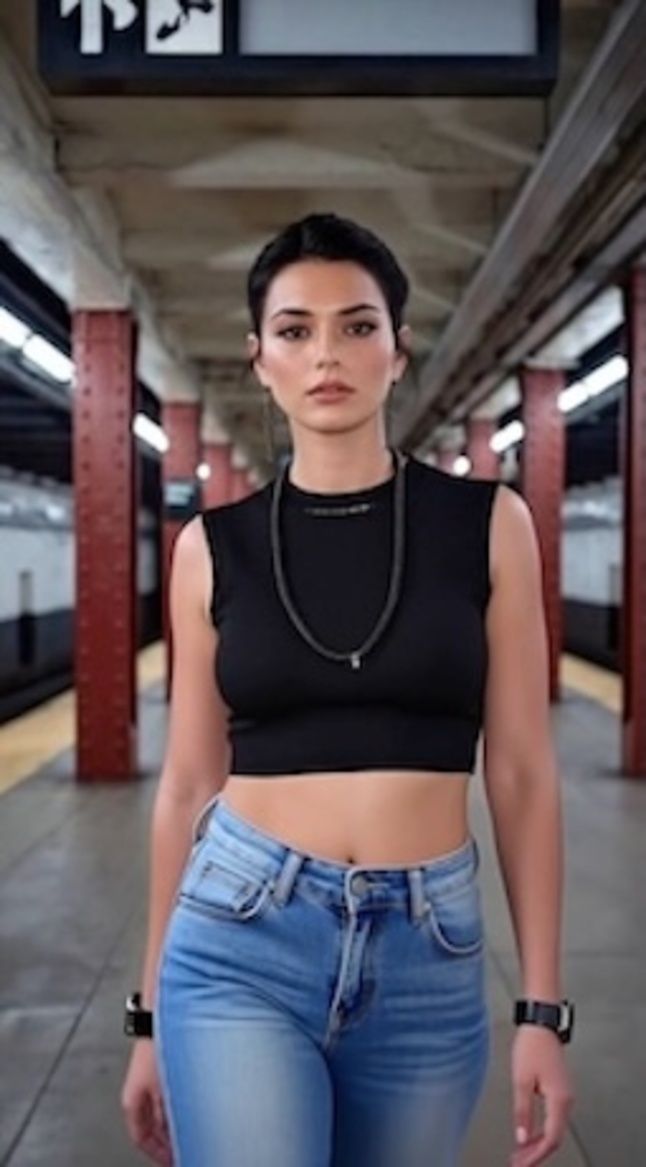
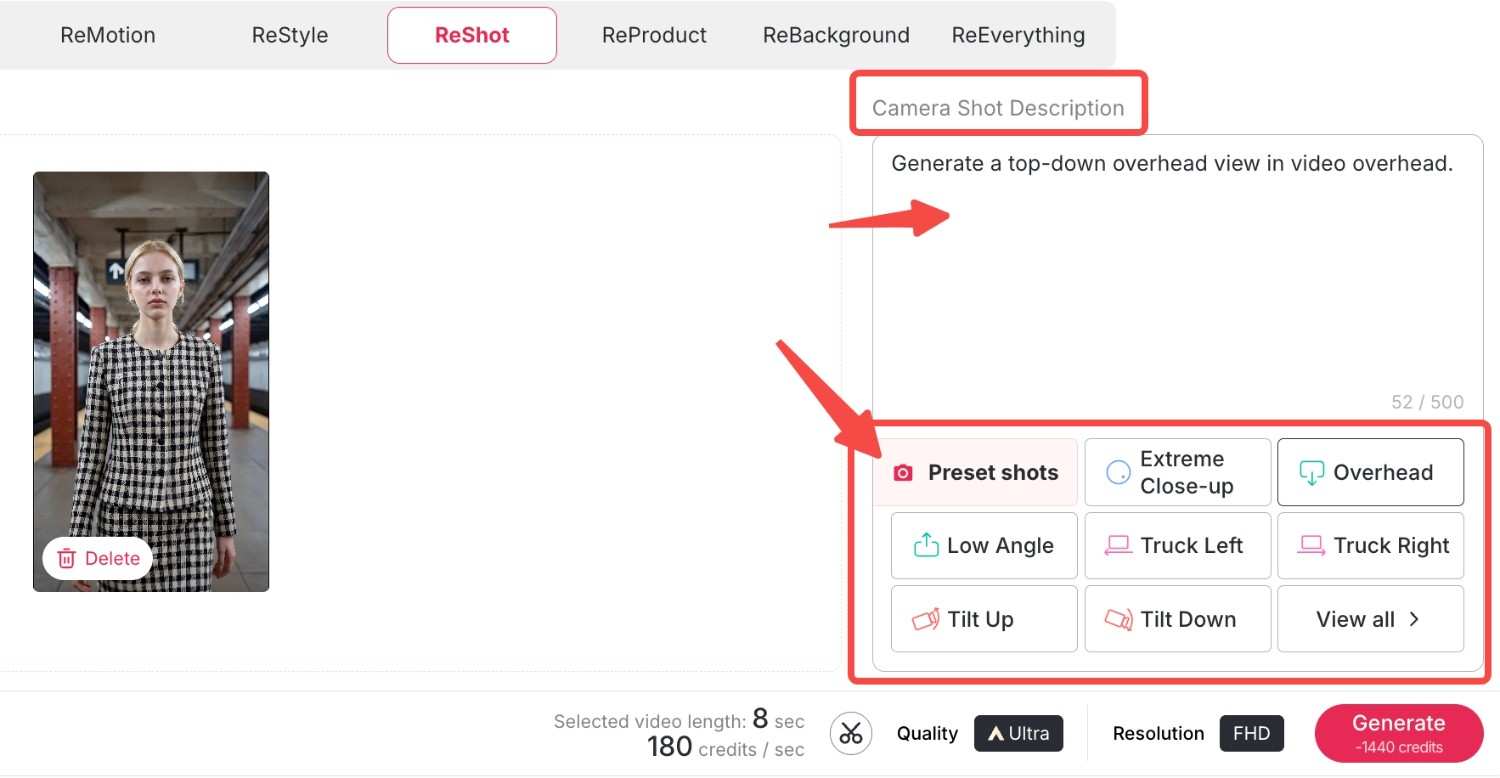
ReMotion: With support for Kling 2.6 software, you can control the camera direction. Now you can add complex zooms, pans, or tilts to your static videos.
ReStyle: Change the whole artistic ambience. For example, we have a variety of styles from classic movies and TV series, bringing you right into the movie. Let's choose "Pixar style"and "Rick and Morty style" here and see what happens.
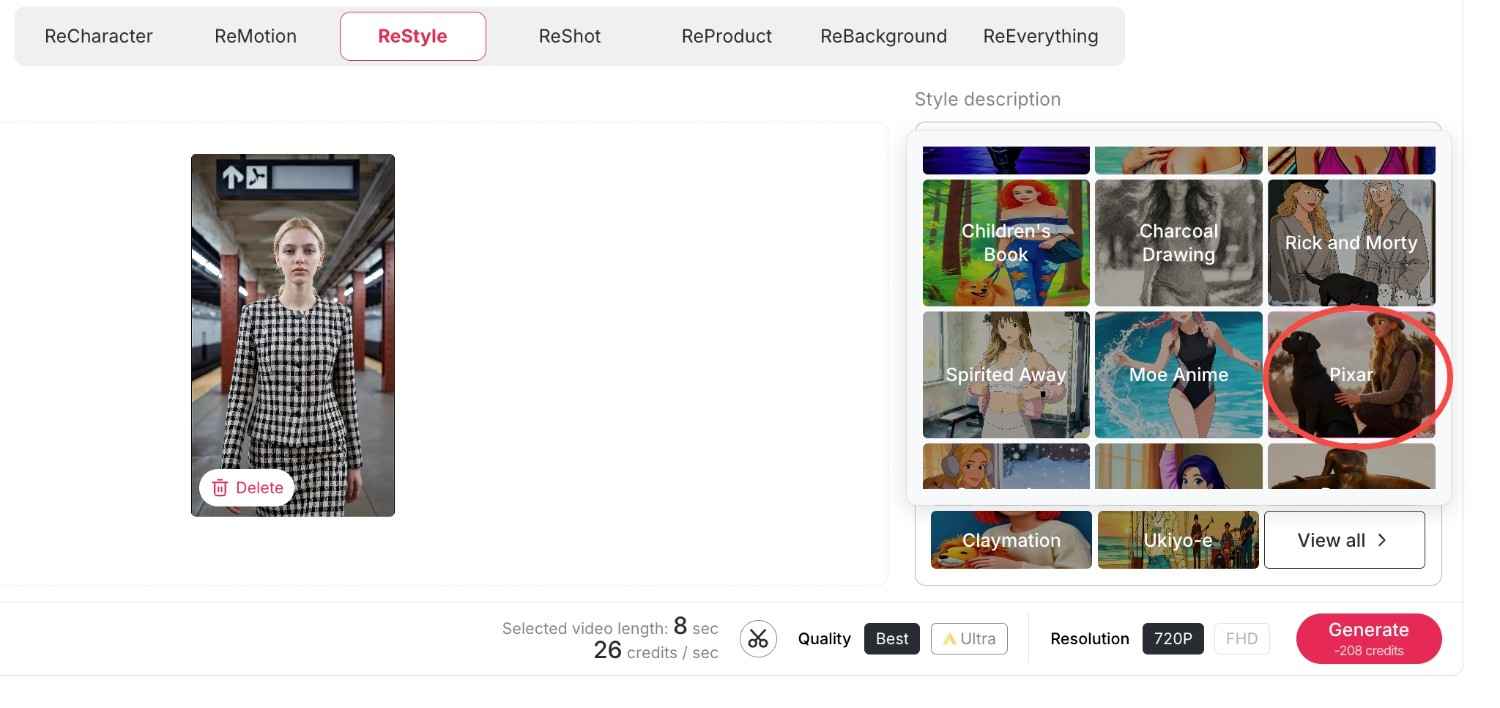
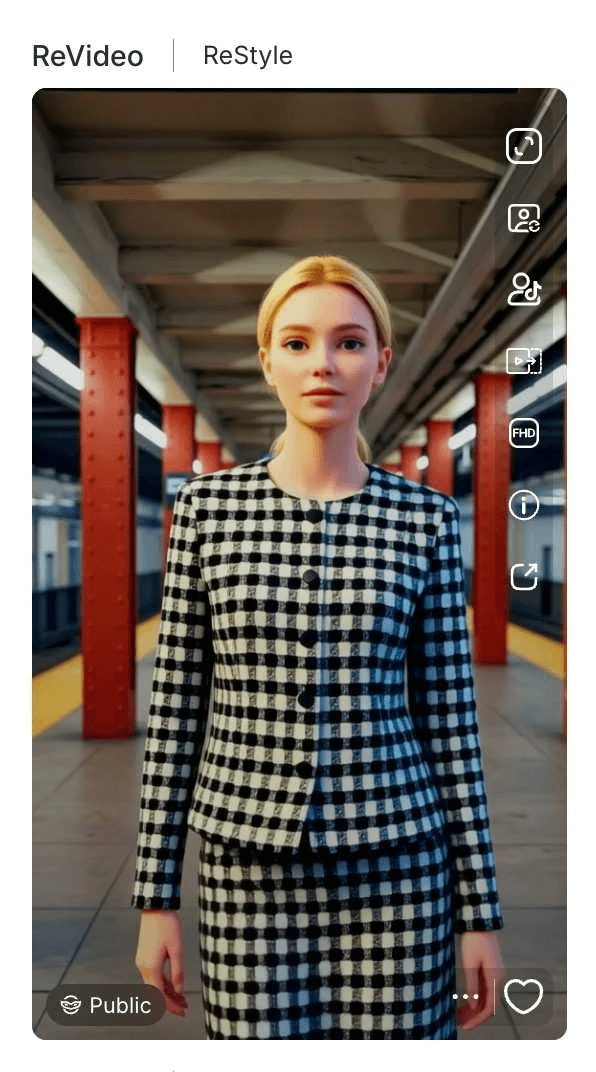
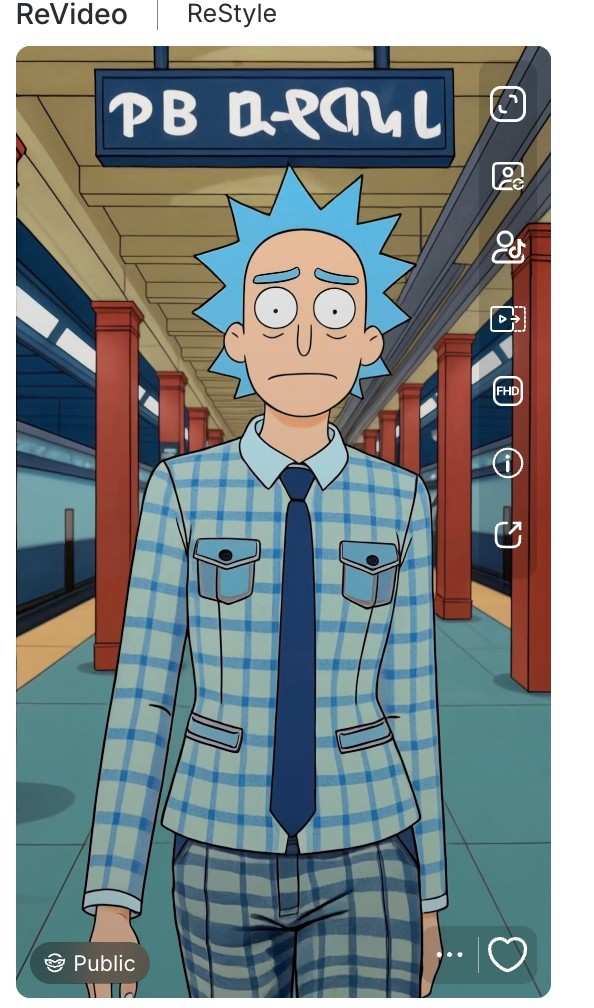
Now we have obtained two exquisite videos in the same style that perfectly match the original film or television series, and the videos also preserve your original movements and backgrounds.
ReProduct: It's a completely new experience for e-commerce. All you have to do is use ReProduct to change the product in a video (for example, from a soda bottle to a cup of coffee) instead of setting up a new video crew. Upload your original video and the new product's photo, you can also enter a prompt to describe and modify the details of your new product, then click generate. A new video will be generated shortly, where the new product replaces the old one while everything else remains unchanged.
Here, we load a video of an unboxing of a Christmas present by a man who is wearing a grey watch. Now, we load this video along with an image of the new product: it is a deep blue watch. You can also enter your own descriptions of the new watch by making use of some prompts. Then, we have a new video of an unboxing by the man who is wearing the deep blue watch—everything remains the same, only the product has changed.
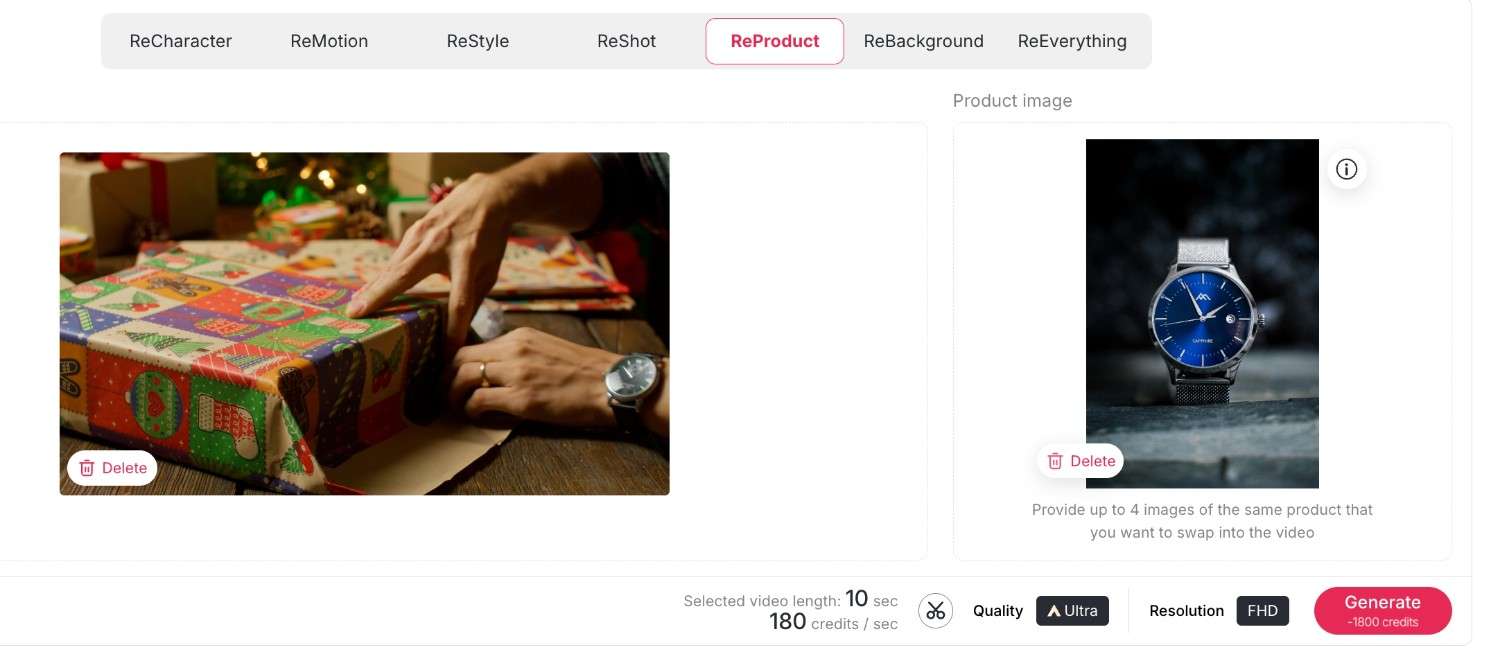
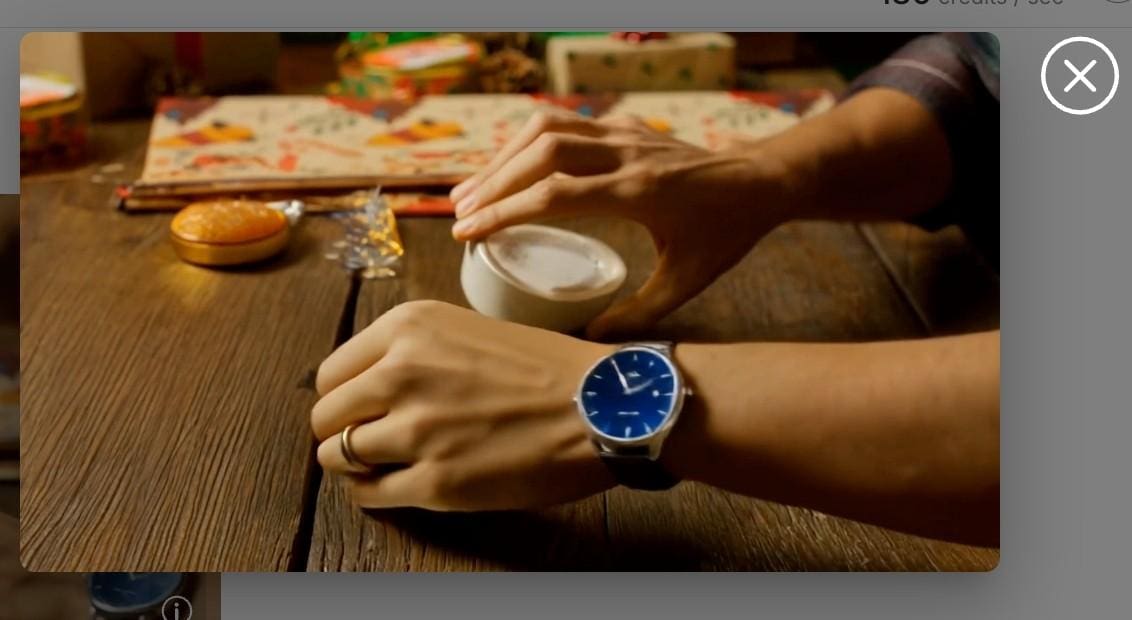
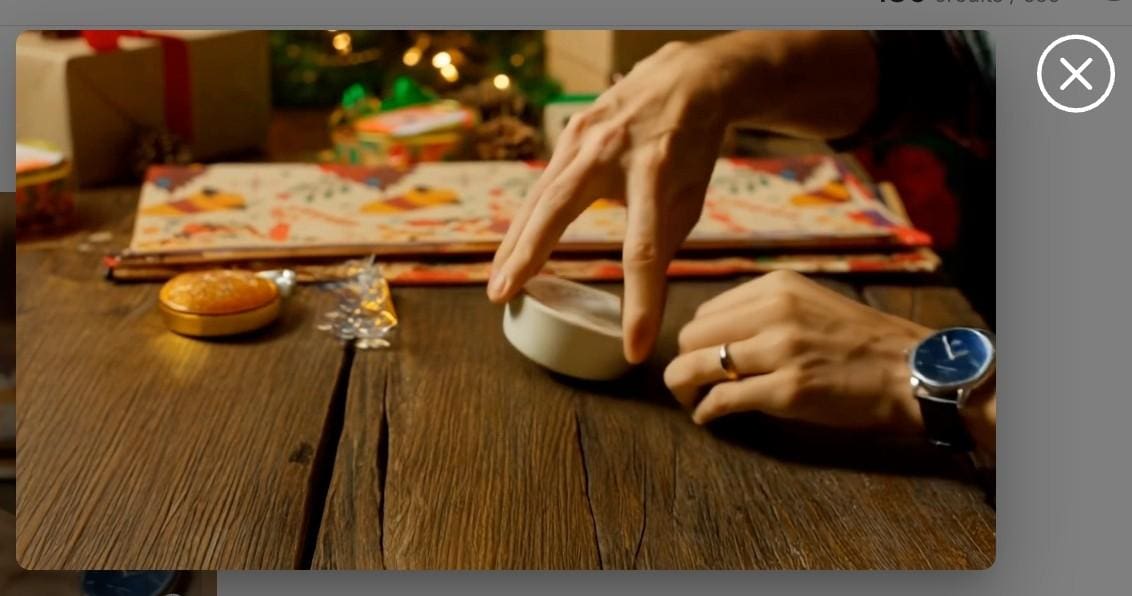
ReBackground: With this function, you are free to transport your subject anywhere, or swap a dull bedroom background for a posh beach resort without needing a green screen.
First upload your original video, then upload your desired background image; here, you can also enter some descriptions to further approach the effect you want.
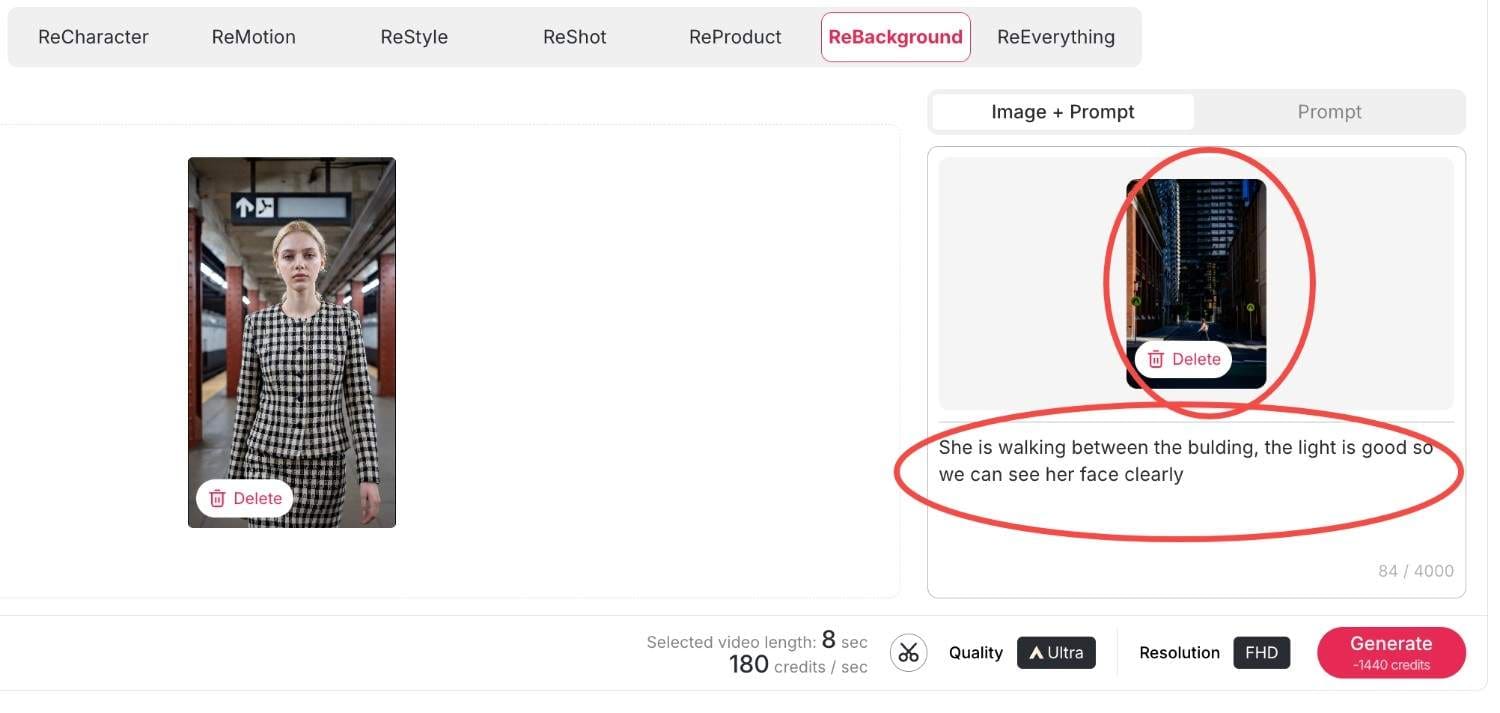
Then click generate, within seconds your new video will be produced.
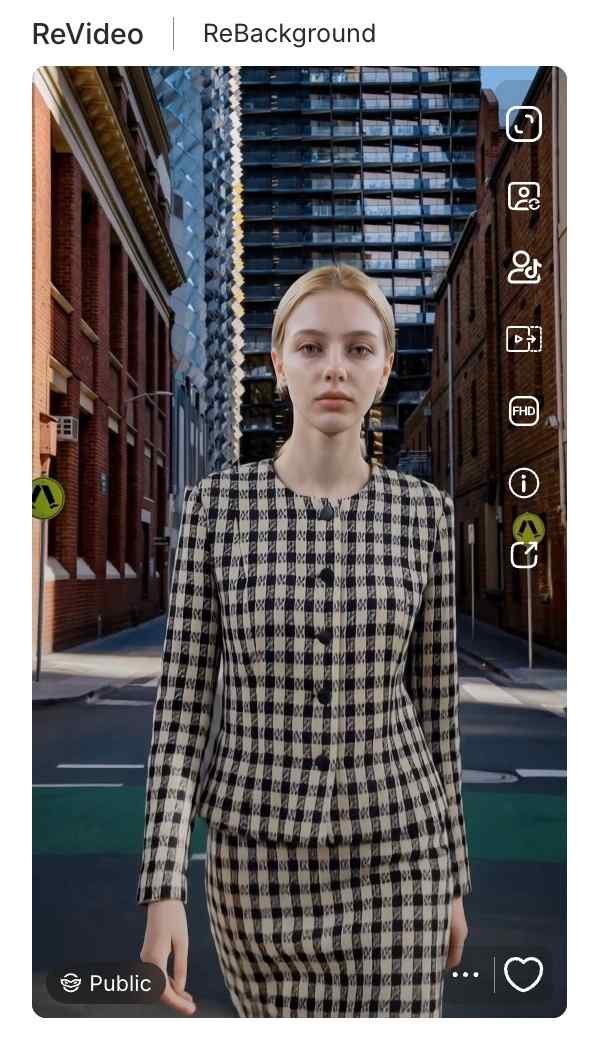
Reeverything: If you want to change the background or the style, the camera movement all at once, you can use reeverything so you can process them all with your prompts.
Step 3: Finalizing Quality and Resolution
Ensure that you have the right settings in place before you generate. There is also the choice to switch between quality settings, whether it is Best or Ultra. Additionally, you are given the choice of Resolution, whether it’s 720P for posting on social media or when creating videos to upload to YouTube in Full HD. Lastly, click on the 'generate' button, and the Kling AI Video Generator delivers your creation.
Methods for Monetizing AI-Generated Content through APOB AI
Creating video using a Kling AI video generator is not just a fun hobby but a potent business application. The capability to create high-quality video effortlessly gives rise to many money-making opportunities. Here’s how various individuals are profiting from it.
Influencer & Creator Marketing Opportunities
Social media influencers can greatly increase their engagement using these tools.
Traffic Generation: With ReStyle, you can ride on viral trends on TikTok and Instagram Reels. High-quality visuals make you pause and scroll no more; therefore, this results in increased views and earnings for Creator Fund.
Faceless Channels: Moreover, you may use the "Select a content" feature and operate YouTube channels without the presence of your face. Develop storytelling content or motivation niches with virtual avatars.
Solutions For e-commerce and Marketers
Among entrepreneurs, there is a unique benefit of the video generator by Kling AI offered on the platform Apob AI.
Cost-Effective Ads: Instead of sending products to influencers, use ReProduct. Record one video of a generic model holding a product, then replace the product with what’s in stock.
Service Offerings: Market your “AI Video Restyling” service on Fiverr/Upwork. You will be charging your consumers for enhancing their video footage to Hollywood-style ads using the ReMotion.
And if you have no clue, our rich and creative community content will provide you with infinite creative inspiration.
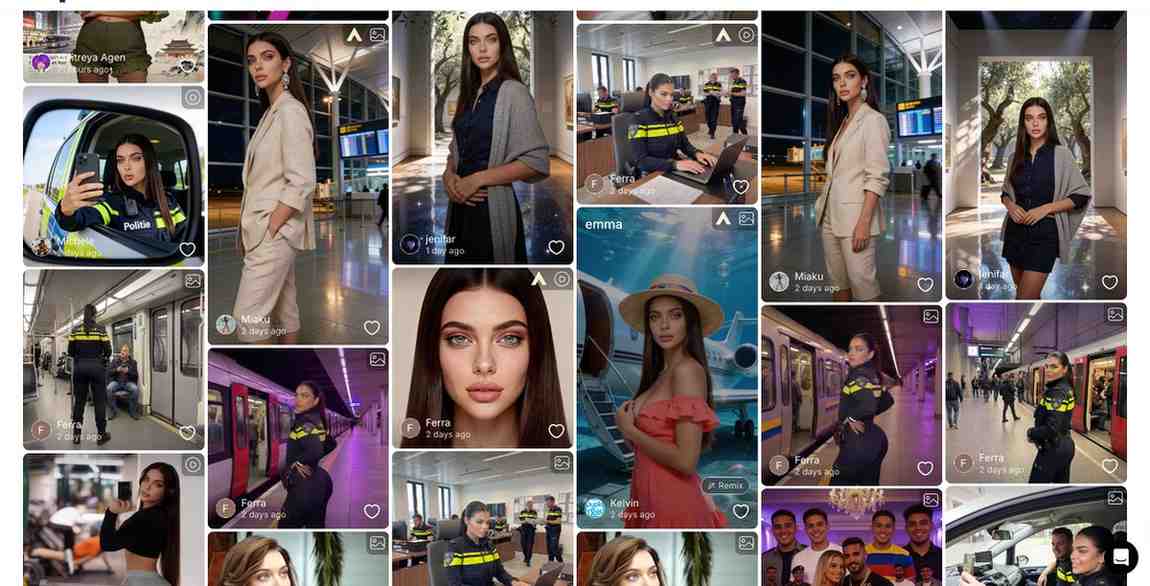
Comparison of Apob AI to other AI-powered video generation tools
Runway Gen-3: Although it is powerful at handling text-to-video prompts, many beginners find its interface difficult to navigate and the learning curve quite steep.
Luma Dream Machine: Known for its speed, Luma unfortunately lacks the essential "ReProduct" and specialized character consistency tools required for a professional production environment.
APOB AI (The Winner): Powered by the latest Kling 2.6 engine, APOB AI specializes in high-fidelity human portraits and cinematic video generation. Unlike competitors, we offer 80 free credits every single day and a dedicated suite for fashion and product placement.
Overall, the Apob AI combines the most effective models, such as the Kling AI model, but also incorporates them in a workflow.
Frequently Asked Questions(FAQ)
In what way is the video generator by the Kling AI company distinctive?
It relies on physics simulation to produce videos that strictly follow instructions, including realistic motion that goes above and beyond older models.
How do I utilize the ReProduct feature?
You simply upload your video, go to ReProduct, and add your reference image or description of what you want your new product to look like in the video.
Is there a free trial for Kling 2.6?
Yes, APOB AI offers you 80 free credits everyday, allowing you to test functionality enabled by our advanced integrations, such as Kling 2.6 everyday for free.
Can I make an anonymous faceless channel for YouTube with Apob AI?
Yes. Using "Select a content" functionality and virtual models, you can produce unique video content without having to record yourself.
What is the maximum resolution for exports?
The Apob AI system also offers high-definition export capabilities, such as FHD (1080p), to make sure that your videos remain crisp on any device.
Does ReMotion work on static images?
Yes, ReMotion’s Kling AI can make a static image and add effects of camera movements such as pans and zooms to make a video clip.
Can I use these videos for commercial advertisements?
Yes, the users with the paid plan have the commercial rights to the videos they make, so they are ideal for use on ads on platforms like Facebook or TikTok.
Is the interface difficult for beginners?
No. The Apob AI is created in a "click-and-create" model. There is no need to learn programming or be familiar with intricate video editing software.
How frequently new features are added?
Our platform is updated continuously. As soon as new updates for such models as Kling AI (version 2.6) appear, we start adding them to tools such as ReVideo.
References
Apob AI. (2025). AI Video Editing and Generation Tools. Retrieved from https://www.apob.ai.
Forbes. (2025). The Business of AI: How Creators Are Monetizing Video Gen. Retrieved from https://www.forbes.com/ai-video-monetization.
Kling AI. (2024). Kling 2.6 Technical Report and Features. Retrieved from https://klingai.com/research.
Read More
How to Get Free Access to Seedream 4.0
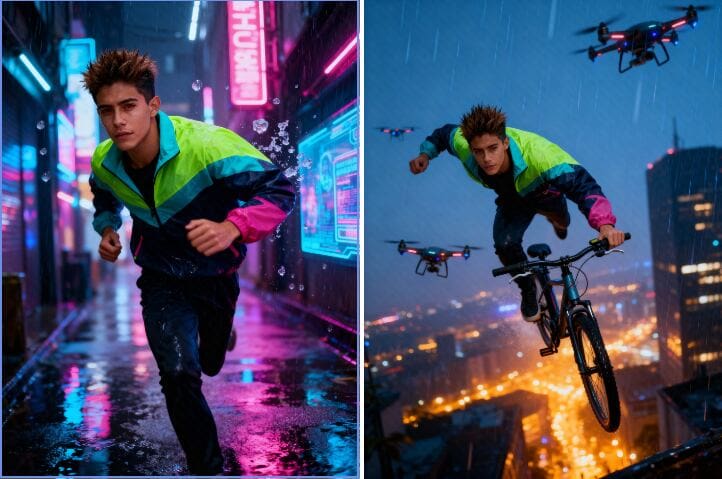
AI pictures are transforming the way we visualize and produce images. You're a designer, marketer, or art lover? Software like seedream 4.0 is creating new and innovative methods of production. So, what exactly is Seedream 4.0, and how can you use it for free? Here in this tutorial, we're going to discuss its most important features and guide you through accessing free use via APOB AI.
What Is Seedream 4.0?
Seedream 4.0 is an advanced AI image editor and generator that creates your concepts within seconds. Unlike conventional software like Photoshop, which demands manual editing, Seedream 4.0 is capable of processing raw text inputs and automatically generating real-looking and high-quality images.
Its intelligent AI engine powers incredible features such as inpainting, outpainting, background swap, and style transfer — all automated. You can make anything from photorealistic portraits to anime sketches, product renderings, or movie scenes.
How to Create an Image with Seedream 4.0
Creating with seedream 4.0 is incredibly simple and fast:
Step 1: Describe Your Vision
Write a quick prompt — say, "a sunset beach with a futuristic skyline."
Step 2: Watch the Magic Happen
Click Generate, and Seedream 4.0 will instantly turn your words into breathtaking pictures.
Step 3: Perfect Your Creation
Want something else? Revise your prompt or work out new variations until it looks just so.
Seedream 4.0 Meets APOB AI — Free Access Inside
Here’s the best part: you can use Seedream 4.0 for free directly through APOB AI.
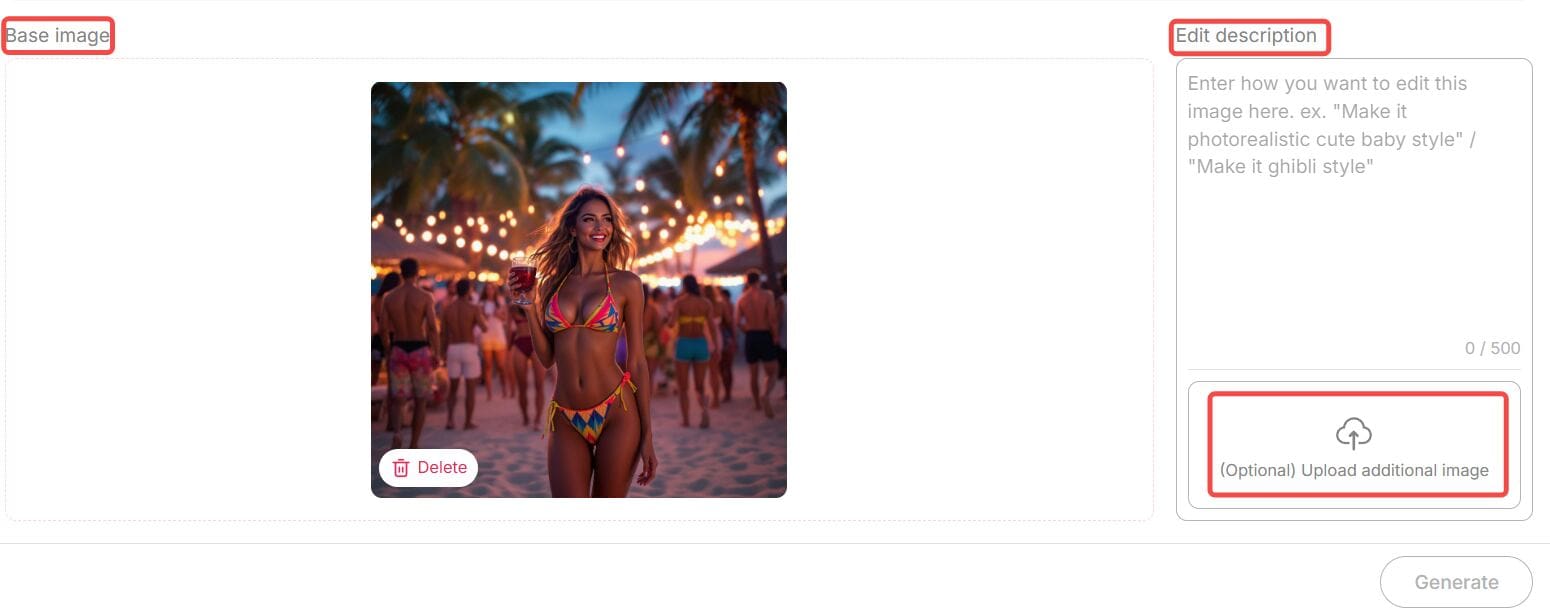
APOB AI is an advanced AI image generator and editor platform that integrates Seedream’s technology. Beyond image generation, it offers powerful editing features such as Chat to Edit — a tool that lets you modify images simply by typing text prompts.
For example, you can:
Change backgrounds effortlessly
Adjust facial expressions
Add or remove objects
Apply artistic filters
Even transform a portrait into a Barbie-style character,etc.
All you need to do is upload your image, enter your desired modification in natural language (and optionally upload a reference photo), then click “Generate.” APOB AI will instantly deliver a perfectly edited image.
Each edit costs only 40 credits, and here’s the amazing news — when you sign up for APOB, you receive 80 free credits daily. That means you can edit or create multiple images completely free, every single day.
So if you want to experience seedream 4.0’s power — APOB AI is your best gateway to explore it without paying a dime.
Why Seedream 4.0 Stands Out
Free and Unlimited Use
One of the best things about seedream 4.0 is that it’s completely free to try — no sign-up or hidden costs. You can create as many images as you like and use all the main features right away. Just type your idea, click “Generate,” and start creating. It’s simple, fast, and open to everyone.
Many Artistic Styles
Seedream 4.0 offers tons of creative looks — from realistic photos to watercolor, anime, fantasy, cyberpunk, and minimalist designs. Whether you’re making a product photo or a dreamy digital painting, you can find a perfect style for your project.
Smart Customization
Need more control over your image? Seedream 4.0 lets you easily adjust lighting, color, background depth, and composition. You can fine-tune your image until it looks exactly how you want. It’s easy to use but powerful enough for serious creators.
Inpainting and Outpainting
Want to erase something, add more space, or fix small mistakes? Seedream 4.0 can handle it. Its inpainting and outpainting tools let you remove or expand parts of the image naturally — no rough edges or weird blends.
4K Quality and Clear Text
Unlike many free tools that limit resolution, Seedream 4.0 supports sharp 4K ultra-HD images. It even keeps text and logos clean and readable. This makes it great for professional work, like ads, posters, or brand visuals.
Why Choose APOB + Seedream 4.0?
In today’s fast-paced creative world, speed and flexibility are everything. Whether you’re generating visuals for marketing campaigns or editing lifestyle shots for social media, Seedream 4.0 through APOB delivers:
Professional quality visuals
Lightning-fast image creation
AI-assisted editing that feels natural and human
Zero technical barriers
Together, they offer a complete solution — from generating original art to perfecting existing photos — all powered by next-gen AI.
Final Thoughts
AI creativity is evolving faster than ever, and seedream 4.0 is one of the tools leading that transformation. Its ability to understand natural prompts, deliver 4K visuals, and adapt to professional demands makes it stand out among today’s AI image generators.
And thanks to APOB AI, you don’t need to pay to explore it. You can experience all the power of seedream 4.0 — for free — while also enjoying advanced features like Chat to Edit and daily bonus credits.
If you’ve been searching for the best way to create, customize, and enhance your visuals in 2025, this is your chance to try the future of AI art — free of charge.
FAQs
Q1: Do I need any technical expertise?
A1: Not at all. Seedream 4.0 and APOB AI are designed for everyone. Just type what you imagine, click generate, and you’re done.
Q2: What types of images can I create?
A2: You can create portraits, anime characters, product photos, digital art, fantasy landscapes, and much more. All major aspect ratios — 9:16, 16:9, 3:4, 4:3, and 1:1 — are supported.
Q3: Are there any usage limits?
A3: Through APOB AI, you receive 80 free credits daily, allowing you to generate or edit multiple images each day. You can also purchase more credits if needed.
Q4: Can I use the images commercially?
A4: Yes. Images generated by Seedream 4.0 via APOB AI are yours to use, including for commercial projects like ads, websites, or product packaging.
Read More

No credit card needed


