
The world of generative artificial intelligence is witnessing a seismic shift. Recently, the tech world was set ablaze by the release of z-image, a groundbreaking model from Alibaba’s Tongyi Lab. Designed with a 6-billion parameter architecture, it has redefined what "lightweight" models can achieve. However, as the hype around z-image turbo—its ultra-fast, distilled counterpart—continues to grow, professional creators are looking for something more: a tool that doesn't just generate, but innovates.
Enter APOB AI. While z-image is a technical marvel, APOB AI has emerged as the comprehensive platform that takes the raw power of such models and transforms them into a professional-grade creative suite.
What is z-image?
Before diving into the comparisons, it is essential to understand what makes z-image unique. Developed by the expert team at Alibaba's Tongyi Lab, z-image is a diffusion-based foundation model built on a "Scalable Single-Stream Diffusion Transformer" (S3-DiT). This unique structure allows the model to process text and visual data simultaneously, leading to incredible parameter efficiency.
The industry-leading z-image turbo version is specifically optimized for sub-second generation. By using advanced distillation techniques, z-image turbo can produce high-quality images in as few as 8 steps, making it one of the fastest open-source models available today. It is particularly famous for its photorealism and its ability to render accurate bilingual text in both English and Chinese.
How to Use APOB AI to Generate Superior AI Images
While z-image serves as a powerful engine, APOB AI provides the luxury vehicle that drives that engine to its full potential. APOB AI streamlines the complex world of AI generation into an intuitive, high-performance web experience.
Step 1: Get Started for Free
The barrier to entry is non-existent. You can visit the official website at apob.ai or search for "APOB AI" to enter the portal. By clicking the "Try for free" link, users are greeted with 80 free daily credits, allowing you to explore the power of premium AI without an initial investment.
Step 2: Craft Your Custom AI Model
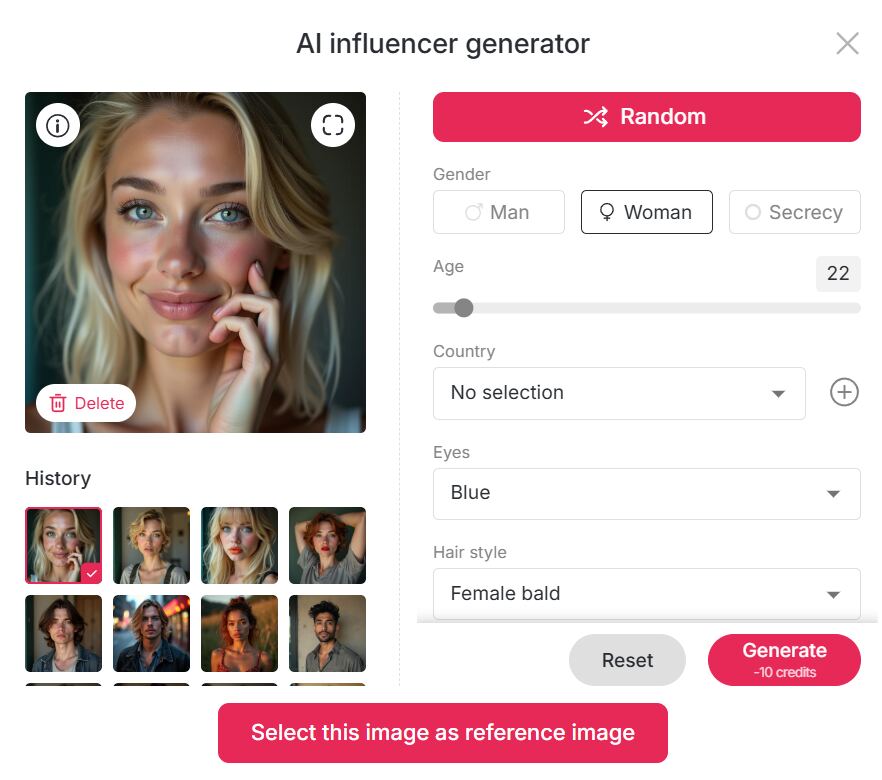
APOB AI offers unparalleled personalization. In the Community Model section, you can discover a vast library of user-generated models. If you see a style that fits your vision, you can adopt it instantly. Alternatively, use the "Create Portrait Model" feature. You can upload your own photos or use the AI Influencer Generator. Here, you become the director, selecting age, gender, nationality, height, weight, hairstyle, eye color, face shape, and skin tone to create the perfect AI girl or boy for your brand.
Step 3: Generate Masterpiece Images
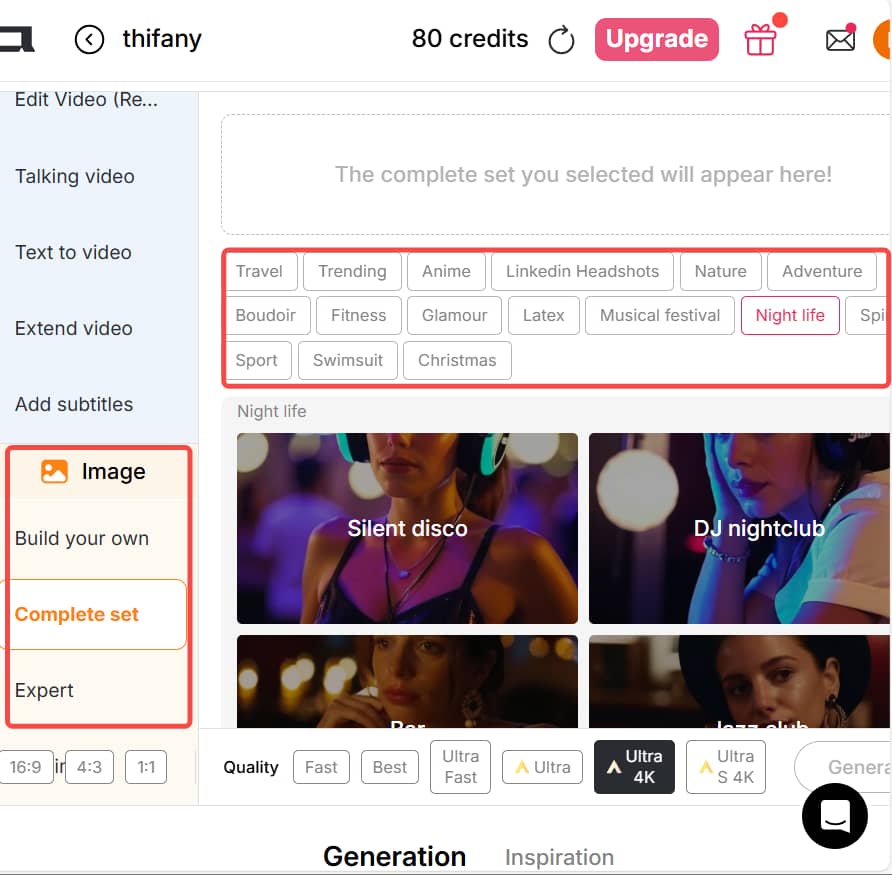
APOB AI offers three distinct pathways to perfection:
Build Your Own: Select from artistic styles like Cute 3D, Cute Comic, Vintage Anime, Pixel, Manga, or Anime Sketch. You can even use the AI Character Generator from Text by entering a prompt of up to 2,000 characters to realize your vision.
Template Mode: For instant results, use the "Complete Set" option. Whether you need travel photos from London or Turkey, a vintage Audrey Hepburn aesthetic, a professional LinkedIn Headshot, or a fitness-themed bikini shot, one click does it all.
Expert Function: For power users, this mode supports a 2,000-character positive prompt and a 2,000-character negative prompt, giving you absolute control over every pixel.
What are the Defining Features of z-image?
The z-image model family has set several benchmarks in the AI community:
High-Speed Inference: Thanks to the z-image turbo optimization, users can generate images almost instantly on consumer-grade hardware.
Bilingual Mastery: It solves the age-old AI struggle with text, allowing for clean typography within generated art.
Efficiency: Despite having only 6 billion parameters, its output quality rivals much larger, more resource-heavy models.
Open-Source Versatility: It provides a strong base for community fine-tuning, especially in the ComfyUI ecosystem.
Why APOB AI Beats z-image: The Competitive Edge
While z-image turbo is excellent at generating a fast static image, APOB AI offers a holistic creative ecosystem that surpasses the limitations of a single model.
Integrated AI Video Generation
The most significant advantage of APOB is that it isn't just an image tool; it is a powerful AI video generator. While z-image provides the "frame," APOB provides the "motion." You can take your generated character and create 3-second cinematic videos directly on the platform. This makes APOB the ultimate tool for digital marketers and content creators who need more than just a still photo to engage their audience.
"Chat to Edit" – Interactive Perfection
In a traditional z-image workflow, if the hair color is wrong, you often have to start over. APOB AI introduces the Chat to Edit function. Simply tell the AI, "Change the dress to blue" or "Make the expression more cheerful," and the system adjusts the existing image seamlessly. This level of granular control is something the base z-image models cannot offer without complex external setups.
Final Verdict
The z-image and z-image turbo models from Alibaba are fantastic technical achievements for the open-source community. However, for users who need a polished, versatile, and commercially viable platform, APOB AI is the clear evolution. By combining the precision of advanced portrait models with the dynamic capabilities of an AI video generator, APOB isn't just keeping up with the competition—it’s leading it.
Ready to outshine the rest? Try APOB AI for free today and bring your digital characters to life!
FAQ: Navigating the APOB AI Ecosystem
Q1: Is APOB free to use?
A1: Yes! Every user can claim 80 free credits daily. The number of images you can create depends on your chosen mode:
Fast Mode: 10 credits for 4 images.
Best Mode: 20 credits for 4 images (Ideal for balanced quality).
Ultra Mode: 24 credits for 1 image (Professional detail).
Ultra 4K: 46 credits for 1 image (The absolute gold standard).
Tip: 80 credits can also produce 3 seconds of high-definition video in Best Mode.
Q2: What image sizes does APOB support?
A2: We cater to all modern social and professional platforms with aspect ratios including 9:16, 16:9, 3:4, 4:3, and 1:1.
Q3: Can I modify an AI-generated image after it's done?
A3: Absolutely. Using our Chat to Edit feature, you can input a prompt to adjust clothing, change backgrounds, or fine-tune facial features without regenerating from scratch.
Q4: Can I use the videos commercially?
A4: Yes, you can.APOB AI grants you the rights to use your generated videos for commercial purposes. Whether you are running a YouTube channel, a Shopify store, or a professional marketing agency, our output is ready for business. This commercial freedom, combined with the power of an AI video generator, gives you a massive advantage in the digital marketplace.

Be the first to like this.





No credit card needed


